This is the Storage of Spaceborne Computer 4 Bringing AI Compute to the Moon

Post Syndicated from Patrick Kennedy original https://www.servethehome.com/this-is-the-storage-kioxia-hpe-spaceborne-computer-4-bringing-ai-compute-to-the-moon/

We found a HPE Spaceborne Computer 4 compute module bringing AI inference to the moon later this year and the storage may surprise you

The post This is the Storage of Spaceborne Computer 4 Bringing AI Compute to the Moon appeared first on ServeTheHome.

Secure multi-tenant RAG with Amazon Bedrock and Verified Permissions

Post Syndicated from Rennay Dorasamy original https://aws.amazon.com/blogs/architecture/secure-multi-tenant-rag-with-amazon-bedrock-and-verified-permissions/

Large organizations building internal generative AI applications face a recurring challenge: controlling which teams or departments can access which documents, without duplicating infrastructure for each group. Within a single tenant, employees from a specific department should only access material assigned to that department. However, executives, with a wider span of control, will require access to material across multiple departments. Retrieval Augmented Generation (RAG) is one of several complementary techniques, including fine-tuning and continued pre-training, for customizing generative AI application responses with your data.

In an enterprise context, with fast-moving data and many users, RAG provides a middle ground between cost and performance. This post shows you how to use a single, shared Knowledge Base (KB) instance to reduce the cost and complexity of separate instances. You can update access rules in minutes without redeploying code and maintain a detailed audit trail of every authorization decision. You run a single RAG application that serves multiple departments, with document access evaluated at retrieval time.

Figure 1 illustrates the requirement.

Role-level access to shared organizational data and resources

A previous post, Multi-tenancy in RAG applications in a single Amazon Bedrock knowledge base with metadata filtering, demonstrates how to use Amazon Simple Storage Service (Amazon S3) folder structures and metadata filtering to segregate data between tenants within a single knowledge base. That pattern works well for broad, tenant-level boundaries where the filter value is known at design time and embedded in application code. However, within a single tenant, different departments or roles often need different document visibility and executives may need cross-cutting access that spans multiple boundaries. This post extends that foundation by externalizing the filter selection logic into Cedar policies managed by Amazon Verified Permissions, allowing dynamic, runtime-evaluated authorization decisions.

This pattern lets a single RAG application serve many departments while keeping each department’s documents isolated, without standing up a knowledge base per team. It builds on metadata filtering in Amazon Bedrock Knowledge Bases, a fully managed RAG capability that handles ingestion, retrieval, and prompt augmentation through a single API. Metadata filtering is a strong foundation, but it creates a gap. Filter selection logic has no external governance, and changing the rules requires a code redeployment.

When authorization logic lives inside code, rules can become inconsistent over time and require a full deployment cycle to change. Amazon Verified Permissions addresses this by providing scalable, fine-grained authorization and permissions management for custom applications. Externalized Cedar policies in Verified Permissions are auditable, version-controlled, and updatable at runtime.

This post walks you through a two-layer, defense-in-depth authorization pattern for granular, intra-tenant access control in RAG applications. Defense in depth is a security strategy that uses multiple independent layers of protection. Each layer operates independently. If one layer is misconfigured, the other layer still enforces access control. The pattern runs on Amazon Bedrock, a fully managed service that offers a choice of high-performing foundation models (FMs) from Amazon and AI companies through a single API, along with a broad set of capabilities you need to build generative AI applications with security, privacy, and responsible AI.

In this post, you learn how to:

  1. Enforce fine-grained, document-level access control at retrieval time using a single Amazon Bedrock Knowledge Bases instance.
  2. Evaluate Cedar policies at runtime to dynamically construct the metadata filter passed to the RetrieveAndGenerate API.
  3. Update authorization rules without changing application code or triggering a deployment.
  4. Design a deny-by-default authorization system intended to deny access when the authorization service is unavailable.

Isolation model and scope

This pattern provides filter-level (logical) isolation, not IAM-enforced (infrastructure) isolation. Metadata filters control which documents are returned at retrieval time, but the underlying knowledge base remains a shared resource. If the middleware logic that constructs the filter were to fail open, documents from other groups would be exposed.

This pattern is designed for granular access control within a single tenant. For example, controlling which departments, teams, or roles within one organization can access which documents. It is not a substitute for hard tenant isolation in a multi-tenant SaaS product. For cross-tenant isolation where a compliance boundary is required between separate customers or organizations, provision a dedicated knowledge base per tenant with IAM-enforced resource boundaries. Within each tenant’s knowledge base, you can then layer this filter-based pattern for finer-grained access control.

Use this pattern when:

  • You need to control document access across departments, teams, or roles within a single organization.
  • Access rules change frequently and you want to update them without code redeployment.
  • You want a single knowledge base instance to reduce cost and operational overhead for intra-tenant document segregation.

Do not use this pattern when:

  • You require hard isolation between separate customers or organizations (use a knowledge base per tenant with IAM boundaries instead).
  • Your compliance or audit requirements mandate infrastructure-level separation between data sets.
  • A failure of the filter mechanism would constitute a regulatory breach (filter-level isolation is a logical boundary, not a physical one).

Residual risk, ingestion race condition: A brief window exists between document upload and sidecar creation. The ingestion safeguard (Step 1) reduces this by excluding documents without sidecars. However, if you modify the ingestion schedule to run continuously or with short intervals, verify that the batching window in Amazon Simple Queue Service (Amazon SQS) (default 30 seconds) provides sufficient time for the tagging Lambda to complete before the next ingestion cycle.

Prerequisites

Before implementing this pattern, you need:

  1. Familiarity with Python, AWS Lambda, and infrastructure as code concepts.
  2. An AWS account with AWS Identity and Access Management (AWS IAM) permissions to create AWS Lambda functions, an Amazon API Gateway REST API, Amazon Cognito user pools, Verified Permissions policy stores, and Amazon Bedrock Knowledge Bases.
  3. Amazon Cognito configured with department-based user groups (such as dept-a, dept-b, dept-c) and cognito:groups included in the JSON Web Token (JWT) issued to clients.
  4. Amazon Bedrock model access for the FMs you plan to use (such as Anthropic Claude 3 Haiku, and Amazon Nova Lite 2).
  5. A Verified Permissions policy store created and the Cedar schema defined (principals, resources, actions) before deployment.
  6. AWS Cloud Development Kit (AWS CDK) or AWS CloudFormation to deploy the infrastructure described in this walkthrough.
  7. Sample documents prepared with department prefixes (such as docs/dept-a/report.pdf) for upload to Amazon S3.

Important: Implementing this pattern creates billable AWS resources, including Amazon Bedrock Knowledge Bases, AWS Lambda functions, Amazon API Gateway, Amazon S3, Amazon Cognito, Amazon Verified Permissions, Amazon EventBridge, Amazon SQS, Amazon DynamoDB, AWS WAF, and Amazon CloudFront. Costs vary based on usage volume and AWS Region. Review AWS Pricing for each service before deploying and see the Cleaning up section at the end of this post to remove resources when testing is complete.

Solution overview

Serving many departments from one application shouldn’t mean giving every department access to every document. This solution keeps each department’s documents isolated inside a single Amazon Bedrock Knowledge Bases instance, so you avoid the cost and operational overhead of a knowledge base per team within that tenant. Metadata tags logically separate documents, and Verified Permissions acts as an externalized policy enforcement point, deciding which documents a user’s group or role is authorized to see on every request.

A key objective is to serve multiple departments within a single tenant from one Knowledge Base instance. If you had to provision a separate instance per department, it would multiply the infrastructure: separate data sources, ingestion pipelines and management overhead. A single knowledge base with metadata filtered access avoids this duplication while providing logical document isolation within the tenant boundary. Documents are logically separated by their metadata tags, and Verified Permissions provides a reliable, externalized policy enforcement point to determine which tags a user, in a specific group or role, is authorized to access.

The ingestion pipeline tags documents with department metadata. Verified Permissions evaluates Cedar policies at query time to determine which department tags you are permitted to see. A middleware service (implemented as an AWS Lambda function) converts that policy decision into a metadata filter and uses this in the Amazon Bedrock RetrieveAndGenerate API. This API combines the retrieval and generation steps, returning a grounded response based on the filtered document set. The FM only processes documents that passed the filter.

Two independent layers enforce authorization:

  • Layer 1 (API access): A Lambda Authorizer on Amazon API Gateway calls Verified Permissions to decide whether you can invoke the API at all.
  • Layer 2 (document access): A middleware Lambda, used to orchestrate the call to the Knowledge Base, also calls Verified Permissions to determine which Knowledge Base resources your department is permitted to query, then constructs a metadata filter accordingly.

Neither layer depends on the other for correctness. If Layer 1 were bypassed then Layer 2 is designed to enforce document-level isolation at the KB metadata filter.

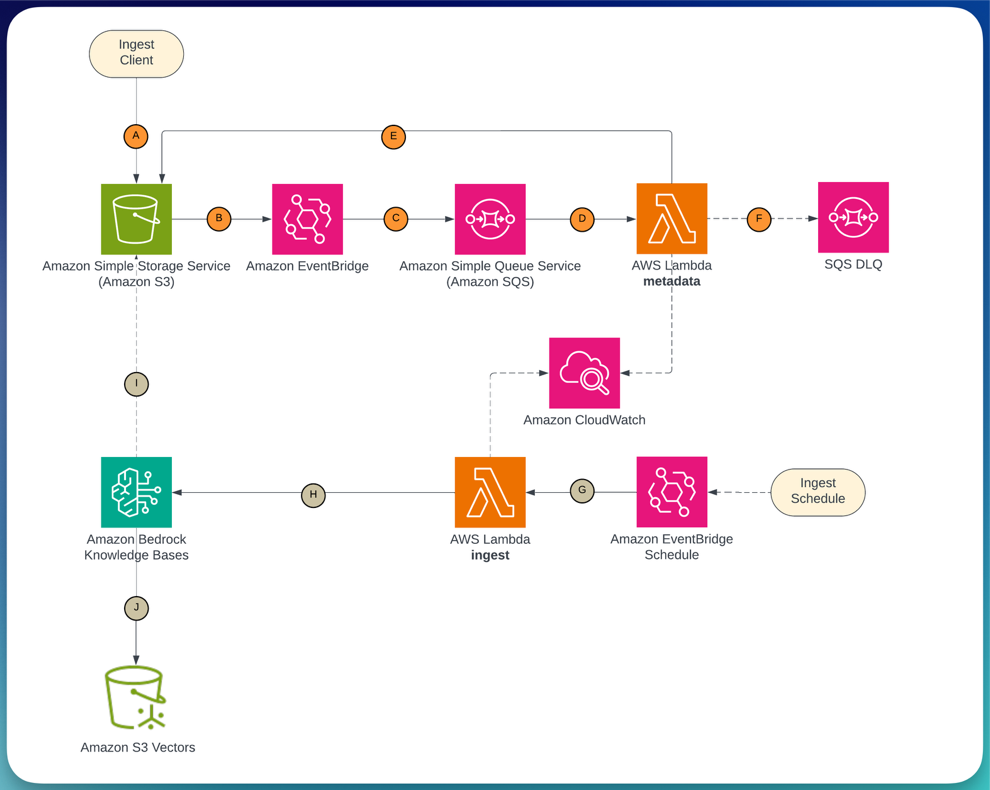
Ingestion pipeline showing documents uploaded to Amazon S3 triggering Amazon EventBridge, routing through Amazon SQS to an AWS Lambda function that writes metadata

Figure 2 shows the ingestion pipeline: documents uploaded to Amazon Simple Storage Service (Amazon S3) trigger Amazon EventBridge, which routes through Amazon Simple Queue Service (Amazon SQS) to an AWS Lambda function that writes metadata. A scheduled Lambda then triggers the Amazon Bedrock Knowledge Bases ingestion job.

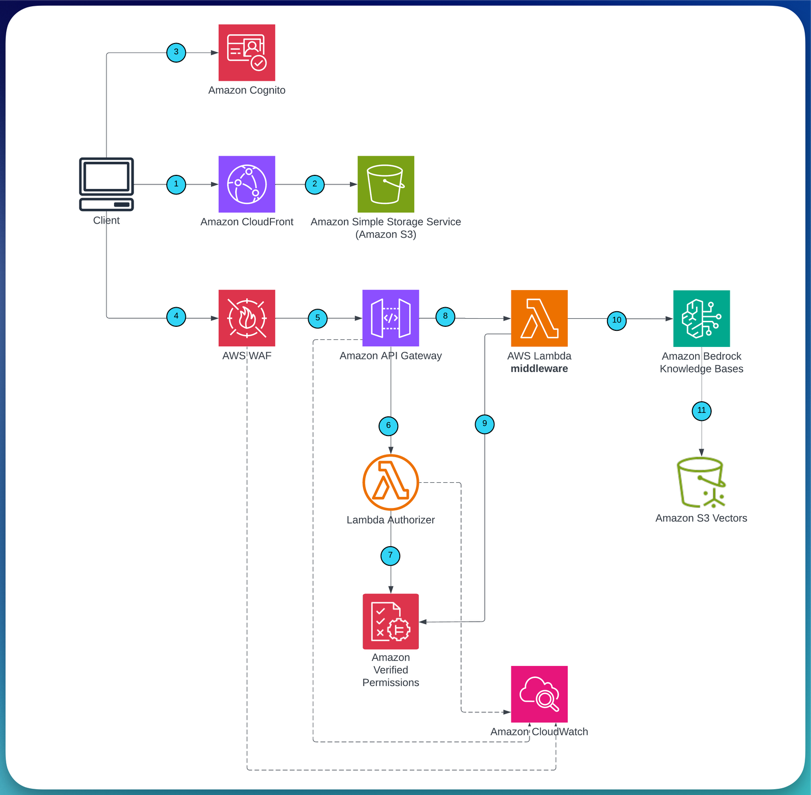
Query flow showing a user request passing through Amazon CloudFront, AWS WAF, Amazon API Gateway with Lambda Authorizer, and middleware Lambda to Amazon Bedrock Knowledge Bases

Figure 3 shows the query flow: a user request passes through Amazon CloudFront and AWS WAF to Amazon API Gateway, where the Lambda Authorizer evaluates Layer 1 (API-level) authorization against Verified Permissions. If permitted, the middleware Lambda evaluates Layer 2 (document-level) authorization, constructs the metadata filter, and calls RetrieveAndGenerate.

Authorization decision flow

Step Component Decision On deny
1 AWS WAF Rate limit and rule check Request blocked
2 Lambda Authorizer (Layer 1) Can you invoke the API? 403 returned
3 Middleware Lambda (Layer 2) Which departments can you access? Empty result set
4 Amazon Bedrock Knowledge Bases Metadata filter applied to retrieval Unauthorized docs excluded
5 Guardrails for Amazon Bedrock Response grounded in retrieved context? Response blocked or modified

Key AWS services

Layer Service Role
Identity layer Amazon Cognito Issues JWTs with department group claims (cognito:groups) from the user pool
API security layer AWS WAF Applies rate limiting, IP filtering, and managed rule evaluation at the edge
Layer 1 authorization Amazon Verified Permissions Evaluates Cedar policies for API-level access decisions in the Lambda Authorizer
Layer 2 authorization Amazon Verified Permissions Evaluates Cedar policies for document-level access and drives metadata filter construction
RAG retrieval and FM invocation layer Amazon Bedrock Knowledge Bases Fully managed RAG capability that handles retrieval with metadata filtering and FM generation in a single API call
Ingestion layer Amazon EventBridge, Amazon SQS Event-driven pipeline for metadata sidecar tagging; Amazon SQS buffers upload spikes and routes failures to a dead-letter queue

Technical implementation

The walkthrough presents ingestion pipeline first to tag and index your documents. You then move on to the Query Flow which contains the core authorization pattern. Each section following maps to a distinct component in the architecture.

Step 1: Set up the event-driven ingestion pipeline with metadata tagging

For the metadata filter to work at query time, documents need to be tagged with their department before they are indexed. The ingestion pipeline handles this in two phases.

Phase 1 (event-driven): When a document is uploaded to Amazon S3 under a department prefix (such as docs/dept-a/report.pdf), Amazon EventBridge fires an ObjectCreated event. The event routes through Amazon SQS to an AWS Lambda function that writes a .metadata.json sidecar file alongside the document.

The Amazon SQS queue buffers bulk uploads and routes failed tagging attempts to a dead-letter queue for retry.

Phase 2 (scheduled): An Amazon EventBridge schedule triggers an ingestion Lambda every five minutes, which calls the StartIngestionJob API on the Amazon Bedrock Knowledge Bases data source. Amazon Bedrock reads the documents and their sidecars from Amazon S3, chunks them, generates embeddings, and indexes the vectors with the department attribute.

# Validate sidecar presence before ingestion
objects = s3.list_objects_v2(Bucket=BUCKET, Prefix=f"docs/{dept}/")
docs = [o["Key"] for o in objects.get("Contents", []) if not o["Key"].endswith(".metadata.json")]
for doc_key in docs:
    sidecar_key = f"{doc_key}.metadata.json"
    try:
        s3.head_object(Bucket=BUCKET, Key=sidecar_key)
    except s3.exceptions.ClientError:
        logger.warning(f"Skipping {doc_key}: no metadata sidecar found")
        docs.remove(doc_key)

Tamper detection for metadata sidecars: Enable S3 Versioning on the document bucket and configure AWS CloudTrail S3 data events to log PutObject and DeleteObject calls. Create an Amazon CloudWatch Alarms metric filter that alerts when a PutObject to a .metadata.json key originates from principals other than the tagging Lambda role. For workloads with strict compliance requirements, consider S3 Object Lock in compliance mode to make sidecars immutable after creation – noting that document re-classification would then require a deliberate workflow to create a new version.

Upload prefix enforcement: The metadata tagging Lambda derives the department label from the S3 key prefix (for example, docs/dept-a/department: dept-a). To help prevent a user or process from uploading documents under another department’s prefix, scope upload permissions using an IAM policy condition:

{
    "Effect": "Allow",
    "Action": "s3:PutObject",
    "Resource": "arn:aws:s3:::your-doc-bucket/docs/dept-a/*",
    "Condition": {
        "StringEquals": {
            "aws:PrincipalTag/department": "dept-a"
        }
    }
}

Each upload principal (whether a user role, CI/CD pipeline, or application) should carry a department tag that matches its permitted prefix. This helps prevent the tagging Lambda from being tricked into mislabeling a document by an upload to the wrong path.

Ingestion safeguard: Before triggering the ingestion job, the scheduling Lambda lists objects under each department prefix and verifies that every document has a corresponding .metadata.json sidecar. Documents without a sidecar are excluded from the ingestion scope and logged to CloudWatch as untagged. This helps prevent an untagged document from being indexed without a department attribute, which could cause it to bypass metadata filters at query time. If your workload requires stricter guarantees, move untagged documents to a quarantine prefix and alert via Amazon Simple Notification Service (Amazon SNS).

S3 write restriction: Restrict s3:PutObject permission on the document bucket to the metadata tagging Lambda’s IAM execution role. All other principals – including application roles, CI/CD pipelines, and human operators should have at most s3:GetObject and s3:ListBucket. This helps prevent accidental or malicious modification of .metadata.json sidecar files, which could re-tag a document under a different department and expose it to unauthorized users on the next ingestion cycle. Use a bucket policy with an explicit deny for s3:PutObject that exempts only the tagging Lambda’s role ARN:

{
    "Effect": "Deny",
    "Principal": "*",
    "Action": ["s3:PutObject", "s3:DeleteObject"],
    "Resource": "arn:aws:s3:::your-doc-bucket/*",
    "Condition": {
        "StringNotEquals": {
            "aws:PrincipalArn": "arn:aws:iam::123456789012:role/MetadataTaggingLambdaRole"
        }
    }
}

A 30-second batching window on the Amazon SQS event source means bulk uploads are processed together rather than one document per Lambda invocation. The two-phase separation helps confirm that department metadata sidecars are written before the ingestion job runs, reducing the risk of a race condition where a document might be indexed without a department tag.

# metadata_lambda/handler.py
import boto3, json

def handler(event, context):
    for record in event["Records"]:
        body = json.loads(record["body"])
        s3_key = body["detail"]["object"]["key"]
        # Extract department from prefix: docs/dept-a/report.pdf -> dept-a
        dept = s3_key.split("/")[1]
        meta_key = s3_key + ".metadata.json"
        s3 = boto3.client("s3")
        s3.put_object(
            Bucket=BUCKET,
            Key=meta_key,
            Body=json.dumps({"metadataAttributes": {"department": dept}})
        )

Implementation note: Deploy this as the handler for your metadata tagging AWS Lambda function (Python 3.12 runtime). Set the BUCKET environment variable. The function’s IAM execution role requires s3:PutObject permission on the document bucket.

Step 2: Configure Amazon Bedrock Knowledge Bases

With Amazon Bedrock Knowledge Bases, you configure document chunking, embedding model selection, vector indexing, and metadata filtering without managing the underlying infrastructure. You configure a data source backed by the same Amazon S3 bucket as the ingestion pipeline.

Amazon Bedrock Knowledge Bases chunks documents at 300 tokens with 20% overlap (the default, which works well for structured enterprise documents). An embedding model, such as Amazon Titan Text Embeddings V2, generates the embeddings. The metadata attributes defined in the .metadata.json sidecar files are indexed alongside the vectors, making them available as pre-filters on the RetrieveAndGenerate call.

Step 3: Define the Cedar schema and policies in Amazon Verified Permissions

Verified Permissions provides fine-grained authorization through Cedar, a purpose-built policy language. The Cedar schema defines three entity types for this solution:

  1. Principal: GenAIApp::UserGroup (the department group extracted from the JWT)
  2. Action: query (retrieves documents from a knowledge base) and invokeModel (calls an FM)
  3. Resource: GenAIApp::KnowledgeBase and GenAIApp::Model

The namespace GenAIApp is a custom prefix you define when creating the Cedar schema. You can replace it with your own application namespace (such as MyCompany or RAGApp).

The following six policies cover the three departments used in this walkthrough. Department C has a cross-department access grant that covers each Knowledge Base resource, which suits a leadership or executive group:

// dept-a: query own knowledge base + use Claude 3 Haiku
permit(
    principal in GenAIApp::UserGroup::"dept-a",
    action == GenAIApp::Action::"query",
    resource == GenAIApp::KnowledgeBase::"dept-a"
);

permit(
    principal in GenAIApp::UserGroup::"dept-a",
    action == GenAIApp::Action::"invokeModel",
    resource == GenAIApp::Model::"anthropic.claude-3-haiku-20240307-v1:0"
);

// dept-b: query own knowledge base + use Claude 3 Haiku
permit(
    principal in GenAIApp::UserGroup::"dept-b",
    action == GenAIApp::Action::"query",
    resource == GenAIApp::KnowledgeBase::"dept-b"
);

permit(
    principal in GenAIApp::UserGroup::"dept-b",
    action == GenAIApp::Action::"invokeModel",
    resource == GenAIApp::Model::"anthropic.claude-3-haiku-20240307-v1:0"
);

// dept-c: cross-department access + use Amazon Nova Lite 2
permit(
    principal in GenAIApp::UserGroup::"dept-c",
    action == GenAIApp::Action::"query",
    resource
);

permit(
    principal in GenAIApp::UserGroup::"dept-c",
    action == GenAIApp::Action::"invokeModel",
    resource == GenAIApp::Model::"amazon.nova-2-lite-v1:0"
);

To adapt these policies for your organization, replace the department identifiers (dept-a, dept-b, dept-c) with your own group names. The pattern supports multiple access models: per-team, per-project, or hierarchical. For temporary access grants, add a Cedar policy with a when condition that evaluates a time-based attribute, and remove the policy when access should expire.

Policy changes take effect on the next API call. You do not need a Lambda redeployment or AWS CDK update.

Policy governance: Because Cedar policy changes take effect immediately, restrict who can modify policies in production. Apply IAM conditions on verifiedpermissions:CreatePolicy, UpdatePolicy, and DeletePolicy so that only a dedicated CI/CD pipeline role or a small set of authorized administrators can mutate the policy store. Enable AWS CloudTrail logging for Verified Permissions API calls and create a CloudWatch Alarm that triggers when policy mutation events occur outside your change management workflow. For production deployments, validate Cedar policies against test scenarios in a non-production policy store before promoting them. Treat policy changes with the same rigor as application code deployments.

Step 4: Configure Layer 1: API-level authorization (Lambda Authorizer)

When a request arrives at Amazon API Gateway, the Lambda Authorizer runs before your application logic. It validates the JWT signature against the Amazon Cognito JSON Web Key Set (JWKS) endpoint, then calls Verified Permissions IsAuthorized with your group membership. This is the traditional “authorization/access level” check: it verifies that you are allowed to invoke the API, not which documents you can access.

The authorizer denies access by default. If Verified Permissions is unavailable, the function raises an exception and Amazon API Gateway returns a 403.

import boto3, json

avp = boto3.client("verifiedpermissions")

def handler(event, context):
    token = event["authorizationToken"]
    claims = decode_and_verify_jwt(token)  # validates against Amazon Cognito JWKS
    groups = claims.get("cognito:groups", [])

    if not groups:
        raise Exception("Unauthorized")

    # Evaluate each group; allow if any group has a permit policy
    allowed = False
    for group in groups:
        response = avp.is_authorized(
            policyStoreId=POLICY_STORE_ID,
            principal={"entityType": "GenAIApp::UserGroup", "entityId": group},
            action={"actionType": "GenAIApp::Action", "actionId": "query"},
            resource={"entityType": "GenAIApp::Application", "entityId": "api"}
        )
        if response["decision"] == "ALLOW":
            allowed = True
            break

    if not allowed:
        raise Exception("Unauthorized")

    return generate_policy("Allow", event["methodArn"], claims)

Implementation note: Deploy this as a Lambda Authorizer (TOKEN type) on your Amazon API Gateway REST API. Set the TTL on the authorizer cache to 0 during testing so that policy changes take effect immediately.

Production cache TTL: In production, the API Gateway authorizer cache TTL controls how quickly policy revocations take effect. A TTL of 0 means every request triggers a fresh Verified Permissions evaluation. Revocations are immediate but latency increases. A TTL of 300 seconds (the API Gateway default) improves latency but means a revoked policy could continue to permit access for up to 5 minutes. For workloads where timely revocation matters (for example an employee offboarding or incident response), set the TTL to 0 or a deliberately short value (for example, 30–60 seconds) and accept the additional Verified Permissions API calls. The claim that “policy changes take effect on the next API call” holds true only when the authorizer cache TTL is zero or the cached entry has expired.

Multi-group membership: A user may belong to more than one Cognito group. For example, an employee who is a member of both dept-a and a cross-functional leadership group. The authorizer evaluates the group memberships present in the JWT and permits the API call if a group has a matching Cedar permit policy. This helps prevent arbitrary access restrictions based on the order in which groups appear in the token. Document-level access is then determined independently at Layer 2, where the middleware evaluates each department resource against the user’s groups to construct the appropriate metadata filter.

For error handling patterns, implement exponential backoff with jitter on the Verified Permissions API call. Log authorization decisions to Amazon CloudWatch for monitoring and auditing.

Step 5: Configure Layer 2: Document-level authorization (middleware Lambda)

Once a request passes Layer 1, the middleware Lambda runs a second, independent Verified Permissions evaluation. This time, it checks which KB resources you are permitted to query based on your group membership, then translates the decision directly into a metadata filter on the RetrieveAndGenerate call.

Amazon Bedrock Knowledge Bases applies the metadata filter before the vector similarity search runs. This means the FM processes only documents you are authorized to access. The filter helps prevent unauthorized documents from appearing in the retrieval set.

Department access model

Group Foundation model Knowledge base access
dept-a Claude 3 Haiku Department A documents only
dept-b Claude 3 Haiku Department B documents only
dept-c Amazon Nova Lite 2 Multiple departments (A, B, and C)
def build_filter_and_invoke(user_group, query, session_id):
    permitted_depts = []
    for dept in ["dept-a", "dept-b", "dept-c"]:
        resp = avp.is_authorized(
            policyStoreId=POLICY_STORE_ID,
            principal={"entityType": "GenAIApp::UserGroup",
                       "entityId": user_group},
            action={"actionType": "GenAIApp::Action",
                    "actionId": "query"},
            resource={"entityType": "GenAIApp::KnowledgeBase",
                      "entityId": dept}
        )
        if resp["decision"] == "ALLOW":
            permitted_depts.append(dept)

    if not permitted_depts:
        raise PermissionError("No permitted Knowledge Base resources")

    # Implement retry with exponential backoff on avp.is_authorized calls

    # Build metadata filter based on permitted departments
    if len(permitted_depts) == 1:
        kb_filter = {"equals": {"key": "department",
                                "value": permitted_depts[0]}}
    else:
        kb_filter = {"orAll": [{"equals": {"key": "department",
                                           "value": d}}
                               for d in permitted_depts]}

    return bedrock_agent.retrieve_and_generate(
        input={"text": query},
        retrieveAndGenerateConfiguration={
            "type": "KNOWLEDGE_BASE",
            "knowledgeBaseConfiguration": {
                "knowledgeBaseId": KB_ID,
                "modelArn": get_permitted_model(user_group),
                "retrievalConfiguration": {
                    "vectorSearchConfiguration": {
                        "filter": kb_filter
                    }
                }
            }
        }
    )

Implementation note: Deploy this as the handler for your middleware AWS Lambda function (Python 3.12 runtime). Set environment variables POLICY_STORE_ID and KB_ID. The function’s IAM execution role requires verifiedpermissions:IsAuthorized and bedrock:RetrieveAndGenerate permissions.

The FM selection uses the same Verified Permissions policy store. Cedar policies that grant invokeModel access determine which model ID the middleware passes to Amazon Bedrock, so model access control is driven by the same externalized policies as document access.

Security note: The metadata filter excludes unauthorized documents from the retrieval set before the FM processes them. If a user queries for another department’s data, the request returns no relevant results. To monitor for unexpected retrieval behavior, use Amazon CloudWatch logging on the middleware AWS Lambda function.

Benefits of two independent authorization layers

Layer 1 (API Gateway) Layer 2 (Middleware Lambda)
Question answered Can you invoke the API? Which documents can your department access?
Enforcement point Before application logic runs At Amazon Bedrock Knowledge Bases metadata filter
Failure mode 403 returned to you Empty or filtered result set

Availability trade-off: Both layers depend on Amazon Verified Permissions. If the service is throttled or unavailable, the deny-by-default design means users are denied access. This is the correct and intended secure behavior. For most workloads, a brief period of denial is preferable to failing open. If your application has strict availability requirements, consider implementing exponential backoff with jitter on all IsAuthorized calls (in both the Lambda Authorizer and the middleware Lambda) to handle transient throttling gracefully. A circuit-breaker that falls back to cached last-known-good authorization decisions can improve availability, but introduces a window where revoked access may still be honored. Document this trade-off explicitly if you adopt it, and make sure cached decisions expire on a short TTL.

Step 6: Add Guardrails for Amazon Bedrock as an output safety layer

Guardrails for Amazon Bedrock applies contextual source fidelity checks and content filtering as a complementary safety layer. Where Verified Permissions controls which documents the FM accesses, Guardrails evaluates the FM’s response before it’s returned to you.

Contextual source fidelity checks help confirm that the response stays faithful to the retrieved documents rather than drawing from the FM’s pre-training data. Combine this with the metadata filter from Layer 2 for a complete defense in depth approach: authorization restricts the retrieval set, and Guardrails validates the generated output.

The Guardrail configuration in the RetrieveAndGenerate call applies two checks:

  1. Contextual grounding: Helps limit responses that extrapolate beyond the retrieved context. This supports factual accuracy tied to your documents.
  2. Content filtering: Blocks responses containing harmful or inappropriate content based on your configured thresholds.

You apply the Guardrail in the RetrieveAndGenerate call by passing the guardrailConfiguration parameter with your Guardrail ID and version. Contextual grounding helps mitigate prompt injection by limiting responses to the retrieved context but does not eliminate all injection vectors. For additional defense, validate input length and sanitize queries before passing them to RetrieveAndGenerate. For more information, see the Guardrails for Amazon Bedrock documentation.

Step 7: Test the end-to-end authorization flow

With the solution deployed, here is what happens when a dept-a user submits a query:

  1. A user submits a query using a web application with Authorization: Bearer through Amazon CloudFront to AWS WAF.
  2. AWS WAF applies rate limiting and managed rules, then forwards clean traffic to Amazon API Gateway.
  3. The Lambda Authorizer validates the JWT and calls Verified Permissions. The dept-a group has a query permit policy, so the call is allowed.
  4. The middleware Lambda calls Verified Permissions for each Knowledge Base resource. Only dept-a is permitted, so the filter {“equals”: {“key”: “department”, “value”: “dept-a”}} is constructed.
  5. The middleware calls RetrieveAndGenerate with the metadata filter applied. Amazon Bedrock Knowledge Bases filters the document set before running the vector similarity search.
  6. Department B and C documents are excluded from the search space. The FM generates a response that stays grounded only in Department A documents.
  7. The response is checked by Guardrails for Amazon Bedrock before it is returned.

To test, use the following curl command with a valid JWT from Amazon Cognito:

curl -X POST https://<api-id>.execute-api.<region>.amazonaws.com/prod/query \
  -H "Authorization: Bearer <id_token>" \
  -d '{"query": "Summarize the latest department report"}'

A successful dept-a request returns a response grounded in Department A documents only. If authorization fails at Layer 1, you receive a 403 response. If Layer 2 finds no permitted resources, the function returns a PermissionError.

Monitor authorization decisions in Amazon CloudWatch Logs for both the Lambda Authorizer and middleware functions. Set up CloudWatch metric filters and alarms for the following:

  • Authorization deny rate (Layer 1 and Layer 2) – a spike may indicate credential probing, misconfigured clients, or a policy error.
  • Verified Permissions latency – sustained increases may signal throttling.
  • SQS dead-letter queue message count – messages in the DLQ indicate failed metadata tagging events that need attention.
  • Ingestion job failure rate – alerts you to documents that were not indexed.

AWS CloudTrail automatically logs Verified Permissions IsAuthorized calls, providing an audit trail of every authorization decision without additional configuration.

To observe the live policy update behavior, grant a dept-a Cedar policy that allows access to dept-b resources, then immediately resubmit the query. The next API call reflects the change. Revoke the policy and the restriction is restored on the following call.

Single knowledge base with metadata isolation

Adding a department requires adding a Cedar policy and tagging new documents. You do not need to provision additional infrastructure, deploy new stacks, or manage separate ingestion pipelines. The FM is presented with only the authorized document subset based on the applied metadata pre-filter.

For session management, use an Amazon DynamoDB table with a session TTL to maintain conversation context across requests. The RetrieveAndGenerate API accepts a sessionId parameter that manages multi-turn context automatically. Generate session IDs using a cryptographically random value (for example, uuid4) and bind each session to the authenticated user’s identity and group at creation time.

On every subsequent request, validate that the bearer token’s subject and group claims match the session owner before continuing the conversation. Invalidate sessions when a user’s group membership changes or their token is revoked and set a TTL appropriate to your use case (for example, 30 minutes of inactivity).

Cleaning up

If you deployed resources individually, delete them in the following order to avoid dependency errors:

  1. Amazon CloudFront distribution and AWS WAF web ACL.
  2. Amazon API Gateway REST API (this also removes the Lambda Authorizer association).
  3. AWS Lambda functions (metadata tagging, authorizer, middleware).
  4. Amazon Bedrock Knowledge Base and its associated data source.
  5. Amazon S3 bucket — empty the bucket first. If versioning is enabled, delete all object versions and delete markers before removing the bucket.
  6. Amazon EventBridge rule and Amazon SQS queue.
  7. Amazon DynamoDB table.
  8. Amazon Verified Permissions policy store.
  9. Amazon Cognito user pool (if created specifically for this pattern).
  10. IAM roles and policies created for the Lambda functions and API Gateway.
  11. Amazon CloudWatch log groups for each Lambda function.

Warning: Deleting these resources is irreversible. Back up any documents in S3, DynamoDB data, or Verified Permissions policies you may need before proceeding.

Conclusion

You now have a working defense-in-depth authorization pattern for granular, intra-tenant document access control in RAG applications that you built on Amazon Bedrock. With this approach, you can: change access policies at runtime without redeploying code, maintain logical document-level isolation that remains effective even if the API layer is misconfigured, and audit every authorization decision from a single Verified Permissions policy store.

Key takeaways

  • Updates without redeployment. Cedar policies in Verified Permissions are human-readable, version-controlled outside your Lambda code, and take effect on the next API call. You can revoke a department’s access or grant cross-department access to an executive group by updating a policy in the Verified Permissions console.
  • Cost-effective document isolation without infrastructure duplication. A single Amazon Bedrock Knowledge Bases instance with metadata pre-filtering delivers logical isolation between departments within a tenant, at a fraction of the cost and operational overhead of separate instances. Note that this is filter-level isolation, not infrastructure-level isolation – for hard tenant boundaries, use a dedicated knowledge base per tenant.
  • Independent enforcement layers help reduce the risk of a single point of failure. Layer 1 (Lambda Authorizer) and Layer 2 (middleware Lambda) enforce independent policy checks. Both call Verified Permissions separately, and both fail closed (deny by default).

Next steps

To extend this pattern further:

  1. Recommended first step: Test with your own documents. Replace the sample department documents with your own content, upload them under the appropriate prefix, and verify that the metadata filter isolates them correctly.
  2. Add a fourth department. Create a new Cedar policy, add a user group in Amazon Cognito, and upload tagged documents to validate that the pattern scales without code changes.
  3. Extend to agent tool authorization with Amazon Bedrock AgentCore. The Policy feature uses the same Cedar language to enforce fine-grained authorization on agent tool calls and gateways.
  4. Add attribute-based access control (ABAC). Extend Cedar policies to evaluate user attributes beyond group membership, such as project assignment, clearance level, or geographic location.
  5. Integrate with your identity provider. Replace Amazon Cognito with your enterprise identity provider (such as Okta or Microsoft Entra ID) by configuring a Verified Permissions identity source.
  6. Automate policy testing. Build a Continuous Integration/Continuous Deployment (CI/CD) pipeline that validates Cedar policies against test scenarios before deploying them to the policy store.
  1. Multi-tenancy in RAG applications in a single Amazon Bedrock knowledge base with metadata filtering (AWS Machine Learning Blog, April 2025)
  2. Amazon Verified Permissions documentation
  3. Amazon Bedrock Knowledge Bases documentation
  4. Amazon Bedrock Knowledge Bases with metadata filtering (AWS Machine Learning Blog, July 2024)
  5. Design secure generative AI application workflows with Amazon Verified Permissions and Amazon Bedrock Agents (AWS Machine Learning Blog, October 2024)
  6. Authorizing access to data with RAG implementations (AWS Security Blog, September 2025)
  7. Cedar policy language documentation

About the authors

Why tombola chose Graviton-powered RG instances for Amazon Redshift

Post Syndicated from Prabhu Pandian original https://aws.amazon.com/blogs/big-data/why-tombola-chose-graviton-powered-rg-instances-for-amazon-redshift/

Part of Flutter Entertainment, the world’s largest online sports betting and iGaming operator, tombola is the world’s biggest online bingo community and has been using Amazon Redshift to run its data analytics workloads. Founded in Sunderland, UK, the company traces its roots to the 1950s, when it began printing bingo tickets during the golden age of the game. tombola launched online in 2006 and has since expanded to Italy, Spain, Denmark, and Sweden. The company builds all of its games in-house, holds the most prestigious Safer Gambling award, and recently partnered with Flutter sibling brand Sisal to bring its bingo application to Italian players.

In this post, you learn how tombola followed a strict engineering principle: no changes to production without evidence. That meant a head-to-head comparison of RA3 versus RG on their actual workload. You also see benchmark results on Amazon S3 Tables and the migration from RA3 to RG instances.

Current data architecture

Amazon Redshift sits at the center of tombola’s data architecture. The production cluster runs on RA3 nodes and serves multiple schemas with hundreds of tables, supporting every analytical workload the business runs, from sub-second application lookups to multi-minute extract, transform, load (ETL) transforms. What makes tombola’s Amazon Redshift workload distinctive is the breadth of what flows through it. Amazon Managed Workflows for Apache Airflow (Amazon MWAA) DAGs orchestrate pipelines across over 14 business domains, including segmentation, fraud detection, marketing, finance, and SafePlay responsible-gaming. Configuration-driven ingestion pipelines land data from SQL Server, Amazon DynamoDB, Amazon OpenSearch Service, Postgres, and external APIs into Bronze and Silver layers on Amazon Simple Storage Service (Amazon S3), before loading it into Amazon Redshift. From there, over 250 dbt models running on Amazon Elastic Container Service (Amazon ECS) transform the data into analytical gold layers. Outputs feed multiple downstream consumers: Amazon SageMaker for fraud scoring and churn prediction, Amazon DynamoDB for low-latency APIs, and region-specific pipelines spanning the UK, Italy, Spain, Denmark, and Sweden. As the application grew, with more domains, more DAGs, and more concurrent users, the team began evaluating ways to reduce steady-state query latency and lower compute cost without rearchitecting the system. When AWS made Graviton-powered RG nodes available for Amazon Redshift, the timing was right.

Benchmark performance results

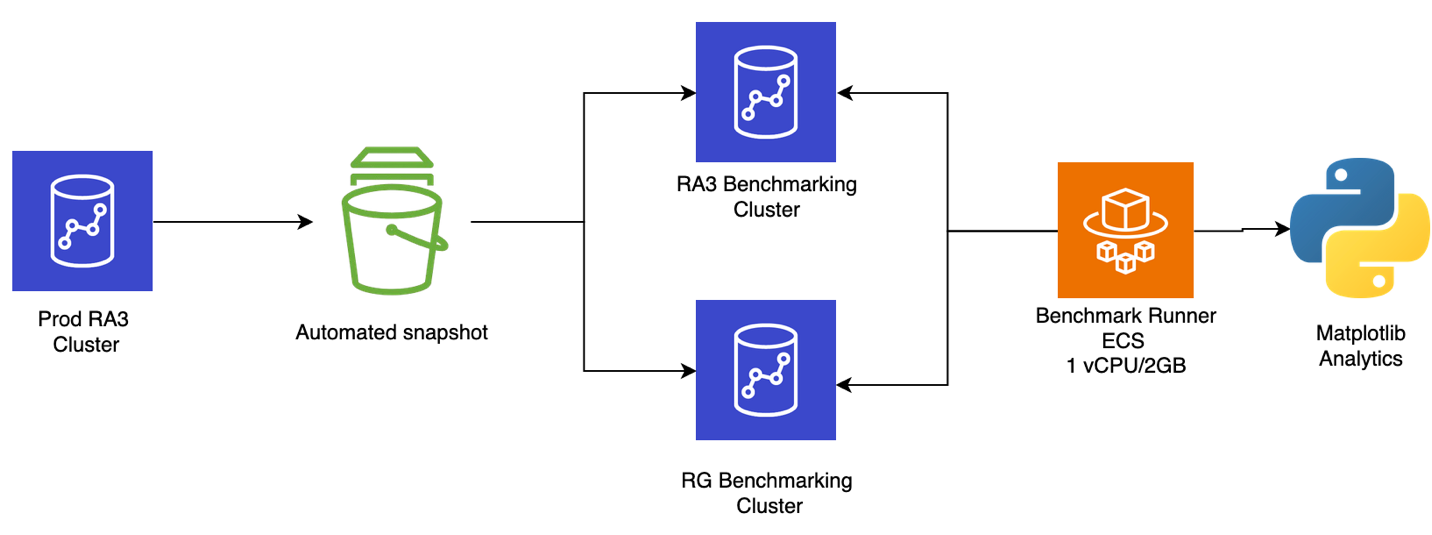
The benchmark infrastructure was fully defined as infrastructure as code (IaC), making sure every test run was reproducible. The team deployed two test benchmark clusters (one RA3 and one RG) in a like-for-like configuration. They mirrored the settings (Amazon Virtual Private Cloud (Amazon VPC), security groups, AWS Key Management Service (AWS KMS), AWS Identity and Access Management (IAM) roles, and parameter groups) from the production environment to remove configuration drift. The benchmark runner was containerized as an Amazon ECS task (python:3.11-slim-bookworm ARM64 base), providing repeatable, isolated execution for each test round. Benchmark workloads were selected by analyzing production cluster logs and metrics, then classified into three tiers:

  • Heavy: ETL queries with multi-table CTE chains, full-table scans, and aggregation windows.
  • Medium: Business intelligence (BI) queries driving reporting and analytics dashboards.
  • Light: Application queries with sub-second response times.

Architecture

Scenarios tested

To validate the performance of Graviton-powered RG instances against the existing RA3 nodes, tombola designed four benchmark scenarios that progressively increase in complexity and realism. Together, these scenarios provide a comprehensive view of performance from isolated query execution through to sustained, real-world analytical workloads.

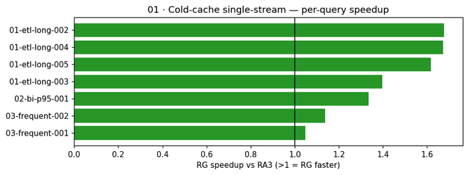
Scenario 01: Cold-cache, single-stream execution. This scenario isolates raw compute performance by running queries against a cold cache in a single stream, avoiding caching and concurrency as variables.

Per-query speedups ranged from 1.05× (light lookup queries) to 1.68× (heavy ETL transforms). Zero errors on both clusters (28 attempts each).

Weight Class RA3 p50 (ms) RG p50 (ms) Speedup
Heavy (ETL) 210,372 133,855 1.57×
Medium (BI) 2,193 1,642 1.34×
Light (App) 3.20 2.76 1.16×

The following chart shows per-query speedup ratios for the cold-cache scenario. Heavy ETL queries (left) show the largest gains, with speedups of 1.57–1.68×, and lighter queries still benefit at 1.05–1.16×. The pattern is consistent: RG’s advantage scales with query complexity.

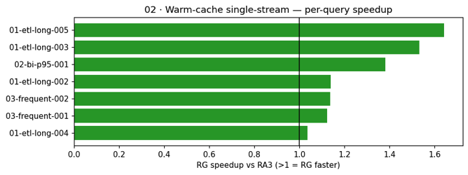
Scenario 02: Warm-cache, single-stream execution. This scenario repeats Scenario 01 with the result cache enabled to confirm that RG maintains its latency advantage even when cached results are in play.

Per-query speedups ranged from 1.04× to 1.64×. Zero errors on both clusters (35 attempts each).

Weight Class RA3 p50 (ms) RG p50 (ms) Speedup
Heavy (ETL) 93,636 61,691 1.52×
Medium (BI) 2,189 1,584 1.38×
Light (App) 3.08 2.58 1.19×

With result caching enabled, the speedup pattern holds for non-cached queries. Cache hits on both clusters land in 118–185 ms, confirming the caching subsystem operates identically regardless of node type. The RG advantage appears exclusively on execution paths that bypass the cache.

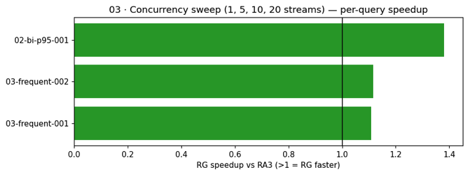
Scenario 03: Concurrency sweep. This scenario introduces parallel load by sweeping through 1, 5, 10, and 20 concurrent streams, testing how each node type handles contention and queuing under pressure.

Both clusters used the same Concurrency Scaling configuration (max_concurrency_scaling_clusters=1, WLM-only). RG completed 482 more queries in the same wall-clock window.

Metric RA3 RG Improvement
Total queries completed 1,438 1,920 +33% throughput
Light p50 (ms) 3.44 3.04 1.13×
Medium p50 (ms) 20,784 15,055 1.38×
Errors 0 0

Under increasing parallel load (1, 5, 10, and 20 concurrent streams), RG maintained lower latencies and completed 33 percent more queries in the same wall-clock window. Both clusters used the same Concurrency Scaling configuration, so the throughput difference is attributable to per-node compute efficiency.

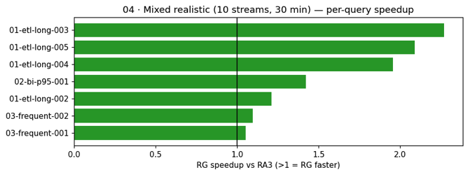
Scenario 04: Mixed realistic workload. This scenario combines the previous elements into a mixed realistic workload, running 10 streams simultaneously for 30 minutes with a weighted distribution of heavy, medium, and light queries to simulate actual production conditions.

This scenario best simulates production. The headline finding: heavy ETL queries saw speedups of up to 2.27× under concurrent load, and RG completed 46 percent more total queries in the same 30-minute window. Zero errors on both clusters.

Metric RA3 RG Improvement
Total queries completed 405 593 +46% throughput
Heavy p50 (ms) 1,186,572 642,294 1.85×
Medium p50 (ms) 2,319 1,631 1.42×
Light p50 (ms) 3.12 2.90 1.08×
Errors 0 0

The mixed-realistic scenario best simulates production. Under 10 concurrent streams over 30 minutes, heavy ETL queries showed speedups of up to 2.27×. RG’s per-vCPU throughput advantage compounds under contention, exactly the condition where production clusters spend most of their time.

Extended benchmark: Amazon S3 Tables (Iceberg) performance

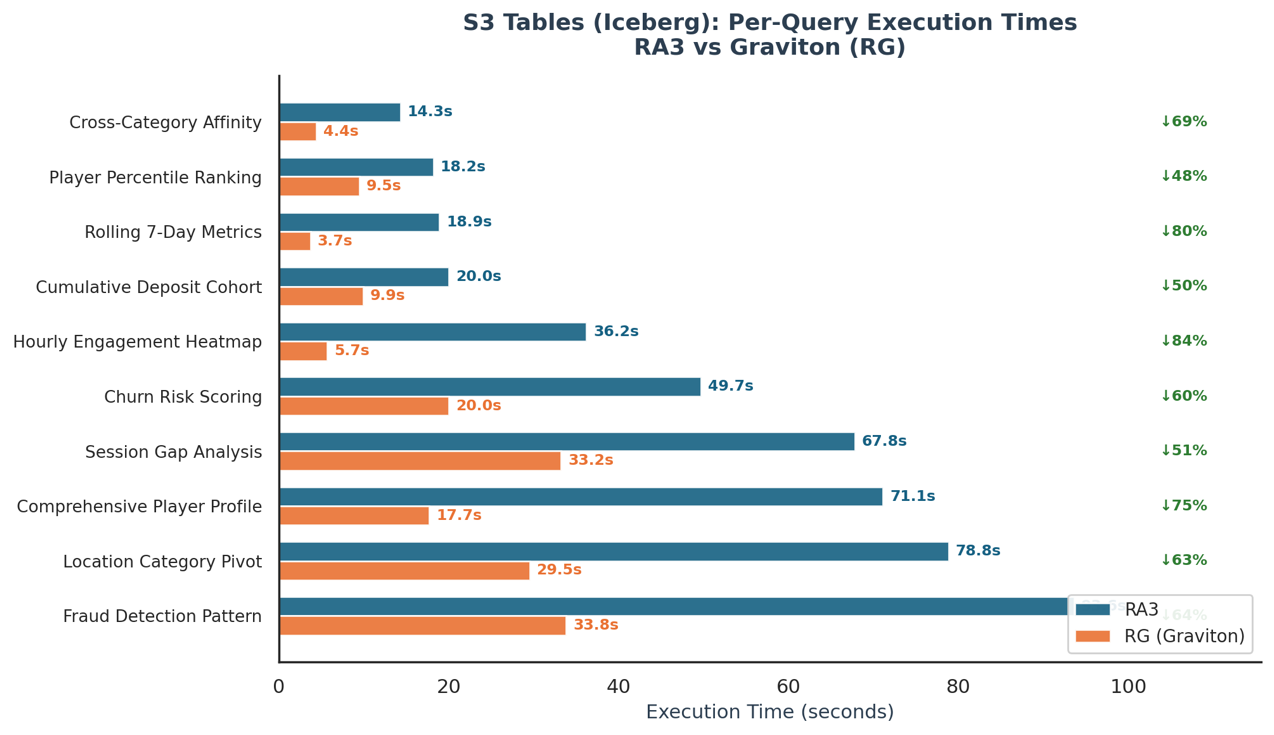
tombola’s future data architecture will integrate with agents and revolves around Apache Iceberg, backed by Amazon S3 Tables. Amazon S3 Tables offer Amazon S3 storage that is specifically tuned for analytics, with built-in capabilities that keep making queries faster and helping lower storage costs for table data. They’re purpose-built to hold tabular datasets, such as daily purchase logs, streaming sensor readings, or ad impression events. In this model, data is organized into rows and columns, similar to how information is structured in a traditional database table. With that direction in mind, tombola also benchmarked Graviton’s performance querying Iceberg tables directly. The dataset includes player profiles, game session history, and geolocation data: a mix of wide tables and high-cardinality columns that stress both compute and I/O.

To evaluate performance across different scenarios, tombola generated queries at varying levels of complexity. Medium queries involve standard analytical functions like ranking and aggregation, and Medium-High queries introduce multi-step transformations with joins and cumulative calculations. At the High tier, queries combine distinct counting, conditional pivoting, and time-window aggregations. Very High queries are the most demanding: self-joins across the full dataset, multi-signal scoring logic, and advanced statistical functions. This tiered approach captures how each node type performs as computational demands increase.

As with the previous benchmarks, the team kept the test as comparable as possible: a true like-for-like evaluation between RG (powered by Graviton) and RA3 nodes of equivalent size.

Testing was split into two phases:

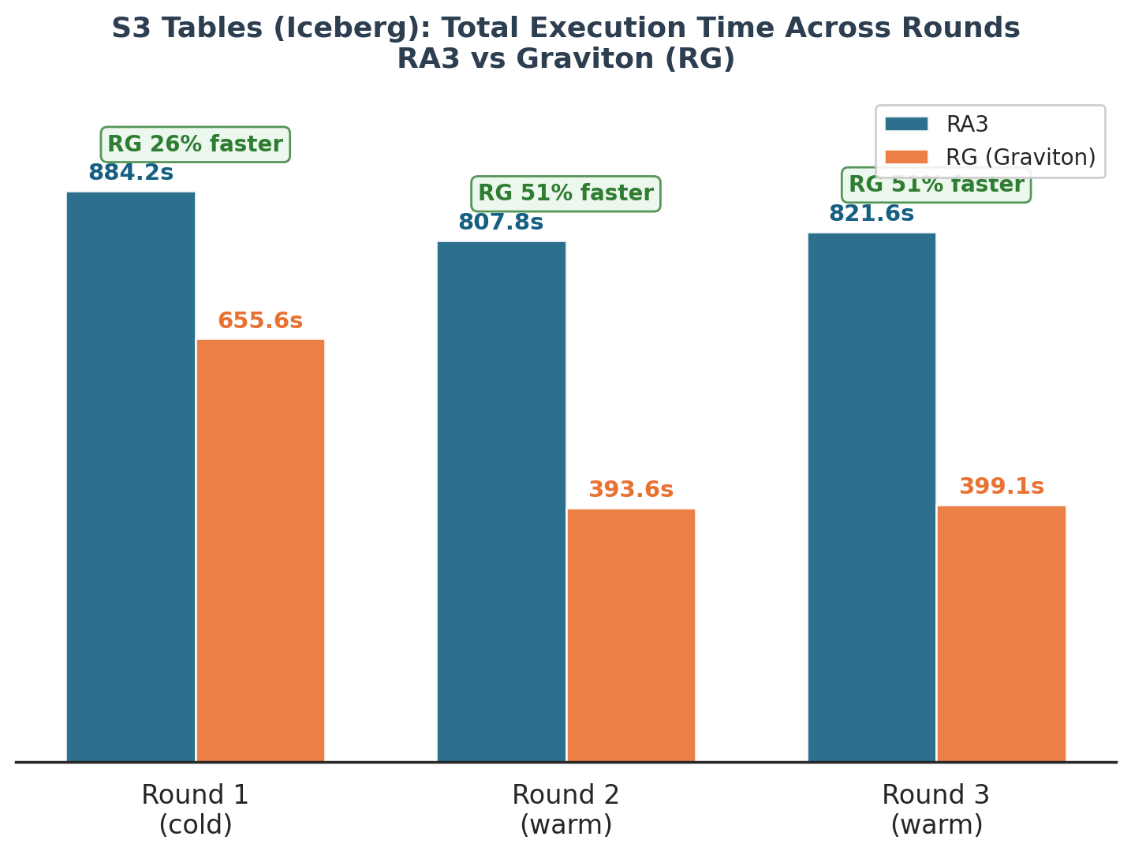
Phase 1: Concurrency. All queries were submitted simultaneously to measure how well each node type handles concurrent workloads. The goal was to understand throughput differences: how much more work RG nodes can push through under pressure compared to similarly sized RA3 nodes.

All queries were run simultaneously across multiple rounds:

Grouped bar chart showing total execution time across 3 rounds for RA3 vs Graviton

Phase 2: Sequential execution. Each query was run in isolation with full compute resources available. This removed concurrency as a variable and gave a clean read on raw query performance. The results were clear: RG outperformed RA3 across multiple query types, showing consistent gains when given dedicated compute.

In sequential execution, Graviton (RG) delivered consistent performance gains across all query complexity levels: Medium-complexity queries ran 45–73 percent faster (average 58 percent), Medium-High queries improved by 42 percent, High-complexity queries achieved 57–66 percent faster execution (average 62 percent), and Very High-complexity queries saw gains of 60–67 percent (average 63 percent). The results demonstrate that RG’s advantage scales with workload complexity, delivering the largest improvements on the most demanding analytical queries.

tombola’s modernization approach

tombola is modernizing its Amazon Redshift cluster using the Elastic Resize path to change from RA3 to RG node types. The operation snapshots the existing cluster, provisions a new RG cluster from that snapshot, and transfers data in the background. During this transfer period, the source cluster remains available in read-only mode. When the resize nears completion, Amazon Redshift automatically updates the endpoint to point to the new RG cluster and drops connections to the source. The team chose this approach because it aligns with their engineering principle of evidence-based changes: no production cutover without proof. The benchmark results, with zero errors across all scenarios against production-representative workloads, provided the confidence needed to proceed. After the resize is complete, the external tables, schemas, and query syntax remain unchanged. With RG’s integrated data lake query engine, tombola also removes its dependency on Amazon Redshift Spectrum. Data lake queries now run directly on cluster nodes within the Amazon VPC boundary, using existing IAM roles, with zero per-TB scanning charges.

Conclusion

The benchmark results make a compelling case for migrating tombola’s Amazon Redshift infrastructure from RA3 (Intel Xeon) to RG (Graviton4) instances. Across every scenario tested, RG delivered significant and consistent performance gains:

  • Cold-cache performance: 1.57× faster on heavy ETL queries, with per-query speedups up to 1.68×.
  • Warm-cache performance: 1.52× faster on heavy workloads, maintaining advantage even with result caching enabled.
  • Concurrency: 33 percent higher throughput under parallel load, with RG sustaining lower latencies as streams increased from 1 to 20.
  • Mixed realistic workload: 1.85× faster on heavy ETL queries and 46 percent more total queries completed, the scenario closest to production traffic patterns.
  • Amazon S3 Tables (Iceberg): Up to 51 percent faster under concurrent load and 57 percent faster in sequential execution, critical for tombola’s future lakehouse architecture.

Beyond raw performance, RG delivers architectural benefits that align with tombola’s strategic direction. The integrated data lake query engine removes Amazon Redshift Spectrum overhead and per-TB scan charges. The 4:3 node mapping (4 ra3.4xlarge nodes to 3 rg.4xlarge nodes) reduces infrastructure costs by 25 percent.

Based on these results, tombola are modernizing their production Amazon Redshift cluster to Graviton4-based RG instances. The work has already started and similar results as above are noticed.  The existing RA3 features, including concurrency scaling, data sharing, and system views, are fully supported on RG. This positions tombola to handle growing data volumes and user concurrency with better performance, greater cost efficiency, and a predictable pricing model as the application scales.

The results and benefits described in this post are specific to tombola’s workload and environment. Although Amazon Redshift RG instances powered by AWS Graviton4 processors can deliver significant performance improvements, actual results will vary based on factors including workload characteristics, data volumes, cluster configuration, and query complexity. We encourage you to evaluate RG instances with your own workloads to determine the benefits for your environment. To learn more, visit the Amazon Redshift marketing page and the Amazon Redshift documentation, or get started in the Amazon Redshift console.


About the authors

Prabhu Pandian

Prabhu Pandian

Prabhu has over 15 years of experience spanning data engineering, business intelligence, and data analytics. He has built a career on turning complex data challenges into actionable insights across industries including retail, healthcare, logistics, iGaming, and the public sector. He has led high-performing teams at organisations architecting data warehouses, building ETL pipelines processing tens of millions of records daily, and delivering analytics. Currently, as the Data Engineering Lead at tombola, he is focused on harnessing the power of AWS services to build scalable, optimised data platforms that drive real business value. He is passionate about engineering data infrastructure that is not just robust and efficient, but one that empowers teams to make faster, smarter decisions.

Akshay Srinivasan

Akshay Srinivasan

Akshay is a Data Engineer at tombola, where he runs the Data Platform & Reliability pod, shaping the architecture, scalability, and resilience of the company’s core data infrastructure across batch, streaming, and machine learning workloads. He favors open source tooling and composable AWS services, building platforms designed to be flexible and operationally sustainable. Over the past eight years he has built data platforms from the ground up across fintech, gaming, and enterprise environments, standing up greenfield infrastructure, automating complex operational workflows, and engineering systems in domains where data reliability directly affects regulatory and business outcomes. Having worked with Amazon Redshift since 2017, he has seen its evolution first-hand, from early node types through to the modern lakehouse capabilities the platform offers today.

Sidhanth Muralidhar

Sidhanth Muralidhar

Sidhanth is a Principal Technical Account Manager at AWS, where he partners with enterprise customers to design, scale, and optimize cloud-focused systems. He specializes in guiding organizations through complex architectural decisions across cost efficiency, reliability, performance, and operational excellence. His work increasingly sits at the intersection of data systems and AI as well, helping customers operationalize modern data architectures and build intelligent, production-ready systems.

Vlad Siniavin

Vlad Siniavin

Vlad is a Sr. Technical Account Manager at AWS with over 15 years of experience in building innovative solutions, products and services. He is driven by delivering measurable outcomes for his customers – whether that’s reducing operational risk, optimising costs, or accelerating cloud adoption. He believes the best technical guidance starts with deeply understanding what matters most to the customer and acting in their best interest.

Modernizing financial analytics with Amazon SageMaker Unified Studio

Post Syndicated from Umang Aggarwal original https://aws.amazon.com/blogs/architecture/modernizing-financial-analytics-with-amazon-sagemaker-unified-studio/

Avanse Financial Services is one of India’s leading education loan providers. Their Data Engineering Team had built a data lake on AWS using Amazon Simple Storage Service (Amazon S3), Amazon Athena, and AWS Glue for data ingestion and processing. However, their analytics and reporting layer ran on an external analytics application that wasn’t integrated with AWS. Data had to be copied from Amazon S3 into this external application before analysts could run any report, its license consumed a significant portion of their budget despite low utilization, and every integration with AWS services required custom-built pipelines.

After evaluating their options, Avanse migrated to a cloud-native lakehouse architecture using Amazon SageMaker Unified Studio, which unified their data engineering, analytics, and artificial intelligence (AI) workflows in a single governed environment on AWS. In this post, we walk through their migration journey so you can adapt their approach to your own environment.

Why Avanse chose to modernize

The separation between their AWS data lake and their external analytics application created five problems:

  1. Daily data synchronization bottleneck. Every report required a 4-hour batch copy from Amazon S3 into the external analytics application before analysts could query it. Business decisions were based on data that was at least a day old.
  2. Fixed licensing costs disconnected from usage. The external analytics application charged an annual fee regardless of how many queries analysts ran. Avanse needed usage-based pricing that matched what they actually consumed, not a fixed fee for capacity they weren’t using.
  3. Limited auditability. The external analytics application ran on a shared server where different business units (risk, collections, portfolio management) shared the same resources. It lacked granular audit trails, making it difficult to trace who accessed what data and when, or to allocate costs per team.
  4. No centralized data discovery. Although AWS Glue Data Catalog managed schema metadata for the data lake, the external analytics application couldn’t access it. Analysts working in that application relied on folder structures and manual documentation to find the right datasets, slowing onboarding and increasing the risk of using outdated data.
  5. Disconnected from AWS services. The external analytics application couldn’t query data in Amazon S3 or use AWS Glue catalogs natively. Every data flow required connectors and custom-built pipelines, adding maintenance overhead.

Additionally, some datasets were stored on Network File System (NFS) storage outside of Amazon S3, creating another data silo that needed to be consolidated.

Avanse chose Amazon SageMaker Unified Studio because it addressed all five challenges: direct querying of data in Amazon S3 avoiding synchronization, usage-based compute through Amazon Athena and Amazon EMR Serverless, project-based isolation with per-project billing, lineage tracking with AWS IAM Identity Center, and native integration with their existing AWS services.

Solution overview

The core architectural change was moving from a two-application model to a single integrated stack:

Previous architecture
Avanse’s data ingestion and processing ran on AWS (Amazon S3, AWS Glue, Athena), but analytics and reporting ran on an external analytics application. Data had to be batch-copied from Amazon S3 into this external application daily before analysts could query it. Each system had its own access controls, and there was no shared catalog or lineage tracking between them.
New architecture
Analytics now run directly against data in Amazon S3 through Amazon SageMaker Unified Studio. There’s no data copy step. Analysts query the same data that the ingestion pipelines produce, using Athena for SQL and EMR Serverless for large-scale processing. Governance, access control, and lineage are centralized through IAM Identity Center and SageMaker Catalog.

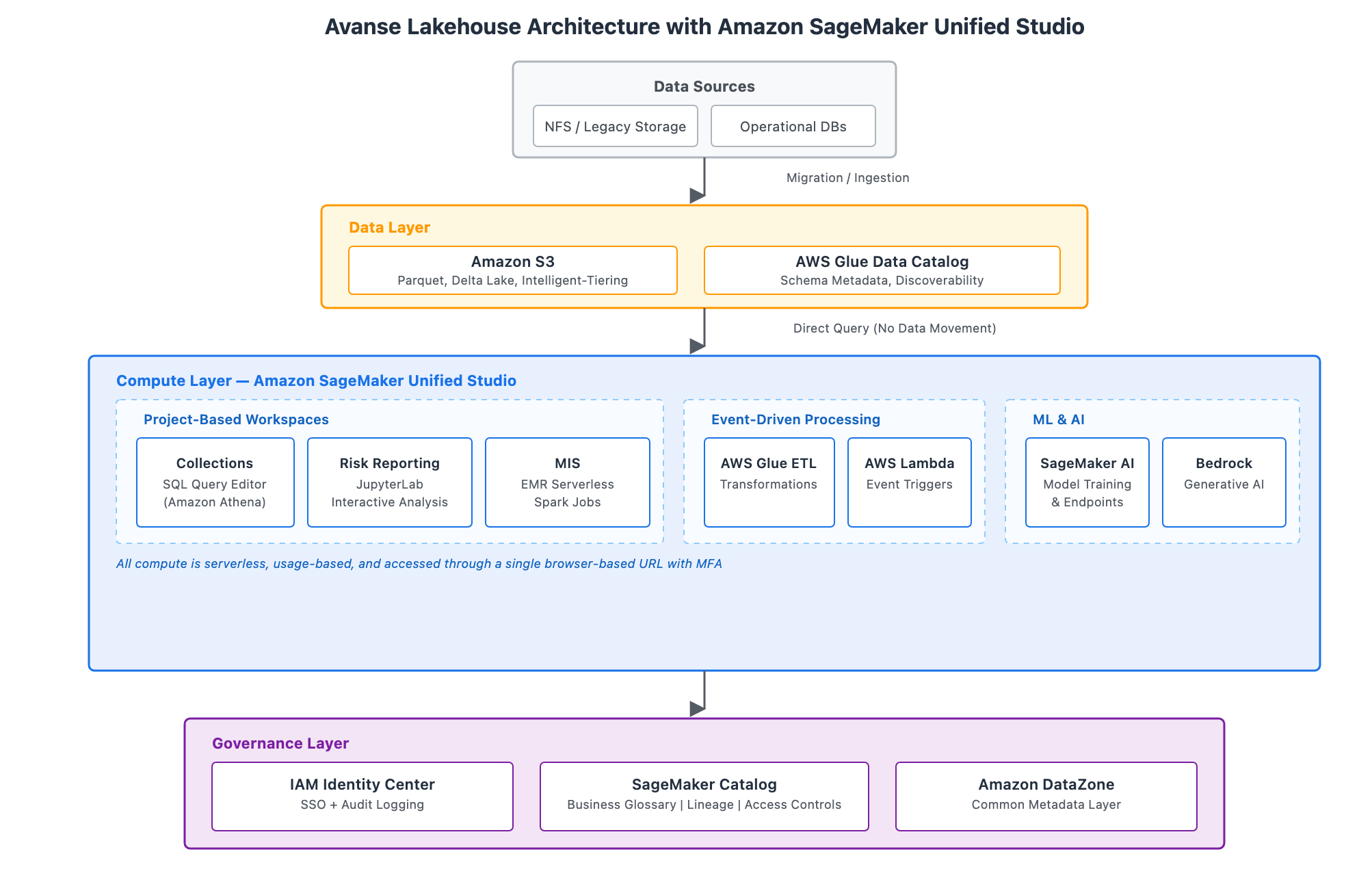
The following diagram illustrates the target architecture. It follows a lakehouse pattern, storing data in open formats on Amazon S3 while maintaining ACID transaction support for the consistency financial regulators expect.

Three-layer lakehouse architecture for Avanse on AWS, showing the data layer with Amazon S3 and AWS Glue Data Catalog, the compute layer with Amazon SageMaker Unified Studio, AWS Glue ETL, AWS Lambda, Amazon EMR Serverless, Amazon SageMaker AI, and Amazon Bedrock, and the governance layer with AWS IAM Identity Center, SageMaker Catalog, and Amazon DataZone

The architecture has three layers:

  1. Data layer – Amazon S3 stores data in open formats (Parquet, Delta Lake) with S3 Intelligent-Tiering for automatic cost optimization. AWS Glue Data Catalog maintains schema metadata, making data discoverable across tools.
  2. Compute layer – Amazon SageMaker Unified Studio provides project-based workspaces organized by business function. Collections uses the built-in SQL Query Editor powered by Athena, Risk Reporting uses JupyterLab for interactive analysis, and MIS runs large-scale Spark jobs through Amazon EMR Serverless. AWS Glue ETL handles data transformations and AWS Lambda provides event-driven triggers for report generation. For machine learning (ML) workloads, Amazon SageMaker AI supports model training and deployment, with Amazon Bedrock available for generative AI capabilities such as enhancing risk narratives.
  3. Governance layer – IAM Identity Center provides SSO and audit logging across workspaces. SageMaker Catalog serves as the business glossary with data lineage tracking and access controls. Amazon DataZone connects components through a common metadata layer.

Migration journey

Avanse followed a five-phase approach. The timelines can be adapted to your environment, but the systematic progression from validation through production deployment is key.

Phase 1: Technical validation (72-hour workshop)

Avanse started with a focused 72-hour workshop using isolated SageMaker environments where developers could experiment without impacting production. Their team tested SQL analytics against existing Athena tables and validated that Python and PySpark could replicate their existing analytics workflows.

The team confirmed that querying data directly in Amazon S3 addressed their synchronization bottleneck entirely. The 4-hour daily data copy was no longer necessary, which validated the migration approach.

Phase 2: Data migration and storage optimization

Avanse migrated datasets from NFS storage and legacy analytics formats into Amazon S3, consolidating the data into a single location. They implemented S3 Intelligent-Tiering, which automatically moves data between access tiers based on usage patterns, optimizing costs without impacting retrieval performance.

They replaced legacy analytics connectors with native Athena workgroups within SageMaker Unified Studio, avoiding data synchronization entirely. Source data remained in Amazon S3, queryable by both Athena SQL and SageMaker notebooks, establishing a single source of truth.

Phase 3: Compute modernization

Avanse moved from a shared analytics server to project-based isolation in SageMaker Unified Studio. Each business function (Risk Reporting, Collections, MIS) received its own project with dedicated compute spaces running JupyterLab. Project-specific IAM execution roles provided access controls and cost allocation per business unit.

A single browser-based URL with multi-factor authentication (MFA) now provides access to SQL analytics using the built-in query editor, ML development in JupyterLab notebooks, and big data processing through Amazon EMR Serverless. This replaced the need for local analytics client installations.

Phase 4: Governance implementation

Avanse deployed SageMaker Catalog as their central business data catalog. Analysts now discover approved datasets through semantic search rather than navigating folder structures or relying on manual documentation. They mapped technical Athena table names to business terms. For example, analysts search for “collection efficiency” and find the relevant tables with descriptions, schemas, and lineage.

Lineage capture traces each metric in risk reports back to source tables, transformations, and intermediate datasets. Every action (notebook execution, SQL query, data access) is tied to IAM Identity Center users, creating the comprehensive audit trail their compliance team needed.

Phase 5: Use case migration

Rather than attempting a big-bang migration, Avanse moved critical workflows one at a time:

Portfolio MIS (Monthly/Fortnightly)
Previously required the daily 4-hour data copy from Amazon S3 into the external analytics application before report generation could begin. Avanse avoided the data synchronization step entirely and now generates MIS reports by querying existing Athena tables directly in Amazon S3. Because the source data was already on AWS, there was no need to involve the external application for this activity. Report generation dropped from hours to under 30 minutes.
Collection Efficiency and Bounce Calculation
Ported complex legacy analytics procedures for calculating metrics like collection efficiency and bounce rates to event-driven processing using AWS Glue ETL, AWS Lambda, and PySpark jobs for high-volume data aggregation. The serverless execution model charges only for compute time consumed.
EDW Risk Reporting
Large-scale regulatory joins of Enterprise Data Warehouse assets previously ran as legacy scheduled procedures. These now run as SQL queries in the SageMaker Unified Studio query editor, where analysts execute them on-demand or schedule them through Athena workgroups. The distributed query engine handles complex multi-table joins spanning millions of rows.
Scorecard Generation
Model building shifted from the external analytics application to SageMaker AI workflows. Data scientists use JupyterLab with Python libraries and deploy models directly to SageMaker endpoints, avoiding data movement between separate environments.

Overcoming technical challenges

One technical challenge was code migration. Avanse’s analytics code base contained years of accumulated proprietary scripts and procedures. Direct line-by-line translation was not practical. Instead, they took a pragmatic approach: basic data transformations moved to SQL in Athena, complex business logic was rewritten in PySpark for scalability, and statistical procedures were replaced with Python libraries like pandas and scikit-learn. The approach was to focus on what the code accomplishes, then implement it using cloud-native patterns.

The other technical challenge was performance validation. The team needed to confirm that querying data in Amazon S3 would deliver acceptable performance compared to the external analytics application’s in-memory processing. Queries against Parquet-formatted data in Amazon S3 using Athena delivered comparable performance for standard reporting workloads, while avoiding the 4-hour daily data synchronization step entirely. For large-scale regulatory joins spanning millions of rows, Amazon EMR Serverless provided distributed Spark processing that completed in minutes rather than the hours required in the external application.

Key outcomes

Area Result
Licensing costs Avoided external analytics application fees entirely
Storage costs Reduced through S3 Intelligent-Tiering, which automatically moves data between access tiers based on usage patterns
Report generation From over 4 hours (including data synchronization from Amazon S3 to the external analytics application) to under 30 minutes with direct Amazon S3 querying
Compliance audits From weeks of manual investigation to days with automated lineage reports
Compute costs Usage-based serverless model replaced always-on external analytics infrastructure
Collaboration Unified browser-based environment for data scientists, analysts, and engineers

“By adopting SageMaker Unified Studio, we as the Data Team eliminated legacy licensing costs, reduced storage and compute expenses with a serverless, usage-based model, and accelerated our periodic report generation. At the same time, we transformed compliance and collaboration by cutting audit timelines while unifying our teams in a single, efficient data environment.” – Komal Thakkar, AVP – Lead, Data Engineering, Avanse Financial Services

Best practices

Based on their experience, Avanse recommends:

  • Start with a workshop. Validate your specific use cases in a 72-hour technical validation before committing to full migration.
  • Migrate use cases, not code. Focus on what your analytics accomplish, then implement using cloud-native patterns rather than translating legacy scripts line by line.
  • Invest in governance early. Implement the data catalog and lineage tracking from day one.
  • Embrace project-based isolation. Organize around business functions for clear cost allocation and security boundaries.
  • Document business logic. Use migration as an opportunity to capture undocumented knowledge in the business glossary and dataset descriptions.

Conclusion

Avanse’s migration from an external analytics application to Amazon SageMaker Unified Studio consolidated their analytics stack into a single integrated environment on AWS. By querying data directly in Amazon S3 instead of copying it into the external application, they alleviated their biggest operational bottleneck. Project-based isolation replaced a shared server model, giving each business unit independent compute and clear cost visibility. And centralized governance through SageMaker Catalog and IAM Identity Center gave their compliance team the audit trails they had been missing.

The serverless, usage-based model means Avanse no longer pays for idle capacity. The lakehouse architecture supports new analytics patterns as they emerge, and native integration with AWS services, including generative AI through Amazon Bedrock, positions them to adopt new capabilities as their needs evolve.

Next steps

Start your analytics modernization journey by scheduling a 72-hour technical validation workshop. Contact your AWS account team to discuss your migration approach.

For more information, see:

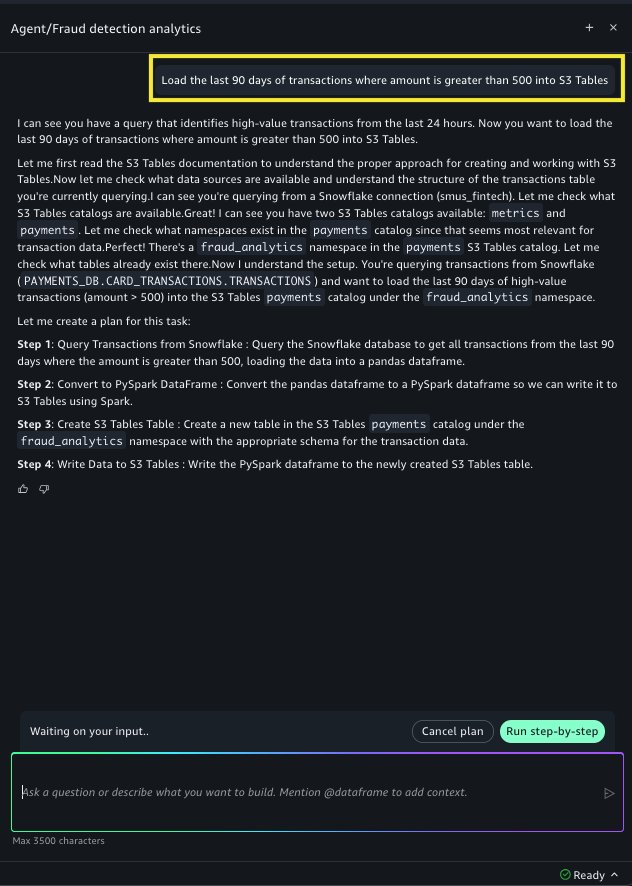
Detecting fraud patterns across Snowflake and AWS using SageMaker Data Agent

Post Syndicated from Akash Gupta original https://aws.amazon.com/blogs/big-data/detecting-fraud-patterns-across-snowflake-and-aws-using-sagemaker-data-agent/

Financial services organizations increasingly run analytical workloads across multiple systems. For example, customers typically store transaction records in Snowflake for its concurrency handling during peak volumes, while they store risk scores, customer profiles, and behavioral signals on AWS. To bridge that divide, practitioners have had to stitch together manual exports, custom extract, transform, and load (ETL) code, and external business intelligence (BI) tools to query both sources, cache expensive aggregations, and visualize results.

Amazon SageMaker Data Agent now closes these gaps with three new capabilities in Amazon SageMaker Unified Studio notebooks: SQL analytics on Snowflake data sources, materialized view management, and interactive charting. Practitioners can use them together to query Snowflake alongside AWS data, pre-compute and schedule repeated aggregations, and create interactive visualizations from natural language prompts in a single notebook, without writing boilerplate code or switching tools.

In this post, we describe the challenges these capabilities address, introduce each one, and walk through a fraud analytics scenario that demonstrates them working together in an end-to-end investigation workflow.

Challenges with fraud detection

Fraud analytics teams working in SageMaker Unified Studio notebooks encounter several recurring friction points that slow their path from alert to insight:

  • Querying across AWS and third-party warehouses. Customers store transaction data in Snowflake and maintain risk scores and customer profiles on AWS. SageMaker Data Agent supported SQL generation for AWS-native engines: Amazon Athena, Amazon Redshift, Apache Spark, and DuckDB. However, it didn’t yet generate Snowflake-dialect SQL. This created a gap for customers working with data distributed across both AWS services and Snowflake. Analysts had to write Snowflake SQL manually and export results as CSV files to join with AWS data. The process consumed 1–2 hours before any actual investigation could begin.
  • Rich visualization requires coding expertise. When analysts want to plot query results, they must write Python code using packages like matplotlib, seaborn, or plotly. They must choose the right chart type, format axes, handle data transformations, and debug rendering issues. For fraud teams whose expertise is in investigation rather than data visualization code, each chart becomes a detour: either learn the package interface, ask an engineer for help, or export to an external BI tool. This slows the exploratory cycle that fraud investigations depend on, where every new angle (time-of-day patterns, category breakdowns, geographic clusters) ideally takes seconds, not minutes of code iteration.
  • Expensive repeated queries with no caching. Fraud signal queries flag transactions that exceed a customer’s historical average and compute risk-score distributions by merchant category. These queries re-scan entire tables on each execution. A team running the same aggregation every morning over millions of rows pays the full compute cost each time, with no mechanism to pre-compute results or schedule automatic refreshes. For fraud teams, this means investigations start with a 30-minute wait for queries that ran identically yesterday.

These three friction points (accessing data across platforms, visualizing it interactively, and operationalizing repeated analyses) are what the new Data Agent capabilities address together.

What’s new in Data Agent

Snowflake connectivity

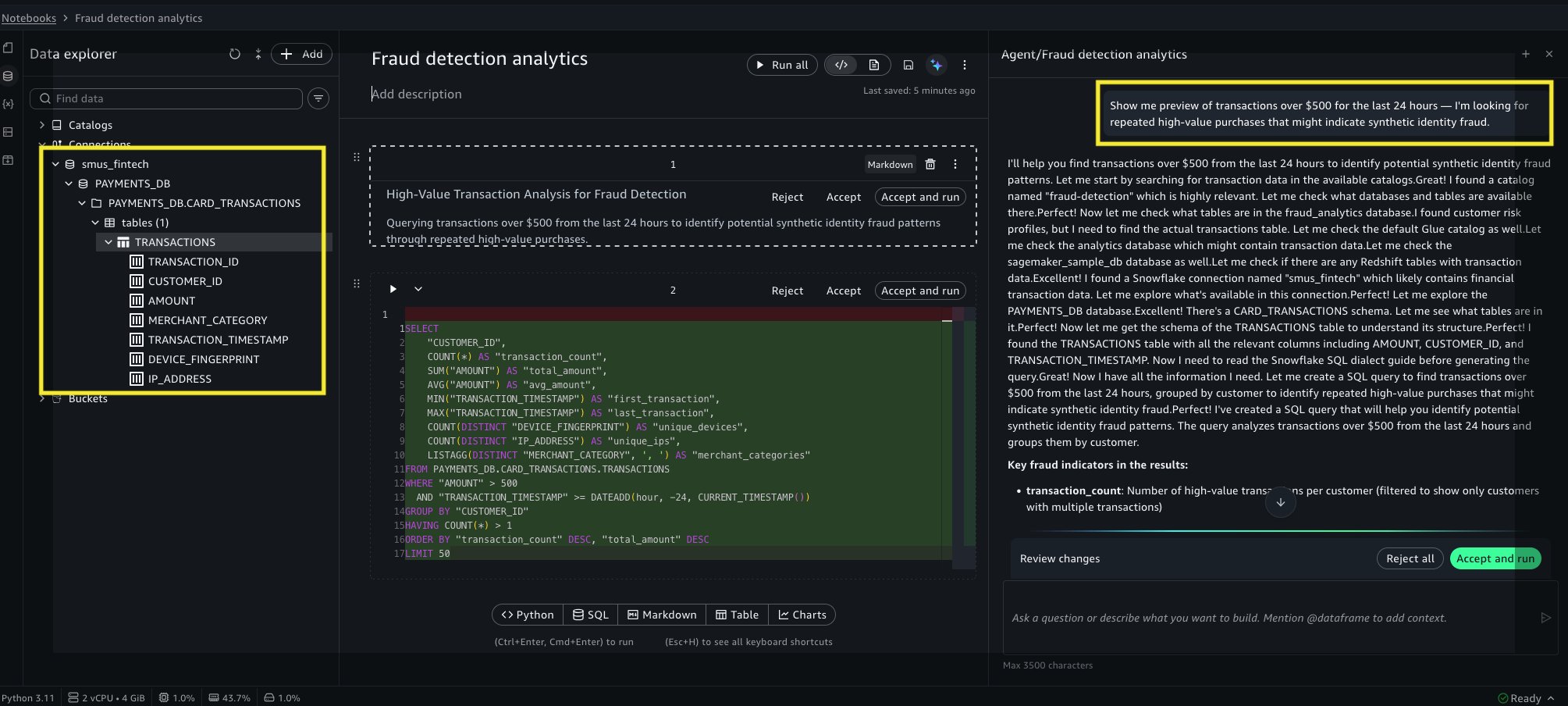
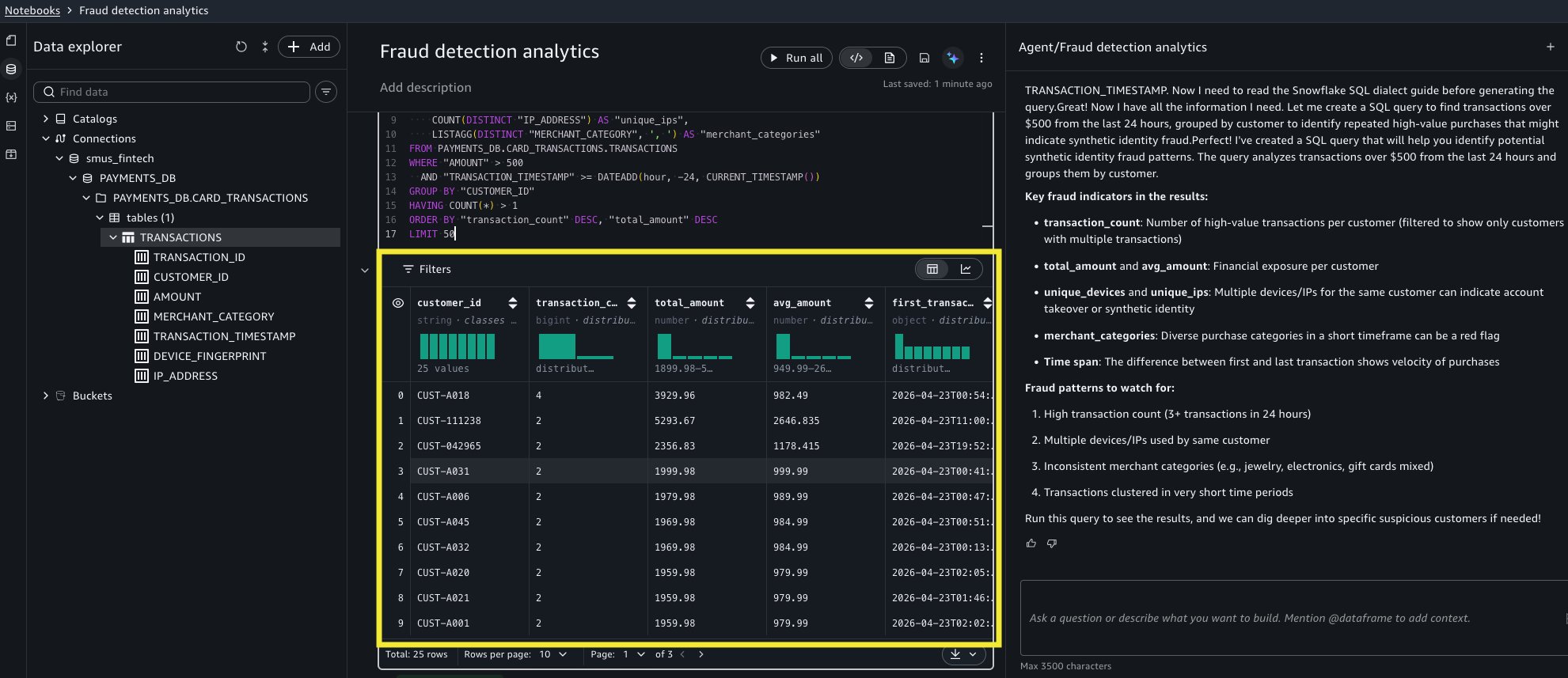
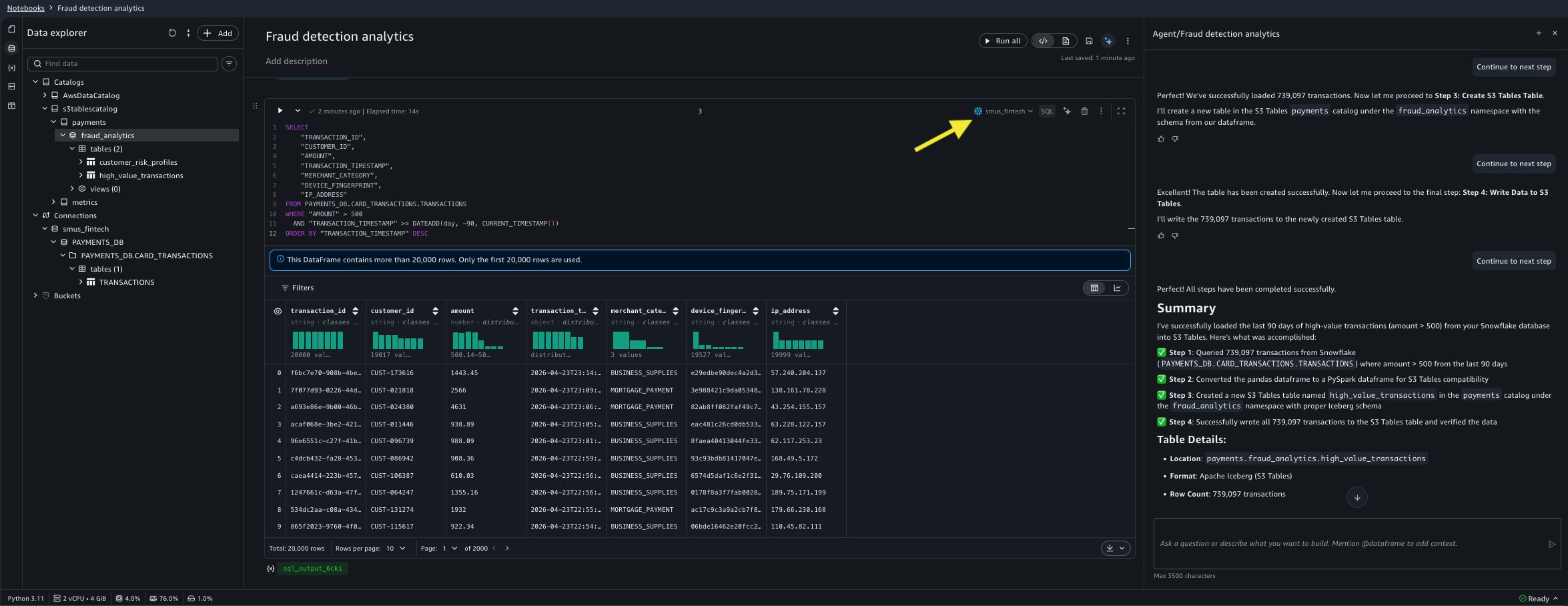
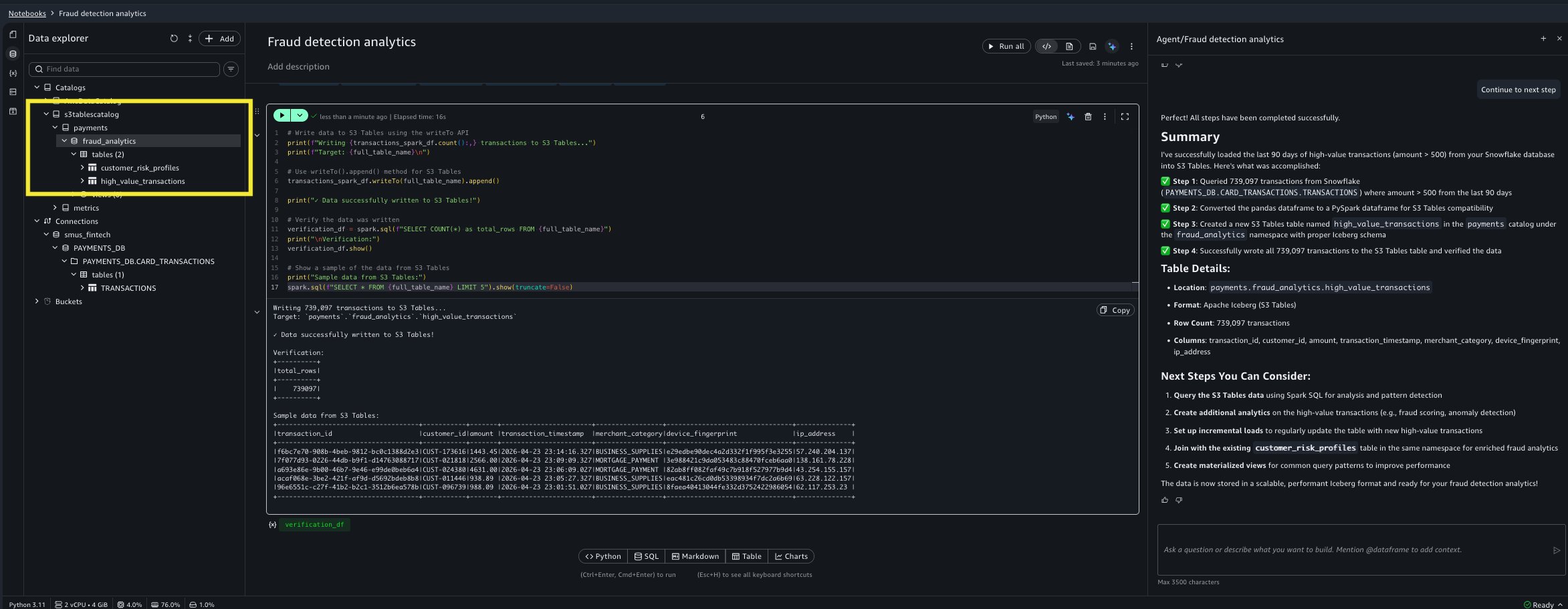
SageMaker Data Agent can now connect to Snowflake data warehouses through connections registered in Amazon SageMaker Unified Studio. The agent discovers available Snowflake databases, browses schemas progressively (databases → schemas → tables → columns), and generates Snowflake-dialect SQL, including Snowflake-specific syntax like FLATTEN, VARIANT column access, and semi-structured data handling. Analysts query Snowflake tables alongside AWS data sources from a single notebook conversation, and the agent handles dialect differences automatically: Snowflake SQL for extraction, Spark SQL for Amazon Simple Storage Service (Amazon S3) Tables operations, with no manual translation required.

Materialized view management

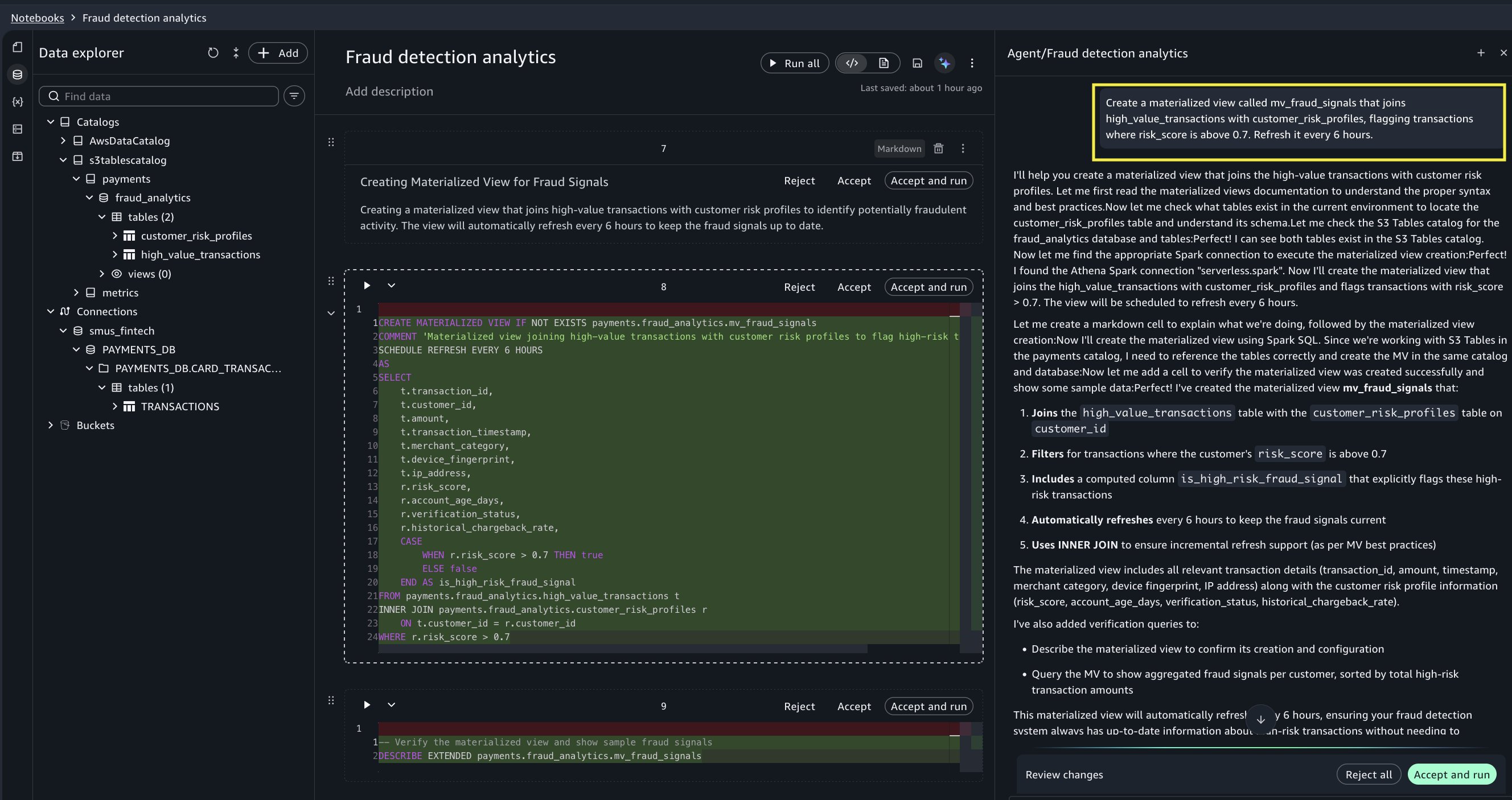
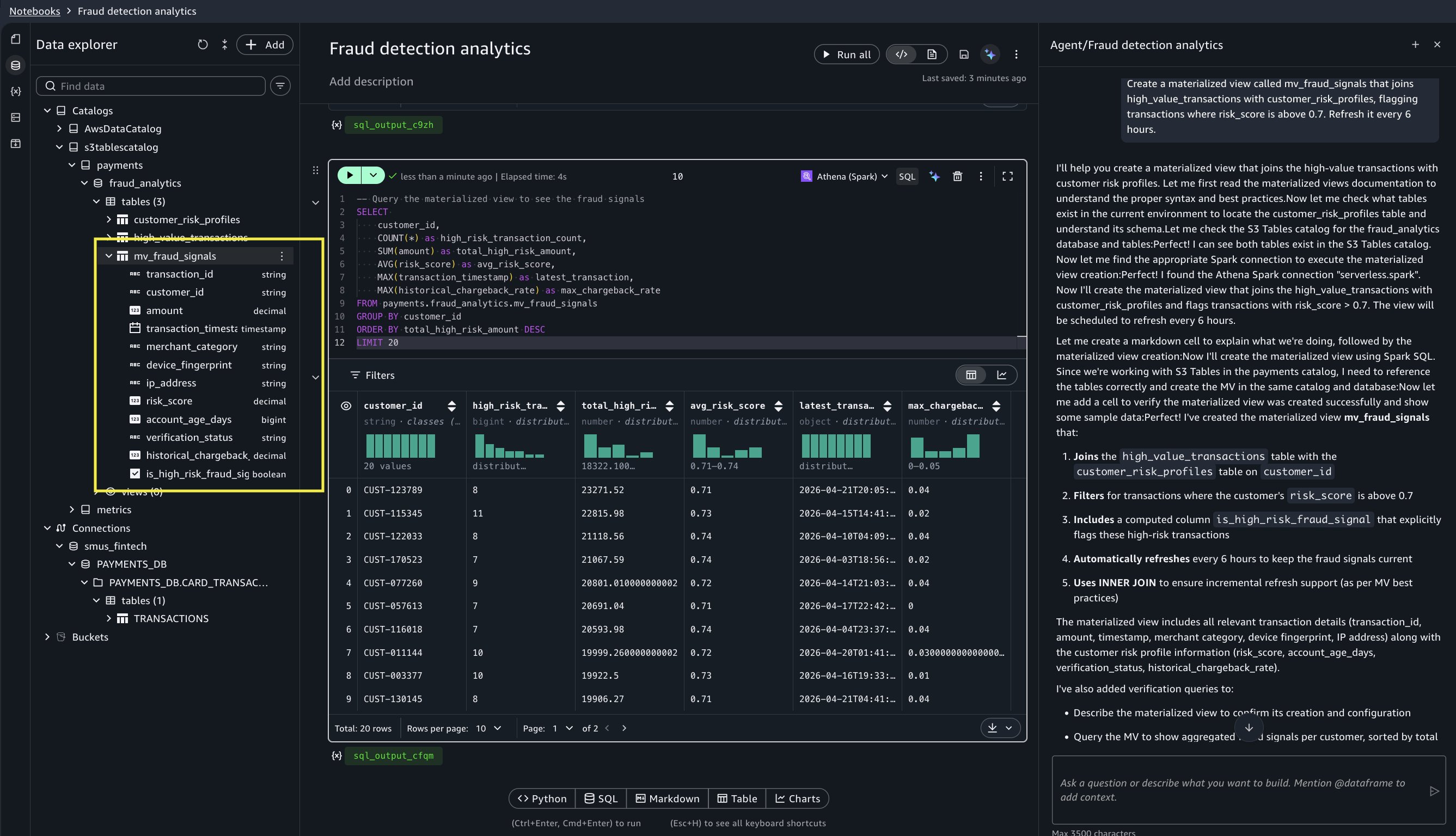
Data Agent now creates and manages materialized views through natural language prompts. Analysts describe the aggregation they want, for example, “create a materialized view that flags transactions where risk_score is above 0.7, refreshed every 6 hours,” and the agent generates the Spark SQL DDL, including SCHEDULE REFRESH syntax. Materialized views store pre-computed results in Apache Iceberg format for fast repeated access, turning expensive full-table scans into sub-second queries. Supported operations include create, refresh, drop, describe, and scheduled refresh. When asked, Data Agent can also analyze notebook query patterns and recommend which queries would benefit from materialization.

Interactive charting

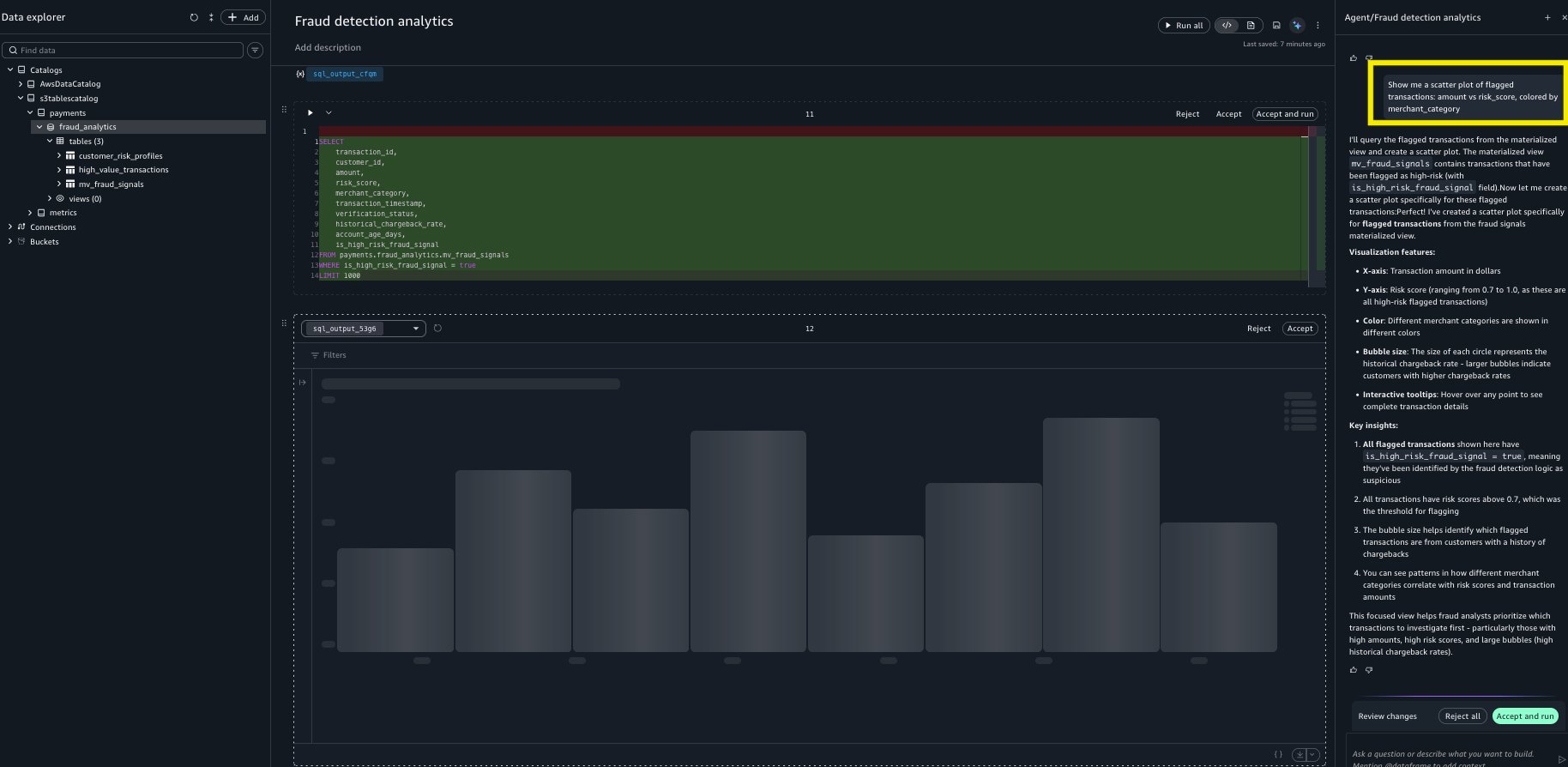
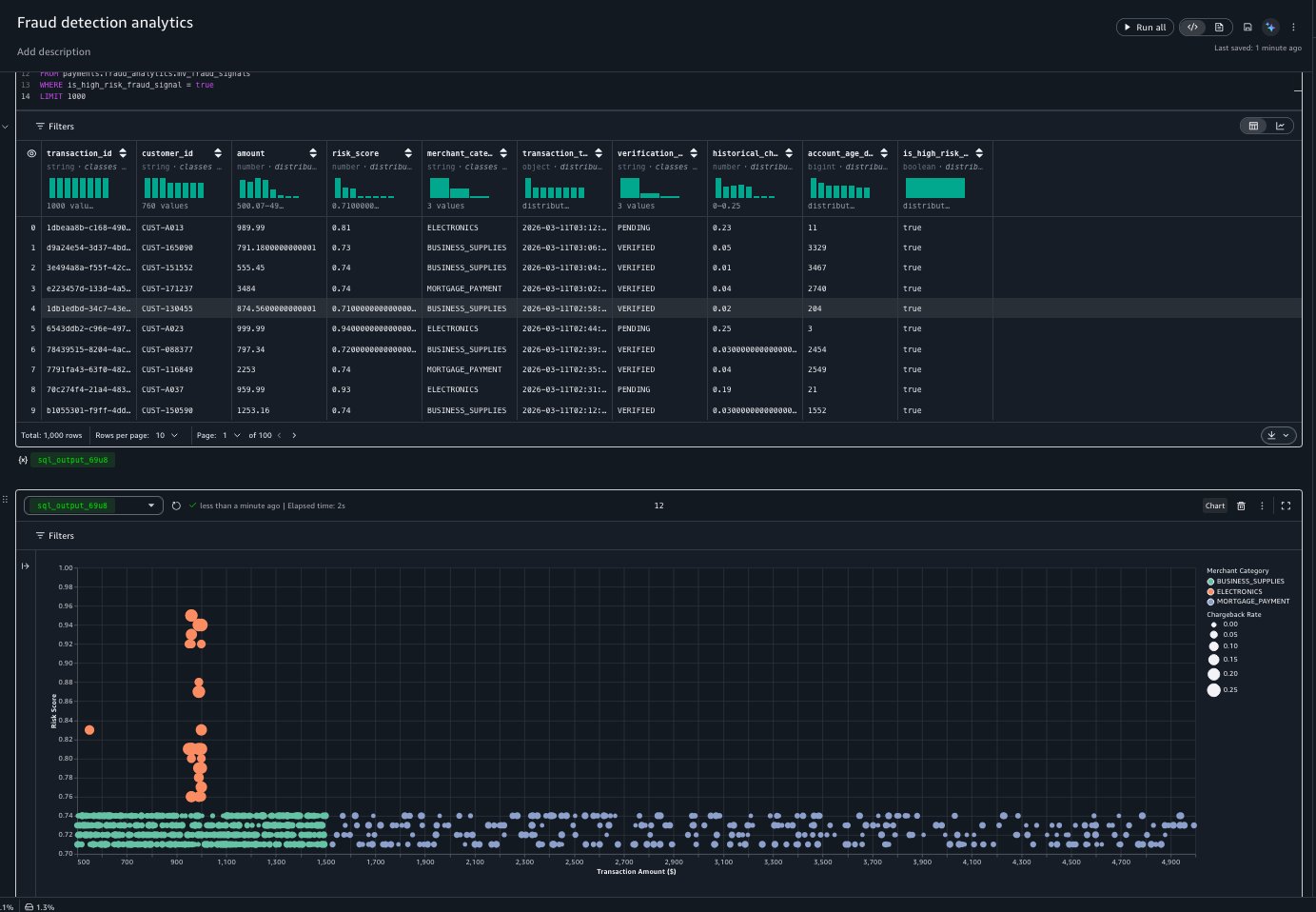
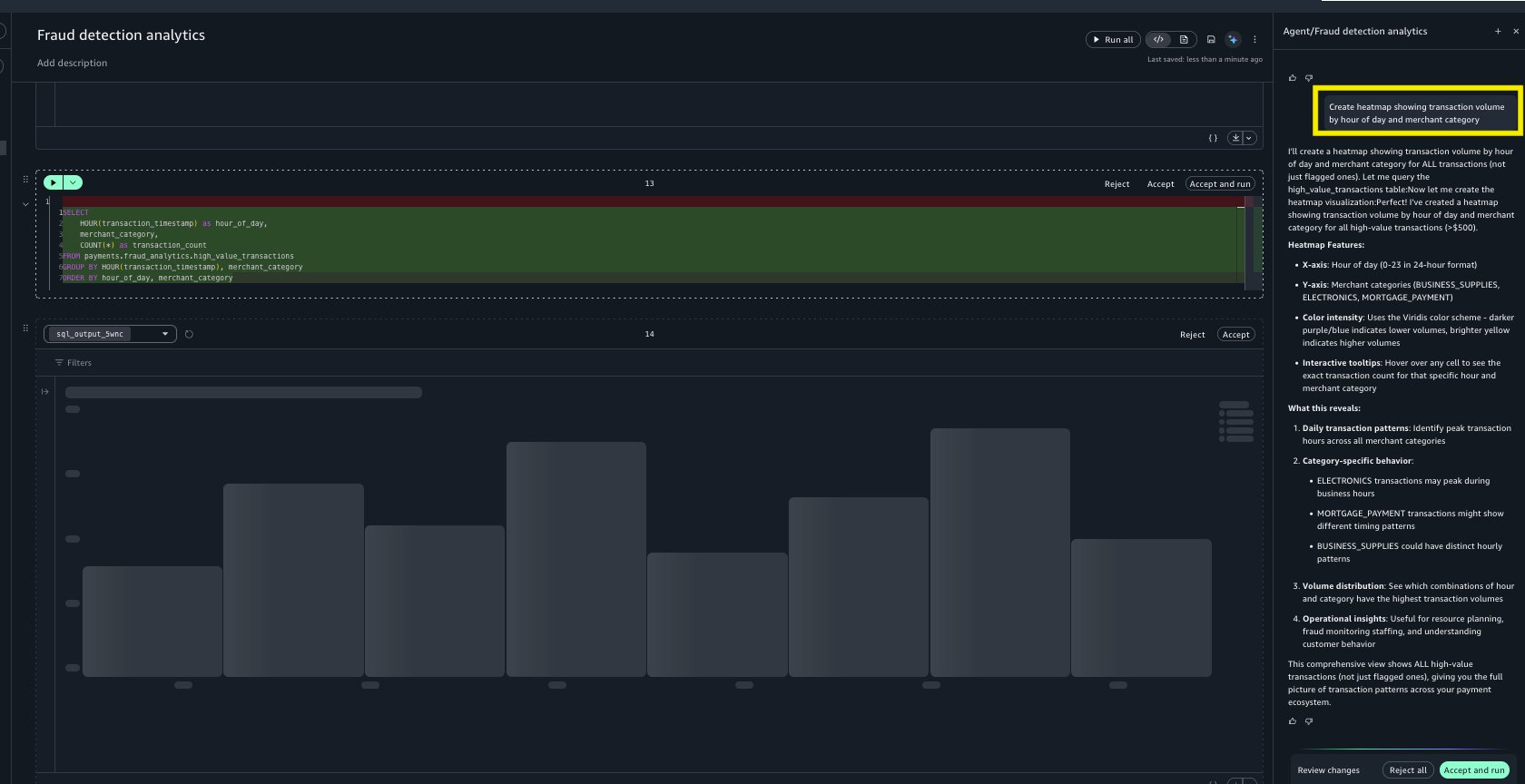
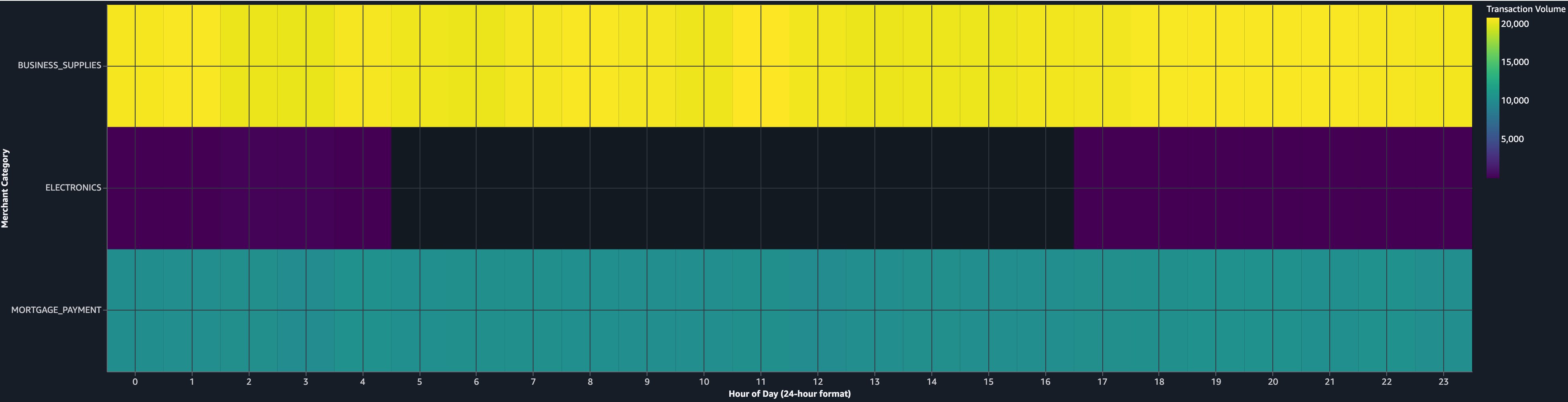
Instead of generating matplotlib code that produces static images, Data Agent now creates native interactive chart cells powered by Vega-Lite. Supported chart types include bar, line, scatter, pie, area, heatmap, and more. Charts render inline in the notebook with hover tooltips, zoom, and filtering. Analysts can reconfigure them through the sidebar or by typing inline instructions like “change this to a heatmap showing volume by hour and category.” This removes the cycle of modifying Python plotting code or exporting to an external BI tool every time the analysis needs a different view.

Detecting fraud patterns across Snowflake and AWS: a walkthrough

Solution overview

In this section, we walk through how these three capabilities work together in a realistic fraud investigation. A fraud analytics lead at a mid-size fintech processes a high volume of card transactions daily. Customers store transaction data in Snowflake and maintain customer risk profiles on AWS.

This morning, the real-time alerting system flagged an unusual spike in declined transactions from a cluster of new accounts, all purchasing high-value electronics. The analyst suspects a fraud ring using synthetic identities, fabricated customer profiles that pass initial verification but share telltale patterns like similar device fingerprints or overlapping IP ranges. The analyst has three goals:

  • Confirm the fraud ring hypothesis. Determine whether the flagged accounts share device fingerprints, IP ranges, or behavioral patterns indicating coordinated fraud.
  • Quantify the exposure. Calculate total fraudulent transaction volume and identify all affected accounts, not only the ones that triggered today’s alert.
  • Set up ongoing monitoring. Create a reusable, auto-refreshing query so the team catches the next ring faster.

The analyst wants to do all of this without leaving the SageMaker notebook, without writing boilerplate data-engineering code, and within a single morning standup cycle so the investigations team can be briefed by noon.

How Data Agent approaches this analysis

Data Agent is context-aware. It discovers your actual table names, column schemas, and data source connections through Amazon SageMaker Unified Studio rather than requiring you to specify them manually. It generates SQL in the correct dialect for each source (Snowflake SQL for Snowflake, Spark SQL for S3 Tables) and operates within your existing AWS Identity and Access Management (IAM) permissions boundaries.

You interact with Data Agent in two modes: the Agent Panel for multi-step investigations like the example walkthrough that follows, where each prompt builds on previous context, and inline interactions for quick adjustments like “change this to a heatmap” directly on a chart cell.

Prerequisites

Before starting this walkthrough, verify that you have:

  • An Amazon SageMaker Unified Studio domain with a project configured.
  • A Snowflake account with a warehouse and USAGE grants on the database and schemas you want to query.
  • A Snowflake connection registered in your SageMaker Unified Studio project.
  • An S3 Tables catalog in your project containing customer data (or equivalent AWS-hosted tables for joining with Snowflake data).
  • A notebook open in SageMaker Unified Studio with Data Agent available in the chat panel.

Step 1: Explore Snowflake transaction data

What the analyst wants: Before investigating the fraud ring, the analyst must understand what data is available in Snowflake and verify recent transactions are accessible. The schema isn’t memorized (the payments team manages these tables), so Data Agent needs to discover the structure.

In the SageMaker notebook Agent Panel, the analyst types:

“Show me a preview of transactions over $500 for the last 24 hours. I’m looking for repeated high-value purchases that might indicate synthetic identity fraud.”

What Data Agent does for you: Data Agent discovers the Snowflake connection through SageMaker Unified Studio, browses the available databases, and locates PAYMENTS_DBCARD_TRANSACTIONS schema → transactions table. It surfaces the column structure (transaction_id, customer_id, amount, merchant_category, transaction_timestamp, device_fingerprint, ip_address) so the analyst can confirm the right data is available without writing a single DESCRIBE TABLE statement.

Data Agent then generates a Snowflake-dialect SQL query to preview the last 24 hours of high-value transactions (amount > $500), returning hundreds of results. The preview immediately reveals what was suspected: alongside legitimate high-value purchases (mortgage payments, business supplies), there are clusters of electronics purchases at similar price points from different customer_id values but the same device_fingerprint, a classic synthetic identity pattern.

Data Agent querying Snowflake transaction data and generating equivalent code in the cell

Figure 1: Data Agent querying Snowflake transaction data and generating equivalent code in the cell.

Notebook cell results showing high-value Snowflake transactions

Figure 2: Displaying results when the notebook cell runs.

Step 2: Land Snowflake data into S3 Tables and join with risk profiles

What the analyst wants: Pulling historical high-value transactions into S3 Tables makes this data available for downstream analysis, including the materialized view that will cross-reference risk profiles automatically.

“Load the last 90 days of transactions where amount is greater than 500 into S3 Tables.”

What Data Agent does for you: Data Agent queries Snowflake to extract a large volume of high-value transactions from the last 90 days, converts the result to a PySpark DataFrame, creates an Apache Iceberg table at payments.fraud_analytics.high_value_transactions, and writes all the rows. Data Agent stores the transaction data (transaction_id, customer_id, amount, merchant_category, transaction_timestamp, device_fingerprint, ip_address) as Iceberg in S3 Tables, allowing you to query it entirely on AWS.

Data Agent handles the cross-source complexity: Snowflake-dialect SQL for extraction, automatic schema inference for the Iceberg table, and PySpark for the write. The analyst didn’t write a single line of ETL code.

Prompt sent to Data Agent to land Snowflake transactions into an S3 Tables

Figure 3: Sending a prompt to land Snowflake transactions into an S3 Tables catalog.

Generated PySpark code that reads transaction data from Snowflake

Figure 4: Reading data from Snowflake using code Data Agent generated.

Generated cell creating an S3 Tables Iceberg table populated with Snowflake data

Figure 5: Data Agent creating a new cell to create an S3 Tables Iceberg table and populate it with the Snowflake data.

Step 3: Create a materialized view for ongoing fraud monitoring

What the analyst wants: The pattern is confirmed, but re-running this expensive join across two tables every morning isn’t sustainable. A pre-computed view that automatically refreshes and surfaces transactions from high-risk customers means tomorrow’s investigation starts with answers instead of queries (goal #3, ongoing monitoring).

“Create a materialized view called mv_fraud_signals that joins high_value_transactions with customer_risk_profiles, flagging transactions where risk_score is above 0.7. Refresh it every 6 hours.”

What Data Agent does for you: Data Agent browses the S3 Tables catalog to discover both tables and their schemas, generates the Spark SQL DDL with SCHEDULE REFRESH EVERY 6 HOURS, and creates an INNER JOIN on customer_id with a risk_score > 0.7 filter. The resulting materialized view contains only the high-risk subset of transactions, and subsequent queries against it return significantly faster compared to a full table scan.

Data Agent can also recommend materialized views when asked. If the analyst prompts “analyze my notebook and suggest which queries would benefit from materialized views,” Data Agent examines query patterns and suggests candidates. This is useful when a team runs the same expensive aggregations repeatedly without realizing a materialized view would help.

New cell created by Data Agent to create the mv_fraud_signals materialized view

Figure 6: Data Agent creates a new cell to create the materialized view.

Generated query against the newly created materialized view

Figure 7: Data Agent adds code to query the newly created materialized view.

Step 4: Visualize fraud patterns with interactive charting

What the analyst wants: The data is ready, but the investigations team needs a clear visual story by noon to see which merchant categories are targeted and what time of day the fraud occurs, so they can build detection rules. The team needs interactive charts that can be explored on the fly, not static matplotlib images that need regenerating every time someone asks “what about category X?”

“Show me a scatter plot of flagged transactions: amount vs risk_score, colored by merchant_category.”

What Data Agent does for you: Data Agent queries the materialized view, generates a Vega-Lite specification, and renders an interactive scatter plot directly in the notebook cell, with no matplotlib code and no BI tool export. Hovering over any point reveals the transaction details. A dense cluster immediately stands out: Electronics & Computers transactions with risk scores between 0.75–0.95, all in the $950–$1,000 range.

Generated scatter plot of flagged transactions colored by merchant category

Detail view of the scatter plot highlighting the Electronics cluster

Figures 8, 9, and 10: Data Agent creates a scatter plot showing a dense cluster of Electronics transactions in the $950–$1,000 range with risk scores between 0.75–.95.

The analyst follows up with a second prompt to explore temporal patterns:

“Change this to a heatmap showing transaction volume by hour of day and merchant category.”

What Data Agent does for you: Data Agent generates a new heatmap visualization from the same materialized view. The heatmap reveals that Business Supplies and Mortgage Payments maintain steady transaction volumes throughout the day. However, Electronics shows a distinctly uneven temporal distribution, with noticeable volume dips during early morning hours (midnight to 5 AM) and late evening. This variability, absent in legitimate purchase categories, is a signal the detection rules team can act on immediately.

Heatmap of transaction volume by hour and merchant category

Detail view of the heatmap showing off-hours dips in the Electronics row

Figures 11 and 12: Data Agent creates a heat map to show transaction volume by hour of day and merchant category, revealing uneven temporal distribution in high-risk categories.

From insight to action

This investigation, from Snowflake connection to visual evidence, streamlined a workflow that previously required significant time across multiple tools. The analyst shares the notebook link with the investigations team, who confirm a fraud ring of dozens of synthetic identities responsible for significant fraudulent purchases. The temporal pattern, uneven Electronics transaction distribution with off-hours variability, is added to the company’s real-time detection rules that same afternoon.

The materialized view continues refreshing every 6 hours. The next morning, it flags three new accounts matching the same pattern, caught within hours of their first transaction instead of days.

Why SageMaker Data Agent for fraud analytics

This walkthrough demonstrates three new capabilities working together:

  • SQL analytics on Snowflake data sources removed the CSV export and manual ETL that consumed half of the investigation time.
  • Materialized view management turned a one-time query into persistent, auto-refreshing monitoring, transforming reactive investigations into proactive detection.
  • Interactive charting kept the entire analysis in the notebook, removing the BI tool context switch and making the inline exploration that revealed the Electronics temporal anomaly possible.

For the team, the combined effect is a reduction in time-to-insight, allowing faster fraud pattern analysis. This means daily fraud pattern reviews instead of weekly, and an investigation workflow that’s reproducible. The notebook itself serves as documentation for compliance and audit purposes.

Cleanup

The walkthrough creates notebook cells, SQL queries, and materialized views in your SageMaker Unified Studio session. To remove the generated cells, delete them from your notebook or delete the notebook itself.

If you created resources specifically for this walkthrough, remove the following to avoid ongoing charges:

  • Materialized view. In the notebook Agent Panel, prompt: “Drop the materialized view mv_fraud_signals.” This removes the Iceberg table from S3 Tables and cancels the scheduled refresh. Alternatively, run the Spark SQL statement DROP MATERIALIZED VIEW payments.fraud_analytics.mv_fraud_signals directly.
  • Landed Iceberg tables. Drop any tables created during the data landing step (for example, payments.fraud_analytics.high_value_transactions) by prompting Data Agent or running DROP TABLE in a Spark SQL cell. This removes the data from S3 Tables and the underlying Amazon Simple Storage Service (Amazon S3) storage.
  • SageMaker Unified Studio domain. If you created a domain solely for this walkthrough, delete it to stop incurring charges. Refer to the SageMaker Unified Studio administration guide for deletion steps.
  • Amazon S3 storage. Verify that dropping the materialized view and Iceberg tables removed the associated S3 objects. If residual Iceberg metadata files remain in your S3 Tables bucket, delete them manually.
  • Snowflake compute. No persistent Snowflake resources are created. Queries use your existing warehouse. Review your Snowflake query history to estimate the compute credits consumed during the walkthrough.

Conclusion

In this post, we walked through three new capabilities in Amazon SageMaker Data Agent for notebooks: Snowflake connectivity, materialized views, and native interactive charting. Using a fraud analytics scenario, we demonstrated how these features work together. We connected to a Snowflake warehouse to explore transaction data, landed results into S3 Tables and joined them with AWS-hosted risk profiles, created a materialized view for ongoing fraud monitoring, and visualized patterns with interactive charts that revealed temporal anomalies in Electronics transactions linked to dozens of synthetic identities.

These capabilities are available now in Amazon SageMaker Unified Studio. To get started, open a notebook in your SageMaker Unified Studio domain and begin a conversation with Data Agent in the chat panel.

To learn more, see the following resources:


About the authors

Akash Gupta

Akash Gupta

Akash is a Software Development Engineer on the Amazon SageMaker Unified Studio team, where he builds integrated tools and agentic experiences. An alumnus of Santa Clara University, he is passionate about building scalable solutions that simplify how customers interact with their data. In his spare time, he enjoys singing and cooking.

Mukesh Sahay

Mukesh Sahay

Mukesh Sahay is a Software Development Engineer at Amazon SageMaker, focused on building the SageMaker Data Agent. The agent provides intelligent assistance for code generation, error diagnosis, and data analysis recommendations for data engineers, analysts, and scientists. His work spans agentic AI architectures that transform natural language prompts into executable code and analysis plans across diverse data sources. An alumnus of San Jose State University, Mukesh brings over a decade and a half of experience in building scalable, intelligent data systems.

Eason Ma

Eason Ma

Eason is a Software Development Engineer within SageMaker’s Agentic AI Experiences. His focus is on building agentic infrastructure and intelligent data experiences that help users seamlessly interact with their data across multiple sources. He holds a Master’s in Computer Science from the University of Illinois at Urbana-Champaign and a Bachelor’s in Computer Science from the University of Tennessee, Knoxville. A proud Vol, he brings that same volunteer energy to everything he builds.

Anagha Barve

Anagha Barve

Anagha is a Software Development Manager on the Amazon SageMaker Unified Studio team. Her team is focused on building tools and integrated experiences for the developers using Amazon SageMaker Unified Studio. In her spare time, she enjoys cooking, gardening and traveling.

Siddharth Gupta

Siddharth Gupta

Siddharth is heading Generative AI within SageMaker’s Unified Experiences. His focus is on driving agentic experiences, where AI systems act autonomously on behalf of users to accomplish complex tasks. An alumnus of the University of Illinois at Urbana-Champaign, he brings extensive experience from his roles at Yahoo, Glassdoor, and Twitch.

Architecting AI-powered resilience framework on AWS

Post Syndicated from Medha Shree original https://aws.amazon.com/blogs/architecture/architecting-ai-powered-resilience-framework-on-aws/

When your production system goes down, you often discover the hard way that your resilience testing missed critical dependencies. Building an AI-powered resilience framework on AWS helps you find those weaknesses before your customers do.

Your systems don’t fail because your infrastructure isn’t resilient. They fail because resilience is assumed, not proven. Every deployment introduces new dependencies, every configuration change creates untested paths, and every gap between design intent and runtime behavior is a risk waiting to surface. In a world where customers expect always-on availability, the cost of discovering these weaknesses in production isn’t just technical. It’s measured in revenue lost, trust eroded, and events that were entirely preventable.

In this post, you’ll learn how to architect and implement a five-layer AI-powered resilience framework that automatically discovers dependencies, generates targeted experiments, and integrates with your existing Continuous Integration/Continuous Deployment (CI/CD) pipelines. First, we’ll explore the key challenges in resilience testing. Then, we’ll walk through the five-layer architecture that solves these challenges. Finally, we’ll show you how to implement this, with phased rollout guidance for pilot, expansion, and organization-wide deployment.

Traditional resilience testing can take weeks because the information needed is naturally spread across architecture diagrams, runbooks, code repositories, and team knowledge that evolves with every deployment. Designing meaningful chaos experiments on top of that requires specialized expertise that most teams don’t have on hand. Here’s how this AI-powered framework discovers your infrastructure dependencies in hours and generates targeted experiments without requiring specialized knowledge.

Combining AWS Resilience Hub, AWS Fault Injection Service, Amazon Bedrock AgentCore, and AWS Systems Manager work together to discover infrastructure dependencies in hours, tailor experiments to your specific architecture, and identify weaknesses before they affect customers.

With the next generation of AWS Resilience Hub now providing native dependency discovery and generative AI-powered failure mode analysis, this framework extends those capabilities by automating experiment generation, embedding resilience testing into your CI/CD pipelines, and creating a continuous validation loop through custom AI agents hosted on Amazon Bedrock AgentCore.

Key concepts

Before diving into the architecture, here are the key terms used throughout this post:

  • Chaos engineering — The discipline of experimenting on a system to build confidence in its ability to withstand turbulent conditions in production.
  • Mean time to resolution (MTTR) — The average time to restore service after a failure.
  • Recovery Time Objective (RTO) — The maximum acceptable downtime for your application.
  • Recovery Point Objective (RPO) — The maximum acceptable data loss, measured in time.
  • Shift-left — Testing earlier in the development cycle to catch issues before they reach production.
  • Circuit breaker — An automated mechanism that detects service failures and helps prevent cascading outages by temporarily blocking requests to failing services.
  • Canary deployment — A technique where changes roll out to a small percentage of users first to validate functionality before full deployment.

Who this is for

This post targets cloud architects, DevOps engineers, and Site Reliability Engineering (SRE) teams responsible for system reliability. You should understand AWS services, distributed systems architecture, and CI/CD pipelines. While chaos engineering experience helps, it’s not required. This framework reduces the expertise barrier that traditionally prevented adoption.

Resilience testing challenges

When infrastructure changes happen quickly, documentation tends to lag behind. A routing change to the payment service might not get reflected in the architecture diagrams, leaving single points of failure (like a single-Availability Zone authentication dependency) undocumented and untested. The payment service calls a legacy authentication API that only runs in one Availability Zone, a critical single point of failure. But documentation doesn’t reflect this because someone made a “quick fix” three weeks ago and forgot to update the diagrams.

Distributed systems contain hundreds of interconnected components. Tracking every dependency manually becomes impractical when you deploy changes continuously. Documentation created last month already misses dozens of new dependencies.

Resilience testing can be challenging without dedicated specialists to design meaningful experiments. Resilience testing is most effective when it’s tailored to your actual architecture and runs continuously. Generic fault injection and one-off test runs can leave gaps, especially as your system changes over time.

The expertise barrier stops many organizations entirely. Effective chaos engineering demands understanding distributed systems architecture, failure mode analysis, experiment scope management, and safe experiment design. Without this specialized knowledge, you either avoid resilience testing or run superficial tests that miss critical vulnerabilities.

According to the 2024 IBM Security Services Benchmark Report, organizations with mature response capabilities reduce their MTTR by approximately 50% and achieve cost savings of up to 58% per event when compared to organizations with less mature capabilities. Yet Gartner research shows that 68% of organizations cite increasing system complexity as their reason for adopting chaos engineering, while 50% admit they weren’t prepared when failures occurred.

This framework automates discovery. Automated discovery reduces infrastructure mapping from weeks to hours, typically completing initial assessment in 2–4 hours for single-account environments with thousands of resources. Subsequent runs process only the changes tracked by AWS Config, so your architecture map stays current without manual effort. Agents hosted on AgentCore Runtime analyze your AWS CloudFormation templates, code repositories, and runtime behavior to identify every connection, including hidden dependencies that manual audits miss. Experiment templates analyze your specific architecture and produce targeted tests that validate your actual failure modes, removing the need for specialized chaos engineering expertise. Continuous integration into your CI/CD pipelines catches regressions before they reach production, shifting resilience from a one-time project into an ongoing practice embedded in your development workflow.

Solution overview

The framework addresses these gaps by automatically discovering infrastructure dependencies and continuously validating resilience as the system changes. AI agents, hosted on AgentCore Runtime for secure, scalable execution, discover system dependencies automatically, analyze architectural patterns, and create targeted experiments based on your actual risk profiles. Testing scales across your application portfolio while lowering the expertise barrier.

Five-layer AI-powered resilience architecture with AWS Resilience Hub as the central orchestration hub

Figure 1. Five-layer AI-powered resilience architecture

Five-layer architecture diagram with AWS Resilience Hub — labeled “Next-Gen” with native dependency discovery and generative AI failure mode analysis — as the central orchestration hub. Layers 1–4 (Discovery, Test Generation, Experimentation, Gap Analysis) sit across the top, each connecting down to the hub. Layer 5 (Continuous Validation) sits below with CI/CD, drift detection, and dashboards. Three dashed feedback loops overlay the diagram: Gap Analysis feeds “Architecture updates” back to Discovery, Continuous Validation sends “Experiment learnings” up to Test Generation, and SSM Docs feeds “Validated recovery procedures” into FIS Templates within the Test Generation layer.

Each layer builds on the previous one, creating a comprehensive validation strategy. This architecture aligns with the AWS Well-Architected Reliability Pillar, specifically the Test reliability best practice area. Discovery maps your infrastructure. Test generation creates relevant experiments from that map. Experimentation executes those tests safely. Gap analysis identifies what needs fixing. Continuous validation helps verify that improvements persist as your systems evolve.

Now that you understand the overall strategy, let’s examine each layer in detail, starting with how the discovery layer automatically maps your infrastructure.

Discovery layer

The discovery layer forms the foundation by automatically identifying infrastructure components and their dependencies. The next generation of AWS Resilience Hub provides native dependency discovery that identifies AWS services, internal endpoints, and third-party endpoints your applications rely on. A custom agent deployed on Amazon Bedrock AgentCore (with read permissions to AWS APIs) extends this native discovery with code-level analysis, scanning your code repositories for hard-coded dependencies, connection strings, timeout configurations, and retry logic that infrastructure-level discovery alone cannot detect. A custom agent deployed on Amazon Bedrock AgentCore (with read permissions to AWS APIs) handles infrastructure discovery. Amazon Bedrock AgentCore Runtime provides dedicated MicroVM session isolation, supports long-running discovery sessions up to eight hours, and handles scaling and security without requiring you to manage infrastructure. The runtime’s built-in observability (traces, logs, and metrics) integrates natively with your existing Amazon CloudWatch dashboards without additional instrumentation.

The AgentCore-hosted agent queries services including Amazon Elastic Compute Cloud (Amazon EC2), Amazon Relational Database Service (Amazon RDS), AWS Lambda, Amazon DynamoDB, and Amazon Simple Storage Service (Amazon S3) to build comprehensive inventory. It analyzes AWS CloudFormation templates and Terraform configurations to understand your intended architecture, and accesses code repositories to identify hard-coded dependencies, connection strings, and timeout configurations in your applications. AWS Config provides configuration data and tracks changes over time. This discovery completes in 2–4 hours for environments with thousands of resources.

AI-powered discovery workflow showing infrastructure-level and code-level discovery feeding into a combined dependency map

Figure 2. AI-powered discovery workflow

Workflow diagram organized in two swim lanes. Lane 1 (blue) shows AWS Resilience Hub native infrastructure-level discovery querying AWS service APIs (Amazon EC2, Amazon RDS, AWS Lambda, Amazon S3, Elastic Load Balancing, Amazon DynamoDB) for service topology, endpoints, and Multi-AZ configuration. Lane 2 (yellow) shows an agent on Amazon Bedrock AgentCore performing code-level discovery — scanning repositories (CodeCommit, GitHub, GitLab via IAM permissions) and analyzing CloudFormation/Terraform templates for connection strings, timeouts, and circuit breakers. Both lanes feed into a combined dependency map, which flows into the AWS Resilience Hub assessment engine. Outputs include single points of failure, dependency maps (infrastructure + code), baseline resilience scores, configuration drift, and resilience gaps. AWS Config monitors configurations in parallel. A dashed feedback arrow loops from the assessment engine back to the AgentCore agent labeled “Architecture updates & learnings.” Initial mapping completes in 2–4 hours for typical single-account environments; subsequent runs process only changes tracked by AWS Config.

Test generation layer

While the next generation of Resilience Hub includes a generative AI-powered failure mode assessment that identifies potential weaknesses through static analysis, this test generation layer converts those recommendations into executable AWS Fault Injection Service experiment templates, complete with safety guardrails, progressive scope expansion, and business impact scoring tailored to your specific architecture.

Building on the discovered infrastructure, the test generation layer creates targeted chaos experiments for your specific architecture. The agent hosted on AgentCore Runtime uses Amazon Bedrock foundation models to analyze your infrastructure context, combined with the RTO, RPO, and availability targets you define in AWS Resilience Hub, to identify single points of failure and produce hypothesis-driven test scenarios aligned with your business requirements. Each hypothesis is scored by potential business impact, prioritizing experiments for customer-facing systems and components where architectural patterns indicate high-availability intent. Each experiment includes business impact scoring based on your application tier definitions in AWS Resilience Hub, architectural patterns (such as internet-facing load balancers and Amazon API Gateway endpoints), dependency analysis, and AWS resource tags. This makes sure experiments prioritize your customer-facing systems and highest-impact components. Using the code repository analysis from the discovery layer, the system detects when your applications use Amazon RDS Multi-AZ but lack proper connection retry handling, and designs database failover tests that validate your actual recovery mechanisms rather than generic network disruption tests.

For your production environments, implement a manual approval workflow where your infrastructure teams review experiment templates before execution. AWS Step Functions orchestrates approval gates. Step Functions is a workflow management service that coordinates multiple AWS services into serverless workflows.

Experimentation layer

After creating targeted experiments, the experimentation layer runs chaos tests with multi-layered safety guardrails on your infrastructure. AWS Fault Injection Service executes chaos tests with built-in safety mechanisms. Experiments start with minimal scope (affecting only 1% of your resources) and expand progressively based on your risk tolerance and validation results (for example, 1% → 5% → 10% → 25%). This follows progressive deployment strategies recommended in the AWS Well-Architected Reliability Pillar, similar to canary deployments where changes roll out incrementally to limit blast radius. Amazon CloudWatch alarms serve as stop conditions that halt experiments before they violate your Service Level Agreements (SLAs), which are contracts defining expected uptime and performance. Set alarm thresholds well below your SLA limits. If your SLA allows 1% error rate, configure stop conditions to trigger at 0.1%.

Gap analysis layer

After your experiments complete, the gap analysis layer processes results to identify weaknesses and prioritize remediation. AWS Resilience Hub correlates experiment outcomes with your resilience policies, categorizing gaps across architectural, operational, data protection, and testing dimensions. Each gap receives a priority score based on severity (how badly this violates your resilience policy), likelihood (how often this failure mode occurs), and business impact (the cost if this failure occurs in your environment).

Continuous validation layer

The continuous validation layer integrates resilience testing into your development workflow. The right approach depends on your deployment velocity and testing goals.

For most teams, a lightweight policy-as-code check (using tools like Open Policy Agent to validate Infrastructure as Code and Dockerfiles) runs in seconds and fits naturally in your CI/CD pipeline for every commit. This catches basic configuration issues, like missing health checks or single-AZ deployments, before code reaches staging.

Full resilience assessments are better suited as a pre-production gate, triggered on significant architectural changes rather than every commit. For routine deployments, lightweight resilience regression tests (validating a focused set of critical failure scenarios like database failover, Availability Zone loss, and circuit breaker activation) run automatically to catch unintended resilience degradation from code or configuration changes. This two-tiered approach gives you comprehensive safety validation for major changes and continuous regression coverage for everyday deployments, without slowing your pipeline. Your new code and infrastructure changes trigger automated resilience assessments that identify potential weaknesses during development rather than after deployment, embedding this shift-left strategy directly into your CI/CD workflow.

The policy-as-code check adds seconds to each pipeline run. Full resilience assessments add approximately 2–3 minutes per experiment.

AWS Config drift detection identifies manual changes that bypass your deployment pipelines, helping keep your architecture aligned with tested configurations.

CI/CD pipeline with two-tiered resilience testing gates for routine deployments and architectural changes

Figure 3. Resilience testing in the CI/CD pipeline

Flowchart showing a CI/CD pipeline with two-tiered resilience testing. The top row shows the standard pipeline flow: Developer Commits Code → Build & Unit Tests → Deploy to Test Environment → Resilience Regression Tests (green hexagon gate, runs 3–5 critical scenarios in ~2–3 minutes on every deployment) → Integration Tests → Deploy to Staging. From staging, if an architectural change is detected, the flow drops to a second row: Full Resilience Assessment (orange hexagon gate, runs 15–20 experiments over ~15–45 minutes using AWS Resilience Hub, FIS, and Bedrock) → Manual Approval Gate → Deploy to Production → Continuous Monitoring. If no architectural change occurred, staging skips directly to the approval gate. Both resilience gates have failure paths (red) that block deployment and loop back to the developer. A legend and a side panel summarize the two tiers.

Continuous improvement through feedback

Experiment results feed back into the discovery and test generation layers, creating a continuous improvement cycle. When experiments reveal undocumented dependencies, the discovery layer updates your architecture map. When remediation actions successfully resolve failure patterns, Systems Manager automation documents capture these procedures for future use. The Bedrock agent analyzes experiment outcomes to refine hypothesis generation, deprioritizing consistently passing scenarios and focusing on emerging risk areas as your architecture evolves.

Key benefits

Now that you’ve seen how each layer works together, let’s examine the concrete benefits this architecture brings to your organization.

Faster infrastructure discovery: Manual infrastructure discovery requires significant effort across distributed teams, including cataloging resources, tracing dependencies, and validating configurations. Automated discovery reduces this from weeks to hours by programmatically querying cloud service APIs, analyzing infrastructure-as-code templates, and mapping dependencies. After implementation, the framework scales across your application portfolio without proportionally increasing staffing.

Removes expertise barrier: Without chaos engineering specialists, you can implement resilience testing using automated scenarios. Start with the AWS Fault Injection Service Scenarios Library for common failure patterns, then expand with scenarios specific to your architecture and customize based on your application’s specific failure modes.

Proactive risk identification: Automated discovery reveals critical single points of failure that manual audits consistently miss, including hard-coded endpoints, missing circuit breakers, and absent health checks. The system identifies vulnerabilities across your infrastructure and prioritizes them by business impact, so your teams can focus remediation on the highest-risk items first.

Faster recovery through automated remediation: Automated remediation reduces your mean time to resolution by removing manual intervention for common failure patterns in your environments. AWS Systems Manager automation documents codify recovery procedures discovered during chaos experiments. When Amazon CloudWatch alarms detect failure patterns in your systems, AWS Systems Manager automatically executes remediation actions, handling issues faster than manual response.

Continuous resilience validation: Integrating resilience assessments into your CI/CD pipelines catches regressions before production deployment, maintaining resilience as your system evolves rather than treating it as a one-time validation.

Framework components

AWS Resilience Hub serves as the central orchestration layer, defining your resilience policies, running assessments, and tracking improvements. Define RTO and RPO targets for each application tier based on your business impact analysis.

Amazon Bedrock delivers the AI capabilities that power discovery and test creation. AgentCore Runtime provides the managed hosting layer, handling session isolation, scaling, identity management, and observability, so your agent runs securely in production without infrastructure overhead.

Deploy a custom agent on Amazon Bedrock AgentCore, a framework-agnostic managed runtime that supports agents built with Strands, LangChain, or custom Python. The agent uses Amazon Bedrock to analyze your infrastructure context against architectural patterns, AWS documentation, and best practices. AgentCore Runtime’s built-in tool gateway provides controlled, secure access to your AWS APIs during discovery.

AWS Fault Injection Service runs controlled chaos experiments with built-in safety mechanisms on your infrastructure. Pre-built actions cover common failure scenarios: terminating Amazon EC2 instances, injecting network latency, throttling API calls, failing over Amazon RDS databases, and disrupting Availability Zone connectivity in your environments.

AWS Systems Manager extends your resilience framework beyond the default AWS Fault Injection Service actions. You can create custom automation documents that codify recovery procedures and transform manual runbooks into automated self-healing responses. When you build custom actions, you take on responsibility for proper rollback procedures and service state restoration. Design these with the same rigor you’d apply to your production runbooks.

AWS Config continuously monitors your resource configurations and tracks changes. AWS Config rules validate that your resources comply with resilience policies. For example, they verify your Amazon RDS instances use Multi-AZ deployment and confirm your Auto Scaling groups span multiple Availability Zones.

Prerequisites

To implement this framework, you’ll need:

  1. AWS account with administrative access.
  2. AWS Identity and Access Management (IAM) permissions for: AWS Resilience Hub, AWS Fault Injection Service, Amazon Bedrock AgentCore, AWS Systems Manager, and AWS Config. For each service, follow the principle of least privilege. Refer to the respective service documentation for minimum required permissions.
  3. The Amazon Bedrock AgentCore Starter Toolkitcreates broad dev/test permissions by default. Scope these down to least-privilege before production deployment.
  4. AWS Command Line Interface (AWS CLI) installed and configured.
  5. Basic understanding of AWS CloudFormation or Terraform.
  6. Non-critical application available for testing.
  7. Estimated time: 4–6 hours for pilot implementation (with a team of 2–3 engineers who have working knowledge of your AWS environment).
  8. Cost awareness: This implementation creates billable AWS resources including AWS Resilience Hub, AWS Fault Injection Service, Amazon Bedrock AgentCore, AWS Systems Manager, AWS Config, and Amazon CloudWatch. Follow the cleanup procedures after testing to avoid ongoing charges.

Getting started

A phased rollout builds confidence before expanding scope if you’re new to chaos engineering.

Pilot phase (1–2 weeks, 2–3 engineers)

  1. Select a non-critical application with well-understood architecture from your portfolio.
  2. Enable AWS Config across the regions where your application runs.
  3. Package your discovery agent code using Strands, LangChain, or custom Python.
  4. Deploy the packaged agent on Amazon Bedrock AgentCore using the Amazon Bedrock AgentCore Starter Toolkit. AgentCore Runtime handles the compute, session management, and security so you can focus on the agent logic and discovery scope. The runtime maintains stateful working context (including tool state and memory) across the multi-step infrastructure discovery workflow.
  5. Run a baseline resilience assessment in AWS Resilience Hub to identify initial architectural gaps. Resilience Hub evaluates your architecture against Well-Architected best practices and establishes your starting resilience posture. The Bedrock agent you deploy in the next step builds on this baseline, discovering undocumented dependencies and generating targeted experiments that go beyond standard recommendations.

Verify: Check the AWS Resilience Hub console for a completed assessment report showing baseline resilience scores and identified gaps. You should see a resilience score for each disruption type (AZ, Region, Application) and a list of recommended actions.

Expansion phase (4–6 weeks, cross-functional team)

  1. Expand to 3–5 applications across different tiers after validating safety with your pilot.
  2. Configure automated test creation to develop experiments specific to each of your application’s architectures.
  3. Run controlled chaos experiments starting with 1% scope during your low-traffic periods.

Verify: Review the AWS Fault Injection Service console for experiment status “Completed” and check Amazon CloudWatch metrics to confirm the 1% scope was applied without triggering stop conditions.

  1. Analyze results to identify common patterns across your applications.

Enterprise scale (8–12 weeks, dedicated resilience team)

  1. Expand resilience assessments in your CI/CD pipelines to comprehensive, multi-account validation.
  2. Configure centralized reporting across organizational units.
  3. Set up cross-account experiment coordination.
  4. Distribute shared experiment templates across organizational units using AWS Organizations.
  5. Deploy distributed worker pools for parallel testing across your multiple applications.
  6. Implement executive dashboards using Amazon QuickSight to track resilience trends across your portfolio.

When to move to enterprise patterns

Consider adopting the enterprise deployment patterns in the next section when you meet any of these criteria:

  • You manage dozens of applications across multiple AWS accounts.
  • Multiple business units require differentiated resilience policies based on varying risk tolerances, compliance requirements, or customer SLAs.
  • Compliance requirements demand centralized audit trails across accounts.
  • Your testing cadence exceeds what a single-account setup can handle.

Design considerations for enterprise deployment

When you’re ready to scale beyond initial pilots, consider these enterprise deployment patterns that handle the unique challenges of managing resilience testing across large organizations.

Enterprise scalability patterns showing multi-account structure with tiered resilience policies and distributed worker pools

Figure 4. Enterprise scalability patterns

Diagram showing multi-account structure with native AWS Resilience Hub and AWS Organizations integration. A central management account connects to Production and Non-Production organizational units with distributed application accounts. The framework extends this native integration with cross-account FIS coordination (coordinated experiments across OUs) and shared FIS experiment templates distributed via Organizations. Priority-based scheduling shows Tier 1 Mission-Critical (weekly assessments, 100+ applications), Tier 2 Business-Critical (monthly assessments, 500+ applications), and Tier 3 Non-Critical (quarterly assessments, 1000+ applications). Distributed worker pools operate across multiple AWS regions (us-east-1, us-west-2, eu-west-1, ap-southeast-1) with centralized monitoring via Amazon EventBridge, Amazon QuickSight dashboards, Amazon CloudWatch logs, and Amazon SNS notifications.

Multi-account architecture

The next generation of AWS Resilience Hub supports modular resilience policies that you can assign at the system, user journey, or service level. Choose this multi-account strategy if you manage more than 100 applications across different business units. When you have thousands of applications, assessing your workloads simultaneously from a single account becomes impractical. Implement a hub-and-spoke model (a centralized architecture pattern where a central “hub” account manages shared services while “spoke” accounts contain individual workloads) with centralized resilience testing infrastructure and distributed application ownership. Deploy AWS Resilience Hub and AWS Fault Injection Service in your central management account. Your production accounts contain application workloads and local AWS Config recorders. The next generation of AWS Resilience Hub natively integrates with AWS Organizations, enabling central teams to define resilience policies and monitor posture across all accounts and regions from a single dashboard. This framework extends native multi-account visibility with cross-account experiment coordination and shared experiment templates across organizational units. For guidance on structuring your multi-account environment, see Best practices for a multi-account environment and the Organizing Your AWS Environment Using Multiple Accounts whitepaper.

Tiered resilience policies

Not every workload justifies the same resilience investment. Implement tiered resilience based on your business impact analysis. For example, mission-critical applications might target stricter recovery objectives (such as RTO < 15 minutes, RPO < 5 minutes, 99.99% availability) with comprehensive quarterly chaos experiments, while business-critical applications might set moderate targets (such as RTO < 1 hour, RPO < 15 minutes, 99.9% availability) with monthly validation, and non-critical applications might accept longer recovery windows with quarterly assessments. This tiered strategy optimizes costs by focusing resilience investments on your highest-impact workloads.

Security and compliance

Under the AWS Shared Responsibility Model, AWS is responsible for security of the cloud (infrastructure), while you are responsible for security in the cloud (your configurations, data, and access management). The controls described below are your responsibility to configure and maintain. Encrypt your data at rest using AWS Key Management Service (AWS KMS) with customer-managed keys. Implement separate encryption keys per environment to limit the scope of unauthorized access in your infrastructure. Enforce Transport Layer Security 1.3 (TLS 1.3), a cryptographic protocol that secures data transmission, for data in transit. AWS CloudTrail delivers complete audit trails of your resilience operations. Automated compliance monitoring through AWS Security Hub (which continuously evaluates resources against standards including CIS AWS Foundations Benchmark, PCI DSS, and AWS Foundational Security Best Practices), combined with AWS Config conformance packs, streamlines evidence collection for Service Organization Control 2 Type II (SOC 2 Type II), International Organization for Standardization 27001 (ISO 27001), Payment Card Industry Data Security Standard (PCI DSS), and Digital Operational Resilience Act (DORA), an EU regulation requiring financial institutions to test operational resilience.

AI agent security: The Amazon Bedrock AgentCore-hosted agent operates with scoped IAM roles following least-privilege principles. AgentCore Runtime’s MicroVM session isolation makes sure that each discovery session runs in a dedicated, ephemeral environment with no cross-session data leakage. The agent’s infrastructure access is read-only during discovery and cannot modify resources. Amazon Bedrock interactions occur within your AWS account boundary, and no customer data is used for training purposes. For additional guardrails, you can configure Amazon Bedrock Guardrails to filter agent outputs and enforce responsible AI policies.

Note: This framework supports your compliance efforts but does not guarantee compliance with any regulatory framework. Compliance is a shared responsibility. Consult your legal and compliance teams and qualified auditors to validate that your implementation meets your specific regulatory obligations.

Addressing common concerns

Progressive scope expansion and automated stop conditions help you verify experiments reveal weaknesses without causing outages in your environments. Starting with 1% of your resources limits potential impact to statistically insignificant traffic. Organizations have validated this strategy using progressive scope expansion and automated stop conditions.

Automated scenarios remove the expertise barrier. The AI-powered analysis examines your specific architecture to develop targeted experiments rather than demanding you design tests manually. AWS CloudTrail provides comprehensive audit trails of your chaos experiments, which can help support due diligence documentation for resilience testing. This evidence can contribute to your compliance documentation for SOC 2, ISO 27001, and other frameworks relevant to your organization. For financial services, the framework supports DORA scenario testing requirements.

Clean up

To avoid ongoing charges, delete the resources you created during implementation:

  1. Delete your AWS Fault Injection Service experiment templates. Warning: This permanently removes experiment history and results. Consider exporting experiment data before deletion if you need to retain this information for compliance or analysis purposes.
  2. Remove your Amazon Bedrock AgentCore agent deployment, runtime endpoints, and associated configurations.
  3. Delete your AWS Systems Manager automation documents. Warning: This removes your automation runbooks permanently. Back up any custom runbooks you may want to reuse in future implementations.
  4. Remove your Amazon CloudWatch alarms created for stop conditions.
  5. Delete any AWS Step Functions state machines created for approval workflows.
  6. Remove any Open Policy Agent configurations deployed for IaC validation.
  7. Delete Amazon QuickSight dashboards created for resilience tracking (if applicable). Warning: This removes resilience trend data and operational insights. Export dashboard data or save analysis snapshots before deletion.
  8. Remove Amazon EventBridge rules and Amazon SNS topics created for notifications (if applicable).

Your AWS Resilience Hub and AWS Config continue incurring minimal costs. Consider retaining them for ongoing resilience validation.

Conclusion

In this post, I showed you how to build a five-layer AI-powered resilience framework that automatically discovers dependencies, generates targeted experiments, and integrates with your CI/CD pipelines. Building on the next generation of AWS Resilience Hub’s native dependency discovery and generative AI-powered failure mode analysis, this framework adds automated experiment generation through Amazon Bedrock AgentCore, controlled execution via AWS Fault Injection Service, and continuous CI/CD validation through AWS Systems Manager, creating an end-to-end resilience pipeline that goes from discovery to prevention.

The next frontier is shifting even earlier, scanning your Infrastructure as Code and application code for resilience anti-patterns before a single resource is deployed. When your CI/CD pipeline can flag a missing circuit breaker or a single-AZ dependency at the pull request stage, prevention becomes truly proactive.

The progressive strategy (starting with your single application pilot, expanding to multiple applications, then scaling organization-wide) builds confidence while demonstrating value at each phase. Organizations often realize positive return on investment through prevented events and reduced MTTR.

The framework makes resilience testing accessible to you, removing the expertise barrier that traditionally prevented adoption. Start with the pilot phase outlined earlier and expand to your mission-critical systems as confidence builds.

Ready to get started? Pick a non-critical application from your portfolio, deploy the discovery agent, and run your first assessment this week. Then share what you found. We’d love to hear about the hidden dependencies your team uncovered.

Have you implemented chaos engineering in your organization? What challenges did you face? Share your experience in the comments below.

Next steps

For the latest Resilience Hub capabilities including native dependency discovery and generative AI-powered failure mode analysis, see Introducing the next generation of AWS Resilience Hub and the next generation documentation.

Start with the resources most relevant to where you are in your resilience journey:

If you’re just getting started:

  1. For more information about resilience policies and assessment capabilities, see AWS Resilience Hub documentation.
  2. For hands-on experience with chaos engineering, see AWS Fault Injection Service Workshop.

If you’re ready to build:

  1. For information about creating fault injection experiments using natural language through Amazon Bedrock, see Chaos engineering made clear: Generate AWS FIS experiments using natural language through Amazon Bedrock.
  2. For information about assessing application resilience with AWS Resilience Hub and AWS CodePipeline, see Continually assessing application resilience with AWS Resilience Hub and AWS CodePipeline.
  3. For additional fault injection experiment templates, see AWS Fault Injection Service Template Library.

If you’re scaling to production: 6. For information about hosting production AI agents at scale, see Amazon Bedrock AgentCore 7. For sample agent code and deployment templates, see the Amazon Bedrock AgentCore Starter Toolkit.

Systems will face failures. Discover and fix weaknesses before your customers experience them by shifting your resilience testing from reactive response to proactive prevention.

If you have questions or need guidance implementing the framework, contact AWS or reach out to your AWS Solutions Architect.


About the author
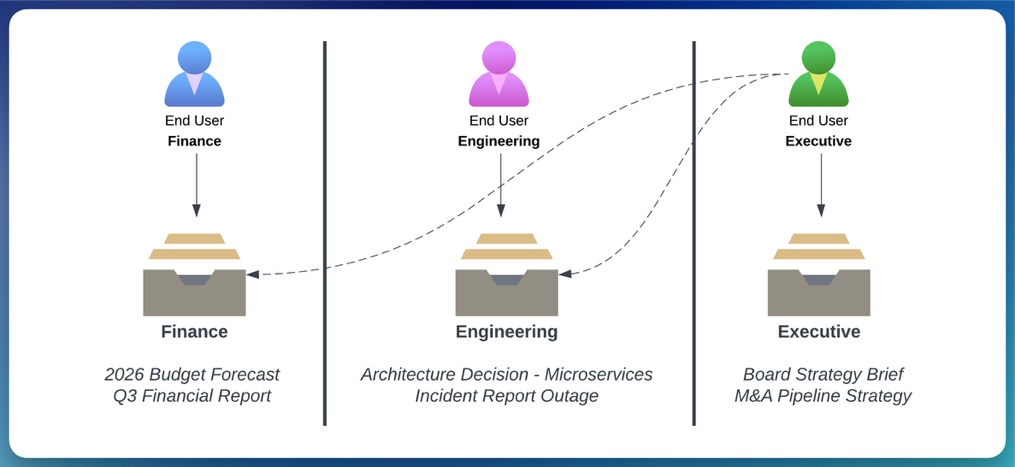
Automating IT support with AI: How Nexthink uses OpenSearch Service to power self-service issue resolution

Post Syndicated from Rafael Ribeiro, Moe Haidar original https://aws.amazon.com/blogs/big-data/automating-it-support-with-ai-how-nexthink-uses-opensearch-service-to-power-self-service-issue-resolution/

This is a guest post by Rafael Ribeiro and Moe Haidar, at Nexthink, in partnership with AWS.

Nexthink is the leader in digital employee experience, helping enterprises improve how employees interact with technology in the workplace. The company gives IT teams real-time visibility into endpoint performance, application usage, and employee sentiment across millions of devices worldwide.

At the heart of Nexthink’s innovation is Spark, an autonomous artificial intelligence (AI) agent that automates IT support. Spark resolves IT issues for employees, from troubleshooting application crashes to resetting configurations and running remediation scripts. Rather than routing tickets or providing scripted responses, the agent takes direct action, achieving a 77% resolution rate at first contact without human escalation.

Spark operates at enterprise scale, deployed across 12 AWS Regions to serve global customers with low-latency responses.

In this post, we explore how Nexthink combined Amazon OpenSearch Service vector search, Amazon Bedrock, and infrastructure as code to power the Spark agent’s retrieval layer.

The challenge: Why vector search for AI agents?

For an AI agent to autonomously resolve IT issues, it must quickly retrieve the most relevant context from a vast knowledge base. Traditional keyword search falls short because:

  • Semantic understanding matters: An employee asking “my laptop is running slow” should match articles about “system performance optimization” even without exact keyword overlap.
  • Accurate retrieval drives correct outcomes: The quality of an AI agent’s response is only as good as the context it retrieves. When the agent pulls the right documentation, scripts, and historical resolutions, it produces accurate, safe actions. When retrieval is imprecise, the consequences can be severe. An agent acting on the wrong context could run destructive commands like rm -rf *, wipe critical data, or apply an incorrect fix that escalates the problem. Accurate vector search is the guardrail that keeps autonomous agents grounded in verified, relevant knowledge.
  • Speed is critical: Enterprise users expect near-instant responses, so retrieval must run in sub-second time across millions of documents.

This led Nexthink to implement Amazon OpenSearch Service with vector search capabilities, using Amazon Titan Text Embeddings V2 through Amazon Bedrock for embedding generation. With this architecture, Spark performs semantic search across all knowledge sources, retrieving contextually relevant information that drives accurate, autonomous issue resolution.

High-level architecture

The following diagram illustrates the high-level architecture of Nexthink’s Spark agent implementation with Amazon OpenSearch Service.

High-level architecture of Nexthink’s Spark AI agent, showing Amazon Elastic Kubernetes Service hosting the agent, Amazon OpenSearch Service as the vector store, and Amazon Bedrock providing the embedding model

Architecture components

Amazon Elastic Kubernetes Service (Amazon EKS) hosts the Spark agent, which interprets user queries, retrieves relevant context, and runs autonomous resolutions. With container orchestration, the agent scales horizontally across Nexthink’s 12 AWS Regions while maintaining consistent response times. The agent communicates with Amazon OpenSearch Service to perform semantic searches, retrieving the most contextually relevant documentation and automation scripts for each user’s issue.

Amazon OpenSearch Service functions as the central vector store, providing the k-Nearest Neighbors (k-NN) capabilities required for semantic search. OpenSearch Service stores document embeddings (dense vector representations of text content) alongside traditional metadata fields. When the AI agent submits a query, OpenSearch Service performs approximate nearest neighbor (ANN) searches to find documents with semantically similar embeddings, even when exact keywords don’t match. This vector search capability, combined with the proven scalability and managed infrastructure of OpenSearch Service, makes it well suited for AI agent architectures that require fast, accurate context retrieval.

Amazon Bedrock provides the foundation models used to generate text embeddings. Nexthink uses Amazon Titan Text Embeddings V2, hosted on Amazon Bedrock, to convert both documents and queries into dense vector representations. OpenSearch Service integrates natively with Amazon Bedrock through the OpenSearch ML Connector, which handles embedding generation at both index and query time.

Data ingestion pipeline

A critical component of any AI agent architecture is the data ingestion pipeline. This mechanism transforms raw documents into searchable, semantically indexed content in OpenSearch Service. For Spark, the pipeline must handle diverse data sources while automatically generating vector embeddings for semantic search.

Step 1: Staging and preprocessing layer

Staging layer in Amazon S3

Knowledge bases (KBs) are staged in Amazon Simple Storage Service (Amazon S3) before being processed through the ingestion pipeline. Amazon S3 provides durable storage, versioning capabilities, and integration with OpenSearch Service ingestion mechanisms. When documentation updates occur, new versions are uploaded to Amazon S3, which triggers the ingestion pipeline to reprocess and re-embed the content.

Event-driven streaming with Apache Kafka

IT tickets, agent interactions, and remote actions are processed through Apache Kafka for reliable message delivery during traffic spikes. Its consumer group model lets the ingestion pipeline scale horizontally based on event volume.

Step 2: Embedding generation during indexing time

Nexthink uses ingest pipelines inside OpenSearch Service to process the data at ingestion time, including generating text embeddings. When documents are sent to OpenSearch Service, the text_embedding processor inside the ingest pipeline automatically invokes the machine learning (ML) Connector to generate embeddings.

The ML Connector is the OpenSearch Service built-in framework for integrating external ML services. It handles request signing between OpenSearch Service and Amazon Bedrock, parses the Amazon Bedrock response to extract embeddings, maps them to index fields, and manages retries on failure. This eliminated the need for custom integration code and accelerated Nexthink’s time to market.

The following ingestion pipeline configuration demonstrates how to configure the text_embedding processor.

{
  "description": "Embedding ingestion pipeline for Spark AI Agent",
  "processors": [
    {
      "text_embedding": {
        "model_id": "<bedrock-connector-model-id>",
        "field_map": {
          "content": "content_embedding"
        }
      }
    }
  ]
}

In this configuration:

  • model_id: References the registered ML model connected to Amazon Bedrock.
  • field_map: Maps the source text field (content) to the target embedding field (content_embedding).

Step 3: Embeddings and data structure in OpenSearch Service

Nexthink stores embeddings alongside textual and metadata information in their k-NN index. For the vector field, they use Hierarchical Navigable Small World (HNSW) with the Lucene engine, as shown in the following example.

...
"content_embedding": {
  "type": "knn_vector",
  "dimension": 1024,
  "method": {
    "name": "hnsw",
    "space_type": "innerproduct",
    "engine": "lucene"
  }
},
"document_type": {
  "type": "keyword"
},
"tenant_id": {
  "type": "keyword"
}
...

In this configuration:

Multi-tenant search and retrieval

Enterprise AI agent deployments must address a critical challenge: making sure that users only access data they’re authorized to see. For Nexthink, serving multiple enterprise customers from a shared infrastructure requires robust multi-tenant security. Each customer’s knowledge base, automation scripts, and support tickets must remain isolated while the shared vector index continues to perform well.

The following diagram illustrates the search flow from user query to ranked results.

Search flow showing how a user query travels through the Spark agent, OpenSearch Service neural search, the ML Connector to Amazon Bedrock for embedding, and tenant-filtered k-NN retrieval to produce ranked results

Tenant management

Nexthink stores information about each tenant inside the tenant_id field. This design lets permission filters run efficiently alongside vector similarity searches. Additionally, Nexthink stores the tenant_id as a keyword type in the index mapping shared previously, so that filtering runs without the overhead of text analysis. Instead of pre-filtering with k-NN queries through a score script filter, the OpenSearch engine uses an intelligent decision-based approach for k-NN filtering called efficient filtering.

Neural query example with efficient filtering

OpenSearch’s neural search simplifies vector search by handling embedding generation as part of the query itself. Instead of requiring the application to call an embedding model separately and then submit a raw k-NN query with a vector, a neural query accepts plain text and uses the registered ML Connector to generate the embedding on the fly. As a result, the Spark agent can send natural-language queries directly to OpenSearch Service without any client-side embedding logic.

The following query demonstrates how Nexthink combines neural search with tenant isolation through efficient filtering in OpenSearch Service.

{
  "query": {
    "bool": {
      "must": [
        {
          "neural": {
            "content_embedding": {
              "query_text": "laptop running slow",
              "model_id": "<bedrock-connector-model-id>",
              "k": 50
            }
          }
        }
      ],
      "filter": [
        {
          "term": {
            "tenant_id": "customer-123"
          }
        }
      ]
    }
  }
}

In this query structure:

  • bool.must: Contains the neural search clause that performs semantic matching against document embeddings.
  • bool.filter: Applies the tenant isolation constraint, so that only documents belonging to customer-123 are returned.

Nexthink’s contribution to the technical community

A key principle in Nexthink’s architecture is treating infrastructure as code. With deployments spanning 12 AWS Regions, manual provisioning would be error-prone and time-consuming. Therefore, Nexthink uses several infrastructure as code (IaC) technologies, including Terraform, to provision resources.

Although the Terraform provider supports core OpenSearch Service resources like indices and index templates, it lacked support for some of the ML Commons resources required to integrate Amazon Bedrock:

  • ML Connectors: Required to establish connections to external ML services like Amazon Bedrock.
  • ML Model Groups: Needed to organize and manage related models.
  • ML Models: Required to register models that use the connectors.

Without these resources, Nexthink initially relied on workarounds using local-exec provisioners and null_resource blocks to call the OpenSearch Service API directly. This approach was fragile, difficult to maintain, and didn’t integrate well with Terraform’s state management.

Contributing back

Rather than maintaining a private fork indefinitely, Nexthink chose to contribute their custom Terraform resources back to the OpenSearch Project community. This decision aligned with their engineering values to help other organizations implement similar architectures and contribute to the broader community.

Open source contribution links

The Terraform provider contributions are being added to the official OpenSearch project repository:

  • Pull Request: Add support for ML Connector, ML Model Group, and ML Model resources #280.
  • Feature Request: Contribution – Support for ML resources #281.

These contributions let any organization provision OpenSearch Service ML resources with Terraform, which streamlines the deployment of AI agent architectures that integrate with Amazon Bedrock or other ML services.

Conclusion

Nexthink’s implementation of Amazon OpenSearch Service for the Spark agent demonstrates how vector search capabilities can power autonomous IT support at enterprise scale. By combining semantic search with multi-tenant security and infrastructure as code practices, Nexthink achieved a 77% resolution rate at first contact, so that employees can resolve IT issues without human escalation.

Get started

Ready to build your own AI agent with vector search capabilities? Here are your next steps:

  1. Explore Amazon OpenSearch Service vector search features in the OpenSearch Service documentation.
  2. Configure ML Connectors for Amazon Bedrock using the ML Commons plugin guide.
  3. Automate with Terraform using the contributed resources in the terraform-provider-opensearch repository.

The combination of Amazon OpenSearch Service, Amazon Bedrock, and infrastructure as code practices provides a foundation for building intelligent, context-aware AI agents that deliver business value.


About the authors

Rafael Ribeiro

Rafael Ribeiro

Rafael is a Software Engineer at Nexthink, focusing on infrastructure and DevOps for AI teams.

Moe Haidar

Moe Haidar is Head of Agentic AI and Engineering at Nexthink, where he leads AI architecture and strategy alongside the development of Spark, the company’s autonomous personal IT agent that resolves employee issues at scale.

Hajer Bouafif

Hajer Bouafif

Hajer is an Analytics Specialist Solutions Architect at Amazon Web Services. She focuses on Amazon OpenSearch Service and helps customers design and build well-architected analytics workloads in diverse industries. Hajer enjoys spending time outdoors and discovering new cultures.

Luca Perrozzi

Luca Perrozzi

Luca is a Solutions Architect at AWS, based in Switzerland. He focuses on innovation topics at AWS, especially in the area of Artificial Intelligence. Luca holds a PhD in particle physics and has 15 years of hands-on experience as a research scientist and software engineer.

Prevent data exfiltration: AWS egress controls for cloud workloads

Post Syndicated from Meriem SMACHE original https://aws.amazon.com/blogs/security/prevent-data-exfiltration-aws-egress-controls-for-cloud-workloads/

When securing an Amazon Web Services (AWS) environment, teams naturally prioritize inbound controls, firewalls, WAFs, and access policies, because that’s where the most visible threats originate. Outbound traffic, on the other hand, tends to get less attention. It’s often left open by default to avoid breaking application dependencies and because the risk feels less immediate. But overlooking egress means missing a key layer of defense. Without visibility into what’s leaving your network, it’s harder to detect unintended data flows, whether from misconfigured services, overly broad permissions, or workloads with unauthorized access.

Real-world incidents highlight why egress controls deserve attention across both traditional cloud workloads and emerging AI-driven architectures.

In traditional cloud environments, application-level security issues remain a persistent threat. For example, when CVE-2025-55182 (React2Shell) was publicly disclosed in December 2025, multiple organized groups began exploitation attempts within hours, targeting unpatched React Server Components to achieve remote code execution. After a workload is accessed by an unauthorized party, they typically establish outbound command-and-control channels and begin exfiltrating data. Without egress controls in place, that outbound traffic can flow freely, and the unauthorized access might go unnoticed until a compliance audit, customer complaint, or incident notification forces discovery.

Agentic AI systems introduce a new dimension to this risk. The OWASP Top 10 for Agentic Applications identifies threats such as Agent Goal Hijack (ASI01), where unauthorized parties manipulate an autonomous agent’s objectives to silently exfiltrate data, and Unexpected Code Execution (ASI05), where an agent with unauthorized access generates and runs potentially damaging code that establishes reverse shells or transfers sensitive data to external endpoints. As organizations deploy AI agents with access to tools, APIs, and code interpreters, these agents become high-value targets, and their outbound network activity must be constrained with the same rigor as any other workload.

In both scenarios, the common thread is unauthorized outbound traffic. In this post, we show you how to implement layered egress detection and protection using AWS services working together to reduce unauthorized data transfer risk, whether the source is an application with unauthorized access or a manipulated AI agent.

Architecture overview

Figure 1: Hub-and-spoke egress control architecture

Figure 1: Hub-and-spoke egress control architecture

The following architecture, shown in Figure 1, illustrates one approach to implementing a hub-and-spoke network pattern for a multi-account AWS environment. Note that alternative designs might be appropriate depending on your organizational requirements and constraints.

Application workloads reside in spoke virtual private clouds (VPCs) that connect to an AWS Transit Gateway, which serves as the central hub for routing inter-VPC and internet-bound traffic while enforcing network segmentation through carefully crafted route tables. Spoke VPCs use VPC endpoints for secure AWS service access, keeping traffic within the AWS network where possible. VPC endpoint policies are applied as key data perimeter controls, restricting which principals can access AWS services and which resources can be accessed through these endpoints.

Internet-bound traffic is routed through a transit gateway-attached AWS Network Firewall, which inspects and filters outbound flows before they reach the internet. This centralized routing model scales horizontally by adding spoke VPCs without modifying the inspection infrastructure, making it well suited for organizations that have multiple AWS accounts.

It’s important to understand that Amazon Route 53 Resolver DNS Firewall must be deployed across your VPCs to filter DNS queries that resolve through the Route 53 VPC Resolver. (DNS queries sent directly to other DNS resolvers bypass it, but can be filtered with AWS Network Firewall.) The DNS firewall uses both managed and custom domain lists to filter DNS queries, blocking resolution of known unauthorized domains before any network connection is established.

Data perimeter controls are enforced at multiple layers: service control policies (SCPs) and resource control policies (RCPs) at the AWS Organizations level, VPC endpoint policies at the network level, and resource policies on individual services. AWS IAM Access Analyzer is deployed at the organization level to continuously detect publicly accessible or externally shared resources.

A detection layer comprising Amazon GuardDuty, AWS Security Hub, and IAM Access Analyzer provides continuous monitoring and threat detection. Findings are routed through an integration layer using Amazon EventBridge, which triggers AWS Lambda-based automated remediation and sends notifications using Amazon Simple Notification Service (Amazon SNS). This integration layer also feeds back into your network controls, automatically updating Network Firewall deny rules and DNS Firewall block lists based on detected threats.

Centralized observability is achieved through Amazon CloudWatch Logs and CloudWatch dashboards. Network Firewall flow logs and alert logs are collected centrally to support incident investigation and compliance reporting.

This architecture applies equally to traditional application workloads and AI-driven workloads. An AI agent running on Amazon Bedrock, for example, typically sits inside a spoke VPC. When that agent invokes an external API or attempts to reach the internet, its traffic follows the same path through Transit Gateway and Network Firewall as any Amazon Elastic Compute Cloud (Amazon EC2) or container workload. The agent doesn’t get a special lane out, it’s subject to the same domain allow-lists, the same DNS filtering, and the same data perimeter policies.

That said, agents often need outbound access to invoke external tools or third-party APIs as part of their normal operation, which makes allow-list design more nuanced. You will want to scope allowing domains tightly to the specific endpoints your agents legitimately need, rather than opening broad categories. Complementing these network-layer controls with application-layer guardrails such as Amazon Bedrock Guardrails—which can filter harmful content and detect prompt attacks before they reach the network layer—adds another layer of defense.

Preventive controls

The following preventive controls block data exfiltration before it occurs. Because they actively disrupt traffic, reserve them for activity that is confirmed or highly likely to be potentially damaging.

AWS Network Firewall

Consider this scenario: an unauthorized party compromises an EC2 instance in one of your spoke VPCs and attempts to exfiltrate sensitive data to an external server. Now consider an agentic AI scenario: an unauthorized party uses prompt injection to hijack an AI agent’s goal (OWASP ASI01), redirecting it to exfiltrate training data to an external endpoint. Network Firewall is designed to block this attempt because the unauthorized destination isn’t on the approved domain allow-list—the same control that stops an EC2 instance with unauthorized access— also stops a manipulated AI agent.

Without centralized egress inspection, that traffic flows directly to the internet through a NAT gateway. Network Firewall prevents this by providing centralized, Layers 3–7 deep packet inspection with advanced threat intelligence capabilities, including IP address, port, and protocol filtering; plus packet content inspection using Suricata-compatible rules.

In this architecture, Transit Gateway funnels internet-bound traffic from multiple spoke VPCs through Network Firewall for centralized inspection. The firewall endpoint becomes the target for 0.0.0.0/0 routes, routing outbound internet traffic for inspection before reaching NAT gateways for address translation. In both scenarios, Network Firewall blocks the exfiltration attempt at the network layer before data leaves your environment. Its key capabilities include:

  • Domain name filtering: Block traffic to unauthorized destinations (such as a command-and-control server at *.untrusted-domain.com)
  • IP and port rules: Define explicit allow-lists for external IPs your applications truly need, blocking everything else
  • Domain category filtering: Block entire categories of domains that your workloads should never communicate with
  • IDS and IPS: Detect and block known attack patterns in outbound traffic using Suricata-compatible rules
  • Port and protocol enforcement: Help ensure only expected protocols use their designated ports (for example, only HTTPS on TCP port 443), preventing protocol tunneling
  • Geographic IP filtering: Block outbound traffic to geographic regions where your organization has no business relationships
  • TLS decryption: Inspect encrypted traffic to detect exfiltration attempts hidden within HTTPS connections
  • Threat intelligence integration: Use managed threat intelligence (such as active threat defense that uses the Amazon threat intelligence system MadPot) feeds or custom Suricata rules to detect unexpected patterns
  • Automatic scaling: Handles up to 100 Gbps per Availability Zone

For multi-account environments, AWS Firewall Manager can centrally deploy and manage Network Firewall across your organization’s accounts, helping maintain consistent egress rules everywhere. Additionally, AWS Network Firewall Proxy (in preview) offers explicit proxy capabilities with granular HTTP/HTTPS filtering—including URL path and HTTP method-level controls—for workloads that require application-layer inspection of outbound web traffic.

Route 53 Resolver DNS Firewall

DNS queries made through Route 53 VPC Resolver don’t pass through the outbound network path inspected by Network Firewall or third-party firewalls. Unauthorized parties can take advantage of this by encoding sensitive data within DNS queries to external servers, a technique known as DNS tunneling. This risk extends to agentic AI workloads. An agent with code execution capabilities (OWASP ASI05) could be tricked into running a script that encodes sensitive data (like customer records, model weights, API keys) into DNS queries directed at an externally controlled nameserver. DNS Firewall is designed to block these queries regardless of whether they originate from a traditional workload or an AI agent, because the filtering happens at the resolver level before any connection is established.

Because DNS traffic is essential for normal operations and often overlooked in security architectures, it represents a common unauthorized data exfiltration channel. Route 53 Resolver DNS Firewall closes this gap by filtering and potentially blocking outbound DNS queries from your VPCs. Its core capabilities consist of:

  • Block unauthorized domains: AWS provides managed domain lists, including an Aggregate Threat List covering malware, ransomware, botnet, spyware, and DNS tunneling
  • Enforce allow-lists: Permit only queries to approved domains, blocking everything else
  • DNS Firewall Advanced features: AI and machine learning (AI/ML)-backed detection of DNS tunneling, Domain Generation Algorithms (DGAs), and dictionary DGAs

Configuration is straightforward: Create rule groups with domain match lists and actions (block, allow, and alert), then associate them with your VPCs. The DNS resolver applies these rules to every DNS query made from instances in the VPC through Route 53 Resolver. This prevents unauthorized parties from using DNS tunneling to exfiltrate data, a technique that completely bypasses inspection by firewalls in the egress VPC.

For a deeper look at the risks associated with DNS exfiltration and DNS Firewall Advanced capabilities, see Protect against advanced DNS threats with Amazon Route 53 Resolver DNS Firewall.

Data perimeters

A data perimeter is a set of preventive guardrails that allow only your trusted identities to access trusted resources from expected networks. While the preceding controls secure the network paths out of your environment, data perimeters secure the API-level paths, helping to ensure that even if an unauthorized party gains access to valid credentials, they can’t use AWS service APIs to move data to resources outside your organization.

This comprehensive approach uses three primary AWS capabilities working together:

  1. Service control policies (SCPs): Organization-wide preventive controls that restrict what identities can do. In the context of egress protection, SCPs can prevent users from creating resources that bypass your egress controls (for example, preventing the creation of VPCs without DNS Firewall associations or blocking the use of services that could establish alternative outbound paths).
  2. Resource control policies (RCPs): Controls that restrict API access to your resources. While RCPs aren’t directly egress controls, they act as a complementary layer. For example, they can block attempts to access your Amazon Simple Storage Service (Amazon S3) buckets from outside your organization at the resource level.
  3. VPC endpoint policies: VPC endpoints enable private communication with AWS services without traffic going through the internet. VPC endpoint policies are resource-based AWS Identity and Access Management (IAM) policies that govern what can be accessed through that endpoint. This is where data perimeters most directly function as an egress control.

Consider the following VPC endpoint policy that restricts Amazon S3 access through the endpoint to only S3 buckets within your organization, directly preventing an insider or a workload with unauthorized access from copying data to an external S3 bucket:

{
  "Statement": [{
    "Sid": "DenyAccessToNonOrgBuckets",
    "Effect": "Deny",
    "Principal": "*",
    "Action": "s3:*",
    "Resource": "*",
    "Condition": {
      "StringNotEqualsIfExists": {
        "aws:ResourceOrgID": "<my-org-id>"
      }
    }
  }]
}

This policy is designed to deny any Amazon S3 operation through this VPC endpoint unless the target S3 bucket belongs to your organization. Without this control, a workload with unauthorized access could use aws s3 cp to copy sensitive data to an externally controlled bucket in a different AWS account.

Data perimeter policies don’t grant new permissions, they narrow what’s accessible by establishing guardrails, acting as a second authorization layer. By implementing these perimeters using IAM condition keys like aws:PrincipalOrgID, aws:ResourceOrgID, aws:SourceVpc, and aws:SourceVpce, you create layered permissions guardrails that help prevent unintended access patterns and configuration errors.

For more information on implementing perimeter controls, explore the Building a Data Perimeter AWS whitepaper.

Detective controls

The following detective controls surface data exfiltration attempts after they occur. Because they observe rather than disrupt traffic, you can apply them broadly to flag unexpected activity for investigation. Use the findings to identify recurring unauthorized patterns that can graduate into preventive controls.

Amazon GuardDuty: Detective control for egress threats

GuardDuty serves as your critical detection layer for egress protection, continuously monitoring for outbound threats that evade or take advantage of your preventive controls. GuardDuty identifies behavioral anomalies and attack patterns that indicate active data exfiltration attempts. Its egress-focused detection capabilities include:

  • DNS-based data exfiltration detection: The Trojan:EC2/DNSDataExfiltration finding alerts when EC2 instances are transferring data through DNS channels. GuardDuty also identifies queries to DGA domains commonly used for command-and-control communication.
  • Known malicious actor detection: Exfiltration:S3/MaliciousIPCaller triggers when Amazon S3 data APIs like GetObject or CopyObject are invoked from IP addresses on AWS threat intelligence feeds, signaling active data extraction attempts.
  • Multi-step attack sequence correlation: GuardDuty Extended Threat Detection correlates multiple unexpected events to identify multi-stage exfiltration campaigns. For example, AttackSequence: S3/CompromisedData detects when unauthorized parties modify S3 bucket policies to broaden access and then systematically extract data using stolen credentials.

GuardDuty findings serve dual purposes in your egress strategy. Alerts about attempted exfiltration that failed confirm your preventive layers (Network Firewall, DNS Firewall, and data perimeters) are functioning effectively: the threat was detected because it progressed far enough to trigger behavioral analysis, but your controls blocked the actual data loss. Conversely, findings indicating successful exfiltration trigger immediate incident response workflows, enabling you to contain active incidents, revoke stolen credentials, and quarantine affected resources before significant damage occurs.

Integrate GuardDuty with Security Hub for centralized correlation across your security services and implement automated response through EventBridge and Lambda functions to enable real-time containment when high-severity exfiltration findings occur.

IAM Access Analyzer

IAM Access Analyzer helps identify potential data exfiltration paths by detecting resources accessible from outside your AWS account or organization. It uses automated reasoning technology to analyze resource-based policies and identify which of your resources can be accessed by external entities (principals outside your zone of trust), continuously monitoring public and cross-account access.

External access analyzers identify resources shared with external principals (such as other AWS accounts or public access). For example, when an S3 bucket is configured to allow access outside your zone of trust through bucket policies, ACLs, or access points, IAM Access Analyzer generates a finding with details about the access path, including the external principal and the level of access granted. Security teams can respond by taking immediate action to remove unintended access or by setting up automated notifications through EventBridge to engage development teams for remediation.

AWS Security Hub

Security Hub exposure findings provide a comprehensive view of potential security risks by correlating data from multiple AWS security services. These findings identify when resources might be vulnerable to data exfiltration by integrating intelligence from GuardDuty (for threat detection), Amazon Inspector (for vulnerability assessment), Security Hub CSPM (for configuration compliance), and Amazon Macie (for sensitive data discovery). For example, it can identify when a publicly exposed S3 bucket contains sensitive data and isn’t encrypted at rest, flagging it as a potential data exfiltration risk that requires immediate attention.

AWS Shield network security director (in preview) complements Security Hub by discovering and analyzing your network topology to identify resources with unrestricted outbound internet access, helping you detect potential egress blind spots across your environment.

Egress security strategy

You don’t need to implement all these controls at once. The following phased approach lets you build your egress security posture incrementally, at a pace that matches your organization’s operational maturity and risk tolerance.

  • Phase 1 – Quick wins: Enable Route 53 DNS Firewall across your VPCs to close the DNS exfiltration gap. Enable GuardDuty across your accounts for baseline threat detection.
  • Phase 2 – Foundational: Deploy organization-wide data perimeters (SCPs, RCPs, and VPC endpoint policies). Deploy Network Firewall as a transit gateway-attached firewall.
  • Phase 3 – Efficient: Enable IAM Access Analyzer for continuous external access detection. Implement automated remediation through EventBridge and Lambda to update firewall rules in real time. Centralize findings in Security Hub with automated alerting.

Conclusion

Egress security isn’t a single control—it’s a layered strategy. Start by assessing your current posture across network filtering, DNS security, data perimeters, and detective controls. Identify the gaps, then follow the phased approach outlined in this post to close them incrementally. Regular testing through simulated exfiltration attempts validates that your controls work effectively. These controls apply with equal force to agentic AI workloads, where manipulated agents can become unintended exfiltration vectors. Put egress under control and turn your outbound blind spots into monitored checkpoints.

If you have feedback about this post, submit comments in the Comments section below.


Merriem-SMACHE

Meriem SMACHE

Meriem is a Security Specialist Solutions Architect at AWS, supporting customers in the design and deployment of resilient cloud and AI solutions, from generative AI workloads to fully autonomous agentic systems, that meet their regulatory requirements and security needs.

Maxim Raya

Maxim Raya

Maxim is a Security Specialist Solutions Architect at AWS. In this role, he helps clients accelerate their cloud transformation by increasing their confidence in the security and compliance of their AWS environments.

[$] Free-threaded Python: past, present, and future

Post Syndicated from jake original https://lwn.net/Articles/1078367/

Probably the biggest change for Python over the last five years or so is
the advent of the “free-threaded” version of the language, which removes the
global interpreter lock (GIL) and allows multiple threads to run in
parallel in the interpreter. At PyCon
US 2026
, held in Long Beach, California in mid-May, longtime CPython
core developer (and current steering council member) Thomas Wouters gave a
talk about the feature. He looked at the motivation behind the GIL-removal
efforts, some history,
the current status of the free-threaded interpreter, and provided a
prediction on where it all leads.

AWS Weekly Roundup: NY Summit recap, Local Zone in Hanoi, Grok 4.3 in Bedrock, price reductions, and more (June 22, 2026)

Post Syndicated from Channy Yun (윤석찬) original https://aws.amazon.com/blogs/aws/aws-weekly-roundup-ny-summit-recap-local-zone-in-hanoi-grok-4-3-in-bedrock-price-reductions-and-more-june-22-2026/

Last week AWS Summit New York City brought together thousands of customers, partners, and builders for a free, one-day event showcasing the latest in cloud and AI innovation. Dr. Swami Sivasubramanian, VP of Agentic AI at AWS unveiled a stack of AI launches in his keynote, all built around one thesis: agents that compound value over time.

  • Agents for working – You can launch autonomous agents and access a smarter activity feed with new Amazon Quick features, which now let you create and run multi-step agents directly in the desktop app and consolidates email, Slack, calendar, and tasks into a single prioritized view with personalized rules.
  • Agents for securing – You can shift from reactive to proactive security with AWS Continuum, a new AI-native security service that reasons, validates, and acts at machine speed across the full code vulnerability lifecycle. AWS Security Agent (now part of AWS Continuum) adds new features: threat modeling; pull request code scanning with remediation across major Git platforms; and IDE integrations via Kiro power, Claude Code plugin, and MCP.
  • Agents for building – You can write, ship, and modernize code in one continuous loop with Kiro, AWS DevOps Agent, and AWS Transform. Kiro introduces a native iOS app; AWS DevOps Agent adds release management capabilities to assess code changes before production; and AWS Transform continuous modernization reduces tech debt autonomously.
  • Agents customers create – You can go from agent idea to production in minutes with Amazon Bedrock AgentCore, which now includes a GA harness for infrastructure and orchestration, Web Search, Managed Knowledge Base, policy integrations with Guardrails, and the new AWS Context service for mapping organizational data relationships.

To learn more, visit the Summit recap from our top announcements blog post and Amazon News post.

Last week’s launches
Here are last week’s launches that caught my attention:

  • AWS Local Zone in Hanoi, Vietnam  —This new Local Zone is one of the first AWS Local Zones in the Asia Pacific with support for Amazon S3 and Amazon EBS Local Snapshots, enabling customers to meet data residency requirements by storing and backing up data locally. To get started, enable the Hanoi Local Zone (ap-southeast-1-han-1a) from the Regions and Zones tab in the AWS Global View or by using the ModifyAvailabilityZoneGroup API.
  • AWS Blocks, an open-source TypeScript framework for application developers (preview) — AWS Blocks runs a fully functional local environment with Postgres, authentication, and real-time messaging, no AWS account required. When you’re ready to deploy, the same application code runs on production AWS services with zero changes, and you can drop into AWS CDK at any point for direct resource configuration.
  • Grok 4.3 from xAI in Amazon Bedrock —You can use the Grok 4.3 model on Amazon Bedrock, giving you even more choice as you build generative AI applications across reasoning, agentic, and enterprise workflows. Grok 4.3 runs on a new inference engine in Bedrock designed for price performance, with support for tool calling, structured output, and response streaming.
  • Amazon S3 annotations: attach rich, queryable context directly to your objects — Amazon S3 now lets you attach up to 1 GB of rich, mutable, and queryable context directly to your objects using annotations, purpose-built for AI agents and autonomous workflows that need to discover, understand, and act on data at scale without maintaining separate metadata systems.
  • Amazon ECS announces faster service auto scaling — Amazon ECS service auto scaling now detects and responds to load changes faster with support for high resolution (20-second) metrics and metric publishing optimizations. In AWS benchmarking tests, time to trigger scale-out improved from 363 seconds to 86 seconds (76% faster), and total time to scale and provision new tasks improved from 386 seconds to 109 seconds (72% faster).
  • Amazon EC2 G7 instances accelerated by NVIDIA RTX PRO 4500 Blackwell Server Edition GPUs — AWS is the first major cloud provider to support NVIDIA RTX PRO 4500 Blackwell Server Edition GPUs. G7 instances are accelerated by these GPUs with custom sixth-generation Intel Xeon Scalable processors, delivering up to 4.6x AI inference performance and up to 2.1x graphics performance compared to G6 instances.
  • Strands Agents introduces new capabilities — Strands is an open source toolkit for building production agents. You can now use better context management in Harness SDK, a new isolated execution environment with Strands Shell, and chaos testing and red teaming in Strands Evals.
  • AWS Management Console Private Access – You can access the AWS Console from VPCs without internet connectivity, allowing enterprises to manage their AWS infrastructure through the console while maintaining strict network security controls in air-gapped environments.
  • AWS Marketplace Storefront is now generally available – AWS Partners can create and deploy their own branded catalog of solutions and services on their website or application in hours. Channel Partners and Independent Software Vendors can now simplify how they manage their cloud marketplace business and make it easier for customers to discover and purchase their solutions from AWS Marketplace.
  • Palo Alto Networks (PANW) Advanced DNS Security on Amazon Route 53 Resolver DNS Firewall (preview) – You can now enforce DNS threat protections from Palo Alto Networks directly on Route 53 DNS Firewall rules, without deploying separate firewalls or modifying VPC configurations — by subscribing to PANW from the DNS Firewall console through the embedded AWS Marketplace widget.

For a full list of AWS announcements, be sure to keep an eye on the What’s New with AWS page.

Price reductions 
AWS continues to look for ways to increase performance and lower prices for our customers. I noticed a few such efforts last week, so I’d like to share them:

Learn more about AWS, browse and join upcoming AWS-led in-person and virtual events, startup events, and developer-focused events as well as AWS Summits and AWS Community Days. Join the AWS Builder Center to connect with builders, share solutions, and access content that supports your development.

That’s all for this week. Check back next Monday for another Weekly Roundup!

Channy

First preview release of Xfce’s Wayland compositor

Post Syndicated from jzb original https://lwn.net/Articles/1078942/

Brian Tarricone has announced
the first preview release of xfwl4, a Wayland compositor for the Xfce desktop environment.

After close to six months of work, I feel like it’s ready to get
some wider use, even though of course there will be bugs and missing
features. Think of this as an alpha release. […]

The end goal of xfwl4 is to behave as closely as possible to an
Xfce desktop running on an X server. Ideally a user could switch
between the two without even knowing there’s a difference. In reality,
of course, it won’t be quite that seamless, and there’s still more
work to be done to get as close as possible to that ideal. This is a
first solid cut at it, at the very least.

[$] Reports from OSPM 2026, day one

Post Syndicated from corbet original https://lwn.net/Articles/1077759/

The Power Management
and Scheduling in the Linux Kernel Summit
, which still goes by the
historical acronym OSPM, was held in Cambridge, UK, in mid-April. As has
become traditional, the presenters at that event have since written
summaries of their sessions, and this work has kindly been made available
to LWN for publication. The first day’s sessions covered a wide range of
topics, including idle-state selection, user-space schedulers with
sched_ext, lock-holder preemption, and much more.

Security updates for Monday

Post Syndicated from jzb original https://lwn.net/Articles/1078922/

Security updates have been issued by AlmaLinux (389-ds:1.4, kernel, and kernel-rt), Debian (gst-libav1.0, gst-plugins-good1.0, imagemagick, kernel, libconfig-inifiles-perl, libgd-perl, libhttp-daemon-perl, mediawiki, pillow, and squid), Fedora (389-ds-base, alertmanager, ansible-core, buildah, chromium, erlang-cowboy, erlang-cowlib, erlang-gun, freerdp, kubernetes1.33, kubernetes1.34, kubernetes1.35, mingw-SDL2_image, ongres-scram, ongres-stringprep, openssl, perl-Config-IniFiles, perl-Crypt-PBKDF2, podman, postgresql-jdbc, python3.13, strongswan, webkitgtk, xdg-desktop-portal, and yt-dlp), Red Hat (osbuild-composer), SUSE (alloy, amazon-ssm-agent, ansible-core, apache-sshd, jpgpj, azure-storage-azcopy, chromedriver, containerized-data-importer, firefox, glibc, graphite2, inspektor-gadget, kubevirt, lemon, openvswitch, python-starlette, python311, python311-joserfc, python313, and tinyproxy), and Ubuntu (netatalk).

Professional Athletes and Wearables

Post Syndicated from Bruce Schneier original https://www.schneier.com/blog/archives/2026/06/professional-athletes-and-wearables.html

I haven’t thought about the privacy issues surrounding professional athletes and wearables.

Wearables present serious privacy issues for “Average Joe” consumers, who are entrusting tech companies to safely store and protect their biometric data. Imagine the stakes for a professional athlete, whose entire livelihood could be affected by a single biometric data point. To give one of many realistic hypotheticals: a basketball player has a terrible game, and the coach wonders if they showed up to the gym hungover. The coach has access to the player’s wearable data, and checks to see when they went to sleep, as well as what their heart rate looked like during the night. Should the player have been out partying before a game? No. Should the coach be able to surveil them? Definitely not.

It will not surprise you to learn that there’s an emergent gambling angle here: sports leagues would love to commercialize players’ biometric data, and sharp bettors would love access to data about, say, a hungover player. “We’re going to get to a spot where people are betting not just on the velocity of the puck that was shot by a player in the NHL playoffs, but on what the heart rate of a certain player is going to be running down the field,” said Helen “Nellie” Drew, the director of the University of Buffalo’s Center for the Advancement of Sport, and a professor of practice in sports law.

There are other practical considerations, too. What if wearable data reveals that a player isn’t as speedy as they were before, and a team uses that data against the player during contract negotiations? What if a wearable reveals a player is favoring their leg, or is at greater risk of injury? This information is potentially beneficial to a training staff and an athlete, so long as it’s disclosed and used in a responsible manner—­a critical, mostly unresolved caveat. “Aging and injured players are the most at-risk” of wearable data being used against them, said Michael LeRoy, who researches sports labor laws and AI, and is a professor at the University of Illinois’s School of Labor and Employment Relations.

The bit about gamblers is particularly scary.

I have often said that surveillance tech is generally deployed first against people with diminished rights: children, prisoners, military personnel, the mentally impaired. This is another early use case with different dynamics. The surveilled are wealthy and powerful, and—in many cases—unionized.

The collective thoughts of the interwebz