Tag Archives: Foundational (100)

Announcing the AWS Security and Privacy Knowledge Hub for Australia and New Zealand

Post Syndicated from Phil Rodrigues original https://aws.amazon.com/blogs/security/announcing-the-aws-security-and-privacy-knowledge-hub-for-australia-and-new-zealand/

Cloud technology provides organizations across Australia and New Zealand with the flexibility to adapt quickly and scale their digital presences up or down in response to consumer demand. In 2021 and beyond, we expect to see cloud adoption continue to accelerate as organizations of all sizes realize the agility, operational, and financial benefits of moving to the cloud.

To fully harness the benefits of the digital economy it’s important that you remain vigilant about the security of your technology resources in order to protect the confidentiality, integrity, and availability of your systems and data. Security is our top priority at AWS, and more than ever we believe it’s critical for everyone to understand the best practices to use cloud technology securely. Organizations of all sizes can benefit by implementing automated guardrails that allow you to innovate while maintaining the highest security standards. We want to help you move fast and innovate quickly while staying secure.

This is why we are excited to announce the new AWS Security and Privacy Knowledge Hub for Australia and New Zealand.

The new website offers many resources specific to Australia and New Zealand, including:

  • The latest local security and privacy updates from AWS security experts in Australia and New Zealand.
  • How customers can use AWS to help meet the requirements of local privacy laws, government security standards, and banking security guidance.
  • Local customer stories about Australian and New Zealand companies and agencies that focus on security, privacy, and compliance.
  • Details about AWS infrastructure in Australia and New Zealand, including the upcoming AWS Region in Melbourne.
  • General FAQs on security and privacy in the cloud.

AWS maintains the highest security and privacy practices, which is one reason we are trusted by governments and organizations around the world to deliver services to millions of individuals. In Australia and New Zealand, we have hundreds of thousands of active customers using AWS each month, with many building mission critical applications for their business. For example, the National Bank of Australia (NAB) provides banking platforms like NAB Connect that offer services to businesses of all sizes, built on AWS. The Australian Taxation Office (ATO) offers the flexibility and speed for all Australians to lodge their tax returns electronically on the MyTax application, built on AWS. The University of Auckland runs critical teaching and learning applications relied on by their 18,000 students around the world, built on AWS. AWS Partner Versent helps businesses like Transurban and government agencies like Service NSW operate in the cloud securely, built on AWS.

Security is a shared responsibility between AWS and our customers. You should review the security features that we provide with our services, and be familiar with how to implement your security requirements within your AWS environment. To help you with your responsibility, we offer security services and partner solutions that you can utilize to implement automated and effective security in the cloud. This allows you to focus on your business while keeping your content and applications secure.

We’re inspired by the rapid rate of innovation as customers of all sizes use the cloud to create new business models and work to improve our communities, now and into the future. We look forward to seeing what you will build next on AWS – with security as your top priority.

The AWS Security and Privacy Knowledge Hub for Australia and New Zealand launched today.

If you have feedback about this post, submit comments in the Comments section below.

Want more AWS Security how-to content, news, and feature announcements? Follow us on Twitter.

Author

Phil Rodrigues

Phil is the Head of the Security Team, Australia & New Zealand for AWS, based in Sydney. He and his team work with AWS’s largest customers to improve their security, risk and compliance in the cloud. Phil is a frequent speaker at AWS and cloud security events across Australia. Prior to AWS he worked for over 20 years in Information Security in the US, Europe, and Asia-Pacific.

Getting Started with serverless for developers: Part 4 – Local developer workflow

Post Syndicated from Benjamin Smith original https://aws.amazon.com/blogs/compute/getting-started-with-serverless-for-developers-part-4-local-developer-workflow/

This blog is part 4 of the “Getting started with serverless for developers” series, helping developers start building serverless applications from their IDE.

Many “getting started” guides demonstrate how to build serverless applications from within the AWS Management Console. However, most developers spend the majority of their time building from within their local integrated development environment (IDE).

The next two blog posts in this series focus on the serverless developer workflow. They describe how to check logs, test, and iterate on business logic while building locally, and how this differs from traditional applications.

This blog post explains how the developer workflow for building serverless applications differs from a traditional developer workflow. It shows the methods that I use to test business logic locally before deploying to a sandbox AWS developer account, and how to test against cloud services as you build. This eliminates the need to deploy to the AWS Cloud each time you want to test a code change.

Traditional developer workflow

Developers typically use the following workflow cycle before committing code to the main branch:

  1. Write code.
  2. Save code.
  3. Run code.
  4. Check results.

This is sometimes referred to as the inner loop, shown as follows:

With traditional (non-serverless) applications, developers commonly create a development environment on their local machine. This local development environment keeps parity with the staging and production environments. It allows developers to test their application locally end-to-end before committing code to the main branch.

Serverless developer workflow

Part 2: the business logic, explains how serverless applications use managed services that abstract away the need for developers to patch and scale their application infrastructure. This means that the code base in a serverless application is focused purely on business logic, allowing managed services to handle other important layers such as:

  • Authorization
  • Presentation
  • Database
  • Application integration
  • Notification

A good serverless developer workflow enables developers to test and iterate on business logic quickly. It allows them to check that the business logic runs correctly with the managed services that compose an application.

To achieve this, the best approach is not to try and emulate managed services on your local development machine. Instead, your local code should interact directly with real cloud services in a sandboxed AWS account.

This approach lets you rapidly test and iterate on business logic locally, deploying to the development environment to test for infrastructure, security, and environment configuration changes. Once the business logic is ready in the development environment, it can be deployed to other environments (test, staging, production) via CI/CD automation or manually triggered commands.

The following sections explain how I test business logic locally using a custom-written test harness. Each time I create a Lambda function I create a directory to hold:

  1. The function code.
  2. A relative package.json.
  3. A file called testharness.js.

The test harness file is used to run the Lambda function code on my local development machine. It is configured to mock environment variables loaded from a file named `env.json` and loads a JSON test event payload located in the events directory.

Testing Lambda function code locally with a test harness

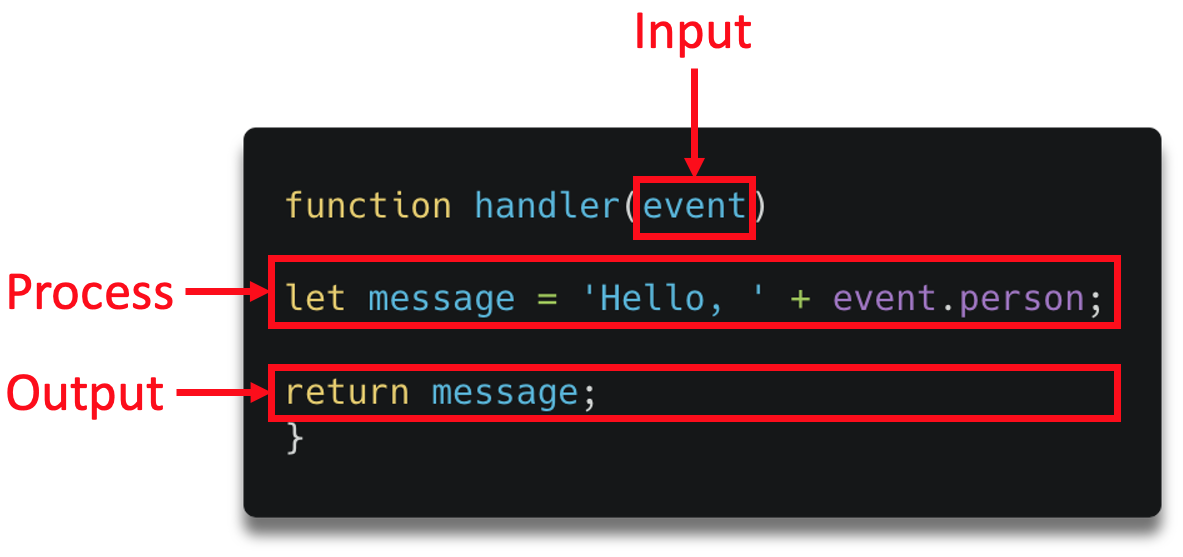
Part 2: the business logic, explains the anatomy of a Lambda function and its handler:

A small Lambda function

Note that the function handler receives an input payload called an event object. To test the local function code effectively, use a test event object that represents the production event object.

The serverless application introduced in getting started with serverless part 1, shows that Amazon API Gateway invokes the Lambda function.

This invocation contains an event object with a JSON representation of the HTTP request. The event object has a defined structure. Follow the steps in this GitHub repository to see how to create a test event object.

Before you start

To deploy this stage of the application, follow the steps from post 1 to clone and deploy the sample application.

  1. Run the following commands from the root directory of the cloned repository:
    cd ./part_4/src_starred
    npm install

The following steps show how I configure my testharness.js file to run my function code:

// Mock event
const event = require('../events/testEvent.json')
// Mock environment variables
const environmentVars = require('../env.json')
process.env.AWS_REGION = environmentVars.AWS_REGION
process.env.localTest = true
process.env.slackEndpoint= environmentVars.slackEndpoint
process.env.bucket = environmentVars.bucket
// Lambda handler
const { handler } = require('./app')
const main = async () => {
  console.time('localTest')
  console.dir(await handler(event))
  console.timeEnd('localTest')
}
main().catch(error => console.error(error))
  1. A test event object is loaded into a variable called event.
  2. The environment variables required by the Lambda function are defined in env.json and loaded.
  3. The Lambda function code is loaded into a variable called handler
  4. The Lambda function code is run synchronously
  5. The console shows output from the Lambda function code, along with any errors that occur.

I run my test harness file by entering the following command in a terminal window:

$ node testharness.js

This produces the following output:

The output indicates that the function code ran without error, it returned a 200 status code and completed in 30.999 ms.

To generate an error in the function code,  I change the app.js file by commenting out the following line:

//const axios = require('axios');

I save the file and run the test harness again. I see the following response in the terminal window:

f

This indicates an error in my function code that I must resolve before deploying to my AWS account.

By iteratively updating and locally testing my code, I maintain a fast inner loop. This eliminates the need to deploy to the AWS Cloud each time I want to test a code change.

Testing against cloud resources

In many instances, a Lambda function interacts with other cloud resources. This could be via an SDK or some other native integration. In this case, you should deploy those resources to a sandboxed AWS developer account.

In the following example, I update a Lambda function to log each inbound HTTP request to a bucket in Amazon S3, a highly scalable object storage service running in the AWS cloud. To do this, I use the JavaScript SDK:

s3.putObject(params, function(err, data)

I update the AWS Serverless Application Model (AWS SAM) template to define a new S3 bucket:

SrcBucket:
Type: AWS::S3::Bucket

I change into the part_4 directory then build and deploy the application with the following commands:

cd ../part_4
sam build
sam deploy --guided --config-file ../samconfig.toml

After deploying, the output shows:

I copy the new bucket value to the environment variable defined in in /part_4/env.json .

"slackEndpoint": "Insert_Slack_Endpoint",
"bucket" : "Insert_S3_Bucket_Name"
}

Now I am ready to test the local Lambda function code against cloud resources in my sandbox AWS development account. I run a new local test with the following command:

node testHarness.js

The terminal returns:

This indicates that the Lambda function code completed without error. I can verify this by checking the contents of the S3 bucket using the AWS Command Line Interface (AWS CLI):

aws s3 ls s3://githubtoslackapp-srcbucket-ge4wkt9dljwa

This returns the following, confirming that the request object has been saved to S3 and the application code is running correctly:

Conclusion

Using managed services to build serverless applications helps developers focus on business logic. It also changes the developer workflow compared with building traditional (non-serverless) applications.

A good serverless developer workflow enables developers to test and iterate on business logic quickly while still being able to interact with cloud services. This blog post shows how I achieve this by using a test harness to run function code locally and deploying application resources to a sandboxed developer account.

In the next blog post, I show how to invoke Lambda functions deployed to sandboxed developer account, without leaving your IDE. This lets you test for infrastructure, security, and environment configuration changes while building.

AWS Shield threat landscape review: 2020 year-in-review

Post Syndicated from Mario Pinho original https://aws.amazon.com/blogs/security/aws-shield-threat-landscape-review-2020-year-in-review/

AWS Shield is a managed service that protects applications that are running on Amazon Web Services (AWS) against external threats, such as bots and distributed denial of service (DDoS) attacks. Shield detects network and web application-layer volumetric events that may indicate a DDoS attack, web content scraping, or other unauthorized non-human traffic that is interacting with AWS resources.

In this blog post, I’ll show you some of the volumetric event trends from network traffic and web request patterns that we observed in 2020 as more workloads moved to the cloud. It includes insights that are broadly applicable to cloud applications and insights that are specific to gaming applications. I will also share tips and best practices that you can follow to protect the availability of the applications that you run on AWS.

DDoS trends as more developers rely on the cloud

In 2020, we saw an increase in developers building applications on AWS and protecting their availability with AWS Shield Advanced, which includes AWS WAF at no additional cost. The DDoS threat vectors we observed were similar to the ones that were observed in 2019, but they occurred with greater frequency. Between February 2020 and April 2020, we observed a 72% increase in the monthly number of events that were detected by Shield.

TCP SYN floods and UDP reflection attacks, which attempt to reflect and amplify packets off legitimate services running on the internet, were among the most common infrastructure-layer events detected by AWS Shield in 2020. (In this blog post, we’ll use the term infrastructure layer to refer to Layers 3 and 4 of the OSI model.) These tactics attempt to affect the availability of an application by overwhelming its ability to process packets or establish new connections on behalf of legitimate users. One of the oldest UDP reflection vectors, DNS reflection, remains the most common, at 15.5% of all infrastructure-layer events detected by Shield. TCP SYN floods were the second most common at 13.8%. This is unsurprising, because web applications commonly rely upon both DNS and TCP traffic. Bad actors can find a consistent supply of systems on the internet that can be used as reflectors, due to the properties of these protocols, or system misconfiguration.

Bad actors may use application-layer requests, in isolation or together with infrastructure-layer attacks, in their attempt to affect the availability of an application. The most common application-layer attack observed by Shield in 2020 was the web request flood, an observation that is consistent with prior years. This vector gives a bad actor more leverage, meaning that they can have a greater effect with less traffic and effort. Instead of having to exhaust the capacity of a network path, device, or other lower-level component, they only need to send more web requests than the application is able to handle. This attack vector was a significant cause of increased volumetric events detected by Shield in the first half of 2020. For more information about events detected by Shield during 2020, see Figure 1.
 

Figure 1: Monthly number of volumetric events detected by AWS Shield in 2020

Figure 1: Monthly number of volumetric events detected by AWS Shield in 2020

A closer look at web application-layer attacks

The request volume of web application-layer events that are detected by AWS Shield has increased, an indication that bad actors are making greater investments in tactics that are more challenging to detect and mitigate than infrastructure-layer events. Shield continuously monitors DDoS activity and alerts customers if there is an elevated threat at any point in time. In 2020, Shield reported elevated threats on 53 days, 33 of which were caused by high-volume web request floods. There were 55 events with a volume of greater than 500,000 requests per second (RPS), some of which reached millions of RPS. The RPS of the 99th percentile (P99) of the volume of web request floods detected by Shield nearly doubled between the first and second halves of the year. (The 99th percentile is the request volume in RPS, below which 99% of request floods were observed.). For more information about the volume of web request floods detected by Shield in 2020, see Figure 2.
 

Figure 2: Quarterly P90 and P99 volume of web request floods detected by AWS Shield in 2020

Figure 2: Quarterly P90 and P99 volume of web request floods detected by AWS Shield in 2020

It’s important to protect web applications against DDoS attacks of any size. The more common request floods are relatively small, but smaller attacks can affect an application if it isn’t architected for DDoS resiliency. You can follow these best practices to help protect your web application against request floods and other DDoS attacks:

  • Protect internet-facing resources with AWS Shield Advanced. You can use AWS Shield Advanced to protect your applications that are running on AWS against most common, frequently occurring network and transport layer DDoS attacks. When you add protected resources in AWS Shield Advanced, network volumetric attacks against those resources are detected and mitigated more quickly. You also receive visibility into security events by using the AWS Shield console, API, or Amazon CloudWatch metrics. If you need assistance during an active event, you can quickly engage with AWS Shield experts or escalate to the AWS Shield Response Team (SRT).
  • Access greater network and request capacity with Amazon CloudFront and Amazon Route 53. You can use these services to serve static and dynamic web content, as well as DNS answers, by using the global network of AWS edge locations. This provides you with greater capacity to help mitigate large volumetric attacks. Applications that are fronted by Amazon CloudFront and Amazon Route 53 also benefit from inline mitigation that continually inspects all traffic and mitigates most infrastructure-layer DDoS attempts in less than one second. CloudFront and the AWS Shield DDoS mitigation systems use SYN cookies to verify new connections, which protects against SYN floods and other traffic floods that aren’t valid for the application. (A SYN cookie is a technique by which the Shield infrastructure encodes connection setup information into the SYN response (SYN-ACK packet) in such a way that the TCP connection resources are only consumed for legitimate clients who complete the TCP handshake.)
  • Use AWS WAF and rate-based rules to mitigate application-layer attacks. AWS Shield Advanced provides you with protection against infrastructure-layer attacks that can be mitigated with network-based DDoS mitigation systems. When you add Shield Advanced protection to CloudFront or Application Load Balancer (ALB) for serving web content, you receive AWS WAF at no additional cost. AWS Managed Rules for AWS WAF makes it easy to select and apply pre-configured rules, depending on your specific requirements. You also receive web request flood detection and can mitigate security events by configuring rate-based rules to match and temporarily block IP addresses that are sending traffic above a rate that you define. For larger applications, or applications that span multiple AWS accounts, you can use AWS Firewall Manager to deploy and manage rules across all of your resources.

Considerations unique to gaming use cases

On AWS, you can build and protect any kind of application. Internet-facing applications are more likely to receive DDoS attacks, particularly if a bad actor is motivated to disrupt the normal function of the application. We looked across AWS Shield data and found that one type of application stood out as the most likely to be targeted by DDoS attacks: gaming servers. Gaming servers host matches between players on their personal computers or gaming consoles. 16% of infrastructure-layer events detected by Shield in 2020 targeted gaming applications. The application might be targeted simply out of malice, or to gain an advantage in the game. Between Q1 2020 and Q2 2020, we observed a 46% increase in the frequency of events that were detected on behalf of gaming applications. This increase aligns with the increased use of residential internet networks during the same time.

There are unique considerations for protecting a gaming application against DDoS attacks. Many gaming applications rely upon UDP traffic, which makes it infeasible to block UDP as a countermeasure against the most common DDoS attacks, like UDP reflection attacks or UDP floods. You can nevertheless protect your gaming application and the experience of your players by using Elastic IP addresses and protecting these resources with AWS Shield Advanced. Shield Advanced has the ability to perform deep packet inspection of all traffic, even at extremely high PPS rates. Using that powerful tool, the AWS Shield Response Team (SRT) can work with you to understand your application and build a custom mitigation that allows only valid player traffic.

Reacting to extortion attempts

From August 2020 through November 2020, we saw a revival of DDoS extortion attempts, a tactic that is now more than six years old. Each extortion attempt reported by customers to the AWS SRT had familiar characteristics. A malicious actor would target an application that wasn’t running on AWS as a proof of concept and then threaten a larger, follow-on attack if a ransom wasn’t paid. Although it’s very uncommon for the follow-on attack to actually occur, application owners take these threats seriously and use the opportunity to assess their own protection and operational readiness. In approximately 90% of AWS support cases related to these attempts, the SRT assisted the application owners directly with their preparation. We also assisted Shield Advanced customers who weren’t directly targeted by extortion attempts but were aware of other extortion campaigns.

One question that we frequently hear is how AWS can help developers monitor their applications and take quick action if a possible DDoS attack is detected. When you protect your resources with AWS Shield Advanced, you have the option to associate an Amazon Route 53 health check. The status of the health check is used to improve the decisions that are made by the Shield detection system. If you have Shield Advanced proactive engagement enabled, the SRT is automatically engaged any time a Shield event corresponds to an unhealthy Route 53 health check that is associated to your protected resource. Based on the contact information provided in the Shield console, an SRT engineer will contact you to coordinate a response to the detected event. If you’re running a web application, you can choose to delegate access to your Shield Advanced and AWS WAF APIs to the SRT and provide the team with copies of your AWS WAF logs. During an escalation, an SRT engineer will evaluate your logs for DDoS signatures and robotic patterns and assist in building effective mitigations.

Summary

In this blog post, I shared some of the trends that were observed by AWS Shield in 2020, as well as steps that you can take to protect the availability of your applications against DDoS attacks. If you’d like to learn more about DDoS protection on AWS and configuring AWS Shield Advanced, check out the following resources:

If you have feedback about this post, submit comments in the Comments section below. If you have questions about this post, start a new thread on the AWS Shield forum or contact AWS Support.

Want more AWS Security how-to content, news, and feature announcements? Follow us on Twitter.

Author

Mário Pinho

Mário is a Security Engineer at AWS. He has a background in network engineering and consulting, and feels at his best when breaking apart complex topics and processes into their simpler components. In his free time, he pretends to be an artist by playing piano and doing landscape photography.

AWS Verified episode 5: A conversation with Eric Rosenbach of Harvard University’s Belfer Center

Post Syndicated from Stephen Schmidt original https://aws.amazon.com/blogs/security/aws-verified-episode-5-a-conversation-with-eric-rosenbach-of-harvard-universitys-belfer-center/

I am pleased to share the latest episode of AWS Verified, where we bring you conversations with global cybersecurity leaders about important issues, such as how to create a culture of security, cyber resiliency, Zero Trust, and other emerging security trends.

Recently, I got the opportunity to experience distance learning when I took the AWS Verified series back to school. I got a taste of life as a Harvard grad student, meeting (virtually) with Eric Rosenbach, Co-Director of the Belfer Center of Science and International Affairs at Harvard University’s John F. Kennedy School of Government. I call it, “Verified meets Veritas.” Harvard’s motto may never be the same again.

In this video, Eric shared with me the Belfer Center’s focus as the hub of the Harvard Kennedy School’s research, teaching, and training at the intersection of cutting edge and interdisciplinary topics, such as international security, environmental and resource issues, and science and technology policy. In recognition of the Belfer Center’s consistently stellar work and its six consecutive years ranked as the world’s #1 university-affiliated think tank, in 2021 it was named a center of excellence by the University of Pennsylvania’s Think Tanks and Civil Societies Program.

Eric’s deep connection to the students reflects the Belfer Center’s mission to prepare future generations of leaders to address critical areas in practical ways. Eric says, “I’m a graduate of the school, and now that I’ve been out in the real world as a policy practitioner, I love going into the classroom, teaching students about the way things work, both with cyber policy and with cybersecurity/cyber risk mitigation.”

In the interview, I talked with Eric about his varied professional background. Prior to the Belfer Center, he was the Chief of Staff to US Secretary of Defense, Ash Carter. Eric was also the Assistant Secretary of Defense for Homeland Defense and Global Security, where he was known around the US government as the Pentagon’s cyber czar. He has served as an officer in the US Army, written two books, been the Chief Security Officer for the European ISP Tiscali, and was a professional committee staff member in the US Senate.

I asked Eric to share his opinion on what the private sector and government can learn from each other. I’m excited to share Eric’s answer to this with you as well as his thoughts on other topics, because the work that Eric and his Belfer Center colleagues are doing is important for technology leaders.

Watch my interview with Eric Rosenbach, and visit the AWS Verified webpage for previous episodes, including interviews with security leaders from Netflix, Vodafone, Comcast, and Lockheed Martin. If you have an idea or a topic you’d like covered in this series, please leave a comment below.

Want more AWS Security how-to content, news, and feature announcements? Follow us on Twitter.

Author

Steve Schmidt

Steve is Vice President and Chief Information Security Officer for AWS. His duties include leading product design, management, and engineering development efforts focused on bringing the competitive, economic, and security benefits of cloud computing to business and government customers. Prior to AWS, he had an extensive career at the Federal Bureau of Investigation, where he served as a senior executive and section chief. He currently holds 11 patents in the field of cloud security architecture. Follow Steve on Twitter.

C5 Type 2 attestation report now available with one new Region and 123 services in scope

Post Syndicated from Mercy Kanengoni original https://aws.amazon.com/blogs/security/c5-type-2-attestation-report-available-one-new-region-123-services-in-scope/

Amazon Web Services (AWS) is pleased to announce the issuance of the 2020 Cloud Computing Compliance Controls Catalogue (C5) Type 2 attestation report. We added one new AWS Region (Europe-Milan) and 21 additional services and service features to the scope of the 2020 report.

Germany’s national cybersecurity authority, Bundesamt für Sicherheit in der Informationstechnik (BSI), established C5 to define a reference standard for German cloud security requirements. Customers in Germany and other European countries can use AWS’s attestation report to help them meet local security requirements of the C5 framework.

The C5 Type 2 report covers the time period October 1, 2019, through September 30, 2020. It was issued by an independent third-party attestation organization and assesses the design and the operational effectiveness of AWS’s controls against C5’s basic and additional criteria. This attestation demonstrates our commitment to meet the security expectations for cloud service providers set by the BSI in Germany.

We continue to add new Regions and services to the C5 compliance scope so that you have more services to choose from that meet regulatory and compliance requirements. AWS has added the Europe (Milan) Region and the following 21 services and service features to this year’s C5 scope:

You can see a current list of the services in scope for C5 on the AWS Services in Scope by Compliance Program page. The C5 report and Continuing Operations Letter is available to AWS customers through AWS Artifact. For more information, see Cloud Computing Compliance Controls Catalogue (C5).

If you have feedback about this post, submit comments in the Comments section below.

Want more AWS Security how-to content, news, and feature announcements? Follow us on Twitter.

Author

Mercy Kanengoni

Mercy is a Security Audit Program Manager at AWS. She leads security audits across Europe, and she has previously worked in security assurance and technology risk management.

How AWS SSO Active Directory sync enhances AWS application experiences

Post Syndicated from Sharanya Ramakrishnan original https://aws.amazon.com/blogs/security/how-aws-sso-active-directory-sync-enhances-aws-application-experiences/

Identity management is easiest when you can manage identities in a centralized location and use these identities across various accounts and applications. You also want to be able to use these identities for other purposes within applications, like searching through groups, finding members of a certain group, and sharing projects with other users or groups. For example, when you use AWS Systems Manager Change Manager, you might want to search for groups or distinguish a user from a list of users with the same name based on their email address. You expect that the user and group details you see are consistent with the details that appear in a different application.

AWS Single Sign-On (AWS SSO) streamlines identity management by enabling you to connect an identity provider (IdP), such as the AWS internal directory or a range of partners and use the IdP identity information for access and collaboration within applications. Now you can get the same benefits when you connect your Microsoft Active Directory (AD) as your AWS SSO identity source. With the release of AWS SSO AD sync, you’ll be able to access AD groups, along with AD users, from AWS SSO-integrated applications, and use these groups and users for collaborative experiences. AD sync automatically brings identity information from your Active Directory into AWS SSO and makes this information available to you within applications. It makes sure that the user and group details you access in Amazon Web Services (AWS) stay consistent with information in Active Directory through periodic synchronizations.

In this post, I’ll walk you through key use cases that highlight how applications use the user and group information that is synchronized from Active Directory and how the AD synchronization capability works to make this possible.

Access control

Your ability to manage who can access which parts of an application or who has the necessary permissions to drive certain tasks within an application relies on the application’s ability to retrieve user and group information. It’s also important that any access that you configure is updated dynamically when there are any changes at the source. For example, if you define approval access to a group in an application and a member leaves the group when they change roles within the company, their group-based access within the application should be revoked. With AD sync, AWS SSO-integrated applications can utilize user and group information that is periodically updated, and therefore stays current.

Suppose you’ve set up an approval template in Systems Manager Change Manager for patching instances and want to require that all members of the IT Security Operations team approve any change requests created with this template. AD sync enhances this process by giving you the option to define approvers at the AD group level. If you have an IT Security Operations group in Active Directory and the group has permissions set up to access AWS SSO, this group will be available to you in Change Manager to select as an approver in your template. If a member of the IT Security Operations group switches roles and leaves the team, AD sync helps to ensure that the member’s access to approve patching-related change requests is revoked, by dynamically updating the IT Security Operations group in Change Manager once the member is removed from the group in Active Directory.

It’s common for teams at companies to work on cross-functional initiatives that involve sharing projects, reports, or dashboards with members of different teams for their review and feedback, or for collaboration. In such cases, you want to be able to easily search for users and groups within the application and share out relevant artifacts. AD sync makes it possible to access users and groups within AWS SSO-integrated applications, and you can then use this information for searching and sharing.

For example, if you use an AWS SSO-integrated application like AWS IoT SiteWise to create and share dashboards for metrics reviews with leadership or to collaborate with other teams in your organization, you’ll now be able to see all users with access to AWS. AD sync makes it possible for AWS IoT SiteWise to access all users, rather than only the users who signed in to AWS at least once.

Administrative efficiency

If you’re a platform admin or cloud admin who manages access to AWS SSO in your company, assigning users and groups with access to AWS accounts and resources is a routine task that requires administrative effort. Because AD sync periodically syncs AD groups into AWS SSO, you only need to pre-define access to resources for an AD group once. After that point, any new member, such as a new employee, who is added to the AD group in Active Directory will gain access to resources tied to the AD group. The new employee will also be added to AWS SSO through AD sync, and their information will stay current through periodic syncs. Therefore, the administrative effort involved on your end for managing users is reduced.

Similarly, if an employee leaves the company, you will no longer have to worry about deleting their information in AWS, because AD sync automatically deletes user and group objects that you delete in Active Directory. This simplifies your user lifecycle management and reduces the manual effort involved in the process.

How Active Directory sync works in the background

This new AD sync feature is for customers who want to use their AD identities with AWS SSO, without setting up a separate IdP, such as AD Federation Service or Azure AD. To use this capability, you must connect AWS SSO to your Active Directory by using AWS SSO with either AWS Directory Service for Microsoft Active Directory (AWS Managed Microsoft AD) or AD Connector. Learn more about using AWS Managed Microsoft AD and AD Connector.

AD sync brings in user and group information from your Active Directory and stores it in the AWS SSO identity store. Once this information is synchronized, AWS SSO-integrated applications can use the user and group information to deliver collaborative experiences, such as sharing a dashboard with other users.

AD sync obtains a list of users and groups to be synchronized from Active Directory based on the assignments that you make to AWS accounts and applications. It then syncs those users and groups (including the group members) into the AWS identity store, keeping the information updated through periodic syncs, as shown in Figure 1.

Figure 1: Active Directory synchronization of users and groups

Figure 1: Active Directory synchronization of users and groups

If a user has assignments based on attribute-based access-control (ABAC) and changes departments, attributes will automatically update at the next sync. If a user happens to sign in before the next sync, the attributes will be updated at sign-in to maintain consistency. The user will now see their assignments updated based on their new department.

AD sync also syncs in all members of a group, including sub-groups or nested groups. It flattens members of the nested groups, that is, it adds them to the parent group in the AWS SSO identity store. For example, if Group B is a member or nested group of Group A in Active Directory, then members of Group B are also synced into AWS SSO and added directly to Group A, as shown in Figure 2. So, only Group A can be used in AWS SSO accounts and applications.

Figure 2: Members of nested Group B flattened and added to parent Group A

Figure 2: Members of nested Group B flattened and added to parent Group A

If you delete a user or group in Active Directory, AD sync automatically deletes the user or group from the AWS SSO identity store. You won’t see the deleted identity appear in AWS SSO-integrated applications, either. However, if you only delete the assignments for a user or group, the user or group will remain in AWS SSO and won’t be automatically deleted.

Summary

In this blog post, I explained how user and group synchronization can help deliver better application experiences with less administrative effort. I also covered how the AWS SSO AD sync capability delivers this benefit for applications such as AWS Systems Manager and AWS IoT SiteWise. AD sync capability is available to you at no additional cost in all AWS Regions supported by AWS SSO. If you want to get started with AWS SSO or learn more about AD sync, see the AWS SSO User Guide.

If you have feedback about this post, submit comments in the Comments section below. If you have questions about this post, start a new thread on the AWS SSO forum or contact AWS Support.

Want more AWS Security how-to content, news, and feature announcements? Follow us on Twitter.

Author

Sharanya Ramakrishnan

Sharanya is a Senior Technical Product Manager in the AWS Identity team. She enjoys solving customer problems through meaningful products, particularly in the dynamic security and identity space. Outside of work, Sharanya likes to travel and enjoys hiking and reading.

Essential security for everyone: Building a secure AWS foundation

Post Syndicated from Byron Pogson original https://aws.amazon.com/blogs/security/essential-security-for-everyone-building-a-secure-aws-foundation/

In this post, I will show you how teams of all sizes can gain access to world-class security in the cloud without a dedicated security person in your organization. I look at how small teams can build securely on Amazon Web Services (AWS) in a way that’s cost effective and time efficient. I show you the key elements to create a foundation with good security controls, and how you can then use that foundation as a base to build a secure workload upon. In this post, I will also share a lab guide to get you started today. It may look like a lot of work but I ran this as a day-long workshop across Australia in 2019 reaching many start-ups and small businesses. The majority of them implemented the guide by mid-afternoon.

Many large organizations run their regulated workloads on AWS and customers of all sizes have the same security controls available to them. These large organizations have gone through a rigorous process to ensure that the right security controls are available to them. If you go to the AWS Startups Blog, you can read the story of two Australian customers and their journeys to set up a secure foundation on AWS: Tic:Toc, an Australian scaleup in the financial services industry and FYI, a start-up with their document and process management system for accounting practices.

The Well-Architected Framework has been developed to help cloud architects build secure, high performance, resilient, and efficient infrastructure for their applications. Based on five pillars—operational excellence, security, reliability, performance efficiency, and cost optimization—the Framework provides a consistent approach for customers and partners to evaluate architectures and implement designs that will scale over time. In this post, I will discuss the key areas from the security pillar to help you build a secure foundation. These areas are:

  • Security foundations. You can use an AWS account as a coarse boundary for isolating resources and use cross-account roles to share common infrastructure. Protect your AWS accounts and use tools like AWS Control Tower to help you get started quickly.
  • Identity and access management. Be deliberate about who has access to what.
  • Detection. Start with the implementation of baseline logging and monitoring. Do this in a way that’s implemented automatically so it is scalable. When incidents occur, this will help to ensure that basic log data is in place to aid your investigations. Configure alerts for key events and define your response plan so you are prepared to take action.
  • Infrastructure and data protection. Apply defense in depth, starting with the features that AWS provides you, to help build a secure application.
  • Incidence response. Ensure your team is prepared to respond to incidents by educating your team, creating a response plan, simulating scenarios so your team knows what to do before it happens and iterating to improve your plan.

Small teams want to move fast and deliver value. To support that, you want to build a secure foundation. This post focuses on the key initial steps to help you achieve that. To help guide you through the content in this post and implement your foundation faster, we have a Quick Steps to Security Success quest in our Well-Architected Labs.

Security Foundations

With a strong foundation in place to support your workload, you can look at how to build securely on top of it. Security is part of every feature, not a separate feature to be implemented later. Teams need to be comfortable with the idea that a feature isn’t complete just when it’s tested and in production. Adjust your culture to think of complete as meaning tested and secure in production.

An AWS account is a boundary within which resources are deployed. You can open multiple AWS accounts for different purposes. For example, to separate different applications you operate by splitting different workloads across multiple environments in different accounts, to provide developer sandbox accounts or to isolated resources such as a security account. A workload is a collection of systems and applications to meet a specific business objective and could be a useful guide for determining what needs to be deployed into separate accounts. From a security point of view, being able to use an AWS account as a boundary helps isolate different parts of your workloads. The account boundary acts as a coarse isolation boundary and you have to be deliberate about how you allow access to resources in it. For human access, this can form a basis for providing least privilege access – an IAM best practice for ensuring that users only have permissions required to fulfil their tasks.

A best practice is to keep users away from data – least privilege could start with not providing access to the production environment. One way to achieve this is to create a separate account for your production workload and ensure that all regular operations are performed at a distance through tools such as pipelines or ticketing systems. Where human access is essential, only grant temporary human access for a fixed period of time. In addition to limited IAM policies, you can give people access only to AWS accounts containing the workload they need access to. For machine-to-machine access you can apply the same concepts and use cross-account access.

At a minimum, it’s a best practice to have a separate organizational management account that’s only used to establish controls across your set of accounts and for configuring identity and access management within your organization. The same identity configuration is then used across accounts. Also, set up a dedicated account for logging to more securely store data such as audit logs. To increase security, create an audit account that has read-only access to the logs and other accounts used by your security team. Then create different accounts for different environments and workloads.

The easiest way to get started creating and organizing accounts is to use AWS Control Tower, which will set up a separated logging and audit account, an AWS Single Sign-On (AWS SSO) directory—which supports identity federation with SAML 2.0—as well as a few basic guardrails. AWS SSO can also give users a single view of all the accounts and roles within those accounts that they have access to. AWS Control Tower also includes a basic account-creation tool—the Account Factory—that you can use to create additional accounts within your AWS account structure.

Guardrails are an important mechanism that customers can implement to help maintain security in the cloud. AWS Control Tower provides two types of guardrails: preventive and detective.

Preventive guardrails are designed to prevent users from performing certain actions; for example, preventing a user from disabling security logging. You can implement preventative guardrails through AWS Control Tower, which provides a feature of AWS Organizations called Service Control Policies (SCP) that you can use to set the maximum boundary for what is allowed in an account. These guardrails are either enforced or disabled.

Detective guardrails look at the state of resources in an account using AWS Config rules and indicate if resources are compliant to those rules or not. For example, looking for Amazon Simple Storage Service (Amazon S3) buckets that are publicly accessible. If you need to have data publicly available, be deliberate about how you do it.

AWS Control Tower has a number of mandatory guardrails that are necessary for the operation of AWS Control Tower as well as a number of strongly recommended and elective guardrails. The strongly recommended and elective guardrails help to ensure that you’re building a strong security posture as soon as you enable them.

There is no additional charge to use AWS Control Tower. However, when you set up AWS Control Tower, you will begin to incur costs for AWS services configured to set up your landing zone and mandatory guardrails. For further details see the AWS Control Tower pricing.

Identity and access management

Identity forms the basis of validating that users are who they say they are and how you give them permission to operate in your environment.

When you sign up for an AWS account, the first login you receive is the root user credentials. The root user credentials are very powerful and allows full access to all resources in the account. It’s critical that you protect your root account from unauthorized access, starting with multi-factor authentication. Multi-factor authentication uses a password (something you know) plus something you have (such as a one-time key or a hardware token) to create a more secure login. After you set up multi-factor authentication, both factors are required to access the root account. After that, use the root account only in emergencies, not in day-to-day operations. Moving from using the root account to using centralized identities allows you to manage your identities centrally and tie every action taken in your environment back an individual. The most effective way to enable connecting all actions to individual users is through federation.

Federation lets you reuse your existing identities, such as those you have in your organization’s identity directory. When a user joins your organization, the first thing you’re likely to do is to give them an identity (so they can do things like access your email systems) and when they leave, you would remove that identity and therefore the access. By federating your AWS accounts with your existing identity directory, you can use the same mechanisms that are tied to your business processes to provide AWS access. Using tools like AWS Single Sign-On (AWS SSO) enables you to quickly federate access for your users and maintain a mapping of the AWS IAM roles (an identity with specific permissions that can be assigned to or assumed by other identities) they have access to across accounts in your organization. If you don’t have an existing identity store you can still achieve a central identity store by using the built-in provider in AWS SSO. When you are assigning permissions, be deliberate with what access you give different users. Ensure that you’re creating and assigning roles based on least privilege—giving only as much access as users need to perform their tasks.

IAM is a feature of your AWS account provided at no additional charge and AWS SSO is offered at no extra charge. Implementing SSO is a low effort way to build a strong identity foundation. If you’ve been operating for a while on AWS, you should perform an audit of your existing AWS Identity and Access Management (IAM) users with a goal to move to a centralized model. An audit of your IAM resources (and centralized identities) will help you to understand who has access to your AWS environment, clear unused credentials, and check that users are assigned permissions that are relevant for their role. IAM access advisor will allow you to see when services were last accessed. Tools such as the IAM Access Analyzer will help you identify the resources in your organization and accounts, such as Amazon S3 buckets or IAM roles, that are shared with an external entity. At the same time, make sure that your account contacts are up to date so that you don’t miss any important information from AWS. You can update these details under AWS billing and management in the console.

Detection

After some baseline controls are in place, you need to add controls to ensure that you are aware of what is happening in the environment and that actions are logged. To help you with governance, compliance and auditing your AWS environment you can configure AWS CloudTrail. A CloudTrail log shows you who attempted to take what actions against resources in your AWS account and if the action was allowed or denied. Having a secure store of these logs provides you with an audit history of who did what in your environment. AWS Control Tower configures a secure log store for you in the logging account.

Amazon GuardDuty is a security service that uses intelligent threat detection to alert you to unusual activity in your environment. GuardDuty uses CloudTrail logs to alert you to malicious activity and unauthorized behavior in addition to DNS logs and VPC Flow Logs—which are similar to network flow logs—to analyze the behavior of your workload. GuardDuty builds a baseline over time of activity in your account and alerts you when behavior that strays from the baseline is detected. For example, GuardDuty sends an alert when a user tries to escalate their privilege. These events can be configured in Amazon CloudWatch Events for alerting and triggering automatic actions—for example by triggering an AWS Lambda function to disable the user trying to escalate their privilege until you can contact them.

Implementing manual dashboards though Amazon CloudWatch or those provided with detective tools such as Amazon GuardDuty can give you a clear idea of what’s happening in your environment, but you should also configure alerting for key events. An initial, temporary way of achieving this could be by creating an Amazon CloudWatch Rule with an Amazon SNS topic as the destination and have your team subscribe their email to the SNS topic. As part of setting up alerts, ensure that there’s a remediation process defined for each alert that includes what action to take when an alert is triggered. In the longer term, as your cloud skills mature, you can evolve this to filter out alerts appropriately and iterate your response and remediation processes.

Having a single view of what’s happening in your infrastructure across all accounts and relevant regions gives you a clear picture of the overall state of your environment. Consider using AWS Security Hub to bring together alerts from GuardDuty, other AWS services such as AWS Inspector (for network availability and common vulnerabilities and exposures analysis), and partner products. Security Hub lets you consolidate findings from multiple sources and normalize them so they are comparable. This allows you to have a single view of where you need to take action and what high priority actions are required. Security Hub also allows you to enable compliance checks on your AWS infrastructure to help you adhere to best practices. A great starting point is AWS Foundational Security Best Practices standard.

Both GuardDuty and Security Hub include a free trial period and scale with usage after you turn them on. You can use the trial period to estimate what they will cost to use in all your AWS accounts.

Infrastructure and data protection

Build protection in layers and be aware of what features are available in the services that you’re using. Many AWS services include a specific section on security as part of their developer documentation. Before you add an AWS service, read the security section of the documentation and understand what options are available to you. Make sure that you are understand the cloud-native AWS security services that integrate with the services you use. AWS Key Management Service integrates with many AWS services to enable encryption at rest. For example, you can enable default encryption for all EBS volumes in a region. AWS Certificate Manager provides public certificates which integrate with Elastic Load Balancing and Amazon CloudFront to encrypt data in transit. Public SSL/TLS certificates provisioned through AWS Certificate Manager are free. You pay only for the AWS resources you create to run your application. You can implement AWS WAF (web application firewall) and AWS Shield to protect your HTTPS endpoints. Where implement services that manage resources, such as Amazon RDS, AWS Lambda, and Amazon ECS, to reduce your security maintenance tasks as part of the shared responsibility model.

Incident response

Once you have your baseline security controls in place your team needs to be prepared to respond effectively during an incident. This includes designing your incident response goals, educating your team and preparing to respond. Simulating events helps the team to learn your processes and tools. Always iterate to improve the process for the future. As a start, consider using the GuardDuty finding types as the basis for what you should be able to respond to. Have a look through the finding types, identify which findings are most applicable and write a runbook outlining the steps on how you would respond. For each finding type, test your response process. In doing so your team will ensure they have the right tools available, the right emergency access, and know who they need to escalate to and collaborate with. By simulating your response process, your team becomes practiced in how to respond and will reduce the time to recovery if an incident should occur.

When comfortable with the process, automate it. For example, create a Lambda function to perform remediation without you having to wake up in the middle of the night to take action. This can be built up over time as you build a baseline of events. Spending some time thinking through priority events for your environment will help you develop a playbook to respond to them. When you’re comfortable with what incident responses you need, you can automate those responses so remediation is triggered when an event occurs, though you may also want a human to verify before triggering a potentially impactful response.

For example, one of the GuardDuty finding types identifies when an EC2 instance is querying an IP address that is associated with cryptocurrency-related activity. The suggested remediation is to investigate the instance, create a snapshot, consider stopping and starting a new instance and raise a support case. Your runbook could outline how to do each of those steps or you could use CloudWatch to trigger a Lambda function which will place the instance in an isolated security group with no internet access for investigation later. Further examples of automation can be found in the Getting Hands on with Amazon GuardDuty labs.

Conclusion

In this post, I’ve shown you some of the techniques and services that can be used to build a secure foundation. Build a strong security foundation and have a multi-account strategy that allows you to isolate different workloads within your organization. A strong identity foundation ensures that you know who is doing what in your environment. Logging and monitoring ensures that you are ready to take action. Building security in layers and using the service features available as you build ensures that you’re using the security controls available to all customers on the platform. Be prepared to respond to incidents and regularly practice your response process so your team is ready if an incident should occur.

A secure foundation is just the start. Remember that security is not a separate feature and new features are not complete until they’re tested and securely in production. Build a security culture of continuous improvement, and take action to ensure that you remain secure as you build out your workloads. Iterate to continue to reduce risk. Use the AWS Well-Architected Tool which allows you and your team to review your workload against best practices which can be paired with the Well-Architected labs for hands on learning. As mentioned above, a lab to help you implement the content in this blog post yourself can be found in the Quick Steps to Security Success lab. Don’t forget that you can also read stories from two AWS customers—Tic:Toc and FYI—on the AWS Startups Blog.

If you have feedback about this post, submit comments in the Comments section below. If you have questions about this post, start a new thread on one of the AWS Security, Identity, and Compliance forums or contact AWS Support.

Want more AWS Security how-to content, news, and feature announcements? Follow us on Twitter.
Author

Byron Pogson

Byron helps organizations use technology to solve their biggest problems. With Amazon Web Services he works with teams across West and South Australia to help refine their technology strategies in this fast-changing environment. You can often find him talking about security best practices to help organizations of all sizes to move fast and stay secure.

Fall 2020 PCI DSS report now available with eight additional services in scope

Post Syndicated from Michael Oyeniya original https://aws.amazon.com/blogs/security/fall-2020-pci-dss-report-now-available-with-eight-additional-services-in-scope/

We continue to expand the scope of our assurance programs and are pleased to announce that eight additional services have been added to the scope of our Payment Card Industry Data Security Standard (PCI DSS) certification. This gives our customers more options to process and store their payment card data and architect their cardholder data environment (CDE) securely in Amazon Web Services (AWS).

You can see the full list on Services in Scope by Compliance Program. The eight additional services are:

  1. Amazon Augmented AI (Amazon A2I) (excluding public workforce and vendor workforce)
  2. Amazon Kendra
  3. Amazon Keyspaces (for Apache Cassandra)
  4. Amazon Timestream
  5. AWS App Mesh
  6. AWS Cloud Map
  7. AWS Glue DataBrew
  8. AWS Ground Station

Private AWS Local Zones and AWS Wavelength sites were newly assessed as additional infrastructure deployments as part of the fall 2020 PCI assessment.

We were evaluated by Coalfire, a third-party Qualified Security Assessor (QSA). The Attestation of Compliance (AOC) evidencing AWS PCI compliance status is available through AWS Artifact.

To learn more about our PCI program and other compliance and security programs, see AWS Compliance Programs. As always, we value your feedback and questions. You can contact the compliance team through the Contact Us page.

If you have feedback about this post, submit comments in the Comments section below.

Want more AWS Security how-to content, news, and feature announcements? Follow us on Twitter.

Author

Michael Oyeniya

Michael is a Compliance Program Manager at AWS. He has over 15 years of experience managing information technology risk and control for Fortune 500 companies covering security compliance, auditing, and control framework implementation. He has a bachelor’s degree in Finance, master’s degree in Business Administration, and industry certifications including CISA and ISSPCS. Outside of work, he loves singing and reading.

Updated whitepaper available: Encrypting File Data with Amazon Elastic File System

Post Syndicated from Joe Travaglini original https://aws.amazon.com/blogs/security/updated-whitepaper-available-encrypting-file-data-with-amazon-elastic-file-system/

We’re sharing an update to the Encrypting File Data with Amazon Elastic File System whitepaper to provide customers with guidance on enforcing encryption of data at rest and in transit in Amazon Elastic File System (Amazon EFS). Amazon EFS provides simple, scalable, highly available, and highly durable shared file systems in the cloud. The file systems you create by using Amazon EFS are elastic, which allows them to grow and shrink automatically as you add and remove data. They can grow to petabytes in size, distributing data across an unconstrained number of storage servers in multiple Availability Zones.

Read the updated whitepaper to learn about best practices for encrypting Amazon EFS. Learn how to enforce encryption at rest while you create an Amazon EFS file system in the AWS Management Console and in the AWS Command Line Interface (AWS CLI), and how to enforce encryption of data in transit at the client connection layer by using AWS Identity and Access Management (IAM).

Download and read the updated whitepaper.

If you have questions or want to learn more, contact your account executive or contact AWS Support. If you have feedback about this post, submit comments in the Comments section below.

Want more AWS Security how-to content, news, and feature announcements? Follow us on Twitter.

Author

Joseph Travaglini

For over four years, Joe has been a product manager on the Amazon Elastic File System team, responsible for the Amazon EFS security and compliance roadmap, and a product lead for the launch of EFS Infrequent Access. Prior to joining the Amazon EFS team, Joe was Director of Products at Sqrrl, a cybersecurity analytics startup acquired by AWS in 2018.

Author

Peter Buonora

Pete is a Principal Solutions Architect for AWS, with a focus on enterprise cloud strategy and information security. Pete has worked with the largest customers of AWS to accelerate their cloud adoption and improve their overall security posture.

Author

Siva Rajamani

Siva is a Boston-based Enterprise Solutions Architect for AWS. He enjoys working closely with customers and supporting their digital transformation and AWS adoption journey. His core areas of focus are security, serverless computing, and application integration.

AWS and EU data transfers: strengthened commitments to protect customer data

Post Syndicated from Stephen Schmidt original https://aws.amazon.com/blogs/security/aws-and-eu-data-transfers-strengthened-commitments-to-protect-customer-data/

Last year we published a blog post describing how our customers can transfer personal data in compliance with both GDPR and the new “Schrems II” ruling. In that post, we set out some of the robust and comprehensive measures that AWS takes to protect customers’ personal data.

Today, we are announcing strengthened contractual commitments that go beyond what’s required by the Schrems II ruling and currently provided by other cloud providers to protect the personal data that customers entrust AWS to process (customer data). Significantly, these new commitments apply to all customer data subject to GDPR processed by AWS, whether it is transferred outside the European Economic Area (EEA) or not. These commitments are automatically available to all customers using AWS to process their customer data, with no additional action required, through a new supplementary addendum to the AWS GDPR Data Processing Addendum.

Our strengthened contractual commitments include:

  • Challenging law enforcement requests: We will challenge law enforcement requests for customer data from governmental bodies, whether inside or outside the EEA, where the request conflicts with EU law, is overbroad, or where we otherwise have any appropriate grounds to do so.
  • Disclosing the minimum amount necessary: We also commit that if, despite our challenges, we are ever compelled by a valid and binding legal request to disclose customer data, we will disclose only the minimum amount of customer data necessary to satisfy the request.

These strengthened commitments to our customers build on our long track record of challenging law enforcement requests. AWS rigorously limits – or rejects outright – law enforcement requests for data coming from any country, including the United States, where they are overly broad or we have any appropriate grounds to do so.

These commitments further demonstrate AWS’s dedication to securing our customers’ data: it is AWS’s highest priority. We implement rigorous contractual, technical, and organizational measures to protect the confidentiality, integrity, and availability of customer data regardless of which AWS Region a customer selects. Customers have complete control over their data through powerful AWS services and tools that allow them to determine where data will be stored, how it is secured, and who has access.

For example, customers using our latest generation of EC2 instances automatically gain the protection of the AWS Nitro System. Using purpose-built hardware, firmware, and software, AWS Nitro provides unique and industry-leading security and isolation by offloading the virtualization of storage, security, and networking resources to dedicated hardware and software. This enhances security by minimizing the attack surface and prohibiting administrative access while improving performance. Nitro was designed to operate in the most hostile network we could imagine, building in encryption, secure boot, a hardware-based root of trust, a decreased Trusted Computing Base (TCB) and restrictions on operator access. The newly announced AWS Nitro Enclaves feature enables customers to create isolated compute environments with cryptographic controls to assure the integrity of code that is processing highly sensitive data.

AWS encrypts all data in transit, including secure and private connectivity between EC2 instances of all types. Customers can rely on our industry leading encryption features and take advantage of AWS Key Management Services to control and manage their own keys within FIPS-140-2 certified hardware security modules. Regardless of whether data is encrypted or unencrypted, we will always work vigilantly to protect data from any unauthorized access. Find out more about our approach to data privacy.

AWS is constantly working to ensure that our customers can enjoy the benefits of AWS everywhere they operate. We will continue to update our practices to meet the evolving needs and expectations of customers and regulators, and fully comply with all applicable laws in every country in which we operate. With these changes, AWS continues our customer obsession by offering tooling, capabilities, and contractual rights that nobody else does.

If you have feedback about this post, submit comments in the Comments section below.

Want more AWS Security how-to content, news, and feature announcements? Follow us on Twitter.

Author

Steve Schmidt

Steve is Vice President and Chief Information Security Officer for AWS. His duties include leading product design, management, and engineering development efforts focused on bringing the competitive, economic, and security benefits of cloud computing to business and government customers. Prior to AWS, he had an extensive career at the Federal Bureau of Investigation, where he served as a senior executive and section chief. He currently holds 11 patents in the field of cloud security architecture. Follow Steve on Twitter.

Top 10 blog posts of 2020

Post Syndicated from Maddie Bacon original https://aws.amazon.com/blogs/security/top-10-posts-of-2020/

The AWS Security Blog endeavors to provide our readers with a reliable place to find the most up-to-date information on using AWS services to secure systems and tools, as well as thought leadership, and effective ways to solve security issues. In turn, our readers have shown us what’s most important for securing their businesses. To that end, we’re happy to showcase the top 10 most popular posts of 2020:

The top 10 posts of 2020

  1. Use AWS Lambda authorizers with a third-party identity provider to secure Amazon API Gateway REST APIs
  2. How to use trust policies with IAM roles
  3. How to use G Suite as external identity provider AWS SSO
  4. Top 10 security items to improve in your AWS account
  5. Automated response and remediation with AWS Security Hub
  6. How to add authentication single page web application with Amazon Cognito OAuth2 implementation
  7. Get ready for upcoming changes in the AWS Single Sign-On user sign-in process
  8. TLS 1.2 to become the minimum for all AWS FIPS endpoints
  9. How to use KMS and IAM to enable independent security controls for encrypted data in S3
  10. Use AWS Firewall Manager VPC security groups to protect your applications hosted on EC2 instances

If you’re new to AWS, or just discovering the Security Blog, we’ve also compiled a list of older posts that customers continue to find useful:

The top five posts of all time

  1. Where’s My Secret Access Key?
  2. Writing IAM Policies: How to Grant Access to an Amazon S3 Bucket
  3. How to Restrict Amazon S3 Bucket Access to a Specific IAM Role
  4. IAM Policies and Bucket Policies and ACLs! Oh, My! (Controlling Access to S3 Resources)
  5. Securely Connect to Linux Instances Running in a Private Amazon VPC

Though these posts were well received, we’re always looking to improve. Let us know what you’d like to read about in the Comments section below.

Want more AWS Security how-to content, news, and feature announcements? Follow us on Twitter.

Author

Maddie Bacon

Maddie (she/her) is a technical writer for AWS Security with a passion for creating meaningful content. She previously worked as a security reporter and editor at TechTarget and has a BA in Mathematics. In her spare time, she enjoys reading, traveling, and all things Harry Potter.

Author

Anna Brinkmann

Anna manages the Security Blog and enjoys poking her nose into all the details involved in the blog. If you have feedback about the blog, she’s always available on Slack to hear about it. Anna spends her days drinking lots of black tea, cutting extraneous words, and working to streamline processes.

New IRAP report is now available on AWS Artifact for Australian customers

Post Syndicated from Henry Xu original https://aws.amazon.com/blogs/security/new-irap-report-is-now-available-on-aws-artifact-for-australian-customers/

We are excited to announce that a new Information Security Registered Assessors Program (IRAP) report is now available on AWS Artifact. The new IRAP documentation pack brings new services in scope, and includes a Cloud Security Control Matrix (CSCM) for specific information to help customers assess each applicable control that is required by the Australian Government Information Security Manual (ISM).

The scope of the new IRAP report includes a reassessment of 92 services, and adds 5 additional services: Amazon Macie, AWS Backup, AWS CodePipeline, AWS Control Tower, and AWS X-Ray. With the additional 5 services in scope of this cycle, we now have a total of 97 services assessed at the PROTECTED level. This provides more capabilities for our Australian government customers to deploy workloads at the PROTECTED level across security, storage, developer tools, and governance. For the full list of services, see the AWS Services in Scope page and select the IRAP tab. All services in scope for IRAP are available in the Asia Pacific (Sydney) Region.

We developed IRAP documentation pack in accordance with the Australian Cyber Security Centre (ACSC)’s cloud security guidance and their Anatomy of a Cloud Assessment and Authorisation framework, which addresses guidance within the Attorney-General’s Department’s Protective Security Policy Framework (PSPF), and the Digital Transformation Agency (DTA)’s Secure Cloud Strategy.

We created the IRAP documentation pack to help Australian government agencies and their partners to plan, architect, and risk assess their workload based on AWS Cloud services. Please reach out to your AWS representatives to let us know what additional services you would like to see in scope for coming IRAP assessments. We strive to bring more services into the scope of the IRAP PROTECTED level, based on your requirements.

If you have feedback about this post, submit comments in the Comments section below. If you have questions about this post, start a new thread on the AWS Artifact forum.

Want more AWS Security how-to content, news, and feature announcements? Follow us on Twitter.

Author

Henry Xu

Henry is an APAC Audit Program Manager in AWS Security Assurance, currently based in Canberra, Australia. He manages our regional compliance programs, including IRAP assessments. With experiences across leadership and technical roles in both public and private sectors, he is passionate about secure cloud adoption. Outside of AWS, Henry enjoys time with his family, and he loves dancing.

Over 40 services require TLS 1.2 minimum for AWS FIPS endpoints

Post Syndicated from Janelle Hopper original https://aws.amazon.com/blogs/security/over-40-services-require-tls-1-2-minimum-for-aws-fips-endpoints/

In a March 2020 blog post, we told you about work Amazon Web Services (AWS) was undertaking to update all of our AWS Federal Information Processing Standard (FIPS) endpoints to a minimum of Transport Layer Security (TLS) 1.2 across all AWS Regions. Today, we’re happy to announce that over 40 services have been updated and now require TLS 1.2:

These services no longer support using TLS 1.0 or TLS 1.1 on their FIPS endpoints. To help you meet your compliance needs, we are updating all AWS FIPS endpoints to a minimum of TLS 1.2 across all Regions. We will continue to update our services to support only TLS 1.2 or later on AWS FIPS endpoints, which you can check on the AWS FIPS webpage. This change doesn’t affect non-FIPS AWS endpoints.

When you make a connection from your client application to an AWS service endpoint, the client provides its TLS minimum and TLS maximum versions. The AWS service endpoint will always select the maximum version offered.

What is TLS?

TLS is a cryptographic protocol designed to provide secure communication across a computer network. API calls to AWS services are secured using TLS.

What is FIPS 140-2?

The FIPS 140-2 is a US and Canadian government standard that specifies the security requirements for cryptographic modules that protect sensitive information.

What are AWS FIPS endpoints?

All AWS services offer TLS 1.2 encrypted endpoints that can be used for all API calls. Some AWS services also offer FIPS 140-2 endpoints for customers who need to use FIPS validated cryptographic libraries to connect to AWS services.

Why are we upgrading to TLS 1.2?

Our upgrade to TLS 1.2 across all Regions reflects our ongoing commitment to help customers meet their compliance needs.

Is there more assistance available to help verify or update client applications?

If you’re using an AWS software development kit (AWS SDK), you can find information about how to properly configure the minimum and maximum TLS versions for your clients in the following AWS SDK topics:

You can also visit Tools to Build on AWS and browse by programming language to find the relevant SDK. AWS Support tiers cover development and production issues for AWS products and services, along with other key stack components. AWS Support doesn’t include code development for client applications.

If you have any questions or issues, you can start a new thread on one of the AWS forums, or contact AWS Support or your technical account manager (TAM).

If you have feedback about this post, submit comments in the Comments section below.

Want more AWS Security how-to content, news, and feature announcements? Follow us on Twitter.

Author

Janelle Hopper

Janelle Hopper is a Senior Technical Program Manager in AWS Security with over 15 years of experience in the IT security field. She works with AWS services, infrastructure, and administrative teams to identify and drive innovative solutions that improve AWS’ security posture.

Author

Marta Taggart

Marta is a Seattle-native and Senior Program Manager in AWS Security, where she focuses on privacy, content development, and educational programs. Her interest in education stems from two years she spent in the education sector while serving in the Peace Corps in Romania. In her free time, she’s on a global hunt for the perfect cup of coffee.

Verified episode 3: In conversation with Noopur Davis from Comcast

Post Syndicated from Stephen Schmidt original https://aws.amazon.com/blogs/security/verified-episode-3-in-conversation-with-noopur-davis-from-comcast/

2020 emphasized the value of staying connected with our customers. On that front, I’m proud to bring you the third episode of our new video series, Verified. The series showcases conversations with security leaders discussing trends and lessons learned in cybersecurity, privacy, and the cloud. In episode three, I’m talking to Noopur Davis, Executive Vice President and Chief Product and Information Security Officer at Comcast. As you can imagine, she had a busy 2020, as Comcast owns and operates Comcast Business and Xfinity, among others. During our conversation, we spoke about Comcast’s commitment to proactive security, with leaders setting a high bar for technology and decision-making.

Additionally, Noopur shared her journey in becoming a security leader at Comcast, talking about career growth, creating a security culture, diversity and inclusion, and measuring impact. During our conversation, she also detailed the importance of embedding security into the development lifecycle: “At Comcast, we stood up a Cloud Center of Excellence that included network engineering, security engineering and cloud engineering as equal partners. We came together to ensure we had the governance, technology, implementation, and rollout set up. Through this collaboration, everything came together. Collaboration is how this happens—the security team has to be embedded with other key technology teams.”

Noopur also recognized the heroic efforts of Comcast’s team responsible for security and increasing network bandwidth to meet the new work-from-home realities introduced by the pandemic. These efforts included dramatically accelerating timelines to meet pace of demand. “The network has never been more important. People are now doing everything over the network. I’m so proud to say that all the investment over the years that Comcast made in the network has stood up to this new reality. We added 35 terabits per second of capacity to get ready for increased demand. Our frontline people that did this work during the pandemic are really the heroes of Comcast. We also had programs underway that were accelerated by months. We did things in weeks that weren’t planned to be done for months.”

Stay tuned for future episodes of Verified here on the AWS Security Blog. You can watch episode one, an interview with Jason Chan, Vice President of Information Security at Netflix and episode two, an interview with Emma Smith, Vodafone’s Global Cybersecurity Director, on YouTube. If you have an idea or a topic you’d like covered in this series, please drop us a comment below.

Want more AWS Security how-to content, news, and feature announcements? Follow us on Twitter.

Author

Steve Schmidt

Steve is Vice President and Chief Information Security Officer for AWS. His duties include leading product design, management, and engineering development efforts focused on bringing the competitive, economic, and security benefits of cloud computing to business and government customers. Prior to AWS, he had an extensive career at the Federal Bureau of Investigation, where he served as a senior executive and section chief. He currently holds 11 patents in the field of cloud security architecture. Follow Steve on Twitter.

Understanding memory usage in your Java application with Amazon CodeGuru Profiler

Post Syndicated from Fernando Ciciliati original https://aws.amazon.com/blogs/devops/understanding-memory-usage-in-your-java-application-with-amazon-codeguru-profiler/

“Where has all that free memory gone?” This is the question we ask ourselves every time our application emits that dreaded OutOfMemoyError just before it crashes. Amazon CodeGuru Profiler can help you find the answer.

Thanks to its brand-new memory profiling capabilities, troubleshooting and resolving memory issues in Java applications (or almost anything that runs on the JVM) is much easier. AWS launched the CodeGuru Profiler Heap Summary feature at re:Invent 2020. This is the first step in helping us, developers, understand what our software is doing with all that memory it uses.

The Heap Summary view shows a list of Java classes and data types present in the Java Virtual Machine heap, alongside the amount of memory they’re retaining and the number of instances they represent. The following screenshot shows an example of this view.

Amazon CodeGuru Profiler heap summary view example

Figure: Amazon CodeGuru Profiler Heap Summary feature

Because CodeGuru Profiler is a low-overhead, production profiling service designed to be always on, it can capture and represent how memory utilization varies over time, providing helpful visual hints about the object types and the data types that exhibit a growing trend in memory consumption.

In the preceding screenshot, we can see that several lines on the graph are trending upwards:

  • The red top line, horizontal and flat, shows how much memory has been reserved as heap space in the JVM. In this case, we see a heap size of 512 MB, which can usually be configured in the JVM with command line parameters like -Xmx.
  • The second line from the top, blue, represents the total memory in use in the heap, independent of their type.
  • The third, fourth, and fifth lines show how much memory space each specific type has been using historically in the heap. We can easily spot that java.util.LinkedHashMap$Entry and java.lang.UUID display growing trends, whereas byte[] has a flat line and seems stable in memory usage.

Types that exhibit constantly growing trend of memory utilization with time deserve a closer look. Profiler helps you focus your attention on these cases. Associating the information presented by the Profiler with your own knowledge of your application and code base, you can evaluate whether the amount of memory being used for a specific data type can be considered normal, or if it might be a memory leak – the unintentional holding of memory by an application due to the failure in freeing-up unused objects. In our example above, java.util.LinkedHashMap$Entry and java.lang.UUIDare good candidates for investigation.

To make this functionality available to customers, CodeGuru Profiler uses the power of Java Flight Recorder (JFR), which is now openly available with Java 8 (since OpenJDK release 262) and above. The Amazon CodeGuru Profiler agent for Java, which already does an awesome job capturing data about CPU utilization, has been extended to periodically collect memory retention metrics from JFR and submit them for processing and visualization via Amazon CodeGuru Profiler. Thanks to its high stability and low overhead, the Profiler agent can be safely deployed to services in production, because it is exactly there, under real workloads, that really interesting memory issues are most likely to show up.

Summary

For more information about CodeGuru Profiler and other AI-powered services in the Amazon CodeGuru family, see Amazon CodeGuru. If you haven’t tried the CodeGuru Profiler yet, start your 90-day free trial right now and understand why continuous profiling is becoming a must-have in every production environment. For Amazon CodeGuru customers who are already enjoying the benefits of always-on profiling, this new feature is available at no extra cost. Just update your Profiler agent to version 1.1.0 or newer, and enable Heap Summary in your agent configuration.


Happy profiling!

re:Invent – New security sessions launching soon

Post Syndicated from Marta Taggart original https://aws.amazon.com/blogs/security/reinvent-new-security-sessions-launching-soon/

Where did the last month go? Were you able to catch all of the sessions in the Security, Identity, and Compliance track you hoped to see at AWS re:Invent? If you missed any, don’t worry—you can stream all the sessions released in 2020 via the AWS re:Invent website. Additionally, we’re starting 2021 with all new sessions that you can stream live January 12–15. Here are the new Security, Identity, and Compliance sessions—each session is offered at multiple times, so you can find the time that works best for your location and schedule.

Protecting sensitive data with Amazon Macie and Amazon GuardDuty – SEC210
Himanshu Verma, AWS Speaker

Tuesday, January 12 – 11:00 AM to 11:30 AM PST
Tuesday, January 12 – 7:00 PM to 7:30 PM PST
Wednesday, January 13 – 3:00 AM to 3:30 AM PST

As organizations manage growing volumes of data, identifying and protecting your sensitive data can become increasingly complex, expensive, and time-consuming. In this session, learn how Amazon Macie and Amazon GuardDuty together provide protection for your data stored in Amazon S3. Amazon Macie automates the discovery of sensitive data at scale and lowers the cost of protecting your data. Amazon GuardDuty continuously monitors and profiles S3 data access events and configurations to detect suspicious activities. Come learn about these security services and how to best use them for protecting data in your environment.

BBC: Driving security best practices in a decentralized organization – SEC211
Apurv Awasthi, AWS Speaker
Andrew Carlson, Sr. Software Engineer – BBC

Tuesday, January 12 – 1:15 PM to 1:45 PM PST
Tuesday, January 12 – 9:15 PM to 9:45 PM PST
Wednesday, January 13 – 5:15 AM to 5:45 AM PST

In this session, Andrew Carlson, engineer at BBC, talks about BBC’s journey while adopting AWS Secrets Manager for lifecycle management of its arbitrary credentials such as database passwords, API keys, and third-party keys. He provides insight on BBC’s secrets management best practices and how the company drives these at enterprise scale in a decentralized environment that has a highly visible scope of impact.

Get ahead of the curve with DDoS Response Team escalations – SEC321
Fola Bolodeoku, AWS Speaker

Tuesday, January 12 – 3:30 PM to 4:00 PM PST
Tuesday, January 12 – 11:30 PM to 12:00 AM PST
Wednesday, January – 7:30 AM to 8:00 AM PST

This session identifies tools and tricks that you can use to prepare for application security escalations, with lessons learned provided by the AWS DDoS Response Team. You learn how AWS customers have used different AWS offerings to protect their applications, including network access control lists, security groups, and AWS WAF. You also learn how to avoid common misconfigurations and mishaps observed by the DDoS Response Team, and you discover simple yet effective actions that you can take to better protect your applications’ availability and security controls.

Network security for serverless workloads – SEC322
Alex Tomic, AWS Speaker

Thursday, January 14 -1:30 PM to 2:00 PM PST
Thursday, January 14 – 9:30 PM to 10:00 PM PST
Friday, January 15 – 5:30 AM to 6:00 AM PST

Are you building a serverless application using services like Amazon API Gateway, AWS Lambda, Amazon DynamoDB, Amazon Aurora, and Amazon SQS? Would you like to apply enterprise network security to these AWS services? This session covers how network security concepts like encryption, firewalls, and traffic monitoring can be applied to a well-architected AWS serverless architecture.

Building your cloud incident response program – SEC323
Freddy Kasprzykowski, AWS Speaker

Wednesday, January 13 – 9:00 AM to 9:30 AM PST
Wednesday, January 13 – 5:00 PM to 5:30 PM PST
Thursday, January 14 – 1:00 AM to 1:30 AM PST

You’ve configured your detection services and now you’ve received your first alert. This session provides patterns that help you understand what capabilities you need to build and run an effective incident response program in the cloud. It includes a review of some logs to see what they tell you and a discussion of tools to analyze those logs. You learn how to make sure that your team has the right access, how automation can help, and which incident response frameworks can guide you.

Beyond authentication: Guide to secure Amazon Cognito applications – SEC324
Mahmoud Matouk, AWS Speaker

Wednesday, January 13 – 2:15 PM to 2:45 PM PST
Wednesday, January 13 – 10:15 PM to 10:45 PM PST
Thursday, January 14 – 6:15 AM to 6:45 AM PST

Amazon Cognito is a flexible user directory that can meet the needs of a number of customer identity management use cases. Web and mobile applications can integrate with Amazon Cognito in minutes to offer user authentication and get standard tokens to be used in token-based authorization scenarios. This session covers best practices that you can implement in your application to secure and protect tokens. You also learn about new Amazon Cognito features that give you more options to improve the security and availability of your application.

Event-driven data security using Amazon Macie – SEC325
Neha Joshi, AWS Speaker

Thursday, January 14 – 8:00 AM to 8:30 AM PST
Thursday, January 14 – 4:00 PM to 4:30 PM PST
Friday, January 15 – 12:00 AM to 12:30 AM PST

Amazon Macie sensitive data discovery jobs for Amazon S3 buckets help you discover sensitive data such as personally identifiable information (PII), financial information, account credentials, and workload-specific sensitive information. In this session, you learn about an automated approach to discover sensitive information whenever changes are made to the objects in your S3 buckets.

Instance containment techniques for effective incident response – SEC327
Jonathon Poling, AWS Speaker

Thursday, January 14 – 10:15 AM to 10:45 AM PST
Thursday, January 14 – 6:15 PM to 6:45 PM PST
Friday, January 15 – 2:15 AM to 2:45 AM PST

In this session, learn about several instance containment and isolation techniques, ranging from simple and effective to more complex and powerful, that leverage native AWS networking services and account configuration techniques. If an incident happens, you may have questions like “How do we isolate the system while preserving all the valuable artifacts?” and “What options do we even have?”. These are valid questions, but there are more important ones to discuss amidst a (possible) incident. Join this session to learn highly effective instance containment techniques in a crawl-walk-run approach that also facilitates preservation and collection of valuable artifacts and intelligence.

Trusted connects for government workloads – SEC402
Brad Dispensa, AWS Speaker

Wednesday, January 13 – 11:15 AM to 11:45 AM PST
Wednesday, January 13 – 7:15 PM to 7:45 PM PST
Thursday, January 14 – 3:15 AM to 3:45 AM PST

Cloud adoption across the public sector is making it easier to provide government workforces with seamless access to applications and data. With this move to the cloud, we also need updated security guidance to ensure public-sector data remain secure. For example, the TIC (Trusted Internet Connections) initiative has been a requirement for US federal agencies for some time. The recent TIC-3 moves from prescriptive guidance to an outcomes-based model. This session walks you through how to leverage AWS features to better protect public-sector data using TIC-3 and the National Institute of Standards and Technology (NIST) Cybersecurity Framework (CSF). Also, learn how this might map into other geographies.

I look forward to seeing you in these sessions. Please see the re:Invent agenda for more details and to build your schedule.

If you have feedback about this post, submit comments in the Comments section below.

Want more AWS Security how-to content, news, and feature announcements? Follow us on Twitter.

Author

Marta Taggart

Marta is a Seattle-native and Senior Program Manager in AWS Security, where she focuses on privacy, content development, and educational programs. Her interest in education stems from two years she spent in the education sector while serving in the Peace Corps in Romania. In her free time, she’s on a global hunt for the perfect cup of coffee.

AWS publishes FINMA ISAE 3000 Type 2 attestation report for the Swiss financial industry

Post Syndicated from Niyaz Noor original https://aws.amazon.com/blogs/security/aws-publishes-finma-isae-3000-type-2-attestation-report-for-the-swiss-financial-industry/

Gaining and maintaining customer trust is an ongoing commitment at Amazon Web Services (AWS). Our customers’ industry security requirements drive the scope and portfolio of compliance reports, attestations, and certifications we pursue. Following up on our announcement in November 2020 of the new EU (Zurich) Region, AWS is pleased to announce the issuance of the Swiss Financial Market Supervisory Authority (FINMA) ISAE 3000 Type 2 attestation report.

The FINMA ISAE 3000 Type 2 report, conducted by an independent third-party audit firm, provides Swiss financial industry customers with the assurance that the AWS control environment is appropriately designed and implemented to address key operational risks, as well as risks related to outsourcing and business continuity management. Additionally, the report provides customers with important guidance on complementary user entity controls (CUECs), which customers should consider implementing as part of the shared responsibility model to help them comply with FINMA’s control objectives. The report covers the period from 4/1/2020 to 9/30/2020, with a total of 124 AWS services and 22 global Regions included in the scope. A full list of certified services and Regions are presented within the published FINMA report.

The report covers the five core FINMA circulars that are applicable to Swiss banks and insurers in the context of outsourcing arrangements to the cloud. These FINMA circulars are intended to assist regulated financial institutions in understanding approaches to due diligence, third-party management, and key technical and organizational controls that should be implemented in cloud outsourcing arrangements, particularly for material workloads. The report’s scope covers, in detail, the requirements of the following FINMA circulars:

  • 2018/03 “Outsourcing – banks and insurers” (31.10.2019);
  • 2008/21 “Operational Risks – Banks” – Principle 4 Technology Infrastructure (31.10.2019);
  • 2008/21 “Operational Risks – Banks” – Appendix 3 Handling of electronic Client Identifying Data (31.10.2019);
  • 2013/03 “Auditing” (04.11.2020) – Information Technology (21.04.2020);
  • Business Continuity Management (BCM) minimum standards proposed by the Swiss Insurance Association (01.06.2015) and Swiss Bankers Association (29.08.2013);

The alignment of AWS with FINMA requirements demonstrates our continuous commitment to meeting the heightened expectations for cloud service providers set by Swiss financial services regulators and customers. Customers can use the FINMA report to conduct their due diligence, which may minimize the effort and costs required for compliance. The FINMA report for AWS is now available free of charge to AWS customers within the AWS Artifact. More information on how to download the FINMA report is available here.

Some useful resources related to FINMA:

As always, AWS is committed to bringing new services into the scope of our FINMA program in the future based on customers’ architectural and regulatory needs. Please reach out to your AWS account team if you have questions about the FINMA report.

If you have feedback about this post, submit comments in the Comments section below.

Want more AWS Security how-to content, news, and feature announcements? Follow us on Twitter.

Author

Niyaz Noor

Niyaz is a Security Audit Program Manager at AWS, leading multiple security certification programs across the Asia Pacific, Japan, and Europe Regions. During his career, he has helped multiple cloud service providers obtain global and regional security certification. He is passionate about delivering programs that build customers’ trust and provide them assurance on cloud security.

2020 ISO certificates are here, with a new Region and increased in-scope services

Post Syndicated from Anastasia Strebkova original https://aws.amazon.com/blogs/security/2020-iso-certificates-are-here-with-a-new-region-and-increased-in-scope-services/

Amazon Web Services (AWS) successfully completed the surveillance audits with no findings for ISO 9001, 27001, 27017, or 27018. Ernst and Young Certify Point auditors reissued the certificates on November 6, 2020. The certificates validate ISO compliance of our Information Security Management System from the perspective of third-party auditors.

We included 9 additional AWS services in scope for these audits in 2020, validated against ISO 9001, 27001, 27017, and 27018. We also added a new Cape Town Region to the scope, which was validated against ISO 9001, 27001, 27017, and 27018 standards before the general launch.

The services added to our ISO program during the 2020 audit cycle include the following:

AWS CloudEndure now expands to include ISO 9001, 27017, and 27018, in addition to the existing 27001 certification.

The list of ISO certified services is available on the AWS webpage, and we provide the certifications online and in the console via AWS Artifact, as well.

If you have feedback about this post, submit comments in the Comments section below.

Want more AWS Security how-to content, news, and feature announcements? Follow us on Twitter.

Author

Anastasia Strebkova

Anastasia is a Security Assurance Manager at Amazon Web Services on the Global Audits team, managing the AWS ISO portfolio. She has previously worked on IT audits, governance, risk, privacy, business continuity, and information security program management for cloud enterprises. Anastasia holds a Bachelor of Arts degree in Civil Law from Moscow Law Academy.

138 AWS services achieve CSA STAR Level 2 certification

Post Syndicated from Anastasia Strebkova original https://aws.amazon.com/blogs/security/138-aws-services-achieve-csa-star-level-2-certification/

We’re excited to announce that Amazon Web Services (AWS) has achieved Cloud Security Alliance (CSA) Security Trust Assurance and Risk (STAR) Level 2 certification with no findings.

CSA STAR Level 2 certification is a rigorous third-party independent assessment of the security of a cloud service provider. The certification demonstrates that a cloud service provider conforms to the applicable requirements of the ISO/IEC 27001:2013 management system standard and has addressed requirements critical to cloud security as outlined in the CSA Cloud Controls Matrix criteria. CSA STAR Level 2 certification verifies for cloud customers the use of best practices and the security posture of AWS Cloud offerings.

Ernst and Young Certify Point issued the certificate on November 6, 2020. The covered AWS Regions are included on the CSA STAR Level 2 certificate and the full list of AWS services in scope for CSA STAR Level 2 is available on our ISO and CSA STAR Certified webpage. You can view and download our CSA STAR Level 2 certificate online and in the console via AWS Artifact. The certificate is also available for download from the CSA STAR certification registry.

If you have feedback about this post, submit comments in the Comments section below.

Want more AWS Security how-to content, news, and feature announcements? Follow us on Twitter.

Author

Anastasia Strebkova

Anastasia is a Security Assurance Manager at Amazon Web Services on the Global Audits team, managing the AWS ISO portfolio. She has previously worked on IT audits, governance, risk, privacy, business continuity, and information security program management for cloud enterprises. Anastasia holds a Bachelor of Arts degree in Civil Law from Moscow Law Academy.

AWS extends its TISAX scope to cover the London and Paris Regions

Post Syndicated from Clara Lim original https://aws.amazon.com/blogs/security/aws-extends-tisax-scope-to-cover-london-paris-regions/

We’re excited to announce the completion of Trusted Information Security Assessment Exchange (TISAX) certification on December 08, 2020 for the London and Paris regions. These regions were assessed at the HIGH protection level (AL 2) for the control domains Information Handling and Data Protection, according to article 28 (“Processor”) of the European General Data Protection Regulation (GDPR).

The TISAX certification helps provide automotive industry organizations with the assurance they need to build secure applications and services in the cloud. The certification was established by the German Association of the Automotive Industry (VDA) and is governed by the European Network Exchange (ENX).

With this scope expansion, a total of 10 regions globally (Seattle, Frankfurt, Ireland, Oregon, Ohio, Northern Virginia, Canada, Seoul, London, and Paris) are currently certified for TISAX and demonstrate a consistent and standardized approach to information security systems for the automotive industry.

An independent third-party auditor conducted and accredited the assessment. Automotive customers can rely on the AWS TISAX assessment results and labels published on the ENX Portal for timely exchange of compliance status with their supply chains. The scope ID and assessment ID are STRN58 and AYZ39G, respectively.

For more information, see Trusted Information Security Assessment Exchange.

If you have feedback about this post, submit comments in the Comments section below.

Want more AWS Security how-to content, news, and feature announcements? Follow us on Twitter.

Author

Clara Lim

Clara is the Audit Program Manager for the Asia Pacific Region, leading multiple security certification programs. Clara is passionate about leveraging her decade-long experience to deliver compliance programs that provide assurance and build trust with customers.