Post Syndicated from The Atlantic original https://www.youtube.com/watch?v=TE90E8dSuzE
Possible US Government iPhone Hacking Tool Leaked
Post Syndicated from Bruce Schneier original https://www.schneier.com/blog/archives/2026/04/possible-us-government-iphone-hacking-tool-leaked.html
Wired writes (alternate source):
Security researchers at Google on Tuesday released a report describing what they’re calling “Coruna,” a highly sophisticated iPhone hacking toolkit that includes five complete hacking techniques capable of bypassing all the defenses of an iPhone to silently install malware on a device when it visits a website containing the exploitation code. In total, Coruna takes advantage of 23 distinct vulnerabilities in iOS, a rare collection of hacking components that suggests it was created by a well-resourced, likely state-sponsored group of hackers.
[…]
Coruna’s code also appears to have been originally written by English-speaking coders, notes iVerify’s cofounder Rocky Cole. “It’s highly sophisticated, took millions of dollars to develop, and it bears the hallmarks of other modules that have been publicly attributed to the US government,” Cole tells WIRED. “This is the first example we’ve seen of very likely US government toolsbased on what the code is telling usspinning out of control and being used by both our adversaries and cybercriminal groups.”
TechCrunch reports that Coruna is definitely of US origin:
Two former employees of government contractor L3Harris told TechCrunch that Coruna was, at least in part, developed by the company’s hacking and surveillance tech division, Trenchant. The two former employees both had knowledge of the company’s iPhone hacking tools. Both spoke on condition of anonymity because they weren’t authorized to talk about their work for the company.
It’s always super interesting to see what malware looks like when it’s created through a professional software development process. And the TechCrunch article has some speculation as to how the US lost control of it. It seems that an employee of L3Harris’s surviellance tech division, Trenchant, sold it to the Russian government.
[$] LWN.net Weekly Edition for April 2, 2026
Post Syndicated from jzb original https://lwn.net/Articles/1064762/
Inside this week’s LWN.net Weekly Edition:
- Front: LiteLLM compromise; systemd controversy; LLM kernel review; OpenBSD and vibe-coding; Rust trait-solver; Pandoc.
- Briefs: Rspamd 4.0.0; telnyx vulnerability; Fedora forge; SystemRescue 13.00; Servo 0.0.6; Quotes; …
- Announcements: Newsletters, conferences, security updates, patches, and more.
Announcing managed daemon support for Amazon ECS Managed Instances
Post Syndicated from Micah Walter original https://aws.amazon.com/blogs/aws/announcing-managed-daemon-support-for-amazon-ecs-managed-instances/
Today, we’re announcing managed daemon support for Amazon Elastic Container Service (Amazon ECS) Managed Instances. This new capability extends the managed instances experience we introduced in September 2025, by giving platform engineers independent control over software agents such as monitoring, logging, and tracing tools, without requiring coordination with application development teams, while also improving reliability by ensuring every instance consistently runs required daemons and enabling comprehensive host-level monitoring.
When running containerized workloads at scale, platform engineers manage a wide range of responsibilities, from scaling and patching infrastructure to keeping applications running reliably and maintaining the operational agents that support those applications. Until now, many of these concerns were tightly coupled. Updating a monitoring agent meant coordinating with application teams, modifying task definitions, and redeploying entire applications, a significant operational burden when you’re managing hundreds or thousands of services.
Decoupled lifecycle management for daemons
Amazon ECS now introduces a dedicated managed daemons construct that enables platform teams to centrally manage operational tooling. This separation of concerns allows platform engineers to independently deploy and update monitoring, logging, and tracing agents to infrastructure, while enforcing consistent use of required tools across all instances, without requiring application teams to redeploy their services. Daemons are guaranteed to start before application tasks and drain last, ensuring that logging, tracing, and monitoring are always available when your application needs them.
Platform engineers can deploy managed daemons across multiple capacity providers, or target specific capacity providers, giving them flexibility in how they roll out agents across their infrastructure. Resource management is also centralized, allowing teams to define daemon CPU and memory parameters separately from application configurations with no need to rebuild AMIs or update task definitions, while optimizing resource utilization since each instance runs exactly one daemon copy shared across multiple application tasks.
Let’s try it out
To take ECS Managed Daemons for a spin, I decided to start with the Amazon CloudWatch Agent as my first managed daemon. I had previously set up an Amazon ECS cluster with a Managed Instance capacity provider using the documentation.
From the Amazon Elastic Container Service console, I noticed a new Daemon task definitions option in the navigation pane, where I can define my managed daemons.
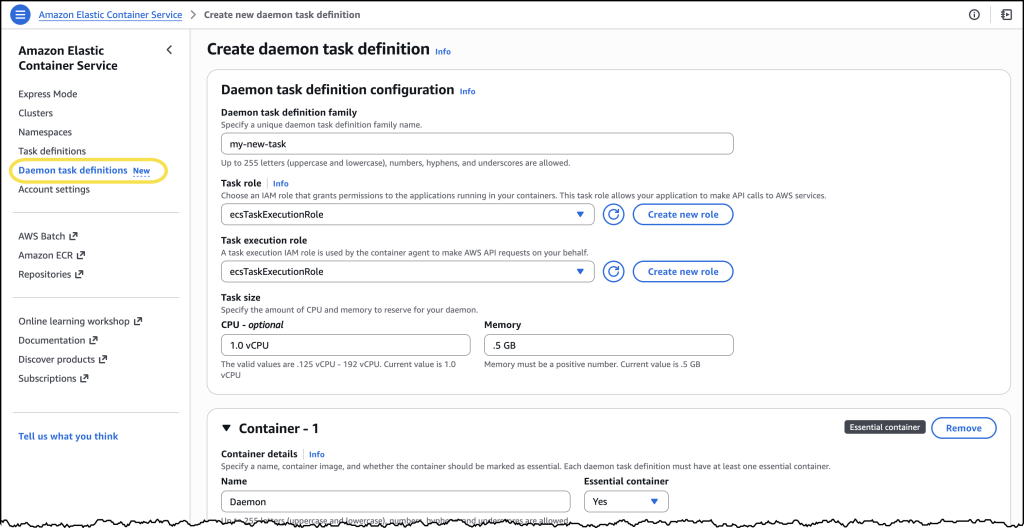
I chose Create new daemon task definition to get started. For this example, I configured the CloudWatch Agent with 1 vCPU and 0.5 GB of memory. In the Daemon task definition family field, I entered a name I’d recognize later.
For the Task execution role, I selected ecsTaskExecutionRole from the dropdown. Under the Container section, I gave my container a descriptive name and pasted in the image URI: public.ecr.aws/cloudwatch-agent/cloudwatch-agent:latest along with a few additional details.
After reviewing everything, I chose Create.
Once my daemon task definition was created, I navigated to the Clusters page, selected my previously created cluster and found the new Daemons tab.
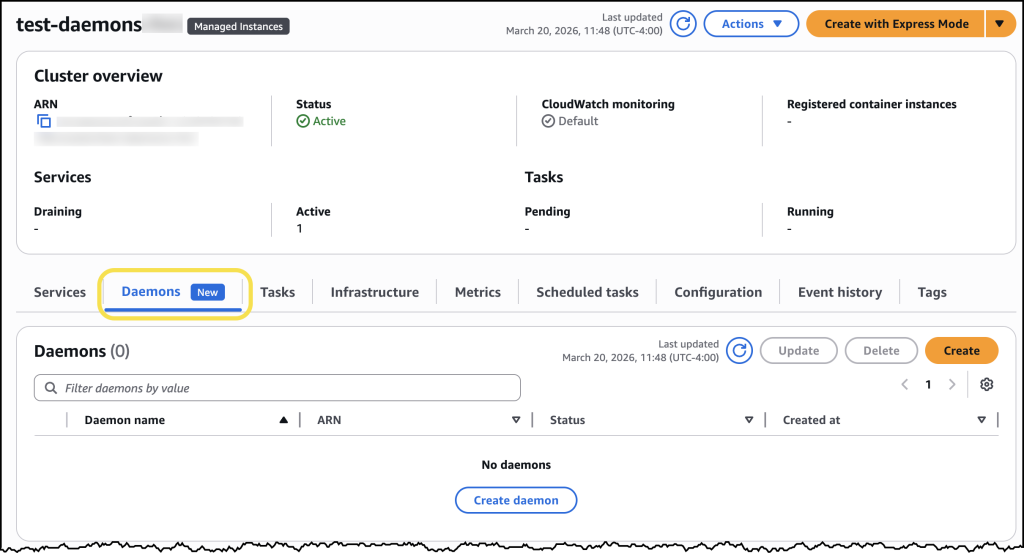
Here I can simply click the Create daemon button and complete the form to configure my daemon.
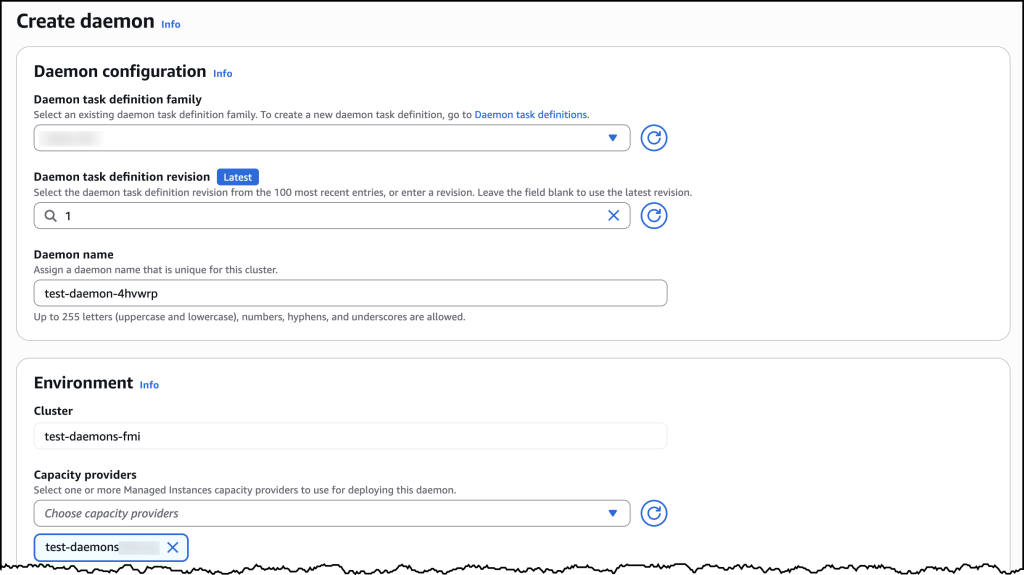
Under Daemon configuration, I selected my newly created daemon task definition family and then assigned my daemon a name. For Environment configuration, I selected the ECS Managed Instances capacity provider I had set up earlier. After confirming my settings, I chose Create.
Now ECS automatically ensures the daemon task launches first on every provisioned ECS managed instance in my selected capacity provider. To see this in action, I deployed a sample nginx web service as a test workload. Once my workload was deployed, I could see in the console that ECS Managed Daemons had automatically deployed the CloudWatch Agent daemon alongside my application, with no manual intervention required.
When I later updated my daemon, ECS handled the rolling deployment automatically by provisioning new instances with the updated daemon, starting the daemon first, then migrating application tasks to the new instances before terminating the old ones. This “start before stop” approach ensures continuous daemon coverage: your logging, monitoring, and tracing agents remain operational throughout the update with no gaps in data collection. The drain percentage I configured controlled the pace of this replacement, giving me complete control over addon updates without any application downtime.
How it works
The managed daemon experience introduces a new daemon task definition that is separate from task definitions, with its own parameters and validation scheme. A new daemon_bridge network mode enables daemons to communicate with application tasks while remaining isolated from application networking configurations.
Managed daemons support advanced host-level access capabilities that are essential for operational tooling. Platform engineers can configure daemon tasks as privileged containers, add additional Linux capabilities, and mount paths from the underlying host filesystem. These capabilities are particularly valuable for monitoring and security agents that require deep visibility into host-level metrics, processes, and system calls.
When a daemon is deployed, ECS launches exactly one daemon process per container instance before placing application tasks. This guarantees that operational tooling is in place before your application starts receiving traffic. ECS also supports rolling deployments with automatic rollbacks, so you can update agents with confidence.
Now available
Managed daemon support for Amazon ECS Managed Instances is available today in all AWS Regions. To get started, visit the Amazon ECS console or review the Amazon ECS documentation. You can also explore the new managed daemons Application Programming Interface (APIs) by visiting this website.
There is no additional cost to use managed daemons. You pay only for the standard compute resources consumed by your daemon tasks.
Turbulence at the Documentation Foundation
Post Syndicated from corbet original https://lwn.net/Articles/1065908/
Michael Meeks has posted an
angry missive about changes at the Document Foundation. What has
really happened is not entirely clear, but it seems to involve, at a
minimum, the forced removal of all Collabora staff from the foundation.
There has been a set of “thank you” notes to the people involved posted in the
foundation’s forums. The Document Foundation’s decision to restart LibreOffice Online almost
certainly plays into this as well.
Details are fuzzy at best; we will be working at providing a clearer
picture, but that will take some time.
Navigating multi-account deployments in Amazon SageMaker Unified Studio: a governance-first approach
Post Syndicated from Ben Shafabakhsh original https://aws.amazon.com/blogs/big-data/navigating-multi-account-deployments-in-amazon-sagemaker-unified-studio-a-governance-first-approach/
Amazon SageMaker Unified Studio brings together data engineering, analytics, and machine learning (ML) workflows into a cohesive, governed environment. This unified approach reduces traditional silos between data teams and ML practitioners, so organizations can advance their AI and ML initiatives with greater collaboration and efficiency.
As enterprises begin their SageMaker Unified Studio adoption, they must determine the best practices for implementing data federation principles when using SageMaker Unified Studio across the organization. The way that you structure your SageMaker Unified Studio deployment is more than a technical decision. It directly impacts your governance framework, security posture, operational scalability, and day-to-day team collaboration.
In this post, we explore SageMaker Unified Studio multi-account deployments in depth: what they entail, why they matter, and how to implement them effectively. We examine architecture patterns, evaluate trade-offs across security boundaries, operational overhead, and team autonomy. We also provide practical guidance to help you design a deployment that balances centralized control with distributed ownership across your organization.
The multi-account challenge: why organizations struggle
If you’re working in a large enterprise, a multi-account AWS environment is often your starting position. If you’re starting from scratch, consider whether to use a single-account for all SageMaker Unified Studio components or dedicate separate accounts for governance and business units. A multi-account architecture aligns with AWS best practices and proves valuable if you have:
- Distributed teams with independent operations: multi-account architecture accommodates multiple teams or business units that maintain separate operations so that each team can manage their projects autonomously within isolated environments. Each unit can deploy and manage resources independently, implement team-specific security controls, and scale infrastructure without impacting others. This is achieved through a shared, unified integrated development environment (IDE) for collaboration and standardized tools across the organization.
- Compliance and data governance requirements: For regulatory mandates like GDPR, HIPAA, or data sovereignty needs, you will benefit from this setup, because sensitive data remains segregated in business-unit specific accounts. This reduces risk exposure, streamlines audits, and maintains compliance boundaries without compromising access to centralized collaboration tools.
- Centralized governance: A multi-account architecture maintains visibility across all projects and business units from a single control plane. The Domain account can enforce security policies and compliance requirements across the entire organization and provide centralized monitoring, audit logging, and user access management.
- Clear cost visibility and accountability: Multi-account architecture enables granular billing tracking, with each account generating separate bills that clearly attribute costs to specific teams or business units. This transparency streamlines budgeting and financial accountability, removing the complexity of cost allocation tags and manual reporting that’s typically required in single-account models where multiple teams share the same infrastructure and resources.
Overall, this approach improves efficiency, security, and scalability for you, whether you’re managing a few teams or coordinating across a larger organizational structure.
Understanding the core constructs of SageMaker Unified Studio
Before diving into multi-account strategies, it’s important to understand the foundational constructs of SageMaker Unified Studio. Each is elaborated in greater detail in the Administrator Guide.
- Domain: The top-level administrative boundary where governance lives. In a multi-account setup, this is your centralized control plane for catalog, policies, and user access.
- Project: A collaborative workspace for developing data, AI, and ML initiatives. In multi-account deployments, a Project’s metadata lives in the Domain account and compute and data resources deploy into associated business unit accounts. This separation is central to the pattern that we explore.
- Project Profile: A template that standardizes how Projects are created. For multi-account setups, this is where administrators define which accounts and AWS Regions Projects can target.
- Blueprints: Infrastructure as code (IaC) components that define what gets provisioned inside a Project. Each associated account must enable its relevant Blueprints before Projects can deploy there.
The following diagram illustrates how these key constructs interact. Within a Domain, users create Projects organized through a single Project Profile. The Project Profile defines and configures a collection of Blueprints. When a project is created, the infrastructure specified in those Blueprints is automatically provisioned and becomes available within the project workspace.
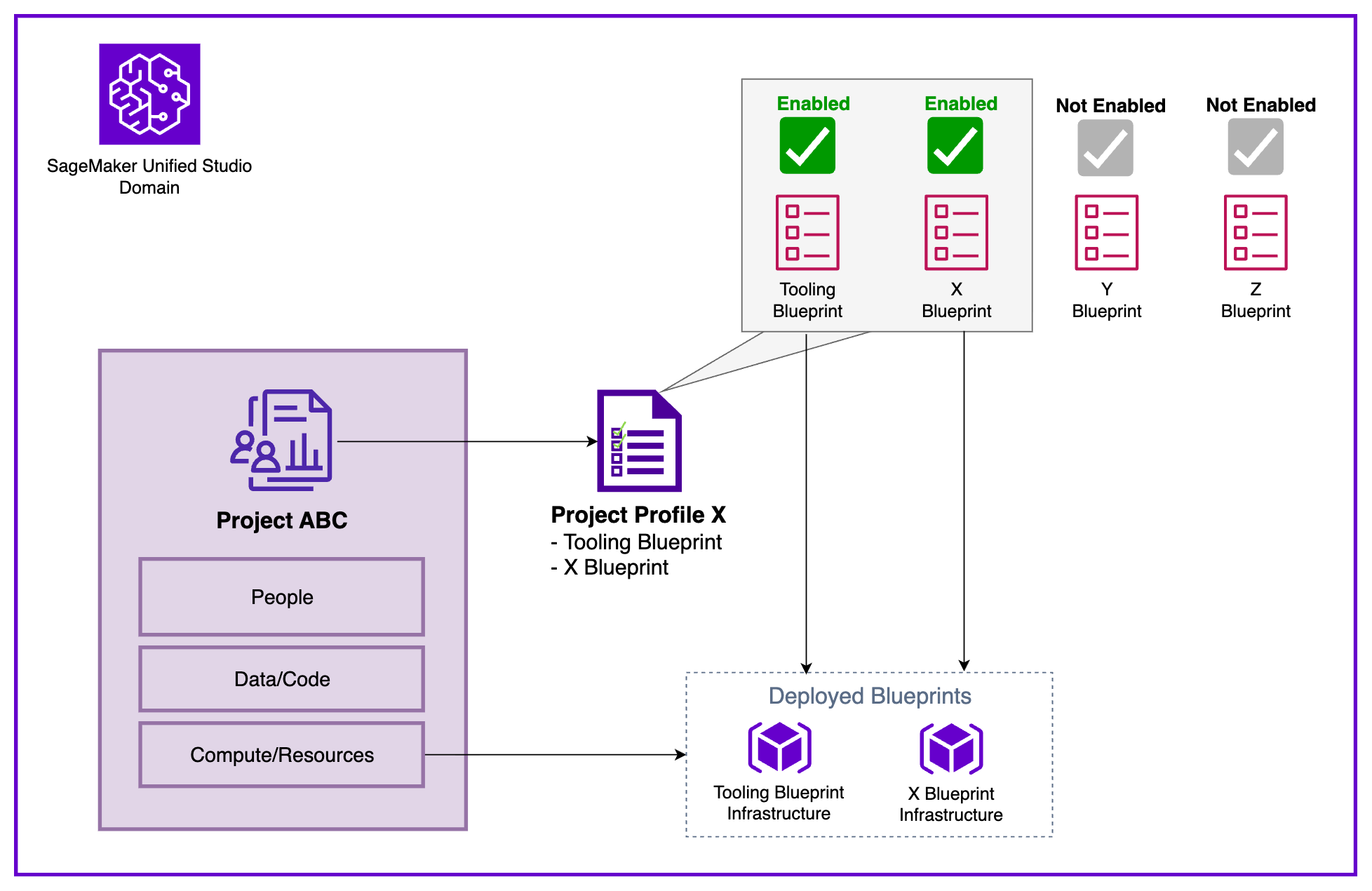
Figure 1: Amazon SageMaker Unified Studio Core Constructs
Multi-account setup in SageMaker Unified Studio
To illustrate these concepts in practice, we demonstrate with a sample enterprise organization that exemplifies enterprise environments with several AWS accounts belonging to different business units:
- Central Data Governance team: Owns and manages governance and access control across the organization. They plan to build a data solution in a dedicated AWS account using SageMaker Unified Studio. The platform must provide an integrated development environment (IDE) to work with data and ML use cases and connect to multiple business unit’s AWS accounts (Finance and Marketing).
- Finance Business Unit: Owns datasets for fraud analysis and churn prediction in their own AWS account.
- Marketing Business Unit: Maintains customer sentiment data and campaign analytics in their own AWS account.
In the following diagram we show the Data platform constructs provided by SageMaker Unified Studio in each AWS account showing the clear separation between centralized governance and distributed resource deployment.
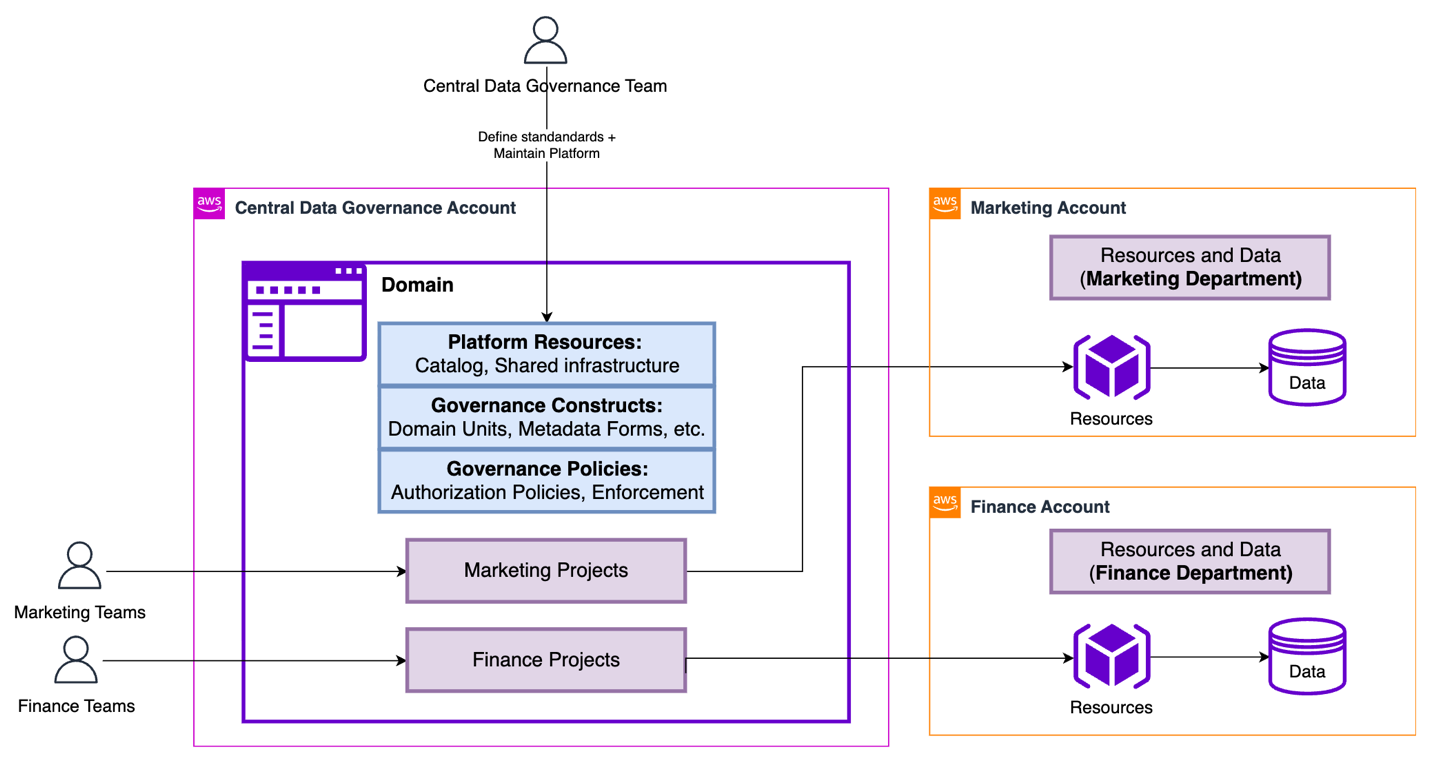
Figure 2: Sample organization architecture in Amazon SageMaker Unified Studio
The Central Data Governance Account contains the SageMaker Unified Studio Domain. This contains the shared platform resources (Catalog, shared infrastructure), governance constructs (Domain units, metadata forms), and governance policies (authorization policies, enforcement rules). These configuration elements define the standards and capabilities available across the organization. They’re the Service-level configuration data: Metadata, policies, and governance rules that define how resources should be provisioned.
In contrast, the Associated Accounts (Marketing and Finance) contain the actual AWS infrastructure, compute/storage (purple cubes) and data stores (cylinders), provisioned when Projects are created. The diagram shows how Marketing Projects and Finance Projects ultimately deploy their runtime resources into their respective business unit accounts. The separation keeps the governance centralized and consistent while allowing business unit dependent resources to be isolated, billed separately, and managed according to each business unit’s specific requirements.
To understand the core constructs of SageMaker Unified Studio, we listed the core components of SageMaker Unified Studio and explained how they relate to each other. Taking the same diagram as the basis, we will now represent how these constructs are created in our multi-account sample scenario.
| Construct | Deployment Location | Deployed Resources |
| Domain | Central Data Governance Account |
|
| Project | Central Data Governance Account + Associated Account | In Central Data Governance Account:
In Associated Account:
|
| Project Profile | Central Data Governance Account |
|
| Blueprint | Associated Account |
|
Core construct deployment locations and resources in SageMaker Unified Studio
Implementing multi-account deployments
To enable production-ready data science and analytics workflows across multiple AWS accounts governed by a SageMaker Unified Studio Domain, organizations must establish a structured cross-account configuration. This setup allows each business unit (BU) to retain ownership of its Projects and AWS resources while using centralized governance provided by the Domain. The process involves four key steps: account association, Blueprint enablement, Project Profile configuration, and Project creation.
Note: The following steps provide a high-level overview of the multi-account deployment process. For a more detailed, step-by-step guide, refer to How to associate an account when using Amazon SageMaker Unified Studio.
Step 1: Account association to a domain
The Domain administrator associates each AWS account with the SageMaker Unified Studio Domain for seamless cross-account functionality by providing the AWS account number for the targeted accounts. This association lets the Domain publish and consume data from associated accounts, create resources within them, maintain cross-account access for the SageMaker Catalog, and deploy Projects directly into business unit accounts. Account association is a critical prerequisite for cross-account Project deployment. Behind the scenes, SageMaker Unified Studio uses AWS Resource Access Manager (AWS RAM) to make this cross-account functionality happen.
Step 2: Enabling blueprints
Each associate account administrator must enable the relevant Blueprints before creating Project Profiles. This important step verifies that Projects can provision the necessary tools and resources that users need to run their workloads. Blueprints serve as standardized infrastructure templates that administrators can use to enforce organizational standards, security controls, and best practices across all Projects. Through Blueprints, administrators configure essential resources including AWS Identity and Access Management (IAM) roles, AWS Key Management Service (AWS KMS) keys, Amazon Simple Storage Service (Amazon S3) buckets, Amazon Virtual Private Cloud (Amazon VPC) settings, and security groups. This centralized approach helps maintain consistency, compliance, and governance at scale while preventing users from creating Projects with misconfigured or non-compliant infrastructure.
Step 3: Configuring project profile
With the accounts successfully associated and the Blueprints enabled, the next step is to configure a Project Profile that determines where your Project resources will be deployed. Your choice of Project Profile strategy impacts both operational flexibility and governance.
Domain administrators control which Blueprints are included in each Project Profile and can specify the target AWS Regions and accounts for deployment, providing the governance foundation to standardize Project creation. Administrators can use pre-created Project Profiles like “All Capabilities” or “SQL Analytics”, or create custom Project Profiles tailored to specific organizational needs.
When configuring Project Profiles, you can choose between two deployment models:
- Static (Pre-Defined): Profile specifies a fixed account and Region. Projects by default deploy to the same location. This is recommended for strict governance controls and compliance requirements where production resources must remain in designated accounts or Regions.
- Dynamic (Parameterized): Users select from available associated accounts and Regions during Project creation (configured through Account Pools). This is recommended for multi-environment workflows (Dev/Test/Prod) and reducing administrative overhead by maintaining fewer profile templates.
Dynamic profiles balance governance with agility: Administrators define standards once, while users retain deployment flexibility aligned with their business needs.
Step 4: Project creation
With Project Profiles configured, you can now create a new Project from any of the associated accounts using the profile created in the previous step.
Defining project boundaries: when to create a new project
One of the common challenges that you will face is determining when to create a new Project. The answer significantly impacts collaboration effectiveness, resource isolation, cost tracking, and governance. Here’s a practical framework to guide your decision-making.
A Project should represent a distinct business initiative with a defined scope, a dedicated team, and measurable outcomes. Think of Projects as team workspaces organized around business outcomes, not technical components.
Create a new Project when you need clear separation across multiple dimensions: cost allocation, access control, and data governance. If Finance and Marketing teams require separate budget tracking, distinct data access policies, and different governance controls, they should have separate Projects. For example, “Customer Churn Prediction” and “Fraud Detection” might use similar tools, but if they have different stakeholders, budget owners, and data sensitivity requirements, so they warrant separation. Similarly, create separate Projects when facing different compliance or regulatory requirements (like HIPAA versus PCI-DSS) or when initiatives have independent deployment lifecycles. Experimental ML research Projects shouldn’t share workspaces with production recommendation engines that require stricter change controls and availability guarantees.
However, avoid fragmenting related work into unnecessary silos:
- Don’t create separate Projects for individual workflows or pipelines, a single “Marketing Campaign Optimization” Project should contain audience segmentation, propensity modeling, and campaign attribution workflows together.
- Don’t separate different data processing stages; keep data ingestion, transformation, and analysis within one Project to maintain clear lineage and enable seamless collaboration.
- Projects are team workspaces, not personal sandboxes, so use shared Projects with role-based access control rather than creating individual Projects per team member.
- Small proof of concepts (POC) or temporary experiments should be conducted within the parent Project, with successful initiatives promoted to dedicated production Projects only when they mature into full-scale capabilities requiring independent governance.
Conclusion
Throughout this post, we explored how the separation of governance and working accounts forms the foundation of a scalable, secure, and compliant data and AI platform.
With centralized governance in the Domain account, organizations can enforce consistent security policies, compliance requirements, and cost management, while allowing sub-accounts the autonomy over their own resources. This approach enhances security and compliance, and fosters collaboration and innovation within teams by providing them with the flexibility that they need to operate effectively. Ultimately, this governance-first strategy supports keeping data remains protected and accessible in a controlled manner, empowering teams to drive business outcomes efficiently. To implement a multi-account deployment for your organization, get started by creating your first SageMaker Unified Studio Domain and follow the step-by-step guidance to establish your governance-first architecture.
About the authors
Improve the discoverability of your unstructured data in Amazon SageMaker Catalog using generative AI
Post Syndicated from Nishchai JM original https://aws.amazon.com/blogs/big-data/improve-the-discoverability-of-your-unstructured-data-in-amazon-sagemaker-catalog-using-generative-ai/
Every day, businesses generate massive amounts of unstructured data such as PDFs, images, emails, customer feedback. Although this data holds valuable business insights, extracting meaningful value from it remains a significant challenge. Its lack of proper context and searchability often keeps it siloed and underutilized, limiting data-driven decision making. Financial reports, legal documents, and customer feedback are prime examples. They contain the answers that your business needs, yet they frequently go unanalyzed due to these barriers.The sheer volume of unstructured content requires scalable infrastructure and automated processing tools, while sensitive information embedded within demands sophisticated classification and protection strategies. Without proper management, organizations face operational inefficiencies, high costs, and increased regulatory risks and reduced AI effectiveness.
What if business context from your PDFs, images, and emails could be automatically extracted and surfaced wherever your teams search for information? In this post, we show you how to implement this. By combining Amazon SageMaker Catalog with generative AI capabilities, you can make unstructured data searchable and queryable through the same interfaces that your teams use for structured data analysis. Success requires balancing advanced AI techniques with governance frameworks so that your data is discoverable and secure for better decision making.
This is a two-part series post. In the first part, we walk you through how to set up the automated processing for unstructured documents, extract and enrich metadata using AI, and make your data discoverable through SageMaker Catalog. The second part is currently in the works and will show you how to discover and access the enriched unstructured data assets as a data consumer. By the end of this post, you will understand how to combine Amazon Textract and Anthropic Claude through Amazon Bedrock to extract key business terms and enrich metadata using Amazon SageMaker Catalog to transform unstructured data into a governed, discoverable asset.
Solutions overviewYou will transform unstructured data into an interactive knowledge base through automated processing within the Amazon SageMaker AI environment. Here is how it works:
- You will set up an Amazon SageMaker Unified Studio Data Notebook Jupyter-based workspace where you manage your entire processing pipeline, add metadata to unstructured documents like PDFs, photos, emails, or audio recordings stored in Amazon Simple Storage Service (Amazon S3).
- You will add your files to the SageMaker Project.
- Amazon Textract extracts information and insights from text, removing manual transcription. This extracted content instantly populates your asset’s README.
- Amazon Bedrock turns the text into business terms that provide SageMaker Catalog assets the correct business context to help with semantic search or business query search.
- You will use a publish method to publish the enriched data to the Amazon SageMaker Catalog, making it available to your organization.
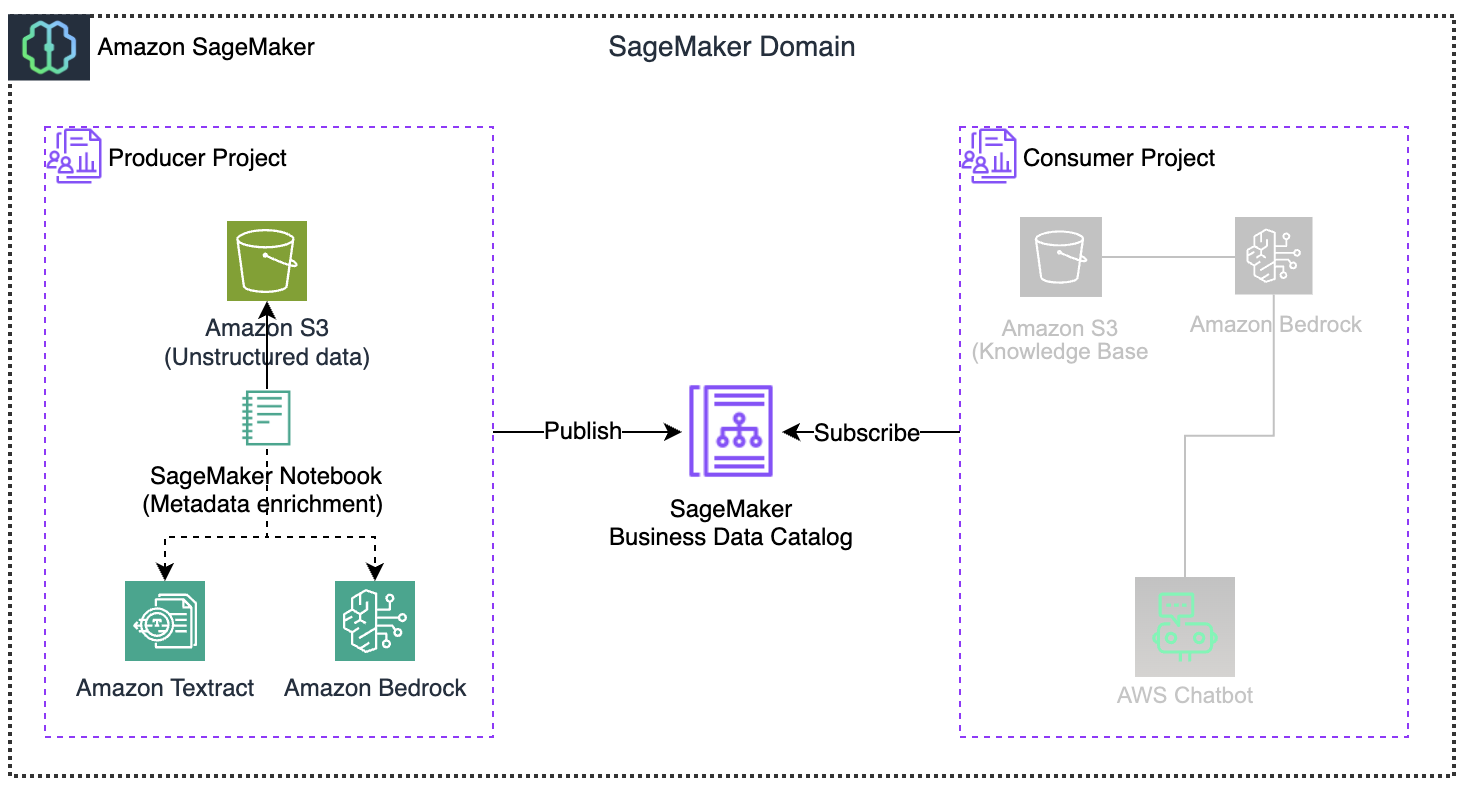
The architecture sets up a pipeline from processing raw documents to enabling end users interaction, with the Amazon SageMaker Catalog serving as the central hub for sending and receiving data. Amazon SageMaker Catalog includes generative AI features that automatically develop and add business descriptions for structured data assets. This capability streamlines documentation processes and provides greater consistency across data assets. You can further enhance this solution to create summaries by also reading and incorporating S3 metadata. This will add more context, such as object properties, access patterns, and storage characteristics, to the extracted document content, streamlining the process to find and catalog data.
Prerequisites
To implement the solution, you must complete the following prerequisites:
- Create an AWS account – Required to access all AWS services (Amazon SageMaker Catalog, Amazon S3, Amazon Textract, Amazon Bedrock) used in this solution.
- Create an Amazon SageMaker Unified Studio domain: This provides a collaborative environment for connecting your assets, users, and their projects.
- Create an SageMaker Project with all capabilities: Your collaborative workspace where you will upload documents, run processing notebooks, and manage permissions for your data enrichment pipeline. Team members added to this project gain immediate access to all shared resources.
- Producer Project (project name: $(-your-project-name) use “unstructured-producer-project”, project profile: All capabilities)
Solution deployment
Now let’s complete the following steps to deploy and verify the solution.
Prepare source datasets
In this section you will use the following sample datasets by downloading them to your local machine. We will upload these files into your SageMaker Project S3 bucket created in the prerequisite step.
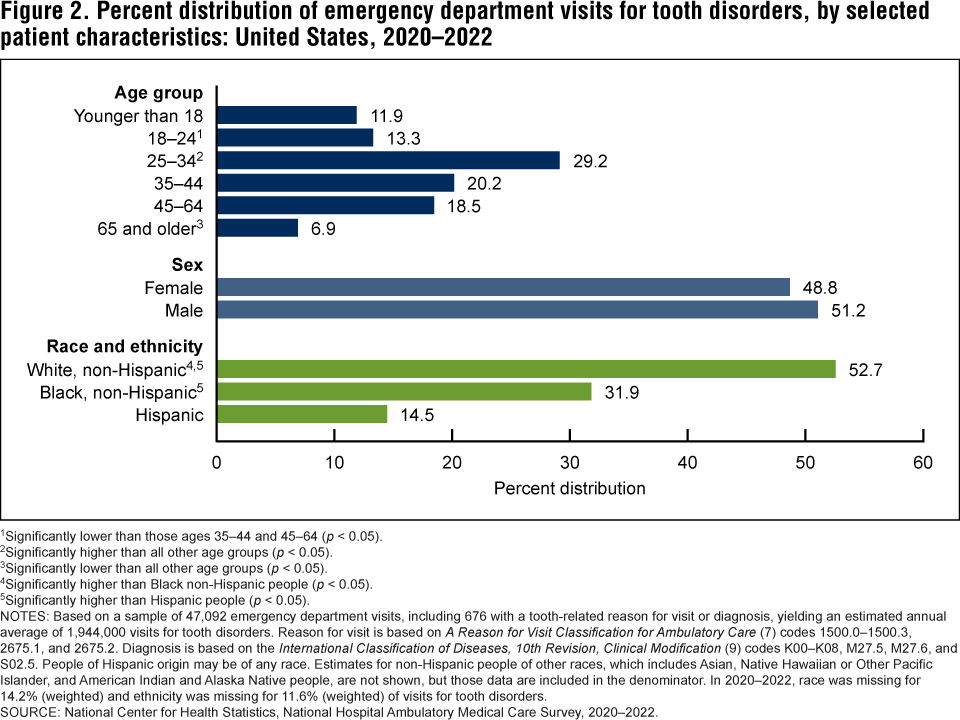
- ED_DistributionToothDisorder.png: The dataset shows emergency department visits for tooth disorders in the US from 2020–2022, broken down by age group, gender, and race/ethnicity.
- analysisDentalEDvsts.pdf: This report shows emergency department visits analysis for dental conditions across the United States between 2016–2019, showing that among non-traumatic dental visits.
- s3_document_processor_unstructured.ipynb notebook (keep in local environment and will be used at a later stage)
With your sample datasets ready, let’s log in to SageMaker Unified Studio and upload them to your project.
Log in to Amazon SageMaker Unified Studio as a data producer
- Log in to the SageMaker Unified Studio URL using your username and password. In the portal UI, select the producer project (unstructured-producer-project) that you created in the project selector (at the top center of the screen).

- Under Data, do the following:
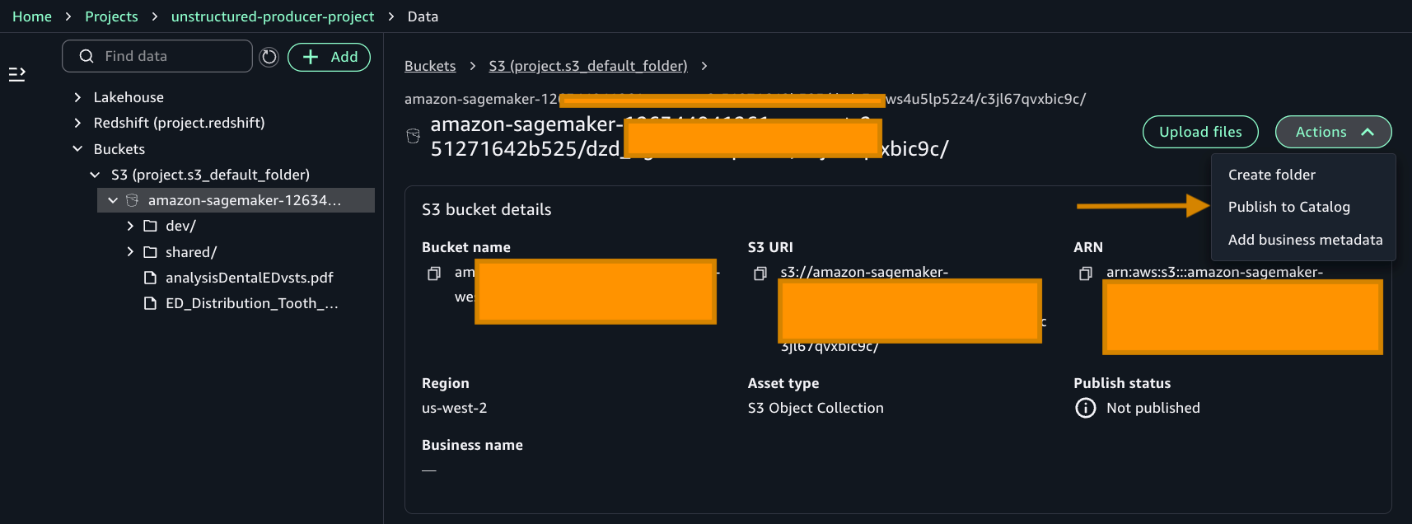
- Choose the default project bucket created amazon-sagemaker-12*********-us-west-2-51271642b525/dzd_*********/c3jl67qvxbic9c/.
- Next, choose the three dots and upload the downloaded files (1&2) from the prepared dataset section.

- After adding the files, choose Publish to Catalog to publish your asset.
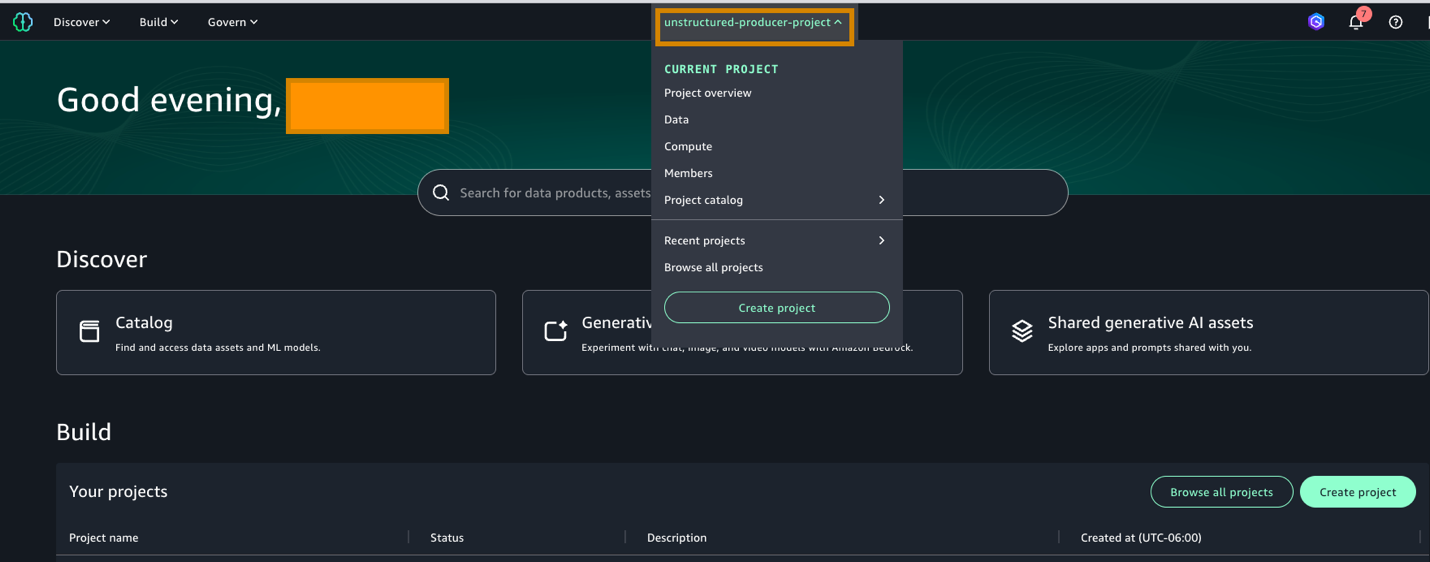
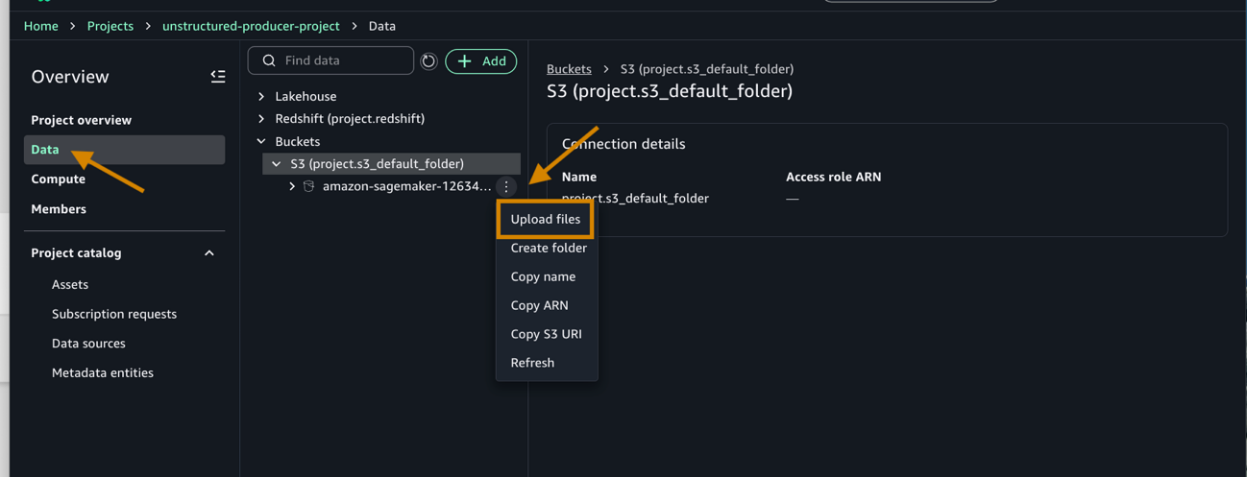
Your files are now in the catalog. Before we process them, your project needs permission to access the services. Let’s add those permissions.
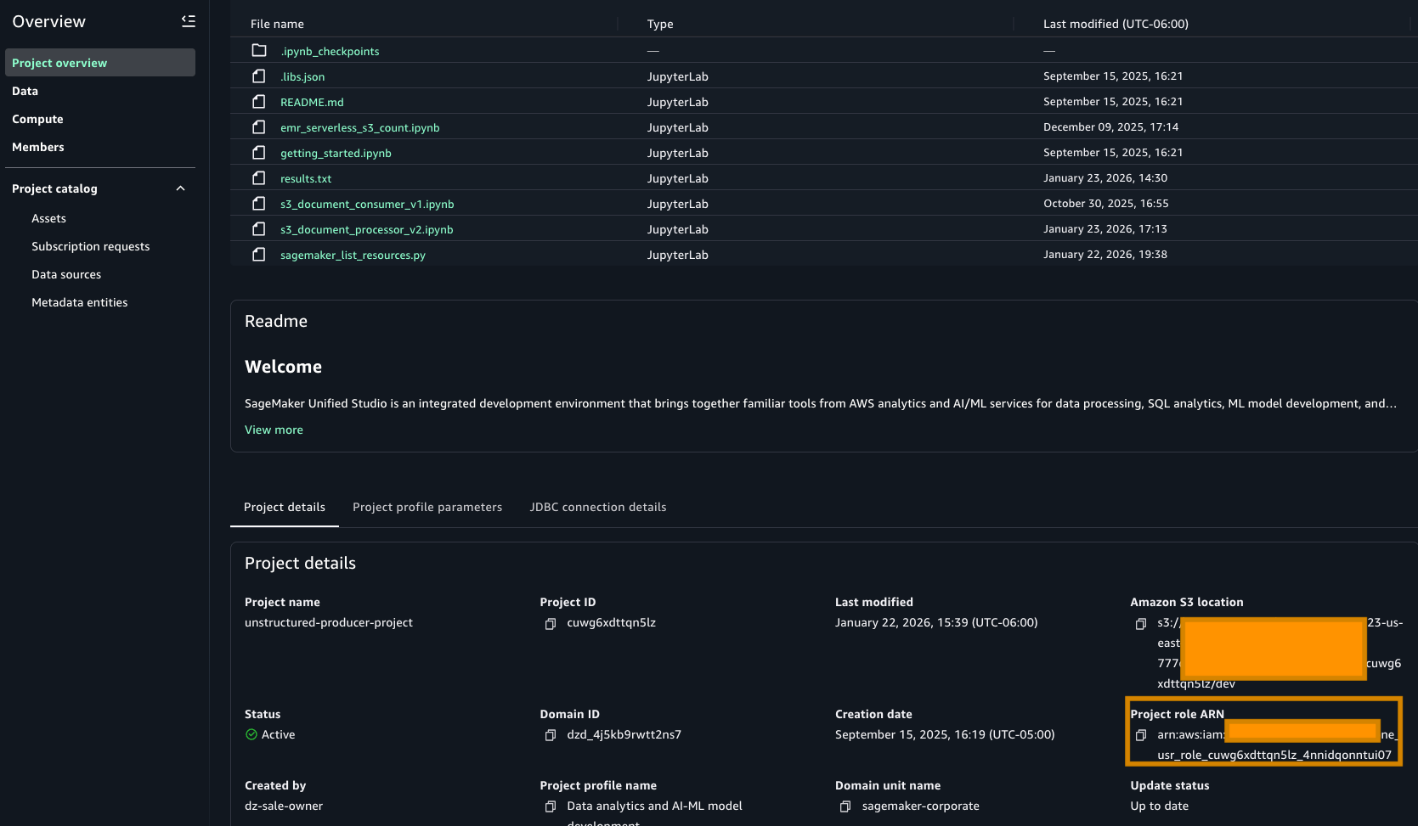
- Add permissions to an IAM role for the Amazon SageMaker Project role.
- Go to the Project overview tab and find the Project role ARN. It can be found in the Project details section.

- Go to the AWS IAM service and choose Roles. Search for the role as highlighted in the preceding image and add the following permissions. The following policies use full-access managed policies to keep things straightforward for this walkthrough. We don’t recommend this for production environments. Instead, we encourage you to take a moment to review each policy with your security team and scope them down to the least-privilege permissions that your workload needs:
- Add an AmazonBedrockFullAccess managed policy.
- Add an AmazonTextractFullAccess managed policy.
- Add an AmazonS3FullAccess managed policy.
- Add this inline policy to project policy
- Go to the Project overview tab and find the Project role ARN. It can be found in the Project details section.
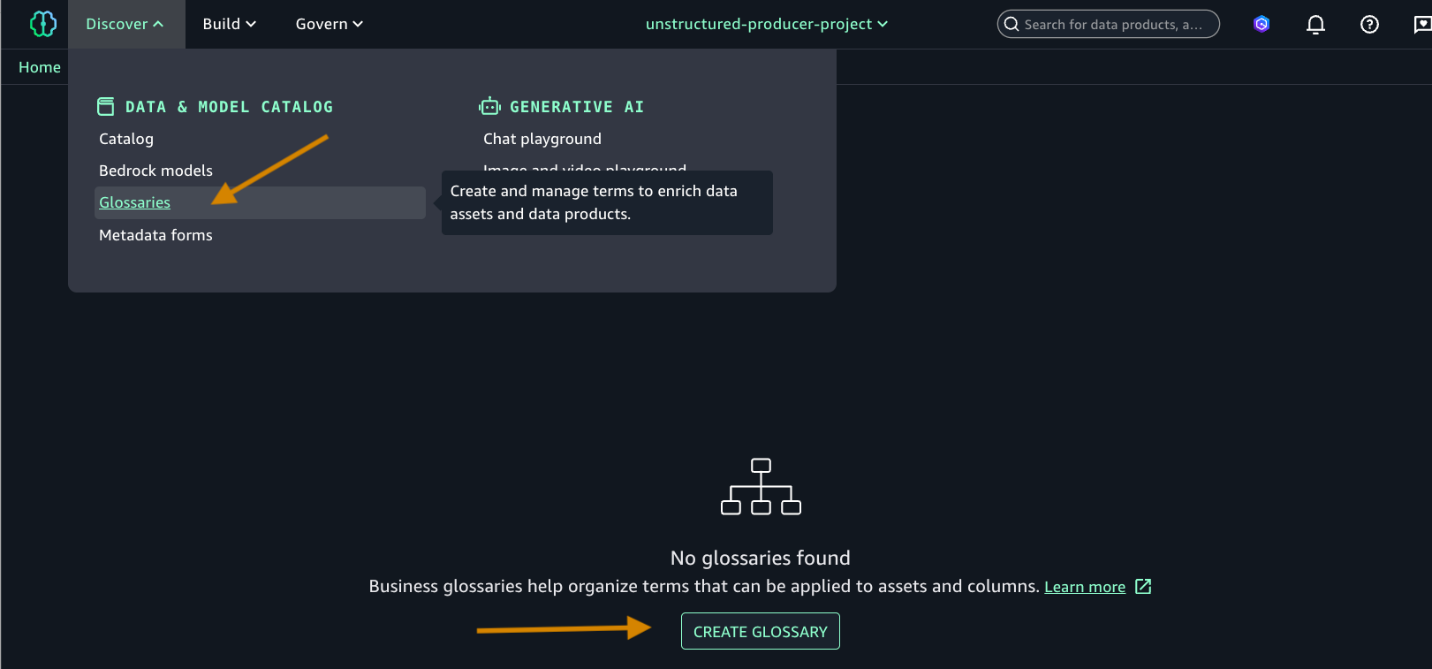
With permissions configured, let’s set up the governance framework that will classify your documents. We will create glossary terms to tag sensitive and non-sensitive data.
- Add Glossary and Glossary terms.
- Choose Glossaries and CREATE GLOSSARY.

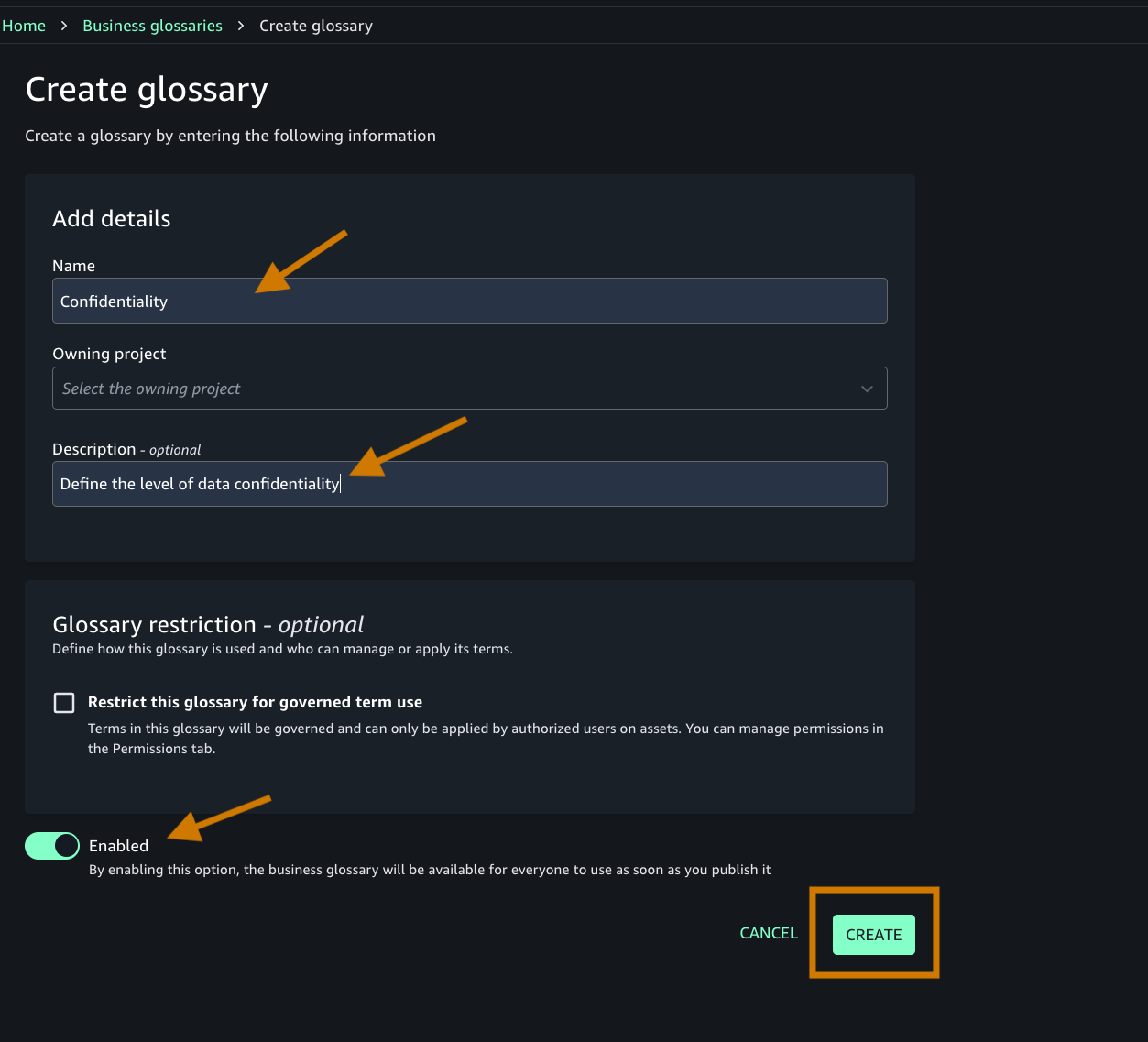
- Add the following:
- Name of the glossary and descriptions.
- Toggle on the Enable button as shown in the following screenshot.

- Create an appropriate glossary term. You will add this term to your business metadata.
- Navigate to the Discover menu in the top navigation bar.
- Choose Glossaries, and then select Create term.
- Ensure that you’re creating the term under the Confidentiality glossary that you created in step 4.

- Create two terms (sensitive and non-sensitive) and add a description. Make sure that the Enabled toggle is on to enable the new term.

- Choose Glossaries and CREATE GLOSSARY.
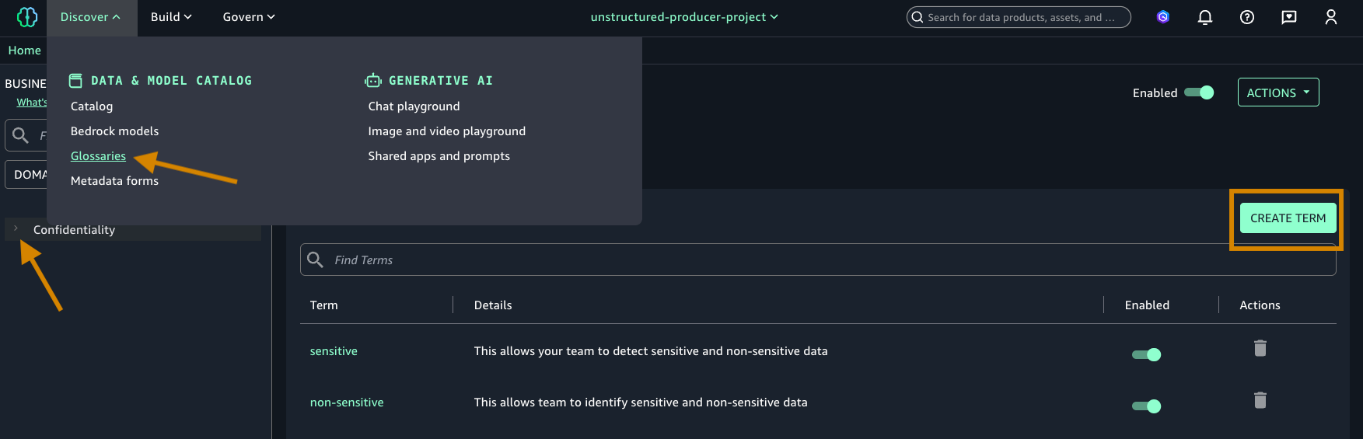
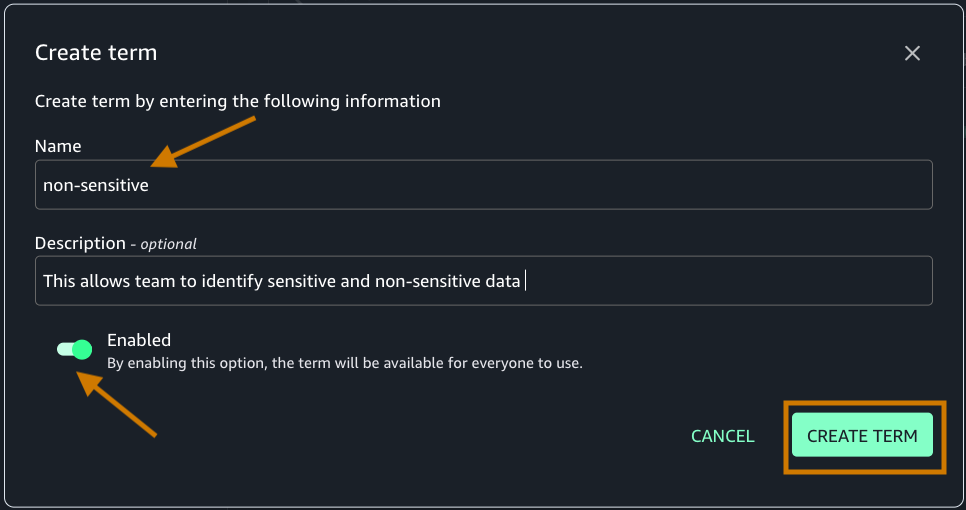
Now that we have configured the necessary permissions and created our glossary terms, let’s proceed with building the business metadata.
Build business metadata
In this section, you will use Amazon Textract and Amazon Bedrock to automatically build and curate business metadata for your assets using a SageMaker Unified Studio Notebook.
- From the Project Overview page, access the Compute section in the left menu.
- Navigate to the Spaces tab.
- Choose the default space created by your project(default-985-) to begin”.
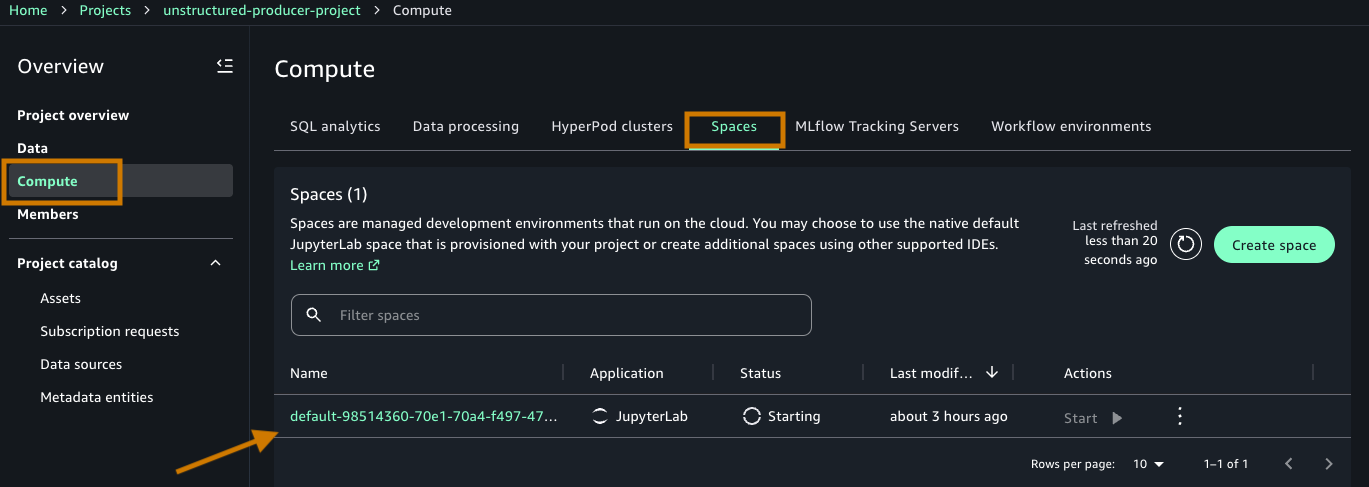
- Open the space details page by selecting the Name (default-****).
- Under Actions, Choose Open space to be taken to the Data Notebook workspace (Jupyter based).
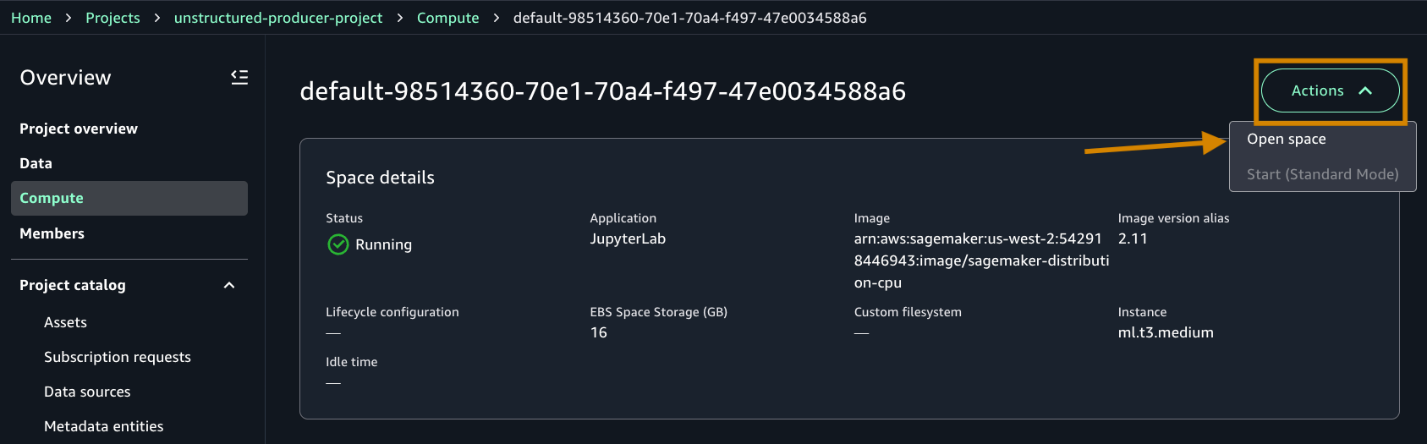
- After connected, upload the downloaded notebook from the prerequisite step in your JupyterLab interface by either dragging it into the File browser or using the upload icon.
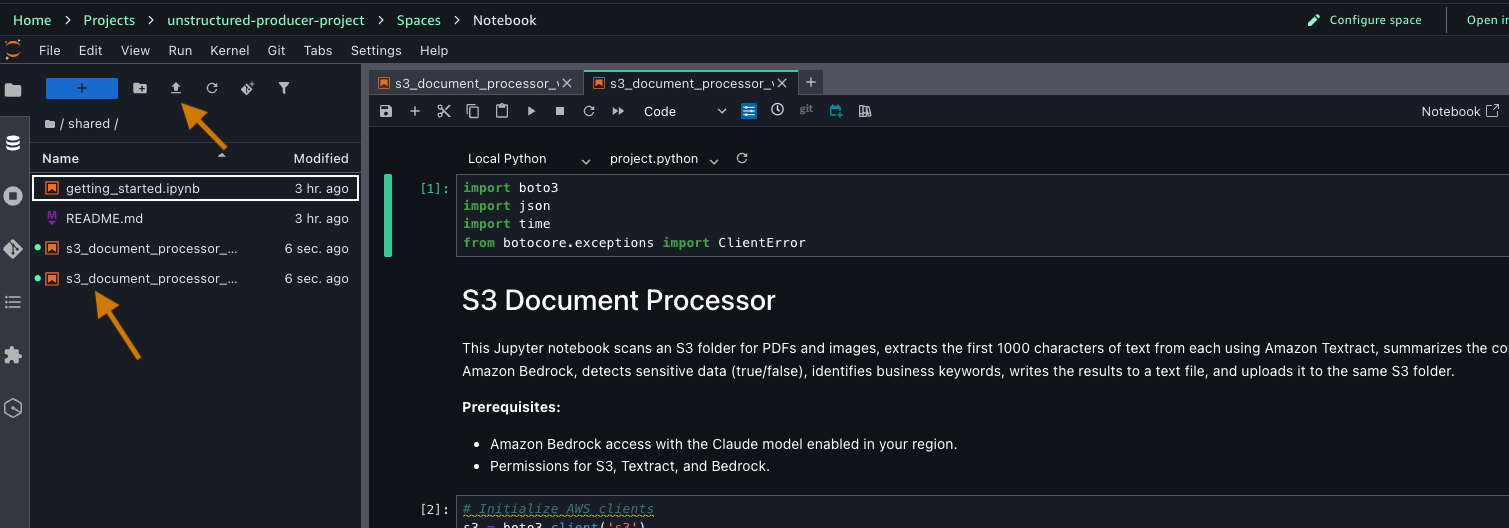
Before running the notebook, let’s understand what each cell does and how they work together to transform your documents into discoverable assets.
The notebook contains code for processing your documents. It begins by setting up AWS service connections using Boto3, the SDK for Python, importing necessary libraries, and initializing clients for Amazon S3, Amazon Textract, and Amazon Bedrock. The code configures an S3 bucket for processing medical documents.
Now, proceed to run through the individual cells:
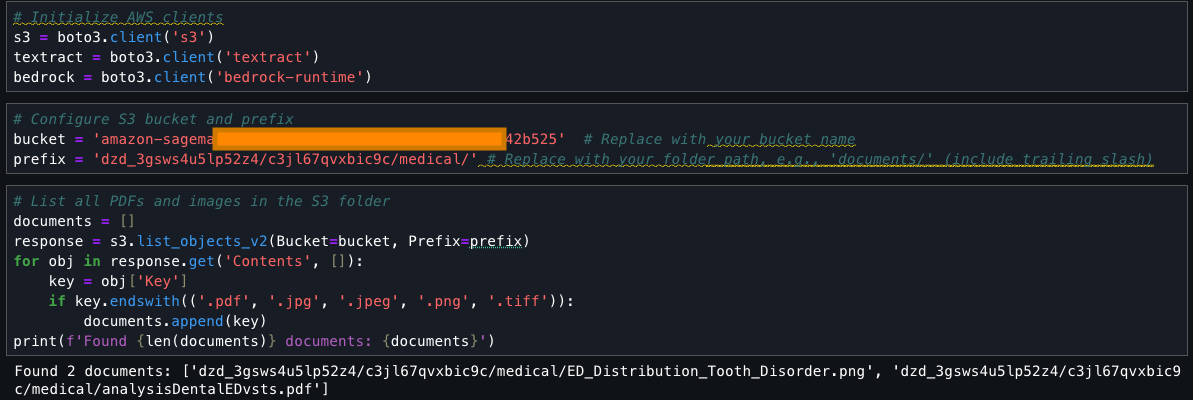
This cell searches an S3 bucket for files with specific extensions (.pdf, .jpg, .jpeg, .png, .tiff), collects them into a list called ‘documents’, and prints the total count and names of found files. It uses the list_objects_v2 method to fetch the contents and filters them based on their file extensions.
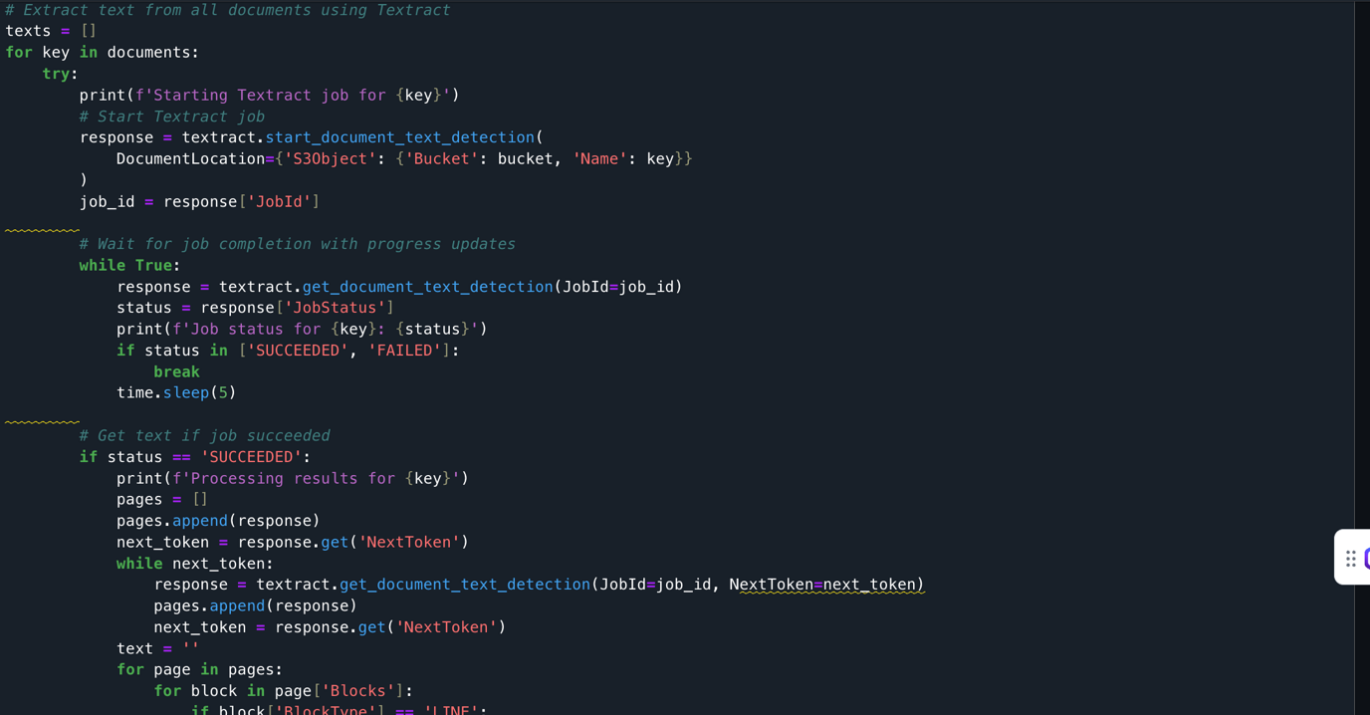
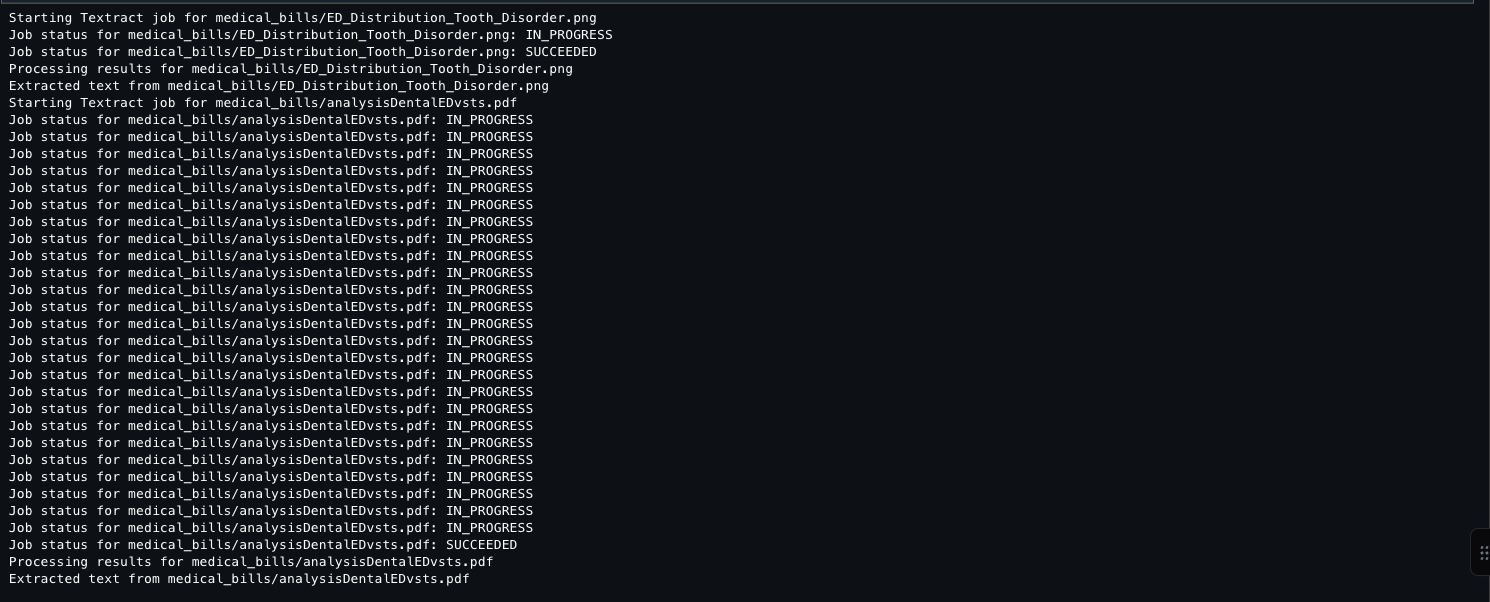
The documents extracted from the S3 bucket are processed using Amazon Textract. It loops through each document, starts an Amazon Textract job, monitors its progress, and when successful, extracts text from all pages. The extracted text is stored in a list along with its document identifier. The code handles pagination, errors, and includes delays between API calls to prevent throttling.
Output [1] The following screenshot shows the output of a Jupyter notebook cell after you run the Amazon Textract API.
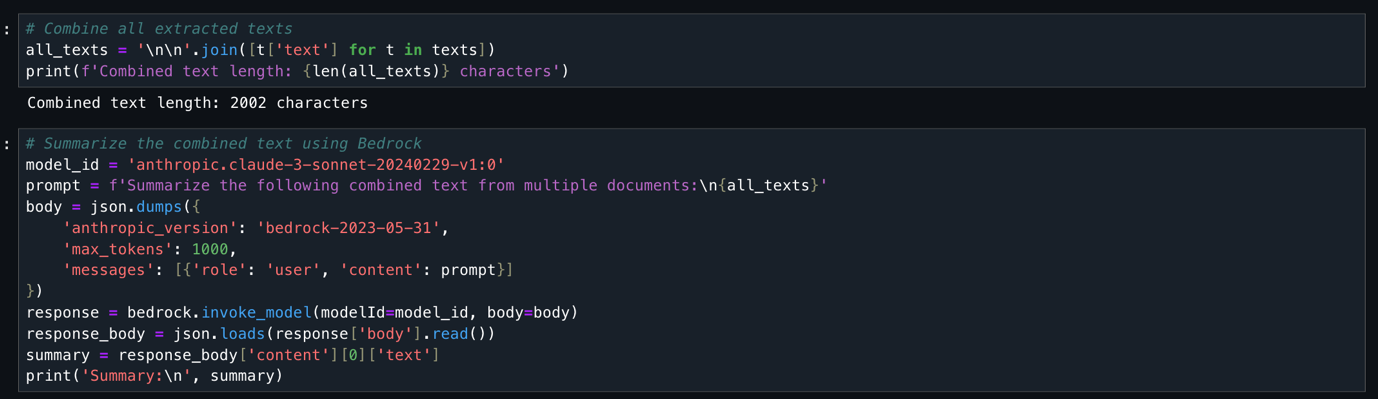
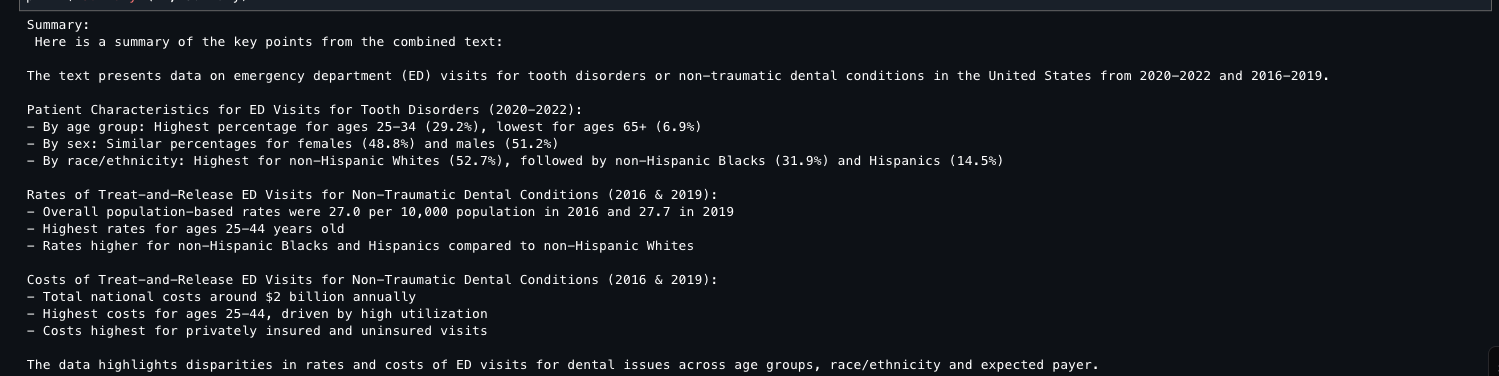
This code takes all previously extracted document text, combines it into one string (2,002 characters total), and uses the Anthropic Claude 3 Sonnet model (available through Amazon Bedrock) to generate a concise summary. The code configures the AI model with specific parameters, sends the combined text for analysis, and returns a summarized version of all document content.
Output [2] The following screenshot shows the proceeding output result.
This code detects whether document text contains sensitive PII data (names, emails, addresses, financial details) and returns a Boolean true/false result.

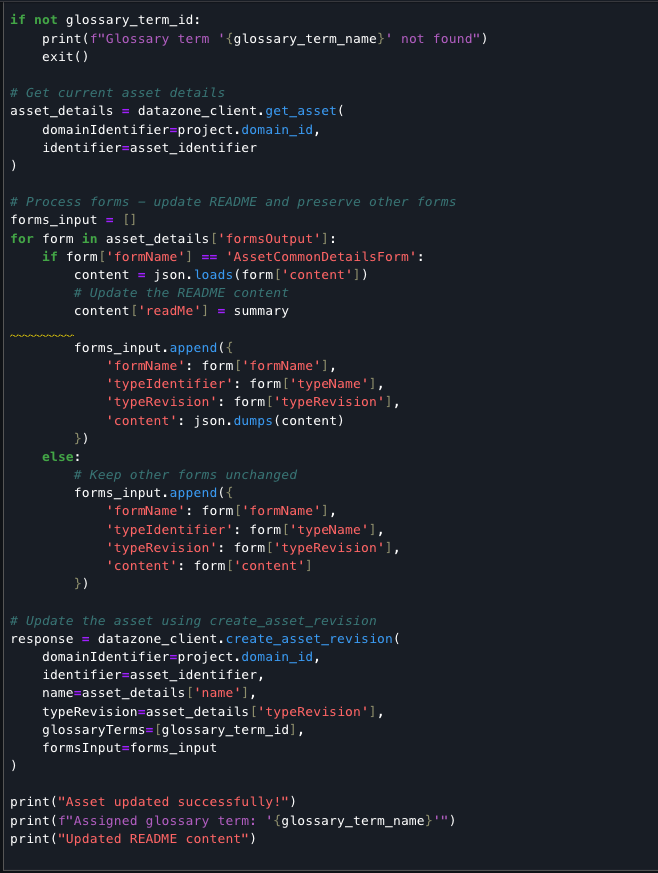
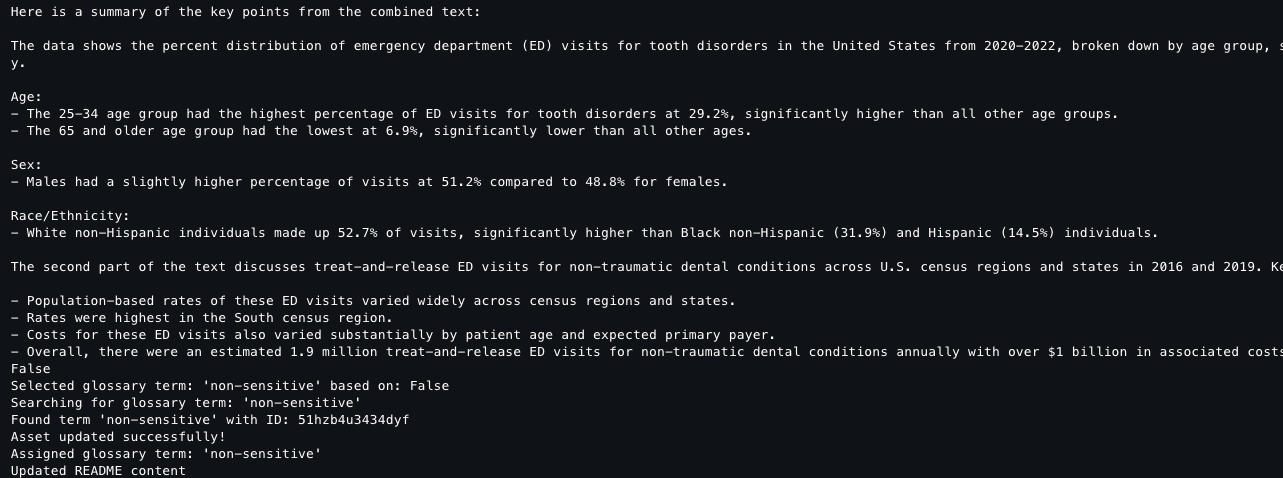
Finally, the code completes the document processing pipeline by classifying the asset based on sensitivity, updating its metadata with an AI-generated summary, and assigning the appropriate glossary term. The script retrieves existing asset details to preserve all metadata forms, updates the README field with the summary content, and creates a new revision. This record of the classification and documentation is stored in the data catalog, accessible alongside your source assets for ongoing governance.
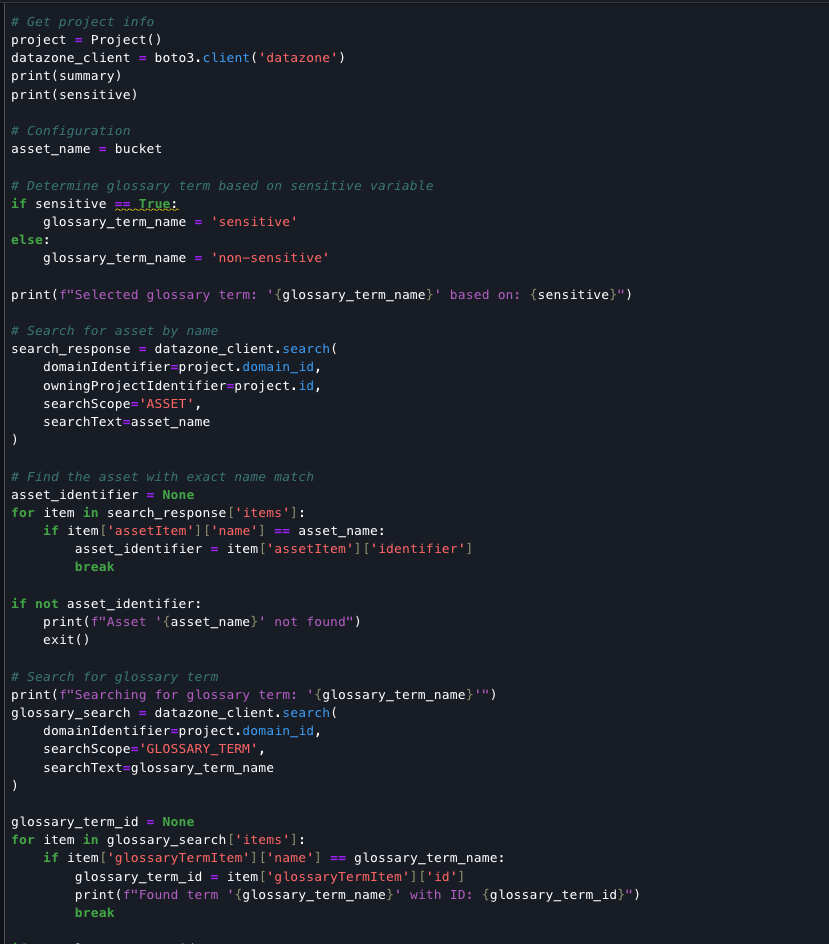
Output: The following screenshot shows the output result.
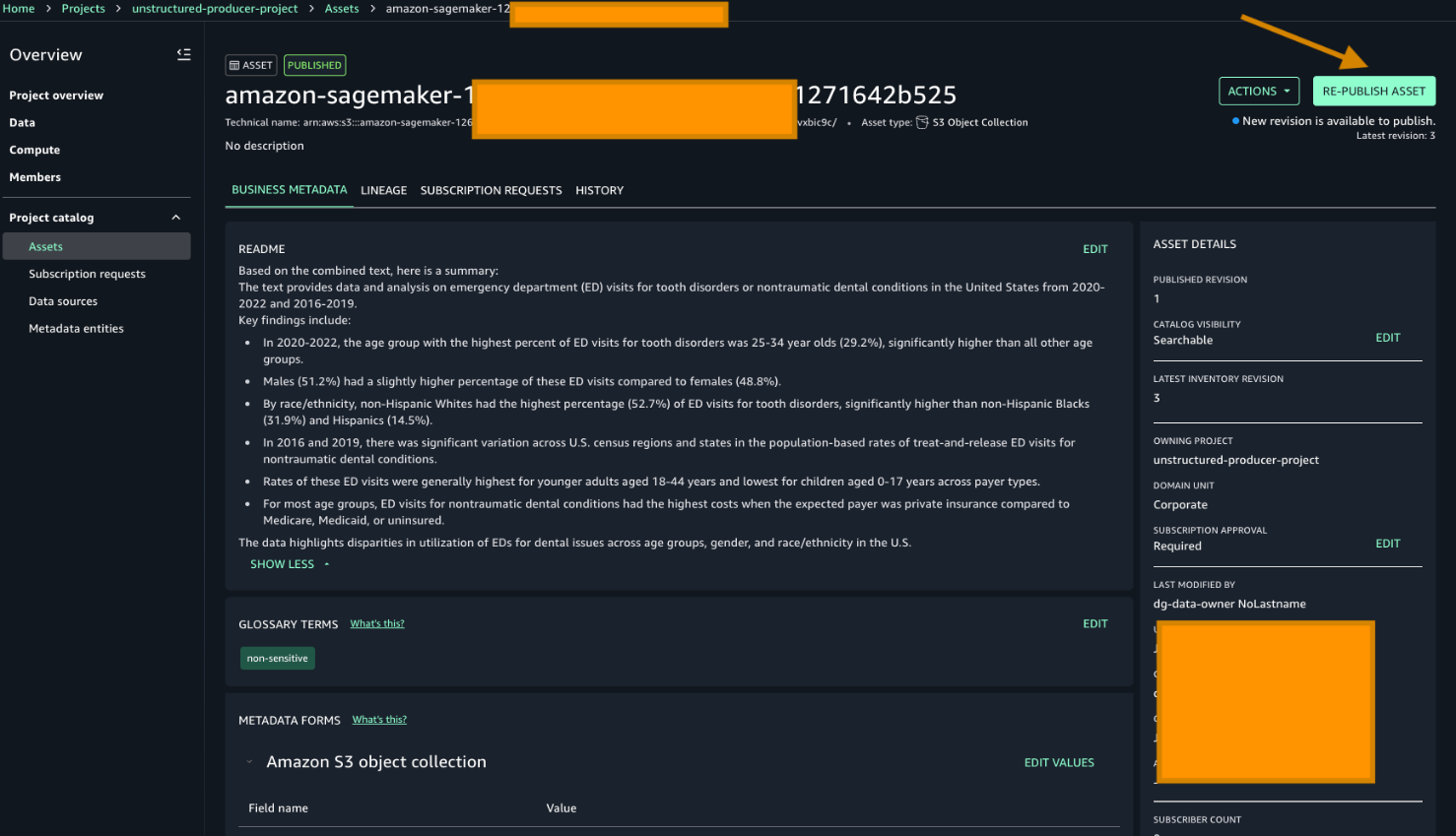
After generating metadata with Amazon Textract and Amazon Bedrock, republish the data to make it discoverable to users. Note the README and the Glossary terms have already been added based on the previous script.
To republish unstructured data with enriched metadata, go to your producer project and choose Re-publish asset.
To search for the asset that was published, choose one of the keywords from the README sections. For this example, we search using these keywords high percent of ED visits.
Go to Home in the search bar to enter the keyword. Then choose the asset as displayed in the following screenshot:
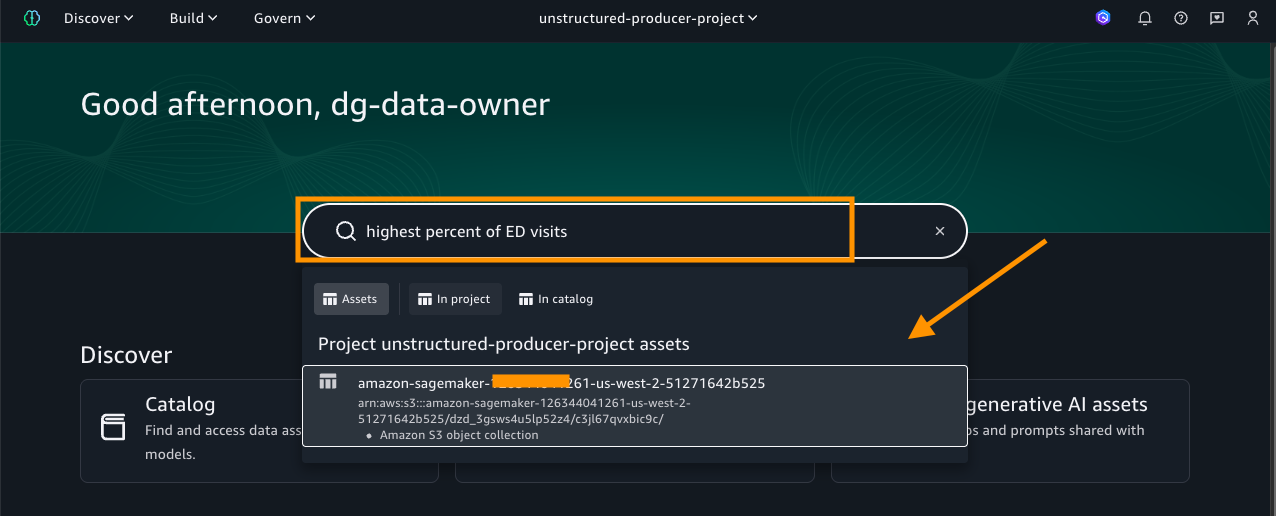
As shown in the preceding image, the search results display the asset name along with the project it belongs to. Select the asset to view its details, where you will find rich business metadata, lineage information, and more, as shown in the following screenshot.
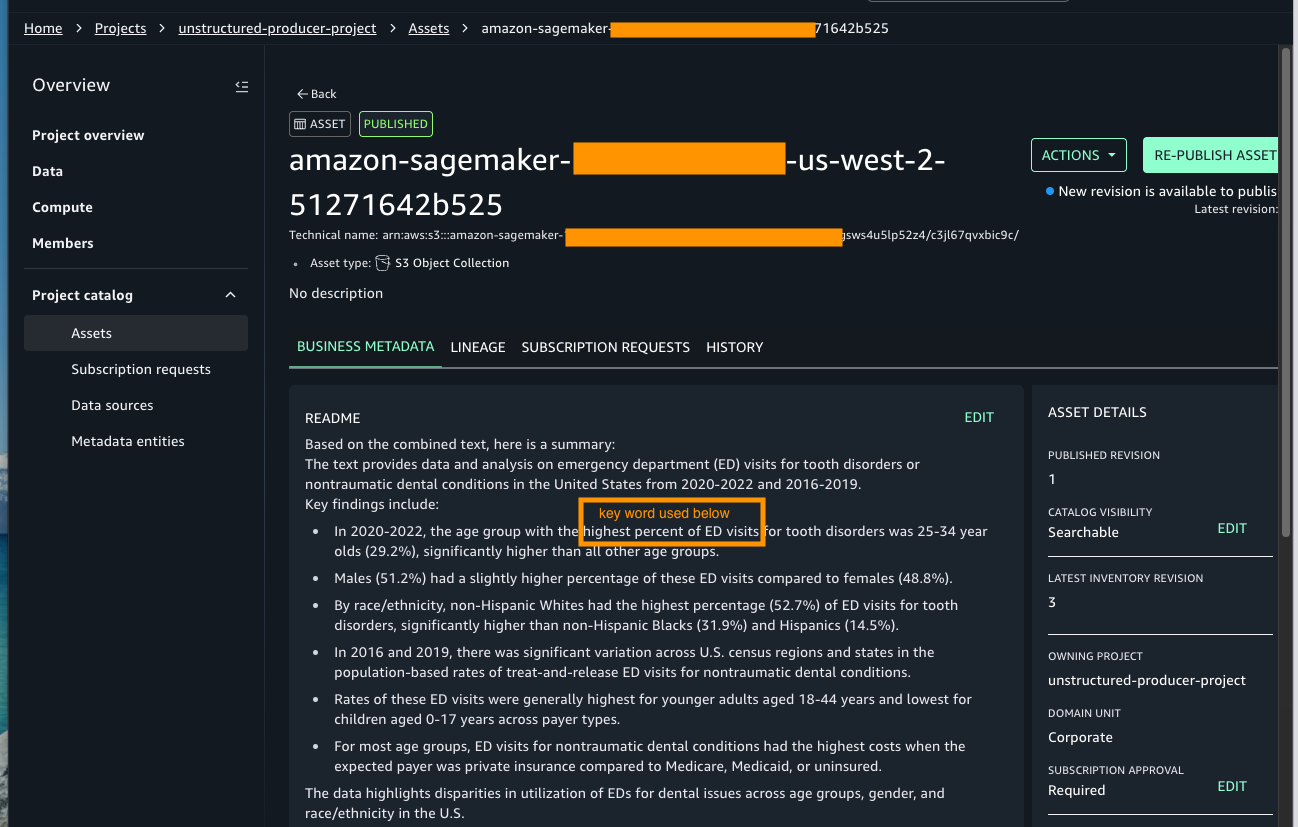
With the asset published and metadata enriched, data assets are ready to be used.
Clean up
To avoid ongoing charges, make sure to delete the resources immediately after completing the tutorial:
- Stop Studio Resources – Close all running notebooks – Stop any running notebook instances – Shut down unused kernels. Running instances continue to incur charges even when not actively used.
- Clean S3 Storage – Delete any temporary files created during processing – Remove uploaded test documents if no longer needed. While Amazon S3 costs are minimal, large volumes of unneeded data can accumulate charges.
Conclusion
In this post we showed you how you can transform unstructured data into valuable business assets through seamless integration with AWS services. You can efficiently process documents using Amazon Textract for text extraction, harness the capabilities of Amazon Bedrock for intelligent term identification, and use Amazon SageMaker Catalog for metadata management—all within a secure, governed framework.
Additional resources
To continue your Amazon SageMaker AI journey, see the following resources:
-
-
- Explore the Amazon SageMaker Developer Guide.
- Documentation – You can find complete setup guides in Amazon SageMaker Unified Studio Documentation.
- Get started with these new integrations through the Amazon s Unified Studio console.
-
About the authors
What Retail AI and Compute Infrastructure Actually Looks Like in 2026
Post Syndicated from Patrick Kennedy original https://www.servethehome.com/what-retail-ai-and-compute-infrastructure-actually-looks-like-in-2026/
Retail AI compute is something we experience every day, oftentimes without thinking about it. We head to a local Ace Hardware to show you
The post What Retail AI and Compute Infrastructure Actually Looks Like in 2026 appeared first on ServeTheHome.
Automate safety monitoring with computer vision and generative AI
Post Syndicated from Nika Mishurina original https://aws.amazon.com/blogs/architecture/automate-safety-monitoring-with-computer-vision-and-generative-ai/
Workplace safety has improved dramatically over the past several decades. According to the Bureau of Labor Statistics, occupational injury rates in the United States have declined by more than 60% since the early 1970s. This is driven by stronger regulations, better training programs, and a growing culture of safety-first operations. Despite this progress, the International Labour Organization reports that 395 million workers worldwide still sustain non-fatal occupational injuries each year, and the National Safety Council estimates that workplace injuries cost the US economy $176.5 billion in 2023.
The challenge is no longer a lack of safety commitment, it’s the limitations of traditional monitoring methods. Manual safety audits, while valuable, cover only a fraction of operational areas and produce point-in-time snapshots rather than continuous oversight. As organizations scale across hundreds of facilities, whether manufacturing floors, distribution centers, airport tarmacs, construction sites, or laboratory environments, maintaining consistent, real-time visibility into Personal Protective Equipment (PPE) compliance and zone-based hazard monitoring becomes increasingly difficult.
According to OSHA, struck-by vehicle fatalities and injuries are 100 percent preventable, yet they remain a leading cause of workplace fatalities. However, 90 percent of workplace eye injuries can be avoided by wearing eye protection, according to the American Academy of Ophthalmology.
Computer vision and generative AI represent the next evolution in workplace safety, not replacing existing safety programs, but augmenting them with continuous, automated monitoring that scales across facilities around the clock. This post describes a solution that uses fixed camera networks to monitor operational environments in near real-time, detecting potential safety hazards while capturing object floor projections and their relationships to floor markings. While we illustrate the approach through distribution center deployment examples, the underlying architecture applies broadly across industries. We explore the architectural decisions, strategies for scaling to hundreds of sites, reducing site onboarding time, synthetic data generation using generative AI tools like GLIGEN, and other critical technical hurdles we overcame.
Solution overview
Our computer vision solution uses a serverless, event-driven architecture designed to scale efficiently across thousands of cameras and process massive volumes of image data for risk detection. The system includes the following:
- A machine learning (ML) model that identifies workplace safety hazards
- Real-time visual data processing for emerging risks
- A dual-detection annotation method that captures both object outlines and their floor projections relative to safety markings.
The system blurs human faces and identifiable features to help protect PII while maintaining hazard detection accuracy. To maintain proper security and operational segregation, the solution is distributed across multiple AWS accounts. We separated the training pipeline, image collection infrastructure, end-user web application, and created a dedicated analytics account for the BI team to develop reporting and insights solutions into distinct environments with appropriate access controls and data isolation. The system continuously learns to improve detection accuracy. Safety managers use monitoring dashboards to track and respond to hazards. The following architecture diagram illustrates how these components work together to create an end-to-end safety monitoring solution.
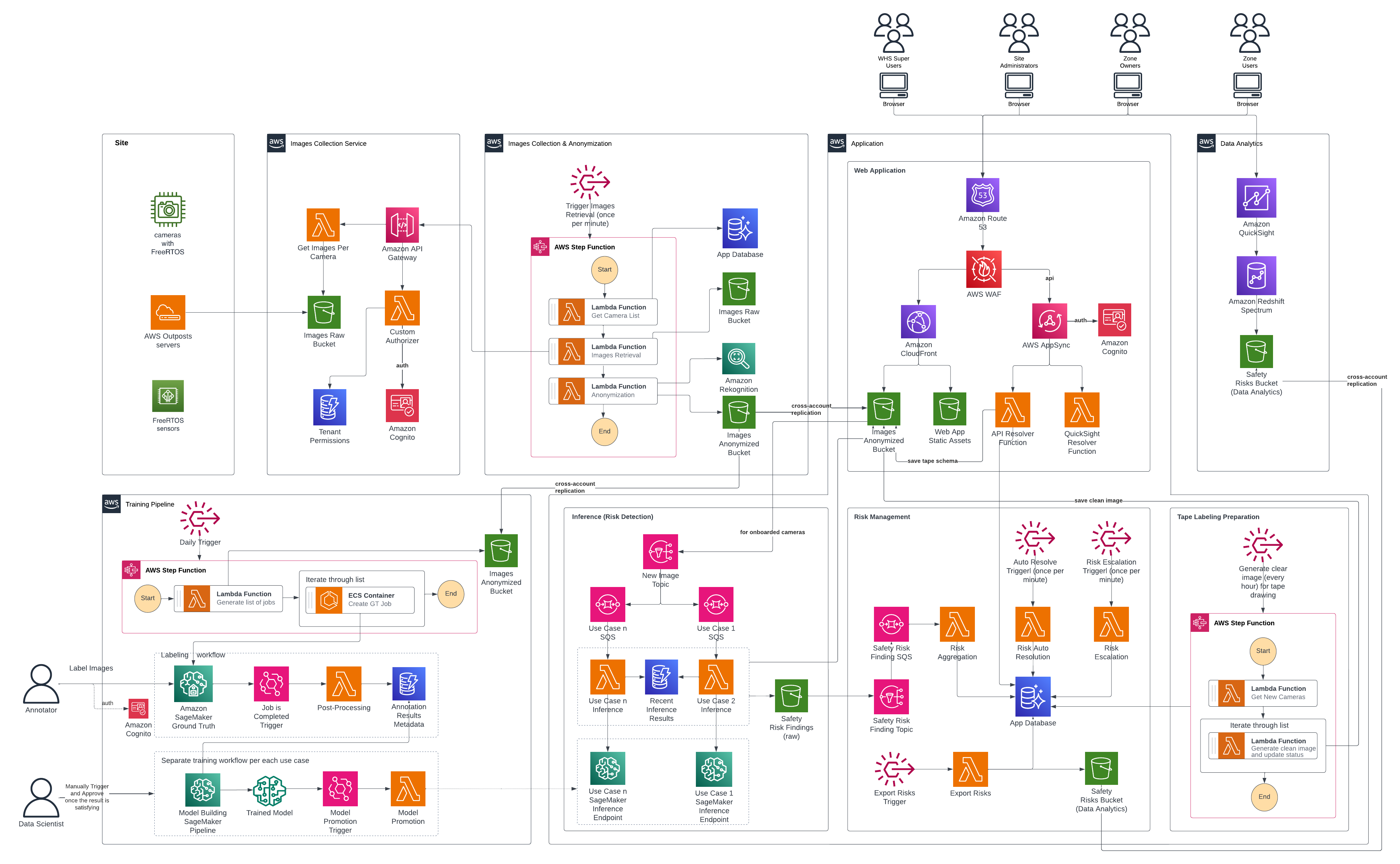
The system implements a hierarchical role-based access control structure with four user types.
- Super Users are system administrators with organization-wide visibility, responsible for site onboarding initialization and system health monitoring.
- Site Administrators operate at the facility level, configuring zones and managing permissions within their site.
- Zone Owners play a critical operational role—they receive and remediate safety risk notifications, complete tape labeling jobs to verify detection accuracy, and perform camera onboarding configuration. The system only begins automated risk detection after Zone Owners complete the full configuration process, so that parameters are properly set.
- Zone Users have read-only access to risks and alerts without configuration capabilities.
Image collection and anonymization
The workflow begins with automated image collection from configured and authorized site cameras through a dedicated image service providing periodic image capture. Raw images are initially stored in an Amazon Simple Storage Service (Amazon S3) bucket in a separate, access-restricted account where they immediately undergo an anonymization process. After anonymization is complete, raw images are automatically purged from the bucket within days, as per organizational retention policies. Amazon Rekognition detects faces of individuals present in the images, and custom Python code then applies an overlay to blur the detected faces, helping to preserve privacy. The anonymized images are replicated across multiple AWS accounts serving different purposes: training computer vision models, running inference to detect safety hazards, and powering the end-user web application where Zone Users monitor and respond to detected risks. The web application displays the anonymized images, which are annotated with visual indicators for missing PPE as an example or other potential safety hazard. This clear visual feedback eliminates guesswork so that Zone Users can quickly understand what hazard was identified and where it’s located on the facility floor, facilitating rapid response and remediation. Additionally, they can adjust the floor plan organization that defines the exact regions where workers are required to wear PPE or different objects and equipment are to be placed as per 5S taping and rules.
Training pipeline and model promotion
Machine learning systems need high-quality ground truth datasets. These labeled examples teach models to identify and classify safety hazards. Data labeling is the process of human annotators reviewing images and meticulously annotating objects, behaviors, and conditions of interest. For example, drawing bounding boxes around obstructions in walkways, identifying workers without proper PPE, or marking floor tape boundaries. Poor quality training data produces unreliable models that miss safety hazards or generate false alarms, eroding user trust. Conversely, investing in high-quality, accurately labeled training data—with clear, consistent annotations reviewed by domain experts—enables the model to detect genuine risks with precision and reliability. This ultimately determines the success or failure of the entire safety monitoring system. As described later in this post, synthetic data generation can complement or potentially substitute manual annotation for specific use cases where real-world examples are scarce or labor-intensive to collect.
After anonymized images are collected and stored into Amazon S3, the GT Job creation AWS Step Functions workflow creates Amazon SageMaker Ground Truth labeling jobs for the required use cases and monitored sites and cameras. This step function is triggered at a regular, configurable, cadence by an Amazon EventBridge rule. It integrates with Zone User feedback and saved ML model predictions, so data scientists can prioritize different underperforming classes and cameras. A team of dedicated annotators then complete the jobs. Completed jobs undergo post-processing using AWS Lambda to transform them into a format suitable for training. The post-processing workflow stores job metadata like included cameras and classes, into Amazon DynamoDB, while annotations are stored in an S3 Bucket. After training data is ready, data scientists trigger Amazon SageMaker AI Pipelines model building workflows using scripts that allow for flexible hyper parameter and GT data selection. The SageMaker AI Pipeline consists of seven steps:
- A checkpoint loading step
- A data preparation and split step
- A model training step
- A generate drift baseline step
- A model evaluation step
- A model packaging step
- A model register step
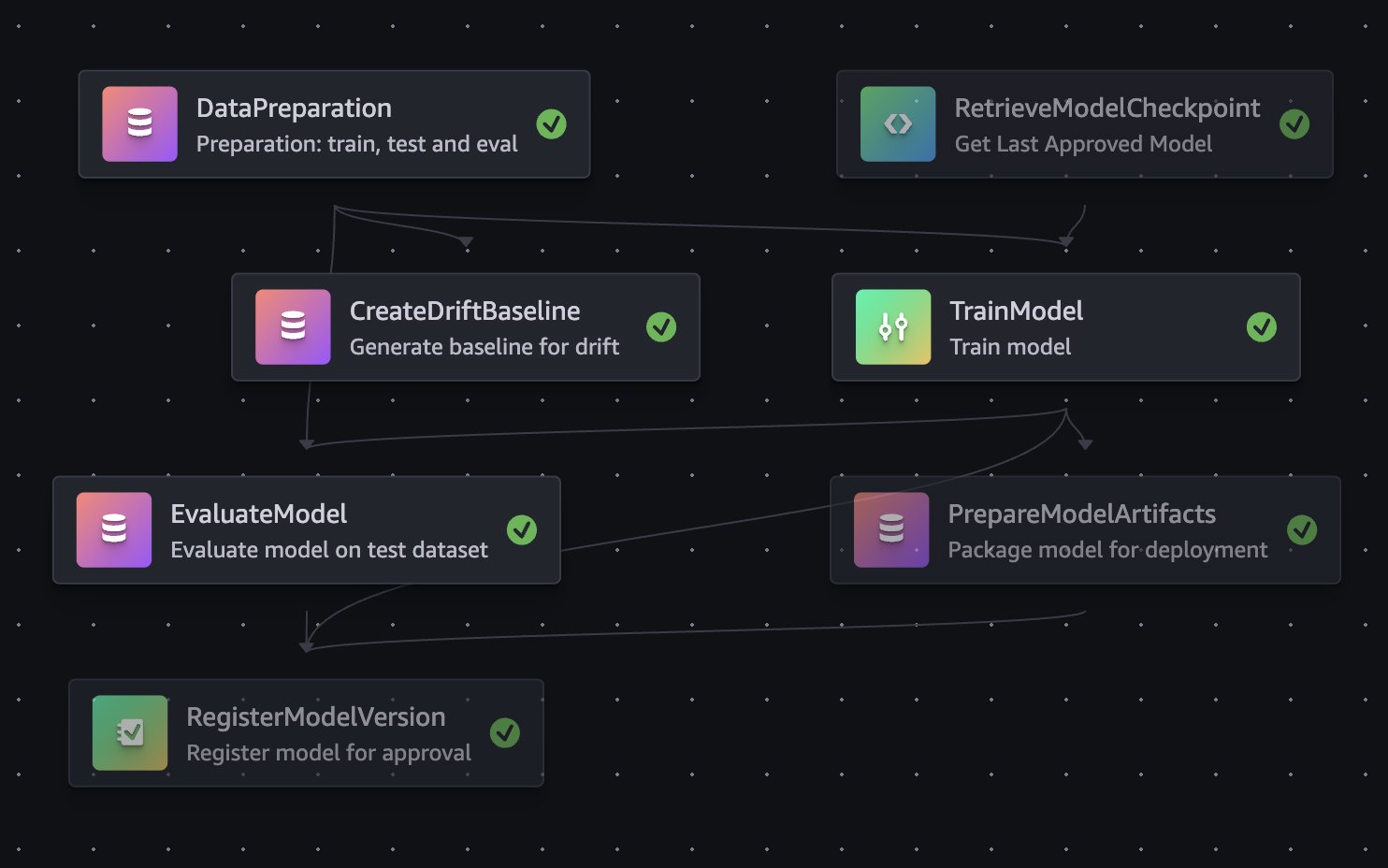
Data scientists review trained model evaluation metrics, and approve models that they want to use in the inference pipeline. Model approval fires off an EventBridge event that triggers the model promotion Lambda. The model promotion Lambda creates a code review against the application infrastructure code repository to update the Amazon S3 URI of the model used for the SageMaker AI endpoint. This workflow decouples the science and application updates. Scientists approve models when evaluation metrics meet acceptance criteria. Software engineers can then merge and manage the endpoint updates like other software and infrastructure changes through continuous integration and delivery (CI/CD) pipelines. After code review is passed, the system updates the SageMaker AI Endpoint accordingly and inference pipeline will use the updated endpoint. Approved models checkpoints are also used as the base for future retraining runs, enabling rapid incremental improvements without frequent long running training jobs.
Inference pipeline
Each use case operates through its own inference pipeline, working together to provide comprehensive safety oversight. The system functions as a digital safety supervisor, continuously monitoring facility operations and distinguishing between normal workflow and potential hazards. When an image lands in the anonymized S3 bucket, it triggers an Amazon Simple Notification Service (Amazon SNS) notification that routes to a dedicated Amazon Simple Queue Service (Amazon SQS) queue. Each use case processes independently through its own queue, which invokes a SageMaker AI Endpoint hosting a computer vision model tailored to that scenario. For example, detecting operational equipment, identifying workers with safety gear, or monitoring other safety-critical conditions. The “Intelligent Alarm Detection” section details how the system validates and escalates findings. Confirmed violations generate alerts containing the object type, precise location, and violation duration. Visual evidence includes both the original camera capture and an annotated version with color-coded overlays: blue outlines mark restricted zones, red outlines highlight violating objects, and confidence scores label each detection. Then, the system distributes alerts through parallel channels. DynamoDB stores structured violation records enabling fast queries. Amazon S3 events trigger downstream processing and notifications. Failures are tracked in use case specific Dead Letter Queues (DLQs) where they can later be analyzed or re-drove.
Risk management
When the inference pipeline detects potential hazards and saves them to the dedicated S3 bucket, it triggers a Lambda function using Amazon SNS and SQS. This function intelligently aggregates risks per camera per use case to avoid alert fatigue. Instead of bombarding safety teams with duplicate notifications, the system appends new occurrences to existing open risks. Every minute, an Amazon EventBridge schedule kicks off a Lambda function that checks whether risks still appear in the latest camera images. If a violation has been resolved, the system automatically closes it out. At the same time, another scheduled function monitors whether the SLA for risk resolution has been exceeded and sends notifications through zone’s configured preferred channels, Slack, email, or an internal ticket management system. The notification system includes escalation levels, so that the right people are alerted based on severity and how long an issue has been open. Every hour (though this schedule is flexible), the system exports risk data from the database reader endpoint and shares it with the BI team for deeper analysis and trend spotting.
Web application
Users review active and resolved risks through a React web application distributed via Amazon CloudFront and backed by an AWS AppSync API. The application follows AWS security best practices with Amazon Route 53 for DNS resolution and AWS WAF for protection against common web vulnerabilities. AWS AppSync uses AWS Lambda resolvers for embedding Amazon Quick Sight analytics and processing CRUD operations.
Site administrators can use a Site Management feature to configure use cases and notification parameters. Camera zones organize related risks into alerts for quick review. These can be acknowledged or marked as false positives, and the system automatically resolves alerts when risks are no longer detected. Users can also search historical risks, with both views displaying day-over-day trends, average resolution time, and false positive rates.
Tape labeling preparation
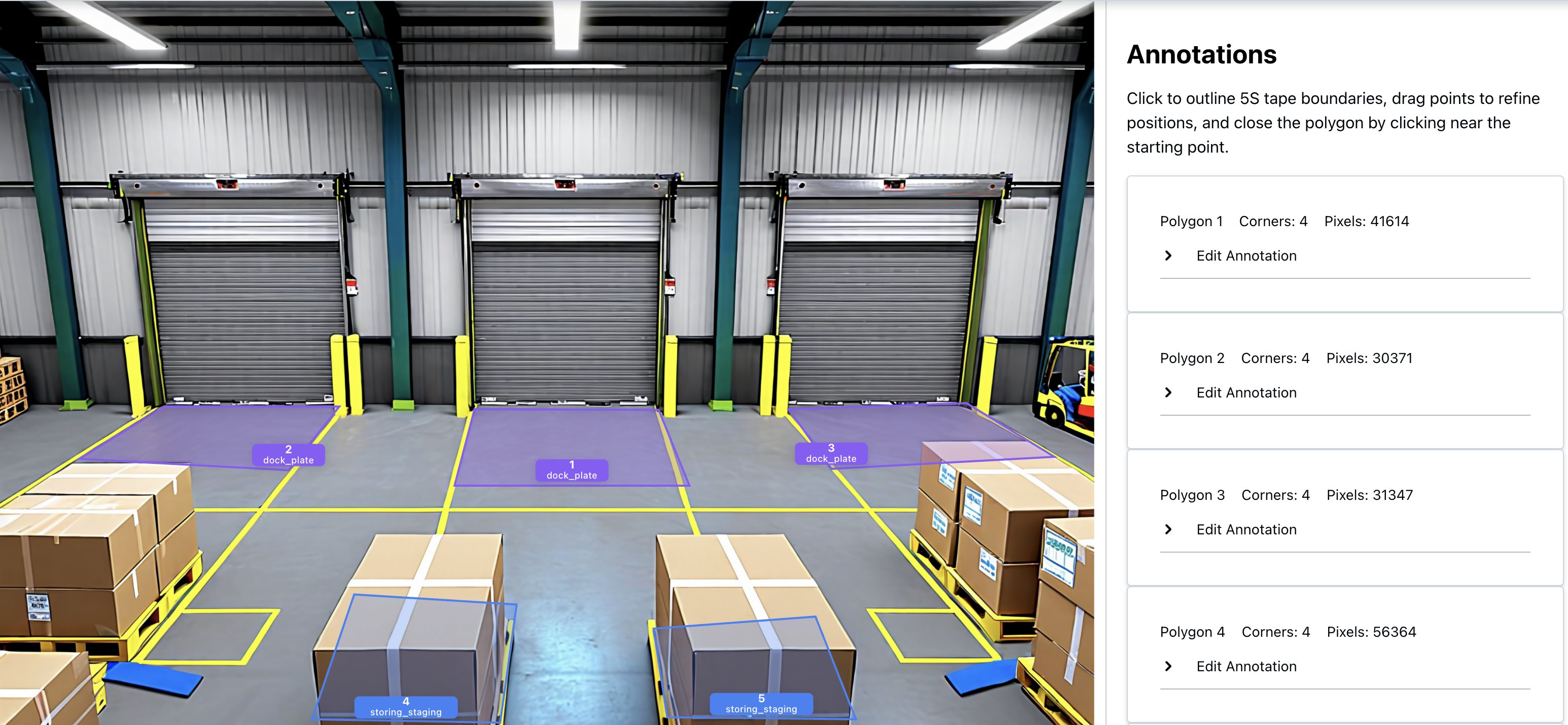
The Housekeeping use case fundamentally relies on understanding the spatial relationship between detected objects and the 5S floor tapes that define where equipment and materials should be positioned. Housekeeping, in this context, refers to maintaining a clean, organized, and safe workspace by keeping equipment, materials, and tools stored in their designated locations. A key advantage of this system is that it does not require pre-existing digital maps or floor plans. Instead, Zone Owners can define safety zones and organizational areas by referencing the physical tapes visible in camera images. Different color tapes represent places where certain objects belong and where restrictions exist. However, a practical challenge arises during normal facility operations: floor tapes frequently become obscured by equipment, materials, and personnel movement throughout the day. This occlusion makes it difficult for human annotators to accurately identify and label the tape boundaries when onboarding new cameras. To address this challenge, an intelligent tape labeling preparation workflow was developed that generates synthetic composite images showing clear, unobstructed views of the floor tapes. The system analyzes multiple camera frames captured at different times throughout the day, along with their corresponding object detection predictions. Using a voting mechanism, it identifies pixel regions with no detected objects and stitches these clear portions together into a composite image where the tapes are fully visible. This automated workflow runs hourly using AWS Step Functions. The first Lambda function identifies newly onboarded cameras requiring tape labeling, while the second generates composite images, saves them to Amazon S3, and updates camera status to indicate readiness for annotation. The Camera Onboarding process generates JSON files containing the coordinates of each 5S tape floor annotation for every camera. These annotations are accessible within the application, allowing users to inspect and modify them as needed when floor organization changes. During inference, the system overlays detected object positions onto floor tape boundaries and evaluates compliance against configured business and organizational rules. When violations are detected, Housekeeping alarms provide comprehensive context, including the outlined object in violation, the specific 5S taped area involved, and the rule that was broken. This detailed feedback enables operators to quickly localize issues and mark false positive alarms. The following image was generated by Amazon Nova to illustrate the tape labeling UI:
Data analytics component
Finally, this risk detection data gets turned into real business insights through Amazon Redshift Spectrum and Quick Sight. Redshift Spectrum lets the BI team query risk data sitting in S3 without the hassle of moving or loading it elsewhere, making historical analysis fast and straightforward.
Quick Sight dashboards give safety managers and operations leaders the full picture: which facility zones are hotspots for violations, how risks shift between day and night shifts, what types of objects cause the most problems, and whether your safety interventions are actually moving the needle. You can even compare performance across facilities to spot best practices worth replicating.
Intelligent Alarm Detection
The four-stage process
When an image arrives in the anonymized S3 bucket, the system processes it through four stages:
Stage 1: Object detection
The SageMaker Endpoint runs a computer vision model that detects operational equipment, materials, and worker safety gear. In the Housekeeping use case, the model identifies various equipment types such as transport devices, storage containers, and safety apparatus, along with materials commonly found in industrial environments. A critical capability is the model’s ability to distinguish between an object’s visible outline and its actual floor footprint.
Stage 2: Zone-based analysis with “Digital Tape”
Detection alone isn’t enough. The system must understand whether detected objects pose actual risks. Predefined zones, called “tapes,” mark restricted areas, walkways, and safety boundaries through labeling jobs. The system calculates the percentage overlap between each detected object’s footprint and these restricted zones. Configurable thresholds, typically 50% overlap, determine whether an object violates safety protocols, filtering out edge cases where objects barely touch boundary lines. For the PPE detection module, the system employs a YOLO-based computer vision model that performs simultaneous detection across multiple dimensions. It locates workers within the frame, classifies the presence or absence of required safety equipment, and applies contextual analysis to determine which PPE items are mandatory in specific areas. This contextual awareness allows the system to adapt its requirements to different zones within the operational environment.
Stage 3: The “Loiter Time” algorithm
To avoid false alarms from transient objects, the system tracks violations over time. It analyzes objects across consecutive time intervals, typically minute-by-minute, using mask similarity algorithms to confirm the same object persists rather than being replaced by similar items. This builds a “replication count” showing how many consecutive minutes an object has remained in violation. Different object types and risk zones have distinct acceptable loiter times—high-risk areas enforce shorter thresholds, while general workspace areas allow longer durations to accommodate normal operations.
Stage 4: Multilayered validation and alarm generation
Before generating an alert, the system applies final validation layers. Confidence thresholds filter out low-certainty detections based on object type complexity. Run-Length Encoding (RLE) mask comparison verifies that the tracked object is consistent across time intervals rather than different objects appearing in similar positions. Zone context determines the severity and routing of each alert. Once validated, an alert is generated with rich metadata:
Infrastructure scaling challenges
We designed the system to support thousands of cameras. This scale required careful architectural decisions.
Architectural foundation for scale
At the heart of our system is a serverless driver-worker pattern that proved essential for achieving the scale we needed. This pattern decouples image processing tasks, enabling independent scaling of different components while providing fault isolation. If one worker fails, it doesn’t impact the entire pipeline. The driver orchestrates work distribution while workers process images concurrently, allowing us to horizontally scale to handle simultaneous processing from hundreds of sites. This initial worker pulls the raw image and triggers a cascade of specialized downstream handlers that each contribute to the overall safety monitoring workflow.
The ML inference workflow acts as an intelligent gatekeeper in this architecture. Rather than flooding downstream components with every captured image, the inference layer only surfaces images where safety issues have been detected. This filtering is essential because it prevents components interacting with Amazon Aurora PostgreSQL from being overwhelmed by the raw volume of image data from hundreds of sites. For managing processing state, the ML inference components use DynamoDB, which provides the scalable, serverless state management needed to track inference operations across our distributed camera network.
Evolving our inference infrastructure
One of our most significant scaling challenges emerged as we transitioned from a proof-of-concept to production scale. Initially, we deployed SageMaker Serverless inference endpoints with approximately 50 cameras. However, as we scaled to processing images from hundreds of sites, we encountered critical limitations: SageMaker Serverless inference lacked GPU support and imposed a 6GB maximum memory configuration, leading to out-of-memory errors. The solution required pivoting to SageMaker Serverful inference endpoints configured with ml.g6 family instances and implementing auto scaling policies. Achieving scale also meant working with AWS service teams to increase limits for thousands of concurrent Lambda executions, optimizing memory allocation and multithreading, and tuning SQS batch sizes maximize throughput within memory constraints.
Optimizing Lambda and SQS for massive concurrency
Achieving the required scale also meant working closely with AWS service teams to increase limits supporting thousands of concurrent Lambda executions across our accounts. Beyond increasing limits, we invested significant effort in optimizing our Lambda configurations from memory allocation to processing logic that uses multithreading capabilities. The integration between Lambda and SQS required particular attention. We optimized Lambda functions for maximum consumption concurrency, refactored error handling to minimize failed containers, and tuned the maximum number of messages per batch to handle larger message volumes efficiently within memory constraints.
Data-driven ground truth curation at scale
While synthetic data generation significantly reduces the annotation burden, manual annotation remains important for addressing unique site conditions and onboarding new use cases. As the solution scales to new facilities, each site introduces distinct camera angles, lighting conditions, and equipment layouts that benefit from targeted real-world annotations to fine-tune model performance. Our approach to curating ground truth data for model training evolved significantly as we scaled. Initially, we implemented a straightforward but labor-intensive strategy: creating annotation jobs for every site on a daily basis. This approach worked well during early stages with limited sites, but as we expanded to hundreds of geographically distributed sites, the volume of manual annotation became untenable. The sheer number of daily labeling jobs – one per site per day – quickly overwhelmed our annotation capacity and created a significant operational bottleneck that threatened our ability to continuously improve model performance.
We fundamentally reimagined our workflow by using Amazon Athena to query and analyze massive volumes of inference results combined with customer feedback data at scale. We identified underperforming segments by aggregating false positive rates across camera types and deployment conditions, prioritizing retraining on image sources with elevated error rates. We also surfaced inferences where model confidence scores fell below established thresholds, flagging these uncertain predictions for targeted annotation and review. We further augmented this analysis with Claude multi-modal LLMs on Amazon Bedrock to analyze misclassified samples and detect underrepresented object classes in our existing training distribution. This directly informed our data collection strategy to address class imbalance and edge cases in future training jobs. This shift from blanket sampling to intelligent, performance-driven curation made our annotation workflow sustainable at scale. It also improved training efficiency by directing labeling efforts only where they would have the greatest impact on model improvement.
Images annotation at scale
Manual annotation of training data is challenging, especially for rare safety violations. The sheer volume of images combined with the labor-intensive nature of manual labeling, makes traditional annotation approaches impractical for certain use cases. Some safety violations are extremely rare in practice yet represent frequent sources of workplace injuries. A prime example is floor spill detection: despite examining and annotating over half a million images, only a few hundred examples of liquid spills or debris on walkways were identified. While this low occurrence rate is commendable from a safety perspective, it poses a fundamental challenge for model training. There aren’t enough real-world examples to train a robust detection model. Similarly, PPE detection presents a data diversity challenge. In the majority of captured images, PPE items appear in a single dominant color. However, workplace policies often permit variations, and workers occasionally wear acceptable PPE in different colors. Without sufficient training examples across color variations, the model risks failing to detect non-standard colored items, creating potential safety blind spots.
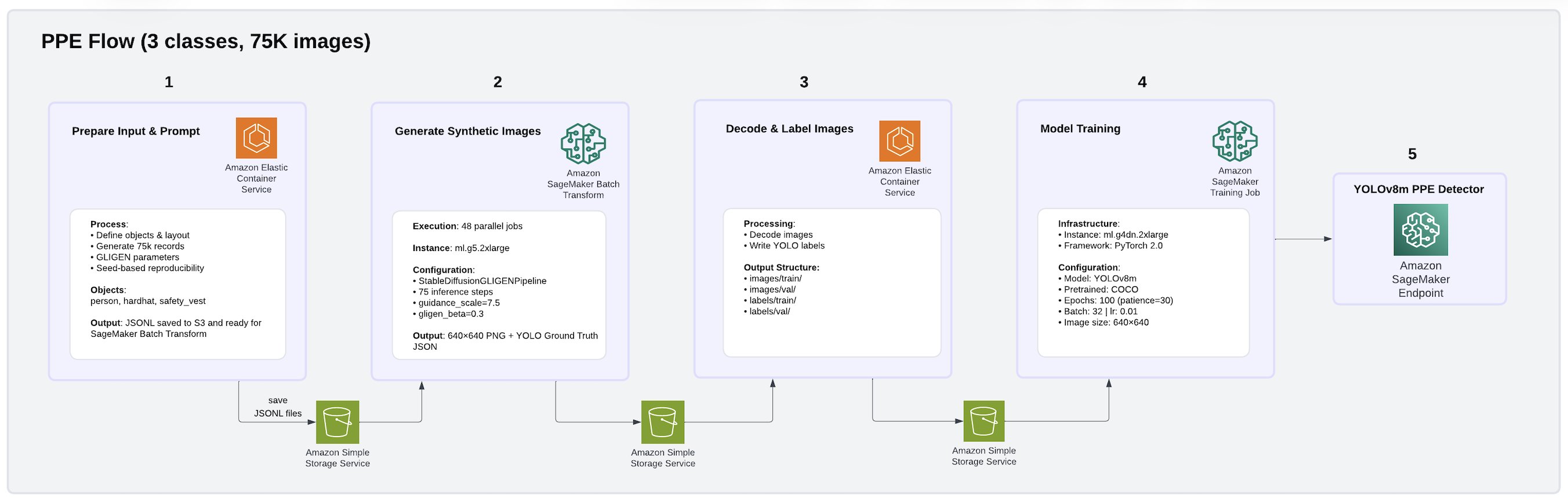
To address these challenges, we built a fully synthetic data generation and model training pipeline on AWS using GLIGEN (Grounded Language-to-Image Generation), a diffusion-based generative model deployed as Amazon SageMaker Batch Transform jobs. Using this approach, we produced a 75,000-image PPE dataset covering three classes: person, hard hat, and safety vest. The pipeline architecture is illustrated in the following image.
We also produced a 75,000-image Housekeeping dataset covering seven common facility object classes: pallet jack, go-cart, step ladder, trash can, safety cone, tote, and pallet. The pipeline architecture is illustrated in the following image.
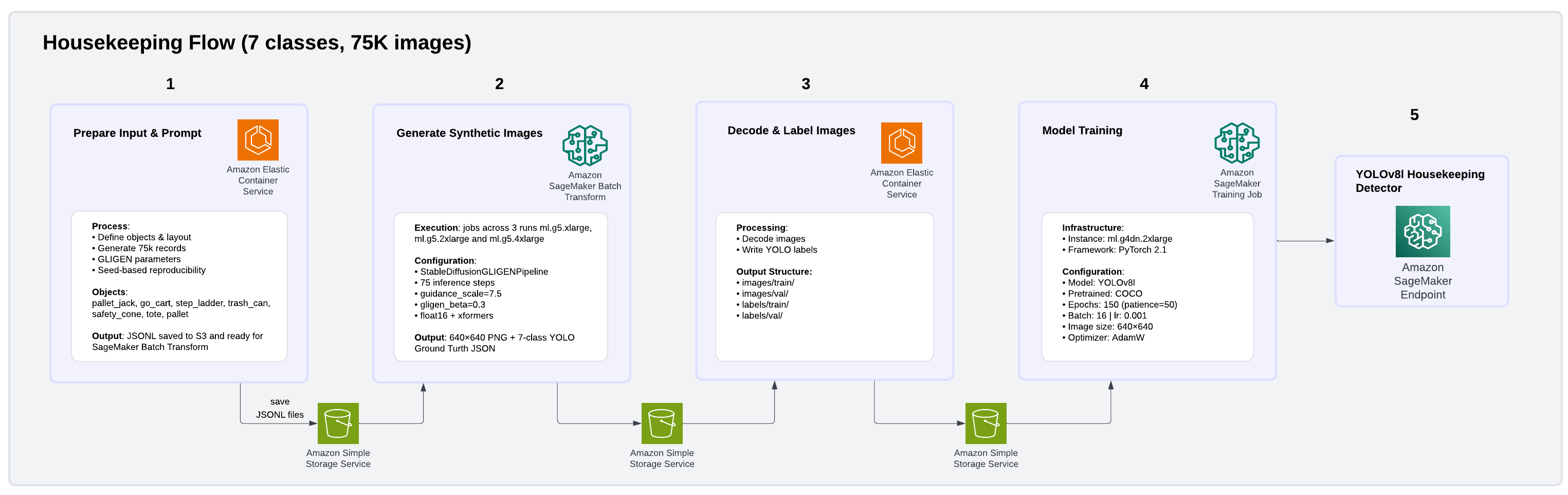
GLIGEN enables the creation of highly realistic, yet controlled, training datasets that address both rare event scarcity and data diversity gaps without requiring manual image collection or annotation. For floor spills, GLIGEN receives structured bounding box inputs specifying where objects should appear, generating photorealistic facility scenes with spills or debris placed in realistic facility floor contexts. For PPE color diversity, GLIGEN generates images of workers wearing safety equipment in varied colors, creating the diversity needed for robust detection across acceptable variations. For each image, GLIGEN received bounding box coordinates specifying object positions and generated photorealistic 512×512 facility scenes with ground truth annotations automatically embedded in the output, avoiding manual labeling entirely. Raw outputs were streamed from Amazon S3, decoded, and converted to YOLO annotation format using parallel Python workers, then uploaded back to S3 as training-ready datasets. We trained YOLOv8 models on Amazon SageMaker AI using PyTorch 2.1, with the final configuration using cosine learning rate scheduling and AdamW optimization. This is a combination that proved critical for stabilizing the larger YOLOv8l model variant and preventing gradient divergence during training. Beyond training data generation, GLIGEN ‘s synthetic images also enhance the inference by reducing false positive risk detections and providing more accurate, contextual understanding of the operational environment.
Conclusion
Our solution demonstrates strong accuracy. For use cases trained entirely on synthetic data generated by GLIGEN, the PPE model achieved 99.5% mean average precision (mAP@50) with 100% precision and recall across all three classes. The Housekeeping model reached 94.3% mAP@50 with 91.4% precision and 86.9% recall across seven more challenging facility object classes, all without a single manually annotated real image. Accuracy can be further improved by increasing the volume of training images used to build and train the custom model. Beyond accuracy, through testing on 10,000 synthetic images, we’ve seen our solution perform strongly across two critical dimensions:
- speed of up to 37 seconds, measured by the time elapsed between an image captured and notification delivery to Zone Operators.
- scale across 10,000+ cameras, validated through simultaneous processing of 10,000 images, if one camera produces one frame at a time.
While this post focuses on our warehouse deployment, the architecture we’ve described is intentionally industry-agnostic. The core capabilities, object detection, zone-based spatial reasoning, temporal violation tracking, and privacy-preserving image processing, are not specific to a single environment. The same detection pipeline that identifies PPE violations and housekeeping hazards on a distribution center floor could be adapted to monitor equipment boundaries on manufacturing floors, enforce clean room protocols in laboratories, or track safety compliance on construction sites. Each industry requires a domain-specific model training, tailored business rules, and unique zone configurations, but the underlying event-driven architecture, scaling patterns, and intelligent alarm detection framework remain constant. We look forward to exploring these extensions in future work.
For more information about AWS workforce safety solutions, see Delivering an integrated approach to safety: How AWS Workforce Safety solutions make work safer.
About the authors
Is “Hackback” Official US Cybersecurity Strategy?
Post Syndicated from Bruce Schneier original https://www.schneier.com/blog/archives/2026/04/is-hackback-official-us-cybersecurity-strategy.html
The 2026 US “Cyber Strategy for America” document is mostly the same thing we’ve seen out of the White House for over a decade, but with a more aggressive tone.
But one sentence stood out: “We will unleash the private sector by creating incentives to identify and disrupt adversary networks and scale our national capabilities.” This sounds like a call for hackback: giving private companies permission to conduct offensive cyber operations.
The Economist noticed (alternate link) this, too.
I think this is an incredibly dumb idea:
In warfare, the notion of counterattack is extremely powerful. Going after the enemy—its positions, its supply lines, its factories, its infrastructure—is an age-old military tactic. But in peacetime, we call it revenge, and consider it dangerous. Anyone accused of a crime deserves a fair trial. The accused has the right to defend himself, to face his accuser, to an attorney, and to be presumed innocent until proven guilty.
Both vigilante counterattacks, and preemptive attacks, fly in the face of these rights. They punish people before who haven’t been found guilty. It’s the same whether it’s an angry lynch mob stringing up a suspect, the MPAA disabling the computer of someone it believes made an illegal copy of a movie, or a corporate security officer launching a denial-of-service attack against someone he believes is targeting his company over the net.
In all of these cases, the attacker could be wrong. This has been true for lynch mobs, and on the internet it’s even harder to know who’s attacking you. Just because my computer looks like the source of an attack doesn’t mean that it is. And even if it is, it might be a zombie controlled by yet another computer; I might be a victim, too. The goal of a government’s legal system is justice; the goal of a vigilante is expediency.
We don’t issue letters of marque on the high seas anymore; we shouldn’t do it in cyberspace.
Viktor Orbán & The Media #lastweektonight
Post Syndicated from LastWeekTonight original https://www.youtube.com/shorts/UWWOCg6K_Us
Securely connect AWS DevOps Agent to private services in your VPCs
Post Syndicated from Alexandra Huides original https://aws.amazon.com/blogs/devops/securely-connect-aws-devops-agent-to-private-services-in-your-vpcs/
AWS DevOps Agent is your always-available operations teammate that resolves and proactively prevents incidents, optimizes application reliability and performance, and handles on-demand SRE tasks across AWS, multicloud, and on-premises environments. It integrates with your existing observability tools to correlate telemetry, code, and deployment data to reduce Mean Time To Repair (MTTR) and drive operational excellence.
Many organizations extend AWS DevOps Agent with custom Model Context Protocol (MCP) tools and other integrations that give the agent access to internal systems such as private package registries, self-hosted observability platforms, internal documentation APIs, and source control instances like GitHub Enterprise and GitLab. These services often run inside an Amazon Virtual Private Cloud (Amazon VPC) with no public internet access, which means AWS DevOps Agent can’t reach them by default.
Private connections for AWS DevOps Agent let you securely connect your Agent Space to services running in your VPC, or internal network, without exposing them to the public internet. Private connections work with any integration that needs to reach a private endpoint, including MCP servers, self-hosted Grafana or Splunk instances, and source control systems.
In this post, we dive into how private connections work, what makes them secure, and how to set one up using the AWS Management Console and the AWS Command Line Interface (AWS CLI).
How private connections work
A private connection creates a secure network path between AWS DevOps Agent and a target resource in your VPC. Under the hood, AWS DevOps Agent uses Amazon VPC Lattice to establish this secure and private connectivity path. VPC Lattice is an application networking service that lets you connect, secure, and monitor communication between applications across VPCs, accounts, and compute types, without managing the underlying network infrastructure.
When you create a private connection, the following occurs:
- You provide the VPC, subnets, and (optionally) security groups that have network connectivity to your target service.
- AWS DevOps Agent creates a service-managed resource gateway and provisions its elastic network interfaces (ENIs) in the subnets you specified.
- The agent uses the resource gateway to route traffic to your target service’s IP address or DNS name over the private network path.
The resource gateway is fully managed by AWS DevOps Agent and appears as a read-only resource in your account. You don’t need to configure or maintain it. The only resources created in your VPC are ENIs in the subnets you specify. These ENIs serve as the entry point for private traffic and are managed entirely by the service. They don’t accept inbound connections from the internet, and you retain full control over their traffic through your own security groups.
Security
Private connections are designed with multiple layers of security:
- No public internet exposure: All traffic between AWS DevOps Agent and your target service stays on the AWS network. Your service never needs a public IP address or internet gateway.
- Service-controlled resource gateway: The service-managed resource gateway is read-only in your account. It can only be used by AWS DevOps Agent, and no other service or principal can route traffic through it. You can verify this in AWS CloudTrail logs, which record all VPC Lattice API calls.
- Your security groups, your rules: You control outbound traffic from the ENIs through security groups that you own and manage. Traffic from the DevOps Agent is subject to the outbound rules of the security group you associate with the private connection resource gateway ENIs, and the inbound rules of your target.
- Service-linked roles with least privilege: AWS DevOps Agent uses a service-linked role to manage the resource gateway. This role is scoped to resources tagged with AWSAIDevOpsManaged and cannot access any other resources in your account.
- DNS support: You can reference your services by their DNS names. Note that the DNS names need to be publicly resolvable.
If you plan on managing your own resource configurations, make sure your organization allows VPC Lattice actions in service control policies (SCPs).
Architecture
The following diagram (figure-1) shows the network path for a private connection:
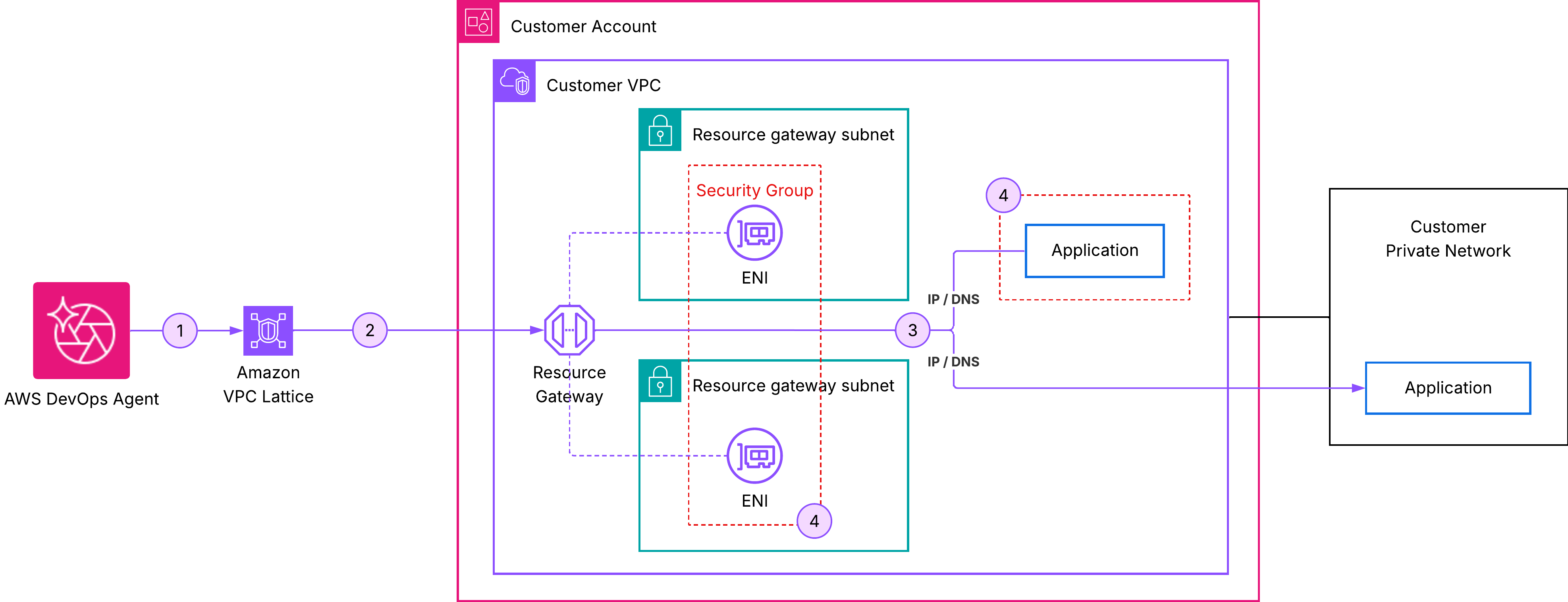
Figure 1: AWS DevOps Agent private connections
In this architecture:
- AWS DevOps Agent initiates a request to your target service.
- The request is routed through the service-managed resource gateway.
- An ENI in your VPC receives the traffic and forwards it to your target service’s IP address or DNS name.
- Your security groups govern which traffic is allowed through the ENIs.
- From your target service’s perspective, the request originates from private IP addresses of ENIs within your VPC.
Prerequisites
Before creating a private connection, verify that you have the following:
- An active Agent Space: You need an existing Agent Space in your account. If you don’t have one, see Getting started with AWS DevOps Agent.
- A privately reachable target service: Your MCP server, observability platform, or other service must be reachable at a known private IP address or DNS name from the VPC where the resource gateway is deployed. The service can run in the same VPC, a peered VPC, or on-premises, as long as it’s routable from the resource gateway subnets. The service must be listening on a TCP port that you can specify when creating the connection.
- Subnets in your VPC: Identify one subnet per Availability Zone where the Resource Gateway ENIs will be created. We recommend selecting subnets in multiple Availability Zones for high availability. These subnets must have network connectivity to your target service.
- (Optional) Security groups: If you want to control traffic with specific rules, prepare up to five security group IDs to attach to the ENIs. If you omit security groups, AWS DevOps Agent uses the VPC default security group.
Private connections are account-level resources. After you create a private connection, you can reuse it across multiple integrations and Agent Spaces that need to reach the same host.
Create a private connection
You can create a private connection using the AWS Management Console or the AWS CLI.
Using the AWS Console
Step 1: Open the AWS DevOps Agent console. In the navigation pane, choose Capability providers:
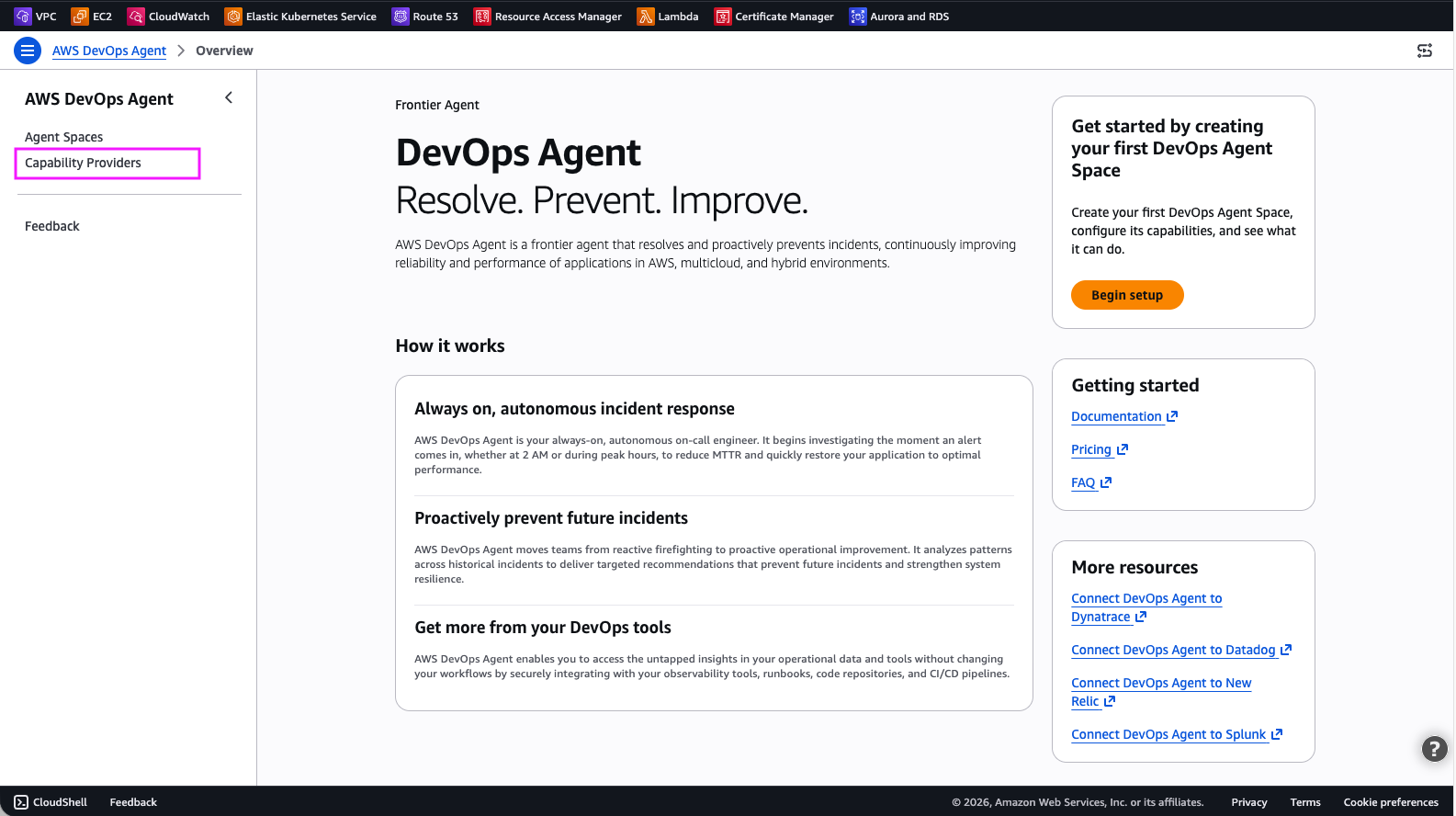
Figure 2: DevOps Agent Capability Providers
Step 2: Select Private connections.
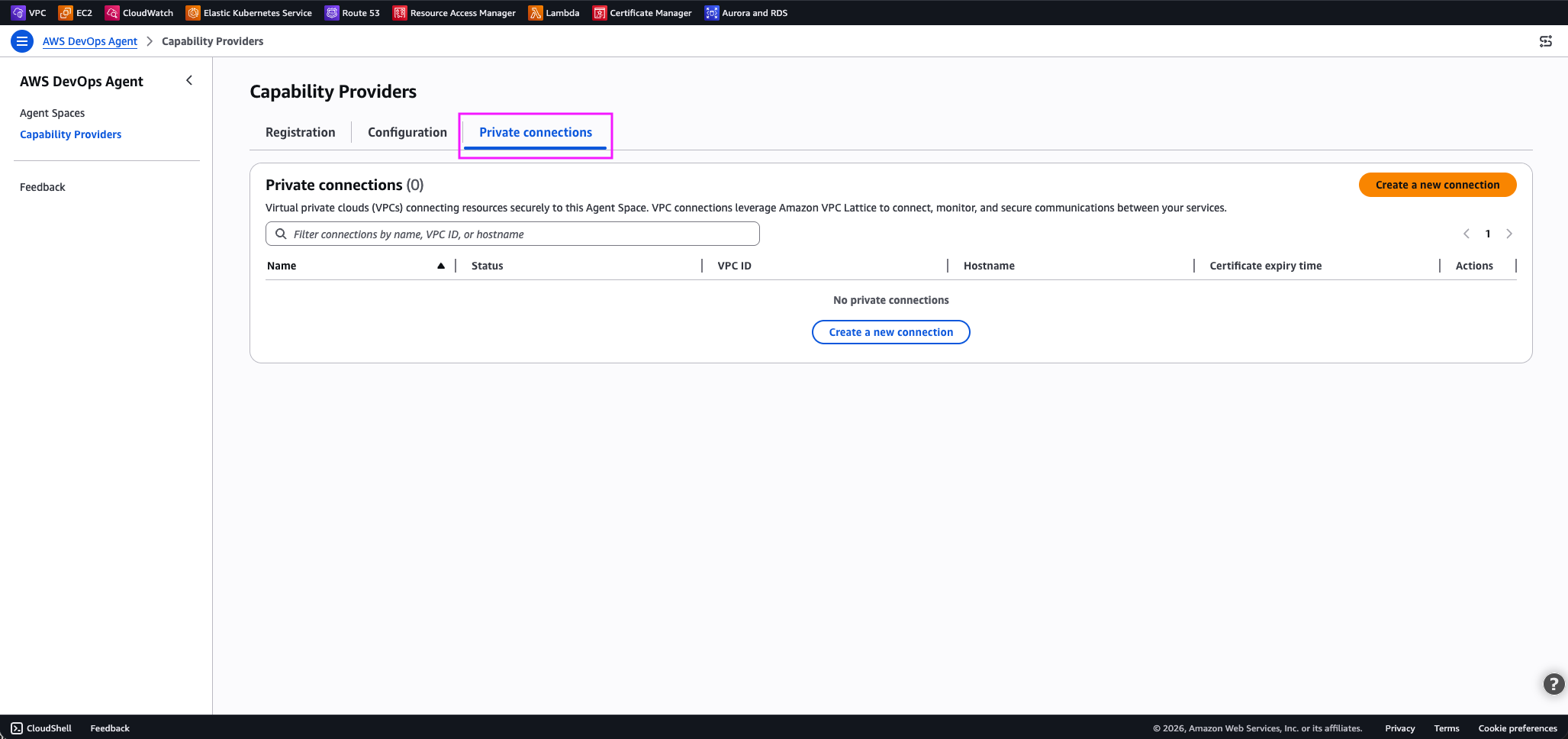
Figure 3: DevOps Agent private connections
Step 3: Choose Create a new connection.
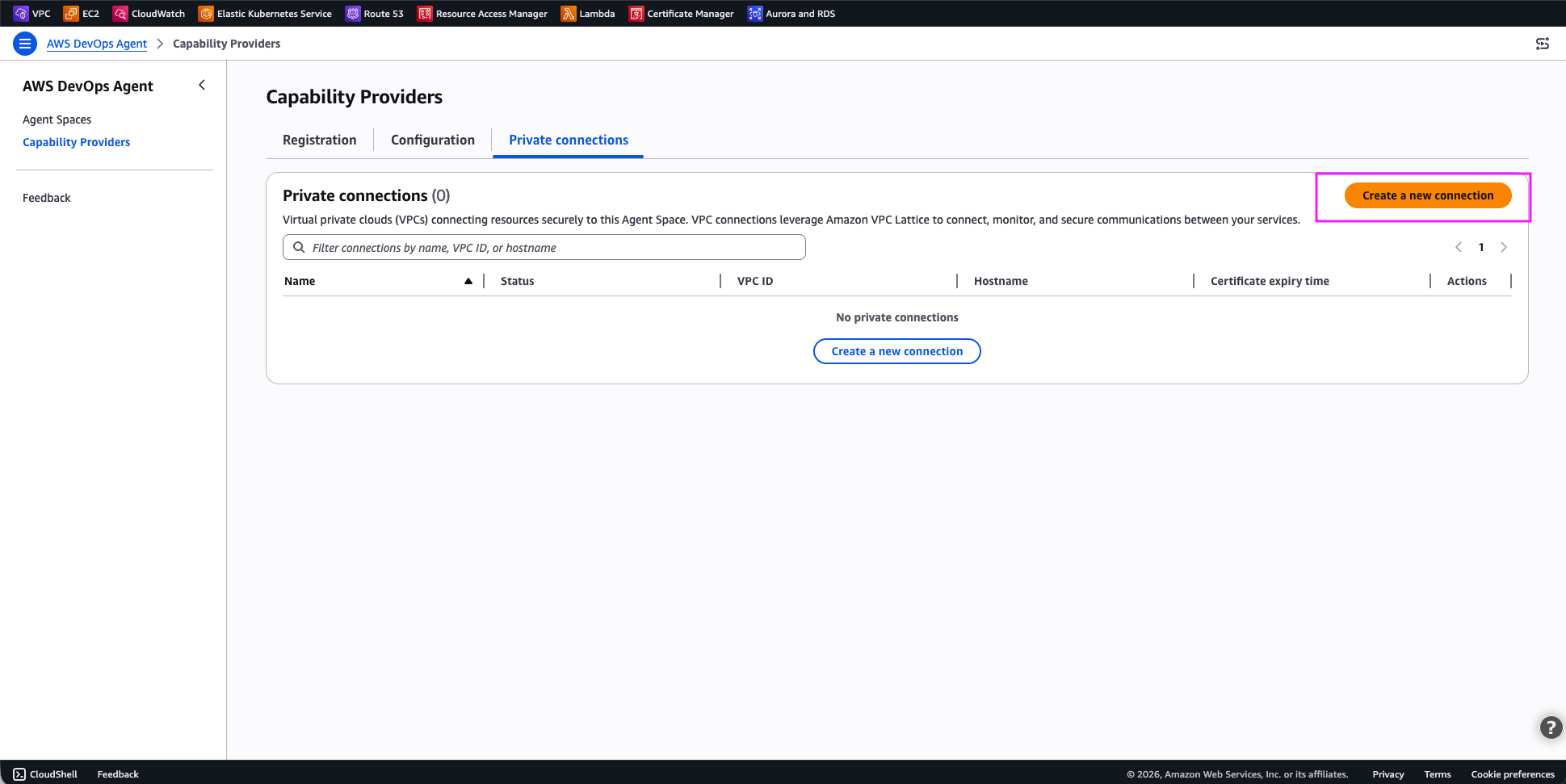
Figure-4: DevOps agent – Create a new connection
Step 4: Configure the private connection:
For Connection details:
- Name: Enter a descriptive name for the connection
For Resource location:
- VPC where your resource is located: Select the VPC where your resource is located, or a VPC that has access to your resource
- Subnets: One subnet per availability zone in your VPC to host the managed resource gateway ENIs.
- IP address type: IPv4, IPv6 or dual stack, representing IP address family your private connection should use. I selected dual stack.
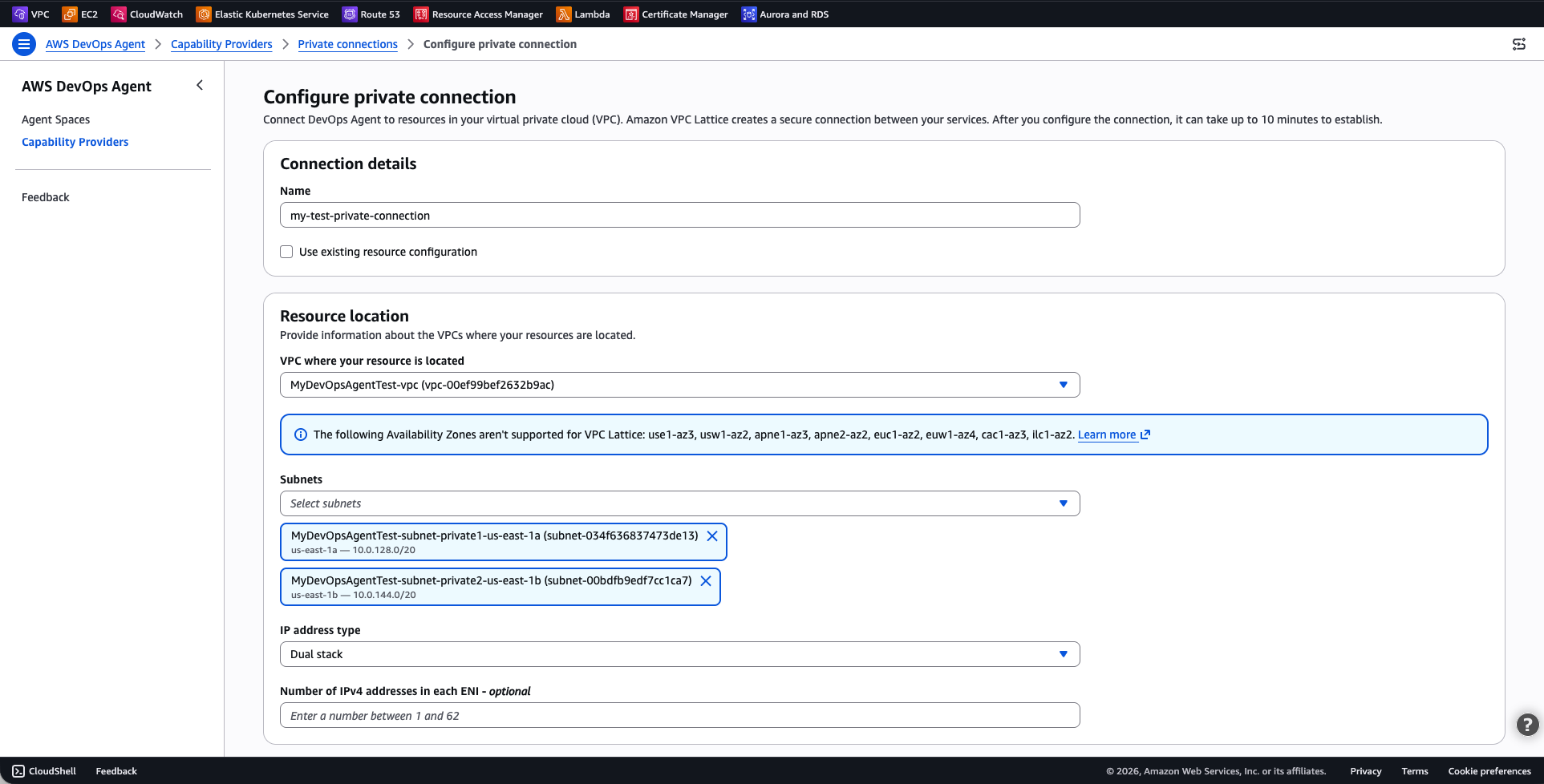
Figure-5: DevOps agent – Configure private connection
For Access control:
- Security groups: Select the security group to be used by DevOps Agent to target your private resources
- (Optional) TCP port ranges: Optionally restrict the port ranges DevOps Agent can use to connect to your resources. If you don’t specific this, all ports are allowed.
For Service target details:
- Host address: The DNS name or IP address of your target resource or service. I used
mymcpserver.test.skipv5.net. The service IPs must be reachable from the selected VPC. If you choose a DNS name, it must be publicly resolvable. - (Optional) Certificate public key: The certificate public key DevOps Agents uses to securely connect to your target.
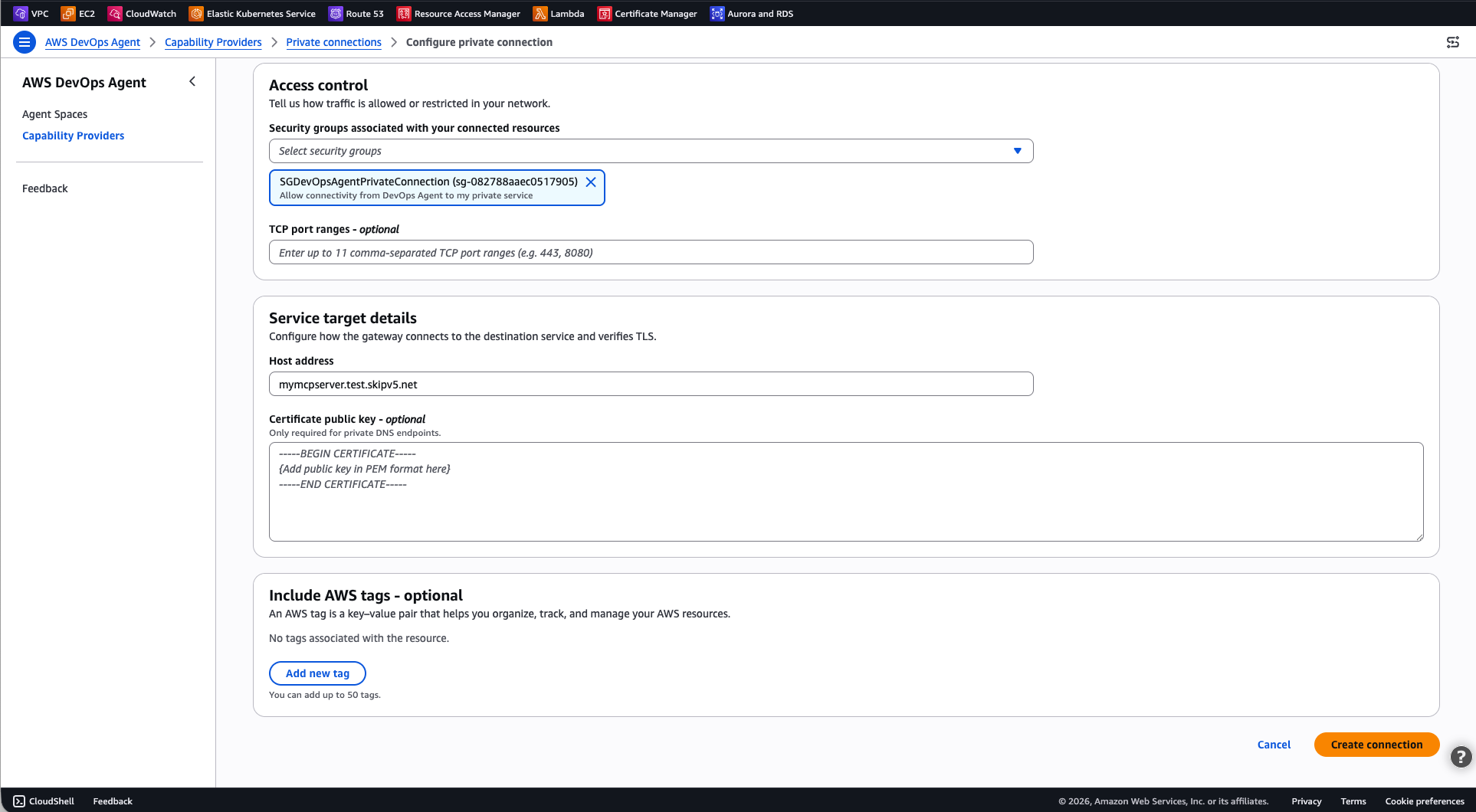
Figure-6: DevOps agent – Configure private connection (continued)
Select Create Connection.
The connection status changes to Create in progress. This process can take up to 10 minutes. When the status changes to Completed, the network path is ready.
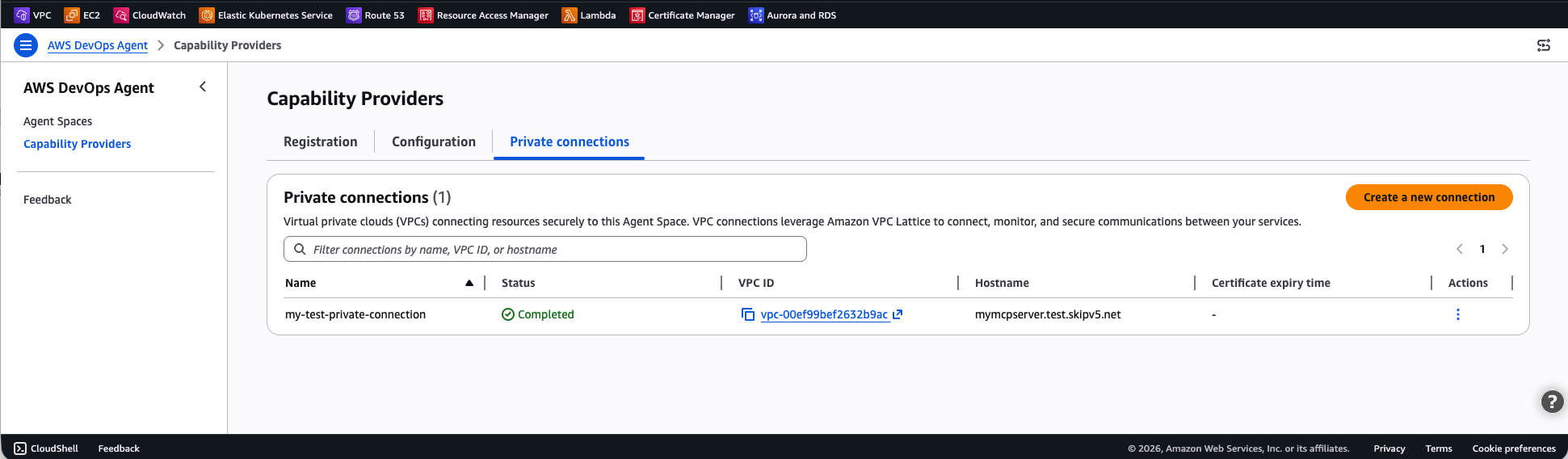
Figure-7: Private connection successfully created
If the status changes to Create failed, verify that the subnets you specified have available IP addresses, that your account has not reached VPC Lattice service quotas, and that no restrictive IAM policies are preventing the service-linked role from creating resources.
Using the AWS CLI
Run the following command to create a private connection. Replace values with your own.
aws devops-agent create-private-connection \
    --name my-test-private-connection \
    --mode '{
        "serviceManaged": {
            "hostAddress": "mymcpserver.test.skipv5.net",
            "resourceGatewayConfig": {
                "create": {
                    "vpcId": "vpc-00ef99bef2632b9ac",
                    "subnetIds": [
                        "subnet-034f636837473de13",
                        "subnet-00bdfb9edf7cc1ca7"
                    ],
                    "securityGroupIds": [
                        "sg-082788aaec0517905"
                    ]
                }
            }
        }
    }'
The response includes the connection name and a status of CREATE_IN_PROGRESS:
{
    "name": " my-test-private-connection",
    "status": "CREATE_IN_PROGRESS",
    "resourceGatewayId": "rgw-0f7415325b107a945",
    "hostAddress": "mymcpserver.test.skipv5.net",
    "vpcId": "vpc-00ef99bef2632b9ac"
}
To check the connection status, use the describe-private-connection command:
aws devops-agent describe-private-connection \
    --name my-test-private-connection
When the status is Completed, your private connection is ready to use.
Verify the connection
After the private connection reaches the Completed state, verify that AWS DevOps Agent can reach your target service:
- Open the AWS DevOps Agent console and navigate to your Agent Space.
- Start a new chat session.
- Invoke a command that uses the integration backed by your private connection. For example, if your MCP tool provides access to an internal knowledge base, ask the agent a question that requires that knowledge base.
- Confirm that the agent returns results from the private service.
If the connection fails, verify the following:
- Security group rules: Verify that the security groups attached to the ENIs allow outbound traffic on the port your service listens on. Also verify that your service’s security group allows inbound traffic from the ENI security group.
- Subnet connectivity: Verify that the subnets you selected have reachability to your service. If the service runs in a different subnet, confirm that the route tables allow traffic between them.
- Service availability: Confirm that your service is running and accepting connections on the expected port.
Example: Connect to a self-hosted Grafana instance
One of the most common use cases for private connections is connecting AWS DevOps Agent to a self-hosted Grafana instance. Many teams run Grafana inside a VPC with no public endpoint to visualize metrics, logs, and traces. With the built-in Grafana integration and a private connection, you can give the agent read-only access to your dashboards, alerts, and data sources, the same observability data your on-call engineers rely on during incidents.
AWS DevOps Agent provides a dedicated Grafana integration that hosts the official open-source Grafana MCP server on your behalf, so you don’t need to deploy or manage any MCP server infrastructure yourself. The integration supports Grafana Cloud, Grafana Enterprise, and self-hosted Grafana OSS (v9.1 and later).
For self-hosted instances that aren’t publicly accessible, pair the Grafana integration with a private connection so the agent can reach your instance over the private network.
Step 1: Create a Grafana service account
In your Grafana instance, create a service account with Viewer role permissions. This gives AWS DevOps Agent read-only access to your dashboards, alert rules, and data sources. Generate an access token for the service account and save it for the next step.
Step 2: Create a private connection to your Grafana instance
Because your Grafana instance runs in a private subnet, create a private connection first so that AWS DevOps Agent can reach it.
Using the AWS Console:
Follow the steps in the Create a private connection section of this blog, using your Grafana instance’s address as the host address.
Using the AWS CLI:
aws devops-agent create-private-connection \
    --name grafana-connection \
    --mode '{
        "serviceManaged": {
            "hostAddress": "grafana.internal.example.com",
            "resourceGatewayConfig": {
                "create": {
                    "vpcId": "vpc-0123456789abcdef0",
                    "subnetIds": [
                        "subnet-0123456789abcdef0",
                        "subnet-0123456789abcdef1"
                    ],
                    "portRanges": ["443"]
                }
            }
        }
    }'
Wait for the connection status to reach Completed state before proceeding.
Step 3: Add the Grafana integration to your Agent Space
Register and associate the Grafana service so the agent knows how to connect.
Using the AWS Console:
- Open the AWS DevOps Agent console and navigate to your Agent Space.
- In the Integrations section, choose Add integration.
- Select the Grafana tile.
- Enter your Grafana instance URL (for example, https://grafana.internal.example.com).
- Paste the service account access token you generated in Step 1.
- Choose Save.
Using the AWS CLI:
First, register the Grafana service with your instance URL and service account token:
aws devops-agent register-service \
    --service mcpservergrafana \
    --private-connection-name grafana-connection \
    --service-details '{
        "mcpservergrafana": {
            "name": "grafana",
            "endpoint": "https://grafana.internal.example.com",
            "authorizationConfig": {
                "bearerToken": {
                    "tokenName": "grafana-sa-token",
                    "tokenValue": "<SERVICE_ACCOUNT_TOKEN>"
                }
            }
        }
    }' \
    --region us-east-1
Save the returned serviceId, then associate the Grafana service with your Agent Space:
aws devops-agent associate-service \
    --agent-space-id <AGENT_SPACE_ID> \
    --service-id <SERVICE_ID> \
    --configuration '{
        "mcpservergrafana": {
            "endpoint": "https://grafana.internal.example.com"
        }
    }' \
    --region us-east-1
The response includes webhook information that you can use in Step 4 to configure alert notifications. The agent routes traffic to your Grafana instance through the private connection you created in Step 2, matching on the host address.
To verify the integration, start a chat in your Agent Space and ask the agent something like “Summarize my recent Grafana alerts.” If the agent returns alert data from your dashboards, the private connection and Grafana integration are both working.
Step 4: Enable Grafana webhook notifications (optional)
To let AWS DevOps Agent automatically start investigations when Grafana fires an alert, configure a webhook contact point in your Grafana instance. Point the webhook to your Agent Space’s webhook URL and provide the authentication secret from the integration settings. When an alert triggers, Grafana sends a notification to the agent, which begins an investigation using your Grafana data alongside the other resources in your Agent Space.
For details on the AWS DevOps Agent Grafana integration, and details on how you can also use this integration with AWS Managed Grafana (AMG), check the AWS DevOps Agent Grafana integration documentation.
How DNS resolution and host routing work
When you create a private connection, the host address you provide (for example, my-alb.us-east-1.elb.amazonaws.com) is the DNS name that VPC Lattice resolves to route traffic to your target. This DNS name must be publicly resolvable, even if it resolves to private IP addresses. When you register a service integration and specify an endpoint URL (for example, https://my-grafana.internal.corp), that URL is used for the Host header and Service Name Indicator (SNI) on the TLS connection, it is not used for DNS resolution. This separation means you can point multiple service integrations at the same private connection (and therefore the same target, such as an Application Load Balancer), each with a different endpoint hostname. The target can then use the Host header to route requests to different backends.
For example, you could create a single private connection with your ALB’s DNS name as the host address, and register separate Grafana and MCP server integrations, each with their own endpoint URL. The ALB receives both through the same private connection and uses host-based routing rules to direct each request to the correct target group.
Advanced setup using existing VPC Lattice resources
If your organization already uses Amazon VPC Lattice and manages your own resource configurations, you can create a private connection in self-managed mode. Instead of having AWS DevOps Agent create a resource gateway for you, you provide the Amazon Resource Name (ARN) of an existing resource configuration that points to your target service.
This approach is useful when you:
- Want full control over the resource gateway and resource configuration lifecycle.
- Need to share resource configurations across multiple AWS accounts or services.
- Require VPC Lattice access logs for detailed traffic monitoring.
- Run a hub-and-spoke network architecture.
- Require zero trust fine grained access controls for access to your resources or services.
To create a self-managed private connection using the AWS Console, click on Create a new connection, and select Use existing resource configuration, as shown in the following screen capture (figure-8). Then select your existing resource configuration for the drop-down list.
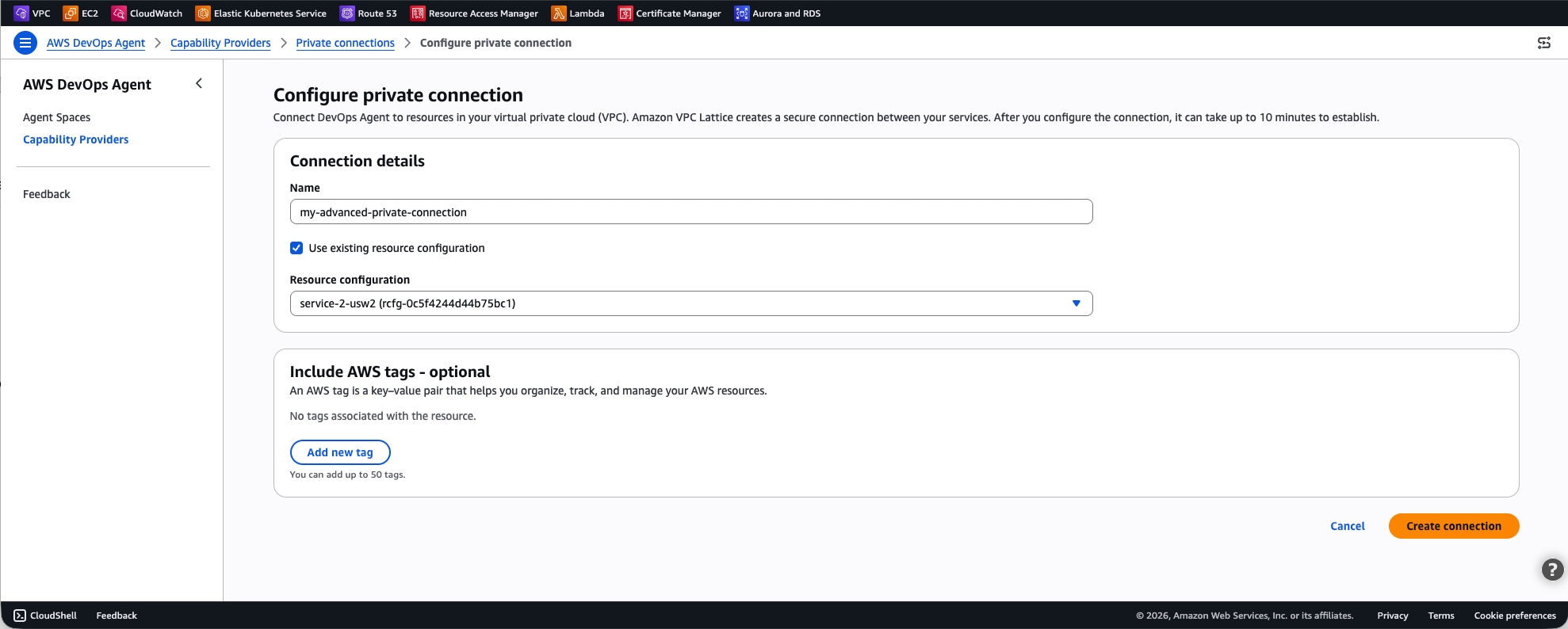
Figure-8: Advanced setting using existing VPC Lattice resources
To create a self-managed private connection with the AWS CLI:
aws devops-agent create-private-connection \
    --name my-advanced-connection \
    --mode '{
        "selfManaged": {
            "resourceConfigurationId": "rcfg-0123456789abcdef0"
        }
    }'
For more details on setting up VPC Lattice resource gateways and resource configurations, see the Amazon VPC Lattice User Guide.
Clean up
To avoid ongoing charges, delete private connections that you no longer need.
Using the AWS Console
- Open the AWS DevOps Agent console.
- In the navigation pane, choose Capability providers, then choose Private connections.
- Select the private connection you want to delete.
- Choose Delete.
- Confirm the deletion.
Using the AWS CLI
aws devops-agent delete-private-connection \
    --name my-test-private-connection
The response returns a status of DELETE_IN_PROGRESS. AWS DevOps Agent removes the managed resource gateway and ENIs from your VPC. After deletion completes, the connection no longer appears in your list of private connections.
Conclusion
Private connections for AWS DevOps Agent provide a secure, managed way to connect your Agent Space to services running inside your VPC. By using Amazon VPC Lattice, private connections keep all traffic off the public internet while your existing security control remain in place, giving you full control over network access through your own security groups.
To get started, open the AWS DevOps Agent console and create your first private connection. For more details, see Private connections in the AWS DevOps Agent User Guide.
About the authors

Alexandra Huides
Alexandra Huides is a Principal Networking Specialist Solutions Architect in the AWS Networking Services product team at Amazon Web Services. She focuses on helping customers build and develop networking architectures for highly scalable and resilient AWS environments. Alex is also a public speaker for AWS, and is helping customers adopt IPv6. Outside work, she loves sailing, especially catamarans, traveling, discovering new cultures, running and reading.

Tipu Qureshi
Tipu Qureshi is a Senior Principal Technologist in AWS Agentic AI, focusing on operational excellence and incident response automation. He works with AWS customers to design resilient, observable cloud applications and autonomous operational systems.

Jordan Merrick
Jordan Merrick is a Senior Software Engineer in AWS Agentic AI, where he works on observability and identity. He builds secure, scalable agentic systems for AWS customers.

Mohak Kohli
Mohak Kohli is a Software Development Engineer at Amazon Web Services. He works across various domains with focus on VPC Lattice and PrivateLink.
Home Assistant 2026.4 Just Made “Dumb” Devices Smart
Post Syndicated from BeardedTinker original https://www.youtube.com/watch?v=UkTUv2Hb6ME
Watching War From the Strait of Hormuz | The David Frum Show
Post Syndicated from The Atlantic original https://www.youtube.com/watch?v=InB8TyeYFPY
[$] Pandoc: a workhorse for document conversion
Post Syndicated from jake original https://lwn.net/Articles/1064692/
Pandoc is a document-conversion program
that can translate among a myriad of formats, including LaTeX, HTML, Office Open XML
(docx), plain text, and Markdown. It is also
extensible by writing Lua
filters that can manipulate the document structure and perform arbitrary
computations.
Pandoc has appeared in various LWN articles over the years, such as my look at Typst and at the importance of free software to science in
2025, but we have missed providing an overview of the tool. The February release of Pandoc
3.9, which comes with the ability to compile the program to WebAssembly (Wasm), allowing Pandoc
to run in web browsers, will likely also be of interest.
Servo 0.0.6 released
Post Syndicated from jzb original https://lwn.net/Articles/1065827/
Version
0.0.6 of the Rust-based Servo web
browser rendering engine has been released. This release boasts a long
list of new features, performance enhancements, improvements, and bug
fixes. Some of the notable changes include layout
performance improvements, a servo:config page for setting
any preference, and developer
tools enhancements.
Security updates for Wednesday
Post Syndicated from jzb original https://lwn.net/Articles/1065814/
Security updates have been issued by AlmaLinux (freerdp, libxslt, python3.11, and python3.12), Debian (libpng1.6, lxd, netty, and python-tornado), Fedora (chunkah, cpp-httplib, firefox, freerdp, gst-devtools, gst-editing-services, gstreamer1, gstreamer1-doc, gstreamer1-plugin-libav, gstreamer1-plugins-bad-free, gstreamer1-plugins-base, gstreamer1-plugins-good, gstreamer1-plugins-ugly-free, gstreamer1-rtsp-server, gstreamer1-vaapi, insight, python-gstreamer1, python3.14, rust, rust-cargo-rpmstatus, rust-cargo-vendor-filterer, rust-resctl-bench, rust-scx_layered, rust-scx_rustland, rust-scx_rusty, and xen), Mageia (freeipmi, python-openssl, python-ply, ruby-rack, vim, and zlib), Oracle (firefox, freerdp, kernel, libpng, thunderbird, uek-kernel, and virt:ol and virt-devel:ol), Red Hat (golang), SUSE (bind, expat, fetchmail, ffmpeg-7, freerdp, gsl, incus, kernel, libjavamapscript, libjxl, libpng16-16, libpolkit-agent-1-0-127, net-snmp, net-tools, openexr, perl-XML-Parser, python-ldap, python-pyasn1, python-PyJWT, python311-requests, tailscale, thunderbird, tinyproxy, and ucode-intel), and Ubuntu (golang-golang-x-net-dev and ruby2.3, ruby2.5, ruby2.7, ruby3.0, ruby3.2, ruby3.3).
Introducing EmDash — the spiritual successor to WordPress that solves plugin security
Post Syndicated from Matt “TK” Taylor original https://blog.cloudflare.com/emdash-wordpress/
The cost of building software has drastically decreased. We recently rebuilt Next.js in one week using AI coding agents. But for the past two months our agents have been working on an even more ambitious project: rebuilding the WordPress open source project from the ground up.
WordPress powers over 40% of the Internet. It is a massive success that has enabled anyone to be a publisher, and created a global community of WordPress developers. But the WordPress open source project will be 24 years old this year. Hosting a website has changed dramatically during that time. When WordPress was born, AWS EC2 didn’t exist. In the intervening years, that task has gone from renting virtual private servers, to uploading a JavaScript bundle to a globally distributed network at virtually no cost. It’s time to upgrade the most popular CMS on the Internet to take advantage of this change.
Our name for this new CMS is EmDash. We think of it as the spiritual successor to WordPress. It’s written entirely in TypeScript. It is serverless, but you can run it on your own hardware or any platform you choose. Plugins are securely sandboxed and can run in their own isolate, via Dynamic Workers, solving the fundamental security problem with the WordPress plugin architecture. And under the hood, EmDash is powered by Astro, the fastest web framework for content-driven websites.
EmDash is fully open source, MIT licensed, and available on GitHub. While EmDash aims to be compatible with WordPress functionality, no WordPress code was used to create EmDash. That allows us to license the open source project under the more permissive MIT license. We hope that allows more developers to adapt, extend, and participate in EmDash’s development.
You can deploy the EmDash v0.1.0 preview to your own Cloudflare account, or to any Node.js server today as part of our early developer beta:

Or you can try out the admin interface here in the EmDash Playground:

The story of WordPress is a triumph of open source that enabled publishing at a scale never before seen. Few projects have had the same recognisable impact on the generation raised on the Internet. The contributors to WordPress’s core, and its many thousands of plugin and theme developers have built a platform that democratised publishing for millions; many lives and livelihoods being transformed by this ubiquitous software.
There will always be a place for WordPress, but there is also a lot more space for the world of content publishing to grow. A decade ago, people picking up a keyboard universally learned to publish their blogs with WordPress. Today it’s just as likely that person picks up Astro, or another TypeScript framework to learn and build with. The ecosystem needs an option that empowers a wide audience, in the same way it needed WordPress 23 years ago.
EmDash is committed to building on what WordPress created: an open source publishing stack that anyone can install and use at little cost, while fixing the core problems that WordPress cannot solve.
WordPress’ plugin architecture is fundamentally insecure. 96% of security issues for WordPress sites originate in plugins. In 2025, more high severity vulnerabilities were found in the WordPress ecosystem than the previous two years combined.
Why, after over two decades, is WordPress plugin security so problematic?
A WordPress plugin is a PHP script that hooks directly into WordPress to add or modify functionality. There is no isolation: a WordPress plugin has direct access to the WordPress site’s database and filesystem. When you install a WordPress plugin, you are trusting it with access to nearly everything, and trusting it to handle every malicious input or edge case perfectly.
EmDash solves this. In EmDash, each plugin runs in its own isolated sandbox: a Dynamic Worker. Rather than giving direct access to underlying data, EmDash provides the plugin with capabilities via bindings, based on what the plugin explicitly declares that it needs in its manifest. This security model has a strict guarantee: an EmDash plugin can only perform the actions explicitly declared in its manifest. You can know and trust upfront, before installing a plugin, exactly what you are granting it permission to do, similar to going through an OAuth flow and granting a 3rd party app a specific set of scoped permissions.
For example, a plugin that sends an email after a content item gets saved looks like this:
import { definePlugin } from "emdash";

export default () =>
  definePlugin({
    id: "notify-on-publish",
    version: "1.0.0",
    capabilities: ["read:content", "email:send"],
    hooks: {
      "content:afterSave": async (event, ctx) => {
        if (event.collection !== "posts" || event.content.status !==    "published") return;

        await ctx.email!.send({
          to: "[email protected]",
          subject: `New post published: ${event.content.title}`,
          text: `"${event.content.title}" is now live.`,
         });

        ctx.log.info(`Notified editors about ${event.content.id}`);
      },
    },
  });
This plugin explicitly requests two capabilities: content:afterSave to hook into the content lifecycle, and email:send to access the ctx.email function. It is impossible for the plugin to do anything other than use these capabilities. It has no external network access. If it does need network access, it can specify the exact hostname it needs to talk to, as part of its definition, and be granted only the ability to communicate with a particular hostname.
And in all cases, because the plugin’s needs are declared statically, upfront, it can always be clear exactly what the plugin is asking for permission to be able to do, at install time. A platform or administrator could define rules for what plugins are or aren’t allowed to be installed by certain groups of users, based on what permissions they request, rather than an allowlist of approved or safe plugins.
WordPress plugin security is such a real risk that WordPress.org manually reviews and approves each plugin in its marketplace. At the time of writing, that review queue is over 800 plugins long, and takes at least two weeks to traverse. The vulnerability surface area of WordPress plugins is so wide that in practice, all parties rely on marketplace reputation, ratings and reviews. And because WordPress plugins run in the same execution context as WordPress itself and are so deeply intertwined with WordPress code, some argue they must carry forward WordPress’ GPL license.
These realities combine to create a chilling effect on developers building plugins, and on platforms hosting WordPress sites.
Plugin security is the root of this problem. Marketplace businesses provide trust when parties otherwise cannot easily trust each other. In the case of the WordPress marketplace, the plugin security risk is so large and probable that many of your customers can only reasonably trust your plugin via the marketplace. But in order to be part of the marketplace your code must be licensed in a way that forces you to give it away for free everywhere other than that marketplace. You are locked in.
EmDash plugins have two important properties that mitigate this marketplace lock-in:
-
Plugins can have any license: they run independently of EmDash and share no code. It’s the plugin author’s choice.
-
Plugin code runs independently in a secure sandbox: a plugin can be provided to an EmDash site, and trusted, without the EmDash site ever seeing the code.
The first part is straightforward — as the plugin author, you choose what license you want. The same way you can when publishing to NPM, PyPi, Packagist or any other registry. It’s an open ecosystem for all, and up to the community, not the EmDash project, what license you use for plugins and themes.
The second part is where EmDash’s plugin architecture breaks free of the centralized marketplace.
Developers need to rely on a third party marketplace having vetted the plugin far less to be able to make decisions about whether to use or trust it. Consider the example plugin above that sends emails after content is saved; the plugin declares three things:
-
It only runs on the
content:afterSavehook -
It has the
read:contentcapability -
It has the
email:sendcapability
The plugin can have tens of thousands of lines of code in it, but unlike a WordPress plugin that has access to everything and can talk to the public Internet, the person adding the plugin knows exactly what access they are granting to it. The clearly defined boundaries allow you to make informed decisions about security risks and to zoom in on more specific risks that relate directly to the capabilities the plugin is given.
The more that both sites and platforms can trust the security model to provide constraints, the more that sites and platforms can trust plugins, and break free of centralized control of marketplaces and reputation. Put another way: if you trust that food safety is enforced in your city, you’ll be adventurous and try new places. If you can’t trust that there might be a staple in your soup, you’ll be consulting Google before every new place you try, and it’s harder for everyone to open new restaurants.
The business model of the web is at risk, particularly for content creators and publishers. The old way of making content widely accessible, allowing all clients free access in exchange for traffic, breaks when there is no human looking at a site to advertise to, and the client is instead their agent accessing the web on their behalf. Creators need ways to continue to make money in this new world of agents, and to build new kinds of websites that serve what people’s agents need and will pay for. Decades ago a new wave of creators created websites that became great businesses (often using WordPress to power them) and a similar opportunity exists today.
x402 is an open, neutral standard for Internet-native payments. It lets anyone on the Internet easily charge, and any client pay on-demand, on a pay-per-use basis. A client, such as an agent, sends a HTTP request and receives a HTTP 402 Payment Required status code. In response, the client pays for access on-demand, and the server can let the client through to the requested content.
EmDash has built-in support for x402. This means anyone with an EmDash site can charge for access to their content without requiring subscriptions and with zero engineering work. All you need to do is configure which content should require payment, set how much to charge, and provide a Wallet address. The request/response flow ends up looking like this:
Every EmDash site has a built-in business model for the AI era.
WordPress is not serverless: it requires provisioning and managing servers, scaling them up and down like a traditional web application. To maximize performance, and to be able to handle traffic spikes, there’s no avoiding the need to pre-provision instances and run some amount of idle compute, or share resources in ways that limit performance. This is particularly true for sites with content that must be server rendered and cannot be cached.
EmDash is different: it’s built to run on serverless platforms, and make the most out of the v8 isolate architecture of Cloudflare’s open source runtime workerd. On an incoming request, the Workers runtime instantly spins up an isolate to execute code and serve a response. It scales back down to zero if there are no requests. And it only bills for CPU time (time spent doing actual work).
You can run EmDash anywhere, on any Node.js server — but on Cloudflare you can run millions of instances of EmDash using Cloudflare for Platforms that each instantly scale fully to zero or up to as many RPS as you need to handle, using the exact same network and runtime that the biggest websites in the world rely on.
Beyond cost optimizations and performance benefits, we’ve bet on this architecture at Cloudflare in part because we believe in having low cost and free tiers, and that everyone should be able to build websites that scale. We’re excited to help platforms extend the benefits of this architecture to their own customers, both big and small.
EmDash is powered by Astro, the web framework for content-driven websites. To create an EmDash theme, you create an Astro project that includes:
-
Pages: Astro routes for rendering content (homepage, blog posts, archives, etc.)
-
Layouts: Shared HTML structure
-
Components: Reusable UI elements (navigation, cards, footers)
-
Styles: CSS or Tailwind configuration
-
A seed file: JSON that tells the CMS what content types and fields to create
This makes creating themes familiar to frontend developers who are increasingly choosing Astro, and to LLMs which are already trained on Astro.
WordPress themes, though incredibly flexible, operate with a lot of the same security risks as plugins, and the more popular and commonplace your theme, the more of a target it is. Themes run through integrating with functions.php which is an all-encompassing execution environment, enabling your theme to be both incredibly powerful and potentially dangerous. EmDash themes, as with dynamic plugins, turns this expectation on its head. Your theme can never perform database operations.
The least fun part about working with any CMS is doing the rote migration of content: finding and replacing strings, migrating custom fields from one format to another, renaming, reordering and moving things around. This is either boring repetitive work or requires one-off scripts and “single-use” plugins and tools that are usually neither fun to write nor to use.
EmDash is designed to be managed programmatically by your AI agents. It provides the context and the tools that your agents need, including:
-
Agent Skills: Each EmDash instance includes Agent Skills that describe to your agent the capabilities EmDash can provide to plugins, the hooks that can trigger plugins, guidance on how to structure a plugin, and even how to port legacy WordPress themes to EmDash natively. When you give an agent an EmDash codebase, EmDash provides everything the agent needs to be able to customize your site in the way you need.
-
EmDash CLI: The EmDash CLI enables your agent to interact programmatically with your local or remote instance of EmDash. You can upload media, search for content, create and manage schemas, and do the same set of things you can do in the Admin UI.
-
Built-in MCP Server: Every EmDash instance provides its own remote Model Context Protocol (MCP) server, allowing you to do the same set of things you can do in the Admin UI.
EmDash uses passkey-based authentication by default, meaning there are no passwords to leak and no brute-force vectors to defend against. User management includes familiar role-based access control out of the box: administrators, editors, authors, and contributors, each scoped strictly to the actions they need. Authentication is pluggable, so you can set EmDash up to work with your SSO provider, and automatically provision access based on IdP metadata.
You can import an existing WordPress site by either going to WordPress admin and exporting a WXR file, or by installing the EmDash Exporter plugin on a WordPress site, which configures a secure endpoint that is only exposed to you, and protected by a WordPress Application Password you control. Migrating content takes just a few minutes, and automatically works to bring any attached media into EmDash’s media library.
Creating any custom content types on WordPress that are not a Post or a Page has meant installing heavy plugins like Advanced Custom Fields, and squeezing the result into a crowded WordPress posts table. EmDash does things differently: you can define a schema directly in the admin panel, which will create entirely new EmDash collections for you, separately ordered in the database. On import, you can use the same capabilities to take any custom post types from WordPress, and create an EmDash content type from it.
For bespoke blocks, you can use the EmDash Block Kit Agent Skill to instruct your agent of choice and build them for EmDash.

EmDash is v0.1.0 preview, and we’d love you to try it, give feedback, and we welcome contributions to the EmDash GitHub repository.
If you’re just playing around and want to first understand what’s possible — try out the admin interface in the EmDash Playground.
To create a new EmDash site locally, via the CLI, run:
npm create emdash@latest
Or you can do the same via the Cloudflare dashboard below:
We’re excited to see what you build, and if you’re active in the WordPress community, as a hosting platform, a plugin or theme author, or otherwise — we’d love to hear from you. Email us at [email protected], and tell us what you’d like to see from the EmDash project.
If you want to stay up to date with major EmDash developments, you can leave your email address here.
Our ongoing commitment to privacy for the 1.1.1.1 public DNS resolver
Post Syndicated from Rory Malone original https://blog.cloudflare.com/1111-privacy-examination-2026/
Exactly 8 years ago today, we launched the 1.1.1.1 public DNS resolver, with the intention to build the world’s fastest resolver — and the most private one. We knew that trust is everything for a service that handles the “phonebook of the Internet.” That’s why, at launch, we made a unique commitment to publicly confirm that we are doing what we said we would do with personal data. In 2020, we hired an independent firm to check our work, instead of just asking you to take our word for it. We shared our intention to update such examinations in the future. We also called on other providers to do the same, but, as far as we are aware, no other major public resolver has had their DNS privacy practices independently examined.
At the time of the 2020 review, the 1.1.1.1 resolver was less than two years old, and the purpose of the examination was to prove our systems made good on all the commitments we made about how our 1.1.1.1 resolver functioned, even commitments that did not impact personal data or user privacy.
Since then, Cloudflare’s technology stack has grown significantly in both scale and complexity. For example, we built an entirely new platform that powers our 1.1.1.1 resolver and other DNS systems. So we felt it was vital to review our systems, and our 1.1.1.1 resolver privacy commitments in particular, once again with a rigorous and independent review.
Today, we are sharing the results of our most recent privacy examination by the same Big 4 accounting firm. Its independent examination is available on our compliance page.
Following the conclusion of the 2024 calendar year, we began our comprehensive process of collecting and preparing evidence for our independent auditors. The examination took several months and required many teams across Cloudflare to provide supporting evidence of our privacy controls in action. After the independent auditors’ completion of the examination, we’re pleased to share the final report, which provides assurance that our commitments were met: our systems are as private as promised. Most importantly, our core privacy guarantees for the 1.1.1.1 resolver remain unchanged and confirmed by independent review:
-
Cloudflare will not sell or share public resolver users’ personal data with third parties or use personal data from the public resolver to target any user with advertisements.
-
Cloudflare will only retain or use what is being asked, not information that will identify who is asking it.
-
Source IP addresses are anonymized and deleted within 25 hours.
We also want to be transparent about two points. First: as we explained in our 2020 blog announcing the results of our previous examination, randomly sampled network packets (at most 0.05% of all traffic, including the querying IP address of 1.1.1.1 public resolver users) are used solely for network troubleshooting and attack mitigation.
Second, the scope of this examination focuses exclusively on our privacy commitments. Back in 2020, our first examination reviewed all of our representations, not only our privacy commitments but our description of how we would handle anonymized transaction and debug log data (“Public Resolver Logs”) for the legitimate operation of our Public Resolver and research purposes. Over time, our uses of this data to do things like power Cloudflare Radar, which was released after our initial 1.1.1.1 examination, have changed how we treat those logs, even though there is no impact on personal information or personal privacy.
As we noted with the first review 6 years ago: we’ve never wanted to know what individuals do on the Internet, and we’ve taken technical steps to ensure we can’t. At Cloudflare, we believe privacy should be the default. By proactively undergoing these independent examinations, we hope to set a standard for the rest of the industry. We believe every user, whether they are browsing the web directly or deploying an AI agent on their behalf, deserves an Internet that doesn’t track their movement. And further, Cloudflare steadfastly stands behind the commitment in our Privacy Policy that we will not combine any information collected from DNS queries to the 1.1.1.1 resolver with any other Cloudflare or third-party data in any way that can be used to identify individual end users.
As always, we thank you for trusting 1.1.1.1 to be your gateway to the Internet. Details of the 1.1.1.1 resolver privacy examination and our accountant’s report can be found on Cloudflare’s Certifications and compliance resources page. Visit https://developers.cloudflare.com/1.1.1.1/ to learn more about how to get started with the Internet’s fastest, privacy-first DNS resolver.
What CISOs Should Expect from AI Powered MDR in 2026, According to Rapid7 CEO Corey Thomas
Post Syndicated from Craig Adams original https://www.rapid7.com/blog/post/it-2026-ai-powered-mdr-ceo-corey-thomas-cisos
In the latest episode of Rapid7’s Experts on Experts, I’m joined by Rapid7 CEO Corey Thomas for a candid conversation about where AI is genuinely changing security operations, and where the hype still outruns reality. The short version is that AI is already improving productivity in software development, but the bigger shift for security leaders is what it can do with telemetry at scale. As Corey puts it, no team of humans can process all security telemetry, all the time, across an entire environment. That gap is where AI can help, but only if the inputs are right.
We also dig into what this means for Managed Detection and Response (MDR), and why the market is moving from “watch a subset of signals” toward monitoring the full environment, 24 x 7. The catch is that raw volume is not the goal. The goal is a comprehensive data set that enables decision making under pressure, with enough context to act early.
AI is only as good as the context behind it
One theme that kept coming up in our conversation is trust. Corey explains why earlier automation and SOAR efforts struggled. They followed strict rules, but security rarely behaves in strict patterns. When something looked similar but required a different response, teams hesitated to rely on automation. The dynamic rule making that newer AI models provide can help, but only if fueled with the right context.
Corey breaks “context” into practical components: understanding what technologies are deployed, how they are configured, what controls exist, what vulnerabilities are present, and what activity is actually happening across those systems. Without that full picture, teams spend time chasing the wrong risks. He compares it to buying earthquake insurance without knowing where you live. If you are in California, it might make sense. If you are in Florida, hurricane coverage is the real concern. Context tells you which risk actually matters.
Preemptive MDR is the shift CISOs should plan for now
Where the conversation gets especially relevant for 2026 is the move from reactive to preemptive security. To frame the change in plain terms: reactive posture waits for alerts, while leaders want partners who anticipate and identify risks earlier.
Corey describes preemptive MDR as an attack surface discipline. It starts with understanding the full attack surface, spotting where attacks are likely to occur, and identifying the most attractive exposures in the environment. The operational step is what matters: identifying those exposures quickly, prioritizing realistically, and having preset remediation and response plans ready before the moment hits. Corey is direct about constraints, too. No organization can remediate everything all the time, but better planning and efficiency are still possible, and business expectations of security leaders are rising. He also notes that government and regulators are pushing in the same direction, and that Gartner and other analysts are reinforcing the shift toward anticipation rather than after the fact response.
Cloud scale forces MDR to evolve, especially around identity
We also spent time on the cloud, because it continues to reshape how security programs operate. Most organizations are building more, faster, across more cloud technologies and identities, and AI only accelerates that pace. Corey’s view is that MDR has to mirror that technology reality. At a baseline, teams need to monitor what their cloud providers already offer. He calls out identity as the harder requirement: understanding identity traffic across the environment, separating legitimate from malicious behavior, and tracking roles and responsibilities so investigations do not happen in a vacuum. If an MDR program is not looking across the cloud landscape, it cannot confidently say it is monitoring the right things, especially in the areas where new bugs and misconfigurations show up first.
Transparency becomes a differentiator when AI enters the loop
As AI becomes more present in triage and investigation, Corey argues that transparency will matter even more. He shares that Rapid7 built MDR with the assumption that customers should be able to log in at any time and audit what is happening in their environment. That level of visibility can be uncomfortable, but it becomes more important as AI plays a larger role in how decisions are made. The presence of AI in MDR programs does not reduce the need for trust, but increases it. And that trust is built through transparency and auditability, not assumption.
That also means being able to show where AI is actually making a difference. It is not enough to say it is working. Teams need to see the impact in real terms.
Corey contrasts that with what he sees as the market default: black box approaches that ask customers to trust the output until something goes wrong. His prediction is blunt and practical. As buyers mature, RFPs will demand the ability to inspect how alerts are processed and how investigations are run, because that is what trust looks like at scale.
Watch the full episode below to hear Corey’s take on what is changing, what is still missing, and why the strongest MDR programs in 2026 will be the ones that plan for preemptive action, not just faster reaction.
⠀