Tag Archives: Amazon Q

April 2025: A month of innovation for Amazon Q Developer

Post Syndicated from Brian Beach original https://aws.amazon.com/blogs/devops/april-2025-amazon-q-developer/

As April 2025 comes to a close, I’m amazed by the innovations that Amazon Q Developer has launched in the past few weeks. Generative AI is evolving fast, enabling developer experiences that were just not possible a few months ago. Each new launch helps make Q Developer the most capable generative AI–powered assistant for software development. Let’s explore the announcements from April.

C# and C++ customization – April 1

Amazon Q Developer expanded its customization capabilities to include C# and C++ support, enabling developers to tailor AI suggestions based on their company’s proprietary codebase. This enhancement allows for more accurate inline suggestions and contextual code understanding across C# and C++ projects, while maintaining support for existing languages like Python, Java, JavaScript, and TypeScript. You can read more in Customizing C# and C++ with Amazon Q Developer

Amazon’s internal journey with Q Developer – April 2

In 2024, Amazon integrated its internal knowledge repository of millions of documents into Amazon Q Business, resulting in over 450,000 hours saved in technical query time. Using AI for software transformations integrated with internal development tools saved 4,500 developer years of effort and more than $260M. Perhaps most importantly, the technology is changing how developers approach problem-solving itself, enabling more creative and experimental development practices. You can read more in How generative AI is transforming developer workflows at Amazon.

Conversation persistence, search, and export – April 3rd

Amazon Q Developer now gives you more control over your conversation history. Your conversation is preserved between sessions, letting you pick up where you left off. In addition, you can search the conversation history and export the conversation as markdown. Conversation history features are now available in VS Code and will be added to other IDEs soon.

Context control enhancements – April 3rd

Back in March, I wrote a post about taking control of your code with Amazon Q Developer’s new context features. This allowed you to specify files and folders to add to the context. You can now include classes, functions, and global variables into the input context. In addition, the context size was increased to 100k characters in chat. These features are now available in VS Code and will be added to other IDEs soon.

Expanded language support – April 9

Amazon Q Developer now supports multiple languages across its IDE and CLI interfaces, enabling developers to discuss architecture, create documentation, and build applications in your preferred language. This enhancement creates a more inclusive and accessible development environment. You can read more in Speaking Your Language: Expanded language support in Amazon Q Developer.

Eclipse inline chat (preview) – April 10

The new inline chat feature in Eclipse allows developers to edit code in place using natural language commands. This powerful capability streamlines tasks like refactoring, optimization, and code maintenance without breaking development flow. You can read more in Announcing inline chat in Eclipse with Amazon Q Developer.

European region launch – April 14

Amazon Q Developer Pro Tier is now available in the Frankfurt (eu-central-1) region, addressing data residency requirements for European customers while improving performance through reduced latency. The launch includes cross-region inferencing optimization across Frankfurt, Ireland, Paris and Stockholm. You can read more in Announcing the European region for Amazon Q Developer.

GitLab Duo with Amazon Q (GA) – April 17

GitLab Duo with Amazon Q brings Amazon Q’s generative AI capabilities directly into GitLab’s DevSecOps platform and is now generally available. This integration enables AI-assisted development throughout your entire workflow—from idea conception to deployment—all within the familiar GitLab environment. You can read more in Announcing General Availability of GitLab Duo with Amazon Q.

Updated software development agent – April 21

Amazon Q Developer updated the software development agent. This new agent achieves state-of-the-art performance on industry benchmark SWTBench Verified (49%) and sits among the top ranking models on SWEBench Verified (66%). The agent has access to tools for planning and reasoning that use the capacity of advanced models to their fullest. You can read more in Amazon Q Developer releases state of the art agent for feature development

Amazon introduces SWE-PolyBench – April 23

Amazon has introduced SWE-PolyBench, a new industry benchmark to evaluate the performance of AI coding agents across multiple programming languages and real-world coding scenarios. Unlike previous benchmarks that focused mainly on Python and bug fixes, SWE-PolyBench contains over 2,000 curated coding tasks spanning Java, JavaScript, TypeScript, and Python, covering a variety of challenges including feature requests and refactoring. You can read more in Amazon introduces SWE-PolyBench, a multilingual benchmark for AI Coding Agents

Model context protocol support – April 30

The addition of model context protocol (MCP) support in the Amazon Q Developer CLI standardizes how applications provide context to Large Language Models, allowing developers to seamlessly integrate additional tools and data sources into their AI-assisted workflow. You can read more in Extend the Amazon Q Developer CLI with Model Context Protocol (MCP) for Richer Context.

Expanded support in customization – April 30

Less that one month after adding support for C# and C++, the Q Developer customizations team was hard at work adding support for: Dart, Go, Kotlin, PHP, Ruby, Rust, Scala, Bash, PowerShell, CloudFormation, and Terraform. This is, of course, in addition to the existing supported languages: Python, Java, JavaScript, TypeScript, Markdown, reStructuredText, and Text. Wow!

Conclusion

April 2025 has been a transformative month for Amazon Q Developer, with launches spanning global expansion, IDE enhancements, and deeper integrations. From bringing the service to European customers to enabling multilingual support and introducing powerful new capabilities like inline chat in Eclipse and GitLab integration, Amazon Q Developer significantly expanded how developers can leverage AI assistance in their daily workflows. These launches reflect a commitment to making AI-assisted development more accessible, powerful, and integrated into existing tools and processes. I encourage you to try these new features and share your feedback as we continue to enhance Amazon Q Developer.

AWS’s Well-Architected Framework Transformed by Amazon Q Developer

Post Syndicated from Fahim Sajjad original https://aws.amazon.com/blogs/devops/awss-well-architected-framework-transformed-by-amazon-q-developer/

In the rapidly evolving landscape of cloud computing, developers, and architects face unprecedented challenges. These challenges include designing, implementing, and maintaining robust cloud infrastructures. The AWS Well-Architected Framework is the gold standard for building secure, efficient, and optimized cloud solutions. Traditionally, complying with this framework required deep expertise and manual analysis.

Now, Amazon Q Developer changes this paradigm. It introduces intelligent, context-aware recommendations. This framework is built on six pillars: operational excellence, security, reliability, performance efficiency, cost optimization, and sustainability. Without careful attention to these foundational elements, organizations risk developing systems that fall short of both their business objectives and technical requirements, potentially compromising long-term scalability and performance.

In this blog, we will explore how Amazon Q Developer can help across the six pillars of the Well-Architected Framework.

Simplifying the AWS Well-Architected Framework with Amazon Q Developer

In this section, we will explore practical examples across the following pillars:

Operational Excellence pillar with Amazon Q Developer

Operational Excellence is a key pillar of the AWS Well-Architected Framework. It guides teams in running efficient workloads and monitoring systems. The pillar emphasizes continuous improvement to deliver business value. Amazon Q Developer enhances operations through AI-powered assistance for infrastructure as code, automated testing, and documentation. The service automatically creates runbooks and suggests safe infrastructure changes. It analyzes your environment and offers recommendations based on AWS best practices. Teams can implement operational excellence with reduced manual effort and fewer potential errors.

Let’s ask Amazon Q Developer in the console how it can help me improve operational excellence in my AWS Infrastructure: “How can I improve the Operational Excellence of my AWS infrastructure?”

Amazon Q Developer analyzes your prompt and generates comprehensive recommendations:

Amazon Q chat interface showing a response about best practices for improving AWS infrastructure operational excellence, with a list of recommendations including implementing IaC and automating deployments.

Figure 1: Prompting Amazon Q about Operational Excellence

Based on Amazon Q Developer’s guidance, Infrastructure as Code (IaC) is recommended for managing our AWS resources. Let’s open Visual Studio Code IDE and see how Amazon Q Developer Chat can help us implement IaC. We’ll create a CloudFormation template for a resilient web application by asking Amazon Q Developer to generate a template that includes an Application Load Balancer, EC2 instances, and an RDS database: “Generate a CloudFormation template for a highly available web application with an Application Load Balancer, EC2 instances, and an RDS database. Include best practices for operational excellence”

Amazon Q Developer generating a CloudFormation template for a highly available web application architecture.

Figure 2: Amazon Q Developer generating a CloudFormation template for a highly available web application architecture.

It also explains the template and lists the best practices for operational excellence that were followed:

Amazon Q explaining Generated template and Best Practices

Figure 3: Amazon Q explaining Generated template and Best Practices

Amazon Q Developer automates documentation to track and approve infrastructure changes effectively. It performs automatic code reviews to check quality and identify security vulnerabilities. The service detects code duplication and guides developers in making small, predictable changes. When issues arise, Amazon Q Developer quickly investigates operational problems across AWS environments. This rapid troubleshooting helps businesses maintain high application availability.

Security pillar with Amazon Q Developer

Cloud security at AWS is the highest priority. The AWS Well-Architected Framework’s Security Pillar provides a comprehensive approach to implementing robust protective measures. Even though traditionally security has been an afterthought in development often sacrificed for speed and automation, Amazon Q Developer transforms this by enabling security checks at every stage of the software development lifecycle. By embedding continuous security validation, you can significantly reduce vulnerabilities in production environments. This shifts security from reactive to proactive, ensuring your cloud applications are not just functional, but fundamentally secure.

Amazon Q Developer can streamline this process serving as an intelligent security assistant for AWS environments. It can help create robust Identity and Access Management (IAM) policies, including role-based access controls, user permissions, and multi-factor authentication. For data protection, Amazon Q Developer supports encryption strategies, key management, and secure backup procedures. Additionally, Amazon Q Developer guides users in infrastructure protection planning through secure network architectures and VPC segmentation, offering comprehensive support across critical security areas.

Amazon Q Developer enhances security beyond basic configurations. It helps set up advanced monitoring solutions using CloudWatch and CloudTrail. The service creates intelligent security alerts and automates incident response mechanisms. It protects your AWS environment against emerging threats through security scanning. Amazon Q Developer identifies potential vulnerabilities in your infrastructure. These capabilities align with AWS Well-Architected Framework security best practices. To illustrate Amazon Q Developer’s practical application in enhancing workload security, let’s consider implementing VPC flow logs for improved network monitoring in our web application CloudFormation file that we created before: “How can we implement VPC flow logs for better network monitoring?” 

Prompting Amazon Q about implementing VPC flow logs for better network monitoring.

Figure 4: Prompting Amazon Q about implementing VPC flow logs for better network monitoring

We can also ask Amazon Q Developer to check if there are any security best practices that is missing in our code. “What IAM security best practices are missing?”

Prompting Amazon Q about implementing VPC flow logs for better network monitoring

Figure 5: Prompting Amazon Q about implementing VPC flow logs for better network monitoring.

These examples demonstrates how developers can leverage Amazon Q Developer to bolster their security posture effectively.

Reliability pillar with Amazon Q Developer

Reliability is a critical pillar of the AWS Well-Architected Framework. It extends beyond maintaining system uptime. A reliable architecture must handle unexpected disruptions and recover gracefully. Amazon Q Developer brings AI-powered intelligence to reliability engineering. It helps organizations design resilient, self-healing cloud infrastructures. The service anticipates potential failures and suggests mitigation strategies before business operations are affected.

Amazon Q Developer guides users in implementing AWS reliability best practices. It helps architect resilient systems through multi-AZ deployments and auto-scaling configurations. The service assists in setting up automated recovery procedures and fault-tolerant systems. It streamlines the configuration of health checks, load balancers, and redundant components. Amazon Q Developer enables effective monitoring through CloudWatch alarms and automated failover mechanisms. It supports infrastructure as code implementation with proper testing procedures. The service helps establish cross-region redundancy and appropriate service quotas. These features ensure systems maintain high availability and recover quickly from failures.

By interacting with Amazon Q Developer in the AWS Management Console, you can receive intelligent recommendations for improving your infrastructure’s reliability by asking Amazon Q Developer: “Can you provide recommendations to eliminate single point of failures?”

Prompting Amazon Q about reliability

Figure 6: Prompting Amazon Q about reliabilityPerformance Efficiency pillar with Amazon Q Developer 

Performance can determine an application’s success in cloud computing. The Performance Efficiency pillar guides organizations in maximizing their computational resources. Amazon Q Developer enhances this pillar through AI-powered recommendations. It helps organizations design and optimize their cloud infrastructure more effectively.

Amazon Q Developer uses machine learning to deliver advanced performance insights. It recommends architectural improvements like serverless adoption and optimal service configurations. The AI assistant suggests effective caching strategies and data processing optimizations. It analyzes system metrics and infrastructure patterns to guide improvements. Development teams can enhance system performance and reduce computational overhead. Amazon Q Developer helps create adaptive architectures that respond effectively to changing workload demands.

For example, let’s say you’re an IT Professional with a monolithic three-tier web application on AWS and wanted to get recommendation on performance efficiency. The IT Professional could open a new Amazon Q Developer chat in the AWS Management Console, and enter a prompt such as: “Based on my current monolithic application on AWS, what are some things I should do as it relates to the performance efficiency pillar of the Well-Architected Framework?”

Prompting Amazon Q about performance efficiency

Figure 7: Prompting Amazon Q about performance efficiency

As shown above in figure 7, Amazon Q Developer made multiple recommendations based on the monolith application in the prompt. Amazon Q Developer makes recommendations such as using Serverless options and breaking the application into microservices, which is a design principal in the performance efficiency pillar of the Well-Architected Framework.

Cost Optimization pillar with Amazon Q Developer

Amazon Q Developer has the ability to give general recommendations for Cost Optimization based on the Well-Architected Framework. For example, let’s say an IT Professional wants to get more information about ways they can generally optimize their compute costs in AWS. The IT Professional could open a new Amazon Q chat in the AWS Management Console, and enter a prompt such as: “What are some ways I can cost optimize my compute infrastructure I have running in AWS based on the cost optimization pillar of the Well Architected Framework?”

Prompting Amazon Q about cost optimization

Figure 8: Prompting Amazon Q about cost optimization

As shown above in figure 8, Amazon Q Developer was able to make recommendations based on the Well-architected framework to help the developer cost optimize their compute through reserved instances and savings plans, auto scaling, rightsizing, and more, while also providing links to resources to help dive in further.

Additionally, Amazon Q Developer has revolutionized AWS cost analysis by introducing natural language processing capabilities directly integrated with AWS Cost Explorer. This innovative feature allows users to gain deep insights into cloud spending through simple, conversational queries, enabling professionals to understand complex cost structures, identify spending trends, and forecast future expenses with unprecedented ease. By transforming technical cost data into actionable insights, Amazon Q Developer empowers organizations to make more informed financial decisions about their cloud infrastructure.

For comprehensive details and specific use case, please refer to the full blog post: Analyzing your AWS Cost Explorer data with Amazon Q Developer: Now Generally Available. 

Sustainability pillar with Amazon Q Developer

Sustainability represents a critical emerging pillar of the AWS Well-Architected Framework, focusing on minimizing the environmental impact of cloud computing infrastructure and operations. Amazon Q Developer introduces AI-powered capabilities that help organizations optimize their cloud resources to reduce carbon footprint, improve energy efficiency, and align technological strategies with environmental responsibility.

Through intelligent analysis and context-aware recommendations, Amazon Q Developer enables teams to make more sustainable architectural decisions. The AI assistant can provide insights into resource optimization, suggesting ways to reduce unnecessary compute power, recommend more energy-efficient service configurations, and help developers understand the environmental implications of their architectural choices. By leveraging machine learning and comprehensive AWS infrastructure knowledge, Amazon Q Developer empowers organizations to not only meet their technological requirements but also contribute to broader environmental sustainability goals in cloud computing.

In the below example, you can see how you can ask Amazon Q Developer to help meet your company’s sustainability goals by asking Amazon Q: “How can I review my sustainability objectives on AWS?”

Prompting Amazon Q about sustainability

Figure 9: Prompting Amazon Q about sustainability

As you can see above Amazon Q Developer generated recommendations showing how you can review your sustainability objectives.

Now let’s take the first recommendation: Carbon Footprint tool as an example and ask Amazon Q Developer in the console to ask a follow up question We will be using the following prompt to generate response: “How do I view my carbon footprint on AWS?”

Prompting Amazon Q about carbon footprint

Figure 10: Prompting Amazon Q about carbon footprint

Conclusion

Amazon Q Developer represents a pivotal moment in cloud computing, transforming the AWS Well-Architected Framework from a static set of guidelines to a dynamic, intelligent system of continuous improvement. By integrating advanced AI capabilities across operational excellence, security, reliability, performance efficiency, cost optimization, and sustainability, this innovative tool democratizes sophisticated cloud architecture strategies for organizations of all sizes. The true power of Amazon Q Developer lies not just in its ability to provide recommendations, but in its capacity to learn, adapt, and evolve alongside your infrastructure, bridging the gap between complex technical knowledge and actionable insights. As cloud technologies continue to advance, AI-powered tools like Amazon Q Developer will become increasingly essential, signifying a fundamental shift in how we approach cloud infrastructure: proactively, intelligently, and with a holistic understanding of technological and business requirements.

To get started with Amazon Q Developer in the AWS console, check out the documentation on chatting with Amazon Q Developer in AWS Console Home.

Fahim Sajjad

Fahim is a Solutions Architect at Amazon Web Services. He helps customers transform their business by helping in designing their cloud solutions and offering technical guidance. Fahim graduated from the University of Maryland, College Park with a degree in Computer Science. He has deep interested in AI and Machine learning. Fahim enjoys reading about new advancements in technology and hiking.

Brendan Jenkins

Brendan Jenkins is a Solutions Architect at Amazon Web Services (AWS) working with Enterprise AWS customers providing them with technical guidance and helping achieve their business goals. He has an area of specialization in DevOps and Machine Learning technology.

Jacques Mcanlay

Jacques Mcanlay is a Solutions Architect at Amazon Web Services (AWS) working with Enterprise AWS customers providing them with technical guidance and helping achieve their business goals. He has an area of specialization in the Security domain.

Migrating a CDK v1 Application to CDK v2 with Amazon Q Developer

Post Syndicated from Dr. Rahul Sharad Gaikwad original https://aws.amazon.com/blogs/devops/migrating-a-cdk-v1-application-to-cdk-v2-with-amazon-q-developer/

Introduction:

AWS Cloud Development Kit (AWS CDK) is an open-source software development framework for defining cloud infrastructure in code and provisioning it through AWS CloudFormation. As of June 1, 2023, AWS CDK version 1 is no longer supported. To avoid the potential issues that come with using an outdated version and to take advantage of the latest features and improvements, we highly recommend upgrading to AWS CDK version 2.

Amazon Q Developer, a generative AI-powered assistant for software development, enhances the efficiency of software development teams. It facilitates the creation of deployment-ready infrastructure as code (IaC) for AWS CloudFormation, AWS CDK, and Terraform. By using Amazon Q, developers can accelerate IaC development, enhance code quality, and decrease the likelihood of configuration errors.

This post demonstrates how Amazon Q Developer helps in upgrading the existing AWS CDK v1 application to AWS CDK v2.

Prerequisites

Planning

In this blog post, I will explore a code example where I have created a VPC, Subnets, and an ECS Fargate cluster using AWS CDK version 1. I will then explain how you can use Amazon Q to transform the code from CDK v1 to CDK v2.

1. In order to initiate this process, I have begun by asking Amazon Q Developer for the necessary steps to migrate from CDK version 1 to version 2, which are outlined below.

Can you provide the steps to migrate from cdk version 1 to version 2?

Amazon Q Developer outlining the comprehensive process to upgrade AWS CDK applications from version 1 to version 2.

2. In the above screenshot Amazon Q Developer outlined several steps we can take to make the necessary changes. The first step is to update the dependencies. If I need guidance on how to update the dependencies, I can ask the Amazon Q Developer again for help by asking the steps regarding updating dependencies as below .

Can you provide the steps to update dependencies?

Amazon Q Developer offering detailed, AI-powered guidance to upgrade project dependencies by analyzing the existing codebase, identifying outdated or deprecated libraries and frameworks, and recommending precise updates to ensure compatibility with newer language versions.

3. After updating the dependencies, the next step is to update the import statements. To get guidance on how to update the import statements, I can ask the Amazon Q Developer assistant again for help by asking the steps regarding how to import statements as shown below.

@workspace Can you provide the steps to update import statements?

Amazon Q Developer advises on updating import statements by analyzing the current code context and guiding developers to replace legacy or outdated import paths with the latest.

In the above screenshot if you have noticed I have added @workspace before the question which automatically includes the most relevant chunks of my workspace code as context.

4. If any errors occur while updating the code as recommended by Amazon Q Developer, I can use Amazon Q Developer to debug the issue and provide the needed inputs to resolve it.

Amazon Q Developer diagnosing issues by analyzing error messages and AWS resource states, providing natural language explanations of root causes such as permission errors and misconfigurations.

5. Once I have finished the required steps, I can deploy the application using version 2 of the AWS CDK by running the cdk deploy command.

Deployment of the updated AWS CDK version 2 application, involving synthesizing CDK stacks to generate CloudFormation templates and deployment artifacts, bootstrapping the AWS environment to provision necessary resources.

6. In addition to its other capabilities, Amazon Q offers code review functionality. To initiate a code review, simply select Amazon Q and use the /review command. I’ll then have the option to review either the active files or the entire open workspace. Select your preference, and Amazon Q will analyze your project and provide comprehensive review results.

Amazon Q Developer performs comprehensive code analysis by reviewing your entire codebase or real-time code as you write, identifying security vulnerabilities, code quality issues, and deployment risks.

7. Amazon Q Developer can also generate documentation, including README files. To create documentation, select Amazon Q and enter the /doc command. Amazon Q will automatically generate a README file for your project. I can then review the generated documentation, accept the changes, or provide specific instructions for further modifications.

Amazon Q Developer automatically generates a comprehensive README file for the entire project by analyzing the codebase, project structure, and dependencies within the selected folder in the IDE.

Conclusion

In this blog, I demonstrated how Amazon Q Developer can simplify and accelerate the upgrade process from AWS CDK version 1 to version 2, ensuring your cloud infrastructure remains secure, efficient, and aligned with the latest AWS innovations. AWS CDK v2 offers a streamlined, consolidated library with improved performance and ongoing support, making infrastructure management easier and more reliable.

By leveraging Amazon Q Developer, a generative AI-powered assistant, teams can automate Infrastructure as Code development, enhance code quality, and minimize configuration errors. Together, these tools empower development teams to confidently modernize and scale their AWS environments, turning the upgrade process into a seamless opportunity for innovation and growth.

Resources

To learn more about Amazon Q Developer, see the following resources:

To learn more about the AWS CDK, see the following resources:

About the authors:

Dr. Rahul Sharad Gaikwad

Dr. Rahul is a Solutions Architect at AWS, driving cloud innovation through migration and modernization of customer workloads. A Generative AI and DevOps enthusiast, he architects cutting-edge solutions and is recognized as an APJC HashiCorp Ambassador. He earned his Ph.D. in AIOps and he is recipient of the Man of Excellence Award , Indian Achievers’ Award , Best PhD Thesis Award, Research Scholar of the Year Award and Young Researcher Award.

Vinodkumar Mandalapu

Vinodkumar is a Devops Consultant at AWS, specializing in designing and implementing cloud-based infrastructure and deployment pipelines on AWS. With extensive experience in automating and streamlining software delivery, he has helped organizations of all sizes leverage the power of the cloud to drive innovation, improve scalability, and enhance operational efficiency. In his leisure time, he enjoys traveling and spending quality time with his son.

Tamilselvan P

Tamilselvan is a Devops Consultant at AWS, focusing on architecting and deploying cloud-native systems and continuous delivery within the ecosystem. Leveraging his comprehensive expertise in orchestrating and refining software release processes, he has assisted customers across various industries and scales in harnessing cloud technology to faster innovation, boost scalability, and elevate operational performance. During his free time, he enjoys playing cricket.

Accelerate large-scale modernization of .NET, mainframe, and VMware workloads using Amazon Q Developer

Post Syndicated from Krishna Parab original https://aws.amazon.com/blogs/devops/accelerate-large-scale-modernization-of-net-mainframe-and-vmware-workloads-using-amazon-q-developer/

Software runs the world – not just the new software applications built in modern languages and deployed on the most optimized cloud infrastructure, but also legacy software built over years and barely understood by the teams that inherit them. These legacy applications may have snowballed into monolithic blocks or may be fragmented across siloed on-premises infrastructure. The significant maintenance, security, and compliance challenges caused can create lasting implications for business performance and competitiveness. Therefore, transformation of legacy applications using modern languages, new frameworks, and cloud services has become an organizational imperative.

Application modernization challenges

Modernization of software applications is a long and painful journey – requiring large teams of developers, domain experts, and consultants who first need to understand the application landscape, devise strategic modernization plans, and then tactically implement the plans in phases, typically over a span of many years. This process is linear, slow, and complex. Traditional labor-intensive modernization approaches incur significant costs and take years to leverage new cloud technologies and innovations for business-critical applications.

Generative AI can help with intelligent automation, domain expertise, and scalability to transform modernization journeys.

Introducing Amazon Q Developer transformation capabilities

Q Developer transformation capabilities powered by LLMs and domain-expert agents support human-agent interaction via an IDE experience for individual developers and a web experience for multifunctional teams.

Amazon Q Developer transformation capabilities

Amazon Q Developer, the most capable generative AI–powered assistant for software development, is now the first generative AI-powered assistant for large-scale modernization and migration of .NET, mainframe, and VMware workloads. This extends Q Developer’s transformation capabilities for Java upgrades launched in April 2024 to new types of workloads. Q Developer combines both foundational models and specialized tools based on AI and automated reasoning via autonomous agents that tackle workload-specific modernization steps spanning analysis, planning, and implementation.

Multifunctional teams, including consultants, IT experts, workload domain experts, and developers, can use a unified web experience to offload transformation tasks to Amazon Q Developer agents and transform hundreds of workloads at a time. The agents can port .NET Framework to cross-platform Linux-ready .NET, modernize COBOL applications on mainframes to Java applications on AWS, or virtualized workloads on VMware to scalable workloads on EC2. The modernization teams engage with Q Developer using natural language and share transformation objectives, code repositories, and context. Q Developer agents analyze artifacts like code segments, dependencies, and integrations, applying expertise from prior modernizations. They propose customized plans tailored to codebases, resource utilization, and objectives. The teams can then review, adjust, and approve the plans with iterative engagement with the agents. After the plans are approved, the agents implement the transformation keeping the modernization teams updated on milestones completed and blockers needing human guidance. The transformation journey is an interactive process between the modernization team and Q Developer, with modernization team maintaining control and visibility over the transformation.

Human team members interact with Q Developer generative AI agents using natural language chat.

Natural language chat with Q Developer AI agents

Faster, scalable, and better modernization

Amazon Q Developer enhances transformation in three primary ways – acceleration, scalability, and quality.

Amazon Q Developer automates and accelerates complex, multi-step processes. Agents conduct assessment and discovery of legacy artifacts to build documentation and dependency maps that improve the understanding of source assets. Most large-scale modernization projects are done in waves that need to be carefully planned. The agents develop modernization wave plans based on source dependencies, stated project goals, and teams can review and approve the plans. Thereafter, the goal-seeking autonomous agents handle implementation complexities to execute the plans. Customers using Amazon Q Developer can modernize Windows .NET applications to Linux up to four times faster than traditional methods and help customers realize up to 40% savings in licensing costs. Migration Planning for the sequence to transform monolith z/OS COBOL application code that takes months to accomplish with human subject matter experts, Amazon Q Developer generates in minutes. Q Developer agents convert on-premises VMware network configurations into modern AWS equivalents in hours vs. the weeks required with traditional manual approaches. The shorter time spent on manual modernization means more freedom for your team to focus on innovation.

Modernization has traditionally been a linear journey with multiple steps and dependencies on cross-functional teams with limited mechanisms for collaboration. This limits teams’ ability to tackle large-scale projects. Amazon Q Developer addresses the challenges by task parallelization and web-based collaboration. Multiple generative AI agents work simultaneously on tasks. Large monolithic applications can be decomposed along business functions like engineering, marketing, sales applications, and transformed in parallel. A unified web-based experience for large-scale transformation means multi-functional team members can collaborate with the autonomous agents, and review and approve key decisions in one place, enabling teams to execute larger and more complex projects in a given time.

Finally, the quality of transformation manifested in functional equivalence, security, and resilience of modernized applications determines the business outcomes like project ROI and operational performance. To ensure transformation quality, you need expertise in languages and frameworks like COBOL, Java, .NET; specialized steps like code base analysis, monolith decomposition, code refactoring, network translation; and domains like mainframe, virtualization, and cloud. You may not have the requisite expertise in your team. That is where Amazon Q Developer can help. Q Developer agents are trained with specific domain expertise to identify code dependencies and frameworks, replace deprecated code, upgrade to new language frameworks, incorporate security best practices, and validate upgraded workloads using workload-tailored plans. Your team can examine the agents’ recommendations, make informed decisions, and guide the modernization journey towards better outcomes like enhanced security, compliance, and performance.

Q Developer supports modernization of .NET Framework applications to cross-platform .NET applications, mainframe-based COBOL applications to Java applications on AWS, on-premises VMware workloads to workloads on EC2, and Java v8/11/17 to Java17/21.

Workloads supported by Amazon Q Developer transformation capabilities

Next steps

Amazon Q Developer transformation capabilities are now available in preview. To learn more, please visit Q Developer web page featuring short demo videos and documentation that can get you started. Read the AWS News blogs that walk you through the unified web experience and IDE experience. Dive deeper into the transformation of specific workloads by reading the workload-specific blogs related to transformation of .NET, mainframe, and VMware workloads.

About the author:

Elio Damaggio

Krishna Parab

Krishna B. Parab leads product marketing for Amazon Q Developer transformation capabilities. He has over 13 years of experience in product marketing and prior experience in engineering and product management. He has led marketing for Cisco Cloud, ServiceNow service management SaaS, Arm Pelion IoT platform, Automation Anywhere RPA platform, and AWS Mainframe Modernization service. Krishna’s educational background includes BTech, MS, and MBA degrees from IIT Bombay, UT Austin, and University of Michigan, respectively.

Elio Damaggio

Elio Damaggio

Elio Damaggio is the product lead for the transformation capabilities of Amazon Q Developer. With more than 15 years in tech, 11 patents, and a PhD in Computer Science, he is now looking for exciting ways to empower developers through AI.

Build and operate an effective architecture review board

Post Syndicated from Darrin Weber original https://aws.amazon.com/blogs/architecture/build-and-operate-an-effective-architecture-review-board/

The rapid change of pace in computing landscapes because of cloud, artificial intelligence, and technology innovation has challenged organizations to keep up while making sure that their initiatives and projects remain compliant with enterprise guidelines and policies. An effective architecture review board (ARB) can help an organization maintain compliance with enterprise guardrails while accelerating implementation of initiatives in their project pipeline.

In this post, we identify the components of an efficient architecture review process, define what an ARB is, and describe how to build and operate an effective enterprise ARB.

What is an architecture review board?

An ARB is a multi-disciplinary team responsible for reviewing solution architectures to help ensure compliance with enterprise guidelines, best practices, and supportability. Team members include stakeholders from different disciplines throughout your organization, which typically include Security, Development, Enterprise Architecture, Infrastructure, and Operations. Including a broad set of stakeholders reduces the amount of project recycle that happens when stakeholder representation is overlooked.

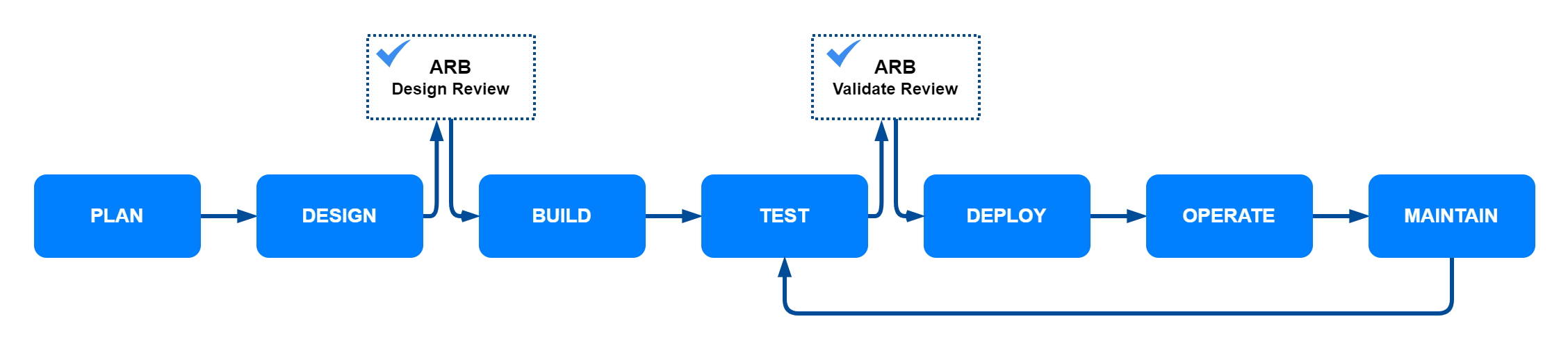
An ARB isn’t a standalone group, it operates within the context of your project implementation process, reviewing solution architectures, custom development, and purchased solutions to maintain enterprise compliance and alignment with goals. As shown in the following diagram, architecture review typically occurs after the design phase—before a build or purchase decision—and again before deployment to validate that the reviewed architecture matches the solution that was built.

Project implementation process with architecture review checkpoints

Most organizations recognize the benefits and value of establishing an ARB. However, they often struggle to define and operate one in a manner that maximizes the benefits, integrates with overall project execution processes, and satisfies the needs of all the stakeholders. An efficient architecture review process imparts organizational benefits such as reduced costs, minimized security events, and diminished technical debt.

Life without a formal architecture review process

One of the most pronounced issues with implementing and maintaining software architecture is the difficulty in achieving human consensus. In any organization, you’ll find a diverse range of team members—each with their own priorities, perspectives, and pain points. Without a formalized review process, these differences can lead to prolonged debates and stalled projects. We often find that many members tend to fall into one of these personas:

The Not Invented Here The Not Invented Here – This individual doesn’t trust any software unless it was built and operated by members of their company. They’re generally wary of any cloud solution and will expend development time to avoid capital expenditure.
The Wait a Minute The Wait a Minute – This individual has good feedback and their input is welcome, but they tend to wait until the last minute before providing any feedback, making it difficult to have productive conversations and act on any constructive criticism.
The Bottleneck The Bottleneck – This individual craves control and insists that all reviews, decisions, and conversations go through them. This makes scaling the architecture review process very challenging and decisions will often come down to the whim of this one person.
The Creative The Creative – This individual has passion for software and for creating things, but will often choose complexity over simplicity and turn their architectures into art projects.
The Perfectionist The Perfectionist – This individual tends to let the perfect be the enemy of the good. While their intentions are pure, this approach can result in delayed decision making and debates on topics that might not be worth the time of the board.
The Historian The Historian – This individual has been at the company for a long time and remembers every success and failure along the way. While the context this individual brings to the table is invaluable, teams must guard against only looking to the past as they try to shape the future.

Benefits of an architecture review board

Establishing an ARB within your organization can yield substantial benefits, enhancing both the quality and efficiency of your architecture. Some key advantages are:

Improved compliance

By systematically reviewing architectural decisions, the ARB helps ensure that designs adhere to company best practices, open standards, and regulatory requirements as set forth by your enterprise architecture.

Reduced technical debt

Technical debt—taking shortcuts in the development process that lead to future complications—is a common issue in software development. The ARB helps identify and mitigate technical debt early in the design phase. By enforcing architectural standards and promoting best practices, the board helps ensure that decisions are made with long-term sustainability in mind. This approach results in more robust, maintainable codebases and reduces the likelihood of future rework.

Efficiency with lowered costs

While a formal architecture review sounds like it might have the potential for increased red tape and lowered efficiency, the ARB instead contributes to operational efficiency by standardizing architectural practices across the organization. This uniformity allows for better resource allocation, faster deployment cycles, and more predictable project timelines. By catching potential issues early in the design phase, the ARB helps avoid costly rewrites and rework, which can lead to significant cost savings over time.

Supportability

Designing for supportability is crucial for the long-term success of any application. The ARB makes sure that architectures are built with maintainability in mind, making it easier for operations teams to manage and troubleshoot systems. This focus on supportability leads to fewer downtime incidents, faster resolution times, and overall higher system reliability. By making sure the composition of the ARB crosses all parts of the organization, supportability concerns can be surfaced earlier and help ensure that changes are properly socialized.

Security

Above all, security is the most critical output of an effective ARB. The ARB plays a pivotal role in embedding security into the architectural fabric from the outset. By conducting thorough security reviews and incorporating security best practices into every design, the ARB makes sure that applications are resilient against unintended disclosure, inadvertent access, and threat actors. This proactive approach not only protects sensitive data, but also builds trust with your customers and stakeholders.

Steps for effective architecture review boards

Whether looking to establish a new architecture review process or improve the effectiveness of a current ARB, we’ve identified eight key steps to make sure that an ARB operates in a way which realizes the benefits of a robust architecture review process while maintaining enterprise compliance. With the exception of leadership support, the steps aren’t presented in a particular order and can be implemented in parallel or in whatever order fits your organization and resource availability.

Leadership support

Identifying a sponsor on the executive leadership team is crucial to the success of the ARB. An executive sponsor fosters participation from stakeholders, representing key organizations such as Security, Development, and Operations, along with gaining their commitment to the review processes. The executive sponsor helps embed the ARB function within the enterprise’s project implementation process. Supported by the executive sponsor, the ARB’s reviews serve as a formal gate within the project process, reducing attempts to bypass the review processes.

Single source for guidance, policies, and best practices

Establish a single, well-known repository or index so that the entire enterprise has a single source of truth that establishes the basis for designing and reviewing architecture. A common repository doesn’t need to be complex. It can be a central document location, wiki, or file share that’s quickly discoverable. Commonly, an enterprise’s collection of guidelines and policies are dispersed and managed by each organization using different mechanisms and repositories. Best practices are often treated as folklore passed between team members. Project teams and ARB stakeholders need to share a common understanding of the enterprise’s collective intelligence consisting of guidelines, policies, and best practices.

As the project community’s collective understanding of the enterprise guidelines and policies grows, initial solution designs are better aligned, and reviews through the ARB accelerate. After a common repository is established, consider using generative AI to create a natural language chatbot, a design chatbot, to simplify access to the collective guidelines, policies, and best practices. See Amazon Bedrock or Amazon Q – Generative AI Assistant.

Defined stakeholders

Make sure that your disciplines have defined stakeholders on the ARB. A good starting point is to identify stakeholders from the Security, Enterprise Architecture, Development, Infrastructure, and Operations teams. Broad representation on the board minimizes recycles and delays later in the project, which can occur when stakeholders aren’t engaged in the review process from the beginning. A stakeholder’s responsibility is to focus on their area of subject matter expertise and commit a portion of their time to the ARB. Consider rotating stakeholders periodically to distribute knowledge and workload through the organization.

Gated process with documented decisions

As previously described, architecture reviews typically occur after design and before solution implementation or purchase. Optionally, another architecture review takes place before deployment to validate that the solution matches what was reviewed and approved. It’s important to complete the review before implementation or the purchase decision and to get stakeholder sign off. Otherwise, projects risk rework and delay later in the process, often impacting cost or schedule to a greater degree. Document each ARB action, including approvals, reasons for recycles, exceptions required, follow-ups needed, and so on. Documented decisions should be added to the project’s overall lifecycle documentation to benefit future inspection of project or similar solution architectures.

Establish an exception process

There will always be exceptions to your enterprise guidelines or policies. Plan for exceptions with a defined process for reviewing, escalating, and gaining approval. Include leadership from both IT and business areas in the assessment and sign-off on an exception. Most importantly, set expiration dates on the exceptions–they should not be granted indefinitely. Exceptions are typically granted to accommodate a temporary nonconformance to provide time to plan for and implement a better, long-term solution.

Architecture central repository

Establish a well known, central repository for solution architecture documents. Solution documentation should be treated as living artifacts that are maintained for the lifecycle of the use case. A central architecture repository benefits teams responsible for operating and maintaining solutions, along with design teams chartered with new solution design. After a repository is established, consider including your architecture documentation in the generative AI design chatbot mentioned previously.

Automate review process

Employ automated architecture review processes wherever possible. Automated review processes allow stakeholders to focus their time on their subject matter expertise instead of administrative tasks. Consider separate review processes based on an initiative’s complexity, cost, and impact. Schedule live meetings with the ARB for the most complex and impactful solutions, and use offline mechanisms, such as email, for other efforts. Define a universal architecture template to capture areas of interest for review and automate the Q&A and sign-off processes. Consider using generative AI to do initial automated design reviews against enterprise core best practices and policies to further streamline stakeholder review processes.

Architecture review process shepherd

Identify a shepherd to help ensure that solution architectures are reviewed and the ARB review processes are broadly understood. The shepherd functions as a liaison with executive sponsors for exceptions. While the shepherd can also be a stakeholder on the board, the shepherd is not the single overall decision maker. The shepherd champions the continuous improvement of the architecture review process and mechanisms.

Conclusion

In this post, we explored the benefits of establishing an architecture review board within an organization, emphasizing its role in maintaining compliance, reducing technical debt, and enhancing operational efficiency. We discussed the challenges organizations face in setting up an effective ARB and provided guidance on the essential components and steps required to build and operate a successful ARB. By following the outlined steps, organizations can maximize the benefits of an ARB, making sure that architectural decisions align with enterprise goals and standards while fostering a culture of continuous improvement and stakeholder collaboration.

For additional guidance on garnering the leadership support necessary for an effective ARB, see Well-Architected Framework: Provide executive sponsorship. For more details on the review process, see Well-Architected Framework: The review process and AWS Well-Architected Tool, an AWS Management Console-based service that provides a consistent process for measuring your architecture using AWS best practices. If you’re interested in establishing a natural language chatbot interface for your enterprise architecture information, see Amazon Bedrock, Amazon Q Business, or Build a contextual chatbot application using Amazon Bedrock Knowledge Bases.


About the authors

Simplifying Code Documentation with Amazon Q Developer

Post Syndicated from Jehu Gray original https://aws.amazon.com/blogs/devops/simplifying-code-documentation-with-amazon-q-developer/

In the fast-paced world of software development, maintaining comprehensive documentation often falls to the bottom of priority lists in favor of delivering functionality. Amazon Q Developer’s /doc agent changes this equation by automating README generation and updates. With this tool, the variable of time spent producing documentation is reduced to the point that it’s no longer a burden to the detriment of functionality.

Understanding Amazon Q Developer’s Documentation Generation

The /doc agent leverages generative AI to analyze your codebase and generate comprehensive documentation. Additionally, the agent respects your .gitignore file and excludes files you don’t want to be included in documentation review.

Solution Overview:
As an example, imagine a cloud infrastructure team at a technology consultancy had been working for weeks on their AWS DataSync project. The solution they built provided an elegant CDK implementation that automated data transfer between Amazon S3 buckets using AWS DataSync. The lead engineer had just finished implementing the final IAM role configurations when the product manager requested comprehensive documentation for the next day’s client handoff meeting. The team realized this would typically take hours of focused work. Instead, they decided to try Amazon Q Developer /doc agent.

Getting Started with /doc:

To begin using the /doc agent, you’ll need to:

  1. Set up Amazon Q: Follow these steps
  2. Open your IDE with the Amazon Q extension installed
  3. Click the Amazon Q icon to open the chat panel
  4. Enter /doc to start the documentation process
  5. Select your documentation task:
    1. Create a new README
    2. Update an existing README with recent code changes
This image shows the user entering /doc to start the documentation process

Figure 1 – Entering /doc to start the documentation process.

Example: Creating a New README:

For projects without documentation, simply select: Create a README. It will confirm the project you are creating the README for.

This image shows the user selecting the Create a README option

Figure 2 – Select the Create a README option.

Once you verify the folder and select yes, the agent begins creating the README document for the folder.
Here are the steps it works through: scanning the source files, summarizing the source files, and generating the documentation.

This image shows the user verifying the folder and select yes

Figure 3 – Verify the folder and select yes.

When the document is created, you can preview the README file. The agent then presents you with the ability to either accept the changes or request modifications before implementation.

This image shows the preview of the created README file.

Figure 4 – Preview the created README file.

If you choose to accept, the README file is added to your project.

This image shows the user accepting the changes so the README is added to your project folder

Figure 5 – Accept the changes so the README is added to your project folder.


Example: Updating Documentation with Code Changes

When your code evolves, you can keep the documentation synchronized by using /doc. The agent will review your recent code modifications and suggest appropriate documentation updates.

This image shows when the user selects update an existing README

Figure 6 – Select Update an existing README to make changes to a README file.

Then you can describe the changes you want the agent to make to your README file.

This image shows how you can describe changes you’d like the agent to make

Figure 7 – Describe changes to your README files.

For targeted documentation updates, you can provide specific instructions:

This image shows the user verifying the folder

Figure 8 – Verify the folder and select yes.

Once you’ve made the changes, the agent asks you to verify them by selecting yes.

This image shows the user verifying the changes made

Figure 9 – Verify the changes and select yes.

Advanced Documentation Management

Multi-step Documentation Refinement:

This image shows the steps in Documentation Refinement

Figure 10 – Multi-step Documentation Refinement.


Amazon Q Developer /doc agent allows for iterative improvement of your documentation through feedback loops. After generating initial documentation, you can:

  1. Review the generated content for gaps or inaccuracies
  2. Provide specific feedback to refine particular sections
  3. Request additional sections on complex topics
  4. Gradually build comprehensive documentation through multiple iterations

This iterative approach is particularly valuable for complex projects where documentation needs to evolve alongside the codebase.

Documentation for Specific Components

For modular projects, you can create targeted documentation at different levels:

  • Root-level README for project overview
  • Component-level READMEs for specific modules
  • Service-level documentation for microservices
  • API documentation for interfaces

By combining these documentation levels, you can maintain a hierarchical documentation structure that remains manageable and specific.

Handling Documentation Inheritance

This image shows how to handle Documentation Inheritance.

Figure 11 – Handling Documentation Inheritance.

When working with derived or extended codebases:

  1. Generate base documentation for the parent project
  2. Create specialized documentation for extensions
  3. Cross-reference related documentation to maintain consistency
  4. Use the /doc agent to update specific sections when inheritance patterns change

Documentation Syncing Strategy

This image shows Documentation Syncing Strategy

Figure 12 – Documentation Syncing Strategy.

For teams working on rapidly evolving projects:

  1. Establish a documentation update schedule aligned with sprints
  2. Assign documentation reviews as part of code review processes
  3. Use /doc to generate change summaries after significant updates
  4. Implement a verification process to ensure generated documentation accurately reflects code changes

Best Practices for /doc Agent

To improve results from documentation generation with Amazon Q Developer, follow these best practices:

  1. Optimize repository size: Amazon Q Developer supports documentation generation across your codebase, accommodating projects up to the specified size limits. While documentation for larger repositories may require additional processing time and could provide more generalized results, you have the option to request documentation for specific subsets of code or individual files to receive more detailed insights.
  2. Maintain high-quality code: The quality of documentation Amazon Q Developer generates improves significantly when your code is well-commented and organized, has meaningful naming conventions for programming entities, and follows standard coding conventions.
  3. Be specific with change requests: When requesting specific README changes in natural language, choose to update an existing README and select the option to make a specific change. After initial documentation generation, you can request additional modifications by describing exactly what updates you want.
  4. Craft effective change descriptions: When describing desired updates, include:
    1. Specific sections you want to modify
    2. Exact content you want to add or remove
    3. Particular issues that need correcting
    4. How project functionality should be reflected in the README
    5. References to content available in your codebase.
  5. Understand system limitations: Amazon Q Developer doesn’t have access to private or internal platforms and might lack knowledge of third-party tools, specialized software, or custom tooling in your code. Content requiring this knowledge won’t be documented automatically. In these cases, you’ll need to manually edit the README to include information Amazon Q Developer cannot generate.

Documentation Quotas and Limitations

When working with Amazon Q Developer /doc agent, be aware of these important constraints:

  • Document generations per task: There’s a limit to the number of feedback iterations allowed per documentation session. This quota resets each time you start a new documentation task.
  • File filtering: Amazon Q Developer filters out files or folders defined in your .gitignore file. This helps streamline the documentation process by focusing only on relevant code files.

Conclusion

Amazon Q Developer /doc agent transforms the documentation process from a tedious chore to an automated, efficient workflow. By generating and maintaining READMEs based on your actual code, it ensures documentation remains accurate and up-to-date without consuming precious development time.

As part of Amazon Q Developer’s free tier, the /doc agent is readily available to integrate into your development process. Start using it today to improve your project documentation and enhance team collaboration.

About the Authors:

Jehu Gray

Jehu Gray is a Prototyping Architect at Amazon Web Services where he helps customers design solutions that fits their needs. He enjoys exploring what’s possible with IaC.

Abiola Olanrewaju

Abiola Olanrewaju is a Solutions Architect at AWS, specializing in helping Financial services customers implement scalable solutions that drive business outcomes. He has a keen interest in Data Analytics, Security and Generative AI.

Adeogo Olajide

Adeogo is a Solutions Architect at AWS, where he supports GovTech customers and other public sector customers in their cloud transformation journey. He specializes in designing secure, scalable, and compliant architectures that help public sector organizations modernize their digital services. Outside of work, he enjoys playing and watching soccer.

Joyce Muya

Joyce Muya is a Solutions Architect at AWS where she supports Enterprise Engaged customers in the media and entertainment sector. She specializes in Analytics and AI/ML workloads.

Damola Oluyemo

Damola Oluyemo is a Solutions Architect at Amazon Web Services focused on Enterprise customers. He helps customers design cloud solutions while exploring the potential of Infrastructure as Code and generative AI in software development.

Using Amazon Q Developer CLI for custom Java application transformations

Post Syndicated from Dinesh Prabakaran original https://aws.amazon.com/blogs/devops/using-amazon-q-developer-cli-for-custom-java-application-transformations/

In today’s rapidly evolving software landscape, maintaining and modernizing Java applications is a critical challenge for many organizations. As new Java versions are released and best practices evolve, the need for efficient code transformation becomes increasingly important. Amazon Q Developer transformation for Java using the Command Line Interface (CLI) presents a powerful alternative to integrated development environments (IDEs), offering unique advantages in scenarios requiring batch processing, CI/CD integration, headless environments, and custom automation workflows. By leveraging the CLI, development teams can perform consistent, scalable, and easily reproducible transformations across extensive codebases.

One key difference between CLI and IDE-based transformations lies in the standardization and customization capabilities. With CLI transformations, teams can define and enforce standardized transformation rules across the entire organization, ensuring consistency in code modernization efforts. This standardization is particularly valuable for large teams or distributed development environments. Additionally, the CLI approach allows for deeper customization of transformation rules, enabling teams to tailor the modernization process to their specific needs and coding standards. Whether updating deprecated APIs, migrating to newer Java versions, or enforcing coding standards, Amazon Q Developer’s CLI transformations provide a flexible and powerful solution.

This blog will explore how to use Amazon Q Developer’s CLI capabilities to create custom transformations for upgrading Java applications. We’ll dive into the process of defining transformation rules, executing them across your codebase, and demonstrate how to customize these transformations to meet specific requirements. By the end of this blog, you’ll have a clear understanding of how to leverage Amazon Q Developer’s CLI for Java transformations, enabling you to modernize your applications more efficiently and with greater control. You’ll be equipped to standardize your transformation processes across teams and projects while also customizing them to fit your unique requirements.

Pre-requisites

Before you begin a transformation, see the prerequisites for transformation on the command line with Amazon Q Developer.

Note: The Amazon Q Developer command line tool for transformation (qct cli) is distinct from the Amazon Q Developer CLI – while qct cli is specifically designed for code transformations, the Amazon Q Developer CLI provides features such as autocompletion, Amazon Q chat, inline ZShell completion, etc.

These pre-requisites ensure that you have all the necessary tools and permissions to use Amazon Q Developer’s CLI capabilities for custom transformations on your Java applications.

About the Application

This sample project will be used to demonstrate the Amazon Q Developer CLI code transformation feature in action. It’s a Java 1.8 based microservice application that displays a free list of movies for the month using configuration stored in AWS AppConfig service. Originally open sourced in 2020, it intentionally uses legacy versions of libraries (Spring Boot 2.x, Log4j 2.13.x, Mockito 1.x, Javax and Junit 4) to showcase the upgrade process. The application includes a dependency on another module built in both Java 1.8 and 17, specifically to demonstrate how post transformation steps can be used to modernize your application’s internal dependencies. You can download this sample project to experiment with the CLI upgrade feature in your own environment.

Overview

You will use Amazon Q Developer command line tool for transformation to perform custom transformations on a Java application. This will involve:

  1. Configure Amazon Q command line tool for transformation.
  2. Use pre-transformation template to identify unused imports and variables and remove them before transformation.
  3. After pre-transformation, upgrade the application to Java 17 to leverage the latest features.
  4. Use post transformation template to
    • Modify the POM file to point internal dependencies to the latest Java 17 or 21 (1p) version.
    • Modify your code to replace deprecated methods from internal dependencies.
    • Identify System.out.println statements and replace them with a proper logger framework.

Walkthrough

Setting up the transformation environment

First, ensure you have the Amazon Q command line tool for transformation installed. You can verify this by running:

which qct

Figure 1: Output of 'which qct' command showing the installation path of Amazon Q Developer CLI
Figure 1: which qct

If it’s not installed, follow the installation instructions in the Amazon Q Developer documentation.

Configuring Amazon Q command line tool and authenticate

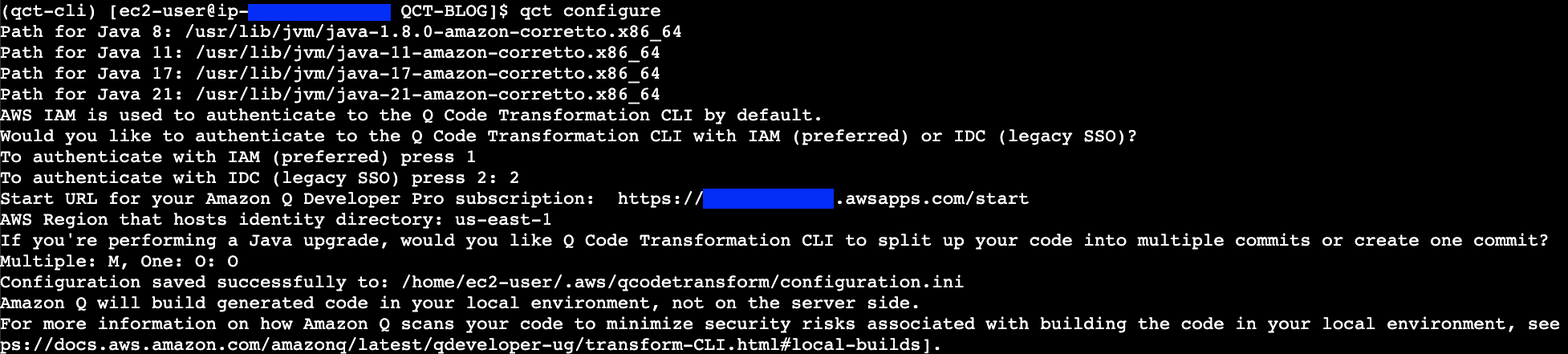
Configure the Amazon Q command line tool for transformation by running the qct configure command:

qct configure

This command will:

  1. Prompt you to specify the JDK path for Java 8, 11, 17 and 21. You only need to specify the path to the JDK of the Java version you are upgrading.
  2. Two options are available for authentication
    • Option 1 authenticates with IAM credentials stored in your AWS CLI profile. Refer Figure 2.
    • Figure 2: Screenshot showing the Amazon Q Developer CLI authentication prompt using IAM credentials, displaying AWS profile selection options
    • Figure 2: qct configure – Authenticate with IAM
      • Provide the AWS CLI profile to use for the IAM authentication. You can specify a specific profile name or press enter to use the default profile.
      • Provide a file path that will point to a CSV file which will be used to add tags for your transformation (optional). The CSV must have two columns, with headers titled key and value, where tag key-value pairs are listed.
    • Option 2 authenticates with IDC (IAM Identity Center). Refer Figure 3.
    • Figure 3: Screenshot of Amazon Q Developer CLI configuration screen showing IAM Identity Center (IDC) authentication options and prompts
    • Figure 3: qct configure – Authenticate with IDC
      • Prompt you to provide the Start URL to authenticate to Amazon Q Developer Pro. The Start URL can be obtained from the console in the Q Developer > Settings.
      • Provide the AWS Region
  3. If you’re upgrading your code’s Java version, you have the option to receive your code suggestions from Amazon Q in one commit or multiple commits. Amazon Q will split the upgraded code into multiple commits by default. If you want all your code changes to appear in one commit, enter the letter ‘O’ for one commit when prompted.

For more information on how Amazon Q splits up the code changes, see Reviewing the transformation summary and accepting changes.

Customizing transformations

You can customize transformations by providing custom logic in the form of ast-grep rules that Amazon Q uses to make changes to your code.

To start with customization, create an Orchestrator file where you provide the paths to the custom transformation files. The Orchestrator file is a YAML file containing paths to custom pre-transformation and post-transformation files, which contain ast-grep rules that will run before and after transformation.

Here’s an example:

orchestrator_qct_cli.yaml

name: orchestrator_qct_cli
description: My collection of custom transformations to run before and after a transformation.

pre_qct_actions:
  ast-grep:
    rules:
      - custom-transformation-pre-qct.yaml

post_qct_actions:
  ast-grep:
    rules:
      - custom-transformation-post-qct.yaml

The pre-transformation rules file shown below is used to

  • Identify unused local variables declarations and remove them
  • Identify unused import declarations and remove them

This custom transformation cleans up unused local variable declarations and imports, helping in reducing the number of lines that will be considered for transformation as demonstrated in the following example:

custom-transformation-pre-qct.yaml

id: no-unused-vars
language: java
rule:
    kind: local_variable_declaration
    all:
        - has:
              has:
                  kind: identifier
                  pattern: $IDENT
        - not:
              precedes:
                  stopBy: end
                  has:
                      stopBy: end
                      any:
                          - { kind: identifier, pattern: $IDENT }
                          - { has: {kind: identifier, pattern: $IDENT, stopBy: end}}
fix: ''

--- # this is YAML doc separator to have multiple rules in one file

id: no-unused-imports
rule:
    kind: import_declaration
    all:
        - has:
            has:
                kind: identifier
                pattern: $IDENT
        - not:
            precedes:
                stopBy: end
                has:
                    stopBy: end
                    any:
                        - { kind: type_identifier, pattern: $IDENT }
                        - { has: {kind: type_identifier, pattern: $IDENT, stopBy: end}}
fix: ''

The post-transformation rules file serves multiple purposes and helps customers seamlessly upgrade their first-party (1P) dependencies after QCT transforms their application to Java 17 or 21:

  1. When your project uses internal AWS dependencies that have been upgraded to Java 17 or 21, these rules automatically update your POM file to use the latest compatible versions. This eliminates manual dependency version updates and resolves build errors related to private dependencies.
  2. After updating the POM file, the rules automatically modify your code to replace deprecated methods from internal dependencies with their latest supported versions, ensuring compatibility with the upgraded dependencies.
  3. The rules identify System.out.println statements and replace them with a proper logger framework, improving application observability.
    This automated approach significantly simplifies the migration process by handling both the application transformation and internal dependency updates in one streamlined operation.

These rules help modernize your codebase and ensure compatibility with updated dependencies.

custom-transformation-post-qct.yaml

id: update-movie-service-util-java17
language: html
rule:
    pattern: |-
        <dependency>
            <groupId>org.amazonaws.samples</groupId>
            <artifactId>movie-service-utils</artifactId>
            <version>$VERSION</version>
        </dependency>
constraints:
    VERSION:
        regex: "^0\\.1\\.0"
fix: |-
    <dependency>
        <groupId>org.amazonaws.samples</groupId>
        <artifactId>movie-service-utils</artifactId>
        <version>0.2.0</version>
    </dependency>

--- # this is YAML doc separator to have multiple rules in one file
id: update-movie-service-util-method
language: java
rule:
    pattern: |-
        MovieUtils.isValidMovieName($MOVIE_NAME)
fix: |-
    MovieUtils.isValidMovie($MOVIE_NAME, movieId)

--- # this is YAML doc separator to have multiple rules in one file
id: sysout-to-logger
language: java
rule:
    pattern: System.out.println($MATCH)
fix: logger.info($MATCH)

Both pre- and post-transformation enhances logging capabilities, increases configurability, improves error handling, and makes the application more production-ready, while the use of transformation rules automates the process, saving time and reducing errors in large codebases.

Executing the transformation

Now, run the transformation using the Amazon Q Developer CLI:

qct transform --source_folder <path-to-folder>
    --custom_transformation_file <path-to-orchestrator-file> 
    --target_version <your-target-java-version> 

Here,

–source_folder points to the path of the folder containing the Java application that needs to be transformed from version 8 to either 17 or 21.

–custom_transformation_file specifies the path to the orchestrator file (orchestrator_qct_cli.yaml).

–target_version refers to the target Java version to which the application will be transformed. It can be either JAVA_17 or JAVA_21.

If you have common requirements across all the applications you’re transforming, it’s better to store this file in a shared location and use an absolute path during transformation.

For applications with specific requirements, you can include the orchestrator file in the application’s codebase and use a relative path.

Once you execute the transform command if you choose to authenticate with IDC, it will prompt to authenticate providing a URL using the credentials set up in identity center that have access to Amazon Q Developer Pro:
Figure 4: Screenshot showing Amazon Q Developer CLI transform command prompting for IAM Identity Center authentication with a browser verification code
Figure 4: qct transform authentication with the IAM Identity provider

After logging in through the browser, verify if the code matches with the code in the CLI and approve access to Amazon Q Developer.

Once the request is approved – enter Y in the command line to proceed with transformation:

Before starting the transformation, the agent verifies if you have at least the minimum supported version of Maven for transformation

Figure 5: Screenshot of terminal output showing Amazon Q Developer CLI transform command execution, displaying pre-processing steps and transformation job initiation
Figure 5: qct transform starts with pre-processing followed with transformation job

First ast-grep command is run using the pre-transformation template before transformation and once it’s successful, the Q Developer transformation job begins.

Figure 6: Screenshot of terminal showing successful completion of Amazon Q Developer CLI transformation, displaying the newly created Git branch name containing the transformed code
Figure 6: qct transform completed with the results committed to a new branch

After the transformation is complete the changes are saved to a local branch and the branch name can be obtained from CLI output.

After successful transformation ast-grep post-transformation step is executed and the branch is updated with the custom transformed code.

Reviewing and applying the changes

After the transformation is complete, review the changes in the new branch that’s in the CLI output. Use “git branch” to view the new branch created with the transformed files.

git branch

Figure 7: Screenshot of terminal output from 'git branch' command highlighting the newly created branch containing the transformed code
Figure 7: git branch – shows the new branch containing transformation result

Now compare the transformed branch with the source branch in our case its change-branch.

git diff change-branch

Figure 8: Screenshot of Git diff output showing Spring Boot dependency version update from 2.0.5 to 3.3.8 in the project's POM file
Figure 8: Spring boot upgraded to 3.3.8 from 2.0.5

Figure 8: Screenshot of Git diff output showing Java version configuration change from 8 to 17 in the project's build configuration
Figure 9: Java upgraded from 8 to 17

You can see the application is upgraded to Java 17, Spring Boot upgraded to 3.3.0 form 2.0.5, and the internal dependency movie-service-utils upgraded to 0.2.0 version to support Java 17.

Figure 10: Screenshot of Git diff output showing two code changes: removal of unused variables and replacement of System.out.println statements with logger.info calls
Figure 10: Unused variable removed also System.out.println replaced with Logging framework

Figure 11: Screenshot of Git diff output highlighting the removal of unused Java import statements from the source code
Figure 11: Unused imports removed

Figure 12: Screenshot of Git diff output showing MovieUtils.isValidMovie method signature change with updated parameters to align with new dependency version
Figure 12: MobieUtils.isValidMovie method updated to match the updated internal dependency

During pre-transformation

  • Unused local variables are identified and removed from the code.
  • Unused imports are identified and removed

During post-transformation

  • Using custom transformation, the sysout statements are replaced with logger framework.
  • The internal dependency MovieUtils.isValidMovieName method is updated with the required parameters that are required for the latest version using custom post transformation template.

Other changes of the Java 8 to 17 transformation are mentioned here.

Pre-transformation, transformation, and post-transformation changes are committed separately to help users compare differences and identify changes made in each step.

If you’re satisfied with the results, you can create a pull request from the branch which contains the transformed code to your corresponding release branch.

Troubleshooting

When working with Amazon Q Developer CLI transformations, you might encounter some common issues. Here’s how to address them:

  • Unstaged Git Commits
  • Before running a transformation, make sure to stash or commit any pending changes to your local branch. This ensures a clean working directory for the transformation process.
  • Clearing the Working Directory
  • If a transformation fails, clear the workspace located at ~/.aws/qcodetransform/transformation_projects/<your project name> before retrying the transformation. This step is only necessary for failed transformations.

Clean up

To clean up after the transformation:

  • Remove the user or group access to the Amazon Q Developer Pro application
  • Unsubscribe from Amazon Q Developer Pro

Call to Action

Ready to modernize your Java applications? Here’s how to get started:

Conclusion

Using Amazon Q Developer’s CLI capabilities for custom transformations provides a powerful and flexible way to upgrade Java applications. This approach allows you to automate the modernization process, saving time and reducing the risk of manual errors.

By leveraging custom rules, you can tailor the transformation to your specific needs, whether it’s updating deprecated methods, migrating to new APIs, or applying best practices across your codebase.

As you continue to work with Amazon Q Developer, explore more advanced transformation scenarios and integrate this process into your development workflow for ongoing modernization efforts.

About the authors

Profile image for Dinesh Balaaji Prabakaran

Dinesh Balaaji Prabakaran

Dinesh is a Senior Technical Account Manager at AWS based in Richmond, VA. He specializes in supporting Independent Software Vendors (ISVs) on the AWS platform. His expertise includes AWS Generative AI Services, AWS Storage solutions, and architecting event-driven serverless solutions on AWS.

Profile image for Venugopalan Vasudevan

Venugopalan Vasudevan

Venugopalan is a Senior Specialist Solutions Architect at Amazon Web Services (AWS), where he specializes in AWS Generative AI services. His expertise lies in helping customers leverage cutting-edge services like Amazon Q, and Amazon Bedrock to streamline development processes, accelerate innovation, and drive digital transformation.

Profile image for Anita Srivastava

Anita Srivastava

Anita Srivastava is a Partner Solutions Architect at Amazon Web Services. She works with a leading Global System Integrator (GSI) to provide architectural guidance and support them in building strategic industry solutions on AWS.

Introducing the quick start experience for Amazon Q Developer Pro

Post Syndicated from Matt Laver original https://aws.amazon.com/blogs/devops/introducing-the-quick-start-experience-for-amazon-q-developer-pro/

For software developers, development teams and IT Professionals, the Amazon Q Developer Pro Tier is recommended. The pro tier offers higher limits, enterprise administration, an analytics dashboard, code customizations and IP indemnity. In addition, the Amazon Q Developer Pro Tier requires AWS IAM Identity Center. For most production deployments, an organization instances of IAM Identity Center is recommended. An organization instance supports identity aware sessions which are required to use the Pro tier in the AWS Console, in addition to the benefits outline in the IAM identity Center user guide.

However, what if your team would like to get started quickly to try out Amazon Q Developer Pro Tier on the IDE but there are constraints that are slowing you down such as:

  • You don’t have plans to adopt IAM Identity Center across your organization.
  • You have an organization instance of IAM Identity Center, but you want to deploy Amazon Q Developer Pro to an isolated set of users that are distinct from users in your organization instance.
  • You don’t control the AWS Organization in which you operate. For example, a third-party controls the AWS organization that manages your AWS accounts and it takes time to get changes approved.

To address these scenarios, we recently announced a new, simplified setup experience with two steps that makes it easier for teams that are looking to try out the features of Amazon Q Developer Pro in their Integrated Development Environment (IDE).

Management Account and AWS IAM Identity Center

Before we jump into a tour of the quick start setup, let’s take a step back and consider the AWS recommendation of using a multi-account setup to organize your workloads. The benefits can be seen in our AWS white paper on organizing Your AWS Environment Using Multiple Accounts and the recommended approach is to implement this with AWS Organizations. A management account is the AWS account you use to create your organization and this should be kept minimal and secure and only host essential administrative tools such as setting up AWS Organizations and implementing single sign on via IAM Identity Center.

IAM Identity Center is core to the Amazon Q Developer Pro setup. IAM Identity Center users can access AWS accounts and applications using their existing organizational credentials, without the need to create and manage separate AWS accounts and passwords.

For example, IAM Identity Center can connect and automatically provision users from standards-based identity providers including Microsoft Active Directory, Okta, Microsoft Entra ID, Google Workspace or another supported identity provider (IdP) via Security Assertion Markup Language (SAML) 2.0 or OIDC.

Manage Access to Amazon Q Developer via AWS IAM Identity Center

Figure 1. Manage Access to Amazon Q Developer via AWS IAM Identity Center.

This is a great experience for developers as they simply authorize their Q Developer session with their usual sign in process via the Identity source already in place in their business. Administrators benefit from features such as centralized access management, streamlined permissions management and enhanced administrator capabilities to view Amazon Q user activity.

Amazon Q Developer Pro Simplified Setup Experience

The above approach of setting up IAM Identity Center in a management account is ideal but not always viable, so we have created a new getting started experience makes it easier for teams that are looking to try out the features of Amazon Q Developer Pro in their Integrated Development Environment (IDE) starting with:

  • A standalone account that is not part of an organization managed by AWS Organizations.
  • A member account, other than the management account, that is part of an AWS Organization but doesn’t have organization level users managed in IAM Identity Center.

For both standalone and member accounts there is a two step process. The first step for setting up Amazon Q Developer Pro starts by navigating to the Amazon Q console and selecting Get started:

Amazon Q Console - Getting started with Amazon Q

Figure 2. Amazon Q Console – Getting started with Amazon Q.

The setup will guide through creating the first user and activating a subscribing to Amazon Q Developer Pro in your account, this initial step also includes creating an account instance of IAM Identity Center and an AWS managed application instance of Amazon Q Developer. A detailed walkthrough is available in our documentation – Subscribing users to Amazon Q Developer Pro.

When complete, the first user can be seen within the Amazon Q Subscriptions:

Amazon Q Subscriptions.

Figure 3. Amazon Q Subscriptions.

The second step is to subscribe the additional team members to the account instance of IAM Identity Center and then subscribing them to Amazon Q Developer Pro via the Amazon Q console.

IAM Identity Center Users

Figure 4. IAM Identity Center Users.

Once a user has been successfully subscribed, they will receive an email with instructions on how to activate their Amazon Q Developer Pro Subscription and start using the features.

Note that account instances of IAM Identity Center have limitations. For example, account instances don’t support console access. (Users can still use Amazon Q in the console, it’s just that they’ll be subject to the Free tier monthly limits.) If you want to use Amazon Q Developer Pro in the console and other AWS websites, you must be a user in an organization instance of IAM Identity Center, in a management account.

At this point, it should be noted, that IAM Identity Center can now be configured to change it’s identity source to a Federated Identity Provider (IdP), see our documentation pages on how to change your identity source.

Cleanup

To cleanup the resource created in this blog, first remove Amazon Q Developer Pro users by following our guide:

Secondly, delete the IAM Identity Center instance:

Conclusion

Getting started with Amazon Q Developer Pro is now even easier with the new, simplified setup experience, you can experience the pro features in your IDE such as higher limits on advanced features such as:

  • Chat, debug code, add tests and more in your integrated developer environment (IDE).
  • Accelerate tasks with the Amazon Q Developer agents for software development.
  • Upgrade apps in a fraction of the time with the Amazon Q Developer Agent for code transformation.

Get on-board with the Amazon Q Developer User Guide on Subscribing users to Amazon Q Developer Pro.

Read more about how the community are using Amazon Q to write code and build applications faster and easier with Amazon Q on community.aws and explore what we are building with Amazon Q Developer here.

Note that while this post focuses on Amazon Q Developer Pro, developers can get started at no cost and without an AWS account; Amazon Q Developer offers a perpetual Free Tier with monthly limits available to users, see our user guide for Amazon Q Developer Free tier.

About the author:

Matt Laver

Matt Laver is a Senior Specialist Solutions Architect at Amazon Web Services (AWS) with a focus on Developer Experience. He is passionate about helping customers find simple solutions to difficult problems.

How generative AI is transforming developer workflows at Amazon

Post Syndicated from Erin Kraemer original https://aws.amazon.com/blogs/devops/how-generative-ai-is-transforming-developer-workflows-at-amazon/

Introduction

Software engineering stands at an inflection point. While previous technological shifts enhanced what developers could build, AI is fundamentally changing how we build. Amazon Q has driven a shift in how developers at Amazon approach software development. At re:Invent 2024, our breakout session Unleashing generative AI: Amazon’s journey with Amazon Q Developer (DOP214) shared insights from Amazon’s internal journey that reveal not just tactical benefits, but our strategic reimagining of the software development process itself. In the months since our talk, the capabilities of this technology have only accelerated in sophistication and reliability. Our hope is that these learnings can inform the approaches organizations are taking to adopt AI, through guidance on scaling implementation, measuring impact and considerations around meaningful data, and best practices every step of the way. For all of us, this is just the beginning of what is looking to be a very exciting journey as AI becomes not only an active assistant in our day-to-day innovation, but starts to become a peer and companion as AI agents take on full tasks.

Rethinking our mental models: The Productivity Paradox

For too long, we’ve approached software development optimization through the lens of industrial-age thinking – treating code like widgets on an assembly line. This mental model has led organizations to chase simplified metrics like lines of code or story points, missing the true nature of software development as knowledge work.

Our experience at Amazon has shown that the real opportunity isn’t just about making current processes faster – it’s about changing how developers interact with code, documentation, and knowledge. In the 2024 Stack Overflow Developer Survey, 53% of respondents agreed that waiting on answers disrupts their workflow, even if they know where to go find those answers. Similarly, 30% of respondents said knowledge silos impact their productivity ten times or more per week.

In 2024, to solve this problem for Amazon developers, we ingested our internal Amazon knowledge repository consisting of millions of documents into Amazon Q Business so our developers could get answers based on information spread across those repositories. By simply asking Amazon Q their questions in existing tooling instead of manually searching or needing to ask an expert, we reduced the time Amazon developers spent waiting for technical answers by over 450k hours and reduced the interruptions to “flow state” of existing team members.

Today’s developers face a striking paradox: while they’re equipped with more powerful tools than ever, we know that across the industry, developers can spend only 1-2 hours daily writing code. The rest is consumed by what we call “toil” – necessary but undifferentiated work that scales linearly with software complexity. This represents not just a productivity challenge, but a strategic liability for organizations trying to accelerate innovation.

Amazon’s scale has provided unique insights into the transformative potential of AI in software engineering. Using AI for software transformations tied tightly into our internal development tools, we didn’t just save 4,500 developer years of effort – we unlocked new possibilities for large-scale technical modernization that previously seemed impractical. This experience revealed something profound: AI isn’t just making existing processes more efficient; it’s making previously impossible tasks feasible. For instance, our ability to automatically handle complex dependency updates across thousands of services has fundamentally changed how we think about technical debt and system modernization. Over the coming years as these AI agents become increasingly capable and autonomous, we will get increasingly bold with the types of modernization work we ask them to perform, ensuring reliability by complementing them with other agentic capabilities such as correctness validation, testing, and even advanced anomaly detection and production system operations.

The evolution of developer cognition

Perhaps the most fascinating insight from our journey has been observing how AI is changing the way developers think about and solve problems. The traditional model of a developer working in isolation, relying solely on their own knowledge and documentation, is evolving into a more collaborative model where AI serves as an intelligent thinking partner. We’ve seen this manifest in unexpected ways. Developers report that having AI tools available changes not just how they write code, but how they approach problem-solving itself. The ability to rapidly explore multiple approaches or instantly access contextual knowledge has enabled more creative and experimental development practices.

In particular, we are seeing seasoned developers playing with new-to-them programming languages and coding techniques that previously would not have been worthwhile due to ramp time. One developer reported cutting their typical three-week ramp-up time for learning a new programming language down to just one week using Q Developer. This significant reduction in a developer’s initial time investment allows creativity with more suitable programming languages for nuanced project requirements, or jumping into work with unfamiliar and complex systems, without sacrificing code quality. For example, with our recently launched Amazon Q Developer Agentic CLI, another internal developer was able to work with an unfamiliar codebase to build and implement a non-trivial feature within 2 days using Rust, a programming language they didn’t know, stating, “If I’d done this ‘the old fashioned way,’ I would estimate it would have taken me 5-6 weeks due to language and codebase ramp up time. More realistically, I wouldn’t have done it at all, because I don’t have that kind of time to devote.”

As we look to the future, we see several emerging frontiers that will further transform software engineering. The rise of AI agents capable of handling increasingly complex development tasks is shifting the developer’s role from implementation to orchestration. We’re moving toward a model where developers spend more time defining what needs to be built and validating approaches, rather than handling every implementation detail. System architecture, traditionally considered too nuanced for automation, is emerging as a new frontier for AI assistance. Application security reviews or software testing, frequent bottlenecks to software release due to specialist bandwidth, will increasingly be accelerated by AI agents amplifying the capacity of those specialists. While we’re just beginning to explore this space, early experiments suggest AI could help architects evaluate trade-offs and identify potential issues in complex systems more effectively than ever before.

Strategic implications for organizations

We believe the most successful organizations will be those that view AI not just as a tool for automation, but as a catalyst for transforming how they approach software development entirely. The real strategic advantage will come from reimagining software development processes and culture to fully leverage AI’s capabilities. This includes rethinking traditional metrics, redefining developer productivity, and creating space and cultural change for teams to experiment with new ways of working. Amazon Q represents a new class of development tools that augment developer capabilities in fundamental ways, beyond just writing code more efficiently. Organizations that understand and embrace this transformation will be best positioned to lead in the next era of software innovation.

To learn more about Amazon Q Developer and explore innovative ways of accelerating software development refer to the Q Developer documentation. Individual users can get started with Q Developer in the AWS Console, CLI, or in their IDE on the perpetual Free Tier. And remember: give yourself and your team “Permission to Play!” We’re at the heart of a technological revolution; as technologists this a moment where we get to immerse ourselves in the unknown and learn and be curious!

Erin Kraemer

Erin Kraemer is a Sr. Principal Technical Product Manager at Amazon Web Services (AWS). She has been actively engaged with software development at Amazon for nearly 25 years. In 2022, she became the founding product leader for Amazon’s internal developer experience team, Amazon Software Builder Experience (ASBX). Prior to ASBX, Erin spent 20 years working in technical roles in Amazon’s retail businesses, growing from an entry-level web developer to serving on an executive level leadership team.

Joe Cudby

Joe Cudby is a Principal Go To Market Specialist at Amazon Web Services (AWS) with a focus on Developer Experience. He works with strategic customers and partners to understand their software development practices and how AWS services like Amazon Q can deliver value in their SDLC. Prior to joining AWS Joe held several executive technology leadership positions including CTO for the State of Indiana. Joe has an Masters in Business Administration.

Customizing C# and C++ with Amazon Q Developer

Post Syndicated from Brian Beach original https://aws.amazon.com/blogs/devops/customizing-c-and-c-with-amazon-q-developer/

Amazon Q Developer recently added support for customizing C# and C++ suggestions based on your company’s codebase. This blog post explores how developers can tailor the AI assistant to provide accurate inline suggestions and contextual code understanding for their C# and C++ projects. You will learn how to leverage customizations to boost productivity, streamline development workflows, and unlock the full potential of Amazon Q Developer across your codebase.

Overview

Like many developers, I learned to code in C. Thirty years later, C# and C++ are both still among the top 10 most used programming languages. However, much of that code is proprietary and stored in private repositories, while Python, JavaScript, and Java dominate public repositories. Therefore, it is critical that I can customize my AI assistant with my private, proprietary code examples. Amazon Q Developer expanded its customization capabilities to include support for C# and C++, in addition to Python, Java, JavaScript, and TypeScript that it already supports.

If you caught my session at re:Invent 2024, Best practices for customizing Amazon Q Developer, you might remember me showcasing how to customize Amazon Q Developer using a Python-based MovieRepository example. With positive feedback from the Python developers, I want to bring that same level of customization to my C# and C++ developers. So, without further delay, let’s dive in and see how you can get the most out of Amazon Q Developer in your C# and C++ projects.

Inline suggestions

Let’s start by looking at how Amazon Q Developer can provide inline suggestions. I’ll use C# for this example. Take a look at Insert method of the MovieRepository class. The MovieRepository class supports basic create, read, update, and delete (CRUD) operations. Notice that the Insert method expects four fields for each movie: title, year, plot, and rating.

/// <summary>
/// Adds a movie to the table.
/// </summary>
/// <param name="title">The title of the movie.</param>
/// <param name="year">The release year of the movie.</param>
/// <param name="plot">The plot summary of the movie.</param>
/// <param name="rating">The quality rating of the movie.</param>
public async Task Insert(string title, int year, string plot, decimal rating)
{ ... }

When I use the default, non-customized, version of Amazon Q Developer, it does its best to help me out. However, you might notice a few errors in the suggestion on line 17 of the screenshot below. First, Amazon Q Developer has suggested a reference to a method named AddMovie, but the actual method in the MovieRepository class is named Insert. Second, Amazon Q Developer guessed three of the four parameters correctly – title, year, and rating, but suggested a director rather than plot. Third, the order of the parameters is not correct.

C# code showing a MovieDatabase namespace containing a Program class with a Main method. The code creates a MovieRepository instance and adds the movie "Titanic" to the database with director James Cameron, year 1997, and rating 7.8 using an async method.

Of course, I cannot fault Amazon Q Developer for these mistakes. It has never seen the MovieRepository, which is stored in a private repository. Now, let’s switch over to my customized version of Amazon Q Developer. Note that I have created a customization following the instructions in the Amazon Q Developer User Guide and the best practices discussed in my re:Invent talk. I simply activate the customization in my IDE.

A dialog box titled "Select a Customization" showing two options: "Amazon Q foundation (Default)" with the description "Receive suggestions from Amazon Q base model" and "amazon-q-developer-customization-demo" marked as "Connected" with "No description provided". The dialog has a back arrow, title, help icon, and close button in the header.

With the customization selected, Amazon Q Developer now understands the exact structure of my MovieRepository class. Look at the suggestion on line 17 of the following image. With the customization enabled, Amazon Q Developer has correctly suggested the method name, parameter names, and parameter order. In addition, it understands that MovieRepository is using Amazon DynamoDB behind the scenes. Finally, notice that this suggestion spans multiple lines, while the prior example was all on one line. Amazon Q Developer is formatting the code to match my team’s preferred style, with each parameter on a separate line, based on the examples it saw in my customization.

C# code showing a MovieDatabase namespace containing a Program class with a Main method. The code creates a MovieRepository instance and uses InsertAsync to add the movie "Titanic" to DynamoDB with details including the title, year 1997, a partial plot description, and rating of 7.8.

This is the power of customization: Amazon Q Developer is tailoring its suggestions to fit my codebase and preferences. The customization benefits don’t stop at inline suggestions. Let’s take a look at how Amazon Q Developer can assist me in chat, this time using a C++ example.

Chatting about code

In addition to inline suggestions, my customization is also available in the chat. Personally, I use a combination of inline suggestions and chat. I prefer the inline suggestions when I know the codebase and want to work faster. I prefer chat when I do not know the codebase well and I want Amazon Q Developer to provide additional context.

In the following example, I ask Amazon Q Developer – “How to I add movies to the C++ MovieRepository.” I should note that the customization is still enabled and that the single customization supports C# and C++ in addition to Python, Java, JavaScript, and TypeScript. I do not need to enable a different customization for each language.

Once again, Amazon Q Developer provides accurate information about the MovieRepository structure. In addition, the response includes additional instructions and multiple examples (though I only included one in the screenshot). Also, you may have noticed that Amazon Q Developer is a sci-fi fan. I’m not surprised.

A code snippet in C++ showing how to add a movie to the MovieRepository using the Insert method. The example adds "The Matrix" with its release year (1999), a brief plot description, and rating (8.7). The code includes error handling that outputs success or failure messages. The snippet appears to be part of a larger response explaining different ways to add movies to a repository.

But wait, there’s more! Amazon Q Developer has also read my README files. Therefore, it can answer questions about usage, installation, troubleshooting, and more. In this final example, I will ask Amazon Q Developer for help troubleshooting. Amazon Q Developer makes multiple suggestions (though I only included one in the screenshot) about potential issues and how to fix them.

Code example showing two methods for configuring AWS credentials in a C++ MovieRepository. The first option uses environment variables with export commands for AWS access keys. The second option shows the format for storing credentials in a ~/.aws/credentials file. This appears to be part of a troubleshooting guide addressing common AWS authentication issues.

The impact of customization on the inline suggestions and chat combine to keep me focused and in a state of flow.

Conclusion

I’m thrilled to have the ability to customize Amazon Q Developer for my C# and C++ projects. Whether I’m looking for inline suggestions or need help understanding my codebase through the chat feature, this tool has become an invaluable part of my development workflow. If you haven’t already, I’d highly encourage you to check out the Amazon Q Developer documentation and start leveraging the power of customization for your own projects.

AWS Weekly Roundup: Amazon Bedrock, Amazon QuickSight, AWS Amplify, and more (March 31, 2025)

Post Syndicated from Esra Kayabali original https://aws.amazon.com/blogs/aws/aws-weekly-roundup-amazon-bedrock-amazon-quicksight-aws-amplify-and-more-march-31-2025/

It’s AWS Summit season! Free events are now rolling out worldwide, bringing our cloud computing community together to connect, collaborate, and learn. Whether you prefer joining us online or in-person, these gatherings offer valuable opportunities to expand your AWS knowledge. I’ll be attending the AWS Amsterdam Summit and would love to meet you—if you’re planning to be there, please stop by to say hello! Visit the AWS Summit website today to find events in your area, sign up for registration alerts, and reserve your spot at an AWS Summit near you.

Speaking of AWS news, let’s look at last week’s new announcements.

Last week’s launches
Here are the launches that got my attention.

AWS WAF integration with AWS Amplify Hosting now generally available – You can now directly attach AWS WAF to your AWS Amplify applications through a one-click integration in the Amplify console or using infrastructure as code (IaC). This integration provides access to the full range of AWS WAF capabilities, including managed rules that protect against common web exploits like SQL injection and cross-site scripting (XSS). You can also create custom rules based on your application needs, implement rate-based rules to protect against distributed denial of service (DDoS) attacks by limiting request rates from IP addresses, and configure geo-blocking to restrict access from specific countries. Firewall support is available in all AWS Regions in which Amplify Hosting operates.

Amazon Bedrock Custom Model Import introduces real-time cost transparency – If you’re using Amazon Bedrock Custom Model Import to run your customized foundation models (FMs), you can now access full transparency into compute resources and calculate inference costs in real time. Before model invocation, you can view the minimum compute resources (custom model units or CMUs) required through both the Amazon Bedrock console and Amazon Bedrock APIs. As models scale to handle increased traffic, Amazon CloudWatch metrics provide real-time visibility into total CMUs used, enabling better cost control through near-instant visibility. This helps you make on-the-fly model configuration changes to optimize costs. The feature is available in all Regions where Amazon Bedrock Custom Model Import is supported, with additional details available in Calculate the cost of running a custom model in the Amazon Bedrock User Guide.

Amazon Bedrock Knowledge Bases now supports Amazon OpenSearch Managed Cluster for vector storageAmazon Bedrock Knowledge Bases securely connects FMs to company data sources for Retrieval Augmented Generation (RAG), delivering more relevant and accurate responses. With this launch, you can use Amazon OpenSearch Managed Cluster as a vector database while using the full suite of Amazon Bedrock Knowledge Bases features. This integration expands the list of supported vector databases, which already includes Amazon OpenSearch Serverless, Amazon Aurora, Amazon Neptune Analytics, Pinecone, MongoDB Atlas, and Redis. The native integration with vector databases helps mitigate the need to build custom data source integrations. This feature is now generally available in all existing Amazon Bedrock Knowledge Bases and OpenSearch Service Regions.

Amazon Bedrock Guardrails announces the general availability of industry-leading image content filters – This new capability offers industry-leading text and image content safeguards that help you block up to 88% of harmful multimodal content without building custom safeguards or relying on error-prone manual content moderation. Image content filters can be applied across all categories within the content filter policy including hate, insults, sexual, violence, misconduct, and prompt attacks. Amazon Bedrock Guardrails provides configurable safeguards to detect and block harmful content and prompt attacks, define topics to deny and disallow specific topics, redact personally identifiable information (PII) such as personal data, and block specific words. It also provides contextual grounding checks to detect and block model hallucinations and to identify the relevance of model responses and claims, and to identify, correct, and explain factual claims in model responses using Automated Reasoning checks. This capability is generally available in the US East (N. Virginia), US West (Oregon), Europe (Frankfurt), and Asia Pacific (Tokyo) Regions. To learn more, visit Amazon Bedrock Guardrails image content filters provide industry-leading safeguards in the AWS Machine Learning Blog and Stop harmful content in models using Amazon Bedrock Guardrails in the Amazon Bedrock User Guide.

Scenarios capability now generally available for Amazon Q in QuickSight – This capability guides you through data analysis by uncovering hidden trends, making recommendations for your business, and intelligently suggesting next steps for deeper exploration using natural language interactions. Now you can explore past trends, forecast future scenarios, and model solutions without needing specialized skill, analyst support, or manual manipulation of data in spreadsheets. With its intuitive interface and step-by-step guidance, the scenarios capability of Amazon Q in QuickSight helps you perform complex data analysis up to 10x faster than spreadsheets. Whether you’re optimizing marketing budgets, streamlining supply chains, or analyzing investments, Amazon Q makes advanced data analysis accessible so you can make data-driven decisions across your organization. This capability is accessible from any Amazon QuickSight dashboard, so you can move seamlessly from visualizing data to asking what-if questions and comparing alternatives. Previous analyses can be easily modified, extended, and reused, helping you quickly adapt to changing business needs.

For a full list of AWS announcements, be sure to keep an eye on the What’s New at AWS page.

We launched existing services and instance types in additional Regions:

Other AWS events
Check your calendar and sign up for upcoming AWS events.

AWS GenAI Lofts are collaborative spaces and immersive experiences that showcase AWS expertise in cloud computing and AI. They provide startups and developers with hands-on access to AI products and services, exclusive sessions with industry leaders, and valuable networking opportunities with investors and peers. Find a GenAI Loft location near you and don’t forget to register.

Browse all upcoming AWS led in-person and virtual events here.

That’s all for this week. Check back next Monday for another Weekly Roundup!

— Esra

This post is part of our Weekly Roundup series. Check back each week for a quick roundup of interesting news and announcements from AWS!


How is the News Blog doing? Take this 1 minute survey!

(This survey is hosted by an external company. AWS handles your information as described in the AWS Privacy Notice. AWS will own the data gathered via this survey and will not share the information collected with survey respondents.)

AWS Weekly Roundup: Omdia recognition, Amazon Bedrock RAG evaluation, International Women’s Day events, and more (March 24, 2025)

Post Syndicated from Betty Zheng (郑予彬) original https://aws.amazon.com/blogs/aws/aws-weekly-roundup-omdia-recognition-amazon-bedrock-rag-evaluation-international-womens-day-events-and-more-march-24-2025/

As we celebrate International Women’s Day (IWD) this March, I had the privilege of attending the ‘Women in Tech’ User Group meetup in Shenzhen last weekend. I was inspired to see over 100 women in tech from different industries come together to discuss AI ethics from a female perspective. Together, we explored strategies such as reducing gender bias in AI systems and promoting diverse representation in model training data. In the AWS Cloud Lab, participants used Amazon Bedrock with large language models (LLMs) to generate rose bloom videos, which was the most popular part of this meetup.

These gatherings are crucial to our efforts to engage more women in AI technology exploration and development, and to help make sure that the generative AI era evolves without gender bias. The collaborative spirit and technical curiosity displayed throughout the event is further proof that diverse teams truly build inclusive and effective solutions.

Speaking of vibrant community engagement, I also had the honor of presenting at Kubernetes Community Day (KCD) Beijing 2025 this weekend. The enthusiasm Omdia Universe: Cloud Container Management & Services 2024-25 reportfor container technologies was remarkable, with nearly 300 developers gathering to share experiences and best practices. During my keynote introducing the DoEKS project from Amazon Web Services (AWS), I was struck by the depth of interest in managed Kubernetes services. The audience’s questions revealed how widely adopted services such as Amazon Elastic Kubernetes Service (Amazon EKS) and Amazon Elastic Container Service (Amazon ECS) have become among Chinese developers building mission-critical applications.This strong community interest aligns perfectly with findings from the Omdia Universe: Cloud Container Management & Services 2024–25 report. In this comprehensive evaluation of container management solutions hosted on public clouds, AWS was recognized as a Leader. The report specifically highlights that AWS offers “widest range of options for working with Kubernetes or its own container management service, across cloud, edge, and on-premises environments.” You can read the full report about AWS offerings to learn more about our comprehensive container portfolio and how we’re helping builders deploy scalable, reliable containerized applications.

Last Week’s launches

In addition to the inspiring community events, here are some AWS launches that caught my attention.

Amazon Q Business browser extension gets upgrades – The Amazon Q Business browser extension now features significant enhancements designed to streamline browser-based tasks. Users gain access to their company’s indexed knowledge alongside web content, direct PDF support within the browser, image file attachment capabilities, and controls to remove irrelevant attachments from conversation context. The expanded context window accommodates larger web pages and more detailed prompts, resulting in more helpful responses. For advanced needs, the extension offers seamless transition to the full Amazon Q Business web experience with access to Actions and Amazon Q Apps. Review the Enhancing web browsing with Amazon Q Business in the documentation for detailed setup instructions and feature descriptions to learn more about this announcement.

Amazon Bedrock RAG evaluation is now generally available – Offering comprehensive assessment of both Bedrock Knowledge Bases and custom Retrieval Augmented Generation (RAG) systems through LLM-as-a-judge methodology. The service evaluates retrieval quality and end-to-end generation with metrics for relevance, correctness, and hallucination detection, and the newly added support for custom RAG pipeline evaluations lets you bring your own input-output pairs and retrieved contexts directly into the evaluation job, along with new citation precision metrics and Amazon Bedrock Guardrails integration for more flexible RAG system optimization. To learn more, visit the Amazon Bedrock Evaluations page and What is Amazon Bedrock? in the documentation.

Amazon Nova expands Tool Choice options for Converse API – We’ve enhanced Amazon Nova with expanded Tool Choice capabilities for the Converse API, giving developers more flexibility in building sophisticated AI applications. This update allows models to determine when to use tools to fulfill user requests more effectively. Learn more in the announcement about expands Tool Choice options.

Amazon Bedrock Guardrails adds policy-based enforcement for responsible AI – Our builders can now enforce responsible AI policies at scale with Amazon Bedrock Guardrails’ new AWS Identity and Access Management (IAM) policy-based enforcement capabilities. This feature helps you to specify required guardrails through IAM policies using the bedrock:GuardrailIdentifiercondition key, so that all model inference calls comply with your organization’s AI safety standards. When your teams make Amazon Bedrock Invoke or Converse API calls, requests are automatically rejected if they don’t include the mandated guardrails, providing consistent protection against undesirable content, sensitive information exposure, and model hallucinations. Refer to the Set up permissions to use Guaidrails for content filtering in the technical documentation and the Amazon Bedrock Guardrails product page to learn more about the announcement about policy based enforcement for responsible AI.

Next generation of Amazon Connect released – We’ve launched the next generation of Amazon Connect, featuring AI-powered interactions designed to strengthen customer relationships and improve business outcomes. This major update brings enhanced agent experiences, smarter customer interactions, and deeper operational insights to contact centers of all sizes. Learn more from the new launch post in the AWS Contact Center Blog.

Amazon Redshift Serverless introduces Current and Trailing release tracksAmazon Redshift Serverless now offers two release tracks to give users more control over their update cadence. The Current track delivers the most up-to-date certified release with the latest features and security updates, while the Trailing track remains on the previous certified release. This dual-track approach allows organizations to validate new releases on select workgroups before implementing them across production environments. Users can easily switch between tracks through the Amazon Redshift console, providing the flexibility to balance innovation with stability for mission-critical workloads. This capability is available in all AWS Regions where Amazon Redshift Serverless is offered. Refer to Tracks for Amazon Redshift provisioned cluster and serverless work groups to learn more about the Current and Trailing tracks in Amazon Redshift Serverless.

AWS WAF now supports URI fragment field matchingAWS WAF has expanded its capability to include URI fragment field matching, allowing security teams to create rules that inspect and match against the fragment portion of URLs. This enhancement enables more precise security controls for web applications that use URI fragments to identify specific sections within pages. Security professionals can now implement more targeted protections, such as restricting access to sensitive page elements, detecting suspicious navigation patterns, and enhancing bot mitigation by analyzing fragment usage patterns characteristic of automated attacks. This feature is available in all AWS Regions where AWS WAF is supported. For more information about URI field for matching, visit the AWS WAF Developer Guide.

For a full list of AWS announcements, be sure to keep an eye on the What’s New at AWS.

Other AWS news

Here are some other additional projects and blog posts that you might find interesting.

Build your generative AI skills at AWS Gen AI Lofts – AWS has established more than 10 global hubs offering training and networking for developers and startups in 2025, where you can gain practical, hands-on experience with the latest AI technologies. These revamped spaces feature dedicated zones where you can participate in workshops on prompt engineering, foundation model (FM) selection, and implementing AI in production environments. If you’re near San Francisco, New York, Tokyo, or other major tech hubs with AWS Gen AI Lofts, stop by to access these free resources and accelerate your generative AI development skills. Check out all of the AWS Gen AI Loft locations and events and to read 5 ways to build your AI skills on AWS Gen AI Loft to learn more.

AWS Lambda‘s architecture for billions of asynchronous invocations – A recent technical article reveals how AWS Lambda handles massive scale through sophisticated engineering approaches. The Lambda asynchronous invocation path employs multiple queuing strategies, consistent hashing for intelligent partitioning, and shuffle-sharding techniques to minimize noisy neighbor effects. The system relies on key observability metrics (AsyncEventReceived, AsyncEventAge, and AsyncEventDropped) to maintain optimal performance. These architectural decisions enable Lambda to process tens of trillions of monthly invocations across 1.5 million active customers while providing reliable scalability and performance isolation. For details read Handling billions of invocations – best practices from AWS Lambda in the AWS computing blog.

AWS is reducing prices by more than 11% for its high-memory U7i instances across all Regions and pricing models. The reduction applies to four instances: u7i-12tb.224xlarge, u7in-16tb.224xlarge, u7in-24tb.224xlarge, and u7in-32tb.224xlarge. The new On-Demand pricing, which covers shared, dedicated, and host tenancy options is retroactive, to March 1, 2025. For new Savings Plan purchases, pricing is effective immediately.

Create your AWS Builder ID and reserve your alias – Builder ID is a universal login credential that gives you access beyond the AWS Management Console to AWS tools and resources, including over 600 free training courses, community features, and developer tools such as Amazon Q Developer.

From community.aws
Here are some of my favorite posts from community.aws.

Model Context Protocol (MCP): why it matters – The recently introduced Model Context Protocol (MCP) creates a standardized way for AI applications to communicate with multiple FMs using consistent prompts and tools.

Build serverless GenAI Apps faster with Amazon Q Developer CLI agent – Discover how Amazon Q Developer CLI Agent revolutionizes cloud development by building a complete serverless generative AI application in minutes instead of days.

Automating code reviews with Amazon Q and GitHub actions – A new developer tutorial demonstrates how to integrate Amazon Q Developer with GitHub Actions to automatically analyze pull requests and provide AI-powered code feedback.

DeepSeek on AWS – A new technical guide demonstrates how to deploy DeepSeek’s powerful open-source AI models on AWS infrastructure. The tutorial provides step-by-step instructions for setting up these cutting-edge models using Amazon SageMaker, Amazon Elastic Compute Cloud (Amazon EC2) instances with GPUs, or through integration with Amazon Bedrock. The guide covers optimization techniques, sample applications, and best practices for balancing performance with cost efficiency.

Upcoming AWS events
Check your calendars and sign up for these upcoming AWS events.

Empowering Futures – Women Leading the Way in Tech and Non-Tech Careers – Whether you’re here to expand your professional circle, learn about the AWS Cloud or gain wisdom from inspiring speakers, this event has something for everyone. This is a public event open to everyone in the Seattle area—for free—on March 27, 2025.

AWS at KubeCon + CloudNativeCon London 2025 – Join us at KubeCon London on April 1 – April 4 , at Excel booth S300 for live product demonstrations that help you simplify Kubernetes operations, optimize costs and performance, harness the power of artificial learning and machine learning (AI/ML), and build scalable platform strategies.

That’s all for this week. Check back next Monday for another Weekly Roundup!

Betty

This post is part of our Weekly Roundup series. Check back each week for a quick roundup of interesting news and announcements from AWS!


How is the News Blog doing? Take this 1 minute survey!

(This survey is hosted by an external company. AWS handles your information as described in the AWS Privacy Notice. AWS will own the data gathered via this survey and will not share the information collected with survey respondents.)

Watch the recordings from AWS Developer Day 2025

Post Syndicated from Brian Beach original https://aws.amazon.com/blogs/devops/watch-the-recordings-from-aws-developer-day-2025/

Software development is undergoing a seismic shift, driven by the transformative impact of generative AI. This powerful technology is redefining how developers work, what they build, and who can become a developer. At the AWS Developer Day 2025, we discussed how AWS is empowering developers to embrace this evolution through their generative AI developer tools. Developers got a first-hand look at exciting product launches, updates, and insights from AWS leaders on the future of software development. See the session list below.

Behind the scenes photo of Eva Knight, Artur Rodrigues, Farrah Campbell and AM Grobelny rehursing their session. Camera equipment in the foreground with speakers at a desk in the background.

This free, virtual event inspired developers of all backgrounds about the possibilities of generative AI for their work. Through use case demos, leadership insights, and community spotlights, attendees learned how AWS is making it faster and easier to build and scale quality software in the cloud.

If you could not attend AWS Developer Day 2025, you can still watch the recordings on YouTube:

The AWS Developer Day 2025 showcased the transformative power of generative AI for software development. Developers learned how AWS is empowering them to embrace this evolution through their generative AI developer tools, making it faster and easier to build and scale quality software in the cloud. From boosting productivity across the SDLC to accelerating application modernization, the event highlighted the exciting possibilities that generative AI offers for the future of software development. As the industry continues to evolve, AWS is committed to equipping developers with the tools and insights they need to thrive in this changing landscape.

Announcing support for upgrades to Java 21 in Amazon Q Developer

Post Syndicated from Brian Beach original https://aws.amazon.com/blogs/devops/announcing-support-for-upgrades-to-java-21-in-amazon-q-developer/

On February 14, Amazon Q Developer announced support for upgrades to Java 21. As a Java developer, I’m excited about this new capability, which will make it easier for me to keep my applications up-to-date and take advantage of the latest language features and performance improvements. In addition, the latest version of Amazon Q Developer includes improved summarization and recommendations that simplify the upgrade process and increase confidence in the results.

Amazon Q Developer is a generative AI-powered assistant that helps accelerate the modernization of enterprise applications. It can perform complex tasks like analyzing legacy code, mapping dependencies, and executing migration and modernization workflows. Amazon Q Developer frees up your team to focus on more strategic initiatives rather than getting bogged down in the undifferentiated heavy lifting of upgrading Java applications.

Staying current on Java versions is crucial, as each new release brings important security fixes, performance enhancements, and support for emerging frameworks and libraries. However, the effort required to manually migrate large Java codebases can be daunting. That’s where Amazon Q Developer has been invaluable. By offloading the tedious, labor-intensive parts of the upgrade process, your team can deliver important updates to users much faster while minimizing disruption.

The Benefits of Java 21

With the addition of Java 21 upgrade capabilities, Amazon Q Developer now supports upgrading applications from Java 8, 11, and 17 to Java 17 or 21. Some of the key benefits of Java 21 that I’m looking forward to include:

Virtual Threads: Virtual Threads are a new concurrency primitive introduced in Java 19 that reduce the effort of writing, maintaining, and debugging high-throughput concurrent applications. This unlocks significant performance improvements for your applications.

Improved Performance: Java 21 includes a variety of other language enhancements like Sequenced Collections, Record Patterns, and Pattern Matching that deliver tangible speed and efficiency gains.

Better Memory Management: Enhancements to the Z Garbage Collector in Java 21 result in more predictable garbage collection pauses and reduced memory footprint, leading to more stable and responsive applications.

Upgrading your team’s Java applications to Java 21 with Amazon Q Developer is a game-changer. It saves countless hours of manual effort that would otherwise be required to migrate all of your Java components.

Simplifying the Upgrade Process with Amazon Q Developer

Upgrading Java applications to Java 21 with Amazon Q Developer is easy. After configuring your project and ensuring it meets the prerequisites, you can simply invoke the /transform command in the Amazon Q Developer chat window of your integrated development environment (IDE). The following screenshot is from VS Code; however, Q Developer also supports JetBrain’s IDEs including IntelliJ IDEA and the qct command line.

Q Code Transformation dialog showing Java 17 selected as the source version and Java 21 selected as the target version.

Amazon Q Developer will then analyze your codebase, determine the necessary changes to upgrade to Java 21, and provide a detailed diff so you can review and accept the transformations. This not only saves you time, but also helps ensure a consistent, high-quality upgrade across all of your Java applications.

In addition to adding support for upgrading to Java 21, the latest version of Amazon Q Developer also enhances the summarization and recommendations it provides after completing the transformation. Once the upgrade to Java 21 is complete, Q Developer generates a detailed summary of the changes made, such as deprecated APIs removed and code refactored to leverage new Java features. It also includes tailored recommendations to further improve the application, taking advantage of the capabilities introduced in Java 21. For example, Q Developer suggested upgrading the logging framework and implementing pattern matching to make the code more concise. These summary and recommendation capabilities help ensure a smooth and comprehensive upgrade process.

A summary screen showing five key changes made during a transformation process, including Maven compiler updates to Java 21, POM file modifications, and retained dependencies. The text appears in white against a dark background and details technical configurations involving Maven, JUnit, and Surefire plugin settings.

Finally, Q includes recommendations to further improve the application beyond the upgrade to Java 21. For example, Q provided the following recommendations.

A recommendations screen with three items for improving a software upgrade. The text is white on a dark background and includes advice on reviewing code changes, re-enabling Maven plugins, and using Amazon Q chat in the IDE for further code transformation assistance.

The summary and recommendation capabilities help ensure a smooth and comprehensive upgrade experience. Developers can review the detailed changes, understand the rationale behind them, and then selectively apply the suggested optimizations to fully unlock the benefits of Java 21. This level of transparency and guidance from Q Developer greatly simplifies the upgrade process and increases confidence in the resulting codebase.

Conclusion

In summary, the new Amazon Q Developer transformation capabilities for upgrades to Java 21 offload the labor-intensive task of keeping your Java applications up-to-date. The detailed summaries and tailored recommendations provided by Q Developer ensure a smooth and comprehensive upgrade process, and significantly streamline the upgrade process. I’m excited to start rolling this out and freeing up the team’s time to focus on higher-value work. If you’re a fellow Java developer, I’d highly encourage you to try out Amazon Q Developer for yourself. To get started, visit the Amazon Q Developer getting started page.

Take control of your code with Amazon Q Developer’s new context features

Post Syndicated from Brian Beach original https://aws.amazon.com/blogs/devops/amazon-q-developers-new-context-features/

In this blog post, I dive into the powerful new features of Amazon Q Developer that empower developers to take full control of their development workflow. These features, currently available in Visual Studio Code, allow you to leverage workspace context, explicit context, prompt libraries, and project rules to streamline your software projects, maintain coding standards, and boost your overall productivity. Developers working in other IDEs can expect support for these capabilities to come soon as well. Whether you’re an experienced developer or just starting out, these features will transform the way you approach your development tasks.

Background

For the past year, Amazon Q Developer has supported workspace context in the integrated development environment (IDE). This powerful feature allows Amazon Q Developer to automatically ingest and index all your code files, configurations, and project structure, giving the AI-powered assistant comprehensive context across your entire application.

By adding the @workspace modifier to your question, Amazon Q Developer can automatically include the most relevant chunks of your workspace code as additional context. This allows the assistant to provide more thorough and accurate responses, even for questions that require understanding the broader codebase, rather than just the current file.

To illustrate this, I will use code from the AWS CDK Immersion Day Workshop. In the following example, I ask Amazon Q Developer, “Which resources are deployed by the workshop stack?” Typically, the assistant would only have the current file open in the IDE as context to answer this question. However, by adding @workspace, Amazon Q Developer can include additional files to provide a more complete response, describing all the resources in the project, such as AWS Lambda functions, an Amazon API Gateway, and an Amazon DynamoDB table.

A screenshot of Q responding to the prompt “@workspace Which resources are deployed by the workshop stack?” The resources are organized in three main categories: 1) AWS Lambda Functions, including a HelloHandler function and a HitCounter function, 2) Amazon API Gateway with a REST API endpoint integrated with the HitCounter Lambda function, and 3) Amazon DynamoDB with a table for storing hit counts for each path.

With this additional context, Amazon Q Developer can provide a more comprehensive answer, explaining the various resources that make up the workshop stack.

Context Transparency

Amazon Q Developer can’t review every file in a large project–that would take too long. The assistant determines relevance based on an index that is updated periodically. While this works great in most cases, there are times when I want to know which files Amazon Q picked. The new context transparency feature, gives me the insight I need.

Amazon Q Developer now includes the context information directly in the response, listing each file that was added. The context transparency feature allows me to see exactly which files the assistant used to formulate its answer. In the following example, you can see that Q Developer included four files from my project.

A screenshot of Q responding to the prompt “@workspace Which resources are deployed by the workshop stack?” This is the same as the prior image but the context section is expanded showing four files, cdk-workshop-stack.ts, package.json, README.md, and cdk.json.

By expanding the context section, you can easily see the files that Amazon Q Developer used to provide the previous response, giving you greater insight into the assistant’s decision-making process.

Explicit Context

While Amazon Q Developer typically does a great job of picking the best files to augment the context, there are times when I want more control. The new explicit context feature allows me to choose individual files and folders that I want to add to the context.

By typing @ in the chat, Amazon Q Developer displays a user interface that lets you select the specific files and folders you want to include. This provides the assistant with access to the exact information that you know it needs to answer your question.

Let’s return to the prior example. While Q Developer properly identified all the resources in the stack, it did not include lib/hitcounter.ts where the DynamoDB table is defined. While the answer is correct, I want Q. Developer to see the source of the HitCounter. In the following example, I explicitly add the lib folder to the context because I know that is where the resources are defined.

A screenshot of Q with the prompt “Which resources are deployed by the workshop stack? @” Q is also showing the picker to complete the modifier. The picker lists the folders in the project and lib is currently selected.

Rather than allowing Q to choose the files, I can explicitly identify files and folders that I want to add to the context. In the following image you see that Q again answered my question correctly. However, with the source code to both files, Q was able to include additional information missing from the prior example. Notice that the HitCounterHandler now includes additional information about the runtime and version.

A screenshot of Q with the prompt “Which resources are deployed by the workshop stack? @lib” This is the same as the prior image but the context section is expanded showing two files, cdk-workshop-stack.ts, amd hitcounter.ts.

With the ability to explicitly define the context, I can tailor the information Amazon Q Developer uses to provide the most relevant and accurate response for my specific needs.

Prompt Library

In addition to controlling the context, Amazon Q Developer now allows you to build a library of common prompts. These prompts are stored as Markdown files in my ~/.aws/amazonq/prompts folder, making it easy to reuse them across multiple conversations and projects.

For example, let’s say you want to add a diagram to the README file for your project. While Amazon Q Developer’s /doc feature can already generate an infrastructure diagram, you may have other types of diagrams, like an Entity-Relationship (ER) diagram or a sequence diagram, that you use frequently. By storing these prompts in your library, you can easily add them to the context without having to retype the prompt each time. In the following example, I will create a sequence diagram.

A screenshot of Q with the prompt “lib @” Q is also showing the picker to complete the modifier. The picker lists prompts from the library and “Create Sequence Diagram” is currently selected.

In the prior image, you can see that I have again added the lib folder to the context in addition to a saved prompt named “Create Sequence Diagram”. Note that I can combine multiple modifiers adding additional context and prompts as needed. The stored prompt for “Create Sequence Diagram” is shown below.

Create a sequence diagram using Mermaid that shows the sequence of calls between resources. 
Ignore supporting resources like IAM policies and security group rules. 

Amazon Q Developer uses the prompt, and the two source code files in the lib folder to create the following sequence diagram.

A sequence diagram showing the flow of a web request through AWS services. The flow starts with a Client making an HTTP Request to API Gateway, which triggers a HitCounter Lambda function. The HitCounter Lambda then updates a hit count in DynamoDB and invokes a Hello Lambda function. The response flows back through the chain: Hello Lambda responds, DynamoDB confirms, and the combined response returns to the client via API Gateway as an HTTP Response.

The prompt library saves me time and reduces the chances of making mistakes when generating common artifacts, allowing me to focus on more complex and creative aspects of my development workflow.

Project Rules

The last feature we’ll explore is “Project Rules.” Similar to the prompt library, these rules are stored as Markdown files. Unlike the prompt library, which is specific to your user profile, project rules are stored in the .amazonq/rules folder of your project. Therfore, they are applied to all developers that share the project source code.

These rules allow you to enforce coding standards and best practices across your team. For example, you could have a rule that all Python code uses type hints, or that all Java code uses Javadocs comments. By storing these rules in your project, you can drive consistency across developers, regardless of their experience level.

To illustrate this, imagine that a junior developer asks Q to “Add an S3 bucket to the stack” as shown in the following image. This prompt is too simple and does not include our best practices This prompt is too simple and does not describe our best practices.

A screenshot of Q with the prompt “Add an S3 Bucket to the stack.” The context is expanded and lists a single file cdk.md. The response includes coed but the code is not important in this context.

Despite the vague prompt, you might notice that Q Developer’s response mentions the “best practices” stored in “the rules file”. You might also notice that Q has added cdk.md to the context even though I did not include any modifiers in my prompt. This is the power of the project rule. It adds additional context to the prompt, even when the developer forgets to add it manually. .amazonq/rules/cdk.md includes the following text. In addition, context transparency makes it clear that the rule was included so the developer is aware.

All S3 Buckets must have encryption enabled, enforce SSL, and block public access. 
All DynamoDB Tables must have encryption enabled.
All SNS Topics must have encryption enabled and enforce SSL.
All SQS Queues must enforce SSL.

Project rules empower you to maintain consistency and best practices across your entire development team, helping to improve the overall quality and maintainability of your codebase.

Conclusion

The new features in Amazon Q Developer give you powerful tools to simplify your software development workflow. By leveraging workspace context, explicit context, prompt libraries, and project rules, you can ensure your AI assistant has the information it needs to provide accurate and helpful responses, while also enforcing best practices and standards across your team.

To get started with these features, visit the Amazon Q Developer Getting Started guide and explore the full range of capabilities that can help you create impressive software more efficiently.

Introducing the enhanced command line interface in Amazon Q Developer

Post Syndicated from Brian Beach original https://aws.amazon.com/blogs/devops/introducing-the-enhanced-command-line-interface-in-amazon-q-developer/

Earlier today, Amazon Q Developer announced an enhanced CLI agent within the Amazon Q command line interface (CLI). With this announcement, Q Developer brings the latest agentic experience to the CLI that provide a more dynamic, interactive coding experience that works with you, and iteratively makes changes based on your feedback. Amazon Q Developer can now use the information in your CLI environment to help you read and write files locally, query AWS resources write code, or automatically debug issues.

Introduction

As a developer, I appreciate my Integrated Development Environment (IDE) along with the integrated linters and auto-completion features that help streamline my workflow. The addition of AI assistants, like Amazon Q Developer, have changed the way I work in profound ways. I can discuss best practices with Q Developer in chat, or ask it to refactor a complex method in seconds. I am increasingly using the Amazon Q Developer agents to develop new features, write documentation, generate unit tests, and automate code reviews. These powerful agent capabilities have further transformed how I approach my daily development tasks.

However, as a developer, I spend as much time at the command-line interface (CLI) as I do in the IDE, maybe even more. Tools like the Amazon Web Services (AWS) CLI, Git, package managers, and linters have revolutionized the way I manage infrastructure, automate repetitive tasks, and collaborate with my team. Tools like Docker and Kubernetes have transformed the way I develop and deploy my applications. Looking at the extensions tab in my IDE, I have extensions installed for Maven, Docker, and Vue, but I rarely use them, preferring the flexibility and power of the CLI.

Amazon Q Developer has been available in the CLI for over a year now, and it has become an indispensable part of my daily development routine. The assistant’s ability to provide intelligent command completions that can list my Git branches, Amazon S3 buckets, etc. has saved me countless hours. The chat feature allows me to engage in natural language conversations with Amazon Q Developer, asking it to help me learn how to accomplish specific tasks, while the translate capability seamlessly converts my plain-language prompts into the corresponding shell commands.

While Amazon Q Developer’s CLI capabilities are helpful, I miss the power of the agents I have access to in my IDE. Earlier today, Amazon Q Developer announced an enhanced CLI agent within the Amazon Q CLI. Amazon Q Developer, and the new agent is powered by Amazon Bedrock, as a result, the CLI has the power of Claude 3.7 Sonnet step-by-step reasoning. In addition, the new CLI agent can make use of tools installed on my system including compilers, package managers, and the AWS CLI. Finally, the enhanced CLI supports multi-turn conversations allowing dynamic, back-and-forth conversations with the agent. This enables me to get more work done, faster, without ever leaving the comfort of my preferred command-line environment.

Rather than being constrained by the features and workflows of an IDE, the CLI agent gives me direct access to the underlying tools and commands I need to get my work done. Let’s look at an example.

Walkthrough

To see how the CLI agent capabilities work, I’ll walk you through an example. I’m preparing for an internal developer community summit happening in April. I need an application to manage the call for content. The Call for Content application allows community members to propose topics for the summit. I’m going to use the Amazon Q Developer CLI to build the application.

I already have the CLI installed, so I’ll run q chat to begin a new conversation with the agent. Then I will ask Q Developer to “scaffold a new application named call-for-content using React and Vite, and then commit it to Git.” As you can see in the following video, the agent understands my intent, and carries out the work needed to build the application. In the past, the Q Developer CLI would provide instructions for me to execute. In this new enhanced version, the CLI agent uses the tools installed on my laptop to complete each step for me. I should note that I have disabled confirmations, but Q Developer can prompt me before each action so I can verify it.

Animated screen recording of a terminal window showing Amazon Q Developer CLI in action. The terminal displays a welcome message 'Hi, I'm Amazon Q. Ask me anything.' The flow of events in the recording is captured in the next image.

The agent is working quickly in that video. So quickly that is hard to keep up. So I broke it down, step-by-step in the following image. The agent begins by calling npm create to create the new app, followed by npm install to add all the dependencies. It then runs a series of git commands to create a new repository, add my files, and commit the changes including a descriptive commit message.

Terminal screenshot showing a sequence of commands executed by Amazon Q Developer to create a new React application. The sequence includes: creating a new Vite React project called 'call-for-content', installing dependencies with npm install, initializing a Git repository, adding files to Git, and making an initial commit. Each command is preceded by 'Execute shell command' and shows the exact command to be run in green text.

Notice that agent is not simply generating files. It is running the same commands that I would have run on my own. However, the CLI agent is doing it much faster, and more accurately than I could have done. The enhanced Amazon Q Developer CLI can use tools, including other command line tools installed on my system, to complete its work. Once Q Developer is done, it provides me a summary of the work it has completed, and suggests next steps. In the following image, you can see that Q Developer is suggesting I run the development server to preview the changes. That is a great suggestion, so I ask Q Developer to start the server and confirm that everything is working.

Split screen view showing two panels. On the left, a terminal displays a summary of completed actions including project creation, dependency installation, and Git initialization, along with instructions for starting the development server. On the right, the default Vite+React application page showing the Vite and React logos, a counter set to 0, and instructions to edit src/App.jsx to test Hot Module Replacement.

With the application template running, I’m ready to start building the Call for Content application. The CLI agent supports multi-turn conversations, so I can pick up where we left off. I simply explain my requirements at the command line, and agent begins to generate code. This is what Amazon Q Developer does best. In this example, it needs to update the App.jsx and App.css files.

Terminal screenshot showing Amazon Q Developer processing a request to create a form application. The sequence shows: a prompt requesting a form with specific fields, followed by status messages indicating updates to App.jsx (completed in 0.1s) and App.css (completed in 0.2s), and ending with a Vite server startup message showing the local development server running at http://localhost:5173.

Notice that the agent can read and write files on my local system in addition to running commands as we saw in the prior example. So, as Q Developer generates code, the agent can put it in the correct place in my local file system. Once it is done, the agent starts the development server using npm run dev. I asked it to start the server last time, so it correctly guesses that I will want to check the progress. Just like last time, the agent provides another summary of the changes it made. Personally, I appreciate these periodic summaries. They help me build confidence in the work that Q Developer is doing. I’m not happy with the color of the title. I could ask Q Developer to update it, but I will simply update the file myself. Note that I can edit files on my own while using the CLI. the agent will read files before editing them to check if I have made any changes manually.

Split screen view showing development results. Left panel contains terminal output describing the form's features including field validations and counters. Right panel shows the rendered web form with fields for Name, Email, Talk Title (with 0/100 character counter), Abstract (with 0/100 word counter), Talk Level dropdown defaulted to '100 - Introductory', and a blue 'Submit Talk Proposal' button at the bottom.

The application is looking great! However, it is currently writing it’s output to the console. I never told the agent what to do with the data. I would like the application to write to a DynamoDB table. In fact, I created one already. However, I cannot remember which region the table is in. In the following image, I ask the agent to figure it out for me. Let’s see how it responds.

Terminal window showing a sequence of AWS DynamoDB commands. The initial prompt asks to update an app to write to a DynamoDB table named 'call-for-content'. The sequence shows three 'Execute shell command' operations: first checking the table in us-east-1 region, then in us-west-2 region, followed by installing AWS SDK dependencies. The final line shows successful creation of a new DynamoDB service file.

As you can see in the prior image, the agent is able to think about my vague request, and figure out what to do. It starts by looking in us-east-1. When it can not find the table, it moves to us-west-2 and tries again. The table was in us-west-2, but if it were not, the agent would have continued searching. Q Developer understands how to list and describe AWS resources. Once the agent found the table, it uses npm to install the DynamoDB SDK, and then updates the application files. Note that the agent actually updated multiple files, but I kept the image simple.

With just a few simple prompts, I was able to use the enhanced CLI agent to collaborate with Q Developer throughout the entire development process. I’ll keep working on the application to add authentication, etc. However, I assume you have a good understanding of how the Q Developer CLI works and are eager to get started. So, let’s stop here.

Conclusion

Amazon Q Developer’s new CLI agent has completely transformed the way I approach software development. By bringing the power of an advanced AI assistant directly into my preferred command-line environment, I can now accomplish complex tasks faster than ever before. Q Developer’s natural language understanding and contextual awareness, combined with the CLI agent’s ability to reason and use a wide range of development tools, make it an indispensable part of my daily workflow. Finally, support for multi-turn conversations, enable me to collaborate with, and work along side the agent to get more work done, faster.

If you’re a developer who spends a significant amount of time in the CLI, I highly recommend trying out the Amazon Q Developer’s CLI agent. You can follow the Amazon Q Developer User Guide to install the CLI and start leveraging the new agent capabilities right away, for free. I’m confident it will change the way you work, just as it has for me. Give it a try and let me know what you think!

AWS Chatbot is now named Amazon Q Developer

Post Syndicated from Aaron Sempf original https://aws.amazon.com/blogs/devops/aws-chatbot-is-now-named-amazon-q-developer/

Today, we’re excited to announce that AWS Chatbot has been renamed to Amazon Q Developer, representing an enhancement to developer productivity through generative AI-powered capabilities.

This update represents more than a name change – it’s an enhancement of our chat-based DevOps capabilities. By combining AWS Chatbot’s proven functionality with Amazon Q’s generative AI capabilities, we’re providing developers with more intuitive, efficient tools for cloud resource management.

Transition for Existing Users

The transition to Amazon Q Developer maintains compatibility with most workflows. Current AWS Chatbot users should experience no disruption to their configurations, permissions, or established processes, except for the following use cases.

Notifications: If you are using Q in chat applications to send notifications, then you don’t need to make any changes. Your notifications will start showing “Amazon Q” as the sender.

Manual commands: The visible change is the new “@Amazon Q” command replacing the previous “@aws” mention in chat channels. If you are running commands manually, then you will use “@Amazon Q” instead of “@aws”.

Tip: it is faster to type @Q. The chat platform displays auto complete recommendations with the matching app in the channel.

Programmatic commands: Your Slack Automation Workflows that trigger commands within the AWS Chatbot won’t change with this renaming. If you are sending messages to your Slack channels programmatically using Webhooks or the API with “@aws”, you’ll need to change how you invoke the app programmatically. For more information, see Updating Slack bot user app mentions when sending messages to chat channels programmatically.

All service APIs, SDK endpoints, and AWS Identity and Access Management (IAM) permissions remain unchanged, ensuring business continuity.

We’ve maintained the original AWS ChatBot accessibility by offering Amazon Q Developer’s chat features through the Free tier. This ensures that teams of all sizes can benefit from these enhanced capabilities without additional costs. The renamed service is accessible in all commercial regions, maintaining the same geographical reach as the original AWS Chatbot service.

Security remains paramount with Amazon Q Developer. The service maintains all existing security controls, including AWS Organizations Service Control Policies and chat application policies. Organizations can precisely control access to resources and features through granular IAM permissions and channel-specific guardrails. To take advantage of generative AI capabilities organizations will need to add to the configuration of their channel permissions.


Enhanced Chat Capabilities for DevOps

Amazon Q Developer integration with Microsoft Teams and Slack transforms these chat applications into powerful DevOps command centers, where team members can monitor, diagnose, and optimize their AWS resources and applications. Amazon Q Developer in chat applications provide real-time visibility into environment states, helping team members quickly identify which resources are operational or experiencing issues.

Team members can reduce incident response times and monitor performance issues, traffic spikes, infrastructure events, and security threats through DevOps tooling that enables custom notifications with team member tagging for critical application events, interactive action buttons and aliases for telemetry retrieval, and command execution in chat channels.

Amazon Q in Slack channel

Amazon Q in Slack channel

Building on existing features like custom notifications and actions, command aliases, and Amazon Bedrock Agents integration, Amazon Q Developer uses natural language processing to understand context and intent. For example, when investigating resources in a region, you can ask, “What EC2 instances are in us-east-1?”. This natural language understanding streamlines interactions and improves efficiency.

Ask Amazon Q about resources in AWS Account

Ask Amazon Q about resources in AWS Account

Amazon Q Developer can be used for more comprehensive resource management and status monitoring in chat channels. It can be used to send alerts to chat channels on Amazon CloudWatch metrics for monitoring, or can be used to explore resources across regions or within an account. DevOps teams can execute queries, such as count all VPCs in a region, listing all subnets in a VPC or providing all details for Amazon Elastic Compute Cloud (EC2) instances in a region, such as “provide all details for EC2 instances in us-east-1”, providing better visibility into infrastructure.

Use Amazon Q to query AWS resources information

Use Amazon Q to query AWS resources information

Getting Started

Setting up Amazon Q Developer involves a straightforward process through the Amazon Q Developer console or the AWS SDK. To interact with Amazon Q Developer’s generative AI capabilities, start by adding appropriate managed policies (AmazonQDeveloperAccess or AmazonQFullAccess) to your IAM roles. Your teams can then customize their notification preferences, set up automated responses, and configure security guardrails according to their specific requirements.

We encourage you to explore the getting started guide for best practices, advanced features, and reviewing our updated documentation. For a summary of changes visit Amazon Q Developer in chat applications rename documentation.

We’re excited to see how you and your teams leverage these enhanced capabilities to streamline their DevOps workflows and improve collaboration.

About the Author

Aaron Sempf Profile

Aaron Sempf is Next Gen Tech Lead for the AWS Partner Organization in Asia-Pacific and Japan. With over twenty years in distributed system engineering design and development, he focuses on solving for large scale complex integration and event driven systems. In his spare time, he can be found coding prototypes for autonomous robots, IoT devices, distributed solutions and designing Agentic Architecture patterns for GenAI assisted business automation.

Amazon Web Services named a Leader in the 2024 Gartner Magic Quadrant for Data Integration Tools

Post Syndicated from William Vambenepe original https://aws.amazon.com/blogs/big-data/amazon-web-services-named-a-leader-in-the-2024-gartner-magic-quadrant-for-data-integration-tools/

Amazon Web Services (AWS) has been recognized as a Leader in the 2024 Gartner Magic Quadrant for Data Integration Tools. We were positioned in the Challengers Quadrant in 2023.

This recognition, we feel, reflects our ongoing commitment to innovation and excellence in data integration, demonstrating our continued progress in providing comprehensive data management solutions.

The Gartner Magic Quadrant evaluates 20 data integration tool vendors based on two axes—Ability to Execute and Completeness of Vision. This evaluation, we feel, critically examines vendors’ capabilities to address key service needs, including data engineering, operational data integration, modern data architecture delivery, and enabling less-technical data integration across various deployment models.

Discover, prepare, and integrate all your data at any scale

AWS Glue is a fully managed, serverless data integration service that simplifies data preparation and transformation across diverse data sources. With its comprehensive suite of tools, AWS Glue allows users to build and manage data pipelines efficiently, without requiring extensive infrastructure management expertise.

Given the diverse data integration needs of customers, AWS offers a robust data integration system through multiple services including Amazon EMR, Amazon Athena, Amazon Managed Workflows for Apache Airflow (Amazon MWAA), Amazon Managed Streaming for Apache Kafka (MSK), Amazon Kinesis, and others. Many thousands of customers across various industries are using these services to transform, operationalize, and manage their data across data lakes and data warehouses.

We have embarked on a journey to unify the broad range of AWS data processing, analytics, and AI capabilities, starting with the announcement of Amazon SageMaker Unified Studio at re:Invent 2024. This includes the data integration capabilities mentioned above, with support for both structured and unstructured data. With an integrated experience for data workers, SageMaker Unified Studio provides an environment where users can collaborate and build faster. It supports model development, generative AI, data processing, and SQL analytics, all accelerated by Amazon Q Developer—our most capable generative AI assistant for software development. The Unified Studio provides unified access to all data sources, whether stored in data lakes, data warehouses, or third-party and federated sources, with robust governance and enterprise-grade security built-in.

Review the Gartner Magic Quadrant

Access a complimentary copy of the full report to see why Gartner positioned AWS as a Leader, and dive deep into the strengths and cautions of AWS. We believe our recognition as a Leader in the Gartner Magic Quadrant is a testament to delivering innovations for our customers.

MQ

Gartner does not endorse any vendor, product or service depicted in its research publications and does not advise technology users to select only those vendors with the highest ratings or other designation. Gartner research publications consist of the opinions of Gartner’s research organization and should not be construed as statements of fact. Gartner disclaims all warranties, expressed or implied, with respect to this research, including any warranties of merchantability or fitness for a particular purpose.

GARTNER is a registered trademark and service mark of Gartner and Magic Quadrant is a registered trademark of Gartner, Inc. and/or its affiliates in the U.S. and internationally and are used herein with permission. All rights reserved. This graphic was published by Gartner, Inc. as part of a larger research document and should be evaluated in the context of the entire document. The Gartner document is available upon request from here.


About the authors

William Vambenepe is Director of Product Management at AWS, where he leads the Product Management, Solutions Engineering, and UX Design team for data processing services (Amazon EMR, AWS Glue, Athena, Amazon MWAA), SageMaker Unified Studio, and SageMaker Catalog. Prior to AWS, William worked at Google (6 years building and growing the Data and Analytics product portfolio for Google Cloud, and 5 years as Product Management Director for Google Search). He had previously held software engineering leadership roles at Oracle and HP. William holds an Engineering degree from Ecole Centrale Paris, a graduate Diploma in Computer Science from Cambridge University, and a Masters in Engineering Management from Stanford University.

Santosh Chandrachood has been with AWS for over 8 years and helped build, launch, and scale a variety of AWS services. Currently, Santosh is Director and service leader for Data Processing, managing Amazon EMR, Athena, AWS Glue, and Managed Workflows for Apache Airflow (Amazon MWAA). Santosh also led AWS Data Integration as the General Manager. Before joining AWS, Santosh lead engineering teams in networking, storage, and data infrastructure areas.

Learning AWS best practices from Amazon Q in the Console

Post Syndicated from Brendan Jenkins original https://aws.amazon.com/blogs/devops/learning-aws-best-practices-from-amazon-q-in-the-console/

Operators, administrators, developers, and many other personas leveraging AWS come across multiple use cases and common issues such as lack of permissions, bugs in code in AWS Lambda, and more when leveraging the AWS console. To help alleviate this burden when using the console, AWS released Amazon Q to assist with users accessing the console with these use cases. Amazon Q is AWS’s generative AI-powered assistant that helps write code, answer questions, generate content, solve problems, manage AWS resources, and take actions. A component of Amazon Q is Amazon Q Developer. One way to interact with the service is to chat with Amazon Q Developer in the AWS Management Console, the AWS Console Mobile Application, on AWS websites, AWS Documentation websites, and chat channels integrated with AWS Chatbot to learn about AWS services. You can ask Q Developer about best practices, recommendations, step-by-step instructions for AWS tasks, and architecting your AWS resources and workflows.

In this blog post, we will highlight best practices for interacting with Q Developer in the console including topics such as using Q Developer in the console to generate code snippets, architect workloads, and understand your costs.

Prerequisites

To follow along with these examples, the following prerequisites are required:

Overview

Here are some of the examples on how Amazon Q Developer in the console can be utilized:

Please Note – Amazon Q in Console may generate different output than shown in examples below due to its non-deterministic nature.

To start, access the Amazon Q Developer service by signing into the AWS console and clicking the Amazon Q icon on the right-hand panel as shown below in Figure 1. Authenticate if necessary:

Accessing Amazon Q Chat

Figure 1: Accessing Amazon Q Chat

Use Q to learn about AWS services and best practices

In this section, we will look at how Amazon Q can help you learn about AWS services and also outline the best practices for using those services

Learn about services available in AWS

Whether someone is just learning or an experienced user, Amazon Q provides a simple way to discover AWS capabilities and get helpful information whenever needed.
For example, if you are looking to learn on how to auto-scale your compute instances based on a metric you can ask Amazon Q in console.

Sample prompt –
I need to set a autoscaling group for EC2 instances with this requirement, if
CPU utilization goes above 50% for 5 minutes then it should add new instance
and if CPU utilization drops below 50% for 5 minutes then it should delete 1
instance.

User entering prompt about setting up an auto scaling compute Instance based on a specific metric and threshold and Q generating a response.

Figure 2: User Prompt and Response from Amazon Q for Auto Scaling Compute Instance based on a specific metric and threshold

The response from Amazon Q lists down all the steps to set an Auto Scaling Group based on the requirements provided in the prompt.

Ask specific questions about AWS services

Amazon Q in console can also help you to run systems to deliver business value keeping best practices in mind. With natural language prompts, you can learn the best practices when using AWS services.

Sample Prompt –

I am using API Gateway for REST APIs. I have configured timeout for requests. I would like to learn additional best practices to reduce and handle long running requests.

User entering prompt to Q about keeping compute costs low and Q generating a response.

Figure 3: User Prompt and Response from Amazon Q keeping compute costs low

As shown above in Figure 3, Amazon Q then summarizes various ways to optimize for long running requests in Amazon API Gateway, for example, implement timeouts, use asynchronous invocation for long running operation if possible and several other ways to optimize.

Use Q to generate code snippets or scripts to automate tasks using AWS SDK or AWS CLI

Developers or System Administrators can use Q to generate code snippets or scripts to automate tasks instead of spending time going through documentation.

How to write an AWS Lambda function to read data from S3

For example, a developer may way to get started writing an AWS Lambda function that reads data from an Amazon S3 bucket but doesn’t know how to get started, Amazon Q can help.

User Prompt and Response from Amazon Q on instructions on how to write the lambda function

Figure 4: User Prompt and Response from Amazon Q on instructions to write a Lambda function

User Prompt and Response from Amazon Q on instructions on how to write the lambda function

Figure 5: Response from Amazon Q with sample code to write a Lambda function

As shown above in Figure 4 & 5, Amazon Q returns step-by-step instructions on how to write the Lambda function, including sample code for reference.

How do I upload a file to an S3 bucket using the AWS CLI?

If a developer or IT Professional uses the AWS CLI frequently but struggle with finding right commands to accomplish a task, then Amazon Q is definitely helpful

Sample Prompt

How do I upload a file to an S3 bucket using the AWS CLI?

User Prompt and Response from Q with CLI command to upload a file to an S3 bucket

Figure 6: User Prompt and Response from Q with CLI command to upload file to S3 bucket

As shown above in Figure 6, Amazon Q returns the CLI command to upload a file to an S3 bucket. The response also suggests the command to verify the upload.

Use Console-to-Code to write code to automate use of other services

Console-to-Code records your console actions, then uses generative AI to suggest code in your preferred language which currently supports CLI commands, CDK Java, CDK Python, CDK TypeScript, CloudFormation JSON/YAML.

Let’s say a developer wants to generate a CloudFormation YAML with an Amazon EC2 instance and Amazon RDS database instance. For this, the developer can go to the console of Amazon EC2 and Amazon RDS. On the right side, choose Console-to-Code icon and choose Start Recording.

As shown in the figures below, once an Amazon EC2 instance and then Amazon RDS DB instance is launched, stop the recording and simply download the CloudFormation YAML template.

Console-to-Code recording Amazon EC2 and Amazon RDS Database instance launch

 Figure 7: Console-to-Code recording Amazon EC2 and Amazon RDS Database instance launch

Generate Infrastructure-As-Code from the Console-to-Code recording

Figure 8: Generate Infrastructure-As-Code from the Console-to-Code recording

Generated CloudFormation YAML template from the Console-to-Code recording

      Figure 9: Generated CloudFormation YAML template from the Console-to-Code recording

Use Q to architect a workload & optimize

In this section, we will focus on leveraging Amazon Q to architect new workloads and optimize existing workloads.

Architecting Workloads

Now, a developer wants to build a new financial services application with the following requirements:

  • Architecture must be serverless & event driven
  • It must provide functionality as deposits and withdrawals
  • It should use low-cost, efficient AWS services.
  • It should scale with traffic spikes that can reach thousands of requests per second.
  • Should support REST APIs

Let’s prompt Amazon Q Developer by copying the following prompt below and pasting it into the chat window:

Sample Prompt:

How can I build a new financial services application with the following requirements: it should be serverless and event driven, must provide functionality as deposits and withdrawals, It should use low-cost efficient AWS services, It should scale with traffic spikes that can reach thousands of requests per second, and lastly it should support REST APIs.

Amazon Q should provide a response on how to architect this workload. Here is a sample response received from Amazon Q:

Response from Amazon Q for architecture

Figure 10: Response from Amazon Q for architecture

Amazon Q was able to provide the following response in full:

________________________________________________

To build a new financial services application with the requirements you described, I would recommend the following AWS services and architecture:

  1. Serverless and Event-Driven Architecture:
    • Use AWS Lambda for the core application logic, which will allow you to run your code without provisioning or managing servers.
      Integrate AWS Lambda with other serverless services like Amazon API Gateway for the REST API, Amazon DynamoDB for the database, and Amazon SNS/SQS for event-driven messaging.
  2. Deposits and Withdrawals Functionality:
    • Use Amazon DynamoDB as the database to store customer account information and transaction details.
    • Implement the deposit and withdrawal logic in AWS Lambda functions, which can be triggered by events from Amazon API Gateway or Amazon SNS/SQS.
  3. Low-Cost and Efficient AWS Services:
    • Leverage AWS Lambda, which charges only for the compute time you consume, and Amazon DynamoDB, which provides a pay-per-request pricing model.
    • Use Amazon API Gateway’s pay-per-call pricing to keep costs low for the REST API.
    • Consider using Amazon SQS and Amazon SNS for their low-cost, highly available, and scalable messaging capabilities.
  4. Scalability and High-Performance:
    • AWS Lambda and the other serverless services you choose will automatically scale to handle traffic spikes of thousands of requests per second.
    • You can further optimize performance by using features like Amazon API Gateway’s caching, Amazon DynamoDB’s auto-scaling, and Amazon SQS’s message batching.
  5. REST API Support:
    • Integrate your application logic in AWS Lambda with Amazon API Gateway to expose a RESTful API. Amazon API Gateway will handle the API management, including routing, authentication, and throttling.

To get started, I recommend reviewing the following AWS documentation:

Please let me know if you have any other questions!
Sources:
Key AWS services – Financial Services Industry Lens
Harnessing the scale of AWS for financial simulations | AWS HPC Blog
RPC vs REST – Difference Between API Architectures – AWS

________________________________________________

As shown above, Amazon Q was able to provide the service recommendations for our architecture based on the requirements provided along with links to services recommended based on the requirements

Optimizing workloads

Now, let’s a developer or IT professional has an architecture that revolves around Amazon EC2 and an instance deployed called Server-1-demo in AWS and wants to optimize to help save on costs.

Similar to the previous section, open a new chat window within the Amazon Q chat in the console and enter the following prompt:

Sample Prompt:

Based on the current CPU utilization of my EC2 Server-1-demo, what do you recommend I do to cost optimize?

As a result, Q provides the following response:

Prompt to Q about the optimization of an EC2 instance based on CPU utilization and Response from Amazon Q

Figure 11: Optimization Response from Amazon Q

As shown, Amazon Q took in the context of the CPU utilization for Server-1-demo and made recommendations to leverage new instance types such as AWS Graviton which is designed to deliver the best price performance for your cloud workloads running in Amazon Elastic Compute Cloud (Amazon EC2) along with other recommendations.

Use Q to understand your costs

Another way to leverage Q in the console is to analyze costs. A developer or IT professional can use Amazon Q, to retrieve and analyze cost data from AWS Cost Explorer, being able ask questions about AWS costs and receive answers in natural language that reflect the actual costs of your AWS account.

Now, open a new Amazon Q in Console chat window and lets try the following prompt as an example:

Sample Prompt:

Show me the breakdown of EC2 costs by instance type for the last 30 days.

] Response from Amazon Q for the breakdown of EC2 costs in the last month

Figure 12: Response from Amazon Q for the breakdown of EC2 costs in the last month

As shown above in Figure 12, Q Developer provides a detailed breakdown of the EC2 instance types for the last 30 days.

Now, trying another example:

Sample Prompt:

What was my cost breakdown by service for the past three months?

Response from Amazon Q for the last 3 month’s spend analysis

Figure 13: Response from Amazon Q for last 3 months spend analysis

As shown in figure 13, Amazon Q provides detailed cost breakdowns, including percentages of total spend, making it easy to understand your AWS usage and expenses. This feature allows you to quickly identify your highest-cost services and track spending trends over time. Always verify your cost data with AWS Cost Explorer for the most accurate information. For more details and information on this capability, check out this blog covering the feature in more detail.

Best practices for using Amazon Q in the console

The previous sections showcased examples of leveraging Amazon Q capabilities for AWS application architecture and account management. In both cases, the input given to Amazon Q directly affects its output quality. Your question should be concise, clear and contain the necessary details for the tool to understand the scenario and what should be answered. The recommended approach for providing effective input to a generative AI chat bot is called Prompt Engineering. By adhering to the following best practices, you can achieve improved outcomes when using Amazon Q:

  • Specify the task you want Q to do: explain a concept, compare services, list pros and cons, generate a CLI command, generate a code snippet, suggest architecture options for a scenario.
  • Provide context: Why do you need to know this concept? For which part of your application or architecture will you apply the knowledge?

Amazon Q asks for additional details to better answer the question

          Figure 14: Amazon Q asks for additional details to better answer the question.

In this example, we asked for scenarios, which is what type of answer we want. We also specified the service we want scenarios about, and the edge case of the scenario (after instance creation). Amazon Q summarized our question and provided scenarios and sources in accordance with what we asked.

  • Break a series of questions into multiple questions.
  • Ask for one task at a time.
  • Don’t stop at the first answer; keep asking questions that use the information to help Q provide more enriched responses.

Amazon Q uses chat context to give an answer. In this scenario, the provided input was not enough for Q to provide a good answer, so it asked for more details and considered both inputs as a context to the answer.

Figure 15: Amazon Q uses chat context to give an answer.

In this scenario, the provided input was not enough for Q to provide a good answer, so it asked for more details and considered both inputs as a context to the answer.

  • Be mindful about security related questions about your account- Amazon Q in console may not provide answers that address security in your account
  • Your input must have the maximum of 1000 characters. This is another reason to be concise while providing an input.
  • Create a new conversation if you are going to start a new topic discussion. Unnecessary context will reduce Q answers specificity to your new situation.

Amazon Q does not provide security tips. Create a new conversation. Maximum allowed characters are 1000

Figure 16: Amazon Q does not provide security tips. Create a new conversation. Maximum allowed characters are 1000.

Conclusion

In this blog post, we explored the various ways in which Amazon Q, AWS’s generative AI-powered assistant, is used in the AWS Console to enhance productivity and reduce ramp-up time for developers, DevOps engineers, and architects. Amazon Q functions as an AWS consultant, offering advice on various tasks, such as understanding AWS services and implementing best practices, as well as generating code snippets and automating CLI commands. The tool’s capability to help architect new workloads and enhance existing ones based on specific needs was demonstrated with detailed examples. The importance of prompt engineering – crafting clear, concise prompts to elicit high-quality responses from the AI assistant – was also discussed. By embracing the capabilities of Amazon Q in the console, AWS users will streamline their workflows and speed up their cloud journey. Whether you’re a seasoned cloud architect or starting out, this AI-powered assistant will serve as a partner, helping you navigate the AWS landscape and unlock new levels of efficiency. As you continue exploring the possibilities of Amazon Q, follow the best practices outlined in this post, experiment!

About the authors

Brendan Jenkins

Brendan Jenkins is a Tech Lead Solutions Architect at Amazon Web Services (AWS) working with Enterprise AWS customers providing them with technical guidance and helping achieve their business goals. He has an area of specialization in DevOps and Machine Learning technology.

Renu Yadav

Renu Yadav is a Solutions Architect at Amazon Web Services (AWS), where she works with enterprise-level AWS customers providing them with technical guidance and help them achieve their business objectives. Renu has a strong passion for learning with her area of specialization in DevOps. She leverages her expertise in this domain to assist AWS customers in optimizing their cloud infrastructure and streamlining their software development and deployment processes.

Maria Mendes

Maria Mendes is a Solutions Architect and has been part of the CSC SA team since 2022, working with Small and Medium-sized business customers. Maria’s daily work consists of architecture reviews, providing AWS services best practices guidance, executing workshops with customers, and participating in multi-customer AWS event speaking activities. She is a generalist solutions architect and is also part of a technical field community inside AWS that is focused on DevOps services.

Enhancing Code Generation with Real-Time Execution in Amazon Q Developer

Post Syndicated from Sundaresh Iyer original https://aws.amazon.com/blogs/devops/enhancing-code-generation-with-real-time-execution-in-amazon-q-developer/

As AI continues to drive rapid innovation in software development, a reliable runtime environment for real-time testing is essential to promote high-quality code generation. Developers often face delays in feature delivery as they spend significant time debugging and iterating on AI-generated code to verify it meets project requirements. Previously, the Amazon Q Developer development agent focused on code generation. With its latest update, the agent can now build and test code in real time, validating changes before a developer’s review. This new capability directly addresses community feedback regarding code recommendation quality, detecting errors, keeping generated code in sync with the project’s current state, and accelerating the development process by streamlining both code generation and testing workflows.

With natural language input and project-specific context, the Amazon Q Developer agent is designed to assist in implementing complex multi-file features, bug fixes, and test suites. For example, a developer can request Amazon Q Developer agent to add a checkout feature to an e-commerce application. The agent then analyzes the existing codebase, makes all necessary code changes and tests within minutes, including running any unit tests and building the code to verify the code is ready for review. This approach significantly improves development efficiency and reduces errors. To use the Amazon Q Developer agent in your IDE, simply install the Amazon Q extension and use the /dev command in the chat window to initiate requests.

Once the /dev command is entered in the IDE, the agent packages the project and securely uploads it to Amazon Q, initiating project-specific code generation. The Amazon Q Developer agent not only focuses on code generation, but also maintains a real-time connection with the developer, providing updates throughout the process and delivering a polished patch or implementation for the requested feature.

This real-time execution is powered by a Devfile, which defines the development environment and commands the agent can use. If a project doesn’t already have a Devfile, Amazon Q Developer will prompt users to create one after their first run of /dev. Without a Devfile, the agent will develop solutions without the additional feedback provided by running builds or unit tests, limiting developers’ ability to receive real-time feedback during the development process.

Core enhancements in the latest Amazon Q Developer update

  • Customizable Commands: Developers can specify commands in a Devfile to control which commands the AI agent runs, reducing unnecessary steps and improving accuracy.
  • Flexible Environment Setup: Developers can use custom Docker images preloaded with dependencies for faster startup times, providing the agent has all necessary tools.
  • Sandboxed Security: Amazon Q Developer secures the execution within isolated environments, offering comprehensive logging and robust permission controls to safeguard any changes made.

With this setup, Amazon Q Developer can execute tests, apply migrations, and run installation commands directly within a sandbox, providing feedback to the agent for iterative improvements.

Security and isolation

Given the security-sensitive nature of executing AI-generated code, the Amazon Q Developer agent introduces several safeguards:

Environment Isolation: Commands are executed within an isolated, managed sandbox environment configured without credentials to access non-public internet resources, ensuring that only authorized actions are performed securely.
Devfile driven: This feature requires a Devfile, and the Devfile configuration allows developers to control which commands the agent uses during the development process.

Getting started with the Amazon Q Developer agent

To get started, you need to have an AWS Builder ID or be part of an organization with an AWS IAM Identity Center instance that allows you to use Amazon Q. To use Amazon Q Developer agent for software development in Visual Studio Code, start by installing the Amazon Q extension. Find the latest version of the extension on the Amazon Q Developer page. The extension is also available for JetBrains, Eclipse (Preview), and Visual Studio IDEs. For a detailed list of supported IDEs and the features available in each, refer to the Amazon Q Developer documentation.

Amazon_Q_Developer_AI_Assistant

After authenticating, you can invoke the feature development agent by entering /dev in Amazon Q’s chat window.

Amazon_Q_Developer_AI_Assistant_Dev

Amazon Q Developer leverages an isolated sandbox environment to securely execute code generated by the Amazon Q Developer agent. This keeps the generated code running safely and in sync with the original codebase. Here’s a breakdown of how the process works:

  • Initiating the Execution Environment: Upon receiving a prompt, the Amazon Q Developer agent initiates a sandbox instance or the customer specified docker container, which serves as a sandbox environment for code execution.
  • Executing Commands Safely: The Amazon Q Developer agent safely executes a curated list of shell commands based on customer specifications in a Devfile. Devfiles model the configuration and dependencies of a development environment, enabling consistent environment reproduction and reducing manual setup effort. Developers can define custom commands within the Devfile to control actions in the sandbox, such as installing dependencies, running tests, applying database migrations, or executing build scripts, improving accuracy and efficiency.
  • Feedback and Sync: After each command runs, changes to the code are tracked and the AI agent is provided with real-time feedback and enabling iterative improvements.

Use case example 1: Adding a test suite to an existing project

Let’s say you want to enhance the functionality of a React-based application, like the example react-solitaire from GitHub. As you add new features, it’s crucial to ensure that existing functionality remains intact and doesn’t break with each update. To achieve this, you aim to create a test suite for continuous testing and iteration of your code.

To illustrate this, we’ll clone the React project from GitHub and add a Devfile to define the environment and dependencies. The Devfile configures the sandbox to execute and test code changes safely, allowing updates to be made without affecting the working features.

Amazon_Q_Developer_AI_Assistant_Devfile

Once the repository is cloned, place the Devfile in the root of the project folder. Then, open the Amazon Q IDE in Visual Studio Code and enter the /dev command to prompt the creation of a tailored test suite for the repository.

Amazon_Q_Developer_AI_Assistant_Feature_Development

The Amazon Q Developer agent then begins analyzing your codebase, sharing real-time updates on the changes it’s making and files it’s working with. The agent starts by exploring the project structure, planning the necessary updates, and generating the test suite.

Amazon_Q_Developer_AI_Assistant_Summary_of_Changes

After a few steps, the agent has created the required test suites.

Amazon_Q_Developer_AI_Assistant_Chat

Then, the agent executes the tests, continuously monitoring for any failures. When an issue is detected, it doesn’t stop immediately—it actively improves the code based on feedback from the tests, repeating this process up to three times. If the issue remains unresolved after three iterations, the agent aborts the process. However, if the issue is fixed, it moves on to the next step. For instance, when the agent identified that Enzyme didn’t support React 18, it addressed the issue and re-ran the tests in the testing environment.

Amazon_Q_Developer_AI_Assistant_QDev

Once the issue was resolved, the agent moved on to the next step, displaying all the changes and files it has modified in the sandbox and asks if you want to accept the changes or provide feedback.

Amazon_Q_Developer_AI_Assistant_Accept_Code

If you are satisfied with the output, you can accept the changes or you can provide feedback to the agent and request that it regenerates the code again.

Use case example 2: Re-run tests when a feature is updated

After successfully creating and executing the tests, the agent was prompted to add a new feature that displays the name of the game in the UI. The agent analyzed the repository, identified the files requiring updates, and determined the precise locations to implement the changes.

Amazon_Q_Developer_AI_Assistant_Summary_of_Changes

After applying the updates, the agent executes tests to validate the new feature, promoting seamless integration with the existing codebase and maintaining reliability throughout the development process.

Amazon_Q_Developer_AI_Assistant_NPM_Install

Upon accepting the changes made by the agent, the index.html file is updated to include the text ‘Solitaire,’ integrating the new content smoothly into the existing project.

Amazon_Q_Developer_AI_Assistant_Solitaire

Conclusion

The launch of this new update in Amazon Q Developer marks a significant advancement in AI-driven development, transforming the Amazon Q Developer agent from a tool focused on code generation to a robust execution engine. By enabling developers to validate and test code changes in real-time, this enhancement can improve the accuracy and reliability of AI-generated files and fixes.

With flexible options to use AWS managed sandbox or bring custom environments, developers gain control to maximize the Amazon Q Developer agent’s potential. The new execution capability empowers teams to iterate faster, make informed adjustments, and leverage a secure, intelligent platform tailored to their needs.

You can try it out today by updating or installing your Amazon Q Developer extension on VS Code or JetBrains.