Break down data silos and seamlessly query Iceberg tables in Amazon SageMaker from Snowflake

Post Syndicated from Nidhi Gupta original https://aws.amazon.com/blogs/big-data/break-down-data-silos-and-seamlessly-query-iceberg-tables-in-amazon-sagemaker-from-snowflake/

Organizations often struggle to unify their data ecosystems across multiple platforms and services. The connectivity between Amazon SageMaker and Snowflake’s AI Data Cloud offers a powerful solution to this challenge, so businesses can take advantage of the strengths of both environments while maintaining a cohesive data strategy.

In this post, we demonstrate how you can break down data silos and enhance your analytical capabilities by querying Apache Iceberg tables in the lakehouse architecture of SageMaker directly from Snowflake. With this capability, you can access and analyze data stored in Amazon Simple Storage Service (Amazon S3) through AWS Glue Data Catalog using an AWS Glue Iceberg REST endpoint, all secured by AWS Lake Formation, without the need for complex extract, transform, and load (ETL) processes or data duplication. You can also automate table discovery and refresh using Snowflake catalog-linked databases for Iceberg. In the following sections, we show how to set up this integration so Snowflake users can seamlessly query and analyze data stored in AWS, thereby improving data accessibility, reducing redundancy, and enabling more comprehensive analytics across your entire data ecosystem.

Business use cases and key benefits

The capability to query Iceberg tables in SageMaker from Snowflake delivers significant value across multiple industries:

  • Financial services – Enhance fraud detection through unified analysis of transaction data and customer behavior patterns
  • Healthcare – Improve patient outcomes through integrated access to clinical, claims, and research data
  • Retail – Increase customer retention rates by connecting sales, inventory, and customer behavior data for personalized experiences
  • Manufacturing – Boost production efficiency through unified sensor and operational data analytics
  • Telecommunications – Reduce customer churn with comprehensive analysis of network performance and customer usage data

Key benefits of this capability include:

  • Accelerated decision-making – Reduce time to insight through integrated data access across platforms
  • Cost optimization – Accelerate time to insight by querying data directly in storage without the need for ingestion
  • Improved data fidelity – Reduce data inconsistencies by establishing a single source of truth
  • Enhanced collaboration – Increase cross-functional productivity through simplified data sharing between data scientists and analysts

By using the lakehouse architecture of SageMaker with Snowflake’s serverless and zero-tuning computational power, you can break down data silos, enabling comprehensive analytics and democratizing data access. This integration supports a modern data architecture that prioritizes flexibility, security, and analytical performance, ultimately driving faster, more informed decision-making across the enterprise.

Solution overview

The following diagram shows the architecture for catalog integration between Snowflake and Iceberg tables in the lakehouse.

Catalog integration to query Iceberg tables in S3 bucket using Iceberg REST Catalog (IRC) with credential vending

The workflow consists of the following components:

  • Data storage and management:
    • Amazon S3 serves as the primary storage layer, hosting the Iceberg table data
    • The Data Catalog maintains the metadata for these tables
    • Lake Formation provides credential vending
  • Authentication flow:
    • Snowflake initiates queries using a catalog integration configuration
    • Lake Formation vends temporary credentials through AWS Security Token Service (AWS STS)
    • These credentials are automatically refreshed based on the configured refresh interval
  • Query flow:
    • Snowflake users submit queries against the mounted Iceberg tables
    • The AWS Glue Iceberg REST endpoint processes these requests
    • Query execution uses Snowflake’s compute resources while reading directly from Amazon S3
    • Results are returned to Snowflake users while maintaining all security controls

There are four patterns to query Iceberg tables in SageMaker from Snowflake:

  • Iceberg tables in an S3 bucket using an AWS Glue Iceberg REST endpoint and Snowflake Iceberg REST catalog integration, with credential vending from Lake Formation
  • Iceberg tables in an S3 bucket using an AWS Glue Iceberg REST endpoint and Snowflake Iceberg REST catalog integration, using Snowflake external volumes to Amazon S3 data storage
  • Iceberg tables in an S3 bucket using AWS Glue API catalog integration, also using Snowflake external volumes to Amazon S3
  • Amazon S3 Tables using Iceberg REST catalog integration with credential vending from Lake Formation

In this post, we implement the first of these four access patterns using catalog integration for the AWS Glue Iceberg REST endpoint with Signature Version 4 (SigV4) authentication in Snowflake.

Prerequisites

You must have the following prerequisites:

The solution takes approximately 30–45 minutes to set up. Cost varies based on data volume and query frequency. Use the AWS Pricing Calculator for specific estimates.

Create an IAM role for Snowflake

To create an IAM role for Snowflake, you first create a policy for the role:

  1. On the IAM console, choose Policies in the navigation pane.
  2. Choose Create policy.
  3. Choose the JSON editor and enter the following policy (provide your AWS Region and account ID), then choose Next.
{
     "Version": "2012-10-17",
     "Statement": [
         {
             "Sid": "AllowGlueCatalogTableAccess",
             "Effect": "Allow",
             "Action": [
                 "glue:GetCatalog",
                 "glue:GetCatalogs",
                 "glue:GetPartitions",
                 "glue:GetPartition",
                 "glue:GetDatabase",
                 "glue:GetDatabases",
                 "glue:GetTable",
                 "glue:GetTables",
                 "glue:UpdateTable"
             ],
             "Resource": [
                 "arn:aws:glue:<region>:<account-id>:catalog",
                 "arn:aws:glue:<region>:<account-id>:database/iceberg_db",
                 "arn:aws:glue:<region>:<account-id>:table/iceberg_db/*",
             ]
         },
         {
             "Effect": "Allow",
             "Action": [
                 "lakeformation:GetDataAccess"
             ],
             "Resource": "*"
         }
     ]
 }
  1. Enter iceberg-table-access as the policy name.
  2. Choose Create policy.

Now you can create the role and attach the policy you created.

  1. Choose Roles in the navigation pane.
  2. Choose Create role.
  3. Choose AWS account.
  4. Under Options, select Require External Id and enter an external ID of your choice.
  5. Choose Next.
  6. Choose the policy you created (iceberg-table-access policy).
  7. Enter snowflake_access_role as the role name.
  8. Choose Create role.

Configure Lake Formation access controls

To configure your Lake Formation access controls, first set up the application integration:

  1. Sign in to the Lake Formation console as a data lake administrator.
  2. Choose Administration in the navigation pane.
  3. Select Application integration settings.
  4. Enable Allow external engines to access data in Amazon S3 locations with full table access.
  5. Choose Save.

Now you can grant permissions to the IAM role.

  1. Choose Data permissions in the navigation pane.
  2. Choose Grant.
  3. Configure the following settings:
    1. For Principals, select IAM users and roles and choose snowflake_access_role.
    2. For Resources, select Named Data Catalog resources.
    3. For Catalog, choose your AWS account ID.
    4. For Database, choose iceberg_db.
    5. For Table, choose customer.
    6. For Permissions, select SUPER.
  4. Choose Grant.

SUPER access is required for mounting the Iceberg table in Amazon S3 as a Snowflake table.

Register the S3 data lake location

Complete the following steps to register the S3 data lake location:

  1. As data lake administrator on the Lake Formation console, choose Data lake locations in the navigation pane.
  2. Choose Register location.
  3. Configure the following:
    1. For S3 path, enter the S3 path to the bucket where you will store your data.
    2. For IAM role, choose LakeFormationLocationRegistrationRole.
    3. For Permission mode, choose Lake Formation.
  4. Choose Register location.

Set up the Iceberg REST integration in Snowflake

Complete the following steps to set up the Iceberg REST integration in Snowflake:

  1. Log in to Snowflake as an admin user.
  2. Execute the following SQL command (provide your Region, account ID, and external ID that you provided during IAM role creation):
CREATE OR REPLACE CATALOG INTEGRATION glue_irc_catalog_int
CATALOG_SOURCE = ICEBERG_REST
TABLE_FORMAT = ICEBERG
CATALOG_NAMESPACE = 'iceberg_db'
REST_CONFIG = (
    CATALOG_URI = 'https://glue.<region>.amazonaws.com/iceberg'
    CATALOG_API_TYPE = AWS_GLUE
    CATALOG_NAME = '<account-id>'
    ACCESS_DELEGATION_MODE = VENDED_CREDENTIALS
)
REST_AUTHENTICATION = (
    TYPE = SIGV4
    SIGV4_IAM_ROLE = 'arn:aws:iam::<account-id>:role/snowflake_access_role'
    SIGV4_SIGNING_REGION = '<region>'
    SIGV4_EXTERNAL_ID = '<external-id>'
)
REFRESH_INTERVAL_SECONDS = 120
ENABLED = TRUE;
  1. Execute the following SQL command and retrieve the value for API_AWS_IAM_USER_ARN:

DESCRIBE CATALOG INTEGRATION glue_irc_catalog_int;

  1. On the IAM console, update the trust relationship for snowflake_access_role with the value for API_AWS_IAM_USER_ARN:
{
    "Version": "2012-10-17",
    "Statement": [
        {
            "Sid": "",
            "Effect": "Allow",
            "Principal": {
                "AWS": [
                   "<API_AWS_IAM_USER_ARN>"
                ]
            },
            "Action": "sts:AssumeRole",
            "Condition": {
                "StringEquals": {
                    "sts:ExternalId": [
                        "<external-id>"
                    ]
                }
            }
        }
    ]
}
  1. Verify the catalog integration:

SELECT SYSTEM$VERIFY_CATALOG_INTEGRATION('glue_irc_catalog_int');

  1. Mount the S3 table as a Snowflake table:
CREATE OR REPLACE ICEBERG TABLE s3iceberg_customer
 CATALOG = 'glue_irc_catalog_int'
 CATALOG_NAMESPACE = 'iceberg_db'
 CATALOG_TABLE_NAME = 'customer'
 AUTO_REFRESH = TRUE;

Query the Iceberg table from Snowflake

To test the configuration, log in to Snowflake as an admin user and run the following sample query:SELECT * FROM s3iceberg_customer LIMIT 10;

Clean up

To clean up your resources, complete the following steps:

  1. Delete the database and table in AWS Glue.
  2. Drop the Iceberg table, catalog integration, and database in Snowflake:
DROP ICEBERG TABLE iceberg_customer;
DROP CATALOG INTEGRATION glue_irc_catalog_int;

Make sure all resources are properly cleaned up to avoid unexpected charges.

Conclusion

In this post, we demonstrated how to establish a secure and efficient connection between your Snowflake environment and SageMaker to query Iceberg tables in Amazon S3. This capability can help your organization maintain a single source of truth while also letting teams use their preferred analytics tools, ultimately breaking down data silos and enhancing collaborative analysis capabilities.

To further explore and implement this solution in your environment, consider the following resources:

These resources can help you to implement and optimize this integration pattern for your specific use case. As you begin this journey, remember to start small, validate your architecture with test data, and gradually scale your implementation based on your organization’s needs.


About the authors

Nidhi Gupta

Nidhi Gupta

Nidhi is a Senior Partner Solutions Architect at AWS, specializing in data and analytics. She helps customers and partners build and optimize Snowflake workloads on AWS. Nidhi has extensive experience leading production releases and deployments, with focus on Data, AI, ML, generative AI, and Advanced Analytics.

Andries Engelbrecht

Andries Engelbrecht

Andries is a Principal Partner Solutions Engineer at Snowflake working with AWS. He supports product and service integrations, as well the development of joint solutions with AWS. Andries has over 25 years of experience in the field of data and analytics.

Navigating Amazon GuardDuty protection plans and Extended Threat Detection

Post Syndicated from Nisha Amthul original https://aws.amazon.com/blogs/security/navigating-amazon-guardduty-protection-plans-and-extended-threat-detection/

Organizations are innovating and growing their cloud presence to deliver better customer experiences and drive business value. To support and protect this growth, organizations can use Amazon GuardDuty, a threat detection service that continuously monitors for malicious activity and unauthorized behavior across your AWS environment. GuardDuty uses artificial intelligence (AI), machine learning (ML), and anomaly detection using both AWS and industry-leading threat intelligence to help protect your AWS accounts, workloads, and data. Building on these foundational capabilities, GuardDuty offers a comprehensive suite of protection plans and the Extended Threat Detection feature.

In this post, we explore how to use these features to provide robust security coverage for your AWS workloads, helping you detect sophisticated threats across your AWS environment.

Understanding GuardDuty protection plans

GuardDuty starts with foundational security monitoring, which analyzes AWS CloudTrail management events, Amazon Virtual Private Cloud (Amazon VPC) Flow Logs, and DNS logs. Building on this foundation, GuardDuty offers several protection plans that extend its threat detection capabilities to additional AWS services and data sources. These protection plans are optional features that analyze data from specific AWS services in your environment to provide enhanced security coverage. GuardDuty offers the flexibility to customize how new accounts inherit protection plans, so you can add coverage for your accounts or select specific accounts based on your security needs. You can enable or disable these protection plans at any time to align with your evolving workload requirements.

Here are the available GuardDuty protection plans and their capabilities:

GuardDuty protection plan Description
S3 Protection Identifies potential security risks such as data exfiltration and destruction attempts in your Amazon Simple Storage Service (Amazon S3) buckets.
EKS Protection EKS audit log monitoring analyzes Kubernetes audit logs from your Amazon Elastic Kubernetes Service (Amazon EKS) clusters for potentially suspicious and malicious activities.
Runtime Monitoring Monitors and analyzes operating system-level events on your Amazon EKS, Amazon Elastic Compute Cloud (Amazon EC2), and Amazon Elastic Container Service (Amazon ECS) (including AWS Fargate), to detect potential runtime threats.
Malware Protection for EC2 Detects the potential presence of malware by scanning the Amazon Elastic Block Store (Amazon EBS) volumes associated with your EC2 instances. There is an option to use this feature on-demand.
Malware Protection for S3 Detects the potential presence of malware in the newly uploaded objects within your S3 buckets.
RDS Protection Analyzes and profiles your RDS login activity for potential access threats to the supported Amazon Aurora and Amazon Relational Database Service (Amazon RDS) databases.
Lambda Protection Monitors AWS Lambda network activity logs, starting with VPC Flow Logs, to detect threats to your Lambda functions. Examples of these potential threats include crypto mining and communicating with malicious servers.

Let’s explore how these protection plans help secure different aspects of your AWS environment.

S3 Protection

S3 Protection extends threat detection capabilities of GuardDuty to your S3 buckets by monitoring object-level API operations. Beyond basic monitoring, it analyzes patterns of behavior to detect sophisticated threats. When a threat actor attempts to exfiltrate data, GuardDuty can detect unusual sequences of API calls, such as ListBucket operations followed by suspicious GetObject requests from unusual locations. It also identifies potential security risks like attempts to disable S3 server access logging or unauthorized changes to bucket policies that could indicate an attempt to make buckets public. For instance, GuardDuty would generate an UnauthorizedAccess finding if it detects these suspicious API calls originating from known malicious IP addresses.

EKS Protection

For containerized workloads, EKS Protection monitors your Amazon EKS clusters’ control plane audit logs for security threats. It’s specifically designed to detect container-based exploits by analyzing Kubernetes audit logs from your EKS clusters. GuardDuty detects scenarios such as containers deployed with suspicious characteristics (like known malicious images), attempted privilege escalation through role binding modifications, and suspicious service account activities that could indicate compromise of your Kubernetes environment. When detecting such activities, GuardDuty would generate a PrivilegeEscalation finding, alerting you to potential unauthorized access attempts within your clusters. For a comprehensive understanding of the tactics, techniques, and procedures (TTPs), see the AWS Threat Technique Catalog.

Runtime Monitoring

Runtime Monitoring provides deeper visibility into potential threats by analyzing runtime behavior in EC2 instances, EKS clusters, and container workloads. This capability detects threats that manifest at the operating system level by monitoring process executions, file system changes, and network connections. GuardDuty can identify defense evasion tactics, execution of suspicious processes, and file access patterns indicating potential malware activity. For example, if a compromised instance attempts to disable security monitoring or creates unusual processes, GuardDuty would generate a Runtime finding indicating potential malicious activity at the OS level.

Malware Protection

Malware Protection offers two distinct capabilities: scanning EBS volumes attached to EC2 instances and scanning objects uploaded to S3 buckets. For EC2 instances, GuardDuty can perform both agentless scan-on-demand and continuous scanning of EBS volumes, detecting both known malware and potentially malicious files using advanced heuristics. For S3, it automatically scans newly uploaded objects, helping protect against malware distribution through your S3 buckets. When malware is detected, GuardDuty generates a Malware finding, specifying whether the threat was found in an EC2 instance or S3 bucket, helping you quickly identify and respond to the threat.

RDS Protection

RDS Protection focuses on database security by analyzing login activity for supported Amazon Aurora databases. It creates behavioral baselines of normal database access patterns and can detect anomalous sign-in attempts that might indicate unauthorized access attempts. This includes detecting unusual sign-in patterns, access from unexpected locations, and potential database compromise attempts. When suspicious database access is detected, GuardDuty generates an RDS finding, alerting you to potential unauthorized access or credential compromise.

Lambda Protection

Lambda Protection monitors your serverless applications by analyzing Lambda function activity through VPC Flow Logs. It can detect threats specific to serverless environments, such as when Lambda functions exhibit signs of compromise through unexpected network connections or potential cryptocurrency mining activity. If a Lambda function attempts to communicate with known malicious IP addresses or shows signs of cryptojacking, GuardDuty will generate a Lambda finding, so you can quickly identify and remediate compromised functions.

Each protection plan adds specialized detection capabilities designed for specific workload types, working together to provide comprehensive threat detection across your AWS environment. By enabling the protection plans relevant to your workloads, you can help make sure that GuardDuty provides targeted security monitoring for your specific use cases

Tailoring GuardDuty protection plans to your workload types

To maximize threat detection coverage, consider enabling all applicable GuardDuty protection plans across your AWS environment. This approach helps provide comprehensive coverage while maintaining cost efficiency, because you’re only charged for active protections on resources that exist in your account. For example, if you don’t use Amazon EKS, you won’t incur charges for EKS Protection even if it’s enabled. This strategy also helps facilitate automatic security coverage if teams deploy new services, without requiring immediate security team intervention. You retain the flexibility to adjust your protection plans at any time as your workload requirements evolve.

Based on AWS security best practices, we offer recommendations for different protection plan combinations aligned with common workload profiles. These recommendations help you understand how different protection plans work together to secure your specific architectures. For Amazon EC2 and Amazon S3 workloads, GuardDuty recommends Foundational, Amazon S3 Protection, and Amazon GuardDuty Malware Protection for Amazon EC2 to detect threats to compute instances, data storage, and AWS Identity and Access Management (IAM) misuse.

Container-heavy environments using Amazon EKS and Amazon ECS benefit from Foundational, Amazon EKS Protection, Amazon GuardDuty Runtime Monitoring, and Amazon GuardDuty Malware Protection for Amazon EC2. These plans work together to monitor container control-plane and runtime for threats and malware.

For serverless-first architectures built on Lambda, GuardDuty suggests Foundational, AWS Lambda Protection, and Amazon S3 Protection (if using Amazon S3 triggers) to identify anomalous function behavior and suspicious traffic patterns.

Data systems using Amazon Aurora or Amazon RDS should consider Foundational, Amazon RDS Protection, Amazon S3 Protection, and Amazon GuardDuty Malware Protection for Amazon S3. This combination helps detect anomalous database sign-ins and potential S3 bucket misuse.

For regulated environments or those implementing zero-trust architectures, enabling all GuardDuty protection plans helps provide comprehensive threat detection coverage that can support your broader security monitoring and compliance program requirements.

For quick reference, here’s what protection plans you should use to actively monitor your different workload types:

Workload profile Expected security outcomes Recommended GuardDuty plans
Amazon EC2 and Amazon S3 Detect threats to compute instances, data storage, and IAM misuse Foundational, Amazon S3 Protection, and Amazon GuardDuty Malware Protection for Amazon EC2
Container-heavy (Amazon EKS, Amazon ECS) Monitor container control-plane and runtime for threats and malware Foundational, Amazon EKS Protection, Amazon GuardDuty Runtime Monitoring, and Amazon GuardDuty Malware Protection for Amazon EC2
Serverless-first (AWS Lambda) Identify anomalous function behavior and suspicious traffic patterns Foundational, GuardDuty Lambda Protection, GuardDuty S3 Protection (if using Amazon S3 triggers), and GuardDuty Runtime Monitoring for ECS on Fargate
Data system (Amazon Aurora or Amazon RDS) Detect anomalous database logins and potential S3 bucket misuse Foundational, Amazon RDS Protection, GuardDuty S3 Protection, and Amazon GuardDuty Malware Protection for Amazon S3
Regulated and Zero-Trust Comprehensive threat detection to support compliance requirements All Amazon GuardDuty protection plans

The power of GuardDuty Extended Threat Detection

Building upon these protection plans, GuardDuty offers Extended Threat Detection by default at no additional cost, using AI/ML capabilities to provide improved threat detection for your applications, workloads, and data. This capability correlates security signals to identify active threat sequences, offering a more comprehensive approach to cloud security.

Extended Threat Detection includes a Critical severity level for the most urgent and high-confidence threats based on correlating multiple steps taken by adversaries, such as privilege discovery, API manipulation, persistence activities, and data exfiltration. Integration with the MITRE ATT&CK® framework allows GuardDuty to map observed activities to tactics and techniques, providing context for security teams. To help teams respond quickly, GuardDuty provides specific remediation recommendations based on AWS best practices for each identified threat.

Real-world protection: Extended Threat Detection in action

To understand how GuardDuty protection plans and Extended Threat Detection work together in practice, let’s examine two sophisticated threat scenarios that security teams commonly face: data compromise and container cluster compromise.

Data compromise detection

GuardDuty Extended Threat Detection continuously analyzes and correlates events across multiple protection plans, providing comprehensive visibility when data compromise attempts occur in Amazon S3. For example, in a recent incident, GuardDuty identified a critical severity attack sequence spanning 24 hours. The sequence began with discovery actions through unusual S3 API calls, progressed to defense evasion through CloudTrail modifications, and culminated in potential data exfiltration attempts.

During the discovery phase, S3 Protection detected an IAM role making unusual ListBuckets and GetObject API calls across multiple buckets—a significant deviation from their normal pattern of accessing only specific assigned buckets. Extended Threat Detection then correlated this suspicious activity with subsequent actions from the same IAM role: attempts to disable CloudTrail logging and modify bucket policies (classic signs of defense evasion), followed by the creation of new access keys. This connected sequence of events, all from the same identity, indicated a progressing exploit moving from initial discovery to establishing persistence through credential creation.

Container environment compromise

Protecting containerized environments requires visibility across multiple layers of your Amazon EKS infrastructure. GuardDuty combines signals from EKS control plane (through EKS Protection), container runtime behavior (through Runtime Monitoring), and foundational infrastructure logs to provide comprehensive threat detection for your Kubernetes clusters. For example, EKS Protection detects suspicious activities at the Kubernetes control plane level, such as unusual kubernetes API server authentication attempts or the creation of service accounts with elevated permissions. Runtime Monitoring provides visibility into container behavior, identifying unexpected privileged commands or suspicious file system access. Together with foundational logs, these components provide multi-layer threat detection for your container workloads.

Here’s how these components worked together in detecting an attack sequence: The exploit began when EKS Protection detected unusual Kubernetes API server authentication attempts from a container within the cluster. Runtime Monitoring simultaneously observed commands that deviated from the container’s baseline behavior, such as privilege escalation attempts and unauthorized system calls. As the exploit progressed, GuardDuty detected the creation of a Kubernetes service account with elevated permissions, followed by attempts to mount sensitive host paths to containers.

The scenario then escalated when the compromised Kubernetes Pod established connections to other Pods across namespaces, suggesting lateral movement. GuardDuty Extended Threat Detection correlated these events with the Pod accessing sensitive Kubernetes secrets and AWS credentials stored in Kubernetes ConfigMaps. The final stage revealed the compromised Pod making AWS API calls using stolen credentials, targeting resources outside the cluster’s normal operational scope.

The detection of this multi-stage attack, spanning container exploitation, privilege escalation, and credential theft, demonstrates the power of the correlation capabilities of Extended Threat Detection. Security teams received a single critical finding that mapped the entire exploit sequence to MITRE ATT&CK® tactics, providing clear visibility into the exploit progression and specific remediation steps.

These real-world scenarios illustrate how GuardDuty protection plans work in concert with Extended Threat Detection to provide deep security insights. The combination of targeted protection plans and AI-powered correlation helps security teams identify and respond to sophisticated threats that might otherwise go unnoticed or be difficult to piece together manually.

Conclusion

GuardDuty protection plans, coupled with its built-in Extended Threat Detection feature, offer a powerful suite of managed detections to secure your AWS environment. By tailoring your security strategy to your specific workload types and using AI-powered insights, you can significantly enhance your ability to detect and respond to sophisticated threats. To get started with GuardDuty protection plans and Extended Threat Detection, visit the GuardDuty console. Each protection plan includes a 30-day trial at no additional cost per AWS account and AWS Region, allowing you to evaluate the security coverage for your specific needs. Remember, you can adjust your enabled plans at any time to align with your evolving security requirements and workload changes. By using these capabilities, you can strengthen your organization’s threat detection and response in the face of evolving security risks.


If you have feedback about this post, submit comments in the Comments section below. If you have questions about this post, contact AWS Support.

Nisha Amthul

Nisha Amthul

Nisha is a Senior Product Marketing Manager at AWS Security, specializing in detection and response solutions. She has a strong foundation in product management and product marketing within the domains of information security and data protection. When not at work, you’ll find her cake decorating, strength training, and chasing after her two energetic kiddos.

Sujay Doshi

Sujay Doshi

Sujay is a Senior Product Manager at AWS, focusing on security services. With over 10 years of experience in product management and software development, he leads the product strategy for Amazon GuardDuty. Prior to AWS, Sujay held leadership roles at various technology companies. He’s passionate about cloud security and describes himself as “a data nerd with a penchant for finding needles in the cyber haystack.

Shachar Hirshberg

Shachar Hirshberg

Shachar was a Senior Product Manager for Amazon GuardDuty with over a decade of experience in building, designing, launching, and scaling enterprise software. He is passionate about further improving how customers harness AWS services to enable innovation and enhance the security of their cloud environments. Outside of work, Shachar is an avid traveler and a skiing enthusiast.

[$] Fighting human trafficking with self-contained applications

Post Syndicated from daroc original https://lwn.net/Articles/1036916/

Brooke Deuson is the developer behind

Trafficking Free Tomorrow
, a nonprofit organization that
produces free software to help law enforcement combat human trafficking. She is
a survivor of human trafficking herself.
She spoke at RustConf 2025 about her
mission, and why she chose to write her anti-trafficking software in Rust.
Interestingly, it has nothing to do with Rust’s lifetime-analysis-based memory-safety —
instead, her choice was motivated by the difficulty she faces getting police
departments to actually use her software. The fact that Rust is statically
linked and capable of cross compilation by default makes deploying Rust software
in those environments easier.

AWS named as a Leader in 2025 Gartner Magic Quadrant for Cloud-Native Application Platforms and Container Management

Post Syndicated from Channy Yun (윤석찬) original https://aws.amazon.com/blogs/aws/aws-named-as-a-leader-in-2025-gartner-magic-quadrant-for-cloud-native-application-platforms-and-container-management/

A month ago, I shared that Amazon Web Services (AWS) is recognized as a Leader in 2025 Gartner Magic Quadrant for Strategic Cloud Platform Services (SCPS), with Gartner naming AWS a Leader for the fifteenth consecutive year.

In 2024, AWS was named as a Leader in the Gartner Magic Quadrant for AI Code Assistants, Cloud-Native Application Platforms, Cloud Database Management Systems, Container Management, Data Integration Tools, Desktop as a Service (DaaS), and Data Science and Machine Learning Platforms as well as the SCPS. In 2025, we were also recognized as a Leader in the Gartner Magic Quadrant for Contact Center as a Service (CCaaS), Desktop as a Service and Data Science and Machine Learning (DSML) platforms. We strongly believe this means AWS provides the broadest and deepest range of services to customers.

Today, I’m happy to share recent Magic Quadrant reports that named AWS as a Leader in more cloud technology markets: Cloud-Native Application Platforms (aka Cloud Application Platforms) and Container Management.

2025 Gartner Magic Quadrant for Cloud-Native Application Platforms
AWS has been named a Leader in the Gartner Magic Quadrant for Cloud-Native Application Platforms for 2 consecutive years. AWS was positioned highest on “Ability to Execute”. Gartner defines cloud-native application platforms as those that provide managed application runtime environments for applications and integrated capabilities to manage the lifecycle of an application or application component in the cloud environment.

The following image is the graphical representation of the 2025 Magic Quadrant for Cloud-Native Application Platforms.

Our comprehensive cloud-native application portfolio—AWS Lambda, AWS App Runner, AWS Amplify, and AWS Elastic Beanstalk—offers flexible options for building modern applications with strong AI capabilities, demonstrated through continued innovation and deep integration across our broader AWS service portfolio.

You can simplify the service selection through comprehensive documentation, reference architectures, and prescriptive guidance available in the AWS Solutions Library, along with AI-powered, contextual recommendations from Amazon Q based on your specific requirements. While AWS Lambda is optimized for AWS to provide the best possible serverless experience, it follows industry standards for serverless computing and supports common programming languages and frameworks. You can find all necessary capabilities within AWS, including advanced features for AI/ML, edge computing, and enterprise integration.

You can build, deploy, and scale generative AI agents and applications by integrating these compute offerings with Amazon Bedrock for serverless inferences and Amazon SageMaker for artificial intelligence and machine learning (AI/ML) training and management.

Access the complete 2025 Gartner Magic Quadrant for Cloud-Native Application Platforms to learn more.

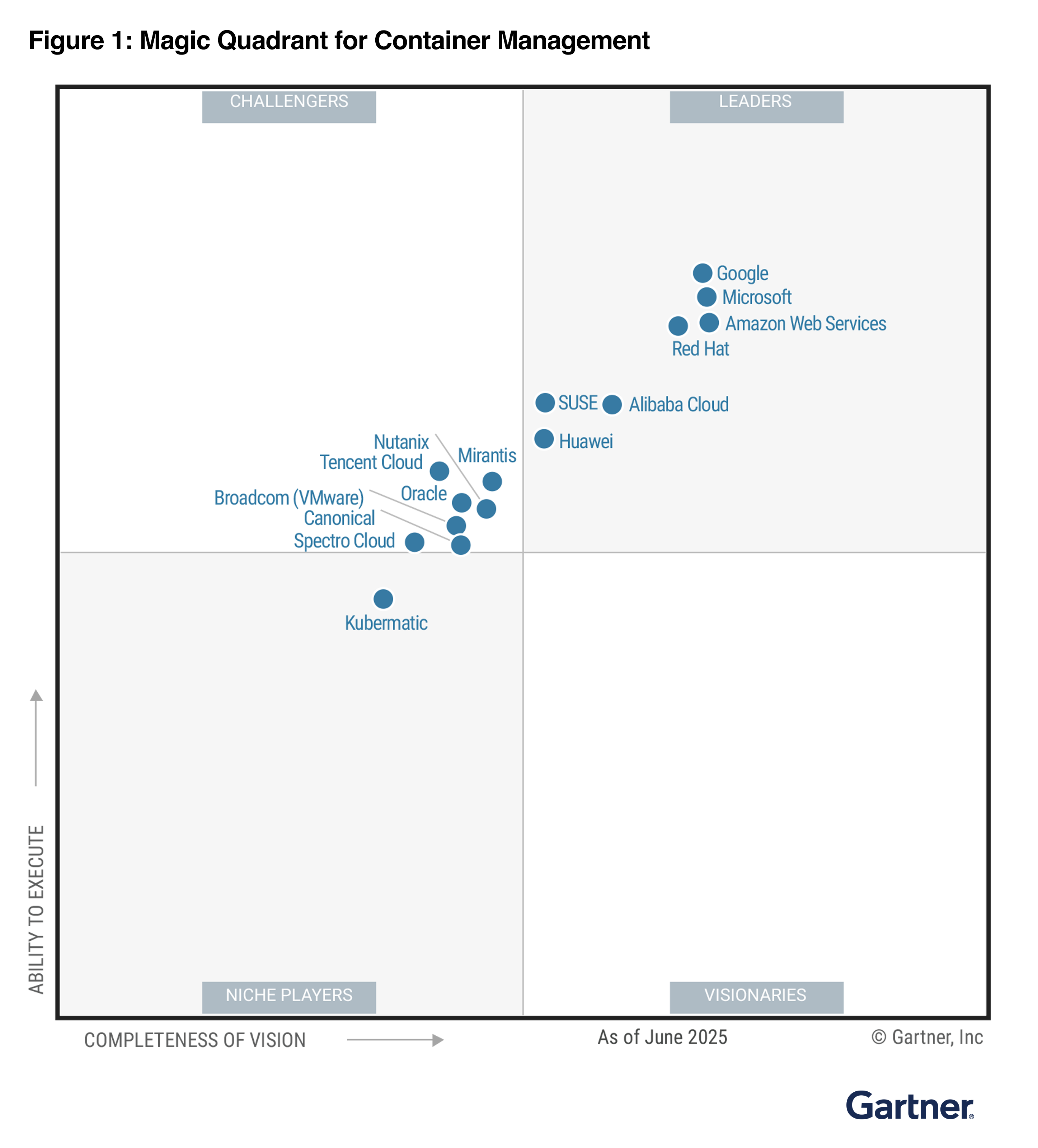
2025 Gartner Magic Quadrant for Container Management
In the 2025 Gartner Magic Quadrant for Container Management, AWS has been named as a Leader for three years and was positioned furthest for “Completeness of Vision”. Gartner defines container management as offerings that support the deployment and operation of containerized workloads. This process involves orchestrating and overseeing the entire lifecycle of containers, covering deployment, scaling, and operations, to ensure their efficient and consistent performance across different environments.

The following image is the graphical representation of the 2025 Magic Quadrant for Container Management.

AWS container services offer fully managed container orchestration with AWS native solutions and open-source technologies to focus on providing a wide range of deployment options, from Kubernetes to our native orchestrator.

You can use Amazon Elastic Container Service (Amazon ECS) and Amazon Elastic Kubernetes Service (Amazon EKS). Both can be used with AWS Fargate for serverless container deployment. Additionally, EKS Auto Mode simplifies Kubernetes management by automatically provisioning infrastructure, selecting optimal compute instances, and dynamically scaling resources for containerized applications.

You can connect on-premises and edge infrastructure back to AWS container services with EKS Hybrid Nodes and ECS Anywhere, or use EKS Anywhere for a fully disconnected Kubernetes experience supported by AWS. With flexible compute and deployment options, you can reduce operational overhead and focus on innovation and drive business value faster.

Access the complete 2025 Gartner Magic Quadrant for Container Management to learn more.

Channy

Gartner does not endorse any vendor, product or service depicted in its research publications and does not advise technology users to select only those vendors with the highest ratings or other designation. Gartner research publications consist of the opinions of Gartner’s research organization and should not be construed as statements of fact. Gartner disclaims all warranties, expressed or implied, with respect to this research, including any warranties of merchantability or fitness for a particular purpose.

GARTNER is a registered trademark and service mark of Gartner and Magic Quadrant is a registered trademark of Gartner, Inc. and/or its affiliates in the U.S. and internationally and are used herein with permission. All rights reserved.

Varnish 8.0.0 and bonus project news

Post Syndicated from jzb original https://lwn.net/Articles/1038242/

Version
8.0.0
of Varnish Cache
has been released. In addition to a number
of changes to varnishd parameters, the ability to access some
runtime parameters using the Varnish Configuration Language, and other
improvements, 8.0.0 comes with big news; the project is forming an
organization called a forening
that will set out formal governance for the project.

The move also comes with a name change due to legal difficulties in
securing the Varnish Cache name:

The new association and the new project will be named “The Vinyl
Cache Project”, and this release 8.0.0, will be the last under the
“Varnish Cache” name. The next release, in March will be under the new
name, and will include compatility scripts, to make the transition as
smooth as possible for everybody.

I want to make it absolutely clear that this is 100% a mess of my
making: I should have insisted on a firm written agreement about the
name sharing, but I did not.

I will also state for the record, that there are no hard feelings
between Varnish Software and the FOSS project.

Varnish Software has always been, and still is, an important and
valued contributor to the FOSS project, but sometimes even friends can
make a mess of a situation.

Automate and orchestrate Amazon EMR jobs using AWS Step Functions and Amazon EventBridge

Post Syndicated from Senthil Kamala Rathinam original https://aws.amazon.com/blogs/big-data/automate-and-orchestrate-amazon-emr-jobs-using-aws-step-functions-and-amazon-eventbridge/

Many enterprises are adopting Apache Spark for scalable data processing tasks such as extract, transform, and load (ETL), batch analytics, and data enrichment. As data pipelines evolve, the need for flexible and cost-efficient execution environments that support automation, governance, and performance at scale also evolve in parallel. Amazon EMR provides a powerful environment to run Spark workloads, and depending on workload characteristics and compliance requirements, teams can choose between fully managed options like Amazon EMR Serverless or more customizable configurations using Amazon EMR on Amazon Elastic Compute Cloud (Amazon EC2).

In use cases where infrastructure control, data locality, or strict security postures are essential, such as in financial services, healthcare, or government, running transient EMR on EC2 clusters becomes a preferred choice. However, orchestrating the full lifecycle of these clusters, from provisioning to job submission and eventual teardown, can introduce operational overhead and risk if done manually.

To streamline this process, the AWS Cloud offers built-in orchestration capabilities using AWS Step Functions and Amazon EventBridge. Together, these services help you automate and schedule the entire EMR job lifecycle, reducing manual intervention while optimizing cost and compliance. Step Functions provides the workflow logic to manage cluster creation, Spark job execution, and cluster termination, and EventBridge schedules these workflows based on business or operational needs.

In this post, we discuss how to build a fully automated, scheduled Spark processing pipeline using Amazon EMR on EC2, orchestrated with Step Functions and triggered by EventBridge. We walk through how to deploy this solution using AWS CloudFormation, processes COVID-19 public dataset data in Amazon Simple Storage Service (Amazon S3), and store the aggregated results in Amazon S3. This architecture is ideal for periodic or scheduled batch processing scenarios where infrastructure control, auditability, and cost-efficiency are critical.

Solution overview

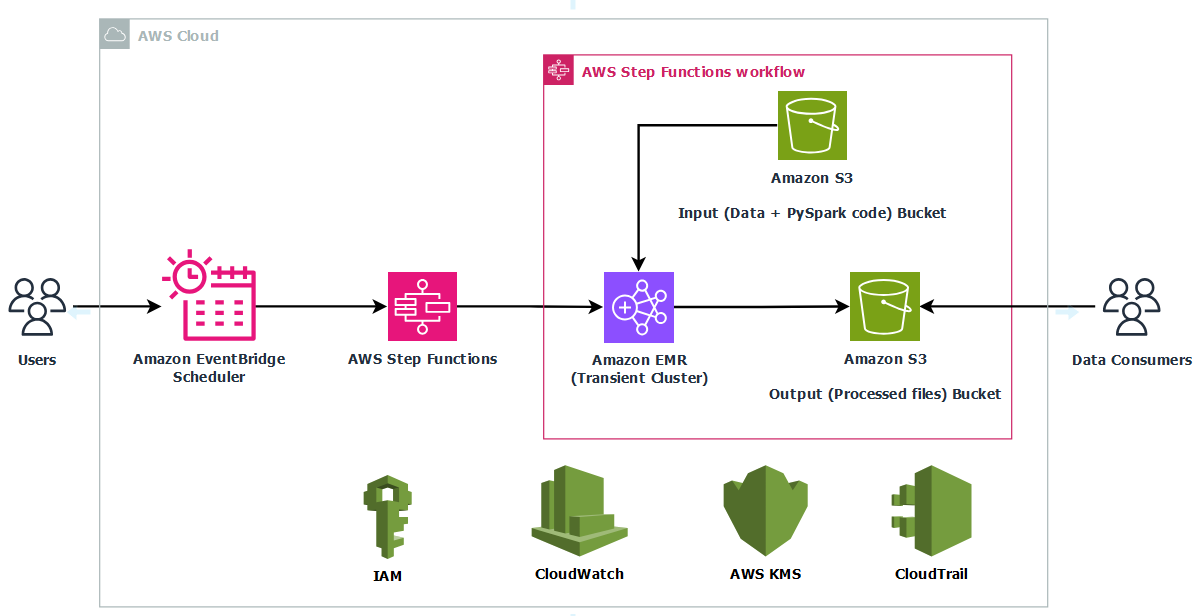
This solution uses the publicly available COVID-19 dataset to illustrate how to build a modular, scheduled architecture for scalable and cost-efficient batch processing for time-bound data workloads.The solution follows these steps:

  1. Raw COVID-19 data in CSV format is stored in an S3 input bucket.
  2. A scheduled rule in EventBridge triggers a Step Functions workflow.
  3. The Step Functions workflow provisions a transient Amazon EMR cluster using EC2 instances.
  4. A PySpark job is submitted to the cluster to calculate COVID-19 hospital utilization data to compute monthly state-level averages of inpatient and ICU bed utilization, and COVID-19 patient percentages.
  5. The processed results are written back to an S3 output bucket.
  6. After successful job completion, the EMR cluster is automatically deleted.
  7. Logs are persisted to Amazon S3 for observability and troubleshooting.

By automating this workflow, you alleviate the need to manually manage EMR clusters while gaining cost-efficiency by running compute only when needed. This architecture is ideal for periodic Spark jobs such as ETL pipelines, regulatory reporting, and batch analytics, especially when control, compliance, and customization are required.The following diagram illustrates the architecture for this use case.

The infrastructure is deployed using AWS CloudFormation to provide consistency and repeatability. AWS Identity and Access Management (IAM) roles grant least‑privilege access to Step Functions, Amazon EMR, EC2 instances, and S3 buckets, and optional AWS Key Management Service (AWS KMS) encryption can secure data at rest in Amazon S3 and Amazon CloudWatch Logs. By combining a scheduled trigger, stateful orchestration, and centralized logging, this solution delivers a fully automated, cost‑optimized, and secure way to run transient Spark workloads in production.

Prerequisites

Before you get started, make sure you have the following prerequisites:

Set up resources with AWS CloudFormation

To provision the required resources using a single CloudFormation template, complete the following steps:

  1. Sign in to the AWS Management Console as an admin user.
  2. Clone the sample repository to your local machine or AWS CloudShell and navigate into the project directory.
    git clone https://github.com/aws-samples/sample-emr-transient-cluster-step-functions-eventbridge.git
    cd sample-emr-transient-cluster-step-functions-eventbridge

  3. Set an environment variable for the AWS Region where you plan to deploy the resources. Replace the placeholder with your Region code, for example, us-east-1.
    export AWS_REGION=<YOUR AWS REGION>

  4. Deploy the stack using the following command. Update the stack name if needed. In this example, the stack is created with the name covid19-analysis.
    aws cloudformation deploy \
    --template-file emr_transient_cluster_step_functions_eventbridge.yaml \
    --stack-name covid19-analysis \
    --capabilities CAPABILITY_IAM \
    --region $AWS_REGION 

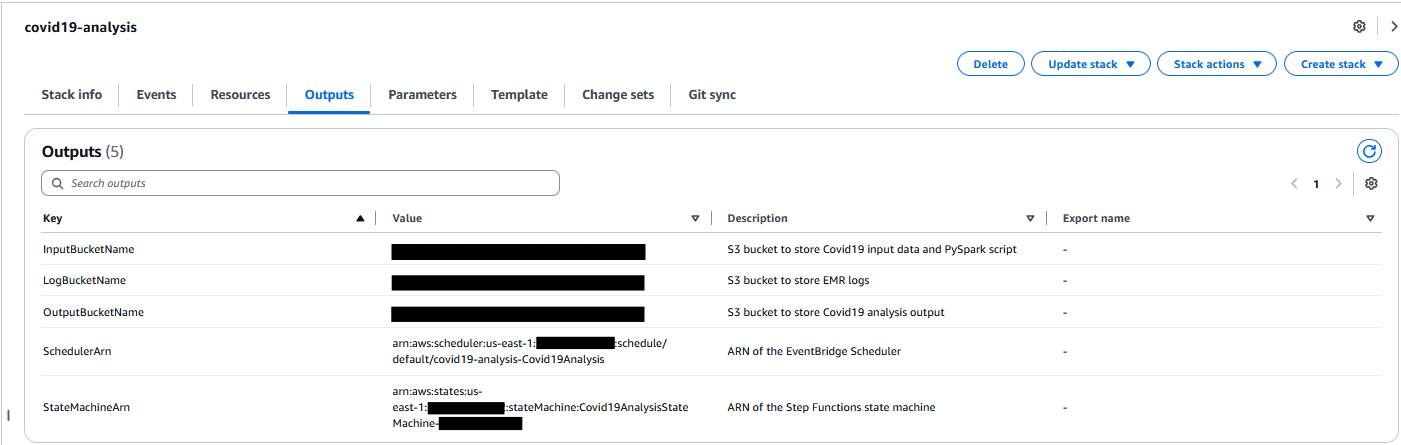
You can monitor the stack creation progress on the AWS CloudFormation console on the Events tab. The deployment typically completes in under 5 minutes.

After the stack is successfully created, go to the Outputs tab on the AWS CloudFormation console and note the following values for use in later steps:

  • InputBucketName
  • OutputBucketName
  • LogBucketName

Set up the COVID-19 dataset

With your infrastructure in place, complete the following steps to set up the input data:

  1. Download the COVID-19 data CSV file from HealthData.gov to your local machine.
  2. Rename the downloaded file to covid19-dataset.csv.
  3. Upload the renamed file to your S3 input bucket under the raw/ folder path.

Set up the PySpark Script

Complete the following steps to set up the PySpark script:

  1. Open AWS CloudShell from the console.
  2. Confirm that you are working inside the sample-emr-transient-cluster-step-functions-eventbridge directory before running the next command.
  3. Copy the PySpark script needed for this walkthrough into your input bucket:
    aws s3 cp covid19_processor.py s3://<InputBucketName>/scripts/

This script processes COVID-19 hospital utilization data stored as CSV files in your S3 input bucket. When running the job, provide the following command-line arguments:

  • --input – The S3 path to the input CSV files
  • --output – The S3 path to store the processed results

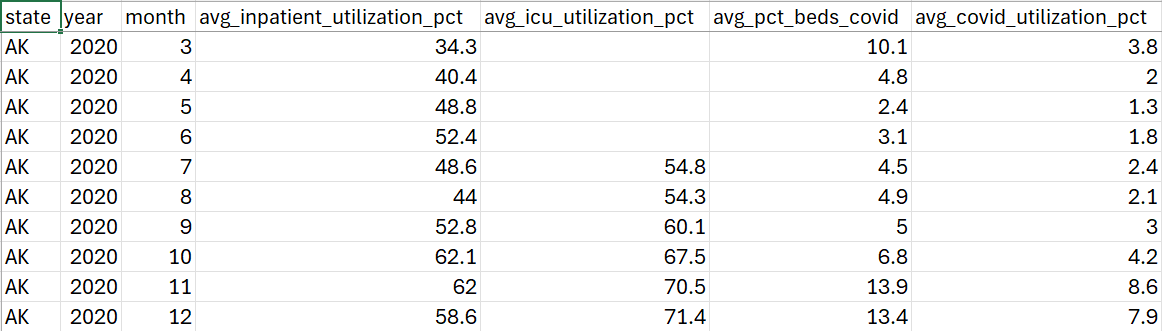
The script reads the raw dataset, standardizes various date formats, and filters out records with invalid or missing dates. It then extracts key utilization metrics such as inpatient bed usage, ICU bed usage, and the percentage of beds occupied by COVID-19 patients and calculates monthly averages grouped by state. The aggregated output is saved as timestamped CSV files in the specified S3 location.

This example demonstrates how you can use PySpark to efficiently clean, transform, and analyze large-scale healthcare data to gain actionable insights on hospital capacity trends during the pandemic.

Configure a schedule in EventBridge

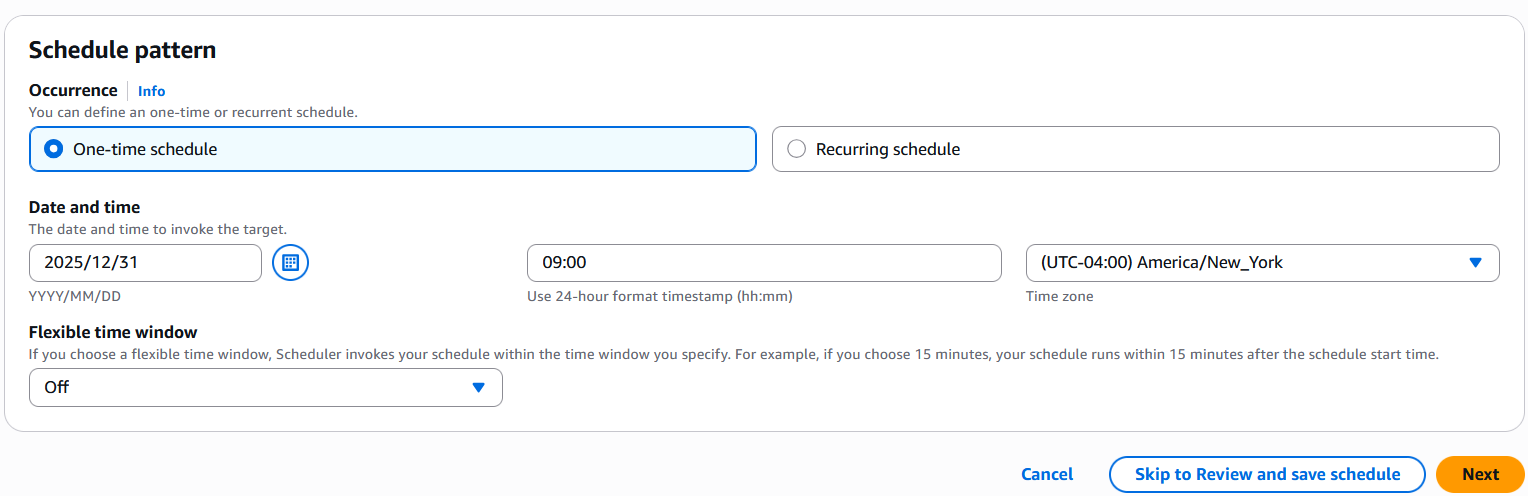
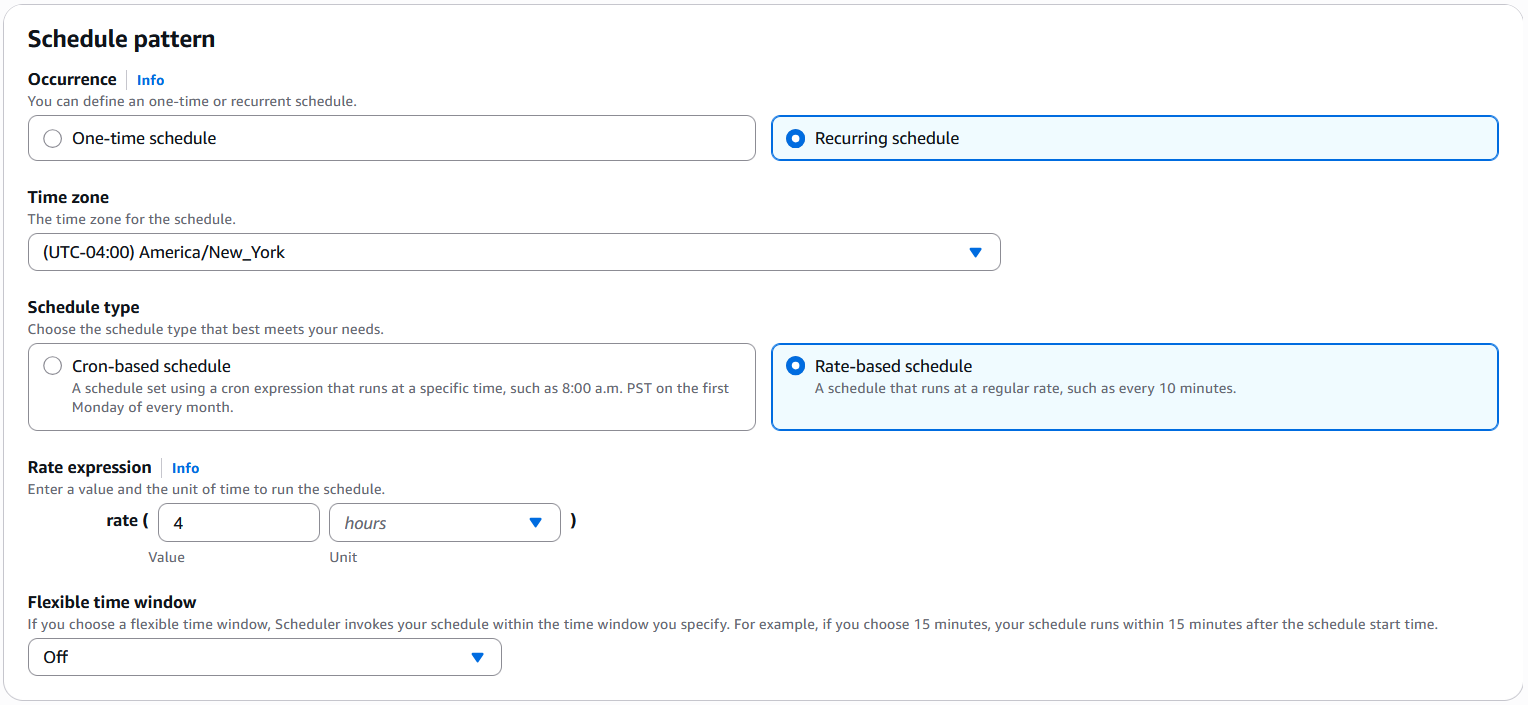
The Step Functions state machine is by default scheduled to run on December 31, 2025, as a one-time execution. You can update the schedule for recurring or one-time execution as needed. Complete the following steps:

  1. On the EventBridge console, choose Schedules under Scheduler in the navigation pane.
  2. Select the schedule named <StackName>-covid19-analysis and choose Edit.
  3. Set your preferred schedule pattern.
    1. If you want to run the schedule one time, select One-time schedule for Occurrence and enter a date and time.
    2. If you want to run this on a recurring basis, select Recurring schedule. Specify the schedule type as either Cron-based schedule or Rate-based schedule as needed.
  4. Choose Next twice and choose Save schedule.

Start the workflow in Step Functions

Based on your EventBridge schedule, the Step Functions workflow will run automatically. For this walkthrough, complete the following steps to trigger it manually:

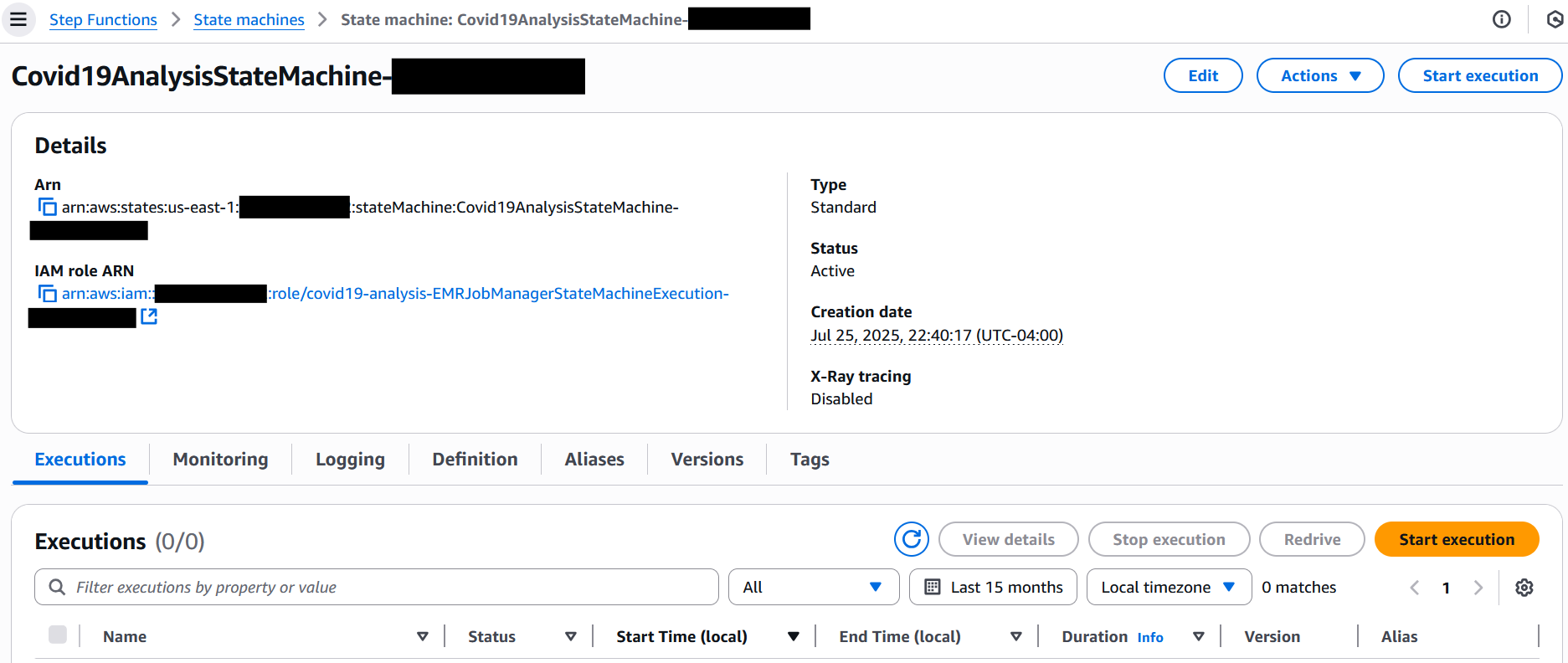
  1. On the Step Functions console, choose State machines in the navigation pane.
  2. Choose the state machine that begins with Covid19AnalysisStateMachine-*.
  3. Choose Start execution.
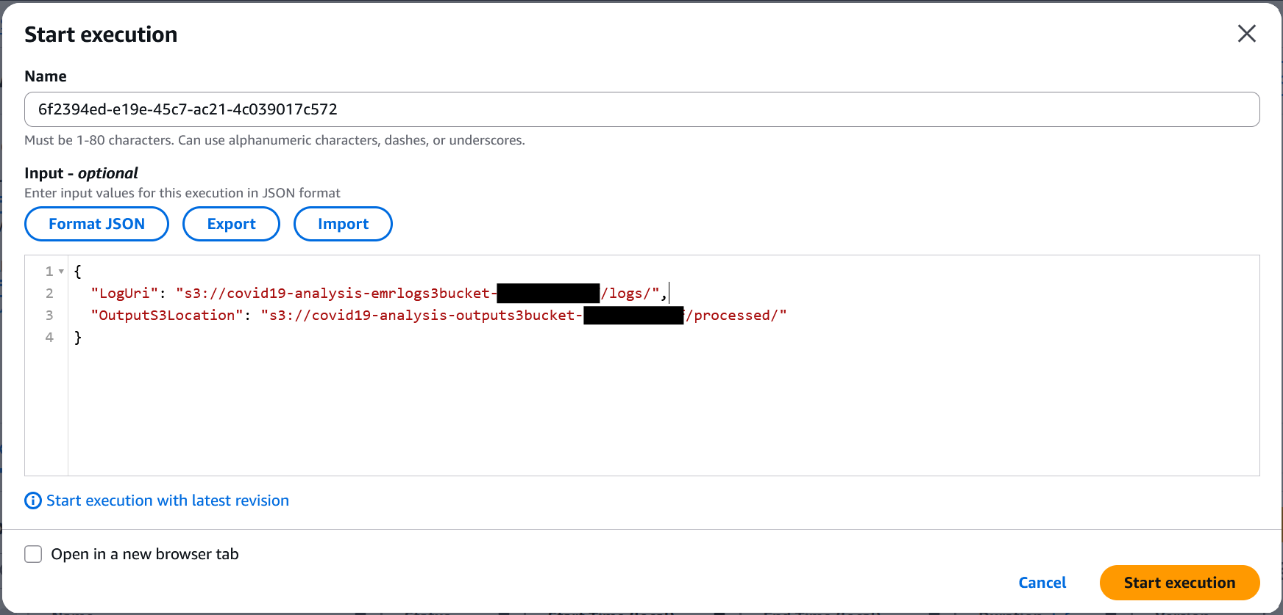
  4. In the Input section, provide the following JSON (provide the log bucket and output bucket names with the appropriate values captured earlier):
    {
      "LogUri": "s3://<LogBucketName>/logs/",
      "OutputS3Location": "s3://<OutputBucketName>/processed/"
    }

  5. Choose Start execution to initiate the workflow.

Monitor the EMR job and workflow execution

After you start the workflow, you can track both the Step Functions state transitions and the EMR job progress in real time on the console.

Monitor the Step Functions state machine

Complete the following steps to monitor the Step Functions state machine:

  1. On the Step Functions console, choose State machines in the navigation pane.
  2. Choose the state machine that begins with Covid19AnalysisStateMachine-*.
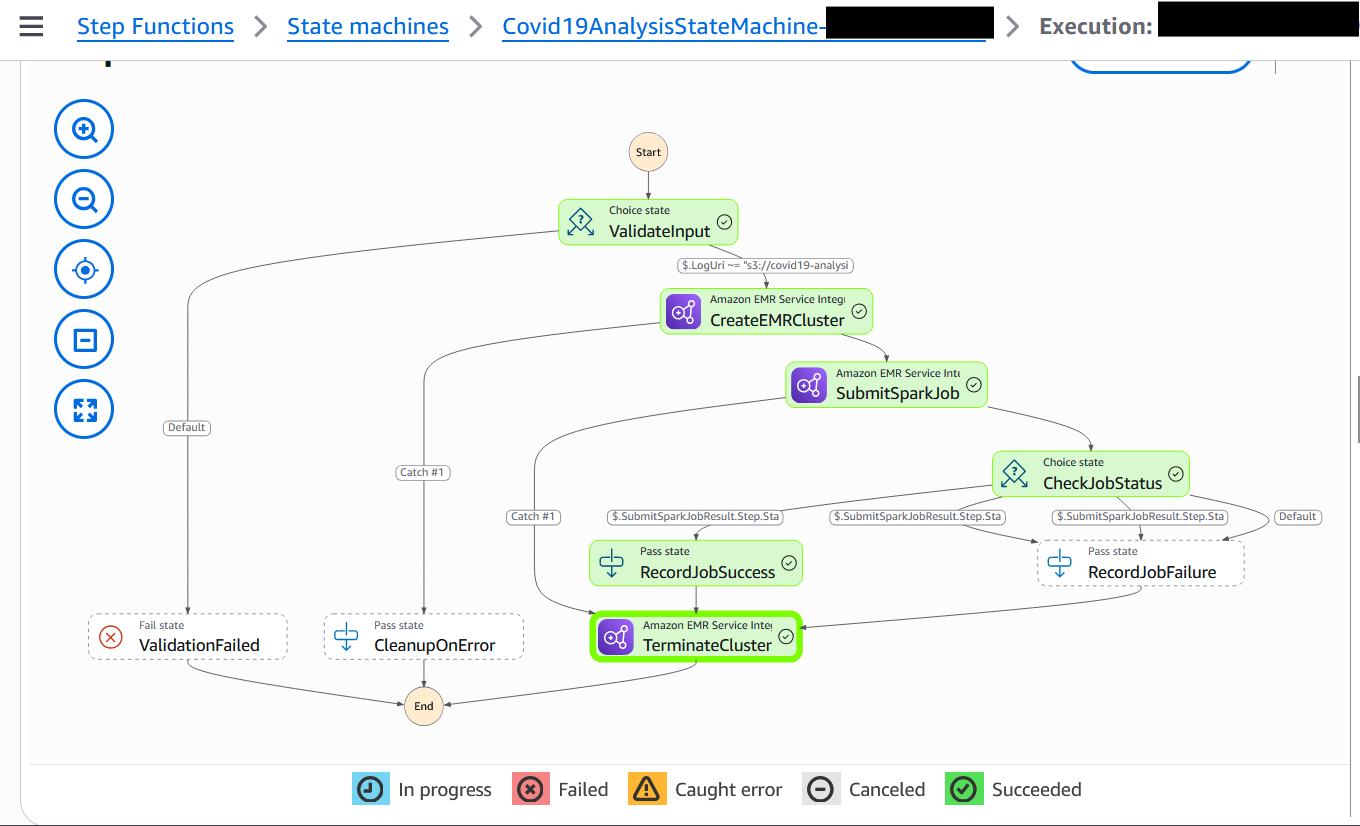
  3. Choose the running execution to view the visual workflow.

    Each state node will update as it progresses—green for success, red for failure.

  4. To explore a step, choose its node and inspect the input, output, and error details in the side pane.

The following screenshot shows an example of a successfully executed workflow.

Monitor the EMR cluster and EMR step

Complete the following steps to monitor the EMR cluster and EMR step status:

  1. While the cluster is active, open the Amazon EMR console and choose Clusters in the navigation pane.
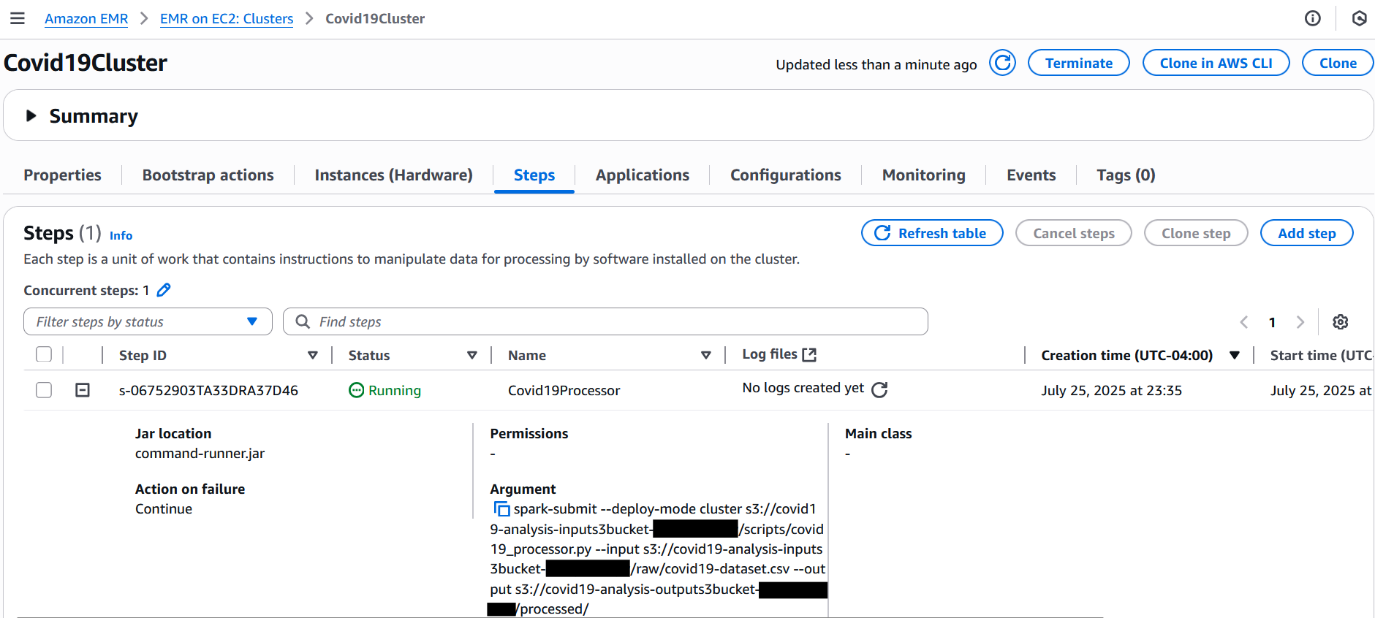
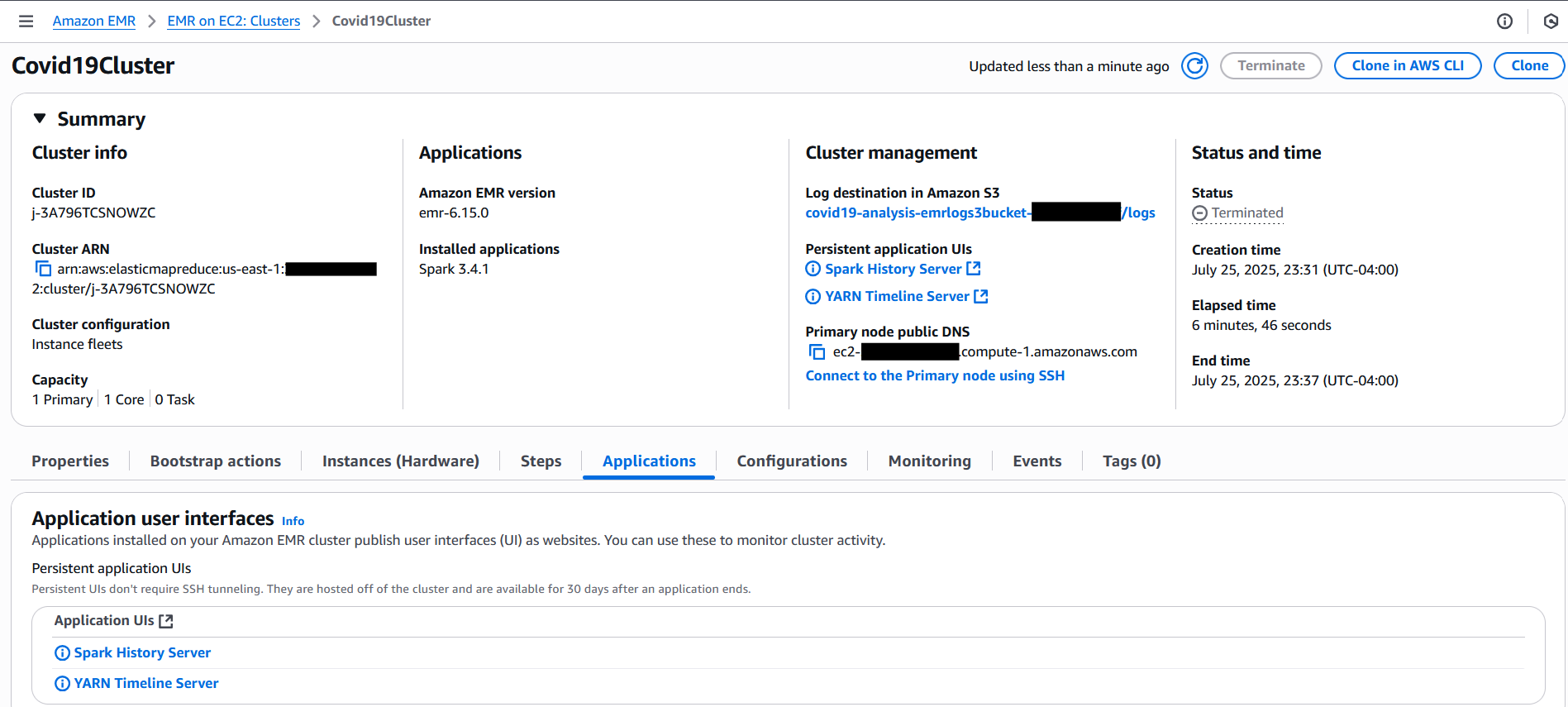
  2. Locate the Covid19Cluster transient EMR cluster.
    Initially, it will be in Starting status.

    On the Steps tab, you can see your Spark submit step listed. As the job progresses, the step status changes from Pending to Running to finally Completed or Failed.

  3. Choose the Applications tab to view the application UIs, in which you can access the Spark History Server and YARN Timeline Server for monitoring and troubleshooting.

Monitor CloudWatch logs

To enable CloudWatch logging and enhanced monitoring for your EMR on EC2 cluster, refer to Amazon EMR on EC2 – Enhanced Monitoring with CloudWatch using custom metrics and logs. This guide explains how to install and configure the CloudWatch agent using a bootstrap action, so you can stream system-level metrics (such as CPU, memory, and disk usage) and application logs from EMR nodes directly to CloudWatch. With this setup, you can gain real-time visibility into cluster health and performance, simplify troubleshooting, and retain critical logs even after the cluster is terminated.

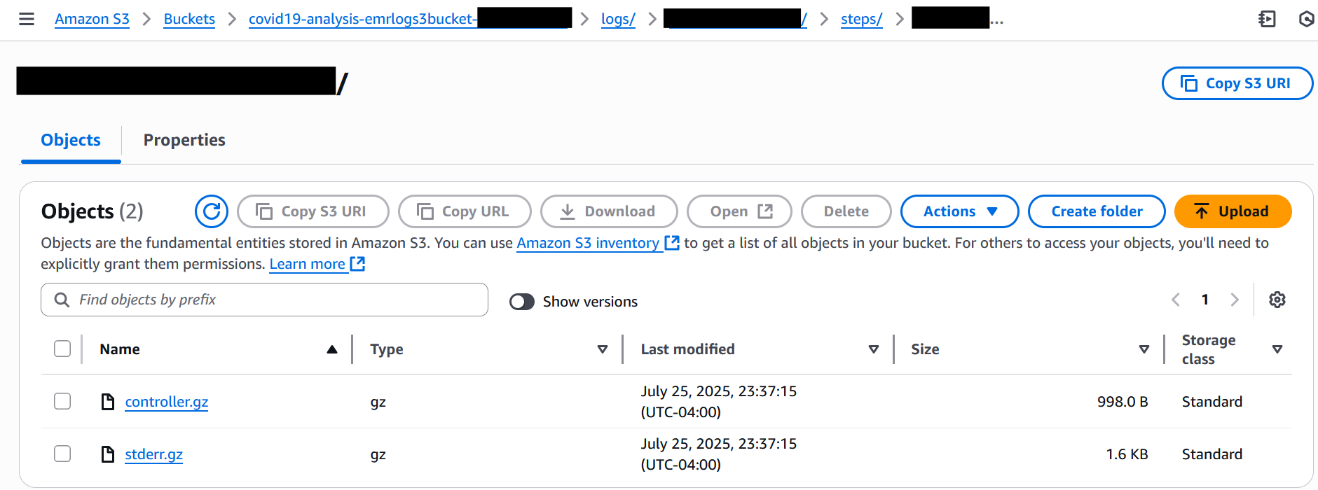
For this walkthrough, check the logs in the S3 log output location.

Confirm cluster deletion

When the Spark step is complete, Step Functions will automatically delete the Amazon EMR cluster. Refresh the Clusters page on the Amazon EMR console. You should see your cluster status change from Terminating to Terminated within a minute.

By following these steps, you gain full end-to-end visibility into your workflow from the moment the Step Functions state machine is triggered to the automatic shutdown of the EMR cluster. You can monitor execution progress, troubleshoot issues, confirm job success, and continuously optimize your transient Spark workloads.

Verify job output in Amazon S3

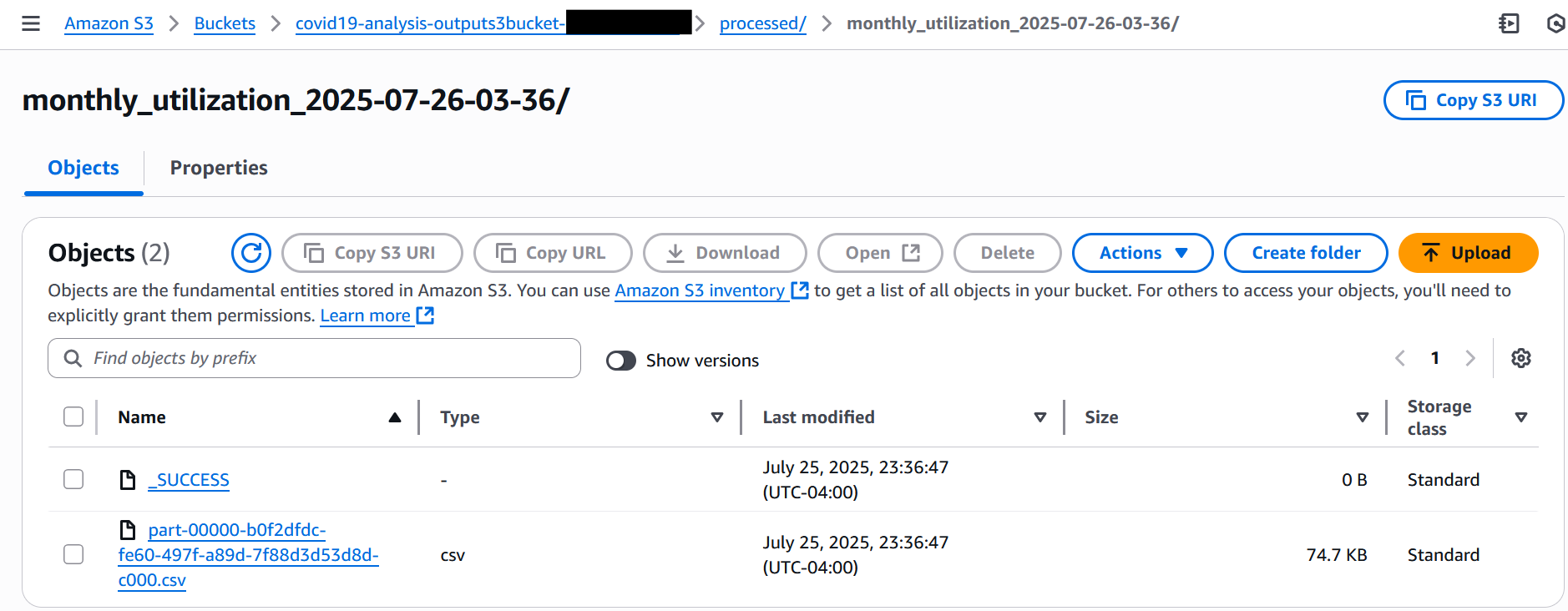
When the job is complete, complete the following steps to check the processed results in the S3 output bucket:

  1. On the Amazon S3 console, choose Buckets in the navigation pane.
  2. Open the output S3 bucket you noted earlier.
  3. Open the processed folder.
  4. Navigate into the timestamped subfolder to view the CSV output file.
  5. Download the CSV file to view the processed results, as shown in the following screenshot.

Monitoring and troubleshooting

To monitor the progress of your Spark job running on a transient EMR on EC2 cluster, use the Step Functions console. It provides real-time visibility into each state transition in your workflow, from cluster creation and job submission to cluster deletion. This makes it straightforward to track execution flow and identify where issues might occur.During job execution, you can use the Amazon EMR console to access cluster-level monitoring. This includes YARN application statuses, step-level logs, and overall cluster health. If CloudWatch logging is enabled in your job configuration, driver and executor logs stream in near real time, so you can quickly detect and diagnose errors, resource constraints, or data skew within your Spark application.

After the workflow is complete, regardless of whether it succeeds or fails, you can perform a detailed post-execution analysis by reviewing the logs stored in the S3 bucket specified in the LogUri parameter. This log directory includes standard output and error logs, along with Spark history files, offering insights into execution behavior and performance metrics.

For continued access to the Spark UI during job execution, you can use persistent application UIs on the EMR console. These links remain accessible even after the cluster is stopped, enabling deeper root-cause analysis and performance tuning for future runs.

This visibility into both workflow orchestration and job execution can help teams optimize their Spark workloads, reduce troubleshooting time, and build confidence in their EMR automation pipelines.

Clean up

To avoid incurring ongoing charges, clean up the resources provisioned during this walkthrough:

  1. Empty the S3 buckets:
    1. On the Amazon S3 console, choose Buckets in the navigation pane.
    2. Select the input, output, and log buckets used in this tutorial.
    3. Choose Empty to remove all objects before deleting the buckets (optional).
  2. Delete the CloudFormation stack:
    1. On the AWS CloudFormation console, choose Stacks in the navigation pane.
    2. Select the stack you created for this solution and choose Delete.
    3. Confirm the deletion to remove associated resources.

Conclusion

In this post, we showed how to build a fully automated and cost-effective Spark processing pipeline using Step Functions, EventBridge, and Amazon EMR on EC2. The workflow provisions a transient EMR cluster, runs a Spark job to process data, and stops the cluster after the job completes. This approach helps reduce costs while giving you full control over the process. This solution is ideal for scheduled data processing tasks such as ETL jobs, log analytics, or batch reporting, especially when you need detailed control over infrastructure, security, and compliance settings.

To get started, deploy the solution in your environment using the CloudFormation stack provided and adjust it to fit your data processing needs. Check out the Step Functions Developer Guide and Amazon EMR Management Guide to explore further.

Share your feedback and ideas in the comments or connect with your AWS Solutions Architect to fine-tune this pattern for your use case.


About the authors

Senthil Kamala Rathinam

Senthil Kamala Rathinam

Senthil is a Solutions Architect at Amazon Web Services, specializing in Data and Analytics for banking customers across North America. With deep expertise in Data and Analytics, AI/ML, and Generative AI, he helps organizations unlock business value through data-driven transformation. Beyond work, Senthil enjoys spending time with his family and playing badminton.

Shashi Makkapati

Shashi Makkapati

Shashi is a Senior Solutions Architect serving banking customers across North America. He specializes in data analytics, AI/ML, and generative AI, focusing on innovative solutions that transform financial organizations. Shashi is passionate about leveraging technology to solve complex business challenges in the banking sector. Outside of work, he enjoys traveling and spending quality time with his family.

Streamline Spark application development on Amazon EMR with the Data Solutions Framework on AWS

Post Syndicated from Vincent Gromakowski original https://aws.amazon.com/blogs/big-data/streamline-spark-application-development-on-amazon-emr-with-the-data-solutions-framework-on-aws/

Today, organizations are heavily using Apache Spark for their big data processing needs. However, managing the entire development lifecycle of Spark applications—from local development to production deployment—can be complex and time-consuming. Managing the entire code base—including application code, infrastructure provisioning, and continuous integration and delivery (CI/CD) pipelines—is sometimes not fully automated and a shared responsibility across multiple teams, which slows down release cycles. This undifferentiated heavy lifting diverts valuable resources away from core business objectives: deriving value from data.

In this post, we explore how to use Amazon EMR, the AWS Cloud Development Kit (AWS CDK), and the Data Solutions Framework (DSF) on AWS to streamline the development process, from setting up a local development environment to deploying serverless Spark infrastructure, and implementing a CI/CD pipeline for automated testing and deployment.

By adopting this approach, developers gain full control over their code and the infrastructure responsible for running it, alleviating the need for cross-team dependency. Developers can customize the infrastructure to meet specific business needs and optimize performance. Additionally, they can customize CI/CD stages to facilitate comprehensive testing, using the self-mutation capability of AWS CDK Pipelines to automatically update and refine the deployment process. This level of control not only accelerates development cycles but also enhances the reliability and efficiency of the entire application lifecycle, so developers can focus more on innovation and less on manual infrastructure management.

Solution overview

The solution consists of the following key components:

  • The local development environment to develop and test your Spark code locally
  • The infrastructure as code (IaC) that will run your Spark application in AWS environments
  • The CI/CD pipeline running end-to-end tests and deploying into the different AWS environments

In the following sections, we discuss how to set up these components.

Prerequisites

To set up this solution, you must have an AWS account with appropriate permissions, Docker and the AWS CDK CLI.

Set up the local development environment

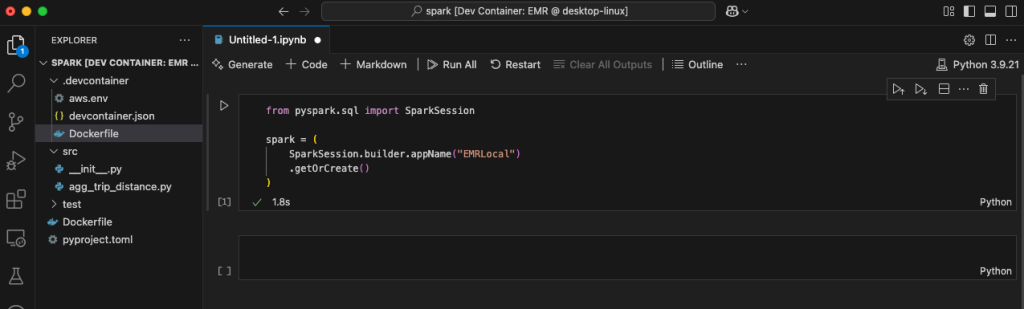
Developing Spark applications locally can be a challenging task due to the need for a consistent and efficient environment that mirrors your production setup. With Amazon EMR, Docker, and the Amazon EMR toolkit extension for Visual Studio Code, you can quickly set up a local development environment for Spark applications, developing and testing Spark code locally, and seamlessly port it to the cloud.

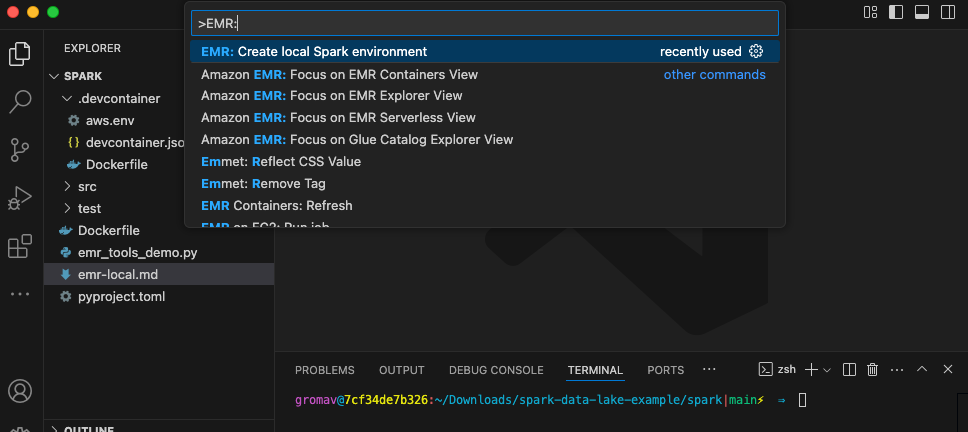
The Amazon EMR toolkit for VS Code includes an “EMR: Create Local Spark Environment” command that generates a development container. This container is based on an Amazon EMR on Amazon EKS image corresponding to the Amazon EMR version you select. You can develop Spark and PySpark code locally, with full compatibility with your remote Amazon EMR environment. Additionally, the toolkit provides helpers to make it straightforward to connect to the AWS Cloud, including an Amazon EMR explorer, an AWS Glue Data Catalog explorer, and commands to run Amazon EMR Serverless jobs from VS Code.

To set up your local environment, complete the following steps:

  1. Install VS Code and the Amazon EMR Toolkit for VS Code.
  2. Install and launch Docker.
  3. Create a local Amazon EMR environment in your working directory using the command EMR: Create Local Spark Environment.

Amazon EMR Toolkit bootstrap

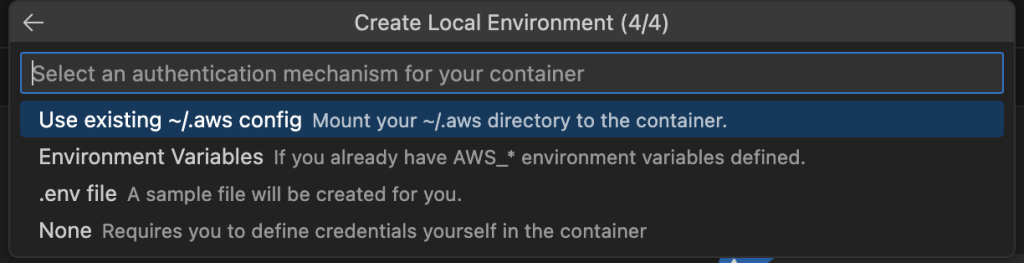
  1. Choose PySpark, Amazon EMR 7.5, and the AWS Region you want to use, and choose an authentication mechanism.

Amazon EMR toolkit local environment

  1. Log in to Amazon ECR with your AWS credentials using the following command so you can download the Amazon EMR image:
aws ecr get-login-password --region us-east-1 \
    | docker login \
    --username AWS \
    --password-stdin \
    12345678910.dkr.ecr.us-east-1.amazonaws.com
  1. Now you can launch your dev container using the VS Code command Dev Containers: Rebuild and Reopen in container.

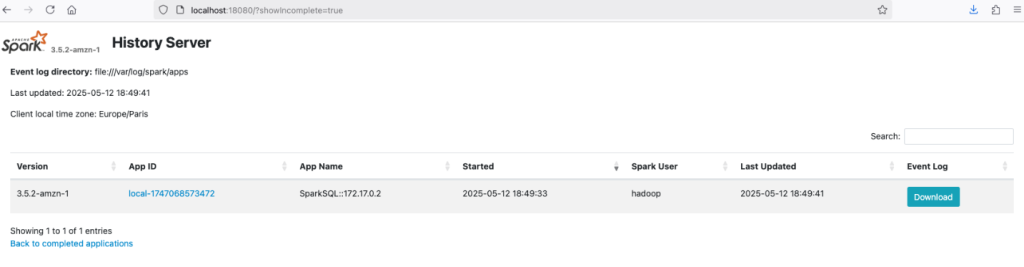
The container will install the latest operating system packages and run a local Spark history server on port 18080.

local Spark history server

The container provides spark-shell, spark-sql, and pyspark from the terminal and a Jupyter Python kernel for connecting a Jupyter notebook to execute interactive Spark code.

local Jupyter notebooks

Using the Amazon EMR Toolkit, you can develop your Spark application and test it locally using Pytest—for example, to validate the business logic. You can also connect to other AWS accounts where you have your development environment.

Build the AWS CDK application with DSF on AWS

After you validate the business logic into your local Spark application, you can implement the infrastructure responsible for running your application. DSF provides AWS CDK L3 Constructs that simplify the creation of Spark-based data pipelines on EMR Serverless or Amazon EMR on EKS.

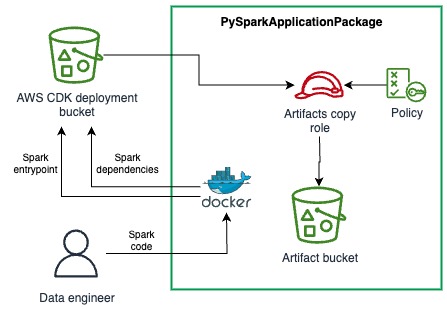
DSF provides the capability to package your local PySpark application, including the Python dependencies, into artifacts that can consumed by EMR Serverless jobs. The PySparkApplicationPackage is a construct that uses a Dockerfile to perform the packaging of dependencies into a Python virtual environment archive and then upload the archive and the PySpark entrypoint file into a secured Amazon Simple Storage Service (Amazon S3) bucket. The following diagram illustrates this architecture.

PySparkApplicationPackage L3 construct

See the following example code:

spark_app = dsf.processing.PySparkApplicationPackage(
    self,
    "SparkApp",
    entrypoint_path="./../spark/src/agg_trip_distance.py",
    application_name="TaxiAggregation",
    # Path of the Dockerfile used to package the dependencies as a Python venv
    dependencies_folder='./../spark',
    # Path of the venv archive in the docker image
    venv_archive_path="/venv-package/pyspark-env.tar.gz",
    removal_policy=RemovalPolicy.DESTROY)

You just need to provide the paths for the following:

  • The PySpark entrypoint. This is the main Python script of your Spark application.
  • The Dockerfile containing the logic for packaging a virtual environment into an archive.
  • The path of the resulting archive in the container file system.

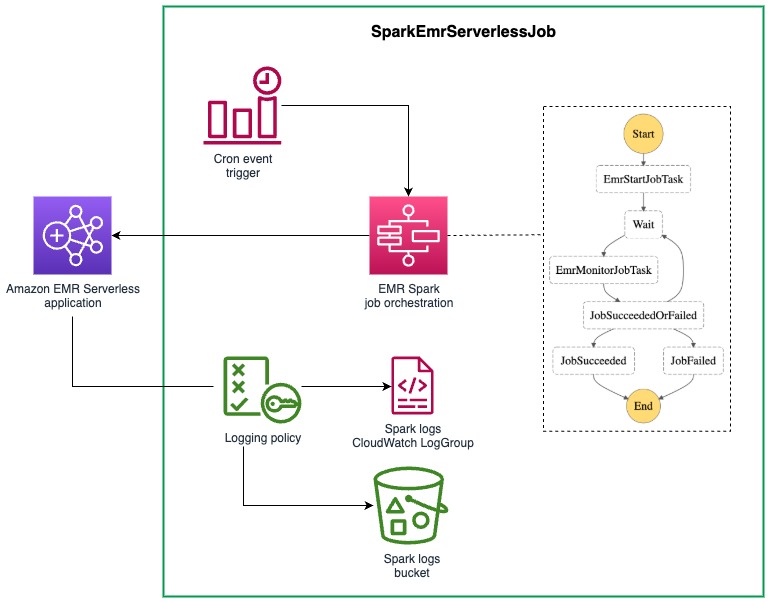
DSF provides helpers to connect the application package to the EMR Serverless job. The PySparkApplicationPackage construct exposes properties that can directly be used into the SparkEmrServerlessJob construct parameters. This construct simplifies the configuration of a batch job using an AWS Step Functions state machine. The following diagram illustrates this architecture.

EmrServerlessJob L3 construct

The following code is an example of an EMR Serverless job:

spark_job = dsf.processing.SparkEmrServerlessJob(
    self,
    "SparkProcessingJob",
    dsf.processing.SparkEmrServerlessJobProps(
        name=f"taxi-agg-job-{Names.unique_resource_name(self)}",
        # ID of the previously created EMR Serverless runtime
        application_id=spark_runtime.application.attr_application_id,
        # The IAM role used by the EMR Job with permissions required by the application
        execution_role=processing_exec_role,
        spark_submit_entry_point=spark_app.entrypoint_uri,
        # Add the Spark parameters from the PySpark package to configure the dependencies (using venv)
        spark_submit_parameters=spark_app.spark_venv_conf + spark_params,
        removal_policy=RemovalPolicy.DESTROY,
        schedule=schedule))

Note the two parameters of SparkEmrServerlessJob that are provided by PySparkApplicationPackage:

  • entrypoint_uri, which is the S3 URI of the entrypoint file
  • spark_venv_conf, which contains the Spark submit parameters for using the Python virtual environment

DSF also provides a SparkEmrServerlessRuntime to simplify the creation of the EMR Serverless application responsible for running the job.

Deploy the Spark application using CI/CD

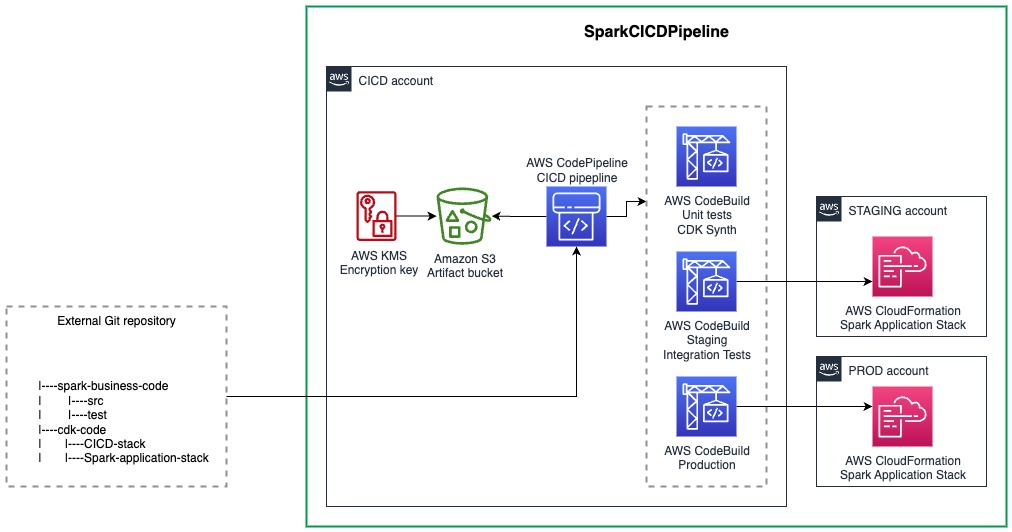
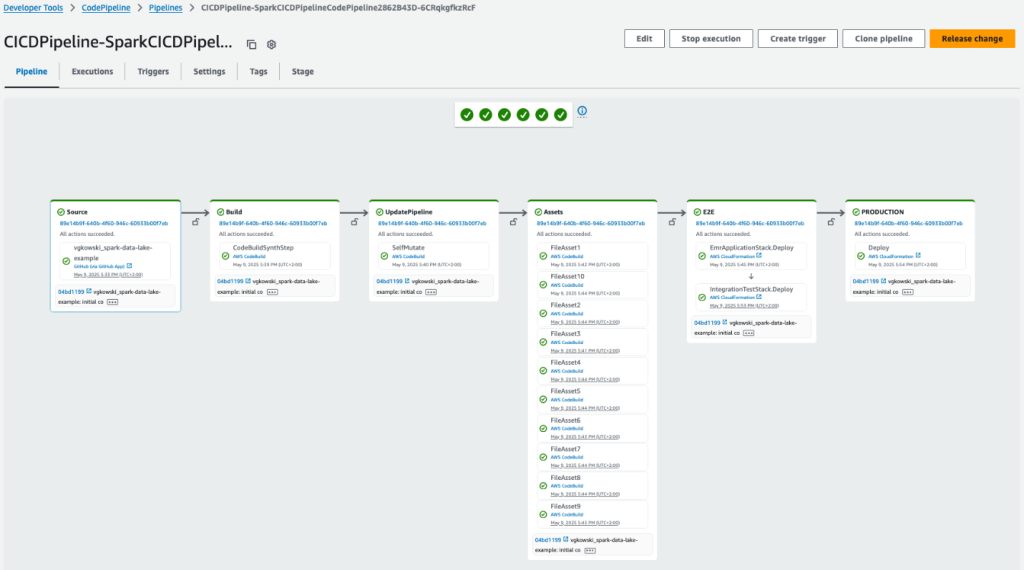
The final step is to implement a CI/CD pipeline that can test your Spark code and promote from dev/test/stage and then to production. DSF provides a L3 Construct that simplifies the creation of the CI/CD pipeline for your Spark applications. DSF’s implementation of the Spark CI/CD pipeline construct uses the AWS CDK built-in pipeline functionality. One of the key capabilities when using an AWS CDK pipeline is its self-mutating capability. It can update itself whenever you change its definition, avoiding the traditional chicken-and-egg problem of pipeline updates and helping developers fully control their CI/CD pipeline.

When the pipeline runs, it follows a carefully orchestrated sequence. First, it retrieves your code from your repository and synthesizes it into AWS CloudFormation templates. Before doing anything else, it examines these templates to see if you’ve made any changes to the pipeline’s own structure. If the pipeline detects that its definition has changed, it will pause its normal operation and update itself first. After the pipeline has updated itself, it will continue with its regular stages, such as deploying your application.

DSF provides an opinionated implementation of CDK Pipelines for Spark applications, where the PySpark code is automatically unit tested using Pytest and where the configuration is simplified. You only need to configure four components:

  • The CI/CD stages (testing, staging, production, and so on). This includes the AWS account ID and Region where these environments reside in.
  • The AWS CDK stack that is deployed in each environment.
  • (Optional) The integration test script that you want to run against the deployed stack.
  • The SparkEmrCICDPipeline AWS CDK construct.

The following diagram illustrates how everything works together.

SparkCICDPipeline L3 construct

Let’s dive into each of these components.

Define cross-account deployment and CI/CD stages

With the SparkEmrCICDPipeline construct, you can deploy your Spark application stack across different AWS accounts. For example, you can have a separate account for your CI/CD processes and different accounts for your staging and production environments.To set this up, first bootstrap the various AWS accounts (staging, production, and so on):

cdk bootstrap --profile <ENVIRONMENT_ACCOUNT_PROFILE> \ 
    aws://<ENVIRONMENT_ACCOUNT_ID&gt;/&lt;REGION> \ 
    --trust <CICD_ACCOUNT_ID> \ 
    --cloudformation-execution-policies "POLICY_ARN"

This step sets up the necessary resources in the environment accounts and creates a trust relationship between those accounts and the CI/CD account where the pipeline will run.Next, choose between two options to define the environments (both options require the relevant configuration in the cdk.context.json file.The first option is to use pre-defined environments, which is defined as follows:

{ 
    "staging": { 
        "account": "<STAGING_ACCOUNT_ID>", 
        "region": "<REGION>" 
    }, 
    "prod": { 
        "account": "<PROD_ACCOUNT_ID>", 
        "region": "<REGION>" 
    } 
}

Alternatively, you can use user-defined environments, which is defined as follows:

{
   "environments":[
      {
         "stageName":"<STAGE_NAME_1>",
         "account":"<STAGE_ACCOUNT_ID>",
         "region":"<REGION>",
         "triggerIntegTest":"<OPTIONAL_BOOLEAN_CAN_BE_OMMITTED>"
      },
      {
         "stageName":"<STAGE_NAME_2>",
         "account":"<STAGE_ACCOUNT_ID>",
         "region":"<REGION>",
         "triggerIntegTest":"<OPTIONAL_BOOLEAN_CAN_BE_OMMITTED>"
      },
      {
         "stageName":"<STAGE_NAME_3>",
         "account":"<STAGE_ACCOUNT_ID>",
         "region":"<REGION>",
         "triggerIntegTest":"<OPTIONAL_BOOLEAN_CAN_BE_OMMITTED>"
      }
   ]
}

Customize the stack to be deployed

Now that the environments have been bootstrapped and configured, let’s look at the actual stack that contains the resources that will be deployed in the various environments. Two classes must be implemented:

  • A class that extends the stack – This is where the resources that are going to be deployed in each of the environments are defined. This can be a normal AWS CDK stack, but it can be deployed in another AWS account depending on the environment configuration defined in the previous section.
  • A class that extends ApplicationStackFactory – This is DSF specific, and makes it possible to configure and then return the stack that is created.

The following code shows a full example:

class MyApplicationStack(cdk.Stack): 
    def __init__(self, scope, *, stage): 
        super().__init__(scope, "MyApplicationStack") 
        bucket = Bucket(self, "TestBucket",
                        auto_delete_objects=True, 
                        removal_policy=cdk.RemovalPolicy.DESTROY) 
        cdk.CfnOutput(self, "BucketName", value=bucket.bucket_name) 
        
class MyStackFactory(dsf.utils.ApplicationStackFactory): 
    def create_stack(self, scope, stage): 
        return MyApplicationStack(scope, stage=stage)

ApplicationStackFactory supports customization of the stack before returning the initialized object to be deployed by the CI/CD pipeline. You can customize your stack behavior by passing the current stage to your stack. For example, you can skip scheduling the Spark application in the integration tests stage because the integration tests trigger it manually as part of the CI/CD pipeline. For the production stage, the scheduling facilitates automatic execution of the Spark application.

Write the integration test script

The integration test script is a bash script that is triggered after the main application stack has been deployed. Inputs to the bash script can come from the AWS CloudFormation outputs of the main application stack. These outputs are mapped into environment variables that the bash script can access directly.

In the Spark CI/CD example, the application stack uses the SparkEMRServerlessJob CDK construct. This construct uses a Step Functions state machine to manage the execution and monitoring of the Spark job. The following is an example integration test bash script that we use to test that the deployed stack can run the associated Spark job successfully:

#!/bin/bash 
EXECUTION_ARN=$(aws stepfunctions start-execution --state-machine-arn $STEP_FUNCTION_ARN | jq -r '.executionArn')

while true 
do 
    STATUS=$(aws stepfunctions describe-execution --execution-arn $EXECUTION_ARN | jq -r '.status') 
    if [ $STATUS = "SUCCEEDED" ]; then 
        exit 0 
    elif [ $STATUS = "FAILED" ] || [ $STATUS = "TIMED_OUT" ] || [ $STATUS = "ABORTED" ]; then 
        exit 1 
    else 
        sleep 10
        continue 
    fi
done

The integration test scripts are executed within an AWS CodeBuild project. As part of the IntegrationTestStack, we’ve included a custom resource that periodically checks the status of the integration test script as it runs. Failure of the CodeBuild execution causes the parent pipeline (residing in the pipeline account) to fail. This helps teams only promote changes that pass all the required testing.

Bring all the components together

When you have your components ready, you can use the SparkEmrCICDPipeline to bring them together. See the following example code:

dsf.processing.SparkEmrCICDPipeline(
    self,
    "SparkCICDPipeline",
    spark_application_name="SparkTest",
    # The Spark image to use in the CICD unit tests
    spark_image=dsf.processing.SparkImage.EMR_7_5,
    # The factory class to dynamically pass the Application Stack
    application_stack_factory=SparkApplicationStackFactory(),
    # Path of the CDK python application to be used by the CICD build and deploy phases
    cdk_application_path="infra",
    # Path of the Spark application to be built and unit tested in the CICD
    spark_application_path="spark",
    # Path of the bash script responsible to run integration tests 
    integ_test_script='./infra/resources/integ-test.sh',
    # Environment variables used by the integration test script, value is the CFN output name
    integ_test_env={
        "STEP_FUNCTION_ARN": "ProcessingStateMachineArn"
    },
    # Additional permissions to give to the CICD to run the integration tests
    integ_test_permissions=[
        PolicyStatement(
            actions=["states:StartExecution", "states:DescribeExecution"
            ],
            resources=["*"]
        )
    ],
    source= CodePipelineSource.connection("your/repo", "branch",
        connection_arn="arn:aws:codeconnections:us-east-1:222222222222:connection/7d2469ff-514a-4e4f-9003-5ca4a43cdc41"
    ),
    removal_policy=RemovalPolicy.DESTROY,
)

The following elements of the code are worth highlighting:

  • With the integ_test_env parameter, you can define the environment variable mapping with the output of your application stack that’s defined in the application_stack_factory parameter
  • The integ_test_permissions parameter specifies the AWS Identity and Access Management (IAM) permissions that are attached to the CodeBuild project where the integration test script runs in
  • CDK Pipelines needs an AWS code connection Amazon Resource Name (ARN) to connect to your Git repository when you host your code

Now you can deploy the stack containing the CI/CD pipeline. This is a one-time operation because the CI/CD pipeline will dynamically be updated based on code changes that impact the CI/CD pipeline itself:

cd infra 
cdk deploy CICDPipeline

Then you can commit and push the code into the source code repository defined in the source parameter. This step triggers the pipeline and deploys the application in the configured environments. You can check the pipeline definition and status on the AWS CodePipeline console.

AWS CodePipeline

You can find the full example on the Data Solutions Framework GitHub repository.

Clean up

Follow the readme guide to delete the resources created by the solution.

Conclusion

By using Amazon EMR, the AWS CDK, DSF on AWS, and the Amazon EMR toolkit, developers can now streamline their Spark application development process. The solution described in this post helps developers gain full control over their code and infrastructure, making it possible to set up local development environments, implement automated CI/CD pipelines, and deploy serverless Spark infrastructure across multiple environments.

DSF supports other patterns, such as streaming governance and data sharing and Amazon Redshift data warehousing. The DSF roadmap is publicly available, and we look forward to your feature requests, contributions, and feedback. You can get started using DSF by following our Quick start guide.


About the authors

Jan Michael Go Tan

Jan Michael Go Tan

Jan is a Principal Solutions Architect for Amazon Web Services. He helps customers design scalable and innovative solutions with the AWS Cloud.

Vincent Gromakowski

Vincent Gromakowski

Vincent is an Analytics Specialist Solutions Architect at AWS where he enjoys solving customers’ analytics, NoSQL, and streaming challenges. He has a strong expertise on distributed data processing engines and resource orchestration platform.

Lotfi Mouhib

Lotfi Mouhib

Lotfi is a Principal Solutions Architect working for the Public Sector team with Amazon Web Services. He helps public sector customers across EMEA realize their ideas, build new services, and innovate for citizens. In his spare time, Lotfi enjoys cycling and running.

AWS Weekly Roundup: Strands Agents 1M+ downloads, Cloud Club Captain, AI Agent Hackathon, and more (September 15, 2025)

Post Syndicated from Channy Yun (윤석찬) original https://aws.amazon.com/blogs/aws/aws-weekly-roundup-strands-agents-1m-downloads-cloud-club-captain-ai-agent-hackathon-and-more-september-15-2025/

Last week, Strands Agents, AWS open source for agentic AI SDK just hit 1 million downloads and earned 3,000+ GitHub Stars less than 4 months since launching as a preview in May 2025. With Strands Agents, you can build production-ready, multi-agent AI systems in a few lines of code.

We’ve continuously improved features including support for multi-agent patterns, A2A protocol, and Amazon Bedrock AgentCore. You can use a collection of sample implementations to help you get started with building intelligent agents using Strands Agents. We always welcome your contribution and feedback to our project including bug reports, new features, corrections, or additional documentation.

Here is the latest research article of Amazon Science about the future of agentic AI and questions that scientists are asking about agent-to-agent communications, contextual understanding, common sense reasoning, and more. You can understand the technical topic of agentic AI with with relatable examples, including one about our personal behaviors about leaving doors open or closed, locked or unlocked.

Last week’s launches
Here are some launches that got my attention:

  • Amazon EC2 M4 and M4 Pro Mac instances – New M4 Mac instances offer up to 20% better application build performance compared to M2 Mac instances, while M4 Pro Mac instances deliver up to 15% better application build performance compared to M2 Pro Mac instances. These instances are ideal for building and testing applications for Apple platforms such as iOS, macOS, iPadOS, tvOS, watchOS, visionOS, and Safari.
  • LocalStack integration in Visual Studio Code (VS Code) – You can use LocalStack to locally emulate and test your serverless applications using the familiar VS Code interface without switching between tools or managing complex setup, thus simplifying your local serverless development process.
  • AWS Cloud Development Kit (AWS CDK) Refactor (Preview) –You can rename constructs, move resources between stacks, and reorganize CDK applications while preserving the state of deployed resources. By using AWS CloudFormation’s refactor capabilities with automated mapping computation, CDK Refactor eliminates the risk of unintended resource replacement during code restructuring.
  • AWS CloudTrail MCP Server – New AWS CloudTrail MCP server allows AI assistants to analyze API calls, track user activities, and perform advanced security analysis across your AWS environment through natural language interactions. You can explore more AWS MCP servers for working with AWS service resources.
  • Amazon CloudFront support for IPv6 origins – Your applications can send IPv6 traffic all the way to their origins, allowing them to meet their architectural and regulatory requirements for IPv6 adoption. End-to-end IPv6 support improves network performance for end users connecting over IPv6 networks, and also removes concerns for IPv4 address exhaustion for origin infrastructure.

For a full list of AWS announcements, be sure to keep an eye on the What’s New with AWS? page.

Other AWS news
Here are some additional news items that you might find interesting:

  • A city in the palm of your hand – Check out this interactive feature that explains how our AWS Trainium chip designers think like city planners, optimizing every nanometer to move data at near light speed.
  • Measuring the effectiveness of software development tools and practices – Read how Amazon developers that identified specific challenges before adopting AI tools cut costs by 15.9% year-over-year using our cost-to-serve-software framework (CTS-SW). They deployed more frequently and reduced manual interventions by 30.4% by focusing on the right problems first.
  • Become an AWS Cloud Club Captain – Join a growing network of student cloud enthusiasts by becoming an AWS Cloud Club Captain! As a Captain, you’ll get to organize events and building cloud communities while developing leadership skills. Application window is open September 1-28, 2025.

Upcoming AWS events
Check your calendars and sign up for these upcoming AWS events as well as AWS re:Invent and AWS Summits:

  • AWS AI Agent Global Hackathon – This is your chance to dive deep into our powerful generative AI stack and create something truly awesome. From September 8 to October 20, you have the opportunity to create AI agents using AWS suite of AI services, competing for over $45,000 in prizes and exclusive go-to-market opportunities.
  • AWS Gen AI Lofts – You can learn AWS AI products and services with exclusive sessions and meet industry-leading experts, and have valuable networking opportunities with investors and peers. Register in your nearest city: Mexico City (September 30–October 2), Paris (October 7–21), London (Oct 13–21), and Tel Aviv (November 11–19).
  • AWS Community Days – Join community-led conferences that feature technical discussions, workshops, and hands-on labs led by expert AWS users and industry leaders from around the world: Aotearoa and Poland (September 18), South Africa (September 20), Bolivia (September 20), Portugal (September 27), Germany (October 7), and Hungary (October 16).

You can browse all upcoming AWS events and AWS startup events.

That’s all for this week. Check back next Monday for another Weekly Roundup!

Channy

Integrating CrowdStrike Falcon Fusion SOAR with Cloudflare’s SASE platform

Post Syndicated from Ayush Kumar original https://blog.cloudflare.com/integrating-crowdstrike-falcon-fusion-soar-with-cloudflares-sase-platform/

The challenge of manual response

Security teams know all too well the grind of manual investigations and remediation. With the mass adoption of AI and increasingly automated attacks, defenders cannot afford to rely on overly manual, low priority, and complex workflows.

Heavily burdensome manual response introduces delays as analysts bounce between consoles and high alert volumes, contributing to alert fatigue. Even worse, it prevents security teams from dedicating time to high-priority threats and strategic, innovative work. To keep pace, SOCs need automated responses that contain and remediate common threats at machine speed before they become business-impacting incidents.

Expanding our capabilities with CrowdStrike Falcon® Fusion’ SOAR

That’s why today, we’re excited to announce a new integration between the Cloudflare One platform and CrowdStrike’s Falcon® Fusion SOAR.

As part of our ongoing partnership with CrowdStrike, this integration introduces two out-of-the-box integrations for Zero Trust and Email Security designed for organizations already leveraging CrowdStrike Falcon® Insight XDR or CrowdStrike Falcon® Next-Gen SIEM.

This allows SOC teams to gain powerful new capabilities to stop phishing, malware, and suspicious behavior faster, with less manual effort.

Out-of-the-box integrations

Although teams can always create custom automations, we’ve made it simple to get started with two pre-built integrations focused on Zero Trust Access and Email Security. Both follow the same general structure and are available directly in the CrowdStrike Content Library.


Cloudflare within CrowdStrike Content Library

The actions you can take within CrowdStrike from these integrations are the following:

Email Security

– Update Allow Policy 

– Search Email Messages

– List Trusted Domains

– List Protected Domains

– List Blocked Senders

– List Allow Policies 

– Get Trusted Domain

– Get Message Details

– Get Detection Details

– Get Allow Policy 

– Delete Trusted Domain

– Delete Allow Policy

Delete Blocked Sender

Create Trusted Domain

Create Blocked Sender

Create Allow Policy

Get Blocked Sender

Zero Trust Access 

– Update Reusable Policy

– Update Access Group

– Revoke Application Tokens

– Read Metadata For A Key

– List Reusable Policies

– List Access Groups

– List Access Applications 

– List Access App Policies 

– Get Access Reusable Policy 

– Get Access Group

– Get Access Application 

– Get Access App Policy 

– Delete Reusable Policy 

– Delete Access Group 

– Delete Access Application 

– Delete Access App Policy 

– Create Reusable Policy 

– Create Access Group

– Create Access App Policy 

Using these signals, customers can create automated workflows that run with minimal to no human intervention. Falcon Fusion SOAR’s drag-and-drop editor makes it easy to chain together Cloudflare actions with other signals (from CrowdStrike or even third-party vendors) to automate large portions of the SOC workflow.

An example flow that you could create is: 

  1. A phishing email is detected by Cloudflare Email Security.

  2. Falcon Fusion SOAR automatically retrieves detection details, blocks the sender, and updates allow/deny lists.

  3. Cloudflare Zero Trust revokes active session tokens for the impacted account.

  4. If Falcon confirms the endpoint is compromised, the device is automatically isolated.

Another example of how a workflow like above would show in the UI is the following:  


An example automated flow using Cloudflare

From the Cloudflare UI, customers can navigate to the Logpush section where they can set up a job with CrowdStrike. To do this customers need to create a job with “HTTP destination”:


From here, customers can input the HTTP endpoint provided by CrowdStrike in the data connector setup to start sending logs over to Falcon Fusion SOAR. This URL will show up in the following way: ingest.us-2.crowdstrike.com/api/ingest/hec/<CRWDconnectionID>/v1/services/collector/raw


CrowdStrike URL Location


Working Logpush to CrowdStrike

This end-to-end automation allows teams to reduce mean time-to-response from minutes to seconds.

How detection and remediation are made possible

At a technical level, the integration relies on webhook and API integrations between Cloudflare’s SASE platform and CrowdStrike Falcon Fusion SOAR. For example:

  • From endpoint to network: When the CrowdStrike Falcon® platform detects an endpoint compromise, it triggers a workflow to Cloudflare’s API, which enforces step-up authentication or session revocation across SaaS, private apps, or email access. This is done via Cloudflare’s Access product. 

  • From network to endpoint: When Cloudflare flags suspicious behavior (e.g., abnormal login patterns, anomalous traffic, or unsafe email activity), it notifies CrowdStrike Falcon Fusion SOAR, which then isolates the device and launches remediation playbooks.

This bidirectional exchange makes sure threats are contained from both sides, endpoint and network, without requiring manual intervention from analysts.

How to get started

If your organization already uses CrowdStrike Falcon Fusion SOAR with Cloudflare’s SASE platform, you can enable these workflows today directly from the Cloudflare Dashboard and CrowdStrike Falcon console (Zero Trust, Email Security). You can also search for Cloudflare within the content library in CrowdStrike to find the integrations. 

For organizations looking to customize further, both platforms allow extensibility through APIs and custom playbooks so SOC teams can tailor response actions to their unique risk posture.

To learn more about our integrations, feel free to reach out to us to get started with a consultation.

Post-quantum security for SSH access on GitHub

Post Syndicated from brian m. carlson original https://github.blog/engineering/platform-security/post-quantum-security-for-ssh-access-on-github/


Today, we’re announcing some changes that will improve the security of accessing Git data over SSH.

What’s changing?

We’re adding a new post-quantum secure SSH key exchange algorithm, known alternately as sntrup761x25519-sha512 and [email protected], to our SSH endpoints for accessing Git data.

This only affects SSH access and doesn’t impact HTTPS access at all.

It also does not affect GitHub Enterprise Cloud with data residency in the United States region.

Why are we making these changes?

These changes will keep your data secure both now and far into the future by ensuring they are protected against future decryption attacks carried out on quantum computers.

When you make an SSH connection, a key exchange algorithm is used for both sides to agree on a secret. The secret is then used to generate encryption and integrity keys. While today’s key exchange algorithms are secure, new ones are being introduced that are secure against cryptanalytic attacks carried out by quantum computers.

We don’t know if it will ever be possible to produce a quantum computer powerful enough to break traditional key exchange algorithms. Nevertheless, an attacker could save encrypted sessions now and, if a suitable quantum computer is built in the future, decrypt them later. This is known as a “store now, decrypt later” attack.

To protect your traffic to GitHub when using SSH, we’re rolling out a hybrid post-quantum key exchange algorithm: sntrup761x25519-sha512 (also known by the older name [email protected]). This provides security against quantum computers by combining a new post-quantum-secure algorithm, Streamlined NTRU Prime, with the classical Elliptic Curve Diffie-Hellman algorithm using the X25519 curve. Even though these post-quantum algorithms are newer and thus have received less testing, combining them with the classical algorithm ensures that security won’t be weaker than what the classical algorithm provides.

These changes are rolling out to github.com and non-US resident GitHub Enterprise Cloud regions. Only FIPS-approved cryptography may be used within the US region, and this post-quantum algorithm isn’t approved by FIPS.

When are these changes effective?

We’ll enable the new algorithm on September 17, 2025 for GitHub.com and GitHub Enterprise Cloud with data residency (with the exception of the US region).

This will also be included in GitHub Enterprise Server 3.19.

How do I prepare?

This change only affects connections with a Git client over SSH. If your Git remotes start with https://, you won’t be impacted by this change.

For most uses, the new key exchange algorithm won’t result in any noticeable change. If your SSH client supports [email protected] or sntrup761x25519-sha512 (for example, OpenSSH 9.0 or newer), it will automatically choose the new algorithm by default if your client prefers it. No configuration change should be necessary unless you modified your client’s defaults.

If you use an older SSH client, your client should fall back to an older key exchange algorithm. That means you won’t experience the security benefits of using a post-quantum algorithm until you upgrade, but your SSH experience should continue to work as normal, since the SSH protocol automatically picks an algorithm that both sides support.

If you want to test whether your version of OpenSSH supports this algorithm, you can run the following command: ssh -Q kex. That lists all of the key exchange algorithms supported, so if you see sntrup761x25519-sha512 or [email protected], then it’s supported.

To check which key exchange algorithm OpenSSH uses when you connect to GitHub.com, run the following command on Linux, macOS, Git Bash, or other Unix-like environments:

$ ssh -v [email protected] exit 2>&1 | grep 'kex: algorithm:'

For other implementations of SSH, please see the documentation for that implementation.

What’s next?

We’ll keep an eye on the latest developments in security. As the SSH libraries we use begin to support additional post-quantum algorithms, including ones that comply with FIPS, we’ll update you on our offerings.

The post Post-quantum security for SSH access on GitHub appeared first on The GitHub Blog.

[$] New kernel tools: wprobes, KStackWatch, and KFuzzTest

Post Syndicated from corbet original https://lwn.net/Articles/1037390/

The kernel runs in a special environment that makes it difficult to use
many of the development tools that are available to user-space developers.
Kernel developers often respond by simply doing without, but the truth is
that they need good tools as much as anybody else. Three new tools for the
tracking down of bugs have recently landed on the linux-kernel mailing
list; here is an overview.

Security updates for Monday

Post Syndicated from jake original https://lwn.net/Articles/1038231/

Security updates have been issued by AlmaLinux (cups, kernel, and mysql-selinux and mysql8.4), Debian (cjson, jetty9, and shibboleth-sp), Fedora (bustle, cef, checkpointctl, chromium, civetweb, cups, forgejo, jupyterlab, kernel, libsixel, linenoise, maturin, niri, perl-Cpanel-JSON-XS, python-uv-build, ruff, rust-busd, rust-crypto-auditing-agent, rust-crypto-auditing-client, rust-crypto-auditing-event-broker, rust-matchers, rust-monitord, rust-monitord-exporter, rust-secret-service, rust-tracing-subscriber, rustup, tcpreplay, tuigreet, udisks2, uv, and xwayland-satellite), Oracle (cups, gdk-pixbuf2, kernel, mysql-selinux and mysql8.4, and php:8.2), Red Hat (kernel, kernel-rt, and multiple packages), Slackware (cups, kernel, and patch), and SUSE (busybox, busybox-links, chromedriver, chromium, cups-filters, curl, go1.25, jasper, java-11-openj9, java-17-openj9, java-1_8_0-openjdk, kernel, kernel-devel, kubo, libssh-config, orthanc-gdcm, python-aiohttp, python-eventlet, python-h2, and xen).

Греъм Рийд: Правата на ЛГБТ хората са барометър за бъдещето на човешките права

Post Syndicated from original https://www.toest.bg/graeme-reid-pravata-na-lgbt-horata-sa-barometar-za-badeshteto-na-choveshkite-prava/

Греъм Рийд: Правата на ЛГБТ хората са барометър за бъдещето на човешките права

Греъм Рийд е независимият експерт на ООН по защита от насилие и дискриминация въз основа на сексуална ориентация и джендърна идентичност. Той е назначен на тази длъжност от Съвета по правата на човека на ООН в края на 2023 г. Рийд е южноафрикански учен, който притежава десетилетия опит в изследвания, преподаване и застъпничество по въпросите на джендъра, сексуалността, правата на ЛГБТ* хората и ХИВ. Преди да поеме поста си в ООН, ръководи Програмата за правата на ЛГБТ в Human Rights Watch и преподава в „Йейл“ и Колумбийския университет. С Греъм Рийд разговаряхме за мандата на независимия експерт, глобалната реакция срещу понятието „джендър“, използването на правата на ЛГБТ хората в геополитическите конфликти. Потърсихме и отговор на въпроса защо отношението към сексуалните и половите малцинства е показател за състоянието на човешките права като цяло.


Много българи не са запознати с длъжността на независимия експерт на ООН по сексуалната ориентация и джендърната идентичност. Може ли да обясните какъв е мандатът на длъжността, която заемате, и какво е мястото ѝ в системата за защита на правата на човека на ООН?

Длъжността има както практическо, така и представително измерение.

В практическо отношение всяка година трябва да изпълнявам конкретни задачи. Първо, подготвям два тематични доклада – един за Генералната асамблея на ООН в Ню Йорк и един за Съвета по правата на човека в Женева. Те обхващат теми, пряко свързани с мандата, например ограничения на свободата на изразяване, на мирното събрание и сдружаване, пречки пред участието в избори или – в последния ми доклад – принудително разселване. Тези теми засягат широки групи от населението, но всяка включва и специфично измерение, свързано с ЛГБТ хората.

Второ, провеждам официални посещения в различни страни – обичайно по две на година, но поради ограничения във финансирането напоследък – само по едно. Те изискват покана от приемащата държава и се избират така, че да има потенциал за реално въздействие: да се признаят постигнатите успехи, но и да се препоръчат конкретни стъпки за борба с насилието и дискриминацията. Досега съм посетил Албания, Полша и Колумбия.

Трето, осъществявам директна комуникация с държавите при наличие на спешни или системни проблеми. Ако ситуацията е животозастрашаваща, мога да изпратя спешно обръщение с искане за незабавни действия. За по-обхватни или по-малко спешни случаи изпращам писма с описания на нарушения. Често коментирам и законопроекти или действащи закони и политики, за да посоча техните недостатъци от гледна точка на правата на човека.

Освен да използвам тези формални инструменти, мога да правя и технически или академични визити, които позволяват срещи с представители на държавата и други заинтересовани страни.

Представителното измерение е не по-маловажно. Създаването на мандата, който заемам, срещна силна съпротива – не само в Съвета по правата на човека, но и в Генералната асамблея. Някои държави отричат, че сексуалната ориентация и джендърната идентичност са част от рамката на правата на човека. Те ги представят като въпрос на култура, морал или традиция. Настояването тези теми да се разглеждат в рамките на системата за правата на човека на ООН утвърждава, че това са универсални права, а не въпрос на избор.

В Централна и Източна Европа често се твърди, че правата на ЛГБТ хората са „западни ценности“ – в противоречие с „традиционните ценности“. Как отговаряте на това и какво казва по въпроса международното законодателство в областта на правата на човека?

Това е обичайна политическа тактика, която не е ограничена до този регион. Често върви ръка за ръка с ограничителни закони, насочени към публичното изразяване на идентичност и оправдавани с враждебна реторика, която представя ЛГБТ хората като заплаха – особено за децата, семейството или дори за самата нация.

Законите против „гей пропагандата“ в Русия са показателен пример. Те бяха използвани вътрешнополитически за консолидиране на консервативна подкрепа за президента Путин и международно – за позициониране на Русия като защитничка на „традиционните ценности“. По-късно този наратив отчасти беше използван за оправдаване на геополитически действия, включително на пълномащабната инвазия в Украйна.

Подобна реторика изгражда фалшивото противостояние между „традиционни ценности“, представяни като общностни, и правата на човека – уж индивидуалистични и „западни“. В действителност човешките права са универсални. Когато правата на ЛГБТ хората се превръщат в символично бойно поле, те често са първа цел на по-широка атака срещу демокрацията и правата на човека.

В България Конвенцията на Съвета на Европа за превенция и борба с насилието над жени и домашното насилие, по-известна като Истанбулската конвенция, беше отхвърлена и една от причините за това беше употребата на термина „джендър“. Защо тази дума предизвиква толкова силни реакции?

Конвенцията дефинира пола [gender– б.р.] като социален конструкт и това определение е ключово за разбирането на неравенствата. Антиджендър движенията обаче налагат опростената идея, че „мъжете са мъже, жените са жени“, пренебрегвайки факта, че концепциите за мъжественост и женственост се различават според културите и историческите моменти.

Подозрението към думата „джендър“ често е свързано и с политически кампании срещу правата на транс хората, които понякога се представят погрешно като в конфликт с правата на жените. Така един технически и аналитичен термин се превръща в културна разделителна линия и мобилизираща точка за антиджендър движенията.

Често подчертавате значението на юридическото признаване на джендъра. Какви са последиците, когато това признаване получава отказ или прилагането му е прекалено трудно?

Без документи за самоличност, които отразяват реалната джендърна идентичност, транс хората срещат постоянни и конкретни препятствия – например при откриване на банкова сметка, записване в училище, достъп до здравни услуги, пътуване. Несъответствието между документите и идентичността може и многократно да „разкрива“ човека, увеличавайки риска от дискриминация или насилие.

Юридическото признаване на пола е ключово за пълноценно участие в обществото. В много държави процесът – ако изобщо съществува – е скъп, недостъпен или изисква инвазивни медицински и сложни правни процедури. В България в момента признаването на практика е невъзможно, което е сериозна пречка за равенството.

Мандатът ви обхваща ли интерсекс хората, тоест онези, чийто пол не може да се определи еднозначно поради биологически характеристики, а не поради идентичността им? 

Не. Това решение беше взето и по препоръка на някои интерсекс активисти, които настояха за отделен фокус. Стратегически то проработи – наскоро в Съвета по правата на човека беше приета резолюция за правата на интерсекс хората без нито един глас „против“, а Африканската комисия по правата на човека и народите също прие подобна резолюция. Едва ли това би било възможно, ако темата бе обединена с ЛГБТ въпросите.

Речта на омразата в онлайн пространството е сериозен проблем. Как може да се ограничи тя, без да се засяга свободата на изразяване?

Компаниите, които управляват социалните мрежи, трябва да инвестират повече в равномерно наблюдение на съдържанието на различни езици и в различни региони. В момента защитата е неравномерна, което оставя някои общности по-уязвими.

Онлайн тормозът често води до реални последствия офлайн. Парадоксът е, че платформите са жизненоважни за ЛГБТ хората, особено в репресивни контексти, защото дават възможност за общуване и международна солидарност. Но същите тези платформи може да се използват за наблюдение и преследване – както от държавни, така и от недържавни субекти.

Защо приобщаващото образование е важно и какви са добрите практики в тази област?

Тормозът в училище е широко разпространен и често е насочен към ЛГБТ ученици. Последиците могат да бъдат дълготрайни – по-слаби академични резултати, ранно отпадане, икономическа маргинализация. Създаването на по-безопасна училищна среда намалява вредите и подобрява перспективите за бъдещето.

Необходимо е въвеждане на цялостно сексуално образование и обучение за разнообразието, за да могат всички ученици да разберат многообразието на човешкия опит и да се подготвят да живеят като информирани и отговорни граждани.

Как държавите да се справят с пресечните форми на дискриминация?

Опитът ми в Южна Африка е показателен. Постигнатото в областта на правата на ЛГБТ хората бе част от по-широкото движение против апартейда, което се противопоставяше на всички форми на дискриминация. Този подход – да се виждат връзките между различните борби – укрепва движението за правата на човека като цяло.

Държавите, които най-много уважават правата, обикновено защитават широк кръг уязвими групи – от етнически малцинства до хора с увреждания, сексуални и джендърни малцинства.

В България има както напредък, така и засилена съпротива по ЛГБТ въпросите. Какъв съвет бихте дал?

Бих започнал с изслушване представителите на местното гражданско общество. Те най-добре знаят какви са приоритетите и подходящите стратегии. Промяната често е постепенна – постигането на краткосрочни цели в комбинация с дългосрочна визия за равенство е най-успешният подход.

Какво Ви дава надежда?

Лесно е човек да бъде песимист, особено с оглед на нарастващото влияние на антиджендър движението, което вече е по-добре финансирано, по-добре стратегически организирано и по-активно навлиза в нови сфери. Но е важно да се гледа в дългосрочен план.

Когато бях на 20 години, не можех да си представя постиженията, които виждаме днес – бързия темп на декриминализация, растящия брой държави, позволяващи юридическо признаване на джендър идентичността, и разширяването на правното признаване на еднополовите връзки от 2001 г., когато Нидерландия стана първата държава, включила в законодателството си еднополовите бракове.

Вдъхновяват ме активистите, които работят в изключително трудни условия, както и неочаквани победи – като бързата вълна на декриминализация в Източния Карибски басейн, водена от местни лидери.

Все пак сегашният отпор е част от по-широка ерозия на демократичните норми и правата на човека. Атаките срещу ЛГБТ хората рядко са изолирани; те често предхождат по-мащабни ограничения. Затова казвам, че правата на ЛГБТ хората са барометър за състоянието на човешките права като цяло: защитата им означава защита на обществото, в което всички искаме да живеем.


* В интервюто се използва абревиатурата ЛГБТ, а не ЛГБТИ, защото мандатът на независимия експерт на ООН по защита от насилие и дискриминация въз основа на сексуалната ориентация и джендърната идентичност не включва интерсекс хората.


Мненията на автора и интервюирания, изразено в този текст, са лични и не отразяват позициите на ООН или на нейните държави членки.

Lawsuit About WhatsApp Security

Post Syndicated from Bruce Schneier original https://www.schneier.com/blog/archives/2025/09/lawsuit-about-whatsapp-security.html

Attaullah Baig, WhatsApp’s former head of security, has filed a whistleblower lawsuit alleging that Facebook deliberately failed to fix a bunch of security flaws, in violation of its 2019 settlement agreement with the Federal Trade Commission.

The lawsuit, alleging violations of the whistleblower protection provision of the Sarbanes-Oxley Act passed in 2002, said that in 2022, roughly 100,000 WhatsApp users had their accounts hacked every day. By last year, the complaint alleged, as many as 400,000 WhatsApp users were getting locked out of their accounts each day as a result of such account takeovers.

Baig also allegedly notified superiors that data scraping on the platform was a problem because WhatsApp failed to implement protections that are standard on other messaging platforms, such as Signal and Apple Messages. As a result, the former WhatsApp head estimated that pictures and names of some 400 million user profiles were improperly copied every day, often for use in account impersonation scams.

More news coverage.

За редакцИИте

Post Syndicated from original https://www.toest.bg/za-redaktsiite/

За редакцИИте

Докато си говорим дали някога изкуственият интелект ще пише неразличимо от човека (а той вече го може!), неусетно всичко се промени. Независимо дали си даваме сметка, вече ежедневно четем текстове, генерирани от алгоритмите. Поредното безспорно доказателство видяхме преди месец в социалните мрежи – някои от най-реномираните български медии безкритично публикуваха текстове, в които си личат типичните изречения, безспорно показващи, че текстът е написан от ChatGPT или събратята му. И дори не е прочетен от „автора“, преди да се появи в мрежата.

Не можем ли тогава да поканим ИИ да ни спаси… като редактор? Неотдавна проверихме как се справят някои от най-модерните ИИ модели в ролята на коректори, а сега е време да вдигнем летвата.

В следващия важен експеримент ще подложим на изпитание уменията на ИИ като редактор.

Редакция

Неслучайно така се казваше мястото, където се създава медийно съдържание. Уви, с промяната на информационната среда и на начина, по който научаваме новините, редакторите и коректорите влязоха в Червената книга за повечето медии. Редактирането на медиен текст е умение с безброй аспекти – от него се очаква далеч не само да познаваш правописа и езиковите правила, но и да се съобразяваш с контекста, тематиката, съдържанието, стила, аудиторията си.

Щом за толкова медии не са нужни такива кадри… хайде да видим дали ИИ не може да ги замени.

Избираме да му дадем кратък преводен текст от английски. Оригинала вземаме от сайта на National Geographic, а за превода ще използваме популярната платформа DeepL – може би пък тя ще е безгрешна и ще остави без работа новия ни колега?

Не, не се оказва безгрешна. И двамата като редактори забелязваме доста грешки, които могат да бъдат поправени, грапавини, които се нуждаят от едрата редакторска пила или поне от фина шкурка. Позволяваме си единствено да съкратим преведения вече текст, за да бъдат по-видими редакциите, които ще предложат моделите. С получерен шрифт са означени местата, където ние бихме направили промени.

Спрете за момент и погледнете в очите на кучето си. Чувствате ли се превзети от това колко са сладки? Или може би изпитвате неустоимо желание да ги прегърнете? Сега помислете за навиците си. Изпращате ли ги на детска градина, обличате ли ги с дрехи и ги вземате ли на почивка? Говорите ли им като на бебета?

Ако е така, не сте сами – в крайна сметка, проучванията показват, че мозъкът ни реагира по същия начин на домашните кучета, както и на човешките деца. Алисън ЛаКос, майка на три деца, казва, че в момента, в който е родила децата си, е изпитала непреодолимо желание да ги обича и да ги пази. Подобно явление се е случило, когато е осиновила Шио, едногодишно куче от породата Големи пиренеи, и Бабка, стандартно пуделче.

Поведението на ЛаКос не е аномалия – и проучване с мозъчно изображение, проведено през 2014 г., дава някои важни улики за причината. Изследователи от Харвардския университет набраха малка група майки, които влязоха в апарати за ядрено-магнитен резонанс и разгледаха различни изображения на кучета и деца – някои от тях техни, а други не. Изследователите откриха значително припокриване между емоционалното преживяване на връзката майка-дете и връзката майка-куче. Амигдалата, област в мозъка, която стимулира образуването на връзки и награди, се активираше, когато жените гледаха снимки на детето си и кучето си. Същият ефект беше наблюдаван при хипокампуса, таламуса и фузифорния гирус, които са части от мозъка, свързани с паметта, социалното познание и визуалната и лицевата обработка.

„Областите на мозъка, свързани с привързаността, любовта и връзката, бяха стимулирани по подобен начин", казва Нивако Огата, доцент по поведение на животните в Колежа по ветеринарна медицина на Университета Пърдю. Жените също така съобщиха за сходни нива на удоволствие и вълнение, когато гледаха снимки на децата и кучетата си.

Най-добрият приятел на човека

Ще опитаме с три различни задания (промпта): 1) кратък – на български (SBg); 2) подробен – на български (LBg), в който обясняваме детайлно заданието на алгоритъма – вменяваме му цялата длъжностна характеристика на редактора; и 3) подробен – на английски (LEn), за да видим дали пък това няма да подобри драстично уменията му. Опитваме с девет от най-нашумелите модели, последния писък на Силиконовата долина и… някои от тях се провалят зрелищно. (Впрочем опитният редактор би отбелязал тук, че долината е Силициева.)

Оставяме в експеримента шест „състезатели“. Тук са суперзвездата GPT-5, неговият набързо изтикан от пиедестала предшественик o-3 на OpenAI, най-новият и усъвършенстван флагман на Google – Gemini 2.5 Pro, както и Claude 4 Opus на Anthropic. Добавяме за плурализъм българския BgGPT и безплатната версия на ChatGPT (която отново използва GPT-5, но с определени ограничения).

Ето че резултатите идват. Би трябвало да е лесно, както беше с коригираните текстове – отбелязваме грешките и броим кой колко е уловил и поправил. Изведнъж обаче се изправяме пред много сериозен и неочакван проблем.

Няма хора

Първият въпрос, който и двамата си задаваме независимо един от друг, е

Защо ни трябваше да се захващаме?

В редактираните текстове от различните модели и с различните промптове има толкова разнообразни решения, че трудно се поддават на систематизирано и изчерпателно представяне, особено в рамките на една статия. Почти невъзможно е също така да направим обективна класация, в която да ги сравним.

Ето защо решаваме да коментираме по-важните намеси (означени с получерен шрифт) и липсата им в един от най-добре редактираните според нас текстове – от GPT-5 (LEn). В анализа ще вмъкваме и наблюдения върху резултатите на другите модели.

Спрете за момент и погледнете кучето си в очите. Обзема ли ви умиление колко сладко е? Или пък изпитвате неустоим порив да го прегърнете? Сега помислете за навиците си: изпращате ли го в кучешка детска градина, обличате ли го и вземате ли го на почивка? Говорите ли му като на бебе?

Ако е така, не сте сами — редица изследвания показват, че мозъкът ни реагира по сходен начин на домашните кучета и на човешките деца. Алисън ЛаКос, майка на три деца, разказва, че в момента, в който е родила, е почувствала неустоим порив да ги обича и пази. Същият порив я обзема и когато осиновява Шио — едногодишно пиренейско планинско куче — и Бабка, стандартен пудел.

Поведението на ЛаКос не е изолиран случай. Проучване с образна диагностика на мозъка, проведено през 2014 г. от изследователи от Харвардския университет, включва малка група майки, които се подлагат на сканиране в апарат за ядрено-магнитен резонанс, докато гледат изображения на деца и кучета — както на собствените им, така и на непознати.

Учените установяват значително припокриване в емоционалните преживявания при връзките майка – дете и майка – куче. Амигдалата — структура, която участва в емоционалната реакция, привързаността и чувството за награда — се активира, когато жените гледат снимки на детето си и на кучето си. Подобна активност е отчетена и в хипокампуса, таламуса и фузиформната (веретеновидна) извивка — области, свързани с паметта, социалното познание, визуалната обработка и разпознаването на лица.

„Областите на мозъка, свързани с привързаността, любовта и връзката, бяха стимулирани по подобен начин“, казва Нивако Огата, доцент по поведение на животните в Колежа по ветеринарна медицина към Университет „Пърдю“. Участничките съобщават и за сходни нива на удоволствие и вълнение, когато гледат снимки на децата и кучетата си.

Коректен коректор

Още в първия абзац повечето модели са коригирали буквално преведените местоимения и глаголни форми в мн.ч. – сладки са не очите на кучето, а самото то; стопанинът изпитва желание да го (а не да ги) прегърне и т.н. Забелязали са също необичайната употреба на детска градина в този контекст. GPT-5, а и други модели са добавили конкретизиращото определение кучешка или за кучета, докато някои са се задоволили просто с ограждането на детска градина с кавички.

В духа на българския език е изразът погледнете кучето си в очите вместо погледнете в очите на кучето си – и тук няма друг сполучлив вариант, за разлика от Чувствате ли се превзети от това колко е сладко? в изходния текст. Изборът на GPT-5 е с леко изместване на значението (Обзема ли ви умиление колко сладко е?), защото може и да не изпитваш точно умиление, когато те обзема силно чувство, но все пак в този контекст редакцията е подходяща.

ИИ е отчел, че изразът Подобно явление се е случило е несвойствен за българската реч, и го е заместил отново с подходящ за контекста – Същият порив я обзема. Ето и още две уместни замени: Изненадващо, същите чувства я завладели (Claude LEn) и Подобно усещане е изпитала (Gemini LBg).

Разбира се, не всички модели са се справили сравнително добре с коментираните изрази, а по отношение на чувствителността до един са се провалили на теста с университета „Пърдю“. Тъй като в транскрипцията на името прозира коренът на неприлични български думи, то обикновено се предава като „Пардю“. Преводачите от английски, а и от други чужди езици имат опит с такива имена и се стараят да избягват нежелателни асоциации. Ще посочим един пример от соцминалото ни: генералният секретар на Комунистическата партия на САЩ Gus Hall беше наричан Гюс Хол. Сега името Gus се предава също с Гас, а вариантът с ъ не е препоръчителен.

Неповторимо повторение

В изходния текст се срещат повторения, налагащи редакторска намеса. Две от тях са във втория абзац: деца – децата и да ги – да ги. GPT-5 се е справил с проблема по най-ефективния начин – чрез съкращаване. Дотук добре, но отбелязваме, че повторенията са на думи и явно на ИИ не му е трудно да ги маркира и редактира. В края на текста има цитат с друг тип повторения – на еднокоренни думи: свързани – привързаността – връзката. Като прибавим и свързани в предходното изречение, положението става тежко и явно трябва да се облекчи. GPT-5 не е регистрирал проблема, както впрочем и други негови „колеги“. Разбира се, има опити за редактиране от някои модели, но не са особено сполучливи и точно в такива случаи проличава незаменимостта (поне засега) на човека. Ето един вариант за изход от ситуацията без претенциите да е най-добрият: Областите на мозъка, отговарящи за привързаността, любовта и отношенията с другите, бяха стимулирани по подобен начин.

ПтерЕдактил

Текстът, с който тествахме ИИ, е научнопопулярен и съдържа немалко термини. Това налага те да бъдат внимателно проверени. Макар да имаме забележки, доста от моделите се справиха добре с тази задача. GPT-5 се е съобразил, както е написал в обясненията си, с „утвърдената българска терминология за породи“ и е заменил куче от породата Големи пиренеи с коректното пиренейско планинско куче, а „нелогичното“ пуделче – с пудел. И наистина, стандартните пудели, наричани още кралски, са най-големите по размери, затова употребата на умалителното съществително е неправилна.

Сполучлива е и употребата на образна диагностика на мозъка вместо мозъчно изображение. GPT-5 е забелязал липсата на м във фузифорния (гирус) и го е коригирал на фузиформната¹ (извивка), но пък при опита да преведе думата е допуснал правописна грешка – веретеновидна.

Положително оценяваме и редактирането на визуалната и лицевата обработка. Нашият ИИ го е заменил с визуалната обработка и разпознаването на лица². Други модели са дали по-прецизна формулировка: обработката на визуална информация, включително разпознаването на лица (BgGPT SBg, Gemini LEn).

Доредактирай това

На изпроводяк е време да споделим накратко личните си впечатления и изводи от експеримента.

Георги: Нещо, коeто ме изненада: моделите се справиха почти еднакво добре при доста различни задания – по дължина и език. Очевидно напредват и в това да разбират какво искаме от тях, а идеята, че промптовете са умението на бъдещето, не е толкова безспорна. Някои от предложените редакции ме впечатлиха с идеите и забелязаните грешки, други – с безумните допълнителни грешки, които добавят в „редактирания“ текст. Но това надали е изненада.

Традиционно на мен се пада ролята на „адвокат на дявола“ (открай време ИИ в литературата се асоциира и с рогатия). Но дали е дявол (все още), зависи само от нас. Разбира се, остава все тъй недопустимо да използваме невероятните нови умения безкритично. Да приемаме на доверие, да копираме, публикуваме – и готово. Спасението на пишещите е в ръцете на самите пишещи. И все пак, във време, в което няма как за моя сайт „Дигитални истории“ да разполагам с редактор, моделите за мен са безценни. Видяхме го и в този експеримент – особено когато няма как да бъде свършена от човек, голяма част от работата на добрия редактор може да бъде поета от алгоритмите.

Дори най-зоркото и опитно редакторско око може да допусне грешка. Виртуалното – също. За мен е правило да помоля ИИ да предложи редакции на всеки мой текст, а после аз да избера кои от предложенията му са удачни. Много често се случва да са такива, може да се убедите и сами – всички предложени редакции заедно с обясненията на моделите ще намерите тук.

Павлина: Основният извод от този експеримент за мен е, че човек не бива да бъде предубеден за възможностите на ИИ. Не очаквах например той да се справи на такова ниво с термините. Пак ще трябва да си ги проверите, защото не всичко нередно ще забележи, но може да си спестите доста ровене из специализирани сайтове, защото ще ви даде ценни подсказки.

Не очаквах също ИИ да променя толкова съществено изходния текст, макар че в дългите промптове ние му дадохме свобода на действие. GPT-5, чиято работа коментирахме, се е придържал по-плътно, но други модели са се поразвихрили например с добавяне на информация и заключителни изречения, с преформатиране на части от текста (с булети). Затова наистина трябва да внимавате при формулирането на задачите в промпта.

ИИ може да ви бъде полезен и с някои идеи за разнообразяване на изказа, има и добри попадения при преформулиране на изрази – отново може да ви спести време, особено ако сте зациклили и се чудите: „Това пък сега как да го кажа по-ясно?“

Павлина и Георги: В анализа наблегнахме повече на постиженията на ИИ в редактирането, защото е важно в какво е добър и с какво може да ни помогне. Пощадихме го в критиките, но това не бива да притъпява бдителността ни и да го държим изкъсо, защото не е изключено да осакати ако не целия текст, то поне част от него. Санкцията все още е у нас, хората, и не трябва да я изпускаме поне в обозримото бъдеще.

1 По отношение на фузиформна/фузиформена има колебание, а и правописът на думата не е нормиран. Все пак липсата на м е несъмнена грешка (англ. fusiform gyrus).

2 В българския език се използва също лицево разпознаване.

П.П. Този текст е написан и редактиран само от човешки същества. Честна дума!


Езикът може да е вкусен и извън блюдото – онзи, българският език, на който говорим от малки и на който около 24 май се кълнем в обич. А той в същността си е средство за общуване и за да ни служи добре, непрекъснато се променя. Да го погледнем в неговата динамика и да се опитаме да разберем какво става и защо, кои са движещите механизми и как те са свързани с обществените процеси. И тъй като задачата не е лека, ще го правим постепенно – на порции.
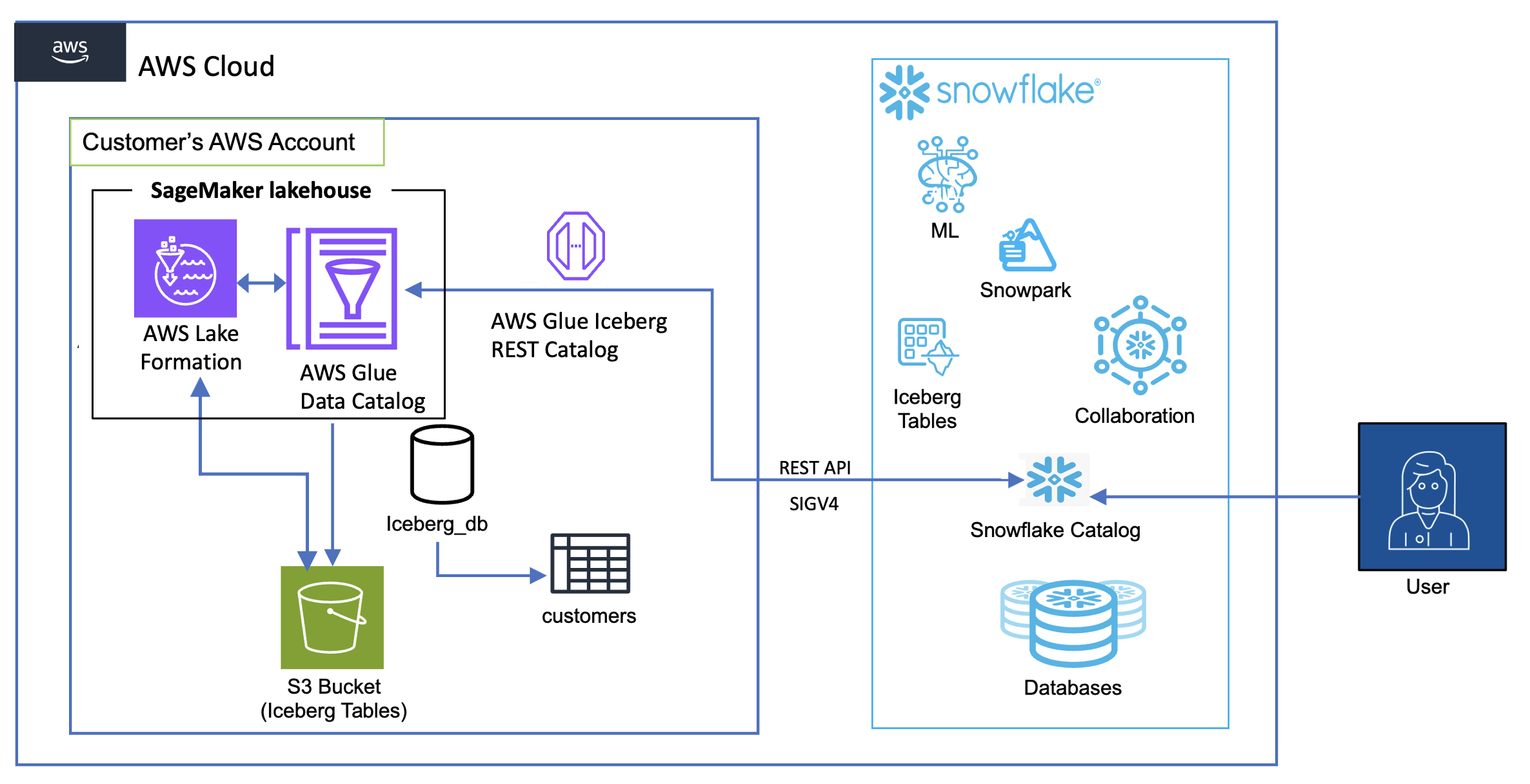
The collective thoughts of the interwebz