Today, we’re announcing the general availability of provisioned mode for AWS Lambda with Amazon Simple Queue Service (Amazon SQS)Event Source Mapping (ESM), a new feature that customers can use to optimize the throughput of their event-driven applications by configuring dedicated polling resources. Using this new capability, which provides 3x faster scaling, and 16x higher concurrency, you can process events with lower latency, handle sudden traffic spikes more effectively, and maintain precise control over your event processing resources.
Modern applications increasingly rely on event-driven architectures where services communicate through events and messages. Amazon SQS is commonly used as an event source for Lambda functions, so developers can build loosely coupled, scalable applications. Although the SQS ESM automatically handles queue polling and function invocation, customers with stringent performance requirements have asked for more control over the polling behavior to handle spiky traffic patterns and maintain low processing latency.
Provisioned mode for SQS ESM addresses these needs by introducing event pollers, which are dedicated resources that remain ready to handle expected traffic patterns. These event pollers can auto scale up to 1000 per concurrent executions per minute, more than three times faster than before to handle sudden spikes in event traffic and provide up to 20,000 concurrency–16 times higher capacity to process millions of events with Lambda functions. This enhanced scaling behavior helps customers maintain predictable low latency even during traffic surges.
Enterprises across various industries, from financial services to gaming companies, are using AWS Lambda with Amazon SQS to process real-time events for their mission-critical applications. These organizations, which include some of the largest online gaming platforms and financial institutions, require consistent subsecond processing times for their event-driven workloads, particularly during periods of peak usage. Provisioned mode for SQS ESM is a capability you can use to meet your stringent performance requirements while maintaining cost controls.
Enhanced control and performance
With provisioned mode, you can configure both minimum and maximum numbers of event pollers for your SQS ESM. Each event poller represents a unit of compute that handles queue polling, event batching, and filtering before invoking Lambda functions. Each event poller can handle up to 1 MB/sec of throughput, up to 10 concurrent invokes, or up to 10 SQS polling API calls per second. By setting a minimum number of event pollers, you enable your application to maintain a baseline processing capacity that can immediately handle sudden traffic increases. We recommend that you set the minimum event pollers required to handle your known peak workload requirements. The optional maximum setting helps prevent overloading downstream systems by limiting the total processing throughput.
The new mode delivers significant improvements in how your event-driven applications handle varying workloads. When traffic increases, your ESM detects the growing backlog within seconds and dynamically scales event pollers between your configured minimum and maximum values three times faster than before. This enhanced scaling capability is complemented by a substantial increase in processing capacity, with support for up to 2 GBps of aggregate traffic, and up to 20K concurrent requests—16x higher than previously possible. By maintaining a minimum number of ready-to-use event pollers, your application achieves predictable performance, handling sudden traffic spikes without the delay typically associated with scaling up resources. During low traffic periods, your ESM automatically scales down to your configured minimum number of event pollers, which means you can optimize costs while maintaining responsiveness.
Let’s try it out
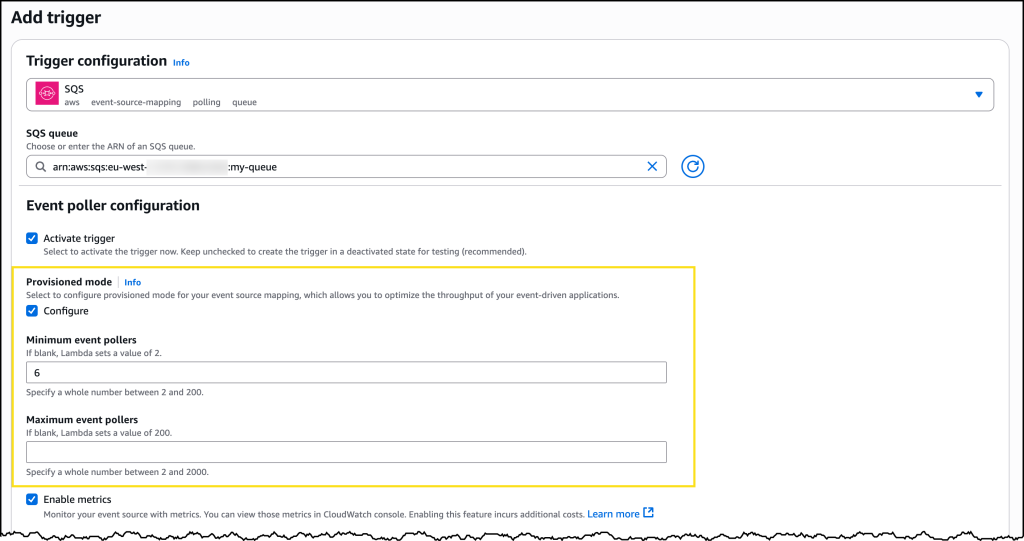
Enabling provisioned mode is straightforward in the AWS Management Console. You need to already have an SQS queue configured and a Lambda function. To get started, in the Configuration tab for your Lambda function, choose Triggers, then Add trigger. This will bring up a user interface where you can configure your trigger. Choose SQS from the dropdown menu for source and then select the SQS queue you want to use.
Under Event poller configuration, you will now see a new option called Provisioned mode. Select Configure to reveal settings for Minimum event pollers and Maximum event pollers, each with defaults and minimum and maximum values displayed.
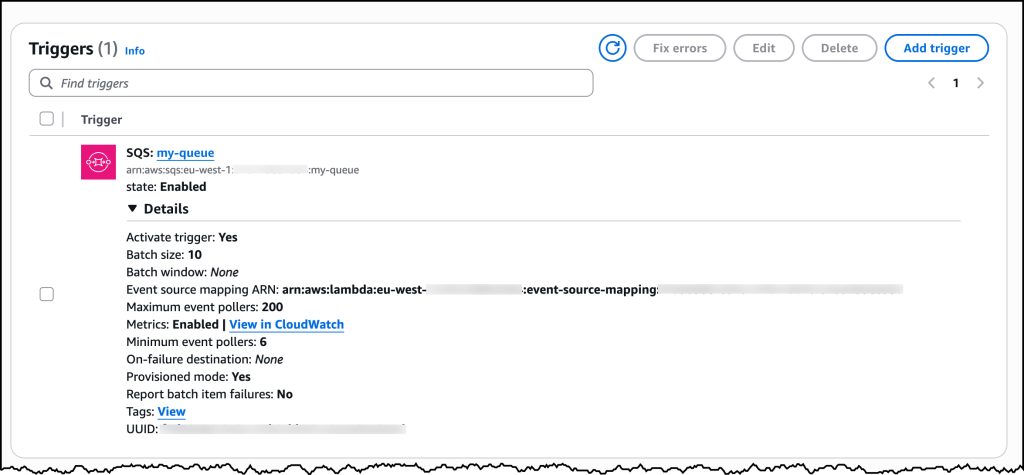
After you have configured Provisioned mode, you can save your trigger. If you need to make changes later, you can find the current configuration under the Triggers tab in the AWS Lambda configuration section, and you can modify your current settings there.
Monitoring and observability
You can monitor your provisioned mode usage through Amazon CloudWatch metrics. The ProvisionedPollers metric shows the number of active event pollers processing events in one-minute windows.
Now available
Provisioned mode for Lambda SQS ESM is available today in all commercial AWS Regions. You can start using this feature through the AWS Management Console, AWS Command Line Interface (AWS CLI), or AWS SDKs. Pricing is based on the number of event pollers provisioned and the duration they’re provisioned for, measured in Event Poller Units (EPUs). Each EPU supports up to 1 MB per second throughput capacity per event poller, with minimum 2 event pollers per ESM. See the AWS pricing page for more information on EPU charges.
To learn more about provisioned mode for SQS ESM, visit the AWS Lambda documentation. Start building more responsive event-driven applications today with enhanced control over your event processing resources.
In cloud storage and compute, “less is more” no longer applies. As data grows and expectations rise, businesses need performance, reliability, and real value—not just lower costs. It can be tempting to rely solely on hyperscalers like AWS, but the challenge is understanding where cloud performance truly meets value.
That’s why Backblaze is launching Performance Stats, our newest stats content built on the transparency of Drive Stats and Network Stats. This ongoing, quarterly report will share performance testing results—for both Backblaze and competitors—as well as the testing methodology so that anyone can recreate, compare results, and contribute to building better tests if necessary. (So, feel free to argue with us in the comments.)
By publishing everything—strengths, weaknesses, and all—we’re hoping to give AI leaders, app developers, and decision-makers a clear, honest view of how Backblaze and other cloud storage providers perform in the wild.
Get the full Stats picture live
Drive Stats was the beginning. Want to see the evolution? Check out the Backblaze Stats webinar, bringing together content from all of our Stats series. We’re going to chat about all things Backblaze and beyond—by the numbers.
Cutting through the noise on cloud performance
Frankly, it’s super frustrating how opaque performance metrics can be, and how many misleading storage reports are out there. Building accurate tests is complicated for a lot of reasons—so many factors are contingent on things that product builders and even end users control, like where and how data is stored, where it’s being served to end users, and so on. And, most published content on this topic has been tested from inside the cloud storage company’s architecture, which means that they’d give themselves preferential results.
While our report may not be perfect, our transparent approach—particularly publishing the testing methodology—will allow us to mitigate some of those concerns.
We want to take a hard look at performance on a level playing field for two reasons:
Buyers should know what they’re getting and have the tools to sniff out the hype and misleading messaging many providers peddle about their performance.
If we don’t measure ourselves, we won’t get better. We want you to understand where we’re doing well today, and we want to take you along for the ride as we work to improve where we’re not.
Without further ado, here are the results
We ran performance testing for Backblaze B2, AWS S3, Cloudflare R2, and Wasabi Object Storage. These tests were conducted using Warp, an open-source S3 benchmarking tool for cloud object storage performance. We’ll expand on the methodology after we get into the numbers.
Key findings:
While AWS S3 demonstrates the lowest average download speeds across the board, the hyperscaler didn’t win on sustained download throughput measurements. Five minute single- and multi-threaded benchmarking tests showed AWS winning on only one out of eight sustained throughput tests, indicating that there’s much more to the story than average download speeds. Meanwhile, Backblaze won in six out of eight categories, with Wasabi coming in first on the remaining test. (That being said, it’s wise to take this with a grain of salt given the small cohort in this initial dataset—more robust testing may show different results.)
Sustained throughput testing shows the most differentiation at small file sizes for both single and multi-threaded testing. For example, in multi-threaded upload benchmarking for the 256KiB file size, our highest value was 580% higher than the lowest. In single threaded upload benchmarking for the same file size, the highest value is 700% higher. Download throughput showed 247% and 304% in multi- and single-threaded tests, respectively. Small file size testing can have interesting impacts on overall performance—these files have the most overhead, and are typically more likely to show latency.
Backblaze B2 demonstrates the fastest average upload speeds for small file sizes, with AWS S3 leading for larger file sizes. And, similar to downloads, the story becomes more nuanced when we look at sustained upload throughput, where Backblaze leads for both the smallest (256KiB) and largest (100MiB) file sizes on multi-threaded tests with Wasabi taking the lead in the mid-range.
And, here’s a jump-to if you want to quickly reach each test:
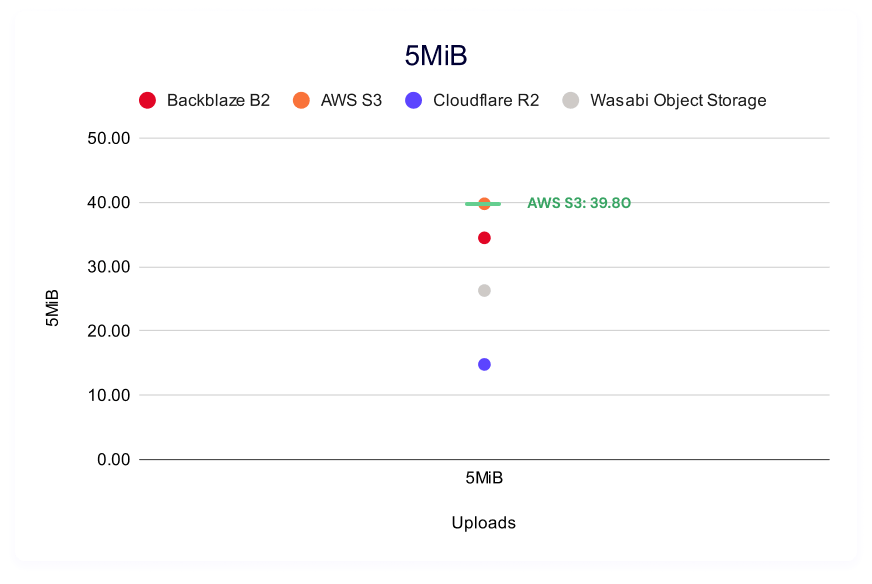
This test shows the average time in milliseconds it takes to upload a file. Averages were taken across a month of data and for three different file sizes.
In these tests, a lower result is better (i.e., it represents a faster result). Note that we do not have data for Wasabi: Wasabi does not allow users to run HTTP requests for the first 30 days of a new account period, and when we ran this report, our testing account was still within that time period.
In each of the charts, we’ve outlined the “winner” in green for each category for easy readability.
Backblaze B2 wins for small files, coming in at 12.11ms, and AWS S3 leads for 2MiB and 5MiB files, coming in at 76.79ms and 201.40ms, respectively. Whether or not these numbers are inherently “good” or tolerable depends on quite a few factors—we’ll run through some examples comparing use cases to where we see Backblaze succeeding later in the report.
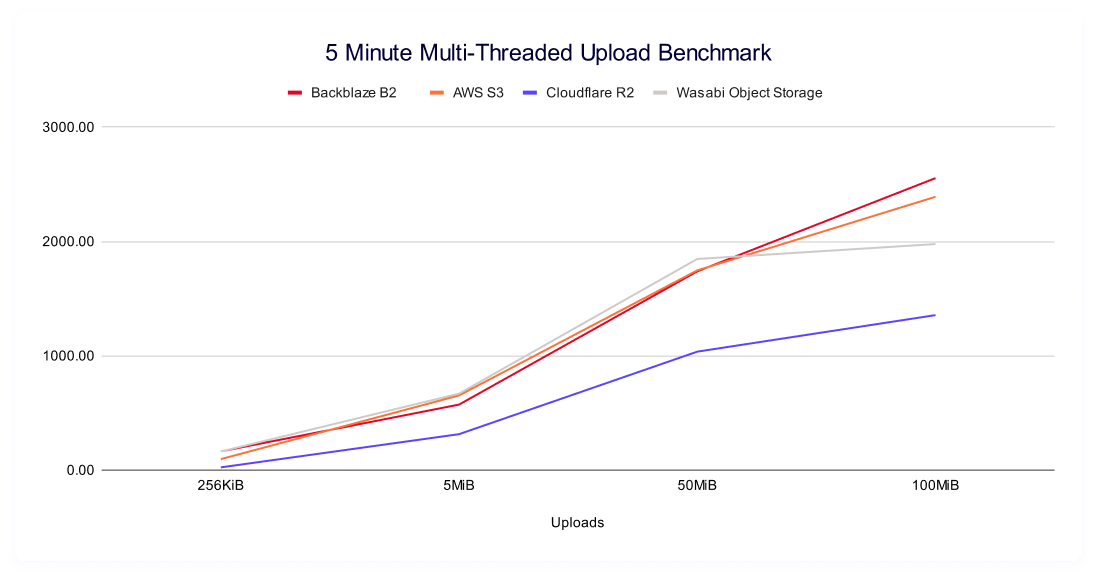
Five minute multi-threaded upload benchmark
In these tests, a higher result is better, as the result represents more average data being pushed in the five minute time period. This gives us quite a bit more information than just average upload time for a single file—rather, it tells us the sustained amount of data you can push to a cloud storage provider in five minutes.
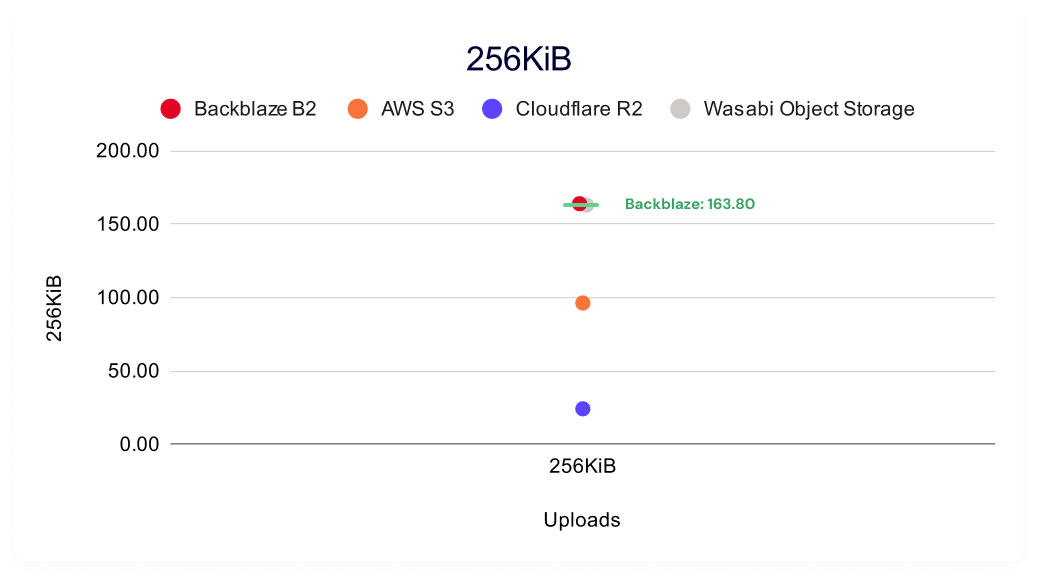
Interestingly, we have a pretty large spread between our highest and lowest values, most stark amongst the smallest files where Backblaze B2 demonstrates the highest sustained throughput at 163.80MiB/s and Cloudflare R2 demonstrates the lowest at 24.10MiB/s.
This is important because the strength of object storage is that it lets you run concurrent operations to read many ranges of bytes in the same file. Moreover, thread operations are a configurable element of most cloud storage accounts (though too many concurrent operations can trip rate limits that are dependent on the provider).
So, when we think about contextualizing with the average time to a file upload completion, the task includes making the request, the handshake between requester and server, routing the request through the cloud storage provider, then time it takes to read all data, and then notification that your upload is complete.
Threading lets you run the actual process of the return of information concurrently—so while file overhead (handshake) should be relatively consistent, you can get quite a bit faster on large file uploads. And, even when you have consistent results on file overhead, networking paths can make a difference on delivery times. While we can consider networking routes mostly stable (especially for synthetic performance testing), it’s certainly not a guarantee. Peering policy changes, network maintenance and/or outages, and CDN usage can all affect your routing day to day or month to month.
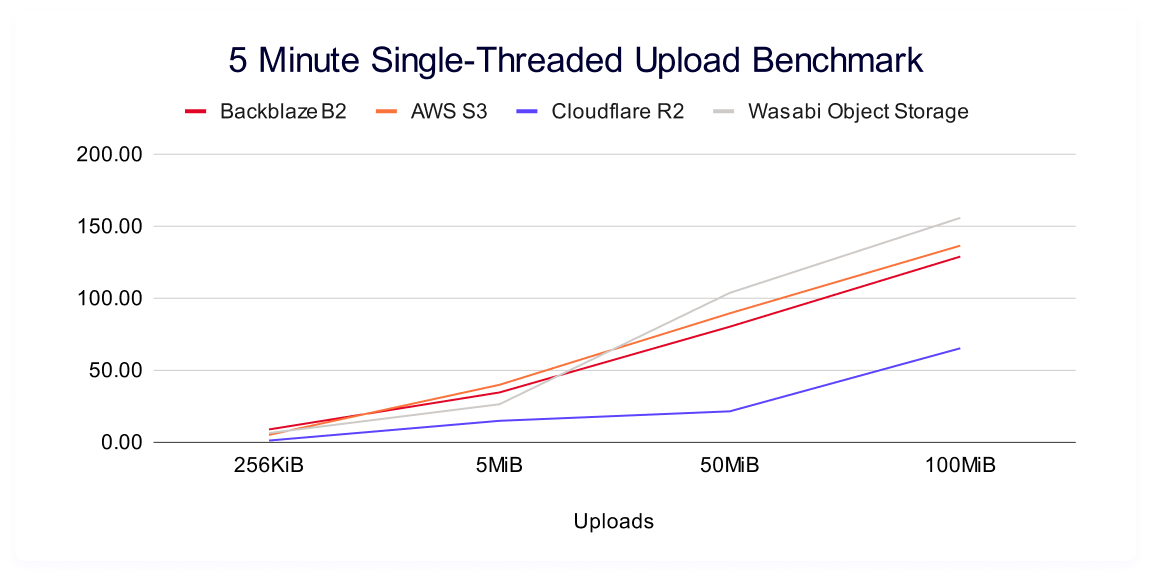
Changing the view a bit, we see some interesting shapes when we plot each providers’ improvement as file sizes get larger:
It’s intuitive that you’d automatically push more data as file sizes get larger, but the shape of each’s improvement is a stark contrast. The rate of increase (which you can see in our trendlines as the slope) isn’t constant, and we see Backblaze and AWS showing consistently better performance at the higher file sizes. Wasabi tracks with that growth in the smaller file sizes, but falls off at the 50MiB and 100MiB. Meanwhile, we see Cloudflare returning the lowest net values, while flattening out at smaller file sizes as well.
In most performance data, you expect a logarithmic relationship between data points—and so comparing their different shapes—when the trendline flattens out and/or when it deviates from an ideal logarithmic scale—can be telling. You can define an expected logarithmic curve using an average of all providers, then compare each provider’s residuals (how far above or below that curve it sits). We’ll save that analysis for another day, and a more mature dataset.
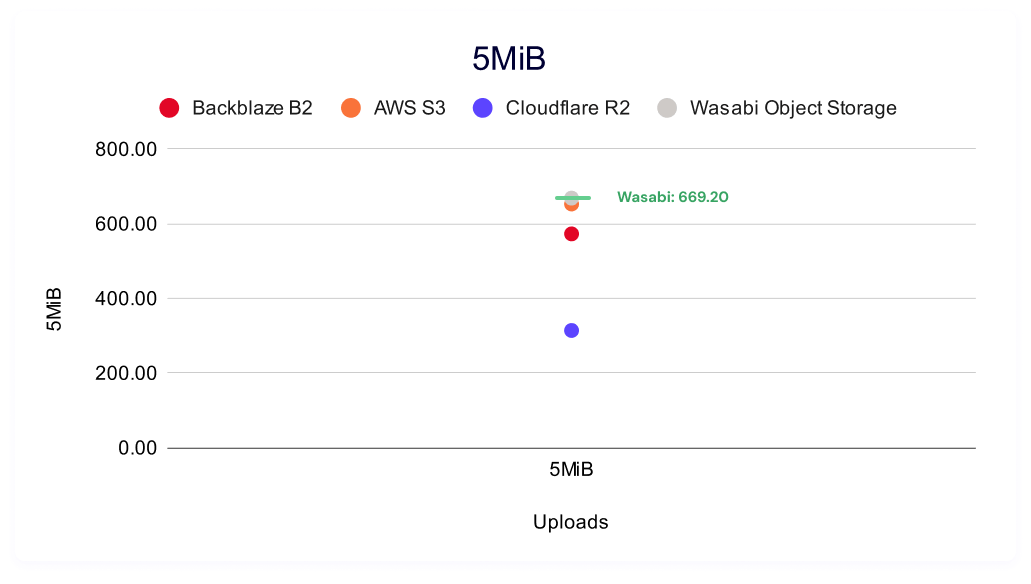
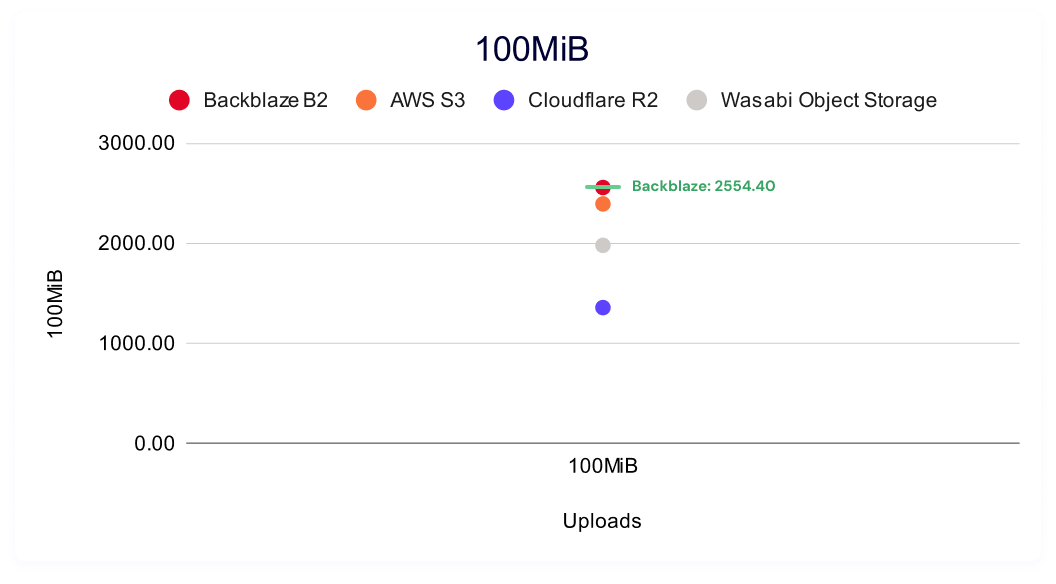
It’s also interesting to look at data point clustering by file size. As our dataset matures over time and as we add providers, clustering in these charts start to tell a story. If you want a quick idea of good, better, best and you don’t have a large enough cohort for a true tiered definitional schema, it’s a good visual shortcut—you can easily see if different providers’ results are spread out or if they cluster together at a specific level of performance. The winners for each test are labeled in green.
And, as we said above, in all cases (and one of the most frustrating parts about collecting performance stats) is that your mileage may vary—you always want to compare the needs of your customers and product to the performance you need and how much it costs you.
Five minute single threaded upload
Once again, higher is better in this result, and it measures the sustained amount of data you can push to a server based on file size. As a reminder, multi-threading allows you to concurrently read a single file; while single threading is one, sustained process from start to finish.
Backblaze B2 again leads in small file sizes, with AWS S3 leading for 5MiB files and Wasabi for 50MiB and 100MiB files.
As above, here’s the trendline:
And, like in the multi-threading results, we can look at the clustering in each file type size:
Download comparisons
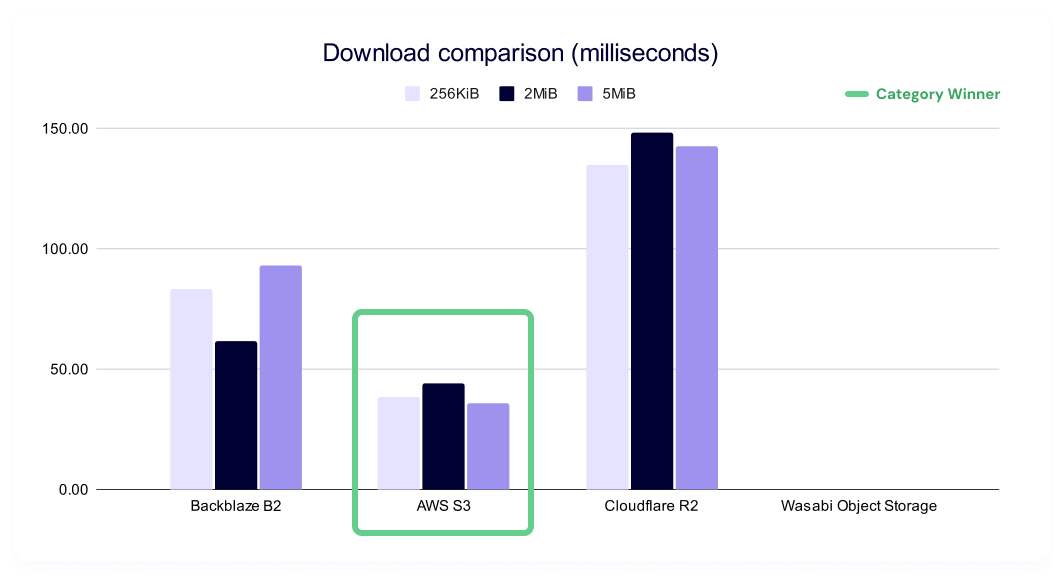
This test shows the average time in milliseconds it takes to download a file. Averages were taken across a month of data and for three different file sizes.
A reminder that lower is better in this test as it represents a faster result, and there’s no data for Wasabi in this series due to limitations on HTTP requests within the first 30 days of opening a new account.
AWS S3 leads across the board on this test, with Backblaze B2 taking second and Cloudflare R2 taking third consistently.
And, it’s worth separately tracking TTFB because TTFB is a good, but not sufficient statistic when we’re interpreting results.
Why isn’t this datapoint sufficient to fastest speeds? Not only does TTFB conflate many parts of your networking layer (so it can be affected by things like connection reuse policies), but it’s also such a small part of the overall transfer time and highly variable based on environment. So, its use is really in conversation with the sustained throughput numbers.
Cached vs. uncached downloads (Backblaze only)
We were also curious to see if caching within our own network would show up, and, if so, we’d want to make sure we weren’t unintentionally giving ourselves a favorable stance. So, we ran a series of tests for cached and uncached downloads by including the header X-Bz-Flush-Cache-First=true.
We do see slightly slower speeds in uncached downloads, but they’re likely a result of the same factors anyone externally hitting our system would see. Additionally, during the course of our testing, Backblaze made cacheless downloads the default behavior for our architecture—so, it will be interesting to monitor this statistic going forward.
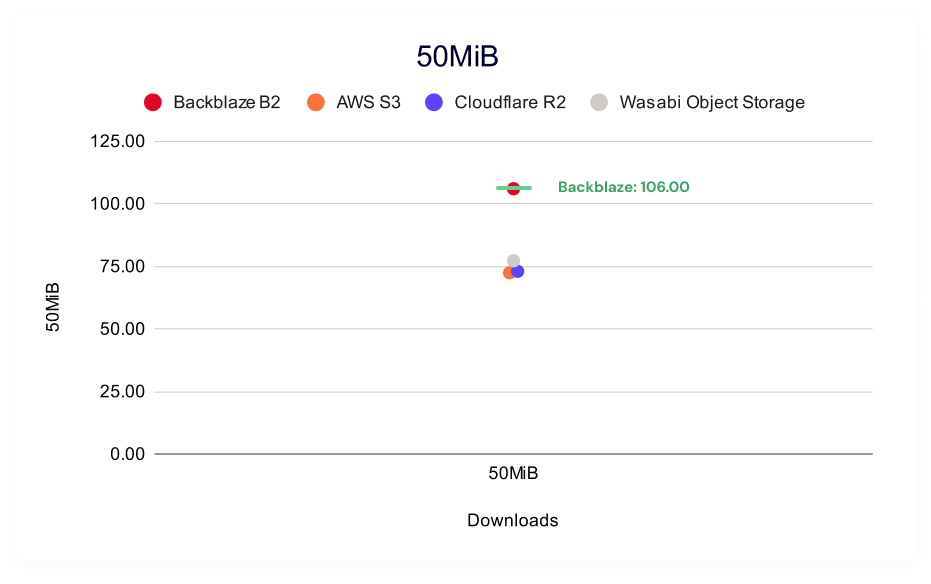
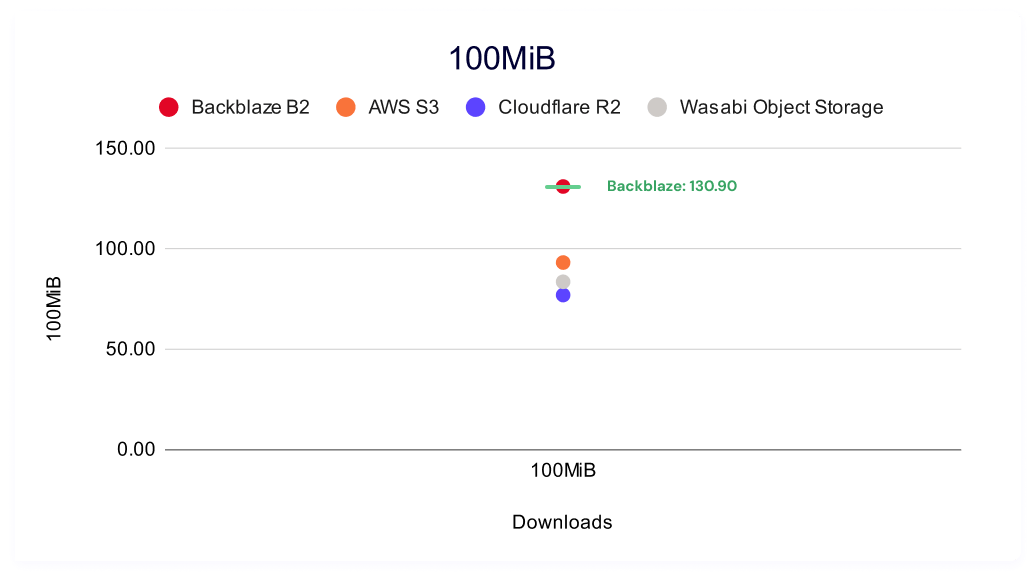
Five minute multi-threaded download benchmark
In these tests, a higher result is better, as the result represents more average data being downloaded in the five minute time period.
Backblaze B2 leads for 256KiB, 50MiB, and 100MiB file sizes. AWS S3 has a slight advantage for 5MiB files.
And, let’s give ourselves the same charts as our above upload tests for consistency’s sake. Here’s the trendline:
While AWS and Backblaze track closely for the 256KiB and 5MiB file sizes, Backblaze wins out at 50MiB and 100MiB. Meanwhile, Cloudflare lags at the smallest file sizes, but shows rapid improvement, peaking at the 50MiB file sizes. Interestingly, this is arguably Wasabi’s weakest showing compared to all other sustained throughput testing, though they have strong results at the 256KiB file size and a respectable showing at the 5MiB file size.
And here’s the per-file size clustering:
Five minute single-threaded download throughput
Again, in these tests, a higher result is better, as the result represents more average data being downloaded in the five minute time period.
Here, Wasabi wins for 256KiB files, and Backblaze wins for 5MiB, 50MiB and 100MiB files. Note that this is a solid trend for Wasabi in the 256KiB file sizes—they came in second in the multi-threading download testing, as well as both single and multi-threaded upload testing.
And here’s our clustering:
Test methodology
Our goal with these benchmarks is simple: to understand how our cloud performs under real-world conditions and to share that information as clearly as possible. To do that, our Cloud Operations team runs repeatable, synthetic tests that measure upload (PUT) and download (GET) performance.
We ran both upload and download tests across all four vendors. Upload tests measured the following file sizes:
256KiB
5MiB
50MiB
100MiB
Download tests measured:
Time-to-first-byte (TTFB)
Total time to download the following file sizes:
256KiB
5MiB
50MiB
100MiB
Why do performance tests use mebibytes (MiB) instead of megabytes (MB)?
We’ve written articles in the past about how all computers are fundamentally a collection of logic circuits (transistors) in either an on or an off state, which means that they communicate in binary, or a base two language. Humans, however, tend to prefer base 10 languages. There are lots of reasons for this, but that’s a story for another time.
MiB is a base two unit of measurement, whereas MB is a base 10. Here’s a comparison:
Unit
Definition
Bytes
1MB (megabyte)
Base-10 (decimal)
1,000,000 bytes
1MiB (mebibyte)
Base-2
1,048,576 bytes (1024×1024)
The difference between those two measurements may seem small, but it has a significant impact when you’re talking about performance sensitive systems. Oftentimes you’ll see marketing language shift to talking about MB because it’s more understandable to a wider audience, but to get accurate results, MiB is what you need.
Tests run in five-minute profiles to observe consistency over time, and we ran both single and multi-threaded download and upload tests. From a practical perspective, what’s happening is that we’re pushing repeated requests to a cloud storage provider as many times as we can for five minutes.
All tests originate from a Vultr-hosted Ubuntu virtual machine (VM) located in the New York/New Jersey area, routing through Catchpoint’s network into object storage regions located generally in US-East. By keeping the source environment stable and the test target consistent, we isolate performance variables within each provider’s infrastructure rather than the test environment itself.
Consistency measures
To ensure each test result represents genuine performance rather than environmental noise, we built repeatability into the process:
Identical test instances: All runs used the same VM type, operating system (OS) image, and configuration.
Fixed regions: Tests originated from the same location (NY/NJ) targeting the same US-East region across providers.
Controlled routing: Network paths were held constant through Catchpoint’s monitoring network to minimize geographic or peering variation.
Repeated runs: Each test profile (5 min) was executed multiple times, and averages were used to reduce the impact of transient spikes.
Standardized payloads: All uploads and downloads used identical objects to ensure a consistent file-size baseline.
Unchanged test intervals: Tests were scheduled at regular intervals over multiple days to capture both typical and outlier performance.
About synthetic testing
Synthetic monitoring provides a controlled, apples-to-apples comparison, but it doesn’t replicate every production workload. These tests are run outside our own infrastructure—from neutral vantage points—to simulate a customer’s experience at the “last mile.” This distinguishes our approach from competitors who benchmark internally under optimized conditions.
It’s important to note that synthetic results won’t mirror every customer’s experience. Different architectures, connection paths, and file patterns will produce different performance profiles. Our intent is to offer transparency into the methodology and relative behaviors, not to suggest that all workloads will perform identically.
Limitations and future work
Every benchmark is an approximation. These results provide a controlled look at how cloud storage performs under repeatable conditions, but they don’t capture every variable in production environments. Below, we outline what our current tests don’t measure and where we’re headed next to deepen the picture.
Synthetic, not real-world workloads: These benchmarks simulate real activity but don’t reproduce the full variability of customer workloads, concurrency levels, or data locality patterns. They are best understood as directional insights rather than absolute truths.
The internet is the internet: Once traffic leaves the test node, we can’t control the routing, peering, or transient network conditions between endpoints. Each provider’s own network policies and routing optimizations—for example, Wasabi’s inbound connection rules—can influence the results.
Static test conditions: All tests were conducted from a single region (NY/NJ to US-East cloud providers). Real-world customers operate globally, where peering arrangements, congestion, and latency differ widely.
Potential caching effects: Although we designed the tests to avoid cached reads, Catchpoint does not allow full data randomization. It’s possible some repeated reads benefited from intermediate caching at any network layer.
Traffic shaping and rate limiting: Providers may apply rate limits or throttling when detecting high-frequency test traffic. For example, Wasabi temporarily blacklisted our IPs due to testing volume—a reminder that these results represent observed behavior, not formal service guarantees.
Each of these limitations points toward future testing opportunities. Here’s what’s next on our testing roadmap:
Regional expansion: Extend current US-East tests to US-West and EU regions using equivalent test setups.
Vendor expansion: Extend testing to more vendors, including Google Cloud Platform and Azure.
File size sensitivity testing: Investigate performance across a wider range of file sizes, including 100MiB+ objects. This will help clarify where different architectures favor small-object throughput versus sustained large transfers.
Traffic rate & throttling analysis: Incorporate monitoring for request-per-minute and total-bytes-transferred metrics to detect possible provider-level rate limiting. We’d love to invite vendors to validate thresholds and eliminate false negatives.
Concurrency patterns: Test multiple thread and connection strategies to model real-world transfer concurrency, especially for use cases involving parallel uploads or downloads.
Benchmark visualization: Transition from CSV data collection to Grafana dashboards, enabling continuous visualization of test results and performance drift over time.
Performance is an evolving target, and so is our testing methodology. Each round of analysis helps us not only understand how Backblaze performs in context, but also refine how we measure, compare, and communicate that performance. Our goal remains the same: make the data real, repeatable, and useful.
What this means for real-world use cases
Based on the results we’ve shared here, there’s plenty of room for argument around the value of different performance profiles. But, continuing our theme of transparency: Since we’re transparent about our performance, warts and all, we’re going to be transparently candid in the areas where think the Backblaze platform is showing some nice results:
AI/ML inference: Our strong read latency and throughput make Backblaze ideal for inference workloads that need to pull model artifacts, inputs, and outputs quickly. For example, when a service like Hugging Face or Runway ML feeds an image into a convolutional neural network, lower read latency directly translates to faster inference delivery.
Feature stores & embedding lookups (AI/ML): Optimized small-object reads and efficient small writes support rapid lookups and occasional updates common in vector databases and feature stores like Feast, Qdrant, Pinecone, or Weaviate.
LLM-based retrieval-augmented generation (RAG) systems: RAG systems store many small document chunks that are written once and read repeatedly, so our read-optimized performance accelerates retrieval of document chunks or embeddings, improving response times for large language model applications. Vectorized databases are also a hot topic right now for good reason—they’re changing patterns around file sizes and retrieval patterns in RAG applications and LLM training.
Log & event analytics (SIEM, IoT, etc.): Competitive small-write performance and fast reads make Backblaze well suited for log aggregation and analytical querying with tools like Loki, Fluentd, Vector.dev, and OpenObserve once data is ingested.
Interactive data lake querying: Consistent throughput and fast download speeds deliver responsive querying and exploration for business intelligence (BI) and ad hoc analytics workloads.
CDN origin: Excellent read throughput, stable performance, and free egress make Backblaze a high-value choice for powering content delivery at scale.
As discussed, one of the reasons it’s so hard to get directly comparable performance benchmarks is because there are so many configurable elements on the user’s side that can affect the results. For example, if you know that your provider is faster on smaller files, you might choose to store your unstructured data in smaller parts so that you achieve faster performance.
That means that when we share results like this, it enables you to interpret which provider is a better fit for your different types of workflows.
For a cloud storage provider, tracking these metrics over time and comparing to other aspects of our internal architecture enables us to support ongoing and continual performance improvement, and to understand how much of an impact single changes might make. This means that what seems like a simple project to change the way we read header requests can produce asymmetrically favorable results.
And, there’s a layer of this that’s always going to come down to design decisions. For example, we’ve talked about some of the logic behind where our architecture knows which server to store data on. Basically, our system chooses to store a new file based on the available space of each server. So, if we have a server that has 40% space available, it would receive 40% of the incoming storage writes. (That’s a bit of an oversimplification, but you get the idea.)
Other cloud storage providers might prioritize, say, randomness in their write architecture. When a request would enter their system, the routing protocol would say, “Hey, we haven’t written to this server over here in a while,” and write it in that sector. It’s a different choice that can have a subtle ripple effect across different aspects of storage architecture.
What’s next?
Our performance story is one of steady, measurable progress. We’re not optimizing for a single headline number; we’re building toward consistent reliability across diverse workloads. That’s why we test openly, publish what we find, and continuously refine how we measure.
Looking ahead, our next Performance Stats report will continue to share these findings quarterly, which will give us all a more mature dataset to work with, and will expand testing. This isn’t just a transparency exercise for us, it’s a commitment to the developers and teams building on Backblaze: you deserve data you can trust—and we intend to keep earning it.
We’d love it if others—third parties and our competitors—also got involved, but we’ll see how things evolve. For now, feel free to let us know if these tests work for you.
Disclaimer: The performance data and comparisons presented here are based on tests conducted by Backblaze under the specific environments, configurations, and conditions described in this post. Actual results may vary depending on network conditions, workloads, geographic location, and other factors.
Backblaze has published its testing methodology so others can replicate or challenge the results; however, Backblaze makes no representation or warranty that its tests capture all possible variables or configurations. The information is provided for general informational purposes only and does not constitute a guarantee of future performance. In addition, the information in this post is based on data available at the time of publication, and Backblaze reserves the right to update or revise this information as new data, testing methodologies, or performance results become available.
All product names, trademarks, and registered trademarks are property of their respective owners. References to third-party products or services are for identification purposes only and do not imply endorsement or affiliation.
Every quarter, Drive Stats gives us the numbers. This quarter, it gave us a crisis of meaning. What does it really mean for a hard drive to fail? Is it the moment the lights go out, or the moment we decide they have? Philosophers might call that an ontological gray area. We just call it Q3.
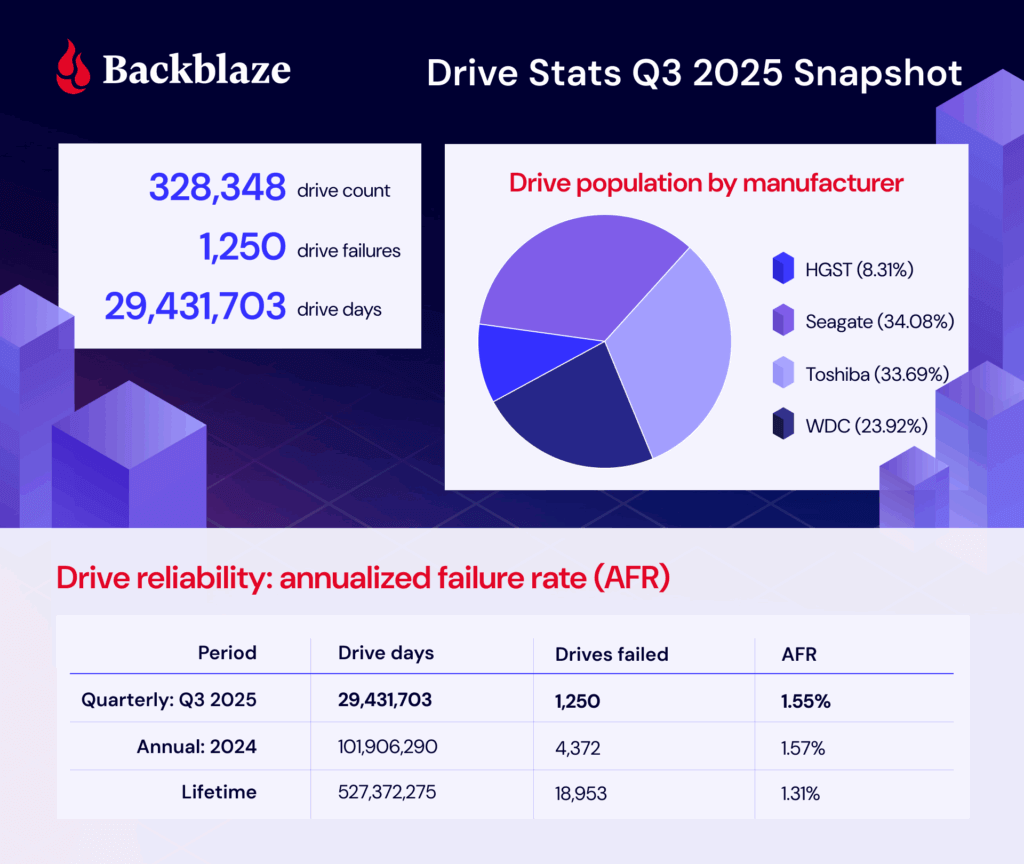
As of June 30, 2025, we had 332,915 drives under management. Of that total, there were 3,970 boot drives and 328,348 data drives. Let’s dig into our stats, then talk about the meaning of failure.
This quarter, we have more to talk about (Stats-wise)
Drive Stats was the beginning. Want to see more of the full picture? Check out the Stats Lab webinar, bringing together content from all of our Stats articles. We’re going to chat about all things Backblaze (and beyond)—by the numbers.
Drive Stats: The digest version
Q3 2025 hard drive failure rates
During Q3 2025, we were tracking 328,348 storage drives. Here are the numbers:
Backblaze Hard Drive Failure Rates for Q3 2025
Reporting period July 1, 2025–September 30, 2025 inclusive Drive models with drive count > 100 as of July 1, 2025 and drive days > 10,000 in Q3 2025
Notes and observations
The failure rate has increased: The failure rate has changed, and by quite a bit. As a reminder, last quarter’s AFR was 1.36% compared with this quarter’s 1.55%. (Interestingly, the 2024 yearly AFR was 1.57%.)
That new drive energy: Say hello to the 24TB Toshiba MG11ACA24TE, joining the drive pool with 2,400 drives and 24,148 drive days. That means that we’ve hit the thresholds for the quarterly stats, but not the lifetime.
The zero failure club: It was a big month for the zero failure club, with four drives making the cut:
Seagate HMS5C4040BLE640 (4TB)
Seagate ST8000NM000A (8TB)
Toshiba MG09ACA16TE (16TB)
Toshiba MG11ACA24TE (24TB)—and yes, that’s the new drive.
For those of you tracking the stats closely, you’ll notice that the Seagate ST8000NM000A (8TB) is a frequent flier on this list. The last time it had a failure was in Q3 2024—and it was just a single failure for the whole quarter!
The highest AFRs were really high: The high end was so high that this month, it inspired us to run an outlier analysis using the standard quartile analysis (Tukey method). Based on that information, any drive with a quarterly AFR higher than 5.88% is an outlier, and there are three:
Seagate ST10000NM0086 (10TB): 7.97%
Seagate ST14000NM0138 (14TB): 6.86%
Toshiba MG08ACA16TEY (16TB): 16.95%
What’s going on there? Great question, and we’ll get into that after the lifetime failure rates.
Lifetime hard drive failure rates
To be considered for the lifetime review, a drive model was required to have 500 or more drives as of the end of Q2 2025 and have over 100,000 accumulated drive days during their lifetime. When we removed those drive models which did not meet the lifetime criteria, we had drives grouped into 27 models remaining for analysis as shown in the table below.
Backblaze Hard Drive Failure Rates for Q2 2025
Reporting period ending September 30, 2025 Drive models > 500 drives and > 100,000 lifetime drive days
Notes and observations
That lifetime AFR is pretty consistent, isn’t it? The lifetime AFR is 1.31%. Last quarter we reported that it was 1.30%, and the quarter before that, it was 1.31%.
The 4TB average age hasn’t shifted: As we’ve reported on previously, the 4TB drives are being decommissioned over time. Now, we’re down to just a handful left—just 11 of the ALE models and 187 of the BLE models. But, because their lifetime populations are so comparatively large, the additional drive days aren’t enough to move the needle on the average age in months. So, no ghosts in the machine here, and decommissioning is proceeding as planned.
Steady uptick in higher capacity drives: Of the 20TB+ drives that meet our lifetime data parameters, we’ve added 7,936 since last quarter. And, don’t forget that our newest entrée to the cohort, the Toshiba MG11ACA24TE (24TB), hasn’t made its way to this table yet—that adds an additional 2,400 drive models. All together, the 20TB+ club represents 67,939 drives, or about 21% of the drive pool.
Defining a failure—from a technical perspective
A question that’s come up a few times when we’re hosting a webinar or chatting in the comments section is how we define a failure. While it may seem intuitive, it’s actually something of a meaty conundrum, and something we haven’t addressed since the early days of this series. Tracking down the answer to this question touches internal drive fleet monitoring tools (via SMART stats), the actual Drive Stats collection program, and our data engineering layer. I’ll dig into each of these in detail, then we’ll take a look at the outliers for this quarter.
SMART stats reporting
We use Smartmontools to collect the SMART attributes of drives, and another monitoring tool called drive sentinel to flag read/write errors that exceed a certain threshold as well as some other anomalies.
The main indicator we use for determining if a drive should be replaced is when it responds to reads with uncorrectable medium errors. When a drive reads the data from the disk, but the data fails its integrity check, the drive will try to reconstruct the data using internal error correction codes. If it is unable to reconstruct the data, it notifies the host by reporting it as an uncorrectable error and marks that part of the disk as pending reallocation, which shows up in SMART under an attribute like Current_Pending_Sector.
On Storage Pods that control drives through SATA links, the drive sentinel will count the number of these uncorrectable errors a drive reports and if it exceeds a threshold, access to the drive will be removed. This is important in the classic Backblaze Storage Pods where five drives share a single SATA link and errors by one drive will affect all drives on the link.
On Dell and SMCI pods that use a SAS topology to connect drives, drive sentinel doesn’t remove access to drives because the errors are reported differently; but, that’s also not as critical since SAS minimizes the impact that a problem disk can have on others.
The Drive Stats program
We’ve talked about the custom program we use to collect Drive Stats in the past, and here’s a quick recap:
The podstats generator runs on every Storage Pod, what we call any host that holds customer data, every few minutes. It’s a C++ program that collects SMART stats and a few other attributes, then converts them into an .xml file (“podstats”). Those are then pushed to a central host in each datacenter and bundled. Once the data leaves these central hosts, it has entered the domain of what we will call Drive Stats.
For this program, the logic is relatively simple: A failure in Drive Stats occurs when a drive vanishes out of the reporting population. It is considered “failed” until it shows up again. Drives are tracked by serial number and we report daily logs on a per-drive basis, so truly, we can get pretty granular here.
The data engineering layer
To recap, we’ve collected our SMART stats and compiled them with the podstats program. Now we’ve got all the information, and data intelligence needs to add the context. A drive may go offline for a day or so (not return a response to those tools that collect daily logs of SMART stats), but it could be something as simple as a loose cable. So, time-wise, if a drive reappears after one day or 30, at what point in that period of time do we classify it as an official failure?
Previously, we manually cross-referenced data center work tickets, but these days, we’ve automated that process. On the backend, it’s a SQL query, but in human speak, this is what it comes down to:
If a drive logs data on the last day of the selection period (which in this case is a quarter) then it has not failed.
There are three human-curated tables that the query cross references. If a drive serial number appears on one of them, it tells us whether there’s a failure or not (depending on the table’s function).
If the drive serial number is the primary serial number in a drive replacement Jira ticket then it has failed. (Jira is where we track our data center work tickets.)
If the drive serial number is the target serial number in a clone Jira ticket or a (temp) replacement ticket, then it has not failed.
Basically, when we go to write the Drive Stats reports at the end of the quarter, if a drive has either appeared in one of our various work trackers or hasn’t re-entered the population, then it’s considered failed.
In rare instances, that can mean that we have so-called “cosmetic” failures when we have some work we’re doing on a drive model that lasts more than that quarterly collection period. And, spoiler, we have one of those instances that showed up in the data this month—our outlier Toshiba drive with the 16.9% failure rate. We’ll dig in in just a minute; but first, some context.
Connecting drive failure to overall picture of the drive pool
As we mentioned above, certain drives in the pool had such high swings in AFR that we ended up running an outlier analysis using the quartile method. (It’s also worth mentioning that a cluster analysis could potentially be a better fit, but we can save that for another day.) Based on that analysis, anything that has above a 5.88% failure rate is an outlier.
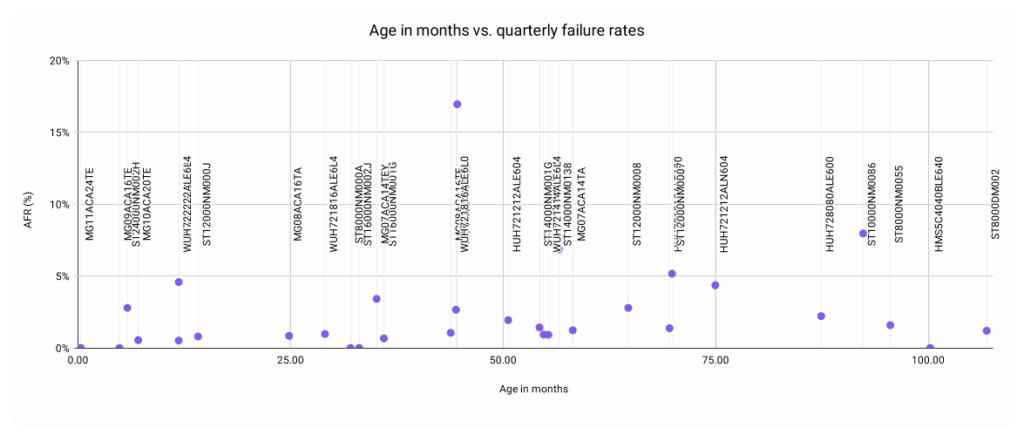
The primary motivation was inspired by an attempt to visualize the relationship between the age in months of a drive versus this quarter’s AFRs.
And yes, we’re fully aware that that’s a… super unreadable scatter plot. Removing the labels, this is a bit better:
We’re interested, really, in the shape of the relationship. If we posit that the older drives get, the higher their failure rates, you’d expect a larger concentration in the top right quadrant. But, our data follows a much more interesting pattern than that, with most of our data points concentrated in the lowest regions of the graph regardless of age—something you’d expect from a set of data that reflects a bunch of smart folks actively working towards the goal of a healthy drive population. And yet, we have some data points that break the mold.
As is pretty intuitive to my business intelligence folks in the audience, the process of identifying outliers is actionable data as well. Just like all press is good press; in our world, more data is more better. So, let’s take a closer look at those outliers. As a reminder, that’s these three drive models:
Seagate ST10000NM0086 (10TB): 7.97%
Seagate ST14000NM0138 (14TB): 6.86%
Toshiba MG08ACA16TEY (16TB): 16.95%
Seagate ST10000NM0086 (10TB)
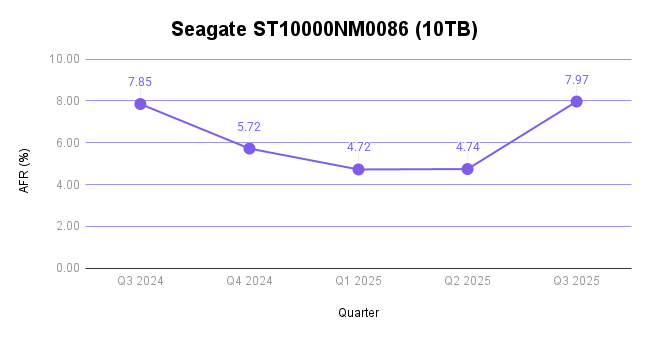
This drive has some pretty explainable factors for the high failure rate. It’s well over seven years old (92.35 months). And, since it only has 1,018 drive models in operation, single failures hold a lot of weight compared with the average drive count per model—which comes in at 10,952 if you use the mean of this quarterly data and 6,177 if you use the median.
And, you can see that borne out in the trend in the last year of data:
Seagate ST14000NM0138 (14TB)
This drive is nearing five years in age (56.57 months) and, again, has a lower drive count at 1,286. More importantly, this particular drive model has had historically high failure rates. In parallel with above, here’s the last year of quarterly failure rates:
Toshiba MG08ACA16TEY (16TB)
Finally, our Toshiba model is the most interesting of all. It’s less than four years old (44.61 months), and has 5,145 drives in the pool. And, this quarter is clearly a change from its normal, decent, AFRs.
When we see deviations like this one, it’s usually an indication that there’s something afoot.
Never fear, Drive Stats fans; this was a known quantity before we went on this journey. This past quarter, working with Toshiba, we deployed some firmware updates they provided to optimize performance on these drives. Because we needed to pull drives to achieve this in some cases, we had an abnormal number of “failed” drives in this population.
What that means for this drive is that it’s actually not a bad drive model; and, given the ways we and Toshiba have worked together on a fix, we should see failure rates normalizing in the near future. And, this also goes back to our conversation of defining a failure—in this case, while the drives “failed,” the failure wasn’t mechanical and was based on something that we’ll be able to fix without replacing the drives. In short, don’t sweat the spike and pay attention to the long arc of performance on this population. We expect to see those drives happy and spinning for years to come (and with better performance, too).
The Hard Drive dataset (and beyond)
Thank you, as always, for making it through ~2,500 or so words to examine the fun side of data. Here’s our standard fine print:
The complete dataset used to create the tables and charts in this report is available on our Hard Drive Test Data page. You can download and use this data for free for your own purpose. All we ask are three things:
You cite Backblaze as the source if you use the data;
You accept that you are solely responsible for how you use the data, and;
You do not sell this data itself to anyone; it is free.
If you’re a new Drive Stats fan, consider signing up for the newsletter. If you’re not ready for that kind of commitment, sound off in the comments section below or reach out directly to us to let us know what you’re working on. Happy investigating!
The way data moves is changing in the age of AI. As AI training, model tuning, and inferencing accelerate massive, unpredictable flows of data across clouds, our network telemetry here at Backblaze offers a real-world view into the AI data gravity shift: where data lives, how it moves, and what it takes to keep it accessible and affordable.
Over the past couple of years, we’ve shared Network Stats snapshots that shed light on how data moves across Backblaze’s storage cloud. This quarter, we’re taking that foundation further, and evolving this series into a full-fledged transparency report that stands alongside Drive Stats with regular quarterly reporting and stats you can analyze for yourself.
This report isn’t just about traffic patterns. It’s a look at how data movement is changing in the age of AI and what those shifts reveal about performance, cost, and resilience at scale.
Tune in live for The Stats Lab webinar
Drive Stats was the beginning. Want to see the evolution? Check out the Backblaze Stats Lab webinar, bringing together content from all of our Stats articles. We’re going to chat about all things Backblaze and beyond—by the numbers.
In this first report, we’re going to outline the fundamentals of our dataset, highlight standout examples for AI related traffic, and lay the foundation to start sharing our quarter-over-quarter metrics.
Dataset details
Our internal tools allow us to capture network flow data, meaning transmission control protocol (TCP) conversations between parties on our network. Along with basic information such as who is talking and how many bits are being exchanged, we have the ability to record additional pieces of anonymized information like what country, what ISP, or if we’ve seen a particular IP address before. And for each of these metrics, we have numbers for the average, 95th percentile, and maximum values.
Let’s talk about the three elements that make up our dataset: time, values, and metadata.
1. Monthly time slices
For every month, for every region, and for each direction (egress and ingress), we are data warehousing the following metrics. We plan on either using month-by-month numbers, or rolling up into a quarterly value for Network Stats reports going forward.
Item
Detail
Date range
Every month
Location scope
Every region (eg US-West, EU-Central)
Network traffic direction
Ingress, egress
2. Metric values
For each monthly snapshot, we’re recording the following details in our data warehouse. Capturing the average, 95th weighted value, and the maximum allows us enough information to profile our traffic.
The 95th value (discarding the highest 5% bursts) gives us a good profile for daily operations and the maximum helps profile bust traffic.
The most interesting metrics that I’m excited to explore are the “bits per IP” values. This combination of “amount of traffic” transferred with “how many actors are involved” per network is a good proxy for what I’m calling the “magnitude” of the network flow. We’re exploring the first insight into this metric below in our chart section.
Defining the Network Stats Quarterly Data
Item
Field(s)
Detail
Name
name
asn
Common name and BGP ASN of the network
Bits
bits_avg
bits_95th
bits_max
Number of bits/second
Packets
packets_avg
packets_95th
packets_max
Number of packets/second
Flows
flow_avg
flow_95th
flow_max
Number of TCP flows
IPs
ip_unique_avg
ip_unique_95th
ip_unique_max
Number of unique IP addresses
Bits per IP
bits_ip_avg
bits_ip_95th
bits_ip_max
Number of bits per IP address
Protocol
v4
v6
Amount of traffic using IPv4 vs IPv6
3. Additional metadata
One of the first custom additions to our dataset is a category field. This helps us define the BGP ASNs (Autonomous System Number), basically the organizations common name associated with a range of IP addresses, that we talk to and group them into categories such as neocloud, hyperscaler, CDN, or general ISP.
Additional Network Stats Metadata
Item
Field
Detail
category
group
The class of network carrying the traffic (Cloud, PNI, traditional Internet Transit, or Internal Backblaze-Backblaze)
category
type
The type of network receiving the traffic (Neocloud, Hosting/Compute provider, Hyperscaler, CDN, Regional ISP, more localised ISP, etc)
The global picture
We started capturing this dataset in August of 2025, so we don’t yet have a good amount of data to pull out quarter over quarter trends. But what we can do for now is take a look into some standout metrics for the month of August that we’re interested in tracking over time.
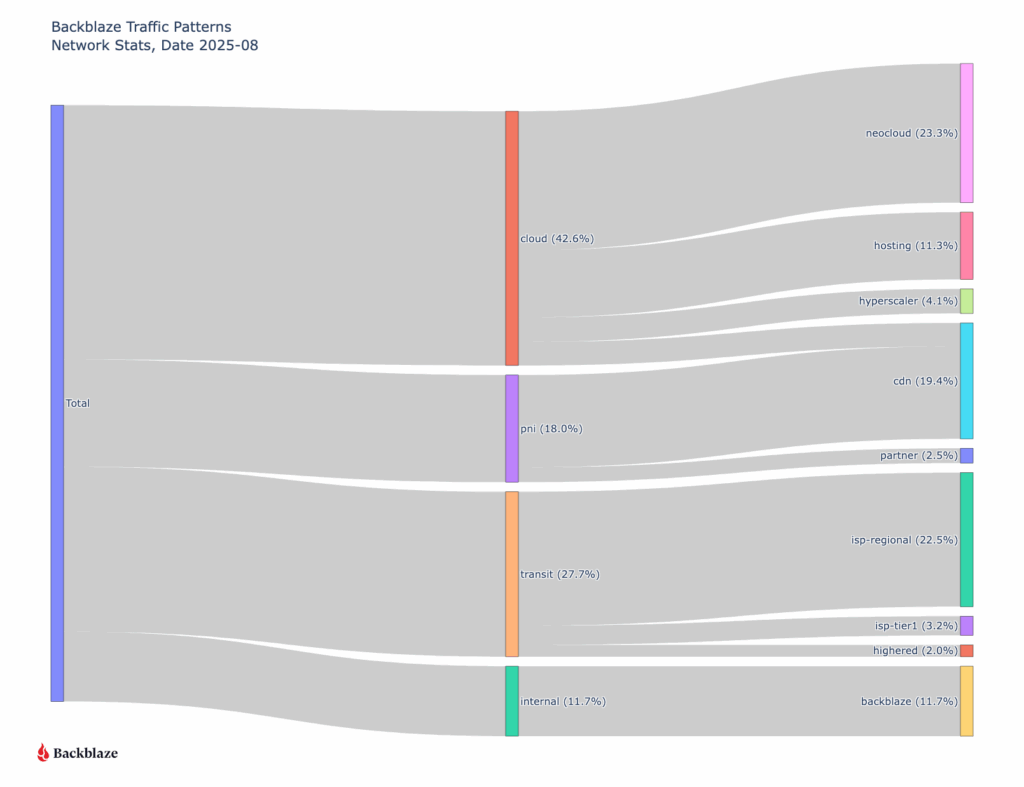
First let’s take a look at where all our traffic goes from a global perspective.
Sankey diagram of all August ingress and egress traffic grouped by type of network
When we look at the data, one pattern stands out immediately: traffic associated with neocloud networks—cloud providers offering compute, GPU, or other AI-related services—already represents nearly a quarter of total ingress and egress across Backblaze’s network. That’s a meaningful signal. Historically CDN traffic has been the majority of our traffic as our B2 Object Storage has been growing. Now, we’re seeing clear evidence of a new class of workload emerging, and it’s AI-shaped.
Neocloud network behavior
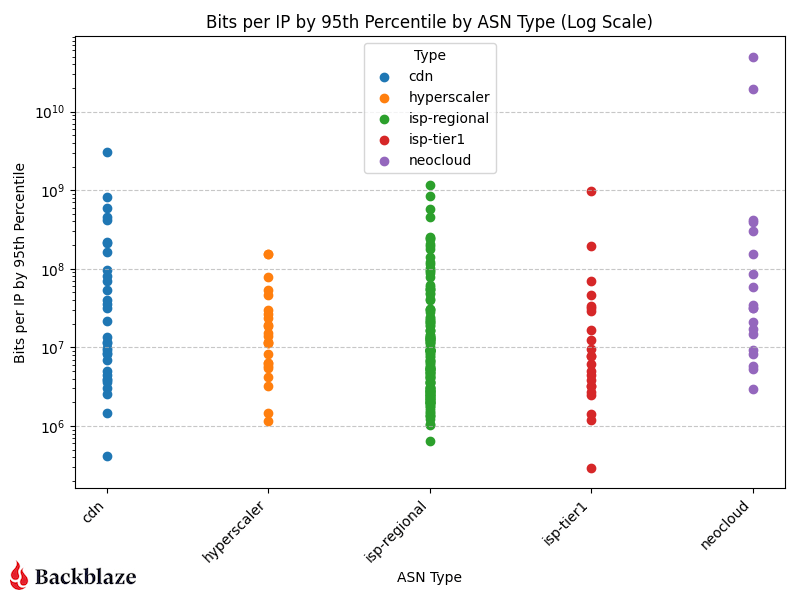
Let’s look at the magnitude of our network traffic based on the category of the traffic destination. To help quantify our data set, we interact with around 123,000 unique IP addresses every month.
“Magnitude” bits per IP address on a log scale
CDN, hyperscaler, isp-regional, and isp-tier one traffic cluster in the same general range of bits per IP, but neoclouds have a couple outliers—the two purple data points in the upper right corner of the log scale graph.
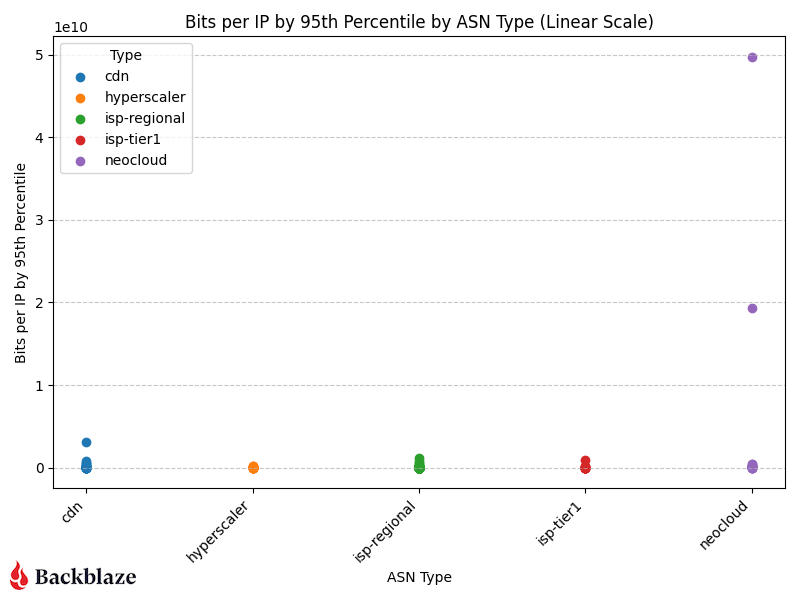
If we change the scale to linear (chart below), now we can see how much of an outlier the AI related traffic is in our sample range.
“Magnitude” bits per IP address on a linear scale
The “magnitude” (as we’re calling it) of the transfers we’re servicing for AI related flows to neoclouds is an order of magnitude greater than all our traffic patterns. This means that there are only a few unique IP addresses that we’re interacting with transferring large amounts of data in their flows.
The rise of AI-driven data movement
Over the past year, AI training and inference have transformed global data flows. Where traditional workloads move steadily, AI workloads move in bursts—rapid retrievals of massive datasets, short high-volume transfers for model training or tuning, and sustained outbound throughput for inferencing pipelines. The magnitude metric we’re introducing (bits per IP address) captures this shift.
As shown in the charts above, AI-related traffic to neoclouds isn’t just heavier, it’s denser. Those purple data points represent a small number of IPs exchanging a disproportionate amount of data. That concentration of flow is a hallmark of AI compute pipelines, where a few high-bandwidth endpoints (often GPU clusters) interact with object storage to repeatedly feed and retrieve training data.
In other words:
Fewer talkers, bigger flows. AI systems operate in fewer, more intense network sessions than traditional applications.
Shorter duration, higher peaks. Transfer patterns spike sharply, often corresponding to dataset replication or model checkpointing cycles.
Cross-cloud mobility. Much of this traffic routes between Backblaze and external compute platforms (classified as neoclouds) showing the rise of multi-cloud AI architectures.
The macro trend: The AI data gravity shift
This pattern reflects a broader macro trend in the cloud ecosystem: AI data gravity is pulling more storage and compute closer together. As AI models grow larger and datasets become more complex, organizations are rethinking where data “lives.” Instead of centralizing everything in one hyperscaler like AWS or Google Cloud Platform, they’re increasingly using cost-efficient, high-throughput storage clouds like Backblaze connected to specialized GPU clouds for compute (case in point: Why CoreWeave’s Object Storage Launch is Good for AI—and Everyone Building It).
This architectural shift explains the outlier traffic patterns we’re seeing on our network. Data isn’t just moving more—it’s moving smarter, following cost, performance, and regional availability cues.
Why it matters
Tracking this kind of data movement and magnitude helps us, and more importantly our customers, understand a few key things:
Operational readiness for AI workloads: How our network scales under bursty, compute-linked demands. (For more on this check out Making the Backblaze Network AI Ready)
Cost predictability: Where and when ingress or egress volume spikes may occur.
Industry evolution: How AI is reshaping the underlying patterns of internet traffic.
What’s next?
This is just the first glimpse of that industry evolution. As our dataset matures, we’ll be able to watch these AI-linked flows change quarter over quarter, offering not just transparency, but a longitudinal view of how the data backbone of the AI economy takes shape.
We’re planning to look at quarter over quarter number tracking for network types, IPv4 traffic vs IPv6 traffic, AI related workflows, cross-cloud connectivity trends, and more. We’re also planning to release the raw data quarterly going forward.
Anything specific you want to see? Let us know in the comments or reach out to our Evangelism team.
We’re excited to share these insights from our network telemetry, the patterns we’re seeing, and what they mean for the broader data economy. This is the stuff we stay up at night studying, and sharing it publicly means we can all better understand the forces shaping digital infrastructure and build with greater confidence and foresight.
It’s no secret that Kubernetes is the de facto container orchestrator for scaling containerized applications. As the Backblaze team gets ready to head to KubeCon North America, we’ve been exploring the ecosystem of tools and integrations that make it easier to store application data in S3 compatible object storage.
From workarounds that make an object storage bucket behave like a persistent volume to cluster backups and early Cloud Native Computing Foundation (CNCF) storage projects we’re excited to watch, here’s a quick guide to making object storage services like Backblaze B2 Cloud Storage work (as close to) seamlessly with your Kubernetes clusters.
Mountpoint for Amazon S3 CSI Driver
AWS Labs released the mountpoint for Amazon S3 container storage interface (CSI) driver to allow Kubernetes clusters to access files in object storage through a file system interface. Essentially, this mountpoint disguises S3 compatible object storage as a persistent storage volume so the Kubernetes cluster can access your object storage without the need for another tool or integration. This also works with other S3 compatible storage services, including Backblaze B2. Check out our GitHub repo for step by step instructions on how to deploy a sample application to test with B2, or see this in action during our upcoming webinar, The State of K8s + S3 Compatible Storage.
MinIO
MinIO is a popular tool for running object storage natively inside Kubernetes clusters, by exposing data through standard APIs to enable containerized application to store, retrieve, and manage unstructured data. MinIO designed to run natively in Kubernetes, and allows you to bring-your-own S3 compatible storage or use your device’s local storage for a self-hosted solution. MinIO is flexible enough for individual developers to experiment with, but its power comes from its scalability, with 77% of Fortune 500 companies using MinIO in their cloud native workloads.
Velero
Rapidly creating and deleting infrastructure, and being able to quickly rebuild and recover are core tenets of Kubernetes. Velero makes it incredibly easy to back up Kubernetes clusters to your preferred object storage service. Run one-off backups as needed with one simple command, or set up a schedule to make sure your clusters are backed up consistently.
Read more about Kubernetes cluster security and backup strategy.
Rook
Rook is a storage orchestrator for Kubernetes that manages distributed storage systems (including Ceph and Cassandra) as native Kubernetes resources. Though Rook’s functionality doesn’t directly extend to S3 compatible object storage like Backblaze B2, you can mirror the data to B2 or set up your preferred object storage service as a backup destination.
Container Object Storage Interface (COSI) (Currently available in Alpha)
The COSI project is a set of abstractions currently available in Alpha that aims to provide Kubernetes with the ability to request and provision object storage buckets from multiple cloud vendors, similar to how file/block storage is abstracted with the CSI driver. Since each cloud provider builds out object storage differently, COSI intends to provide a unified set of protocols so Kubernetes can be inclusive to all object storage vendors, and adhere to the Kubernetes portability tenet.
Learn more about these tools, see a demo of how to attach a Backblaze B2 bucket via the mountpoint for Amazon S3 CSI driver, and get some initial key takeaways from KubeCon North America during our upcoming webinar, The State of K8s + S3 Compatible Storage. Register to watch live on November 20, 2025 and get access to an on-demand recording.
AI isn’t just reshaping how data is processed—it’s rewriting how data moves. Behind every training run or inference pipeline is a torrent of data, and how efficiently (or not) that data travels through networks (and whether it’s an AI-ready network) can make or break performance.
Data workloads have massively evolved over the 18 years we’ve been in business from computer backups to exabyte-scale storage to AI data pipelines. And that has implications for not just our storage hardware, but our network.
What started as a single ISP serving a few racks in the early days has grown into a global, multi-terabit backbone connecting customers, compute, and storage in real time via multiple Tier 1 carriers, Internet Exchanges, and PNI links.
So why talk about it now? Because AI is testing the limits of every part of the infrastructure stack—and the network is where those limits are most visible. Running an AI-ready network means rethinking how you design, route, and scale traffic to handle not just more data, but faster, more synchronized, and more resilient data movement than ever before.
In this post, I’m talking about how our network has evolved to support AI workflows, including what’s changed under the hood, how we’re adapting our hardware and architecture, and what that means for the way data moves through Backblaze today.
Go with the flow
The Network Engineering (NetEng) group at Backblaze is responsible for the design, implementation, and support of our physical network—everything from the physical copper and fiber cables inside our datacenters to the routers and switches that connect our storage to the world.
When we talk about network traffic, we often refer to a “flow”—a stream of information sent between two or more parties. Downloading a file? That’s a flow between your computer and the server offering the file. Multiple small requests loading a website (text, formatting code, animation code, etc.)? Those are known as “mouse” flows. Massive dataset transfers that sustain hundreds of gigabits per second? Those are “elephant” flows.
The elephant in the room
AI workloads are the largest “elephant” flows our network has ever sustained. These aren’t just big files, they’re ecosystems of data: multi-petabyte datasets, hundreds of thousands of objects ranging from a single megabyte to hundreds of megabytes per object, and thousands of simultaneous connections working in parallel.
Moving these data sets around is no small task. It means engineering for sustained, lossless throughput. It’s cutting edge, using many machines to perform parallel operations, all at large transfer rates. Let’s say we’re the source of a dataset that is being transferred to a neocloud for processing, the processing layers (often GPUs) want a continuous stream of high bandwidth with no loss. And a single dropped packet in a training pipeline can trigger expensive re-requests, idle GPUs, and cascading slowdowns.
With that in mind, we’ve evolved our infrastructure from traditional cloud networking—designed for smaller flows—to handle the relentless firehose of AI data.
Traditional cloud vs AI cloud
AI changes everything about traffic behavior. It doesn’t just mean that our total capacity is bigger, but also that our considerations for how we design, support, and scale our infrastructure morphed along with our capacity upgrades.
Here’s a quick overview of the former challenges and the new ones we’re engineering to serve our AI workflows.
Traditional Cloud Network
AI Cloud Network
Small to large flow sizes (megabits to, gigabits)
Very large flows (multi-gigabit to terabit)
High entropy flows (many sources and destinations)
In short: AI traffic is heavier, stickier, and far less forgiving. So the goal is to design networks that can transfer 100Gbps, 200Gbps, and up to 1,000 Gbps (1 Terabit) a second with a low latency, low jitter, and a zero loss profile. Simple right?
Hardware network upgrades
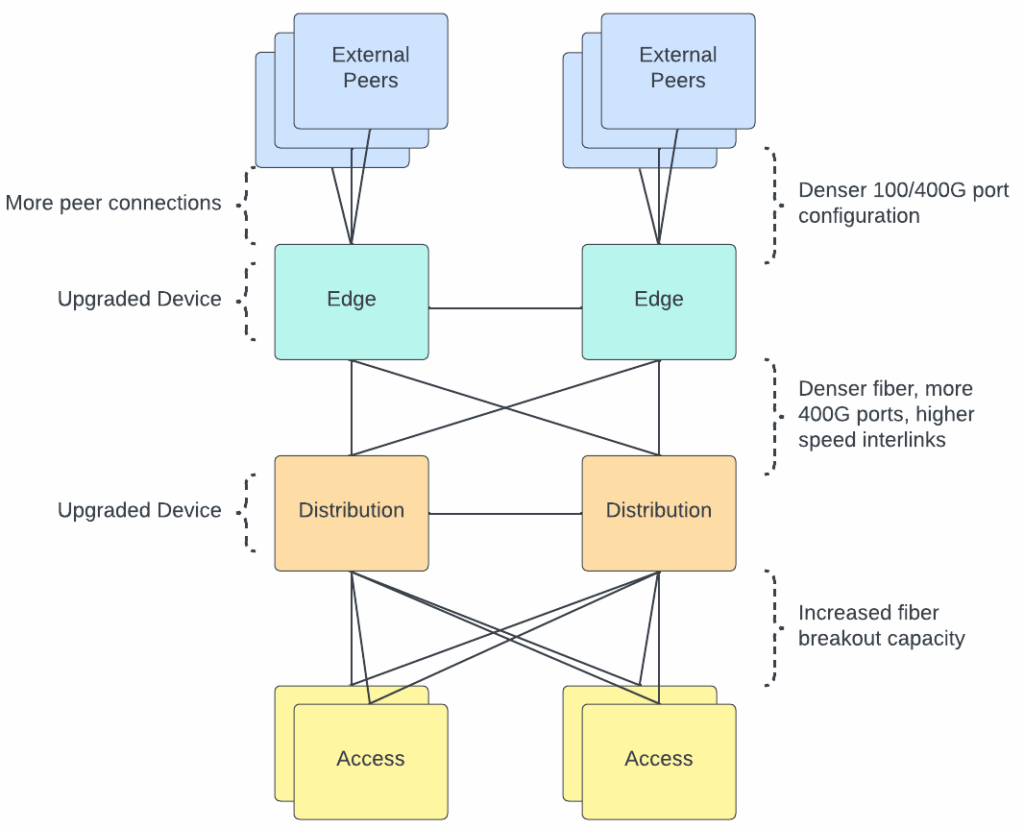
To meet these new demands of AI workflows, we’ve upgraded nearly every layer of our physical infrastructure. We needed to increase the density of our networking hardware, deploy denser fiber optic solutions, and upgrade the capacity of our edge network.
What technologies are we deploying?
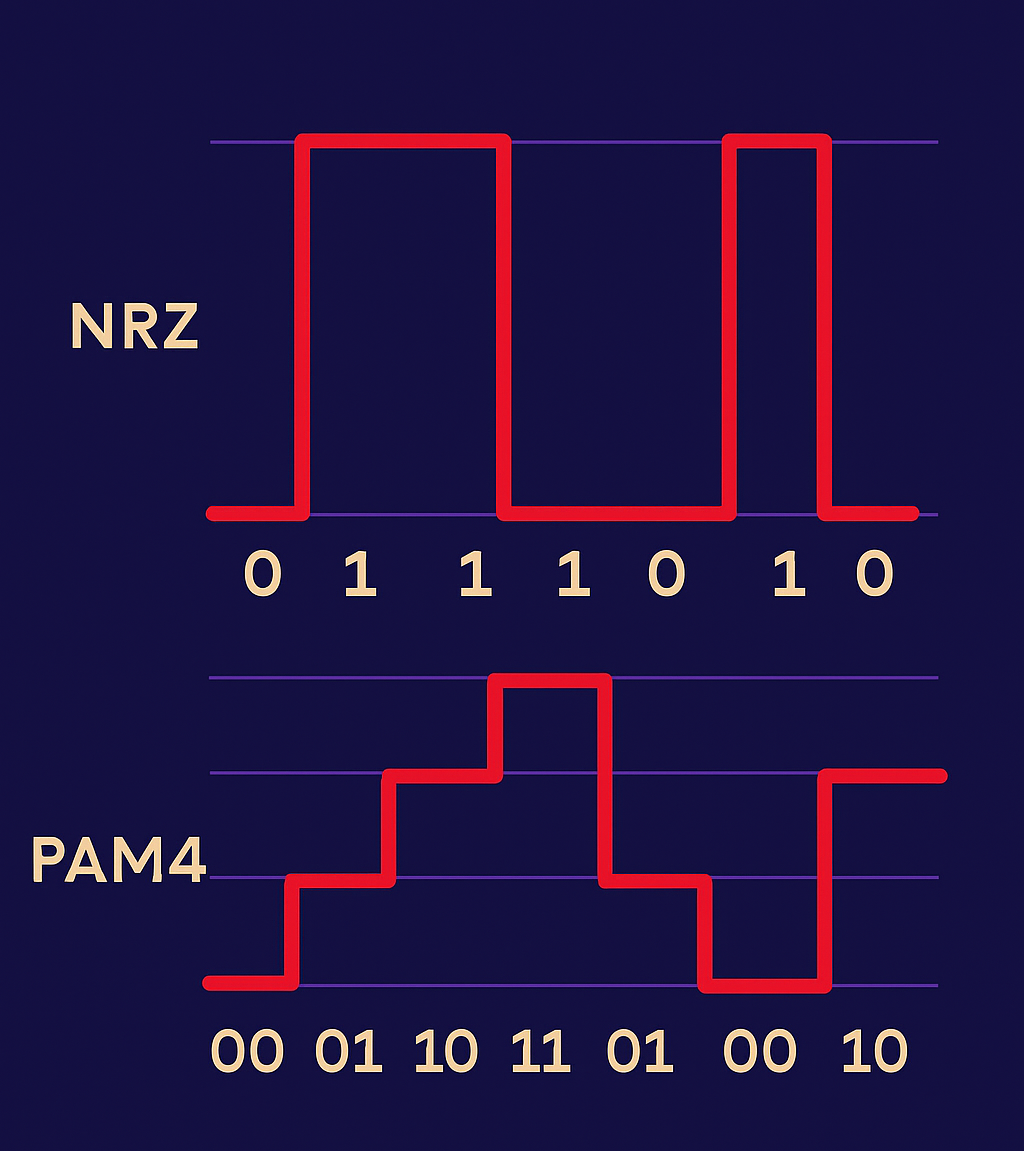
1. Transitioning from NRZ to PAM4 Optics
The fiber optic modules that are used to connect all our infrastructure hardware (servers, switches, routers) have been transitioned to modules that support a denser encoding method. Both NRZ and PAM4 are technologies used to modulate signals. Think of NRZ as a one-lane highway with one passenger per car. PAM4 adds three more passengers per car, doubling the rate without doubling lanes and with controllable cons such as increased noise sensitivity. By using four voltage levels instead of two, PAM4 transmits twice the information per signal change, effectively doubling bandwidth per fiber strand.
Comparison of (NRZ) and (PAM4) signals
2. MTP-8 and MTP-16 Fiber
MTP is a fiber connector type and the number after denotes the number of fiber optic strands contained within the cable. The higher the number, the more fiber pairs in the cable. We’ve used MTP-8 for years (four pairs of fiber), but to handle AI-scale traffic, we’re now deploying MTP-16 for higher-density connections. That means where we once ran 100G links, we now run 400G—and can scale up to multiple 100G paths as workloads grow (4x100G, 8x100G, etc).
3. Expanding edge and core capacity
We’ve refreshed routers and switches to handle higher port speeds and density—moving from 100G to 400G interfaces across our interconnects. The result: higher aggregate throughput and better fault isolation for massive parallel transfers.
Visualizing an AI workflow
Our monitoring tools track network flows (TCP conversations) in real time, giving us visibility into how large AI workflows move across the infrastructure. We use this type of information to monitor and make sure that large workflows are distributed across our physical infrastructure to allow for traffic balancing.
So, what does a large “AI workflow” look like? It’s not one device talking to one device at a high rate, but rather a collection of actors all working together.
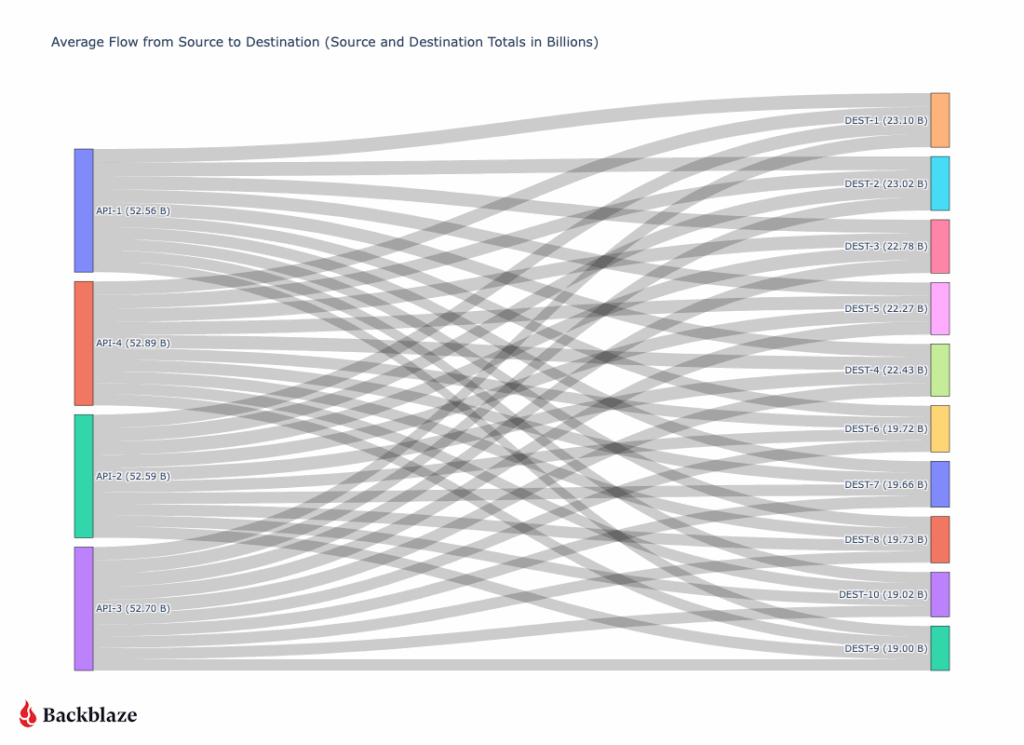
On our side, our API layer speaks to our storage layer, requesting the files. Once the files are retrieved from our storage layer, they flow through our API servers and are then sent to a destination. In order to achieve a high throughput, many API servers talk to many destination servers.
A typical 200+ Gbps transfer (diagrammed below) might involve four API virtual IPs (VIPs), each hosted on multiple backend servers sending 5–7 Gbps to ten destination nodes for a total output of 52Gbps from each API server. On the receiving side, each destination server might be ingesting 20Gbps across multiple streams.
AI data transfer from Backblaze (left) and client servers (right)
The key insight: AI data transfer isn’t one big pipe—it’s a distributed mesh of many coordinated streams. Our design scales linearly—add more API servers, add more destination nodes, and the flow grows predictably without congestion or packet loss.
Conclusion
AI workflows have redefined what “fast” means on the network. At Backblaze, we’ve evolved from a single-ISP startup to an AI-scale infrastructure provider by continuously pushing the boundaries of connectivity, throughput, and reliability.
As our customers push the frontiers of AI, we’ll keep tuning the invisible layer that makes it possible: the AI-ready network.
CoreWeave just launched their own AI Object Storage. Our take? We love to see it.
At first glance, it might look like a competitive offering, but as far as we’re concerned, the more storage options out there, the better for builders. It’s another sign that object storage has officially arrived as a key ingredient in the AI stack.
Now, your AI stack can look like this: Fast, flexible storage close to your GPUs from CoreWeave (essential for training and inference). And when the run’s over? Move it to Backblaze B2 Overdrive to keep it ready for your next run at the right temperature and price-to-performance ratio.
More options mean more ways to build smart, cost-efficient pipelines that let teams train faster and iterate more without getting locked in. We’ll always cheer for that.
Why object storage is essential for AI workloads
How do you balance scalability with performance while staying on budget? This ebook explores how object storage enhances every stage of the pipeline from collection to training to deployment, and provides real-world use cases.
Why object storage matters in the AI stack
Every AI model depends on moving massive datasets through training, inference, and retraining cycles. Each stage requires fast, reliable access to data. That’s where object storage comes in.
Object storage enables this by offering:
Elastic scalability for petabyte-scale data.
Reliability and durability across long model lifecycles.
Lifecycle management features to balance cost, performance, and accessibility.
As AI projects scale, smart data management becomes just as important as GPU performance. High-end GPUs can only deliver full value when they’re continuously fed the right data at the right time. When data sits in the wrong tier or takes too long to retrieve, compute resources go underused. And that means wasted time and money.
Balancing performance and cost in AI workloads
CoreWeave’s Local Object Transport Accelerator (LOTA) delivers up to 7GB/s throughput per GPU, helping data move quickly between storage and compute. With pricing around $110 per terabyte (about $60 with discounts) and regional capacity up to 10TiB, it’s built for performance-critical workloads where proximity to GPUs makes a measurable difference.
Its launch adds more choice to the ecosystem and highlights the growing demand for storage built specifically for AI. As more specialized options emerge, organizations are thinking carefully about how to right-size their infrastructure for each stage of the AI lifecycle.
When maximum performance is the goal, GPU-adjacent storage like CoreWeave’s can help teams squeeze out every last bit of speed during intensive training cycles. But for most AI workloads, B2 Overdrive provides the right balance of cost and performance. It offers the throughput and durability needed to support active training while keeping pricing predictable and scalable.
Many AI builders combine these strengths through a multi-cloud setup. Teams might use CoreWeave Object Storage when latency and proximity to GPUs deliver measurable gains, and then keep the rest of their AI pipeline on B2 Overdrive so datasets remain readily available for retraining, testing, or deployment.
Example configuration:
CoreWeave Object Storage for specialized, compute-intensive training where every millisecond counts. It’s ideal for short bursts of high-throughput processing, such as large-scale model fine-tuning or time-sensitive inferencing.
B2 Overdrive for the broader AI workflow, including day-to-day training, staging, versioning, and long-term dataset management. It provides the performance needed for ongoing model development while keeping data costs predictable and accessible across teams and environments.
B2 Overdrive offers:
Storage at roughly $15 per terabyte
High throughput and rapid access for post-training workflows
Simple APIs and event notifications to automate data movement across environments
This kind of architecture gives teams the freedom to use each platform where it shines. Backblaze handles the heavy lifting for most workloads, while CoreWeave adds targeted acceleration when raw GPU performance is the top priority. The result is a flexible, cost-aware workflow that supports both innovation and scale.
AI infrastructure that plays to every strength
The most effective AI setups use the right cloud for the right job. They run training where GPUs can perform at their peak, and store data where it stays organized and ready to move when needed.
B2 Overdrive provides a foundation for this strategy, offering a layer of object storage that keeps data secure, accessible, and easy to integrate across environments. Teams can combine each platform’s strengths to achieve speed when it’s needed, scalability that endures, and freedom from lock-in and runaway costs.
The AI ecosystem is expanding, and with the right partners, so are the possibilities.
Cloud storage was supposed to simplify infrastructure. Instead, it’s become one of the most unpredictable—and expensive—line items in IT budgets.
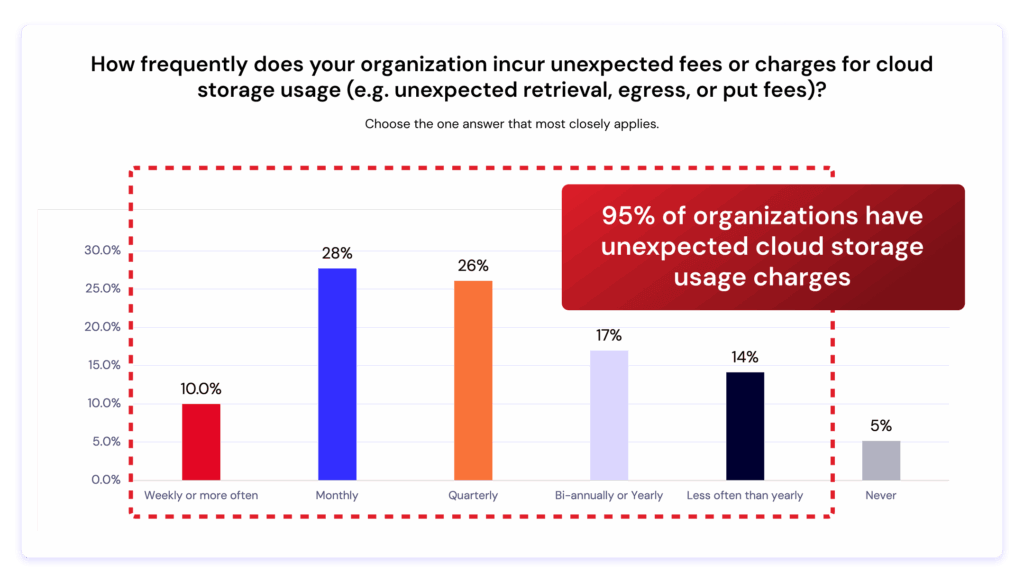
A new Dimensional Research report, commissioned by Backblaze, reveals that 95% of organizations experience unexpected cloud storage charges—costs that disrupt budgets, slow innovation, and limit flexibility.
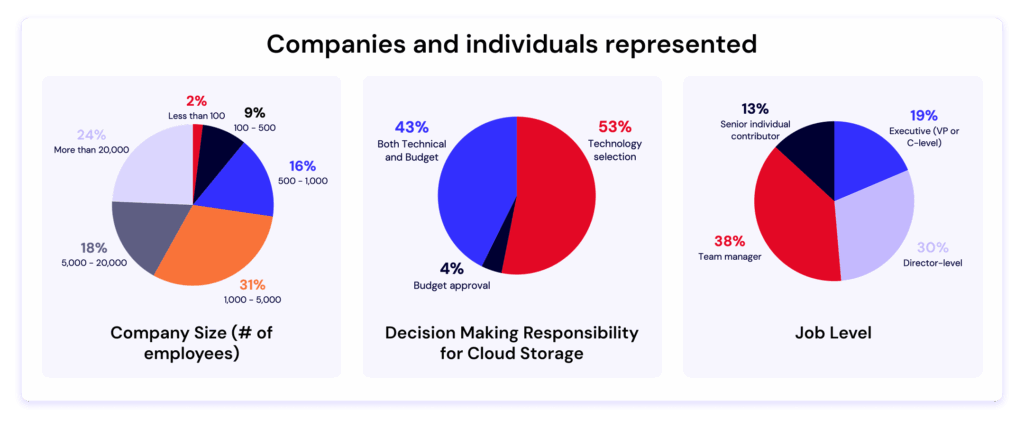
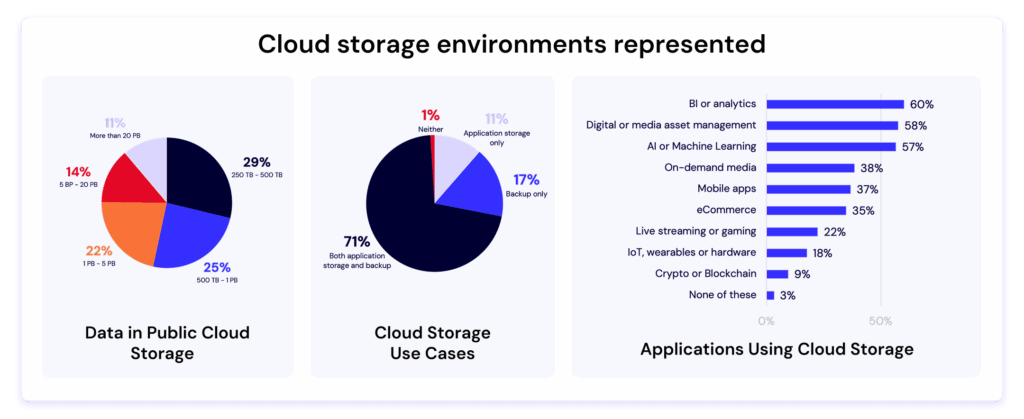
The 2025 study surveyed more than 400 IT decision makers responsible for managing at least 250TB of data in the public cloud. The findings make one thing clear: as AI, analytics, and data-intensive workloads expand, hidden costs and limited interoperability are forcing companies to rethink their cloud strategies.
The problem: Hidden fees are everywhere
According to the research, nearly every organization surveyed has been hit by surprise charges like retrieval, egress, or PUT fees.
95% of respondents reported unexpected costs for cloud storage usage.
Larger organizations—those with more than 5PB of data—were even more likely to experience frequent charges.
These hidden costs have become such a burden that 85% of companies are taking steps to manage them. The top tactics include:
Reducing the size of datasets stored in the cloud (56%)
Shortening storage duration policies (45%)
Cutting spending elsewhere in the tech stack (40%)
In short: IT teams are making trade-offs to avoid surprise costs—trade-offs that can limit innovation and reduce the value of their data
Egress costs are locking companies in
One of the most striking findings:
55% of respondents said that the cost of egressing and moving data is the biggest barrier to switching cloud storage providers.
That means many organizations feel trapped in their current solutions—not because the technology is best-in-class, but because moving their data would be too expensive.
This dynamic creates what’s often called a “walled garden” effect—where providers profit from data lock-in rather than delivering value through performance or innovation.
The result? Slower cloud adoption, limited agility, and higher total cost of ownership for IT teams trying to scale modern workloads.
Flexibility and interoperability are the new imperatives
If cost surprises weren’t enough, nearly all respondents (99%) said that limited flexibility and lack of interoperability are impacting their ability to deliver and scale.
In other words: even when data is stored safely, it’s often stuck—difficult to move, integrate, or use across tools and platforms.
This friction hits hardest at large enterprises and data-heavy organizations that depend on cross-cloud workflows, hybrid architectures, or AI pipelines that require moving large volumes of data frequently.
A turning point for cloud storage strategy
With 62% of respondents preferring to select best of breed providers vs. one-stop-shops, these findings highlight a growing shift:
IT teams are no longer choosing cloud providers solely based on performance or ecosystem.
They’re prioritizing predictability, transparency, and interoperability—the ability to move and use data freely, without hidden penalties.
Backblaze has long championed this model with open cloud storage that puts customers—not pricing structures—in control. Our egress fee transparency, S3 compatible APIs, and simple pricing are designed to eliminate the pain points identified in this report.As one respondent put it: “We need a cloud partner that helps us use our data, not pay to move it.”
What’s next: Join the conversation
The full report—The Hidden Cost of Cloud Object Storage—is now available for download. Inside, you’ll find all the data, charts, and insights from 400+ IT leaders across industries and company sizes.
And, to dive deeper into the findings, join us for an upcoming live webinar with experts from Dimensional Research and Backblaze. We’ll unpack the key trends, share real-world stories from IT leaders, and discuss how to build a more transparent, flexible cloud strategy.
About the research
The survey, conducted by Dimensional Research in May–June 2025, included responses from 403 qualified technology stakeholders responsible for cloud storage strategy and budgets. All participants represented companies with over 250TB of data stored in the public cloud.
Site reliability engineers (SREs) are measured by one thing above all: keeping systems available when it matters most. They’re the ones getting calls at midnight, managing the war room during outages, and preventing small hiccups from snowballing into customer-facing failures.
But storage from major cloud providers often makes their job harder. Tiering delays stretch out recovery times. Replication gaps create blind spots across regions. Complex policy chains flood monitoring systems with noise. Instead of protecting reliability, general-purpose storage often undermines it.
What SREs need is a storage layer that works with them, not against them—one that delivers durability without complexity, speed without cold-tier delays, and clarity without policy sprawl.
A specialized, always-hot storage foundation provides exactly that.
This is the final post in our three-part series on how specialized storage helps every member of a cloud-native team. (See articles one and two to get the full story.) This time, we’re zeroing in on the reliability engineers who keep customer-facing systems humming behind the scenes.
Build a disaster recovery plan that’s ready for anything
For SREs, storage is the backbone of availability and recovery. When it falters, the blast radius spreads fast. Even a minor failure can ripple outward and amplify the impact of every incident.
In the sections below, we’ll look at how those ripple effects play out in real-world scenarios, and how specialized, always-hot storage helps SREs contain failures, recover faster, and quiet the noise that makes reliability so hard to sustain.
Contain the blast radius
SREs spend much of their time running “what-if” drills. What if a drive fails? What if a region goes down? What if replication lags behind?
With general-purpose cloud storage, those “what-ifs” become real risks:
Tiering delays: Infrequently accessed data is automatically pushed into colder, slower tiers. During an incident, archived data such as logs or snapshots must be restored before it’s usable. This slows recovery when seconds count.
Replication gaps: Replication isn’t always immediate or consistent across regions. When writes lag or copies fall out of sync, recovery data can be stale or incomplete, leaving teams guessing at the true state of their systems.
Policy complexity: Layers of identity and access management (IAM), lifecycle, and routing policies often overlap in unpredictable ways. A single misconfiguration—like archiving active data or blocking a needed API—can cascade through dependent services, turning a minor error into a wider outage.
Each layer meant to increase flexibility instead adds fragility.
Specialized storage changes that dynamic. Designed for worry-free durability and built to eliminate single points of failure, it distributes data across independent systems so localized issues don’t cascade. Even if hardware fails or a region experiences disruption, data remains accessible and recovery stays predictable. For SREs, that means fewer nightmare scenarios to model, fewer “what-ifs” in runbooks, and faster, more confident recovery.
Cut mean time to recovery (MTTR), protect SLAs
When an incident hits, the SLA clock starts ticking. Every minute spent waiting on logs, snapshots, or configs adds pressure from customers and leadership alike.
But in tiered storage systems, those critical assets are often parked in colder, low-cost tiers meant for archival access rather than fast recovery. Pulling them back can take hours or even days before triage can begin. That latency bloats MTTR and turns manageable events into prolonged outages with real customer impact.
Specialized storage eliminates these bottlenecks. Always-hot data and millisecond reads give SREs immediate visibility into logs, snapshots, and configs, so evidence is available the moment an incident begins. Instead of stalling while waiting on a restore job, teams can dive directly into diagnosis and resolution. The results are faster MTTR, steadier SLA performance, and fewer fire drills turning into headline outages.
Reduce alert fatigue
Ask any SRE what wears them down and the answer comes quickly: false alarms and 3 a.m. wake-ups. The incident itself may be rare, but the noise leading up to it is relentless.
In big-cloud environments, complexity breeds that noise:
Lifecycle policies silently archive data until a request fails
IAM rules misalign with pipeline needs
Tier transitions or throttling events masquerade as outages in monitoring dashboards.
Each quirk becomes another alert, another call, another night interrupted. Over time, the noise blends with the signal, and teams start second-guessing what’s real. Alert fatigue sets in. Engineers tune out notifications or delay responses, not from neglect but from exhaustion. The result is a slower reaction when a real outage hits, which is exactly the scenario the alerts were meant to prevent.
Specialized storage dials down the chaos. A single-tier design with clear access controls strips away layers of risk, keeping alerts meaningful and edge cases rare. Instead of burning cycles firefighting brittle rules, SREs can focus on resilience engineering and prevent outages in the first place.
Rethink storage, strengthen reliability
The SRE role is already demanding. Storage shouldn’t add to the burden. An always-hot storage layer gives teams the durability, speed, and simplicity they need to keep systems reliable without extra toil.
Backblaze B2 was built with SREs in mind:
Architected for 11 nine’s of durability
Millisecond reads that slash MTTR and protect SLAs.
Simplified architecture that cuts noise and pager fatigue.
You don’t need to rebuild your stack to get these benefits. Just swap the endpoint and redeploy. With Backblaze B2, storage stops undermining reliability and starts strengthening it.
Tired of midnight pages for preventable storage issues? There’s a better way. Explore how Backblaze B2 fits into your reliability workflows, and how much calmer on-call life feels when storage simply works.
Generative AI video is exploding. Platforms can turn prompts into polished clips, and models churn through massive training sets of images and footage. Behind the magic, though, is the unavoidable reality of storing and moving petabytes of data.
Training runs require archiving colossal datasets, then pulling them back in full when it’s time to retrain. Once models go live, the output itself becomes another major workload to manage, whether that’s endless libraries of user-generated videos or fast-cycling streams of ephemeral content. These challenges are part of life for every GenAI company, but the costs of handling them vary widely depending on the provider.Those cloud storage costs can spiral quickly out of control. The big cloud providers lure teams in with low headline rates, but the fine print tells a different story. Pricing depends on which storage tier you pick, how often you move data between regions, and how many API requests your pipeline makes. Founders end up building workflows around cloud quirks instead of what’s fastest and simplest for their teams.
Free ebook: The Cost of Cloud Storage for AI
Struggling to keep AI storage costs under control? Download our free ebook to discover how to optimize cloud storage for AI workloads—without compromising performance.
Hidden cost #1: Storage tiers and complexity
AI video data doesn’t behave neatly. Training sets might sit untouched for long stretches before being needed again all at once. User-facing content might accumulate forever, or spike and crash depending on the latest trend. For lean engineering teams, predicting these swings is nearly impossible.
On major cloud providers, the stakes are high. Choose a hot tier and you’ll overpay when data goes cold. Pick an archive tier and you’ll face delays and penalties when you suddenly need that dataset tomorrow. Constantly shifting petabytes between tiers adds both operational overhead and surprise costs.
The numbers tell the story: a 5PB archive costs about $120K a month on AWS S3 Standard for storage alone, before any egress charges. The same capacity runs closer to $30K on Backblaze B2 Cloud Storage—a $90K delta that could fund another GPU cluster or extend a startup’s runway.
Backblaze B2 comes in at around one-fifth the cost of S3, with no tiering games to manage. And when workloads demand maximum throughput, B2 Overdrive scales while delivering a stronger price-to-performance ratio than others offer. That means less time modeling cost scenarios and more time iterating on product and model design.
Hidden cost #2: Egress fees
AI development thrives on iteration. Training and retraining cycles shuffle enormous datasets across clusters, often more than once a month. Each transfer can rival the cost of storage itself. And the faster a team wants to move, the more those bills stack up.
The big cloud providers introduce friction at every step. They charge not only when data exits their cloud but also when it crosses between their own regions. At petabyte scale, those tolls can reach five or even six figures in a single month, forcing founders into an impossible tradeoff: experiment less or drain the budget.
Consider that moving just 1PB once per month on AWS in the US East (N. Virginia) region racks up around $53.8K. Double that transfer frequency and you’re staring at over $100K in egress fees. That’s budget better spent on hiring, acquiring customers, or building better products.
Backblaze removes this bottleneck. Backblaze B2 already includes free egress to leading GPU and CDN partners. For companies operating at AI scale, B2 Overdrive goes further with unlimited free egress to any destination. That means models can be trained, tuned, and distributed globally without a single surprise charge standing in the way of progress.
Mirage, an AI video platform, experienced this firsthand. By eliminating egress costs, they cut storage-related expenses by up to 95% compared to their previous provider—freeing resources to reinvest in growth and product innovation.
Hidden cost #3: API requests and transaction fees
Not every AI video workflow interacts with storage the same way. Some stream large video files in big chunks, keeping the number of calls manageable. Others slice data into millions or billions of tiny objects—frames, embeddings, or metadata—and rely heavily on listing and indexing operations. In those cases, what looks like spare change per request quickly compounds into thousands of dollars in charges every month.
Major cloud storage providers are relentless here. Every PUT, GET, LIST, or HEAD operation comes with a fee, no matter how small. At scale, those fractions of a cent add up fast, leaving engineers designing around billing quirks instead of choosing the cleanest solution for their pipelines.
Picture a pipeline that generates one billion writes and two billion reads in a single month. On AWS, the tab for those transactions alone would run close to $5.8K. On Backblaze B2, writes are free and reads cost just $0.004 per 10,000 requests, bringing the same workload down to about $800. And the first 2,500 Class B and Class C transactions each day are free, further shrinking the bill. On B2 Overdrive, all API calls are included at no additional cost.
Whether your architecture leans toward billions of tiny objects or more efficient streaming, Backblaze keeps request charges predictable and manageable. That makes API calls something your team doesn’t need to obsess over, which is exactly how it should be.
Bringing it together: Simple, predictable economics
Taken together, these hidden costs show why storing AI video on “the big three” often feels like playing a rigged game. The pricing looks straightforward until the bills arrive, padded with charges for tiers, transfers, and transactions. Each one eats away at budget and slows the pace of innovation.
Backblaze offers a different path. By stripping out the fine print and focusing on price-to-performance, it makes storage a stable foundation instead of a moving target. Mirage proves what that means in practice: eliminating egress fees drove huge savings and freed resources to reinvest in their product.
For founders, that kind of predictability turns storage from a frustrating line item into the fuel for faster iteration, bolder experimentation, and sustainable growth.
If you’ve hung around Backblaze for a while (and especially if you’re a Drive Stats fan), you may have heard us talking about the bathtub curve. In Drive Failure Over Time: The Bathtub Curve Is Leaking, we challenged one of reliability engineering’s oldest ideas—the notion that drive failures trace a predictable U-shaped curve over time.
But, the data didn’t agree. Our fleet showed dips, spikes, and plateaus that refused to behave. Now, after 13 years of continuous data, the picture is clearer—and stranger.
The bathtub curve isn’t just leaking, and the shape of reliability might look more like an ankle-high wall at the entrance to a walk-in shower. The neat story of early failures, calm middle age, and gentle decline no longer fits the world our drives inhabit. Drives are getting better—or, more precisely, the Drive Stats dataset says that our drives are performing better in data center environments.
So, let’s talk about what our current “bathtub curve” looks like, and how it compares to earlier generations of the analysis.
The TL;DR: Hard drives are getting better, and lasting longer.
The intro: Let’s talk bathtub curve
If you’ve spent any time around hardware reliability, you’ve seen it: a smooth U-shaped line called the bathtub curve. It promises order in the chaos of failure—a story where devices begin life with a burst of defects, settle into steady performance, and finally wear out in predictable decline. And, this is what it looks like:
The classic bathtub curve.
For decades, it’s been engineering shorthand for how things die. But as our dataset has grown—more than a decade of drive telemetry and millions of drive-days—the data is clear: Our real drive population is more complicated.
What the bathtub curve looked like then
The first time we ran this analysis was in 2013, and when we updated the article in 2021, we shared this chart:
It shows the annualized failure rate (AFR) of the full drive pool over time (in years) at two different look-back points—2013 and 2021. At that time, you could already see that the bathtub curve was starting to, as the venerable Andy Klein put it, “leak.” The 2013 data looks the closest to a true bathtub curve, while the 2021 data shows fewer early failures and a lower failure rate for more years. We also see the average longevity of drives goes up by about two years before spiking into the failure zone.
Numbers can both define and obscure reality
Now, there are some very interesting factors that come into play when comparing hard drive reliability over time. For example, our usual caveats about how we use drives vs. how consumers use drives, how our workloads have changed over time, etc. More importantly, though, because we’re comparing averages, it’s easy to lose track of the context around our dataset—how many hard drives are we talking about in 2013 vs. 2021?
When we did this analysis in 2013, Backblaze had been open for six years, but we’d only been publishing the Drive Stats dataset since 2013. So, arriving at presenting a look-back at the data (i.e., this is how many drives failed when they were between zero and one years old) was a bit of a math problem compared to our usual data reporting. We were talking about drives that entered the drive pool in 2007, and those were ones we hadn’t shared complete daily logs about, even if the drive was still in service in 2013 (which, as you can tell from the data, was unlikely). We achieved that by looking at failures vs. logged on hours, and when we re-created the analysis recently, we used this SQL query:
CREATE VIEW introduction_dates AS
    -- Calculate the introduction date of drives that were already in service on 2013-04-10
    SELECT serial_number, date(date_add('hour', -1 * smart_9_raw, TIMESTAMP '2013-04-10 00:00:00')) AS introduced
    FROM drivestats
    WHERE date = DATE '2013-04-10'
    UNION
    -- Use the minimum date for drives that entered service after after 2013-04-10
    SELECT serial_number, MIN(date) as introduced
        FROM drivestats
        WHERE serial_number NOT IN (
            SELECT serial_number
            FROM drivestats
            WHERE date = DATE '2013-04-10'
        )
        GROUP BY serial_number;

SELECT
    date_diff('day', d2.introduced, d1.date) / 91 AS age_in_quarters,
    100 * 365 * (cast(SUM(d1.failure) AS DOUBLE) / COUNT(*)) AS afr
FROM drivestats AS d1
INNER JOIN introduction_dates AS d2
ON d1.serial_number = d2.serial_number
GROUP BY 1
ORDER BY 1;
Our drive pool looked a lot different in 2013 as well. Not only was it smaller (~35,000 drives and over 100PB of data were live as of September 2014), but it also was made up of “consumer” drives. While we didn’t see much of a difference between the two when we actually tested them in the environment, we did a lot of drive farming in those days, a process that included actually “shelling” the drives and removing them from their housings—which means that our drive pool had a lot more potential to get some bumps along the way. Hard drives are pretty resilient and we were careful, but it’s worth noting.
All those things are cool from a historical perspective, but the more impactful thing to pay attention to is that any time you have less data (read: a smaller number of total drives), each individual data point has more impact on the whole. In the bathtub curve, you naturally reduce the number of drives as they get older—every drive has a day one, but not every drive has a day 1,461 (or, in lay people’s terms: four years, one day). With fewer drives, more spikes. So, if you start off with more drives, your numbers are likely to be more steady—unless there’s a real problem, or you’re entering your true drive pool failure zone.
And, since we’ve transitioned to buying more drives, and decommissioning drives in a different way—well, that all affects what the end result is. More on our drive hygiene habits later; for now, let’s get into our current data.
What the bathtub curve looks like now
Without further ado, let’s look at the failure rates in our current Backblaze drive pool:
That’s a pretty solid deviation in both age of drive failure and the high point of AFR from the last two times we’ve run the analyses. When we ran our 2025 numbers (at the close of Q2 2025), we reported on 317,230 drives. Take that as an approximate raw number given the normal drive exclusions in each Drive Stats report, but it gets you in the ballpark.
For consistency’s sake, here’s 2013:
And here’s 2021:
What’s missing, and a bit difficult to visualize, is the scale on both the x axis (time in years) and the y axis (annualized failure rate expressed in percentage). Let’s put all three on the same chart:
Note that both the 2013 data and the 2021 data have high failure percentage peaks at some point near the end of their drive lifetimes. In 2013, it was 13.73% at about 3 years, 3 months (and 13.30% at 3 years, 9 months). In 2021, it’s 14.24%, with that peak hitting at 7 years, 9 months.
Now, compare that with the 2025 data: Our peak is 4.25% at 10 years, 3 months (woah). Not only is that a significant improvement in drive longevity, it’s also the first time we’ve seen the peak drive failure rate at the hairy end of the drive curve. And, it’s about a third of each of the other failure peaks.
Meanwhile, we see that the drive failure rates on the front end of the curve are also incredibly low—when a drive is between zero and one years old, we barely crack 1.30% AFR. For reference, the most recent quarterly AFR is 1.36%.
Still, if we take a look at the trendlines, we can see that the 2021 and the 2025 data isn’t too far off, shape-wise. That is, we see a pretty even failure rate through the significant majority of the drives’ lives, then a fairly steep spike once we get into drive failure territory.
What does that mean? Well, drives are getting better, and lasting longer. And, given that our trendlines are about the same shape from 2021 to 2025, we should likely check back in when 2029 rolls around to see if our failure peak has pushed out even further.
Hey, what about that data contextualization you did above?
Good point—there are significant things that have changed about our dataset that may be affecting our numbers. We’ve already tackled the consumer vs. enterprise drive debate, and while we don’t have updated testing on that front, there are other things about buying drives at scale that may have an effect on the data.
For instance, because we buy drives in bulk, that means that a big chunk of drives enter our data pool at the same time. Given that we, over the years, have really only seen model-by-model variation, this means that if you get a lemon of a drive and you’ve added a lot of them, you may have a chunk of drives failing all at once.
Also, we have a different process for decommissioning drives these days. There are lots of things that go into that strategy, but you can simplify it all to risk management and our ability to grow our storage footprint over time. From a practical perspective, that means sometimes there are drives that are still performing well that we decide to take out of service anyway—and that means they get taken out of the fleet without ever having failed. Since our analyses above are based on annualized failure rate vs. age of drive, you can see a big drop in drive population without the expected failure rate spike.
Finally, we have different standards for new drives. Some of them just have to do with the industry at large—drives are getting bigger, and storage patterns are changing. But, compared with 2013, when a natural disaster forced us to innovate in unexpected ways, we’ve got more flexibility to consider our purchases, and to do so in a way that’s specific to our environment.
Was the bathtub curve just wrong?
The issue isn’t that the bathtub curve is wrong—it’s that it’s incomplete. It treats time as the only dimension of reliability, ignoring workload, manufacturing variation, firmware updates, and operational churn. And, it rests on a set of assumptions:
Devices are identical and operate under the same conditions.
Failures happen independently, driven mostly by time.
The environment stays constant across a product’s life.
The good news: When it comes to data centers, most of these are as true as they can be in a real-world environment. Data centers environments attempt to be as consistent as possible to be able to reduce power consumption, and to be able to properly anticipate and plan data workloads. Basically, consistency = a happy data center.
That said, conditions can’t ever be perfect. Our numbers have always and will always reflect both good planning and the unforeseen aspects of reality. Understanding whether drives are “good” or “bad” is always a conversation between what you theorize (in this case, the bathtub curve) and what happens (the Drive Stats dataset).
What’s next?
Why does all this talk of numbers matter? Well, as we’ve expanded our drive pool over time, in some ways, we’ve increased confidence in the results we’re seeing, both on day one and day 1,461. Even if we had the exact same drives models and drive pool make up (by percentage) from 2013 that we did in 2021, having more of them would give us better results. But, now we have a greater diversity of drives and more of them.
That doesn’t mean we’re the be-all, end-all of drive reliability, but it does give us some more footing to slice and dice the data and bring it back to you. As always, you can find the full Drive Stats dataset on our website, which means you can repeat this experiment, or use the data in any way you can imagine. Stay tuned for our quarterly reports and more articles from the Drive Stats extended universe—and feel free to sign up for the Drive Stats newsletter if you want to stay up-to-date.
At Backblaze, we’ve always believed that data protection should be easy, reliable, and seamless. Our Computer Backup product has long provided individuals and organizations with unlimited, automatic, and affordable cloud backup. But for IT admins managing fleets of devices, visibility and control are just as critical as the backup itself.
That’s where our integration with Jamf Pro comes in. By developing extension attributes that surface key information about Backblaze Computer Backup directly into Jamf Pro, we’ve made it simpler than ever for admins to monitor and manage backup health across their organization.
Why extension attributes matter
Jamf Pro is the industry standard for managing Apple devices, giving IT teams centralized oversight and policy enforcement across Macs, iPhones, and iPads. Extension attributes allow admins to collect custom data points beyond Jamf’s built-in inventory. By plugging Backblaze-specific attributes into Jamf, organizations gain real-time insight into the backup status of every managed Mac—without jumping between multiple dashboards.
This alignment reduces blind spots, helps meet compliance requirements, and, most importantly, gives peace of mind that critical company data is safe.
The four key extension attributes
We’ve developed four extension attributes that bring actionable backup insights into Jamf Pro:
1. Backup selected
This attribute shows whether Backblaze Computer Backup is enabled on a device. IT admins can quickly confirm if backups are actively running, ensuring no endpoint is left unprotected.
2. Backup size
Data size matters—not just for storage costs, but for understanding the scope of protection. This attribute reports the total size of the data being backed up, helping teams gauge usage and anticipate trends.
3. Last backup date
Knowing when a device last backed up is critical to risk management. This attribute ensures admins can spot machines that haven’t backed up recently and take proactive steps before a potential data loss occurs.
4. Safety frozen status
Backblaze’s Safety Freeze feature protects users from data loss by preventing accidental or malicious changes to a backup. By surfacing this status in Jamf, admins gain visibility into whether a device’s backup is frozen and can act accordingly.
Benefits for IT teams and end users
By combining Backblaze’s reliable backup with Jamf’s centralized management, organizations gain:
Proactive risk management: Spotting gaps in backup coverage before they become crises.
Streamlined compliance: Meeting audit requirements with centralized backup data reporting.
Operational efficiency: Saving IT teams from switching between tools and reducing the need for manual checks.
Automatic, seamless backups: Employees know their data is being protected without interruptions or extra effort.
Looking ahead
The development of these Jamf Pro extension attributes is part of our broader mission to empower IT teams with tools that reduce friction and strengthen resilience. As remote and hybrid work environments continue to expand, seamless integrations like these will only become more valuable.
At Backblaze, we’re proud to provide more than just a backup service—we’re delivering visibility, control, and confidence.
Want to try it yourself? Get started today and see how these Jamf Pro extension attributes can make managing backups as simple as possible.
Developer operations (DevOps) engineers sit at the intersection of development and operations. Their job is to keep pipelines humming, environments consistent, and deployments on schedule, all while juggling uptime, costs, and compliance.
This balancing act leaves little tolerance for surprises. Unfortunately, storage from major cloud providers often delivers exactly that. Built to cover every use case from backups to analytics to streaming, general-purpose storage prioritizes breadth over focus. The result is complexity:
Tiering rules that shift data unexpectedly
Pricing models that change with every access pattern
Dependencies that ripple across services
For DevOps, this type of one-size-fits-all system means hidden costs, shifting performance, and integration headaches right when predictability matters most.
The good news: you don’t need to overhaul your entire stack to regain control. Adding a specialized, always-hot storage layer can resolve DevOps engineers’ biggest storage headaches without forcing major workflow changes.
This post is the second in our three-part series on how specialized storage helps every member of a cloud-native team, including developers, DevOps engineers, and site reliability engineers (SREs). Today, we’ll focus on the payoffs for DevOps engineers.
Storage that works the way DevOps does
For DevOps engineers, storage issues often show up in the middle of critical workflows. A change meant to speed deployments triggers cascading adjustments. A spike in access patterns turns into sprawling invoices and finance tickets. A misaligned rule blocks data right when pipelines need it most.
In the sections below, we’ll dig into how these problems derail day-to-day operations, and how purpose-built cloud storage removes the friction so DevOps teams can stay focused on building and delivering.
Free ebook: Why object storage is essential for AI workloads
Unlock faster development and simpler workflows—without surprise costs. Get our free ebook “Cloud Storage for the Cloud-Native Era.”
Migration without migraines
Swapping a storage layer usually comes with the fear of broken pipelines, incompatible APIs, or weeks of retraining. And the big three cloud providers compound this by tying services together so tightly that even small changes can ripple through deployments.
That means a tweak meant to improve storage can unexpectedly force adjustments in compute, networking, or identity and access management (IAM). Now, you’re slowing down releases instead of speeding them up.
Specialized storage avoids this trap. With drop-in S3 compatibility and no tier juggling, adding it to your stack requires little more than updating an endpoint and credentials. Pipelines keep running, Terraform and Kubernetes scripts stay intact, and deployments continue smoothly, so storage upgrades feel like routine maintenance, not full migrations.
Invoices without inquisitions
Engineers shouldn’t have to be accountants. But with major cloud providers, storage costs often spike without warning when charges are tied to shifting access patterns, such as frequent reads, writes, or transfers.
The result is sprawling invoices packed with egress fees, API surcharges, and delete penalties. Finance teams see the bill and demand answers. DevOps teams could spend hours untangling storage math instead of improving automation or hardening pipelines. Every unexplained charge turns into a ticket, and every ticket drags engineers away from engineering.
Specialized storage removes this ordeal. Flat, transparent pricing and no hidden penalties make costs easy to predict and explain. That clarity keeps tickets low and escalations rare. DevOps teams can walk into finance reviews with confidence, backed by numbers that are simple to explain.
Engineering without entanglements
Major cloud provider environments come with a maze of tiers, lifecycle policies, IAM rules, and cross-service dependencies. Managing these isn’t a one-time task; it’s a cycle of effort that eats into engineering time:
Writing: Defining lifecycle policies and IAM rules to control when data moves between tiers or who can access it.
Testing: Validating every rule to make sure it doesn’t archive active data, block critical access, or violate compliance requirements.
Maintaining: Updating policies as workloads evolve, with new buckets, new services, or shifting security mandates.
Troubleshooting: Debugging typos, misaligned automations, or unexpected interactions that can lead to outages, delays, or surprise costs.
For DevOps, every new policy is another layer of overhead and another chance for something to break.
Specialized storage ends this cycle. With no lifecycle rules to script or tiers to monitor, you don’t have to spend hours debugging brittle policies. That reclaimed time goes back into what matters: strengthening automation, refining observability, and improving the pipelines your developers depend on.
Growth without gridlock
DevOps isn’t just about keeping today’s pipelines running; it’s also about ensuring infrastructure won’t collapse under tomorrow’s demands.
As organizations layer on AI/ML pipelines, streaming services, or analytics workloads, data volumes surge and access patterns become less predictable. General-purpose storage often struggles under these conditions, throttling performance and forcing DevOps engineers into troubleshooting slowdowns and capacity crunches whenever workloads outpace storage.
Specialized storage meets these challenges. Its high throughput and penalty-free design scale with demand, so performance holds steady even as workloads expand. Whether supporting AI training jobs or streaming analytics, your infrastructure grows without bottlenecks—and without turning DevOps into crisis management.
Rethink your storage, not your stack
The demands on DevOps engineers aren’t slowing down. They’re expected to deliver speed, reliability, and cost control, all at once. The wrong storage layer makes that harder; the right one makes it easier.
Backblaze B2 was built to make DevOps engineers’ lives easier:
Minimal changes: S3-compatible APIs work with Terraform, Kubernetes, ArgoCD, and more.
Predictable costs: Transparent pricing and little-to-no egress fees.
Simplified operations: Always-hot access, no tier juggling, no lifecycle headaches.
You don’t have to rebuild your stack to gain these benefits. Just swap the storage endpoint, redeploy, and get back to engineering.
Tired of troubleshooting tiers or decoding invoices? There’s a simpler path forward. Explore how Backblaze B2 fits into your DevOps workflows, and how much smoother things run when storage isn’t slowing you down.
Cloud-native developers move fast. Continuous integration and continuous development/deployment (CI/CD) pipelines, containerized environments, and growing performance demands leave little room for delays. Even small bottlenecks can slow momentum, and a common source of slowdown is storage.
Most cloud-native teams default to storage from major cloud providers because it’s convenient and deeply integrated with other services, such as compute, networking, and machine learning (ML). But that convenience isn’t always optimized for development velocity. These platforms prioritize flexibility for a wide range of use cases, not the consistency and speed that fast-moving dev teams need.
Here’s the good news: Adding a specialized, always-hot storage layer can reduce friction and unlock faster, smoother development—without changing the tools you already use.
This post kicks off a three-part series on how specialized cloud storage benefits every member of a cloud-native team: developers, DevOps engineers, and SREs.
First up: the developer.
Free ebook: Why object storage is essential for AI workloads
How do you balance scalability with performance while staying on budget? This ebook explores how object storage enhances every stage of the pipeline from collection to training to deployment, and provides real-world use cases.
When storage slows you down and how to fix it
When storage underperforms, it disrupts your development loop. Cold-tier delays, unpredictable time to first byte (TTFB), and inconsistent throughput take time away from building and shipping applications, or from supporting AI/ML workloads that depend on fast, consistent data access.
In the sections below, we look at how these issues show up in practice and how specialized cloud storage can help remove the roadblocks to faster development.
Build-test loops without the bottleneck
Fast feedback loops are the heartbeat of cloud-native development. Every delay in retrieving files, artifacts, or dependencies drags out build-test cycles and can also slow AI/ML workloads that rely on quick, repeated access to large datasets.
Delays often come from the way cloud providers structure tiered storage. Data is divided into hot, cool, and cold tiers. While cooler tiers cost less, they’re built for retention, not speed. When builds depend on files stored in these tiers, retrieving them adds latency.
Lifecycle policies compound this by automatically moving files into cooler tiers if they haven’t been accessed for a set period. When developers need those files again, they first have to retrieve them from a slower tier, adding latency and sometimes fees.
A specialized, always-hot storage layer eliminates these delays by removing tiers and retrieval hurdles altogether. All data stays instantly accessible, so artifacts and dependencies are always ready the moment they’re needed. Builds run without waiting for restores, tests execute without interruption, and feedback loops stay tight.
Consistent throughput, no tuning required
With general-purpose storage from major cloud providers, consistent performance doesn’t come out of the box. Developers are left to manage it themselves, often through manual tweaks such as file-size tuning or other trial-and-error adjustments.
But tuning only goes so far. Even if developers adjust file sizes or request patterns, those tweaks can’t overcome the built-in delays of tiered storage systems. To compensate, many teams add caching layers or complex configurations. Those workarounds may patch performance gaps in the short term, but they create their own set of burdens:
Extra rules and scripts: Moving data between tiers or maintaining caches often requires custom automation.
Added complexity: Each workaround becomes another system to monitor and maintain, increasing the risk of errors.
Slower workflows: Rather than focusing on development, teams burn time managing storage mechanics.
Specialized storage eliminates the need for tuning or caching altogether. With high-throughput performance available from the start, developers don’t have to waste time building or maintaining workarounds. No scripts, no caches, and no trial-and-error.
Predictable performance under real workloads
General-purpose cloud storage can stumble when workloads scale. Because storage is tightly coupled with compute, networking, and access controls in big cloud providers’ environments, conflicts between these layers can slow requests or, in some cases, cause downtime.
These mismatches happen for several reasons:
Competing goals: Major cloud providers build storage to handle many use cases at once, but that broad design isn’t optimized for any one workload. Compute jobs, in particular, demand consistent speed. The result is a mismatch: infrastructure built for broad efficiency can struggle to deliver reliable performance when applications scale in production, or when AI pipelines push storage and compute simultaneously.
Complex rules: In big cloud provider environments, storage doesn’t operate in isolation. Access controls, security policies, and service dependencies pile up across layers, and they don’t always work in sync. A permission, routing choice, or automation can create unexpected bottlenecks when combined with other rules.
Network constraints: High egress and cross-region transfer fees discourage data from moving freely between services or locations. Teams may delay or limit transfers to avoid unexpected costs, but that hesitation creates bottlenecks when workloads need to pull data across clouds or regions.
Together, these issues create hidden instability. Performance that seems fine in testing can falter in production as heavier workloads expose bottlenecks and small delays ripple through applications.
Specialized storage removes this uncertainty by eliminating the hidden conflicts that come from tightly coupled, general-purpose systems. With reliable, low-latency access that stays steady even under production load, teams don’t have to scramble to fix surprises mid-release.
It’s time to rethink the storage layer
You don’t need to rip and replace your entire cloud strategy to get better performance. You just need to be strategic about which layers serve which purposes.
For cloud-native developers, that means choosing storage that keeps pace with your workflows, so you can move fast, stay in flow, and focus on code instead of configuration.
Backblaze B2 was built with developers in mind:
Always-hot access to every object.
S3-compatible APIs that work with your existing tools.
Enterprise-grade reliability with the best price to performance in the industry.
Because it plugs directly into the tools you already use, you can add Backblaze B2 to your stack without rewriting workflows or retraining teams. Instead of working around storage, you finally get storage that works with you.
Tired of babysitting your storage or coding around its quirks? There’s a better way. Explore how Backblaze B2 fits into your cloud-native stack, and how much faster things can move when builds run without bottlenecks, performance stays consistent, and new features ship without delay.
While taking some time for paternity leave in a small village in the middle of Bulgaria, I used my baby’s nap times to dive deeper into vibe coding to see just how fast and close these AI tools can get you to building real, production-ready apps. It led to a serious of articles, LinkedIn posts, and product experiments, all focused on understanding and sharing my insights on the state of programming and product design that leverage AI.
Which brings me to what I actually built during those nap times—three different applications using a variety of AI tools. Rather than focusing on polished user interfaces, I focused on backend functionality and core business logic. I discovered that debugging the frontend and getting it to look how I wanted consumed far more time than implementing core backend features. So, many of these vibe-coded apps work nicely on the backend, but need more polish on the frontend. Let’s dig in.
Tools reviewed
Vibe coding means building software by describing what you want in natural language and letting AI generate the code. I tested tools across three categories to see how they enable this new way of building.
The first application tackled a common productivity challenge: transforming vague aspirations into actionable SMART goals. The system implements a conversational AI interface that guides users through goal refinement, then automatically generates structured milestones and tasks.
Key features:
Chat with AI to transform vague goals into structured SMART goals
Auto-generate actionable milestones and tasks based on your refined goals
To-do list interface for tracking progress and completion
Persistent goal storage with progress visualization
Tech stack:
React frontend for conversational UI generated by GitHub Spark
Firebase Functions for serverless backend processing
OpenAI API for goal and task creation
Firebase Firestore for persistent goal and task storage
Initially I prototyped across Lovable, Replit, Bolt and GitHub Spark to see what each would generate. I eventually used the code GitHub Spark generated for a cleaner React component structure. Check it out here: https://tickgoals.com
While catching up on email, I noticed my inbox was filled with newsletters that I’d often just skim or summarize, so I built a tool to handle this automatically. The app provides users with personalized email addresses for newsletter subscriptions, then presents content in a newsfeed interface to easily scroll through with AI summarization.
Key features:
Personal @newsvibe.me email addresses for newsletter subscriptions.
Instagram-style scrollable feed displaying all your newsletters.
AI-powered summarization to get quick overviews of content.
Automatic extraction of links and key information from newsletters.
Subscription management dashboard with usage analytics.
Tech stack:
Cloudflare pages for frontend hosting.
Maileroo for email processing and parsing.
Supabase for user management and content storage.
Python backend deployed on Render for newsletter and summarization processing.
OpenAI API for content summarization.
Stripe integration for subscription management.
I split this project into separate frontend and backend repos, and found it blazing fast to build out all the backend functionality first before tackling the frontend.
Welcome AI has been my side project since 2017, initially focused on competitive analysis of AI tools. I’ve rebuilt it multiple times, with the latest iteration using retrieval augmented generation (RAG) for content. But, content curation still required manual review, either by me or community contributors, so I built an agent to automate the entire process, identifying, categorizing, and synthesizing AI news into a publication-ready newsletter. View a generated newsletter here. Subscribe at https://newsletter.welcome.ai/
Key Features:
Automatically identifies and filters AI-related news from RSS feeds and newsletters
Categorizes stories by topic and summarizes key points
Writes complete newsletter copy with insights and summaries
Curates the top stories and case studies for featured content sections
Generates HTML formatting and generates a feature image for the top story
Tech Stack:
Python news feed processing
OpenAI Agent SDK and APIs
GitHub Actions for automated workflow execution
Supabase for content management and curation state
This was purely a backend project to test and experiment with the OpenAI Agent SDK, though I diverged from it toward more direct large language model (LLM) tasks by the end.
Lessons learned
At a high level, you can definitely see how these tools are going to dramatically speed up development, especially for getting to minimum viable product (MVP) or prototype. You should only need a day or two to get something up and test market traction, especially with prompt app builders.
I found Claude Opus/Claude Code worked best for backend code within the IDE, while Gemini Pro was particularly good at frontend landing page development. Coding agents that make multiple changes across multiple files simultaneously, like those in Cursor, Copilot Agent, or ChatGPT Codex, still felt a bit daunting. I experienced chunks of code being deleted a few times, so I spent considerable time reviewing changes or reverting them.
Prompt app builders like Lovable, Replit, GitHub Spark, and Bolt can get you pretty far, but you can eventually hit a wall where the AI starts breaking more than it fixes, or you need to integrate third-party services that require direct code access. With one project, I started in a prompt builder then moved to an IDE for refinement.
High-level, here are some tips that should help in your vibe coding journey.
Before starting: Set instructions and rules
Like custom instructions in ChatGPT, each tool benefits from coding guidelines: Claude Code uses CLAUDE.md, Copilot uses configured instructions, and Cursor has rules (templates at https://cursor.directory/rules).
Both Claude Code and Cursor support MCP (Model Context Protocol) for enhanced integrations (Cursor MCP directory: https://cursor.directory/mcp). Some tools can also index documentation folders for deeper context. Set these up first for better code generation.
Start with a complete product requirements document (PRD)
Before writing any code, spend time iterating with an LLM to generate a thorough PRD. This back-and-forth refinement process goes a long way in providing the context your AI coding tools need. Capture everything: user workflows, UI specifications, technical requirements, and success metrics. Save this in your README.md as your north star.
Prompt app builders like GitHub Spark generate PRDs first from your initial prompt, so the more complete and refined it is, the better.
Define your project structure upfront
Work with the LLM to create a structure that follows best practices but stays simple for what you’re building. An MVP doesn’t need enterprise architecture. Map out where components, services, and APIs belong, and include this in your initial prompt.
Monitor new file generation closely as AI tools can suggest new files when not needed. When this happens, correct it immediately. Keep the structure as simple as possible. Break up files that are doing too many things, as this makes them harder to read and update later.
Add context markers throughout your code
Include file paths and descriptions at the top of each file. This helps the AI maintain context when making changes. Add detailed logging at critical points to track what’s happening when things break. Watch for function renames, LLMs often change function names unnecessarily when updating code, breaking references elsewhere.
Always check current API documentation
LLMs can generate outdated code. OpenAI and Pinecone have changed their import syntax, but AI tools still produce the old versions. Have the LLM search for the latest docs, or check them yourself. Knowing how your services currently work helps you catch these mistakes immediately.
One feature, one conversation
Multitasking with AI means juggling code review while it generates more changes. Keep each conversation focused on a single feature unless features are directly related. When the LLM offers to optimize unrelated areas, decline. If the AI gets stuck repeating failed solutions, start fresh rather than fighting it.
Wisdom of the crowds
When stuck, get code reviews from other LLMs since they can catch different issues. But always review their output carefully. LLMs can duplicate functions across files or, worse, delete essential code. In Agent mode especially, I’ve seen them remove core functionality unrelated to the current task. Give specific instructions about where functions belong and double-check nothing critical disappeared.
Vibe Coding = Product Management + Engineering
The most significant shift with AI-assisted development isn’t the speed; it’s the role change. You’re no longer just implementing; you’re defining what to build, how it should work, and why it matters.
This is the multi-skilled professional evolution I mentioned earlier. When “We’re All Programmers Now,” it means domain experts can build their own solutions, but it also means programmers must become domain experts in product thinking. Success with vibe coding requires clear product vision to articulate requirements, technical knowledge to guide the AI correctly, and relentless focus on user problems.
You become the conductor orchestrating AI capabilities while maintaining the judgment to build what people actually need. The future belongs to these blended roles: product managers who understand engineering deeply enough to guide AI tools, and engineers who think like product managers. These T-shaped and M-shaped professionals operate fluidly across domains. This is how we compress innovation cycles from weeks to days: by eliminating the translation layer between idea and implementation.
Today we are adding Qwen models from Alibaba in Amazon Bedrock. With this launch, Amazon Bedrock continues to expand model choice by adding access to Qwen3 open weight foundation models (FMs) in a full managed, serverless way. This release includes four models: Qwen3-Coder-480B-A35B-Instruct, Qwen3-Coder-30B-A3B-Instruct, Qwen3-235B-A22B-Instruct-2507, and Qwen3-32B (Dense). Together, these models feature both mixture-of-experts (MoE) and dense architectures, providing flexible options for different application requirements.
Amazon Bedrock provides access to industry-leading FMs through a unified API without requiring infrastructure management. You can access models from multiple model providers, integrate models into your applications, and scale usage based on workload requirements. With Amazon Bedrock, customer data is never used to train the underlying models. With the addition of Qwen3 models, Amazon Bedrock offers even more options for use cases like:
Code generation and repository analysis with extended context understanding
Building agentic workflows that orchestrate multiple tools and APIs for business automation
Balancing AI costs and performance using hybrid thinking modes for adaptive reasoning
Qwen3 models in Amazon Bedrock These four Qwen3 models are now available in Amazon Bedrock, each optimized for different performance and cost requirements:
Qwen3-Coder-480B-A35B-Instruct – This is a mixture-of-experts (MoE) model with 480B total parameters and 35B active parameters. It’s optimized for coding and agentic tasks and achieves strong results in benchmarks such as agentic coding, browser use, and tool use. These capabilities make it suitable for repository-scale code analysis and multistep workflow automation.
Qwen3-Coder-30B-A3B-Instruct – This is a MoE model with 30B total parameters and 3B active parameters. Specifically optimized for coding tasks and instruction-following scenarios, this model demonstrates strong performance in code generation, analysis, and debugging across multiple programming languages.
Qwen3-235B-A22B-Instruct-2507 – This is an instruction-tuned MoE model with 235B total parameters and 22B active parameters. It delivers competitive performance across coding, math, and general reasoning tasks, balancing capability with efficiency.
Qwen3-32B (Dense) – This is a dense model with 32B parameters. It is suitable for real-time or resource-constrained environments such as mobile devices and edge computing deployments where consistent performance is critical.
Architectural and functional features in Qwen3 The Qwen3 models introduce several architectural and functional features:
MoE compared with dense architectures – MoE models such as Qwen3-Coder-480B-A35B, Qwen3-Coder-30B-A3B-Instruct, and Qwen3-235B-A22B-Instruct-2507, activate only part of the parameters for each request, providing high performance with efficient inference. The dense Qwen3-32B activates all parameters, offering more consistent and predictable performance.
Agentic capabilities – Qwen3 models can handle multi-step reasoning and structured planning in one model invocation. They can generate outputs that call external tools or APIs when integrated into an agent framework. The models also maintain extended context across long sessions. In addition, they support tool calling to allow standardized communication with external environments.
Hybrid thinking modes – Qwen3 introduces a hybrid approach to problem-solving, which supports two modes: thinking and non-thinking. The thinking mode applies step-by-step reasoning before delivering the final answer. This is ideal for complex problems that require deeper thought. Whereas the non-thinking mode provides fast and near-instant responses for less complex tasks where speed is more important than depth. This helps developers manage performance and cost trade-offs more effectively.
Long-context handling – The Qwen3-Coder models support extended context windows, with up to 256K tokens natively and up to 1 million tokens with extrapolation methods. This allows the model to process entire repositories, large technical documents, or long conversational histories within a single task.
When to use each model The four Qwen3 models serve distinct use cases. Qwen3-Coder-480B-A35B-Instruct is designed for complex software engineering scenarios. It’s suited for advanced code generation, long-context processing such as repository-level analysis, and integration with external tools. Qwen3-Coder-30B-A3B-Instruct is particularly effective for tasks such as code completion, refactoring, and answering programming-related queries. If you need versatile performance across multiple domains, Qwen3-235B-A22B-Instruct-2507 offers a balance, delivering strong general-purpose reasoning and instruction-following capabilities while leveraging the efficiency advantages of its MoE architecture. Qwen3-32B (Dense) is appropriate for scenarios where consistent performance, low latency, and cost optimization are important.
Getting started with Qwen models in Amazon Bedrock To begin using Qwen models, in the Amazon Bedrock console, I choose Model Access from the Configure and learn section of the navigation pane. I then navigate to the Qwen models to request access. In the Chat/Text Playground section of the navigation pane, I can quickly test the new Qwen models with my prompts.
To integrate Qwen3 models into my applications, I can use any AWS SDKs. The AWS SDKs include access to the Amazon Bedrock InvokeModel and Converse API. I can also use these model with any agentic framework that supports Amazon Bedrock and deploy the agents using Amazon Bedrock AgentCore. For example, here’s the Python code of a simple agent with tool access built using Strands Agents:
from strands import Agent
from strands_tools import calculator

agent = Agent(
    model="qwen.qwen3-coder-480b-instruct-v1:0",
    tools=[calculator]
)

agent("Tell me the square root of 42 ^ 9")

with open("function.py", 'r') as f:
    my_function_code = f.read()

agent(f"Help me optimize this Python function for better performance:\n\n{my_function_code}")
Now available Qwen models are available today in the following AWS Regions:
Qwen3-Coder-480B-A35B-Instruct is available in the US West (Oregon), Asia Pacific (Mumbai, Tokyo), and Europe (London, Stockholm) Regions.
Qwen3-Coder-30B-A3B-Instruct, Qwen3-235B-A22B-Instruct-2507, and Qwen3-32B are available in the US East (N. Virginia), US West (Oregon), Asia Pacific (Mumbai, Tokyo), Europe (Ireland, London, Milan, Stockholm), and South America (São Paulo) Regions.
In March, Amazon Web Services (AWS) became the first cloud service provider to deliver DeepSeek-R1 in a serverless way by launching it as a fully managed, generally available model in Amazon Bedrock. Since then, customers have used DeepSeek-R1’s capabilities through Amazon Bedrock to build generative AI applications, benefiting from the Bedrock’s robust guardrails and comprehensive tooling for safe AI deployment.
Today, I am excited to announce DeepSeek-V3.1 is now available as a fully managed foundation model in Amazon Bedrock. DeepSeek-V3.1 is a hybrid open weight model that switches between thinking mode (chain-of-thought reasoning) for detailed step-by-step analysis and non-thinking mode (direct answers) for faster responses.
According to DeepSeek, the thinking mode of DeepSeek-V3.1 achieves comparable answer quality with better results, stronger multi-step reasoning for complex search tasks, and big gains in thinking efficiency compared with DeepSeek-R1-0528.
DeepSeek-V3.1 model performance in tool usage and agent tasks has significantly improved through post-training optimization compared to previous DeepSeek models. DeepSeek-V3.1 also supports over 100 languages with near-native proficiency, including significantly improved capability in low-resource languages lacking large monolingual or parallel corpora. You can build global applications to deliver enhanced accuracy and reduced hallucinations compared to previous DeepSeek models, while maintaining visibility into its decision-making process.
Here are your key use cases using this model:
Code generation – DeepSeek-V3.1 excels in coding tasks with improvements in software engineering benchmarks and code agent capabilities, making it ideal for automated code generation, debugging, and software engineering workflows. It performs well on coding benchmarks while delivering high-quality results efficiently.
Agentic AI tools – The model features enhanced tool calling through post-training optimization, making it strong in tool usage and agentic workflows. It supports structured tool calling, code agents, and search agents, positioning it as a solid choice for building autonomous AI systems.
Enterprise applications – DeepSeek models are integrated into various chat platforms and productivity tools, enhancing user interactions and supporting customer service workflows. The model’s multilingual capabilities and cultural sensitivity make it suitable for global enterprise applications.
As I mentioned in my previous post, when implementing publicly available models, give careful consideration to data privacy requirements when implementing in your production environments, check for bias in output, and monitor your results in terms of data security, responsible AI, and model evaluation.
Get started with the DeepSeek-V3.1 model in Amazon Bedrock If you’re new to using the DeepSeek-V3.1 model, go to the Amazon Bedrock console, choose Model access under Bedrock configurations in the left navigation pane. To access the fully managed DeepSeek-V3.1 model, request access for DeepSeek-V3.1 in the DeepSeek section. You’ll then be granted access to the model in Amazon Bedrock.
Next, to test the DeepSeek-V3.1 model in Amazon Bedrock, choose Chat/Text under Playgrounds in the left menu pane. Then choose Select model in the upper left, and select DeepSeek as the category and DeepSeek-V3.1 as the model. Then choose Apply.
Using the selected DeepSeek-V3.1 model, I run the following prompt example about technical architecture decision.
Outline the high-level architecture for a scalable URL shortener service like bit.ly. Discuss key components like API design, database choice (SQL vs. NoSQL), how the redirect mechanism works, and how you would generate unique short codes.
You can turn the thinking on and off by toggling Model reasoning mode to generate a response’s chain of thought prior to the final conclusion.
When evaluating cloud providers, cost is often the most visible factor—but in enterprise IT, information security (InfoSec), and compliance, securityis always the first (and likely most important) concern. As a technology leader, you know that determining “acceptable” risk is a moving target, but you’re likely also regularly squeezed by budget pressures and a mandate to contribute to the company’s bottom line.
Taking a chance on providers with lower price tags might feel like too big of a risk—lower-cost providers must be sacrificing something, and all too often, that something is security. Right?
It’s a fair question, but the answer might surprise you. Today, we’re talking about how specialized cloud providers provide surprising value—and even provide security benefits—when compared with traditional, hyperscaler architectures. Let’s talk about what you need to know to evaluate a cloud provider’s security posture.
Want to hear from the experts?
Join our upcoming session to hear from Backblaze experts Troy Liljedahl, Sr. Director, Solutions Engineering, and Pat Patterson, Chief Technical Evangelist, about the knowledge and features you need to stay ahead of modern threats.
Join us to learn:
Foundational controls: Master the best practices for using encryption, Object Lock, access keys, role-based access controls, and more to build a solid defense.
Advanced threat detection: Get an exclusive look at Backblaze’s new feature, Anomaly Alerts, which helps detect irregular and potentially suspicious data access patterns.
A unified approach: Understand how to integrate these powerful features to create a strong, easy-to-manage security strategy.
How specialized cloud providers provide security benefits
In theory, cloud architecture encourages redundancy. But in practice, many companies—even those using multi-cloud strategies—tend to consolidate key services like authentication and orchestration with a single vendor. When that vendor’s services go down, it doesn’t matter that your data is replicated across three availability zones in the same data center. If you can’t log in to access it, your redundancy becomes purely theoretical. This year alone, there have been major outages that had widespread consequences from the likes of Google, IBM cloud, and others.
Specialized cloud providers and multi-cloud strategies provide inherent benefits here.
Vendor transparency: Open cloud providers publish clear, detailed practices around architecture, encryption, and compliance rather than burying them behind opaque marketing claims. This transparency allows your teams to independently validate security assurances.
Avoiding lock-in: Multi-cloud strategies ensure you’re not beholden to a single vendor’s security practices. If one provider falls short, data replication and redundancy across platforms can maintain both compliance and resilience.
Risk distribution: By spreading workloads across providers, organizations mitigate the risk of a single point of failure, outage, or vendor breach.
Compliance flexibility: Different providers may align more strongly with specific frameworks (SOC 2, HIPAA, GDPR, etc.), giving enterprises options to meet evolving regulatory demands.
This means that organizations don’t have to choose between cost efficiency and security—they can and should get both.
How to evaluate a cloud provider’s security posture
Choosing the right cloud provider isn’t just about price, features, or performance—it’s about knowing they can safeguard your data and prove it. Here are key areas to assess:
Architecture & physical security
Does the provider operate its own infrastructure or rely on generic colocation facilities?
What physical safeguards (biometrics, restricted access, surveillance) protect the data centers?
Encryption & data protection
Is data encrypted both in transit (TLS/SSL) and at rest (AES-256 or equivalent)?
Are key management options available, including customer-managed keys?
Is immutability (Object Lock or write once, read many (WORM) storage) supported for ransomware defense?
Access & identity controls
Are granular permissioning and role-based access (RBAC) controls available?
Does the provider support single sign on (SSO), multi-factor authentication (MFA), and integration with enterprise identity systems?
Can admins maintain clear audit logs of all access and changes?
Compliance & certifications
Which third-party attestations does the provider maintain (SOC 2, HIPAA, PCI-DSS, GDPR, ISO)?
Can they provide signed agreements (such as Business Associate Agreements (BAAs)) as needed for regulated industries?
Resilience & multi-cloud strategy
Do they offer replication across regions or the ability to integrate into a multi-cloud strategy?
How quickly can you move workloads or data out if you need to change vendors or access data in case of emergency?
By using this evaluation framework, IT leaders can look past marketing promises and price tags, focusing on verifiable controls and independent certifications.
The hyperscaler tax for cloud security
Many enterprises assume that higher cloud storage costs from hyperscalers like AWS, Azure, or Google Cloud translate directly into better security. In reality, much of that premium is a “hyperscaler tax” driven by complex business models, bundled services, and legacy infrastructure—not inherently superior protection. Specialized cloud providers can often deliver the same enterprise-grade security controls—encryption, compliance certifications, access management—without the inflated price tag, proving that security and affordability are not mutually exclusive.
Building a better mousetrap: The innovation behind Backblaze B2
From the beginning, Backblaze has architected its storage solution to be both performant and cost-effective. And, by specializing in storage (as opposed to the myriad of solutions offered by, say, Amazon Web Services and other hyperscalers), Backblaze is able to optimize for the economics of storage and storage alone.
To help you get past the price tag and into the technical details, let’s break down the pillars of Backblaze B2 security and compliance.
Compliance? We’ve got a visual for that.
Want a quick glance on how Backblaze compares to other cloud storage providers on key security and compliance elements? Check out our comparison matrices.
Architecture and physical security: The foundation of trust
Our security starts with our physical infrastructure. Our data centers are designed for 11 nines of data durability and are staffed 24/7/365. They feature:
Best-in-class security features: Biometric security, ID checks, and multi-layered access controls.
This physical and architectural security is the bedrock of our service, and it’s backed by industry-standard certifications like SOC 2 Type 2 certification.
Data storage security: Protecting data at rest and in transit
Data security is a core tenet of our platform. From the moment your data leaves your system until it is stored on our pods, it is protected by multiple layers of encryption.
Encryption in transit: All files are transmitted to Backblaze B2 using an encrypted TLS connection.
Encryption at rest: Your data is encrypted before it is stored on disk. We offer two options for server-side encryption with 256-bit Advanced Encryption Standard (AES-256):
Server-side encryption (SSE) with Backblaze managed keys (SSE-B2): We handle the key management for you, providing seamless, built-in protection.
SSE with customer managed keys (SSE-C): For organizations with strict compliance requirements, you can manage your own keys, giving you complete control over your data’s access.
Object Lock for immutability: Our Object Lock feature provides a powerful layer of ransomware protection. Using a write-once, read-many (WORM) model, it prevents files from being modified, manipulated, or deleted for a customer-determined retention period. This is an essential tool for compliance and disaster recovery.
Cloud Replication: For businesses with high-availability or geographical redundancy requirements, Backblaze B2 supports automatic replication of data across different regions, ensuring your data is always available and safe from regional outages or other incidents.
Access management security: Granting control and ensuring accountability
Controlling who can access your data is paramount. We provide granular, enterprise-grade access management controls that give you full command over your storage:
Fine-grained API key control: Create and manage accounts, groups, and specific data access permissions with robust API key control.
Multi-factor authentication (MFA) & single sign-on (SSO): We offer multiple account authentication options, including MFA and SSO via providers like Google Workspace and Office 365, to prevent unauthorized access.
Comprehensive logging: Backblaze provides detailed logs and reports on all activities within your account, so you can maintain a clear audit trail.
Compliance: Demonstrating our commitment to best practices
Security is not just a feature; it’s a commitment that’s verified by independent third parties. Backblaze has achieved a number of security and compliance attestations, including:
SOC 2, Type 2: We have been independently audited and certified for SOC 2, Type 2 compliance, demonstrating our commitment to protecting customer data.
HIPAA: For business customers who are Covered Entities under the Health Insurance Portability and Accountability Act (HIPAA), we can provide a Business Associate Agreement (BAA) upon request.
PCI-DSS: Backblaze’s adherence to the Payment Card Industry Data Security Standard (PCI-DSS) is supported by our use of Stripe to handle card information and our internal security controls.
GDPR: We adhere to General Data Protection Regulation (GDPR) privacy policies and provide Data Processing Agreement Addendums (DPAs) for EEA/EU and UK residents.
While some competitors may also offer these certifications, Backblaze’s pricing model is built to ensure you don’t have to pay a premium for them. Our efficiencies mean that we can pass the savings directly to you without compromising on the security and compliance that your business demands.
Specialized cloud storage: Enabling enterprises to evaluate their best options
In the end, our goal is to free you from the false choice between security and affordability. The reality is that the high cost of some cloud providers is a result of their complex, multi-tiered business models—not a reflection of superior security. Backblaze’s commitment to building a focused, innovative, and transparent cloud storage solution allows us to deliver on our promise: enterprise-grade security and compliance, at a fraction of the cost.
Industry research consistently shows that archiving and preservation remain the largest drivers of storage demand in media and entertainment workflows. As of 2024, archiving—including both new and historical assets—accounts for the majority of digital storage capacity.
This reflects an ongoing reality: Every production adds new terabytes of content, and studios/vendors are responsible for keeping it safe and usable long-term. And, for many M&E teams, traditional LTO tape libraries represent a cumbersome way to manage vast (and growing) archives.
Increasingly, the decision is less whether to adopt cloud, and more how to use it responsibly. For some, that means hybrid systems that balance performance and scalability. For others, particularly smaller studios, cloud may become the backbone of both active and deep archives.
Free ebook: Why Media Workflows Are Embracing Cloud Storage—On Their Own Terms
Cloud media workflows are quick to promise a solution, but it’s more important for you to learn how to navigate. Read our ebook on how to use the cloud to best serve you and your team.
Why archiving dominates conversations—and what makes it so complex
Long-term preservation isn’t a “set-and-forget” task—technology evolves, file formats age, and migration becomes as essential as storage itself. Meanwhile, the shift to 4K, 8K, HDR, and immersive content means productions routinely generate petabytes of material.
The challenge isn’t just volume, but ensuring ongoing integrity, accessibility, and migration compatibility over decades. That makes both current trends in file creation and future-proofing archives an active task.
While the challenge can look different to different types of M&E teams, there are benefits for all of them:
For editors and post-production teams, active archives keep high-resolution footage readily available, eliminating the frustration of digging through cold storage when a quick edit or repurposing request comes in.
For media asset managers, they transform archives into searchable, metadata-rich repositories that reduce retrieval time and prevent costly duplication of content.
For executives and producers, active archives protect past investments by making legacy assets easily accessible for remonetization in new markets, remasters, and marketing campaigns.
For IT and workflow engineers, they provide automated tiering and integration across on-prem and cloud systems, ensuring scalable performance without ballooning infrastructure costs.
Still, a recent NAB survey showed that archive capacity remains a challenge for 85% of respondents. Searchability is another weak spot, with some teams still relying on spreadsheets.
Why cloud adoption has been cautious
Although cloud storage offers flexibility, adoption in the M&E industry has been measured. Common concerns include:
High egress costs: Many providers charge significant fees for retrieving archived data. For media workflows that often involve moving large files in and out of storage, these costs can add up quickly.
Performance concerns: Latency and bandwidth limitations can disrupt workflows, especially in post-production environments that rely on fast access to high-resolution files.
Unpredictable workflows: Unlike enterprise archives where files may be rarely accessed, media archives are often “active.” Teams may suddenly need terabytes of content for a remastering project or marketing campaign. Cloud pricing models built around cold storage don’t always align well with this reality.
Trust and security: Especially in the early years of cloud, concerns around data sovereignty, intellectual property protection, and compliance slowed adoption. While cloud providers have strengthened their credentials in these areas, trust remains a consideration.
Established investments in on-prem: Many organizations already have significant capital invested in tape libraries, network attached storage (NAS), storage area network (SAN) systems, or colocation setups, making the shift to cloud a long-term transition rather than an overnight change.
How the cloud can help
The shift from “traditional” production to newer technologies in content filming and creation—including both hardware and software tools—leaves many M&E teams with several, competing demands for their tech stacks. Cloud workflows can offer significant benefits for scalability, searchability, and budget management.
Elastic capacity
Cloud removes the need for large upfront capital investments and scales as archives grow. For organizations with fluctuating storage needs, this flexibility is particularly valuable.
Cost-tiering options
Cloud services now offer multiple archival tiers—from “hot” to “deep archive”—allowing teams to balance cost with access needs. Combined with lifecycle management policies, this helps align budgets with actual usage.
Hybrid approaches
The most common strategy today is hybrid: keeping frequently accessed assets on-premises or in private cloud, while offloading less active content to public cloud. Surveys show hybrid adoption has grown significantly in the last five years, with expectations that it will continue to rise.
Collaboration and accessibility
For global teams, cloud improves accessibility. Editors, producers, and marketing teams in different regions can access the same archival assets without relying on physical transfers, VPNs, or duplicated storage.
AI-enabled metadata
Cloud platforms also support AI and ML services that enrich metadata. This transforms archives from passive repositories into searchable, discoverable libraries—unlocking new value from existing content.
The future of media archiving is in the cloud
The move to cloud is gradual, shaped by cost, performance, and workflow realities. Yet the volume and importance of archives—and cloud-based workflows—continue to grow. When paired with thoughtful strategies, cloud storage offers a flexible way to manage that growth while unlocking new creative value.
By designing storage approaches that balance innovation with practicality, M&E teams can ensure archives remain accessible, secure, and ready to support the next generation of storytelling.
Code reviews are one of the most valuable rituals in software development. They help ensure quality, maintain consistency, and foster growth as engineers. But they’re also one of the most time consuming steps in the software development lifecycle. A common pattern I’ve seen is a developer opening a pull request (PR), receiving automated or peer comments, and then needing to search through documentation, Slack threads, or past code just to understand why a change was suggested. That search for missing context creates a friction that slows teams down, adds back-and-forth cycles, and often distracts from the bigger picture of building great products.
In the initial preview experience, teams used Amazon Q Developer in GitHub across issues and PRs for feature work, automated code reviews, and common modernization tasks. This kept work inside GitHub and reduced handoffs. Automatic reviews on new or reopened PRs surfaced findings early, but teams still wanted more context and a tighter loop inside the PR.
Today we’re introducing an interactive code review experience for PRs You can ask Amazon Q Developer questions about any finding using /q, see a concise summary with threaded findings, and apply suggested changes without leaving GitHub. Code reviews by Amazon Q Developer now complete quicker than before, which reduces wait time and shortens the review cycle so teams can merge sooner and spend more time building.
What’s new and why it matters
Interactive Conversations in the pull request: Comment with /q to get inline answers, or ask Q Developer to propose a code change you can apply in the PR. For example:/q explain this finding or /q propose a change that replaces class toggles with a data attribute for state.
Code review summaries with threaded findings: Each code review begins with a concise summary and findings are threaded underneath. This makes updates easier to follow and reduces noise.
Faster execution with clearer notifications: Amazon Q Developer completes its analysis quicker and notifications are organized and easier to scan. This reduces wait time and shortens the review cycle. When you create or open a new PR, Amazon Q Developer automatically starts a code review if the code review feature is enabled for your GitHub installation in the Amazon Q Developer console. Subsequent commits do not trigger another automatic review. To run a fresh analysis, post /q review as a new comment on the PR.
Getting Started with Amazon Q Developer in GitHub
To get started, install the Amazon Q Developer GitHub App in your GitHub organization or repository. The app is available through the GitHub Marketplace and can be used without an AWS account during the preview. During installation, you choose whether to provide access to all repositories or only selected repositories in your GitHub organization. You can increase free usage by registering the app installation in the Amazon Q Developer console. For more details on installation, permissions, and configuration options, see the Amazon Q Developer for GitHub documentation. Once the app is installed, you can begin using Q Developer to review PRs automatically.
Using Amazon Q Developer in Pull Requests
To dive deeper, here’s an end-to-end walk-through of the new interactive code review experience using a simple card game I built with Amazon Q Developer.
Create a new pull request : In this example, I started by creating a feature branch and named it demo, added atailwind.css file to the JavaScript and HTML card game app, pushed the branch, and opened a PR for review.
Amazon Q Developer automaticallystarts a code review, analyzing code quality, potential issues, and adherence to best practices. A concise summary appeared at the top, with individual findings threaded underneath. This gave me the big picture and the specifics in one place.
Code review the summary and findings: I reviewed the summary and threaded findings to decide which change to take on first. Seeing both the rationale and the exact lines called out meant I knew where to begin, without hunting through files.
Ask for Clarification with /q : One of the findings suggested using state property to track the card status in my card game application. so I asked Q Developer for clarification. It responded quickly with concrete context and pointers, which reduced back and forth and improved the quality of the review.
Continue the conversation (if needed) : I reviewed Q Developer’s suggestion and responded back stating that I preferred an alternate approach and Q Developer quickly returned a complete implementation I could apply in the PR
Apply Fixes : After reviewing the implementation suggestion, I clicked on Commit suggestion to create a new commit on the PR branch with my username as the author.
Re-run the review : I didn’t need this for my example, but if you push additional changes, you can run a fresh analysis by posting /q review as a new top-level comment. Q Developer will run the review and post updated findings.
With the code review complete and checks passing, I merged. The new interactive code review experience reduced wait time and review cycles and made the “why” behind each finding and suggested change clear.
Conclusion
Amazon Q Developer for GitHub is available today in preview. Whether you are an individual developer or part of a large engineering team, this update helps you ship cleaner code with fewer cycles and makes code reviews something to look forward to rather than avoid. Try it out on your next PR. Type /q, ask a question, and see how smarter conversational reviews transform your workflow.
The collective thoughts of the interwebz
Manage Consent
To provide the best experiences, we use technologies like cookies to store and/or access device information. Consenting to these technologies will allow us to process data such as browsing behavior or unique IDs on this site. Not consenting or withdrawing consent, may adversely affect certain features and functions.
Functional
Always active
The technical storage or access is strictly necessary for the legitimate purpose of enabling the use of a specific service explicitly requested by the subscriber or user, or for the sole purpose of carrying out the transmission of a communication over an electronic communications network.
Preferences
The technical storage or access is necessary for the legitimate purpose of storing preferences that are not requested by the subscriber or user.
Statistics
The technical storage or access that is used exclusively for statistical purposes.The technical storage or access that is used exclusively for anonymous statistical purposes. Without a subpoena, voluntary compliance on the part of your Internet Service Provider, or additional records from a third party, information stored or retrieved for this purpose alone cannot usually be used to identify you.
Marketing
The technical storage or access is required to create user profiles to send advertising, or to track the user on a website or across several websites for similar marketing purposes.