Security updates for Wednesday

Post Syndicated from original https://lwn.net/Articles/896803/

Security updates have been issued by Debian (libjpeg-turbo, webkit2gtk, and wpewebkit), Fedora (golang-github-opencontainers-runc, mingw-pcre2, python-jwt, python-ujson, and weechat), Oracle (nodejs:16 and rsyslog), Red Hat (container-tools:3.0, expat, fapolicyd, kernel, kernel-rt, kpatch-patch, mariadb:10.3, postgresql:12, rsyslog and rsyslog7, and zlib), Slackware (mozilla), SUSE (bind, dpdk, fribidi, hdf5, librelp, php74, postgresql12, and postgresql13), and Ubuntu (cups, linux-gcp-5.13, linux-oracle, linux-oracle-5.13, linux-gcp-5.4, linux-gkeop, linux-gkeop-5.4, linux-ibm-5.4, linux-oracle, linux-oracle-5.4, linux-raspi, linux-raspi-5.4, and webkit2gtk).

Automating detection of security vulnerabilities and bugs in CI/CD pipelines using Amazon CodeGuru Reviewer CLI

Post Syndicated from Akash Verma original https://aws.amazon.com/blogs/devops/automating-detection-of-security-vulnerabilities-and-bugs-in-ci-cd-pipelines-using-amazon-codeguru-reviewer-cli/

Watts S. Humphrey, the father of Software Quality, had famously quipped, “Every business is a software business”. Software is indeed integral to any industry. The engineers who create software are also responsible for making sure that the underlying code adheres to industry and organizational standards, are performant, and are absolved of any security vulnerabilities that could make them susceptible to attack.

Traditionally, security testing has been the forte of a specialized security testing team, who would conduct their tests toward the end of the Software Development lifecycle (SDLC). The adoption of DevSecOps practices meant that security became a shared responsibility between the development and security teams. Now, development teams can, on their own or as advised by their security team, setup and configure various code scanning tools to detect security vulnerabilities much earlier in the software delivery process (aka “Shift Left”). Meanwhile, the practice of Static code analysis and security application testing (SAST) has become a standard part of the SDLC. Furthermore, it’s imperative that the development teams expect SAST tools that are easy to set-up, seamlessly fit into their DevOps infrastructure, and can be configured without requiring assistance from security or DevOps experts.

In this post, we’ll demonstrate how you can leverage Amazon CodeGuru Reviewer Command Line Interface (CLI) to integrate CodeGuru Reviewer into your Jenkins Continuous Integration & Continuous Delivery (CI/CD) pipeline. Note that the solution isn’t limited to Jenkins, and it would be equally useful with any other build automation tool. Moreover, it can be integrated at any stage of your SDLC as part of the White-box testing. For example, you can integrate the CodeGuru Reviewer CLI as part of your software development process, as well as run it on your dev machine before committing the code.

Launched in 2020, CodeGuru Reviewer utilizes machine learning (ML) and automated reasoning to identify security vulnerabilities, inefficient uses of AWS APIs and SDKs, as well as other common coding errors. CodeGuru Reviewer employs a growing set of detectors for Java and Python to provide recommendations via the AWS Console. Customers that leverage the CodeGuru Reviewer CLI within a CI/CD pipeline also receive recommendations in a machine-readable JSON format, as well as HTML.

CodeGuru Reviewer offers native integration with Source Code Management (SCM) systems, such as GitHub, BitBucket, and AWS CodeCommit. However, it can be used with any SCM via its CLI. The CodeGuru Reviewer CLI is a shim layer on top of the AWS Command Line Interface (AWS CLI) that simplifies the interaction with the tool by handling the uploading of artifacts, triggering of the analysis, and fetching of the results, all in a single command.

Many customers, including Mastercard, are benefiting from this new CodeGuru Reviewer CLI.

“During one of our technical retrospectives, we noticed the need to integrate Amazon CodeGuru recommendations in our build pipelines hosted on Jenkins. Not all our developers can run or check CodeGuru recommendations through the AWS console. Incorporating CodeGuru CLI in our build pipelines acts as an important quality gate and ensures that our developers can immediately fix critical issues.”
                                           Claudio Frattari, Lead DevOps at Mastercard

Solution overview

The application deployment workflow starts by placing the application code on a GitHub SCM. To automate the scenario, we have added GitHub to the Jenkins project under the “Source Code” section. We chose the GitHub option, which would clone the chosen GitHub repository in the Jenkins local workspace directory.

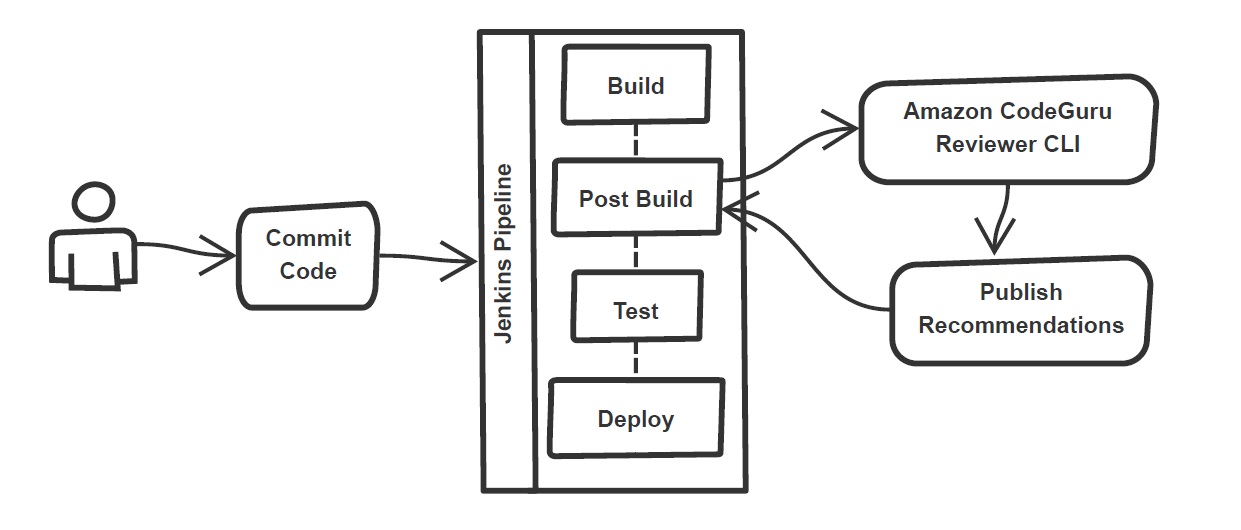
In the build stage of the pipeline (see Figure 1), we configure the appropriate build tool to perform the code build and security analysis. In this example, we will be using Maven as the build tool.

Figure 1: Jenkins pipeline with Amazon CodeGuru Reviewer

Figure 1: Jenkins pipeline with Amazon CodeGuru Reviewer

In the post-build stage, we configure the CodeGuru Reviewer CLI to generate the recommendations based on the review.

Lastly, in the concluding stage of the pipeline, we’ll be analyzing the JSON results using jq – a lightweight and flexible command-line JSON processor, and then failing the Jenkins job if we encounter observations that are of a “Critical” severity.

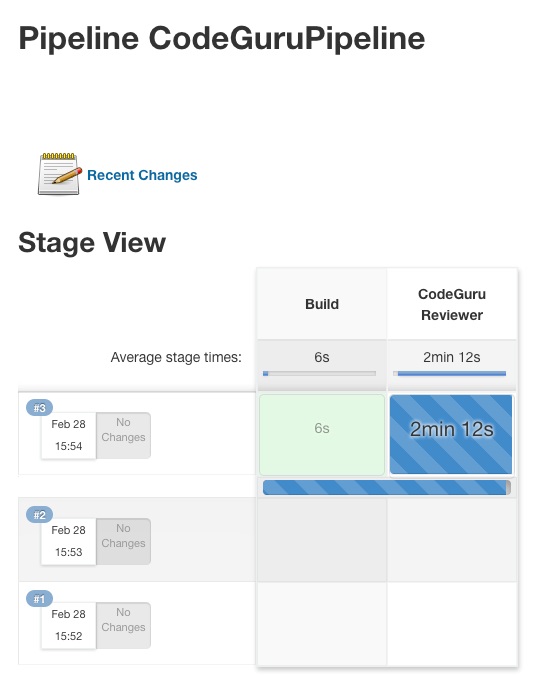
Jenkins will trigger the “CodeGuru Reviewer” (see Figure 1) based review process in the post-build stage, i.e., after the build finishes. Furthermore, you can configure other stages, such as automated testing or deployment, after this stage. Additionally, passing the location of the build artifacts to the CLI lets CodeGuru Reviewer perform a more in-depth security analysis. Build artifacts are either directories containing jar files (e.g., build/lib for Gradle or /target for Maven) or directories containing class hierarchies (e.g., build/classes/java/main for Gradle).

Walkthrough

Now that we have an overview of the workflow, let’s dive deep and walk you through the following steps in detail:

  1. Installing the CodeGuru Reviewer CLI
  2. Creating a Jenkins pipeline job
  3. Reviewing the CodeGuru Reviewer recommendations
  4. Configuring CodeGuru Reviewer CLI’s additional options

1. Installing the CodeGuru CLI Wrapper

a. Prerequisites

To run the CLI, we must have Git, Java, Maven, and the AWS CLI installed. Verify that they’re installed on our machine by running the following commands:

java -version 
mvn --version 
aws --version 
git –-version

If they aren’t installed, then download and install Java here (Amazon Corretto is a no-cost, multiplatform, production-ready distribution of the Open Java Development Kit), Maven from here, and Git from here. Instructions for installing AWS CLI are available here.

We would need to create an Amazon Simple Storage Service (Amazon S3) bucket with the prefix codeguru-reviewer-. Note that the bucket name must begin with the mentioned prefix, since we have used the name pattern in the following AWS Identity and Access Management (IAM) permissions, and CodeGuru Reviewer expects buckets to begin with this prefix. Refer to the following section 4(a) “Specifying S3 bucket name” for more details.

Furthermore, we’ll need working credentials on our machine to interact with our AWS account. Learn more about setting up credentials for AWS here. You can find the minimal permissions to run the CodeGuru Reviewer CLI as follows.

b. Required Permissions

To use the CodeGuru Reviewer CLI, we need at least the following AWS IAM permissions, attached to an AWS IAM User or an AWS IAM role:

{
    "Version": "2012-10-17",
    "Statement": [
        {
            "Action": [
                "codeguru-reviewer:ListRepositoryAssociations",
                "codeguru-reviewer:AssociateRepository",
                "codeguru-reviewer:DescribeRepositoryAssociation",
                "codeguru-reviewer:CreateCodeReview",
                "codeguru-reviewer:DescribeCodeReview",
                "codeguru-reviewer:ListRecommendations",
                "iam:CreateServiceLinkedRole"
            ],
            "Resource": "*",
            "Effect": "Allow"
        },
        {
            "Action": [
                "s3:CreateBucket",
                "s3:GetBucket*",
                "s3:List*",
                "s3:GetObject",
                "s3:PutObject",
                "s3:DeleteObject"
            ],
            "Resource": [
                "arn:aws:s3:::codeguru-reviewer-*",
                "arn:aws:s3:::codeguru-reviewer-*/*"
            ],
            "Effect": "Allow"
        }
    ]
}

c.  CLI installation

Please download the latest version of the CodeGuru Reviewer CLI available at GitHub. Then, run the following commands in sequence:

curl -OL https://github.com/aws/aws-codeguru-cli/releases/download/0.0.1/aws-codeguru-cli.zip
unzip aws-codeguru-cli.zip
export PATH=$PATH:./aws-codeguru-cli/bin

d. Using the CLI

The CodeGuru Reviewer CLI only has one required parameter –root-dir (or just -r) to specify to the local directory that should be analyzed. Furthermore, the –src option can be used to specify one or more files in this directory that contain the source code that should be analyzed. In turn, for Java applications, the –build option can be used to specify one or more build directories.

For a demonstration, we’ll analyze the demo application. This will make sure that we’re all set for when we leverage the CLI in Jenkins. To proceed, first we download and install the sample application, as follows:

git clone https://github.com/aws-samples/amazon-codeguru-reviewer-sample-app
cd amazon-codeguru-reviewer-sample-app
mvn clean compile

Now that we have built our demo application, we can use the aws-codeguru-cli CLI command that we added to the path to trigger the code scan:

aws-codeguru-cli --root-dir ./ --build target/classes --src src --output ./output

For additional assistance on the CLI command, reference the readme here.

2.  Creating a Jenkins Pipeline job

CodeGuru Reviewer can be integrated in a Jenkins Pipeline as well as a Freestyle project. In this example, we’re leveraging a Pipeline.

a. Pipeline Job Configuration

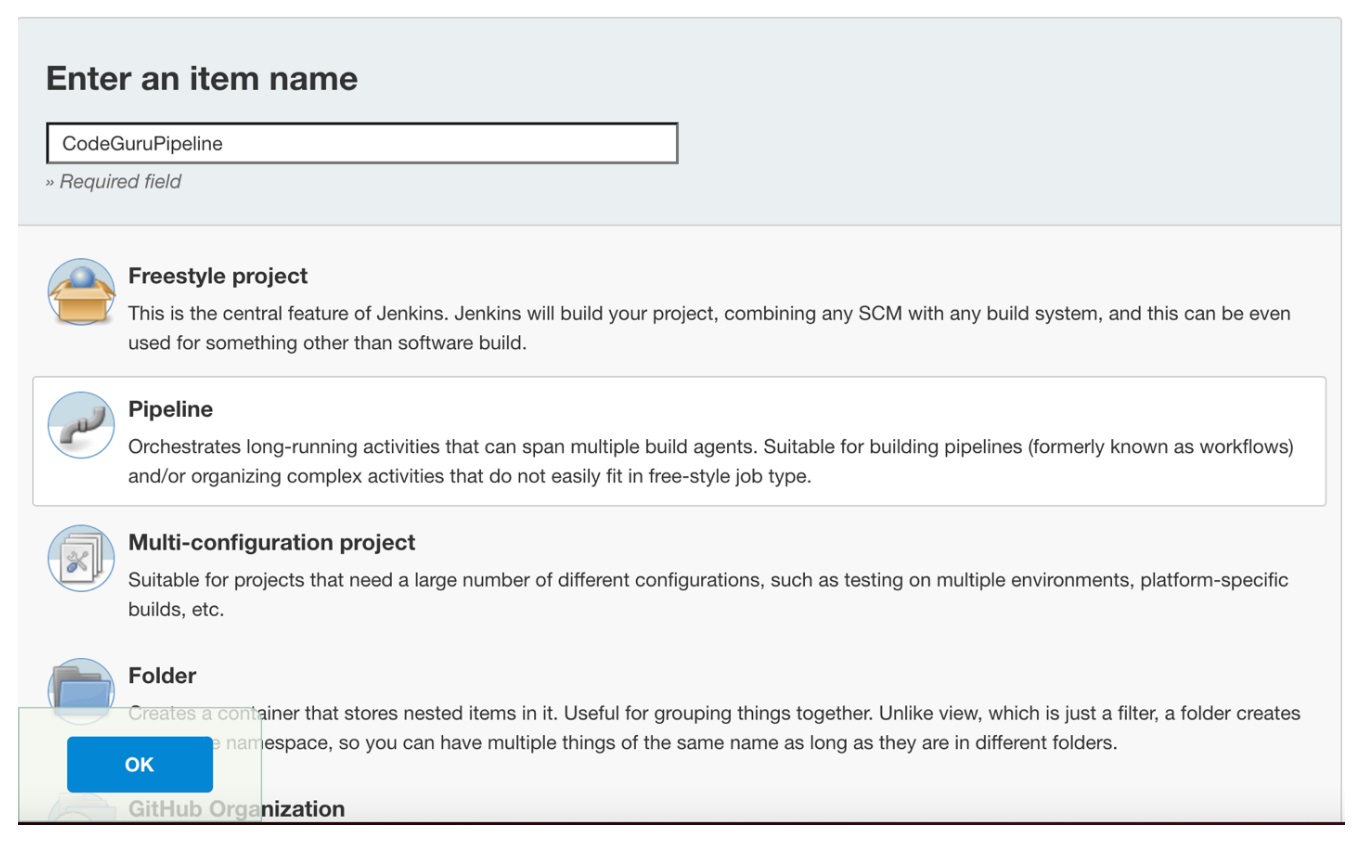
  1.  Log in to Jenkins, choose “New Item”, then select “Pipeline” option.
  2. Enter a name for the project (for example, “CodeGuruPipeline”), and choose OK.
Figure 2: Creating a new Jenkins pipeline

Figure 2: Creating a new Jenkins pipeline

  1. On the “Project configuration” page, scroll down to the bottom and find your pipeline. In the pipeline script, paste the following script (or use your own Jenkinsfile). The following example is a valid Jenkinsfile to integrate CodeGuru Reviewer with a project built using Maven.
pipeline {
    agent any
    stages {
        stage('Build') {
            steps {
                // Get code from a GitHub repository
                git clone https://github.com/aws-samples/amazon-codeguru-reviewer-java-detectors.git

                // Run Maven on a Unix agent
                sh "mvn clean compile"

                // To run Maven on a Windows agent, use following
                // bat "mvn -Dmaven.test.failure.ignore=true clean package"
            }
        }
        stage('CodeGuru Reviewer') {
            steps{
                sh 'ls -lsa *'
                sh 'pwd'
                // Here we’re setting an absolute path, but we can 
                // also use JENKINS environment variables
                sh '''
                    export BASE=/var/jenkins_home/workspace/CodeGuruPipeline/amazon-codeguru-reviewer-java-detectors
                    export SRC=${BASE}/src
                    export OUTPUT = ./output
                    /home/codeguru/aws-codeguru-cli/bin/aws-codeguru-cli --root-dir $BASE --build $BASE/target/classes --src $SRC --output $OUTPUT -c $GIT_PREVIOUS_COMMIT:$GIT_COMMIT --no-prompt
                    '''
            }
        }    
        stage('Checking findings'){
            steps{
                // In this example we are stopping our pipline on  
                // detecting Critical findings. We are using jq 
                // to count occurrences of Critical severity 
                sh '''
                CNT = $(cat ./output/recommendations.json |jq '.[] | select(.severity=="Critical")|.severity' | wc -l)'
                if (( $CNT > 0 )); then
                  echo "Critical findings discovered. Failing."
                  exit 1
                fi
                '''
            }
        }
    }
}
  1. Save the configuration and select “Build now” on the side bar to trigger the build process (see Figure 3).
Figure 3: Jenkins pipeline in triggered state

Figure 3: Jenkins pipeline in triggered state

3. Reviewing the CodeGuru Reviewer recommendations

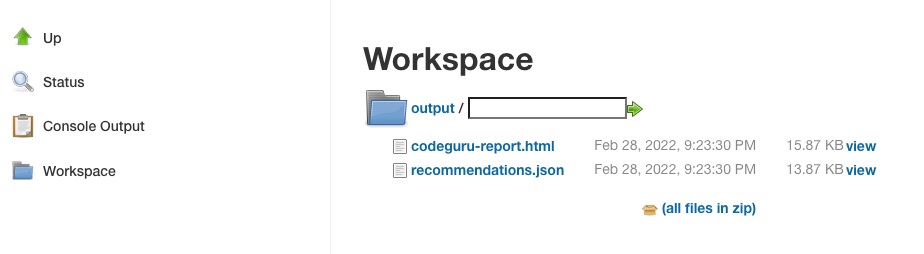
Once the build process is finished, you can view the review results from CodeGuru Reviewer by selecting the Jenkins build history for the most recent build job. Then, browse to Workspace output. The output is available in JSON and HTML formats (Figure 4).

Figure 4: CodeGuru CLI Output

Figure 4: CodeGuru CLI Output

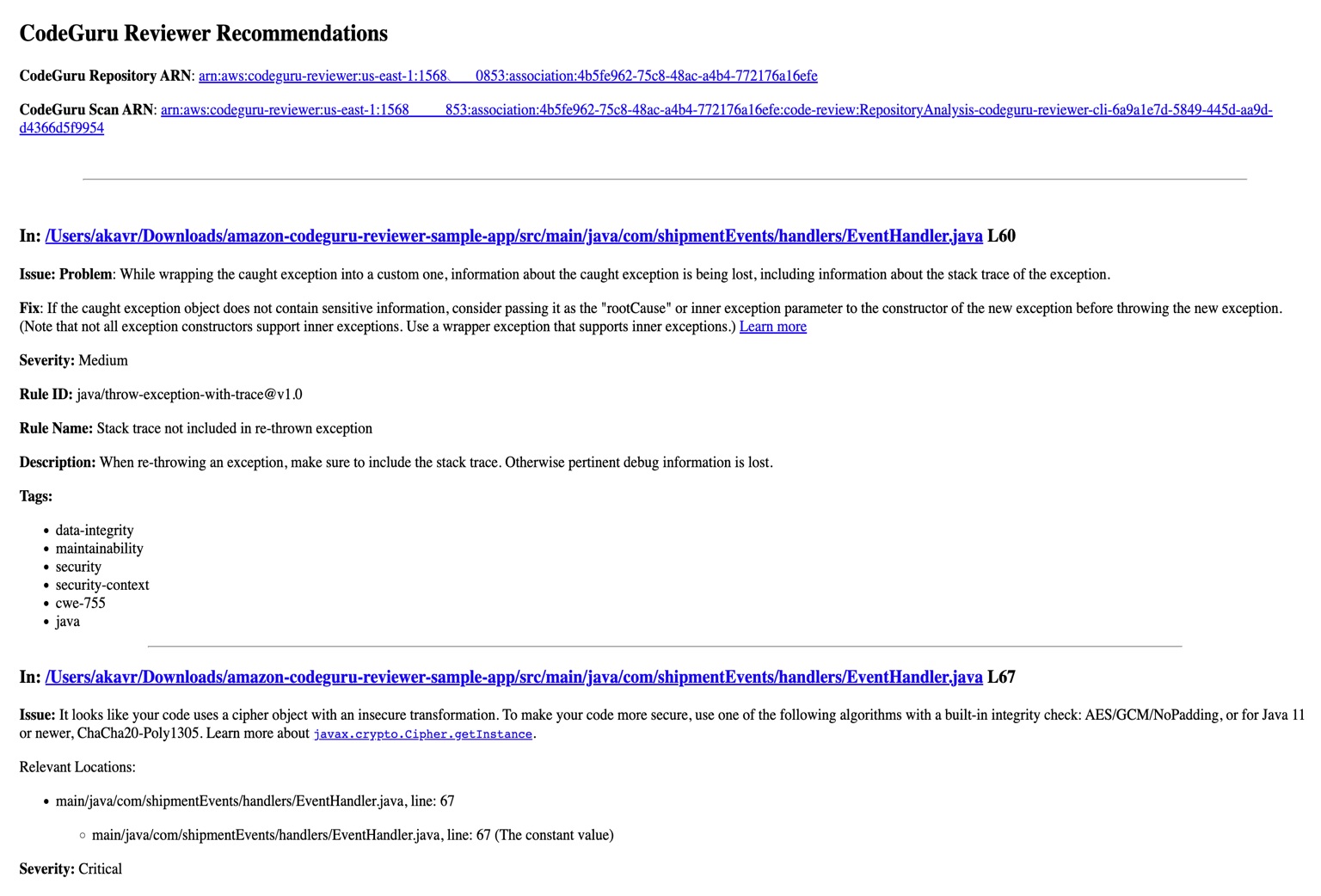
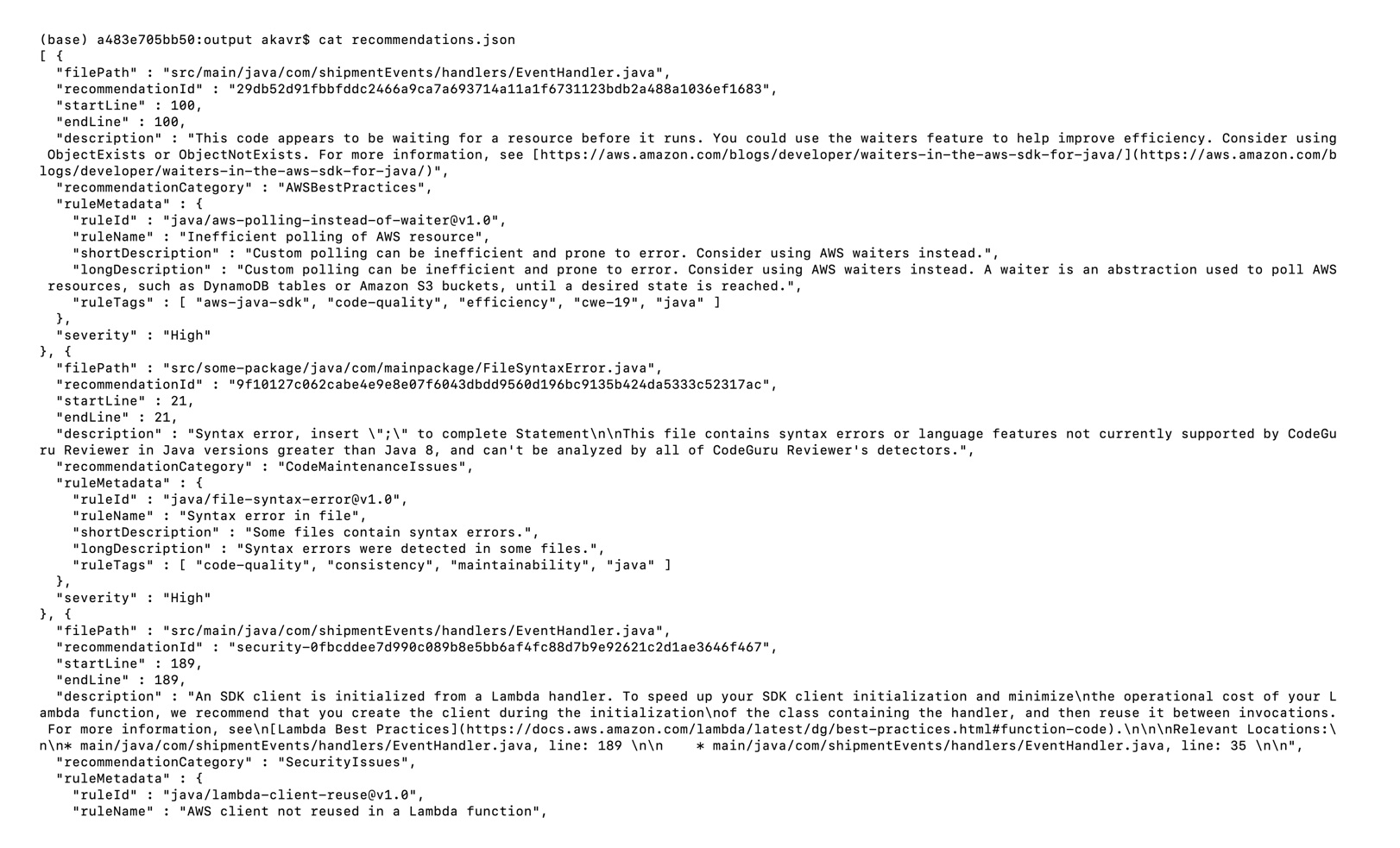
Snippets from the HTML and JSON reports are displayed in Figure 5 and 6 respectively.

In this example, our pipeline analyzes the JSON results with jq based on severity equal to critical and failing the job if there are any critical findings. Note that this output path is set with the –output option. For instance, the pipeline will fail on noticing the “critical” finding at Line 67 of the EventHandler.java class (Figure 5), flagged due to use of an insecure code. Till the time the code is remediated, the pipeline would prevent the code deployment. The vulnerability could have gone to production undetected, in absence of the tool.

Figure 5: CodeGuru HTML Report

Figure 5: CodeGuru HTML Report

Figure 6: CodeGuru JSON recommendations

Figure 6: CodeGuru JSON recommendations

4.  Configuring CodeGuru Reviewer CLI’s additional options

a.  Specifying Amazon S3 bucket name and policy

CodeGuru Reviewer needs one Amazon S3 bucket for the CLI to store the artifacts while the analysis is running. The artifacts are deleted after the analysis is completed. The same bucket will be reused for all the repositories that are analyzed in the same account and region (unless specified otherwise by the user). Note that CodeGuru Reviewer expects the S3 bucket name to begin with codeguru-reviewer-. At this time, you can’t use a different naming pattern. However, if you want to use a different bucket name, then you can use the –bucket-name option.

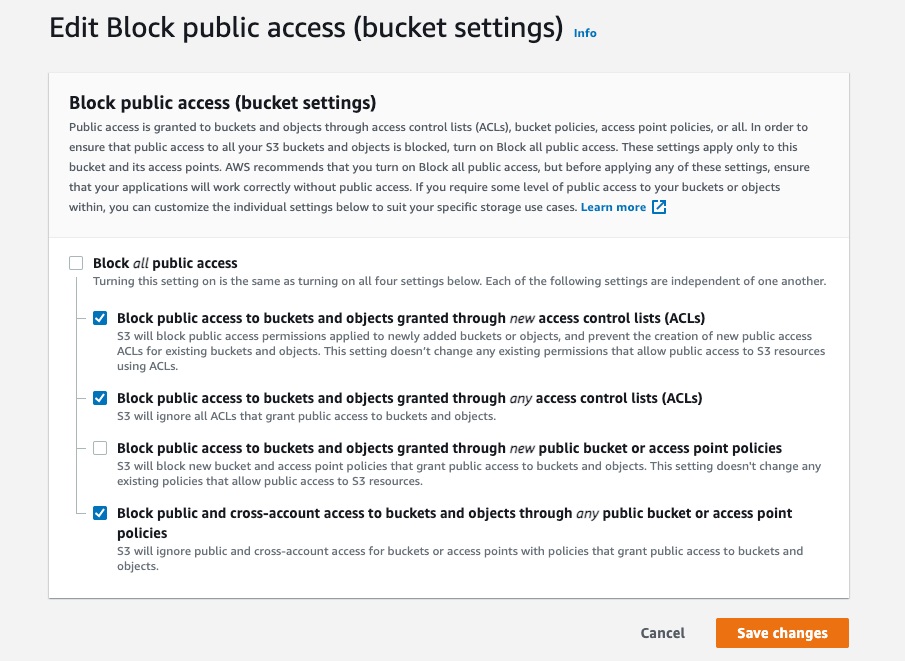
Select the Permissions tab of your S3 bucket. Update the Block public access and add the following S3 bucket policy.

Figure 7: S3 bucket settings

Figure 7: S3 bucket settings

S3 bucket policy:

{
   "Version":"2012-10-17",
   "Statement":[
      {
         "Sid":"PublicRead",
         "Effect":"Allow",
         "Principal":"*",
         "Action":"s3:GetObject",
         "Resource":"[Change to ARN for your S3 bucket]/*"
      }
   ]
}

Note that if you must change the bucket’s name, then you can remove the associated S3 bucket in the AWS console under CodeGuru → CI workflows and select Disassociate Workflow.

b.  Analyzing a single commit

The CLI also lets us specify a specific commit range to analyze. This can lead to faster and more cost-effective scans for the incremental code changes, instead of a full repository scan. For example, if we just want to analyze the last commit, we can run:

aws-codeguru-cli -r ./ -s src/main/java -b build/libs -c HEAD^:HEAD --no-prompt

Here, we use the -c option to specify that we only want to analyze the commits between HEAD^ (the previous commit) and HEAD (the current commit). Moreover, we add the –no-prompt option to automatically answer questions by the CLI with yes. This option is useful if we plan to use the CLI in an automated way, such as in our CI/CD workflow.

c.  Encrypting artifacts

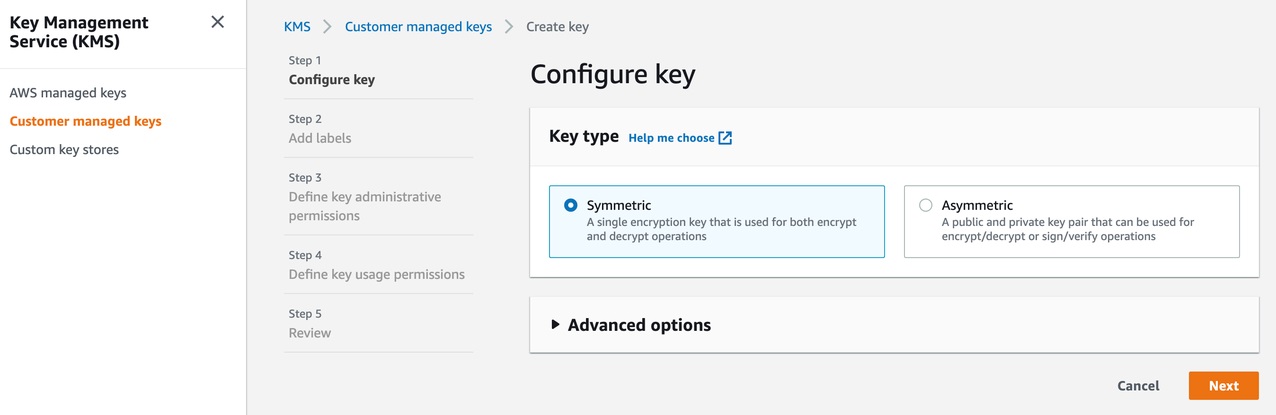
CodeGuru Reviewer lets us use a customer managed key to encrypt the content of the S3 bucket that is used to store the source and build artifacts. To achieve this, create a customer owned key in AWS Key Management Service (AWS KMS) (see Figure 8).

Figure 8: KMS settings

Figure 8: KMS settings

We must grant CodeGuru Reviewer the permission to decrypt artifacts with this key by adding the following Statement to your Key policy:

{
   "Sid":"Allow CodeGuru to use the key to decrypt artifact",
   "Effect":"Allow",
   "Principal":{
      "AWS":"*"
   },
   "Action":[
      "kms:Decrypt",
      "kms:DescribeKey"
   ],
   "Resource":"*",
   "Condition":{
      "StringEquals":{
         "kms:ViaService":"codeguru-reviewer.amazonaws.com",
         "kms:CallerAccount":[
            "YOUR AWS ACCOUNT ID"
         ]
      }
   }
}

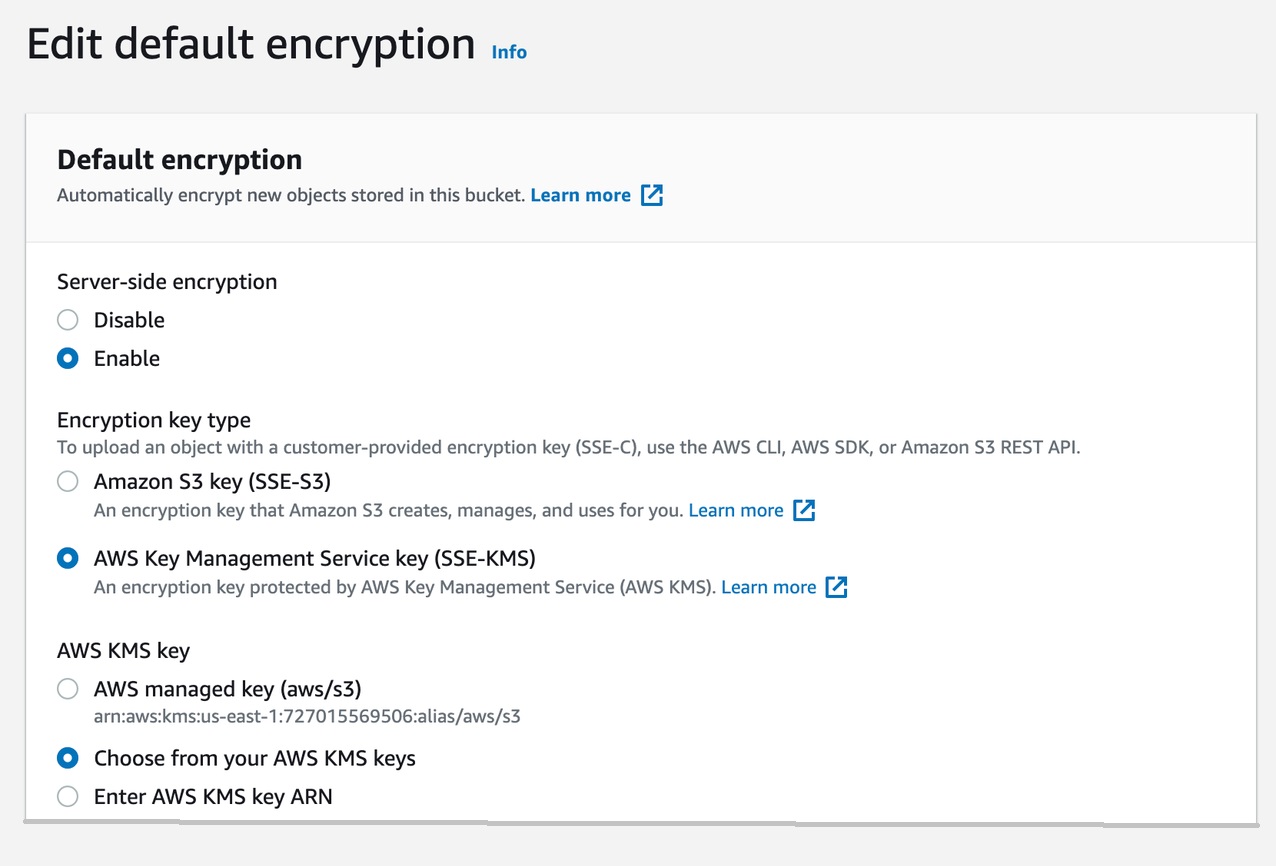
Then, enable server-side encryption for the S3 bucket that we’re using with CodeGuru Reviewer (Figure 9).

S3 bucket settings:

Figure 9: S3 bucket encryption settings

Figure 9: S3 bucket encryption settings

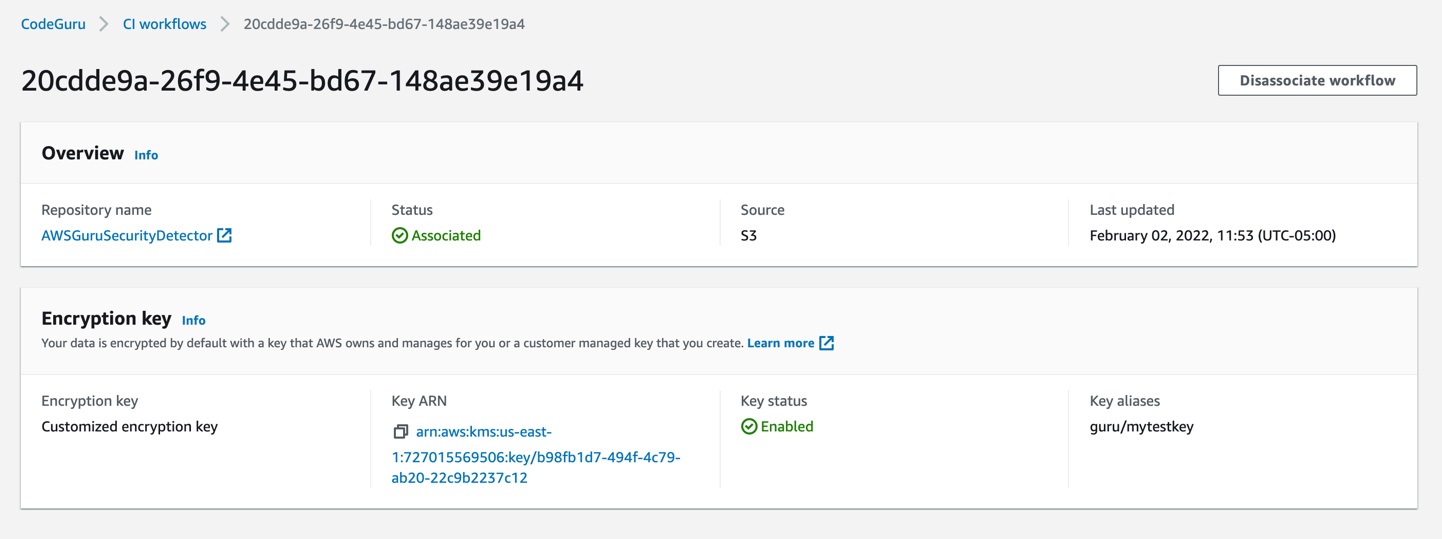
After we enable encryption on the bucket, we must delete all the CodeGuru repository associations that use this bucket, and then recreate them by analyzing the repositories while providing the key (as in the following example, Figure 10):

Figure10: CodeGuru CI Workflow

Figure 10: CodeGuru CI Workflow

Note that the first time you check out your repository, it will always trigger a full repository scan. Consider setting the -c option, as this will allow a commit range.

Cleaning Up

At this stage, you may choose to delete the resources created while following this blog, to avoid incurring any unwanted costs.

  1. Delete Amazon S3 bucket.
  2. Delete AWS KMS key.
  3. Delete the Jenkins installation, if not required further.

Conclusion

In this post, we outlined how you can integrate Amazon CodeGuru Reviewer CLI with the Jenkins open-source build automation tool to perform code analysis as part of your code build pipeline and act as a quality gate. We showed you how to create a Jenkins pipeline job and integrate the CodeGuru Reviewer CLI to detect issues in your Java and Python code, as well as access the recommendations for remediating these issues. We presented an example where you can stop the build upon finding critical violations. Furthermore, we discussed how you can specify a commit range to avoid a full repo scan, and how the S3 bucket used by CodeGuru Reviewer to store artifacts can be encrypted using customer managed keys.

The CodeGuru Reviewer CLI offers you a one-line command to scan any code on your machine and retrieve recommendations. You can run the CLI anywhere where you can run AWS commands. In other words, you can use the CLI to integrate CodeGuru Reviewer into your favourite CI tool, as a pre-commit hook, or anywhere else in your workflow. In turn, you can combine CodeGuru Reviewer with Dynamic Application Security Testing (DAST) and Software Composition Analysis (SCA) tools to achieve a hybrid application security testing method that helps you combine the inside-out and outside-in testing approaches, cross-reference results, and detect vulnerabilities that both exist and are exploitable.

Hopefully, you have found this post informative, and the proposed solution useful. If you need helping hands, then AWS Professional Services can help implement this solution in your enterprise, as well as introduce you to our AWS DevOps services and offerings.

About the Authors
Akash Verma

Akash Verma

Akash is a Software Development Engineer 2 at Amazon India. He is passionate about writing clean code and building maintainable software. He also enjoys learning modern technologies. Outside of work, Akash loves to travel, interact with new people, and try different cuisines. He also relishes gardening and watching Stand-up comedy.

Debashish Chakrabarty

Debashish Chakrabarty

Debashish is a Sr. Engagement Manager at AWS Professional Services, India with over 21+ years of experience in various IT roles. At ProServe he leads engagements on Security, App Modernization and Migrations to help ProServe customers accelerate their cloud journey and achieve their business goals. Off work, Debashish has been a Hindi Blogger & Podcaster. He loves binge-watching OTT shows and spending time with family.

David Ernst

David Ernst

David is a Sr. Specialist Solution Architect – DevOps, with 20+ years of experience in designing and implementing software solutions for various industries. David is an automation enthusiast and works with AWS customers to design, deploy, and manage their AWS workloads/architectures.

Interview for the International Press Institute (IPI) Podcast The war against freedom of speech in Bulgaria

Post Syndicated from Николай Марченко original https://bivol.bg/86865.html

сряда 1 юни 2022


“Bulgaria is at war against freedom of speech,” stated Asen Yordanov, the founder of the Investigative Journalism Site “Bivol” in an interview for the podcast “MFRR in Focus”. The interview…

Интервю за подкаста на International Press Institute (IPI) Войната срещу свободата на словото в България

Post Syndicated from Николай Марченко original https://bivol.bg/%D0%B2%D0%BE%D0%B9%D0%BD%D0%B0%D1%82%D0%B0-%D1%81%D1%80%D0%B5%D1%89%D1%83-%D1%81%D0%B2%D0%BE%D0%B1%D0%BE%D0%B4%D0%B0%D1%82%D0%B0-%D0%BD%D0%B0-%D1%81%D0%BB%D0%BE%D0%B2%D0%BE%D1%82%D0%BE-%D0%B2-%D0%B1.html

сряда 1 юни 2022


“В България се води война срещу свободата на словото”. Това констатира основателят на Сайта за разследваща журналистика “Биволъ” Асен Йорданов в интервю за подкаста ‘MFRR in Focus’ на Ане тер…

Join us at the launch event of the Raspberry Pi Computing Education Research Centre

Post Syndicated from Sue Sentance original https://www.raspberrypi.org/blog/raspberry-pi-computing-education-research-centre-launch-event-invitation/

Last summer, the Raspberry Pi Foundation and the University of Cambridge Department of Computer Science and Technology created a new research centre focusing on computing education research for young people in both formal and non-formal education. The Raspberry Pi Computing Education Research Centre is an exciting venture through which we aim to deliver a step-change for the field.

school-aged girls and a teacher using a computer together.

Computing education research that focuses specifically on young people is relatively new, particularly in contrast to established research disciplines such as those focused on mathematics or science education. However, computing is now a mandatory part of the curriculum in several countries, and being taken up in education globally, so we need to rigorously investigate the learning and teaching of this subject, and do so in conjunction with schools and teachers.

You’re invited to our in-person launch event

To celebrate the official launch of the Raspberry Pi Computing Education Research Centre, we will be holding an in-person event in Cambridge, UK on Weds 20 July from 15.00. This event is free and open to all: if you are interested in computing education research, we invite you to register for a ticket to attend. By coming together in person, we want to help strengthen a collaborative community of researchers, teachers, and other education practitioners.

The launch event is your opportunity to meet and mingle with members of the Centre’s research team and listen to a series of short talks. We are delighted that Prof. Mark Guzdial (University of Michigan), who many readers will be familiar with, will be travelling from the US to join us in cutting the ribbon. Mark has worked in computer science education for decades and won many awards for his research, so I can’t think of anybody better to be our guest speaker. Our other speakers are Prof. Alastair Beresford from the Department of Computer Science and Technology, and Carrie Anne Philbin MBE, our Director of Educator Support at the Foundation.

The event will take place at the Department of Computer Science and Technology in Cambridge. It will start at 15.00 with a reception where you’ll have the chance to talk to researchers and see the work we’ve been doing. We will then hear from our speakers, before wrapping up at 17.30. You can find more details about the event location on the ticket registration page.

Our research at the Centre

The aim of the Raspberry Pi Computing Education Research Centre is to increase our understanding of teaching and learning computing, computer science, and associated subjects, with a particular focus on young people who are from backgrounds that are traditionally under-represented in the field of computing or who experience educational disadvantage.

Young learners at computers in a classroom.

We have been establishing the Centre over the last nine months. In October, I was appointed Director, and in December, we were awarded funding by Google for a one-year research project on culturally relevant computing teaching, following on from a project at the Raspberry Pi Foundation. The Centre’s research team is uniquely positioned, straddling both the University and the Foundation. Our two organisations complement each other very well: the University is one of the highest-ranking universities in the world and renowned for its leading-edge academic research, and the Raspberry Pi Foundation works with schools, educators, and learners globally to pursue its mission to put the power of computing into the hands of young people.

In our research at the Centre, we will make sure that:

  1. We collaborate closely with teachers and schools when implementing and evaluating research projects
  2. We publish research results in a number of different formats, as promptly as we can and without a paywall
  3. We translate research findings into practice across the Foundation’s extensive programmes and with our partners

We are excited to work with a large community of teachers and researchers, and we look forward to meeting you at the launch event.

Stay up to date

At the end of June, we’ll be launching a new website for the Centre at computingeducationresearch.org. This will be the place for you to find out more about our projects and events, and to sign up to our newsletter. For announcements on social media, follow the Raspberry Pi Foundation on Twitter or Linkedin.

The post Join us at the launch event of the Raspberry Pi Computing Education Research Centre appeared first on Raspberry Pi.

How to use AWS KMS RSA keys for offline encryption

Post Syndicated from Patrick Palmer original https://aws.amazon.com/blogs/security/how-to-use-aws-kms-rsa-keys-for-offline-encryption/

This blog post discusses how you can use AWS Key Management Service (AWS KMS) RSA public keys on end clients or devices and encrypt data, then subsequently decrypt data by using private keys that are secured in AWS KMS.

Asymmetric cryptography is a cryptographic system that uses key pairs. Each pair consists of a public key, which can be seen or accessed by anyone, and a private key, which can be accessed only by authorized people. This system has a useful property, which is that anything encrypted with a public key can only be decrypted by the corresponding private key. A popular method for generating key pairs and encrypting data is the RSA algorithm and cryptosystem.

For RSA key pairs, calculating the private key from the public key is seen as computationally infeasible, and therefore RSA key pairs can be used for both authentication and encryption. The features of asymmetric encryption allow separated parties to share information across an untrusted domain, such as the internet, without having to pre-share any other secrets. However, this type of encryption poses an issue of keeping the private key secure, because the private key has the power to decrypt all messages that are transmitted by a large number of end users.

AWS KMS provides simple APIs that you can use to securely generate, store, and manage keys, including RSA key pairs inside hardware security modules (HSMs). Key pairs are generated within FIPS 140-2 validated HSMs that are managed by AWS. You can then use these private keys through APIs to do actions such as decrypt ciphertexts, meaning that plaintext private keys never leave the HSM, which provides assurances of privacy for the private key. Additional APIs allow a customer to retrieve a plaintext copy of the corresponding public key, which allows disconnected or offline uses of RSA public keys.

Limits of asymmetric cryptography

A key drawback to asymmetric cryptography is the fact that you cannot encrypt large pieces of data. When you have a 2048-bit RSA key pair and encrypt something by using the cipher RSAES_OASEP_SHA_256, the largest amount of data that you can encrypt is 190 bytes.

In contrast, symmetric encryption ciphers that use a chained or counter-mode operation don’t have this limit, and they make it possible for you to encrypt data in the tens-of-gigabytes. Symmetric encryption algorithms such as the Advanced Encryption Standard (AES) also benefit from faster data encryption speeds due to smaller key sizes and less complex operations that can be built into hardware.

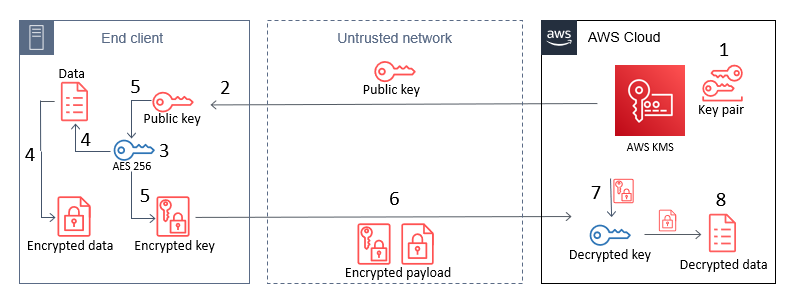
By combining these two algorithms in a hybrid cryptosystem, you give end clients with a public key the ability to encrypt large pieces of information. A client generates a random 256-bit AES key, which should be from a secure source such as /dev/urandom or a dedicated embedded chip. The client then encrypts its large payload by using a mode of operation such as AES-GCM or AES-CBC by using that 256-bit AES key. Next, the client encrypts that 256-bit AES key by using the RSA public key (see step 5 in Figure 1). End clients then transmit only encrypted data across insecure channels, maintaining privacy of the payload data.

A challenge that customers often face is that they want to use AWS KMS for its security properties, but also want to access their KMS keys from devices that don’t have AWS credentials embedded within them. Without AWS credentials, a device can’t call AWS APIs. This blog post shows how you can use a hybrid cryptosystem where RSA public keys can be downloaded or embedded into devices to overcome this challenge.

Prerequisites and initial considerations

This walkthrough assumes that you have some understanding of RSA ciphers and symmetric encryption schemes such as AES. The walkthrough uses OpenSSL for demonstration of the encryption process, but similar libraries can be used on a client-side device.

The walkthrough also assumes that you have an AWS Identity and Access Management (IAM) user with permissions to the AWS KMS service, and the AWS Command Line Interface (AWS CLI) installed with the relevant credentials.

When you create a KMS key, you will also generate a key policy that defines access to it. The default key policy allows all users in your account with AWS KMS actions in their IAM policies to access the KMS key. The key policy for a given KMS key is the primary method for determining access.

Important: You will incur charges for the services used in this example. You can find the cost of each service on the corresponding service pricing page. For more information, see AWS KMS Pricing.

Architectural overview

This post contains procedures for completing the following operations, which are also shown in Figure 1:

  1. Create an RSA key pair in AWS KMS.
  2. Download or pre-install the AWS KMS public key to an end-client device.
  3. Generate an AES 256-bit key on an end client.
  4. Encrypt a large payload of data on the end client by using the AES 256-bit key.
  5. Encrypt the AES 256-bit key with the AWS KMS public key.
  6. Transfer the encrypted payload and key.
  7. Decrypt the AES 256-bit key by using AWS KMS.
  8. Decrypt the payload data by using the now-shared AES 256-bit key.
Figure 1: The steps for hybrid encryption

Figure 1: The steps for hybrid encryption

This diagram shows an end client device, an untrusted network such as a cellular network, and the AWS Cloud. An RSA key pair is generated in AWS KMS, and then the public key can either be embedded in the end client, or pulled by the end client through HTTP(S) or other remote means. In all circumstances, only the public key persists on the end client, which means that no secrets are stored on the device.

How you host the public key on your end clients depends on what network access they have. For example, an embedded Internet of Things (IoT) device for mining vehicles might never connect to the internet, but could communicate with a central system through a private 5G network. In this circumstance, you would host this public key within that network for retrieval. For other disconnected IoT devices that can connect to the internet, such as smart-home appliances, you might want to host the public key on a web server at a predefined URL or through an API.

Note: Whenever you vend public keys over an untrusted channel, such as when you vend the public key through an API, you should make sure that the key can be verified in some way to confirm that it hasn’t been tampered with. This is typically done by vending keys over an HTTPS connection, where the integrity of the keys is provided by the X.509 certificate that was used in the TLS connection. The X.509 certificate also verifies an association with the key-pair owner, typically by domain name.

Implement the solution

The following steps can be used as a proof-of-concept to guide you through implementing a hybrid-cryptosystem by using a KMS public key on an example device.

Create keys in AWS KMS

In the first step of this solution, you create an RSA asymmetric key pair in AWS KMS (step 1 in the architectural overview). With AWS KMS, you can create key pairs in a variety of dimensions according to your security requirements or standards. For more information, see Choosing a KMS key type in the AWS KMS documentation.

To create a key pair in AWS KMS, use the CreateKey API. For this example, you will create an RSA key pair with RSA_2048 for the CustomerMasterKeySpec parameter and ENCRYPT_DECRYPT for the KeyUsage parameter in the AWS CLI. This post uses 2048-bit keys, but note that AWS KMS allows larger key sizes. The CLI will return a KeyId value that uniquely identifies the KMS key in your account, which you should take note of.

To create a KMS key by using the CLI

  • Enter the following command in the AWS CLI.
    aws kms create-key --key-spec RSA_2048 \
        --key-usage ENCRYPT_DECRYPT \
        --description "Example RSA Encryption Key Pair"

You can follow the Creating asymmetric KMS keys documentation to see how to use the AWS Management Console to create a KMS key pair with the same properties as shown here.

Note: When a KMS key is created, it will be logged by AWS CloudTrail, a service that monitors and records activity within your account. All API calls to the AWS KMS service are logged in CloudTrail, which you can use to audit access to KMS keys.

To allow your KMS key to be identified by a human-readable string rather than KeyId, you can assign an alias for the KMS key (replace the target-key-id value of <1234abcd-12ab-34cd-56ef-1234567890ab> with your KeyId). This makes it easier to use and manage.

To create a KMS key alias for your key by using the CLI

  • Enter the following command in the AWS CLI.
    aws kms create-alias \
        --alias-name alias/example-rsa-key \
        --target-key-id <1234abcd-12ab-34cd-56ef-1234567890ab>
    

Download the public key from AWS KMS

A benefit of asymmetric encryption is that you can distribute a public key to a large, untrusted network, and the public key can only be used for encryption. Decryption of those messages can only be conducted by the corresponding private key. You can use the AWS KMS Encrypt API to encrypt data with a KMS key pair (specifically the public key). However, because the AWS APIs are authenticated by using a signature, you must have access to AWS credentials to use these APIs, which you might not want to do on untrusted devices. Additionally, in a private 5G network, you might not have the capability to call the AWS KMS API endpoints from the end clients. Instead, you can download the public key from a local source or embed that into the end client at the time of manufacture.

To retrieve a copy of the public key from your AWS KMS key pair, you can use the GetPublicKey API. The following example shows how to use this with the AWS CLI command get-public-key and reference the key alias you set earlier.

To view the public key for your KMS key pair by using the CLI

  • Enter the following command in the AWS CLI.
    aws kms get-public-key --key-id alias/example-rsa-key

The return value from this API will contain several elements, including the PublicKey. The returned PublicKey value is the DER-encoded X.509, and because you’re using the AWS CLI, it is base64-encoded for readability purposes. By using the AWS CLI, you can query just the PublicKey return value, base64-decode it, and then save the key to a file on disk, as follows.

To use the AWS CLI to query only the public key, then base64 decode it and output it to a file

  • Enter the following command in the AWS CLI.
    aws kms get-public-key \
    --key-id alias/example-rsa-key \ 
    --output text \ 
    --query PublicKey | base64 -–decode > public_key.der

In this example, the local machine where you saved the public_key.der file will now represent the end-client device.

Note: If you call this API by using one of the AWS SDKs, such as boto3, then the PublicKey value is not base64-encoded.

Create an AES 256-bit symmetric key on the end client

Although the end client now has a copy of the public key from the associated KMS private key, the public key can’t be used for encrypting data that you plan on transmitting, due to the size limits on data that can be encrypted. Instead, you can use symmetric encryption. Typically, symmetric keys are smaller than asymmetric keys, the ciphers are faster when encrypting data, and the resulting ciphertext is similar in size to the original data.

To generate a symmetric key, you should use a source of random entropy. Some operating systems offer block access to hardware-based sources of random numbers, such as /dev/hwrng. To provide an example process in this blog post, you will use the OpenSSL rand utility, which uses a cryptographically secure pseudo random generator (CSPRNG) seeded by /dev/urandom. In production systems, you might have stronger sources of entropy to rely on, or compliance requirements for random number generation. In hardware-constrained environments, you should take extra care to make sure that sources of entropy are cryptographically secure. The following command uses OpenSSL to create an AES 256-bit (32 bytes) key and base64-encode it, then save it to disk in plaintext as key.b64.

Note: Anyone with access to this file system will have access to this key.

To use the OpenSSL rand command to create a symmetric key and output it to a file

  • Enter the following command.
    openssl rand -base64 32 > key.b64

Encrypt the data to be sent from the end client

Now that you have two different key types on the end client, you can use a hybrid cryptosystem to encrypt a large text file. First, you will generate a sample file to encrypt on your system. By outputting some bytes from /dev/urandom, you can create this file to the size you want. The following command outputs 200 random bytes, base64-encodes the file, and writes that to disk in a file called encrypt.me.

To generate a sample file from random data, which will be encrypted later

  • Enter the following command.
    head -c 200 /dev/urandom | base64 –-wrap=0 > encrypt.me

Next, you will encrypt the newly created file with the AES 256-bit key that you created earlier (which is base64-encoded). By using the OpenSSL command line, you will encrypt the file on disk and create a new file called encrypt.me.enc.

Note: For demonstration purposes, this solution uses OpenSSL to complete the encryption process. However, the command line OpenSSL enc utility doesn’t allow the cipher aes-256-gcm. Galois Counter Mode (GCM) is recommended when encrypting and sending data, because it includes authentication, so that that the ciphertext can’t be tampered with in transit. Instead, for this demonstration, you will use aes-256-cbc, which is not authenticated.

To use the OpenSSL enc command to encrypt your sample file with a symmetric key

  • • Enter the following command.
    openssl enc -aes-256-cbc \
    -in encrypt.me -out encrypt.me.enc \
    -pass file:./key.b64

Encrypt the AES 256-bit key

So that the data can be decrypted again, you will need to share the same AES 256-bit key with the recipient. To share that with only the person who can use the KMS private key that you created earlier, you can encrypt the symmetric key (key.b64) with the RSA public key that you retrieved earlier (public_key.der).

Again, you will use OpenSSL to see how this works and the required cipher options. When encrypting or decrypting with a KMS RSA key pair, you can use one of two encryption algorithms, either RSAES_OAEP_SHA_1 or RSAES_OAEP_SHA_256. These identify the cipher suites used in encryption that are currently supported by AWS KMS for encryption.

To use the OpenSSL pkeyutl command to encrypt your symmetric key with your local copy of your KMS public key

  • Enter the following command.
    openssl pkeyutl \
    	-in key.b64 -out key.b64.enc \
    	-inkey public_key.der -keyform DER -pubin -encrypt \
    	-pkeyopt rsa_padding_mode:oaep -pkeyopt rsa_oaep_md:sha256

This command creates a new file on disk called key.b64.enc. This file is the encrypted AES 256-bit key, which can now be transported securely across an insecure network, such as the internet. The last two options in the command define the padding mode used (OAEP) and the length of the message digest (SHA-256), which align with the options available to decrypt when you use the AWS KMS APIs.

Note: You should securely delete both the original payload file (encrypt.me) and the plaintext AES 256-bit key (key.b64) if you want to prevent anyone else from accessing these files. At this point, you will have three files on disk: public_key.der, encrypt.me.enc, and key.b64.enc. If you want to verify the decryption process later in this example, keep these files.

In production, you might never write any of these values to disk. Instead, you can keep all values in memory and only write the encrypted data (ciphertext) to disk, clearing memory after that process has completed.

You can now use the method of your choice to transfer the encrypted files across an unsecured network without compromising the privacy of those files. For smart-home appliance use cases, you can upload the encrypted files in Amazon Simple Storage Service (Amazon S3), a highly durable storage system that can be accessed from the internet, keeping in mind the preventative security practices that AWS recommends. Later, another service can pull these files from S3, and with the correct permissions for the KMS key, can decrypt the files by using the AWS KMS Decrypt API.

Decrypt the files

With access to the decrypt operation for the KMS key and the encrypted files, you can now retrieve the plaintext data file again. To do this, you will replicate the preceding steps, but in reverse. This involves decrypting the AWS 256-bit key by using the AWS KMS API, and then using that result to decrypt the encrypted data. You will need access to the AWS KMS API to complete these actions, because the private key exists in plaintext only within the AWS KMS HSMs.

To decrypt the files

  1. The first step is to decrypt the AWS 256-bit key. You will need to use the AWS CLI to submit the key.b64.enc file to the AWS KMS API, and specify the algorithm you used to encrypt the file (RSAES_OAEP_SHA_256). Use the following command to retrieve the AES 256-bit key in plaintext. Again, you’re using the –query selector to output only the plaintext, and then decode the base64 value.
    aws kms decrypt --key-id alias/example-rsa-key \ 
    		--ciphertext-blob fileb://key.b64.enc \
    		--encryption-algorithm RSAES_OAEP_SHA_256 --output text \
    		--query 'Plaintext' | base64 --decode > decrypted_key.b64

  2. The final step in decrypting the data is to reverse the CBC encryption process you used in OpenSSL. If another mode of symmetric encryption was used, such as AES-GCM, then you would need to decrypt by using that algorithm and the input AES 256-bit key. Use the following OpenSSL command to retrieve the original plaintext payload.
    openssl enc -d -aes-256-cbc \
    		-in encrypt.me.enc -out decrypted.file \
    		-pass file:./decrypted_key.b64

Conclusion

In this post, you learned how to combine AWS KMS asymmetric key pairs with locally created symmetric keys to encrypt and share data that exceeds 190 bytes, without storing a secret on a client device. By taking advantage of the RSA cryptosystem for offline encryption, you can reduce the exposure of plaintext data or secrets to devices outside of your control, and without having to complete complex key exchanges. By using the steps in this solution, you can more securely share large amounts of data, such as update files or configuration settings. To learn more about the asymmetric keys feature of AWS KMS, refer to the AWS KMS Developer Guide. If you have questions about the asymmetric keys feature, interact with us through AWS re:Post.

 
If you have feedback about this post, submit comments in the Comments section below. If you have questions about this post, contact AWS Support.

Want more AWS Security news? Follow us on Twitter.

Patrick Palmer

Patrick is a security solutions architect at AWS. He has a passion for learning new technologies and cryptography across AWS services and having deep conversations with customers. He works on a team of security specialists who strive to continually delight customers. Outside of work, he spends time with his wife and two cats, occasionally playing video games when he can.

Making your Go workloads up to 20% faster with Go 1.18 and AWS Graviton

Post Syndicated from Sheila Busser original https://aws.amazon.com/blogs/compute/making-your-go-workloads-up-to-20-faster-with-go-1-18-and-aws-graviton/

This blog post was written by Syl Taylor, Professional Services Consultant.

In March 2022, the highly anticipated Go 1.18 was released. Go 1.18 brings to the language some long-awaited features and additions, such as generics. It also brings significant performance improvements for Arm’s 64-bit architecture used in AWS Graviton server processors. In this post, we show how migrating Go workloads from Go 1.17.8 to Go 1.18 can help you run your applications up to 20% faster and more cost-effectively. To achieve this goal, we selected a series of realistic and relatable workloads to showcase how they perform when compiled with Go 1.18.

Overview

Go is an open-source programming language which can be used to create a wide range of applications. It’s developer-friendly and suitable for designing production-grade workloads in areas such as web development, distributed systems, and cloud-native software.

AWS Graviton2 processors are custom-built by AWS using 64-bit Arm Neoverse cores to deliver the best price-performance for your cloud workloads running in Amazon Elastic Compute Cloud (Amazon EC2). They provide up to 40% better price/performance over comparable x86-based instances for a wide variety of workloads and they can run numerous applications, including those written in Go.

Web service throughput

For web applications, the number of HTTP requests that a server can process in a window of time is an important measurement to determine scalability needs and reduce costs.

To demonstrate the performance improvements for a Go-based web service, we selected the popular Caddy web server. To perform the load testing, we selected the hey application, which was also written in Go. We deployed these packages in a client/server scenario on m6g Graviton instances.

Relative performance comparison for requesting a static webpage

The Caddy web server compiled with Go 1.18 brings a 7-8% throughput improvement as compared with the variant compiled with Go 1.17.8.

We conducted a second test where the client downloads a dynamic page on which the request handler performs some additional processing to write the HTTP response content. The performance gains were also noticeable at 10-11%.

Relative performance comparison for requesting a dynamic webpage

Regular expression searches

Searching through large amounts of text is where regular expression patterns excel. They can be used for many use cases, such as:

  • Checking if a string has a valid format (e.g., email address, domain name, IP address),
  • Finding all of the occurrences of a string (e.g., date) in a text document,
  • Identifying a string and replacing it with another.

However, despite their efficiency in search engines, text editors, or log parsers, regular expression evaluation is an expensive operation to run. We recommend identifying optimizations to reduce search time and compute costs.

The following example uses the Go regexp package to compile a pattern and search for the presence of a standard date format in a large generated string. We observed a 13.5% increase in completed executions with a 12% reduction in execution time.

Relative performance comparison for using regular expressions to check that a pattern exists

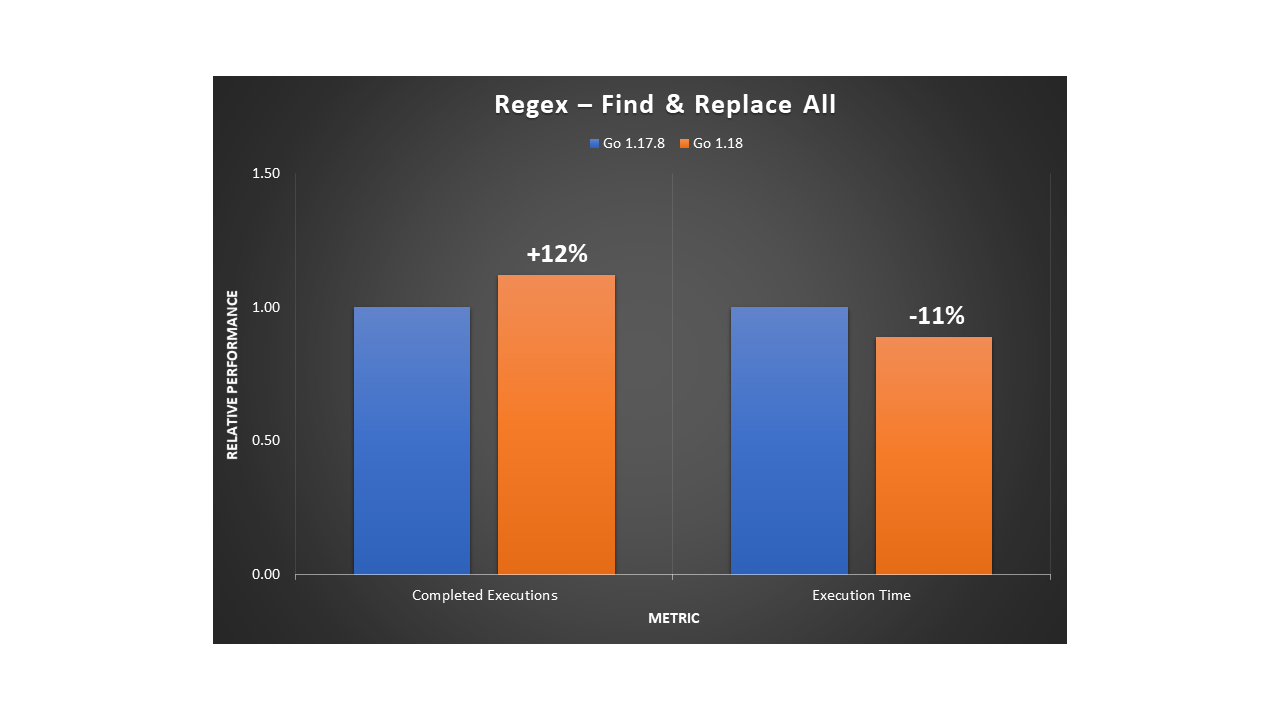
In a second example, we used the Go regexp package to find all of the occurrences of a pattern for character sequences in a string, and then replace them with a single character. We observed a 12% increase in evaluation rate with an 11% reduction in execution time.

Relative performance comparison for using regular expressions to find and replace all of the occurrences of a pattern

As with most workloads, the improvements will vary depending on the input data, the hardware selected, and the software stack installed. Furthermore, with this use case, the regular expression usage will have an impact on the overall performance. Given the importance of regex patterns in modern applications, as well as the scale at which they’re used, we recommend upgrading to Go 1.18 for any software that relies heavily on regular expression operations.

Database storage engines

Many database storage engines use a key-value store design to benefit from simplicity of use, faster speed, and improved horizontal scalability. Two implementations commonly used are B-trees and LSM (log-structured merge) trees. In the age of cloud technology, building distributed applications that leverage a suitable database service is important to make sure that you maximize your business outcomes.

B-trees are seen in many database management systems (DBMS), and they’re used to efficiently perform queries using indexes. When we tested a sample program for inserting and deleting in a large B-tree structure, we observed a 10.5% throughput increase with a 10% reduction in execution time.

Relative performance comparison for inserting and deleting in a B-Tree structure

On the other hand, LSM trees can achieve high rates of write throughput, thus making them useful for big data or time series events, such as metrics and real-time analytics. They’re used in modern applications due to their ability to handle large write workloads in a time of rapid data growth. The following are examples of databases that use LSM trees:

  • InfluxDB is a powerful database used for high-speed read and writes on time series data. It’s written in Go and its storage engine uses a variation of LSM called the Time-Structured Merge Tree (TSM).
  • CockroachDB is a popular distributed SQL database written in Go with its own LSM tree implementation.
  • Badger is written in Go and is the engine behind Dgraph, a graph database. Its design leverages LSM trees.

When we tested an LSM tree sample program, we observed a 13.5% throughput increase with a 9.5% reduction in execution time.

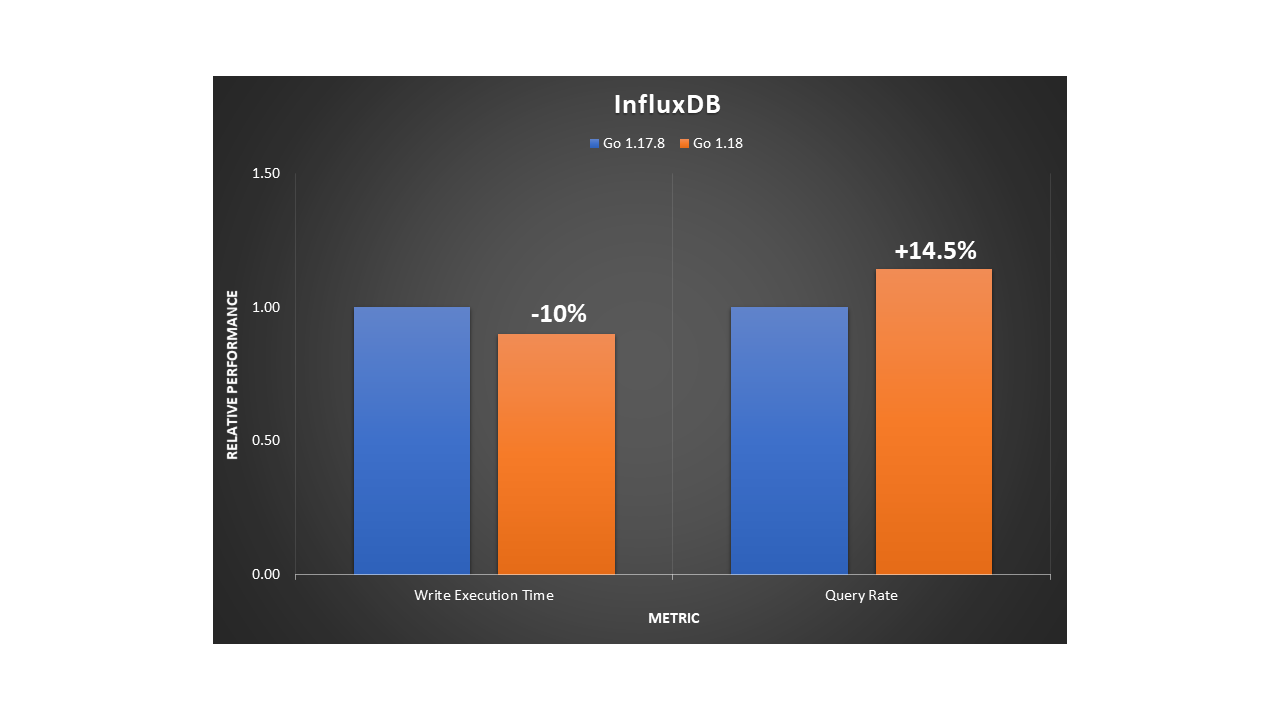
We also tested InfluxDB using comparison benchmarks to analyze writes and reads to the database server. On the load stress test, we saw a 10% increase of insertion throughput and a 14.5% faster rate when querying at a large scale.

Relative performance comparison for inserting to and querying from an InfluxDB database

In summary, for databases with an engine written in Go, you’ll likely observe better performance when upgrading to a version that has been compiled with Go 1.18.

Machine learning training

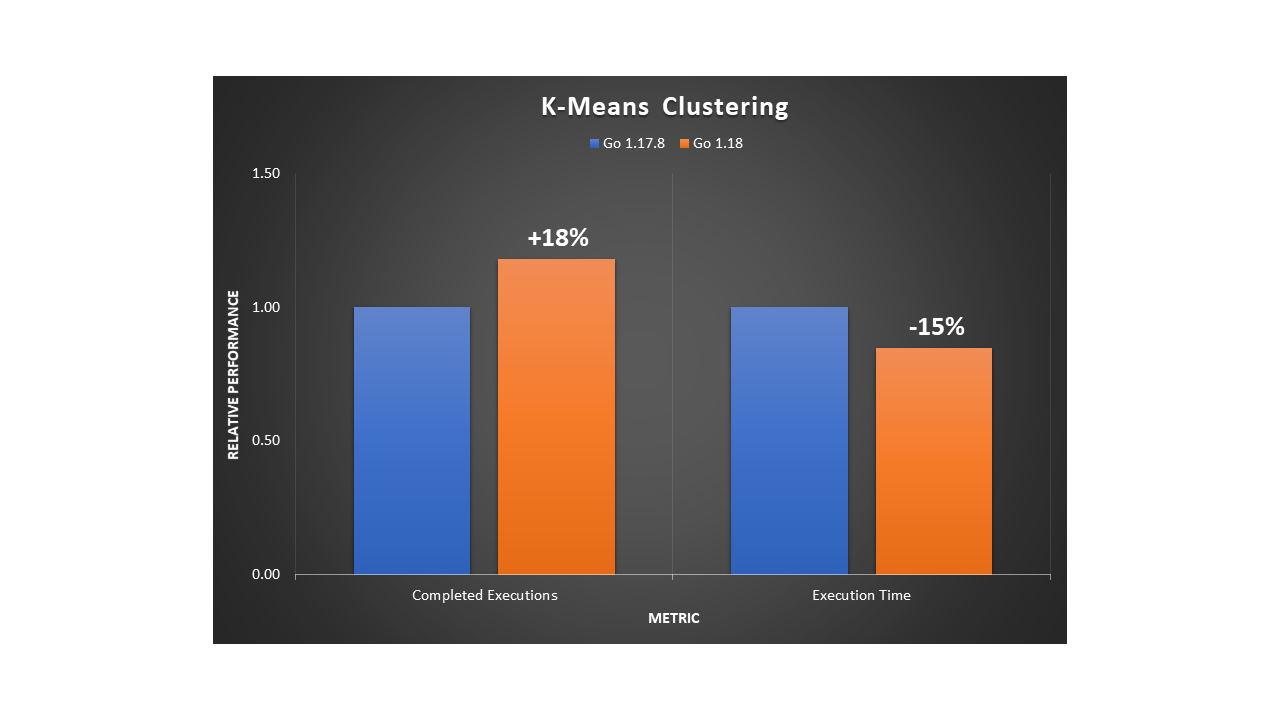
A popular unsupervised machine learning (ML) algorithm is K-Means clustering. It aims to group similar data points into k clusters. We used a dataset of 2D coordinates to train K-Means and obtain the cluster distribution in a deterministic manner. The example program uses an OOP design. We noticed an 18% improvement in execution throughput and a 15% reduction in execution time.

Relative performance comparison for training a K-means model

A widely-used and supervised ML algorithm for both classification and regression is Random Forest. It’s composed of numerous individual decision trees, and it uses a voting mechanism to determine which prediction to use. It’s a powerful method for optimizing ML models.

We ran a deterministic example to train a dense Random Forest. The program uses an OOP design and we noted a 20% improvement in execution throughput and a 15% reduction in execution time.

Relative performance comparison for training a Random Forest model

Recursion

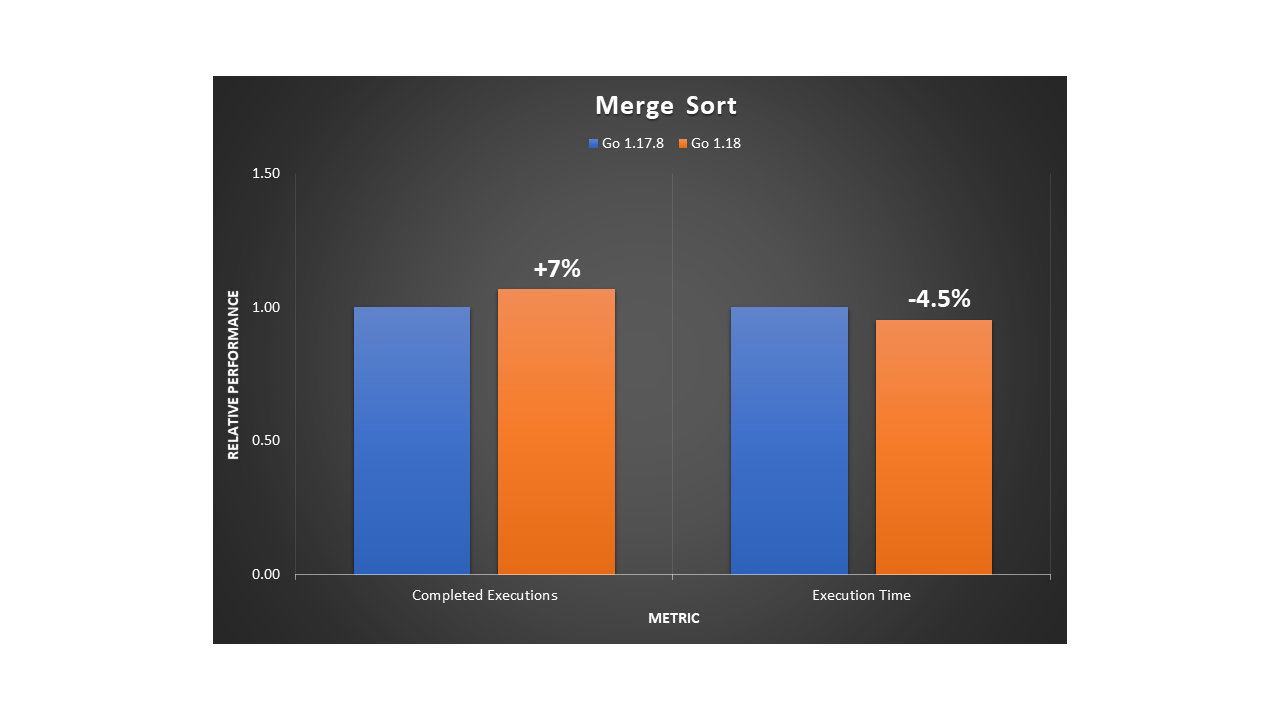
An efficient, general-purpose method for sorting data is the merge sort algorithm. It works by repeatedly breaking down the data into parts until it can compare single units to each other. Then, it decides their order in the intermediary steps that will merge repeatedly until the final sorted result. To implement this divide-and-conquer approach, merge sort must use recursion. We ran the program using a large dataset of numbers and observed a 7% improvement in execution throughput and a 4.5% reduction in execution time.

Relative performance comparison for running a merge sort algorithm

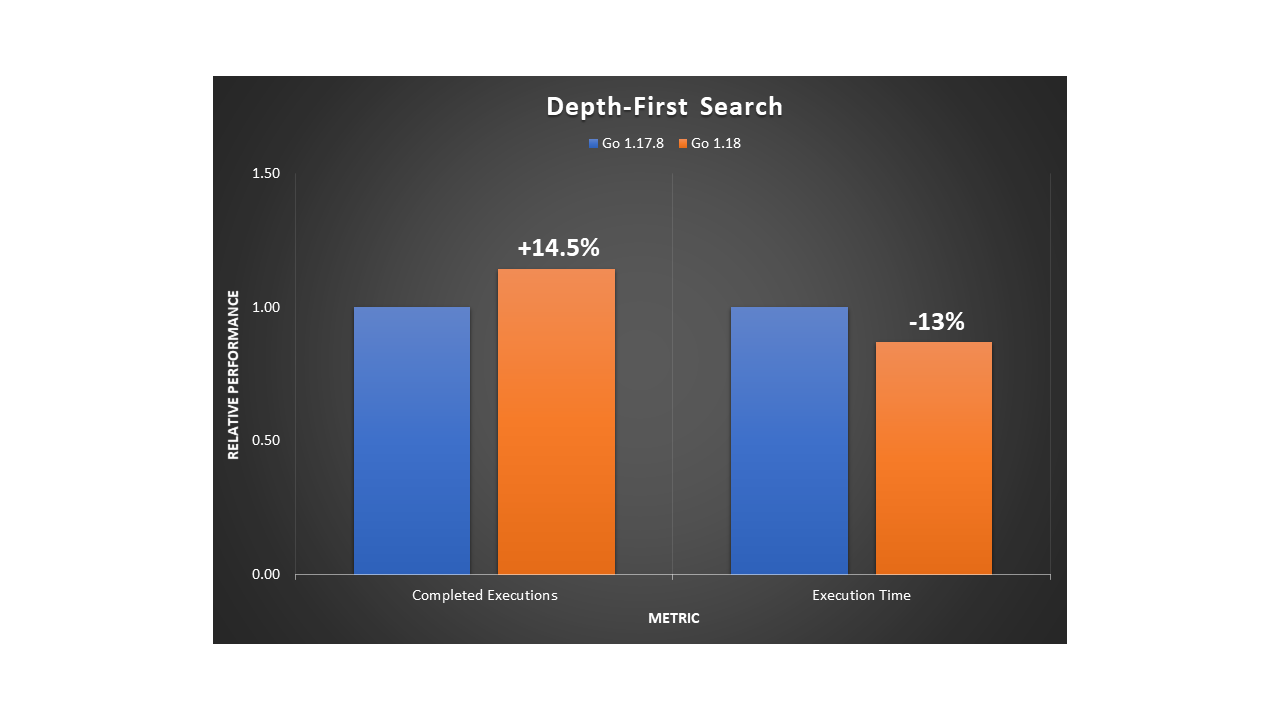
Depth-first search (DFS) is a fundamental recursive algorithm for traversing tree or graph data structures. Many complex applications rely on DFS variants to solve or optimize hard problems in various areas, such as path finding, scheduling, or circuit design. We implemented a standard DFS traversal in a fully-connected graph. Then we observed a 14.5% improvement in execution throughput and a 13% reduction in execution time.

Relative performance comparison for running a DFS algorithm

Conclusion

In this post, we’ve shown that a variety of applications, not just those primarily compute-bound, can benefit from the 64-bit Arm CPU performance improvements released in Go 1.18. Programs with an object-oriented design, recursion, or that have many function calls in their implementation will likely benefit more from the new register ABI calling convention.

By using AWS Graviton EC2 instances, you can benefit from up to a 40% price/performance improvement over other instance types. Furthermore, you can save even more with Graviton through the additional performance improvements by simply recompiling your Go applications with Go 1.18.

To learn more about Graviton, see the Getting started with AWS Graviton guide.

[$] Filesystems, testing, and stable trees

Post Syndicated from original https://lwn.net/Articles/896523/

In a filesystem session at the
2022 Linux Storage,
Filesystem, Memory-management and BPF Summit
(LSFMM), Amir Goldstein
led a discussion about the stable kernel trees. Those trees, and
especially the long-term support (LTS) versions, are used as a basis for a
variety of Linux-based products, but the kind of testing that is being done
on them for filesystems is lacking. Part of the problem is that the tests
target filesystem developers so they are not easily used by downstream
consumers of the stable kernel trees.

How to use regional SAML endpoints for failover

Post Syndicated from Jonathan VanKim original https://aws.amazon.com/blogs/security/how-to-use-regional-saml-endpoints-for-failover/

Many Amazon Web Services (AWS) customers choose to use federation with SAML 2.0 in order to use their existing identity provider (IdP) and avoid managing multiple sources of identities. Some customers have previously configured federation by using AWS Identity and Access Management (IAM) with the endpoint signin.aws.amazon.com. Although this endpoint is highly available, it is hosted in a single AWS Region, us-east-1. This blog post provides recommendations that can improve resiliency for customers that use IAM federation, in the unlikely event of disrupted availability of one of the regional endpoints. We will show you how to use multiple SAML sign-in endpoints in your configuration and how to switch between these endpoints for failover.

How to configure federation with multi-Region SAML endpoints

AWS Sign-In allows users to log in into the AWS Management Console. With SAML 2.0 federation, your IdP portal generates a SAML assertion and redirects the client browser to an AWS sign-in endpoint, by default signin.aws.amazon.com/saml. To improve federation resiliency, we recommend that you configure your IdP and AWS federation to support multiple SAML sign-in endpoints, which requires configuration changes for both your IdP and AWS. If you have only one endpoint configured, you won’t be able to log in to AWS by using federation in the unlikely event that the endpoint becomes unavailable.

Let’s take a look at the Region code SAML sign-in endpoints in the AWS General Reference. The table in the documentation shows AWS regional endpoints globally. The format of the endpoint URL is as follows, where <region-code> is the AWS Region of the endpoint: https://<region-code>.signin.aws.amazon.com/saml

All regional endpoints have a region-code value in the DNS name, except for us-east-1. The endpoint for us-east-1 is signin.aws.amazon.com—this endpoint does not contain a Region code and is not a global endpoint. AWS documentation has been updated to reference SAML sign-in endpoints.

In the next two sections of this post, Configure your IdP and Configure IAM roles, I’ll walk through the steps that are required to configure additional resilience for your federation setup.

Important: You must do these steps before an unexpected unavailability of a SAML sign-in endpoint.

Configure your IdP

You will need to configure your IdP and specify which AWS SAML sign-in endpoint to connect to.

To configure your IdP

  1. If you are setting up a new configuration for AWS federation, your IdP will generate a metadata XML configuration file. Keep track of this file, because you will need it when you configure the AWS portion later.
  2. Register the AWS service provider (SP) with your IdP by using a regional SAML sign-in endpoint. If your IdP allows you to import the AWS metadata XML configuration file, you can find these files available for the public, GovCloud, and China Regions.
  3. If you are manually setting the Assertion Consumer Service (ACS) URL, we recommend that you pick the endpoint in the same Region where you have AWS operations.
  4. In SAML 2.0, RelayState is an optional parameter that identifies a specified destination URL that your users will access after signing in. When you set the ACS value, configure the corresponding RelayState to be in the same Region as the ACS. This keeps the Region configurations consistent for both ACS and RelayState. Following is the format of a Region-specific console URL.

    https://<region-code>.console.aws.amazon.com/

    For more information, refer to your IdP’s documentation on setting up the ACS and RelayState.

Configure IAM roles

Next, you will need to configure IAM roles’ trust policies for all federated human access roles with a list of all the regional AWS Sign-In endpoints that are necessary for federation resiliency. We recommend that your trust policy contains all Regions where you operate. If you operate in only one Region, you can get the same resiliency benefits by configuring an additional endpoint. For example, if you operate only in us-east-1, configure a second endpoint, such as us-west-2. Even if you have no workloads in that Region, you can switch your IdP to us-west-2 for failover. You can log in through AWS federation by using the us-west-2 SAML sign-in endpoint and access your us-east-1 AWS resources.

To configure IAM roles

  1. Log in to the AWS Management Console with credentials to administer IAM. If this is your first time creating the identity provider trust in AWS, follow the steps in Creating IAM SAML identity providers to create the identity providers.
  2. Next, create or update IAM roles for federated access. For each IAM role, update the trust policy that lists the regional SAML sign-in endpoints. Include at least two for increased resiliency.

    The following example is a role trust policy that allows the role to be assumed by a SAML provider coming from any of the four US Regions.

    {
        "Version": "2012-10-17",
        "Statement": [
            {
                "Effect": "Allow",
                "Principal": {
                    "Federated": "arn:aws:iam:::saml-provider/IdP"
                },
                "Action": "sts:AssumeRoleWithSAML",
                "Condition": {
                    "StringEquals": {
                        "SAML:aud": [
                            "https://us-east-2.signin.aws.amazon.com/saml",
                            "https://us-west-1.signin.aws.amazon.com/saml",
                            "https://us-west-2.signin.aws.amazon.com/saml",
                            "https://signin.aws.amazon.com/saml"
                        ]
                    }
                }
            }
        ]
    }

  3. When you use a regional SAML sign-in endpoint, the corresponding regional AWS Security Token Service (AWS STS) endpoint is also used when you assume an IAM role. If you are using service control policies (SCP) in AWS Organizations, check that there are no SCPs denying the regional AWS STS service. This will prevent the federated principal from being able to obtain an AWS STS token.

Switch regional SAML sign-in endpoints

In the event that the regional SAML sign-in endpoint your ACS is configured to use becomes unavailable, you can reconfigure your IdP to point to another regional SAML sign-in endpoint. After you’ve configured your IdP and IAM role trust policies as described in the previous two sections, you’re ready to change to a different regional SAML sign-in endpoint. The following high-level steps provide guidance on switching the regional SAML sign-in endpoint.

To switch regional SAML sign-in endpoints

  1. Change the configuration in the IdP to point to a different endpoint by changing the value for the ACS.
  2. Change the configuration for the RelayState value to match the Region of the ACS.
  3. Log in with your federated identity. In the browser, you should see the new ACS URL when you are prompted to choose an IAM role.
    Figure 1: New ACS URL

    Figure 1: New ACS URL

The steps to reconfigure the ACS and RelayState will be different for each IdP. Refer to the vendor’s IdP documentation for more information.

Conclusion

In this post, you learned how to configure multiple regional SAML sign-in endpoints as a best practice to further increase resiliency for federated access into your AWS environment. Check out the updates to the documentation for AWS Sign-In endpoints to help you choose the right configuration for your use case. Additionally, AWS has updated the metadata XML configuration for the public, GovCloud, and China AWS Regions to include all sign-in endpoints.

The simplest way to get started with SAML federation is to use AWS Single Sign-On (AWS SSO). AWS SSO helps manage your permissions across all of your AWS accounts in AWS Organizations.

If you have any questions, please post them in the Security Identity and Compliance re:Post topic or reach out to AWS Support.

Want more AWS Security news? Follow us on Twitter.

Jonathan VanKim

Jonathan VanKim

Jonathan VanKim is a Sr. Solutions Architect who specializes in Security and Identity for AWS. In 2014, he started working AWS Proserve and transitioned to SA 4 years later. His AWS career has been focused on helping customers of all sizes build secure AWS architectures. He enjoys snowboarding, wakesurfing, travelling, and experimental cooking.

Arynn Crow

Arynn Crow

Arynn Crow is a Manager of Product Management for AWS Identity. Arynn started at Amazon in 2012, trying out many different roles over the years before finding her happy place in security and identity in 2017. Arynn now leads the product team responsible for developing user authentication services at AWS.

CVE-2022-30190: “Follina” Microsoft Support Diagnostic Tool Vulnerability

Post Syndicated from Rapid7 original https://blog.rapid7.com/2022/05/31/cve-2022-30190-follina-microsoft-support-diagnostic-tool-vulnerability/

CVE-2022-30190:

On May 30, 2022, Microsoft Security Response Center (MSRC) published a blog on CVE-2022-30190, an unpatched vulnerability in the Microsoft Support Diagnostic Tool (msdt) in Windows. Microsoft’s advisory on CVE-2022-30190 indicates that exploitation has been detected in the wild.

According to Microsoft, CVE-2022-30190 is a remote code execution vulnerability that exists when MSDT is called using the URL protocol from a calling application such as Word. An attacker who successfully exploits this vulnerability can run arbitrary code with the privileges of the calling application. The attacker can then install programs, view, change, or delete data, or create new accounts in the context allowed by the user’s rights. Workarounds are available in Microsoft’s blog.

Rapid7 research teams are investigating this vulnerability and will post updates to this blog as they are available. Notably, the flaw requires user interaction to exploit, looks similar to many other vulnerabilities that necessitate a user opening an attachment, and appears to leverage a vector described in 2020. Despite the description, it is not a typical remote code execution vulnerability.

Rapid7 customers

Our teams have begun working on a vulnerability check for InsightVM and Nexpose customers.

InsightIDR customers have a new detection rule added to their library to identify attacks related to this vulnerability:

  • Suspicious Process – Microsoft Office App Spawns MSDT.exe

We recommend that you review your settings for this detection rule and confirm it is turned on and set to an appropriate rule action and priority for your organization.

NEVER MISS A BLOG

Get the latest stories, expertise, and news about security today.

Platform Week wrap-up

Post Syndicated from Dawn Parzych original https://blog.cloudflare.com/platform-week-2022-wrap-up/

Platform Week wrap-up

Platform Week wrap-up

A comprehensive developer platform includes all the necessary storage, compute, and services to effectively deliver an application. Compute that runs globally and auto-scales to execute code without having to worry about the underlying infrastructure; storage for user information, objects, and key-value pairs; and all the related services including delivering video, optimizing images, managing third-party components, and capturing telemetry.

Whether you’re looking to modernize legacy backend infrastructure or are building a brand-new application from the ground up the Cloudflare Developer Platform provides all the building blocks you need to deliver an application on the edge.

Recently, during Platform Week, we made a number of announcements expanding what’s possible with the Developer Platform. Let’s take a look at some of the announcements we made and what this enables you to build. For a complete list visit the Platform Week hub.

Compute

The core of our compute offering is Workers, our serverless runtime. Workers integrates with other Cloudflare offerings helping you route requests, take action on bots, send an email, or route and filter emails, just to name a few.

There are times when you’ll want to use multiple Workers to perform an action, Workers now have the ability to call another Worker. And while that Worker is sitting idly you aren’t charged. If serverless computing is about paying for what you use, why should you be charged when a Worker is waiting for a response?

Serverless compute works great for an application that’s in production, but what about when you’re in development?  You need the ability to run and test locally, that’s why we’ve announced that the Workers runtime will be available via an open-source license later this year.

But it’s not just the flexibility to run locally that’s important, the worry of vendor lock-in is real. You need the ability to move your application without significant efforts, that’s where the WinterCG comes in. Cloudflare is working with core contributors from Deno and Node.js to create server-side API standards to enable just this.

Storage

Applications, of course, cannot exist without storage. And when it comes to storage, there is no one-size-fits-all solution: object storage is great for images, but maybe not for storing user information; meanwhile, databases are great for storing user information, but not videos, and even when it comes to databases, there are so many kinds.  Developers need a variety of storage solutions, there’s no one-size-fits all storage offering.

As of Platform Week we expanded our storage products, to include R2 (which is now in beta), and D1 SQLite database. These are in addition to the existing products, such as Workers KV, Durable Objects, and even Cloudflare’s cache!

You have the flexibility to choose the right tool for the task. Part of being flexible means, not encountering egress charges to access or move your data, and you should always have the ability to integrate with whichever tool you want.

Developer Services

The Developer Platform doesn’t end with the compute power and storage. It also includes a full range of services to build your Jamstack application, optimize the images you serve, and stream videos.

Pages simplifies the build and deploy process for Jamstack applications. Too much time is spent waiting. Waiting for builds to compile, when only a few lines of code were changed only to find out there was an error. Pages now reduces your waiting time with a new build infrastructure, and the ability to view logs as a build is in progress to immediately see if something has gone wrong. (And speaking of logs, did you know you can store your logs on R2?)

To get started with Pages, you can either use our Git-integrations or deploy pre-built assets directly. Functionality on your static sites can be extended via Workers or the new Pages Plugins.

If you don’t have a Jamstack application, we still have services related to media (which is an essential part of any website). Store, resize, and optimize your Images or deliver live streams.

In addition to building and delivering the applications there is a host of observability solutions to view how everything is performing. The reliability of your systems is impacted when you don’t have visibility into how they are performing. We continue to expand the tools available to track performance of your applications through internal tools and partnerships. Logpush for Workers, Pub/sub, and Workers Analytics Engine are the latest additions giving you the ability to publish, gather, and process events, telemetry or sensor data, and create visualizations from the data.

Application and network services

The benefits of building on the Cloudflare Developer Platform is the interoperability of solutions within our application and network services.

With the beta release of R2 we also announced Cache Reserve. When content is expired or evicted from our CDN a cache reserve can be configured in R2 to stay in-network and avoid having to pay egress fees refreshing content from the origin.

Connectivity and communication across distributed systems requires network address translation. Magic NAT makes it easy for systems to communicate across private subnets with overlapping IP space without having to backhaul traffic, deploy gateways in multiple zones, incur fees, or deal with latency.

Ecosystem of providers

It’s not enough to have a suite of tools and services, you need to integrate and extend them with your existing vendors. The Developer Platform Ecosystem exists to do exactly this. We continue to expand our directory giving you the peace of mind that the Cloudflare Developer Platform will work for you.

How this all fits together

Whether you want to modify requests or responses on their way to or from the origin, build a Jamstack application, or build an entire dynamic application without any origin the Cloudflare Developer Platform has what you need. Instead of serving your application from a single region where your servers are, you can serve your application from “Region Earth.”

The applications you can build are limitless with compute, storage, and comprehensive developer services. Build your app, maintain state, upload your images directly to R2 and have them optimized via Images before being delivered by the CDN.

Unnecessary human decisions such as which region your objects should be stored in, become system decisions when the region is chosen automatically based on a request. When cached content is expired or evicted from cache, Cache Reserve is there to retrieve the object locally from R2 instead of traversing the Internet to the origin.

Once you have the application up and running you can visualize events and telemetry to ensure a reliable and fast application.

Here’s a small sample of what you can do with the Developer Platform:

With over 35 announcements made during Platform Week we can’t wait to see what you’re going to build.

Security updates for Tuesday

Post Syndicated from original https://lwn.net/Articles/896721/

Security updates have been issued by Debian (haproxy, libdbi-perl, pjproject, spip, and trafficserver), Oracle (firefox, kernel, kernel-container, libvirt libvirt-python, and thunderbird), Red Hat (maven:3.5, maven:3.6, nodejs:16, postgresql, postgresql:10, and rsyslog), SUSE (gimp, helm-mirror, ImageMagick, mailman, openstack-neutron, pcmanfm, pcre2, postgresql10, and tiff), and Ubuntu (dpkg and freetype).

3 Takeaways From the 2022 Verizon Data Breach Investigations Report

Post Syndicated from Jesse Mack original https://blog.rapid7.com/2022/05/31/3-takeaways-from-the-2022-verizon-data-breach-investigations-report/

3 Takeaways From the 2022 Verizon Data Breach Investigations Report

Sometimes, data surprises you. When it does, it can force you to rethink your assumptions and second-guess the way you look at the world. But other times, data can reaffirm your assumptions, giving you hard proof they’re the right ones — and providing increased motivation to act decisively based on that outlook.

The 2022 edition of Verizon’s Data Breach Investigations Report (DBIR), which looks at data from cybersecurity incidents that occurred in 2021, is a perfect example of this latter scenario. This year’s DBIR rings many of the same bells that have been resounding in the ears of security pros worldwide for the past 12 to 18 months — particularly, the threat of ransomware and the increasing relevance of complex supply chain attacks.

Here are our three big takeaways from the 2022 DBIR, and why we think they should have defenders doubling down on the big cybersecurity priorities of the current moment.

1. Ransomware’s rise is reaffirmed

In 2021, it was hard to find a cybersecurity headline that didn’t somehow pertain to ransomware. It impacted some 80% of businesses last year and threatened some of the institutions most critical to our society, from primary and secondary schools to hospitals.

This year’s DBIR confirms that ransomware is the critical threat that security pros and laypeople alike believe it to be. Ransomware-related breaches increased by 13% in 2021, the study found — that’s a greater increase than we saw in the past 5 years combined. In fact, nearly 50% of all system intrusion incidents — i.e., those involving a series of steps by which attackers infiltrate a company’s network or other systems — involved ransomware last year.

While the threat has massively increased, the top methods of ransomware delivery remain the ones we’re all familiar with: desktop sharing software, which accounted for 40% of incidents, and email at 35%, according to Verizon’s data. The growing ransomware threat may seem overwhelming, but the most important steps organizations can take to prevent these attacks remain the fundamentals: educating end users on how to spot phishing attempts and maintain security best practices, and equipping infosec teams with the tools needed to detect and respond to suspicious activity.

2. Attackers are eyeing the supply chain

In 2021 and 2022, we’ve been using the term “supply chain” more than we ever thought we would. COVID-induced disruptions in the flow of commodities and goods caused lumber to skyrocket and automakers to run short on microchips.

But security pros have had a slightly different sense of the term on their minds: the software supply chain. Breaches from Kaseya to SolarWinds — not to mention the Log4j vulnerability — reminded us all that vendors’ systems are just as likely a vector of attack as our own.

Unfortunately, Verizon’s Data Breach Investigations Report indicates these incidents are not isolated events — the software supply chain is, in fact, a major avenue of exploitation by attackers. In fact, 62% of cyberattacks that follow the system intrusion pattern began with the threat actors exploiting vulnerabilities in a partner’s systems, the study found.

Put another way: If you were targeted with a system intrusion attack last year, it was almost twice as likely that it began on a partner’s network than on your own.

While supply chain attacks still account for just under 10% of overall cybersecurity incidents, according to the Verizon data, the study authors point out that this vector continues to account for a considerable slice of all incidents each year. That means it’s critical for companies to keep an eye on both their own and their vendors’ security posture. This could include:

  • Demanding visibility into the components behind software vendors’ applications
  • Staying consistent with regular patching updates
  • Acting quickly to remediate and emergency-patch when the next major vulnerability that could affect high numbers of web applications rears its head

3. Mind the app

Between Log4Shell and Spring4Shell, the past 6 months have jolted developers and security pros alike to the realization that their web apps might contain vulnerable code. This proliferation of new avenues of exploitation is particularly concerning given just how commonly attackers target web apps.

Compromising a web application was far and away the top cyberattack vector in 2021, accounting for roughly 70% of security incidents, according to Verizon’s latest DBIR. Meanwhile, web servers themselves were the most commonly exploited asset type — they were involved in nearly 60% of documented breaches.

More than 80% of attacks targeting web apps involved the use of stolen credentials, emphasizing the importance of user awareness and strong authentication protocols at the endpoint level. That said, 30% of basic web application attacks did involve some form of exploited vulnerability — a percentage that should be cause for concern.

“While this 30% may not seem like an extremely high number, the targeting of mail servers using exploits has increased dramatically since last year, when it accounted for only 3% of the breaches,” the authors of the Verizon DBIR wrote.

That means vulnerability exploits accounted for a 10 times greater proportion of web application attacks in 2021 than they did in 2022, reinforcing the importance of being able to quickly and efficiently test your applications for the most common types of vulnerabilities that hackers take advantage of.

Stay the course

For those who’ve been tuned into the current cybersecurity landscape, the key themes of the 2022 Verizon DBIR will likely feel familiar — and with so many major breaches and vulnerabilities that claimed the industry’s attention in 2021, it would be surprising if there were any major curveballs we missed. But the key takeaways from the DBIR remain as critical as ever: Ransomware is a top-priority threat, software supply chains need greater security controls, and web applications remain a key attack vector.

If your go-forward cybersecurity plan reflects these trends, that means you’re on the right track. Now is the time to stick to that plan and ensure you have tools and tactics in place that let you focus on the alerts and vulnerabilities that matter most.

Additional reading:

NEVER MISS A BLOG

Get the latest stories, expertise, and news about security today.

The collective thoughts of the interwebz