Tag Archives: Uncategorized

Papa Johns Surveillance-Based Advertising

Post Syndicated from Bruce Schneier original https://www.schneier.com/blog/archives/2026/07/papa-johns-surveillance-based-advertising.html

Papa Johns is spying on people’s buying activities to predict when they are low on food:

The pizza chain recently tapped NBCUniversal, Instacart and the dentsu-owned media agency Carat for help reaching consumers when they’re low on groceries—and thus more likely to be swayed by a mouth-watering ad. The idea is to reach hungry consumers by “knowing what is in their fridge without being too creepy,” said Carrie Drinkwater, chief investment officer at Carat.

To achieve that goal, NBCU and Instacart created a custom audience of shoppers who regularly purchase grocery staples on Instacart, such as eggs, milk, meat and produce. Based on that data, Papa Johns can determine which days of the week certain consumers are likely to run out of groceries and serve them an ad on NBCU streaming content accordingly. The brand served custom creatives to consumers based on their food preferences—such as whether they buy meat regularly—with QR codes and calls to action such as, “Light on groceries?” or “Empty fridge?”

Back in 2012, we learned (from Target and its campaign that detects when someone is pregnant) that the trick is to hide the knowledge in other, wrong, information. So the way for Papa John’s to not be “too creepy” is to deliberately get it wrong sometimes.

But still, ugh.

The Realities of AI Video Surveillance

Post Syndicated from Bruce Schneier original https://www.schneier.com/blog/archives/2026/06/the-realities-of-ai-video-surveillance.html

The Financial Times has a good article on how AI is changing the capabilities of video surveillance, with information from both Israel/Iran and Russia.

I wrote about this sort of thing a few years ago, how AI enables mass spying in the way that computers and networks enabled mass surveillance. The interesting development in the article is that AI allows people to ask natural language questions about video footage to AIs—and AIs can answer them.

In contrast with older tools restricted to a few dozen preset searches, these new tools allow an almost unlimited range of enquiries by enabling language-based searches on video.

That lets intelligence officers hunt through massive streams of videos using simple search terms, such as two men handing a bag to each other; a person who has changed their appearance, or has changed clothes multiple times in a day; or a vehicle that has recently been painted over, or has driven past the same spot several times in a short period.

“This is the holy grail of surveillance,” said a European official whose country uses the technology on its cities. “We are able to look for behaviour, not objects ­ it has created a world of new possibilities.”

AWS Weekly Roundup, Agentic CX designer for Amazon Connect Customer, EC2 AMI Watermarks, Open Governance for MySQL, and more (June 29, 2026)

Post Syndicated from Micah Walter original https://aws.amazon.com/blogs/aws/aws-weekly-roundup-agentic-cx-designer-for-amazon-connect-customer-ec2-ami-watermarks-open-governance-for-mysql-and-more-june-29-2026/

It has been a busy stretch on the AWS Summit circuit. At the New York City Summit, I delivered a workshop called Building AI architectures with AWS Serverless, and it was a lot of fun watching builders wire up agents and serverless services to solve real problems in a single afternoon. This week I am heading down to the Washington, DC Summit, which always puts a spotlight on innovation in the public sector. If you are going to be there, come say hello.

A question I hear a lot at these events is how teams can put AI to work without waiting on a long engineering backlog, and this week’s biggest launch speaks directly to that, with Amazon Connect Customer introducing a no-code way for business teams to design AI powered customer experiences themselves. Now, let’s get into this week’s AWS news.

Headlines

Amazon Connect Customer launched the Agentic CX designer (NLX) in preview, a no-code canvas for designing and deploying AI powered self service experiences. Business teams can build and launch voice and digital experiences that bring agentic and deterministic AI together in one governed flow, going from design to testing and simulation to production ready experiences in weeks rather than months. The launch also includes Live Sync in preview, a patented technology that drives a customer’s web or mobile experience in real time as they speak or type. A caller can complete a form or pull up the right product page without ever leaving the conversation. To see how this reshapes who designs customer experience, read the blog post on how the business user is the new architect of customer experience and visit the Amazon Connect Customer page.

Last week’s launches

Here are some launches and updates from this past week that caught my attention:

  • AWS Lambda MicroVMs – A new serverless compute primitive that gives each user or job VM level isolation with near instant launch and resume speeds, plus the ability to suspend and resume execution for up to 8 hours. Built on Firecracker, it is made for running user or AI generated code in multi-tenant applications without managing virtualization infrastructure or trading off isolation, speed, and state.
  • Amazon EC2 AMI Watermarks – Lets you embed custom identifiers in your private AMIs that automatically carry forward to every derived AMI across copies, Regions, and account shares. You can combine watermarks with Allowed AMIs and Declarative Policies to restrict launches to approved images, available at no additional cost in all AWS Regions.
  • AWS Outposts self-service lifecycle management – Adds self service configuration, quoting, ordering, subscription management, renewal, and decommissioning directly from the console, CLI, and API. A new quoting tool generates real time cost estimates in seconds and surfaces account and regional constraints before you submit an order.
  • Amazon MSK AI Agent Skills – Gives AI coding assistants like Kiro, Claude Code, and Cursor expert, up-to-date guidance for operating Amazon MSK, covering troubleshooting, sizing, configuring, monitoring, and migrating external Kafka clusters to MSK Express. Tasks that once required specialized knowledge become a guided experience developers can complete on their own.
  • Amazon OpenSearch Service AI-assisted migrations – Migration Assistant now includes an agent guided experience that helps you move self managed Apache Solr, Elasticsearch, or OpenSearch deployments to OpenSearch Serverless or Managed Clusters using tools like Kiro and Claude Code, with new live traffic capture and replay support for Solr.
  • Amazon GuardDuty AI-powered investigations (preview) – Automatically analyzes findings and accounts to help you separate true threats from benign activity, examining context and related activity from the last 90 days with knowledge graphs and threat intelligence. Each investigation returns a disposition assessment with confidence scoring, MITRE ATT&CK classification, and actionable recommendations in minutes.

For a full list of AWS announcements, be sure to keep an eye on the What’s New with AWS page.

Other AWS news

Here are some additional posts and resources that you might find interesting:

  • Open Governance for MySQL – Oracle announced a community governance model for MySQL that gives organizations outside Oracle a defined role in the project, including four non Oracle seats on a new Steering Committee and a public GitHub presence. AWS holds a seat and shares why it supports the move and how it already contributes fixes upstream for everyone running MySQL.
  • A new way to keep your AWS Certification current -You can now maintain an eligible AWS Certification for an additional year by completing curated training and hands on labs on AWS Skill Builder instead of retaking a full exam. The option is available today in open beta for several Associate and Professional certifications, with more coming later this year.
  • The All Builders Welcome Grant insider’s guide for 2026 applicants – A community guide on AWS Builder Center that walks early career builders through applying for the grant, which covers a full conference pass, airfare, and hotel for AWS re:Invent 2026. Applications are open now and close on July 14.

For a full list of AWS blog posts, be sure to keep an eye on the AWS Blogs page.

Looking for ways to connect with builders in person? Check out the AWS Summits coming to a city near you, find a local AWS Community Day led by user groups around the world, and explore tutorials, community content, and ways to grow your skills over at the AWS Builder Center.

That’s all for this week. Check back next Monday for another Weekly Roundup!

-Micah

Factoring RSA Keys with Many Zeros

Post Syndicated from Bruce Schneier original https://www.schneier.com/blog/archives/2026/06/factoring-rsa-keys-with-many-zeros.html

Interesting research on a new class of weak RSA keys: keys with lots of zeros. It turns out that these keys are out in the wild.

The badkeys project is an open-source service that checks public keys for known vulnerabilities. While developing this tool, Hanno collected a massive number of real-world keys from public sources, including Certificate Transparency logs, internet-wide TLS and SSH scans, PGP keys, and many others. By searching this dataset for unexpectedly sparse RSA moduli, we uncovered a large number of keys in the wild with the patterns in Figure 1.

Both patterns include several regularly spaced blocks of all zeros interleaved with seemingly random data. Pattern 1 appears in CT logs for certificates issued to several large organizations, including Yahoo and Verizon, and on some devices running NetApp software. Fortunately, these certificates have already expired, but we still shared our findings with these companies. We wanted to learn more about which product could be responsible for generating these keys, but we did not hear back. Pattern 2 appears on SSH hosts running the CompleteFTP software from EnterpriseDT. The underlying vulnerability affects RSA keys generated using versions 10.0.0­12.0.0 (Dec 2016­Mar 2019) and DSA keys generated with v10.0.0­23.0.4 (Dec 2016­Dec 2023).

These vulnerabilities affect a small minority of hosts on the internet, but the more interesting takeaway is that independent cryptographic implementations failed in similar ways. More implementations may include the same bugs, and so it’s worth tailoring cryptanalytic algorithms for this particular type of failure.

The article doesn’t speculate, but I will. This could be a deliberately designed backdoor, of the sort I wrote about back in 2013. I could imagine some government agency figuring out how to break this class of RSA keys, and then convincing different providers to hand them out to users.

Robot Police Officers

Post Syndicated from Bruce Schneier original https://www.schneier.com/blog/archives/2026/06/robot-police-officers.html

We’ve taken one small step towards robot police officers: a drone capable of disarming a suspect:

In a June 22 video posted on the Sacramento County Sheriff’s Office’s Instagram page, an officer wearing goggles can be seen operating a drone to retrieve a knife from an armed suspect hiding inside a cluttered house. “After not responding to negotiators, a drone was deployed inside the residence,” the post says. “Drone pilots located the suspect hiding in a corner of a garage” and then used a high-powered magnet attached to the drone to grab the knife out of the suspect’s hand. In the video ­ which is soundtracked by the “Mission: Impossible” theme song—the intercepted knife can be seen spinning around in the air as the drone carries it back to the deputies.

Slashdot thread.

Meta Is Testing Facial Recognition for Police and Military

Post Syndicated from Bruce Schneier original https://www.schneier.com/blog/archives/2026/06/meta-is-testing-facial-recognition-for-police-and-military.html

We know that ICE wants to deploy eyeglasses with facial recognition that can identify people in real time.

Turns out Meta is prototyping the feature with a Pentagon supplier. (Alternate news story.)

Слухов апарат, шантав късмет… и пак войната в Украйна

Post Syndicated from Григор original http://www.gatchev.info/blog/?p=2710

Абе хора, само на мен ли ми се случват все такива интересни съвпадения? Не ми се вярва. Кажете си, защо ги криете, какво толкова има в тях?!

… Срещам вчера на улицата състудент. Отскоро в клона за медицински апарати на голяма фирма. Докато говорим, той забелязва, че често се ослушвам и го карам да повтаря – слухът ми напоследък е поспаднал:

– Григоре бе, таман имаме изпитание на слухови апарати. Елитни, ще са по над трийсет хиляди евро като излязат. Не плащаме за участие, ама един ден да видиш какво могат модерните технологии! Утре е последният ден!

И днес пробвам апарата. Като тапа за уши, ама не е истина какво прави. Така не съм чувал даже преди казармата и големите оръдия. И най-тихият звук е кристално ясен. Май ще си струва трийсет хиляди евро.

В метрото срещу мен седят двама чичковци. Нисички, позакръглени, ако не е разликата в лицата, ще кажеш че са близнаци. Говорят си тихичко – ама чудото на техниката го донася до ушите ми:

– Разбра ли, бе? Руснаците са освободили Осикивка! На папер са направили мръсните укри, камък върху камък не са оставили! Както навсякъде! Така им се пада!
– Ъъъъ… това за войната в Украйна ли е? Че аз нали знаеш, от политика не разбирам…
– Ще си умреш с това счетоводство, само сметки гледаш дали излизат! Отвори си очите, да знаеш какво става в света!
– Ахаа… Викаш, руснаците освободили… как беше? То в Украйна ли е?
– Естествено! Къде очакваш да е?!
– Щото аз май нещо не разбрах. Руснаците са освободили някакво село в Украйна от украинците?
– Аха! Докато не я освободят цялата, няма да спрат! Скоро ще е!
– Ама чакай, аз пак не разбрах нещо. Руснаците освобождават Украйна от украинците?
– Да… Абе не, бе! Не от украинците! От нацистите!
– Стига бе! Нацисти в Украйна?! Че откога там нацисти?!
– Това са тия, майданаджиите! Дето изгориха триста българи в Одеса! И дето сложиха на власт оня мръсник Зеленски!
– Ахаааа!… Ама чакай, аз пак не разбрах нещо. Ти не ми ли разправяше оня ден, че Зеленски бил чифут?
– Чистокръвен чифут е! Мръсник и изедник! Хубаво ги бяха почнали едно време, ама не ги довършиха!
– Тях не ги ли бяха почнали едно време нацистите? Че тогава как Зеленски ще е нацист, нали е чифут? Нещо не ми се връзва тая сметка.
– Той е такъв. Чифут нацист! И тези около него също са нацисти! Всичките до един! Отгоре додолу!
– А армията на Украйна, тя всичката нацисти ли е? Щом воюва срещу руснаците? И… ако камък върху камък не са оставили от селото, в това село всичките нацисти ли са? И чифути? И… ако е както навсякъде, всички украинци ли са нацисти?
– Разбира се! Не им ли виждаш бежанците тук – нацист върху нацист! Избиват българите! Отвличат ни децата!
– И значи затова Русия освобождава Украйна от украинците – защото всички украинци са нацисти? Прощавай, ама нещо тук…
Физиономията на събеседника му изведнъж се променя видимо:
– Абе да не си и ти тайно нацист?! Или чифут, а?!

Тук трябваше да слизам. Изкушавах се да остана, само за да чуя как ще продължи тоя разговор. Ама не е хубаво да подслушва човек.

One Million Passports Leaked Online

Post Syndicated from Bruce Schneier original https://www.schneier.com/blog/archives/2026/06/one-million-passports-leaked-online.html

A database of almost a million passports from around the world was leaked online.

Note what happened. A high-value credential—a passport—was used in an ancillary low-value authentication system: ID verification for cannabis dispensaries. And it’s the low-value system that got hacked, putting the high-value credential at risk.

AI and Liability

Post Syndicated from Bruce Schneier original https://www.schneier.com/blog/archives/2026/06/ai-and-liability.html

Earlier this month, a German court ruled that Google is liable for its AI search summaries. Rejecting defenses like “users can check for themselves,” and that they generally know “that information generated with AI should not be blindly trusted,” the court held that the AI’s summaries are reflections of the company and “above all an expression of Google’s business activities.”

This is the latest skirmish in a decades-old battle over internet publishing. Historically, there were two different types of information distributors: carriers and publishers. A phone company is a carrier. It’ll transmit whatever you say, even discussions about committing a crime. Words are words, and the phone company does not know—nor is it liable for—the words you choose to speak. A newspaper, on the other hand, is a publisher. It decides the words it publishes, and what quotes to include in its articles. If those words or quotes are defamatory or otherwise illegal, it’s liable.

Internet companies have long tried to play both ends of this distinction. They claim to be a carrier when it suits them, and also to be a publisher when that is advantageous. Section 230 of the 1996 Communication Decency Act enshrined this straddling when it shielded internet providers from liability for the speech of others on their platforms: “No provider or user of an interactive computer service shall be treated as the publisher or speaker of any information provided by another information content provider.”

For years, a debate has continued about how to apply this law to social media platforms. When platforms merely displayed people’s posts and comments in reverse-chronological order, they behaved largely like carriers, relaying people’s words without regard to their contents. But the next generation of platforms, like Facebook, curated feeds with algorithms and thereby acted more like publishers, making editorial decisions about who sees what. Some experts think section 230 has gone too far and needs reform; others think that it’s what holds the modern internet together.

Google’s AI overviews are far less nuanced. They work differently from traditional search, which courts have held involves archiving and facilitating access to the editorial content of third parties. AI overviews don’t just quote and republish words from different websites. With overviews, the AI rewrites other people’s words, exercising editorial discretion like a newspaper article or an original essay on a topic.

It’s not only Google’s AI that falls into this category. Imagine a restaurant review site that provides AI summaries, or a site summarizing laws and government procedures. Or a traditional publisher that uses AI to summarize its own publication. Accuracy matters, and liability is one of the most important ways we as a public can demand accuracy and hold companies accountable when they cause harm.

Two years ago, Air Canada learned this lesson. Its AI chatbot promised a discount the company later rescinded, arguing in court that the airline wasn’t responsible for the promises the bot made because it was a “separate legal entity that is responsible for its own actions.” The court sided with the flyer, saying that the airline was just as responsible for what its chatbot says as what’s on its website. The potential precedent here is that corporations have a duty of care for the performance of the AI chatbots they employ.

AI agents are agents of the person or organization that deploys them—and should be treated by the law as such. If a company hired human writers to write its summaries, that company would be liable for inaccuracies in those summaries. If a company’s human agent signed contracts in the company’s name, that company would be bound by those contracts. And if a doctor gave dangerously wrong medical advice, they would be liable for malpractice.

To allow businesses to hide behind the excuse of faulty AI in those same circumstances would be a massive handout to companies, and would introduce disastrous incentives for corporate misbehavior. Why hire human writers, lawyers or doctors when AIs are not only cheaper, but also absolve employers whenever they make a mistake?

We are rapidly moving to a world where AI-powered chatbots will be at the other end of all sorts of corporate communications channels. It makes no sense for a company to be able to honor its statements when it wants to and disavow them when it doesn’t.

Visa and OpenAI recently announced a partnership to build personal AI agents to, among other things, make purchases on our behalf. This is just one of many similar projects in the works, as companies race to provide us all with AI assistants. Will Visa take responsibility when its AI makes a purchase in your name that you don’t want? And if Visa won’t, why would anyone trust the system? Properly allocating liability is key to make this kind of thing work.

If the German ruling holds, it could be devastating for Google’s AI Overview feature. Tests from earlier this year found that it had mistakes about 10% percent of the time. At more than 5tn searches per year, that’s 16,000 erroneous summaries every second. And while most of those errors are benign, some of them will cause harm, be defamatory, or otherwise trigger liability.

Earlier this year, Google’s AI summary falsely identified the Canadian fiddler Ashley MacIsaac of being a sex offender. His lawsuit, filed in Ontario, is ongoing. If Google is forced to invest in improving its AI system until those kinds of errors are exceedingly rare, that seems like a good outcome for users, as well as the subjects of search, like MacIsaac.

More generally, liability concerns could mean that many current use cases for agents won’t be commercially viable. Companies may not be able to profitably operate AI lawyers, doctors and media influencers if they are held responsible for what they say and do.

We’re OK with this outcome. There’s nothing in the law that requires us to accommodate AI systems if they are fundamentally untrustworthy, just as we don’t need to accommodate untrustworthy human systems. Any company that won’t stand by the statements its agents make—whether human or AI—doesn’t deserve users’ time or money.

Maximize Amazon EC2 Capacity Reservations with Capacity Manager data exports

Post Syndicated from Venu Geddam original https://aws.amazon.com/blogs/compute/maximize-amazon-ec2-capacity-reservations-with-capacity-manager-data-exports/

In our previous post, we introduced Amazon EC2 Capacity Manager and its data export capability. Amazon EC2 Capacity Manager provides centralized visibility into your Amazon Elastic Compute Cloud (Amazon EC2) capacity usage across all accounts and Regions in your organization. It tracks capacity usage for three types of EC2 capacity: On-Demand instances, Spot instances, and On-Demand Capacity Reservations (ODCR). On the AWS Management Console, it provides 90 days of historical capacity data. With data exports to Amazon Simple Storage Service (Amazon S3), you can retain and analyze capacity trends beyond this period using your preferred analytics tools.

In this post, we demonstrate how to configure EC2 Capacity Manager data exports to Amazon S3 and query historical capacity data using Amazon Athena. This approach helps you identify long-term usage patterns, plan capacity needs, and optimize resource allocation across your organization.

Solution overview

The following diagram illustrates the solution architecture. EC2 Capacity Manager exports capacity data to Amazon S3, where Amazon Athena queries it using SQL with automatic partition discovery.

Architecture diagram showing EC2 Capacity Manager exporting capacity data to Amazon S3 on a scheduled basis, and Amazon Athena querying the data directly from S3 using SQL with partition projection for automatic partition discovery

The solution involves the following steps:

  1. Set up an S3 bucket for capacity data export.
  2. Configure EC2 Capacity Manager data export.
  3. Set up Amazon Athena to query the exported data.
  4. Run queries to analyze capacity patterns.

Prerequisites:

  • An AWS account with permissions to create S3 buckets and configure EC2 Capacity Manager.
  • AWS Command Line Interface (AWS CLI) installed and configured (optional, for CLI-based setup).
  • Familiarity with SQL for querying data in Athena.

Setting up data export to Amazon S3

EC2 Capacity Manager can export capacity data in compressed CSV (Gzip) or compressed Parquet (Snappy) format. Use Parquet format for query performance in Athena (Parquet’s columnar format is designed to optimize analytical queries).

Configure the data export

You can configure data export through the EC2 Capacity Manager console or AWS CLI.

To configure data export using the console:

  1. Open the Amazon EC2 console at https://console.aws.amazon.com/ec2/.
  2. In the navigation pane, choose Capacity Manager.
  3. Choose the Data exports tab.
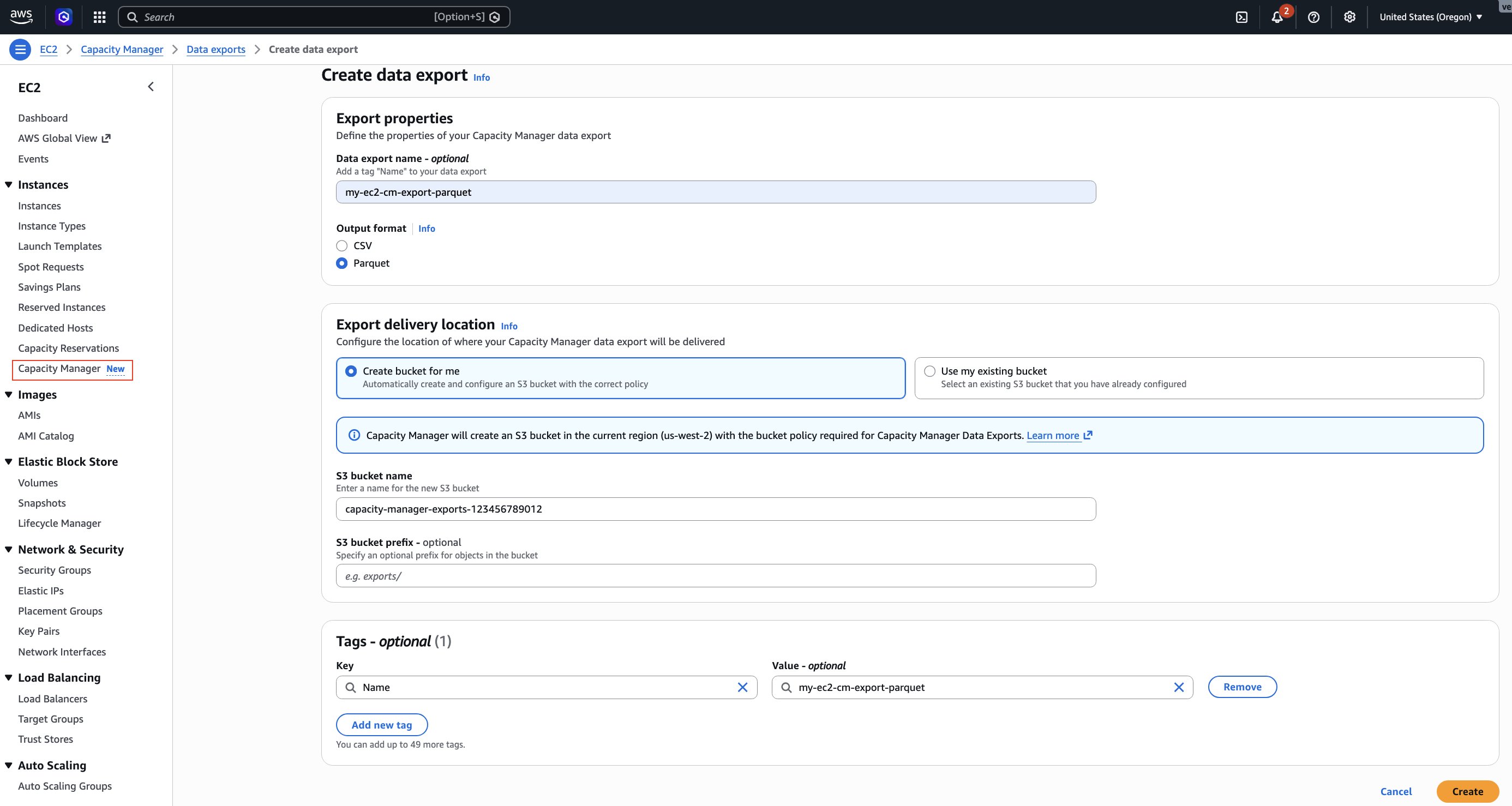
  4. Choose Create data export.
  5. For Output format, select Parquet.
  6. For S3 bucket, choose Create bucket for me to create a new bucket with the required permissions, or select an existing bucket from the list.
  7. If you selected an existing bucket, add the bucket policy shown in the following section to grant EC2 Capacity Manager write access.
  8. (Optional) For S3 prefix, enter a prefix to organize your exported files (for example, capacity-data/).
  9. For Schedule, select Hourly.
  10. Choose Create.

Screenshot of EC2 Capacity Manager Create data export page in AWS Console showing export properties: Data export name, output format set to Parquet, S3 location for export delivery and Tags

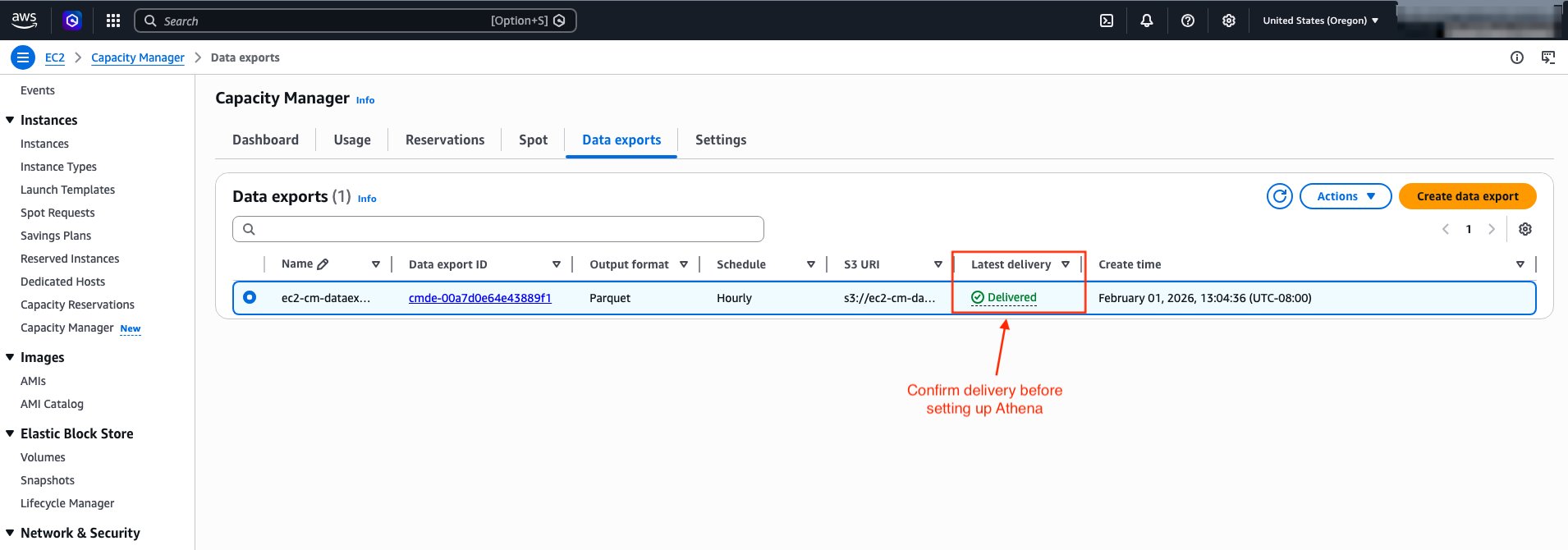
After you create the data export, EC2 Capacity Manager displays the export details.

Screenshot showing EC2 Capacity Manager data export status with ‘Latest Delivery’ column displaying ‘delivered’ status, indicating the export is ready for Athena setup

Update the S3 bucket policy (existing buckets only)

If you use an existing S3 bucket, you must add the bucket policy shown in the following example to grant EC2 Capacity Manager write access.

{
    "Version": "2012-10-17",
    "Statement": [
        {
            "Effect": "Allow",
            "Principal": {
                "Service": "ec2.capacitymanager.amazonaws.com"
            },
            "Action": [
                "s3:PutObject",
                "s3:GetObject",
                "s3:ListBucket"
            ],
            "Resource": [
                "arn:aws:s3:::<BUCKET_NAME>",
                "arn:aws:s3:::<BUCKET_NAME>/*"
            ],
            "Condition": {
                "StringEquals": {
                    "aws:SourceAccount": "<AWS_ACCOUNT_NUMBER>"
                },
                "ArnLike": {
                    "aws:SourceArn": "arn:aws:ec2:<AWS_REGION>:<AWS_ACCOUNT_NUMBER>:capacity-manager-data-export/*"
                }
            }
        }
    ]
}

Replace <AWS_ACCOUNT_NUMBER> with your AWS account number, <AWS_REGION> with your AWS Region (for example, us-west-2), and <BUCKET_NAME> with your bucket name.

To configure data export using the AWS CLI :

aws ec2 create-capacity-manager-data-export \
    --s3-bucket-name <BUCKET_NAME> \
    --s3-bucket-prefix <BUCKET_PREFIX>/ \
    --schedule hourly \
    --output-format <FORMAT> \
    --region <AWS_REGION>

# Replace:
# <BUCKET_NAME> with your bucket name,
# <BUCKET_PREFIX> with your bucket prefix (for example, capacity-data/),
# <FORMAT> with parquet or csv, and
# <AWS_REGION> with your AWS Region (for example, us-west-2)

# The output of the above command would give you a Data Export ID

{ "CapacityManagerDataExportId": "cmde-00a7d0e64e43889f1" }

After creating the data export, wait for the first export to complete before proceeding to set up Athena. You can check the export status using the following command:

aws ec2 describe-capacity-manager-data-exports --region <AWS_REGION>

The command returns details about your data export configuration, including the delivery status:

{
    "CapacityManagerDataExports": [
        {
            "CapacityManagerDataExportId": "cmde-00a7d0e64e43889f1",
            "S3BucketName": "capacity-manager-exports-123456789012",
            "S3BucketPrefix": "capacity-data/",
            "Schedule": "hourly",
            "OutputFormat": "parquet",
            "CreateTime": "2026-04-10T19:04:36.824000+00:00",
            "LatestDeliveryStatus": "delivered",
            "LatestDeliveryStatusMessage": "Successfully delivered to s3://capacity-manager-exports-123456789012/y=2026/m=04/d=10/h=15/...",
            "LatestDeliveryTime": "2026-04-10T19:05:39.176000+00:00"
        }
    ]
}

Wait until LatestDeliveryStatus shows "delivered" before proceeding to the next section. The first export typically appears in your S3 bucket in a couple of hours. Subsequent exports follow your configured schedule.

Setting up Amazon Athena to query capacity data

After EC2 Capacity Manager exports data to your S3 bucket, you can use Amazon Athena to query the data using standard SQL. Athena uses AWS Glue as its metadata store. Specifically, it relies on the AWS Glue Data Catalog, which contains table definitions that tell Athena where you have stored your data in S3 and how you have structured it. When you create tables in Athena, you’re actually creating metadata entries in the Data Catalog that Athena references when running queries.

Create an Athena database and table

You can create the table using AWS Glue crawler or manually with SQL. AWS Glue crawler automatically discovers the complete schema from your exported Parquet files, including optional fields like resource tags if enabled. It helps minimize manual schema definition efforts. If the export format changes in the future, you can re-run the crawler to update the table definition. For detailed instructions on creating a Glue Crawler, see Use a crawler to add a table in the Amazon Athena User Guide.

In this post, we create the table manually using a SQL statement. We also use partition projection for automatic partition discovery. We do this because EC2 Capacity Manager continuously adds new partitions to the S3 bucket according to your configured schedule. As new partitions arrive in S3, Athena doesn’t know about them until you run MSCK REPAIR TABLE or ALTER TABLE ADD PARTITION to update the AWS Glue Data Catalog. This becomes an overhead when data arrives frequently.

With partition projection, you define the partition scheme and specify its range/rules in the table properties. Athena then computes the partitions at query time instead of looking them up in the Glue Data Catalog. So partition projection automatically makes new partitions visible as soon as EC2 Capacity Manager exports the data to S3, eliminating the need for you to update metadata. The CREATE TABLE statement that follows defines the schema for EC2 Capacity Manager exports. If your capacity reservations are already tagged, add the corresponding tag columns (for example, tag_environment string or tag_costcenter string). Alternatively, use an AWS Glue crawler to automatically discover your complete schema, including tag columns.

  1. Open the Athena console at https://console.aws.amazon.com/athena/
  2. If prompted, configure a query result location in S3. This is where Athena writes query output. It is separate from the S3 bucket that stores your capacity data.
  3. Run the following query to create a database:
CREATE DATABASE IF NOT EXISTS capacity_manager_db;
  1. Create a table for Parquet format data:
CREATE EXTERNAL TABLE IF NOT EXISTS capacity_manager_db.capacity_data (
    metricgroupname string,
    periodstarttimestamp string,
    periodendtimestamp string,
    orgid string,
    accountid string,
    region string,
    `az-id` string,
    instancefamily string,
    instancetype string,
    platform string,
    tenancy string,
    reservationid string,
    `reservation arn` string,
    unusedfinancialowner string,
    reservationtype string,
    instancematchcriteria string,
    reservationcreatetimestamp string,
    reservationstarttimestamp string,
    reservationendtimestamp string,
    reservationenddatetype string,
    reservationstate string,
    reservationtotalcapacityhrsvcpu string,
    reservationtotalcapacityhrsinst string,
    reservationtotalestimatedcost string,
    reservationmaxsizevcpu string,
    reservationmaxsizeinst string,
    reservationminsizevcpu string,
    reservationminsizeinst string,
    reservationunusedtotalcapacityhrsvcpu string,
    reservationunusedtotalcapacityhrsinst string,
    reservationunusedtotalestimatedcost string,
    reservationmaxunusedsizevcpu string,
    reservationmaxunusedsizeinst string,
    reservationminunusedsizevcpu string,
    reservationminunusedsizeinst string,
    reservationmaxutilization string,
    reservationminutilization string,
    reservationavgutilizationvcpu string,
    reservationavgutilizationinst string,
    reservationavgfuturesizevcpu string,
    reservationavgfuturesizeinst string,
    reservationmaxfuturesizevcpu string,
    reservationmaxfuturesizeinst string,
    reservationminfuturesizevcpu string,
    reservationminfuturesizeinst string,
    reservationavgcommittedsizevcpu string,
    reservationavgcommittedsizeinst string,
    reservationmaxcommittedsizevcpu string,
    reservationmaxcommittedsizeinst string,
    reservationmincommittedsizevcpu string,
    reservationmincommittedsizeinst string,
    reservedtotalusagehrsvcpu string,
    reservedtotalusagehrsinst string,
    unreservedtotalusagehrsvcpu string,
    unreservedtotalusagehrsinst string,
    reservedtotalestimatedcost string,
    unreservedtotalestimatedcost string,
    spottotalusagehrsvcpu string,
    spottotalusagehrsinst string,
    spottotalestimatedcost string,
    spotavgruntimebeforeinterruptioninst string,
    spotmaxruntimebeforeinterruptioninst string,
    spotminruntimebeforeinterruptioninst string,
    spottotalinterruptionsinst string,
    spottotalinterruptionsvcpu string,
    spottotalcountinst string,
    spottotalcountvcpu string,
    spotinterruptionrateinst string,
    spotinterruptionratevcpu string
)
PARTITIONED BY (
    y string,
    m string,
    d string,
    h string
)
ROW FORMAT SERDE
    'org.apache.hadoop.hive.ql.io.parquet.serde.ParquetHiveSerDe'
STORED AS INPUTFORMAT
    'org.apache.hadoop.hive.ql.io.parquet.MapredParquetInputFormat'
OUTPUTFORMAT
    'org.apache.hadoop.hive.ql.io.parquet.MapredParquetOutputFormat'
LOCATION
    's3://<BUCKET_NAME>/'
TBLPROPERTIES (
    'projection.enabled' = 'true',
    'projection.y.type' = 'integer',
    'projection.y.range' = '2024,2030',
    'projection.y.digits' = '4',
    'projection.m.type' = 'integer',
    'projection.m.range' = '01,12',
    'projection.m.digits' = '2',
    'projection.d.type' = 'integer',
    'projection.d.range' = '01,31',
    'projection.d.digits' = '2',
    'projection.h.type' = 'integer',
    'projection.h.range' = '00,23',
    'projection.h.digits' = '2',
    'storage.location.template' = 's3://<BUCKET_NAME>/y=${y}/m=${m}/d=${d}/h=${h}/'
);

Replace <BUCKET_NAME> in the LOCATION clause and storage.location.template property with your bucket name, and capacity-data/ with table name of your choice.

Now that your table is set up, you can explore how to query the exported data.

Example queries for common use cases

The following queries demonstrate how to analyze your EC2 capacity data for cost optimization and capacity planning. The queries use date values (year=‘2026’, month=‘04’) and table name capacity_data. Adjust the partition values to match your actual data’s time period and table name to match your value. When querying EC2 Capacity Manager export data:

  1. Metric group filtering: EC2 Capacity Manager exports contain two types of data that the metricgroupname column identifies: Reservation Usage for analyzing ODCR utilization and optimization opportunities, and Instance Usage for analyzing overall capacity consumption across reserved, unreserved, and Spot instances. Always filter by the appropriate metric group for your analysis needs.
  2. Partition filtering: Always include partition filters (y, m, d, h) to improve query performance.
  3. Numeric operations: Use CAST to convert string columns to numeric types for proper comparison and sorting (for example, CAST(reservationavgutilizationinst AS double)).
  4. NULL handling: Use COALESCE to handle NULL values in calculations (for example, COALESCE(CAST(column AS double), 0)) to prevent NULL results in totals. Without COALESCE, when you add a column value NULL to a non-NULL value, the result is NULL.

Use case 1: Identify underutilized ODCRs

Discover On-Demand Capacity Reservations with low utilization that are generating cost waste. Identify specific reservations to downsize, cancel, or share with other teams to reduce unnecessary spending.

SELECT
    reservationid,
    instancetype,
    region,
    "az-id",
    reservationstate,
    ROUND(CAST(reservationavgutilizationinst AS double) * 100, 2) AS utilization_pct,
    CAST(reservationtotalcapacityhrsinst AS double) AS total_capacity_hrs,
    CAST(reservationunusedtotalcapacityhrsinst AS double) AS unused_capacity_hrs,
    ROUND(CAST(reservationunusedtotalestimatedcost AS double), 4) AS wasted_cost_usd
FROM capacity_data
WHERE metricgroupname = 'Reservation Usage'
    AND CAST(reservationavgutilizationinst AS double) < 0.5
    AND reservationavgutilizationinst IS NOT NULL
    AND y = '2026'
    AND m = '04'
ORDER BY wasted_cost_usd DESC
LIMIT 3;

Sample output:

reservationid instancetype region az-id reservationstate utilization_pct total_capacity_hrs unused_capacity_hrs wasted_cost_usd
cr-041aedfba865106c1 m5.8xlarge us-west-2 usw2-az2 active 0 1 1 1.536
cr-089f17dc178e993a8 m5.8xlarge us-west-2 usw2-az1 active 0 1 1 1.536

Use case 2: ODCR utilization summary by instance type

Get a comprehensive view of ODCR utilization across instance types to identify which instance families have the worst utilization rates. This helps prioritize optimization efforts on the reservations with the highest cost impact.

SELECT
    instancetype,
    COUNT(DISTINCT accountid) AS account_count,
    COUNT(DISTINCT reservationid) AS reservation_count,
    ROUND(SUM(COALESCE(CAST(reservationtotalcapacityhrsinst AS double), 0)), 2) AS total_odcr_capacity,
    ROUND(SUM(COALESCE(CAST(reservationunusedtotalcapacityhrsinst AS double), 0)), 2) AS total_unused_capacity,
    ROUND(AVG(COALESCE(CAST(reservationavgutilizationinst AS double), 0)) * 100, 2) AS avg_utilization_pct,
    ROUND(SUM(COALESCE(CAST(reservationunusedtotalestimatedcost AS double), 0)), 2) AS total_unused_cost_usd
FROM capacity_data
WHERE metricgroupname = 'Reservation Usage'
    AND y = '2026'
    AND m = '04'
GROUP BY instancetype
ORDER BY total_unused_cost_usd DESC
LIMIT 3;

Sample output:

instancetype account_count reservation_count total_odcr_capacity total_unused_capacity avg_utilization_pct total_unused_cost_usd
m5.8xlarge 1 2 311.99 311.99 0.0 479.22
c5.9xlarge 1 1 211.0 211.0 0.0 322.83
t3.micro 1 1 1055.0 1055.0 0.0 10.97

Use case 3: Identify peak usage patterns

Analyze average hourly usage patterns across reserved, unreserved, and Spot capacity to identify when your workloads typically hit peak demand. This breakdown helps you understand your capacity mix, plan for peak periods, and optimize your purchasing strategy.

SELECT
    h AS hour,
    ROUND(AVG(COALESCE(CAST(reservedtotalusagehrsinst AS double), 0)), 2) AS avg_reserved_usage_hours,
    ROUND(AVG(COALESCE(CAST(unreservedtotalusagehrsinst AS double), 0)), 2) AS avg_unreserved_usage_hours,
    ROUND(AVG(COALESCE(CAST(spottotalusagehrsinst AS double), 0)), 2) AS avg_spot_usage_hours,
    ROUND(AVG(COALESCE(CAST(reservedtotalusagehrsinst AS double), 0) + COALESCE(CAST(unreservedtotalusagehrsinst AS double), 0) + COALESCE(CAST(spottotalusagehrsinst AS double), 0)), 2) AS avg_total_usage_hours
FROM capacity_data
WHERE metricgroupname = 'Instance Usage'
    AND y = '2026'
    AND m = '04'
GROUP BY h
ORDER BY avg_total_usage_hours DESC
LIMIT 3;

Sample output:

hour avg_reserved_usage_hours avg_unreserved_usage_hours avg_spot_usage_hours avg_total_usage_hours
09 0.75 0.5 0 1.25
10 0.75 0.5 0 1.25
15 0.75 0.5 0 1.25

Use case 4: Regional capacity distribution

Understand how your ODCR capacity is distributed across AWS Regions and instance types. This geographic view helps you identify Regions with excess capacity that could be redistributed or consolidated to improve utilization and reduce costs.

SELECT
    region,
    instancetype,
    ROUND(SUM(COALESCE(CAST(reservationtotalcapacityhrsinst AS double), 0)), 2) AS total_reserved_capacity,
    ROUND(SUM(COALESCE(CAST(reservationunusedtotalcapacityhrsinst AS double), 0)), 2) AS unused_reserved_capacity,
    ROUND(AVG(COALESCE(CAST(reservationavgutilizationinst AS double), 0)) * 100, 2) AS avg_utilization_pct
FROM capacity_data
WHERE metricgroupname = 'Reservation Usage'
    AND y = '2026'
    AND m = '04'
GROUP BY region, instancetype
ORDER BY region, total_reserved_capacity DESC
LIMIT 3;

Sample output:

region instancetype total_reserved_capacity unused_reserved_capacity avg_utilization_pct
us-west-2 t2.nano 1484.0 1060.0 33.34
us-west-2 t3.micro 1060.0 1060.0 0.0
us-west-2 t2.micro 848.0 636.0 25.0

Use case 5: Unused capacity reservations by Region and Availability Zone

Pinpoint exactly where you have unused ODCR capacity at the Availability Zone level. This granular view enables you to share unused capacity with other teams in the same AZ or modify reservations to better match actual usage patterns.

SELECT
    region,
    "az-id",
    instancetype,
    ROUND(SUM(COALESCE(CAST(reservationunusedtotalcapacityhrsinst AS double), 0)), 2) AS unused_capacity_instances,
    ROUND(AVG(COALESCE(CAST(reservationavgutilizationinst AS double), 0)) * 100, 2) AS avg_utilization_pct,
    ROUND(SUM(COALESCE(CAST(reservationunusedtotalestimatedcost AS double), 0)), 2) AS unused_cost_usd
FROM capacity_data
WHERE metricgroupname = 'Reservation Usage'
    AND y = '2026'
    AND m = '04'
    AND CAST(reservationunusedtotalcapacityhrsinst AS double) > 0
GROUP BY region, "az-id", instancetype
ORDER BY unused_cost_usd DESC
LIMIT 3;

Sample output:

region az-id instancetype unused_capacity_instances avg_utilization_pct unused_cost_usd
us-west-2 usw2-az1 c5.9xlarge 212.0 0.0 324.36
us-west-2 usw2-az2 m5.8xlarge 157.0 0.0 241.15
us-west-2 usw2-az1 m5.8xlarge 157.0 0.0 241.15

Clean up

To avoid incurring future charges, delete the resources you created:

Warning: This permanently deletes the table definition. Verify that you no longer need to query this data before proceeding.

  1. Delete the Athena table by running the following query: DROP TABLE IF EXISTS capacity_manager_db.capacity_data;
  2. Delete the database by running the following query: DROP DATABASE IF EXISTS capacity_manager_db;
  3. Navigate to the Athena console settings.
  4. Note the query result location S3 bucket.
  5. If you created this bucket specifically for this tutorial:
    1. Empty the S3 bucket by running: aws s3 rm s3://<QUERY_RESULT_BUCKET_NAME> --recursive
    2. Delete the S3 bucket by running: aws s3 rb s3://<QUERY_RESULT_BUCKET_NAME>
  6. Delete the data export configuration by using AWS Management Console or AWS CLI.
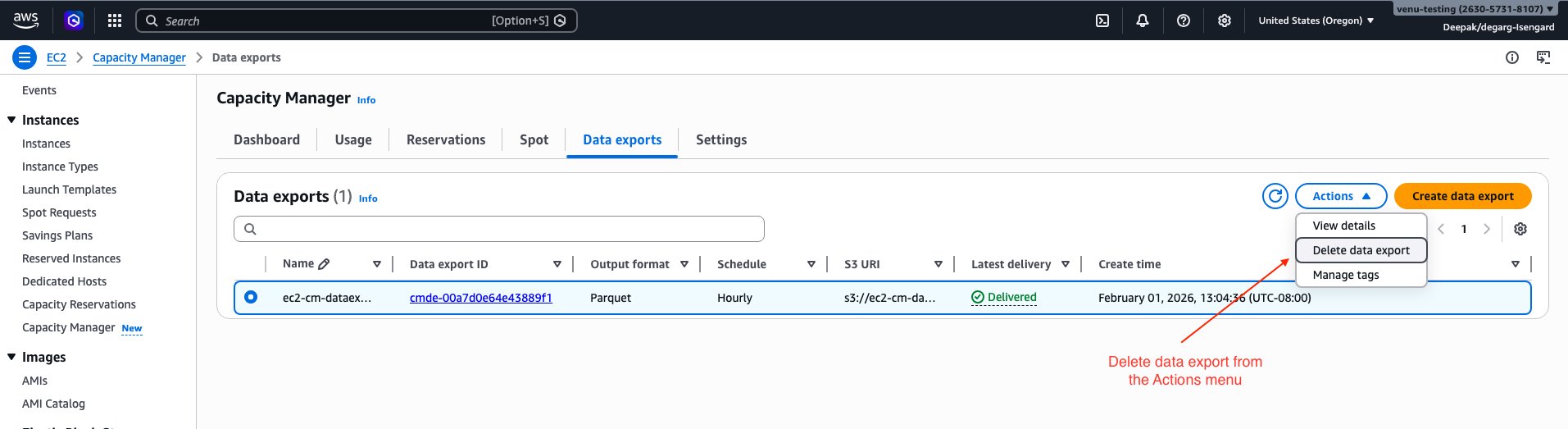
    1. If using AWS Console, select the “Delete data export” option in the Actions menu.

Screenshot of AWS Management Console showing the Delete option in the Actions menu for an EC2 Capacity Manager data export configuration

  1. To delete the configuration using AWS CLI:
    # List your data export configurations to find the export ID.
    aws ec2 describe-capacity-manager-data-exports --region <AWS_REGION>
    
    # The output shows details for export configuration which has the Data Export ID
    # Sample output is shown in the configure data export section above.
    
    # Then delete the export configuration using the ID from the output
    aws ec2 delete-capacity-manager-data-export \
        --data-export-id <EXPORT_ID> \
        --region <AWS_REGION>

    Replace <EXPORT_ID> with your data export ID and <AWS_REGION> with your AWS Region.

    Warning: Deleting the S3 bucket permanently removes all exported capacity data. Verify that you have backed up any data you need before proceeding.

  1. (Optional) Delete the S3 bucket and data: If you no longer need the exported data, complete the following steps:
    1. Empty the S3 bucket by running: aws s3 rm s3://<BUCKET_NAME> --recursive
    2. Delete the S3 bucket by running: aws s3 rb s3://<BUCKET_NAME>

Conclusion

In this post, we demonstrated how to configure EC2 Capacity Manager data exports to Amazon S3 and query historical capacity data using Amazon Athena. This approach enables you to retain capacity data beyond the 90-day console limit.

As you scale your capacity management practices, consider integrating these exports with your existing analytics and monitoring workflows. By combining EC2 Capacity Manager data with your broader infrastructure metrics, you can make data-driven decisions about capacity allocation and optimization across your organization.

To deepen your understanding, explore the EC2 Capacity Manager documentation for additional features, learn more about Amazon Athena for advanced query capabilities, and review EC2 capacity optimization best practices. Share your feedback and tell us how you’re using EC2 Capacity Manager data exports to optimize your capacity planning in the comments.

Interesting Paper Exploring Prompt Injection

Post Syndicated from Bruce Schneier original https://www.schneier.com/blog/archives/2026/06/interesting-paper-exploring-prompt-injection.html

This is a fascinating explotation of how LLMs fall for prompt injection attacks. It turns out that they learn to recognize the style of text in different role/instruction blocks, and not just the tags.

Their conclusion:

Role tags were a formatting trick that became the security architecture and the cognitive scaffolding of modern LLMs. We’ve shown that this architecture doesn’t survive into the model’s actual representations, and that such role confusion is linked to prompt injection.

Unless LLMs achieve genuine role perception, we think injection defense will remain a perpetual whack-a-mole game. And the continuous nature of role boundaries opens the threat of injections designed to subtly shift LLM states through seemingly innocuous text, legally and at scale.

More generally, roles are quietly one of the most important abstractions in the LLM stack, providing the boundaries meant to separate self from other, thought from communication, instruction from data. They’re human-controlled switches in an otherwise continuous system. We think they deserve a lot more study than they’ve gotten.

Full paper: “Prompt Injection as Role Confusion.” Simon Willison comments.

Celebrating over 15,000 young creators at the Coolest Projects 2026 online showcase

Post Syndicated from Helen Gardner original https://www.raspberrypi.org/blog/celebrating-over-15000-young-creators-at-the-coolest-projects-2026-online-showcase/

From first-time coders to seasoned makers, this year every single Coolest Projects creator brought all their creativity to their tech projects and made something to be proud of. Over 15,000 young people showcased more than 4,500 creations on a global stage. With participants from 40 countries and 47% girls, this year’s online showcase is a true reflection of what the next generation of tech creators looks like.

Yesterday our global livestream brought together the whole Coolest Projects community to celebrate the young people’s creations with some very special guests.

Meet our 2026 VIP judges and their favourite projects

Every year, we invite new special VIP judges to choose their favourite projects from each of the seven Coolest Projects categories. Meet our 2026 judges and find out about the projects they picked.

Ronit Levavi Morad, Chief of Staff at Google Research 

Ronit’s role involves reimagining the future of learning and she is a passionate advocate for technology in service of pedagogy, leading Google Research’s global Al literacy initiatives. She champions a human-centered vision for technology, leading programmes like Al Quests, a gamified experience designed to teach teens how Al can be applied to humanity’s greatest challenges.

Ronit’s favourite projects are:

Ben Powley, Senior Developer at Jagex

Ben is a senior developer at British video game company Jagex, working on RuneScape to deliver immersive experiences for both new and existing players. He previously worked at Ubisoft on the Assassin’s Creed series and the Avatar Frontiers of Pandora game. Ben learned to code at 12 through making mods for Minecraft, and he has been passionate about game development ever since.

Ben’s favourite projects are:

Akari Kawaguchi, youth mentor, CoderDojo Japan

Akari is a 16-year-old CoderDojo member from Japan who has showcased her own projects at Coolest Projects seven times. She knows exactly what it takes to make something special for the showcase, and we’re so excited to have a young creator’s perspective on the judging panel!

Akari’s favourite projects are:

Sebin Sunny, CEO, EIC IIITM-K

Sebin is CEO of the Entrepreneurship and Innovation Center (EIC) and the Centre of Excellence in loT Sensors at the Indian Institute of Information Technology and Management – Kerala (IIITM-K). A passionate advocate for innovation, he is committed to empowering entrepreneurs, creating sustainable solutions, and shaping the future of technology-driven industries.

Sebin’s favourite projects are:

Broadcom Coding with Commitment® award

The Broadcom Coding With Commitment® award shines a light on creators who use coding to support and strengthen their communities with a project that aligns with 17 sustainable development goals of the United Nations.

A screenshot of a young person's Scratch project showcased at Coolest Projects.
The start screen of Viridia – Back to the World

This year’s Broadcom Coding with Commitment® recipient for the online showcase is Egehan from Türkiye, with their Scratch project Viridia – Back to the World, an educational game designed to teach players about the importance of water and how to use it responsibly.

Get inspired and keep creating!

Browse the Coolest Projects 2026 online gallery to discover thousands of incredible projects from young people all over the world. 

Inspired to make your own project? Or encourage a young person you know? To get you started, we offer over 200 free coding projects, in English and many other languages.

Want to know more about next year’s showcase?

Coolest Projects will be back online in 2027. Sign up to the newsletter to be the first to hear about dates, deadlines, and exciting updates.

Coolest Projects logo.

And did you know there are in-person Coolest Projects events around the globe? There is still time to take part in Coolest Projects India and other partner events this year. Find out more.

Thank you to the Coolest Projects sponsors

We want to say a big thank you to Broadcom Foundation, Allianz, Amazon Future Engineer, Qube-RT, Avnet, and GoTo for sponsoring Coolest Projects 2026 and helping to celebrate young tech creators around the world.

The post Celebrating over 15,000 young creators at the Coolest Projects 2026 online showcase appeared first on Raspberry Pi Foundation.

Modernizing Lambda + S3 workloads with Amazon S3 Files

Post Syndicated from Sahithi Ginjupalli original https://aws.amazon.com/blogs/compute/modernizing-lambda-s3-workloads-with-amazon-s3-files/

Learn how Amazon S3 Files simplifies Lambda functions by eliminating transfer code and /tmp constraints. See three modernization patterns with code examples for image processing, ETL pipelines, and multi-agent AI workloads.

AWS Lambda functions that interact with Amazon Simple Storage Service (Amazon S3) typically follow a familiar pattern: download an object to /tmp, process it locally, and upload the result back to S3. This pattern is well-understood and reliable, but it requires you to write code for managing transfers, monitoring /tmp capacity, and cleaning up ephemeral storage alongside your actual processing logic.

Amazon S3 Files changes this by letting your Lambda function mount an S3 bucket as a file system. Your function reads and writes files at a local mount path (such as /mnt/data), and the file system handles synchronization with S3 automatically. The transfer and storage management code goes away, and what remains is your processing logic working directly with files.

In this post, we walk through three common Lambda + S3 workloads and show how to modernize each one by using S3 Files. You will see how the code gets shorter, the /tmp size constraint disappears, and the developer experience improves.

Walkthrough

Prerequisites

Before you begin, make sure you have:

  • An AWS account with permissions to create Lambda functions, S3 file systems, and VPC resources.
  • An existing VPC with private subnets and appropriate security groups.

Getting started

To integrate a Lambda function with S3 Files, you can follow these three steps:

  1. Create an S3 file system for your bucket. You can do this through the S3 console, AWS Command Line Interface (AWS CLI), or AWS CloudFormation. This single operation creates the file system, mount targets in your Amazon Virtual Private Cloud (Amazon VPC), and an access point.
  2. Add the file system configuration to your Lambda function. Specify the access point ARN and local mount path (for example, /mnt/data). Your function must be in a VPC with access to the mount target. For optimal throughput on large files, configure your function with 512 MB or more of memory to enable direct reads from S3.
  3. If you are modernizing your existing Lambda function’s code, replace boto3 transfer code with file paths. Change s3.download_file(bucket, key, '/tmp/file') to open('/mnt/data/' + key) and remove upload and cleanup logic.

Your function’s execution role needs s3files:ClientMount and s3files:ClientWrite permissions (included in the AmazonS3FilesClientReadWriteAccess managed policy). For direct S3 reads on large files, also add s3:GetObject and s3:GetObjectVersion.

Pattern 1: Multi-agent shared workspace

Agentic AI workloads, where multiple autonomous agents collaborate on a task, require shared mutable state. Agents need to read each other’s outputs, write intermediate artifacts, and coordinate without tight coupling. With Lambda today, this typically means serializing state to S3 objects or Amazon DynamoDB between every step, adding latency and code for each handoff.

S3 Files gives multiple Lambda functions a shared file system. Agents communicate through the file system itself, with no S3 API calls and no serialization overhead.

Example: Collaborative research agents

Three Lambda functions mount the same S3 bucket at /mnt/workspace. An orchestrator prepares the task, research agents work in parallel, and a synthesis agent combines their findings:

import os
import json

WORKSPACE = "/mnt/workspace"

# --- Orchestrator Agent ---
def orchestrator_handler(event, context):
    session_id = event["session_id"]
    session_dir = f"{WORKSPACE}/sessions/{session_id}"

    os.makedirs(f"{session_dir}/research", exist_ok=True)
    os.makedirs(f"{session_dir}/output", exist_ok=True)

    # Write task assignments directly to shared workspace
    with open(f"{session_dir}/manifest.json", "w") as f:
        json.dump({
            "query": event["research_query"],
            "agents": ["market_analysis", "technical_review", "competitor_scan"],
            "status": "in_progress"
        }, f)

    return {"session_dir": session_dir}


# --- Research Agent (one of many, running in parallel) ---
def research_agent_handler(event, context):
    session_dir = event["session_dir"]
    agent_name = event["agent_name"]

    # Read task from shared workspace (no S3 GET call)
    manifest = json.load(open(f"{session_dir}/manifest.json"))

    # Perform research (invoke Amazon Bedrock, search, etc.)
    # TODO: Implement perform_research() for your use case
    findings = perform_research(manifest["query"], agent_name)

    # Write results to shared workspace (no S3 PUT call)
    with open(f"{session_dir}/research/{agent_name}.json", "w") as f:
        json.dump(findings, f, indent=2)

    return {"status": "complete", "agent": agent_name}


# --- Synthesis Agent ---
def synthesis_handler(event, context):
    session_dir = event["session_dir"]

    # Read all research outputs from shared directory
    all_findings = {}
    for f in os.listdir(f"{session_dir}/research"):
        with open(f"{session_dir}/research/{f}") as fh:
            all_findings[f.replace(".json", "")] = json.load(fh)

    # Synthesize and write final report
    # TODO: Implement synthesize_findings() for your use case
    report = synthesize_findings(all_findings)
    with open(f"{session_dir}/output/report.md", "w") as f:
        f.write(report)

    return {"report_path": f"{session_dir}/output/report.md"}

In the traditional approach, each agent would need to call s3.get_object() to read the manifest, s3.put_object() to write findings, and the synthesis agent would need to call s3.list_objects() then s3.get_object() for each result. That’s eight or more S3 API calls per workflow run replaced by file I/O.

What the shared workspace pattern gives you:

  • Agents discover each other’s outputs by listing a directory (no coordination logic needed).
  • Sessions, agents, and outputs map to directories, not flat object key conventions.
  • Close-to-open consistency means that when an agent closes a file after writing, the next agent to open it sees the complete content.
  • No need to marshal state into S3 PutObject calls between steps.

Pattern 2: Image thumbnail generation

The S3 thumbnail generator is a common Lambda + S3 pattern. An image is uploaded to S3, a Lambda function is triggered, it downloads the image, resizes it with Pillow, and uploads the thumbnail to a destination bucket.

The traditional approach

import boto3
import os
import uuid
from urllib.parse import unquote_plus
from PIL import Image

s3_client = boto3.client('s3')

def resize_image(image_path, resized_path):
    with Image.open(image_path) as image:
        image.thumbnail(tuple(x / 2 for x in image.size))
        image.save(resized_path)

def handler(event, context):
    for record in event['Records']:
        bucket = record['s3']['bucket']['name']
        key = unquote_plus(record['s3']['object']['key'])
        tmpkey = key.replace('/', '')
        download_path = '/tmp/{}{}'.format(uuid.uuid4(), tmpkey)
        upload_path = '/tmp/resized-{}'.format(tmpkey)

        s3_client.download_file(bucket, key, download_path)
        resize_image(download_path, upload_path)
        s3_client.upload_file(
            upload_path, '{}-resized'.format(bucket), 'resized-{}'.format(key)
        )

What this approach requires you to manage beyond the core resize logic:

  • Transfer orchestration: Downloading the source, uploading the result, and handling partial transfer failures.
  • Storage capacity: Both the source and resized image must fit in /tmp simultaneously.
  • Ephemeral storage cleanup: If the function fails mid-execution or is reused across invocations, orphaned files can accumulate in /tmp.
  • Redundant downloads: If the same image triggers a retry, it must be downloaded again.

With the file system approach

import os
from urllib.parse import unquote_plus
from PIL import Image

MOUNT = "/mnt/images"

def resize_image(image_path, resized_path):
    with Image.open(image_path) as image:
        image.thumbnail(tuple(x / 2 for x in image.size))
        image.save(resized_path)

def handler(event, context):
    for record in event['Records']:
        key = unquote_plus(record['s3']['object']['key'])
        input_path = f"{MOUNT}/source/{key}"
        output_path = f"{MOUNT}/resized/resized-{os.path.basename(key)}"

        os.makedirs(os.path.dirname(output_path), exist_ok=True)
        resize_image(input_path, output_path)

What changed

The function moves from a download-process-upload pipeline to direct file I/O. No boto3 client, no /tmp management, no upload step. The resize_image function is unchanged because it always worked with file paths. The difference is that those paths now point to a mounted S3 file system instead of ephemeral local storage.

You still handle errors in your processing logic (for example, invalid image formats). What you no longer need to handle are transfer-specific failure modes like partial downloads, failed uploads, or /tmp capacity checks.

Metric Traditional S3 Files
Lines of code (non-blank) 22 15
S3 API calls per invocation 2 (GET + PUT) 0
Max image size Source + output files share /tmp No /tmp constraint
boto3 dependency Required Not needed

Pattern 3: CSV-to-Parquet ETL pipeline

Another commonly used serverless ETL pattern is an S3 event triggers a Lambda function when CSV files land in a bucket. The function downloads the CSV, transforms it to Parquet by using pandas and pyarrow, and uploads the result.

The traditional approach

import boto3
import pandas as pd
import os

s3 = boto3.client("s3")
BUCKET = "data-pipeline-bucket"

def handler(event, context):
    key = event["Records"][0]["s3"]["object"]["key"]
    filename = os.path.basename(key)
    local_input = f"/tmp/{filename}"
    local_output = f"/tmp/{filename.replace('.csv', '.parquet')}"

    try:
        # Download from S3
        s3.download_file(BUCKET, key, local_input)

        # Check /tmp space (10 GB limit)
        tmp_usage = sum(
            os.path.getsize(f"/tmp/{f}")
            for f in os.listdir("/tmp") if os.path.isfile(f"/tmp/{f}")
        )
        if tmp_usage > 9 * 1024**3:  # 9 GB safety margin
            raise RuntimeError("Approaching /tmp storage limit")

        # Transform
        df = pd.read_csv(local_input)
        df["processed_at"] = pd.Timestamp.now()
        df.to_parquet(local_output, engine="pyarrow", compression="snappy")

        # Upload result back to S3
        output_key = key.replace("raw/", "processed/").replace(".csv", ".parquet")
        s3.upload_file(local_output, BUCKET, output_key)

        return {"status": "success", "output_key": output_key}

    finally:
        # Clean up /tmp
        for f in [local_input, local_output]:
            if os.path.exists(f):
                os.remove(f)

What this approach requires you to manage beyond the core transform logic:

  • Storage capacity: Source and output files share /tmp, limiting practical file size.
  • Cold start cost: Initializing the boto3 client adds startup latency.
  • Transfer failure modes: Partial downloads, failed uploads, and orphaned /tmp files need their own handling.
  • Redundant downloads: Retries or reprocessing require downloading the same file again.

With the file system approach

import pandas as pd
import os

MOUNT = "/mnt/data"

def handler(event, context):
    key = event["Records"][0]["s3"]["object"]["key"]
    input_path = f"{MOUNT}/{key}"
    output_path = f"{MOUNT}/{key.replace('raw/', 'processed/').replace('.csv', '.parquet')}"

    # Ensure output directory exists
    os.makedirs(os.path.dirname(output_path), exist_ok=True)

    # Transform: direct file access, no download/upload
    df = pd.read_csv(input_path)
    df["processed_at"] = pd.Timestamp.now()
    df.to_parquet(output_path, engine="pyarrow", compression="snappy")

    return {"status": "success", "output_path": output_path}

What changed

With this change, a developer reading this code sees only the transform logic (read CSV, add column, write Parquet). The storage mechanics are handled by the file system.

Metric Traditional S3 Files
Lines of code (non-blank) 33 14
S3 API calls per invocation 2 (GET + PUT) 0
Max file size Source + output share /tmp No /tmp constraint
Cleanup logic required Yes No
/tmp space monitoring Yes No

Choosing the right approach: file system mounts vs. traditional access

Use case Recommendation
Lambda reads/writes files from S3 S3 Files (eliminates transfer boilerplate)
Multiple functions share data S3 Files (shared mount replaces API coordination)
Files > 10 GB S3 Files (no /tmp size constraint)
Event-driven processing (trigger on upload) S3 Files (S3 event triggers still work, function reads from mount)
Direct S3 API features (presigned URLs, S3 Select, multipart upload) Traditional (these require the S3 API)
Functions outside a VPC Traditional (S3 Files requires VPC connectivity)

Cleaning up

If you created resources while following along with this post, delete them to avoid incurring future costs. Start by removing the file system configuration from your Lambda function settings. Next, remove the S3 file system, which also deletes its associated mount targets and access points. Then delete the S3 buckets used for source and output data, along with the Lambda functions created for the examples. Finally, remove the IAM roles and policies created for Lambda execution or, if you added the S3 Files permissions (s3files:ClientMount, s3files:ClientWrite, s3:GetObject, s3:GetObjectVersion) to an existing role, remove these permissions. Additionally, If you created a new VPC for this tutorial, delete the VPC, which will also remove the associated private subnets, security groups, and route tables. If you used an existing VPC, remove the security groups and subnets created for this testing.

Warning: Deletion of an S3 bucket and its contents permanently deletes all objects in the buckets and cannot be undone. Make sure you have backed up any data you need to retain before proceeding.

Conclusion

In this post, we demonstrated how to modernize three common Lambda + S3 workloads by using Amazon S3 Files. Across image thumbnail generation, ETL pipelines, and multi-agent AI workloads, the migration follows the same principle: replace S3 API transfer logic with native file I/O and let the file system handle synchronization.

The improvements are consistent:

  • Less code: Transfer and cleanup logic goes away, leaving only your processing logic.
  • No /tmp size constraint: Process large files without local storage limits.
  • Zero S3 API calls for data access: Reads and writes go through the file system mount.
  • Fewer failure modes to handle: Transfer-specific issues (partial downloads, failed uploads, orphaned temp files) no longer apply.

For teams running Lambda + S3 workloads today, S3 Files isn’t a new architecture to learn. It’s transfer code you can remove. To learn more, see the S3 Files section in the Lambda documentation. To track upcoming features on the AWS Lambda roadmap, you can refer to the AWS Lambda roadmap.

Embedding Forbidden Text in Spyware to Discourage AI Analysis

Post Syndicated from Bruce Schneier original https://www.schneier.com/blog/archives/2026/06/embedding-forbidden-text-in-spyware-to-discourage-ai-analysis-2.html

At least one malware developer is adding text about nuclear and biological weapons to their spyware, in an effort to stop automatic AI analysis.

Details:

The _index.js payload begins with a large JavaScript block comment containing fake system instructions and policy-triggering content. Because it is inside a comment, it does not affect JavaScript execution. The runtime skips it. The real malware begins after the comment with a try{eval(…)} wrapper around a large character-code array and a ROT-style substitution function.

This header appears designed for AI-mediated analysis, not for Node, Bun, or Python. It attempts to derail scanners or analyst copilots that feed the beginning of a file to a language model without clearly isolating the content as untrusted data. In weak pipelines, this can cause refusal behavior, prompt confusion, context pollution, or premature classification before the scanner reaches the actual malware.

This is not a magical bypass against static detection. YARA rules, entropy checks, AST parsing, string extraction, deobfuscation, and behavioral rules still work. But it is a practical anti-analysis trick against naive LLM-first triage systems.

Professional Athletes and Wearables

Post Syndicated from Bruce Schneier original https://www.schneier.com/blog/archives/2026/06/professional-athletes-and-wearables.html

I haven’t thought about the privacy issues surrounding professional athletes and wearables.

Wearables present serious privacy issues for “Average Joe” consumers, who are entrusting tech companies to safely store and protect their biometric data. Imagine the stakes for a professional athlete, whose entire livelihood could be affected by a single biometric data point. To give one of many realistic hypotheticals: a basketball player has a terrible game, and the coach wonders if they showed up to the gym hungover. The coach has access to the player’s wearable data, and checks to see when they went to sleep, as well as what their heart rate looked like during the night. Should the player have been out partying before a game? No. Should the coach be able to surveil them? Definitely not.

It will not surprise you to learn that there’s an emergent gambling angle here: sports leagues would love to commercialize players’ biometric data, and sharp bettors would love access to data about, say, a hungover player. “We’re going to get to a spot where people are betting not just on the velocity of the puck that was shot by a player in the NHL playoffs, but on what the heart rate of a certain player is going to be running down the field,” said Helen “Nellie” Drew, the director of the University of Buffalo’s Center for the Advancement of Sport, and a professor of practice in sports law.

There are other practical considerations, too. What if wearable data reveals that a player isn’t as speedy as they were before, and a team uses that data against the player during contract negotiations? What if a wearable reveals a player is favoring their leg, or is at greater risk of injury? This information is potentially beneficial to a training staff and an athlete, so long as it’s disclosed and used in a responsible manner—­a critical, mostly unresolved caveat. “Aging and injured players are the most at-risk” of wearable data being used against them, said Michael LeRoy, who researches sports labor laws and AI, and is a professor at the University of Illinois’s School of Labor and Employment Relations.

The bit about gamblers is particularly scary.

I have often said that surveillance tech is generally deployed first against people with diminished rights: children, prisoners, military personnel, the mentally impaired. This is another early use case with different dynamics. The surveilled are wealthy and powerful, and—in many cases—unionized.

Friday Squid Blogging: Victims of Unregulated Squid Fishing

Post Syndicated from Bruce Schneier original https://www.schneier.com/blog/archives/2026/06/friday-squid-blogging-victims-of-unregulated-squid-fishing.html

Dolphins, sharks, turtles, and human workers are all victims of unregulated squid fishing fleets.

Another news article.

As usual, you can also use this squid post to talk about the security stories in the news that I haven’t covered.

Blog moderation policy.

Anthropic’s Fable and the State of AI

Post Syndicated from Bruce Schneier original https://www.schneier.com/blog/archives/2026/06/anthropics-fable-and-the-state-of-ai.html

On June 9th, Anthropic released its Fable generative AI model. Three days later, the US government classified it as a dangerous munition, and used its export-control authority to prohibit any foreign nationals from accessing it. Unable to differentiate between Americans and foreigners, the company shut off access for everyone.

The government’s actions won’t help. The problem isn’t any one particular model; it’s the general trend of increasing AI capabilities. And any real solution requires the sort of collective action that just isn’t possible right now.

Fable is the constrained version of Mythos, the AI model Anthropic announced in April. Anthropic only released it to a few selected organizations, because the company claimed it was so good at finding and exploiting vulnerabilities in computer code that releasing it more generally would be dangerous.

It was an obviously self-serving announcement, and because few were able to verify Anthropic’s claims they were met with some skepticism. Those with access used Mythos to find and patch many vulnerabilities in their own software. But one UK group found the latest, already public, OpenAI model to be just as powerful.

Fable is just another incremental improvement in the years-long climb of AI capabilities. But just as important as the AI model is the “harness.” This is typically not AI. It’s ordinary computer code that interfaces with the user. It stitches together AI models, decides how and for what purposes they can be used, and gives them useful tools such as web search and the ability to run their own computer code.

When Mythos first entered limited release, there was widespread debate whether its power came from the model or the harness. With Mythos demonstrating that it was possible, the open-source community scrambled to build harnesses that could steer other AI models towards similar capabilities. Harness improvements don’t need massive data or data centers.

They largely succeeded. For example, a Prague company was able to replicate Anthropic’s few verifiable cybersecurity capabilities with a much smaller and cheaper model—and a more sophisticated harness. Last week, a group showed that multiple cheaper models harnessed in concert matches Fable’s performance.

The broader community had only a few days with Fable, but that time we learned some about its capabilities. Its difference is less the new model’s raw analytical and problem solving capabilities, and more that the model doesn’t need that sophisticated harness.

Fable requires much less expertise and detailed prompting from the human user. You can give it a difficult goal and it will figure out novel and unexpected ways to satisfy it, finding loopholes in whatever constraints you or the system have imposed on it.

“Relentlessly proactive” is how AI researcher Simon Willison described it. Another descriptor might be “creative.” Experienced AI developers have had that combination of creativity and proactivity since last year, but Fable puts it within easy reach of everyone.

In the hands of someone with a legitimate problem that needs solving, that can be an incredibly useful capability. But in the hands of someone who wants to do harm, it can be equally dangerous. AIs don’t have a moral compass in the same way that people do. They are agents of the wants and desires of the people who prompt them.

That points to the real problem with relentlessly proactive AI. In language, wants and desires are always underspecified. If I ask you to get me some coffee, you would probably pour me a cup from the coffeepot, or buy one from a nearby coffee shop.

You couldn’t buy me a pound of raw beans, or a coffee plantation. You wouldn’t order a cup of coffee for delivery next month. You wouldn’t find a nearby person, rip a cup of coffee out of their hands, and bring it to me. I wouldn’t have to specify any of the million limitations to my request; you would just know.

Human stories are filled with warnings about underspecified desires. King Midas wished that everything he touch turn to gold, forgetting to add “but not my food, drink, and daughter.” And genies are notorious for granting your wish in a way you wish they hadn’t.

The deeper point is that it’s impossible to list all limitations and restrictions, and like a malicious genie, a creative AI will find the ones you forgot. Block a database you don’t want it to have access to, and it might figure out how to bypass your control. Ask it to book a flight, and it might hack the airline because the website says the flight is sold out. Ask it to save money on your cellphone plan, and it might cancel it altogether—or get someone else to pay for it. As far as we know now AI has not done any of this yet, but you get the idea.

Malicious intent is not required. To an AI model, constraints are just things to get around and not general truisms about the world. They are creative problem solvers and natural rule breakers. They “hack” in the sense that they find and exploit loopholes.

Human systems rely on so many norms that we scarcely recognize the existence of until they are broken. AIs naturally think outside the box, because they don’t have any real conception of what the box is or why it’s there in the first place.

There is no foolproof way to prevent people from using AI models to complete harmful tasks. There is no way to prevent the models from incidentally causing harm while completing benign tasks. AI models are no longer isolated from the real world. They browse the internet and answer emails.

They trade stocks and make purchases. They control physical systems. They are, in effect, robots that affect life and property. We have no technical mechanisms to verify the integrity of an AI system. This level of capability and creativity in the hands of us untrustworthy humans will have both great and terrible results.

The problem is not unique to Anthropic. Mythos/Fable might currently be the most capable rules hacker, but more sophisticated harnesses give other models similar capabilities. And we should assume that the other frontier models are no more than a few months behind, and that open-source models are less than a year behind. At best, any ban only serves to delay the problem for a short while.

That delay might be useful if we—as a society, as a planet—would use that time to come together and figure out what to do. This isn’t a US/China arms race problem; this a species-level problem that requires coordinated action at that scale. Unfortunately, we have no mechanism to do that. I first wrote about this problem five years ago, but it was all too futuristic.

Today, when its right in front of us, there is no world government that can impose constraints on the for-profit corporations currently controlling AI models and research. The US has no appetite to effectively and even-handedly regulate those corporations, even as they do catastrophic damage to the environment, democracy, and—in this case—society in general.

This all makes an AI public option all the more necessary, and urgent. Today’s AIs can be fast, smart and secure, but only two of the three are possible for any given system. These safety tradeoffs are tightly held secrets of companies racing to beat one another, and they tell us we have to trust them. Instead, the choices and their consequences need to be brought out into the sunlight.

We should be funding open-source harnesses that balance capability and safety—that achieve useful goals without so much power—and open-source AI models whose provenance and biases are public and well understood. We have opened the AI Pandora’s box. Now we have to make the best of it.

This essay originally appeared in The Guardian.

Production-Ready Autonomous Incident Resolution with AWS DevOps Agent (now GA) and Datadog MCP Server

Post Syndicated from Nina Chen original https://aws.amazon.com/blogs/devops/production-ready-autonomous-incident-resolution-with-aws-devops-agent-now-ga-and-datadog-mcp-server/

This post was co-written with Bharadwaj Tanikella (AI/ML Product Engineering Leader) and Mohammad Jama (Product Marketing Manager) from Datadog.

In December 2025, we showed how AWS DevOps Agent and Datadog MCP Server could work together to autonomously correlate monitoring data with the infrastructure deployed and configured on AWS to resolve incidents in minutes instead of hours. Since then, Datadog MCP Server has reached general availability as the standard way for AI agents to access Datadog’s monitoring platform. Today, AWS DevOps Agent is generally available, giving teams a production-ready path to autonomous incident resolution across AWS, multicloud and on-premises environments.

What’s New: From Preview to GA

As engineering teams adopt AI-powered tools and build services that leverage AI agents, they want to extend their AI capabilities to incorporate familiar observability data and workflows. AI agents, however, often struggle with traditional API endpoints, causing them to miss the very context they need to resolve incidents effectively. Datadog MCP Server solves this by acting as a bridge between your observability data in Datadog and any AI agent that supports the Model Context Protocol (MCP). Now generally available, the MCP Server ingests prompts from users and AI agents and maps them to the corresponding Datadog resources and data. Under the hood, it handles authentication, HTTP request routing, endpoint selection, and response formatting so that agents receive highly relevant context without the brittleness of direct API calls. It supports modular toolsets so you can connect only the capabilities you need, from core observability data (logs, metrics, traces, dashboards, monitors, incidents) to specialized domains like APM trace analysis, security scanning, database monitoring, and CI/CD pipeline visibility.

Even with reliable access to observability data, incident response remains a manual, reactive process. On-call engineers must piece together the root cause of the incident from multiple data sources, draft mitigation plans, coordinate across teams, and then repeat the cycle when similar issues recur. This reactive approach does not scale as applications grow more complex and distributed.

AWS DevOps Agent changes this by introducing autonomous, always-on incident triage and investigation to your operations. AWS DevOps Agent is your always-available operations teammate that resolves and proactively prevents incidents, optimizes application reliability and performance, and handles on-demand SRE (Site Reliability Engineer) tasks across AWS, multicloud, and on-prem environments. It learns your resources and their relationships, correlates telemetry, code, and deployment data across your environment, and drives systematic improvements that prevent future incidents. Now, this also has several new capabilities that were not available during preview. It coordinates incident response automatically through channels like Slack, PagerDuty, and ServiceNow, keeping the right people informed without manual effort. It also delivers proactive prevention recommendations that address root causes before they lead to repeat incidents. In addition, DevOps Agent now supports multicloud and on-premises environments, extending its reach beyond AWS-only workloads to meet teams wherever their infrastructure runs.

With its built-in Datadog MCP Server integration, AWS DevOps Agent can pull the right Datadog context during an investigation, such as searching error logs, analyzing span-level latency, and reviewing recent deployment events. Together, these new features give engineering teams a fully integrated, production-ready workflow for autonomous incident resolution across AWS and Datadog.

Setting Up and Using AWS DevOps Agent with Datadog

In this section, we will guide you through the steps required to enable Datadog MCP Server in your AWS DevOps Agent account and configure it for incident resolution.

Pre-requisites

For this walkthrough, you should have access to and understanding of the following:

  • An AWS account
    • Agent Space role – for basic service operations
    • Agent Space web app role – for using the Agent Space web app functionality
    • (Optional) Secondary source account roles if monitoring multiple AWS accounts. Refer to the DevOps Agent user guide for the details on setting up these roles.
  • A Datadog account
  • Access to Datadog MCP Server

Setting up Datadog in the AWS DevOps Agent Console

  1. Start in the AWS DevOps Agent console by connecting your Datadog account.
  2. Navigate to Capability Providers, select the Datadog integration panel and click Register button.
  3. Enter Server Name, Endpoint URL, an optional Description, and click the Next button.
  4. AWS DevOps Agent validates the connection and displays a confirmation message.

Inside the AWS DevOps Agent console showing the connection for Datadog MCP Server

Figure 1: Setting up Datadog MCP Server in AWS DevOps Agent Console

Create an AWS DevOps Agent Space

Create an Agent Space in your primary AWS account to serve as the operational hub for incident investigations.

  • Open the AWS DevOps Agent console in us-east-1.
  • Choose Create Agent Space and provide a meaningful name and description.
  • Configure the required IAM role that grants AWS DevOps Agent access to your AWS resources. You can use the automated role creation process or create the role manually.
  • After your Agent Space is ready, add the Datadog MCP Server as a telemetry source to enable comprehensive incident investigation.

Creating an AWS DevOps Agent in Agent Space

Figure 2: Creating an AWS DevOps Agent in Agent Space

Real-World Example: Resolving Errors

Let’s walk through how AWS DevOps Agent and Datadog work together to resolve a production incident. In this scenario, Datadog monitors detect a spike in Amazon API Gateway 5XX errors affecting downstream services.

Sample dashboard showing 5xx errors in Datadog

Figure 3: Sample 5xx errors in Datadog

Investigating errors from Incident with Datadog MCP Server and AWS DevOps Agent

When the 5xx alert triggers, AWS DevOps Agent automatically analyzes the incident using both Datadog metrics and API Gateway logs. Through the investigation chat interface, an engineer guides AWS DevOps Agent to examine the API Gateway configuration. The agent correlates API Gateway and AWS Lambda execution logs, quickly identifying error patterns.

Inside the AWS DevOps Agent Console showing what the homepage looks like

Figure 4: Investigating an incident with AWS DevOps Agent and Datadog MCP Server

Resolving issue

AWS DevOps Agent helps identify potential misconfigurations in the Lambda and Amazon DynamoDB integration and suggests immediate fixes. The agent documents all findings and actions in an incident investigation, backed by telemetry from both Datadog and AWS services. After resolution, AWS DevOps Agent generates a detailed analysis report with specific recommendations to prevent similar incidents.

Inside the AWS DevOps Agent Console showing an invigation in progress

Figure 5: Investigation summary produced by AWS DevOps Agent

Mitigation plans

After completing investigation, AWS DevOps Agent goes beyond identifying the root cause — it generates a detailed mitigation plan with step-by-step remediation guidance specific to the incident. Beyond immediate fixes, the plan includes longer-term prevention recommendations such as adding retry logic, implementing circuit breakers, or adjusting capacity thresholds to reduce the risk of recurrence.

This shifts the on-call experience from reactive to proactive. Instead of context-switching across multiple tools to build a remediation plan from scratch, engineers get a ready-to-execute plan they can review, refine, and route through existing change management workflows — keeping stakeholders informed as fixes are implemented. Over time, AWS DevOps Agent learns from resolved incidents across your environment, making its mitigation plans increasingly precise by recognizing patterns, referencing past resolutions, and surfacing preventive measures before similar issues repeat. AWS DevOps Agent also leverages its deep understanding of your environment, enabling you to dive deeper into your application environment, beyond just asking questions, to create, save, and share custom charts and reports.

Inside the AWS DevOps Agent console showing the results of a completed investigation

Figure 6: Mitigation plan generated by AWS DevOps Agent

Prevention

AWS DevOps Agent can evaluate recent incidents to identify improvement opportunities that prevent future incidents and reduce Mean Time To Detection (MTTD) and Mean Time to Recovery (MTTR).

  1. Navigate to the Improvements page in the AWS DevOps Agent web app
  2. Click Run Now. Once its completed, it displays a personalized incident prevention recommendation, as displayed in Figure 7 below. Note: The “Run Now” button may not produce visible results immediately. Prevention analysis runs asynchronously in the background and results may take time to appear. This is expected since the feature is designed for production environments with longer incident histories.

Personalized incident prevention recommendation from AWS DevOps Agent

Figure 7: Personalized incident prevention recommendation from AWS DevOps Agent

Cleanup

When you’re done using the integration, you can clean up your resources by following these steps:

  1. Delete your Agent Space from the AWS DevOps Agent console
  2. Remove the Datadog MCP Server connection from your Capability Providers
  3. Delete the IAM roles created for the Agent Space
  4. (Optional) If you created additional source account roles, remove those as well

Conclusion

With Datadog MCP Server and AWS DevOps Agent now generally available, this integration automatically correlates Datadog logs, metrics, and traces with AWS telemetry, code, and deployment data, giving teams an autonomous investigation that identifies root causes, delivers actionable mitigation plans, and recommends preventive improvements. Early adopters have seen resolution times drop from hours to minutes and deeper root cause analysis across AWS, multicloud and hybrid environments. To learn more, check out the AWS DevOps Agent.

Datadog is an AWS Specialization Partner and AWS Marketplace Seller that has been building integrations with AWS services for over a decade, amassing a growing catalog of 100+ AWS and 1000+ built-in integrations. This new AWS DevOps Agent and Datadog MCP Server integration builds upon Datadog’s strong track record of AWS partnership success. If you’re not already using Datadog, you can get started with a 14-day free trial via the AWS Marketplace.

Nina Chen

Nina Chen is a Customer Solutions Manager at AWS specializing in leading software companies to leverage the power of the AWS cloud to accelerate their product innovation and growth. With over 4 years of experience working in the strategic Independent Software Vendor (ISV) vertical, Nina enjoys guiding ISV partners through their cloud transformation journeys, helping them optimize their cloud infrastructure, driving product innovation, and delivering exceptional customer experiences.

DhilipVenkatesh Uvarajan

DhilipVenkatesh Uvarajan is as an Enterprise Support Lead TAM within AWS Enterprise Support, specializing in Independent Software Vendors (ISVs) across the United States. In this role, Dhilip provides strategic technical guidance to help customers innovate, optimize their AWS architecture, and ensure the seamless operation of their business-critical applications on the AWS cloud. Beyond his professional endeavors, Dhilip is passionate about AI and Robotics, often exploring innovative projects in his spare time.

Shashiraj (Raj) Jeripotula

Shashiraj Jeripotula (Raj) is a San Francisco-based Principal Partner Solutions Architect at AWS. He works with ISV partners to build deep integrations across observability, AI, and agentic development tooling — helping developers leverage AI agents, Model Context Protocol (MCP), and shift-left observability to build responsible, production-ready AI systems on AWS.

Sujatha Kuppuraju

Sujatha Kuppuraju is a Principal Solutions Architect at AWS, specializing in Cloud and, Generative AI Security. She collaborates with software companies’ leadership teams to architect secure, scalable solutions on AWS and guide strategic product development. Leveraging her expertise in cloud architecture and emerging technologies, Sujatha helps organizations optimize offerings, maintain robust security, and bring innovative products to market in an evolving tech landscape.

BT

Bharadwaj Tanikella

Bharadwaj Tanikella currently leads Datadog products Bits AI (Assistant), Datadog MCP Server, and Semantic Layer. His work focuses on harnessing vast datasets to foster innovation and streamline user experiences through cutting-edge analytics, machine learning, and artificial intelligence.

Mohammad Jama

Mohammad Jama is a Product Marketing Manager at Datadog. He leads go-to-market for Datadog’s AWS integrations, working closely with product, marketing, and sales to help companies observe and secure their hybrid and AWS environments.