Announcing Amazon Managed Service for Apache Flink Renamed from Amazon Kinesis Data Analytics

Post Syndicated from Channy Yun original https://aws.amazon.com/blogs/aws/announcing-amazon-managed-service-for-apache-flink-renamed-from-amazon-kinesis-data-analytics/

Today we are announcing the rename of Amazon Kinesis Data Analytics to Amazon Managed Service for Apache Flink, a fully managed and serverless service for you to build and run real-time streaming applications using Apache Flink.

We continue to deliver the same experience in your Flink applications without any impact on ongoing operations, developments, or business use cases. All your existing running applications in Kinesis Data Analytics will work as is without any changes.

Many customers use Apache Flink for data processing, including support for diverse use cases with a vibrant open-source community. While Apache Flink applications are robust and popular, they can be difficult to manage because they require scaling and coordination of parallel compute or container resources. With the explosion of data volumes, data types, and data sources, customers need an easier way to access, process, secure, and analyze their data to gain faster and deeper insights without compromising on performance and costs.

Using Amazon Managed Service for Apache Flink, you can set up and integrate data sources or destinations with minimal code, process data continuously with sub-second latencies from hundreds of data sources like Amazon Kinesis Data Streams and Amazon Managed Streaming for Apache Kafka (Amazon MSK), and respond to events in real-time. You can also analyze streaming data interactively with notebooks in just a few clicks with Amazon Managed Service for Apache Flink Studio with built-in visualizations powered by Apache Zeppelin.

With Amazon Managed Service for Apache Flink, you can deploy secure, compliant, and highly available applications. There are no servers and clusters to manage, no compute and storage infrastructure to set up, and you only pay for the resources your applications consume.

A History to Support Apache Flink
Since we launched Amazon Kinesis Data Analytics based on a proprietary SQL engine in 2016, we learned that SQL alone was not sufficient to provide the capabilities that customers needed for efficient stateful stream processing. So, we started investing in Apache Flink, a popular open-source framework and engine for processing real-time data streams.

In 2018, we provided support for Amazon Kinesis Data Analytics for Java as a programmable option for customers to build streaming applications using Apache Flink libraries and choose their own integrated development environment (IDE) to build their applications. In 2020, we repositioned Amazon Kinesis Data Analytics for Java to Amazon Kinesis Data Analytics for Apache Flink to emphasize our continued support for Apache Flink. In 2021, we launched Kinesis Data Analytics Studio (now, Amazon Managed Service for Apache Flink Studio) with a simple, familiar notebook interface for rapid development powered by Apache Zeppelin and using Apache Flink as the processing engine.

Since 2019, we have worked more closely with the Apache Flink community, increasing code contributions in the area of AWS connectors for Apache Flink such as those for Kinesis Data Streams and Kinesis Data Firehose, as well as sponsoring annual Flink Forward events. Recently, we contributed Async Sink to the Flink 1.15 release, which improved cloud interoperability and added more sink connectors and formats, among other updates.

Beyond connectors, we continue to work with the Flink community to contribute availability improvements and deployment options. To learn more, see Making it Easier to Build Connectors with Apache Flink: Introducing the Async Sink in the AWS Open Source Blog.

New Features in Amazon Managed Service for Apache Flink
As I mentioned, you can continue to run your existing Flink applications in Kinesis Data Analytics (now Amazon Managed Apache Flink) without making any changes. I want to let you know about a part of the service along with the console change and new feature,  a blueprint where you create an end-to-end data pipeline with just one click.

First, you can use the new console of Amazon Managed Service for Apache Flink directly under the Analytics section in AWS. To get started, you can easily create Streaming applications or Studio notebooks in the new console, with the same experience as before.

To create a streaming application in the new console, choose Create from scratch or Use a blueprint. With a new blueprint option, you can create and set up all the resources that you need to get started in a single step using AWS CloudFormation.

The blueprint is a curated collection of Apache Flink applications. The first of these has demo data being read from a Kinesis Data Stream and written to an Amazon Simple Storage Service (Amazon S3) bucket.

After creating the demo application, you can configure, run, and open the Apache Flink dashboard to monitor your Flink application’s health with the same experiences as before. You can change a code sample in the GitHub repository to perform different operations using the Flink libraries in your own local development environment.

Blueprints are designed to be extensible, and you can leverage them to create more complex applications to solve your business challenges based on Amazon Managed Service for Apache Flink. Learn more about how to use Apache Flink libraries in the AWS documentation.

You can also use a blueprint to create your Studio notebook using Apache Zeppelin as a new setup option. With this new blueprint option, you can also create and set up all the resources that you need to get started in a single step using AWS CloudFormation.

This blueprint includes Apache Flink applications with demo data being sent to an Amazon MSK topic and read in Managed Service for Apache Flink. With an Apache Zeppelin notebook, you can view, query, and analyze your streaming data. Deploying the blueprint and setting up the Studio notebook takes about ten minutes. Go get a cup of coffee while we set it up!

After creating the new Studio notebook, you can open an Apache Zeppelin notebook to run SQL queries in your note with the same experiences as before. You can view a code sample in the GitHub repository to learn more about how to use Apache Flink libraries.

You can run more SQL queries on this demo data such as user-defined functions, tumbling and hopping windows, Top-N queries, and delivering data to an S3 bucket for streaming.

You can also use Java, Python, or Scala to power up your SQL queries and deploy your note as a continuously running application, as shown in the blog posts, how to use the Studio notebook and query your Amazon MSK topics.

To learn more blueprint samples, see GitHub repositories such as reading from MSK Serverless and writing to Amazon S3, reading from MSK Serverless and writing to MSK Serverless, and reading from MSK Serverless and writing to Amazon S3.

Now Available
You can now use Amazon Managed Service for Apache Flink, renamed from Amazon Kinesis Data Analytics. All your existing running applications in Kinesis Data Analytics will work as is without any changes.

To learn more, visit the new product page and developer guide. You can send feedback to AWS re:Post for Amazon Managed Service for Apache Flink, or through your usual AWS Support contacts.

Channy
Monitor Apache Spark applications on Amazon EMR with Amazon Cloudwatch

Post Syndicated from Le Clue Lubbe original https://aws.amazon.com/blogs/big-data/monitor-apache-spark-applications-on-amazon-emr-with-amazon-cloudwatch/

To improve a Spark application’s efficiency, it’s essential to monitor its performance and behavior. In this post, we demonstrate how to publish detailed Spark metrics from Amazon EMR to Amazon CloudWatch. This will give you the ability to identify bottlenecks while optimizing resource utilization.

CloudWatch provides a robust, scalable, and cost-effective monitoring solution for AWS resources and applications, with powerful customization options and seamless integration with other AWS services. By default, Amazon EMR sends basic metrics to CloudWatch to track the activity and health of a cluster. Spark’s configurable metrics system allows metrics to be collected in a variety of sinks, including HTTP, JMX, and CSV files, but additional configuration is required to enable Spark to publish metrics to CloudWatch.

Solution overview

This solution includes Spark configuration to send metrics to a custom sink. The custom sink collects only the metrics defined in a Metricfilter.json file. It utilizes the CloudWatch agent to publish the metrics to a custom Cloudwatch namespace. The bootstrap action script included is responsible for installing and configuring the CloudWatch agent and the metric library on the Amazon Elastic Compute Cloud (Amazon EC2) EMR instances. A CloudWatch dashboard can provide instant insight into the performance of an application.

The following diagram illustrates the solution architecture and workflow.

architectural diagram illustrating the solution overview

The workflow includes the following steps:

  1. Users start a Spark EMR job, creating a step on the EMR cluster. With Apache Spark, the workload is distributed across the different nodes of the EMR cluster.
  2. In each node (EC2 instance) of the cluster, a Spark library captures and pushes metric data to a CloudWatch agent, which aggregates the metric data before pushing them to CloudWatch every 30 seconds.
  3. Users can view the metrics accessing the custom namespace on the CloudWatch console.

We provide an AWS CloudFormation template in this post as a general guide. The template demonstrates how to configure a CloudWatch agent on Amazon EMR to push Spark metrics to CloudWatch. You can review and customize it as needed to include your Amazon EMR security configurations. As a best practice, we recommend including your Amazon EMR security configurations in the template to encrypt data in transit.

You should also be aware that some of the resources deployed by this stack incur costs when they remain in use. Additionally, EMR metrics don’t incur CloudWatch costs. However, custom metrics incur charges based on CloudWatch metrics pricing. For more information, see Amazon CloudWatch Pricing.

In the next sections, we go through the following steps:

  1. Create and upload the metrics library, installation script, and filter definition to an Amazon Simple Storage Service (Amazon S3) bucket.
  2. Use the CloudFormation template to create the following resources:
  3. Monitor the Spark metrics on the CloudWatch console.

Prerequisites

This post assumes that you have the following:

  • An AWS account.
  • An S3 bucket for storing the bootstrap script, library, and metric filter definition.
  • A VPC created in Amazon Virtual Private Cloud (Amazon VPC), where your EMR cluster will be launched.
  • Default IAM service roles for Amazon EMR permissions to AWS services and resources. You can create these roles with the aws emr create-default-roles command in the AWS Command Line Interface (AWS CLI).
  • An optional EC2 key pair, if you plan to connect to your cluster through SSH rather than Session Manager, a capability of AWS Systems Manager.

Define the required metrics

To avoid sending unnecessary data to CloudWatch, our solution implements a metric filter. Review the Spark documentation to get acquainted with the namespaces and their associated metrics. Determine which metrics are relevant to your specific application and performance goals. Different applications may require different metrics to monitor, depending on the workload, data processing requirements, and optimization objectives. The metric names you’d like to monitor should be defined in the Metricfilter.json file, along with their associated namespaces.

We have created an example Metricfilter.json definition, which includes capturing metrics related to data I/O, garbage collection, memory and CPU pressure, and Spark job, stage, and task metrics.

Note that certain metrics are not available in all Spark release versions (for example, appStatus was introduced in Spark 3.0).

Create and upload the required files to an S3 bucket

For more information, see Uploading objects and Installing and running the CloudWatch agent on your servers.

To create and the upload the bootstrap script, complete the following steps:

  1. On the Amazon S3 console, choose your S3 bucket.
  2. On the Objects tab, choose Upload.
  3. Choose Add files, then choose the Metricfilter.json, installer.sh, and examplejob.sh files.
  4. Additionally, upload the emr-custom-cw-sink-0.0.1.jar metrics library file that corresponds to the Amazon EMR release version you will be using:
    1. EMR-6.x.x
    2. EMR-5.x.x
  5. Choose Upload, and take note of the S3 URIs for the files.

Provision resources with the CloudFormation template

Choose Launch Stack to launch a CloudFormation stack in your account and deploy the template:

launch stack 1

This template creates an IAM role, IAM instance profile, EMR cluster, and CloudWatch dashboard. The cluster starts a basic Spark example application. You will be billed for the AWS resources used if you create a stack from this template.

The CloudFormation wizard will ask you to modify or provide these parameters:

  • InstanceType – The type of instance for all instance groups. The default is m5.2xlarge.
  • InstanceCountCore – The number of instances in the core instance group. The default is 4.
  • EMRReleaseLabel – The Amazon EMR release label you want to use. The default is emr-6.9.0.
  • BootstrapScriptPath – The S3 path of the installer.sh installation bootstrap script that you copied earlier.
  • MetricFilterPath – The S3 path of your Metricfilter.json definition that you copied earlier.
  • MetricsLibraryPath – The S3 path of your CloudWatch emr-custom-cw-sink-0.0.1.jar library that you copied earlier.
  • CloudWatchNamespace – The name of the custom CloudWatch namespace to be used.
  • SparkDemoApplicationPath – The S3 path of your examplejob.sh script that you copied earlier.
  • Subnet – The EC2 subnet where the cluster launches. You must provide this parameter.
  • EC2KeyPairName – An optional EC2 key pair for connecting to cluster nodes, as an alternative to Session Manager.

View the metrics

After the CloudFormation stack deploys successfully, the example job starts automatically and takes approximately 15 minutes to complete. On the CloudWatch console, choose Dashboards in the navigation pane. Then filter the list by the prefix SparkMonitoring.

The example dashboard includes information on the cluster and an overview of the Spark jobs, stages, and tasks. Metrics are also available under a custom namespace starting with EMRCustomSparkCloudWatchSink.

CloudWatch dashboard summary section

Memory, CPU, I/O, and additional task distribution metrics are also included.

CloudWatch dashboard executors

Finally, detailed Java garbage collection metrics are available per executor.

CloudWatch dashboard garbage-collection

Clean up

To avoid future charges in your account, delete the resources you created in this walkthrough. The EMR cluster will incur charges as long as the cluster is active, so stop it when you’re done. Complete the following steps:

  1. On the CloudFormation console, in the navigation pane, choose Stacks.
  2. Choose the stack you launched (EMR-CloudWatch-Demo), then choose Delete.
  3. Empty the S3 bucket you created.
  4. Delete the S3 bucket you created.

Conclusion

Now that you have completed the steps in this walkthrough, the CloudWatch agent is running on your cluster hosts and configured to push Spark metrics to CloudWatch. With this feature, you can effectively monitor the health and performance of your Spark jobs running on Amazon EMR, detecting critical issues in real time and identifying root causes quickly.

You can package and deploy this solution through a CloudFormation template like this example template, which creates the IAM instance profile role, CloudWatch dashboard, and EMR cluster. The source code for the library is available on GitHub for customization.

To take this further, consider using these metrics in CloudWatch alarms. You could collect them with other alarms into a composite alarm or configure alarm actions such as sending Amazon Simple Notification Service (Amazon SNS) notifications to trigger event-driven processes such as AWS Lambda functions.


About the Author

author portraitLe Clue Lubbe is a Principal Engineer at AWS. He works with our largest enterprise customers to solve some of their most complex technical problems. He drives broad solutions through innovation to impact and improve the life of our customers.

Spring 2023 SOC reports now available in Spanish

Post Syndicated from Andrew Najjar original https://aws.amazon.com/blogs/security/spring-2023-soc-reports-now-available-in-spanish/

Spanish version »

We continue to listen to our customers, regulators, and stakeholders to understand their needs regarding audit, assurance, certification, and attestation programs at Amazon Web Services (AWS). We’re pleased to announce that Spring 2023 System and Organization Controls (SOC) 1, SOC 2, and SOC 3 reports are now available in Spanish. These translated reports will help drive greater engagement and alignment with customer and regulatory requirements across Latin America and Spain.

The Spanish language version of the reports don’t contain the independent opinions issued by the auditors or the control test results, but you can find this information in the English language version. Stakeholders should use the English version as a complement to the Spanish version.

Spanish-translated SOC reports are available to customers through AWS Artifact. Spanish-translated SOC reports will be published twice a year, in alignment with the Fall and Spring reporting cycles.

We value your feedback and questions—feel free to reach out to our team or give feedback about this post through the Contact Us page.

If you have feedback about this post, submit comments in the Comments section below.

Want more AWS Security news? Follow us onTwitter.


Spanish version

Los informes SOC de Primavera de 2023 ahora están disponibles en español

Seguimos escuchando a nuestros clientes, reguladores y partes interesadas para comprender sus necesidades en relación con los programas de auditoría, garantía, certificación y atestación en Amazon Web Services (AWS). Nos complace anunciar que los informes SOC 1, SOC 2 y SOC 3 de AWS de Primavera de 2023 ya están disponibles en español. Estos informes traducidos ayudarán a impulsar un mayor compromiso y alineación con los requisitos regulatorios y de los clientes en las regiones de América Latina y España.

La versión en inglés de los informes debe tenerse en cuenta en relación con la opinión independiente emitida por los auditores y los resultados de las pruebas de controles, como complemento de las versiones en español.

Los informes SOC traducidos en español están disponibles en AWS Artifact. Los informes SOC traducidos en español se publicarán dos veces al año según los ciclos de informes de Otoño y Primavera.

Valoramos sus comentarios y preguntas; no dude en ponerse en contacto con nuestro equipo o enviarnos sus comentarios sobre esta publicación a través de nuestra página Contáctenos.

Si tienes comentarios sobre esta publicación, envíalos en la sección Comentarios a continuación.

¿Desea obtener más noticias sobre seguridad de AWS? Síguenos en Twitter.

Andrew Najjar

Andrew Najjar

Andrew is a Compliance Program Manager at Amazon Web Services. He leads multiple security and privacy initiatives within AWS, and has 8 years of experience in security assurance. Andrew holds a master’s degree in information systems and bachelor’s degree in accounting from Indiana University. He is a CPA and AWS Certified Solution Architect – Associate.

Nathan Samuel

Nathan Samuel

Nathan is a Compliance Program Manager at Amazon Web Services. He leads multiple security and privacy initiatives within AWS. Nathan has a Bachelors of Commerce degree from the University of the Witwatersrand, South Africa, and has 17 years’ experience in security assurance and holds the CISA, CRISC, CGEIT, CISM, CDPSE, and Certified Internal Auditor certifications.

ryan wilks

Ryan Wilks

Ryan is a Compliance Program Manager at Amazon Web Services. He leads multiple security and privacy initiatives within AWS. Ryan has 11 years of experience in information security and holds ITIL, CISM and CISA certifications.

Author

Rodrigo Fiuza

Rodrigo is a Security Audit Manager at AWS, based in São Paulo. He leads audits, attestations, certifications, and assessments across Latin America, Caribbean, and Europe. Rodrigo has previously worked in risk management, security assurance, and technology audits for the past 12 years.

Brownell Combs

Brownell Combs

Brownell is a Compliance Program Manager at AWS. He leads multiple security and privacy initiatives within AWS. Brownell holds a master’s degree in computer science from the University of Virginia, and a bachelor’s degree in computer science from Centre College. He has over 20 years of experience in information technology risk management and CISSP, CISA, and CRISC certifications.

Paul Hong

Paul Hong

Paul is a Compliance Program Manager at AWS. He leads multiple security, compliance, and training initiatives within AWS, and has nine years of experience in security assurance. Paul is a CISSP, CEH, and CPA, and holds a master’s degree in accounting information systems and a bachelor’s degree in business administration from James Madison University, Virginia.

AMD Versal Premium VP1902 Next-Gen Chiplet FPGA at Hot Chips 2023

Post Syndicated from Patrick Kennedy original https://www.servethehome.com/amd-versal-premium-vp1902-next-gen-chiplet-fpga-at-hot-chips-2023/

At Hot Chips 2023, we got to learn more about the massive VP1902 FPGA used to verify designs of large CPUs, GPUs, and AI accelerators

The post AMD Versal Premium VP1902 Next-Gen Chiplet FPGA at Hot Chips 2023 appeared first on ServeTheHome.

Migrating to a cloud ESP: How to onboard to Amazon SES

Post Syndicated from Vinay Ujjini original https://aws.amazon.com/blogs/messaging-and-targeting/migrating-to-amazon-ses-a-comprehensive-guide/

Amazon SES: Email remains a powerful tool for businesses, whether for marketing campaigns, transactional notifications, or other communications. Amazon Simple Email Service (Amazon SES) is a cloud email service provider that can integrate into any application for bulk email sending. Amazon SES is an email service that supports a variety of deployments like transactional emails, system alerts, marketing/promotional/bulk emails, streamlined internal communications, and emails triggered by CRM system as a few examples. When you use Amazon SES to send transactional emails, marketing emails, or newsletter emails, you only pay for what you use. Analytics on sender statistics along with managed services like Virtual Deliverability Manager help businesses make every email count with Amazon SES. You can get reliable, scalable email to communicate with customers at the best industry prices. If you are considering Amazon SES for its scalability, cost-effectiveness, and reliability, this guide will walk you through a systematic migration process.

Scenarios to consider:

When considering a migration to Amazon SES, let’s assess the specific scenarios to consider. These scenarios represent different contexts or situations that a business or individual find themselves in, and each scenario has its unique challenges and considerations. By identifying the appropriate scenario for your situation, you can tailor your migration strategy, anticipate potential challenges, and streamline the transition process. Few common scenarios:

  • Migrating from on-Prem to SES

    • Advantages:

      • Scalability: SES automatically scales with your needs, thus ensuring you don’t face downtimes or need to regularly upgrade your infrastructure.
      • Maintenance/overhead: Maintaining on-Prem email system can be complex and resource-intensive. Some of the tasks include hardware maintenance and scalability, back up or disaster recovery, security, and compliance (relevant to email storage and transmission).
      • Cost-Effectiveness: You only pay for what you send, eliminating overhead costs associated with maintaining and upgrading on-Prem email infrastructure.
      • Security: SES offers built-in security features like email encryption in transit and at rest, and DKIM authentication with automated key rotation, allowing for sending DMARC compliant email.
    • Considerations:

      • Email Sending Limits: SES has sending limits to protect customers from deliverability events resulting from unexpected sending volumes. Customers monitor when they have reached or are approaching their anticipated sending volumes, and may request the limits to be increased.
      • Migration Time: Depending on the volume and complexity migration has to be planned and executed to minimize downtime, maintain data & sending integrity, and maintain high deliverability. This blog goes in detail on the migration process.
      • Email authentication: Setting up email authentication records such as DKIM, SPF, DMARC and BIMI: Ensure you set up domain authentication to allow mailbox providers to build a trusted model based on the messages from your domain. Sending authenticated mail is the best path to deliverability. Additionally adding trust factors to your messages like BIMI (brand indicators for message identification) will help with brand recognition both by the mailbox provider and the end-recipient (ISPs & mailbox providers use DKIM as the authenticated identifier for the trust models to determine if to show the BIMI logo).
  • Migrating from another cloud solution to SES

    • Advantages:

      • Cost Savings: Amazon SES is cost-effective, especially at high volumes.
      • Integration with AWS Services: If you’re using other AWS services, integration is easier with Amazon SES.
      • Expert help: Amazon SES provides email expertise from architectural advise, help with the technical aspects of migrating from one service to another, in addition to email industry experts including deliverability focused specialists.
    • Considerations:

      • Transition Period/migration: Follow the migration path to mitigate transition risks.
      • Update Integrations: Any software or applications integrated with your previous cloud service will need to be reconfigured to work with Amazon SES (ex: SMTP, events, capturing feedback, metrics, etc.).
      • Avoid downtime: You can avoid downtime by ramping up sending gradually by moving each use case into configuration sets and applying warm-up patterns to each campaign as you shift traffic from existing service to Amazon SES.
  • Migrating portion of the load and running a hybrid solution

    • Advantages:

      • Flexibility: You can maintain operations on your existing platform while testing and transitioning to SES, ensuring there’s no disruption.
      • Risk Mitigation: You can monitor your migration progress in multiple steps rather than one single step.
      • Phased Implementation: You can migrate in stages, reducing the complexity of the move.
    • Considerations:

      • Complexity: Running two systems simultaneously will introduce operational & management complexities (For example, maintaining customer opt-out preferences and suppressed email addresses need to be synced into the source lists/database).
      • Cost Implications: While you’re transitioning, you will be paying for two services, which has a cost implication.
      • Consistent Branding: Ensure consistent branding and email design across both platforms to provide a uniform experience for recipients and leverage the same domain identities authenticated with DKIM so that their prior sending reputation is carried over.

Steps for migration:

1. Identify use cases: Before the technicalities, understand and breakdown the types of emails you plan on migrating:

    1. Marketing Campaign emails (e.g., cross-sell, up-sell, new product released)
    2. Transactional Emails (e.g., order confirmations, password resets)
    3. Regular business communications
    4. Inbox use cases
    5. Others (ex: OTP, acquisition, etc.)

2. Architect the flow by splitting marketing and transactional traffic: Differentiate between marketing and transactional emails, ensuring they are distinctly separated. This helps improve email management, deliverability monitoring, and ensures high-priority transactional emails aren’t delayed by large marketing campaigns. It is highly recommended is to split the transactional and marketing email traffic through separate subdomains. Choose whether to use your primary domain (example.com) or a sub-domain (mail.example.com) for sending emails. Using a sub-domain can help divide email traffic and manage domain reputations separately, like marketing.example.com and transactional.example.com. You can create configuration sets, which are sets of rules that are applied to the emails that you send. For example, you can use configuration sets to specify where notifications are sent when an email is delivered, when a recipient opens a message or clicks a link in it, when an email bounces, and when a recipient marks your email as spam. For more information, see Using configuration sets in Amazon SES.

3. Domain verification: Sending authorization policies act as the gatekeeper for authorizing use of a domain identity. Domain verification is a process for Amazon SES to verify the customer owns the domain and causes messages to be signed with a DKIM signature aligned to the domain in the “From” header address of outbound messages. It is a foundational step towards a secure, reputable, and efficient email-sending program. Here’s why domain verification is essential and how it benefits users:

Why is Domain Verification Needed?

  1. Ownership Assurance: Domain verification ensures that the customer is authorized to send emails from the specified domain. By confirming ownership, only customers who have verified a domain identity will have their messages authenticated with a DKIM signature belonging to the domain.
  2. Reduce Spam and Phishing: Ensuring that only verified domain owners can send emails contributes to a trustworthy email ecosystem. Using a verified domain identity ensures that the message is signed with a DKIM signature aligned to the domain in the from header, which means that the message will pass DMARC-style policy enforcement (describes how unauthenticated messages claiming to be from the domain).
  3. Maintain Domain Reputation: If anyone were able to send emails from any domain, it will damage the domain’s reputation that they are sending from, unless they are the owners of it. By sending from a verified domain, it ensures that your domain’s reputation remains intact and is not misused by others.
  4. Compliance with SES Policies: Amazon has set policies to maintain the integrity and reputation of its SES service. Domain verification is in line with these policies, ensuring that all users follow best email practices.

How does domain verification help you?

  1. Enhanced Deliverability: Emails from verified domains are more likely to reach the recipient’s inbox rather than being flagged as spam. Internet Service Providers (ISPs), mailbox providers and email clients trust emails that come from verified sources.
  2. Builds Trust with Recipients: The ability to verify a domain and send from it by proving domain ownership, where recipients trust the messages are actually coming from who they are purporting to be coming from.
  3. Enables Additional Features: In Amazon SES, once your domain is verified, you can also set up domain authentication mechanisms like Sender Policy Framework (SPF), DomainKeys Identified Mail (DKIM), Domain-based Message Authentication Reporting and Conformance (DMARC), and Brand Indicators for Message Identification (BIMI). These further enhance email deliverability and security.
  4. Monitoring and Reporting: By verifying your domain, you can access granular metrics specific to your domain in the SES dashboard. You can use VDM and its out of the box dashboards, which includes metrics specific to verified identities. This helps in monitoring and improving your email sending practices.

4. Testing in sandbox: Amazon SES starts users in a sandbox environment. Here, you can test sending to only verified email without affecting your production environment or domain reputation. Sandbox has a limit of number of emails you can send per day.

5. Request production access: Once ready, request access to production box by following the steps outlined here: https://docs.aws.amazon.com/ses/latest/dg/request-production-access.html

6. Configure domain authentication:  You can configure your domain to use authentication systems such as DKIM and SPF. This step is technically optional, but highly recommended. By setting up either DKIM or SPF (or both) for your domain, you can improve the deliverability of your emails, and increase the amount of trust that your customers have in you. Here are key resources:

7. IP management: When you create a new Amazon SES account, by default your emails are sent from IP addresses that are shared with other SES users. You can use dedicated IP addresses that are reserved for your exclusive use by leasing them for an additional cost. This gives you complete control over your sender reputation and enables you to isolate your reputation for different segments within email programs. Amazon SES 4 ways of IP Management outlined below:

  1. Shared: Emails are sent through shared IPs.
  2. Dedicated: Emails are sent through dedicated IPs.
  3. Managed dedicated: Emails are sent through dedicated IPs and Amazon SES will determine how many dedicated IPs you require based on your sending patterns. Amazon SES will create them for you, and then manage how they scale based on your sending requirements.
  4. BYOIP: Amazon SES includes a feature called Bring Your Own IP (BYOIP), which makes it possible to use your own IP addresses to send email through Amazon SES. If you already use a range of IP addresses to send email, you can request that we make your IP range (minimum range allowed is /24) available for sending email through Amazon SES.

Based on your use case and need, you can make a decision on how to proceed on IPs after reviewing the comparison matrix.

8. IP Warm up: IP warm-up is a crucial process when introducing a new IP address for sending emails. The goal is to progressively increase email volume sent through the new IP address, allowing mailbox providers to gradually recognize and trust this IP as a legitimate email sender. Sending reputation is built with a combination of sending domain and the IP addressed through which they are delivered.

  • Why is IP warm-up necessary? When an (or a set of) IP address is new (or has been dormant for a while), it lacks a reputation with mailbox providers. If you suddenly start sending large volumes of emails from this new IP, mailbox providers perceive this behavior as suspicious, potentially categorizing these emails as spam or even blocking them. Warming up the IP helps establish a positive sending reputation over time so that mailbox providers can build a positive profile for your sending which includes IP reputation.
  • IP warm-up process:
    • Start Small: Begin by sending a low volume of emails on the first day.
    • Gradually Increase Volume: Each subsequent day, increase the volume. A common strategy is to double the volume every other day, but this depends on your ultimate email volume needs.
    • Target Engaged Users First: In the initial stages, send emails to your top engaged users—those who are more likely to open, click, and not mark your emails as spam. Their positive engagement will bolster the IP’s reputation.
    • Monitor Deliverability Metrics: Keep a close eye on key metrics like delivery rates, open rates, bounce rates, and complaint rates. If you notice issues, you need to slow down the warm-up process.
    • Respond to Feedback: Some mailbox providers offer feedback loops where you can see if recipients marked your emails as spam. This feedback is invaluable during the warm-up phase to adjust your email practices.
    • Spread Sends Throughout the Day: Instead of sending all your emails at once, distribute them throughout the day. This creates a more consistent sending pattern that mailbox providers favor.
    • Continue Best Email Practices: While warming up your IP, it’s crucial to maintain best practices like segmenting your list, regularly cleaning your email list, and sending relevant content.
    • Understand your Mailbox Provider and domain distribution breakdown. For example if you send to 65% gmail.com users, you will want to focus heavily on the Gmail postmaster page and also setup tooling available for that specific Mailbox Provider. In the case of Gmail, it would be Google Postmaster Tools.
    • Identify and track any available reputation tooling for Mailbox Providers you send to. Example: Google Postmaster Tools, Hotmail SNDS, Yahoo Performance Feeds.
    • During warm-up, monitor these daily to track reputation progress.

9. Additional considerations:

  • If you are planning on using a dedicated IP, warming up is crucial. For dedicated or managed dedicated IPs, you need to either manually warm them up or you can leverage Amazon SES’s auto warm-up feature. Shared IP pools (used by ESPs for smaller senders) don’t require individual warm-ups since they have an established reputation.
  • The warm-up duration varies. For some, it might be a 3-4 weeks, while for others, it could stretch to a couple of months, depending on the final email volume you intend to reach.
  • Let’s use an example scenario:
    • Number of emails to be migrated – 10M emails/day.
    • Peak volume throughput – 2M/hour.
    • The below table shows a sample warm-up schedule.
Days Emails sent
Day 1 5000
Day 3 10,000
Day 5 20,000
Day 7 40,000
Day 9 80,000
Day 11 160,000
Day 13 320,000
Day 15 640,000
Day 17 1,280,000
Day 19 2,560,000

10. Generate SMTP credentials: If you plan to send email using an application that uses SMTP, you have to generate SMTP credentials. Your SMTP credentials are different from your regular AWS credentials. These credentials are also unique in each AWS Region. For more information on generating your SMTP credentials, see Obtaining Amazon SES SMTP credentials.

11. Connect to SMTP endpoint: If you use a message transfer agent such as postfix or sendmail, you have to update the configuration for that application to refer to an Amazon SES SMTP endpoint. For a complete list of SMTP endpoints, see Connecting to an Amazon SES SMTP endpoint. Note that the SMTP credentials that you created in the previous step are associated with a specific AWS Region. You have to connect to the SMTP endpoint in the region that you created the SMTP credentials in.

12. Monitor email send: When you send email through Amazon SES, it’s important to monitor the bounces and complaints for your account. You can do one or more of the below for monitoring your email send:

  1. Reputation metrics: Amazon SES includes a reputation metrics console page that you can use to keep track of the bounces and complaints for your account. For more information, see Using reputation metrics to track bounce and complaint rates.
  2. CloudWatch alarms: You can also create CloudWatch alarms that alert you when these rates get too high. For more information about creating CloudWatch alarms, see Creating reputation monitoring alarms using CloudWatch.
  3. Virtual Deliverability Manager (VDM): Deliverability, or ensuring your emails reach recipient inboxes instead of spam or junk folders, is a core element of a successful email strategy. Virtual Deliverability Manager is an out of the box Amazon SES feature that helps you enhance email deliverability. It can help in increasing inbox deliverability and email conversions, by providing insights into your sending and delivery data, and giving advice on how to fix the issues that are negatively affecting your delivery success rate and reputation. VDM has dashboards and advisor features that are built-in, Visit this VDM blog to see how you can improve your email deliverability using VDM.

13. Ramp-up ramp-down strategy: Sending email communication along with maintaining the domain and send reputation is key to any business. The ramp-up ramp-down strategy in the context of email migration, especially to a new email sending platform or a new IP address, is a best practice to ensure that your emails maintain a high deliverability rate and don’t end up being flagged as spam. Let’s delve deeper into what this strategy entails and why it’s crucial:

  1. Gradual volume increase: Start by sending a small number of emails (refer to table below in #12 – IP warm up) and then gradually increase this number over days or weeks. This slow increase allows mailbox providers to recognize and trust your new sending source. Ramp up gradually by moving each use case and applying warm-up pattern to each campaign as you shift traffic. Closely monitor deliverability metrics as you ramp-up. If the metrics show any signs of issue, freeze the warm-up to assess the root cause. Sending stable, predictable patters are the key, avoiding unexpected spikes.
  2. Prioritize engaged recipients: Begin your email sends by targeting recipients who are most likely to open and engage with your emails, like your top active subscribers or customers. Positive interactions, like email opens or link clicks, can boost your new IP’s reputation.
  3. Monitor Feedback loops: Utilize feedback loops offered by mailbox providers to understand if recipients are marking your emails as spam. This immediate feedback can help you tweak your sending practices.
  4. Maintain consistency: While you’re ramping up, maintain consistency in your sending patterns. Avoid erratic sending volumes, which can be red flags for mailbox providers.
  5. Maintain Domain/IP Reputation: Even if you’re sending fewer emails, ensure those emails still adhere to best practices to maintain your domain or IP reputation.

14. Final cut over: After rigorous testing, ramping up, and ensuring your emails are being delivered reliably, you can fully transition to Amazon SES. Monitor continuously, especially during the initial days, to catch and address any potential issues promptly.

Deliverability resources:

Conclusion:

Migrating to Amazon SES offers a host of benefits, but like all IT endeavors, it requires careful thought and execution. By following this comprehensive guide, you can pave a path for a smooth transition, allowing your business to leverage the power of Amazon SES effectively.

About the author:

Vinay Ujjini

Vinay Ujjini is an Amazon Pinpoint and Amazon Simple Email Service Worldwide Principal Specialist Solutions Architect at AWS. He has been solving customer’s omni-channel challenges for over 15 years. He is an avid sports enthusiast and in his spare time, enjoys playing tennis & cricket.

Why Rust is the most admired language among developers

Post Syndicated from Sara Verdi original https://github.blog/2023-08-30-why-rust-is-the-most-admired-language-among-developers/


For the eighth year in a row, Rust has topped the chart as “the most desired programming language” in Stack Overflow’s annual developer survey. And with more than 80% of developers reporting that they’d like to use the language again next year, you have to wonder how a language created less than 20 years ago has stolen the hearts of developers around the world.

In this article, we’ll look at the history of Rust, what it’s commonly used for, why developers love it so much, and some resources to help you start learning one of the top fastest growing languages on GitHub.

So, what is the Rust programming language?

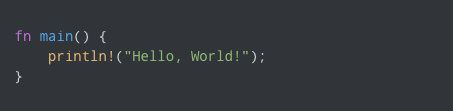
Rust’s print macro displaying the output “Hello, World!”

Originally intended to serve as a safer alternative to C and C++, Rust is a systems programming language that has gained significant popularity among developers thanks to its emphasis on safety, performance, and productivity. Rust is a statically typed language, so variable and expression types are determined and checked at compile time, which helps enhance memory safety and error detection, resulting in more reliable builds.

In 2006, the software developer, Graydon Hoare, started Rust as a personal project while he was working at Mozilla. According to an interview with MIT Technology Review, the inspiration for Rust came from a broken elevator in Hoare’s apartment building. The software for the lift operation system had crashed and Hoare understood that issues like this usually came from problems with how a program uses memory.

Quite often, the software for these types of devices is written in C or C++, but these languages require significant memory management, which can lead to errors that would cause the system to crash. So, Hoare set to work on figuring out how to create a programming language that could be both compact and memory bug-free.

He later showed the project to a manager—which led to Mozilla sponsoring it in 2009 as part of a longer-term effort to incorporate the language into the development of an experimental browser engine. In 2010, Mozilla Research officially announced the Rust project and released the source code to the public as an open-source project. After several years of development, Rust reached a stable and mature state—and in May 2015, Rust 1.0 was released. This milestone signaled that Rust was ready for production and provided a foundation for developers to build upon.

Since the 1.0 release, Rust has exploded in popularity and adoption, with top applications, such as Microsoft Windows, utilizing Rust to rewrite core libraries with its memory-safe code. Outside of the tech giants, Rust also has a vibrant community of developers, or “Rustaceans,” that are dedicated to making the Rust experience an active and collaborative one.

Ferris, an orange cartoon crustacean who is the unofficial mascot of Rust.

Meet Ferris, the unofficial mascot for Rust!

According to a recent survey by SlashData, there are roughly 2.8 million Rust developers worldwide in 2023, a number that has nearly tripled over the past two years. With plenty of active forums, documentation, and a supportive community for developers of all skill levels, it’s perhaps unsurprising that Rust keeps topping the most-desired language lists.

What makes Rust special?

So, what are some of Rust’s key features that make it so attractive to developers?

In simple terms, Rust solves some of developers’ most frustrating memory management problems commonly associated with C and C++, but that’s not its only shining capability. One of GitHub’s staff software engineers, Jason Orendorff, who co-authored a book on programming with Rust, said about the language:

“To me, what’s great about Rust is that it’s both fast AND reliable,” according to Orendorff. “It lets me write multi-headed programs that run on 16 cores and keep them readable, maintainable, and crash-free. It also lets me write very low-level algorithms requiring control over memory layout and pull in a crate that makes HTTPS requests super simple. It’s the combination of these features that makes Rust so unique.”

Building on that, here’s a few more of its well-loved characteristics and features:

  • Concurrency. Rust has built-in support for concurrent programming through its ownership system which enforces strict rules for data access, and its borrowing model, which prevents data races by allowing controlled, simultaneous access. This ensures that multiple threads can work on shared data without introducing memory-related issues.
  • No garbage collection. Unlike some programming languages, Rust does not employ garbage collection. Instead, its ownership and borrowing rules manage memory, which helps empower developers to have precise control over memory allocation and deallocation for efficient resource management.

  • Cargo Package Manager. Rust’s built-in package manager, Cargo, streamlines project management, dependency tracking, and building, which helps contribute to efficient and organized development workflows. But this doesn’t make it clear just how bonkers the Cargo ecosystem is. According to Orendorff, “My team takes advantage of high-quality open source packages for hashing, serialization, multithreading, data structures, compression, and a lot more. These are performance-critical libraries. Without some of these, our project to rethink code search on GitHub wouldn’t have been possible.” And here’s a fun fact: Rust was actually the first systems programming language to have a standard package manager, and, as a result, the Rust ecosystem is incredibly robust.

  • Zero-cost abstractions. This feature allows developers to write high-level code abstractions and features without introducing any runtime performance overhead.

  • Pattern matching. This powerful language feature enables developers to concisely and effectively match complex data structures against specific patterns to extract and handle different cases or scenarios in a clean and readable manner.

  • Type inference. This feature allows Rust’s compiler to automatically detect an expression based on context while you code. “Many programming languages have some type inference,” Orendorff said. “C# and C++ have some, Rust has a little more, and languages like Haskell, Scala, and ML have even more.”

fn main() {
    break rust;
}

Run this code for an inside joke among Rust developers 😆

What is Rust commonly used for?

Thanks to its direct access to both hardware and memory, Rust is well suited for embedded systems and bare-metal development. And since it’s a general purpose language, it can also be used for a variety of applications.

Let’s explore a few key use cases:

Using Rust to build performance-critical backend systems

Performance-critical backend systems are software components or services that handle tasks that require high-speed processing, low-latency responses, and efficient resource utilization—and Rust’s performance, thread safety, and error handling make it an excellent choice for developing these types of systems. In fact, we use Rust to build some of these systems at GitHub. For example, the backend of our code search feature is written in Rust (and you can read more about the development of GitHub’s newest code search with Rust, too).

Using Rust to develop operating systems

Rust was originally created to solve an operating system issue (remember the elevator problem?)—so, unsurprisingly, it’s often used to build operating systems, kernels, device drivers, or other low-level components where control over memory and performance is crucial. Redox, a Unix-like operating system, was written in Rust, which contributes to its most crucial feature: its security. “Fuchsia is another example that was built at Google,” Orendorff said. “If you have a Google Nest smart speaker, it’s likely running Fuchsia.”

Rust for operating system-adjacent code

Rust is also well-suited for writing code that performs tasks that closely interact with the operating system. For example, the Codespaces team at GitHub is leveraging Rust to enhance the speed of starting up the virtual disk within GitHub Codespaces and optimize the utilization of Azure storage. Coursera also employs Rust in its online grading system, as it operates within Docker and needs a language that compiles to machine code with minimal dependencies.

Using Rust for web development

Rust is increasingly being used for web development—especially on the server side. The async programming model and performance characteristics of Rust make it fitting for building high-performance web servers, APIs, and backend services. Plus, there’s been an influx of web frameworks for Rust, like Rocket, that can help folks get started with writing secure web applications. The emergence of these frameworks underscores Rust’s position as a mature language, and also helps increase the support for folks looking to use Rust in front or backend work.

Using Rust for crypto and blockchain development

Rust’s speed, memory management, and security all contribute to its involvement with cryptocurrency and blockchain technologies. For example, Polkadot, which is designed to enable the interoperability and interaction between multiple blockchains to share information and assets in a secure and decentralized manner, utilizes Rust to build its core infrastructure. Polkadot’s runtime logic, which governs the behavior and rules of the blockchain, is also written in Rust. Check out this repository, awesome-blockchain-rust, for some useful components for building your own blockchain applications with Rust.

Using Rust to build CLI tools

Rust’s compilation to efficient machine code and its expressive syntax make it a strong choice for building command line tools and applications. Plus, writing a command line app is a great way to learn and get comfortable with Rust. Take a look at this comprehensive guide on how to build your own CLI application with Rust in 15 minutes!

Learn how open source developers are making the command line more friendly—and more powerful.

Using Rust for embedded systems and IoT development

Rust’s minimal runtime and control over memory layout makes it incredibly useful for developing embedded systems and Internet of Things (IoT) devices. Its ability to prevent memory-related bugs, manage concurrency, and generate small, efficient binaries caters to IoT’s security, real-time, and efficiency needs.

Why developers love Rust

While its user base for Rust isn’t nearly as large as Java or Python, Rust continues to compete with the big hitters in most-admired lists across the internet. There’s even a full website composed of developer’s praises for Rust.

But why exactly is Rust so admired by developers? If you boil it down to just a handful of reasons why developers love Rust so much, they’d have to be the language’s speed, safety, and performance.

Moreover, Rust is continuing to evolve and grow with new frameworks, tools, and resources. You can keep tabs on contributions to the language in the awesome-rust repository, which hosts an impressive list of Rust code and resources.

The bottom line: Admiring Rust isn’t just about adopting a language—it’s embracing a mindset that prioritizes innovation without compromising on the core tenets of stability and security.

How to get started with Rust

We know, there’s plenty of resources to sharpen your Rust skills peppered throughout this article—but we have another pro tip for you: take Rust for a test drive with GitHub Copilot. As your AI-powered pair programmer, GitHub Copilot can help you learn and refine the basics of Rust as you go with tailored code suggestions.

Here’s a developer advocate at GitHub experimenting with Rust for the first time with GitHub Copilot. And to all of our seasoned Rustaceans out there, what do you think? Was the suggestion correct?

If you’re ready to begin your coding journey with Rust, GitHub Copilot can jumpstart your progress—all without the need to study documentation for hours at a time.

The post Why Rust is the most admired language among developers appeared first on The GitHub Blog.

When Apps Go Rogue

Post Syndicated from Bruce Schneier original https://www.schneier.com/blog/archives/2023/08/when-apps-go-rogue.html

Interesting story of an Apple Macintosh app that went rogue. Basically, it was a good app until one particular update…when it went bad.

With more official macOS features added in 2021 that enabled the “Night Shift” dark mode, the NightOwl app was left forlorn and forgotten on many older Macs. Few of those supposed tens of thousands of users likely noticed when the app they ran in the background of their older Macs was bought by another company, nor when earlier this year that company silently updated the dark mode app so that it hijacked their machines in order to send their IP data through a server network of affected computers, AKA a botnet.

This is not an unusual story. Sometimes the apps are sold. Sometimes they’re orphaned, and then taken over by someone else.

Let’s Architect! Cost-optimizing AWS workloads

Post Syndicated from Luca Mezzalira original https://aws.amazon.com/blogs/architecture/lets-architect-cost-optimizing-aws-workloads/

Every software component built by engineers and architects is designed with a purpose: to offer particular functionalities and, ultimately, contribute to the generation of business value. We should consider fundamental factors, such as the scalability of the software and the ease of evolution during times of business changes. However, performance and cost are important factors as well since they can impact the business profitability.

This edition of Let’s Architect! follows a similar series post from 2022, which discusses optimizing the cost of an architecture. Today, we focus on architectural patterns, services, and best practices to design cost-optimized cloud workloads. We also want to identify solutions, such as the use of Graviton processors, for increased performance at lower price. Cost optimization is a continuous process that requires the identification of the right tools for each job, as well as the adoption of efficient designs for your system.

AWS re:Invent 2022 – Manage and control your AWS costs

Govern cloud usage and avoid cost surprises without slowing down innovation within your organization. In this re:Invent 2022 session, you can learn how to set up guardrails and operationalize cost control within your organizations using services, such as AWS Budgets and AWS Cost Anomaly Detection, and explore the latest enhancements in the AWS cost control space. Additionally, Mercado Libre shares how they automate their cloud cost control through central management and automated algorithms.

Take me to this re:Invent 2022 video!

Work backwards from team needs to define/deploy cloud governance in AWS environments

Work backwards from team needs to define/deploy cloud governance in AWS environments

Compute optimization

When it comes to optimizing compute workloads, there are many tools available, such as AWS Compute Optimizer, Amazon EC2 Spot Instances, Amazon EC2 Reserved Instances, and Graviton instances. Modernizing your applications can also lead to cost savings, but you need to know how to use the right tools and techniques in an effective and efficient way.

For AWS Lambda functions, you can use the AWS Lambda Cost Optimization video to learn how to optimize your costs. The video covers topics, such as understanding and graphing performance versus cost, code optimization techniques, and avoiding idle wait time. If you are using Amazon Elastic Container Service (Amazon ECS) and AWS Fargate, you can watch a Twitch video on cost optimization using Amazon ECS and AWS Fargate to learn how to adjust your costs. The video covers topics like using spot instances, choosing the right instance type, and using Fargate Spot.

Finally, with Amazon Elastic Kubernetes Service (Amazon EKS), you can use Karpenter, an open-source Kubernetes cluster auto scaler to help optimize compute workloads. Karpenter can help you launch right-sized compute resources in response to changing application load, help you adopt spot and Graviton instances. To learn more about Karpenter, read the post How CoStar uses Karpenter to optimize their Amazon EKS Resources on the AWS Containers Blog.

Take me to Cost Optimization using Amazon ECS and AWS Fargate!
Take me to AWS Lambda Cost Optimization!
Take me to How CoStar uses Karpenter to optimize their Amazon EKS Resources!

Karpenter launches and terminates nodes to reduce infrastructure costs

Karpenter launches and terminates nodes to reduce infrastructure costs

AWS Lambda general guidance for cost optimization

AWS Lambda general guidance for cost optimization

AWS Graviton deep dive: The best price performance for AWS workloads

The choice of the hardware is a fundamental driver for performance, cost, as well as resource consumption of the systems we build. Graviton is a family of processors designed by AWS to support cloud-based workloads and give improvements in terms of performance and cost. This re:Invent 2022 presentation introduces Graviton and addresses the problems it can solve, how the underlying CPU architecture is designed, and how to get started with it. Furthermore, you can learn the journey to move different types of workloads to this architecture, such as containers, Java applications, and C applications.

Take me to this re:Invent 2022 video!

AWS Graviton processors are specifically designed by AWS for cloud workloads to deliver the best price performance

AWS Graviton processors are specifically designed by AWS for cloud workloads to deliver the best price performance

AWS Well-Architected Labs: Cost Optimization

The Cost Optimization section of the AWS Well Architected Workshop helps you learn how to optimize your AWS costs by using features, such as AWS Compute Optimizer, Spot Instances, and Reserved Instances. The workshop includes hands-on labs that walk you through the process of optimizing costs for different types of workloads and services, such as Amazon Elastic Compute Cloud, Amazon ECS, and Lambda.

Take me to this AWS Well-Architected lab!

Savings Plans is a flexible pricing model that can help reduce expenses compared with on-demand pricing

Savings Plans is a flexible pricing model that can help reduce expenses compared with on-demand pricing

See you next time!

Thanks for joining us to discuss cost optimization! In 2 weeks, we’ll talk about in-memory databases and caching systems.

To find all the blogs from this series, visit the Let’s Architect! list of content on the AWS Architecture Blog.

Security updates for Wednesday

Post Syndicated from corbet original https://lwn.net/Articles/943087/

Security updates have been issued by Debian (qpdf, ring, and tryton-server), Fedora (mingw-qt5-qtbase and moby-engine), Red Hat (cups, kernel, kernel-rt, kpatch-patch, librsvg2, and virt:rhel and virt-devel:rhel), and Ubuntu (amd64-microcode, firefox, linux, linux-aws, linux-aws-5.15, linux-gcp, linux-gke, linux-gkeop,
linux-hwe-5.15, linux-ibm, linux-kvm, linux-lowlatency,
linux-lowlatency-hwe-5.15, linux-nvidia, linux-oracle, linux-oracle-5.15, linux, linux-aws, linux-aws-5.4, linux-gcp, linux-hwe-5.4, linux-kvm,
linux-oracle, linux-xilinx-zynqmp, linux, linux-aws, linux-aws-6.2, linux-azure, linux-hwe-6.2, linux-ibm,
linux-kvm, linux-lowlatency, linux-lowlatency-hwe-6.2, linux-raspi, linux-bluefield, linux-ibm, linux-oem-6.1, and openjdk-lts, openjdk-17).

Validate IAM policies by using IAM Policy Validator for AWS CloudFormation and GitHub Actions

Post Syndicated from Mitch Beaumont original https://aws.amazon.com/blogs/security/validate-iam-policies-by-using-iam-policy-validator-for-aws-cloudformation-and-github-actions/

In this blog post, I’ll show you how to automate the validation of AWS Identity and Access Management (IAM) policies by using a combination of the IAM Policy Validator for AWS CloudFormation (cfn-policy-validator) and GitHub Actions. Policy validation is an approach that is designed to minimize the deployment of unwanted IAM identity-based and resource-based policies to your Amazon Web Services (AWS) environments.

With GitHub Actions, you can automate, customize, and run software development workflows directly within a repository. Workflows are defined using YAML and are stored alongside your code. I’ll discuss the specifics of how you can set up and use GitHub actions within a repository in the sections that follow.

The cfn-policy-validator tool is a command-line tool that takes an AWS CloudFormation template, finds and parses the IAM policies that are attached to IAM roles, users, groups, and resources, and then runs the policies through IAM Access Analyzer policy checks. Implementing IAM policy validation checks at the time of code check-in helps shift security to the left (closer to the developer) and shortens the time between when developers commit code and when they get feedback on their work.

Let’s walk through an example that checks the policies that are attached to an IAM role in a CloudFormation template. In this example, the cfn-policy-validator tool will find that the trust policy attached to the IAM role allows the role to be assumed by external principals. This configuration could lead to unintended access to your resources and data, which is a security risk.

Prerequisites

To complete this example, you will need the following:

  1. A GitHub account
  2. An AWS account, and an identity within that account that has permissions to create the IAM roles and resources used in this example

Step 1: Create a repository that will host the CloudFormation template to be validated

To begin with, you need to create a GitHub repository to host the CloudFormation template that is going to be validated by the cfn-policy-validator tool.

To create a repository:

  1. Open a browser and go to https://github.com.
  2. In the upper-right corner of the page, in the drop-down menu, choose New repository. For Repository name, enter a short, memorable name for your repository.
  3. (Optional) Add a description of your repository.
  4. Choose either the option Public (the repository is accessible to everyone on the internet) or Private (the repository is accessible only to people access is explicitly shared with).
  5. Choose Initialize this repository with: Add a README file.
  6. Choose Create repository. Make a note of the repository’s name.

Step 2: Clone the repository locally

Now that the repository has been created, clone it locally and add a CloudFormation template.

To clone the repository locally and add a CloudFormation template:

  1. Open the command-line tool of your choice.
  2. Use the following command to clone the new repository locally. Make sure to replace <GitHubOrg> and <RepositoryName> with your own values.
    git clone [email protected]:<GitHubOrg>/<RepositoryName>.git

  3. Change in to the directory that contains the locally-cloned repository.
    cd <RepositoryName>

    Now that the repository is locally cloned, populate the locally-cloned repository with the following sample CloudFormation template. This template creates a single IAM role that allows a principal to assume the role to perform the S3:GetObject action.

  4. Use the following command to create the sample CloudFormation template file.

    WARNING: This sample role and policy should not be used in production. Using a wildcard in the principal element of a role’s trust policy would allow any IAM principal in any account to assume the role.

    cat << EOF > sample-role.yaml
    
    AWSTemplateFormatVersion: "2010-09-09"
    Description: Base stack to create a simple role
    Resources:
      SampleIamRole:
        Type: AWS::IAM::Role
        Properties:
          AssumeRolePolicyDocument:
            Statement:
              - Effect: Allow
                Principal:
                  AWS: "*"
                Action: ["sts:AssumeRole"]
          Path: /      
          Policies:
            - PolicyName: root
              PolicyDocument:
                Version: 2012-10-17
                Statement:
                  - Resource: "*"
                    Effect: Allow
                    Action:
                      - s3:GetObject
    EOF

Notice that AssumeRolePolicyDocument refers to a trust policy that includes a wildcard value in the principal element. This means that the role could potentially be assumed by an external identity, and that’s a risk you want to know about.

Step 3: Vend temporary AWS credentials for GitHub Actions workflows

In order for the cfn-policy-validator tool that’s running in the GitHub Actions workflow to use the IAM Access Analyzer API, the GitHub Actions workflow needs a set of temporary AWS credentials. The AWS Credentials for GitHub Actions action helps address this requirement. This action implements the AWS SDK credential resolution chain and exports environment variables for other actions to use in a workflow. Environment variable exports are detected by the cfn-policy-validator tool.

AWS Credentials for GitHub Actions supports four methods for fetching credentials from AWS, but the recommended approach is to use GitHub’s OpenID Connect (OIDC) provider in conjunction with a configured IAM identity provider endpoint.

To configure an IAM identity provider endpoint for use in conjunction with GitHub’s OIDC provider:

  1. Open the AWS Management Console and navigate to IAM.
  2. In the left-hand menu, choose Identity providers, and then choose Add provider.
  3. For Provider type, choose OpenID Connect.
  4. For Provider URL, enter
    https://token.actions.githubusercontent.com
  5. Choose Get thumbprint.
  6. For Audiences, enter sts.amazonaws.com
  7. Choose Add provider to complete the setup.

At this point, make a note of the OIDC provider name. You’ll need this information in the next step.

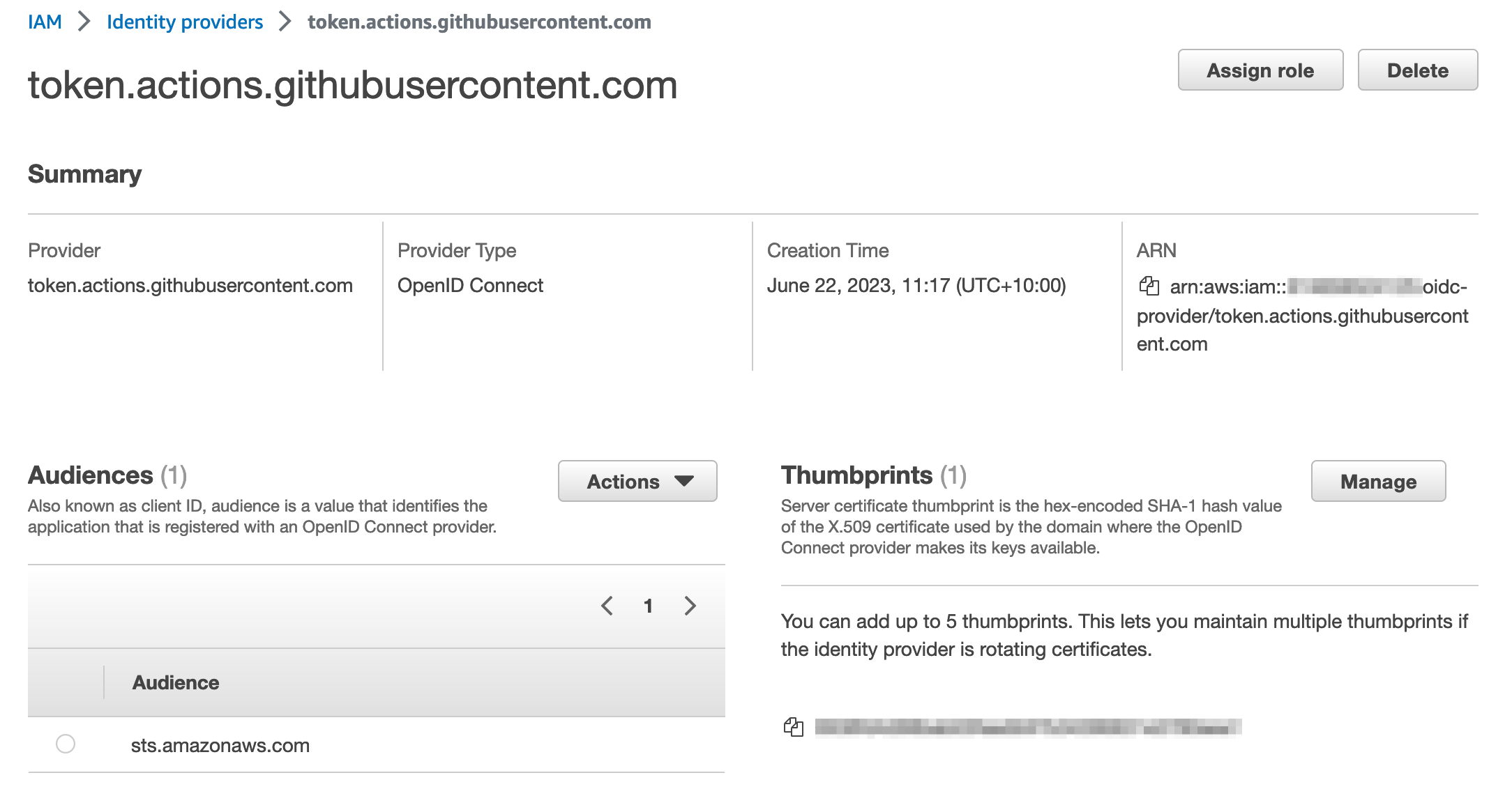
After it’s configured, the IAM identity provider endpoint should look similar to the following:

Figure 1: IAM Identity provider details

Figure 1: IAM Identity provider details

Step 4: Create an IAM role with permissions to call the IAM Access Analyzer API

In this step, you will create an IAM role that can be assumed by the GitHub Actions workflow and that provides the necessary permissions to run the cfn-policy-validator tool.

To create the IAM role:

  1. In the IAM console, in the left-hand menu, choose Roles, and then choose Create role.
  2. For Trust entity type, choose Web identity.
  3. In the Provider list, choose the new GitHub OIDC provider that you created in the earlier step. For Audience, select sts.amazonaws.com from the list.
  4. Choose Next.
  5. On the Add permission page, choose Create policy.
  6. Choose JSON, and enter the following policy:
    
        "Version": "2012-10-17",
        "Statement": [
            {
                "Effect": "Allow",
                "Action": [
                  "iam:GetPolicy",
                  "iam:GetPolicyVersion",
                  "access-analyzer:ListAnalyzers",
                  "access-analyzer:ValidatePolicy",
                  "access-analyzer:CreateAccessPreview",
                  "access-analyzer:GetAccessPreview",
                  "access-analyzer:ListAccessPreviewFindings",
                  "access-analyzer:CreateAnalyzer",
                  "s3:ListAllMyBuckets",
                  "cloudformation:ListExports",
                  "ssm:GetParameter"
                ],
                "Resource": "*"
            },
            {
              "Effect": "Allow",
              "Action": "iam:CreateServiceLinkedRole",
              "Resource": "*",
              "Condition": {
                "StringEquals": {
                  "iam:AWSServiceName": "access-analyzer.amazonaws.com"
                }
              }
            } 
        ]
    }

  7. After you’ve attached the new policy, choose Next.

    Note: For a full explanation of each of these actions and a CloudFormation template example that you can use to create this role, see the IAM Policy Validator for AWS CloudFormation GitHub project.

  8. Give the role a name, and scroll down to look at Step 1: Select trusted entities.

    The default policy you just created allows GitHub Actions from organizations or repositories outside of your control to assume the role. To align with the IAM best practice of granting least privilege, let’s scope it down further to only allow a specific GitHub organization and the repository that you created earlier to assume it.

  9. Replace the policy to look like the following, but don’t forget to replace {AWSAccountID}, {GitHubOrg} and {RepositoryName} with your own values.
    {
        "Version": "2012-10-17",
        "Statement": [
            {
                "Effect": "Allow",
                "Principal": {
                    "Federated": "arn:aws:iam::{AWSAccountID}:oidc-provider/token.actions.githubusercontent.com"
                },
                "Action": "sts:AssumeRoleWithWebIdentity",
                "Condition": {
                    "StringEquals": {
                        "token.actions.githubusercontent.com:aud": "sts.amazonaws.com"
                    },
                    "StringLike": {
                        "token.actions.githubusercontent.com:sub": "repo:${GitHubOrg}/${RepositoryName}:*"
                    }
                }
            }
        ]
    }

For information on best practices for configuring a role for the GitHub OIDC provider, see Creating a role for web identity or OpenID Connect Federation (console).

Checkpoint

At this point, you’ve created and configured the following resources:

  • A GitHub repository that has been locally cloned and filled with a sample CloudFormation template.
  • An IAM identity provider endpoint for use in conjunction with GitHub’s OIDC provider.
  • A role that can be assumed by GitHub actions, and a set of associated permissions that allow the role to make requests to IAM Access Analyzer to validate policies.

Step 5: Create a definition for the GitHub Actions workflow

The workflow runs steps on hosted runners. For this example, we are going to use Ubuntu as the operating system for the hosted runners. The workflow runs the following steps on the runner:

  1. The workflow checks out the CloudFormation template by using the community actions/checkout action.
  2. The workflow then uses the aws-actions/configure-aws-credentials GitHub action to request a set of credentials through the IAM identity provider endpoint and the IAM role that you created earlier.
  3. The workflow installs the cfn-policy-validator tool by using the python package manager, PIP.
  4. The workflow runs a validation against the CloudFormation template by using the cfn-policy-validator tool.

The workflow is defined in a YAML document. In order for GitHub Actions to pick up the workflow, you need to place the definition file in a specific location within the repository: .github/workflows/main.yml. Note the “.” prefix in the directory name, indicating that this is a hidden directory.

To create the workflow:

  1. Use the following command to create the folder structure within the locally cloned repository:
    mkdir -p .github/workflows

  2. Create the sample workflow definition file in the .github/workflows directory. Make sure to replace <AWSAccountID> and <AWSRegion> with your own information.
    cat << EOF > .github/workflows/main.yml
    name: cfn-policy-validator-workflow
    
    on: push
    
    permissions:
      id-token: write
      contents: read
    
    jobs: 
      cfn-iam-policy-validation: 
        name: iam-policy-validation
        runs-on: ubuntu-latest
        steps:
          - name: Checkout code
            uses: actions/checkout@v3
    
          - name: Configure AWS Credentials
            uses: aws-actions/configure-aws-credentials@v2
            with:
              role-to-assume: arn:aws:iam::<AWSAccountID>:role/github-actions-access-analyzer-role
              aws-region: <AWSRegion>
              role-session-name: GitHubSessionName
            
          - name: Install cfn-policy-validator
            run: pip install cfn-policy-validator
    
          - name: Validate templates
            run: cfn-policy-validator validate --template-path ./sample-role-test.yaml --region <AWSRegion>
    EOF
    

Step 6: Test the setup

Now that everything has been set up and configured, it’s time to test.

To test the workflow and validate the IAM policy:

  1. Add and commit the changes to the local repository.
    git add .
    git commit -m ‘added sample cloudformation template and workflow definition’

  2. Push the local changes to the remote GitHub repository.
    git push

    After the changes are pushed to the remote repository, go back to https://github.com and open the repository that you created earlier. In the top-right corner of the repository window, there is a small orange indicator, as shown in Figure 2. This shows that your GitHub Actions workflow is running.

    Figure 2: GitHub repository window with the orange workflow indicator

    Figure 2: GitHub repository window with the orange workflow indicator

    Because the sample CloudFormation template used a wildcard value “*” in the principal element of the policy as described in the section Step 2: Clone the repository locally, the orange indicator turns to a red x (shown in Figure 3), which signals that something failed in the workflow.

    Figure 3: GitHub repository window with the red cross workflow indicator

    Figure 3: GitHub repository window with the red cross workflow indicator

  3. Choose the red x to see more information about the workflow’s status, as shown in Figure 4.
    Figure 4: Pop-up displayed after choosing the workflow indicator

    Figure 4: Pop-up displayed after choosing the workflow indicator

  4. Choose Details to review the workflow logs.

    In this example, the Validate templates step in the workflow has failed. A closer inspection shows that there is a blocking finding with the CloudFormation template. As shown in Figure 5, the finding is labelled as EXTERNAL_PRINCIPAL and has a description of Trust policy allows access from external principals.

    Figure 5: Details logs from the workflow showing the blocking finding

    Figure 5: Details logs from the workflow showing the blocking finding

    To remediate this blocking finding, you need to update the principal element of the trust policy to include a principal from your AWS account (considered a zone of trust). The resources and principals within your account comprises of the zone of trust for the cfn-policy-validator tool. In the initial version of sample-role.yaml, the IAM roles trust policy used a wildcard in the Principal element. This allowed principals outside of your control to assume the associated role, which caused the cfn-policy-validator tool to generate a blocking finding.

    In this case, the intent is that principals within the current AWS account (zone of trust) should be able to assume this role. To achieve this result, replace the wildcard value with the account principal by following the remaining steps.

  5. Open sample-role.yaml by using your preferred text editor, such as nano.
    nano sample-role.yaml

    Replace the wildcard value in the principal element with the account principal arn:aws:iam::<AccountID>:root. Make sure to replace <AWSAccountID> with your own AWS account ID.

    AWSTemplateFormatVersion: "2010-09-09"
    Description: Base stack to create a simple role
    Resources:
      SampleIamRole:
        Type: AWS::IAM::Role
        Properties:
          AssumeRolePolicyDocument:
            Statement:
              - Effect: Allow
                Principal:
                  AWS: "arn:aws:iam::<AccountID>:root"
                Action: ["sts:AssumeRole"]
          Path: /      
          Policies:
            - PolicyName: root
              PolicyDocument:
                Version: 2012-10-17
                Statement:
                  - Resource: "*"
                    Effect: Allow
                    Action:
                      - s3:GetObject

  6. Add the updated file, commit the changes, and push the updates to the remote GitHub repository.
    git add sample-role.yaml
    git commit -m ‘replacing wildcard principal with account principal’
    git push

After the changes have been pushed to the remote repository, go back to https://github.com and open the repository. The orange indicator in the top right of the window should change to a green tick (check mark), as shown in Figure 6.

Figure 6: GitHub repository window with the green tick workflow indicator

Figure 6: GitHub repository window with the green tick workflow indicator

This indicates that no blocking findings were identified, as shown in Figure 7.

Figure 7: Detailed logs from the workflow showing no more blocking findings

Figure 7: Detailed logs from the workflow showing no more blocking findings

Conclusion

In this post, I showed you how to automate IAM policy validation by using GitHub Actions and the IAM Policy Validator for CloudFormation. Although the example was a simple one, it demonstrates the benefits of automating security testing at the start of the development lifecycle. This is often referred to as shifting security left. Identifying misconfigurations early and automatically supports an iterative, fail-fast model of continuous development and testing. Ultimately, this enables teams to make security an inherent part of a system’s design and architecture and can speed up product development workflows.

In addition to the example I covered today, IAM Policy Validator for CloudFormation can validate IAM policies by using a range of IAM Access Analyzer policy checks. For more information about these policy checks, see Access Analyzer reference policy checks.

 
If you have feedback about this post, submit comments in the Comments section below. If you have questions about this post, contact AWS Support.

Want more AWS Security news? Follow us on Twitter.

Mitch Beaumont

Mitch Beaumont

Mitch is a Principal Solutions Architect for Amazon Web Services, based in Sydney, Australia. Mitch works with some of Australia’s largest financial services customers, helping them to continually raise the security bar for the products and features that they build and ship. Outside of work, Mitch enjoys spending time with his family, photography, and surfing.

Building hyperlocal GrabMaps

Post Syndicated from Grab Tech original https://engineering.grab.com/building-hyperlocal-grabmaps

Introduction

Southeast Asia (SEA) is a dynamic market, very different from other parts of the world. When travelling on the road, you may experience fast-changing road restrictions, new roads appearing overnight, and high traffic congestion. To address these challenges, GrabMaps has adapted to the SEA market by leveraging big data solutions. One of the solutions is the integration of hyperlocal data in GrabMaps.

Hyperlocal information is oriented around very small geographical communities and obtained from the local knowledge that our map team gathers. The map team is spread across SEA, enabling us to define clear specifications (e.g. legal speed limits), and validate that our solutions are viable.

Figure 1 – Map showing detections from images and probe data, and hyperlocal data.

Hyperlocal inputs make our mapping data even more robust, adding to the details collected from our image and probe detection pipelines. Figure 1 shows how data from our detection pipeline is overlaid with hyperlocal data, and then mapped across the SEA region. If you are curious and would like to check out the data yourself, you can download it here.

Processing hyperlocal data

Now let’s go through the process of detecting hyperlocal data.

Download data

GrabMaps is based on OpenStreetMap (OSM). The first step in the process is to download the .pbf file for Asia from geofabrick.de. This .pbf file contains all the data that is available on OSM, such as details of places, trees, and roads. Take for example a park, the .pbf file would contain data on the park name, wheelchair accessibility, and many more.

For this article, we will focus on hyperlocal data related to the road network. For each road, you can obtain data such as the type of road (residential or motorway), direction of traffic (one-way or more), and road name.

Convert data

To take advantage of big data computing, the next step in the process is to convert the .pbf file into Parquet format using a Parquetizer. This will convert the binary data in the .pbf file into a table format. Each road in SEA is now displayed as a row in a table as shown in Figure 2.

Figure 2 – Road data in Parquet format.

Identify hyperlocal data

After the data is prepared, GrabMaps then identifies and inputs all of our hyperlocal data, and delivers a consolidated view to our downstream services. Our hyperlocal data is obtained from various sources, either by looking at geometry, or other attributes in OSM such as the direction of travel and speed limit. We also apply customised rules defined by our local map team, all in a fully automated manner. This enhances the map together with data obtained from our rides and deliveries GPS pings and from KartaView, Grab’s product for imagery collection.

Figure 3 – Architecture diagram showing how hyperlocal data is integrated into GrabMaps.

Benefit of our hyperlocal GrabMaps

GrabNav, a turn-by-turn navigation tool available on the Grab driver app, is one of our products that benefits from having hyperlocal data. Here are some hyperlocal data that are made available through our approach:

  • Localisation of roads: The country, state/county, or city the road is in
  • Language spoken, driving side, and speed limit
  • Region-specific default speed regulations
  • Consistent name usage using language inference
  • Complex attributes like intersection links

To further explain the benefits of this hyperlocal feature, we will use intersection links as an example. In the next section, we will explain how intersection links data is used and how it impacts our driver-partners and passengers.

An intersection link is when two or more roads meet. Figure 4 and 5 illustrates what an intersection link looks like in a GrabMaps mock and in OSM.

Figure 4 – Mock of an intersection link.
Figure 5 – Intersection link illustration from a real road network in OSM.

To locate intersection links in a road network, there are computations involved. We would first combine big data processing (which we do using Spark) with graphs. We use geohash as the unit of processing, and for each geohash, a bi-directional graph is created.

From such resulting graphs, we can determine intersection links if:

  • Road segments are parallel
  • The roads have the same name
  • The roads are one way roads
  • Angles and the shape of the road are in the intervals or requirements we seek

Each intersection link we identify is tagged in the map as intersection_links. Our downstream service teams can then identify them by searching for the tag.

Impact

The impact we create with our intersection link can be explained through the following example.

Figure 6 – Longer route, without GrabMaps intersection link feature. The arrow indicates where the route should have suggested a U-turn.
Figure 7 – Shorter route using GrabMaps by taking a closer link between two main roads.

Figure 6 and Figure 7 show two different routes for the same origin and destination. However, you can see that Figure 7 has a shorter route and this is made available by taking an intersection link early on in the route. The highlighted road segment in Figure 7 is an intersection link, tagged by the process we described earlier. The route is now much shorter making GrabNav more efficient in its route suggestion.

There are numerous factors that can impact a driver-partner’s trip, and intersection links are just one example. There are many more features that GrabMaps offers across Grab’s services that allow us to “outserve” our partners.

Conclusion

GrabMaps and GrabNav deliver enriched experiences to our driver-partners. By integrating certain hyperlocal data features, we are also able to provide more accurate pricing for both our driver-partners and passengers. In our mission towards sustainable growth, this is an area that we will keep on improving by leveraging scalable tech solutions.

Join us

Grab is the leading superapp platform in Southeast Asia, providing everyday services that matter to consumers. More than just a ride-hailing and food delivery app, Grab offers a wide range of on-demand services in the region, including mobility, food, package and grocery delivery services, mobile payments, and financial services across 428 cities in eight countries.

Powered by technology and driven by heart, our mission is to drive Southeast Asia forward by creating economic empowerment for everyone. If this mission speaks to you, join our team today!

Zero Configuration Service Mesh with On-Demand Cluster Discovery

Post Syndicated from Netflix Technology Blog original https://netflixtechblog.com/zero-configuration-service-mesh-with-on-demand-cluster-discovery-ac6483b52a51

by David Vroom, James Mulcahy, Ling Yuan, Rob Gulewich

In this post we discuss Netflix’s adoption of service mesh: some history, motivations, and how we worked with Kinvolk and the Envoy community on a feature that streamlines service mesh adoption in complex microservice environments: on-demand cluster discovery.

A brief history of IPC at Netflix

Netflix was early to the cloud, particularly for large-scale companies: we began the migration in 2008, and by 2010, Netflix streaming was fully run on AWS. Today we have a wealth of tools, both OSS and commercial, all designed for cloud-native environments. In 2010, however, nearly none of it existed: the CNCF wasn’t formed until 2015! Since there were no existing solutions available, we needed to build them ourselves.

For Inter-Process Communication (IPC) between services, we needed the rich feature set that a mid-tier load balancer typically provides. We also needed a solution that addressed the reality of working in the cloud: a highly dynamic environment where nodes are coming up and down, and services need to quickly react to changes and route around failures. To improve availability, we designed systems where components could fail separately and avoid single points of failure. These design principles led us to client-side load-balancing, and the 2012 Christmas Eve outage solidified this decision even further. During these early years in the cloud, we built Eureka for Service Discovery and Ribbon (internally known as NIWS) for IPC. Eureka solved the problem of how services discover what instances to talk to, and Ribbon provided the client-side logic for load-balancing, as well as many other resiliency features. These two technologies, alongside a host of other resiliency and chaos tools, made a massive difference: our reliability improved measurably as a result.

Eureka and Ribbon presented a simple but powerful interface, which made adopting them easy. In order for a service to talk to another, it needs to know two things: the name of the destination service, and whether or not the traffic should be secure. The abstractions that Eureka provides for this are Virtual IPs (VIPs) for insecure communication, and Secure VIPs (SVIPs) for secure. A service advertises a VIP name and port to Eureka (eg: myservice, port 8080), or an SVIP name and port (eg: myservice-secure, port 8443), or both. IPC clients are instantiated targeting that VIP or SVIP, and the Eureka client code handles the translation of that VIP to a set of IP and port pairs by fetching them from the Eureka server. The client can also optionally enable IPC features like retries or circuit breaking, or stick with a set of reasonable defaults.

A diagram showing an IPC client in a Java app directly communicating to hosts registered as SVIP A. Host and port information for SVIP A is fetched from Eureka by the IPC client.

In this architecture, service to service communication no longer goes through the single point of failure of a load balancer. The downside is that Eureka is a new single point of failure as the source of truth for what hosts are registered for VIPs. However, if Eureka goes down, services can continue to communicate with each other, though their host information will become stale over time as instances for a VIP come up and down. The ability to run in a degraded but available state during an outage is still a marked improvement over completely stopping traffic flow.

Why mesh?

The above architecture has served us well over the last decade, though changing business needs and evolving industry standards have added more complexity to our IPC ecosystem in a number of ways. First, we’ve grown the number of different IPC clients. Our internal IPC traffic is now a mix of plain REST, GraphQL, and gRPC. Second, we’ve moved from a Java-only environment to a Polyglot one: we now also support node.js, Python, and a variety of OSS and off the shelf software. Third, we’ve continued to add more functionality to our IPC clients: features such as adaptive concurrency limiting, circuit breaking, hedging, and fault injection have become standard tools that our engineers reach for to make our system more reliable. Compared to a decade ago, we now support more features, in more languages, in more clients. Keeping feature parity between all of these implementations and ensuring that they all behave the same way is challenging: what we want is a single, well-tested implementation of all of this functionality, so we can make changes and fix bugs in one place.

This is where service mesh comes in: we can centralize IPC features in a single implementation, and keep per-language clients as simple as possible: they only need to know how to talk to the local proxy. Envoy is a great fit for us as the proxy: it’s a battle-tested OSS product at use in high scale in the industry, with many critical resiliency features, and good extension points for when we need to extend its functionality. The ability to configure proxies via a central control plane is a killer feature: this allows us to dynamically configure client-side load balancing as if it was a central load balancer, but still avoids a load balancer as a single point of failure in the service to service request path.

Moving to mesh

Once we decided that moving to service mesh was the right bet to make, the next question became: how should we go about moving? We decided on a number of constraints for the migration. First: we wanted to keep the existing interface. The abstraction of specifying a VIP name plus secure serves us well, and we didn’t want to break backwards compatibility. Second: we wanted to automate the migration and to make it as seamless as possible. These two constraints meant that we needed to support the Discovery abstractions in Envoy, so that IPC clients could continue to use it under the hood. Fortunately, Envoy had ready to use abstractions for this. VIPs could be represented as Envoy Clusters, and proxies could fetch them from our control plane using the Cluster Discovery Service (CDS). The hosts in those clusters are represented as Envoy Endpoints, and could be fetched using the Endpoint Discovery Service (EDS).

We soon ran into a stumbling block to a seamless migration: Envoy requires that clusters be specified as part of the proxy’s config. If service A needs to talk to clusters B and C, then you need to define clusters B and C as part of A’s proxy config. This can be challenging at scale: any given service might communicate with dozens of clusters, and that set of clusters is different for every app. In addition, Netflix is always changing: we’re constantly adding new initiatives like live streaming, ads and games, and evolving our architecture. This means the clusters that a service communicates with will change over time. There are a number of different approaches to populating cluster config that we evaluated, given the Envoy primitives available to us:

  1. Get service owners to define the clusters their service needs to talk to. This option seems simple, but in practice, service owners don’t always know, or want to know, what services they talk to. Services often import libraries provided by other teams that talk to multiple other services under the hood, or communicate with other operational services like telemetry and logging. This means that service owners would need to know how these auxiliary services and libraries are implemented under the hood, and adjust config when they change.
  2. Auto-generate Envoy config based on a service’s call graph. This method is simple for pre-existing services, but is challenging when bringing up a new service or adding a new upstream cluster to communicate with.
  3. Push all clusters to every app: this option was appealing in its simplicity, but back of the napkin math quickly showed us that pushing millions of endpoints to each proxy wasn’t feasible.

Given our goal of a seamless adoption, each of these options had significant enough downsides that we explored another option: what if we could fetch cluster information on-demand at runtime, rather than predefining it? At the time, the service mesh effort was still being bootstrapped, with only a few engineers working on it. We approached Kinvolk to see if they could work with us and the Envoy community in implementing this feature. The result of this collaboration was On-Demand Cluster Discovery (ODCDS). With this feature, proxies could now look up cluster information the first time they attempt to connect to it, rather than predefining all of the clusters in config.

With this capability in place, we needed to give the proxies cluster information to look up. We had already developed a service mesh control plane that implements the Envoy XDS services. We then needed to fetch service information from Eureka in order to return to the proxies. We represent Eureka VIPs and SVIPs as separate Envoy Cluster Discovery Service (CDS) clusters (so service myservice may have clusters myservice.vip and myservice.svip). Individual hosts in a cluster are represented as separate Endpoint Discovery Service (EDS) endpoints. This allows us to reuse the same Eureka abstractions, and IPC clients like Ribbon can move to mesh with minimal changes. With both the control plane and data plane changes in place, the flow works as follows:

  1. Client request comes into Envoy
  2. Extract the target cluster based on the Host / :authority header (the header used here is configurable, but this is our approach). If that cluster is known already, jump to step 7
  3. The cluster doesn’t exist, so we pause the in flight request
  4. Make a request to the Cluster Discovery Service (CDS) endpoint on the control plane. The control plane generates a customized CDS response based on the service’s configuration and Eureka registration information
  5. Envoy gets back the cluster (CDS), which triggers a pull of the endpoints via Endpoint Discovery Service (EDS). Endpoints for the cluster are returned based on Eureka status information for that VIP or SVIP
  6. Client request unpauses
  7. Envoy handles the request as normal: it picks an endpoint using a load-balancing algorithm and issues the request

This flow is completed in a few milliseconds, but only on the first request to the cluster. Afterward, Envoy behaves as if the cluster was defined in the config. Critically, this system allows us to seamlessly migrate services to service mesh with no configuration required, satisfying one of our main adoption constraints. The abstraction we present continues to be VIP name plus secure, and we can migrate to mesh by configuring individual IPC clients to connect to the local proxy instead of the upstream app directly. We continue to use Eureka as the source of truth for VIPs and instance status, which allows us to support a heterogeneous environment of some apps on mesh and some not while we migrate. There’s an additional benefit: we can keep Envoy memory usage low by only fetching data for clusters that we’re actually communicating with.

A diagram showing an IPC client in a Java app communicating through Envoy to hosts registered as SVIP A. Cluster and endpoint information for SVIP A is fetched from the mesh control plane by Envoy. The mesh control plane fetches host information from Eureka.

There is a downside to fetching this data on-demand: this adds latency to the first request to a cluster. We have run into use-cases where services need very low-latency access on the first request, and adding a few extra milliseconds adds too much overhead. For these use-cases, the services need to either predefine the clusters they communicate with, or prime connections before their first request. We’ve also considered pre-pushing clusters from the control plane as proxies start up, based on historical request patterns. Overall, we feel the reduced complexity in the system justifies the downside for a small set of services.

We’re still early in our service mesh journey. Now that we’re using it in earnest, there are many more Envoy improvements that we’d love to work with the community on. The porting of our adaptive concurrency limiting implementation to Envoy was a great start — we’re looking forward to collaborating with the community on many more. We’re particularly interested in the community’s work on incremental EDS. EDS endpoints account for the largest volume of updates, and this puts undue pressure on both the control plane and Envoy.

We’d like to give a big thank-you to the folks at Kinvolk for their Envoy contributions: Alban Crequy, Andrew Randall, Danielle Tal, and in particular Krzesimir Nowak for his excellent work. We’d also like to thank the Envoy community for their support and razor-sharp reviews: Adi Peleg, Dmitri Dolguikh, Harvey Tuch, Matt Klein, and Mark Roth. It’s been a great experience working with you all on this.

This is the first in a series of posts on our journey to service mesh, so stay tuned. If this sounds like fun, and you want to work on service mesh at scale, come work with us — we’re hiring!


Zero Configuration Service Mesh with On-Demand Cluster Discovery was originally published in Netflix TechBlog on Medium, where people are continuing the conversation by highlighting and responding to this story.

Monitoring Amazon OpenSearch Serverless using AWS User Notifications

Post Syndicated from Raj Ramasubbu original https://aws.amazon.com/blogs/big-data/monitoring-amazon-opensearch-serverless-using-aws-user-notifications/

Amazon OpenSearch Serverless is a serverless deployment option for Amazon OpenSearch Service that makes it simple for you to run search and analytics workloads without having to think about infrastructure management. The compute capacity used for data ingestion, and search and query in OpenSearch Serverless is measured in OpenSearch Compute Units (OCUs). Customers can configure maximum OCU limits in their AWS account to control costs. In the past, customers had to monitor resource usage metrics to make sure that the collections did not deplete their configured storage and computational capacity. With the new AWS User Notification integration, you can configure the system to send notifications whenever the capacity threshold is breached. The User Notification feature eliminates the need to monitor the service constantly. AWS User Notifications enables users to centrally set up and view notifications from various AWS services across accounts and regions in a human-friendly format. Users can view notifications in a Console Notifications Center and also configure various delivery channels.

You can now use AWS User Notifications to set up delivery channels to get notified when resource usage is nearing or exceeding the capacity threshold. You receive a notification when an event matches a rule that you specify. There are multiple channels for receiving notifications, including email, AWS Chatbot chat notifications, and AWS Console Mobile Application push notifications. In this post, you will see how you can use AWS user notifications to receive notifications for OCU threshold breaches across all your OpenSearch Serverless collections.

Solution overview

OpenSearch Serverless allows you to receive OCU utilization notifications for both search and indexing in the two scenarios listed below. OCU utilization percent is calculated based on your configured maximum capacity limit and the current OCU consumption.

  • OCU Utilization Approaching Max Limit – OpenSearch Serverless sends this event through AWS User Notifications when current OCU usage percent reaches greater than or equal to 75 percent of the configured maximum OCU capacity.
  • OCU Utilization Reached Max Limit – OpenSearch Serverless sends this event when OCU usage percent reaches 100 percent of the configured maximum OCU capacity.

If you receive OCU utilization notification, you can adjust the maximum capacity limit for your collection using either the console or AWS CLI.

The following sections detail the steps you can take to receive both these OCU utilization notifications for all collections.

Prerequisites

As a prerequisite to receive OCU utilization notifications, you will set up notification configuration in notification hubs to store the notifications data. This has to be done only once, and at least one AWS region should be selected. The following screenshot shows a sample notification hub configuration for the US East (Ohio) AWS Region.

Also, please configure the maximum OCU capacity depending on your requirements for all collections.

Set up OCU utilization notifications

To set up the notifications, complete the following steps:

  1. On the AWS User Notifications console, create a notification configuration to receive notifications about OCU utilization.
  2. Choose Amazon OpenSearch Serverless for the service name and choose OCU Utilization Approaching Max Limit for the event type.
  3. Click Add another event rule and choose OCU Utilization Reached Max Limit for the event type.
  4. Using AWS User Notifications, you can receive the notifications as soon as they occur or receive them within 5 minutes to avoid receiving too many notifications all at once. We recommend receiving notifications every 5 minutes. Choose Receive within 5 minutes (recommended).
  5. You can opt to receive notifications through many delivery channels like the AWS Console Mobile Application and chat channels like Slack. For this blog post, to keep it simple, you can add your email address as the delivery channel, as shown in the following image.
  6. After you complete the configuration, your notification configurations page should look like the following screenshot.
  7. Once the OCU consumption for any of your collections reaches greater than or equal to 75 percent of the configured maximum OCU capacity, you will get a notification to your configured email address within 5 minutes, as shown in the following image.
  8. Once the OCU consumption reaches 100 percent of allocated OCU capacity for any of your collections, you will get a notification to your configured email address within 5 minutes, as shown in the following image.
  9. You can also see notifications in the AWS User Notifications console, as shown in the following screenshots

Summary

You can use AWS User Notifications to get notifications from various AWS services in one place. Now with Amazon OpenSearch Serverless integration, you can receive OCU utilization notifications as well. In this post, we explored how to enable notifications for all Amazon OpenSearch Serverless collections and receive notifications using an email delivery channel. If you have any questions or suggestions, please write to us in the comments section.


About the Author

Raj Ramasubbu is a Senior Analytics Specialist Solutions Architect focused on big data and analytics and AI/ML with Amazon Web Services. He helps customers architect and build highly scalable, performant, and secure cloud-based solutions on AWS. Raj provided technical expertise and leadership in building data engineering, big data analytics, business intelligence, and data science solutions for over 18 years prior to joining AWS. He helped customers in various industry verticals like healthcare, medical devices, life science, retail, asset management, car insurance, residential REIT, agriculture, title insurance, supply chain, document management, and real estate.

The collective thoughts of the interwebz