Tag Archives: announcements

AWS Weekly Roundup: Omdia recognition, Amazon Bedrock RAG evaluation, International Women’s Day events, and more (March 24, 2025)

Post Syndicated from Betty Zheng (郑予彬) original https://aws.amazon.com/blogs/aws/aws-weekly-roundup-omdia-recognition-amazon-bedrock-rag-evaluation-international-womens-day-events-and-more-march-24-2025/

As we celebrate International Women’s Day (IWD) this March, I had the privilege of attending the ‘Women in Tech’ User Group meetup in Shenzhen last weekend. I was inspired to see over 100 women in tech from different industries come together to discuss AI ethics from a female perspective. Together, we explored strategies such as reducing gender bias in AI systems and promoting diverse representation in model training data. In the AWS Cloud Lab, participants used Amazon Bedrock with large language models (LLMs) to generate rose bloom videos, which was the most popular part of this meetup.

These gatherings are crucial to our efforts to engage more women in AI technology exploration and development, and to help make sure that the generative AI era evolves without gender bias. The collaborative spirit and technical curiosity displayed throughout the event is further proof that diverse teams truly build inclusive and effective solutions.

Speaking of vibrant community engagement, I also had the honor of presenting at Kubernetes Community Day (KCD) Beijing 2025 this weekend. The enthusiasm Omdia Universe: Cloud Container Management & Services 2024-25 reportfor container technologies was remarkable, with nearly 300 developers gathering to share experiences and best practices. During my keynote introducing the DoEKS project from Amazon Web Services (AWS), I was struck by the depth of interest in managed Kubernetes services. The audience’s questions revealed how widely adopted services such as Amazon Elastic Kubernetes Service (Amazon EKS) and Amazon Elastic Container Service (Amazon ECS) have become among Chinese developers building mission-critical applications.This strong community interest aligns perfectly with findings from the Omdia Universe: Cloud Container Management & Services 2024–25 report. In this comprehensive evaluation of container management solutions hosted on public clouds, AWS was recognized as a Leader. The report specifically highlights that AWS offers “widest range of options for working with Kubernetes or its own container management service, across cloud, edge, and on-premises environments.” You can read the full report about AWS offerings to learn more about our comprehensive container portfolio and how we’re helping builders deploy scalable, reliable containerized applications.

Last Week’s launches

In addition to the inspiring community events, here are some AWS launches that caught my attention.

Amazon Q Business browser extension gets upgrades – The Amazon Q Business browser extension now features significant enhancements designed to streamline browser-based tasks. Users gain access to their company’s indexed knowledge alongside web content, direct PDF support within the browser, image file attachment capabilities, and controls to remove irrelevant attachments from conversation context. The expanded context window accommodates larger web pages and more detailed prompts, resulting in more helpful responses. For advanced needs, the extension offers seamless transition to the full Amazon Q Business web experience with access to Actions and Amazon Q Apps. Review the Enhancing web browsing with Amazon Q Business in the documentation for detailed setup instructions and feature descriptions to learn more about this announcement.

Amazon Bedrock RAG evaluation is now generally available – Offering comprehensive assessment of both Bedrock Knowledge Bases and custom Retrieval Augmented Generation (RAG) systems through LLM-as-a-judge methodology. The service evaluates retrieval quality and end-to-end generation with metrics for relevance, correctness, and hallucination detection, and the newly added support for custom RAG pipeline evaluations lets you bring your own input-output pairs and retrieved contexts directly into the evaluation job, along with new citation precision metrics and Amazon Bedrock Guardrails integration for more flexible RAG system optimization. To learn more, visit the Amazon Bedrock Evaluations page and What is Amazon Bedrock? in the documentation.

Amazon Nova expands Tool Choice options for Converse API – We’ve enhanced Amazon Nova with expanded Tool Choice capabilities for the Converse API, giving developers more flexibility in building sophisticated AI applications. This update allows models to determine when to use tools to fulfill user requests more effectively. Learn more in the announcement about expands Tool Choice options.

Amazon Bedrock Guardrails adds policy-based enforcement for responsible AI – Our builders can now enforce responsible AI policies at scale with Amazon Bedrock Guardrails’ new AWS Identity and Access Management (IAM) policy-based enforcement capabilities. This feature helps you to specify required guardrails through IAM policies using the bedrock:GuardrailIdentifiercondition key, so that all model inference calls comply with your organization’s AI safety standards. When your teams make Amazon Bedrock Invoke or Converse API calls, requests are automatically rejected if they don’t include the mandated guardrails, providing consistent protection against undesirable content, sensitive information exposure, and model hallucinations. Refer to the Set up permissions to use Guaidrails for content filtering in the technical documentation and the Amazon Bedrock Guardrails product page to learn more about the announcement about policy based enforcement for responsible AI.

Next generation of Amazon Connect released – We’ve launched the next generation of Amazon Connect, featuring AI-powered interactions designed to strengthen customer relationships and improve business outcomes. This major update brings enhanced agent experiences, smarter customer interactions, and deeper operational insights to contact centers of all sizes. Learn more from the new launch post in the AWS Contact Center Blog.

Amazon Redshift Serverless introduces Current and Trailing release tracksAmazon Redshift Serverless now offers two release tracks to give users more control over their update cadence. The Current track delivers the most up-to-date certified release with the latest features and security updates, while the Trailing track remains on the previous certified release. This dual-track approach allows organizations to validate new releases on select workgroups before implementing them across production environments. Users can easily switch between tracks through the Amazon Redshift console, providing the flexibility to balance innovation with stability for mission-critical workloads. This capability is available in all AWS Regions where Amazon Redshift Serverless is offered. Refer to Tracks for Amazon Redshift provisioned cluster and serverless work groups to learn more about the Current and Trailing tracks in Amazon Redshift Serverless.

AWS WAF now supports URI fragment field matchingAWS WAF has expanded its capability to include URI fragment field matching, allowing security teams to create rules that inspect and match against the fragment portion of URLs. This enhancement enables more precise security controls for web applications that use URI fragments to identify specific sections within pages. Security professionals can now implement more targeted protections, such as restricting access to sensitive page elements, detecting suspicious navigation patterns, and enhancing bot mitigation by analyzing fragment usage patterns characteristic of automated attacks. This feature is available in all AWS Regions where AWS WAF is supported. For more information about URI field for matching, visit the AWS WAF Developer Guide.

For a full list of AWS announcements, be sure to keep an eye on the What’s New at AWS.

Other AWS news

Here are some other additional projects and blog posts that you might find interesting.

Build your generative AI skills at AWS Gen AI Lofts – AWS has established more than 10 global hubs offering training and networking for developers and startups in 2025, where you can gain practical, hands-on experience with the latest AI technologies. These revamped spaces feature dedicated zones where you can participate in workshops on prompt engineering, foundation model (FM) selection, and implementing AI in production environments. If you’re near San Francisco, New York, Tokyo, or other major tech hubs with AWS Gen AI Lofts, stop by to access these free resources and accelerate your generative AI development skills. Check out all of the AWS Gen AI Loft locations and events and to read 5 ways to build your AI skills on AWS Gen AI Loft to learn more.

AWS Lambda‘s architecture for billions of asynchronous invocations – A recent technical article reveals how AWS Lambda handles massive scale through sophisticated engineering approaches. The Lambda asynchronous invocation path employs multiple queuing strategies, consistent hashing for intelligent partitioning, and shuffle-sharding techniques to minimize noisy neighbor effects. The system relies on key observability metrics (AsyncEventReceived, AsyncEventAge, and AsyncEventDropped) to maintain optimal performance. These architectural decisions enable Lambda to process tens of trillions of monthly invocations across 1.5 million active customers while providing reliable scalability and performance isolation. For details read Handling billions of invocations – best practices from AWS Lambda in the AWS computing blog.

AWS is reducing prices by more than 11% for its high-memory U7i instances across all Regions and pricing models. The reduction applies to four instances: u7i-12tb.224xlarge, u7in-16tb.224xlarge, u7in-24tb.224xlarge, and u7in-32tb.224xlarge. The new On-Demand pricing, which covers shared, dedicated, and host tenancy options is retroactive, to March 1, 2025. For new Savings Plan purchases, pricing is effective immediately.

Create your AWS Builder ID and reserve your alias – Builder ID is a universal login credential that gives you access beyond the AWS Management Console to AWS tools and resources, including over 600 free training courses, community features, and developer tools such as Amazon Q Developer.

From community.aws
Here are some of my favorite posts from community.aws.

Model Context Protocol (MCP): why it matters – The recently introduced Model Context Protocol (MCP) creates a standardized way for AI applications to communicate with multiple FMs using consistent prompts and tools.

Build serverless GenAI Apps faster with Amazon Q Developer CLI agent – Discover how Amazon Q Developer CLI Agent revolutionizes cloud development by building a complete serverless generative AI application in minutes instead of days.

Automating code reviews with Amazon Q and GitHub actions – A new developer tutorial demonstrates how to integrate Amazon Q Developer with GitHub Actions to automatically analyze pull requests and provide AI-powered code feedback.

DeepSeek on AWS – A new technical guide demonstrates how to deploy DeepSeek’s powerful open-source AI models on AWS infrastructure. The tutorial provides step-by-step instructions for setting up these cutting-edge models using Amazon SageMaker, Amazon Elastic Compute Cloud (Amazon EC2) instances with GPUs, or through integration with Amazon Bedrock. The guide covers optimization techniques, sample applications, and best practices for balancing performance with cost efficiency.

Upcoming AWS events
Check your calendars and sign up for these upcoming AWS events.

Empowering Futures – Women Leading the Way in Tech and Non-Tech Careers – Whether you’re here to expand your professional circle, learn about the AWS Cloud or gain wisdom from inspiring speakers, this event has something for everyone. This is a public event open to everyone in the Seattle area—for free—on March 27, 2025.

AWS at KubeCon + CloudNativeCon London 2025 – Join us at KubeCon London on April 1 – April 4 , at Excel booth S300 for live product demonstrations that help you simplify Kubernetes operations, optimize costs and performance, harness the power of artificial learning and machine learning (AI/ML), and build scalable platform strategies.

That’s all for this week. Check back next Monday for another Weekly Roundup!

Betty

This post is part of our Weekly Roundup series. Check back each week for a quick roundup of interesting news and announcements from AWS!


How is the News Blog doing? Take this 1 minute survey!

(This survey is hosted by an external company. AWS handles your information as described in the AWS Privacy Notice. AWS will own the data gathered via this survey and will not share the information collected with survey respondents.)

Introducing vector search with UltraWarm in Amazon OpenSearch Service

Post Syndicated from Kunal Kotwani original https://aws.amazon.com/blogs/big-data/introducing-vector-search-with-ultrawarm-in-amazon-opensearch-service/

Amazon OpenSearch Service has been providing vector database capabilities to enable efficient vector similarity searches using specialized k-nearest neighbor (k-NN) indexes to customers since 2019. This functionality has supported various use cases such as semantic search, Retrieval Augmented Generation (RAG) with large language models (LLMs), and rich media searching. With the explosion of AI capabilities and the increasing creation of generative AI applications, customers are seeking vector databases with rich feature sets.

OpenSearch Service also offers a multi-tiered storage solution to its customers in the form of UltraWarm and Cold tiers. UltraWarm provides cost-effective storage for less-active data with query capabilities, though with higher latency compared to hot storage. Cold tier offers even lower-cost archival storage for detached indexes that can be reattached when needed. Moving data to UltraWarm makes it immutable, which aligns well with use cases where data updates are infrequent like log analytics.

Until now, there was a limitation where UltraWarm or Cold storage tiers couldn’t store k-NN indexes. As customers adopt OpenSearch Service for vector use cases, we’ve observed that they’re facing high costs due to memory and storage becoming bottlenecks for their workloads.

To provide similar cost-saving economics for larger datasets, we are now supporting k-NN indexes in both UltraWarm and Cold tiers. This will enable you to save costs, especially for workloads where:

  • A significant portion of your vector data is accessed less frequently (for example, historical product catalogs, archived content embeddings, or older document repositories)
  • You need isolation between frequently and infrequently accessed workloads, minimizing the need to scale hot tier instances to help prevent interference from indexes that can be moved to the warm tier

In this post, we discuss this new capability and its use cases, and provide a cost-benefit analysis in different scenarios.

New capability: K-NN indexes in UltraWarm and Cold tiers

You can now enable UltraWarm and Cold tiers for your k-NN indexes from OpenSearch Service version 2.17 and up. This feature is available for both new and existing domains upgraded to version 2.17. K-NN indexes created after OpenSearch Service version 2.x are eligible for migration to warm and cold tiers. K-NN indexes using various types of engines (FAISS, NMSLib, and Lucene) are eligible to migrate.

Use cases

This multi-tiered approach to k-NN vector search benefits the following various use cases:

  • Long-term semantic search – Maintain searchability on years of historical text data for legal, research, or compliance purposes
  • Evolving AI models – Store embeddings from multiple versions of AI models, allowing comparisons and backward compatibility without the cost of keeping all data in hot storage
  • Large-scale image and video similarity – Build extensive libraries of visual content that can be searched efficiently, even as the dataset grows beyond the practical limits of hot storage
  • Ecommerce product recommendations – Store and search through vast product catalogs, moving less popular or seasonal items to cheaper tiers while maintaining search capabilities

Let’s explore real-world scenarios to illustrate the potential cost benefits of using k-NN indexes with UltraWarm and Cold storage tiers. We will be using us-east-1 as the representative AWS Region for these scenarios.

Scenario 1: Balancing hot and warm storage for mixed workloads

Let’s say you have 100 million vectors of 768 dimensions (around 330 GB of raw vectors) spread across 20 Lucene engine indexes of 5 million vectors each (roughly 16.5 GB), out of which 50% of data (about 10 indexes or 165 GB) is queried infrequently.

Domain setup without UltraWarm support

In this approach, you prioritize maximum performance by keeping all of the data in hot storage, providing the fastest possible query responses for the vectors. You deploy a cluster with 6x r6gd.4xlarge instances.

The monthly cost for this setup comes to $7,550 per month with a data instance cost of $6,700.

Although this provides top-tier performance for the queries, it might be over-provisioned given the mixed access patterns of your data.

Cost-saving strategy: UltraWarm domain setup

In this approach, you align your storage strategy with the observed access patterns, optimizing for both performance and cost. The hot tier continues to provide optimal performance for frequently accessed data, while less critical data moves to UltraWarm storage.

While UltraWarm queries experience higher latency compared to hot storage—this trade-off is often acceptable for less frequently accessed data. Additionally, since UltraWarm data becomes immutable, this strategy works best for stable datasets that don’t require any updates.

You keep the frequently accessed 50% of data (roughly 165 GB) in hot storage, allowing you to reduce your hot tier to 3x r6gd.4xlarge.search instances. For the less frequently accessed 50% of data (roughly 165 GB), you introduce 2x ultrawarm1.medium.search instances as UltraWarm nodes. This tier offers a cost-effective solution for data that doesn’t require the absolute fastest access times.

By tiering your data based on access patterns, you significantly reduce your hot tier footprint while introducing a small warm tier for less critical data. This strategy allows you to maintain high performance for frequent queries while optimizing costs for the entire system.

The hot tier continues to provide optimal performance for the majority of queries targeting frequently accessed data. For the warm tier, you see an increase in latency for queries on less frequently accessed data, but this is mitigated by effective caching on the UltraWarm nodes. Overall, the system maintains high availability and fault tolerance.

This balanced approach reduces your monthly cost to $5,350, with $3,350 for the hot tier and $350 for the warm tier, reducing the monthly costs by roughly 29% overall.

Scenario 2: Managing Growing Vector Database with Access-Based Patterns

Imagine your system processes and indexes vast amounts of content (text, images, and videos), generating vector embeddings using the Lucene engine for advanced content recommendation and similarity search. As your content library grows, you’ve observed clear access patterns where newer or popular content is queried frequently while older or less popular content sees decreased activity but still needs to be searchable.

To effectively leverage tiered storage in OpenSearch Service, consider organizing your data into separate indices based on expected query patterns. This index-level organization is important because data migration between tiers happens at the index level, allowing you to move specific indices to cost-effective storage tiers as their access patterns change.

Your current dataset consists of 150 GB of vector data, growing by 50 GB monthly as new content is added. The data access patterns show:

  • About 30% of your content receives 70% of the queries, typically newer or popular items
  • Another 30% sees moderate query volume
  • The remaining 40% is accessed infrequently but must remain searchable for completeness and occasional deep analysis

Given these characteristics, let’s explore a single-tiered and multi-tiered approach to managing this growing dataset efficiently.

Single-tiered configuration

For a single-tiered configuration, as the dataset expands, the vector data will grow to be around 400 GB over 6 months, all stored in a hot (default) tier. In the case of r6gd.8xlarge.search instances, the data instance count would be around 3 nodes.

The overall monthly costs for the domain under a single-tiered setup would be around $8050 with a data instance cost of around $6700.

Multi-tiered configuration

To optimize performance and cost, you implement a multi-tiered storage strategy using Index State Management (ISM) policies to automate the movement of indices between tiers as access patterns evolve:

  • Hot tier – Stores frequently accessed indices for fastest access
  • Warm tier – Houses moderately accessed indices with higher latency
  • Cold tier – Archives rarely accessed indices for cost-effective long-term retention

For the data distribution, you start with a total of 150 GB with a monthly growth of 50 GB. The following is the projected data distribution when the data reaches 400 GB at around the 6 month mark:

  • Hot tier – Approximately 100 GB (most frequently queried content) on 1x r6gd.8xlarge
  • Warm Tier – Approximately 100 GB (moderately accessed content) on 2x ultrawarm1.medium.search
  • Cold Tier – Approximately 200 GB (rarely accessed content)

Under the multi-tiered setup, the cost for the vector data domain totals $3880, including $2330 cost of data nodes, $350 cost of UltraWarm nodes, and $5.00 of cold storage costs.

You see compute savings as the hot tier instance size reduced by around 66%. Your overall cost savings were around 50% year-over-year with multi-tiered domains.

Scenario 3: Large-scale disk-based vector search with UltraWarm

Let’s consider a system managing 1 billion vectors of 768 dimensions distributed across 100 indexes of 10 million vectors each. The system predominantly uses disk-based vector search with 32x FAISS quantization for cost optimization, and about 70% of queries target 30% of the data, making it an ideal candidate for tiered storage.

Domain setup without UltraWarm support

In this approach, using disk-based vector search to handle the large-scale data, you deploy a cluster with 4x r6gd.4xlarge instances. This setup provides adequate storage capacity while optimizing memory usage through disk-based search.

The monthly cost for this setup comes to $6,500 per month with a data instance cost of $4,470.

Cost-saving strategy: UltraWarm domain setup

In this approach, you align your storage strategy with the observed query patterns, similar to Scenario 1.

You keep the frequently accessed 30% of data in hot storage, using 1x r6gd.4xlarge instances. For the less frequently accessed 70% of data, you use 2x ultrawarm1.medium.search instances.

You use disk-based vector search in both storage tiers to optimize memory usage. This balanced approach reduces your monthly cost to $3,270, with $1,120 for the hot tier and $400 for the warm tier, reducing the monthly costs by roughly 50% overall.

Get started with UltraWarm and Cold storage

To take advantage of k-NN indexes in UltraWarm and Cold tiers, make sure that your domain is running OpenSearch Service 2.17 or later. For instructions to migrate k-NN indexes across storage tiers, refer to UltraWarm storage for Amazon OpenSearch Service.

Consider the following best practices for multi-tiered vector search:

  • Analyze your query patterns to optimize data placement across tiers
  • Use Index State Management (ISM) to manage the data lifecycle across tiers transparently
  • Monitor cache hit rates using the k-NN stats and adjust tiering and node sizing as needed

Summary

The introduction of k-NN vector search capabilities in UltraWarm and Cold tiers for OpenSearch Service marks a significant step forward in providing cost-effective, scalable solutions for vector search workloads. This feature allows you to balance performance and cost by keeping frequently accessed data in hot storage for lowest latency, while moving less active data to UltraWarm for cost savings. While UltraWarm storage introduces some performance trade-offs and makes data immutable, these characteristics often align well with real-world access patterns where older data sees fewer queries and updates.

We encourage you to evaluate your current vector search workloads and consider how this multi-tier approach could benefit your use cases. As AI and machine learning continue to evolve, we remain committed to enhancing our services to meet your growing needs.

Stay tuned for future updates as we continue to innovate and expand the capabilities of vector search in OpenSearch Service.


About the Authors

Kunal Kotwani is a software engineer at Amazon Web Services, focusing on OpenSearch core and vector search technologies. His major contributions include developing storage optimization solutions for both local and remote storage systems that help customers run their search workloads more cost-effectively.

Navneet Verma is a senior software engineer at AWS OpenSearch . His primary interests include machine learning, search engines and improving search relevancy. Outside of work, he enjoys playing badminton.

Sorabh Hamirwasia is a senior software engineer at AWS working on the OpenSearch Project. His primary interest include building cost optimized and performant distributed systems.

2024 H2 IRAP report is now available on AWS Artifact for Australian customers

Post Syndicated from Patrick Chang original https://aws.amazon.com/blogs/security/2024-h2-irap-report-is-now-available-on-aws-artifact-for-australian-customers/

Amazon Web Services (AWS) is excited to announce that a new Information Security Registered Assessors Program (IRAP) report (2024 H2) is now available through AWS Artifact. An independent Australian Signals Directorate (ASD) certified IRAP assessor completed the IRAP assessment of AWS in February 2025.

The new IRAP report includes an additional six AWS services that are now assessed at the PROTECTED level under IRAP. This brings the total number of services assessed at the PROTECTED level to 164.

The following are the six newly assessed services:

For the full list of services, see the IRAP tab on the AWS Services in Scope by Compliance Program page.

AWS has developed an IRAP documentation pack to help Australian customers and their partners plan, architect, and assess risk for their workloads when they use AWS Cloud services.

We developed this pack in accordance with the Australian Cyber Security Centre (ACSC) Cloud Security Guidance and Cloud Assessment and Authorisation framework, which addresses guidance within the Australian Government’s Information Security Manual (ISM, September 2024 version), the Department of Home Affairs’ Protective Security Policy Framework (PSPF), and the Digital Transformation Agency’s Secure Cloud Strategy.

The IRAP pack on AWS Artifact also includes newly updated versions of the AWS Consumer Guide and the whitepaper Reference Architectures for ISM PROTECTED Workloads in the AWS Cloud.

Reach out to your AWS representatives to let us know which additional services you would like to see in scope for upcoming IRAP assessments. We strive to bring more services into scope at the PROTECTED level under IRAP to support your requirements.

 
If you have feedback about this post, submit comments in the Comments section below. If you have questions about this post, contact AWS Support.
 

Patrick Chang
Patrick Chang

Patrick is the APJ Audit Lead based in Sydney. He leads security audits, certifications, and compliance programs across the APJ region. He is a technology risk and audit professional with over a decade of experience. He is passionate about delivering assurance programs that build trust with customers and provide them assurance on cloud security.

AWS completes the annual UAE Information Assurance Regulation compliance assessment

Post Syndicated from Vishal Pabari original https://aws.amazon.com/blogs/security/aws-completes-the-annual-uae-information-assurance-regulation-compliance-assessment-2/

Amazon Web Services (AWS) is pleased to announce the publication of our annual compliance assessment report on the Information Assurance Regulation (IAR) established by the Telecommunications and Digital Government Regulatory Authority (TDRA) of the United Arab Emirates (UAE). The report covers the AWS Middle East (UAE) Region.

The IAR provides management and technical information security controls to help establish, implement, maintain, and continuously improve information assurance. AWS alignment with IAR requirements demonstrates our ongoing commitment to adhere to the heightened expectations for cloud service providers. As such, IAR-regulated customers can continue to use AWS services with confidence.

Independent third-party auditors from BDO evaluated AWS for the period of November 1, 2023, to October 31, 2024. The assessment report that illustrates the status of AWS compliance is available through AWS Artifact. AWS Artifact is a self-service portal for on-demand access to AWS compliance reports. Sign in to AWS Artifact in the AWS Management Console, or learn more at Getting Started with AWS Artifact.

AWS strives to continuously bring services into the scope of its compliance programs to help you meet your architectural and regulatory needs. If you have questions or feedback about IAR compliance, reach out to your AWS account team.

To learn more about our compliance and security programs, see AWS Compliance Programs. As always, we value your feedback and questions; reach out to the AWS Compliance team through the Contact Us page.

If you have feedback about this post, submit comments in the Comments section below.

Vishal Pabari
Vishal Pabari

Vishal is a Security Assurance Program Manager at AWS, based in London, UK. Vishal is responsible for third-party and customer audits, attestations, certifications, and assessments across EMEA. Vishal previously worked in risk and control, and technology in the financial services industry.

AWS Weekly Roundup: AWS Pi Day, Amazon Bedrock multi-agent collaboration, Amazon SageMaker Unified Studio, Amazon S3 Tables, and more

Post Syndicated from Prasad Rao original https://aws.amazon.com/blogs/aws/aws-weekly-roundup-aws-pi-day-amazon-bedrock-multi-agent-collaboration-amazon-sagemaker-unified-studio-amazon-s3-tables-and-more/

Thanks to everyone who joined us for the fifth annual AWS Pi Day on March 14. Since its inception in 2021, commemorating the Amazon Simple Storage Service (Amazon S3) 15th anniversary, AWS Pi Day has grown into a flagship event highlighting the transformative power of cloud technologies in data management, analytics, and AI.

This year’s virtual event featured in-depth discussions with Amazon Web Services (AWS) product teams showcasing our continued innovation in helping customers build robust data foundations for analytics and AI workloads.

Missed the live event? You can still access all content on-demand at the event page. Whether you’re developing data lakehouses, training AI models, creating generative AI applications, or optimizing analytics workloads, the shared insights will help you maximize the value of your data.

Last week’s launches
Here are some launches that got my attention during the previous week.

Amazon Bedrock now supports multi-agent collaboration – With the availability of multi-agent collaboration in Amazon Bedrock, you can create networks of specialized agents that communicate and coordinate under the guidance of a supervisor agent. You can build, deploy, and manage networks of AI agents that work together to execute complex, multi-step workflows efficiently.

Availability of fully managed DeepSeek-R1 model in Amazon Bedrock – AWS is the first cloud service provider (CSP) to deliver DeepSeek-R1 as a fully managed, generally available model. Use the capabilities of DeepSeek-R1 for your generative AI applications with a single API through this fully managed service in Amazon Bedrock.

Amazon SageMaker Unified Studio is now generally available – You can now use Amazon SageMaker Unified Studio as your single data and AI development environment, where you can find and access all of your organization’s data and work using the best tools for your specific needs. With the new simplified permissions management, you can easily bring your existing AWS resources into the unified studio. You’ll be able to find, access, and query your organization’s data and AI assets while collaborating with your team to securely build and share your analytics and AI artifacts—from data and models to generative AI applications.

Amazon Bedrock’s capabilities now generally available within Amazon SageMaker Unified Studio – SageMaker Unified Studio brings selected capabilities from Amazon Bedrock into SageMaker. You can now rapidly prototype, customize, and share generative AI applications using foundation models (FMs) and advanced features such as Amazon Bedrock Knowledge BasesAmazon Bedrock GuardrailsAmazon Bedrock Agents, and Amazon Bedrock Flows to create tailored solutions aligned with your requirements and responsible AI guidelines all within SageMaker.

Amazon S3 Tables integration with Amazon SageMaker Lakehouse is now generally availableAmazon S3 Tables now seamlessly integrate with Amazon SageMaker Lakehouse, making it easy for you to query and join S3 Tables with data in S3 data lakes, Amazon Redshift data warehouses, and third-party data sources. S3 Tables deliver the first cloud object store with built-in Apache Iceberg support.

Amazon S3 Tables now support create and query table operations directly from the S3 console using Amazon Athena – Amazon S3 Tables adds create and query table support in the S3 console. With this new feature, you can now create a table, populate it with data, and query it directly from the S3 console using Amazon Athena, making it easier to get started and analyze data in S3 table buckets.

Amazon S3 reduces pricing for S3 object tagging by 35% – Amazon S3 reduces pricing for S3 object tagging by 35% in all AWS Regions to $0.0065 per 10,000 tags per month. Object tags are key-value pairs applied to S3 objects that can be created, updated, or deleted at any time during the lifetime of the object.

Serverless Land Patterns available in Visual Studio CodeServerless Land‘s extensive application pattern library is now available directly into the Visual Studio Code (VS Code) IDE, making it easier for developers to build serverless applications. This integration eliminates the need to switch between your development environment and external resources when building serverless architectures by enabling you to browse, search, and implement pre-built serverless patterns directly in VS Code IDE.

Amplify Hosting Announces Skew Protection SupportAWS Amplify Hosting now offers Skew Protection, a feature that guarantees version consistency across your deployments. This feature ensures frontend requests are always routed to the correct server backend version—eliminating version skew and making deployments more reliable.

Amazon Route 53 Traffic Flow introduces a new visual editor to improve DNS policy editingAmazon Route 53 Traffic Flow now offers an enhanced user interface for improved DNS traffic policy editing. With this release, you can more easily understand and change the way traffic is routed between users and endpoints using the new features of the visual editor.

From community.aws
Here are some of my favorite posts from community.aws. Create your AWS Builder ID to start sharing your tips and connect with fellow builders. Your Builder ID is a universal login credential that gives you access, beyond the AWS Management Console, to AWS tools and resources, including over 600 free training courses, community features, and developer tools such as Amazon Q Developer.

Seamless SQL Server Recovery on EC2 with AWS Systems Manager (Greg Vinton) – This guide explains how to use the AWSEC2-RestoreSqlServerDatabaseWithVss automation runbook to restore a Microsoft SQL Server database on an Amazon Elastic Compute Cloud (Amazon EC2) instance.

Secure Deployment Strategies in Amazon EKS with Azure DevOps (Abhishek Nanda) – Build and Deploy containerized applications on Amazon Elastic Kubernetes Service (Amazon EKS) using Azure DevOps.

Connect Your Favorite LLM Client to Bedrock (Qinjie Zhang) – It’s common to use desktop applications like MSTY, Chatbox AI, LM Studio to simplify the use of Large Language Models (LLM) models. This blog provides a step-by-step guide on how you can connect your favorite local LLM clients to Amazon Bedrock.

From PHP to Python with the help of Amazon Q Developer (Ricardo Sueiras) – In this blog post, Ricardo showcases how to use Amazon Q Developer CLI to refactor code from one programming language to another.

Upcoming AWS events
Check your calendars and sign up for these upcoming AWS events:

AWS Community Days – Join community-led conferences that feature technical discussions, workshops, and hands-on labs led by expert AWS users and industry leaders from around the world: Milan, Italy (April 2), Bay Area – Security Edition (April 4), Timișoara, Romania (April 10), and Prague, Czech Republic (April 29).

AWS Innovate: Generative AI + Data – Join a free online conference focusing on generative AI and data innovations in Latin America on April 8.

AWS Summits – The AWS Summit season is coming along! Join free online and in-person events that bring the cloud computing community together to connect, collaborate, and learn about AWS. Register in your nearest city: Paris (April 9), Amsterdam (April 16), London (April 30), and Poland (May 5).

AWS re:Inforce (June 16–18) – Our annual learning event devoted to all things AWS Cloud security in Philadelphia, PA. Registration opens in March, so be ready to join more than 5,000 security builders and leaders.

AWS DevDays are free, technical events where developers can learn about some of the hottest topics in cloud computing. DevDays offer hands-on workshops, technical sessions, live demos, and networking with AWS technical experts and your peers. Register to access AWS DevDays sessions on demand.

That’s all for this week. Check back next Monday for another Weekly Roundup!

Prasad

This post is part of our Weekly Roundup series. Check back each week for a quick roundup of interesting news and announcements from AWS!


How is the News Blog doing? Take this 1 minute survey!

(This survey is hosted by an external company. AWS handles your information as described in the AWS Privacy Notice. AWS will own the data gathered via this survey and will not share the information collected with survey respondents.)

AWS Pi Day 2025: Data foundation for analytics and AI

Post Syndicated from Sébastien Stormacq original https://aws.amazon.com/blogs/aws/aws-pi-day-data-foundation-for-analytics-and-ai/

Every year on March 14 (3.14), AWS Pi Day highlights AWS innovations that help you manage and work with your data. What started in 2021 as a way to commemorate the fifteenth launch anniversary of Amazon Simple Storage Service (Amazon S3) has now grown into an event that highlights how cloud technologies are transforming data management, analytics, and AI.

This year, AWS Pi Day returns with a focus on accelerating analytics and AI innovation with a unified data foundation on AWS. The data landscape is undergoing a profound transformation as AI emerges in most enterprise strategies, with analytics and AI workloads increasingly converging around a lot of the same data and workflows. You need an easy way to access all your data and use all your preferred analytics and AI tools in a single integrated experience. This AWS Pi Day, we’re introducing a slate of new capabilities that help you build unified and integrated data experiences.

The next generation of Amazon SageMaker: The center of all your data, analytics, and AI
At re:Invent 2024, we introduced the next generation of Amazon SageMaker, the center of all your data, analytics, and AI. SageMaker includes virtually all the components you need for data exploration, preparation and integration, big data processing, fast SQL analytics, machine learning (ML) model development and training, and generative AI application development. With this new generation of Amazon SageMaker, SageMaker Lakehouse provides you with unified access to your data and SageMaker Catalog helps you to meet your governance and security requirements. You can read the launch blog post written by my colleague Antje to learn more details.

Core to the next generation of Amazon SageMaker is SageMaker Unified Studio, a single data and AI development environment where you can use all your data and tools for analytics and AI. SageMaker Unified Studio is now generally available.

SageMaker Unified Studio facilitates collaboration among data scientists, analysts, engineers, and developers as they work on data, analytics, AI workflows, and applications. It provides familiar tools from AWS analytics and artificial intelligence and machine learning (AI/ML) services, including data processing, SQL analytics, ML model development, and generative AI application development, into a single user experience.

SageMaker Unified Studio

SageMaker Unified Studio also brings selected capabilities from Amazon Bedrock into SageMaker. You can now rapidly prototype, customize, and share generative AI applications using foundation models (FMs) and advanced features such as Amazon Bedrock Knowledge BasesAmazon Bedrock Guardrails, Amazon Bedrock Agents, and Amazon Bedrock Flows to create tailored solutions aligned with your requirements and responsible AI guidelines all within SageMaker.

Last but not least, Amazon Q Developer is now generally available in SageMaker Unified Studio. Amazon Q Developer provides generative AI powered assistance for data and AI development. It helps you with tasks like writing SQL queries, building extract, transform, and load (ETL) jobs, and troubleshooting, and is available in the Free tier and Pro tier for existing subscribers.

You can learn more about SageMaker Unified Studio in this recent blog post written by my colleague Donnie.

During re:Invent 2024, we also launched Amazon SageMaker Lakehouse as part of the next generation of SageMaker. SageMaker Lakehouse unifies all your data across Amazon S3 data lakes, Amazon Redshift data warehouses, and third-party and federated data sources. It helps you build powerful analytics and AI/ML applications on a single copy of your data. SageMaker Lakehouse gives you the flexibility to access and query your data in-place with Apache Iceberg–compatible tools and engines. In addition, zero-ETL integrations automate the process of bringing data into SageMaker Lakehouse from AWS data sources such as Amazon Aurora or Amazon DynamoDB and from applications such as Salesforce, Facebook Ads, Instagram Ads, ServiceNow, SAP, Zendesk, and Zoho CRM. The full list of integrations is available in the SageMaker Lakehouse FAQ.

Building a data foundation with Amazon S3
Building a data foundation is the cornerstone of accelerating analytics and AI workloads, enabling organizations to seamlessly manage, discover, and utilize their data assets at any scale. Amazon S3 is the world’s best place to build a data lake, with virtually unlimited scale, and it provides the essential foundation for this transformation.

I’m always astonished to learn about the scale at which we operate Amazon S3: It currently holds over 400 trillion objects, exabytes of data, and processes a mind-blowing 150 million requests per second. Just a decade ago, not even 100 customers were storing more than a petabyte (PB) of data on S3. Today, thousands of customers have surpassed the 1 PB milestone.

Amazon S3 stores exabytes of tabular data, and it averages over 15 million requests to tabular data per second. To help you reduce the undifferentiated heavy lifting when managing your tabular data in S3 buckets, we announced Amazon S3 Tables at AWS re:Invent 2024. S3 Tables are the first cloud object store with built-in support for Apache Iceberg. S3 tables are specifically optimized for analytics workloads, resulting in up to threefold faster query throughput and up to tenfold higher transactions per second compared to self-managed tables.

Today, we’re announcing the general availability of Amazon S3 Tables integration with Amazon SageMaker Lakehouse  Amazon S3 Tables now integrate with Amazon SageMaker Lakehouse, making it easy for you to access S3 Tables from AWS analytics services such as Amazon Redshift, Amazon Athena, Amazon EMR, AWS Glue, and Apache Iceberg–compatible engines such as Apache Spark or PyIceberg. SageMaker Lakehouse enables centralized management of fine-grained data access permissions for S3 Tables and other sources and consistently applies them across all engines.

For those of you who use a third-party catalog, have a custom catalog implementation, or only need basic read and write access to tabular data in a single table bucket, we’ve added new APIs that are compatible with the Iceberg REST Catalog standard. This enables any Iceberg-compatible application to seamlessly create, update, list, and delete tables in an S3 table bucket. For unified data management across all of your tabular data, data governance, and fine-grained access controls, you can also use S3 Tables with SageMaker Lakehouse.

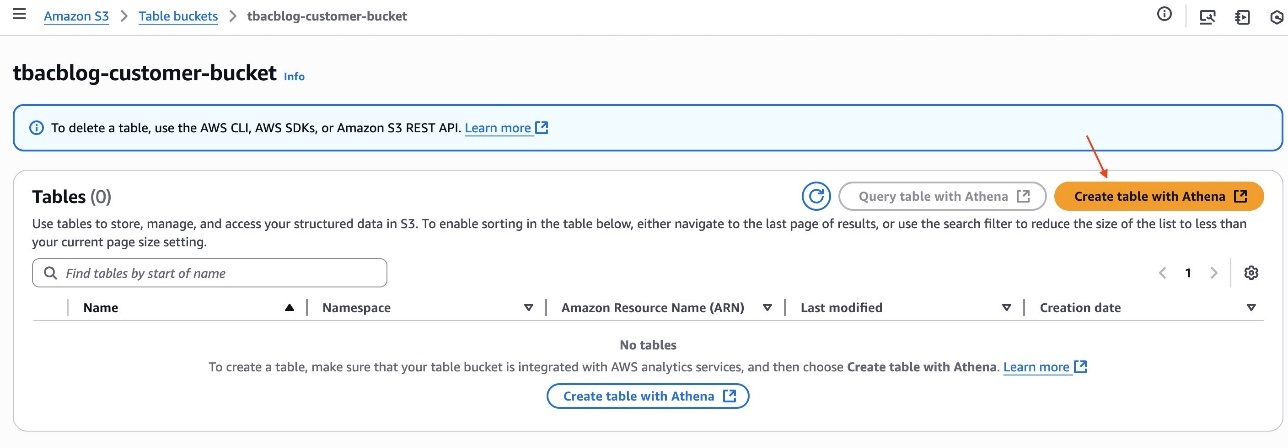
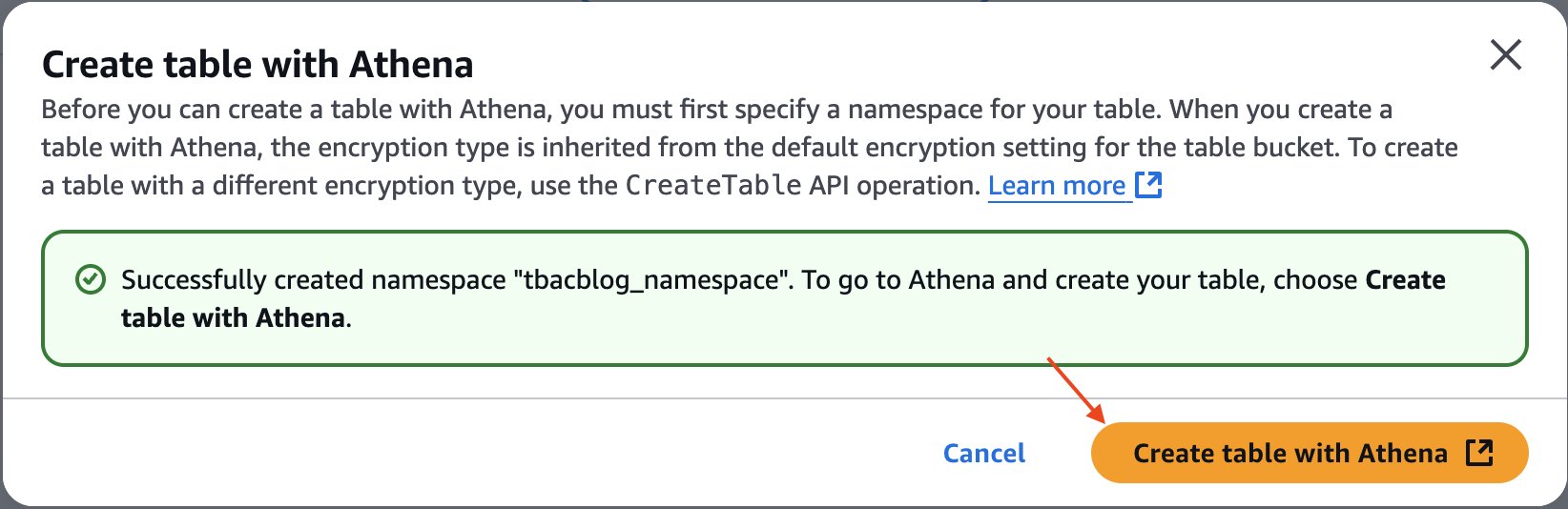
To help you access S3 Tables, we’ve launched updates in the AWS Management Console. You can now create a table, populate it with data, and query it directly from the S3 console using Amazon Athena, making it easier to get started and analyze data in S3 table buckets.

The following screenshot shows how to access Athena directly from the S3 console.

S3 console : create table with AthenaWhen I select Query tables with Athena or Create table with Athena, it opens the Athena console on the correct data source, catalog, and database.

S3 Tables in Athena

Since re:Invent 2024, we’ve continued to add new capabilities to S3 Tables at a rapid pace. For example, we added schema definition support to the CreateTable API and you can now create up to 10,000 tables in an S3 table bucket. We also launched S3 Tables into eight additional AWS Regions, with the most recent being Asia Pacific (Seoul, Singapore, Sydney) on March 4, with more to come. You can refer to the S3 Tables AWS Regions page of the documentation to get the list of the eleven Regions where S3 Tables are available today.

Amazon S3 Metadataannounced during re:Invent 2024— has been generally available since January 27. It’s the fastest and easiest way to help you discover and understand your S3 data with automated, effortlessly-queried metadata that updates in near real time. S3 Metadata works with S3 object tags. Tags help you logically group data for a variety of reasons, such as to apply IAM policies to provide fine-grained access, specify tag-based filters to manage object lifecycle rules, and selectively replicate data to another Region. In Regions where S3 Metadata is available, you can capture and query custom metadata that is stored as object tags. To reduce the cost associated with object tags when using S3 Metadata, Amazon S3 reduced pricing for S3 object tagging by 35 percent in all Regions, making it cheaper to use custom metadata.

AWS Pi Day 2025
Over the years, AWS Pi Day has showcased major milestones in cloud storage and data analytics. This year, the AWS Pi Day virtual event will feature a range of topics designed for developers and technical decision-makers, data engineers, AI/ML practitioners, and IT leaders. Key highlights include deep dives, live demos, and expert sessions on all the services and capabilities I discussed in this post.

By attending this event, you’ll learn how you can accelerate your analytics and AI innovation. You’ll learn how you can use S3 Tables with native Apache Iceberg support and S3 Metadata to build scalable data lakes that serve both traditional analytics and emerging AI/ML workloads. You’ll also discover the next generation of Amazon SageMaker, the center for all your data, analytics, and AI, to help your teams collaborate and build faster from a unified studio, using familiar AWS tools with access to all your data whether it’s stored in data lakes, data warehouses, or third-party or federated data sources.

For those looking to stay ahead of the latest cloud trends, AWS Pi Day 2025 is an event you can’t miss. Whether you’re building data lakehouses, training AI models, building generative AI applications, or optimizing analytics workloads, the insights shared will help you maximize the value of your data.

Tune in today and explore the latest in cloud data innovation. Don’t miss the opportunity to engage with AWS experts, partners, and customers shaping the future of data, analytics, and AI.

If you missed the virtual event on March 14, you can visit the event page at any time—we will keep all the content available on-demand there!

— seb


How is the News Blog doing? Take this 1 minute survey!

(This survey is hosted by an external company. AWS handles your information as described in the AWS Privacy Notice. AWS will own the data gathered via this survey and will not share the information collected with survey respondents.)

Collaborate and build faster with Amazon SageMaker Unified Studio, now generally available

Post Syndicated from Donnie Prakoso original https://aws.amazon.com/blogs/aws/collaborate-and-build-faster-with-amazon-sagemaker-unified-studio-now-generally-available/

Today, we’re announcing the general availability of Amazon SageMaker Unified Studio, a single data and AI development environment where you can find and access all of the data in your organization and act on it using the best tool for the job across virtually any use case. Introduced as preview during AWS re:Invent 2024, my colleague, Antje, summarized it as:

SageMaker Unified Studio (preview) is a single data and AI development environment. It brings together functionality and tools from the range of standalone “studios,” query editors, and visual tools that we have today in Amazon AthenaAmazon EMRAWS GlueAmazon RedshiftAmazon Managed Workflows for Apache Airflow (Amazon MWAA), and the existing SageMaker Studio.

Here’s a video to see Amazon SageMaker Unified Studio in action:

SageMaker Unified Studio breaks down silos in data and tools, giving data engineers, data scientists, data analysts, ML developers and other data practitioners a single development experience. This saves development time and simplifies access control management so data practitioners can focus on what really matters to them—building data products and AI applications.

This post focuses on several important announcements that we’re excited to share:

To get started, go to the Amazon SageMaker console and create a SageMaker Unified Studio domain. To learn more, visit Create an Amazon SageMaker Unified Studio domain in the AWS documentation.

New capabilities for Amazon Bedrock in SageMaker Unified Studio
The capabilities of Amazon Bedrock within Amazon SageMaker Unified Studio offer a governed collaborative environment for developers to rapidly create and customize generative AI applications. This intuitive interface caters to developers of all skill levels, providing seamless access to the high-performance FMs offered in Amazon Bedrock and advanced customization tools for collaborative development of tailored generative AI applications.

Since the preview launch, several new FMs have become available in Amazon Bedrock and are fully integrated with SageMaker Unified Studio, including Anthropic’s Claude 3.7 Sonnet and DeepSeek-R1. These models can be used for building generative AI apps and chatting in the playground in SageMaker Unified Studio.

Here’s how you can choose Anthropic’s Claude 3.7 Sonnet on the model selection in your project.

You can also source data or documents from S3 folders within your project and select specific FMs when creating knowledge bases. 

During preview, we introduced Amazon Bedrock Guardrails to help you implement safeguards for your Amazon Bedrock application based on your use cases and responsible AI policies. Now, Amazon Bedrock Guardrails is extended to Amazon Bedrock Flows with this general availability release.

Additionally, we have streamlined generative AI setup for associated accounts with a new user management interface in SageMaker Unified Studio, making it straightforward for domain administrators to grant associated account admins access to model governance projects. This enhancement eliminates the need for command line operations, streamlining the process of configuring generative AI capabilities across multiple AWS accounts.

These new features eliminate barriers between data, tools, and builders in the generative AI development process. You and your team will gain a unified development experience by incorporating the powerful generative AI capabilities of Amazon Bedrock — all within the same workspace.

Amazon Q Developer is now generally available in SageMaker Unified Studio
Amazon Q Developer is now generally available in Amazon SageMaker Unified Studio, providing data professionals with generative AI–powered assistance across the entire data and AI development lifecycle.

Amazon Q Developer integrates with the full suite of AWS analytics and AI/ML tools and services within SageMaker Unified Studio, including data processing, SQL analytics, machine learning model development, and generative AI application development, to accelerate collaboration and help teams build data and AI products faster. To get started, you can select Amazon Q Developer icon.

For new users of SageMaker Unified Studio, Amazon Q Developer serves as an invaluable onboarding assistant. It can explain core concepts such as domains and projects, provide guidance on setting up environments, and answer your questions.

Amazon Q Developer helps you discover and understand data using powerful natural language interactions with SageMaker Catalog. What makes this implementation particularly powerful is how Amazon Q Developer combines broad knowledge of AWS analytics and AI/ML services with the user’s context to provide personalized guidance.

You can chat about your data assets through a conversational interface, asking questions such as “Show all payment related datasets” without needing to navigate complex metadata structures.

Amazon Q Developer offers SQL query generation through its integration with the built-in query editor available in SageMaker Unified Studio. Data professionals of varying skill levels can now express their analytical needs in natural language, receiving properly formatted SQL queries in return.

For example, you can ask, “Analyze payment method preferences by age group and region” and Amazon Q Developer will generate the appropriate SQL with proper joins across multiple tables.

Additionally, Amazon Q Developer is also available to assist with troubleshooting and generating real-time code suggestions in SageMaker Unified Studio Jupyter notebooks, as well as building ETL jobs.

Now available

  • Availability — Amazon SageMaker Unified Studio is now available in the following AWS Regions: US East (N. Virginia, Ohio), US West (Oregon), Asia Pacific (Seoul, Singapore, Sydney, Tokyo), Canada (Central), Europe (Frankfurt, Ireland, London), South America (São Paulo). Learn more about the availability of these capabilities on supported Region documentation page.
  • Amazon Q Developer subscription — The free tier of Amazon Q Developer is available by default in SageMaker Unified Studio, requiring no additional setup or configuration. If you already have Amazon Q Developer Pro Tier subscriptions, you can use those enhanced capabilities within the SageMaker Unified Studio environment. For more information, visit the documentation page.
  • Amazon Bedrock capabilities — To learn more about the capabilities of Amazon Bedrock in Amazon SageMaker Unified Studio, refer to this documentation page

Start building with Amazon SageMaker Unified Studio today. For more information, visit the Amazon SageMaker Unified Studio page.

Happy building!

Donnie Prakoso

— How is the News Blog doing? Take this 1 minute survey! (This survey is hosted by an external company. AWS handles your information as described in the AWS Privacy Notice. AWS will own the data gathered via this survey and will not share the information collected with survey respondents.)

Amazon S3 Tables integration with Amazon SageMaker Lakehouse is now generally available

Post Syndicated from Channy Yun (윤석찬) original https://aws.amazon.com/blogs/aws/amazon-s3-tables-integration-with-amazon-sagemaker-lakehouse-is-now-generally-available/

At re:Invent 2024, we launched Amazon S3 Tables, the first cloud object store with built-in Apache Iceberg support to streamline storing tabular data at scale, and Amazon SageMaker Lakehouse to simplify analytics and AI with a unified, open, and secure data lakehouse. We also previewed S3 Tables integration with Amazon Web Services (AWS) analytics services for you to stream, query, and visualize S3 Tables data using Amazon Athena, Amazon Data Firehose, Amazon EMR, AWS Glue, Amazon Redshift, and Amazon QuickSight.

Our customers wanted to simplify the management and optimization of their Apache Iceberg storage, which led to the development of S3 Tables. They were simultaneously working to break down data silos that impede analytics collaboration and insight generation using the SageMaker Lakehouse. When paired with S3 Tables and SageMaker Lakehouse in addition to built-in integration with AWS analytics services, they can gain a comprehensive platform unifying access to multiple data sources enabling both analytics and machine learning (ML) workflows.

Today, we’re announcing the general availability of Amazon S3 Tables integration with Amazon SageMaker Lakehouse to provide unified S3 Tables data access across various analytics engines and tools. You can access SageMaker Lakehouse from Amazon SageMaker Unified Studio, a single data and AI development environment that brings together functionality and tools from AWS analytics and AI/ML services. All S3 tables data integrated with SageMaker Lakehouse can be queried from SageMaker Unified Studio and engines such as Amazon Athena, Amazon EMR, Amazon Redshift, and Apache Iceberg-compatible engines like Apache Spark or PyIceberg.

With this integration, you can simplify building secure analytic workflows where you can read and write to S3 Tables and join with data in Amazon Redshift data warehouses and third-party and federated data sources, such as Amazon DynamoDB or PostgreSQL.

You can also centrally set up and manage fine-grained access permissions on the data in S3 Tables along with other data in the SageMaker Lakehouse and consistently apply them across all analytics and query engines.

S3 Tables integration with SageMaker Lakehouse in action
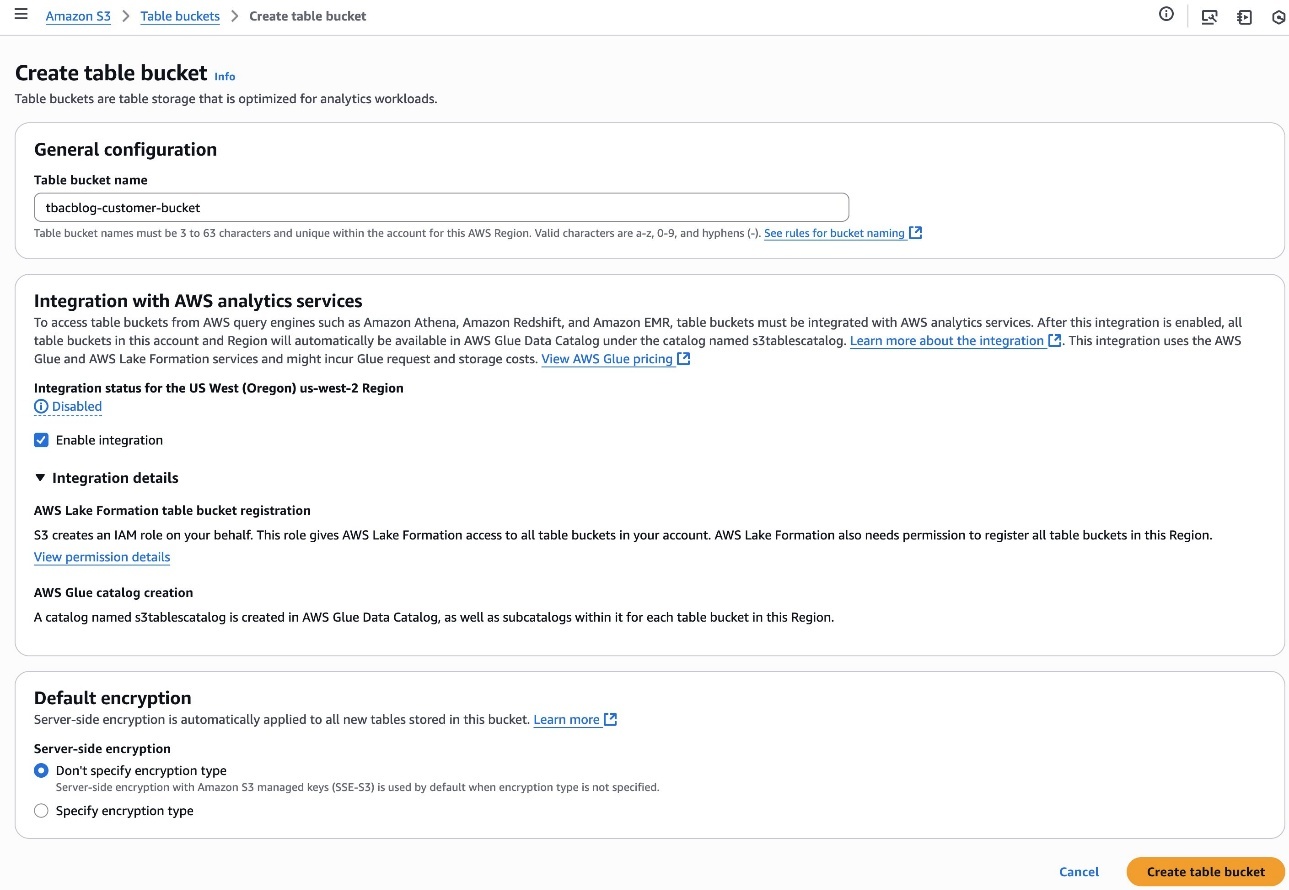
To get started, go to the Amazon S3 console and choose Table buckets from the navigation pane and select Enable integration to access table buckets from AWS analytics services.

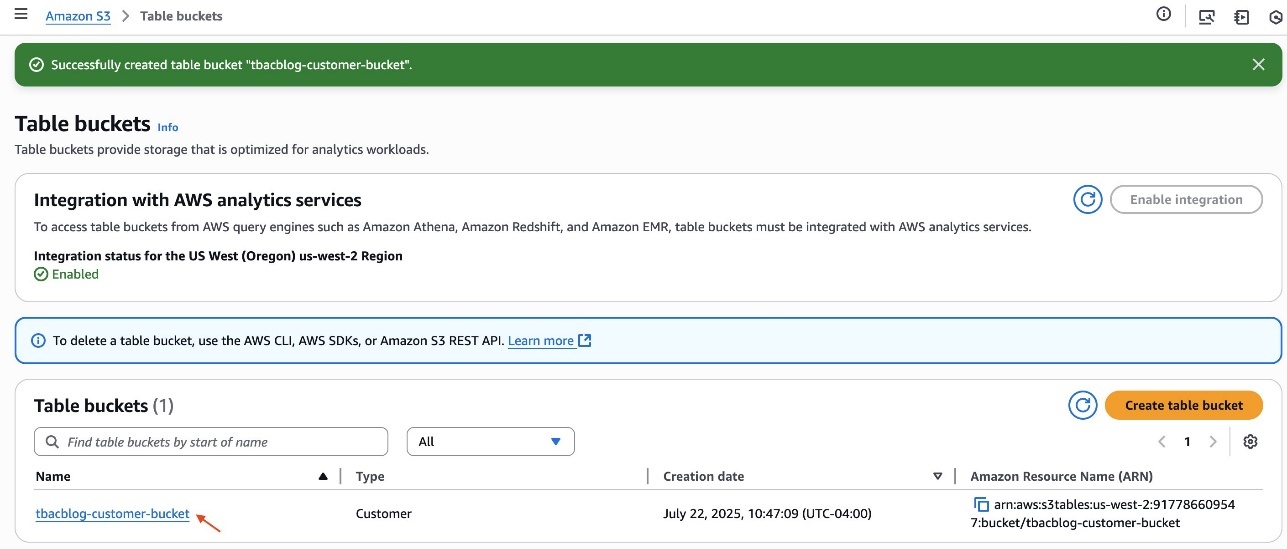
Now you can create your table bucket to integrate with SageMaker Lakehouse. To learn more, visit Getting started with S3 Tables in the AWS documentation.

1. Create a table with Amazon Athena in the Amazon S3 console
You can create a table, populate it with data, and query it directly from the Amazon S3 console using Amazon Athena with just a few steps. Select a table bucket and select Create table with Athena, or you can select an existing table and select Query table with Athena.

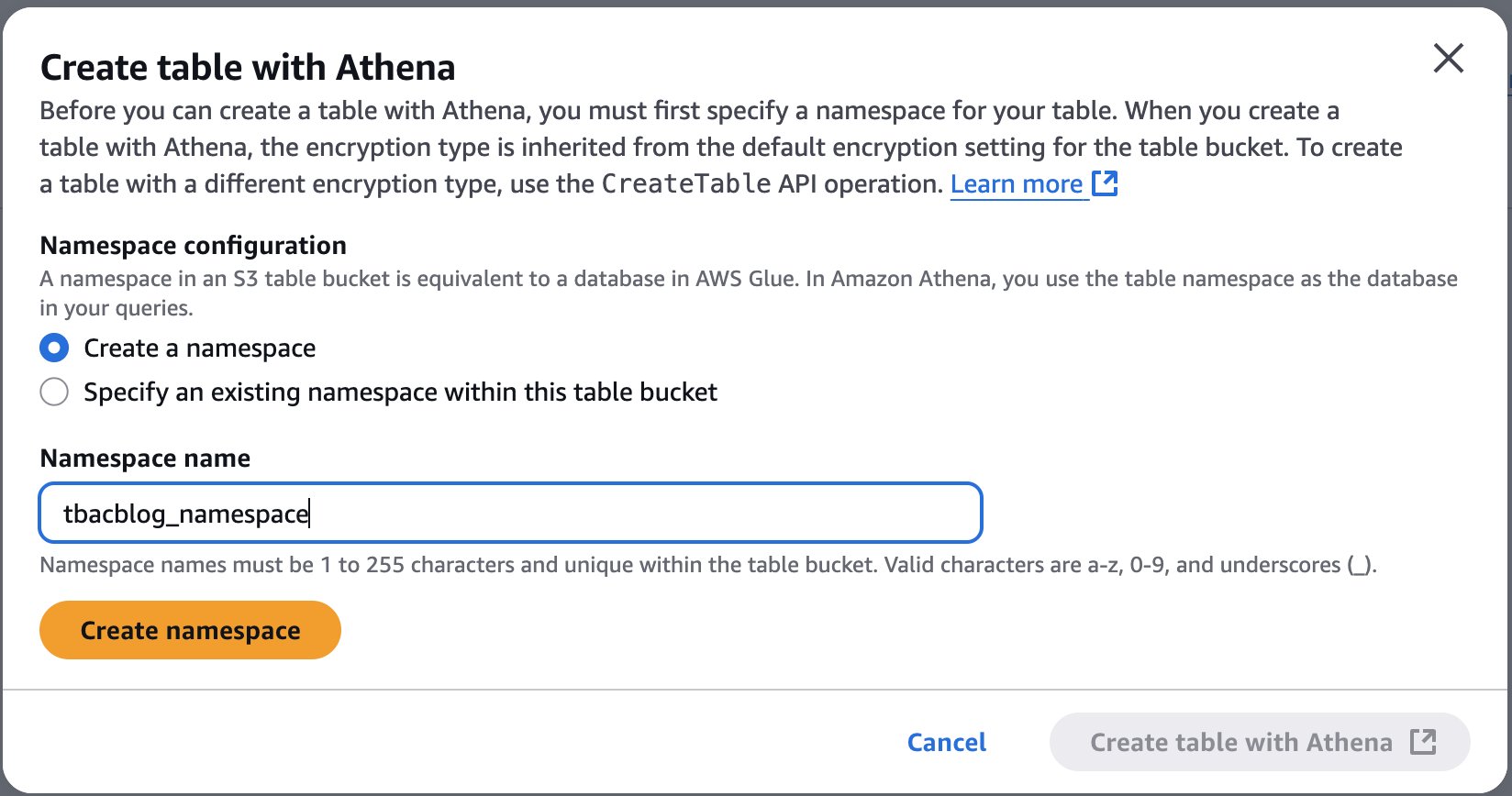
2. Create tables with Athena

When you want to create a table with Athena, you should first specify a namespace for your table. The namespace in an S3 table bucket is equivalent to a database in AWS Glue, and you use the table namespace as the database in your Athena queries.

Choose a namespace and select Create table with Athena. It goes to the Query editor in the Athena console. You can create a table in your S3 table bucket or query data in the table.

2. Query with Athena

2. Query with SageMaker Lakehouse in the SageMaker Unified Studio
Now you can access unified data across S3 data lakes, Redshift data warehouses, third-party and federated data sources in SageMaker Lakehouse directly from SageMaker Unified Studio.

To get started, go to the SageMaker console and create a SageMaker Unified Studio domain and project using a sample project profile: Data Analytics and AI-ML model development. To learn more, visit Create an Amazon SageMaker Unified Studio domain in the AWS documentation.

After the project is created, navigate to the project overview and scroll down to project details to note down the project role Amazon Resource Name (ARN).

3. Project details in SageMaker Unified Studio

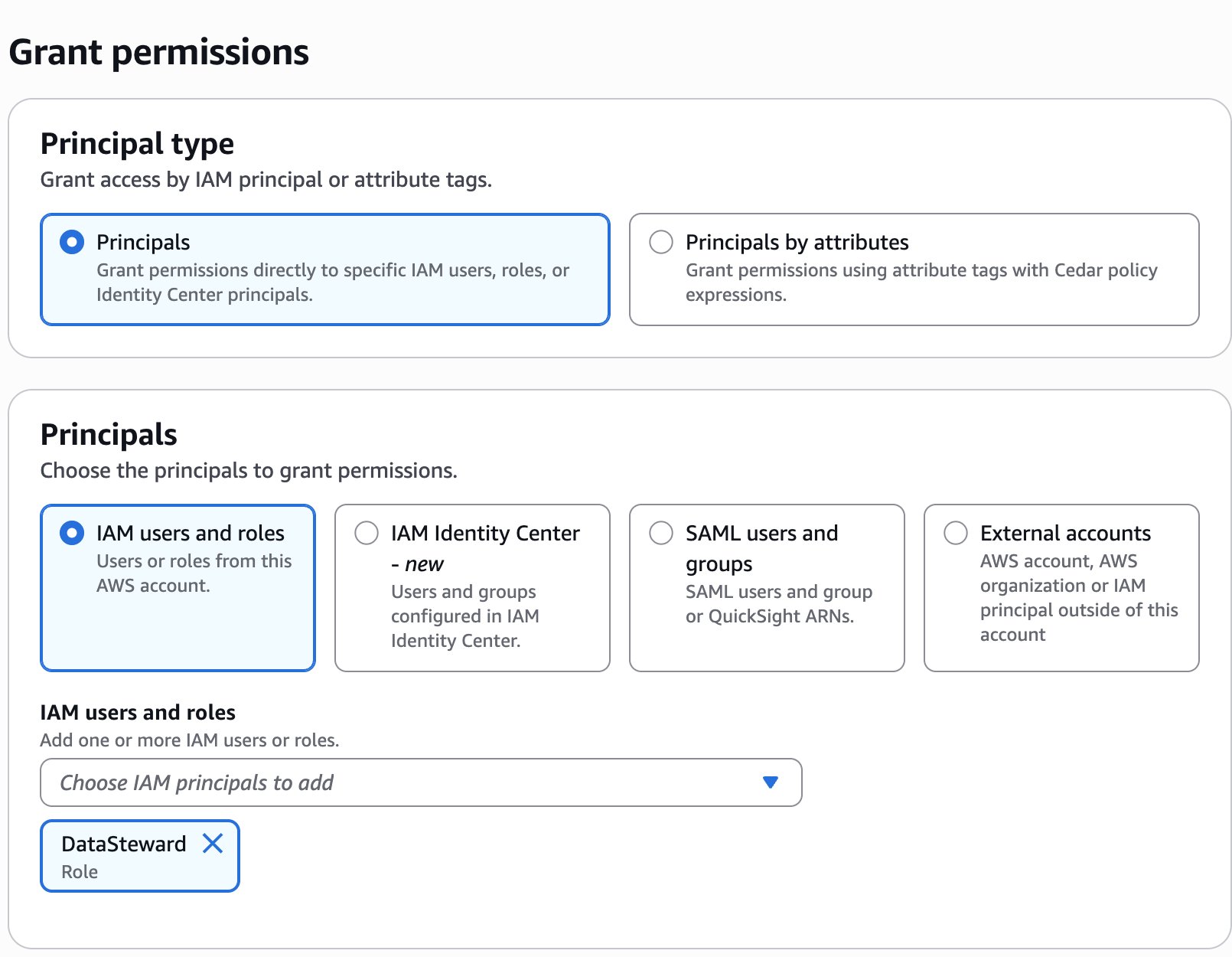
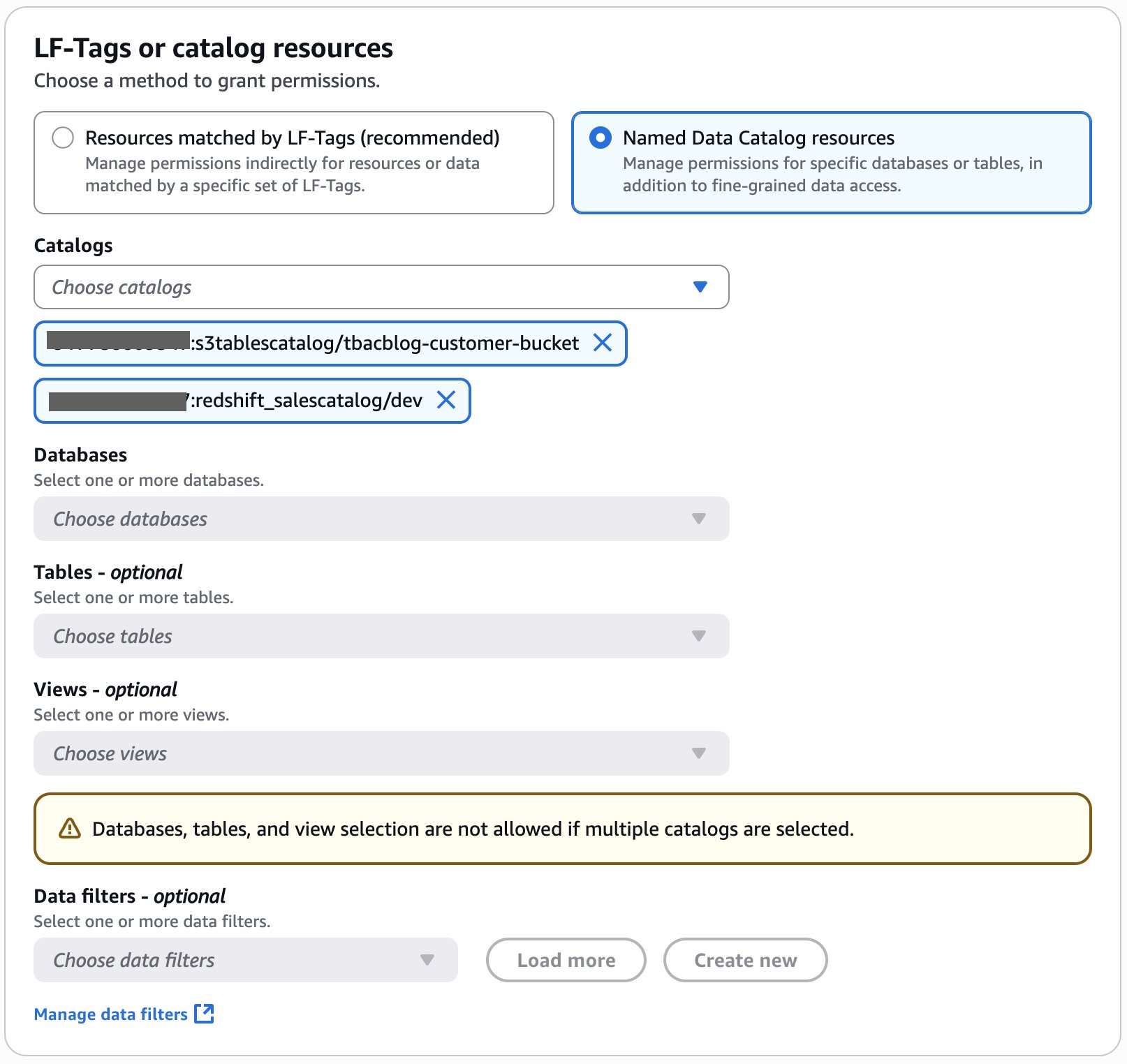
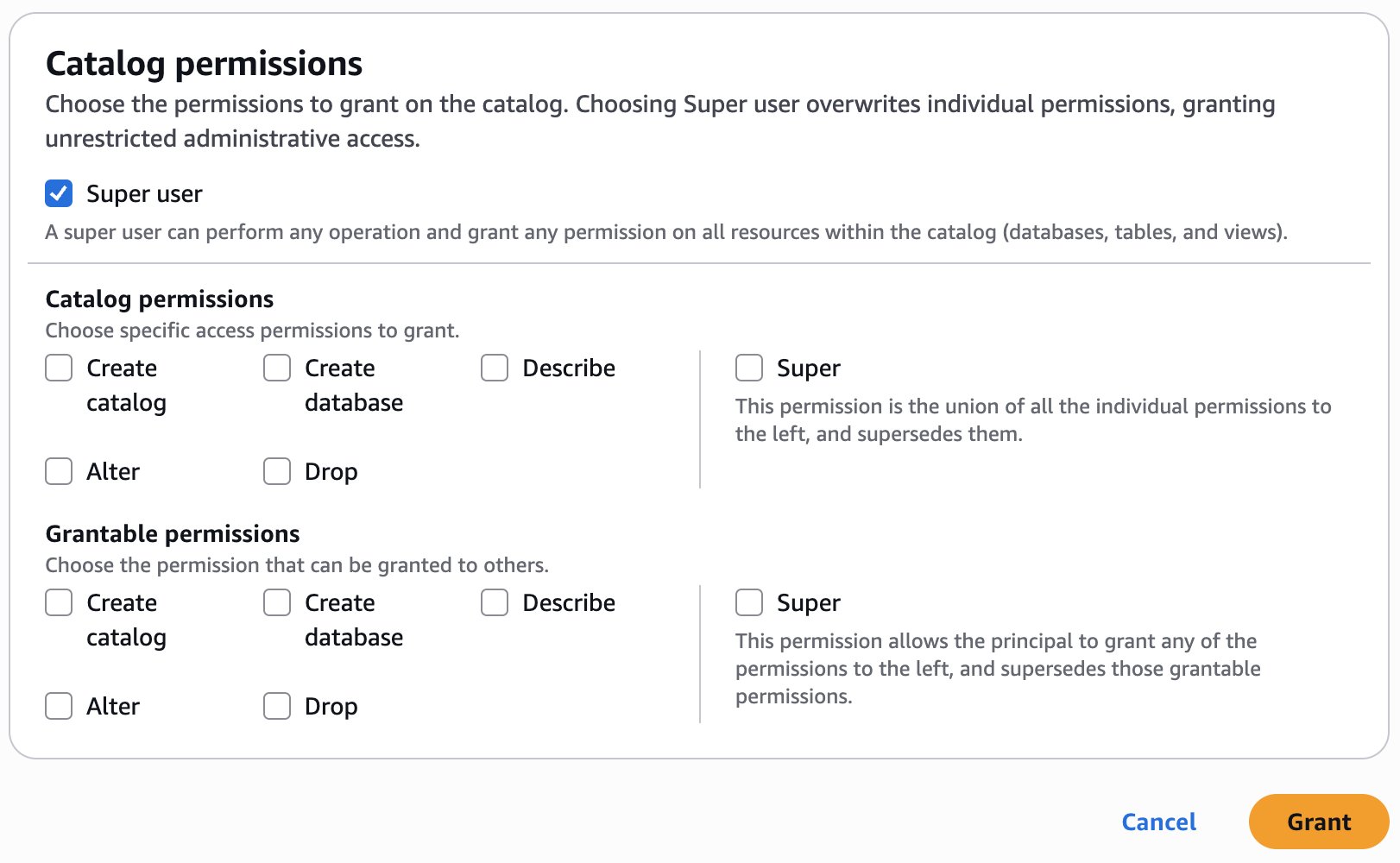
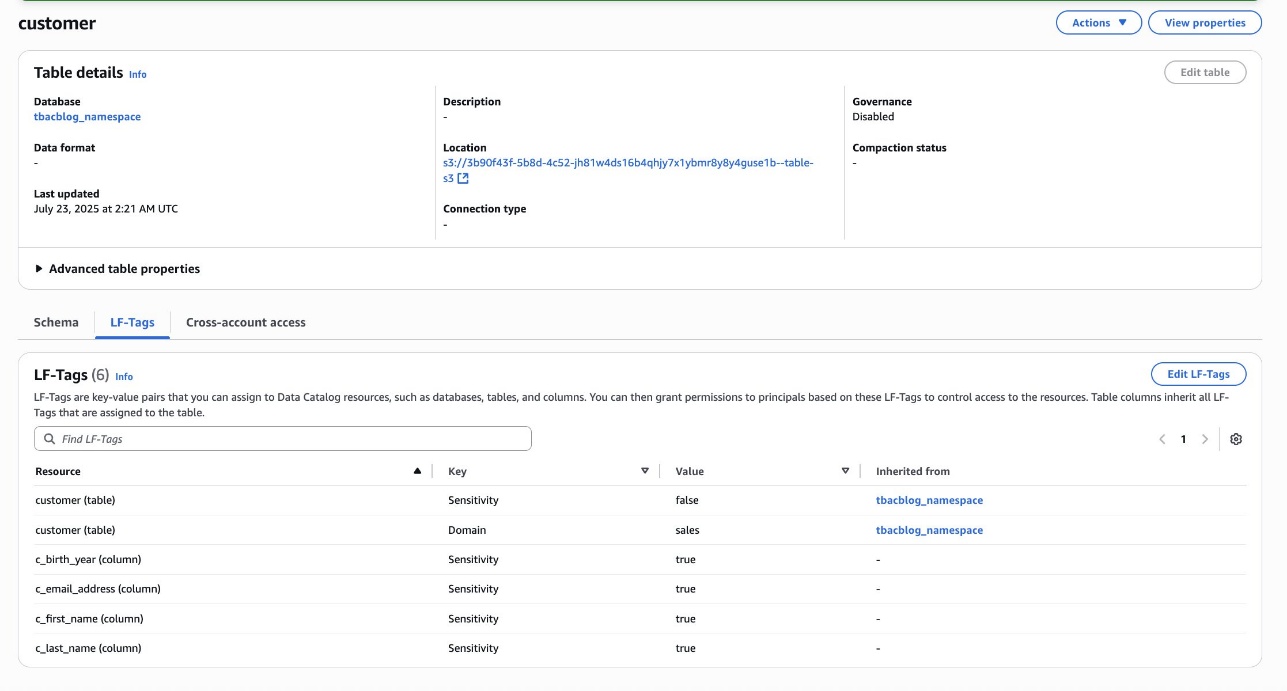
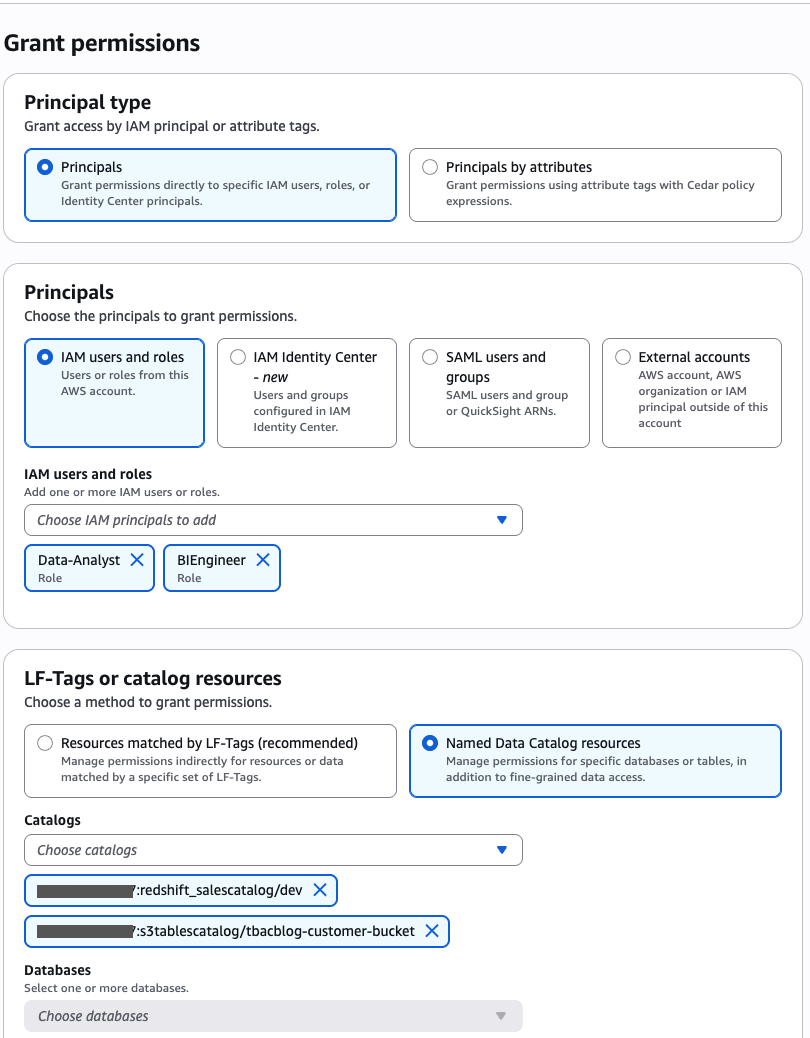
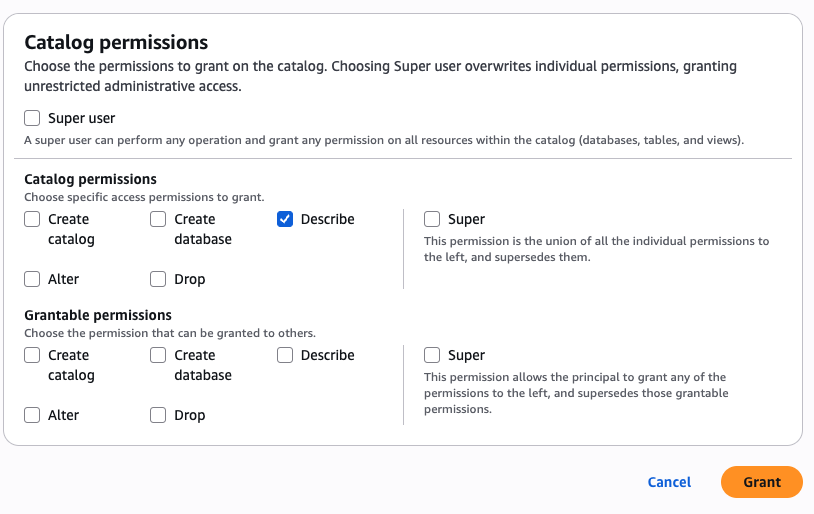
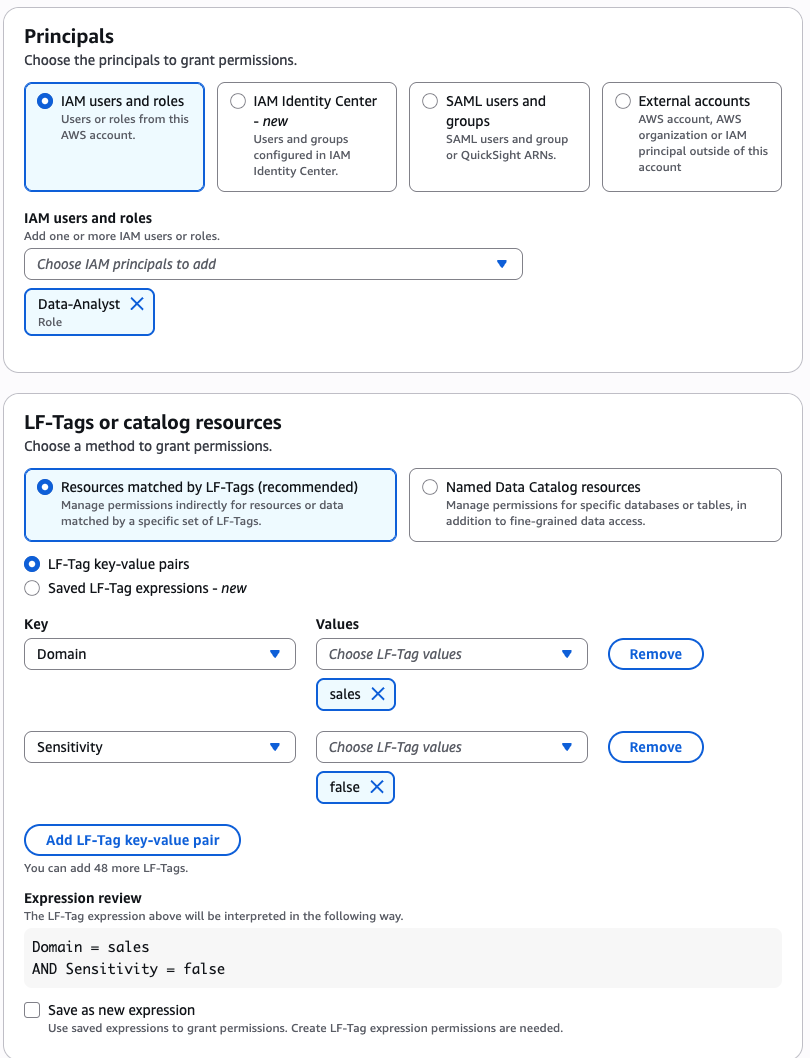
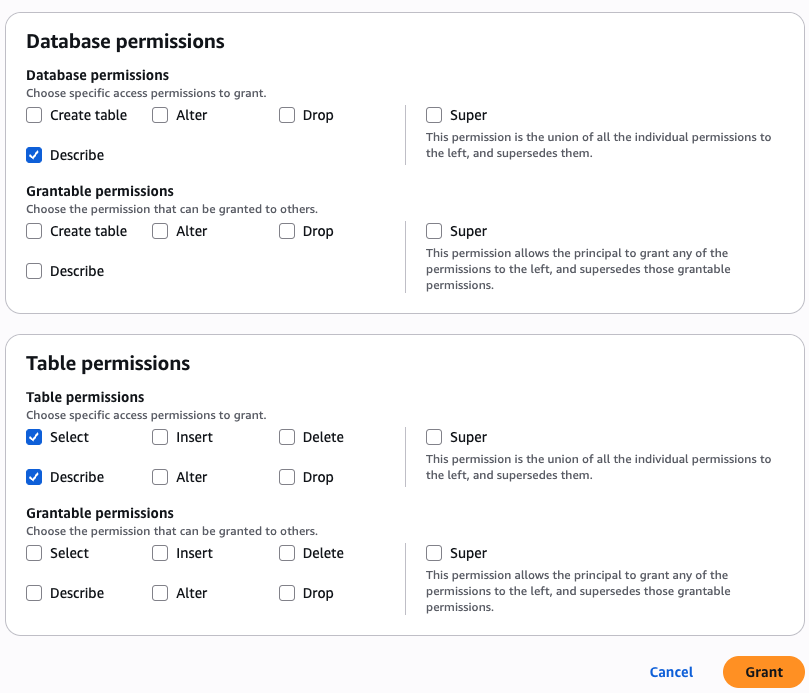
Go to the AWS Lake Formation console and grant permissions for AWS Identity and Access Management (IAM) users and roles. In the in the Principals section, select the <project role ARN> noted in the previous paragraph. Choose Named Data Catalog resources in the LF-Tags or catalog resources section and select the table bucket name you created for Catalogs. To learn more, visit Overview of Lake Formation permissions in the AWS documentation.

4. Grant permissions in Lake Formation console

When you return to SageMaker Unified Studio, you can see your table bucket project under Lakehouse in the Data menu in the left navigation pane of project page. When you choose Actions, you can select how to query your table bucket data in Amazon Athena, Amazon Redshift, or JupyterLab Notebook.

5. S3 Tables in Unified Studio

When you choose Query with Athena, it automatically goes to Query Editor to run data query language (DQL) and data manipulation language (DML) queries on S3 tables using Athena.

Here is a sample query using Athena:

select * from "s3tablecatalog/s3tables-integblog-bucket”.”proddb"."customer" limit 10;

6. Athena query in Unified Studio

To query with Amazon Redshift, you should set up Amazon Redshift Serverless compute resources for data query analysis. And then you choose Query with Redshift and run SQL in the Query Editor. If you want to use JupyterLab Notebook, you should create a new JupyterLab space in Amazon EMR Serverless.

3. Join data from other sources with S3 Tables data
With S3 Tables data now available in SageMaker Lakehouse, you can join it with data from data warehouses, online transaction processing (OLTP) sources like relational or non-relational database, Iceberg tables, and other third party sources to gain more comprehensive and deeper insights.

For example, you can add connections to data sources such as Amazon DocumentDB, Amazon DynamoDB, Amazon Redshift, PostgreSQL, MySQL, Google BigQuery, or Snowflake and combine data using SQL without extract, transform, and load (ETL) scripts.

Now you can run the SQL query in the Query editor to join the data in the S3 Tables with the data in the DynamoDB.

Here is a sample query to join between Athena and DynamoDB:

select * from "s3tablescatalog/s3tables-integblog-bucket"."blogdb"."customer", 
              "dynamodb1"."default"."customer_ddb" where cust_id=pid limit 10;

To learn more about this integration, visit Amazon S3 Tables integration with Amazon SageMaker Lakehouse in the AWS documentation.

Now available
S3 Tables integration with SageMaker Lakehouse is now generally available in all AWS Regions where S3 Tables are available. To learn more, visit the S3 Tables product page and the SageMaker Lakehouse page.

Give S3 Tables a try in the SageMaker Unified Studio today and send feedback to AWS re:Post for Amazon S3 and AWS re:Post for Amazon SageMaker or through your usual AWS Support contacts.

In the annual celebration of the launch of Amazon S3, we will introduce more awesome launches for Amazon S3 and Amazon SageMaker. To learn more, join the AWS Pi Day event on March 14.

Channy

How is the News Blog doing? Take this 1 minute survey!

(This survey is hosted by an external company. AWS handles your information as described in the AWS Privacy Notice. AWS will own the data gathered via this survey and will not share the information collected with survey respondents.)

Secure cloud innovation starts at re:Inforce 2025

Post Syndicated from Chris Betz original https://aws.amazon.com/blogs/security/secure-cloud-innovation-starts-at-reinforce-2025/

Every day, I talk with security leaders who are navigating a critical balancing act. On one side, their organizations are moving faster than ever, adopting transformative technologies like generative AI and expanding their cloud footprint. On the other, they’re working to maintain strong security controls and visibility across an increasingly complex landscape. We all know that adding more tools and controls isn’t sustainable. We need a different approach to security at scale.

re:Inforce 2025: Your roadmap to security that powers innovation

This is what shaped our vision for AWS re:Inforce 2025. When done right, security at scale becomes a business accelerator, helping organizations move faster and more confidently in the cloud. This is more than just a philosophy; it’s a practical reality I’ve seen proven time and again by our customers, and it’s what we want to help every organization achieve.

At re:Inforce, we’ll share a vision for simplifying security at scale that’s deeply rooted in our experiences supporting millions of customers worldwide. We’ll explore how organizations are building inherently resilient applications that can withstand modern threats while accelerating innovation. I’m particularly excited to showcase real customer examples and architectural patterns that demonstrate how security better enables your business goals.

An environment built for learning cloud security

There’s a reason we created re:Inforce as a dedicated in-person security event. While I love our broader AWS events, security practitioners need space to dive deep into implementation details, ask tough questions, and work through complex scenarios. At re:Inforce, you can grab a whiteboard with the engineers who built our security services, collaborate with security partners, and schedule personal time with our leaders to tackle your specific security needs. It’s the kind of environment where real learning happens.

We’ve designed multiple learning paths to meet you wherever you are in your security journey. With over 250 technical sessions, you’ll find content that matches your needs – whether you’re looking to automate security controls, align development and security teams, or transform your security operations. You’ll find interactive workshops where you’ll build solutions in real-time, small-group technical deep-dives, hands-on labs where you can test new approaches, and solution-building sessions with AWS experts. Best of all, 70% of our content is at advanced or expert level, making sure you get the detailed implementation guidance you need.

I invite you to join us for three days that will transform how you think about and implement security in the cloud. Registration is now open, and I encourage you to secure your spot early—based on previous years, spots will fill up quickly. Join us to explore how simplified, scalable cloud security can fuel your organization’s future. Register today with the code SECBLObhZzr9 to receive a limited time $300 USD discount, while supplies last.

If you have feedback about this post, submit comments in the Comments section below.

Chris Betz

Chris is CISO at AWS. He oversees security teams and leads the development and implementation of security policies with the aim of managing risk and aligning the company’s security posture with business objectives. Chris joined Amazon in August 2023 after holding CISO and security leadership roles at leading companies. He lives in Northern Virginia with his family.

Announcing support for upgrades to Java 21 in Amazon Q Developer

Post Syndicated from Brian Beach original https://aws.amazon.com/blogs/devops/announcing-support-for-upgrades-to-java-21-in-amazon-q-developer/

On February 14, Amazon Q Developer announced support for upgrades to Java 21. As a Java developer, I’m excited about this new capability, which will make it easier for me to keep my applications up-to-date and take advantage of the latest language features and performance improvements. In addition, the latest version of Amazon Q Developer includes improved summarization and recommendations that simplify the upgrade process and increase confidence in the results.

Amazon Q Developer is a generative AI-powered assistant that helps accelerate the modernization of enterprise applications. It can perform complex tasks like analyzing legacy code, mapping dependencies, and executing migration and modernization workflows. Amazon Q Developer frees up your team to focus on more strategic initiatives rather than getting bogged down in the undifferentiated heavy lifting of upgrading Java applications.

Staying current on Java versions is crucial, as each new release brings important security fixes, performance enhancements, and support for emerging frameworks and libraries. However, the effort required to manually migrate large Java codebases can be daunting. That’s where Amazon Q Developer has been invaluable. By offloading the tedious, labor-intensive parts of the upgrade process, your team can deliver important updates to users much faster while minimizing disruption.

The Benefits of Java 21

With the addition of Java 21 upgrade capabilities, Amazon Q Developer now supports upgrading applications from Java 8, 11, and 17 to Java 17 or 21. Some of the key benefits of Java 21 that I’m looking forward to include:

Virtual Threads: Virtual Threads are a new concurrency primitive introduced in Java 19 that reduce the effort of writing, maintaining, and debugging high-throughput concurrent applications. This unlocks significant performance improvements for your applications.

Improved Performance: Java 21 includes a variety of other language enhancements like Sequenced Collections, Record Patterns, and Pattern Matching that deliver tangible speed and efficiency gains.

Better Memory Management: Enhancements to the Z Garbage Collector in Java 21 result in more predictable garbage collection pauses and reduced memory footprint, leading to more stable and responsive applications.

Upgrading your team’s Java applications to Java 21 with Amazon Q Developer is a game-changer. It saves countless hours of manual effort that would otherwise be required to migrate all of your Java components.

Simplifying the Upgrade Process with Amazon Q Developer

Upgrading Java applications to Java 21 with Amazon Q Developer is easy. After configuring your project and ensuring it meets the prerequisites, you can simply invoke the /transform command in the Amazon Q Developer chat window of your integrated development environment (IDE). The following screenshot is from VS Code; however, Q Developer also supports JetBrain’s IDEs including IntelliJ IDEA and the qct command line.

Q Code Transformation dialog showing Java 17 selected as the source version and Java 21 selected as the target version.

Amazon Q Developer will then analyze your codebase, determine the necessary changes to upgrade to Java 21, and provide a detailed diff so you can review and accept the transformations. This not only saves you time, but also helps ensure a consistent, high-quality upgrade across all of your Java applications.

In addition to adding support for upgrading to Java 21, the latest version of Amazon Q Developer also enhances the summarization and recommendations it provides after completing the transformation. Once the upgrade to Java 21 is complete, Q Developer generates a detailed summary of the changes made, such as deprecated APIs removed and code refactored to leverage new Java features. It also includes tailored recommendations to further improve the application, taking advantage of the capabilities introduced in Java 21. For example, Q Developer suggested upgrading the logging framework and implementing pattern matching to make the code more concise. These summary and recommendation capabilities help ensure a smooth and comprehensive upgrade process.

A summary screen showing five key changes made during a transformation process, including Maven compiler updates to Java 21, POM file modifications, and retained dependencies. The text appears in white against a dark background and details technical configurations involving Maven, JUnit, and Surefire plugin settings.

Finally, Q includes recommendations to further improve the application beyond the upgrade to Java 21. For example, Q provided the following recommendations.

A recommendations screen with three items for improving a software upgrade. The text is white on a dark background and includes advice on reviewing code changes, re-enabling Maven plugins, and using Amazon Q chat in the IDE for further code transformation assistance.

The summary and recommendation capabilities help ensure a smooth and comprehensive upgrade experience. Developers can review the detailed changes, understand the rationale behind them, and then selectively apply the suggested optimizations to fully unlock the benefits of Java 21. This level of transparency and guidance from Q Developer greatly simplifies the upgrade process and increases confidence in the resulting codebase.

Conclusion

In summary, the new Amazon Q Developer transformation capabilities for upgrades to Java 21 offload the labor-intensive task of keeping your Java applications up-to-date. The detailed summaries and tailored recommendations provided by Q Developer ensure a smooth and comprehensive upgrade process, and significantly streamline the upgrade process. I’m excited to start rolling this out and freeing up the team’s time to focus on higher-value work. If you’re a fellow Java developer, I’d highly encourage you to try out Amazon Q Developer for yourself. To get started, visit the Amazon Q Developer getting started page.

Take control of your code with Amazon Q Developer’s new context features

Post Syndicated from Brian Beach original https://aws.amazon.com/blogs/devops/amazon-q-developers-new-context-features/

In this blog post, I dive into the powerful new features of Amazon Q Developer that empower developers to take full control of their development workflow. These features, currently available in Visual Studio Code, allow you to leverage workspace context, explicit context, prompt libraries, and project rules to streamline your software projects, maintain coding standards, and boost your overall productivity. Developers working in other IDEs can expect support for these capabilities to come soon as well. Whether you’re an experienced developer or just starting out, these features will transform the way you approach your development tasks.

Background

For the past year, Amazon Q Developer has supported workspace context in the integrated development environment (IDE). This powerful feature allows Amazon Q Developer to automatically ingest and index all your code files, configurations, and project structure, giving the AI-powered assistant comprehensive context across your entire application.

By adding the @workspace modifier to your question, Amazon Q Developer can automatically include the most relevant chunks of your workspace code as additional context. This allows the assistant to provide more thorough and accurate responses, even for questions that require understanding the broader codebase, rather than just the current file.

To illustrate this, I will use code from the AWS CDK Immersion Day Workshop. In the following example, I ask Amazon Q Developer, “Which resources are deployed by the workshop stack?” Typically, the assistant would only have the current file open in the IDE as context to answer this question. However, by adding @workspace, Amazon Q Developer can include additional files to provide a more complete response, describing all the resources in the project, such as AWS Lambda functions, an Amazon API Gateway, and an Amazon DynamoDB table.

A screenshot of Q responding to the prompt “@workspace Which resources are deployed by the workshop stack?” The resources are organized in three main categories: 1) AWS Lambda Functions, including a HelloHandler function and a HitCounter function, 2) Amazon API Gateway with a REST API endpoint integrated with the HitCounter Lambda function, and 3) Amazon DynamoDB with a table for storing hit counts for each path.

With this additional context, Amazon Q Developer can provide a more comprehensive answer, explaining the various resources that make up the workshop stack.

Context Transparency

Amazon Q Developer can’t review every file in a large project–that would take too long. The assistant determines relevance based on an index that is updated periodically. While this works great in most cases, there are times when I want to know which files Amazon Q picked. The new context transparency feature, gives me the insight I need.

Amazon Q Developer now includes the context information directly in the response, listing each file that was added. The context transparency feature allows me to see exactly which files the assistant used to formulate its answer. In the following example, you can see that Q Developer included four files from my project.

A screenshot of Q responding to the prompt “@workspace Which resources are deployed by the workshop stack?” This is the same as the prior image but the context section is expanded showing four files, cdk-workshop-stack.ts, package.json, README.md, and cdk.json.

By expanding the context section, you can easily see the files that Amazon Q Developer used to provide the previous response, giving you greater insight into the assistant’s decision-making process.

Explicit Context

While Amazon Q Developer typically does a great job of picking the best files to augment the context, there are times when I want more control. The new explicit context feature allows me to choose individual files and folders that I want to add to the context.

By typing @ in the chat, Amazon Q Developer displays a user interface that lets you select the specific files and folders you want to include. This provides the assistant with access to the exact information that you know it needs to answer your question.

Let’s return to the prior example. While Q Developer properly identified all the resources in the stack, it did not include lib/hitcounter.ts where the DynamoDB table is defined. While the answer is correct, I want Q. Developer to see the source of the HitCounter. In the following example, I explicitly add the lib folder to the context because I know that is where the resources are defined.

A screenshot of Q with the prompt “Which resources are deployed by the workshop stack? @” Q is also showing the picker to complete the modifier. The picker lists the folders in the project and lib is currently selected.

Rather than allowing Q to choose the files, I can explicitly identify files and folders that I want to add to the context. In the following image you see that Q again answered my question correctly. However, with the source code to both files, Q was able to include additional information missing from the prior example. Notice that the HitCounterHandler now includes additional information about the runtime and version.

A screenshot of Q with the prompt “Which resources are deployed by the workshop stack? @lib” This is the same as the prior image but the context section is expanded showing two files, cdk-workshop-stack.ts, amd hitcounter.ts.

With the ability to explicitly define the context, I can tailor the information Amazon Q Developer uses to provide the most relevant and accurate response for my specific needs.

Prompt Library

In addition to controlling the context, Amazon Q Developer now allows you to build a library of common prompts. These prompts are stored as Markdown files in my ~/.aws/amazonq/prompts folder, making it easy to reuse them across multiple conversations and projects.

For example, let’s say you want to add a diagram to the README file for your project. While Amazon Q Developer’s /doc feature can already generate an infrastructure diagram, you may have other types of diagrams, like an Entity-Relationship (ER) diagram or a sequence diagram, that you use frequently. By storing these prompts in your library, you can easily add them to the context without having to retype the prompt each time. In the following example, I will create a sequence diagram.

A screenshot of Q with the prompt “lib @” Q is also showing the picker to complete the modifier. The picker lists prompts from the library and “Create Sequence Diagram” is currently selected.

In the prior image, you can see that I have again added the lib folder to the context in addition to a saved prompt named “Create Sequence Diagram”. Note that I can combine multiple modifiers adding additional context and prompts as needed. The stored prompt for “Create Sequence Diagram” is shown below.

Create a sequence diagram using Mermaid that shows the sequence of calls between resources. 
Ignore supporting resources like IAM policies and security group rules. 

Amazon Q Developer uses the prompt, and the two source code files in the lib folder to create the following sequence diagram.

A sequence diagram showing the flow of a web request through AWS services. The flow starts with a Client making an HTTP Request to API Gateway, which triggers a HitCounter Lambda function. The HitCounter Lambda then updates a hit count in DynamoDB and invokes a Hello Lambda function. The response flows back through the chain: Hello Lambda responds, DynamoDB confirms, and the combined response returns to the client via API Gateway as an HTTP Response.

The prompt library saves me time and reduces the chances of making mistakes when generating common artifacts, allowing me to focus on more complex and creative aspects of my development workflow.

Project Rules

The last feature we’ll explore is “Project Rules.” Similar to the prompt library, these rules are stored as Markdown files. Unlike the prompt library, which is specific to your user profile, project rules are stored in the .amazonq/rules folder of your project. Therfore, they are applied to all developers that share the project source code.

These rules allow you to enforce coding standards and best practices across your team. For example, you could have a rule that all Python code uses type hints, or that all Java code uses Javadocs comments. By storing these rules in your project, you can drive consistency across developers, regardless of their experience level.

To illustrate this, imagine that a junior developer asks Q to “Add an S3 bucket to the stack” as shown in the following image. This prompt is too simple and does not include our best practices This prompt is too simple and does not describe our best practices.

A screenshot of Q with the prompt “Add an S3 Bucket to the stack.” The context is expanded and lists a single file cdk.md. The response includes coed but the code is not important in this context.

Despite the vague prompt, you might notice that Q Developer’s response mentions the “best practices” stored in “the rules file”. You might also notice that Q has added cdk.md to the context even though I did not include any modifiers in my prompt. This is the power of the project rule. It adds additional context to the prompt, even when the developer forgets to add it manually. .amazonq/rules/cdk.md includes the following text. In addition, context transparency makes it clear that the rule was included so the developer is aware.

All S3 Buckets must have encryption enabled, enforce SSL, and block public access. 
All DynamoDB Tables must have encryption enabled.
All SNS Topics must have encryption enabled and enforce SSL.
All SQS Queues must enforce SSL.

Project rules empower you to maintain consistency and best practices across your entire development team, helping to improve the overall quality and maintainability of your codebase.

Conclusion

The new features in Amazon Q Developer give you powerful tools to simplify your software development workflow. By leveraging workspace context, explicit context, prompt libraries, and project rules, you can ensure your AI assistant has the information it needs to provide accurate and helpful responses, while also enforcing best practices and standards across your team.

To get started with these features, visit the Amazon Q Developer Getting Started guide and explore the full range of capabilities that can help you create impressive software more efficiently.

DeepSeek-R1 now available as a fully managed serverless model in Amazon Bedrock

Post Syndicated from Channy Yun (윤석찬) original https://aws.amazon.com/blogs/aws/deepseek-r1-now-available-as-a-fully-managed-serverless-model-in-amazon-bedrock/

As of January 30, DeepSeek-R1 models became available in Amazon Bedrock through the Amazon Bedrock Marketplace and Amazon Bedrock Custom Model Import. Since then, thousands of customers have deployed these models in Amazon Bedrock. Customers value the robust guardrails and comprehensive tooling for safe AI deployment. Today, we’re making it even easier to use DeepSeek in Amazon Bedrock through an expanded range of options, including a new serverless solution.

The fully managed DeepSeek-R1 model is now generally available in Amazon Bedrock. Amazon Web Services (AWS) is the first cloud service provider (CSP) to deliver DeepSeek-R1 as a fully managed, generally available model. You can accelerate innovation and deliver tangible business value with DeepSeek on AWS without having to manage infrastructure complexities. You can power your generative AI applications with DeepSeek-R1’s capabilities using a single API in the Amazon Bedrock’s fully managed service and get the benefit of its extensive features and tooling.

According to DeepSeek, their model is publicly available under MIT license and offers strong capabilities in reasoning, coding, and natural language understanding. These capabilities power intelligent decision support, software development, mathematical problem-solving, scientific analysis, data insights, and comprehensive knowledge management systems.

As is the case for all AI solutions, give careful consideration to data privacy requirements when implementing in your production environments, check for bias in output, and monitor your results. When implementing publicly available models like DeepSeek-R1, consider the following:

  • Data security – You can access the enterprise-grade security, monitoring, and cost control features of Amazon Bedrock that are essential for deploying AI responsibly at scale, all while retaining complete control over your data. Users’ inputs and model outputs aren’t shared with any model providers. You can use these key security features by default, including data encryption at rest and in transit, fine-grained access controls, secure connectivity options, and download various compliance certifications while communicating with the DeepSeek-R1 model in Amazon Bedrock.
  • Responsible AI – You can implement safeguards customized to your application requirements and responsible AI policies with Amazon Bedrock Guardrails. This includes key features of content filtering, sensitive information filtering, and customizable security controls to prevent hallucinations using contextual grounding and Automated Reasoning checks. This means you can control the interaction between users and the DeepSeek-R1 model in Bedrock with your defined set of policies by filtering undesirable and harmful content in your generative AI applications.
  • Model evaluation – You can evaluate and compare models to identify the optimal model for your use case, including DeepSeek-R1, in a few steps through either automatic or human evaluations by using Amazon Bedrock model evaluation tools. You can choose automatic evaluation with predefined metrics such as accuracy, robustness, and toxicity. Alternatively, you can choose human evaluation workflows for subjective or custom metrics such as relevance, style, and alignment to brand voice. Model evaluation provides built-in curated datasets, or you can bring in your own datasets.

We strongly recommend integrating Amazon Bedrock Guardrails and using Amazon Bedrock model evaluation features with your DeepSeek-R1 model to add robust protection for your generative AI applications. To learn more, visit Protect your DeepSeek model deployments with Amazon Bedrock Guardrails and Evaluate the performance of Amazon Bedrock resources.

Get started with the DeepSeek-R1 model in Amazon Bedrock
If you’re new to using DeepSeek-R1 models, go to the Amazon Bedrock console, choose Model access under Bedrock configurations in the left navigation pane. To access the fully managed DeepSeek-R1 model, request access for DeepSeek-R1 in DeepSeek. You’ll then be granted access to the model in Amazon Bedrock.

Next, to test the DeepSeek-R1 model in Amazon Bedrock, choose Chat/Text under Playgrounds in the left menu pane. Then choose Select model in the upper left, and select DeepSeek as the category and DeepSeek-R1 as the model. Then choose Apply.

Using the selected DeepSeek-R1 model, I run the following prompt example:

A family has $5,000 to save for their vacation next year. They can place the money in a savings account earning 2% interest annually or in a certificate of deposit earning 4% interest annually but with no access to the funds until the vacation. If they need $1,000 for emergency expenses during the year, how should they divide their money between the two options to maximize their vacation fund?

This prompt requires a complex chain of thought and produces very precise reasoning results.

To learn more about usage recommendations for prompts, refer to the README of the DeepSeek-R1 model in its GitHub repository.

By choosing View API request, you can also access the model using code examples in the AWS Command Line Interface (AWS CLI) and AWS SDK. You can use us.deepseek.r1-v1:0 as the model ID.

Here is a sample of the AWS CLI command:

aws bedrock-runtime invoke-model \
     --model-id us.deepseek-r1-v1:0 \
     --body "{\"messages\":[{\"role\":\"user\",\"content\":[{\"type\":\"text\",\"text\":\"[n\"}]}],max_tokens\":2000,\"temperature\":0.6,\"top_k\":250,\"top_p\":0.9,\"stop_sequences\":[\"\\n\\nHuman:\"]}" \
     --cli-binary-format raw-in-base64-out \
     --region us-west-2 \
     invoke-model-output.txt

The model supports both the InvokeModel and Converse API. The following Python code examples show how to send a text message to the DeepSeek-R1 model using the Amazon Bedrock Converse API for text generation.

import boto3
from botocore.exceptions import ClientError

# Create a Bedrock Runtime client in the AWS Region you want to use.
client = boto3.client("bedrock-runtime", region_name="us-west-2")

# Set the model ID, e.g., Llama 3 8b Instruct.
model_id = "us.deepseek.r1-v1:0"

# Start a conversation with the user message.
user_message = "Describe the purpose of a 'hello world' program in one line."
conversation = [
    {
        "role": "user",
        "content": [{"text": user_message}],
    }
]

try:
    # Send the message to the model, using a basic inference configuration.
    response = client.converse(
        modelId=model_id,
        messages=conversation,
        inferenceConfig={"maxTokens": 2000, "temperature": 0.6, "topP": 0.9},
    )

    # Extract and print the response text.
    response_text = response["output"]["message"]["content"][0]["text"]
    print(response_text)

except (ClientError, Exception) as e:
    print(f"ERROR: Can't invoke '{model_id}'. Reason: {e}")
    exit(1)

To enable Amazon Bedrock Guardrails on the DeepSeek-R1 model, select Guardrails under Safeguards in the left navigation pane, and create a guardrail by configuring as many filters as you need. For example, if you filter for “politics” word, your guardrails will recognize this word in the prompt and show you the blocked message.

4. Apply the Bedrock Guardrails to the DeepSeek-R1 model

You can test the guardrail with different inputs to assess the guardrail’s performance. You can refine the guardrail by setting denied topics, word filters, sensitive information filters, and blocked messaging until it matches your needs.

To learn more about Amazon Bedrock Guardrails, visit Stop harmful content in models using Amazon Bedrock Guardrails in the AWS documentation or other deep dive blog posts about Amazon Bedrock Guardrails on the AWS Machine Learning Blog channel.

Here’s a demo walkthrough highlighting how you can take advantage of the fully managed DeepSeek-R1 model in Amazon Bedrock:

Now available
DeepSeek-R1 is now available fully managed in Amazon Bedrock in the US East (N. Virginia), US East (Ohio), and US West (Oregon) AWS Regions through cross-Region inference. Check the full Region list for future updates. To learn more, check out the DeepSeek in Amazon Bedrock product page and the Amazon Bedrock pricing page.

Give the DeepSeek-R1 model a try in the Amazon Bedrock console today and send feedback to AWS re:Post for Amazon Bedrock or through your usual AWS Support contacts.

Channy

Updated on March 10, 2025 — Fixed a screenshot of model selection and model ID.

AWS Weekly Roundup: Amazon Q CLI agent, AWS Step Functions, AWS Lambda, and more (March 10, 2025)

Post Syndicated from Danilo Poccia original https://aws.amazon.com/blogs/aws/aws-weekly-roundup-amazon-q-cli-agent-aws-step-functions-aws-lambda-and-more-march-10-2025/

As the weather improves in the Northern hemisphere, there are more opportunities to learn and connect. This week, I’ll be in San Francisco, and we can meet at the Nova Networking Night at the AWS GenAI Loft where we’ll dive into the world of Amazon Nova foundation models (FMs) with live demos and real-world implementations.

AWS Pi Day is now a yearly tradition. It started in 2021 as a celebration of the 15th anniversary of Amazon S3. This year, there will be in-depth discussions with AWS product teams on how to build a data foundation for a unified seamless experience, managing and using data for analytics and AI workloads. Join us online to learn about the latest innovations through hands-on demos, and ask questions during our interactive livestream.

Last week’s launches
Another busy week, here are the launches that got my attention.

Amazon Q Developer – You can now use an enhanced agent within the Amazon Q command line interface (CLI) to give you more dynamic conversations, help you read and write files locally, query AWS resources, or create code. This enhanced CLI agent is powered by Anthropic’s most intelligent model to date, Claude 3.7 Sonnet. Read more about this agenic coding experience and how to try it out. Here’s a visual demo of the new capabilities of Amazon Q CLI, by Nathan Peck.

Amazon Q Business – Now supports the ingestion of audio and video data. This capability streamlines information retrieval, enhances knowledge sharing, and improves decision-making processes, by making multimedia content as searchable and accessible as text-based documents.

Amazon BedrockBedrock Data Automation is now generally available, so you can automate the generation of valuable insights from unstructured multimodal content such as documents, images, video, and audio files. Learn more and see code examples in my blog post. Amazon Bedrock Knowledge Bases support for GraphRAG is now also generally available. GraphRAG is a capability that enhances Retrieval-Augmented Generation (RAG) by incorporating graph data and delivers more comprehensive, relevant, and explainable responses by leveraging relationships within your data, improving how Generative AI applications retrieve and synthesize information.

Amazon Nova – The Amazon Nova Pro foundation model now supports latency-optimized inference in preview on Amazon Bedrock, enabling faster response times and improved responsiveness for generative AI applications.

AWS Step Functions – Workflow Studio for VS Code is now available, a visual builder you can use to compose workflows on a canvas. You can generate workflow definitions in the background to create workflows in your local development environment. Read more about this enhanced local IDE experience.

AWS Lambda – Now supports Amazon CloudWatch Logs Live Tail in VS Code. We previously introduced support for Live Tail in the Lambda console to simplify how you can view and analyze Lambda logs in real time. Now, you can also monitor Lambda function logs in real time while staying within the VS Code development environment.

AWS Amplify – Now supports HttpOnly cookies for server-rendered Next.js applications when using Amazon Cognito’s managed login. Because cookies with the HttpOnly attribute can’t be accessed by JavaScript, your applications can gain an additional layer of protection against cross-site scripting (XSS) attacks.

Amazon CognitoYou can now customize access tokens for machine-to-machine (M2M) flows, enabling you to implement fine-grained authorization in your applications, APIs, and workloads. M2M authorization is commonly used for automated processes such as scheduled data synchronization tasks, event-driven workflows, microservices communication, or real-time data streaming between systems.

AWS CodeBuild – Now supports builds on Linux x86, Arm, and Windows on-demand fleets directly on the host operating system without containerization. In this way, you can now execute build commands that require direct access to the host system resources or have specific requirements that make containerization challenging. For example, this is useful when building device drivers, running system-level tests, or working with tools that require host machine access. CodeBuild has also added support for Node 22, Python 3.13, and Go 1.23 in Linux x86, Arm, Windows, and macOS platforms.

Bottlerocket – The open source Linux-based operating system purpose-built for containers now supports NVIDIA’s Multi-Instance GPU (MIG) to help partition NVIDIA GPUs into multiple GPU instances on Kubernetes nodes and maximize GPU resource utilization. Bottlerocket now also supports AWS Neuron accelerated instance types and provides a default bootstrap container image that simplifies system setup tasks.

Amazon GameLift – Introducing Amazon GameLift Streams, a new managed capability that developers can use to stream games at up to 1080p resolution and 60 frames per second to any device with a WebRTC-enabled browser. To learn more, explore Donnie’s blog post.

Amazon FSx for NetApp ONTAP – Starting March 5, 2025, the SnapLock licensing fees for data stored in SnapLock volumes has been eliminated, making it more cost-effective.

Other AWS news
Here are some additional projects, blog posts, and news items that you might find interesting:

Accelerate AWS Well-Architected reviews with Generative AI – In this post, we explore a generative AI solution to streamline the Well-Architected Framework Reviews (WAFRs) process. We demonstrate how to build an intelligent, scalable system that analyzes architecture documents and generates insightful recommendations based on best practices.

Architectural diagram

Build a Multi-Agent System with LangGraph and Mistral on AWS – The Multi-Agent City Information System demonstrated in this post exemplifies the potential of agent-based architectures to create sophisticated, adaptable, and highly capable AI applications.

Reference architecture

Evaluate RAG responses with Amazon Bedrock, LlamaIndex and RAGAS – How to enhance your Retrieval Augmented Generation (RAG) implementations with practical techniques to evaluate and optimize your AI systems and enable more accurate, context-aware responses that align with your specific needs.

Architectural diagram

From community.aws
Here are some of my favorite posts from community.aws. Create your AWS Builder ID to start sharing your tips and connect with fellow builders. Your Builder ID is a universal login credential that gives you access, beyond the AWS Management Console, to AWS tools and resources, including over 600 free training courses, community features, and developer tools such as Amazon Q Developer.

Optimize AWS Lambda Costs with Automated Compute Optimizer Insights (Zechariah Kasina) – An automated and scalable method for optimizing AWS Lambda memory configurations to enhance cost efficiency and performance.

Optimize AWS Costs: Auto-Shutdown for EC2 Instances (Adeleke Adebowale Julius) – Using Amazon CloudWatch alarms to dynamically shut down instances based on inactivity.

The Evolution of the Developer Role in an AI-Assisted Future (Aaron Sempf) – While AI is transforming software development, the need for developing talent remains crucial.

Amazon Q Developer CLI – More coffee, less remembering commands (Cobus Bernard) – Now that you can use Amazon Q Developer directly from your terminal to interact with your files, so let’s add some convenience automations.

Upcoming AWS events
Check your calendars and sign up for these upcoming AWS events:

AWS Community Days – Join community-led conferences that feature technical discussions, workshops, and hands-on labs led by expert AWS users and industry leaders from around the world: Milan, Italy (April 2), Bay Area – Security Edition (April 4), Timișoara, Romania (April 10), and Prague, Czech Republic (April 29).

AWS Innovate: Generative AI + Data – Join a free online conference focusing on generative AI and data innovations. Available in multiple geographic regions: North America (March 13), Greater China Region (March 14), and Latin America (April 8).

AWS Summits – The AWS Summit season is coming along! Join free online and in-person events that bring the cloud computing community together to connect, collaborate, and learn about AWS. Register in your nearest city: Paris (April 9), Amsterdam (April 16), London (April 30), and Poland (May 5).

AWS re:Inforce (June 16–18) – Our annual learning event devoted to all things AWS Cloud security. This year is in Philadelphia, PA. Registration opens in March, so be ready to join more than 5,000 security builders and leaders.

AWS DevDays are free, technical events where developers can learn about some of the hottest topics in cloud computing. DevDays offer hands-on workshops, technical sessions, live demos, and networking with AWS technical experts and your peers. Register to access AWS DevDays sessions on demand.

That’s all for this week. Check back next Monday for another Weekly Roundup!

Danilo

This post is part of our Weekly Roundup series. Check back each week for a quick roundup of interesting news and announcements from AWS!

How is the News Blog doing? Take this 1 minute survey!

(This survey is hosted by an external company. AWS handles your information as described in the AWS Privacy Notice. AWS will own the data gathered via this survey and will not share the information collected with survey respondents.)

Scale and deliver game streaming experiences with Amazon GameLift Streams

Post Syndicated from Donnie Prakoso original https://aws.amazon.com/blogs/aws/scale-and-deliver-game-streaming-experiences-with-amazon-gamelift-streams/

Since 2016, game developers have been using Amazon GameLift to power games with dedicated, scalable server hosting capable of supporting 100M concurrent users (CCU) in a single game. Responding to customer requests for additional managed compute capabilities beyond game servers, we’re announcing Amazon GameLift Streams — a new capability in Amazon GameLift to help game publishers build and deliver global, direct-to-player game streaming experiences. As part of this announcement, existing capabilities in Amazon GameLift are now known as Amazon Gamelift Servers, continuing to serve hundreds of developers including industry leaders Ubisoft, Zynga, WB Games, and Meta.

Amazon GameLift Streams helps you deliver game streaming experiences at up to 1080p resolution and 60 frames per second across devices including iOS, Android, and PCs. In just a few clicks, you can deploy games built with a variety of 3D engines, without modifications, onto fully-managed cloud-based GPU instances and stream games through the AWS Network Backbone directly to any device with a web browser.

Amazon GameLift Streams helps you distribute your games direct-to-players, without having to invest millions of dollars in infrastructure and software development to build your own service. Players can start gaming in just a few seconds, without waiting for downloads or installs.

Here’s a quick look at Amazon GameLift Streams:

You can use the Amazon GameLift Streams SDK to integrate with your existing identity services, storefronts, game launchers, websites, or newly created experiences such as playable demos, and begin streaming to players. You can monitor active streams and usage from within the AWS console, and seamlessly scale your streaming infrastructure across multiple regions on the AWS global network to reach more players around the world with low-latency gameplay. Amazon GameLift Streams is the only solution that enables you to upload your game content onto fully-managed GPU instances in the cloud and start streaming in minutes, with little or no modification of your code.

Players can access AAA, AA, and indie games on PCs, phones, tablets, smart TVs, or any device with a WebRTC-enabled browser. Amazon GameLift Streams allows you to dynamically scale streaming capacity to match player demand, ensuring you only pay for what you need. You can choose from a selection of GPU instances that offer a range of price performance, and rely on the built-in security of AWS to protect your intellectual property.

Let’s get started
To begin using Amazon GameLift Streams, I need an existing Amazon GameLift Streams implementation. I prepare my game files by following the Amazon GameLift Streams documentation.

Then, I’ll upload my files to Amazon Simple Storage Service (Amazon S3). I can use the AWS Management Console or this AWS Command Line Interface (AWS CLI) command to upload my game files:

aws s3 sync my-game-folder s3://my-bucket/my-game-path

The next step is to create an Amazon GameLift Streams application. I navigate to the Amazon GameLift Streams console. This is how the new AWS GameLift Streams console looks:

On the Amazon GameLift Streams console, I choose Create application.

In the Runtime settings, I select the runtime environment for my game application.

Then, I need to select my S3 bucket and folder from the previous step, then set the path to my game’s main executable.

I also have the option to configure the automatic transfer of application-generated log files into a S3 bucket. After I’m done with this configuration, I choose Create application.

After my application setup is completed, I need to create a stream group, a collection of compute resources to run and stream the application. I navigate to Stream groups in the left navigation pane of the Amazon GameLift Streams console.

On this page, I define a description for my new stream group.

Here, I select the capabilities and pricing of my stream group. Since my application is using Microsoft Windows Server 2022 Base, I make sure to select one of the compatible stream classes.

Next, I need to link with the application I created in the previous step.

On the Configure stream settings page, I can configure additional locations for my stream group, bringing in additional capacity from other AWS Regions. There are two capacity options that I can choose, always-on capacity and on-demand capacity. The default capacity setting provides one streaming slot, which is sufficient for initial testing.

Then, I need to review my configuration and choose Create stream group.

With stream groups configured, I can test my game streaming. I navigate to the Test stream page on the console to launch my application as a stream. I select this stream group and select Choose.

On the next page, I can configure any command line arguments or environment variables to run my application. I don’t need any extra configurations and choose Test stream.

Then, I can see that my application is running as expected. I can also interact with my game. This test helps me verify that my game works properly in streaming mode and serves as an initial proof of concept.

After I’ve confirmed everything works, I can integrate the Web SDK into my own website. The Web SDK and AWS Software Development Kit (AWS SDK) with Amazon GameLift Streams APIs help me to embed game streams, similar to what I tested in the console, into any web page I manage.

Additional things to know

  • Availability – Amazon GameLift Streams is currently available in the following AWS Regions: US East (Ohio), US West (Oregon), Asia Pacific (Tokyo), Europe (Frankfurt). Additional streaming capacity can also be configured in US East (N. Virginia) and Europe (Ireland).
  • Supported operating systems – Amazon GameLift Streams supports games running on Windows, Linux, or Proton, offering easy onboarding and compatibility with game binaries. Learn more on Choosing a configuration in Amazon GameLift Streams documentation page.
  • Programmatic access – This new capability provides comprehensive tools including service APIs, client streaming SDKs, and AWS CLI for content packaging.

Now available
Explore how to streamline your game distribution using Amazon GameLift Streams. Learn more about getting started on the Amazon GameLift Streams page.

Happy streaming!

Donnie

How is the News Blog doing? Take this 1 minute survey!

(This survey is hosted by an external company. AWS handles your information as described in the AWS Privacy Notice. AWS will own the data gathered via this survey and will not share the information collected with survey respondents.)

Introducing the enhanced command line interface in Amazon Q Developer

Post Syndicated from Brian Beach original https://aws.amazon.com/blogs/devops/introducing-the-enhanced-command-line-interface-in-amazon-q-developer/

Earlier today, Amazon Q Developer announced an enhanced CLI agent within the Amazon Q command line interface (CLI). With this announcement, Q Developer brings the latest agentic experience to the CLI that provide a more dynamic, interactive coding experience that works with you, and iteratively makes changes based on your feedback. Amazon Q Developer can now use the information in your CLI environment to help you read and write files locally, query AWS resources write code, or automatically debug issues.

Introduction

As a developer, I appreciate my Integrated Development Environment (IDE) along with the integrated linters and auto-completion features that help streamline my workflow. The addition of AI assistants, like Amazon Q Developer, have changed the way I work in profound ways. I can discuss best practices with Q Developer in chat, or ask it to refactor a complex method in seconds. I am increasingly using the Amazon Q Developer agents to develop new features, write documentation, generate unit tests, and automate code reviews. These powerful agent capabilities have further transformed how I approach my daily development tasks.

However, as a developer, I spend as much time at the command-line interface (CLI) as I do in the IDE, maybe even more. Tools like the Amazon Web Services (AWS) CLI, Git, package managers, and linters have revolutionized the way I manage infrastructure, automate repetitive tasks, and collaborate with my team. Tools like Docker and Kubernetes have transformed the way I develop and deploy my applications. Looking at the extensions tab in my IDE, I have extensions installed for Maven, Docker, and Vue, but I rarely use them, preferring the flexibility and power of the CLI.

Amazon Q Developer has been available in the CLI for over a year now, and it has become an indispensable part of my daily development routine. The assistant’s ability to provide intelligent command completions that can list my Git branches, Amazon S3 buckets, etc. has saved me countless hours. The chat feature allows me to engage in natural language conversations with Amazon Q Developer, asking it to help me learn how to accomplish specific tasks, while the translate capability seamlessly converts my plain-language prompts into the corresponding shell commands.

While Amazon Q Developer’s CLI capabilities are helpful, I miss the power of the agents I have access to in my IDE. Earlier today, Amazon Q Developer announced an enhanced CLI agent within the Amazon Q CLI. Amazon Q Developer, and the new agent is powered by Amazon Bedrock, as a result, the CLI has the power of Claude 3.7 Sonnet step-by-step reasoning. In addition, the new CLI agent can make use of tools installed on my system including compilers, package managers, and the AWS CLI. Finally, the enhanced CLI supports multi-turn conversations allowing dynamic, back-and-forth conversations with the agent. This enables me to get more work done, faster, without ever leaving the comfort of my preferred command-line environment.

Rather than being constrained by the features and workflows of an IDE, the CLI agent gives me direct access to the underlying tools and commands I need to get my work done. Let’s look at an example.

Walkthrough

To see how the CLI agent capabilities work, I’ll walk you through an example. I’m preparing for an internal developer community summit happening in April. I need an application to manage the call for content. The Call for Content application allows community members to propose topics for the summit. I’m going to use the Amazon Q Developer CLI to build the application.

I already have the CLI installed, so I’ll run q chat to begin a new conversation with the agent. Then I will ask Q Developer to “scaffold a new application named call-for-content using React and Vite, and then commit it to Git.” As you can see in the following video, the agent understands my intent, and carries out the work needed to build the application. In the past, the Q Developer CLI would provide instructions for me to execute. In this new enhanced version, the CLI agent uses the tools installed on my laptop to complete each step for me. I should note that I have disabled confirmations, but Q Developer can prompt me before each action so I can verify it.

Animated screen recording of a terminal window showing Amazon Q Developer CLI in action. The terminal displays a welcome message 'Hi, I'm Amazon Q. Ask me anything.' The flow of events in the recording is captured in the next image.

The agent is working quickly in that video. So quickly that is hard to keep up. So I broke it down, step-by-step in the following image. The agent begins by calling npm create to create the new app, followed by npm install to add all the dependencies. It then runs a series of git commands to create a new repository, add my files, and commit the changes including a descriptive commit message.

Terminal screenshot showing a sequence of commands executed by Amazon Q Developer to create a new React application. The sequence includes: creating a new Vite React project called 'call-for-content', installing dependencies with npm install, initializing a Git repository, adding files to Git, and making an initial commit. Each command is preceded by 'Execute shell command' and shows the exact command to be run in green text.

Notice that agent is not simply generating files. It is running the same commands that I would have run on my own. However, the CLI agent is doing it much faster, and more accurately than I could have done. The enhanced Amazon Q Developer CLI can use tools, including other command line tools installed on my system, to complete its work. Once Q Developer is done, it provides me a summary of the work it has completed, and suggests next steps. In the following image, you can see that Q Developer is suggesting I run the development server to preview the changes. That is a great suggestion, so I ask Q Developer to start the server and confirm that everything is working.

Split screen view showing two panels. On the left, a terminal displays a summary of completed actions including project creation, dependency installation, and Git initialization, along with instructions for starting the development server. On the right, the default Vite+React application page showing the Vite and React logos, a counter set to 0, and instructions to edit src/App.jsx to test Hot Module Replacement.

With the application template running, I’m ready to start building the Call for Content application. The CLI agent supports multi-turn conversations, so I can pick up where we left off. I simply explain my requirements at the command line, and agent begins to generate code. This is what Amazon Q Developer does best. In this example, it needs to update the App.jsx and App.css files.

Terminal screenshot showing Amazon Q Developer processing a request to create a form application. The sequence shows: a prompt requesting a form with specific fields, followed by status messages indicating updates to App.jsx (completed in 0.1s) and App.css (completed in 0.2s), and ending with a Vite server startup message showing the local development server running at http://localhost:5173.

Notice that the agent can read and write files on my local system in addition to running commands as we saw in the prior example. So, as Q Developer generates code, the agent can put it in the correct place in my local file system. Once it is done, the agent starts the development server using npm run dev. I asked it to start the server last time, so it correctly guesses that I will want to check the progress. Just like last time, the agent provides another summary of the changes it made. Personally, I appreciate these periodic summaries. They help me build confidence in the work that Q Developer is doing. I’m not happy with the color of the title. I could ask Q Developer to update it, but I will simply update the file myself. Note that I can edit files on my own while using the CLI. the agent will read files before editing them to check if I have made any changes manually.

Split screen view showing development results. Left panel contains terminal output describing the form's features including field validations and counters. Right panel shows the rendered web form with fields for Name, Email, Talk Title (with 0/100 character counter), Abstract (with 0/100 word counter), Talk Level dropdown defaulted to '100 - Introductory', and a blue 'Submit Talk Proposal' button at the bottom.

The application is looking great! However, it is currently writing it’s output to the console. I never told the agent what to do with the data. I would like the application to write to a DynamoDB table. In fact, I created one already. However, I cannot remember which region the table is in. In the following image, I ask the agent to figure it out for me. Let’s see how it responds.

Terminal window showing a sequence of AWS DynamoDB commands. The initial prompt asks to update an app to write to a DynamoDB table named 'call-for-content'. The sequence shows three 'Execute shell command' operations: first checking the table in us-east-1 region, then in us-west-2 region, followed by installing AWS SDK dependencies. The final line shows successful creation of a new DynamoDB service file.

As you can see in the prior image, the agent is able to think about my vague request, and figure out what to do. It starts by looking in us-east-1. When it can not find the table, it moves to us-west-2 and tries again. The table was in us-west-2, but if it were not, the agent would have continued searching. Q Developer understands how to list and describe AWS resources. Once the agent found the table, it uses npm to install the DynamoDB SDK, and then updates the application files. Note that the agent actually updated multiple files, but I kept the image simple.

With just a few simple prompts, I was able to use the enhanced CLI agent to collaborate with Q Developer throughout the entire development process. I’ll keep working on the application to add authentication, etc. However, I assume you have a good understanding of how the Q Developer CLI works and are eager to get started. So, let’s stop here.

Conclusion

Amazon Q Developer’s new CLI agent has completely transformed the way I approach software development. By bringing the power of an advanced AI assistant directly into my preferred command-line environment, I can now accomplish complex tasks faster than ever before. Q Developer’s natural language understanding and contextual awareness, combined with the CLI agent’s ability to reason and use a wide range of development tools, make it an indispensable part of my daily workflow. Finally, support for multi-turn conversations, enable me to collaborate with, and work along side the agent to get more work done, faster.

If you’re a developer who spends a significant amount of time in the CLI, I highly recommend trying out the Amazon Q Developer’s CLI agent. You can follow the Amazon Q Developer User Guide to install the CLI and start leveraging the new agent capabilities right away, for free. I’m confident it will change the way you work, just as it has for me. Give it a try and let me know what you think!

AWS completes the annual Dubai Electronic Security Centre certification audit to operate as a Tier 1 cloud service provider in the Emirate of Dubai

Post Syndicated from Vishal Pabari original https://aws.amazon.com/blogs/security/aws-completes-the-annual-dubai-electronic-security-centre-certification-audit-to-operate-as-a-tier-1-cloud-service-provider-in-the-emirate-of-dubai-2/

We’re excited to announce that Amazon Web Services (AWS) has completed the annual Dubai Electronic Security Centre (DESC) certification audit to operate as a Tier 1 Cloud Service Provider (CSP) for the AWS Middle East (UAE) Region.

This alignment with DESC requirements demonstrates our continued commitment to adhere to the heightened expectations for CSPs. Government customers of AWS can run their applications in AWS Cloud-certified Regions with confidence.

The independent third-party auditor (BSI) issued the Certificate of Compliance to AWS on behalf of DESC on January 23, 2025. The Certificate of Compliance that illustrates the compliance status of AWS is available through AWS Artifact. AWS Artifact is a self-service portal for on-demand access to AWS compliance reports. Sign in to AWS Artifact in the AWS Management Console, or learn more at Getting Started with AWS Artifact.

The certification includes 11 additional services in scope, for a total of 98 services. This is a 13% year-on-year increase in the number of services in the Middle East (UAE) Region that are in scope of the DESC CSP certification. For up-to-date information, including when additional services are added, see the AWS Services in Scope by Compliance Program webpage and choose DESC CSP.

AWS strives to continuously bring services into the scope of its compliance programs to help you adhere to your architectural and regulatory needs. If you have questions or feedback about DESC compliance, reach out to your AWS account team.

To learn more about our compliance and security programs, see AWS Compliance Programs. As always, we value your feedback and questions; reach out to the AWS Compliance team through the Contact Us page.

If you have feedback about this post, submit comments in the Comments section below.
 

Vishal Pabari
Vishal Pabari

Vishal is a Security Assurance Program Manager at AWS, based in London, UK. Vishal is responsible for third-party and customer audits, attestations, certifications, and assessments across EMEA. Vishal previously worked in risk and control, and technology in the financial services industry.

New year, new Heroes – March 2025

Post Syndicated from Taylor Jacobsen original https://aws.amazon.com/blogs/aws/new-year-new-heroes-march-2025/

As we dive into 2025, we’re thrilled to announce our latest group of AWS Heroes! These exceptional individuals have demonstrated outstanding expertise and innovation, and are committed to sharing knowledge. Their contributions to the AWS community are greatly appreciated, and today we’re excited to celebrate them.

Ahmed Bebars – New Jersey, USA

Container Hero Ahmed Bebars is a Principal Engineer at The New York Times, where he leads the design and delivery of scalable developer platforms that enhance productivity and empower engineering teams. With deep expertise in containers, Kubernetes, and cloud-native technologies, Ahmed builds robust infrastructure solutions that streamline development workflows and support innovation. As an active member of the AWS and Cloud Native communities, he frequently shares his expertise at events like KubeCon, AWS re:Invent, AWS Community Days, and Kubernetes Community Days. Through his initiative, “Level Up with Ahmed,” he shares practical insights and resources to help engineers grow their skills and stay ahead in the evolving tech landscape.

Badri Narayanan Kesavan – Singapore

Community Hero Badri Narayanan Kesavan is an Engineering Lead and Solutions Architect with over a decade of professional experience, specializing in AWS Cloud solutions, platform engineering, and DevOps automation. Badri’s passion lies in learning and sharing with the community. He has delivered several talks at AWS Singapore Summit, AWS Summit ASEAN 2023, AWS Community Days, and various user group meetups. As an active AWS community leader, he organizes meetups and workshops under the AWS Singapore User Group where he regularly conducts sessions on diverse AWS topics, engaging a wide audience to foster innovation and collaboration. He has also authored the book “Mastering Amazon EC2)” which is a comprehensive guide to building robust and resilient applications on Amazon Elastic Compute Cloud (Amazon EC2).

Marcelo Paiva – Goiânia, Brazil

Community Hero Marcelo Paiva has over 30 years of experience in technology and is the CTO at Softprime Soluções, leading product development and research in digital biometrics, facial recognition, and artificial intelligence (AI). With more than a decade working with cloud computing, he specializes in building scalable and innovative solutions using AWS. Passionate about tech communities, Marcelo founded the AWS User Group in Goiânia in 2018, helping grow the local community. Today, he organizes events such as JoinCommunity and Cloud Summit Cerrado, fostering learning and networking in the Cerrado region.

Raphael Jambalos – Quezon City, Philippines

Community Hero Raphael Jambalos manages the Cloud Native development team at eCloudValley Philippines. His team has implemented dozens of cloud-native applications across multiple industries for customers in the Philippines. He is active in helping the AWS User Groups grow in the Philippines, and is passionate about connecting with the community beyond Manila. In his free time, he loves to read books and write about cloud technologies on his Dev.to blog.

Stav Ochakovski – Tel Aviv, Israel

Container Hero Stav Ochakovski is a DevOps Engineer at Beacon and a cybersecurity expert, managing highly scalable multi-cloud environments. With a background in DevOps engineering and instruction, Stav seamlessly transitioned into the dynamic cybersecurity start-up scene. A champion of container technologies and Amazon Elastic Kubernetes Service (Amazon EKS), she brings deep expertise in Kubernetes, CI/CD pipelines, and logging solutions to the AWS community. Stav actively shares her expertise by speaking at AWS community events, as well as security and container conferences. She is also a leader of the Israel AWS User Group and is a pastry-chef school graduate and licensed skipper.

Learn More

Visit the AWS Heroes website if you’d like to learn more about the AWS Heroes program, or to connect with a Hero near you.

Taylor

Get insights from multimodal content with Amazon Bedrock Data Automation, now generally available

Post Syndicated from Danilo Poccia original https://aws.amazon.com/blogs/aws/get-insights-from-multimodal-content-with-amazon-bedrock-data-automation-now-generally-available/

Many applications need to interact with content available through different modalities. Some of these applications process complex documents, such as insurance claims and medical bills. Mobile apps need to analyze user-generated media. Organizations need to build a semantic index on top of their digital assets that include documents, images, audio, and video files. However, getting insights from unstructured multimodal content is not easy to set up: you have to implement processing pipelines for the different data formats and go through multiple steps to get the information you need. That usually means having multiple models in production for which you have to handle cost optimizations (through fine-tuning and prompt engineering), safeguards (for example, against hallucinations), integrations with the target applications (including data formats), and model updates.

To make this process easier, we introduced in preview during AWS re:Invent Amazon Bedrock Data Automation, a capability of Amazon Bedrock that streamlines the generation of valuable insights from unstructured, multimodal content such as documents, images, audio, and videos. With Bedrock Data Automation, you can reduce the development time and effort to build intelligent document processing, media analysis, and other multimodal data-centric automation solutions.

You can use Bedrock Data Automation as a standalone feature or as a parser for Amazon Bedrock Knowledge Bases to index insights from multimodal content and provide more relevant responses for Retrieval-Augmented Generation (RAG).

Today, Bedrock Data Automation is now generally available with support for cross-region inference endpoints to be available in more AWS Regions and seamlessly use compute across different locations. Based on your feedback during the preview, we also improved accuracy and added support for logo recognition for images and videos.

Let’s have a look at how this works in practice.

Using Amazon Bedrock Data Automation with cross-region inference endpoints
The blog post published for the Bedrock Data Automation preview shows how to use the visual demo in the Amazon Bedrock console to extract information from documents and videos. I recommend you go through the console demo experience to understand how this capability works and what you can do to customize it. For this post, I focus more on how Bedrock Data Automation works in your applications, starting with a few steps in the console and following with code samples.

The Data Automation section of the Amazon Bedrock console now asks for confirmation to enable cross-region support the first time you access it. For example:

Console screenshot.

From an API perspective, the InvokeDataAutomationAsync operation now requires an additional parameter (dataAutomationProfileArn) to specify the data automation profile to use. The value for this parameter depends on the Region and your AWS account ID:

arn:aws:bedrock:<REGION>:<ACCOUNT_ID>:data-automation-profile/us.data-automation-v1

Also, the dataAutomationArn parameter has been renamed to dataAutomationProjectArn to better reflect that it contains the project Amazon Resource Name (ARN). When invoking Bedrock Data Automation, you now need to specify a project or a blueprint to use. If you pass in blueprints, you will get custom output. To continue to get standard default output, configure the parameter DataAutomationProjectArn to use arn:aws:bedrock:<REGION>:aws:data-automation-project/public-default.

As the name suggests, the InvokeDataAutomationAsync operation is asynchronous. You pass the input and output configuration and, when the result is ready, it’s written on an Amazon Simple Storage Service (Amazon S3) bucket as specified in the output configuration. You can receive an Amazon EventBridge notification from Bedrock Data Automation using the notificationConfiguration parameter.

With Bedrock Data Automation, you can configure outputs in two ways:

  • Standard output delivers predefined insights relevant to a data type, such as document semantics, video chapter summaries, and audio transcripts. With standard outputs, you can set up your desired insights in just a few steps.
  • Custom output lets you specify extraction needs using blueprints for more tailored insights.

To see the new capabilities in action, I create a project and customize the standard output settings. For documents, I choose plain text instead of markdown. Note that you can automate these configuration steps using the Bedrock Data Automation API.

Console screenshot.

For videos, I want a full audio transcript and a summary of the entire video. I also ask for a summary of each chapter.

Console screenshot.

To configure a blueprint, I choose Custom output setup in the Data automation section of the Amazon Bedrock console navigation pane. There, I search for the US-Driver-License sample blueprint. You can browse other sample blueprints for more examples and ideas.

Sample blueprints can’t be edited, so I use the Actions menu to duplicate the blueprint and add it to my project. There, I can fine-tune the data to be extracted by modifying the blueprint and adding custom fields that can use generative AI to extract or compute data in the format I need.

Console screenshot.

I upload the image of a US driver’s license on an S3 bucket. Then, I use this sample Python script that uses Bedrock Data Automation through the AWS SDK for Python (Boto3) to extract text information from the image:

import json
import sys
import time

import boto3

DEBUG = False

AWS_REGION = '<REGION>'
BUCKET_NAME = '<BUCKET>'
INPUT_PATH = 'BDA/Input'
OUTPUT_PATH = 'BDA/Output'

PROJECT_ID = '<PROJECT_ID>'
BLUEPRINT_NAME = 'US-Driver-License-demo'

# Fields to display
BLUEPRINT_FIELDS = [
    'NAME_DETAILS/FIRST_NAME',
    'NAME_DETAILS/MIDDLE_NAME',
    'NAME_DETAILS/LAST_NAME',
    'DATE_OF_BIRTH',
    'DATE_OF_ISSUE',
    'EXPIRATION_DATE'
]

# AWS SDK for Python (Boto3) clients
bda = boto3.client('bedrock-data-automation-runtime', region_name=AWS_REGION)
s3 = boto3.client('s3', region_name=AWS_REGION)
sts = boto3.client('sts')


def log(data):
    if DEBUG:
        if type(data) is dict:
            text = json.dumps(data, indent=4)
        else:
            text = str(data)
        print(text)

def get_aws_account_id() -> str:
    return sts.get_caller_identity().get('Account')


def get_json_object_from_s3_uri(s3_uri) -> dict:
    s3_uri_split = s3_uri.split('/')
    bucket = s3_uri_split[2]
    key = '/'.join(s3_uri_split[3:])
    object_content = s3.get_object(Bucket=bucket, Key=key)['Body'].read()
    return json.loads(object_content)


def invoke_data_automation(input_s3_uri, output_s3_uri, data_automation_arn, aws_account_id) -> dict:
    params = {
        'inputConfiguration': {
            's3Uri': input_s3_uri
        },
        'outputConfiguration': {
            's3Uri': output_s3_uri
        },
        'dataAutomationConfiguration': {
            'dataAutomationProjectArn': data_automation_arn
        },
        'dataAutomationProfileArn': f"arn:aws:bedrock:{AWS_REGION}:{aws_account_id}:data-automation-profile/us.data-automation-v1"
    }

    response = bda.invoke_data_automation_async(**params)
    log(response)

    return response

def wait_for_data_automation_to_complete(invocation_arn, loop_time_in_seconds=1) -> dict:
    while True:
        response = bda.get_data_automation_status(
            invocationArn=invocation_arn
        )
        status = response['status']
        if status not in ['Created', 'InProgress']:
            print(f" {status}")
            return response
        print(".", end='', flush=True)
        time.sleep(loop_time_in_seconds)


def print_document_results(standard_output_result):
    print(f"Number of pages: {standard_output_result['metadata']['number_of_pages']}")
    for page in standard_output_result['pages']:
        print(f"- Page {page['page_index']}")
        if 'text' in page['representation']:
            print(f"{page['representation']['text']}")
        if 'markdown' in page['representation']:
            print(f"{page['representation']['markdown']}")


def print_video_results(standard_output_result):
    print(f"Duration: {standard_output_result['metadata']['duration_millis']} ms")
    print(f"Summary: {standard_output_result['video']['summary']}")
    statistics = standard_output_result['statistics']
    print("Statistics:")
    print(f"- Speaket count: {statistics['speaker_count']}")
    print(f"- Chapter count: {statistics['chapter_count']}")
    print(f"- Shot count: {statistics['shot_count']}")
    for chapter in standard_output_result['chapters']:
        print(f"Chapter {chapter['chapter_index']} {chapter['start_timecode_smpte']}-{chapter['end_timecode_smpte']} ({chapter['duration_millis']} ms)")
        if 'summary' in chapter:
            print(f"- Chapter summary: {chapter['summary']}")


def print_custom_results(custom_output_result):
    matched_blueprint_name = custom_output_result['matched_blueprint']['name']
    log(custom_output_result)
    print('\n- Custom output')
    print(f"Matched blueprint: {matched_blueprint_name}  Confidence: {custom_output_result['matched_blueprint']['confidence']}")
    print(f"Document class: {custom_output_result['document_class']['type']}")
    if matched_blueprint_name == BLUEPRINT_NAME:
        print('\n- Fields')
        for field_with_group in BLUEPRINT_FIELDS:
            print_field(field_with_group, custom_output_result)


def print_results(job_metadata_s3_uri) -> None:
    job_metadata = get_json_object_from_s3_uri(job_metadata_s3_uri)
    log(job_metadata)

    for segment in job_metadata['output_metadata']:
        asset_id = segment['asset_id']
        print(f'\nAsset ID: {asset_id}')

        for segment_metadata in segment['segment_metadata']:
            # Standard output
            standard_output_path = segment_metadata['standard_output_path']
            standard_output_result = get_json_object_from_s3_uri(standard_output_path)
            log(standard_output_result)
            print('\n- Standard output')
            semantic_modality = standard_output_result['metadata']['semantic_modality']
            print(f"Semantic modality: {semantic_modality}")
            match semantic_modality:
                case 'DOCUMENT':
                    print_document_results(standard_output_result)
                case 'VIDEO':
                    print_video_results(standard_output_result)
            # Custom output
            if 'custom_output_status' in segment_metadata and segment_metadata['custom_output_status'] == 'MATCH':
                custom_output_path = segment_metadata['custom_output_path']
                custom_output_result = get_json_object_from_s3_uri(custom_output_path)
                print_custom_results(custom_output_result)


def print_field(field_with_group, custom_output_result) -> None:
    inference_result = custom_output_result['inference_result']
    explainability_info = custom_output_result['explainability_info'][0]
    if '/' in field_with_group:
        # For fields part of a group
        (group, field) = field_with_group.split('/')
        inference_result = inference_result[group]
        explainability_info = explainability_info[group]
    else:
        field = field_with_group
    value = inference_result[field]
    confidence = explainability_info[field]['confidence']
    print(f'{field}: {value or '<EMPTY>'}  Confidence: {confidence}')


def main() -> None:
    if len(sys.argv) < 2:
        print("Please provide a filename as command line argument")
        sys.exit(1)
      
    file_name = sys.argv[1]
    
    aws_account_id = get_aws_account_id()
    input_s3_uri = f"s3://{BUCKET_NAME}/{INPUT_PATH}/{file_name}" # File
    output_s3_uri = f"s3://{BUCKET_NAME}/{OUTPUT_PATH}" # Folder
    data_automation_arn = f"arn:aws:bedrock:{AWS_REGION}:{aws_account_id}:data-automation-project/{PROJECT_ID}"

    print(f"Invoking Bedrock Data Automation for '{file_name}'", end='', flush=True)

    data_automation_response = invoke_data_automation(input_s3_uri, output_s3_uri, data_automation_arn, aws_account_id)
    data_automation_status = wait_for_data_automation_to_complete(data_automation_response['invocationArn'])

    if data_automation_status['status'] == 'Success':
        job_metadata_s3_uri = data_automation_status['outputConfiguration']['s3Uri']
        print_results(job_metadata_s3_uri)


if __name__ == "__main__":
    main()

The initial configuration in the script includes the name of the S3 bucket to use in input and output, the location of the input file in the bucket, the output path for the results, the project ID to use to get custom output from Bedrock Data Automation, and the blueprint fields to show in output.

I run the script passing the name of the input file. In output, I see the information extracted by Bedrock Data Automation. The US-Driver-License is a match and the name and dates in the driver’s license are printed in output.

python bda-ga.py bda-drivers-license.jpeg

Invoking Bedrock Data Automation for 'bda-drivers-license.jpeg'................ Success

Asset ID: 0

- Standard output
Semantic modality: DOCUMENT
Number of pages: 1
- Page 0
NEW JERSEY

Motor Vehicle
 Commission

AUTO DRIVER LICENSE

Could DL M6454 64774 51685                      CLASS D
        DOB 01-01-1968
ISS 03-19-2019          EXP     01-01-2023
        MONTOYA RENEE MARIA 321 GOTHAM AVENUE TRENTON, NJ 08666 OF
        END NONE
        RESTR NONE
        SEX F HGT 5'-08" EYES HZL               ORGAN DONOR
        CM ST201907800000019 CHG                11.00

[SIGNATURE]


- Custom output
Matched blueprint: US-Driver-License-copy  Confidence: 1
Document class: US-drivers-licenses

- Fields
FIRST_NAME: RENEE  Confidence: 0.859375
MIDDLE_NAME: MARIA  Confidence: 0.83203125
LAST_NAME: MONTOYA  Confidence: 0.875
DATE_OF_BIRTH: 1968-01-01  Confidence: 0.890625
DATE_OF_ISSUE: 2019-03-19  Confidence: 0.79296875
EXPIRATION_DATE: 2023-01-01  Confidence: 0.93359375

As expected, I see in output the information I selected from the blueprint associated with the Bedrock Data Automation project.

Similarly, I run the same script on a video file from my colleague Mike Chambers. To keep the output small, I don’t print the full audio transcript or the text displayed in the video.

python bda.py mike-video.mp4
Invoking Bedrock Data Automation for 'mike-video.mp4'.......................................................................................................................................................................................................................................................................... Success

Asset ID: 0

- Standard output
Semantic modality: VIDEO
Duration: 810476 ms
Summary: In this comprehensive demonstration, a technical expert explores the capabilities and limitations of Large Language Models (LLMs) while showcasing a practical application using AWS services. He begins by addressing a common misconception about LLMs, explaining that while they possess general world knowledge from their training data, they lack current, real-time information unless connected to external data sources.

To illustrate this concept, he demonstrates an "Outfit Planner" application that provides clothing recommendations based on location and weather conditions. Using Brisbane, Australia as an example, the application combines LLM capabilities with real-time weather data to suggest appropriate attire like lightweight linen shirts, shorts, and hats for the tropical climate.

The demonstration then shifts to the Amazon Bedrock platform, which enables users to build and scale generative AI applications using foundation models. The speaker showcases the "OutfitAssistantAgent," explaining how it accesses real-time weather data to make informed clothing recommendations. Through the platform's "Show Trace" feature, he reveals the agent's decision-making process and how it retrieves and processes location and weather information.

The technical implementation details are explored as the speaker configures the OutfitAssistant using Amazon Bedrock. The agent's workflow is designed to be fully serverless and managed within the Amazon Bedrock service.

Further diving into the technical aspects, the presentation covers the AWS Lambda console integration, showing how to create action group functions that connect to external services like the OpenWeatherMap API. The speaker emphasizes that LLMs become truly useful when connected to tools providing relevant data sources, whether databases, text files, or external APIs.

The presentation concludes with the speaker encouraging viewers to explore more AWS developer content and engage with the channel through likes and subscriptions, reinforcing the practical value of combining LLMs with external data sources for creating powerful, context-aware applications.
Statistics:
- Speaket count: 1
- Chapter count: 6
- Shot count: 48
Chapter 0 00:00:00:00-00:01:32:01 (92025 ms)
- Chapter summary: A man with a beard and glasses, wearing a gray hooded sweatshirt with various logos and text, is sitting at a desk in front of a colorful background. He discusses the frequent release of new large language models (LLMs) and how people often test these models by asking questions like "Who won the World Series?" The man explains that LLMs are trained on general data from the internet, so they may have information about past events but not current ones. He then poses the question of what he wants from an LLM, stating that he desires general world knowledge, such as understanding basic concepts like "up is up" and "down is down," but does not need specific factual knowledge. The man suggests that he can attach other systems to the LLM to access current factual data relevant to his needs. He emphasizes the importance of having general world knowledge and the ability to use tools and be linked into agentic workflows, which he refers to as "agentic workflows." The man encourages the audience to add this term to their spell checkers, as it will likely become commonly used.
Chapter 1 00:01:32:01-00:03:38:18 (126560 ms)
- Chapter summary: The video showcases a man with a beard and glasses demonstrating an "Outfit Planner" application on his laptop. The application allows users to input their location, such as Brisbane, Australia, and receive recommendations for appropriate outfits based on the weather conditions. The man explains that the application generates these recommendations using large language models, which can sometimes provide inaccurate or hallucinated information since they lack direct access to real-world data sources.

The man walks through the process of using the Outfit Planner, entering Brisbane as the location and receiving weather details like temperature, humidity, and cloud cover. He then shows how the application suggests outfit options, including a lightweight linen shirt, shorts, sandals, and a hat, along with an image of a woman wearing a similar outfit in a tropical setting.

Throughout the demonstration, the man points out the limitations of current language models in providing accurate and up-to-date information without external data connections. He also highlights the need to edit prompts and adjust settings within the application to refine the output and improve the accuracy of the generated recommendations.
Chapter 2 00:03:38:18-00:07:19:06 (220620 ms)
- Chapter summary: The video demonstrates the Amazon Bedrock platform, which allows users to build and scale generative AI applications using foundation models (FMs). [speaker_0] introduces the platform's overview, highlighting its key features like managing FMs from AWS, integrating with custom models, and providing access to leading AI startups. The video showcases the Amazon Bedrock console interface, where [speaker_0] navigates to the "Agents" section and selects the "OutfitAssistantAgent" agent. [speaker_0] tests the OutfitAssistantAgent by asking it for outfit recommendations in Brisbane, Australia. The agent provides a suggestion of wearing a light jacket or sweater due to cool, misty weather conditions. To verify the accuracy of the recommendation, [speaker_0] clicks on the "Show Trace" button, which reveals the agent's workflow and the steps it took to retrieve the current location details and weather information for Brisbane. The video explains that the agent uses an orchestration and knowledge base system to determine the appropriate response based on the user's query and the retrieved data. It highlights the agent's ability to access real-time information like location and weather data, which is crucial for generating accurate and relevant responses.
Chapter 3 00:07:19:06-00:11:26:13 (247214 ms)
- Chapter summary: The video demonstrates the process of configuring an AI assistant agent called "OutfitAssistant" using Amazon Bedrock. [speaker_0] introduces the agent's purpose, which is to provide outfit recommendations based on the current time and weather conditions. The configuration interface allows selecting a language model from Anthropic, in this case the Claud 3 Haiku model, and defining natural language instructions for the agent's behavior. [speaker_0] explains that action groups are groups of tools or actions that will interact with the outside world. The OutfitAssistant agent uses Lambda functions as its tools, making it fully serverless and managed within the Amazon Bedrock service. [speaker_0] defines two action groups: "get coordinates" to retrieve latitude and longitude coordinates from a place name, and "get current time" to determine the current time based on the location. The "get current weather" action requires calling the "get coordinates" action first to obtain the location coordinates, then using those coordinates to retrieve the current weather information. This demonstrates the agent's workflow and how it utilizes the defined actions to generate outfit recommendations. Throughout the video, [speaker_0] provides details on the agent's configuration, including its name, description, model selection, instructions, and action groups. The interface displays various options and settings related to these aspects, allowing [speaker_0] to customize the agent's behavior and functionality.
Chapter 4 00:11:26:13-00:13:00:17 (94160 ms)
- Chapter summary: The video showcases a presentation by [speaker_0] on the AWS Lambda console and its integration with machine learning models for building powerful agents. [speaker_0] demonstrates how to create an action group function using AWS Lambda, which can be used to generate text responses based on input parameters like location, time, and weather data. The Lambda function code is shown, utilizing external services like OpenWeatherMap API for fetching weather information. [speaker_0] explains that for a large language model to be useful, it needs to connect to tools providing relevant data sources, such as databases, text files, or external APIs. The presentation covers the process of defining actions, setting up Lambda functions, and leveraging various tools within the AWS environment to build intelligent agents capable of generating context-aware responses.
Chapter 5 00:13:00:17-00:13:28:10 (27761 ms)
- Chapter summary: A man with a beard and glasses, wearing a gray hoodie with various logos and text, is sitting at a desk in front of a colorful background. He is using a laptop computer that has stickers and logos on it, including the AWS logo. The man appears to be presenting or speaking about AWS (Amazon Web Services) and its services, such as Lambda functions and large language models. He mentions that if a Lambda function can do something, then it can be used to augment a large language model. The man concludes by expressing hope that the viewer found the video useful and insightful, and encourages them to check out other videos on the AWS developers channel. He also asks viewers to like the video, subscribe to the channel, and watch other videos.

Things to know
Amazon Bedrock Data Automation is now available via cross-region inference in the following two AWS Regions: US East (N. Virginia) and US West (Oregon). When using Bedrock Data Automation from those Regions, data can be processed using cross-region inference in any of these four Regions: US East (Ohio, N. Virginia) and US West (N. California, Oregon). All these Regions are in the US so that data is processed within the same geography. We’re working to add support for more Regions in Europe and Asia later in 2025.

There’s no change in pricing compared to the preview and when using cross-region inference. For more information, visit Amazon Bedrock pricing.

Bedrock Data Automation now also includes a number of security, governance and manageability related capabilities such as AWS Key Management Service (AWS KMS) customer managed keys support for granular encryption control, AWS PrivateLink to connect directly to the Bedrock Data Automation APIs in your virtual private cloud (VPC) instead of connecting over the internet, and tagging of Bedrock Data Automation resources and jobs to track costs and enforce tag-based access policies in AWS Identity and Access Management (IAM).

I used Python in this blog post but Bedrock Data Automation is available with any AWS SDKs. For example, you can use Java, .NET, or Rust for a backend document processing application; JavaScript for a web app that processes images, videos, or audio files; and Swift for a native mobile app that processes content provided by end users. It’s never been so easy to get insights from multimodal data.

Here are a few reading suggestions to learn more (including code samples):

Danilo

How is the News Blog doing? Take this 1 minute survey!

AWS Weekly Roundup: Anthropic Claude 3.7, JAWS Days, cross-account access, and more (March 3, 2025)

Post Syndicated from Veliswa Boya original https://aws.amazon.com/blogs/aws/aws-weekly-roundup-anthropic-claude-3-7-jaws-days-cross-account-access-and-more-march-3-2025/

I have fond memories of the time I built an application live at the AWS GenAI Loft London last September. AWS GenAI Lofts are back in locations such as San Francisco, Berlin, and more, to continue providing collaborative spaces and immersive experiences for startups and developers. Find a loft near you for hands-on access to AI products and services, events, workshops, and networking opportunities, that you can’t miss!

Last week’s launches
Here are some launches that got my attention during the previous week.

Four ways to grant cross-account access in AWS — For some situations, you might want to enable centralized operations across multiple AWS accounts or share resources across teams, or projects within your teams. In these cases, you may be concerned about security, availability, or the manageability of granting this cross-account access. We’ve announced four ways to grant cross-account access in AWS and detail each of the methods and its unique trade-offs.

Amazon ECS adds support for additional IAM condition keys — We’ve launched eight new service-specific condition keys for Identity and Access Management (IAM). These new condition keys let you create IAM policies as well as srvice control policies (SCPs) to better enforce your organizational policies in containerized environments. You can use IAM condition keys to author policies that enforce access control based on API request context.

AWS Chatbot is now named Amazon Q Developer — AWS Chatbot has been renamed to Amazon Q Developer, representing an enhancement to developer productivity through generative AI-powered capabilities. Furthermore, this update is an enhancement of our chat-based DevOps capabilities. By combining the proven functionality of AWS Chatbot with the generative AI capabilities of Amazon Q, we’re providing developers with more intuitive, efficient tools for cloud resource management.

Anthropic’s Claude 3.7 Sonnet hybrid reasoning model is now available in Amazon Bedrock — We’re expanding the foundation models (FM) offerings of Amazon Bedrock and we’ve announced the availability of Anthropic’s Claude 3.7 Sonnet FM in Amazon Bedrock. Claude 3.7 Sonnet is Anthropic’s most intelligent model to date. It stands out as their first hybrid reasoning model capable of producing quick responses or extended thinking, meaning it can work through difficult problems using careful, step-by-step reasoning.

Other AWS news
JAWS-UG (Japan AWS User Group) is the largest AWS user group in the world, and holds JAWS Days every year with over a thousand participants from Japan, Korea, Taiwan, and Hong Kong. The March 1st event started with a keynote speech on next-generation development by Jeff Barr (VP of AWS Evangelism), and included over 100 technical and community experience sessions, lightning talks, and workshops such as Game Days, Builders Card Challenges, and networking parties. If you want to experience the most active AWS community event in the world, I recommend attending next year.


Amazon Q Developer now generally available in Amazon SageMaker Canvas — Announced as available in preview at AWS reinvent 2024, Amazon Q Developer is now generally available in Amazon SageMaker Canvas to help you build machine learning (ML) models using natural language.

Applications for the 2025 AWS Cloud Club Captains Program are still open through March 6th. AWS Cloud Clubs are student-led groups for post-secondary and independent students, 18 years old and over. Find a club near you on the Meetup page.

From community.aws
Here are some of my favorite posts from community.aws:

DevSecOps on AWS: Secure, Automate, and Have a Laugh Along the Way – Discover how DevSecOps on AWS transforms your development pipeline by integrating security from the very first commit to production deployment, by Ahmed Mohamed.

Find out how to earn 100 percent free AWS certification vouchers in Opportunity to earn free AWS Certification Vouchers, published by Anand Joshi.

In the post, Boost SaaS Onboarding & Retention with AWS AI & Automation, Kaumudi Tiwari details how to navigate endless forms, generic guides, and a cluttered interface when signing up for a new software as a service (SaaS) platform.

My colleague Dennis Traub has published helpful step-by-step guides on how to use reasoning capabilities with Anthropic’s Claude 3.7 Sonnet in your C#/.NET, Java, JavaScript, or Python applications. Find these posts and much more generative AI-related content in the Gen AI Space on community.aws.

Upcoming AWS events
Check your calendars and sign up for these upcoming AWS events:

AWS Community Days – Join community-led conferences that feature technical discussions, workshops, and hands-on labs led by expert AWS users and industry leaders from around the world: Milan, Italy (April 2), Bay Area – Security Edition (April 4), Timișoara, Romania (April 10), and Prague, Czech Republic (April 29).

AWS Innovate: Generative AI + Data – Join a free online conference focusing on generative AI and data innovations. Available in multiple geographic regions: APJC and EMEA (March 6), North America (March 13), Greater China Region (March 14), and Latin America (April 8).

AWS Summits – Join free online and in-person events that bring the cloud computing community together to connect, collaborate, and learn about AWS. Register in your nearest city: Paris (April 9), Amsterdam (April 16), London (April 30), and Poland (May 5).

AWS re:Inforce – AWS re:Inforce (June 16–18) in Philadelphia, PA, is our annual learning event devoted to all things AWS Cloud security. Registration opens in March, so be ready to join more than 5,000 security builders and leaders.

AWS DevDays are free, technical events where developers can learn about some of the hottest topics in cloud computing. DevDays offer hands-on workshops, technical sessions, live demos, and networking with AWS technical experts and your peers. Register to access AWS DevDays sessions on demand.

Create your AWS Builder ID and reserve your alias. Builder ID is a universal login credential that gives you access—beyond the AWS Management Console—to AWS tools and resources, including over 600 free training courses, community features, and developer tools such as Amazon Q Developer.

AWS Training and Certification hosts free training events, both online and in-person, that help you get the most out of the AWS Cloud. Register to gain foundational cloud knowledge or dive deep in a technical area. Join AWS experts for training events that meet your goals, such as AWS Discovery Days, in-person. and virtual events at AWS Skills Centers including the one in Cape Town.

You can browse all upcoming in-person and virtual events here.

That’s all for this week. Check back next Monday for another Weekly Roundup!

– Veliswa

This post is part of our Weekly Roundup series. Check back each week for a quick roundup of interesting news and announcements from AWS!

How is the News Blog doing? Take this 1 minute survey!

2025 ISO and CSA STAR certificates now available with four additional services

Post Syndicated from Nimesh Ravasa original https://aws.amazon.com/blogs/security/2025-iso-and-csa-star-certificates-now-available-with-four-additional-services/

Amazon Web Services (AWS) successfully completed an onboarding audit with no findings for ISO 9001:2015, 27001:2022, 27017:2015, 27018:2019, 27701:2019, 20000-1:2018, and 22301:2019, and Cloud Security Alliance (CSA) STAR Cloud Controls Matrix (CCM) v4.0. EY CertifyPoint auditors conducted the audit and reissued the certificates on February 19, 2025. The objective was to assess the level of compliance with the requirements of the applicable international standards.

We’ve added four additional AWS services to the audit scope since the last certification issued on November 29, 2024. These are the four additional services:

For a full list of AWS services that are certified under ISO and CSA STAR, see the AWS ISO and CSA STAR Certified page. You can also access the certifications in the AWS Management Console through AWS Artifact.

If you have feedback about this post, submit comments in the Comments section below.
 

Nimesh Ravasa
Nimesh Ravasa

Nimesh is a Compliance Program Manager at AWS. He leads multiple security and privacy initiatives within AWS. Nimesh has 15 years of experience in information security and holds CISSP, CDPSE, CISA, PMP, CSX, AWS Solutions Architect – Associate, and AWS Security Specialty certifications.
Chinmaee Parulekar
Chinmaee Parulekar

Chinmaee is a Compliance Program Manager at AWS. She has 5 years of experience in information security. Chinmaee holds a Master of Science degree in Management Information Systems and professional certifications such as CISA.