As we head into 2023, it’s time to think about lessons from this year and incorporate them into planning for the next year and beyond. At AWS, we continually learn from our customers, who influence the best practices that we share and the security services that we offer.
We heard that you’re looking for more prescriptive guidance, patterns, and trends that AWS Security is seeing in the industry, so I’m happy to share an ebook that I recently authored called Security Predictions in 2023 and Beyond. In this ebook, you’ll learn about what we think is next for the security industry and some high-level pointers on how you can stay ahead.
The last few years has brought rapid acceleration of digital transformation in a short time and forced organizations to manage disruptions to their business, such as the impact of remote work. As security and risk management leaders handle the recovery and renewal phases from the past two years, they must consider forward-looking strategic planning assumptions when allocating budget, selecting services, and prioritizing employee effort. We are now at an interesting point in time where it will take the right mix of technology and humans to shape the future of cybersecurity.
I encourage you to read through the ebook and consider how these predictions could influence strategic planning for your security program. Drop us your feedback in the comments or reach out to your account team with questions. You can also follow @AWSSecurityInfo for the latest from AWS Security, and you can find me at @mosescj58.
If you have feedback about this post, submit comments in the Comments section below.
Want more AWS Security news? Follow us on Twitter.
This blog post was written by, Antoine Awad, Solutions Architect, Kevin Taylor, Senior Solutions Architect and Joel Desaulniers, Senior Solutions Architect.
Machine Learning (ML) models are used for inferencing of highly sensitive data in many industries such as government, healthcare, financial, and pharmaceutical. These industries require tools and services that protect their data in transit, at rest, and isolate data while in use. During processing, threats may originate from the technology stack such as the operating system or programs installed on the host which we need to protect against. Having a process that enforces the separation of roles and responsibilities within an organization minimizes the ability of personnel to access sensitive data. In this post, we walk you through how to run ML inference inside AWS Nitro Enclaves to illustrate how your sensitive data is protected during processing.
We are using a Nitro Enclave to run ML inference on sensitive data which helps reduce the attack surface area when the data is decrypted for processing. Nitro Enclaves enable you to create isolated compute environments within Amazon EC2 instances to protect and securely process highly sensitive data. Enclaves have no persistent storage, no interactive access, and no external networking. Communication between your instance and your enclave is done using a secure local channel called a vsock. By default, even an admin or root user on the parent instance will not be able to access the enclave.
Overview
Our example use-case demonstrates how to deploy an AI/ML workload and run inferencing inside Nitro Enclaves to securely process sensitive data. We use an image to demonstrate the process of how data can be encrypted, stored, transferred, decrypted and processed when necessary, to minimize the risk to your sensitive data. The workload uses an open-source AI/ML model to detect objects in an image, representing the sensitive data, and returns a summary of the type of objects detected. The image below is used for illustration purposes to provide clarity on the inference that occurs inside the Nitro Enclave. It was generated by adding bounding boxes to the original image based on the coordinates returned by the AI/ML model.
Figure 1 – Image of airplanes with bounding boxes
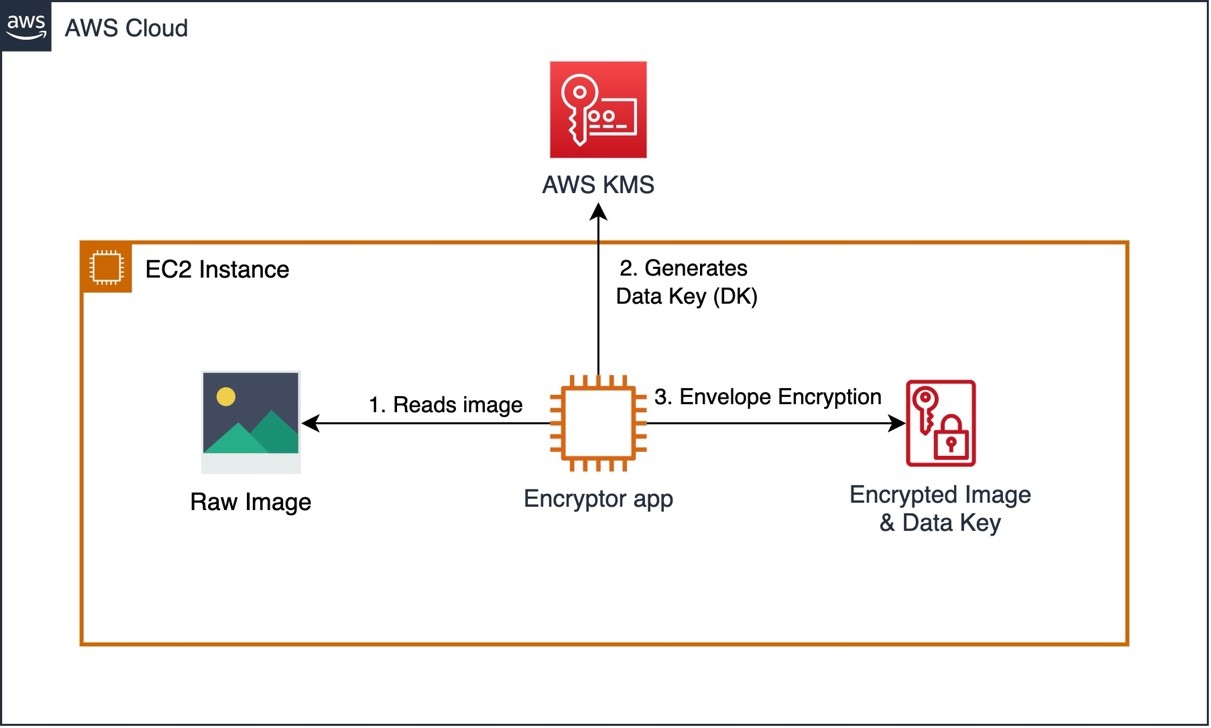
To encrypt this image, we are using a Python script (Encryptor app – see Figure 2) which runs on an EC2 instance, in a real-world scenario this step would be performed in a secure environment like a Nitro Enclave or a secured workstation before transferring the encrypted data. The Encryptor app uses AWS KMS envelope encryption with a symmetrical Customer Master Key (CMK) to encrypt the data.
Figure 2 – Image Encryption with AWS KMS using Envelope Encryption
Note, it’s also possible to use asymmetrical keys to perform the encryption/decryption.
Now that the image is encrypted, let’s look at each component and its role in the solution architecture, see Figure 3 below for reference.
The Client app reads the encrypted image file and sends it to the Server app over the vsock (secure local communication channel).
The Server app, running inside a Nitro Enclave, extracts the encrypted data key and sends it to AWS KMS for decryption. Once the data key is decrypted, the Server app uses it to decrypt the image and run inference on it to detect the objects in the image. Once the inference is complete, the results are returned to the Client app without exposing the original image or sensitive data.
To allow the Nitro Enclave to communicate with AWS KMS, we use the KMS Enclave Tool which uses the vsock to connect to AWS KMS and decrypt the encrypted key.
The vsock-proxy (packaged with the Nitro CLI) routes incoming traffic from the KMS Tool to AWS KMS provided that the AWS KMS endpoint is included on the vsock-proxy allowlist. The response from AWS KMS is then sent back to the KMS Enclave Tool over the vsock.
As part of the request to AWS KMS, the KMS Enclave Tool extracts and sends a signed attestation document to AWS KMS containing the enclave’s measurements to prove its identity. AWS KMS will validate the attestation document before decrypting the data key. Once validated, the data key is decrypted and securely returned to the KMS Tool which securely transfers it to the Server app to decrypt the image.
Figure 3 – Solution architecture diagram for this blog post
Environment Setup
Prerequisites
Before we get started, you will need the following prequisites to deploy the solution:
Download the CloudFormation (CFN) template nitro-enclave-demo.yaml. This template orchestrates an EC2 instance with the required networking components such as a VPC, Subnet and NAT Gateway.
Log in to the AWS Management Console and select the AWS Region where you’d like to deploy this stack. In the example, we select Canada (Central).
Choose Create Stack, Template is ready, Upload a template file. Choose File to select nitro-enclave-demo.yaml that you saved locally.
Choose Next, enter a stack name such as NitroEnclaveStack, choose Next.
On the subsequent screens, leave the defaults, and continue to select Next until you arrive at the Review step
At the Review step, scroll to the bottom and place a checkmark in “I acknowledge that AWS CloudFormation might create IAM resources with custom names.” and click “Create stack”
The stack status is initially CREATE_IN_PROGRESS. It will take around 5 minutes to complete. Click the Refresh button periodically to refresh the status. Upon completion, the status changes to CREATE_COMPLETE.
Once completed, click on “Resources” tab and search for “NitroEnclaveInstance”, click on its “Physical ID” to navigate to the EC2 instance
On the Amazon EC2 page, select the instance and click “Connect”
Choose “Session Manager” and click “Connect”
EC2 Instance Configuration
Now that the EC2 instance has been provisioned and you are connected to it, follow these steps to configure it:
Install the Nitro Enclaves CLI which will allow you to build and run a Nitro Enclave application:
A Nitro Enclave is an isolated environment which runs within the EC2 instance, hence we need to specify the resources (CPU & Memory) that the Nitro Enclaves allocator service dedicates to the enclave.
Enter the following commands to set the CPU and Memory available for the Nitro Enclave allocator service to allocate to your enclave container:
To verify the configuration has been applied, run the following command and note the values for memory_mib and cpu_count:
cat /etc/nitro_enclaves/allocator.yaml
Creating a Nitro Enclave Image
Download the Project and Build the Enclave Base Image
Now that the EC2 instance is configured, download the workload code and build the enclave base Docker image. This image contains the Nitro Enclaves Software Development Kit (SDK) which allows an enclave to request a cryptographically signed attestation document from the Nitro Hypervisor. The attestation document includes unique measurements (SHA384 hashes) that are used to prove the enclave’s identity to services such as AWS KMS.
Clone the Github Project
cd ~/ && git clone https://github.com/aws-samples/aws-nitro-enclaves-ai-ml-object-detection.git
Navigate to the cloned project’s folder and build the “enclave_base” image:
cd ~/aws-nitro-enclaves-ai-ml-object-detection/enclave-base-image
sudo docker build ./ -t enclave_base
Note: The above step will take approximately 8-10 minutes to complete.
Build and Run The Nitro Enclave Image
To build the Nitro Enclave image of the workload, build a docker image of your application and then use the Nitro CLI to build the Nitro Enclave image:
Download TensorFlow pre-trained model:
cd ~/aws-nitro-enclaves-ai-ml-object-detection/src
mkdir -p models/faster_rcnn_openimages_v4_inception_resnet_v2_1 && cd models/
wget -O tensorflow-model.tar.gz https://tfhub.dev/google/faster_rcnn/openimages_v4/inception_resnet_v2/1?tf-hub-format=compressed
tar -xvf tensorflow-model.tar.gz -C faster_rcnn_openimages_v4_inception_resnet_v2_1
Navigate to the use-case folder and build the docker image for the application:
cd ~/aws-nitro-enclaves-ai-ml-object-detection/src
sudo docker build ./ -t nitro-enclave-container-ai-ml:latest
Use the Nitro CLI to build an Enclave Image File (.eif) using the docker image you built in the previous step:
The output of the previous step produces the Platform configuration registers or PCR hashes and a nitro enclave image file (.eif). Take note of the PCR0 value, which is a hash of the enclave image file.Example PCR0:
Launch the Nitro Enclave container using the Enclave Image File (.eif) generated in the previous step and allocate resources to it. You should allocate at least 4 times the EIF file size for enclave memory. This is necessary because the tmpfs filesystem uses half of the memory and the remainder of the memory is used to uncompress the initial initramfs where the application executable resides. For CPU allocation, you should allocate CPU in full cores i.e. 2x vCPU for x86 hyper-threaded instances. In our case, we are going to allocate 14GB or 14,366 MB for the enclave:
Note: Allow a few seconds for the server to boot up prior to running the Client app in the below section “Object Detection using Nitro Enclaves”.
Update the KMS Key Policy to Include the PCR0 Hash
Now that you have the PCR0 value for your enclave image, update the KMS key policy to only allow your Nitro Enclave container access to the KMS key.
Navigate to AWS KMS in your AWS Console and make sure you are in the same region where your CloudFormation template was deployed
Select “Customer managed keys”
Search for a key with alias “EnclaveKMSKey” and click on it
Click “Edit” on the “Key Policy”
Scroll to the bottom of the key policy and replace the value of “EXAMPLETOBEUPDATED” for the “kms:RecipientAttestation:PCR0” key with the PCR0 hash you noted in the previous section and click “Save changes”
AI/ML Object Detection using a Nitro Enclave
Now that you have an enclave image file, run the components of the solution.
Requirements Installation for Client App
Install the python requirements using the following command:
cd ~/aws-nitro-enclaves-ai-ml-object-detection/src
pip3 install -r requirements.txt
Set the region that your CloudFormation stack is deployed in. In our case we selected Canada (Centra)
CFN_REGION=ca-central-1
Run the following command to encrypt the image using the AWS KMS key “EnclaveKMSKey”, make sure to replace “ca-central-1” with the region where you deployed your CloudFormation template:
Verify that the output contains: file encrypted? True Note: The previous command generates two files: an encrypted image file and an encrypted data key file. The data key file is generated so we can demonstrate an attempt from the parent instance at decrypting the data key.
Launching VSock Proxy
Launch the VSock Proxy which proxies requests from the Nitro Enclave to an external endpoint, in this case, to AWS KMS. Note the file vsock-proxy-config.yaml contains a list of endpoints which allow-lists the endpoints that an enclave can communicate with.
cd ~/aws-nitro-enclaves-ai-ml-object-detection/src
vsock-proxy 8001 "kms.$CFN_REGION.amazonaws.com" 443 --config vsock-proxy-config.yaml &
Object Detection using Nitro Enclaves
Send the encrypted image to the enclave to decrypt the image and use the AI/ML model to detect objects and return a summary of the objects detected:
cd ~/aws-nitro-enclaves-ai-ml-object-detection/src
python3 client.py --filePath ./images/air-show.jpg.encrypted | jq -C '.'
The previous step takes around a minute to complete when first called. Inside the enclave, the server application decrypts the image, runs it through the AI/ML model to generate a list of objects detected and returns that list to the client application.
Attempt to Decrypt Data Key using Parent Instance Credentials
To prove that the parent instance is not able to decrypt the content, attempt to decrypt the image using the parent’s credentials:
cd ~/aws-nitro-enclaves-ai-ml-object-detection/src
aws kms decrypt --ciphertext-blob fileb://images/air-show.jpg.data_key.encrypted --region $CFN_REGION
Note: The command is expected to fail with AccessDeniedException, since the parent instance is not allowed to decrypt the data key.
Select the stack you created earlier, such as NitroEnclaveStack.
Choose Delete, then choose Delete Stack.
The stack status is initially DELETE_IN_PROGRESS. Click the Refresh button periodically to refresh its status. The status changes to DELETE_COMPLETE after it’s finished and the stack name no longer appears in your list of active stacks.
Conclusion
In this post, we showcase how to process sensitive data with Nitro Enclaves using an AI/ML model deployed on Amazon EC2, as well as how to integrate an enclave with AWS KMS to restrict access to an AWS KMS CMK so that only the Nitro Enclave is allowed to use the key and decrypt the image.
We encrypt the sample data with envelope encryption to illustrate how to protect, transfer and securely process highly sensitive data. This process would be similar for any kind of sensitive information such as personally identifiable information (PII), healthcare or intellectual property (IP) which could also be the AI/ML model.
Dig deeper by exploring how to further restrict your AWS KMS CMK using additional PCR hashes such as PCR1 (hash of the Linux kernel and bootstrap), PCR2 (Hash of the application), and other hashes available to you.
Also, try our comprehensive Nitro Enclave workshop which includes use-cases at different complexity levels.
Through Cloudflare’s Impact programs, we provide cyber security products to help protect access to authoritative voting information and the security of sensitive voter data. Two core programs in this space are the Athenian Project, dedicated to protecting state and local governments that run elections, and Cloudflare for Campaigns, a project with a suite of Cloudflare products to secure political campaigns’ and state parties’ websites and internal teams.
However, the weeks ahead of the elections, and Election Day itself, were not entirely devoid of attacks. Using data from Cloudflare Radar, which showcases global Internet traffic, attack, and technology trends and insights, we can explore traffic patterns, attack types, and top attack sources associated with both Athenian Project and Cloudflare for Campaigns participants.
For both programs, overall traffic volume unsurprisingly ramped up as Election Day approached. SQL Injection (SQLi) and HTTP Anomaly attacks were the two largest categories of attacks mitigated by Cloudflare’s Web Application Firewall (WAF), and the United States was the largest source of observed attacks — see more on this last point below.
Below, we explore the trends seen across both customer sets from October 1, 2022, through Election Day on November 8.
Athenian Project
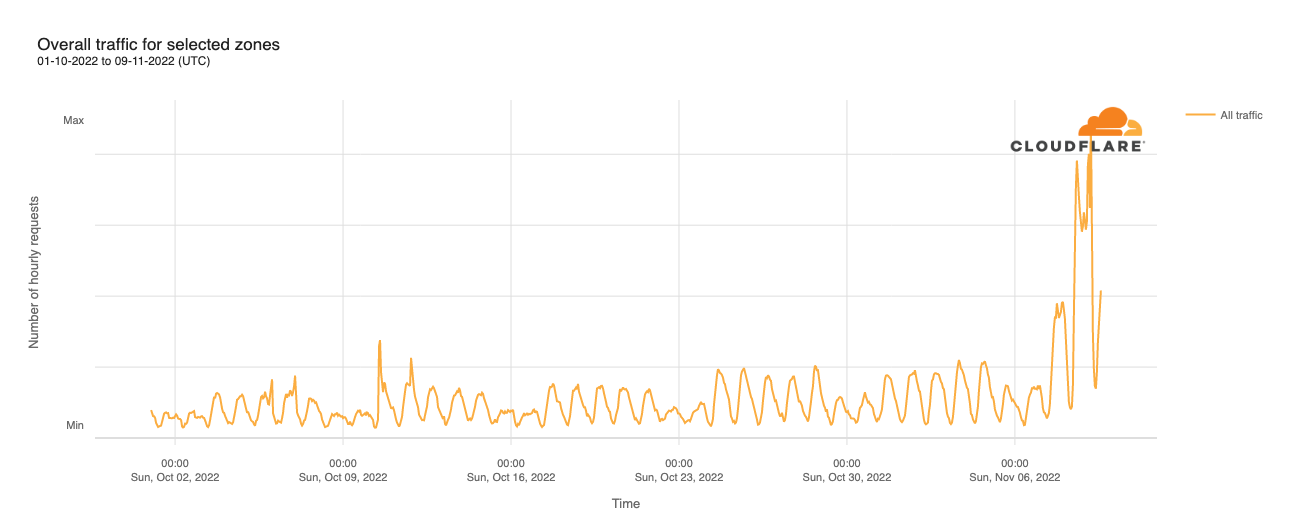
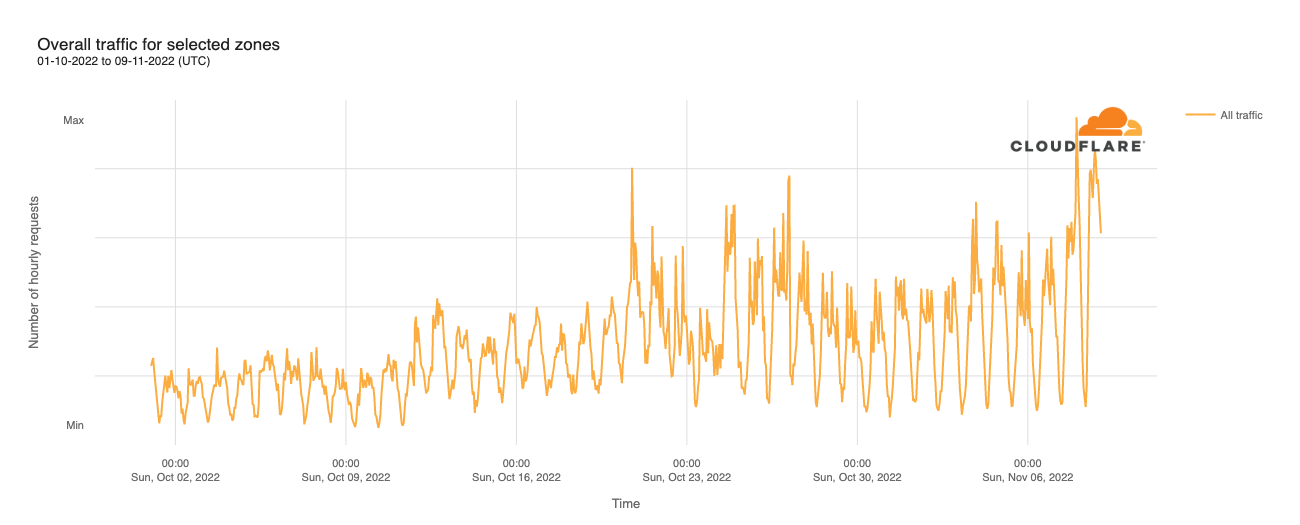
Throughout October, daily peak traffic volumes effectively doubled over the course of the month, with a weekday/weekend pattern also clearly visible. However, significant traffic growth is visible on Monday, November 7, and Tuesday, November 8 (Election Day), with Monday’s peak just under 2x October’s peaks, while Tuesday saw two peaks, one just under 4x higher than October peaks, while the other was just over 4x higher. Zooming in, the first peak was at 1300 UTC (0800 Eastern time, 0500 Pacific time), while the second was at 0400 UTC (2300 Eastern time, 2000 Pacific time). The first one appears to be aligned with the polls opening on the East Coast, while the second appears to be aligned with the time that the polls closed on the West Coast.
However, aggregating the traffic here presents a somewhat misleading picture. While both spikes were due to increased traffic across multiple customer sites, the second one was exacerbated by a massive increase in traffic for a single customer. Regardless, the increased traffic clearly shows that voters turned to local government sites around Election Day.
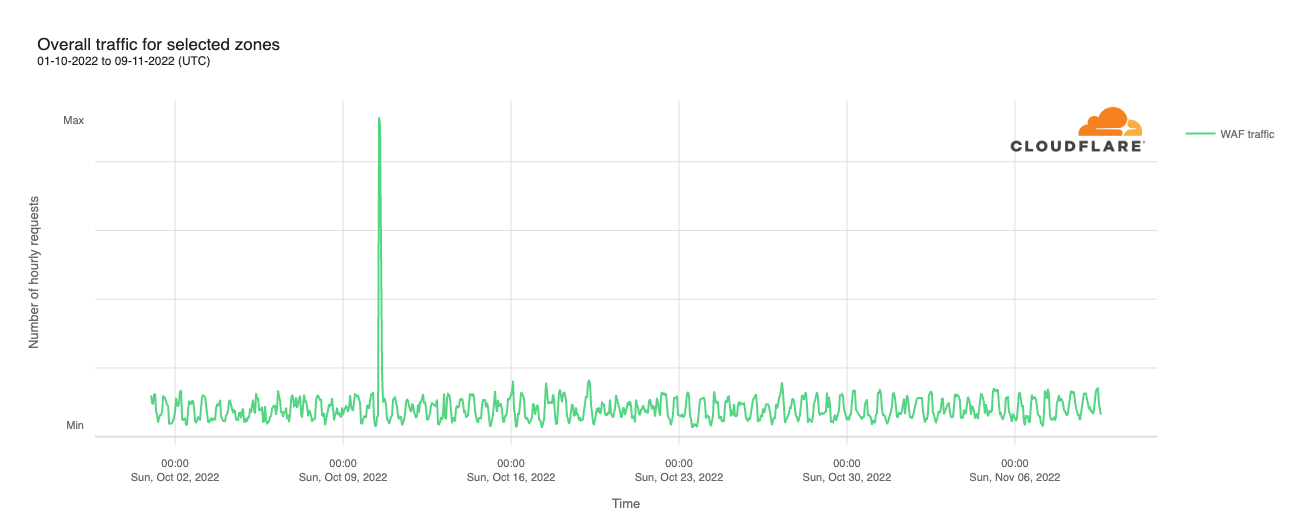
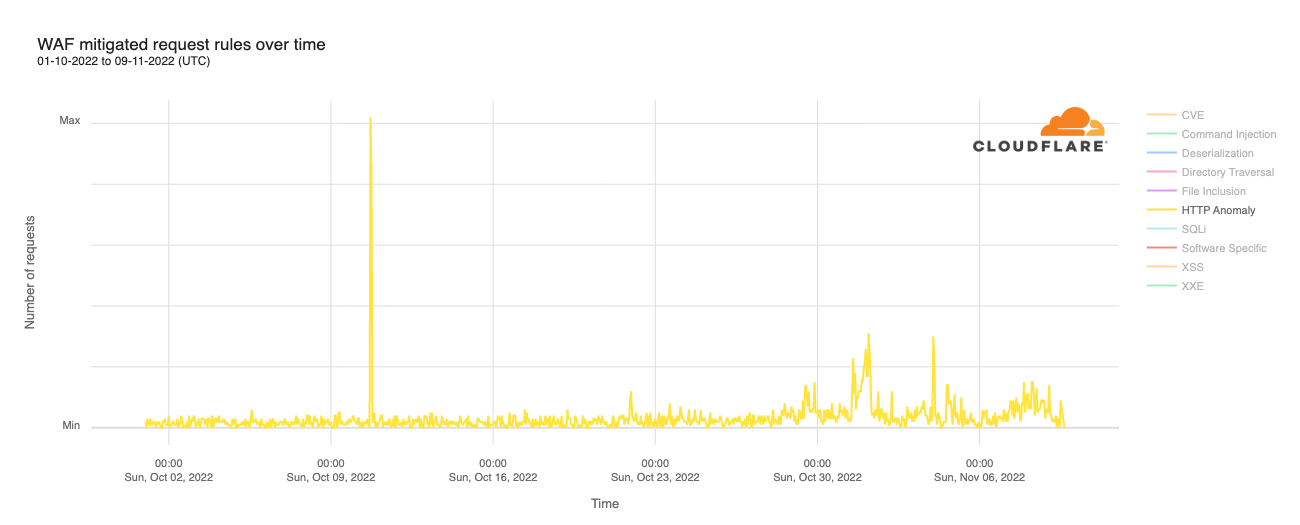
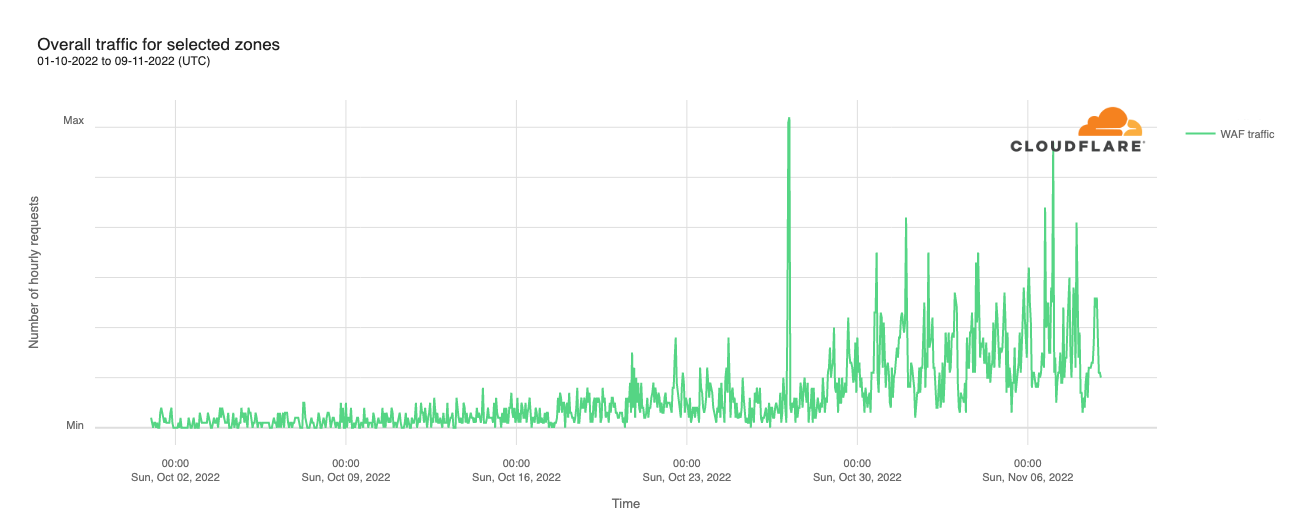
Despite this increase in overall traffic, attack traffic mitigated by Cloudflare’s Web Application Firewall (WAF) remained remarkably consistent throughout October and into November, as seen in the graph below. The obvious exception was an attack that occurred on Monday, October 10. This attack targeted a single Athenian Project participant, and was mitigated by rate limiting the requests.
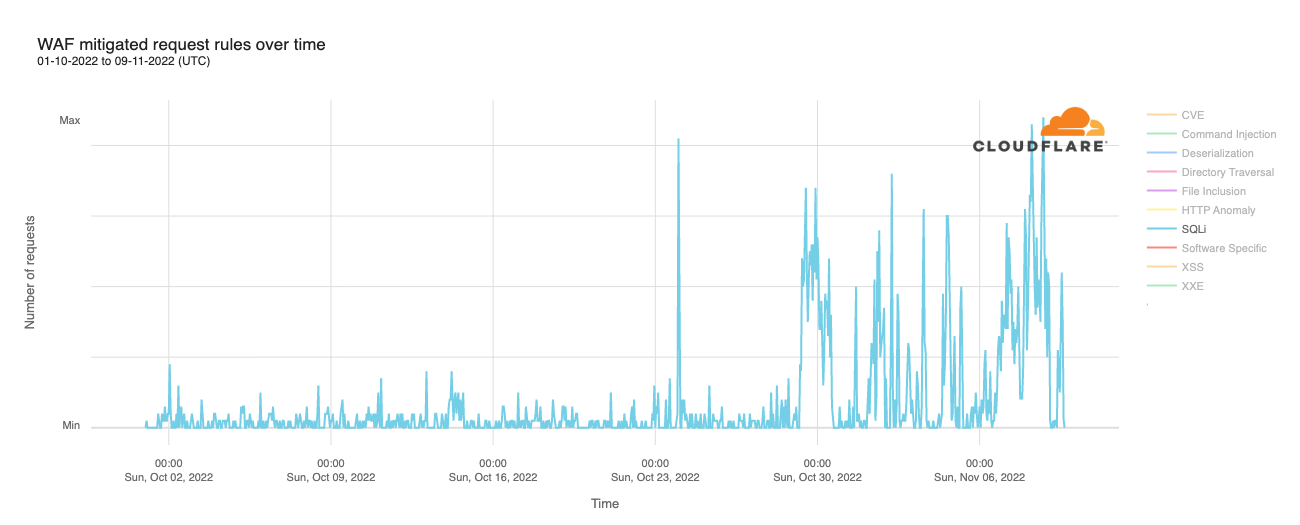
SQL injection (SQLi) attacks saw significant growth in volume in the week and a half ahead of Election Day, along with an earlier significant spike on October 24. While the last weekend in October (October 29 and 30) saw significant SQLi attack activity, the weekend of November 5 and 6 was comparatively quiet. However, those attacks ramped up again heading into and on Election Day, as seen in the graph below.
Attempted attacks mitigated with the HTTP Anomaly ruleset also ramped up in the week ahead of Election Day, though to a much lesser extent than SQLi attacks. As the graph below shows, the biggest spikes were seen on October 31/November 1, and just after midnight UTC on November 4 (late afternoon to early evening in the US). Related request volume also grew heading into Election Day, but without significant short-duration spikes. There is also a brief but significant attack clearly visible on the graph on October 10. However, it occurred several hours after the rate limited attack referenced above — it is not clear if the two are related.
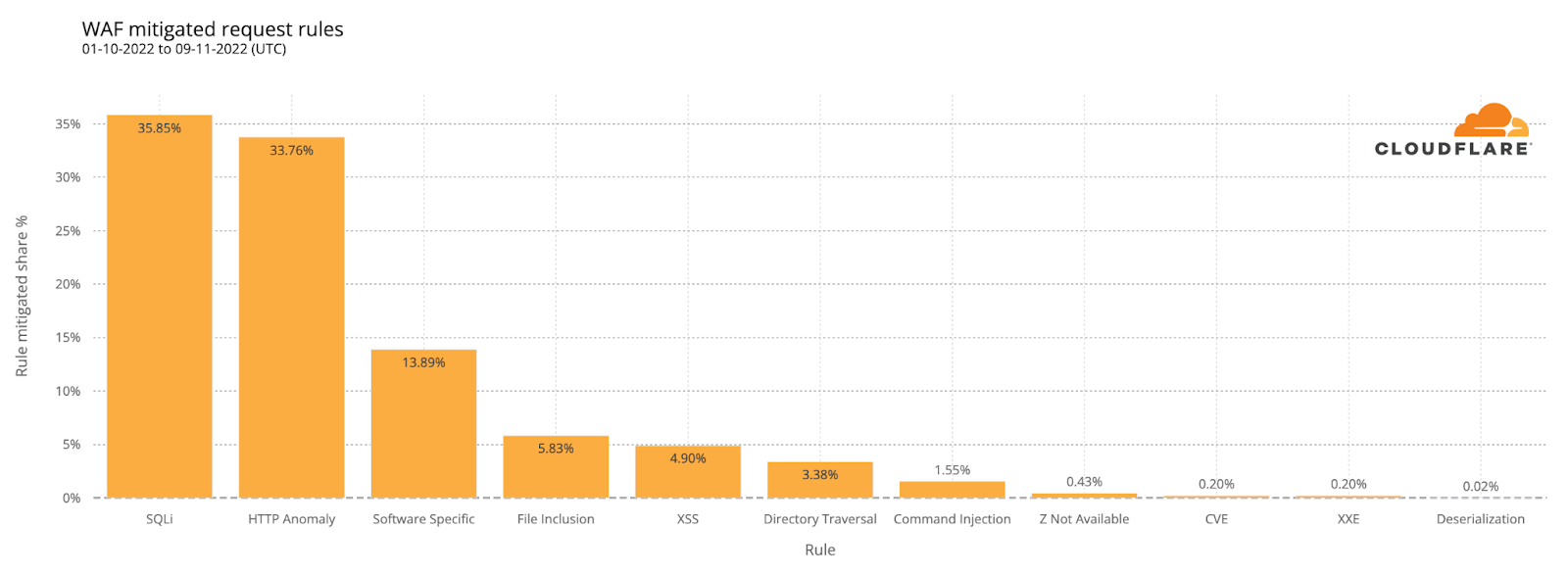
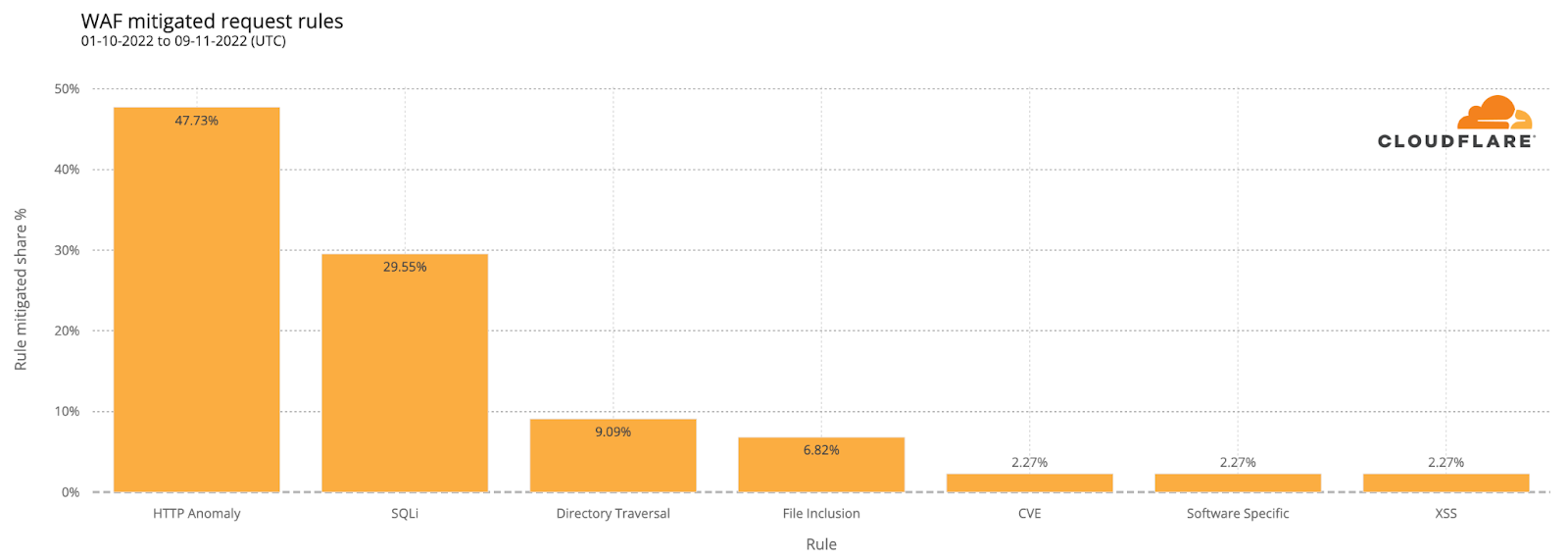
The distribution of attacks over the surveyed period from October 1 through November 9 shows that those categorized as SQLi and HTTP Anomaly were responsible for just over two-thirds of WAF-mitigated requests. Nearly 14% were categorized as “Software Specific,” which includes attacks related to specific CVEs. The balance of the attacks were mitigated by WAF rules in categories including File Inclusion, XSS (Cross Site Scripting), Directory Traversal, and Command Injection.
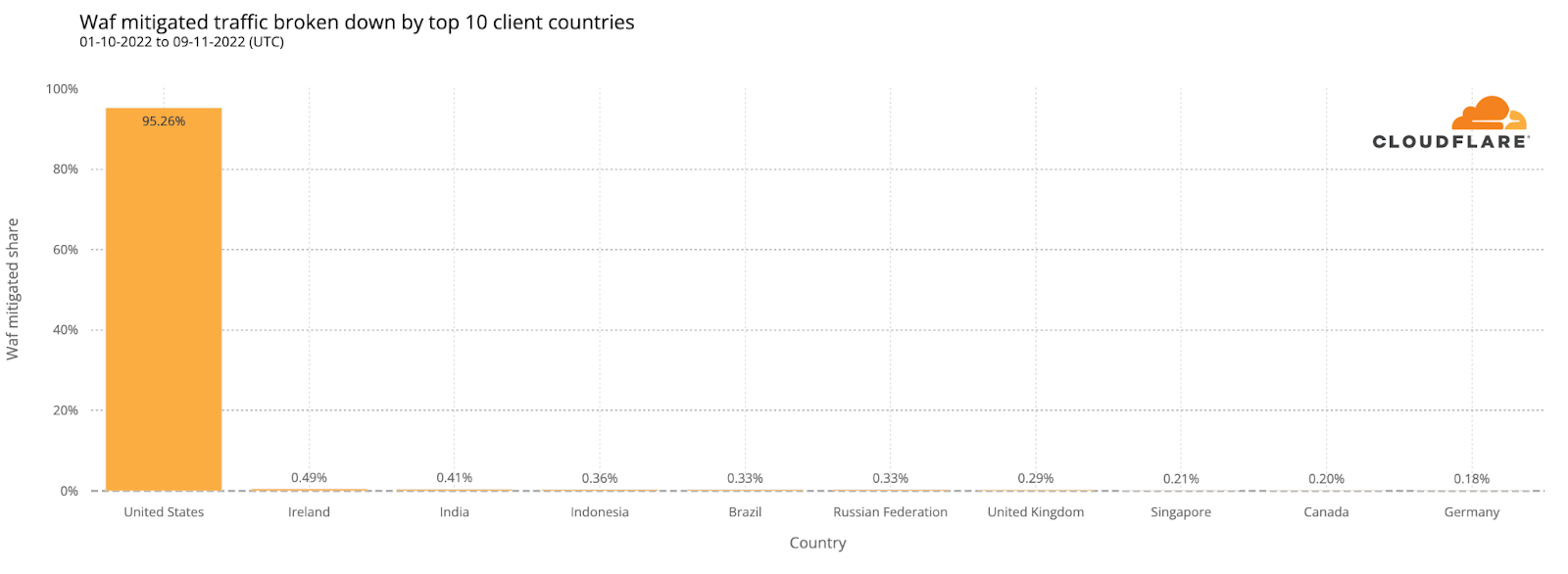
Media reports suggest that foreign adversaries actively try to interfere with elections in the United States. While this may be the case, analysis of the mitigated attacks targeting Athenian Project customers found that over 95% of the mitigated requests (attacks) came from IP addresses that geolocate to the United States. However, that does not mean that the attackers themselves are necessarily located in the country, but rather that they appear to be using compromised systems and proxies within the United States to launch their attacks against these sites protected by Cloudflare.
Cloudflare for Campaigns
In contrast to Athenian Project participants, traffic to candidate sites that are participants in Cloudflare for Campaigns began to grow several weeks ahead of Election Day. The graph below shows a noticeable increase (~50%) in peak traffic volumes starting on October 12, with an additional growth (50-100%) starting a week later. Traffic to these sites appeared to quiet a bit toward the end of October, but saw significant growth again heading into, and during, Election Day.
However, once again, this aggregate traffic data presents something of a misleading picture, as one candidate site saw multiple times more traffic than the other participating sites. While those other sites saw similar shifts in traffic as well, they were dwarfed by those experienced by the outlier site.
The WAF-mitigated traffic trend for campaign sites followed a similar pattern to the overall traffic. As the graph below shows, attack traffic also began to increase around October 19, with a further ramp near the end of the month. The October 27 spike visible in the graph was due to an attack targeting a single customer’s site, and was addressed using “Security Level” mitigation techniques, which uses IP reputation information to decide if and how to present challenges for incoming requests.
The top two rule categories, HTTP Anomaly and SQLi, together accounted for nearly three-quarters of the mitigated requests, and Directory Traversal attacks were just under 10% of mitigated requests for this customer set. The HTTP Anomaly and Directory Traversal percentages were higher than those for attacks targeting Athenian Project participants, while the SQLi percentage was slightly lower.
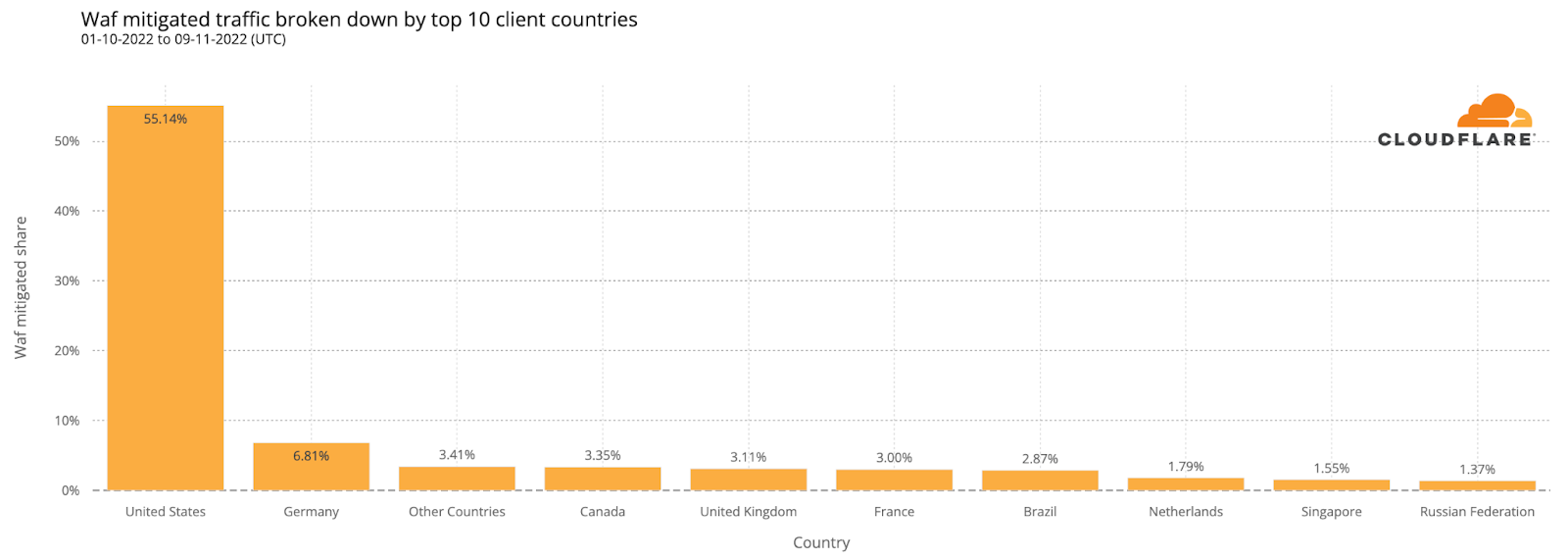
Once again, a majority of the WAF-mitigated attacks came from IP addresses in the United States. However, among Cloudflare for Campaigns participants, the United States only accounted for 55% of attacks, significantly lower than the 95% seen for Athenian Project participants. The balance is spread across a long tail of countries, with allies including Germany, Canada, and the United Kingdom among the top five. As noted above, however, the attackers may be elsewhere, and are using botnets or other compromised systems in these countries to launch attacks.
Improving security with data
We are proud to be trusted by local governments, campaigns, state parties, and voting rights organizations to protect their websites and provide uninterrupted access to information and trusted election results. Sharing information about the threats facing these websites helps us further support their valuable work by enabling them, and other participants in the election space, to take proactive steps to improve site security.
Streaming services serve content to millions of users all over the world. These services allow users to stream or download content across a broad category of devices including mobile phones, laptops, and televisions. However, some restrictions are in place, such as the number of active devices, the number of streams, and the number of downloaded titles. Many users across many platforms make for a uniquely large attack surface that includes content fraud, account fraud, and abuse of terms of service. Detection of fraud and abuse at scale and in real-time is highly challenging.
Data analysis and machine learning techniques are great candidates to help secure large-scale streaming platforms. Even though such techniques can scale security solutions proportional to the service size, they bring their own set of challenges such as requiring labeled data samples, defining effective features, and finding appropriate algorithms. In this work, by relying on the knowledge and experience of streaming security experts, we define features based on the expected streaming behavior of the users and their interactions with devices. We present a systematic overview of the unexpected streaming behaviors together with a set of model-based and data-driven anomaly detection strategies to identify them.
Background on Anomaly Detection
Anomalies (also known as outliers) are defined as certain patterns (or incidents) in a set of data samples that do not conform to an agreed-upon notion of normal behavior in a given context.
There are two main anomaly detection approaches, namely, (i) rule-based, and (ii) model-based. Rule-based anomaly detection approaches use a set of rules which rely on the knowledge and experience of domain experts. Domain experts specify the characteristics of anomalous incidents in a given context and develop a set of rule-based functions to discover the anomalous incidents. As a result of this reliance, the deployment and use of rule-based anomaly detection methods become prohibitively expensive and time-consuming at scale, and cannot be used for real-time analyses. Furthermore, the rule-based anomaly detection approaches require constant supervision by experts in order to keep the underlying set of rules up-to-date for identifying novel threats. Reliance on experts can also make rule-based approaches biased or limited in scope and efficacy.
On the other hand, in model-based anomaly detection approaches, models are built and used to detect anomalous incidents in a fairly automated manner. Although model-based anomaly detection approaches are more scalable and suitable for real-time analysis, they highly rely on the availability of (often labeled) context-specific data. Model-based anomaly detection approaches, in general, are of three kinds, namely, (i) supervised, (ii) semi-supervised, and (iii) unsupervised. Given a labeled dataset, a supervised anomaly detection model can be built to distinguish between anomalous and benign incidents. In semi-supervised anomaly detection models, only a set of benign examples are required for training. These models learn the distributions of benign samples and leverage that knowledge for identifying anomalous samples at the inference time. Unsupervised anomaly detection models do not require any labeled data samples, but it is not straightforward to reliably evaluate their efficacy.
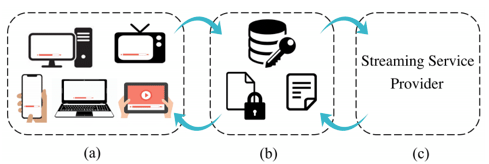
Figure 1. Schematic of a streaming service platform: (a) illustrates device types that can be used for streaming, (b) designates the set of authentication and authorization systems such as license and manifest servers for providing encrypted contents as well as decryption keys and manifests, and (c) shows the streaming service provider, as a surrogate entity for digital content providers, that interacts with the other two components.
Streaming Platforms
Commercial streaming platforms shown in Figure 1 mainly rely on Digital Rights Management (DRM) systems. DRM is a collection of access control technologies that are used for protecting the copyrights of digital media such as movies and music tracks. DRM helps the owners of digital products prevent illegal access, modification, and distribution of their copyrighted work. DRM systems provide continuous content protection against unauthorized actions on digital content and restrict it to streaming and in-time consumption. The backbone of DRM is the use of digital licenses, which specify a set of usage rights for the digital content and contain the permissions from the owner to stream the content via an on-demand streaming service.
On the client’s side, a request is sent to the streaming server to obtain the protected encrypted digital content. In order to stream the digital content, the user requests a license from the clearinghouse that verifies the user’s credentials. Once a license gets assigned to a user, using a Content Decryption Module (CDM), the protected content gets decrypted and becomes ready for preview according to the usage rights enforced by the license. A decryption key gets generated using the license, which is specific to a certain movie title, can only be used by a particular account on a given device, has a limited lifetime, and enforces a limit on how many concurrent streams are allowed.
Another relevant component that is involved in a streaming experience is the concept of manifest. Manifest is a list of video, audio, subtitles, etc. which comes in the form of a few Uniform Resource Locators (URLs) that are used by the clients to get the movie streams. Manifest is requested by the client and gets delivered to the player before the license request, and it itemizes the available streams.
Data
Data Labeling
For the task of anomaly detection in streaming platforms, as we have neither an already trained model nor any labeled data samples, we use structural a priori domain-specific rule-based assumptions, for data labeling. Accordingly, we define a set of rule-based heuristics used for identifying anomalous streaming behaviors of clients and label them as anomalous or benign. The fraud categories that we consider in this work are (i) content fraud, (ii) service fraud, and (iii) account fraud. With the help of security experts, we have designed and developed heuristic functions in order to discover a wide range of suspicious behaviors. We then use such heuristic functions for automatically labeling the data samples. In order to label a set of benign (non-anomalous) accounts a group of vetted users that are highly trusted to be free of any forms of fraud is used.
Next, we share three examples as a subset of our in-house heuristics that we have used for tagging anomalous accounts:
(i) Rapid license acquisition: a heuristic that is based on the fact that benign users usually watch one content at a time and it takes a while for them to move on to another content resulting in a relatively low rate of license acquisition. Based on this reasoning, we tag all the accounts that acquire licenses very quickly as anomalous.
(ii) Too many failed attempts at streaming: a heuristic that relies on the fact that most devices stream without errors while a device, in trial and error mode, in order to find the “right’’ parameters leaves a long trail of errors behind. Abnormally high levels of errors are an indicator of a fraud attempt.
(iii) Unusual combinations of device types and DRMs: a heuristic that is based on the fact that a device type (e.g., a browser) is normally matched with a certain DRM system (e.g., Widevine). Unusual combinations could be a sign of compromised devices that attempt to bypass security enforcements.
It should be noted that the heuristics, even though work as a great proxy to embed the knowledge of security experts in tagging anomalous accounts, may not be completely accurate and they might wrongly tag accounts as anomalous (i.e., false-positive incidents), for example in the case of a buggy client or device. That’s up to the machine learning model to discover and avoid such false-positive incidents.
Data Featurization
A complete list of features used in this work is presented in Table 1. The features mainly belong to two distinct classes. One class accounts for the number of distinct occurrences of a certain parameter/activity/usage in a day. For instance, the dist_title_cnt feature characterizes the number of distinct movie titles streamed by an account. The second class of features on the other hand captures the percentage of a certain parameter/activity/usage in a day.
Due to confidentiality reasons, we have partially obfuscated the features, for instance, dev_type_a_pct, drm_type_a_pct, and end_frmt_a_pct are intentionally obfuscated and we do not explicitly mention devices, DRM types, and encoding formats.
Table 1. The list of streaming related features with the suffixes pct and cnt respectively referring to percentage and count
Data Statistics
In this part, we present the statistics of the features presented in Table 1. Over 30 days, we have gathered 1,030,005 benign and 28,045 anomalous accounts. The anomalous accounts have been identified (labeled) using the heuristic-aware approach. Figure 2(a) shows the number of anomalous samples as a function of fraud categories with 8,741 (31%), 13,299 (47%), 6,005 (21%) data samples being tagged as content fraud, service fraud, and account fraud, respectively. Figure 2(b) shows that out of 28,045 data samples being tagged as anomalous by the heuristic functions, 23,838 (85%), 3,365 (12%), and 842 (3%) are respectively considered as incidents of one, two, and three fraud categories.
Figure 3 presents the correlation matrix of the 23 data features described in Table 1 for clean and anomalous data samples. As we can see in Figure 3 there are positive correlations between features that correspond to device signatures, e.g., dist_cdm_cnt and dist_dev_id_cnt, and between features that refer to title acquisition activities, e.g., dist_title_cnt and license_cnt.
Figure 2. Number of anomalous samples as a function of (a) fraud categories and (b) number of tagged categories.Figure 3. Correlation matrix of the features presented in Table 1 for (a) clean and (b) anomalous data samples.
Label Imbalance Treatment
It is well known that class imbalance can compromise the accuracy and robustness of the classification models. Accordingly, in this work, we use the Synthetic Minority Over-sampling Technique (SMOTE) to over-sample the minority classes by creating a set of synthetic samples.
Figure 4 shows a high-level schematic of Synthetic Minority Over-sampling Technique (SMOTE) with two classes shown in green and red where the red class has fewer number of samples present, i.e., is the minority class, and gets synthetically upsampled.
For evaluating the performance of the anomaly detection models we consider a set of evaluation metrics and report their values. For the one-class as well as binary anomaly detection task, such metrics are accuracy, precision, recall, f0.5, f1, and f2 scores, and area under the curve of the receiver operating characteristic (ROC AUC). For the multi-class multi-label task we consider accuracy, precision, recall, f0.5, f1, and f2 scores together with a set of additional metrics, namely, exact match ratio (EMR) score, Hamming loss, and Hamming score.
Model Based Anomaly Detection
In this section, we briefly describe the modeling approaches that are used in this work for anomaly detection. We consider two model-based anomaly detection approaches, namely, (i) semi-supervised, and (ii) supervised as presented in Figure 5.
The key point about the semi-supervised model is that at the training step the model is supposed to learn the distribution of the benign data samples so that at the inference time it would be able to distinguish between the benign samples (that has been trained on) and the anomalous samples (that has not observed). Then at the inference stage, the anomalous samples would simply be those that fall out of the distribution of the benign samples. The performance of One-Class methods could become sub-optimal when dealing with complex and high-dimensional datasets. However, supported by the literature, deep neural autoencoders can perform better than One-Class methods on complex and high-dimensional anomaly detection tasks.
As the One-Class anomaly detection approaches, in addition to a deep auto-encoder, we use the One-Class SVM, Isolation Forest, Elliptic Envelope, and Local Outlier Factor approaches.
Supervised Anomaly Detection
Binary Classification: In the anomaly detection task using binary classification, we only consider two classes of samples namely benign and anomalous and we do not make distinctions between the types of the anomalous samples, i.e., the three fraud categories. For the binary classification task we use multiple supervised classification approaches, namely, (i) Support Vector Classification (SVC), (ii) K-Nearest Neighbors classification, (iii) Decision Tree classification, (iv) Random Forest classification, (v) Gradient Boosting, (vi) AdaBoost, (vii) Nearest Centroid classification (viii) Quadratic Discriminant Analysis (QDA) classification (ix) Gaussian Naive Bayes classification (x) Gaussian Process Classifier (xi) Label Propagation classification (xii) XGBoost. Finally, upon doing stratified k-fold cross-validation, we carry out an efficient grid search to tune the hyper-parameters in each of the aforementioned models for the binary classification task and only report the performance metrics for the optimally tuned hyper-parameters.
Multi-Class Multi-Label Classification: In the anomaly detection task using multi-class multi-label classification, we consider the three fraud categories as the possible anomalous classes (hence multi-class), and each data sample is assigned one or more than one of the fraud categories as its set of labels (hence multi-label) using the heuristic-aware data labeling strategy presented earlier. For the multi-class multi-label classification task we use multiple supervised classification techniques, namely, (i) K-Nearest Neighbors, (ii) Decision Tree, (iii) Extra Trees, (iv) Random Forest, and (v) XGBoost.
Results and Discussion
Table 2 shows the values of the evaluation metrics for the semi-supervised anomaly detection methods. As we see from Table 2, the deep auto-encoder model performs the best among the semi-supervised anomaly detection approaches with an accuracy of around 96% and f1 score of 94%. Figure 6(a) shows the distribution of the Mean Squared Error (MSE) values for the anomalous and benign samples at the inference stage.
Table 2. The values of the evaluation metrics for a set of semi-supervised anomaly detection models.Figure 6. For the deep auto-encoder model: (a) distribution of the Mean Squared Error (MSE) values for anomalous and benign samples at the inference stage — (b) confusion matrix across benign and anomalous samples- (c) Mean Squared Error (MSE) values averaged across the anomalous and benign samples for each of the 23 features.Table 3. The values of the evaluation metrics for a set of supervised binary anomaly detection classifiers.Table 4. The values of the evaluation metrics for a set of supervised multi-class multi-label anomaly detection approaches. The values in parenthesis refer to the performance of the models trained on the original (not upsampled) dataset.
Table 3 shows the values of the evaluation metrics for a set of supervised binary anomaly detection models. Table 4 shows the values of the evaluation metrics for a set of supervised multi-class multi-label anomaly detection models.
In Figure 7(a), for the content fraud category, the three most important features are the count of distinct encoding formats (dist_enc_frmt_cnt), the count of distinct devices (dist_dev_id_cnt), and the count of distinct DRMs (dist_drm_cnt). This implies that for content fraud the uses of multiple devices, as well as encoding formats, stand out from the other features. For the service fraud category in Figure 7(b) we see that the three most important features are the count of content licenses associated with an account (license_cnt), the count of distinct devices (dist_dev_id_cnt), and the percentage use of type (a) devices by an account (dev_type_a_pct). This shows that in the service fraud category the counts of content licenses and distinct devices of type (a) stand out from the other features. Finally, for the account fraud category in Figure 7(c), we see that the count of distinct devices (dist_dev_id_cnt) dominantly stands out from the other features.
Figure 7. The normalized feature importance values (NFIV) for the multi-class multi-label anomaly detection task using the XGBoost approach in Table 4 across the three anomaly classes, i.e., (a) content fraud, (b) service fraud, and (c) account fraud.
You can find more technical details in our paper here.
Are you interested in solving challenging problems at the intersection of machine learning and security? We are always looking for great people to join us.
In the first post in this series, we detailed how we designed our easy‐to‐use column encryption paved path. We found during the rollout that the bulk of time and effort was spent in robustly supporting the reading and upgrading of previous encryption formats/plaintext and key rotation. In this post, we’ll explain the design decisions we made in our migration plan and describe a simplified migration pattern you can use to encrypt (or re-encrypt) existing records in your Rails application.
We have two cases for encrypted columns data migration–upgrading plaintext or previously encrypted data to our new standard and key rotation.
Upon consulting the Rails documentation to see if there was any prior art we could use, we found the previous encryptor strategy but exactly how to migrate existing data is, as they say, an “exercise left for the reader.”
Dear reader, lace up your sneakers because we are about to exercise.
To convert plaintext columns or columns encrypted with our deprecated internal encryption library, we used ActiveRecord::Encryption’s previous encryptor strategy, our existing feature flag mechanism and our own type of database migration called a transition. Transitions are used by GitHub to modify existing data, as opposed to migrations that are mainly used to add or change columns. To simplify things and save time, in the example migration strategy, we’ll rely on the Ruby gem, MaintenanceTasks.
Previous encryptor strategy
ActiveRecord::Encryption provides as a config option config.active_record.encryption.support_unencrypted_data that allows plaintext values in an encrypted_attribute to be read without error. This is enabled globally and could be a good strategy to use if you are migrating only plaintext columns and you are going to migrate them all at once. We chose not to use this option because we want to migrate columns to ActiveRecord::Encryption without exposing the ciphertext of other columns if decryption fails. By using a previous encryptor, we can isolate this “plaintext mode” to a single model.
In addition to this, GitHub’s previous encryptor uses a schema validator and regex to make sure that the “plaintext” being returned does not have the same shape as Rails encrypted columns data.
Feature flag strategy
We wanted to have fine-grained control to safely roll out our new encryption strategy, as well as the ability to completely disable it in case something went wrong, so we created our own custom type using the ActiveModel::Type API, which would only perform encryption when the feature flag for our new column encryption strategy was disabled.
A common feature flag strategy would be to start a feature flag at 0% and gradually ramp it up to 100% while you observe and verify the effects on your application. Once a flag is verified at 100%, you would remove the feature flag logic and delete the flag. To gradually increase a flag on column encryption, we would need to have an encryption strategy that could handle plaintext and encrypted records both back and forth because there would be no way to know if a column was encrypted without attempting to read it first. This seemed like unnecessary additional and confusing work, so we knew we’d want to use flagging as an on/off switch.
While a feature flag should generally not be long running, we needed the feature flag logic to be long running because we want it to be available for GitHub developers who will want to upgrade existing columns to use ActiveRecord::Encryption.
This is why we chose to inverse the usual feature flag default to give us the flexibility to upgrade columns incrementally without introducing unnecessary long‐running feature flags. This means we set the flag at 100% to prevent records from being encrypted with the new standard and set it to 0% to cause them to be encrypted with our new standard. If for some reason we are unable to prioritize upgrading a column, other columns do not need to be flagged at 100% to continue to be encrypted on our new standard.
We added this logic to our monkeypatch of ActiveRecord::Base::encrypts method to ensure our feature flag serializer is used:
Code sample 1
self.attribute(attribute) do |cast_type|
    GitHub::Encryption::FeatureFlagEncryptedType.new(cast_type: cast_type, attribute_name: attribute, model_name: self.name)
end
Which instantiates our new ActiveRecord Type that checks for the flag in its serialize method:
Code sample 2
# frozen_string_literal: true

module GitHub
  module Encryption
    class FeatureFlagEncryptedType < ::ActiveRecord::Type::Text
      attr_accessor :cast_type, :attribute_name, :model_name


      # delegate: a method to make a call to `this_object.foo.bar` into `this_object.bar` for convenience
      # deserialize: Take a value from the database, and make it suitable for Rails
      # changed_in_place?: determine if the value has changed and needs to be rewritten to the database
      delegate :deserialize, :changed_in_place?
, to: :cast_type

      def initialize(cast_type:, attribute_name:, model_name:)
        raise RuntimeError, "Not an EncryptedAttributeType" unless cast_type.is_a?(ActiveRecord::Encryption::EncryptedAttributeType)

        @cast_type = cast_type
        @attribute_name = attribute_name
        @model_name = model_name
      end


      # Take a value from Rails and make it suitable for the database
      def serialize(value)
        if feature_flag_enabled?("encrypt_as_plaintext_#{model_name.downcase}_#{attribute_name.downcase}")
          # Fall back to plaintext (ignore the encryption serializer)
          cast_type.cast_type.serialize(value)
        else
          # Perform encryption via active record encryption serializer
          cast_type.serialize(value)
        end
      end
    end
  end
end
A caveat to this implementation is that we extended from ActiveRecord::Type::Text which extends from ActiveModel::Type:String, which implements changed_in_place? by checking if the new_value is a string, and, if it is, does a string comparison to determine if the value was changed.
We ran into this caveat during our roll out of our new encrypted columns. When migrating a column previously encrypted with our internal encryption library, we found that changed_in_place? would compare the decrypted plaintext value to the encrypted value stored in the database, always marking the record as changed in place as these were never equal. When we migrated one of our fields related to 2FA recovery codes, this had the unexpected side effect of causing them to all appear changed in our audit log logic and created false-alerts in customer facing security logs. Fortunately, though, there was no impact to data and our authentication team annotated the false alerts to indicate this to affected customers.
To address the cause, we delegated the changed_in_place? to the cast_type, which in this case will always be ActiveRecord::Encryption::EncryptedAttributeType that attempts to deserialize the previous value before comparing it to the new value.
Key rotation
ActiveRecord::Encryption accommodates for a list of keys to be used so that the most recent one is used to encrypt records, but all entries in the list will be tried until there is a successful decryption or an ActiveRecord::DecryptionError is raised. On its own, this will ensure that when you add a new key, records that are updated after will automatically be re-encrypted with the new key.
This functionality allows us to reuse our migration strategy (see code sample 5) to re-encrypt all records on a model with the new encryption key. We do this simply by adding a new key and running the migration to re-encrypt.
Example migration strategy
This section will describe a simplified version of our migration process you can replicate in your application. We use a previous encryptor to implement safe plaintext support and the maintanence_tasks gem to backfill the existing records.
Set up ActiveRecord::Encryption and create a previous encryptor
Because this is a simplified example of our own migration strategy, we recommend using a previous encryptor to restrict the “plaintext mode” of ActiveRecord::Encryption to the specific model(s) being migrated.
Set up ActiveRecord::Encryption by generating random key set:
bin/rails db:encryption:init
And adding it to the encrypted Rails.application.credentials using:
bin/rails credentials:edit
If you do not have a master.key, this command will generate one for you. Remember never to commit your master key!
Create a previous encryptor. Remember, when you provide a previous strategy, ActiveRecord::Encryption will use the previous to decrypt and the current (in this case ActiveRecord’s default encryptor) to encrypt the records.
Code sample 3
app/lib/encryption/previous_encryptor.rb

# frozen_string_literal: true

module Encryption
  class PreviousEncryptor
    def encrypt(clear_text, key_provider: nil, cipher_options: {})
        raise NotImplementedError.new("This method should not be called")
    end

    def decrypt(previous_data, key_provider: nil, cipher_options: {})
      # JSON schema validation
        previous_data
    end
  end
end
Add the previous encryptor to the encrypted column
Code sample 4
app/models/secret.rb
class Secret < ApplicationRecord
  encrypts :code, previous: { encryptor: Encryption::PreviousEncryptor.new }
end
The PreviousEncryptor will allow plaintext records to be read as plaintext but will encrypt all new records up until and while the task is running.
Install the Maintenance Tasks gem and create a task
Install the Maintenance Tasks gem per the instructions and you will be ready to create the maintenance task.
In day‐to‐day use, you shouldn’t ever need to call secret.encrypt because ActiveRecord handles the encryption before inserting into the database, but we can use this API in our task:
Code sample 5
app/tasks/maintenance/encrypt_plaintext_secrets_task.rb

# frozen_string_literal: true

module Maintenance
  class EncryptPlaintextSecretsTask < MaintenanceTasks::Task
    def collection
      Secret.all
    end

    def process(element)
      element.encrypt
    end
      …
  end
end
Run the Maintenance Task
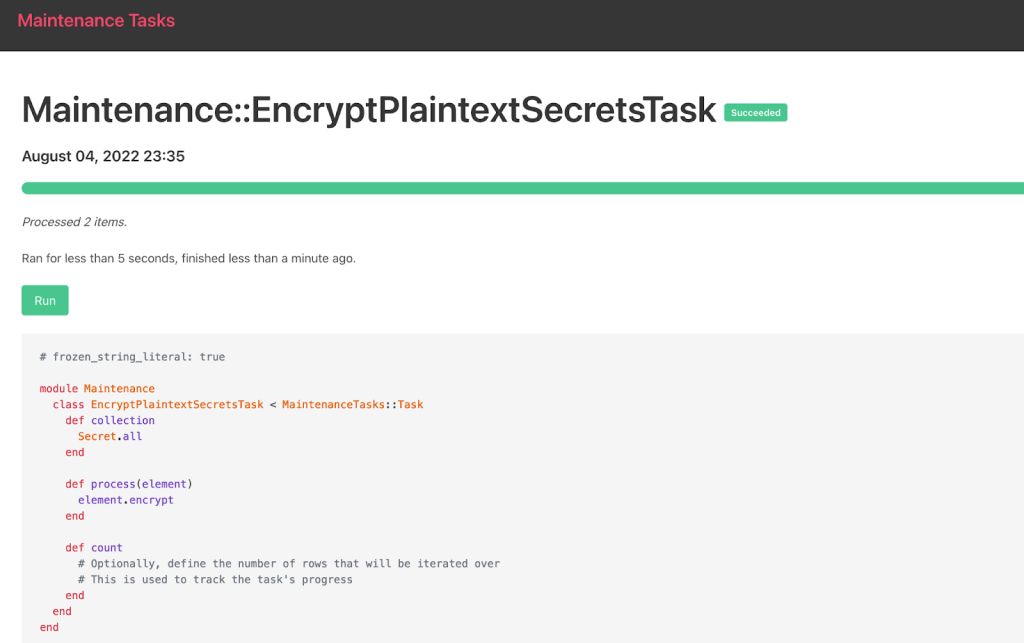
Maintenance Tasks provides several options to run the task, but we use the web UI in this example:
Verify your encryption and cleanup
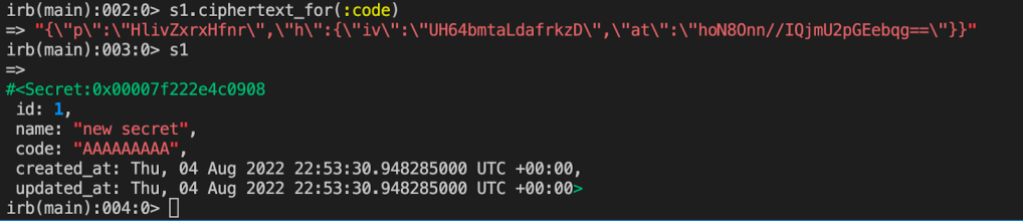
You can verify encryption in Rails console, if you like:
And now you should be able to safely remove your previous encryptor leaving the model of your newly encrypted column looking like this:
Code sample 6
app/models/secret.rb

class Secret < ApplicationRecord
  encrypts :code
end
And so can you!
Encrypting database columns is a valuable extra layer of security that can protect sensitive data during exploits, but it’s not always easy to migrate data in an existing application. We wrote this series in the hope that more organizations will be able to plot a clear path forward to using ActiveRecord::Encryption to start encrypting existing sensitive values.
As Cybersecurity Awareness Month comes to a close, we want to share some of the work we’ve done and made available to you throughout October. Over the last four weeks, we have shared insights and resources aligned with this year’s theme—”See Yourself in Cyber”—to help advance awareness training, and inspire people to join the rapidly growing security industry. Here are a few highlights.
Roundtable with the Cybersecurity and Infrastructure Security Agency (CISA): Amazon Chief Security Officer Steve Schmidt hosted CISA director Jen Easterly in Seattle for a roundtable with leaders across higher education, state and local government, and private industry to discuss ways to develop the cybersecurity workforce through skills training, partnerships between government and industry, and creating pathways to cybersecurity careers.
How AWS, Cisco, Netflix & SAP Are Approaching Cybersecurity Awareness Month. I joined Cisco Chief Security and Trust Officer Brad Arkin, Netflix Head of Cloud Security Srinath Kuruvardi, and SAP Chief Trust Officer Elena Kvochko to describe how AWS, Cisco, Netflix, and SAP are instilling strong cybersecurity training and practices within our organizations, with the goal of inspiring other organizations to do the same.
Cybersecurity Awareness Month 2022 Briefing. Amazon Security Director Jenny Brinkley—who leads Amazon’s internal and external awareness training activities—participated in a Cybersecurity Awareness Month panel discussion hosted by the National Cybersecurity Alliance. Jenny met with executives from KnowBe4, Google, NortonLifeLock, and Dell and chatted about how the cybersecurity landscape has changed over the past few years, and how those changes have impacted the perception of security as a part of daily life.
Making Cybersecurity Relevant for Consumers: The Case for Personal Agency. In addition to the briefing, Jenny spoke to the National Cybersecurity Alliance about staying safe online. She highlighted simple steps that everyone can take to be safer online, including staying consistent on software updates for connected devices, using strong passwords, activating multi-factor authentication (MFA) on accounts when possible, and being on the lookout for phishing attempts.
National Cybersecurity Alliance and Nasdaq Cybersecurity Summit. Jenny and Amazon Head of Global Security Training Jyllian Clarke also joined the National Cybersecurity Alliance, Nasdaq, and public and private sector security leaders in New York City for a cybersecurity summit and got to ring the opening bell.
Resources
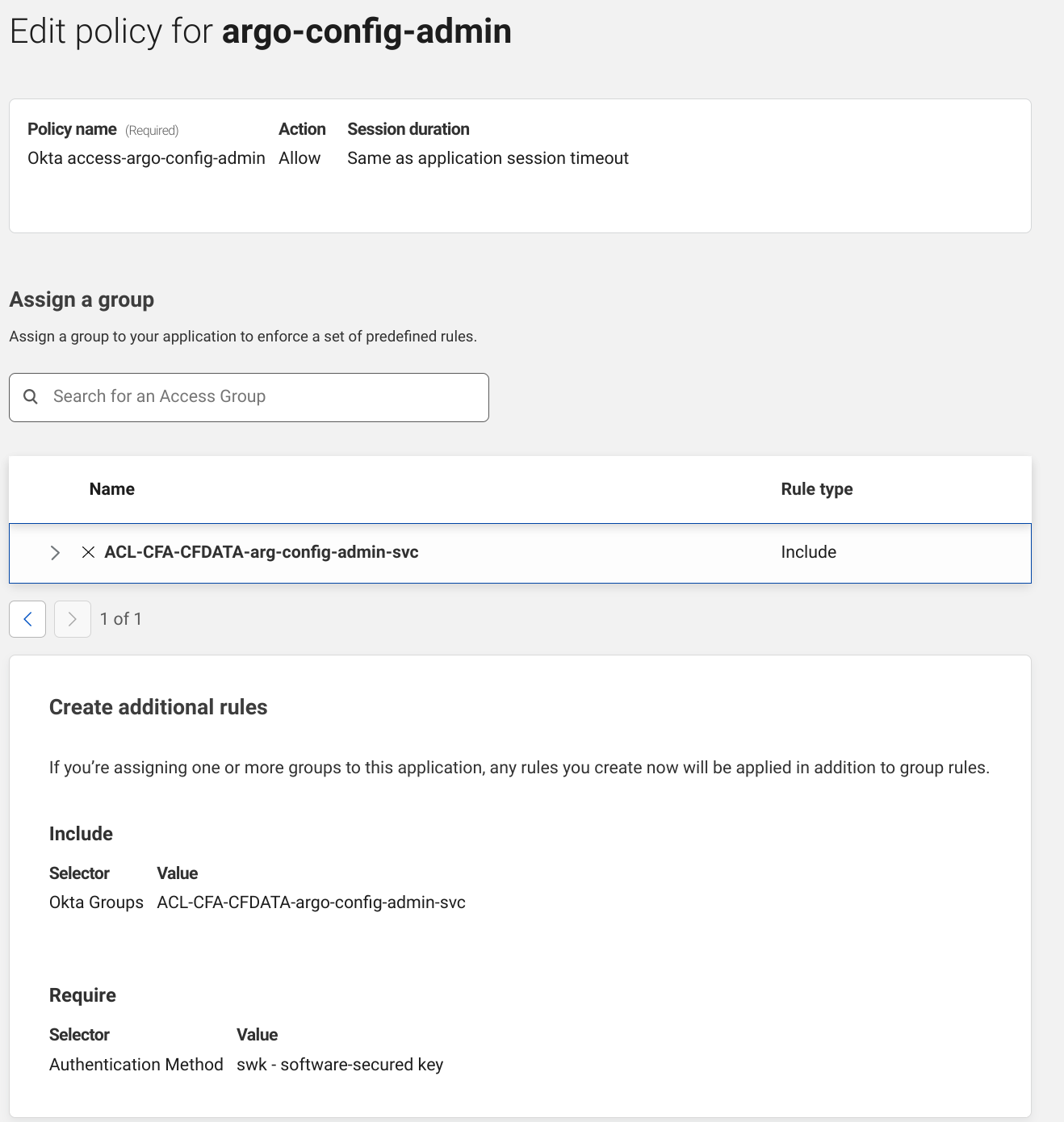
AWS offers free Cybersecurity Awareness Training to individuals and businesses around the world, and we’re providing complimentary MFA security keys to AWS account owners in the United States. More than 40 security-focused courses are available through AWS Skill Builder, ranging from foundational to advanced content. By subscribing to AWS Skill Builder, you gain access to security-related interactive challenges with AWS Jam, which guides you through solving real-world problems.
Additionally, Amazon and the National Cybersecurity Alliance launched a cybersecurity awareness campaign called Protect & Connect. The campaign includes a public service announcement featuring Prime Video actor Michael B. Jordan and actress-producer Tessa Thompson as “internet bodyguards,” as well as a Protect & Connect microsite for consumers, featuring additional videos on topics such as MFA and how to identify and avoid phishing attempts.
Humanizing security
Cybersecurity can seem like a complex subject but ultimately, it’s all about people. Most of today’s threats need people to activate them, so you need to train people to develop intuition, which is something that can’t be automated. By meeting employees where they are with an engaging approach to awareness training that moves security to the forefront of everything they do, you can promote positive behavioral change, and start building a security-first culture.
If you have feedback about this post, submit comments in the Comments section below.
Want more AWS Security news? Follow us on Twitter.
Yesterday, November 1, 2022, OpenSSL released version 3.0.7 to patch CVE-2022-3602 and CVE-2022-3786, two HIGH risk vulnerabilities in the OpenSSL 3.0.x cryptographic library. Cloudflare is not affected by these vulnerabilities because we use BoringSSL in our products.
These vulnerabilities are memory corruption issues, in which attackers may be able to execute arbitrary code on a victim’s machine. CVE-2022-3602 was initially announced as a CRITICAL severity vulnerability, but it was downgraded to HIGH because it was deemed difficult to exploit with remote code execution (RCE). Unlike previous situations where users of OpenSSL were almost universally vulnerable, software that is using other versions of OpenSSL (like 1.1.1) are not vulnerable to this attack.
How do these issues affect clients and servers?
These vulnerabilities reside in the code responsible for X.509 certificate verification – most often executed on the client side to authenticate the server and the certificate presented. In order to be impacted by this vulnerability the victim (client or server) needs a few conditions to be true:
A malicious certificate needs to be signed by a Certificate Authority that the victim trusts.
The victim needs to validate the malicious certificate or ignore a series of warnings from the browser.
The victim needs to be running OpenSSL 3.0.x before 3.0.7.
For a client to be affected by this vulnerability, they would have to visit a malicious site that presents a certificate containing an exploit payload. In addition, this malicious certificate would have to be signed by a trusted certificate authority (CA).
Servers with a vulnerable version of OpenSSL can be attacked if they support mutual authentication – a scenario where both client and a server provide a valid and signed X.509 certificate, and the client is able to present a certificate with an exploit payload to the server.
How should you handle this issue?
If you’re managing services that run OpenSSL: you should patch vulnerable OpenSSL packages. On a Linux system you can determine if you have any processes dynamically loading OpenSSL with the lsof command. Here’s an example of finding OpenSSL being used by NGINX.
Once the package maintainers for your Linux distro release OpenSSL 3.0.7 you can patch by updating your package sources and upgrading the libssl3 package. On Debian and Ubuntu this can be done with the apt-get upgrade command
With that said, it’s possible that you could be running a vulnerable version of OpenSSL that the lsof command can’t find because your process is statically compiled. It’s important to update your statically compiled software that you are responsible for maintaining, and make sure that over the coming days you are updating your operating system and other installed software that might contain the vulnerable OpenSSL versions.
Key takeaways
Cloudflare’s use of BoringSSL helped us be confident that the issue would not impact us prior to the release date of the vulnerabilities.
More generally, the vulnerability is a reminder that memory safety is still an important issue. This issue may be difficult to exploit because it requires a maliciously crafted certificate that is signed by a trusted CA, and certificate issuers are likely to begin validating that the certificates they sign don’t contain payloads that exploit these vulnerabilities. However, it’s still important to patch your software and upgrade your vulnerable OpenSSL packages to OpenSSL 3.0.7 given the severity of the issue.
To learn more about our mission to help build a better Internet, start here. If you’re looking for a new career direction, check out our open positions.
You may know that GitHub encrypts your source code at rest, but you may not have known that we also encrypt sensitive database columns in our Ruby on Rails monolith. We do this to provide an additional layer of defense in depth to mitigate concerns, such as:
Reading or tampering with sensitive fields if a database is inappropriately accessed
Accidentally exposing sensitive data in logs
Motivation
Until recently, we used an internal library called Encrypted Attributes. GitHub developers would declare a column should be encrypted using an API that might look familiar if you have used ActiveRecord::Encryption:
class PersonalAccessToken
  encrypted_attribute :encrypted_token, :plaintext_token
end
Given that we had an existing implementation, you may be wondering why we chose to take on the work of converting our columns to ActiveRecord::Encryption. Our main motivation was to ensure that developers did not have to learn a GitHub-specific pattern to encrypt their sensitive data.
We believe strongly that using familiar, intuitive patterns results in better adoption of security tools and, by extension, better security for our users.
In addition to exposing some of the implementation details of the underlying encryption, this API did not provide an easy way for developers to encrypt existing columns. Our internal library required a separate encryption key to be generated and stored in our secure environment variable configuration—for each new database column. This created a bottleneck, as most developers don’t work with encryption every day and needed support from the security team to make changes.
When assessing ActiveRecord::Encryption, we were particularly interested in its ease of use for developers. We wanted a developer to be able to write one line of code, and no matter if their column was previously plaintext or used our previous solution, their column would magically start using ActiveRecord::Encryption. The final API looks something like this:
class PersonalAccessToken
  encrypts :token
end
This API is the exact same as what is used by traditional ActiveRecord::Encryption while hiding all the complexity of making it work at GitHub scale.
How we implemented this
As part of implementing ActiveRecord::Encryptioninto our monolith, we worked with our architecture and infrastructure teams to make sure the solution met GitHub’s scalability and security requirements. Below is a brief list of some of the customizations we made to fit the implementation to our infrastructure.
As always, there are specific nuances that must be considered when modifying existing encryption implementations, and it is always a good practice to review any new cryptography code with a security team.
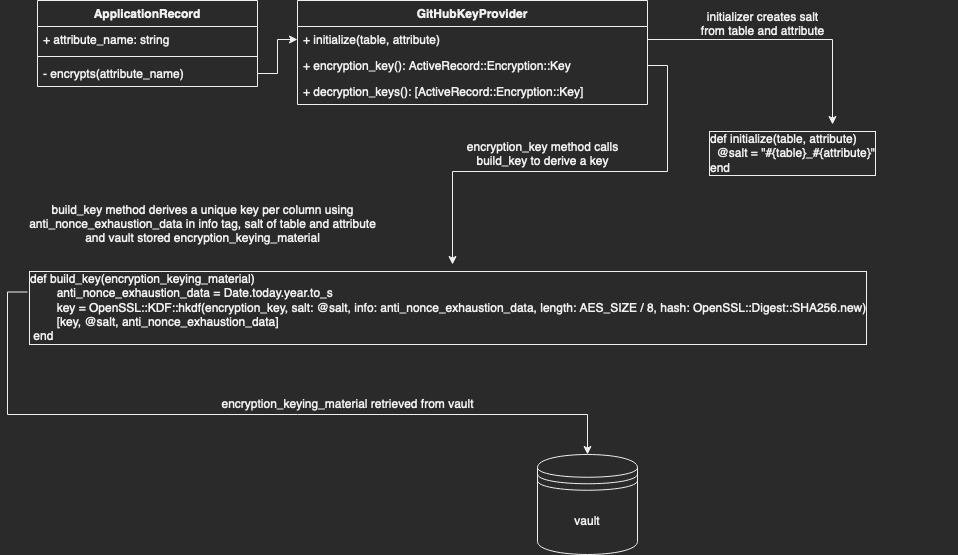
Diagram 1: Key access and derivation flow for GitHub’s `ActiveRecord::Encryption` implementation
Secure primary key storage
By default, Rails uses its built-in credentials.yml.enc file to securely store the primary key and static salt used for deriving the column encryption key in ActiveRecord::Encryption.
GitHub’s key management strategy for ActiveRecord::Encryption differs from the Rails default in two key ways: deriving a separate key per column and storing the key in our centralized secret management system.
Deriving per-column keys from a single primary key
As explained above, one of the goals of this transition was to no longer bottleneck teams by managing keys manually. We did, however, want to maintain the security properties of separate keys. Thankfully, cryptography experts have created a primitive known as a Key Derivation Function (KDF) for this purpose. These functions take (roughly) three important parameters: the primary key, a unique salt, and a string termed “info” by the spec.
Our salt is simply the table name, an underscore, and the attribute name. So for “PersonalAccessTokens#token” the salt would be “personal_access_tokens_token”. This ensures the key is different per column.
Due to the specifics of the ActiveRecord::Encryption algorithm (AES256-GCM), we need to be careful not to encrypt too many values using the same key (to avoid nonce reuse). We use the “info” string parameter to ensure the key for each column changes automatically at least once per year. Therefore, we can populate the info input with the current year as a nonce during key derivation.
The applications that make up GitHub store secrets in Hashicorp Vault. To conform with this pre-existing pattern, we wanted to pull our primary key from Vault instead of the credentials.yml.enc file. To accommodate for this, we wrote a custom key provider that behaves similarly to the default DerivedSecretKeyProvider, retrieving the key from Vault and deriving the key with our KDF (see Diagram 1).
Making new behavior the default
One of our team’s key principles is that solutions we develop should be intuitive and not require implementation knowledge on the part of the product developer. ActiveRecord::Encryption includes functionality to customize the Encryptor used to encrypt data for a given column. This functionality would allow developers to optionally use the strategies described above, but to make it the default for our monolith we needed to override the encryptsmodel helper to automatically select an appropriate GitHub-specific key provider for the user.
{
def self.encrypts(*attributes, key_provider: nil, previous: nil, **options)
      # snip: ensure only one attribute is passed
# ...

    # pull out the sole attribute
    attribute = attributes.sole

      # snip: ensure if a key provider is passed, that it is a GitHubKeyProvider
      # ...

    # If no key provider is set, instantiate one
    kp = key_provider || GitHub::Encryption::GitHubKeyProvider.new(table: table_name.to_sym, attribute: attribute)

      # snip: logic to ensure previous encryption formats and plaintext are supported for smooth transition (see part 2)
      # github_previous = ...

    # call to rails encryption
    super(attribute, key_provider: kp, previous: github_previous, **options)
end
}
Currently, we only provide this API to developers working on our internal github.com codebase. As we work with the library, we are experimenting with upstreaming this strategy to ActiveRecord::Encryption by replacing the per-class encryption scheme with a per-column encryption scheme.
Turn off compression by default
Compressing values prior to encryption can reveal some information about the content of the value. For example, a value with more repeated bytes, such as “abcabcabc,” will compress better than a string of the same length, such as “abcdefghi”. In addition to the common encryption property that ciphertext generally exposes the length, this exposes additional information about the entropy (randomness) of the underlying plaintext.
ActiveRecord::Encryption compresses data by default for storage efficiency purposes, but since the values we are encrypting are relatively small, we did not feel this tradeoff was worth it for our use case. This is why we replaced the default to compress values before encryption with a flag that makes compression optional.
Migrating to a new encryption standard: the hard parts
This post illustrates some of the design decisions and tradeoffs we encountered when choosing ActiveRecord::Encryption, but it’s not quite enough information to guide developers of existing applications to start encrypting columns. In the next post in this series we’ll show you how we handled the hard parts—how to upgrade existing columns in your application from plaintext or possibly another encryption standard.
“Telematics”, a cross between the words telecommunications and informatics, was coined in the late 1970s to refer to the use of communication technologies in facilitating exchange of information. In the modern day, such technologies may include cloud platforms, mobile networks, and wireless transmissions (e.g., Bluetooth). Although the initial intention is for a more general scope, telematics is now specifically used to refer to vehicle telematics where details of vehicle movements are tracked for use cases such as driving safety, driver profiling, fleet optimisation, and productivity improvements.
We’ve previously published this article to share how Grab uses telematics to improve driver safety. In this blog post, we dive deeper into how telematics technology is used at Grab to encourage safer driving for our driver and delivery partners.
Background
At Grab, the safety of our users and their experience on our platform is our highest priority. By encouraging safer driving habits from our driver and delivery partners, road traffic accidents can be minimised, potentially reducing property damage, injuries, and even fatalities. Safe driving also helps ensure smoother rides and a more pleasant experience for consumers using our platform.
To encourage safer driving, we should:
Have a data-driven approach to understand how our driver and delivery partners are driving.
Help partners better understand how to improve their driving by summarising key driving history into a personalised Driving Safety Report.
Understanding driving behaviour
One of the most direct forms of driving assessment is consumer feedback or complaints. However, the frequency and coverage of this feedback is not very high as they are only applicable to transport verticals like JustGrab or GrabBike and not delivery verticals like GrabFood or GrabExpress. Plus, most driver partners tend not to receive any driving-related feedback (whether positive or negative), even for the transport verticals.
A more comprehensive method of assessing driving behaviour is to use the driving data collected during Grab bookings. To make sense of these data, we focus on selected driving manoeuvres (e.g., braking, acceleration, cornering, speeding) and detect the number of instances where our data shows unsafe driving in each of these areas.
We acknowledge that the detected instances may be subjected to errors and may not provide the complete picture of what’s happening on the ground (e.g., partners may be forced to do an emergency brake due to someone swerving into their lane).
To address this, we have incorporated several fail-safe checks into our detection logic to minimise erroneous detection. Also, any assessment of driving behaviour will be based on an aggregation of these unsafe driving instances over a large amount of driving data. For example, individual harsh braking instances may be inconclusive but if a driver partner displays multiple counts consistently across many bookings, it is likely that the partner may be used to unsafe driving practices like tailgating or is distracted while driving.
Telematics for detecting unsafe driving
For Grab to consistently ensure our consumers’ safety, we need to proactively detect unsafe driving behaviour before an accident occurs. However, it is not feasible for someone to be with our driver and delivery partners all the time to observe their driving behaviour. We should leverage sensor data to monitor these driving behaviour at scale.
Traditionally, a specialised “black box” inertial measurement unit (IMU) equipped with sensors such as accelerometers, gyroscopes, and GPS needs to be installed in alignment with the vehicle to directly measure vehicular acceleration and speed. In this manner, it would be straightforward to detect unsafe driving instances using this data. Unfortunately, the cost of purchasing and installing such devices for all our partners is prohibitively high and it would be hard to scale.
Instead, we can leverage a device that all partners already have: their mobile phone. Modern smartphones already contain similar sensors to those in IMUs and data can be collected through the telematics SDK. More details on telematics data collection can be found in a recently published Grab tech blog article1.
It’s important to note that telematics data are collected at a sufficiently high sampling frequency (much more than 1 Hz) to minimise inaccuracies in detecting unsafe driving instances characterised by sharp acceleration impulses.
Processing mobile sensor data to detect unsafe driving
Unlike specialised IMUs installed in vehicles, mobile sensor data have added challenges to detecting unsafe driving.
Accounting for orientation: Phone vs. vehicle
The phone is usually in a different orientation compared to the vehicle. Strictly speaking, the phone accelerometer sensor measures the accelerations of the phone and not the vehicle acceleration. To infer vehicle acceleration from phone sensor data, we developed a customised processing algorithm optimised specifically for Grab’s data.
First, the orientation offset of the phone with respect to the vehicle is defined using Euler angles: roll, pitch and yaw. In data windows with no net acceleration of the vehicle (e.g., no braking, turning motion), the only acceleration measured by the accelerometer is gravitational acceleration. Roll and pitch angles can then be determined through trigonometric manipulation. The complete triaxial accelerations of the phone are then rotated to the horizontal plane and the yaw angle is determined by principal component analysis (PCA).
An assumption here is that there will be sufficient braking and acceleration manoeuvring for PCA to determine the correct forward direction. This Euler angles determination is done periodically to account for any movement of phones during the trip. Finally, the raw phone accelerations are rotated to the vehicle orientation through a matrix multiplication with the rotation matrix derived from the Euler angles (see Figure 1).
Figure 1: Inference of vehicle acceleration from the phone sensor data. Smartphone and car images modified from designs found in Freepik.com.
Handling variations in data quality
Our processing algorithm is optimised to be highly robust and handle large variations in data quality that is expected from bookings on the Grab platform. There are many reported methods for processing mobile data to reorientate telematics data for four wheel vehicles23.
However, with the prevalent use of motorcycles on our platform, especially for delivery verticals, we observed that data collected from two wheel vehicles tend to be noisier due to differences in phone stability and vehicular vibrations. Data noise can be exacerbated if partners hold the phone in their hand or place it in their pockets while driving.
In addition, we also expect a wide variation in data quality and sensor availability from different phone models, such as older, low-end models to the newest, flagship models. A good example to illustrate the robustness of our algorithm is having different strategies to handle different degrees of data noise. For example, a simple low-pass filter is used for low noise data, while more complex variational decomposition and Kalman filter approaches are used for high noise data.
Detecting behaviour anomalies with thresholds
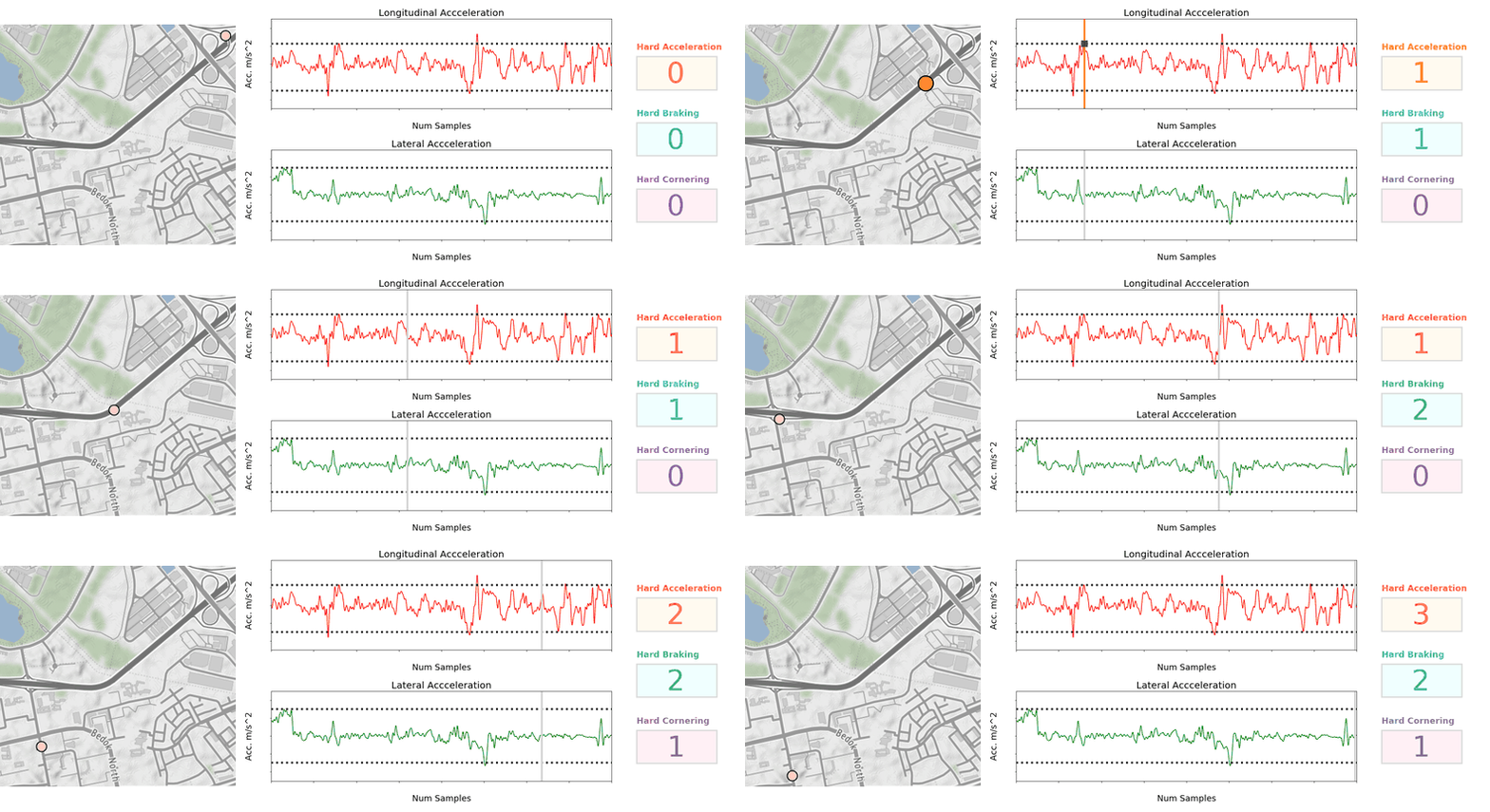
Once the vehicular accelerations are inferred, we can use a thresholding approach (see Figure 2) to detect unsafe driving instances.
For unsafe acceleration and braking, a peak finding algorithm is used to detect acceleration peaks beyond a threshold in the longitudinal (forward/backward) direction. For unsafe cornering, older and lower end phones are usually not equipped with gyroscope sensors, so we should look for peaks of lateral (sidewards) acceleration (which constitutes the centripetal acceleration during the turn) beyond a threshold. GPS bearing data that coarsely measures the orientation of the vehicle is then used to confirm that a cornering and not lane change instance is being detected. The thresholds selected are fine-tuned on Grab’s data using initial values based on published literature4 and other sources.
To reduce false positive detection, no unsafe driving instances will be flagged when:
Large discrepancies are observed between speeds derived from integrating the longitudinal (forward/backward) acceleration and speeds directly measured by the GPS sensor.
Large phone motions are detected. For example, when the phone falls to the seat from the dashboard, accelerations recorded on the phone sensor will deviate significantly from the vehicle accelerations.
GPS speed is very low before and after the unsafe driving instance is detected. This is limited to data collected from motorcycles which is usually used by delivery partners. It implies that the partner is walking and not in a vehicle. For example, a GrabFood delivery partner may be collecting the food from the merchant partner on foot, so no unsafe driving instances should be detected.
Figure 2: Animation showing unsafe driving detection by thresholding. Dotted lines in acceleration charts indicate selected thresholds. Map tiles by stamen design.
Detecting speeding instances from GPS speeds and map data
To define speeding along a stretch of road, we used a rule-based method by comparing raw speeds from GPS pings with speeding thresholds for that road. Although GPS speeds are generally accurate (subjected to minimal GPS errors), we need to take more precautions to ensure the right speeding thresholds are determined.
These thresholds are set using known speed limits from available map data or hourly aggregated speed statistics where speed limits are not available. The coverage and accuracy of known speed limits is continuously being improved by our in-house mapping initiatives and validated comprehensively by the respective local ground teams in selected cities.
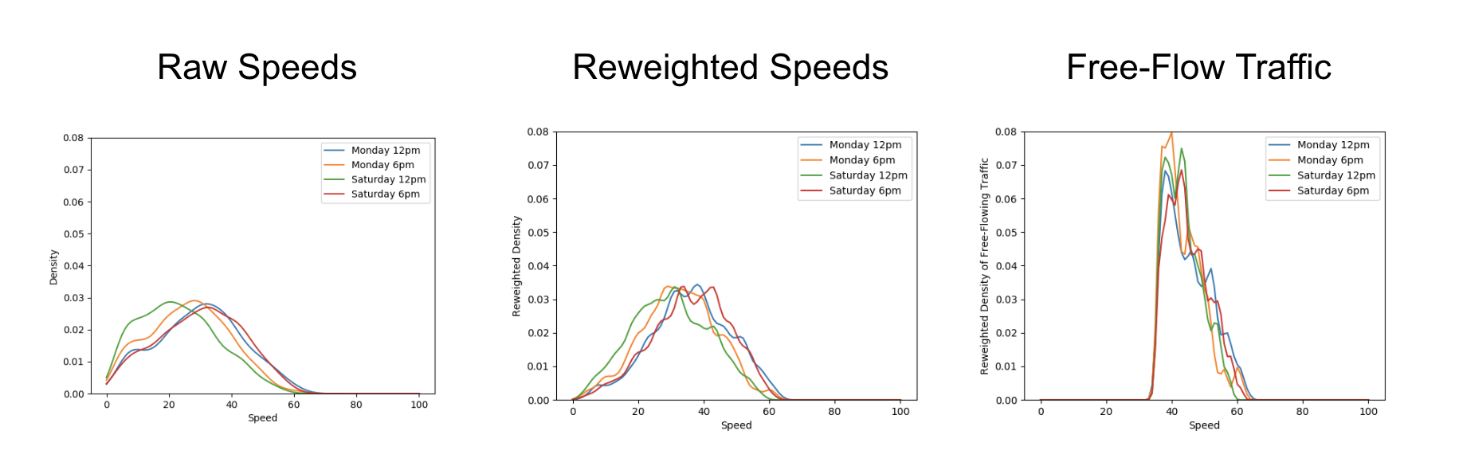
Aggregating GPS pings from Grab driver and delivery partners can be a helpful proxy to actual speed limits by defining speeding violations as outliers from socially acceptable speeds derived from partners collectively. To reliably compute aggregated speed statistics, a representative speed profile for each stretch of road must first be inferred from raw GPS pings (see Figure 3).
As ping sampling intervals are fixed, more pings tend to be recorded for slower speeds. To correct the bias in the speed profile, we reweigh ping counts by using speed values as weights. Furthermore, to minimise distortions in the speed profile from vehicles driving at lower-than-expected speeds due to high traffic volumes, only pings from free-flowing traffic are used when inferring the speed profile.
Free-flowing traffic is defined by speeds higher than the median speed on each defined road category (e.g., small residential roads, normal primary roads, large expressways). To ensure extremely high speeds are flagged regardless of the speed of other drivers, maximum threshold values for aggregated speeds are set for each road category using heuristics based on the maximum known speed limit of that road category.
Figure 3: Steps to infer a representative speed profile for computing aggregated speed statistics.
Besides a representative speed profile, hourly aggregation should also include data from a sufficient number of unique drivers depending on speed variability. To obtain enough data, hourly aggregations are performed on the same day of the week over multiple weeks. This way, we have a comprehensive time-specific speed profile that accounts for traffic quality (e.g., peak hour traffic, traffic differences between weekdays/weekends) and driving conditions (e.g., visibility difference between day/night).
When detecting speeding violations, the GPS pings used are snapped-to-road and stationary pings, pings with unrealistic speeds, while pings with low GPS accuracy (e.g., when the vehicle is in a tunnel) are excluded. A speeding violation is defined as a sequence of consecutive GPS pings that exceed the speeding threshold. The following checks were put in place to minimise erroneous flagging of speeding violations:
Removal of duplicated (or stale) GPS pings.
Sufficient speed buffer given to take into account GPS errors.
Sustained speeding for a prolonged period of time is required to exclude transient speeding events (e.g., during lane change).
Driving safety report
The driving safety report is a platform safety product that driver and delivery partners can access via their driver profile page on the Grab Driver Application (see Figure 4). It is updated daily and aims to create awareness regarding driving habits by summarising key information from the processed data into a personalised report that can be easily consumed.
Individual reports of each driving manoeuvre (e.g., braking, acceleration, cornering and speeding) are available for daily and weekly views. Partners can also get more detailed information of each individual instance such as when these unsafe driving instances were detected.
Figure 4: Driving safety report for driver and delivery partners using four wheel vehicles. a) Actionable insights feature circled by red dotted lines. b) Daily view of various unsafe driving instances where more details of each instance can be viewed by tapping on “See details”.
Actionable insights
Besides compiling the instances of unsafe driving in a report to create awareness, we are also using these data to provide some actionable recommendations for our partners to improve their driving.
With unsafe driving feedback from consumers and reported road traffic accident data from our platform, we also train machine learning models to identify patterns in the detected unsafe driving instances and estimate the likelihood of partners receiving unsafe driving feedback or getting into accidents. One use case is to compute a safe driving score that equates a four-wheel partner’s driving behaviour to a numerical value where a higher score indicates a safer driver.
Additionally, we use Shapley additive explanation (SHAP) approaches to determine which driving manoeuvre contributes the most to increasing the likelihood of partners receiving unsafe driving feedback or getting into accidents. This information is included as an actionable insight in the driving safety report and helps partners to identify the key area to improve their driving.
What’s next?
At the moment, Grab performs telematics processing and unsafe driving detections after the trip and updates the report the next day. One of the biggest improvements would be to share this information with partners faster. We are actively working on developing a real-time processing algorithm that addresses this and also, satisfies the robustness requirements such that partners are immediately aware after an unsafe driving instance is detected.
Besides detecting typical unsafe driving manoeuvres, we are also exploring other use cases for mobile sensor data in road safety such as detection of poor road conditions, counterflow driving against traffic, and phone usage leading to distracted driving.
Join us
Grab is the leading superapp platform in Southeast Asia, providing everyday services that matter to consumers. More than just a ride-hailing and food delivery app, Grab offers a wide range of on-demand services in the region, including mobility, food, package and grocery delivery services, mobile payments, and financial services across 428 cities in eight countries.
Powered by technology and driven by heart, our mission is to drive Southeast Asia forward by creating economic empowerment for everyone. If this mission speaks to you, join our team today!
References
Burhan, W. (2022). How telematics helps Grab to improve safety. Grab Tech Blog. https://engineering.grab.com/telematics-at-grab ↩
Mohan, P., Padmanabhan, V.N. and Ramjee, R. (2008).Nericell: rich monitoring of road and traffic conditions using mobile smartphones. SenSys ‘08: Proceedings of the 6th ACM conference on Embedded network sensor systems, 312-336. https://doi.org/10.1145/1460412.1460444 ↩
Yarlagadda, J. and Pawar, D.S. (2022). Heterogeneity in the Driver Behavior: An Exploratory Study Using Real-Time Driving Data. Journal of Advanced Transportation. vol. 2022, Article ID 4509071. https://doi.org/10.1155/2022/4509071 ↩
Page Shield can now watch for malicious outbound connections made by third-party JavaScript code
Many websites use third party JavaScript libraries to cut development time by using pre-built features. Common examples include checkout services, analytics tools, or live chat integrations. Any one of these JavaScript libraries may be sending site visitors’ data to unknown locations.
If you manage a website, and you have ever wondered where end user data might be going and who has access to it, starting today, you can find out using Page Shield’s Connection Monitor.
Page Shield is our client side security solution that aims to detect malicious behavior and compromises that affect the browser environment directly, such as those that exploit vulnerabilities in third party JavaScript libraries.
Connection Monitor, available from today, is the latest addition to Page Shield and allows you to see outbound connections being made by your users’ browsers initiated by third party JavaScript added to your site. You can then review this information to ensure only appropriate third parties are receiving sensitive data.
Customers on our business and enterprise plans receive visibility in outbound connections provided by Connection Monitor. If you are using our Page Shield enterprise add-on, you also get notifications whenever a connection is found to be potentially malicious.
Covering more attack surface with Connection Monitor
Connection Monitor expands the net of opportunities to catch malicious behavior that might be happening in your users’ browsers by complementing the visibility provided by Script Monitor, the core feature of Page Shield before today.
While Script Monitor is focusing on analyzing JavaScript code to find malicious signals, Connection Monitor is looking at where data is sent to. The two features work perfectly together.
Very frequently, in fact, client side compromises within the context of web applications result in data exfiltration. The most well known example of this is Magecart-style attacks where a malicious actor would attempt to exfiltrate credit card data directly from the application’s check out flow (normally on e-commerce sites) without changing the application behavior.
These attacks are often hard to detect as they exploit JavaScript outside your direct control, for example an embedded widget, and operate without any noticeable effect on the user experience.
Complementing Content Security Policies
Page Shield uses Content Security Policies (CSPs) to receive data from the browser, but complements them by focusing on the core problem: detecting malicious behavior, something that CSPs don’t do out of the box.
Content Security Policies are widely adopted and allow you, as a website administrator, to tell browsers what the browser is allowed to load and from where. This is useful in principle, but in practice CSPs are hard to maintain for large applications, and often end up being very broad making them ineffective. More importantly, CSPs provide no built-in mechanism to detect malicious behavior. This is where Page Shield helps.
Before today, with Script Monitor, Page Shield would detect malicious behavior by focusing on JavaScript files only, by running, among other things, our classifier on JavaScript code. Starting today, with Connection Monitor, we also perform threat intelligence feed lookups against connection URL endpoints allowing us to quickly spot potentially suspicious data leaks.
Connection Monitor: under the hood
Connection Monitor uses the connect-src directive from Content Security Policies (CSPs) to receive information about outbound connections from browsers.
This information is then stored for easy access and enhanced with additional insights including connection status, connection page source, domain information, and if you have access to our enterprise add-on, threat feed intelligence.
To use Connection Monitor you need to proxy your application via Cloudflare. When turned on, it will, on a sampled percentage of HTML page loads only, insert the following HTTP response header that implements the Content Security Policy used to receive data:
This HTTP response header asks the browser to send information regarding scripts (script-src) and connections (connect-src) to the given endpoint. By default, the endpoint hostname is csp-reporting.cloudflare.com, but you can change it to be the same hostname of your website if you are on our enterprise add-on.
Using reports like the one above, we can then create an inventory of outbound connection URLs alongside which pages they were initiated by. This data is then made available via the dashboard enhanced with:
Connection status: Active if the connection has been seen recently
Timestamps: First seen and last seen
Metadata: WHOIS information, SSL certificate information, if any, domain registration information
Malicious signals: Threat feed domain and URL lookups*
* URL feed lookups are only available if the full connection path is being stored.
A note on privacy
At Cloudflare, we want to ensure both direct customer and end customer privacy. For this reason, Connection Monitor by default will only store and collect the scheme and host portion of the connection URL, so for example, if the endpoint the browser is sending data to is:
https://connection.example.com/session/abc
Connection Monitor will only store https://connection.example.com and drop the path /session/abc. This ensures that we are minimizing the risk of storing session IDs, or other sensitive data that may be found in full URLs.
Not storing the path, does mean that in some specific circumstances, we are not able to do full URL feed lookups from our threat intelligence. For this reason, if you know you are not inserting sensitive data in connection paths, you can easily turn on path storage from the dashboard. Domain lookups will continue to work as expected. Support for also storing the query string will be added in the future.
Going further
Script Monitor and Connection Monitor are only two of many directives provided by CSP that we plan to support in Page Shield. Going further, there are a number of additional features we are already working on, including the ability to suggest and implement both positive and negative policies directly from the dashboard.
We are excited to see Connection Monitor providing additional visibility in application behavior and look forward to the next evolutions.
For up-to-date information related to the certification, visit the AWS Compliance Program page and choose GSMA under Europe, Middle East & Africa.
AWS was evaluated by independent third-party auditors selected by GSMA. The Certificate of Compliance that shows that AWS achieved GSMA compliance status is available on the GSMA website and through AWS Artifact. AWS Artifact is a self-service portal for on-demand access to AWS compliance reports. Sign in to AWS Artifact in the AWS Management Console, or learn more at Getting Started with AWS Artifact.
To learn more about our compliance and security programs, see AWS Compliance Programs. As always, we value your feedback and questions; reach out to the AWS Compliance team through the Contact Us page. If you have feedback about this post, you can submit comments in the Comments section below.
Want more AWS Security news? Follow us on Twitter.
This whitepaper is intended for customers that are looking to store and process controlled goods information in the AWS Cloud, and is particularly useful for leadership, security, risk, and compliance teams that need to understand CGP requirements and guidance.
The whitepaper summarizes CGP requirements and guidance related to the protection of controlled goods information, and gives CGP-regulated customers information they can use to commence their due diligence and assess how to implement the appropriate programs for their use of AWS Cloud services.
This document is our first that is specific to Canadian regulatory requirements and joins other guides related to specific regulatory regimes around the world. As the regulatory environment continues to evolve, we’ll provide further updates on the AWS Security Blog and the AWS Compliance page. You can find more information on cloud-related regulatory compliance at the AWS Compliance Center. You can also reach out to your AWS account manager for help finding the resources you need.
If you have feedback about this blog post, submit comments in the Comments section below. You can also start a new thread on re:Post to get answers from the community.
Want more AWS Security news? Follow us on Twitter.
AWS Identity and Access Management (IAM) Access Analyzer provides tools to simplify permissions management by making it simpler for you to set, verify, and refine permissions. One such tool is IAM Access Analyzer policy generation, which creates fine-grained policies based on your AWS CloudTrail access activity—for example, the actions you use with Amazon Elastic Compute Cloud (Amazon EC2), AWS Lambda, and Amazon Simple Storage Service (Amazon S3). AWS has expanded policy generation capabilities to support the identification of actions used from over 140 services. New additions include services such as AWS CloudFormation, Amazon DynamoDB, and Amazon Simple Queue Service (Amazon SQS). When you request a policy, IAM Access Analyzer generates a policy by analyzing your CloudTrail logs to identify actions used from this group of over 140 services. The generated policy makes it efficient to grant only the required permissions for your workloads. For other services, Access Analyzer helps you by identifying the services used and guides you to add the necessary actions.
In this post, we will show how you can use Access Analyzer to generate an IAM permissions policy that restricts CloudFormation permissions to only those actions that are necessary to deploy a given template, in order to follow the principle of least privilege.
Permissions for AWS CloudFormation
AWS CloudFormation lets you create a collection of related AWS and third-party resources and provision them in a consistent and repeatable fashion. A common access management pattern is to grant developers permission to use CloudFormation to provision resources in the production environment and limit their ability to do so directly. This directs developers to make infrastructure changes in production through CloudFormation, using infrastructure-as-code patterns to manage the changes.
CloudFormation can create, update, and delete resources on the developer’s behalf by assuming an IAM role that has sufficient permissions. Cloud administrators often grant this IAM role broad permissions–in excess of what’s necessary to just create, update, and delete the resources from the developer’s template–because it’s not clear what the minimum permissions are for the template. As a result, the developer could use CloudFormation to create or modify resources outside of what’s required for their workload.
The best practice for CloudFormation is to acquire permissions by using the credentials from an IAM role you pass to CloudFormation. When you attach a least-privilege permissions policy to the role, the actions CloudFormation is allowed to perform can be scoped to only those that are necessary to manage the resources in the template. In this way, you can avoid anti-patterns such as assigning the AdministratorAccess or PowerUserAccess policies—both of which grant excessive permissions—to the role.
The following section will describe how to set up your account and grant these permissions.
Prepare your development account
Within your development account, you will configure the same method for deploying infrastructure as you use in production: passing a role to CloudFormation when you launch a stack. First, you will verify that you have the necessary permissions, and then you will create the role and the role’s permissions policy.
Get permissions to use CloudFormation and IAM Access Analyzer
You will need the following minimal permissions in your development account:
Permission to use CloudFormation, in particular to create, update, and delete stacks
Permission to pass an IAM role to CloudFormation
Permission to create IAM roles and policies
Permission to use Access Analyzer, specifically the GetGeneratedPolicy, ListPolicyGenerations, and StartPolicyGeneration actions
The following IAM permissions policy can be used to grant your identity these permissions.
Note: If your identity already has these permissions through existing permissions policies, there is no need to apply the preceding policy to your identity.
Create a role for CloudFormation
Creating a service role for CloudFormation in the development account makes it less challenging to generate the least-privilege policy, because it becomes simpler to identify the actions CloudFormation is taking as it creates and deletes resources defined in the template. By identifying the actions CloudFormation has taken, you can create a permissions policy to match.
To create an IAM role in your development account for CloudFormation
For the trusted entity, choose AWS service. From the list of services, choose CloudFormation.
Choose Next: Permissions.
Select one or more permissions policies that align with the types of resources your stack will create. For example, if your stack creates a Lambda function and an IAM role, choose the AWSLambda_FullAccess and IAMFullAccess policies.
Note: Because you have not yet created the least-privilege permissions policy, the role is granted broader permissions than required. You will use this role to launch your stack and evaluate the resulting actions that CloudFormation takes, in order to build a lower-privilege policy.
Choose Next: Tags to proceed.
Enter one or more optional tags, and then choose Next: Review.
Enter a name for the role, such as CloudFormationDevExecRole.
Choose Create role.
Create and destroy the stack
To have CloudFormation exercise the actions required by the stack, you will need to create and destroy the stack.
To create and destroy the stack
Navigate to CloudFormation in the console, expand the menu in the left-hand pane, and choose Stacks.
On the Stacks page, choose Create Stack, and then choose With new resources.
Choose Template is ready, choose Upload a template file, and then select the file for your template. Choose Next.
Enter a Stack name, and then choose Next.
For IAM execution role name, select the name of the role you created in the previous section (CloudFormationDevExecRole). Choose Next.
Review the stack configuration. If present, select the check box(es) in the Capabilities section, and then choose Create stack.
Wait for the stack to reach the CREATE_COMPLETE state before continuing.
From the list of stacks, select the stack you just created, choose Delete, and then choose Delete stack.
Wait until the stack reaches the DELETE_COMPLETE state (at which time it will also disappear from the list of active stacks).
Note: It’s recommended that you also modify the CloudFormation template and update the stack to initiate updates to the deployed resources. This will allow Access Analyzer to capture actions that update the stack’s resources, in addition to create and delete actions. You should also review the API documentation for the resources that are being used in your stack and identify any additional actions that may be required.
Now that the development environment is ready, you can create the least-privilege permissions policy for the CloudFormation role.
Use Access Analyzer to generate a fine-grained identity policy
Access Analyzer reviews the access history in AWS CloudTrail to identify the actions an IAM role has used. Because CloudTrail delivers logs within an average of about 15 minutes of an API call, you should wait at least that long after you delete the stack before you attempt to generate the policy, in order to properly capture all of the actions.
Note: CloudTrail must be enabled in your AWS account in order for policy generation to work. To learn how create a CloudTrail trail, see Creating a trail for your AWS account in the AWS CloudTrail User Guide.
To generate a permissions policy by using Access Analyzer
Open the IAM console and choose Roles. In the search box, enter CloudFormationDevExecRole and select the role name in the list.
On the Permissions tab, scroll down and choose Generate policy based on CloudTrail events to expand this section. Choose Generate policy.
Select the time period of the CloudTrail logs you want analyzed.
Select the AWS Region where you created and deleted the stack, and then select the CloudTrail trail name in the drop-down list.
If this is your first time generating a policy, choose Create and use a new service role to have an IAM role automatically created for you. You can view the permissions policy the role will receive by choosing View permission details. Otherwise, choose Use an existing service role and select a role in the drop-down list.
The policy generation options are shown in Figure 1.
Figure 1: Policy generation options
Choose Generate policy.
You will be redirected back to the page that shows the CloudFormationDevExecRole role. The Status in the Generate policy based on CloudTrail events section will show In progress. Wait for the policy to be generated, at which time the status will change to Success.
Review the generated policy
You must review and save the generated policy before it can be applied to the role.
To review the generated policy
While you are still viewing the CloudFormationDevExecRole role in the IAM console, under Generate policy based on CloudTrail events, choose View generated policy.
The Generated policy page will open. The Actions included in the generated policy section will show a list of services and one or more actions that were found in the CloudTrail log. Review the list for omissions. Refer to the IAM documentation for a list of AWS services for which an action-level policy can be generated. An example list of services and actions for a CloudFormation template that creates a Lambda function is shown in Figure 2.
Figure 2: Actions included in the generated policy
Use the drop-down menus in the Add actions for services used section to add any necessary additional actions to the policy for the services that were identified by using CloudTrail. This might be needed if an action isn’t recorded in CloudTrail or if action-level information isn’t supported for a service.
Note: The iam:PassRole action will not show up in CloudTrail and should be added manually if your CloudFormation template assigns an IAM role to a service (for example, when creating a Lambda function). A good rule of thumb is: If you see iam:CreateRole in the actions, you likely need to also allow iam:PassRole. An example of this is shown in Figure 3.
Figure 3: Adding PassRole as an IAM action
When you’ve finished adding additional actions, choose Next.
Generated policies contain placeholders that need to be filled in with resource names, AWS Region names, and other variable data. The actual values for these placeholders should be determined based on the content of your CloudFormation template and the Region or Regions you plan to deploy the template to.
To replace placeholders with real values
In the generated policy, identify each of the Resource properties that use placeholders in the value, such as ${RoleNameWithPath} or ${Region}. Use your knowledge of the resources that your CloudFormation template creates to properly fill these in with real values.
${RoleNameWithPath} is an example of a placeholder that reflects the name of a resource from your CloudFormation template. Replace the placeholder with the actual name of the resource.
${Region} is an example of a placeholder that reflects where the resource is being deployed, which in this case is the AWS Region. Replace this with either the Region name (for example, us-east-1), or a wildcard character (*), depending on whether you want to restrict the policy to a specific Region or to all Regions, respectively.
For example, a statement from the policy generated earlier is shown following.
This statement allows the Lambda actions to be performed on a function named MyLambdaFunction in AWS account 123456789012 in any Region (*). Substitute the correct values for Region, Account, and FunctionName in your policy.
The IAM policy editor window will automatically identify security or other issues in the generated policy. Review and remediate the issues identified in the Security, Errors, Warnings, and Suggestions tabs across the bottom of the window.
To review and remediate policy issues
Use the Errors tab at the bottom of the IAM policy editor window (powered by IAM Access Analyzer policy validation) to help identify any placeholders that still need to be replaced. Access Analyzer policy validation reviews the policy and provides findings that include security warnings, errors, general warnings, and suggestions for your policy. To find more information about the different checks, see Access Analyzer policy validation. An example of policy errors caused by placeholders still being present in the policy is shown in Figure 4.
Figure 4: Errors identified in the generated policy
Use the Security tab at the bottom of the editor window to review any security warnings, such as passing a wildcard (*) resource with the iam:PassRole permission. Choose the Learn more link beside each warning for information about remediation. An example of a security warning related to PassRole is shown in Figure 5.
Figure 5: Security warnings identified in the generated policy
Remediate the PassRole With Star In Resource warning by modifying Resource in the iam:PassRole statement to list the Amazon Resource Name (ARN) of any roles that CloudFormation needs to pass to other services. Additionally, add a condition to restrict which service the role can be passed to. For example, to allow passing a role named MyLambdaRole to the Lambda service, the statement would look like the following.
The generated policy can now be saved as an IAM policy.
To save the generated policy
In the IAM policy editor window, choose Next.
Enter a name for the policy and an optional description.
Review the Summary section with the list of permissions in the policy.
Enter optional tags in the Tags section.
Choose Create and attach policy.
Test this policy by replacing the existing role policy with this newly generated policy. Then create and destroy the stack again so that the necessary permissions are granted. If the stack fails during creation or deletion, follow the steps to generate the policy again and make sure that the correct values are being used for any iam:PassRole statements.
Deploy the CloudFormation role and policy
Now that you have the least-privilege policy created, you can give this policy to the cloud administrator so that they can deploy the policy and CloudFormation service role into production.
To create a CloudFormation template that the cloud administrator can use
Open the IAM console, choose Policies, and then use the search box to search for the policy you created. Select the policy name in the list.
On the Permissions tab, make sure that the {}JSON button is activated. Select the policy document by highlighting from line 1 all the way to the last line in the policy, as shown in Figure 6.
Figure 6: Highlighting the generated policy
With the policy still highlighted, use your keyboard to copy the policy into the clipboard (Ctrl-C on Linux or Windows, Option-C on macOS).
Paste the permissions policy JSON object into the following CloudFormation template, replacing the <POLICY-JSON-GOES-HERE> marker. Be sure to indent the left-most curly braces of the JSON object so that they are to the right of the PolicyDocument keyword.
AWSTemplateFormatVersion: '2010-09-09'

Parameters:
  PolicyName:
    Type: String
    Description: The name of the IAM policy that will be created

  RoleName:
    Type: String
    Description: The name of the IAM role that will be created

Resources:
  CfnPolicy:
    Type: AWS::IAM::ManagedPolicy
    Properties:
      ManagedPolicyName: !Ref PolicyName
      Path: /
      PolicyDocument: >
        <POLICY-JSON-GOES-HERE>

  CfnRole:
    Type: AWS::IAM::Role
    Properties:
      RoleName: !Ref RoleName
      AssumeRolePolicyDocument:
        Version: '2012-10-17'
        Statement:
          - Action:
            - sts:AssumeRole
            Effect: Allow
            Principal:
              Service:
                - cloudformation.amazonaws.com
      ManagedPolicyArns:
        - !Ref CfnPolicy
      Path: /
For example, after pasting the policy, the CfnPolicy resource in the template will look like the following.
Save the CloudFormation template and share it with the cloud administrator. They can use this template to create an IAM role and permissions policy that CloudFormation can use to deploy resources in the production account.
Note: Verify that in addition to having the necessary permissions to work with CloudFormation, your production identity also has permission to perform the iam:PassRole action with CloudFormation for the role that the preceding template creates.
As you continue to develop your stack, you will need to repeat the steps in the Use Access Analyzer to create a permissions policy and Deploy the CloudFormation role and policy sections of this post in order to make sure that the permissions policy remains up-to-date with the permissions required to deploy your stack.
Considerations
If your CloudFormation template uses custom resources that are backed by AWS Lambda, you should also run Access Analyzer on the IAM role that is created for the Lambda function in order to build an appropriate permissions policy for that role.
To generate a permissions policy for a Lambda service role
Launch the stack in your development AWS account to create the Lamba function’s role.
Make a note of the name of the role that was created.
Destroy the stack in your development AWS account.
Follow the instructions from the Use Access Analyzer to generate a fine-grained identity policy and Review the generated policy sections of this post to create the least-privilege policy for the role, substituting the Lambda function’s role name for CloudFormationDevExecRole.
Build the resulting least-privilege policy into the CloudFormation template as the Lambda function’s permission policy.
Conclusion
IAM Access Analyzer helps generate fine-grained identity policies that you can use to grant CloudFormation the permissions it needs to create, update, and delete resources in your stack. By granting CloudFormation only the necessary permissions, you can incorporate the principle of least privilege, developers can deploy their stacks in production using reduced permissions, and cloud administrators can create guardrails for developers in production settings.
If you have feedback about this blog post, submit comments in the Comments section below. You can also start a new thread on AWS Identity and Access Management re:Post to get answers from the community.
Want more AWS Security news? Follow us on Twitter.
Today, we’re excited to announce Total TLS — a one-click feature that will issue individual TLS certificates for every subdomain in our customer’s domains.
By default, all Cloudflare customers get a free, TLS certificate that covers the apex and wildcard (example.com, *.example.com) of their domain. Now, with Total TLS, customers can get additional coverage for all of their subdomains with just one-click! Once enabled, customers will no longer have to worry about insecure connection errors to subdomains not covered by their default TLS certificate because Total TLS will keep all the traffic bound to the subdomains encrypted.
A primer on Cloudflare’s TLS certificate offerings
Universal SSL — the “easy” option
In 2014, we announced Universal SSL — a free TLS certificate for every Cloudflare customer. Universal SSL was built to be a simple “one-size-fits-all” solution. For customers that use Cloudflare as their authoritative DNS provider, this certificate covers the apex and a wildcard e.g. example.com and *.example.com. While a Universal SSL certificate provides sufficient coverage for most, some customers have deeper subdomains like a.b.example.com for which they’d like TLS coverage. For those customers, we built Advanced Certificate Manager — a customizable platform for certificate issuance that allows customers to issue certificates with the hostnames of their choice.
Advanced certificates — the “customizable” option
For customers that want flexibility and choice, we build Advanced certificates which are available as a part of Advanced Certificate Manager. With Advanced certificates, customers can specify the exact hostnames that will be included on the certificate.
That means that if my Universal SSL certificate is insufficient, I can use the Advanced certificates UI or API to request a certificate that covers “a.b.example.com” and “a.b.c.example.com”. Today, we allow customers to place up to 50 hostnames on an Advanced certificate. The only caveat — customers have to tell us which hostnames to protect.
This may seem trivial, but some of our customers have thousands of subdomains that they want to keep protected. We have customers with subdomains that range from a.b.example.com to a.b.c.d.e.f.example.com and for those to be covered, customers have to use the Advanced certificates API to tell us the hostname that they’d like us to protect. A process like this is error-prone, not easy to scale, and has been rejected as a solution by some of our largest customers.
Instead, customers want Cloudflare to issue the certificates for them. If Cloudflare is the DNS provider then Cloudflare should know what subdomains need protection. Ideally, Cloudflare would issue a TLS certificate for every subdomain that’s proxying its traffic through the Cloudflare Network… and that’s where Total TLS comes in.
Enter Total TLS: easy, customizable, and scalable
Total TLS is a one-click button that signals Cloudflare to automatically issue TLS certificates for every proxied DNS record in your domain. Once enabled, Cloudflare will issue individual certificates for every proxied hostname. This way, you can add as many DNS records and subdomains as you need to, without worrying about whether they’ll be covered by a TLS certificate.
If you have a DNS record for a.b.example.com, we’ll issue a TLS certificate with the hostname a.b.example.com. If you have a wildcard record for *.a.b.example.com then we’ll issue a TLS certificate for “*.a.b.example.com”. Here’s an example of what this will look like in the Edge Certificates table of the dashboard:
Available now
Total TLS is now available to use as a part of Advanced Certificate Manager for domains that use Cloudflare as an Authoritative DNS provider. One of the superpowers of having Cloudflare as your DNS provider is that we’ll always add the proper Domain Control Validation (DCV) records on your behalf to ensure successful certificate issuance and renewal.
Enabling Total TLS is easy — you can do it through the Cloudflare dashboard or via API. In the SSL/TLS tab of the Cloudflare dashboard, navigate to Total TLS. There, choose the issuing CA — Let’s Encrypt, Google Trust Services, or No Preference, if you’d like Cloudflare to select the CA on your behalf then click on the toggle to enable the feature.
But that’s not all…
One pain point that we wanted to address for all customers was visibility. From looking at support tickets and talking to customers, one of the things that we realized was that customers don’t always know whether their domain is covered by a TLS certificate — a simple oversight that can result in downtime or errors.
To prevent this from happening, we are now going to warn every customer if we see that the proxied DNS record that they’re creating, viewing, or editing doesn’t have a TLS certificate covering it. This way, our customers can get a TLS certificate issued before the hostname becomes publicly available, preventing visitors from encountering this error:
Join the mission
At Cloudflare, we love building products that help secure all Internet properties. Interested in achieving this mission with us? Join the team!
Many companies now believe that Zero Trust is the answer to common perimeter network infrastructure problems. But they sometimes struggle to make the progress they’d like, frequently pushing adoption timelines back.
The most common reason we hear from our customers is: “We aren’t sure how to get started.” There’s a lot of Zero Trust talk in the market, but comparatively little substance — leading to uncertainty about how to proceed.
Businesses need a strategy for tackling Zero Trust adoption and security modernization one step at a time. Cloudflare wants to help. So we’re hosting in-person discussions with security and IT leaders to do just that.
We’re hosting a series of Zero Trust Roadshows in various North American cities. These events will feature Cloudflare executives, industry experts, and other organizations like yours, and focus on ways of breaking the Zero Trust roadmap into manageable pieces, allowing organizations to make steps towards:
Augmenting (or replacing) a VPN: Provide simple, secure access to resources and maintain a great employee experience, while mitigating risk of lateral movement—a favorite hacker and ransomware tactic.
Streamlining SaaS security: Empower IT with the visibility and controls of SaaS apps and email they deserve to better care for their employees, catching shadow IT, misconfigurations, and business email compromise before it spirals out of control.
Strengthening threat and data protection: Keep your data safe against modern threats starting with simple DNS filtering, then extending Zero Trust principles to the Internet and email with remote browser isolation.
AWS Identity and Access Management (IAM) Access Analyzer provides many tools to help you set, verify, and refine permissions. One part of IAM Access Analyzer—policy validation—helps you author secure and functional policies that grant the intended permissions. Now, I’m excited to announce that AWS has updated the IAM console experience for role trust policies to make it simpler for you to author and validate the policy that controls who can assume a role. In this post, I’ll describe the new capabilities and show you how to use them as you author a role trust policy in the IAM console.
Overview of changes
A role trust policy is a JSON policy document in which you define the principals that you trust to assume the role. The principals that you can specify in the trust policy include users, roles, accounts, and services. The new IAM console experience provides the following features to help you set the right permissions in the trust policy:
An interactive policy editor prompts you to add the right policy elements, such as the principal and the allowed actions, and offers context-specific documentation.
As you author the policy, IAM Access Analyzer runs over 100 checks against your policy and highlights issues to fix. This includes new policy checks specific to role trust policies, such as a check to make sure that you’ve formatted your identity provider correctly. These new checks are also available through the IAM Access Analyzer policy validation API.
Before saving the policy, you can preview findings for the external access granted by your trust policy. This helps you review external access, such as access granted to a federated identity provider, and confirm that you grant only the intended access when you create the policy. This functionality was previously available through the APIs, but now it’s also available in the IAM console.
In the following sections, I’ll walk you through how to use these new features.
Example scenario
For the walkthrough, consider the following example, which is illustrated in Figure 1. You are a developer for Example Corp., and you are working on a web application. You want to grant the application hosted in one account—the ApplicationHost account—access to data in another account—the BusinessData account. To do this, you can use an IAM role in the BusinessData account to grant temporary access to the application through a role trust policy. You will grant a role in the ApplicationHost account—the PaymentApplication role—to access the BusinessData account through a role—the ApplicationAccess role. In this example, you create the ApplicationAccess role and grant cross-account permissions through the trust policy by using the new IAM console experience that helps you set the right permissions.
Figure 1: Visual explanation of the scenario
Create the role and grant permissions through a role trust policy with the policy editor
In this section, I will show you how to create a role trust policy for the ApplicationAccess role to grant the application access to the data in your account through the policy editor in the IAM console.
To create a role and grant access
In the BusinessData account, open the IAM console, and in the left navigation pane, choose Roles.
Choose Create role, and then select Custom trust policy, as shown in Figure 2.
Figure 2: Select “Custom trust policy” when creating a role
In the Custom trust policy section, for 1. Add actions for STS, select the actions that you need for your policy. For example, to add the action sts:AssumeRole, choose AssumeRole.
Figure 3: JSON role trust policy
For 2. Add a principal, choose Add to add a principal.
In the Add principal box, for Principal type, select IAM roles. This populates the ARN field with the format of the role ARN that you need to add to the policy, as shown in Figure 4.
Figure 4: Add a principal to your role trust policy
Update the role ARN template with the actual account and role information, and then choose Add principal. In our example, the account is ApplicationHost with an AWS account number of 111122223333, and the role is PaymentApplication role. Therefore, the role ARN is arn:aws:iam:: 111122223333: role/PaymentApplication. Figure 5 shows the role trust policy with the action and principal added.
Figure 5: Sample role trust policy
(Optional) To add a condition, for 3. Add a condition, choose Add, and then complete the Add condition box according to your needs.
Author secure policies by reviewing policy validation findings
As you author the policy, you can see errors or warnings related to your policy in the policy validation window, which is located below the policy editor in the console. With this launch, policy validation in IAM Access Analyzer includes 13 new checks focused on the trust relationship for the role. The following are a few examples of these checks and how to address them:
Role trust policy unsupported wildcard in principal – you can’t use a * in your role trust policy.
Invalid federated principal syntax in role trust policy – you need to fix the format of the identity provider.
Missing action for condition key – you need to add the right action for a given condition, such as the sts:TagSession when there are session tag conditions.
In the policy validation window, do the following:
Choose the Security tab to check if your policy is overly permissive.
Choose the Errors tab to review any errors associated with the policy.
Choose the Warnings tab to review if aspects of the policy don’t align with AWS best practices.
Choose the Suggestions tab to get recommendations on how to improve the quality of your policy.
Figure 6: Policy validation window in IAM Access Analyzer with a finding for your policy
For each finding, choose Learn more to review the documentation associated with the finding and take steps to fix it. For example, Figure 6 shows the error Mismatched Action For Principal. To fix the error, remove the action sts:AssumeRoleWithWebIdentity.
Preview external access by reviewing cross-account access findings
IAM Access Analyzer also generates findings to help you assess if a policy grants access to external entities. You can review the findings before you create the policy to make sure that the policy grants only intended access. To preview the findings, you create an analyzer and then review the findings.
To preview findings for external access
Below the policy editor, in the Preview external access section, choose Go to Access Analyzer, as shown in Figure 7.
Note: IAM Access Analyzer is a regional service, and you can create a new analyzer in each AWS Region where you operate. In this situation, IAM Access Analyzer looks for an analyzer in the Region where you landed on the IAM console. If IAM Access Analyzer doesn’t find an analyzer there, it asks you to create an analyzer.
Figure 7: Preview external access widget without an analyzer
On the Create analyzer page, do the following to create an analyzer:
For Name, enter a name for your analyzer.
For Zone of trust, select the correct account.
Choose Create analyzer.
Figure 8: Create an analyzer to preview findings
After you create the analyzer, navigate back to the role trust policy for your role to review the external access granted by this policy. The following figure shows that external access is granted to PaymentApplication.
Figure 9: Preview finding
If the access is intended, you don’t need to take any action. In this example, I want the PaymentApplication role in the ApplicationHost account to assume the role that I’m creating.
If the access is unintended, resolve the finding by updating the role ARN information.
Select Next and grant the required IAM permissions for the role.
Name the role ApplicationAccess, and then choose Save to save the role.
Now the application can use this role to access the BusinessData account.
Conclusion
By using the new IAM console experience for role trust policies, you can confidently author policies that grant the intended access. IAM Access Analyzer helps you in your least-privilege journey by evaluating the policy for potential issues to make it simpler for you to author secure policies. IAM Access Analyzer also helps you preview external access granted through the trust policy to help ensure that the granted access is intended. To learn more about how to preview IAM Access Analyzer cross-account findings, see Preview access in the documentation. To learn more about IAM Access Analyzer policy validation checks, see Access Analyzer policy validation. These features are also available through APIs.
If you have feedback about this post, submit comments in the Comments section below. If you have questions about this post, start a new thread at AWS IAM re:Post or contact AWS Support.
In 2014, Cloudflare set out to encrypt the Internet by introducing Universal SSL. It made getting an SSL/TLS certificate free and easy at a time when doing so was neither free, nor easy. Overnight millions of websites had a secure connection between the user’s browser and Cloudflare.
But getting the connection encrypted from Cloudflare to the customer’s origin server was more complex. Since Cloudflare and all browsers supported SSL/TLS, the connection between the browser and Cloudflare could be instantly secured. But back in 2014 configuring an origin server with an SSL/TLS certificate was complex, expensive, and sometimes not even possible.
And so we relied on users to configure the best security level for their origin server. Later we added a service that detects and recommends the highest level of security for the connection between Cloudflare and the origin server. We also introduced free origin server certificates for customers who didn’t want to get a certificate elsewhere.
Today, we’re going even further. Cloudflare will shortly find the most secure connection possible to our customers’ origin servers and use it, automatically. Doing this correctly, at scale, while not breaking a customer’s service is very complicated. This blog post explains how we are automatically achieving that highest level of security possible for those customers who don’t want to spend time configuring their SSL/TLS set up manually.
Why configuring origin SSL automatically is so hard
When we announced Universal SSL, we knew the backend security of the connection between Cloudflare and the origin was a different and harder problem to solve.
In order to configure the tightest security, customers had to procure a certificate from a third party and upload it to their origin. Then they had to indicate to Cloudflare that we should use this certificate to verify the identity of the server while also indicating the connection security capabilities of their origin. This could be an expensive and tedious process. To help alleviate this high set up cost, in 2015 Cloudflare launched a beta Origin CA service in which we provided free limited-function certificates to customer origin servers. We also provided guidance on how to correctly configure and upload the certificates, so that secure connections between Cloudflare and a customer’s origin could be established quickly and easily.
What we discovered though, is that while this service was useful to customers, it still required a lot of configuration. We didn’t see the change we did with Universal SSL because customers still had to fight with their origins in order to upload certificates and test to make sure that they had configured everything correctly. And when you throw things like load balancers into the mix or servers mapped to different subdomains, handling server-side SSL/TLS gets even more complicated.
Around the same time as that announcement, Let’s Encrypt and other services began offering certificates as a public CA for free, making TLS easier and paving the way for widespread adoption. Let’s Encrypt and Cloudflare had come to the same conclusion: by offering certificates for free, simplifying server configuration for the user, and working to streamline certificate renewal, they could make a tangible impact on the overall security of the web.
The announcements of free and easy to configure certificates correlated with an increase in attention on origin-facing security. Cloudflare customers began requesting more documentation to configure origin-facing certificates and SSL/TLS communication that were performant and intuitive. In response, in 2016 we announced the GA of origin certificate authority to provide cheap and easy origin certificates along with guidance on how to best configure backend security for any website.
The increased customer demand and attention helped pave the way for additional features that focused on backend security on Cloudflare. For example, authenticated origin pull ensures that only HTTPS requests from Cloudflare will receive a response from your origin, preventing an origin response from requests outside of Cloudflare. Another option, Cloudflare Tunnel can be set up to run on the origin servers, proactively establishing secure and private tunnels to the nearest Cloudflare data center. This configuration allows customers to completely lock down their origin servers to only receive requests routed through our network. For customers unable to lock down their origins using this method, we still encourage adopting the strongest possible security when configuring how Cloudflare should connect to an origin server.
Cloudflare currently offers five options for SSL/TLS configurability that we use when communicating with origins:
In Off mode, as you might expect, traffic from browsers to Cloudflare and from Cloudflare to origins are not encrypted and will use plain text HTTP.
In Flexible mode, traffic from browsers to Cloudflare can be encrypted via HTTPS, but traffic from Cloudflare to the site’s origin server is not. This is a common selection for origins that cannot support TLS, even though we recommend upgrading this origin configuration wherever possible. A guide for upgrading can be found here.
In Full mode, Cloudflare follows whatever is happening with the browser request and uses that same option to connect to the origin. For example, if the browser uses HTTP to connect to Cloudflare, we’ll establish a connection with the origin over HTTP. If the browser uses HTTPS, we’ll use HTTPS to communicate with the origin; however we will not validate the certificate on the origin to prove the identity and trustworthiness of the server.
In Full (strict) mode, traffic between Cloudflare follows the same pattern as in Full mode, however Full (strict) mode adds validation of the origin server’s certificate. The origin certificate can either be issued by a public CA like Let’s Encrypt or by Cloudflare Origin CA.
In Strict mode, traffic from the browser to Cloudflare that is HTTP or HTTPS will always be connected to the origin over HTTPS with a validation of the origin server’s certificate.
What we have found in a lot of cases is that when customers initially signed up for Cloudflare, the origin they were using could not support the most advanced versions of encryption, resulting in origin-facing communication using unencrypted HTTP. These default values persisted over time, even though the origin has become more capable. We think the time is ripe to re-evaluate the entire concept of default SSL/TLS levels.
That’s why we will reduce the configuration burden for origin-facing security by automatically managing this on behalf of our customers. Cloudflare will provide a zero configuration option for how we will communicate with origins: we will simply look at an origin and use the most-secure option available to communicate with it.
Re-evaluating default SSL/TLS modes is only the beginning. Not only will we automatically upgrade sites to their best security setting, we will also open up all SSL/TLS modes to all plan levels. Historically, Strict mode was reserved for enterprise customers only. This was because we released this mode in 2014 when few people had origins that were able to communicate over SSL/TLS, and we were nervous about customers breaking their configurations. But this is 2022, and we think that Strict mode should be available to anyone who wants to use it. So we will be opening it up to everyone with the launch of the automatic upgrades.
How will automatic upgrading work?
To upgrade the origin-facing security of websites, we first need to determine the highest security level the origin can use. To make this determination, we will use the SSL/TLS Recommender tool that we released a year ago.
The recommender performs a series of requests from Cloudflare to the customer’s origin(s) to determine if the backend communication can be upgraded beyond what is currently configured. The recommender accomplishes this by:
Crawling the website to collect links on different pages of the site. For websites with large numbers of links, the recommender will only examine a subset. Similarly, for sites where the crawl turns up an insufficient number of links, we augment our results with a sample of links from recent visitors requests to the zone. All of this is to get a representative sample to where requests are going in order to know how responses are served from the origin.
The crawler uses the user agent Cloudflare-SSLDetector and has been added to Cloudflare’s list of known “good bots”.
Next, the recommender downloads the content of each link over both HTTP and HTTPS. The recommender makes only idempotent GET requests when scanning origin servers to avoid modifying server resource state.
Following this, the recommender runs a content similarity algorithm to determine if the content collected over HTTP and HTTPS matches.
If the content that is downloaded over HTTP matches the content downloaded over HTTPS, then it’s known that we can upgrade the security of the website without negative consequences.
If the website is already configured to Full mode, we will perform a certificate validation (without the additional need for crawling the site) to determine whether it can be updated to Full (strict) mode or higher.
If it can be determined that the customer’s origin is able to be upgraded without breaking, we will upgrade the origin-facing security automatically.
But that’s not all. Not only are we removing the configuration burden for services on Cloudflare, but we’re also providing more precise security settings by moving from per-zone SSL/TLS settings to per-origin SSL/TLS settings.
The current implementation of the backend SSL/TLS service is related to an entire website, which works well for those with a single origin. For those that have more complex setups however, this can mean that origin-facing security is defined by the lowest capable origin serving a part of the traffic for that service. For example, if a website uses img.example.com and api.example.com, and these subdomains are served by different origins that have different security capabilities, we would not want to limit the SSL/TLS capabilities of both subdomains to the least secure origin. By using our new service, we will be able to set per-origin security more precisely to allow us to maximize the security posture of each origin.
The goal of this is to maximize the origin-facing security of everything on Cloudflare. However, if any origin that we attempt to scan blocks the SSL recommender, has a non-functional origin, or opts-out of this service, we will not complete the scans and will not be able to upgrade security. Details on how to opt-out will be provided via email announcements soon.
Opting out
There are a number of reasons why someone might want to configure a lower-than-optimal security setting for their website. One common reason customers provide is a fear that having higher security settings will negatively impact the performance of their site. Others may want to set a suboptimal security setting for testing purposes or to debug some behavior. Whatever the reason, we will provide the tools needed to continue to configure the SSL/TLS mode you want, even if that’s different from what we think is the best.
When is this going to happen?
We will begin to roll this change out before the end of the year. If you read this and want to make sure you’re at the highest level of backend security already, we recommend Full (strict) or Strict mode. If you prefer to wait for us to automatically upgrade your origin security for you, please keep your eyes peeled to your inbox for the date we will begin rolling out this change for your group.
At Cloudflare, we believe that the Internet needs to be secure and private. If you’d like to help us achieve that, we’re hiring across the engineering organization.
Cloudflare’s security architecture a few years ago was a classic “castle and moat” VPN architecture. Our employees would use our corporate VPN to connect to all the internal applications and servers to do their jobs. We enforced two-factor authentication with time-based one-time passcodes (TOTP), using an authenticator app like Google Authenticator or Authy when logging into the VPN but only a few internal applications had a second layer of auth. That architecture has a strong looking exterior, but the security model is weak. We recently detailed the mechanics of a phishing attack we prevented, which walks through how attackers can phish applications that are “secured” with second factor authentication methods like TOTP. Happily, we had long done away with TOTP and replaced it with hardware security keys and Cloudflare Access. This blog details how we did that.
The solution to the phishing problem is through a multi-factor authentication (MFA) protocol called FIDO2/WebAuthn. Today, all Cloudflare employees log in with FIDO2 as their secure multi-factor and authenticate to our systems using our own Zero Trust products. Our newer architecture is phish proof and allows us to more easily enforce the least privilege access control.
A little about the terminology of security keys and what we use
In 2018, we knew we wanted to migrate to phishing-resistant MFA. We had seen evilginx2 and the maturity around phishing push-based mobile authenticators, and TOTP. The only phishing-resistant MFA that withstood social engineering and credential stealing attacks were security keys that implement FIDO standards. FIDO-based MFA introduces new terminology, such as FIDO2, WebAuthn, hard(ware) keys, security keys, and specifically, the YubiKey (the name of a well-known manufacturer of hardware keys), which we will reference throughout this post.
CTAP1(U2F) and CTAP2 refers to the client to authenticator protocol which details how software or hardware devices interact with the platform performing the WebAuthn protocol.
FIDO2 is the collection of these two protocols being used for authentication. The distinctions aren’t important, but the nomenclature can be confusing.
The most important thing to know is all of these protocols and standards were developed to create open authentication protocols that are phishing-resistant and can be implemented with a hardware device. In software, they are implemented with Face ID, Touch ID, Windows Assistant, or similar. In hardware a YubiKey or other separate physical device is used for authentication with USB, Lightning, or NFC.
FIDO2 is phishing-resistant because it implements a challenge/response that is cryptographically secure, and the challenge protocol incorporates the specific website or domain the user is authenticating to. When logging in, the security key will produce a different response on example.net than when the user is legitimately trying to log in on example.com.
At Cloudflare, we’ve issued multiple types of security keys to our employees over the years, but we currently issue two different FIPS-validated security keys to all employees. The first key is a YubiKey 5 Nano or YubiKey 5C Nano that is intended to stay in a USB slot on our employee laptops at all times. The second is the YubiKey 5 NFC or YubiKey 5C NFC that works on desktops and on mobile either through NFC or USB-C.
In late 2018 we distributed security keys at a whole company event. We asked all employees to enroll their keys, authenticate with them, and ask questions about the devices during a short workshop. The program was a huge success, but there were still rough edges and applications that didn’t work with WebAuthn. We weren’t ready for full enforcement of security keys and needed some middle-ground solution while we worked through the issues.
The beginning: selective security key enforcement with Cloudflare Zero Trust
We have thousands of applications and servers we are responsible for maintaining, which were protected by our VPN. We started migrating all of these applications to our Zero Trust access proxy at the same time that we issued our employees their set of security keys.
Cloudflare Access allowed our employees to securely access sites that were once protected by the VPN. Each internal service would validate a signed credential to authenticate a user and ensure the user had signed in with our identity provider. Cloudflare Access was necessary for our rollout of security keys because it gave us a tool to selectively enforce the first few internal applications that would require authenticating with a security key.
We used Terraform when onboarding our applications to our Zero Trust products and this is the Cloudflare Access policy where we first enforced security keys. We set up Cloudflare Access to use OAuth2 when integrating with our identity provider and the identity provider informs Access about which type of second factor was used as part of the OAuth flow.
In our case, swk is a proof of possession of a security key. If someone logged in and didn’t use their security key they would be shown a helpful error message instructing them to log in again and press on their security key when prompted.
Selective enforcement instantly changed the trajectory of our security key rollout. We began enforcement on a single service on July 29, 2020, and authentication with security keys massively increased over the following two months. This step was critical to give our employees an opportunity to familiarize themselves with the new technology. A window of selective enforcement should be at least a month to account for people on vacation, but in hindsight it doesn’t need to be much longer than that.
What other security benefits did we get from moving our applications to use our Zero Trust products and off of our VPN? With legacy applications, or applications that don’t implement SAML, this migration was necessary for enforcement of role based access control and the principle of the least privilege. A VPN will authenticate your network traffic but all of your applications will have no idea who the network traffic belongs to. Our applications struggled to enforce multiple levels of permissions and each had to re-invent their own auth scheme.
When we onboarded to Cloudflare Access we created groups to enforce RBAC and tell our applications what permission level each person should have.
Here’s a site where only members of the ACL-CFA-CFDATA-argo-config-admin-svc group have access. It enforces that the employee used their security key when logging in, and no complicated OAuth or SAML integration was needed for this. We have over 600 internal sites using this same pattern and all of them enforce security keys.
The end of optional: the day Cloudflare dropped TOTP completely
In February 2021, our employees started to report social engineering attempts to our security team. They were receiving phone calls from someone claiming to be in our IT department, and we were alarmed. We decided to begin requiring security keys to be used for all authentication to prevent any employees from being victims of the social engineering attack.
After disabling all other forms of MFA (SMS, TOTP etc.), except for WebAuthn, we were officially FIDO2 only. “Soft token” (TOTP) isn’t perfectly at zero on this graph though. This is caused because those who lose their security keys or become locked out of their accounts need to go through a secure offline recovery process where logging in is facilitated through an alternate method. Best practice is to distribute multiple security keys for employees to allow for a back-up, in case this situation arises.
Now that all employees are using their YubiKeys for phishing-resistant MFA are we finished? Well, what about SSH and non-HTTP protocols? We wanted a single unified approach to identity and access management so bringing security keys to arbitrary other protocols was our next consideration.
Using security keys with SSH
To support bringing security keys to SSH connections we deployed Cloudflare Tunnel to all of our production infrastructure. Cloudflare Tunnel seamlessly integrates with Cloudflare Access regardless of the protocol transiting the tunnel, and running a tunnel requires the tunnel client cloudflared. This means that we could deploy the cloudflared binary to all of our infrastructure and create a tunnel to each machine, create Cloudflare Access policies where security keys are required, and ssh connections would start requiring security keys through Cloudflare Access.
In practice these steps are less intimidating than they sound and the Zero Trust developer docs have a fantastic tutorial on how to do this. Each of our servers have a configuration file required to start the tunnel. Systemd invokes cloudflared which uses this (or similar) configuration file when starting the tunnel.
When an operator needs to SSH into our infrastructure they use the ProxyCommand SSH directive to invoke cloudflared, authenticate using Cloudflare Access, and then forward the SSH connection through Cloudflare. Our employees’ SSH configurations have an entry that looks kind of like this, and can be generated with a helper command in cloudflared:
It’s worth noting that OpenSSH has supported FIDO2 since version 8.2, but we’ve found there are benefits to having a unified approach to access control where all access control lists are maintained in a single place.
What we’ve learned and how our experience can help you
There’s no question after the past few months that the future of authentication is FIDO2 and WebAuthn. In total this took us a few years, and we hope these learnings can prove helpful to other organizations who are looking to modernize with FIDO-based authentication.
If you’re interested in rolling out security keys at your organization, or you’re interested in Cloudflare’s Zero Trust products, reach out to [email protected]. Although we’re happy that our preventative efforts helped us resist the latest round of phishing and social engineering attacks, our security team is still growing to help prevent whatever comes next.
Hardware keys provide the best authentication security and are phish-proof. But customers ask us how to implement them and which security keys they should buy. Today we’re introducing an exclusive program for Cloudflare customers that makes hardware keys more accessible and economical than ever. This program is made possible through a new collaboration with Yubico, the industry’s leading hardware security key vendor and provides Cloudflare customers with exclusive “Good for the Internet” pricing.
Yubico Security Keys are available today for any Cloudflare customer, and they easily integrate with Cloudflare’s Zero Trust service. That service is open to organizations of any size from a family protecting a home network to the largest employers on the planet. Any Cloudflare customer can sign in to the Cloudflare dashboard today and order hardware security keys for as low as $10 per key.
In July 2022, Cloudflare prevented a breach by an SMS phishing attack that targeted more than 130 companies, due to the company’s use of Cloudflare Zero Trust paired with hardware security keys. Those keys were YubiKeys and this new collaboration with Yubico, the maker of YubiKeys, removes barriers for organizations of any size in deploying hardware keys.
Why hardware security keys?
Organizations need to ensure that only the right users are connecting to their sensitive resources – whether those destinations are self-hosted web applications, SaaS tools, or services that rely on arbitrary TCP connections and UDP streams. Users traditionally proved their identity with a username and password but phishing attacks can deceive users to steal both of those pieces of information.
In response, teams began deploying multifactor authentication (MFA) tools to add an additional layer of security. Users needed to input their username, password, and some additional value. For example, a user might have an application running on their device which generates random numbers, or they might enroll their phone number to receive a code via text message. While these MFA options do improve security, they are still vulnerable to phishing attacks. Phishing websites evolved and prompted the user to input MFA codes or attackers stole a user’s phone number in a SIM swap attack.
Hardware security keys provide organizations with an MFA option that cannot be phished. These keys use the WebAuthn standard to present a certificate to the authentication service to validate the key in a cryptographically secured exchange, something a phishing website cannot obtain and later spoof.
Users enroll one or more keys with their identity provider and, in addition to presenting their username and password, the provider prompts for an MFA option that can include the hardware key. Every member of the team enjoys less friction by tapping on the key when they log in instead of fumbling for a code in an app. Meanwhile, security teams sleep better at night knowing their services are protected from phishing attacks.
Extending hardware security keys with Cloudflare’s Zero Trust products
While most identity providers now allow users to enroll hardware keys as an MFA option, administrators still do not have control to require that hardware keys be used. Individual users can fallback to a less secure option, like an app-based code, if they fail to present the security key itself.
We ran into this when we first deployed security keys at Cloudflare. If users could fallback to a less secure and more easily phished option like an app-based code, then so could attackers. Along with more than 10,000 organizations, we use Cloudflare’s Zero Trust products internally to, in part, secure how users connect to the resources and tools they need.
When any user needs to reach an internal application or service, Cloudflare’s network evaluates every request or connection for several signals like identity, device posture, and country. Administrators can build granular rules that only apply to certain destinations, as well. An internal administrator tool with the ability to read customer data could require a healthy corporate device, connecting from a certain country, and belonging to a user in a particular identity provider group. Meanwhile, a new marketing splash page being shared for feedback could just require identity. If we could obtain the presence of a security key, as opposed to a different, less secure MFA option, from the user’s authentication then we could enforce that signal as well.
Several years ago, identity providers, hardware vendors, and security companies partnered to develop a new standard, the Authentication Method Reference (AMR), to share exactly that type of data. With AMR, identity providers can share several details about the login attempt, including the type of MFA option in use. Shortly after that announcement, we introduced the ability to build rules in Cloudflare’s Zero Trust platform to look for and enforce that signal. Now, teams of any size can build resource-based rules that can ensure that team members always use their hardware key.
What are the obstacles to deploying hardware security keys?
The security of requiring something that you physically control is also the same reason that deploying hardware keys adds a layer of complexity – you need to find a way to put that physical key in the hands of your users, at scale, and make it possible for every member of your team to enroll them.
In every case, that deployment starts with purchasing hardware security keys. Compared to app-based codes, which can be free, security keys have a real cost. For some organizations, that cost is a deterrent, and they stay less secure due to that hurdle, but it is important to note that not all MFA is created equal.
For other teams, especially the organizations that are now partially or fully remote, providing those keys to end users who will never step foot in a physical office can be a challenge for IT departments. When we first deployed hardware keys at Cloudflare, we did it at our company-wide retreat. Many organizations no longer have that opportunity to physically hand out keys in a single venue or even in global offices.
Collaborating with Yubico
Birthday Week at Cloudflare has always been about removing the barriers and hurdles that keep users and teams from being more secure or faster on the Internet. As part of that goal, we’ve partnered with Yubico to continue to remove the friction in adopting a hardware key security model.
The offer is open to any Cloudflare customer. Cloudflare customers can claim this offer for Yubico Security Keys directly in the Cloudflare dashboard.
Yubico is providing Security Keys at “Good for the Internet” pricing – as low as $10 per key. Yubico will ship the keys to customers directly. The specific security keys and prices for this offer are: Yubico Security Key NFC at \$10 USD and the Yubico Security Key C NFC at \$11.60 USD. Customers can purchase up to 10 keys. For larger organizations there is a second offer to purchase the YubiEnterprise Subscription for 50% off the first year of a 3+ year subscription. For the YubiEnterprise Subscription there are no limits on the number of security keys.
Both Cloudflare and Yubico developer docs and support organizations will guide customers in setting up keys and integrating them with their Identity Providers and with Cloudflare’s Zero Trust service.
How to get started
You can request your own hardware keys by navigating to the dashboard, and following the banner notification flow. Yubico will then email you directly using the administrator email that you have provided in your Cloudflare account. For larger organizations looking to deploy YubiKeys at scale, you can explore Yubico’s YubiEnterprise Subscription and receive a 50% discount off the first year of a 3+year subscription.
Already have hardware security keys? If you have physical hardware keys you can begin building rules in Cloudflare Access to enforce their usage by enrolling them into an identity provider that supports AMR, like Okta or Azure AD.
Finally, if you are interested in our own journey deploying Yubikeys alongside our Zero Trust product, check out this blog post from our Director of Security, Evan Johnson, that recaps Cloudflare’s experience and what we recommend from the lessons we learned.
Today, we’re announcing the open beta of Turnstile, an invisible alternative to CAPTCHA. Anyone, anywhere on the Internet, who wants to replace CAPTCHA on their site will be able to call a simple API, without having to be a Cloudflare customer or sending traffic through the Cloudflare global network. Sign up here for free.
There is no point in rehashing the fact that CAPTCHA provides a terrible user experience. It’s been discussed in detail before on this blog, and countless times elsewhere. The creator of the CAPTCHA has even publicly lamented that he “unwittingly created a system that was frittering away, in ten-second increments, millions of hours of a most precious resource: human brain cycles.” We hate it, you hate it, everyone hates it. Today we’re giving everyone a better option.
Turnstile is our smart CAPTCHA alternative. It automatically chooses from a rotating suite of non-intrusive browser challenges based on telemetry and client behavior exhibited during a session. We talked in an earlier post about how we’ve used our Managed Challenge system to reduce our use of CAPTCHA by 91%. Now anyone can take advantage of this same technology to stop using CAPTCHA on their own site.
UX isn’t the only big problem with CAPTCHA — so is privacy
While having to solve a CAPTCHA is a frustrating user experience, there is also a potential hidden tradeoff a website must make when using CAPTCHA. If you are a small site using CAPTCHA today, you essentially have one option: an 800 pound gorilla with 98% of the CAPTCHA market share. This tool is free to use, but in fact it has a privacy cost: you have to give your data to an ad sales company.
According to security researchers, one of the signals that Google uses to decide if you are malicious is whether you have a Google cookie in your browser, and if you have this cookie, Google will give you a higher score. Google says they don’t use this information for ad targeting, but at the end of the day, Google is an ad sales company. Meanwhile, at Cloudflare, we make money when customers choose us to protect their websites and make their services run better. It’s a simple, direct relationship that perfectly aligns our incentives.
Less data collection, more privacy, same security
In June, we announced an effort with Apple to use Private Access Tokens. Visitors using operating systems that support these tokens, including the upcoming versions of macOS or iOS, can now prove they’re human without completing a CAPTCHA or giving up personal data.
By collaborating with third parties like device manufacturers, who already have the data that would help us validate a device, we are able to abstract portions of the validation process, and confirm data without actually collecting, touching, or storing that data ourselves. Rather than interrogating a device directly, we ask the device vendor to do it for us.
Private Access Tokens are built directly into Turnstile. While Turnstile has to look at some session data (like headers, user agent, and browser characteristics) to validate users without challenging them, Private Access Tokens allow us to minimize data collection by asking Apple to validate the device for us. In addition, Turnstile never looks for cookies (like a login cookie), or uses cookies to collect or store information of any kind. Cloudflare has a long track record of investing in user privacy, which we will continue with Turnstile.
We are opening our CAPTCHA replacement to everyone
To improve the Internet for everyone, we decided to open up the technology that powers our Managed Challenge to everyone in beta as a standalone product called Turnstile.
Rather than try to unilaterally deprecate and replace CAPTCHA with a single alternative, we built a platform to test many alternatives and rotate new challenges in and out as they become more or less effective. With Turnstile, we adapt the actual challenge outcome to the individual visitor/browser. First we run a series of small non-interactive JavaScript challenges gathering more signals about the visitor/browser environment. Those challenges include proof-of-work, proof-of-space, probing for web APIs, and various other challenges for detecting browser-quirks and human behavior. As a result, we can fine-tune the difficulty of the challenge to the specific request.
Turnstile also includes machine learning models that detect common features of end visitors who were able to pass a challenge before. The computational hardness of those initial challenges may vary by visitor, but is targeted to run fast.
Swap out your existing CAPTCHA in a few minutes
You can take advantage of Turnstile and stop bothering your visitors with a CAPTCHA even without being on the Cloudflare network. While we make it as easy as possible to use our network, we don’t want this to be a barrier to improving privacy and user experience.
To switch from a CAPTCHA service, all you need to do is:
Create a Cloudflare account, navigate to the `Turnstile` tab on the navigation bar, and get a sitekey and secret key.
Copy our JavaScript from the dashboard and paste over your old CAPTCHA JavaScript.
Update the server-side integration by replacing the old siteverify URL with ours.
There is more detail on the process below, including options you can configure, but that’s really it. We’re excited about the simplicity of making a change.
Deployment options and analytics
To use Turnstile, first create an account and get your site and secret keys.
Once a challenge has been solved, a token is injected in your form, with the name cf-turnstile-response. This token can be used with our siteverify endpoint to validate a challenge response. A token can only be validated once, and a token cannot be redeemed twice. The validation can be done on the server side or even in the cloud, for example using a simple Workers fetch (see a demo here):
async function handleRequest() {
    // ... Receive token
    let formData = new FormData();
    formData.append('secret', turnstileISecretKey);
    formData.append('response', receivedToken);

    await fetch('https://challenges.cloudflare.com/turnstile/v0/siteverify',
        {
            body: formData,
            method: 'POST'
        });
    // ...
}
For more complex use cases, the challenge can be invoked explicitly via JavaScript:
You can also create what we call ‘Actions’. Custom labels that allow you to distinguish between different pages where you’re using Turnstile, like a login, checkout, or account creation page.
Once you’ve deployed Turnstile, you can go back to the dashboard and see analytics on where you have widgets deployed, how users are solving them, and view any defined actions.
Why are we giving this away for free?
While this is sometimes hard for people outside to believe, helping build a better Internet truly is our mission. This isn’t the first time we’ve built free tools that we think will make the Internet better, and it won’t be the last. It’s really important to us.
So whether or not you’re a Cloudflare customer today, if you’re using a CAPTCHA, try Turnstile for free, instead. You’ll make your users happier, and minimize the data you send to third parties.
Visit this page to sign up for the best invisible, privacy-first, CAPTCHA replacement and to retrieve your Turnstile beta sitekey.
The collective thoughts of the interwebz
Manage Consent
To provide the best experiences, we use technologies like cookies to store and/or access device information. Consenting to these technologies will allow us to process data such as browsing behavior or unique IDs on this site. Not consenting or withdrawing consent, may adversely affect certain features and functions.
Functional
Always active
The technical storage or access is strictly necessary for the legitimate purpose of enabling the use of a specific service explicitly requested by the subscriber or user, or for the sole purpose of carrying out the transmission of a communication over an electronic communications network.
Preferences
The technical storage or access is necessary for the legitimate purpose of storing preferences that are not requested by the subscriber or user.
Statistics
The technical storage or access that is used exclusively for statistical purposes.The technical storage or access that is used exclusively for anonymous statistical purposes. Without a subpoena, voluntary compliance on the part of your Internet Service Provider, or additional records from a third party, information stored or retrieved for this purpose alone cannot usually be used to identify you.
Marketing
The technical storage or access is required to create user profiles to send advertising, or to track the user on a website or across several websites for similar marketing purposes.