Forester has recognised Cloudflare as a Leader in The Forrester Wave™: Web Application Firewalls, Q3 2022 report. The report evaluated 12 Web Application Firewall (WAF) providers on 24 criteria across current offering, strategy and market presence.
You can register for a complimentary copy of the report here. The report helps security and risk professionals select the correct offering for their needs.
We believe this achievement, along with recent WAF developments, reinforces our commitment and continued investment in the Cloudflare Web Application Firewall (WAF), one of our core product offerings.
The WAF, along with our DDoS Mitigation and CDN services, has in fact been an offering since Cloudflare’s founding, and we could not think of a better time to receive this recognition: Birthday Week.
We’d also like to take this opportunity to thank Forrester.
Leading WAF in strategy
Cloudflare received the highest score of all assessed vendors in the strategy category. We also received the highest possible scores in 10 criteria, including:
Innovation
Management UI
Rule creation and modification
Log4Shell response
Incident investigation
Security operations feedback loops
According to Forrester, “Cloudflare Web Application Firewall shines in configuration and rule creation”, “Cloudflare stands out for its active online user community and its associated response time metrics”, and “Cloudflare is a top choice for those prioritizing usability and looking for a unified application security platform.”
Protecting web applications
The core value of any WAF is to keep web applications safe from external attacks by stopping any compromise attempt. Compromises can in fact lead to complete application take over and data exfiltration resulting in financial and reputational damage to the targeted organization.
The Log4Shell criterion in the Forrester Wave report is an excellent example of a real world use case to demonstrate this value.
Log4Shell was a high severity vulnerability discovered in December 2021 that affected the popular Apache Log4J software commonly used by applications to implement logging functionality. The vulnerability, when exploited, allows an attacker to perform remote code execution and consequently take over the target application.
Due to the popularity of this software component, many organizations worldwide were potentially at risk after the immediate public announcement of the vulnerability on December 9, 2021.
We believe that we scored the highest possible score in the Log4Shell criterion due to our fast response to the announcement, by ensuring that all customers using the Cloudflare WAF were protected against the exploit in less than 17 hours globally.
We did this by deploying new managed rules (virtual patching) that were made available to all customers. The rules were deployed with a block action ensuring exploit attempts never reached customer applications.
The Cloudflare WAF ultimately “bought” valuable time for our customers to patch their back end systems before attackers may have been able to find and attempt compromise of vulnerable applications.
You can read about our response and our actions following the Log4Shell announcement in great detail on our blog.
Use the Cloudflare WAF today
Cloudflare WAF keeps organizations safer while they focus on improving their applications and APIs. We integrate leading application security capabilities into a single console to protect applications with our WAF while also securing APIs, stopping DDoS attacks, blocking unwanted bots, and monitoring for 3rd party JavaScript attacks.
You go to a website or service, but before access is granted, there’s a visual challenge that forces you to select bikes, buses or traffic lights in a set of images. That can be an exasperating experience. Now, if you have iOS 16 on your iPhone, those days could be over and are just a one-time toggle enabled away.
CAPTCHA = “Completely Automated Public Turing test to tell Computers and Humans Apart”
In 2021, we took direct steps to end the madnessthat wastes humanity about 500 years per day called CAPTCHAs, that have been making sure you’re human and not a bot. In August 2022, we announced Private Access Tokens. With that, we’re able to eliminate CAPTCHAs on iPhones, iPads and Macs (and more to come) with open privacy-preserving standards.
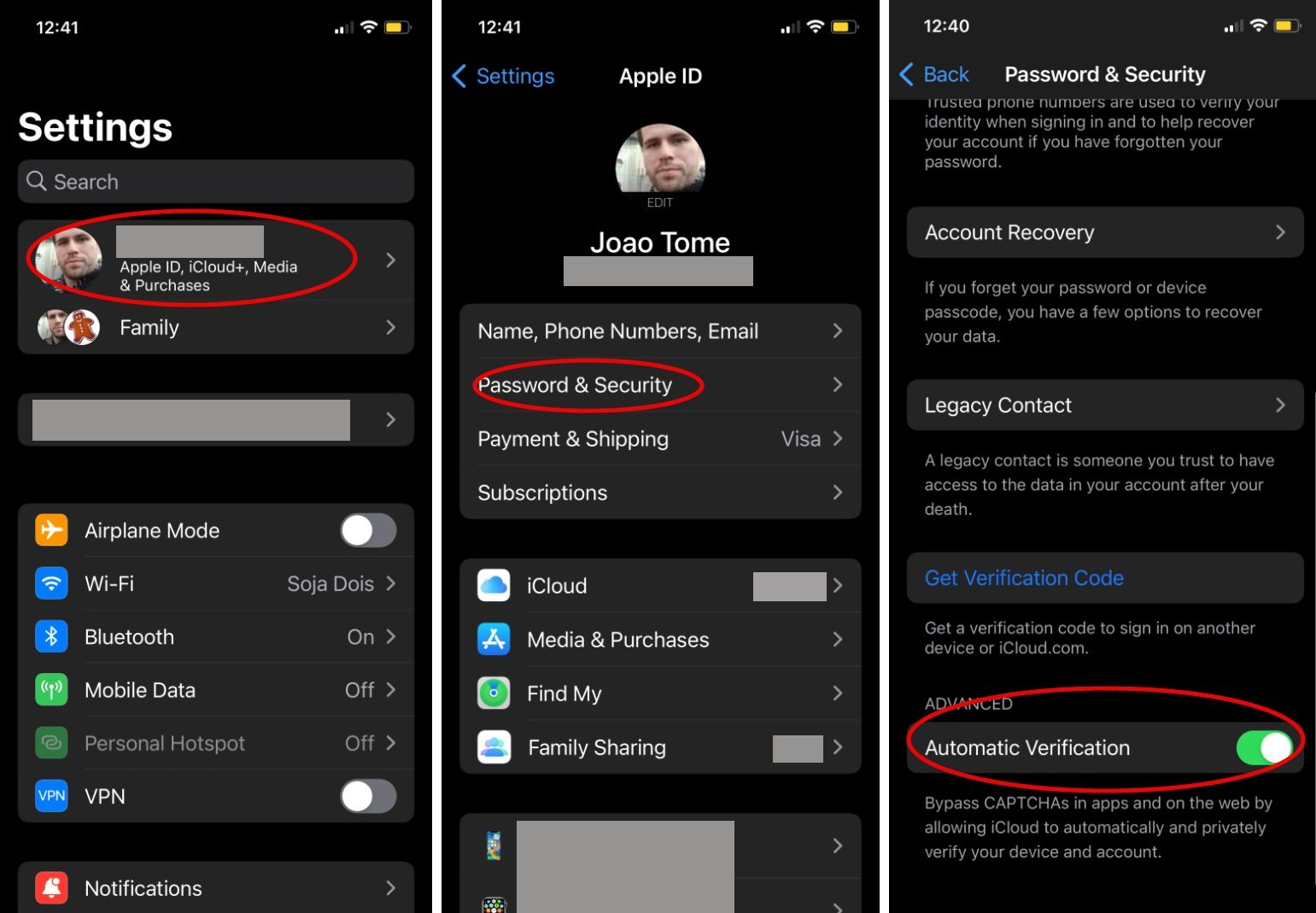
On September 12, iOS 16 became generally available (iPad 16 and macOS 13 should arrive in October) and on the settings of your device there’s a toggle that can enable the Private Access Token (PAT) technology that will eliminate the need for those CAPTCHAs, and automatically validate that you are a real human visiting a site. If you already have iOS 16, here’s what you should do to confirm that the toggle is “on” (usually it is):
Settings > Apple ID > Password & Security > Automatic Verification (should be enabled)
What will you get? A completely invisible, private way to validate yourself, and for a website, a way to automatically verify that real users are visiting the site without the horrible CAPTCHA user experience.
Visitors using operating systems that support these tokens, including the upcoming versions of iPad and macOS, can now prove they’re human without completing a CAPTCHA or giving up personal data.
Let’s recap from our August 2022 announcement blog post what this means for different users:
If you’re an Internet user:
We’re helping make your mobile web experience more pleasant and more private.
You won’t see a CAPTCHA on a supported iOS or Mac device (other devices coming soon!) accessing the Cloudflare network.
If you’re a web or application developer:
You’ll know your users are humans coming from an authentic device and signed application, verified by the device vendor directly.
And you’ll validate users without maintaining a cumbersome SDK.
If you’re a Cloudflare customer:
You don’t have to do anything! Cloudflare will automatically ask for and use Private Access Tokens when using Managed Challenge.
Your visitors won’t see a CAPTCHA.
It’s all about simplicity, without compromising on privacy. The work done over a year was a collaboration between Cloudflare and Apple, Google, and other industry leaders to extend the Privacy Pass protocol with support for a new cryptographic token.
These tokens simplify application security for developers and security teams, and obsolete legacy, third-party SDK-based approaches for determining if a human is using a device. They work for browsers, APIs called by browsers, and APIs called within apps. After Apple announced in August that PATs would be incorporated into iOS 16, iPad 16, and macOS 13, the process of ending CAPTCHAs got a big boost. And we expect additional vendors to announce support in the near future.
Cloudflare has already incorporated PATs into our Managed Challenge platform, so any customer using this feature will automatically take advantage of this new technology to improve the browsing experience for supported devices.
In our August in-depth blog post about PATs, you can learn more about how CAPTCHAs don’t work in mobile environments and PATs remove the need for them, and how when sites can’t challenge a visitor with a CAPTCHA, they collect private data.
Improved privacy
In that blog post, we also explain how Private Access Tokens vastly improve privacy by validating without fingerprinting. So, by partnering with third parties like device manufacturers, who already have the data that would help us validate a device, we are able to abstract portions of the validation process, and confirm data without actually collecting, touching, or storing that data ourselves. Rather than interrogating a device directly, we ask the device vendor to do it for us.
Most customers won’t have to do anything to utilize Private Access Tokens. Why? To take advantage of PATs, all you have to do is choose Managed Challenge rather than Legacy CAPTCHA as a response option in a Firewall rule. More than 65% of Cloudflare customers are already doing this.
Now, if you have iOS 16 on your iPhone, it’s your turn.
The Internet is an endless flow of conversations between computers. These conversations, the constant exchange of information from one computer to another, are what allow us to interact with the Internet as we know it. Application Programming Interfaces (APIs) are the vital channels that carry these conversations, and their usage is quickly growing: in fact, more than half of the traffic handled by Cloudflare is for APIs, and this is increasing twice as fast as traditional web traffic.
In March, we announced that we’re expanding our API Shield into a full API Gateway to make it easy for our customers to protect and manage those conversations. We already offer several features that allow you to secure your endpoints, but there’s more to endpoints than their security. It can be difficult to keep track of many endpoints over time and understand how they’re performing. Customers deserve to see what’s going on with their API-driven domains and have the ability to manage their endpoints.
Today, we’re excited to announce that the ability to save, update, and monitor the performance of all your API endpoints is now generally available to API Shield customers. This includes key performance metrics like latency, error rate, and response size that give you insights into the overall health of your API endpoints.
A Refresher on APIs
The bar for what we expect an application to do for us has risen tremendously over the past few years. When we open a browser, app, or IoT device, we expect to be able to connect to data instantly, compare dozens of flights within seconds, choose a menu item from a food delivery app, or see the weather for ten locations at once.
How are applications able to provide this kind of dynamic engagement for their users? They rely on APIs, which provide access to data and services—either from the application developer or from another company. APIs are fundamental in how computers (or services) talk to each other and exchange information.
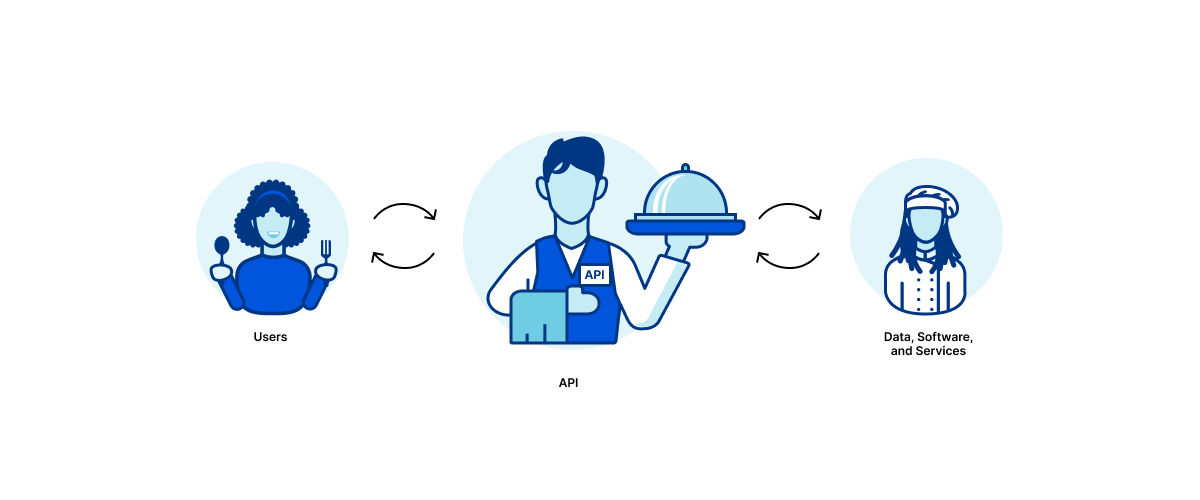
You can think of an API as a waiter: say a customer orders a delicious bowl of Mac n Cheese. The waiter accepts this order from the customer, communicates the request to the chef in a format the chef can understand, and then delivers the Mac n Cheese back to the customer (assuming the chef has the ingredients in stock). The waiter is the crucial channel of communication, which is exactly what the API does.
Managing API Endpoints
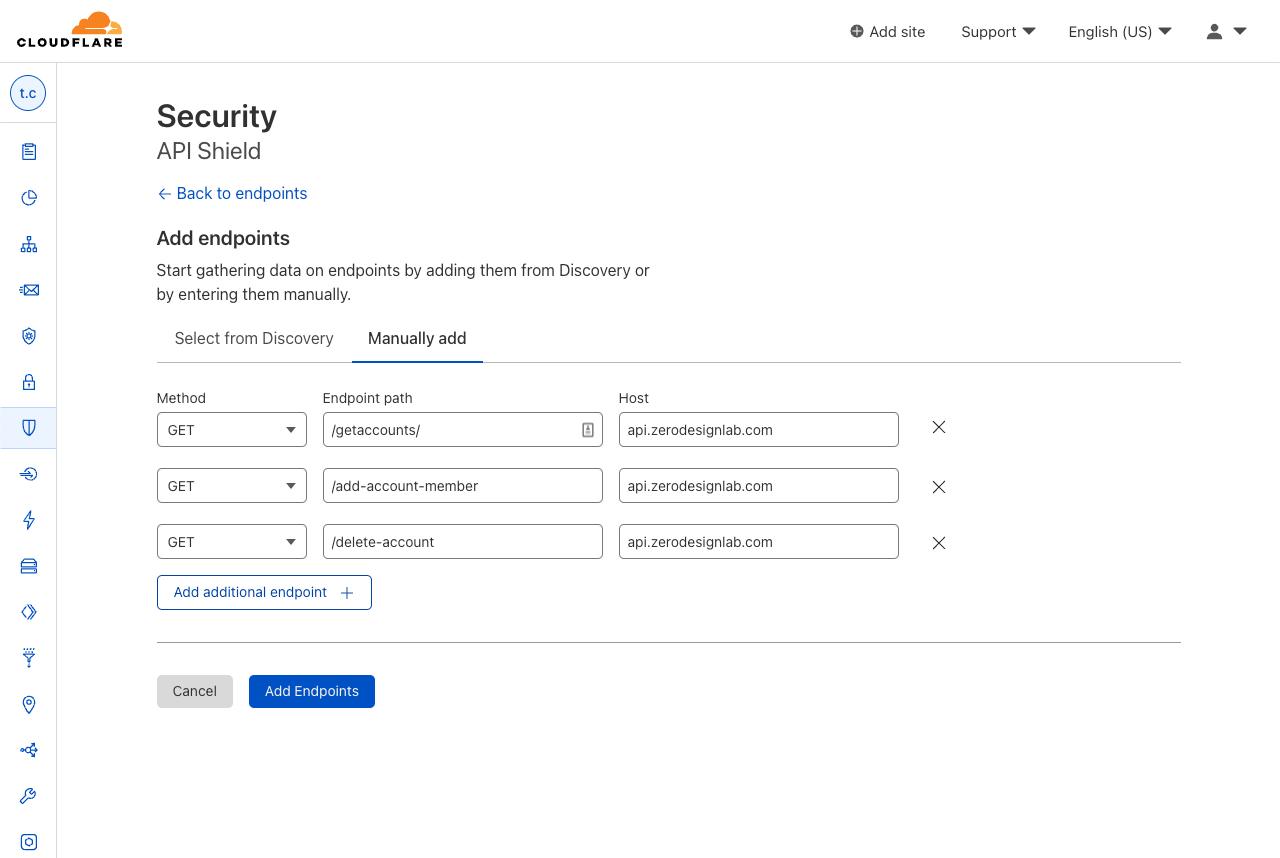
The first step in managing APIs is to get a complete list of all the endpoints exposed to the internet. API Discovery automatically does this for any traffic flowing through Cloudflare. Undiscovered APIs can’t be monitored by security teams (since they don’t know about them) and they’re thus less likely to have proper security policies and best practices applied. However, customers have told us they also want the ability to manually add and manage APIs that are not yet deployed, or they want to ignore certain endpoints (for example those in the process of deprecation). Now, API Shield customers can choose to save endpoints found by Discovery or manually add endpoints to API Shield.
But security vulnerabilities aren’t the only risk or area of concern with APIs – they can be painfully slow or connections can be unsuccessful. We heard questions from our customers such as: what are my most popular endpoints? Is this endpoint significantly slower than it was yesterday? Are any endpoints returning errors that may indicate a problem with the application?
That’s why we built Performance Metrics into API Shield, which allows our customers to quickly answer these questions themselves with real-time data.
Prioritizing Performance
Once you’ve discovered, saved, or removed endpoints, you want to know what’s going well and what’s not. To end-users, a huge part of what defines the experience as “going well” is good performance. Poor performance can lead to a frustrating experience: when you’re shopping online and press a button to check out, you don’t want to wait around for minutes for the page to load. And you certainly never want to see a dreaded error symbol telling you that you can’t get what you came for.
Exposing performance metrics of API endpoints puts concrete numerical data into your developers’ hands to tell you how things are going. When things are going poorly, these dashboard metrics will point out exactly which aspect of performance is causing concern: maybe you expected to see a spike in requests, but find out that request count is normal and latency is just higher than usual.
Empowering our customers to make data-driven decisions to better manage their APIs ends up being a win for our customers and our customers’ customers, who expect to seamlessly engage with the domain’s APIs and get exactly what they came for.
Management and Performance Metrics in the Dashboard
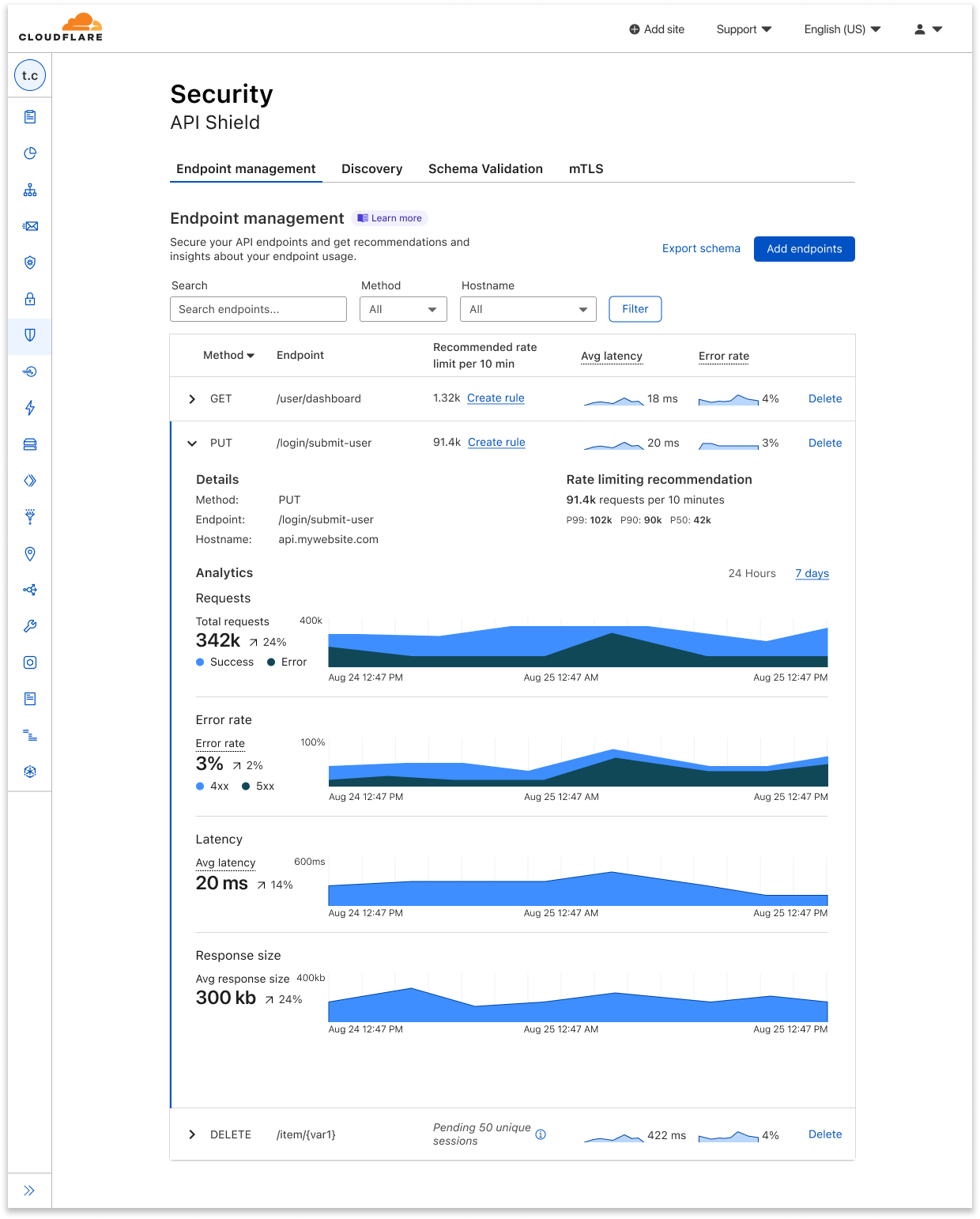
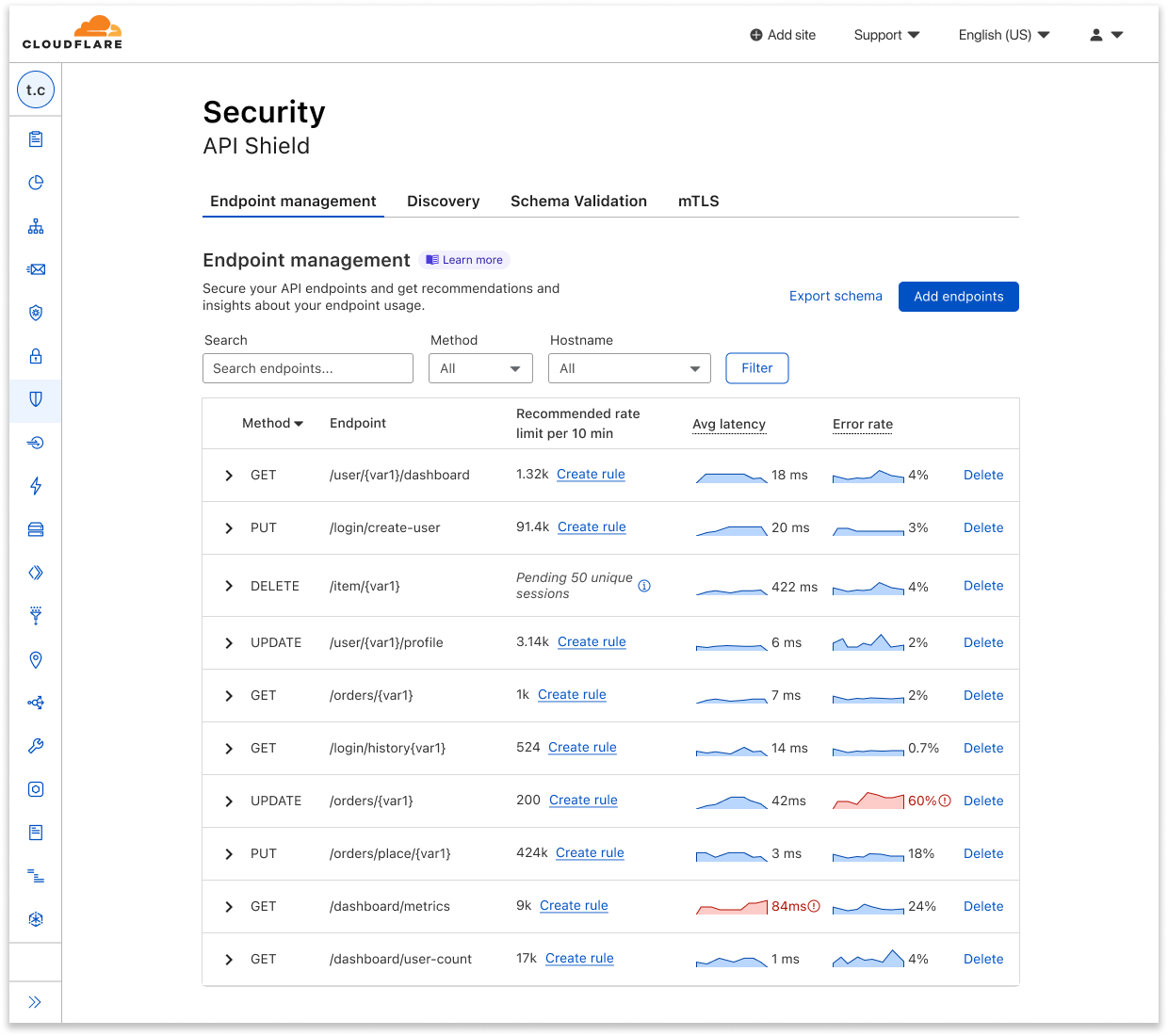
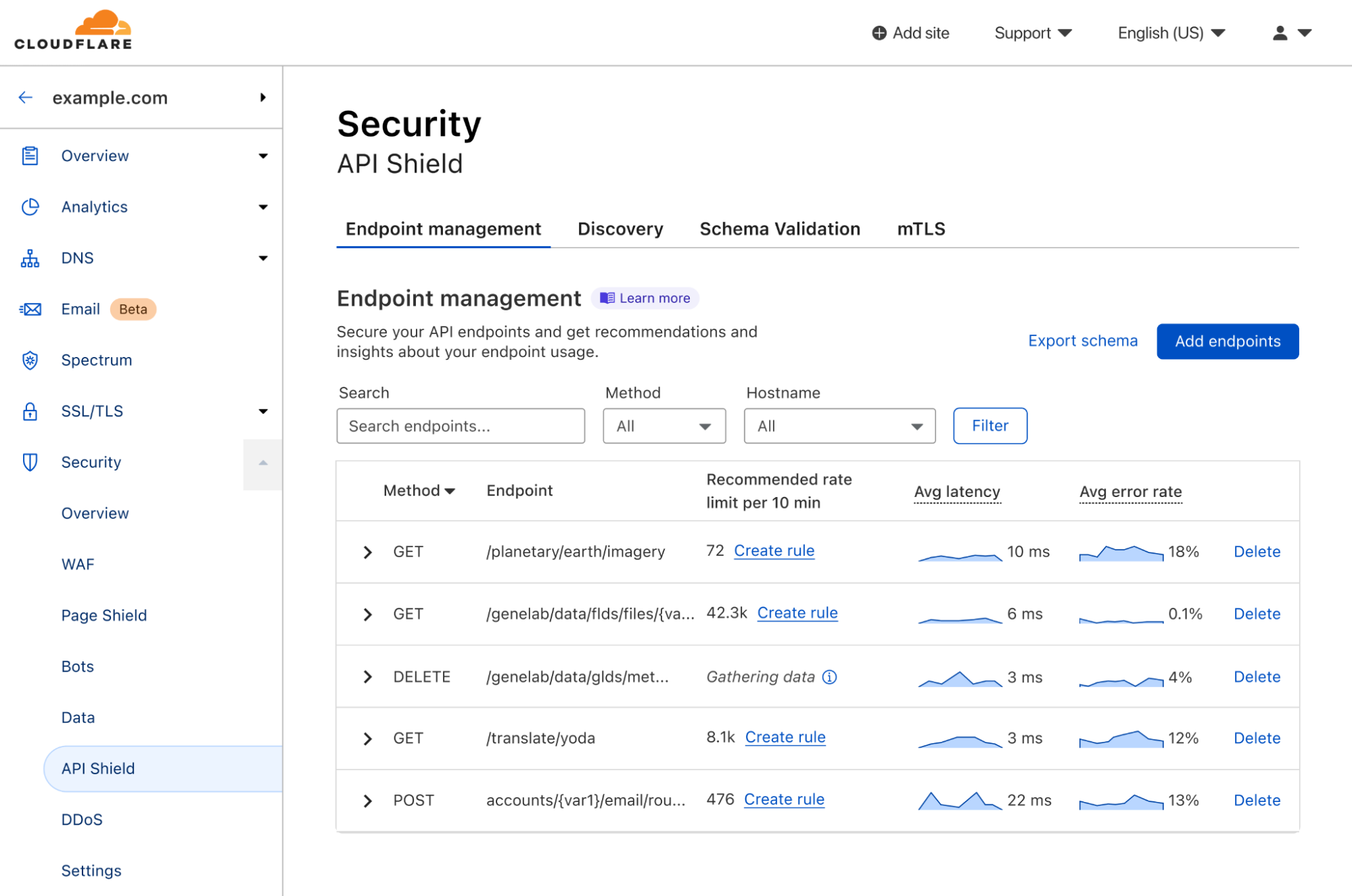
So, what’s available today? Log onto your Cloudflare dashboard, go to the domain-level Security tab, and open up the API Shield page. Here, you’ll see the Endpoint Management tab, which shows you all the API endpoints that you’ve saved, alongside placeholders for metrics that will soon be gathered.
Here you can easily delete endpoints you no longer want to track, or click manually add additional endpoints. You can also export schemas for each host to share internally or externally.
Once you’ve saved the endpoints that you want to keep tabs on, Cloudflare will start collecting data on its performance and make it available to you as soon as possible.
In Endpoint Management, you can see a few summary metrics in the collapsed view of each endpoint, including recommended rate limits, average latency, and error rate. It can be difficult to tell whether things are going well or not just from seeing a value alone, so we added sparklines that show relative performance, comparing an endpoint’s current metrics with its usual or previous data.
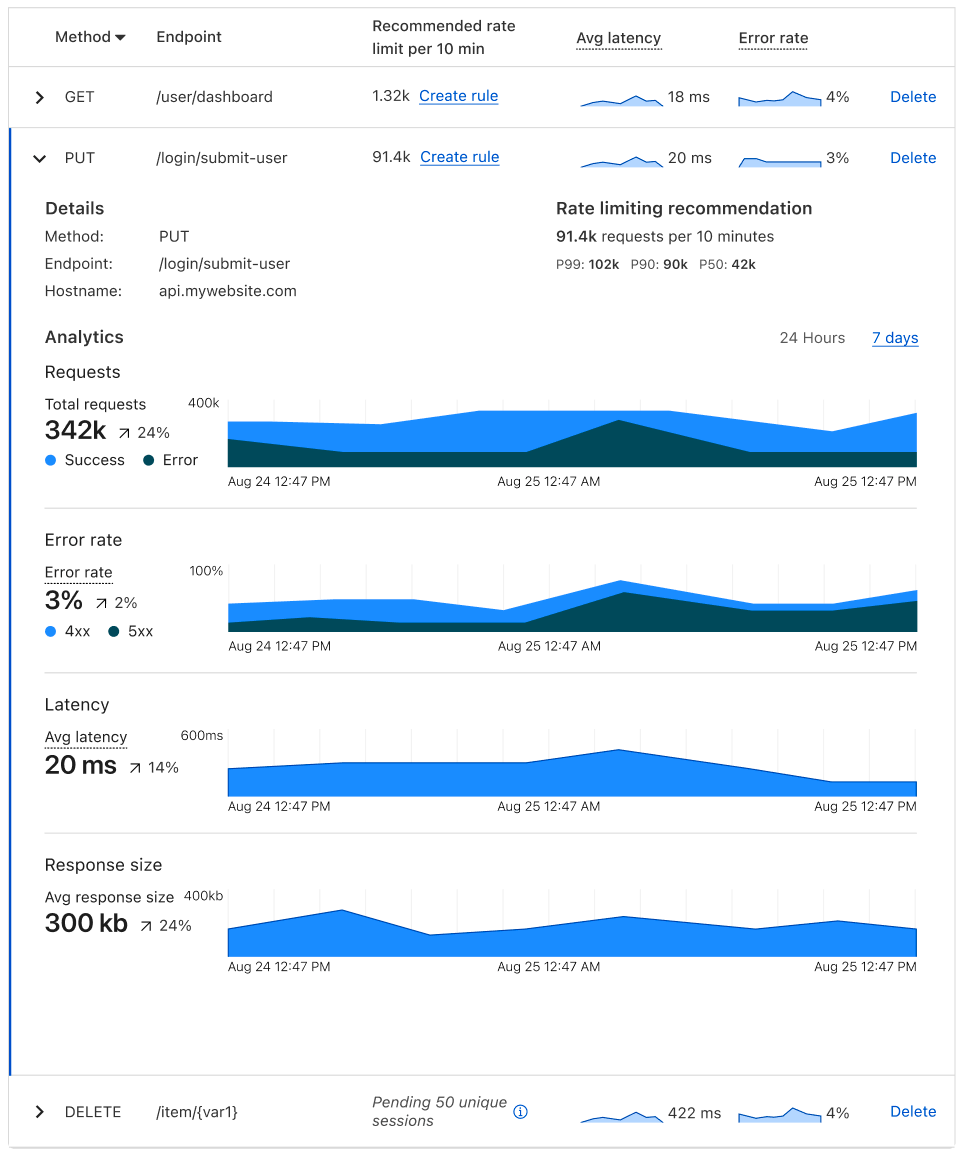
If you want to view further details about a given endpoint, you can expand it for additional metrics such as response size and errors separated by 4xx and 5xx. The expanded view also allows you to view all metrics at a single timestamp by hovering over the charts.
For each saved endpoint, customers can see the following metrics:
Request count: total number of requests to the endpoint over time.
Rate limiting recommendation per 10 minutes, which is guided by the request count.
Latency: average origin response time, in milliseconds (ms). How long does it take from the moment a visitor makes a request to the moment the visitor gets a response back from the origin?
Error rate vs. overall traffic: grouped by 4xx, 5xx, and their sum.
Response size: average size of the response (in bytes) returned to the request.
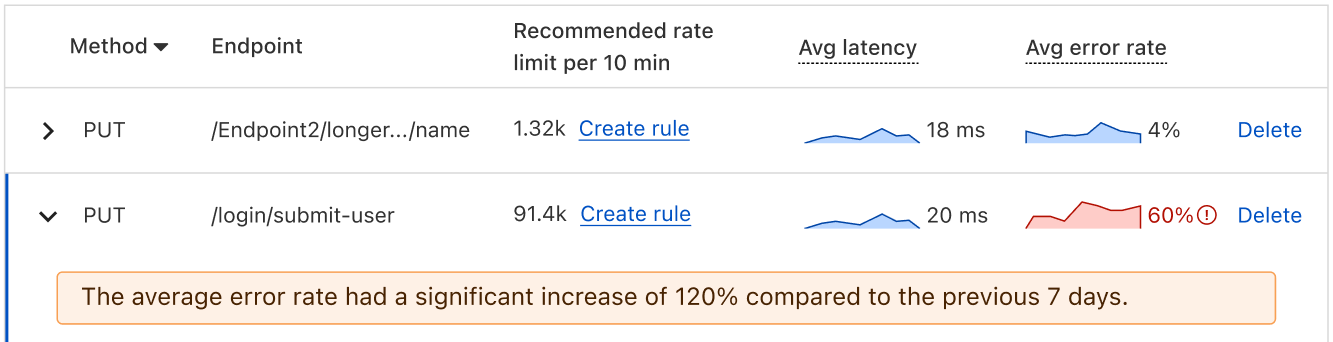
You can toggle between viewing these metrics on a 24-hour period or a 7-day period, depending on the scale on which you’d like to view your data. And in the expanded view, we provide a percentage difference between the averages of the current vs. the previous period. For example, say I’m viewing my metrics on a 24-hour timeline. My average latency yesterday was 10 ms, and my average latency today is 30 ms, so the dashboard shows a 200% increase. We also use anomaly detection to bring attention to endpoints that have concerning performance changes.
Additional improvements to Discovery and Schema Validation
As part of making endpoint management GA, we’re also adding two additional enhancements to API Shield.
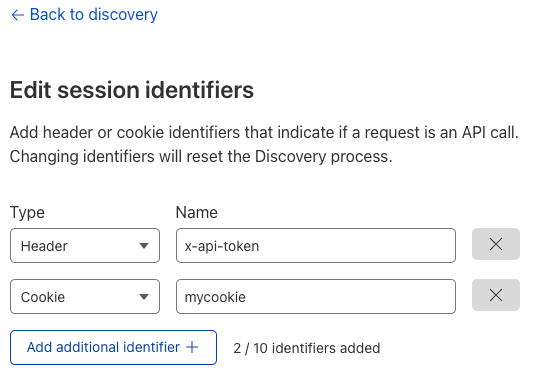
First, API Discovery now accepts cookies — in addition to authorization headers — to discover endpoints and suggest rate limiting thresholds. Previously, you could only identify an API session with HTTP headers, which didn’t allow customers to protect endpoints that use cookies as session identifiers. Now these endpoints can be protected as well. Simply go to the API Shield tab in the dashboard, choose edit session identifiers, and either change the type, or click Add additional identifier.
Second, we added the ability to validate the body of requests via Schema Validation for all customers. Schema Validation allows you to provide an OpenAPI schema (a template for your API traffic) and have Cloudflare block non-conformant requests as they arrive at our edge. Previously, you provided specific headers, cookies, and other features to validate. Now that we can validate the body of requests, you can use Schema Validation to confirm every element of a request matches what is expected. If a request contains strange information in the payload, we’ll notice. Note: customers who have already uploaded schemas will need to re-upload to take advantage of body validation.
Endpoint Management, performance metrics, schema exporting, discovery via cookies, and schema body validation are all available now for all API Shield customers. To use them, log into the Cloudflare dashboard, click on Security in the navigation bar, and choose API Shield. Once API Shield is enabled, you’ll be able to start discovering endpoints immediately. You can also use all features through our API.
If you aren’t yet protecting a website with Cloudflare, it only takes a few minutes to sign up.
Earning and maintaining customer trust is an ongoing commitment at Amazon Web Services (AWS). Our customers’ security requirements drive the scope and portfolio of the compliance reports, attestations, and certifications we pursue. We’re excited to announce that AWS has achieved authorization under the Information System Security Management and Assessment Program (ISMAP) program, effective from April 1, 2022 to March 31, 2023. The authorization scope covers a total of 145 AWS services (an increase of 22 services over the previous authorization) across 22 AWS Regions, including the Asia Pacific (Tokyo) Region and the Asia Pacific (Osaka) Region. This is the second time AWS has undergone an assessment since ISMAP was first published by the ISMAP steering committee in March 2020.
ISMAP is a Japanese government program for assessing the security of public cloud services. The purpose of ISMAP is to provide a common set of security standards for cloud service providers (CSPs) to comply with as a baseline requirement for government procurement. ISMAP introduces security requirements for cloud domains, practices, and procedures that CSPs must implement. CSPs must engage with an ISMAP-approved third-party assessor to assess compliance with the ISMAP security requirements in order to apply as an ISMAP-registered CSP. The ISMAP program will evaluate the security of each CSP and register those that satisfy the Japanese government’s security requirements. Upon successful ISMAP registration of CSPs, government procurement departments and agencies can accelerate their engagement with the registered CSPs and contribute to the smooth introduction of cloud services in government information systems.
The achievement of this authorization demonstrates the proactive approach AWS has taken to help customers meet compliance requirements set by the Japanese government and to deliver secure AWS services to our customers. Service providers and customers of AWS can use the ISMAP authorization of AWS services to support their own ISMAP authorization programs. The full list of 145 ISMAP-authorized AWS services is available on the AWS Services in Scope by Compliance Program webpage, and you can also use the ISMAP Customer Package on AWS Artifact. You can confirm the AWS ISMAP authorization status and find detailed scope information on the ISMAP Portal.
As always, we are committed to bringing new services and Regions into the scope of our ISMAP program, based on your business needs. If you have any questions, don’t hesitate to contact your AWS Account Manager.
If you have feedback about this post, submit comments in the Comments section below. Want more AWS Security how-to content, news, and feature announcements? Follow us on Twitter.
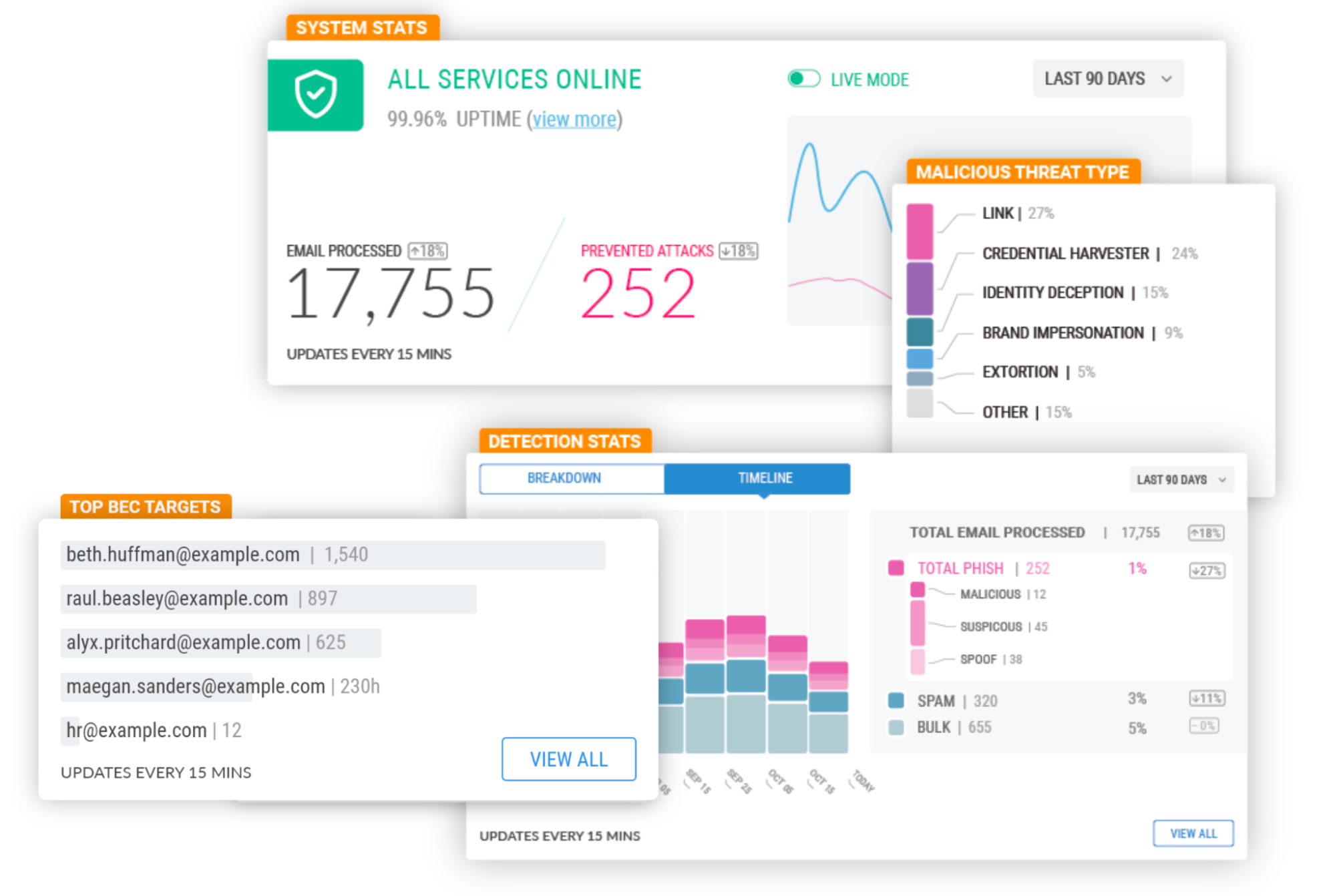
On February 23, 2022, after being a customer for two years and seeing phishing attacks virtually disappear from our employee’s mailboxes, Cloudflare announced the acquisition of Area 1 Security.
Thanks to its unique technology (more on that below) Cloudflare Area 1 can proactively identify and protect against phishing campaigns before they happen, and potentially prevent the 90%+ of all cyberattacks that Deloitte research identified as starting with an email. All with little to no impact on employee productivity.
But preventing 90% of the attacks is not enough, and that’s why Cloudflare Area 1 email security is part of our Zero Trust platform. Here’s what’s new.
Email Security on your Cloudflare Dashboard
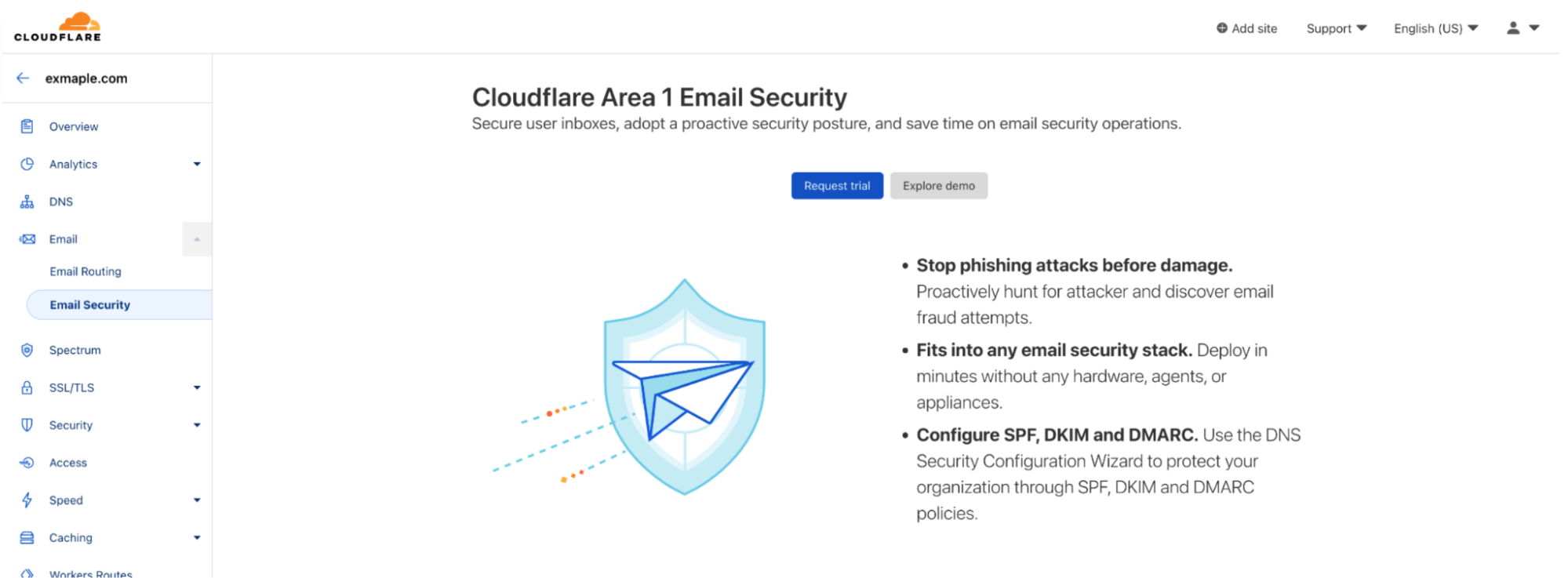
Starting today you will find a dedicated Email Security section on your Cloudflare dashboard. That’s the easiest way for any Cloudflare customer to get familiar with and start using Cloudflare Area 1 Email Security.
From there you can easily request a trial, which gives you access to the full product for 30 days.
Our team will guide you through the setup, which will take just a few minutes. That’s the beauty of not having to install and tune a Secure Email Gateway (SEG). You can simply configure Area 1 inline or connect through the API, journaling, or other connectors – none of these options disrupt mail flow or the end user experience. And you don’t need any new hardware, appliances or agents.
Once the trial starts, you’ll be able to review detection metrics and forensics in real time, and will receive real-time updates from the Area 1 team on incidents that require immediate attention.
At the end of the trial you will also have a Phishing Risk Assessment where our team will walk you through the impact of the mitigated attacks and answer your questions.
Another option you’ll see on the Email Security section of the Cloudflare Dashboard is to explore the Area 1 demo.
At the click of a button you’ll enter the Area 1 portal of a fictitious company where you can see the product in action. You can interact with the full product, including our advanced message classifiers, the BEC protections, real time view of spoofed domains, and our unique message search and trace capabilities.
Product Expansions
Being cloud-native has allowed us to develop some unique capabilities. Most notably, we scan the Internet for attacker infrastructure, sources and delivery mechanisms to stop phishing attacks days before they hit an inbox. These are state of the art machine-learning models using the threat intelligence data that Area 1 has accumulated since it was founded nine years ago, and now they also incorporate data from the 124 billion cyber threats that Cloudflare blocks each day and its 1.7 trillion daily DNS queries.
Since the product is cloud-based and no local appliances are involved, these unique datasets and models benefit every customer immediately and apply to the full range of email attack types (URLs, payloads, BEC), vectors (email, web, network), and attack channels (external, internal, trusted partners). Additionally, the threat datasets, observables and Indicators of Compromise (IOC) are now additional signals to Cloudflare Gateway (part of Zero Trust), extending protection beyond email and giving Cloudflare customers the industry’s utmost protection against converged or blended threats.
The expertise Area 1 gained through this relentless focus on Threat Research and Threat Operations (i.e., disrupting actors once identified) is also leading to a new large scale initiative to make every Cloudflare customer, and the broader Internet, safer – Cloudforce One.
The Cloudforce One team is composed of analysts assigned to five subteams: Malware Analysis, Threat Analysis, Active Mitigation and Countermeasures, Intelligence Analysis, and Intelligence Sharing. Collectively, they have tracked many of the most sophisticated cyber criminals on the Internet while at the National Security Agency (NSA), USCYBERCOM, and Area 1 Security, and have worked closely with similar organizations and governments to disrupt these threat actors. They’ve also been prolific in publishing “finished intel” reports on security topics of significant geopolitical importance, such as targeted attacks against governments, technology companies, the energy sector, and law firms, and have regularly briefed top organizations around the world on their efforts.
The team will help protect all Cloudflare customers by working closely with our existing product, engineering, and security teams to improve our products based on tactics, techniques, and procedures (TTPs) observed in the wild. Customers will get better protection without having to take any action.
Additionally, customers can purchase a subscription to Cloudforce One (now generally available), and get access to threat data and briefings, dedicated security tools, and the ability to make requests for information (RFIs) to the team’s threat operations staff. RFIs can be on any security topic of interest, and will be analyzed and responded to in a timely manner. For example, the Cloudforce One Malware Analysis team can accept uploads of possible malware and provide a technical analysis of the submitted resource.
Lastly, SPF/DKIM/DMARC policies are another tool that can be used to prevent Email Spoofing and have always been a critical part of Area 1’s threat models. Cloudflare Area 1 customers receive weekly DMARC sender reports to understand the efficacy of their configuration, but customers have also asked for help in setting up SPF/DKIM/DMARC records for their own domains.
It was only logical to make Cloudflare’s Email Security DNS Wizard part of our Email Security stack to guide customers through their initial SPF, DKIM and DMARC configuration. The wizard is now available to all customers using Cloudflare DNS, and will soon be available to Cloudflare Area 1 customers using a third party DNS. Getting SPF/DKIM/DMARC right can be complex, but it is a necessary and vital part of making the Internet safer, and this solution will help you build a solid foundation.
You’ll be hearing from us very soon regarding more expansions to the Area 1 feature set. In the meantime, if you want to experience Area 1 first-hand sign up for a Phishing Risk Assessment here or explore the interactive demo through the Email section of your Cloudflare Dashboard.
Cloudflare’s threat operations and research team, Cloudforce One, is now open for business and has begun conducting threat briefings. Access to the team is available via an add-on subscription, and includes threat data and briefings, security tools, and the ability to make requests for information (RFIs) to the team.
Fill out this form or contact your account team to learn more.
Subscriptions come in two packages, and are priced based on number of employees: “Premier” includes our full history of threat data, bundled RFIs, and an API quota designed to support integrations with SIEMs. “Core” level includes reduced history and quotas. Both packages include access to all available security tools, including a threat investigation portal and sinkholes-as-a-service.
If you’re an enterprise customer interested in understanding the type of threat briefings that Cloudforce One customers receive, you can register here for “YackingYeti: How a Russian threat group targets Ukraine—and the world”, scheduled for October 12. The briefing will include Q&A with Blake Darché, head of Cloudforce One, and an opportunity to learn more about the team and offering.
Requests for Information (RFIs) and Briefings
The Cloudforce One team is composed of analysts assigned to five subteams: Malware Analysis, Threat Analysis, Active Mitigation and Countermeasures, Intelligence Analysis, and Intelligence Sharing. Collectively, they have tracked many of the most sophisticated cyber criminals on the Internet while at the National Security Agency (NSA), USCYBERCOM, and Area 1 Security, and have worked closely with similar organizations and governments to disrupt these threat actors. They’ve also been prolific in publishing “finished intel” reports on security topics of significant geopolitical importance, such as targeted attacks against governments, technology companies, the energy sector, and law firms, and have regularly briefed top organizations around the world on their efforts.
Included with a Cloudforce One subscription is the ability to make “requests for information” (RFIs) to these experts. RFIs can be on any security topic of interest, and will be analyzed and responded to in a timely manner. For example, the Cloudforce One Malware Analysis team can accept uploads of possible malware and provide a technical analysis of the submitted resource. Each plan level comes with a fixed number of RFIs, and additional requests can be added.
In addition to customer-specific requests, Cloudforce One conducts regular briefings on a variety of threats and threat actors—those targeting specific industries as well as more general topics of interest.
Threat Data
The best way to understand threats facing networks and applications connected to the Internet is to operate and protect critical, large scale Internet infrastructure. And to defend attacks against millions of customers, large and small. Since our early days, Cloudflare has set out to build one of the world’s largest global networks to do just that. Every day we answer trillions of DNS queries, track the issuance of millions SSL/TLS certificates in our CT log, inspect millions of emails for threats, route multiple petabytes of traffic to our customers’ networks, and proxy trillions of HTTP requests destined for our customers’ applications. Each one of these queries and packets provides a unique data point that can be analyzed at scale and anonymized into actionable threat data—now available to our Cloudforce One customers.
Data sets now available in the dashboard and via API for subscribers include IP, ASN, and domain intelligence, passive DNS resolutions; threat actor cards with indicators of compromise (IoC), open port, and new Managed IP Lists are planned for release later this year.
Security Tools
Security analysts and threat hunting teams are being forced to do more with less in today’s operating environment, but that doesn’t reduce their need for reliable tools that can quickly identify and eliminate risks.
Bundled with Cloudforce One are several security tools that can be deployed as services to expedite threat hunting and remediation:
Threat Investigation Portal
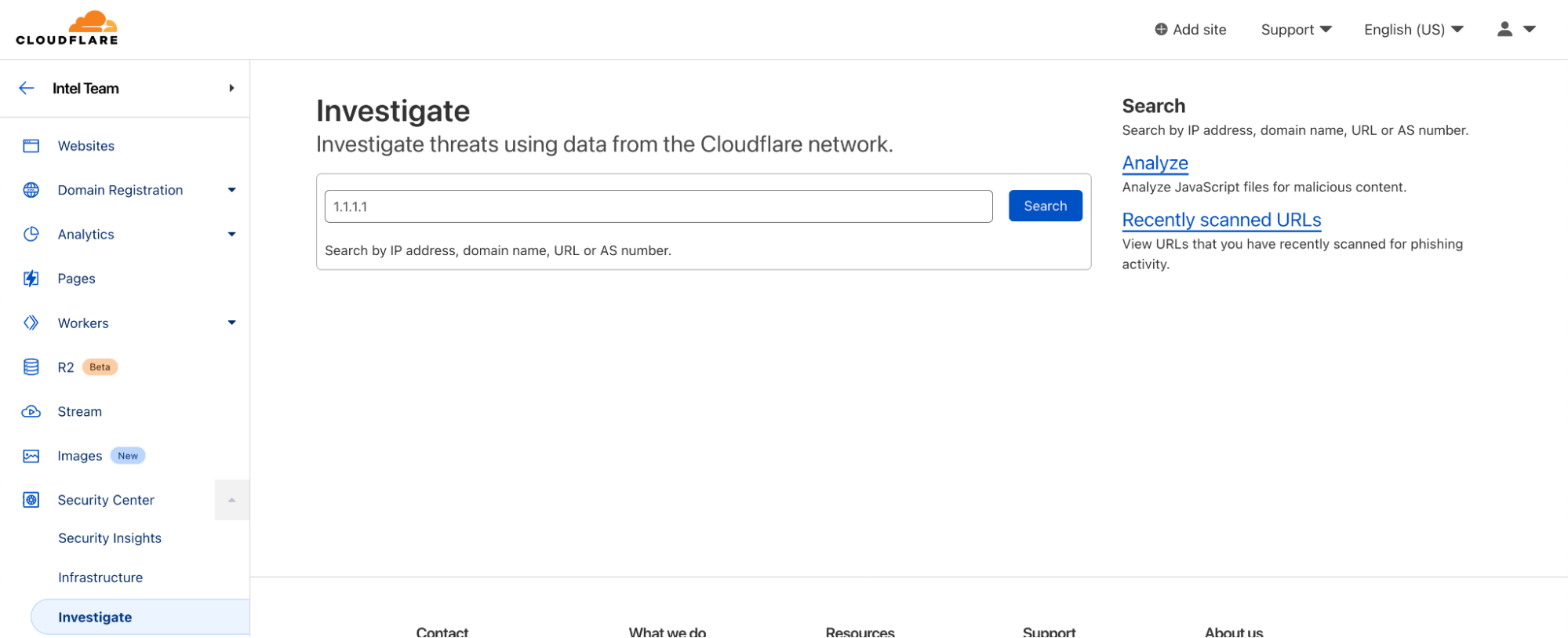
Located within Security Center, the Investigate tab is your portal for querying current and historical threat data on IPs, ASNs, URLs (new!), and domains.
URLs can now be scanned for phishing contents, with heuristic and machine learning-scored results presented on demand.
Brand Protection (new!)
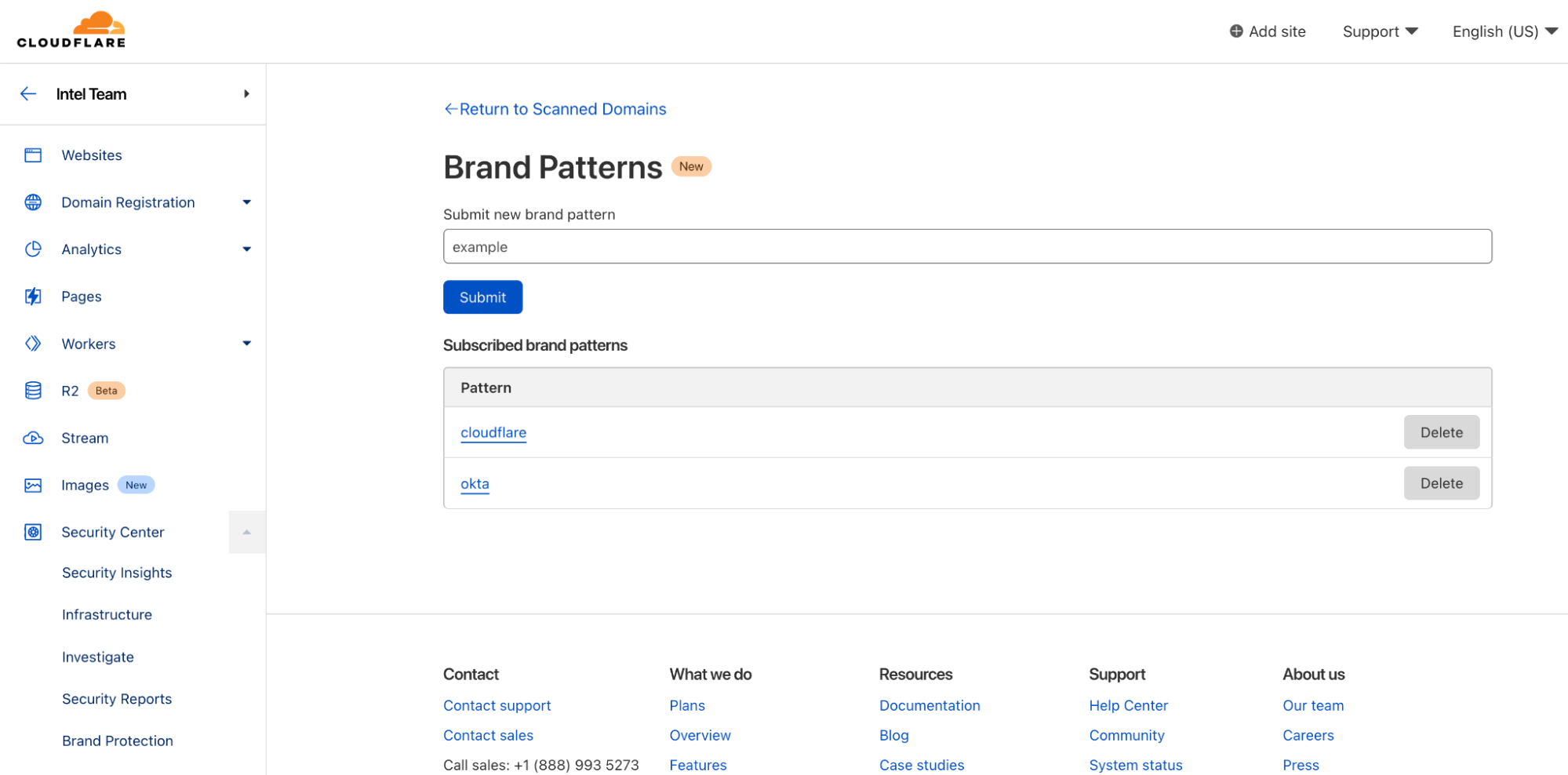
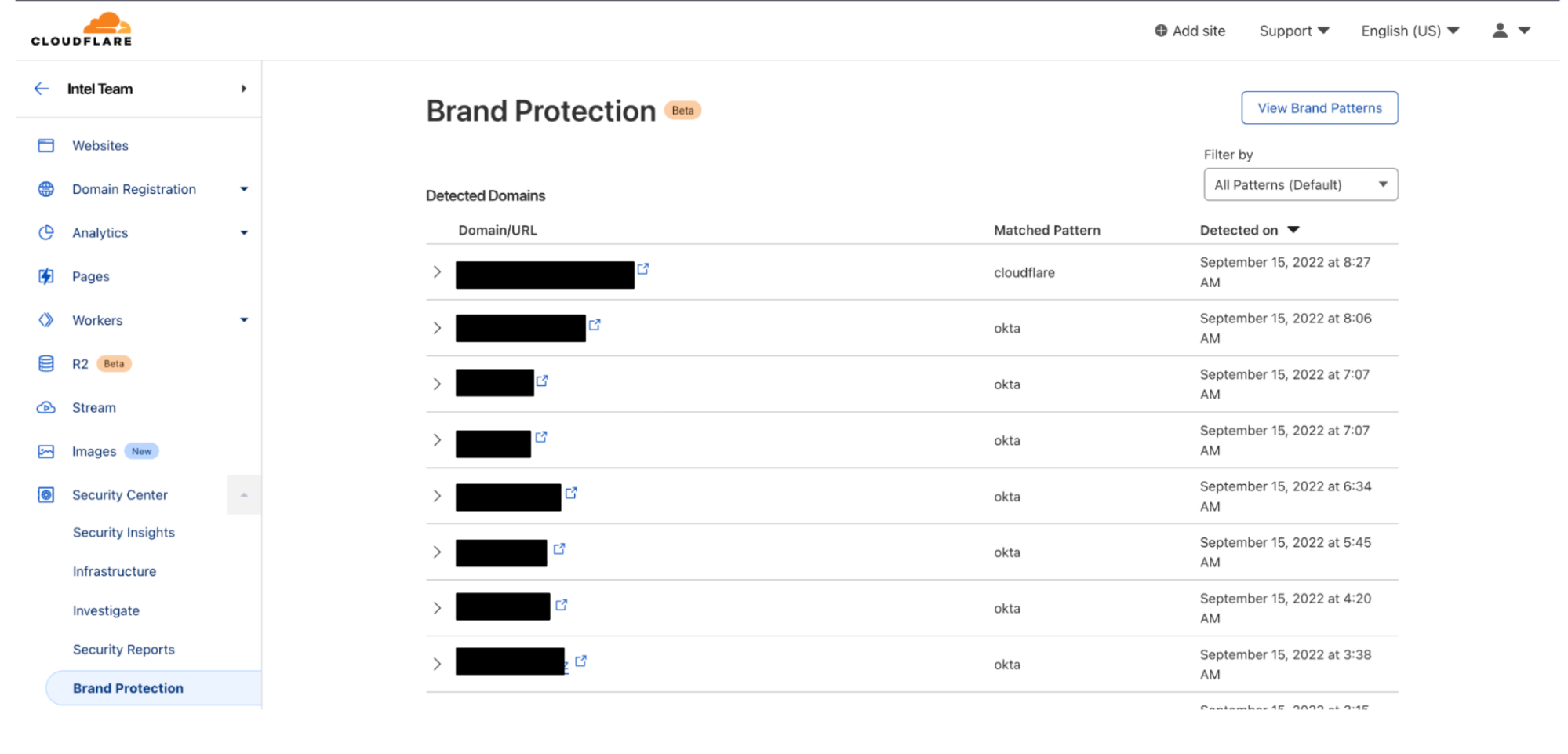
Also located within the Security Center, the Brand Protection tab can be used to register keywords or assets (e.g., corporate logos, etc.) that customers wish to be notified of when they appear on the Internet.
Sinkholes (new!)
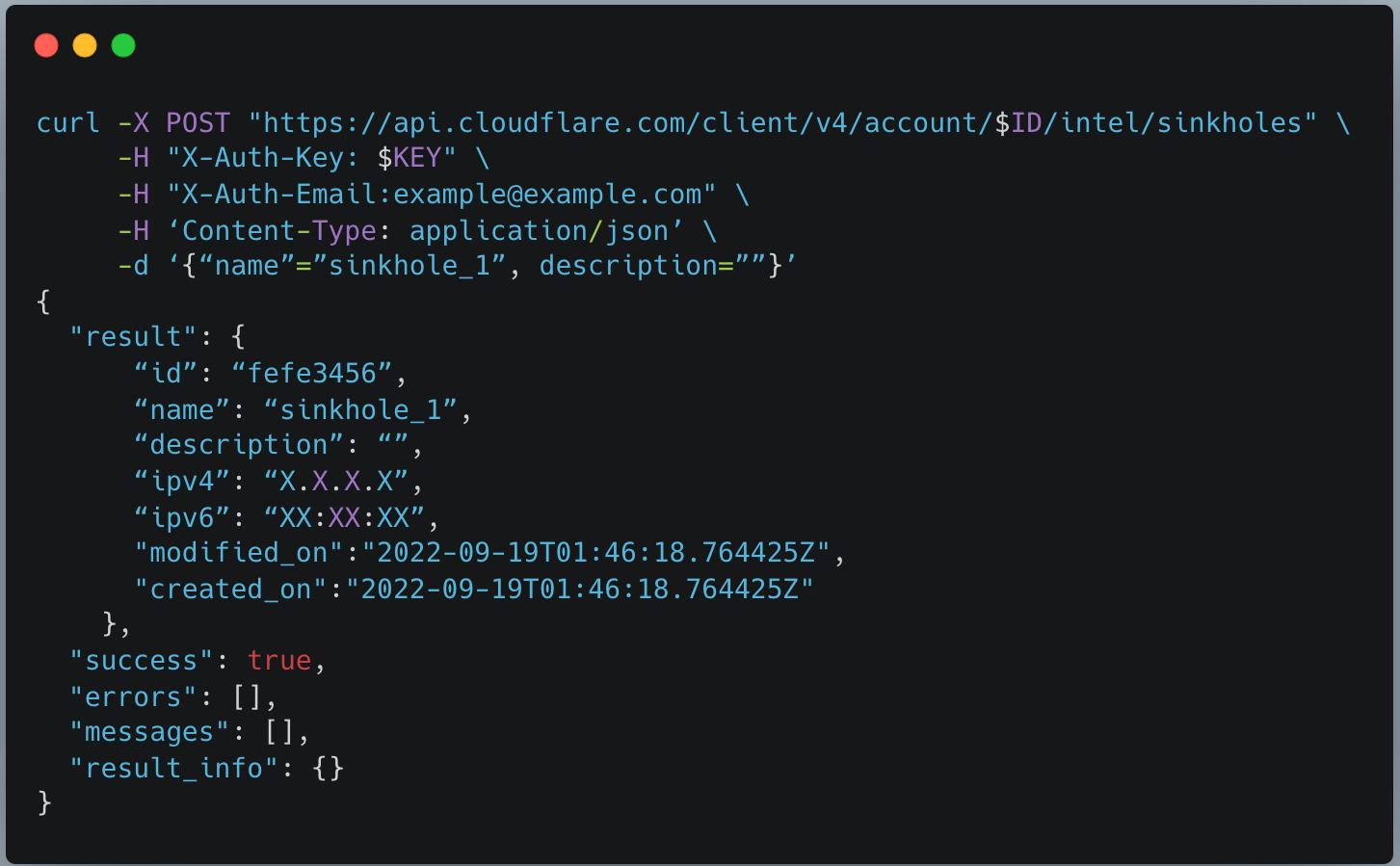
Sinkholes can be created on-demand, as a service, to monitor hosts infected with malware and prevent them from communicating with command-and-control (C2) servers.
After creating a sinkhole via API, an IP will be returned which can be used with DNS products like Cloudflare Gateway to route web requests to safe sinkholes (and away from C2 servers). Sinkholes can be used to intercept SMTP traffic.
Premier customers can also bring their own IP address space to use for sinkholes, to accommodate egress firewall filtering or other use cases. In the future we plan to extend our sinkhole capability to the network layer, which will allow it to be deployed alongside offerings such as Magic Transit and Magic WAN.
Getting Started with Cloudforce One
Cloudforce One is open for business and ready to answer your security inquiries. Speak to your account manager or fill out this form to learn more. We hope to see you on the upcoming webinar!
Gartner has recognised Cloudflare as a Leader in the 2022 “Gartner® Magic Quadrant™ for Web Application and API Protection (WAAP)” report that evaluated 11 vendors for their ‘ability to execute’ and ‘completeness of vision’.
You can register for a complimentary copy of the report here.
We believe this achievement highlights our continued commitment and investment in this space as we aim to provide better and more effective security solutions to our users and customers.
Keeping up with application security
With over 36 million HTTP requests per second being processed by the Cloudflare global network we get unprecedented visibility into network patterns and attack vectors. This scale allows us to effectively differentiate clean traffic from malicious, resulting in about 1 in every 10 HTTP requests proxied by Cloudflare being mitigated at the edge by our WAAP portfolio.
Visibility is not enough, and as new use cases and patterns emerge, we invest in research and new product development. For example, API traffic is increasing (55%+ of total traffic) and we don’t expect this trend to slow down. To help customers with these new workloads, our API Gateway builds upon our WAF to provide better visibility and mitigations for well-structured API traffic for which we’ve observed different attack profiles compared to standard web based applications.
We believe our continued investment in application security has helped us gain our position in this space, and we’d like to thank Gartner for the recognition.
Cloudflare WAAP
At Cloudflare, we have built several features that fall under the Web Application and API Protection (WAAP) umbrella.
DDoS protection & mitigation
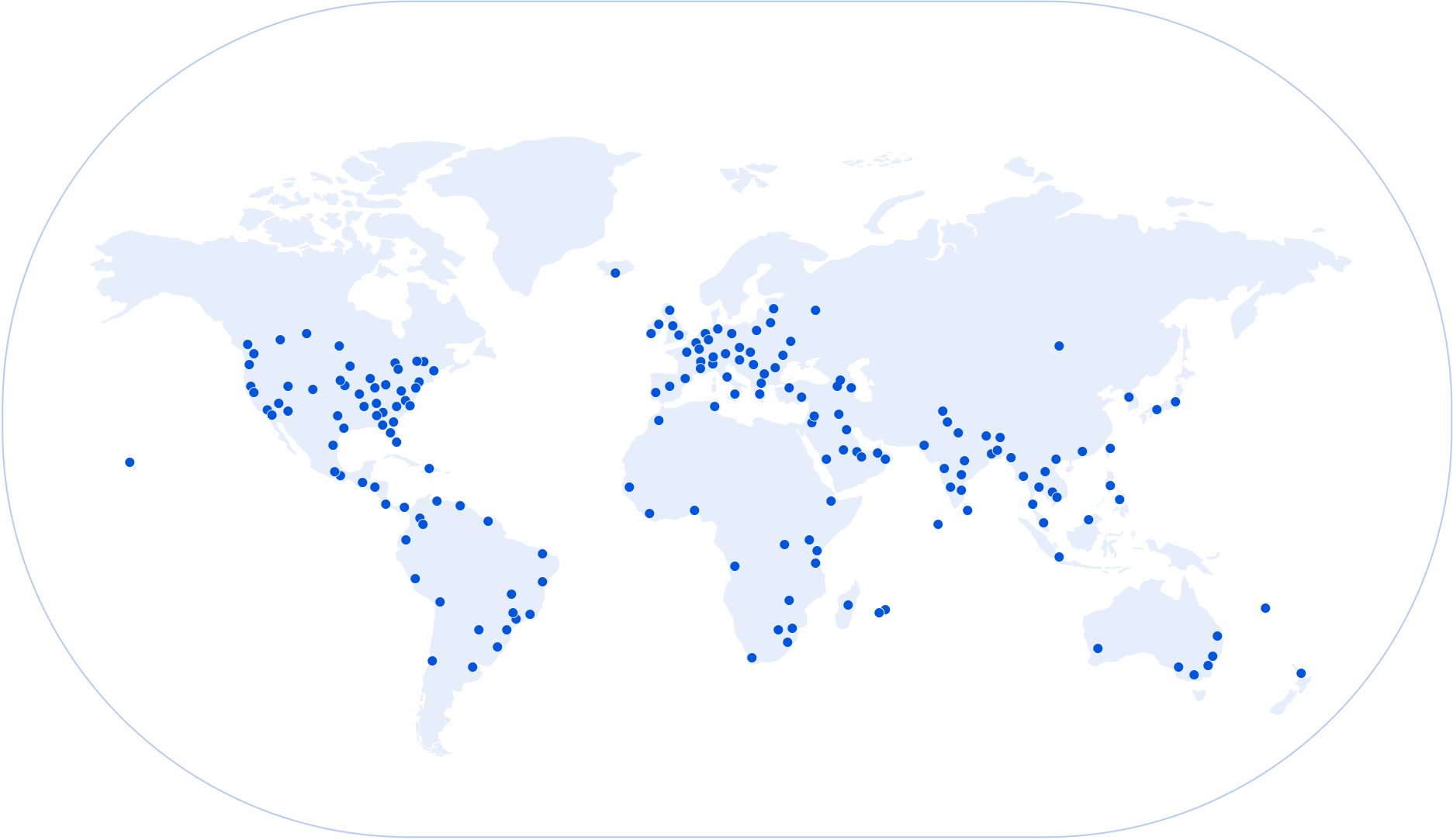
Our network, which spans more than 275 cities in over 100 countries is the backbone of our platform, and is a core component that allows us to mitigate DDoS attacks of any size.
To help with this, our network is intentionally anycasted and advertises the same IP addresses from all locations, allowing us to “split” incoming traffic into manageable chunks that each location can handle with ease, and this is especially important when mitigating large volumetric Distributed Denial of Service (DDoS) attacks.
The system is designed to require little to no configuration while also being “always-on” ensuring attacks are mitigated instantly. Add to that some very smart software such as our new location aware mitigation, and DDoS attacks become a solved problem.
Our WAF is a core component of our application security and ensures hackers and vulnerability scanners have a hard time trying to find potential vulnerabilities in web applications.
This is very important when zero-day vulnerabilities become publicly available as we’ve seen bad actors attempt to leverage new vectors within hours of them becoming public. Log4J, and even more recently the Confluence CVE, are just two examples where we observed this behavior. That’s why our WAF is also backed by a team of security experts who constantly monitor and develop/improve signatures to ensure we “buy” precious time for our customers to harden and patch their backend systems when necessary. Additionally, and complementary to signatures, our WAF machine learning system classifies each request providing a much wider view in traffic patterns.
Our Bot Management product works in parallel to our WAF and scores every request with the likelihood of it being generated by a bot, allowing you to easily filter unwanted traffic by deploying a WAF Custom Rule, all this backed by powerful analytics. We make this easy by also maintaining a list of verified bots that can be used to further improve a security policy.
In the event you want to block automated traffic, Cloudflare’s managed challenge ensures that only bots receive a hard time without impacting the experience of real users.
API Gateway
API traffic, by definition, is very well-structured relative to standard web pages consumed by browsers. At the same time, APIs tend to be closer abstractions to back end databases and services, resulting in increased attention from malicious actors and often go unnoticed even to internal security teams (shadow APIs).
API Gateway, that can be layered on top of our WAF, helps you both discover API endpoints served by your infrastructure, as well detect potential anomalies in traffic flows that may indicate compromise, both from a volumetric and sequential perspective.
The nature of APIs also allows API Gateway to much more easily provide a positive security model contrary to our WAF: only allow known good traffic and block everything else. Customers can leverage schema protection and mutual TLS authentication (mTLS) to achieve this with ease.
Page Shield
Attacks that leverage the browser environment directly can go unnoticed for some time, as they don’t necessarily require the back end application to be compromised. For example, if any third party JavaScript library used by a web application is performing malicious behavior, application administrators and users may be none the wiser while credit card details are being leaked to a third party endpoint controlled by an attacker. This is a common vector for Magecart, one of many client side security attacks.
Page Shield, just like our other WAAP products, is fully integrated on the Cloudflare platform and requires one single click to turn on.
Security Center
Cloudflare’s new Security Center is the home of the WAAP portfolio. A single place for security professionals to get a broad view across both network and infrastructure assets protected by Cloudflare.
Moving forward we plan for the Security Center to be the starting point for forensics and analysis, allowing you to also leverage Cloudflare threat intelligence when investigating incidents.
The Cloudflare advantage
Our WAAP portfolio is delivered from a single horizontal platform, allowing you to leverage all security features without additional deployments. Additionally, scaling, maintenance and updates are fully managed by Cloudflare allowing you to focus on delivering business value on your application.
This applies even beyond WAAP, as, although we started building products and services for web applications, our position in the network allows us to protect anything connected to the Internet, including teams, offices and internal facing applications. All from the same single platform. Our Zero Trust portfolio is now an integral part of our business and WAAP customers can start leveraging our secure access service edge (SASE) with just a few clicks.
If you are looking to consolidate your security posture, both from a management and budget perspective, application services teams can use the same platform that internal IT services teams use, to protect staff and internal networks.
Continuous innovation
We did not build our WAAP portfolio overnight, and over just the past year we’ve released more than five major WAAP portfolio security product releases. To showcase our speed of innovation, here is a selection of our top picks:
API Shield Schema Protection: traditional signature based WAF approaches (negative security model) don’t always work well with well-structured data such as API traffic. Given the fast growth in API traffic across the network we built a new incremental product that allows you to enforce API schemas directly at the edge using a positive security model: only let well-formed data through to your origin web servers;
API Abuse Detection: complementary to API Schema Protection, API Abuse Detection warns you whenever anomalies are detected on your API endpoints. These can be triggered by unusual traffic flows or patterns that don’t follow normal traffic activity;
Our new Web Application Firewall: built on top of our new Edge Rules Engine, the core Web Application Firewall received a complete overhaul, all the way from engine internals to the UI. Better performance both in terms of latency and efficacy at blocking malicious payloads, along with brand-new capabilities including but not limited to Exposed Credential Checks, account wide configurations and payload logging;
DDoS customizable Managed Rules: to provide additional configuration flexibility, we started exposing some of our internal DDoS mitigation managed rules for custom configurations to further reduce false positives and allow customers to increase thresholds / detections as required;
Security Center: Cloudflare view on infrastructure and network assets, along with alerts and notifications for miss configurations and potential security issues;
Page Shield: based on growing customer demand and the rise of attack vectors focusing on the end user browser environment, Page Shield helps you detect whenever malicious JavaScript may have made its way into your application’s code;
API Gateway: full API management, including routing directly from the Cloudflare edge, with API Security baked in, including encryption and mutual TLS authentication (mTLS);
Machine Learning WAF: complementary to our WAF Managed Rulesets, our new ML WAF engine, scores every single request from 1 (clean) to 99 (malicious) giving you additional visibility in both valid and non-valid malicious payloads increasing our ability to detect targeted attacks and scans towards your application;
Looking forward
Our roadmap is packed with both new application security features and improvements to existing systems. As we learn more about the Internet we find ourselves better equipped to keep your applications safe. Stay tuned for more.
Gartner, “Magic Quadrant for Web Application and API Protection”, Analyst(s): Jeremy D’Hoinne, Rajpreet Kaur, John Watts, Adam Hils, August 30, 2022.
Gartner and Magic Quadrant are registered trademarks of Gartner, Inc. and/or its affiliates in the U.S. and internationally and is used herein with permission. All rights reserved.
Gartner does not endorse any vendor, product or service depicted in its research publications, and does not advise technology users to select only those vendors with the highest ratings or other designation.
Gartner research publications consist of the opinions of Gartner’s research organization and should not be construed as statements of fact. Gartner disclaims all warranties, expressed or implied, with respect to this research, including any warranties of merchantability or fitness for a particular purpose.
After the solution is deployed, it works as follows:
The scheduled rule invokes the Lambda function every 5 minutes to fetch the latest domain list available.
The Lambda function fetches the list from URLhaus, parses the data retrieved, formats the data, uploads the list of domains into the S3 bucket, and invokes the Route 53 Resolver DNS Firewall importFirewallDomains API action.
The domain list is then updated.
Implementation steps
As a first step, create your own domain list on the Route 53 Resolver DNS Firewall. Having your own domain list allows you to have full control of the list of domains to which you want to apply actions, as defined within rule groups.
To create your own domain list
In the Route 53 console, in the left menu, choose Domain lists in the DNS firewall section.
Choose the Add domain list button, enter a name for your owned domain list, and then enter a placeholder domain to initialize the domain list.
Choose Add domain list to finalize the creation of the domain list.
Figure 2: Expected view of the console
The list from URLhaus contains more than a thousand records. You will use the ImportFirewallDomains endpoint to upload this list to DNS Firewall. The use of the ImportFirewallDomains endpoint requires that you first upload the list of domains and make the list available in an S3 bucket that is located in the same AWS Region as the owned domain list that you just created.
Follow the steps in the topic Creating an execution role in the IAM console to create an execution role. After step 4, when you configure permissions, choose Create Policy, and then create and add an IAM policy similar to the following example. This policy needs to:
(Optional) If you decide to use the example provided by AWS:
After cloning the repository: Build the layer following the instruction included in the readme.md and the provided script.
Zip the lambda.
In the left menu, select Layers then Create Layer. Enter a name for the layer, then select Upload a .zip file. Choose to upload the layer (node-axios-layer.zip).
As a compatible runtime, select: Node.js 16.x.
Select Create
In the Lambda console, in the same Region as your domain list, choose Create function, and then do the following:
Choose your desired runtime and architecture.
(Optional) To use the code provided by AWS: Select Node.js 16.x as the runtime.
Choose Change the default execution role.
Choose Use an existing role, and then pick the role that you just created.
After the Lambda function is created, in the left menu of the Lambda console, choose Functions, and then select the function you created.
For Code source, you can either enter the code of the Lambda function or choose the Upload from button and then choose the source for the code. AWS provides an example of functioning code on GitHub under a MIT-0 license.
(optional) To use the code provided by AWS:
Choose the Upload from button and upload the zipped code example.
After the code is uploaded, edit the default Runtime settings: Choose the Edit button and set the handler to be equal to: LambdaRpz.handler
Edit the default Layers configuration, choose the Add a layer button, select Specify an ARN and enter the ARN of the layer created during the optional step 2.
Edit the environment variables of the function: Select the Edit button and define the three following variables:
Key : FirewallDomainListId | Value : <domain-list-id>
Key : region | Value : <region>
Key : s3Prefix | Value : <DNSFW-BUCKET-NAME>
The code that you place in the function will be able to fetch the list from URLhaus, upload the list as a file to S3, and start the import of domains.
For the Lambda function to be invoked every 5 minutes, next you will create a scheduled rule with Amazon EventBridge.
To automate the invoking of the Lambda function
In the EventBridge console, in the same AWS Region as your domain list, choose Create rule.
For Rule type, choose Schedule.
For Schedule pattern, select the option A schedule that runs at a regular rate, such as every 10 minutes, and under Rate expression set a rate of 5 minutes.
Figure 3: Console view when configuring a schedule
To select the target, choose AWS service, choose Lambda function, and then select the function that you previously created.
After the solution is deployed, your domain list will be updated every 5 minutes and look like the view in Figure 4.
Figure 4: Console view of the created domain list after it has been updated by the Lambda function
If you haven’t done so already, create an S3 bucket to store the artifacts in the Region where you wish to deploy. This name of this bucket will then be referenced as ParamS3ArtifactBucket with a value of <DOC-EXAMPLE-BUCKET-ARTIFACT>
Clone the repository locally. git clone https://github.com/aws-samples/amazon-route-53-resolver-firewall-automation-examples-2
Build the Lambda function layer. From the /layer folder, use the provided script. . ./build-layer.sh
Zip and upload the artifact to the bucket created in step 1. From the root folder, use the provided script. . ./zipupload.sh <ParamS3ArtifactBucket>
Deploy the AWS CloudFormation stack by using either the AWS CLI or the CloudFormation console.
To deploy by using the AWS CLI, from the root folder, type the following command, making sure to replace <region>, <DOC-EXAMPLE-BUCKET-ARTIFACT>, <DNSFW-BUCKET-NAME>, and <DomainListName>with your own values.
In the CloudFormation console, choose Create stack, and then choose With new resources (standard).
On the creation screen, choose Template is ready, and upload the provided DNSFWStack.cfn.yaml file.
Enter a stack name and configure the requested parameters with your desired configuration and outcomes. These parameters include the following:
The name of your firewall domain list.
The name of the S3 bucket that contains Lambda artifacts.
The name of the S3 bucket that will be created to contain the files with the domain information from URLhaus.
Acknowledge that the template requires IAM permission because it will create the role for the Lambda function and manage its IAM policy, and then choose Create stack.
After a few minutes, all the resources should be created and the CloudFormation stack is now deployed. After 5 minutes, your domain list should be updated, as shown in Figure 5.
Figure 5: Console view of CloudFormation after the stack has been deployed
Conclusions and cost
In this blog post, you learned about creating and automating the update of a domain list that you fully control. To go further, you can extend and replicate the architecture pattern to fetch domain names from other sources by editing the source code of the Lambda function.
For cost information, see the AWS Pricing Calculator. This solution will be invoked 60 (minutes) * 24 (hours) * 30 (days) / 5 (minutes) = 8,640 times per month, invoking the Lambda function that will run for an average of 400 minutes, storing an average of 0.5 GB in Amazon S3, and creating a domain list that averages 1,500 domains. According to our public pricing, and without factoring in the AWS Free Tier, this will incur the estimated total cost of $1.43 per month for the filtering of 1 million DNS requests.
If you have feedback about this post, submit comments in the Comments section below. If you have questions about this post, contact AWS Support.
Want more AWS Security news? Follow us on Twitter.
Today we are excited to announce thresholds for our Security Event Alerts: a new and improved way of detecting anomalous spikes of security events on your Internet properties. Previously, our calculations were based on z-score methodology alone, which was able to determine most of the significant spikes. By introducing a threshold, we are able to make alerts more accurate and only notify you when it truly matters. One can think of it as a romance between the two strategies. This is the story of how they met.
Author’s note: as an intern at Cloudflare I got to work on this project from start to finish from investigation all the way to the final product.
Once upon a time
In the beginning, there were Security Event Alerts. Security Event Alerts are notifications that are sent whenever we detect a threat to your Internet property. As the name suggests, they track the number of security events, which are requests to your application that match security rules. For example, you can configure a security rule that blocks access from certain countries. Every time a user from that country tries to access your Internet property, it will log as a security event. While a security event may be harmless and fired as a result of the natural flow of traffic, it is important to alert on instances when a rule is fired more times than usual. Anomalous spikes of too many security events in a short period of time can indicate an attack. To find these anomalies and distinguish between the natural number of security events and that which poses a threat, we need a good strategy.
The lonely life of a z-score
Before a threshold entered the picture, our strategy worked onlyon the basis of a z-score. Z-score is a methodology that looks at the number of standard deviations a certain data point is from the mean. In our current configuration, if a spike crosses the z-score value of 3.5, we send you an alert. This value was decided on after careful analysis of our customers’ data, finding it the most effective in determining a legitimate alert. Any lower and notifications will get noisy for smaller spikes. Any higher and we may miss out on significant events. You can read more about our z-score methodology in this blog post.
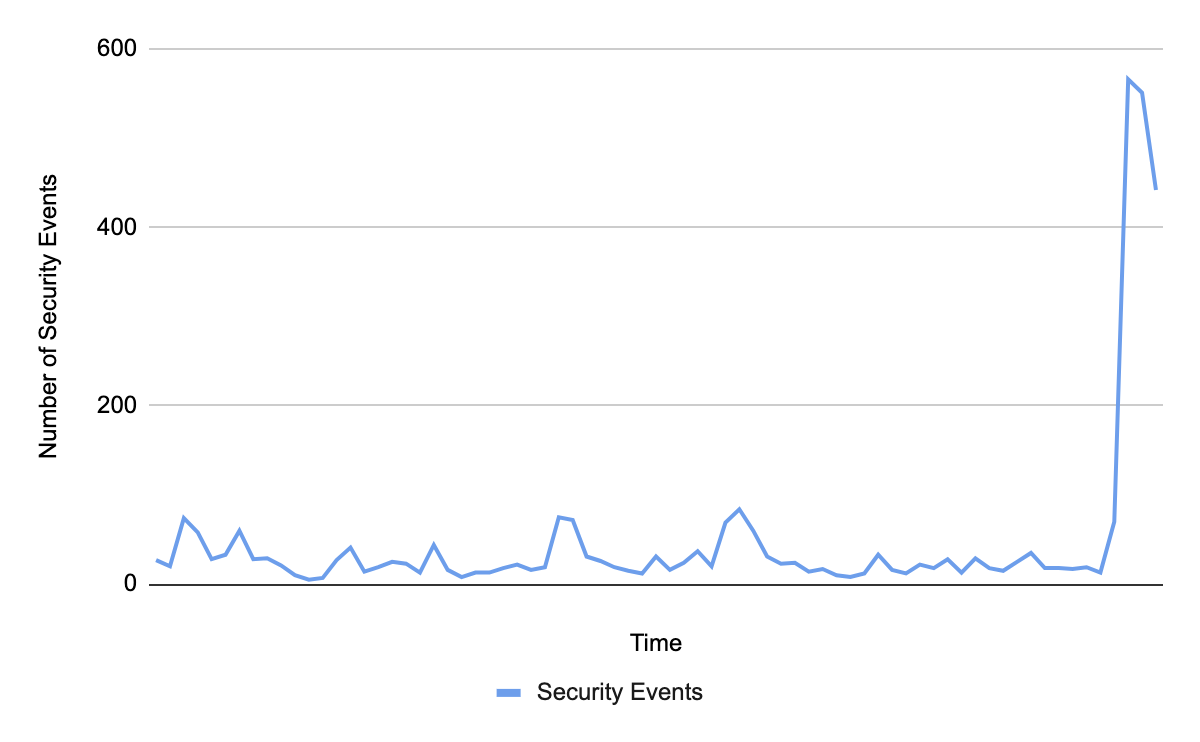
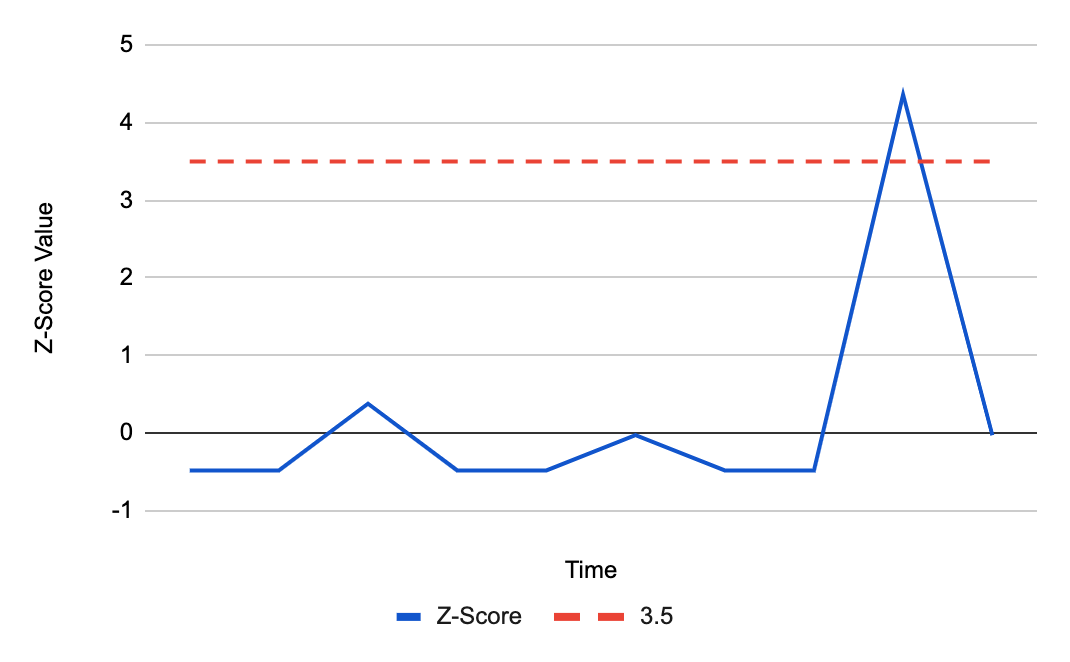
The following graphs are an example of how the z-score method works. The first graph shows the number of security events over time, with a recent spike.
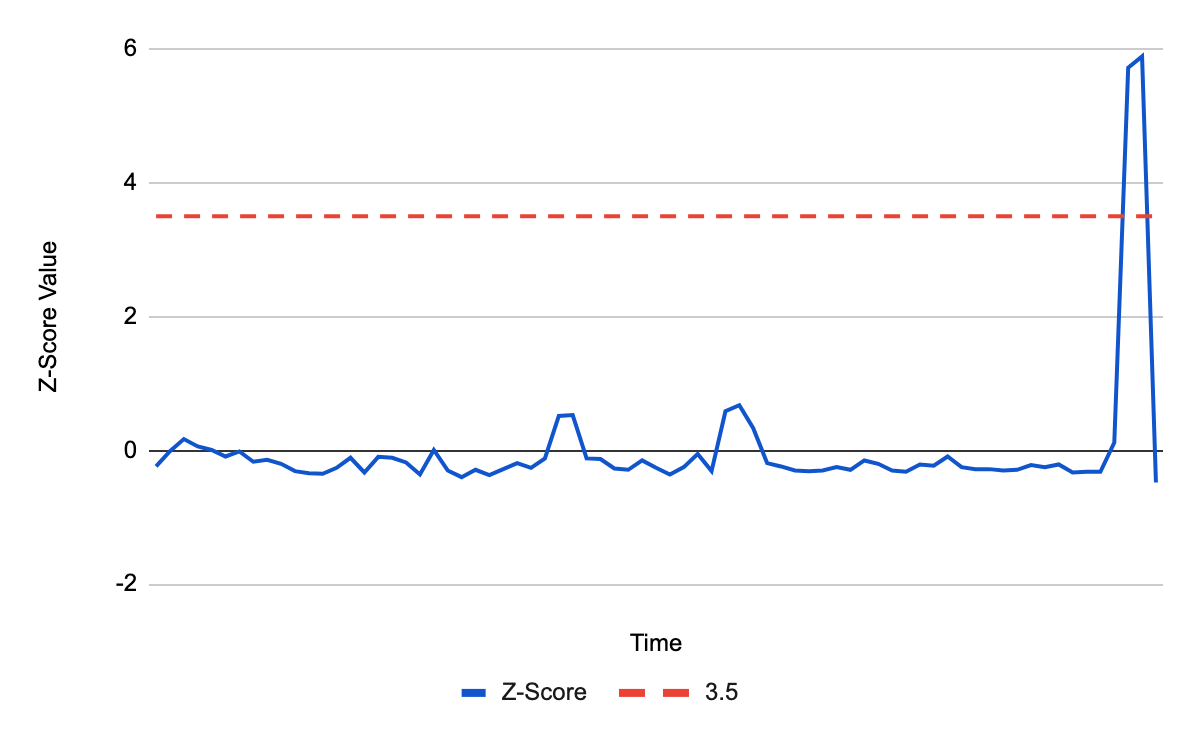
To determine whether this spike is significant, we calculate the z-score and check if the value is above 3.5:
As the graph shows, the deviation is above 3.5 and so an alert is triggered.
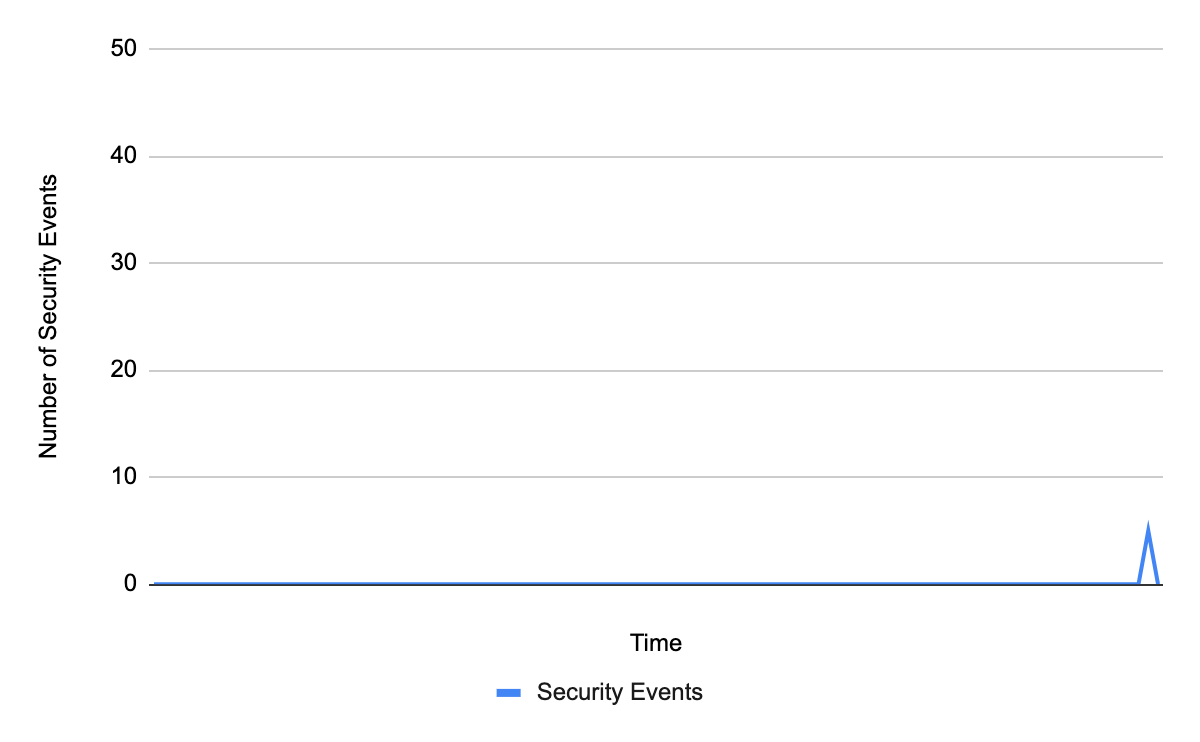
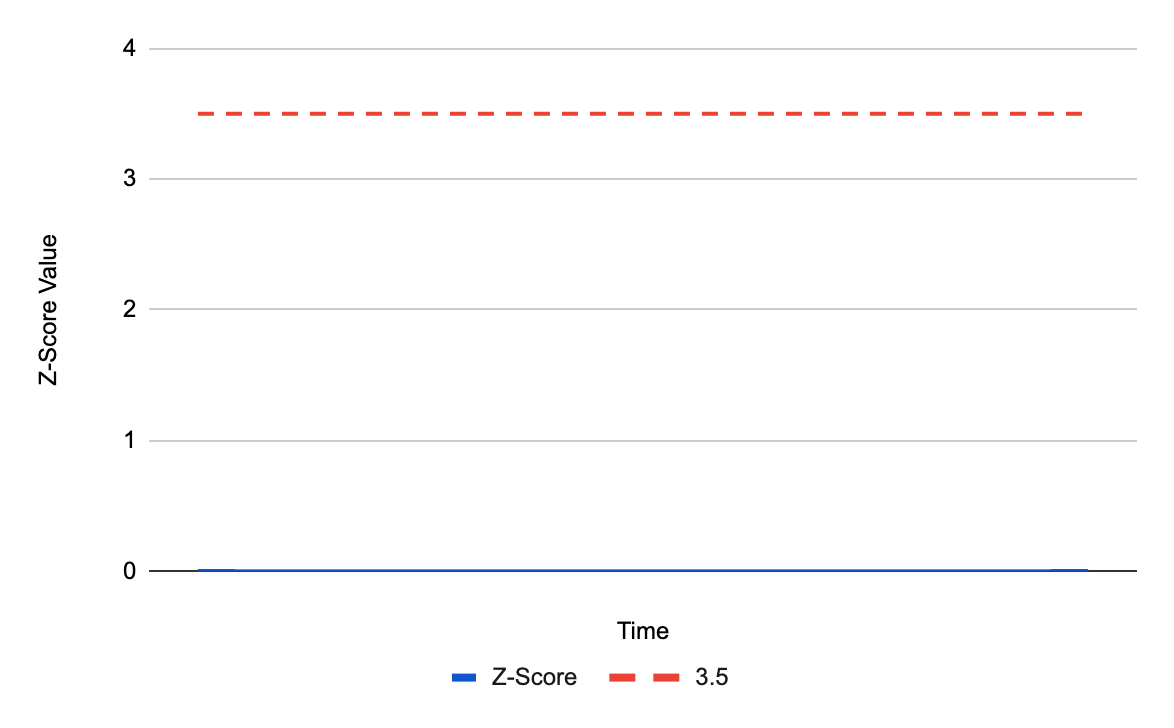
However, relying on z-score becomes tricky for domains that experience no security events for a long period of time. With many security events at zero, the mean and standard deviation depress to zero as well. When a non-zero value finally appears, it will always be infinite standard deviations away from the mean. As a result, it will always trigger an alert even on spikes that do not pose any threat to your domain, such as the below:
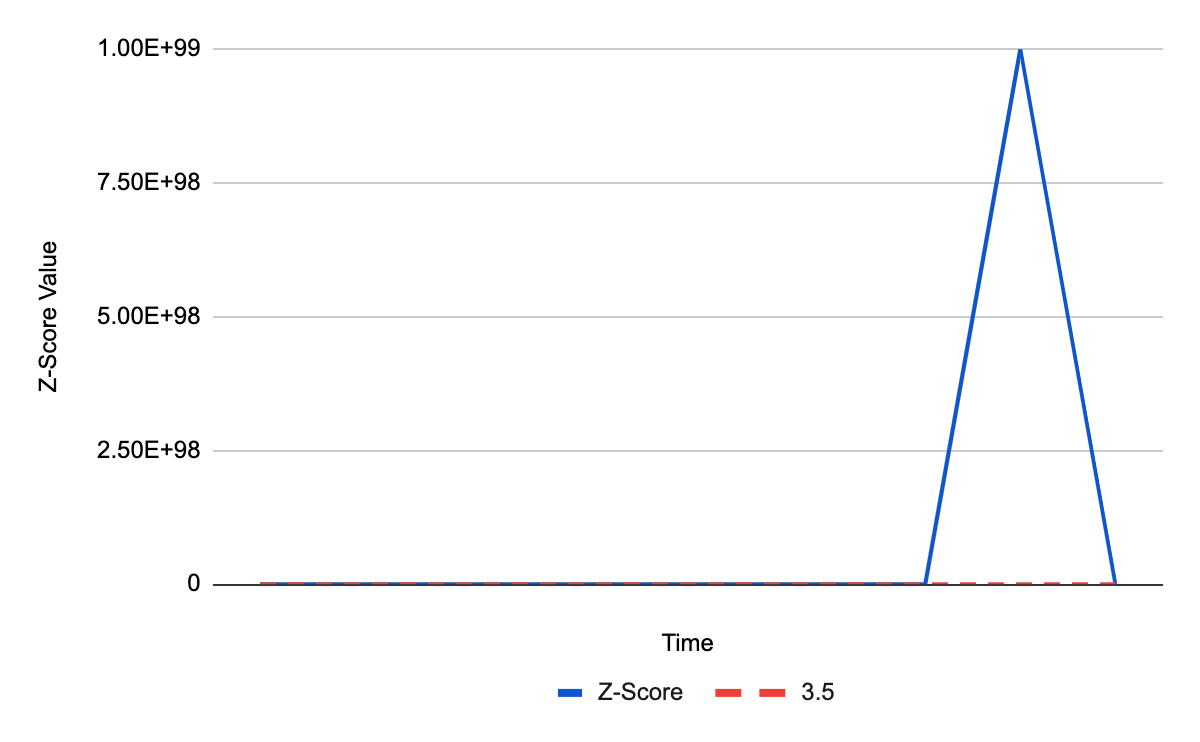
With five security events, you are likely going to ignore this spike, as it is too low to indicate a meaningful threat. However, the z-score in this instance will be infinite:
Since a z-score of infinity is greater than 3.5, an alert will be triggered. This means that customers with few security events would often be overwhelmed by event alerts that are not worth worrying about.
Letting go of zeros
To avoid the mean and standard deviation becoming zero and thus alerting on every non-zero spike, zero values can be ignored in the calculation. In other words, to calculate the mean and standard deviation, only data points that are higher than zero will be considered.
With those conditions, the same spike to five security events will now generate a different z-score:
Great! With the z-score at zero, it will no longer trigger an alert on the harmless spike!
But what about spikes that could be harmful? When calculations ignore zeros, we need enough non-zero data points to accurately determine the mean and standard deviation. If only one non-zero value is present, that data point determines the mean and standard deviation. As such, the mean will always be equal to the spike, z-score will always be zero and an alert will never be triggered:
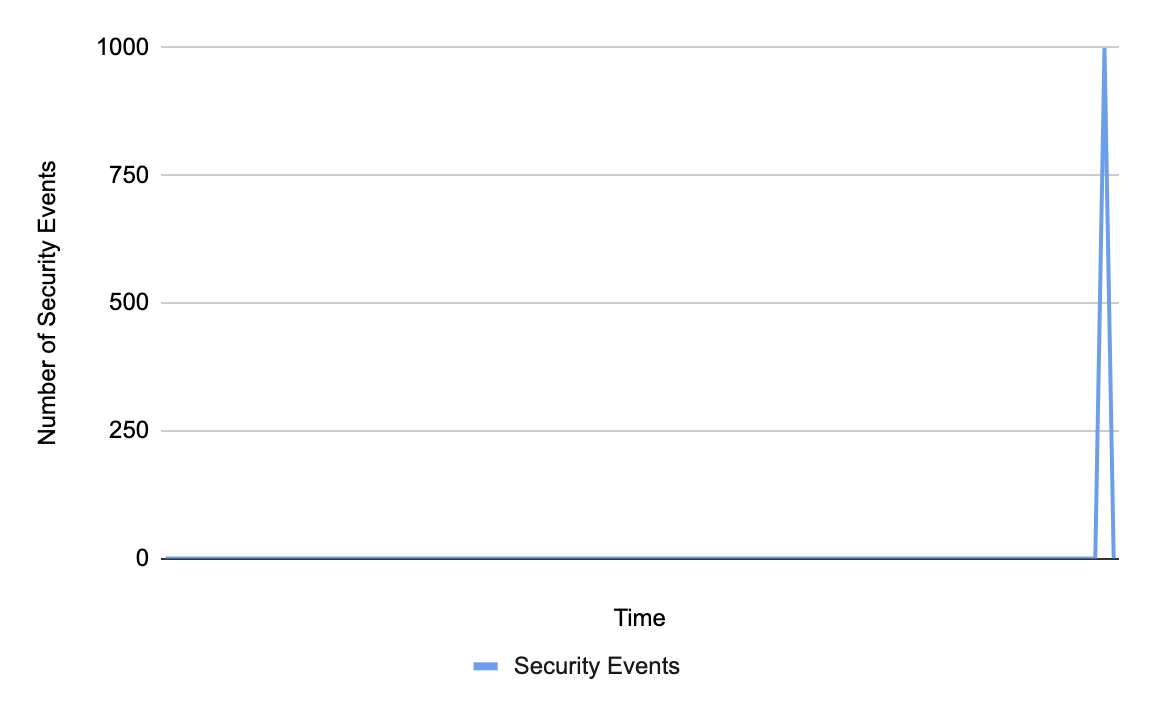
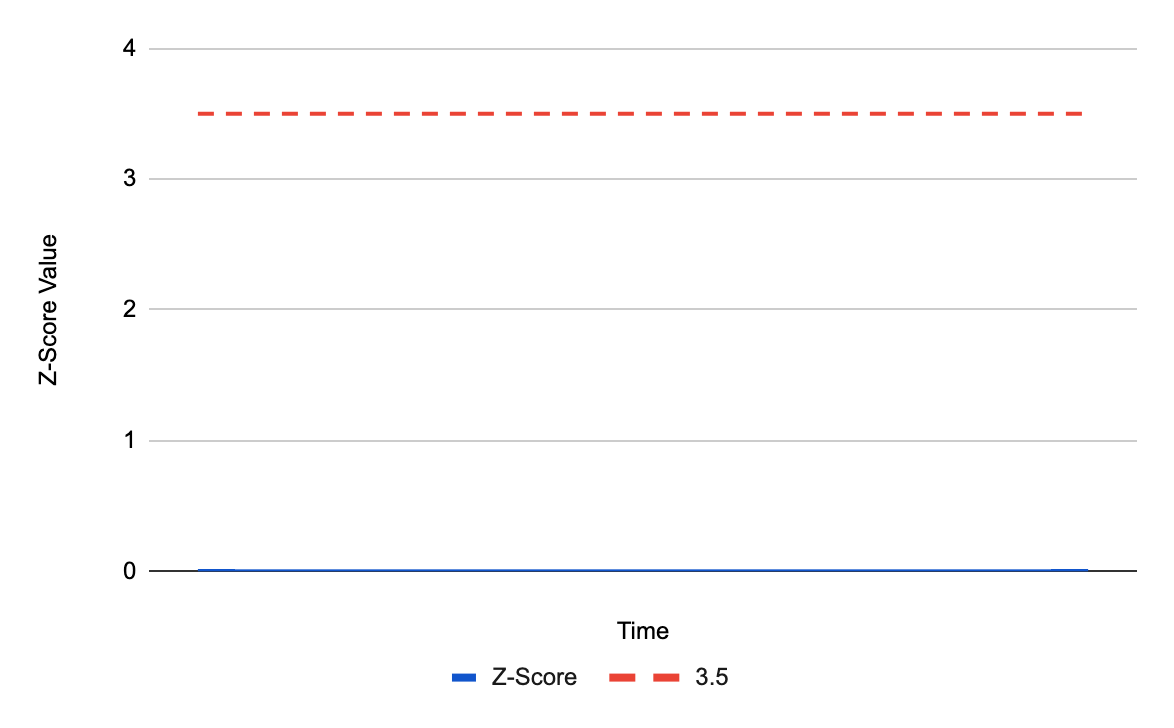
For a spike of 1000 events, we can tell that there is something wrong and we should trigger an alert. However, because there is only one non-zero data point, the z-score will remain zero:
The z-score does not cross the value 3.5 and an alert will not be triggered.
So what’s better? Including zeros in our calculations can skew the results for domains with too many zero events and alert them every time a spike appears. Not including zeros is mathematically wrong and will never alert on these spikes.
Threshold, the prince charming
Clearly, a z-score is not enough on its own.
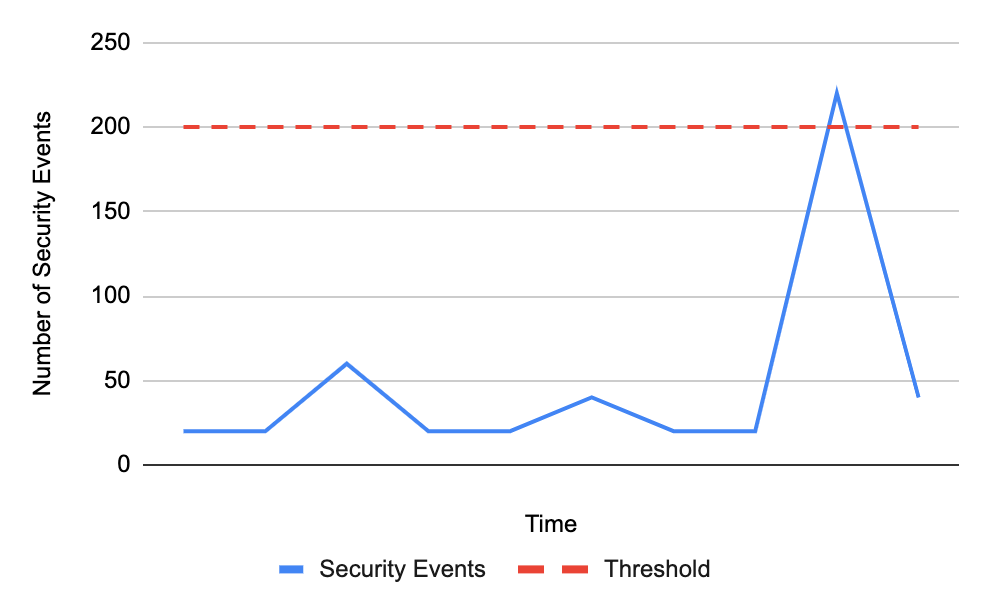
Instead, we paired up the z-score with a threshold. The threshold represents the raw number of security events an Internet property can have, below which an alert will not be sent. While z-score checks whether the spike is at least 3.5 standard deviations above the mean, the threshold makes sure it is above a certain static value. If both of these conditions are met, we will send you an alert:
The above spike crosses the threshold of 200 security events. We now have to check that the z-score is above 3.5:
The z-score value crosses 3.5 and an alert will be sent.
A threshold for the number of security events comes as the perfect complement. By itself, the threshold cannot determine whether something is a spike, and would simply alert on any value crossing it. This blog post describes in more detail why thresholds alone do not work. However, when paired with z-score, they are able to share their strengths and cover for each other’s weaknesses. If the z-score falsely detects an insignificant spike, the threshold will stop the alert from triggering. Conversely, if a value does cross the security events threshold, the z-score ensures there is a reasonable variance from the data average before allowing an alert to be sent.
The invaluable value
To foster a successful relationship between the z-score and security events threshold, we needed to determine the most effective threshold value. After careful analysis of our previous attacks on customers, we set the value to 200. This number is high enough to filter out the smaller, noisier spikes, but low enough to expose any threats.
Am I invited to the wedding?
Yes, you are! The z-score and threshold relationship is already enabled for all WAF customers, so all you need to do is sit back and relax. For enterprise customers, the threshold will be applied to each type of alert enabled on your domain.
Happily ever after
The story certainly does not end here. We are constantly iterating on our alerts, so keep an eye out for future updates on the road to make our algorithms even more personalized for your Internet properties!
With AWS Security Hub you are able to manage your security posture in AWS, perform security best practice checks, aggregate alerts, and automate remediation. Now you are able to use Amazon Simple Notification Service (Amazon SNS) to subscribe to the new Security Hub Announcements topic to receive updates about new Security Hub services and features, newly supported standards and controls, and other Security Hub changes.
Introducing the Security Hub Announcements topic
Amazon SNS follows the publish/subscribe (pub/sub) messaging model, in which notifications are delivered to you by using a push mechanism that eliminates the need for you to periodically check or poll for new information and updates. You can now use this push mechanism to receive notifications about Security Hub by subscribing to the dedicated Security Hub Announcements topic.
The Security Hub Announcements topic publishes the following types of notifications:
General notifications
Upcoming standards and controls
New AWS Regions supported
New standards and controls
Updated standards and controls
Retired standards and controls
Updates to the AWS Security Finding Format (ASFF)
New integrations
New features
Changes to existing features
How to use the Security Hub Announcements topic
You can subscribe to the SNS topic for Security Hub Announcements to receive notification messages about newly released finding types, updates to the existing finding types, and other functionality changes. By subscribing to the SNS topic, you will receive Security Hub Announcements messages as soon as they are published. The notifications are available in all protocols that Amazon SNS supports, such as email and SMS. For more information about supported protocols in Amazon SNS, see Subscribing to an Amazon SNS topic.
The Security Hub Announcements topic is available in all AWS Regions in the aws and aws-cn partitions, but is not yet available in the AWS GovCloud (US) Regions (the aws-us-gov partition). Later in this post, we’ll show you how to subscribe to the Security Hub Announcements topic in a specific AWS Region by using the topic Amazon Resource Name (ARN) for that Region. The SNS topic messages are the same across Regions in a partition, so you can choose to subscribe to only one Region in a partition to avoid receiving duplicate information.
However, if you want to invoke an AWS Lambda function in reaction to a Security Hub Announcements message, you must subscribe to the topic ARN that is in the same Region as the Lambda function. The Lambda function can receive the SNS topic message payload as an input parameter and manipulate the information in the message, publish the message to other SNS topics, or send the message to other AWS services. For more information, see Subscribing a function to a topic in the Amazon SNS Developer Guide.
The same is true if you want to subscribe an Amazon Simple Queue Service (Amazon SQS) queue to the Security Hub Announcements topic, you must use a topic ARN that is in the same Region as the SQS queue. The SQS queue can be used to persist announcement SNS topic messages in the queue for other applications to process at a later time. For more information, see Subscribing an Amazon SQS queue to an Amazon SNS topic in the Amazon SQS Developer Guide.
IAM permissions
Your user account must have sns::subscribe AWS Identity and Access Management (IAM) permissions to subscribe to an SNS topic. For more information on IAM permissions for Amazon SNS, see Using identity-based policies with Amazon SNS.
Subscribe to the Security Hub Announcements topic
The following is the list of Security Hub Announcements topic ARNs for each currently supported Region. The examples in this post use the US West (Oregon) Region (us-west-2), but you can update the procedures with one of the following ARNs to use a different supported Region.
The two procedures that follow show you how to subscribe an email address to the Security Hub Announcements topic by using the AWS Management Console and the AWS CLI.
To subscribe an email address to the Security Hub Announcements topic (console)
For Endpoint, enter an email address that you can use to receive the notification.
Choose Create subscription.
In your email application, open the message from AWS Notifications and open the link to confirm your subscription. Your web browser displays a confirmation response from Amazon SNS, similar to that shown in Figure 1.
The following steps show you how to subscribe an email address to the Security Hub Announcements topic by using the AWS Command Line Interface (AWS CLI).
To subscribe an email address to the Security Hub Announcements topic (AWS CLI)
Run the following command in the AWS CLI, replacing <[email protected]> with your email address, and optionally replacing the ARN and reference to us-west-2 if you want to use a different Region: aws sns --region us-west-2 subscribe --topic-arn arn:aws:sns:us-west-2:393883065485:SecurityHubAnnouncements --protocol email --notification-endpoint<[email protected]>
In your email application, open the message from AWS Notifications and open the link to confirm your subscription.
Your web browser displays a confirmation response from Amazon SNS, similar to that shown in Figure 1.
Example subscription responses
The following sections contain examples of a message announcing new standard controls supported by Security Hub in email and sqs protocol types.
Example message from an email subscription (protocol type: email)
{"AnnouncementType":"NEW_STANDARDS_CONTROLS", “Title”:”[New Controls] 36 new Security Hub controls added to the AWS Foundational Security Best Practices standard”, "Description":"We have added 36 new controls to the AWS Foundational Security Best Practices standard. These include controls for Amazon Auto Scaling (AutoScaling.3, AutoScaling.4, AutoScaling.6), AWS CloudFormation (CloudFormation.1), Amazon CloudFront (CloudFront.10), Amazon Elastic Compute Cloud (Amazon EC2) (EC2.23, EC2.24, EC2.27), Amazon Elastic Container Registry (Amazon ECR) (ECR.1, ECR.2), Amazon Elastic Container Service (Amazon ECS) (ECS.3, ECS.4, ECS.5, ECS.8, ECS.10, ECS.12), Amazon Elastic File System (Amazon EFS) (EFS.3, EFS.4), Amazon Elastic Kubernetes Service (Amazon EKS) (EKS.2), Elastic Load Balancing (ELB.12, ELB.13, ELB.14), Amazon Kinesis (Kinesis.1), AWS Network Firewall (NetworkFirewall.3, NetworkFirewall.4, NetworkFirewall.5), Amazon OpenSearch Service (Opensearch.7), Amazon Redshift (Redshift.9), Amazon Simple Storage Service (Amazon S3) (S3.13), Amazon Simple Notification Service (SNS.2), AWF WAF (WAF.2, WAF.3, WAF.4, WAF.6, WAF.7, WAF.8). If you enabled the AWS Foundational Security Best Practices standard in an account and configured Security Hub to automatically enable new controls, these controls are enabled by default. Availability of controls can vary by Region."}
Example message from an SQS queue subscription (protocol type: sqs)
The following message shows the additional metadata included with an SQS subscription to the Security Hub Announcements topic. For more information about the metadata included in an SNS topic message delivered to an SQS queue, see Fanout to Amazon SQS Queues.
{
  "Type" : "Notification",
  "MessageId" : "c9c03e46-69df-5c3c-84e9-6520708ac394",
  "TopicArn" : "arn:aws:sns:us-west-2:393883065485:SecurityHubAnnouncements",
  "Message" : "{\"AnnouncementType\":\"NEW_STANDARDS_CONTROLS\",\"Title\":\"[New Controls] 36 new Security Hub controls added to the AWS Foundational Security Best Practices standard\",\"Description\":\"We have added 36 new controls to the AWS Foundational Security Best Practices standard. These include controls for Amazon Auto Scaling (AutoScaling.3, AutoScaling.4, AutoScaling.6), AWS CloudFormation (CloudFormation.1), Amazon CloudFront (CloudFront.10), Amazon Elastic Compute Cloud (Amazon EC2) (EC2.23, EC2.24, EC2.27), Amazon Elastic Container Registry (Amazon ECR) (ECR.1, ECR.2), Amazon Elastic Container Service (Amazon ECS) (ECS.3, ECS.4, ECS.5, ECS.8, ECS.10, ECS.12), Amazon Elastic File System (Amazon EFS) (EFS.3, EFS.4), Amazon Elastic Kubernetes Service (Amazon EKS) (EKS.2), Elastic Load Balancing (ELB.12, ELB.13, ELB.14), Amazon Kinesis (Kinesis.1), AWS Network Firewall (NetworkFirewall.3, NetworkFirewall.4, NetworkFirewall.5), Amazon OpenSearch Service (Opensearch.7), Amazon Redshift (Redshift.9), Amazon Simple Storage Service (Amazon S3) (S3.13), Amazon Simple Notification Service (SNS.2), AWF WAF (WAF.2, WAF.3, WAF.4, WAF.6, WAF.7, WAF.8). If you enabled the AWS Foundational Security Best Practices standard in an account and configured Security Hub to automatically enable new controls, these controls are enabled by default. Availability of controls can vary by Region. \"}",
  "Timestamp" : "2022-08-04T18:59:33.319Z",
  "SignatureVersion" : "1",
  "Signature" : "GdKokPEUexpKZn5da5u/p5eZF1cE3JUyL0uPVKmPnDzd3orkk5jJ211VsOflUFi6V9lSXF/V6RBpQN/9f3+JBFBprng7BRQwT9I4jSa1xOn1L3xKXEVGvWI6nl1oDqBl21Pj3owV+NZ+Exd2W0dpgg8B1LG4bYq5T73MjHjWGtelcBa15TpIz/+rynqanXCKCvc/50V/XZLjA5M7gU6Dzs9CULIjkdEpCsw5FvSxbtkEd6Ktx4LH7Zq6FlPKNli3EaEHRKh9uYPo6sR/yvF4RWg3E9O4dVsK7A8uTdR+pwVCU1M601KMRxO1OWF8VIdvyPINJND8Nu/70GRA2L+MRA==",
  "SigningCertURL" : "https://sns.us-west-2.amazonaws.com/SimpleNotificationService-56e67fcb41f6fec09b0196692625d385.pem",
  "UnsubscribeURL" : "https://sns.us-west-2.amazonaws.com/?Action=Unsubscribe&SubscriptionArn=arn:aws:sns:us-west-2:393883065485:SecurityHubAnnouncements:1eb29a83-8726-4366-891c-293ad5e35a53"
}
Note: You need to set up the SQS access policy in order for SNS to push message to the SNS queue. For more information, see Basic examples of Amazon SQS policies.
Available now
The SNS topic for Security Hub Announcements is available today in the Regions described in this post. Subscribe now to stay informed of Security Hub updates. With Amazon SNS, there is no minimum fee, and you pay only for what you use. For more information, see the Amazon SNS pricing page.
If you have feedback about this post, submit comments in the Comments section below. If you have questions about this post, contact AWS Support. You can also start a new thread on AWS Security Hub re:Post to get answers from the community.
Want more AWS Security news? Follow us on Twitter.
Maintaining AWS Identity and Access Management (IAM) resources is similar to keeping your garden healthy over time. Having visibility into your IAM resources, especially the resources that are no longer used, is important to keep your AWS environment secure. Proactively detecting and responding to unused IAM roles helps you prevent unauthorized entities from gaining access to your AWS resources. In this post, I will show you how to apply resource tags on IAM roles and deploy serverless technologies on AWS to detect unused IAM roles and to require the owner of the IAM role (identified through tags) to take action.
You can use this solution to check for unused IAM roles in a standalone AWS account. As you grow your workloads in the cloud, you can run this solution for multiple AWS accounts by using AWS Organizations. In this solution, you use AWS Control Tower to create an AWS Organizations organization with a Security organizational unit (OU), and a Security account in this OU. In this blog post, you deploy the solution in the Security account belonging to a Security OU of an organization.
For more information and recommended best practices, see the blog post Managing the multi-account environment using AWS Organizations and AWS Control Tower. Following this best practice, you can create a Security OU, in which you provision one or more Security and Audit accounts that are dedicated for security automation and audit activities on behalf of the entire organization.
Solution architecture
The architecture diagram in Figure 1 demonstrates the solution workflow.
Figure 1: Solution workflow for standalone account or member account of an AWS Organization.
The solution is triggered periodically by an Amazon EventBridgescheduled rule and invokes a series of actions. You specify the frequency (in number of days) when you create the EventBridge rule. There are two options to run this solution, based on the needs of your organization.
Option 1: For a standalone account
Choose this option if you would like to check for unused IAM roles in a single AWS account. This AWS account might or might not belong to an organization or OU. In this blog post, I refer to this account as the standalone account.
You should deploy the solution to the standalone Security account, which has appropriate admin permission to audit other accounts and manage security automation.
Because this solution uses AWS CloudFormationStackSets, you need to grant self-managed permissions to create stack sets in standalone accounts. Specifically, you need to establish a trust relationship between the standalone Security account and the standalone account by creating the AWSCloudFormationStackSetAdministrationRole IAM role in the standalone Security account, and the AWSCloudFormationStackSetExecutionRole IAM role in the standalone account.
You need to have AWS Security Hub enabled in your standalone Security account, and you need to deploy the solution in the same AWS Region as your Security Hub dashboard.
You need a tagging enforcement in place for IAM roles. This solution uses an IAM tag key Owner to identify the email address of the owner. The value of this tag key should be the email address associated with the owner of the IAM role. If the Owner tag isn’t available, the notification email is sent to the email address that you provided in the parameter ITSecurityEmail when you provisioned the CloudFormation stack.
This solution uses Amazon Simple Email Service (Amazon SES) to send emails to the owner of the IAM roles. The destination address needs to be verified with Amazon SES. With Amazon SES, you can verify identity at the individual email address or at the domain level.
An EventBridge rule triggers the AWS Lambda function LambdaCheckIAMRole in the standalone Security account. The LambdaCheckIAMRolefunction assumes a role in the standalone account. This role is named after the Cloudformation stack name that you specify when you provision the solution. Then LambdaCheckIAMRole calls the IAM API action GetAccountAuthorizationDetails to get the list of IAM roles in the standalone account, and parses the data type RoleLastUsed to retrieve the date, time, and the Region in which the roles were last used. If the last time value is not available, the IAM role is skipped. Based on the CloudFormation parameter MaxDaysForLastUsed that you provide, LambdaCheckIAMRole determines if the last time used is greater than the MaxDaysForLastUsed value. LambdaCheckIAMRole also extracts tags associated with the IAM roles, and retrieves the email address of the IAM role owner from the value of the tag key Owner. If there is no Owner tag, then LambdaCheckIAMRole sends an email to a default email address provided by you from the CloudFormation parameter ITSecurityEmail.
Option 2: For all member accounts that belong to an organization or an OU
Choose this option if you want to check for unused IAM roles in every member account that belongs to an AWS Organizations organization or OU.
Prerequisites
You need to have an AWS Organizations organization with a dedicated Security account that belongs to a Security OU. For this blog post, I refer to this account as the Security account.
You should deploy the solution to the Security account that has appropriate admin permission to audit other accounts and to manage security automation.
Because this solution uses CloudFormation StackSets to create stack sets in member accounts of the organization or OU that you specify, the Security account in the Security OU needs to be granted CloudFormation delegated admin permission to create AWS resources in this solution.
You need Security Hub enabled in your Security account, and you need to deploy the solution in the same Region as your Security Hub dashboard.
You need tagging enforcement in place for IAM roles. This solution uses the IAM tag key Owner to identify the owner email address. The value of this tag key should be the email address associated with the owner of the IAM role. If the Owner tag isn’t available, the notification email will be sent to the email address that you provided in the parameter ITSecurityEmail when you provisioned the CloudFormation stack.
This solution uses Amazon SES to send emails to the owner of the IAM roles. The destination address needs to be verified with Amazon SES. With Amazon SES, you can verify identity at the individual email address or at the domain level.
An EventBridge rule triggers the Lambda function LambdaGetAccounts in the Security account to collect the account IDs of member accounts that belong to the organization or OU. LambdaGetAccounts sends those account IDs to an SNS topic. Each account ID invokes the Lambda function LambdaCheckIAMRole once.
Similar to the process for Option 1, LambdaCheckIAMRole in the Security account assumes a role in the member account(s) of the organization or OU, and checks the last time that IAM roles in the account were used.
In both options, if an IAM role is not currently used, the function LambdaCheckIAMRole generates a Security Hub finding, and performs BatchImportFindings for all findings to Security Hub in the Security account. At the same time, the Lambda function starts an AWS Step Functions state machine execution. Each execution is for an unused IAM role following this naming convention: [target-account-id]-[unused IAM role name]-[time the execution created in Unix format]
You should avoid running this solution against special IAM roles, such as a break-glass role or a disaster recovery role. In the CloudFormation parameter RolePatternAllowedlist, you can provide a list of role name patterns to skip the check.
Use a Step Functions state machine to process approval
Figure 2 shows the state machine workflow for owner approval.
Figure 2: Owner approval state machine workflow
After the solution identifies an unused IAM role, it creates a Step Functions state machine execution. Figure 2 demonstrates the workflow of the execution. After the execution starts, the first Lambda taskNotifyOwner (powered by the Lambda function NotifyOwnerFunction) sends an email to notify the IAM role owner. This is a callback task that pauses the execution until a taskToken is returned. The maximum pause for a callback task is 1 year. The execution waits until the owner responds with a decision to delete or keep the role, which is captured by a private API endpoint in Amazon API Gateway. You can configure a timeout to avoid waiting for callback task execution.
With a private API endpoint, you can build a REST API that is only accessible within your Amazon Virtual Private Cloud (Amazon VPC), or within your internal network connected to your VPC. Using a private API endpoint will prevent anyone from outside of your internal network from selecting this link and deleting the role. You can implement authentication and authorization with API Gateway to make sure that only the appropriate owner can delete a role.
If the owner denies role deletion, then the role remains intact until the next automation cycle runs, and the state machine execution stops immediately with a Fail status. If the owner approves role deletion, the next Lambda task Approve (powered by the function ApproveFunction) checks again if the role is not currently used. If the role isn’t in use, the Lambda task Approve attaches an IAM policy DenyAllCheckUnusedIAMRoleSolution to deny the role to perform any actions, and waits for 30 days. During this wait time, you can restore the IAM role by removing the IAM policy DenyAllCheckUnusedIAMRoleSolution from the role. The Step Functions state machine execution for this role is still in progress until the wait time expires.
After the wait time expires, the state machine execution invokes the Validate task. The Lambda function ValidateFunction checks again if the role is not in use after the amount of time calculated by adding MaxDaysForLastUsed and the preceding wait time. It also checks if the IAM policy DenyAllCheckUnusedIAMRoleSolution is attached to the role. If both of these conditions are true, the Lambda function follows a process to detach the IAM policies and delete the role permanently. The role can’t be recovered after deletion.
Note: To restore a role that has been marked for deletion, detach the DenyAll IAM policy from the role.
To deploy the solution using the AWS CLI
Clone git repo from AWS Samples to get source code and CloudFormation templates.
git clone https://github.com/aws-samples/aws-blog-automate-iam-role-deletion
cd /aws-blog-automate-iam-role-deletion
Run the AWS CLI command below to upload CloudFormation templates and Lambda code to a S3 bucket in the Security Account. The S3 bucket needs to be in the same Region where you will deploy the solution.
To deploy the solution for a single account, use the following commands. Be sure to replace <YOUR_BUCKET_NAME> and <PATH_TO_UPLOAD_CODE> with your own values.
#Deploy solution for a single target AWS Account
aws cloudformation package \
--template-file solution_scope_account.yml \
--s3-bucket <YOUR_BUCKET_NAME> \
--s3-prefix <PATH_TO_UPLOAD_CODE> \
--output-template-file solution_scope_account.template
To deploy the solution for an organization or OU, use the following commands. Be sure to replace <YOUR_BUCKET_NAME> and <PATH_TO_UPLOAD_CODE> with your own values.
#Deploy solution for an Organization/OU
aws cloudformation package \
--template-file solution_scope_organization.yml \
--s3-bucket <YOUR_BUCKET_NAME> \
--s3-prefix <PATH_TO_UPLOAD_CODE> \
--output-template-file solution_scope_organization.template
Validate the template generated by the CloudFormation package.
To validate the solution for a single account, use the following commands.
#Deploy solution for a single target AWS Account
aws cloudformation validate-template —template-body file://solution_scope_account.template
To validate the solution for an organization or OU, use the following commands.
#Deploy solution for an Organization/OU
aws cloudformation validate-template —template-body file://solution_scope_organization.template
Deploy the solution in the same Region that you use for Security Hub. The stack takes 30 minutes to complete deployment.
To deploy the solution for a single account, use the following commands. Be sure to replace all of the placeholders with your own values.
#Deploy solution for a single target AWS Account
aws cloudformation deploy \
--template-file solution_scope_account.template \
--stack-name <UNIQUE_STACK_NAME> \
--region <REGION> \
--capabilities CAPABILITY_NAMED_IAM CAPABILITY_AUTO_EXPAND \
--parameter-overrides AccountId='<STANDALONE ACCOUNT ID>' \
Frequency=<DAYS> MaxDaysForLastUsed=<DAYS> \
ITSecurityEmail='<YOUR IT TEAM EMAIL>' \
RolePatternAllowedlist='<ALLOWED PATTERN>'
To deploy the solution for an organization, run the following commands to create CloudFormation stack in the Security Account of the organization.
The solution is triggered by an EventBridge scheduled rule, so it doesn’t perform the checks immediately. To test the solution right away after the CloudFormation stacks are successfully created, follow these steps.
To manually trigger the automation for a single account
Navigate to the AWS Lambda console and choose the function <CloudFormation stackname>-LambdaCheckIAMRole.
Choose Test.
Choose New event.
For Name, enter a name for the event, and provide the current time in UTC Date Time format YYYY-MM-DDTHH:MM:SSZ. For example{“time”: “2022-01-22T04:36:52Z”}. The Lambda function uses this value to calculate how much time has passed since the last time that a role was used. Figure 5 shows an example of configuring a test event.
Figure 5: Configure test event for standalone account
Choose Test.
To manually trigger the automation for an organization or OU
Choose the function [CloudFormation stackname]-LambdaGetAccounts.
Choose Test.
Choose New event.
For Name, enter a name for the event. Leave the default values for the remaining fields.
Choose Test.
Respond to unused IAM roles
After you’ve triggered the Lambda function, the automation runs the necessary checks. For each unused IAM role, it creates a Step Functions state machine execution.
To see the list of Step Functions state machine executions
Choose state machine [CloudFormation stackname]OnwerApprovalStateMachine.
Under the Executions tab, you will see the list of executions in running state following this naming convention: [target-account-id]-[unused IAM role name]-[time the execution created in Unix format]. Figure 6 shows an example list of executions.
Figure 6: Each unused IAM role generates an execution in the Step Functions state machine
Each execution sends out an email notification to the IAM role owner (if available through the Owner tag) or to the IT security email address that you provided in the CloudFormation stack parameter ITSecurityEmail. The email content is:
Subject: Please take action on this unused IAM Role

Hello!

This IAM Role arn:aws:iam::<AWS account>:role/<role name> is not in use for
more than 60 days.

Can you please delete the role by following this link: Approve link

Or keep this role by following this link: Deny Link
In the email, the Approve link and Deny link is the hyperlink to a private API endpoint with a parameter taskToken. If you try to access these links publicly, they won’t work. When you access the link, the taskToken is provided to the private API endpoint, which updates the Step Functions state machine.
To test the approval action using an API Gateway test
Navigate to the AWS Step Functions console. Under State machines, choose the state machine that has the name [CloudFormation stackname]OwnerApprovalStateMachine
On the Executions tab, there is a list of executions. Each execution represents a workflow for one IAM role, as shown in Figure 6. Choose the execution name that includes the IAM role name in the email that you received earlier.
Scroll down to Execution event history.
Expand the Step Notify Owner, enter TaskScheduled, find the item taskToken, and copy its value to a notepad, as shown in Figure 7.
Choose the API that has a name similar to [CloudFormation stackname]-PrivateAPIGW-[unique string]-ApprovalEndpoint.
Choose which action to test: Deny or Approve.
To test the Deny action, under /deny resource, choose the GET method.
To test the Approve action, under /approve resource, choose the GET method.
Choose Test.
Under Query Strings, enter taskToken= and paste the taskToken you copied earlier from the state machine execution. Figure 8 shows how to pass the taskToken to API Gateway.
Figure 8: Provide taskToken to API Gateway Method
Choose Test. After you test, the state machine resumes the workflow and finishes the automation. You won’t be able to change the action.
Navigate to the AWS Step Functions console. Choose the state machine and go to the state machine execution.
If you choose to deny the role deletion, the execution immediately stops as Fail.
If you choose to approve the role deletion, the execution moves to the Wait task. This task removes IAM policies associated to the role and waits for a period of time before moving to the next task. By default, the wait time is 30 days. To change this number, go to the Lambda function [CloudFormation stackname]ApproveFunction, and update the variable wait_time_stamp.
After the waiting period expires, the state machine triggers the Validate task to do a final validation on the role before deleting it. If the Validate task decides that the role is being used, it leaves the role intact. Otherwise, it deletes the role permanently.
Conclusion
In this blog post, you learned how serverless services such as Lambda, Step Functions, and API Gateway can work together to build security automation. We recommend testing this solution as a starting point. Then, you can build more features on top of the sample code and templates to customize it to perform checks, following guidance from your IT security team.
Here are a few suggestions that you can take to extend this solution.
This solution uses a private API Gateway to handle the approval response from the IAM role owner. You need to establish private connectivity between your internal network and AWS to invoke a private API Gateway. For instructions, see How to invoke a private API.
Your organization can use AWS Security Hub to gain a comprehensive view of your security and compliance posture across your Amazon Web Services (AWS) environment. Security Hub receives security findings from AWS security services and supported third-party products and centralizes them, providing a single view for identifying and analyzing security issues. Security Hub correlates findings and breaks them down into five severity categories: INFORMATIONAL, LOW, MEDIUM, HIGH, and CRITICAL. In this blog post, we provide step-by-step instructions for tracking Security Hub findings in each severity category against service-level agreements (SLAs) through visual dashboards.
SLAs are defined collaboratively by the Business, IT, and Security and Compliance teams within an organization. You can track Security Hub findings against your specific SLAs, and any findings that are in breach of an SLA can be escalated. You can also apply automation to alert the owners of the resources and remediate common security findings to improve your overall security posture.
Prerequisites
Security Hub uses service-linked AWS Config rules to perform security checks behind the scenes. To support these controls, you must enable AWS Config on all accounts, including the administrator and member accounts, in each AWS Region where Security Hub is enabled.
In this solution, you will learn two different ways to track your findings in Security Hub against the pre-defined SLA for each severity category.
Option 1: Use custom insights
Security Hub offers managed insights, which include a collection of related findings that identify a security issue that requires attention and intervention. You can view and take action on the insight findings. In addition to the managed insights, you can create custom insights to track issues and findings related to your resources in your environment.
Create a custom insight for SLA tracking
In this example, you set an SLA of 30 days for HIGH severity findings. This example will provide you with a view of the HIGH severity findings that were generated within the last 30 days and haven’t been resolved.
To create a custom insight to view HIGH severity findings from the last 30 days
On the Insights page, choose Create insight, as shown in Figure 1.
Figure 1: Create insight in the Security Hub console
On the Create insight page, in the search box, leave the following default filters: Workflow status is NEW, Workflow status is NOTIFIED, and Record state is ACTIVE, as show in Figure 2.
To select the required grouping attribute for the insight, choose the search box to display the filter options. In the search box, choose the following filters and settings:
Choose the Group by filter, and select WorkflowStatus.
Figure 2: Create insights using filters
Choose the Severity label filter and enter HIGH.
Choose the Created at filter and enter 30 to indicate the number of days you want to set as your SLA.
Choose Create insight again.
For Insightname, enter a meaningful name (for this example, we entered UnresolvedHighSevFindings), and then choose Create insight again.
You can repeat the same steps for other finding severities – CRITICAL, MEDIUM, LOW, and INFORMATIONAL; you can change the number of days you specify for the Created at filter to meet your SLA requirements; or specify different workflow status settings. Note that the workflow status can have the following values:
NEW – The initial state of a finding before you review it.
NOTIFIED – Indicates that the resource owner has been notified about the security issue.
SUPPRESSED – Indicates that you have reviewed the finding and no action is required.
RESOLVED – Indicates that the finding has been reviewed and remediated.
Your custom insight will show the findings that meet the criteria you defined. For more information about creating custom insights, see Module 2: Custom Insights in the Security Hub Workshop.
Option 2: Build visualizations for Security Hub findings data by using Amazon QuickSight
We hear from our customers that your organizations are looking for a solution where you can quickly visualize the status of your Security Hub findings, to see which findings you need to take action on (NEW and NOTIFIED) and which you do not (SUPPRESSED and RESOLVED). You can achieve this by building a data analytics pipeline that uses Amazon EventBridge, Amazon Kinesis Data Firehose, Amazon Simple Storage Service (Amazon S3), Amazon Athena, and Amazon QuickSight. The data analytics pipeline enables you to detect, analyze, contain, and mitigate issues quickly.
This solution integrates Security Hub with EventBridge to set SLA rules to a specified period of your choice for each severity level. For example, you can set the SLA to 5 days for CRITICAL severity findings, 10 days for HIGH severity findings, 14 days for MEDIUM severity findings, 30 days for LOW severity findings, and 60 days for INFORMATIONAL severity findings.
Architecture overview
Figure 3 shows the architectural overview of the QuickSight solution workflow.
Figure 3: Architecture diagram for option 2, the QuickSight solution
In the QuickSight solution, Security Hub publishes the findings to EventBridge, and then an EventBridge rule (based on the SLA) is configured to deliver the findings to Kinesis Data Firehose. For example, if the SLA is 14 days for all MEDIUM severity findings, then those findings will be filtered by the rule and sent to Kinesis Data Firehose. Security Hub findings follow the AWS Security Finding Format (ASFF).
The following is a sample EventBridge rule that filters the Security Hub findings for MEDIUM severity and workflow status NEW, before publishing the findings to Kinesis Data Firehose, and then finally to Amazon S3 for storage. A workflow status of NEW and NOTIFIED should be included to catch all findings that require action.
After the findings are exported and stored in Amazon S3, you can use Athena to run queries on the data and you can use Amazon QuickSight to display the findings that violate your organization’s SLA. With Athena, you can create views of the original table as a logical table. You can also create a view for CRITICAL, HIGH, MEDIUM, LOW, and INFORMATIONAL severity findings.
The QuickSight dashboard shown in Figure 4 is an example that shows all the MEDIUM severity findings that should be resolved within a 14 day SLA.
Figure 4: QuickSight table showing medium severity findings over a 14-day SLA
Using QuickSight, you can create different types of data visualizations to represent the exported Security Hub findings, which enables the decision makers in your organization to explore and interpret information in an interactive visual environment. For example, Figure 5 shows findings categorized by service.
Figure 5: QuickSight visual showing MEDIUM severity findings for each service
As another example, Figure 6 shows findings categorized by severity.
Figure 6: QuickSight visual showing findings by severity
Over time, your organization might discover that there are certain findings that should be tracked at a lower or higher severity level than what is auto-generated from Security Hub. You can implement EventBridge rules with AWS Lambda functions to automatically update the severity of the findings as soon as they are generated.
Figure 7: Create an EventBridge rule in the console
Define the event pattern, including the finding generator ID or any other identifying fields for which you want to redefine the severity. Review the fields in the format, and choose your desired filters. The following is a sample of the event pattern.
Specify the target as a Lambda function that will host the code to update the finding severity.
Figure 8: Select a target Lambda function
In the Lambda function, use the BatchUpdateFindings API action to update the severity label as desired.
The following example Lambda code will update finding severity to INFORMATIONAL. This function requires Amazon CloudWatch write permissions, and requires permissions to invoke the Security Hub API action BarchUpdateFindings.
import logging
import json, boto3
import botocore.exceptions as boto3exceptions

logger = logging.getLogger()
logger.setLevel(os.environ.get('LOGLEVEL', 'INFO').upper())

def lambda_handler(event, context):

    finding_id = ""
    product_arn = ""

    logger.info(event)

    for finding in event['detail']['findings']:

        #determine and log this Finding's ID
        finding_id = finding["Id"]
        product_arn = finding["ProductArn"]
        logger.info("Finding ID: " + finding_id)


        #determine and log this Finding's resource type
        resource_type = finding["Resources"][0]["Type"]
        logger.info("Resource Type is: " + resource_type)

        try:
            sec_hub_client = boto3.client('securityhub')
            response = sec_hub_client.batch_update_findings(
                FindingIdentifiers=[
                {
                    'Id': finding_id,
                    'ProductArn': product_arn
                }
                ],
                    Severity={"Label": "INFORMATIONAL"}

                )

        except boto3exceptions.ClientError as error:
            logger.exception(f"Client error invoking batch update findings {error}")
        except boto3exceptions.ParamValidationError as error:
            logger.exception(f"The parameters you provided are incorrect: {error}")

    return {"statusCode": 200}
The finding is generated with a new severity level, as updated in the Lambda function. For example, Figure 9 shows a finding that is generated as MEDIUM by default, but the configured EventBridge rule and Lambda function update the severity level to INFORMATIONAL.
Figure 9: Security Hub findings generated with updated severity level
Conclusion
This blog post walked you through two different solutions for setting up and tracking the SLAs for the findings generated by Security Hub. Reporting Security Hub findings for a given SLA in a dashboard view can help you prioritize findings and track whether findings are being remediated on time. This post also provided example code that you can use to modify the Security Hub severity for a specific finding. To further extend the solution and enable custom actions to remediate the findings, see the following:
Active Directory is dominant in the enterprise world (as well as the public sector). From my observation, the majority of organization rely on Active Directory for their user accounts. While that may be changing in recent years with more advanced and cloud IAM and directory solutions, the landscape in the last two decades is a domination of Microsoft’s Active Directory.
As a result of that dominance, many cyber attacks rely on exploiting some aspects of Active Directory. Whether it would be weaknesses of Kerberos, “pass the ticket”, golden ticket, etc. Standard attacks like password spraying, credential stuffing and other brute forcing also apply, especially if the Exchange web access is enabled. Last, but not least, simply browsing the active directory once authenticated with a compromised account, provides important information for further exploitation (finding other accounts, finding abandoned, but not disabled accounts, finding passwords in description fields, etc).
Basically, having access an authentication endpoint which interfaces the Active Directory allows attackers to gain access and then do lateral movement.
What is the most recommended measures for preventing authentication attacks? Multi-factor authentication. And the sad reality is that Microsoft doesn’t offer native MFA for Active Directory.
Yes, there are things like Microsoft Hello for Business, but that can’t be used in web and email context – it is tied to the Windows machine. And yes, there are third-party options. But they incur additional cost, and are complex to setup and manage. We all know the power of defaults and built-in features in security – it should be readily available and simple in order to have wide adoption.
What Microsoft should have done is introduce standard, TOTP-based MFA and enforce it through native second-factor screens in Windows, Exchange web access, Outlook and others. Yes, that would require Kerberos upgrades, but it is completely feasible. Ideally, it should be enabled by a single click, which would prompt users to enroll their smart phone apps (Google Authenticator, Microsoft Authenticator, Authy or other) on their next successful login. Of course, there may be users without smartphones, and so the option to not enroll for MFA may be available to certain less-privileged AD groups.
By not doing that, Microsoft exposes all on-premise AD deployments to all sorts of authentication attacks mentioned above. And for me that’s a big sin.
Microsoft would say, of course, that their Azure AD supports many MFA options and is great and modern and secure and everything. And that’s true, if you want to chose to migrate to Azure and use Office365. And pay for subscription vs just the Windows Server license. It’s not a secret that Microsoft’s business model is shifting towards cloud, subscription services. And there’s nothing wrong with that. But leaving on-prem users with no good option for proper MFA across services, including email, is irresponsible.
AWS Security Hub is a central dashboard for security, risk management, and compliance findings from AWS Audit Manager, AWS Firewall Manager, Amazon GuardDuty, IAM Access Analyzer, Amazon Inspector, and many other AWS and third-party services. You can use the insights from Security Hub to get an understanding of your compliance posture across multiple AWS accounts. It is not unusual for a single AWS account to have more than a thousand Security Hub findings. Multi-account and multi-Region environments may have tens or hundreds of thousands of findings. With so many findings, it is important for you to get a summary of the most important ones. Navigating through duplicate findings, false positives, and benign positives can take time.
In this post, we demonstrate how to export those findings to comma separated values (CSV) formatted files in an Amazon Simple Storage Service (Amazon S3) bucket. You can analyze those files by using a spreadsheet, database applications, or other tools. You can use the CSV formatted files to change a set of status and workflow values to align with your organizational requirements, and update many or all findings at once in Security Hub.
The solution described in this post, called CSV Manager for Security Hub, uses an AWS Lambda function to export findings to a CSV object in an S3 bucket, and another Lambda function to update Security Hub findings by modifying selected values in the downloaded CSV file from an S3 bucket. You use an Amazon EventBridge scheduled rule to perform periodic exports (for example, once a week). CSV Manager for Security Hub also has an update function that allows you to update the workflow, customer-specific notation, and other customer-updatable values for many or all findings at once. If you’ve set up a Region aggregator in Security Hub, you should configure the primary CSV Manager for Security Hub stack to export findings only from the aggregator Region. However, you may configure other CSV Manager for Security Hub stacks that export findings from specific Regions or from all applicable Regions in specific accounts. This allows application and account owners to view their own Security Hub findings without having access to other findings for the organization.
How it works
CSV Manager for Security Hub has two main features:
Export Security Hub findings to a CSV object in an S3 bucket
Update Security Hub findings from a CSV object in an S3 bucket
Overview of the export function
The overview of the export function CsvExporter is shown in Figure 1.
Figure 1: Architecture diagram of the export function
Figure 1 shows the following numbered steps:
In the AWS Management Console, you invoke the CsvExporter Lambda function with a test event.
The export function calls the Security Hub GetFindings API action and gets a list of findings to export from Security Hub.
The export function converts the most important fields to identify and sort findings to a 37-column CSV format (which includes 12 updatable columns) and writes to an S3 bucket.
Overview of the update function
To update existing Security Hub findings that you previously exported, you can use the update function CsvUpdater to modify the respective rows and columns of the CSV file you exported, as shown in Figure 2. There are 12 modifiable columns out of 37 (any changes to other columns are ignored), which are described in more detail in Step 3: View or update findings in the CSV file later in this post.
Figure 2: Architecture diagram of the update function
Figure 2 shows the following numbered steps:
You download the CSV file that the CsvExporter function generated from the S3 bucket and update as needed.
You upload the CSV file that contains your updates to the S3 bucket.
In the AWS Management Console, you invoke the CsvUpdater Lambda function with a test event containing the URI of the CSV file.
CsvUpdater reads the updated CSV file from the S3 bucket.
CsvUpdater identifies the minimum set of updates and invokes the Security Hub BatchUpdateFindings API action.
Step 1: Use the CloudFormation template to deploy the solution
You can find the latest code in the aws-security-hub-csv-manager GitHub repository, where you can also contribute to the sample code. The following commands show how to deploy the solution by using the AWS CDK. First, the AWS CDK initializes your environment and uploads the AWS Lambda assets to an S3 bucket. Then, you deploy the solution to your account by using the following commands. Replace <INSERT_AWS_ACCOUNT> with your account number, and replace <INSERT_REGION> with the AWS Region that you want the solution deployed to, for example us-east-1.
Choose the following Launch Stack button to open the AWS CloudFormation console pre-loaded with the template for this solution:
In the Parameters section, as shown in Figure 3, enter your values.
Figure 3: CloudFormation template variables
For What folder for CSV Manager for Security Hub Lambda code, leave the default Code. For What folder for CSV Manager for Security Hub exports, leave the default Findings.
These are the folders within the S3 bucket that the CSV Manager for Security Hub CloudFormation template creates to store the Lambda code, as well as where the findings are exported by the Lambda function.
For Frequency, for this solution you can leave the default value cron(0 8 ? * SUN *). This default causes automatic exports to occur every Sunday at 8:00 AM local time using an EventBridge scheduled rule. For more information about how to update this value to meet your needs, see Schedule Expressions for Rules in the Amazon CloudWatch Events User Guide.
The values you enter for the Regions field depend on whether you have configured an aggregation Region in Security Hub.
If you have configured an aggregation Region, enter only that Region code, for example eu-north-1, as shown in Figure 3.
If you haven’t configured an aggregation Region, enter a comma-separated list of Regions in which you have enabled Security Hub, for example us-east-1, eu-west-1, eu-west-2.
If you would like to export findings from all Regions where Security Hub is enabled, leave the Regions field blank. Regions where Security Hub is not enabled will generate a message and will be skipped.
Choose Next.
The CloudFormation stack deploys the necessary resources, including an EventBridge scheduling rule, AWS System Managers Automation documents, an S3 bucket, and Lambda functions for exporting and updating Security Hub findings.
After you deploy the CloudFormation stack
After you create the CSV Manager for Security Hub stack, you can do the following:
Perform a bulk update of Security Hub findings by following the instructions in Step 3: View or update findings in the CSV file later in this post. You can make changes to one or more of the 12 updatable columns of the CSV file, and perform the update function to update some or all Security Hub findings.
Step 2: Export Security Hub findings to a CSV file
You can export Security Hub findings from the AWS Lambda console. To do this, you create a test event and invoke the CsvExporter Lambda function. CsvExporter exports all Security Hub findings from all applicable Regions to a single CSV file in the S3 bucket for CSV Manager for Security Hub.
To export Security Hub findings to a CSV file
In the AWS Lambda console, find the CsvExporter Lambda function and select it.
On the Code tab, choose the down arrow at the right of the Test button, as shown in Figure 4, and select Configure test event.
Figure 4: The down arrow at the right of the Test button
To create an empty test event, on the Configure test event page, do the following:
Choose Create a new event.
Enter an event name; in this example we used testEvent.
For Template, leave the default hello-world.
For Event JSON, enter the JSON object {} as shown in Figure 5.
Figure 5: Creating an empty test event
Choose Save to save the empty test event.
To invoke the Lambda function, choose the Test button, as shown in Figure 6.
Figure 6: Test button to invoke the Lambda function
On the Execution Results tab, note the following details, which you will need for the next step.
Locate the CSV object that matches the value of “exportKey” (in this example, DOC-EXAMPLE-OBJECT) in the S3 bucket that matches the value of “bucket” (in this example, DOC-EXAMPLE-BUCKET).
Now you can view or update the findings in the CSV file, as described in the next section.
Step 3: (Optional) Using filters to limit CSV results
In your test event, you can specify any filter that is accepted by the GetFindings API action. You do this by adding a filter key to your test event. The filter key can either contain the word HighActive (which is a predefined filter configured as a default for selecting active high-severity and critical findings, as shown in Figure 8), or a JSON filter object.
Figure 8 depicts an example JSON filter that performs the same filtering as the HighActive predefined filter.
To use filters to limit CSV results
In the AWS Lambda console, find the CsvExporter Lambda function and select it.
On the Code tab, choose the down arrow at the right of the Test button, as shown in Figure 7, and select Configure test event.
Figure 7: The down arrow at the right of the Test button
To create a test event containing a filter, on the Configure test event page, do the following:
Choose Create a new event.
Enter an event name; in this example we used filterEvent.
For Template, select testEvent,
For Event JSON, enter the following JSON object, as shown in Figure 8.
Locate the CSV object that matches the value of “exportKey” (in this example, DOC-EXAMPLE-OBJECT) in the S3 bucket that matches the value of “bucket” (in this example, DOC-EXAMPLE-BUCKET).
The results in this CSV file should be a filtered set of Security Hub findings according to the filter you specified above. You can now proceed to step 4 if you want to view or update findings.
Step 4: View or update findings in the CSV file
You can use any program that allows you to view or edit CSV files, such as Microsoft Excel. The first row in the CSV file are the column names. These column names correspond to fields in the JSON objects that are returned by the GetFindings API action.
Warning: Do not modify the first two columns, Id (column A) or ProductArn (column B). If you modify these columns, Security Hub will not be able to locate the finding to update, and any other changes to that finding will be discarded.
You can locally modify any of the columns in the CSV file, but only 12 columns out of 37 columns will actually be updated if you use CsvUpdater to update Security Hub findings. The following are the 12 columns you can update. These correspond to columns C through N in the CSV file.
Column name
Spreadsheet column
Description
Criticality
C
An integer value between 0 and 100.
Confidence
D
An integer value between 0 and 100.
NoteText
E
Any text you wish
NoteUpdatedBy
F
Automatically updated with your AWS principal user ID.
CustomerOwner*
G
Information identifying the owner of this finding (for example, email address).
CustomerIssue*
H
A Jira issue or another identifier tracking a specific issue.
CustomerTicket*
I
A ticket number or other trouble/problem tracking identification.
ProductSeverity**
J
A floating-point number from 0.0 to 99.9.
NormalizedSeverity**
K
An integer between 0 and 100.
SeverityLabel
L
One of the following:
INFORMATIONAL
LOW
MEDIUM
HIGH
HIGH
CRITICAL
VerificationState
M
One of the following:
UNKNOWN — Finding has not been verified yet.
TRUE_POSITIVE — This is a valid finding and should be treated as a risk.
FALSE_POSITIVE — This an incorrect finding and should be ignored or suppressed.
BENIGN_POSITIVE — This is a valid finding, but the risk is not applicable or has been accepted, transferred, or mitigated.
Workflow
N
One of the following:
NEW — This is a new finding that has not been reviewed.
NOTIFIED — The responsible party or parties have been notified of this finding.
RESOLVED — The finding has been resolved.
SUPPRESSED — A false or benign finding has been suppressed so that it does not appear as a current finding in Security Hub.
* These columns are stored inside the UserDefinedFields field of the updated findings. The column names imply a certain kind of information, but you can put any information you wish.
** These columns are stored inside the Severity field of the updated findings. These values have a fixed format and will be rejected if they do not meet that format.
Columns with fixed text values (L, M, N) in the previous table can be specified in mixed case and without underscores—they will be converted to all uppercase and underscores added in the CsvUpdater Lambda function. For example, “false positive” will be converted to “FALSE_POSITIVE”.
Step 5: Create a test event and update Security Hub by using the CSV file
If you want to update Security Hub findings, make your changes to columns C through N as described in the previous table. After you make your changes in the CSV file, you can update the findings in Security Hub by using the CSV file and the CsvUpdater Lambda function.
Use the following procedure to create a test event and run the CsvUpdater Lambda function.
To create a test event and run the CsvUpdaterLambda function
In the AWS Lambda console, find the CsvUpdater Lambda function and select it.
On the Code tab, choose the down arrow to the right of the Test button, as shown in Figure 10, and select Configure test event.
Figure 10: The down arrow to the right of the Test button
To create a test event as shown in Figure 11, on the Configure test event page, do the following:
Choose Create a new event.
Enter an event name; in this example we used testEvent.
Replace <s3ObjectUri> with the full URI of the S3 object where the updated CSV file is located.
Replace <aggregationRegionName> with your Security Hub aggregation Region, or the primary Region in which you initially enabled Security Hub.
Figure 11: Create and save a test event for the CsvUpdater Lambda function
Choose Save.
Choose the Test button, as shown in Figure 12, to invoke the Lambda function.
Figure 12: Test button to invoke the Lambda function
To verify that the Lambda function ran successfully, on the Execution Results tab, review the results for “message”: “Success”, as shown in the following example. Note that the results may be thousands of lines long.
The processed array lists every successfully updated finding by Id and ProductArn.
If any of the findings were not successfully updated, their Id and ProductArn appear in the unprocessed array. In the previous example, no findings were unprocessed.
The value s3://DOC-EXAMPLE-BUCKET/DOC-EXAMPLE-OBJECT is the URI of the S3 object from which your updates were read.
Cleaning up
To avoid incurring future charges, first delete the CloudFormation stack that you deployed in Step 1: Use the CloudFormation template to deploy the solution. Next, you need to manually delete the S3 bucket deployed with the stack. For instructions, see Deleting a bucket in the Amazon Simple Storage Service User Guide.
Conclusion
In this post, we showed you how you can export Security Hub findings to a CSV file in an S3 bucket and update the exported findings by using CSV Manager for Security Hub. We showed you how you can automate this process by using AWS Lambda, Amazon S3, and AWS Systems Manager. Full documentation for CSV Manager for Security Hub is available in the aws-security-hub-csv-manager GitHub repository. You can also investigate other ways to manage Security Hub findings by checking out our blog posts about Security Hub integration with Amazon OpenSearch Service, Amazon QuickSight, Slack, PagerDuty, Jira, or ServiceNow.
If you have feedback about this post, submit comments in the Comments section below. If you have questions about this post, start a new thread on the Security Hub re:Post. To learn more or get started, visit AWS Security Hub.
Want more AWS Security news? Follow us on Twitter.
Network and security teams often need to evaluate the internet accessibility of all their resources on AWS and block any non-essential internet access. Validating who has access to what can be complicated—there are several different controls that can prevent or authorize access to resources in your Amazon Virtual Private Cloud (Amazon VPC). The recently launched Amazon VPC Network Access Analyzer helps you understand potential network paths to and from your resources without having to build automation or manually review security groups, network access control lists (network ACLs), route tables, and Elastic Load Balancing (ELB) configurations. You can use this information to add security layers, such as moving instances to a private subnet behind a NAT gateway or moving APIs behind AWS PrivateLink, rather than use public internet connectivity. In this blog post, we show you how to use Network Access Analyzer to identify publicly accessible resources.
Network Access Analyzer uses automated reasoning to produce findings of potential network paths that don’t meet your network security policy. Network Access Analyzer reasons about all of your Amazon VPC configurations together rather than in isolation. For example, it produces findings for paths from an EC2 instance to an internet gateway only when the following conditions are met: the security group allows outbound traffic, the network ACL allows outbound traffic, and the instance’s route table has a route to an internet gateway (possibly through a NAT gateway, network firewall, transit gateway, or peering connection). Network Access Analyzer produces actionable findings with more context such as the entire network path from the source to the destination, as compared to the isolated rule-based checks of individual controls, such as security groups or route tables.
Sample environment
Let’s walk through a real-world example of using Network Access Analyzer to detect publicly accessible resources in your environment. Figure 1 shows an environment for this evaluation, which includes the following resources:
An EC2 instance in a public subnet allowing inbound public connections on port 80/443 (HTTP/HTTPS).
An EC2 instance in a private subnet allowing connections from an Application Load Balancer on port 80/443.
An Application Load Balancer in a public subnet with a Target Group connected to the private web server, allowing public connections on port 80/443.
An Amazon Aurora database in a public subnet allowing public connections on port 3306 (MySQL).
An Aurora database in a private subnet.
An EC2 instance in a public subnet allowing public connections on port 9200 (OpenSearch/Elasticsearch).
An Amazon EMR cluster allowing public connections on port 8080.
A Windows EC2 instance in a public subnet allowing public connections on port 3389 (Remote Desktop Protocol).
Figure 1: Example environment of web servers hosted on EC2 instances, remote desktop servers hosted on EC2, Relational Database Service (RDS) databases, Amazon EMR cluster, and OpenSearch cluster on EC2
Let us assume that your organization’s security policy requires that your databases and analytics clusters not be directly accessible from the internet, whereas certain workload such as instances for web services can have internet access only through an Application Load Balancer over ports 80 and 443. Network Access Analyzer allows you to evaluate network access to resources in your VPCs, including database resources such as Amazon RDS and Amazon Aurora clusters, and analytics resources such as Amazon OpenSearch Service clusters and Amazon EMR clusters. This allows you to govern network access to your resources on AWS, by identifying network access that does not meet your security policies, and creating exclusions for paths that do have the appropriate network controls in place.
Configure Network Access Analyzer
In this section, you will learn how to create network scopes, analyze the environment, and review the findings produced. You can create network access scopes by using the AWS Command Line Interface (AWS CLI) or AWS Management Console. When creating network access scopes using the AWS CLI, you can supply the scope by using a JSON document. This blog post provides several network access scopes as JSON documents that you can deploy to your AWS accounts.
In the navigation pane, under Network Analysis, choose Network Access Analyzer.
Under Network Access Scopes, select the checkboxes next to the scopes that you want to analyze, and then choose Analyze, as shown in Figure 2.
Figure 2: Custom network scopes created for Network Access Analyzer
If Network Access Analyzer detects findings, the console indicates the status Findings detected for each scope, as shown in Figure 3.
Figure 3: Network Access Analyzer scope status
To review findings for a scope (console)
On the Network Access Scopes page, under Network Access Scope ID, select the link for the scope that has the findings that you want to review. This opens the latest analysis, with the option to review past analyses, as shown in Figure 4.
Figure 4: Finding summary identifying Amazon Aurora instance with public access to port 3306
To review the path for a specific finding, under Findings, select the radio button to the left of the finding, as shown in Figure 4. Figure 5 shows an example of a path for a finding.
Figure 5: Finding details showing access to the Amazon Aurora instance from the internet gateway to the elastic network interface, allowed by a network ACL and security group.
Choose any resource in the path for detailed information, as shown in Figure 6.
Figure 6: Resource detail within a finding outlining a specific security group allowing access on port 3306
How to remediate findings
After deploying network scopes and reviewing findings for publicly accessible resources, you should next limit access to those resources and remove public access. Use cases vary, but the scopes outlined in this post identify resources that you should share publicly in a more secure manner or remove public access entirely. The following techniques will help you align to the Protecting Networks portion of the AWS Well-Architected Framework Security Pillar.
When creating web servers in EC2, you should not place web servers directly in a public subnet with security groups allowing HTTP and HTTPS ports from all internet addresses. Instead, you should place your EC2 instances in private subnets and use Application Load Balancers in a public subnet. From there, you can attach a security group that allows HTTP/HTTPS access from public internet addresses to your Application Load Balancer, and attach a security group that allows HTTP/HTTPS from your Load Balancer security group to your web server EC2 instances. You can also associate AWS WAF web ACLs to the load balancer to protect your web applications or APIs against common web exploits and bots that may affect availability, compromise security, or consume excessive resources.
Similarly, if you have OpenSearch/Elasticsearch running on EC2 or Amazon OpenSearch Service, or are using Amazon EMR, you can share these resources using PrivateLink. Use the Amazon EMR block public access configuration to verify that your EMR clusters are not shared publicly.
To connect to Remote Desktop on EC2 instances, you should use AWS Systems Manager to connect using Fleet Manager. Connecting with Fleet Manager only requires your Windows EC2 instances to be a managed node. When connecting using Fleet Manager, the security group requires no inbound ports, and the instance can be in a private subnet. For more information, see the Systems Manager prerequisites.
Conclusion
This blog post demonstrates how you can identify and remediate publicly accessible resources. Amazon VPC Network Access Analyzer helps you identify available network paths by using automated reasoning technology and user-defined access scopes. By using these scopes, you can define non-permitted network paths, identify resources that have those paths, and then take action to increase your security posture. To learn more about building continuous verification of network compliance at scale, see the blog post Continuous verification of network compliance using Amazon VPC Network Access Analyzer and AWS Security Hub. Take action today by deploying the Network Access Analyzer scopes in this post to evaluate your environment and add layers of security to best fit your needs.
If you have feedback about this post, submit comments in the Comments section below. If you have questions about this post, contact AWS Support.
Want more AWS Security news? Follow us on Twitter.
In 2022, cybersecurity is a must-have for those who don’t want to take chances on getting caught in a cyberattack with difficult to deal consequences. And with a war in Europe (Ukraine) still going on, cyberwar also doesn’t show signs of stopping in a time when there never were so many people online, 4.95 billion in early 2022, 62.5% of the world’s total population (estimates say it grew around 4% during 2021 and 7.3% in 2020).
Throughout the year we, at Cloudflare, have been making new announcements of products, solutions and initiatives that highlight the way we have been preventing, mitigating and constantly learning, over the years, with several thousands of small and big cyberattacks. Right now, we block an average of 124 billion cyber threats per day. The more we deal with attacks, the more we know how to stop them, and the easier it gets to find and deal with new threats — and for customers to forget we’re there, protecting them.
In 2022, we have been onboarding many customers while they’re being attacked, something we know well from the past (Wikimedia/Wikipedia or Eurovision are just two case-studies of many, and last year there was a Fortune Global 500 company example we wrote about). Recently, we dealt and did a rundown about an SMS phishing attack.
Providing services for almost 20% of websites online and to millions of Internet properties and customers using our global network in more than 270 cities (recently we arrived to Guam) also plays a big role. For example, in Q1’22 Cloudflare blocked an average of 117 billion cyber threats each day (much more than in previous quarters).
Now that August is here, and many in the Northern Hemisphere are enjoying the summer and vacations, let’s do a reading list that is also a sum up focused on cyberattacks that also gives, by itself, some 2022 guide on this more than ever relevant area.
War & Cyberwar: Attacks increasing
But first, some context. There are all sorts of attacks, but they have been generally speaking increasing and just to give some of our data regarding DDoS attacks in 2022 Q2: application-layer attacks increased by 72% YoY (Year over Year) and network-layer DDoS attacks increased by 109% YoY.
The US government gave “warnings” back in March, after the war in Ukraine started, to all in the country but also allies and partners to be aware of the need to “enhance cybersecurity”. The US Cybersecurity and Infrastructure Security Agency (CISA) created the Shields Up initiative, given how the “Russia’s invasion of Ukraine could impact organizations both within and beyond the region”. The UK and Japan, among others, also issued warnings.
That said, here are the two first and more general about attacks reading list suggestions:
Shields up: free Cloudflare services to improve your cyber readiness (✍️) After the war started and governments released warnings, we did this free Cloudflare services cyber readiness sum up blog post. If you’re a seasoned IT professional or a novice website operator, you can see a variety of services for websites, apps, or APIs, including DDoS mitigation and protection of teams or even personal devices (from phones to routers). If this resonates with you, this announcement of collaboration to simplify the adoption of Zero Trust for IT and security teams could also be useful: CrowdStrike’s endpoint security meets Cloudflare’s Zero Trust Services.
In Ukraine and beyond, what it takes to keep vulnerable groups online (✍️) This blog post is focused on the eighth anniversary of our Project Galileo, that has been helping human-rights, journalism and non-profits public interest organizations or groups. We highlight the trends of the past year, including the dozens of organizations related to Ukraine that were onboarded (many while being attacked) since the war started. Between July 2021 and May 2022, we’ve blocked an average of nearly 57.9 million cyberattacks per day, an increase of nearly 10% over last year in a total of 18 billion attacks.
In terms of attack methods to Galileo protected organizations, the largest fraction (28%) of mitigated requests were classified as “HTTP Anomaly”, with 20% of mitigated requests tagged as SQL injection or SQLi attempts (to target databases) and nearly 13% as attempts to exploit specific CVEs (publicly disclosed cybersecurity vulnerabilities) — you can find more insights about those here, including the Spring4Shell vulnerability, the Log4j or the Atlassian one.
And now, without further ado, here’s the full reading list/attacks guide where we highlight some blog posts around four main topics:
Cloudflare mitigates 26 million request per second DDoS attack (✍️) Distributed Denial of Service (DDoS) are the bread and butter of state-based attacks, and we’ve been automatically detecting and mitigating them. Regardless of which country initiates them, bots are all around the world and in this blog post you can see a specific example on how big those attacks can be (in this case the attack targeted a customer website using Cloudflare’s Free plan). We’ve named this most powerful botnet to date, Mantis.
That said, we also explain that although most of the attacks are small, e.g. cyber vandalism, even small attacks can severely impact unprotected Internet properties.
DDoS attack trends for 2022 Q2 (✍️) We already mentioned how application (72%) and network-layer (109%) attacks have been growing year over year — in the latter, attacks of 100 Gbps and larger increased by 8% QoQ, and attacks lasting more than 3 hours increased by 12% QoQ. Here you can also find interesting trends, like how Broadcast Media companies in Ukraine were the most targeted in Q2 2022 by DDoS attacks. In fact, all the top five most attacked industries are all in online/Internet media, publishing, and broadcasting.
Cloudflare customers on Free plans can now also get real-time DDoS alerts(✍️) A DDoS is cyber-attack that attempts to disrupt your online business and can be used in any type of Internet property, server, or network (whether it relies on VoIP servers, UDP-based gaming servers, or HTTP servers). That said, our Free plan can now get real-time alerts about HTTP DDoS attacks that were automatically detected and mitigated by us.
One of the benefits of Cloudflare is that all of our services and features can work together to protect your website and also improve its performance. Here’s our specialist, Omer Yoachimik, top 3 tips to leverage a Cloudflare free account (and put your settings more efficient to deal with DDoS attacks):
DDoS Protection: it’s enabled by default, and if needed you can also override the action to Block for rules that have a different default value.
Security Level: this feature will automatically issue challenges to requests that originate from IP addresses with low IP reputation. Ensure it’s set to Medium at least.
Block bad bots – Cloudflare’s free tier of bot protection can help ward off simple bots (from cloud ASNs) and headless browsers by issuing a computationally expensive challenge.
Firewall rules: you can create up to five free custom firewall rules to block or challenge traffic that you never want to receive.
Managed Ruleset: in addition to your custom rule, enable Cloudflare’s Free Managed Ruleset to protect against high and wide impacting vulnerabilities
Move your content to the cloud
Cache as much of your content as possible on the Cloudflare network. The fewer requests that hit your origin, the better — including unwanted traffic.
2. Application level attacks & WAF
Application security: Cloudflare’s view (✍️) Did you know that around 8% of all Cloudflare HTTP traffic is mitigated? That is something we explain in this application’s general trends March 2022 blog post. That means that overall, ~2.5 million requests per second are mitigated by our global network and never reach our caches or the origin servers, ensuring our customers’ bandwidth and compute power is only used for clean traffic.
You can also have a sense here of what the top mitigated traffic sources are — Layer 7 DDoS and Custom WAF (Web Application Firewall) rules are at the top — and what are the most common attacks. Other highlights include that at that time 38% of HTTP traffic we see is automated (right the number is actually lower, 31% — current trends can be seen on Radar), and the already mentioned (about Galileo) SQLi is the most common attack vector on API endpoints.
WAF for everyone: protecting the web from high severity vulnerabilities (✍️) This blog post shares a relevant announcement that goes hand in hand with Cloudflare mission of “help build a better Internet” and that also includes giving some level of protection even without costs (something that also help us be better in preventing and mitigating attacks). So, since March we are providing a Cloudflare WAF Managed Ruleset that is running by default on all FREE zones, free of charge.
On this topic, there has also been a growing client side security number of threats that concerns CIOs and security professionals that we mention when we gave, in December, all paid plans access to Page Shield features (last month we made Page Shield malicious code alerts more actionable. Another example is how we detect Magecart-Style attacks that have impacted large organizations like British Airways and Ticketmaster, resulting in substantial GDPR fines in both cases.
3. Phishing (Area 1)
Why we are acquiring Area 1 (✍️) Phishing remains the primary way to breach organizations. According to CISA, 90% of cyber attacks begin with it. And, in a recent report, the FBI referred to Business Email Compromise as the $43 Billion problem facing organizations.
It was in late February that it was announced that Cloudflare had agreed to acquire Area 1 Security to help organizations combat advanced email attacks and phishing campaigns. Our blog postexplains that “Area 1’s team has built exceptional cloud-native technology to protect businesses from email-based security threats”. So, all that technology and expertise has been integrated since then with our global network to give customers the most complete Zero Trust security platform available.
The mechanics of a sophisticated phishing scam and how we stopped it (✍️) What’s in a message? Possibly a sophisticated attack targeting employees and systems. On August 8, 2022, Twilio shared that they’d been compromised by a targeted SMS phishing attack. We saw an attack with very similar characteristics also targeting Cloudflare’s employees. Here, we do a rundown on how we were able to thwart the attack that could have breached most organizations, by using our Cloudflare One products, and physical security keys. And how others can do the same. No Cloudflare systems were compromised.
Our Cloudforce One threat intelligence team dissected the attack and assisted in tracking down the attacker.
Introducing browser isolation for email links to stop modern phishing threats (✍️) Why do humans still click on malicious links? It seems that it’s easier to do it than most people think (“human error is human”). Here we explain how an organization nowadays can’t truly have a Zero Trust security posture without securing email; an application that end users implicitly trust and threat actors take advantage of that inherent trust.
As part of our journey to integrate Area 1 into our broader Zero Trust suite, Cloudflare Gateway customers can enable Remote Browser Isolation for email links. With that, we now give unmatched level of protection from modern multi-channel email-based attacks. While we’re at it, you can also learn how to replace your email gateway with Cloudflare Area 1.
About account takeovers, we explained back in March 2021 how we prevent account takeovers on our own applications (on the phishing side we were already using, as a customer, at the time, Area 1).
Also from last year, here’s our research in password security (and the problem of password reuse) — it gets technical. There’s a new password related protocol called OPAQUE (we added a new demo about it on January 2022) that could help better store secrets that our research team is excited about.
4. Malware/Ransomware & other risks
How Cloudflare Security does Zero Trust (✍️) Security is more than ever part of an ecosystem that the more robust, the more efficient in avoiding or mitigating attacks. In this blog post written for our Cloudflare One week, we explain how that ecosystem, in this case inside our Zero Trust services, can give protection from malware, ransomware, phishing, command & control, shadow IT, and other Internet risks over all ports and protocols.
Since 2020, we launched Cloudflare Gateway focused on malware detection and prevention directly from the Cloudflare edge. Recently, we also include our new CASB product (to secure workplace tools, personalize access, secure sensitive data).
Anatomy of a Targeted Ransomware Attack (✍️) What a ransomware attack looks like for the victim:
“Imagine your most critical systems suddenly stop operating. And then someone demands a ransom to get your systems working again. Or someone launches a DDoS against you and demands a ransom to make it stop. That’s the world of ransomware and ransom DDoS.”
Ransomware attacks continue to be on the rise and there’s no sign of them slowing down in the near future. That was true more than a year ago, when this blog post was written and is still ongoing, up 105% YoY according to a Senate Committee March 2022 report. And the nature of ransomware attacks is changing. Here, we highlight how Ransom DDoS (RDDoS) attacks work, how Cloudflare onboarded and protected a Fortune 500 customer from a targeted one, and how that Gateway with antivirus we mentioned before helps with just that.
We also show that with ransomware as a service (RaaS) models, it’s even easier for inexperienced threat actors to get their hands on them today (“RaaS is essentially a franchise that allows criminals to rent ransomware from malware authors”). We also include some general recommendations to help you and your organization stay secure. Don’t want to click the link? Here they are:
Use 2FA everywhere, especially on your remote access entry points. This is where Cloudflare Access really helps.
Maintain multiple redundant backups of critical systems and data, both onsite and offsite
Monitor and block malicious domains using Cloudflare Gateway + AV
Sandbox web browsing activity using Cloudflare RBI to isolate threats at the browser
Investigating threats using the Cloudflare Security Center (✍️) Here, first we announce our new threat investigations portal, Investigate, right in the Cloudflare Security Center, that allows all customers to query directly our intelligence to streamline security workflows and tighten feedback loops.
That’s only possible because we have a global and in-depth view, given that we protect millions of Internet properties from attacks (the free plans help us to have that insight). And the data we glean from these attacks trains our machine learning models and improves the efficacy of our network and application security products.
Steps we’ve taken around Cloudflare’s services in Ukraine, Belarus, and Russia (✍️) There’s an emergence of the known as wiper malware attacks (intended to erase the computer it infects) and in this blog post, among other things, we explain how when a wiper malware was identified in Ukraine (it took offline government agencies and a major bank), we successfully adapted our Zero Trust products to make sure our customers were protected. Those protections include many Ukrainian organizations, under our Project Galileo that is having a busy year, and they were automatically put available to all our customers. More recently, the satellite provider Viasat was affected.
Zaraz use Workers to make third-party tools secure and fast (✍️) Cloudflare announced it acquired Zaraz in December 2021 to help us enable cloud loading of third-party tools. Seems unrelated to attacks? Think again (this takes us back to the secure ecosystem I already mentioned). Among other things, here you can learn how Zaraz can make your website more secure (and faster) by offloading third-party scripts.
That allows to avoid problems and attacks. Which? From code tampering to lose control over the data sent to third-parties. My colleague Yo’av Moshe elaborates on what this solution prevents: “the third-party script can intentionally or unintentionally (due to being hacked) collect information it shouldn’t collect, like credit card numbers, Personal Identifiers Information (PIIs), etc.”. You should definitely avoid those.
Introducing Cloudforce One: our new threat operations and research team (✍️) Meet our new threat operations and research team: Cloudforce One. While this team will publish research, that’s not its reason for being. Its primary objective: track and disrupt threat actors. It’s all about being protected against a great flow of threats with minimal to no involvement.
Wrap up
The expression “if it ain’t broke, don’t fix it” doesn’t seem to apply to the fast pacing Internet industry, where attacks are also in the fast track. If you or your company and services aren’t properly protected, attackers (human or bots) will probably find you sooner than later (maybe they already did).
To end on a popular quote used in books, movies and in life: “You keep knocking on the devil’s door long enough and sooner or later someone’s going to answer you”. Although we have been onboarding many organizations while attacks are happening, that’s not the less hurtful solution — preventing and mitigating effectively and forget the protection is even there.
If you want to try some security features mentioned, the Cloudflare Security Center is a good place to start (free plans included). The same with our Zero Trust ecosystem (or Cloudflare One as our SASE, Secure Access Service Edge) that is available as self-serve, and also includes a free plan (this vendor-agnostic roadmap shows the general advantages of the Zero Trust architecture).
Yesterday, August 8, 2022, Twilio shared that they’d been compromised by a targeted phishing attack. Around the same time as Twilio was attacked, we saw an attack with very similar characteristics also targeting Cloudflare’s employees. While individual employees did fall for the phishing messages, we were able to thwart the attack through our own use of Cloudflare One products, and physical security keys issued to every employee that are required to access all our applications.
We have confirmed that no Cloudflare systems were compromised. Our Cloudforce One threat intelligence team was able to perform additional analysis to further dissect the mechanism of the attack and gather critical evidence to assist in tracking down the attacker.
This was a sophisticated attack targeting employees and systems in such a way that we believe most organizations would be likely to be breached. Given that the attacker is targeting multiple organizations, we wanted to share here a rundown of exactly what we saw in order to help other companies recognize and mitigate this attack.
Targeted Text Messages
On July 20, 2022, the Cloudflare Security team received reports of employees receiving legitimate-looking text messages pointing to what appeared to be a Cloudflare Okta login page. The messages began at 2022-07-22 22:50 UTC. Over the course of less than 1 minute, at least 76 employees received text messages on their personal and work phones. Some messages were also sent to the employee’s family members. We have not yet been able to determine how the attacker assembled the list of employee’s phone numbers but have reviewed access logs to our employee directory services and have found no sign of compromise.
Cloudflare runs a 24×7 Security Incident Response Team (SIRT). Every Cloudflare employee is trained to report anything that is suspicious to the SIRT. More than 90 percent of the reports to SIRT turn out to not be threats. Employees are encouraged to report anything and never discouraged from over-reporting. In this case, however, the reports to SIRT were a real threat.
The text messages received by employees looked like this:
They came from four phone numbers associated with T-Mobile-issued SIM cards: (754) 268-9387, (205) 946-7573, (754) 364-6683 and (561) 524-5989. They pointed to an official-looking domain: cloudflare-okta.com. That domain had been registered via Porkbun, a domain registrar, at 2022-07-20 22:13:04 UTC — less than 40 minutes before the phishing campaign began.
Cloudflare built our secure registrar product in part to be able to monitor when domains using the Cloudflare brand were registered and get them shut down. However, because this domain was registered so recently, it had not yet been published as a new .com registration, so our systems did not detect its registration and our team had not yet moved to terminate it.
If you clicked on the link it took you to a phishing page. The phishing page was hosted on DigitalOcean and looked like this:
Cloudflare uses Okta as our identity provider. The phishing page was designed to look identical to a legitimate Okta login page. The phishing page prompted anyone who visited it for their username and password.
Real-Time Phishing
We were able to analyze the payload of the phishing attack based on what our employees received as well as its content being posted to services like VirusTotal by other companies that had been attacked. When the phishing page was completed by a victim, the credentials were immediately relayed to the attacker via the messaging service Telegram. This real-time relay was important because the phishing page would also prompt for a Time-based One Time Password (TOTP) code.
Presumably, the attacker would receive the credentials in real-time, enter them in a victim company’s actual login page, and, for many organizations that would generate a code sent to the employee via SMS or displayed on a password generator. The employee would then enter the TOTP code on the phishing site, and it too would be relayed to the attacker. The attacker could then, before the TOTP code expired, use it to access the company’s actual login page — defeating most two-factor authentication implementations.
Protected Even If Not Perfect
We confirmed that three Cloudflare employees fell for the phishing message and entered their credentials. However, Cloudflare does not use TOTP codes. Instead, every employee at the company is issued a FIDO2-compliant security key from a vendor like YubiKey. Since the hard keys are tied to users and implement origin binding, even a sophisticated, real-time phishing operation like this cannot gather the information necessary to log in to any of our systems. While the attacker attempted to log in to our systems with the compromised username and password credentials, they could not get past the hard key requirement.
But this phishing page was not simply after credentials and TOTP codes. If someone made it past those steps, the phishing page then initiated the download of a phishing payload which included AnyDesk’s remote access software. That software, if installed, would allow an attacker to control the victim’s machine remotely. We confirmed that none of our team members got to this step. If they had, however, our endpoint security would have stopped the installation of the remote access software.
How Did We Respond?
The main response actions we took for this incident were:
1. Block the phishing domain using Cloudflare Gateway
Cloudflare Gateway is a Secure Web Gateway solution providing threat and data protection with DNS / HTTP filtering and natively-integrated Zero Trust. We use this solution internally to proactively identify malicious domains and block them. Our team added the malicious domain to Cloudflare Gateway to block all employees from accessing it.
Gateway’s automatic detection of malicious domains also identified the domain and blocked it, but the fact that it was registered and messages were sent within such a short interval of time meant that the system hadn’t automatically taken action before some employees had clicked on the links. Given this incident we are working to speed up how quickly malicious domains are identified and blocked. We’re also implementing controls on access to newly registered domains which we offer to customers but had not implemented ourselves.
2. Identify all impacted Cloudflare employees and reset compromised credentials
We were able to compare recipients of the phishing texts to login activity and identify threat-actor attempts to authenticate to our employee accounts. We identified login attempts blocked due to the hard key (U2F) requirements indicating that the correct password was used, but the second factor could not be verified. For the three of our employees’ credentials were leaked, we reset their credentials and any active sessions and initiated scans of their devices.
3. Identify and take down threat-actor infrastructure
The threat actor’s phishing domain was newly registered via Porkbun, and hosted on DigitalOcean. The phishing domain used to target Cloudflare was set up less than an hour before the initial phishing wave. The site had a Nuxt.js frontend, and a Django backend. We worked with DigitalOcean to shut down the attacker’s server. We also worked with Porkbun to seize control of the malicious domain.
From the failed sign-in attempts we were able to determine that the threat actor was leveraging Mullvad VPN software and distinctively using the Google Chrome browser on a Windows 10 machine. The VPN IP addresses used by the attacker were 198.54.132.88, and 198.54.135.222. Those IPs are assigned to Tzulo, a US-based dedicated server provider whose website claims they have servers located in Los Angeles and Chicago. It appears, actually, that the first was actually running on a server in the Toronto area and the latter on a server in the Washington, DC area. We blocked these IPs from accessing any of our services.
4. Update detections to identify any subsequent attack attempts
With what we were able to uncover about this attack, we incorporated additional signals to our already existing detections to specifically identify this threat-actor. At the time of writing we have not observed any additional waves targeting our employees. However, intelligence from the server indicated the attacker was targeting other organizations, including Twilio. We reached out to these other organizations and shared intelligence on the attack.
5. Audit service access logs for any additional indications of attack
Following the attack, we screened all our system logs for any additional fingerprints from this particular attacker. Given Cloudflare Access serves as the central control point for all Cloudflare applications, we can search the logs for any indication the attacker may have breached any systems. Given employees’ phones were targeted, we also carefully reviewed the logs of our employee directory providers. We did not find any evidence of compromise.
Lessons Learned and Additional Steps We’re Taking
We learn from every attack. Even though the attacker was not successful, we are making additional adjustments from what we’ve learned. We’re adjusting the settings for Cloudflare Gateway to restrict or sandbox access to sites running on domains that were registered within the last 24 hours. We will also run any non-whitelisted sites containing terms such as “cloudflare” “okta” “sso” and “2fa” through our browser isolation technology. We are also increasingly using Area 1’s phish-identification technology to scan the web and look for any pages that are designed to target Cloudflare. Finally, we’re tightening up our Access implementation to prevent any logins from unknown VPNs, residential proxies, and infrastructure providers. All of these are standard features of the same products we offer to customers.
The attack also reinforced the importance of three things we’re doing well. First, requiring hard keys for access to all applications. Like Google, we have not seen any successful phishing attacks since rolling hard keys out. Tools like Cloudflare Access made it easy to support hard keys even across legacy applications. If you’re an organization interested in how we rolled out hard keys, reach out to [email protected] and our security team would be happy to share the best practices we learned through this process.
Second, using Cloudflare’s own technology to protect our employees and systems. Cloudflare One’s solutions like Access and Gateway were critical to staying ahead of this attack. We configured our Access implementation to require hard keys for every application. It also creates a central logging location for all application authentications. And, if ever necessary, a place from which we can kill the sessions of a potentially compromised employee. Gateway allows us the ability to shut down malicious sites like this one quickly and understand what employees may have fallen for the attack. These are all functionalities that we make available to Cloudflare customers as part of our Cloudflare One suite and this attack demonstrates how effective they can.
Third, having a paranoid but blame-free culture is critical for security. The three employees who fell for the phishing scam were not reprimanded. We’re all human and we make mistakes. It’s critically important that when we do, we report them and don’t cover them up. This incident provided another example of why security is part of every team member at Cloudflare’s job.
Detailed Timeline of Events
2022-07-20 22:49 UTC
Attacker sends out 100+ SMS messages to Cloudflare employees and their families.
2022-07-20 22:50 UTC
Employees begin reporting SMS messages to Cloudflare Security team.
2022-07-20 22:52 UTC
Verify that the attacker’s domain is blocked in Cloudflare Gateway for corporate devices.
2022-07-20 22:58 UTC
Warning communication sent to all employees across chat and email.
2022-07-20 22:50 UTC to 2022-07-20 23:26 UTC
Monitor telemetry in the Okta System log & Cloudflare Gateway HTTP logs to locate credential compromise. Clear login sessions and suspend accounts on discovery.
2022-07-20 23:26 UTC
Phishing site is taken down by the hosting provider.
2022-07-20 23:37 UTC
Reset leaked employee credentials.
2022-07-21 00:15 UTC
Deep dive into attacker infrastructure and capabilities.
Indicators of compromise
Value
Type
Context and MITRE Mapping
cloudflare-okta[.]com hosted on 147[.]182[.]132[.]52
Phishing URL
T1566.002: Phishing: Spear Phishing Link sent to users.
T1219: Remote Access Software being distributed by the threat actor
What You Can Do
If you are similar attacks in your environment, please don’t hesitate to reach out to [email protected], and we’re happy to share best practices on how to keep your business secure. Finally, if you want to work on detecting and mitigating the next attacks with us? We’re hiring on our Detection and Response team, come join us!
It’s a Saturday night. You open your browser, looking for nearby pizza spots that are open. If the search goes as intended, your browser will show you results that are within a few miles, often based on the assumed location of your IP address. At Cloudflare, we affectionately call this type of geolocation accuracy the “pizza test”. When you use a Cloudflare product that sits between you and the Internet (for example, WARP), it’s one of the ways we work to balance user experience and privacy. Too inaccurate and you’re getting pizza places from a neighboring country; too accurate and you’re reducing the privacy benefits of obscuring your location.
With that in mind, we’re excited to announce two major improvements to our 1.1.1.1 + WARP apps: first, an improvement to how we ensure search results and other geographically-aware Internet activity work without compromising your privacy, and second, a larger network with more locations available to WARP+ subscribers, powering even speedier connections to our global network.
A better Internet browsing experience for every WARP user
When we originally built the 1.1.1.1+ WARP mobile app, we wanted to create a consumer-friendly way to connect to our network and privacy-respecting DNS resolver.
What we discovered over time is that the topology of the Internet dictates a different type of experience for users in different locations. Why? Sometimes, because traffic congestion or technical issues route your traffic to a less congested part of the network. Other times, Internet Service Providers may not peer with Cloudflare or engage in traffic engineering to optimize their networks how they see fit, which could result in user traffic connecting to a location that doesn’t quite map to their locale or language.
Regardless of the cause, the impact is that your search results become less relevant, if not outright confusing. For example, in somewhere dense with country borders, like Europe, your traffic in Berlin could get routed to Amsterdam because your mobile operator chooses to not peer in-country, giving you results in Dutch instead of German. This can also be disruptive if you’re trying to stream content subject to licensing restrictions, such as a person in the UK trying to watch BBC iPlayer or a person in Brazil trying to watch the World Cup.
So we fixed this. We just rolled out a major update to the service that powers WARP that will give you a geographically accurate browsing experience without revealing your IP address to the websites you’re visiting. Instead, websites you visit will see a Cloudflare IP address instead, making it harder for them to track you directly.
How it works
Traditionally, consumer VPNs deliberately route your traffic through a server in another country, making your connection slow, and often getting blocked because of their ability to flout location-based content restrictions. We took a different approach when we first launched WARP in 2018, giving you the best possible performance by routing your traffic through the Cloudflare data center closest to you. However, because not every Internet Service Provider (ISP) peers with Cloudflare, users sometimes end up exiting the Cloudflare network from a more “random” data center – one that does not accurately represent their locale.
Websites and third party services often infer geolocation from your IP address, and now, 1.1.1.1 + WARP replaces your original IP address with one that consistently and accurately represents your approximate location.
Here’s how we did it:
We ran an analysis on a subset of our network traffic to find a rough approximation of how many users we have per city.
We divided that amongst our egress IPs, using an anycast architecture to be efficient with the number of additional IPs we had to allocate and advertise per metro area.
We then submitted geolocation information of those IPs to various geolocation database providers, ensuring third party services associate those Cloudflare egress IPs with an accurate approximate location.
It was important to us to provide the benefits of this location accuracy without compromising user privacy, so the app doesn’t ask for specific location permissions or log your IP address.
An even bigger network for WARP+ users
We also recently announced that we’ve expanded our network to over 275 cities in over 100 countries. This gave us an opportunity to revisit where we offered WARP, and how we could expand the number of locations users can connect to WARP with (in other words: an opportunity to make things faster).
From today, all WARP+ subscribers will benefit from a larger network with 20+ new cities: with no change in subscription pricing. A closer Cloudflare data center means less latency between your device and Cloudflare, which directly improves your download speed, thanks to what’s called the Bandwidth-Delay Product (put simply: lower latency, higher throughput!).
As a result, sites load faster, both for those on the Cloudflare network and those that aren’t. As we continue to expand our network, we’ll be revising this on a regular basis to ensure that all WARP and WARP+ subscribers continue to get great performance.
Speed, privacy, and relevance
Beyond being able to find pizza on a Saturday night, we believe everyone should be able to browse the Internet freely – and not have to sacrifice the speed, privacy, or relevance of their search results in order to do so.
In the near future, we’ll be investing in features to bring even more of the benefits of Cloudflare infrastructure to every 1.1.1.1 + WARP user. Stay tuned!
We’re happy to announce that an updated version of the AWS Security Reference Architecture (AWS SRA) is now available. The AWS SRA is a holistic set of guidelines for deploying the full complement of AWS security services in a multi-account environment. You can use it to help your organization to design, implement, and manage AWS security services so that they align with AWS best practices. The guidance is deeply informed by our collective experiences with AWS enterprise customers.
The AWS SRA update includes seven additional services and features, as well as updated guidance on all services in the AWS SRA with a special focus on service integrations. The AWS SRA update also includes new content about how your organization can use the AWS SRA to design, review, and assess your security architecture. We used direct customer feedback and our experience helping customers use the AWS SRA, as well as including new AWS service and feature releases, to make these updates.
At the core of the AWS SRA documentation is the AWS Security Reference Architecture, a one-page architecture diagram that includes all the security services in a multi-account environment, as shown in Figure 1.
Figure 1: AWS SRA one-page architecture diagram
In the AWS SRA, you’ll find additional documentation about the AWS SRA architecture diagram that dives deep into account structure, the reasoning behind why a specific security service is deployed in a particular account, and how the security services connect and relate to each other.
Update highlights
Based on direct customer feedback, new service and feature releases, and our experience helping customers use the AWS SRA, we’ve included the following changes in the AWS SRA update:
Updated the guidance about using the AWS SRA to design your security architecture. This includes topics such as applying security services across AWS Organizations, balancing distributed and centralized security service guardrails, and using a delegated administrator for AWS security services.
In addition to the architecture diagram and documented guidance, the AWS SRA code repository is regularly updated and has evolved considerably since its initial release. Highlights of the repository include a Quick Setup that uses a centralized AWS CloudFormation template, simplified deployment of the example solutions using nested stacks, updated documentation with diagrams and templates for all solutions, AWS Config management account solution, a Security Hub organization solution, an account alternate contacts solution, and more.
Getting started with the AWS SRA
There are different ways to use the AWS SRA, depending on where you are in your cloud adoption journey. The following are some recommendations to help you get the most value out of the AWS SRA:
Define the target state of your security architecture.
Review the designs and capabilities that you’ve already designed.
Bootstrap the implementation of your security architecture.
Learn more about AWS security services and features.
Start a discussion about organizational governance and responsibilities for security.
We greatly value feedback and contributions from our community. To share your thoughts and insights about the AWS SRA guide, your experience using it, and what you want to see in future versions of the AWS SRA, complete the AWS Proscriptive Guidance feedback form online. If you have feedback about the example code in the GitHub repository, open a GitHub Issue.
If you have feedback about this post, submit comments in the Comments section below. If you have questions about this post, contact AWS Support.
Want more AWS Security news? Follow us on Twitter.
When I first started to talk about AWS in front of IT professionals, they would always listen intently and ask great questions. Invariably, a seasoned pro would raise there hand and ask “This all sounds great, but have you thought about security?” Of course we had, and for a while I would describe our principal security features ahead of time instead of waiting for the question.
Today, the field of cloud security is well-developed, as is the practice of SecOps (Security Operations). There are plenty of tools, plenty of best practices, and a heightened level of awareness regarding the important of both. However, as on-premises workloads continue to migrate to the cloud, SecOps practitioners report that they are concerned about alert fatigue, while having to choose tools that ensure the desired level of workload coverage. According to a recent survey conducted by Fortinet, 78% of the respondents were looking for a single cloud security platform that offers sufficient workload coverage to address all of their needs.
Fortinet FortiCNP In response to this clear need for a single tool that addresses cloud workloads and cloud storage, Fortinet has launched FortiCNP (Cloud Native Protection). As the name implies, this security product is designed to offer simple & effective protection of cloud resources. It monitors and tracks multiple sources of security issues including configurations, user activity, and VPC Flow Logs. FortiCNP scans cloud storage for content that is sensitive or malicious, and also inspects containers for vulnerabilities and misconfigurations. The findings and alerts generated by all of this monitoring, tracking, and scanning is mapped into actionable insights and compliance reports, all available through a single dashboard.
Now in AWS Marketplace I am happy to report that FortiCNP is now available in AWS Marketplace and that you can start your subscription today! It connects to multiple AWS security tools including Amazon Inspector, AWS Security Hub, and Amazon GuardDuty, with plans to add support for Amazon Macie, and other Fortinet products such as FortiEDR (Endpoint Detection and Response) and FortiGate-VM (next-generation firewall) later this year.
FortinCNP provides you with features that are designed to address your top risk management, threat management, compliance, and SecOps challenges. Drawing on all of the data sources and tools that I mentioned earlier, it runs hundreds of configuration assessments to identify risks, and then presents the findings in a scored, prioritized fashion.
Getting Started with FortiCNP After subscribing to FortiCNP in AWS Marketplace, I set up my accounts and enable some services. In the screenshots that follow I will show you the highlights of each step, and link you to the docs for more information:
Add VPC Flow Logs – Again following the instructions (AWS Traffic Configuration), I enable VPC Flow Logs. This allows FortiCNP to access cloud traffic data and present it in the Traffic view.
Add AWS Accounts – FortiCNP can protect a single AWS account or all of the accounts in an entire Organization, or anywhere in-between. Accounts and Organizations can be added manually, or by using a CloudFormation template that sets up an IAM Role, enables CloudTrail, and takes care of other housekeeping. To learn more, read Amazon Web Services Account OnBoarding. Using the ADMIN page of FortiCNP, I choose to add a single account using a template:
Following the prompts, I run a CloudFormation template and review the resources that it creates:
After a few more clicks, FortiCNP verifies my license and then I am ready to go.
With all of the setup steps complete, I can review and act on the findings. I start by reviewing the dashboard:
Because I just started using the product, the overall risk trend section at the top has just a few days worth of history. The Resource Overview shows that my resources are at low risk, with only informational messages. I have no exposed storage with sensitive data, and none with malware (always good to know).
I can click on a resource type to learn more the findings. Each resource has an associated risk score:
From here I can click on a resource to see which of the findings contribute to the risk score:
I can switch to the Changes tab to see all relevant configuration changes for the resource:
I can also add notes to the resource, and I can send notifications to several messaging and ticketing systems:
Compliance reports are generated automatically on a monthly, quarterly, and yearly basis. I can also generate a one-time compliance report to cover any desired time frame:
Reports are available immediately, and can be downloaded for review:
The policies that are used to generate findings are open and accessible,and can be enabled, disabled, and fine-tuned. For example, the Alert on activity from suspicious locations (sorry, all of you who are connecting from Antarctica):
There’s a lot more but I am just about out of space. Check out the online documentation to learn a lot more.
Available Today You can subscribe to FortiCNP now and start enjoying the benefits today!
To provide the best experiences, we use technologies like cookies to store and/or access device information. Consenting to these technologies will allow us to process data such as browsing behavior or unique IDs on this site. Not consenting or withdrawing consent, may adversely affect certain features and functions.
Functional
Always active
The technical storage or access is strictly necessary for the legitimate purpose of enabling the use of a specific service explicitly requested by the subscriber or user, or for the sole purpose of carrying out the transmission of a communication over an electronic communications network.
Preferences
The technical storage or access is necessary for the legitimate purpose of storing preferences that are not requested by the subscriber or user.
Statistics
The technical storage or access that is used exclusively for statistical purposes.The technical storage or access that is used exclusively for anonymous statistical purposes. Without a subpoena, voluntary compliance on the part of your Internet Service Provider, or additional records from a third party, information stored or retrieved for this purpose alone cannot usually be used to identify you.
Marketing
The technical storage or access is required to create user profiles to send advertising, or to track the user on a website or across several websites for similar marketing purposes.