Tag Archives: serverless

Improved failure recovery for Amazon EventBridge

Post Syndicated from Chris Munns original https://aws.amazon.com/blogs/compute/improved-failure-recovery-for-amazon-eventbridge/

Today we’re announcing two new capabilities for Amazon EventBridgedead letter queues and custom retry policies. Both of these give you greater flexibility in how to handle any failures in the processing of events with EventBridge. You can easily enable them on a per target basis and configure them uniquely for each.

Dead letter queues (DLQs) are a common capability in queuing and messaging systems that allow you to handle failures in event or message receiving systems. They provide a way for failed events or messages to be captured and sent to another system, which can store them for future processing. With DLQs, you can have greater resiliency and improved recovery from any failure that happens.

You can also now configure a custom retry policy that can be set on your event bus targets. Today, there are two attributes that can control how events are retried: maximum number of retries and maximum event age. With these two settings, you could send events to a DLQ sooner and reduce the retries attempted.

For example, this could allow you to recover more quickly if an event bus target is overwhelmed by the number of events received, causing throttling to occur. The events are placed in a DLQ and then processed later.

Failures in event processing

Currently, EventBridge can fail to deliver an event to a target in certain scenarios. Events that fail to be delivered to a target due to client-side errors are dropped immediately. Examples of this are when EventBridge does not have permission to a target AWS service or if the target no longer exists. This can happen if the target resource is misconfigured or is deleted by the resource owner.

For service-side issues, EventBridge retries delivery of events for up to 24 hours. This can happen if the target service is unavailable or the target resource is not provisioned to handle the incoming event traffic and the target service is throttling the requests.

EventBridge failures

EventBridge failures

Previously, when all attempts to deliver an event to the target were exhausted, EventBridge published a CloudWatch metric indicating a failed target invocation. However, this provides no visibility into which events failed to be delivered and there was no way to recover the event that failed.

Dead letter queues

EventBridge’s DLQs are made possible today with Amazon Simple Queue Service (SQS) standard queues. With SQS, you get all of the benefits of a fully serverless queuing service: no servers to manage, automatic scalability, pay for what you consume, and high availability and security built in. You can configure the DLQs for your EventBridge bus and pay nothing until it is used, if and when a target experiences an issue. This makes it a great practice to follow and standardize on, and provides you with a safety net that’s active only when needed.

Optionally, you could later configure an AWS Lambda function to consume from that DLQ. The function is only invoked when messages exist in the queue, allowing you to maintain a serverless stack to recover from a potential failure.

DLQ configured per target

DLQ configured per target

With DLQ configured, the queue receives the event that failed in the message with important metadata that you can use to troubleshoot the issue. This can include: Error Code, Error Message, Exhausted Retry Condition, Retry Attempts, Rule ARN, and the Target ARN.

You can use this data to more easily troubleshoot what went wrong with the original delivery attempt and take action to resolve or prevent such failures in the future. You could also use the information such as Exhausted Retry Condition and Retry Attempts to further tweak your custom retry policy.

You can configure a DLQ when creating or updating rules via the AWS Management Console and AWS Command Line Interface (AWS CLI). You can also use infrastructure as code (IaC) tools such as AWS CloudFormation.

In the console, select the queue to be used for your DLQ configuration from the drop-down as shown here:

DLQ configuration

DLQ configuration

When configured via API, AWS CLI, or IaC tools, you must specify the ARN of the queue:

arn:aws:sqs:us-east-1:123456789012:orders-bus-shipping-service-dlq

When you configure a DLQ, the target SQS queue requires a resource-based policy that grants EventBridge access. One is created and applied automatically via the console when you create or update an EventBridge rule with a DLQ that exists in your own account.

For any queues created in other accounts, or via API, AWS CLI, or IaC tools, you must add a policy that allows SQS’s SendMessage permission to the EventBridge rule ARN, as shown below:

{
  "Sid": "Dead-letter queue permissions",
  "Effect": "Allow",
  "Principal": {
     "Service": "events.amazonaws.com"
  },
  "Action": "sqs:SendMessage",
  "Resource": "arn:aws:sqs:us-east-1:123456789012:orders-bus-shipping-service-dlq",
  "Condition": {
    "ArnEquals": {
      "aws:SourceArn": "arn:aws:events:us-east-1:123456789012:rule/MyTestRule"
    }
  }
}

You can read more about setting permissions for DLQ the documentation for “Granting permissions to the dead-letter queue”.

Once configured, you can monitor CloudWatch metrics for the DLQ queue. This shows both the successful delivery of messages via the InvocationsSentToDLQ metric, in addition to any failures via the InvocationsFailedToBeSentToDLQ. Note that these metrics do not exist if your queue is not considered “active”.

Retry policies

By default, EventBridge retries delivery of an event to a target so long as it does not receive a client-side error as described earlier. Retries occur with a back-off, for up to 185 attempts or for up to 24 hours, after which the event is dropped or sent to a DLQ, if configured. Due to the jitter of the back-off and retry process you may reach the 24-hour limit before reaching 185 retries.

For many workloads, this provides an acceptable way to handle momentary service issues or throttling that might occur. For some however, this model of back-off and retry can cause increased and on-going traffic to an already overloaded target system.

For example, consider an Amazon API Gateway target that has a resource constrained backend service behind it.

Constrained target service

Constrained target service

Under a consistently high load, the bus could end up generating too many API requests, tripping the API Gateway’s throttling configuration. This would cause API Gateway to respond with throttling errors back to EventBridge.

Throttled API reply

Throttled API reply

You may decide that allowing the failed events to retry for 24 hours puts too much load into this system and it may not properly recover from the load. This could lead to potential data loss unless a DLQ was configured.

Added DLQ

Added DLQ

With a DLQ, you could choose to process these events later, once the overwhelmed target service has recovered.

DLQ drained back to API

DLQ drained back to API

Or the events in question may no longer have the same value as they did previously. This can occur in systems where data loss is tolerated but the timeliness of data processing matters. In these situations, the DLQ would have less value and dropping the message is acceptable.

For either of these situations, configuring the maximum number of retries or the maximum age of the event could be useful.

Now with retry policies, you can configure per target the following two attributes:

  • MaximumEventAgeInSeconds: between 60 and 86400 seconds (86400, or 24 hours the default)
  • MaximumRetryAttempts: between 0 and 185 (185 is the default)

When either condition is met, the event fails. It’s then either dropped, which generates an increase to the FailedInvocations CloudWatch metric, or sent to a configured DLQ.

You can configure retry policy attributes when creating or updating rules via the AWS Management Console and AWS Command Line Interface (AWS CLI). You can also use infrastructure as code (IaC) tools such as AWS CloudFormation.

Retry policy

Retry policy

There is no additional cost for configuring either of these new capabilities. You only pay for the usage of the SQS standard queue configured as the dead letter queue during a failure and any application that handles the failed events. SQS pricing can be found here.

Conclusion

With dead letter queues and custom retry policies, you have improved handling and control over failure in distributed systems built with EventBridge. With DLQs you can capture failed events and then process them later, potentially saving yourself from data loss. With custom retry policies, you gain the improved ability to control the number of retries and for how long they can be retried.

I encourage you to explore how both of these new capabilities can help make your applications more resilient to failures, and to standardize on using them both in your infrastructure.

For more serverless learning resources, visit https://serverlessland.com.

Building Extensions for AWS Lambda – In preview

Post Syndicated from Julian Wood original https://aws.amazon.com/blogs/compute/building-extensions-for-aws-lambda-in-preview/

AWS Lambda is announcing a preview of Lambda Extensions, a new way to easily integrate Lambda with your favorite monitoring, observability, security, and governance tools. Extensions enable tools to integrate deeply into the Lambda execution environment to control and participate in Lambda’s lifecycle. This simplified experience makes it easier for you to use your preferred tools across your application portfolio today.

In this post I explain how Lambda extensions work, the changes to the Lambda lifecycle, and how to build an extension. To learn how to use extensions with your functions, see the companion blog post “Introducing AWS Lambda extensions”.

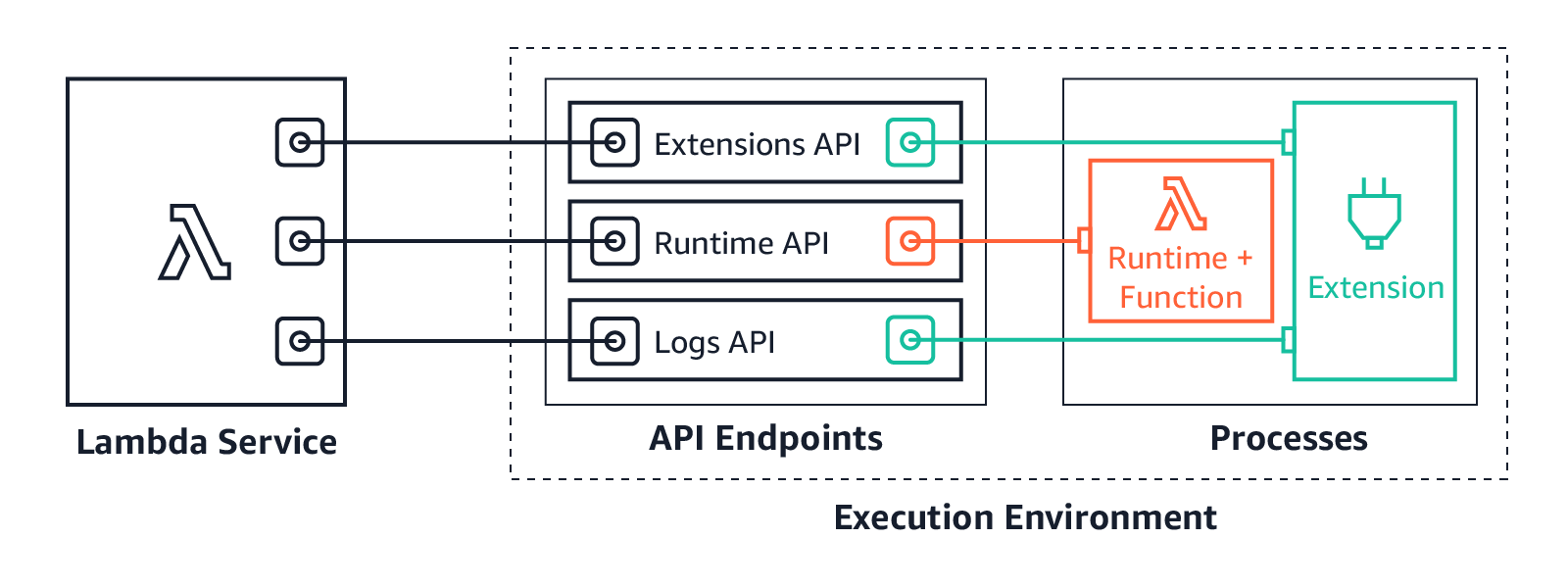
Extensions are built using the new Lambda Extensions API, which provides a way for tools to get greater control during function initialization, invocation, and shut down. This API builds on the existing Lambda Runtime API, which enables you to bring custom runtimes to Lambda.

You can use extensions from AWS, AWS Lambda Ready Partners, and open source projects for use-cases such as application performance monitoring, secrets management, configuration management, and vulnerability detection. You can also build your own extensions to integrate your own tooling using the Extensions API.

There are extensions available today for AppDynamics, Check Point, Datadog, Dynatrace, Epsagon, HashiCorp, Lumigo, New Relic, Thundra, Splunk, AWS AppConfig, and Amazon CloudWatch Lambda Insights. For more details on these, see “Introducing AWS Lambda extensions”.

The Lambda execution environment

Lambda functions run in a sandboxed environment called an execution environment. This isolates them from other functions and provides the resources, such as memory, specified in the function configuration.

Lambda automatically manages the lifecycle of compute resources so that you pay for value. Between function invocations, the Lambda service freezes the execution environment. It is thawed if the Lambda service needs the execution environment for subsequent invocations.

Previously, only the runtime process could influence the lifecycle of the execution environment. It would communicate with the Runtime API, which provides an HTTP API endpoint within the execution environment to communicate with the Lambda service.

Lambda and Runtime API

Lambda and Runtime API

The runtime uses the API to request invocation events from Lambda and deliver them to the function code. It then informs the Lambda service when it has completed processing an event. The Lambda service then freezes the execution environment.

The runtime process previously exposed two distinct phases in the lifecycle of the Lambda execution environment: Init and Invoke.

1. Init: During the Init phase, the Lambda service initializes the runtime, and then runs the function initialization code (the code outside the main handler). The Init phase happens either during the first invocation, or in advance if Provisioned Concurrency is enabled.

2. Invoke: During the invoke phase, the runtime requests an invocation event from the Lambda service via the Runtime API, and invokes the function handler. It then returns the function response to the Runtime API.

After the function runs, the Lambda service freezes the execution environment and maintains it for some time in anticipation of another function invocation.

If the Lambda function does not receive any invokes for a period of time, the Lambda service shuts down and removes the environment.

Previous Lambda lifecycle

Previous Lambda lifecycle

With the addition of the Extensions API, extensions can now influence, control, and participate in the lifecycle of the execution environment. They can use the Extensions API to influence when the Lambda service freezes the execution environment.

AWS Lambda execution environment with the Extensions API

AWS Lambda execution environment with the Extensions API

Extensions are initialized before the runtime and the function. They then continue to run in parallel with the function, get greater control during function invocation, and can run logic during shut down.

Extensions allow integrations with the Lambda service by introducing the following changes to the Lambda lifecycle:

  1. An updated Init phase. There are now three discrete Init tasks: extensions Init, runtime Init, and function Init. This creates an order where extensions and the runtime can perform setup tasks before the function code runs.
  2. Greater control during invocation. During the invoke phase, as before, the runtime requests the invocation event and invokes the function handler. In addition, extensions can now request lifecycle events from the Lambda service. They can run logic in response to these lifecycle events, and respond to the Lambda service when they are done. The Lambda service freezes the execution environment when it hears back from the runtime and all extensions. In this way, extensions can influence the freeze/thaw behavior.
  3. Shutdown phase: we are now exposing the shutdown phase to let extensions stop cleanly when the execution environment shuts down. The Lambda service sends a shut down event, which tells the runtime and extensions that the environment is about to be shut down.
New Lambda lifecycle with extensions

New Lambda lifecycle with extensions

Each Lambda lifecycle phase starts with an event from the Lambda service to the runtime and all registered extensions. The runtime and extensions signal that they have completed by requesting the Next invocation event from the Runtime and Extensions APIs. Lambda freezes the execution environment and all extensions when there are no pending events.

Lambda lifecycle for execution environment, runtime, extensions, and function.png

Lambda lifecycle for execution environment, runtime, extensions, and function.png

For more information on the lifecycle phases and the Extensions API, see the documentation.

How are extensions delivered and run?

You deploy extensions as Lambda layers, which are ZIP archives containing shared libraries or other dependencies.

To add a layer, use the AWS Management Console, AWS Command Line Interface (AWS CLI), or infrastructure as code tools such as AWS CloudFormation, the AWS Serverless Application Model (AWS SAM), and Terraform.

When the Lambda service starts the function execution environment, it extracts the extension files from the Lambda layer into the /opt directory. Lambda then looks for any extensions in the /opt/extensions directory and starts initializing them. Extensions need to be executable as binaries or scripts. As the function code directory is read-only, extensions cannot modify function code.

Extensions can run in either of two modes, internal and external.

  • Internal extensions run as part of the runtime process, in-process with your code. They are not separate processes. Internal extensions allow you to modify the startup of the runtime process using language-specific environment variables and wrapper scripts. You can use language-specific environment variables to add options and tools to the runtime for Java Correto 8 and 11, Node.js 10 and 12, and .NET Core 3.1. Wrapper scripts allow you to delegate the runtime startup to your script to customize the runtime startup behavior. You can use wrapper scripts with Node.js 10 and 12, Python 3.8, Ruby 2.7, Java 8 and 11, and .NET Core 3.1. For more information, see “Modifying-the-runtime-environment”.
  • External extensions allow you to run separate processes from the runtime but still within the same execution environment as the Lambda function. External extensions can start before the runtime process, and can continue after the runtime shuts down. External extensions work with Node.js 10 and 12, Python 3.7 and 3.8, Ruby 2.5 and 2.7, Java Corretto 8 and 11, .NET Core 3.1, and custom runtimes.

External extensions can be written in a different language to the function. We recommend implementing external extensions using a compiled language as a self-contained binary. This makes the extension compatible with all of the supported runtimes. If you use a non-compiled language, ensure that you include a compatible runtime in the extension.

Extensions run in the same execution environment as the function, so share resources such as CPU, memory, and disk storage with the function. They also share environment variables, in addition to permissions, using the same AWS Identity and Access Management (IAM) role as the function.

For more details on resources, security, and performance with extensions, see the companion blog post “Introducing AWS Lambda extensions”.

For example extensions and wrapper scripts to help you build your own extensions, see the GitHub repository.

Showing extensions in action

The demo shows how external extensions integrate deeply with functions and the Lambda runtime. The demo creates an example Lambda function with a single extension using either the AWS CLI, or AWS SAM.

The example shows how an external extension can start before the runtime, run during the Lambda function invocation, and shut down after the runtime shuts down.

To set up the example, visit the GitHub repo, and follow the instructions in the README.md file.

The example Lambda function uses the custom provided.al2 runtime based on Amazon Linux 2. Using the custom runtime helps illustrate in more detail how the Lambda service, Runtime API, and the function communicate. The extension is delivered using a Lambda layer.

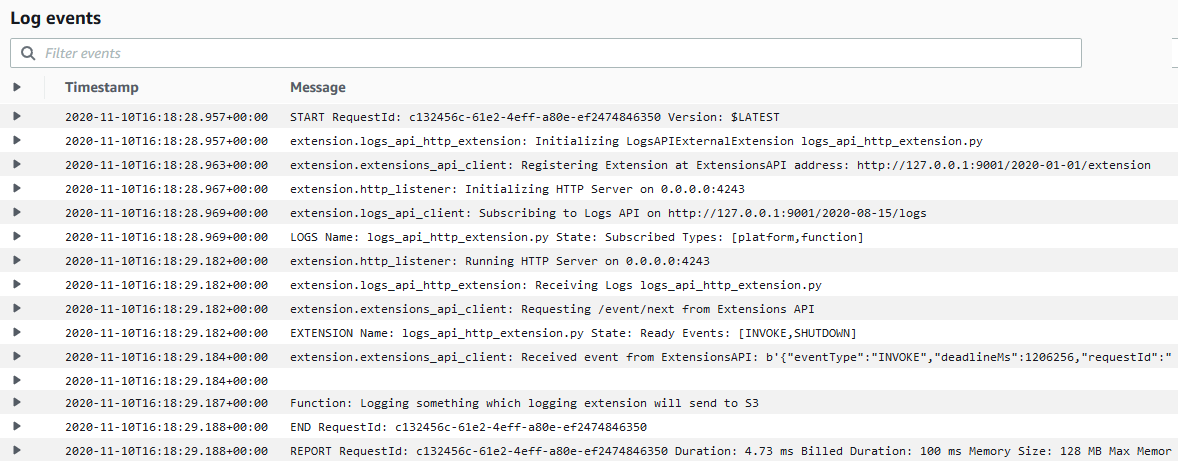
The runtime, function, and extension, log their status events to Amazon CloudWatch Logs. The extension initializes as a separate process and waits to receive the function invocation event from the Extensions API. It then sleeps for 5 seconds before calling the API again to register to receive the next event. The extension sleep simulates the processing of a parallel process. This could, for example, collect telemetry data to send to an external observability service.

When the Lambda function is invoked, the extension, runtime and function perform the following steps. I walk through the steps using the log output.

1. The Lambda service adds the configured extension Lambda layer. It then searches the /opt/extensions folder, and finds an extension called extension1.sh. The extension executable launches before the runtime initializes. It registers with the Extensions API to receive INVOKE and SHUTDOWN events using the following API call.

curl -sS -LD "$HEADERS" -XPOST "http://${AWS_LAMBDA_RUNTIME_API}/2020-01-01/extension/register" --header "Lambda-Extension-Name: ${LAMBDA_EXTENSION_NAME}" -d "{ \"events\": [\"INVOKE\", \"SHUTDOWN\"]}" > $TMPFILE
Extension discovery, registration, and start

Extension discovery, registration, and start

2. The Lambda custom provided.al2 runtime initializes from the bootstrap file.

Runtime initialization

Runtime initialization

3. The runtime calls the Runtime API to get the next event using the following API call. The HTTP request is blocked until the event is received.

curl -sS -LD "$HEADERS" -X GET "http://${AWS_LAMBDA_RUNTIME_API}/2018-06-01/runtime/invocation/next" > $TMPFILE &

The extension calls the Extensions API and waits for the next event. The HTTP request is again blocked until one is received.

curl -sS -L -XGET "http://${AWS_LAMBDA_RUNTIME_API}/2020-01-01/extension/event/next" --header "Lambda-Extension-Identifier: ${EXTENSION_ID}" > $TMPFILE &
Runtime and extension call APIs to get the next event

Runtime and extension call APIs to get the next event

4. The Lambda service receives an invocation event. It sends the event payload to the runtime using the Runtime API. It sends an event to the extension informing it about the invocation, using the Extensions API.

Runtime and extension receive event

Runtime and extension receive event

5. The runtime invokes the function handler. The function receives the event payload.

Runtime invokes handler

Runtime invokes handler

6. The function runs the handler code. The Lambda runtime receives back the function response and sends it back to the Runtime API with the following API call.

curl -sS -X POST "http://${AWS_LAMBDA_RUNTIME_API}/2018-06-01/runtime/invocation/$REQUEST_ID/response" -d "$RESPONSE" > $TMPFILE
Runtime receives function response and sends to Runtime API

Runtime receives function response and sends to Runtime API

7. The Lambda runtime then waits for the next invocation event (warm start).

Runtime waits for next event

Runtime waits for next event

8. The extension continues processing for 5 seconds, simulating the processing of a companion process. The extension finishes, and uses the Extensions API to register again to wait for the next event.

Extension processing

Extension processing

9. The function invocation report is logged.

Function invocation report

Function invocation report

10. When Lambda is about to shut down the execution environment, it sends the Runtime API a shut down event.

Lambda runtime shut down event

Lambda runtime shut down event

11. Lambda then sends a shut down event to the extensions. The extension finishes processing and then shuts down after the runtime.

Lambda extension shut down event

Lambda extension shut down event

The demo shows the steps the runtime, function, and extensions take during the Lambda lifecycle.

An external extension registers and starts before the runtime. When Lambda receives an invocation event, it sends it to the runtime. It then sends an event to the extension informing it about the invocation. The runtime invokes the function handler, and the extension does its own processing of the event. The extension continues processing after the function invocation completes. When Lambda is about to shut down the execution environment, it sends a shut down event to the runtime. It then sends one to the extension, so it can finish processing.

To see a sequence diagram of this flow, see the Extensions API documentation.

Pricing

Extensions share the same billing model as Lambda functions. When using Lambda functions with extensions, you pay for requests served and the combined compute time used to run your code and all extensions, in 100 ms increments. To learn more about the billing for extensions, visit the Lambda FAQs page.

Conclusion

Lambda extensions enable you to extend Lambda’s execution environment to more easily integrate with your favorite tools for monitoring, observability, security, and governance.

Extensions can run additional code; before, during, and after a function invocation. There are extensions available today from AWS Lambda Ready Partners. These cover use-cases such as application performance monitoring, secrets management, configuration management, and vulnerability detection. Extensions make it easier to use your existing tools with your serverless applications. For more information on the available extensions, see the companion post “Introducing Lambda Extensions – In preview“.

You can also build your own extensions to integrate your own tooling using the new Extensions API. For example extensions and wrapper scripts, see the GitHub repository.

Extensions are now available in preview in the following Regions: us-east-1, us-east-2, us-west-1, us-west-2, ca-central-1, eu-west-1, eu-west-2, eu-west-3, eu-central-1, eu-north-1, eu-south-1, sa-east-1, me-south-1, ap-northeast-1, ap-northeast-2, ap-northeast-3, ap-southeast-1, ap-southeast-2, ap-south-1, and ap-east-1.

For more serverless learning resources, visit https://serverlessland.com.

Introducing AWS Lambda Extensions – In preview

Post Syndicated from Julian Wood original https://aws.amazon.com/blogs/compute/introducing-aws-lambda-extensions-in-preview/

AWS Lambda is announcing a preview of Lambda Extensions, a new way to easily integrate Lambda with your favorite monitoring, observability, security, and governance tools. In this post I explain how Lambda extensions work, how you can begin using them, and the extensions from AWS Lambda Ready Partners that are available today.

Extensions help solve a common request from customers to make it easier to integrate their existing tools with Lambda. Previously, customers told us that integrating Lambda with their preferred tools required additional operational and configuration tasks. In addition, tools such as log agents, which are long-running processes, could not easily run on Lambda.

Extensions are a new way for tools to integrate deeply into the Lambda environment. There is no complex installation or configuration, and this simplified experience makes it easier for you to use your preferred tools across your application portfolio today. You can use extensions for use-cases such as:

  • capturing diagnostic information before, during, and after function invocation
  • automatically instrumenting your code without needing code changes
  • fetching configuration settings or secrets before the function invocation
  • detecting and alerting on function activity through hardened security agents, which can run as separate processes from the function

You can use extensions from AWS, AWS Lambda Ready Partners, and open source projects. There are extensions available today for AppDynamics, Check Point, Datadog, Dynatrace, Epsagon, HashiCorp, Lumigo, New Relic, Thundra, Splunk SignalFX, AWS AppConfig, and Amazon CloudWatch Lambda Insights.

You can learn how to build your own extensions, in the companion post “Building Extensions for AWS Lambda – In preview“.

Overview

Lambda Extensions is designed to be the easiest way to plug in the tools you use today without complex installation or configuration management. You deploy extensions as Lambda layers, with the AWS Management Console and AWS Command Line Interface (AWS CLI). You can also use infrastructure as code tools such as AWS CloudFormation, the AWS Serverless Application Model (AWS SAM), Serverless Framework, and Terraform. You can use Stackery to automate the integration of extensions from Epsagon, New Relic, Lumigo, and Thundra.

There are two components to the Lambda Extensions capability: the Extensions API and extensions themselves. Extensions are built using the new Lambda Extensions API which provides a way for tools to get greater control during function initialization, invocation, and shut down. This API builds on the existing Lambda Runtime API, which enables you to bring custom runtimes to Lambda.

AWS Lambda execution environment with the Extensions API

AWS Lambda execution environment with the Extensions API

Most customers will use extensions without needing to know about the capabilities of the Extensions API that enables them. You can just consume capabilities of an extension by configuring the options in your Lambda functions. Developers who build extensions use the Extensions API to register for function and execution environment lifecycle events.

Extensions can run in either of two modes – internal and external.

  • Internal extensions run as part of the runtime process, in-process with your code. They allow you to modify the startup of the runtime process using language-specific environment variables and wrapper scripts. Internal extensions enable use cases such as automatically instrumenting code.
  • External extensions allow you to run separate processes from the runtime but still within the same execution environment as the Lambda function. External extensions can start before the runtime process, and can continue after the runtime shuts down. External extensions enable use cases such as fetching secrets before the invocation, or sending telemetry to a custom destination outside of the function invocation. These extensions run as companion processes to Lambda functions.

For more information on the Extensions API and the changes to the Lambda lifecycle, see “Building Extensions for AWS Lambda – In preview

AWS Lambda Ready Partners extensions available at launch

Today, you can use extensions with the following AWS and AWS Lambda Ready Partner’s tools, and there are more to come:

  • AppDynamics provides end-to-end transaction tracing for AWS Lambda. With the AppDynamics extension, it is no longer mandatory for developers to include the AppDynamics tracer as a dependency in their function code, making tracing transactions across hybrid architectures even simpler.
  • The Datadog extension brings comprehensive, real-time visibility to your serverless applications. Combined with Datadog’s existing AWS integration, you get metrics, traces, and logs to help you monitor, detect, and resolve issues at any scale. The Datadog extension makes it easier than ever to get telemetry from your serverless workloads.
  • The Dynatrace extension makes it even easier to bring AWS Lambda metrics and traces into the Dynatrace platform for intelligent observability and automatic root cause detection. Get comprehensive, end-to-end observability with the flip of a switch and no code changes.
  • Epsagon helps you monitor, troubleshoot, and lower the cost for your Lambda functions. Epsagon’s extension reduces the overhead of sending traces to the Epsagon service, with minimal performance impact to your function.
  • HashiCorp Vault allows you to secure, store, and tightly control access to your application’s secrets and sensitive data. With the Vault extension, you can now authenticate and securely retrieve dynamic secrets before your Lambda function invokes.
  • Lumigo provides a monitoring and observability platform for serverless and microservices applications. The Lumigo extension enables the new Lumigo Lambda Profiler to see a breakdown of function resources, including CPU, memory, and network metrics. Receive actionable insights to reduce Lambda runtime duration and cost, fix bottlenecks, and increase efficiency.
  • Check Point CloudGuard provides full lifecycle security for serverless applications. The CloudGuard extension enables Function Self Protection data aggregation as an out-of-process extension, providing detection and alerting on application layer attacks.
  • New Relic provides a unified observability experience for your entire software stack. The New Relic extension uses a simpler companion process to report function telemetry data. This also requires fewer AWS permissions to add New Relic to your application.
  • Thundra provides an application debugging, observability and security platform for serverless, container and virtual machine (VM) workloads. The Thundra extension adds asynchronous telemetry reporting functionality to the Thundra agents, getting rid of network latency.
  • Splunk offers an enterprise-grade cloud monitoring solution for real-time full-stack visibility at scale. The Splunk extension provides a simplified runtime-independent interface to collect high-resolution observability data with minimal overhead. Monitor, manage, and optimize the performance and cost of your serverless applications with Splunk Observability solutions.
  • AWS AppConfig helps you manage, store, and safely deploy application configurations to your hosts at runtime. The AWS AppConfig extension integrates Lambda and AWS AppConfig seamlessly. Lambda functions have simple access to external configuration settings quickly and easily. Developers can now dynamically change their Lambda function’s configuration safely using robust validation features.
  • Amazon CloudWatch Lambda Insights enables you to efficiently monitor, troubleshoot, and optimize Lambda functions. The Lambda Insights extension simplifies the collection, visualization, and investigation of detailed compute performance metrics, errors, and logs. You can more easily isolate and correlate performance problems to optimize your Lambda environments.

You can also build and use your own extensions to integrate your organization’s tooling. For instance, the Cloud Foundations team at Square has built their own extension. They say:

The Cloud Foundations team at Square works to make the cloud accessible and secure. We partnered with the Security Infrastructure team, who builds infrastructure to secure Square’s sensitive data, to enable serverless applications at Square,​ and ​provide mTLS identities to Lambda​.

Since beginning work on Lambda, we have focused on creating a streamlined developer experience. Teams adopting Lambda need to learn a lot about AWS, and we see extensions as a way to abstract away common use cases. For our initial exploration, we wanted to make accessing secrets easy, as with our current tools each Lambda function usually pulls 3-5 secrets.

The extension we built and open source fetches secrets on cold starts, before the Lambda function is invoked. Each function includes a configuration file that specifies which secrets to pull. We knew this configuration was key, as Lambda functions should only be doing work they need to do. The secrets are cached in the local /tmp directory, which the function reads when it needs the secret data. This makes Lambda functions not only faster, but reduces the amount of code for accessing secrets.

Showing extensions in action with AWS AppConfig

This demo shows an example of using the AWS AppConfig with a Lambda function. AWS AppConfig is a capability of AWS Systems Manager to create, manage, and quickly deploy application configurations. It lets you dynamically deploy external configuration without having to redeploy your applications. As AWS AppConfig has robust validation features, all configuration changes can be tested safely before rolling out to your applications.

AWS AppConfig has an available extension which gives Lambda functions access to external configuration settings quickly and easily. The extension runs a separate local process to retrieve and cache configuration data from the AWS AppConfig service. The function code can then fetch configuration data faster using a local call rather than over the network.

To set up the example, visit the GitHub repo and follow the instructions in the README.md file.

The example creates an AWS AppConfig application, environment, and configuration profile. It stores a loglevel value, initially set to normal.

AWS AppConfig application, environment, and configuration profile

AWS AppConfig application, environment, and configuration profile

An AWS AppConfig deployment runs to roll out the initial configuration.

AWS AppConfig deployment

AWS AppConfig deployment

The example contains two Lambda functions that include the AWS AppConfig extension. For a list of the layers that have the AppConfig extension, see the blog post “AWS AppConfig Lambda Extension”.

As extensions share the same permissions as Lambda functions, the functions have execution roles that allow access to retrieve the AWS AppConfig configuration.

Lambda function add layer

Lambda function add layer

The functions use the extension to retrieve the loglevel value from AWS AppConfig, returning the value as a response. In a production application, this value could be used within function code to determine what level of information to send to CloudWatch Logs. For example, to troubleshoot an application issue, you can change the loglevel value centrally. Subsequent function invocations for both functions use the updated value.

Both Lambda functions are configured with an environment variable that specifies which AWS AppConfig configuration profile and value to use.

Lambda environment variable specifying AWS AppConfig profile

Lambda environment variable specifying AWS AppConfig profile

The functions also return whether the invocation is a cold start.

Running the functions with a test payload returns the loglevel value normal. The first invocation is a cold start.

{
  "event": {
    "hello": "world"
  },
  "ColdStart": true,
  "LogLevel": "normal"
}

Subsequent invocations return the same value with ColdStart set to false.

{
  "event": {
    "hello": "world"
  },
  "ColdStart": false,
  "LogLevel": "normal"
}

Create a new AWS Config hosted configuration profile version setting the loglevel value to verbose. Run a new AWS AppConfig deployment to update the value. The extension for both functions retrieves the new value. The function configuration itself is not changed.

Running another test invocation for both functions returns the updated value still without a cold start.

{
  "event": {
    "hello": "world"
  },
  "ColdStart": false,
  "LogLevel": "verbose"
}

AWS AppConfig has worked seamlessly with Lambda to update a dynamic external configuration setting for multiple Lambda functions without having to redeploy the function configuration.

The only function configuration required is to add the layer which contains the AWS AppConfig extension.

Pricing

Extensions share the same billing model as Lambda functions. When using Lambda functions with extensions, you pay for requests served and the combined compute time used to run your code and all extensions, in 100 ms increments. To learn more about the billing for extensions, visit the Lambda FAQs page.

Resources, security, and performance with extensions

Extensions run in the same execution environment as the function code. Therefore, they share resources with the function, such as CPU, memory, disk storage, and environment variables. They also share permissions, using the same AWS Identity and Access Management (IAM) role as the function.

You can configure up to 10 extensions per function, using up to five layers at a time. Multiple extensions can be included in a single layer.

The size of the extensions counts towards the deployment package limit. This cannot exceed the unzipped deployment package size limit of 250 MB.

External extensions are initialized before the runtime is started so can increase the delay before the function is invoked. Today, the function invocation response is returned after all extensions have completed. An extension that takes time to complete can increase the delay before the function response is returned. If an extension performs compute-intensive operations, function execution duration may increase. To measure the additional time the extension runs after the function invocation, use the new PostRuntimeExtensionsDuration CloudWatch metric to measure the extra time the extension takes after the function execution. To understand the impact of a specific extension, you can use the Duration and MaxMemoryUsed CloudWatch metrics, and run different versions of your function with and without the extension. Adding more memory to a function also proportionally increases CPU and network throughput.

The function and all extensions must complete within the function’s configured timeout setting which applies to the entire invoke phase.

Conclusion

Lambda extensions enable you to extend the Lambda service to more easily integrate with your favorite tools for monitoring, observability, security, and governance.

Today, you can install a number of available extensions from AWS Lambda Ready Partners. These cover use-cases such as application performance monitoring, secrets management, configuration management, and vulnerability detection. Extensions make it easier to use your existing tools with your serverless applications.

You can also build extensions to integrate your own tooling using the new Extensions API. For more information, see the companion post “Building Extensions for AWS Lambda – In preview“.

Extensions are now available in preview in the following Regions: us-east-1, us-east-2, us-west-1, us-west-2, ca-central-1, eu-west-1, eu-west-2, eu-west-3, eu-central-1, eu-north-1, eu-south-1, sa-east-1, me-south-1, ap-northeast-1, ap-northeast-2, ap-northeast-3, ap-southeast-1, ap-southeast-2, ap-south-1, and ap-east-1.

For more serverless learning resources, visit https://serverlessland.com.

The serverless LAMP stack part 6: From MVC to serverless microservices

Post Syndicated from Benjamin Smith original https://aws.amazon.com/blogs/compute/the-serverless-lamp-stack-part-6-from-mvc-to-serverless-microservices/

In this post, you learn how to build serverless PHP applications using microservices.

I show how to move from using a single Lambda function as scalable web host with an MVC framework, to a decoupled microservice model. The accompanying code examples for this blog post can be found in this GitHub repository.

The MVC architectural pattern

A traditional LAMP stack often implements the Model-View-Controller (MVC) architecture. This is a well-established way of separating application logic into three parts: the model, the view, and the controller.

  • Model: This part is responsible for managing the data of the application. Its role is to retrieve raw information from the database or receive user input from the controller.
  • View: This component focuses on the display. Data received from the model is presented to the user. Any response from the user is also recognized and sent to the controller component.
  • Controller: This part is responsible for the application logic. It responds to the user input and performs interactions on the data model objects.

The MVC principal of decoupling data, logic, and presentation layers means that changes in one layer have minimal impact on the others. This speeds the development process and makes it easier to update layouts, change business rules, and add new features. Components are more adaptable for reuse and refactoring, and allow for a degree of simultaneous development.

The serverless LAMP stack

The serverless LAMP stack

The preceding serverless LAMP stack architecture is first discussed in this post. A web application is split in to two components. A single AWS Lambda function contains the application’s MVC framework. Each response is synchronously returned via Amazon API Gateway. This architecture addresses the scalability challenge that is often seen in traditional LAMP stack applications. It scales automatically with a managed infrastructure and a pay-per-use billing model. However, the serverless paradigm makes it possible to apply the MVC principles of decoupling and reusability to an even greater degree.

The “Lambda-lith”

The preceding architecture represents a serverless monolith or “Lambda-lith”. A single Lambda function contains the entire business logic within an MVC framework. This implementation can be used to “lift and shift” from a legacy MVC to a serverless application. Simple applications often start this way too, but as the application grows more complex over time new challenges can occur.


day1-day100

Lambda Day 1 to day 100

A Lambda-lith is often maintained in a single repository that contains the entire application logic. This is sometimes referred to as a mono-repo.

Lamba-lith monorepo

Lamba-lith monorepo

A mono-repo makes it harder to separate responsibility of ownership between development teams. Consequently, projects in a mono-repo are prone to depend on each other, creating tight coupling. The tightly coupled code base with all of its interconnected modules be challenging to maintain a regular release cadence. Any small fix can require updates to other parts of the code base, making maintenance challenging without fracturing the whole application. Onboarding can be slow as new developers take time to learn and understand the code base and all of the interdependencies.

By applying the following principles, Lambda-lith MVC applications can be refactored into decoupled serverless microservices.

Divide into independent Lambda functions with finite business logic

The following example illustrates a Lambda-lith with all business and routing logic stored in a single Lambda function. Every request is routed to this function from API Gateway. The function code base contains a `router.php` file to direct requests to the correct model, view, or controller.

This is similar to a traditional LAMP stack implementation in which a web server such as Apache or NGINX routes all requests to a single index.php function. However, it’s often more practical to split applications into multiple functions or services.

Lambda as a web server

In the following example, this Lambda function is split into multiple functions based on each CRUD operation. The internal routing logic is now decoupled from the business logic. The API Gateway service uses rules to route requests to the correct Lambda function. This allows each function to scale independently and updates can be made to one function without impacting another.

Routing decoupled from business logic

Build micro-perimeters to enforce strict verification of every person or service.

Traditional MVC applications often use a castle-and-moat security model. This provides security by placing a perimeter around the entire application to protect it from malicious actors. This perimeter guards the application or network by verifying requests and user identities at the point of entry or exit.

This is typically achieved with firewalls, proxy servers, honeypots, and other intrusion prevention tools. It assumes that activity inside the perimeter is safe. However, a network vulnerability may provide access to everything inside.

Microservice-based applications allow developers to apply a “zero trust” security model. This enables developers to build micro-perimeters around each resource. This is sometimes referred to as the principle of least privilege. It ensures that each request, service, or user can access only the data or resource that is necessary for its legitimate purpose. Even with a vulnerability, the blast radius is limited only to the service within that micro-perimeter.

Castle-and-moat vs zero trust security model

Use AWS Identity and Access Management (IAM) resource policies and execution roles to decouple business logic from security posture. Lambda resource policies define the events and services that are authorized to invoke the function. Lambda execution roles place constraints the resource or service the Lambda function has access to. When defining resource policies and execution roles, start with a minimum set of permissions and grant additional permissions as necessary.

Create building blocks based on common functionality

Each component is a single building block that makes up an application together with other blocks. These blocks form microservices that deliver a set of capabilities on a specific domain. This makes is easy to change, upgrade, and replace with no impact on the remaining microservice components. This creates natural ownership boundaries to help organize repositories.

Development teams can then easily be assigned ownership to individual microservice repositories. Use the AWS Serverless Application Model (AWS SAM) to organize microservices into multiple code repositories, as explained in this blog post.

Use messages to connect and communicate between microservices.

In traditional MVC applications, one part of the application uses method calls to communicate with the other parts. With serverless microservices, the code base is spread across short-lived stateless functions and services. Communication between these services is achieved using asynchronous messages or synchronous HTTP requests.

Synchronous communication

In this method, a service calls an API and waits for a response from the receiving service before proceeding. Use API Gateway to create a front door to your backend microservices. API Gateway is a fully managed service for creating and managing RESTful and WebSocket APIs.

Using API Gateway to transport data addresses common concerns such as authorization, API tokens, access control and rate limiting from your code, and helps to reduce code complexity. API Gateway can also be used for synchronous internal microservice communications where the services have clear separation, strict authentication requirements, or have been deployed across accounts.

The following architecture demonstrates an application that is deployed across two accounts. The Booking microservice, invokes a loyalty booking function via API Gateway that exists in the Loyalty points account.

Synchronous internal microservice communications

Asynchronous communication

In this pattern, a service sends a message without waiting for a response, and one or more services process the message asynchronously. Here, the services involved do not directly communicate with each other. Instead, services publish messages to a broker such as Amazon Simple Queue Service (SQS) or Amazon EventBridge. Other services can choose to subscribe to the topic in the broker that they care about. This enables further decoupling of business logic from data transportation and reduces your code complexity.

Use services instead of code, where possible

A service-first mindset is an important part of serverless application development. Each line of code you write may limit your project’s responsiveness to change and adds cognitive overhead for new developers. Using an appropriate AWS service for each domain (messaging, storage, orchestration) helps to build faster. Embracing this mind-set allows developers to focus on solving those unique challenges that add the most value to their customers.

By applying these principles to refactor an MVC Lambda-lith, I build the following CRUD API microservice. This application can be deployed from this GitHub repository. It uses an AWS Serverless Application Model (AWS SAM) template to define an HTTP API, 5 Lambda functions, an Amazon DynamoDB table and all the IAM roles required.

All routing logic and authentication is managed by Amazon API Gateway. Each Lambda function has limited scope and minimal business logic. It uses a lightweight custom-built PHP runtime, explained in this post. Each Lambda function uses the AWS PHP SDK to interact with the DynamoDB table. This architecture is suitable as a serverless microservice for a website backend.

A serverless API microservice with PHP

Conclusion

In this post, I show how to move from using a single Lambda function as a scalable web host with an MVC framework, to a decoupled microservice model. I explain the principles that can be applied to help transition an MCV application into a collection of microservices and show the benefits of doing so. I provide code examples for a serverless PHP CRUD microservice with a deployable AWS SAM template.

PHP development teams can transition from Lambda-lith MVC applications to a decoupled microservice model. This allows them to focus on shipping code to delight their customers without managing infrastructure.

Find more resources for building serverless PHP applications at ServerlessLand.com.

Let’s build a Cloudflare Worker with WebAssembly and Haskell

Post Syndicated from Cristhian Motoche original https://blog.cloudflare.com/cloudflare-worker-with-webassembly-and-haskell/

Let's build a Cloudflare Worker with WebAssembly and Haskell

This is a guest post by Cristhian Motoche of Stack Builders.

At Stack Builders, we believe that Haskell’s system of expressive static types offers many benefits to the software industry and the world-wide community that depends on our services. In order to fully realize these benefits, it is necessary to have proper training and access to an ecosystem that allows for reliable deployment of services. In exploring the tools that help us run our systems based on Haskell, our developer Cristhian Motoche has created a tutorial that shows how to compile Haskell to WebAssembly using Asterius for deployment on Cloudflare.

What is a Cloudflare Worker?

Cloudflare Workers is a serverless platform that allows us to run our code on the edge of the Cloudflare infrastructure. It’s built on Google V8, so it’s possible to write functionalities in JavaScript or any other language that targets WebAssembly.

WebAssembly is a portable binary instruction format that can be executed fast in a memory-safe sandboxed environment. For this reason, it’s especially useful for tasks that need to perform resource-demanding and self-contained operations.

Why use Haskell to target WebAssembly?

Haskell is a pure functional languages that can target WebAssembly. As such, It helps developers break down complex tasks into small functions that can later be composed to do complex tasks. Additionally, it’s statically typed and has type inference, so it will complain if there are type errors at compile time. Because of that and much more, Haskell is a good source language for targeting WebAssembly.

From Haskell to WebAssembly

We’ll use Asterius to target WebAssembly from Haskell. It’s a well documented tool that is updated often and supports a lot of Haskell features.

First, as suggested in the documentation, we’ll use podman to pull the Asterius prebuilt container from Docker hub. In this tutorial, we will use Asterius version 200617, which works with GHC 8.8.

podman run -it --rm -v $(pwd):/workspace -w /workspace terrorjack/asterius:200617

Now we’ll create a Haskell module called fact.hs file that will export a pure function:

module Factorial (fact) where

fact :: Int -> Int
fact n = go n 1
  where
    go 0 acc = acc
    go n acc = go (n - 1) (n*acc)

foreign export javascript "fact" fact :: Int -> Int

In this module, we define a pure function called fact, optimized with tail recursion and exported using the Asterius JavaScript FFI, so that it can be called when a WebAssembly module is instantiated in JavaScript.

Next, we’ll create a JavaScript file called fact_node.mjs that contains the following code:

import * as rts from "./rts.mjs";
import module from "./fact.wasm.mjs";
import req from "./fact.req.mjs";

async function handleModule(m) {
  const i = await rts.newAsteriusInstance(Object.assign(req, {module: m}));
  const result = await i.exports.fact(5);
  console.log(result);
}

module.then(handleModule);

This code imports rts.mjs (common runtime), WebAssembly loaders, and the required parameters for the Asterius instance. It creates a new Asterius instance, it calls the exported function fact with the input 5, and prints out the result.

You probably have noted that fact is done asynchronously. This happens with any exported function by Asterius, even if it’s a pure function.

Next, we’ll compile this code using the Asterius command line interface (CLI) ahc-link, and we’ll run the JavaScript code in Node:

ahc-link \
  --input-hs fact.hs \
  --no-main \
  --export-function=fact \
  --run \
  --input-mjs fact_node.mjs \
  --output-dir=node

This command takes fact.hs as a Haskell input file, specifies that no main function is exported, and exports the fact function. Additionally, it takes fact_node.mjs as the entry JavaScript file that replaces the generated file by default, and it places the generated code in a directory called node.

Running the ahc-link command from above will print the following output in the console:

[INFO] Compiling fact.hs to WebAssembly
...
[INFO] Running node/fact.mjs
120

As you can see, the result is executed in node and it prints out the result of fact in the console.

Push your code to Cloudflare Workers

Now we’ll set everything up for deploying our code to Cloudflare Workers.

First, let’s add a metadata.json file with the following content:

{
  "body_part": "script",
  "bindings": [
    {
      "type": "wasm_module",
      "name": "WASM",
      "part": "wasm"
    }
  ]
}

This file is needed to specify the wasm_module binding. The name value corresponds to the global variable to access the WebAssembly module from your Worker code. In our example, it’s going to have the name WASM.

Our next step is to define the main point of the Workers script.

import * as rts from "./rts.mjs";
import fact from "./fact.req.mjs";

async function handleFact(param) {
  const i = await rts.newAsteriusInstance(Object.assign(fact, { module: WASM }));
  return await i.exports.fact(param);
}

async function handleRequest(req) {
  if (req.method == "POST") {
    const data = await req.formData();
    const param = parseInt(data.get("param"));
    if (param) {
      const resp = await handleFact(param);
      return new Response(resp, {status: 200});
    } else {
      return new Response(
        "Expecting 'param' in request to be an integer",
        {status: 400},
      );
    }
  }
  return new Response("Method not allowed", {status: 405});
}

addEventListener("fetch", event => {
  event.respondWith(handleRequest(event.request))
})

There are a few interesting things to point out in this code:

  1. We import rts.mjs and fact.req.mjs to load the exported functions from our WebAssembly module.
  2. handleFact is an asynchronous function that creates an instance of Asterius with the global WASM module, as a Workers global variable, and calls the exported function fact with some input.
  3. handleRequest handles the request of the Worker. It expects a POST request, with a parameter called param in the request body. If param is a number, it calls handleFact to respond with the result of fact.
  4. Using the Service Workers API, we listen to the fetch event that will respond with the result of handleRequest.

We need to build and bundle our code in a single JavaScript file, because Workers only accepts one script per worker. Fortunately, Asterius comes with Parcel.js, which will bundle all the necessary code in a single JavaScript file.

ahc-link \
  --input-hs fact.hs \
  --no-main \
  --export-function=fact \
  --input-mjs fact_cfw.mjs \
  --bundle \
  --browser \
  --output-dir worker

ahc-link will generate some files inside a directory called worker. For our Workers, we’re only interested in the JavaScript file (fact.js) and the WebAssembly module (fact.wasm). Now, it’s time to submit both of them to Workers. We can do this with the provided REST API.

Make sure you have an account id ($CF_ACCOUNT_ID), a name for your script ($SCRIPT_NAME), and an API Token ($CF_API_TOKEN):

cd worker
curl -X PUT "https://api.cloudflare.com/client/v4/accounts/$CF_ACCOUNT_ID/workers/scripts/$SCRIPT_NAME" \
     -H  "Authorization: Bearer $CF_API_TOKEN" \
     -F "[email protected];type=application/json" \
     -F "[email protected];type=application/javascript" \
     -F "[email protected];type=application/wasm"

Now, visit the Workers UI, where you can use the editor to view, edit, and test the script. Also, you can enable it to on a workers.dev subdomain ($CFW_SUBDOMAIN); in that case, you could then simply:

curl -X POST $CFW_SUBDOMAIN \
       -H 'Content-Type: application/x-www-form-urlencoded' \
       --data 'param=5'

Beyond a simple Haskell file

So far, we’ve created a WebAssembly module that exports a pure Haskell function we ran in Workers. However, we can also create and build a Cabal project using Asterius ahc-cabal CLI, and then use ahc-dist to compile it to WebAssembly.

First, let’s create the project:

ahc-cabal init -m -p cabal-cfw-example

Then, let’s add some dependencies to our cabal project. The cabal file will look like this:

cabal-version:       2.4
name:                cabal-cfw-example
version:             0.1.0.0
license:             NONE

executable cabal-cfw-example
  ghc-options: -optl--export-function=handleReq
  main-is:             Main.hs
  build-depends:
    base,
    bytestring,
    aeson >=1.5 && < 1.6,
    text
  default-language:    Haskell2010

It’s a simple cabal file, except for the -optl--export-function=handleReq ghc flag. This is necessary when exporting a function from a cabal project.

In this example, we’ll define a simple User record, and we’ll define its instance automatically using Template Haskell!

{-# LANGUAGE OverloadedStrings #-}
{-# LANGUAGE TemplateHaskell   #-}

module Main where

import           Asterius.Types
import           Control.Monad
import           Data.Aeson                 hiding (Object)
import qualified Data.Aeson                 as A
import           Data.Aeson.TH
import qualified Data.ByteString.Lazy.Char8 as B8
import           Data.Text


main :: IO ()
main = putStrLn "CFW Cabal"

data User =
  User
    { name :: Text
    , age  :: Int
    }

$(deriveJSON defaultOptions 'User)

NOTE: It’s not necessary to create a Cabal project for this example, because the prebuilt container comes with a lot of prebuilt packages (aesona included). Nevertheless, it will help us show the potential of ahc-cabal and ahc-dist.

Next, we’ll define handleReq, which we’ll export using JavaScript FFI just like we did before.

handleReq :: JSString -> JSString -> IO JSObject
handleReq method rawBody =
  case fromJSString method of
    "POST" ->
      let eitherUser :: Either String User
          eitherUser = eitherDecode (B8.pack $ fromJSString rawBody)
       in case eitherUser of
            Right _  -> js_new_response (toJSString "Success!") 200
            Left err -> js_new_response (toJSString err) 400
    _ -> js_new_response (toJSString "Not a valid method") 405

foreign export javascript "handleReq" handleReq :: JSString -> JSString -> IO JSObject

foreign import javascript "new Response($1, {\"status\": $2})"
  js_new_response :: JSString -> Int -> IO JSObject

This time, we define js_new_response, a Haskell function that creates a JavaScript object, to create a Response. handleReq takes two string parameters from JavaScript and it uses them to prepare a response.

Now let’s build and install the binary in the current directory:

ahc-cabal new-install --installdir . --overwrite-policy=always

This will generate a binary for our executable, called cabal-cfw-example. We’re going to use ahc-dist to take that binary and target WebAssembly:

ahc-dist --input-exe cabal-cfw-example --export-function=handleReq --no-main --input-mjs cabal_cfw_example.mjs --bundle --browser

cabal_cfw_example.mjs contains the following code:

import * as rts from "./rts.mjs";
import cabal_cfw_example from "./cabal_cfw_example.req.mjs";

async function handleRequest(req) {
  const i = await rts.newAsteriusInstance(Object.assign(cabal_cfw_example, { module: WASM }));
  const body = await req.text();
  return await i.exports.handleReq(req.method, body);
}

addEventListener("fetch", event => {
  event.respondWith(handleRequest(event.request))
});

Finally, we can deploy our code to Workers by defining a metadata.json file and uploading the script and the WebAssembly module using Workers API as we did before.

Caveats

Workers limits your JavaScript and WebAssembly in file size. Therefore, you need to be careful with any dependencies you add.

Conclusion

Stack Builders builds better software for better living through technologies like expressive static types. We used Asterius to compile Haskell to WebAssembly and deployed it to Cloudflare Workers using the Workers API. Asterius supports a lot of Haskell features (e.g. Template Haskell) and it provides an easy-to-use JavaScript FFI to interact with JavaScript. Additionally, it provides prebuilt containers that contain a lot of Haskell packages, so you can start writing a script right away.

Following this approach, we can write functional type-safe code in Haskell, target it to WebAssembly, and publish it to Workers, which runs on the edge of the Cloudflare infrastructure.

For more content check our blogs and tutorials!

Building resilient serverless patterns by combining messaging services

Post Syndicated from James Beswick original https://aws.amazon.com/blogs/compute/building-resilient-no-code-serverless-patterns-by-combining-messaging-services/

In “Choosing between messaging services for serverless applications”, I explain the features and differences between the core AWS messaging services. Amazon SQS, Amazon SNS, and Amazon EventBridge provide queues, publish/subscribe, and event bus functionality for your applications. Individually, these are robust, scalable services that are fundamental building blocks of serverless architectures.

However, you can also combine these services to solve specific challenges in distributed architectures. By doing this, you can use specific features of each service to build sophisticated patterns with little code. These combinations can make your applications more resilient and scalable, and reduce the amount of custom logic and architecture in your workload.

In this blog post, I highlight several important patterns for serverless developers. I also show how you use and deploy these integrations with the AWS Serverless Application Model (AWS SAM).

Examples in this post refer to code that can be downloaded from this GitHub repo. The README.md file explains how to deploy and run each example.

SNS to SQS: Adding resilience and throttling to message throughput

SNS has a robust retry policy that results in up to 100,010 delivery attempts over 23 days. If a downstream service is unavailable, it may be overwhelmed by retries when it comes back online. You can solve this issue by adding an SQS queue.

Adding an SQS queue between the SNS topic and its subscriber has two benefits. First, it adds resilience to message delivery, since the messages are durably stored in a queue. Second, it throttles the rate of messages to the consumer, helping smooth out traffic bursts caused by the service catching up with missed messages.

To build this in an AWS SAM template, you first define the two resources, and the SNS subscription:

  MySqsQueue:
    Type: AWS::SQS::Queue

  MySnsTopic:
    Type: AWS::SNS::Topic
    Properties:
      Subscription:
        - Protocol: sqs
          Endpoint: !GetAtt MySqsQueue.Arn

Finally, you provide permission to the SNS topic to publish to the queue, using the AWS::SQS::QueuePolicy resource:

  SnsToSqsPolicy:
    Type: AWS::SQS::QueuePolicy
    Properties:
      PolicyDocument:
        Version: "2012-10-17"
        Statement:
          - Sid: "Allow SNS publish to SQS"
            Effect: Allow
            Principal: "*"
            Resource: !GetAtt MySqsQueue.Arn
            Action: SQS:SendMessage
            Condition:
              ArnEquals:
                aws:SourceArn: !Ref MySnsTopic
      Queues:
        - Ref: MySqsQueue

To test this, you can publish a message to the SNS topic and then inspect the SQS queue length using the AWS CLI:

aws sns publish --topic-arn "arn:aws:sns:us-east-1:123456789012:sns-sqs-MySnsTopic-ABC123ABC" --message "Test message"
aws sqs get-queue-attributes --queue-url "https://sqs.us-east-1.amazonaws.com/123456789012/sns-sqs-MySqsQueue- ABC123ABC " --attribute-names ApproximateNumberOfMessages

This results in the following output:

CLI output

Another usage of this pattern is when you want to filter messages in architectures using an SQS queue. By placing the SNS topic in front of the queue, you can use the message filtering capabilities of SNS. This ensures that only the messages you need are published to the queue. To use message filtering in AWS SAM, use the AWS:SNS:Subcription resource:

  QueueSubcription:
    Type: 'AWS::SNS::Subscription'
    Properties:
      TopicArn: !Ref MySnsTopic
      Endpoint: !GetAtt MySqsQueue.Arn
      Protocol: sqs
      FilterPolicy:
        type:
        - orders
        - payments 
      RawMessageDelivery: 'true'

EventBridge to SNS: combining features of both services

Both SNS and EventBridge have different characteristics in terms of targets, and integration with broader features. This table compares the major differences between the two services:

Amazon SNS Amazon EventBridge
Number of targets 10 million (soft) 5
Limits 100,000 topics. 12,500,000 subscriptions per topic. 100 event buses. 300 rules per event bus.
Input transformation No Yes – see details.
Message filtering Yes – see details. Yes, including IP address matching – see details.
Format Raw or JSON JSON
Receive events from AWS CloudTrail No Yes
Targets HTTP(S), SMS, SNS Mobile Push, Email/Email-JSON, SQS, Lambda functions 15 targets including AWS LambdaAmazon SQSAmazon SNSAWS Step FunctionsAmazon Kinesis Data StreamsAmazon Kinesis Data Firehose.
SaaS integration No Yes – see integration partners.
Schema Registry integration No Yes – see details.
Dead-letter queues supported Yes No
Public visibility Can create public topics Cannot create public buses
Cross-Region You can subscribe your AWS Lambda functions to an Amazon SNS topic in any Region. Targets must be same Region. You can publish across Region to another event bus.

In this pattern, you configure an SNS topic as a target of an EventBridge rule:

SNS topic as a target for an EventBridge rule

In the AWS SAM template, you declare the resources in the preceding diagram as follows:

Resources:
  MySnsTopic:
    Type: AWS::SNS::Topic

  EventRule: 
    Type: AWS::Events::Rule
    Properties: 
      Description: "EventRule"
      EventPattern: 
        account: 
          - !Sub '${AWS::AccountId}'
        source:
          - "demo.cli"
      Targets: 
        - Arn: !Ref MySnsTopic
          Id: "SNStopic"

The default bus already exists in every AWS account, so there is no need to declare it. For the event bus to publish matching events to the SNS topic, you define permissions using the AWS::SNS::TopicPolicy resource:

  EventBridgeToToSnsPolicy:
    Type: AWS::SNS::TopicPolicy
    Properties: 
      PolicyDocument:
        Statement:
        - Effect: Allow
          Principal:
            Service: events.amazonaws.com
          Action: sns:Publish
          Resource: !Ref MySnsTopic
      Topics: 
        - !Ref MySnsTopic       

EventBridge has a limit of five targets per rule. In cases where you must send events to hundreds or thousands of targets, publishing to SNS first and then subscribing those targets to the topic works around this limit. Both services have different targets, and this pattern allows you to deliver EventBridge events to SMS, HTTP(s), email and SNS mobile push.

You can transform and filter the message using these services, often without needing an AWS Lambda function. SNS does not support input transformation but you can do this in an EventBridge rule. Message filtering is possible in both services but EventBridge provides richer content filtering capabilities.

AWS CloudTrail can log and monitor activity across services in your AWS account. It can be a useful source for events, allowing you to respond dynamically to objects in Amazon S3 or react to changes in your environment, for example. This natively integrates with EventBridge, allowing you to ingest events at scale from dozens of services.

Using EventBridge enables you to source events from outside your AWS account, offering integrations with a list of software as a service (SaaS) providers. This capability allows you to receive events from your accounts with SaaS providers like Zendesk, PagerDuty, and Auth0. These events are delivered to a partner event bus in your account, and can then be filtered and routed to an SNS topic.

Additionally, this pattern allows you to deliver events to Lambda functions in other AWS accounts and in other AWS Regions. You can invoke Lambda from SNS topics in other Regions and accounts. It’s also possible to make SNS topics publicly read-only, making them extensible endpoints that other third parties can consume from. SNS has comprehensive access control, which you can incorporate into this pattern.

Cross-account publishing

EventBridge to SQS: Building fault-tolerant microservices

EventBridge can route events to targets such as microservices. In the case of downstream failures, the service retries events for up to 24 hours. For workloads where you need a longer period of time to store and retry messages, you can deliver the events to an SQS queue in each microservice. This durably stores those events until the downstream service recovers. Additionally, this pattern protects the microservice from large bursts of traffic by throttling the delivery of messages.

Fault-tolerant microservices architecture

The resources declared in the AWS SAM template are similar to the previous examples, but it uses the AWS::SQS::QueuePolicy resource to grant the appropriate permission to EventBridge:

  EventBridgeToToSqsPolicy:
    Type: AWS::SQS::QueuePolicy
    Properties:
      PolicyDocument:
        Statement:
        - Effect: Allow
          Principal:
            Service: events.amazonaws.com
          Action: SQS:SendMessage
          Resource:  !GetAtt MySqsQueue.Arn
      Queues:
        - Ref: MySqsQueue

Conclusion

You can combine these services in your architectures to implement patterns that solve complex challenges, often with little code required. This blog post shows three examples that implement message throttling and queueing, integrating SNS and EventBridge, and building fault tolerant microservices.

To learn more building decoupled architectures, see this Learning Path series on EventBridge. For more serverless learning resources, visit https://serverlessland.com.

Building Automatic Platform Optimization for WordPress using Cloudflare Workers

Post Syndicated from Yevgen Safronov original https://blog.cloudflare.com/building-automatic-platform-optimization-for-wordpress-using-cloudflare-workers/

Building Automatic Platform Optimization for WordPress using Cloudflare Workers

This post explains how we implemented the Automatic Platform Optimization for WordPress. In doing so, we have defined a new place to run WordPress plugins, at the edge written with Cloudflare Workers. We provide the feature as a Cloudflare service but what’s exciting is that anyone could build this using the Workers platform.

The service is an evolution of the ideas explained in an earlier zero-config edge caching of HTML blog post. The post will explain how Automatic Platform Optimization combines the best qualities of the regular Cloudflare cache with Workers KV to improve cache cold starts globally.

The optimization will work both with and without the Cloudflare for WordPress plugin integration. Not only have we provided a zero config edge HTML caching solution but by using the Workers platform we were also able to improve the performance of Google font loading for all pages.

We are launching the feature first for WordPress specifically but the concept can be applied to any website and/or content management system (CMS).

A new place to run WordPress plugins?

There are many individual WordPress plugins for performance that use similar optimizations to existing Cloudflare services. Automatic Platform Optimization is bringing them all together into one easy to use solution, deployed at the edge.

Traditionally you have to maintain server plugins with your WordPress installation. This comes with maintenance costs and can require a deep understanding of how to fine tune performance and security for each and every plugin. Providing the optimizations on the client side can also lead to performance problems due to the costs of JavaScript execution. In contrast most of the optimizations could be built-in in Cloudflare’s edge rather than running on the server or the client. Automatic Platform Optimization will be always up to date with the latest performance and security best practices.

How to optimize for WordPress

By default Cloudflare CDN caches assets based on file extension and doesn’t cache HTML content. It is possible to configure HTML caching with a Cache Everything Page rule but it is a manual process and often requires additional features only available on the Business and Enterprise plans. So for the majority of the WordPress websites even with a CDN in front them, HTML content is not cached. Requests for a HTML document have to go all the way to the origin.

Building Automatic Platform Optimization for WordPress using Cloudflare Workers

Even if a CDN optimizes the connection between the closest edge and the website’s origin, the origin could be located far away and also be slow to respond, especially under load.

Move content closer to the user

One of the primary recommendations for speeding up websites is to move content closer to the end-user. This reduces the amount of time it takes for packets to travel between the end-user and the web server – the round-trip time (RTT). This improves the speed of establishing a connection as well as serving content from a closer location.

Building Automatic Platform Optimization for WordPress using Cloudflare Workers

We have previously blogged about the benefits of edge caching HTML. Caching and serving from HTML from the Cloudflare edge will greatly improve the time to first byte (TTFB) by optimizing DNS, connection setup, SSL negotiation, and removing the origin server response time.If your origin is slow in generating HTML and/or your user is far from the origin server then all your performance metrics will be affected.

Most HTML isn’t really dynamic. It needs to be able to change relatively quickly when the site is updated but for a huge portion of the web, the content is static for months or years at a time. There are special cases like when a user is logged-in (as the admin or otherwise) where the content needs to differ but the vast majority of visits are of anonymous users.

Zero config edge caching revisited

The goal is to make updating content to the edge happen automatically. The edge will cache and serve the previous version content until there is new content available. This is usually achieved by triggering a cache purge to remove existing content. In fact using a combination of our WordPress plugin and Cloudflare cache purge API, we already support Automatic Cache Purge on Website Updates. This feature has been in use for many years.

Building automatic HTML edge caching is more nuanced than caching traditional static content like images, styles or scripts. It requires defining rules on what to cache and when to update the content. To help with that task we introduced a custom header to communicate caching rules between Cloudflare edge and origin servers.

The Cloudflare Worker runs from every edge data center, the serverless platform will take care of scaling to our needs. Based on the request type it will return HTML content from Cloudflare Cache using Worker’s Cache API or serve a response directly from the origin. Specifically designed custom header provides information from the origin on how the script should handle the response. For example worker script will never cache responses for authenticated users.

HTML Caching rules

With or without Cloudflare for WordPress plugin, HTML edge caching requires all of the following conditions to be met:

  • Origin responds with 200 status
  • Origin responds with "text/html" content type
  • Request method is GET.
  • Request path doesn’t contain query strings
  • Request doesn’t contain any WordPress specific cookies: "wp-*", "wordpress*", "comment_*", "woocommerce_*" unless it’s "wordpress_eli" or "wordpress_test_cookie".
  • Request doesn’t contain any of the following headers:
    • "Cache-Control: no-cache"
    • "Cache-Control: private"
    • "Pragma:no-cache"
    • "Vary: *"

Note that the caching is bypassed if the devtools are open and the “Disable cache” option is active.

Edge caching with plugin

The preferred solution requires a configured Cloudflare for WordPress plugin. We provide the following features set when the plugin is activated:

  • HTML edge caching with 30 days TTL
  • 30 seconds or faster cache invalidation
  • Bypass HTML caching for logged in users
  • Bypass HTML caching based on presence of WordPress specific cookies
  • Decrease load on origin servers. If a request is fetched from Cloudflare CDN Cache we skip the request to the origin server.

How is this implemented?

When an eyeball requests a page from a website and Cloudflare doesn’t have a copy of the content it will be fetched from the origin. As the response is sent from the origin and goes through Cloudflare’s edge, Cloudflare for WordPress plugin adds a custom header: cf-edge-cache. It allows an origin to configure caching rules applied on responses.

Building Automatic Platform Optimization for WordPress using Cloudflare Workers

Based on the X-HTML-Edge-Cache proposal the plugin adds a cf-edge-cache header to every origin response. There are 2 possible values:

  • cf-edge-cache: no-cache

The page contains private information that shouldn’t be cached by the edge. For example, an active session exists on the server.

  • cf-edge-cache: cache, platform=wordpress

This combination of cache and platform will ensure that the HTML page is cached. In addition, we ran a number of checks against the presence of WordPress specific cookies to make sure we either bypass or allow caching on the Edge.

If the header isn’t present we assume that the Cloudflare for WordPress plugin is not installed or up-to-date. In this case the feature operates without a plugin support.

Edge caching without plugin

Using the Automatic Platform Optimization feature in combination with Cloudflare for WordPress plugin is our recommended solution. It provides the best feature set together with almost instant cache invalidation. Still, we wanted to provide performance improvements without the need for any installation on the origin server.

We provide the following features set when the plugin is not activated:

  • HTML edge caching with 30 days TTL
  • Cache invalidation may take up to 30 minutes. A manual cache purge could be triggered to speed up cache invalidation
  • Bypass HTML caching based on presence of WordPress specific cookies
  • No decreased load on origin servers. If a request is fetched from Cloudflare CDN Cache we still require an origin response to apply cache invalidation logic.

Without Cloudflare for WordPress plugin we still cache HTML on the edge and serve the content from the cache when possible. The logic of cache revalidation happens after serving the response to the eyeball. Worker’s waitUntil() callback allows the user to run code without affecting the response to the eyeball and is run in background.

We rely on the following headers to detect whether the content is stale and requires cache update:

  • ETag. If the cached version and origin response both include ETag and they are different we replace cached version with origin response. The behavior is the same for strong and weak ETag values.
  • Last-Modified. If the cached version and origin response both include Last-Modified and origin has a later Last-Modified date we replace cached version with origin response.
  • Date. If no ETag or Last-Modified header is available we compare cached version and origin response Date values. If there was more than a 30 minutes difference we replace cached version with origin response.

Getting content everywhere

Cloudflare Cache works great for the frequently requested content. Regular requests to the site make sure the content stays in cache. For a typical personal blog, it will be more common that the content stays in cache only in some parts of our vast edge network. With the Automatic Platform Optimization release we wanted to improve loading time for cache cold start from any location in the world. We explored different approaches and decided to use Workers KV to improve Edge Caching.

In addition to Cloudflare’s CDN cache we put the content into Workers KV. It only requires a single request to the page to cache it and within a minute it is made available to be read back from KV from any Cloudflare data center.

Updating content

After an update has been made to the WordPress website the plugin makes a request to Cloudflare’s API which both purges cache and marks content as stale in KV. The next request for the asset will trigger revalidation of the content. If the plugin is not enabled cache revalidation logic is triggered as detailed previously.

We serve the stale copy of the content still present in KV and asynchronously fetch new content from the origin, apply possible optimizations and then cache it (both regular local CDN cache and globally in KV).

Building Automatic Platform Optimization for WordPress using Cloudflare Workers

To store the content in KV we use a single namespace. It’s keyed with a combination of a zone identifier and the URL. For instance:

1:example.com/blog-post-1.html => "transformed & cached content"

For marking content as stale in KV we write a new key which will be read from the edge. If the key is present we will revalidate the content.

stale:1:example.com/blog-post-1.html => ""

Once the content was revalidated the stale marker key is deleted.

Moving optimizations to the edge

On top of caching HTML at the edge, we can pre-process and transform the HTML to make the loading of websites even faster for the user. Moving the development of this feature to our Cloudflare Workers environment makes it easy to add performance features such as improving Google Font loading. Using Google Fonts can cause significant performance issues as to load a font requires loading the HTML page; then loading a CSS file and finally loading the font. All of these steps are using different domains.

The solution is for the worker to inline the CSS and serve the font directly from the edge minimizing the number of connections required.

If you read through the previous blog post’s implementation it required a lot of manual work to provide streaming HTML processing support and character encodings. As the set of worker APIs have improved over time it is now much simpler to implement. Specifically the addition of a streaming HTML rewriter/parser with CSS-selector based API and the ability to suspend the parsing to asynchronously fetch a resource has reduced the code required to implement this from ~600 lines of source code to under 200.

export function transform(request, res) {
  return new HTMLRewriter()
    .on("link", {
      async element(e) {
        const src = e.getAttribute("href");
        const rel = e.getAttribute("rel");
        const isGoogleFont =
          src.startsWith("https://fonts.googleapis.com")

        if (isGoogleFont && rel === "stylesheet") {
          const media = e.getAttribute("media") || "all";
          const id = e.getAttribute("id") || "";
          try {
            const content = await fetchCSS(src, request);
            e.replace(styleTag({ media, id }, content), {
              html: true
            });
          } catch (e) {
            console.error(e);
          }
        }
      }
    })
    .transform(res);
}

The HTML transformation doesn’t block the response to the user. It’s running as a background task which when complete will update kv and replace the global cached version.

Building Automatic Platform Optimization for WordPress using Cloudflare Workers

Making edge publishing generic

We are launching the feature for WordPress specifically but the concept can be applied to any website and content management system (CMS).

Pay as you go machine learning inference with AWS Lambda

Post Syndicated from James Beswick original https://aws.amazon.com/blogs/compute/pay-as-you-go-machine-learning-inference-with-aws-lambda/

This post is courtesy of Eitan Sela, Senior Startup Solutions Architect.

Many customers want to deploy machine learning models for real-time inference, and pay only for what they use. Using Amazon EC2 instances for real-time inference may not be cost effective to support sporadic inference requests throughout the day.

AWS Lambda is a serverless compute service with pay-per-use billing. However, ML frameworks like XGBoost are too large to fit into the 250 MB application artifact size limit, or the 512 MB /tmp space limit. While you can store the packages in Amazon S3 and download to Lambda (up to 3 GB), this can increase the cost.

To address this, Lambda functions can now mount an Amazon Elastic File System (EFS). This is a scalable and elastic NFS file system storing data within and across multiple Availability Zones (AZ) for high availability and durability.

With this new capability, it’s now easier to use Python packages in Lambda that require storage space to load models and other dependencies.

In this blog post, I walk through how to:

  • Create an EFS file system and an Access Point as an application-specific entry point.
  • Provision an EC2 instance, mount EFS using the Access Point, and train a breast cancer XGBoost ML model. XGBoost, Python packages, and the model are saved on the EFS file system.
  • Create a Lambda function that loads the Python packages and model from EFS, and performs the prediction based on a test event.

Create an Amazon EFS file system with an Access Point

Configuring EFS for Lambda is straight-forward. I show how to do this in the AWS CloudFormation but you can also use the AWS CLI, AWS SDK, and AWS Serverless Application Model (AWS SAM).

EFS file systems are created within a customer VPC, so Lambda functions using the EFS file system must have access to the same VPC.

You can deploy the AWS CloudFormation stack located on this GitHub repository.

The stack includes the following:

  • Create a VPC with public subnet.
  • Create an EFS file system
  • Create an EFS Access Point
  • Create an EC2 in the VPC

It can take up to 10 minutes for the CloudFormation stack to create the resources. After the resource creation is complete, navigate to the EFS console to see the new file system.

EFS console

Navigate to the Access Points panel to see a new Access Point with the File system ID from the previous page.

Access Points panel

Note the Access Point ID and File System ID for the following sections.

Launch an Amazon EC2 instance to train a breast cancer model

In this section, you install Python packages on the EFS file system, after mounting it to EC2. You then train the breast cancer model, and save the model in the EFS file system used by the Lambda function.

The machine learning framework you use for this function is XGBoost. This is an optimized distributed gradient boosting library designed to be highly efficient, flexible, and portable. XGBoost is one of the most popular machine learning algorithms.

Navigate to the EC2 console to see the new EC2 instance created from the CloudFormation stack. This is an Amazon Linux 2 c5.large EC2 instance named ‘xgboost-for-serverless-inference-cfn-ec2’. In the instance details, you see that the security group is configured to allow inbound SSH access (for connecting to the instance).

Security Groups on instances page

Mount the EFS file system on the EC2

Connect to the instance using SSH and mount the EFS file system previously created by using the Access Point:

  1. Install amazon-efs-utils tools:
    sudo yum -y install amazon-efs-utils
  2. Create a directory to mount EFS into:
    mkdir efs
  3. Mount the EFS file system using the Access Point:
    sudo mount -t efs -o tls,accesspoint=<Access point ID> <File system ID>:/ efs

Console output

Install Python, pip and required packages

  1. Install Python and pip:
    sudo yum -y install python37
    curl -O https://bootstrap.pypa.io/get-pip.py
    python3 get-pip.py --user
  2. Verify the installation:
    python3 --version
    pip3 --version
  3. Create a requirements.txt file containing the dependencies:
    xgboost==1.1.1
    pandas
    sklearn
    joblib
  4. Install the Python packages using the requirements file:
    pip3 install -t efs/lib/ -r requirements.txt

    Note: using bursting throughput mode with EFS File system, this action can take up to 10 minutes.
  5. Set the Python path to refer to the installed packages directory of EFS file system:
    export PYTHONPATH=/home/ec2-user/efs/lib/

Train the breast cancer model

The breast cancer model predicts whether the breast mass is a malignant tumor or benign by looking at features computed from a digitized image of a fine needle aspirate of a breast mass.

The data used to train the model consists of the diagnosis in addition to the 10 real-valued features that are computed for each cell nucleus. Such features include radius, texture, perimeter, area, smoothness, compactness, concavity, concave points, symmetry, and fractal dimension. The prediction returned by the model is either “B” for benign or “M” for malignant. This sample project uses the public Breast Cancer Wisconsin (Diagnostic) dataset.

After installing the required Python packages, train a XGBoost model on the breast cancer dataset:

  1. Create a bc_xgboost_train.py file containing the Python code needed to train a breast cancer XGBoost model. Download the code here.
  2. Start the training of the model:python3 bc_xgboost_train.pyYou see the following message:Console outputThe model file bc-xgboost-model is created in the root directory.
  3. Create a new directory on the EFS file system and copy the XGBoost breast cancer model:
    mkdir efs/model
    cp bc-xgboost-model efs/model/
  4. Check you have the required Python packages and the model on the EFS file system:
    ls efs/model/ efs/lib/

    You see all the Python packages installed previously in the lib directory, and the model file in the model directory.
  5. Review the total size of lib Python packages directory:
    du -sh efs/lib/

You can see that the total size of lib directory is 534 MB. This is a larger package size than was allowed before EFS for Lambda.

Building a serverless machine learning inference using Lambda

In this section, you use the EFS file system previously configured for the Lambda function to import the required libraries and load the model.

Using EFS with Lambda

The AWS SAM template creates the Lambda function, mount the EFS Access Point created earlier, and both IAM roles required.

It takes several minutes for the AWS SAM CLI to create the Lambda function. After, navigate to the Lambda console to see the created Lambda function.

Lambda console

In the Lambda function configuration, you see the environment variables, and basic settings, such as runtime, memory, and timeout.

Lambda function configuration

Further down, you see that the Lambda function has the VPC access configured, and the file system is mounted.

Lambda VPC configuration

Test your Lambda function

  1. In the Lambda console, select Configure test events from the Test events dropdown.
  2. For Event Name, enter InferenceTestEvent.
  3. Copy the event JSON from here and paste in the dialog box.Confiigure test event
  4. Choose Create. After saving, you see InferenceTestEvent in the Test list. Now choose Test.

You see the Lambda function inference result, log output, and duration:

Lambda function result

Conclusion

In this blog post, you train an XGBoost breast cancer model using Python packages installed on an Amazon EFS file system. You create an AWS Lambda function that loads the Python packages and the model from EFS file system, and perform the predictions.

Now you know how to call a machine learning model inference using a Lambda function. To learn more about other real-world examples, see:

Using AWS Lambda as a consumer for Amazon Kinesis

Post Syndicated from James Beswick original https://aws.amazon.com/blogs/compute/using-aws-lambda-as-a-consumer-for-amazon-kinesis/

This post is courtesy of Prateek Mehrotra, Software Development Engineer.

AWS Lambda integrates natively with Amazon Kinesis as a consumer to process data ingested through a data stream. The polling, checkpointing, and error handling complexities are abstracted when you use this native integration. This allows the Lambda function code to focus on business logic processing.

This blog post describes how to operate and optimize this integration at high throughput with low system overhead time and processing latencies.

To learn more about Kinesis concepts and terminology, visit the documentation page.

Overview

You can attach a Lambda function to a Kinesis stream to process data. Multiple Lambda functions can consume from a single Kinesis stream for different kinds of processing independently. These can be used alongside other consumers such as Amazon Kinesis Data Firehose.

If a Kinesis stream has ‘n’ shards, then at least ‘n’ concurrency is required for a consuming Lambda function to process data without any induced delay. Less than ‘n’ available concurrency results in elevated iterator age in the Kinesis stream and elevated iterator age in the Lambda consumer. In a multi-consumer paradigm, if the Kinesis iterator age spikes then at least one of the stream consumers also reports a corresponding iterator age spike.

Stream poller

When the parallelization factor is greater than 1 for a Lambda consumer, the record processor polls up-to ‘parallelization-factor’ partition keys at a time while processing from a single shard. To learn more, read about handling traffic with a parallelization factor.

Kinesis shard level metrics

When using Kinesis streams, it’s best practice to enable enhanced shard level metrics. These metrics can help in detecting if the data distribution is happening uniformly within the shards of the stream, or not.

In a single-source, multiple-consumer use case, enhanced shard level metrics can help identify the cause of elevated iterator age. This could be due to a single shard receiving data too quickly, or at least one of the consumers failing to process the data.

To learn more about Kinesis monitoring, visit the documentation page. If per-partition processing is not a requirement, distribute data uniformly across shards. To learn more about Kinesis partition keys, visit the documentation page.

Processing delay caused by consumer misconfiguration

Kinesis reports an iterator age metric. If this value spikes, data processing from the stream is delayed. The metric value is set by the earliest record read from the stream measured over the specified time period.

This delay slows the data processing of the pipeline. This happens when a single shard is receiving data faster than the consumer can process it or the consumer is failing to complete processing due to errors.

Graph of records iterator age

In a single-source, multiple-consumer use case, at least one of the consumers shows a corresponding iterator age spike. If there are multiple Lambda consumers of the same data stream, then each Lambda consumer will report its own iterator age metric. This helps identify the problematic consumer for further analysis.

Tuning the configuration to optimize for iterator age

There are several tuning options available when the iterator age is increasing for the consumer Lambda function.

1. Increase the batch size

If the Lambda function operates at a low maximum duration, a single invocation may process less than a maximum batch size. Increase the batch size (up to a maximum of 10,000) to read more records from a shard in a single batch. This can help normalize the iterator age.

2. Change the parallelization factor

Increasing the parallelization factor in the Lambda function allows concurrent invocations to read a single shard. Multiple batches of records are created in the shard based on partition keys, resulting in faster data consumption.

Iterator age can spike when the batch size is set to 10,000 and the parallelization factor is set to 10. This can happen when data is produced faster than the consumer can process it, backing up the per-shard/per-partition queues. To mitigate this, subdivide the partition into multiple keys. This helps distribute the data for that partition key more evenly across shards.

Partition keys

3. Reduce the batch window

If data is distributed unequally across shards, or there is low write volume from producers, the Lambda poller may wait for an entire batch. You can reduce this wait time by reducing the batch window, which results in faster processing.

To learn more about Lambda poller batch window for Kinesis, visit the documentation page.

4. De-scale the Kinesis stream if overprovisioned

If the Kinesis stream metrics indicate that the stream is over-provisioned, de-scaling the stream helps increase data compaction within shards. This results in better throughput per Lambda invocation.

After reducing stream size, reduce the Lambda concurrency to maintain a 1:1 ratio of shard count to Lambda concurrency mapping. As load increases, increase the parallelization factor the keep the shard size constant. With this increase, the Lambda concurrency should be at least shard count * parallelization factor.

To learn more, read about handling traffic with a parallelization factor.

5. Enable enhanced fan-out for consumers

Enhanced fan-out allows developers to scale up the number of stream consumers by offering each stream consumer its own read throughput.

To learn more about Kinesis enhanced fan-out, visit the documentation page.

Conclusion

This blog post shows some of the best practices when using Lambda with Kinesis. It covers operational levers for high-throughput, low latency, single source data processing pipelines.

The enhanced Amazon Kinesis shard level metrics help monitor the maximum overhead processing delay per shard. When correlated with the Lambda consumer’s iterator age metrics, this shows each consumer’s performance. The effective combination of batch size, parallelization factor, batch window, and partition key can lead to more efficient stream processing.

To learn more about Amazon Kinesis, visit the Getting Started page.

Choosing between messaging services for serverless applications

Post Syndicated from James Beswick original https://aws.amazon.com/blogs/compute/choosing-between-messaging-services-for-serverless-applications/

Most serverless application architectures use a combination of different AWS services, microservices, and AWS Lambda functions. Messaging services are important in allowing distributed applications to communicate with each other, and are fundamental to most production serverless workloads.

Messaging services can improve the resilience, availability, and scalability of applications, when used appropriately. They can also enable your applications to communicate beyond your workload or even the AWS Cloud, and provide extensibility for future service features and versions.

In this blog post, I compare the primary messaging services offered by AWS and how you can use these in your serverless application architectures. I also show how you use and deploy these integrations with the AWS Serverless Application Model (AWS SAM).

Examples in this post refer to code that can be downloaded from this GitHub repository. The README.md file explains how to deploy and run each example.

Overview

Three of the most useful messaging patterns for serverless developers are queues, publish/subscribe, and event buses. In AWS, these are provided by Amazon SQS, Amazon SNS, and Amazon EventBridge respectively. All of these services are fully managed and highly available, so there is no infrastructure to manage. All three integrate with Lambda, allowing you to publish messages via the AWS SDK and invoke functions as targets. Each of these services has an important role to play in serverless architectures.

SNS enables you to send messages reliably between parts of your infrastructure. It uses a robust retry mechanism for when downstream targets are unavailable. When the delivery policy is exhausted, it can optionally send those messages to a dead-letter queue for further processing. SNS uses topics to logically separate messages into channels, and your Lambda functions interact with these topics.

SQS provides queues for your serverless applications. You can use a queue to send, store, and receive messages between different services in your workload. Queues are an important mechanism for providing fault tolerance in distributed systems, and help decouple different parts of your application. SQS scales elastically, and there is no limit to the number of messages per queue. The service durably persists messages until they are processed by a downstream consumer.

EventBridge is a serverless event bus service, simplifying routing events between AWS services, software as a service (SaaS) providers, and your own applications. It logically separates routing using event buses, and you implement the routing logic using rules. You can filter and transform incoming messages at the service level, and route events to multiple targets, including Lambda functions.

Integrating an SQS queue with AWS SAM

The first example shows an AWS SAM template defining a serverless application with two Lambda functions and an SQS queue:

Producer-consumer example

You can declare an SQS queue in an AWS SAM template with the AWS::SQS::Queue resource:

  MySqsQueue:
    Type: AWS::SQS::Queue

To publish to the queue, the publisher function must have permission to send messages. Using an AWS SAM policy template, you can apply policy that enables send messaging to one specific queue:

      Policies:
        - SQSSendMessagePolicy:
            QueueName: !GetAtt MySqsQueue.QueueName

The AWS SAM template passes the queue name into the Lambda function as an environment variable. The function uses the sendMessage method of the AWS.SQS class to publish the message:

const AWS = require('aws-sdk')
AWS.config.region = process.env.AWS_REGION 
const sqs = new AWS.SQS({apiVersion: '2012-11-05'})

// The Lambda handler
exports.handler = async (event) => {
  // Params object for SQS
  const params = {
    MessageBody: `Message at ${Date()}`,
    QueueUrl: process.env.SQSqueueName
  }
  
  // Send to SQS
  const result = await sqs.sendMessage(params).promise()
  console.log(result)
}

When the SQS queue receives the message, it publishes to the consuming Lambda function. To configure this integration in AWS SAM, the consumer function is granted the SQSPollerPolicy policy. The function’s event source is set to receive messages from the queue in batches of 10:

  QueueConsumerFunction:
    Type: AWS::Serverless::Function 
    Properties:
      CodeUri: code/
      Handler: consumer.handler
      Runtime: nodejs12.x
      Timeout: 3
      MemorySize: 128
      Policies:  
        - SQSPollerPolicy:
            QueueName: !GetAtt MySqsQueue.QueueName
      Events:
        MySQSEvent:
          Type: SQS
          Properties:
            Queue: !GetAtt MySqsQueue.Arn
            BatchSize: 10

The payload for the consumer function is the message from SQS. This is an array of messages up to the batch size, containing a body attribute with the publishing function’s MessageBody. You can see this in the CloudWatch log for the function:

CloudWatch log result

Integrating an SNS topic with AWS SAM

The second example shows an AWS SAM template defining a serverless application with three Lambda functions and an SNS topic:

SNS fanout to Lambda functions

You declare an SNS topic and the subscribing Lambda functions with the AWS::SNS:Topic resource:

  MySnsTopic:
    Type: AWS::SNS::Topic
    Properties:
      Subscription:
        - Protocol: lambda
          Endpoint: !GetAtt TopicConsumerFunction1.Arn    
        - Protocol: lambda
          Endpoint: !GetAtt TopicConsumerFunction2.Arn

You provide the SNS service with permission to invoke the Lambda functions but defining an AWS::Lambda::Permission for each:

  TopicConsumerFunction1Permission:
    Type: 'AWS::Lambda::Permission'
    Properties:
      Action: 'lambda:InvokeFunction'
      FunctionName: !Ref TopicConsumerFunction1
      Principal: sns.amazonaws.com

The SNSPublishMessagePolicy policy template grants permission to the publishing function to send messages to the topic. In the function, the publish method of the AWS.SNS class handles publishing:

const AWS = require('aws-sdk')
AWS.config.region = process.env.AWS_REGION 
const sns = new AWS.SNS({apiVersion: '2012-11-05'})

// The Lambda handler
exports.handler = async (event) => {
  // Params object for SNS
  const params = {
    Message: `Message at ${Date()}`,
    Subject: 'New message from publisher',
    TopicArn: process.env.SNStopic
  }
  
  // Send to SQS
  const result = await sns.publish(params).promise()
  console.log(result)
}

The payload for the consumer functions is the message from SNS. This is an array of messages, containing subject and message attributes from the publishing function. You can see this in the CloudWatch log for the function:

CloudWatch log result

Differences between SQS and SNS configurations

SQS queues and SNS topics offer different functionality, though both can publish to downstream Lambda functions.

An SQS message is stored on the queue for up to 14 days until it is successfully processed by a subscriber. SNS does not retain messages so if there are no subscribers for a topic, the message is discarded.

SNS topics may broadcast to multiple targets. This behavior is called fan-out. It can be used to parallelize work across Lambda functions or send messages to multiple environments (such as test or development). An SNS topic can have up to 12,500,000 subscribers, providing highly scalable fan-out capabilities. The targets may include HTTP/S endpoints, SMS text messaging, SNS mobile push, email, SQS, and Lambda functions.

In AWS SAM templates, you can retrieve properties such as ARNs and names of queues and topics, using the following intrinsic functions:

Amazon SQS Amazon SNS
Channel type Queue Topic
Get ARN !GetAtt MySqsQueue.Arn !Ref MySnsTopic
Get name !GetAtt MySqsQueue.QueueName !GetAtt MySnsTopic.TopicName

Integrating with EventBridge in AWS SAM

The third example shows the AWS SAM template defining a serverless application with two Lambda functions and an EventBridge rule:

EventBridge integration with AWS SAM

The default event bus already exists in every AWS account. You declare a rule that filters events in the event bus using the AWS::Events::Rule resource:

  EventRule: 
    Type: AWS::Events::Rule
    Properties: 
      Description: "EventRule"
      EventPattern: 
        source: 
          - "demo.event"
        detail: 
          state: 
            - "new"
      State: "ENABLED"
      Targets: 
        - Arn: !GetAtt EventConsumerFunction.Arn
          Id: "ConsumerTarget"

The rule describes an event pattern specifying matching JSON attributes. Events that match this pattern are routed to the list of targets. You provide the EventBridge service with permission to invoke the Lambda functions in the target list:

  PermissionForEventsToInvokeLambda: 
    Type: AWS::Lambda::Permission
    Properties: 
      FunctionName: 
        Ref: "EventConsumerFunction"
      Action: "lambda:InvokeFunction"
      Principal: "events.amazonaws.com"
      SourceArn: !GetAtt EventRule.Arn

The AWS SAM template uses an IAM policy statement to grant permission to the publishing function to put events on the event bus:

  EventPublisherFunction:
    Type: AWS::Serverless::Function
    Properties:
      CodeUri: code/
      Handler: publisher.handler
      Timeout: 3
      Runtime: nodejs12.x
      Policies:
        - Statement:
          - Effect: Allow
            Resource: '*'
            Action:
              - events:PutEvents      

The publishing function then uses the putEvents method of the AWS.EventBridge class, which returns after the events have been durably stored in EventBridge:

const AWS = require('aws-sdk')
AWS.config.update({region: 'us-east-1'})
const eventbridge = new AWS.EventBridge()

exports.handler = async (event) => {
  const params = {
    Entries: [ 
      {
        Detail: JSON.stringify({
          "message": "Hello from publisher",
          "state": "new"
        }),
        DetailType: 'Message',
        EventBusName: 'default',
        Source: 'demo.event',
        Time: new Date 
      }
    ]
  }
  const result = await eventbridge.putEvents(params).promise()
  console.log(result)
}

The payload for the consumer function is the message from EventBridge. This is an array of messages, containing subject and message attributes from the publishing function. You can see this in the CloudWatch log for the function:

CloudWatch log result

Comparing SNS with EventBridge

SNS and EventBridge have many similarities. Both can be used to decouple publishers and subscribers, filter messages or events, and provide fan-in or fan-out capabilities. However, there are differences in the list of targets and features for each service, and your choice of service depends on the needs of your use-case.

EventBridge offers two newer capabilities that are not available in SNS. The first is software as a service (SaaS) integration. This enables you to authorize supported SaaS providers to send events directly from their EventBridge event bus to partner event buses in your account. This replaces the need for polling or webhook configuration, and creates a highly scalable way to ingest SaaS events directly into your AWS account.

The second feature is the Schema Registry, which makes it easier to discover and manage OpenAPI schemas for events. EventBridge can infer schemas based on events routed through an event bus by using schema discovery. This can be used to generate code bindings directly to your IDE for type-safe languages like Python, Java, and TypeScript. This can help accelerate development by automating the generation of classes and code directly from events.

This table compares the major features of both services:

Amazon SNS Amazon EventBridge
Number of targets 10 million (soft) 5
Availability SLA 99.9% 99.99%
Limits 100,000 topics. 12,500,000 subscriptions per topic. 100 event buses. 300 rules per event bus.
Publish throughput Varies by Region. Soft limits. Varies by Region. Soft limits.
Input transformation No Yes – see details.
Message filtering Yes – see details. Yes, including IP address matching – see details.
Message size maximum 256 KB 256 KB
Billing Per 64 KB
Format Raw or JSON JSON
Receive events from AWS CloudTrail No Yes
Targets HTTP(S), SMS, SNS Mobile Push, Email/Email-JSON, SQS, Lambda functions. 15 targets including AWS LambdaAmazon SQSAmazon SNSAWS Step FunctionsAmazon Kinesis Data StreamsAmazon Kinesis Data Firehose.
SaaS integration No Yes – see integrations.
Schema Registry integration No Yes – see details.
Dead-letter queues supported Yes No
FIFO ordering available No No
Public visibility Can create public topics Cannot create public buses
Pricing $0.50/million requests + variable delivery cost + data transfer out cost. SMS varies. $1.00/million events. Free for AWS events. No charge for delivery.
Billable request size 1 request = 64 KB 1 event = 64 KB
AWS Free Tier eligible Yes No
Cross-Region You can subscribe your AWS Lambda functions to an Amazon SNS topic in any Region. Targets must be in the same Region. You can publish across Regions to another event bus.
Retry policy
  • For SQS/Lambda, exponential backoff over 23 days.
  • For SMTP, SMS and Mobile push, exponential backoff over 6 hours.
At-least-once event delivery to targets, including retry with exponential backoff for up to 24 hours.

Conclusion

Messaging is an important part of serverless applications and AWS services provide queues, publish/subscribe, and event routing capabilities. This post reviews the main features of SNS, SQS, and EventBridge and how they provide different capabilities for your workloads.

I show three example applications that publish and consume events from the three services. I walk through AWS SAM syntax for deploying these resources in your applications. Finally, I compare differences between the services.

To learn more building decoupled architectures, see this Learning Path series on EventBridge. For more serverless learning resources, visit https://serverlessland.com.
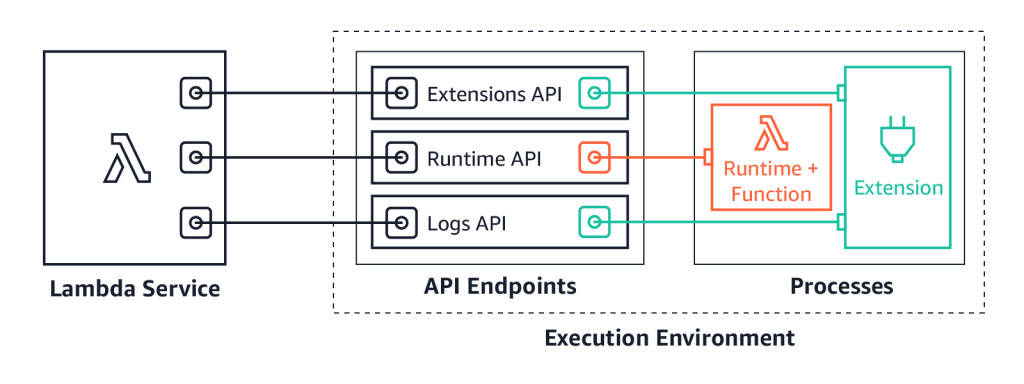
Introducing Cron Triggers for Cloudflare Workers

Post Syndicated from Nancy Gao original https://blog.cloudflare.com/introducing-cron-triggers-for-cloudflare-workers/

Introducing Cron Triggers for Cloudflare Workers

Introducing Cron Triggers for Cloudflare Workers

Today the Cloudflare Workers team is thrilled to announce the launch of Cron Triggers. Before now, Workers were triggered purely by incoming HTTP requests but starting today you’ll be able to set a scheduler to run your Worker on a timed interval. This was a highly requested feature that we know a lot of developers will find useful, and we’ve heard your feedback after Serverless Week.

Introducing Cron Triggers for Cloudflare Workers

We are excited to offer this feature at no additional cost, and it will be available on both the Workers free tier and the paid tier, now called Workers Bundled. Since it doesn’t matter which city a Cron Trigger routes the Worker through, we are able to maximize Cloudflare’s distributed system and send scheduled jobs to underutilized machinery. Running jobs on these quiet machines is both efficient and cost effective, and we are able to pass those cost savings down to you.

What is a Cron Trigger and how might I use such a feature?

Introducing Cron Triggers for Cloudflare Workers

In case you’re not familiar with Unix systems, the cron pattern allows you to schedule jobs to run periodically at fixed intervals or at scheduled times. Cron Triggers in the context of Workers allow users to set time-based invocations for the job. These Workers happen on a recurring schedule, and differ from traditional Workers in that they do not fire on HTTP requests.

Most developers are familiar with the cron pattern and its usefulness across a wide range of applications. Pulling the latest data from APIs or running regular integration tests on a preset schedule are common examples of this.

“We’re excited about Cron Triggers. Workers is crucial to our stack, so using this feature for live integration tests will boost the developer experience.” – Brian Marks, Software Engineer at Bazaarvoice

How much does it cost to use Cron Triggers?

Triggers are included at no additional cost! Scheduled Workers count towards your request cap for both the free tier and Workers Bundled, but rest assured that there will be no hidden or extra fees. Our competitors charge extra for cron events, or in some cases offer a very limited free tier. We want to make this feature widely accessible and have decided not to charge on a per-trigger basis. While there are no limits for the number of triggers you can have across an account, note that there is a limit of 3 triggers per Worker script for this feature. You can read more about limits on Workers plans in this documentation.

How are you able to offer this feature at no additional cost?

Cloudflare supports a massive distributed system that spans the globe with 200+ cities. Our nodes are named for the IATA airport code that they are closest to. Most of the time we run Workers close to the request origin for performance reasons (ie SFO if you are in the Bay Area, or CDG if you are lucky enough to be in Paris 🥐🍷🧀).  In a typical HTTP Worker, we do this because we know that performance is of material importance when someone is waiting for the response.

In the case of Cron Triggers, where the user is running a task on a timed basis, those performance needs are different. A few milliseconds of extra latency do not matter as much when the user isn’t actively waiting for the response. The nature of the feature gives us much more flexibility on where to run the job, since it doesn’t have to necessarily be in a city close to the end user.

Cron Triggers are run on underutilized machines to make the best use of our capacity and route traffic efficiently. For example, a job scheduled from San Francisco at 7pm Pacific Time might be sent to Paris because it’s 4am there and traffic across Europe is low.  Sending traffic to these machines during quiet hours is very efficient, and we are more than happy to pass those cost savings down to you. Aside from this scheduling optimization, Workers that are called by Cron Triggers behave similarly to and have all of the same performance and security benefits as typical HTTP Workers.

What’s happening below the hood?

At a high level, schedules created through our API create records in our database. These records contain the information necessary to execute the Worker on the given cron schedule. These records are then picked up by another service which continuously evaluates the state of our edge and distributes the schedules among cities. Once the schedules have been distributed to the edge, a service running in the node polls for changes to the schedules and makes sure they get sent to our runtime at the appropriate time.

If you want to know more details about how we implemented this feature, please refer to the technical blog.

What’s coming next?

With this feature, we’ve expanded what’s possible to build with Workers, and further simplified the developer experience. While Workers previously only ran on web requests, we believe the future of edge computing isn’t strictly tied to HTTP requests and responses.  We want to introduce more types of Workers in the future.

We plan to expand out triggers to include different types, such as data or event-based triggers. Our goal is to give users more flexibility and control over when their Workers run. Cron Triggers are our first step in this direction. In addition, we plan to keep iterating on Cron Triggers to make edge infrastructure selection even more sophisticated and optimized — for example, we might even consider triggers that allow our users to run in the most energy-efficient data centers.

How to try Cron Triggers

Cron triggers are live today! You can try it in the Workers dashboard by creating a new Worker and setting up a Cron Trigger.

Making Time for Cron Triggers: A Look Inside

Post Syndicated from Aaron Lisman original https://blog.cloudflare.com/cron-triggers-for-scheduled-workers/

Making Time for Cron Triggers: A Look Inside

Making Time for Cron Triggers: A Look Inside

Today, we are excited to launch Cron Triggers to the Cloudflare Workers serverless compute platform. We’ve heard the developer feedback, and we want to give our users the ability to run a given Worker on a scheduled basis. In case you’re not familiar with Unix systems, the cron pattern allows developers to schedule jobs to run at fixed intervals. This pattern is ideal for running any types of periodic jobs like maintenance or calling third party APIs to get up-to-date data. Cron Triggers has been a highly requested feature even inside Cloudflare and we hope that you will find this feature as useful as we have!

Making Time for Cron Triggers: A Look Inside

Where are Cron Triggers going to be run?

Cron Triggers are executed from the edge. At Cloudflare, we believe strongly in edge computing and wanted our new feature to get all of the performance and reliability benefits of running on our edge. Thus, we wrote a service in core that is responsible for distributing schedules to a new edge service through Quicksilver which will then trigger the Workers themselves.

What’s happening under the hood?

At a high level, schedules created through our API create records in our database with the information necessary to execute the Worker and the given cron schedule. These records are then picked up by another service which continuously evaluates the state of our edge and distributes the schedules between cities.

Once the schedules have been distributed to the edge, a service running in the edge node polls for changes to the schedules and makes sure they get sent to our runtime at the appropriate time.

New Event Type

Making Time for Cron Triggers: A Look Inside

Cron Triggers gave us the opportunity to finally recognize a new Worker ‘type’ in our API. While Workers currently only run on web requests, we have lots of ideas for the future of edge computing that aren’t strictly tied to HTTP requests and responses. Expect to see even more new handlers in the future for other non-HTTP events like log information from your Worker (think custom wrangler tail!) or even TCP Workers.

Here’s an example of the new Javascript API:

addEventListener('scheduled', event => {
  event.waitUntil(someAsyncFunction(event))
})

Where event has the following interface in Typescript:

interface ScheduledEvent {
  type: 'scheduled';
  scheduledTime: int; // milliseconds since the Unix epoch
}

As long as your Worker has a handler for this new event type, you’ll be able to give it a schedule.

New APIs

PUT /client/v4/accounts/:account_identifier/workers/scripts/:name

The script upload API remains the same, but during script validation we now detect and return the registered event handlers.

PUT /client/v4/accounts/:account_identifier/workers/scripts/:name/schedules
Body

[
 {"cron": "* * * * *"},
 ...
]

This will create or modify all schedules for a script, removing all schedules not in the list. For now, there’s a limit of 3 distinct cron schedules. Schedules can be set to run as often as one minute and don’t accept schedules with years in them (sorry, you’ll have to run your Y3K migration script another way).

GET /client/v4/accounts/:account_identifier/workers/scripts/:name/schedules
Response

{
 "schedules": [
   {
     "cron": "* * * * *",
      "created_on": <time>,
      "modified_on": <time>
   },
   ...
 ]
}

The Scheduler service is responsible for reading the schedules from Postgres and generating per-node schedules to place into Quicksilver. For now, the service simply avoids trying to execute your Worker on an edge node that may be disabled for some reason, but such an approach also gives us a lot of flexibility in deciding where your Worker executes.

In addition to edge node availability, we could optimize for compute cost, bandwidth, or even latency in the future!

What’s actually executing these schedules?

To consume the schedules and actually trigger the Worker, we built a new service in Rust and deployed to our edge using HashiCorp Nomad. Nomad ensures that the schedule runner remains running in the edge node and can move it between machines as necessary. Rust was the best choice for this service since it needed to be fast with high availability and Cap’n Proto RPC support for calling into the runtime. With Tokio, Anyhow, Clap, and Serde, it was easy to quickly get the service up and running without having to really worry about async, error handling, or configuration.

On top of that, due to our specific needs for cron parsing, we built a specialized cron parser using nom that allowed us to quickly parse and compile expressions into values that check against a given time to determine if we should run a schedule.

Once the schedule runner has the schedules, it checks the time and selects the Workers that need to be run. To let the runtime know it’s time to run, we send a Cap’n Proto RPC message. The runtime then does its thing, calling the new ‘scheduled’ event handler instead of ‘fetch’.

How can I try this?

As of today, the Cron Triggers feature is live! Please try it out by creating a Worker and finding the Triggers tab – we’re excited to see what you build with it!

Workers Durable Objects Beta: A New Approach to Stateful Serverless

Post Syndicated from Kenton Varda original https://blog.cloudflare.com/introducing-workers-durable-objects/

Workers Durable Objects Beta:
A New Approach to Stateful Serverless

Workers Durable Objects Beta:
A New Approach to Stateful Serverless

We launched Cloudflare Workers® in 2017 with a radical vision: code running at the network edge could not only improve performance, but also be easier to deploy and cheaper to run than code running in a single datacenter. That vision means Workers is about more than just edge compute — we’re rethinking how applications are built.

Using a “serverless” approach has allowed us to make deploys dead simple, and using isolate technology has allowed us to deliver serverless more cheaply and without the lengthy cold starts that hold back other providers. We added easy-to-use eventually-consistent edge storage to the platform with Workers KV.

But up until today, it hasn’t been possible to manage state with strong consistency, or to coordinate in real time between multiple clients, entirely on the edge. Thus, these parts of your application still had to be hosted elsewhere.

Durable Objects provide a truly serverless approach to storage and state: consistent, low-latency, distributed, yet effortless to maintain and scale. They also provide an easy way to coordinate between clients, whether it be users in a particular chat room, editors of a particular document, or IoT devices in a particular smart home. Durable Objects are the missing piece in the Workers stack that makes it possible for whole applications to run entirely on the edge, with no centralized “origin” server at all.

Today we are beginning a closed beta of Durable Objects.

Request a beta invite »

What is a “Durable Object”?

I’m going to be honest: naming this product was hard, because it’s not quite like any other cloud technology that is widely-used today. This proverbial bike shed has many layers of paint, but ultimately we settled on “Unique Durable Objects”, or “Durable Objects” for short. Let me explain what they are by breaking that down:

  • Objects: Durable Objects are objects in the sense of Object-Oriented Programming. A Durable Object is an instance of a class — literally, a class definition written in JavaScript (or your language of choice). The class has methods which define its public interface. An object is an instance of this class, combining the code with some private state.
  • Unique: Each object has a globally-unique identifier. That object exists in only one location in the whole world at a time. Any Worker running anywhere in the world that knows the object’s ID can send messages to it. All those messages end up delivered to the same place.
  • Durable: Unlike a normal object in JavaScript, Durable Objects can have persistent state stored on disk. Each object’s durable state is private to it, which means not only that access to storage is fast, but the object can even safely maintain a consistent copy of the state in memory and operate on it with zero latency. The in-memory object will be shut down when idle and recreated later on-demand.

What can they do?

Durable Objects have two primary abilities:

  • Storage: Each object has attached durable storage. Because this storage is private to a specific object, the storage is always co-located with the object. This means the storage can be very fast while providing strong, transactional consistency. Durable Objects apply the serverless philosophy to storage, splitting the traditional large monolithic databases up into many small, logical units. In doing so, we get the advantages you’ve come to expect from serverless: effortless scaling with zero maintenance burden.
  • Coordination: Historically, with Workers, each request would be randomly load-balanced to a Worker instance. Since there was no way to control which instance received a request, there was no way to force two clients to talk to the same Worker, and therefore no way for clients to coordinate through Workers. Durable Objects change that: requests related to the same topic can be forwarded to the same object, which can then coordinate between them, without any need to touch storage. For example, this can be used to facilitate real-time chat, collaborative editing, video conferencing, pub/sub message queues, game sessions, and much more.

The astute reader may notice that many coordination use cases call for WebSockets — and indeed, conversely, most WebSocket use cases require coordination. Because of this complementary relationship, along with the Durable Objects beta, we’ve also added WebSocket support to Workers. For more on this, see the Q&A below.

Region: Earth

Workers Durable Objects Beta:
A New Approach to Stateful Serverless

When using Durable Objects, Cloudflare automatically determines the Cloudflare datacenter that each object will live in, and can transparently migrate objects between locations as needed.

Traditional databases and stateful infrastructure usually require you to think about geographical “regions”, so that you can be sure to store data close to where it is used. Thinking about regions can often be an unnatural burden, especially for applications that are not inherently geographical.

With Durable Objects, you instead design your storage model to match your application’s logical data model. For example, a document editor would have an object for each document, while a chat app would have an object for each chat. There is no problem creating millions or billions of objects, as each object has minimal overhead.

Killer app: Real-time collaborative document editing

Let’s say you have a spreadsheet editor application — or, really, any kind of app where users edit a complex document. It works great for one user, but now you want multiple users to be able to edit it at the same time. How do you accomplish this?

For the standard web application stack, this is a hard problem. Traditional databases simply aren’t designed to be real-time. When Alice and Bob are editing the same spreadsheet, you want every one of Alice’s keystrokes to appear immediately on Bob’s screen, and vice versa. But if you merely store the keystrokes to a database, and have the users repeatedly poll the database for new updates, at best your application will have poor latency, and at worst you may find database transactions repeatedly fail as users on opposite sides of the world fight over editing the same content.

The secret to solving this problem is to have a live coordination point. Alice and Bob connect to the same coordinator, typically using WebSockets. The coordinator then forwards Alice’s keystrokes to Bob and Bob’s keystrokes to Alice, without having to go through a storage layer. When Alice and Bob edit the same content at the same time, the coordinator resolves conflicts instantly. The coordinator can then take responsibility for updating the document in storage — but because the coordinator keeps a live copy of the document in-memory, writing back to storage can happen asynchronously.

Every big-name real-time collaborative document editor works this way. But for many web developers, especially those building on serverless infrastructure, this kind of solution has long been out-of-reach. Standard serverless infrastructure — and even cloud infrastructure more generally — just does not make it easy to assign these coordination points and direct users to talk to the same instance of your server.

Durable Objects make this easy. Not only do they make it easy to assign a coordination point, but Cloudflare will automatically create the coordinator close to the users using it and migrate it as needed, minimizing latency. The availability of local, durable storage means that changes to the document can be saved reliably in an instant, even if the eventual long-term storage is slower. Or, you can even store the entire document on the edge and abandon your database altogether.

With Durable Objects lowering the barrier, we hope to see real-time collaboration become the norm across the web. There’s no longer any reason to make users refresh for updates.

Example: An atomic counter

Here’s a very simple example of a Durable Object which can be incremented, decremented, and read over HTTP. This counter is consistent even when receiving simultaneous requests from multiple clients — none of the increments or decrements will be lost. At the same time, reads are served entirely from memory, no disk access needed.

export class Counter {
  // Constructor called by the system when the object is needed to
  // handle requests.
  constructor(controller, env) {
    // `controller.storage` is an interface to access the object's
    // on-disk durable storage.
    this.storage = controller.storage
  }

  // Private helper method called from fetch(), below.
  async initialize() {
    let stored = await this.storage.get("value");
    this.value = stored || 0;
  }

  // Handle HTTP requests from clients.
  //
  // The system calls this method when an HTTP request is sent to
  // the object. Note that these requests strictly come from other
  // parts of your Worker, not from the public internet.
  async fetch(request) {
    // Make sure we're fully initialized from storage.
    if (!this.initializePromise) {
      this.initializePromise = this.initialize();
    }
    await this.initializePromise;

    // Apply requested action.
    let url = new URL(request.url);
    switch (url.pathname) {
      case "/increment":
        ++this.value;
        await this.storage.put("value", this.value);
        break;
      case "/decrement":
        --this.value;
        await this.storage.put("value", this.value);
        break;
      case "/":
        // Just serve the current value. No storage calls needed!
        break;
      default:
        return new Response("Not found", {status: 404});
    }

    // Return current value.
    return new Response(this.value);
  }
}

Once the class has been bound to a Durable Object namespace, a particular instance of Counter can be accessed from anywhere in the world using code like:

// Derive the ID for the counter object named "my-counter".
// This name is associated with exactly one instance in the
// whole world.
let id = COUNTER_NAMESPACE.idFromName("my-counter");

// Send a request to it.
let response = await COUNTER_NAMESPACE.get(id).fetch(request);

Demo: Chat

Chat is arguably real-time collaboration in its purest form. And to that end, we have built a demo open source chat app that runs entirely at the edge using Durable Objects.

Try the live demo »See the source code on GitHub »

This chat app uses a Durable Object to control each chat room. Users connect to the object using WebSockets. Messages from one user are broadcast to all the other users. The chat history is also stored in durable storage, but this is only for history. Real-time messages are relayed directly from one user to others without going through the storage layer.

Additionally, this demo uses Durable Objects for a second purpose: Applying a rate limit to messages from any particular IP. Each IP is assigned a Durable Object that tracks recent request frequency, so that users who send too many messages can be temporarily blocked — even across multiple chat rooms. Interestingly, these objects don’t actually store any durable state at all, because they only care about very recent history, and it’s not a big deal if a rate limiter randomly resets on occasion. So, these rate limiter objects are an example of a pure coordination object with no storage.

This chat app is only a few hundred lines of code. The deployment configuration is only a few lines. Yet, it will scale seamlessly to any number of chat rooms, limited only by Cloudflare’s available resources. Of course, any individual chat room’s scalability has a limit, since each object is single-threaded. But, that limit is far beyond what a human participant could keep up with anyway.

Other use cases

Durable Objects have infinite uses. Here are just a few ideas, beyond the ones described above:

  • Shopping cart: An online storefront could track a user’s shopping cart in an object. The rest of the storefront could be served as a fully static web site. Cloudflare will automatically host the cart object close to the end user, minimizing latency.
  • Game server: A multiplayer game could track the state of a match in an object, hosted on the edge close to the players.
  • IoT coordination: Devices within a family’s house could coordinate through an object, avoiding the need to talk to distant servers.
  • Social feeds: Each user could have a Durable Object that aggregates their subscriptions.
  • Comment/chat widgets: A web site that is otherwise static content can add a comment widget or even a live chat widget on individual articles. Each article would use a separate Durable Object to coordinate. This way the origin server can focus on static content only.

The Future: True Edge Databases

We see Durable Objects as a low-level primitive for building distributed systems. Some applications, like those mentioned above, can use objects directly to implement a coordination layer, or maybe even as their sole storage layer.

However, Durable Objects today are not a complete database solution. Each object can see only its own data. To perform a query or transaction across multiple objects, the application needs to do some extra work.

That said, every big distributed database – whether it be relational, document, graph, etc. – is, at some low level, composed of “chunks” or “shards” that store one piece of the overall data. The job of a distributed database is to coordinate between chunks.

We see a future of edge databases that store each “chunk” as a Durable Object. By doing so, it will be possible to build databases that operate entirely at the edge, fully distributed with no regions or home location. These databases need not be built by us; anyone can potentially build them on top of Durable Objects. Durable Objects are only the first step in the edge storage journey.

Join the Beta

Storing data is a big responsibility which we do not take lightly. Because of the critical importance of getting it right, we are being careful. We will be making Durable Objects available gradually over the next several months.

As with any beta, this product is a work in progress, and some of what is described in this post is not fully enabled yet. Full details of beta limitations can be found in the documentation.

If you’d like to try out Durable Objects now, tell us about your use case. We’ll be selecting the most interesting use cases for early access.

Request a beta invite »

Q&A

Can Durable Objects serve WebSockets?

Yes.

As part of the Durable Objects beta, we’ve made it possible for Workers to act as WebSocket endpoints — including as a client or as a server. Before now, Workers could proxy WebSocket connections on to a back-end server, but could not speak the protocol directly.

While technically any Worker can speak WebSocket in this way, WebSockets are most useful when combined with Durable Objects. When a client connects to your application using a WebSocket, you need a way for server-generated events to be sent back to the existing socket connection. Without Durable Objects, there’s no way to send an event to the specific Worker holding a WebSocket. With Durable Objects, you can now forward the WebSocket to an Object. Messages can then be addressed to that Object by its unique ID, and the Object can then forward those messages down the WebSocket to the client.

The chat app demo presented above uses WebSockets. Check out the source code to see how it works.

How does this compare to Workers KV?

Two years ago, we introduced Workers KV, a global key-value data store. KV is a fairly minimalist global data store that serves certain purposes well, but is not for everyone. KV is eventually consistent, which means that writes made in one location may not be visible in other locations immediately. Moreover, it implements “last write wins” semantics, which means that if a single key is being modified from multiple locations in the world at once, it’s easy for those writes to overwrite each other. KV is designed this way to support low-latency reads for data that doesn’t frequently change. However, these design decisions make KV inappropriate for state that changes frequently, or when changes need to be immediately visible worldwide.

Durable Objects, in contrast, are not primarily a storage product at all — many use cases for them do not actually utilize durable storage. To the extent that they do provide storage, Durable Objects sit at the opposite end of the storage spectrum from KV. They are extremely well-suited to workloads requiring transactional guarantees and immediate consistency. However, since transactions inherently must be coordinated in a single location, and clients on the opposite side of the world from that location will experience moderate latency due to the inherent limitations of the speed of light. Durable Objects will combat this problem by auto-migrating to live close to where they are used.

In short, Workers KV remains the best way to serve static content, configuration, and other rarely-changing data around the world, while Durable Objects are better for managing dynamic state and coordination.

Going forward, we plan to utilize Durable Objects in the implementation of Workers KV itself, in order to deliver even better performance.

Why not use CRDTs?

You can build CRDT-based storage on top of Durable Objects, but Durable Objects do not require you to use CRDTs.

Conflict-free Replicated Data Types (CRDTs), or their cousins, Operational Transforms (OTs), are a technology that allows data to be edited from multiple places in the world simultaneously without synchronization, and without data loss. For example, these technologies are commonly used in the implementation of real-time collaborative document editors, so that a user’s keypresses can show up in their local copy of the document in real time, without waiting to see if anyone else edited another part of the document first. Without getting into details, you can think of these techniques like a real time version of “git fork” and “git merge”, where all merge conflicts are resolved automatically in a deterministic way, so that everyone ends up with the same state in the end.

CRDTs are a powerful technology, but applying them correctly can be challenging. Only certain kinds of data structures lend themselves to automatic conflict resolution in a way that doesn’t lead to easy data loss. Any developer familiar with git can see the problem: arbitrary conflict resolution is hard, and any automated algorithm for it will likely get things wrong sometimes. It’s all the more difficult if the algorithm has to handle merges in arbitrary order and still get the same answer.

We feel that, for most applications, CRDTs are overly complex and not worth the effort. Worse, the set of data structures that can be represented as a CRDT is too limited for many applications. It’s usually much easier to assign a single authoritative coordination point for each document, which is exactly what Durable Objects accomplish.

With that said, CRDTs can be used on top of Durable Objects. If an object’s state lends itself to CRDT treatment, then an application could replicate that object into several objects serving different regions, which then synchronize their states via CRDT. This would make sense for applications to implement as an optimization if and when they find it is worth the effort.

Last thoughts: What does it mean for state to be “serverless”?

Traditionally, serverless has focused on stateless compute. In serverless architectures, the logical unit of compute is reduced to something fine-grained: a single event, such as an HTTP request. This works especially well because events just happened to be the logical unit of work that we think about when designing server applications. No one thinks about their business logic in units of “servers” or “containers” or “processes” — we think about events. It is exactly because of this semantic alignment that serverless succeeds in shifting so much of the logistical burden of maintaining servers away from the developer and towards the cloud provider.

However, serverless architecture has traditionally been stateless. Each event executes in isolation. If you wanted to store data, you had to connect to a traditional database. If you wanted to coordinate between requests, you had to connect to some other service that provides that ability. These external services have tended to re-introduce the operational concerns that serverless was intended to avoid. Developers and service operators have to worry not just about scaling their databases to handle increasing load, but also about how to split their database into “regions” to effectively handle global traffic. The latter concern can be especially cumbersome.

So how can we apply the serverless philosophy to state? Just like serverless compute is about splitting compute into fine-grained pieces, serverless state is about splitting state into fine-grained pieces. Again, we seek to find a unit of state that corresponds to logical units in our application. The logical unit of state in an application is not a “table” or a “collection” or a “graph”. Instead, it depends on the application. The logical unit of state in a chat app is a chat room. The logical unit of state in an online spreadsheet editor is a spreadsheet. The logical unit of state in an online storefront is a shopping cart. By making the physical unit of storage provided by the storage layer match the logical unit of state inherent in the application, we can allow the underlying storage provider (Cloudflare) to take responsibility for a wide array of logistical concerns that previously fell on the developer, including scalability and regionality.

This is what Durable Objects do.

Introducing IAM and Lambda authorizers for Amazon API Gateway HTTP APIs

Post Syndicated from Julian Wood original https://aws.amazon.com/blogs/compute/introducing-iam-and-lambda-authorizers-for-amazon-api-gateway-http-apis/

Amazon API Gateway HTTP APIs enable you to create RESTful APIs with lower latency and lower cost than API Gateway REST APIs.

The API Gateway team is continuing work to improve and migrate popular REST API features to HTTP APIs. We are adding two of the most requested features, AWS Identity and Access Management (IAM) authorizers and AWS Lambda authorizers.

HTTP APIs already support JWT authorizers as a part of OpenID Connect (OIDC) and OAuth 2.0 frameworks. For more information, see “Simple HTTP API with JWT Authorizer.”

IAM authorization

AWS IAM roles and policies offer flexible, robust, and fully managed access controls, without writing any code. You can use IAM roles and policies to control who can create and manage your APIs, in addition to who can invoke them. IAM authorization for HTTP API routes is the best choice for internal or private APIs called by other AWS services like AWS Lambda.

IAM authorization for HTTP API APIs is similar to that for REST APIs. IAM access is determined by identity policies, which are attached to IAM users, groups, or roles. These policies define what identity can access which HTTP APIs routes. See “AWS Services That Work with IAM.”

Lambda authorization

A Lambda authorizer is a Lambda function which API Gateway calls for an authorization check when a client makes a request to an HTTP API route. You can use Lambda authorizers to implement custom authorization schemes to comply with your security requirements.

New authorizer features

HTTP API Lambda authorizers have some new features compared to REST APIs. There is a new payload and response format, including a simple Boolean authorization option.

New payload versions and response format

Lambda authorizers for HTTP APIs introduce a new payload format, version 2.0. If you need compatibility to use the same Lambda authorizers for both REST and HTTP APIs, you can continue to use version 1.0.

The payload format version also determines the request format and response structure that you must send to and return from your Lambda authorizer function. The version 2.0 payload context now allows non-string values. With version 1.0, your Lambda authorizer must return an IAM policy that allows or denies access to your API route. This is the same existing functionality as REST APIs. You can use standard IAM policy syntax in the policy. For examples of IAM policies, see “Control access for invoking an API.”

If you choose the new 2.0 format version when configuring the authorizer, you can now return either a Boolean value, or an IAM policy. The Boolean value enables simple responses from the authorizer without having to construct an IAM policy, and is in the format:

{
  "isAuthorized": true/false,
  "context": {
    "exampleKey": "exampleValue"
  }
}

The context object is optional. You can pass context properties on to Lambda integrations or access logs by using $context.authorizer.property. To learn more, see “Customizing HTTP API access logs.”

Caching authorizer responses

You can enable caching for a Lambda authorizer for up to one hour. To enable caching, your authorizer must have at least one identity source. API Gateway calls the Lambda authorizer function only when all of the specified identity sources are present. API Gateway uses the identity sources as the cache key. If a client specifies the same identity source parameters within the cache TTL, API Gateway uses the cached authorizer result. The Lambda authorizer function is not invoked.

Caching is enabled at the API Gateway level per authorizer. It is important to understand the effect of caching, particularly with simple responses and multiple routes. When using a simple response, the authorizer fully allows or denies all API requests that match the cached identity source values.

For example, you have two different routes using the same Lambda authorizer with a simple response. Both routes have different access requirements. The first route allows access to GET /list-users with an Authorization header with the value SecretTokenUsers. The second route denies access using the same header to GET /list-admins.

The Lambda authorizer has a single identity source, $request.header.Authorization, with the following code:

$request.header.Authorization.
exports.handler = async(event, context) => {
    let response = {
        "isAuthorized": false,
        "context": {
            "AuthInfo": "defaultdeny"
        }
    };
    if ((event.routeKey === "GET /list-users") && (event.headers.Authorization === "SecretTokenUsers")) {
        response = {
            "isAuthorized": true,
            "context": {
                "AuthInfo": "true-users"
            }
        };
    }
    if ((event.routeKey === "GET /list-admins") && (event.headers.authorization === "SecretTokenUsers")) {
        response = {
            "isAuthorized": false,
            "context": {
                "AuthInfo": "false-admins",
            }
        };
    }
    return response;
};

As both routes share the same identity source parameter, a cache result from successfully accessing /list-users with the Authorization header could allow access to /list-admins which is not intended. To cache responses differently per route, add $context.routeKey as an additional identity source. This creates a cache key that is unique for each route.

If more granular permissions are required, disable simple responses and return an IAM policy instead.

Testing Lambda authorizers

You have an existing Lambda function behind an HTTP API and want to add a Lambda authorizer using the new Boolean simple response. Create a new Lambda authorizer function with the following code.

exports.handler = async(event, context) => {
    let response = {
        "isAuthorized": false,
        "context": {
            "AuthInfo": "defaultdeny"
        }
    };
    if (event.headers.Authorization === "secretToken") {
        response = {
            "isAuthorized": true,
            "context": {
                "AuthInfo": "Customer1"
            }
        };
    }
    return response;
};

The authorizer returns true if a header called Authorization has the value secretToken.

To create an authorizer, browse to the API Gateway console. Navigate to your HTTP API, choose Authorization under Develop, select the Attach authorizers to routes tab, and choose Create and attach an authorizer.

Create and attach HTTP API authorizer

Create and attach HTTP API authorizer

Create the Lambda authorizer, pointing to your Lambda authorizer function. Select Payload format version 2.0 with a Simple response.

Create Lambda simple authorizer settings

Create Lambda simple authorizer settings

Enable caching and add two identity sources, $request.header.Authorization and $context.routeKey, to ensure that your cache key is unique when adding multiple routes.

Add caching and identity sources to Lambda authorizer

Add caching and identity sources to Lambda authorizer

Choose Create and attach. The route is now using a Lambda authorizer.

HTTP API route includes Lambda authorizer

HTTP API route includes Lambda authorizer

The following examples to test the API authentication use Postman but you can use any HTTP client.

Send a GET request to the HTTP APIs URL without specifying any authorization header.

Postman unauthorized GET request

Postman unauthorized GET request

API Gateway returns a 401 Unauthorized response, as expected. The required $request.header.Authorization identity source is not provided, so the Lambda authorizer is not called.

Enter a valid Authorization header key, but an invalid value.

Postman Forbidden GET request

Postman Forbidden GET request

API Gateway returns a 403 Forbidden response as the request is now passed to the Lambda authorizer, which has evaluated the value, and returned "isAuthorized": false.

Supply a valid Authorization header key and value.

Postman successful authorized GET request

Postman successful authorized GET request

API Gateway authorizes the request using the Lambda authorizer and sends the request to the Lambda function integration which returns a successful 200 response.

For more Lambda authorizer code examples see “Custom Authorizer Blueprints for AWS Lambda.”

AWS CloudFormation support

Lambda authorizers for HTTP APIs are configured as AWS::ApiGatewayV2::Authorizer CloudFormation resources. Today, they are imported into AWS Serverless Application Model (AWS SAM) applications as native CloudFormation resources.

LambdaAuthorizer:
    Type: 'AWS::ApiGatewayV2::Authorizer'
    Properties:
    Name: LambdaAuthorizer
    ApiId: !Ref HttpApi
    AuthorizerType: REQUEST
    AuthorizerUri: arn:aws:apigateway:{region}:lambda:path/2015-03-31/functions/arn:aws:lambda: {region}:{account id}:function:{Function name}/invocations
    IdentitySource:
        - $request.header.Authorization
    AuthorizerPayloadFormatVersion: 2.0

Conclusion

IAM and Lambda authorizers are two of the most requested features for Amazon API Gateway HTTP APIs. You can now use IAM authorization in a similar way to API Gateway REST APIs. Lambda authorizers for HTTP APIs offer the option of a simpler Boolean response with the new version 2.0 payload and response format. You configure identity sources to specify the location of data that’s required to authorize a request, which are also used as the cache key.

These authorizers are generally available in all AWS Regions where API Gateway is available. To learn more about options for protecting your APIs, you can read the documentation. For more information about Amazon API Gateway, visit the product page.

For the latest blogs, videos, and training for AWS Serverless, see https://serverlessland.com/.

Field Notes: Monitoring the Java Virtual Machine Garbage Collection on AWS Lambda

Post Syndicated from Steffen Grunwald original https://aws.amazon.com/blogs/architecture/field-notes-monitoring-the-java-virtual-machine-garbage-collection-on-aws-lambda/

When you want to optimize your Java application on AWS Lambda for performance and cost the general steps are: Build, measure, then optimize! To accomplish this, you need a solid monitoring mechanism. Amazon CloudWatch and AWS X-Ray are well suited for this task since they already provide lots of data about your AWS Lambda function. This includes overall memory consumption, initialization time, and duration of your invocations. To examine the Java Virtual Machine (JVM) memory you require garbage collection logs from your functions. Instances of an AWS Lambda function have a short lifecycle compared to a long-running Java application server. It can be challenging to process the logs from tens or hundreds of these instances.

In this post, you learn how to emit and collect data to monitor the JVM garbage collector activity. Having this data, you can visualize out-of-memory situations of your applications in a Kibana dashboard like in the following screenshot. You gain actionable insights into your application’s memory consumption on AWS Lambda for troubleshooting and optimization.

The lifecycle of a JVM application on AWS Lambda

Let’s first revisit the lifecycle of the AWS Lambda Java runtime and its JVM:

  1. A Lambda function is invoked.
  2. AWS Lambda launches an execution context. This is a temporary runtime environment based on the configuration settings you provide, like permissions, memory size, and environment variables.
  3. AWS Lambda creates a new log stream in Amazon CloudWatch Logs for each instance of the execution context.
  4. The execution context initializes the JVM and your handler’s code.

You typically see the initialization of a fresh execution context when a Lambda function is invoked for the first time, after it has been updated, or it scales up in response to more incoming events.

AWS Lambda maintains the execution context for some time in anticipation of another Lambda function invocation. In effect, the service freezes the execution context after a Lambda function completes. It thaws the execution context when the Lambda function is invoked again if AWS Lambda chooses to reuse it.

During invocations, the JVM also maintains garbage collection as usual. Outside of invocations, the JVM and its maintenance processes like garbage collection are also frozen.

Garbage collection and indicators for your application’s health

The purpose of JVM garbage collection is to clean up objects in the JVM heap, which is the space for an application’s objects. It finds objects which are unreachable and deletes them. This frees heap space for other objects.

You can make the JVM log garbage collection activities to get insights into the health of your application. One example for this is the free heap after each garbage collection. If this metric keeps shrinking, it is an indicator for a memory leak – eventually turning into an OutOfMemoryError. If there is not enough of free heap, the JVM might be too busy with garbage collection instead of running your application code. Otherwise, a heap that is too big does indicate that there’s potential to decrease the memory configuration of your AWS Lambda function. This keeps garbage collection pauses low and provides a consistent response time.

The garbage collection logging can be configured via an environment variable as part of the AWS Lambda function configuration. The environment variable JAVA_TOOL_OPTIONS is considered by both the Java 8 and 11 JVMs. You use it to pass options that you would usually add to the command line when launching the JVM. The options to configure garbage collection logging and the output is specific to the Java version.

Java 11 uses the Unified Logging System (JEP 158 and JEP 271) which has been introduced in Java 9. Logging can be configured with the environment variable:

JAVA_TOOL_OPTIONS=-Xlog:gc+metaspace,gc+heap,gc:stdout:time,tags

The Serial Garbage Collector will output the logs:

[<TIMESTAMP>][gc] GC(4) Pause Full (Allocation Failure) 9M->9M(11M) 3.941ms (D)
[<TIMESTAMP>][gc,heap] GC(3) DefNew: 3063K->234K(3072K) (A)
[<TIMESTAMP>][gc,heap] GC(3) Tenured: 6313K->9127K(9152K) (B)
[<TIMESTAMP>][gc,metaspace] GC(3) Metaspace: 762K->762K(52428K) (C)
[<TIMESTAMP>][gc] GC(3) Pause Young (Allocation Failure) 9M->9M(21M) 23.559ms (D)

Prior to Java 9, including Java 8, you configure the garbage collection logging as follows:

JAVA_TOOL_OPTIONS=-XX:+PrintGCDetails -XX:+PrintGCDateStamps

The Serial garbage collector output in Java 8 is structured differently:

<TIMESTAMP>: [GC (Allocation Failure)
    <TIMESTAMP>: [DefNew: 131042K->131042K(131072K), 0.0000216 secs] (A)
    <TIMESTAMP>: [Tenured: 235683K->291057K(291076K), 0.2213687 secs] (B)
    366725K->365266K(422148K), (D)
    [Metaspace: 3943K->3943K(1056768K)], (C)
    0.2215370 secs]
    [Times: user=0.04 sys=0.02, real=0.22 secs]
<TIMESTAMP>: [Full GC (Allocation Failure)
    <TIMESTAMP>: [Tenured: 297661K->36658K(297664K), 0.0434012 secs] (B)
    431575K->36658K(431616K), (D)
    [Metaspace: 3943K->3943K(1056768K)], 0.0434680 secs] (C)
    [Times: user=0.02 sys=0.00, real=0.05 secs]

Independent of the Java version, the garbage collection activities are logged to standard out (stdout) or standard error (stderr). Logs appear in the AWS Lambda function’s log stream of Amazon CloudWatch Logs. The log contains the size of memory used for:

  • A: the young generation
  • B: the old generation
  • C: the metaspace
  • D: the entire heap

The notation is before-gc -> after-gc (committed heap). Read the JVM Garbage Collection Tuning Guide for more details.

Visualizing the logs in Amazon Elasticsearch Service

It is hard to fully understand the garbage collection log by just reading it in Amazon CloudWatch Logs. You must visualize it to gain more insight. This section describes the solution to achieve this.

Solution Overview

Java Solution Overview

Amazon CloudWatch Logs have a feature to stream CloudWatch Logs data to Amazon Elasticsearch Service via an AWS Lambda function. The AWS Lambda function for log transformation is subscribed to the log group of your application’s AWS Lambda function. The subscription filters for a pattern that matches the one of the garbage collection log entries. The log transformation function processes the log messages and puts it to a search cluster. To make the data easy to digest for the search cluster, you add code to transform and convert the messages to JSON. Having the data in a search cluster, you can visualize it with Kibana dashboards.

Get Started

To start, launch the solution architecture described above as a prepackaged application from the AWS Serverless Application Repository. It contains all resources ready to visualize the garbage collection logs for your Java 11 AWS Lambda functions in a Kibana dashboard. The search cluster consists of a single t2.small.elasticsearch instance with 10GB of EBS storage. It is protected with Amazon Cognito User Pools so you only need to add your user(s). The T2 instance types do not support encryption of data at rest.

Read the source code for the application in the aws-samples repository.

1. Spin up the application from the AWS Serverless Application Repository:

launch stack button

2. As soon as the application is deployed completely, the outputs of the AWS CloudFormation stack provide the links for the next steps. You will find two URLs in the AWS CloudFormation console called createUserUrl and kibanaUrl.

search stack

3. Use the createUserUrl link from the outputs, or navigate to the Amazon Cognito user pool in the console to create a new user in the pool.

a. Enter an email address as username and email. Enter a temporary password of your choice with at least 8 characters.

b. Leave the phone number empty and uncheck the checkbox to mark the phone number as verified.

c. If necessary, you can check the checkboxes to send an invitation to the new user or to make the user verify the email address.

d. Choose Create user.

create user dialog of Amazon Cognito User Pools

4. Access the Kibana dashboard with the kibanaUrl link from the AWS CloudFormation stack outputs, or navigate to the Kibana link displayed in the Amazon Elasticsearch Service console.

a. In Kibana, choose the Dashboard icon in the left menu bar

b. Open the Lambda GC Activity dashboard.

You can test that new events appear by using the Kibana Developer Console:

POST gc-logs-2020.09.03/_doc
{
  "@timestamp": "2020-09-03T15:12:34.567+0000",
  "@gc_type": "Pause Young",
  "@gc_cause": "Allocation Failure",
  "@heap_before_gc": "2",
  "@heap_after_gc": "1",
  "@heap_size_gc": "9",
  "@gc_duration": "5.432",
  "@owner": "123456789012",
  "@log_group": "/aws/lambda/myfunction",
  "@log_stream": "2020/09/03/[$LATEST]123456"
}

5. When you go to the Lambda GC Activity dashboard you can see the new event. You must select the right timeframe with the Show dates link.

Lambda GC activity

The dashboard consists of six tiles:

  • In the Filters you optionally select the log group and filter for a specific AWS Lambda function execution context by the name of its log stream.
  • In the GC Activity Count by Execution Context you see a heatmap of all filtered execution contexts by garbage collection activity count.
  • The GC Activity Metrics display a graph for the metrics for all filtered execution contexts.
  • The GC Activity Count shows the amount of garbage collection activities that are currently displayed.
  • The GC Duration show the sum of the duration of all displayed garbage collection activities.
  • The GC Activity Raw Data at the bottom displays the raw items as ingested into the search cluster for a further drill down.

Configure your AWS Lambda function for garbage collection logging

1. The application that you want to monitor needs to log garbage collection activities. Currently the solution supports logs from Java 11. Add the following environment variable to your AWS Lambda function to activate the logging.

JAVA_TOOL_OPTIONS=-Xlog:gc:stderr:time,tags

The environment variables must reflect this parameter like the following screenshot:

environment variables

2. Go to the streamLogs function in the AWS Lambda console that has been created by the stack, and subscribe it to the log group of the function you want to monitor.

streamlogs function

3. Select Add Trigger.

4. Select CloudWatch Logs as Trigger Configuration.

5. Input a Filter name of your choice.

6. Input "[gc" (including quotes) as the Filter pattern to match all garbage collection log entries.

7. Select the Log Group of the function you want to monitor. The following screenshot subscribes to the logs of the application’s function resize-lambda-ResizeFn-[...].

add trigger

8. Select Add.

9. Execute the AWS Lambda function you want to monitor.

10. Refresh the dashboard in Amazon Elasticsearch Service and see the datapoint added manually before appearing in the graph.

Troubleshooting examples

Let’s look at an example function and draw some useful insights from the Java garbage collection log. The following diagrams show the Sample Amazon S3 function code for Java from the AWS Lambda documentation running in a Java 11 function with 512 MB of memory.

  • An S3 event from a new uploaded image triggers this function.
  • The function loads the image from S3, resizes it, and puts the resized version to S3.
  • The file size of the example image is close to 2.8MB.
  • The application is called 100 times with a pause of 1 second.

Memory leak

For the demonstration of a memory leak, the function has been changed to keep all source images in memory as a class variable. Hence the memory of the function keeps growing when processing more images:

GC activity metrics

In the diagram, the heap size drops to zero at timestamp 12:34:00. The Amazon CloudWatch Logs of the function reveal an error before the next call to your code in the same AWS Lambda execution context with a fresh JVM:

Java heap space: java.lang.OutOfMemoryError
java.lang.OutOfMemoryError: Java heap space
 at java.desktop/java.awt.image.DataBufferByte.<init>(Unknown Source)
[...]

The JVM crashed and was restarted because of the error. You leverage primarily the Amazon CloudWatch Logs of your function to detect errors. The garbage collection log and its visualization provide additional information for root cause analysis:

Did the JVM run out of memory because a single image to resize was too large?

Or was the memory issue growing over time?

The latter could be an indication that you have a memory leak in your code.

The Heap size is too small

For the demonstration of a heap that was chosen too small, the memory leak from the preceding image has been resolved, but the function was configured to 128MB of memory. From the baseline of the heap to the maximum heap size, there are only approximately 5 MB used.

GC activity metrics

This will result in a high management overhead of your JVM. You should experiment with a higher memory configuration to find the optimal performance also taking cost into account. Check out AWS Lambda power tuning open source tool to do this in an automated fashion.

Finetuning the initial heap size

If you review the development of the heap size at the start of an execution context, this indicates that the heap size is continuously increased. Each heap size change is an expensive operation consuming time of your function. Over time, the heap size is changed as well. The garbage collector logs 502 activities, which take almost 17 seconds overall.

GC activity metrics

This on-demand scaling is useful on a local workstation where the physical memory is shared with other applications. On AWS Lambda, the configured memory is dedicated to your function, so you can use it to its full extent.

You can do so by setting the minimum and maximum heap size to a fixed value by appending the -Xms and -Xmx parameters to the environment variable we introduced before.

The heap is not the only part of the JVM that consumes memory, so you must experiment with this setting and closely monitor the performance.

Start with the heap size that you observe to be working from the garbage collection log. If you set the heap size too large, your function will not initialize at all or break unexpectedly. Remember that the ability to tweak JVM parameters might change with future service features.

Let’s set 400 MB of the 512 MB memory and examine the results:

JAVA_TOOL_OPTIONS=-Xlog:gc:stderr:time,tags -Xms400m -Xmx400m

GC activity metrics

The preceding dashboard shows that the overall garbage collection duration was reduced by about 95%. The garbage collector had 80% fewer activities.

The garbage collection log entries displayed in the dashboard reveal that exclusively minor garbage collection (Pause Young) activities were triggered instead of major garbage collections (Pause Full). This is expected as the images are immediately discarded after the download, resize, upload operation. The effect on the overall function durations of 100 invocations, is a 5% decrease on average in this specific case.

Lambda duration

Cost estimation and clean up

Cost for the processing and transformation of your function’s Amazon CloudWatch Logs incurs when your function is called. This cost depends on your application and how often garbage collection activities are triggered. Read an estimate of the monthly cost for the search cluster. If you do not need the garbage collection monitoring anymore, delete the subscription filter from the log group of your AWS Lambda function(s). Also, delete the stack of the solution above in the AWS CloudFormation console to clean up resources.

Conclusion

In this post, we examined further sources of data to gain insights about the health of your Java application. We also demonstrated a pipeline to ingest, transform, and visualize this information continuously in a Kibana dashboard. As a next step, launch the application from the AWS Serverless Application Repository and subscribe it to your applications’ logs. Feel free to submit enhancements to the application in the aws-samples repository or provide feedback in the comments.

Field Notes provides hands-on technical guidance from AWS Solutions Architects, consultants, and technical account managers, based on their experiences in the field solving real-world business problems for customers.

Introducing mutual TLS authentication for Amazon API Gateway

Post Syndicated from James Beswick original https://aws.amazon.com/blogs/compute/introducing-mutual-tls-authentication-for-amazon-api-gateway/

This post is courtesy of Justin Pirtle, Principal Serverless Solutions Architect.

Today, AWS is introducing certificate-based mutual Transport Layer Security (TLS) authentication for Amazon API Gateway. This is a new method for client-to-server authentication that can be used with API Gateway’s existing authorization options.

By default, the TLS protocol only requires a server to authenticate itself to the client. The authentication of the client to the server is managed by the application layer. The TLS protocol also offers the ability for the server to request that the client send an X.509 certificate to prove its identity. This is called mutual TLS (mTLS) as both parties are authenticated via certificates with TLS.

Mutual TLS is commonly used for business-to-business (B2B) applications. It’s used in standards such as Open Banking, which enables secure open API integrations for financial institutions across the United Kingdom and Australia. It’s common for Internet of Things (IoT) applications to authenticate devices using digital certificates. Also, many companies authenticate their employees before granting access to data and services when used with a private certificate authority (CA).

API Gateway now provides integrated mutual TLS authentication at no additional cost. You can enable mutual TLS authentication on your custom domains to authenticate regional REST and HTTP APIs. You can still authorize requests with bearer or JSON Web Tokens (JWTs) or sign requests with IAM-based authorization.

To use mutual TLS with API Gateway, you upload a CA public key certificate bundle as an object containing public or private/self-signed CA certs. This is used for validation of client certificates. All existing API authorization options are available for use with mTLS authentication.

Getting started

To complete the following sample setup, you must first create an HTTP API with a valid custom domain name using the AWS Management Console. Mutual TLS is now available for both regional REST APIs and the newer HTTP APIs. You use HTTP APIs for the examples depicted in this post. More details on the pre-requisites to configure a custom domain name are available in the documentation.

Securing your API with mutual TLS

To configure mutual TLS, you first create the private certificate authority and client certificates. You need the public keys of the root certificate authority and any intermediate certificate authorities. These must be uploaded to API Gateway to authenticate certificates properly using mutual TLS. This example uses OpenSSL to create the certificate authority and client certificate. You can alternatively use a managed service such as AWS Certificate Manager Private Certificate Authority (ACM Private CA).

You first create a new certificate authority with signed client certificate using OpenSSL:

  1. Create the private certificate authority (CA) private and public keys:
    openssl genrsa -out RootCA.key 4096
    openssl req -new -x509 -days 36500 -key RootCA.key -out RootCA.pemopenssl request prompts
  2. Provide the requested inputs for the root certificate authority’s subject name, locality, organization, and organizational unit properties. Choose your own values for these prompts to customize your root CA.Configuration options
  3. You can optionally create any intermediary certificate authorities (CAs) using the previously issued root CA. The certificate chain length for certificates authenticated with mutual TLS in API Gateway can be up to four levels.
  4. Once the CA certificates are created, you create the client certificate for use with authentication.
  5. Create client certificate private key and certificate signing request (CSR):openssl genrsa -out my_client.key 2048
    openssl req -new -key my_client.key -out my_client.csr
  6. Enter the client’s subject name, locality, organization, and organizational unit properties of the client certificate. Keep the optional password challenge empty default.OpenSSL options
  7. Sign the newly created client cert by using your certificate authority you previously created:
    openssl x509 -req -in my_client.csr -CA RootCA.pem -CAkey RootCA.key -set_serial 01 -out my_client.pem -days 36500 -sha256Sign the newly created certificate
  8. You now have a minimum of five files in your directory (there are additional files if you are also using an intermediate CA):
    • RootCA.key (root CA private key)
    • RootCA.pem (root CA public key)
    • my_client.csr (client certificate signing request)
    • my_client.key (client certificate private key)
    • my_client.pem (client certificate public key)
  9. Prepare a PEM-encoded trust store file for all certificate authority public keys you want to use with mutual TLS:
    1. If only using a single root CA (with no intermediary CAs), only the RootCA.pem file is required. Copy the existing root CA public key to a new truststore.pem file name for further clarity on which file is being used by API Gateway as the trust store:cp RootCA.pem truststore.pem
    2. If using one or more intermediary CAs to sign certificates with a root of trust to your root CA previously created, you must bundle the respective PEM files of each CA into a single trust store PEM file. Use the cat command to build the bundle file:cat IntermediateCA_1.pem IntermediateCA_2.pem RootCA.pem > truststore.pem

      Note: The trust store CA bundle can contain up to 1,000 certificates authority PEM-encoded public key certificates up to 1 MB total object size.
  10. Upload the trust store file to an Amazon S3 bucket in the same AWS account as our API Gateway API. It is also recommended to enable object versioning for the bucket you choose. You can perform these actions using the AWS Management Console, SDKs, or AWS CLI. Using the AWS CLI, create an S3 bucket, enable object versioning on the bucket, and upload the CA bundle file:aws s3 mb s3://your-name-ca-truststore --region us-east-1 #creates a new S3 bucket – skip if using existing bucket
    aws s3api put-bucket-versioning --bucket your-name-ca-truststore --versioning-configuration Status=Enabled #enables versioning on S3 bucket
    aws s3 cp truststore.pem s3://your-name-ca-truststore/truststore.pem #uploads object to S3 bucket


Uploading to S3

After uploading the new truststore CA bundle file, enable mutual TLS on the API Gateway custom domain name.

Enabling mutual TLS on a custom domain name

To configure mutual TLS within API Gateway:

  1. Browse to the API Gateway console and choose Custom domain names:
  2. Before changing settings, test a custom domain name with an API mapping to ensure that the API works without mutual TLS using curl. If your custom domain name and API configuration are correct, you receive a well-formed response and HTTP status code of 200.
  3. After validation, enable mutual TLS for additional protection. Choose Edit to update the custom domain name configuration:Edit custom domain name configuration
  4. Enable the Mutual TLS authentication option and enter the path of the truststore PEM file, stored in an S3 bucket. You can optionally provide an S3 object version identifier to reference a specific version of the truststore CA bundle object:Enable mutual TLS option
  5. Choose Save to enable mutual TLS for all APIs that the custom domain name maps to.
  6. Wait for the custom domain status to show “Available”, indicating that the mutual TLS change is successfully deployed.
  7. Test the HTTP request again using curl with the same custom domain name and without modifying the request. The request is now forbidden as the call cannot be properly authenticated with mutual TLS.
  8. Test again with additional parameters in the curl command to include the local client certificate and negotiate the mutual TLS session for authentication. You can use curl with the —key and —cert parameters to send the client certificate as part of the request:curl --key my_client.key --cert my_client.pem https://api.yourdomain.com

The request is now properly authenticated and returns successfully.

Hardening the configuration

After setting up mutual TLS authentication for the API, harden the configuration with several additional capabilities.

Disabling access to the default API endpoint

Mutual TLS is successfully enabled on the custom domain name but the default API endpoint URL is still active. This default endpoint has the format https://{apiId}.execute-api.{region}.amazonaws.com. Since the default endpoint does not require mutual TLS, you may want to disable it. This helps to ensure that mutual TLS authentication is enforced for all traffic to the API.

To disable the endpoint:

  1. Browse to the HTTP API in the API Gateway console.
  2. Choose the API name in the menu:
    Select API name from menu
  3. In the API, choose Edit:
    Select the Edit API option
  4. Disable the default endpoint toggle to force traffic to the custom domain name and use mutual TLS authentication. Choose Save.
    Disable the default endpoint toggle
    Note: Disabling the default endpoint is only currently available for HTTP APIs.
  5. Test invoking the default endpoint again. It is no longer active. The custom domain name continues to serve requests when authenticated using your client certificate.

Additional authorization capabilities

In addition to the initial mutual TLS authentication via client certificate, you can use all existing API Gateway authorizer options. This includes JSON Web Tokens (JWT)/Cognito user pool authorizers, Lambda authorizers, and IAM-based authorization.

For Lambda authorizers, the event payload is expanded to include additional certificate properties from the client’s authenticated certificate. These properties are found at requestContext.identity.clientCert with the Lambda authorizer v1 payload version or at requestContext.authentication.clientCert with the v2 payload version. These additional attributes include the PEM-encoded public key of the client cert and also the certificate subject distinguished name (DN), its issuer’s CA distinguished name, and the certificate’s valid from and to timestamps.

These additional context properties enable any custom validation of the calling certificate with any other request properties, such as bearer tokens in authorization headers, all with a unified authorizer response:

"requestContext": {
    "authentication": {
        "clientCert": {
            "clientCertPem": "-----BEGIN CERTIFICATE-----\nMIIEZTCCAk0CAQEwDQ...",
            "issuerDN": "C=US,ST=Washington,L=Seattle,O=Amazon Web Services,OU=Security,CN=My Private CA",
            "serialNumber": "1",
            "subjectDN": "C=US,ST=Washington,L=Seattle,O=Amazon Web Services,OU=Security,CN=My Client",
            "validity": {
                "notAfter": "Aug  5 00:28:21 2120 GMT",
                "notBefore": "Aug 29 00:28:21 2020 GMT"
            }
        }
    },
    ...

For Lambda authorizer blueprint samples, refer to https://github.com/awslabs/aws-apigateway-lambda-authorizer-blueprints.

Certificate revocation validation

You can validate certificates against any certificate revocation list (CRL) or by using the Online Certificate Status Protocol (OCSP) directly from a Lambda custom authorizer. A Lambda authorizer can locally cache a CRL for re-use across API authorization requests without downloading it each time.

For OCSP requests, the authorizer can make an API call to the OCSP server requesting validation that the certificate is still valid before returning the authorization response to API Gateway. Further enhancements supporting native certificate revocation verification capabilities are planned for future API Gateway releases.

Conclusion

Mutual TLS (mTLS) for API Gateway is generally available today at no additional cost. It’s available in all AWS commercial Regions, AWS GovCloud (US) Regions, and China Regions. It supports configuration via the API Gateway console, AWS CLI, SDKs, and AWS CloudFormation.

This post shows how to configure mutual TLS on a custom domain name and disable the default execute-api API endpoint. It also covers how to use Lambda authorizer extensions to further authorize client invocations or verify certificate revocation.

To learn more about Amazon API Gateway, visit the API Gateway developer guide documentation.

Role-based access control using Amazon Cognito and an external identity provider

Post Syndicated from Eran Medan original https://aws.amazon.com/blogs/security/role-based-access-control-using-amazon-cognito-and-an-external-identity-provider/

Amazon Cognito simplifies the development process by helping you manage identities for your customer-facing applications. As your application grows, some of your enterprise customers may ask you to integrate with their own Identity Provider (IdP) so that their users can sign-on to your app using their company’s identity, and have role-based access-control (RBAC) based on their company’s directory group membership.

For your own workforce identities, you can use AWS Single Sign-On (SSO) to enable single sign-on to your cloud applications or AWS resources.

For your customers who would like to integrate your application with their own IdP, you can use Amazon Cognito user pools’ external identity provider integration.

In this post, you’ll learn how to integrate Amazon Cognito with an external IdP by deploying a demo web application that integrates with an external IdP via SAML 2.0. You will use directory groups (for example, Active Directory or LDAP) for authorization by mapping them to Amazon Cognito user pool groups that your application can read to make access decisions.

Architecture

The demo application is implemented using Amazon Cognito, AWS Amplify, Amazon API Gateway, AWS Lambda, Amazon DynamoDB, Amazon Simple Storage Service (S3), and Amazon CloudFront to achieve a serverless architecture. You will make use of infrastructure-as-code by using AWS CloudFormation and the AWS Cloud Development Kit (CDK) to model and provision your cloud application resources, using familiar programming languages.

The following diagram shows an overview of this architecture and the steps in the login flow, which should help clarify what you are going to deploy.
 

Figure 1: Architecture Diagram

Figure 1: Architecture Diagram

First visit

When a user visits the web application at the first time, the flow is as follows:

  1. The client side of the application (also referred to as the front end) uses the AWS Amplify JavaScript library (Amplify.js) to simplify authentication and authorization. Using Amplify, the application detects that the user is unauthenticated and redirects to Amazon Cognito, which then sends a SAML request to the IdP.
  2. The IdP authenticates the user and sends a SAML response back to Amazon Cognito. The SAML response includes common attributes and a multi-value attribute for group membership.
  3. Amazon Cognito handles the SAML response, and maps the SAML attributes to a just-in-time user profile. The SAML groups attribute is mapped to a custom user pool attribute named custom:groups.
  4. An AWS Lambda function named PreTokenGeneration reads the custom:groups custom attribute and converts it to a JSON Web Token (JWT) claim named cognito:groups. This associates the user to a group, without creating a group.

    This attribute conversion is optional and implemented to demo how you can use Pre Token Generation Lambda trigger to customize your JWT token claims, mapping the IdP groups to the attributes your application recognizes. You can also use this trigger to make additional authorization decisions. For example, if user is a member of multiple groups, you may choose to map only one of them.

  5. Amazon Cognito returns the JWT tokens to the front end.
  6. The Amplify client library stores the tokens and handles refreshes.
  7. The front end makes a call to a protected API in Amazon API Gateway.
  8. API Gateway uses an Amazon Cognito user pools authorizer to validate the JWT’s signature and expiration. If this is successful, API Gateway passes the JWT to the application’s Lambda function (also referred to as the backend).
  9. The backend application code reads the cognito:groups claim from the JWT and decides if the action is allowed. If the user is a member of the right group then the action is allowed, otherwise the action is denied.

We will go into more detail about these steps after describing a bit more about the implementation details.

For more information about JWT tokens and claims, see Introduction to JSON Web Tokens.

Prerequisites

The following are the prerequisites for the solution described in this post:

Cost estimate

For an account under the 12-month Free Tier period, there should be no cost associated with running this example. However, to avoid any unexpected costs you should terminate the example stack after it’s no longer needed. For more information, see AWS Free Tier and AWS Pricing.

Running the demo application

In this part, you will go over the steps to setup and run the demo application. All the example code in this solution can be found on the amazon-cognito-example-for-external-idp code repository on GitHub.

To deploy the application without an IdP integration

  1. Open a bash-compatible command-line terminal and navigate to a directory of your choice. For Windows users: install Git for Windows and open Git BASH from the start menu.
  2. To get the code from the GitHub repository, enter the following:
    git clone https://github.com/aws-samples/amazon-cognito-example-for-external-idp 
    cd amazon-cognito-example-for-external-idp
    

  3. The template env.sh.template contains configuration settings for the application that you will modify later when you configure the IdP. To copy env.sh.template to env.sh, enter the following:
    cp env.sh.template env.sh

    Figure 2: Cloning the example repository and copying the template configuration file

    Figure 2: Cloning the example repository and copying the template configuration file

  4. The install.sh script will install the AWS CDK toolkit with the dependencies and will configure and bootstrap your environment:
    ./install.sh
    

    Figure 3: Installing dependencies

    Figure 3: Installing dependencies

    You may get prompted to agree to sending Angular analytics. You will also get notified if there are package vulnerabilities. If this is the case run npm audit –fix –prod in all subdirectories to resolve them.

  5. Once the environment has been successfully bootstrapped you need to deploy the CloudFormation stack:
    ./deploy.sh 
    

    Figure 4: Deploying the CloudFormation stack

    Figure 4: Deploying the CloudFormation stack

  6. You will be prompted to accept the IAM changes. These changes will allow API gateway service to call the demo application lambda function (APIFunction), Amazon Cognito to invoke Pre-Token Generation lambda function, demo application lambda function to access DynamoDB user’s table (used to implement user’s global sign out), and more. You’ll need to review these changes according to your current security approval level and confirm them to continue.

    Under Do you wish to deploy these changes (y/n)?, type y and press Enter.

    Figure 5: Reviewing and confirming changes

    Figure 5: Reviewing and confirming changes

  7. A few moments after deploying the application’s CloudFormation stack, the terminal displays the IdP settings, which should look like the following:
     
    Figure 6: IdP settings

    Figure 6: IdP settings

    Make a note of these values; you will use them later to configure the IdP.

Configure the IdP

Every IdP is different, but there are some common steps you will need to follow. To configure the IdP, do the following:

  1. Provide the IdP with the values for the following two properties, which you made note of in the previous section:
    • Single sign on URL / Assertion Consumer Service URL / ACS URL:
      https://<domainPrefix>.auth.<region>.amazoncognito.com/saml2/idpresponse
      

    • Audience URI / SP Entity ID / Entity ID:
      urn:amazon:cognito:sp:<yourUserPoolID>
      

  2. Configure the field mapping for the SAML response in the IdP. Map the first name, last name, email, and groups (as a multivalue attribute) into SAML response attributes with the names firstName, lastName, email, and groups, respectively.

    Recommended: Filter the mapped groups to only those that are relevant to the application (for example, by a prefix filter). There is a 2,048-character limit on the custom attribute, so filtering avoids exceeding the character limit, and also avoids passing irrelevant information to the application.

  3. In the IdP, create two demo groups called pet-app-users and pet-app-admins, and create two demo users, for example, [email protected] and [email protected], and then assign one to each group, respectively.

See the following specific instructions for some popular IdPs, or see the documentation for your customer’s specific IdP:

Get the IdP SAML metadata URL or file

Get the metadata URL or file from the IdP: you will use this later to configure your Cognito user pool integration with the IdP. For more information, see Integrating Third-Party SAML Identity Providers with Amazon Cognito User Pools.

To update the application with the SAML metadata URL or file

The following will configure the SAML IdP in the Amazon Cognito User Pool using the IdP metadata above:

  1. Using your favorite text editor, open the env.sh file.
  2. Uncomment the line starting with # export IDENTITY_PROVIDER_NAME (remove the # sign).
  3. Uncomment the line starting with # export IDENTITY_PROVIDER_METADATA.
  4. If you have a metadata URL from the IdP, enter it following the = sign:
    export IDENTITY_PROVIDER_METADATA=REPLACE_WITH_URL
    

    Or, if you downloaded the metadata as a file, enter $(cat path/to/downloaded-metadata.xml):

    export IDENTITY_PROVIDER_METADATA=$(cat REPLACE_WITH_PATH)
    

    Figure 7: Editing the identity provider metadata in the env.sh configuration file

    Figure 7: Editing the identity provider metadata in the env.sh configuration file

To re-deploy the application

  1. Run ./diff.sh to see the changes to the CloudFormation stack (added metadata URL).
     
    Figure 8: Run ./diff.sh

    Figure 8: Run ./diff.sh

  2. Run ./deploy.sh to deploy the update.

To launch the UI

There is both an Angular version and a React version of the same UI, both have the same functionality. You can use either version depending on your preference.

  1. Start the front end application with your chosen version of the UI with one of the following:
    • React: cd ui-react && npm start
    • Angular: cd ui-angular && npm start
  2. To simulate a new session, in your web browser, open a new window in private browsing or incognito mode, then for the URL, enter http://localhost:3000. You should see a screen similar to the following:
     
    Figure 9: Private browsing sign-in screen

    Figure 9: Private browsing sign-in screen

  3. Choose Single Sign On to be taken to the IdP’s sign-in page, where you will sign in if needed. After you are authenticated by the IdP, you’ll be redirected back to the application.

    If you have multiple IdPs, or if you have both internal and external users that will authenticate directly with the user pool, you can choose the Sign In / Sign Up button instead. This redirects you to the Amazon Cognito hosted UI sign in page, rather than taking you directly to the IdP. For more information, see Using the Amazon Cognito Hosted UI for Sign-Up and Sign-In.

  4. Using a new private browsing session (to clear any state), sign in with the user associated with the group pet-app-users and create some sample entries. Then, sign out. Open another private browsing session, and sign in with the user associated with the pet-app-admins group. Notice that you can see the other user’s entries. Now, create a few entries as an admin, then sign out. Open another new private browsing session, sign in again as the pet-app-users user, and notice that you can’t see the entries created by the admin user.
     
    Figure 10: Example view for a user who is only a member of the pet-app-users group

    Figure 10: Example view for a user who is only a member of the pet-app-users group


    Figure 11: Example view for a user who is also a member of the pet-app-admins group

    Figure 11: Example view for a user who is also a member of the pet-app-admins group

Implementation

Next, review the details of what each part of the demo application does, so that you can modify it and use it as a starting point for your own application.

Infrastructure

Take a look at the code in the cdk.ts file—a sample CDK file that creates the infrastructure. You can find it in the amazon-cognito-example-for-external-idp/cdk/src directory in the cloned GitHub repo. The key resources it creates are the following:

  1. A Cognito user pool (new cognito.UserPool…). This is where the just-in-time provisioning created users who federate in from the IdP. It also creates a custom attribute named groups, which you can see as custom:groups in the console.
     
    Figure 12: Custom attribute named groups

    Figure 12: Custom attribute named groups

  2. IdP integration which provides the mapping between the attributes in the SAML assertion from the IdP and Amazon Cognito attributes. For more information, see Specifying Identity Provider Attribute Mappings for Your User Pool.
    (new cognito.CfnUserPoolIdentityProvider…).
  3. An authorizer (new apigateway.CfnAuthorizer…). The authorizer is linked to an API resource method (authorizer: {authorizerId: cfnAuthorizer.ref}).

    It ensures that the user must be authenticated and must have a valid JWT token to make API calls to this resource. It uses Lambda proxy integration to intercept requests.

  4. The PreTokenGeneration Lambda trigger, which is used for the mapping between a user’s Active Directory or LDAP groups (passed on the SAML response from the IdP) to user pool groups (const preTokenGeneration = new lambda.Function…). For the PreTokenGeneration Lambda trigger code used in this solution, see the index.ts file on GitHub.

The application

Backend

The example application in this solution uses a serverless backend, but you can modify it to use Amazon Elastic Compute Cloud (Amazon EC2), Amazon Elastic Container Service (Amazon ECS), Amazon Elastic Kubernetes Service (Amazon EKS), AWS Fargate, AWS Elastic Beanstalk, or even an on-premises server as the backend. To configure your API gateway to point to a server-based application, see Set up HTTP Integrations in API Gateway or Set up API Gateway Private Integrations.

Middleware

Take a look at the code in the express.js sample in the app.ts file on GitHub. You’ll notice some statements starting with app.use. These are interceptors that are invoked for all requests.

app.use(eventContext());

app.use(authorizationMiddleware({
  authorizationHeaderName: authorizationHeaderName,
  supportedGroups: [adminsGroupName, usersGroupName],
  forceSignOutHandler: forceSignOutHandler,
  allowedPaths: ["/"],
}));

Some explanation:

  1. eventContext: the example application in this solution uses AWS Serverless Express which allows you to run the Express framework for Node.js directly on AWS Lambda.
  2. authorizationMiddleware is a helper middleware that does the following:
    1. It enriches the express.js request object with several syntactic sugars such as req.groups and req.username (a shortcut to get the respective claims from the JWT token).
    2. It ensures that the currently logged in user is a member of at least one of the supportedGroups provided. If not, it will return a 403 response.

Endpoints

Still in the Express.js app.ts file on GitHub, take a closer look at one of the API’s endpoints (GET /pets).

app.get("/pets", async (req: Request, res: Response) => {

  if (req.groups.has(adminsGroupName)) {
    // if the user has the admin group, we return all pets
    res.json(await storageService.getAllPets());
  } else {
    // else, just owned pets (middleware ensure that the user has at least one group)
    res.json(await storageService.getAllPetsByOwner(req.username));
  }
});

With the groups claim information, your application can now make authorization decisions based on the user’s role (show all items if they are an admin, otherwise just items they own). Having this logic as part of the application also allows you to unit test your authorization logic, and run it locally, or offline, before deploying it.

Front end

The front end can be built in your framework of choice. You can start with the sample UIs provided for either React or Angular. In both, the AWS Amplify client library handles the integration with Amazon Cognito and API Gateway for you. For more information about AWS Amplify, see the Amplify Framework page on GitHub.

Note: You can use AWS Amplify to create the infrastructure in a wizard-like way, without writing CloudFormation. In our example, because we used the AWS CDK for the infrastructure, we needed a configuration file to point Amplify to the created infrastructure.

The following are some notable files, and explanations of what they do:

  • generateConfig.ts reads the CloudFormation stack output parameters, and creates a file named autoGenConfig.js, which looks like the following:
    // this file is auto generated, do not edit it directly
    export default {
      cognitoDomain: "youruniquecognitodomain.auth.region.amazoncognito.com",
      region: "region",
      cognitoUserPoolId: "youruserpoolid",
      cognitoUserPoolAppClientId: "yourusepoolclientid",
      apiUrl: "https://yourapigwapiid.execute-api.region.amazonaws.com/prod/",
    };
    

    The file generateConfig.ts is triggered after calling ./deploy.sh, or ./config-ui.sh.

  • APIService.ts: calls the backend API, passing the user’s token. For example, calling the GET/pets API:
    public async getAllPets(): Promise<Pet[]> {
      const authorizationHeader = await this.getAuthorizationHeader();
      return await this.api.get(REST_API_NAME, '/pets', {headers: authorizationHeader});
    }
    

Step-by-step example

Now that you have an understanding of the solution, we will take you through a step-by-step example. You can see how everything works together in sequence, and how the tokens are passing between Cognito, your demo application, and the API gateway.

  1. Create a new browser session by starting a private/incognito session.
  2. Launch the UI by using the Angular example from the To launch the UI section:
    cd ui-angular && npm start
    

  3. Open the developer tools in your browser. In most browsers, you can do this by pressing F12 (in Chrome and FireFox in Windows), or Option+Command+i (Chrome, Firefox, or Safari on a Mac).
  4. In the developer tools panel, navigate to the Network tab, and ensure that it is in recording mode and logs are persisting. For more details for various browsers, see How to View a SAML Response in Your Browser for Troubleshooting.
  5. When the page loads, the following happens behind the scenes in the front end (example code available for either Angular or React):
    1. Using Amplify.js, AWS Amplify checks if the user is currently logged in
      let cognitoUser = await Auth.currentAuthenticatedUser();
      

      Because this is a new browsing session, the user is not logged in, and the Sign In / Sign Up and Single Sign On buttons will appear.

    2. Choose Single Sign On, and AWS Amplify will redirect the browser to the IdP.
      Auth.federatedSignIn(idpName)
      

  6. In the IdP sign-in page, sign in as one of the users created earlier (e.g. [email protected] or [email protected]).
  7. In the Network tab of your browser’s developer tools panel, locate the request to Amazon Cognito’s /saml2/idresponse endpoint.
  8. The following is an example using Chrome, but you can do it similarly using other browsers. In the Form Data section, you can see the SAMLResponse field that was sent back from the IdP after you authenticated.
     
    Figure 13: Inspecting the SAML response

    Figure 13: Inspecting the SAML response

  9. Copy the SAMLResponse value (drag to select the area marked in green above, and make sure you don’t include the RelayState field).
  10. At the command line, use the following example to decode the SAMLResponse value. Be sure to replace SAMLResponse by pasting the text copied in the previous step:
    echo "SAMLResponse" | base64 --decode > saml_response.xml 
    

  11. Open the saml_response.xml file, and look at the part that starts with <saml2:Attribute Name="groups". This is the attribute that contains the groups that your user belongs to, according to the IdP. For more ways to inspect and troubleshoot the SAML response, see How to View a SAML Response in Your Browser for Troubleshooting.
  12. Amazon Cognito applies the mapping defined in the CloudFormation stack to these attributes. For example, the IdP SAML response attribute named groups is mapped to the user pool custom attribute named custom:groups.
    • In order to modify the mapping, edit your local copy of the cdk.ts file.
    • In order to view the mapped attribute for a user, do the following:
      1. Sign into the AWS Management Console using the same account you used for the demo setup.
      2. Select Manage User Pools.
      3. Select the pool you created for this demo and choose Users and groups.
      4. Search for the user account you just signed in with, and choose its username.

        As you can see in the following example, the custom:groups claim is set automatically. (the custom: prefix is added to all custom attributes automatically):

    Figure 14: Mapped user attributes

    Figure 14: Mapped user attributes

  13. The PreTokenGeneration Lambda function then reads the mapped custom:groups attribute value, parses it, and converts it to an array; and then stores it in the cognito:groups claim. In order to customize the mapping, edit the Lambda function’s code in your local copy of the index.ts file and run ./deploy.sh to redeploy your application.
  14. Now that the front end has the JWT token, when the page loads, it will request to load all the items (a call to a protected API, passing the token in the form of an authorization header).
  15. Look at the Network tab again, under the GET request that starts with pets.

    Under Request Headers, look at the authorization header. The long value you see is the encoded token passed as part of the request. The following is an example of how the decoded JWT will look:

    {
      "cognito:groups": [
        "pet-app-users",
        "pet-app-admins"
      ], // <- this is what the PreTokenGeneration lambda added
      
      "cognito:username": "IdP_Alice",
      "custom:groups": "[pet-app-users, pet-app-admins]", //what we got via SAML
      "email": "[email protected]"
      …
    
    }
    

  16. Optionally, if you’d like to modify or add new requests to a new API paths, edit your local copy of the APIService.ts file by using one of the following examples.
    • Sending the request with the authorization header:
      public async getAllPets(): Promise<Pet[]> {
        const authorizationHeader = await this.getAuthorizationHeader();
        return await this.api.get(REST_API_NAME, '/pets', 
          {headers: authorizationHeader});
      }
      

    • The authorization header is obtained using this helper function:
      private async getAuthorizationHeader() {
        const session = await this.auth.currentSession();
        const idToken = session.getIdToken().getJwtToken();
        return {Authorization: idToken}
      }
      

  17. After the previous request is sent to Amazon API Gateway, the Amazon Cognito user pool authorizer validated the JWT token based on the token signature, to ensure that it was not tampered with, and that it was still valid. You can see the way the authorizer is setup in the cdk.ts file on GitHub.
  18. Based on which user you signed-in with previously, you’ll either see all items, or only items you own. How does it work? As mentioned earlier, the backend application code reads the groups claim from the validated token and decides if the action is allowed. If the user is a member of a specific group or has a specific attribute, allow; else, deny. The relevant code that makes that decision can be seen in the Express.js example app file in the app.ts file on GitHub.

Customizing the application

The following are some important issues to consider when customizing the app to your needs:

  • If you modify the app client, do not add the aws.cognito.signin.user.admin scope to it. The aws.cognito.signin.user.admin scope grants access to Amazon Cognito User Pool API operations that require access tokens, such as UpdateUserAttributes and VerifyUserAttribute. The demo application makes authorization decisions based on the custom:group attribute populated from the IdP. Because the IdP is the single source of truth for its users, they should not be able to modify any attribute, particularly the custom:groups attribute.
  • We recommend that you do not change the mapped attribute after the stack is deployed. The reason is that the attribute gets persisted in the user profile after it is mapped. For example, if you first map groups to custom:groups, and a user signs in, then later you change the mapping of groups to custom:groups2, the next time the user signs in, their profile will have both attributes: custom:groups (with the last value it was mapped to it) as well as custom:groups2 (with the current value). To avoid having to clear old mapped attributes, we recommend not changing the mapping after it is created.
  • This solution utilizes Amazon Cognito’s OAuth 2.0 flows to provide federated sign-in from an external IdP (and optionally also sign-in directly with the user pool via the hosted UI in case you would like to support both use cases). It is not applicable for non OAuth 2.0 flows (e.g. the custom UI), for example, using InititateAuth/SRP.

Conclusion

You can integrate your application with your customer’s IdP of choice for authentication and authorization for your application, without integrating with LDAP, or Active Directory directly. Instead, you can map read-only, need-to-know information from the IdP to the application. By using Amazon Cognito, you can normalize the structure of the JWT token, so that you can add multiple IdPs, social login providers, and even regular username and password-based users (stored in user pools). And you can do all this without changing any application code. Amazon API Gateway’s native integration with Amazon Cognito user pools authorizer streamlines your validation of the JWT integrity, and after it has been validated, you can use it to make authorization decisions in your application’s backend. Using this example, you can focus on what differentiates your application, and let AWS do the undifferentiated heavy lifting of identity management for your customer-facing applications.

For all the code examples described in this post, see the amazon-cognito-example-for-external-idp code repository on GitHub.

If you have feedback about this post, submit comments in the Comments section below. If you have questions about this post, start a new thread on the Amazon Cognito forum or contact AWS Support.

Want more AWS Security how-to content, news, and feature announcements? Follow us on Twitter.

Author

Eran Medan

Eran is a Software Development Manager based in Atlanta and leads the AWS Jam team, which uses Amazon Cognito and other services mentioned in this post to run their service. Other than jamming on AWS, Eran likes to jam on his guitar or fly airplanes in virtual reality.

Yuri Duchovny

Yuri is a New York-based Solutions Architect specializing in cloud security, identity, and compliance. He supports cloud transformations at large enterprises, helping them make optimal technology and organizational decisions. Prior to his AWS role, Yuri’s areas of focus included application and networking security, DoS, and fraud protection. Outside of work, he enjoys skiing, sailing, and traveling the world.

Introducing AWS X-Ray new integration with AWS Step Functions

Post Syndicated from Benjamin Smith original https://aws.amazon.com/blogs/compute/introducing-aws-x-ray-new-integration-with-aws-step-functions/

AWS Step Functions now integrates with AWS X-Ray to provide a comprehensive tracing experience for serverless orchestration workflows.

Step Functions allows you to build resilient serverless orchestration workflows with AWS services such as AWS Lambda, Amazon SNS, Amazon DynamoDB, and more. Step Functions provides a history of executions for a given state machine in the AWS Management Console or with Amazon CloudWatch Logs.

AWS X-Ray is a distributed tracing system that helps developers analyze and debug their applications. It traces requests as they travel through the individual services and resources that make up an application. This provides an end-to-end view of how an application is performing.

What is new?

The new Step Functions integration with X-Ray provides an additional workflow monitoring experience. Developers can now view maps and timelines of the underlying components that make up a Step Functions workflow. This helps to discover performance issues, detect permission problems, and track requests made to and from other AWS services.

The Step Functions integration with X-Ray can be analyzed in three constructs:

Service map: The service map view shows information about a Step Functions workflow and all of its downstream services. This enables developers to identify services where errors are occurring, connections with high latency, or traces for requests that are unsuccessful among the large set of services within their account. The service map aggregates data from specific time intervals from one minute through six hours and has a 30-day retention.

Trace map view: The trace map view shows in-depth information from a single trace as it moves through each service. Resources are listed in the order in which they are invoked.

Trace timeline: The trace timeline view shows the propagation of a trace through the workflow and is paired with a time scale called a latency distribution histogram. This shows how long it takes for a service to complete its requests. The trace is composed of segments and sub-segments. A segment represents the Step Functions execution. Subsegments each represent a state transition.

Getting Started

X-Ray tracing is enabled using AWS Serverless Application Model (AWS SAM), AWS CloudFormation or from within the AWS Management Console. To get started with Step Functions and X-Ray using the AWS Management Console:

  1. Go to the Step Functions page of the AWS Management Console.
  2. Choose Get Started, review the Hello World example, then choose Next.
  3. Check Enable X-Ray tracing from the Tracing section.

Workflow visibility

The following Step Functions workflow example is invoked via Amazon EventBridge when a new file is uploaded to an Amazon S3 bucket. The workflow uses Amazon Textract to detect text from an image file. It translates the text into multiple languages using Amazon Translate and saves the results into an Amazon DynamoDB table. X-Ray has been enabled for this workflow.

To view the X-Ray service map for this workflow, I choose the X-Ray trace map link at the top of the Step Functions Execution details page:

The service map is generated from trace data sent through the workflow. Toggling the Service Icons displays each individual service in this workload. The size of each node is weighted by traffic or health, depending on the selection.

This shows the error percentage and average response times for each downstream service. T/min is the number of traces sent per minute in the selected time range. The following map shows a 67% error rate for the Step Functions workflow.

Accelerated troubleshooting

By drilling down through the service map, to the individual trace map, I quickly pinpoint the error in this workflow. I choose the Step Functions service from the trace map. This opens the service details panel. I then choose View traces. The trace data shows that from a group of nine responses, 3 completed successfully and 6 completed with error. This correlates with the response times listed for each individual trace. Three traces complete in over 5 seconds, while 6 took less than 3 seconds.

Choosing one of the faster traces opens the trace timeline map. This illustrates the aggregate response time for the workflow and each of its states. It shows a state named Read text from image invoked by a Lambda Function. This takes 2.3 seconds of the workflow’s total 2.9 seconds to complete.

A warning icon indicates that an error has occurred in this Lambda function. Hovering the curser over the icon, reveals that the property “Blocks” is undefined. This shows that an error occurred within the Lambda function (no text was found within the image). The Lambda function did not have sufficient error handling to manage this error gracefully, so the workflow exited.

Here’s how that same state execution failure looks in the Step Functions Graph inspector.

Performance profiling

The visualizations provided in the service map are useful for estimating the average latency in a workflow, but issues are often indicated by statistical outliers. To help investigate these, the Response distribution graph shows a distribution of latencies for each state within a workflow, and its downstream services.

Latency is the amount of time between when a request starts and when it completes. It shows duration on the x-axis, and the percentage of requests that match each duration on the y-axis. Additional filters are applied to find traces by duration or status code. This helps to discover patterns and to identify specific cases and clients with issues at a given percentile.

Sampling

X-Ray applies a sampling algorithm to determine which requests to trace. A sampling rate of 100% is used for state machines with an execution rate of less than one per second. State machines running at a rate greater than one execution per second default to a 5% sampling rate. Configure the sampling rate to determine what percentage of traces to sample. Enable trace sampling with the AWS Command Line Interface (AWS CLI) using the CreateStateMachine and UpdateStateMachine APIs with the enable-Trace-Sampling attribute:

--enable-trace-sampling true

It can also be configured in the AWS Management Console.

Trace data retention and limits

X-Ray retains tracing data for up to 30 days with a single trace holding up to 7 days of execution data. The current minimum guaranteed trace size is 100Kb, which equates to approximately 80 state transitions.   The actual number of state transitions supported will depend on the upstream and downstream calls and duration of the workflow. When the trace size limit is reached, the trace cannot be updated with new segments or updates to existing segments. The traces that have reached the limit are indicated with a banner in the X-Ray console.

For a full service comparison of X-Ray trace data and Step Functions execution history, please refer to the documentation.

Conclusion

The Step Functions integration with X-Ray provides a single monitoring dashboard for workflows running at scale. It provides a high-level system overview of all workflow resources and the ability to drill down to view detailed timelines of workflow executions. You can now use the orchestration capabilities of Step Functions with the tracing, visualization, and debug capabilities of AWS X-Ray.

This enables developers to reduce problem resolution times by visually identifying errors in resources and viewing error rates across workflow executions. You can profile and improve application performance by identifying outliers while analyzing and debugging high latency and jitter in workflow executions.

This feature is available in all Regions where both AWS Step Functions and AWS X-Ray are available. View the AWS Regions table to learn more. For pricing information, see AWS X-Ray pricing.

To learn more about Step Functions, read the Developer Guide. For more serverless learning resources, visit https://serverlessland.com.
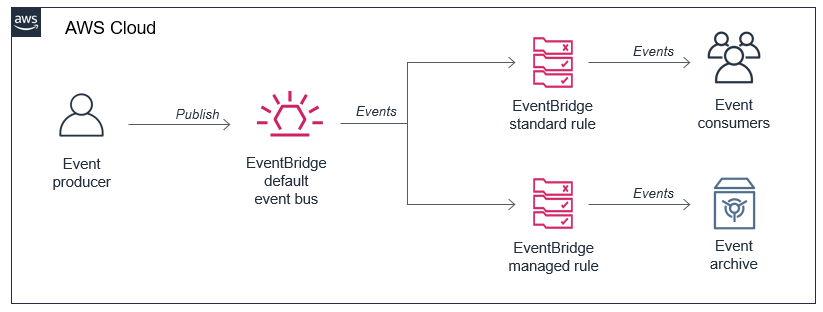
Uploading to Amazon S3 directly from a web or mobile application

Post Syndicated from James Beswick original https://aws.amazon.com/blogs/compute/uploading-to-amazon-s3-directly-from-a-web-or-mobile-application/

In web and mobile applications, it’s common to provide users with the ability to upload data. Your application may allow users to upload PDFs and documents, or media such as photos or videos. Every modern web server technology has mechanisms to allow this functionality. Typically, in the server-based environment, the process follows this flow:

Application server upload process

  1. The user uploads the file to the application server.
  2. The application server saves the upload to a temporary space for processing.
  3. The application transfers the file to a database, file server, or object store for persistent storage.

While the process is simple, it can have significant side-effects on the performance of the web-server in busier applications. Media uploads are typically large, so transferring these can represent a large share of network I/O and server CPU time. You must also manage the state of the transfer to ensure that the entire object is successfully uploaded, and manage retries and errors.

This is challenging for applications with spiky traffic patterns. For example, in a web application that specializes in sending holiday greetings, it may experience most traffic only around holidays. If thousands of users attempt to upload media around the same time, this requires you to scale out the application server and ensure that there is sufficient network bandwidth available.

By directly uploading these files to Amazon S3, you can avoid proxying these requests through your application server. This can significantly reduce network traffic and server CPU usage, and enable your application server to handle other requests during busy periods. S3 also is highly available and durable, making it an ideal persistent store for user uploads.

In this blog post, I walk through how to implement serverless uploads and show the benefits of this approach. This pattern is used in the Happy Path web application. You can download the code from this blog post in this GitHub repo.

Overview of serverless uploading to S3

When you upload directly to an S3 bucket, you must first request a signed URL from the Amazon S3 service. You can then upload directly using the signed URL. This is two-step process for your application front end:

Serverless uploading to S3

  1. Call an Amazon API Gateway endpoint, which invokes the getSignedURL Lambda function. This gets a signed URL from the S3 bucket.
  2. Directly upload the file from the application to the S3 bucket.

To deploy the S3 uploader example in your AWS account:

  1. Navigate to the S3 uploader repo and install the prerequisites listed in the README.md.
  2. In a terminal window, run:
    git clone https://github.com/aws-samples/amazon-s3-presigned-urls-aws-sam
    cd amazon-s3-presigned-urls-aws-sam
    sam deploy --guided
  3. At the prompts, enter s3uploader for Stack Name and select your preferred Region. Once the deployment is complete, note the APIendpoint output.

CloudFormation stack outputs

Testing the application

I show two ways to test this application. The first is with Postman, which allows you to directly call the API and upload a binary file with the signed URL. The second is with a basic frontend application that demonstrates how to integrate the API.

To test using Postman:

  1. First, copy the API endpoint from the output of the deployment.
  2. In the Postman interface, paste the API endpoint into the box labeled Enter request URL.
  3. Choose Send.Postman test
  4. After the request is complete, the Body section shows a JSON response. The uploadURL attribute contains the signed URL. Copy this attribute to the clipboard.
  5. Select the + icon next to the tabs to create a new request.
  6. Using the dropdown, change the method from GET to PUT. Paste the URL into the Enter request URL box.
  7. Choose the Body tab, then the binary radio button.Select the binary radio button in Postman
  8. Choose Select file and choose a JPG file to upload.
    Choose Send. You see a 200 OK response after the file is uploaded.200 response code in Postman
  9. Navigate to the S3 console, and open the S3 bucket created by the deployment. In the bucket, you see the JPG file uploaded via Postman.Uploaded object in S3 bucket

To test with the sample frontend application:

  1. Copy index.html from the example’s repo to an S3 bucket.
  2. Update the object’s permissions to make it publicly readable.
  3. In a browser, navigate to the public URL of index.html file.Frontend testing app at index.html
  4. Select Choose file and then select a JPG file to upload in the file picker. Choose Upload image. When the upload completes, a confirmation message is displayed.Upload in the test app
  5. Navigate to the S3 console, and open the S3 bucket created by the deployment. In the bucket, you see the second JPG file you uploaded from the browser.Second uploaded file in S3 bucket

Understanding the S3 uploading process

When uploading objects to S3 from a web application, you must configure S3 for Cross-Origin Resource Sharing (CORS). CORS rules are defined as an XML document on the bucket. Using AWS SAM, you can configure CORS as part of the resource definition in the AWS SAM template:

   S3UploadBucket:
    Type: AWS::S3::Bucket
    Properties:
      CorsConfiguration:
        CorsRules:
        - AllowedHeaders:
            - "*"
          AllowedMethods:
            - GET
            - PUT
            - HEAD
          AllowedOrigins:
            - "*"

The preceding policy allows all headers and origins – it’s recommended that you use a more restrictive policy for production workloads.

In the first step of the process, the API endpoint invokes the Lambda function to make the signed URL request. The Lambda function contains the following code:

const AWS = require('aws-sdk')
AWS.config.update({ region: process.env.AWS_REGION })
const s3 = new AWS.S3()
const URL_EXPIRATION_SECONDS = 300

// Main Lambda entry point
exports.handler = async (event) => {
  return await getUploadURL(event)
}

const getUploadURL = async function(event) {
  const randomID = parseInt(Math.random() * 10000000)
  const Key = `${randomID}.jpg`

  // Get signed URL from S3
  const s3Params = {
    Bucket: process.env.UploadBucket,
    Key,
    Expires: URL_EXPIRATION_SECONDS,
    ContentType: 'image/jpeg'
  }
  const uploadURL = await s3.getSignedUrlPromise('putObject', s3Params)
  return JSON.stringify({
    uploadURL: uploadURL,
    Key
  })
}

This function determines the name, or key, of the uploaded object, using a random number. The s3Params object defines the accepted content type and also specifies the expiration of the key. In this case, the key is valid for 300 seconds. The signed URL is returned as part of a JSON object including the key for the calling application.

The signed URL contains a security token with permissions to upload this single object to this bucket. To successfully generate this token, the code calling getSignedUrlPromise must have s3:putObject permissions for the bucket. This Lambda function is granted the S3WritePolicy policy to the bucket by the AWS SAM template.

The uploaded object must match the same file name and content type as defined in the parameters. An object matching the parameters may be uploaded multiple times, providing that the upload process starts before the token expires. The default expiration is 15 minutes but you may want to specify shorter expirations depending upon your use case.

Once the frontend application receives the API endpoint response, it has the signed URL. The frontend application then uses the PUT method to upload binary data directly to the signed URL:

let blobData = new Blob([new Uint8Array(array)], {type: 'image/jpeg'})
const result = await fetch(signedURL, {
  method: 'PUT',
  body: blobData
})

At this point, the caller application is interacting directly with the S3 service and not with your API endpoint or Lambda function. S3 returns a 200 HTML status code once the upload is complete.

For applications expecting a large number of user uploads, this provides a simple way to offload a large amount of network traffic to S3, away from your backend infrastructure.

Adding authentication to the upload process

The current API endpoint is open, available to any service on the internet. This means that anyone can upload a JPG file once they receive the signed URL. In most production systems, developers want to use authentication to control who has access to the API, and who can upload files to your S3 buckets.

You can restrict access to this API by using an authorizer. This sample uses HTTP APIs, which support JWT authorizers. This allows you to control access to the API via an identity provider, which could be a service such as Amazon Cognito or Auth0.

The Happy Path application only allows signed-in users to upload files, using Auth0 as the identity provider. The sample repo contains a second AWS SAM template, templateWithAuth.yaml, which shows how you can add an authorizer to the API:

  MyApi:
    Type: AWS::Serverless::HttpApi
    Properties:
      Auth:
        Authorizers:
          MyAuthorizer:
            JwtConfiguration:
              issuer: !Ref Auth0issuer
              audience:
                - https://auth0-jwt-authorizer
            IdentitySource: "$request.header.Authorization"
        DefaultAuthorizer: MyAuthorizer

Both the issuer and audience attributes are provided by the Auth0 configuration. By specifying this authorizer as the default authorizer, it is used automatically for all routes using this API. Read part 1 of the Ask Around Me series to learn more about configuring Auth0 and authorizers with HTTP APIs.

After authentication is added, the calling web application provides a JWT token in the headers of the request:

const response = await axios.get(API_ENDPOINT_URL, {
  headers: {
    Authorization: `Bearer ${token}`
        }
})

API Gateway evaluates this token before invoking the getUploadURL Lambda function. This ensures that only authenticated users can upload objects to the S3 bucket.

Modifying ACLs and creating publicly readable objects

In the current implementation, the uploaded object is not publicly accessible. To make an uploaded object publicly readable, you must set its access control list (ACL). There are preconfigured ACLs available in S3, including a public-read option, which makes an object readable by anyone on the internet. Set the appropriate ACL in the params object before calling s3.getSignedUrl:

const s3Params = {
  Bucket: process.env.UploadBucket,
  Key,
  Expires: URL_EXPIRATION_SECONDS,
  ContentType: 'image/jpeg',
  ACL: 'public-read'
}

Since the Lambda function must have the appropriate bucket permissions to sign the request, you must also ensure that the function has PutObjectAcl permission. In AWS SAM, you can add the permission to the Lambda function with this policy:

        - Statement:
          - Effect: Allow
            Resource: !Sub 'arn:aws:s3:::${S3UploadBucket}/'
            Action:
              - s3:putObjectAcl

Conclusion

Many web and mobile applications allow users to upload data, including large media files like images and videos. In a traditional server-based application, this can create heavy load on the application server, and also use a considerable amount of network bandwidth.

By enabling users to upload files to Amazon S3, this serverless pattern moves the network load away from your service. This can make your application much more scalable, and capable of handling spiky traffic.

This blog post walks through a sample application repo and explains the process for retrieving a signed URL from S3. It explains how to the test the URLs in both Postman and in a web application. Finally, I explain how to add authentication and make uploaded objects publicly accessible.

To learn more, see this video walkthrough that shows how to upload directly to S3 from a frontend web application. For more serverless learning resources, visit https://serverlessland.com.
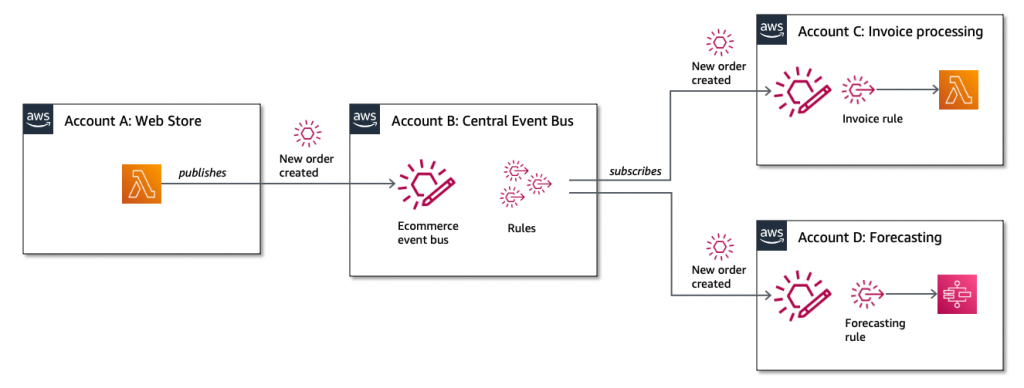
Using Lambda layers to simplify your development process

Post Syndicated from James Beswick original https://aws.amazon.com/blogs/compute/using-lambda-layers-to-simplify-your-development-process/

Serverless developers frequently import libraries and dependencies into their AWS Lambda functions. While you can zip these dependencies as part of the build and deployment process, in many cases it’s easier to use layers instead. In this post, I explain how layers work, and how you can build and include layers in your own applications.

This blog post references the Happy Path application, which shows how to build a flexible backend to a photo-processing web application. To learn more, refer to Using serverless backends to iterate quickly on web apps – part 1. This code in this post is available at this GitHub repo.

Overview of Lambda layers

A Lambda layer is an archive containing additional code, such as libraries, dependencies, or even custom runtimes. When you include a layer in a function, the contents are extracted to the /opt directory in the execution environment. You can include up to five layers per function, which count towards the standard Lambda deployment size limits.

Layers are deployed as immutable versions, and the version number increments each time you publish a new layer. When you include a layer in a function, you specify the layer version you want to use. Layers are automatically set as private, but they can be shared with other AWS accounts, or shared publicly. Permissions only apply to a single version of a layer.

Using layers can make it faster to deploy applications with the AWS Serverless Application Model (AWS SAM) or the Serverless framework. By moving runtime dependencies from your function code to a layer, this can help reduce the overall size of the archive uploaded during a deployment.

Creating a layer containing the AWS SDK

The AWS SDK allows you to interact programmatically with AWS services using one of the supported runtimes. The Lambda service includes the AWS SDK so you can use it without explicitly importing in your deployment package.

However, there is no guarantee of the version provided in the execution environment. The SDK is upgraded frequently to support new AWS services and features. As a result, the version may change at any time. You can see the current version used by Lambda by declaring an instance of the SDK and logging out the version method:

Logging out the version method

For production workloads, it’s best practice to lock the version of the AWS SDK used in your functions. You can achieve this by including the SDK with your code package. Once you include this library, your code always uses the version in the deployment package and not the version included in the Lambda service.

A serverless application may consist of many functions, which all use a common SDK version. Instead of bundling the SDK with each function deployment, you can create a layer containing the SDK. The effect of this is to reduce the size of the uploaded archive, which makes your deployments faster.

To create an AWS SDK layer:

  1. First, clone this blog post’s GitHub repo. From a terminal window, execute:
    git clone https://github.com/aws-samples/aws-lambda-layers-aws-sam-examples
    cd ./aws-sdk-layer
  2. This directory contains an AWS SAM template and Node.js package.json file. Install the package.json contents:
    npm install
  3. Create the layer directory defined in the AWS SAM template and the nodejs directory required by Lambda. Next, move the node_modules directory:
    mkdir -p ./layer/nodejs
    mv ./node_modules ./layer/nodejs
  4. Next, deploy the AWS SAM template to create the layer:
    sam deploy --guided
  5. For the Stack name, enter “aws-sdk-layer”. Enter your preferred AWS Region and accept the other defaults.
  6. After the deployment completes, the new Lambda layer is available to use. Run this command to see the available layers:aws lambda list-layersaws lambda list-layers output

After adding a layer to a function, you can use console.log to log out the AWS SDK version. This shows that the function is now using the SDK version in the layer instead of the version provided by the Lambda service:

Use the SDK layer instead of the bundled layer

Creating layers with OS-specific binaries

Many code libraries include binaries that are operating-system specific. When you build packages on your local development machine, by default the binaries for that operating system are used. These may not be the right binaries for Lambda, which runs on Amazon Linux. If you are not using a compatible operating system, you must ensure you include Linux binaries in the layer.

The simplest way to package these libraries correctly is to use AWS Cloud9. This is an IDE in the AWS Cloud, which runs on Amazon EC2. After creating an environment, you can clone a git repository directly to the local storage of the instance, and run the necessary build scripts.

The Happy Path application resizes images using the Sharp npm library. This library uses libvips, which is written in C, so the compilation is operating system-specific. By creating a layer containing this library, it simplifies the packaging and deployment of the consuming Lambda function.

To create a Sharp layer using AWS Cloud9:

  1. Navigate to the AWS Cloud9 console.
  2. Choose Create environment.
  3. Enter the name “My IDE” and choose Next step.
  4. Accept all the default and choose Next step.
  5. Review the settings and choose Create environment.
  6. In the terminal panel, enter:
    git clone https://github.com/aws-samples/aws-lambda-layers-aws-sam-examples
    cd ./aws-lambda-layers-aws-sam-examples/sharp-layer
    npm installCreating a layer in Cloud9
  7. From a terminal window, ensure you are in the directory where you cloned this post’s GitHub repo. Execute the following commands:cd ./sharp-layer
    npm install
    mkdir -p ./layer/nodejs
    mv ./node_modules ./layer/nodejsCreating the layer in Cloud9
  8. Next, deploy the AWS SAM template to create the layer:
    sam deploy --guided
  9. For the Stack name, enter “sharp-layer”. Enter your preferred AWS Region and accept the other defaults. After the deployment completes, the new Lambda layer is available to use.

In some runtimes, you can specify a local set of packages for development, and another set for production. For example, in Node.js, the package.json file allows you to specify two sections for dependencies. If your development machine uses a different operating system to Lambda, and therefore uses different binaries, you can use package.json to resolve this. In the Happy Path Resizer function, which uses the Sharp layer, the package.json refers to a local binary for development.

Adding development dependencies to package.json

AWS SAM defines Lambda functions with the AWS::Serverless::Function resource. Layers are defined as a property of functions, as a list of layer ARNs including the version:

  MyLambdaFunction:
    Type: AWS::Serverless::Function 
    Properties:
      CodeUri: myFunction/
      Handler: app.handler
      MemorySize: 128
      Layers:
        - !Ref SharpLayerARN

Sharing a layer

Layers are private to your account by default but you can optionally share with other AWS accounts or make a layer public. You cannot share layers via the AWS Management Console but instead use the AWS CLI.

To share a layer, use add-layer-version-permission, specifying the layer name, version, AWS Region, and principal:

aws lambda add-layer-version-permission \
  --layer-name node-sharp \
  --principal '*' \
  --action lambda:GetLayerVersion \
  --version-number 3 
  --statement-id public 
  --region us-east-1

In the principal parameter, specify an individual account ID or use an asterisk to make the layer public. The CLI responds with a RevisionId containing the current revision of the policy:

add-layer-version output

You can check the permissions associated with a layer version by calling get-layer-version-policy with the layer name and version:

aws lambda get-layer-version-policy \
  --layer-name node-sharp \
  --version-number 3 \
  --region us-east-1

get-layer-version-policy output

Similarly, you can delete permissions associated with a layer version by calling remove-layer-vesion-permission with the layer name, statement ID, and version:

aws lambda remove-layer-version-permission \
 -- layer-name node-sharp \
 -- statement-id public \
 -- version-number 3

Once the permissions are removed, calling get-layer-version-policy results in an error:

Error invoking after removal

Conclusion

Lambda layers provide a convenient and effective way to package code libraries for sharing with Lambda functions in your account. Using layers can help reduce the size of uploaded archives and make it faster to deploy your code.

Layers can contain packages using OS-specific binaries, providing a convenient way to distribute these to developers. While layers are private by default, you can share with other accounts or make a layer public. Layers are published as immutable versions, and deleting a layer has no effect on deployed Lambda functions already using that layer.

To learn more about using Lambda layers, visit the documentation, or see how layers are used in the Happy Path web application.