Tag Archives: serverless

How to deploy the AWS Solution for Security Hub Automated Response and Remediation

Post Syndicated from Ramesh Venkataraman original https://aws.amazon.com/blogs/security/how-to-deploy-the-aws-solution-for-security-hub-automated-response-and-remediation/

In this blog post I show you how to deploy the Amazon Web Services (AWS) Solution for Security Hub Automated Response and Remediation. The first installment of this series was about how to create playbooks using Amazon CloudWatch Events, AWS Lambda functions, and AWS Security Hub custom actions that you can run manually based on triggers from Security Hub in a specific account. That solution requires an analyst to directly trigger an action using Security Hub custom actions and doesn’t work for customers who want to set up fully automated remediation based on findings across one or more accounts from their Security Hub master account.

The solution described in this post automates the cross-account response and remediation lifecycle from executing the remediation action to resolving the findings in Security Hub and notifying users of the remediation via Amazon Simple Notification Service (Amazon SNS). You can also deploy these automated playbooks as custom actions in Security Hub, which allows analysts to run them on-demand against specific findings. You can deploy these remediations as custom actions or as fully automated remediations.

Currently, the solution includes 10 playbooks aligned to the controls in the Center for Internet Security (CIS) AWS Foundations Benchmark standard in Security Hub, but playbooks for other standards such as AWS Foundational Security Best Practices (FSBP) will be added in the future.

Solution overview

Figure 1 shows the flow of events in the solution described in the following text.

Figure 1: Flow of events

Figure 1: Flow of events

Detect

Security Hub gives you a comprehensive view of your security alerts and security posture across your AWS accounts and automatically detects deviations from defined security standards and best practices.

Security Hub also collects findings from various AWS services and supported third-party partner products to consolidate security detection data across your accounts.

Ingest

All of the findings from Security Hub are automatically sent to CloudWatch Events and Amazon EventBridge and you can set up CloudWatch Events and EventBridge rules to be invoked on specific findings. You can also send findings to CloudWatch Events and EventBridge on demand via Security Hub custom actions.

Remediate

The CloudWatch Event and EventBridge rules can have AWS Lambda functions, AWS Systems Manager automation documents, or AWS Step Functions workflows as the targets of the rules. This solution uses automation documents and Lambda functions as response and remediation playbooks. Using cross-account AWS Identity and Access Management (IAM) roles, the playbook performs the tasks to remediate the findings using the AWS API when a rule is invoked.

Log

The playbook logs the results to the Amazon CloudWatch log group for the solution, sends a notification to an Amazon Simple Notification Service (Amazon SNS) topic, and updates the Security Hub finding. An audit trail of actions taken is maintained in the finding notes. The finding is updated as RESOLVED after the remediation is run. The security finding notes are updated to reflect the remediation performed.

Here are the steps to deploy the solution from this GitHub project.

  • In the Security Hub master account, you deploy the AWS CloudFormation template, which creates an AWS Service Catalog product along with some other resources. For a full set of what resources are deployed as part of an AWS CloudFormation stack deployment, you can find the full set of deployed resources in the Resources section of the deployed AWS CloudFormation stack. The solution uses the AWS Service Catalog to have the remediations available as a product that can be deployed after granting the users the required permissions to launch the product.
  • Add an IAM role that has administrator access to the AWS Service Catalog portfolio.
  • Deploy the CIS playbook from the AWS Service Catalog product list using the IAM role you added in the previous step.
  • Deploy the AWS Security Hub Automated Response and Remediation template in the master account in addition to the member accounts. This template establishes AssumeRole permissions to allow the playbook Lambda functions to perform remediations. Use AWS CloudFormation StackSets in the master account to have a centralized deployment approach across the master account and multiple member accounts.

Deployment steps for automated response and remediation

This section reviews the steps to implement the solution, including screenshots of the solution launched from an AWS account.

Launch AWS CloudFormation stack on the master account

As part of this AWS CloudFormation stack deployment, you create custom actions to configure Security Hub to send findings to CloudWatch Events. Lambda functions are used to provide remediation in response to actions sent to CloudWatch Events.

Note: In this solution, you create custom actions for the CIS standards. There will be more custom actions added for other security standards in the future.

To launch the AWS CloudFormation stack

  1. Deploy the AWS CloudFormation template in the Security Hub master account. In your AWS console, select CloudFormation and choose Create new stack and enter the S3 URL.
  2. Select Next to move to the Specify stack details tab, and then enter a Stack name as shown in Figure 2. In this example, I named the stack SO0111-SHARR, but you can use any name you want.
     
    Figure 2: Creating a CloudFormation stack

    Figure 2: Creating a CloudFormation stack

  3. Creating the stack automatically launches it, creating 21 new resources using AWS CloudFormation, as shown in Figure 3.
     
    Figure 3: Resources launched with AWS CloudFormation

    Figure 3: Resources launched with AWS CloudFormation

  4. An Amazon SNS topic is automatically created from the AWS CloudFormation stack.
  5. When you create a subscription, you’re prompted to enter an endpoint for receiving email notifications from Amazon SNS as shown in Figure 4. To subscribe to that topic that was created using CloudFormation, you must confirm the subscription from the email address you used to receive notifications.
     
    Figure 4: Subscribing to Amazon SNS topic

    Figure 4: Subscribing to Amazon SNS topic

Enable Security Hub

You should already have enabled Security Hub and AWS Config services on your master account and the associated member accounts. If you haven’t, you can refer to the documentation for setting up Security Hub on your master and member accounts. Figure 5 shows an AWS account that doesn’t have Security Hub enabled.
 

Figure 5: Enabling Security Hub for first time

Figure 5: Enabling Security Hub for first time

AWS Service Catalog product deployment

In this section, you use the AWS Service Catalog to deploy Service Catalog products.

To use the AWS Service Catalog for product deployment

  1. In the same master account, add roles that have administrator access and can deploy AWS Service Catalog products. To do this, from Services in the AWS Management Console, choose AWS Service Catalog. In AWS Service Catalog, select Administration, and then navigate to Portfolio details and select Groups, roles, and users as shown in Figure 6.
     
    Figure 6: AWS Service Catalog product

    Figure 6: AWS Service Catalog product

  2. After adding the role, you can see the products available for that role. You can switch roles on the console to assume the role that you granted access to for the product you added from the AWS Service Catalog. Select the three dots near the product name, and then select Launch product to launch the product, as shown in Figure 7.
     
    Figure 7: Launch the product

    Figure 7: Launch the product

  3. While launching the product, you can choose from the parameters to either enable or disable the automated remediation. Even if you do not enable fully automated remediation, you can still invoke a remediation action in the Security Hub console using a custom action. By default, it’s disabled, as highlighted in Figure 8.
     
    Figure 8: Enable or disable automated remediation

    Figure 8: Enable or disable automated remediation

  4. After launching the product, it can take from 3 to 5 minutes to deploy. When the product is deployed, it creates a new CloudFormation stack with a status of CREATE_COMPLETE as part of the provisioned product in the AWS CloudFormation console.

AssumeRole Lambda functions

Deploy the template that establishes AssumeRole permissions to allow the playbook Lambda functions to perform remediations. You must deploy this template in the master account in addition to any member accounts. Choose CloudFormation and create a new stack. In Specify stack details, go to Parameters and specify the Master account number as shown in Figure 9.
 

Figure 9: Deploy AssumeRole Lambda function

Figure 9: Deploy AssumeRole Lambda function

Test the automated remediation

Now that you’ve completed the steps to deploy the solution, you can test it to be sure that it works as expected.

To test the automated remediation

  1. To test the solution, verify that there are 10 actions listed in Custom actions tab in the Security Hub master account. From the Security Hub master account, open the Security Hub console and select Settings and then Custom actions. You should see 10 actions, as shown in Figure 10.
     
    Figure 10: Custom actions deployed

    Figure 10: Custom actions deployed

  2. Make sure you have member accounts available for testing the solution. If not, you can add member accounts to the master account as described in Adding and inviting member accounts.
  3. For testing purposes, you can use CIS 1.5 standard, which is to require that the IAM password policy requires at least one uppercase letter. Check the existing settings by navigating to IAM, and then to Account Settings. Under Password policy, you should see that there is no password policy set, as shown in Figure 11.
     
    Figure 11: Password policy not set

    Figure 11: Password policy not set

  4. To check the security settings, go to the Security Hub console and select Security standards. Choose CIS AWS Foundations Benchmark v1.2.0. Select CIS 1.5 from the list to see the Findings. You will see the Status as Failed. This means that the password policy to require at least one uppercase letter hasn’t been applied to either the master or the member account, as shown in Figure 12.
     
    Figure 12: CIS 1.5 finding

    Figure 12: CIS 1.5 finding

  5. Select CIS 1.5 – 1.11 from Actions on the top right dropdown of the Findings section from the previous step. You should see a notification with the heading Successfully sent findings to Amazon CloudWatch Events as shown in Figure 13.
     
    Figure 13: Sending findings to CloudWatch Events

    Figure 13: Sending findings to CloudWatch Events

  6. Return to Findings by selecting Security standards and then choosing CIS AWS Foundations Benchmark v1.2.0. Select CIS 1.5 to review Findings and verify that the Workflow status of CIS 1.5 is RESOLVED, as shown in Figure 14.
     
    Figure 14: Resolved findings

    Figure 14: Resolved findings

  7. After the remediation runs, you can verify that the Password policy is set on the master and the member accounts. To verify that the password policy is set, navigate to IAM, and then to Account Settings. Under Password policy, you should see that the account uses a password policy, as shown in Figure 15.
     
    Figure 15: Password policy set

    Figure 15: Password policy set

  8. To check the CloudWatch logs for the Lambda function, in the console, go to Services, and then select Lambda and choose the Lambda function and within the Lambda function, select View logs in CloudWatch. You can see the details of the function being run, including updating the password policy on both the master account and the member account, as shown in Figure 16.
     
    Figure 15: Lambda function log

    Figure 16: Lambda function log

Conclusion

In this post, you deployed the AWS Solution for Security Hub Automated Response and Remediation using Lambda and CloudWatch Events rules to remediate non-compliant CIS-related controls. With this solution, you can ensure that users in member accounts stay compliant with the CIS AWS Foundations Benchmark by automatically invoking guardrails whenever services move out of compliance. New or updated playbooks will be added to the existing AWS Service Catalog portfolio as they’re developed. You can choose when to take advantage of these new or updated playbooks.

If you have feedback about this post, submit comments in the Comments section below. If you have questions about this post, start a new thread on the AWS Security Hub forum or contact AWS Support.

Want more AWS Security how-to content, news, and feature announcements? Follow us on Twitter.

Author

Ramesh Venkataraman

Ramesh is a Solutions Architect who enjoys working with customers to solve their technical challenges using AWS services. Outside of work, Ramesh enjoys following stack overflow questions and answers them in any way he can.

Simplifying cross-account access with Amazon EventBridge resource policies

Post Syndicated from James Beswick original https://aws.amazon.com/blogs/compute/simplifying-cross-account-access-with-amazon-eventbridge-resource-policies/

This post is courtesy of Stephen Liedig, Sr Serverless Specialist SA.

Amazon EventBridge is a serverless event bus used to decouple event producers and consumers. Event producers publish events onto an event bus, which then uses rules to determine where to send those events. The rules determine the targets and EventBridge routes the events accordingly.

A common architectural approach adopted by customers is to isolate these application components or services by using separate AWS accounts. This “account-per-service” strategy limits the blast radius by providing a logical and physical separation of resources. It provides additional security boundaries and allows customers to easily track service costs without having to adopt a complex tagging strategy.

To enable the flow of events from one account to another, you must create a rule on one event bus that routes events to an event bus in another account. To enable this routing, you need to configure the resource policy for your event buses.

This blog post shows you how to use EventBridge resource policies to publish events and create rules on event buses in another account.

Overview

Today, EventBridge launches improvements to resource policies that make it easier to build applications that work across accounts. The service expands the use of the policy associated with an event bus to the authorization of API calls.

This means you can manage permissions for API calls that interact with the event bus, such as PutEventsPutRule, and PutTargets, directly from that event bus’ resource policy. This replaces the need to create different IAM roles that are assumed by each account that interacts with the event bus. It also provides a central resource to manage your permissions.

There is support for organizations and tags via IAM conditions. Now when you call an API, it considers both the user’s IAM policy and the event bus resource policy in the authorization process.

EventBridge APIs that accept an event bus name parameter (including PutRule, PutTargets, DeleteRule, RemoveTargets, DisableRule, and EnableRule) now also support an event bus ARN. This allows you to target cross-account event buses through the APIs. For example, you can call PutRule to create a rule on an event bus in another account, without needing to assume a role.

EventBridge now supports using policy conditions for the following authorization context keys in the APIs, to help scope down permissions.

Context key

APIs

Customer usage

events:detail-type PutEvents Used to restrict PutEvents calls for events with a specific “detail-type” field.
events:source PutEvents Used to restrict PutEvents calls for events with a specific “source” field.
events:creatorAccount PutRule,
PutTargets,
DeleteRule,
RemoveTargets,
DisableRule,
EnableRule,
TagResource,
UntagResource,
DescribeRule,
ListTargetsByRule,
ListTagsForResource

Used to restrict control plane API calls on rules belonging to a certain account.

This can be used to allow a customer to edit/disable only rules created by their own account.

events:eventBusInvocation PutEvents

Used to differentiate a PutEvents API call from a cross-account event bus target invocation. This context key is set to true during a cross-account event bus target invocation authorization. For example, when a rule matches an event and sends that event to another event bus.

For an API call of PutEvents, this context key is set to false.

Ecommerce example walkthrough

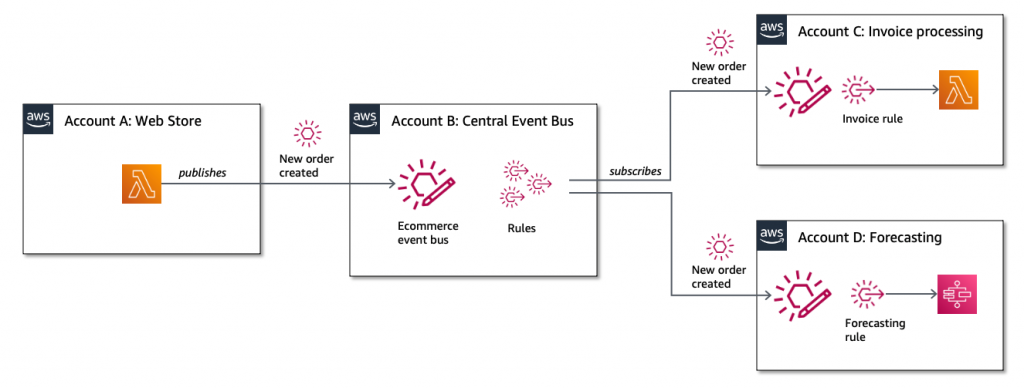
In this ecommerce example, there are multiple services distributed across different accounts. A web store publishes an event when a new order is created. The event is sent via a central event bus, which is in another account. The bus has two rules with target services in different AWS accounts.

Walkthrough architecture

The goal is to create fine-grained permissions that only allow:

  • The web store to publish events for a specific detail-type and source.
  • The invoice processing service to create and manage its own rules on the central bus.

To complete this walk through, you set up three accounts. For account A (Web Store), you deploy an AWS Lambda function that sends the “newOrderCreated” event directly to the “central event bus” in account B. The invoice processing Lambda function in account C creates a rule on the central event bus to process the event published by account A.

Create the central event bus in account B

Account B event bus

Create the central event bus in account B, adding the following resource policy. Be sure to substitute your account numbers for accounts A, B, and C.

{
  "Version": "2012-10-17",
  "Statement": [
    {
      "Sid": "WebStoreCrossAccountPublish",
      "Effect": "Allow",
      "Principal": {
        "AWS": "arn:aws:iam::[ACCOUNT-A]:root"
      },
      "Action": "events:PutEvents",
      "Resource": "arn:aws:events:us-east-1:[ACCOUNT-B]:event-bus/central-event-bus",
      "Condition": {
        "StringEquals": {
          "events:detail-type": "newOrderCreated",
          "events:source": "com.exampleCorp.webStore"
        }
      }
    },
    {
      "Sid": "InvoiceProcessingRuleCreation",
      "Effect": "Allow",
      "Principal": {
        "AWS": "arn:aws:iam::[ACCOUNT-C]:root"
      },
      "Action": [
        "events:PutRule",
        "events:DeleteRule",
        "events:DescribeRule",
        "events:DisableRule",
        "events:EnableRule",
        "events:PutTargets",
        "events:RemoveTargets"
      ],
      "Resource": "arn:aws:events:us-east-1:[ACCOUNT-B]:rule/central-event-bus/*",
      "Condition": {
        "StringEqualsIfExists": {
          "events:creatorAccount": "${aws:PrincipalAccount}",
          "events:source": "com.exampleCorp.webStore"
        }
      }
    }
  ]
}

Create event bus

There are two statements in the resource policy: WebStoreCrossAccountPublish and InvoiceProcessingRuleCreation.

The WebStoreCrossAccountPublish statement allows the Lambda function in account A to publish events directly to the central event bus. There are two conditions in the statement that further restrict the types of events that can be sent to the event bus. The first restricts the event detail-type to equal “newOrderCreated” and the second condition requires that the event source equals “com.exampleCorp.webStore”.

The InvoiceProcessingRuleCreation statement allows the invoice processing function in account C to describe, add, update, enable, disable, and delete any rules created by account C. You apply this restriction by using the events:creatorAccount context key in the statements condition.

Importantly you should set the StringEqualsIfExists type for the events:creatorAccount condition. If you use StringEquals, it results in an AccessDeniedException. AWS CloudFormation calls DescribeRule to check if the rule already exists. However, as this is a new rule, and because you set a condition for events:creatorAccount for DescribeRule, this key is not populated and CloudFormation receives an AccessDeniedException instead of ResourceNotFoundException.

Here is how you create the event bus using AWS CloudFormation:

  CentralEventBus: 
      Type: AWS::Events::EventBus
      Properties: 
          Name: !Ref EventBusName

  WebStoreCrossAccountPublishStatement: 
      Type: AWS::Events::EventBusPolicy
      Properties: 
          EventBusName: !Ref CentralEventBus
          StatementId: "WebStoreCrossAccountPublish"
          Statement: 
              Effect: "Allow"
              Principal: 
                  AWS: !Sub arn:aws:iam::${AccountA}:root
              Action: "events:PutEvents"
              Resource: !GetAtt CentralEventBus.Arn
              Condition:
                  StringEquals:
                      "events:detail-type": "newOrderCreated"
                      "events:source" : "com.exampleCorp.webStore"
                      
  InvoiceProcessingRuleCreationStatement: 
      Type: AWS::Events::EventBusPolicy
      Properties: 
          EventBusName: !Ref CentralEventBus
          StatementId: "InvoiceProcessingRuleCreation"
          Statement: 
              Effect: "Allow"
              Principal: 
                  AWS: !Sub arn:aws:iam::${AccountC}:root
              Action: 
                  - "events:PutRule"
                  - "events:DeleteRule"
                  - "events:DescribeRule"
                  - "events:DisableRule"
                  - "events:EnableRule"
                  - "events:PutTargets"
                  - "events:RemoveTargets"
              Resource: 
                  - !Sub arn:aws:events:${AWS::Region}:${AWS::AccountId}:rule/${CentralEventBus.Name}/*
              Condition:
                  StringEqualsIfExists:
                      "events:creatorAccount" : "${aws:PrincipalAccount}"
                  StringEquals:
                      "events:source": "com.exampleCorp.webStore"

Now that you have a policy set up on the central event bus, configure the client applications to send and process events. The client application must also have permissions configured.

Create the web store order function in account A

Web Store order function

In account A, create a Lambda function to send the event to the central bus in account B. Set the EventBusName parameter to the central event bus ARN on the PutEvents API call. This allows you to target cross-account event buses directly.

import json
import boto3

EVENT_BUS_ARN = 'arn:aws:events:us-east-1:[ACCOUNT-B]:event-bus/central-event-bus'

# Create EventBridge client
events = boto3.client('events')

def lambda_handler(event, context):

  # new order created event datail
  eventDetail  = {
    "orderNo": "123",
    "orderDate": "2020-09-09T22:01:02Z",
    "customerId": "789",
    "lineItems": {
      "productCode": "P1",
      "quantityOrdered": 3,
      "unitPrice": 23.5,
      "currency": "USD"
    }
  }
  
  try:
    # Put an event
    response = events.put_events(
        Entries=[
            {
                'EventBusName': EVENT_BUS_ARN,
                'Source': 'com.exampleCorp.webStore',
                'DetailType': 'newOrderCreated',
                'Detail': json.dumps(eventDetail)
            }
        ]
    )
    
    print(response['Entries'])
    print('Event sent to the event bus ' + EVENT_BUS_ARN )
    print('EventID is ' + response['Entries'][0]['EventId'])
    
  except Exception as e:
      print(e)

Create the Invoice Processing service in account C

Invoice processing service in account C

Next, create the invoice processing function that processes the newOrderCreated event. You use the AWS Serverless Application Model (AWS SAM) to create the invoice processing function and other application resources. Before you can process any events from the central event bus, you must create a new event bus in account C to receive incoming events.

Next, you define the function that processes the events. Here, you define a Lambda event source that is an EventBridge rule. You set the EventBusName to the receiving invoice processing event bus. When this Lambda function is deployed, AWS SAM creates the rule on the event bus with the specified pattern and target. It configures the event source that triggers the function when an event is received.

Parameters:
  EventBusName:
    Description: Name of the central event bus
    Type: String
    Default: invoice-processing-event-bus
  CentralEventBusArn:
    Description: The ARN of the central event bus # e.g. arn:aws:events:us-east-1:[ACCOUNT-B]:event-bus/central-event-bus
    Type: String
Resources:
  # This is the receiving invoice processing event bus in account C.
  InvoiceProcessingEventBus: 
    Type: AWS::Events::EventBus
    Properties: 
        Name: !Ref EventBusName
# AWS Lambda function processes the newOrderCreated event
  InvoiceProcessingFunction:
    Type: AWS::Serverless::Function 
    Properties:
      CodeUri: invoice_processing
      Handler: invoice_processing_function/app.lambda_handler
      Runtime: python3.8
      Events:
        NewOrderCreatedRule:
          Type: EventBridgeRule
          Properties:
            EventBusName: !Ref InvoiceProcessingEventBus
            Pattern:
              source:
                - com.exampleCorp.webStore
              detail-type:
                - newOrderCreated

The next resource in the AWS SAM template is the rule that creates the target on the central event bus. It sends events to the invoice processing event bus. Though the rule is added to the central event bus, its definition is managed by the invoice processing service template. The rule definition sets EventBusName parameter to the ARN of the central event bus.

  # This is the rule that the invoice processing service creates on the central event bus
  InvoiceProcessingRule:
    Type: AWS::Events::Rule
    Properties:
      Name: InvoiceProcessingNewOrderCreatedSubscription
      Description: Cross account rule created by Invoice Processing service
      EventBusName: !Ref CentralEventBusArn # ARN of the central event bus
      EventPattern:
        source:
          - com.exampleCorp.webStore
        detail-type:
          - newOrderCreated
      State: ENABLED
      Targets: 
        - Id: SendEventsToInvoiceProcessingEventBus
          Arn: !GetAtt InvoiceProcessingEventBus.Arn
          RoleArn: !GetAtt CentralEventBusToInvoiceProcessingEventBusRole.Arn
          DeadLetterConfig:
            Arn: !GetAtt InvoiceProcessingTargetDLQ.Arn

For the central event bus target to send the event to the invoice processing event bus in account C, EventBridge needs the necessary permissions to invoke the PutEvents API. The CentralEventBusToInvoiceProcessingEventBusRole IAM role provides that permission. It is assumed by the central event bus in account B when it needs to send events to the invoice processing event bus, without you having to create an additional resource policy on the invoice processing event bus.

  CentralEventBusToInvoiceProcessingEventBusRole:
    Type: 'AWS::IAM::Role'
    Properties:
      AssumeRolePolicyDocument:
        Version: 2012-10-17
        Statement:
          - Effect: Allow
            Principal:
              Service:
              - events.amazonaws.com
            Action:
              - 'sts:AssumeRole'
      Path: /
      Policies:
        - PolicyName: PutEventsOnInvoiceProcessingEventBus
          PolicyDocument:
            Version: 2012-10-17
            Statement:
              - Effect: Allow
                Action: 'events:PutEvents'
                Resource: !GetAtt InvoiceProcessingEventBus.Arn

You can also set up a dead-letter queue (DLQ) configuration for the rule in account C. This allows the subscriber of the event to control where events that fail to get delivered to the invoice processing event bus get sent. All you need to do to make this happen is create an Amazon SQS queue in account C, and a queue policy that sets a resource policy to allow EventBridge to send failed events from account B to the queue in account C.

  # Invoice Processing Target Dead Letter Queue 
  InvoiceProcessingTargetDLQ:
    Type: AWS::SQS::Queue

  # SQS resource policy required to allow target on central bus to send failed messages to target DLQ
  InvoiceProcessingTargetDLQPolicy: 
    Type: AWS::SQS::QueuePolicy
    Properties: 
      Queues: 
        - !Ref InvoiceProcessingTargetDLQ
      PolicyDocument: 
        Statement: 
          - Action: 
              - "SQS:SendMessage" 
            Effect: "Allow"
            Resource: !GetAtt InvoiceProcessingTargetDLQ.Arn
            Principal:  
              Service: "events.amazonaws.com"
            Condition:
              ArnEquals:
                "aws:SourceArn": !GetAtt InvoiceProcessingRule.Arn 

Conclusion

This post shows you how to use the new features Amazon EventBridge resource policies that make it easier to build applications that work across accounts. Resource policies provide you with a powerful mechanism for modeling your event buses across multiple accounts, and give you fine-grained control over EventBridge API invocations.

Download the code in this blog from https://github.com/aws-samples/amazon-eventbridge-resource-policy-samples.

For more serverless learning resources, visit Serverless Land.

Tracking the latest server images in Amazon EC2 Image Builder pipelines

Post Syndicated from Eric Johnson original https://aws.amazon.com/blogs/compute/tracking-the-latest-server-images-in-amazon-ec2-image-builder-pipelines/

This post courtesy of Anoop Rachamadugu, Cloud Architect at AWS

The Amazon EC2 Image Builder service helps users to build and maintain server images. The images created by EC2 Image Builder can be used with Amazon Elastic Compute Cloud (EC2) and on-premises. Image Builder reduces the effort of keeping images up-to-date and secure by providing a graphical interface, built-in automation, and AWS-provided security settings. Customers have told us that they manage multiple server images and are looking for ways to track the latest server images created by the pipelines.

In this blog post, I walk through a solution that uses AWS Lambda and AWS Systems Manager (SSM) Parameter Store. It tracks and updates the latest Amazon Machine Image (AMI) IDs every time an Image Builder pipeline is run. With Lambda, you pay only for what you use. You are charged based on the number of requests for your functions and the time it takes for your code to run. In this case, the Lambda function is invoked upon the completion of the image builder pipeline. Standard SSM parameters are available at no additional charge.

Users can reference the SSM parameters in automation scripts and AWS CloudFormation templates providing access to the latest AMI ID for your EC2 infrastructure. Consider the use case of updating Amazon Machine Image (AMI) IDs for the EC2 instances in your CloudFormation templates. Normally, you might map AMI IDs to specific instance types and Regions. Then to update these, you would manually change them in each of your templates. With the SSM parameter integration, your code remains untouched and a CloudFormation stack update operation automatically fetches the latest Parameter Store value.

Overview

This solution uses a Lambda function written in Python that subscribes to an Amazon Simple Notification Service (SNS) topic. The Lambda function and the SNS topic are deployed using AWS SAM CLI. Once deployed, the SNS topic must be configured in an existing Image Builder pipeline. This results in the Lambda function being invoked at the completion of the Image Builder pipeline.

When a Lambda function subscribes to an SNS topic, it is invoked with the payload of the published messages. The Lambda function receives the message payload as an input parameter. The Lambda function first checks the message payload to see if the image status is available. If the image state is available, it retrieves the AMI ID from the message payload and updates the SSM parameter.

EC2 Image builder architecture diagram

EC2 Image builder architecture diagram

Prerequisites

To get started with this solution, the following is required:

Deploying the solution

The solution consists of two files, which can be downloaded from the amazon-ec2-image-builder GitHub repository.

  1. The Python file image-builder-lambda-update-ssm.py contains the code for the Lambda function. It first checks the SNS message payload to determine if the image is available. If it’s available, it extracts the AMI ID from the SNS message payload and updates the SSM parameter specified.The ‘ssm_parameter_name’ variable specifies the SSM parameter path where the AMI ID should be stored and updated. The Lambda function finishes by adding tags to the SSM parameter.
  2. The template.yaml file is an AWS SAM template. It deploys the Lambda function, SNS topic, and IAM role required for the Lambda function. I use Python 3.7 as the runtime and assign a memory of 256 MB for the Lambda function. The IAM policy gives the Lambda function permissions to retrieve and update SSM parameters. Deploy this application using the AWS SAM CLI guided deploy:
    sam deploy --guided

After deploying the application, note the ARN of the created SNS topic. Next, update the infrastructure settings of an existing Image Builder pipeline with this newly created SNS topic. This results in the Lambda function being invoked upon the completion of the image builder pipeline.

Configuration details

Configuration details

Verifying the solution

After the completion of the image builder pipeline, use the AWS CLI or check the AWS Management Console to verify the updated SSM parameter. To verify via AWS CLI, run the following commands to retrieve and list the tags attached to the SSM parameter:

aws ssm get-parameter --name ‘/ec2-imagebuilder/latest’
aws ssm list-tags-for-resource --resource-type "Parameter" --resource-id ‘/ec2-imagebuilder/latest’

To verify via the AWS Management Console, navigate to the Parameter Store under AWS Systems Manager. Search for the parameter /ec2-imagebuilder/latest:

AWS Systems Manager: Parameter Store

AWS Systems Manager: Parameter Store

Select the Tags tab to view the tags attached to the SSM parameter:

Image builder tags list

Image builder tags list

Referencing the SSM Parameter in CloudFormation templates

Users can reference the SSM parameters in automation scripts and AWS CloudFormation templates providing access to the latest AMI ID for your EC2 infrastructure. This sample code shows how to reference the SSM parameter in a CloudFormation template.

Parameters :
  LatestAmiId :
    Type : 'AWS::SSM::Parameter::Value<AWS::EC2::Image::Id>'
    Default: ‘/ec2-imagebuilder/latest’

Resources :
  Instance :
    Type : 'AWS::EC2::Instance'
    Properties :
      ImageId : !Ref LatestAmiId

Conclusion

In this blog post, I demonstrate a solution that allows users to track and update the latest AMI ID created by the Image Builder pipelines. The Lambda function retrieves the AMI ID of the image created by a pipeline and update an AWS Systems Manager parameter. This Lambda function is triggered via an SNS topic configured in an Image Builder pipeline.

The solution is deployed using AWS SAM CLI. I also note how users can reference Systems Manager parameters in AWS CloudFormation templates providing access to the latest AMI ID for your EC2 infrastructure.

The amazon-ec2-image-builder-samples GitHub repository provides a number of examples for getting started with EC2 Image Builder. Image Builder can make it easier for you to build virtual machine (VM) images.

Performing canary deployments for service integrations with Amazon API Gateway

Post Syndicated from Eric Johnson original https://aws.amazon.com/blogs/compute/performing-canary-deployments-for-service-integrations-with-amazon-api-gateway/

This post authored by Dhiraj Thakur and Sameer Goel, Solutions Architects at AWS.

When building serverless web applications, it is common to use AWS Lambda functions as the compute layer for business logic. To manage canary releases, it’s best practice to use Lambda deployment preferences. However, if you use Amazon API Gateway service integrations instead of Lambda functions, it is necessary to manage the canary release at the API level. This post shows how to use canary releases in REST APIs to gradually deploy changes to serverless applications.

Overview

Modern applications frequently deploy updates to implement new features. But updating or changing a production application is often risky and may introduce bugs. Canary deployments are a popular strategy to help mitigate this risk.

In a canary deployment, you partially deploy a new software feature and shift some percentage of traffic to a new version of the application. This allows you to verify stability and reduce risk associated with the new release. After gaining confidence in the new version, you continually increment traffic until all traffic flows to the new release. Additionally, a canary deployment can be a cost-effective approach as there is no need to duplicate application resources, compared with other deployment strategies such as blue/green deployments.

In this example, there are two service versions deployed with API Gateway. The canary version receives 10% of traffic and the remaining 90% is routed to the stable version.

Canary deploy example

Canary deploy example

After deploying the new version, you can test the health and performance of the new version. Once you are confident that it is ready for release, you can promote the canary version and send 100% of traffic to this API version.

Promoted deployment example

Promoted deployment example

In this post, I show how to use AWS Serverless Application Model (AWS SAM) to build a canary release with a REST API in API Gateway. This is an open-source framework for building serverless applications. It enables developers to define and deploy canary releases and then shift the traffic programmatically. In this example, AWS SAM creates the canary settings necessary to divide traffic and the IAM role used by API Gateway.

API Gateway canary deployment example

For this tutorial, a REST API integrates directly with Amazon DynamoDB. This returns three data attributes from the DynamoDB table. In the canary version, the code is modified to provide additional information from the table.

Create Amazon REST API and other resources

Download the code from this post from https://github.com/aws-samples/amazon-api-gateway-canary-deployment. The template.yaml file is the AWS SAM configuration for the application, and the api.yaml is the OpenAPI configuration for the API. Deploy this application by following the instructions in the README.md file.

The deployment creates an empty DynamoDB table called “<sam-stack-name>-DataTable-*” and an API Gateway REST API called “Canary Deployment” with the stage “PROD”.

  1. Run the Amazon DynamoDB put-item command to create a new item in the DynamoDB table from the AWS CLI. Ensure you have configured AWS CLI – refer to the quickstart guide to learn more.Replace <tablename> with the DynamoDB table name.
    aws dynamodb put-item --table-name <tablename> --item "{""country"":{""S"":""Germany""},""runner-up"":{""S"":""France""},""winner"":{""S"":""Italy""},""year"":{""S"":""2006""}}" --return-consumed-capacity TOTAL

    It returns a success message:

    Update Amazon DynamoDB output

    Update Amazon DynamoDB output

    You can verify the record in the DynamoDB table in the AWS Management Console:

    Scan of Amazon DynamoDB table

    Scan of Amazon DynamoDB table

  2. Select the REST API “Canary Deployment” in Amazon API Gateway. Choose “GET” under the resource section. In the Integration Request, you see the Mapping Template:
    {
      "Key": {
        "year": {
          "S": "$input.params("year")"
        }
      },
      "TableName": "<stack-name>-DataTable-<random-string>"
    }

    The Integration Response is an HTTP response encapsulating the backend response and template looks like this:The TableName indicates which table is used in the REST API call. The value for year is extracted from the request URL using $input.params(‘year’)

    {
      "year": "$input.path('$.Item.year.S')",
      "country": "$input.path('$.Item.country.S')",
      "winner": "$input.path('$.Item.winner.S')"
    }

    It returns the “country”, “year”, “winner” attributes.

  3. You can also check the logs/tracing configuration in the API stage as per the following settings. You can see Amazon CloudWatch Logs are enabled for the API, which helps to check the health of the canary API version.For example, a response code of 2xx indicates that the operation was successful. Other error codes indicate either a client error (4xx) or a server error (5xx). See this link for status code details. Analyze the status of the API in the logs before promoting the canary.

    Enabling logs on the Amazon API Gateway console

    Enabling logs on the Amazon API Gateway console

If you invoke the API endpoint URL in your browser, you can see it returns “country”, “year” and “winner”, as expected from the DynamoDB table.

Invoking endpoint from browser example

Invoking endpoint from browser example

Next, set up the canary release deployment to create a new version of the deployed API and route 10% of the API traffic to it.

Canary deployment

You can now create a new version of the API using the AWS SAM template, which changes the number of attributes returned. With the new version of the API, the additional attribute “runner-up” is returned from the DynamoDB table. For the initial deployment, 10% of API traffic is routed to this API version.

  1. Go to the canary-stack directory and deploy the application. Be sure to use the same stack name that you used for the previous deployment:
    sam deploy -gAWS CloudFormation deploys the canary version and configures the API to route 10% of traffic the new version.You can validate this by checking the canary setting in the PROD stage. You can see “percentage of requests directed to canary” (new version) is “10%” and “percentage of requests directed to Prod” (previous version) is 90%.
  2. Check the Integration Response. The modified template looks like this:
    {
      "year": "$input.path('$.Item.year.S')",
      "country": "$input.path('$.Item.country.S')",
      "winner": "$input.path('$.Item.winner.S')",
      "runner-up": "$input.path('$.Item.runner-up.S')"
    }
  3. Now, test the canary deployment using the API endpoint URL. You can refresh the browser and see the “runner-up” results shown for a small percentage of requests. This demonstrates that 10% of the traffic is routed to the canary. If don’t see this new attribute, even after multiple refreshes, clear your browser cache.Reviewing the Integration Response, you can see that the template now includes the additional attribute “runner-up”. This returns “country”, “year”, “winner” and “runner-up”, as per the new canary release requirement.

    Testing response in browser after change

    Testing response in browser after change

Analyze Amazon CloudWatch Logs

You can analyze the health of the canary version via Amazon CloudWatch Logs. To ensure that there is data in CloudWatch Logs, refresh your browser several times when accessing the API URL.

  1. In the AWS Management Console, navigate to Services -> CloudWatch.
  2. Choose the Region that matches your API Gateway Region, then select Logs on the Left menu.
  3. The logs for API Gateway are named based on the ID of the API. The form is “API-Gateway-Execution-Logs_<api id>/<api stage>
    Viewing the logs, you can see a list of log streams with GUID identifiers. Use the Last Event Time column for a date/time stamp and find a recent execution.
  4. Analyze the canary log to confirm that the REST API call is successful.
Canary promotion options

Canary promotion options

Promote or delete the canary version

To roll back to the initial version, choose Delete Canary or set “Percentage of requests directed to Canary“ to 0. If the Amazon CloudWatch analysis shows that the canary version is operating successfully, you are ready to promote the canary to receive all API traffic.

  1. Navigate to the Canary tab and choose Promote Canary.

    Promoting the canary in the Amazon API Gateway console

    Promoting the canary in the Amazon API Gateway console

  2. Choose Update to accept the settings. This sends 100% traffic to the new version.

    Canary promotion options

    Canary promotion options

Cleanup

See the repo’s README.md for cleanup instructions.

Conclusion

Canary deployments are a recommended practice for testing new versions of applications. This blog post shows how to implement canary deployments for service integrations in API Gateway. I walk through how to analyze the logs generated for canary requests and promote the canary to complete the deployment. Using AWS SAM, you deploy a canary in API Gateway with a predefined routing configuration and strategy.

To learn more, read Building APIs with Amazon API Gateway and Implementing safe AWS Lambda deployments with AWS CodeDeploy.

Application integration patterns for microservices: Orchestration and coordination

Post Syndicated from James Beswick original https://aws.amazon.com/blogs/compute/application-integration-patterns-for-microservices-orchestration-and-coordination/

This post is courtesy of Stephen Liedig, Sr. Serverless Specialist SA.

This is the final blog post in the “Application Integration Patterns for Microservices” series. Previous posts cover asynchronous messaging for microservices, fan-out strategies, and scatter-gather design patterns.

In this post, I look at how to implement messaging patterns to help orchestrate and coordinate business workflows in our applications. Specifically, I cover two patterns:

  • Pipes and Filters, as presented in the book “Enterprise Integration Patterns: Designing, Building, and Deploying Messaging Solutions” (Hohpe and Woolf, 2004)
  • Saga Pattern, which is a design pattern for dealing with “long-lived transactions” (LLT), published by Garcia-Molina and Salem in 1987.

I discuss these patterns using the Wild Rydes example from this series.

Wild Rydes

Wild Rydes is a fictional technology start-up created to disrupt the transportation industry by replacing traditional taxis with unicorns. Several hands-on AWS workshops use the Wild Rydes scenario. It illustrates concepts such as serverless development, event-driven design, API management, and messaging in microservices.

Wild Rydes

This blog post explores the build process of the Wild Rydes workshop, to help you apply these concepts to your applications.

After completing a unicorn ride, the Wild Rydes customer application charges the customer. Once the driver submits a ride completion, an event triggers the following steps:

  • Registers the fare: registers the fare ride completion event.
  • Initiates the payment (via a payment service): calls a payment gateway for credit card pre-authorization. Using the pre-authorization code, it completes the payment transaction.
  • Updates customer accounting system: once the payment is processed, updates the Wild Rydes customer accounting system with the transaction detail.
  • Publishes “Fare Processed” event: sends a notification to interested components that the process is completed.

Each of the steps interfaces with separate systems – the Wild Rydes system, a third-party payment provider, and the customer accounting system. You could implement these steps inside a single component, but that would make it difficult to change and adapt. It’d also reduce the potential for components reuse within our application. Breaking down the steps into individual components allows you to build components with a single responsibility making it easier to manage each components dependencies and application lifecycle. You can be selective about how you implement the respective components, for example, different teams responsible for the development of the respective components may choose to use different languages. This is where the Pipes and Filters architectural pattern can help.

Pipes and filters

Hohpe and Woolf define Pipes and Filters as an “architectural style to divide a larger processing task into a sequence of smaller, independent processing steps (filters) that are connected by channels (pipes).”

Pipes and filters architecture

Pipes provide a communications channel that abstracts the consumer of messages sent through that channel. It decouples your filter from one another, so components only need to know the messaging channel, or endpoint, where they are sending messages. They do not know who, or what, is processing that message, or where the receiver is located on the network.

Amazon SQS provides a lightweight solution with the power and scale of messaging middleware. It is a simple, flexible, fully managed message queuing service for reliably and continuously exchanging large volume of messages. It has virtually limitless scalability and the ability to increase message throughput without pre-provisioning capacity.

You can create an SQS queue with this AWS CLI command:

aws sqs create-queue --queue-name MyQueue

For the fare processing scenario, you could implement a Pipes and Filters architectural pattern using AWS services. This uses two Amazon SQS queues and an Amazon SNS topic:

Pipes and filters pattern with AWS services

Amazon SQS provides a mechanism for decoupling the components. The filters only need to know to which queue to send the message, without knowing which component processes that message nor when it is processed. SQS does this in a secure, durable, and scalable way.

Despite the fact that none of the filters have a direct dependency on one another, there is still a degree of coupling at the pipe level. Changing execution order therefore forces you to update and redeploy your existing filters to point to a new pipe. In the Wild Rydes example, you can reduce the impact of this by defining an environment variable for the destination endpoint in AWS Lambda function configuration, rather than hardcoding this inside your implementations.

Dealing with failures and retries requires some consideration too. In Amazon SQS terms, this requires you to define configurations, such a message VisibilityTimeOut. The VisibilityTimeOut setting provides you with some transactional support. It ensures that the message is not removed from the queue until after you have finished processing the message and you explicitly delete it from the queue. Using Amazon SQS as an Event Source for AWS Lambda further simplifies that for you because the message polling implementation is managed by the service, so you don’t need to create an explicit implementation in your filter.

Amazon SQS helps deal with failures gracefully as it maintains a count of how many times a message is processed via ReceiveCount. By specifying a maxReceiveCount, you can limit the number of times a poisoned message gets processed. Combine this with a dead letter queue (DLQ), you can then move messages that have exceeded the maxReceiveCount number to the DLQ. Adding Amazon CloudWatch alarms on metrics such as ApproximateNumberOfMessagesVisible on the DLQ, you can proactively alert on system failures if the number of messages on the dead letter queue exceed and acceptable threshold.

Alternatively, you can model the fare payment scenario with AWS Step Functions. Step Functions externalizes the Pipes and Filters pattern. It extracts the coordination from the filter implementations into a state machine that orchestrates the sequence of events. Visual workflows allow you to change the sequence of execution without modifying code, reducing the amount of coupling between collaborating components.

Here is how you could model the fare processing scenario using Step Functions:

Fare processing with Step Functions

{
  "Comment": "StateMachine for Processing Fare Payments",
  "StartAt": "RegisterFare",
  "States": {
    "RegisterFare": {
      "Type": "Task",
      "Resource": "arn:aws:lambda:REGION:ACCOUNT_ID:function:RegisterFareFunction",
      "Next": "ProcessPayment"
    },
    "ProcessPayment": {
      "Type": "Task",
      "Resource": "arn:aws:lambda:REGION:ACCOUNT_ID:function:ChargeFareFunction",
      "Next": "UpdateCustomerAccount"
    },
    "UpdateCustomerAccount": {
      "Type": "Task",
      "Resource": "arn:aws:lambda:REGION:ACCOUNT_ID:function:UpdateCustomerAccountFunction",
      "Next": "PublishFareProcessedEvent"
    },
    "PublishFareProcessedEvent": {
      "Type": "Task",
      "Resource": "arn:aws:states:::sns:publish",
      "Parameters": {
        "TopicArn": "arn:aws:sns:REGION:ACCOUNT_ID:myTopic",
        "Message": {
          "Input": "Hello from Step Functions!"
        }
      },
      "End": true
    }
  }
}

AWS Step Functions allows you to easily build more sophisticated workflows. These could include decision points, parallel processing, wait states to pause the state machine execution, error handling, and retry logic. Error and Retry states help you simplify your component implementation by providing a framework for error handling and implementation exponential backoff on retries. You can define alternate execution paths if failures cannot be handled.

In this implementation, each of these states is a discrete transaction. Some implement database transactions when registering the fare, others are calling the third-party payment provider APIs, and internal APIs or programming interfaces when updating the customer accounting system.

Dealing with each of these transactions independently is relatively straightforward. But what happens if you require consistency across all steps so that either all or none of the transactions complete? How can you deal with consistency across multiple, distributed transactions? How do we deal with the temporal aspects of coordinating these potentially long running heterogeneous integrations?

Consistency across multiple, distributed transactions.

Cloud providers do not support Distributed Transaction Coordinators (DTC) or two-phase commit protocols responsible for coordinating transactions across multiple cloud resources. Therefore, you need a mechanism to explicitly coordinate multiple local transactions. This is where the saga pattern and AWS Step Functions can help.

A saga is a design pattern for dealing with “long-lived transactions” (LLT), published by Garcia-Molina and Salem in 1987, they define the concept of a saga as:

“LLT is a saga if it can be written as a sequence of transactions that can be interleaved with other transactions.” (Garcia-Molina, Salem 1987)

Fundamentally, saga can provide a failure management pattern to establish consistency across all of your distributed applications, by implementing a compensating transaction for each step in a series of functions. Compensating transactions allow you to back out of the changes that were previously committed in your series of functions, so that if one of your steps fails you can “undo” what you did before, and leave your system in stable state, devoid of side-effects.

AWS Step Functions provides a mechanism for implementing a saga pattern with the ability to build fully managed state machines that allow you to catch custom business exceptions and manage and share data across state transitions.

Infrastructure with service integrations

Figure 1: Using Step Functions’ Service Integrations for Amazon DynamoDB and Amazon SNS, you can further reduce the need for a custom AWS Lambda implementation to persist data to the database, or send a notification.

By using these capabilities, you can expand on the previous Fare Processing state machine and implementing compensating transaction states. If Register Fare fails, you may want to emit an event that invokes an external support function or generates a notification informing operators of the system the error.

If payment processing failed, you would want to ensure that the status is updated to reflect state change and then notify operators of the failed event. You might decide to refund customers, update the fare status and notify support, until you have been able to resolve issues with the customer accounting system. Regardless of the approach, Step Functions allows you to model a failure scenario that aligns with a more business-centric view of consistency.

Step Functions workflow results

If you want to see the full state machine implementation in Lab4 of Wild Rydes Asynchronous Messaging Workshop. The workshop guides you through building your own state machine so you can see how to apply the pattern to your own scenarios. There are also three other workshops you can walk through that cover the other patterns in the series.

Conclusion

Using Wild Rydes, I show how to use Amazon SQS and AWS Step Functions to decouple your application components and services. I show you how these services help to coordinate and orchestrate distributed components to build resilient and fault tolerant microservices architectures.

Take part in the Wild Rydes Asynchronous Messaging Workshop and learn about the other messaging patterns you can apply to microservices architectures, including fan-out and message filtering, topic-queue-chaining and load balancing (blog post), and scatter-gather.

The Wild Rydes Asynchronous Messaging Workshop resources are hosted on our AWS Samples GitHub repository, including the sample code for this blog post under Lab-4: Choreography and orchestration.

For a deeper dive into queues and topics and how to use these in microservices architectures, read:

  1. The AWS whitepaper, Implementing Microservices on AWS.
  2. Implementing enterprise integration patterns with AWS messaging services: point-to-point channels.
  3. Implementing enterprise integration patterns with AWS messaging services: publish-subscribe channels.
  4. Building Scalable Applications and Microservices: Adding Messaging to Your Toolbox.

For more information on enterprise integration patterns, see:

Getting started with RPA using AWS Step Functions and Amazon Textract

Post Syndicated from James Beswick original https://aws.amazon.com/blogs/compute/getting-started-with-rpa-using-aws-step-functions-and-amazon-textract/

This post is courtesy of Joe Tringali, Solutions Architect.

Many organizations are using robotic process automation (RPA) to automate workflow, back-office processes that are labor-intensive. RPA, as software bots, can often handle many of these activities. Often RPA workflows contain repetitive manual tasks that must be done by humans, such as viewing invoices to find payment details.

AWS Step Functions is a serverless function orchestrator and workflow automation tool. Amazon Textract is a fully managed machine learning service that automatically extracts text and data from scanned documents. Combining these services, you can create an RPA bot to automate the workflow and enable employees to handle more complex tasks.

In this post, I show how you can use Step Functions and Amazon Textract to build a workflow that enables the processing of invoices. Download the code for this solution from https://github.com/aws-samples/aws-step-functions-rpa.

Overview

The following serverless architecture can process scanned invoices in PDF or image formats for submitting payment information to a database.

Example architecture
To implement this architecture, I use single-purpose Lambda functions and Step Functions to build the workflow:

  1. Invoices are scanned and loaded into an Amazon Simple Storage Service (S3) bucket.
  2. The loading of an invoice into Amazon S3 triggers an AWS Lambda function to be invoked.
  3. The Lambda function starts an asynchronous Amazon Textract job to analyze the text and data of the scanned invoice.
  4. The Amazon Textract job publishes a completion notification message with a status of “SUCCEEDED” or “FAILED” to an Amazon Simple Notification Service (SNS) topic.
  5. SNS sends the message to an Amazon Simple Queue Service (SQS) queue that is subscribed to the SNS topic.
  6. The message in the SQS queue triggers another Lambda function.
  7. The Lambda function initiates a Step Functions state machine to process the results of the Amazon Textract job.
  8. For an Amazon Textract job that completes successfully, a Lambda function saves the document analysis into an Amazon S3 bucket.
  9. The loading of the document analysis to Amazon S3 triggers another Lambda function.
  10. The Lambda function retrieves the text and data of the scanned invoice to find the payment information. It writes an item to an Amazon DynamoDB table with a status indicating if the invoice can be processed.
  11. If the DynamoDB item contains the payment information, another Lambda function is invoked.
  12. The Lambda function archives the processed invoice into another S3 bucket.
  13. If the DynamoDB item does not contain the payment information, a message is published to an Amazon SNS topic requesting that the invoice be reviewed.

Amazon Textract can extract information from the various invoice images and associate labels with the data. You must then handle the various labels that different invoices may associate with the payee name, due date, and payment amount.

Determining payee name, due date and payment amount

After the document analysis has been saved to S3, a Lambda function retrieves the text and data of the scanned invoice to find the information needed for payment. However, invoices can use a variety of labels for the same piece of data, such a payment’s due date.

In the example invoices included with this blog, the payment’s due date is associated with the labels “Pay On or Before”, “Payment Due Date” and “Payment Due”. Payment amounts can also have different labels, such as “Total Due”, “New Balance Total”, “Total Current Charges”, and “Please Pay”. To address this, I use a series of helper functions in the app.py file in the process_document_analysis folder of the GitHub repo.

In app.py, there is the following get_ky_map helper function:

def get_kv_map(blocks):
    key_map = {}
    value_map = {}
    block_map = {}
    for block in blocks:
        block_id = block['Id']
        block_map[block_id] = block
        if block['BlockType'] == "KEY_VALUE_SET":
            if 'KEY' in block['EntityTypes']:
                key_map[block_id] = block
            else:
                value_map[block_id] = block
    return key_map, value_map, block_map

The get_kv_map function is invoked by the Lambda function handler. It iterates over the “Blocks” element of the document analysis produced by Amazon Textract to create dictionaries of keys (labels) and values (data) associated with each block identified by Amazon Textract. It then invokes the following get_kv_relationship helper function:

def get_kv_relationship(key_map, value_map, block_map):
    kvs = {}
    for block_id, key_block in key_map.items():
        value_block = find_value_block(key_block, value_map)
        key = get_text(key_block, block_map)
        val = get_text(value_block, block_map)
        kvs[key] = val
    return kvs

The get_kv_relationship function merges the key and value dictionaries produced by the get_kv_map function to create a single Python key value dictionary where labels are the keys to the dictionary and the invoice’s data are the values. The handler then invokes the following get_line_list helper function:

def get_line_list(blocks):
    line_list = []
    for block in blocks:
        if block['BlockType'] == "LINE":
            if 'Text' in block: 
                line_list.append(block["Text"])
    return line_list

Extracting payee names is more complex because the data may not be labeled. The payee may often differ from the entity sending the invoice. With the Amazon Textract analysis in a format more easily consumable by Python, I use the following get_payee_name helper function to parse and extract the payee:

def get_payee_name(lines):
    payee_name = ""
    payable_to = "payable to"
    payee_lines = [line for line in lines if payable_to in line.lower()]
    if len(payee_lines) > 0:
        payee_line = payee_lines[0]
        payee_line = payee_line.strip()
        pos = payee_line.lower().find(payable_to)
        if pos > -1:
            payee_line = payee_line[pos + len(payable_to):]
            if payee_line[0:1] == ':':
                payee_line = payee_line[1:]
            payee_name = payee_line.strip()
    return payee_name

The get_amount helper function searches the key value dictionary produced by the get_kv_relationship function to retrieve the payment amount:

def get_amount(kvs, lines):
    amount = None
    amounts = [search_value(kvs, amount_tag) for amount_tag in amount_tags if search_value(kvs, amount_tag) is not None]
    if len(amounts) > 0:
        amount = amounts[0]
    else:
        for idx, line in enumerate(lines):
            if line.lower() in amount_tags:
                amount = lines[idx + 1]
                break
    if amount is not None:
        amount = amount.strip()
        if amount[0:1] == '$':
            amount = amount[1:]
    return amount

The amount_tags variable contains a list of possible labels associated with the payment amount:

amount_tags = ["total due", "new balance total", "total current charges", "please pay"]

Similarly, the get_due_date helper function searches the key value dictionary produced by the get_kv_relationship function to retrieve the payment due date:

def get_due_date(kvs):
    due_date = None
    due_dates = [search_value(kvs, due_date_tag) for due_date_tag in due_date_tags if search_value(kvs, due_date_tag) is not None]
    if len(due_dates) > 0:
        due_date = due_dates[0]
    if due_date is not None:
        date_parts = due_date.split('/')
        if len(date_parts) == 3:
            due_date = datetime(int(date_parts[2]), int(date_parts[0]), int(date_parts[1])).isoformat()
        else:
            date_parts = [date_part for date_part in re.split("\s+|,", due_date) if len(date_part) > 0]
            if len(date_parts) == 3:
                datetime_object = datetime.strptime(date_parts[0], "%b")
                month_number = datetime_object.month
                due_date = datetime(int(date_parts[2]), int(month_number), int(date_parts[1])).isoformat()
    else:
        due_date = datetime.now().isoformat()
    return due_date

The due_date_tag contains a list of possible labels associated with the payment due:

due_date_tags = ["pay on or before", "payment due date", "payment due"]

If all required elements needed to issue a payment are found, it adds an item to the DynamoDB table with a status attribute of “Approved for Payment”. If the Lambda function cannot determine the value of one or more required elements, it adds an item to the DynamoDB table with a status attribute of “Pending Review”.

Payment Processing

If the item in the DynamoDB table is marked “Approved for Payment”, the processed invoice is archived. If the item’s status attribute is marked “Pending Review”, an SNS message is published to an SNS Pending Review topic. You can subscribe to this topic so that you can add additional labels to the Python code for determining payment due dates and payment amounts.

Note that the Lambda functions are single-purpose functions, and all workflow logic is contained in the Step Functions state machine. This diagram shows the various tasks (states) of a successful workflow.

State machine workflow

For more information about this solution, download the code from the GitHub repo (https://github.com/aws-samples/aws-step-functions-rpa).

Prerequisites

Before deploying the solution, you must install the following prerequisites:

  1. Python.
  2. AWS Command Line Interface (AWS CLI) – for instructions, see Installing the AWS CLI.
  3. AWS Serverless Application Model Command Line Interface (AWS SAM CLI) – for instructions, see Installing the AWS SAM CLI.

Deploying the solution

The solution creates the following S3 buckets with names suffixed by your AWS account ID to prevent a global namespace collision of your S3 bucket names:

  • scanned-invoices-<YOUR AWS ACCOUNT ID>
  • invoice-analyses-<YOUR AWS ACCOUNT ID>
  • processed-invoices-<YOUR AWS ACCOUNT ID>

The following steps deploy the example solution in your AWS account. The solution deploys several components including a Step Functions state machine, Lambda functions, S3 buckets, a DynamoDB table for payment information, and SNS topics.

AWS CloudFormation requires an S3 bucket and stack name for deploying the solution. To deploy:

  1. Download code from GitHub repo (https://github.com/aws-samples/aws-step-functions-rpa).
  2. Run the following command to build the artifacts locally on your workstation:sam build
  3. Run the following command to create a CloudFormation stack and deploy your resources:sam deploy --guided --capabilities CAPABILITY_NAMED_IAM

Monitor the progress and wait for the completion of the stack creation process from the AWS CloudFormation console before proceeding.

Testing the solution

To test the solution, upload the PDF test invoices to the S3 bucket named scanned-invoices-<YOUR AWS ACCOUNT ID>.

A Step Functions state machine with the name <YOUR STACK NAME>-ProcessedScannedInvoiceWorkflow runs the workflow. Amazon Textract document analyses are stored in the S3 bucket named invoice-analyses-<YOUR AWS ACCOUNT ID>, and processed invoices are stored in the S3 bucket named processed-invoices-<YOUR AWS ACCOUNT ID>. Processed payments are found in the DynamoDB table named <YOUR STACK NAME>-invoices.

You can monitor the status of the workflows from the Step Functions console. Upon completion of the workflow executions, review the items added to DynamoDB from the Amazon DynamoDB console.

Cleanup

To avoid ongoing charges for any resources you created in this blog post, delete the stack:

  1. Empty the three S3 buckets created during deployment using the S3 console:
    – scanned-invoices-<YOUR AWS ACCOUNT ID>
    – invoice-analyses-<YOUR AWS ACCOUNT ID>
    – processed-invoices-<YOUR AWS ACCOUNT ID>
  2. Delete the CloudFormation stack created during deployment using the CloudFormation console.

Conclusion

In this post, I showed you how to use a Step Functions state machine and Amazon Textract to automatically extract data from a scanned invoice. This eliminates the need for a person to perform the manual step of reviewing an invoice to find payment information to be fed into a backend system. By replacing the manual steps of a workflow with automation, an organization can free up their human workforce to handle more value-added tasks.

To learn more, visit AWS Step Functions and Amazon Textract for more information. For more serverless learning resources, visit https://serverlessland.com.


Using AWS Lambda extensions to send logs to custom destinations

Post Syndicated from Julian Wood original https://aws.amazon.com/blogs/compute/using-aws-lambda-extensions-to-send-logs-to-custom-destinations/

You can now send logs from AWS Lambda functions directly to a destination of your choice using AWS Lambda Extensions. Lambda Extensions are a new way for monitoring, observability, security, and governance tools to easily integrate with AWS Lambda. For more information, see “Introducing AWS Lambda Extensions – In preview”.

To help you troubleshoot failures in Lambda functions, AWS Lambda automatically captures and streams logs to Amazon CloudWatch Logs. This stream contains the logs that your function code and extensions generate, in addition to logs the Lambda service generates as part of the function invocation.

Previously, to send logs to a custom destination, you typically configure and operate a CloudWatch Log Group subscription. A different Lambda function forwards logs to the destination of your choice.

Logging tools, running as Lambda extensions, can now receive log streams directly from within the Lambda execution environment, and send them to any destination. This makes it even easier for you to use your preferred extensions for diagnostics.

Today, you can use extensions to send logs to Coralogix, Datadog, Honeycomb, Lumigo, New Relic, and Sumo Logic.

Overview

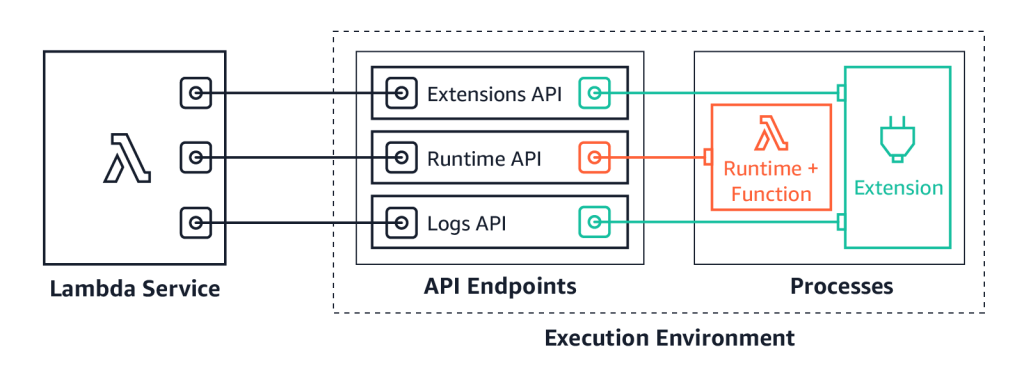
To receive logs, extensions subscribe using the new Lambda Logs API.

Lambda Logs API

Lambda Logs API

The Lambda service then streams the logs directly to the extension. The extension can then process, filter, and route them to any preferred destination. Lambda still sends the logs to CloudWatch Logs.

You deploy extensions, including ones that use the Logs API, as Lambda layers, with the AWS Management Console and AWS Command Line Interface (AWS CLI). You can also use infrastructure as code tools such as AWS CloudFormation, the AWS Serverless Application Model (AWS SAM), Serverless Framework, and Terraform.

Logging extensions from AWS Lambda Ready Partners and AWS Partners available at launch

Today, you can use logging extensions with the following tools:

  • The Datadog extension now makes it easier than ever to collect your serverless application logs for visualization, analysis, and archival. Paired with Datadog’s AWS integration, end-to-end distributed tracing, and real-time enhanced AWS Lambda metrics, you can proactively detect and resolve serverless issues at any scale.
  • Lumigo provides monitoring and debugging for modern cloud applications. With the open source extension from Lumigo, you can send Lambda function logs directly to an S3 bucket, unlocking new post processing use cases.
  • New Relic enables you to efficiently monitor, troubleshoot, and optimize your Lambda functions. New Relic’s extension allows you send your Lambda service platform logs directly to New Relic’s unified observability platform, allowing you to quickly visualize data with minimal latency and cost.
  • Coralogix is a log analytics and cloud security platform that empowers thousands of companies to improve security and accelerate software delivery, allowing you to get deep insights without paying for the noise. Coralogix can now read Lambda function logs and metrics directly, without using Cloudwatch or S3, reducing the latency, and cost of observability.
  • Honeycomb is a powerful observability tool that helps you debug your entire production app stack. Honeycomb’s extension decreases the overhead, latency, and cost of sending events to the Honeycomb service, while increasing reliability.
  • The Sumo Logic extension enables you to get instant visibility into the health and performance of your mission-critical applications using AWS Lambda. With this extension and Sumo Logic’s continuous intelligence platform, you can now ensure that all your Lambda functions are running as expected, by analyzing function, platform, and extension logs to quickly identify and remediate errors and exceptions.

You can also build and use your own logging extensions to integrate your organization’s tooling.

Showing a logging extension to send logs directly to S3

This demo shows an example of using a simple logging extension to send logs to Amazon Simple Storage Service (S3).

To set up the example, visit the GitHub repo and follow the instructions in the README.md file.

The example extension runs a local HTTP endpoint listening for HTTP POST events. Lambda delivers log batches to this endpoint. The example creates an S3 bucket to store the logs. A Lambda function is configured with an environment variable to specify the S3 bucket name. Lambda streams the logs to the extension. The extension copies the logs to the S3 bucket.

Lambda environment variable specifying S3 bucket

Lambda environment variable specifying S3 bucket

The extension uses the Extensions API to register for INVOKE and SHUTDOWN events. The extension, using the Logs API, then subscribes to receive platform and function logs, but not extension logs.

As the example is an asynchronous system, logs for one invoke may be processed during the next invocation. Logs for the last invoke may be processed during the SHUTDOWN event.

Testing the function from the Lambda console, Lambda sends logs to CloudWatch Logs. The logs stream shows logs from the platform, function, and extension.

Lambda logs visible in CloudWatch Logs

Lambda logs visible in CloudWatch Logs

The logging extension also receives the log stream directly from Lambda, and copies the logs to S3.

Browsing to the S3 bucket, the log files are available.

S3 bucket containing copied logs

S3 bucket containing copied logs.

Downloading the file shows the log lines. The log contains the same platform and function logs, but not the extension logs, as specified during the subscription.

[{'time': '2020-11-12T14:55:06.560Z', 'type': 'platform.start', 'record': {'requestId': '49e64413-fd42-47ef-b130-6fd16f30148d', 'version': '$LATEST'}},
{'time': '2020-11-12T14:55:06.774Z', 'type': 'platform.logsSubscription', 'record': {'name': 'logs_api_http_extension.py', 'state': 'Subscribed', 'types': ['platform', 'function']}},
{'time': '2020-11-12T14:55:06.774Z', 'type': 'platform.extension', 'record': {'name': 'logs_api_http_extension.py', 'state': 'Ready', 'events': ['INVOKE', 'SHUTDOWN']}},
{'time': '2020-11-12T14:55:06.776Z', 'type': 'function', 'record': 'Function: Logging something which logging extension will send to S3\n'}, {'time': '2020-11-12T14:55:06.780Z', 'type': 'platform.end', 'record': {'requestId': '49e64413-fd42-47ef-b130-6fd16f30148d'}}, {'time': '2020-11-12T14:55:06.780Z', 'type': 'platform.report', 'record': {'requestId': '49e64413-fd42-47ef-b130-6fd16f30148d', 'metrics': {'durationMs': 4.96, 'billedDurationMs': 100, 'memorySizeMB': 128, 'maxMemoryUsedMB': 87, 'initDurationMs': 792.41}, 'tracing': {'type': 'X-Amzn-Trace-Id', 'value': 'Root=1-5fad4cc9-70259536495de84a2a6282cd;Parent=67286c49275ac0ad;Sampled=1'}}}]

Lambda has sent specific logs directly to the subscribed extension. The extension has then copied them directly to S3.

For more example log extensions, see the Github repository.

How do extensions receive logs?

Extensions start a local listener endpoint to receive the logs using one of the following protocols:

  1. TCP – Logs are delivered to a TCP port in Newline delimited JSON format (NDJSON).
  2. HTTP – Logs are delivered to a local HTTP endpoint through PUT or POST, as an array of records in JSON format. http://sandbox:${PORT}/${PATH}. The $PATH parameter is optional.

AWS recommends using an HTTP endpoint over TCP because HTTP tracks successful delivery of the log messages to the local endpoint that the extension sets up.

Once the endpoint is running, extensions use the Logs API to subscribe to any of three different logs streams:

  • Function logs that are generated by the Lambda function.
  • Lambda service platform logs (such as the START, END, and REPORT logs in CloudWatch Logs).
  • Extension logs that are generated by extension code.

The Lambda service then sends logs to endpoint subscribers inside of the execution environment only.

Even if an extension subscribes to one or more log streams, Lambda continues to send all logs to CloudWatch.

Performance considerations

Extensions share resources with the function, such as CPU, memory, disk storage, and environment variables. They also share permissions, using the same AWS Identity and Access Management (IAM) role as the function.

Log subscriptions consume memory resources as each subscription opens a new memory buffer to store the logs. This memory usage counts towards memory consumed within the Lambda execution environment.

For more information on resources, security and performance with extensions, see “Introducing AWS Lambda Extensions – In preview”.

What happens if Lambda cannot deliver logs to an extension?

The Lambda service stores logs before sending to CloudWatch Logs and any subscribed extensions. If Lambda cannot deliver logs to the extension, it automatically retries with backoff. If the log subscriber crashes, Lambda restarts the execution environment. The logs extension re-subscribes, and continues to receive logs.

When using an HTTP endpoint, Lambda continues to deliver logs from the last acknowledged delivery. With TCP, the extension may lose logs if an extension or the execution environment fails.

The Lambda service buffers logs in memory before delivery. The buffer size is proportional to the buffering configuration used in the subscription request. If an extension cannot process the incoming logs quickly enough, the buffer fills up. To reduce the likelihood of an out of memory event due to a slow extension, the Lambda service drops records and adds a platform.logsDropped log record to the affected extension to indicate the number of dropped records.

Disabling logging to CloudWatch Logs

Lambda continues to send logs to CloudWatch Logs even if extensions subscribe to the logs stream.

To disable logging to CloudWatch Logs for a particular function, you can amend the Lambda execution role to remove access to CloudWatch Logs.

{
"Version": "2012-10-17",
"Statement": [
    {
        "Effect": "Deny",
        "Action": [
            "logs:CreateLogGroup",
            "logs:CreateLogStream",
            "logs:PutLogEvents"
        ],
        "Resource": [
            "arn:aws:logs:*:*:*"
        ]
    }
  ]
}

Logs are no longer delivered to CloudWatch Logs for functions using this role, but are still streamed to subscribed extensions. You are no longer billed for CloudWatch logging for these functions.

Pricing

Logging extensions, like other extensions, share the same billing model as Lambda functions. When using Lambda functions with extensions, you pay for requests served and the combined compute time used to run your code and all extensions, in 100 ms increments. To learn more about the billing for extensions, visit the Lambda FAQs page.

Conclusion

Lambda extensions enable you to extend the Lambda service to more easily integrate with your favorite tools for monitoring, observability, security, and governance.

Extensions can now subscribe to receive log streams directly from the Lambda service, in addition to CloudWatch Logs. Today, you can install a number of available logging extensions from AWS Lambda Ready Partners and AWS Partners. Extensions make it easier to use your existing tools with your serverless applications.

To try the S3 demo logging extension, follow the instructions in the README.md file in the GitHub repository.

Extensions are now available in preview in all commercial regions other than the China regions.

For more serverless learning resources, visit https://serverlessland.com.

Application integration patterns for microservices: Running distributed RFQs

Post Syndicated from James Beswick original https://aws.amazon.com/blogs/compute/application-integration-patterns-running-distributed-rfqs/

This post is courtesy of Dirk Fröhner, Principal Solutions Architect.

The first blog in this series introduces asynchronous messaging for building loosely coupled systems that can scale, operate, and evolve individually. It considers messaging as a communications model for microservices architectures. Part 2 dives into fan-out strategies and applies the respective patterns to a concrete use case.

In this post, I look at how to apply messaging patterns to help coordinate distributed requests and responses. Specifically, I focus on a composite pattern called scatter-gather, as presented in the book “Enterprise Integration Patterns: Designing, Building, and Deploying Messaging Solutions” (Hohpe and Woolf, 2004).

I also show how a client can communicate with a backend via synchronous REST API operations while asynchronous messaging is applied internally for processing.

Overview

The use case is for Wild Rydes, a fictional application that replaces traditional taxis with unicorns. It’s used in several hands-on AWS workshops that illustrate serverless development concepts.

Wild Rydes wants to allow customers to initiate requests for quotation (RFQs) for their rides. This allows unicorns to make special offers to potential customers within a defined schedule. A customer can send their ride details and ask for quotations from all unicorns that are within a certain vicinity. The customer can then choose the best offer.

Wild Rydes

The scatter-gather pattern

The scatter-gather pattern can be used to implement this use-case on the server side. This pattern is ideal for requesting responses from multiple parties, then aggregating and processing that data.

As presented by Hohpe and Woolf, the scatter-gather pattern is a composite pattern that illustrates how to “broadcast a message to multiple recipients and re-aggregate the responses back into a single message”. The pattern is illustrated in the following diagram.

Scatter-gather architecture

The flow starts with the Requester to initiate the broadcast to all potential Responders. This can be architected in a loosely coupled manner using pub-sub messaging with Amazon SNS or Amazon MQ, as shown in this blog post.

All responders must send their answers somewhere for aggregation and processing. This can also be architected in a loosely coupled manner using a message queue with Amazon SQS or Amazon MQ, as described in this blog post.

The Aggregator component consumes the individual responses from the response queue. It forwards the aggregate to the Processor component for final processing. Both Aggregator and Processor can be part of the same application or process. If separated, they can be decoupled through messaging. The Requester can also be part of the same application or process as Aggregator and Processor.

Explaining the architecture and API

In this section, I walk through the use-case and explain how it can be architected and implemented. I show how the scatter-gather pattern works in the backend, and the client-to-backend communication.

Submit instant ride RFQ

To initiate such an RFQ, the customer app communicates with the ride booking service on the backend. The ride booking service exposes a REST API. By default, an RFQ runs for five minutes, but Wild Rydes is working on a feature to let a customer individually set that value.

A request to submit an instant-ride RFQ contains start and destination locations for the ride and the customer ID:

POST /<submit-instant-ride-rfq-resource-path> HTTP/1.1
...

{
    "from": "...",
    "to": "...",
    "customer": "..."
}

The RFQ is a lengthy process so the client app should not expect an immediate response. Instead, the API accepts the RFQ, creates an RFQ task resource, and returns to the client. The response contains a URL to request an update for the status. It also provides an estimated time for the end of the RFQ:

HTTP/1.1 202 Accepted
...

{
    "links": {
        "self": "http://.../<rfq-task-resource-path>",
        "...": "..."
    },
    "status": "running",
    "eta": "..."
}

The following architecture shows this interaction, excluding the process after a new RFQ is submitted.

Client app interaction

Processing the RFQ

The backend uses the scatter-gather pattern to publish the RFQ to unicorns and collect responses for aggregation and processing.

Backend architecture

1. The ride booking service acts as the requester in the scatter-gather pattern. Following a new RFQ from the client app, it publishes the details into an SNS topic. This topic is related to the location of the ride’s starting point since customers need quotes from unicorns within the vicinity. These messages are the green request messages.

2. The unicorn management service maintains instances of unicorn management resources and subscribes them to RFQ topics related to their current location. These resources receive the RFQ request messages and handle the interaction with the Wild Rydes unicorn app.

3. The unicorns in the vicinity are notified through the Wild Rydes unicorn app about the new RFQ and can react if they are available. Notification options between the unicorn management service and the Wild Rydes unicorn app include push notifications and web sockets.

4. Every addressed unicorn can now submit their quote. All quotes go back through the unicorn management resources and the unicorn management service into the RFQ response queue. They act as the responders in the sense of the scatter-gather pattern.

5. The ride booking service also acts as aggregator and processor in the sense of the scatter-gather pattern. It uses SQS to consume messages from an RFQ response queue that eventually contains the RFQ responses from the involved unicorns. It starts doing so immediately after it publishes the details of a new RFQ into the RFQ topic. The messages from the RFQ response queue relate to the blue response messages.

The ride booking service consumes all incoming responses from that queue. This continues until the deadline or all participating unicorns have answered, whatever occurs first. The aggregator responsibility can be as simple as persisting the details of each incoming RFQ response into an Amazon DynamoDB table.

To match incoming responses to the right RFQ, it uses a fundamental integration pattern, correlation ID. In this pattern, a requester adds a unique ID to an outgoing message and each responder is asked to forward this ID in their response.

Also, responders must know where to send their responses to. To keep this dynamic, there is another fundamental integration pattern: return address. It suggests that a requester adds meta information into outgoing messages that indicate the address for their responses. In this architecture, this is the ARN of the SQS queue that acts as the RFQ response queue. This supports an option to simplify the response management: the RFQ response queue is a dedicated queue per customer.

Lastly, the processor responsibility in the ride booking service reads the RFQ responses from the DynamoDB table. It converts the data to JSON for the Wild Rydes customer app.

Check RFQ status

During the RFQ processing, a customer may want to know how many responses have already arrived, or if the results are already available. After submitting an instant ride RFQ, the client receives a representation of the running task. It can use the self-link to request an update:

GET /<rfq-task-resource-path> HTTP/1.1

While the task is running, a response from the ride booking service comes back with the respective status value and the count of responses that have already arrived:

HTTP/1.1 200 OK
...

{
    "links": {
        "self": "http://.../<rfq-task-resource-path>",
        "...": "..."
    },
    "status": "running",
    "responses-received": 2,
    "eta": "..."
}

After the RFQ is completed

An RFQ is completed if either the time is up or all unicorns have answered. The result of the RFQ is then available to the customer. If the client requests an update to the task representation, the response indicates this by redirecting to the RFQ result:

HTTP/1.1 303 See Other
Location: <url-of-rfq-result-resource>

Requesting a representation of the results resource, the client receives the quotes of all the participating unicorns. The frontend customer app can visualize these accordingly:

HTTP/1.1 200 OK
...

{
    "links": { ... },
    "from": "...",
    "to": "...",
    "customer": "...",
    "quotes": [ ... ]
}

The ride booking service can also use means of active notifications to make the customer app aware once the RFQ result is ready, including the link to the RFQ result. Examples for this include push notifications and web sockets.

Conclusion

In this blog, I present the scatter-gather pattern, which is a composite pattern based on pub-sub and point-to-point messaging channels. It also employs correlation ID and return address. I show how this is implemented in the Wild Rydes example application. You can use this integration pattern for communication in your microservices.

I cover how synchronous API communication between end user client and backend can work along with asynchronous messaging for request processing internally.

To learn more:

For more serverless learning resources, visit https://serverlessland.com.

Building Serverless Land: Part 2 – An auto-building static site

Post Syndicated from Benjamin Smith original https://aws.amazon.com/blogs/compute/building-serverless-land-part-2-an-auto-building-static-site/

In this two-part blog series, I show how serverlessland.com is built. This is a static website that brings together all the latest blogs, videos, and training for AWS serverless. It automatically aggregates content from a number of sources. The content exists in a static JSON file, which generates a new static site each time it is updated. The result is a low-maintenance, low-latency serverless website, with almost limitless scalability.

A companion blog post explains how to build an automated content aggregation workflow to create and update the site’s content. In this post, you learn how to build a static website with an automated deployment pipeline that re-builds on each GitHub commit. The site content is stored in JSON files in the same repository as the code base. The example code can be found in this GitHub repository.

The growing adoption of serverless technologies generates increasing amounts of helpful and insightful content from the developer community. This content can be difficult to discover. Serverless Land helps channel this into a single searchable location. By collating this into a static website, users can enjoy a browsing experience with fast page load speeds.

The serverless nature of the site means that developers don’t need to manage infrastructure or scalability. The use of AWS Amplify Console to automatically deploy directly from GitHub enables a regular release cadence with a fast transition from prototype to production.

Static websites

A static site is served to the user’s web browser exactly as stored. This contrasts to dynamic webpages, which are generated by a web application. Static websites often provide improved performance for end users and have fewer or no dependant systems, such as databases or application servers. They may also be more cost-effective and secure than dynamic websites by using cloud storage, instead of a hosted environment.

A static site generator is a tool that generates a static website from a website’s configuration and content. Content can come from a headless content management system, through a REST API, or from data referenced within the website’s file system. The output of a static site generator is a set of static files that form the website.
Serverless Land uses a static site generator for Vue.js called Nuxt.js. Each time content is updated, Nuxt.js regenerates the static site, building the HTML for each page route and storing it in a file.

The architecture

Serverless Land static website architecture

When the content.json file is committed to GitHub, a new build process is triggered in AWS Amplify Console.

Deploying AWS Amplify

AWS Amplify helps developers to build secure and scalable full stack cloud applications. AWS Amplify Console is a tool within Amplify that provides a user interface with a git-based workflow for hosting static sites. Deploy applications by connecting to an existing repository (GitHub, BitBucket Cloud, GitLab, and AWS CodeCommit) to set up a fully managed, nearly continuous deployment pipeline.

This means that any changes committed to the repository trigger the pipeline to build, test, and deploy the changes to the target environment. It also provides instant content delivery network (CDN) cache invalidation, atomic deploys, password protection, and redirects without the need to manage any servers.

Building the static website

  1. To get started, use the Nuxt.js scaffolding tool to deploy a boiler plate application. Make sure you have npx installed (npx is shipped by default with npm version 5.2.0 and above).
    $ npx create-nuxt-app content-aggregator

    The scaffolding tool asks some questions, answer as follows:Nuxt.js scaffolding tool inputs

  2. Navigate to the project directory and launch it with:
    $ cd content-aggregator
    $ npm run dev

    The application is now running on http://localhost:3000.The pages directory contains your application views and routes. Nuxt.js reads the .vue files inside this directory and automatically creates the router configuration.

  3. Create a new file in the /pages directory named blogs.vue:$ touch pages/blogs.vue
  4. Copy the contents of this file into pages/blogs.vue.
  5. Create a new file in /components directory named Post.vue :$ touch components/Post.vue
  6. Copy the contents of this file into components/Post.vue.
  7. Create a new file in /assets named content.json and copy the contents of this file into it.$ touch /assets/content.json

The blogs Vue component

The blogs page is a Vue component with some special attributes and functions added to make development of your application easier. The following code imports the content.json file into the variable blogPosts. This file stores the static website’s array of aggregated blog post content.

import blogPosts from '../assets/content.json'

An array named blogPosts is initialized:

data(){
    return{
      blogPosts: []
    }
  },

The array is then loaded with the contents of content.json.

 mounted(){
    this.blogPosts = blogPosts
  },

In the component template, the v-for directive renders a list of post items based on the blogPosts array. It requires a special syntax in the form of blog in blogPosts, where blogPosts is the source data array and blog is an alias for the array element being iterated on. The Post component is rendered for each iteration. Since components have isolated scopes of their own, a :post prop is used to pass the iterated data into the Post component:

<ul>
  <li v-for="blog in blogPosts" :key="blog">
     <Post :post="blog" />
  </li>
</ul>

The post data is then displayed by the following template in components/Post.vue.

<template>
    <div class="hello">
      <h3>{{ post.title }} </h3>
      <div class="img-holder">
          <img :src="post.image" />
      </div>
      <p>{{ post.intro }} </p>
      <p>Published on {{post.date}}, by {{ post.author }} p>
      <a :href="post.link"> Read article</a>
    </div>
</template>

This forms the framework for the static website. The /blogs page displays content from /assets/content.json via the Post component. To view this, go to http://localhost:3000/blogs in your browser:

The /blogs page

Add a new item to the content.json file and rebuild the static website to display new posts on the blogs page. The previous content was generated using the aggregation workflow explained in this companion blog post.

Connect to Amplify Console

Clone the web application to a GitHub repository and connect it to Amplify Console to automate the rebuild and deployment process:

  1. Upload the code to a new GitHub repository named ‘content-aggregator’.
  2. In the AWS Management Console, go to the Amplify Console and choose Connect app.
  3. Choose GitHub then Continue.
  4. Authorize to your GitHub account, then in the Recently updated repositories drop-down select the ‘content-aggregator’ repository.
  5. In the Branch field, leave the default as master and choose Next.
  6. In the Build and test settings choose edit.
  7. Replace - npm run build with – npm run generate.
  8. Replace baseDirectory: / with baseDirectory: dist

    This runs the nuxt generate command each time an application build process is triggered. The nuxt.config.js file has a target property with the value of static set. This generates the web application into static files. Nuxt.js creates a dist directory with everything inside ready to be deployed on a static hosting service.
  9. Choose Save then Next.
  10. Review the Repository details and App settings are correct. Choose Save and deploy.

    Amplify Console deployment

Once the deployment process has completed and is verified, choose the URL generated by Amplify Console. Append /blogs to the URL, to see the static website blogs page.

Any edits pushed to the repository’s content.json file trigger a new deployment in Amplify Console that regenerates the static website. This companion blog post explains how to set up an automated content aggregator to add new items to the content.json file from an RSS feed.

Conclusion

This blog post shows how to create a static website with vue.js using the nuxt.js static site generator. The site’s content is generated from a single JSON file, stored in the site’s assets directory. It is automatically deployed and re-generated by Amplify Console each time a new commit is pushed to the GitHub repository. By automating updates to the content.json file you can create low-maintenance, low-latency static websites with almost limitless scalability.

This application framework is used together with this automated content aggregator to pull together articles for http://serverlessland.com. Serverless Land brings together all the latest blogs, videos, and training for AWS Serverless. Download the code from this GitHub repository to start building your own automated content aggregation platform.

Archiving and replaying events with Amazon EventBridge

Post Syndicated from James Beswick original https://aws.amazon.com/blogs/compute/archiving-and-replaying-events-with-amazon-eventbridge/

Amazon EventBridge is a serverless event bus used to decouple event producers and consumers. Event producers publish events onto an event bus, which then uses rules to determine where to send those events. The rules determine the targets, and EventBridge routes the events accordingly.

In event-driven architectures, it can be useful for services to access past events. This has previously required manual logging and archiving, and creating a mechanism to parse files and put events back on the event bus. This can be complex, since you may not have access to the applications that are publishing the events.

With the announcement of event replay, EventBridge can now record any events processed by any type of event bus. Replay stores these recorded events in archives. You can choose to record all events, or filter events to be archived by using the same event pattern matching logic used in rules.

Architectural overview

You can also configure a retention policy for an archive to store data either indefinitely or for a defined number of days. You can now easily configure logging and replay options for events created by AWS services, your own applications, and integrated SaaS partners.

Event replay can be useful for a number of different use-cases:

  • Testing code fixes: after fixing bugs in microservices, being able to replay historical events provides a way to test the behavior of the code change.
  • Testing new features: using historical production data from event archives, you can measure the performance of new features under load.
  • Hydrating development or test environments: you can replay event archives to hydrate the state of test and development environments. This helps provide a more realistic state that approximates production.

This blog post shows you how to create event archives for an event bus, and then how to replay events. I also cover some of the important features and how you can use these in your serverless applications.

Creating event archives

To create an event archive for an event bus:

  1. Navigate to the EventBridge console and select Archives from the left-hand submenu. Choose the Create Archive button.Archives sub-menu
  2. In the Define archive details page:
    1. Enter ‘my-event-archive’ for Name and provide an optional description.
    2. Select a source bus from the dropdown (choose default if you want to archive AWS events).
    3. For retention period, enter ‘30’.
    4. Choose Next.Define archive details
  3. In the Filter events page, you can provide an event pattern to archive a subset of events. For this walkthrough, select No event filtering and choose Create archive.Filter events
  4. In the Archives page, you can see the new archive waiting to receive events.Archives page
  5. Choose the archive to open the details page. Over time, as more events are sent to the bus, the archive maintains statistics about the number and size of events stored.

You can also create archives using AWS CloudFormation. The following example creates an archive that filters for a subset of events with a retention period of 30 days:

Type: AWS::Events::Archive
Properties: 
  Description: My filtered archive.
  EventPattern:
    source:
      -	"my-app-worker-service"
  RetentionDays: 30
  SourceArn: arn:aws:events:us-east-1:123456789012:event-bus/my-custom-application

How this works

Archives are always sourced from a single event bus. Once you have created an archive, it appears on the event bus details page:

Event bus details

You can make changes to an archive definition once it is created. If you shorten the duration, this deletes any events in the archives that are earlier than the new retention period. This deletion process occurs after a period of time and is not immediate. If you extend the duration, this affects event collection from the current point, but does not restore older events.

Each time you create an archive, this automatically generates a rule on the event bus. This is called a managed rule, which is created, updated, and deleted by the EventBridge service automatically. This rule does not count towards the default 300 rules per event bus service quota.

Rules page

When you open a managed rule, the configuration is read-only.

Managed rule configuration

This configuration shows an event pattern that is applied to all incoming events, including those that may be replayed from archives. The event pattern excludes events containing a replay-name attribute, which prevents replayed events from being archived multiple times.

Replaying archived events

To replay an archive of events:

  1. Navigate to the EventBridge console and select Replays from the left-hand submenu. Choose the Create Archive button.Replays menu
  2. In the Start new replay page:
    1. Enter ‘my-event-replay’ for Name and provide an optional description.
    2. Select a source bus from the dropdown. This must match the source bus for the event archive.
    3. For Specify rule(s), select All rules.
    4. Enter a time frame for the replay. This is the ingestion time for the first and last events in the archive.
    5. Choose Start Replay.
  3. The Replays page shows the new replay in Starting status.New replay status

How this works

When a replay is started, the service sends the archived event back to the original event bus. It processes these as quickly as possible, with no ordering guarantees. The replay process adds a “replay-name” attribute to the original event. This is the flow of events:

Flow of archived events

  1. The original event is sent to the event bus. It is received by any existing rules and the managed rule creating the archive. The event is saved to the event archive.
  2. When the archived event is replayed, the JSON object includes the replay-name attribute. The existing rules process the event as in the first step. Since the managed rule does not match the replayed event, it is not forwarded to the archive.

Showing additional replay fields

In the Replays console, choose the preferences cog icon to open the Preferences dialog box.

Setting replay preferences

From here, you can add:

  • Event start time and end time: Timestamps for the earliest and latest events in the archive that was replayed.
  • Replay start time and end time: shows the time filtering parameters set for the listed replay.
  • Last replayed: a timestamp of when the final replay event occurred.

You can sort on any of these additional fields.

Sorting on replay fields

Advanced routing of replayed events

In this simple example, a replayed archive matches the same rules that the original events triggered. Additionally, replayed events must be sent to the original bus where they were archived from. As a result, a basic replay allows you to duplicate events and copy the rule matching behaviors that occurred originally.

However, you may want to trigger different rules for replayed events or send the events to another bus. You can make use of the replay-name attribute in your own rules to add this advanced routing functionality. By creating a rule that filters for the presence of the “replay-name” event, it ignores all events that are not replays. When you create the replay, instead of targeting all rules on the bus, only target this one rule.

Routing of replayed events

  1. The original event is put on the event bus. The replay rule is evaluated but does not match.
  2. The event is played from the archive, targeting only the replay rule. All other rules are excluded automatically by the replay service. The replay rule matches and forwards events onto the rule’s targets.

The target of the replay rule may be typical rule target, including an AWS Lambda function for customized processing, or another event bus.

Conclusion

In event-driven architectures, it can be useful for services to access past events. The new event replay feature in Amazon EventBridge enables you to automatically archive and replay events on an event bus. This can help for testing new features or new code, or hydrating services in development and test to more closely approximate a production environment.

This post shows how to create and replay event archives. It discusses how the archives work, and how you can implement these in your own applications. To learn more about using Amazon EventBridge, visit the learning path for videos, blogs, and other resources.

For more serverless learning resources, visit Serverless Land.

Using Amazon MQ as an event source for AWS Lambda

Post Syndicated from James Beswick original https://aws.amazon.com/blogs/compute/using-amazon-mq-as-an-event-source-for-aws-lambda/

Amazon MQ is a managed, highly available message broker for Apache ActiveMQ. The service manages the provisioning, setup, and maintenance of ActiveMQ. Now, with Amazon MQ as an event source for AWS Lambda, you can process messages from the service. This allows you to integrate Amazon MQ with downstream serverless workflows.

ActiveMQ is a popular open source message broker that uses open standard APIs and protocols. You can move from any message broker that uses these standards to Amazon MQ. With Amazon MQ, you can deploy production-ready broker configurations in minutes, and migrate existing messaging services to the AWS Cloud. Often, this does not require you to rewrite any code, and in many cases you only need to update the application endpoints.

In this blog post, I explain how to set up an Amazon MQ broker and networking configuration. I also show how to create a Lambda function that is invoked by messages from Amazon MQ queues.

Overview

Using Amazon MQ as an event source operates in a similar way to using Amazon SQS or Amazon Kinesis. In all cases, the Lambda service internally polls for new records or messages from the event source, and then synchronously invokes the target Lambda function. Lambda reads the messages in batches and provides these to your function as an event payload.

Lambda is a consumer application for your Amazon MQ queue. It processes records from one or more partitions and sends the payload to the target function. Lambda continues to process batches until there are no more messages in the topic.

The Lambda function’s event payload contains an array of records in the messages attribute. Each array item contains envelope details of the message, together with the base64 encoded message in the data attribute:

Base64 encoded data in payload

How to configure Amazon MQ as an event source for Lambda

Amazon MQ is a highly available service, so it must be configured to run in a minimum of two Availability Zones in your preferred Region. You can also run a single broker in one Availability Zone for development and test purposes. In this walk through, I show how to run a production, public broker and then configure an event source mapping for a Lambda function.

MQ broker architecture

There are four steps:

  • Configure the Amazon MQ broker and security group.
  • Create a queue on the broker.
  • Set up AWS Secrets Manager.
  • Build the Lambda function and associated permissions.

Configuring the Amazon MQ broker and security group

In this step, you create an Amazon MQ broker and then configure the broker’s security group to allow inbound access on ports 8162 and 61617.

  1. Navigate to the Amazon MQ console and choose Create brokers.
  2. In Step 1, keep the defaults and choose Next.
  3. In Configure settings, in the ActiveMQ Access panel, enter a user name and password for broker access.ActiveMQ access
  4. Expand the Additional settings panel, keep the defaults, and ensure that Public accessibility is set to Yes. Choose Create broker.Public accessibility setting
  5. The creation process takes up to 15 minutes. From the Brokers list, select the broker name. In the Details panel, choose the Security group.Security group setting
  6. On the Inbound rules tab, choose Edit inbound rules. Add rules to enable inbound TCP traffic on ports 61617 and 8162:Editing inbound rules
  • Port 8162 is used to access the ActiveMQ Web Console to configure the broker settings.
  • Port 61667 is used by the internal Lambda poller to connect with your broker, using the OpenWire endpoint.

Create a queue on the broker

The Lambda service subscribes to a queue on the broker. In this step, you create a new queue:

  1. Navigate to the Amazon MQ console and choose the newly created broker. In the Connections panel, locate the URLs for the web console.ActiveMQ web console URLs
  2. Only one endpoint is active at a time. Select both and one resolves to the ActiveMQ Web Console application. Enter the user name and password that you configured earlier.ActiveMQ Web Console
  3. In the top menu, select Queues. For Queue Name, enter myQueue and choose Create. The new queue appears in the Queues list.Creating a queue

Keep this webpage open, since you use this later for sending messages to the Lambda function.

Set up Secrets Manager

The Lambda service needs access to your Amazon MQ broker, using the user name and password you configured earlier. To avoid exposing secrets in plaintext in the Lambda function, it’s best practice to use a service like Secrets Manager. To create a secret, use the create-secret AWS CLI command. To do this, ensure you have the AWS CLI installed.

From a terminal window, enter this command, replacing the user name and password with your own values:

aws secretsmanager create-secret --name MQaccess --secret-string '{"username": "your-username", "password": "your-password"}'

The command responds with the ARN of the stored secret:

Secrets Manager CLI response

Build the Lambda function and associated permissions

The Lambda must have permission to access the Amazon MQ broker and stored secret. It must also be able to describe VPCs and security groups, and manage elastic network interfaces. These execution roles permissions are:

  • mq:DescribeBroker
  • secretsmanager:GetSecretValue
  • ec2:CreateNetworkInterface
  • ec2:DescribeNetworkInterfaces
  • ec2:DescribeVpcs
  • ec2:DeleteNetworkInterface
  • ec2:DescribeSubnets
  • ec2:DescribeSecurityGroups

If you are using an encrypted customer managed key, you must also add the kms:Decrypt permission.

To set up the Lambda function:

  1. Navigate to the Lambda console and choose Create Function.
  2. For function name, enter MQconsumer and choose Create Function.
  3. In the Permissions tab, choose the execution role to edit the permissions.Lambda function permissions tab
  4. Choose Attach policies then choose Create policy.
  5. Select the JSON tab and paste the following policy. Choose Review policy.
    {
        "Version": "2012-10-17",
        "Statement": [
            {
                "Effect": "Allow",
                "Action": [
                    "mq:DescribeBroker",
                    "secretsmanager:GetSecretValue",
                    "ec2:CreateNetworkInterface",
                    "ec2:DescribeNetworkInterfaces",
                    "ec2:DescribeVpcs",
                    "ec2:DeleteNetworkInterface",
                    "ec2:DescribeSubnets",
                    "ec2:DescribeSecurityGroups",
                    "logs:CreateLogGroup",
                    "logs:CreateLogStream",
                    "logs:PutLogEvents"
                ],
                "Resource": "*"
            }
        ]
    }
    

    Create IAM policy

  6. For name, enter ‘AWSLambdaMQExecutionRole’. Choose Create policy.
  7. In the IAM Summary panel, choose Attach policies. Search for AWSLambdaMQExecutionRole and choose Attach policy.Attaching the IAM policy to the role
  8. On the Lambda function page, in the Designer panel, choose Add trigger. Select MQ from the drop-down. Choose the broker name, enter ‘myQueue’ for Queue name, and choose the secret ARN. Choose Add.Add trigger to Lambda function
  9. The status of the Amazon MQ trigger changes from Creating to Enabled after a couple of minutes. The trigger configuration confirms the settings.Trigger configuration settings

Testing the event source mapping

  1. In the ActiveMQ Web Console, choose Active consumers to confirm that the Lambda service has been configured to consume events.Active consumers
  2. In the main dashboard, choose Send To on the queue. For Number of messages to send, enter 10 and keep the other defaults. Enter a test message then choose Send.Send message to queue
  3. In the MQconsumer Lambda function, select the Monitoring tab and then choose View logs in CloudWatch. The log streams show that the Lambda function has been invoked by Amazon MQ.Lambda function logs

A single Lambda function consumes messages from a single queue in an Amazon MQ broker. You control the rate of message processing using the Batch size property in the event source mapping. The Lambda service limits the concurrency to one execution environment per queue.

For example, in a queue with 100,000 messages and a batch size of 100 and function duration of 2000 ms, the Monitoring tab shows this behavior. The Concurrent executions graph remains at 1 as the internal Lambda poller fetches messages. It continues to invoke the Lambda function until the queue is empty.

CloudWatch metrics for consuming function

Using AWS SAM

In AWS SAM templates, you can configure a Lambda function with an Amazon MQ event source mapping and the necessary permissions. For example:

Resources:
  ProcessMSKfunction:
    Type: AWS::Serverless::Function 
    Properties:
      CodeUri: code/
      Timeout: 3
      Handler: app.lambdaHandler
      Runtime: nodejs12.x
      Events:
  MQEvent:
    Type: MQ
    Properties:
      BatchSize: 100
      Stream: arn:aws:mq:us-east-1:123456789012:broker:myMQbroker:b-bf02ad26-cc1a-4598-aa0d-82f2d88eb2ae
      QueueName:
        - myQueue
Policies:
  - Statement:
    - Effect: Allow
      Resource: '*'
      Action:
      - mq:DescribeBroker
      - secretsmanager:GetSecretValue
      - ec2:CreateNetworkInterface
      - ec2:DescribeNetworkInterfaces
      - ec2:DescribeVpcs
      - ec2:DeleteNetworkInterface
      - ec2:DescribeSubnets
      - ec2:DescribeSecurityGroups
      - logs:CreateLogGroup
      - logs:CreateLogStream
      - logs:PutLogEvents

Conclusion

Amazon MQ provide a fully managed, highly available message broker service for Apache ActiveMQ. Now Lambda supports Amazon MQ as an event source, you can invoke Lambda functions from messages in Amazon MQ queues to integrate into your downstream serverless workflows.

In this post, I give an overview of how to set up an Amazon MQ broker. I show how to configure the networking and create the event source mapping with Lambda. I also show how to set up a consumer Lambda function in the AWS Management Console, and refer to the equivalent AWS SAM syntax to simplify deployment.

To learn more about how to use this feature, read the documentation. For more serverless learning resources, visit https://serverlessland.com.

Using shared memory for low-latency, intra-node communication in AWS Batch

Post Syndicated from James Beswick original https://aws.amazon.com/blogs/compute/using-shared-memory-for-low-latency-intra-node-communication-in-aws-batch/

This post is courtesy of Dario La Porta, Senior Consultant, HPC.

AWS Batch enables developers, scientists, and engineers to run hundreds of thousands of HPC jobs in AWS. By managing the provisioning of computing resources, this allows you to focus on your core business. Shared memory support is a new feature that can help improve overall performance.

This post explains the shared memory paradigm and how it can help you improve the performance of your single and multi-node applications. Performance gains can also help you to reduce the total runtime of your jobs and therefore reduce the overall cost.

The second part of the post shows you how to use shared memory in AWS Batch both in the AWS Management Console and the AWS CLI. Finally, I show the performance gains that are made possible with shared memory usage by walking through a benchmarking analysis with OSU Micro-Benchmarks and GROMACS.

Shared memory paradigm

Advanced, compute-intensive workloads require high-performance hardware to use scalability to deliver results. The Amazon EC2 C5n instance type provides cost-efficient, high-performance hardware with a configurable number of cores.

HPC workloads use algorithms that require parallelization and a low latency communication between the different processes. The two main technologies used for the parallel communications are message-passing with distributed memory and shared memory.

Message Passing Interface (MPI) is a message-passing standard used for the communication in a parallel distributed environment. Elastic Fabric Adapter (EFA) enables your MPI applications to use low-latency, inter-node communication.

The shared memory paradigm allows multiple processors in the same system to communicate using a memory (RAM) portion that is shared between the processes. This method takes advantage of the high-speed memory bus.

Shared memory paradigm

MPI with intra-node shared memory communication

The two main MPI implementations, OpenMPI and Intel MPI, enable an intra-node shared memory communication in a distributed compute environment. When configured, you take advantage of the EFA libfabic implementation having consistent and reduced latency. This results in higher throughput than the TCP transport for the intra-node communication. From libfabric 1.9 onwards, the shared memory support has been directly added to the EFA provider. You no longer need to perform any modification to the OFI MTL.

MPI jobs in AWS Batch

AWS Batch enables the execution of MPI jobs using a multi-node configuration. First, a job definition is created that enables the execution of the job in multiple nodes. To learn how to create this definition, see Creating a Multi-node Parallel Job Definition.

To take advantage of the EFA capabilities, select a supported instance type and read Leveraging Elastic Fabric Adapter to run HPC and ML Workloads on AWS Batch. This post shows how to create the necessary resources in AWS Batch and run your first job with EFA.

Shared memory in AWS Batch

The new AWS Batch console interface enables you to configure the shared memory of the container inside the Job Definition. To see this, expand the Additional configuration in the Container properties section:

Container properties

The Linux parameters section contains the Shared memory size parameter in MB.

Linux parameters

You can set the same configuration in the AWS CLI by passing JSON parameters to the RegisterJobDefinition API:

"linuxParameters": {
    "sharedMemorySize": integer
}

When you run the job, it creates a shared memory area on each node that uses two or more processes. The shared memory area cannot be changed during the execution of the job. The size of the shared memory area is determined by the number of cores available in the node and the application requirements. For most jobs, a suggested initial value is 4096 MB.

Modern Linux kernels support a POSIX shared memory API. You can inspect the size of the container shared memory using the df -h /dev/shm command. The output can help you determine the shared memory space needed for your job.

Benchmarks

The following section compares the different performance using shared memory with Intel MPI 2019 update 7 and EFA.

The instance type used for the benchmark is the c5n.18xlarge and, for the multi-node use case, a cluster placement group. This compares the performance increase from shared memory versus using pure EFA communication. The first benchmark focuses on the latency of the communication in a single node use case.

OSU Micro-Benchmarks is a suite of benchmarks for measuring and evaluating the performance of MPI operations. The specific test case used is the osu_latency, measuring the minimum, maximum and average latency of a ping-pong communication between a sender and a receiver. Specifically, this is where the message sender waits for the reply from the receiver. The benchmark uses a variety of data sizes to report the average one-way latency.

OSU benchmark results

The chart shows the latency in μs on the horizontal axis and packet size in bits on the vertical axis. The result shows a decrease in the communication latency using shared memory for the intra-node communication compared with using only EFA. The following chart shows the latency improvement:

Latency improvement graph

The next benchmark demonstrates how shared memory can also increase the performance in a multi-node configuration. The test application is GROMACS, a versatile package to perform molecular dynamics. The overall performance of the application is susceptible to communication latency variance.

Gromacs performance

The code for the test has been downloaded from the Unified European Applications Benchmark Suite. The specific use case is named lignocellulose-rf and it uses the Reaction field for electrostatics. The details and the download link can be found in the UEABS repository.

The benchmark uses one thread per core and the following mdrun parameters:

-maxh 0.50 -resethway -noconfout -nsteps 10000 -dlb yes -nstlist 100 -pin on

The compilation options and the parameters configuration are explained in the README file. The test is run on a c5n.18xlarge instance, instead of a GPU instance, to focus on measuring the performance improvement caused specifically by increasing the number of total cores of the simulation. The chart explains the performance gain (measure in ns/day) that are achieved by increasing the number of cores. This is possible by using the shared memory for the intra-node communication during the simulation instead of using only EFA networking.

The following chart illustrates a significant percentage performance improvement by using the shared memory:

Shared memory performance improvement

Conclusion

In this post, I show how the new shared memory support in AWS Batch is able to improve performance while decreasing the latency of the intra-node communication. This performance gain can also lower the cost of running jobs overall.

I show how to enable the usage of the shared memory in AWS Batch from the AWS Management Console or the AWS CLI. I also highlight the performance gain from using shared memory with the high-speed memory bus of the c5n.18xlarge instance, using benchmarking analysis with OSU Micro-Benchmarks and GROMACS.

AWS Batch multi-node parallel jobs are now even more performant with EFA and shared memory configurations, enabling you to focus more on your applications and less on tuning. In addition, the Elastic Fabric Adapter (EFA) has a more consistent latency and higher throughput than the TCP transport for the inter-node communication.

To learn more about using this feature, visit the Getting Started guide.

Architecting for Reliable Scalability

Post Syndicated from Marwan Al Shawi original https://aws.amazon.com/blogs/architecture/architecting-for-reliable-scalability/

Cloud solutions architects should ideally “build today with tomorrow in mind,” meaning their solutions need to cater to current scale requirements as well as the anticipated growth of the solution. This growth can be either the organic growth of a solution or it could be related to a merger and acquisition type of scenario, where its size is increased dramatically within a short period of time.

Still, when a solution scales, many architects experience added complexity to the overall architecture in terms of its manageability, performance, security, etc. By architecting your solution or application to scale reliably, you can avoid the introduction of additional complexity, degraded performance, or reduced security as a result of scaling.

Generally, a solution or service’s reliability is influenced by its up time, performance, security, manageability, etc. In order to achieve reliability in the context of scale, take into consideration the following primary design principals.

Modularity

Modularity aims to break a complex component or solution into smaller parts that are less complicated and easier to scale, secure, and manage.

Monolithic architecture vs. modular architecture

Figure 1: Monolithic architecture vs. modular architecture

Modular design is commonly used in modern application developments. where an application’s software is constructed of multiple and loosely coupled building blocks (functions). These functions collectively integrate through pre-defined common interfaces or APIs to form the desired application functionality (commonly referred to as microservices architecture).


Scalable modular applications

Figure 2: Scalable modular applications

For more details about building highly scalable and reliable workloads using a microservices architecture, refer to Design Your Workload Service Architecture.

This design principle can also be applied to different components of the solution’s architecture. For example, when building a cloud solution on a single Amazon VPC, it may reach certain scaling limits and make it harder to introduce changes at scale due to the higher level of dependencies. This single complex VPC can be divided into multiple smaller and simpler VPCs. The architecture based on multiple VPCs can vary. For example, the VPCs can be divided based on a service or application building block, a specific function of the application, or on organizational functions like a VPC for various departments. This principle can also be leveraged at a regional level for very high scale global architectures. You can make the architecture modular at a global level by distributing the multiple VPCs across different AWS Regions to achieve global scale (facilitated by AWS Global Infrastructure).

In addition, modularity promotes separation of concerns by having well-defined boundaries among the different components of the architecture. As a result, each component can be managed, secured, and scaled independently. Also, it helps you avoid what is commonly known as “fate sharing,” where a vertically scaled server hosts a monolithic application, and any failure to this server will impact the entire application.

Horizontal scaling

Horizontal scaling, commonly referred to as scale-out, is the capability to automatically add systems/instances in a distributed manner in order to handle an increase in load. Examples of this increase in load could be the increase of number of sessions to a web application. With horizontal scaling, the load is distributed across multiple instances. By distributing these instances across Availability Zones, horizontal scaling not only increases performance, but also improves the overall reliability.

In order for the application to work seamlessly in a scale-out distributed manner, the application needs to be designed to support a stateless scaling model, where the application’s state information is stored and requested independently from the application’s instances. This makes the on-demand horizontal scaling easier to achieve and manage.

This principle can be complemented with a modularity design principle, in which the scaling model can be applied to certain component(s) or microservice(s) of the application stack. For example, only scale-out Amazon Elastic Cloud Compute (EC2) front-end web instances that reside behind an Elastic Load Balancing (ELB) layer with auto-scaling groups. In contrast, this elastic horizontal scalability might be very difficult to achieve for a monolithic type of application.

Leverage the content delivery network

Leveraging Amazon CloudFront and its edge locations as part of the solution architecture can enable your application or service to scale rapidly and reliably at a global level, without adding any complexity to the solution. The integration of a CDN can take different forms depending on the solution use case.

For example, CloudFront played an important role to enable the scale required throughout Amazon Prime Day 2020 by serving up web and streamed content to a worldwide audience, which handled over 280 million HTTP requests per minute.

Go serverless where possible

As discussed earlier in this post, modular architectures based on microservices reduce the complexity of the individual component or microservice. At scale it may introduce a different type of complexity related to the number of these independent components (microservices). This is where serverless services can help to reduce such complexity reliably and at scale. With this design model you no longer have to provision, manually scale, maintain servers, operating systems, or runtimes to run your applications.

For example, you may consider using a microservices architecture to modernize an application at the same time to simplify the architecture at scale using Amazon Elastic Kubernetes Service (EKS) with AWS Fargate.

Example of a serverless microservices architecture

Figure 3: Example of a serverless microservices architecture

In addition, an event-driven serverless capability like AWS Lambda is key in today’s modern scalable cloud solutions, as it handles running and scaling your code reliably and efficiently. See How to Design Your Serverless Apps for Massive Scale and 10 Things Serverless Architects Should Know for more information.

Secure by design

To avoid any major changes at a later stage to accommodate security requirements, it’s essential that security is taken into consideration as part of the initial solution design. For example, if the cloud project is new or small, and you don’t consider security properly at the initial stages, once the solution starts to scale, redesigning the entire cloud project from scratch to accommodate security best practices is usually not a simple option, which may lead to consider suboptimal security solutions that may impact the desired scale to be achieved. By leveraging CDN as part of the solution architecture (as discussed above), using Amazon CloudFront, you can minimize the impact of distributed denial of service (DDoS) attacks as well as perform application layer filtering at the edge. Also, when considering serverless services and the Shared Responsibility Model, from a security lens you can delegate a considerable part of the application stack to AWS so that you can focus on building applications. See The Shared Responsibility Model for AWS Lambda.

Design with security in mind by incorporating the necessary security services as part of the initial cloud solution. This will allow you to add more security capabilities and features as the solution grows, without the need to make major changes to the design.

Design for failure

The reliability of a service or solution in the cloud depends on multiple factors, the primary of which is resiliency. This design principle becomes even more critical at scale because the failure impact magnitude typically will be higher. Therefore, to achieve a reliable scalability, it is essential to design a resilient solution, capable of recovering from infrastructure or service disruptions. This principle involves designing the overall solution in such a way that even if one or more of its components fail, the solution is still be capable of providing an acceptable level of its expected function(s). See AWS Well-Architected Framework – Reliability Pillar for more information.

Conclusion

Designing for scale alone is not enough. Reliable scalability should be always the targeted architectural attribute. The design principles discussed in this blog act as the foundational pillars to support it, and ideally should be combined with adopting a DevOps model.

Building Serverless Land: Part 1 – Automating content aggregation

Post Syndicated from Benjamin Smith original https://aws.amazon.com/blogs/compute/building-serverless-land-part-1-automating-content-aggregation/

In this two part blog series, I show how serverlessland.com is built. This is a static website that brings together all the latest blogs, videos, and training for AWS Serverless. It automatically aggregates content from a number of sources. The content exists in static JSON files, which generate a new site build each time they are updated. The result is a low-maintenance, low-latency serverless website, with almost limitless scalability.

This blog post explains how to automate the aggregation of content from multiple RSS feeds into a JSON file stored in GitHub. This workflow uses AWS Lambda and AWS Step Functions, triggered by Amazon EventBridge. The application can be downloaded and deployed from this GitHub repository.

The growing adoption of serverless technologies generates increasing amounts of helpful and insightful content from the developer community. This content can be difficult to discover. Serverless Land helps channel this into a single searchable location. By automating the collection of this content with scheduled serverless workflows, the process robustly scales to near infinite numbers. The Step Functions MAP state allows for dynamic parallel processing of multiple content sources, without the need to alter code. On-boarding a new content source is as fast and simple as making a single CLI command.

The architecture

Automating content aggregation with AWS Step Functions

The application consists of six Lambda functions orchestrated by a Step Functions workflow:

  1. The workflow is triggered every 2 hours by an EventBridge scheduler. The schedule event passes an RSS feed URL to the workflow.
  2. The first task invokes a Lambda function that runs an HTTP GET request to the RSS feed. It returns an array of recent blog URLs. The array of blog URLs is provided as the input to a MAP state. The MAP state type makes it possible to run a set of steps for each element of an input array in parallel. The number of items in the array can be different for each execution. This is referred to as dynamic parallelism.
  3. The next task invokes a Lambda function that uses the GitHub REST API to retrieve the static website’s JSON content file.
  4. The first Lambda function in the MAP state runs an HTTP GET request to the blog post URL provided in the payload. The URL is scraped for content and an object containing detailed metadata about the blog post is returned in the response.
  5. The blog post metadata is compared against the website’s JSON content file in GitHub.
  6. A CHOICE state determines if the blog post metadata has already been committed to the repository.
  7. If the blog post is new, it is added to an array of “content to commit”.
  8. As the workflow exits the MAP state, the results are passed to the final Lambda function. This uses a single git commit to add each blog post object to the website’s JSON content file in GitHub. This triggers an event that rebuilds the static site.

Using Secrets in AWS Lambda

Two of the Lambda functions require a GitHub personal access token to commit files to a repository. Sensitive credentials or secrets such as this should be stored separate to the function code. Use AWS Systems Manager Parameter Store to store the personal access token as an encrypted string. The AWS Serverless Application Model (AWS SAM) template grants each Lambda function permission to access and decrypt the string in order to use it.

  1. Follow these steps to create a personal access token that grants permission to update files to repositories in your GitHub account.
  2. Use the AWS Command Line Interface (AWS CLI) to create a new parameter named GitHubAPIKey:
aws ssm put-parameter \
--name /GitHubAPIKey \
--value ReplaceThisWithYourGitHubAPIKey \
--type SecureString

{
    "Version": 1,
    "Tier": "Standard"
}

Deploying the application

  1. Fork this GitHub repository to your GitHub Account.
  2. Clone the forked repository to your local machine and deploy the application using AWS SAM.
  3. In a terminal, enter:
    git clone https://github.com/aws-samples/content-aggregator-example
    sam deploy -g
  4. Enter the required parameters when prompted.

This deploys the application defined in the AWS SAM template file (template.yaml).

The business logic

Each Lambda function is written in Node.js and is stored inside a directory that contains the package dependencies in a `node_modules` folder. These are defined for each function by its relative package.json file. The function dependencies are bundled and deployed using the sam build && deploy -g command.

The GetRepoContents and WriteToGitHub Lambda functions use the octokit/rest.js library to communicate with GitHub. The library authenticates to GitHub by using the GitHub API key held in Parameter Store. The AWS SDK for Node.js is used to obtain the API key from Parameter Store. With a single synchronous call, it retrieves and decrypts the parameter value. This is then used to authenticate to GitHub.

const AWS = require('aws-sdk');
const SSM = new AWS.SSM();


//get Github API Key and Authenticate
    const singleParam = { Name: '/GitHubAPIKey ',WithDecryption: true };
    const GITHUB_ACCESS_TOKEN = await SSM.getParameter(singleParam).promise();
    const octokit = await  new Octokit({
      auth: GITHUB_ACCESS_TOKEN.Parameter.Value,
    })

Lambda environment variables are used to store non-sensitive key value data such as the repository name and JSON file location. These can be entered when deploying with AWS SAM guided deploy command.

Environment:
        Variables:
          GitHubRepo: !Ref GitHubRepo
          JSONFile: !Ref JSONFile

The GetRepoContents function makes a synchronous HTTP request to the GitHub repository to retrieve the contents of the website’s JSON file. The response SHA and file contents are returned from the Lambda function and acts as the input to the next task in the Step Functions workflow. This SHA is used in final step of the workflow to save all new blog posts in a single commit.

Map state iterations

The MAP state runs concurrently for each element in the input array (each blog post URL).

Each iteration must compare a blog post URL to the existing JSON content file and decide whether to ignore the post. To do this, the MAP state requires both the input array of blog post URLs and the existing JSON file contents. The ItemsPath, ResultPath, and Parameters are used to achieve this:

  • The ItemsPath sets input array path to $.RSSBlogs.body.
  • The ResultPath states that the output of the branches is placed in $.mapResults.
  • The Parameters block replaces the input to the iterations with a JSON node. This contains both the current item data from the context object ($$.Map.Item.Value) and the contents of the GitHub JSON file ($.RepoBlogs).
"Type":"Map",
    "InputPath": "$",
    "ItemsPath": "$.RSSBlogs.body",
    "ResultPath": "$.mapResults",
    "Parameters": {
        "BlogUrl.$": "$$.Map.Item.Value",
        "RepoBlogs.$": "$.RepoBlogs"
     },
    "MaxConcurrency": 0,
    "Iterator": {
       "StartAt": "getMeta",

The Step Functions resource

The AWS SAM template uses the following Step Functions resource definition to create a Step Functions state machine:

  MyStateMachine:
    Type: AWS::Serverless::StateMachine
    Properties:
      DefinitionUri: statemachine/my_state_machine.asl.JSON
      DefinitionSubstitutions:
        GetBlogPostArn: !GetAtt GetBlogPost.Arn
        GetUrlsArn: !GetAtt GetUrls.Arn
        WriteToGitHubArn: !GetAtt WriteToGitHub.Arn
        CompareAgainstRepoArn: !GetAtt CompareAgainstRepo.Arn
        GetRepoContentsArn: !GetAtt GetRepoContents.Arn
        AddToListArn: !GetAtt AddToList.Arn
      Role: !GetAtt StateMachineRole.Arn

The actual workflow definition is defined in a separate file (statemachine/my_state_machine.asl.JSON). The DefinitionSubstitutions property specifies mappings for placeholder variables. This enables the template to inject Lambda function ARNs obtained by the GetAtt intrinsic function during template translation:

Step Functions mappings with placeholder variables

A state machine execution role is defined within the AWS SAM template. It grants the `Lambda invoke function` action. This is tightly scoped to the six Lambda functions that are used in the workflow. It is the minimum set of permissions required for the Step Functions to carry out its task. Additional permissions can be granted as necessary, which follows the zero-trust security model.

Action: lambda:InvokeFunction
Resource:
- !GetAtt GetBlogPost.Arn
- !GetAtt GetUrls.Arn
- !GetAtt CompareAgainstRepo.Arn
- !GetAtt WriteToGitHub.Arn
- !GetAtt AddToList.Arn
- !GetAtt GetRepoContents.Arn

The Step Functions workflow definition is authored using the AWS Toolkit for Visual Studio Code. The Step Functions support allows developers to quickly generate workflow definitions from selectable examples. The render tool and automatic linting can help you debug and understand the workflow during development. Read more about the toolkit in this launch post.

Scheduling events and adding new feeds

The AWS SAM template creates a new EventBridge rule on the default event bus. This rule is scheduled to invoke the Step Functions workflow every 2 hours. A valid JSON string containing an RSS feed URL is sent as the input payload. The feed URL is obtained from a template parameter and can be set on deployment. The AWS Compute Blog is set as the default feed URL. To aggregate additional blog feeds, create a new rule to invoke the Step Functions workflow. Provide the RSS feed URL as valid JSON input string in the following format:

{“feedUrl”:”replace-this-with-your-rss-url”}

ScheduledEventRule:
    Type: "AWS::Events::Rule"
    Properties:
      Description: "Scheduled event to trigger Step Functions state machine"
      ScheduleExpression: rate(2 hours)
      State: "ENABLED"
      Targets:
        -
          Arn: !Ref MyStateMachine
          Id: !GetAtt MyStateMachine.Name
          RoleArn: !GetAtt ScheduledEventIAMRole.Arn
          Input: !Sub
            - >
              {
                "feedUrl" : "${RssFeedUrl}"
              }
            - RssFeedUrl: !Ref RSSFeed

A completed workflow with step output

Conclusion

This blog post shows how to automate the aggregation of content from multiple RSS feeds into a single JSON file using serverless workflows.

The Step Functions MAP state allows for dynamic parallel processing of each item. The recent increase in state payload size limit means that the contents of the static JSON file can be held within the workflow context. The application decision logic is separated from the business logic and events.

Lambda functions are scoped to finite business logic with Step Functions states managing decision logic and iterations. EventBridge is used to manage the inbound business events. The zero-trust security model is followed with minimum permissions granted to each service and Parameter Store used to hold encrypted secrets.

This application is used to pull together articles for http://serverlessland.com. Serverless land brings together all the latest blogs, videos, and training for AWS Serverless. Download the code from this GitHub repository to start building your own automated content aggregation platform.

The Serverlist: Serverless Wasm AI, Building Automatic Platform Optimizations, and more!

Post Syndicated from Connor Peshek original https://blog.cloudflare.com/serverlist-21st-edition/

The Serverlist: Serverless Wasm AI, Building Automatic Platform Optimizations, and more!

Check out our twenty-first edition of The Serverlist below. Get the latest scoop on the serverless space, get your hands dirty with new developer tutorials, engage in conversations with other serverless developers, and find upcoming meetups and conferences to attend.

Sign up below to have The Serverlist sent directly to your mailbox.


Register for the Modern Applications Online Event

Post Syndicated from Rachel Richardson original https://aws.amazon.com/blogs/compute/register-for-the-modern-applications-online-event/

Earlier this year we hosted the first serverless themed virtual event, the Serverless-First Function. We enjoyed the opportunity to virtually connect with our customers so much that we want to do it again. This time, we’re expanding the scope to feature serverless, containers, and front-end development content. The Modern Applications Online Event is scheduled for November 4-5, 2020.

This free, two-day event addresses how to build and operate modern applications at scale across your organization, enabling you to become more agile and respond to change faster. The event covers topics including serverless application development, containers best practices, front-end web development and more. If you missed the containers or serverless virtual events earlier this year, this is great opportunity to watch the content and interact directly with expert moderators. The full agenda is listed below.

Register now

Organizational Level Operations

Wednesday, November 4, 2020, 9:00 AM – 1:00 PM PT

Move fast and ship things: Using serverless to increase speed and agility within your organization
In this session, Adrian Cockcroft demonstrates how you can use serverless to build modern applications faster than ever. Cockcroft uses real-life examples and customer stories to debunk common misconceptions about serverless.

Eliminating busywork at the organizational level: Tips for using serverless to its fullest potential 
In this session, David Yanacek discusses key ways to unlock the full benefits of serverless, including building services around APIs and using service-oriented architectures built on serverless systems to remove the roadblocks to continuous innovation.

Faster Mobile and Web App Development with AWS Amplify
In this session, Brice Pellé, introduces AWS Amplify, a set of tools and services that enables mobile and front-end web developers to build full stack serverless applications faster on AWS. Learn how to accelerate development with AWS Amplify’s use-case centric open-source libraries and CLI, and its fully managed web hosting service with built-in CI/CD.

Built Serverless-First: How Workgrid Software transformed from a Liberty Mutual project to its own global startup
Connected through a central IT team, Liberty Mutual has embraced serverless since AWS Lambda’s inception in 2014. In this session, Gillian McCann discusses Workgrid’s serverless journey—from internal microservices project within Liberty Mutual to independent business entity, all built serverless-first. Introduction by AWS Principal Serverless SA, Sam Dengler.

Market insights: A conversation with Forrester analyst Jeffrey Hammond & Director of Product for Lambda Ajay Nair
In this session, guest speaker Jeffrey Hammond and Director of Product for AWS Lambda, Ajay Nair, discuss the state of serverless, Lambda-based architectural approaches, Functions-as-a-Service platforms, and more. You’ll learn about the high-level and enduring enterprise patterns and advancements that analysts see driving the market today and determining the market in the future.

AWS Fargate Platform Version 1.4
In this session we will go through a brief introduction of AWS Fargate, what it is, its relation to EKS and ECS and the problems it addresses for customers. We will later introduce the concept of Fargate “platform versions” and we will then dive deeper into the new features that the new platform version 1.4 enables.

Persistent Storage on Containers
Containerizing applications that require data persistence or shared storage is often challenging since containers are ephemeral in nature, are scaled in and out dynamically, and typically clear any saved state when terminated. In this session you will learn about Amazon Elastic File System (EFS), a fully managed, elastic, highly-available, scalable, secure, high-performance, cloud native, shared file system that enables data to be persisted separately from compute for your containerized applications.

Security Best Practices on Amazon ECR
In this session, we will cover best practices with securing your container images using ECR. Learn how user access controls, image assurance, and image scanning contribute to securing your images.

Application Level Design

Thursday, November 5, 2020, 9:00 AM – 1:00 PM PT

Building a Live Streaming Platform with Amplify Video
In this session, learn how to build a live-streaming platform using Amplify Video and the platform powering it, AWS Elemental Live. Amplify video is an open source plugin for the Amplify CLI that makes it easy to incorporate video streaming into your mobile and web applications powered by AWS Amplify.

Building Serverless Web Applications
In this session, follow along as Ben Smith shows you how to build and deploy a completely serverless web application from scratch. The application will span from a mobile friendly front end to complex business logic on the back end.

Automating serverless application development workflows
In this talk, Eric Johnson breaks down how to think about CI/CD when building serverless applications with AWS Lambda and Amazon API Gateway. This session will cover using technologies like AWS SAM to build CI/CD pipelines for serverless application back ends.

Observability for your serverless applications
In this session, Julian Wood walks you through how to add monitoring, logging, and distributed tracing to your serverless applications. Join us to learn how to track platform and business metrics, visualize the performance and operations of your application, and understand which services should be optimized to improve your customer’s experience.

Happy Building with AWS Copilot
The hard part’s done. You and your team have spent weeks pouring over pull requests, building micro-services and containerizing them. Congrats! But what do you do now? How do you get those services on AWS? Copilot is a new command line tool that makes building, developing and operating containerized apps on AWS a breeze. In this session, we’ll talk about how Copilot helps you and your team set up modern applications that follow AWS best practices

CDK for Kubernetes
The CDK for Kubernetes (cdk8s) is a new open-source software development framework for defining Kubernetes applications and resources using familiar programming languages. Applications running on Kubernetes are composed of dozens of resources maintained through carefully maintained YAML files. As applications evolve and teams grow, these YAML files become harder and harder to manage. It’s also really hard to reuse and create abstractions through config files — copying & pasting from previous projects is not the solution! In this webinar, the creators of cdk8s show you how to define your first cdk8s application, define reusable components called “constructs” and generally say goodbye (and thank you very much) to writing in YAML.

Machine Learning on Amazon EKS
Amazon EKS has quickly emerged as a leading choice for machine learning workloads. In this session, we’ll walk through some of the recent ML related enhancements the Kubernetes team at AWS has released. We will then dive deep with walkthroughs of how to optimize your machine learning workloads on Amazon EKS, including demos of the latest features we’ve contributed to popular open source projects like Spark and Kubeflow

Deep Dive on Amazon ECS Capacity Providers
In this talk, we’ll dive into the different ways that ECS Capacity Providers can enable teams to focus more on their core business, and less on the infrastructure behind the scenes. We’ll look at the benefits and discuss scenarios where Capacity Providers can help solve the problems that customers face when using container orchestration. Lastly, we’ll review what features have been released with Capacity Providers, as well as look ahead at what’s to come.

Register now

Choosing between AWS Lambda data storage options in web apps

Post Syndicated from James Beswick original https://aws.amazon.com/blogs/compute/choosing-between-aws-lambda-data-storage-options-in-web-apps/

AWS Lambda is an on-demand compute service that powers many serverless applications. Lambda functions are ephemeral, with execution environments only existing for a brief time when the function is invoked. Many compute operations need access to external data for a variety of purposes. This includes importing third-party libraries, accessing machine learning models, or exporting the output of the compute operation.

Lambda provides a comprehensive range of storage options to meet the needs of web application developers. These include other AWS services such as Amazon S3 and Amazon EFS. There are also native storage options available, such as temporary storage or Lambda layers. In this blog post, I explain the differences between these options, and discuss common use-cases to help you choose for your own applications.

This post references the Happy Path web application series, and you can download the code for that application from the repository.

Amazon S3 – Object storage

Amazon S3 is an object storage service that scales elastically. It offers high availability and 11 9’s of durability. The service is ideal for storing unstructured data. This includes binary data, such as images or media, log files and sensor data.

Sample contents from an S3 bucket.

There are certain characteristics of S3 object storage that are important to remember. While S3 objects can be versioned, you cannot append data as you could in a file system. You have to store an entirely new version of an object. S3 also has a flat storage hierarchy that’s different to a file system. Instead of directories, you use folders to logically organize objects, by prefixing ‘foldername/’ in the key name.

S3 has important event integrations for serverless developers. It has a native integration with Lambda, which allows you to invoke a function in response to an S3 event. This can provide a scalable way to trigger application workflows when objects are created or deleted in S3. In the Happy Path application, the image-processing workflows are initiated by this event integration. To learn more about using S3 to trigger automated serverless workflows, visit the learning path.

S3 is often an important repository for an organization’s data lake. If your application writes data to S3 buckets, this can be a useful staging area for downstream processing. For analytics workloads, you can use AWS Glue to perform extract, transform, and loan (ETL) operations. To create ad hoc visualizations and business analysis reports, Amazon QuickSight can connect to your S3 buckets and produce interactive dashboards. To learn how to build business intelligence dashboards for your web application, visit the Innovator Island workshop.

S3 also provides object lifecycle management. This allows you to automatically change storage classes when certain conditions are met. For example, an application for uploading expenses could automatically archive PDFs after 1 year to Amazon S3 Glacier to reduce storage costs. In the Happy Path application, the original high-resolution uploads are stored in a separate bucket from the optimized distribution assets. To reduce storage costs, lifecycle management could be configured to automatically delete these original photo assets after 30 days.

Temporary storage with /tmp

The Lambda execution environment provides a file system for your code to use at /tmp. This space has a fixed size of 512 MB. The same Lambda execution environment may be reused by multiple Lambda invocations to optimize performance. The /tmp area is preserved for the lifetime of the execution environment and provides a transient cache for data between invocations. Each time a new execution environment is created, this area is deleted.

Consequently, this is intended as an ephemeral storage area. While functions may cache data here between invocations, it should be used only for data needed by code in a single invocation. It’s not a place to store data permanently, and is better-used to support operations required by your code.

Operationally, working with files in /tmp is the same as your local hard disk, and offers fast I/O throughput. For example, to unzip a file into this space in Python, use:

import os, zipfile
os.chdir('/tmp')
with zipfile.ZipFile(myzipfile, 'r') as zip:
    zip.extractall()

Lambda layers

Your Lambda functions may use additional libraries as part of the deployment package. You can bundle these in the deployment archive or optionally move to a layer instead. A Lambda function can have up to five layers, and is subject to the maximum deployment size of 50 MB (zipped). Packages in layers are available in the /opt directory during invocations. While layers are private to you by default, you can also share layers with other AWS accounts, or make layers public.

Lambda layers in the console

There are many benefits to using layers throughout the functions in your serverless application. It’s best practice to include the AWS SDK instead of depending on the version bundled with the Lambda service. This enables you to pin the version of the SDK. By using a layer, you don’t need to bundle the package with each function, which can increase your deployment package size and slow down deployments. You can create an AWS SDK layer and then include a reference to the layer in each function.

Layers can be an effective way to bundle large dependencies, or share compiled libraries with binaries that vary by operating system. For example, the Happy Path application uses the Sharp npm graphics library to process images. Similarly, the Innovator Island workshop uses the OpenCV library to perform image manipulation, and this is imported using a shared layer.

Layers are static once they are deployed. You can only change the contents of a layer by deploying a new version. Any Lambda function using the layer binds to a specific version and must be updated to change layer versions. To learn more, see using Lambda layers to simplify your development process.

Amazon EFS for Lambda

Amazon EFS is a fully managed, elastic, shared file system that integrates with other AWS services. It is durable storage option that offers high availability. You can now mount EFS volumes in Lambda functions, which makes it simpler to share data across invocations. The file system grows and shrinks as you add or delete data, so you do not need to manage storage limits.

EFS file system in the console.

The Lambda service mounts EFS file systems when the execution environment is prepared. This happens in parallel with other initialization operations so typically does not impact cold start latency. If the execution environment is warm from previous invocations, the mount is already prepared. To use EFS, your Lambda function must be in the same VPC as the file system.

EFS enables new capabilities for serverless applications. The file system is a dynamic binding for Lambda functions, unlike layers. This makes it useful for deploying code libraries where you want to always use the latest version. You configure the mount path when integrating the file system with your function, and then include packages from this location. Additionally, you can use this to include packages that exceed the limits of layers.

Due to its speed and support of standard file operations, EFS is also useful for ingesting or writing large numbers files durably. This can be helpful for zipping or unzipping large archives, for example. For appending to existing files, EFS is also a preferred option to using S3.

To learn more, see using Amazon EFS for AWS Lambda in your serverless applications.

Comparing the different data storage options

This table compares the characteristics of these four different data storage options for Lambda:

Amazon S3 /tmp Lambda Layers Amazon EFS
Maximum size Elastic 512 MB 50 MB Elastic
Persistence Durable Ephemeral Durable Durable
Content Dynamic Dynamic Static Dynamic
Storage type Object File system Archive File system
Lambda event source integration Native N/A N/A N/A
Operations supported Atomic with versioning Any file system operation Immutable Any file system operation
Object tagging Y N N N
Object metadata Y N N N
Pricing model Storage + requests + data transfer Included in Lambda Included in Lambda Storage + data transfer + throughput
Sharing/permissions model IAM Function-only IAM IAM + NFS
Source for AWS Glue Y N N N
Source for Amazon QuickSight Y N N N
Relative data access speed from Lambda Fast Fastest Fastest Very fast

Conclusion

Lambda is a flexible, on-demand compute service for serverless application. It supports a wide variety of workloads by providing a number of different data storage options.

In this post, I compare the capabilities and use-cases of S3, EFS, Lambda layers, and temporary storage for Lambda functions. There are benefits to each approach, as each type has different behaviors and characteristics. For web application developers, these storage types support different operations depending upon the needs of your serverless backend.

As the newest integration with Lambda, EFS now enables new workloads and capabilities. This includes sharing large code packages with Lambda, or durably operating on large numbers of files. It also opens up new possibilities for developers working on deep learning inference models.

To learn more about storage options available, visit the AWS Serverless homepage. For more serverless learning resources, visit https://serverlessland.com.

Building event-driven architectures with Amazon SNS FIFO

Post Syndicated from James Beswick original https://aws.amazon.com/blogs/compute/building-event-driven-architectures-with-amazon-sns-fifo/

This post is courtesy of Christian Mueller, Principal Solutions Architect.

Developers increasingly adopt event-driven architectures to decouple their distributed applications. Often, these events must be propagated in a strictly ordered manner to all subscribed applications. Using Amazon SNS FIFO topics and Amazon SQS FIFO queues, you can address use cases that require end-to-end message ordering, deduplication, filtering, and encryption.

In this blog post, I introduce a sample event-driven architecture. I walk through an implementation based on Amazon SNS FIFO topics and Amazon SQS FIFO queues.

Common requirements in event-driven-architectures

In event-driven architectures, data consistency is a common business requirement. This is often translated into technical requirements such as zero message loss and strict message ordering. For example, if you update your domain object rapidly, you want to be sure that all events are received by each subscriber in exactly the order they occurred. This way, the current domain object state is what each subscriber received as the latest update event. Similarly, all update events should be received after the initial create event.

Before Amazon SNS FIFO, architects had to design applications to check if messages are received out of order before processing.

Comparing SNS and SNS FIFO

Another common challenge is preventing message duplicates when sending events to the messaging service. If an event publisher receives an error, such as a network timeout, the publisher does not know if the messaging service could receive and successfully process the message or not.

The client may retry, as this is the default behavior for some HTTP response codes in AWS SDKs. This can cause duplicate messages.

Before Amazon SNS FIFO, developers had to design receivers to be idempotent. In some cases, where the event cannot be idempotent, this requires the receiver to be implemented in an idempotent way. Often, this is done by adding a key-value store like Amazon DynamoDB or Amazon ElastiCache for Redis to the service. Using this approach, the receiver can track if the event has been seen before.

Exactly once processing and message deduplication

Exploring the recruiting agency example

This sample application models a recruitment agency with a job listings website. The application is composed of multiple services. I explain 3 of them in more detail.
Sample application architecture

A custom service, the anti-corruption service, receives a change data capture (CDC) event stream of changes from a relational database. This service translates the low-level technical database events into meaningful business events for the domain services for easy consumption. These business events are sent to the SNS FIFO “JobEvents.fifo“ topic. Here, interested services subscribe to these events and process them asynchronously.

In this domain, the analytics service is interested in all events. It has an SQS FIFO “AnalyticsJobEvents.fifo” queue subscribed to the SNS FIFO “JobEvents.fifo“ topic. It uses SQS FIFO as event source for AWS Lambda, which processes and stores these events in Amazon S3. S3 is object storage service with high scalability, data availability, durability, security, and performance. This allows you to use services like Amazon EMR, AWS Glue or Amazon Athena to get insights into your data to extract value.

The inventory service owns an SQS FIFO “InventoryJobEvents.fifo” queue, which is subscribed to the SNS FIFO “JobEvents.fifo“ topic. It is only interested in “JobCreated” and “JobDeleted” events, as it only tracks which jobs are currently available and stores this information in a DynamoDB table. Therefore, it uses an SNS filter policy to only receive these events, instead of receiving all events.

This sample application focuses on the SNS FIFO capabilities, so I do not explore other services subscribed to the SNS FIFO topic. This sample follows the SQS best practices and SNS redrive policy recommendations and configures dead-letter queues (DLQ). This is useful in case SNS cannot deliver an event to the subscribed SQS queue. It also helps if the function fails to process an event from the corresponding SQS FIFO queue multiple times. As a requirement in both cases, the attached SQS DLQ must be an SQS FIFO queue.

Deploying the application

To deploy the application using infrastructure as code, it uses the AWS Serverless Application Model (SAM). SAM provides shorthand syntax to express functions, APIs, databases, and event source mappings. It is expanded into AWS CloudFormation syntax during deployment.

To get started, clone the “event-driven-architecture-with-sns-fifo” repository, from here. Alternatively, download the repository as a ZIP file from here and extract it to a directory of your choice.

As a prerequisite, you must have SAM CLI, Python 3, and PIP installed. You must also have the AWS CLI configured properly.

Navigate to the root directory of this project and build the application with SAM. SAM downloads required dependencies and stores them locally. Execute the following commands in your terminal:

git clone https://github.com/aws-samples/event-driven-architecture-with-amazon-sns-fifo.git
cd event-driven-architecture-with-amazon-sns-fifo
sam build

You see the following output:

Deployment output

Now, deploy the application:

sam deploy --guided

Provide arguments for the deployments, such as the stack name and preferred AWS Region:

SAM guided deployment

After a successful deployment, you see the following output:

Successful deployment message

Learning more about the implementation

I explore the three services forming this sample application, and how they use the features of SNS FIFO.

Anti-corruption service

The anti-corruption service owns the SNS FIFO “JobEvents.fifo” topic, where it publishes business events related to job postings. It uses an SNS FIFO topic, as end-to-end ordering per job ID is required. SNS FIFO is configured not to perform content-based deduplication, as I require a unique message deduplication ID for each event for deduplication. The corresponding definition in the SAM template looks like this:

  JobEventsTopic:
    Type: AWS::SNS::Topic
    Properties:
      TopicName: JobEvents.fifo
      FifoTopic: true
      ContentBasedDeduplication: false

For simplicity, the anti-corruption function in the sample application doesn’t consume an external database CDC stream. It uses Amazon CloudWatch Events as an event source to trigger the function every minute.
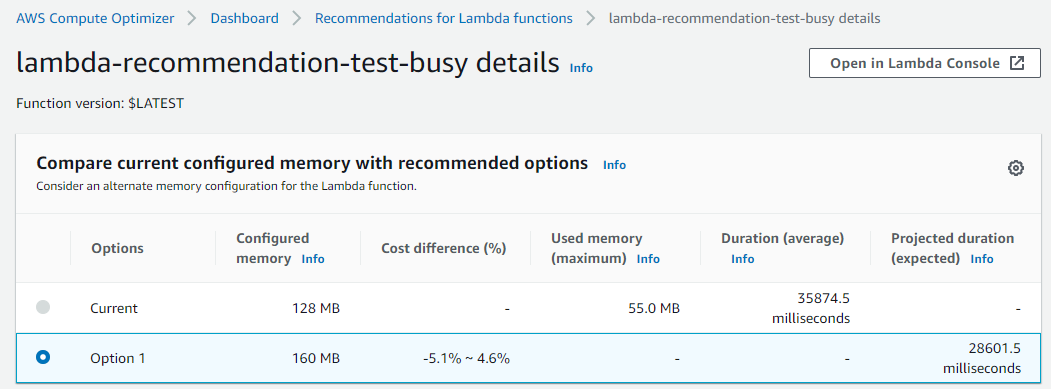
I provide the SNS FIFO topic Amazon Resource Name (ARN) as an environment variable in the function. This makes this function more portable to deploy in different environments and stages. The function’s AWS Identity and Access Management (IAM) policy grants permissions to publish messages to only this SNS topic:

  AntiCorruptionFunction:
    Type: AWS::Serverless::
    Properties:
      CodeUri: anti-corruption-service/
      Handler: app.lambda_handler
      Runtime: python3.7
      MemorySize: 256
      Environment:
        Variables:
          TOPIC_ARN: !Ref JobEventsTopic
      Policies:
        - SNSPublishMessagePolicy
            TopicName: !GetAtt JobEventsTopic.TopicName
      Events:
        Trigger:
          Type: 
          Properties:
            Schedule: 'rate(1 minute)'

The anti-corruption function uses features in the SNS publish API, which allows you to define a “MessageDeduplicationId” and a “MessageGroupId”. The “MessageDeduplicationId” is used to filter out duplicate messages, which are sent to SNS FIFO within in 5-minute deduplication interval. The “MessageGroupId” is required, as SNS FIFO processes all job events for the same message group in a strictly ordered manner, isolated from other message groups processed through the same topic.

Another important aspect in this implementation is the use of “MessageAttributes”. We define a message attribute with the name “eventType” and values like “JobCreated”, “JobSalaryUpdated”, and “JobDeleted”. This allows subscribers to define SNS filter policies to only receive certain events they are interested in:

import boto3
from datetime import datetime
import json
import os
import random
import uuid

TOPIC_ARN = os.environ['TOPIC_ARN']

sns = boto3.client('sns')

def lambda_handler(event, context):
    jobId = str(random.randrange(0, 1000))

    send_job_created_event(jobId)
    send_job_updated_event(jobId)
    send_job_deleted_event(jobId)
    return

def send_job_created_event(jobId):
    messageId = str(uuid.uuid4())

    response = sns.publish(
        TopicArn=TOPIC_ARN,
        Subject=f'Job {jobId} created',
        MessageDeduplicationId=messageId,
        MessageGroupId=f'JOB-{jobId}',
        Message={...},
        MessageAttributes = {
            'eventType': {
                'DataType': 'String',
                'StringValue': 'JobCreated'
            }
        }
    )
    print('sent message and received response: {}'.format(response))
    return

def send_job_updated_event(jobId):
    messageId = str(uuid.uuid4())

    response = sns.publish(...)
    print('sent message and received response: {}'.format(response))
    return

def send_job_deleted_event(jobId):
    messageId = str(uuid.uuid4())

    response = sns.publish(...)
    print('sent message and received response: {}'.format(response))
    return

Analytics service

The analytics service owns an SQS FIFO “AnalyticsJobEvents.fifo” queue which is subscribed to the SNS FIFO “JobEvents.fifo” topic. Following best practices, I define redrive policies for the SQS FIFO queue and the SNS FIFO subscription in the template:

  AnalyticsJobEventsQueue:
    Type: AWS::SQS::Queue
    Properties:
      QueueName: AnalyticsJobEvents.fifo
      FifoQueue: true
      RedrivePolicy:
        deadLetterTargetArn: !GetAtt AnalyticsJobEventsQueueDLQ.Arn
        maxReceiveCount: 3

  AnalyticsJobEventsQueueToJobEventsTopicSubscription:
    Type: AWS::SNS::Subscription
    Properties:
      Endpoint: !GetAtt AnalyticsJobEventsQueue.Arn
      Protocol: sqs
      RawMessageDelivery: true
      TopicArn: !Ref JobEventsTopic
      RedrivePolicy: !Sub '{"deadLetterTargetArn": "${AnalyticsJobEventsSubscriptionDLQ.Arn}"}'

The analytics function uses SQS FIFO as an event source for Lambda. The S3 bucket name is an environment variable for the function, which increases the code portability across environments and stages. The IAM policy for this function only grants permissions write objects to this S3 bucket:

  AnalyticsFunction:
    Type: AWS::Serverless::Function
    Properties:
      CodeUri: analytics-service/
      Handler: app.lambda_handler
      Runtime: python3.7
      MemorySize: 256
      Environment:
        Variables:
          BUCKET_NAME: !Ref AnalyticsBucket
      Policies:
        - S3WritePolicy:
            BucketName: !Ref AnalyticsBucket
      Events:
        Trigger:
          Type: SQS
          Properties:
            Queue: !GetAtt AnalyticsJobEventsQueue.Arn
            BatchSize: 10

View the function implementation at the GitHub repo.

Inventory service

The inventory service also owns an SQS FIFO “InventoryJobEvents.fifo” queue which is subscribed to the SNS FIFO “JobEvents.fifo” topic. It uses redrive policies for the SQS FIFO queue and the SNS FIFO subscription as well. This service is only interested in certain events, so uses an SNS filter policy to specify these events:

  InventoryJobEventsQueue:
    Type: AWS::SQS::Queue
    Properties:
      QueueName: InventoryJobEvents.fifo
      FifoQueue: true
      RedrivePolicy:
        deadLetterTargetArn: !GetAtt InventoryJobEventsQueueDLQ.Arn
        maxReceiveCount: 3

  InventoryJobEventsQueueToJobEventsTopicSubscription:
    Type: AWS::SNS::Subscription
    Properties:
      Endpoint: !GetAtt InventoryJobEventsQueue.Arn
      Protocol: sqs
      RawMessageDelivery: true
      TopicArn: !Ref JobEventsTopic
      FilterPolicy: '{"eventType":["JobCreated", "JobDeleted"]}'
      RedrivePolicy: !Sub '{"deadLetterTargetArn": "${InventoryJobEventsQueueSubscriptionDLQ.Arn}"}'

The inventory function also uses SQS FIFO as event source for Lambda. The DynamoDB table name is set as an environment variable, so the function can look up the name during initialization. The IAM policy grants read/write permissions for only this table:

  InventoryFunction:
    Type: AWS::Serverless::Function
    Properties:
      CodeUri: inventory-service/
      Handler: app.lambda_handler
      Runtime: python3.7
      MemorySize: 256
      Environment:
        Variables:
          TABLE_NAME: !Ref InventoryTable
      Policies:
        - DynamoDBCrudPolicy:
            TableName: !Ref InventoryTable
      Events:
        Trigger:
          Type: SQS
          Properties:
            Queue: !GetAtt InventoryJobEventsQueue.Arn
            BatchSize: 10

View the function implementation at the GitHub repo.

Conclusion

Amazon SNS FIFO topics can simplify the design of event-driven architectures and reduce custom code in building such applications.

By using the native integration with Amazon SQS FIFO queues, you can also build architectures that fan out to thousands of subscribers. This pattern helps achieve data consistency, deduplication, filtering, and encryption in near real time, using managed services.

For information on regional availability and service quotas, see SNS endpoints and quotas and SQS endpoints and quotas. For more information on the FIFO functionality, see SNS FIFO and SQS FIFO in their Developer Guides.

Optimizing the cost of serverless web applications

Post Syndicated from James Beswick original https://aws.amazon.com/blogs/compute/optimizing-the-cost-of-serverless-web-applications/

Web application backends are one of the most frequent types of serverless use-case for customers. The pay-for-value model can make it cost-efficient to build web applications using serverless tools.

While serverless cost is generally correlated with level of usage, there are architectural decisions that impact cost efficiency. The impact of these choices is more significant as your traffic grows, so it’s important to consider the cost-effectiveness of different designs and patterns.

This blog post reviews some common areas in web applications where you may be able to optimize cost. It uses the Happy Path web application as a reference example, which you can read about in the introductory blog post.

Serverless web applications generally use a combination of the services in the following diagram. I cover each of these areas to highlight common areas for cost optimization.

Serverless architecture by AWS service

The API management layer: Selecting the right API type

Most serverless web applications use an API between the frontend client and the backend architecture. Amazon API Gateway is a common choice since it is a fully managed service that scales automatically. There are three types of API offered by the service – REST APIs, WebSocket APIs, and the more recent HTTP APIs.

HTTP APIs offer many of the features in the REST APIs service, but the cost is often around 70% less. It supports Lambda service integration, JWT authorization, CORS, and custom domain names. It also has a simpler deployment model than REST APIs. This feature set tends to work well for web applications, many of which mainly use these capabilities. Additionally, HTTP APIs will gain feature parity with REST APIs over time.

The Happy Path application is designed for 100,000 monthly active users. It uses HTTP APIs, and you can inspect the backend/template.yaml to see how to define these in the AWS Serverless Application Model (AWS SAM). If you have existing AWS SAM templates that are using REST APIs, in many cases you can change these easily:

REST to HTTP API

Content distribution layer: Optimizing assets

Amazon CloudFront is a content delivery network (CDN). It enables you to distribute content globally across 216 Points of Presence without deploying or managing any infrastructure. It reduces latency for users who are geographically dispersed and can also reduce load on other parts of your service.

A typical web application uses CDNs in a couple of different ways. First, there is the distribution of the application itself. For single-page application frameworks like React or Vue.js, the build processes create static assets that are ideal for serving over a CDN.

However, these builds may not be optimized and can be larger than necessary. Many frameworks offer optimization plugins, and the JavaScript community frequently uses Webpack to bundle modules and shrink deployment packages. Similarly, any media assets used in the application build should be optimized. You can use tools like Lighthouse to analyze your web apps to find images that can be resized or compressed.

Optimizing images

The second common CDN use-case for web apps is for user-generated content (UGC). Many apps allow users to upload images, which are then shared with other users. A typical photo from a 12-megapixel smartphone is 3–9 MB in size. This high resolution is not necessary when photos are rendered within web apps. Displaying the high-resolution asset results in slower download performance and higher data transfer costs.

The Happy Path application uses a Resizer Lambda function to optimize these uploaded assets. This process creates two different optimized images depending upon which component loads the asset.

Image sizes in front-end applications

The upload S3 bucket shows the original size of the upload from the smartphone:

The distribution S3 bucket contains the two optimized images at different sizes:

Optimized images in the distribution S3 bucket

The distribution file sizes are 98–99% smaller. For a busy web application, using optimized image assets can make a significant difference to data transfer and CloudFront costs.

Additionally, you can convert to highly optimized file formats such as WebP to reduce file size even further. Not all browsers support this format, but you can use CSS on the frontend to fall back to other types if needed:

<img src="myImage.webp" onerror="this.onerror=null; this.src='myImage.jpg'">

The data layer

AWS offers many different database and storage options that can be useful for web applications. Billing models vary by service and Region. By understanding the data access and storage requirements of your app, you can make informed decisions about the right service to use.

Generally, it’s more cost-effective to store binary data in S3 than a database. First, when the data is uploaded, you can upload directly to S3 with presigned URLs instead of proxying data via API Gateway or another service.

If you are using Amazon DynamoDB, it’s best practice to store larger items in S3 and include a reference token in a table item. Part of DynamoDB pricing is based on read capacity units (RCUs). For binary items such as images, it is usually more cost-efficient to use S3 for storage.

Many web developers who are new to serverless are familiar with using a relational database, so choose Amazon RDS for their database needs. Depending upon your use-case and data access patterns, it may be more cost effective to use DynamoDB instead. RDS is not a serverless service so there are monthly charges for the underlying compute instance. DynamoDB pricing is based upon usage and storage, so for many web apps may be a lower-cost choice.

Integration layer

This layer includes services like Amazon SQS, Amazon SNS, and Amazon EventBridge, which are essential for decoupling serverless applications. Each of these have a request-based pricing component, where 64 KB of a payload is billed as one request. For example, a single SQS message with a 256 KB payload is billed as four requests. There are two optimization methods common for web applications.

1. Combine messages

Many messages sent to these services are much smaller than 64 KB. In some applications, the publishing service can combine multiple messages to reduce the total number of publish actions to SNS. Additionally, by either eliminating unused attributes in the message or compressing the message, you can store more data in a single request.

For example, a publishing service may be able to combine multiple messages together in a single publish action to an SNS topic:

  • Before optimization, a publishing service sends 100,000,000 1KB-messages to an SNS topic. This is charged as 100 million messages for a total cost of $50.00.
  • After optimization, the publishing service combines messages to send 1,562,500 64KB-messages to an SNS topic. This is charged as 1,562,500 messages for a total cost of $0.78.

2. Filter messages

In many applications, not every message is useful for a consuming service. For example, an SNS topic may publish to a Lambda function, which checks the content and discards the message based on some criteria. In this case, it’s more cost effective to use the native filtering capabilities of SNS. The service can filter messages and only invoke the Lambda function if the criteria is met. This lowers the compute cost by only invoking Lambda when necessary.

For example, an SNS topic receives messages about customer orders and forwards these to a Lambda function subscriber. The function is only interested in canceled orders and discards all other messages:

  • Before optimization, the SNS topic sends all messages to a Lambda function. It evaluates the message for the presence of an order canceled attribute. On average, only 25% of the messages are processed further. While SNS does not charge for delivery to Lambda functions, you are charged each time the Lambda service is invoked, for 100% of the messages.
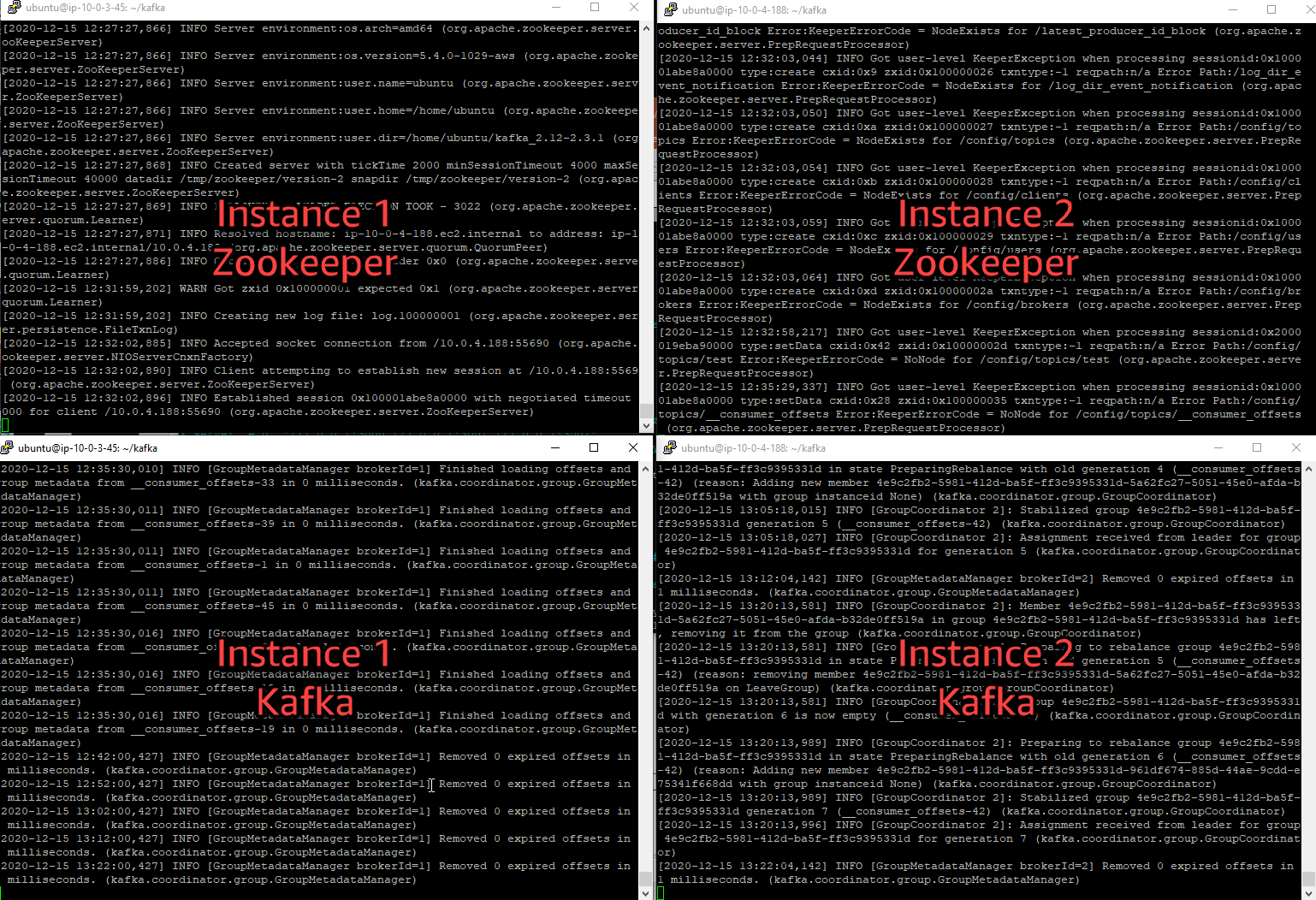
  • After optimization, using an SNS subscription filter policy, the SNS subscription filters for canceled orders and only forwards matching messages. Since the Lambda function is only invoked for 25% of the messages, this may reduce the total compute cost by up to 75%.

3. Choose a different messaging service

For complex filtering options based upon matching patterns, you can use EventBridge. The service can filter messages based upon prefix matching, numeric matching, and other patterns, combining several rules into a single filter. You can create branching logic within the EventBridge rule to invoke downstream targets.

EventBridge offers a broader range of targets than SNS destinations. In cases where you publish from an SNS topic to a Lambda function to invoke an EventBridge target, you could use EventBridge instead and eliminate the Lambda invocation. For example, instead of routing from SNS to Lambda to AWS Step Functions, instead create an EventBridge rule that routes events directly to a state machine.

Business logic layer

Step Functions allows you to orchestrate complex workflows in serverless applications while eliminating common boilerplate code. The Standard Workflow service charges per state transition. Express Workflows were introduced in December 2019, with pricing based on requests and duration, instead of transitions.

For workloads that are processing large numbers of events in shorter durations, Express Workflows can be more cost-effective. This is designed for high-volume event workloads, such as streaming data processing or IoT data ingestion. For these cases, compare the cost of the two workflow types to see if you can reduce cost by switching across.

Lambda is the on-demand compute layer in serverless applications, which is billed by requests and GB-seconds. GB-seconds is calculated by multiplying duration in seconds by memory allocated to the function. For a function with a 1-second duration, invoked 1 million times, here is how memory allocation affects the total cost in the US East (N. Virginia) Region:

Memory (MB) GB/S Compute cost Total cost
128 125,000 $ 2.08 $ 2.28
512 500,000 $ 8.34 $ 8.54
1024 1,000,000 $ 16.67 $ 16.87
1536 1,500,000 $ 25.01 $ 25.21
2048 2,000,000 $ 33.34 $ 33.54
3008 2,937,500 $ 48.97 $ 49.17

There are many ways to optimize Lambda functions, but one of the most important choices is memory allocation. You can choose between 128 MB and 3008 MB, but this also impacts the amount of virtual CPU as memory increases. Since total cost is a combination of memory and duration, choosing more memory can often reduce duration and lower overall cost.

Instead of manually setting the memory for a Lambda function and running executions to compare duration, you can use the AWS Lambda Power Tuning tool. This uses Step Functions to run your function against varying memory configurations. It can produce a visualization to find the optimal memory setting, based upon cost or execution time.

Optimizing costs with the AWS Lambda Power Tuning tool

Conclusion

Web application backends are one of the most popular workload types for serverless applications. The pay-per-value model works well for this type of workload. As traffic grows, it’s important to consider the design choices and service configurations used to optimize your cost.

Serverless web applications generally use a common range of services, which you can logically split into different layers. This post examines each layer and suggests common cost optimizations helpful for web app developers.

To learn more about building web apps with serverless, see the Happy Path series. For more serverless learning resources, visit https://serverlessland.com.

ICYMI: Serverless Q3 2020

Post Syndicated from James Beswick original https://aws.amazon.com/blogs/compute/icymi-serverless-q3-2020/

Welcome to the 11th edition of the AWS Serverless ICYMI (in case you missed it) quarterly recap. Every quarter, we share all of the most recent product launches, feature enhancements, blog posts, webinars, Twitch live streams, and other interesting things that you might have missed!

Q3 Calendar

In case you missed our last ICYMI, checkout what happened last quarter here.

AWS Lambda

MSK trigger in Lambda

In August, we launched support for using Amazon Managed Streaming for Apache Kafka (Amazon MSK) as an event source for Lambda functions. Lambda has existing support for processing streams from Kinesis and DynamoDB. Now you can process data streams from Amazon MSK and easily integrate with downstream serverless workflows. This integration allows you to process batches of records, one per partition at a time, and scale concurrency by increasing the number of partitions in a topic.

We also announced support for Java 8 (Corretto) in Lambda, and you can now use Amazon Linux 2 for custom runtimes. Amazon Linux 2 is the latest generation of Amazon Linux and provides an application environment with access to the latest innovations in the Linux ecosystem.

Amazon API Gateway

API integrations

API Gateway continued to launch new features for HTTP APIs, including new integrations for five AWS services. HTTP APIs can now route requests to AWS AppConfig, Amazon EventBridge, Amazon Kinesis Data Streams, Amazon SQS, and AWS Step Functions. This makes it easy to create webhooks for business logic hosted in these services. The service also expanded the authorization capabilities, adding Lambda and IAM authorizers, and enabled wildcards in custom domain names. Over time, we will continue to improve and migrate features from REST APIs to HTTP APIs.

In September, we launched mutual TLS for both regional REST APIs and HTTP APIs. This is a new method for client-to-server authentication to enhance the security of your API. It can protect your data from exploits such as client spoofing or man-in-the-middle. This enforces two-way TLS (or mTLS) which enables certificate-based authentication both ways from client-to-server and server-to-client.

Enhanced observability variables now make it easier to troubleshoot each phase of an API request. Each phase from AWS WAF through to integration adds latency to a request, returns a status code, or raises an error. Developers can use these variables to identify the cause of latency within the API request. You can configure these variables in AWS SAM templates – see the demo application to see how you can use these variables in your own application.

AWS Step Functions

X-Ray tracing in Step Functions

We added X-Ray tracing support for Step Functions workflows, giving you full visibility across state machine executions, making it easier to analyze and debug distributed applications. Using the service map view, you can visually identify errors in resources and view error rates across workflow executions. You can then drill into the root cause of an error. You can enable X-Ray in existing workflows by a single-click in the console. Additionally, you can now also visualize Step Functions workflows directly in the Lambda console. To see this new feature, open the Step Functions state machines page in the Lambda console.

Step Functions also increased the payload size to 256 KB and added support for string manipulation, new comparison operators, and improved output processing. These updates were made to the Amazon States Languages (ASL), which is a JSON-based language for defining state machines. The new operators include comparison operators, detecting the existence of a field, wildcarding, and comparing two input fields.

AWS Serverless Application Model (AWS SAM)

AWS SAM goes GA

AWS SAM is an open source framework for building serverless applications that converts a shorthand syntax into CloudFormation resources.

In July, the AWS SAM CLI became generally available (GA). This tool operates on SAM templates and provides developers with local tooling for building serverless applications. The AWS SAM CLI offers a rich set of tools that enable developers to build serverless applications quickly.

AWS X-Ray

X-Ray Insights

X-Ray launched a public preview of X-Ray Insights, which can help produce actionable insights for anomalies within your applications. Designed to make it easier to analyze and debug distributed applications, it can proactively identify issues caused by increases in faults. Using the incident timeline, you can visualize when the issue started and how it developed. The service identifies a probable root cause along with any anomalous services. There is no additional instrumentation needed to use X-Ray Insights – you can enable this feature within X-Ray Groups.

Amazon Kinesis

In July, Kinesis announced support for data delivery to generic HTTP endpoints, and service providers like Datadog, New Relic, MongoDB, and Splunk. Use the Amazon Kinesis console to configure your data producers to send data to Amazon Kinesis Data Firehose and specify one of these new delivery targets. Additionally, Amazon Kinesis Data Firehose is now available in the Europe (Milan) and Africa (Cape Town) AWS Regions.

Serverless Posts

Our team is always working to build and write content to help our customers better understand all our serverless offerings. Here is a list of the latest posts published to the AWS Compute Blog this quarter.

July

August

September

Tech Talks & Events

We hold several AWS Online Tech Talks covering serverless tech talks throughout the year, so look out for them in the Serverless section of the AWS Online Tech Talks page. We also regularly deliver talks at conferences and events around the globe, regularly join in on podcasts, and record short videos you can find to learn in quick byte sized chunks.

Here are some from Q3:

Learning Paths

Ask Around Me

Learn How to Build and Deploy a Web App Backend that Supports Authentication, Geohashing, and Real-Time Messaging

Ask Around Me is an example web app that shows how to build authenticaton, geohashing and real-time messaging into your serverless applications. This learning path includes videos and learning resources to help walk you through the application.

Build a Serverless Web App for a Theme Park

This five-video learning path walks you through the Innovator Island workshop, and provides learning resources for building realtime serverless web applications.

Live streams

July

August

September

There are also a number of other helpful video series covering serverless available on the Serverless Land YouTube channel.

New AWS Serverless Heroes

Serverless Heroes Q3 2020

We’re pleased to welcome Angela Timofte, Luca Bianchi, Matthieu Napoli, Peter Hanssens, Sheen Brisals, and Tom McLaughlin to the growing list of AWS Serverless Heroes.

The AWS Hero program is a selection of worldwide experts that have been recognized for their positive impact within the community. They share helpful knowledge and organize events and user groups. They’re also contributors to numerous open-source projects in and around serverless technologies.

New! The Serverless Land website

Serverless Land

To help developers find serverless learning resources, we have curated a list of serverless blogs, videos, events and training programs at a new site, Serverless Land. This is regularly updated with new information – you can subscribe to the RSS feed for automatic updates, follow the LinkedIn page or subscribe to the YouTube channel.

Still looking for more?

The Serverless landing page has lots of information. The Lambda resources page contains case studies, webinars, whitepapers, customer stories, reference architectures, and even more Getting Started tutorials.

You can also follow all of us on Twitter to see the latest news, follow conversations, and interact with the team.