It takes just a few minutes to turn on and configure Resource Explorer for an entire organization or a specific organizational unit (OU) and use simple free-form text and filtered searches to find relevant AWS resources across accounts and Regions.
When operating in a well-architected manner, multiple AWS accounts are used to help isolate and manage business applications and data. You can now use Resource Explorer to simplify how you explore your resources across accounts and act on them at scale. For example, Resource Explorer can help you locate impacted resources across your entire organization when investigating increased operational costs, troubleshooting a performance issue, or remediating a security alert.
Let’s see how this works in practice.
Setting up multi-account search You can set up multi-account search for your organization in four steps:
Configure Resource Explorer in every account in the organization or in the OU you want to search through. You can do that in just a few clicks using AWS Systems Manager Quick Setup. Optionally, you can use AWS CloudFormation, or other management tools you are comfortable with.
It is not mandatory, but we suggest creating a delegated admin account for AWS Account Management. Then, to centralize all the required permissions for multi-account creation, we recommend using the delegated admin account to create Resource Explorer multi-account views.
Finally, you can create a multi-account view to start searching across the organization.
Create a multi-account view I already implemented the first three steps in the previous list. Using the delegated admin account, I go to the Resource Explorer console. There, I choose Views in the Explore resources section and create a view.
I enter a name for the view and select Organization-wide resources visibility. In this way, I can allow visibility of resources located in accounts across my entire organization or in specific OUs. For this view, I select the whole organization.
For the Region, I select the one where I have the aggregator index. The aggregator index contains a replicated copy of the local index in every other Region where Resource Explorer has been turned on. Optionally, I can use a filter to limit which resources should be included in this view. I choose to include all resources and additional resource attributes such as tags.
Then, I complete the creation of the view. Now, by granting access to the view, I can control who can access what resource information in Resource Explorer.
Using multi-account search To try the new multi-account view, I choose Resource search from the Explore resources section of the navigation pane. In my query, I want to see if there are Amazon ElastiCache resources for an old version of Redis. I type elasticache:* redis3.2 in the Query field.
In the results, I see the different AWS accounts and Regions where these resources are based. For resources in my account, there is a link in the first column that opens that resource in the console. For resources in other accounts, I can use the console with the appropriate account and service to get more information or take action.
Things to know Multi-account search is available in the following AWS Regions: [[ Regions ]].
There is no additional charge for using AWS Resource Explorer, including for multi-account searches.
To share views with other accounts in an organization, we suggest you use the delegated admin account to create the view with the necessary visibility in terms of resources, Regions, and accounts within the organization and then use AWS Resource Access Manager to share access to the view. For example, you can create a view for a specific OU and then share the view with an account in that OU.
Today, we’re making available a new capability of AWS GlueData Catalog to allow automatic compaction of transactional tables in the Apache Iceberg format. This allows you to keep your transactional data lake tables always performant.
Data lakes were initially designed primarily for storing vast amounts of raw, unstructured, or semi structured data at a low cost, and they were commonly associated with big data and analytics use cases. Over time, the number of possible use cases for data lakes has evolved as organizations have recognized the potential to use data lakes for more than just reporting, requiring the inclusion of transactional capabilities to ensure data consistency.
Data lakes also play a pivotal role in data quality, governance, and compliance, particularly as data lakes store increasing volumes of critical business data, which often requires updates or deletion. Data-driven organizations also need to keep their back end analytics systems in near real-time sync with customer applications. This scenario requires transactional capabilities on your data lake to support concurrent writes and reads without data integrity compromise. Finally, data lakes now serve as integration points, necessitating transactions for safe and reliable data movement between various sources.
To support transactional semantics on data lake tables, organizations adopted an open table format (OTF), such as Apache Iceberg. Adopting OTF formats comes with its own set of challenges: transforming existing data lake tables from Parquet or Avro formats to an OTF format, managing a large number of small files as each transaction generates a new file on Amazon Simple Storage Service (Amazon S3), or managing object and meta-data versioning at scale, just to name a few. Organizations are typically building and managing their own data pipelines to address these challenges, leading to additional undifferentiated work on infrastructure. You need to write code, deploy Spark clusters to run your code, scale the cluster, manage errors, and so on.
When talking with our customers, we learned that the most challenging aspect is the compaction of individual small files produced by each transactional write on tables into a few large files. Large files are faster to read and scan, making your analytics jobs and queries faster to execute. Compaction optimizes the table storage with larger-sized files. It changes the storage for the table from a large number of small files to a small number of larger files. It reduces metadata overhead, lowers network round trips to S3, and improves performance. When you use engines that charge for the compute, the performance improvement is also beneficial to the cost of usage as the queries require less compute capacity to run.
But building custom pipelines to compact and optimize Iceberg tables is time-consuming and expensive. You have to manage the planning, provision infrastructure, and schedule and monitor the compaction jobs. This is why we launch automatic compaction today.
Let’s see how it works To show you how to enable and monitor automatic compaction on Iceberg tables, I start from the AWS Lake Formation page or the AWS Glue page of the AWS Management Console. I have an existing database with tables in the Iceberg format. I execute transactions on this table over the course of a couple of days, and the table starts to fragment into small files on the underlying S3 bucket.
I select the table on which I want to enable compaction, and then I select Enable compaction.
An IAM role is required to pass permissions to the Lake Formation service to access my AWS Glue tables, S3 buckets, and CloudWatch log streams. Either I choose to create a new IAM role, or I select an existing one. Your existing role must have lakeformation:GetDataAccess and glue:UpdateTable permissions on the table. The role also needs logs:CreateLogGroup, logs:CreateLogStream, logs:PutLogEvents, to “arn:aws:logs:*:your_account_id:log-group:/aws-lakeformation-acceleration/compaction/logs:*“. The role trusted permission service name must be set to glue.amazonaws.com.
Then, I select Turn on compaction. Et voilà! Compaction is automatic; there is nothing to manage on your side.
The service starts to measure the table’s rate of change. As Iceberg tables can have multiple partitions, the service calculates this change rate for each partition and schedules managed jobs to compact the partitions where this rate of change breaches a threshold value.
When the table accumulates a high number of changes, you will be able to view the Compaction history under the Optimization tab in the console.
You can also monitor the whole process either by observing the number of files on your S3 bucket (use the NumberOfObjects metric) or one of the two new Lake Formation metrics: numberOfBytesCompacted or numberOfFilesCompacted.
In addition to the AWS console, there are six new APIs that expose this new capability:CreateTableOptimizer, BatchGetTableOptimizer , UpdateTableOptimizer, DeleteTableOptimizer, GetTableOptimizer, and ListTableOptimizerRuns. These APIs are available in the AWS SDKs and AWS Command Line Interface (AWS CLI). As usual, don’t forget to update the SDK or the CLI to their latest versions to get access to these new APIs.
Things to know As we launched this new capability today, there are a couple of additional points I’d like to share with you:
Compaction will not merge delete files. Tables with deleted data will be compacted, but data files that have delete files associated with them will be skipped.
S3 buckets configured for exclusive access from a VPC through VPC endpoints are not supported.
Apache Iceberg tables using Apache Parquet to store the data can be compacted.
Availability This new capability is available starting today in all AWS Regions where AWS Glue Data Catalog is available.
The pricing metric is the data processing unit (DPU), a relative measure of processing power that consists of 4 vCPUs of compute capacity and 16 GB of memory. There is a charge per DPU/hours metered by second, with a minimum of one minute.
Now it’s time to decommission your existing compaction data pipeline and switch to this new, entirely managed capability today.
As 2023 comes to an end, we’re celebrating our final Heroes cohort launch of the year! These technical experts are passionate about helping their local communities build faster on AWS—they’re focused on sharing best practices, solving problems, and even more. We’re thrilled to have them join the AWS Heroes program, and recognizing them for their contributions to the greater AWS community.
Please meet our newest Heroes!
Emin Alemdar – Izmir, Turkey
Container Hero Emin Alemdar is a Solutions Architect at Spacelift where he produces solutions related to Kubernetes, Cloud technologies, and Cloud Native Transformation. In general, his work focuses on these services and technologies, and he shares best practices with the AWS community. Additionally, Emin is a CNCF Ambassador and is part of the HashiCorp Ambassador Program within the open source community.
Richard Fan – Hong Kong
Security Hero Richard Fan is a Security Engineer at ExpressVPN. He is dedicated to helping builders easily adopt AWS, and shares best practices around streamlines for cloud governance. Richard has also developed different tools to simplify the experience with AWS security services, such as his nitro-enclave-python-demo project, which helps builders get started on AWS Nitro Enclaves and has been adopted by some AWS workshops. Furthermore, Richard promotes the concept and use cases of enclave technology by partnering with multiple companies to review their AWS Nitro Enclaves offering.
Takuya Tachibana – Misawa, Japan
Community Hero Takuya Tachibana is the CEO of Heptagon inc. and Director of DigitalCube Co. Ltd. Since 2012, he has been contributing to the Japan AWS User Group (JAWS-UG), and he was the leader from 2016-2017 for all of the JAWS-UGs, representing and overseeing every chapter in Japan. Tachibana has been a speaker at over 100 community and cloud events throughout all of Japan, including AWS Summit Seoul, AWS Summit Beijing, and AWS Community Day APAC.
Learn More
To learn more about the AWS Heroes program or to connect with a Hero near you, please visit the AWS Heroes website.
The AWS Identity and Access Management (IAM) authentication feature in Amazon Managed Streaming for Apache Kafka (Amazon MSK) now supports all programming languages. Administrators can simplify and standardize access control to Kafka resources using IAM. This support is based on SASL/OUATHBEARER, an open standard for authorization and authentication. Both Amazon MSK provisioned and serverless cluster types support the new Amazon MSK IAM expansion to all programming languages.
In this post, we show how you can connect your applications to MSK clusters with minimal code changes using the open-sourced client helper libraries and code samples for popular languages, including Java, Python, Go, JavaScript, and .NET. You can also use standard IAM access controls such as temporary role-based credentials and precisely scoped permission policies more broadly with the multiple language support on Amazon MSK.
For clients that need to connect from other VPCs to an MSK cluster, whether in a same or a different AWS account, you can enable multi-VPC private connectivity and cluster policy support. IAM access control via cluster policy helps you manage all access to the cluster and topics in one place. For example, you can control which IAM principals have write access to certain topics, and which principals can only read from them. Users who are using IAM client authentication can also add permissions for required kafka-cluster actions in the cluster resource policy.
Solution overview
You can get started by using IAM principals as identities for your Apache Kafka clients and define identity policies to provide them precisely scoped access permissions. After IAM authentication is enabled for your cluster, you can configure client applications to use the IAM authentication with minimal code changes.
The code changes allow your clients to use SASL/OAUTHBEARER, a Kafka supported token-based access mechanism, to pass the credentials required for IAM authentication. In this post, we show how you can make these code changes by using the provided code libraries and examples.
With this launch, new code libraries for the following programming languages are available in the AWS GitHub repo:
The following diagram shows the conceptual process flow of using SASL/OAUTHBEARER with IAM access control for non-Java clients.
The workflow contains the following steps:
The client generates an OAUTHBEARER token with the help of the provided library. The token contains a signed base64 encoded transformation of your IAM identity credentials.
The client sends this to Amazon MSK using the IAM bootstrap broker addresses along with its request to access Apache Kafka resources.
The MSK broker decodes the OATHBEARER token, validates the credentials, and checks if the client is authorized to perform the requested action according to the policy attached to the IAM identity.
When the token expires, the client Kafka library automatically refreshes the token by making another call to the specified token provider.
Create IAM identities and policies
IAM access control for non-Java clients is supported for MSK clusters with Kafka version 2.7.1 and above. Before you start, you need to configure the IAM identities and policies that define the client’s permissions to access resources on the cluster. The following is an example authorization policy for a cluster named MyTestCluster. To understand the semantics of the action and resource elements, see Semantics of actions and resources.
You need to enable the IAM access control authentication scheme for your MSK provisioned cluster and wait until the cluster finishes updating and turns to the Active state. This is because SASL/OAUTHBEARER uses the same broker addresses for IAM authentication.
Configure the client
You should make code changes to your application that allow the clients to use SASL/OAUTHBEARER to pass the credentials required for IAM authentication. Next, update your application to use the bootstrap server addresses for IAM authentication. You also need to make sure the security group associated with your MSK cluster has an inbound rule allowing the traffic from the client applications in the same VPC as the cluster to the TCP port 9098.
You must use a Kafka client library that provides support for SASL with OAUTHBRARER authentication.
In this post, we use the JavaScript programming language. We also use https://github.com/tulios/kafkajs as our Kafka client library.
Amazon MSK provides you with a new code library per each language that generates the OAUTHBEARER token.
To get started working with the Amazon MSK IAM SASL signer for JavaScript with your Kafka client library, run the following command:
Next, your application code needs to define a token provider that wraps the function that generates new tokens:
async function oauthBearerTokenProvider(region) {
    // Uses AWS Default Credentials Provider Chain to fetch credentials
    const authTokenResponse = await generateAuthToken({ region });
    return {
        value: authTokenResponse.token
    }
}
Specify security_protocol as SASL_SSL and sasl_mechanism as oauthbearer in your JavaScript Kafka client properties, and pass the token provider in the configuration object:
You are now finished with all the code changes. For more examples of generating auth tokens or for more troubleshooting tips, refer to the following GitHub repo.
Conclusion
IAM access control for Amazon MSK enables you to handle both authentication and authorization for your MSK cluster. This eliminates the need to use one mechanism for authentication and another for authorization. For example, when a client tries to write to your cluster, Amazon MSK uses IAM to check whether that client is an authenticated identity and also whether it is authorized to produce to your cluster.
With today’s launch, Amazon MSK IAM authentication now supports all programming languages. This means you can connect your applications in all languages without worrying about implementing separate authentication and authorization mechanisms. For workloads that require Amazon MSK multi-VPC private connectivity and cluster policy support, you can now simplify connectivity to your MSK brokers and manage all access to the cluster and topics in one place that is your cluster policy.
For further reading on Amazon MSK, visit the official product page.
About the author
Ali Alemi is a Streaming Specialist Solutions Architect at AWS. Ali advises AWS customers with architectural best practices and helps them design real-time analytics data systems that are reliable, secure, efficient, and cost-effective. He works backward from customer’s use cases and designs data solutions to solve their business problems. Prior to joining AWS, Ali supported several public sector customers and AWS consulting partners in their application modernization journey and migration to the cloud.
Today, we’re announcing the availability of Meta’s Llama 2 Chat 13B large language model (LLM) on Amazon Bedrock. With this launch, Amazon Bedrock becomes the first public cloud service to offer a fully managed API for Llama 2, Meta’s next-generation LLM. Now, organizations of all sizes can access Llama 2 Chat models on Amazon Bedrock without having to manage the underlying infrastructure. This is a step change in accessibility.
Llama 2 is a family of publicly available LLMs by Meta. The Llama 2 base model was pre-trained on 2 trillion tokens from online public data sources. According to Meta, the training of Llama 2 13B consumed 184,320 GPU/hour. That’s the equivalent of 21.04 years of a single GPU, not accounting for bissextile years.
Built on top of the base model, the Llama 2 Chat model is optimized for dialog use cases. It is fine-tuned with over 1 million human annotations (a technique known as reinforcement learning from human feedback or RLHF) and has undergone testing by Meta to identify performance gaps and mitigate potentially problematic responses in chat use cases, such as offensive or inappropriate responses.
To promote a responsible, collaborative AI innovation ecosystem, Meta established a range of resources for all who use Llama 2: individuals, creators, developers, researchers, academics, and businesses of any size. In particular, I like the Meta Responsible Use Guide, a resource for developers that provides best practices and considerations for building products powered by LLMs in a responsible manner, covering various stages of development from inception to deployment. This guide fits well in the set of AWS tools and resources to build AI responsibly.
You can now integrate the LLama 2 Chat model in your applications written in any programming language by calling the Amazon Bedrock API or using the AWS SDKs or the AWS Command Line Interface (AWS CLI).
Llama 2 Chat in action Those of you who read the AWS News blog regularly know we like to show you the technologies we write about. So let’s write code to interact with Llama2.
I was lucky enough to talk at the AWS UG Perú Conf a few weeks ago. Jeff and Marcia were there too. Jeff opened the conference with an inspiring talk about generative AI, and he used a wall of generated images of llamas, the emblematic animal from Perú. So what better subject to talk about with Llama 2 Chat than llamas?
(And before writing code, I can’t resist sharing two photos of llamas I took during my visit to Machu Picchu)
To get started with a new model on Bedrock, I first navigate to Amazon Bedrock on the console. I select Model access on the bottom left pane, then select the Edit button on the top right side, and enable access to the Llama 2 Chat model.
In the left navigation bar, under Playgrounds, I select Chat to interact with the model without writing any code.
Now that I know I can access the model, I open a code editor on my laptop. I assume you have the AWS Command Line Interface (AWS CLI) configured, which will allow the AWS SDK to locate your AWS credentials. I use Python for this demo, but I want to show that Bedrock can be called from any language. I also share a public gist with the same code sample written in the Swift programming language.
Returning to Python, I first run the ListFoundationModels API call to discover the modelId for Llama 2 Chat 13B.
I select meta-llama2-chat-13b model ID and write the code to send a prompt to the LLama 2 Chat 13B model.
import boto3
import json

llamaModelId = 'meta.llama2-13b-chat-v1'
prompt = "What is the difference between a llama and an alpaca?"

llamaPayload = json.dumps({
	'prompt': prompt,
    'max_gen_len': 512,
	'top_p': 0.9,
	'temperature': 0.2
})

bedrock_runtime = boto3.client(
    service_name='bedrock-runtime',
    region_name='us-east-1'
)
response = bedrock_runtime.invoke_model(
    body=llamaPayload,
    modelId=llamaModelId,
    accept='application/json',
    contentType='application/json'
)
body = response.get('body').read().decode('utf-8')
response_body = json.loads(body)
print(response_body['generation'].strip())
The response is printed:
Llamas and alpacas are both members of the camelid family,
but they are different species with distinct physical and behavioral characteristics.
Here are some of the main differences: (...)
I redacted the answer for brevity.
You can tune the different request parameters to see how they influence the response.
Optimizing your prompts To get the best results out of the Llama 2 Chat model, you can experiment with a couple of prompt engineering techniques, such as using roles or chain-of-thought prompts.
Using roles, you tell the model how to behave by giving it a role and instructions before asking your question. For example:
Prompt: You are a teacher. You explain things for six-year old kids.
What is the difference between a llama and an alpaca?

Answer: Great question! Both llamas and alpacas are animals that live in South America, and they look a little bit similar. But there are some differences that we can talk about.
First, let's talk about their fur. Llamas have longer fur than alpacas. It's like they have a big, fluffy coat that helps them stay warm in the cold weather. Alpacas, on the other hand, have shorter fur that's a little bit smoother.
Another difference is their ears. Llamas have banana-shaped ears that are really big, while alpacas have small, triangular ears.
Finally, let's talk about their size. Llamas are generally bigger than alpacas. They can grow up to 6 feet tall and weigh a lot, while alpacas are usually smaller, only growing up to 3 feet tall.
So, those are some of the main differences between llamas and alpacas. They're both really cool animals, and it's fun to learn about them!
With chain-of-thought prompts, you ask the model to explain each step that led to the answer. For example:
Prompt: You are a a very intelligent bot with exceptional critical thinking.
I went to the market and bought 10 apples. I gave 2 apples to your friend and 2 to the helper. I then went and bought 5 more apples and ate 1. How many apples did I remain with?
Let's think step by step.

Answer:
1. You went to the market and bought 10 apples.
2. You gave 2 apples to your friend.
3. You gave 2 apples to the helper.
4. You went back to the market and bought 5 more apples.
5. You ate 1 apple.
Now, let's count how many apples you have:
10 apples (from the first trip to the market) - 2 apples (given to your friend) - 2 apples (given to the helper) = 6 apples
6 apples + 5 apples (from the second trip to the market) = 11 apples
11 apples - 1 apple (that you ate) = 10 apples
Therefore, you remain with 10 apples.
I hope this helps! Do you have any more questions or would you like to play again?
Availability The Llama 2 Chat model is available today for all AWS customers in two of the AWS Regions where Bedrock is available: US East (N. Virginia) and US West (Oregon).
You will be charged for model inference. You can choose to be charged on a pay-as-you-go basis, with no upfront or recurring fees; AWS charges per processed input and output tokens. Or you can provision sufficient throughput to meet your application’s performance requirements in exchange for a time-based term commitment. The Bedrock pricing page has the details.
With this information, you’re prepared to start using Amazon Bedrock and the Llama 2 Chat model in your applications.
Amazon Bedrock is a fully managed service that offers a choice of high-performing foundation models (FMs) from leading AI companies, including AI21 Labs, Anthropic, Cohere, Meta, Stability AI, and Amazon, along with a broad set of capabilities to build generative AI applications, simplifying the development while maintaining privacy and security. With this launch, Amazon Bedrock further expands the breadth of model choices to help you build and scale enterprise-ready generative AI. You can read more about Amazon Bedrock in Antje’s post here.
Command is Cohere’s flagship text generation model. It is trained to follow user commands and to be useful in business applications. Embed is a set of models trained to produce high-quality embeddings from text documents.
Embeddings are one of the most fascinating concepts in machine learning (ML). They are central to many applications that process natural language, recommendations, and search algorithms. Given any type of document, text, image, video, or sound, it is possible to transform it into a suite of numbers, known as a vector. Embeddings refer specifically to the technique of representing data as vectors in such a way that it captures meaningful information, semantic relationships, or contextual characteristics. In simple terms, embeddings are useful because the vectors representing similar documents are “close” to each other. In more formal terms, embeddings translate semantic similarity as perceived by humans to proximity in a vector space. Embeddings are typically generated through training algorithms or models.
Cohere Embed is a family of models trained to generate embeddings from text documents. Cohere Embed comes in two forms, an English language model and a multilingual model, both of which are now available in Amazon Bedrock.
There are three main use cases for text embeddings:
Semantic searches – Embeddings enable searching collections of documents by meaning, which leads to search systems that better incorporate context and user intent compared to existing keyword-matching systems.
Text Classification – Build systems that automatically categorize text and take action based on the type. For example, an email filtering system might decide to route one message to sales and escalate another message to tier-two support.
Retrieval Augmented Generation (RAG) – Improve the quality of a large language model (LLM) text generation by augmenting your prompts with data provided in context. The external data used to augment your prompts can come from multiple data sources, such as document repositories, databases, or APIs.
Imagine you have hundreds of documents describing your company policies. Due to the limited size of prompts accepted by LLMs, you have to select relevant parts of these documents to be included as context into prompts. The solution is to transform all your documents into embeddings and store them in a vector database, such as OpenSearch.
When a user wants to query this corpus of documents, you transform the user’s natural language query into a vector and perform a similarity search on the vector database to find the most relevant documents for this query. Then, you embed (pun intended) the original query from the user and the relevant documents surfaced by the vector database together in a prompt for the LLM. Including relevant documents in the context of the prompt helps the LLM generate more accurate and relevant answers.
You can now integrate Cohere Command Light and Embed models in your applications written in any programming language by calling the Bedrock API or using the AWS SDKs or the AWS Command Line Interface (AWS CLI).
Cohere Embed in action Those of you who regularly read the AWS News Blog know we like to show you the technologies we write about.
We’re launching three distinct models today: Cohere Command Light, Cohere Embed English, and Cohere Embed multilingual. Writing code to invoke Cohere Command Light is no different than for Cohere Command, which is already part of Amazon Bedrock. So for this example, I decided to show you how to write code to interact with Cohere Embed and review how to use the embedding it generates.
To get started with a new model on Bedrock, I first navigate to the AWS Management Console and open the Bedrock page. Then, I select Model access on the bottom left pane. Then I select the Edit button on the top right side, and I enable access to the Cohere model.
Now that I know I can access the model, I open a code editor on my laptop. I assume you have the AWS Command Line Interface (AWS CLI) configured, which will allow the AWS SDK to locate your AWS credentials. I use Python for this demo, but I want to show that Bedrock can be called from any language. I also share a public gist with the same code sample written in the Swift programming language.
Back to Python, I first run the ListFoundationModels API call to discover the modelId for Cohere Embed.
I select cohere.embed-english-v3 model ID and write the code to transform a text document into an embedding.
cohereModelId = 'cohere.embed-english-v3'

# For the list of parameters and their possible values,
# check Cohere's API documentation at https://docs.cohere.com/reference/embed

coherePayload = json.dumps({
     'texts': ["This is a test document", "This is another document"],
     'input_type': 'search_document',
     'truncate': 'NONE'
})

bedrock_runtime = boto3.client(
    service_name='bedrock-runtime',
    region_name='us-east-1'
)
print("\nInvoking Cohere Embed...")
response = bedrock_runtime.invoke_model(
    body=coherePayload,
    modelId=cohereModelId,
    accept='application/json',
    contentType='application/json'
)

body = response.get('body').read().decode('utf-8')
response_body = json.loads(body)
print(np.array(response_body['embeddings']))
Now that I have the embedding, the next step depends on my application. I can store this embedding in a vector store or use it to search similar documents in an existing store, and so on.
To learn more, I highly recommend following the hands-on instructions provided by this section of the Amazon Bedrock workshop. This is an end-to-end example of RAG. It demonstrates how to load documents, generate embeddings, store the embeddings in a vector store, perform a similarity search, and use relevant documents in a prompt sent to an LLM.
Availability The Cohere Embed models are available today for all AWS customers in two of the AWS Regions where Amazon Bedrock is available: US East (N. Virginia) and US West (Oregon).
AWS charges for model inference. For Command Light, AWS charges per processed input or output token. For Embed models, AWS charges per input tokens. You can choose to be charged on a pay-as-you-go basis, with no upfront or recurring fees. You can also provision sufficient throughput to meet your application’s performance requirements in exchange for a time-based term commitment. The Amazon Bedrock pricing page has the details.
With this information, you’re ready to use text embeddings with Amazon Bedrock and the Cohere Embed models in your applications.
This week, it was really difficult to choose what to recap here because, as we’re getting closer to AWS re:Invent, service teams are delivering new capabilities at an incredible pace.
Last week’s launches Here are some of the launches that caught my attention last week:
Other AWS news Some other news and blog posts that you might have missed:
AWS Local Zones Credit Program – If you have low-latency or data residency requirements for your application, our Local Zones Credit Program can get you started. Fill out our form to receive $500 in AWS credits and apply it to a Local Zones workload.
Upcoming AWS events Check your calendars and sign up for these AWS events:
AWS Community Days – Join a community-led conference run by AWS user group leaders in your region: Uruguay (November 14), Central Asia (Kazakhstan, Uzbekistan, Kyrgyzstan, and Mongolia on November 17–18), and Guatemala (November 18).
AWS Lambda is improving the automatic scaling behavior when processing data from Apache Kafka event-sources. Lambda is increasing the default number of initial consumers, improving how quickly consumers scale up, and helping to ensure that consumers don’t scale down too quickly. There is no additional action that you must take, and there is no additional cost.
Running Kafka on AWS
Apache Kafka is a popular open-source platform for building real-time streaming data pipelines and applications. You can deploy and manage your own Kafka solution on-premises or in the cloud on Amazon EC2.
Amazon Managed Streaming for Apache Kafka (MSK) is a fully managed service that makes it easier to build and run applications that use Kafka to process streaming data. MSK Serverless is a cluster type for Amazon MSK that allows you to run Kafka without having to manage and scale cluster capacity. It automatically provisions and scales capacity while managing the partitions in your topic, so you can stream data without thinking about right-sizing or scaling clusters. MSK Serverless offers a throughput-based pricing model, so you pay only for what you use. For more information, see Using Kafka to build your streaming application.
Using Lambda to consume records from Kafka
Processing streaming data can be complex in traditional, server-based architectures, especially if you must react in real-time. Many organizations spend significant time and cost managing and scaling their streaming platforms. In order to react fast, they must provision for peak capacity, which adds complexity.
Lambda and serverless architectures remove the undifferentiated heavy lifting when processing Kafka streams. You don’t have to manage infrastructure, can reduce operational overhead, lower costs, and scale on-demand. This helps you focus more on building streaming applications. You can write Lambda functions in a number of programming languages, which provide flexibility when processing streaming data.
Lambda event source mapping
Lambda can integrate natively with your Kafka environments as a consumer to process stream data as soon as it’s generated.
To consume streaming data from Kafka, you configure an event source mapping (ESM) on your Lambda functions. This is a resource managed by the Lambda service, which is separate from your function. It continually polls records from the topics in the Kafka cluster. The ESM optionally filters records and batches them into a payload. Then, it calls the Lambda Invoke API to deliver the payload to your Lambda function synchronously for processing.
As Lambda manages the pollers, you don’t need to manage a fleet of consumers across multiple teams. Each team can create and configure their own ESM with Lambda handling the polling.
AWS Lambda event source mapping
For more information on using Lambda to process Kafka streams, see the learning guide.
Scaling and throughput
Kafka uses partitions to increase throughput and spread the load of records to all brokers in a cluster.
The Lambda event source mapping resource includes pollers and processors. Pollers have consumers that read records from Kafka partitions. The poller assigners send them to processors which batch the records and invoke your function.
When you create a Kafka event source mapping, Lambda allocates consumers to process all partitions in the Kafka topic. Previously, Lambda allocated a minimum of one processor for a consumer.
Lambda previous initial scaling
With these scaling improvements, Lambda allocates multiple processors to improve processing. This reduces the possibility of a single invoke slowing down the entire processing stream.
Lambda updated initial scaling
Each consumer sends records to multiple processors running in parallel to handle increased workloads. Records in each partition are only assigned to a single processor to maintain order.
Lambda automatically scales up or down the number of consumers and processors based on workload. Lambda samples the consumer offset lag of all the partitions in the topic every minute. If the lag is increasing, this means Lambda can’t keep up with processing the records from the partition.
The scaling algorithm accounts for the current offset lag, and also the rate of new messages added to the topic. Lambda can reach the maximum number of consumers within three minutes to lower the offset lag as quickly as possible. Lambda is also reducing the scale down behavior to ensure records are processed more quickly and latency is reduced, particularly for bursty workloads.
Total processors for all pollers can only scale up to the total number of partitions in the topic.
After successful invokes, the poller periodically commits offsets to the respective brokers.
Lambda further scaling
You can monitor the throughput of your Kafka topic using consumer metrics consumer_lag and consumer_offset.
To check how many function invocations occur in parallel, you can also monitor the concurrency metrics for your function. The concurrency is approximately equal to the total number of processors across all pollers, depending on processor activity. For example, if three pollers have five processors running for a given ESM, the function concurrency would be approximately 15 (5 + 5 + 5).
Seeing the improved scaling in action
There are a number of Serverless Patterns that you can use to process Kafka streams using Lambda. To set up Amazon MSK Serverless, follow the instructions in the GitHub repo:
Create an example Amazon MSK Serverless topic with 1000 partitions.
Add records to the topic using a UUID as a key to distribute records evenly across partitions. This example adds 13 million records.
for x in {1..13000000}; do echo $(uuidgen -r),message_$x; done | ./kafka-console-producer.sh --broker-list "{bootstrap-server}" --topic msk-1000p --producer.config client.properties --property parse.key=true --property key.separator=, --producer-property acks=all
Create a Python function based on this pattern, which logs the processed records.
Amend the function code to insert a delay of 0.1 seconds to simulate record processing.
import json
import base64
import time

def lambda_handler(event, context):
    # Define a variable to keep track of the number of the message in the batch of messages
    i=1
    # Looping through the map for each key (combination of topic and partition)
    for record in event['records']:
        for messages in event['records'][record]:
            print("********************")
            print("Record number: " + str(i))
            print("Topic: " + str(messages['topic']))
            print("Partition: " + str(messages['partition']))
            print("Offset: " + str(messages['offset']))
            print("Timestamp: " + str(messages['timestamp']))
            print("TimestampType: " + str(messages['timestampType']))
            if None is not messages.get('key'):
                b64decodedKey=base64.b64decode(messages['key'])
                decodedKey=b64decodedKey.decode('ascii')
            else:
                decodedKey="null"
            if None is not messages.get('value'):
                b64decodedValue=base64.b64decode(messages['value'])
                decodedValue=b64decodedValue.decode('ascii')
            else:
                decodedValue="null"
            print("Key = " + str(decodedKey))
            print("Value = " + str(decodedValue))
            i=i+1
            time.sleep(0.1)
    return {
        'statusCode': 200,
    }
Configure the ESM to point to the previously created cluster and topic.
Use the default batch size of 100. Set the StartingPosition to TRIM_HORIZON to process from the beginning of the stream.
Deploy the function, which also adds and configures the ESM.
View the Amazon CloudWatchConcurrentExecutions and OffsetLag metrics to view the processing.
With the scaling improvements, once the ESM is configured, the ESM and function scale up to handle the number of partitions.
Lambda automatic scaling improvement graph
Increasing data processing throughput
It is important that your function can keep pace with the rate of traffic. A growing offset lag means that the function processing cannot keep up. If the age is high in relation to the stream’s retention period, you can lose data as records expire from the stream.
This value should generally not exceed 50% of the stream’s retention period. When the value reaches 100% of the stream retention period, data is lost. One temporary solution is to increase the retention time of the stream. This gives you more time to resolve the issue before losing data.
There are several ways to improve processing throughput.
Avoid processing unnecessary records by using content filtering to control which records Lambda sends to your function. This helps reduce traffic to your function, simplifies code, and reduces overall cost.
Lambda allocates processors across all pollers based on the number of partitions up to a maximum of one concurrent Lambda function per partition. You can increase the number of processing Lambda functions by increasing the number of partitions.
For compute intensive functions, you can increase the memory allocated to your function, which also increases the amount of virtual CPU available. This can help reduce the duration of a processing function.
Lambda polls Kafka with a configurable batch size of records. You can increase the batch size to process more records in a single invocation. This can improve processing time and reduce costs, particularly if your function has an increased init time. A larger batch size increases the latency to process the first record in the batch, but potentially decreases the latency to process the last record in the batch. There is a tradeoff between cost and latency when optimizing a partition’s capacity and the decision depends on the needs of your workload.
Ensure that your producers evenly distribute records across partitions using an effective partition key strategy. A workload is unbalanced when a single key dominates other keys, creating a hot partition, which impacts throughput.
Today, AWS Lambda is improving the automatic scaling behavior when processing data from Apache Kafka event-sources. Lambda is increasing the default number of initial consumers, improving how quickly they scale up, and ensuring they don’t scale down too quickly. There is no additional action that you must take, and there is no additional cost.
You can explore the scaling improvements with your existing workloads or deploy an Amazon MSK cluster and try one of the patterns to measure processing time.
To explore using Lambda to process Kafka streams, see the learning guide.
For more serverless learning resources, visit Serverless Land.
With Amazon SQS, you can send and receive messages between software components at any scale. It was one of the first AWS services I used and as a Solutions Architect, I helped many customers take advantage of asynchronous communications using message queues. In fact, Amazon SQS has been generally available since July 2006 and, under the hood, has always used the same wire protocol based on XML that we call AWS Query protocol.
Today, I am happy to announce that Amazon SQS now supports a JSON-based wire protocol for all APIs. The AWS JSON protocol avoids many of the shortcomings of AWS Query protocol.
AWS JSON is more efficient than the previous XML-based protocol and can reduce both latency and client-side CPU usage when sending and receiving SQS messages. For example, for a request that sends a simple “hello world” message, the response body size using the old AWS Query protocol is about 400 bytes. The content length of the same SendMessage response using the new AWS JSON protocol is less than 1/3 of the previous size.
Using the New JSON-Based Protocol with Amazon SQS This is the nicest part of this launch! To benefit from the AWS JSON protocol, you just need to update the AWS SDK to the latest version. While building this new capability, the SQS team was careful so that no code changes are needed to use the new JSON-based wire protocol.
For example, we ran a benchmark using the AWS SDK for Java to compare the old and new wire protocols. We expect similar results from the other AWS SDKs. Based on AWS performance tests for a 5KB message payload, JSON protocol for Amazon SQS reduces end-to-end message processing latency by up to 23 percent and reduces application client side CPU and memory usage. These numbers depend on the actual implementation and can differ from what you’ll see for your own applications.
Availability and Pricing Amazon SQS support for the new JSON protocol is available today in all AWS Regions where SQS is offered. All generally available AWS SDKs now support AWS JSON for SQS APIs. To get the benefits of this optimization, you just need to update the AWS SDK to the latest version available.
There is no change in pricing when using the AWS JSON protocol. For more information, see Amazon SQS pricing.
If you’re interested in more details on how AWS protocols work, you can have a look at Smithy, the language we use at AWS for defining services and SDKs.
In a move to safeguard user inboxes, Gmail and Yahoo Mail announced a new set of requirements for senders effective from February 2024. Let’s delve into the specifics and what Amazon Simple Email Service (Amazon SES) customers need to do to comply with these requirements.
What are the new email sender requirements?
The new requirements include long-standing best practices that all email senders should adhere to in order to achieve good deliverability with mailbox providers. What’s new is that Gmail, Yahoo Mail, and other mailbox providers will require alignment with these best practices for those who send bulk messages over 5000 per day or if a significant number of recipients indicate the mail as spam.
The requirements can be distilled into 3 categories: 1) stricter adherence to domain authentication, 2) give recipients an easy way to unsubscribe from bulk mail, and 3) monitoring spam complaint rates and keeping them under a 0.3% threshold.
* This blog was originally published in November 2023, and updated on January 12, 2024 to clarify timelines, and to provide links to additional resources.
1. Domain authentication
Mailbox providers will require domain-aligned authentication with DKIM and SPF, and they will be enforcing DMARC policies for the domain used in the From header of messages. For example, gmail.com will be publishing a quarantine DMARC policy, which means that unauthorized messages claiming to be from Gmail will be sent to Junk folders.
The following steps outline how Amazon SES customers can adhere to the domain authentication requirements:
Adopt domain identities: Amazon SES customers who currently rely primarily on email address identities will need to adopt verified domain identities to achieve better deliverability with mailbox providers. By using a verified domain identity with SES, your messages will have a domain-aligned DKIM signature.
Configure a Custom MAIL FROM domain: To further align with best practices, SES customers should also configure a custom MAIL FROM domain so that SPF is domain-aligned.
The table below illustrates the three scenarios based on the type of identity you use with Amazon SES
Fail – DMARC analysis fails as the sending domain does not have a DKIM signature or SPF record that matches.
example.com as a verified domain identity
example.com
email.amazonses.com
Success – DKIM signature aligns with sending domain which will cause DMARC checks to pass.
example.com as a verified domain identity, and bounce.example.com as a custom MAIL FROM domain
example.com
bounce.example.com
Success – DKIM and SPF are aligned with sending domain.
Figure 1: Three scenarios based on the type of identity used with Amazon SES. Using a verified domain identity and configuring a custom MAIL FROM domain will result in both DKIM and SPF being aligned to the From header domain’s DMARC policy.
Be strategic with subdomains: Amazon SES customers should consider a strategic approach to the domains and subdomains used in the From header for different email sending use cases. For example, use the marketing.example.com verified domain identity for sending marketing mail, and use the receipts.example.com verified domain identity to send transactional mail.
Why? Marketing messages may have higher spam complaint rates and would need to adhere to the bulk sender requirements, but transactional mail, such as purchase receipts, would not necessarily have spam complaints high enough to be classified as bulk mail.
Publish DMARC policies: Publish a DMARC policy for your domain(s). The domain you use in the From header of messages needs to have a policy by setting the p= tag in the domain’s DMARC policy in DNS. The policy can be set to “p=none” to adhere to the bulk sending requirements and can later be changed to quarantine or reject when you have ensured all email using the domain is authenticated with DKIM or SPF domain-aligned authenticated identifiers.
2. Set up an easy unsubscribe for email recipients
Bulk senders are expected to include a mechanism to unsubscribe by adding an easy to find link within the message. The February 2024 mailbox provider rules will require senders to additionally add one-click unsubscribe headers as defined by RFC 2369 and RFC 8058. These headers make it easier for recipients to unsubscribe, which reduces the rate at which recipients will complain by marking messages as spam.
There are many factors that could result in your messages being classified as bulk by any mailbox provider. Volume over 5000 per day is one factor, but the primary factor that mailbox providers use is in whether the recipient actually wants to receive the mail.
If you aren’t sure if your mail is considered bulk, monitor your spam complaint rates. If the complaint rates are high or growing, it is a sign that you should offer an easy way for recipients to unsubscribe.
How to adhere to the easy unsubscribe requirement
The following steps outline how Amazon SES customers can adhere to the easy unsubscribe requirement:
Add one-click unsubscribe headers to the messages you send: Amazon SES customers sending bulk or potentially unwanted messages will need to implement an easy way for recipients to unsubscribe, which they can do using the SES subscription management feature.
Mailbox providers are requiring that large senders give recipients the ability to unsubscribe from bulk email in one click using the one-click unsubscribe header, however it is acceptable for the unsubscribe link in the message to direct the recipient to a landing page for the recipient to confirm their opt-out preferences.
To set up one-click unsubscribe without using the SES subscription management feature, include both of these headers in outgoing messages:
When a recipient unsubscribes using one-click, you receive this POST request:
POST /unsubscribe/example HTTP/1.1
 Host: example.com
 Content-Type: application/x-www-form-urlencoded
 Content-Length: 26
 List-Unsubscribe=One-Click
Gmail’s FAQ and Yahoo’s FAQ both clarify that the one-click unsubscribe requirement will not be enforced until June 2024 as long as the bulk sender has a functional unsubscribe link clearly visible in the footer of each message.
Honor unsubscribe requests within 2 days: Verify that your unsubscribe process immediately removes the recipient from receiving similar future messages. Mailbox providers are requiring that bulk senders give recipients the ability to unsubscribe from email in one click, and that the senders process unsubscribe requests within two days.
If you adopt the SES subscription management feature, make sure you integrate the recipient opt-out preferences with the source of your email sending lists. If you implement your own one-click unsubscribe (for example, using Amazon API Gateway and an AWS Lambda function), make sure it designed to suppress sending to email addresses in your source email lists.
Review your email list building practices: Ensure responsible email practices by refraining from purchasing email lists, safeguarding opt-in forms from bot abuse, verifying recipients’ preferences through confirmation messages, and abstaining from automatically enrolling recipients in categories that were not requested.
Having good list opt-in hygiene is the best way to ensure that you don’t have high spam complaint rates before you adhere to the new required best practices. To learn more, read What is a Spam Trap, and Why You Should Care.
3. Monitor spam rates
Mailbox providers will require that all senders keep spam complaint rates below 0.3% to avoid having their email treated as spam by the mailbox provider. The following steps outline how Amazon SES customers can meet the spam complaint rate requirement:
Enroll with Google Postmaster Tools: Amazon SES customers should enroll with Google Postmaster Tools to monitor their spam complaint rates for Gmail recipients.
Gmail recommends spam complaint rates stay below 0.1%. If you send to a mix of Gmail recipients and recipients on other mailbox providers, the spam complaint rates reported by Gmail’s Postmaster Tools are a good indicator of your spam complaint rates at mailbox providers who don’t let you view metrics.
Segregate and secure your sending using configuration sets: In addition to segregating sending use cases by domain, Amazon SES customers should use configuration sets for each sending use case.
These changes are planned for February 2024, but be aware that the exact timing and methods used by each mailbox provider may vary. If you experience any deliverability issues with any mailbox provider prior to February, it is in your best interest to adhere to these required best practices as a first step.
We hope that this blog clarifies any areas of confusion on this change and provides you with the information you need to be prepared for February 2024. Happy sending!
With Amazon Comprehend, you can extract insights from text without being a machine learning expert. Using its built-in models, Comprehend can analyze the syntax of your input documents and find entities, events, key phrases, personally identifiable information (PII), and the overall sentiment or sentiments associated with specific entities (such as brands or products).
Today, we are adding the capability to detect toxic content. This new capability helps you build safer environments for your end users. For example, you can use toxicity detection to improve the safety of applications open to external contributions such as comments. When using generative AI, toxicity detection can be used to check the input prompts and the output responses from large language models (LLMs).
You can use toxicity detection with the AWS Command Line Interface (AWS CLI) and AWS SDKs. Let’s see how this works in practice with a few examples using the AWS CLI, an AWS SDK, and to check the use of an LLM.
Using Amazon Comprehend Toxicity Detection with AWS CLI The new detect-toxic-content subcommand in the AWS CLI detects toxicity in text. The output contains a list of labels, one for each text segment in input. For each text segment, a list is provided with the labels and a score (between 0 and 1).
For example, this AWS CLI command analyzes one text segment and returns one Labels section and an overall Toxicity score for the segment between o and 1:
aws comprehend detect-toxic-content --language-code en --text-segments Text="'Good morning, it\'s a beautiful day.'"
As expected, all scores are close to zero, and no toxicity was detected in this text.
To pass input as a file, I first use the AWS CLI --generate-cli-skeleton option to generate a skeleton of the JSON syntax used by the detect-toxic-content command:
I write the output to a file and add three text segments (I will not show here the text used to show what happens with toxic content). This time, different levels of toxicity content has been found. Each Labels section is related to the corresponding input text segment.
Using Amazon Comprehend Toxicity Detection with AWS SDKs Similar to what I did with the AWS CLI, I can use an AWS SDK to programmatically detect toxicity in my applications. The following Python script uses the AWS SDK for Python (Boto3) to detect toxicity in the text segments and print the labels if the score is greater than a specified threshold. In the code, I redacted the content of the second and third text segments and replaced it with ***.
import boto3

comprehend = boto3.client('comprehend')

THRESHOLD = 0.2
response = comprehend.detect_toxic_content(
    TextSegments=[
        {
            "Text": "You can go through the door go, he's waiting for you on the right."
        },
        {
            "Text": "***"
        },
        {
            "Text": "***"
        }
    ],
    LanguageCode='en'
)

result_list = response['ResultList']

for i, result in enumerate(result_list):
    labels = result['Labels']
    detected = [ l for l in labels if l['Score'] > THRESHOLD ]
    if len(detected) > 0:
        print("Text segment {}".format(i + 1))
        for d in detected:
            print("{} score {:.2f}".format(d['Name'], d['Score']))
I run the Python script. The output contains the labels and the scores detected in the second and third text segments. No toxicity is detected in the first text segment.
Text segment 2
HATE_SPEECH score 0.27
VIOLENCE_OR_THREAT score 0.84
Text segment 3
PROFANITY score 1.00
HATE_SPEECH score 0.39
INSULT score 0.93
HARASSMENT_OR_ABUSE score 0.42
SEXUAL score 0.34
To avoid toxicity in the responses of the model, I built a Python script with three functions:
query_endpoint invokes the Mistral 7B model using the endpoint deployed by SageMaker JumpStart.
check_toxicity uses Comprehend to detect toxicity in a text and return a list of the detected labels.
avoid_toxicity takes in input a list of the detected labels and returns a message describing what to do to avoid toxicity.
The query to the LLM goes through only if no toxicity is detected in the input prompt. Then, the response from the LLM is printed only if no toxicity is detected in output. In case toxicity is detected, the script provides suggestions on how to fix the input prompt.
Here’s the code of the Python script:
import json
import boto3

comprehend = boto3.client('comprehend')
sagemaker_runtime = boto3.client("runtime.sagemaker")

ENDPOINT_NAME = "<REPLACE_WITH_YOUR_SAGEMAKER_JUMPSTART_ENDPOINT>"
THRESHOLD = 0.2


def query_endpoint(prompt):
    payload = {
        "inputs": prompt,
        "parameters": {
            "max_new_tokens": 68,
            "no_repeat_ngram_size": 3,
        },
    }
    response = sagemaker_runtime.invoke_endpoint(
        EndpointName=ENDPOINT_NAME, ContentType="application/json", Body=json.dumps(payload).encode("utf-8")
    )
    model_predictions = json.loads(response["Body"].read())
    generated_text = model_predictions[0]["generated_text"]
    return generated_text


def check_toxicity(text):
    response = comprehend.detect_toxic_content(
        TextSegments=[
            {
                "Text":  text
            }
        ],
        LanguageCode='en'
    )

    labels = response['ResultList'][0]['Labels']
    detected = [ l['Name'] for l in labels if l['Score'] > THRESHOLD ]

    return detected


def avoid_toxicity(detected):
    formatted = [ d.lower().replace("_", " ") for d in detected ]
    message = (
        "Avoid content that is toxic and is " +
        ", ".join(formatted) + ".\n"
    )
    return message


prompt = "Building a website can be done in 10 simple steps:"

detected_labels = check_toxicity(prompt)

if len(detected_labels) > 0:
    # Toxicity detected in the input prompt
    print("Please fix the prompt.")
    print(avoid_toxicity(detected_labels))
else:
    response = query_endpoint(prompt)

    detected_labels = check_toxicity(response)

    if len(detected_labels) > 0:
        # Toxicity detected in the output response
        print("Here's an improved prompt:")
        prompt = avoid_toxicity(detected_labels) + prompt
        print(prompt)
    else:
        print(response)
You’ll not get a toxic response with the sample prompt in the script, but it’s safe to know that you can set up an automatic process to check and mitigate if that happens.
Availability and Pricing Toxicity detection for Amazon Comprehend is available today in the following AWS Regions: US East (N. Virginia), US West (Oregon), Europe (Ireland), and Asia Pacific (Sydney).
When using toxicity detection, there are no long-term commitments, and you pay based on the number of input characters in units of 100 characters (1 unit = 100 characters), with a minimum charge of 3 units (300 character) per request. For more information, see Amazon Comprehend pricing.
AWS CodeBuild recently announced that it supports running projects on AWS Lambda. AWS CodeBuild is a fully managed continuous integration (CI) service that allows you to build and test your code without having to manage build servers. This new compute mode enables you to execute your CI process on the same AWS Lambdabase images supported by the AWS Lambda service, providing consistency, performance, and cost benefits. If you are already building and deploying microservices or building code packages, its likely these light-weight and smaller code bases will benefit from the efficiencies gained by using Lambda compute for CI. In this post, I will explain the benefits of this new compute mode as well as provide an example CI workflow to demonstrate these benefits.
Consistency Benefits
One of the key benefits of running AWS CodeBuild projects using the AWS Lambda compute mode is consistency. By building and testing your serverless applications on the same base images AWS Lambda provides, you can ensure that your application works as intended before moving to production. This eliminates the possibility of compatibility issues that may arise when deploying to a different environment. Moreover, because the AWS Lambda runtime provides a standardized environment across all regions, you can build your serverless applications in Lambda on CodeBuild and have the confidence to deploy to any region where your customers are located.
Performance and Cost Benefits
Another significant advantage of running AWS CodeBuild projects on the AWS Lambda compute mode is performance. When you run your project with EC2 compute mode, there may be increased start-up latency that impacts the total CI process. However, because AWS Lambda is designed to process events in near real-time, executing jobs on the AWS Lambda compute mode can result in significant time savings. As a result, by switching to this new compute mode, you save time within your CI process and increase your frequency of integration.
Related to performance, our customers are looking for opportunities to optimize cost and deliver business value at the lowest price point. Customers can see meaningful cost optimization when using Lambda. Lambda-based compute offers better price/performance than CodeBuild’s current Amazon Elastic Compute Cloud (Amazon EC2) based compute — with per-second billing, 6,000 seconds of free tier, and 10GB of ephemeral storage. CodeBuild supports both x86 and Arm using AWS Graviton Processors for the new compute mode. By using the Graviton option, customers can further achieve lower costs with better performance.
Considerations
There are a few things to consider before moving your projects to AWS Lambda compute mode. Because this mode utilizes the same AWS Lambda service used by customers, there is a maximum project duration of 15 minutes and custom build timeouts are not supported. Additionally, local caching, batch builds, and docker image builds are not supported with Lambda compute mode. For a full list of limitations please refer to the AWS CodeBuild User Guide.
Walk-Through
In this walk-through I used a simple React app to showcase the performance benefits of building using CodeBuild’s Lambda compute option. To get started, I created an AWS CodeCommit repository and used npm to create a sample application that I then pushed to my CodeCommit repo.
Figure 1: CodeCommit Repository
Once my sample application is stored in my code repository, I then navigated to the AWS CodeBuild console. Using the console, I created two different CodeBuild projects. I selected my CodeCommit repository for the projects’ source and selected EC2 compute for one and Lambda for the other.
Figure 2: CodeBuild compute mode options
The compute mode is independent from instructions included in the project’s buildspec.yaml, so in order to test and compare the CI job on the two different compute modes, I created a buildspec and pushed that to the CodeCommit repository where I stored my simple React app in the previous step.
Once my projects were ready, I manually started each project from the console. Below are screenshots of the details of the execution times for each.
Figure 3: EC2 compute mode details
Figure 4: Lambda compute mode details
If you compare the provisioning and build times for this example you will see that the Lambda CodeBuild project executed significantly faster. In this example, the Lambda option was over 50% faster than the same build executed on EC2. If you are frequently building similar microservices that can take advantage of these efficiency gains, it is likely that CodeBuild on Lambda can save you both time and cost in your CI/CD pipelines.
Cleanup
If you followed along the walkthrough, you will want to remove the resources you created. First delete the two projects created in CodeBuild. This can be done by navigating to CodeBuild in the console, selecting each project and then hitting the “Delete build project” button. Next navigate to CodeCommit and delete the repository where you stored the code.
Conclusion
In conclusion, AWS CodeBuild using Lambda compute-mode provides significant benefits in terms of consistency, performance and cost. By building and testing your applications on the same runtime images executed by the AWS Lambda service, you can take advantage of benefits provided by the AWS Lambda service while reducing CI time and costs. We are excited to see how this new feature will help you build and deploy your applications faster and more efficiently. Get started today and take advantage of the benefits of running AWS CodeBuild projects on the AWS Lambda compute mode.
Amazon OpenSearch Service securely unlocks real-time search, monitoring, and analysis of business and operational data for use cases like application monitoring, log analytics, observability, and website search. In this post, we talk about new configurable dashboards tenant properties.
OpenSearch Dashboards tenants in Amazon OpenSearch Service are spaces for saving index patterns, visualizations, dashboards, and other Dashboards objects. Users can switch between multiple tenants to access and share index patterns and visualizations.
When users use Dashboards, they select their Dashboards tenant view. There are three types of tenant:
Global tenant – This tenant is shared among all the OpenSearch Dashboard users if they have access to it. This tenant is created by default for all domains.
Private tenant – This tenant is exclusive to each user and can’t be shared. It does not allow you to access routes or index patterns created by the global tenant. Private tenants are usually used for exploratory work.
Custom tenants – Administrators can create custom tenants and assign them to specific roles. Once created, these tenants can then provide spaces for specific groups of users.
One user can have access to multiple tenants, and this property is called multi-tenancy. With the OpenSearch 2.7 launch, administrators can dynamically configure the following tenancy properties:
Enable or disable multi-tenancy.
Enable or disable private tenant.
Change the default tenant.
Why do you need these properties to be dynamic?
Before OpenSearch 2.7, users of open-source OpenSearch, with security permissions, could enable and disable multi-tenancy and private tenant by changing the YAML configuration file and restarting their Dashboards environment. This had some drawbacks:
Users needed to do a Dashboards environment restart, which takes time.
Changing the configuration on large clusters (more than 100 data nodes) was difficult to automate and error-prone.
When configuration changes did not include all nodes due to configuration update failures or a failure to apply changes, the user experience would differ based on which node the request hits.
With OpenSearch 2.7 in Amazon OpenSearch Service, users can change tenancy configurations dynamically from both the REST API and from the Dashboards UI. This provides a faster and more reliable way to manage your Dashboards tenancy.
Introducing a new property: default tenant
Before OpenSearch 2.7, by default, all new users would sign in to their private tenant when accessing OpenSearch Dashboards. With 2.7, we have added a new property, default tenant. Now administrators can set a default tenant for when users sign in to OpenSearch Dashboards, whether it’s their own, private tenant, the global tenant, or a custom tenant.
This feature will serve two basic functions:
Remove confusion among new users who don’t have much experience with OpenSearch Dashboards and tenancy. If their usage of Dashboards is limited to visualizations and small modifications of already existing data in a particular tenant, they don’t have to worry about switching tenants and can access the tenant with required data by default.
Give more control to administrators. Administrators can decide which tenant should be default for all visualization purposes.
Users will sign in to the default tenant only when they are signing in for the first time or from a new browser. For subsequent sign-ins, the user will sign in to the tenant they previously signed in to, which comes from browser storage.
The user sign-in flow is as follows:
Since even a small change in these configurations can impact all the users accessing Dashboards, take care when configuring and changing these features to ensure smooth use of Dashboards.
Default tenancy configurations
The following shows the default tenancy configuration on domain creation.
“multitenancy_enabled” : true
“private_tenant_eabled”: true
“default_tenant”: “”
This means that by default for each new domain, multi-tenancy and private tenant will be enabled and the default tenant will be the global tenant. You can change this configuration after domain creation with admins or with users with access to the right FGAC or IAM roles.
Changing tenancy configurations using APIs
You can use the following API call in OpenSearch 2.7+ to configure tenancy properties. All three tenancy properties are optional:
PUT _plugins/_security/api/tenancy/config
{
    "multitenancy_enabled":true,
    "private_tenant_enabled":false,
    "default_tenant":"mary_brown"
}
You can use the following API to retrieve the current tenancy configuration:
GET _plugins/_security/api/tenancy/config
Changing tenancy configuration from OpenSearch Dashboards
You can also configure tenancy properties from OpenSearch Dashboards. Amazon OpenSearch Service has introduced the option to configure and manage tenancy from the Getting started tab of the Security page. From the Manage tab of the Multi-tenancy page, admins can choose a tenant to be the default tenant and see tenancy status, which will tell whether a tenant is enabled or disabled. Admins can enable and disable multi-tenancy, private tenant, and choose the default tenant from the configure tab.
Summary
Since the release of OpenSearch 2.7, you can set your tenancy configuration dynamically, using both REST APIs and OpenSearch Dashboards. Dynamic, API-driven tenancy configuration will make use of tenancy features and Dashboards simpler and more efficient for both users and administrators. Administrators will have more control over which tenants are accessible to which users.
We would love to hear from you, especially about how this feature has helped your organization simplify your Dashboards usage. If you have other questions, please leave a comment.
Now generally available: Amazon Aurora MySQL zero-ETL integration with Amazon Redshift Today, we announced the general availability of Amazon Aurora MySQL zero-ETL integration with Amazon Redshift. With this fully managed solution, you no longer need to build and maintain complex data pipelines in order to derive time-sensitive insights from your transactional data to inform critical business decisions.
This zero-ETL integration between Amazon Aurora and Amazon Redshift unlocks opportunities for you to run near real-time analytics and machine learning (ML) on petabytes of transactional data in Amazon Redshift. As this data gets written into Aurora, it will be available in Amazon Redshift within seconds.
It also enables you to run consolidated analytics from multiple Aurora MySQL database clusters in Amazon Redshift to derive holistic insights across many applications or partitions. Amazon Aurora MySQL zero-ETL integration with Amazon Redshift processes over 1 million transactions per minute (an equivalent of 17.5 million insert/update/delete row operations per minute) from multiple Aurora databases and makes them available in Amazon Redshift in less than 15 seconds (p50 latency lag).
Furthermore, you can take advantage of the analytics and built-in ML capabilities of Amazon Redshift, such as materialized views, cross-Region data sharing, and federated access to multiple data stores and data lakes.
Let’s get started In this article, I’ll highlight some steps along with information on how you can get started easily. I will use my existing Amazon Aurora MySQL serverless database and Amazon Redshift data warehouse.
To get started, I need to navigate to Amazon RDS and select Create zero-ETL integration on the Zero-ETL integrations page.
On the Create zero-ETL integration page, I need to follow a few steps to configure the integration for my Amazon Aurora database cluster and my Amazon Redshift data warehouse.
First, I define an identifier for my integration and select Next.
On the next page, I need to select the source database by selecting Browse RDS databases.
Here, I can select my existing database as the source.
The next step asks me the target Amazon Redshift data warehouse. Here, I have the flexibility to choose the Amazon Redshift Serverless or RA3 data warehouse in my account or in different account. I select Browse Redshift data warehouses.
Then, I choose the target data warehouse.
Because Amazon Aurora needs to replicate into the data warehouse, we need to add an additional resource policy and add the Aurora database as an authorized integration source in the Amazon Redshift data warehouse.
I can solve this by manually updating in the Amazon Redshift console or let Amazon RDS fix it for me. I tick the checkbox.
On the next page, it shows me the changes that Amazon RDS will perform for us. I select Continue.
On the next page, I can configure the tags and also the encryption. By default, zero-ETL integration encrypts your data using AWS Key Management Service (AWS KMS), and I have the option to use my own key.
Then, I need to review all the configurations and select Create zero-ETL integration to create the integration.
After a few minutes, my zero-ETL integration is sucessfully created. Then, I switch to Amazon Redshift, and on the Zero-ETL integrations page, I can see that I have my recently created zero-ETL integration.
Since the integration does not yet have a target database inside Amazon Redshift, I need to create one.
Now the integration configuration is complete. On this page, I can see the integration status is active, and there is one table that has been replicated.
For testing, I create a new table in my Amazon Aurora database and insert a record into this table.
Then I switched to the Redshiftquery editor v2 inside Amazon Redshift. Here I can make a connection to the database that I formed as part of the integration. By running a simple query, I can see that my data is already available inside Amazon Redshift.
I found this zero-ETL integration very convenient for two reasons. First, I could unify all data from multiple database clusters together and analyze it in aggregate. Second, within seconds of the transactional data being written into Amazon Aurora MySQL, this zero-ETL integration seamlessly made the data available in Amazon Redshift.
Things to know
Availability – Amazon Aurora zero-ETL integration with Amazon Redshift is available in US East (Ohio), US East (N. Virginia), US West (Oregon), Asia Pacific (Singapore), Asia Pacific (Sydney), Asia Pacific (Tokyo), Europe (Frankfurt), Europe (Ireland), and Europe (Stockholm).
Supported Database Engines – Amazon Aurora zero-ETL Integration with Amazon Redshift currently supports MySQL-compatible editions of Amazon Aurora. Support for Amazon Aurora PostgreSQL-Compatible Edition is a work in progress.
Pricing – Amazon Aurora zero-ETL integration with Amazon Redshift is provided at no additional cost. You pay for existing Amazon Aurora and Amazon Redshift resources used to create and process the change data created as part of a zero-ETL integration.
AWS Key Management Service (AWS KMS) recently announced that its hardware security modules (HSMs) were given Federal Information Processing Standards (FIPS) 140-2 Security Level 3 certification from the U.S. National Institute of Standards and Technology (NIST). For organizations that rely on AWS cryptographic services, this higher security level validation has several benefits, including simpler set up and operation. In this post, we will share more details about the recent change in FIPS validation status for AWS KMS and explain the benefits to customers using AWS cryptographic services as a result of this change.
Background on NIST FIPS 140
The FIPS 140 framework provides guidelines and requirements for cryptographic modules that protect sensitive information. FIPS 140 is the industry standard in the US and Canada and is recognized around the world as providing authoritative certification and validation for the way that cryptographic modules are designed, implemented, and tested against NIST cryptographic security guidelines.
Organizations follow FIPS 140 to help ensure that their cryptographic security is aligned with government standards. FIPS 140 validation is also required in certain fields such as manufacturing, healthcare, and finance and is included in several industry and regulatory compliance frameworks, such as the Payment Card Industry Data Security Standard (PCI DSS), the Federal Risk and Authorization Management Program (FedRAMP), and the Health Information Trust Alliance (HITRUST) framework. FIPS 140 validation is recognized in many jurisdictions around the world, so organizations that operate globally can use FIPS 140 certification internationally.
What FIPS 140-2 Security Level 3 means for AWS KMS and you
Until recently, AWS KMS had been validated at Security Level 2 overall and at Security Level 3 in the following four sub-categories:
Cryptographic module specification
Roles, services, and authentication
Physical security
Design assurance
The latest certification from NIST means that AWS KMS is now validated at Security Level 3 overall in each sub-category. As a result, AWS assumes more of the shared responsibility model, which will benefit customers for certain use cases. Security Level 3 certification can assist organizations seeking compliance with several industry and regulatory standards. Even though FIPS 140 validation is not expressly required in a number of regulatory regimes, maintaining stronger, easier-to-use encryption can be a powerful tool for complying with FedRAMP, U.S. Department of Defense (DOD) Approved Product List (APL), HIPAA, PCI, the European Union’s General Data Protection Regulation (GDPR), and the ISO 27001 standard for security management best practices and comprehensive security controls.
Customers who previously needed to meet compliance requirements for FIPS 140-2 Level 3 on AWS were required to use AWS CloudHSM, a single-tenant HSM solution that provides dedicated HSMs instead of managed service HSMs. Now, customers who were using CloudHSM to help meet their compliance obligations for Level 3 validation can use AWS KMS by itself for key generation and usage. Compared to CloudHSM, AWS KMS is typically lower cost and easier to set up and operate as a managed service, and using AWS KMS shifts the responsibility for creating and controlling encryption keys and operating HSMs from the customer to AWS. This allows you to focus resources on your core business instead of on undifferentiated HSM infrastructure management tasks.
AWS KMS uses FIPS 140-2 Level 3 validated HSMs to help protect your keys when you request the service to create keys on your behalf or when you import them. The HSMs in AWS KMS are designed so that no one, not even AWS employees, can retrieve your plaintext keys. Your plaintext keys are never written to disk and are only used in volatile memory of the HSMs while performing your requested cryptographic operation.
The FIPS 140-2 Level 3 certified HSMs in AWS KMS are deployed in all AWS Regions, including the AWS GovCloud (US) Regions. The China (Beijing) and China (Ningxia) Regions do not support the FIPS 140-2 Cryptographic Module Validation Program. AWS KMS uses Office of the State Commercial Cryptography Administration (OSCCA) certified HSMs to protect KMS keys in China Regions. The certificate for the AWS KMS FIPS 140-2 Security Level 3 validation is available on the NIST Cryptographic Module Validation Program website.
As with many industry and regulatory frameworks, FIPS 140 is evolving. NIST approved and published a new updated version of the 140 standard, FIPS 140-3, which supersedes FIPS 140-2. The U.S. government has begun transitioning to the FIPS 140-3 cryptography standard, with NIST announcing that they will retire all FIPS 140-2 certificates on September 22, 2026. NIST recently validated AWS-LC under FIPS 140-3 and is currently in the process of evaluating AWS KMS and certain instance types of AWS CloudHSM under the FIPS 140-3 standard. To check the status of these evaluations, see the NIST Modules In Process List.
This document is provided for the purposes of information only; it is not legal advice, and should not be relied on as legal advice. Customers are responsible for making their own independent assessment of the information in this document. This document: (a) is for informational purposes only, (b) represents current AWS product offerings and practices, which are subject to change without notice, and (c) does not create any commitments or assurances from AWS and its affiliates, suppliers or licensors. AWS products or services are provided “as is” without warranties, representations, or conditions of any kind, whether express or implied. The responsibilities and liabilities of AWS to its customers are controlled by AWS agreements, and this document is not part of, nor does it modify, any agreement between AWS and its customers.
AWS encourages its customers to obtain appropriate advice on their implementation of privacy and data protection environments, and more generally, applicable laws and other obligations relevant to their business.
AWS encourages its customers to obtain appropriate advice on their implementation of privacy and data protection environments, and more generally, applicable laws and other obligations relevant to their business.
If you have feedback about this post, submit comments in the Comments section below. If you have questions about this post, contact AWS Support.
Want more AWS Security news? Follow us on Twitter.
Amazon EC2 – With multi-VPC ENI attachments, you can launch an instance with a primary elastic network interface (ENI) in one virtual private cloud (VPC) and attach a secondary ENI from another VPC. This helps maintain network-level segregation, but still allows specific workloads (like centralized appliances and databases) to communicate between them.
Amazon MemoryDB – Now supports Graviton3-based R7g nodes that deliver up to 28 percent increased throughput compared to R6g. These nodes also deliver higher networking bandwidth.
Other AWS news Here are a few posts from some of the other AWS and cloud blogs that I follow:
Upcoming AWS events Check your calendars and sign up for these AWS events
AWS Community Days – Join a community-led conference run by AWS user group leaders in your region: Jaipur (November 4), Vadodara (November 4), Brasil (November 4), Central Asia (Kazakhstan, Uzbekistan, Kyrgyzstan, and Mongolia on November 17-18), and Guatemala (November 18).
AWS re:Invent 2023 is fast approaching, and we can’t wait to see you in Las Vegas in November. re:Invent offers you the chance to come together with cloud enthusiasts from around the world to hear the latest cloud industry innovations, meet with Amazon Web Services (AWS) experts, and build connections. This post will highlight key security sessions organized by various themes, so you don’t miss any of the newest and most exciting tech innovations and the sessions where you can learn how to put those innovations into practice.
re:Invent offers a diverse range of content tailored to all personas. Seminar-style content includes breakout sessions and innovation talks, delivered by AWS thought leaders. These are curated to focus on topics most critical to our customers’ businesses and spotlight advancements AWS has enabled for them. For more interactive or hands-on content, check out chalk talks, dev chats, builder sessions, workshops, and code talks.
If you plan to attend re:Invent 2023, and you’re interested in connecting with a security, identity, or compliance product team, reach out to your AWS account team.
Sessions for security leaders
Security leaders are always reinventing, tasked with aligning security goals to business objectives and reducing overall risk to the organization. Attend sessions at re:Invent where you can learn from security leadership and thought leaders on how to empower your teams, build sustainable security culture, and move fast and stay secure in an ever-evolving threat landscape.
INNOVATION TALK
SEC237-INT | Move fast, stay secure: Strategies for the future of security
BREAKOUT SESSIONS
SEC211 | Sustainable security culture: Empower builders for success
SEC216 | The AWS Digital Sovereignty Pledge: Control without compromise
SEC219 | Build secure applications on AWS the well-architected way
SEC236 | The AWS data-driven perspective on threat landscape trends
NET201 | Safeguarding infrastructure from DDoS attacks with AWS edge services
The role of generative AI in security
The swift rise of generative artificial intelligence (generative AI) illustrates the need for security practices to quickly adapt to meet evolving business requirements and drive innovation. In addition to the security Innovation Talk (Move fast, stay secure: Strategies for the future of security), attend sessions where you can learn about how large language models can impact security practices, how security teams can support safer use of this technology in the business, and how generative AI can help organizations move security forward.
BREAKOUT SESSIONS
SEC210 | How security teams can strengthen security using generative AI
SEC214 | Threat modeling your generative AI workload to evaluate security risk
CHALK TALKS
SEC317 | Building secure generative AI applications on AWS
OPN201 | Evolving OSPOs for supply chain security and generative AI
AIM352 | Securely build generative AI apps and control data with Amazon Bedrock
DEV CHAT
COM309 | Shaping the future of security on AWS with generative AI
Architecting and operating container workloads securely
The unique perspectives that drive how system builders and security teams perceive and address system security can present both benefits and obstacles to collaboration within a business. Find out more about how you can bolster your container security through sessions focused on best practices, detecting and patching threats and vulnerabilities in containerized environments, and managing risk across your AWS container workloads.
BREAKOUT SESSIONS
CON325 | Securing containerized workloads on Amazon ECS and AWS Fargate
CON320 | Building for the future with AWS serverless services
CHALK TALKS
SEC332 | Comprehensive vulnerability management across your AWS environments
FSI307 | Best practices for securing containers and being compliant
CON334 | Strategies and best practices for securing containerized environments
WORKSHOP
SEC303 | Container threat detection with AWS security services
BUILDER SESSION
SEC330 | Patch it up: Building a vulnerability management solution
Zero Trust
At AWS, we consider Zero Trust a security model—not a product. Zero Trust requires users and systems to strongly prove their identities and trustworthiness, and enforces fine-grained identity-based authorization rules before allowing access to applications, data, and other systems. It expands authorization decisions to consider factors like the entity’s current state and the environment. Learn more about our approach to Zero Trust in these sessions.
INNOVATION TALK
SEC237-INT | Move fast, stay secure: Strategies for the future of security
CHALK TALKS
WPS304 | Using Zero Trust to reduce security risk for the public sector
OPN308 | Build and operate a Zero Trust Apache Kafka cluster
NET312 | Connecting and securing services with Amazon VPC Lattice
NET315 | Building Zero Trust architectures using AWS Verified Access
WORKSHOPS
SEC302 | Zero Trust architecture for service-to-service workloads
Managing identities and encrypting data
At AWS, security is our top priority. AWS provides you with features and controls to encrypt data at rest, in transit, and in memory. We build features into our services that make it easier to encrypt your data and control user and application access to data. Explore these topics in depth during these sessions.
BREAKOUT SESSIONS
SEC209 | Modernize authorization: Lessons from cryptography and authentication
SEC336 | Spur productivity with options for identity and access
SEC333 | Better together: Using encryption & authorization for data protection
CHALK TALKS
SEC221 | Centrally manage application secrets with AWS Secrets Manager
SEC322 | Integrate apps with Amazon Cognito and Amazon Verified Permissions
SEC223 | Optimize your workforce identity strategy from top to bottom
WORKSHOPS
SEC247 | Practical data protection and risk assessment for sensitive workloads
For a full view of security content, including hands-on learning and interactive sessions, explore the AWS re:Invent catalog and under Topic, filter on Security, Compliance, & Identity. Not able to attend in-person? Livestream keynotes and leadership sessions for free by registering for the virtual-only pass!
If you have feedback about this post, submit comments in the Comments section below. If you have questions about this post, contact AWS Support.
Want more AWS Security news? Follow us on Twitter.
On May 20, 2023, the Federal Risk and Authorization Management Program (FedRAMP) released the FedRAMP Rev.5 baselines. The FedRAMP baselines were updated to correspond with the National Institute of Standards and Technology’s (NIST) Special Publication (SP) 800-53 Rev. 5 Catalog of Security and Privacy Controls for Information Systems and Organizations and SP 800-53B Control Baselines for Information Systems and Organizations. AWS is transitioning to the updated security requirements and assisting customers by making new resources available (additional information on these resources below). AWS security and compliance teams are analyzing both the FedRAMP baselines and templates, along with the NIST 800-53 Rev. 5 requirements, to help ensure a seamless transition. This post details the high-level milestones for the transition of AWS GovCloud (US) and AWS US East/West FedRAMP-authorized Regions and lists new resources available to customers.
Background
The NIST 800-53 framework is an information security standard that sets forth minimum requirements for federal information systems. In 2020, NIST released Rev. 5 of the framework with new control requirements related to privacy and supply chain risk management, among other enhancements, to improve security standards for industry partners and government agencies. The Federal Information Security Modernization Act (FISMA) of 2014 is a law requiring the implementation of information security policies for federal Executive Branch civilian agencies and contractors. FedRAMP is a government-wide program that promotes the adoption of secure cloud service offerings across the federal government by providing a standardized approach to security and risk assessment for cloud technologies and federal agencies. Both FISMA and FedRAMP adhere to the NIST SP 800-53 framework to define security control baselines that are applicable to AWS and its agency customers.
Key milestones and deliverables
The timeline for AWS to transition to FedRAMP Rev. 5 baselines will be predicated on transition guidance and requirements issued by the FedRAMP Program Management Office (PMO), our third-party assessment (3PAO) schedule, and the FedRAMP Provisional Authorization to Operate (P-ATO) authorization date. Below you will find a list of key documents to help customers get started with Rev. 5 on AWS, as well as timelines for the AWS preliminary authorization schedule.
Key Rev. 5 AWS documents for customers:
AWS FedRAMP Rev5 Customer Responsibility Matrix (CRM) – Made available on AWS Artifact September 1, 2023 (attachment within the AWS FedRAMP Customer Package).
AWS Customer Compliance Guides (CCG) V2 – AWS Customer Compliance Guides are now available on AWS Artifact. CCGs are mapped to NIST 800-53 Rev. 5 and nine additional compliance frameworks.
AWS GovCloud (US) authorization timeline:
3PAO Rev. 5 annual assessment: January 2024–April 2024
Estimated 2024 Rev. 5 P-ATO letter delivery: Q4 2024
AWS US East/West commercial authorization timeline:
3PAO Rev 5. annual assessment: March 2024–June 2024
Estimated 2024 Rev. 5 P-ATO letter delivery: Q4 2024
The AWS transition to FedRAMP Rev. 5 baselines will be completed in accordance with regulatory requirements as defined in our existing FedRAMP P-ATO letter, according to the FedRAMP Transition Guidance. Note that FedRAMP P-ATO letters and Defense Information Systems Agency (DISA) Provisional Authorization (PA) letters for AWS are considered active through the transition to NIST SP 800-53 Rev. 5. This includes through the 2024 annual assessments of AWS GovCloud (US) and AWS US East/West Regions. The P-ATO letters for each Region are expected to be delivered between Q3 and Q4 of 2024. Supporting documentation required for FedRAMP authorization will be made available to U.S. Government agencies and stakeholders in 2024 on a rolling basis and based on the timeline and conclusion of 3PAO assessments.
How to contact us
For questions about the AWS transition to the FedRAMP Rev. 5 baselines, AWS and its services, or for compliance questions, contact [email protected].
To learn more about AWS compliance programs, see the AWS Compliance Programs page. For more information about the FedRAMP project, see the FedRAMP website.
If you have feedback about this post, submit comments in the Comments section below. If you have questions about this post, contact AWS Support.
Want more AWS Security how-to content, news, and feature announcements? Follow us on Twitter.
From day one, Amazon Web Services (AWS) has always believed it is essential that customers have control over their data, and choices for how they secure and manage that data in the cloud. Last year, we introduced the AWS Digital Sovereignty Pledge, our commitment to offering AWS customers the most advanced set of sovereignty controls and features available in the cloud. We pledged to work to understand the evolving needs and requirements of both customers and regulators, and to rapidly adapt and innovate to meet them. We committed to expanding our capabilities to allow customers to meet their digital sovereignty needs, without compromising on the performance, innovation, security, or scale of the AWS Cloud.
AWS offers the largest and most comprehensive cloud infrastructure globally. Our approach from the beginning has been to make AWS sovereign-by-design. We built data protection features and controls in the AWS Cloud with input from financial services, healthcare, and government customers—who are among the most security- and data privacy-conscious organizations in the world. This has led to innovations like the AWS Nitro System, which powers all our modern Amazon Elastic Compute Cloud (Amazon EC2) instances and provides a strong physical and logical security boundary to enforce access restrictions so that nobody, including AWS employees, can access customer data running in Amazon EC2. The security design of the Nitro System has also been independently validated by the NCC Group in a public report.
With AWS, customers have always had control over the location of their data. In Europe, customers that need to comply with European data residency requirements have the choice to deploy their data to any of our eight existing AWS Regions (Ireland, Frankfurt, London, Paris, Stockholm, Milan, Zurich, and Spain) to keep their data securely in Europe. To run their sensitive workloads, European customers can leverage the broadest and deepest portfolio of services, including AI, analytics, compute, database, Internet of Things (IoT), machine learning, mobile services, and storage. To further support customers, we’ve innovated to offer more control and choice over their data. For example, we announced further transparency and assurances, and new dedicated infrastructure options with AWS Dedicated Local Zones.
Announcing the AWS European Sovereign Cloud
When we speak to public sector and regulated industry customers in Europe, they share how they are facing incredible complexity and changing dynamics with an evolving sovereignty landscape. Customers tell us they want to adopt the cloud, but are facing increasing regulatory scrutiny over data location, European operational autonomy, and resilience. We’ve learned that these customers are concerned that they will have to choose between the full power of AWS or feature-limited sovereign cloud solutions. We’ve had deep engagements with European regulators, national cybersecurity authorities, and customers to understand how the sovereignty needs of customers can vary based on multiple factors, like location, sensitivity of workloads, and industry. These factors can impact their workload requirements, such as where their data can reside, who can access it, and the controls needed. AWS has a proven track record of innovation to address specialized workloads around the world.
Today, we’re excited to announce our plans to launch the AWS European Sovereign Cloud, a new, independent cloud for Europe, designed to help public sector organizations and customers in highly regulated industries meet their evolving sovereignty needs. We’re designing the AWS European Sovereign Cloud to be separate and independent from our existing Regions, with infrastructure located wholly within the European Union (EU), with the same security, availability, and performance our customers get from existing Regions today. To deliver enhanced operational resilience within the EU, only EU residents who are located in the EU will have control of the operations and support for the AWS European Sovereign Cloud. As with all current Regions, customers using the AWS European Sovereign Cloud will benefit from the full power of AWS with the same familiar architecture, expansive service portfolio, and APIs that millions of customers use today. The AWS European Sovereign Cloud will launch its first AWS Region in Germany available to all European customers.
The AWS European Sovereign Cloud will be sovereign-by-design, and will be built on more than a decade of experience operating multiple independent clouds for the most critical and restricted workloads. Like existing Regions, the AWS European Sovereign Cloud will be built for high availability and resiliency, and powered by the AWS Nitro System, to help ensure the confidentiality and integrity of customer data. Customers will have the control and assurance that AWS will not access or use customer data for any purpose without their agreement. AWS gives customers the strongest sovereignty controls among leading cloud providers. For customers with enhanced data residency needs, the AWS European Sovereign cloud is designed to go further and will allow customers to keep all metadata they create (such as the roles, permissions, resource labels, and configurations they use to run AWS) in the EU. The AWS European Sovereign Cloud will also be built with separate, in-Region billing and usage metering systems.
Delivering operational autonomy
The AWS European Sovereign Cloud will provide customers the capability to meet stringent operational autonomy and data residency requirements. To deliver enhanced data residency and operational resilience within the EU, the AWS European Sovereign Cloud infrastructure will be operated independently from existing AWS Regions. To assure independent operation of the AWS European Sovereign Cloud, only personnel who are EU residents, located in the EU, will have control of day-to-day operations, including access to data centers, technical support, and customer service.
We’re taking learnings from our deep engagements with European regulators and national cybersecurity authorities and applying them as we build the AWS European Sovereign Cloud, so that customers using the AWS European Sovereign Cloud can meet their data residency, operational autonomy, and resilience requirements. For example, we are looking forward to continuing to partner with Germany’s Federal Office for Information Security (BSI).
“The development of a European AWS Cloud will make it much easier for many public sector organizations and companies with high data security and data protection requirements to use AWS services. We are aware of the innovative power of modern cloud services and we want to help make them securely available for Germany and Europe. The C5 (Cloud Computing Compliance Criteria Catalogue), which was developed by the BSI, has significantly shaped cybersecurity cloud standards and AWS was in fact the first cloud service provider to receive the BSI’s C5 testate. In this respect, we are very pleased to constructively accompany the local development of an AWS Cloud, which will also contribute to European sovereignty, in terms of security.” — Claudia Plattner, President of the German Federal Office for Information Security (BSI)
Control without compromise
Though separate, the AWS European Sovereign Cloud will offer the same industry-leading architecture built for security and availability as other AWS Regions. This will include multiple Availability Zones (AZs), infrastructure that is placed in separate and distinct geographic locations, with enough distance to significantly reduce the risk of a single event impacting customers’ business continuity. Each AZ will have multiple layers of redundant power and networking to provide the highest level of resiliency. All AZs in the AWS European Sovereign Cloud will be interconnected with fully redundant, dedicated metro fiber, providing high-throughput, low-latency networking between AZs. All traffic between AZs will be encrypted. Customers who need more options to address stringent isolation and in-country data residency needs will be able to use Dedicated Local Zones or AWS Outposts to deploy AWS European Sovereign Cloud infrastructure in locations they select.
Continued AWS investment in Europe
The AWS European Sovereign Cloud represents continued AWS investment in Europe. AWS is committed to innovating to support European values and Europe’s digital future. We drive economic development through investing in infrastructure, jobs, and skills in communities and countries across Europe. We are creating thousands of high-quality jobs and investing billions of euros in European economies. Amazon has created more than 100,000 permanent jobs across the EU. Some of our largest AWS development teams are located in Europe, with key centers in Dublin, Dresden, and Berlin. As part of our continued commitment to contribute to the development of digital skills, we will hire and develop additional local personnel to operate and support the AWS European Sovereign Cloud.
Customers, partners, and regulators welcome the AWS European Sovereign Cloud
In the EU, hundreds of thousands of organizations of all sizes and across all industries are using AWS – from start-ups, to small and medium-sized businesses, to the largest enterprises, including telecommunication companies, public sector organizations, educational institutions, and government agencies. Organizations across Europe support the introduction of the AWS European Sovereign Cloud.
“As the market leader in enterprise application software with strong roots in Europe, SAP and AWS have long collaborated on behalf of customers to accelerate digital transformation around the world. The AWS European Sovereign Cloud provides further opportunities to strengthen our relationship in Europe by enabling us to expand the choices we offer to customers as they move to the cloud. We appreciate the ongoing partnership with AWS, and the new possibilities this investment can bring for our mutual customers across the region.” — Peter Pluim, President, SAP Enterprise Cloud Services and SAP Sovereign Cloud Services.
“The new AWS European Sovereign Cloud can be a game-changer for highly regulated business segments in the European Union. As a leading telecommunications provider in Germany, our digital transformation focuses on innovation, scalability, agility, and resilience to provide our customers with the best services and quality. This will now be paired with the highest levels of data protection and regulatory compliance that AWS delivers, and with a particular focus on digital sovereignty requirements. I am convinced that this new infrastructure offering has the potential to boost cloud adaptation of European companies and accelerate the digital transformation of regulated industries across the EU.” — Mallik Rao, Chief Technology and Information Officer, O2 Telefónica in Germany
“Deutsche Telekom welcomes the announcement of the AWS European Sovereign Cloud, which highlights AWS’s dedication to continuous innovation for European businesses. The AWS solution will provide greater choice for organizations when moving regulated workloads to the cloud and additional options to meet evolving digital governance requirements in the EU.” — Greg Hyttenrauch, senior vice president, Global Cloud Services at T-Systems
“Today, we stand at the cusp of a transformative era. The introduction of the AWS European Sovereign Cloud does not merely represent an infrastructural enhancement, it is a paradigm shift. This sophisticated framework will empower Dedalus to offer unparalleled services for storing patient data securely and efficiently in the AWS cloud. We remain committed, without compromise, to serving our European clientele with best-in-class solutions underpinned by trust and technological excellence.” — Andrea Fiumicelli, Chairman, Dedalus
“At de Volksbank, we believe in investing in a better Netherlands. To do this effectively, we need to have access to the latest technologies in order for us to continually be innovating and improving services for our customers. For this reason, we welcome the announcement of the European Sovereign Cloud which will allow European customers to easily demonstrate compliance with evolving regulations while still benefitting from the scale, security, and full suite of AWS services.” — Sebastiaan Kalshoven, Director IT/CTO, de Volksbank
“Eviden welcomes the launch of the AWS European Sovereign Cloud. This will help regulated industries and the public sector address the requirements of their sensitive workloads with a fully featured AWS cloud wholly operated in Europe. As an AWS Premier Tier Services Partner and leader in cybersecurity services in Europe, Eviden has an extensive track record in helping AWS customers formalize and mitigate their sovereignty risks. The AWS European Sovereign Cloud will allow Eviden to address a wider range of customers’ sovereignty needs.” — Yannick Tricaud, Head of Southern and Central Europe, Middle East, and Africa, Eviden, Atos Group
“We welcome the commitment of AWS to expand its infrastructure with an independent European cloud. This will give businesses and public sector organizations more choice in meeting digital sovereignty requirements. Cloud services are essential for the digitization of the public administration. With the “German Administration Cloud Strategy” and the “EVB-IT Cloud” contract standard, the foundations for cloud use in the public administration have been established. I am very pleased to work together with AWS to practically and collaboratively implement sovereignty in line with our cloud strategy.” — Dr. Markus Richter, CIO of the German federal government, Federal Ministry of the Interior
Our commitments to our customers
We remain committed to giving our customers control and choices to help meet their evolving digital sovereignty needs. We continue to innovate sovereignty features, controls, and assurances globally with AWS, without compromising on the full power of AWS.
If you have feedback about this post, submit comments in the Comments section below. If you have questions about this post, contact AWS Support.
French
AWS Digital Sovereignty Pledge : Un nouveau cloud souverain, indépendant en Europe
Depuis sa création, Amazon Web Services (AWS) est convaincu qu’il est essentiel que les clients aient le contrôle de leurs données et puissent choisir la manière dont ils les sécurisent et les gèrent dans le cloud. L’année dernière, nous avons annoncé l’AWS Digital Sovereignty Pledge, notre engagement à offrir aux clients d’AWS l’ensemble le plus avancé de contrôles et de fonctionnalités de souveraineté disponibles dans le cloud. Nous nous sommes engagés à travailler pour comprendre les besoins et les exigences en constante évolution de nos clients et des régulateurs, et à nous adapter et innover rapidement pour y répondre. Nous nous sommes engagés à développer notre offre afin de permettre à nos clients de répondre à leurs besoins en matière de souveraineté numérique, sans compromis sur les performances, l’innovation, la sécurité ou encore l’étendue du Cloud AWS.
AWS propose l’infrastructure cloud la plus étendue et la plus complète au monde. Dès l’origine, notre approche a été de rendre AWS souverain dès la conception. Nous avons développé des fonctionnalités et des contrôles de protection des données dans le Cloud AWS en nous appuyant sur les retours de clients du secteur financier, de la santé et du secteur public, qui figurent parmi les organisations les plus soucieuses de la sécurité et de la confidentialité des données au monde. Cela a donné lieu à des innovations telles que AWS Nitro System, qui alimente toutes nos instances modernes Amazon Elastic Compute Cloud (Amazon EC2) et fournit une solide barrière de sécurité physique et logique pour implémenter les restrictions d’accès afin que personne, y compris les employés d’AWS, ne puisse accéder aux données des clients traitées dans Amazon EC2. La conception de la sécurité du Système Nitro a également été validée de manière indépendante par NCC Group dans un rapport public.
Avec AWS, les clients ont toujours eu le contrôle de l’emplacement de leurs données. En Europe, les clients qui doivent se conformer aux exigences européennes en matière de localisation des données peuvent choisir de déployer leurs données dans l’une de nos huit Régions AWS existantes (Irlande, Francfort, Londres, Paris, Stockholm, Milan, Zurich et Espagne) afin de conserver leurs données en toute sécurité en Europe. Pour exécuter leurs applications sensibles, les clients européens peuvent avoir recours à l’offre de services la plus étendue et la plus complète, de l’intelligence artificielle à l’analyse, du calcul aux bases de données, en passant par l’Internet des objets (IoT), l’apprentissage automatique, les services mobiles et le stockage. Pour soutenir davantage nos clients, nous avons innové pour offrir un plus grand choix en matière de contrôle sur leurs données. Par exemple, nous avons annoncé une transparence et des garanties de sécurité accrues, ainsi que de nouvelles options d’infrastructure dédiée appelées AWS Dedicated Local Zones.
Annonce de l’AWS European Sovereign Cloud Lorsque nous parlons à des clients du secteur public et des industries régulées en Europe, ils nous font part de l’incroyable complexité à laquelle ils sont confrontés dans un contexte de souveraineté en pleine évolution. Les clients nous disent qu’ils souhaitent adopter le cloud, mais qu’ils sont confrontés à des exigences réglementaires croissantes en matière de localisation des données, d’autonomie opérationnelle européenne et de résilience. Nous entendons que ces clients craignent de devoir choisir entre la pleine puissance d’AWS et des solutions de cloud souverain aux fonctionnalités limitées. Nous avons eu des contacts approfondis avec les régulateurs européens, les autorités nationales de cybersécurité et les clients afin de comprendre comment ces besoins de souveraineté peuvent varier en fonction de multiples facteurs tels que la localisation, la sensibilité des applications et le secteur d’activité. Ces facteurs peuvent avoir une incidence sur leurs exigences, comme l’endroit où leurs données peuvent être localisées, les personnes autorisées à y accéder et les contrôles nécessaires. AWS a fait ses preuves en matière d’innovation pour les applications spécialisées dans le monde entier.
Aujourd’hui, nous sommes heureux d’annoncer le lancement de l’AWS European Sovereign Cloud, un nouveau cloud indépendant pour l’Europe, conçu pour aider les organisations du secteur public et les clients des industries régulées à répondre à leurs besoins évolutifs en matière de souveraineté. Nous concevons l’AWS European Sovereign Cloud de manière à ce qu’il soit distinct et indépendant de nos Régions existantes, avec une infrastructure entièrement située dans l’Union européenne (UE), avec les mêmes niveaux de sécurité, de disponibilité et de performance que ceux dont bénéficient nos clients aujourd’hui dans les Régions existantes. Pour offrir une résilience opérationnelle accrue au sein de l’UE, seuls des résidents de l’UE qui se trouvent dans l’UE auront le contrôle sur l’exploitation et le support de l’AWS European Sovereign Cloud. Comme dans toutes les Régions existantes, les clients utilisant l’AWS European Sovereign Cloud bénéficieront de toute la puissance d’AWS avec la même architecture à laquelle ils sont habitués, le même portefeuille de services étendu et les mêmes API que ceux utilisés par des millions de clients aujourd’hui. L’AWS European Sovereign Cloud lancera sa première Région AWS en Allemagne, disponible pour tous les clients européens.
L’AWS European Sovereign Cloud sera souverain dès la conception et s’appuiera sur plus d’une décennie d’expérience dans l’exploitation de clouds indépendants pour les applications les plus critiques et les plus sensibles. À l’instar des Régions existantes, l’AWS European Sovereign Cloud sera conçu pour offrir une haute disponibilité et un haut niveau de résilience, et sera basé sur le Système AWS Nitro afin de garantir la confidentialité et l’intégrité des données des clients. Les clients auront le contrôle de leurs données et l’assurance qu’AWS n’y accèdera pas, ni ne les utilisera à aucune fin sans leur accord. AWS offre à ses clients les contrôles de souveraineté les plus puissants parmi les principaux fournisseurs de cloud. Pour les clients ayant des besoins accrus en matière de localisation des données, l’AWS European Sovereign Cloud est conçu pour aller plus loin et permettra aux clients de conserver toutes les métadonnées qu’ils créent (telles que les rôles de compte, les autorisations, les étiquettes de données et les configurations qu’ils utilisent au sein d’AWS) dans l’UE. L’AWS European Sovereign Cloud sera également doté de systèmes de facturation et de mesure de l’utilisation distincts et propres.
Apporter l’autonomie opérationnelle L’AWS European Sovereign Cloud permettra aux clients de répondre à des exigences strictes en matière d’autonomie opérationnelle et de localisation des données. Pour améliorer la localisation des données et la résilience opérationnelle au sein de l’UE, l’infrastructure de l’AWS European Sovereign Cloud sera exploitée indépendamment des Régions AWS existantes. Afin de garantir le fonctionnement indépendant de l’AWS European Sovereign Cloud, seul le personnel résidant de l’UE et situé dans l’UE contrôlera les opérations quotidiennes, y compris l’accès aux centres de données, l’assistance technique et le service client.
Nous tirons les enseignements de nos échanges approfondis auprès des régulateurs européens et des autorités nationales de cybersécurité et les appliquons à la création de l’AWS European Sovereign Cloud, afin que les clients qui l’utilisent puissent répondre à leurs exigences en matière de localisation des données, d’autonomie opérationnelle et de résilience. Par exemple, nous nous réjouissons de poursuivre notre partenariat avec l’Office fédéral allemand de la sécurité de l’information (BSI).
« Le développement d’un cloud AWS européen facilitera grandement l’utilisation des services AWS pour de nombreuses organisations du secteur public et des entreprises ayant des exigences élevées en matière de sécurité et de protection des données. Nous sommes conscients du pouvoir d’innovation des services cloud modernes et nous voulons contribuer à les rendre disponibles en toute sécurité pour l’Allemagne et l’Europe. Le C5 (Catalogue des critères de conformité du cloud computing), développé par le BSI, a considérablement façonné les normes de cybersécurité dans le cloud et AWS a été en fait le premier fournisseur de services cloud à recevoir la certification C5 du BSI. À cet égard, nous sommes très heureux d’accompagner de manière constructive le développement local d’un cloud AWS, qui contribuera également à la souveraineté européenne en termes de sécurité ». — Claudia Plattner, Présidente de l’Office fédéral allemand de la sécurité de l’information (BSI)
Contrôle sans compromis Bien que distinct, l’AWS European Sovereign Cloud proposera la même architecture à la pointe de l’industrie, conçue pour offrir la même sécurité et la même disponibilité que les autres Régions AWS. Cela inclura plusieurs Zones de Disponibilité (AZ), des infrastructures physiques placées dans des emplacements géographiques séparés et distincts, avec une distance suffisante pour réduire de manière significative le risque qu’un seul événement ait un impact sur la continuité des activités des clients. Chaque AZ disposera de plusieurs couches d’alimentation et de réseau redondantes pour fournir le plus haut niveau de résilience. Toutes les Zones de Disponibilité de l’AWS European Sovereign Cloud seront interconnectées par un réseau métropolitain de fibres dédié entièrement redondant, fournissant un réseau à haut débit et à faible latence entre les Zones de Disponibilité. Tous les échanges entre les AZ seront chiffrés. Les clients recherchant davantage d’options pour répondre à des besoins stricts en matière d’isolement et de localisation des données dans le pays pourront tirer parti des Dedicated Local Zones ou d’AWS Outposts pour déployer l’infrastructure de l’AWS European Sovereign Cloud sur les sites de leur choix.
Un investissement continu d’AWS en Europe L’AWS European Sovereign Cloud s’inscrit dans un investissement continu d’AWS en Europe. AWS s’engage à innover pour soutenir les valeurs européennes et l’avenir numérique de l’Europe.
Nous créons des milliers d’emplois qualifiés et investissons des milliards d’euros dans l’économie européenne. Amazon a créé plus de 100 000 emplois permanents dans l’UE.
Nous favorisons le développement économique en investissant dans les infrastructures, les emplois et les compétences dans les territoires et les pays d’Europe. Certaines des plus grandes équipes de développement d’AWS sont situées en Europe, avec des centres majeurs à Dublin, Dresde et Berlin. Dans le cadre de notre engagement continu à contribuer au développement des compétences numériques, nous recruterons et formerons du personnel local supplémentaire pour exploiter et soutenir l’AWS European Sovereign Cloud.
Les clients, partenaires et régulateurs accueillent favorablement l’AWS European Sovereign Cloud Dans l’UE, des centaines de milliers d’organisations de toutes tailles et de tous secteurs utilisent AWS, qu’il s’agisse de start-ups, de petites et moyennes entreprises ou de grandes entreprises, y compris des sociétés de télécommunications, des organisations du secteur public, des établissements d’enseignement ou des agences gouvernementales. Des organisations de toute l’Europe accueillent favorablement l’AWS European Sovereign Cloud.
« En tant que leader du marché des logiciels de gestion d’entreprise fortement ancré en Europe, SAP collabore depuis longtemps avec AWS pour le compte de ses clients, afin d’accélérer la transformation numérique dans le monde entier. L’AWS European Sovereign Cloud offre de nouvelles opportunités de renforcer notre relation en Europe en nous permettant d’élargir les choix que nous offrons aux clients lorsqu’ils passent au cloud. Nous apprécions le partenariat en cours avec AWS, et les nouvelles possibilités que cet investissement peut apporter à nos clients mutuels dans toute la région. » — Peter Pluim, Président, SAP Enterprise Cloud Services and SAP Sovereign Cloud Services.
« Le nouvel AWS European Sovereign Cloud peut changer la donne pour les secteurs d’activité très réglementés de l’Union européenne. En tant que fournisseur de télécommunications de premier plan en Allemagne, notre transformation numérique se concentre sur l’innovation, l’évolutivité, l’agilité et la résilience afin de fournir à nos clients les meilleurs services et la meilleure qualité. Cela sera désormais associé aux plus hauts niveaux de protection des données et de conformité réglementaire qu’offre AWS, avec un accent particulier sur les exigences de souveraineté numérique. Je suis convaincu que cette nouvelle offre d’infrastructure a le potentiel de stimuler l’adaptation au cloud des entreprises européennes et d’accélérer la transformation numérique des industries réglementées à travers l’UE. » — Mallik Rao, Chief Technology and Information Officer, O2 Telefónica, Allemagne
« Deutsche Telekom se réjouit de l’annonce de l’AWS European Sovereign Cloud, qui souligne la volonté d’AWS d’innover en permanence pour les entreprises européennes. La solution d’AWS offrira un plus grand choix aux organisations lorsqu’elles migreront des applications réglementées vers le cloud, ainsi que des options supplémentaires pour répondre à l’évolution des exigences en matière de gouvernance numérique dans l’UE. » — Greg Hyttenrauch, vice-président senior, Global Cloud Services chez T-Systems
« Aujourd’hui, nous sommes à l’aube d’une ère de transformation. Le lancement de l’AWS European Sovereign Cloud ne représente pas seulement une amélioration de l’infrastructure, c’est un changement de paradigme. Ce cadre sophistiqué permettra à Dedalus d’offrir des services inégalés pour le stockage sécurisé et efficace des données des patients dans le cloud AWS. Nous restons engagés, sans compromis, à servir notre clientèle européenne avec les meilleures solutions de leur catégorie, étayées par la confiance et l’excellence technologique ». — Andrea Fiumicelli, Chairman at Dedalus
« À de Volksbank, nous croyons qu’il faut investir dans l’avenir des Pays-Bas. Pour y parvenir efficacement, nous devons avoir accès aux technologies les plus récentes afin d’innover en permanence et d’améliorer les services offerts à nos clients. C’est pourquoi nous nous réjouissons de l’annonce de l’AWS European Sovereign Cloud, qui permettra aux clients européens de démontrer facilement leur conformité aux réglementations en constante évolution tout en bénéficiant de l’étendue, de la sécurité et de la suite complète de services AWS ». — Sebastiaan Kalshoven, Director IT/CTO, de Volksbank
« Eviden se réjouit du lancement de l’AWS European Sovereign Cloud. Celui-ci aidera les industries réglementées et le secteur public à satisfaire leurs exigences pour les applications les plus sensibles, grâce à un Cloud AWS doté de toutes ses fonctionnalités et entièrement opéré en Europe. En tant que partenaire AWS Premier Tier Services et leader des services de cybersécurité en Europe, Eviden a une longue expérience dans l’accompagnement de clients AWS pour formaliser et maîtriser leurs risques en termes de souveraineté. L’AWS European Sovereign Cloud permettra à Eviden de répondre à un plus grand nombre de besoins de ses clients en matière de souveraineté ». — Yannick Tricaud, Head of Southern and Central Europe, Middle East and Africa, Eviden, Atos Group
« Nous saluons l’engagement d’AWS d’étendre son infrastructure avec un cloud européen indépendant. Les entreprises et les organisations du secteur public auront ainsi plus de choix pour répondre aux exigences de souveraineté numérique. Les services cloud sont essentiels pour la numérisation de l’administration publique. La “stratégie de l’administration allemande en matière de cloud” et la norme contractuelle “EVB-IT Cloud” ont constitué les bases de l’utilisation du cloud dans l’administration publique. Je suis très heureux de travailler avec AWS pour mettre en œuvre de manière pratique et collaborative la souveraineté, conformément à notre stratégie cloud. » — Markus Richter, DSI du gouvernement fédéral allemand, ministère fédéral de l’Intérieur.
Nos engagements envers nos clients Nous restons déterminés à donner à nos clients le contrôle et les choix nécessaires pour répondre à l’évolution de leurs besoins en matière de souveraineté numérique. Nous continuons d’innover en matière de fonctionnalités, de contrôles et de garanties de souveraineté au niveau mondial au sein d’AWS, tout en fournissant sans compromis et sans restriction la pleine puissance d’AWS.
AWS Digital Sovereignty Pledge: Ankündigung der neuen, unabhängigen AWS European Sovereign Cloud
Amazon Web Services (AWS) war immer der Meinung, dass es wichtig ist, dass Kunden die volle Kontrolle über ihre Daten haben. Kunden sollen die Wahl haben, wie sie diese Daten in der Cloud absichern und verwalten.
Letztes Jahr haben wir unseren „AWS Digital Sovereignty Pledge“ vorgestellt: Unser Versprechen, allen AWS-Kunden ohne Kompromisse die fortschrittlichsten Steuerungsmöglichkeiten für Souveränitätsanforderungen und Funktionen in der Cloud anzubieten. Wir haben uns dazu verpflichtet, die sich wandelnden Anforderungen von Kunden und Aufsichtsbehörden zu verstehen und sie mit innovativen Angeboten zu adressieren. Wir bauen unser Angebot so aus, dass Kunden ihre Bedürfnisse an digitale Souveränität erfüllen können, ohne Kompromisse bei der Leistungsfähigkeit, Innovationskraft, Sicherheit und Skalierbarkeit der AWS-Cloud einzugehen.
AWS bietet die größte und umfassendste Cloud-Infrastruktur weltweit. Von Anfang an haben wir bei der AWS-Cloud einen „sovereign-by-design“-Ansatz verfolgt. Wir haben mit Hilfe von Kunden aus besonders regulierten Branchen, wie z.B. Finanzdienstleistungen, Gesundheit, Staat und Verwaltung, Funktionen und Steuerungsmöglichkeiten für Datenschutz und Datensicherheit entwickelt. Dieses Vorgehen hat zu Innovationen wie dem AWS Nitro System geführt, das heute die Grundlage für alle modernen Amazon Elastic Compute Cloud (Amazon EC2) Instanzen und Confidential Computing auf AWS bildet. AWS Nitro setzt auf eine starke physikalische und logische Sicherheitsabgrenzung und realisiert damit Zugriffsbeschränkungen, die unautorisierte Zugriffe auf Kundendaten in EC2 unmöglich machen – das gilt auch für AWS-Personal. Die NCC Group hat das Sicherheitsdesign von AWS Nitro im Rahmen einer unabhängigen Untersuchung in einem öffentlichen Bericht validiert.
Mit AWS hatten und haben Kunden stets die Kontrolle über den Speicherort ihrer Daten. Kunden, die spezifische europäische Vorgaben zum Ort der Datenverarbeitung einhalten müssen, haben die Wahl, ihre Daten in jeder unserer bestehenden acht AWS-Regionen (Frankfurt, Irland, London, Mailand, Paris, Stockholm, Spanien und Zürich) zu verarbeiten und sicher innerhalb Europas zu speichern. Europäische Kunden können ihre kritischen Workloads auf Basis des weltweit umfangreichsten und am weitesten verbreiteten Portfolios an Diensten betreiben – dazu zählen AI, Analytics, Compute, Datenbanken, Internet of Things (IoT), Machine Learning (ML), Mobile Services und Storage. Wir haben Innovationen in den Bereichen Datenverwaltung und Kontrolle realisiert, um unsere Kunden besser zu unterstützen. Zum Beispiel haben wir weitergehende Transparenz und zusätzliche Zusicherungen sowie neue Optionen für dedizierte Infrastruktur mit AWS Dedicated Local Zones angekündigt.
Ankündigung der AWS European Sovereign Cloud Kunden aus dem öffentlichen Sektor und aus regulierten Industrien in Europa berichten uns immer wieder, mit welcher Komplexität und Dynamik sie im Bereich Souveränität konfrontiert werden. Wir hören von unseren Kunden, dass sie die Cloud nutzen möchten, aber gleichzeitig zusätzliche Anforderungen im Zusammenhang mit dem Ort der Datenverarbeitung, der betrieblichen Autonomie und der operativen Souveränität erfüllen müssen.
Kunden befürchten, dass sie sich zwischen der vollen Leistung von AWS und souveränen Cloud-Lösungen mit eingeschränkter Funktion entscheiden müssen. Wir haben intensiv mit Aufsichts- und Cybersicherheitsbehörden sowie Kunden aus Deutschland und anderen europäischen Ländern zusammengearbeitet, um zu verstehen, wie Souveränitätsbedürfnisse aufgrund verschiedener Faktoren wie Standort, Klassifikation der Workloads und Branche variieren können. Diese Faktoren können sich auf Workload-Anforderungen auswirken, z. B. darauf, wo sich diese Daten befinden dürfen, wer darauf zugreifen kann und welche Steuerungsmöglichkeiten erforderlich sind. AWS hat eine nachgewiesene Erfolgsbilanz insbesondere für innovative Lösungen zur Verarbeitung spezialisierter Workloads auf der ganzen Welt.
Wir freuen uns, heute die AWS European Sovereign Cloud ankündigen zu können: Eine neue, unabhängige Cloud für Europa. Sie soll Kunden aus dem öffentlichen Sektor und stark regulierten Industrien (z.B. Betreiber kritischer Infrastrukturen („KRITIS“)) dabei helfen, spezifische gesetzliche Anforderungen an den Ort der Datenverarbeitung und den Betrieb der Cloud zu erfüllen. Die AWS European Sovereign Cloud wird sich in der Europäischen Union (EU) befinden und dort betrieben. Sie wird physisch und logisch von den bestehenden AWS-Regionen getrennt sein und dieselbe Sicherheit, Verfügbarkeit und Leistung wie die bestehenden AWS-Regionen bieten. Die Kontrolle über den Betrieb und den Support der AWS European Sovereign Cloud wird ausschließlich von AWS-Personal ausgeübt, das in der EU ansässig ist und sich in der EU aufhält.
Wie schon bei den bestehenden AWS-Regionen, werden Kunden, welche die AWS European Sovereign Cloud nutzen, von dem gesamten AWS-Leistungsumfang profitieren. Dazu zählen die gewohnte Architektur, das umfangreiche Service-Portfolio und die APIs, die heute schon von Millionen von Kunden verwendet werden. Die AWS European Sovereign Cloud wird mit ihrer ersten AWS-Region in Deutschland starten und allen Kunden in Europa zur Verfügung stehen.
Die AWS European Sovereign Cloud wird “sovereign-by-design” sein und basiert auf mehr als zehn Jahren Erfahrung beim Betrieb mehrerer unabhängiger Clouds für besonders kritische und vertrauliche Workloads. Wie schon bei unseren bestehenden AWS-Regionen wird die AWS European Sovereign Cloud für Hochverfügbarkeit und Ausfallsicherheit ausgelegt sein und auf dem AWS Nitro System aufbauen, um die Vertraulichkeit und Integrität von Kundendaten sicherzustellen. Kunden haben die Kontrolle und Gewissheit darüber, dass AWS nicht ohne ihr Einverständnis auf Kundendaten zugreift oder sie für andere Zwecke verwendet. Die AWS European Sovereign Cloud ist so gestaltet, dass nicht nur alle Kundendaten, sondern auch alle Metadaten, die durch Kunden angelegt werden (z.B. Rollen, Zugriffsrechte, Labels für Ressourcen und Konfigurationsinformationen), innerhalb der EU verbleiben. Die AWS European Sovereign Cloud verfügt über unabhängige Systeme für das Rechnungswesen und zur Nutzungsmessung.
„Die neue AWS European Sovereign Cloud kann ein Game Changer für stark regulierte Geschäftsbereiche in der Europäischen Union sein. Als führender Telekommunikationsanbieter in Deutschland konzentriert sich unsere digitale Transformation auf Innovation, Skalierbarkeit, Agilität und Resilienz, um unseren Kunden die besten Dienste und die beste Qualität zu bieten. Dies wird nun von AWS mit dem höchsten Datenschutzniveau unter Einhaltung der regulatorischen Anforderungen vereint mit einem besonderen Schwerpunkt auf die Anforderungen an digitale Souveränität. Ich bin überzeugt, dass dieses neue Infrastrukturangebot das Potenzial hat, die Cloud-Adaption von europäischen Unternehmen voranzutreiben und die digitale Transformation regulierter Branchen in der EU zu beschleunigen.“ — Mallik Rao, Chief Technology and Information Officer bei O2 Telefónica in Deutschland
Sicherstellung operativer Autonomie Die AWS European Sovereign Cloud bietet Kunden die Möglichkeit, strenge Anforderungen an Betriebsautonomie und den Ort der Datenverarbeitung zu erfüllen. Um eine Datenverarbeitung und operative Souveränität innerhalb der EU zu gewährleisten, wird die AWS European Sovereign Cloud-Infrastruktur unabhängig von bestehenden AWS-Regionen betrieben. Um den unabhängigen Betrieb der AWS European Sovereign Cloud zu gewährleisten, hat nur Personal, das in der EU ansässig ist und sich in der EU aufhält die Kontrolle über den täglichen Betrieb. Dazu zählen der Zugang zu Rechenzentren, der technische Support und der Kundenservice.
Wir nutzen die Erkenntnisse aus unserer intensiven Zusammenarbeit mit Aufsichts- und Cybersicherheitsbehörden in Europa beim Aufbau der AWS European Sovereign Cloud, damit Kunden ihren Anforderungen an die Kontrolle über den Speicher- und Verarbeitungsort ihrer Daten, der betrieblichen Autonomie und der operativen Souveränität gerecht werden können. Wir freuen uns, mit dem Bundesamt für Sicherheit in der Informationstechnik (BSI) auch bei der Umsetzung der AWS European Sovereign Cloud zu kooperieren:
„Der Aufbau einer europäischen AWS-Cloud wird es für viele Behörden und Unternehmen mit hohen Anforderungen an die Datensicherheit und den Datenschutz deutlich leichter machen, die AWS-Services zu nutzen. Wir wissen um die Innovationskraft moderner Cloud-Dienste und wir wollen mithelfen, sie für Deutschland und Europa sicher verfügbar zu machen. Das BSI hat mit dem Kriterienkatalog C5 die Cybersicherheit im Cloud Computing bereits maßgeblich beeinflusst, und tatsächlich war AWS der erste Cloud Service Provider, der das C5-Testat des BSI erhalten hat. Insofern freuen wir uns sehr, den hiesigen Aufbau einer AWS-Cloud, die auch einen Beitrag zur europäischen Souveränität leisten wird, im Hinblick auf die Sicherheit konstruktiv zu begleiten.“ — Claudia Plattner, Präsidentin, deutsches Bundesamt für Sicherheit in der Informationstechnik (BSI)
Kontrolle ohne Kompromisse Obwohl sie separat betrieben wird, bietet die AWS European Sovereign Cloud dieselbe branchenführende Architektur, die auf Sicherheit und Verfügbarkeit ausgelegt ist wie andere AWS-Regionen. Dazu gehören mehrere Verfügbarkeitszonen (Availability Zones, AZs) – eine Infrastruktur, die sich an verschiedenen voneinander getrennten geografischen Standorten befindet. Diese räumliche Trennung verringert signifikant das Risiko, dass ein Zwischenfall an einem einzelnen Standort den Geschäftsbetrieb des Kunden beeinträchtigt. Jede Verfügbarkeitszone besitzt eine autarke Stromversorgung und Kühlung und verfügt über redundante Netzwerkanbindungen, um ein Höchstmaß an Ausfallsicherheit zu gewährleisten. Zudem zeichnet sich jede Verfügbarkeitszone durch eine hohe physische Sicherheit aus. Alle AZs in der AWS European Sovereign Cloud werden über vollständig redundante, dedizierte Metro-Glasfaser miteinander verbunden und ermöglichen so eine Vernetzung mit hohem Durchsatz und niedriger Latenz zwischen den AZs. Der gesamte Datenverkehr zwischen AZs wird verschlüsselt. Für besonders strikte Anforderungen an die Trennung von Daten und den Ort der Datenverarbeitung innerhalb eines Landes bieten bestehende Angebote wie AWS Dedicated Local Zones oder AWS Outposts zusätzliche Optionen. Damit können Kunden die AWS European Sovereign Cloud Infrastruktur auf selbstgewählte Standorte erweitern.
Kontinuierliche AWS-Investitionen in Deutschland und Europa Mit der AWS European Sovereign Cloud setzt AWS seine Investitionen in Deutschland und Europa fort. AWS entwickelt Innovationen, um europäische Werte und die digitale Zukunft in Deutschland und Europa zu unterstützen. Wir treiben die wirtschaftliche Entwicklung voran, indem wir in Infrastruktur, Arbeitsplätze und Ausbildung in ganz Europa investieren. Wir schaffen Tausende von hochwertigen Arbeitsplätzen und investieren Milliarden von Euro in europäische Volkswirtschaften. Amazon hat mehr als 100.000 dauerhafte Arbeitsplätze innerhalb der EU geschaffen.
„Die deutsche und europäische Wirtschaft befindet sich auf Digitalisierungskurs. Insbesondere der starke deutsche Mittelstand braucht eine souveräne Digitalinfrastruktur, die höchsten Anforderungen genügt, um auch weiterhin wettbewerbsfähig im globalen Markt zu sein. Für unsere digitale Unabhängigkeit ist wichtig, dass Rechenleistungen vor Ort in Deutschland entstehen und in unseren Digitalstandort investiert wird. Wir begrüßen daher die Ankündigung von AWS, die Cloud für Europa in Deutschland anzusiedeln.“ — Stefan Schnorr, Staatssekretär im deutschen Bundesministerium für Digitales und Verkehr
Einige der größten Entwicklungsteams von AWS sind in Deutschland und Europa angesiedelt, mit Standorten in Aachen, Berlin, Dresden, Tübingen und Dublin. Da wir uns verpflichtet fühlen, einen langfristigen Beitrag zur Entwicklung digitaler Kompetenzen zu leisten, wird AWS zusätzliches Personal vor Ort für die AWS European Sovereign Cloud einstellen und ausbilden.
Kunden, Partner und Aufsichtsbehörden begrüßen die AWS European Sovereign Cloud In der EU nutzen Hunderttausende Organisationen aller Größen und Branchen AWS – von Start-ups über kleine und mittlere Unternehmen bis hin zu den größten Unternehmen, einschließlich Telekommunikationsunternehmen, Organisationen des öffentlichen Sektors, Bildungseinrichtungen und Regierungsbehörden. Europaweit unterstützen Organisationen die Einführung der AWS European Sovereign Cloud. Für Kunden wird die AWS European Sovereign Cloud neue Möglichkeiten im Cloudeinsatz eröffnen.
„Wir begrüßen das Engagement von AWS, seine Infrastruktur mit einer unabhängigen europäischen Cloud auszubauen. So erhalten Unternehmen und Organisationen der öffentlichen Hand mehr Auswahlmöglichkeiten bei der Erfüllung der Anforderungen an digitale Souveränität. Cloud-Services sind für die Digitalisierung der öffentlichen Verwaltung unerlässlich. Mit der Deutschen Verwaltungscloud-Strategie und dem Vertragsstandard EVB-IT Cloud wurden die Grundlagen für die Cloud-Nutzung in der Verwaltung geschaffen. Ich freue mich sehr, gemeinsam mit AWS Souveränität im Sinne unserer Cloud-Strategie praktisch und partnerschaftlich umzusetzen.” — Dr. Markus Richter, Staatssekretär im deutschen Bundesministerium des Innern und für Heimat sowie Beauftragter der Bundesregierung für Informationstechnik (CIO des Bundes)
„Als Marktführer für Geschäftssoftware mit starken Wurzeln in Europa, arbeitet SAP seit langem im Interesse der Kunden mit AWS zusammen, um die digitale Transformation auf der ganzen Welt zu beschleunigen. Die AWS European Sovereign Cloud bietet weitere Möglichkeiten, unsere Beziehung in Europa zu stärken, indem wir die Möglichkeiten, die wir unseren Kunden beim Wechsel in die Cloud bieten, erweitern können. Wir schätzen die fortlaufende Zusammenarbeit mit AWS und die neuen Möglichkeiten, die diese Investition für unsere gemeinsamen Kunden in der gesamten Region mit sich bringen kann.“ — Peter Pluim, President – SAP Enterprise Cloud Services und SAP Sovereign Cloud Services
„Heute stehen wir an der Schwelle zu einer transformativen Ära. Die Einführung der AWS European Sovereign Cloud stellt nicht nur eine infrastrukturelle Erweiterung dar, sondern ist ein Paradigmenwechsel. Dieses hochentwickelte Framework wird Dedalus in die Lage versetzen, unvergleichliche Dienste für die sichere und effiziente Speicherung von Patientendaten in der AWS-Cloud anzubieten. Wir bleiben kompromisslos dem Ziel verpflichtet, unseren europäischen Kunden erstklassige Lösungen zu bieten, die auf Vertrauen und technologischer Exzellenz basieren.“ — Andrea Fiumicelli, Chairman bei Dedalus
„Die Deutsche Telekom begrüßt die Ankündigung der AWS European Sovereign Cloud, die das Engagement von AWS für fortwährende Innovationen für europäische Unternehmen unterstreicht. Diese AWS-Lösung wird Unternehmen eine noch größere Auswahl bieten, wenn sie kritische Workloads in die AWS-Cloud verlagern, und zusätzliche Optionen zur Erfüllung der sich entwickelnden Anforderungen an die digitale Governance in der EU.” — Greg Hyttenrauch, Senior Vice President, Global Cloud Services bei T-Systems
„Wir begrüßen die AWS European Sovereign Cloud als neues Angebot innerhalb von AWS, um die komplexesten regulatorischen Anforderungen an die Datenresidenz und betrieblichen Erfordernisse in ganz Europa zu adressieren.“ — Bernhard Wagensommer, Vice President Prinect bei der Heidelberger Druckmaschinen AG
„Die AWS European Sovereign Cloud wird neue Branchenmaßstäbe setzen und sicherstellen, dass Finanzdienstleistungsunternehmen noch mehr Optionen innerhalb von AWS haben, um die wachsenden Anforderungen an die digitale Souveränität hinsichtlich der Datenresidenz und operativen Autonomie in der EU zu erfüllen.“ — Gerhard Koestler, Chief Information Officer bei Raisin
„Mit einem starken Fokus auf Datenschutz, Sicherheit und regulatorischer Compliance unterstreicht die AWS European Sovereign Cloud das Engagement von AWS, die höchsten Standards für die digitale Souveränität von Finanzdienstleistern zu fördern. Dieser zusätzliche robuste Rahmen ermöglicht es Unternehmen wie unserem, in einer sicheren Umgebung erfolgreich zu sein, in der Daten geschützt sind und die Einhaltung höchster Standards leichter denn je wird.“ — Andreas Schranzhofer, Chief Technology Officer bei Scalable Capital
„Die AWS European Sovereign Cloud ist ein wichtiges, zusätzliches Angebot von AWS, das hochregulierten Branchen, Organisationen der öffentlichen Hand und Regierungsbehörden in Deutschland weitere Optionen bietet, um strengste regulatorische Anforderungen an den Datenschutz in der Cloud noch einfacher umzusetzen. Als AWS Advanced Tier Services Partner, AWS Solution Provider und AWS Public Sector Partner beraten und unterstützen wir kritische Infrastrukturen (KRITIS) bei der erfolgreichen Implementierung. Das neue Angebot von AWS ist ein wichtiger Impuls für Innovationen und Digitalisierung in Deutschland.“ — Martin Wibbe, CEO bei Materna
„Als eines der größten deutschen IT-Unternehmen und strategischer AWS-Partner begrüßt msg ausdrücklich die Ankündigung der AWS European Sovereign Cloud. Für uns als Anbieter von Software as a Service (SaaS) und Consulting Advisor für Kunden mit spezifischen Datenschutzanforderungen ermöglicht die Schaffung einer eigenständigen europäischen Cloud, unseren Kunden dabei zu helfen, die Einhaltung sich entwickelnder Vorschriften leichter nachzuweisen. Diese spannende Ankündigung steht im Einklang mit unserer Cloud-Strategie. Wir betrachten dies als Chance, um unsere Partnerschaft mit AWS zu stärken und die Entwicklung der Cloud in Deutschland voranzutreiben.“ — Dr. Jürgen Zehetmaier, CEO von msg
Unsere Verpflichtung gegenüber unseren Kunden Um Kunden bei der Erfüllung der sich wandelnden Souveränitätsanforderungen zu unterstützen, entwickelt AWS fortlaufend innovative Features, Kontrollen und Zusicherungen, ohne die Leistungsfähigkeit der AWS Cloud zu beeinträchtigen.
AWS Digital Sovereignty Pledge: Annuncio di un nuovo cloud sovrano e indipendente in Europa
Fin dal primo giorno, abbiamo sempre creduto che fosse essenziale che tutti i clienti avessero il controllo sui propri dati e sulle scelte di come proteggerli e gestirli nel cloud. L’anno scorso abbiamo introdotto l’AWS Digital Sovereignty Pledge, il nostro impegno a offrire ai clienti AWS il set più avanzato di controlli e funzionalità di sovranità disponibili nel cloud. Ci siamo impegnati a lavorare per comprendere le esigenze e le necessità in costante evoluzione sia dei clienti che delle autorità di regolamentazione, e per adattarci e innovare rapidamente per soddisfarli. Ci siamo impegnati ad espandere le nostre funzionalità per consentire ai clienti di soddisfare le loro esigenze di sovranità digitale senza compromettere le prestazioni, l’innovazione, la sicurezza o la scalabilità del cloud AWS.
AWS offre l’infrastruttura cloud più grande e completa a livello globale. Il nostro approccio fin dall’inizio è stato quello di rendere il cloud AWS sovrano by design. Abbiamo creato funzionalità e controlli di protezione dei dati nel cloud AWS confrontandoci con i clienti che operano in settori quali i servizi finanziari e l’assistenza sanitaria, che sono in assoluto tra le organizzazioni più attente alla sicurezza e alla privacy dei dati. Ciò ha portato a innovazioni come AWS Nitro System, che alimenta tutte le nostre moderne istanze Amazon Elastic Compute Cloud (Amazon EC2) e fornisce un solido standard di sicurezza fisico e logico-infrastrutturale al fine di imporre restrizioni di accesso in modo che nessuno, compresi i dipendenti AWS, possa accedere ai dati dei clienti in esecuzione in EC2. Il design di sicurezza del sistema Nitro è stato inoltre convalidato in modo indipendente dal gruppo NCC in un report pubblico.
Con AWS i clienti hanno sempre avuto il controllo sulla posizione dei propri dati. I clienti che devono rispettare i requisiti europei di residenza dei dati possono scegliere di distribuire i propri dati in una delle otto regioni AWS esistenti (Irlanda, Francoforte, Londra, Parigi, Stoccolma, Milano, Zurigo e Spagna) per conservare i propri dati in modo sicuro in Europa. Per gestire i propri carichi di lavoro sensibili, i clienti europei possono sfruttare il portafoglio di servizi più ampio e completo, tra cui intelligenza artificiale, analisi ed elaborazione dati, database, Internet of Things (IoT), apprendimento automatico, servizi mobili e storage. Per supportare ulteriormente i clienti, abbiamo introdotto alcune innovazioni per offrire loro maggiore controllo e scelta sulla gestione dei dati. Ad esempio, abbiamo annunciato ulteriore trasparenza e garanzie e nuove opzioni di infrastruttura dedicate con AWS Dedicated Local Zones.
Annuncio AWS European Sovereign Cloud Quando in Europa parliamo con i clienti del settore pubblico e delle industrie regolamentate, riceviamo continue conferme di come si trovano ad affrontare una incredibile complessità e mutevoli dinamiche di un panorama di sovranità in continua evoluzione. I clienti ci dicono che vogliono adottare il cloud, ma si trovano ad affrontare crescenti interventi normativi in relazione alla residenza dei dati, all’autonomia operativa ed alla resilienza europea. Abbiamo appreso che questi clienti temono di dover scegliere tra tutta la potenza di AWS e soluzioni cloud sovrane ma con funzionalità limitate. Abbiamo collaborato intensamente con le autorità di regolamentazione europee, le agenzie nazionali per la sicurezza informatica e i nostri clienti per comprendere come le esigenze di sovranità possano variare in base a molteplici fattori come la residenza, la sensibilità dei carichi di lavoro e il settore. Questi fattori possono influire sui requisiti del carico di lavoro, ad esempio dove possono risiedere i dati, chi può accedervi e i controlli necessari, ed AWS ha una comprovata esperienza di innovazione per affrontare carichi di lavoro specializzati in tutto il mondo.
Oggi siamo lieti di annunciare il nostro programma di lancio dell’AWS European Sovereign Cloud, un nuovo cloud indipendente per l’Europa, progettato per aiutare le organizzazioni del settore pubblico e i clienti in settori altamente regolamentati a soddisfare le loro esigenze di sovranità in continua evoluzione. Stiamo progettando il cloud sovrano europeo AWS in modo che sia separato e indipendente dalle nostre regioni esistenti, con un’infrastruttura situata interamente all’interno dell’Unione Europea (UE), con la stessa sicurezza, disponibilità e prestazioni che i nostri clienti ottengono dalle regioni esistenti oggi. Per garantire una maggiore resilienza operativa all’interno dell’UE, solo i residenti dell’UE che si trovano nell’UE avranno il controllo delle operazioni e il supporto per l’AWS European Sovereign Cloud. Come per tutte le regioni attuali, i clienti che utilizzeranno l’AWS European Sovereign Cloud trarranno vantaggio da tutta la potenza di AWS con la stessa architettura, un ampio portafoglio di servizi e API che milioni di clienti già utilizzano oggi. L’AWS European Sovereign Cloud lancerà la sua prima regione AWS in Germania, disponibile per tutti i clienti europei.
Il cloud sovrano europeo AWS sarà progettato per garantire l’indipendenza operativa e la resilienza all’interno dell’UE e sarà gestito e supportato solamente da dipendenti AWS che si trovano nell’UE e che vi risiedono. Questo design offrirà ai clienti una scelta aggiuntiva per soddisfare le diverse esigenze di residenza dei dati, autonomia operativa e resilienza. Come in tutte le regioni AWS attuali, i clienti che utilizzano l’AWS European Sovereign Cloud trarranno vantaggio da tutta la potenza di AWS, dalla stessa architettura, dall’ampio portafoglio di servizi e dalle stesse API utilizzate oggi da milioni di clienti. L’AWS European Sovereign Cloud lancerà la sua prima regione in Germania.
Il cloud sovrano europeo AWS sarà sovrano by design e si baserà su oltre un decennio di esperienza nella gestione di più cloud indipendenti per carichi di lavoro critici e soggetti a restrizioni. Come le regioni esistenti, il cloud sovrano europeo AWS sarà progettato per garantire disponibilità e resilienza elevate e sarà alimentato da AWS Nitro System per contribuire a garantire la riservatezza e l’integrità dei dati dei clienti. Clienti che avranno il controllo e la garanzia che AWS non potrà accedere od utilizzare i dati dei clienti per alcuno scopo senza il loro consenso. AWS offre ai clienti i controlli di sovranità più rigorosi tra quelli offerti dai principali cloud provider. Per i clienti con esigenze avanzate di residenza dei dati, il cloud sovrano europeo AWS è progettato per andare oltre, e consentirà ai clienti di conservare tutti i metadati che creano (come le etichette dei dati, le categorie, i ruoli degli account e le configurazioni che utilizzano per eseguire AWS) nell’UE. L’AWS European Sovereign Cloud sarà inoltre realizzato con sistemi separati di fatturazione e misurazione dell’utilizzo a livello regionale.
Garantire autonomia operativa L’AWS European Sovereign Cloud fornirà ai clienti la capacità di soddisfare rigorosi requisiti di autonomia operativa e residenza dei dati. Per offrire un maggiore controllo sulla residenza dei dati e sulla resilienza operativa all’interno dell’UE, l’infrastruttura AWS European Sovereign Cloud sarà gestita indipendentemente dalle regioni AWS esistenti. Per garantire il funzionamento indipendente dell’AWS European Sovereign Cloud, solo il personale residente nell’UE, situato nell’UE, avrà il controllo delle operazioni quotidiane, compreso l’accesso ai data center, il supporto tecnico e il servizio clienti.
Stiamo attingendo alle nostre profonde collaborazioni con le autorità di regolamentazione europee e le agenzie nazionali per la sicurezza informatica per applicarle nella realizzazione del cloud sovrano europeo AWS, di modo che i clienti che utilizzano AWS European Sovereign Cloud possano soddisfare i loro requisiti di residenza dei dati, di controllo, di autonomia operativa e resilienza. Ne è un esempio la stretta collaborazione con l’Ufficio federale tedesco per la sicurezza delle informazioni (BSI).
“Lo sviluppo di un cloud AWS europeo renderà molto più semplice l’utilizzo dei servizi AWS per molte organizzazioni del settore pubblico e per aziende con elevati requisiti di sicurezza e protezione dei dati. Siamo consapevoli della forza innovativa dei moderni servizi cloud e vogliamo contribuire a renderli disponibili in modo sicuro per la Germania e l’Europa. Il C5 (Cloud Computing Compliance Criteria Catalogue), sviluppato da BSI, ha plasmato in modo significativo gli standard cloud di sicurezza informatica e AWS è stato infatti il primo fornitore di servizi cloud a ricevere l’attestato C5 di BSI. In questo senso, siamo molto lieti di accompagnare in modo costruttivo lo sviluppo locale di un Cloud AWS, che contribuirà anche alla sovranità europea, in termini di sicurezza”. — Claudia Plattner, Presidente dell’Ufficio federale tedesco per la sicurezza informatica (BSI)
Controllo senza compromessi Sebbene separato, l’AWS European Sovereign Cloud offrirà la stessa architettura leader del settore creata per la sicurezza e la disponibilità delle altre regioni AWS. Ciò includerà multiple zone di disponibilità (AZ) e un’infrastruttura collocata in aree geografiche separate e distinte, con una distanza sufficiente a ridurre in modo significativo il rischio che un singolo evento influisca sulla continuità aziendale dei clienti. Ogni AZ disporrà di più livelli di alimentazione e rete ridondanti per fornire il massimo livello di resilienza. Tutte le AZ del cloud sovrano europeo AWS saranno interconnesse con fibra metropolitana dedicata e completamente ridondata, che fornirà reti ad alta velocità e bassa latenza tra le AZ. Tutto il traffico tra le AZ sarà crittografato. I clienti che necessitano di più opzioni per far fronte ai rigorosi requisiti di isolamento e residenza dei dati all’interno del Paese potranno sfruttare le zone locali dedicate o AWS Outposts per distribuire l’infrastruttura AWS European Sovereign Cloud nelle località da loro selezionate.
Continui investimenti di AWS in Europa L’AWS European Sovereign Cloud è parte del continuo impegno ad investire in Europa di AWS. AWS si impegna a innovare per sostenere i valori europei e il futuro digitale dell’Europa. Promuoviamo lo sviluppo economico investendo in infrastrutture, posti di lavoro e competenze nelle comunità e nei paesi di tutta Europa. Stiamo creando migliaia di posti di lavoro di alta qualità e investendo miliardi di euro nelle economie europee. Amazon ha creato più di 100.000 posti di lavoro permanenti in tutta l’UE. Alcuni dei nostri team di sviluppo AWS più grandi si trovano in Europa, con centri di eccellenza a Dublino, Dresda e Berlino. Nell’ambito del nostro continuo impegno a contribuire allo sviluppo delle competenze digitali, assumeremo e svilupperemo ulteriore personale locale per gestire e supportare l’AWS European Sovereign Cloud.
Clienti, partner e autorità di regolamentazione accolgono con favore il cloud sovrano europeo AWS Nell’UE, centinaia di migliaia di organizzazioni di tutte le dimensioni e in tutti i settori utilizzano AWS, dalle start-up alle piccole e medie imprese, alle grandi imprese, alle società di telecomunicazioni, alle organizzazioni del settore pubblico, agli istituti di istruzione e alle agenzie governative. Organizzazioni di tutta Europa sostengono l’introduzione dell’AWS European Sovereign Cloud.
“In qualità di leader di mercato nel software applicativo aziendale con forti radici in Europa, SAP collabora da tempo con AWS per conto dei clienti per accelerare la trasformazione digitale in tutto il mondo. L’AWS European Sovereign Cloud offre ulteriori opportunità per rafforzare le nostre relazioni in Europa consentendoci di ampliare le scelte che offriamo ai clienti mentre passano al cloud. Apprezziamo la partnership continua con AWS e le nuove possibilità che questo investimento può offrire ai nostri comuni clienti in tutta la regione.” — Peter Pluim, Presidente, SAP Enterprise Cloud Services e SAP Sovereign Cloud Services
“Il nuovo AWS European Sovereign Cloud può rappresentare un punto di svolta per i segmenti di business altamente regolamentati nell’Unione Europea. In qualità di fornitore leader di telecomunicazioni in Germania, la nostra trasformazione digitale si concentra su innovazione, scalabilità, agilità e resilienza per fornire ai nostri clienti i migliori servizi e la migliore qualità. Ciò sarà ora abbinato ai più alti livelli di protezione dei dati e conformità normativa offerti da AWS e con un’attenzione particolare ai requisiti di sovranità digitale. Sono convinto che questa nuova offerta di infrastrutture abbia il potenziale per stimolare l’adozione del cloud da parte delle aziende europee e accelerare la trasformazione digitale delle industrie regolamentate in tutta l’UE”. — Mallik Rao, Chief Technology & Information Officer (CTIO) presso O2 Telefónica in Germania
“Deutsche Telekom accoglie l’annuncio dell’AWS European Sovereign Cloud, che evidenzia l’impegno di AWS a un’innovazione continua nel mercato europeo. Questa soluzione AWS offrirà opportunità important per le aziende e le organizzazioni nell’ambito della migrazione regolamentata sul cloud e opzioni addizionali per soddisfare i requisiti di sovranità digitale europei in continua evoluzione”. — Greg Hyttenrauch, Senior Vice President, Global Cloud Services presso T-Systems
“Oggi siamo al culmine di un’era di trasformazione. L’introduzione dell’AWS European Sovereign Cloud non rappresenta semplicemente un miglioramento infrastrutturale, è un cambio di paradigma. Questo sofisticato framework consentirà a Dedalus di offrire servizi senza precedenti per l’archiviazione dei dati dei pazienti in modo sicuro ed efficiente nel cloud AWS. Rimaniamo impegnati, senza compromessi, a servire la nostra clientela europea con soluzioni best-in-class sostenute da fiducia ed eccellenza tecnologica”. — Andrea Fiumicelli, Presidente di Dedalus
“Noi di de Volksbank crediamo nell’investire per migliorare i Paesi Bassi. Ma perché questo avvenga in modo efficace, dobbiamo avere accesso alle tecnologie più recenti per poter innovare e migliorare continuamente i servizi per i nostri clienti. Per questo motivo, accogliamo con favore l’annuncio dello European Sovereign Cloud che consentirà ai clienti europei di rispettare facilmente la conformità alle normative in evoluzione, beneficiando comunque della scalabilità, della sicurezza e della suite completa dei servizi AWS”. — Sebastiaan Kalshoven, Direttore IT/CTO della Volksbank
“Eviden accoglie con favore il lancio dell’AWS European Sovereign Cloud, che aiuterà le industrie regolamentate e il settore pubblico a soddisfare i requisiti dei loro carichi di lavoro sensibili con un cloud AWS completo e interamente gestito in Europa. In qualità di partner AWS Premier Tier Services e leader nei servizi di sicurezza informatica in Europa, Eviden ha una vasta esperienza nell’aiutare i clienti AWS a formalizzare e mitigare i rischi di sovranità. L’AWS European Sovereign Cloud consentirà a Eviden di soddisfare una gamma più ampia di esigenze di sovranità dei clienti”. — Yannick Tricaud, Responsabile Europa meridionale e centrale, Medio Oriente e Africa, Eviden, Gruppo Atos
“Accogliamo con favore l’impegno di AWS di espandere la propria infrastruttura con un cloud europeo indipendente. Ciò offrirà alle imprese e alle organizzazioni del settore pubblico una scelta più ampia nel soddisfare i requisiti di sovranità digitale. I servizi cloud sono essenziali per la digitalizzazione della pubblica amministrazione. Con l’” Strategia cloud per l’Amministrazione tedesca” e lo standard contrattuale “EVB-IT Cloud”, sono state gettate le basi per l’utilizzo del cloud nella pubblica amministrazione. Sono molto lieto di collaborare con AWS per implementare in modo pratico e collaborativo la sovranità in linea con la nostra strategia cloud.” — Dr. Markus Richter, CIO del governo federale tedesco, Ministero federale degli interni
I nostri impegni nei confronti dei nostri clienti Manteniamo il nostro impegno a fornire ai nostri clienti il controllo e la possibilità di scelta per contribuire a soddisfare le loro esigenze in continua evoluzione in materia di sovranità digitale. Continueremo a innovare le funzionalità, i controlli e le garanzie di sovranità del dato all’interno del cloud AWS globale e a fornirli senza compromessi sfruttando tutta la potenza di AWS.
Compromiso de Soberanía Digital de AWS: anuncio de una nueva nube soberana independiente en la Unión Europea
Desde el primer día, en Amazon Web Services (AWS) siempre hemos creído que es esencial que los clientes tengan el control sobre sus datos y capacidad para proteger y gestionar los mismos en la nube. El año pasado, anunciamos el Compromiso de Soberanía Digital de AWS, nuestra garantía de que ofrecemos a todos los clientes de AWS los controles y funcionalidades de soberanía más avanzados que estén disponibles en la nube. Nos comprometimos a trabajar para comprender las necesidades y los requisitos cambiantes tanto de los clientes como de los reguladores, y a adaptarnos e innovar rápidamente para satisfacerlos. Asimismo, nos comprometimos a ampliar nuestras capacidades para permitir a los clientes satisfacer sus necesidades de soberanía digital sin reducir el rendimiento, la innovación, la seguridad o la escalabilidad de la nube de AWS.
AWS ofrece la infraestructura de nube más amplia y completa del mundo. Nuestro enfoque desde el principio ha sido hacer que AWS sea una nube soberana por diseño. Creamos funcionalidades y controles de protección de datos en la nube de AWS teniendo en cuenta las aportaciones de clientes de sectores como los servicios financieros, sanidad y entidades gubernamentales, que se encuentran entre los más preocupados por la seguridad y la privacidad de los datos en el mundo. Esto ha dado lugar a innovaciones como el sistema Nitro de AWS, que impulsa todas nuestras instancias de Amazon Elastic Compute Cloud (Amazon EC2) y proporciona un límite de seguridad físico y lógico sólido para imponer restricciones de acceso, de modo que nadie, incluidos los empleados de AWS, pueda acceder a los datos de los clientes que se ejecutan en Amazon EC2. El diseño de seguridad del sistema Nitro también ha sido validado de forma independiente por el Grupo NCC en un informe público.
Con AWS, los clientes siempre han tenido el control sobre la ubicación de sus datos. En Europa, los clientes que deben cumplir con los requisitos de residencia de datos europeos tienen la opción de implementar sus datos en cualquiera de las ocho Regiones de AWS existentes (Irlanda, Frankfurt, Londres, París, Estocolmo, Milán, Zúrich y España) para mantener sus datos de forma segura en Europa. Para ejecutar sus cargas de trabajo sensibles, los clientes europeos pueden aprovechar la cartera de servicios más amplia y completa, que incluye inteligencia artificial, análisis, computación, bases de datos, Internet de las cosas (IoT), aprendizaje automático, servicios móviles y almacenamiento. Para apoyar aún más a los clientes, hemos innovado ofreciendo más control y opciones sobre sus datos. Por ejemplo, anunciamos una mayor transparencia y garantías, y nuevas opciones de infraestructura de uso exclusivo con Zonas Locales Dedicadas de AWS.
Anunciamos AWS European Sovereign Cloud Cuando hablamos con clientes del sector público y de sectores regulados en Europa, nos comparten cómo se enfrentan a una gran complejidad y a una dinámica cambiante en el panorama de la soberanía, que está en constante evolución. Los clientes nos dicen que quieren adoptar la nube, pero se enfrentan a un creciente escrutinio regulatorio en relación con la ubicación de los datos, la autonomía operativa europea y la resiliencia. Sabemos que a estos clientes les preocupa tener que elegir entre toda la potencia de AWS o soluciones de nube soberana con funciones limitadas. Hemos mantenido conversaciones muy provechosas con los reguladores europeos, las autoridades nacionales de ciberseguridad y los clientes para entender cómo las necesidades de soberanía de los clientes pueden variar en función de diferentes factores, como la ubicación, la sensibilidad de las cargas de trabajo y el sector. Estos factores pueden impactar en los requisitos aplicables a sus cargas de trabajo, como dónde pueden residir sus datos, quién puede acceder a ellos y los controles necesarios. AWS tiene un historial comprobado de innovación para abordar cargas de trabajo sensibles o especiales en todo el mundo.
Hoy nos complace anunciar nuestros planes de lanzar la Nube Soberana Europea de AWS, una nueva nube independiente para la Unión Europea, diseñada para ayudar a las organizaciones del sector público y a los clientes de sectores altamente regulados a satisfacer sus necesidades de soberanía en constante evolución. Estamos diseñando la Nube Soberana Europea de AWS para que sea independiente y separada de nuestras Regiones actuales, con una infraestructura ubicada íntegramente dentro de la Unión Europea y con la misma seguridad, disponibilidad y rendimiento que nuestros clientes obtienen en las Regiones actuales. Para ofrecer una mayor resiliencia operativa dentro de la UE, solo los residentes de la UE que se encuentren en la UE, tendrán el control de las operaciones y el soporte de la Nube Soberana Europea de AWS. Como ocurre con todas las Regiones actuales, los clientes que utilicen la Nube Soberana Europea de AWS se beneficiarán de toda la potencia de AWS con la misma arquitectura conocida, una amplia cartera de servicios y las APIs que utilizan millones de clientes en la actualidad. La Nube Soberana Europea de AWS lanzará su primera Región de AWS en Alemania disponible para todos los clientes en Europa.
La Nube Soberana Europea de AWS será soberana por diseño y se basará en más de una década de experiencia en la gestión de múltiples nubes independientes para las cargas de trabajo más críticas y restringidas. Al igual que las Regiones existentes, la Nube Soberana Europea de AWS se diseñará para ofrecer una alta disponibilidad y resiliencia, y contará con la tecnología del sistema Nitro de AWS, a fin de garantizar la confidencialidad e integridad de los datos de los clientes. Los clientes tendrán el control y la seguridad de que AWS no accederá a los datos de los clientes ni los utilizará para ningún propósito sin su consentimiento. AWS ofrece a los clientes los controles de soberanía más estrictos entre los principales proveedores de servicios en la nube. Para los clientes con necesidades de residencia de datos mejoradas, la Nube Soberana Europea de AWS está diseñada para ir más allá y permitirá a los clientes conservar todos los metadatos que crean (como funciones, permisos, etiquetas de recursos y configuraciones), las funciones de las cuentas y las configuraciones que utilizan para ejecutar AWS) dentro de la UE. La Nube Soberana Europea de AWS también se construirá con sistemas independientes de facturación y medición del uso dentro de la Región.
Ofreciendo autonomía operativa La Nube Soberana Europea de AWS proporcionará a los clientes la capacidad de cumplir con los estrictos requisitos de autonomía operativa y residencia de datos que sean de aplicación a cada cliente. Para proporcionar una mejor residencia de los datos y resiliencia operativa en la UE, la infraestructura de la Nube Soberana Europea de AWS se gestionará de forma independiente del resto de las Regiones de AWS existentes. Para garantizar el funcionamiento independiente de la Nube Soberana Europea de AWS, solo el personal residente en la UE y ubicado en la UE tendrá el control de las operaciones diarias, incluido el acceso a los centros de datos, el soporte técnico y el servicio de atención al cliente.
Estamos aprendiendo de nuestras intensas conversaciones con los reguladores europeos y las autoridades nacionales de ciberseguridad, aplicando estos aprendizajes a medida que construimos la Nube Soberana Europea de AWS, de modo que los clientes que la utilicen puedan cumplir sus requisitos de residencia, autonomía operativa y resiliencia de los datos. Por ejemplo, esperamos continuar colaborando con la Oficina Federal de Seguridad de la Información (BSI) de Alemania.
«El desarrollo de una nube europea de AWS facilitará mucho el uso de los servicios de AWS a muchas organizaciones y empresas del sector público con altos requisitos de seguridad y protección de datos. Somos conscientes del poder innovador de los servicios en la nube modernos y queremos contribuir a que estén disponibles de forma segura en Alemania y Europa. El C5 (Cloud Computing Compliance Criteria Catalogue), desarrollado por la BSI, ha influido considerablemente en los estándares de ciberseguridad en la nube y, de hecho, AWS fue el primer proveedor de servicios en la nube en recibir el certificado C5 de la BSI. En este sentido, nos complace acompañar de manera constructiva el desarrollo local de una nube de AWS, que también contribuirá a la soberanía europea en términos de seguridad». — Claudia Plattner, presidenta de la Oficina Federal Alemana de Seguridad de la Información (BSI)
Control sin concesiones A pesar de ser independiente, la Nube Soberana Europea de AWS ofrecerá la misma arquitectura líder en el sector que otras Regiones de AWS, creada para garantizar la seguridad y la disponibilidad. Esto incluirá varias Zonas de Disponibilidad, una infraestructura distribuida en ubicaciones geográficas separadas y distintas, con una distancia suficiente para reducir el riesgo de que un incidente afecte a la continuidad del negocio de los clientes. Cada Zona de Disponibilidad tendrá varias fuentes de alimentación eléctrica y redes redundantes para ofrecer el máximo nivel de resiliencia. Todas las Zonas de Disponibilidad de la Nube Soberana Europea de AWS estarán interconectadas mediante fibra de uso exclusivo y totalmente redundante, lo que proporcionará una red de alto rendimiento y baja latencia entre las Zonas de Disponibilidad. Todo el tráfico entre las Zonas de Disponibilidad se encriptará. Los clientes que necesiten más opciones para abordar estrictas necesidades de aislamiento y residencia de datos en el país podrán utilizar las Zonas Locales Dedicadas o AWS Outposts para implementar la infraestructura de Nube Soberana Europea de AWS en las ubicaciones que elijan.
Inversión continua de AWS en Europa La Nube Soberana Europea de AWS representa una inversión continua de AWS en la UE. AWS se compromete a innovar para respaldar los valores y el futuro digital de la Unión Europea. Impulsamos el desarrollo económico mediante la inversión en infraestructura, empleos y habilidades en comunidades y países de toda Europa. Estamos creando miles de puestos de trabajo de alta calidad e invirtiendo miles de millones de euros en las economías europeas. Amazon ha creado más de 100 000 puestos de trabajo permanentes en toda la UE. Algunos de nuestros equipos de desarrollo de AWS más importantes se encuentran en Europa, con centros clave en Dublín, Dresde y Berlín. Como parte de nuestro compromiso continuo de contribuir al desarrollo de las habilidades digitales, contrataremos y capacitaremos a más personal local para gestionar y apoyar la Nube Soberana Europea de AWS.
Los clientes, socios y reguladores dan la bienvenida a la Nube Soberana Europea de AWS En la UE, cientos de miles de organizaciones de todos los tamaños y sectores utilizan AWS, desde startups hasta PYMEs, grandes compañías incluyendo empresas de telecomunicaciones, organizaciones del sector público, instituciones educativas, ONGs y agencias gubernamentales. Organizaciones de toda Europa apoyan la introducción de la Nube Soberana Europea de AWS.
“Como líder del mercado en software de aplicaciones empresariales con sólidas raíces en Europa, SAP lleva colaborando durante mucho tiempo con AWS en nombre de los clientes para acelerar la transformación digital en todo el mundo. La Nube Soberana Europea de AWS ofrece nuevas oportunidades para fortalecer nuestra relación en Europa, ya que nos permite ampliar las opciones que ofrecemos a los clientes a medida que se trasladan a la nube. Valoramos la asociación existente con AWS y las nuevas posibilidades que esta inversión puede ofrecer a los clientes de ambos en toda la región”. – Peter Pluim, Presidente de SAP Enterprise Cloud Services y SAP Sovereign Cloud Services.
“La nueva Nube Soberana Europea de AWS puede cambiar las reglas del juego para los segmentos empresariales altamente regulados de la Unión Europea. Como proveedor de telecomunicaciones líder en Alemania, nuestra transformación digital se centra en la innovación, la escalabilidad, la agilidad y la resiliencia para ofrecer a nuestros clientes los mejores servicios y la mejor calidad. Esto se combinará ahora con los niveles más altos de protección de datos y cumplimiento normativo que ofrece AWS, y con un enfoque particular en los requisitos de soberanía digital. Estoy convencido de que esta nueva oferta de infraestructura tiene el potencial de impulsar la adaptación a la nube de las empresas europeas y acelerar la transformación digital de las industrias reguladas en toda la UE”. — Mallik Rao, Directora de Tecnología e Información de O2 Telefónica en Alemania
“Hoy nos encontramos en la cúspide de una era de transformación. La introducción de la Nube Soberana Europea de AWS no solo representa una mejora de la infraestructura, sino que supone un cambio de paradigma. Este sofisticado marco permitirá a Dedalus ofrecer servicios incomparables para almacenar los datos de los pacientes de forma segura y eficiente en la nube de AWS. Mantenemos nuestro compromiso, sin concesiones, de servir a nuestra clientela europea con las mejores soluciones de su clase respaldadas por la confianza y la excelencia tecnológica”. — Andrea Fiumicelli, Presidente de Dedalus
“En de Volksbank, creemos en invertir en unos Países Bajos mejores. Para hacerlo de manera eficaz, necesitamos tener acceso a las últimas tecnologías para poder innovar y mejorar continuamente los servicios para nuestros clientes. Por este motivo, acogemos con satisfacción el anuncio de la Nube Soberana Europea, que permitirá a los clientes europeos demostrar fácilmente el cumplimiento de las cambiantes normativas y, al mismo tiempo, beneficiarse de la escala, la seguridad y la gama completa de servicios de AWS”. — Sebastian Kalshoven, director de TI y CTO de Volksbank
“Eviden acoge con satisfacción el lanzamiento de la Nube Soberana Europea de AWS. Esto ayudará a las industrias reguladas y al sector público a abordar los requisitos de sus cargas de trabajo confidenciales con una nube de AWS con todas las funciones y que funcione exclusivamente en Europa. Como socio de servicios de primer nivel de AWS y líder en servicios de ciberseguridad en Europa, Eviden tiene una amplia trayectoria ayudando a los clientes de AWS a formalizar y mitigar sus riesgos de soberanía. La Nube Soberana Europea de AWS permitirá a Eviden abordar una gama más amplia de necesidades de soberanía de los clientes”. — Yannick Tricaud, director de Europa Central y Meridional, Oriente Medio y África, de Eviden, del Grupo Atos
Nuestros compromisos con nuestros clientes Mantenemos nuestro compromiso de ofrecer a nuestros clientes el control y las opciones que les ayuden a satisfacer sus necesidades de soberanía digital en constante evolución. Seguiremos innovando en las funcionalidades, los controles y las garantías de soberanía globalmente, y ofreceremos esto sin renunciar a la toda la potencia de AWS.
Puede descubrir más sobre la Nube Soberana Europea de AWS y obtener más información sobre nuestros clientes en nuestra Nota de Prensa y en la web European Digital Sovereignty. También puede obtener más información en AWS News Blog.
The Essential Eight is a security framework that the ACSC designed to help organizations protect themselves against various cyber threats. The Essential Eight covers the following eight strategies:
Application control
Patch applications
Configure Microsoft Office macro settings
User application hardening
Restrict administrative privileges
Patch operating systems
Multi-factor authentication
Regular backups
The Department of Home Affairs’ Protective Security Policy Framework (PSPF) mandates that Australian Non-Corporate Commonwealth Entities (NCCEs) reach Essential Eight maturity. The Essential Eight is also one of the compliance frameworks available to owners of critical infrastructure (CI) assets under the Critical Infrastructure Risk Management Program (CIRMP) requirements of theSecurity of Critical Infrastructure (SOCI) Act.
In the Essential Eight Explained, the ACSC acknowledges some translation is required when applying the principles of the Essential Eight to cloud-based environments:
“The Essential Eight has been designed to protect Microsoft Windows-based internet-connected networks. While the principles behind the Essential Eight may be applied to cloud services and enterprise mobility, or other operating systems, it was not primarily designed for such purposes and alternative mitigation strategies may be more appropriate to mitigate unique cyber threats to these environments.”
The newly released guidance walks customers step-by-step through the process of reaching Essential Eight maturity in a cloud native way, making best use of the security, performance, innovation, elasticity, scalability, and resiliency benefits of the AWS Cloud. It includes a compliance matrix that maps Essential Eight strategies and controls to specific guidance and AWS resources.
It also features an example of a customer with different workloads—a serverless data lake, a containerized webservice, and an Amazon Elastic Compute Cloud (Amazon EC2) workload running commercial-off-the-shelf (COTS) software.
If you have feedback about this post, submit comments in the Comments section below. If you have questions about this post, contact AWS Support.
Want more AWS Security news? Follow us on Twitter.
The collective thoughts of the interwebz
Manage Consent
To provide the best experiences, we use technologies like cookies to store and/or access device information. Consenting to these technologies will allow us to process data such as browsing behavior or unique IDs on this site. Not consenting or withdrawing consent, may adversely affect certain features and functions.
Functional
Always active
The technical storage or access is strictly necessary for the legitimate purpose of enabling the use of a specific service explicitly requested by the subscriber or user, or for the sole purpose of carrying out the transmission of a communication over an electronic communications network.
Preferences
The technical storage or access is necessary for the legitimate purpose of storing preferences that are not requested by the subscriber or user.
Statistics
The technical storage or access that is used exclusively for statistical purposes.The technical storage or access that is used exclusively for anonymous statistical purposes. Without a subpoena, voluntary compliance on the part of your Internet Service Provider, or additional records from a third party, information stored or retrieved for this purpose alone cannot usually be used to identify you.
Marketing
The technical storage or access is required to create user profiles to send advertising, or to track the user on a website or across several websites for similar marketing purposes.
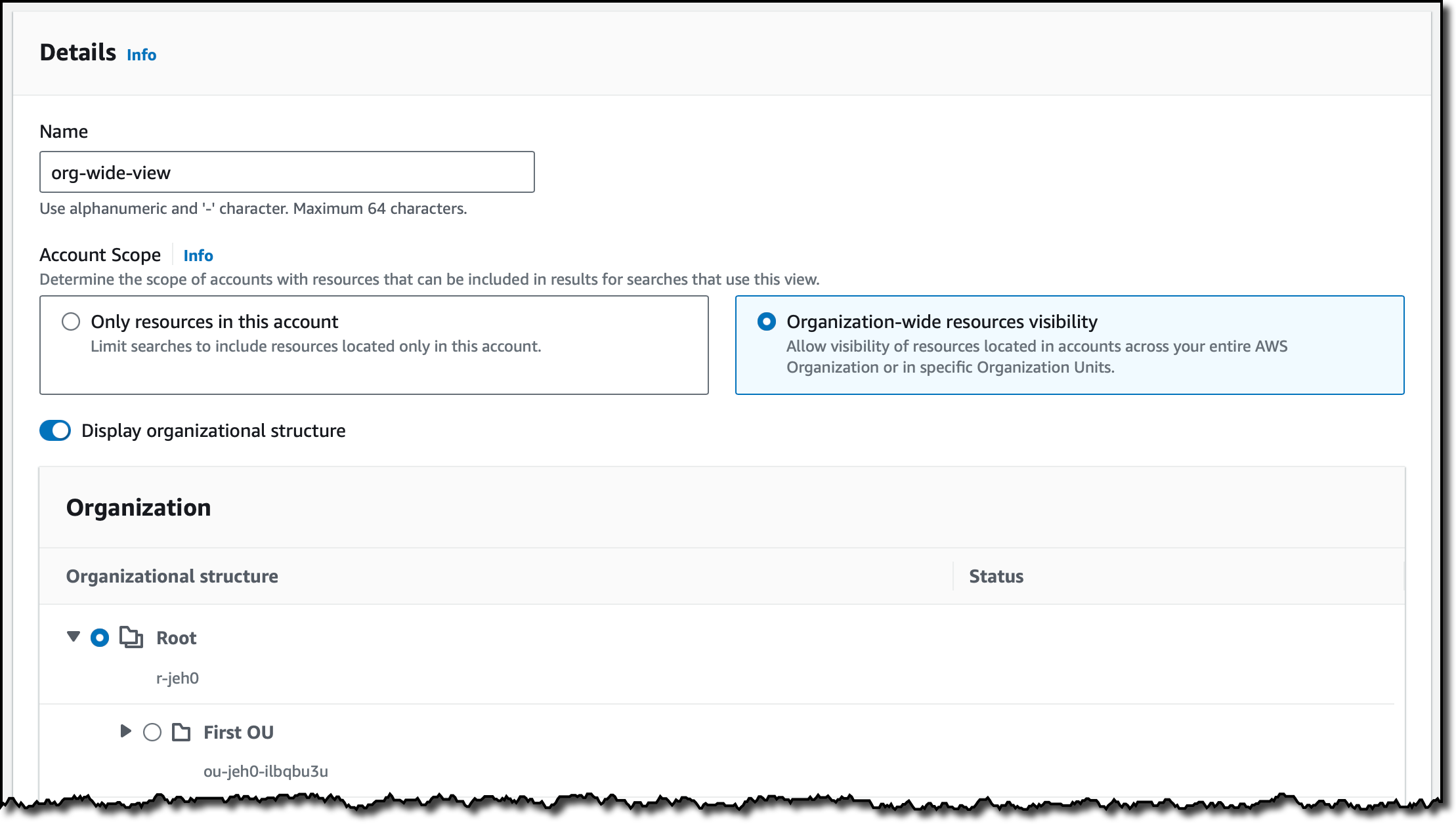
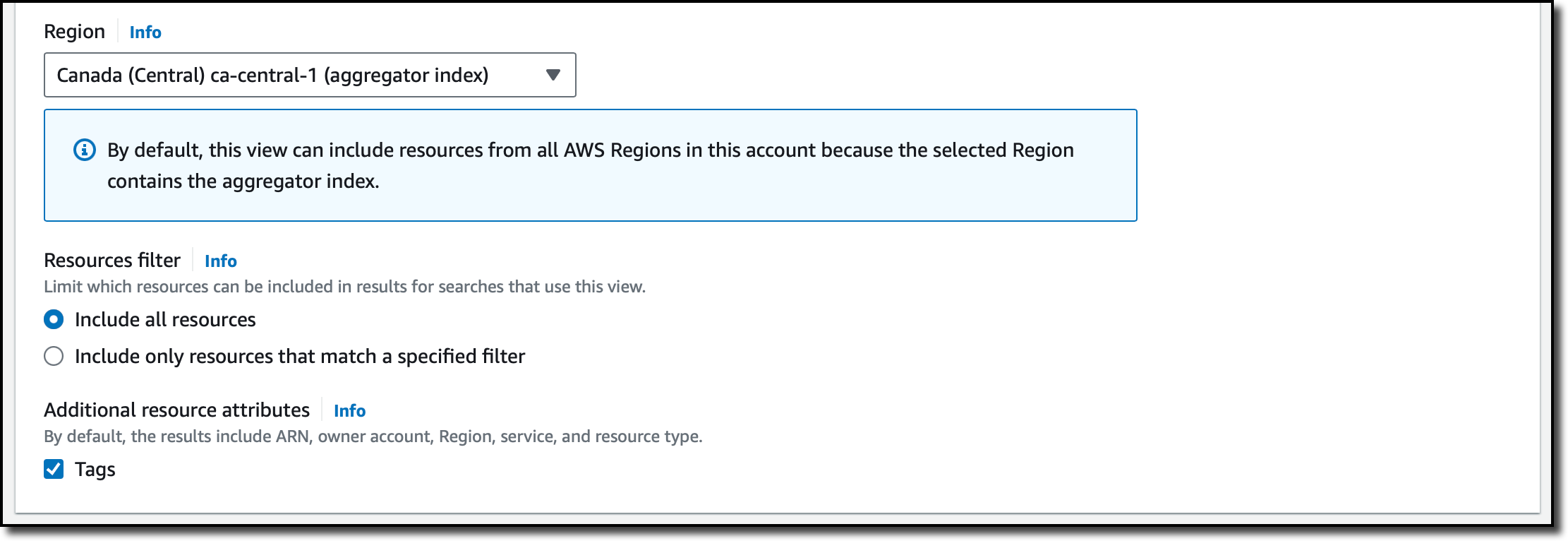


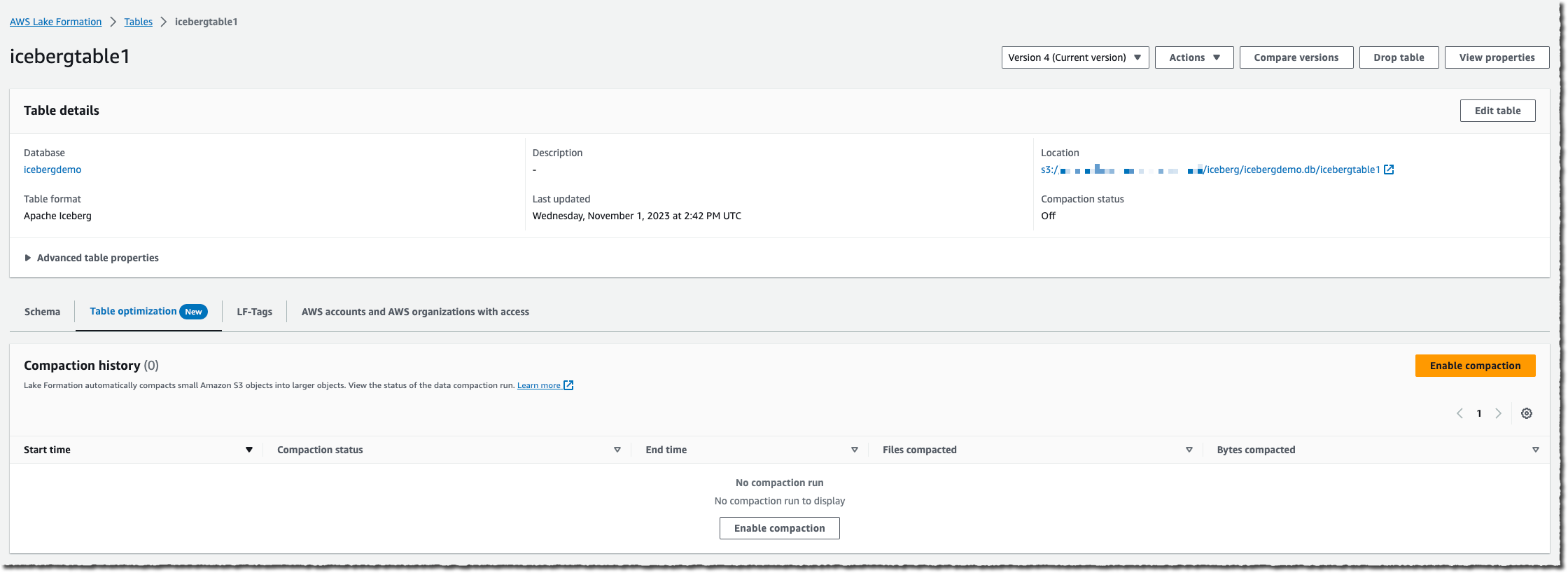
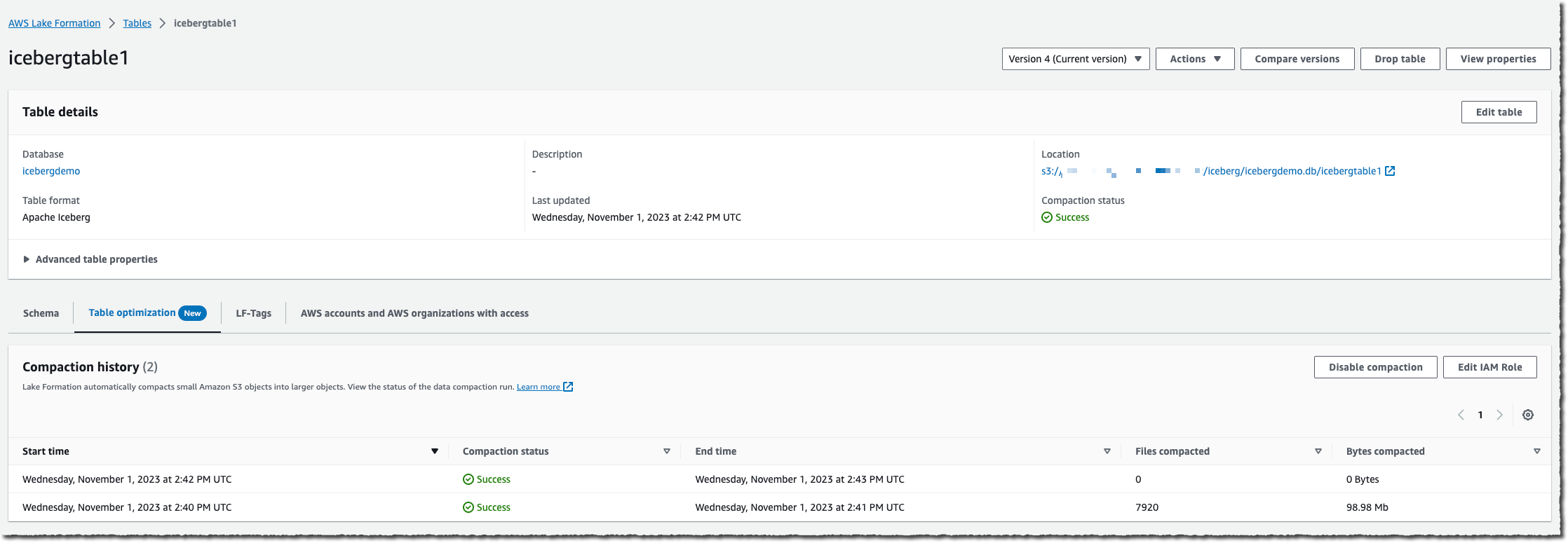
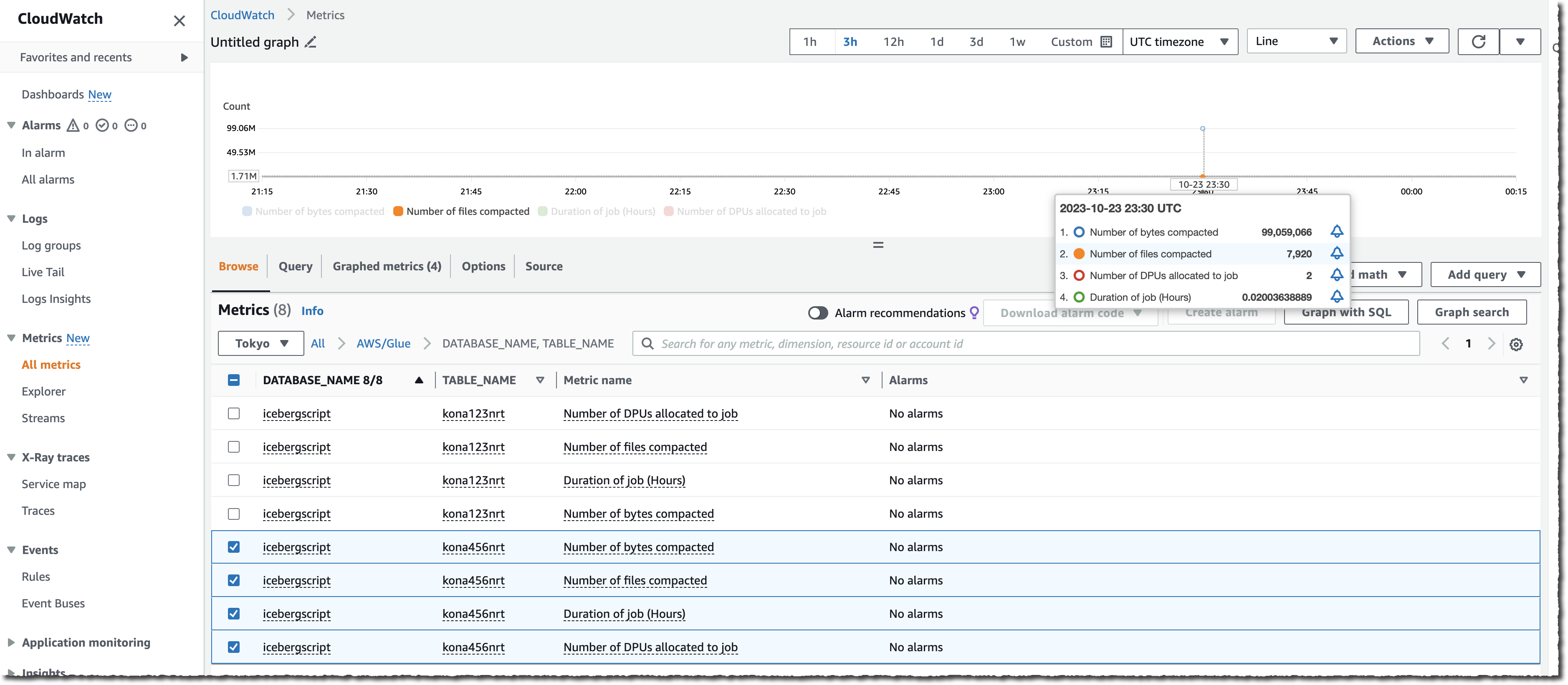



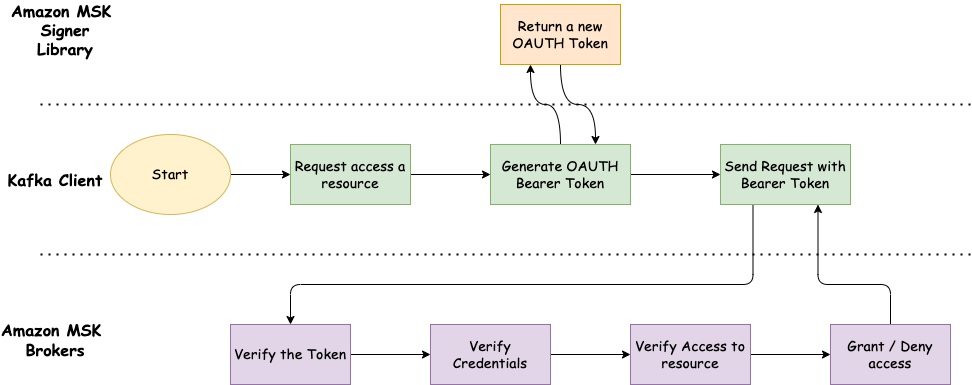
 Ali Alemi is a Streaming Specialist Solutions Architect at AWS. Ali advises AWS customers with architectural best practices and helps them design real-time analytics data systems that are reliable, secure, efficient, and cost-effective. He works backward from customer’s use cases and designs data solutions to solve their business problems. Prior to joining AWS, Ali supported several public sector customers and AWS consulting partners in their application modernization journey and migration to the cloud.


 Prabhat Chaturvedi


