At Amazon Web Services (AWS), our APIs and service functionality are a promise to our customers, so we very rarely make breaking changes or remove functionality from production services. Customers use the AWS Cloud to build solutions for their customers, and when disruptive changes are made or functionality is removed, the downstream impacts can be significant. As builders, we’ve felt the impact of these types of changes ourselves, and we work hard to avoid these situations whenever possible.
When we do need to make breaking changes, we try to provide a smooth path forward for customers who were using the old functionality. Often that means changing the behavior for new users or new deployments, and then allowing a transition window for existing customers to migrate from the old to the new behavior. There are many examples of this pattern, such as an update to IAM role trust policy behavior that we made last year.
This post explains one such recent change that we’ve made in Amazon API Gateway. We also discuss how we work with the security research community to improve things for customers.
Summary and customer impact
Recently, researchers at Omegapoint disclosed an edge case issue with how API Gateway handled HTTP header remapping with custom authorizers based on AWS Lambda. As is often the case with security research, this work generated a second, tangentially related authorization-caching issue that the Omegapoint team also reported.
After analyzing these reports, the API Gateway team decided to remove a documented feature from the service and to adjust another behavior to improve service behavior. We’ve made the appropriate changes to the API Gateway documentation.
As of June 14, 2023, the header remapping feature is no longer available in API Gateway. Customers can still use Velocity Template Language-based (VTL) transformations for header remapping, because this approach wasn’t impacted by the reported issue. If you’re using this design pattern in API Gateway and have questions about this change, reach out to your AWS support team.
The authorization-caching behavior was working as originally designed; but based on the report, we’ve adjusted it to better meet customer expectations.
Before we removed the feature, we contacted customers who were using the direct HTTP header remapping feature through email and the AWS Health Dashboard. If you haven’t been contacted, no action is required on your part.
More details
The main issue that Omegapoint reported was related to a documented, client-controlled HTTP header remapping feature in API Gateway. This feature allowed customers to use one set of header values in the interaction between their clients and API Gateway, and a different set of header values from API Gateway to the backend. The client could send two sets of header values: one for API Gateway and one for the backend. API Gateway would process both sets, but then remap (overwrite) one set of values with another set. This feature was especially useful when allowing newly created API Gateway clients to continue to work with legacy servers whose header-handling logic couldn’t be modified.
The report from Omegapoint highlighted that customers who relied on Lambda authorizers for request-based authorization could be surprised when the remapping feature was used to overwrite header values that were used for further authorization on the backend, which could potentially lead to unintended access. The Lambda authorizer itself worked as expected on unmapped headers, but if there was additional authorization logic in the backend, it could be impacted by a misbehaving client.
The second issue that Omegapoint reported was related to the caching behavior in API Gateway for authorization policies. Previously, the caching method might reuse a cached authorization with a different value when the <method.request.multivalueheader.*> value was used in the request header within the time-to-live (TTL) of the cached value. This was the expected behavior of the wildcard value.
However, after reviewing the report, we agreed that it could surprise customers, and potentially allow misbehaving clients to bypass expected authorization. We were able to change this behavior without customer impact, because there is no evidence of customers relying on this behavior. So now, cached authorizations are no longer used in the <multivalueheader> case.
How we work with researchers
Security researchers regularly submit vulnerability reports to AWS Security. Some researchers are independent, some work in academic institutions, and others work in AWS partner or customer organizations. Our Outreach team triages submissions rapidly. Upon receipt, we start a conversation and work closely with researchers to understand their concerns, give our perspective, and agree on the best path forward.
If technical changes are required, our services and security teams work together to determine and implement the appropriate remediations based on the potential impact. They work with affected customers to reduce or eliminate impacts, and they work with the researchers to coordinate the publication of their findings.
Often these reports highlight situations where the designed and documented behavior might result in a surprising outcome for some customers. In those cases, we work with the researcher to make the appropriate updates to the documentation, if needed, and help ensure that the researcher’s finding is published with customer education as the primary goal.
In other cases, where warranted, we communicate about security issues to the broader customer and security community by using a security bulletin. Finally, we publish security blog posts in cases where providing more context makes sense, such as the current issue.
Security is our top priority, and working with the community to make our customers and the AWS Cloud safer is a key part of that. Clear communication helps build understanding and trust.
Working together
We removed the direct remapping feature because not many customers were using it, and we felt that documentation warning against the impacted design choices provided insufficient visibility and protection for customers. We designed and released the feature in an era when it was reasonable to assume that an API Gateway client would be well-behaved, but as times change, it now makes sense that an API client could be potentially negligent or even hostile. There are multiple alternative approaches that can provide the same outcome for customers, but in a more expected and controlled manner, which made this a simpler process to work through.
When researchers report potential security findings, we work through our process to determine the best outcome for our customers. In most cases, we can adjust designs to address the issue, while maintaining the affected features.
In rare cases, such as this one, the more effective path forward is to sunset a feature in favor of a more expected and secure approach. This is a core principle of evolving architectures and building resilient systems. It’s something that we practice regularly at AWS and a key principle that we share with our customers and the community through the AWS Well-Architected Framework.
Our thanks to the team at Omegapoint for reporting these issues, and to all of the researchers who continue to work with us to help make the AWS Cloud safer for our customers.
Want more AWS Security news? Follow us on Twitter.
AWS customers already use Amazon Cognito for simple, fast authentication. With the launch of Amazon Verified Permissions, many will also want to add simple, fast authorization to their applications by using the user attributes that they have in Amazon Cognito. In this post, I will show you how to use Amazon Cognito and Verified Permissions together to add fine-grained authorization to your applications.
Fine-grained authorization
With Verified Permissions, you can write policies to use fine-grained authorization in your applications. Policy-based access control helps you secure your applications without embedding complicated access control code in the application logic. Instead, you write policies that say who can take what actions on which resources, and you evaluate the policies by using the Verified Permissions API. The API evaluates access control policies in the context of an access request: Who’s making the request? What do they want to do? What do they want to access? Under what conditions are they making the request?
AWS has removed the work needed to create context about who is making the request by using data from Amazon Cognito. By using Amazon Cognito as your identity store and integrating Verified Permissions with Amazon Cognito, you can use the ID and access tokens that Amazon Cognito returns in the authorization decisions in your applications. You provide Amazon Cognito tokens to Verified Permissions, which uses the attributes that the tokens contain to represent the principal and identify the principal’s entitlements.
Make access requests
To write policies for Verified Permissions, you use a policy language called Cedar. The examples in this post are modified from those in the Cedar language tutorial; I recommend that you review this tutorial for a comprehensive introduction on how to build and use Cedar policies. The following is an example of what a Cedar policy in a photo-sharing application might look like:
This policy states that Alice—the principal—is permitted to update the resource named VacationPhoto94.jpg. You place the policies for your application in a dedicated policy store. To ask Verified Permissions for an authorization decision, use the isAuthorized operation from the API. For example, the following request asks if user alice is permitted to update VacationPhoto94.jpg. Note that I’ve left out details like the policy store identifier for clarity.
This request returns a decision of allow because the principal, action, and resource all match those in the policy. If a user named bob tries to update the photo, the request returns a decision of deny because the policy only allows user alice. For requests that only need values for the principal, action, and resource, you can generally use values from the data in the application.
Things get more interesting when you build policies that use attributes of the principal to make the decision. In these cases, it can be challenging to assemble a complete and accurate authorization context. Policies might refer to attributes of the principal, such as their geographic location or whether they are paid subscribers. Fine-grained access control requires that you write good policies, properly format the access request, and provide the needed attributes for the policies to be evaluated. To get needed attributes, you must often make inline requests to other systems and then transform the results to meet the policy requirements.
The following policy uses an attribute requirement to allow any principal to view any resource as long as they are located in the United States.
To make an authorization request, you must supply the needed attributes for the principal. The following code shows how to do that by using the isAuthorized operation:
The authorization request now includes the context that Alice is located in the USA. According to the preceding policy, she should be allowed to view VacationPhoto94.jpg. To make this request, you must gather this information so that you can include it in the request.
Use Amazon Cognito
If the photo-sharing application uses Amazon Cognito for user authentication, then Amazon Cognito will pass an ID token to it when the authentication is successful. For more information about the format and encoding of ID tokens, see the OpenID Connect Core specification. For our purposes, it’s enough to know that after the ID token is verified and decoded, it contains a JSON structure with named attributes.
When you configure Amazon Cognito, you can specify the fields that are contained in the ID token. These might be user editable, but they can also be programmatically generated from other sources. Suppose that you have configured your Amazon Cognito user pool to also include a custom location attribute, custom:location. When Alice logs in to the photo-sharing application, the ID token that Amazon Cognito provides for her contains the following fields. Note that I’ve made the sub (subject) field human readable, but it would actually be a Amazon Cognito entity identifier.
If the needed attributes are in Amazon Cognito, you can use them to create the attributes that isAuthorized needs to render an access decision.
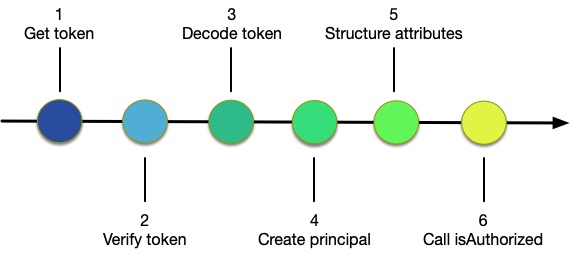
Figure 1: Steps to use Amazon Cognito with isAuthorized
As shown in Figure 1, you need to complete the following six steps to use isAuthorized with Amazon Cognito:
Get the token from Amazon Cognito when the user authenticates
Verify the token to authenticate the user
Decode the token to retrieve attribute information
Create the policy principal from information in the token or from other sources
Create the entities structure by using information in the token or from other sources
Call Amazon Verified Permissions by using isAuthorized
Now that you understand how to make a request by manually creating the context using data provided by an identity provider, I’ll share how the AWS integration of Amazon Cognito and Verified Permissions can help reduce your workload.
Use isAuthorizedWithToken
In addition to isAuthorized, the Verified Permissions API provides the isAuthorizedWithToken operation that accepts Amazon Cognito tokens. If your application uses Amazon Cognito for authentication, then Amazon Cognito provides the ID token after the user logs in. Let’s assume that you have stored this token in a variable named cognito_id_token. Because you are using an attribute from Amazon Cognito, you modify the previous policy to accommodate the namespace that the Amazon Cognito attributes are in, as shown in the following:
With this policy, the photo-sharing application can use the ID token to make an authorization request using isAuthorizedWithToken:
Using this call, you don’t have to supply the principal or construct the entities argument for the principal. Instead, you just pass in the ID token that Amazon Cognito provides. When you call isAuthorizedWithToken, it constructs the principal by using information in the token and creates an entity context that includes Alice’s location from the attributes in the ID token.
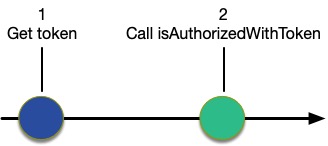
Figure 2: Use isAuthorizedWithToken
As shown in Figure 2, when you use isAuthorizedWithToken, you only need to complete two steps:
Get the token from Amazon Cognito when the user authenticates
Call Verified Permissions using isAuthorizedWithToken, passing in the token
Optionally, your application might need to verify the token to authenticate the user and avoid unnecessary work, or it can rely on isAuthorizedWithToken to do that. Similarly, you might also decode the token if you need its values for the application logic.
Configure isAuthorizedWithToken
You can use the Verified Permissions console to tell the API which Amazon Cognito user pool you’re using for your application. This is called an identity source.
To create an identity source for use with Verified Permissions (console):
Choose Identity source. You will see a list showing the sources that you have already configured.
To create a new identity source, choose Create identity source.
Enter the User pool ID.
Enter the Principal type.
Select whether or not to validate Client application IDs for this source.
(Optional) Enter Tags.
Choose Create identity source to add a new identity source to Verified Permissions with the given client ID.
The isAuthorizedWithToken operation uses the configuration information to get the public keys from Amazon Cognito to validate and decode the token. It also uses the configuration information to validate that the user pool for the token is associated with the policy store that the API is using.
Add resource entity attributes
ID tokens provide attributes about the principal, but they don’t provide information about the resource. Policies will often reference resource attributes, as shown in the following policy:
Like the previous example, this policy requires that photo viewers are located in the US, but it also requires that the resource has a public attribute. The isAuthorizedWithToken operation can augment the entity information in the token by using the same entities argument that isAuthorized uses. You can add the resource entity information to the call, as shown in the following call to isAuthorizedWithToken:
The isAuthorizedWithToken operation combines the entity information that it gleans from the ID token with the explicit entities information provided in the call to construct the context needed for the authorization request.
Conclusion
Discussions about access control tend to focus on the policies: how you can use them to make the code cleaner, and the value of moving the authorization logic out of the code. But that often ignores the work needed to create meaningful authorization requests. Assembling the information about the entities is a big part of making the request. If you use both Amazon Cognito and Verified Permissions, the integration discussed in this blog post can help relieve you of the work needed to build entity information about principals and help provide you with assurance that the assembly is happening consistently and securely.
If you have feedback about this post, submit comments in the Comments section below. If you have questions about this post, contact AWS Support.
Want more AWS Security news? Follow us on Twitter.
Threat actors use sign-up pages and login pages to carry out account fraud, including taking unfair advantage of promotional and sign-up bonuses, publishing fake reviews, and spreading malware.
You can now get comprehensive account fraud prevention by combining AWS WAF Account Creation Fraud Prevention and Account Takeover Prevention in your AWS WAF web access control list (web ACL). In this post, we will show you how to set up AWS WAF with ACFP for your application sign-up pages.
Overview of Account Creation Fraud Prevention for AWS WAF
ACFP helps protect your account sign-up pages by continuously monitoring requests for anomalous digital activity and automatically blocking suspicious requests based on request identifiers, behavioral analysis, and machine learning.
ACFP uses multiple capabilities to help detect and block fake account creation requests at the network edge before they reach your application. An automated vetting process for account creation requests uses rules based on reputation and risk to protect your registration pages against use of stolen credentials and disposable email domains. ACFP uses silent challenges and CAPTCHA challenges to identify and respond to sophisticated bots that are designed to actively evade detection.
ACFP is an AWS Managed Rules rule group. If you already use AWS WAF, you can configure ACFP without making architectural changes. On a single configuration page, you specify the registration page request inspection parameters that ACFP uses to detect fake account creation requests, including user identity, address, and phone number.
ACFP uses session tokens to separate legitimate client sessions from those that are not. These tokens allow ACFP to verify that the client applications that sign up for an account are legitimate. The AWS WAF Javascript SDK automatically generates these tokens during the frontend application load. We recommend that you integrate the AWS WAF Javascript SDK into your application, particularly for single-page applications where you don’t want page refreshes.
Walkthrough
In this walkthrough, we will show you how to set up ACFP for AWS WAF to help protect your account sign-up pages against account creation fraud. This walkthrough has two main steps:
Set up an AWS managed rule group for ACFP in the AWS WAF console.
Add the AWS WAF JavaScript SDK to your application pages.
Set up Account Creation Fraud Prevention
The first step is to set up ACFP by creating a web ACL or editing an existing one. You will add the ACFP rule group to this web ACL.
The ACFP rule group requires that you provide your registration page path, account creation path, and optionally the sign-up request fields that map to user identity, address, and phone number. ACFP uses this configuration to detect fraudulent sign-up requests and then decide an appropriate action, including blocking, challenging interstitial during the frontend application load, or requiring a CAPTCHA.
To edit an existing web ACL, choose the name of the ACL.
On the Rules tab, for the Add Rules dropdown, select Add managed rule groups.
Add the Account creation fraud prevention rule set to the web ACL. Then, choose Edit to edit the rule configuration.
For Rule group configuration, provide the following information that the ACFP rule group requires to inspect account creation requests, as shown in Figure 1.
For Registration page path, enter the path for the registration page website for your application.
For Account creation path, enter the path of the endpoint that accepts the completed registration form.
For Request inspection, select whether the endpoint that you specified in Account creation path accepts JSON or FORM_ENCODED payload types.
(Optional): Provide Field names used in submitted registration forms, as shown in Figure 2. This helps ACFP more accurately identify requests that contain information that is considered stolen, or with a bad reputation. For each field, provide the relevant information that was included in your account creation request. For this walkthrough, we use JSON pointer syntax.
For Account creation fraud prevention rules, review the actions taken on each category of account creation fraud, and optionally customize them for your web applications. For this walkthrough, we leave the default rule action for each category set to the default action, as shown in Figure 3. If you want to customize the rules, you can select different actions for each category based on your application security needs:
Allow — Allows the request to be sent to the protected resource.
Block — Blocks the request, returning an HTTP 403 (Forbidden) response.
Count — Allows the request to be sent to the protected resource while counting detections. The count shows you bot activity that is occurring without blocking or challenging. When you turn on rules for the first time, this information can help you see what the detections are, before you change the actions.
CAPTCHA and Challenge — use CAPTCHA puzzles and silent challenges with tokens to track successful client responses.
Figure 3: Account creation fraud prevention – Select actions for each category
To save the configuration, choose Save.
To add the ACFP rule group to your web ACL, choose Add rules.
(Optional) Include additional rules in your web ACL, as described in the Best practices section that follows.
To create or edit your web ACL, proceed through the remaining configuration pages.
Add the AWS WAF JavaScript SDK to your application pages
The next step is to find the AWS WAF JavaScript SDK and add it to your application pages.
The SDK injects a token in the requests that you send to your protected resources. You must use the SDK integration to fully enable ACFP detections.
To add the SDK to your application pages
In the AWS WAF console, in the left navigation pane, choose Application integration.
Under Web ACLs that are enabled for application integration, choose the name of the web ACL that you created previously.
Under JavaScript SDK, copy the provided code snippet. This code snippet allows for creation of the cryptographic token in the background when the application loads for the first time. Figure 4 shows the SDK link.
Figure 4: Application integration – Add JavaScript SDK link to application pages
Add the code snippet to your pages. For example, paste the provided script code within the <head> section of the HTML. For ACFP, you only need to add the code snippet to the registration page, but if you are using other AWS WAF managed rules such as Account Takeover Protection or Targeted Bots on other pages, you will also need to add the code snippet to those pages.
To validate that your application obtains tokens correctly, load your application in a browser and verify that a cookie named aws-waf-token has been set during page load.
Review metrics
Now that you’ve set up the web ACL and integrated the SDK with the application, you can use the bot visualization dashboard in AWS WAF to review fraudulent account creation traffic patterns. ACFP rules emit metrics that correspond to their labels, helping you identify which rule within the ACFP rule group initiated an action. You can also use labels and rule actions to filter AWS WAF logs so that you can further examine a request.
To view AWS WAF metrics for the distribution
In the AWS WAF console, in the left navigation pane, select Web ACLs.
Select the web ACL for which ACFP is enabled, and then choose the Bot Control tab to view the metrics.
In the Filter metrics by dropdown, select Account creation fraud prevention to see the ACFP metrics for your web ACL.
In this section, we share best practices for your ACFP rule group setup.
Limit the requests that ACFP evaluates to help lower costs
ACFP evaluates web ACL rules in priority order and takes the action associated with the first rule that a request matches. Requests that match and are blocked by a rule will not be evaluated against lower priority rules. ACFP only evaluates an ACFP rule group if a request matches the registration and account creation URI paths that are specified in the configuration.
You will incur additional fees for requests that ACFP evaluates. To help reduce ACFP costs, use higher priority rules to block requests before the ACFP rule group evaluates them. For example, you can add a higher priority AWS Managed Rules IP reputation rule group to block account creation requests from bots and other threats before ACFP evaluates them. Rate-based rules with a higher priority than the ACFP rule group can help mitigate volumetric account creation attempts by limiting the number of requests that a single IP can make in a five-minute period. For further guidance on rate-based rules, see The three most important AWS WAF rate-based rules.
If you are using the AWS WAF Bot Control rule group, give it a higher priority than the ACFP rule group because it’s less expensive to evaluate.
Use SDK integration
ACFP requires the tokens that the SDK generates. The SDK can generate these tokens silently rather than requiring a redirect or CAPTCHA. Both AWS WAF Bot Control and AWS WAF Fraud Control use the same SDK if both rule groups are in the same web ACL.
These tokens have a default immunity time (otherwise knowns as a timeout) of 5 minutes, after which AWS WAF requires the client to be challenged again. You can use the AWS WAF integration fetch wrapper in your single-pane application to help ensure that the token retrieval completes before the client sends requests to your account creation API without requiring a page refresh. Alternatively, you can use the getToken operation if you are not using fetch.
You can continue to use the CAPTCHA JavaScript API instead if you’ve already integrated this into your application.
Use both ACFP and ATP for comprehensive account fraud prevention
You can help prevent account fraud for both sign-up and login pages by enabling the ATP rule group in the same web ACL as ACFP.
Test ACFP before you deploy it to production
Test and tune your ACFP implementation in a staging or testing environment to help avoid negatively impacting legitimate users. We recommend that you start by deploying your rules in count mode in production to understand potential impact to your traffic before switching them back to the default rule actions. Use the default ACFP rule group actions when you deploy the web ACL to production. For further guidance, see Testing and Deploying ACFP.
Pricing and availability
ACFP is available today on Amazon CloudFront and in 22 AWS Regions. For information on availability and pricing, see AWS WAF Pricing.
Conclusion
In this post, we showed you how to use ACFP to protect your application’s sign-up pages against fake account creation. You can now combine ACFP with ATP managed rules in a single web ACL for comprehensive account fraud prevention. For more information and to get started today, see the AWS WAF Developer Guide.
If you’ve had discussions with a security organization recently, there’s a high probability that the word automation has come up. As organizations scale and consume the benefits the cloud has to offer, it’s important to factor in and understand how the additional cloud footprint will affect operations. Automation is a key enabler for efficient operations and can help drive down the number of repetitive tasks that the operational teams have to perform.
Alert fatigue is caused when humans work on the same repetitive tasks day in and day out and also have a large volume of alerts that need to be addressed. The repetitive nature of these tasks can cause analysts to become numb to the importance of the task or make errors due to manual processing. This can lead to misclassification of security alerts or higher-severity alerts being overlooked due to investigation times. Automation is key here to reduce the number of repetitive tasks and give analysts time to focus on other areas of importance.
In this blog post, we’ll walk you through new capabilities within AWS Security Hub that you can use to take automated actions to update findings. We’ll show you some example scenarios that use this capability and set you up with the knowledge you need to get started with creating automation rules.
Previously, Security Hub could take automated actions on findings, but this involved going to the Amazon EventBridge console or API, creating an EventBridge rule, and then building an AWS Lambda function, an AWS Systems Manager Automation runbook, or an AWS Step Functions step as the target of that rule. If you wanted to set up these automated actions in the administrator account and home AWS Region and run them in member accounts and in linked Regions, you would also need to deploy the correct IAM permissions to enable the actions to run across accounts and Regions. After setting up the automation flow, you would need to maintain the EventBridge rule, Lambda function, and IAM roles. Such maintenance could include upgrading the Lambda versions, verifying operational efficiency, and checking that everything is running as expected.
With Security Hub, you can now use rules to automatically update various fields in findings that match defined criteria. This allows you to automatically suppress findings, update findings’ severities according to organizational policies, change findings’ workflow status, and add notes. As findings are ingested, automation rules look for findings that meet defined criteria and update the specified fields in findings that meet the criteria. For example, a user can create a rule that automatically sets the finding’s severity to “Critical” if the finding account ID is of a known business-critical account. A user could also automatically suppress findings for a specific control in an account where the finding represents an accepted risk.
With automation rules, Security Hub provides you a simplified way to build automations directly from the Security Hub console and API. This reduces repetitive work for cloud security and DevOps engineers and can reduce the mean time to response.
Use cases
In this section, we’ve put together some examples of how Security Hub automation rules can help you. There’s a lot of flexibility in how you can use the rules, and we expect there will be many variations that your organization will use when contextual information about security risk has been added.
Scenario 1: Elevate finding severity for specific controls based on account IDs
Security Hub offers protection by using hundreds of security controls that create findings that have a severity associated with them. Sometimes, you might want to elevate that severity according to your organizational policies or according to the context of the finding, such as the account it relates to. With automation rules, you can now automatically elevate the severity for specific controls when they are in a specific account.
For example, the AWS Foundational Security Best Practices control GuardDuty.1 has a “High” severity by default. But you might consider such a finding to have “Critical” severity if it occurs in one of your top production accounts. To change the severity automatically, you can choose GeneratorId as a criteria and check that it’s equal to aws-foundational-security-best-practices/v/1.0.0/GuardDuty.1, and also add AwsAccountId as a criteria and check that it’s equal to YOUR_ACCOUNT_IDs. Then, add an action to update the severity to “Critical,” and add a note to the person who will look at the finding that reads “Urgent — look into these production accounts.”
You can set up this automation rule through the AWS CLI, the console, the Security Hub API, or the AWS SDK for Python (Boto3), as follows.
To set up the automation rule for Scenario 1 (AWS CLI)
In the AWS CLI, run the following command to create a new automation rule with a specific Amazon Resource Name (ARN). Note the different modifiable parameters:
Rule-name — The name of the rule that will be created.
Rule-status — An optional parameter. Specify whether you want Security Hub to activate and start applying the rule to findings after creation. If no value is specified, the default value is ENABLED. A value of DISABLED means that the rule will be paused after creation.
Rule-order — Provide the processing order for the rule. Security Hub applies rules with a lower numerical value for this parameter first.
Criteria — Provide the criteria that you want Security Hub to use to filter your findings. The rule action will be applied to findings that match the criteria. For a list of supported criteria, see Criteria and actions for automation rules. In this example, the criteria are placeholders and should be replaced.
Actions — Provide the actions that you want Security Hub to take when there’s a match between a finding and your defined criteria. For a list of supported actions, see Criteria and actions for automation rules. In this example, the actions are placeholders and should be replaced.
aws securityhub create-automation-rule \—rule-name "Elevate severity for findings in production accounts - GuardDuty.1" \—rule-status "ENABLED"" \—rule-order 1 \—description "Elevate severity for findings in production accounts - GuardDuty.1" \—criteria '{"GeneratorId": [{"Value": "aws-foundational-security-best-practices/v/1.0.0/GuardDuty.1","Comparison": "EQUALS"}, "AwsAccountId": [{"Value": "<111122223333>","Comparison": "EQUALS"},]}' \—actions '[{"Type": "FINDING_FIELDS_UPDATE","FindingFieldsUpdate": {"Severity": {"Label": "CRITICAL"},"Note": {"Text": "Urgent – look into these production accounts","UpdatedBy": "sechub-automation"}}}]' \—region us-east-1
To set up the automation rule for Scenario 1 (console)
Open the Security Hub console, and in the left navigation pane, choose Automations.
Figure 1: Automation rules in the Security Hub console
Choose Create rule, and then choose Create a custom rule to get started with creating a rule of your choice. Add a rule name and description.
Figure 2: Create a new custom rule
Under Criteria, add the following information.
Key 1
Key = GeneratorID
Operator = EQUALS
Value = aws-foundational-security-best-practices/v/1.0.0/GuardDuty.1
Key 2
Key = AwsAccountId
Operator = EQUALS
Value = Your AWS account ID
Figure 3: Information added for the rule criteria
You can preview which findings will match the criteria by looking in the preview section.
Figure 4: Preview section
Next, under Automated action, specify which finding value to update automatically when findings match your criteria.
Figure 5: Automated action to be taken against the findings that match the criteria
For Rule status, choose Enabled, and then choose Create rule.
Figure 6: Set the rule status to Enabled
After you choose Create rule, you will see the newly created rule within the Automations portal.
Figure 7: Newly created rule within the Security Hub Automations page
Note: In figure 7, you can see multiple automation rules. When you create automation rules, you assign each rule an order number. This determines the order in which Security Hub applies your automation rules. This becomes important when multiple rules apply to the same finding or finding field. When multiple rule actions apply to the same finding field, the rule with the highest numerical value for rule order is applied last and has the ultimate effect on that field.
Additionally, if your preferred deployment method is to use the API or AWS SDK for Python (Boto3), we have information on how you can use these means of deployment in our public documentation.
Scenario 2: Change the finding severity to high if a resource is important, based on resource tags
Imagine a situation where you have findings associated to a wide range of resources. Typically, organizations will attempt to prioritize which findings to remediate first. You can achieve this prioritization through Security Hub and the contextual fields that are available for you to use — for example, by using the severity of the finding or the account ID the resource is sitting in. You might also have your own prioritization based on other factors. You could add this additional context to findings by using a tagging strategy. With automation rules, you can now automatically elevate the severity for specific findings based on the tag value associated to the resource.
For example, if a finding comes into Security Hub with the severity rating “Medium,” but the resource in question is critical to the business and has the tag production associated to it, you could automatically raise the severity rating to “High.”
Note: This will work only for findings where there is a resource tag associated with the finding.
Scenario 3: Suppress GuardDuty findings with a severity of “Informational”
GuardDuty provides an overarching view of the state of threats to deployed resources in your organization’s cloud environment. After evaluation, GuardDuty produces findings related to these threats. The findings produced by GuardDuty have different severities, to help organizations with prioritization. Some of these findings will be given an “Informational” severity. “Informational” indicates that no issue was found and the content of the finding is purely to give information. After you have evaluated the context of the finding, you might want to suppress any additional findings that match the same criteria.
For example, you might want to set up a rule so that new findings with the generator ID that produced “Informational” findings are suppressed, keeping only the findings that need action.
Templates
When you create a new rule, you can also choose to create a rule from a template. These templates are regularly updated with use cases that are applicable for many customers.
To set up an automation rule by using a template from the console
In the Security Hub console, choose Automations, and then choose Create rule.
Choose Create a rule from a template to get started with creating a rule of your choice.
Select a rule template from the drop-down menu.
Figure 8: Select an automation rule template
(Optional) If necessary, modify the Rule, Criteria, and Automated action sections.
For Rule status, choose whether you want the rule to be enabled or disabled after it’s created.
(Optional) Expand the Additional settings section. Choose Ignore subsequent rules for findings that match these criteria if you want this rule to be the last rule applied to findings that match the rule criteria.
(Optional) For Tags, add tags as key-value pairs to help you identify the rule.
Choose Create rule.
Multi-Region deployment
For organizations that operate in multiple AWS Regions, we’ve provided a solution that you can use to replicate rules created in your central Security Hub admin account into these additional Regions. You can find the sample code for this solution in our GitHub repo.
Conclusion
In this blog post, we’ve discussed the importance of automation and its ability to help organizations scale operations within the cloud. We’ve introduced a new capability in AWS Security Hub, automation rules, that can help reduce the repetitive tasks your operational teams may be facing, and we’ve showcased some example use cases to get you started. Start using automation rules in your environment today. We’re excited to see what use cases you will solve with this feature and as always, are happy to receive any feedback.
Today, we are launching Amazon S3 dual-layer server-side encryption with keys stored in AWS Key Management Service (DSSE-KMS), a new encryption option in Amazon S3 that applies two layers of encryption to objects when they are uploaded to an Amazon Simple Storage Service (Amazon S3) bucket. DSSE-KMS is designed to meet National Security Agency CNSSP 15 for FIPS compliance and Data-at-Rest Capability Package (DAR CP) Version 5.0 guidance for two layers of CNSA encryption. Using DSSE-KMS, you can fulfill regulatory requirements to apply multiple layers of encryption to your data.
Amazon S3 is the only cloud object storage service where customers can apply two layers of encryption at the object level and control the data keys used for both layers. DSSE-KMS makes it easier for highly regulated customers to fulfill rigorous security standards, such as US Department of Defense (DoD) customers.
With DSSE-KMS, you can specify dual-layer server-side encryption (DSSE) in the PUT or COPY request for an object or configure your S3 bucket to apply DSSE to all new objects by default. You can also enforce DSSE-KMS using IAM and bucket policies. Each layer of encryption uses a separate cryptographic implementation library with individual data encryption keys. DSSE-KMS helps protect sensitive data against the low probability of a vulnerability in a single layer of cryptographic implementation.
DSSE-KMS simplifies the process of applying two layers of encryption to your data, without having to invest in infrastructure required for client-side encryption. Each layer of encryption uses a different implementation of the 256-bit Advanced Encryption Standard with Galois Counter Mode (AES-GCM) algorithm. DSSE-KMS uses the AWS Key Management Service (AWS KMS) to generate data keys, allowing you to control your customer managed keys by setting permissions per key and specifying key rotation schedules. With DSSE-KMS, you can now query and analyze your dual-encrypted data with AWS services such as Amazon Athena, Amazon SageMaker, and more.
With this launch, Amazon S3 now offers four options for server-side encryption:
Server-side encryption with Amazon S3 managed keys (SSE-S3)
Server-side encryption with AWS KMS (SSE-KMS)
Server-side encryption with customer-provided encryption keys (SSE-C)
Dual-layer server-side encryption with keys stored in KMS (DSSE-KMS)
Let’s see how DSSE-KMS works in practice.
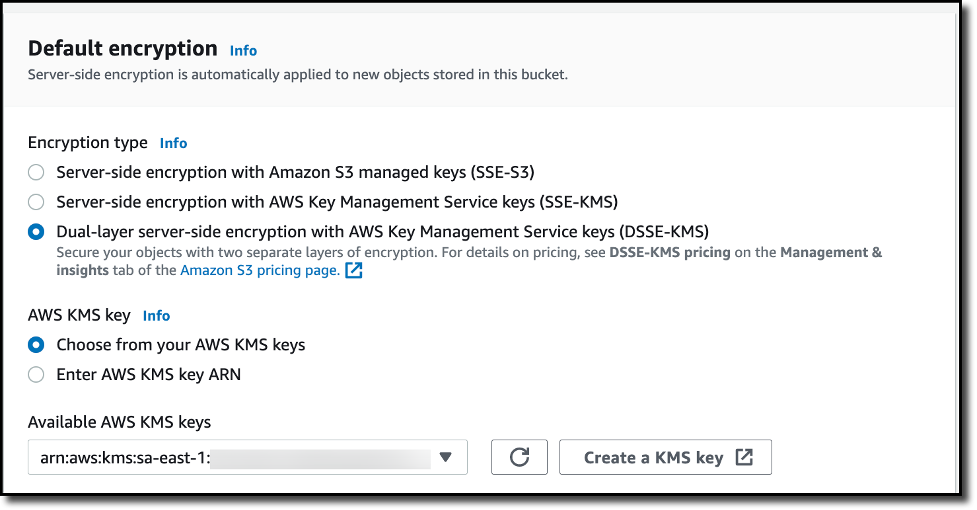
Create an S3 Bucket and Turn on DSSE-KMS To create a new bucket in the Amazon S3 console, I choose Buckets in the navigation pane. I choose Create bucket, and I select a unique and meaningful name for the bucket. Under Default encryption section, I choose DSSE-KMS as the encryption option. From the available AWS KMS keys, I select a key for my requirements. Finally, I choose Create bucket to complete the creation of the S3 bucket, encrypted by DSSE-KMS encryption settings.
Upload an Object to the DSSE-SSE enabled S3 Bucket In the Buckets list, I choose the name of the bucket that I want to upload an object to. On the Objects tab for the bucket, I choose Upload. Under Files and folders, I choose Add files. I then choose a file to upload, and then choose Open. Under Server-side encryption, I choose Do not specify an encryption key. I then choose Upload.
Once the object is uploaded to the S3 bucket, I notice that the uploaded object inherits the Server-side encryptionsettings from the bucket.
Download a DSSE-KMS Encrypted Object from an S3 Bucket I select the object that I previously uploaded and choose Download or choose Download as from the Object actions menu. Once the object is downloaded, I open it locally, and the object is decrypted automatically, requiring no change to client applications.
Now Available Amazon S3 dual-layer server-side encryption with keys stored in AWS KMS (DSSE-KMS) is available today in all AWS Regions. You can get started with DSSE-KMS via the AWS CLI or AWS Management Console. To learn more about all available encryption options on Amazon S3, visit the Amazon S3 User Guide. For pricing information on DSSE-KMS, visit the Amazon S3 pricing page (Storage tab) and the AWS KMS pricing page.
When developing a new application or integrating an existing one into a new environment, user authentication and authorization require significant effort to be correctly implemented. In the past, you would have built your own authentication system, but today you can use an external identity provider like Amazon Cognito. Yet, authorization logic is typically implemented in code.
This might begin simply enough, with all users assigned a role for their job function. However, over time, these permissions grow increasingly complex. The number of roles expands, as permissions become more fine-grained. New use cases drive the need for custom permissions. For instance, one user might share a document with another in a different role, or a support agent might require temporary access to a customer account to resolve an issue. Managing permissions in code is prone to errors, and presents significant challenges when auditing permissions and deciding who has access to what, particularly when these permissions are expressed in different applications and using multiple programming languages.
At re:Invent 2022, we introduced in preview Amazon Verified Permissions, a fine-grained permissions management and authorization service for your applications that can be used at any scale. Amazon Verified Permissions centralizes permissions in a policy store and helps developers use those permissions to authorize user actions within their applications. Similar to how an identity provider simplifies authentication, a policy store let you manage authorization in a consistent and scalable way.
To define fine-grained permissions, Amazon Verified Permissions uses Cedar, an open-source policy language and software development kit (SDK) for access control. You can define a schema for your authorization model in terms of principal types, resource types, and valid actions. In this way, when a policy is created, it is validated against your authorization model. You can simplify the creation of similar policies using templates. Changes to the policy store are audited so that you can see of who made the changes and when.
You can then connect your applications to Amazon Verified Permissions through AWS SDKs to authorize access requests. For each authorization request, the relevant policies are retrieved and evaluated to determine whether the action is permitted or not. You can reproduce those authorization requests to confirm that permissions work as intended.
Today, I am happy to share that Amazon Verified Permissions is generally available with new capabilities and a simplified user experience in the AWS Management Console.
Let’s see how you can use it in practice.
Creating a Policy Store with Amazon Verified Permissions In the Amazon Verified Permissions console, I choose Create policy store. A policy store is a logical container that stores policies and schema. Authorization decisions are made based on all the policies present in a policy store.
To configure the new policy store, I can use different methods. I can start with a guided setup, a sample policy store (such as for a photo-sharing app, an online store, or a task manager), or an empty policy store (recommended for advanced users). I select Guided setup, enter a namespace for my schema (MyApp), and choose Next.
Resources are the objects that principals can act on. In my application, I have Users (principals) that can create, read, update, and delete Documents (resources). I start to define the Documents resource type.
I enter the name of the resource type and add two required attributes:
owner (String) to specify who is the owner of the document.
isPublic (Boolean) to flag public documents that anyone can read.
I specify four actions for the Document resource type:
DocumentCreate
DocumentRead
DocumentUpdate
DocumentDelete
I enter User as the name of the principal type that will be using these actions on Documents. Then, I choose Next.
Now, I configure the User principal type. I can use a custom configuration to integrate an external identity source, but in this case, I use an Amazon Cognito user pool that I created before. I choose Connect user pool.
In the dialog, I select the AWS Region where the user pool is located, enter the user pool ID, and choose Connect.
Now that the Amazon Cognito user pool is connected, I can add another level of protection by validating the client application IDs. For now, I choose not to use this option.
In the Principal attributes section, I select which attributes I am planning to use for attribute-based access control in my policies. I select sub (the subject), used to identify the end user according to the OpenID Connect specification. I can select more attributes. For example, I can use email_verified in a policy to give permissions only to Amazon Cognito users whose email has been verified.
As part of the policy store creation, I create a first policy to give read access to user danilop to the doc.txt document.
In the following code, the console gives me a preview of the resulting policy using the Cedar language.
permit(
  principal == MyApp::User::"danilop",
  action in [MyApp::Action::"DocumentRead"],
  resource == MyApp::Document::"doc.txt"
) when {
  true
};
Finally, I choose Create policy store.
Adding Permissions to the Policy Store Now that the policy store has been created, I choose Policies in the navigation pane. In the Create policy dropdown, I choose Create static policy. A static policy contains all the information needed for its evaluation. In my second policy, I allow any user to read public documents. By default everything is forbidden, so in Policy Effect I choose Permit.
In the Policy scope, I leave All principals and All resources selected, and select the DocumentRead action. In the Policy section, I change the when condition clause to limit permissions to resources where isPublic is equal to true:
permit (
  principal,
  action in [MyApp::Action::"DocumentRead"],
  resource
)
when { resource.isPublic };
I enter a description for the policy and choose Create policy.
For my third policy, I create another static policy to allow full access to the owner of a document. Again, in Policy Effect, I choose Permit and, in the Policy scope, I leave All principals and All resources selected. This time, I also leave All actions selected.
In the Policy section, I change the when condition clause to limit permissions to resources where the owner is equal to the sub of the principal:
permit (principal, action, resource)
when { resource.owner == principal.sub };
In my application, I need to allow read access to specific users that are not owners of a document. To simplify that, I create a policy template. Policy templates let me create policies from a template that uses placeholders for some of their values, such as the principal or the resource. The placeholders in a template are keywords that start with the ? character.
In the navigation pane, I choose Policy templates and then Create policy template. I enter a description and use the following policy template body. When using this template, I can specify the value for the ?principal and ?resource placeholders.
permit(
  principal == ?principal,
  action in [MyApp::Action::"DocumentRead"],
  resource == ?resource
);
I complete the creation of the policy template. Now, I use the template to simplify the creation of policies. I choose Policies in the navigation pane, and then Create a template-linked policy in the Create policy dropdown. I select the policy template I just created and choose Next.
To give access to a user (danilop) for a specific document (new-doc.txt), I just pass the following values (note that MyApp is the namespace of the policy store):
For the Principal: MyApp::User::"danilop"
For the Resource: MyApp::Document::"new-doc.txt"
I complete the creation of the policy. It’s now time to test if the policies work as expected.
Testing Policies in the Console In my applications, I can use the AWS SDKs to run an authorization request. The console provides a way to to simulate what my applications would do. I choose Test bench in the navigation pane. To simplify testing, I use the Visual mode. As an alternative, I have the option to use the same JSON syntax as in the SDKs.
As Principal, I pass the janedoe user. As Resource, I use requirements.txt. It’s not a public document (isPublic is false) and the owner attribute is equal to janedoe‘s sub. For the Action, I select MyApp::Action::"DocumentUpdate".
When running an authorization request, I can pass Additional entities with more information about principals and resources associated with the request. For now, I leave this part empty.
I choose Run authorization request at the top to see the decision based on the current policies. As expected, the decision is allow. Here, I also see which policies hav been satisfied by the authorization request. In this case, it is the policy that allows full access to the owner of the document.
I can test other values. If I change the owner of the document and the action to DocumentRead, the decision is deny. If I then set the resource attribute isPublic to true, the decision is allow because there is a policy that permits all users to read public documents.
Handling Groups in Permissions The administrative users in my application need to be able to delete any document. To do so, I create a role for admin users. First, I choose Schema in the navigation pane and then Edit schema. In the list of entity types, I choose to add a new one. I use Role as Type name and add it. Then, I select User in the entity types and edit it to add Role as a parent. I save changes and create the following policy:
permit (
  principal in MyApp::Role::"admin",
  action in [MyApp::Action::"DocumentDelete"],
  resource
);
In the Test bench, I run an authorization request to check if user jeffbarr can delete (DocumentDelete) resource doc.txt. Because he’s not the owner of the resource, the request is denied.
Now, in the Additional entities, I add the MyApp::User entity with jeffbarr as identifier. As parent, I add the MyApp::Role entity with admin as identifier and confirm. The console warns me that entity MyApp::Role::"admin" is referenced, but it isn’t included in additional entities data. I choose to add it and fix this issue.
I run an authorization request again, and it is now allowed because, according to the additional entities, the principal (jeffbarr) is an admin.
Using Amazon Verified Permissions in Your Application In my applications, I can run an authorization requests using the isAuthorized API action (or isAuthrizedWithToken, if the principal comes from an external identity source).
For example, the following Python code uses the AWS SDK for Python (Boto3) to check if a user has read access to a document. The authorization request uses the policy store I just created.
With Amazon Verified Permissions, you only pay for what you use based on the number of authorization requests and API calls made to the service.
Using Amazon Verified Permissions, you can configure fine-grained permissions using the Cedar policy language and simplify the code of your applications. In this way, permissions are maintained in a centralized store and are easier to audit. Here, you can read more about how we built Cedar with automated reasoning and differential testing.
Amazon Web Services (AWS) prioritizes security, privacy, and performance. Encryption is a vital part of privacy. To help provide long-term protection of encrypted data, AWS has been introducing quantum-resistant key exchange in common transport protocols used by AWS customers. In this blog post, we introduce post-quantum hybrid key exchange with Kyber, the National Institute of Standards and Technology’s chosen quantum-resistant key encapsulation algorithm, in the Secure Shell (SSH) protocol. We explain why it’s important and show you how to use it with Secure File Transfer Protocol (SFTP) file transfers in AWS Transfer Family, the AWS file transfer service.
Why use PQ-hybrid key establishment in SSH
Although not available today, a cryptanalytically relevant quantum computer (CRQC) could theoretically break the standard public key algorithms currently in use. Today’s network traffic could be recorded now and then decrypted in the future with a CRQC. This is known as harvest-now-decrypt-later.
With such concerns in mind, the U.S. Congress recently signed the Quantum Computing Cybersecurity Preparedness Act, and the White House issued National Security Memoranda (NSM-8, NSM-10) to prepare for a timely and equitable transition to quantum-resistant cryptography. The National Security Agency (NSA) also announced its quantum-resistant algorithm requirements and timelines in its CNSA 2.0 release. Many other governments like Canada, Germany, and France and organizations like ISO/IEC and IEEE have also been prioritizing preparations and experiments with quantum-resistant cryptography technologies.
SSH is a protocol widely used by AWS customers for various tasks ranging from moving files between machines to managing Amazon Elastic Compute Cloud (Amazon EC2) instances. Considering the importance of the SSH protocol, its ubiquitous use, and the data it transfers, we introduced PQ-hybrid key exchange with Kyber in it.
How PQ-hybrid key exchange works in Transfer Family SFTP
AWS just announced support for post-quantum key exchange in SFTP file transfers in AWS Transfer Family. Transfer Family securely scales business-to-business file transfers to AWS Storage services using SFTP and other protocols. SFTP is a secure version of the File Transfer Protocol (FTP) that runs over SSH. The post-quantum key exchange support of Transfer Family raises the security bar for data transfers over SFTP.
PQ-hybrid key establishment in SSH introduces post-quantum KEMs used in conjunction with classical key exchange. The client and server still do an ECDH key exchange. Additionally, the server encapsulates a post-quantum shared secret to the client’s post-quantum KEM public key, which is advertised in the client’s SSH key exchange message. This strategy combines the high assurance of a classical key exchange with the security of the proposed post-quantum key exchanges, to help ensure that the handshakes are protected as long as the ECDH or the post-quantum shared secret cannot be broken.
AWS is committed to supporting standardized interoperable algorithms, so we wanted to introduce Kyber to SSH. Kyber was chosen for standardization by NIST’s Post-Quantum Cryptography (PQC) project. Some standards bodies are already integrating Kyber in various protocols.
We also wanted to encourage interoperability by adopting, making available, and submitting for standardization, a draft that combines Kyber with NIST-approved curves like P256 for SSH. To help enhance security for our customers, the AWS implementation of the PQ key exchange in SFTP and SSH follows that draft.
Is PQ-hybrid SSH key exchange aligned with cryptographic requirements like FIPS 140?
For customers that require FIPS compliance, Transfer Family provides FIPS cryptography in SSH by using the AWS-LC, open-source cryptographic library. The PQ-hybrid key exchange methods supported in the TransferSecurityPolicy-PQ-SSH-FIPS-Experimental-2023-04 policy in Transfer Family continue to meet FIPS requirements as described in SP 800-56Cr2 (section 2). BSI Germany and ANSSI France also recommend such PQ-hybrid key exchange methods.
How to test PQ SFTP with Transfer Family
To enable PQ-hybrid SFTP in Transfer Family, you need to enable one of the two security policies that support PQ-hybrid key exchange in your SFTP-enabled endpoint. You can choose the security policy when you create a new SFTP server endpoint in Transfer Family, as explained in the documentation; or by editing the Cryptographic algorithm options in an existing SFTP endpoint. The following figure shows an example of the AWS Management Console where you update the security policy.
Figure 1: Use the console to set the PQ-hybrid security policy in the Transfer Family endpoint
The security policy names that support PQ key exchange in Transfer Family are TransferSecurityPolicy-PQ-SSH-Experimental-2023-04 and TransferSecurityPolicy-PQ-SSH-FIPS-Experimental-2023-04. For more details on Transfer Family policies, see Security policies for AWS Transfer Family.
After you choose the right PQ security policy in your SFTP Transfer Family endpoint, you can experiment with post-quantum SFTP in Transfer Family with an SFTP client that supports PQ-hybrid key exchange by following the guidance in the aforementioned draft specification. AWS tested and confirmed interoperability between the Transfer Family PQ-hybrid key exchange in SFTP and the SSH implementations of our collaborators on the NIST NCCOE Post-Quantum Migration project, namely OQS OpenSSH and wolfSSH.
OQS OpenSSH client
OQS OpenSSH is an open-source fork of OpenSSH that adds quantum-resistant cryptography to SSH by using liboqs. liboqs is an open-source C library that implements quantum-resistant cryptographic algorithms. OQS OpenSSH and liboqs are part of the Open Quantum Safe (OQS) project.
To test PQ-hybrid key exchange in Transfer Family SFTP with OQS OpenSSH, you first need to build OQS OpenSSH, as explained in the project’s README. Then you can run the example SFTP client to connect to your AWS SFTP endpoint (for example, s-9999999999999999999.server.transfer.us-west-2.amazonaws.com) by using the PQ-hybrid key exchange methods, as shown in the following command. Make sure to replace <user_priv_key_PEM_file> with the SFTP user private key PEM-encoded file used for user authentication, and <username> with the username, and update the SFTP-enabled endpoint with the one that you created in Transfer Family.
To test PQ-hybrid key exchange in Transfer Family SFTP with wolfSSH, you first need to build wolfSSH. When built with liboqs, the open-source library that implements post-quantum algorithms, wolfSSH automatically negotiates [email protected]. Run the example SFTP client to connect to your AWS SFTP server endpoint, as shown in the following command. Make sure to replace <user_priv_key_DER_file> with the SFTP user private key DER-encoded file used for user authentication, <user_public_key_PEM_file> with the corresponding SSH user public key PEM-formatted file, and <username> with the username. Also replace the s-9999999999999999999.server.transfer.us-west-2.amazonaws.com SFTP endpoint with the one that you created in Transfer Family.
As we migrate to a quantum-resistant future, we expect that more SFTP and SSH clients will add support for PQ-hybrid key exchanges that are standardized for SSH.
How to confirm PQ-hybrid key exchange in SFTP
To confirm that PQ-hybrid key exchange was used in an SSH connection for SFTP to Transfer Family, check the client output and optionally use packet captures.
OQS OpenSSH client
The client output (omitting irrelevant information for brevity) should look similar to the following:
$./sftp -S ./ssh -v -o KexAlgorithms=ecdh-nistp384-kyber-768r3-sha384-d00@openquantumsafe.org -i panos_priv_key_PEM_file panos@s-9999999999999999999.server.transfer.us-west-2.amazonaws.com
OpenSSH_8.9-2022-01_p1, Open Quantum Safe 2022-08, OpenSSL 3.0.2 15 Mar 2022
debug1: Reading configuration data /home/lab/openssh/oqs-test/tmp/ssh_config
debug1: Authenticator provider $SSH_SK_PROVIDER did not resolve; disabling
debug1: Connecting to s-9999999999999999999.server.transfer.us-west-2.amazonaws.com [xx.yy.zz..12] port 22.
debug1: Connection established.
[...]
debug1: Local version string SSH-2.0-OpenSSH_8.9-2022-01_
debug1: Remote protocol version 2.0, remote software version AWS_SFTP_1.1
debug1: compat_banner: no match: AWS_SFTP_1.1
debug1: Authenticating to s-9999999999999999999.server.transfer.us-west-2.amazonaws.com:22 as 'panos'
debug1: load_hostkeys: fopen /home/lab/.ssh/known_hosts2: No such file or directory
[...]
debug1: SSH2_MSG_KEXINIT sent
debug1: SSH2_MSG_KEXINIT received
debug1: kex: algorithm: [email protected]
debug1: kex: host key algorithm: ssh-ed25519
debug1: kex: server->client cipher: aes192-ctr MAC: [email protected] compression: none
debug1: kex: client->server cipher: aes192-ctr MAC: [email protected] compression: none
debug1: expecting SSH2_MSG_KEX_ECDH_REPLY
debug1: SSH2_MSG_KEX_ECDH_REPLY received
debug1: Server host key: ssh-ed25519 SHA256:BY3gNMHwTfjd4n2VuT4pTyLOk82zWZj4KEYEu7y4r/0
[...]
debug1: rekey out after 4294967296 blocks
debug1: SSH2_MSG_NEWKEYS sent
debug1: expecting SSH2_MSG_NEWKEYS
debug1: SSH2_MSG_NEWKEYS received
debug1: rekey in after 4294967296 blocks
[...]
Authenticated to AWS.Tranfer.PQ.SFTP.test-endpoint.aws.com ([xx.yy.zz..12]:22) using "publickey".s
debug1: channel 0: new [client-session]
[...]
Connected to s-9999999999999999999.server.transfer.us-west-2.amazonaws.com. sftp>
The output shows that client negotiation occurred using the PQ-hybrid [email protected] method and successfully established an SFTP session.
To view the negotiated PQ-hybrid key, you can use a packet capture in Wireshark or a similar network traffic analyzer. The key exchange method negotiation offered by the client should look similar to the following:
Figure 2: View the client proposed PQ-hybrid key exchange method in Wireshark
Figure 2 shows that the client is offering the PQ-hybrid key exchange method [email protected]. The Transfer Family SFTP server negotiates the same method, and the client offers a PQ-hybrid public key.
Figure 3: View the client P384 ECDH and Kyber-768 public keys
As shown in Figure 3, the client sent 1281 bytes for the PQ-hybrid public key. These are the ECDH P384 92-byte public key, the 1184-byte Kyber-768 public key, and 5 bytes of padding. The server response is of similar size and includes the 92-byte P384 public key and the 1088 Kyber-768 ciphertext.
wolfSSH client
The client output (omitting irrelevant information for brevity) should look similar to the following:
$ ./examples/sftpclient/wolfsftp -p 22 -u panos -i panos_priv_key_DER_file -j panos_public_key_PEM_file -h s-9999999999999999999.server.transfer.us-west-2.amazonaws.com
[...]
2023-05-25 17:37:24 [DEBUG] SSH-2.0-wolfSSHv1.4.12
[...]
2023-05-25 17:37:24 [DEBUG] DNL: name ID = unknown
2023-05-25 17:37:24 [DEBUG] DNL: name ID = unknown
2023-05-25 17:37:24 [DEBUG] DNL: name ID = [email protected]
2023-05-25 17:37:24 [DEBUG] DNL: name ID = unknown
2023-05-25 17:37:24 [DEBUG] DNL: name ID = unknown
2023-05-25 17:37:24 [DEBUG] DNL: name ID = unknown
2023-05-25 17:37:24 [DEBUG] DNL: name ID = unknown
2023-05-25 17:37:24 [DEBUG] DNL: name ID = unknown
2023-05-25 17:37:24 [DEBUG] DNL: name ID = diffie-hellman-group-exchange-sha256
[...]
2023-05-25 17:37:24 [DEBUG] connect state: SERVER_KEXINIT_DONE
[...]
2023-05-25 17:37:24 [DEBUG] connect state: CLIENT_KEXDH_INIT_SENT
[...]
2023-05-25 17:37:24 [DEBUG] Decoding MSGID_KEXDH_REPLY
2023-05-25 17:37:24 [DEBUG] Entering DoKexDhReply()
2023-05-25 17:37:24 [DEBUG] DKDR: Calling the public key check callback
Sample public key check callback
  public key = 0x24d011a
  public key size = 104
  ctx = s-9999999999999999999.server.transfer.us-west-2.amazonaws.com
2023-05-25 17:37:24 [DEBUG] DKDR: public key accepted
[...]
2023-05-25 17:37:26 [DEBUG] Entering wolfSSH_get_error()
2023-05-25 17:37:26 [DEBUG] Entering wolfSSH_get_error()
wolfSSH sftp>
The output shows that the client negotiated the PQ-hybrid [email protected] method and successfully established a quantum- resistant SFTP session. A packet capture of this session would be very similar to the previous one.
Conclusion
In this blog post, we introduced the importance of both migrating to post-quantum cryptography and adopting standardized algorithms and protocols. We also shared our approach for bringing PQ-hybrid key exchanges to SSH, and how to use this today using SFTP with Transfer Family. Additionally, AWS employees are collaborating with other cryptography experts on a draft for PQ-hybrid SSH key exchange, which is the draft specification that Transfer Family follows.
If you have questions about how to use Transfer Family PQ key exchange, start a new thread in the Transfer Family for SFTP forum. If you want to learn more about post-quantum cryptography with AWS, contact the post-quantum cryptography team.
Cryptography is everywhere in our daily lives. If you’re reading this blog, you’re using HTTPS, an extension of HTTP that uses encryption to secure communications. On AWS, multiple services and capabilities help you manage keys and encryption, such as:
AWS CloudHSM, which you can use to manage single-tenant hardware security modules (HSMs).
HSMs are physical devices that securely protect cryptographic operations and the keys used by these operations. HSMs can help you meet your corporate, contractual, and regulatory compliance requirements. With CloudHSM, you have access to general-purpose HSMs. When payments are involved, there are specific payment HSMs that offer capabilities such as generating and validating the personal identification number (PIN) and the security code of a credit or debit card.
Today, I am happy to share the availability of AWS Payment Cryptography, an elastic service that manages payment HSMs and keys for payment processing applications in the cloud.
Applications using payments HSMs have challenging requirements because payment processing is complex, time sensitive, and highly regulated and requires the interaction of multiple financial service providers and payment networks. Every time you make a payment, data is exchanged between two or more financial service providers and must be decrypted, transformed, and encrypted again with a unique key at each step.
This process requires highly performant cryptography capabilities and key management procedures between each payment service provider. These providers might have thousands of keys to protect, manage, rotate, and audit, making the overall process expensive and difficult to scale. To add to that, payment HSMs historically employ complex and error-prone processes, such as exchanging keys in a secure room using multiple hand-carried paper forms, each with separate key components printed on them.
Introducing AWS Payment Cryptography AWS Payment Cryptography simplifies your implementation of cryptographic functions and key management used to secure data in payment processing in accordance with various payment card industry (PCI) standards.
With AWS Payment Cryptography, you can eliminate the need to provision and manage on-premises payment HSMs and use the provided tools to avoid error-prone key exchange processes. For example, with AWS Payment Cryptography, payment and financial service providers can begin development within minutes and plan to exchange keys electronically, eliminating manual processes.
To provide its elastic cryptographic capabilities in a compliant manner, AWS Payment Cryptography uses HSMs with PCI PTS HSM device approval. These capabilities include encryption and decryption of card data, key creation, and pin translation. AWS Payment Cryptography is also designed in accordance with PCI security standards such as PCI DSS, PCI PIN, and PCI P2PE, and it provides evidence and reporting to help meet your compliance needs.
You can import and export symmetric keys between AWS Payment Cryptography and on-premises HSMs under key encryption key (KEKs) using the ANSI X9 TR-31 protocol. You can also import and export symmetric KEKs with other systems and devices using the ANSI X9 TR-34 protocol, which allows the service to exchange symmetric keys using asymmetric techniques.
To simplify moving consumer payment processing to the cloud, existing card payment applications can use AWS Payment Cryptography through the AWS SDKs. In this way, you can use your favorite programming language, such as Java or Python, instead of vendor-specific ASCII interfaces over TCP sockets, as is common with payment HSMs.
Access can be authorized using AWS Identity and Access Management (IAM) identity-based policies, where you can specify which actions and resources are allowed or denied and under which conditions.
Monitoring is important to maintain the reliability, availability, and performance needed by payment processing. With AWS Payment Cryptography, you can use Amazon CloudWatch, AWS CloudTrail, and Amazon EventBridge to understand what is happening, report when something is wrong, and take automatic actions when appropriate.
Let’s see how this works in practice.
Using AWS Payment Cryptography Using the AWS Command Line Interface (AWS CLI), I create a double-length 3DES key to be used as a card verification key (CVK). A CVK is a key used for generating and verifying card security codes such as CVV, CVV2, and similar values.
Note that there are two commands for the CLI (and similarly two endpoints for API and SDKs):
payment-cryptography for control plane operation such as listing and creating keys and aliases.
payment-cryptography-data for cryptographic operations that use keys, for example, to generate PIN or card validation data.
To reference this key in the next steps, I can use the Amazon Resource Name (ARN) as found in the KeyARN property, or I can create an alias. An alias is a friendly name that lets me refer to a key without having to use the full ARN. I can update an alias to refer to a different key. When I need to replace a key, I can just update the alias without having to change the configuration or the code of your applications. To be recognized easily, alias names start with alias/. For example, the following command creates the alias alias/my-key for the key I just created:
As you can see, there is another key I created before, which has since been deleted. When a key is deleted, it is marked for deletion (DELETE_PENDING). The actual deletion happens after a configurable period (by default, 7 days). This is a safety mechanism to prevent the accidental or malicious deletion of a key. Keys marked for deletion are not available for use but can be restored.
In a similar way, I list all my aliases to see to which keys they are they referring:
Now, I use the key to generate a card security code with the CVV2 authentication system. You might be familiar with CVV2 numbers that are usually written on the back of a credit card. This is the way they are computed. I provide as input the primary account number of the credit card, the card expiration date, and the key from the previous step. To specify the key, I use its alias. This is a data plane operation:
Optionally, I can enable more columns, for example, to see the key type (symmetric/asymmetric) and the algorithm used.
I choose the key I used in the previous example to get more details. Here, I see the cryptographic configuration, the tags assigned to the key, and the aliases that refer to this key.
AWS Payment Cryptography supports many more operations than the ones I showed here. For this walkthrough, I used the AWS CLI. In your applications, you can use AWS Payment Cryptography through any of the AWS SDKs.
Availability and Pricing AWS Payment Cryptography is available today in the following AWS Regions: US East (N. Virginia) and US West (Oregon).
With AWS Payment Cryptography, you only pay for what you use based on the number of active keys and API calls with no up-front commitment or minimum fee.For more information, see AWS Payment Cryptography pricing.
AWS Payment Cryptography removes your dependencies on dedicated payment HSMs and legacy key management systems, simplifying your integration with AWS native APIs. In addition, by operating the entire payment application in the cloud, you can minimize round-trip communications and latency.
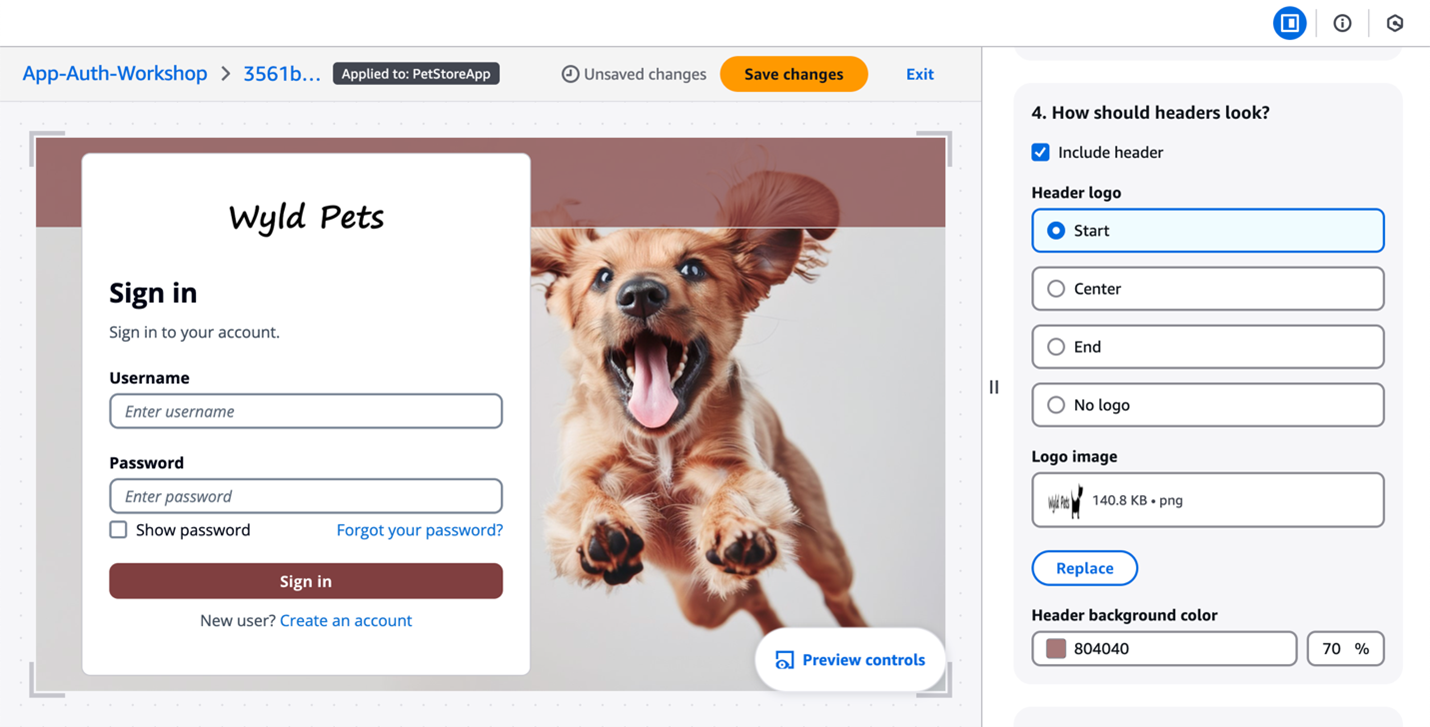
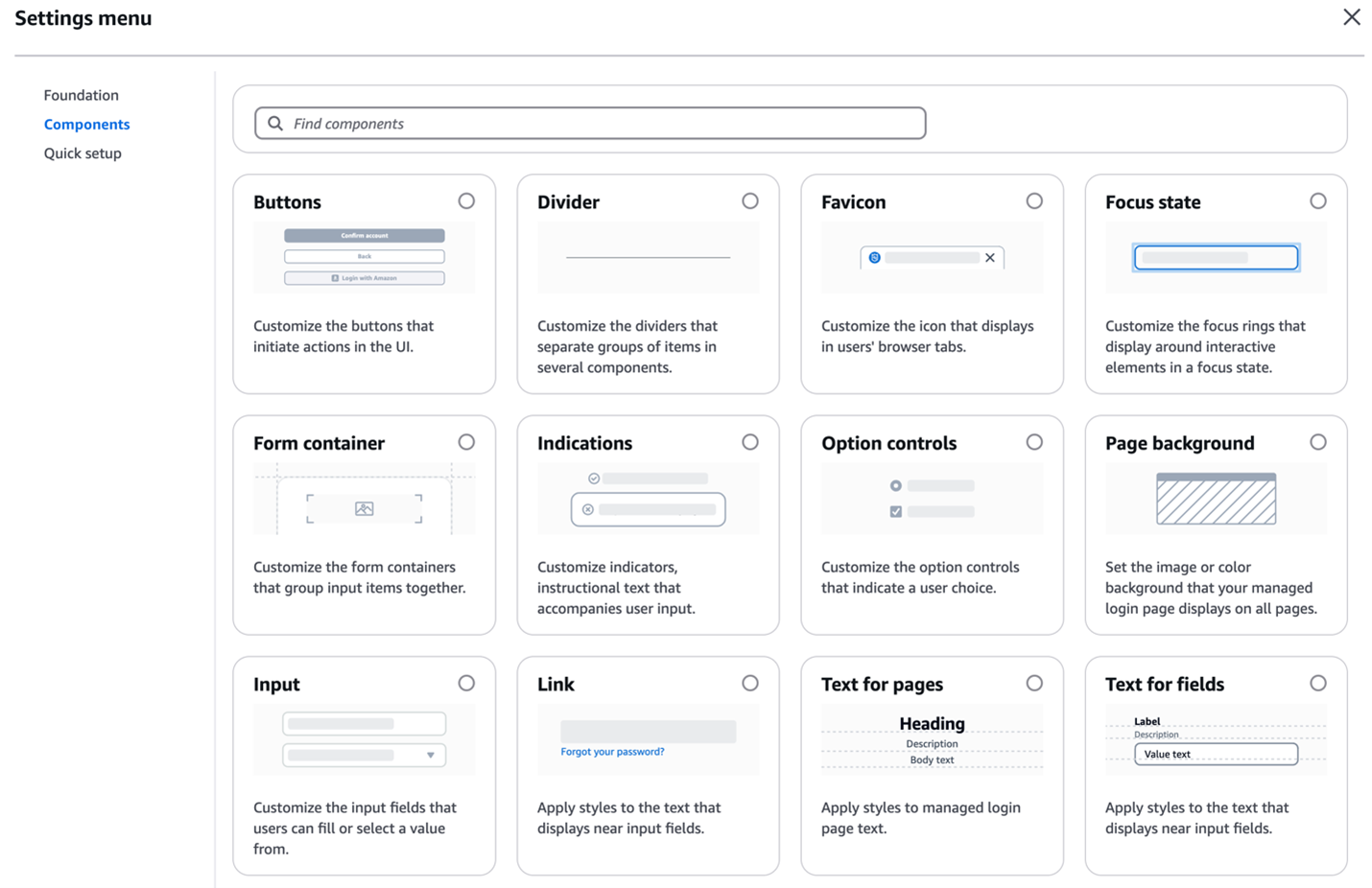
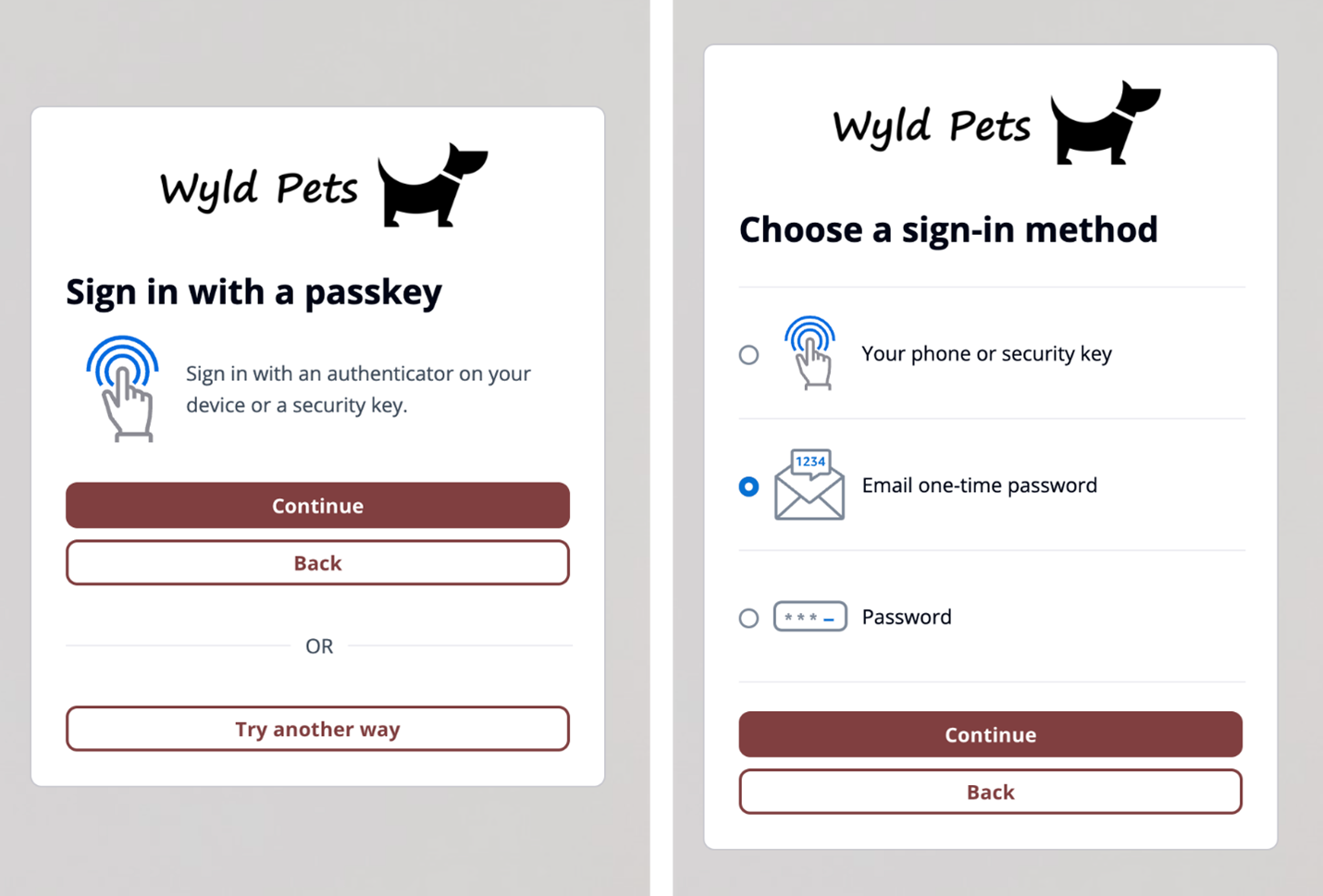
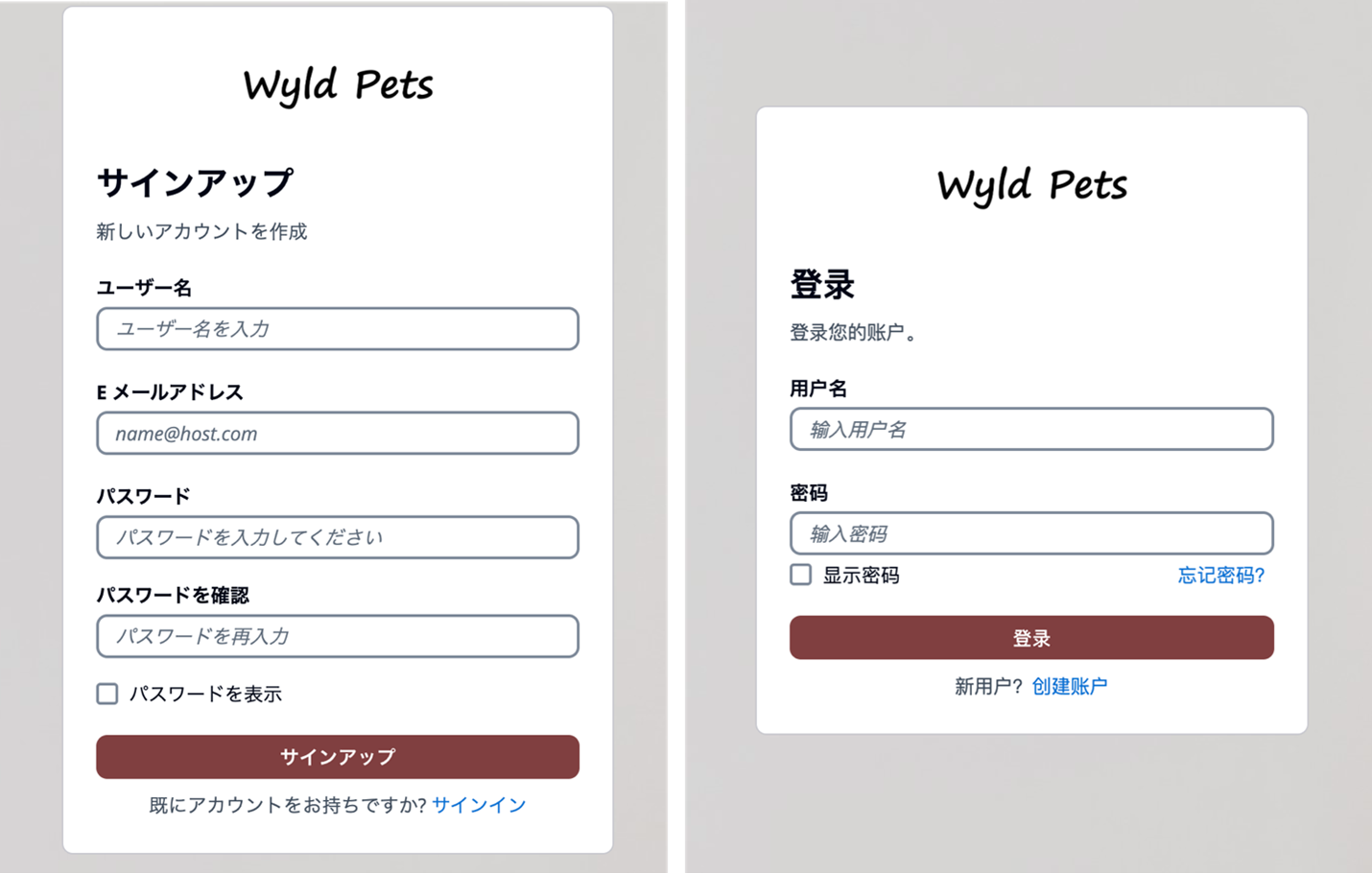
October 8, 2025: This blog post has been updated to include the Amazon Cognito managed login experience. The managed login experience has an updated look, additional features, and enhanced customization options.
September 8, 2023: It’s important to know that if you activate user sign-up in your user pool, anyone on the internet can sign up for an account and sign in to your apps. Don’t enable self-registration in your user pool unless you want to open your app to allow users to sign up.
June 9, 2023: Original publication date.
Amazon Cognito is an authentication, authorization, and user management service for your web and mobile applications. Your users can sign in directly through many different authentication methods, such as user accounts within Amazon Cognito or through social providers such as Facebook, Amazon, Apple, or Google. You can also configure federation through a third-party OpenID Connect (OIDC) or SAML 2.0 identity provider (IdP).
Amazon Cognito user pools are user directories that provide sign-up and sign-in functions for your application users, including federated authentication capabilities. A Cognito user pool has two primary UI options:
Managed login: AWS hosts, preconfigures, maintains, and scales the UI—including managed login branding and classic Hosted UI branding—with a set of options that you can customize or configure for sign-up and sign-in for app users.
Custom UI: You can configure an Amazon Cognito user pool with a completely custom UI by using the SDK. You’re accountable for hosting, configuring, maintaining, and scaling your custom UI as a part of your responsibility in the AWS Shared Responsibility Model.
In this blog post, we review the benefits of using the managed login or creating a custom UI with the SDK and things to consider in determining which to choose for your application.
Managed login
Managed login provides web interfaces for sign-up, sign-in, multi-factor authentication (MFA), password management, and passwordless and passkey sign-in capabilities in your user pool. The managed login provides an authorization server based on the OAuth 2.0 specification, and has a default implementation of user flows for sign-up and sign-in. Your application can redirect to the managed login, which will handle the user flows through the authorization code grant flow. The managed login also supports sign-in through social providers and federation from OIDC-compliant and SAML 2.0 providers. Amazon Cognito offers two visual modes and branding and customization experiences: managed login branding with branding editor and hosted UI (classic) branding.
Managed login branding with branding editor Managed login branding provides an improved user experience with the most up-to-date authentication options for the user pool UI experience. Figure 1 shows managed login using the default branding settings.
Figure 1: Managed login default branding settings
The branding editor is a no-code visual editor that you can use to customize the look and feel of the entire user journey. You can customize each user pool application client individually, and preview screens in real-time with different screen sizes, as shown in Figure 2.
Figure 2: Customization in the Amazon Cognito branding editor (Image credits)
As shown in Figure 3, You can customize various components using the branding editor, including background, header and footer, buttons, focus state, icons, and more.
Figure 3: Various components customization options
Additionally, managed login branding adds support for passwordless sign-in with passkeys, email one-time-passwords (OTP) and SMS OTPs, as shown in Figure 4. After you enable passwordless login in your user pool, managed login branding adapts to curated user flows with users’ preferred authentication methods.
Figure 4: Sign in with passkey flow (left) and user-selected sign-in method flow (right)
Managed login branding also offers localization options in several languages (two are shown in Figure 5). You can add a lang query parameter in the link you distribute to users, and Amazon Cognito will set a cookie in users’ browsers with their language preference after the initial request.
Figure 5: Cognito user sign up page in Japanese (left) and user sign in page in Simplified Chinese (right)
Hosted UI (classic) branding For customers who prefer a traditional approach, Amazon Cognito continues to support the Hosted UI (classic) branding (shown in Figure 6) with basic customization where you can upload a CSS file to design the UI styling and upload a brand-specific logo. Hosted UI (classic) supports standard authentication flows with MFA and self-service sign up.
Figure 6: Hosted UI (classic) branding
The managed login branding with branding editor is available to Amazon Cognito user pools with Essentials and Plus feature tiers, and Hosted UI (classic) branding is available to most Cognito user pools including Lite tier. To learn more about Cognito feature tiers, visit Amazon Cognito pricing.
Security and compliance capabilities
Both managed login branding and Hosted UI (classic) branding are designed to help you meet your compliance and security requirements and your users’ needs. Managed login supports custom OAuth scopes and OAuth 2.0 flows. If you want single sign-on (SSO), you can use managed login to support a single login across many application clients, with browser session cookies for the same domain. Actions are logged in AWS CloudTrail, and you can use the logs for audit and reactionary automation. The managed login experience also supports the full suite of threat protection features for Amazon Cognito. For additional protection, managed login has support for AWS WAF web ACLs and for AWS WAF CAPTCHA, which can help protect your Cognito user pools from web-based exploits and unwanted bots.
Figure 7: Example default managed login with several login providers enabled
For federation, managed loginsupports federation with third-party IdPs that support OIDC and SAML 2.0, as well as social IdPs, as shown in Figure 7. Identity providers are connected to your Amazon Cognito user pool. In managed login, users use a button to select the federation source, and redirection is automatic. With SAML and OIDC IdPs, you can also configure mapping by using the domain in the user’s email address. In this case, a single text field is visible to your application users to enter an email address, as shown in Figure 8, and the lookup and redirect to the appropriate SAML IdP is automatic, as described in Choosing SAML identity provider names.
Figure 8: Managed login that links to corporate IdP through an email domain
Managed login integrates with Application Load Balancer (ALB) for web applications and works with AWS Amplify to enable social identity provider and enterprise federation (SAML and OIDC) capabilities. Beyond these integrations, Amazon Cognito user pools integrate with various AWS services (such as AWS AppSync), that require user authentication and authorization, and Amazon API Gateway through Cognito authorizers to secure your REST and HTTP endpoints.
You might choose to use managed login for many reasons. AWS fully manages the hosting, maintenance, and scaling of the managed login, which can contribute to the speed of go-to-market for customers. If your app requires OAuth 2.0 custom scopes, federation, social login, or native users with basic but customized branding and potentially numerous Amazon Cognito user pools, you might benefit from using managed login.
Creating a custom UI using the SDK for Amazon Cognito provides a host of benefits and features that can help you completely customize the UI for your application users. With a custom UI, you have complete control over the look and feel of the UI that your application users will land on, including designing your app to support multiple languages, and you can build and design custom authentication flows.
There are numerous features that are supported when you build a custom UI. As with the managed login, the APIs invoked from a custom UI using the SDK will create log entries in CloudTrail, and you can use the logs for audit and automation. You can also create a custom authentication flow for your users with a fully custom authentication experience beyond the those available in managed login.
In a custom UI, you can build custom session management and integrate with AWS WAF. A custom UI also works with the threat protection features of Amazon Cognito.
Figure 9: Example of a custom user interface
With a custom UI, such as the one shown in Figure 10, you can orchestrate a suite of sign-in options and sign-in flows for your users. For example, you can collect a user or tenant identifier at the beginning of the authentication flow and apply your own logic for user authentication flow, such as redirecting federated users to external IdPs, displaying a password prompt for local users, or directing users to create a new account if they don’t exist. You can also build flows to let a user choose alternative MFA methods if their preferred choices aren’t available.
Figure 10: Custom UI example
When you build a custom UI, there is support for custom endpoints and proxies so that you have a wider range of options for management and consistency across application development as it relates to authentication. Custom authentication flows are only available in applications with a custom UI, which gives you the ability to make customized challenge prompts and answers to help you meet custom security requirements by using AWS Lambda triggers. For example, you could use it to implement OAuth 2.0 device grant flows. Lastly, a custom UI supports a remember device feature where you can add low-effort sign-in from trusted devices.
You might choose to build a custom UI with an SDK when full customization is a requirement or where you want to incorporate customized authentication flows using the custom authentication challenge Lambda triggers. A custom UI is a great choice if you aren’t required to use OAuth 2.0 flows and you have the resources to develop and implement a unique UI for your application users.
When deciding between Amazon Cognito managed login branding options and a custom UI, there are some unique differences that can help you determine which UI is best for your application needs. Managed login offers a modern, customizable authentication experience with advanced features like no-code visual customization, dark mode themes, and support for passwordless options. It supports OAuth 2.0 flows, custom OAuth scopes, the ability to sign in one time and access many Cognito application clients (using SSO), and full use of the Cognito threat protection features. For applications requiring complete control over the authentication experience and UX—including custom authentication flows, device fingerprinting, and reduced token expiration—a custom UI is the better choice. This option allows for full UI customization, implementation of custom authentication flows, and integration with specific frameworks or libraries not supported by managed login.
When making your decision, consider factors such as the level of customization required, specific authentication features needed, development resources available, integration requirements with other AWS services, security and compliance needs, and user experience priorities. Remember that your application authentication requirements and customer experience should take precedence over other considerations. You can use the following table to help select the best UI for your requirements.
Requirements
Managed login
Hosted UI (classic)
Custom UI (SDK)
OAuth 2.0 flows
Supported
Supported
Not available
Custom OAuth scopes
Supported
Supported
Supported
Customization of UI
No-code branding designer
Limited CSS customization
Full custom control
Custom user input forms
Not available
Not available
Supported
Custom authentication flow
Not available
Not available
Supported
Passwordless authentication flow
Supported
Not available
Custom implementation available
Localization with multiple languages
Supported
Not available
Supported
Login once across many app clients
Supported
Supported
Not available
Session expiration configurable under 1 hour
Not available
Not available
Supported
Trusted-device authentication
Not available
Not available
Supported
AWS WAF integration
Supported
Supported
Supported
Support for AWS WAF CAPTCHA
Supported
Supported
Not available
Ability to use a custom endpoint or proxy
Not available
Not available
Supported
AWS Application Load Balancer integration
Supported
Supported
Not available
Figure 11: Decision criteria matrix
Conclusion
In this post, you learned about using managed login, including its two branding options and creating a custom UI in Amazon Cognito and the many supported features and benefits of each. Each UI option targets a specific need. Choose from available options based on your list of requirements for authentication and the user sign-up and sign-in experience. You can use the information in this post as a reference as you add Amazon Cognito to your mobile and web applications for authentication.
Have a question? Contact us for general support services.
AWS recommends using automation where possible to keep people away from systems—yet not every action can be automated in practice, and some operations might require access by human users. Depending on their scope and potential impact, some human operations might require special treatment.
One such treatment is temporary elevated access, also known as just-in-time access. This is a way to request access for a specified time period, validate whether there is a legitimate need, and grant time-bound access. It also allows you to monitor activities performed, and revoke access if conditions change. Temporary elevated access can help you to reduce risks associated with human access without hindering operational capabilities.
In this post, we introduce a temporary elevated access management solution (TEAM) that integrates with AWS IAM Identity Center (successor to AWS Single Sign-On) and allows you to manage temporary elevated access to your multi-account AWS environment. You can download the TEAM solution from AWS Samples, deploy it to your AWS environment, and customize it to meet your needs.
The TEAM solution provides the following features:
Workflow and approval — TEAM provides a workflow that allows authorized users to request, review, and approve or reject temporary access. If a request is approved, TEAM activates access for the requester with the scope and duration specified in the request.
View request details and session activity — Authorized users can view request details and session activity related to current and historical requests from within the application’s web interface.
Ability to use managed identities and group memberships — You can either sync your existing managed identities and group memberships from an external identity provider into IAM Identity Center, or manage them directly in IAM Identity Center, in order to control user authorization in TEAM. Similarly, users can authenticate directly in IAM Identity Center, or they can federate from an external identity provider into IAM Identity Center, to access TEAM.
A rich authorization model — TEAM uses group memberships to manage eligibility (authorization to request temporary elevated access with a given scope) and approval (authorization to approve temporary elevated access with a given scope). It also uses group memberships to determine whether users can view historical and current requests and session activity, and whether they can administer the solution. You can manage both eligibility and approval policies at different levels of granularity within your organization in AWS Organizations.
TEAM overview
You can download the TEAM solution and deploy it into the same organization where you enable IAM Identity Center. TEAM consists of a web interface that you access from the IAM Identity Center access portal, a workflow component that manages requests and approvals, an orchestration component that activates temporary elevated access, and additional components involved in security and monitoring.
Figure 1 shows an organization with TEAM deployed alongside IAM Identity Center.
Figure 1: An organization using TEAM alongside IAM Identity Center
Figure 1 shows three main components:
TEAM — a self-hosted solution that allows users to create, approve, monitor and manage temporary elevated access with a few clicks in a web interface.
IAM Identity Center — an AWS service which helps you to securely connect your workforce identities and manage their access centrally across accounts.
AWS target environment — the accounts where you run your workloads, and for which you want to securely manage both persistent access and temporary elevated access.
There are four personas who can use TEAM:
Requesters — users who request temporary elevated access to perform operational tasks within your AWS target environment.
Approvers — users who review and approve or reject requests for temporary elevated access.
Auditors — users with read-only access who can view request details and session activity relating to current and historical requests.
Admins — users who can manage global settings and define policies for eligibility and approval.
TEAM determines a user’s persona from their group memberships, which can either be managed directly in IAM Identity Center or synced from an external identity provider into IAM Identity Center. This allows you to use your existing access governance processes and tools to manage the groups and thereby control which actions users can perform within TEAM.
The following steps describe how you use TEAM during normal operations to request, approve, and invoke temporary elevated access. The steps correspond to the numbered items in Figure 1:
Access the AWS access portal in IAM Identity Center (all personas)
Access the TEAM application (all personas)
Request elevated access (requester persona)
Approve elevated access (approver persona)
Activate elevated access (automatic)
Invoke elevated access (requester persona)
Log session activity (automatic)
End elevated access (automatic; or requester or approver persona)
View request details and session activity (requester, approver, or auditor persona)
In the TEAM walkthrough section later in this post, we provide details on each of these steps.
Deploy and set up TEAM
Before you can use TEAM, you need to deploy and set up the solution.
Prerequisites
To use TEAM, you first need to have an organization set up in AWS Organizations with IAM Identity Center enabled. If you haven’t done so already, create an organization, and then follow the Getting started steps in the IAM Identity Center User Guide.
Before you deploy TEAM, you need to nominate a member account for delegated administration in IAM Identity Center. This has the additional benefit of reducing the need to use your organization’s management account. We strongly recommend that you use this account only for IAM Identity Center delegated administration, TEAM, and associated services; that you do not deploy any other workloads into this account, and that you carefully manage access to this account using the principle of least privilege.
We recommend that you enforce multi-factor authentication (MFA) for users, either in IAM Identity Center or in your external identity provider. If you want to statically assign access to users or groups (persistent access), you can do that in IAM Identity Center, independently of TEAM, as described in Multi-account permissions.
Deploy TEAM
To deploy TEAM, follow the solution deployment steps in the TEAM documentation. You need to deploy TEAM in the same account that you nominate for IAM Identity Center delegated administration.
Access TEAM
After you deploy TEAM, you can access it through the IAM Identity Center web interface, known as the AWS access portal. You do this using the AWS access portal URL, which is configured when you enable IAM Identity Center. Depending on how you set up IAM Identity Center, you are either prompted to authenticate directly in IAM Identity Center, or you are redirected to an external identity provider to authenticate. After you authenticate, the AWS access portal appears, as shown in Figure 2.
Figure 2: TEAM application icon in the AWS access portal of IAM Identity Center
You configure TEAM as an IAM Identity Center Custom SAML 2.0 application, which means it appears as an icon in the AWS access portal. To access TEAM, choose TEAM IDC APP.
When you first access TEAM, it automatically retrieves your identity and group membership information from IAM Identity Center. It uses this information to determine what actions you can perform and which navigation links are visible.
Set up TEAM
Before users can request temporary elevated access in TEAM, a user with the admin persona needs to set up the application. This includes defining policies for eligibility and approval. A user takes on the admin persona if they are a member of a named IAM Identity Center group that is specified during TEAM deployment.
Manage eligibility policies
Eligibility policies determine who can request temporary elevated access with a given scope. You can define eligibility policies to ensure that people in specific teams can only request the access that you anticipate they’ll need as part of their job function.
To manage eligibility policies, in the left navigation pane, under Administration, select Eligibility policy. Figure 3 shows this view with three eligibility policies already defined.
Figure 3: Manage eligibility policies
An eligibility policy has four main parts:
Name and Type — An IAM Identity Center user or group
Accounts or OUs — One or more accounts, organizational units (OUs), or both, which belong to your organization
Each eligibility policy allows the specified IAM Identity Center user, or a member of the specified group, to log in to TEAM and request temporary elevated access using the specified permission sets in the specified accounts. When you choose a permission set, you can either use a predefined permission set provided by IAM Identity Center, or you can create your own permission set using custom permissions to provide least-privilege access for particular tasks.
Note: If you specify an OU in an eligibility or approval policy, TEAM includes the accounts directly under that OU, but not those under its child OUs.
Manage approval policies
Approval policies work in a similar way as eligibility policies, except that they authorize users to approve temporary elevated access requests, rather than create them. If a specific account is referenced in an eligibility policy that is configured to require approval, then you need to create a corresponding approval policy for the same account. If there is no corresponding approval policy—or if one exists but its groups have no members — then TEAM won’t allow users to create temporary elevated access requests for that account, because no one would be able to approve them.
To manage approval policies, in the left navigation pane, under Administration, select Approval policy. Figure 4 shows this view with three approval policies already defined.
Approver groups — One or more IAM Identity Center groups
Each approval policy allows a member of a specified group to log in to TEAM and approve temporary elevated access requests for the specified account, or all accounts under the specified OU, regardless of permission set.
Note: If you specify the same group for both eligibility and approval in the same account, this means approvers can be in the same team as requesters for that account. This is a valid approach, sometimes known as peer approval. Nevertheless, TEAM does not allow an individual to approve their own request. If you prefer requesters and approvers to be in different teams, specify different groups for eligibility and approval.
TEAM walkthrough
Now that the admin persona has defined eligibility and approval policies, you are ready to use TEAM.
To begin this walkthrough, imagine that you are a requester, and you need to perform an operational task that requires temporary elevated access to your AWS target environment. For example, you might need to fix a broken deployment pipeline or make some changes as part of a deployment. As a requester, you must belong to a group specified in at least one eligibility policy that was defined by the admin persona.
Step 1: Access the AWS access portal in IAM Identity Center
To access the AWS access portal in IAM Identity Center, use the AWS access portal URL, as described in the Access TEAM section earlier in this post.
Step 2: Access the TEAM application
To access the TEAM application, select the TEAM IDC APP icon, as described in the Access TEAM section earlier.
Step 3: Request elevated access
The next step is to create a new elevated access request as follows:
Under Requests, in the left navigation pane, choose Create request.
In the Elevated access request section, do the following, as shown in Figure 5:
Select the account where you need to perform your task.
For Role, select a permission set that will give you sufficient permissions to perform the task.
Enter a start date and time, duration, ticket ID (typically representing a change ticket or incident ticket related to your task), and business justification.
Choose Submit.
Figure 5: Create a new request
When creating a request, consider the following:
In each request, you can specify exactly one account and one permission set.
You can only select an account and permission set combination for which you are eligible based on the eligibility policies defined by the admin persona.
As a requester, you should apply the principle of least privilege by selecting a permission set with the least privilege, and a time window with the least duration, that will allow you to complete your task safely.
TEAM captures a ticket identifier for audit purposes only; it does not try to validate it.
The duration specified in a request determines the time window for which elevated access is active, if your request is approved. During this time window, you can invoke sessions to access the AWS target environment. It doesn’t affect the duration of each session.
Session duration is configured independently for each permission set by an IAM Identity Center administrator, and determines the time period for which IAM temporary credentials are valid for sessions using that permission set.
Sessions invoked just before elevated access ends might remain valid beyond the end of the approved elevated access period. If this is a concern, consider minimizing the session duration configured in your permission sets, for example by setting them to 1 hour.
Step 4: Approve elevated access
After you submit your request, approvers are notified by email. Approvers are notified when there are new requests that fall within the scope of what they are authorized to approve, based on the approval policies defined earlier.
For this walkthrough, imagine that you are now the approver. You will perform the following steps to approve the request. As an approver, you must belong to a group specified in an approval policy that the admin persona configured.
Access the TEAM application in exactly the same way as for the other personas.
In the left navigation pane, under Approvals, choose Approve requests. TEAM displays requests awaiting your review, as shown in Figure 6.
To view the information provided by the requester, select a request and then choose View details.
Figure 6: Requests awaiting review
Select a pending request, and then do one of the following:
To approve the request, select Actions and then choose Approve.
To reject the request, select Actions and then choose Reject.
Figure 7 shows what TEAM displays when you approve a request.
Figure 7: Approve a request
After you approve or reject a request, the original requester is notified by email.
A requester can view the status of their requests in the TEAM application.
To see the status of your open requests in the TEAM application, in the left navigation pane, under Requests, select My requests. Figure 8 shows this view with one approved request.
Figure 8: Approved request
Step 5: Automatic activation of elevated access
After a request is approved, the TEAM application waits until the start date and time specified in the request and then automatically activates elevated access. To activate access, a TEAM orchestration workflow creates a temporary account assignment, which links the requester’s user identity in IAM Identity Center with the permission set and account in their request. Then TEAM notifies the requester by email that their request is active.
A requester can now view their active request in the TEAM application.
To see active requests, in the left navigation pane under Elevated access, choose Active access. Figure 9 shows this view with one active request.
Figure 9: Active request
To see further details for an active request, select a request and then choose View details. Figure 10 shows an example of these details.
Figure 10: Details of an active request
Step 6: Invoke elevated access
During the time period in which elevated access is active, the requester can invoke sessions to access the AWS target environment to complete their task. Each session has the scope (permission set and account) approved in their request. There are three ways to invoke access.
The first two methods involve accessing IAM Identity Center using the AWS access portal URL. Figure 11 shows the AWS access portal while a request is active.
Figure 11: Invoke access from the AWS access portal
From the AWS access portal, you can select an account and permission set that is currently active. You’ll also see the accounts and permission sets that have been statically assigned to you using IAM Identity Center, independently of TEAM. From here, you can do one of the following:
Choose Command line or programmatic access to copy and paste temporary credentials.
The third method is to initiate access directly from the command line using AWS CLI. To use this method, you first need to configure AWS CLI to integrate with IAM Identity Center. This method provides a smooth user experience for AWS CLI users, since you don’t need to copy and paste temporary credentials to your command line.
Regardless of how you invoke access, IAM Identity Center provides temporary credentials for the IAM role and account specified in your request, which allow you to assume that role in that account. The temporary credentials are valid for the duration specified in the role’s permission set, defined by an IAM Identity Center administrator.
When you invoke access, you can now complete the operational tasks that you need to perform in the AWS target environment. During the period in which your elevated access is active, you can invoke multiple sessions if necessary.
Step 7: Log session activity
When you access the AWS target environment, your activity is logged to AWS CloudTrail. Actions you perform in the AWS control plane are recorded as CloudTrail events.
Note: Each CloudTrail event contains the unique identifier of the user who performed the action, which gives you traceability back to the human individual who requested and invoked temporary elevated access.
Step 8: End elevated access
Elevated access ends when either the requested duration elapses or it is explicitly revoked in the TEAM application. The requester or an approver can revoke elevated access whenever they choose.
When elevated access ends, or is revoked, the TEAM orchestration workflow automatically deletes the temporary account assignment for this request. This unlinks the permission set, the account, and the user in IAM Identity Center. The requester is then notified by email that their elevated access has ended.
Step 9: View request details and session activity
You can view request details and session activity for current and historical requests from within the TEAM application. Each persona can see the following information:
Requesters can inspect elevated access requested by them.
Approvers can inspect elevated access that falls within the scope of what they are authorized to approve.
Auditors can inspect elevated access for all TEAM requests.
Session activity is recorded based on the log delivery times provided by AWS CloudTrail, and you can view session activity while elevated access is in progress or after it has ended. Figure 12 shows activity logs for a session displayed in the TEAM application.
Figure 12: Session activity logs
Security and resiliency considerations
The TEAM application controls access to your AWS environment, and you must manage it with great care to prevent unauthorized access. This solution is built using AWS Amplify to ease the reference deployment. Before operationalizing this solution, consider how to align it with your existing development and security practices.
AWS Security Partners provide temporary elevated access solutions that integrate with IAM Identity Center, and AWS has validated the integration of these partner offerings and assessed their capabilities against a common set of customer requirements. For further information, see temporary elevated access in the IAM Identity Center User Guide.
The blog post Managing temporary elevated access to your AWS environment describes an alternative self-hosted solution for temporary elevated access which integrates directly with an external identity provider using OpenID Connect, and federates users directly into AWS Identity and Access Management (IAM) roles in your accounts. The TEAM solution described in this blog post, on the other hand, integrates with IAM Identity Center, which provides a way to centrally manage user access to accounts across your organization and optionally integrates with an external identity provider.
Conclusion
In this blog post, you learned that your first priority should be to use automation to avoid the need to give human users persistent access to your accounts. You also learned that in the rare cases in which people need access to your accounts, not all access is equal; there are times when you need a process to verify that access is needed, and to provide temporary elevated access.
We introduced you to a temporary elevated access management solution (TEAM) that you can download from AWS Samples and use alongside IAM Identity Center to give your users temporary elevated access. We showed you the TEAM workflow, described the TEAM architecture, and provided links where you can get started by downloading and deploying TEAM.
If you have feedback about this post, submit comments in the Comments section below. If you have questions about this post, start a new thread on AWS IAM Identity Center re:Post or contact AWS Support.
Want more AWS Security news? Follow us on Twitter.
In the AWS Security Profile series, we interview Amazon Web Services (AWS) thought leaders who help keep our customers safe and secure. This interview features Matt Campagna, Senior Principal, Security Engineering, AWS Cryptography, and re:Inforce 2023 session speaker, who shares thoughts on data protection, cloud security, post-quantum cryptography, and more. Matthew was first profiled on the AWS Security Blog in 2019. This is part 1 of 3 in a series of interviews with our AWS Cryptography team.
What do you do in your current role and how long have you been at AWS?
I started at Amazon in 2013 as the first cryptographer at AWS. Today, my focus is on the cryptographic security of our customers’ data. I work across AWS to make sure that our cryptographic engineering meets our most sensitive customer needs. I lead our migration to quantum-resistant cryptography, and help make privacy-preserving cryptography techniques part of our security model.
How did you get started in the data protection and cryptography space? What about it piqued your interest?
I first learned about public-key cryptography (for example, RSA) during a math lesson about group theory. I found the mathematics intriguing and the idea of sending secret messages using only a public value astounding. My undergraduate and graduate education focused on group theory, and I started my career at the National Security Agency (NSA) designing and analyzing cryptologics. But what interests me most about cryptography is its ability to enable business by reducing risks. I look at cryptography as a financial instrument that affords new business cases, like e-commerce, digital currency, and secure collaboration. What enables Amazon to deliver for our customers is rooted in cryptography; our business exists because cryptography enables trust and confidentiality across the internet. I find this the most intriguing aspect of cryptography.
AWS has invested in the migration to post-quantum cryptography by contributing to post-quantum key agreement and post-quantum signature schemes to protect the confidentiality, integrity, and authenticity of customer data. What should customers do to prepare for post-quantum cryptography?
Our focus at AWS is to help ensure that customers can migrate to post-quantum cryptography as fast as prudently possible. This work started with inventorying our dependencies on algorithms that aren’t known to be quantum-resistant, like integer-factorization-based cryptography, and discrete-log-based cryptography, like ECC. Customers can rely on AWS to assist with transitioning to post-quantum cryptography for their cloud computing needs.
We recommend customers begin inventorying their dependencies on algorithms that aren’t quantum-resistant, and consider developing a migration plan, to understand if they can migrate directly to new post-quantum algorithms or if they should re-architect them. For the systems that are provided by a technology provider, customers should ask what their strategy is for post-quantum cryptography migration.
AWS offers post-quantum TLS endpoints in some security services. Can you tell us about these endpoints and how customers can use them?
Our open source TLS implementation, s2n-TLS, includes post-quantum hybrid key exchange (PQHKEX) in its mainline. It’s deployed everywhere that s2n is deployed. AWS Key Management Service, AWS Secrets Manager, and AWS Certificate Manager have enabled PQHKEX cipher suites in our commercial AWS Regions. Today customers can use the AWS SDK for Java 2.0 to enable PQHKEX on their connection to AWS, and on the services that also have it enabled, they will negotiate a post-quantum key exchange method. As we enable these cipher suites on additional services, customers will also be able to connect to these services using PQHKEX.
You are a frequent contributor to the Amazon Science Blog. What were some of your recent posts about?
In 2022, we published a post on preparing for post-quantum cryptography, which provides general information on the broader industry development and deployment of post-quantum cryptography. The post links to a number of additional resources to help customers understand post-quantum cryptography. The AWS Post-Quantum Cryptography page and the Science Blog are great places to start learning about post-quantum cryptography.
We also published a post highlighting the security of post-quantum hybrid key exchange. Amazon believes in evidencing the cryptographic security of the solutions that we vend. We are actively participating in cryptographic research to validate the security that we provide in our services and tools.
What’s been the most dramatic change you’ve seen in the data protection and post-quantum cryptography landscape since we talked to you in 2019?
Since 2019, there have been two significant advances in the development of post-quantum cryptography.
First, the National Institute of Standards and Technology (NIST) announced their selection of PQC algorithms for standardization. NIST expects to finish the standardization of a post-quantum key encapsulation mechanism (Kyber) and digital signature scheme (Dilithium) by 2024 as part of the Federal Information Processing Standard (FIPS). NIST will also work on standardization of two additional signature standards (FALCON and SPHINCS+), and continue to consider future standardization of the key encapsulation mechanisms BIKE, HQC, and Classical McEliece.
Second, the NSA announced their Commercial National Security Algorithm (CNSA) Suite 2.0, which includes their timelines for National Security Systems (NSS) to migrate to post-quantum algorithms. The NSA will begin preferring post-quantum solutions in 2025 and expect that systems will have completed migration by 2033. Although this timeline might seem far away, it’s an aggressive strategy. Experience shows that it can take 20 years to develop and deploy new high-assurance cryptographic algorithms. If technology providers are not already planning to migrate their systems and services, they will be challenged to meet this timeline.
What makes cryptography exciting to you?
Cryptography is a dynamic area of research. In addition to the business applications, I enjoy the mathematics of cryptography. The state-of-the-art is constantly progressing in terms of new capabilities that cryptography can enable, and the potential risks to existing cryptographic primitives. This plays out in the public sphere of cryptographic research across the globe. These advancements are made public and are accessible for companies like AWS to innovate on behalf of our customers, and protect our systems in advance of the development of new challenges to our existing crypto algorithms. This is happening now as we monitor the advancements of quantum computing against our ability to define and deploy new high-assurance quantum-resistant algorithms. For me, it doesn’t get more exciting than this.
Where do you see the cryptography and post-quantum cryptography space heading to in the future?
While NIST transitions from their selection process to standardization, the broader cryptographic community will be more focused on validating the cryptographic assurances of these proposed schemes for standardization. This is a critical part of the process. I’m optimistic that we will enter 2025 with new cryptographic standards to deploy.
There is a lot of additional cryptographic research and engineering ahead of us. Applying these new primitives to the cryptographic applications that use classical asymmetric schemes still needs to be done. Some of this work is happening in parallel, like in the IETF TLS working group, and in the ETSI Quantum-Safe Cryptography Technical Committee. The next five years should see the adoption of PQHKEX in protocols like TLS, SSH, and IKEv2 and certification of new FIPS hardware security modules (HSMs) for establishing new post-quantum, long-lived roots of trust for code-signing and entity authentication.
I expect that the selected primitives for standardization will also be used to develop novel uses in fields like secure multi-party communication, privacy preserving machine learning, and cryptographic computing.
With AWS re:Inforce 2023 around the corner, what will your session focus on? What do you hope attendees will take away from your session?
Session DAP302 – “Post-quantum cryptography migration strategy for cloud services” is about the challenge quantum computers pose to currently used public-key cryptographic algorithms and how the industry is responding. Post-quantum cryptography (PQC) offers a solution to this challenge, providing security to help protect against quantum computer cybersecurity events. We outline current efforts in PQC standardization and migration strategies. We want our customers to leave with a better understanding of the importance of PQC and the steps required to migrate to it in a cloud environment.
Is there something you wish customers would ask you about more often?
The question I am most interested in hearing from our customers is, “when will you have a solution to my problem?” If customers have a need for a novel cryptographic solution, I’m eager to try to solve that with them.
How about outside of work, any hobbies?
My main hobbies outside of work are biking and running. I wish I was as consistent attending to my hobbies as I am to my work desk. I am happier being able to run every day for a constant speed and distance as opposed to running faster or further tomorrow or next week. Last year I was fortunate enough to do the Cycle Oregon ride. I had registered for it twice before without being able to find the time to do it.
If you have feedback about this post, submit comments in the Comments section below. If you have questions about this post, contact AWS Support.
Want more AWS Security news? Follow us on Twitter.
Amazon Web Services (AWS) successfully completed a special onboarding audit with no findings for ISO 9001, 27001, 27017, 27018, 27701, and 22301, and Cloud Security Alliance (CSA) STAR CCM v4.0. Ernst and Young Certify Point auditors conducted the audit and reissued the certificates on May 23, 2023. The objective of the audit was to assess the level of compliance with the requirements of the applicable international standards.
We added eight additional AWS services and one additional AWS Region to the scope of this special onboarding audit. The following are the eight additional services:
The additional Region is Asia Pacific (Melbourne).
For a full list of AWS services that are certified under ISO and CSA Star, see the AWS ISO and CSA STAR Certified page. Customers can also access the certifications in the console through AWS Artifact.
If you have feedback about this post, submit comments in the Comments section below.
Want more AWS Security how-to content, news, and feature announcements? Follow us on Twitter.
In the AWS Security Profile series, we interview Amazon Web Services (AWS) experts who help keep our customers safe and secure. This interview features Valerie Lambert, Senior Software Development Engineer, Crypto Tools, and upcoming AWS re:Inforce 2023 speaker, who shares thoughts on data protection, cloud security, cryptography tools, and more.
What do you do in your current role and how long have you been at AWS? I’m a Senior Software Development Engineer on the AWS Crypto Tools team in AWS Cryptography. My team focuses on building open source, client-side encryption solutions, such as the AWS Encryption SDK. I’ve been working in this space for the past four years.
How did you get started in cryptography? What about it piqued your interest? When I started on this team back in 2019, I knew very little about the specifics of cryptography. I only knew its importance for securing our customers’ data and that security was our top priority at AWS. As a developer, I’ve always taken security and data protection very seriously, so when I learned about this particular team from one of my colleagues, I was immediately interested and wanted to learn more. It also helped that I’m a very math-oriented person. I find this domain endlessly interesting, and love that I have the opportunity to work with some truly amazing cryptography experts.
Why do cryptography tools matter today? Customers need their data to be secured, and builders need to have tools they can rely on to help provide that security. It’s well known that no one should cobble together their own encryption scheme. However, even if you use well-vetted, industry-standard cryptographic primitives, there are still many considerations when applying those primitives correctly. By using tools that are simple to use and hard to misuse, builders can be confident in protecting their customers’ most sensitive data, without cryptographic expertise required.
What’s been the most dramatic change you’ve seen in the data protection and cryptography space? In the past few years, I’ve seen more and more formal verification used to help prove various properties about complex systems, as well as build confidence in the correctness of our libraries. In particular, the AWS Crypto Tools team is using Dafny, a formal verification-aware programming language, to implement the business logic for some of our libraries. Given the high bar for correctness of cryptographic libraries, having formal verification as an additional tool in the toolbox has been invaluable. I look forward to how these tools mature in the next couple years.
You are speaking in Anaheim June 13-14 at AWS re:Inforce 2023 — what will your session focus on? Our team has put together a workshop (DAP373) that will focus on strategies to use client-side encryption with Amazon DynamoDB, specifically focusing on solutions for effectively searching on data that has been encrypted on the client side. I hope that attendees will see that, with a bit of forethought put into their data access patterns, they can still protect their data on the client side.
Where do you see the cryptography tools space heading in the future? More and more customers have been coming to us with use cases that involve client-side encryption with different database technologies. Although my team currently vends an out-of-the-box solution for DynamoDB, customers working with other database technologies have to build their own solutions to help keep their data safe. There are many, many considerations that come with encrypting data on the client side for use in a database, and it’s very expensive for customers to design, build, and maintain these solutions. The AWS Crypto Tools team is actively investigating this space—both how we can expand the usability of client-side encrypted data in DynamoDB, and how to bring our tools to more database technologies.
Is there something you wish customers would ask you about more often? Customers shouldn’t need to understand the cryptographic details that underpin the security properties that our tools provide to protect their end users’ data. However, I love when our customers are curious and ask questions and are themselves interested in the nitty-gritty details of our solutions.
How about outside of work, any hobbies? A couple years ago, I picked up aerial circus arts as a hobby. I’m still not very good, but it’s a lot of fun to play around on silks and trapeze. And it’s great exercise!
If you have feedback about this post, submit comments in the Comments section below. If you have questions about this post, contact AWS Support.
Want more AWS Security news? Follow us on Twitter.
The United States Government recently launched its National Cybersecurity Strategy. The Strategy outlines the administration’s ambitious vision for building a more resilient future, both in the United States and around the world, and it affirms the key role cloud computing plays in realizing this vision.
Amazon Web Services (AWS) is broadly committed to working with customers, partners, and governments such as the United States to improve cybersecurity. That longstanding commitment aligns with the goals of the National Cybersecurity Strategy. In this blog post, we will summarize the Strategy and explain how AWS will help to realize its vision.
The Strategy identifies two fundamental shifts in how the United States allocates cybersecurity roles, responsibilities, and resources. First, the Strategy calls for a shift in cybersecurity responsibility away from individuals and organizations with fewer resources, toward larger technology providers that are the most capable and best-positioned to be successful. At AWS, we recognize that our success and scale bring broad responsibility. We are committed to improving cybersecurity outcomes for our customers, our partners, and the world at large.
Second, the Strategy calls for realigning incentives to favor long-term investments in a resilient future. As part of our culture of ownership, we are long-term thinkers, and we don’t sacrifice long-term value for short-term results. For more than fifteen years, AWS has delivered security, identity, and compliance services for millions of active customers around the world. We recognize that we operate in a complicated global landscape and dynamic threat environment that necessitates a dynamic approach to security. Innovation and long-term investments have been and will continue to be at the core of our approach, and we continue to innovate to build and improve on our security and the services we offer customers.
AWS is working to enhance cybersecurity outcomes in ways that align with each of the Strategy’s five pillars:
Defend Critical Infrastructure — Customers, partners, and governments need confidence that they are migrating to and building on a secure cloud foundation. AWS is architected to have the most flexible and secure cloud infrastructure available today, and our customers benefit from the data centers, networks, custom hardware, and secure software layers that we have built to satisfy the requirements of the most security-sensitive organizations. Our cloud infrastructure is secure by design and secure by default, and our infrastructure and services meet the high bar that the United States Government and other customers set for security.
Disrupt and Dismantle Threat Actors — At AWS, our paramount focus on security leads us to implement important measures to prevent abuse of our services and products. Some of the measures we undertake to deter, detect, mitigate, and prevent abuse of AWS products include examining new registrations for potential fraud or identity falsification, employing service-level containment strategies when we detect unusual behavior, and helping protect critical systems and sensitive data against ransomware. Amazon is also working with government to address these threats, including by serving as one of the first members of the Joint Cyber Defense Collaborative (JCDC). Amazon is also co-leading a study with the President’s National Security Telecommunications Advisory Committee on addressing the abuse of domestic infrastructure by foreign malicious actors.
Shape Market Forces to Drive Security and Resilience — At AWS, security is our top priority. We continuously innovate based on customer feedback, which helps customer organizations to accelerate their pace of innovation while integrating top-tier security architecture into the core of their business and operations. For example, AWS co-founded the Open Cybersecurity Schema Framework (OCSF) project, which facilitates interoperability and data normalization between security products. We are contributing to the quality and safety of open-source software both by direct contributions to open-source projects and also by an initial commitment of $10 million in a variety of open-source security improvement projects in and through the Open Source Security Foundation (OpenSSF).
Invest in a Resilient Future — Cybersecurity skills training, workforce development, and education on next-generation technologies are essential to addressing cybersecurity challenges. That’s why we are making significant investments to help make it simpler for people to gain the skills they need to grow their careers, including in cybersecurity. Amazon is committing more than $1.2 billion to provide no-cost education and skills training opportunities to more than 300,000 of our own employees in the United States, to help them secure new, high-growth jobs. Amazon is also investing hundreds of millions of dollars to provide no-cost cloud computing skills training to 29 million people around the world. We will continue to partner with the Cybersecurity and Infrastructure Security Agency (CISA) and others in government to develop the cybersecurity workforce.
Forge International Partnerships to Pursue Shared Goals — AWS is working with governments around the world to provide innovative solutions that advance shared goals such as bolstering cyberdefenses and combating security risks. For example, we are supporting international forums such as the Organization of American States to build security capacity across the hemisphere. We encourage the administration to look toward internationally recognized, risk-based cybersecurity frameworks and standards to strengthen consistency and continuity of security among interconnected sectors and throughout global supply chains. Increased adoption of these standards and frameworks, both domestically and internationally, will mitigate cyber risk while facilitating economic growth.
AWS shares the Biden administration’s cybersecurity goals and is committed to partnering with regulators and customers to achieve them. Collaboration between the public sector and industry has been central to US cybersecurity efforts, fueled by the recognition that the owners and operators of technology must play a key role. As the United States Government moves forward with implementation of the National Cybersecurity Strategy, we look forward to redoubling our efforts and welcome continued engagement with all stakeholders—including the United States Government, our international partners, and industry collaborators. Together, we can address the most difficult cybersecurity challenges, enhance security outcomes, and build toward a more secure and resilient future.
If you have feedback about this post, submit comments in the Comments section below. If you have questions about this post, contact AWS Support.
Want more AWS Security news? Follow us on Twitter.
To support our customers in securing their Amazon Web Services (AWS) environment, AWS offers digital training, whitepapers, blog posts, videos, workshops, and documentation to learn about security in the cloud.
The AWS Ramp-Up Guide: Security is designed to help you quickly learn what is most important to you when it comes to security, identity, and compliance. The Ramp-Up Guide helps you get started with learning cloud foundations and then provides you with options for building skills in various security domains.
Recently, we have updated the AWS Ramp-Up Guide: Security. In this post, we will highlight some of the changes and discuss how to use the new guide.
Update highlights
Based on customer feedback, new service and feature releases, and our experience helping customers, we’ve updated the majority of the guide with new content. Some highlights of the new version include:
Focus on AWS security digital trainings — The new Ramp-Up Guide for security focuses on digital trainings provided by AWS Skill Builder. AWS Skill Builder is a learning center for AWS customers and partners to build cloud skills through digital trainings, self-paced labs, and other course types. AWS Skill Builder has a variety of AWS security content to help customers understand concepts and gain hands-on experience with AWS security.
Security focus areas — Because there are different roles and focuses within cybersecurity, we created sections for different focus areas of AWS security, including threat detection and incident response (TD/IR), compliance, data protection, and more. A Security Operations Center (SOC) analyst, for example, can choose to focus on TD/IR training, which is most relevant for that role.
Extensive additional resources — For each focus area, we added new resources, including whitepapers, blogs, re:Invent videos, and workshops. Customers can use these additional resources to supplement the AWS Skill Builder courses and labs.
How to use the new guide
The AWS Ramp-Up Guide: Security is designed to take you all the way from cloud foundations to the AWS Certified Security – Specialty certification. The guide takes the latest in digital training available from AWS Skill Builder and augments that with the latest resources aligned to foundational concepts and specialized areas within cloud security. Although you are free to use the learnings in any order, if you are new to the cloud, we recommend the following steps:
Sign up for your free AWS Skill Builder account, which provides you with more than 600 digital courses.
Note: You can optionally buy an AWS Skill Builder subscription if you’d like to complete the self-paced labs. See Pricing options for AWS Skill Builder for more details.
Review the “Learn the fundamentals of the AWS Cloud” section of the Ramp-Up Guide, choose a course name under Learning Resource, and search for that course in Skill Builder. If you are unsure of which course to start with, we recommend that you begin with “AWS Cloud Practitioner Essentials.”
After you’ve completed the “Learn the fundamentals of the AWS Cloud” section, proceed to the “AWS Cloud Security Fundamentals” section begin your security training.
After you complete the Security Fundamentals section, review the specialized security focus areas in the Ramp-Up Guide, choose a focus area, and complete the training items within that focus area.
After you’ve completed the training specific to your focus area, explore other focus areas beyond the scope of your immediate role. Security often requires knowledge across domains and focus areas, so we encourage you to explore the security focus areas beyond the immediate scope of your role.
Review the “Putting it all together” section to prepare for the AWS Certified Security – Specialization certification.
We greatly value feedback and contributions from our community. To share your thoughts and insights about the AWS Ramp-Up Guide: Security and your experience using it, and what you want to see in future versions, please contact [email protected].
If you have feedback about this post, submit comments in the Comments section below. If you have questions about this post, contact AWS Support.
Want more AWS Security news? Follow us on Twitter.
AWS is excited to announce a new eBook, 5 Keys to Secure Enterprise Messaging. The new eBook includes best practices for addressing the security and compliance risks associated with messaging apps.
An estimated 3.09 billion mobile phone users access messaging apps to communicate, and this figure is projected to grow to 3.51 billion users in 2025.
Legal and regulatory requirements for data protection, privacy, and data retention have made protecting business communications a priority for organizations across the globe. Although consumer messaging apps are convenient and support real-time communication with colleagues, customers, and partners, they often lack the robust security and administrative controls many businesses require.
The eBook details five keys to secure enterprise messaging that balance people, process, and technology.
We encourage you to read the eBook, and learn about:
Establishing messaging policies and guidelines that are effective for your workforce
Training employees to use messaging apps in a way that doesn’t increase organizational risk
Building a security-first culture
Using true end-to-end encryption (E2EE) to secure communications
Retaining data to help meet requirements, without exposing it to outside parties
The following is background on ransomware, CIS, and the initiatives that led to the publication of this new blueprint.
The Ransomware Task Force
In April of 2021, the U.S. government launched the Ransomware Task Force (RTF), which has the mission of uniting key stakeholders across industry, government, and civil society to create new solutions, break down silos, and find effective new methods of countering the ransomware threat. The RTF has since launched several progress reports with specific recommendations, including the development of the RTF Blueprint for Ransomware Defense, which provides a framework with practical steps to mitigate, respond to, and recover from ransomware. AWS is a member of the RTF, and we have taken action to create our own AWS Blueprint for Ransomware Defense that maps actionable and foundational security controls to AWS services and features that customers can use to implement those controls. The AWS Blueprint for Ransomware Defense is based on the CIS Controls framework.
Center for Internet Security
The Center for Internet Security (CIS) is a community-driven nonprofit, globally recognized for establishing best practices for securing IT systems and data. To help establish foundational defense mechanisms, a subset of the CIS Critical Security Controls (CIS Controls) have been identified as important first steps in the implementation of a robust program to prevent, respond to, and recover from ransomware events. This list of controls was established to provide safeguards against the most impactful and well-known internet security issues. The controls have been further prioritized into three implementation groups (IGs), to help guide their implementation. IG1, considered “essential cyber hygiene,” provides foundational safeguards. IG2 builds on IG1 by including the controls in IG1 plus a number of additional considerations. Finally, IG3 includes the controls in IG1 and IG2, with an additional layer of controls that protect against more sophisticated security issues.
CIS recommends that organizations use the CIS IG1 controls as basic preventative steps against ransomware events. We’ve produced a mapping of AWS services that can help you implement aspects of these controls in your AWS environment. Ransomware is a complex event, and the best course of action to mitigate risk is to apply a thoughtful strategy of defense in depth. The mitigations and controls outlined in this mapping document are general security best practices, but are a non-exhaustive list.
Because data is often vital to the operation of mission-critical services, ransomware can severely disrupt business processes and applications that depend on this data. For this reason, many organizations are looking for effective security controls that will improve their security posture against these types of events. We hope you find the information in the AWS Blueprint for Ransomware Defense helpful and incorporate it as a tool to provide additional layers of security to help keep your data safe.
Let us know if you have any feedback through the AWS Security Contact Us page. Please reach out if there is anything we can do to add to the usefulness of the blueprint or if you have any additional questions on security and compliance. You can find more information from the IST (Institute for Security and Technology) describing ransomware and how to protect yourself on the IST website.
If you have feedback about this post, submit comments in the Comments section below. If you have questions about this post, contact AWS Support.
Want more AWS Security news? Follow us on Twitter.
Amazon Web Services (AWS) has re-published the whitepaper Architecting for PCI DSS Scoping and Segmentation on AWS to provide guidance on how to properly define the scope of your Payment Card Industry (PCI) Data Security Standard (DSS) workloads that are running in the AWS Cloud. The whitepaper has been refreshed to include updated AWS best practices and technologies, and updates that are applicable to the new PCI DSS v4.0 requirements. The whitepaper looks at how to define segmentation boundaries between your in-scope and out-of-scope resources by using cloud-based AWS services.
The whitepaper is intended for engineers and solution builders, but it also serves as a guide for Qualified Security Assessors (QSAs) and internal security assessors (ISAs) to better understand the different segmentation controls that are available within AWS products and services, along with associated scoping considerations.
Compared to on-premises environments, software-defined networking on AWS transforms the scoping process for applications by providing additional segmentation controls beyond network segmentation. Thoughtful design of your applications and selection of security-impacting services for implementing your required controls can reduce the number of systems and services in your cardholder data environment (CDE).
In the AWS Security Profile series, we interview Amazon Web Services (AWS) thought leaders who help keep our customers safe and secure. This interview features Ritesh Desai, General Manager, AWS Secrets Manager, and re:Inforce 2023 session speaker, who shares thoughts on data protection, cloud security, secrets management, and more.
What do you do in your current role and how long have you been at AWS?
I’ve been in the tech industry for more than 20 years and joined AWS about three years ago. Currently, I lead our Secrets Management organization, which includes the AWS Secrets Manager service.
How did you get started in the data protection and secrets management space? What about it piqued your interest?
I’ve always been excited at the prospect of solving complex customer problems with simple technical solutions. Working across multiple small to large organizations in the past, I’ve seen similar challenges with secret sprawl and lack of auditing and monitoring tools. Centralized secrets management is a challenge for customers. As organizations evolve from start-up to enterprise level, they can end up with multiple solutions across organizational units to manage their secrets.
Being part of the Secrets Manager team gives me the opportunity to learn about our customers’ unique needs and help them protect access to their most sensitive digital assets in the cloud, at scale.
Why does secrets management matter to customers today?
Customers use secrets like database passwords and API keys to protect their most sensitive data, so it’s extremely important for them to invest in a centralized secrets management solution. Through secrets management, customers can securely store, retrieve, rotate, and audit secrets.
What’s been the most dramatic change you’ve seen in the data protection and secrets management space?
Secrets management is becoming increasingly important for customers, but customers now have to deal with complex environments that include single cloud providers like AWS, multi-cloud setups, hybrid (cloud and on-premises) environments, and only on-premises instances.
Customers tell us that they want centralized secrets management solutions that meet their expectations across these environments. They have two distinct goals here. First, they want a central secrets management tool or service to manage their secrets. Second, they want their secrets to be available closer to the applications where they’re run. IAM Roles Anywhere provides a secure way for on-premises servers to obtain temporary AWS credentials and removes the need to create and manage long-term AWS credentials. Now, customers can use IAM Roles Anywhere to access their Secrets Manager secrets from workloads running outside of AWS. Secrets Manager also launched a program in which customers can manage secrets in third-party secrets management solutions to replicate secrets to Secrets Manager for their AWS workloads. We’re continuing to invest in these areas to make it simpler for customers to manage their secrets in their tools of choice, while providing access to their secrets closer to where their applications are run.
With AWS re:Inforce 2023 around the corner, what will your session focus on? What do you hope attendees will take away from your session?
I’m speaking in a session called “Using AWS data protection services for innovation and automation” (DAP305) alongside one of our senior security specialist solutions architects on the topic of secrets management at scale. In the session, we’ll walk through a sample customer use case that highlights how to use data protection services like AWS Key Management Service (AWS KMS), AWS Private Certificate Authority (AWS Private CA), and Secrets Manager to help build securely and help meet organizational security and compliance expectations. Attendees will walk away with a clear picture of the services that AWS offers to protect sensitive data, and how they can use these services together to protect secrets at scale.
Where do you see the secrets management space heading in the future?
Traditionally, secrets management was addressed after development, rather than being part of the design and development process. This placement created an inherent clash between development teams who wanted to put the application in the hands of end users, and the security admins who wanted to verify that the application met security expectations. This resulted in longer timelines to get to market. Involving security in the mix only after development is complete, is simply too late. Security should enable business, not restrict it.
Organizations are slowly adopting the culture that “Security is everyone’s responsibility.” I expect more and more organizations will take the step to “shift-left” and embed security early in the development lifecycle. In the near future, I expect to see organizations prioritize the automation of security capabilities in the development process to help detect, remediate, and eliminate potential risks by taking security out of human hands.
Is there something you wish customers would ask you about more often?
I’m always happy to talk to customers to help them think through how to incorporate secure-by-design in their planning process. There are many situations where decisions could end up being expensive to reverse. AWS has a lot of experience working across a multitude of use cases for customers as they adopt secrets management solutions. I’d love to talk more to customers early in their cloud adoption journey, about the best practices that they should adopt and potential pitfalls to avoid, when they make decisions about secrets management and data protection.
How about outside of work—any hobbies?
I’m an avid outdoors person, and living in Seattle has given me and my family the opportunity to trek and hike through the beautiful landscapes of the Pacific Northwest. I’ve also been a consistent Tough Mudder-er for the last 5 years. The other thing that I spend my time on is working as an amateur actor for a friend’s nonprofit theater production, helping in any way I can.
If you have feedback about this post, submit comments in the Comments section below. If you have questions about this post, contact AWS Support.
Want more AWS Security news? Follow us on Twitter.
Amazon Security Lake automatically centralizes security data from both cloud and on-premises sources into a purpose-built data lake stored on a particular AWS delegated administrator account for Amazon Security Lake.
When you turn on Amazon Security Lake, it begins to collect actionable security data from various AWS sources. However, many enterprises today have complex environments that include a mix of different cloud resources in addition to on-premises data centers.
Although the AWS data sources in Amazon Security Lake encompass a large amount of the necessary security data needed for analysis, you may miss the full picture if your infrastructure operates across multiple cloud venders (for example, AWS, Azure, and Google Cloud Platform) and on-premises at the same time. By querying data from across your entire infrastructure, you can increase the number of indicators of compromise (IOC) that you identify, and thus increase the likelihood that those indicators will lead to actionable outputs.
Solution architecture
Figure 1 shows how to configure data to travel from an Azure event hub to Amazon Security Lake.
Figure 1: Solution architecture
As shown in Figure 1, the solution involves the following steps:
An AWS user instantiates the required AWS services and features that enable the process to function, including AWS Identity and Access Management (IAM) permissions, Kinesis data streams, AWS Glue jobs, and Amazon Simple Storage Service (Amazon S3) buckets, either manually or through an AWS CloudFormation template, such as the one we will use in this post.
In response to the custom source created from the CloudFormation template, a Security Lake table is generated in AWS Glue.
From this point on, Azure activity logs in their native format are stored within an Azure cloud event hub within an Azure account. An Azure function is deployed to respond to new events within the Azure event hub and forward these logs over the internet to the Kinesis data stream that was created in the preceding step.
The Kinesis data stream forwards the data to an AWS Glue streaming job fronted by the Kinesis data.
The AWS Glue job then performs the extract, transfer, and load (ETL) mapping to the appropriate Open Cybersecurity Schema Framework (OCSF) (specified for API Activity events at OCSF API Activity Mappings).
The Azure events are partitioned with respect to the required partitioning requirements in Amazon Security Lake tables and stored in S3.
The user can query these tables by using Amazon Athena alongside the rest of their data inside Amazon Security Lake.
Prerequisites
Before you implement the solution, complete the following prerequisites:
Verify that you have enabled Amazon Security Lake in the AWS Regions that correspond to the Azure Activity logs that you will forward. For more information, see What is Amazon Security Lake?
Preconfigure the custom source logging for the source AZURE_ACTIVITY in your Region. To configure this custom source in Amazon Security Lake, open the Amazon Security Lake console, navigate to Create custom data source, and do the following, as shown in Figure 2:
For Data source name, enter AZURE_ACTIVITY.
For Event class, select API_ACTIVITY.
For Account Id, enter the ID of the account which is authorized to write data to your data lake.
For External Id, enter “AZURE_ACTIVITY-<YYYYMMDD>“
Step 1: Configure AWS services for Azure activity logging
The first step is to configure the AWS services for Azure activity logging.
To configure Azure activity logging in Amazon Security Lake, first prepare the assets required in the target AWS account. You can automate this process by using the provided CloudFormation template — Security Lake CloudFormation — which will do the heavy lifting for this portion of the setup.
Note: I have predefined these scripts to create the AWS assets required to ingest Azure activity logs, but you can generalize this process for other external log sources, as well.
The CloudFormation template has the following components:
securitylakeGlueStreamingRole — includes the following managed policies:
AWSLambdaKinesisExecutionRole
AWSGlueServiceRole
securitylakeGlueStreamingPolicy — includes the following attributes:
“s3:GetObject”
“s3:PutObject”
securitylakeAzureActivityStream — This Kinesis data stream is the endpoint that acts as the connection point between Azure and AWS and the frontend of the AWS Glue stream that feeds Azure activity logs to Amazon Security Lake.
securitylakeAzureActivityJob — This is an AWS Glue streaming job that is used to take in feeds from the Kinesis data stream and map the Azure activity logs within that stream to OCSF.
securitylake-glue-assets S3 bucket — This is the S3 bucket that is used to store the ETL scripts used in the AWS Glue job to map Azure activity logs.
Running the CloudFormation template will instantiate the aforementioned assets in your AWS delegated administrator account for Amazon Security Lake.
The CloudFormation template creates a new S3 bucket with the following syntax: securityLake-glue-assets-<ACCOUNT-ID>–<REGION>. After the CloudFormation run is complete, navigate to this bucket within the S3 console.
Within the S3 bucket, create a scripts and temporary folder in the S3 bucket, as shown in Figure 4.
Figure 4: Glue assets bucket
Update the Azure AWS Glue Pyspark script by replacing the following values in the file. You will attach this script to your AWS Glue job and use it to generate the AWS assets required for the implementation.
Replace <AWS_REGION_NAME> with the Region that you are operating in — for example, us-east-2.
Replace <AWS_ACCOUNT_ID> with the account ID of your delegated administrator account for Amazon Security Lake — for example, 111122223333.
Replace <SECURITYLAKE-AZURE-STREAM-ARN> with the Kinesis stream name created through the CloudFormation template. To find the stream name, open the Kinesis console, navigate to the Kinesis stream with the name securityLakeAzureActivityStream — <STREAM-UID>, and copy the Amazon Resource Name (ARN), as shown in the following figure.
Figure 5: Kinesis stream ARN
Replace <SECURITYLAKE-BUCKET-NAME> with the name of your data lake S3 bucket root name — for example, s3://aws-security-data-lake-DOC-EXAMPLE-BUCKET.
After you replace these values, navigate within the scripts folder and upload the AWS Glue PySpark Python script named azure-activity-pyspark.py, as shown in Figure 6.
Figure 6: AWS Glue script
Within your AWS Glue job, choose Job details and configure the job as follows:
For Type, select Spark Streaming.
For Language, select Python 3.
For Script path, select the S3 path that you created in the preceding step.
For Temporary path, select the S3 path that you created in the preceding step.
Save the changes, and run the AWS Glue job by selecting Save and then Run.
Choose the Runs tab, and make sure that the Run status of the job is Running.
Figure 7: AWS Glue job status
At this point, you have finished the configurations from AWS.
Step 2: Configure Azure services for Azure activity log forwarding
You will complete the next steps in the Azure Cloud console. You need to configure Azure to export activity logs to an Azure cloud event hub within your desired Azure account or organization. Additionally, you need to create an Azure function to respond to new events within the Azure event hub and forward those logs over the internet to the Kinesis data stream that the CloudFormation template created in the initial steps of this post.
Configure the following Python script — Azure Event Hub Function — in an Azure function app. This function is designed to respond to event hub events, create a connection to AWS, and forward those events to Kinesis as deserialized JSON blobs.
In the script, replace the following variables with your own information:
For <SECURITYLAKE-AZURE-STREAM-ARN>, enter the Kinesis data stream ARN.
For <SECURITYLAKE-AZURE-STREAM-NAME>, enter the Kinesis data stream name.
The <SECURITYLAKE-AZURE-STREAM-ARN> and securityLakeAzureActivityStream—<STREAM-UID> are the same variables that you obtained earlier in this post (see Figure 5).
You can find the AWS KMS key ID within the AWS KMS managed key policy associated with securityLakeAzureActivityStream. For example, in the key policy shown in Figure 8, the <SECURITYLAKE-AZURE-STREAM-KEYID> is shown in line 3.
Figure 8: Kinesis data stream inputs
Important: When you are working with KMS keys retrieved from the AWS console or AWS API keys within Azure, you should be extremely mindful of how you approach key management. Improper or poor handling of keys could result in the interception of data from the Kinesis stream or Azure function.
It’s a best security practice to use a trusted key management architecture that uses sufficient encryption and security protocols when working with keys that safeguard sensitive security information. Within Azure, consider using services such as the AWS Azure AD integration for seamless and ephemeral credential usage inside of the azure function. See – Azure AD Integration – for more information on how the Azure AD Integration works to safeguard and manage stored security keys and help make sure that no keys are accessible to unauthorized parties or stored as unencrypted text outside the AWS console.
Step 3: Validate the workflow and query Athena
After you complete the preceding steps, your logs should be flowing. To make sure that the process is working correctly, complete the following steps.
In the Kinesis Data Streams console, verify that the logs are flowing to your data stream. Open the Kinesis stream that you created previously, choose the Data viewer tab, and then choose Get records, as shown in Figure 9.
Figure 9: Kinesis data stream inputs
Verify that the logs are partitioned and stored within the correct Security Lake bucket associated with the configured Region. The log partitions within the Security Lake bucket should have the following syntax — “region=<region>/account_id=<account_id>/eventDay=<YYYYMMDD>/”, and they should be stored with the expected parquet compression.
Figure 10: S3 bucket with object
Assuming that CloudTrail logs exist within your Amazon Security Lake instance as well, you can now create a query in Athena that pulls data from the newly created Azure activity table and examine it alongside your existing CloudTrail logs by running queries such as the following:
SELECT
    api.operation,
    actor.user.uid,
    actor.user.name,
    src_endpoint.ip,
    time,
    severity,
    metadata.version,
    metadata.product.name,
    metadata.product.vendor_name,
    category_name,
    activity_name,
    type_uid,
FROM {SECURITY-LAKE-DB}.{SECURITY-LAKE-AZURE-TABLE}
UNION ALL
SELECT
    api.operation,
    actor.user.uid,
    actor.user.name,
    src_endpoint.ip,
    time,
    severity,
    metadata.version,
    metadata.product.name,
    metadata.product.vendor_name,
    category_name,
    activity_name,
    type_uid,
FROM {SECURITY-LAKE-DB}.{SECURITY-LAKE-CLOUDTRAIL-TABLE}
Figure 11: Query Azure activity and CloudTrail together in Athena
For additional guidance on how to configure access and query Amazon Security Lake in Athena, see the following resources:
In this blog post, you learned how to create and deploy the AWS and Microsoft Azure assets needed to bring your own data to Amazon Security Lake. By creating an AWS Glue streaming job that can transform Azure activity data streams and by fronting that AWS Glue job with a Kinesis stream, you can open Amazon Security Lake to intake from external Azure activity data streams.
You also learned how to configure Azure assets so that your Azure activity logs can stream to your Kinesis endpoint. The combination of these two creates a working, custom source solution for Azure activity logging.
To get started with Amazon Security Lake, see the Getting Started page, or if you already use Amazon Security Lake and want to read additional blog posts and articles about this service, see Blog posts and articles.
If you have feedback about this blog post, submit comments in the Comments section below. If you have questions about this blog post, start a new thread on Amazon Security Lake re:Post or contact AWS Support.
Want more AWS Security news? Follow us on Twitter.
The collective thoughts of the interwebz
Manage Consent
To provide the best experiences, we use technologies like cookies to store and/or access device information. Consenting to these technologies will allow us to process data such as browsing behavior or unique IDs on this site. Not consenting or withdrawing consent, may adversely affect certain features and functions.
Functional
Always active
The technical storage or access is strictly necessary for the legitimate purpose of enabling the use of a specific service explicitly requested by the subscriber or user, or for the sole purpose of carrying out the transmission of a communication over an electronic communications network.
Preferences
The technical storage or access is necessary for the legitimate purpose of storing preferences that are not requested by the subscriber or user.
Statistics
The technical storage or access that is used exclusively for statistical purposes.The technical storage or access that is used exclusively for anonymous statistical purposes. Without a subpoena, voluntary compliance on the part of your Internet Service Provider, or additional records from a third party, information stored or retrieved for this purpose alone cannot usually be used to identify you.
Marketing
The technical storage or access is required to create user profiles to send advertising, or to track the user on a website or across several websites for similar marketing purposes.