Amazon Web Services (AWS) is pleased to announce a successful completion of the 2025 Cloud Computing Compliance Criteria Catalogue (C5) attestation cycle with 183 services in scope. This alignment with C5 requirements demonstrates our ongoing commitment to adhere to the heightened expectations for cloud service providers. AWS customers in Germany and across Europe can run their applications in the AWS Regions that are in scope of the C5 report with the assurance that AWS aligns with C5 criteria.
The C5 attestation scheme is backed by the German government and was introduced by the Federal Office for Information Security (BSI) in 2016. AWS has adhered to the C5 requirements since their inception. C5 helps organizations demonstrate operational security against common cybersecurity threats when using cloud services.
Independent third-party auditors evaluated AWS for the period of October 1, 2024, through September 30, 2025. The C5 report illustrates the compliance status of AWS for both the basic and additional criteria of C5. Customers can download the C5 report through AWS Artifact, a self-service portal for on-demand access to AWS compliance reports. Sign in to AWS Artifact in the AWS Management Console or learn more at Getting Started with AWS Artifact.
AWS has added the following five services to the current C5 scope:
The following AWS Regions are in scope of the 2025 C5 attestation: Europe (Frankfurt), Europe (Ireland), Europe (London), Europe (Milan), Europe (Paris), Europe (Stockholm), Europe (Spain), Europe (Zurich), and Asia Pacific (Singapore). For up-to-date information, see the C5 page of our AWS Services in Scope by Compliance Program.
Security and compliance is a shared responsibility between AWS and the customer. When customers move their computer systems and data to the cloud, security responsibilities are shared between the customer and the cloud service provider. For more information, see the AWS Shared Security Responsibility Model.
To learn more about our compliance and security programs, see AWS Compliance Programs. As always, we value your feedback and questions; reach out to the AWS Compliance team through the Contact Us page.
Reach out to your AWS account team if you have questions or feedback about the C5 report. If you have feedback about this post, submit comments in the Comments section below.
This week, we are pleased to announce the addition of a module that exploits CVE-2025-61882, a pre-authentication remote code execution vulnerability in Oracle E-Business Suite versions 12.2.3 through 12.2.14. The exploit chains multiple flaws—including SSRF, path traversal, HTTP request smuggling, and XSLT injection—to coerce the target into fetching and executing a malicious XSL file hosted by the attacker. Successful exploitation results in arbitrary command execution and an interactive shell on both Linux/Unix and Windows targets. The module is reliable, repeatable, and we here at Metasploit hope you enjoy it, happy hacking!
New module content (3)
Authenticated RCE in Splunk (splunk_archiver app)
Authors: Alex Hordijk, Maksim Rogov, and psytester Type: Exploit Pull request: #20770 contributed by vognik Path: linux/http/splunk_auth_rce_cve_2024_36985 AttackerKB reference: CVE-2024-36985
Description: This adds two separate Metasploit exploit modules targeting Remote Code Execution (RCE) vulnerabilities in Splunk Enterprise. CVE-2024-36985 exploits unsafe use of the “copybuckets” lookup function within the splunk_archiver application, resulting in execution of the sudobash helper script with attacker-controlled arguments. Affected versions: All releases prior to 9.0.10, 9.1.2 through 9.1.5, 9.2.0 through 9.2.2 CVE-2022-43571, exploits a Python code injection vulnerability in Splunk SimpleXML dashboards by injecting malicious code into sparkline style parameters. Malicious code is executed when a user exports the dashboard to PDF. Affected versions: All releases prior to 8.1.12, 8.2.0 through 8.2.9, 9.0.0 through 9.0.2.
Oracle E-Business Suite CVE-2025-61882 RCE
Authors: Mathieu Dupas and watchTowr (Sonny, Sina Kheirkhah, Jake Knott) Type: Exploit Pull request: #20750 contributed by MatDupas Path: multi/http/oracle_ebs_cve_2025_61882_exploit_rce AttackerKB reference: CVE-2025-61882
Description: This adds an exploit for CVE-2025-61882, a critical Remote Code Execution (RCE) vulnerability in Oracle E-Business Suite (EBS). The flaw allows unauthenticated attackers to execute arbitrary code by leveraging a combination of SSRF, HTTP request smuggling and XSLT injection. Affected Versions: Oracle E-Business Suite, 12.2.3-12.2.14.
Authenticated RCE in Splunk (SimpleXML dashboard PDF generation)
Authors: Danylo Dmytriiev, Maksim Rogov, and psytester Type: Exploit Pull request: #20770 contributed by vognik Path: multi/http/splunk_auth_rce_cve_2022_43571 AttackerKB reference: CVE-2022-43571
Description: This adds two separate Metasploit exploit modules targeting Remote Code Execution (RCE) vulnerabilities in Splunk Enterprise. CVE-2024-36985 exploits unsafe use of the “copybuckets” lookup function within the splunk_archiver application, resulting in execution of the sudobash helper script with attacker-controlled arguments. Affected versions: All releases prior to 9.0.10, 9.1.2 through 9.1.5, 9.2.0 through 9.2.2 CVE-2022-43571, exploits a Python code injection vulnerability in Splunk SimpleXML dashboards by injecting malicious code into sparkline style parameters. Malicious code is executed when a user exports the dashboard to PDF. Affected versions: All releases prior to 8.1.12, 8.2.0 through 8.2.9, 9.0.0 through 9.0.2.
Enhancements and features (3)
#20755 from rudraditya21 – This adds an advanced datastore option, KrbClockSkew, to modules that use Kerberos authentication, allowing operators to adjust the Kerberos clock from the Metasploit side to fix clock skew errors.
#20840 from xaitax – This updates the MongoBleed auxiliary module and adds new options. The module can now use Wiz Magic Packet to detect the vulnerability quickly; it can detect compression libraries used by MongoDB (and warns or stops the user if zlib is not enabled). The module can also reuse the MongoDB socket connection during memory scanning, which significantly improves performance. Finally, it can better leak secrets, either by pattern matching or by storing the extracted information in raw or JSON format.
#20861 from bcoles – Adds multiple improvements to get_hostname resolution logic for post exploitation modules.
Bugs fixed (1)
#20888 from jheysel-r7 – Fixes an issue that caused dMSA kerberos authentication to fail.
Documentation
You can find the latest Metasploit documentation on our docsite at docs.metasploit.com.
Get it
As always, you can update to the latest Metasploit Framework with msfupdate and you can get more details on the changes since the last blog post from GitHub:
Amazon Web Services (AWS) is pleased to announce the expansion of GSMA Security Accreditation Scheme for Subscription Management (SAS-SM) certification to four new AWS Regions: US West (Oregon), Europe (Frankfurt), Asia Pacific (Tokyo), and Asia Pacific (Singapore). Additionally, the AWS US East (Ohio) and Europe (Paris) Regions have been recertified. All certifications are under the GSM Association (GSMA) SAS-SM with scope Data Centre Operations and Management (DCOM). AWS was evaluated by GSMA-selected independent third-party auditors, and all Region certifications are valid through October 2026. The Certificate of Compliance that shows AWS achieved GSMA compliance status is available on both the GSMA and AWS websites.
The US East (Ohio) Region first obtained GSMA certification in September 2021, and the Europe (Paris) Region first obtained GSMA certification in October 2021. Since then, multiple independent software vendors (ISVs) have inherited the controls of our SAS-SM DCOM certification to build GSMA compliant subscription management or eSIM (embedded subscriber identity module) services on AWS. For established market leaders, this reduces technical debt while meeting the scalability and performance needs of their customers. Startups innovating with eSIM solutions can accelerate their time to market by many months, compared to on-premises deployments.
Until 2023, the shift from physical subscriber identity modules (SIMs) to eSIMs was primarily driven by automotives, cellular connected wearables, and companion devices such as tablets. GSMA is promoting the SGP.31 and SGP.32 specifications, which standardize protocols and guarantee compatibility and consistent user experience for all eSIM devices spanning smartphones, IoT, smart home, industrial Internet of Things (IoT), and so on. As more device manufacturers launch eSIM only models, our customers are demanding robust, cloud-centered eSIM solutions. Over 400 telecom operators around the world now support eSIM services for their subscribers. Hosting eSIM platforms in the cloud allows them to integrate efficiently with their next generation cloud-based operations support systems (OSS) and business support systems (BSS).
The AWS expansion to certify four new Regions into scope in November 2025 demonstrates our continuous commitment to adhere to the heightened expectations for cloud service providers and extends our global coverage for GSMA-certified infrastructure. With two GSMA-certified Regions in the US, EU, and Asia respectively, customers can now build geo-redundant eSIM solutions to improve their disaster recovery and resiliency posture.
To learn more about our compliance and security programs, see AWS Compliance Programs. As always, we value your feedback and questions; reach out to the AWS Compliance team through the Contact Us page. If you have feedback about this post, submit comments in the Comments section below.
One of the most common questions about secrets management strategies on Amazon Web Services (AWS) is whether an organization should centralize its secrets. Though this question is often focused on whether secrets should be centrally stored, there are four aspects of centralizing the secrets management process that need to be considered: creation, storage, rotation, and monitoring. In this post, we discuss the advantages and tradeoffs of centralizing or decentralizing each of these aspects of secrets management.
Centralized creation of secrets
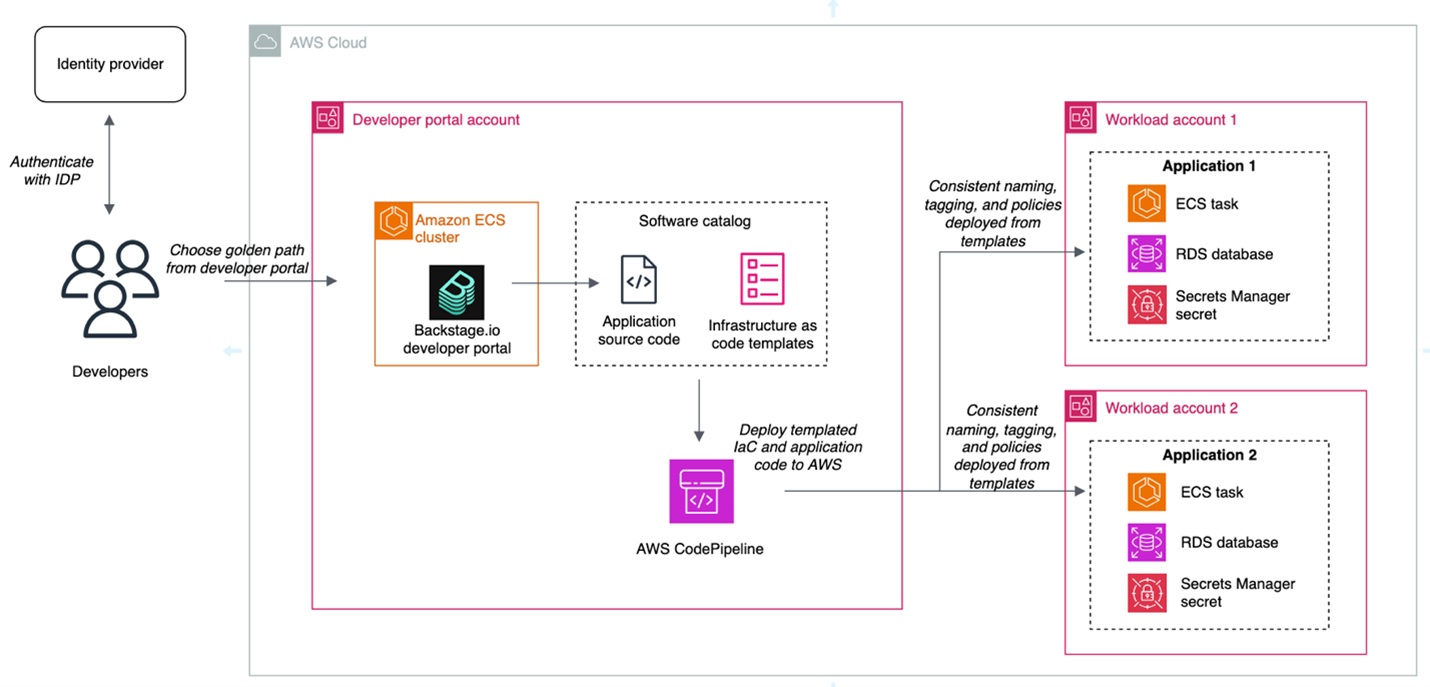
When deciding whether to centralize secrets creation, you should consider how you already deploy infrastructure in the cloud. Modern DevOps practices have driven some organizations toward developer portals and internal developer platforms that use golden paths for infrastructure deployment. By using tools that use golden paths, developers can deploy infrastructure in a self-service model through infrastructure as code (IaC) while adhering to organizational standards.
A central function maintains these golden paths, such as a platform engineering team. Examples of services that can be used to maintain and define golden paths might include AWS services such as AWS Service Catalog or popular open source projects such as Backstage.io. Using this approach, developers can focus on application code while platform engineers focus on infrastructure deployment, security controls, and developer tooling. An example of a golden path might be a templatized implementation for a microservice that writes to a database.
For example, a golden path could define that a service or application must be built using the AWS Cloud Development Kit (AWS CDK), running on Amazon Elastic Container Service (Amazon ECS), and use AWS Secrets Manager to retrieve database credentials. The platform team could also build checks to help ensure that the secret’s resource policy only allows access to the role being used by the microservice and is encrypted with a customer managed key. This pattern abstracts deployments away from developers and facilitates resource deployment across accounts. This is one example of a centralized creation pattern, shown in Figure 1.
Figure 1: Architecture diagram highlighting the developer portal deployment pattern for centralized creation
The advantages of this approach are:
Consistent naming tagging, and access control: When secrets are created centrally, you can enforce a standard naming convention based on the account, workload, service, or data classification. This simplifies implementing scalable patterns like attribute-based access control (ABAC).
Least privilege checks in CI/CD pipelines: When you create secrets within the confines of IaC pipelines, you can use APIs such as the AWS IAM Access Analyzercheck-no-new-access API. Deployment pipelines can be templatized, so individual teams can take advantage of organizational standards while still owning deployment pipelines.
Create mechanisms for collaboration between platform engineering and security teams: Often, the shift towards golden paths and service catalogs is driven by a desire for a better developer experience and reduced operational overhead. A byproduct of this move is that security teams can partner with platform engineering teams to build security by default into these paths.
The tradeoffs of this approach are:
It takes time and effort to make this shift. You might not have the resources to invest in full-time platform engineering or DevOps teams. To centrally provision software and infrastructure like this, you must maintain libraries of golden paths that are appropriate for the use cases of your organization. Depending on the size of your organization, this might not be feasible.
Golden paths must keep up with the features of the services they support: If you’re using this pattern, and the service you’re relying on releases a new feature, your developers must wait for the features to be added to the affected golden paths.
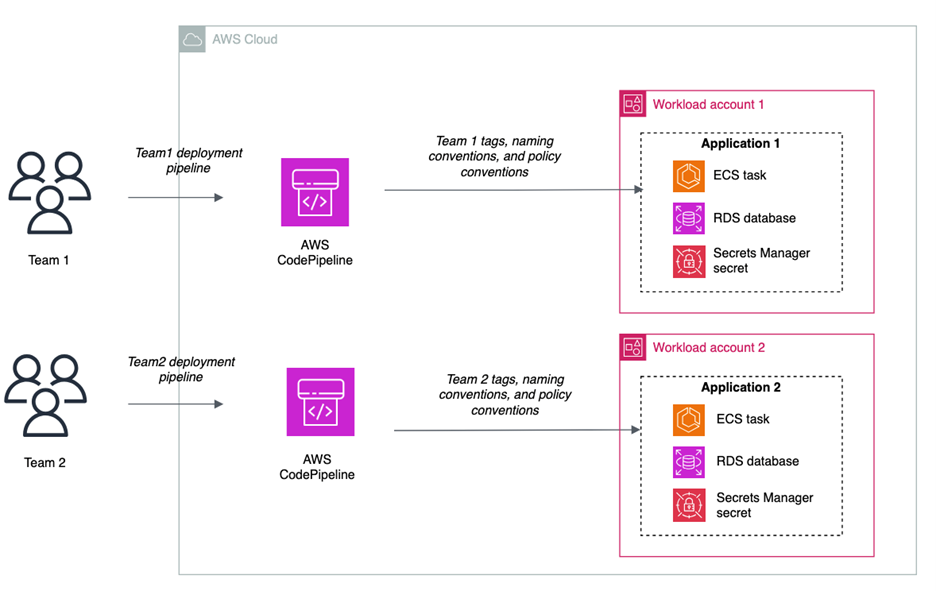
In a decentralized model, application teams own the IaC templates and deployment mechanisms in their own accounts. Here, each team is operating independently, which can make it more difficult to enforce standards as code. We’ll refer to this pattern, shown in Figure 2, as a decentralized creation pattern.
Figure 2: Decentralized creation of secrets
The advantages of this approach are:
Speed: Developers can move quickly and have more autonomy because they own the creation process. Individual teams don’t have a dependency on a central function.
Lack of standardization: It can become more difficult to enforce naming and tagging conventions, because it’s not templatized and applied through central creation mechanisms. Access controls and resource policies might not be consistent across teams.
Developer attention: Developers must manage more of the underlying infrastructure and deployment pipelines.
Centralized storage of secrets
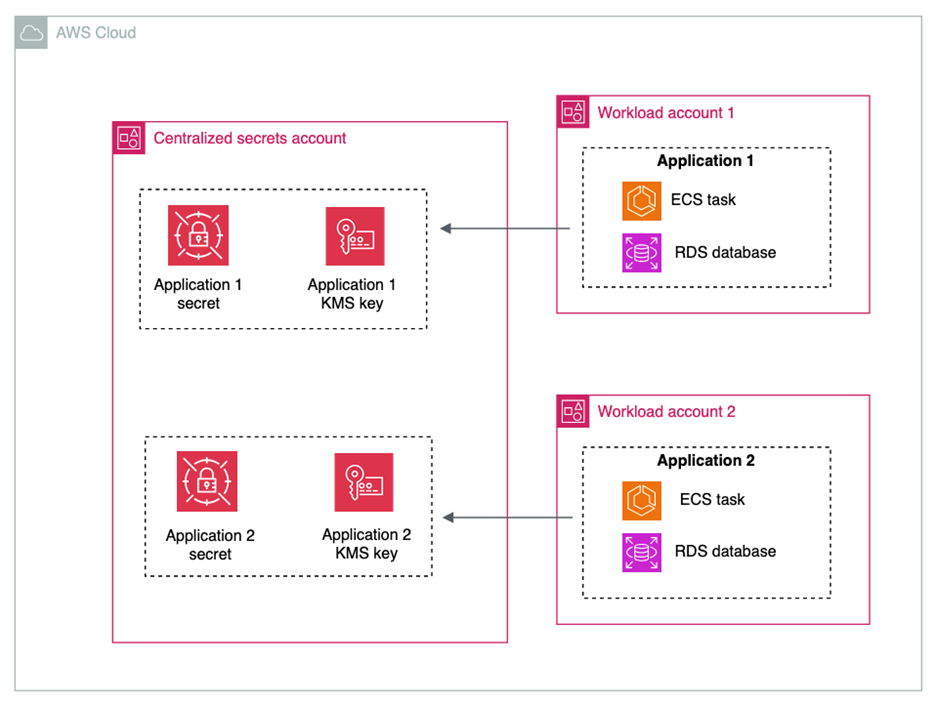
Some customers choose to store their secrets in a central account, and others choose to store secrets in the accounts in which their workloads live. Figure 3 shows the architecture for centralized storage of secrets.
Figure 3: Centralized storage of secrets
The advantages of centralizing the storage of secrets are:
Simplified monitoring and observability: Monitoring secrets can be simplified by keeping them in a single account and with a centralized team controlling them.
Some tradeoffs of centralizing the storage of secrets are:
Additional operational overhead: When sharing secrets across accounts, you must configure resource policies on each secret that is shared.
Additional cost of AWS KMS Customer Managed Keys: You must use AWS Key Management Service (AWS KMS) customer managed keys when sharing secrets across accounts. While this gives you an additional layer of access control over secret access, it will increase cost under the AWS KMS pricing. It will also add another policy that needs to be created and maintained.
High concentration of sensitive data: Having secrets in a central account can increase the number of resources affected in the event of inadvertent access or misconfiguration.
Account quotas: Before deciding on a centralized secret account, review the AWS service quotas to ensure you won’t hit quotas in your production environment.
Service managed secrets: When services such as Amazon Relational Database Service (Amazon RDS) or Amazon Redshift manage secrets on your behalf, these secrets are placed in the same account as the resource with which the secret is associated. To maintain a centralized storage of secrets while using service managed secrets, the resources would also have to be centralized.
Though there are advantages to centralizing secrets for monitoring and observability, many customers already rely on services such as AWS Security Hub, IAM Access Analyzer, AWS Config, and Amazon CloudWatch for cross-account observability. These services make it easier to create centralized views of secrets in a multi-account environment.
Decentralized storage of secrets
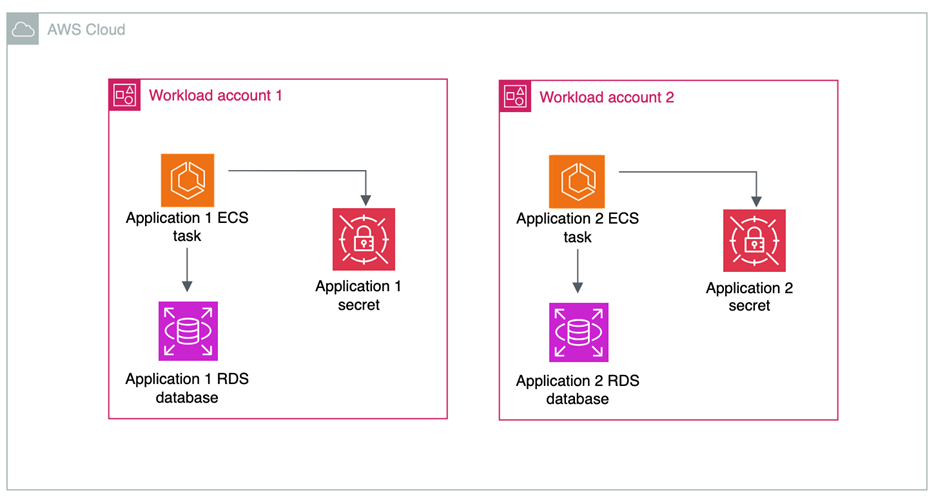
In a decentralized approach to storage, shown in in Figure 4, secrets live in the same accounts as the workload that needs access to them.
Figure 4: Decentralized storage of secrets
The advantages of decentralizing the storage of secrets are:
Account boundaries and logical segmentation: Account boundaries provide a natural segmentation between workloads in AWS. When operating in a distributed multi-account environment, you cannot access secrets from another account by default, and all cross-account access must be allowed by both a resource policy in the source account and an IAM policy in the destination account. You can use resource control polices to prevent the sharing of secrets across accounts.
AWS KMS key choice: If your secrets aren’t shared across accounts, then you have the choice to use AWS KMS customer managed keys or AWS managed keys to encrypt your secrets.
Delegate permissions management to application owners:When secrets are stored in accounts with the applications that need to consume them, application owners define fine-grained permissions in secrets resource policies.
There are a few tradeoffs to consider for this architecture:
Auditing and monitoring require cross-account deployments: Tools that are used to monitor the compliance and status of secrets need to operate across multiple accounts and present information in a single place. This is simplified by AWS native tools, which are described later in this post.
Automated remediation workflows: You can have detective controls in place to alert on any misconfiguration or security risks related to your secrets. For example, you can surface an alert when a secret is shared outside of your organizational boundary through a resource policy. These workflows can be more complex in a multi-account environment. However, we have samples that can help, such as the Automated Security Response on AWS solution.
Centralized rotation
Like the creation and storage of secrets, organizations take different approaches to centralizing the lifecycle management and rotation of secrets.
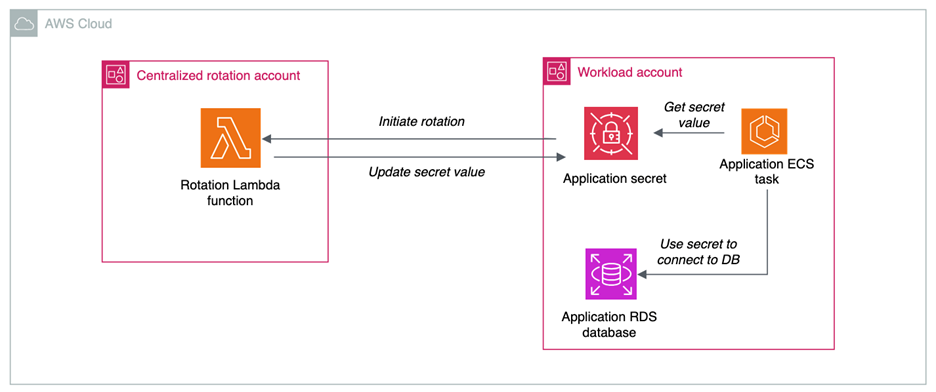
When you centralize lifecycle management, as shown in Figure 5, a central team manages and owns AWS Lambda functions for rotation. The advantages of centralizing the lifecycle management of secrets are:
Developers can reuse rotation functions: In this pattern, a centralized team maintains a common library of rotation functions for different use cases. An example of this can be seen in this AWS re:Inforce session. Using this method, application teams don’t have to build their own custom rotation functions and can benefit from common architectural decisions regarding databases and third-party software as a service (SaaS) applications.
Logging: When storing and accessing rotation function logs, the centralized pattern can simplify managing logs from a single place.
Figure 5: Centralized rotation of secrets
There are some tradeoffs in centralizing the lifecycle management and rotation of secrets:
Additional cross-account access scenarios: When centralizing lifecycle management, the Lambda functions in central accounts require permissions to create, update, delete and read secrets in the application accounts. This increases the operational overhead required to enable secret rotation.
Service quotas: When you centralize a function at scale, service quotas can come into play. Check the Lambda service quotas to verify that you won’t hit quotas in your production environments.
Decentralized rotation
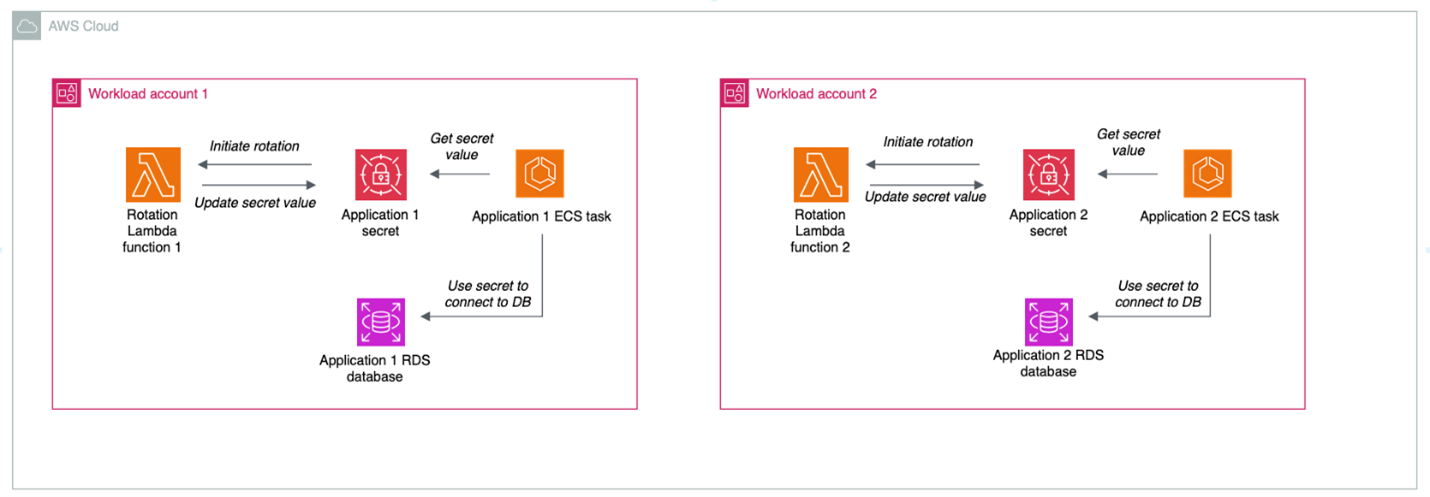
Decentralizing the lifecycle management of secrets is a more common choice, where the rotation functions live in the same account as the associated secret, as shown in Figure 6.
Figure 6: Decentralized rotation of secrets
The advantages of decentralizing the lifecycle management of secrets are:
Templatization and customization: Developers can reuse rotation templates, but tweak the functions as needed to meet their needs and use cases
No cross-account access: Decentralized rotation of secrets happens all in one account and doesn’t require cross-account access.
The primary tradeoff of decentralizing rotation is that you will need to provide either centralized or federated access to logs for rotation functions in different accounts. By default, Lambda automatically captures logs for all function invocations and sends them to CloudWatch Logs. CloudWatch Logs offers a few different ways that you can centralize your logs, with the tradeoffs of each described in the documentation.
Centralized auditing and monitoring of secrets
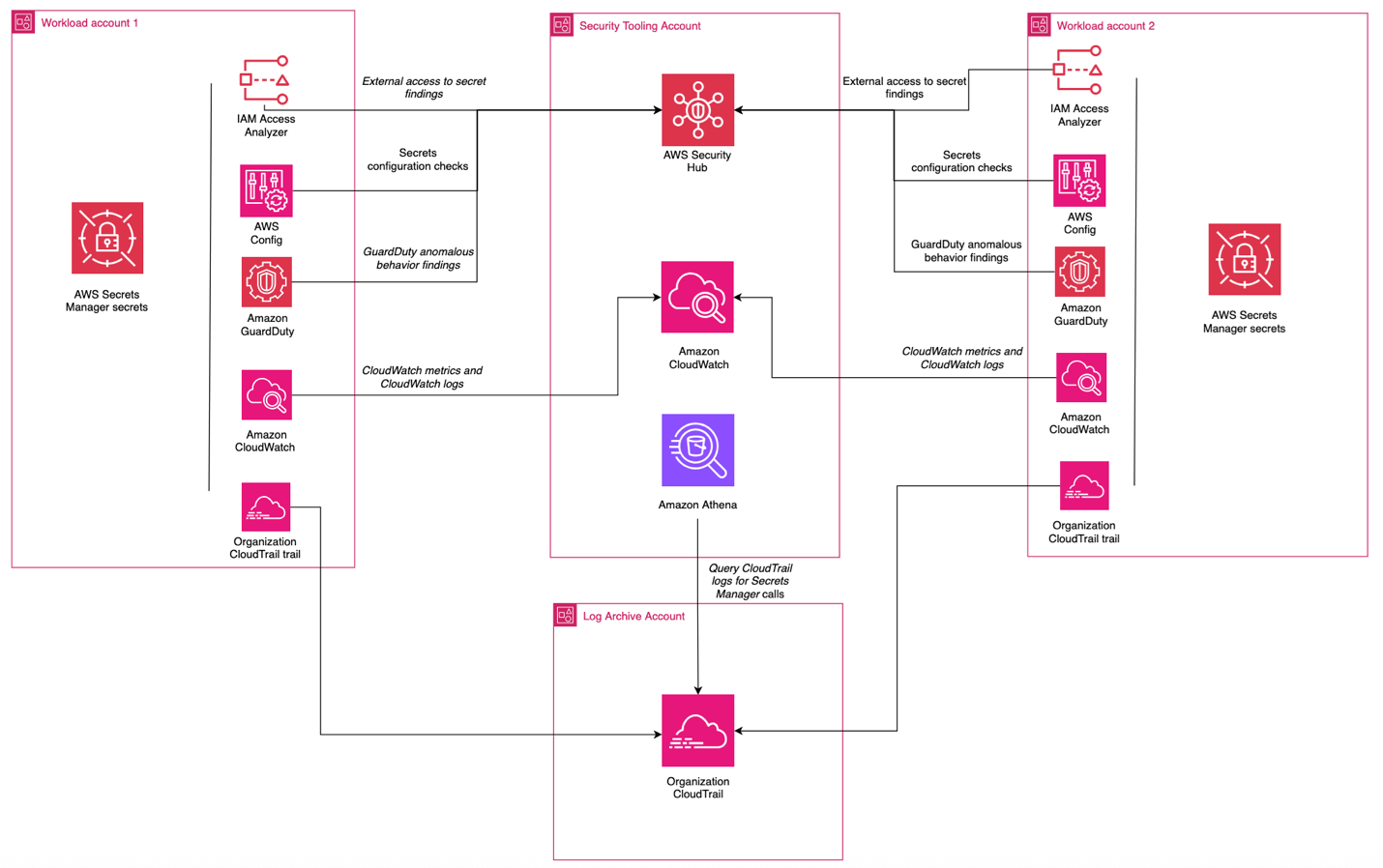
Regardless of the model chosen for creation, storage, and rotation of secrets, centralize the compliance and auditing aspect when operating in a multi-account environment. You can use AWS Security Hub CSPM through its integration with AWS Organizations to centralize:
In this scenario, shown in Figure 7, centralized functions get visibility across the organization and individual teams can view their posture at an account level with no need to look at the state of the entire organization.
For organizations that don’t require centralized auditing and monitoring of secrets, you can configure access so that individual teams can determine which logs are collected, alerts are enabled, and checks are in place in relation to your secrets. The advantages of this approach are:
Flexibility: Development teams have the freedom to choose what monitoring, auditing, and logging tools work best for them.
Reduced dependencies: Development teams don’t have to rely on centralized functions for alerting and monitoring capabilities.
The tradeoffs of this approach are:
Operational overhead: This can create redundant work for teams looking to accomplish similar goals.
Difficulty aggregating logs in cross-account investigations: If logs, alerts, and monitoring capabilities are decentralized, it can increase the difficulty of investigating events that affect multiple accounts.
Putting it all together
Most organizations choose a combination of these approaches to meet their needs. An example is a financial services company that has a central security team, operates across hundreds of AWS accounts, and has hundreds of applications that are isolated at the account level. This customer could:
Centralize the creation process, enforcing organizational standards for naming, tagging, and access control
Decentralize storage of secrets, using the AWS account as a natural boundary for access and storing the secret in the account where the workload is operating, delegating control to application owners
Decentralize lifecycle management so that application owners can manage their own rotation functions
Centralize auditing, using tools like AWS Config, Security Hub, and IAM Access Analyzer to give the central security team insight into the posture of their secrets while letting application owners retain control
Conclusion
In this post, we’ve examined the architectural decisions organizations face when implementing secrets management on AWS: creation, storage, rotation, and monitoring. Each approach—whether centralized or decentralized—offers distinct advantages and tradeoffs that should align with your organization’s security requirements, operational model, and scale. The important points include:
Choose your secrets management architecture based on your organization’s specific requirements and capabilities. There’s no one solution that will fit every situation.
Use automation and IaC to enforce consistent security controls, regardless of your approach.
Implement comprehensive monitoring and auditing capabilities through AWS services to maintain visibility across your environment.
Resources
To learn more about AWS Secrets Manager, check out some of these resources:
Отечеството е в опасност и аз идвам да го спася. Това е поантата в обръщението към нацията на 19 януари, с което Румен Радев прекрати предсрочно президентския си мандат и сложи край на залаганията кога ще слезе да се бие като равен с партиите.
Предстои ни битката за бъдещето на Отечеството и вярвам, че ще я водим заедно с всички вас – достойните, вдъхновените и непримиримите.
След девет години той напуска „Дондуков“ 2 със слогана си „Готови сме, можем и ще успеем!“, а мандата ще довърши Илияна Йотова, негова вицепрезидентка, за която се предполага и че ще бъде в предизборна кампания за поста. Кандидатурата ѝ все още не е официално обявена, нито е публично известно кои политически сили ще застанат зад нея.
След седем служебни правителства, пет от които с кадри, избирани от Радев и съветниците му, има видими резултати за „моженето“: назначенията в службите и попълването на квотите от президентски назначения. Неизгодният контракт с турската компания „Боташ“ не може да бъде предоговорен, но политическата отговорност остава. Като политик Радев ще се бори за парламентарно представителство и изпълнителна власт. Получи ли ги, договорът ще е негова грижа. Ако смята, че е полезен, нека намери място на бившия си енергиен министър Румен Христов в листите.
С последната си президентска реч Радев постъпи като Симеон Сакскобургготски – маскира личните си политически амбиции като морална необходимост. „Отечеството“ не се управлява, а се пази. Не че иска власт, дългът го зове. Влиза в политиката, защото е мисия, а не цел. Точно това се опитваха да внушат неговите говорители и оракули, докато обработваха обществото с „Кой, ако не той!?“.
От няколко месеца Радев отново беше назоваван „Генерала“, военния, за когото дългът е над всичко и не може повече да търпи беззаконието, корупцията и извършеното от политиците „в компромиси с олигархията“.
Радев се обърна към разочарованите аполитични избиратели, към онези, които имат ниско доверие в институциите и търсят силна фигура, а не програма. Той говори като призван водач с мисия, не като политик, който напролет ще се бори за 52-рия парламент.
„Отечество“ е обединителна дума за хора без идеологическа самоидентификация – това е, като да рецитираш Вазов. Повечето от тези хора не очакват платформа и приоритети, те искат Спасител и ще си го получат.
Политолози и социолози са единодушни, че избирателната активност ще се повиши (дали ще стигне 3 милиона?), а някои партии ще се изпразнят от избиратели. Към Радевия политически проект ще прииждат от БСП, „Величие“ и МЕЧ, както и разочаровани от „Възраждане“. Обезкървяването откъм електорат ще остави някои от тях извън бъдещия парламент. Четири формации от коалиционните партньори на БСП вече напуснаха обединената левица.
Тежко̀ им на позитанци! Имат незначителни шансове да прехвърлят четирите процента, ако съумеят да изберат нов лидер на конгреса си през февруари и инстинктите им за самосъхранение заработят.
Някои, като бившия председател на БСП Михаил Миков, са още по-крайни:
Проектът на Румен Радев може да приключи 130-годишната история на БСП.
До момента партийното зачатие на Радев е приветствано като „възможен съюзник“ от МЕЧ, БЗНС „Александър Стамболийски“, а „Величие“ пожела и мъдри решения. Бившият хазартен бос Васил Божков, част от списъка с българи, санкционирани по „Магнитски“, ще гласува за него като „единствената алтернатива“, отбелязвайки с пост: „Достоен Президент. Крайно време беше. Успех.“
По подобен начин го описа и руската държавна агенция ТАСС, която, позовавайки се на анонимни експерти, съобщи, че „едва ли не е единствената възможност за изход на страната от кризата“.
Но нищо не може да се сравни с изблика на някогашния почетен председател на ДПС Ахмед Доган, очевидно оценил жеста на Радев да връчи на малката му парламентарна група третия проучвателен мандат.
Поздравления, г-н Президент! Само Вие сте решаващият фактор за образуването на антимафиотски фронт срещу превзетата ни държава! Ние, от Алианс за права и свободи, сме безрезервно с Вас! Предстои ни много работа. Но с общи усилия, координация и заедност можем да мобилизираме всички поколения за демонтирането на „дълбоката държава“ и да зададем рестарт на демокрацията.
Ако един от бащите на „дълбоката държава“ ще участва в рестарта на демокрацията, процесът е обречен. А под юмрука на един о.з. генерал, профилиран от путинския режим, трудно може да се роди повече демокрация.
Но Доган и Радев не са си чужди, освен че ДПС го подкрепи с гласове на президентските избори за първия мандат, а частично и за втория – макар и не официално. И двамата са близки с бившия вицепрезидент на „Мултигруп“ и собственик на „Минстрой холдинг“ Николай Вълканов. През ноември 2022 г. с президентски указ той получи най-високото държавно отличие – орден „Стара планина“. Негова фирма плати през 2008 г. хонорара от 1,5 млн. лв. на Доган за консултантски услуги по хидроенергийния проект „Цанков камък“.
Кои други бизнесмени са зад Радев, освен разкрилите се досега? Националотговорни капиталисти. По всяка вероятност братя Бобокови, единият от които беше задвижил с няколко есемеса самото Президентство, Георги Гергов, оръжейният търговец Емилиян Гебрев. Преди време имаше спекулации и за Петър Манджуков, Валентин Златев и др.
Обикновено политиците избягват въпросите за голямото финансиране. За предстоящата предизборна кампания Радев обаче не може да се измъкне с обяснения за множество малки дарения от симпатизанти – нужна е по-правдоподобна версия.
За всеки по нещо
Докато не се е позиционирал, бившият президент предлага бонбонче за всеки. За проевропейските партии – обществен консенсус срещу мафията; за евроскептиците – отхвърления референдум за еврото; за русофилите и антинатовците – че „някои политици поставят на карта мирния живот на българите в условията на опасна война“ наблизо; за Gen Z – бъдеще в България. Консерватор и православен е като ГЕРБ, не така радикален в проруските си тези като „Възраждане“, но като всички тях, че и като БСП – противник на „джендъризма“. С този местен жаргон са обозначени либерални ценности, като защита на правата на ЛГБТИ хората.
Тоест всеки може да открие в посланията на Радев свое основание за подкрепа. Някои наричат това „центризъм“. В интервю за „Сега“ журналистът и анализатор Петко Георгиев казва, че „Боташ“, „Южен поток“ и „Турски поток“ „слагат Бойко Борисов, Делян Пеевски и Румен Радев логично в един и същи пакет“:
… представители или проводници на един и същи тип геополитически и икономически интереси. И затова за мен е абсолютно парадоксално, че това лице [Румен Радев – б.а.] се опитва да се представи сега като борец срещу модела.
Две са червените линии за бъдещия партиен проект, на който от месеци се предрича ефектът на Халеева комета:
какъв Европейски съюз отстоява;
какви възгледи за съдебната реформа има (защото Радев така и не представи обещания в първия си мандат проект за конституционни промени).
Повече лоялност към Тръмп или по-силен ЕС, защото в момента традиционното за българската политика „приклякване“ не е възможно? Радев се измъкна от Президентството, преди да отговори на този въпрос. Оказа се, че Тръмп му е изпратил покана България да се включи в изобретения от него Съвет за мир и това е станало, преди държавният глава да обяви оттеглянето си.
Допреди седмица въпросният формат включваше само рамка за развитие на палестинската територия Газа и беше част от плана за примирие между Израел и „Хамас“, който управлява Газа. Но амбицията е да се заеме и с други конфликти.
За мен е огромна чест да Ви поканя като президент на Република България да се присъедините към мен в исторически критично и невероятно усилие да затвърдим мира в Близкия изток и същевременно да предприемем смел нов подход към разрешаването на глобалните конфликти!
България е в менюто
България се оказа в менюто, което американският президент си поръча за участие в Съвета за мир – формат,определен от Τhe Conversation като „частно ООН с един-единствен акционер“ – самия Тръмп.
Форумът в Давос, на който президентът на САЩ обяви инициативата си, ще се запомни с речта на министър-председателя на Канада Марк Карни.
Средните сили трябва да действат заедно, защото, ако не сте на масата, вие сте в менюто. Великите сили могат да си позволят да действат сами. Те имат размера на пазара, военния капацитет и лостовете да диктуват условия. Средните сили – не. Но когато преговаряме само двустранно с хегемон, ние преговаряме от позиция на слабост. Приемаме това, което ни се предлага. Състезаваме се помежду си кой ще бъде по-отстъпчив. Това не е суверенитет. Това е инсценировка на суверенитет, докато се приема подчинение.
Унгарският премиер Виктор Орбан, близък с Тръмп и поддръжник на руския президент Путин, и българският министър-председател в оставка Росен Желязков единствени от ЕС приеха поканата, заставайки редом до петролни шейхове, автократи от бившите съветски републики, лидери от Латинска Америка и Азия. Европа бойкотира инициативата, Китай отказа, Русия обмисля.
Българското правителство в оставка тайно е взело решението за включване, без медийно огласяване, без точка в публикувания дневен ред на заседанието на Министерския съвет, след което Желязков и външният министър Георг Георгиев заминаха за Давос. В рамките на 24 часа Георгиев промени позицията си на 180 градуса. Преди да бъде взето решението, той заяви публично, че „българските граждани имат право да знаят къде се намира страната ни, какви позиции защитава, каква политика провежда и към кое ценностно и цивилизационно пространство принадлежи“.
Правителството на Република България, ръководено от министър-председателя Росен Желязков, последователно и отговорно ще продължи да изпълнява своите ангажименти в рамките на конституционния си мандат, отстоявайки европейската идентичност на България, принадлежността ѝ към ЕС, както и ролята ѝ на надежден партньор в трансатлантическото пространство и съюзник в НАТО.
В Давос обаче Георгиев заговори за мира и сигурността в Близкия изток като „предпоставка за сигурността и безопасността в Европа“, нямаше и помен за европейска идентичност и цитираше Тръмп.
Единствено ПП–ДБ от парламентарно представените политически сили определиха като опасно и нелегитимно вкарването на България в Съвета за мир. Съпредседателят на „Да, България“, част от коалицията ДБ, Божидар Божанов, коментира, че мястото на страната ни е в сърцето на Европа.
Това не е просто едно решение, това е пробив срещу общата политика на ЕС. Това, че България се превръща в троянски кон и застава заедно с Орбан – единствения представител на европейска държава там, е много тревожно. България не бива да има място там, особено преди това да бъде обсъдено и да бъде взета обща позиция на ЕС.
А тя вече е факт – Европа продължава сама. „Знаем, че трябва да работим като независима Европа“, заяви председателката на Еврокомисията Урсула фон дер Лайен след над 4-часовото заседание на европейските лидери. „Няма връщане назад“, беше тяхното послание.
България сателит на Тръмп ли остава, или част от Общността? Този въпрос е не само към управляващите в оставка, но и към всички останали политически сили.
По чие нареждане Желязков присъедини България? Лидерът на ГЕРБ Борисов мълчи, докато олигархът и санкциониран за корупция от САЩ и Великобритания Делян Пеевски призова преди два дни поканата да се внесе за обсъждане в парламента. След подписаното от премиера споразумение в Давос обаче за парламента остава само да ратифицира присъединяването към частен клуб, в който еднолично председателят му Тръмп ще решава, изключва и налага вето. Но ако мнозинството се пропука, както се получи с промените в Изборния закон, може и да не се случи.
Орбан има своите основания да е там. САЩ разреши на унгарската компания MOL, близка до Орбан, да купи дела от 56,2% на „Газпром“ в Naftna Industrija Srbije, която попадна под санкции на САЩ през октомври. По-рано Тръмп освободи от санкции по глобалния закон „Магнитски“ един от най-приближените до Орбан – Антал Роган, шеф на кабинета му. Впрочем MOL има апетити и към българската рафинерия на „Лукойл“, което обяснява честите визити на унгарския външен министър Сиярто в България и срещите му с президента Радев.
На 12 април обаче Орбан може да изгуби изборите, тъй като опозиционната партия ТИСА на бившия му съпартиец Петер Мадяр има преднина от 9% пред ФИДЕС. Придобитото остава.
Какви са основанията на Желязков?
Официалните: прави го заради отпадането на американските визи за България, дерогацията за „Лукойл“, която съвсем не беше неочаквана, и някакво имагинерно участие на български фирми във възстановяването на Газа. (Нали Николай Младенов е назначен за върховен представител на Съвета за мир за Газа…)
Предположенията обаче са, че зад този ход стои неистовото желание на един олигарх като Пеевски да се освободи от санкциите по „Магнитски“ в последните дни на управление, в което доминира.
Къде ще са в следващото управление днешните играчи на политическата сцена, зависи от пренареждането, което ще донесат пролетните избори. Там ще има много защитници на „Отечеството“. Най-трудното е да се разбере кой е за европейска България в независима Европа.
В шестия епизод на „Тоест разговаряме“ се срещнахме с Йоанна Елми – писателка и журналистка, позната на читателите на „Тоест“ отдавна, а в последните месеци – и като автор на бюлетина „Гласовете на Америка“.
Тръгнахме от личния ѝ път: Америка на сезонния труд и първи сблъсък с общество, което обещава свобода, но често оставя човека сам. Йоанна предложи интересен обзор как доскоро Европа бе оформяна в постоянен диалог със САЩ и как този опит създава усещане, че знаем много за Америка – но тя всъщност е екзотична територия, за която ни трябва повече контекст.
Говорихме за поляризацията, за паралелните медийни вселени, за културните конфликти и за това какво всъщност се разпада днес – митовете, институциите или социалният договор. Разгледахме „американската мечта“ не като лозунг, а като напрежение между обещанието за свобода и цената на тази свобода. Говорихме как мечтата работи като митология, която привлича, но и заслепява.
Разговаряхме още за империите, за литературата като радар за бъдещето и за нуждата да се вглеждаме в принципи, а не само в личности.
Гледайте целия разговор в нашия YouTube канал:
Може да го чуете и като аудиозапис в SoundCloud:
На живо включихме и въпроси от публиката, но времето ни беше ограничено и не успяхме да обхванем всички. Помолих Йоанна да отговори тук на още един въпрос на зрител:
Защо няма почти никаква реална съпротива в САЩ от страна на Демократическата партия, при положение че всеки ден се случва нещо ново, което в миналото е водило до крайни мерки срещу държащите властта (Никсън – „Уотъргейт“, Картър – фермата за фъстъци…)?
Не знам дали съпротива няма, доколкото тази съпротива е неефективна спрямо проблемите, срещу които се бори. В същината си те не са идеологически, а системни: неравенства, концентрация на богатство, липса на добра регулация в обществена полза на услуги от съществено значение, например здравните застраховки. Тези проблеми в комбинация с безпрецедентно присъствие на парите в политиката след решението на Върховния съд през 2010 г., определило парите като „свобода на словото“ и създало система, в която корпоративните интереси могат безпрепятствено да си купуват политически гръб, създават една сложна политическа система.
Това е система, в която основните политически разлики са идеологически, а не съществени; с това не искам да кажа, че „всички са маскари“, но че за много малка част от съвременния политически елит – силно професионален, елитарен, наследник на поколенческа династична власт в немалко случаи и най-вече застаряващ – де факто няма инициатива за съществени промени, които действително да разклатят системата: промени в състава на Върховния съд, забрана за политиците да търгуват на борсата, изграждане на нови корупционни механизми, изграждане на по-добри търговски и антимонополни регулации, изграждане на ефективни механизми, за да ограничават купуването на политика, която често се прави с цел печалба, а не обществено добро.
Това също не са нови проблеми и напрежения, но в настоящето добиват безпрецедентен мащаб: според някои данни концентрацията на богатство днес надминава т.нар. Gilded Age, „Позлатената епоха“ по Марк Твен. Поради комфорта, който системата създава за онези, които извличат най-голяма полза от нея – сред тях и политиците, – няма желание за изконни, дълбоки реформи. Затова и политиката се свежда до спор може ли да има „Родител 1“ или „Родител 2“, или не.
Парадоксално е, че именно тези структурни дефицити допринесоха за издигането на Тръмп, който спечели като антисистемен кандидат, дошъл да разбие статуквото на парчета. Проблемът е, че Доналд Тръмп цели разбиването на статуквото не в името на колективното добро, а на собственото си (и това на съюзниците си) облагодетелстване. Другият проблем, разбира се, е, че повечето революционери вярват, че Земята е плоска, а откъде изгрява слънцето, е въпрос на мнение или на това, което дават по „Фокс Нюз“.
Така новата американска революция започва в патова ситуация: опозицията е слаба, немощна и зависима от същата система, която е пред разпад; силните на деня използват сривовете в системата, за да я обявят за мъртва и да извлекат максимална полза от нея.
Надеждата остава някъде в астрологията – астролозите казват, че Плутон се завръща в знака на Водолей за пръв път от революцията през 1776 г. Някъде там се завръщат и други, по-надеждни показатели, като коефициентите за неравенства. Ясно е, че така не може да се продължава. Въпросът какво предстои зависи и до голяма степен от това дали Демократическата партия ще има силите да се реформира. Личната ми прогноза е, че и двете партии ще претърпят колапс в идните две десетилетия – това вече се е случвало в историята на САЩ. Какво ще се роди от пепелта им, зависи от избирателите. И от кризите, които ще създадат – и които на свой ред ще ги оформят.
Преди срещата ви помолихме да отговорите на кратката ни анкета. Ето и резултатите от нея:
Американската мечта е в миналото.
Йоанна Елми е писателка и журналистка, част от екипа на „Тоест“ от 2019 г., където е писала публицистични и журналистически текстове по теми като европейските избори, демокрацията и гражданското образование, човешките права, историята, дезинформацията и манипулативното съдържание, а от 2024 г. води рубриката „Гласовете на Америка“, посветена на САЩ.
Завършила е международни отношения и английска филология в Новата Сорбона в Париж, както и магистратура по журналистика и комуникации в Амстердамския университет. Прекарва много години в САЩ, а в момента разделя времето си между София и Филаделфия. Авторка на романа „Направени от вина“, в който разказва модерната история на България и Америка през очите на три поколения жени. Романът се превежда и издава на над 15 езика.
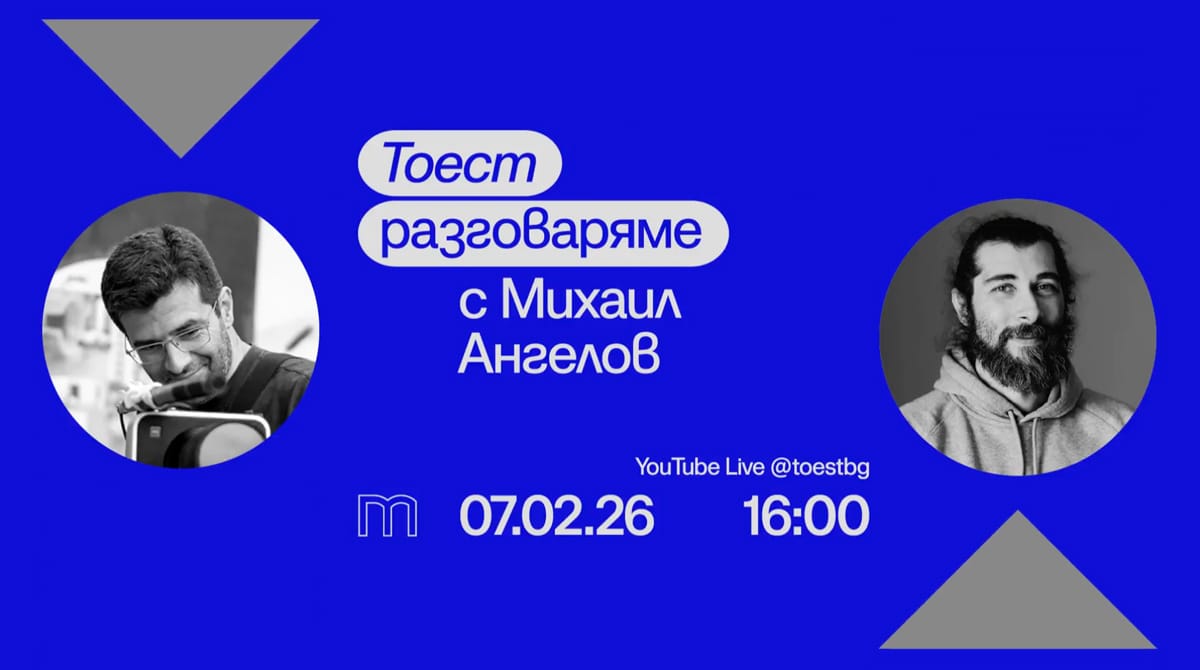
Следващата среща на „Тоест разговаряме“ ще бъде с Михаил Ангелов – биолог, агроном и водещ на рубриката „Научни новини“ в „Тоест“. Разговорът ще се излъчва на живо в YouTube Liveна 7 февруари, събота, от 16:00 ч.
В „Тоест разговаряме“ всеки месец ви срещаме с автори, които познавате добре от анализите или от рубриките им в „Тоест“, но този път ще ги видите и чуете в по-личен и непосредствен формат. Във видеоразговорите, предавани на живо, активно участие имате и вие, нашата публика – със своите въпроси, коментари и включване в тематичната анкета. Водещ на поредицата е Владислав Севов, дългогодишен телевизионен журналист и съосновател на „Тоест“.
„Тоест разговаряме“ е поредица, подкрепена от Институт „Отворено общество – София“ и съфинансирана от Европейския съюз в рамките на проекта Media Resilience. Изразените възгледи и мнения са само и изцяло на техните автори и не отразяват непременно възгледите и мненията на Европейския съюз, на Европейската изпълнителна агенция за образование и култура (EACEA) или на Институт „Отворено общество – София“ (ИООС). Нито Европейският съюз, нито EACEA, нито ИООС могат да бъдат държани отговорни за тях.
Filesystems seem to be one of those many areas where the problems are well
understood, but there is always somebody working toward a better solution.
As a result, filesystem development in the Linux kernel continues at a fast
pace even after all these years. In recent news, the EROFS filesystem is
on the path to gain a useful page-cache-sharing feature, there is a new
NTFS implementation on the horizon, and XFS may be about to get an
infrastructure for self healing.
Version
1.5.0 of the GNU Guix package manager and the Guix System have
been released. Notable improvements include the ability to run the
Guix daemon without root privileges, support for 64-bit RISC-V, and
experimental support for the GNU Hurd kernel.
The release comes with ISO-9660 installation images, virtual
machine images, and with tarballs to install the package manager on
top of your GNU/Linux distro, either from source or from
binaries—check out the download page. Guix users can update by running
guix pull.
It’s been 3 years since the previous release. That’s a lot of time,
reflecting both the fact that, as a rolling release, users
continuously get new features and update by running guix pull; but it
also shows a lack of processes, something that we had to address
before another release could be made.
During that time, Guix received about 71,338 commits by 744 people,
which include many new features.
Greg Kroah-Hartman has released the 6.18.7 and 6.12.67 stable kernels. As always, each
contains important fixes throughout the tree. Users are advised to
upgrade.
On January 22, 2026, an automated routing policy configuration error caused us to leak some Border Gateway Protocol (BGP) prefixes unintentionally from a router at our data center in Miami, Florida. While the route leak caused some impact to Cloudflare customers, multiple external parties were also affected because their traffic was accidentally funnelled through our Miami data center location.
The route leak lasted 25 minutes, causing congestion on some of our backbone infrastructure in Miami, elevated loss for some Cloudflare customer traffic, and higher latency for traffic across these links. Additionally, some traffic was discarded by firewall filters on our routers that are designed to only accept traffic for Cloudflare services and our customers.
While we’ve written about route leaks before, we rarely find ourselves causing them. This route leak was the result of an accidental misconfiguration on a router in Cloudflare’s network, and only affected IPv6 traffic. We sincerely apologize to the users, customers, and networks we impacted yesterday as a result of this BGP route leak.
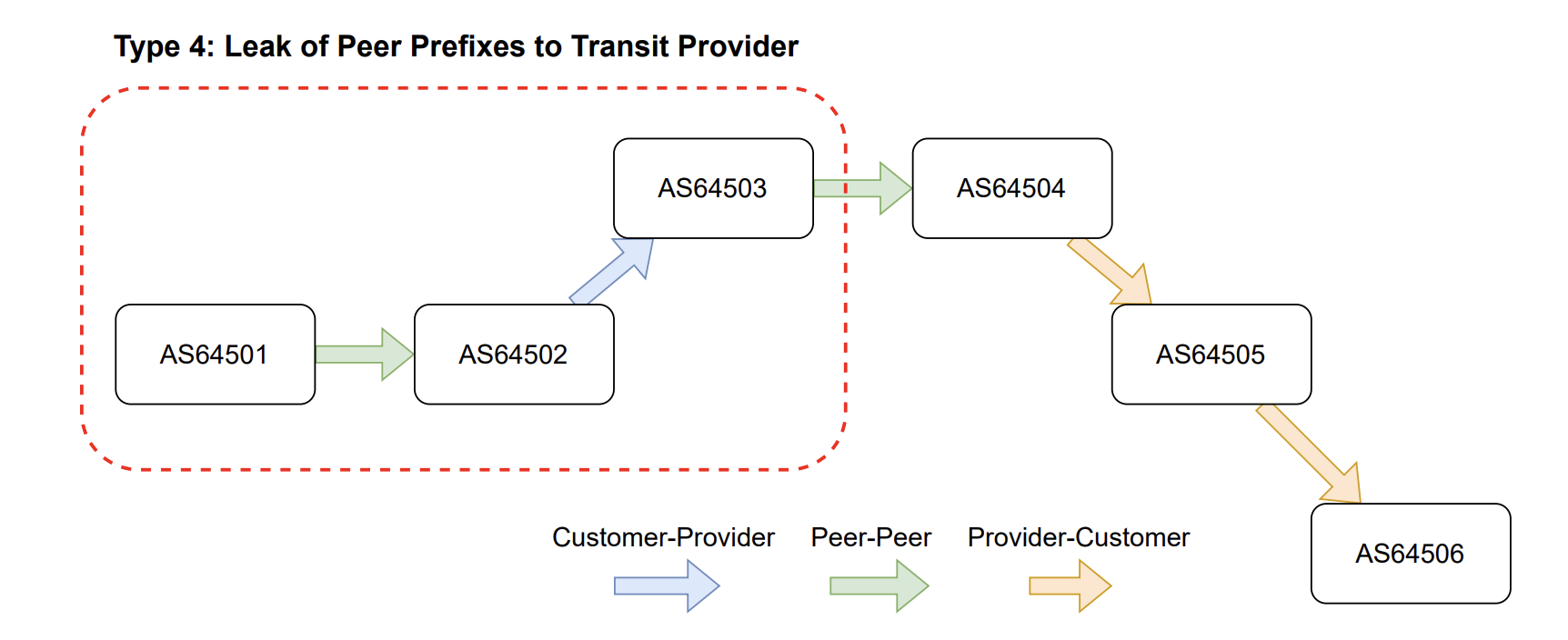
Essentially, a route leak occurs when a network tells the broader Internet to send it traffic that it’s not supposed to forward. Technically, a route leak occurs when a network, or Autonomous System (AS), appears unexpectedly in an AS path. An AS path is what BGP uses to determine the path across the Internet to a final destination. An example of an anomalous AS path indicative of a route leak would be finding a network sending routes received from a peer to a provider.
During this type of route leak, the rules of valley-free routing are violated, as BGP updates are sent from AS64501 to their peer (AS64502), and then unexpectedly up to a provider (AS64503). Oftentimes the leaker, in this case AS64502, is not prepared to handle the amount of traffic they are going to receive and may not even have firewall filters configured to accept all of the traffic coming in their direction. In simple terms, once a route update is sent to a peer or provider, it should only be sent further to customers and not to another peer or provider AS.
During the incident on January 22, we caused a similar kind of route leak, in which we took routes from some of our peers and redistributed them in Miami to some of our peers and providers. According to the route leak definitions in RFC7908, we caused a mixture of Type 3 and Type 4 route leaks on the Internet.
Timeline
Time (UTC)
Event
2026-01-22 19:52 UTC
A change that ultimately triggers the routing policy bug is merged in our network automation code repository
2026-01-22 20:25 UTC
Automation is run on single Miami edge-router resulting in unexpected advertisements to BGP transit providers and peers
IMPACT START
2026-01-22 20:40 UTC
Network team begins investigating unintended route advertisements from Miami
2026-01-22 20:44 UTC
Incident is raised to coordinate response
2026-01-22 20:50 UTC
The bad configuration change is manually reverted by a network operator, and automation is paused for the router, so it cannot run again
IMPACT STOP
2026-01-22 21:47 UTC
The change that triggered the leak is reverted from our code repository
2026-01-22 22:07 UTC
Automation is confirmed by operators to be healthy to run again on the Miami router, without the routing policy bug
2026-01-22 22:40 UTC
Automation is unpaused on the single router in Miami
What happened: the configuration error
On January 22, 2026, at 20:25 UTC, we pushed a change via our policy automation platform to remove the BGP announcements from Miami for one of our data centers in Bogotá, Colombia. This was purposeful, as we previously forwarded some IPv6 traffic through Miami toward the Bogotá data center, but recent infrastructure upgrades removed the need for us to do so.
This change generated the following diff (a program that compares configuration files in order to determine how or whether they differ):
[edit policy-options policy-statement 6-COGENT-ACCEPT-EXPORT term ADV-SITELOCAL-GRE-RECEIVER from]
-      prefix-list 6-BOG04-SITE-LOCAL;
[edit policy-options policy-statement 6-COMCAST-ACCEPT-EXPORT term ADV-SITELOCAL-GRE-RECEIVER from]
-      prefix-list 6-BOG04-SITE-LOCAL;
[edit policy-options policy-statement 6-GTT-ACCEPT-EXPORT term ADV-SITELOCAL-GRE-RECEIVER from]
-      prefix-list 6-BOG04-SITE-LOCAL;
[edit policy-options policy-statement 6-LEVEL3-ACCEPT-EXPORT term ADV-SITELOCAL-GRE-RECEIVER from]
-      prefix-list 6-BOG04-SITE-LOCAL;
[edit policy-options policy-statement 6-PRIVATE-PEER-ANYCAST-OUT term ADV-SITELOCAL from]
-      prefix-list 6-BOG04-SITE-LOCAL;
[edit policy-options policy-statement 6-PUBLIC-PEER-ANYCAST-OUT term ADV-SITELOCAL from]
-      prefix-list 6-BOG04-SITE-LOCAL;
[edit policy-options policy-statement 6-PUBLIC-PEER-OUT term ADV-SITELOCAL from]
-      prefix-list 6-BOG04-SITE-LOCAL;
[edit policy-options policy-statement 6-TELEFONICA-ACCEPT-EXPORT term ADV-SITELOCAL-GRE-RECEIVER from]
-      prefix-list 6-BOG04-SITE-LOCAL;
[edit policy-options policy-statement 6-TELIA-ACCEPT-EXPORT term ADV-SITELOCAL-GRE-RECEIVER from]
-      prefix-list 6-BOG04-SITE-LOCAL;
While this policy change looks innocent at a glance, only removing the prefix lists containing BOG04 unicast prefixes resulted in a policy that was too permissive:
policy-options policy-statement 6-TELIA-ACCEPT-EXPORT {
    term ADV-SITELOCAL-GRE-RECEIVER {
        from route-type internal;
        then {
            community add STATIC-ROUTE;
            community add SITE-LOCAL-ROUTE;
            community add MIA01;
            community add NORTH-AMERICA;
            accept;
        }
    }
}
The policy would now mark every prefix of type “internal” as acceptable, and proceed to add some informative communities to all matching prefixes. But more importantly, the policy also accepted the route through the policy filter, which resulted in the prefix — which was intended to be “internal” — being advertised externally. This is an issue because the “route-type internal” match in JunOS or JunOS EVO (the operating systems used by HPE Juniper Networks devices) will match any non-external route type, such as Internal BGP (IBGP) routes, which is what happened here.
As a result, all IPv6 prefixes that Cloudflare redistributes internally across the backbone were accepted by this policy, and advertised to all our BGP neighbors in Miami. This is unfortunately very similar to the outage we experienced in 2020, on which you can read more on our blog.
When the policy misconfiguration was applied at 20:25 UTC, a series of unintended BGP updates were sent from AS13335 to peers and providers in Miami. These BGP updates are viewable historically by looking at MRT files with the monocle tool or using RIPE BGPlay.
In the monocle output seen above, we have the timestamp of our BGP update, followed by the next-hop in the announcement, the ASN of the network feeding a given route-collector, the prefix involved, and the AS path and BGP communities if any are found. At the end of the output per-line, we also find the route-collector instance.
Looking at the first update for prefix 2a03:2880:f077::/48, the AS path is 64112 22850 174 3356 13335 32934. This means we (AS13335) took the prefix received from Meta (AS32934), our peer, and then advertised it toward Lumen (AS3356), one of our upstream transit providers. We know this is a route leak as routes received from peers are only meant to be readvertised to downstream (customer) networks, not laterally to other peers or up to providers.
As a result of the leak and the forwarding of unintended traffic into our Miami router from providers and peers, we experienced congestion on our backbone between Miami and Atlanta, as you can see in the graph below.
This would have resulted in elevated loss for some Cloudflare customer traffic, and higher latency than usual for traffic traversing these links. In addition to this congestion, the networks whose prefixes we leaked would have had their traffic discarded by firewall filters on our routers that are designed to only accept traffic for Cloudflare services and our customers. At peak, we discarded around 12Gbps of traffic ingressing our router in Miami for these non-downstream prefixes.
Follow-ups and preventing route leaks
We are big supporters and active contributors to efforts within the IETF and infrastructure community that strengthen routing security. We know firsthand how easy it is to cause a route leak accidentally, as evidenced by this incident.
Preventing route leaks will require a multi-faceted approach, but we have identified multiple areas in which we can improve, both short- and long-term.
In terms of our routing policy configurations and automation, we are:
Patching the failure in our routing policy automation that caused the route leak, and will mitigate this potential failure and others like it immediately
Implementing additional BGP community-based safeguards in our routing policies that explicitly reject routes that were received from providers and peers on external export policies
Adding automatic routing policy evaluation into our CI/CD pipelines that looks specifically for empty or erroneous policy terms
Improve early detection of issues with network configurations and the negative effects of an automated change
To help prevent route leaks in general, we are:
Validating routing equipment vendors’ implementation of RFC9234 (BGP roles and the Only-to-Customer Attribute) in preparation for our rollout of the feature, which is the only way independent of routing policy to prevent route leaks caused at the local Autonomous System (AS)
Most importantly, we would again like to apologize for the impact we caused users and customers of Cloudflare, as well as any impact felt by external networks.
In a recent evaluation of AI models’ cyber capabilities, current Claude models can now succeed at multistage attacks on networks with dozens of hosts using only standard, open-source tools, instead of the custom tools needed by previous generations. This illustrates how barriers to the use of AI in relatively autonomous cyber workflows are rapidly coming down, and highlights the importance of security fundamentals like promptly patching known vulnerabilities.
[…]
A notable development during the testing of Claude Sonnet 4.5 is that the model can now succeed on a minority of the networks without the custom cyber toolkit needed by previous generations. In particular, Sonnet 4.5 can now exfiltrate all of the (simulated) personal information in a high-fidelity simulation of the Equifax data breach—one of the costliest cyber attacks in history—using only a Bash shell on a widely-available Kali Linux host (standard, open-source tools for penetration testing; not a custom toolkit). Sonnet 4.5 accomplishes this by instantly recognizing a publicized CVE and writing code to exploit it without needing to look it up or iterate on it. Recalling that the original Equifax breach happened by exploiting a publicized CVE that had not yet been patched, the prospect of highly competent and fast AI agents leveraging this approach underscores the pressing need for security best practices like prompt updates and patches.
Read the whole thing. Automatic exploitation will be a major change in cybersecurity. And things are happening fast. There have been significant developments since I wrote this in October.
To provide the best experiences, we use technologies like cookies to store and/or access device information. Consenting to these technologies will allow us to process data such as browsing behavior or unique IDs on this site. Not consenting or withdrawing consent, may adversely affect certain features and functions.
Functional
Always active
The technical storage or access is strictly necessary for the legitimate purpose of enabling the use of a specific service explicitly requested by the subscriber or user, or for the sole purpose of carrying out the transmission of a communication over an electronic communications network.
Preferences
The technical storage or access is necessary for the legitimate purpose of storing preferences that are not requested by the subscriber or user.
Statistics
The technical storage or access that is used exclusively for statistical purposes.The technical storage or access that is used exclusively for anonymous statistical purposes. Without a subpoena, voluntary compliance on the part of your Internet Service Provider, or additional records from a third party, information stored or retrieved for this purpose alone cannot usually be used to identify you.
Marketing
The technical storage or access is required to create user profiles to send advertising, or to track the user on a website or across several websites for similar marketing purposes.