Tag Archives: Amazon Q

How A/B Testing and Multi-Model Hosting Accelerate Generative AI Feature Development in Amazon Q

Post Syndicated from Sai Srinivas Somarouthu original https://aws.amazon.com/blogs/devops/how-a-b-testing-and-multi-model-hosting-accelerate-generative-ai-feature-development-in-amazon-q/

Introduction

In the rapidly evolving landscape of Generative AI, the ability to deploy and iterate on features quickly and reliably is paramount. We, the Amazon Q Developer service team, relied on several offline and online testing methods, such as evaluating models on datasets, to gauge improvements. Once positive results are observed, features were rolled out to production, introducing a delay until the change affected 100% of customers.

This blog post delves into the impact of A/B testing and Multi-Model hosting on deploying Generative AI features. By leveraging these powerful techniques, our team has been able to significantly accelerate the pace of experimentation, iteration, and deployment. We have not only streamlined our development process but also gained valuable insights into model performance, user preferences, and the potential impact of new features. This data-driven approach has allowed us to make informed decisions, continuously refine our models, and provide a user experience that resonates with our customers

What is A/B Testing?

A/B testing is a controlled experiment, and a widely adopted practice in the tech industry. It involves simultaneously deploying multiple variants of a product or feature to distinct user segments. In the context of Amazon Q Developer, the service team leverages A/B testing to evaluate the impact of new model variants on the developer experience. This helps in gathering real-world feedback from a subset of users before rolling out changes to the entire user base.

  1. Control group: Developers in the control group continue to receive the base Amazon Q Developer experience, serving as the benchmark against which changes are measured.
  2. Treatment group: Developers in the treatment group are exposed to the new model variant or feature, providing a contrasting experience to the control group.

To run an experiment, we take a random subset of developers and evenly split it into two groups: The control group continues to receive the base Amazon Q Developer experience, while the treatment group receives a different experience.

By carefully analyzing user interactions and telemetry metrics of the control group and comparing them to those from the treatment group, we can make informed decisions about which variant performs better, ultimately shaping the direction of future releases.

How do we split the users?

Whenever a user request is received, we perform consistent hashing on the user identity and assign the user to a cohort. Irrespective on which machine the algorithm runs, the user will be assigned the same cohort. This means that we can scale horizontally – user A’s request can be served by any machine and user A will always be assigned to group A from the beginning to the end of the experiment.

Individuals in the two groups are, on average, balanced on all dimensions that will be meaningful to the test. This means that we do not expose a cohort to have more than one experiment at any given time. This enables us to conduct multivariate experiments where one experiment does not impact the result of another.

The diagram illustrates how a consistent hashing algorithm based on userID’s assigns users to cohorts representing control or treatment groups of experiments.

The above diagram illustrates the process of user assignment to cohorts in a system conducting multiple parallel A/B experiments.

How do we enable segmentation?

For some A/B experiments, we want to perform A/B experiments for users matching certain criteria. Assume we want to exclusively target Amazon Q Developer customers using the Visual Studio Code Integrated Development Environment (IDE). For such scenarios, we perform cohort allocation only for users who meet the criteria. In this example, we would divide a subset of Visual Studio Code IDE users into control and treatment cohorts.

How do we route the traffic between different models ?

Early on, we realized that we will need to host hundreds of models. To achieve this, we run multiple Amazon Elastic Container Service (Amazon ECS) clusters to host different models. We leverage Application Load Balancer’s path based routing to route traffic to the various models.

The diagram depicts how Application Load Balancer paths 1-n direct traffic to control model or treatment model 1-n.

The above diagram depicts how Application Load Balancer redirects traffic to various models based on path-based routing. Where path1 is routing to control model and path2 is routing to treatment model 1 etc.

How do we enable different IDE experiences for different groups?

The IDE plugin polls the service endpoint asking if the developer belongs to the control or treatment group. Based on the response the user will be served the control or treatment experience.

The diagram shows the IDE plugin polling the backend service to display a control or treatment experience.

The above diagram depicts how the IDE plugin provides different experience based on control or treatment group.

How do we ingest data?

From the plugin, we publish telemetry metrics to our data plane. We honor opt-out settings of our users. If the user is opted-out, we do not store their data. In the data plane, we check the cohort of the caller. We publish telemetry metrics with cohort metadata to Amazon Data Firehose, which delivers the data to an Amazon OpenSearch Serverless destination.

The diagram depicts the flow of data from IDE to Data Plane to Kinesis Data Firehose to Amazon OpenSearch Serverless.

The above diagram depicts how metrics are captured via the data plane into Amazon OpenSearch Serverless.

How do we analyze the data?

We publish the aggregated metrics to OpenSearch Serverless. We leverage OpenSearch Serverless to ingest and index various metrics to compare and contrast between control and treatment cohorts. We enable filtering based on metadata such as programming language and IDE.

Additionally, we publish data and metadata to a data lake to view, query and analyze the data securely using Jupyter Notebooks and dashboards. This enables our scientists and engineers to perform deeper analysis.

Conclusion

This post has focused on challenges Generative AI services face when it comes to fast experimentation cycles, the basics of A/B testing and the A/B testing capabilities built by the Amazon Q Developer service team to enable multi-variate service and client-side experimentation. We can gain valuable insights into the effectiveness of the new model variants on the developer experience within Amazon Q Developer. Through rigorous experimentation and data-driven decision-making, we can empower teams to iterate, innovate, and deliver optimal solutions that resonate with the developer community.

We hope you are as excited as us about the opportunities with Generative AI! Give Amazon Q Developer and Amazon Q Developer Customization a try today:

Amazon Q Developer Free Tier: https://aws.amazon.com/q/developer/#Getting_started/

Amazon Q Developer Customization: https://docs.aws.amazon.com/amazonq/latest/qdeveloper-ug/customizations.html

About the authors

Sai Srinivas Somarouthu

Sai Srinivas Somarouthu is a Software Engineer at AWS, working on building next generation models and development tools such as Amazon Q. Outside of work, he finds joy in traveling, hiking, and exploring diverse cuisines.

Karthik Rao

Karthik is a Senior Software Engineer at AWS, working on building next generation development tools such as Amazon Q. Outside of work, he can be found hiking and snowboarding.

Kenneth Sanchez

Kenneth is a Software Engineer at AWS, working on building next generation development tools such as Amazon Q. Outside of work, he likes spending time with his family and finding new good places to drink coffee.

AWS Weekly Roundup: G6e instances, Karpenter, Amazon Prime Day metrics, AWS Certifications update and more (August 19, 2024)

Post Syndicated from Prasad Rao original https://aws.amazon.com/blogs/aws/aws-weekly-roundup-g6e-instances-karpenter-amazon-prime-day-metrics-aws-certifications-update-and-more-august-19-2024/

You know what I find more exciting than the Amazon Prime Day sale? Finding out how Amazon Web Services (AWS) makes it all happen. Every year, I wait eagerly for Jeff Barr’s annual post to read the chart-topping metrics. The scale never ceases to amaze me.

This year, Channy Yun and Jeff Barr bring us behind the scenes of how AWS powered Prime Day 2024 for record-breaking sales. I will let you read the post for full details, but one metric that blows my mind every year is that of Amazon Aurora. On Prime Day, 6,311 Amazon Aurora database instances processed more than 376 billion transactions, stored 2,978 terabytes of data, and transferred 913 terabytes of data.

Amazon Box with checkbox showing a record breaking prime day event powered by AWS

Other news I’m excited to share is that registration is open for two new AWS Certification exams. You can now register for the beta version of the AWS Certified AI Practitioner and AWS Certified Machine Learning Engineer – Associate. These certifications are for everyone—from line-of-business professionals to experienced machine learning (ML) engineers—and will help individuals prepare for in-demand artificial intelligence and machine learning (AI/ML) careers. You can prepare for your exam by following a four-step exam prep plan for AWS Certified AI Practitioner and AWS Certified Machine Learning Engineer – Associate.

Last week’s launches
Here are some launches that got my attention:

General availability of Amazon Elastic Compute Cloud (Amazon EC2) EC2 G6e instances – Powered by NVIDIA L40S Tensor Core GPUs, G6e instances can be used for a wide range of ML and spatial computing use cases. You can use G6e instances to deploy large language models (LLMs) with up to 13B parameters and diffusion models for generating images, video, and audio.

Release of Karpenter 1.0 – Karpenter is a flexible, efficient, and high-performance Kubernetes compute management solution. You can use Karpenter with Amazon Elastic Kubernetes Service (Amazon EKS) or any conformant Kubernetes cluster. To learn more, visit the Karpenter 1.0 launch post.

Drag-and-drop UI for Amazon SageMaker Pipelines – With this launch, you can now quickly create, execute, and monitor an end-to-end AI/ML workflow to train, fine-tune, evaluate, and deploy models without writing code. You can drag and drop various steps of the workflow and connect them together in the UI to compose an AI/ML workflow.

Split, move and modify Amazon EC2 On-Demand Capacity Reservations – With the new capabilities for managing Amazon EC2 On-Demand Capacity Reservations, you can split your Capacity Reservations, move capacity between Capacity Reservations, and modify your Capacity Reservation’s instance eligibility attribute. To learn more about these features, refer to Split off available capacity from an existing Capacity Reservation.

Document-level sync reports in Amazon Q Business – This new feature of Amazon Q Business provides you with a comprehensive document-level report including granular indexing status, metadata, and access control list (ACL) details for every document processed during a data source sync job. You have the visibility of the status of the documents Amazon Q Business attempted to crawl and index as well as the ability to troubleshoot why certain documents were not returned with the expected answers.

Landing zone version selection in AWS Control Tower – Starting with landing zone version 3.1 and above, you can update or reset in-place your landing zone on the current version, or upgrade to a version of your choice. To learn more, visit Select a landing zone version in the AWS Control Tower user guide.

Launch of AWS Support Official channel on AWS re:Post – You now have access to curated content for operating at scale on AWS, authored by AWS Support and AWS Managed Services (AMS) experts. In this new channel, you can find technical solutions for complex problems, operational best practices, and insights into AWS Support and AMS offerings. To learn more, visit the AWS Support Official channel on re:Post.

For a full list of AWS announcements, be sure to keep an eye on the What’s New at AWS page.

Regional expansion of AWS Services
Here are some of the expansions of AWS services into new AWS Regions that happened this week:

Amazon VPC Lattice is now available in 7 additional RegionsAmazon VPC Lattice is now available in US West (N. California), Africa (Cape Town), Europe (Milan), Europe (Paris), Asia Pacific (Mumbai), Asia Pacific (Seoul), and South America (São Paulo). With this launch, Amazon VPC Lattice is now generally available in 18 AWS Regions.

Amazon Q in QuickSight is now available in 5 additional Regions Amazon Q in QuickSight is now generally available in Asia Pacific (Mumbai), Canada (Central), Europe (Ireland), Europe (London), and South America (São Paulo), in addition to the existing US East (N. Virginia), US West (Oregon), and Europe (Frankfurt) Regions.

AWS Wickr is now available in the Europe (Zurich) RegionAWS Wickr adds Europe (Zurich) to the US East (N. Virginia), Asia Pacific (Singapore), Asia Pacific (Sydney), Asia Pacific (Tokyo), Canada (Central), Europe (London), Europe (Frankfurt), and Europe (Stockholm) Regions that it’s available in.

You can browse the full list of AWS Services available by Region.

Upcoming AWS events
Check your calendars and sign up for these AWS events:

AWS re:Invent 2024 – Dive into the first-round session catalog. Explore all the different learning opportunities at AWS re:Invent this year and start building your agenda today. You’ll find sessions for all interests and learning styles.

AWS Summits – The 2024 AWS Summit season is starting to wrap up! Join free online and in-person events that bring the cloud computing community together to connect, collaborate, and learn about AWS. Register in your nearest city: Jakarta (September 5), and Toronto (September 11).

AWS Community Days – Join community-led conferences that feature technical discussions, workshops, and hands-on labs led by expert AWS users and industry leaders from around the world: Colombia (August 24), New York (August 28), Belfast (September 6), and Bay Area (September 13).

AWS GenAI Lofts – Meet AWS AI experts and attend talks, workshops, fireside chats, and Q&As with industry leaders. All lofts are free and are carefully curated to offer something for everyone to help you accelerate your journey with AI. There are lofts scheduled in San Francisco (August 14–September 27), São Paulo (September 2–November 20), London (September 30–October 25), Paris (October 8–November 25), and Seoul (November).

You can browse all upcoming in-person and virtual events.

That’s all for this week. Check back next Monday for another Weekly Roundup!

Prasad

This post is part of our Weekly Roundup series. Check back each week for a quick roundup of interesting news and announcements from AWS!

AWS Weekly Roundup: Mithra, Amazon Titan Image Generator v2, AWS GenAI Lofts, and more (August 12, 2024)

Post Syndicated from Channy Yun (윤석찬) original https://aws.amazon.com/blogs/aws/aws-weekly-roundup-mithra-amazon-titan-image-generator-v2-aws-genai-lofts-and-more-august-12-2024/

When Dr. Swami Sivasubramanian, VP of AI and Data, was an intern at Amazon in 2005, Dr. Werner Vogels, CTO of Amazon, was his first manager. Nineteen years later, the two shared a stage at the VivaTech Conference to reflect on Amazon’s history of innovation—from pioneering the pay-as-you-go model with Amazon Web Services (AWS) to transforming customer experiences using “good old-fashioned AI”—as well as what really keeps them up at night in the age of generative artificial intelligence (generative AI).

Asked if competitors ever kept him up at night, Dr. Werner insisted that listening to customer needs—such as guardrails, security, and privacy—and building products based on those needs is what drives success at Amazon. Dr. Swami said he viewed Amazon SageMaker and Amazon Bedrock as prime examples of successful products that have emerged as a result of this customer-first approach. “If you end up chasing your competitors, you are going to end up building what they are building,” he added. “If you actually listen to your customers, you are actually going to lead the way in innovation.” To learn four more lessons on customer-obsessed innovation, visit our AWS Careers blog.

For example, for customer-obsessed security, we build and use Mithra, a powerful neural network model to detect and respond to cyber threats. It analyzes up to 200 trillion internet domain requests daily from the AWS global network, identifying an average of 182,000 new malicious domains with remarkable accuracy. Mithra is just one example of how AWS uses global scale, advanced artificial intelligence and machine learning (AI/ML) technology, and constant innovation to lead the way in cloud security, making the internet safer for everyone. To learn more, visit the blog post of Chief Information Security Officer at Amazon CJ Moses, How AWS tracks the cloud’s biggest security threats and helps shut them down.

Last week’s launches
Here are some launches that got my attention:

Amazon Titan Image Generator v2 in Amazon Bedrock – With the new Amazon Titan Image Generator v2 model, you can guide image creation using a text prompt and reference images, control the color palette of generated images, remove backgrounds, and customize the model to maintain brand style and subject consistency. To learn more, visit my blog post, Amazon Titan Image Generator v2 is now available in Amazon Bedrock.

Regional expansion of Anthropic’s Claude models in Amazon Bedrock – The Claude 3.5 Sonnet, Anthropic’s latest high-performance AI model, is now available in US West (Oregon), Europe (Frankfurt), Asia Pacific (Tokyo), and Asia Pacific (Singapore) Regions in Amazon Bedrock. The Claude 3 Haiku, Anthropic’s compact and affordable AI model, is now available in Asia Pacific (Tokyo) and Asia Pacific (Singapore) Regions in Amazon Bedrock.

Private IPv6 addressing for VPCs and subnets – You can now address private IPv6 for VPCs and subnets with Amazon VPC IP Address Manager (IPAM). Within IPAM, you can configure private IPv6 addresses in a private scope, provision Unique Local IPv6 Unicast Addresses (ULA) and Global Unicast Addresses (GUA), and use them to create VPCs and subnets for private access. To learn more, visit see the Understanding IPv6 addressing on AWS and designing a scalable addressing plan and VPC documentation,

Up to 30 GiB/s of read throughput in Amazon EFS – We are increasing the read throughput to 30 GiB/s, extending simple, fully elastic, and provisioning-free experience of Amazon EFS to support throughput-intensive AI and ML workloads for model training, inference, financial analytics, and genomic data analysis.

Large language models (LLMs) in Amazon Redshift ML – You can use pre-trained publicly available LLMs in Amazon SageMaker JumpStart as part of Amazon Redshift ML. For example, you can use LLMs to summarize feedback, perform entity extraction, and conduct sentiment analysis on data in your Amazon Redshift table, so you can bring the power of generative AI to your data warehouse.

Data products in Amazon DataZone – You can create data products in Amazon DataZone, which enable the grouping of data assets into well-defined, self-contained packages tailored for specific business use cases. For example, a marketing analysis data product can bundle various data assets such as marketing campaign data, pipeline data, and customer data. To learn more, visit this AWS Big Data blog post.

For a full list of AWS announcements, be sure to keep an eye on the What’s New at AWS page.

Other AWS news
Here are some additional news items that you might find interesting:

AWS Goodies by Jeff Barr – Want to discover more exciting news about AWS? Jeff Barr is always in catch-up mode, doing his best to share all of the interesting things that he finds or that are shared with him. You can find his goodies once a week. Follow his LinkedIn page.

AWS and Multicloud – You might have missed a great article about the existing capabilities AWS has and the continued enhancements we’ve made in multicloud environments. In the post, Jeff covers the AWS approach to multicloud, provides you with some real-world examples, and reviews some of the newest multicloud and hybrid capabilities found across the lineup of AWS services.

Code transformation in Amazon Q Developer – At Amazon, we asked a small team to use Amazon Q Developer Agent for code transformation to migrate more than 30,000 production applications from older Java versions to Java 17. By using Amazon Q Developer to automate these upgrades, the team saved over 4,500 developer years of effort compared to what it would have taken to do all of these upgrades manually and saved the company $260 million in annual savings by moving to the latest Java version.

Contributing to AWS CDKAWS Cloud Development Kit (AWS CDK) is an open source software development framework to model and provision your cloud application resources using familiar programming languages. Contributing to AWS CDK not only helps you deepen your knowledge of AWS services but also allows you to give back to the community and improve a tool you rely on.

Upcoming AWS events
Check your calendars and sign up for these AWS events:

AWS re:Invent 2024 – Dive into the first-round session catalog. Explore all the different learning opportunities at AWS re:Invent this year and start building your agenda today. You’ll find sessions for all interests and learning styles.

AWS Innovate Migrate, Modernize, Build – Learn about proven strategies and practical steps for effectively migrating workloads to the AWS Cloud, modernizing applications, and building cloud-native and AI-enabled solutions. Don’t miss this opportunity to learn with the experts and unlock the full potential of AWS. Register now for Asia Pacific, Korea, and Japan (September 26).

AWS Summits – The 2024 AWS Summit season is almost wrapping up! Join free online and in-person events that bring the cloud computing community together to connect, collaborate, and learn about AWS. Register in your nearest city: São Paulo (August 15), Jakarta (September 5), and Toronto (September 11).

AWS Community Days – Join community-led conferences that feature technical discussions, workshops, and hands-on labs led by expert AWS users and industry leaders from around the world: New Zealand (August 15), Colombia (August 24), New York (August 28), Belfast (September 6), and Bay Area (September 13).

AWS GenAI Lofts – Meet AWS AI experts and attend talks, workshops, fireside chats, and Q&As with industry leaders. All lofts are free and are carefully curated to offer something for everyone to help you accelerate your journey with AI. There are lofts scheduled in San Francisco (August 14–September 27), São Paulo (September 2–November 20), London (September 30–October 25), Paris (October 8–November 25), and Seoul (November).

You can browse all upcoming in-person and virtual events.

That’s all for this week. Check back next Monday for another Weekly Roundup!

Channy

This post is part of our Weekly Roundup series. Check back each week for a quick roundup of interesting news and announcements from AWS!

Code Clarity: Enhancing Code Understanding and Efficiency with Amazon Q Developer

Post Syndicated from Jehu Gray original https://aws.amazon.com/blogs/devops/code-clarity-enhancing-code-understanding-and-efficiency-with-amazon-q-developer/

“All code will become legacy”. This saying, widely recognized amongst software developers, highlights the reality of their day-to-day activities. While writing new code is an integral part of a developer’s role, a significant portion of their time is dedicated to refactoring and maintaining existing codebases.

Developers typically encounter numerous challenges when attempting to understand and work with existing codebases. One of the primary obstacles is the lack of proper code documentation. As projects evolve and developers come and go, the rationale behind design decisions and implementation details can become obscured, making it challenging for new team members to understand the intricacies of the codebase.

Another hurdle is the need to work with unfamiliar or legacy programming languages and frameworks. The rapid pace of technology advancements means that developers must constantly adapt to new tools and libraries, while also maintaining an understanding of older technologies that may still be in use.

Compounding these challenges is the inherent difficulty of understanding code written by others. Even with comprehensive documentation and adherence to best coding practices, the nuances of another developer’s thought process and design decisions can be challenging to decipher. This lack of familiarity can lead to increased risk of introducing bugs or breaking existing functionality during code modifications.

In a bid to address these challenges, organizations must explore innovative solutions that enhance code understanding and improve developer efficiency. By empowering developers with tools that streamline code maintenance and refactoring processes, organizations can unlock their potential for innovation and accelerate their ability to deliver high-quality software products to the market.

In this blog post, we explore how developers in organizations can leverage Amazon Q Developer to simplify the process of understanding and explaining code in order to boost productivity and efficiency.

Prerequisites

The following prerequisites are required to make use of Amazon Q Developer in your IDE:

Introduction to Amazon Q Developer as a solution for simplifying code comprehension

Amazon Q Developer is a generative AI-powered service that helps developers and IT professionals with all of their tasks across the software development lifecycle—from coding, testing, and upgrading, to troubleshooting, performing security scanning and fixes, optimizing AWS resources, and creating data engineering pipelines. Amazon Q Developer aims to simplify code comprehension for developers, making it easier to understand and navigate complex codebases. It leverages advanced machine learning and natural language processing techniques to provide intelligent code analysis and exploration capabilities.

Developers can ask questions about their codebase in natural language and receive concise, relevant answers. Amazon Q Developer can explain the purpose and functionality of code elements, identify dependencies, and provide insights into code structure and architecture. This can significantly reduce the time and effort required to onboard new team members, maintain legacy systems, or refactor existing code. This result in not just better code quality and consistency across teams and projects; Amazon Q Developer also helps developers unlock a new level of productivity and efficiency by allowing them to focus more on innovation.

 Understanding Amazon Q Developer’s ability to provide natural language explanations of code

One of the most powerful uses of Amazon Q Developer is getting natural language explanations of code directly within your integrated development environment (IDE). This can be an invaluable tool when trying to understand legacy code, review code you haven’t touched in a while, or learn how certain programming patterns or algorithms work. Rather than spending so much time reviewing code line-by-line or searching for tutorials, you can leverage Amazon Q Developer to provide insightful explanations.

The process is simple – highlight the section of code you need explained in your IDE, then right-click and select “Explain” from the Amazon Q Developer menu. Amazon Q Developer’s advanced language model will analyze the highlighted code and generate a plain English explanation breaking down what the code is doing line-by-line.

This image shows the user selecting the relevant code by highlighting or right-clicking on it

Figure 1 – Selecting the relevant code by highlighting or right-clicking on it.

This image shows the user selecting “Explain” to get natural language explanation from Amazon Q Developer.

Figure 2 – Selecting “Explain” to get natural language explanation from Amazon Q Developer

Let’s take a look at an example. If you highlight a few lines of code that creates a reference to an S3 bucket, Amazon Q Developer generates a natural language explanation such as:

 This image shows Amazon Q Developer analyzing the selected code and provides an explanation of what the code does in natural language

Figure 3 – Amazon Q Developer analyzes the selected code and provides an explanation of what the code does in natural language.

Amazon Q Developer continues providing clear explanations of how the code implementation works. This natural language explanation can provide much-needed context and clarity, especially for complex coding patterns. This allows you to quickly catch up on code you haven’t looked at in a while. It can also be an excellent learning tool when researching how certain algorithms or coding techniques work under the hood.

If any part of the explanation is unclear, you can ask Amazon Q Developer follow-up questions using natural language in the chat interface. Amazon Q Developer will use the conversation context and the code to provide clarifying responses to follow-up questions. You can continue the back-and-forth conversation until you fully comprehend the code functionality. Optionally, you can provide feedback to Amazon Q Developer on the quality of its code explanations to help improve the service.

The “Explain” functionality is just one of the ways Amazon Q Developer augments your coding workflow by providing generative AI-powered insights into your code on-demand, right within your familiar IDE environment.

Now let’s dive into more examples.

Example demonstrating how Amazon Q Developer breaks down complex code algorithms

In this example, let’s assume a developer is working on a coding project that involves path-finding, network optimization and latency. We will use Amazon Q Developer to review code that should find the shortest path tree from a single source node, by building a set of nodes that have minimum distance from the source. This is the popular Djikstra’s algorithm and can be complex for developers that are new to graph theory and its implementation.

The developer can use Amazon Q Developer to understand what the block of code is doing in simple terms.

Here’s the code implementing the algorithm:

This image shows a block of Python code in an IDE implementing Djikstra’s Algorithm for path-finding

Figure 4 – Python code in IDE implementing Djikstra’s Algorithm for path-finding.

This image shows that with Amazon Q Developer, you can Explain, Refactor, Fix or Optimize your code

Figure 5 – With Amazon Q Developer, you can Explain, Refactor, Fix or Optimize your code.

You can Right-click the highlighted code to open a context window. Choose Send to Amazon Q, then select Explain. Selecting the “Explain” option will prompt Amazon Q Developer to analyze the code and provide a natural language explanation of what the code does.

This image shows Amazon Q Developer analyzing the selected code and providing an explanation of what the code does in natural language

Figure 6 – Amazon Q Developer will analyze the selected code and provide an explanation of what the code does in natural language.

Amazon Q Developer opens a chat panel on the right within the IDE, where you see the result of choosing the “Explain” option. Amazon Q Developer has analyzed the highlighted code and provided a detailed, step-by-step explanation in the chat panel. This explanation breaks down the complex algorithm in plain, easy-to-understand language, helping the developer better comprehend the purpose and functionality of the code. You can follow-up by asking clarifying questions within the chat panel.

You can also Refactor your code with Amazon Q Developer in order to improve code readability or efficiency, among other improvements.

Here’s how:

This image shows how to use Amazon Q Developer to Refactor code

Figure 7 – Using Amazon Q Developer to Refactor code.

Highlight the code in the IDE and Refactor  the code by first right clicking and selecting “send to Amazon Q”. This allows Amazon Q Developer to analyze the code and suggest ways to improve its readability, efficiency, or other aspects of the implementation. The chat panel provides the developer with the recommended refactoring steps.

This image shows how Amazon Q Developer analyzes the selected code and provides an explanation of steps you can take to refactor your code in the chat panel.

Figure 8 – Amazon Q Developer analyzes the selected code and provides an explanation of steps you can take to refactor your code in the chat panel.

In the image above, Amazon Q Developer has carefully reviewed the code and provided a step-by-step plan for the developer to follow in order to refactor the code, making it more concise, maintainable, and aligned with best practices. This collaborative approach between the developer and Amazon Q Developer enables the efficient creation of high-quality, optimized code.

Conclusion

Amazon Q Developer is a game-changer for developers looking to streamline their understanding of complex code segments. By offering natural language explanations within the IDE, Amazon Q Developer eliminates the need for time-consuming manual research or reliance on outdated documentation. Amazon Q Developer’s ability to break down intricate algorithms and unfamiliar syntax, as shown in the preceding examples, empowers developers to tackle even the most challenging codebases with confidence.

Whether you’re a seasoned developer or just starting, Amazon Q Developer is an invaluable tool that simplifies the coding process and makes the coding environment more accessible and easier to navigate. With its seamless integration and user-friendly interface, Amazon Q Developer is poised to become an essential companion for developers worldwide, enabling them to write better code, learn more efficiently, and ultimately, deliver superior software solutions.

About the Authors:

Jehu Gray

Jehu Gray is a Prototyping Architect at Amazon Web Services where he helps customers design solutions that fits their needs. He enjoys exploring what’s possible with IaC.

Abiola Olanrewaju

Abiola Olanrewaju is an Enterprise Solutions Architect at Amazon Web Services where he helps customers design and implement scalable solutions that drive business outcomes. He has a keen interest in Data Analytics, Security and Automation.

Damola Oluyemo

Damola Oluyemo is Solutions Architect at Amazon Web Services focused on Small and Medium Businesses. He helps customers design cloud solutions while exploring the potential of Infrastructure as Code and generative AI in software development.

Folarin Alamu

Folarin Alamu is a Solutions Architect at AWS, where he supports small and medium-sized business (SMB) customers. He specializes in perimeter security, helping customers build robust and edge-secure architectures

Generating Accurate Git Commit Messages with Amazon Q Developer CLI Context Modifiers

Post Syndicated from Ryan Yanchuleff original https://aws.amazon.com/blogs/devops/generating-accurate-git-commit-messages-with-amazon-q-developer-cli-context-modifiers/

Writing clear and concise Git commit messages is crucial for effective version control and collaboration. However, when working with complex projects or codebases, providing additional context can be challenging. In this blog post, we’ll explore how to leverage Amazon Q Developer to analyze our code changes for us and produce meaningful commit messages for Git.

Amazon Q is the most capable generative AI-powered assistant for accelerating software development and leveraging companies’ internal data. It assists developers and IT professionals with all their tasks—from coding, testing, and upgrading applications, to diagnosing errors, performing security scanning and fixes, and optimizing AWS resources. Amazon Q Developer has advanced, multistep planning and reasoning capabilities that can transform (for example, perform Java version upgrades) and implement new features generated from developer requests. Q Developer is available in the IDE, the AWS Console, and on the command line interface (CLI).

Overview of solution

With the Amazon Q Developer CLI, you can engage in natural language conversations, ask questions, and receive responses from Amazon Q Developer, all from your terminal’s command-line interface. One of the powerful features of the Amazon Q Developer CLI is its ability to integrate contextual information from your local development environment. A context modifier in the Amazon Q CLI is a special keyword that allows you to provide additional context to Amazon Q from your local development environment. This context helps Amazon Q better understand the specific use case you’re working on and provide more relevant and accurate responses.

The Amazon Q CLI supports three context modifiers:

  • @git: This modifier allows you to share your Git repository status with Amazon Q, including the current branch, staged and unstaged changes, and commit history.
  • @env: By using this modifier, you can provide Amazon Q with your local shell environment variables, which can be helpful for understanding your development setup and configuration.
  • @history: This modifier enables you to share your recent shell command history with Amazon Q, giving it insights into your actions and the context in which you’re working

By using these context modifiers, you can enhance Amazon Q’s understanding of your specific use case, enabling it to provide more relevant and context-aware responses tailored to your local development environment.

Now let’s dive deeper into how we can use the @git context modifier to craft better Git commit messages. By incorporating the @git context modifier, you can provide additional details about the changes made to your Git repository, such as the affected files, branches, and other Git-related metadata. This not only improves code comprehension but also facilitates better collaboration within your team. We’ll walk through practical examples and best practices, equipping you with the knowledge to take your Git commit messages to the next level using the @git context modifier.

Prerequisites

For this walkthrough, you should have the following prerequisites:

  • A code base versioned with git
  • Amazon Q Developer CLI (OSX only): Install the Amazon Q Developer CLI by following the instructions provided in the Amazon Q Developer documentation. This may involve downloading and installing a package or using a package manager like pip or npm.
  • Amazon Q Developer Subscription: Subscribe to the Amazon Q Developer service. This can be done through the AWS Management Console or by following the instructions in the Amazon Q Developer documentation.

Walkthrough

  1. Open a terminal and navigate to the directory that contains your git project
  2. From within your project directory, run the git status command to view which files have been modified or added since your last commit. Any untracked files (new files) will appear in red, and modified files will be shown in green.

    Git Status Command Prompt Output

    Figure 1 – git status execution from within your project director

  3. Use the git add command to stage the files you want to commit. For example, git add app.py requirements.txt perm_policies/explicit_dependencies_stack.py will stage the specific files, or git add . will add all modified and untracked files in the current directory recursively.
  4. After staging your files, use the q chat command to generate commit message using the @git context modifier. From within the Q Developer Chat context, attach @git to the end of your prompt to engage the context modifier.

    Q Chat CLI conversation to generate a git commit message with @git

    Figure 2 – Amazon Q chat interaction using @git context modifier to generate a commit message

  5. Copy the generated commit message and exit Amazon Q Developer chat
  6. Commit your changes using `git commit”
  7. Paste your commit message in default editor to create a new commit with the staged changes.

    Git Commit command using the Q Generated Commit Message

    Figure 3 – paste copied git commit message

  8. Finally, use `git push` to upload your local commits to the remote repository, allowing others to access your changes.

Conclusion

In this post, we looked at how to maximize your productivity by using Amazon Q Developer. Using the @git context modifier in Amazon Q Developer CLI enables you to enrich your Git commit messages with relevant details about the changes made to your codebase. Clear and informative commit messages are essential for effective collaboration and code maintenance. By leveraging this powerful feature, you can provide valuable context, such as affected files, branches, and other Git metadata, making it easier for team members to understand the scope and purpose of each commit.

To continue improving your software lifecycle management (SLCM) you can also check out other Amazon Q Developer capabilities, such as code analysis, debugging, and refactoring suggestions. Finally, stay tuned for upcoming Amazon Q Developer features and enhancements that could further streamline your development processes.
Learn more and get started with the Amazon Q Developer Free Tier.

About the authors

Marco Frattallone, Sr. TAM, AWS Enterprise Support

Marco Frattallone is a Senior Technical Account Manager at AWS focused on supporting Partners. He works closely with Partners to help them build, deploy, and optimize their solutions on AWS, providing guidance and leveraging best practices. Marco is passionate about technology and helps Partners stay at the forefront of innovation. Outside work, he enjoys outdoor cycling, sailing, and exploring new cultures.

Ryan Yanchuleff, Sr. Specialist SA, WWSO Generative AI

Ryan is a Senior Specialist Solutions Architect for the Worldwide Specialist Organization focused on all things Generative AI. He has a passion for helping startups build new solutions to realize their ideas and has built more than a few startups himself. When he’s not playing with technology, he enjoys spending time with his wife and two kids and working on his next home renovation project.

Implementing Identity-Aware Sessions with Amazon Q Developer

Post Syndicated from Ryan Yanchuleff original https://aws.amazon.com/blogs/devops/implementing-identity-aware-sessions-with-amazon-q-developer/

“Be yourself; everyone else is already taken.”
-Oscar Wilde

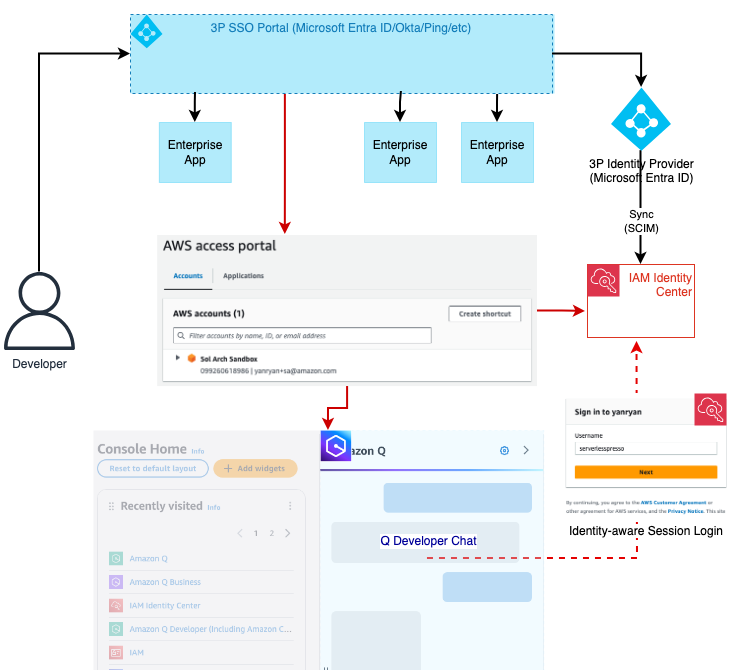
In the real world as in the world of technology and authentication, the ability to understand who we are is important on many levels. In this blog post, we’ll look at how the ability to uniquely identify ourselves in the AWS console can lead to a better overall experience, particularly when using Amazon Q Developer. We explore the features that become available to us when Q Developer can uniquely identify our sessions in the console and match them with our subscriptions and resources. We’ll look at how we can accomplish this goal using identity-aware sessions, a capability now available with AWS IAM Identity Center. Finally, we’ll walk through the steps necessary to enable it in your AWS Organization today.

Amazon Q Developer is a generative AI-powered assistant for software development. Accessible from multiple contexts including the IDE, the command line, and the AWS Management Console, the service offers two different pricing tiers: free and Pro. In this post, we’ll explore how to use Q Developer Pro in the AWS Console with identity-aware sessions. We’ll also explore the recently introduced ability to chat about AWS account resources within the Q Developer Chat window in the AWS Console to inquire about resources in an AWS account when identity-aware sessions are enabled.

Connecting your corporate source of identities to IAM Identity Center creates a shared record of your workforce and users’ group associations. This allows AWS applications to interact with one another efficiently on behalf of your users because they all reference this shared record of attributes. As a result, users have a consistent, continuous experience across AWS applications. Once your source of identities is connected to IAM Identity Center, your identity provider administrator can decide which users and groups will be synchronized with Identity Center. Your Amazon Q Developer administrator sees these synchronized users and groups only within Amazon Q Developer and can assign Q Developer Pro subscriptions to them.

User Identity in the AWS Console

To access the AWS Console, you must first obtain an IAM session – most commonly by using Identity Center Access Portal, IAM federation, or IAM (or root) users. Users can also use IAM Identity Center or a third party federated login mechanism. In this post, we’ll be using Microsoft Entra ID, but many other providers are available. Of all these options, however, only logging in with IAM Identity Center provides us with enough context to uniquely identity the user automatically by default. Identity-aware sessions will make this work.

Using Q Developer with a direct IAM Identity Center connection

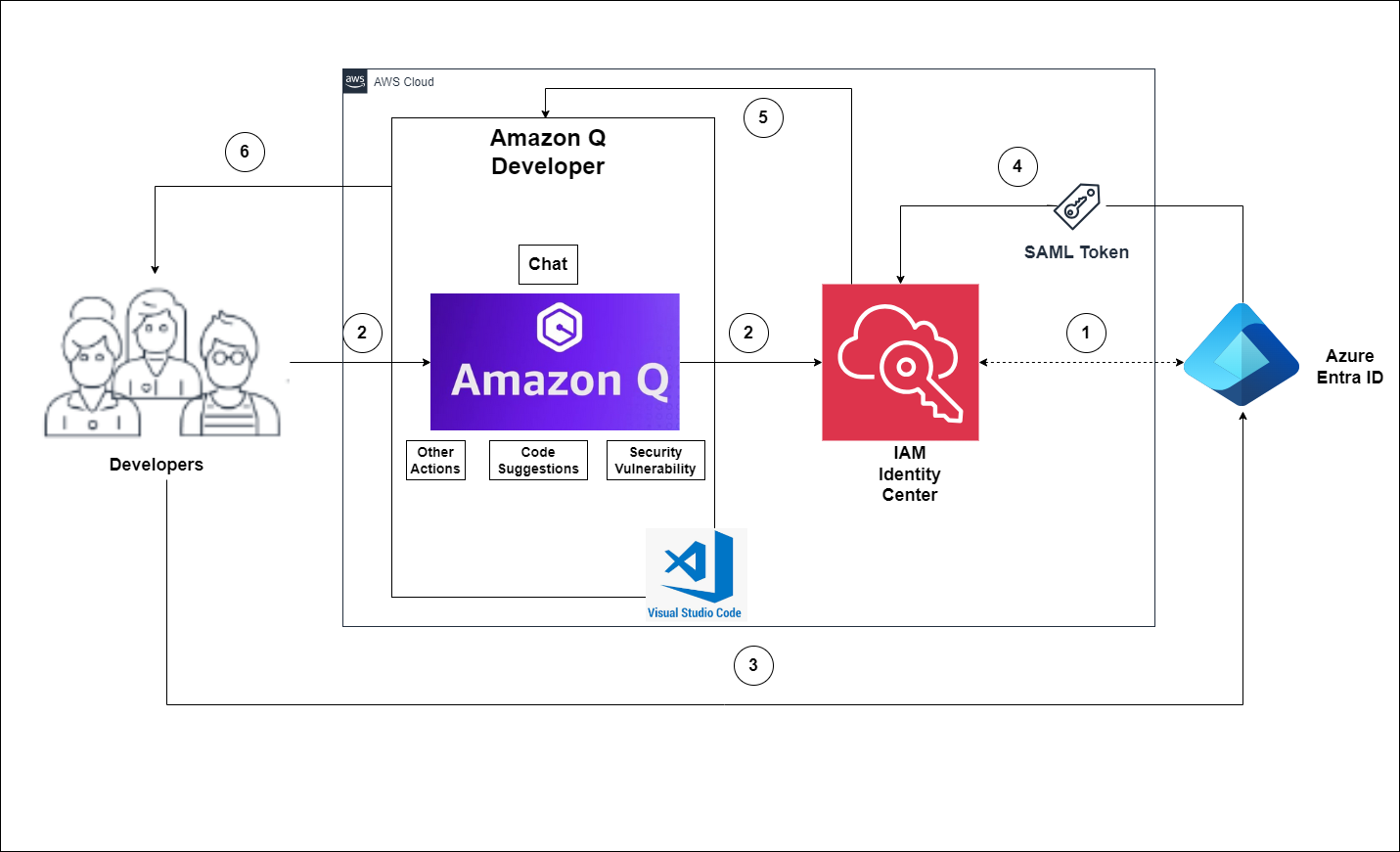
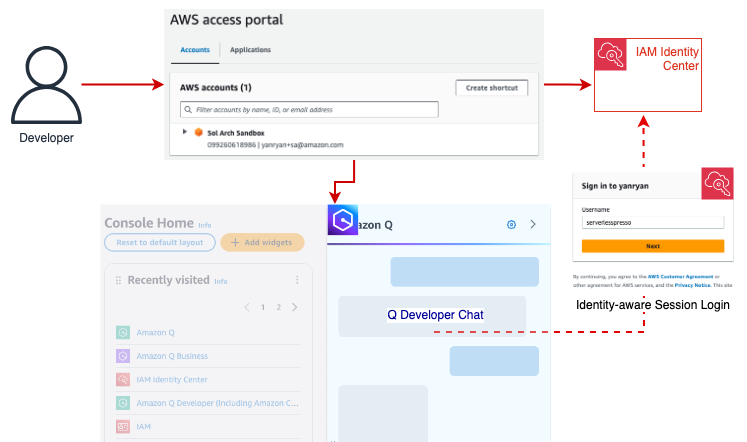
Figure 1: Logging into an AWS account via the IAM Identity Center enables Q Developer to match the user with an active Pro subscription.

To meet customers where they are and allow them to build on their existing configurations, IAM Identity Center includes a mechanism that allows users to obtain an identity-aware session to access Q in the Console, regardless of how they originally logged in to the Console.

Let’s look at a real-world example to explore how this might work. Let’s assume our organization is currently using Microsoft Entra ID alongside AWS Organizations to federate our users into AWS accounts. This grants them access to the AWS console for accounts in our AWS Organization and enables our users to be assigned IAM roles and permissions. While secure, this access method does not allow Q Developer to easily associate the user with their Entra ID identity and to match them to a Q Developer subscription.

Using Q Developer with a 3P Identity Provider and IAM Identity Center

Figure 2: Using Entra ID, the user is federated into the AWS account and assumes an IAM role without further context in the console. Q Developer can obtain that context by authenticating the user with identity-aware sessions. This process is first attempted manually before prompting the user for credentials

To provide identity-aware sessions to these users, we can enable IAM Identity Center for the Organization and integrate it with our Entra ID instance. This allows us to sync our users and groups from Entra ID and assign them to subscriptions in our AWS Applications such as Amazon Q Developer.

We then go one step further and enable identity-aware sessions for our Identity Center instance. Identity-aware sessions allow Amazon Q to access user’s unique identifier in Identity Center so that it can then look up a user’s subscription and chat history. When the user opens the Console Chat, Q Developer checks whether the current IAM session already includes a valid identity-aware context. If this context is not available, Q will then verify the account is part of an Organization and has an IAM Identity Center instance with identity-aware sessions enabled. If so, it will prompt the user to authenticate with IAM Identity Center. Otherwise, the chat will throw an error.

With a valid Q Developer Pro subscription now verified, the user’s interactions with the Q Chat window will include personalization such as access to prior chat history, the ability to chat about AWS account resources, and higher request limits for multiple capabilities included with Q Developer Pro. This will persist with the user for the duration of their AWS Console session.

Configuring Identity-Aware Sessions

Identity-aware sessions are only available for instances of IAM Identity Center deployed at the AWS Organization level. (Account-level instances of IAM Identity Center do not support this feature). Once IAM Identity Center is configured, the option to enable Identity-aware sessions needs to be manually selected. (NOTE: This is a one-way door option which, once enabled, cannot be disabled. For more information about prerequisites and considerations for this feature, you can review the documentation here.)

To begin, verify that you have enabled AWS Organizations across your accounts. Once you have completed this, you are ready to enable IAM Identity Center and enable identity-aware sessions. The steps below should be completed by a member of your infrastructure administration team.

For customers who already have an Organization-based instance of IAM Identity Center configured, skip to Step 4 below. For those organizations who would like to read more about IAM Identity Center before completing the following steps, you can find details in the documentation available here.

Walkthrough

  1. From within the management account or security account configured in your AWS Configuration, access the AWS Console and navigate to the AWS IAM Identity Center in the region where you wish to deploy your organization’s Identity Center instance.
  2. Choose the “Enable” option where you will be presented with an option to setup Identity Center at the Organization level or as a single account instance. Choose the “Enable with AWS Organizations” to have access to identity-aware sessions.

Choose the IAM Identity Center Context - Organization vs Account

  1. After Identity Center has been enabled, navigate to the “Settings” page from the left-hand navigation menu. Note that under the “Details” section, the “Identity-aware sessions” option is currently marked as “Disabled”.

IAM Identity Center General Settings - Identity-Aware Sessions disabled by default

  1. Choose the “Enable” option from the Details section or select it from the blue prompt below the Details section.

Identity-Aware Info Prompt allows users to enable

  1. Choose “Enable” from the popup box that appears to confirm your choice.

Identity-Aware Confirmation Prompt

  1. Once IAM Identity Center is enabled and Identity-aware sessions are enabled, you can then proceed by either creating a user manually in Identity Center to log in with, or by connecting your Identity Center instance to a third-party provider like Entra ID, Ping, or Okta. For more information on how to complete this process, please see the documentation for the various third-party providers available.
  2. If you don’t have Q Developer enabled, you will want to do so now. From within the AWS Console, using the search bar navigate to the Amazon Q Developer service. As a best practice, we recommend configuring Q Developer in your management account.

Amazon Q Developer Home Screen - Control panel to add subscriptions

  1. Begin by clicking the “Subscribe to Amazon Q” button to enable Q Developer in your account. You will see a green check denoting that Q has successfully been paired with IAM Identity Center.

Amazon Q Developer Paired with IAM Identity Center - Info Notice

  1. Choose “Subscribe” to enable Q Developer Pro.

Amazon Q Developer Pro Subscription Info Panel

  1. Enable Q Developer Pro in the popup prompt

Amazon Q Developer Pro Confirmation

  1. From here, you can then assign users and groups from the Q Developer prompt or you may assign them from within the IAM Identity Center using the Amazon Q Application Profile.

IAM Identity Center - Q Developer Profile for Managed Applications

  1. Once your users and groups have been assigned, they are now able to begin using Q Developer in both the AWS account console and their individual IDE’s.

Why Use Q Developer Pro?

In this final section, we’ll explore the benefits of using Amazon Q Developer Pro. There are three main areas of benefit:

Chat History

Q Developer Pro can store your chat history and restore it from previous sessions each time you begin. This enables you to develop a context within the chat about things that are relevant to your interests and in turn inform the feedback you receive from Q going forward.

Chat about your AWS account resources

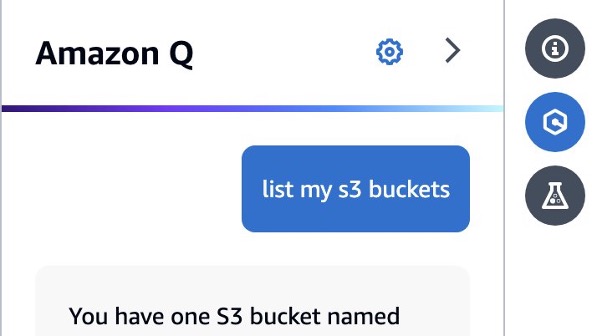
Q Developer Pro can leverage your IAM permissions to make requests regarding resources and costs associated with your account (assuming you have the appropriate policies). This enables you to inquire about certain resources deployed in a given region, or ask questions about cost such as the overall EC2 spend in a given period of time.

Sample Q Developer Chat Question

Figure 4: From the Q Chat panel, you can inquire about resources deployed in your account. (This capability requires you to have the necessary permissions to view information about the requested resource.)

Personalization

Identity-aware sessions also enable you to benefit from custom settings in your Q Chat. For example, you can enable cross-region access for your Q Chat sessions which enable you to ask questions about resources in the current region but also all other regions in your account.

Conclusion

As a new feature of IAM Identity Center, identity-aware sessions enable an AWS Console user to access their Q Developer Pro subscription in the Q Chat panel. This provides them with richer conversations with Q Developer about their accounts and maintains those conversations over time with stored chat history. Enabling this feature involves no additional cost and only a single setting change in a configured IAM Identity Center organization instance. Once made, users will be able to benefit from the full feature set of Amazon Q Developer regardless of how they log into the account.

About the author

Ryan Yanchuleff, Sr. Specialist SA – WWSO Generative AI

Ryan is a Senior Specialist Solutions Architect for the Worldwide Specialist Organization focused on all things Generative AI. He has a passion for helping startups build new solutions to realize their ideas and has built more than a few startups himself. When he’s not playing with technology, he enjoys spending time with his wife and two kids and working on his next home renovation project.

How to use Amazon Q Developer to deploy a Serverless web application with AWS CDK

Post Syndicated from Riya Dani original https://aws.amazon.com/blogs/devops/how-to-use-amazon-q-developer-to-deploy-a-serverless-web-application-with-aws-cdk/

Did you know that Amazon Q Developer, a new type of Generative AI-powered (GenAI) assistant, can help developers and DevOps engineers accelerate Infrastructure as Code (IaC) development using the AWS Cloud Development Kit (CDK)?

IaC is a practice where infrastructure components such as servers, networks, and cloud resources are defined and managed using code. Instead of manually configuring and deploying infrastructure, with IaC, the desired state of the infrastructure is specified in a machine-readable format, like YAML, JSON, or modern programming languages. This allows for consistent, repeatable, and scalable infrastructure management, as changes can be easily tracked, tested, and deployed across different environments. IaC reduces the risk of human errors, increases infrastructure transparency, and enables the application of DevOps principles, such as version control, testing, and automated deployment, to the infrastructure itself.

There are different IaC tools available to manage infrastructure on AWS. To manage infrastructure as code, one needs to understand the DSL (domain-specific language) of each IaC tool and/or construct interface and spend time defining infrastructure components using IaC tools. With the use of Amazon Q Developer, developers can minimize time spent on this undifferentiated task and focus on business problems. In this post, we will go over how Amazon Q Developer can help deploy a fully functional three-tier web application infrastructure on AWS using CDK. AWS CDK is an open-source software development framework to define cloud infrastructure in modern programming languages and provision it through AWS CloudFormation.

Amazon Q Developer is a generative artificial intelligence (AI)-powered conversational assistant that can help you understand, build, extend, and operate AWS applications. You can ask questions about AWS architecture, your AWS resources, best practices, documentation, support, and more. Amazon Q Developer is constantly updating its capabilities so your questions get the most contextually relevant and actionable answers.

In the following sections, we will take a real-world three-tier web application that uses serverless architecture and showcase how you can accelerate AWS CDK code development using Amazon Q Developer as an AI coding companion and thus improve developer productivity.

Prerequisites

To begin using Amazon Q Developer, the following are required:

Application Overview

You are a DevOps engineer at a software company and have been tasked with building and launching a new customer-facing web application using a serverless architecture. It will have three tiers, as shown below, consisting of the presentation layer, application layer, and data layer. You have decided to utilize Amazon Q Developer to deploy the application components using AWS CDK.

Three-Tier Web Application Architecture Overview

Figure 1 – Serverless Application Architecture

Accelerating application deployment using Amazon Q Developer as an AI coding companion

Let’s dive into how Amazon Q Developer can be used as an expert companion to accelerate the deployment of the above serverless application resources using AWS CDK.

1. Deploy Presentation Layer Resources

Creating a secured Amazon S3 bucket to host static assets and front it using Amazon CloudFront

When building modern serverless web applications that host large static content, a key architecture consideration is how to efficiently and securely serve static assets such as images, CSS, and JavaScript files. Simply serving these from your application servers can lead to scaling and performance bottlenecks with increased resource utilization (e.g., CPU, I/O, network) on servers. This is where leveraging AWS services like Amazon Simple Storage Service (Amazon S3) and Amazon CloudFront can be a game-changer. By hosting your static content in a secured S3 bucket, you unlock several powerful benefits. First and foremost, you get robust security controls through S3 bucket policies and CloudFront Origin Access Control (OAC) to ensure only authorized access. This is critical for protecting your assets. Secondly, you take load off your application servers by having CloudFront directly serve static assets from its globally distributed edge locations. This improves application performance and reduces operational costs. AWS CDK helps to simplify the infrastructure provisioning by allowing developers to define S3 bucket and CloudFront resource configurations in a modern programming language using CDK constructs that enhance security and include best practices recommendations.

In this application architecture, we will use Amazon Q Developer to develop AWS CDK code to provision presentation layer resources, which include a secured S3 bucket with public access disabled and an Origin Access Control (OAC) that is used to grant CloudFront access to the S3 bucket to securely serve the static assets of the application.

Prompt: Create a cdk stack with python that creates an s3 bucket for cloudfront/s3 static asset, ensure it is secured by using Origin Access Control (OAC)

Figure 2 - Using Amazon Q to Generate python CDK code for the presentation layer resources

Using Amazon Q to Generate python CDK code for the presentation layer resources

Developers can customize these configurations using Amazon Q Developer based on your specific security requirements, such as implementing access controls through IAM policies or enabling bucket logging for audit trails. This approach ensures that the S3 bucket is configured securely, aligning with best practices for data protection and access management.

Lets look at an example of adding CloudTrail logging to the S3 bucket:

Prompt: Update the code to include cloudtrail logging to the S3 bucket created

Using Amazon Q Developer to add CloudTrail logging to the S3 bucket

Using Amazon Q Developer to add CloudTrail logging to the S3 bucket

2. Deploy Application Layer Resources

Provision AWS Lambda and Amazon API Gateway to serve end-user requests

Amazon Q Developer makes it easy to provision serverless application backend infrastructure such as AWS Lambda and Amazon API Gateway using AWS CDK. In the above architecture, you can deploy the Lambda function hosting application code, with just a few lines of CDK code along with Lambda configuration such as function name, runtime, handler, timeouts, and environment variables. This Lambda function is fronted using Amazon API Gateway to serve user requests. Anything from a simple micro-service to a complex serverless application can be defined through code in CDK using Amazon Q assistance and deployed repeatedly through CI/CD pipelines. This enables infrastructure automation and consistent governance for applications on AWS.

Prompt: Create a CDK stack that creates a AWS Lambda function that is invoked by Amazon API Gateway

Using Amazon Q Developer to generate CDK code to create an AWS Lambda function that is invoked by Amazon API Gateway

Using Amazon Q Developer to generate CDK code to create an AWS Lambda function that is invoked by Amazon API Gateway

3. Deploy Data Layer Resources

Provision Amazon DynamoDB tables to host application data

By leveraging Amazon Q Developer, we can generate CDK code to provision DynamoDB tables using CDK constructs that offer AWS default best practice recommendations. With Amazon Q Developer, using the CDK construct library, we can define DynamoDB table names, attributes, secondary indexes, encryption, and auto-scaling in just a few lines of CDK code in our programming language of choice. With CDK, this table definition is synthesized into an AWS CloudFormation template that is deployed as a stack to provision the DynamoDB table with all the desired settings. Any data layer resources can be defined this way as Infrastructure as Code (IAC) using Amazon Q Developer. Overall, Amazon Q Developer drastically simplifies deploying managed data backends on AWS through CDK while enforcing best practices around data security, access control, and scalability leveraging CDK constructs.

Prompt: Create a CDK stack of a DynamoDB table with 100 read capacity units and 100 write capacity units.

Using Amazon Q Developer to generate CDK code to create a DynamoDB with 100 read capacity units and 100 write capacity units

Using Amazon Q Developer to generate CDK code to create a DynamoDB with 100 read capacity units and 100 write capacity units

4. Monitoring the Application Components

Monitoring using Amazon CloudWatch

Once the application infrastructure stack has been provisioned, it’s important to setup observability to monitor key metrics, detect any issues proactively, and alert operational teams to troubleshoot and fix issues to minimize application downtime. To get started with observability, developers can leverage Amazon CloudWatch, a fully managed monitoring service. With the use of AWS CDK, it is easy to codify CloudWatch components such as dashboards, metrics, log groups, and alarms alongside the application infrastructure and deploy them in an automated and repeatable way leveraging the AWS CDK construct library. Developers can customize these metrics and alarms to meet their workload requirements. All the monitoring configuration gets deployed as part of the infrastructure stack.

Developers can use Amazon Q Developer to assist with setting up application monitoring in AWS using CloudWatch and CDK. With Q, you can describe the resources you want to monitor, such as EC2 instances, Lambda functions, and RDS databases. Q will then generate the necessary CDK code to provision the appropriate CloudWatch alarms, metrics, and dashboards to monitor the resources. By describing what you want to monitor in natural language, Q handles the underlying complexity of generating code.

Prompt: Create a CDK stack of a Cloudwatch event rule to stop web instance EC2 instance every day at 15:00 UTC

Using Amazon Q Developer to generate CDK code to create a CloudWatch event rule to stop an EC2 instance at 15:00 UTC

Using Amazon Q Developer to generate CDK code to create a CloudWatch event rule to stop an EC2 instance at 15:00 UTC

5. Automate CI/CD of the application

Build a CDK Pipeline for Continuous Integration(CI) and Continuous Deployment(CD) of the Infrastructure

As you iterate on your serverless application, you’ll want a smooth, automated way to reliably deploy infrastructure changes using a CI/CD pipeline. This is where implementing a CDK pipeline, an automated deployment pipeline, becomes useful. As we’ve seen, AWS Cloud Development Kit (CDK) allows you to define your entire multi-tier infrastructure as a reusable, version-controlled code construct. From S3 buckets to CloudFront, API Gateway, Lambda functions, databases and more, all of these can be deployed with IaC. This CI/CD pipeline streamlines the process of deploying both infrastructure and application code, integrating seamlessly with CI/CD best practices.

Here’s how you can leverage Amazon Q Developer to streamline the process of creating a CDK pipeline.

Prompt: Using python, create a CDK pipeline that deploys a three tier serverless application.

Using Amazon Q Developer to generate CDK pipeline using Python

Using Amazon Q Developer to generate CDK pipeline using Python

By leveraging Amazon Q Developer in your IDE for CDK pipeline creation, you can speed up adoption of CI/CD best practices, and receive real-time guidance on CDK deployment patterns, making the development process smoother. This CI/CD integration accelerates your CDK development experience, and allows you to focus on building robust and scalable AWS applications.

Conclusion

In this post, you have learned how developers can leverage Amazon Q Developer, a generative-AI powered assistant, as a true expert AI companion in assisting with accelerating Infrastructure As Code (IaC) Development using AWS CDK and seen how to deploy and manage AWS resources of a three-tier serverless application using AWS CDK. In addition to Infrastructure As Code, Amazon Q Developer can be leveraged to accelerate software development, minimize time spent on undifferentiated coding tasks, and help with troubleshooting, so that developers can focus on creative business problems to delight end-users. See the Amazon Q Developer documentation to get started.

Happy Building with Amazon Q Developer!

Riya Dani

Riya Dani is a Solutions Architect at Amazon Web Services (AWS), responsible for helping Enterprise customers on their journey in the cloud. She has a passion for learning and holds a Bachelor’s & Master’s degree in Computer Science from Virginia Tech. In her free time, she enjoys staying active and reading.

Jehu Gray

Jehu Gray is a Prototyping Architect at Amazon Web Services where he helps customers design solutions that fits their needs. He enjoys exploring what’s possible with IaC.

Janardhan Molumuri

Janardhan Molumuri is a Lead Technical Account Manager at AWS, come with over two decades of Engineering leadership experience, advising customers on their Cloud Adoption journey and emerging technologies. He has passion for speaking, writing, and enjoys exploring technology trends.

AWS Weekly Roundup: Amazon Q Business, AWS CloudFormation, Amazon WorkSpaces update, and more (Aug 5, 2024)

Post Syndicated from Matheus Guimaraes original https://aws.amazon.com/blogs/aws/aws-weekly-roundup-amazon-q-business-aws-cloudformation-amazon-workspaces-update-and-more-aug-5-2024/

Summer is reaching its peak for some of us around the globe, and many are heading out to their favorite holiday destinations to enjoy some time off. I just came back from holidays myself and I couldn’t help thinking about the key role that artificial intelligence (AI) plays in our modern world to help us scale the operation of simple things like traveling. Passport and identity verifications were quick, and thanks to the new airport security system rolling out across the world, so were my bag checks. I watched my backpack with a smile as it rolled along the security check belt with my computer, tablet, and portable game consoles all nicely tucked inside without any fuss.

If it wasn’t for AI, we wouldn’t be able to scale operations to keep up with population growth or the enormous volumes of data we generate on a daily basis. The advent of generative AI took this even further by unlocking the ability to put all this data to use in all kinds of creative ways, driving a new wave of exciting innovations that continues to elevate modern products and services.

This new landscape can be challenging for companies that are learning how generative AI can help them grow or succeed, such as startups. This is why I’m so excited about the AWS GenAI Lofts taking place in the next months around the world.

The AWS GenAI Lofts are collaborative spaces available in different cities around the world for a number of weeks. Startups, developers, investors, and industry experts can meet here while having access to AWS AI experts, and attend talks, workshops, fireside chats, and Q&As with industry leaders. All lofts are free and are carefully curated to offer something for everyone to help you accelerate your journey with AI. There are lofts scheduled in Bengaluru (July 29-Aug 9), San Francisco (Aug 14-Sept 27), Sao Paulo (Sept 2-Nov 20), London (Sept 30-Oct 25), Paris (Oct 8-Nov 25), and Seoul (Nov, pending exact dates). I highly encourage you to have a look at the agendas of a loft near you and drop in to learn more about GenAI and connect with others.

Last week’s launches
Here are some launches that got my attention last week.

Amazon Q Business cross-Region IdC — Amazon Q Business is a generative AI-powered assistant that deeply understands your business by providing connectors that you can easily set up to unify data from various sources such as Amazon S3, Microsoft 365, and more. You can then generate content, answer questions, and even automate tasks that are relevant and specific to your business. Q Business integrates with AWS IAM Identity Center to ensure that data can only be accessed by those who are authorized to do so. Previously, the IAM Identity Center instance had to be located in the same Region as the Q Business application. Now, you can connect to one in a different Region.

Git sync status changes publish to Amazon EventBridgeAWS CloudFormation Git sync is a very handy feature that can help streamline your DevOps operations by allowing you to automatically update your AWS CloudFormation stacks whenever you commit changes to the template or deployment file in source control. As of last week, any sync status change is published in near real-time as an event to EventBridge. This enables you to take your GitOps workflow further and stay on top of your Git repositories or resource sync status changes.

Some AWS Pinpoint’s capabilities are now under AWS End User Messaging — AWS Pinpoint’s SMS, MMS, push, and text to voice capabilities have been shuffled and now are offered through their own service called AWS End User Messaging. There is no impact to existing applications and no changes to APIs, the AWS Command Line Interface (AWS CLI), or IAM policies, however, the new name is now reflected on the AWS Management Console, AWS Billing console dashboard, documentation, and other places.

Amazon WorkSpaces updates — Microsoft Visual Studio Professional and Microsoft Visual Studio Enterprise 2022 are now added to the list of available license included applications on Workspaces Personal. Additionally, Amazon WorkSpaces Thin Client has received Carbon Trust verification. As verified by the Carbon Trust, the total lifecycle carbon emission is 77kg CO2e and 50% of the product is made from recycled materials.

GenAI for the Public Sector — There has been two significant launches that may interest those in the public sector looking into getting started with generative AI. Amazon Bedrock is now a FedRAMP High authorized service in the AWS GovCloud (US-West) Region. Additionally, both Llama 3 8B and Lllama 3 70B are now also available in that Region making this a perfect opportunity to start experimenting with Bedrock and Llama 3 if you have workloads in the AWS GovCloud (US-West) Region.

Customers in Germany can now sign up for AWS using their bank account — That means no debit or credit card is needed to create AWS accounts if you have a billing address in Germany. This can help simplify payment of AWS invoices for some businesses, as well as make it easier for others to get started on AWS.

Learning Materials

These are my recommended learning materials for this week.

AWS Skill Builder — This is more of a broad recommendation, but I’m still surprised that so many people never heard of AWS Skill Builder or have not tried it yet. There is so much learning you can do for free including a lot of hands-on courses. In July alone, AWS Skill Builder has launched 25 new digital training products including AWS SimulLearn and AWS Cloud Quest: Generative AI which are game-based learning experiences. Speaking of that, did you know that if you need to renew your Cloud Practitioner certification you can do it simply by playing the AWS Cloud Quest: Recertify Cloud Practioner game?

Get started with agentic code interpreter — Earlier last month we released a new capability on Agents for Amazon Bedrock which allows agents to dynamically generate and execute code within a secure sandboxed environment. As usual, my colleague Mike Chambers has created a great video and blog post on community.aws showing how you can start using it today.

That’s it for this week. Check back next Monday for another Weekly Roundup!

Accelerate your Terraform development with Amazon Q Developer

Post Syndicated from Dr. Rahul Sharad Gaikwad original https://aws.amazon.com/blogs/devops/accelerate-your-terraform-development-with-amazon-q-developer/

This post demonstrates how Amazon Q Developer, a generative AI-powered assistant for software development, helps create Terraform templates. Terraform is an infrastructure as code (IaC) tool that provisions and manages infrastructure on AWS safely and predictably. When used in an integrated development environment (IDE), Amazon Q Developer assists with software development, including code generation, explanation, and improvements. This blog highlights the 5 most used cases to show how Amazon Q Developer can generate Terraform code snippets:

  1. Secure Networking Deployment: Generate Terraform code snippet to create an Amazon Virtual Private Cloud (VPC) with subnets, route tables, and security groups.
  2. Multi-Account CI/CD Pipelines with AWS CodePipeline: Generate Terraform code snippet for setting up continuous integration and continuous delivery (CI/CD) pipelines using AWS CodePipeline across multiple AWS accounts.
  3. Event-Driven Architecture: Generate Terraform code snippet to set up an event-driven architecture using Amazon EventBridge, AWS Lambda, Amazon API Gateway, and other serverless services.
  4. Container Orchestration (Amazon ECS Fargate): Generate Terraform code snippet for deploying and managing container orchestration using Amazon Elastic Container Service (ECS) with Fargate.
  5. Machine Learning Workflows: Generate Terraform module for deploying machine learning workflows using AWS SageMaker.

Terraform Project Structure

First, you want to understand the best practices and requirements for setting up a multi-environment Terraform Infrastructure as Code (IaC) project. Following industry practices from the start is crucial to manage your multi-environment infrastructure and this is where Amazon Q will recommend a standard folder and file structure for organising Terraform templates and managing infrastructure deployments.

Interface showing Amazon Q Developer's recommendations for structuring a Terraform project

Amazon Q Developer recommended organising Terraform templates in separate folders for each environment, with sub-folders to group resources into modules. It provided best practices like version control, remote backend, and tagging for reusability and scalability. We can ask Amazon Q Developer to generate a sample example for better understanding.

Screenshot of the Terraform folder structure generated by Amazon Q Developer

You can see that the recommended folder structure includes a root project folder and sub-folders for environments and modules. The sub-folders manage multiple environments (like development, testing, production), reusable modules (like Virtual Private Cloud (VPC), Elastic Compute Cloud (EC2)) for various components and it demonstrates references to manage Terraform templates for individual environments and components. Let’s explore the top 5 most common use cases one by one.

1. Secure Networking Deployment

Once we setup Terraform project structure, we will ask Amazon Q Developer to give recommendations for networking services and requirements. Amazon Q Developer suggests to use Amazon Virtual Private Cloud (VPC), Subnets, Internet Gateways, Network Access Control Lists (ACLs) and Security Groups.

Amazon Q Developer interface displaying recommendations for core Amazon VPC components

Now, we can ask Amazon Q Developer to generate a Terraform template for building components like Virtual Private Cloud (VPC) and subnets. The Terraform code generated by Amazon Q Developer for a VPC, private subnet, and public subnet. It also added tags to each resource, following best practices. To leverage the suggested code snippet in your template, open the vpc.tf file and either insert it at the cursor or copy it into the file. Additionally, Amazon Q Developer created an Internet Gateway, Route Tables, and associated them with the VPC.

Generated Terraform code snippet for VPC and Subnets shown in the Amazon Q Developer interface

2. Multi-Account CI/CD Pipelines with AWS CodePipeline

Let’s discuss the second use case: a CI/CD (Continuous Integration/Continuous Deployment) pipeline using AWS CodePipeline to deploy Terraform code across multiple AWS accounts. Assume this is your first time working on this use case. Use Amazon Q Developer to understand the pipeline’s design stages and requirements for creating your pipeline across AWS accounts. I asked Amazon Q Developer about the pipeline stages and requirements to deploy across AWS accounts.

Amazon Q Developer displaying generated stages and dependencies for a CI/CD pipeline

Amazon Q Developer provided all the main stages for the CI/CD (Continuous Integration/Continuous Deployment) pipeline:

  1. Source stage pulls the Terraform code from the source code repository.
  2. Plan stage includes linting, validation, or running terraform plan to view the Terraform plan before deploying the code.
  3. Build stage performs additional testing for the infrastructure to ensure all components will be created successfully.
  4. Deploy stage runs terraform apply.

Amazon Q Developer also provided all the requirements needed before creating the CI/CD pipeline. These requirements include terraform is installed in the pipeline environment, IAM roles that will be assumed by the pipeline stages to deploy the terraform code across different accounts, an Amazon S3 bucket to store the state of the terraform code, source code repository to store our terraform files, use parameters to store sensitive data like AWS accounts IDs and AWS CodePipeline to create our CI/CD pipeline.

You will use Amazon Q Developer now to generate the terraform code for the CI/CD pipeline based on stages design proposed by the services in the previous question.

Interface showing Terraform code snippets for CI/CD pipeline stages generated by Amazon Q Developer

We would like to highlight three things here:

1. Amazon Q Developer suggested all the stages for our Continuous Integration/Continuous Deployment (CI/CD) design:

  • Source Stage: this stage pulls the code from the source code repository.
  • Build Stage: this stage will validates the infrastructure code, run a Terraform plan stage, and can automate any review.
  • Deploy Stage: this stage deploys the terraform code to the target AWS account.

2. Amazon Q Developer generated the build stage before the plan and this is expected in any CI/CD pipeline. First, we start with building the artifacts, running any tests or validation steps. If this stage is passed successfully, it will then proceed to terraform plan.
3. Amazon’s Q Developer suggests deploying to separate stages for each target account, aligning with the best practice of using different AWS accounts for development, testing, and production environments. This reduces the blast radius and allows configuring a separate stage for each environment/account.

3. Event-Driven Architecture

For the next use case, we will start by asking Amazon Q Developer to explain Event-driven architecture. As shown below, Amazon Q Developer highlights the important aspects that we need to consider when designing event-driven architecture like:

  • An event that represents an actual change in the application state like S3 object upload.
  • The event source that produces the actual event like Amazon S3.
  • An event route that routes the event between source and target.
  • An event target that consumes the event like AWS Lambda function.

Amazon Q Developer providing an explanation of event-driven architecture components

Assume you want to build a sample Event-driven architecture using Amazon SNS as a simple pub/sub. In order to build such architecture, we will need:

  • An Amazon SNS topic to publish events to an Amazon SQS queue subscriber.
  • An Amazon SQS queue which subscribe to SNS topic.

Sample architecture of Event-driven approach

Asking Amazon Q Developer to create a terraform code for the above use case, it generated a code that can get us started in seconds. The code includes:

  • Create an SNS Topic and SQS queue
  • Subscribe SQS queue to SNS topic
  • AWS IAM policy to allow SNS to write to SQS

Terraform code snippet for an event-driven application generated by Amazon Q Developer

4. Container Orchestration (Amazon ECS Fargate)

Now to our next use case, we want to build an Amazon ECS cluster with Fargate. Before we start, we will ask Amazon Q Developer about Amazon ECS and the difference between using Amazon EC2 or Fargate option.

Amazon Q Developer interface explaining Amazon ECS and its compute options

Amazon Q Developer not only provides details about Amazon ECS capabilities and well-defined description about the difference between Amazon EC2 and Fargate as compute options, and also a guide when to use what to help in decision making process.

Now, we will ask Amazon Q Developer to suggest a terraform code to create an Amazon ECS cluster with Fargate as the compute option.

Generated Terraform code snippet for deploying Amazon ECS on Fargate shown by Amazon Q Developer

Amazon Q Developer suggested the key resources in the Terraform code for the ECS cluster, the resources are:

  • An Amazon ECS Cluster.
  • A sample task definition for an Nginx container with all the required configuration for the container to run.
  • ECS service with Fargate as launch type for the container to run.

5. Secure Machine Learning Workflows

Now let us explore final use case on setting up Machine Learning workflow. Assuming I am new to ML on AWS, I will first try to understand the best practices and requirements for ML workflows. We can ask Amazon Q Developer to get the recommendations for the resources, security policies etc.

Amazon Q Developer's recommendations for best practices in secure ML workflows

Amazon Q Developer provided recommendations to provision SageMaker resources in private VPC, implement authentication and authorization using AWS IAM, encrypt data at rest and in transit using AWS KMS and setup secure CI/CD. Once I get the recommendations, I can identify the resources which I need to build MLOps workflow.

Interface showing suggested resources for building an MLOPs workflow by Amazon Q Developer

Amazon Q Developer suggested resources such as a SageMaker Studio instance, model registry, endpoints, version control, CI/CD Pipeline, CloudWatch etc. for ML model building, training and deployment using SageMaker. Now I can start building Terraform templates to deploy these resources. To get the code recommendations, I can ask Amazon Q Developer to give a Terraform snippet for all these resources.

Amazon Q Developer will generate Terraform snippets for isolated VPC, Security Group, S3 bucket and SageMaker pipeline. Now, as shown earlier, we can leverage Amazon Q Developer to generate Terraform code for each and every resource using comments.

Conclusion

In this blog post, we showed you how to use Amazon Q Developer, a generative AI–powered assistant from AWS, in your IDE to quickly improve your development experience when using an infrastructure-as-code tool like Terraform to create your AWS infrastructure. However, we would like to highlight some important points:

  • Code Validation and Testing: Always thoroughly validate and test the Terraform code generated by Amazon Q Developer in a safe environment before deploying it to production. Automated code generation tools can sometimes produce code that may need adjustments based on your specific requirements and configurations.
  • Security Considerations: Ensure that all security practices are followed, such as least privilege principles for IAM roles, proper encryption methods for sensitive data, and continuous monitoring for security compliance.
  • Limitations of Amazon Q Developer: While Amazon Q Developer provides valuable assistance, it may not cover all edge cases or specific customizations needed for your infrastructure. Always review the generated code and modify it as necessary to fit your unique use cases.
  • Updates and Maintenance: Infrastructure and services on AWS are continuously evolving. Make sure to keep your Terraform code and the use of Amazon Q Developer updated with the latest best practices and AWS service changes.
  • Real-Time Assistance: Use Amazon Q Developer in your IDE to enhance generated code as it provides real-time recommendations based on your existing code and comments. The suggestions are based on your existing code and comments, which are in this case generated by Amazon Q Developer.

To get started with Amazon Q Developer for debugging today navigate to Amazon Q Developer in IDE and simply start asking questions about debugging. Additionally, explore Amazon Q Developer workshop for additional hands-on use cases.

For any inquiries or assistance with Amazon Q Developer, please reach out to your AWS account team.

About the authors:

Dr. Rahul Sharad Gaikwad

Dr. Rahul is a Lead DevOps Consultant at AWS, specializing in migrating and modernizing customer workloads on the AWS Cloud. He is a technology enthusiast with a keen interest in Generative AI and DevOps. He received his Ph.D. in AIOps in 2022. He is recipient of the Indian Achievers’ Award (2024), Best PhD Thesis Award (2024), Research Scholar of the Year Award (2023) and Young Researcher Award (2022).

Omar Kahil

Omar is a Professional Services Senior consultant who helps customers adopt DevOps culture and best practices. He also works to simplify the adoption of AWS services by automating and implementing complex solutions.

Testing your applications with Amazon Q Developer

Post Syndicated from Svenja Raether original https://aws.amazon.com/blogs/devops/testing-your-applications-with-amazon-q-developer/

Testing code is a fundamental step in the field of software development. It ensures that applications are reliable, meet quality standards, and work as intended. Automated software tests help to detect issues and defects early, reducing impact to end-user experience and business. In addition, tests provide documentation and prevent regression as code changes over time.

In this blog post, we show how the integration of generative AI tools like Amazon Q Developer can further enhance unit testing by automating test scenarios and generating test cases.

Amazon Q Developer helps developers and IT professionals with all of their tasks across the software development lifecycle – from coding, testing, and upgrading, to troubleshooting, performing security scanning and fixes, optimizing AWS resources, and creating data engineering pipelines. It integrates into your Integrated Development Environment (IDE) and aids with providing answers to your questions. Amazon Q Developer supports you across the Software Development Lifecycle (SLDC) by enriching feature and test development with step-by-step instructions and best practices. It learns from your interactions and training itself over time to output personalized, and tailored answers.

Solution overview

In this blog, we show how to use Amazon Q Developer to:

  • learn about software testing concepts and frameworks
  • identify unit test scenarios
  • write unit test cases
  • refactor test code
  • mock dependencies
  • generate sample data

Note: Amazon Q Developer may generate an output different from this blog post’s examples due to its nondeterministic nature.

Using Amazon Q Developer to learn about software testing frameworks and concepts

As you start gaining experience with testing, Amazon Q Developer can accelerate your learning through conversational Q&A directly within the AWS Management Console or the IDE. It can explain topics, provide general advice and share helpful resources on testing concepts and frameworks. It gives personalized recommendations on resources which makes the learning experience more interactive and accelerates the time to get started with writing unit tests. Let’s introduce an example conversation to demonstrate how you can leverage Amazon Q Developer for learning before attempting to write your first test case.

Example – Select and install frameworks

A unit testing framework is a software tool used for test automation, design and management of test cases. Upon starting a software project, you may be faced with the selection of a framework depending on the type of tests, programming language, and underlying technology. Let’s ask for recommendations around unit testing frameworks for Python code running in an AWS Lambda function.

In the Visual Studio Code IDE, a user asks Amazon Q Developer for recommendations on unit test frameworks suitable for AWS Lambda functions written in Python using the following prompt: “Can you recommend unit testing frameworks for AWS Lambda functions in Python?”. Amazon Q Developer returns a numbered list of popular unit testing frameworks, including Pytest, unittest, Moto, AWS SAM Local, and AWS Lambda Powertools. Amazon Q Developer returns two URLs in the Sources section. The first URL links to an article called “AWS Lambda function testing in Python – AWS Lambda” from the AWS documentation, and the other URL to an AWS DevOps Blog post with the title “Unit Testing AWS Lambda with Python and Mock AWS Services”.

Figure 1: Recommend unit testing frameworks for AWS Lambda functions in Python

In Figure 1, Amazon Q Developer answers with popular frameworks (pytest, unittest, Moto, AWS SAM Command Line Interface, and Powertools for AWS Lambda) including a brief description for each of them. It provides a reference to the sources of its response at the bottom and suggested follow up questions. As a next step, you may want to refine what you are looking for with a follow-up question. Amazon Q Developer uses the context from your previous questions and answers to give more precise answers as you continue the conversation. For example, one of the frameworks it suggested using was pytest. If you don’t know how to install that locally, you can ask something like “What are the different options to install pytest on my Linux machine?”. As shown in Figure 2, Amazon Q Developer provides installation recommendation using Python.

In the Visual Studio Code IDE, a user asks Amazon Q Developer about the different options to install pytest on a Linux machine using the following prompt: “What are the different options to install pytest on my Linux machine?”. Amazon Q Developer replies with four different options: using pip, using a package manager, using a virtual environment, and using a Python distribution. Each option includes the steps to install pytest. A source URL is included for an article called “How to install pytest in Python? – Be on the Right Side of Change”.

Figure 2: Options to install pytest

Example – Explain concepts

Amazon Q Developer can also help you to get up to speed with testing concepts, such as mocking service dependencies. Let’s ask another follow up question to explain the benefits of mocking AWS services.

In the Visual Studio Code IDE, a user asks Amazon Q Developer about the key benefits of mocking AWS Services’ API calls to create unit tests for Lambda function code using the following prompt: “What are the key benefits of mocking AWS Services' API calls to create unit tests for Lambda function code?”. Amazon Q Developer replies with six key benefits, including: Isolation of the Lambda function code, Faster feedback loop, Consistent and repeatable tests, Cost savings, Improved testability, and Easier debugging. Each benefit has a brief explanation attached to it. The Sources section includes one URL to an AWS DevOps Blog post with the title “Unit Testing AWS Lambda with Python and Mock AWS Services”.

Figure 3: Benefits of mocking AWS services

The above conversation in Figure 3 shows how Amazon Q Developer can help to understand concepts. Let’s learn more about Moto.

In the Visual Studio Code IDE, a user asks Amazon Q Developer: “What is Moto used for?”. Amazon Q Developer provides a brief explanation of the Moto library, and how it can be used to create simulations of various AWS resources, such as: AWS Lambda, Amazon Dynamo DB, Amazon S3, Amazon EC2, AWS IAM, and many other AWS services. Amazon Q Developer provides a simple code example of how to use Moto to mock the AWS Lambda service in a Pytest test case by using the @mock_lambda decorator.

Figure 4: Follow up question about Moto

In Figure 4, Amazon Q Developer gives more details about the Moto framework and provides a short example code snippet for mocking an AWS Lambda service.

Best Practice – Write clear prompts

Writing clear prompts helps you to get the desired answers from Amazon Q. A lack of clarity and topic understanding may result in unclear questions and irrelevant or off-target responses. Note how those prompts contain specific description of what the answer should provide. For example, Figure 1 includes the programming language (Python) and service (AWS Lambda) to be considered in the expected answer. If unfamiliar with a topic, leverage Amazon Q Developer as part of your research, to better understand that topic.

Using Amazon Q Developer to identify unit test cases

Understanding the purpose and intended functionality of the code is important for developing relevant test cases. We introduce an example use case in Python, which handles payroll calculation for different hour rates, hours worked, and tax rates.

"""
This module provides a Payroll class to calculate the net pay for an employee.

The Payroll class takes in the hourly rate, hours worked, and tax rate, and
calculates the gross pay, tax amount, and net pay.
"""

class Payroll:
    """
    A class to handle payroll calculations.
    """

    def __init__(self, hourly_rate: float, hours_worked: float, tax_rate: float):
        self._validate_inputs(hourly_rate, hours_worked, tax_rate)
        self.hourly_rate = hourly_rate
        self.hours_worked = hours_worked
        self.tax_rate = tax_rate

    def _validate_inputs(self, hourly_rate: float, hours_worked: float, tax_rate: float) -> None:
        """
        Validate the input values for the Payroll class.

        Args:
            hourly_rate (float): The employee's hourly rate.
            hours_worked (float): The number of hours the employee worked.
            tax_rate (float): The tax rate to be applied to the employee's gross pay.

        Raises:
            ValueError: If the hourly rate, hours worked, or tax rate is not a positive number, 
            or if the tax rate is not between 0 and 1.
        """
        if hourly_rate <= 0:
            raise ValueError("Hourly rate must be a non-negative number.")
        if hours_worked < 0:
            raise ValueError("Hours worked must be a non-negative number.")
        if tax_rate < 0 or tax_rate >= 1:
            raise ValueError("Tax rate must be between 0 and 1.")

    def gross_pay(self) -> float:
        """
        Calculate the employee's gross pay.

        Returns:
            float: The employee's gross pay.
        """
        return self.hourly_rate * self.hours_worked

    def tax_amount(self) -> float:
        """
        Calculate the tax amount to be deducted from the employee's gross pay.

        Returns:
            float: The tax amount.
        """
        return self.gross_pay() * self.tax_rate

    def net_pay(self) -> float:
        """
        Calculate the employee's net pay after deducting taxes.

        Returns:
            float: The employee's net pay.
        """
        return self.gross_pay() - self.tax_amount()

The example shows how Amazon Q Developer can be used to identify test scenarios before writing the actual cases. Let’s ask Amazon Q Developer to suggest test cases for the Payroll class.

In the Visual Studio Code IDE, a user has a Payroll Python class open on the right side of the editor. The Payroll class is a module used to calculate the net pay for an employee. It takes the hourly rate, hours worked, and tax rate to calculate the gross pay, tax amount, and net pay. The user asks Amazon Q Developer to list unit test scenarios for the Payroll class using the following prompt: “Can you list unit test scenarios for the Payroll class?”. Amazon Q Developer provides eight different unit test scenarios: Test valid input values, Test invalid input values, Test edge cases, Test methods behavior, Test error handling, Test data types, Test rounding behavior, and Test consistency.

Figure 5: Suggest unit test scenarios

In Figure 5, Amazon Q Developer provides a list of different scenarios specific to the Payroll class, including valid, error, and edge cases.

Using Amazon Q Developer to write unit tests

Developers can have a collaborative conversation with Amazon Q Developer, which helps to unpack the code and think through testing cases to check that important test cases are captured but also edge cases are identified. This section focuses on how to facilitate the quick generation of unit test cases, based on the cases recommended in the previous section. Let’s start with a question around best practices when writing unit tests with pytest.

In the Visual Studio Code IDE, a user asks Amazon Q Developer “What are the best practices for unit testing with pytest?”. Amazon Q Developer replies with ten best practices, including: Keep tests simple and focused, Use descriptive test function names, Organize your tests, Run tests multiple times in random order, Utilize static code analysis tools, Focus on behavior not implementation, Use fixtures to set up test data, Parameterize your tests, and Integrate with continuous integration. A source URL is also provided for a Medium article called “Python Unit Tests with pytest Guide”

Figure 6: Recommended best practices for testing with pytest

In Figure 6, Amazon Q Developer provides a list of best practices for writing effective unit tests. Let’s follow up by asking to generate one of the suggested test cases.

In the Visual Studio Code IDE, a user asks Amazon Q Developer to generate a test case using pytest to make sure that the Payroll class raises a ValueError when the hourly rate holds a negative value. Amazon Q Developer generates a code sample using the pytest.raises() context manager to satisfy the requirement. It also provides instructions on how to run the text by prefixing the test module with pytest and running the command in the terminal. The user can now click on Insert at cursor button to insert the test case into the module, and run the test.

Figure 7: Generate a unit test case

Amazon Q Developer includes code in its response which you can copy or insert directly into your file by choosing Insert at cursor. Figure 7 displays valid unit tests covering some of the suggested scenarios and best practices, such as being simple and holding descriptive naming. It also states how to run the test using a command for the terminal.

Best Practice – Provide context

Context allows Amazon Q Developer to offer tailored responses that are more in sync with the conversation. In the chat interface, the flow of the ongoing conversation and past interactions are a critical contextual element. Other ways to provide context are selecting the code-under-test, keeping any relevant files, such as test examples, open in the editor and leveraging conversation context such as asking for best practices and example test scenarios before writing the test cases.

Using Amazon Q Developer to refactor unit tests

To improve code quality, Amazon Q Developer can be used to recommend improvements and refactor parts of the code base. To illustrate Amazon Q Developer refactoring functionality, we prepared test cases for the Payroll class which deviate from some of the suggested best practices.

Example – Send to Amazon Q Refactor

Let’s follow up by asking to refactor the code built-in Amazon Q > Refactor functionality.

In the Visual Studio Code IDE, a user selects the code in test_payroll_refactor module and asks Amazon Q Developer to refactor it via the Amazon Q Developer Refactor functionality, accessible through right click. This code contains ambiguous function and variable names, and might be hard to read without context. Amazon Q Developer then generates the refactored code and outlines the changes made: renamed test functions, removed variable names, and unnecessary comments, as functions are now self-explanatory. The user can now use the Insert at Cursor feature to add the code to the test_payroll_refactored module, and run the tests.

Figure 8: Refactor test cases

In Figure 8, the refactoring renamed the function and variable names to be more descriptive and therefore removed the comments. The recommendation is inserted in the second file to verify it runs correctly.

Best Practice – Apply human judgement and continuously interact with Amazon Q Developer

Note that code generations should always be reviewed and adjusted before used in your projects. Amazon Q Developer can provide you with initial guidance, but you might not get a perfect answer. A developer’s judgement should be applied to value usefulness of the generated code and iterations should be used to continuously improve the results.

Using Amazon Q Developer for mocking dependencies and generating sample data

More complex application architectures may require developers to mock dependencies and use sample data to test specific functionalities. The second code example contains a save_to_dynamodb_table function that writes a job_posting object into a specific Amazon DynamoDB table. This function references the TABLE_NAME environment variable to specify the name of the table in which the data should be saved.

We break down the tasks for Amazon Q Developer into three smaller steps for testing: Generate a fixture for mocking the TABLE_NAME environment variable name, generate instances of the given class to be used as test data, and generate the test.

Example – Generate fixtures

Pytest provides the capability to define fixtures to set defined, reliable, and consistent context for tests. Let’s ask Amazon Q Developer to write a fixture for the TABLE_NAME environment variable.

In the Visual Studio Code IDE, a user asks Amazon Q Developer to create a pytest fixture to mock the TABLE_NAME environment variable using the following prompt: “Create a pytest fixture which mocks my TABLE_NAME environment variable”. Amazon Q Developer replies with a code example showing how the fixture uses the os.environ dictionary to temporarily set the environment variable value to a mock value just for the duration of any test case using the fixture. The code example also includes a yield keyword to pause the fixture, and then delete the mock environment variable to restore the actual value once the test is completed.

Figure 9: Generate a pytest fixture

The result in Figure 9 shows that Amazon Q Developer generated a simple fixture for the TABLE_NAME environment variable. It provides code showing how to use the fixture in the actual test case with additional comments for its content.

Example – Generate data

Amazon Q Developer provides capabilities that can help you generate input data for your tests based on a schema, data model, or table definition. The save_to_dynamodb_table saves an instance of the job posting class to the table. Let’s ask Amazon Q Developer to create a sample instance based on this definition.

In the Visual Studio Code IDE, a user asks Amazon Q Developer to create a sample valid instance of the selected JobPosting class using the following prompt: “Create a sample valid instance of the selected JobPostings class”. The JobPosting class includes multiple fields, including: id, title, description, salary, location, company, employment type, and application_deadline. Amazon Q Developer provides a valid snippet for the JobPosting class, incorporating a UUID for the id field, nested amount and currency for the Salary class, and generic sample values for the remaining fields.

Figure 10: Generate sample data

The answer shows a valid instance of the class in Figure 10 containing common example values for the fields.

Example – Generate unit test cases with context

The code being tested relies on an external library, boto3. To make sure that this dependency is included, we leave a comment specifying that boto3 should be mocked using the Moto library. Additionally, we tell Amazon Q Developer to consider the test instance named job_posting and the fixture named mock_table_name for reference. Developers can now provide a prompt to generate the test case using the context from previous tasks or use comments as inline prompts to generate the test within the test file itself.

In the Visual Studio Code IDE, a user is leveraging inline prompts to generate an autocomplete suggestion from Amazon Q Developer. The inline prompt response is trying to fill out the test_save_to_dynamodb_table function with a mock test asserting the previous JobPosting fields. The user can decide to accept or reject the provided code completion suggestion.

Figure 11: Inline prompts for generating unit test case

Figure 11 shows the recommended code using inline prompts, which can be accepted as the unit test for the save_to_dynamodb_table function.

Best Practice – Break down larger tasks into smaller ones

For cases where Amazon Q Developer does not have much context or example code to refer to, such as writing unit tests from scratch, it is helpful to break down the tasks into smaller tasks. Amazon Q Developer will get more context with each step and can result in more effective responses.

Conclusion

Amazon Q Developer is a powerful tool that simplifies the process of writing and executing unit tests for your application. The examples provided in this post demonstrated that it can be a helpful companion throughout different stages of your unit test process. From initial learning to investigation and writing of test cases, the Chat, Generate, and Refactor capabilities allow you to speed up and improve your test generation. Using clear and concise prompts, context, an iterative approach, and small scoped tasks to interact with Amazon Q Developer improves the generated answers.

To learn more about Amazon Q Developer, see the following resources:

About the authors

Iris Kraja

Iris is a Cloud Application Architect at AWS Professional Services based in New York City. She is passionate about helping customers design and build modern AWS cloud native solutions, with a keen interest in serverless technology, event-driven architectures and DevOps. Outside of work, she enjoys hiking and spending as much time as possible in nature.

Svenja Raether

Svenja is a Cloud Application Architect at AWS Professional Services based in Munich.

Davide Merlin

Davide is a Cloud Application Architect at AWS Professional Services based in Jersey City. He specializes in backend development of cloud-native applications, with a focus on API architecture. In his free time, he enjoys playing video games, trying out new restaurants, and watching new shows.

Leveraging Amazon Q Developer for Efficient Code Debugging and Maintenance

Post Syndicated from Dr. Rahul Sharad Gaikwad original https://aws.amazon.com/blogs/devops/leveraging-amazon-q-developer-for-efficient-code-debugging-and-maintenance/

In this post, we guide you through five common components of efficient code debugging. We also show you how Amazon Q Developer can significantly reduce the time and effort required to manually identify and fix errors across numerous lines of code. With Amazon Q Developer on your side, you can focus on other aspects of software development, such as design and innovation. This leads to faster development cycles and more frequent releases, as you as a software developer can allocate less time to debugging and more time to building new features and functionality.

Debugging is a crucial part of the software development process. It involves identifying and fixing errors or bugs in the code to ensure that it runs smoothly and efficiently in the production environment. Traditionally, debugging has been a time-consuming and labor-intensive process, requiring developers to manually search through lines of code to investigate and subsequently fix errors. With Amazon Q Developer, a generative AI–powered assistant that helps you learn, plan, create, deploy, and securely manage applications faster, the debugging process becomes more efficient and streamlined. This enables you to easily understand the code, detect anomalies, fix issues and even automatically generate the test cases for your application code.

Let’s consider the following code example, which utilizes Amazon Bedrock, Amazon Polly, and Amazon Simple Storage Service (Amazon S3) to generate a speech explanation of a given prompt. A prompt is the message sent to a model in order to generate a response. It constructs a JSON payload with the prompt (for example – “explain black holes to 8th graders”) and configuration for the Claude model, and invokes the model via the Bedrock Runtime API. Amazon Polly converts the Large Language Model (LLM) response into an audio output format which is then uploaded to an Amazon S3 bucket location:

Sample Code Snippet:

import boto3
import json
# Define boto clients
brt = boto3.client(service_name='bedrock-runtime')
polly = boto3.client('polly')
s3 = boto3.client('s3')
body = json.dumps({
"prompt": "\n\nHuman: explain black holes to 8th graders\n\nAssistant:",
"max_tokens_to_sample": 300,
"temperature": 0.1,
"top_p": 0.9,
})
# Define variable
modelId = 'anthropic.claude-v2'
accept = 'application/json'
contentType = 'application/json'
response = brt.invoke_model(body=body, modelId=modelId, accept=accept, contentType=contentType)
response_body = json.loads(response.get('body').read())
# Print response
print(response_body.get('completion'))
# Send response to Polly
polly_response = polly.synthesize_speech(
Text=response_body.get('completion'),
OutputFormat='mp3',
VoiceId='Joanna'
)
# Write audio to file
with open('output.mp3', 'wb') as file:
file.write(polly_response['AudioStream'].read())
# Upload file to S3 bucket
s3.upload_file('output.mp3', '<REPLACE_WITH_YOUR_BUCKET_NAME>', 'speech.mp3')

Top common ways to debug code:

1. Code Explanation:

The first step in debugging your code is to understand what the code is doing. Very often you have to build upon code from others. Amazon Q Developer comes with an inbuilt feature that allows it to quickly explain the selected code and identify the main components and functions. This feature utilizes natural language processing (NLP) and summarization capability of LLMs, making your code easy to understand, and helping you identify potential issues. To gain deeper insights into your codebase, simply select your code, right-click and select ‘Send to Amazon Q’ option from menu. Finally, click on “Explain” option.

Image showing the interface for sending selected code to Amazon Q Developer for explanation

Amazon Q Developer generates an explanation of the code, highlighting the key components and functions. You can then use this summary to quickly identify potential issues and minimize your debugging efforts. It demonstrates how Amazon Q Developer accepts your code as input and the summarizes it for you. It explains the code in a natural language, which can help developers understand and debug the code.

If you have any follow-up question regarding the given explanation, you can also ask Amazon Q Developer for more in-depth review of a specific task. With respect to the code context, Amazon Q Developer automatically understands the existing code functionality and provides more insights. We ask Amazon Q Developer to explain how the Amazon Polly service is being used for synthesizing in the sample code snippet. It provides detailed step-by-step clarification from the retrieval to the upload process. Using this approach, you can ask any clarifying questions similar to asking a colleague to help you better understand a topic.

Amazon Q Developer explains how Polly is used to Synthesize in the given code

2. Amplify debugging with Logs

The sample code is deficient in terms of support for debugging including proper exception handling mechanisms. This makes it difficult to identify and handle issues during the execution or runtime of the application, further causing delays in the overall development process. You can instruct Amazon Q Developer to add a new code block for debugging your application against potential failures. Amazon Q Developer analyzes the existing code and then recommends to add a new code snippet to include printing and logging of debug messages and exception handling. It embeds ‘try-except’ blocks to catch potential exceptions that may occur. You use the recommended code after reviewing and modifying it. For example, you need to update the variable REPLACE_WITH_YOUR_BUCKET_NAME with your actual Amazon S3 bucket name.

With Amazon Q, you seamlessly enhance your codebase by selecting specific code segments and providing them as prompts. This enables you to explore suggestions for incorporating the required exception handling mechanisms or strategic logging statements.

Amazon Q Developer interface illustrating the addition of debugging code to the original code snippet

Logs are an essential tool for debugging your application code. They allow you to track the execution of your code and identify where errors are occurring. With Amazon Q Developer, you can view and analyze log data from your application, and identify issues and errors that may not be immediately apparent from the code. It demonstrates that the given code does not have the logging statements embedded.

You can provide a prompt to Amazon Q Developer in the chat window asking it to write a code to enable logging and add log statements. This will automatically add logging statements wherever needed. It is useful to log inputs, outputs, and errors when making API calls or invoking models. You may copy the entire recommended code to the clipboard, review it, and then modify as needed. For example, you can decide which logging level you want to use, INFO or DEBUG.

Example of logging statements inserted into the code by Amazon Q Developer for enhanced debugging

3. Anomaly Detection

Another powerful use case for Amazon Q Developer is anomaly detection in your application code. Amazon Q Developer uses machine learning algorithms to identify unusual patterns in your code and highlight potential issues. It can detect issues that may be difficult to detect, such as an array out of bounds, infinite loops, or concurrency issues. For demonstration purposes, we intentionally introduce a simple anomaly in the code. We ask Amazon Q Developer to detect the anomaly in the code when attempting to generate text from the response. A simple prompt about detecting anomalies in the given code generates a useful output. It is able to detect the anomaly in the ‘response_body’ dictionary. Additionally, Amazon Q Developer recommends best practices to check the status code and handle the errors with a code snippet.

Process of submitting selected code to Amazon Q Developer for automated bug fixing

With code anomaly detection at your fingertips, you can promptly identify issues that may be impacting the application’s performance or user experience.

4. Automated Bug Fixing

After conducting all the necessary analysis, you can use Amazon Q Developer to fix bugs and issues in the code. Amazon Q Developer’s automated bug-fixing feature saves you hours you would otherwise spend on debugging and testing the code without its help. Starting with the code example which has an anomaly, you can identify and fix the code issue by simply selecting the code and sending it to Amazon Q Developer to apply fixes.

Process of submitting selected code to Amazon Q Developer for automated bug fixing

Amazon Q Developer identifies and suggests various ways to fix common issues in your code, such as syntax errors, logical errors, and performance issues. It can also recommend optimizations and improvements to your code, helping you to deliver a better user experience and improve your application’s performance.

5. Automated Test Case Generation

Testing is an integral part of code development and debugging. Running high quality test cases improve the quality of the code. With Amazon Q Developer, you can automatically generate the test cases quickly and easily. Amazon Q Developer uses its Large Language Model core to generate test cases based on your code, identifying potential issues and ensuring that your code is comprehensive and reliable.

With automated test case generation, you save time and effort while testing your code, ensuring that it is robust and reliable. A natural language prompt is sent to Amazon Q Developer to suggest test cases for given application code. You can notice that Amazon Q Developer provides a list of possible test cases that can aid in debugging and generating further test cases.

Recommendations and solutions provided by Amazon Q Developer to address issues in the code blocks

After receiving suggestions for test cases, you can also ask Amazon Q Developer to generate code snippet for some or all of the identified test cases.

Test cases proposed by Amazon Q Developer for evaluating the example application code

Conclusion:

Amazon Q Developer revolutionizes the debugging process for developers by leveraging advanced and natural language understanding and generative AI capabilities. From explaining and summarizing code to detecting anomalies, implementing automatic bug fixes, and generating test cases, Amazon Q Developer streamlines common aspects of debugging. Developers can now spend less time manually hunting for errors and more time innovating and building features. By harnessing the power of Amazon Q, organizations can accelerate development cycles, improve code quality, and deliver superior software experiences to their customers.

To get started with Amazon Q Developer for debugging today navigate to Amazon Q Developer in IDE and simply start asking questions about debugging. Additionally, explore Amazon Q Developer workshop for additional hands-on use cases.

For any inquiries or assistance with Amazon Q Developer, please reach out to your AWS account team.

About the authors:

Dr. Rahul Sharad Gaikwad

Dr. Rahul is a Lead DevOps Consultant at AWS, specializing in migrating and modernizing customer workloads on the AWS Cloud. He is a technology enthusiast with a keen interest in Generative AI and DevOps. He received his Ph.D. in AIOps in 2022. He is recipient of the Indian Achievers’ Award (2024), Best PhD Thesis Award (2024), Research Scholar of the Year Award (2023) and Young Researcher Award (2022).

Nishant Dhiman

Nishant is a Senior Solutions Architect at AWS with an extensive background in Serverless, Generative AI, Security and Mobile platform offerings. He is a voracious reader and a passionate technologist. He loves to interact with customers and believes in giving back to community by learning and sharing. Outside of work, he likes to keep himself engaged with podcasts, calligraphy and music.

AWS Weekly Roundup: Advanced capabilities in Amazon Bedrock and Amazon Q, and more (July 15, 2024).

Post Syndicated from Abhishek Gupta original https://aws.amazon.com/blogs/aws/aws-weekly-roundup-advanced-capabilities-in-amazon-bedrock-and-amazon-q-and-more-july-15-2024/

As expected, there were lots of exciting launches and updates announced during the AWS Summit New York. You can quickly scan the highlights in Top Announcements of the AWS Summit in New York, 2024.

NY-Summit-feat-img

My colleagues and fellow AWS News Blog writers Veliswa Boya and Sébastien Stormacq were at the AWS Community Day Cameroon last week. They were energized to meet amazing professionals, mentors, and students – all willing to learn and exchange thoughts about cloud technologies. You can access the video replay to feel the vibes or just watch some of the talks!

AWS Community Day Cameroon 2024

Last week’s launches
In addition to the launches at the New York Summit, here are a few others that got my attention.

Advanced RAG capabilities Knowledge Bases for Amazon Bedrock – These include custom chunking options to enable customers to write their own chunking code as a Lambda function; smart parsing to extract information from complex data such as tables; and query reformulation to break down queries into simpler sub-queries, retrieve relevant information for each, and combine the results into a final comprehensive answer.

Amazon Bedrock Prompt Management and Prompt Flows – This is a preview launch of Prompt Management that help developers and prompt engineers get the best responses from foundation models for their use cases; and Prompt Flows accelerates the creation, testing, and deployment of workflows through an intuitive visual builder.

Fine-tuning for Anthropic’s Claude 3 Haiku in Amazon Bedrock (preview) – By providing your own task-specific training dataset, you can fine tune and customize Claude 3 Haiku to boost model accuracy, quality, and consistency to further tailor generative AI for your business.

IDE workspace context awareness in Amazon Q Developer chat – Users can now add @workspace to their chat message in Q Developer to ask questions about the code in the project they currently have open in the IDE. Q Developer automatically ingests and indexes all code files, configurations, and project structure, giving the chat comprehensive context across your entire application within the IDE.

New features in Amazon Q Business –  The new personalization capabilities in Amazon Q Business are automatically enabled and will use your enterprise’s employee profile data to improve their user experience. You can now get answers from text content in scanned PDFs, and images embedded in PDF documents, without having to use OCR for preprocessing and text extraction.

Amazon EC2 R8g instances powered by AWS Graviton4 are now generally available – Amazon EC2 R8g instances are ideal for memory-intensive workloads such as databases, in-memory caches, and real-time big data analytics. These are powered by AWS Graviton4 processors and deliver up to 30% better performance compared to AWS Graviton3-based instances.

Vector search for Amazon MemoryDB is now generally available – Vector search for MemoryDB enables real-time machine learning (ML) and generative AI applications. It can store millions of vectors with single-digit millisecond query and update latencies at the highest levels of throughput with >99% recall.

Introducing Valkey GLIDE, an open source client library for Valkey and Redis open sourceValkey is an open source key-value data store that supports a variety of workloads such as caching, and message queues. Valkey GLIDE is one of the official client libraries for Valkey and it supports all Valkey commands. GLIDE supports Valkey 7.2 and above, and Redis open source 6.2, 7.0, and 7.2.

Amazon OpenSearch Service enhancementsAmazon OpenSearch Serverless now supports workloads up to 30TB of data for time-series collections enabling more data-intensive use cases, and an innovative caching mechanism that automatically fetches and intelligently manages data, leading to faster data retrieval, efficient storage usage, and cost savings. Amazon OpenSearch Service has now added support for AI powered Natural Language Query Generation in OpenSearch Dashboards Log Explorer so you can get started quickly with log analysis without first having to be proficient in PPL.

Open source release of Secrets Manager Agent for AWS Secrets Manager – Secrets Manager Agent is a language agnostic local HTTP service that you can install and use in your compute environments to read secrets from Secrets Manager and cache them in memory, instead of making a network call to Secrets Manager.

Amazon S3 Express One Zone now supports logging of all events in AWS CloudTrail – This capability lets you get details on who made API calls to S3 Express One Zone and when API calls were made, thereby enhancing data visibility for governance, compliance, and operational auditing.

Amazon CloudFront announces managed cache policies for web applications – Previously, Amazon CloudFront customers had two options for managed cache policies, and had to create custom cache policies for all other cases. With the new managed cache policies, CloudFront caches content based on the Cache-Control headers returned by the origin, and defaults to not caching when the header is not returned.

For a full list of AWS announcements, be sure to keep an eye on the What’s New at AWS page.

We launched existing services in additional Regions:

Other AWS news
Here are some additional projects, blog posts, and news items that you might find interesting:

Context window overflow: Breaking the barrierThis blog post dives into intricate workings of generative artificial intelligence (AI) models, and why is it crucial to understand and mitigate the limitations of CWO (context window overflow).

Using Agents for Amazon Bedrock to interactively generate infrastructure as code – This blog post explores how Agents for Amazon Bedrock can be used to generate customized, organization standards-compliant IaC scripts directly from uploaded architecture diagrams.

Automating model customization in Amazon Bedrock with AWS Step Functions workflow – This blog post covers orchestrating repeatable and automated workflows for customizing Amazon Bedrock models and how AWS Step Functions can help overcome key pain points in model customization.

AWS open source news and updates – My colleague Ricardo Sueiras writes about open source projects, tools, and events from the AWS Community; check out Ricardo’s page for the latest updates.

Upcoming AWS events
Check your calendars and sign up for upcoming AWS events:

AWS Summits – Join free online and in-person events that bring the cloud computing community together to connect, collaborate, and learn about AWS. To learn more about future AWS Summit events, visit the AWS Summit page. Register in your nearest city: Bogotá (July 18), Taipei (July 23–24), AWS Summit Mexico City (Aug. 7), and AWS Summit Sao Paulo (Aug. 15).

AWS Community Days – Join community-led conferences that feature technical discussions, workshops, and hands-on labs led by expert AWS users and industry leaders from around the world. Upcoming AWS Community Days are in Aotearoa (Aug. 15), Nigeria (Aug. 24), New York (Aug. 28), and Belfast (Sept. 6).

Browse all upcoming AWS led in-person and virtual events and developer-focused events.

That’s all for this week. Check back next Monday for another Weekly Roundup!

— Abhishek

This post is part of our Weekly Roundup series. Check back each week for a quick roundup of interesting news and announcements from AWS!

AWS announces workspace context awareness for Amazon Q Developer chat

Post Syndicated from Will Matos original https://aws.amazon.com/blogs/devops/aws-announces-workspace-context-awareness-for-amazon-q-developer-chat/

Today, Amazon Web Services (AWS) announced the release of workspace context awareness in Amazon Q Developer chat. By including @workspace in your prompt, Amazon Q Developer will automatically ingest and index all code files, configurations, and project structure, giving the chat comprehensive context across your entire application within the integrated development environment (IDE).

Throughout the software development lifecycle, developers, and IT professionals face challenges in understanding, creating, troubleshooting, and modernizing complex applications. Amazon Q Developer’s workspace context enhances its ability to address these issues by providing a comprehensive understanding of the entire codebase. During the planning phase, it enables gaining insights into the overall architecture, dependencies, and coding patterns, facilitating more complete and accurate responses and descriptions. When writing code, workspace awareness allows Amazon Q Developer to suggest code and solutions that require context from different areas without constant file switching. For troubleshooting, deeper contextual understanding aids in comprehending how various components interact, accelerating root cause analysis. By learning about the collection of files and folders in your workspace, Amazon Q Developer delivers accurate and relevant responses, tailored to the specific codebase, streamlining development efforts across the entire software lifecycle.

In this post, we’ll explore:

  • How @workspace works
  • How to use @workspace to:
    • Understand your projects and code
    • Navigate your project using natural language descriptions
    • Generate code and solutions that demonstrate workspace awareness
  • How to get started

Our goal is for you to gain a comprehensive understanding of how the @workspace context will increase developer productivity and accuracy of Amazon Q Developer responses.

How @workspace works

Amazon Q Developer chat now utilizes advanced machine learning in the client to provide a comprehensive understanding of your codebase within the integrated development environment (IDE).

The key processes are:

  • Local Workspace Indexing: When enabled, Amazon Q Developer will index programming files or configuration files in your project upon triggering with @workspace for the first time. Non-essential files like binaries and those specified in .gitignore are intelligently filtered out during this process, focusing only on relevant code assets. This indexing takes approximately 5–20 minutes for workspace sizes up to 200 MB.
  • Persisted and Auto-Refreshed Index: The created index is persisted to disk, allowing fast loading on subsequent openings of the same workspace. If the index is over 24 hours old, it is automatically refreshed by re-indexing all files.
  • Memory-Aware Indexing: To prevent resource overhead, indexing stops at either a hard limit on size or when available system memory reaches a minimum threshold.
  • Continuous Updates: After initial indexing, the index is incrementally updated whenever you finish editing files in the IDE by closing the file or moving to another tab.

By creating and maintaining a comprehensive index of your codebase, Amazon Q Developer is empowered with workspace context awareness, enabling rich, project-wide assistance tailored to your development needs. When responding to chat requests, instructions, and questions, Amazon Q Developer can now use its knowledge of the rest of the workspace to augment the context of the currently open files.

Let’s see how @workspace can help!

Customer Use-Cases

Onboarding and Knowledge Sharing

You can quickly get up to speed on implementation details by asking questions like What are the key classes with application logic in this @workspace?
Animation showing Amazon Q Developer chat being prompted for "What are the key classes with application logic in this @workspace?". Q Developer responds with listing of classes and folders that are considered important with an explanation.

You can ask other discovery questions about how code works: Does this application authenticate players prior to starting a game? @workspace
Animation of a chat conversation demonstrating the workspace context capability in Amazon Q Developer. The user asks '@workspace Does this application authenticate players prior to starting a game?'. Q Developer responds with a detailed explanation of the application's behavior, indicating that it does not perform player authentication before starting a game.

You can then follow up with documentation requests: Can you document, using markdown, the workflow in this @workspace to start a game?
Animation of a chat conversation using the workspace context capability in Amazon Q Developer. The user requests '@workspace Can you document using markdown the workflow to start a game?'. Q Developer responds with detailed markdown-formatted documentation outlining the steps and code involved in starting a game within the application.

Project-Wide Code Discovery and Understanding

You can understand how a function or class is used across the workspace by asking: How does this application validate the guessed word’s correctness? @workspace
Animation of a chat conversation using the workspace context capability in Amazon Q Developer. The user inquires 'How does this application validate the guessed word's correctness? @workspace '. Q Developer provides an explanation detailing the specific classes and functions involved in validating a player's word guess within the application.

You can then ask about how this is communicated to the player: @workspace How are the results of this validation rendered to the web page?
Animation of a chat conversation using the workspace context capability in Amazon Q Developer. The user asks '@workspace How are the results of this validation rendered to the web page?'. Q Developer explains the process of rendering the validation results on the web page, including identifying the specific code responsible for this functionality.

Code Generation with Multi-File Context

You can also generate tests, new features, or extend functionality while leveraging context from other project files with prompts like @workspace Find the class that generates the random words and create a unit test for it.
Animation of a chat conversation using the workspace context capability in Amazon Q Developer. The user requests '@workspace Find the class that generates the random words and create a unit test for it'.

Project-Wide Analysis and Remediation

Create data flow diagrams that require application workflow knowledge with @workspace Can you provide a UML diagram of the data flow between the front-end and the back-end? Using your built-in UML Previewer you can view the resulting diagram.
Animation of a chat conversation using the workspace context capability in Amazon Q Developer. The user requests '@workspace Can you provide a UML diagram of the dataflow between the front-end and the back-end?'.

With @workspace, Amazon Q Developer chat becomes deeply aware of workspace’s unique code, enabling efficient development, maintenance, and knowledge sharing.

Getting Started

Enabling the powerful workspace context capability in Amazon Q Developer chat is straightforward. Here’s how to get started:

  1. Open Your Project in the IDE: Launch your integrated development environment (IDE) and open the workspace or project you want the Amazon Q to understand.
  2. Start a New Chat Session: Start a new chat session within the Amazon Q Developer chat panel if not already open.
  3. “Enable” Workspace Context :To activate the project-wide context, simply include @workspace in the prompt. For example: How does the authentication flow work in this @workspace? When enabled, the first time Amazon Q Developer sees the @workspace keyword for the current workspace, Amazon Q Developer will ingest and analyze the code, configuration, and structure of the project.
    1. If not already enabled, Amazon Q Developer will instruct you to do so.
    2. Select the check the box for Amazon Q: Local Workspace IndexAnimation showing how to Amazon Q Developer chat will indicate when workspace context is enabled and how to enable in settings.
  4. Try Different Query Types: With @workspace context, you can ask a wide range of questions and provide instructions that leverage the full project context:
    1. Where is the business logic to handle users in this @workspace?
    2. @workspace Explain the data flow between the frontend and backend.
    3. Add new API tests using the existing test utilities found in the @workspace.
  5. Iterate and Refine: Try rephrasing your query or explicitly including more context by selecting code or mentioning specific files when the response doesn’t meet your expectations. The more relevant information you provide, the better Amazon Q Developer can understand your intent. For optimal results using workspace context, it’s recommended to use specific terminology present in your codebase, avoid overly broad queries, and leverage available examples, references, and code snippets to steer Amazon Q Developer effectively.

Conclusion

In this post we introduced Amazon Q Developer’s workspace awareness in chat via the @workspace keyword, highlighting the benefits of using workspace when understanding code, responding to questions, and generating new code. By allowing Amazon Q Developer to analyze and understand your project structure, workspace context unlocks new possibilities for development productivity gains.

If you are new to Amazon Q Developer, I highly recommend you check out Amazon Q Developer documentation and the Q-Words workshop.

About the author:

Will Matos

Will Matos is a Principal Specialist Solutions Architect at AWS, revolutionizing developer productivity through Generative AI, AI-powered chat interfaces, and code generation. With 25 years of tech experience, he collaborates with product teams to create intelligent solutions that streamline workflows and accelerate software development cycles. A thought leader engaging early adopters, Will bridges innovation and real-world needs.

Chat about your AWS account resources with Amazon Q Developer

Post Syndicated from Artur Rodrigues original https://aws.amazon.com/blogs/devops/chat-about-your-aws-account-resources-with-amazon-q-developer/

The traditional way customers had to interact with AWS account resources was through the AWS Management Console, SDKs, or command line interface (CLI) calls. However, these methods do not provide a quick way to gather information about AWS resources without writing scripts or navigating thought the AWS Management Console. The ability to use natural language with the Amazon Q Developer chat capability to list resources in your AWS account, get specific resource details, and ask about related resources, powered by Large Language Models (LLMs) and launched in preview on April 30, 2024, revolutionizes the way users interact with their AWS cloud infrastructure.

The ability to chat with Amazon Q Developer about your AWS account resources is now generally available. This powerful new feature allows you to easily query and explore your AWS infrastructure directly from the AWS Management Console. Using natural language prompts to interact with your AWS account, you can get specific resource details and ask about relationships between resources.

From the Amazon Q Developer chat panel in the AWS Manage Management Console, you can ask Q to “list my S3 buckets” or “show my running EC2 instances in us-east-1” and Amazon Q returns a list of resource details, along with a summary. Ask “what related resources does my ec2 instance i-02e05fa88a9782540 have?” and Amazon Q Developer will show attached Amazon Elastic Block Store (Amazon EBS), configured Amazon Virtual Private Cloud (Amazon VPC), and AWS IAM roles for Amazon EC2 instances automatically. Amazon Q Developer will continuously expand the range of services it interacts with, including relationships between them.

Now, let me show you how to chat about your resources using natural language with Amazon Q Developer.

Cross-region consent to call resources

In order to start using Amazon Q Developer, customers need to provide consent to querying cross-region resources. This is the case even for same region queries, and it is a pre-requisite for using the tool.

To get started, you can navigate to the AWS Management Console and select the Amazon Q Developer icon. Shown in the screenshot (figure 1) below:

The AWS Management Console main page displays an arrow pointing to the Amazon Q Developer icon, and the Amazon Q Developer chat is opened, prompting you to confirm the cross-reference option.

Figure 1

The AWS Management Console main page displays an arrow pointing to the Amazon Chime Developer icon, and the Amazon Chime chat is opened, prompting you to confirm the cross-reference option. When you access Amazon Q chat for the first time, it will prompt you to update your cross-region preference by clicking in Continue.

Alternatively, you can choose the settings icon ⚙ in the top right corner of the chat panel which should show an option to enable or disable cross-region consent.

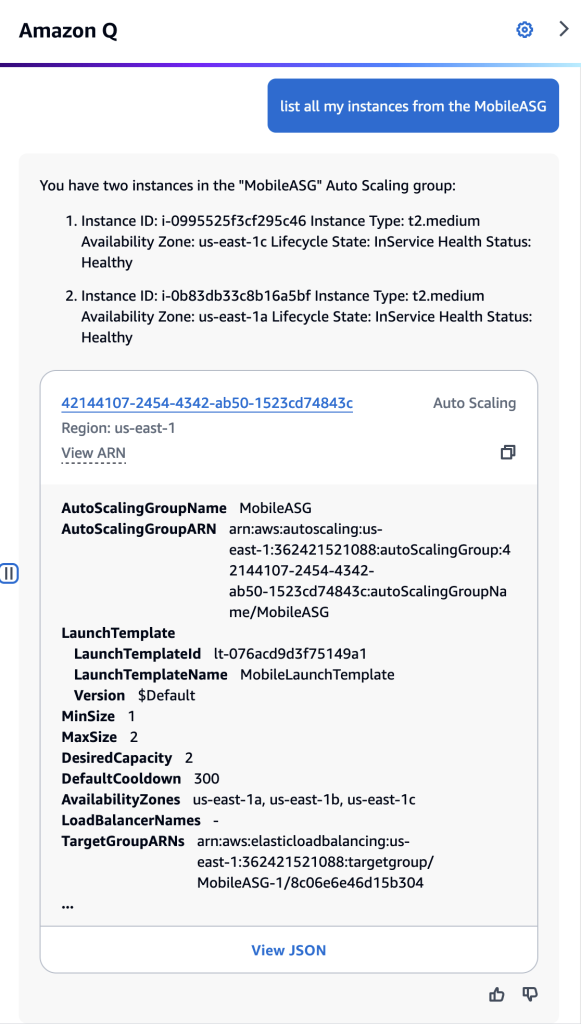
Querying about your AWS Resources

I can ask Amazon Q Developer about my AWS resources. For example, if I ask Amazon Q Developer about my Amazon Elastic Compute Cloud (Amazon EC2) resources by asking: “Do I have any EC2 instances” (figure 2), Amazon Q Developer returns a summary with instance types and states, along with a list of the Amazon EC2 instances IDs.

Amazon Q Developer chat screenshot showing the results of the question: “Do I have any ec2 instances?”

Figure 2

To demonstrate how Amazon Q Developer can assist you with your daily operations, let’s ask what resources are associated with a specific Amazon Elastic Compute Cloud (EC2) instance (figure 3). The response will provide comprehensive information about the instance’s networking, storage, and AWS Identity and Access Management (IAM) configurations. Additionally, under the “Related Resources” section at the end, you can expand the listed resources to obtain further details about them.

Amazon Q Developer chat showing the results of the question: “What resources are related to the instance i-0c32d8baf6554a805?”

Figure 3

In a scenario where I need to list all my Amazon EC2 instances that are members of an Amazon EC2 Auto Scaling. This can be easily accomplished by prompting “list all my instances from the MobileASG” (figure 4). The result shows the instance IDs associated with the Auto Scaling Group “MobileASG” and the Auto Scaling configuration details. Note, that I did not explicitly mention that “MobileASG” is an Amazon EC2 Auto Scaling group in my prompt, Amazon Q Developer was able to infer it based on the instances’ meta-information.

Amazon Q Developer chat screenshot showing the results of the question: “list all my instances from the MobileASG?”

Figure 4

In another example, let’s imagine that my infrastructure team created numerous Amazon Virtual Private Cloud (Amazon VPC), and I now need to identify if I have any infrastructure using the Amazon VPCs they have created so that I can perform some clean-up. I can ask Amazon Q Developer to list all the Amazon EC2 instances that belong to those Amazon VPCs (figure 5).

Amazon Q Developer chat screenshot with the question: "List all EC2 instances that belong to the VPC?" for two distinct VPC IDs. The first result does not show any instances, and the second result shows that there are at least 6 EC2 instances in the VPC.

Figure 5

To update your AWS Lambda from Python 3.9 to Python 3.12 and identify them quickly, you can use the following command: “list all Lambdas with python3.9 runtime” (figure 6). This command will provide you with the AWS Lambda names and their relevant details, allowing you to easily identify the functions that need to be updated.

Amazon Q Developer chat screenshot with the question: “list all lambdas with python3.9” showing that there is only one AWS Lambda with Python 3.9 runtime

Figure 6

Prompts to try

I invite you to test Amazon Q Developer in the AWS Management Console, to ask question about your AWS account resources. Follow some prompts you can try:

“What resources are related to instance <<INSTANCE ID>>?”

“Which VPC does the instance <<INSTANCE ID>> run it? also what role is it using?”

“What s3 bucket is associated with the <<ALARM NAME>> cloudwatch alarm?”

“List all s3 buckets connected with cloudfront.”

Conclusion

In this post, we introduced Amazon Q Developer’s capability to chat about your AWS account resources. This capability enables you to interact with your AWS account using natural language to easily obtain information without writing scripts or navigating throughout AWS Management console pages. The evolution of Amazon Q Developer will continue to enable even more capabilities and new integrations with AWS account resources in the near future. It is an exciting time to be a cloud operations professional, DevOps engineer and developer.

To learn more and get started, visit Amazon Q Developer or view the documentation.

Artur Rodrigues

Artur Rodrigues is a Principal Solutions Architect for Generative AI at Amazon Web Services (AWS), focused on the Next Generation Developer experience, enabling developers to work more efficiently and creatively through the integration of Generative AI into their workflows. As a co-founder of the University of British Columbia Cloud Innovation Center (UBC-CIC), powered by AWS, Artur has collaborated with researchers, physicians, and students to develop over 50 solutions addressing real-world challenges. Artur enjoys cycling and exploring the great outdoors of beautiful British Columbia in Canada. He is also a gelato aficionado and a fan of soccer and jiu-jitsu.

Amazon Q Apps, now generally available, enables users to build their own generative AI apps

Post Syndicated from Prasad Rao original https://aws.amazon.com/blogs/aws/amazon-q-apps-now-generally-available-enables-users-to-build-their-own-generative-ai-apps/

When we launched Amazon Q Business in April 2024, we also previewed Amazon Q Apps. Amazon Q Apps is a capability within Amazon Q Business for users to create generative artificial intelligence (generative AI)–powered apps based on the organization’s data. Users can build apps using natural language and securely publish them to the organization’s app library for everyone to use.

After collecting your feedback and suggestions during the preview, today we’re making Amazon Q Apps generally available. We’re also adding some new capabilities that were not available during the preview, such as API for Amazon Q Apps and the ability to specify data sources at the individual card level.

I’ll expand on the new features in a moment, but let’s first look into how to get started with Amazon Q Apps.

Transform conversations into reusable apps
Amazon Q Apps allows users to generate an app from their conversation with Amazon Q Business. Amazon Q Apps intelligently captures the context of conversation to generate an app tailored to specific needs. Let’s see it in action!

As I started writing this post, I thought of getting help from Amazon Q Business to generate a product overview of Amazon Q Apps. After all, Amazon Q Business is for boosting workforce productivity. So, I uploaded the product messaging documents to an Amazon Simple Storage Service (Amazon S3) bucket and added it as a data source using Amazon S3 connector for Amazon Q Business.

I start my conversation with the prompt:

I’m writing a launch post for Amazon Q Apps.
Here is a short description of the product: Employees can create lightweight, purpose-built Amazon Q Apps within their broader Amazon Q Business application environment.
Generate an overview of the product and list its key features.

Amazon Q Business Chat

After starting the conversation, I realize that creating a product overview given a product description would also be useful for others in the organization. I choose Create Amazon Q App to create a reusable and shareable app.

Amazon Q Business automatically generates a prompt to create an Amazon Q App and displays the prompt to me to verify and edit if need be:

Build an app that takes in a short text description of a product or service, and outputs an overview of that product/service and a list of its key features, utilizing data about the product/service known to Q.

Amazon Q Apps Creator

I choose Generate to continue the creation of the app. It creates a Product Overview Generator app with four cards—two input cards to get user inputs and two output cards that display the product overview and its key features.

Product Overview Generator App

I can adjust the layout of the app by resizing the cards and moving them around.

Also, the prompts for the individual text output cards are automatically generated so I can view and edit them. I choose the edit icon of the Product Overview card to see the prompt in the side panel.

In the side panel, I can also select the source for the text output card to generate the output using either large language model (LLM) knowledge or approved data sources. For the approved data sources, I can select one or more data sources that are configured for this Amazon Q Business application. I select the Marketing (Amazon S3) data source I had configured for creating this app.

Edit Text Output Card Prompt and select source

As you would notice, I generated a fully functional app from the conversation itself without having to make any changes to the base prompt or the individual text output card prompts.

I can now publish this app to the organization’s app library by choosing Publish. But before publishing the app, let’s look at another way to create Amazon Q apps.

Create generative AI apps using natural language
Instead of using conversation in Amazon Q Business as a starting point to create an app, I can choose Apps and use my own words to describe the app I want to create. Or I can try out the prompts from one of the preconfigured examples.

Amazon Q App

I can enter the prompt to fit the purpose and choose Generate to create the app.

Share apps with your team
Once you’re happy with both layouts and prompts, and are ready to share the app, you can publish the app to a centralized app library to give access to all users of this Amazon Q Business application environment.

Amazon Q Apps inherits the robust security and governance controls from Amazon Q Business, ensuring that data sources, user permissions, and guardrails are maintained. So, when other users run the app, they only see responses based on data they have access to in the underlying data sources.

For the Product Overview Generator app I created, I choose Publish. It displays the preview of the app and provides an option to select up to three labels. Labels help classify the apps by departments in the organization or any other categories. After selecting the labels, I choose Publish again on the preview popup.

Publish Amazon Q App

The app will instantly be available in the Amazon Q Apps library for others to use, copy, and build on top of. I choose Library to browse the Amazon Q Apps Library and find my Product Overview Generator app.

Amazon Q Apps Library

Customize apps in the app library for your specific needs
Amazon Q Apps allows users to quickly scale their individual or team productivity by customizing and tailoring shared apps to their specific needs. Instead of starting from scratch, users can review existing apps, use them as-is, or modify them and publish their own versions to the app library.

Let’s browse the app library and find an app to customize. I choose the label General to find apps in that category.

Document Editing Assistant App

I see a Document Editing Assistant app that reviews documents to correct grammatical mistakes. I would like to create a new version of the app to include a document summary too. Let’s see how we can do it.

I choose Open, and it opens the app with an option to Customize.

Open Document Editing Assistant App

I choose Customize, and it creates a copy of the app for me to modify it.

Customize App

I update the Title and Description of the app by choosing the edit icon of the app title.

I can see the original App Prompt that was used to generate this app. I can copy the prompt and use it as the starting point to create a similar app by updating it to include a description of the functionality that I would like to add and have Amazon Q Apps Creator take care of it. Or I can continue modifying this copy of the app.

There is an option to edit or delete existing cards. For example, I can edit the prompt of the Edited Document text output card by choosing the edit icon of the card.

Edit Text Output Card Prompt

To add more features, you can add more cards, such as a user input, text output, file upload, or preconfigured plugin by your administrator. The file upload card, for example, can be used to provide a file as another data source to refine or fine-tune the answers to your questions. The plugin card can be used, for example, to create a Jira ticket for any action item that needs to be performed as a follow-up.

I choose Text output to add a new card that will summarize the document. I enter the title as Document Summary and prompt as follows:

Summarize the key points in @Upload Document in a couple of sentences

Add Text Output Card

Now, I can publish this customized app as a new app and share it with everyone in the organization.

What did we add after the preview?

As I mentioned, we have used your feedback and suggestions during the preview period to add new capabilities. Here are the new features we have added:

Specify data sources at card level – As I have shown while creating the app, you can specify data sources you would like the output to be generated from. We added this feature to improve the accuracy of the responses.

Your Amazon Q business instance can have multiple data sources configured. However, to create an app, you might need only a subset of these data sources, based on the use case. So now you can choose specific data sources for each of the text output cards in your app. Or if your usecase requires, you can configure the text output cards to use LLM knowledge instead of using any data sources.

Amazon Q Apps API – You can now create and manage Amazon Q Apps programmatically with APIs for managing apps, app library and app sessions. This allows you to integrate all the functionalities of Amazon Q Apps into the tools and applications of your choice.

Things to know:

  • Regions – Amazon Q Apps is generally available today in the Regions where Amazon Q Business is available, which are the US East (N. Virginia) and US West (Oregon) Regions.
  • Pricing – Amazon Q Apps is available with the Amazon Business Pro subscription ($20 per user per month), which gives users access to all the features of Amazon Q Business.
  • Learning resources – To learn more, visit Amazon Q Apps in the Amazon Q Business User Guide.

–  Prasad

Customize Amazon Q Developer (in your IDE) with your private code base

Post Syndicated from Sébastien Stormacq original https://aws.amazon.com/blogs/aws/customize-amazon-q-developer-in-your-ide-with-your-private-code-base/

Today, we’re making the Amazon Q Developer (in your IDE) customization capability generally available for inline code completion, and we’re launching a preview of customization for the chat. You can now customize Amazon Q to generate specific code recommendations from private code repositories in the IDE code editor and in the chat.

Amazon Q Developer is an artificial intelligence (AI) coding companion. It helps software developers accelerate application development by offering code recommendations in their integrated development environments (IDE) derived from existing comments and code. Behind the scenes, Amazon Q uses large language models (LLMs) trained on billions of lines of code from Amazon and open source projects.

Amazon Q is available in your IDE, and you can download the extension for JetBrains, Visual Studio Code, and Visual Studio (preview). In the IDE text editor, it suggests code as you type or write entire functions from a comment you enter. You can also chat with Q Developer and ask it to generate code for specific tasks or explain code snippets from a code base you’re discovering.

With the new customization capability, developers can now receive even more relevant code recommendations that are based on their organization’s internal libraries, APIs, packages, classes, and methods.

For example, let’s imagine that a developer working for a financial company is tasked to write a function to compute the total portfolio value for a customer. The developer can now describe the intent in a comment or type a function name such as computePortfolioValue(customerId: String), and Amazon Q will suggest code to implement that function based on the examples it learned from your organization’s private code base.

The developer can also ask questions about their organization’s code in the chat. In the example above, let’s imagine the developer is new to the team and doesn’t know how to retrieve a customer ID. He can ask the question in the chat in plain English: how do I connect to the database to retrieve the customerId for a specific customer? Amazon Q chat could answer: I found a function to retrieve customerId based on customer first and last name which uses the database connection XYZ…

As an administrator, you create customizations built from your internal git repositories (such as GitHub, GitLab, or BitBucket) or an Amazon Simple Storage Service (Amazon S3) bucket. It helps Amazon Q understand the intent, determine which internal and public APIs are best suited to the task, and generate code recommendations.

Amazon Q customization capability meets the strong data privacy and security you expect from AWS. The code base you share with Amazon Q stays private to your organization. We don’t use it to train our foundation model. Once customizations are deployed, the inference endpoint is private for the developers in your organization. Recommendations based on your code won’t pop up in another company’s developer IDE. You decide which developers have access to each individual customization, and you can follow metrics to measure the performance of the customizations you deployed.

We built the Amazon Q customization capability based on leading technical techniques, such as Retrieval Augmented Generation (RAG). This very detailed blog post shares more details about the science behind the Amazon Q customizations capability.

CodeWhisperer RAG diagram

Since we launched the preview on October 17 last year, we’ve added two new capabilities: the ability to update a customization and the ability to customize the chat in the IDE.

Your organization’s code base is constantly evolving, and you want Amazon Q to always suggest up-to-date code snippets. Amazon Q administrator can now start an update process with one step in the AWS Management Console. Administrators can schedule regular updates based on the latest commits on code repositories to ensure developers always receive highly accurate code suggestions.

With the new chat customization (in preview), developers in your organization can select a portion of code in their IDE and send it to the chat to ask for an explanation of what the selected code does. Developers can also ask generic questions relative to their organization’s code base, like “How do I connect to the database to retrieve customerId for a specific customer?”

Let’s see how to use it
In this demo, I decided to focus on the new customization update capability that is generally available today. To quickly learn how to create a customization, activate it, and grant access to developers, read the excellent post from my colleague Donnie.

To update an existing customization, I navigate to the Customizations section of the Amazon Q console page. I select the customization I want to update. Then, I select Actions and Create new version.

Codewhisperer customization - update 1a

Similarly to what I did when I created the customization, I choose the source code repository and select Create.

Codewhisperer customization

Creating a new version of the customization might take a while because depends on the quantity of code to ingest. When ready, a new version appears under the Versions tab. You can compare the Evaluation score of the new version with the previous versions and decide to activate it to make it available to your developers. At any point, you can revert to a previous version.

Codewhisperer customization - update 3a

One of the aspects I like about active customizations is that I can monitor their effectiveness to help increase developer productivity in my organization.

On the Dashboard page, I track the User activity. I can track how many Daily active users there are, how many Lines of code have been generated, how many Security scans were performed, and so on. If, like me, you have used Amazon CodeWhisperer Professional in the past, when you use it now, you might still see the name CodeWhisperer appear on some pages. It will progressively be replaced with the new name: Amazon Q Developer.

Codewhisperer customization dashboard 1

Amazon Q generates more metrics and publishes them on Amazon CloudWatch. I can build CloudWatch dashboards to monitor the performance of the customizations I deployed. For example, here is a custom CloudWatch dashboard that monitors the code suggestions’ Block Accept Rate and Line Accept Rate, broken down per programming language.

Codewhisperer customization dashboard 2

Supported programming languages
Currently, you can customize Amazon Q recommendations on codebases written in Java, JavaScript, TypeScript, and Python. Files written in other languages supported by Amazon Q, such as C#, Go, Rust, PHP, Ruby, Kotlin, C, C++, Shell scripting, SQL, and Scala will not be used when creating the customization or when providing customized recommendations in the IDE.

Pricing and availability
Amazon Q is AWS Region agnostic and available to developers worldwide. Amazon Q is currently hosted in US East (N. Virginia). Amazon Q administrators can configure Amazon Q as an authorized cross-Region application if you have AWS IAM Identity Center in other Regions.

The Amazon Q customization capability is available at no additional charge within the Amazon Q Developer Professional subscription. You can create up to eight customizations per AWS account and keep up to two customizations active.

Now go build, and start to propose Amazon Q customizations to your organization’s developers.

— seb

Introducing Amazon Q Developer in SageMaker Studio to streamline ML workflows

Post Syndicated from Esra Kayabali original https://aws.amazon.com/blogs/aws/introducing-amazon-q-developer-in-sagemaker-studio-to-streamline-ml-workflows/

Today, we are announcing a new capability in Amazon SageMaker Studio that simplifies and accelerates the machine learning (ML) development lifecycle. Amazon Q Developer in SageMaker Studio is a generative AI-powered assistant built natively into the SageMaker JupyterLab experience. This assistant takes your natural language inputs and crafts a tailored execution plan for your ML development lifecycle by recommending the best tools for each task, providing step-by-step guidance, generating code to get started, and offering troubleshooting assistance when you encounter errors. It also helps when facing challenges such as translating complex ML problems into smaller tasks and searching for relevant information in the documentation.

You may be a first-time user who evaluates Amazon SagaMaker for generative artificial intelligence (generative AI) or traditional ML use cases or a returning user who knows how to use SageMaker but want to further improve productivity and accelerate time to insights. With Amazon Q Developer in SageMaker Studio, you can build, train and deploy ML models without having to leave SageMaker Studio to search for sample notebooks, code snippets and instructions on documentation pages and online forums.

Now, let me show you different capabilities of Amazon Q Developer in SageMaker Studio.

Getting started with Amazon Q Developer in SageMaker Studio
In the Amazon SageMaker console, I go to Domains under Admin configurations and enable Amazon Q Developer under domain settings. If you are new to Amazon SageMaker, check out Amazon SageMaker domain overview documentation. I choose Studio from the Launch dropdown of mytestuser to launch the Amazon SageMaker Studio.

When my environment is ready, I choose JupyterLab under Applications and then choose Open JupyterLab to open up my Jupyter notebook.

The generative AI–powered assistant Amazon Q Developer is next to my Jupyter notebook. There are built-in commands that I can now use to get started.

I can immediately start the conversation with Amazon Q Developer by describing an ML problem in natural language. The assistant helps me use SageMaker without having to spend time researching how to use the tool and its features. I use the following prompt:

I have data in my S3 bucket. I want to use that data and train an XGBoost algorithm for prediction. Can you list down the steps with sample code.

Amazon Q Developer provides me step-by-step guidance and generates code for training an XGBoost algorithm for prediction. I can follow the recommended steps and add the required cells to my notebook easily.

Amazon Q Developer Code Generation

Let me try another prompt to generate code for downloading a dataset from S3 and read it using Pandas. I can use it to build or train my model. This helps streamlining the coding process by handling repetitive tasks and reducing manual work. I use the following prompt:

Can you write the code to download a dataset from S3 and read it using Pandas?

I can also ask Amazon Q Developer for guidance to debug and fix errors. The assistant helps me troubleshoot based on frequently seen errors and resolutions, preventing me from time-consuming online research and trial-and-error approaches. I use the following prompt:

How can I resolve the error "Unable to infer schema for JSON. It must be specified manually." when running a merge job for model quality monitoring with batch inference in SageMaker?

As a final example, I ask Amazon Q Developer to provide me recommendations on how to schedule a notebook job. I use the following prompt to get the answer:

What are the options to schedule a notebook job? 

Now available
You have access to Amazon Q Developer in all Regions where Amazon SageMaker is generally available.

The assistant is available for all Amazon Q Developer Pro Tier users. For pricing information, visit the Amazon Q Developer pricing page.

Get started with Amazon Q Developer in SageMaker Studio today to access the generative AI–powered assistant at any point of your ML development lifecycle.

— Esra

Modernize your Java application with Amazon Q Developer

Post Syndicated from Chetan Makvana original https://aws.amazon.com/blogs/devops/modernize-your-java-application-with-amazon-q-developer/

Many organizations have critical legacy Java applications that are increasingly difficult to maintain. Modernizing these applications is a necessary, daunting, and risky task that takes the focus off of creating new value or features. This includes undocumented code, outdated frameworks and libraries, security vulnerabilities, a lack of logging and error handling, and a lack of input validation. Amazon Q Developer simplifies and accelerates the modernization of existing Java applications. It can analyze code to highlight areas for potential improvements, assist with resolving technical debt, suggest code optimizations, and facilitate the transition to current frameworks and libraries.

This blog post explores how to modernize legacy Java applications using Amazon Q Developer. We will take an example of Unicorn Store API, a Java application with Java 8 running on Amazon Elastic Compute Cloud (Amazon EC2). First, we will upgrade the underlying runtime from Java 8 to Java 17 and other common dependencies, including Spring. Then, we will reduce technical debt within the code by improving modularity and logging. Finally, we will redeploy this application in a container image using a modern computing option, AWS Fargate.

The Unicorn Store API provides CRUD operations to manage Unicorn records in a database. It is built with Maven.

You will follow the below steps to modernize this application and bring it to Fargate using Amazon Q Developer.

  1. Upgrade the application to Java 17 to leverage the latest features.
  2. Reduce existing technical debt in the codebase.
  3. Make the application cloud native and deploy it to AWS.

In this walkthrough, we are using IntelliJ IDEA IDE with the latest version of Amazon Q Developer plugin for IntelliJ IDEA

Upgrade from Java 8 to Java 17

Outdated applications require increased effort to maintain security and stability. As a developer, you must continually relearn framework changes and optimizations that others have discovered in previous upgrades. The effort required to maintain the application makes it difficult to balance necessary updates with adding new features.

With Amazon Q Developer agent for code transformation, you can keep applications updated and supported in just a few steps. This removes vulnerabilities from unsupported versions, improves performance, and frees up time to focus on adding new features. Amazon Q Developer agent for code transformation accelerates application maintenance, upgrades, and migration in minutes. It enables developers to remove much of the undifferentiated work out of the tedious task of maintaining, upgrading and migrating existing application workloads, saving up to days’ or months’ worth of the undifferentiated work involved in moving from older language versions.

Let’s upgrade our Unicorn Store API from Java 8 to Java 17 using Amazon Q Developer agent for code transformation to leverage the latest features and optimization. In IntelliJ IDE, you enter /transform in the Amazon Q chat panel and provide the necessary details for Amazon Q Developer to start upgrading the project.

IntelliJ IDE showing the Amazon Q chat panel open with the /transform command entered and details provided about the project to upgrade. This triggers the Amazon Q Developer agent for code transformation to analyze the code, generate a transformation plan, and upgrade frameworks and libraries like Spring, Spring Boot, JUnit, and Log4j to be compatible with Java 17.

Amazon Q Developer agent for code transformation automatically analyzes the existing code, generates a transformation plan, and completes the transformation tasks suggested by the plan. While doing so, it upgrades popular libraries and frameworks to a version compatible with Java 17, including Spring, Spring Boot, JUnit, JakartaEE, Mockito, Hibernate, and Log4j to their latest available major versions. It also updates deprecated code components according to Java 17 recommendations. To start with the Amazon Q Developer agent for code transformation capability, you can read and follow the steps at Upgrade language versions with Amazon Q Developer agent for Code Transformation.

Once complete, you can review the transformed code, complete with build and test results, before accepting the changes.

In the IntelliJ IDE, Amazon Q Developer agent for code transformation summarizes all the changes it made after the transformation of the current project to Java 17 is complete. User clicks on the View diff button. The list of all the files that have been modified or added is displayed. User has the option to review the diff, and then accept or reject them.

Reduce technical debt in the codebase

Technical debt accumulates in any codebase over time. Some technical debt may be unavoidable to meet deadlines, but must be tracked and prioritized to pay back later. If left unmanaged, compounding technical debt will make development slower and expensive. Reducing technical debt should be an ongoing team effort, but often falls behind other priorities. Amazon Q Developer streamlines modernizing legacy Java code by identifying and remediating technical debt. Amazon Q Developer reduces the time and resources it takes to analyze the code by providing a list of issues that contribute to technical debt in a codebase. This makes it easy for software development teams to prioritize technical debt items and make informed decisions about which technical debt to address first.

Let’s find the list of technical debt in our Unicorn Store API. In IntelliJ IDE, use Send to Prompt option to send the highlighted code to the Amazon Q chat panel and prompt to provide a list of all technical debt. Amazon Q Developer lists all technical debt in detail.

In the IntelliJ IDE, user has opened the code for one of the classes (UnicornController.java in this case). User right-clicks inside this file. This opens a context window. User selects Amazon Q, then selects Send to Prompt. The code is now displayed in the Amazon Q Chat panel. The user enters this message in the chat window: “Analyze the selected code and list all technical debt”. Amazon Q Developer generates a list of all potential technical debt or areas of improvement. It explains the impact of each technical debt.

Once you identify the technical debt, the next step is to gradually remediate them. Amazon Q Developer reduces the time it takes to implement the code to remediate the technical debt. As a developer, you can interact with Amazon Q Developer agent for software development within your IDE to get help with code suggestions for a specific task that you are trying to accomplish. It uses the code in whole project as context and provides an implementation plan that includes code updates it plans to make across all the files in the project. You can review the plan, and once you are satisfied with the plan, you can ask Amazon Q Developer to generate the code based on the proposed plan. This saves developers’ effort compared to manual updates.

For the technical debt identified for Unicorn Store API in the above step, let’s use Amazon Q Developer to address the missing logging technical debt. In IntelliJ IDE, enter /dev in the Amazon Q chat panel with the details on the logging technical debt. Amazon Q Developer generates an implementation plan and code to add logging based on the full project context. To get started with Amazon Q Developer agent for software development, you can refer to the steps at Develop software with the Amazon Q Developer agent for software development.

In the IntelliJ IDE, the user opens Amazon Q Chat panel, enters /dev and provides input about the task detail “Implement logging for critical REST endpoints. Log relevant error details such as request parameters and stack traces to facilitate debugging and troubleshooting”. The Amazon Q Developer agent for software development generates the steps to implement this task, including changes that will be made to existing files and any new files that will be created. User reviews all the changes, then clicks on Generate code button. Amazon Q generates a list of code suggestions. User clicks on a file from the list, and reviews the diff between the existing code in that file, and the new code generated by Amazon Q Developer. User then clicks on Insert Code button.

Modernizing legacy Java code requires continuous refactoring to incrementally enhance quality and avoid accumulating technical debt over time. Amazon Q Developer simplifies this iterative process through its Refactor capability. Amazon Q Developer provides a refactored version of the selected code, alongside explanations of each change and its coding benefit. It helps you to understand the changes by explaining each change and the benefit of making the change in the existing code. You can read further about this capability at Explain and update code with Amazon Q Developer.

Let’s leverage this feature to refine methods in the UnicornController class in our Unicorn Store API project. Amazon Q Developer furnishes the updated code with better code readability or efficiency, among other improvements, for you to review.

In the IntelliJ IDE, user highlights a section of code (createUnicorn and updateUnicorn methods in the UnicornController class in this case), and right-clicks on the highlighted code. This opens a context window. User selects Amazon Q, and then selects Refactor code. The code is now displayed in the Amazon Q Chat panel. Amazon Q Developer generates a refactored version of the selected code. It also provides a list of all the changes made and the benefit of changing the code.

Make the application cloud native and deploy to AWS

The final step in the modernization journey is to make the application cloud-native and deploy to AWS. Cloud native is the software approach of building, deploying, and managing modern applications in cloud computing environments. These cloud native technologies support fast and frequent changes to applications without impacting service delivery, providing adopters with an innovative, competitive advantage. Let’s see how Amazon Q Developer can assist in making our Unicorn Store API project cloud native.

In IntelliJ IDE, open the Amazon Q Chat, and prompt Amazon Q Developer to provide a recommended approach to make the project cloud native and deploy to AWS.

In the IntelliJ IDE, user sends the content of the pom.xml file to Amazon Q Chat window, and asks Amazon Q Developer “What is the recommended way to make this micro service, cloud native and deploy to AWS?” Amazon Q generates the steps and a high-level implementation guide. In this case, it includes suggestions to containerize the application, use Amazon Elastic Container Registry, deploy to Amazon Elastic Container Service (ECS), implement a load balancer, leverage AWS Fargate, implement monitoring and logging, implement CI/CD, leverage other AWS managed services, implement security best practices, monitor and optimize the deployment.

Amazon Q Developer analyzes the code and details the steps involved in making this application cloud native. The detailed steps involve containerizing the application, deploying the container application to AWS services such as Amazon Elastic Container Service (Amazon ECS), Fargate for running containers in a serverless manner, Amazon Elastic Container Registry (Amazon ECR) for pushing the container image, accessing the application through AWS Application Load Balancer (ALB), Amazon CloudWatch for monitoring and associated services like Amazon Virtual Private Cloud (VPC) and Subnets.

Let’s ask Amazon Q Developer to implement the steps outlined in the previous chat conversation. First, ask Amazon Q Developer to create a docker file to containerize the application. The containerization process streamlines application development by decoupling the software from the underlying hardware and other dependencies. This approach enhances speed, efficiency, and security by isolating different components within the containerized environment.

In the IntelliJ IDE, user continues the conversation in the previous chat window. User asks Amazon Q Developer to provide implementation for the step 1 (containerize the application) and create a Dockefile for the application. Amazon Q generates a Dockerfile that includes all the necessary steps. User creates a new file named Dockerfile, and copies the contents from the chat window to the new file. Next, user opens the terminal within the IntelliJ IDE. User copies the build and run commands from the chat and pastes it in the terminal window. The application successfully builds in the docker container. Finally, application runs successfully as a docker container.

Having successfully developed a container-based application, let’s leverage Amazon Q Developer’s capabilities to generate an AWS CloudFormation template. This template will enable us to deploy the required resources to AWS using Infrastructure as Code (IaC). IaC allows us to programmatically provision and manage our computing infrastructure, eliminating the need for manual processes and configurations. Manual infrastructure management can be time-consuming and error-prone, especially when dealing with large-scale applications.

To facilitate the creation of the CloudFormation template, let’s revisit the suggestions from our previous conversation and compile a list of the resources that need to be provisioned in AWS. Once you have this list, you can ask Amazon Q Developer to generate the CloudFormation template based on these resource requirements.

In the IntelliJ IDE, user copies the steps outlined in the previous conversation, and asks Amazon Q Developer to create a CloudFormation template to deploy this application to AWS. Amazon Q Developer creates the full CloudFormation template to deploy all resources. User creates a new YAML file, and copies the contents from the chat window to the new file. The generated CloudFormation contains the steps to deploy VPCs, subnets, ECR, ECS cluster, Tasks, LoadBalancer, CloudWatch logs, etc. User reviews the generated code for accuracy before deployment.

Amazon Q Developer can generate the CloudFormation template with all the required resources as outlined in the steps to deploy the container in AWS in a secure, reliable, and scalable manner.

Now that we have the CloudFormation template, once CloudFormation is deployed, let’s push the local docker image of our Unicorn Store API to Amazon ECR and start the Fargate tasks required to run the application in AWS.

In the IntelliJ IDE, user runs the commands to push the docker image of the application created using Amazon Q Developer.

In this way, you can use Amazon Q Developer to make your application cloud native by designing the steps to deploy to the cloud, helping migrate your application to container-based solution and even writes Infrastructure as code scripts to deploy your application to AWS.

Conclusion

Amazon Q Developer empowers developers to simplify and accelerate the modernization of legacy Java applications. By leveraging Amazon Q Developer, developers can bring outdated applications up to current frameworks and deploy them to AWS in a cloud-native architecture. This streamlines the process, reducing the effort, risk, and maintenance required. Developers save significant time and resources, which can now be used to focus on building new features and enhancing modernized applications rather than managing technical debt.

To learn more about Amazon Q Developer, see the following resources:

Chetan Makvana

Chetan Makvana is a Senior Solutions Architect with Amazon Web Services. He works with AWS partners and customers to provide them with architectural guidance for building scalable architecture and implementing strategies to drive adoption of AWS services. He is a technology enthusiast and a builder with a core area of interest on generative AI, serverless, and DevOps. Outside of work, he enjoys watching shows, traveling, and music.

Venugopalan Vasudevan

Venugopalan Vasudevan is a Senior Specialist Solutions Architect at Amazon Web Services (AWS), where he specializes in AWS Generative AI services. His expertise lies in helping customers leverage cutting-edge services like Amazon Q, and Amazon Bedrock to streamline development processes, accelerate innovation, and drive digital transformation. Venugopalan is dedicated to facilitating the Next Generation Developer experience, enabling developers to work more efficiently and creatively through the integration of Generative AI into their workflows.

Surabhi Tandon

Surabhi Tandon is a Senior Technical Account Manager at Amazon Web Services (AWS). She supports enterprise customers achieve operational excellence and help them with their cloud journey on AWS by providing strategic technical guidance. Surabhi is a builder with interest in Generative AI, automation, and DevOps. Outside of work, she enjoys hiking, reading and spending time with family and friends.

Serverless ICYMI Q2 2024

Post Syndicated from Julian Wood original https://aws.amazon.com/blogs/compute/serverless-icymi-q2-2024/

Welcome to the 26th edition of the AWS Serverless ICYMI (in case you missed it) quarterly recap. Every quarter, we share all the most recent product launches, feature enhancements, blog posts, webinars, live streams, and other interesting things that you might have missed!

In case you missed our last ICYMI, check out what happened last quarter here.

Calendar

Calendar

EDA Day – London 2024

The AWS Serverless DA team hosted the third Event-Driven Architecture (EDA) Day in London on May 14th. This event brought together prominent figures in the event-driven architecture community, AWS, and customer speakers.

EDA Day covered 13 sessions, 2 workshops, and a Q&A panel. David Boyne was the keynote speaker with a talk “Complexity is the Gotcha of Event-Driven Architecture”. There were AWS speakers including Matthew Meckes, Natasha Wright, Julian Wood, Gillian Amstrong, Josh Kahn, Veda Ramen, and Uma Ramadoss. There was also an impressive lineup of guest speakers, Daniele Frasca, David Anderson, Ryan Cormack, Sarah Hamilton, Sheen Brisals, Marcin Sodkiewicz, and Ben Ellerby.

Videos are available on YouTube

EDA Day London

EDA Day London

The future of Serverless

There has been a lot of talk about the future of serverless, with this year being the 10th anniversary of AWS Lambda. Eric Johnson addresses the topic in his ServerlessDays Milan keynote, “Now serverless is all grown up, what’s next”.

AWS Lambda

AWS launched support for the latest release of Ruby 3.3 is based on the new Amazon Linux 2023 runtime. The Ruby 3.3 runtime also provides access to the latest Ruby language features.

There is a new guide on how to retrieve data about Lambda functions that use a deprecated runtime.

Learn how to run code after returning a response from an AWS Lambda function. This post shows how to return a synchronous function response as soon as possible, yet also perform additional asynchronous work after you send the response. For example, you may store data in a database or send information to a logging system.

See how you can use the circuit-breaker pattern with Lambda extensions and Amazon DynamoDB. The circuit breaker pattern can help prevent cascading failures and improve overall system stability.

Circuit-breaker pattern

Circuit-breaker pattern

Lambda functions now scale up to 12X faster in the AWS GovCloud (US) Regions.

Powertools for AWS Lambda (Python) adds support for Agents for Amazon Bedrock.

The AWS SDK for JavaScript v2 enters maintenance mode on September 8, 2024 and reaches end-of-support on September 8, 2025.

Amazon CloudWatch Logs introduced Live Tail streaming CLI support.

Amazon ECS and AWS Fargate

You can now secure Amazon Elastic Container Service (Amazon ECS) workloads on AWS Fargate with customer managed keys (CMKs). Once you add your keys to AWS Key Management Service (AWS KMS), you can use these to encrypt the underlying ephemeral storage of an Amazon ECS task on AWS Fargate.

Windows containers on AWS Fargate now start faster, up to 42% for Windows Server 2022 Core. AWS has optimized the Windows Server AMIs, introduced EC2 fast launch with pre-provisioned snapshots, and reduced network latency.

Amazon ECS Service Connect is a networking capability to simplify service discovery, connectivity, and traffic observability for Amazon ECS. You can now proactively scale Amazon ECS services by using custom metrics.

ECS Connect custom metrics

ECS Service Connect custom metrics

AWS Step Functions

The AWS Step Functions TestState API allows you to test individual states independently and to integrate testing into your preferred development workflows. Learn how to accelerate workflow development to iterate faster.

Step Functions TestState API

Step Functions TestState API

Amazon EventBridge

Amazon EventBridge Pipes now supports event delivery through AWS PrivateLink. You can send events from an event source located in an Amazon Virtual Private Cloud (VPC) to a Pipes target without traversing the public internet.

Amazon Timestream for LiveAnalytics is now an EventBridge Pipes target. Timestream for LiveAnalytics is a fast, scalable, purpose-built time series database that makes it easy to store and analyze trillions of time series data points per day.

EventBridge has a new console dashboard which provides a centralized view of your resources, metrics, and quotas. The console has an improved Learn page and other console enhancements. When using the CloudFormation template export for Pipes, you can also generate the IAM role. There is a new Rules tab in the Event Bus detail page, and the monitoring tab in the Rule detail page now includes additional metrics.

EventBridge Scheduler has some new API request metrics for improved observability.

Generative AI

Amazon Bedrock is a fully managed Generative AI service that offers a choice of high-performing foundation models (FMs) from leading AI companies through a single API. Bedrock now supports new models, including Anthropic’s Claude 3.5, AI21 Labs’ Jamba-Instruct, Amazon Titan Text Premier.

The new Bedrock Converse API provides a consistent way to invoke Amazon Bedrock models and simplifies multi-turn conversations. There is also a JavaScript tutorial to walk you through sending requests to the Converse API using the Javascript SDK.

Amazon Q Developer is now generally available. Amazon Q Developer, part of the Amazon Q family, is a generative AI–powered assistant for software development. Amazon Q is available in the AWS Management Console and as an integrated development environment (IDE) extension for Visual Studio Code, Visual Studio, and JetBrains IDEs. Amazon Q Developer has knowledge of your AWS account resources and can help understand your costs.

Amazon Q list Lambda functions

Amazon Q list Lambda functions

You can use Amazon Q Developer to develop code features and transform code to upgrade Java applications. Amazon Q Developer also offers inline completions in the command line. For more information, see Reimagining software development with the Amazon Q Developer Agent.

Amazon Q code features

Amazon Q code features

Knowledge Bases for Amazon Bedrock now let you configure Guardrails, configure inference parameters, and offers observability logs.

Storage and data

Amazon S3 no longer charges for several HTTP error codes if initiated from outside your individual AWS account or AWS Organization.

You can automatically detect malware in new object uploads to S3 with Amazon GuardDuty.

Amazon Elastic File System (Amazon EFS) now support up to 1.5 GiB/s of throughput per client, a 3x increase over the previous limit of 500 MiB/s.

Discover architectural patterns for real-time analytics using Amazon Kinesis Data Streams in part 1 and part 2 and see how to optimize write throughput.

Amazon API Gateway

Amazon API Gateway now allows you to increase the integration timeout beyond the prior limit of 29 seconds. You can raise the integration timeout for Regional and private REST APIs, but this might require a reduction in your account-level throttle quota limit. This launch can help with workloads that require longer timeouts, such as Generative AI use cases with Large Language Models (LLMs).

You can also now use Amazon Verified Permissions to secure API Gateway REST APIs when using an Open ID connect (OIDC) compliant identity provider. You can now control access based on user attributes and group memberships, without writing code.

AWS AppSync

You can now invoke your AWS AppSync data sources in an event-driven manner. Previously, you could only invoke Lambda functions synchronously from AWS AppSync. AWS AppSync can now trigger Lambda functions in Event mode, asynchronously decoupling the API response from the Lambda invocation, which helps with long-running operations.

AWS AppSync now passes application request headers to Lambda custom authorizer functions. You can make authorization decisions based on the value of the authorization header, and the value of other headers that were sent with the request from the application client.

Learn best practices for AWS AppSync GraphQL APIs. See how to how to optimize the security, performance, coding standards, and deployment of your AWS AppSync API. AWS AppSync also has increase quotas, and new metrics

AWS Amplify

AWS Amplify Gen 2 is now generally available. This now provides a code-first developer experience for building full-stack apps using TypeScript. Amplify Gen 2 allows you to express app requirements like the data models, business logic, and authorization rules in TypeScript.

AWS Amplify Gen2

AWS Amplify Gen2

Amplify has a new experience for file storage. This post explores using Lambda to create serverless functions for Amplify using TypeScript. There are also new team environment workflows.

Serverless blog posts

April

May

June

Serverless container blog posts

April

May

June

Serverless Office Hours

Serverless Office Hours

Serverless Office Hours

April

May

June

Containers from the Couch

Containers from the Couch

Containers from the Couch

April

May

FooBar Serverless

April

February

June

Still looking for more?

The Serverless landing page has more information. The Lambda resources page contains case studies, webinars, whitepapers, customer stories, reference architectures, and even more Getting Started tutorials.

You can also follow the Serverless Developer Advocacy team on X (formerly Twitter) to see the latest news, follow conversations, and interact with the team.

And finally, visit the Serverless Land and Containers on AWS websites for all your serverless and serverless container needs.

Five ways Amazon Q simplifies AWS CloudFormation development

Post Syndicated from Ryan Kiel original https://aws.amazon.com/blogs/devops/five-ways-amazon-q-simplifies-aws-cloudformation-development/

Introduction

As a builder, AWS CloudFormation provides a reliable way for you to model, provision, and manage AWS and third-party resources by treating infrastructure as code. First-time and experienced users of CloudFormation can often encounter some challenges when it comes to development of templates and stacks. CloudFormation offers a vast library of over 1,250 resource types covering AWS services, and supports numerous features and functionalities in both the construction of a template, as well as the deployment of a stack using that template. The broad array of options at one’s disposal provides a broad landscape to navigate.

In 2023, AWS introduced a new generative AI-powered assistant, Amazon Q. Amazon Q is the most capable generative AI-powered assistant for accelerating software development and leveraging companies’ internal data. Amazon Q Developer can answer questions about AWS architecture, best practices, documentation, support, and more. When used in an integrated development environment (IDE), Amazon Q Developer additionally provides software development assistance, including code explanation, code generation, and code improvements such as debugging and optimization.

In this blog post, we will show you five ways Amazon Q Developer can help you work with CloudFormation for template code generation, querying CloudFormation resource requirements, explaining existing template code, understanding deployment options and issues, and querying CloudFormation documentation.

Prerequisites

Amazon Q can be interacted with in different ways. The first way is native integration within the AWS Console. When logged into the console, you will see a “Q” logo. Click on it to open a chat window, and then you can begin asking questions to Amazon Q without any setup.

You can also interact with Amazon Q Developer after following these instructions to set it up in your Interactive Development Environment (IDE).

1. Template Code Generation

The foundational element of any CloudFormation stack begins with a template that describes your infrastructure as code, in either a JSON or YML format. The anatomy of what comprises a stack can be found here. Creating a template requires knowledge of the template format, as well as the proper structure of each CloudFormation resource that you include in the ‘Resources’ section.

With Amazon Q, you can generate a template from natural language without having to look up the particular definition of each resource.

Template code Generation using Amazon Q

Figure 1: Template code Generation using Amazon Q

In Figure 1 above, I asked Amazon Q if it could provide me with a CloudFormation template with Lambda code in python to list all EBS volumes in a region. It generated sample code that provides the minimum template I would need to create it. It also added the IAM role needed to execute the Lambda code. Finally, it included documentation links that can be reference for further usage.

With a single message to Amazon Q, I am off and running in seconds, ready to deploy my first CloudFormation stack.

2. Understanding CloudFormation Resource Properties

Another area where Q can help if you are already familiar with the structure of a resource, is by informing you of resource properties and their significance.

In the next use case, I encountered an issue with my template where certain properties were missing that are required for the resource. With Amazon Q, I can quickly understand the required property, and what it defines for my resource.

Stack Events & Q information on Required Parameters

Stack Events & Q information on Required Parameters

Figure 2: Stack Events & Q information on Required Parameters

Since the CloudFormation Events tab indicated that the error was a missing resource property, I asked Amazon Q to help me understand why the property was required, and what it defines. Now, without having to dig through documentation, I can make sure that my template code includes DefaultCacheBehavior and what that will define for my resource.

3. Explaining Existing Template Code

A benefit of Amazon CloudFormation and Infrastructure as Code is that templates allow developers to share and distribute both snippets and entire stacks as pre-defined JSON or YML files. Template reusability can help with the development of new systems, or the augmentation of existing ones – without needing to do any of the template development yourself.

In this example, I have borrowed a template snippet from the AWS documentation for a DynamoDB table. I have copied and pasted this template into my IDE.

In my IDE, I have integrated Amazon Q. As shown in Figure 3, I can highlight a specified section of my template code, and then ask Amazon Q to explain what it is doing for us.

Explaining CloudFormation code by Amazon Q

Figure 3: Explaining CloudFormation code by Amazon Q

After asking Amazon Q to ‘Explain selected code’, I am given a detailed description of my highlighted template snippet. Q tells me that this is an Auto Scaling policy for a DynamoDB Table write capacity. It informs me what resource type it is (AWS::ApplicationAutoScaling::ScalingPolicy), and also describes what the function of that resource is, in the context of my DynamoDB Table. Next, it gives me detailed bullet points explaining all of the parameters of the resource definition, and how that impacts my table as well. It then concludes with a summary of the highlighted code that is easily digestible and understandable to the reader, and even offers to provide more information if needed.

In just one simple question to Amazon Q, I have quickly gone from copy and pasting existing code to now understanding its usage and functionality.

4. Understanding Deployment Issues

Sometimes developers may encounter issues when creating, updating or deleting CloudFormation stacks. When you come across errors with your AWS CloudFormation stack, you can ask Amazon Q to help you find the source of the problems.

Reasoning stack failures by Amazon Q
Figure 4: Reasoning stack failures by Amazon Q

Amazon Q answered why my CloudFormation stack failed to deploy and gave me different ways to check and fix the issues before trying again.

5. Querying CloudFormation Documentation & Functionality

Sometimes developers need to query CloudFormation documentation and functionality to build templates for their use case. Amazon Q can help with these requests straight from IDE. One such example is where developers ask Amazon Q to explain how to make sure my database is not deleted when a CloudFormation stack is deleted. In Figure 5, Amazon Q recommends few ways to make sure the RDS database is not deleted.

Query Amazon Q for CloudFormation documentation

Figure 5: Query Amazon Q for CloudFormation documentation

Sometimes developers need deploy the CloudFormation stack across regions and accounts which can be achieved by using StackSets. In the following example, I asked it for help to understand this feature.

Query Amazon Q for CloudFormation StackSets functionality
Figure 6: Query Amazon Q for CloudFormation StackSets functionality

It is also possible to ask Amazon Q for help with the prompts themselves. In the example below, I ask it to provide some hints on what kinds of questions I could ask about CloudFormation.
CloudFormation functionality prompts

Figure 7: CloudFormation functionality prompts

In the example below, I ask one of those questions to dive into stack dependencies.

CloudFormation stack dependencies
Figure 8: CloudFormation stack dependencies

Conclusion

Utilizing Amazon Q allows developers and builders to be more efficient. As a builder you can use Amazon Q in your IDE to create CloudFormation templates and improve existing CloudFormation templates. If you have inherited an existing CloudFormation template, you can use Amazon Q to understand it. Reducing template and stack development time is one exciting way that Amazon Q and Generative AI are enabling customers to move faster.

Ryan Kiel

Ryan Kiel

Ryan Kiel is a Senior Solutions Architect for AWS based out of Virginia. As part of AWS Sports, he helps leagues and franchises with their cloud journey on AWS by leveraging best practices and the newest technology. Outside of work, Ryan is a hockey, golf, and motorsports enthusiast.

Aneesh Varghese

Aneesh Varghese

Aneesh Varghese is a Senior Technical Account Manager at AWS with more than 17 years of Information Technology industry experience. Aneesh supports enterprise customers in cost optimization strategies, providing advocacy and strategic technical guidance to help plan and build solutions using AWS best practices. Outside of work, Aneesh likes to spend time with family, play Basketball and Badminton.

Karthik Chemudupati

Karthik Chemudupati

Karthik Chemudupati is a Principal Technical Account Manager (TAM) with AWS, focused on helping customers achieve cost optimization and operational excellence. He has 20 years of IT experience in software engineering, cloud operations and automations. Karthik joined AWS in 2016 as a TAM and worked with more than dozen Enterprise Customers across US-West. Outside of work, he enjoys spending time with his family.