Tag Archives: AWS Well-Architected Framework

Simplifying serverless best practices with AWS Lambda Powertools for TypeScript

Post Syndicated from Julian Wood original https://aws.amazon.com/blogs/compute/simplifying-serverless-best-practices-with-aws-lambda-powertools-for-typescript/

This blog post is written by Sara Gerion, Senior Solutions Architect.

Development teams must have a shared understanding of the workloads they own and their expected behaviors to deliver business value fast and with confidence. The AWS Well-Architected Framework and its Serverless Lens provide architectural best practices for designing and operating reliable, secure, efficient, and cost-effective systems in the AWS Cloud.

Developers should design and configure their workloads to emit information about their internal state and current status. This allows engineering teams to ask arbitrary questions about the health of their systems at any time. For example, emitting metrics, logs, and traces with useful contextual information enables situational awareness and allows developers to filter and select only what they need.

Following such practices reduces the number of bugs, accelerates remediation, and speeds up the application lifecycle into production. They can help mitigate deployment risks, offer more accurate production-readiness assessments and enable more informed decisions to deploy systems and changes.

AWS Lambda Powertools for TypeScript

AWS Lambda Powertools provides a suite of utilities for AWS Lambda functions to ease the adoption of serverless best practices. The AWS Hero Yan Cui’s initial implementation of DAZN Lambda Powertools inspired this idea.

Following the community’s adoption of AWS Lambda Powertools for Python and AWS Lambda Powertools for Java, we are excited to announce the general availability of the AWS Lambda Powertools for TypeScript.

AWS Lambda Powertools for TypeScript provides a suite of utilities for Node.js runtimes, which you can use in both JavaScript and TypeScript code bases. The library follows a modular approach similar to the AWS SDK v3 for JavaScript. Each utility is installed as standalone NPM package.

Today, the library is ready for production use with three observability features: distributed tracing (Tracer), structured logging (Logger), and asynchronous business and application metrics (Metrics).

You can instrument your code with Powertools in three different ways:

  • Manually. It provides the most granular control. It’s the most verbose approach, with the added benefit of no additional dependency and no refactoring to TypeScript Classes.
  • Middy middleware. It is the best choice if your existing code base relies on the Middy middleware engine. Powertools offers compatible Middy middleware to make this integration seamless.
  • Method decorator. Use TypeScript method decorators if you prefer writing your business logic using TypeScript Classes. If you aren’t using Classes, this requires the most significant refactoring.

The examples in this blog post use the Middy approach. To follow the examples, ensure that middy is installed:

npm i @middy/core

Logger

Logger provides an opinionated logger with output structured as JSON. Its key features include:

  • Capturing key fields from the Lambda context, cold starts, and structure logging output as JSON.
  • Logging Lambda invocation events when instructed (disabled by default).
  • Printing all the logs only for a percentage of invocations via log sampling (disabled by default).
  • Appending additional keys to structured logs at any point in time.
  • Providing a custom log formatter (Bring Your Own Formatter) to output logs in a structure compatible with your organization’s Logging RFC.

To install, run:

npm install @aws-lambda-powertools/logger

Usage example:

import { Logger, injectLambdaContext } from '@aws-lambda-powertools/logger';
 import middy from '@middy/core';

 const logger = new Logger({
    logLevel: 'INFO',
    serviceName: 'shopping-cart-api',
});

 const lambdaHandler = async (): Promise<void> => {
     logger.info('This is an INFO log with some context');
 };

 export const handler = middy(lambdaHandler)
     .use(injectLambdaContext(logger));

In Amazon CloudWatch, the structured log emitted by your application looks like:

{
     "cold_start": true,
     "function_arn": "arn:aws:lambda:eu-west-1:123456789012:function:shopping-cart-api-lambda-prod-eu-west-1",
     "function_memory_size": 128,
     "function_request_id": "c6af9ac6-7b61-11e6-9a41-93e812345678",
     "function_name": "shopping-cart-api-lambda-prod-eu-west-1",
     "level": "INFO",
     "message": "This is an INFO log with some context",
     "service": "shopping-cart-api",
     "timestamp": "2021-12-12T21:21:08.921Z",
     "xray_trace_id": "abcdef123456abcdef123456abcdef123456"
 }

Logs generated by Powertools can also be ingested and analyzed by any third-party SaaS vendor that supports JSON.

Tracer

Tracer is an opinionated thin wrapper for AWS X-Ray SDK for Node.js.

Its key features include:

  • Auto-capturing cold start and service name as annotations, and responses or full exceptions as metadata.
  • Automatically tracing HTTP(S) clients and generating segments for each request.
  • Supporting tracing functions via decorators, middleware, and manual instrumentation.
  • Supporting tracing AWS SDK v2 and v3 via AWS X-Ray SDK for Node.js.
  • Auto-disable tracing when not running in the Lambda environment.

To install, run:

npm install @aws-lambda-powertools/tracer

Usage example:

import { Tracer, captureLambdaHandler } from '@aws-lambda-powertools/tracer';
 import middy from '@middy/core'; 

 const tracer = new Tracer({
    serviceName: 'shopping-cart-api'
});

 const lambdaHandler = async (): Promise<void> => {
     /* ... Something happens ... */
 };

 export const handler = middy(lambdaHandler)
     .use(captureLambdaHandler(tracer));
AWS X-Ray segments and subsegments emitted by Powertools

AWS X-Ray segments and subsegments emitted by Powertools

Example service map generated with Powertools

Example service map generated with Powertools

Metrics

Metrics create custom metrics asynchronously by logging metrics to standard output following the Amazon CloudWatch Embedded Metric Format (EMF). These metrics can be visualized through CloudWatch dashboards or used to trigger alerts.

Its key features include:

  • Aggregating up to 100 metrics using a single CloudWatch EMF object (large JSON blob).
  • Validating your metrics against common metric definitions mistakes (for example, metric unit, values, max dimensions, max metrics).
  • Metrics are created asynchronously by the CloudWatch service. You do not need any custom stacks, and there is no impact to Lambda function latency.
  • Creating a one-off metric with different dimensions.

To install, run:

npm install @aws-lambda-powertools/metrics

Usage example:

import { Metrics, MetricUnits, logMetrics } from '@aws-lambda-powertools/metrics';
 import middy from '@middy/core';

 const metrics = new Metrics({
    namespace: 'serverlessAirline', 
    serviceName: 'orders'
});

 const lambdaHandler = async (): Promise<void> => {
     metrics.addMetric('successfulBooking', MetricUnits.Count, 1);
 };

 export const handler = middy(lambdaHandler)
     .use(logMetrics(metrics));

In CloudWatch, the custom metric emitted by your application looks like:

{
     "successfulBooking": 1.0,
     "_aws": {
     "Timestamp": 1592234975665,
     "CloudWatchMetrics": [
         {
         "Namespace": "serverlessAirline",
         "Dimensions": [
             [
             "service"
             ]
         ],
         "Metrics": [
             {
             "Name": "successfulBooking",
             "Unit": "Count"
             }
         ]
     },
     "service": "orders"
 }

Serverless TypeScript demo application

The Serverless TypeScript Demo shows how to use Lambda Powertools for TypeScript. You can find instructions on how to deploy and load test this application in the repository.

Serverless TypeScript Demo architecture

Serverless TypeScript Demo architecture

The code for the Get Products Lambda function shows how to use the utilities. The function is instrumented with Logger, Metrics and Tracer to emit observability data.

// blob/main/src/api/get-products.ts
import { APIGatewayProxyEvent, APIGatewayProxyResult} from "aws-lambda";
import { DynamoDbStore } from "../store/dynamodb/dynamodb-store";
import { ProductStore } from "../store/product-store";
import { logger, tracer, metrics } from "../powertools/utilities"
import middy from "@middy/core";
import { captureLambdaHandler } from '@aws-lambda-powertools/tracer';
import { injectLambdaContext } from '@aws-lambda-powertools/logger';
import { logMetrics, MetricUnits } from '@aws-lambda-powertools/metrics';

const store: ProductStore = new DynamoDbStore();
const lambdaHandler = async (event: APIGatewayProxyEvent): Promise<APIGatewayProxyResult> => {

  logger.appendKeys({
    resource_path: event.requestContext.resourcePath
  });

  try {
    const result = await store.getProducts();

    logger.info('Products retrieved', { details: { products: result } });
    metrics.addMetric('productsRetrieved', MetricUnits.Count, 1);

    return {
      statusCode: 200,
      headers: { "content-type": "application/json" },
      body: `{"products":${JSON.stringify(result)}}`,
    };
  } catch (error) {
      logger.error('Unexpected error occurred while trying to retrieve products', error as Error);

      return {
        statusCode: 500,
        headers: { "content-type": "application/json" },
        body: JSON.stringify(error),
      };
  }
};

const handler = middy(lambdaHandler)
    .use(captureLambdaHandler(tracer))
    .use(logMetrics(metrics, { captureColdStartMetric: true }))
    .use(injectLambdaContext(logger, { clearState: true, logEvent: true }));

export {
  handler
};

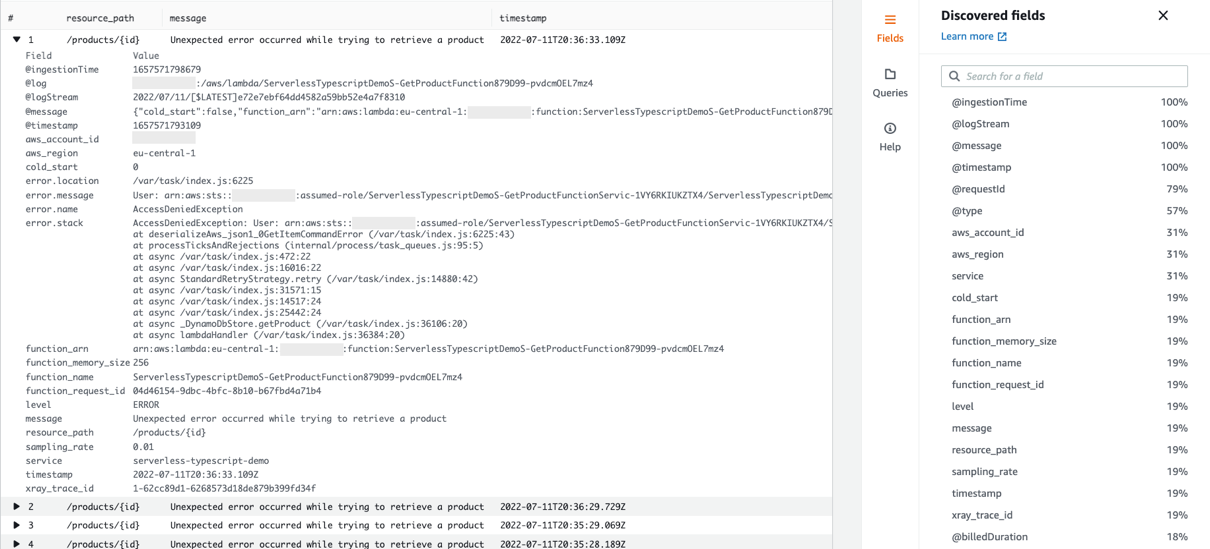
The Logger utility adds useful context to the application logs. Structuring your logs as JSON allows you to search on your structured data using Amazon CloudWatch Logs Insights. This allows you to filter out the information you don’t need.

For example, use the following query to search for any errors for the serverless-typescript-demo service.

fields resource_path, message, timestamp
| filter service = 'serverless-typescript-demo'
| filter level = 'ERROR'
| sort @timestamp desc
| limit 20
CloudWatch Logs Insights showing errors for the serverless-typescript-demo service.

CloudWatch Logs Insights showing errors for the serverless-typescript-demo service.

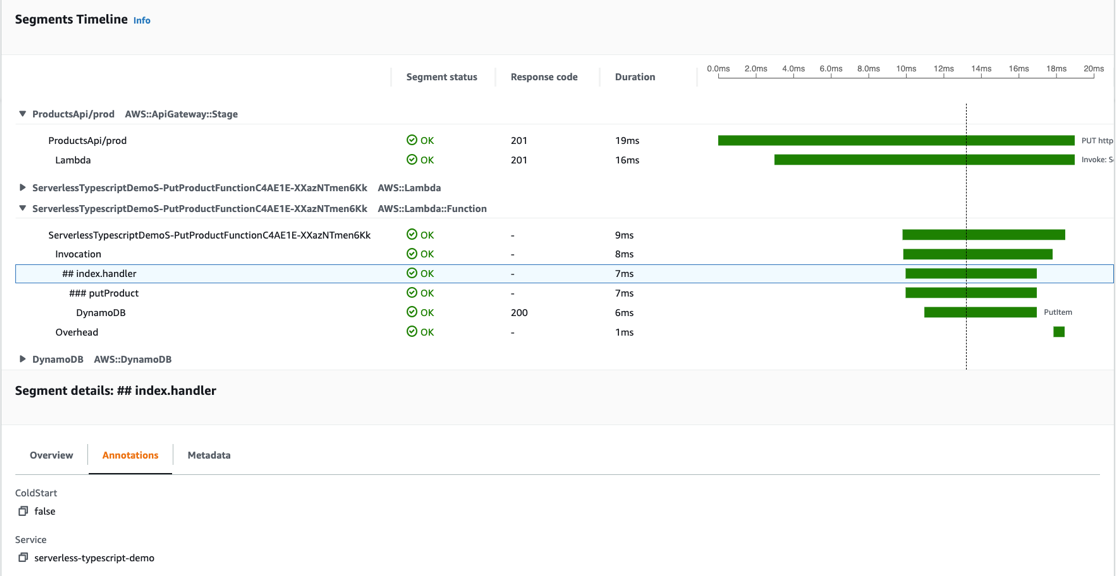
The Tracer utility adds custom annotations and metadata during the function invocation, which it sends to AWS X-Ray. Annotations allow you to search for and filter traces by business or application contextual information such as product ID, or cold start.

You can see the duration of the putProduct method and the ColdStart and Service annotations attached to the Lambda handler function.

putProduct trace view

putProduct trace view

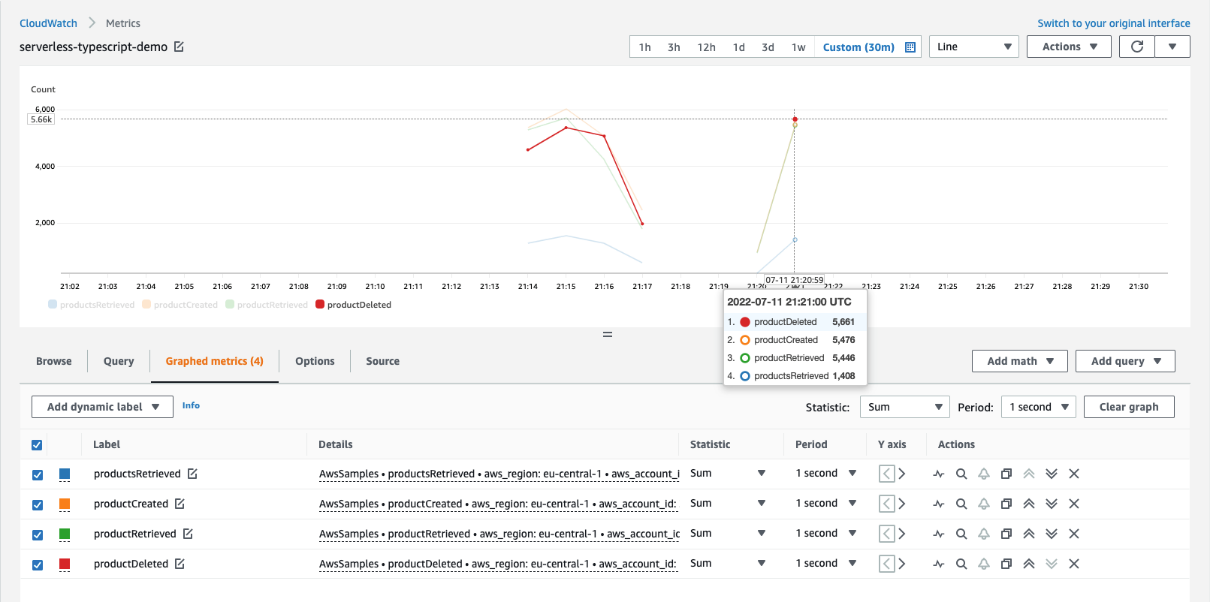
The Metrics utility simplifies the creation of complex high-cardinality application data. Including structured data along with your metrics allows you to search or perform additional analysis when needed.

In this example, you can see how many times per second a product is created, deleted, or queried. You could configure alarms based on the metrics.

Metrics view

Metrics view

Code examples

You can use Powertools with many Infrastructure as Code or deployment tools. The project contains source code and supporting files for serverless applications that you can deploy with the AWS Cloud Development Kit (AWS CDK) or AWS Serverless Application Model (AWS SAM).

The AWS CDK lets you build reliable and scalable applications in the cloud with the expressive power of a programming language, including TypeScript. The AWS SAM CLI is that makes it easier to create and manage serverless applications.

You can use the sample applications provided in the GitHub repository to understand how to use the library quickly and experiment in your own AWS environment.

Conclusion

AWS Lambda Powertools for TypeScript can help simplify, accelerate, and scale the adoption of serverless best practices within your team and across your organization.

The library implements best practices recommended as part of the AWS Well-Architected Framework, without you needing to write much custom code.

Since the library relieves the operational burden needed to implement these functionalities, you can focus on the features that matter the most, shortening the Software Development Life Cycle and reducing the Time To Market.

The library helps both individual developers and engineering teams to standardize their organizational best practices. Utilities are designed to be incrementally adoptable for customers at any stage of their serverless journey, from startup to enterprise.

To get started with AWS Lambda Powertools for TypeScript, see the official documentation. For more serverless learning resources, visit Serverless Land.

Use templated answers to perform Well-Architected reviews at scale

Post Syndicated from Thomas Attree original https://aws.amazon.com/blogs/architecture/use-templated-answers-to-perform-well-architected-reviews-at-scale/

For larger customers, performing AWS Well-Architected (AWS WA) Framework reviews often involves a combination of different teams. Coordinating participants from each team in order to perform a review increases the time taken and is expensive. In a large organization, there are often hundreds of AWS accounts where teams can store review documents, which means there is no way to quickly identify risks or spot common issues or trends that could influence improvements.

To address this, we created a solution to help you perform reviews easier and faster. It allows workload owners to automatically populate their reviews with templated answers to questions in the AWS Well-Architected Tool (AWS WA Tool). These answers may be a shared responsibility between an application team and a centralized team such as platform, security, or finance. This way, application teams have fewer questions to answer and centralized team members have fewer reviews to attend, because answers that are common to all workloads are pre-populated in workload reviews. The solution also provides centralized reporting to provide a centralized view of AWS WA reviews conducted across the organization.

Perform Well-Architected reviews at scale

In large organizations, responsibilities are often distributed across multiple teams, for example:

  • A platform team manages an AWS Control Tower landing zone and provides accounts, access controls, and networking.
  • A security team defines security policies for this solution and enforces them using guardrails or marketplace solutions.
  • A financial operations team mandates a tagging policy to allow for accurate cost cross-charging within the business.
  • Application teams developing internal or external facing applications use a shared platform provided by a Cloud Center of Excellence.

To perform a traditional AWS WA review for this example, you would likely need to invite representatives from each of these teams to attend the review. This is because one team would be unlikely to be able to answer the foundational questions alone.

With tens or hundreds of workloads being reviewed every year, this approach doesn’t scale. This is because representatives from central teams end up attending every review. With more people involved, scheduling reviews is difficult, the overall time required to conduct the review increases, and longer reviews with more people are more expensive to perform.

Additionally, the review document is usually created and stored in one of the application team’s AWS accounts. In a large organization, there are often hundreds of AWS accounts. This makes it difficult for leadership to get a consolidated view of the risks identified across the reviews. It also makes it almost impossible to spot common issues or trends that could influence roadmaps for organization-wide improvements.

Automatically populate templated answers for quicker, easier reviews

Our solution allows you to address these challenges by using the AWS WA Tool to create answer templates. An answer template looks like a regular AWS WA Tool workload review. However, these answers propagate automatically to application workload reviews and are visible by application workload owners during the review process. This way, where there is a shared responsibility, workload owners can see this detail and they can be confident that the inputs provided by the central teams are correct and consistent.

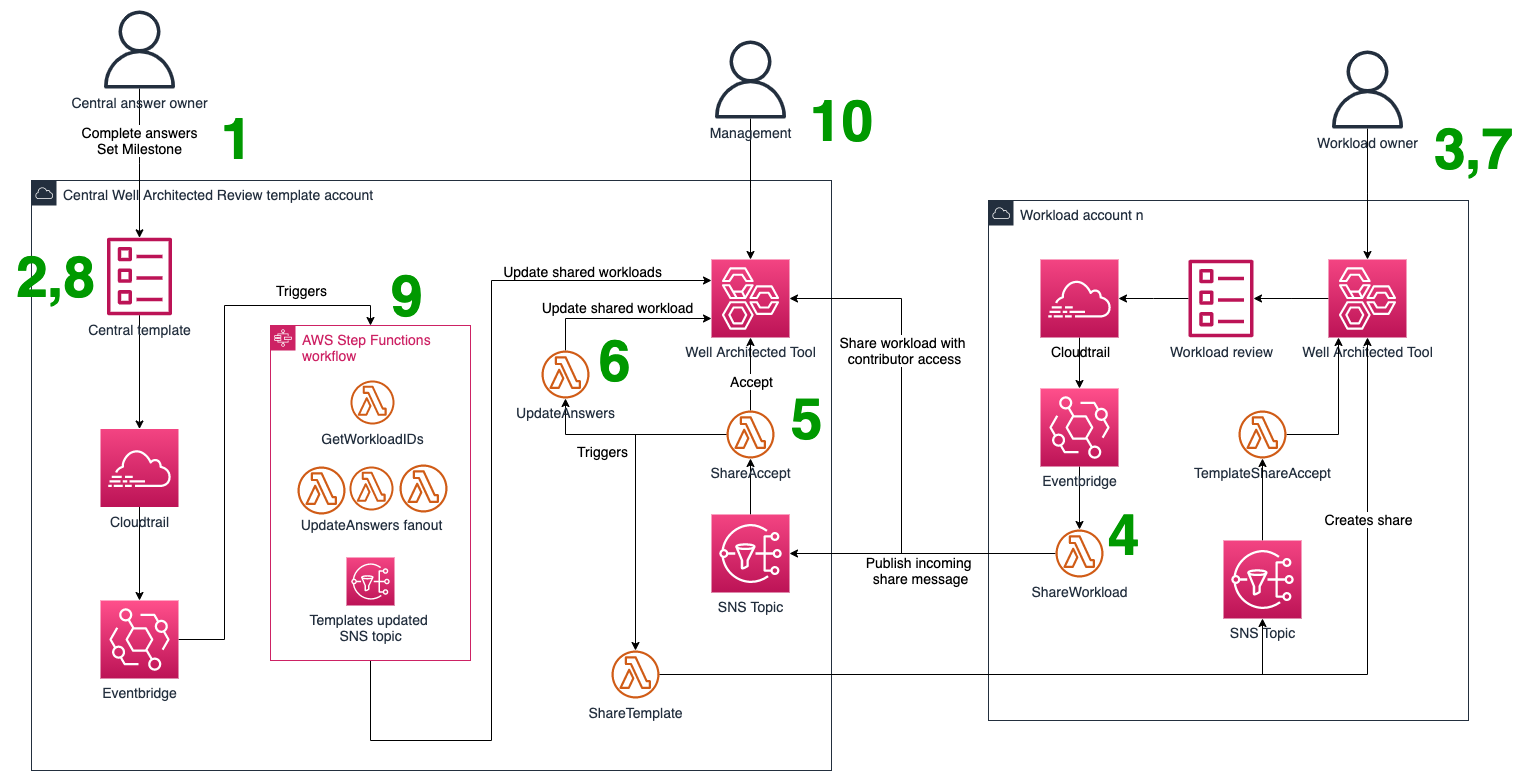
The solution operates as shown in Figure 1 and works as follows:

  1. Central teams use the AWS WA Tool in the “central” AWS account to create workload templates. These are prefixed with “CentralTemplate” (or by a stack parameter).
  2. The central team answers the questions they’re responsible for and marks all others as “Question does not apply to this workload”.
  3. When an application team is ready to perform an AWS WA Framework review, they create a new workload in their workload account in the AWS WA Tool.
  4. This new workload is then shared with the central account (with contributor access) by an AWS Lambda function. After that, a message is placed on an Amazon Simple Notification Service (Amazon SNS) topic in the central account.
  5. In the central account, a Lambda function is subscribed to the Amazon SNS topic from step 4. This function accepts the incoming share, then shares all templates back to the workload account (with read-only access).
  6. The shared workload is then populated with templated answers from templates with the “CentralTemplate” prefix. Both the selected choices and notes are written to the shared workload. Questions in the template marked as “question does not apply to this workload” are ignored.
  7. As the application team proceeds through the questions, they will see the pre-populated answers from the template.
  8. Should a central team need to update their answers, they can update their template and create a milestone.
  9. The milestone creation invokes an AWS Step Functions workflow. The workflow collects all shared workload IDs. Next, it uses a map state to fan-out the updating of all shared workloads. Whether this process should overwrite or append workload answers is configurable at deployment time.
  10. Because all workloads are now visible in the central account, the dashboards referenced in AWS WA labs can be used for consolidated analysis of risks.
Solution components and workflow steps

Figure 1. Solution components and workflow steps

The solution can be coupled with an Amazon QuickSight powered reporting solution to get an organization-wide view of reviews from a single account. These reviews can also be shared with your AWS account team for ongoing collaborative improvement.

Note: For some workloads, you may need additional AWS WA Framework lenses. The solution offered in this post is lens agnostic, and also supports the use of custom lenses. To deploy the solution, refer to the deployment instructions which can be found on GitHub under aws-samples.

Conclusion

In this post, we explored some of the challenges faced by large enterprises when performing AWS WA Framework reviews at scale and showed you a solution to help your teams define templated answers to particular questions in the AWS WA Tool.

You can deploy this solution to your AWS accounts today by following the deployment instructions included on the aws-samples repository.

Having these templated answers automatically propagated to application workload reviews reduces the number of questions application teams have to answer, as well as the number of attendees required for a review. With this solution, all the AWS WA Framework reviews can be viewed in a single AWS account, so you can also apply the reporting solution provided in AWS WA labs to run centralized reports against all AWS WA Framework reviews in your organization.

Looking for more architecture content?

AWS Architecture Center provides reference architecture diagrams, vetted architecture solutions, Well-Architected best practices, patterns, icons, and more!

Optimize AI/ML workloads for sustainability: Part 3, deployment and monitoring

Post Syndicated from Benoit de Chateauvieux original https://aws.amazon.com/blogs/architecture/optimize-ai-ml-workloads-for-sustainability-part-3-deployment-and-monitoring/

We’re celebrating Earth Day 2022 from 4/22 through 4/29 with posts that highlight how to build, maintain, and refine your workloads for sustainability.


AWS estimates that inference (the process of using a trained machine learning [ML] algorithm to make a prediction) makes up 90 percent of the cost of an ML model. Given with AWS you pay for what you use, we estimate that inference also generally equates to most of the resource usage within an ML lifecycle.

In this series, we’re following the phases of the Well-Architected machine learning lifecycle (Figure 1) to optimize your artificial intelligence (AI)/ML workloads. In Part 3, our final piece in the series, we show you how to reduce the environmental impact of your ML workload once your model is in production.


If you missed the first parts of this series, in Part 1, we showed you how to examine your workload to help you 1) evaluate the impact of your workload, 2) identify alternatives to training your own model, and 3) optimize data processing. In Part 2, we identified ways to reduce the environmental impact of developing, training, and tuning ML models.


ML lifecycle

Figure 1. ML lifecycle

Deployment

Select sustainable AWS Regions

As mentioned in Part 1, select an AWS Region with sustainable energy sources. When regulations and legal aspects allow, choose Regions near Amazon renewable energy projects and Regions where the grid has low published carbon intensity to deploy your model.

Align SLAs with sustainability goals

Define SLAs that support your sustainability goals while meeting your business requirements:

Use efficient silicon

For CPU-based ML inference, use AWS Graviton3. These processors offer the best performance per watt in Amazon Elastic Compute Cloud (Amazon EC2). They use up to 60% less energy than comparable EC2 instances. Graviton3 processors deliver up to three times better performance compared to Graviton2 processors for ML workloads, and they support bfloat16.

For deep learning workloads, the Amazon EC2 Inf1 instances (based on custom designed AWS Inferentia chips) deliver 2.3 times higher throughput and 80% lower cost compared to g4dn instances. Inf1 has 50% higher performance per watt than g4dn, which makes it the most sustainable ML accelerator Amazon EC2 offers.

Make efficient use of GPU

Use Amazon Elastic Inference to attach just the right amount of GPU-powered inference acceleration to any EC2 or SageMaker instance type or Amazon Elastic Container Service (Amazon ECS) task.

While training jobs batch process hundreds of data samples in parallel, inference jobs usually process a single input in real time, and thus consume a small amount of GPU compute. Elastic Inference allows you to reduce the cost and environmental impact of your inference by using GPU resources more efficiently.

Optimize models for inference

Improve efficiency of your models by compiling them into optimized forms with the following:

  • Various open-source libraries (like Treelite for decision tree ensembles)
  • Third-party tools like Hugging Face Infinity, which allows you to speed up transformer models and run inference not only on GPU but also on CPU.
  • SageMaker Neo’s runtime consumes as little as one-tenth the footprint of a deep learning framework and optimizes models to perform up to 25 time faster with no loss in accuracy (example with XGBoost).

Deploying more efficient models means you need fewer resources for inference.

Deploy multiple models behind a single endpoint

SageMaker provides three methods to deploy multiple models to a single endpoint to improve endpoint utilization:

  1. Host multiple models in one container behind one endpoint. Multi-model endpoints are served using a single container. This can help you cut up to 90 percent of your inference costs and carbon emissions.
  2. Host multiple models that use different containers behind one endpoint.
  3. Host a linear sequence of containers in an inference pipeline behind a single endpoint.

Sharing endpoint resources is more sustainable and less expensive than deploying a single model behind one endpoint.

Right-size your inference environment

Right-size your endpoints by using metrics from Amazon CloudWatch or by using the Amazon SageMaker Inference Recommender. This tool can run load testing jobs and recommend the proper instance type to host your model. When you use the appropriate instance type, you limit the carbon emission associated with over-provisioning.

If your workload has intermittent or unpredictable traffic, configure autoscaling inference endpoints in SageMaker to optimize your endpoints. Autoscaling monitors your endpoints and dynamically adjusts their capacity to maintain steady and predictable performance using as few resources as possible. You can also try Serverless Inference (in preview), which automatically launches compute resources and scales them in and out depending on traffic, which eliminates idle resources.

Consider inference at the edge

When working on Internet of Things (IoT) use cases, evaluate if ML inference at the edge can reduce the carbon footprint of your workload. To do this, consider factors like the compute capacity of your devices, their energy consumption, or the emissions related to data transfer to the cloud. When deploying ML models to edge devices, consider using SageMaker Edge Manager, which integrates with SageMaker Neo and AWS IoT Greengrass (Figure 2).

Run inference at the edge with SageMaker Edge

Figure 2. Run inference at the edge with SageMaker Edge

Device manufacturing represents 32-57 percent of the global Information Communication Technology carbon footprint. If your ML model is optimized, it requires less compute resources. You can then perform inference on lower specification machines, which minimizes the environmental impact of the device manufacturing and uses less energy.

The following techniques compress the size of models for deployment, which speeds up inference and saves energy without significant loss of accuracy:

  • Pruning removes weights (learnable parameters) that don’t contribute much to the model.
  • Quantization represents numbers with the low-bit integers without incurring significant loss in accuracy. Specifically, you can reduce resource usage by replacing the parameters in an inference model with half-precision (16 bit), bfloat16 (16 bit, but the same dynamic range as 32 bit), or 8-bit integers instead of the usual single-precision floating-point (32 bit) values.

Archive or delete unnecessary artifacts

Compress and reduce the volume of logs you keep during the inference phase. By default, CloudWatch retains logs indefinitely. By setting limited retention time for your inference logs, you’ll avoid the carbon footprint of unnecessary log storage. Also delete unused versions of your models and custom container images from your repositories.

Monitoring

Retrain only when necessary

Monitor your ML model in production and only retrain if it’s required. Because of model drift, robustness, or new ground truth data being available, models usually need to be retrained. Instead of retraining arbitrarily, monitor your ML model in production, automate your model drift detection and only retrain when your model’s predictive performance has fallen below defined KPIs.

Consider SageMaker PipelinesAWS Step Functions Data Science SDK for Amazon SageMaker, or third-party tools to automate your retraining pipelines.

Measure results and improve

To monitor and quantify improvements during the inference phase, track the following metrics:

For storage:

Conclusion

AI/ML workloads can be energy intensive, but as called out by UN and mentioned in the last IPCC report, AI can contribute to mitigation of climate change and the achievement of several Sustainable Development Goals. As technology builders, it’s our responsibility to make sustainable use of AI and ML.

In this blog post series, we presented best practices you can use to make sustainability-conscious architectural decisions and reduce the environmental impact for your AI/ML workloads.

Other posts in this series

About the Well-Architected Framework

These practices are part of the Sustainability Pillar of the AWS Well-Architected Framework. AWS Well-Architected is a set of guiding design principles developed by AWS to help organizations build secure, high-performing, resilient, and efficient infrastructure for a variety of applications and workloads. Use the AWS Well-Architected Tool to review your workloads periodically to address important design considerations and ensure that they follow the best practices and guidance of the AWS Well-Architected Framework. For follow up questions or comments, join our growing community on AWS re:Post.

Optimize AI/ML workloads for sustainability: Part 2, model development

Post Syndicated from Benoit de Chateauvieux original https://aws.amazon.com/blogs/architecture/optimize-ai-ml-workloads-for-sustainability-part-2-model-development/

More complexity often means using more energy, and machine learning (ML) models are becoming bigger and more complex. And though ML hardware is getting more efficient, the energy required to train these ML models is increasing sharply.

In this series, we’re following the phases of the Well-Architected machine learning lifecycle (Figure 1) to optimize your artificial intelligence (AI)/ML workloads. In Part 2, we examine the model development phase and show you how to train, tune, and evaluate your ML model to help you reduce your carbon footprint.


If you missed the first part of this series, we showed you how to examine your workload to help you 1) evaluate the impact of your workload, 2) identify alternatives to training your own model, and 3) optimize data processing.


ML lifecycle

Figure 1. ML lifecycle

Model building

Define acceptable performance criteria

When you build an ML model, you’ll likely need to make trade-offs between your model’s accuracy and its carbon footprint. When we focus only on the model’s accuracy, we “ignore the economic, environmental, or social cost of reaching the reported accuracy.” Because the relationship between model accuracy and complexity is at best logarithmic, training a model longer or looking for better hyperparameters only leads to a small increase in performance.

Establish performance criteria that support your sustainability goals while meeting your business requirements, not exceeding them.

Select energy-efficient algorithms

Begin with a simple algorithm to establish a baseline. Then, test different algorithms with increasing complexity to observe whether performance has improved. If so, compare the performance gain against the difference in resources required.

Try to find simplified versions of algorithms. This will help you use less resources to achieve a similar outcome. For example, DistilBERT, a distilled version of BERT, has 40% fewer parameters, runs 60% faster, and preserves 97% of BERT’s performance.

Use pre-trained or partially pre-trained models

Consider techniques to avoid training a model from scratch:

  • Transfer Learning: Use a pre-trained source model and reuse it as the starting point for a second task. For example, a model trained on ImageNet (14 million images) can generalize with other datasets.
  • Incremental Training: Use artifacts from an existing model on an expanded dataset to train a new model.

Optimize your deep learning models to accelerate training

Compile your DL models from their high-level language representation to hardware-optimized instructions to reduce training time. You can achieve this with open-source compilers or Amazon SageMaker Training Compiler, which can speed up training of DL models by up to 50% by more efficiently using SageMaker GPU instances.

Start with small experiments, datasets, and compute resources

Experiment with smaller datasets in your development notebook. This allows you to iterate quickly with limited carbon emission.

Automate the ML environment

When building your model, use Lifecycle Configuration Scripts to automatically stop idle SageMaker Notebook instances. If you are using SageMaker Studio, install the auto-shutdown Jupyter extension to detect and stop idle resources.

Use the fully managed training process provided by SageMaker to automatically launch training instances and shut them down as soon as the training job is complete. This minimizes idle compute resources and thus limits the environmental impact of your training job.

Adopt a serverless architecture for your MLOps pipelines. For example, orchestration tools like AWS Step Functions or SageMaker Pipelines only provision resources when work needs to be done. This way, you’re not maintaining compute infrastructure 24/7.

Model training

Select sustainable AWS Regions

As mentioned in Part 1, select an AWS Region with sustainable energy sources. When regulations and legal aspects allow, choose Regions near Amazon renewable energy projects and Regions where the grid has low published carbon intensity to train your model.

Use a debugger

A debugger like SageMaker Debugger can identify training problems like system bottlenecks, overfitting, saturated activation functions, and under-utilization of system resources. It also provides built-in rules like LowGPUUtilization or Overfit. These rules monitor your workload and will automatically stop a training job as soon as it detects a bug (Figure 2), which helps you avoid unnecessary carbon emissions.

Automatically stop buggy training jobs with SageMaker Debugger

Figure 2. Automatically stop buggy training jobs with SageMaker Debugger

Optimize the resources of your training environment

Reference the recommended instance types for the algorithm you’ve selected in the SageMaker documentation. For example, for DeepAR, you should start with a single CPU instance and only switch to GPU and multiple instances when necessary.

Right size your training jobs with Amazon CloudWatch metrics that monitor the utilization of resources like CPU, GPU, memory, and disk utilization.

Consider Managed Spot Training, which takes advantage of unused Amazon Elastic Compute Cloud (Amazon EC2) capacity and can save you up to 90% in cost compared to On-Demand instances. By shaping your demand for the existing supply of EC2 instance capacity, you will improve your overall resource efficiency and reduce idle capacity of the overall AWS Cloud.

Use efficient silicon

Use AWS Trainium for optimized for DL training workloads. It is expected to be our most energy efficient processor for this purpose.

Archive or delete unnecessary training artifacts

Organize your ML experiments with SageMaker Experiments to clean up training resources you no longer need.

Reduce the volume of logs you keep. By default, CloudWatch retains logs indefinitely. By setting limited retention time for your notebooks and training logs, you’ll avoid the carbon footprint of unnecessary log storage.

Model tuning and evaluation

Use efficient cross-validation techniques for hyperparameter optimization

Prefer Bayesian search over random search (and avoid grid search). Bayesian search makes intelligent guesses about the next set of parameters to pick based on the prior set of trials. It typically requires 10 times fewer jobs than random search, and thus 10 times less compute resources, to find the best hyperparameters.

Limit the maximum number of concurrent training jobs. Running hyperparameter tuning jobs concurrently gets more work done quickly. However, a tuning job improves only through successive rounds of experiments. Typically, running one training job at a time achieves the best results with the least amount of compute resources.

Carefully choose the number of hyperparameters and their ranges. You get better results and use less compute resources by limiting your search to a few parameters and small ranges of values. If you know that a hyperparameter is log-scaled, convert it to further improve the optimization.

Use warm-start hyperparameter tuning

Use warm-start to leverage the learning gathered in previous tuning jobs to inform which combinations of hyperparameters to search over in the new tuning job. This technique avoids restarting hyperparameter optimization jobs from scratch and thus reduces the compute resources needed.

Measure results and improve

To monitor and quantify improvements of your training jobs, track the following metrics:

For storage:

Conclusion

In this blog post, we discussed techniques and best practices to reduce the energy required to build, train, and evaluate your ML models.

We also provided recommendations for the tuning process as it makes up a large part of the carbon impact of building an ML model. During hyperparameter and neural design search, hundreds of versions of a given model are created, trained, and evaluated before identifying an optimal design.

In the next post, we’ll continue our sustainability journey through the ML lifecycle and discuss the best practices you can follow when deploying and monitoring your model in production.

Want to learn more? Check out the Sustainability Pillar of the AWS Well-Architected Framework, the Architecting for sustainability session at re:Invent 2021, and other blog posts on architecting for sustainability.

Looking for more architecture content? AWS Architecture Center provides reference architecture diagrams, vetted architecture solutions, Well-Architected best practices, patterns, icons, and more!

Other posts in this series

New and Updated AWS Well-Architected Lenses

Post Syndicated from Channy Yun original https://aws.amazon.com/blogs/aws/new-and-updated-aws-well-architected-lenses/

Since 2015, the AWS Well-Architected Framework has been helping AWS customers and partners improve their cloud architectures. The framework consists of design principles, questions, and best practices across multiple pillars: Operational ExcellenceSecurityReliabilityPerformance Efficiency, and Cost Optimization. At AWS re:Invent 2021, we introduced a new Sustainability Pillar to help organizations learn, measure, and improve their workloads using environmental best practices for cloud computing.

In 2017, we introduced AWS Well-Architected Lenses and extended the best practice guidance to specific industry and technology domains, such as serverless, high performance computing (HPC), internet of things (IoT), software as a service (SaaS), foundational technical review (FTR), and financial services. Use the applicable Lenses together with the pillars of the AWS Well-Architected Framework to fully evaluate your workloads.

In 2021, we added four new lenses for various technologies and industries at the request of our customers. If you are planning a new workload for the new year, check out the new and updated Lenses to help guide you through the implementation of AWS best practices.

New AWS Well-Architected Lenses

Streaming Media Lens (September 29, 2021)
The Streaming Media Lens helps customers apply best practices in the design, delivery, and maintenance of their cloud-based streaming media workloads. Whether you’ve just started designing a greenfield video application on AWS or are looking to migrate an existing workload, this Lens provides perspective on best practices and can spark new ideas. To learn more about best practices for architecting and improving your streaming media workloads on AWS, see the Streaming Media Lens documentation.

SAP Lens (October 29, 2021)
The SAP Lens is a collection of customer-proven design principles and best practices for ensuring SAP workloads on AWS are well-architected. The SAP Lens is based on insights that AWS has gathered from customers, AWS Partners, and the SAP Specialist Architect community. The Lens is designed to help you adopt a cloud-native approach to running SAP. To learn more, see the SAP Lens documentation.

Games Industry Lens (November 19, 2021)
The Games Industry Lens helps customers review and improve cloud-based architecture for game development, deployment, operations of gaming platforms, and to support massive player scale. The Lens presents common games deployment scenarios and identifies key elements to ensure your platforms are in accordance with the best practices of AWS Well-Architected Framework. Learn the best practices for designing, architecting, and deploying your games workloads on AWS in the Games Industry Lens documentation.

Hybrid Networking Lens (November 22, 2021)
The Hybrid Networking Lens provides best practices and strategies to use when designing hybrid networking architectures. This Lens supports a broad spectrum of use cases and helps set you up for success in building hybrid networking architectures and integrating your on-premises data center with AWS operations. It outlines three areas to consider when designing hybrid network connectivity for your workload: data layer, monitoring and configuration management, and security. To learn more, see the Hybrid Networking Lens documentation.

Updated AWS Well-Architected Lens

Machine Learning Lens (October 13, 2021)
The Machine Learning (ML) Lens introduces a set of established and repeatable best practices across the ML lifecycle phases. You can apply this guidance and architectural principles when designing your ML workloads or after your workloads have entered production as part of continuous improvement. The Lens includes guidance and resources on implementing the best practices on AWS. To learn more, see the ML Lens documentation.

Data Analytics Lens (October 29, 2021)
The Data Analytics Lens is a collection of customer-proven best practices for designing well-architected analytics workloads. It contains insights that AWS has gathered from real-world case studies and helps you learn the key design elements of well-architected analytics workloads, along with recommendations for improvement. For more information about building your own data analytics workload, see the Data Analytics Lens whitepaper.

Management and Governance Lens (December 17, 2021)
The Management and Governance Lens (M&G Lens) provides clear guidance to help you prepare your environment, regardless of your stage of cloud adoption, with a focus on eight different functions. Those functions are controls and guardrails, network connectivity, identity management, security management, monitoring and observability, cloud financial management, service management, and sourcing and distribution. To learn more, see the M&G Lens documentation.

To get started with your favorite lenses, visit the AWS Well-Architected page. You can learn, measure, and build using architectural best practices and tools.

To review your workloads using the AWS Well-Architected Framework, we recommend using the AWS Well-Architected Tool, a self-service tool designed to help you review AWS workloads at any time, without the need for an AWS Solutions Architect.

It provides a mechanism for regularly evaluating your workloads, identifying high-risk issues, and recording your improvements applying your favorite Lenses. You can also leverage Custom Lenses to record and track progress towards your organization’s internal best practices.

If you want to train these best practices, AWS Well-Architected Labs provides codes and documentation in the format of hands-on labs to help you learn, measure, and build using architectural best practices categorized into levels. Also, you can access an ecosystem of hundreds of members in the AWS Well-Architected Partner Program in your area to help analyze and review your applications.

You can refer to the AWS Architecture Center, a collection of reference architecture patterns, vetted architecture solutions, and best practices. If you’re new to AWS, use the Architect Learning Plan to learn how to design applications and systems on AWS. Build technical skills as you progress along the path toward AWS Certification.

This is My Architecture is a video series that showcases innovative architectural solutions on AWS by customers and partners. We would love to hear more from you, especially about your success stories in building your applications on AWS Well-Architected Framework. Please share with your account team to introduce your stories.

Channy

Optimize AI/ML workloads for sustainability: Part 1, identify business goals, validate ML use, and process data

Post Syndicated from Benoit de Chateauvieux original https://aws.amazon.com/blogs/architecture/optimize-ai-ml-workloads-for-sustainability-part-1-identify-business-goals-validate-ml-use-and-process-data/

Training artificial intelligence (AI) services and machine learning (ML) workloads uses a lot of energy—and they are becoming bigger and more complex. As an example, the Carbontracker: Tracking and Predicting the Carbon Footprint of Training Deep Learning Models study estimates that a single training session for a language model like GPT-3 can have a carbon footprint similar to traveling 703,808 kilometers by car.

Although ML uses a lot of energy, it is also one of the best tools we have to fight the effects of climate change. For example, we’ve used ML to help deliver food and pharmaceuticals safely and with much less waste, reduce the cost and risk involved in maintaining wind farms, restore at-risk ecosystems, and predict and understand extreme weather.

In this series of three blog posts, we’ll provide guidance from the Sustainability Pillar of the AWS Well-Architected Framework to reduce the carbon footprint of your AI/ML workloads.

This first post follows the first three phases provided in the Well-Architected machine learning lifecycle (Figure 1):

  • Business goal identification
  • ML problem framing
  • Data processing (data collection, data preprocessing, feature engineering)

You’ll learn best practices for each phase to help you review and refine your workloads to maximize utilization and minimize waste and the total resources deployed and powered to support your workload.

ML lifecycle

Figure 1. ML lifecycle

Business goal identification

Define the overall environmental impact or benefit

Measure your workload’s impact and its contribution to the overall sustainability goals of the organization. Questions you should ask:

  • How does this workload support our overall sustainability mission?
  • How much data will we have to store and process? What is the impact of training the model? How often will we have to re-train?
  • What are the impacts resulting from customer use of this workload?
  • What will be the productive output compared with this total impact?

Asking these questions will help you establish specific sustainability objectives and success criteria to measure against in the future.

ML problem framing

Identify if ML is the right solution

Always ask if AI/ML is right for your workload. There is no need to use computationally intensive AI when a simpler, more sustainable approach might succeed just as well.

For example, using ML to route Internet of Things (IoT) messages may be unwarranted; you can express the logic with a Rules Engine.

Consider AI services and pre-trained models 

Once you decide if AI/ML is the right tool, consider whether the workload needs to be developed as a custom model.

Many workloads can use the managed AWS AI services shown in Figure 2. Using these services means that you won’t need the associated resources to collect/store/process data and to prepare/train/tune/deploy an ML model.

Managed AWS AI services

Figure 2. Managed AWS AI services

If adopting a fully managed AI service is not appropriate, evaluate if you can use pre-existing datasets, algorithms, or models. AWS Marketplace offers over 1,400 ML-related assets that customers can subscribe to. You can also fine-tune an existing model starting from a pre-trained model, like those available on Hugging Face. Using pre-trained models from third parties can reduce the resources you need for data preparation and model training.

Select sustainable Regions

Select an AWS Region with sustainable energy sources. When regulations and legal aspects allow, choose Regions near Amazon renewable energy projects and Regions where the grid has low published carbon intensity to host your data and workloads.

Data processing (data collection, data preprocessing, feature engineering)

Avoid datasets and processing duplication

Evaluate if you can avoid data processing by using existing publicly available datasets like AWS Data Exchange and Open Data on AWS (which includes the Amazon Sustainability Data Initiative). They offer weather and climate datasets, satellite imagery, air quality or energy data, among others. When you use these curated datasets, it avoids duplicating the compute and storage resources needed to download the data from the providers, store it in the cloud, organize, and clean it.

For internal data, you can also reduce duplication and rerun of feature engineering code across teams and projects by using a feature storage, such as Amazon SageMaker Feature Store.

Once your data is ready for training, use pipe input mode to stream it from Amazon Simple Storage Service (Amazon S3) instead of copying it to Amazon Elastic Block Store (Amazon EBS). This way, you can reduce the size of your EBS volumes.

Minimize idle resources with serverless data pipelines

Adopt a serverless architecture for your data pipeline so it only provisions resources when work needs to be done. For example, when you use AWS Glue and AWS Step Functions for data ingestion and preprocessing, you are not maintaining compute infrastructure 24/7. As shown in Figure 3, Step Functions can orchestrate AWS Glue jobs to create event-based serverless ETL/ELT pipelines.

Orchestrating data preparation with AWS Glue and Step Functions

Figure 3. Orchestrating data preparation with AWS Glue and Step Functions

Implement data lifecycle policies aligned with your sustainability goals

Classify data to understand its significance to your workload and your business outcomes. Use this information to determine when you can move data to more energy-efficient storage or safely delete it.

Manage the lifecycle of all your data and automatically enforce deletion timelines to minimize the total storage requirements of your workload using Amazon S3 Lifecycle policies. The Amazon S3 Intelligent-Tiering storage class will automatically move your data to the most sustainable access tier when access patterns change.

Define data retention periods that support your sustainability goals while meeting your business requirements, not exceeding them.

Adopt sustainable storage options

Use the appropriate storage tier to reduce the carbon impact of your workload. On Amazon S3, for example, you can use energy-efficient, archival-class storage for infrequently accessed data, as shown in Figure 4. And if you can easily recreate an infrequently accessed dataset, use the Amazon S3 One Zone-IA class to reduce by 3x or more its carbon footprint.

Data access patterns for Amazon S3

Figure 4. Data access patterns for Amazon S3

Don’t over-provision block storage for notebooks and use object storage services like Amazon S3 for common datasets.

Tip: You can check the free disk space on your SageMaker Notebooks using !df -h.

Select efficient file formats and compression algorithms 

Use efficient file formats such as Parquet or ORC to train your models. Compared to CSV, they can help you reduce your storage by up to 87%.

Migrating to a more efficient compression algorithm can also greatly contribute to your storage reduction efforts. For example, Zstandard produces 10–15% smaller files than Gzip at the same compression speed. Some SageMaker built-in algorithms accept x-recordio-protobuf input, which can be streamed directly from Amazon S3 instead of being copied to a notebook instance.

Minimize data movement across networks

Compress your data before moving it over the network.

Minimize data movement across networks when selecting a Region; store your data close to your producers and train your models close to your data.

Measure results and improve

To monitor and quantify improvements, track the following metrics:

  • Total size of your S3 buckets and storage class distribution, using Amazon S3 Storage Lens
  • DiskUtilization metric of your SageMaker processing jobs
  • StorageBytes metric of your SageMaker Studio shared storage volume

Conclusion

In this blog post, we discussed the importance of defining the overall environmental impact or benefit of your ML workload and why managed AI services or pre-trained ML models are sustainable alternatives to custom models. You also learned best practices to reduce the carbon footprint of your ML workload in the data processing phase.

In the next post, we will continue our sustainability journey through the ML lifecycle and discuss the best practices you can follow in the model development phase.

Want to learn more? Check out the Sustainability Pillar of the AWS Well-Architected Framework, the Architecting for sustainability session at re:Invent 2021, and other blog posts on architecting for sustainability.

Looking for more architecture content? AWS Architecture Center provides reference architecture diagrams, vetted architecture solutions, Well-Architected best practices, patterns, icons, and more!

New – Sustainability Pillar for AWS Well-Architected Framework

Post Syndicated from Alex Casalboni original https://aws.amazon.com/blogs/aws/sustainability-pillar-well-architected-framework/

The AWS Well-Architected Framework has been helping AWS customers improve their cloud architectures since 2015. The framework consists of design principles, questions, and best practices across multiple pillars: Operational Excellence, Security, Reliability, Performance Efficiency, and Cost Optimization.

Today we are introducing a new Sustainability Pillar to help organizations learn, measure, and improve their workloads using environmental best practices for cloud computing.

Similar to the other pillars, the Sustainability Pillar contains questions aimed at evaluating the design, architecture, and implementation of your workloads to reduce their energy consumption and improve their efficiency. The pillar is designed as a tool to track your progress toward policies and best practices that support a more sustainable future, not just a simple checklist.

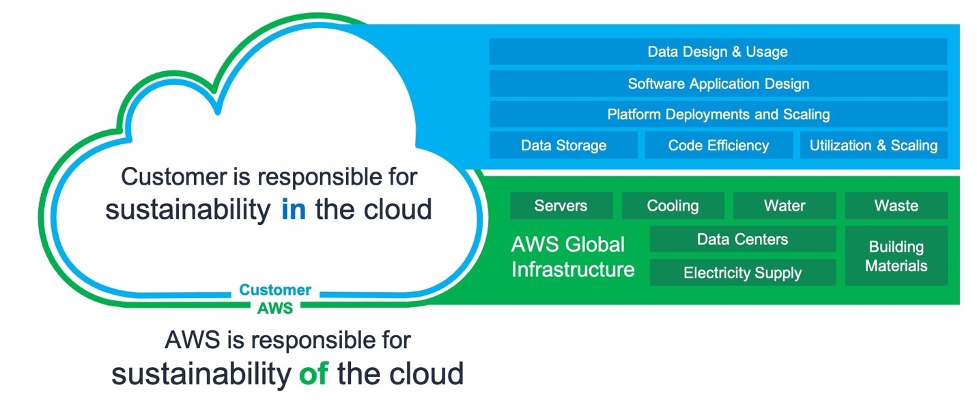
The Shared Responsibility Model of Cloud Sustainability
The shared responsibility model also applies to sustainability. AWS is responsible for the sustainability of the cloud, while AWS customers are responsible for sustainability in the cloud.

The sustainability of the cloud allows AWS customers to reduce associated energy usage by nearly 80% with respect to a typical on-premises deployment. This is possible because of the much higher server utilization, power and cooling efficiency, custom data center design, and continued progress on the path to powering AWS operations with 100% renewable energy by 2025. But we can achieve much more by collectively designing sustainable architectures.

We are introducing the new Sustainability Pillar to help organizations improve their sustainability in the cloud. This is a continuous effort focused on energy reduction and efficiency of all types of workloads. In practice, the pillar helps developers and cloud architects surface the trade-offs, highlight patterns and best practices, and avoid anti-patterns. For example, selecting an efficient programming language, adopting modern algorithms, using efficient data storage techniques, and deploying correctly sized and efficient infrastructure.

Specifically, the pillar is designed to support organizations in developing a better understanding of the state of their workloads, as well as the impact related to defined sustainability targets, how to measure against these targets, and how to model where they cannot directly measure.

In addition to building sustainable workloads in the cloud, you can use AWS technology to solve broader sustainability challenges. For example, reducing the environmental incidents caused by industrial equipment failure using Amazon Monitron to detect abnormal behavior and conduct preventative maintenance. We call this sustainability through the cloud.

Well-Architected Design Principles for Sustainability in the Cloud
The Sustainability Pillar includes design principles and operational guidance, as well as architectural and software patterns.

The design principles will facilitate good design for sustainability:

  • Understand your impact – Measure business outcomes and the related sustainability impact to establish performance indicators, evaluate improvements, and estimate the impact of proposed changes over time.
  • Establish sustainability goals – Set long-term goals for each workload, model return on investment (ROI) and give owners the resources to invest in sustainability goals. Plan for growth and design your architecture to reduce the impact per unit of work such as per user or per operation.
  • Maximize utilization – Right size each workload to maximize the energy efficiency of the underlying hardware, and minimize idle resources.
  • Anticipate and adopt new, more efficient hardware and software offerings – Support upstream improvements by your partners, continually evaluate hardware and software choices for efficiencies, and design for flexibility to adopt new technologies over time.
  • Use managed services – Shared services reduce the amount of infrastructure needed to support a broad range of workloads. Leverage managed services to help minimize your impact and automate sustainability best practices such as moving infrequent accessed data to cold storage and adjusting compute capacity.
  • Reduce the downstream impact of your cloud workloads – Reduce the amount of energy or resources required to use your services and reduce the need for your customers to upgrade their devices; test using device farms to measure impact and test directly with customers to understand the actual impact on them.

Well-Architected Best Practices for Sustainability
The design principles summarized above correspond to concrete architectural best practices that development teams can apply every day.

Some examples of architectural best practices for sustainability:

  • Optimize geographic placement of workloads for user locations
  • Optimize areas of code that consume the most time or resources
  • Optimize impact on customer devices and equipment
  • Implement a data classification policy
  • Use lifecycle policies to delete unnecessary data
  • Minimize data movement across networks
  • Optimize your use of GPUs
  • Adopt development and testing methods that allow rapid introduction of potential sustainability improvements
  • Increase the utilization of your build environments

Many of these best practices are generic and apply to all workloads, while others are specific to some use cases, verticals, and compute platforms. I’d highly encourage you to dive into these practices and identify the areas where you can achieve the most impact immediately.

Transforming sustainability into a non-functional requirement can result in cost effective solutions and directly translate to cost savings on AWS, as you only pay for what you use. In some cases, meeting these non-functional targets might involve tradeoffs in terms of uptime, availability, or response time. Where minor tradeoffs are required, the sustainability improvements are likely to outweigh the change in quality of service. It’s important to encourage teams to continuously experiment with sustainability improvements and embed proxy metrics in their team goals.

Available Now
The AWS Well-Architected Sustainability Pillar is a new addition to the existing framework. By using the design principles and best practices defined in the Sustainability Pillar Whitepaper, you can make informed decisions balancing security, cost, performance, reliability, and operational excellence with sustainability outcomes for your workloads on AWS.

Learn more about the new Sustainability Pillar.

Alex

Announcing AWS Well-Architected Custom Lenses: Extend the Well-Architected Framework with Your Internal Best Practices

Post Syndicated from Alex Casalboni original https://aws.amazon.com/blogs/aws/well-architected-custom-lenses-internal-best-practices/

We launched the AWS Well-Architected Framework back in 2015 to help you review workloads against architectural best practices, and across pillars such as operational excellence, security, reliability, performance efficiency, and cost optimization. In 2017, we extended the framework with the concept of “lenses” to optimize specific workload types such as the Serverless Lens, the SaaS Lens, and the Foundational Technical Review (FTR) Lens for APN Partners. In 2018, we launched the AWS Well-Architected Tool, a self-service tool designed to help you review AWS workloads at any time, without the need for an AWS Solutions Architect.

Today, I’m happy to announce the general availability of AWS Well-Architected Custom Lenses, a new feature of the AWS Well-Architected Tool that lets you bring your own best practices to complement the existing framework based on your industry, operational plans, and internal processes. Custom Lenses provide a consolidated view and a consistent way to measure and improve your workloads on AWS without relying on external spreadsheets or third-party systems.

In addition to AWS Well-Architected Lenses, now you can create and share custom lenses and include them in your workload reviews, ultimately tailoring the review to your organizational needs. For example, you could define a custom lens to review your workloads against PCI compliance, SOC 2 compliance, or other national or industry regulations. As an AWS Partner, you might include ad-hoc best practices in your custom lenses when reviewing workloads with customers from different industries and segments, ultimately making the review process easier, faster, and more comprehensive.

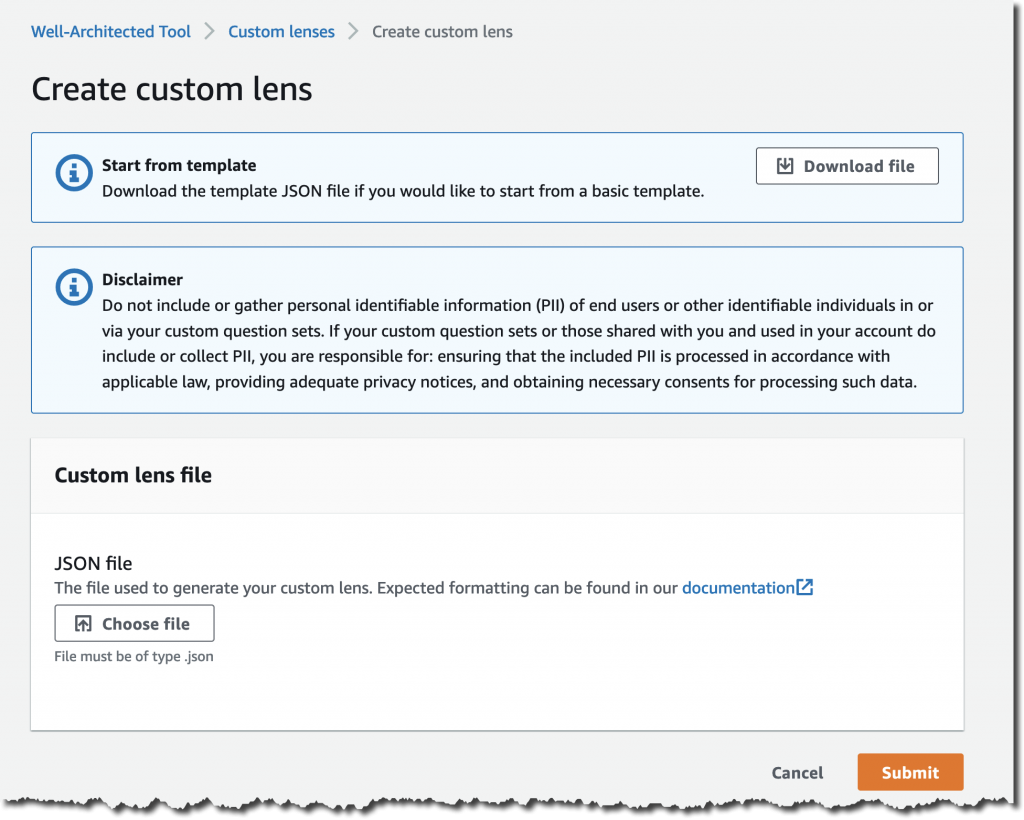
How to Define a new Custom Lens
You author a new custom lens by editing a JSON preset template, where you define questions, choices, helpful resources, improvement plans, and risk rules.

Here’s how it works: download the template from the AWS Well-Architected Tool, work on it locally, and then re-upload it.

The JSON structure is composed of multiple pillars. Each pillar might contain multiple questions, each with its own choices and risk rules.

Your JSON file will look like this:

{
    "schemaVersion": "2021-11-01",
    "name": "My Test Lens",
    "description": "This is a description of my test lens.",
    "pillars": [
        {
            "id": "pillar_red",
            "name": "Red Pillar",
            "questions": [
                {
                    "id": "pillar_1_q1",
                    "title": "How do you get started with this pillar?",
                    "description": "Optional description.",
                    "choices": [
                        {
                            "id": "choice1",
                            "title": "Best practice #1",
                            "helpfulResource": {
                                "displayText": "This is helpful text for the first choice.",
                                "url": "https://aws.amazon.com"
                            },
                            "improvementPlan": {
                                "displayText": "This is text that will be shown for improvement of this choice."
                            }
                        },
                        {
                            "id": "choice2",
                            "title": "Best practice #2",
                            ...
                        }
                    ],
                    "riskRules": [
                        {
                            "condition": "choice1 && choice2",
                            "risk": "NO_RISK"
                        },
                        {
                            "condition": "choice1 && !choice2",
                            "risk": "MEDIUM_RISK"
                        },
                        {
                            "condition": "default",
                            "risk": "HIGH_RISK"
                        }
                    ]
                }
            ]
            ...
        },
        ...
    ]
}

Once you’re ready to submit your JSON file, proceed with the upload.

And don’t worry about making it perfect on the first try. You’ll be able to improve it and add new versions.

AWS Well-Architected Custom Lenses in Action
You find the list of custom lenses and their latest version in the new Custom Lenses section.

Each custom lens has an owner and can be shared with multiple AWS accounts too.

Before using this new custom lens in a workload review, you’ll need to publish it and assign it a version.

Select Publish lens and provide a version name such as 1.0.

Now you can create a new workload review and apply both AWS-owned lenses and your own custom lenses, in addition to the main framework.

During the workload review, you will go through each pillar and questions of the custom lens, using the same user interface provided by the AWS Well-Architected Tool.

Last but not least, you can share your custom lens with other AWS Identity and Access Management (IAM) principals such as AWS accounts, IAM users, and IAM roles.

Available Today at No Charge
Custom Lenses are available today in all AWS Regions where the AWS Well-Architected Tool is available, at no cost. You can define up to five custom lenses and share them across AWS Accounts, in addition to the existing Well-Architected Framework and AWS-owned Lenses.

Check out the technical documentation here.

We’re looking forward to hearing your feedback and iterating quickly to improve the authoring and sharing experience based on your needs.

Alex

Now Available: Updated guidance on the Data Analytics Lens for AWS Well-Architected Framework

Post Syndicated from Wallace Printz original https://aws.amazon.com/blogs/big-data/now-available-updated-guidance-on-the-data-analytics-lens-for-aws-well-architected-framework/

Nearly all businesses today require some form of data analytics processing, from auditing user access to generating sales reports. For all your analytics needs, the Data Analytics Lens for AWS Well-Architected Framework provides prescriptive guidance to help you assess your workloads and identify best practices aligned to the AWS Well-Architected Pillars: Operational Excellence, Security, Reliability, Performance Efficiency, and Cost Optimization. Today, we’re pleased to announce a completely revised and updated version of the Data Analytics Lens whitepaper.

Self-assess with Well-Architected design principles

The updated version of the Data Analytics Lens whitepaper has been revised to provide guidance to CxOs as well as all data personas. Within each of the five Well-Architected Pillars, we provide top-level design principles for CxOs to quickly identify areas for teams and fundamental rules that analytics workloads designers should follow. Each design principle is followed by a series of questions and best practices that architects and system designers can use to perform self-assessments. Additionally, the Data Analytics Lens includes suggestions that prescriptively explain steps to implement best practices useful for implementation teams.

For example, the Security Pillar design principle “Control data access” works with the best practice to build user identity solutions that uniquely identify people and systems. The associated suggestion for this best practice is to centralize workforce identities, which details how to use this principle and includes links to more documentation on the suggestion.

“Building Data Analytics platform or workloads is one of the complex architecture patterns. It involves multi-layered approach such as Data Ingestion, Data Landing, Transformation Layer, Analytical/Insight and Reporting. Choices of technology and service for each of these layers are wide. The AWS Well-Architected Analytics Lens helps us to design and validate with great confidence against each of the pillars. Now Cognizant Architects can perform assessments using the Data Analytics Lens to validate and help build secure, scalable and innovative data solutions for customers.”

– Supriyo Chakraborty, Principal Architect & Head of Data Engineering Guild, Cognizant Germany
– Somasundaram Janavikulam, Cloud Enterprise Architect & Well Architected Partner Program Lead, Cognizant

In addition to performing your own assessment, AWS can provide a guided experience through reviewing your workload with a Well-Architected Framework Review engagement. For customers building data analytics workloads with AWS Professional Services, our teams of Data Architects can perform assessments using the Data Analytics Lens during the project engagements. This provides you with an objective assessment of your workloads and guidance on future improvements. The integration is available now for customers of the AWS Data Lake launch offering, with additional Data Analytics offerings coming in 2022. Reach out to your AWS Account Team if you’d like to know more about these guided Reviews.

Updated architectural patterns and scenarios

In this version of the Data Analytics Lens, we have also revised the discussion of data analytics patterns and scenarios to keep up with the industry and modern data analytics practices. Each scenario includes sections on characteristics that help you plan when developing systems for that scenario, a reference architecture to visualize and explain how the components work together, and configuration notes to help you properly configure your solution.

This version covers the following topics:

  • Building a modern data architecture (formerly Lake House Architecture)
  • Organize around data domains by delivering data as a product using a data mesh
  • Efficiently and securely provide batch data processing
  • Use streaming ingest and stream processing for real-time workloads
  • Build operational analytics systems to improve business processes and performance
  • Provide data visualization securely and cost-effectively at scale

Changed from the first release, the machine learning and tenant analytics scenarios have been migrated to a separate Machine Learning Lens whitepaper and SaaS Lens whitepaper.

Conclusion

We expect this updated version will provide better guidance to validate your existing architectures, as well as provide recommendations for any gaps that identified.

For more information about building your own Well-Architected systems using the Data Analytics Lens, see the Data Analytics Lens whitepaper.

Special thanks to everyone across the AWS Solution Architecture and Data Analytics communities who contributed. These contributions encompassed diverse perspectives, expertise, and experiences in developing the new AWS Well-Architected Data Analytics Lens.


About the Authors

Wallace Printz is a Senior Solutions Architect based in Austin, Texas. He helps customers across Texas transform their businesses in the cloud. He has a background in semiconductors, R&D, and machine learning.

Indira Balakrishnan is a Senior Solutions Architect in the AWS Analytics Specialist SA Team. She is passionate about helping customers build cloud-based analytics solutions to solve their business problems using data-driven decisions. Outside of work, she volunteers at her kids’ activities and spends time with her family.

Introducing the new AWS Well-Architected Machine Learning Lens

Post Syndicated from Haleh Najafzadeh original https://aws.amazon.com/blogs/architecture/introducing-the-new-aws-well-architected-machine-learning-lens/

The AWS Well-Architected Framework provides you with a formal approach to compare your workloads against best practices. It also includes guidance on how to make improvements.

Machine learning (ML) algorithms discover and learn patterns in data, and construct mathematical models to predict future data. These solutions can revolutionize lives through better diagnoses of diseases, environmental protections, products and services transformation, and more.

Your ML models depend on the quality of input data to generate accurate results. As data changes over time, monitoring is required to continuously detect, correct, and mitigate issues. This improves accuracy and performance. It also may require you to retrain your model with the latest refined data.

Application workloads rely on step-by-step instructions to solve a problem. ML workloads enable algorithms to learn from data through an iterative and continuous cycle. We are announcing a brand-new version of the AWS Well-Architected Machine Learning Lens whitepaper. It complements and builds upon the Well-Architected Framework to address this difference between these two types of workloads.

The whitepaper provides you with a set of established cloud and technology agnostic best practices. You can apply this guidance and architectural principles when designing your ML workloads, or after your workloads have entered production as part of continuous improvement. The paper includes guidance and resources to help you implement these best practices on AWS.

The Well-Architected Machine Learning Lens components

The Lens includes four focus areas:

1. The Well-Architected Machine Learning Design Principles — A set of considerations that are used as the basis for a Well-Architected ML workload. These design principles are the guiding light for the collection of the best practices in the ML Lens.

2. The Well-Architected Machine Learning Lifecycle — This integrates the Well-Architected Framework into the Machine Learning Lifecycle as can be seen in figure 1.

    • The Well-Architected Framework pillars includes:
      1. Operational Excellence
      2. Security
      3. Reliability
      4. Performance Efficiency
      5. Cost Optimization
    • The Machine Learning Lifecycle phases referenced in the ML Lens include:
      1. Business goal identification
      2. ML problem framing
      3. Data processing (data collection, data pre-processing, feature engineering)
      4. Model development (training, tuning, evaluation)
      5. Model deployment (prediction, inference)
      6. Model monitoring
Figure 1. Well-Architected Machine Learning Lifecycle

Figure 1. Well-Architected Machine Learning Lifecycle

In the Well-Architected ML Lens whitepaper, the Well-Architected Machine Learning Lifecycle applies the Well-Architected Framework pillars to each of the lifecycle phases.

3. Cloud and technology agnostic best practices — These are best practices for each ML lifecycle phase across the Well-Architected Framework pillars. Best practices are accompanied by:

    • Implementation guidance that provides AWS implementation plans for each best practice with references to AWS technologies and resources.
    • Resources as a set of links to AWS documents, blogs, videos, and code examples as supporting resources to the best practices and their implementation plans.

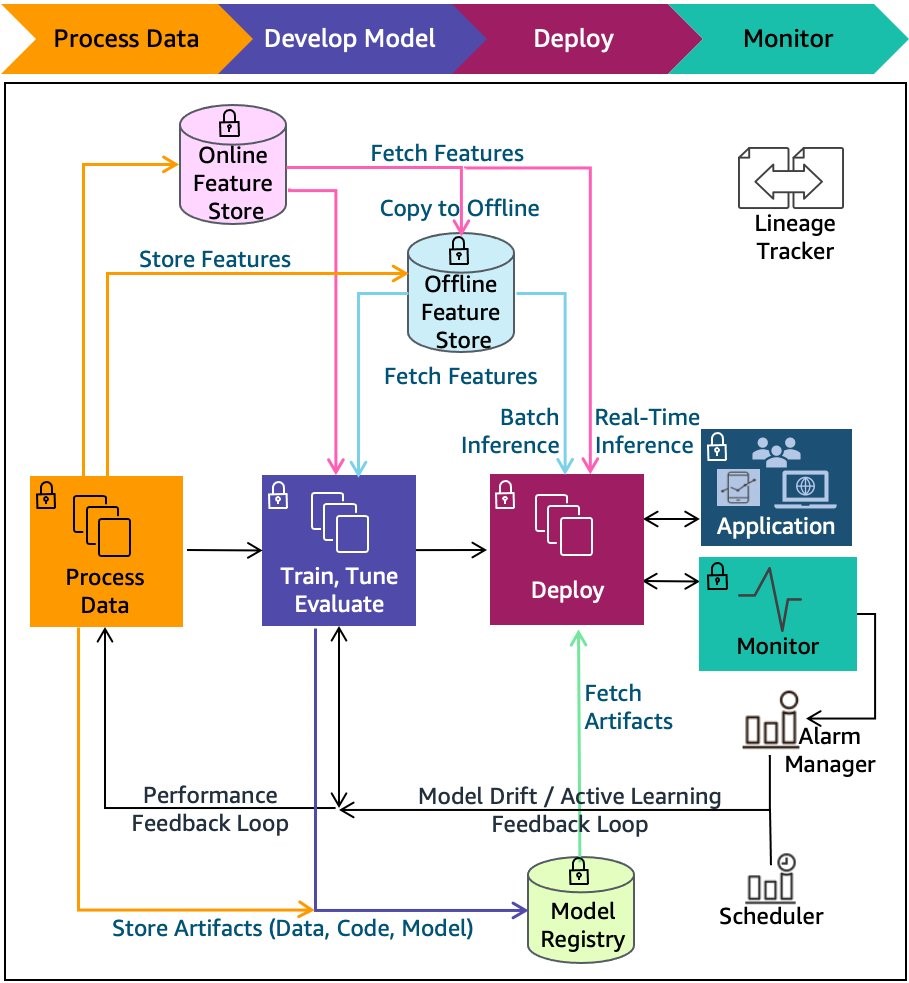
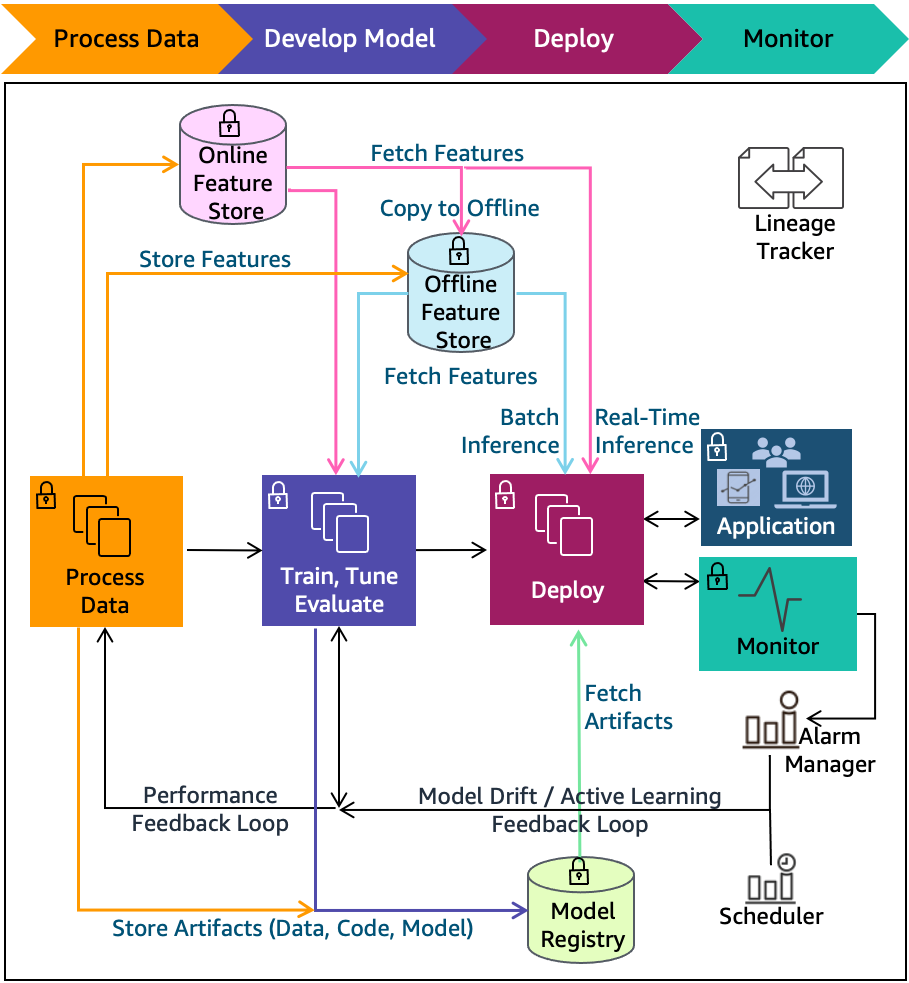
4. ML Lifecycle architecture diagrams — These illustrate processes, technologies, and components that support many of the best practices, shown in Figure 2. They include: Feature stores, Model Registry, lineage tracker, alarm manager, scheduler, and more. Different pipeline technologies are illustrated using these architecture diagrams.

Figure 2. Machine Learning Lifecycle phases with expanded components

Figure 2. Machine Learning Lifecycle phases with expanded components

Where should you apply the Well-Architected Machine Learning Lens?

Use the Well-Architected ML Lens to:

  • Make informed decisions — Plan early and make informed decisions by reviewing best practices before a new workload design begins.
  • Build and deploy faster — Use the best practices to guide you through building new Well-Architected workloads across the ML lifecycle.
  • Lower or mitigate risks — Evaluate existing workloads regularly to identify, mitigate, and address potential issues early.
  • Learn AWS best practices — Use the provided implementation plans as guidance on implementing the best practices on AWS.

Conclusion

The new Well-Architected Machine Learning Lens whitepaper is available now. Use the Lens to help ensure that your ML workloads are architected with operational excellence, security, reliability, performance efficiency, and cost optimization in mind.

Special thanks to everyone across the AWS Solution Architecture and Machine Learning communities.  These contributions encompassed diverse perspectives, expertise, and experiences in developing the new AWS Well-Architected Machine Learning Lens.

How NortonLifelock built a serverless architecture for real-time analysis of their VPN usage metrics

Post Syndicated from Madhu Nunna original https://aws.amazon.com/blogs/big-data/how-nortonlifelock-built-a-serverless-architecture-for-real-time-analysis-of-their-vpn-usage-metrics/

This post presents a reference architecture and optimization strategies for building serverless data analytics solutions on AWS using Amazon Kinesis Data Analytics. In addition, this post shows the design approach that the engineering team at NortonLifeLock took to build out an operational analytics platform that processes usage data for their VPN services, consuming petabytes of data across the globe on a daily basis.

NortonLifeLock is a global cybersecurity and internet privacy company that offers services to millions of customers for device security, and identity and online privacy for home and family. NortonLifeLock believes the digital world is only truly empowering when people are confident in their online security. NortonLifeLock has been an AWS customer since 2014.

For any organization, the value of operational data and metrics decreases with time. This lost value can equate to lost revenue and wasted resources. Real-time streaming analytics helps capture this value and provide new insights that can create new business opportunities.

AWS offers a rich set of services that you can use to provide real-time insights and historical trends. These services include managed Hadoop infrastructure services on Amazon EMR as well as serverless options such as Kinesis Data Analytics and AWS Glue.

Amazon EMR also supports multiple programming options for capturing business logic, such as Spark Streaming, Apache Flink, and SQL.

As a customer, it’s important to understand organizational capabilities, project timelines, business requirements, and AWS service best practices in order to define an optimal architecture from performance, cost, security, reliability, and operational excellence perspectives (the five pillars of the AWS Well-Architected Framework).

NortonLifeLock is taking a methodical approach to real-time analytics on AWS while using serverless technology to deliver on key business drivers such as time to market and total cost of ownership. In addition to NortonLifeLock’s implementation, this post provides key lessons learned and best practices for rapid development of real-time analytics workloads.

Business problem

NortonLifeLock offers a VPN product as a freemium service to users. Therefore, they need to enforce usage limits in real time to stop freemium users from using the service when their usage is over the limit. The challenge for NortonLifeLock is to do this in a reliable and affordable fashion.

NortonLifeLock runs its VPN infrastructure in almost all AWS Regions. Migrating to AWS from smaller hosting vendors has greatly improved user experience and VPN edge server performance, including a reduction in connection latency, time to connect and connection errors, faster upload and download speed, and more stability and uptime for VPN edge servers.

VPN usage data is collected by VPN edge servers and uploaded to backend stats servers every minute and persisted in backend databases. The usage information serves multiple purposes:

  • Displaying how much data a device has consumed for the past 30 days.
  • Enforcing usage limits on freemium accounts. When a user exhausts their free quota, that user is unable to connect through VPN until the next free cycle.
  • Analyzing usage data by the internal business intelligence (BI) team based on time, marketing campaigns, and account types, and using this data to predict future growth, ability to retain users, and more.

Design challenge

NortonLifeLock had the following design challenges:

  • The solution must be able to simultaneously satisfy both real-time and batch analysis.
  • The solution must be economical. NortonLifeLock VPN has hundreds of thousands of concurrent users, and if a user’s usage information is persisted as it comes in, it results in tens of thousands of reads and writes per second and tens of thousands of dollars a month in database costs.

Solution overview

NortonLifeLock decided to split storage into two parts by storing usage data in Amazon DynamoDB for real-time access and in Amazon Simple Storage Service (Amazon S3) for analysis, which addresses real-time enforcement and BI needs. Kinesis Data Analytics aggregates and loads data to Amazon S3 and DynamoDB. With Amazon Kinesis Data Streams and AWS Lambda as consumers of Kinesis Data Analytics, the implementation of user and device-level aggregations was simplified.

To keep costs down, user usage data was aggregated by the hour and persisted in DynamoDB. This spread hundreds of thousands of writes over an hour and reduced DynamoDB cost by 30 times.

Although increasing aggregation might not be an option for other problem domains, it’s acceptable in this case because it’s not necessary to be precise to the minute for user usage, and it’s acceptable to calculate and enforce the usage limit every hour.

The following diagram illustrates the high-level architecture. The solution is broken into three logical parts:

  • End-users – Real-time queries from devices to display current usage information (how much data is used daily)
  • Business analysts – Query historical usage information through Amazon Athena to extract business insights
  • Usage limit enforcement – Usage data ingestion and aggregation in real time

The solution has the following workflow:

  1. Usage data is collected by a VPN edge server and sends it to the backend service through Application Load Balancer.
  2. A single usage data record sent by the VPN edge server contains usage data for many users. A stats splitter splits the message into individual usage stats per user and forwards the message to Kinesis Data Streams.
  3. Usage data is consumed by both the legacy stats processor and the new Apache Flink application developed and deployed on Kinesis Data Analytics.
  4. The Apache Flink application carries out the following tasks:
    1. Aggregate device usage data hourly and send the aggregated result to Amazon S3 and the outgoing Kinesis data stream, which is picked up by a Lambda function that persists the usage data in DynamoDB.
    2. Aggregate device usage data daily and send the aggregated result to Amazon S3.
    3. Aggregate account usage data hourly and forward the aggregated results to the outgoing data stream, which is picked up by a Lambda function that checks if account usage is over the limit for that account. If account usage is over the limit, the function forwards the account information to another Lambda function, via Amazon Simple Queue Service (Amazon SQS), to cut off access on that account.

Design journey

NortonLifeLock needed a solution that was capable of real-time streaming and batch analytics. Kinesis Data Analysis fits this requirement because of the following key features:

  • Real-time streaming and batch analytics for data aggregation
  • Fully managed with a pay-as-you-go model
  • Auto scaling

NortonLifeLock needed Kinesis Data Analytics to do the following:

  • Aggregate customer usage data per device hourly and send results to Kinesis Data Streams (ultimately to DynamoDB) and the data lake (Amazon S3)
  • Aggregate customer usage data per account hourly and send results to Kinesis Data Streams (ultimately to DynamoDB and Lambda, which enforces usage limit)
  • Aggregate customer usage data per device daily and send results to the data lake (Amazon S3)

The legacy system processes usage data from an incoming Kinesis data stream, and they plan to use Kinesis Data Analytics to consume and process production data from the same stream. As such, NortonLifeLock started with SQL applications on Kinesis Data Analytics.

First attempt: Kinesis Data Analytics for SQL

Kinesis Data Analytics with SQL provides a high-level SQL-based abstraction for real-time stream processing and analytics. It’s configuration driven and very simple to get started. NortonLifeLock was able to create a prototype from scratch, get to production, and process the production load in less than 2 weeks. The solution met 90% of the requirements, and there were alternates for the remaining 10%.

However, they started to receive “read limit exceeded” alerts from the source data stream, and the legacy application was read throttled. With Amazon Support’s help, they traced the issues to the drastic reversal of the Kinesis Data Analytics MillisBehindLatest metric in Kinesis record processing. This was correlated to the Kinesis Data Analytics auto scaling events and application restarts, as illustrated by the following diagram. The highlighted areas show the correlation between spikes due to autoscaling and reversal of MillisBehindLatest metrics.

Here’s what happened:

  • Kinesis Data Analytics for SQL scaled up KPU due to load automatically, and the Kinesis Data Analytics application was restarted (part of scaling up).
  • Kinesis Data Analytics for SQL supports the at least once delivery model and uses checkpoints to ensure no data loss. But it doesn’t support taking a snapshot and restoring from the snapshot after a restart. For more details, see Delivery Model for Persisting Application Output to an External Destination.
  • When the Kinesis Data Analytics for SQL application was restarted, it needed to reprocess data from the beginning of the aggregation window, resulting in a very large number of duplicate records, which led to a dramatic increase in the Kinesis Data Analytics MillisBehindLatest metric.
  • To catch up with incoming data, Kinesis Data Analytics started re-reading from the Kinesis data stream, which led to over-consumption of read throughput and the legacy application being throttled.

In summary, Kinesis Data Analytics for SQL’s duplicates record processing on restarts, no other means to eliminate duplicates, and limited ability to control auto scaling led to this issue.

Although they found Kinesis Data Analytics for SQL easy to get started, these limitations demanded other alternatives. NortonLifeLock reached out to the Kinesis Data Analytics team and discussed the following options:

  • Option 1 – AWS was planning to release a new service, Kinesis Data Analytics Studio for SQL, Python, and Scala, which addresses these limitations. But this service was still a few months away (this service is now available, launched May 27, 2021).
  • Option 2 – The alternative was to switch to Kinesis Data Analytics for Apache Flink, which also provides the necessary tools to address all their requirements.

Second attempt: Kinesis Data Analytics for Apache Flink

Apache Flink has a comparatively steep learning curve (we used Java for streaming analytics instead of SQL), and it took about 4 weeks to build the same prototype, deploy it to Kinesis Data Analytics, and test the application in production. NortonLifeLock had to overcome a few hurdles, which we document in this section along with the lessons learned.

Challenge 1: Too many writes to outgoing Kinesis data stream

The first thing they noticed was that the write threshold on the outgoing Kinesis data stream was greatly exceeded. Kinesis Data Analytics was attempting to write 10 times the amount of expected data to the data stream, with 95% of data throttled.

After a lengthy investigation, it turned out that having too much parallelism in the Kinesis Data Analytics application led to this issue. They had followed default recommendations and set parallelism to 12 and it scaled up to 16. This means that every hour, 16 separate threads were attempting to write to the destination data stream simultaneously, leading to massive contention and writes throttled. These threads attempted to retry continuously, until all records were written to the data stream. This resulted in 10 times the amount of data processing attempted, even though only one tenth of the writes eventually succeeded.

The solution was to reduce parallelism to 4 and disable auto scaling. In the preceding diagram, the percentage of throttled records dropped to 0 from 95% after they reduced parallelism to 4 in the Kinesis Data Analytics application. This also greatly improved KPU utilization and reduced Kinesis Data Analytics cost from $50 a day to $8 a day.

Challenge 2: Use Kinesis Data Analytics sink aggregation

After tuning parallelism, they still noticed occasional throttling by Kinesis Data Streams because of the number of records being written, not record size. To overcome this, they turned on Kinesis Data Analytics sink aggregation to reduce the number of records being written to the data stream, and the result was dramatic. They were able to reduce the number of writes by 1,000 times.

Challenge 3: Handle Kinesis Data Analytics Flink restarts and the resulting duplicate records

Kinesis Data Analytics applications restart because of auto scaling or recovery from application or task manager crashes. When this happens, Kinesis Data Analytics saves a snapshot before shutdown and automatically reloads the latest snapshot and picks up where the work was left off. Kinesis Data Analytics also saves a checkpoint every minute so no data is lost, guaranteeing exactly-once processing.

However, when the Kinesis Data Analytics application shut down in the middle of sending results to Kinesis Data Streams, it doesn’t guarantee exactly-once data delivery. In fact, Flink only guarantees at least once delivery to Kinesis Data Analytics sink, meaning that Kinesis Data Analytics guarantees to send a record at least once, which leads to duplicate records sent when Kinesis Data Analytics is restarted.

How were duplicate records handled in the outgoing data stream?

Because duplicate records aren’t handled by Kinesis Data Analytics when sinks do not have exactly-once semantics, the downstream application must deal with the duplicate records. The first question you should ask is whether it’s necessary to deal with the duplicate records. Maybe it’s acceptable to tolerate duplicate records in your application? This, however, is not an option for NortonLifeLock, because no user wants to have their available usage taken twice within the same hour. So, logic had to be built in the application to handle duplicate usage records.

To deal with duplicate records, you can employ a strategy in which the application saves an update timestamp along with the user’s latest usage. When a record comes in, the application reads existing daily usage and compares the update timestamp against the current time. If the difference is less than a configured window (50 minutes if the aggregation window is 60 minutes), the application ignores the new record because it’s a duplicate. It’s acceptable for the application to potentially undercount vs. overcount user usage.

How were duplicate records handled in the outgoing S3 bucket?

Kinesis Data Analytics writes temporary files in Amazon S3 before finalizing and removing them. When Kinesis Data Analytics restarts, it attempts to write new S3 files, and potentially leaves behind temporary S3 files because of restart. Because Athena ignores all temporary S3 files, no further is action needed. If your BI tools take temporary S3 files into consideration, you have to configure the Amazon S3 lifecycle policy to clean up temporary S3 files after a certain time.

Conclusion

NortonLifelock has been successfully running a Kinesis Data Analytics application in production since May 2021. It provides several key benefits. VPN users can now keep track of their usage in near-real time. BI analysts can get timely insights that are used for targeted sales and marketing campaigns, and upselling features and services. VPN usage limits are enforced in near-real time, thereby optimizing the network resources. NortonLifelock is saving tens of thousands of dollars each month with this real-time streaming analytics solution. And this telemetry solution is able to keep up with petabytes of data flowing through their global VPN service, which is seeing double-digit monthly growth.

To learn more about Kinesis Data Analytics and getting started with serverless streaming solutions on AWS, please see Developer Guide for Studio, the easiest way to build Apache Flink applications in SQL, Python, Scala in a notebook interface.


About the Authors

Lei Gu has 25 years of software development experience and the architect for three key Norton products, Norton Secure Backup, VPN and Norton Family. He is passionate about cloud transformation and most recently spoke about moving from Cassandra to Amazon DynamoDB at AWS re:Invent 2019. Check out his Linkedin profile at https://www.linkedin.com/in/leigu/.

Madhu Nunna is a Sr. Solutions Architect at AWS, with over 20 years of experience in networks and cloud, with the last two years focused on AWS Cloud. He is passionate about Analytics and AI/ML. Outside of work, he enjoys hiking and reading books on philosophy, economics, history, astronomy and biology.

Build Your Own Game Day to Support Operational Resilience

Post Syndicated from Lewis Taylor original https://aws.amazon.com/blogs/architecture/build-your-own-game-day-to-support-operational-resilience/

Operational resilience is your firm’s ability to provide continuous service through people, processes, and technology that are aware of and adaptive to constant change. Downtime of your mission-critical applications can not only damage your reputation, but can also make you liable to multi-million-dollar financial fines.

One way to test operational resilience is to simulate life-like system failures. An effective way to do this is by running events in your organization known as game days. Game days test systems, processes, and team responses and help evaluate your readiness to react and recover from operational issues. The AWS Well-Architected Framework recommends game days as a key strategy to develop and operate highly resilient systems because they focus not only on technology resilience issues but identify people and process gaps.

This blog post will explain how you can apply game day concepts to your workloads to help achieve a highly resilient workload.

Why does operational resilience matter from a regulatory perspective?

In March 2021, the Bank of England, Prudential Regulation Authority, and Financial Conduct Authority published their Building operational resilience: Feedback to CP19/32 and final rules policy. In this policy, operational resilience refers to a firm’s ability to prevent, adapt, and respond to and return to a steady system state when a disruption occurs. Further, firms are expected to learn and implement process improvements from prior disruptions.

This policy will not apply to everyone. However, across the board if you don’t establish operational resilience strategies, you are likely operating at an increased risk. If you have a service disruption, you may incur lost revenue and reputational damage.

What does it mean to be operationally resilient?

The final policy provides guidance on how firms should achieve operational resilience, which includes but is not limited to the following:

  • Identify and prioritize services based on the potential of intolerable harm to end consumers or risk to market integrity.
  • Define appropriate maximum impact tolerance of an important business service. This is reviewed annually using metrics to measure impact tolerance and answers questions like, “How long (in hours) can a service be offline before causing intolerable harm to end consumers?”
  • Document a complete view of all the aspects required to deliver each important service. This includes people, processes, technology, facilities, and information (resources). Firms should also test their ability to remain within the impact tolerances and provide assurance of resilience along with areas that need to be addressed.

What is a game day?

The AWS Well-Architected Framework defines a game day as follows:

“A game day simulates a failure or event to test systems, processes, and team responses. The purpose is to actually perform the actions the team would perform as if an exceptional event happened. These should be conducted regularly so that your team builds “muscle memory” on how to respond. Your game days should cover the areas of operations, security, reliability, performance, and cost.

In AWS, your game days can be carried out with replicas of your production environment using AWS CloudFormation. This enables you to test in a safe environment that resembles your production environment closely.”

Running game days that simulate system failure helps your organization evaluate and build operational resilience.

How can game days help build operational resilience?

Running a game day alone is not sufficient to ensure operational resilience. However, by navigating the following process to set up and perform a game day, you will establish a best practice-based approach for operating resilient systems.

Stage 1 – Identify key services

As part of setting up a game day event, you will catalog and identify business-critical services.

Game days are performed to test services where operational failure could result in significant financial, customer, and/or reputational impact to the firm. Game days can also evaluate other key factors, like the impact of a failure on the wider market where your firm operates.

For example, a firm may identify its digital banking mobile application from which their customers can initiate payments as one of its important business services.

Stage 2 – Map people, process, and technology supporting the business service

Game days are holistic events. To get a full picture of how the different aspects of your workload operate together, you’ll generate a detailed map of people and processes as they interact and operate the technical and non-technical components of the system. This mapping also helps your end consumers understand how you will provide them reliable support during a failure.

Stage 3 – Define and perform failure scenarios

Systems fail, and failures often happen when a system is operating at scale because various services working together can introduce complexity. To ensure operational resilience, you must understand how systems react and adapt to failures. To do this, you’ll identify and perform failure scenarios so you can understand how your systems will react and adapt and build “muscle memory” for actual events.

AWS builds to guard against outages and incidents, and accounts for them in the design of AWS services—so when disruptions do occur, their impact on customers and the continuity of services is as minimal as possible. At AWS, we employ compartmentalization throughout our infrastructure and services. We have multiple constructs that provide different levels of independent, redundant components.

Stage 4 – Observe and document people, process, and technology reactions

In running a failure scenario, you’ll observe how technological and non-technological components react to and recover from failure. This helps you identify failures and fix them as they cascade through impacted components across your workload. This also helps identify technical and operational challenges that might not otherwise be obvious.

Stage 5 – Conduct lessons learned exercises

Game days generate information on people, processes, and technology and also capture data on customer impact, incident response and remediation timelines, contributing factors, and corrective actions. By incorporating these data points into the system design process, you can implement continuous resilience for critical systems.

How to run your own game day in AWS

You may have heard of AWS GameDay events. This is an AWS organized event for our customers. In this team-based event, AWS provides temporary AWS accounts running fictional systems. Failures are injected into these systems and teams work together on completing challenges and improving the system architecture.

However, the method and tooling and principles we use to conduct AWS GameDays are agnostic and can be applied to your systems using the following services:

  • AWS Fault Injection Simulator is a fully managed service that runs fault injection experiments on AWS, which makes it easier to improve an application’s performance, observability, and resiliency.
  • Amazon CloudWatch is a monitoring and observability service that provides you with data and actionable insights to monitor your applications, respond to system-wide performance changes, optimize resource utilization, and get a unified view of operational health.
  • AWS X-Ray helps you analyze and debug production and distributed applications (such as those built using a microservices architecture). X-Ray helps you understand how your application and its underlying services are performing to identify and troubleshoot the root cause of performance issues and errors.

Please note you are not limited to the tools listed for simulating failure scenarios. For complete coverage of failure scenarios, we encourage you to explore additional tools and strategies.

Figure 1 shows a reference architecture example that demonstrates conducting a game day for an Open Banking implementation.

Game day reference architecture example

Figure 1. Game day reference architecture example

Game day operators use Fault Injection Simulator to catalog and perform failure scenarios to be included in your game day. For example, in our Open Banking use case in Figure 1, a failure scenario might be for the business API functions servicing Open Banking requests to abruptly stop working. You can also combine such simple failure scenarios into a more complex one with failures injected across multiple components of the architecture.

Game day participants use CloudWatch, X-Ray, and their own custom observability and monitoring tooling to identify failures as they cascade through systems.

As you go through the process of identifying, communicating, and fixing issues, you’ll also document impact of failures on end-users. From there, you’ll generate lessons learned to holistically improve your workload’s resilience.

Conclusion

In this blog, we discussed the significance of ensuring operational resilience. We demonstrated how to set up game days and how they can supplement your efforts to ensure operational resilience. We discussed how using AWS services such as Fault Injection Simulator, X-Ray, and CloudWatch can be used to facilitate and implement game day failure scenarios.

Ready to get started? For more information, check out our AWS Fault Injection Simulator User Guide.

Related information:

Building well-architected serverless applications: Building in resiliency – part 2

Post Syndicated from Julian Wood original https://aws.amazon.com/blogs/compute/building-well-architected-serverless-applications-building-in-resiliency-part-2/

This series of blog posts uses the AWS Well-Architected Tool with the Serverless Lens to help customers build and operate applications using best practices. In each post, I address the serverless-specific questions identified by the Serverless Lens along with the recommended best practices. See the introduction post for a table of contents and explanation of the example application.

Reliability question REL2: How do you build resiliency into your serverless application?

This post continues part 1 of this reliability question. Previously, I cover managing failures using retries, exponential backoff, and jitter. I explain how DLQs can isolate failed messages. I show how to use state machines to orchestrate long running transactions rather than handling these in application code.

Required practice: Manage duplicate and unwanted events

Duplicate events can occur when a request is retried or multiple consumers process the same message from a queue or stream. A duplicate can also happen when a request is sent twice at different time intervals with the same parameters. Design your applications to process multiple identical requests to have the same effect as making a single request.

Idempotency refers to the capacity of an application or component to identify repeated events and prevent duplicated, inconsistent, or lost data. This means that receiving the same event multiple times does not change the result beyond the first time the event was received. An idempotent application can, for example, handle multiple identical refund operations. The first refund operation is processed. Any further refund requests to the same customer with the same payment reference should not be processes again.

When using AWS Lambda, you can make your function idempotent. The function’s code must properly validate input events and identify if the events were processed before. For more information, see “How do I make my Lambda function idempotent?

When processing streaming data, your application must anticipate and appropriately handle processing individual records multiple times. There are two primary reasons why records may be delivered more than once to your Amazon Kinesis Data Streams application: producer retries and consumer retries. For more information, see “Handling Duplicate Records”.

Generate unique attributes to manage duplicate events at the beginning of the transaction

Create, or use an existing unique identifier at the beginning of a transaction to ensure idempotency. These identifiers are also known as idempotency tokens. A number of Lambda triggers include a unique identifier as part of the event:

You can also create your own identifiers. These can be business-specific, such as transaction ID, payment ID, or booking ID. You can use an opaque random alphanumeric string, unique correlation identifiers, or the hash of the content.

A Lambda function, for example can use these identifiers to check whether the event has been previously processed.

Depending on the final destination, duplicate events might write to the same record with the same content instead of generating a duplicate entry. This may therefore not require additional safeguards.

Use an external system to store unique transaction attributes and verify for duplicates

Lambda functions can use Amazon DynamoDB to store and track transactions and idempotency tokens to determine if the transaction has been handled previously. DynamoDB Time to Live (TTL) allows you to define a per-item timestamp to determine when an item is no longer needed. This helps to limit the storage space used. Base the TTL on the event source. For example, the message retention period for SQS.

Using DynamoDB to store idempotent tokens

Using DynamoDB to store idempotent tokens

You can also use DynamoDB conditional writes to ensure a write operation only succeeds if an item attribute meets one of more expected conditions. For example, you can use this to fail a refund operation if a payment reference has already been refunded. This signals to the application that it is a duplicate transaction. The application can then catch this exception and return the same result to the customer as if the refund was processed successfully.

Third-party APIs can also support idempotency directly. For example, Stripe allows you to add an Idempotency-Key: <key> header to the request. Stripe saves the resulting status code and body of the first request made for any given idempotency key, regardless of whether it succeeded or failed. Subsequent requests with the same key return the same result.

Validate events using a pre-defined and agreed upon schema

Implicitly trusting data from clients, external sources, or machines could lead to malformed data being processed. Use a schema to validate your event conforms to what you are expecting. Process the event using the schema within your application code or at the event source when applicable. Events not adhering to your schema should be discarded.

For API Gateway, I cover validating incoming HTTP requests against a schema in “Implementing application workload security – part 1”.

Amazon EventBridge rules match event patterns. EventBridge provides schemas for all events that are generated by AWS services. You can create or upload custom schemas or infer schemas directly from events on an event bus. You can also generate code bindings for event schemas.

SNS supports message filtering. This allows a subscriber to receive a subset of the messages sent to the topic using a filter policy. For more information, see the documentation.

JSON Schema is a tool for validating the structure of JSON documents. There are a number of implementations available.

Best practice: Consider scaling patterns at burst rates

Load testing your serverless application allows you to monitor the performance of an application before it is deployed to production. Serverless applications can be simpler to load test, thanks to the automatic scaling built into many of the services. For more information, see “How to design Serverless Applications for massive scale”.

In addition to your baseline performance, consider evaluating how your workload handles initial burst rates. This ensures that your workload can sustain burst rates while scaling to meet possibly unexpected demand.

Perform load tests using a burst strategy with random intervals of idleness

Perform load tests using a burst of requests for a short period of time. Also introduce burst delays to allow your components to recover from unexpected load. This allows you to future-proof the workload for key events when you do not know peak traffic levels.

There are a number of AWS Marketplace and AWS Partner Network (APN) solutions available for performance testing, including Gatling FrontLine, BlazeMeter, and Apica.

In regulating inbound request rates – part 1, I cover running a performance test suite using Gatling, an open source tool.

Gatling performance results

Gatling performance results

Amazon does have a network stress testing policy that defines which high volume network tests are allowed. Tests that purposefully attempt to overwhelm the target and/or infrastructure are considered distributed denial of service (DDoS) tests and are prohibited. For more information, see “Amazon EC2 Testing Policy”.

Review service account limits with combined utilization across resources

AWS accounts have default quotas, also referred to as limits, for each AWS service. These are generally Region-specific. You can request increases for some limits while other limits cannot be increased. Service Quotas is an AWS service that helps you manage your limits for many AWS services. Along with looking up the values, you can also request a limit increase from the Service Quotas console.

Service Quotas dashboard

Service Quotas dashboard

As these limits are shared within an account, review the combined utilization across resources including the following:

  • Amazon API Gateway: number of requests per second across all APIs. (link)
  • AWS AppSync: throttle rate limits. (link)
  • AWS Lambda: function concurrency reservations and pool capacity to allow other functions to scale. (link)
  • Amazon CloudFront: requests per second per distribution. (link)
  • AWS IoT Core message broker: concurrent requests per second. (link)
  • Amazon EventBridge: API requests and target invocations limit. (link)
  • Amazon Cognito: API limits. (link)
  • Amazon DynamoDB: throughput, indexes, and request rates limits. (link)

Evaluate key metrics to understand how workloads recover from bursts

There are a number of key Amazon CloudWatch metrics to evaluate and alert on to understand whether your workload recovers from bursts.

  • AWS Lambda: Duration, Errors, Throttling, ConcurrentExecutions, UnreservedConcurrentExecutions. (link)
  • Amazon API Gateway: Latency, IntegrationLatency, 5xxError, 4xxError. (link)
  • Application Load Balancer: HTTPCode_ELB_5XX_Count, RejectedConnectionCount, HTTPCode_Target_5XX_Count, UnHealthyHostCount, LambdaInternalError, LambdaUserError. (link)
  • AWS AppSync: 5XX, Latency. (link)
  • Amazon SQS: ApproximateAgeOfOldestMessage. (link)
  • Amazon Kinesis Data Streams: ReadProvisionedThroughputExceeded, WriteProvisionedThroughputExceeded, GetRecords.IteratorAgeMilliseconds, PutRecord.Success, PutRecords.Success (if using Kinesis Producer Library), GetRecords.Success. (link)
  • Amazon SNS: NumberOfNotificationsFailed, NumberOfNotificationsFilteredOut-InvalidAttributes. (link)
  • Amazon Simple Email Service (SES): Rejects, Bounces, Complaints, Rendering Failures. (link)
  • AWS Step Functions: ExecutionThrottled, ExecutionsFailed, ExecutionsTimedOut. (link)
  • Amazon EventBridge: FailedInvocations, ThrottledRules. (link)
  • Amazon S3: 5xxErrors, TotalRequestLatency. (link)
  • Amazon DynamoDB: ReadThrottleEvents, WriteThrottleEvents, SystemErrors, ThrottledRequests, UserErrors. (link)

Conclusion

This post continues from part 1 and looks at managing duplicate and unwanted events with idempotency and an event schema. I cover how to consider scaling patterns at burst rates by managing account limits and show relevant metrics to evaluate

Build resiliency into your workloads. Ensure that applications can withstand partial and intermittent failures across components that may only surface in production. In the next post in the series, I cover the performance efficiency pillar from the Well-Architected Serverless Lens.

For more serverless learning resources, visit Serverless Land.

Building well-architected serverless applications: Building in resiliency – part 1

Post Syndicated from Julian Wood original https://aws.amazon.com/blogs/compute/building-well-architected-serverless-applications-building-in-resiliency-part-1/

This series of blog posts uses the AWS Well-Architected Tool with the Serverless Lens to help customers build and operate applications using best practices. In each post, I address the serverless-specific questions identified by the Serverless Lens along with the recommended best practices. See the introduction post for a table of contents and explanation of the example application.

Reliability question REL2: How do you build resiliency into your serverless application?

Evaluate scaling mechanisms for serverless and non-serverless resources to meet customer demand. Build resiliency into your workload to make your serverless application resilient to withstand partial and intermittent failures across components that may only surface in production.

Required practice: Manage transaction, partial, and intermittent failures

Whenever one service or system calls another, there is a chance that failures can happen. Services or systems often don’t fail as a single unit, but rather suffer partial or transient failures. Applications should be designed to handle component failures as part of the architecture. The system should be designed to detect failure and, ideally, automatically heal itself.

Transaction failures can occur when a component is unavailable or under high load. Partial failures can occur when a percentage of requests succeeds, including during batch processing. Intermittent failures might occur when a request fails for a short period of time due to network or other transient issues.

AWS serverless services, including AWS Lambda, are fault-tolerant and designed to handle failures. If a service invokes a Lambda function and there is a service disruption, Lambda invokes the function in a different Availability Zone.

When you invoke a function directly, you determine the strategy for handling errors. You can retry, send the event to a destination or queue for debugging, or ignore the error. Clients such as the AWS Command Line Interface (CLI) and the AWS SDK retry on client timeouts, throttling errors (429), and other errors that are not caused by a bad request.

When you invoke a function indirectly, you must be aware of the retry behavior of the invoker and any service that the request encounters along the way. For more information, see “Error handling and automatic retries in AWS Lambda”. You can configure Maximum Retry Attempts and Maximum Event Age for asynchronous invocations.

When reading from Amazon Kinesis Data Streams and Amazon DynamoDB Streams, Lambda retries the entire batch of items. Retries continue until the records expire or exceed the maximum age that you configure on the event source mapping. You can also configure the event source mapping to split a failed batch into two batches. Retrying with smaller batches isolates bad records and works around timeout issues.

Partial failures can occur in non-atomic operations. PutRecords for Kinesis and BatchWriteItem for DynamoDB return a successful response if at least one record is ingested successfully. Always inspect the response when using such operations and programmatically deal with partial failures.

Use exponential backoff with jitter

The simplest technique for dealing with failures in a networked environment is to retry calls until they succeed. This technique increases the reliability of the application and reduces operational costs for the developer.

However, it is not always safe to retry. A retry can further increase the load on the system being called if the system is already failing due to an overload. To avoid this problem, use backoff. Instead of retrying immediately and aggressively, the client waits some amount of time between tries. The most common pattern is an exponential backoff, which uses exponentially longer wait times between retries. This is typically capped to a maximum delay and number of retries.

If all backoff retries are still happening at the same time, this can still overload a system or cause contention. To avoid this problem, use jitter. Jitter adds some amount of randomness to the backoff to spread the retries around in time. This can help prevent large bursts by spreading out the rate when clients connect. For more information see the Amazon Builders’ Library article “Timeouts, retries, and backoff with jitter” and AWS Architecture blog post “Exponential Backoff And Jitter”.

Exponential backoff and jitter

Exponential backoff and jitter

When your application responds to callers in fail-fast scenarios and when performance is degraded, inform the caller via headers or metadata when they can retry.

Each AWS SDK implements automatic retry logic including exponential backoff. For downstream calls, you can adjust AWS and third-party SDK retries, backoffs, TCP, and HTTP timeouts. This helps you decide when to stop retrying. For more information, see the documentation and troubleshooting steps for Lambda and the AWS SDK.

Use a dead-letter queue mechanism to retain, investigate and retry failed transactions

There are a number of ways to handle message failures including destinations and dead-letter queues.

You can configure Lambda to send records of asynchronous invocations to another destination service. These include Amazon Simple Queue Service (SQS), Amazon Simple Notification Service (SNS), Lambda, and Amazon EventBridge. You can configure separate destinations for events that fail processing and events that are successfully processed. The invocation record contains details about the event, the response, and the reason that the record was sent.

The following example shows a function that sends a record of a successful invocation to an EventBridge event bus. When an event fails all processing attempts, Lambda sends an invocation record to an SQS queue. It includes the function’s response in the invocation record.

AWS Lambda destinations for asynchronous invocation

AWS Lambda destinations for asynchronous invocation

SNS, SQS, Lambda, and EventBridge support dead-letter queues (DLQs). DLQs make your applications more resilient and durable by storing messages or events that can’t be processed correctly into a dedicated SQS queue. This helps you debug your application by isolating the problematic messages to determine why their processing failed. One you have resolved the issue, re-process the failed message. For more information, see “When should I use a dead-letter queue?” There is an example serverless application to redrive the messages from an SQS DLQ back to its source SQS queue.

For Lambda, DLQs provide an alternative to a failure destination. Lambda destinations is preferable for asynchronous invocations.

Good practice: Orchestrate long-running transactions

Long-running transactions can be processed by one or multiple components. Consider implementing the saga pattern using state machines for these types of transactions.

The saga pattern coordinates transactions between multiple microservices as part of a state machine. Each service that performs a transaction publishes an event to trigger the next transaction in the saga. This continues until the transaction chain is complete. If a transaction fails, saga orchestrates a series of compensating transactions that undo the changes that were made by the preceding transactions.

This is preferable to handling complex or long-running transactions within application code. State machines prevent cascading failures and avoid tightly coupling components with orchestrating logic and business logic.

Use a state machine to visualize distributed transactions, and to separate business logic from orchestration logic.

AWS Step Functions lets you coordinate multiple AWS services into serverless workflows via state machines. Within Step Functions, you can set separate retries, backoff rates, max attempts, intervals, and timeouts. These are set for every step of your state machine using a declarative language.

In the serverless airline example used in this series, Step Functions is used to orchestrate the Booking microservice. The ProcessBooking state machine handles all the necessary steps to create bookings, including payment.

Booking service Step Functions state machine

Booking service Step Functions state machine

The state machine uses a combination of service integrations using DynamoDB, SQS, and Lambda functions to coordinate transactions and handle failures.

For example, the Reserve Booking task invokes a Lambda function. The task has retry and error handling configured as part of the task definition.

"Reserve Booking": {
	"Type": "Task",
	"Resource": "${ReserveBooking.Arn}",
	"TimeoutSeconds": 5,
	"Retry": [
		{
			"ErrorEquals": [
				"BookingReservationException"
			],
			"IntervalSeconds": 1,
			"BackoffRate": 2,
			"MaxAttempts": 2
		}
	],
	"Catch": [
		{
			"ErrorEquals": [
				"States.ALL"
			],
			"ResultPath": "$.bookingError",
			"Next": "Cancel Booking"
		}
	],
	"ResultPath": "$.bookingId",
	"Next": "Collect Payment"
},

Step Functions supports direct service integrations, including DynamoDB. The Reserve Flight task directly updates the flightTable without requiring a Lambda function.

"Reserve Flight": {
	"Type": "Task",
	"Resource": "arn:aws:states:::dynamodb:updateItem",
	"Parameters": {
		"TableName.$": "$.flightTable",
		"Key": {
			"id": {
				"S.$": "$.outboundFlightId"
			}
		},
		"UpdateExpression": "SET seatCapacity = seatCapacity - :dec",
		"ExpressionAttributeValues": {
			":dec": {
				"N": "1"
			},
			":noSeat": {
				"N": "0"
			}
		},
		"ConditionExpression": "seatCapacity > :noSeat"
	},

By default, when a state reports an error, Step Functions causes the execution to fail entirely.

Utilize dead-letter queues in response to failed state machine executions

Any state within the Step Functions workflow can encounter runtime errors. These include state machine definition issues, task failures such as Lambda function exceptions, or transient issues such as network connectivity issues. For more information, see “Error handling in Step Functions”.

Use the Step Functions service integration with SQS to send failed transactions to a DLQ as the final step. This adds a higher level of durability within your state machines.

For example, the airline Notify Failed Booking final task catches failed states from four previous steps. It sends the results to the Booking DLQ.

Booking service Step Functions DLQ

Booking service Step Functions DLQ

The message includes the output of the previous failed states for further troubleshooting.

"Booking DLQ": {
	"Type": "Task",
	"Resource": "arn:aws:states:::sqs:sendMessage",
	"Parameters": {
		"QueueUrl": "${BookingsDLQ}",
		"MessageBody.$": "$"
	},
	"ResultPath": "$.deadLetterQueue",
	"Next": "Booking Failed"
},

The Step Functions documentation has more information on calling SQS.

Conclusion

Build resiliency into your workloads. This makes sure that your application can withstand partial and intermittent failures across components that may only surface in production.

In this post, I cover managing failures using retries, exponential backoff, and jitter. I explain how DLQs can isolate failed messages. I show how to use state machines to orchestrate long running transactions rather than handling these in application code.

This well-architected question continues in part 2 where I look at managing duplicate and unwanted events with idempotency and an event schema. I cover how to consider scaling patterns at burst rates by managing account limits and show relevant metrics to evaluate.

For more serverless learning resources, visit Serverless Land.

Implementing Multi-Region Disaster Recovery Using Event-Driven Architecture

Post Syndicated from Vaibhav Shah original https://aws.amazon.com/blogs/architecture/implementing-multi-region-disaster-recovery-using-event-driven-architecture/

In this blog post, we share a reference architecture that uses a multi-Region active/passive strategy to implement a hot standby strategy for disaster recovery (DR).

We highlight the benefits of performing DR failover using event-driven, serverless architecture, which provides high reliability, one of the pillars of AWS Well Architected Framework.

With the multi-Region active/passive strategy, your workloads operate in primary and secondary Regions with full capacity. The main traffic flows through the primary and the secondary Region acts as a recovery Region in case of a disaster event. This makes your infrastructure more resilient and highly available and allows business continuity with minimal impact on production workloads. This blog post aligns with the Disaster Recovery Series that explains various DR strategies that you can implement based on your goals for recovery time objectives (RTO), recovery point objectives (RPO), and cost.

DR Strategies

Figure 1. DR strategies

Keeping RTO and RPO low

DR allows you to recover from various unforeseen failures that may make a Region unusable, including human errors causing misconfiguration, technical failures, natural disasters, etc. DR also mitigates the impact of disaster events and improves resiliency, which keeps Service Level Agreements high with minimum impact on business continuity.

As shown in Figure 2, the multi-Region active-passive strategy switches request traffic from primary to secondary Region via DNS records via Amazon Route 53 routing policies. This keeps RTO and RPO low.

DR implementation architecture on multi-Region active-passive workloads

Figure 2. DR implementation architecture on multi-Region active/passive workloads

Deploying your multi-Region workload with AWS CodePipeline

In the multi-Region active/passive strategy, your workload handles full capacity in primary and secondary AWS Regions using AWS CloudFormation. By using AWS CodePipeline, one deploy stage within the pipeline will deploy the stack to the primary Region (Figure 3). After that, the same stack is copied to the secondary Region.

The workloads in the primary and secondary Regions will be treated as two different environments. However, they will run the same version of your application for consistency and availability in event of a failure.

Deploying new versions to Lambda using CodePipeline and CloudFormation in two Regions

Figure 3. Deploying new versions to Lambda using CodePipeline and CloudFormation in two Regions

Fail over with event-driven serverless architecture

The event-driven serverless architecture performs failover by updating the weights of the Route 53 record. This shifts the traffic flow from the primary to the secondary Region. This operation specifies the source Region from where the failover is happening to the destination Region.

For a given application, there will be two Route 53 records with the same name. The two records will point at two different endpoints for the application deployed in two different Regions.

The record will use a weighted policy with the weight as 100 for the record pointing at the endpoint in the primary Region. This means that all the request traffic will be served by the endpoint in the primary Region. Similarly, the second record will have weight as 0 and will be pointing to the endpoint in the secondary Region. This means none of the request traffic will reach that endpoint. This process can be repeated for multiple API endpoints. The information about the applications, like DNS records, endpoints, hosted zone IDs, Regions, and weights will all be stored in a DynamoDB table.

Then the Amazon API Gateway calls an AWS Lambda function that scans each item in an Amazon DynamoDB table. The API Gateway also updates the weighted policy of the Route 53 record and the DynamoDB table weight attribute.

The API Gateway, Lambda, function and global DynamoDB table will all be deployed in the primary and secondary Regions.

Ensuring workload availability after a disaster

In the event of disaster, the data in the affected Region must be available in the recovery Region. In this section, we talk about fail over of databases like DynamoDB tables and Amazon Relational Database Service (Amazon RDS) databases.

Global DynamoDB tables

If you have two tables coexisting in two different Regions, any changes made to the table in the primary Region will be replicated to the secondary Region and vice versa. Once failover occurs, the request traffic moves through the recovery Region and connects to its databases, meaning your data and workloads are still working and available.

Amazon RDS database

Amazon RDS does not offer the same failover features that DynamoDB tables do. However, Amazon Aurora does offer a replication feature to read replicas in other Regions.

To use this feature, you’ll create an RDS database in the primary Region and enable backup replication in the configuration. In case of a DR event, you can choose to restore the replicated backup on the Amazon RDS instance in the destination Region.

Approach

Initiating DR

The DR process can be initiated manually or automatically based on certain metrics like status checks, error rates, etc. If the established thresholds are reached for these metrics, it signifies the workloads in the primary Region are failing.

You can initiate the DR process automatically by invoking an API call that can initiate backend automation. This allows you to measure how resilient and reliable your workload is and how quickly you can switch traffic to another Region if a real disaster happens.

Failover

The failover process is initiated by the API Gateway invoking a Lambda function, as shown on the left side of Figure 2. The Lambda function then performs failover by updating the weights of the Route 53 and DynamoDB table records. Similar steps can be performed for failing over database endpoints.

Once failover is complete, you’ll want to monitor traffic using Amazon CloudWatch. The List the available CloudWatch metrics for your instances user guide provides common metrics for you to monitor for Amazon Elastic Compute Cloud (Amazon EC2). The Amazon ECS CloudWatch metrics user guide provides common metrics to monitor for Amazon Elastic Container Service (Amazon ECS).

Failback

Once failover is successful and you’ve proven that traffic is being successfully routed to the new Region, you’ll failback to the primary Region. Similar metrics can be monitored in the secondary Region like you did in the Failover section.

Testing and results

Regularly test your DR process and evaluate the results and metrics. Based on the success and misses, you can make nearly continuous improvements in the DR process.

The critical applications within your organization will likely change over time, so it is important to evaluate which applications are mission critical and require an active/passive DR strategy. If an application is no longer mission critical, another DR strategy may be more appropriate.

Conclusion

The multi-Region active/passive strategy is one way to implement DR for applications hosted on AWS. It can fail over several applications in a short period of time by using serverless capabilities.

By using this strategy, your applications will be highly available and resilient to issues impacting Regional failures. It provides high business continuity, limits losses due to revenue reduction, and your customers will see minimum impact on performance efficiency, which is one of the pillars of AWS Well Architected Framework. By using this strategy, you can significantly reduce DR time by trading lower RTO and RPO for higher costs for critical applications.

Related information

Building well-architected serverless applications: Regulating inbound request rates – part 2

Post Syndicated from Julian Wood original https://aws.amazon.com/blogs/compute/building-well-architected-serverless-applications-regulating-inbound-request-rates-part-2/

This series of blog posts uses the AWS Well-Architected Tool with the Serverless Lens to help customers build and operate applications using best practices. In each post, I address the serverless-specific questions identified by the Serverless Lens along with the recommended best practices. See the introduction post for a table of contents and explanation of the example application.

Reliability question REL1: How do you regulate inbound request rates?

This post continues part 1 of this security question. Previously, I cover controlling inbound request rates using throttling. I go through how to use throttling to control steady-rate and burst rate requests. I show some solutions for performance testing to identify the request rates that your workload can sustain before impacting performance.

Good practice: Use, analyze, and enforce API quotas

API quotas limit the maximum number of requests a given API key can submit within a specified time interval. Metering API consumers provides a better understanding of how different consumers use your workload at sustained and burst rates at any point in time. With this information, you can determine fine-grained rate limiting for multiple quota limits. These can be done according to a group of consumer needs, and can adjust their limits on a regular basis.

Segregate API consumers steady-rate requests and their quota into multiple buckets or tiers

Amazon API Gateway usage plans allow your API consumer to access selected APIs at agreed-upon request rates and quotas. These help your consumers meet their business requirements and budget constraints. Create and attach API keys to usage plans to control access to certain API stages. I show how to create usage plans and how to associate them with API keys in “Building well-architected serverless applications: Controlling serverless API access – part 2”.

API key associated with usage plan

API key associated with usage plan

You can extract utilization data from usage plans to analyze API usage on a per-API key basis. In the example, I show how to use usage plans to see how many requests are made.

View API key usage

View API key usage

This allows you to generate billing documents and determine whether your customers need higher or lower limits. Have a mechanism to allow customers to request higher limits preemptively. When customers anticipate greater API usage, they can take action proactively.
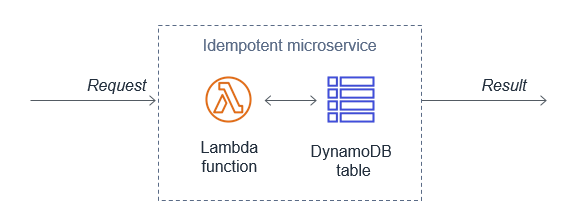

API Gateway Lambda authorizers can dynamically associate API keys to a given request. This can be used where you do not control API consumers, or want to associate API keys based on your own criteria. For more information, see the documentation.

You can also visualize usage plans with Amazon QuickSight using enriched API Gateway access logs.

Visualize usage plans with Amazon QuickSight

Visualize usage plans with Amazon QuickSight

Define whether your API consumers are end users or machines

Understanding your API consumers helps you manage how they connect to your API. This helps you define a request access pattern strategy, which can distinguish between end users or machines.

Machine consumers make automated connections to your API, which may require a different access pattern to end users. You may decide to prioritize end user consumers to provide a better experience. Machine consumers may be able to handle request throttling automatically.

Best practice: Use mechanisms to protect non-scalable resources

Limit component throughput by enforcing how many transactions it can accept

AWS Lambda functions can scale faster than traditional resources, such as relational databases and cache systems. Protect your non-scalable resources by ensuring that components that scale quickly do not exceed the throughput of downstream systems. This can prevent system performance degrading. There are a number of ways to achieve this, either directly or via buffer mechanisms such as queues and streams.

For relational databases such as Amazon RDS, you can limit the number of connections per user, in addition to the global maximum number of connections. With Amazon RDS Proxy, your applications can pool and share database connections to improve their ability to scale.

Amazon RDS Proxy

Amazon RDS Proxy

For additional options for using RDS with Lambda, see the AWS Serverless Hero blog post “How To: Manage RDS Connections from AWS Lambda Serverless Functions”.

Cache results and only connect to, and fetch data from databases when needed. This reduces the load on the downstream database. Adjust the maximum number of connections for caching systems. Include a caching expiration mechanism to prevent serving stale records. For more information on caching implementation patterns and considerations, see “Caching Best Practices”.

Lambda provides managed scaling. When a function is first invoked, the Lambda service creates an instance of the function to process the event. This is called a cold start. After completion, the function remains available for a period of time to process subsequent events. These are called warm starts. If other events arrive while the function is busy, Lambda creates more instances of the function to handle these requests concurrently as cold starts. The following example shows 10 events processed in six concurrent requests.

Lambda concurrency

Lambda concurrency

You can control the number of concurrent function invocations to both reserve and limit the maximum concurrency your function can achieve. You can configure reserved concurrency to set the maximum number of concurrent instances for the function. This can protect downstream resources such as a database by ensuring Lambda can only scale up to the number of connections the database can support.

For example, you may have a traditional database or external API that can only support a maximum of 50 concurrent connections. You can set the maximum number of concurrent Lambda functions using the function concurrency settings. Setting the value to 50 ensures that the traditional database or external API is not overwhelmed.

Edit Lambda concurrency

Edit Lambda concurrency

You can also set the Lambda function concurrency to 0, which disables the Lambda function in the event of anomalies.

Another solution to protect downstream resources is to use an intermediate buffer. A buffer can persistently store messages in a stream or queue until a receiver processes them. This helps you control how fast messages are processed, which can protect the load on downstream resources.

Amazon Kinesis Data Streams allows you to collect and process large streams of data records in real time, and can act as a buffer. Streams consist of a set of shards that contain a sequence of data records. When using Lambda to process records, it processes one batch of records at a time from each shard.

Kinesis Data Streams control concurrency at the shard level, meaning that a single shard has a single concurrent invocation. This can reduce downstream calls to non-scalable resources such as a traditional database. Kinesis Data Streams also support batch windows up to 5 minutes and batch record sizes. These can also be used to control how frequent invocations can occur.

To learn how to manage scaling with Kinesis, see the documentation. To learn more how Lambda works with Kinesis, read the blog series “Building serverless applications with streaming data”.

Lambda and Kinesis shards

Lambda and Kinesis shards

Amazon Simple Queue Service (SQS) is a fully managed serverless message queuing service that enables you to decouple and scale microservices. You can offload tasks from one component of your application by sending them to a queue and processing them asynchronously.

SQS can act as a buffer, using a Lambda function to process the messages. Lambda polls the queue and invokes your Lambda function synchronously with an event that contains queue messages. Lambda reads messages in batches and invokes your function once for each batch. When your function successfully processes a batch, Lambda deletes its messages from the queue.

You can protect downstream resources using the Lambda concurrency controls. This limits the number of concurrent Lambda functions that pull messages off the queue. The messages persist in the queue until Lambda can process them. For more information see, “Using AWS Lambda with Amazon SQS

Lambda and SQS

Lambda and SQS

Conclusion

Regulating inbound requests helps you adapt different scaling mechanisms based on customer demand. You can achieve better throughput for your workloads and make them more reliable by controlling requests to a rate that your workload can support.

In this post, I cover using, analyzing, and enforcing API quotas using usage plans and API keys. I show mechanisms to protect non-scalable resources such as using RDS Proxy to protect downstream databases. I show how to control the number of Lambda invocations using concurrency controls to protect downstream resources. I explain how you can use streams and queues as an intermediate buffer to store messages persistently until a receiver processes them.

In the next post in the series, I cover the second reliability question from the Well-Architected Serverless Lens, building resiliency into serverless applications.

For more serverless learning resources, visit Serverless Land.

Choosing a Well-Architected CI/CD approach: Open Source on AWS

Post Syndicated from Mikhail Vasilyev original https://aws.amazon.com/blogs/devops/choosing-a-well-architected-ci-cd-approach-open-source-on-aws/

Introduction

When building a CI/CD platform, it is important to make an informed decision regarding every underlying tool. This post explores evaluating the criteria for selecting each tool focusing on a balance between meeting functional and non-functional requirements, and maximizing value.

Your first decision: source code management.

Source code is potentially your most valuable asset, and so we start by choosing a source code management tool. These tools normally have high non-functional requirements in order to protect your assets and to ensure they are available to the organization when needed. The requirements usually include demand for high durability, high availability (HA), consistently high throughput, and strong security with role-based access controls.

At the same time, source code management tools normally have many specific functional requirements as well. For example, the ability to provide collaborative code review in the UI, flexible and tunable merge policies including both automated and manual gates (code checks), and out-of-box UI-level integrations with numerous other tools. These kinds of integrations can include enabling monitoring, CI, chats, and agile project management.

Many teams also treat source code management tools as their portal into other CI/CD tools. They make them shareable between teams, and might prefer to stay within one single context and user interface throughout the entire DevOps cycle. Many source code management tools are actually a stack of services that support multiple steps of your CI/CD workflows from within a single UI. This makes them an excellent starting point for building your CI/CD platforms.

The first decision your need to make is whether to go with an open source solution for managing code or with AWS-managed solutions, such as AWS CodeCommit. Open source solutions include (but are not limited to) the following: Gerrit, Gitlab, Gogs, and Phabricator.

You decision will be influenced by the amount of benefit your team can gain from the flexibility provided through open source, and how well your team can support deploying and managing these solutions. You will also need to consider the infrastructure and management overhead cost.

Engineering teams that have the capacity to develop their own plugins for their CI/CD platforms, or whom even contribute directly to open source projects, will often prefer open source solutions for the flexibility they provide. This will be especially true if they are fluent in designing and supporting their own cloud infrastructure. If the team gets more value by trading the flexibility of open source for not having to worry about managing infrastructure (especially if High Availability, Scalability, Durability, and Security are more critical) an AWS-managed solution would be a better choice.

Source Code Management Solution

When the choice is made in favor of an open-source code management solution (such as Gitlab), the next decision will be how to architect the deployment. Will the team deploy to a single instance, or design for high availability, durability, and scalability? Teams that want to design Gitlab for HA can use the following guide to proceed: Installing GitLab on Amazon Web Services (AWS)

By adopting AWS services (such as Amazon RDS, Amazon ElastiCache for Redis, and Autoscaling Groups), you can lower the management burden of supporting the underlying infrastructure in this self-managed HA scenario.

High level overview of self-managed HA Gitlab deployment

Your second decision: Continuous Integration engine

Selecting your CI engine, you might be able to benefit from additional features of previously selected solutions. Gitlab provides both source control services, as well as built-in CI tools, called Gitlab CI. Gitlab Runners are responsible for running CI jobs, and the actual jobs are described as YML files stored in Gitlab’s git repository along with product code. For security and performance reasons, GitLab Runners should be on resources separate from your GitLab instance.

You could manage those resources or you could use one of the AWS services that can support deploying and managing Runners. The use of an on-demand service removes the expense of implementing and managing a capability that is undifferentiated heavy lifting for you. This provides cost optimization and enables operational excellence. You pay for what you use and the service team manages the underlying service.

Continuous Integration engine Solution

In an architecture example (below), Gitlab Runners are deployed in containers running on Amazon EKS. The team has less infrastructure to manage, can start focusing on development faster by not having to implement the capability, and can provision resources in an optimal way for their on-demand needs.

To further optimize costs, you can use EC2 Spot Instances for your EKS nodes. CI jobs are normally compute intensive and limited in run time. The runner jobs can easily be restarted on a different resource with little impact. This makes them tolerant of failure and the use of EC2 Spot instances very appealing. Amazon EKS and Spot Instances are supported out-of-box in Gitlab. As a result there is no integration to develop, only configuration is required.

To support infrastructure as code best practices, Runners are deployed with Helm and are stored and versioned as Helm charts. All of the infrastructure as code information used to implement the CI/CD platform itself is stored in templates such as Terraform.

High level overview of Infrastructure as Code on Gitlab and Gitlab CI

High level overview of Infrastructure as Code on Gitlab and Gitlab CI

Your third decision: Container Registry

You will be unable to deploy Runners if the container images are not available. As a result, the primary non-functional requirements for your production container registry are likely to include high availability, durability, transparent scalability, and security. At the same time, your functional requirements for a container registry might be lower. It might be sufficient to have a simple UI, and simple APIs supporting basic flows. Customers looking for a managed solution can use Amazon ECR, which is OCI compliant and supports Helm Charts.

Container Registry Solution

For this set of requirements, the flexibility and feature velocity of open source tools does not provide an advantage. Self-supporting high availability and strengthened security could be costly in implementation time and long-term management. Based on [Blog post 1 Diagram 1], an AWS-managed solution provides cost advantages and has no management overhead. In this case, an AWS-managed solution is a better choice for your container registry than an open-source solution hosted on AWS. In this example, Amazon ECR is selected. Customers who prefer to go with open-source container registries might consider solutions like Harbor.

High level overview of Gitlab CI with Amazon ECR

High level overview of Gitlab CI with Amazon ECR

Additional Considerations

Now that the main services for the CI/CD platform are selected, we will take a high level look at additional important considerations. You need to make sure you have observability into both infrastructure and applications, that backup tools and policies are in place, and that security needs are addressed.

There are many mechanisms to strengthen security including the use of security groups. Use IAM for granular permission control. Robust policies can limit the exposure of your resources and control the flow of traffic. Implement policies to prevent your assets leaving your CI environment inappropriately. To protect sensitive data, such as worker secrets, encrypt these assets while in transit and at rest. Select a key management solution to reduce your operational burden and to support these activities such as AWS Key Management Service (AWS KMS). To deliver secure and compliant application changes rapidly while running operations consistently with automation, implement DevSecOps.

Amazon S3 is durable, secure, and highly available by design making it the preferred choice to store EBS-level backups by many customers. Amazon S3 satisfies the non-functional requirements for a backup store. It also supports versioning and tiered storage classes, making it a cost-effective as well.

Your observability requirements may emphasize versatility and flexibility for application-level monitoring. Using Amazon CloudWatch to monitor your infrastructure and then extending your capabilities through an open-source solutions such as Prometheus may be advantageous. You can get many of the benefits of both open-source Prometheus and AWS services with Amazon Managed Service for Prometheus (AMP). For interactive visualization of metrics, many customers choose solutions such as open-source Grafana, available as an AWS service Amazon Managed Service for Grafana (AMG).

CI/CD Platform with Gitlab and AWS

CI/CD Platform with Gitlab and AWS

Conclusion

We have covered how making informed decisions can maximize value and synergy between open-source solutions on AWS, such as Gitlab, and AWS-managed services, such as Amazon EKS and Amazon ECR. You can find the right balance of open-source tools and AWS services that will meet your functional and non-functional requirements, and help maximizing the value you get from those resources.

Pete Goldberg, Director of Partnerships at GitLab: “When aligning your development process to AWS Well Architected Framework, GitLab allows customers to build and automate processes to achieve Operational Excellence. As a single tool designed to facilitate collaboration across the organization, GitLab simplifies the process to follow the Fully Separated Operating Model where Engineering and Operations come together via automated processes that remove the historical barriers between the groups. This gives organizations the ability to efficiently and rapidly deploy new features and applications that drive the business while providing the risk mitigation and compliance they require. By allowing operations teams to define infrastructure as code in the same tool that the engineering teams are storing application code, and allowing your automation bring those together for your CI/CD workflows companies can move faster while having compliance and controls built-in, providing the entire organization greater transparency. With GitLab’s integrations with different AWS compute options (EC2, Lambda, Fargate, ECS or EKS), customers can choose the best type of compute for the job without sacrificing the controls required to maintain Operational Excellence.”


Author bio

Mikhail is a Solutions Architect for RUS-CIS. Mikhail supports customers on their cloud journeys with Well-architected best practices and adoption of DevOps techniques on AWS. Mikhail is a fan of ChatOps, Open Source on AWS and Operational Excellence design principles.

Building well-architected serverless applications: Implementing application workload security – part 1

Post Syndicated from Julian Wood original https://aws.amazon.com/blogs/compute/building-well-architected-serverless-applications-implementing-application-workload-security-part-1/

This series of blog posts uses the AWS Well-Architected Tool with the Serverless Lens to help customers build and operate applications using best practices. In each post, I address the serverless-specific questions identified by the Serverless Lens along with the recommended best practices. See the introduction post for a table of contents and explanation of the example application.

Security question SEC3: How do you implement application security in your workload?

Review and automate security practices at the application code level, and enforce security code review as part of development workflow. By implementing security at the application code level, you can protect against emerging security threats and reduce the attack surface from malicious code, including third-party dependencies.

Required practice: Review security awareness documents frequently

Stay up to date with both AWS and industry security best practices to understand and evolve protection of your workloads. Having a clear understanding of common threats helps you to mitigate them when developing your workloads.

The AWS Security Blog provides security-specific AWS content. The Open Web Application Security Project (OWASP) Top 10 is a guide for security practitioners to understand the most common application attacks and risks. The OWASP Top 10 Serverless Interpretation provides information specific to serverless applications.

Review and subscribe to vulnerability and security bulletins

Regularly review news feeds from multiple sources that are relevant to the technologies used in your workload. Subscribe to notification services to be informed of critical threats in near-real time.

The Common Vulnerabilities and Exposures (CVE) program identifies, defines, and catalogs publicly disclosed cybersecurity vulnerabilities. You can search the CVE list directly, for example “Python”.

CVE Python search

CVE Python search

The US National Vulnerability Database (NVD) allows you to search by vulnerability type, severity, and impact. You can also perform advanced searching by vendor name, product name, and version numbers. GitHub also integrates with CVE, which allows for advanced searching within the CVEproject/cvelist repository.

AWS Security Bulletins are a notification system for security and privacy events related to AWS services. Subscribe to the security bulletin RSS feed to keep up to date with AWS security announcements.

The US Cybersecurity and Infrastructure Security Agency (CISA) provides alerts about current security issues, vulnerabilities, and exploits. You can receive email alerts or subscribe to the RSS feed.

AWS Partner Network (APN) member Palo Alto Networks provides the “Serverless architectures Security Top 10” list. This is a security awareness and education guide to use while designing, developing, and testing serverless applications to help minimize security risks.

Good practice: Automatically review a workload’s code dependencies/libraries

Regularly reviewing application and code dependencies is a good industry security practice. This helps detect and prevent non-certified application code, and ensure that third-party application dependencies operate as intended.

Implement security mechanisms to verify application code and dependencies before using them

Combine automated and manual security code reviews to examine application code and its dependencies to ensure they operate as intended. Automated tools can help identify overly complex application code, and common security vulnerability exposures that are already cataloged.

Manual security code reviews, in addition to automated tools, help ensure that application code works as intended. Manual reviews can include business contextual information and integrations that automated tools may not capture.

Before adding any code dependencies to your workload, take time to review and certify each dependency to ensure that you are adding secure code. Use third-party services to review your code dependencies on every commit automatically.

OWASP has a code review guide and dependency check tool that attempt to detect publicly disclosed vulnerabilities within a project’s dependencies. The tool has a command line interface, a Maven plugin, an Ant task, and a Jenkins plugin.

GitHub has a number of security features for hosted repositories to inspect and manage code dependencies.

The dependency graph allows you to explore the packages that your repository depends on. Dependabot alerts show information about dependencies that are known to contain security vulnerabilities. You can choose whether to have pull requests generated automatically to update these dependencies. Code scanning alerts automatically scan code files to detect security vulnerabilities and coding errors.

You can enable these features by navigating to the Settings tab, and selecting Security & analysis.

GitHub configure security and analysis features

GitHub configure security and analysis features

Once Dependabot analyzes the repository, you can view the dependencies graph from the Insights tab. In the serverless airline example used in this series, you can view the Loyalty service package.json dependencies.

Serverless airline loyalty dependencies

Serverless airline loyalty dependencies

Dependabot alerts for security vulnerabilities are visible in the Security tab. You can review alerts and see information about how to resolve them.

Dependabot alert

Dependabot alert

Once Dependabot alerts are enabled for a repository, you can also view the alerts when pushing code to the repository from the terminal.

Dependabot terminal alert

Dependabot terminal alert

If you enable security updates, Dependabot can automatically create pull requests to update dependencies.

Dependabot pull requests

Dependabot pull requests

AWS Partner Network (APN) member Snyk has an integration with AWS Lambda to manage the security of your function code. Snyk determines what code and dependencies are currently deployed for Node.js, Ruby, and Java projects. It tests dependencies against their vulnerability database.

If you build your functions using container images, you can use Amazon Elastic Container Registry’s (ECR) image scanning feature. You can manually scan your images, or scan them on each push to your repository.

Elastic Container Registry image scanning example results

Elastic Container Registry image scanning example results

Best practice: Validate inbound events

Sanitize inbound events and validate them against a predefined schema. This helps prevent errors and increases your workload’s security posture by catching malformed events or events intentionally crafted to be malicious. The OWASP Input validation cheat sheet includes guidance for providing input validation security functionality in your applications.

Validate incoming HTTP requests against a schema

Implicitly trusting data from clients could lead to malformed data being processed. Use data type validators or web application frameworks to ensure data correctness. These should include regular expressions, value range, data structure, and data normalization.

You can configure Amazon API Gateway to perform basic validation of an API request before proceeding with the integration request to add another layer of security. This ensures that the HTTP request matches the desired format. Any HTTP request that does not pass validation is rejected, returning a 400 error response to the caller.

The Serverless Security Workshop has a module on API Gateway input validation based on the fictional Wild Rydes unicorn raid hailing service. The example shows a REST API endpoint where partner companies of Wild Rydes can submit unicorn customizations, such as branded capes, to advertise their company. The API endpoint should ensure that the request body follows specific patterns. These include checking the ImageURL is a valid URL, and the ID for Cape is a numeric value.

In API Gateway, a model defines the data structure of a payload, using the JSON schema draft 4. The model ensures that you receive the parameters in the format you expect. You can check them against regular expressions. The CustomizationPost model specifies that the ImageURL and Cape schemas should contain the following valid patterns:

    "imageUrl": {
      "type": "string",
      "title": "The Imageurl Schema",
      "pattern": "^https?:\/\/[-a-zA-Z0-9@:%_+.~#?&//=]+$"
    },
    "sock": {
      "type": "string",
      "title": " The Cape Schema ",
      "pattern": "^[0-9]*$"
    },
    …

The model is applied to the /customizations/post method as part of the Method Request. The Request Validator is set to Validate body and the CustomizationPost model is set for the Request Body.

API Gateway request validator

API Gateway request validator

When testing the POST /customizations API with valid parameters using the following input:

{  
   "name":"Cherry-themed unicorn",
   "imageUrl":"https://en.wikipedia.org/wiki/Cherry#/media/File:Cherry_Stella444.jpg",
   "sock": "1",
   "horn": "2",
   "glasses": "3",
   "cape": "4"
}

The result is a valid response:

{"customUnicornId":<the-id-of-the-customization>}

Testing validation to the POST /customizations API using invalid parameters shows the input validation process.

The ImageUrl is not a valid URL:

 {  
    "name":"Cherry-themed unicorn",
    "imageUrl":"htt://en.wikipedia.org/wiki/Cherry#/media/File:Cherry_Stella444.jpg",
    "sock": "1" ,
    "horn": "2" ,
    "glasses": "3",
    "cape": "4"
 }

The Cape parameter is not a number, which shows a SQL injection attempt.

 {  
    "name":"Orange-themed unicorn",
    "imageUrl":"https://en.wikipedia.org/wiki/Orange_(fruit)#/media/File:Orange-Whole-%26-Split.jpg",
    "sock": "1",
    "horn": "2",
    "glasses": "3",
    "cape":"2); INSERT INTO Cape (NAME,PRICE) VALUES ('Bad color', 10000.00"
 }

These return a 400 Bad Request response from API Gateway before invoking the Lambda function:

{"message": "Invalid request body"}

To gain further protection, consider adding an AWS Web Application Firewall (AWS WAF) access control list to your API endpoint. The workshop includes an AWS WAF module to explore three AWS WAF rules:

  • Restrict the maximum size of request body
  • SQL injection condition as part of the request URI
  • Rate-based rule to prevent an overwhelming number of requests
AWS WAF ACL

AWS WAF ACL

AWS WAF also includes support for custom responses and request header insertion to improve the user experience and security posture of your applications.

For more API Gateway security information, see the security overview whitepaper.

Also add further input validation logic to your Lambda function code itself. For examples, see “Input Validation for Serverless”.

Conclusion

Implementing application security in your workload involves reviewing and automating security practices at the application code level. By implementing code security, you can protect against emerging security threats. You can improve the security posture by checking for malicious code, including third-party dependencies.

In this post, I cover reviewing security awareness documentation such as the CVE database. I show how to use GitHub security features to inspect and manage code dependencies. I then show how to validate inbound events using API Gateway request validation.

This well-architected question will be continued where I look at securely storing, auditing, and rotating secrets that are used in your application code.

For more serverless learning resources, visit Serverless Land.

Building well-architected serverless applications: Managing application security boundaries – part 1

Post Syndicated from Julian Wood original https://aws.amazon.com/blogs/compute/building-well-architected-serverless-applications-managing-application-security-boundaries-part-1/

This series of blog posts uses the AWS Well-Architected Tool with the Serverless Lens to help customers build and operate applications using best practices. In each post, I address the serverless-specific questions identified by the Serverless Lens along with the recommended best practices. See the introduction post for a table of contents and explanation of the example application.

Security question SEC2: How do you manage your serverless application’s security boundaries?

Defining and securing your serverless application’s boundaries ensures isolation for, within, and between components.

Required practice: Evaluate and define resource policies

Resource policies are AWS Identity and Access Management (IAM) statements. They are attached to resources such as an Amazon S3 bucket, or an Amazon API Gateway REST API resource or method. The policies define what identities have fine-grained access to the resource. To see which services support resource-based policies, see “AWS Services That Work with IAM”. For more information on how resource policies and identity policies are evaluated, see “Identity-Based Policies and Resource-Based Policies”.

Understand and determine which resource policies are necessary

Resource policies can protect a component by restricting inbound access to managed services. Use resource policies to restrict access to your component based on a number of identities, such as the source IP address/range, function event source, version, alias, or queues. Resource policies are evaluated and enforced at IAM level before each AWS service applies it’s own authorization mechanisms, when available. For example, IAM resource policies for API Gateway REST APIs can deny access to an API before an AWS Lambda authorizer is called.

If you use multiple AWS accounts, you can use AWS Organizations to manage and govern individual member accounts centrally. Certain resource policies can be applied at the organizations level, providing guardrail for what actions AWS accounts within the organization root or OU can do. For more information see, “Understanding how AWS Organization Service Control Policies work”.

Review your existing policies and how they’re configured, paying close attention to how permissive individual policies are. Your resource policies should only permit necessary callers.

Implement resource policies to prevent unauthorized access

For Lambda, use resource-based policies to provide fine-grained access to what AWS IAM identities and event sources can invoke a specific version or alias of your function. Resource-based policies can also be used to control access to Lambda layers. You can combine resource policies with Lambda event sources. For example, if API Gateway invokes Lambda, you can restrict the policy to the API Gateway ID, HTTP method, and path of the request.

In the serverless airline example used in this series, the IngestLoyalty service uses a Lambda function that subscribes to an Amazon Simple Notification Service (Amazon SNS) topic. The Lambda function resource policy allows SNS to invoke the Lambda function.

Lambda resource policy document

Lambda resource policy document

API Gateway resource-based policies can restrict API access to specific Amazon Virtual Private Cloud (VPC), VPC endpoint, source IP address/range, AWS account, or AWS IAM users.

Amazon Simple Queue Service (SQS) resource-based policies provide fine-grained access to certain AWS services and AWS IAM identities (users, roles, accounts). Amazon SNS resource-based policies restrict authenticated and non-authenticated actions to topics.

Amazon DynamoDB resource-based policies provide fine-grained access to tables and indexes. Amazon EventBridge resource-based policies restrict AWS identities to send and receive events including to specific event buses.

For Amazon S3, use bucket policies to grant permission to your Amazon S3 resources.

The AWS re:Invent session Best practices for growing a serverless application includes further suggestions on enforcing security best practices.

Best practices for growing a serverless application

Best practices for growing a serverless application

Good practice: Control network traffic at all layers

Apply controls for controlling both inbound and outbound traffic, including data loss prevention. Define requirements that help you protect your networks and protect against exfiltration.

Use networking controls to enforce access patterns

API Gateway and AWS AppSync have support for AWS Web Application Firewall (AWS WAF) which helps protect web applications and APIs from attacks. AWS WAF enables you to configure a set of rules called a web access control list (web ACL). These allow you to block, or count web requests based on customizable web security rules and conditions that you define. These can include specified IP address ranges, CIDR blocks, specific countries, or Regions. You can also block requests that contain malicious SQL code, or requests that contain malicious script. For more information, see How AWS WAF Works.

private API endpoint is an API Gateway interface VPC endpoint that can only be accessed from your Amazon Virtual Private Cloud (Amazon VPC). This is an elastic network interface that you create in a VPC. Traffic to your private API uses secure connections and does not leave the Amazon network, it is isolated from the public internet. For more information, see “Creating a private API in Amazon API Gateway”.

To restrict access to your private API to specific VPCs and VPC endpoints, you must add conditions to your API’s resource policy. For example policies, see the documentation.

By default, Lambda runs your functions in a secure Lambda-owned VPC that is not connected to your account’s default VPC. Functions can access anything available on the public internet. This includes other AWS services, HTTPS endpoints for APIs, or services and endpoints outside AWS. The function cannot directly connect to your private resources inside of your VPC.

You can configure a Lambda function to connect to private subnets in a VPC in your account. When a Lambda function is configured to use a VPC, the Lambda function still runs inside the Lambda service VPC. The function then sends all network traffic through your VPC and abides by your VPC’s network controls. Functions deployed to virtual private networks must consider network access to restrict resource access.

AWS Lambda service VPC with VPC-to-VPT NAT to customer VPC

AWS Lambda service VPC with VPC-to-VPT NAT to customer VPC

When you connect a function to a VPC in your account, the function cannot access the internet, unless the VPC provides access. To give your function access to the internet, route outbound traffic to a NAT gateway in a public subnet. The NAT gateway has a public IP address and can connect to the internet through the VPC’s internet gateway. For more information, see “How do I give internet access to my Lambda function in a VPC?”. Connecting a function to a public subnet doesn’t give it internet access or a public IP address.

You can control the VPC settings for your Lambda functions using AWS IAM condition keys. For example, you can require that all functions in your organization are connected to a VPC. You can also specify the subnets and security groups that the function’s users can and can’t use.

Unsolicited inbound traffic to a Lambda function isn’t permitted by default. There is no direct network access to the execution environment where your functions run. When connected to a VPC, function outbound traffic comes from your own network address space.

You can use security groups, which act as a virtual firewall to control outbound traffic for functions connected to a VPC. Use security groups to permit your Lambda function to communicate with other AWS resources. For example, a security group can allow the function to connect to an Amazon ElastiCache cluster.

To filter or block access to certain locations, use VPC routing tables to configure routing to different networking appliances. Use network ACLs to block access to CIDR IP ranges or ports, if necessary. For more information about the differences between security groups and network ACLs, see “Compare security groups and network ACLs.”

In addition to API Gateway private endpoints, several AWS services offer VPC endpoints, including Lambda. You can use VPC endpoints to connect to AWS services from within a VPC without an internet gateway, NAT device, VPN connection, or AWS Direct Connect connection.

Using tools to audit your traffic

When you configure a Lambda function to use a VPC, or use private API endpoints, you can use VPC Flow Logs to audit your traffic. VPC Flow Logs allow you to capture information about the IP traffic going to and from network interfaces in your VPC. Flow log data can be published to Amazon CloudWatch Logs or S3 to see where traffic is being sent to at a granular level. Here are some flow log record examples. For more information, see “Learn from your VPC Flow Logs”.

Block network access when required

In addition to security groups and network ACLs, third-party tools allow you to disable outgoing VPC internet traffic. These can also be configured to allow traffic to AWS services or allow-listed services.

Conclusion

Managing your serverless application’s security boundaries ensures isolation for, within, and between components. In this post, I cover how to evaluate and define resource policies, showing what policies are available for various serverless services. I show some of the features of AWS WAF to protect APIs. Then I review how to control network traffic at all layers. I explain how Lambda functions connect to VPCs, and how to use private APIs and VPC endpoints. I walk through how to audit your traffic.

This well-architected question will be continued where I look at using temporary credentials between resources and components. I cover why smaller, single purpose functions are better from a security perspective, and how to audit permissions. I show how to use AWS Serverless Application Model (AWS SAM) to create per-function IAM roles.

For more serverless learning resources, visit https://serverlessland.com.

Choosing a Well-Architected CI/CD approach: Open-source software and AWS Services

Post Syndicated from Brian Carlson original https://aws.amazon.com/blogs/devops/choosing-well-architected-ci-cd-open-source-software-aws-services/

This series of posts discusses making informed decisions when choosing to implement open-source tools on AWS services, adopt managed AWS services to satisfy the same needs, or use a combination of both.

We look at key considerations for evaluating open-source software and AWS services using the perspectives of a startup company and a mature company as examples. You can use these two different points of view to compare to your own organization. To make this investigation easier we will use Continuous Integration (CI) and Continuous Delivery (CD) capabilities as the target of our investigation.

Startup Company rocket and Mature Company rocket

In two related posts, we follow two AWS customers, Iponweb and BigHat Biosciences, as they share their CI/CD journeys, their perspectives, the decisions they made, and why. To end the series, we explore an example reference architecture showing the benefits AWS provides regardless of your emphasis on open-source tools or managed AWS services.

Why CI/CD?

Until your creations are in the hands of your customers, investment in development has provided no return. The faster valuable changes enter production, the greater positive impact you can have on your customer. In today’s highly competitive world, the ability to frequently and consistently deliver value is a competitive advantage. The Operational Excellence (OE) pillar of the AWS Well-Architected Framework recognizes this impact and focuses on the capabilities of CI/CD in two dedicated sections.

The concepts in CI/CD originate from software engineering but apply equally to any form of content. The goal is to support development, integration, testing, deployment, and delivery to production. For example, making changes to an application, updating your machine learning (ML) models, changing your multimedia assets, or referring to the AWS Well-Architected Framework.

Adopting CI/CD and the best practices from the Operational Excellence pillar can help you address risks in your environment, and limit errors from manual processes. More importantly, they help free your teams from the related manual processes, so they can focus on satisfying customer needs, differentiating your organization, and accelerating the flow of valuable changes into production.

A red question mark sits on a field of chaotically arranged black question marks.

How do you decide what you need?

The first question in the Operational Excellence pillar is about understanding needs and making informed decisions. To help you frame your own decision-making process, we explore key considerations from the perspective of a fictional startup company and a fictional mature company. In our two related posts, we explore these same considerations with Iponweb and BigHat.

The key considerations include:

  • Functional requirements – Providing specific features and capabilities that deliver value to your customers.
  • Non-functional requirements – Enabling the safe, effective, and efficient delivery of the functional requirements. Non-functional requirements include security, reliability, performance, and cost requirements.
    • Without security, you can’t earn customer trust. If your customers can’t trust you, you won’t have customers.
    • Without reliability you aren’t available to serve your customers. If you can’t serve your customers, you won’t have customers.
    • Performance is focused on timely and efficient delivery of value, not delivering as fast as possible.
    • Cost is focused on optimizing the value received for the resources spent (for example, money, time, or effort), not minimizing expense.
  • Operational requirements – Enabling you to effectively and efficiently support, maintain, sustain, and improve the delivery of value to your customers. When you “Design with Ops in Mind,” you’re enabling effective and efficient support for your business outcomes.

These non-feature-related key considerations are why Operational Excellence, Security, Reliability, Performance Efficiency, and Cost Optimization are the five pillars of the AWS Well-Architected Framework.

The startup company

Any startup begins as a small team of inspired people working together to realize the unique solution they believe solves an unsolved problem.

For our fictional small team, everyone knows each other personally and all speak frequently. We share processes and procedures in discussions, and everyone know what needs to be done. Our team members bring their expertise and dedicate it, and the majority of their work time, to delivering our solution. The results of our efforts inform changes we make to support our next iteration.

However, our manual activities are error-prone and inconsistencies exist in the way we do them. Performing these tasks takes time away from delivering our solution. When errors occur, they have the potential to disrupt everyone’s progress.

We have capital available to make some investments. We would prefer to bring in more team members who can contribute directly to developing our solution. We need to iterate faster if we are to achieve a broadly viable product in time to qualify for our next round of funding. We need to decide what investments to make.

  • Goals – Reach the next milestone and secure funding to continue development
  • Needs – Reduce or eliminate the manual processes and associated errors
  • Priority – Rapid iteration
  • CI/CD emphasis – Baseline CI/CD capabilities and non-functional requirements are emphasized over a rich feature set

The mature company

Our second fictional company is a large and mature organization operating in a mature market segment. We’re focused on consistent, quality customer experiences to serve and retain our customers.

Our size limits the personal relationships between our service and development teams. The process to make requests, and the interfaces between teams and their systems, are well documented and understood.

However, the systems we have implemented over time, as needs were identified and addressed, aren’t well documented. Our existing tool chain includes some in-house scripting and both supported and unsupported versions of open-source tools. There are limited opportunities for us to acquire new customers.

When conditions change and new features are desired, we want to be able to rapidly implement and deploy those features as fast as possible. If we can differentiate our services, however briefly, we may be able to win customers away from our competitors. Our other path to improved profitability is to evolve our processes, maximizing integration and efficiencies, and capturing cost reductions.

  • Goals – Differentiate ourselves in the marketplace with desired new features
  • Needs – Address the risks of poorly documented systems and unsupported software
  • Priority – Evolve efficiency
  • CI/CD emphasis – Rich feature set and integrations are emphasized over improving the existing non-functional capabilities

Open-source tools on AWS vs. AWS services

The choice of open-source tools or AWS service is not binary. You can select the combination of solutions that provides the greatest value. You can implement open-source tools for their specific benefits where they outweigh the costs and operational burden, using underlying AWS services like Amazon Elastic Compute Cloud (Amazon EC2) to host them. You can then use AWS managed services, like AWS CodeBuild, for the undifferentiated features you need, without additional cost or operational burden.

A group of people sit around a table discussing the pieces of a puzzle and their ideas.

Feature Set

Our fictional organizations both want to accelerate the flow of beneficial changes into production and are evaluating CI/CD alternatives to support that outcome. Our startup company wants a working solution—basic capabilities, author/code, build, and deploy, so that they can focus on development. Our mature company is seeking every advantage—a rich feature set, extensive opportunities for customization, integration capabilities, and fine-grained control.

Open-source tools

Open-source tools often excel at meeting functional requirements. When a new functionality, capability, or integration is desired, any developer can implement it for themselves, and then contribute their code back to the project. As the user community for an open-source project expands the number of use cases and the features identified grows, so does the number of potential solutions and potential contributors. Developers are using these tools to support their efforts and implement new features that provide value to them.

However, features may be released in unsupported versions and then later added to the supported feature set. Non-functional requirements take time and are less appealing because they don’t typically bring immediate value to the product. Non-functional capabilities may lag behind the feature set.

Consider the following:

  • Open-source tools may have more features and existing integrations to other tools
  • The pace of feature set delivery may be extremely rapid
  • The features delivered are those desired and created by the active members of the community
  • You are free to implement the features your company desires
  • There is no commitment to long-term support for the project or any given feature
  • You can implement open-source tools on multiple cloud providers or on premises
  • If the project is abandoned, you’re responsible for maintaining your implementation

AWS services

AWS services are driven by customer needs. Services and features are supported by dedicated teams. These customer-obsessed teams focus on all customer needs, with security being their top priority. Both functional and non-functional requirements are addressed with an emphasis on enabling customer outcomes while minimizing the effort they expend to achieve them.

Consider the following:

  • The pace of delivery of feature sets is consistent
  • The feature roadmap is driven by customer need and customer requests
  • The AWS service team is dedicated to support of the service
  • AWS services are available on the AWS Cloud and on premises through AWS Outposts

Picture showing symbol of dollar

Cost Optimization

Why are we discussing cost after the feature set? Security and reliability are fundamentally more important. Leadership naturally gravitates to following the operational excellence best practice of evaluating trade-offs. Having looked at the potential benefits from the feature set, the next question is typically, “What is this going to cost?” Leadership defines the priorities and allocates the resources necessary (capital, time, effort). We review cost optimization second so that leadership can make a comparison of the expected benefits between CI/CD investments, and investments in other efforts, so they can make an informed decision.

Our organizations are both cost conscious. Our startup is working with finite capital and time. In contrast, our mature company can plan to make investments over time and budget for the needed capital. Early investment in a robust and feature-rich CI/CD tool chain could provide significant advantages towards the startup’s long-term success, but if the startup fails early, the value of that investment will never be realized. The mature company can afford to realize the value of their investment over time and can make targeted investments to address specific short-term needs.

Open-source tools

Open-source software doesn’t have to be purchased, but there are costs to adopt. Open-source tools require appropriate skills in order to be implemented, and to perform management and maintenance activities. Those skills must be gained through dedicated training of team members, team member self-study, or by hiring new team members with the existing skills. The availability of skilled practitioners of open-source tools varies with how popular a tool is and how long it has had an active community. Loss of skilled team members includes the loss of their institutional knowledge and intimacy with the implementation. Skills must be maintained with changes to the tools and as team members join or leave. Time is required from skilled team members to support management and maintenance activities. If commercial support for the tool is desired, it may be available through third-parties at an additional cost.

The time to value of an open-source implementation includes the time to implement and configure the resources and software. Additional value may be realized through investment of time configuring or implementing desired integrations and capabilities. There may be existing community-supported integrations or capabilities that reduce the level of effort to achieve these.

Consider the following:

  • No cost to acquire the software.
  • The availability of skill practitioners of open-source tools may be lower. Cost (capital and time) to acquire, establish, or maintain skill set may be higher.
  • There is an ongoing cost to maintain the team member skills necessary to support the open-source tools.
  • There is an ongoing cost of time for team members to perform management and maintenance activities.
  • Additional commercial support for open-source tools may be available at additional cost
  • Time to value includes implementation and configuration of resources and the open-source software. There may be more predefined community integrations.

AWS services

AWS services are provided pay-as-you-go with no required upfront costs. As of August 2020, more than 400,000 individuals hold active AWS Certifications, a number that grew more than 85% between August 2019 and August 2020.

Time to value for AWS services is extremely short and limited to the time to instantiate or configure the service for your use. Additional value may be realized through the investment of time configuring or implementing desired integrations. Predefined integrations for AWS services are added as part of the service development roadmap. However, there may be fewer existing integrations to reduce your level of effort.

Consider the following:

  • No cost to acquire the software; AWS services are pay-as-you-go for use.
  • AWS skill sets are broadly available. Cost (capital and time) to acquire, establish, or maintain skill sets may be lower.
  • AWS services are fully managed, and service teams are responsible for the operation of the services.
  • Time to value is limited to the time to instantiate or configure the service. There may be fewer predefined integrations.
  • Additional support for AWS services is available through AWS Support. Cost for support varies based on level of support and your AWS utilization.

Open-source tools on AWS services

Open-source tools on AWS services don’t impact these cost considerations. Migration off of either of these solutions is similarly not differentiated. In either case, you have to invest time in replacing the integrations and customizations you wish to maintain.

Picture showing a checkmark put on security

Security

Both organizations are concerned about reputation and customer trust. They both want to act to protect their information systems and are focusing on confidentiality and integrity of data. They both take security very seriously. Our startup wants to be secure by default and wants to trust the vendor to address vulnerabilities within the service. Our mature company has dedicated resources that focus on security, and the company practices defense in depth across internal organizations.

The startup and the mature company both want to know whether a choice is safe, secure, and can validate the security of their choice. They also want to understand their responsibilities and the shared responsibility model that applies.

Open-source tools

Open-source tools are the product of the contributors and may contain flaws or vulnerabilities. The entire community has access to the code to test and validate. There are frequently many eyes evaluating the security of the tools. A company or individual may perform a validation for themselves. However, there may be limited guidance on secure configurations. Controls in the implementer’s environment may reduce potential risk.

Consider the following:

  • You’re responsible for the security of the open-source software you implement
  • You control the security of your data within your open-source implementation
  • You can validate the security of the code and act as desired

AWS services

AWS service teams make security their highest priority and are able to respond rapidly when flaws are identified. There is robust guidance provided to support configuring AWS services securely.

Consider the following:

  • AWS is responsible for the security of the cloud and the underlying services
  • You are responsible for the security of your data in the cloud and how you configure AWS services
  • You must rely on the AWS service team to validate the security of the code

Open-source tools on AWS services

Open-source tools on AWS services combine these considerations; the customer is responsible for the open-source implementation and the configuration of the AWS services it consumes. AWS is responsible for the security of the AWS Cloud and the managed AWS services.

Picture showing global distribution for redundancy to depict reliability

Reliability

Everyone wants reliable capabilities. What varies between companies is their appetite for risk, and how much they can tolerate the impact of non-availability. The startup emphasized the need for their systems to be available to support their rapid iterations. The mature company is operating with some existing reliability risks, including unsupported open-source tools and in-house scripts.

The startup and the mature company both want to understand the expected reliability of a choice, meaning what percentage of the time it is expected to be available. They both want to know if a choice is designed for high availability and will remain available even if a portion of the systems fails or is in a degraded state. They both want to understand the durability of their data, how to perform backups of their data, and how to perform recovery in the event of a failure.

Both companies need to determine what is an acceptable outage duration, commonly referred to as a Recovery Time Objective (RTO), and for what quantity of elapsed time it is acceptable to lose transactions (including committing changes), commonly referred to as Recovery Point Objective (RPO). They need to evaluate if they can achieve their RTO and RPO objectives with each of the choices they are considering.

Open-source tools

Open-source reliability is dependent upon the effectiveness of the company’s implementation, the underlying resources supporting the implementation, and the reliability of the open-source software. Open-source tools are the product of the contributors and may or may not incorporate high availability features. Depending on the implementation and tool, there may be a requirement for downtime for specific management or maintenance activities. The ability to support RTO and RPO depends on the teams supporting the company system, the implementation, and the mechanisms implemented for backup and recovery.

Consider the following:

  • You are responsible for implementing your open-source software to satisfy your reliability needs and high availability needs
  • Open-source tools may have downtime requirements to support specific management or maintenance activities
  • You are responsible for defining, implementing, and testing the backup and recovery mechanisms and procedures
  • You are responsible for the satisfaction of your RTO and RPO in the event of a failure of your open-source system

AWS services

AWS services are designed to support customer availability needs. As managed services, the service teams are responsible for maintaining the health of the services.

Consider the following:

Open-source tools on AWS services

Open-source tools on AWS services combine these considerations; the customer is responsible for the open-source implementation (including data durability, backup, and recovery) and the configuration of the AWS services it consumes. AWS is responsible for the health of the AWS Cloud and the managed services.

Picture showing a graph depicting performance measurement

Performance

What defines timely and efficient delivery of value varies between our two companies. Each is looking for results before an engineer becomes idled by having to wait for results. The startup iterates rapidly based on the results of each prior iteration. There is limited other activity for our startup engineer to perform before they have to wait on actionable results. Our mature company is more likely to have an outstanding backlog or improvements that can be acted upon while changes moves through the pipeline.

Open-source tools

Open-source performance is defined by the resources upon which it is deployed. Open-source tools that can scale out can dynamically improve their performance when resource constrained. Performance can also be improved by scaling up, which is required when performance is constrained by resources and scaling out isn’t supported. The performance of open-source tools may be constrained by characteristics of how they were implemented in code or the libraries they use. If this is the case, the code is available for community or implementer-created improvements to address the limitation.

Consider the following:

  • You are responsible for managing the performance of your open-source tools
  • The performance of open-source tools may be constrained by the resources they are implemented upon; the code and libraries used; their system, resource, and software configuration; and the code and libraries present within the tools

AWS services

AWS services are designed to be highly scalable. CodeCommit has a highly scalable architecture, and CodeBuild scales up and down dynamically to meet your build volume. CodePipeline allows you to run actions in parallel in order to increase your workflow speeds.

Consider the following:

  • AWS services are fully managed, and service teams are responsible for the performance of the services.
  • AWS services are designed to scale automatically.
  • Your configuration of the services you consume can affect the performance of those services.
  • AWS services quotas exist to prevent unexpected costs. You can make changes to service quotas that may affect performance and costs.

Open-source tools on AWS services

Open-source tools on AWS services combine these considerations; the customer is responsible for the open-source implementation (including the selection and configuration of the AWS Cloud resources) and the configuration of the AWS services it consumes. AWS is responsible for the performance of the AWS Cloud and the managed AWS services.

Picture showing cart-wheels in motion, depicting operations

Operations

Our startup company wants to limit its operations burden as much as possible in order to focus on development efforts. Our mature company has an established and robust operations capability. In both cases, they perform the management and maintenance activities necessary to support their needs.

Open-source tools

Open-source tools are supported by their volunteer communities. That support is voluntary, without any obligation or commitment from the users. If either company adopts open-source tools, they’re responsible for the management and maintenance of the system. If they want additional support with an obligation and commitment to support their implementation, third parties may provide commercial support at additional cost.

Consider the following:

  • You are responsible for supporting your implementation.
  • The open-source community may provide volunteer support for the software.
  • There is no commitment to support the software by the open-source community.
  • There may be less documentation, or accepted best practices, available to support open-source tools.
  • Early adoption of open-source tools, or the use of development builds, includes the chance of encountering unidentified edge cases and unanticipated issues.
  • The complexity of an implementation and its integrations may increase the difficulty to support open-source tools. The time to identify contributing factors may be extended by the complexity during an incident. Maintaining a set of skilled team members with deep understanding of your implementation may help mitigate this risk.
  • You may be able to acquire commercial support through a third party.

AWS services

AWS services are committed to providing long-term support for their customers.

Consider the following:

  • There is long-term commitment from AWS to support the service
  • As a managed service, the service team maintains current documentation
  • Additional levels of support are available through AWS Support
  • Support for AWS is available through partners and third parties

Open-source tools on AWS services

Open-source tools on AWS services combine these considerations. The company is responsible for operating the open-source tools (for example, software configuration changes, updates, patching, and responding to faults). AWS is responsible for the operation of the AWS Cloud and the managed AWS services.

Conclusion

In this post, we discussed how to make informed decisions when choosing to implement open-source tools on AWS services, adopt managed AWS services, or use a combination of both. To do so, you must examine your organization and evaluate the benefits and risks.

A magnifying glass is focused on the single red figure in a group of otherwise blue paper figures standing on a white surface.

Examine your organization

You can make an informed decision about the capabilities you adopt. The insight you need can be gained by examining your organization to identify your goals, needs, and priorities, and discovering what your current emphasis is. Ask the following questions:

  • What is your organization trying to accomplish and why?
  • How large is your organization and how is it structured?
  • How are roles and responsibilities distributed across teams?
  • How well defined and understood are your processes and procedures?
  • How do you manage development, testing, delivery, and deployment today?
  • What are the major challenges your organization faces?
  • What are the challenges you face managing development?
  • What problems are you trying to solve with CI/CD tools?
  • What do you want to achieve with CI/CD tools?

Evaluate benefits and risk

Armed with that knowledge, the next step is to explore the trade-offs between open-source options and managed AWS services. Then evaluate the benefits and risks in terms of the key considerations:

  • Features
  • Cost
  • Security
  • Reliability
  • Performance
  • Operations

When asked “What is the correct answer?” the answer should never be “It depends.” We need to change the question to “What is our use case and what are our needs?” The answer will emerge from there.

Make an informed decision

A Well-Architected solution can include open-source tools, AWS Services, or any combination of both! A Well-Architected choice is an informed decision that evaluates trade-offs, balances benefits and risks, satisfies your requirements, and most importantly supports the achievement of your business outcomes.

Read the other posts in this series and take this journey with BigHat Biosciences and Iponweb as they share their perspectives, the decisions they made, and why.

Resources

Want to learn more? Check out the following CI/CD and developer tools on AWS:

Continuous integration (CI)
Continuous delivery (CD)
AWS Developer Tools

For more information about the AWS Well-Architected Framework, refer to the following whitepapers:

AWS Well-Architected Framework
AWS Well-Architected Operational Excellence pillar
AWS Well-Architected Security pillar
AWS Well-Architected Reliability pillar
AWS Well-Architected Performance Efficiency pillar
AWS Well-Architected Cost Optimization pillar

The 3 hexagons of the well architected logo appear to the right of the words AWS Well-Architected.

Author bio

portrait photo of Brian Carlson Brian is the global Operational Excellence lead for the AWS Well-Architected program. Formerly the technical lead for an international network, Brian works with customers and partners researching the operations best practices with the greatest positive impact and produces guidance to help you achieve your goals.