Tag Archives: Uncategorized

Friday Squid Blogging: Live Giant Squid Found in Japan

Post Syndicated from Bruce Schneier original https://www.schneier.com/blog/archives/2021/02/friday-squid-blogging-live-giant-squid-found-in-japan.html

A giant squid was found alive in the port of Izumo, Japan. Not a lot of news, just this Twitter thread (with a couple of videos).

If confirmed, I believe this will be the THIRD time EVER a giant squid was filmed alive!

As usual, you can also use this squid post to talk about the security stories in the news that I haven’t covered.

Read my blog posting guidelines here.

Presidential Cybersecurity and Pelotons

Post Syndicated from Bruce Schneier original https://www.schneier.com/blog/archives/2021/02/presidential-cybersecurity-and-pelotons.html

President Biden wants his Peloton in the White House. For those who have missed the hype, it’s an Internet-connected stationary bicycle. It has a screen, a camera, and a microphone. You can take live classes online, work out with your friends, or join the exercise social network. And all of that is a security risk, especially if you are the president of the United States.

Any computer brings with it the risk of hacking. This is true of our computers and phones, and it’s also true about all of the Internet-of-Things devices that are increasingly part of our lives. These large and small appliances, cars, medical devices, toys and — yes — exercise machines are all computers at their core, and they’re all just as vulnerable. Presidents face special risks when it comes to the IoT, but Biden has the NSA to help him handle them.

Not everyone is so lucky, and the rest of us need something more structural.

US presidents have long tussled with their security advisers over tech. The NSA often customizes devices, but that means eliminating features. In 2010, President Barack Obama complained that his presidential BlackBerry device was “no fun” because only ten people were allowed to contact him on it. In 2013, security prevented him from getting an iPhone. When he finally got an upgrade to his BlackBerry in 2016, he complained that his new “secure” phone couldn’t take pictures, send texts, or play music. His “hardened” iPad to read daily intelligence briefings was presumably similarly handicapped. We don’t know what the NSA did to these devices, but they certainly modified the software and physically removed the cameras and microphones — and possibly the wireless Internet connection.

President Donald Trump resisted efforts to secure his phones. We don’t know the details, only that they were regularly replaced, with the government effectively treating them as burner phones.

The risks are serious. We know that the Russians and the Chinese were eavesdropping on Trump’s phones. Hackers can remotely turn on microphones and cameras, listening in on conversations. They can grab copies of any documents on the device. They can also use those devices to further infiltrate government networks, maybe even jumping onto classified networks that the devices connect to. If the devices have physical capabilities, those can be hacked as well. In 2007, the wireless features of Vice President Richard B. Cheney’s pacemaker were disabled out of fears that it could be hacked to assassinate him. In 1999, the NSA banned Furbies from its offices, mistakenly believing that they could listen and learn.

Physically removing features and components works, but the results are increasingly unacceptable. The NSA could take Biden’s Peloton and rip out the camera, microphone, and Internet connection, and that would make it secure — but then it would just be a normal (albeit expensive) stationary bike. Maybe Biden wouldn’t accept that, and he’d demand that the NSA do even more work to customize and secure the Peloton part of the bicycle. Maybe Biden’s security agents could isolate his Peloton in a specially shielded room where it couldn’t infect other computers, and warn him not to discuss national security in its presence.

This might work, but it certainly doesn’t scale. As president, Biden can direct substantial resources to solving his cybersecurity problems. The real issue is what everyone else should do. The president of the United States is a singular espionage target, but so are members of his staff and other administration officials.

Members of Congress are targets, as are governors and mayors, police officers and judges, CEOs and directors of human rights organizations, nuclear power plant operators, and election officials. All of these people have smartphones, tablets, and laptops. Many have Internet-connected cars and appliances, vacuums, bikes, and doorbells. Every one of those devices is a potential security risk, and all of those people are potential national security targets. But none of those people will get their Internet-connected devices customized by the NSA.

That is the real cybersecurity issue. Internet connectivity brings with it features we like. In our cars, it means real-time navigation, entertainment options, automatic diagnostics, and more. In a Peloton, it means everything that makes it more than a stationary bike. In a pacemaker, it means continuous monitoring by your doctor — and possibly your life saved as a result. In an iPhone or iPad, it means…well, everything. We can search for older, non-networked versions of some of these devices, or the NSA can disable connectivity for the privileged few of us. But the result is the same: in Obama’s words, “no fun.”

And unconnected options are increasingly hard to find. In 2016, I tried to find a new car that didn’t come with Internet connectivity, but I had to give up: there were no options to omit that in the class of car I wanted. Similarly, it’s getting harder to find major appliances without a wireless connection. As the price of connectivity continues to drop, more and more things will only be available Internet-enabled.

Internet security is national security — not because the president is personally vulnerable but because we are all part of a single network. Depending on who we are and what we do, we will make different trade-offs between security and fun. But we all deserve better options.

Regulations that force manufacturers to provide better security for all of us are the only way to do that. We need minimum security standards for computers of all kinds. We need transparency laws that give all of us, from the president on down, sufficient information to make our own security trade-offs. And we need liability laws that hold companies liable when they misrepresent the security of their products and services.

I’m not worried about Biden. He and his staff will figure out how to balance his exercise needs with the national security needs of the country. Sometimes the solutions are weirdly customized, such as the anti-eavesdropping tent that Obama used while traveling. I am much more worried about the political activists, journalists, human rights workers, and oppressed minorities around the world who don’t have the money or expertise to secure their technology, or the information that would give them the ability to make informed decisions on which technologies to choose.

This essay previously appeared in the Washington Post.

Testing EC2 Image Builder pipelines using Chef InSpec

Post Syndicated from Martin Yip original https://aws.amazon.com/blogs/compute/testing-ec2-image-builder-pipelines-using-chef-inspec/

This post was written by Anoop Rachamadugu – AWS Cloud Architect.

The EC2 Image Builder service helps users to build and maintain server images to use with Amazon EC2 and on-premises using automated build pipelines. As new images are created by the pipelines, you can configure automated tests to validate the image, before distributing it to your production workloads. You can use a combination of AWS-provided tests and custom tests that you have authored yourself to validate the image.

In this blog post, I walk through how you can test an EC2 Image Builder pipeline using Chef InSpec. Chef InSpec is an open-source framework for testing and auditing your applications and infrastructure. Chef InSpec works by comparing the actual state of your system with the desired state that you write in Chef InSpec code. Chef InSpec then generates the findings in a report. I configure the image builder pipeline to either progress or fail based on the results of the report.

Overview

The solution in this blog comprises of an EC2 Image Builder document that is completed during the test stage of an Image Builder pipeline. This document downloads the Chef InSpec installer from Amazon S3 and installs it. It then downloads the test cases from Amazon S3 and performs the tests. After running the test cases, it returns the exit code of the process and uploads the test report to Amazon S3. The Image Builder pipeline either progresses or fails based on the value of the exit code.

I use Windows Server 2016 as the target operating system. The Chef InSpec installer and test cases are already uploaded to Amazon S3 for this walk through. The following image represents this flow.

Image Builder Testing Activities

Prerequisites

To get started with this solution, you need the following:

  • Download the Chef InSpec installer and upload it to a S3 bucket. I use version 4.23.4 of the installer for Windows Server 2016
  • An EC2 Image Builder pipeline with an IAM role configured that provides permissions for the following functions:
    • Download the Chef InSpec installer and test cases from an S3 bucket
    • Upload the test results to an S3 bucket
  • The solution consists of two files, which can be downloaded from the amazon-ec2-image-builder Github repository

Chef InSpec test cases

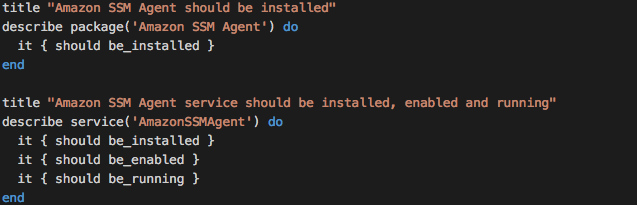
For the purpose of this blog, I use the “inspec-test-cases.rb” file that contains the test cases to complete on the server. With the following code, I am testing to determine if the AWS Systems Manager Agent (SSM Agent) is installed on the server and the service is in a running state.

This “inspec-test-cases.rb” file is already uploaded to an Amazon S3 bucket. The S3 bucket location is later referenced in the Chef InSpec document.

Creating the Chef InSpec document

The EC2 Image Builder document is carried out during the test stage of an Image Builder pipeline. The first section of the inspec-test-windows-component.yml document specifies the name and description to describe the document’s purpose and a schemaVersion.

The first step is to create a working directory on the server. You do this by using the CreateFolder command.

Then, use the S3Download command to download the installer from Amazon S3 and store it in the InSpec working directory created in the previous step. Replace <S3_PATH_TO_INSPEC_INSTALLER.MSI> with the location where the InSpec installer resides on Amazon S3.

After downloading the installer, use the ExecutePowerShell action to install InSpec on the server.

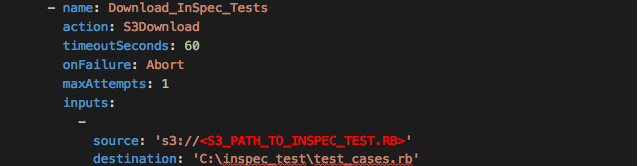
After installing InSpec on the server, download the InSpec test cases “inspec-test-cases.rb” from Amazon S3 using the S3Download action to the working directory. Replace <S3_PATH_TO_INSPEC_TEST.RB> with the location where the InSpec tests resides on Amazon S3.

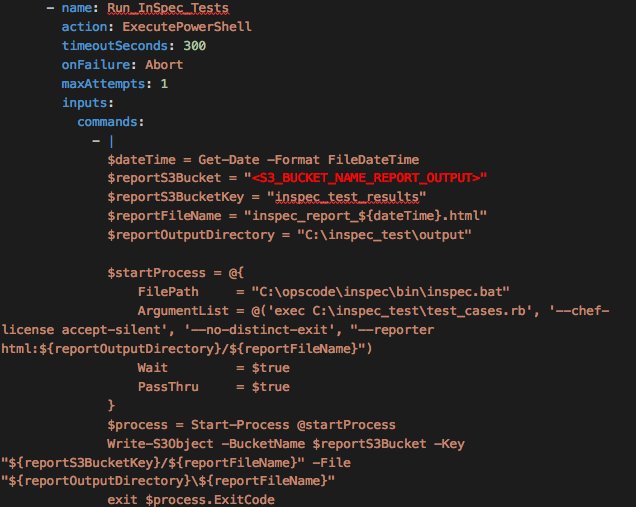
After completing those steps, you have installed InSpec and downloaded the test cases on the server. The final step of the document is to perform the tests. You do this using the ExecutePowerShell command. First, launch InSpec as a process and accept the chef license agreement.

The InSpec report generates as an HTML file and then uploads to Amazon S3. Replace <S3_BUCKET_NAME_REPORT_OUTPUT> with the name of the Amazon S3 bucket where the report should be uploaded to. The final step involves returning the exit code from the InSpec process. The image builder pipeline either progresses further or fails based on the return code.

Now, I create a document that downloads the Chef InSpec, completes test cases, and uploads the results to Amazon S3.

Next, I use this document to create a component in Image Builder and select the test component in the image recipe. The image recipe can then be used when creating an image pipeline. The blog post Automate OS Image Build Pipelines with EC2 Image Builder provides a tutorial demonstrating how to create an image pipeline with the EC2 Image Builder console. For more information, review Getting started with EC2 Image Builder.

After the successful completion of the image builder pipeline, the InSpec test report can be downloaded from the Amazon S3 location specified in the document. Here’s a sample output of the test results where all the InSpec tests have passed.

RSpec Code Examples

Conclusion

In this blog post, I walked through how you can test an image builder pipeline using  InSpec to determine if the Amazon SSM Agent is installed and running on the server. I reviewed the steps in the document to install and run InSpec on the server. I also note the sample InSpec tests that are run on the server and the report generated.

The amazon-ec2-image-builder-samples GitHub repository provides a number of examples for getting started with EC2 Image Builder. AWS continues to use this repository for publishing sample content. We hope Image Builder is providing value and making it easier for you to build virtual machine (VM) images.

Configuring private integrations with Amazon API Gateway HTTP APIs

Post Syndicated from Eric Johnson original https://aws.amazon.com/blogs/compute/configuring-private-integrations-with-amazon-api-gateway-http-apis/

This post was written by Michael Hume – AWS Solutions Architect Public Sector UKIR.

Customers often want to use Amazon API Gateway REST APIs to send requests to private resources. This feature is useful for building secure architectures using Amazon EC2 instances or container-based services on Amazon ECS or Amazon EKS, which reside within a VPC.

Private integration is possible for REST APIs by using Network Load Balancers (NLB). However, there may be a requirement for private integration with an Application Load Balancer (ALB) or AWS Cloud Map. This capability is built into Amazon API Gateway HTTP APIs, providing customers with three target options and greater flexibility.

You can configure HTTP APIs with a private integration as the front door or entry point to an application. This enables HTTPS resources within an Amazon VPC to be accessed by clients outside of the VPC. This architecture also provides an application with additional HTTP API features such as throttling, cross-origin resource sharing (CORS), and authorization. These features are then managed by the service instead of an application.

HTTP APIs and Application Load Balancers

In the following architecture, an HTTP APIs endpoint is deployed between the client and private backend resources.

HTTP APIs to ALB example

HTTP APIs to ALB example

A VPC link encapsulates connections between API Gateway and targeted VPC resources. HTTP APIs private integration methods only allow access via a VPC link to private subnets. When a VPC link is created, API Gateway creates and manages the elastic network interfaces in a user account. VPC links are shared across different routes and APIs.

Application Load Balancers can support containerized applications. This allows ECS to select an unused port when scheduling a task and then registers that task with a target group and port. For private integrations, an internal load balancer routes a request to targets using private IP addresses to resources that reside within private subnets. As the Application Load Balancer receives a request from an HTTP APIs endpoint, it looks up the listener rule to identify a protocol and port. A target group then forwards requests to an Amazon ECS cluster, with resources on underlying EC2 instances. Targets are added and removed automatically as traffic to an application changes over time. This increases the availability of an application and provides efficient use of an ECS cluster.

Configuration with an ALB

To configure a private integration with an Application Load Balancer.

  1. Create an HTTP APIs endpoint, choose a route and method, and attach an integration to a route using a private resource.

    Attach integration to route

    Attach integration to route

  2. Provide a target service to send the request to an ALB/NLB.

    Integration details

    Integration details

  3. Add both the load balancer and listener’s Amazon Resource Names (ARNs), together with a VPC link.

    Load balancer settings

    Load balancer settings

HTTP APIs and AWS Cloud Map

Modern applications connect to a broader range of resources. This can become complex to manage as network locations dynamically change based on automatic scaling, versioning, and service disruptions. Its challenging, as each service must quickly find the infrastructure location of the resources it needs. Efficient service discovery of any dynamically changing resources is important for application availability.

If an application scales to hundreds or even thousands of services, then a load balancer may not be appropriate. In this case, HTTP APIs private integration with AWS Cloud Map maybe a better choice. AWS Cloud Map is a resource discovery service that provides a dynamic map of the cloud. It does this by registering application resources such as databases, queues, microservices, and other resources with custom names.

For server-side service discovery, if an application uses a load balancer, it must know the load balancer’s endpoint. This endpoint is used as a proxy, which adds additional latency. As AWS Cloud Map provides client-side service discovery, you can replace the load balancer with a service registry. Now, connections are routed directly to backend resources, instead of being proxied. This involves fewer components, making deployments safer and with less management, and reducing complexity.

Configuration with AWS Cloud Map

HTTP APIs to AWS CloudMap example

HTTP APIs to AWS CloudMap example

In this architecture, the Amazon ECS service has been configured to use Amazon ECS Service Discovery. Service discovery uses the AWS Cloud Map API and Amazon Route 53 to create a namespace. This is a logical name for a group of services. It also creates a service, which is a logical group of resources or instances. In this example, it’s a group of ECS clusters. This allows the service to be discoverable via DNS. These resources work together, to provide a service.

Service discovery configuration

Service discovery configuration

To configure a private integration with AWS Cloud Map:

  1. Create an HTTP API, choose a route and method, and attach an integration to a route using a private resource. This is as shown previously for an Application Load Balancer.
  2. Provide a target service to send requests to resources registered with AWS Cloud Map.

    Target service configuration

    Target service configuration

  3. Add both the namespace, service and VPC link.

    Namespace and VPC configuration

    Namespace and VPC configuration

Deployment

To build the solution in this blog, see the AWS CloudFormation templates in the GitHub repository and, the instructions in the README.md file.

Conclusion

This post discusses the benefits of using API Gateway’s HTTP APIs to access private resources that reside within a VPC, and how HTTP APIs provides three different private integration targets for different use cases.

If a load balancer is required, the application operates at layer 7 (HTTP, HTTPS), requires flexible application management and registering of AWS Lambda functions as targets, then use an Application Load Balancer. However, if the application operates at layer 4 (TCP, UDP, TLS), uses non-HTTP protocols, requires extreme performance and a static IP, then use a Network Load Balancer.

As HTTP APIs private integration methods to both an ALB and NLB only allow access via a VPC link. This enhances security, as resources are isolated within private subnets with no direct access from the internet.

If a service does not need a load balancer, then HTTP APIs provide further private integration flexibility with AWS Cloud Map, which automatically registers resources in a service registry. AWS Cloud Map enables filtering by providing attributes when service discovery is enabled. These can then be used as HTTP APIs integration settings to specify query parameters and filter specific resources.

For more information, watch Happy Little APIs (S2E1): Private integrations with HTTP API.

Another SolarWinds Orion Hack

Post Syndicated from Bruce Schneier original https://www.schneier.com/blog/archives/2021/02/another-solarwinds-orion-hack.html

At the same time the Russians were using a backdoored SolarWinds update to attack networks worldwide, another threat actor — believed to be Chinese in origin — was using an already existing vulnerability in Orion to penetrate networks:

Two people briefed on the case said FBI investigators recently found that the National Finance Center, a federal payroll agency inside the U.S. Department of Agriculture, was among the affected organizations, raising fears that data on thousands of government employees may have been compromised.

[…]

Reuters was not able to establish how many organizations were compromised by the suspected Chinese operation. The sources, who spoke on condition of anonymity to discuss ongoing investigations, said the attackers used computer infrastructure and hacking tools previously deployed by state-backed Chinese cyberspies.

[…]

While the alleged Russian hackers penetrated deep into SolarWinds network and hid a “back door” in Orion software updates which were then sent to customers, the suspected Chinese group exploited a separate bug in Orion’s code to help spread across networks they had already compromised, the sources said.

Two takeaways: One, we are learning about a lot of supply-chain attacks right now. Two, SolarWinds’ terrible security is the result of a conscious business decision to reduce costs in the name of short-term profits. Economist Matt Stoller writes about this:

These private equity-owned software firms torture professionals with bad user experiences and shitty customer support in everything from yoga studio software to car dealer IT to the nightmarish ‘core’ software that runs small banks and credit unions, as close as one gets to automating Office Space. But they also degrade product quality by firing or disrespecting good workers, under-investing in good security practices, or sending work abroad and paying badly, meaning their products are more prone to espionage. In other words, the same sloppy and corrupt practices that allowed this massive cybersecurity hack made Bravo a billionaire. In a sense, this hack, and many more like it, will continue to happen, as long as men like Bravo get rich creating security vulnerabilities for bad actors to exploit.

SolarWinds increased its profits by increasing its cybersecurity risk, and then transferred that risk to its customers without their knowledge or consent.

More SolarWinds News

Post Syndicated from Bruce Schneier original https://www.schneier.com/blog/archives/2021/02/more-solarwinds-news.html

Microsoft analyzed details of the SolarWinds attack:

Microsoft and FireEye only detected the Sunburst or Solorigate malware in December, but Crowdstrike reported this month that another related piece of malware, Sunspot, was deployed in September 2019, at the time hackers breached SolarWinds’ internal network. Other related malware includes Teardrop aka Raindrop.

Details are in the Microsoft blog:

We have published our in-depth analysis of the Solorigate backdoor malware (also referred to as SUNBURST by FireEye), the compromised DLL that was deployed on networks as part of SolarWinds products, that allowed attackers to gain backdoor access to affected devices. We have also detailed the hands-on-keyboard techniques that attackers employed on compromised endpoints using a powerful second-stage payload, one of several custom Cobalt Strike loaders, including the loader dubbed TEARDROP by FireEye and a variant named Raindrop by Symantec.

One missing link in the complex Solorigate attack chain is the handover from the Solorigate DLL backdoor to the Cobalt Strike loader. Our investigations show that the attackers went out of their way to ensure that these two components are separated as much as possible to evade detection. This blog provides details about this handover based on a limited number of cases where this process occurred. To uncover these cases, we used the powerful, cross-domain optics of Microsoft 365 Defender to gain visibility across the entire attack chain in one complete and consolidated view.

This is all important, because MalwareBytes was penetrated through Office 365, and not SolarWinds. New estimates are that 30% of the SolarWinds victims didn’t use SolarWinds:

Many of the attacks gained initial footholds by password spraying to compromise individual email accounts at targeted organizations. Once the attackers had that initial foothold, they used a variety of complex privilege escalation and authentication attacks to exploit flaws in Microsoft’s cloud services. Another of the Advanced Persistent Threat (APT)’s targets, security firm CrowdStrike, said the attacker tried unsuccessfully to read its email by leveraging a compromised account of a Microsoft reseller the firm had worked with.

On attribution: Earlier this month, the US government has stated the attack is “likely Russian in origin.” This echos what then Secretary of State Mike Pompeo said in December, and the Washington Post‘s reporting (both from December). (The New York Times has repeated this attribution — a good article that also discusses the magnitude of the attack.) More evidence comes from code forensics, which links it to Turla, another Russian threat actor.

And lastly, a long ProPublica story on an unused piece of government-developed tech that might have caught the supply-chain attack much earlier:

The in-toto system requires software vendors to map out their process for assembling computer code that will be sent to customers, and it records what’s done at each step along the way. It then verifies electronically that no hacker has inserted something in between steps. Immediately before installation, a pre-installed tool automatically runs a final check to make sure that what the customer received matches the final product the software vendor generated for delivery, confirming that it wasn’t tampered with in transit.

I don’t want to hype this defense too much without knowing a lot more, but I like the approach of verifying the software build process.

Georgia’s Ballot-Marking Devices

Post Syndicated from Bruce Schneier original https://www.schneier.com/blog/archives/2021/02/georgias-ballot-marking-devices.html

Andrew Appel discusses Georgia’s voting machines, how the paper ballots facilitated a recount, and the problem with automatic ballot-marking devices:

Suppose the polling-place optical scanners had been hacked (enough to change the outcome). Then this would have been detected in the audit, and (in principle) Georgia would have been able to recover by doing a full recount. That’s what we mean when we say optical-scan voting machines have “strong software independence”­you can obtain a trustworthy result even if you’re not sure about the software in the machine on election day.

If Georgia had still been using the paperless touchscreen DRE voting machines that they used from 2003 to 2019, then there would have been no paper ballots to recount, and no way to disprove the allegations that the election was hacked. That would have been a nightmare scenario. I’ll bet that Secretary of State Raffensperger now appreciates why the Federal Court forced him to stop using those DRE machines (Curling v. Raffensperger, Case 1:17-cv-02989-AT Document 579).

I have long advocated voter-verifiable paper ballots, and this is an example of why.

Building Multi-partner integration on AWS using Event-Driven Architecture

Post Syndicated from Vivek Kant original https://aws.amazon.com/blogs/architecture/building-multi-partner-integration-on-aws-using-event-driven-architecture/

Summary

Finserv MARKETS enables customers to buy financial services products such as credit cards, loans, insurance, and investments from various partners. Finserv integrates with a large number of partners in real time to provide services to customers.

Each partner has their own semantic APIs which can pose a challenge. There are also issues of latency and failures. We’ll show how our solution based on Event Driven Architecture (EDA) on AWS with Reactive design offers a solution to address these challenges.

Challenges with multi-partner integration

  • Latency – Making API calls to multiple partners increases latency of a service even in the scenario in which the calls are made in parallel.
  • Timeouts – If a partner’s APIs time out, this could impact overall service performance and availability.
  • Failures – A partner API failure could lead to the failure or major performance degradation of the overall service.
  • Customer Experience – Preserving the customer experience when depending on partner integration is a challenge, considering these technical issues.

Conceptual solution

In order to build this multi-partner platform, we discussed using traditional command-driven synchronous architecture. We also considered adopting an Event-Driven Architecture (EDA). Building our solution on EDA enabled us to deliver consistent customer experience while addressing failures and performance issues from partner APIs.

The diagram following shows a conceptual view of the solution:

Event Driven Conceptual view

Figure 1 – Conceptual View of Our Solution

The key components of the solution are:

1. User Interface: It is the single page application running on the user’s browser. For example, the UI makes an API call to business services to calculate insurance premiums with required parameters and receives a unique identifier. This enables the UI to be reactive and display the responses from the partner as they arrive.

2. Business Service: A microservice which provides APIs for:

• The user interface to submit and generate events for request for partner offer

• A callback to submit the response from the partner integration service in a reactive manner

3. Event Bus: The event bus infrastructure enables transportation, routing, and delivery of events to the right services. The business service raises a set of events to the event bus for a quote request. There is one event for each partner that is listened to by the reactive services.

4. Reactive Services: Services that consume events and call partner integration services for the calling partner API. On receiving the partner response, it calls the callback API on the business service. These services are organized by product domain (for example Motor Insurance).

5. Partner Integration Service: This service is responsible for integration with partners. The service translates the canonical request to partner-specific API calls. The service implements partner-specific security and error handling. There is one partner integration service per partner.

Realizing this solution on AWS

Amazon Web Services (AWS) offers cloud-native services enabling us to realize this solution.

Event Driven Architecture

Figure 2 – Realizing our solution on AWS

We used the following services to implement this architecture:

User Interface
We built the load balancing interface in Angular and host it on Apache Web Servers running Amazon Elastic Container Service (Amazon ECS). Elastic Load Balancing (ELB) distributes traffic evenly across the containers. Running a container gives us the required flexibility and scalability needed.

Business Service
The business service is a microservice built using Spring Boot and running on Amazon ECS containers. It uses an ELB used for service load balancing. The choice of Spring Boot and Amazon ECS gives flexibility and scalability through cluster auto scaling.

Data Store
We use polyglot architecture for data storage. For different product journeys and depending on data lifecycle, we choose either Amazon Aurora Postgres or Amazon ElastiCache for Redis. This gives us the right mix of performance and required durability for each business use case.

Event Bus
We evaluated Amazon Kinesis and Amazon Simple Notification Service (Amazon SNS) and came to the conclusion that for our volume and use cases, Amazon SNS offers the right capability. We implemented this by defining topics, for example, a four-wheeler insurance quote. This topic is subscribed by reactive services for each partner integration, where the partner service is called and a quote is generated. For downstream functionality where the API is to be called of the selected partner (for example, insurance policy issuance or credit card application submission), we chose Amazon Simple Queue Service (SQS). Amazon SQS provides simple queuing for asynchronous processing.

Reactive Services
These services are built using two different technologies. Spring Boot microservice running in an Amazon ECS container and AWS Lambda functions. Spring Boot is chosen due to our team’s familiarity of this technology; however, our plan is to move completely towards usage of Lambda functions for all asynchronous reactive services.

Partner Integration Service
Partner integration services provides the abstraction layer between partner API and canonical API, and is called by reactive services synchronously. In some cases, the error is passed back to reactive service to decide on retry. In other cases, for example, a policy issuance API retry is built into this service using exponential backoff strategy.

Partner API tracking
Partner API tracking gives us the right way of tracking the partner request and proactively address failures. We use Amazon Elasticsearch Service and Kibana for tracking. We can implement a circuit breaker pattern to shut down any partner for a period of time should failures reach a given threshold.

How this solution addresses multi-partner integration

This solution is built on the foundation of Event Driven Architecture with reactive design and is able to address the following challenges:

Latency
Since the user interface asynchronously polls for the response, it receives the partner response as soon as it arrives. This makes the response latency on the fastest partner API rather than slowest.

Timeout
Timeouts are set in the UI for polling, so if a partner API doesn’t respond, we time it out without any degradation. These timeouts are set based on the established user experience benchmarks. For example, how long do we let a user wait to see all insurance quotes before degrading their experience?

Failures
In case of an API failure, the UI will time out. Our API tracking can also enable a circuit breaker pattern to take a partner offline in the event of persistent failures.

Customer Experience
The solution gives a consistent experience to the user. Users can make their choice from the partner quotes/offers in a reactive way as received, rather than waiting for all offers to be shown. This design meets our customer requirements, derived from our Voice of Customer (VoC) study sessions.

Conclusion

In the digital space, APIs are the most common mechanism for system integration. Building a solution that is scalable, resilient, and provides the best customer experience is challenging. Event Driven Architecture with Reactive design offers a solution to address these issues. We process over 5000+ requests every day in Insurance and Credit domains. We’ve been able to achieve required availability of over 99.9%, while maintaining a positive customer experience on this platform.

Friday Squid Blogging: Squids Don’t Like Pile-Driving Noises

Post Syndicated from Bruce Schneier original https://www.schneier.com/blog/archives/2021/01/friday-squid-blogging-squids-dont-like-pile-driving-noises.html

New research:

Pile driving occurs during construction of marine platforms, including offshore windfarms, producing intense sounds that can adversely affect marine animals. We quantified how a commercially and economically important squid (Doryteuthis pealeii: Lesueur 1821) responded to pile driving sounds recorded from a windfarm installation within this species’ habitat. Fifteen-minute portions of these sounds were played to 16 individual squid. A subset of animals (n = 11) received a second exposure after a 24-h rest period. Body pattern changes, inking, jetting, and startle responses were observed and nearly all squid exhibited at least one response. These responses occurred primarily during the first 8 impulses and diminished quickly, indicating potential rapid, short-term habituation. Similar response rates were seen 24-h later, suggesting squid re-sensitized to the noise. Increased tolerance of anti-predatory alarm responses may alter squids’ ability to deter and evade predators. Noise exposure may also disrupt normal intraspecific communication and ecologically relevant responses to sound.

Press release.

As usual, you can also use this squid post to talk about the security stories in the news that I haven’t covered.

Read my blog posting guidelines here.

Including Hackers in NATO Wargames

Post Syndicated from Bruce Schneier original https://www.schneier.com/blog/archives/2021/01/including-hackers-in-nato-wargames.html

This essay makes the point that actual computer hackers would be a useful addition to NATO wargames:

The international information security community is filled with smart people who are not in a military structure, many of whom would be excited to pose as independent actors in any upcoming wargames. Including them would increase the reality of the game and the skills of the soldiers building and training on these networks. Hackers and cyberwar experts would demonstrate how industrial control systems such as power supply for refrigeration and temperature monitoring in vaccine production facilities are critical infrastructure; they’re easy targets and should be among NATO’s priorities at the moment.

Diversity of thought leads to better solutions. We in the information security community strongly support the involvement of acknowledged nonmilitary experts in the development and testing of future cyberwar scenarios. We are confident that independent experts, many of whom see sharing their skills as public service, would view participation in these cybergames as a challenge and an honor.

New iMessage Security Features

Post Syndicated from Bruce Schneier original https://www.schneier.com/blog/archives/2021/01/new-imessage-security-features.html

Apple has added added security features to mitigate the risk of zero-click iMessage attacks.

Apple did not document the changes but Groß said he fiddled around with the newest iOS 14 and found that Apple shipped a “significant refactoring of iMessage processing” that severely cripples the usual ways exploits are chained together for zero-click attacks.

Groß notes that memory corruption based zero-click exploits typically require exploitation of multiple vulnerabilities to create exploit chains. In most observed attacks, these could include a memory corruption vulnerability, reachable without user interaction and ideally without triggering any user notifications; a way to break ASLR remotely; a way to turn the vulnerability into remote code execution;; and a way to break out of any sandbox, typically by exploiting a separate vulnerability in another operating system component (e.g. a userspace service or the kernel).

Police Have Disrupted the Emotet Botnet

Post Syndicated from Bruce Schneier original https://www.schneier.com/blog/archives/2021/01/police-have-disrupted-the-emotet-botnet.html

A coordinated effort has captured the command-and-control servers of the Emotet botnet:

Emotet establishes a backdoor onto Windows computer systems via automated phishing emails that distribute Word documents compromised with malware. Subjects of emails and documents in Emotet campaigns are regularly altered to provide the best chance of luring victims into opening emails and installing malware ­ regular themes include invoices, shipping notices and information about COVID-19.

Those behind the Emotet lease their army of infected machines out to other cyber criminals as a gateway for additional malware attacks, including remote access tools (RATs) and ransomware.

[…]

A week of action by law enforcement agencies around the world gained control of Emotet’s infrastructure of hundreds of servers around the world and disrupted it from the inside.

Machines infected by Emotet are now directed to infrastructure controlled by law enforcement, meaning cyber criminals can no longer exploit machines compromised and the malware can no longer spread to new targets, something which will cause significant disruption to cyber-criminal operations.

[…]

The Emotet takedown is the result of over two years of coordinated work by law enforcement operations around the world, including the Dutch National Police, Germany’s Federal Crime Police, France’s National Police, the Lithuanian Criminal Police Bureau, the Royal Canadian Mounted Police, the US Federal Bureau of Investigation, the UK’s National Crime Agency, and the National Police of Ukraine.

Dutch Insider Attack on COVID-19 Data

Post Syndicated from Bruce Schneier original https://www.schneier.com/blog/archives/2021/01/dutch-insider-attack-on-covid-19-data.html

Insider data theft:

Dutch police have arrested two individuals on Friday for allegedly selling data from the Dutch health ministry’s COVID-19 systems on the criminal underground.

[…]

According to Verlaan, the two suspects worked in DDG call centers, where they had access to official Dutch government COVID-19 systems and databases.

They were working from home:

“Because people are working from home, they can easily take photos of their screens. This is one of the issues when your administrative staff is working from home,” Victor Gevers, Chair of the Dutch Institute for Vulnerability Disclosure, told ZDNet in an interview today.

All of this remote call-center work brings with it additional risks.

Building a Jenkins Pipeline with AWS SAM

Post Syndicated from Eric Johnson original https://aws.amazon.com/blogs/compute/building-a-jenkins-pipeline-with-aws-sam/

This post is courtesy of Tarun Kumar Mall, SDE at AWS.

This post shows how to set up a multi-stage pipeline on a Jenkins host for a serverless application, using the AWS Serverless Application Model (AWS SAM).

Overview

This tutorial uses Jenkins Pipeline plugin. A commit to the main branch of the repository starts and deploys the application, using the AWS SAM CLI. This tutorial deploys a small serverless API application called HelloWorldApi.

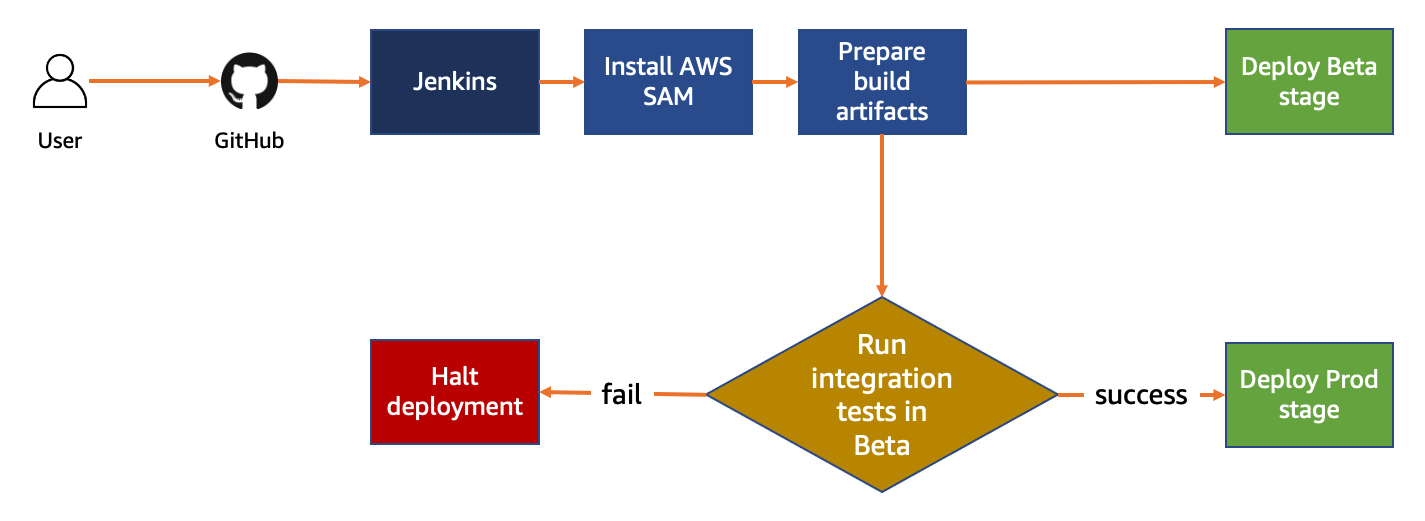
The pipeline consists of stages to build and deploy the application. Jenkins first ensures that the build environment is set up and installs any necessary tools. Next, Jenkins prepares the build artifacts. It promotes the artifacts to the next stage, where they are deployed to a beta environment using the AWS SAM CLI. Integration tests are run after deployment. If the tests pass, the application is deployed to the production environment.

CICD workflow diagram

CICD workflow diagram

The following prerequisites are required:

Setting up the backend application and development stack

Using AWS CloudFormation to define the infrastructure, you can create multiple environments or stacks from the same infrastructure definition. A “dev stack” is a copy of production infrastructure deployed to a developer account for testing purposes.

As serverless services use a pay-for-value model, it can be cost effective to use a high-fidelity copy of your production stack. Dev stacks are created by each developer as needed and deleted without having any negative impact on production.

For complex applications, it may not be feasible for every developer to have their own stack. However, for this tutorial, setting up the dev stack first for testing is recommended. Setting up a dev stack takes you through a manual process of how a stack is created. Later, this process is used to automate the setup using Jenkins.

To create a dev stack:

  1. Clone backend application repository https://github.com/aws-samples/aws-sam-jenkins-pipeline-tutorial
    git clone https://github.com/aws-samples/aws-sam-jenkins-pipeline-tutorial.git
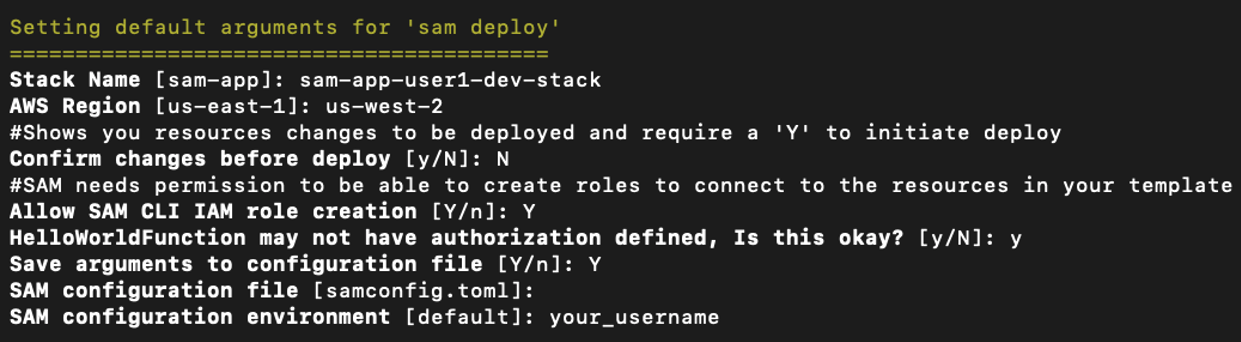
  2. Build the application and run the guided deploy command:
    cd aws-sam-jenkins-pipeline-tutorial
    sam build
    sam deploy --guided

    AWS SAM guided deploy output

    AWS SAM guided deploy output

This sets up a development stack and saves the settings in the samconfig.toml file with configuration environment specific to a user. This also triggers a deployment.

  1. After deployment, make a small code change. For example, in the file hello-world/app.js change the message Hello world to Hello world from user <your name>.
  2. Deploy the updated code:
    sam build
    sam deploy -–config-env <your_username>

With this command, each developer can create their own configuration environment. They can use this for deploying to their development stack and testing changes before pushing changes to the repository.

Once deployment finishes, the API endpoint is displayed in the console output. You can use this endpoint to make GET requests and test the API manually.

Deployment output

Deployment output

To update and run the integration test:

  1. Open the hello-world/tests/integ/test-integ-api.js file.
  2. Update the assert statement in line 32 to include <your name> from the previous step:
    it("verifies if response contains my username", async () => {
      assert.include(apiResponse.data.message, "<your name>");
    });
  3. Open package.json and add the line in bold:
    {
      ...
      "scripts": {
        "test": "mocha tests/unit/",
        "integ-test": "mocha tests/integ/"
      }
      ...
    }
  4. From the terminal, run the following commands:
    cd hello-world
    npm install
    AWS_REGION=us-west-2 STACK_NAME=sam-app-user1-dev-stack npm run integ-test
    If you are using Microsoft Windows, instead run:
    cd hello-world
    npm install
    set AWS_REGION=us-west-2
    set STACK_NAME=sam-app-user1-dev-stack
    npm run integ-test

    Test results

    Test results

You have deployed a fully configured development stack with working integration tests. To push the code to GitHub:

  1. Create a new repository in GitHub.
    1. From the GitHub account homepage, choose New.
    2. Enter a repository name and choose Create Repository.
    3. Copy the repository URL.
  2. From the root directory of the AWS SAM project, run:
    git init
    git commit -am “first commit”
    git remote add origin <your-repository-url>
    git push -u origin main

Creating an IAM user for Jenkins

To create an IAM user for the Jenkins deployment:

  1. Sign in to the AWS Management Console and navigate to IAM.
  2. Select Users from side navigation and choose Add user.
  3. Enter the User name as sam-jenkins-demo-credentials and grant Programmatic access to this user.
  4. On the next page, select Attach existing policies directly and choose Create Policy.
  5. Select the JSON tab and enter the following policy. Replace <YOUR_ACCOUNT_ID> with your AWS account ID:
    {
        "Version": "2012-10-17",
        "Statement": [
            {
                "Sid": "CloudFormationTemplate",
                "Effect": "Allow",
                "Action": [
                    "cloudformation:CreateChangeSet"
                ],
                "Resource": [
                    "arn:aws:cloudformation:*:aws:transform/Serverless-2016-10-31"
                ]
            },
            {
                "Sid": "CloudFormationStack",
                "Effect": "Allow",
                "Action": [
                    "cloudformation:CreateChangeSet",
                    "cloudformation:DeleteStack",
                    "cloudformation:DescribeChangeSet",
                    "cloudformation:DescribeStackEvents",
                    "cloudformation:DescribeStacks",
                    "cloudformation:ExecuteChangeSet",
                    "cloudformation:GetTemplateSummary"
                ],
                "Resource": [
                    "arn:aws:cloudformation:*:<YOUR_ACCOUNT_ID>:stack/*"
                ]
            },
            {
                "Sid": "S3",
                "Effect": "Allow",
                "Action": [
                    "s3:CreateBucket",
                    "s3:GetObject",
                    "s3:PutObject"
                ],
                "Resource": [
                    "arn:aws:s3:::*/*"
                ]
            },
            {
                "Sid": "Lambda",
                "Effect": "Allow",
                "Action": [
                    "lambda:AddPermission",
                    "lambda:CreateFunction",
                    "lambda:DeleteFunction",
                    "lambda:GetFunction",
                    "lambda:GetFunctionConfiguration",
                    "lambda:ListTags",
                    "lambda:RemovePermission",
                    "lambda:TagResource",
                    "lambda:UntagResource",
                    "lambda:UpdateFunctionCode",
                    "lambda:UpdateFunctionConfiguration"
                ],
                "Resource": [
                    "arn:aws:lambda:*:<YOUR_ACCOUNT_ID>:function:*"
                ]
            },
            {
                "Sid": "IAM",
                "Effect": "Allow",
                "Action": [
                    "iam:AttachRolePolicy",
                    "iam:CreateRole",
                    "iam:DeleteRole",
                    "iam:DetachRolePolicy",
                    "iam:GetRole",
                    "iam:PassRole",
                    "iam:TagRole"
                ],
                "Resource": [
                    "arn:aws:iam::<YOUR_ACCOUNT_ID>:role/*"
                ]
            },
            {
                "Sid": "APIGateway",
                "Effect": "Allow",
                "Action": [
                    "apigateway:DELETE",
                    "apigateway:GET",
                    "apigateway:PATCH",
                    "apigateway:POST",
                    "apigateway:PUT"
                ],
                "Resource": [
                    "arn:aws:apigateway:*::*"
                ]
            }
        ]
    }
  6. Choose Review Policy and add a policy name on the next page.
  7. Choose Create Policy button.
  8. Return to the previous tab to continue creating the IAM user. Choose Refresh and search for the policy name you created. Select the policy.
  9. Choose Next Tags and then Review.
  10. Choose Create user and save the Access key ID and Secret access key.

Configuring Jenkins

To configure AWS credentials in Jenkins:

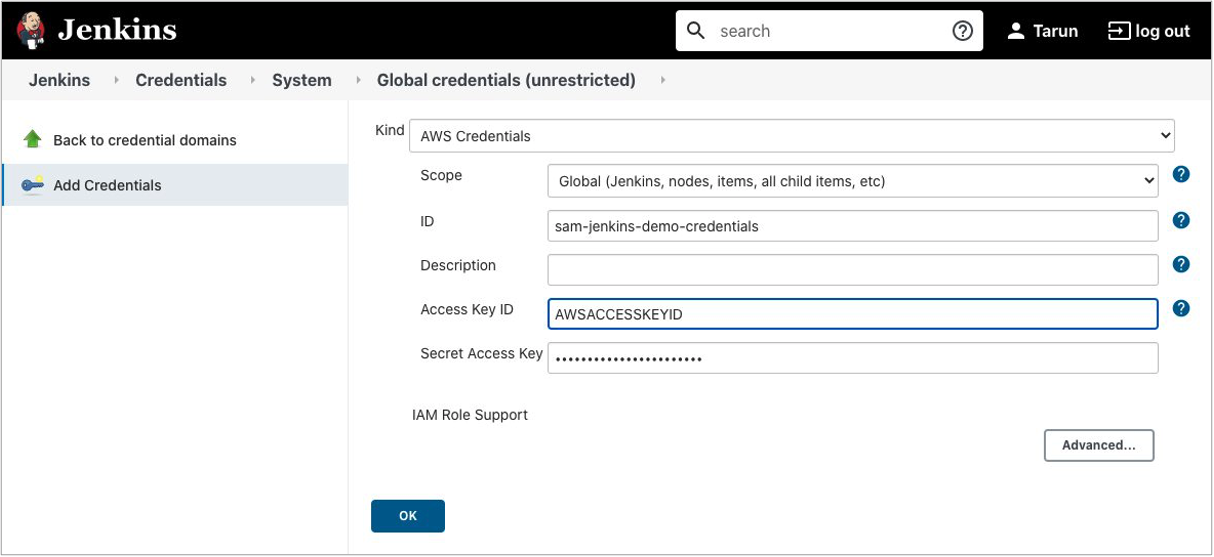
  1. On the Jenkins dashboard, go to Manage Jenkins > Manage Plugins in the Available tab. Search for the Pipeline: AWS Steps plugin and choose Install without restart.
  2. Navigate to Manage Jenkins > Manage Credentials > Jenkins (global) > Global Credentials > Add Credentials.
  3. Select Kind as AWS credentials and use the ID sam-jenkins-demo-credentials.
  4. Enter the access key ID and secret access key and choose OK.

    Jenkins credential configuration

    Jenkins credential configuration

  5. Create Amazon S3 buckets for each Region in the pipeline. S3 bucket names must be unique within a partition:
    aws s3 mb s3://sam-jenkins-demo-us-west-2-<your_name> --region us-west-2
    aws s3 mb s3://sam-jenkins-demo-us-east-1-<your_name> --region us-east-1
  6. Create a file named Jenkinsfile at the root of the project and add:
    pipeline {
      agent any
     
      stages {
        stage('Install sam-cli') {
          steps {
            sh 'python3 -m venv venv && venv/bin/pip install aws-sam-cli'
            stash includes: '**/venv/**/*', name: 'venv'
          }
        }
        stage('Build') {
          steps {
            unstash 'venv'
            sh 'venv/bin/sam build'
            stash includes: '**/.aws-sam/**/*', name: 'aws-sam'
          }
        }
        stage('beta') {
          environment {
            STACK_NAME = 'sam-app-beta-stage'
            S3_BUCKET = 'sam-jenkins-demo-us-west-2-user1'
          }
          steps {
            withAWS(credentials: 'sam-jenkins-demo-credentials', region: 'us-west-2') {
              unstash 'venv'
              unstash 'aws-sam'
              sh 'venv/bin/sam deploy --stack-name $STACK_NAME -t template.yaml --s3-bucket $S3_BUCKET --capabilities CAPABILITY_IAM'
              dir ('hello-world') {
                sh 'npm ci'
                sh 'npm run integ-test'
              }
            }
          }
        }
        stage('prod') {
          environment {
            STACK_NAME = 'sam-app-prod-stage'
            S3_BUCKET = 'sam-jenkins-demo-us-east-1-user1'
          }
          steps {
            withAWS(credentials: 'sam-jenkins-demo-credentials', region: 'us-east-1') {
              unstash 'venv'
              unstash 'aws-sam'
              sh 'venv/bin/sam deploy --stack-name $STACK_NAME -t template.yaml --s3-bucket $S3_BUCKET --capabilities CAPABILITY_IAM'
            }
          }
        }
      }
    }
  7. Commit and push the code to the GitHub repository by running following commands:
    git commit -am “Adding Jenkins pipeline config.”
    git push origin -u main

Next, create a Jenkins Pipeline project:

  1. From the Jenkins dashboard, choose New Item, select Pipeline, and enter the project name sam-jenkins-demo-pipeline.

    Jenkins Pipeline creation wizard

    Jenkins Pipeline creation wizard

  2. Under Build Triggers, select Poll SCM and enter * * * * *. This polls the repository for changes every minute.

    Jenkins build triggers configuration

    Jenkins build triggers configuration

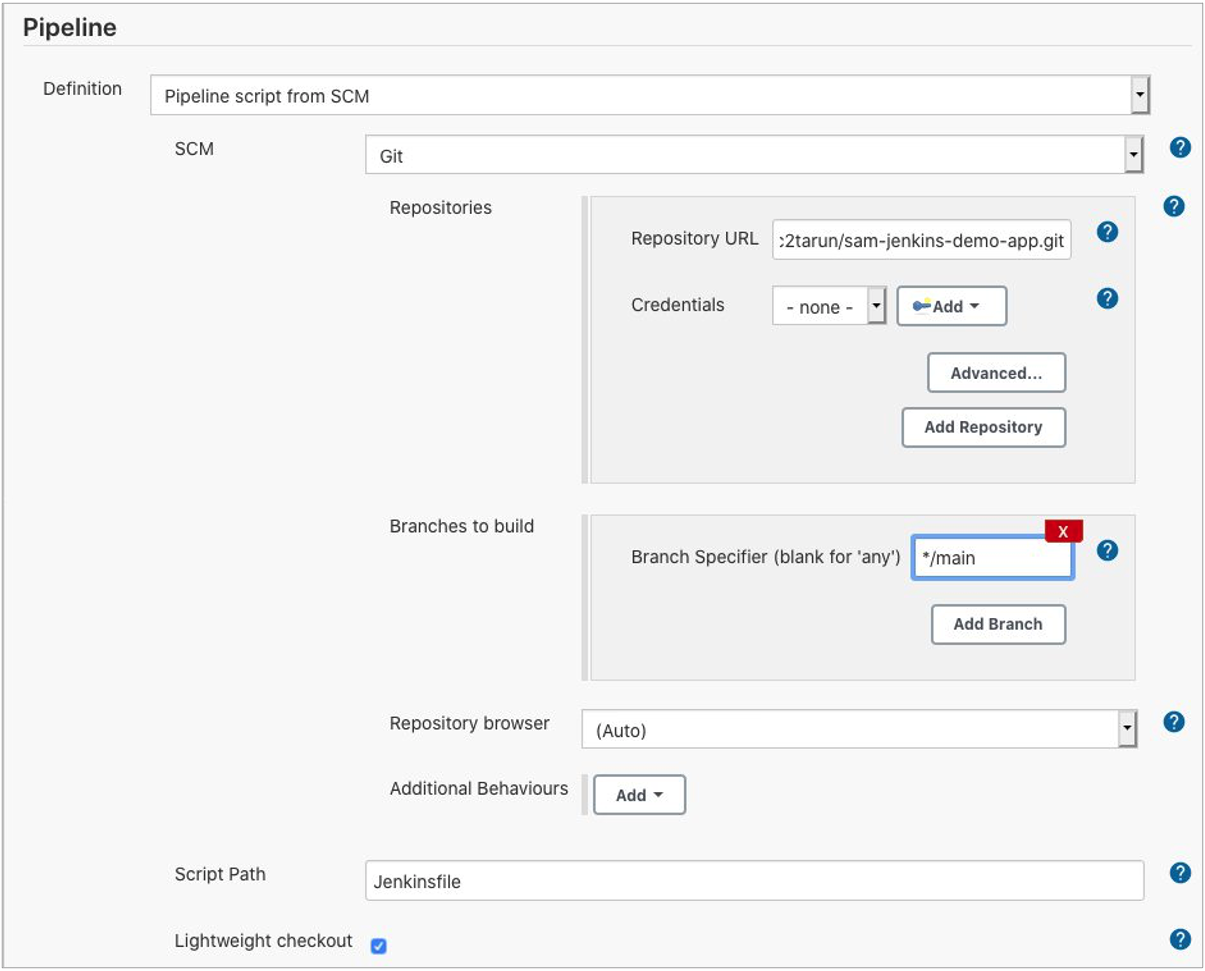
  3. Under the Pipeline section, select Definition as Pipeline script from SCM.
    • Select GIT under SCM and enter the repository URL.
    • Set Branches to build to */main.
    • Set the Script Path to Jenkinsfile.

      Jenkins pipeline configuration

      Jenkins pipeline configuration

  4. Save the project.

After the build finishes, you see the pipeline:

Jenkins pipeline stages

Jenkins pipeline stages

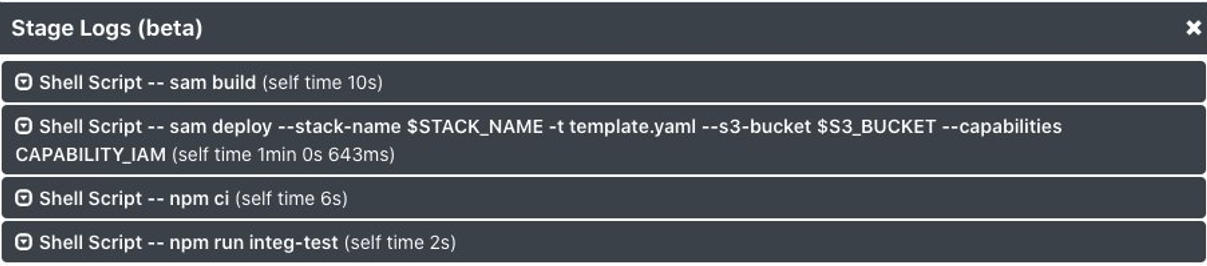
Review the logs for the beta stage to check that the integration test is completed successfully.

Jenkins stage logs

Jenkins stage logs

Conclusion

This tutorial uses a Jenkins Pipeline to add an automated CI/CD pipeline to an AWS SAM-generated example application. Jenkins automatically builds, tests, and deploys the changes after each commit to the repository.

Using Jenkins, developers can gain the benefits of continuous integration and continuous deployment of serverless applications to the AWS Cloud with minimal configuration.

For more information, see the Jenkins Pipeline and AWS Serverless Application Model documentation.

We want to hear your feedback! Is this approach useful for your organization? Do you want to see another implementation? Contact us on Twitter @edjgeek or via comments!

Insider Attack on Home Surveillance Systems

Post Syndicated from Bruce Schneier original https://www.schneier.com/blog/archives/2021/01/insider-attack-on-home-surveillance-systems.html

No one who reads this blog regularly will be surprised:

A former employee of prominent home security company ADT has admitted that he hacked into the surveillance feeds of dozens of customer homes, doing so primarily to spy on naked women or to leer at unsuspecting couples while they had sex.

[…]

Authorities say that the IT technician “took note of which homes had attractive women, then repeatedly logged into these customers’ accounts in order to view their footage for sexual gratification.” He did this by adding his personal email address to customer accounts, which ultimately hooked him into “real-time access to the video feeds from their homes.”

Slashdot thread.

Building PHP Lambda functions with Docker container images

Post Syndicated from Benjamin Smith original https://aws.amazon.com/blogs/compute/building-php-lambda-functions-with-docker-container-images/

At re:Invent 2020, AWS announced that you can package and deploy AWS Lambda functions as container images. Packaging AWS Lambda functions as container images brings some notable benefits for developers running custom runtimes, such as PHP. This blog post explains those benefits and shows how to use the new container image support for Lambda functions to build serverless PHP applications.

Overview

Many PHP developers are familiar with building applications as containers to create a portable artifact for easier deployment. Packaging applications as containers helps to maintain consistent PHP versions, package versions, and configurations settings across multiple environments.

The new container image support for Lambda allows you to use familiar container tooling to build your applications. It also allows you to transition your applications into a serverless event-driven model. This brings the benefits of having no infrastructure to manage, automated scalability and a pay-per-use billing.

The advantages of an event-driven model for PHP applications are explained across the blog series “The serverless LAMP stack”. It explores the concepts, methods, and reasons for creating serverless applications with PHP. The architectural patterns and service limits in this blog series apply to functions packaged using both container image and zip archive formats, with some key exceptions:

Zip archive Container image
Maximum package size 250 MB 10 GB
Lambda layers Supported Include in image
Lambda Extensions Supported Include in image

Custom runtimes with container images

For custom runtimes such as PHP, Lambda provides base images containing the required Amazon Linux or Amazon Linux 2 operating system. Extend this to include your own runtime by implementing the Lambda Runtime API in a bootstrap file.

Before container image support for Lambda, a custom runtime is packaged using the .zip format. This required the developer to:

  1. Set up an Amazon Linux environment compatible with the Lambda execution environment.
  2. Install compilation dependencies and compile a version of PHP.
  3. Save the compiled PHP binary together with a bootstrap file and package as a .zip.
  4. Publish the .zip as a runtime layer.
  5. Add the runtime layer to a Lambda function.

Any edits to the custom runtime such as new packages, PHP versions, modules, or dependences require the process to be repeated. This process can be time consuming and prone to error.

Creating a custom PHP runtime using the new container image support for Lambda can simplify changing the runtime environment. Dockerfiles allow you to have a fully scripted, faster, and portable build process without setting up an Amazon Linux environment.

This GitHub repository contains a custom PHP runtime for Lambda functions packaged as a container image. The following Dockerfile uses the base image for Amazon Linux provided by AWS. The instructions perform the following:

  • Install system-wide Linux packages (zip, curl, tar).
  • Download and compile PHP.
  • Download and install composer dependency manager and dependencies.
  • Move PHP binaries, bootstrap, and vendor dependencies into a directory that Lambda can read from.
  • Set the container entrypoint.
#Lambda base image Amazon Linux
FROM public.ecr.aws/lambda/provided as builder 
# Set desired PHP Version
ARG php_version="7.3.6"
RUN yum clean all && \
    yum install -y autoconf \
                bison \
                bzip2-devel \
                gcc \
                gcc-c++ \
                git \
                gzip \
                libcurl-devel \
                libxml2-devel \
                make \
                openssl-devel \
                tar \
                unzip \
                zip

# Download the PHP source, compile, and install both PHP and Composer
RUN curl -sL https://github.com/php/php-src/archive/php-${php_version}.tar.gz | tar -xvz && \
    cd php-src-php-${php_version} && \
    ./buildconf --force && \
    ./configure --prefix=/opt/php-7-bin/ --with-openssl --with-curl --with-zlib --without-pear --enable-bcmath --with-bz2 --enable-mbstring --with-mysqli && \
    make -j 5 && \
    make install && \
    /opt/php-7-bin/bin/php -v && \
    curl -sS https://getcomposer.org/installer | /opt/php-7-bin/bin/php -- --install-dir=/opt/php-7-bin/bin/ --filename=composer

# Prepare runtime files
# RUN mkdir -p /lambda-php-runtime/bin && \
    # cp /opt/php-7-bin/bin/php /lambda-php-runtime/bin/php
COPY runtime/bootstrap /lambda-php-runtime/
RUN chmod 0755 /lambda-php-runtime/bootstrap

# Install Guzzle, prepare vendor files
RUN mkdir /lambda-php-vendor && \
    cd /lambda-php-vendor && \
    /opt/php-7-bin/bin/php /opt/php-7-bin/bin/composer require guzzlehttp/guzzle

###### Create runtime image ######
FROM public.ecr.aws/lambda/provided as runtime
# Layer 1: PHP Binaries
COPY --from=builder /opt/php-7-bin /var/lang
# Layer 2: Runtime Interface Client
COPY --from=builder /lambda-php-runtime /var/runtime
# Layer 3: Vendor
COPY --from=builder /lambda-php-vendor/vendor /opt/vendor

COPY src/ /var/task/

CMD [ "index" ]

To deploy this Lambda function, follow the instructions in the GitHub repository.

All runtime-related instructions are saved in the Dockerfile, which makes the custom runtime simpler to manage, update, and test. You can add additional Linux packages by appending to the yum install command. To install alternative PHP versions, change the php_version argument. Import additional PHP modules by adding to the compile command.

View the complete application in the following file tree:

project/
┣ runtime/
┃ ┗ bootstrap
┣ src/
┃ ┗ index.php
┗ Dockerfile

The Lambda function code is stored in the src directory in a file named index.php. This contains the Lambda function handler “index()”.

A bootstrap file is in the ‘runtime’ directory. This uses the Lambda runtime API to communicate with the Lambda execution environment.

The shebang hash sequence at the beginning of the bootstrap script instructs Lambda to run the file with the PHP executable, set by the Dockerfile.

All environment variables used in the bootstrap are set by the Lambda execution environment when running in the AWS Cloud. When running locally, the Lambda Runtime Interface Emulator (RIE) sets these values.

#!/var/lang/bin/php

Testing locally with the Lambda RIE

Using container image support for Lambda makes it easier for PHP developers to test Lambda functions locally. The previous container image example builds from the Lambda base image provided by AWS. This base image contains the Lambda RIE.

This is a proxy for Lambda’s Runtime and Extensions APIs. It acts as a lightweight web server that converts HTTP requests to JSON events and maintains functional parity with the Lambda Runtime API in the AWS Cloud. This allows developers to test functions locally using familiar tools such as cURL and the Docker CLI.

  1. Build the previous custom runtime image using the Docker build command:
    docker build -t phpmyfuntion .
  2. Run the function locally using the Docker run command, bound to port 9000:
    docker run -p 9000:8080 phpmyfuntion:latest
  3. This command starts up a local endpoint at:
    localhost:9000/2015-03-31/functions/function/invocations
  4. Post an event to this endpoint using a curl command. The Lambda function payload is provided by using the -d flag. This is a valid Json object required by the Runtime Interface Emulator:
    curl "http://localhost:9000/2015-03-31/functions/function/invocations" -d '{"queryStringParameters": {"name":"Ben"}}'
  5. A 200 status response is returned:

Building web applications with Bref container images

Bref is an open source runtime Lambda layer for PHP. Using the bref-fpm layer, you can build applications with traditional PHP frameworks such as Symfony and Laravel. Bref’s implementation of the FastCGI protocol returns an HTTP response instead of a JSON response. When using the zip archive format to package Lambda functions, Bref’s custom runtime is provided to the function as a Lambda layer. Functions packaged as container images do not support adding Lambda layers to the function configuration. In addition to runtime layers, Bref also provides a number of Docker images. These images use the Lambda runtime API to form a runtime interface client that communicates with the Lambda execution environment.

The following example shows how to compose a Dockerfile that uses the bref php-74-fpm container image:

# Uses PHP 74-fpm.0, as the base image
FROM bref/php-74-fpm
# download composer for dependency management
RUN curl -s https://getcomposer.org/installer | php
# install bref using composer
RUN php composer.phar require bref/bref
# copy the project files into a Location that the Lambda service can read from
COPY . /var/task
#set the function handler entry point
CMD _HANDLER=index.php /opt/bootstrap
  1. The first line sets the base image to use bref/php-74-fpm.
  2. Composer, a dependency manager for PHP is installed.
  3. Composer’s require command is used to add the bref package to the composer.json file.
  4. The project files are then copied into the /var/task directory, where the function code runs from.
  5. The function handler is set along with Bref’s bootstrap file.

The steps to build and deploy this image to the Amazon Elastic Container Registry are the same for any runtime, and explained in this announcement blog post.

Conclusion

The new container image support for Lambda functions allows developers to package Lambda functions of up to 10 GB in size. Using the container image format and a Dockerfile can make it easier to build and update functions with custom runtimes such as PHP.

Developers can include specific language versions, modules, and package dependencies. The Amazon Linux and Amazon Linux 2 base images give developers a starting point to customize the runtime. With the Lambda Runtime Interface Emulator, it’s simpler for developers to test Lambda functions locally. PHP developers can use existing third-party images, such as bref-fpm, to create web applications in a single Lambda function.

Visit serverlessland.com for more information on building serverless PHP applications.

SVR Attacks on Microsoft 365

Post Syndicated from Bruce Schneier original https://www.schneier.com/blog/archives/2021/01/svr-attacks-on-microsoft-365.html

FireEye is reporting the current known tactics that the SVR used to compromise Microsoft 365 cloud data as part of its SolarWinds operation:

Mandiant has observed UNC2452 and other threat actors moving laterally to the Microsoft 365 cloud using a combination of four primary techniques:

  • Steal the Active Directory Federation Services (AD FS) token-signing certificate and use it to forge tokens for arbitrary users (sometimes described as Golden SAML). This would allow the attacker to authenticate into a federated resource provider (such as Microsoft 365) as any user, without the need for that user’s password or their corresponding multi-factor authentication (MFA) mechanism.
  • Modify or add trusted domains in Azure AD to add a new federated Identity Provider (IdP) that the attacker controls. This would allow the attacker to forge tokens for arbitrary users and has been described as an Azure AD backdoor.
  • Compromise the credentials of on-premises user accounts that are synchronized to Microsoft 365 that have high privileged directory roles, such as Global Administrator or Application Administrator.
  • Backdoor an existing Microsoft 365 application by adding a new application or service principal credential in order to use the legitimate permissions assigned to the application, such as the ability to read email, send email as an arbitrary user, access user calendars, etc.

Lots of details here, including information on remediation and hardening.

The more we learn about the this operation, the more sophisticated it becomes.

In related news, MalwareBytes was also targeted.

Using Route 53 Private Hosted Zones for Cross-account Multi-region Architectures

Post Syndicated from Anandprasanna Gaitonde original https://aws.amazon.com/blogs/architecture/using-route-53-private-hosted-zones-for-cross-account-multi-region-architectures/

This post was co-written by Anandprasanna Gaitonde, AWS Solutions Architect and John Bickle, Senior Technical Account Manager, AWS Enterprise Support

Introduction

Many AWS customers have internal business applications spread over multiple AWS accounts and on-premises to support different business units. In such environments, you may find a consistent view of DNS records and domain names between on-premises and different AWS accounts useful. Route 53 Private Hosted Zones (PHZs) and Resolver endpoints on AWS create an architecture best practice for centralized DNS in hybrid cloud environment. Your business units can use flexibility and autonomy to manage the hosted zones for their applications and support multi-region application environments for disaster recovery (DR) purposes.

This blog presents an architecture that provides a unified view of the DNS while allowing different AWS accounts to manage subdomains. It utilizes PHZs with overlapping namespaces and cross-account multi-region VPC association for PHZs to create an efficient, scalable, and highly available architecture for DNS.

Architecture Overview

You can set up a multi-account environment using services such as AWS Control Tower to host applications and workloads from different business units in separate AWS accounts. However, these applications have to conform to a naming scheme based on organization policies and simpler management of DNS hierarchy. As a best practice, the integration with on-premises DNS is done by configuring Amazon Route 53 Resolver endpoints in a shared networking account. Following is an example of this architecture.

Route 53 PHZs and Resolver Endpoints

Figure 1 – Architecture Diagram

The customer in this example has on-premises applications under the customer.local domain. Applications hosted in AWS use subdomain delegation to aws.customer.local. The example here shows three applications that belong to three different teams, and those environments are located in their separate AWS accounts to allow for autonomy and flexibility. This architecture pattern follows the option of the “Multi-Account Decentralized” model as described in the whitepaper Hybrid Cloud DNS options for Amazon VPC.

This architecture involves three key components:

1. PHZ configuration: PHZ for the subdomain aws.customer.local is created in the shared Networking account. This is to support centralized management of PHZ for ancillary applications where teams don’t want individual control (Item 1a in Figure). However, for the key business applications, each of the teams or business units creates its own PHZ. For example, app1.aws.customer.local – Application1 in Account A, app2.aws.customer.local – Application2 in Account B, app3.aws.customer.local – Application3 in Account C (Items 1b in Figure). Application1 is a critical business application and has stringent DR requirements. A DR environment of this application is also created in us-west-2.

For a consistent view of DNS and efficient DNS query routing between the AWS accounts and on-premises, best practice is to associate all the PHZs to the Networking Account. PHZs created in Account A, B and C are associated with VPC in Networking Account by using cross-account association of Private Hosted Zones with VPCs. This creates overlapping domains from multiple PHZs for the VPCs of the networking account. It also overlaps with the parent sub-domain PHZ (aws.customer.local) in the Networking account. In such cases where there is two or more PHZ with overlapping namespaces, Route 53 resolver routes traffic based on most specific match as described in the Developer Guide.

2. Route 53 Resolver endpoints for on-premises integration (Item 2 in Figure): The networking account is used to set up the integration with on-premises DNS using Route 53 Resolver endpoints as shown in Resolving DNS queries between VPC and your network. Inbound and Outbound Route 53 Resolver endpoints are created in the VPC in us-east-1 to serve as the integration between on-premises DNS and AWS. The DNS traffic between on-premises to AWS requires an AWS Site2Site VPN connection or AWS Direct Connect connection to carry DNS and application traffic. For each Resolver endpoint, two or more IP addresses can be specified to map to different Availability Zones (AZs). This helps create a highly available architecture.

3. Route 53 Resolver rules (Item 3 in Figure): Forwarding rules are created only in the networking account to route DNS queries for on-premises domains (customer.local) to the on-premises DNS server. AWS Resource Access Manager (RAM) is used to share the rules to accounts A, B and C as mentioned in the section “Sharing forwarding rules with other AWS accounts and using shared rules” in the documentation. Account owners can now associate these shared rules with their VPCs the same way that they associate rules created in their own AWS accounts. If you share the rule with another AWS account, you also indirectly share the outbound endpoint that you specify in the rule as described in the section “Considerations when creating inbound and outbound endpoints” in the documentation. This implies that you use one outbound endpoint in a region to forward DNS queries to your on-premises network from multiple VPCs, even if the VPCs were created in different AWS accounts. Resolver starts to forward DNS queries for the domain name that’s specified in the rule to the outbound endpoint and forward to the on-premises DNS servers. The rules are created in both regions in this architecture.

This architecture provides the following benefits:

  1. Resilient and scalable
  2. Uses the VPC+2 endpoint, local caching and Availability Zone (AZ) isolation
  3. Minimal forwarding hops
  4. Lower cost: optimal use of Resolver endpoints and forwarding rules

In order to handle the DR, here are some other considerations:

  • For app1.aws.customer.local, the same PHZ is associated with VPC in us-west-2 region. While VPCs are regional, the PHZ is a global construct. The same PHZ is accessible from VPCs in different regions.
  • Failover routing policy is set up in the PHZ and failover records are created. However, Route 53 health checkers (being outside of the VPC) require a public IP for your applications. As these business applications are internal to the organization, a metric-based health check with Amazon CloudWatch can be configured as mentioned in Configuring failover in a private hosted zone.
  • Resolver endpoints are created in VPC in another region (us-west-2) in the networking account. This allows on-premises servers to failover to these secondary Resolver inbound endpoints in case the region goes down.
  • A second set of forwarding rules is created in the networking account, which uses the outbound endpoint in us-west-2. These are shared with Account A and then associated with VPC in us-west-2.
  • In addition, to have DR across multiple on-premises locations, the on-premises servers should have a secondary backup DNS on-premises as well (not shown in the diagram).
    This ensures a simple DNS architecture for the DR setup, and seamless failover for applications in case of a region failure.

Considerations

  • If Application 1 needs to communicate to Application 2, then the PHZ from Account A must be shared with Account B. DNS queries can then be routed efficiently for those VPCs in different accounts.
  • Create additional IP addresses in a single AZ/subnet for the resolver endpoints, to handle large volumes of DNS traffic.
  • Look at Considerations while using Private Hosted Zones before implementing such architectures in your AWS environment.

Summary

Hybrid cloud environments can utilize the features of Route 53 Private Hosted Zones such as overlapping namespaces and the ability to perform cross-account and multi-region VPC association. This creates a unified DNS view for your application environments. The architecture allows for scalability and high availability for business applications.