Tag Archives: Security, Identity & Compliance

Amazon GuardDuty Enhances Detection of EC2 Instance Credential Exfiltration

Post Syndicated from Sébastien Stormacq original https://aws.amazon.com/blogs/aws/amazon-guardduty-enhances-detection-of-ec2-instance-credential-exfiltration/

Amazon GuardDuty is a threat detection service that continuously monitors for malicious activity and unauthorized behavior to protect your AWS accounts, workloads, and data stored in Amazon Simple Storage Service (Amazon S3). Informed by a multitude of public and AWS-generated data feeds and powered by machine learning, GuardDuty analyzes billions of events in pursuit of trends, patterns, and anomalies that are recognizable signs that something is amiss. You can enable it with a click and see the first findings within minutes.

Today, we are adding to GuardDuty the ability to detect when your Amazon Elastic Compute Cloud (Amazon EC2) instance credentials are being used from another AWS Account. EC2 instance credentials are the temporary credentials made available through the EC2 metadata service to any applications running on an instance, when an AWS Identity and Access Management (IAM) role is attached to it.

What Are the Risks?
When your workloads deployed on EC2 instances access AWS services, they use an access key, a secret access key, and a session token. The secure mechanism to pass access key credentials to your workloads is to define the permissions required by your workload, create one or several IAM policies with the permissions, attach the policies to an IAM role and, finally, attach the role to the instance.

Any process running on an EC2 instance with a role attached can retrieve the security credentials by calling the EC2 metadata service:

curl 169.254.169.254/latest/meta-data/iam/security-credentials/role_name
{
  "Code" : "Success",
  "LastUpdated" : "2021-09-05T18:24:45Z",
  "Type" : "AWS-HMAC",
  "AccessKeyId" : "AS...J5",
  "SecretAccessKey" : "r1...9m",
  "Token" : "IQ...z5Q==",
  "Expiration" : "2021-09-06T00:44:06Z"
}

These credentials are limited in time and in scope. They are valid for a maximum of six hours. They are limited to the scope of the permissions attached to the IAM role associated with the EC2 instance.

All AWS SDK are able to retrieve and renew such credentials automatically. No additional code is necessary in your application.

Now imagine that your application running on the EC2 instance is compromised and a malicious actor managed to access the instance’s meta data service. The malicious actor would extract the credentials. These credentials have the permissions you defined in the IAM role attached to the instance. Depending on your application, attackers might have the possibility to exfiltrate data from S3 or DynamoDB, to start or terminate EC2 instances, or even to create new IAM users or roles.

Since the launch of GuardDuty, it has detected when such credentials are used from IP addresses outside of AWS. Smart attackers therefore might hide their activity from another AWS account to operate outside of the sight of GuardDuty. Starting today, GuardDuty also detects when the credentials are used from other AWS accounts, inside the AWS network.

What Alerts Are Generated?
There are legitimate reasons why the source IP address communicating with AWS Services APIs might be different than the EC2 instance IP address. Think about complex network topologies that route traffic to one or multiple VPCs; AWS Transit Gateway, or AWS Direct Connect for example. In addition, multi-Region configurations, or not using AWS Organizations, makes it non trivial to detect if the AWS account using the credentials belongs to you or not. Large companies have implemented their own solution to detect such security compromises, but these type of solutions are not easy to build and to maintain. Only a handful of organizations have the resources required to tackle this challenge. When they do so, they distract their engineering efforts from their core business. This is why we decided to address this.

Starting today, GuardDuty generates alerts when it detects a misuse of EC2 instance credentials. When the credentials are used from an affiliated account, the alert is labeled as medium-severity. Otherwise, a high-severity alert is generated. Affiliated accounts are accounts monitored by the same GuardDuty administrator account, also known as GuardDuty member accounts. They might be part of your organization or not.

In Practice
To learn how it’s working, let’s capture and exfiltrate a set of EC2 credentials from one of my EC2 instances. I use SSH to connect to one of my instances, and I use curl to retrieve the credentials, as shown earlier:

curl 169.254.169.254/latest/meta-data/iam/security-credentials/role_name
{
  "Code" : "Success",
  "LastUpdated" : "2021-09-05T18:24:45Z",
  "Type" : "AWS-HMAC",
  "AccessKeyId" : "AS...J5",
  "SecretAccessKey" : "r1...9m",
  "Token" : "IQ...z5Q==",
  "Expiration" : "2021-09-06T00:44:06Z"
}

The instance has an IAM role with permissions allowing to read S3 buckets in this AWS account. I copy and paste the credentials. Then I connect to another EC2 instance running in a different AWS account, not affiliated with the same GuardDuty administrator account. I use SSH to connect to that other instance, and then I configure the AWS CLI with the compromised credentials. I attempt to access a private S3 bucket.


# first verify I do not have access 
[ec2-user@ip-1-1-0-79 ~]$ aws s3 ls s3://my-private-bucket

An error occurred (AccessDenied) when calling the ListObjectsV2 operation: Access Denied

# then I configure the CLI using the compromised credentials
[ec2-user@ip-1-1-0-79 ~]$ aws configure
AWS Access Key ID [None]: AS...J5
AWS Secret Access Key [None]: r1...9m
Default region name [None]: us-east-1
Default output format [None]:

[ec2-user@ip-1-1-0-79 ~]$ aws configure set aws_session_token IQ...z5Q==

# Finally, I attempt to access S3 again
[ec2-user@ip-1-1-0-79 ~]$ aws s3 ls s3://my-private-bucket
                     PRE folder1/
                     PRE folder2/
                     PRE folder3/
2021-01-22 16:37:48 6148 .DS_Store

Shortly after, I use the AWS Management Console to access GuardDuty in the AWS account where I stole the credentials. I can verify a high-severity alert was generated.

GuardDuty EC2 credentials exfiltration alarm

And So What?
Attackers may extract credentials when they have remote code execution (RCE), local presence on the instance, or by exploiting application-level vulnerabilities like Server Side Request Forgery (SSRF) and XML External Entity (XXE) injection. There are multiple methods to mitigate RCE or local access, including rebuilding the instances from a secured and patched AMI to eliminate remote access, rotate access credentials, and so on. When the vulnerability is at the application level, you or the application vendor are required to patch the application code to eliminate the vulnerability.

When you receive an alert indicating a risk of compromised credentials, the first thing to do is to verify the account ID. Is it one of your company accounts or not? During the analysis, when the business case allows, you may terminate the compromised instances or shut down the application. This prevents the attacker from extracting renewed instance credentials upon expiration. When in doubt, contact the AWS Trust & Safety team using the Report Amazon AWS abuse form or by contacting [email protected]. Provide all the necessary information, including the suspicious AWS account ID, logs in plaintext, and so on, when you submit your request.

Availability
This new ability is available in all AWS Regions at no additional cost. It is enabled by default when GuardDuty is already enabled on your AWS account.

Otherwise, enable GuardDuty now, and start the 30-day trial period.

— seb

Fall 2021 PCI DSS report now available with 7 services added to compliance scope

Post Syndicated from Michael Oyeniya original https://aws.amazon.com/blogs/security/fall-2021-pci-dss-report-now-available-with-7-services-added-to-compliance-scope/

We’re continuing to expand the scope of our assurance programs at Amazon Web Services (AWS) and are pleased to announce that seven new services have been added to the scope of our Payment Card Industry Data Security Standard (PCI DSS) certification. These new services provide our customers with more options to process and store their payment card data and to architect their cardholder data environment (CDE) securely in AWS.

You can see the full list of services on our Services in Scope by Compliance program page. The seven new services are:

The Asia-Pacific (Jakarta) Region was newly added to scope, and assessed as PCI compliant as part of the Fall 2021 PCI assessment.

We were evaluated by Coalfire, a third-party Qualified Security Assessor (QSA). The Attestation of Compliance (AOC) that shows AWS PCI compliance status is available through AWS Artifact.

We value your feedback and questions—feel free to reach out to our team or give feedback about this post through our Contact Us page.

If you have feedback about this post, submit comments in the Comments section below.

Want more AWS Security news? Follow us on Twitter.
Author

Michael Oyeniya

Michael is a Compliance Program Manager at AWS on the Global Audits team, managing the PCI compliance program. He holds a Master’s degree in management and has over 18 years of experience in information technology security risk and control.

Best practices for cross-Region aggregation of security findings

Post Syndicated from Marshall Jones original https://aws.amazon.com/blogs/security/best-practices-for-cross-region-aggregation-of-security-findings/

AWS Security Hub enables customers to have a centralized view into the security posture across their AWS environment by aggregating your security alerts from various AWS services and partner products in a standardized format so that you can more easily take action on them. To facilitate that central view, Security Hub allows you to designate an aggregation Region, which links some or all Regions to a single aggregated Region in a delegated administrator AWS account. All your findings across all of your accounts and all of your linked Regions will be processed by Security Hub in this one Region. With this feature, you can take advantage of many configurations when ingesting findings into Security Hub, that will benefit you operationally and provide cost savings.

This blog post provides you with a set of best practices when using Security Hub across multiple Regions. After implementing the recommendations in this blog post, you’ll have an optimized and centralized view of Security Hub findings from all integrated AWS services and partner products across all Regions in a single AWS account and Region.

Enable cross-Region aggregation

To enable cross-Region aggregation in Security Hub, you must first enable finding aggregation in Security Hub from the Region that will become the aggregation Region. You cannot use a Region that is disabled by default as your aggregation Region. For a list of Regions that are disabled by default, see Enabling a Region in the AWS General Reference.

You can enable AWS Security Hub finding aggregation using either the console or CLI. You must enable finding aggregation from the Region that will be the aggregation Region.

To enable Security Hub finding aggregation from the console

To enable AWS Security Hub finding aggregation using the AWS console:

  1. Start by navigating to the AWS Security Hub console and select Settings on the left side of the screen. Once on the settings page, choose the Regions tab.
Figure 1. Enabling finding aggregation

Figure 1. Enabling finding aggregation

  1. Check the checkbox to Link future Regions. As AWS releases new Regions, their results will automatically be aggregated into your designated Region. If this checkbox is not checked, any new Region that is released will not aggregate Security Hub findings to the aggregation Region.

To enable Security Hub finding aggregation using the CLI

Alternatively, you can enable AWS Security Hub finding aggregation using the CLI by using the following command:

aws securityhub create-finding-aggregator –region <aggregation Region> –region-linking-mode ALL_REGIONS | ALL_REGIONS_EXCEPT_SPECIFIED | SPECIFIED_REGIONS –regions <Region list>

Here’s a sample CLI command to enable AWS Security Hub finding aggregation:

aws securityhub create-finding-aggregator –region us-east-1 –region-linking-mode SPECIFIED_REGIONS –regions us-west-1,us-west-2

For more details around AWS Security Hub cross-region aggregation, see Aggregating findings across regions.

Consolidating downstream SIEM and ticketing integrations

Security Hub findings for all AWS accounts in your environment should be integrated into a Security Information and Event Management (SIEM) solution, such as Amazon OpenSearch Service or an APN partner SIEM, or a standardized ticketing system such as JIRA or ServiceNow.

You should send all Security Hub findings to a SIEM or ticketing solution from a single aggregation point to simplify operational overhead. Although integration architectures vary, as an example, this might mean configuring an Amazon EventBridge rule to parse and send findings to AWS Lambda or Amazon Kinesis for a custom integration point with the SIEM or ticketing solution.

You should to configure this integration point in a single delegated administrator account across all member AWS accounts and aggregated Regions. You should avoid having multiple integration points between each Security Hub Region and your SIEM or ticketing solution to avoid unnecessary operational overhead and costs of managing multiple integration points and resources required to stream findings to your SIEM.

Collecting Security Hub findings in a SIEM or ticketing solution can help you correlate findings across many other logs sources. For example, you might use a SIEM solution to analyze operating system logs from an Amazon Elastic Compute Cloud (Amazon EC2) instance to correlate with GuardDuty findings collected by Security Hub to investigate suspicious activity. You could also use ServiceNow or JIRA to create an automated, bidirectional integration between these ticketing solutions that keeps your Security Hub findings and issues in sync.

Auto-archive GuardDuty findings associated with global resources

Amazon GuardDuty creates findings associated with AWS IAM resources. IAM resources are global resources, which means that they are not Region-specific. If GuardDuty generates a finding for an IAM API call that is not Region-specific, such as ListGroups (for example, PenTest:IAMUser/KaliLinux) that finding is created in all GuardDuty Regions and ingested into Security Hub in every Region. You want to implement suppression rules in GuardDuty so that you don’t have multiple copies of this finding in your Security Hub delegated administrator account finding aggregation Region.

To implement AWS GuardDuty suppression rules (Console)

To reduce the duplication of findings in Security Hub, suppress global GuardDuty findings in all Regions except the Security Hub aggregation Region. For example, if you are aggregating Security Hub findings in us-east-1 and your environment uses all commercial AWS Regions in the United States, you would add a suppression rule in GuardDuty in us-east-2, us-west-1, and us-west-2.

To create AWS GuardDuty suppression rules using the AWS console:

  1. Navigate to the GuardDuty console and select the Findings link on the left side of the screen.
Figure 2. Creating GuardDuty suppression rules

Figure 2. Creating GuardDuty suppression rules

  1. Filter to search for the findings you want to suppress, and click Save / edit in the search bar.
  2. Enter a name and description for the suppression rule and save it.

To implement AWS GuardDuty suppression rules (CLI)

Alternatively, you can create AWS GuardDuty suppression rules using the CreateFilter API via CLI.

  1. Create a JSON file with your desired suppression filter criteria for the suppression rule.
  2. The following CLI command will test your filter criteria for AWS GuardDuty findings that will be suppressed:
  3. aws guardduty list-findings –detector-id 12abc34d567e8fa901bc2d34e56789f0 –finding-criteria file://criteria.json

  4. The following CLI command will create a filter for AWS GuardDuty findings that will be suppressed:
  5. aws guardduty create-filter –action ARCHIVE –detector-id 12abc34d567e8fa901bc2d34e56789f0 –name yourfiltername –finding-criteria file://criteria.json

For more details for creating AWS GuardDuty suppression rules, see Creating AWS GuardDuty suppression rules.

Reduce AWS Config cost by recording global resources in one Region

Like GuardDuty, AWS Config also records supported types of global resources, which are not tied to a specific Region and can be used in all Regions. The global resource types that AWS Config supports are IAM users, groups, roles, and customer managed policies. The configuration details for a specific global resource are the same in all Regions. If you have AWS Security Hub AWS Foundational Best Practices enabled, the feature has certain checks for global resources in AWS Config that you need to disable in all Regions except the aggregated Region.

Customize AWS Config for global resources

If you customize AWS Config in multiple Regions to record global resources, AWS Config creates multiple configuration items each time a global resource changes, one configuration item for each Region. Costs for each configuration item can be found on AWS Config pricing. These configuration items will contain identical data. To prevent duplicate configuration items, consider customizing AWS Config in only one Region to record global resources, unless you want those configuration items to be available in multiple Regions. See this blog post for a comprehensive list of additional AWS Config best practices.

To customize AWS Config for global resources (Console)

Follow the steps below to change the AWS Config global resource configuration in the AWS Console.

  1. Navigate to the AWS Config console and select Settings on the left side of the screen
  2. Click Edit in the top right corner
  3. Uncheck the Include global resources checkbox.
  4. Repeat these steps for each Region AWS Config is enabled, except the Region where you would like to track global resources.
Figure 3. AWS Config global resource setting

Figure 3. AWS Config global resource setting

To customize AWS Config for global resources (CLI)

Alternatively, you can disable the global resource tracking in AWS Config using the CLI.

aws configservice put-configuration-recorder –configuration-recorder name=default,roleARN=arn:aws:iam::123456789012:role/config-role –recording-group allSupported=true,includeGlobalResourceTypes=false

If you have deployed AWS Config using these CloudFormation templates, you would set the IncludeGlobalResourceTypes to False under the AWS::Config::ConfigurationRecorder for the Regions you do not want to track global resources, and set the value to True in the aggregated Region where you would like to use to track global resources. You can use the CloudFormation StackSets multiple AWS Region deployment feature to deploy the CloudFormation template in all AWS Regions where AWS Config is enabled.

For more details for AWS Config global resources, see Selecting AWS Config resources to record.

Disable AWS Security Hub AWS Foundational Best Practices periodic controls associated with global resources

AWS Security Hub AWS Foundational Best Practices perform checks against the resources in your AWS environment utilizing AWS Config rules. After you have disabled the AWS Config global resources in all Regions except for the Region that runs global recording, disable the Security Hub controls that deal with global resources as shown in Figure 5 below.

You can disable AWS Security Hub controls relating to global resources using the console or CLI.

To disable AWS Security Hub controls (Console)

Follow the steps below to disable Security Hub controls that deal with global resources in the AWS Console.

  1. Navigate to the Security Hub console and select Security Standards on the left side of the screen.
  2. Click on the AWS Foundation Security Best Practices v.1.0.0 security standard.
  3. Then use the filter box to search for IAM. Now you should be able to see security controls IAM.1-IAM.7, which are Security Hub global controls.
  4. Figure 4. Security Hub global controls

    Figure 4. Security Hub global controls

  5. Click on each control and select Disable in the top right corner
  6. After you have disabled resources, add a reason for disabling and choose Disable.
Figure 5. Disabling Security Hub control

Figure 5. Disabling Security Hub control

To disable AWS Security Hub controls (CLI)

Alternatively, you can disable Security Hub controls that deal with global resources using the CLI.

aws securityhub update-standards-control –standards-control-arn <control ARN> –control-status “DISABLED” –disabled-reason <description of reason to disable>

This sample CLI command disables Security Hub controls that deal with global resources:

aws securityhub update-standards-control –standards-control-arn “arn:aws:securityhub:us-east-1:123456789012:control/aws-foundational-security-best-practices/v/1.0.0/ACM.1” –control-status “DISABLED” –disabled-reason “Not applicable for my service”

You can also follow instructions to implement a solution to disable specific Security Hub controls for multiple AWS accounts.

Be sure to only disable the Security Hub controls in the Regions where global recording is also disabled. Verify the Security Hub controls associated with global resources are enabled in the same Region where AWS Config global resources are enabled.

After you have completed disabling these controls and recording of global resources, proceed to disable the [Config.1] AWS Config should be enabled control. This specific control requires recording of global resources in order to pass, which is not required to have enabled in multiple Regions.

For more details for AWS Security Hub controls, see Disabling and enabling individual AWS Security Hub controls .

Implement automatic remediation from a central Region

Once findings are consolidated and ingested into Security Hub across all your organization’s AWS accounts, you should implement auto-remediation where possible, including everything from resource misconfigurations to automated quarantine of infected EC2 instances. Security Hub provides multiple ways to achieve this through end-to-end automation with EventBridge or through human-triggered automation with Security Hub Custom Actions. You can deploy automatic remediation solutions in a single Region to perform cross-Region remediation. This helps you deploy fewer resources, saving money and operational overhead. For more information on how to enable the solution for Security Hub Automated Response and Remediation, see this blog post.

If you have automation currently in place, it’s important to understand how findings from multiple Regions triggering your automation might be affected. For example, you might have a Lambda function that remediates problems with S3 buckets, where it assumes it is being invoked in the same Region as the S3 bucket it needs to remediate. With cross-Region aggregation, your Lambda might need to make a cross-Region AWS SDK call. The Lambda function will run in the Region where the aggregation occurs, but the bucket could be in another Region, so you might have to adjust your function to handle that situation. Also, the role associated with the Lambda function could have its privileges limited to a single Region. If you intend the same function to work in all Regions, you might need change the IAM policy for the IAM role used by the Lambda. Make sure to check Service Control Policies in AWS Organizations, if you use them, because they can also deny actions in one Region while allowing them in another Region.

When enabling cross-Region finding aggregation, you’ll need to understand how any automatic remediation that might be in place today could be affected. Be sure to test your remediation functions on resources in various Regions, to be sure remediation works in all Regions you monitor.

Conclusion

This blog post highlights configurations you can take advantage of to reduce operational overhead and provide cost savings by using cross-Region finding aggregation in Security Hub. The examples given apply to the majority of AWS environments, and are meant to be action items you can use to improve the overall security and operational effectiveness of your AWS environment.

If you have feedback about this post, submit comments in the Comments section below. If you have any questions about this post, start a thread on the re:Post forum.

Want more AWS Security news? Follow us on Twitter.
Author

Marshall Jones

Marshall is a Worldwide Security Specialist Solutions Architect at AWS. His background is in AWS consulting and security architecture, focused on a variety of security domains including edge, threat detection, and compliance. Today, he is focused on helping enterprise AWS customers adopt and operationalize AWS security services to increase security effectiveness and reduce risk.

Author

Jonathan Nguyen

Jonathan is a Shared Delivery Team Senior Security Consultant at AWS. His background is in AWS Security with a focus on Threat Detection and Incident Response. Today, he helps enterprise customers develop a comprehensive AWS Security strategy, deploy security solutions at scale, and train customers on AWS Security best practices.

Continuous compliance monitoring using custom audit controls and frameworks with AWS Audit Manager

Post Syndicated from Deenadayaalan Thirugnanasambandam original https://aws.amazon.com/blogs/security/continuous-compliance-monitoring-using-custom-audit-controls-and-frameworks-with-aws-audit-manager/

For most customers today, security compliance auditing can be a very cumbersome and costly process. This activity within a security program often comes with a dependency on third party audit firms and robust security teams, to periodically assess risk and raise compliance gaps aligned with applicable industry requirements. Due to the nature of how audits are now performed, many corporate IT environments are left exposed to threats until the next manual audit is scheduled, performed, and the findings report is presented.

AWS Audit Manager can help you continuously audit your AWS usage and simplify how you assess IT risks and compliance gaps aligned with industry regulations and standards. Audit Manager automates evidence collection to reduce the “all hands-on deck” manual effort that often happens for audits, while enabling you to scale your audit capability in the cloud as your business grows. Customized control frameworks help customers evaluate IT environments against their own established assessment baseline, enabling them to discern how aligned they are with a set of compliance requirements tailored to their business needs. Custom controls can be defined to collect evidence from specific data sources, helping rate the IT environment against internally defined audit and compliance requirements. Each piece of evidence collected during the compliance assessment becomes a record that can be used to demonstrate compliance with predefined requirements specified by a control.

In this post, you will learn how to leverage AWS Audit Manager to create a tailored audit framework to continuously evaluate your organization’s AWS infrastructure against the relevant industry compliance requirements your organization needs to adhere to. By implementing this solution, you can simplify yet accelerate the detection of security risks present in your AWS environment, which are relevant to your organization, while providing your teams with the information needed to remedy reported compliance gaps.

Solution overview

This solution utilizes an event-driven architecture to provide agility while reducing manual administration effort.

  • AWS Audit Manager–AWS Audit Manager helps you continuously audit your AWS usage to simplify how you assess risk and compliance with regulations and industry standards.
  • AWS Lambda–AWS Lambda is a serverless compute service that lets you run code without provisioning or managing servers, in response to events such as changes in data, application state or user actions.
  • Amazon Simple Storage Service (Amazon S3) –Amazon S3 is object storage built to store and retrieve any amount of data from anywhere, that offers industry leading availability, performance, security, and virtually unlimited scalability at very low costs.
  • AWS Cloud Development Kit (AWS CDK)–AWS Cloud Development Kit is a software development framework for provisioning your cloud infrastructure in code through AWS CloudFormation.

Architecture

This solution enables automated controls management using event-driven architecture with AWS Services such as AWS Audit Manager, AWS Lambda and Amazon S3, in integration with code management services like GitHub and AWS CodeCommit. The Controls owner can design, manage, monitor and roll out custom controls in GitHub with a simple custom controls configuration file, as illustrated in Figure 1. Once the controls configuration file is placed in an Amazon S3 bucket, the on-commit event of the file triggers a control pipeline to load controls in audit manager using a Lambda function. 

Figure 1: Solution workflow

Figure 1: Solution workflow

Solution workflow overview

  1. The Control owner loads the controls as code (Controls and Framework) into an Amazon S3 bucket.
  2. Uploading the Controls yaml file into the S3 bucket triggers a Lambda function to process the control file.
  3. The Lambda function processes the Controls file, and creates a new control (or updates an existing control) in the Audit Manager.
  4. Uploading the Controls Framework yaml file into the S3 bucket triggers a Lambda function to process the Controls Framework file.
  5. The Lambda function validates the Controls Framework file, and updates the Controls Framework library in Audit Manager

This solution can be extended to create custom frameworks based on the controls, and to run an assessment framework against the controls.

Prerequisite steps

  1. Sign in to your AWS Account
  2. Login to the AWS console and choose the appropriate AWS Region.
  3. In the Search tab, search for AWS Audit Manager
  4. Figure 2. AWS Audit Manager

    Figure 2. AWS Audit Manager

  5. Choose Set up AWS Audit Manager.

Keep the default configurations from this page, such as Permissions and Data encryption. When done choose Complete setup.

Before deploying the solution, please ensure that the following software packages and their dependencies are installed on your local machine:

Node.js v12 or above https://nodejs.org/en/
AWS CLI version 2 https://docs.aws.amazon.com/cli/latest/userguide/install-cliv2.html
AWS CDK https://docs.aws.amazon.com/cdk/latest/guide/getting_started.html
jq https://stedolan.github.io/jq/
git https://git-scm.com/
AWS CLI configuration https://docs.aws.amazon.com/cli/latest/userguide/cli-configure-quickstart.html

Solution details

To provision the enterprise control catalog with AWS Audit Manager, start by cloning the sample code from the aws-samples repository on GitHub, followed by running the installation script (included in this repository) with sample controls and framework from your AWS Account.

To clone the sample code from the repository

On your development terminal, git clone the source code of this blog post from the AWS public repository:

git clone [email protected]:aws-samples/enterprise-controls-catalog-via-aws-audit-manager.git

To bootstrap CDK and run the deploy script

The CDK Toolkit Stack will be created by cdk bootstrap and will manage resources necessary to enable deployment of Cloud Applications with AWS CDK.

cdk bootstrap aws://<AWS Account Number>/<Region> # Bootstrap CDK in the specified account and region

cd audit-manager-blog

./deploy.sh

Workflow

Figure 3 illustrates the overall deployment workflow. The deployment script triggers the NPM package manager, and invokes AWS CDK to create necessary infrastructure using AWS CloudFormation. The CloudFormation template offers an easy way to provision and manage lifecycles, by treating infrastructure as code.
 

Figure 3: Detailed workflow lifecycle

Figure 3: Detailed workflow lifecycle

Once the solution is successfully deployed, you can view two custom controls and one custom framework available in AWS Audit Manager. The custom controls use a combination of manual and automated evidence collection, using compliance checks for resource configurations from AWS Config.

To verify the newly created custom data security controls

  1. In the AWS console, go to AWS Audit Manager and select Control library
  2. Choose Custom controls to view the controls DataSecurity-DatainTransit and DataSecurity-DataAtRest
Figure 4. View custom controls

Figure 4. View custom controls

To verify the newly created custom framework

  1. In the AWS console, go to AWS Audit Manager and select Framework library.
  2. Choose Custom frameworks to view the following framework:
Figure 5. Custom frameworks list

Figure 5. Custom frameworks list

You have now successfully created the custom controls and framework using the proposed solution.

Next, you can create your own controls and add to your frameworks using a simple configuration file, and let the implemented solution do the automated provisioning.

To set up error reporting

Before you begin creating your own controls and frameworks, you should complete the error reporting configuration. The solution automatically sets up the error reporting capability using Amazon SNS, a web service that enables sending and receiving notifications from the cloud.

  1. In the AWS Console, go to Amazon SNS > Topics > AuditManagerBlogNotification
  2. Select Create subscription and choose Email as your preferred endpoint to subscribe.
  3. This will trigger an automated email on subscription confirmation. Upon confirmation, you will begin receiving any error notifications by email.

To create your own custom control as code

Follow these steps to create your own controls and frameworks:

  1. Create a new control file named example-control.yaml with contents as shown below. This creates a custom control to check whether all public access to data in Amazon S3 is prohibited:
  2. name:
    DataSecurity-PublicAccessProhibited

    description:
    Information and records (data) are managed consistent with the organization’s risk strategy to protect the confidentiality, integrity, and availability of information.

    actionPlanTitle:
    All public access block settings are enabled at account level

    actionPlanInstructions:
    Ensure all Amazon S3 resources have public access prohibited

    testingInformation:
    Test attestations – preventive and detective controls for prohibiting public access

    tags:
    ID: PRDS-3Subcategory: Public-Access-Prohibited
    Category: Data Security-PRDS
    CIS: CIS17
    COBIT: COBIT 5 APO07-03
    NIST: NIST SP 800-53 Rev 4

    datasources:
    sourceName: Config attestation
    sourceDescription: Config attestation
    sourceSetUpOption: System_Controls_Mapping
    sourceType: AWS_Config

    sourceKeyword:
    keywordInputType: SELECT_FROM_LIST
    keywordValue: S3_ACCOUNT_LEVEL_PUBLIC_ACCESS_BLOCKS

  3. Go to AWS Console > AWS CloudFormation > Stacks. Select AuditManagerBlogStack and choose Outputs.
  4. Make note of the bucketOutput name that starts with auditmanagerblogstack-
  5. Upload the example-control.yaml file into the auditmanagerblogstack- bucket noted in step 3, inside the controls folder
  6. The event-driven architecture is deployed as part of the solution. Uploading the file to the Amazon S3 bucket triggers an automated event to create the new custom control in AWS Audit Manager.

To validate your new custom control is automatically provisioned in AWS Audit Manager

  1. In the AWS console, go to AWS Audit Manager and select Control library
  2. Choose Custom controls to view the following controls:
Figure 6. Audit Manager custom controls are listed as Custom controls

Figure 6. Audit Manager custom controls are listed as Custom controls

To create your own custom framework as code

  1. Create a new framework file named example-framework.yaml with contents as shown below:
  2. name:
    Sample DataSecurity Framework

    description:
    A sample data security framework to prohibit public access to data

    complianceType:
    NIST

    controlSets:
    – name: Prohibit public access
    controls:
    – DataSecurity-PublicAccessProhibited

    tags:
    Tag1: DataSecurity
    Tag2: PublicAccessProhibited

  3. Go to AWS Console > AWS CloudFormation > Stacks. Select AuditManagerBlogStack and choose Outputs.
  4. Make note of the bucketOutput name that starts with auditmanagerblogstack-
  5. Upload the example-framework.yaml file into the bucket noted in step 3 above, inside the frameworks folder
  6. The event driven architecture is deployed as part of the blog. The file upload to Amazon S3 triggers an automated event to create the new custom framework in AWS Audit Manager.

To validate your new custom framework automatically provisioned in AWS Audit Manager

  1. Go to AWS Audit Manager in the AWS console and select Control library
  2. Click Custom controls and you should be able to see the following controls:
Figure 7. View custom controls created via custom repo

Figure 7. View custom controls created via custom repo

Congratulations, you have successfully created your new custom control and framework using the proposed solution.

Next steps

An Audit Manager assessment is based on a framework, which is a grouping of controls. Using the framework of your choice as a starting point, you can create an assessment that collects evidence for the controls in that framework. In your assessment, you can also define the scope of your audit. This includes specifying which AWS accounts and services you want to collect evidence for. You can create an assessment from a custom framework  you build yourself, using steps from the Audit Manager documentation.

Conclusion

The solution provides the dynamic ability to design, develop and monitor capabilities that can be extended as a standardized enterprise IT controls catalogue for your company. With AWS Audit Manager, you can build compliance controls as code, with capability to audit your environment on a daily, weekly, or monthly basis. You can use this solution to improve the dynamic nature of assessments with AWS Audit Manager’s compliance audit, on time with reduced manual effort. To learn more about our standard frameworks to assist you, see Supported frameworks in AWS Audit Manager which provides prebuilt frameworks based on AWS best practices.

Author

Deenadayaalan Thirugnanasambandam

Deenadayaalan is a Solution Architect at Amazon Web Services. He provides prescriptive architectural guidance and consulting that enable and accelerate customers’ adoption of AWS.

Author

Hu Jin

Hu is a Software Development Engineer at AWS. He helps customers build secure and scalable solutions on AWS Cloud to realise business value faster.

Author

Vinodh Shankar

Vinodh is a Sr. Specialist SA at Amazon Web Services. He helps customers with defining their transformation road map, assessing readiness, creating business case and mapping future state business transformation on cloud.

Author

Hafiz Saadullah

Hafiz is a Senior Technical Product Manager with AWS focused on AWS Solutions.

2021 AWS security-focused workshops

Post Syndicated from Temi Adebambo original https://aws.amazon.com/blogs/security/2021-aws-security-focused-workshops/

Every year, Amazon Web Services (AWS) looks to help our customers gain more experience and knowledge of our services through hands-on workshops. In 2021, we unfortunately couldn’t connect with you in person as much as we would have liked, so we wanted to create and share new ways to learn and build on AWS. We built and published several security-focused workshops that help you learn how to use or configure new services and features securely. Workshops are hands-on learning modules designed to teach or introduce practical skills, techniques, or concepts you can use to solve business problems.

In this blog post, we highlight the newest AWS security-focused workshops below. There are also several other workshops that were developed before 2021; you can find them on AWS Workshops, AWS Security Workshops, and AWS Samples. Here’s the list:

Data Protection and Privacy

Workshop Title

Abstract

Data discovery and classification with Amazon Macie

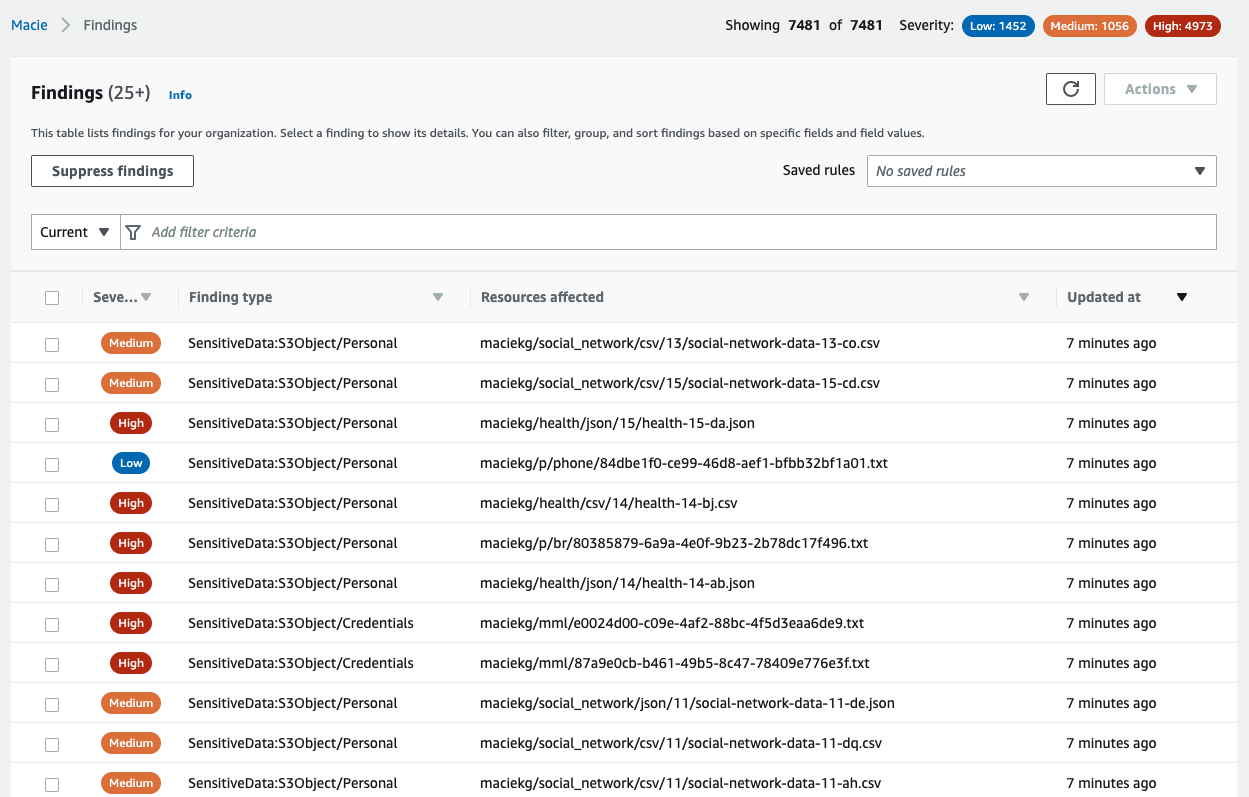
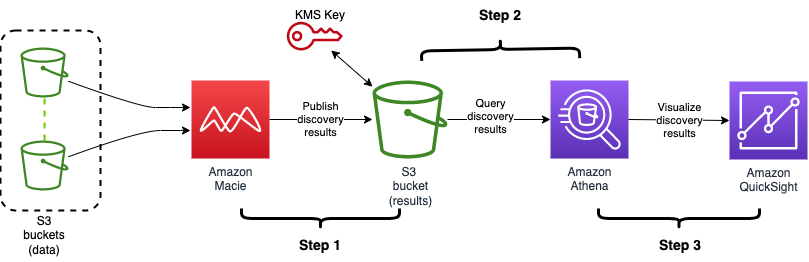
In this workshop, get familiar with Amazon Macie and learn to scan and classify data in your Amazon Simple Storage Service (Amazon S3) buckets. Work with Macie (data classification) and AWS Security Hub (centralized security view) to see how data in your environment is stored, and to understand any changes in S3 bucket policies that may affect your security posture. Learn to create a custom data identifier and to create and scope data discovery and classification jobs in Macie. Finally, use Macie to filter and investigate the results from the scans you create.

Scaling your encryption at rest capabilities with AWS KMS

AWS makes it easy to protect your data with encryption. This hands-on workshop provides an opportunity to dive deep into encryption at rest options with AWS. Learn AWS server-side encryption with AWS Key Management Service (AWS KMS) for services such as Amazon S3, Amazon Elastic Block Store (Amazon EBS), and Amazon Relational Database Service (Amazon RDS). Also, learn best practices for using AWS KMS across multiple accounts and Regions and how to scale while optimizing for performance.

Store, retrieve, and manage sensitive credentials in AWS Secrets Manager

In this workshop, learn how to integrate AWS Secrets Manager in your development platform, backed by serverless applications. Work through a sample application, and use Secrets Manager to retrieve credentials as well as work with attribute-based access control using tags. Also, learn how to monitor the compliance of secrets and implement incident response workflows that will rotate the secret, restore the resource policy, alert the SOC, and deny access to the offender.

Building and operating a Private Certificate Authority on AWS

This workshop covers private certificate management on AWS, employing the concepts of least privilege, separation of duties, monitoring, and automation. Participants learn operational aspects of creating a complete certificate authority (CA) hierarchy, building a simple web application, and issuing private certificates. It also covers how job functions—including CA administrators, application developers, and security administrators—can follow the principle of least privilege to perform various functions associated with certificate management. Finally, learn about IoT certificates, code-signing, and certificate templates to enable all your use cases.

Amazon S3 security and access settings and controls

Amazon S3 provides many security and access settings to help you secure your data, controls that ensure that those settings remain in place, and features to help you audit those settings and controls. This workshop walks you through these Amazon S3 capabilities and scenarios, to help you apply them for different security requirements.

Redact data as needed using Amazon S3 Object Lambda

Amazon S3 Object Lambda works with your existing applications, and allows you to add your own code using AWS Lambda functions to automatically process and transform data from Amazon S3 before returning it to an application. This enables different views of the same object depending on user identity, such as restricting access to confidential information, or disallowing access to personally identifiable information (PII) data. In this workshop, learn how to use Amazon S3 Object Lambda to modify objects during GET requests, so you no longer need to store multiple views of the same document.

Using AWS Nitro Enclaves to process highly sensitive data

In this hands-on workshop, learn how to use AWS Nitro Enclaves to isolate highly-sensitive data from your users, applications, and third-party libraries on your Amazon Elastic Compute Cloud (Amazon EC2) instances. Explore AWS Nitro Enclaves, discuss common use cases, and build and run your own enclave. During this workshop, learn about enclave isolation, cryptographic attestation, enclave image files, local Vsock communication channels, common debugging scenarios, and the enclave lifecycle.

Ransomware prevention strategies in Amazon S3

Learn how to use the protective, detective and monitoring controls in AWS to protect your data in S3 from ransomware threats. Set up Amazon GuardDuty for S3 and AWS Identity and Access Management (IAM) Access Analyzer, and learn to read and respond to findings and create IAM invariants. Create a tiered storage approach to backup and recovery, and learn to use Amazon S3 Object Lock, versioning, and replication to provide immutable storage and protect against accidental or malicious deletion.

Governance, Risk, and Compliance

Operating securely in a multi-account environment

Operating multiple AWS accounts under an organization is how many users consume AWS Cloud services. In this workshop, learn how to build foundational security monitoring in multi-account environments. Walk through an initial setup of AWS Security Hub for centralized aggregation of findings across your AWS Organizations organization. Additionally, learn how to centralize Amazon GuardDuty findings, Amazon Detective functions, AWS Identity and Access Management (IAM) Access Analyzer findings (if available), AWS Config rule evaluations, and AWS CloudTrail logs into the central security monitoring account (security tools account). Finally, implement a service control policy (SCP) that denies the ability to disable these security controls.

Building remediation workflows to simplify compliance

Automation and simplification are key to managing compliance at scale. Remediation is one of the essential elements of simplifying and managing risk. In this workshop, see how to build a remediation workflow using AWS Config and AWS Systems Manager automation. Learn how this workflow can be deployed at scale and monitored with AWS Security Hub to oversee the entire organization and how to use AWS Audit Manager to easily access evidence of risk management.

Identity and Access Management

Integrating IAM Access Analyzer into a CI/CD pipeline

Want to analyze Identity and Access Management (IAM) policies at scale? Want to help your developers write secure IAM policies? This workshop provides you the hands-on opportunity to run IAM Access Analyzer policy validation on your AWS CloudFormation templates in a continuous integration/continuous deployment (CI/CD) pipeline.

Data perimeter workshop

In this workshop, learn how to create a data perimeter by building controls that allow access to data only from expected network locations and by trusted identities. The workshop consists of five modules, each designed to illustrate a different Identity and Access Management (IAM) or network control. Learn where and how to implement the appropriate controls based on different risk scenarios. Discover how to implement these controls as service control policies, identity- and resource-based policies, and Amazon Virtual Private Cloud (Amazon VPC) endpoint policies.

Network and Infrastructure Security

Build a Zero Trust architecture for service-to-service workloads on AWS

In this workshop, get hands-on experience implementing a Zero Trust architecture for service-to-service workloads on AWS. Learn how to use services such as Amazon API Gateway and Virtual Private Cloud (Amazon VPC) endpoints to integrate network and identity controls while using Amazon GuardDuty, Lambda, and Amazon DynamoDB to take advantage of native service controls. Learn how these services allow you to authorize specific flows between components to reduce lateral network mobility risk and improve the overall security posture of your workload.

Securing deployment of third-party ML models

Enterprise users adopting machine learning (ML) on AWS often look for prescriptive guidance on implementing security best practices, establishing governance, securing their ML models, and meeting compliance standards. Building a repeatable solution provides users with standardization and governance over what gets provisioned in their AWS account. In this workshop, learn steps you can take to secure third-party ML model deployments. We provide cloud infrastructure-as-code templates to automate the setup of a hardened Amazon SageMaker environment. These templates include private networking, VPC endpoints, end-to-end encryption, logging and monitoring, and enhanced governance and access controls through AWS Service Catalog.

Building Prowler into a QuickSight-powered AWS security dashboard

In this workshop, get hands-on experience with Prowler, AWS Security Hub, and Amazon QuickSight by building a custom security dashboard for the AWS environment. Using a multi-account deployment of Prowler integrated into Security Hub, learn to identify and analyze Prowler findings and integrate QuickSight to visualize the information. Discover how to get the most from QuickSight and Prowler with automatically created datasets.

Threat Detection and Incident Response

Integration, prioritization, and response with AWS Security Hub

This workshop is designed to get you familiar with AWS Security Hub, so you can better understand how to use it in your own AWS environment. This workshop has two sections. The first section demonstrates the features and functions of AWS Security Hub. The second section shows you how to use AWS Security Hub to import findings from different data sources, analyze findings so you can prioritize response work, and implement responses to findings to help improve your security posture.

Building an AWS incident response plan using Jupyter notebooks

This workshop guides you through building an incident response plan for your AWS environment using Jupyter notebooks. Walk through an easy-to-follow sample incident, using building blocks as a ready-to-use playbook in a Jupyter notebook. Then, follow simple steps to add additional programmatic and documented steps to your incident response plan.

Scaling threat detection and response on AWS

In this hands-on workshop, learn about several AWS services involved in threat detection and response as you walk through real-world threat scenarios. Learn about the threat detection capabilities of Amazon GuardDuty, Amazon Macie, and AWS Security Hub and the available response options. For each hands-on scenario, review methods to detect and respond to threats using the following services: AWS CloudTrail, Virtual Private Cloud (Amazon VPC) Flow Logs, Amazon CloudWatch Events, AWS Lambda, Amazon Inspector, Amazon GuardDuty, and AWS Security Hub.

Building incident response playbooks for AWS

In this workshop, learn how to develop incident response playbooks. Explore the incident response lifecycle, including preparation, detection and analysis, containment, eradication and recovery, and post-incident activity. To get the most out of this workshop, you should have advanced experience with AWS services and responsibilities aligned with incident response frameworks such as NIST SP 800-61 R2.

This list is representative of the security workshops created in 2021 to help customers on their journey in AWS. If you’d like to find more workshops, please go to AWS Workshops and select Security in the top navigation bar, or you can also check out AWS Security Workshops for a subset of workshops curated by AWS Security Specialists. We hope you enjoy these workshops!

 
If you have feedback about this post, submit comments in the Comments section below.

Want more AWS Security news? Follow us on Twitter.

Author

Temi Adebambo

Temi leads the Security and Network Solutions Architecture team at AWS. His team is focused on working with customers on cloud migration and modernization, cybersecurity strategy, architecture best practices, and innovation in the cloud. Before AWS, he spent over 14 years as a consultant, advising CISOs and security leaders.

New IRAP full assessment report is now available on AWS Artifact for Australian customers

Post Syndicated from Clara Lim original https://aws.amazon.com/blogs/security/new-irap-full-assessment-report-is-now-available-on-aws-artifact-for-australian-customers/

We are excited to announce that a new Information Security Registered Assessors Program (IRAP) report is now available on AWS Artifact, after a successful full assessment completed in December 2021 by an independent ASD (Australian Signals Directorate) certified IRAP assessor.

The new IRAP report includes reassessment of the existing 111 services which are already in scope for IRAP, as well as the 14 additional services listed below, and the new Melbourne region. For the full list of in-scope services, see the AWS Services in Scope page on the IRAP tab. All services in scope are available in the Asia Pacific (Sydney) Region.

The IRAP assessment report is developed in accordance with the Australian Cyber Security Centre (ACSC) Cloud Security Guidance and their Anatomy of a Cloud Assessment and Authorisation framework, which addresses guidance within the Australian Government Information Security Manual (ISM), the Attorney-General’s Department Protective Security Policy Framework (PSPF), and the Digital Transformation Agency (DTA) Secure Cloud Strategy.

We have created the IRAP documentation pack on AWS Artifact, which includes the AWS Consumer Guide and the whitepaper Reference Architectures for ISM PROTECTED Workloads in the AWS Cloud, which was created to help Australian government agencies and their partners plan, architect, and risk assess workloads based on AWS Cloud services.

Please reach out to your AWS representatives to let us know which additional services you would like to see in scope for coming IRAP assessments. We strive to bring more services into the scope of the IRAP PROTECTED level, based on your requirements.

 
If you have feedback about this post, submit comments in the Comments section below.

Want more AWS Security how-to content, news, and feature announcements? Follow us on Twitter.

Author

Clara Lim

Clara is the APJ-Lead Strategist supporting the compliance programs for the Asia Pacific Region, leading multiple security certification programs. Clara is passionate about leveraging her decade-long experience to deliver compliance programs that provide assurance and build trust with customers.

AWS re:Invent 2021 Security Track Recap

Post Syndicated from Marta Taggart original https://aws.amazon.com/blogs/security/aws-reinvent-2021-security-track-recap/

Another AWS re:Invent is in the books! We were so pleased to be able to host live in Las Vegas again this year. And we were also thrilled to be able to host a large virtual audience. If you weren’t able to participate live, you can now view some of the security sessions by visiting the AWS Events Channel on YouTube and checking out the AWS re:Invent 2021 Breakout Sessions for Security playlist. The following is a list of some of the security-focused sessions you’ll find on the playlist:

Security Leadership Session: Continuous security improvement: Strategies and tactics – SEC219
Steve Schmidt, Sarah Cecchetti, and Thomas Avant

In this session, Stephen Schmidt, Chief Information Security Officer at AWS, addresses best practices for security in the cloud, feature updates, and how AWS handles security internally. Discover the potential future of tooling for security, identity, privacy, and compliance.

AWS Security Reference Architecture: Visualize your security – SEC203
Neal Rothleder and Andy Wickersham

How do AWS security services work together and how do you deploy them? The new AWS Security Reference Architecture (AWS SRA) provides prescriptive guidance for deploying the full complement of AWS security services in a multi-account environment. AWS SRA describes and demonstrates how security services should be deployed and managed, the security objectives they serve, and how they interact with one another. In this session, learn about these assets, the AWS SRA team’s design decisions, and guidelines for how to use AWS SRA for your security designs. Discover an authoritative reference to help you design and implement your own security architecture on AWS.

Introverts and extroverts collide: Build an inclusive workforce – SEC204
Jenny Brinkley and Eric Brandwine

In this session, hear from the odd couple of AWS security on how to build diverse teams and develop proactive security cultures. Jenny Brinkley, Director of AWS Security, and Eric Brandwine, VP and Distinguished Engineer for AWS Security, provide best practices for and insights into the mechanisms applied to the AWS Security organization. Learn how to not only scale your programs, but also drive real business change.

Security posture monitoring with AWS Security Hub at Panasonic Avionics – SEC205
Himanshu Verma and Anand Desikan

In this session, learn to proactively monitor, identify, and protect data to help maintain security and compliance with low operational investment. Panasonic Avionics shares their robust security solution for migrating to Amazon S3 to reduce data center costs by more than 85 percent while remaining secure and compliant with comprehensive industry regulations. Discover best practices for deploying layered security to monitor data using Amazon Macie, learn how to detect threats using Amazon GuardDuty, and consider how automating responses can help protect your data and meet your compliance requirements. Explore how you can use AWS Security Hub as a central monitoring and posture-management control point.

[New Launch] AWS Shield: Automated layer 7 DDoS mitigation – SEC226
Kevin Lee and Chido Chemambo

In this session, learn how you can use automated application layer 7 (L7) DDoS mitigations with AWS Shield Advanced to protect your web applications. You can now use on AWS Shield Advanced to automatically recommend AWS WAF rules in response to an L7 DDoS event instead of manually crafting an AWS WAF rule to isolate the malicious traffic, evaluating the rule’s effectiveness, and then deploying it throughout your environment. AWS Shield Advanced is effective at alerting application owners when spikes in traffic may impact the availability of applications. Now, AWS Shield Advanced can automatically detect and mitigate L7 traffic anomalies that risk impacting application availability and responsiveness.

Locks without keys: AWS and confidentiality – SEC301
Colm MacCárthaigh

Every day AWS works with organizations and regulators to host some of the most sensitive workloads in industry and government. In this session, hear how AWS secures data even from trusted AWS operators and services. Learn about the AWS Nitro System and how it provides confidential computing and a trusted execution environment. Also, learn about the cryptographic chains of custody that are built into the AWS Identity and Access Management service, including how encryption is used to provide defense in depth and why AWS focuses on verified isolation and customer transparency.

Use AWS to improve your security posture against ransomware – SEC308
Merritt Baer and Megan O’Neil

Ransomware is not specific to the cloud—in fact, AWS can provide increased visibility and control over your security posture against malware. In this session, learn ways that enterprises can empower and even inoculate themselves against malware, including ransomware. From IAM policies and the principle of least privilege to AWS services like Amazon GuardDuty, AWS Security Hub for actionable insights, and CloudEndure Disaster Recovery and AWS Backup for retention and recovery, this session provides clarity into tools and approaches that can help you feel confident in your security posture against current malware.

Securing your data perimeter with VPC endpoints – SEC318
Becky Weiss

In this session, learn how to use your network perimeter as a straightforward defensive perimeter around your data in the cloud. VPC endpoints were first introduced for Amazon S3 in 2015 and have since incorporated many improvements, enhancements, and expansions. They enable you to lock your data into your networks as well as assert network-wide security invariants. This session provides practical guidance on what you can do with VPC endpoints and details how to configure them as part of your data perimeter strategy.

A least privilege journey: AWS IAM policies and Access Analyzer – SEC324
Brigid Johnson

Are you looking for tips and tools for applying least privilege permissions for your users and workloads? Love demonstrations and useful examples? In this session, explore advanced skills to use on your journey to apply least privilege permissions in AWS Identity and Access Management (IAM) by granting the right access to the right identities under the right conditions. For each stage of the permissions lifecycle, learn how to look at IAM policy specifics and use IAM Access Analyzer to set, verify, and refine fine-grained permissions. Get a review of the foundations of permissions in AWS and dive into conditions, tags, and cross-account access.

If watching these sessions has you thinking about your next hands-on learning opportunity with AWS Security, we invite you to save the date for AWS re:Inforce 2022. AWS re:Inforce, our learning conference focused on cloud security, compliance, identity, and privacy, will be held June 28-29, 2022 in Houston, Texas. We hope to see you there!

 
If you have feedback about this post, submit comments in the Comments section below.

Want more AWS Security news? Follow us on Twitter.

Author

Marta Taggart

Marta is a Seattle-native and Senior Product Marketing Manager in AWS Security Product Marketing, where she focuses on data protection services. Outside of work you’ll find her trying to convince Jack, her rescue dog, not to chase squirrels and crows (with limited success).

Automatically resolve Security Hub findings for resources that no longer exist

Post Syndicated from Kris Normand original https://aws.amazon.com/blogs/security/automatically-resolve-security-hub-findings-for-resources-that-no-longer-exist/

In this post, you’ll learn how to automatically resolve AWS Security Hub findings for previously deleted Amazon Web Services (AWS) resources. By using an event-driven solution, you can automatically resolve findings for AWS and third-party service integrations.

Security Hub provides a comprehensive view of your security alerts and security posture across your AWS accounts. Security Hub provides a single place that aggregates, organizes, and prioritizes your security alerts (also called findings) from multiple AWS services and partner solutions. Security Hub lets you assign workflow statuses of NEW, NOTIFIED, SUPPRESSED, or RESOLVED to findings. These statuses help you understand the state of your security findings and identify which need attention. As AWS resources are spun up and down during the course of normal business activities, there might be findings in Security Hub for those resources. AWS Security Hub findings backed by AWS Config are automatically archived when AWS Config identifies that a resource has been deleted. However, for some AWS service integrations—such as Amazon GuardDuty and third-party partner products—findings aren’t automatically resolved or archived when a resource is deleted. This can result in orphaned findings for resources that no longer exist.

In this post, we show you how to use an event-driven architecture to automatically resolve findings for all providers—AWS and third-party—for resources that have been deleted. Automatically resolving these findings reduces alert fatigue by decreasing noise, allowing your security team to focus on investigating and remediating high fidelity findings.

A common use case for automatically resolving findings is for Amazon Elastic Compute Cloud (Amazon EC2) instances that are ephemeral in nature. For example, Amazon EC2 instances that are part of an Amazon EC2 Auto Scaling group. EC2 instances can scale to thousands of nodes multiple times a day depending on the workload. Without automatically resolving these findings, you could end up with one or more findings for each instance. By automatically resolving findings for the deleted resources, your teams can focus on investigating and remediating findings that affect active resources.

Prerequisites

This solution assumes that you have Security Hub and AWS Config configured across all of your AWS accounts. Instructions for configuring Security Hub and its dependencies can be found in the Security Hub user guide. Ensure you have configured Security Hub to use a delegated administrator account, which centralizes findings from all member accounts.

Solution overview

In Security Hub, the investigation status of a finding is tracked using the workflow status attribute. The workflow status attribute for new findings is initially set to NEW. You can change the workflow status of a finding by either selecting it in the AWS Security Hub console, or by automating the change of workflow status by using the AWS Command Line Interface (AWS CLI) or Security Hub SDKs. The usual workflow for a finding, whether managed manually or through automation, is NEW, NOTIFIED, then RESOLVED or SUPPRESSED.

In this solution, we show you how to automatically set the workflow status to RESOLVED for all applicable findings when an EC2 instance, Amazon Simple Storage Service (Amazon S3) bucket, or an AWS Identity and Access Management (IAM) role is deleted. This event-driven solution uses Amazon EventBridge event patterns—which can be easily customized to meet your specific business needs—to invoke the resolution workflow on Delete or Terminate API calls. An EventBridge event bus is used to forward all Delete or Terminate API calls to your Security Hub delegated administrator account. Event patterns are used to filter for specific events and forward them to a target. With this solution, you filter for specific Delete and Terminate events, identified by the event name. The target for matching events is an AWS Lambda function. The invocation of this function includes context around the event which includes the metadata for the resource that was just deleted or terminated. This function queries the Security Hub GetFindings API for all findings for the resource with a status of NEW or NOTIFIED. The function then sets the workflow status to RESOLVED for all findings for the Amazon Resource Name (ARN) of the given resource by calling the BatchUpdateFindings Security Hub API.

Solution architecture

Figure 1: Solution architecture overview

Figure 1: Solution architecture overview

Figure 1 shows the deletion of an AWS resource in a Security Hub member account being forwarded to the EventBridge event bus in the Security Hub administrator account. The process flow is as follows:

  1. In a Security Hub member account, a user deletes or terminates a resource through the AWS Management Console, AWS CLI, or SDK.
  2. AWS CloudTrail logs the user activity and automatically forwards an event to EventBridge.
  3. An EventBridge event pattern filters for the delete or terminate API call, and generates an event.
  4. The event is forwarded to the event bus in the Security Hub administrator account.
  5. In the Security Hub administrator account, an event pattern is used to filter for all delete or terminate API calls.
  6. Matching events generate an EventBridge event.
  7. The target for this event is the Lambda function to resolve Security Hub findings for the recently deleted resource.
  8. The Lambda function generates a list of all findings for the recently deleted resource and updates the workflow status for each finding to RESOLVED in the Security Hub delegated administrator account.
  9. The workflow status propagates from the Security Hub delegated administrator account to the member accounts of Security Hub.

To deploy the solution

In the Security Hub administrator account complete the following steps:

  1. In the following resource policy, replace <Region> with the AWS Region where the solution is deployed, <AccountID> with the Security Hub administrator account ID and <OrgID> is the ID of the organization within your AWS Organizations implementation.
    {
      "Version": "2012-10-17",
      "Statement": [{
        "Sid": "allow_all_accounts_from_organization_to_put_events",
        "Effect": "Allow",
        "Principal": "*",
        "Action": "events:PutEvents",
        "Resource": "arn:aws:events:<Region>:<AccountID>:event-bus/default",
        "Condition": {
          "StringEquals": {
            "aws:PrincipalOrgID": "<OrgID>"
          }
        }
      }]
    }
    

  2. Add the edited resource policy to the default EventBridge event bus to allow all accounts in your organization to send delete events for IAM roles, EC2 instances, and S3 buckets to the default event bus in the Security Hub administrator account.

    Note: You can also choose to specify a list of accounts to receive events from. For more information about configuring a resource policy see Managing event bus permissions in Permissions for Amazon EventBridge event buses.

  3. Deploy the AWS CloudFormation template that creates the required resources.

    Launch Stack Button

In each Security Hub member account, deploy the CloudFormation template. You will need to specify the Security Hub administrator AWS account ID to deploy the stack.

Launch Stack Button

Tip: CloudFormation StackSets can be used to deploy stacks across all accounts in your organization. For more information, see Working with AWS CloudFormation StackSets.

Note: With CloudFormation StackSets, the template isn’t deployed in the StackSet administrator account by default. The CloudFormation stack must be deployed separately in the StackSet administrator account.

Note: Security Hub now supports cross-Region aggregation of findings. If you have Security Hub cross-Region aggregation enabled. The solution in this post will work for findings in all aggregated regions.

Next steps

Understanding and fixing the root cause for Security Hub findings will improve your security posture and reduce the number of future findings. As a best practice, you should periodically analyze the findings for resources that have been automatically resolved by this solution to identify trends so that your team can investigate and fix root causes. You can use the filter below in the Security Hub console to view all findings automatically resolved by this solution:

To analyze findings

  1. Open the Security Hub console and select Findings.
  2. Check to see that Workflow status is RESOLVED and Note updated by is DeletedResourceFindingResolver.
  3. (Optional) You can also create a custom insight for these findings by adding Group by: ProductName to the filter.
  4. Select Create Insight as shown in Figure 2.
Figure 2: AWS Security Hub

Figure 2: AWS Security Hub

Note: You can expand the solution to include other resource types based on your requirements, such as security groups, Amazon Relational Database Service (Amazon RDS) databases, and IAM users by updating the event pattern in the EventBridge rule and modifying the Lambda function code.

Conclusion

In this post, we showed how you can automatically resolve findings for deleted EC2, IAM and S3 resources by using the Security Hub GetFindings and BatchUpdateFindings API actions. We showed you how to configure EventBridge patterns and rules to initiate a Lambda function through a centralized event bus to address these findings for resources across your Organizations.

If you have feedback about this post, submit comments in the Comments section below. If you have questions about this post, start a new thread on the Security Hub forum. To start your 30-day free trial of Security Hub, visit AWS Security Hub.

Want more AWS Security how-to content, news, and feature announcements? Follow us on Twitter.

Author

Kris Normand

Kris is a Senior Security Consultant with AWS Professional Services. He partners with Chief Information Security Officers to lead their digital transformation efforts on AWS. When not working on security and compliance initiatives with customers, Kris enjoys traveling, hiking, and spending time with his family. He is also a veteran of the U.S Air Force.

Author

Cory Smith

Cory is a Senior Security Consultant with AWS Professional Services based in San Antonio, TX. He partners with customers to deliver key business outcomes in a secure and compliant manner within AWS. He’s passionate about solving complex technical problems with new and innovative solutions.

Author

Kafayat Adeyemi

Kafayat is a Senior Technical Account Manager at AWS based in Atlanta, GA. She is passionate about security and works with enterprise customers to build, deploy, and manage secure and scalable workloads on AWS. Outside of work, she loves to travel, bake, and spend time with her family.

Author

Justin Kontny

Justin is a Senior Security Consultant with the AWS Global Security Practice, a part of our Worldwide Professional Services Organization. He helps customers improve their security posture as they migrate their most sensitive workloads to AWS. Justin has a passion for detective controls and scaling security via automation.

How to configure an incoming email security gateway with Amazon WorkMail

Post Syndicated from Jesse Thompson original https://aws.amazon.com/blogs/security/how-to-configure-an-incoming-email-security-gateway-with-amazon-workmail/

This blog post will walk you through the steps needed to integrate Amazon WorkMail with an email security gateway. Configuring WorkMail this way can provide a versatile defense strategy for inbound email threats.

Amazon WorkMail is a secure, managed business email and calendar service. WorkMail leverages the email receiving capabilities of Amazon Simple Email Service (Amazon SES) to scan all incoming and outgoing email for spam, malware, and viruses to help protect your users from harmful email. AWS Lambda for Amazon WorkMail functions can tap into the capabilities of other AWS services to accomplish additional business objectives, such as controlling message delivery or message modification.

For many organizations, existing features and integrations with Amazon SES are sufficient for their spam, malware, and virus detection. Other organizations may need either a dedicated on-premise security solution, or have other reasons to use an additional inspection point in the overall mail flow. A number of commercial and community-supported tools include features like special encryption capabilities, data loss prevention (DLP) content inspection engines, and embedded-hyperlink transformation features to protect end-user mailboxes.

Prerequisites

To implement this solution, you need:

  • A domain name and permission to alter domain name system (DNS) records in Amazon Route 53 or your existing DNS provider. This could be your organization’s existing domain (such as example.org), a new domain (such as example.net), or a subdomain (such as sub.example.org).
  • Access to an AWS account so you can configure WorkMail and Amazon SES. Optionally, you may also need the ability to create AWS Lambda functions to integrate with WorkMail.
  • Access to configure the email security gateway of your choosing.

How email flows with an email security gateway

Email security gateways function by handling the initial ingress of email via the Simple Mail Transport Protocol (SMTP). When email servers send messages to your domain’s email addresses, they look at your domain’s mail exchange (MX) record in the DNS. After processing an email message, the email security gateway delivers it to the downstream mailbox hosting service, such as WorkMail, by means of Amazon SES via SMTP. You can also optionally configure an AWS Lambda for Amazon WorkMail function to synchronously deliver messages into end-user junk email folders, or to take other actions. 

Figure 1. Interaction points while architecting an email security gateway

Figure 1. Interaction points while architecting an email security gateway

The interaction points are as follows:

  1. The email sender looks up the mail exchange (MX) record for the domain hosted by WorkMail. The domain name system (DNS) domain may be hosted in Route 53, or by another DNS hosting provider. The value of the MX record contains the internet protocol (IP) address of the email security gateway.
  2. The email sender connects to the email security gateway, and sends the message using the Simple Mail Transfer Protocol (SMTP)
  3. The email security gateway accepts, processes, and then delivers the message to the ingress SMTP endpoint for WorkMail. Amazon Simple Email Service (Amazon SES) handles inbound email receiving for WorkMail.
  4. Optionally, an AWS Lambda for Amazon WorkMail function can synchronously process messages before delivery to WorkMail.
  5. WorkMail receives the message for final delivery to the end-user.

The gateway assumes responsibility for inspecting incoming email, because the initial point of ingress is an important component of a multi-layer defense strategy against email-borne threats. The gateway could refuse or quarantine risky messages, it could modify the email subjects and body to add warnings visible to recipients, or it could append metadata to the email headers for downstream processing by an AWS Lambda function.

Why point of ingress email authentication is important

What is email authentication

SMTP was built at a time when networking was less reliable than it is today, and consequently, it was designed to be able to allow any domain to store and later forward messages on behalf of other domains to mitigate connection problems. While that helped at the time, today it presents real problems in authenticating who truly sent a message: the owner of the domain, or just someone else claiming to be the owner? To overcome this issue, the messaging industry has adopted three protocols to help verify the authenticity of a message: SPF, DKIM, and DMARC. These protocols aren’t perfect, but understanding how to use them is important when adding new steps to your message processing workflow, because they can affect how you receive inbound mail.

Sender Policy Framework

Sender Policy Framework (SPF) permits domain owners to declare which SMTP servers are allowed to send email messages claiming to be from their domain. This establishes an identity relationship between the owner of the domain and the authorized party that controls the SMTP server. When SPF is used, a message can only be handed off directly from an authorized SMTP server; it cannot be relayed through a second, unauthorized server without changing the originating address.

DomainKeys Identified Mail (DKIM)

DomainKeys Identified Mail (DKIM) permits domain owners to advertise a public key that a mail recipient’s system can use to verify the sender’s digital signature. This allows SMTP servers and other downstream applications to check the validity of the digital signature against the public key of the domain which had the matching private key to create the signature. DKIM signatures attached to messages can remain intact through intermediary SMTP servers, but if message contents (email body or email headers) are modified by intermediary servers, the final destination will find that the signature is no longer valid.

Domain-based Message Authentication, Reporting and Conformance (DMARC)

Domain-based Message Authentication, Reporting and Conformance (DMARC) permits domain owners to publish a policy telling receiving servers what to do when SPF or DKIM are not valid, such as if a message originated from an unauthorized server, or if it was tampered with after being sent. DMARC checks if a message matches what it knows about the sender via SPF and DKIM, a process known as alignment. The recipient’s server can then enforce the DMARC policy, for example by rejecting or quarantining non-aligned messages.

Tying it all together

Amazon WorkMail normally performs DMARC enforcement for inbound messages, based on their alignment when they were received by Amazon SES. But when an email security gateway acts as an intermediary SMTP server between the original sender and WorkMail, that breaks the relationship with the SMTP servers authorized by SPF, and if the gateway modifies the message, that invalidates the DKIM signature. This is why it’s necessary for the SMTP server at the point of ingress to perform the evaluation of SPF, DKIM, and DMARC. The email security gateway at the border should be made responsible for enforcing DMARC on messages that don’t align, and WorkMail DMARC enforcement should be disabled.

Figure 2. Diagram of SPF policy enforcement process. The full details of the interaction points are outlined below.

Figure 2. Diagram of SPF policy enforcement process. The full details of the interaction points are outlined below.

The interaction points for SPF policy enforcement are as follows:

  1. The email sender delivers the message to the email security gateway with a MAIL FROM address within a domain the sender owns.
  2. The email security gateway looks up the sender’s domain’s Sender Permitted From (SPF) policy in DNS to determine if the sending mail server’s IP address is authorized.
  3. The email security gateway delivers the message to Amazon SES with the same MAIL FROM address. The email security gateway has a different IP address than the original sending email server.
  4. When Amazon SES looks up the MAIL FROM domain’s SPF, it will not find the email security gateway’s IP address as authorized. From the perspective of Amazon SES, and the resulting logs in Amazon Cloudwatch, the message will appear to be unauthorized by the SPF policy. This result is ignored by disabling DMARC checks in the WorkMail organization configuration.
  5. The message continues delivery to WorkMail with an optional integration with AWS Lambda for Amazon WorkMail synchronous run configuration, which can analyze message headers to get a more complete picture of the message’s authenticity.

Choosing an email security gateway

Many email security vendors offer software as a service (SaaS) solutions. This offloads all management responsibilities to the software vendor’s platform. These solutions work as long as they support the email gateway features necessary for this solution as depicted in Figure 2 and described in the Why point of ingress email authentication is important section above.

If you wish to build and maintain your own email security gateway, you may deploy one available from the AWS Marketplace or add an open source application into your Amazon Virtual Private Cloud (Amazon VPC). You will need to remove port 25 restriction from your EC2 instance for the email security gateway within your Amazon VPC to send email to Amazon WorkMail.

How to configure Amazon WorkMail

Follow this procedure to configure your WorkMail organization and Amazon SES IP address filters to allow the email security gateway to process inbound email receiving.

To configure Amazon WorkMail

  1. From the WorkMail console, select your organization, navigate to Organization settings, and select Advanced. Edit the Inbound DMARC Settings and set Enforcement enabled to Off. This ensures that WorkMail does not re-evaluate DMARC.

    Figure 3. Picture of the AWS WorkMail console showing the advanced configuration depicting Inbound DMARC enforcement disabled

    Figure 3. Picture of the AWS WorkMail console showing the advanced configuration depicting Inbound DMARC enforcement disabled

  2. From the Amazon SES console, navigate to Email receiving and create IP address filters to allow the IP address or IP address range of the gateway(s).
  3. Add another rule to block 0.0.0.0/0. This prevents malicious actors from bypassing your email security gateway.

    Figure 4. Picture of the Amazon SES console showing example IP address filters to allow the email security gateway IP addresses and blocking every other IP Address

    Figure 4. Picture of the Amazon SES console showing example IP address filters to allow the email security gateway IP addresses and blocking every other IP Address

  4. From the Route 53 console, navigate to Hosted zones, select the domain and edit the MX record to the IP address or hostname of the gateway. This causes all email senders to deliver to your gateway, instead of delivering directly to WorkMail.
    Follow the instructions of your DNS provider if the domain’s DNS is hosted elsewhere.

    Figure 5. Picture of the Amazon Route 53 console showing that the DMS MX record for the domain needs to be configured with the IP address of the email security gateway

    Figure 5. Picture of the Amazon Route 53 console showing that the DMS MX record for the domain needs to be configured with the IP address of the email security gateway

  5. From the WorkMail console, navigate to Domains, select your domain to show the Domain verification status page.
  6. Copy the host name from the value of the MX record type as depicted in Figure 6.

    Figure 6. Picture showing the section of the MX record value to copy from the WorkMail console.

    Figure 6. Picture showing the section of the MX record value to copy from the WorkMail console.

  7. Configure your email security gateway with the value that you just copied (e.g. inbound-smtp.us-east-1.amazonaws.com) to send inbound messages to your WorkMail organization. Instructions for doing this will vary depending on which email security gateway you are using.

Some specifics of this configuration depend on which gateway you are using, how it is designed for high availability, and the type of features configured. Test your WorkMail integration with a non-production domain before changing your production domain.

It is normal for Amazon CloudWatch logs for WorkMail, as well as the individual message headers, to show that SPF fails for all messages which traverse the gateway. Configure the email security gateway to record its SPF evaluation in the message headers so that it remains available for troubleshooting and further processing.

Junk E-Mail folder integration

WorkMail normally moves spam messages into the Junk E-mail folder within each recipient’s mailbox. To replicate this behavior for spam messages identified by the email security gateway, use AWS Lambda for Amazon WorkMail with a synchronous run configuration to run a function for every inbound message to a group of recipients.

To configure an AWS Lambda function for every inbound message (optional)

  1. Configure the email security gateway to include a spam verdict in the message headers for all incoming mail.
  2. Create a synchronous run configuration using AWS Lambda for Amazon WorkMail  to interpret the message headers and return a response to WorkMail with type: BYPASS_SPAM_CHECK or MOVE_TO_JUNK. A sample Amazon WorkMail Upstream Gateway Filter solution is available in the AWS Serverless Application Repository.

Conclusion

By integrating an email security gateway and leveraging AWS Lambda for Amazon WorkMail, you will gain additional security and management control over your organization’s inbound email. To learn more, read the Amazon WorkMail FAQs and Amazon WorkMail documentation.

 
If you have feedback about this post, submit comments in the Comments section below.

Want more AWS Security news? Follow us on Twitter.

Jesse Thompson

Jesse Thompson

Jesse is a worldwide public sector senior solutions architect at AWS. His background is in public sector enterprise IT development and operations, with a focus on abuse mitigation and encouragement of authenticity practices with open standard protocols.

Comprehensive Cyber Security Framework for Primary (Urban) Cooperative Banks (UCBs)

Post Syndicated from Vikas Purohit original https://aws.amazon.com/blogs/security/comprehensive-cyber-security-framework-for-primary-urban-cooperative-banks/

We are pleased to announce a new Amazon Web Services (AWS) workbook designed to help India Primary (UCBs) customers align with the Reserve Bank of India (RBI) guidance in Comprehensive Cyber Security Framework for Primary (Urban) Cooperative Banks (UCBs) – A Graded Approach.

In addition to RBI’s basic cyber security framework for Primary (Urban) Cooperative Banks (UCBs), RBI issued guidance on its comprehensive cyber security framework, which sets the expectations for the Indian Primary UCBs regarding their cyber security frameworks. This guidance divides the framework into four levels, starting with a common level that applies to all UCBs; the remaining levels apply to specific UCBs based upon their digital depth, and interconnectedness to the payment systems landscape based on RBI-defined criteria. The guidance aims to increase the awareness among the Primary UCBs in India of the controls they should look for as they progress on their digital journey.

Security and compliance is a shared responsibility between AWS and the customer. This differentiation of responsibility is commonly referred to as the AWS Shared Responsibility Model, in which AWS is responsible for security of the cloud, and the customer is responsible for their security in the cloud.

The new AWS Comprehensive Cyber Security Framework for Primary (Urban) Cooperative Banks (UCBs) – A Graded Approach workbook helps customers align with the RBI cyber security framework by providing control mappings for the following:

The downloadable AWS RBI Comprehensive Cyber Security Framework for Primary UCBs workbook is available in AWS Artifact, a self-service portal for on-demand access to AWS Compliance Reports, and it contains two embedded formats:

  • Microsoft Excel: Coverage includes AWS responsibility control statements and Well-Architected Framework best practices
  • Dynamic HTML: Coverage is the same as in the Microsoft Excel format, with the added feature that the Well Architected Framework best practices are mapped to AWS Config managed rules and Amazon GuardDuty findings, where available or applicable.

The AWS RBI Comprehensive Cyber Security Framework for Primary UCBs and AWS RBI Basic Cyber Security Framework for Primary UCBs Workbook are available for download in AWS Artifact. Sign into AWS Artifact via the AWS Management Console, or learn more at Getting Started with AWS Artifact.

If you have feedback about this post, submit comments in the Comments section below.

Want more AWS Security news? Follow us on Twitter.

Vikas Purohit

Vikas Purohit

Vikas works as a Partner Solution Architect with AISPL, India. He helps about helping customers and partners in their cloud journeys. He is particularly passionate in Cloud Security, hybrid networking and migrations.

2021 FINMA ISAE 3000 Type 2 attestation report for Switzerland now available on AWS Artifact

Post Syndicated from Niyaz Noor original https://aws.amazon.com/blogs/security/2021-finma-isae-3000-type-2-attestation-report-for-switzerland-now-available-on-aws-artifact/

AWS is pleased to announce the issuance of a second Swiss Financial Market Supervisory Authority (FINMA) ISAE 3000 Type 2 attestation report. The latest report covers the period from October 1, 2020 to September 30, 2021, with a total of 141 AWS services and 23 global AWS Regions included in the scope.

A full list of certified services and Regions are presented within the published FINMA report; customers can download the latest report from AWS Artifact.

The FINMA ISAE 3000 Type 2 report, conducted by an independent third-party audit firm, provides Swiss financial industry customers with the assurance that the AWS control environment is appropriately designed and implemented to address key operational risks, as well as risks related to outsourcing and business continuity management.

FINMA circulars

The report covers the five core FINMA circulars applicable to Swiss banks and insurers in the context of outsourcing arrangements to the cloud. These FINMA circulars are intended to assist Swiss-regulated financial institutions in understanding approaches to due diligence, third-party management, and key technical and organizational controls that should be implemented in cloud outsourcing arrangements, particularly for material workloads.

The report’s scope covers, in detail, the requirements of the following FINMA circulars:

  • 2018/03 Outsourcing – banks, insurance companies and selected financial institutions under FinIA;
  • 2008/21 Operational Risks – Banks – Principle 4 Technology Infrastructure (31.10.2019);
  • 2008/21 Operational Risks – Banks – Appendix 3 Handling of electronic Client Identifying Data (31.10.2019);
  • 2013/03 Auditing – Information Technology (04.11.2020);
  • 2008/10 Self-regulation as a minimum standard – Minimum Business Continuity Management (BCM) minimum standards proposed by the Swiss Insurance Association (01.06.2015) and Swiss Bankers Association (29.08.2013);

Customers can continue to use the detailed FINMA workbooks that include detailed control mappings for each FINMA circular covered under this audit report; these workbooks are available on AWS Artifact. Where applicable, under the AWS shared responsibility model, these workbooks provide best practices guidance using AWS Well-Architected to assist Swiss customers in their own preparation for alignment with FINMA circulars.

As always, AWS is committed to bringing new services into the future scope of our FINMA program based on customers’ architectural and regulatory needs. Please reach out to your AWS account team if you have questions or feedback about the FINMA report.

If you have feedback about this post, submit comments in the Comments section below.

Want more AWS Security news? Follow us on Twitter.

Author

Niyaz Noor

Niyaz is the Security Audit Program Manager at AWS. Niyaz leads multiple security certification programs across Europe and other regions. During his professional career, he has helped multiple cloud service providers in obtaining global and regional security certification. He is passionate about delivering programs that build customers’ trust and provide them assurance on cloud security.

Using AWS security services to protect against, detect, and respond to the Log4j vulnerability

Post Syndicated from Marshall Jones original https://aws.amazon.com/blogs/security/using-aws-security-services-to-protect-against-detect-and-respond-to-the-log4j-vulnerability/

January 7, 2022: The blog post has been updated to include using Network ACL rules to block potential log4j-related outbound traffic.

January 4, 2022: The blog post has been updated to suggest using WAF rules when correct HTTP Host Header FQDN value is not provided in the request.

December 31, 2021: We made a minor update to the second paragraph in the Amazon Route 53 Resolver DNS Firewall section.

December 29, 2021: A paragraph under the Detect section has been added to provide guidance on validating if log4j exists in an environment.

December 23, 2021: The GuardDuty section has been updated to describe new threat labels added to specific finding to give log4j context.

December 21, 2021: The post includes more info about Route 53 Resolver DNS query logging.

December 20, 2021: The post has been updated to include Amazon Route 53 Resolver DNS Firewall info.

December 17, 2021: The post has been updated to include using Athena to query VPC flow logs.

December 16, 2021: The Respond section of the post has been updated to include IMDSv2 and container mitigation info.

This blog post was first published on December 15, 2021.


Overview

In this post we will provide guidance to help customers who are responding to the recently disclosed log4j vulnerability. This covers what you can do to limit the risk of the vulnerability, how you can try to identify if you are susceptible to the issue, and then what you can do to update your infrastructure with the appropriate patches.

The log4j vulnerability (CVE-2021-44228, CVE-2021-45046) is a critical vulnerability (CVSS 3.1 base score of 10.0) in the ubiquitous logging platform Apache Log4j. This vulnerability allows an attacker to perform a remote code execution on the vulnerable platform. Version 2 of log4j, between versions 2.0-beta-9 and 2.15.0, is affected.

The vulnerability uses the Java Naming and Directory Interface (JNDI) which is used by a Java program to find data, typically through a directory, commonly a LDAP directory in the case of this vulnerability.

Figure 1, below, highlights the log4j JNDI attack flow.

Figure 1. Log4j attack progression

Figure 1. Log4j attack progression. Source: GovCERT.ch, the Computer Emergency Response Team (GovCERT) of the Swiss government

As an immediate response, follow this blog and use the tool designed to hotpatch a running JVM using any log4j 2.0+. Steve Schmidt, Chief Information Security Officer for AWS, also discussed this hotpatch.

Protect

You can use multiple AWS services to help limit your risk/exposure from the log4j vulnerability. You can build a layered control approach, and/or pick and choose the controls identified below to help limit your exposure.

AWS WAF

Use AWS Web Application Firewall, following AWS Managed Rules for AWS WAF, to help protect your Amazon CloudFront distribution, Amazon API Gateway REST API, Application Load Balancer, or AWS AppSync GraphQL API resources.

  • AWSManagedRulesKnownBadInputsRuleSet esp. the Log4JRCE rule which helps inspects the request for the presence of the Log4j vulnerability. Example patterns include ${jndi:ldap://example.com/}.
  • AWSManagedRulesAnonymousIpList esp. the AnonymousIPList rule which helps inspect IP addresses of sources known to anonymize client information.
  • AWSManagedRulesCommonRuleSet, esp. the SizeRestrictions_BODY rule to verify that the request body size is at most 8 KB (8,192 bytes).

You should also consider implementing WAF rules that deny access, if the correct HTTP Host Header FQDN value is not provided in the request. This can help reduce the likelihood of scanners that are scanning the internet IP address space from reaching your resources protected by WAF via a request with an incorrect Host Header, like an IP address instead of an FQDN. It’s also possible to use custom Application Load Balancer listener rules to achieve this.

If you’re using AWS WAF Classic, you will need to migrate to AWS WAF or create custom regex match conditions.

Have multiple accounts? Follow these instructions to use AWS Firewall Manager to deploy AWS WAF rules centrally across your AWS organization.

Amazon Route 53 Resolver DNS Firewall

You can use Route 53 Resolver DNS Firewall, following AWS Managed Domain Lists, to help proactively protect resources with outbound public DNS resolution. We recommend associating Route 53 Resolver DNS Firewall with a rule configured to block domains on the AWSManagedDomainsMalwareDomainList, which has been updated in all supported AWS regions with domains identified as hosting malware used in conjunction with the log4j vulnerability. AWS will continue to deliver domain updates for Route 53 Resolver DNS Firewall through this list.

Also, you should consider blocking outbound port 53 to prevent the use of external untrusted DNS servers. This helps force all DNS queries through DNS Firewall and ensures DNS traffic is visible for GuardDuty inspection. Using DNS Firewall to block DNS resolution of certain country code top-level domains (ccTLD) that your VPC resources have no legitimate reason to connect out to, may also help. Examples of ccTLDs you may want to block may be included in the known log4j callback domains IOCs.

We also recommend that you enable DNS query logging, which allows you to identify and audit potentially impacted resources within your VPC, by inspecting the DNS logs for the presence of blocked outbound queries due to the log4j vulnerability, or to other known malicious destinations. DNS query logging is also useful in helping identify EC2 instances vulnerable to log4j that are responding to active log4j scans, which may be originating from malicious actors or from legitimate security researchers. In either case, instances responding to these scans potentially have the log4j vulnerability and should be addressed. GreyNoise is monitoring for log4j scans and sharing the callback domains here. Some notable domains customers may want to examine log activity for, but not necessarily block, are: *interact.sh, *leakix.net, *canarytokens.com, *dnslog.cn, *.dnsbin.net, and *cyberwar.nl. It is very likely that instances resolving these domains are vulnerable to log4j.

AWS Network Firewall

Customers can use Suricata-compatible IDS/IPS rules in AWS Network Firewall to deploy network-based detection and protection. While Suricata doesn’t have a protocol detector for LDAP, it is possible to detect these LDAP calls with Suricata. Open-source Suricata rules addressing Log4j are available from corelight, NCC Group, from ET Labs, and from CrowdStrike. These rules can help identify scanning, as well as post exploitation of the log4j vulnerability. Because there is a large amount of benign scanning happening now, we recommend customers focus their time first on potential post-exploitation activities, such as outbound LDAP traffic from their VPC to untrusted internet destinations.

We also recommend customers consider implementing outbound port/protocol enforcement rules that monitor or prevent instances of protocols like LDAP from using non-standard LDAP ports such as 53, 80, 123, and 443. Monitoring or preventing usage of port 1389 outbound may be particularly helpful in identifying systems that have been triggered by internet scanners to make command and control calls outbound. We also recommend that systems without a legitimate business need to initiate network calls out to the internet not be given that ability by default. Outbound network traffic filtering and monitoring is not only very helpful with log4j, but with identifying other classes of vulnerabilities too.

Network Access Control Lists

Customers may be able to use Network Access Control List rules (NACLs) to block some of the known log4j-related outbound ports to help limit further compromise of successfully exploited systems. We recommend customers consider blocking ports 1389, 1388, 1234, 12344, 9999, 8085, 1343 outbound. As NACLs block traffic at the subnet level, careful consideration should be given to ensure any new rules do not block legitimate communications using these outbound ports across internal subnets. Blocking ports 389 and 88 outbound can also be helpful in mitigating log4j, but those ports are commonly used for legitimate applications, especially in a Windows Active Directory environment. See the VPC flow logs section below to get details on how you can validate any ports being considered.

Use IMDSv2

Through the early days of the log4j vulnerability researchers have noted that, once a host has been compromised with the initial JDNI vulnerability, attackers sometimes try to harvest credentials from the host and send those out via some mechanism such as LDAP, HTTP, or DNS lookups. We recommend customers use IAM roles instead of long-term access keys, and not store sensitive information such as credentials in environment variables. Customers can also leverage AWS Secrets Manager to store and automatically rotate database credentials instead of storing long-term database credentials in a host’s environment variables. See prescriptive guidance here and here on how to implement Secrets Manager in your environment.

To help guard against such attacks in AWS when EC2 Roles may be in use — and to help keep all IMDS data private for that matter — customers should consider requiring the use of Instance MetaData Service version 2 (IMDSv2). Since IMDSv2 is enabled by default, you can require its use by disabling IMDSv1 (which is also enabled by default). With IMDSv2, requests are protected by an initial interaction in which the calling process must first obtain a session token with an HTTP PUT, and subsequent requests must contain the token in an HTTP header. This makes it much more difficult for attackers to harvest credentials or any other data from the IMDS. For more information about using IMDSv2, please refer to this blog and documentation. While all recent AWS SDKs and tools support IMDSv2, as with any potentially non-backwards compatible change, test this change on representative systems before deploying it broadly.

Detect

This post has covered how to potentially limit the ability to exploit this vulnerability. Next, we’ll shift our focus to which AWS services can help to detect whether this vulnerability exists in your environment.

Figure 2. Log4j finding in the Inspector console

Figure 2. Log4j finding in the Inspector console

Amazon Inspector

As shown in Figure 2, the Amazon Inspector team has created coverage for identifying the existence of this vulnerability in your Amazon EC2 instances and Amazon Elastic Container Registry Images (Amazon ECR). With the new Amazon Inspector, scanning is automated and continual. Continual scanning is driven by events such as new software packages, new instances, and new common vulnerability and exposure (CVEs) being published.

For example, once the Inspector team added support for the log4j vulnerability (CVE-2021-44228 & CVE-2021-45046), Inspector immediately began looking for this vulnerability for all supported AWS Systems Manager managed instances where Log4j was installed via OS package managers and where this package was present in Maven-compatible Amazon ECR container images. If this vulnerability is present, findings will begin appearing without any manual action. If you are using Inspector Classic, you will need to ensure you are running an assessment against all of your Amazon EC2 instances. You can follow this documentation to ensure you are creating an assessment target for all of your Amazon EC2 instances. Here are further details on container scanning updates in Amazon ECR private registries.

GuardDuty

In addition to finding the presence of this vulnerability through Inspector, the Amazon GuardDuty team has also begun adding indicators of compromise associated with exploiting the Log4j vulnerability, and will continue to do so. GuardDuty will monitor for attempts to reach known-bad IP addresses or DNS entries, and can also find post-exploit activity through anomaly-based behavioral findings. For example, if an Amazon EC2 instance starts communicating on unusual ports, GuardDuty would detect this activity and create the finding Behavior:EC2/NetworkPortUnusual. This activity is not limited to the NetworkPortUnusual finding, though. GuardDuty has a number of different findings associated with post exploit activity, such as credential compromise, that might be seen in response to a compromised AWS resource. For a list of GuardDuty findings, please refer to this GuardDuty documentation.

To further help you identify and prioritize issues related to CVE-2021-44228 and CVE-2021-45046, the GuardDuty team has added threat labels to the finding detail for the following finding types:

Backdoor:EC2/C&CActivity.B
If the IP queried is Log4j-related, then fields of the associated finding will include the following values:

  • service.additionalInfo.threatListName = Amazon
  • service.additionalInfo.threatName = Log4j Related

Backdoor:EC2/C&CActivity.B!DNS
If the domain name queried is Log4j-related, then the fields of the associated finding will include the following values:

  • service.additionalInfo.threatListName = Amazon
  • service.additionalInfo.threatName = Log4j Related

Behavior:EC2/NetworkPortUnusual
If the EC2 instance communicated on port 389 or port 1389, then the associated finding severity will be modified to High, and the finding fields will include the following value:

  • service.additionalInfo.context = Possible Log4j callback
Figure 3. GuardDuty finding with log4j threat labels

Figure 3. GuardDuty finding with log4j threat labels

Security Hub

Many customers today also use AWS Security Hub with Inspector and GuardDuty to aggregate alerts and enable automatic remediation and response. In the short term, we recommend that you use Security Hub to set up alerting through AWS Chatbot, Amazon Simple Notification Service, or a ticketing system for visibility when Inspector finds this vulnerability in your environment. In the long term, we recommend you use Security Hub to enable automatic remediation and response for security alerts when appropriate. Here are ideas on how to setup automatic remediation and response with Security Hub.

VPC flow logs

Customers can use Athena or CloudWatch Logs Insights queries against their VPC flow logs to help identify VPC resources associated with log4j post exploitation outbound network activity. Version 5 of VPC flow logs is particularly useful, because it includes the “flow-direction” field. We recommend customers start by paying special attention to outbound network calls using destination port 1389 since outbound usage of that port is less common in legitimate applications. Customers should also investigate outbound network calls using destination ports 1388, 1234, 12344, 9999, 8085, 1343, 389, and 88 to untrusted internet destination IP addresses. Free-tier IP reputation services, such as VirusTotal, GreyNoise, NOC.org, and ipinfo.io, can provide helpful insights related to public IP addresses found in the logged activity.

Note: If you have a Microsoft Active Directory environment in the captured VPC flow logs being queried, you might see false positives due to its use of port 389.

Validation with open-source tools

With the evolving nature of the different log4j vulnerabilities, it’s important to validate that upgrades, patches, and mitigations in your environment are indeed working to mitigate potential exploitation of the log4j vulnerability. You can use open-source tools, such as aws_public_ips, to get a list of all your current public IP addresses for an AWS Account, and then actively scan those IPs with log4j-scan using a DNS Canary Token to get notification of which systems still have the log4j vulnerability and can be exploited. We recommend that you run this scan periodically over the next few weeks to validate that any mitigations are still in place, and no new systems are vulnerable to the log4j issue.

Respond

The first two sections have discussed ways to help prevent potential exploitation attempts, and how to detect the presence of the vulnerability and potential exploitation attempts. In this section, we will focus on steps that you can take to mitigate this vulnerability. As we noted in the overview, the immediate response recommended is to follow this blog and use the tool designed to hotpatch a running JVM using any log4j 2.0+. Steve Schmidt, Chief Information Security Officer for AWS, also discussed this hotpatch.

Figure 4. Systems Manager Patch Manager patch baseline approving critical patches immediately

Figure 4. Systems Manager Patch Manager patch baseline approving critical patches immediately

AWS Patch Manager

If you use AWS Systems Manager Patch Manager, and you have critical patches set to install immediately in your patch baseline, your EC2 instances will already have the patch. It is important to note that you’re not done at this point. Next, you will need to update the class path wherever the library is used in your application code, to ensure you are using the most up-to-date version. You can use AWS Patch Manager to patch managed nodes in a hybrid environment. See here for further implementation details.

Container mitigation

To install the hotpatch noted in the overview onto EKS cluster worker nodes AWS has developed an RPM that performs a JVM-level hotpatch which disables JNDI lookups from the log4j2 library. The Apache Log4j2 node agent is an open-source project built by the Kubernetes team at AWS. To learn more about how to install this node agent, please visit the this Github page.

Once identified, ECR container images will need to be updated to use the patched log4j version. Downstream, you will need to ensure that any containers built with a vulnerable ECR container image are updated to use the new image as soon as possible. This can vary depending on the service you are using to deploy these images. For example, if you are using Amazon Elastic Container Service (Amazon ECS), you might want to update the service to force a new deployment, which will pull down the image using the new log4j version. Check the documentation that supports the method you use to deploy containers.

If you’re running Java-based applications on Windows containers, follow Microsoft’s guidance here.

We recommend you vend new application credentials and revoke existing credentials immediately after patching.

Mitigation strategies if you can’t upgrade

In case you either can’t upgrade to a patched version, which disables access to JDNI by default, or if you are still determining your strategy for how you are going to patch your environment, you can mitigate this vulnerability by changing your log4j configuration. To implement this mitigation in releases >=2.10, you will need to remove the JndiLookup class from the classpath: zip -q -d log4j-core-*.jar org/apache/logging/log4j/core/lookup/JndiLookup.class.

For a more comprehensive list about mitigation steps for specific versions, refer to the Apache website.

Conclusion

In this blog post, we outlined key AWS security services that enable you to adopt a layered approach to help protect against, detect, and respond to your risk from the log4j vulnerability. We urge you to continue to monitor our security bulletins; we will continue updating our bulletins with our remediation efforts for our side of the shared-responsibility model.

Given the criticality of this vulnerability, we urge you to pay close attention to the vulnerability, and appropriately prioritize implementing the controls highlighted in this blog.

If you have feedback about this post, submit comments in the Comments section below.

Want more AWS Security news? Follow us on Twitter.

Marshall Jones

Marshall is a Worldwide Security Specialist Solutions Architect at AWS. His background is in AWS consulting and security architecture, focused on a variety of security domains including edge, threat detection, and compliance. Today, he is focused on helping enterprise AWS customers adopt and operationalize AWS security services to increase security effectiveness and reduce risk.

Syed Shareef

Syed is a Senior Security Solutions Architect at AWS. He works with large financial institutions to help them achieve their business goals with AWS, whilst being compliant with regulatory and security requirements.

How to customize behavior of AWS Managed Rules for AWS WAF

Post Syndicated from Madhu Kondur original https://aws.amazon.com/blogs/security/how-to-customize-behavior-of-aws-managed-rules-for-aws-waf/

AWS Managed Rules for AWS WAF provides a group of rules created by AWS that can be used help protect you against common application vulnerabilities and other unwanted access to your systems without having to write your own rules. AWS Threat Research Team updates AWS Managed Rules to respond to an ever-changing threat landscape in order to protect your applications.

Recently, AWS WAF launched four new features that are centered on rule customization:

  • Labels – Metadata that can be added to web requests when a rule is matched. Labels can be used to alter the behavior or default action of managed rules.
  • Version management – You can select a specific version of a managed rule group. Versioning can be used to return to previously tested versions.
  • Scope-down statements – Use to narrow the scope of the requests that a rule group evaluates.
  • Custom responses – Send a custom HTTP response back to the client from AWS WAF when a rule blocks a connection request.

In this blog, we go through four use cases to demonstrate how you can use these features to improve your security posture by customizing managed rules.

Case 1: Control automatic updates for a managed rule group by selecting a specific version

By default, managed rule groups are updated automatically as updates become available. This ensures you have the latest protection as soon as it’s available. With the version management feature, you can choose to stay on a specific version, meaning that it won’t update until you explicitly move to a newer version. This allows you to test a new version and promote it to your web ACL when you’re ready, and to return to a previously tested version if necessary.

Note: It’s recommended that you use a version as close as possible to the latest.

To select a managed rule group version

  1. In your AWS WAF console, navigate to the web ACL where you’ve added a managed rule group.
  2. Select the managed rule group whose version you want to set, and choose Edit.
  3. In the Version selection drop down, select the version you want to use. You’ll remain on this version until the version expires or you select another version—you’ll learn how to manage version expiration later in this post.

Note: If you want to receive updates automatically, select Default as the version.

  1. Choose Save Rule to save the configuration.

Figure 1: Console screenshot showing the AWS Managed Rules version drop downFigure 1: Console screenshot showing the AWS Managed Rules version drop down

Set up notifications

You can use Amazon Simple Notification Service (Amazon SNS) to get notifications of updates to a managed rule group. You can subscribe to the SNS topic using the ARN of the managed rule group. Every SNS notification for AWS Managed Rules updates uses the same message format, which enables you to consume these updates programmatically. For more details on the SNS notification message format, see Getting notified of new versions and updates to a managed rule group.

To set up email notifications on new rule updates through Amazon SNS

  1. In your AWS WAF console, navigate to the web ACL where you added the managed rule group.
  2. Select the managed rule group that you want to receive notifications for, and choose Edit.
  3. On the Core rule set page, look for the Amazon SNS topic ARN. Select the link to go to the Amazon SNS console. Make a note of the topic ARN to use in step 4.

Figure 2: Console screenshot highlighting the SNS topic ARNFigure 2: Console screenshot highlighting the SNS topic ARN

  1. On the Create subscription page, enter the following information:
    Topic ARN: Enter the SNS topic ARN from step 3.
    Protocol: Select Email.
    Endpoint: Enter the email address where you want notifications sent.

Figure 3: SNS Create subscription console screenshotFigure 3: SNS Create subscription console screenshot

  1. Choose Create subscription.
  2. Watch for a confirmation email from Amazon SNS. Choose the confirm subscription link in the email to complete the subscription.

Set up a version expiration alert using a CloudWatch alarm

When you stay on a specific version of managed rule group for a long time, there is a risk that you may miss important updates. To ensure you do not stay on a stale version for long time, you should set up an alarm to alert you when a version is close to expiring. When a version expires, the managed rule group automatically switches to the default version. To be notified when a version is about to expire, set up an alert using an Amazon CloudWatch alarm based on DaysToExpiry. You can use the following procedure to set up a notification 60 days before a specific version of the rule set you’re using expires.

To set up a CloudWatch alarm

This will notify you 60 days before a specific version of a rule set expires

  1. Navigate to the CloudWatch console.
  2. Select All metrics from the left navigation pane, and then select WAFV2 from the list of namespaces.
  3. Choose ManagedRuleGroup, Region, Vendor, Version.
  4. Select the managed rule group whose expiration you want to monitor. This example uses AWSManagedRulesCommonRuleSet and Version_1.0.
  5. Select Graphed metric and select the bell alarm icon on the lower right, under Actions. Selecting this icon will take you to the CloudWatch alarms console.

Figure 4: CloudWatch Graphed metrics tabFigure 4: CloudWatch Graphed metrics tab

  1. Configure the CloudWatch alarm with the following details, and then choose Next:
    Statistic: Select Minimum
    Period: Select 5 minutes
    Threshold Type: Select Static
    Operator: Select Lower/Equal (<=threshold)
    Threshold: Enter the value as 60
    Datapoints to alarm: Enter the lower value as 1 and higher value as 1
    Missing data treatment: Select Treat missing data as good (not breaching threshold)
  2. Select the SNS topic that you want to be launched when the configured alarm goes to ALARM state and choose Next.
  3. Enter a name and description for the Alarm. Choose Next to preview the configuration and choose Create Alarm to complete the CloudWatch alarm creation process.

Additional tips

  • If the version of a managed rule group that you’re using has expired, AWS WAF will prevent any configuration change to the web ACL until you select a valid version. You should move onto the newest version as soon as possible so you are covered against the latest threats.
  • You will only receive the DaysToExpiry metric when there is traffic flowing through your web ACL.
  • You can use two different versions of a managed rule group in a web ACL. This can be useful if you want to test two different versions simultaneously to see how they will affect your traffic once deployed—for example, have one version in count mode and the other in block mode.

Note: This workflow is supported through the JSON rule editor and API, but not through the console.

Case 2: Use labels to mitigate false positives caused by a rule in a managed rule group

A label is metadata that a rule can add to matching web requests, regardless of the action associated with the rule. The latest version of AWS Managed Rules supports labels. By creating custom rules that match requests that have labels, you can change the behavior or default action of rules inside a managed rule group.

For example, if you have a rule that’s causing a false positive in a managed rule group, you can mitigate it by overriding the managed rule to Count and writing a custom rule with logic similar to the following:

IF (Statement 1) AND NOT (Statement 2) THEN Block
Statement 1 matches on the label generated from the rule causing a false positive.
Statement 2 contains exception conditions for when you don’t want the rule to evaluate because it’s causing false positives.

Consider a scenario where redirection requests to your application are blocked due to the rule GenericRFI_QUERYARGUMENTS in the managed rule group you’re using. This rule inspects the value of all query parameters and blocks requests that attempt to exploit remote file inclusion (RFI) in web applications, such as :// embedded midway through a URL. An example of a legitimate redirection request that could be blocked due to the characters :// present in the query argument scope could be as follows:

https://ourdomain.com/sso/complete?scope=email profile https://www.redirect-domain.com/auth/email https://www.redirect-domain.com/auth/profile

To prevent similar legitimate requests from being blocked, you can write a custom rule to match based on the label.

Step 1: Set the specific managed rule group to count mode

The first step is to set the specific managed rule to count mode, so that labels are added to the matching requests. Next, the priority of the managed rule must be set higher than the priority of the custom rule.

To set the specific managed rule group to count mode

  1. In your AWS WAF console, navigate to your web ACL and select the Rules tab. Choose Add Rule, and then select Add managed rule groups.
  2. Select AWS managed rule groups.
  3. Under Free rule groups, look for Core rule set and add it to your web ACL by selecting the toggle Add to web ACL.
  4. Choose Edit.
  5. From the list of rules, set the rule generating false positives to the Count action, by selecting the Count toggle beside the rule. This example changes the action for the rule GenericRFI_QUERYARGUMENTS to Count. This ensures that all the matching requests are sent to the subsequent WAF rules in order of priority and adds the label awswaf:managed:aws:commonruleset:GenericRFI_QueryArguments whenever there’s a matching request.
  6. Choose on Save rule.
  7. Choose Add rules again to go to the next window where you can set the rule priority. The managed rule must have a higher priority than the custom rule that you will create in the next steps.
  8. Choose Save to save the configuration.

Step 2: Add a custom rule to the web ACL with lower priority than the managed rule

Create a custom rule in the web ACL that blocks requests if it has the label that you are looking for and doesn’t have the exception condition that caused the false positive. The priority of this custom rule should be set lower than the managed rule.

To add a custom rule with lower priority than the managed rule

  1. In your AWS WAF console, navigate to your web ACL Rules tab and choose Add Rule and select Add my own rules and rule groups.
  2. Select Rule Builder for the rule type.
  3. Enter a Rule Name and select Regular Rule as the Type.
  4. Use the If a request drop down to select matches all the statements (AND).
  5. Statement 1 checks if the request has the label that you’re looking for. In this example it is configured with the following details:
    Inspect: Select Has a label
    Labels: Select Label
    Match key: Select awswaf:managed:aws:commonruleset:GenericRFI_QueryArguments
  6. All subsequent statements must be negated so that the requests don’t match the statement criteria and will be treated as legitimate requests. In this example, we set NOT Statement 2, that checks if the request contains https://www.redirect-domain.com/ in its query string:
    Enable: Select Negate statement results
    Inspect: Select All query parameters
    Match type: Select Contains string
    String to Match: Enter https://www.redirect-domain.com/
    Text transformation: Select None
  7. Under Action, select Block and choose Add rule.
  8. In the Set rule Priority window, set the rule priority of your custom rule to lower than the AWS Managed Rules rule.
  9. Choose Save.

Case 3: Use a scope-down statement to narrow the scope of traffic matching a managed rule group

A scope-down statement can be added to any rule group to narrow the scope of the requests that a rule group evaluates. This allows you to either filter in the requests that you want the rule group to inspect or filter out any requests that doesn’t meet the criteria.

Consider a case where you have a list of trusted IP address that you don’t want to be evaluated against AmazonIPReputationList. You can avoid blocking these trusted IP addresses by using a scope-down statement to exclude the traffic from evaluation.

Step 1: Create the IP set for allowed list of IPs

The first step is to create an IP set that contains the allowed list of IPs. The IP set can be created for a particular AWS Region, or can be global if the web ACL is associated with an Amazon CloudFront distribution.

To create an IP set

  1. Choose IP sets in the AWS WAF console and then choose Create IP set.
  2. In IP set name enter Allowed IPs. Enter the IPs that you want to allow in IP addresses. Choose Create IP set when done.

Figure 5: Console screenshot creating an IP setFigure 5: Console screenshot creating an IP set

Step 2: Add a scope-down statement to the managed rule group

Once you have created the IP set, you can add a scope down statement in your managed rule group so that traffic originating from the IPs in the IP set aren’t evaluated against the rules in the managed rule group.

To add a scope-down statement

  1. On the Rules tab of you your web ACL, choose Add Rule and select Add managed rule groups.
  2. Select AWS managed rule groups.
  3. Under Free rule groups, turn on Amazon IP reputation list to add it to the web ACL and choose Edit.
  4. Select Enable scope-down statement.

Figure 6: Console screenshot showing enabling the scope-down statementFigure 6: Console screenshot showing enabling the scope-down statement

  1. Add the condition so that only the requests that don’t originate from the allowed IPs list created earlier are evaluated for this rule group. Use the If a request drop down to select doesn’t match the statements (NOT).
    Inspect: Select Originates from an IP address in
    IP set: Select Allowed-IPs
    IP address to use as the originating address: Select Source IP address

Figure 7: Scope down statement configuration console screenshotFigure 7: Scope down statement configuration console screenshot

  1. Choose Save rule to add this rule to your web ACL.

Case 4: Use custom responses to change the default block action for a managed rule group

AWS WAF sends back response code 403 (forbidden) when it blocks an incoming request. You can use the custom response feature to instead send a custom HTTP response back to the client when the rule blocks access. Using the custom response, you can customize the status code, response headers, and response body.

Let’s say you want to respond back to a client who might be connecting to your application over VPN. You want to use a custom response to inform the user that this behavior is discouraged, by sending error code 400 (Bad Request) and a static body message (“Please don’t try to connect over a VPN”). To do this, you can use the AWS Managed Rule group AWSManagedRulesAnonymousIpList and then set up custom rules using the label awswaf:managed:aws:anonymous-ip-list:AnonymousIPList.

Step 1: Create a custom response body

The first step in creating a custom response is to create a custom response body. This is the message that will be shown when the custom response is sent.

To create a custom response body

  1. In the AWS WAF console, open your web ACL and select the Custom response bodies tab.
  2. Choose Create custom response body.
  3. In Response body object name, enter a name for this response—for example, Custom-body-IP-list.
  4. Choose a Content type for the response body.
  5. In Response body, enter the response that you want to send back to the client.
  6. Choose Save.

Figure 8: Custom response body creation on the AWS WAF consoleFigure 8: Custom response body creation on the AWS WAF console

Step 2: Override the actions of the managed rule group

The rule you use to send your custom response should be in count mode. This will ensure that all the matching requests are sent to the subsequent WAF rules in priority order. In the following example, the rule AnonymousIPList in the managed rule group AWSManagedRulesAnonymousIpList is set to count mode. For more details on how to override the action of a managed rule group, see Overriding the actions of a rule group or its rules.

Figure 9: console screenshot overriding an AWS Managed Rules ruleFigure 9: console screenshot overriding an AWS Managed Rules rule

Step 3: Create a rule to block the request and send a custom response back to the client

You’ll use the AWS WAF labels feature for this step. As explained in Case 2 above, you need to create a custom rule that matches the label generated by the managed rule. In this case the, custom rule should be configured to send your custom response.

To create a custom rule

  1. Expand the Custom response section and select Enable.
  2. Under Response code, enter the custom HTTP status code you want to send back to the client.
  3. (Optional) Use the Response headers section if you wish to add a custom response header
  4. Under Choose how you would like to specify the response body, select the custom response body you created in Step 1.
  5. (Optional) If you wish to generate additional labels to track activity in logs, you can use Add label.
  6. Choose Add rule.
  7. Set the rule priority of your custom rule to lower than the AWS Managed Rules rule.
  8. Choose Save.

Figure 10: Console screenshot configuring a custom response body for a ruleFigure 10: Console screenshot configuring a custom response body for a rule

Summary

In this post, we demonstrated how the new AWS WAF features such as labels, version management, scope-down statements, and custom responses can help you customize the behavior of AWS Managed Rules to protect your web applications and minimize risk. You can use these features in various ways, such as customizing AWS Managed Rules by combining labels and request properties to allow or block requests, and using labels to help filter logs.

You can learn more about AWS WAF in other AWS WAF–related Security Blog posts.

 
If you have feedback about this post, submit comments in the Comments section below.

Want more AWS Security news? Follow us on Twitter.

Madhu Kondur

Madhu Kondur

Madhu is a cloud support engineer at AWS. He’s passionate about helping customers solve their AWS issues. He specializes in network security and enjoys helping customers get the best cloud experience possible through AWS.

Venugopal Pai

Venugopal Pai

Venugopal is a solutions architect at AWS. He lives in Bengaluru, India, and helps customers scale and optimize their applications in AWS.

Privacy video: Innovating securely

Post Syndicated from Chad Woolf original https://aws.amazon.com/blogs/security/privacy-video-innovating-securely/

I’m pleased to share a video of a conversation about privacy I had with my colleague Laura Dawson, the North American Lead at the AWS Institute. Privacy is becoming more of a strategic issue for our customers, similar to how security is today. We discussed how, while the two topics are similar in some ways, they also have important differences. We also talked about the importance of building a strong privacy program, and how AWS helps customers safeguard privacy while still taking advantage of digital modernization opportunities.

The differences between security and privacy aren’t fully understood in some industries. Security principles are better known in the industry – security involves considering the confidentiality, integrity, and availability of information. It’s about keeping unauthorized parties away from your data, and about making sure access to your systems and data is appropriate. Similarly, privacy is about control of data through its entire lifecycle, specifically personal identifiable information (PII). That includes the collection, use, transmission, and deletion of that data. Properly managing the privacy of PII is like security when you consider the “access control” aspect, but privacy is about making sure you always have granular control of what is happening to that PII from formation/gathering through to deletion.

Unlike security, which is now commonly recognized as a core business function, privacy practices and principles are still in the early stages of being widely accepted. This is why AWS advocates for organizations to follow the principles of Privacy by Design, to ensure that privacy processes and controls are baked into everything you do.

I also discussed with Laura some of the privacy trends I see happening in the tech industry right now, such as homomorphic encryption, anonymization, and PII discovery tools. The privacy challenges organizations face today, however, aren’t just technology challenges; they’re also business challenges, of how to get value from the data you control, in a way that meets privacy best practices and accounts for your customers’ interests.

For more about these and other privacy topics, check out the video of my conversation with Laura. To learn more about privacy at AWS, check out the Data Privacy Center and Data Protection at AWS.

Author

Chad Woolf

Chad joined Amazon in 2010 and built the AWS compliance functions from the ground up, including audit and certifications, privacy, contract compliance, control automation engineering and security process monitoring. Chad’s work also includes enabling public sector and regulated industry adoption of the AWS cloud and leads the AWS trade and product compliance team.

Using CloudTrail to identify unexpected behaviors in individual workloads

Post Syndicated from Volker Rath original https://aws.amazon.com/blogs/security/using-cloudtrail-to-identify-unexpected-behaviors-in-individual-workloads/

In this post, we describe a practical approach that you can use to detect anomalous behaviors within Amazon Web Services (AWS) cloud workloads by using behavioral analysis techniques that can be used to augment existing threat detection solutions. Anomaly detection is an advanced threat detection technique that should be considered when a mature security baseline as described in the security pillar of the AWS Well-Architected framework is in place.

Why you should consider behavior-based detection in the cloud

Traditionally, threat detection solutions focus on the endpoint and the network and analyze log events for known indicators of attack and indicators of compromise Other forms of threat detection focus on the user and data using products such as data loss prevention and user and endpoint behavior analytics to detect suspicious user behavior at the data layer. Both solution types analyze operating system, application level, and network logs and focus on the detection of known tactics, techniques, and procedures, but the cloud control plane and other cloud native log sources are outside the use case of traditional threat detection solutions

Being able to detect malicious behavior in your environment is necessary to stay secure in the cloud. This includes the detection of events when cloud services might have been misused. The challenge is that related activities are logged on a control plane level and don’t leave any traces in log sources that are traditionally analyzed for threat detection. For example, unwanted data movements between cloud services or cloud accounts use the cloud backplane for data transfers and don’t necessarily touch any endpoint or network gateway. Therefore, related events only appear within cloud native logs such as AWS CloudTrail or AWS Config and not in network or operating system logs.
 

Figure 1: Solution architecture example

Figure 1: Solution architecture example

In the simplified example shown in Figure 1, only data streams that pass from the cloud to the firewall and then to AWS services are visible to the endpoint (an Amazon EC2 instance) or the gateway security solution.

Data streams that pass through serverless solutions and activities of cloud native services are only visible in cloud native logs.

Amazon GuardDuty is a threat detection service that continuously monitors for malicious activity and unauthorized behavior to protect AWS accounts, and analyzes not only the network flow logs but also the cloud control plane. GuardDuty uses threat intelligence coupled with machine learning and behavior models to detect threats such as account compromise and unusual data access or communications, and should be activated in each cloud account.

But not all unwanted behavior follows known attack patterns. Unwanted behaviors can also include normal activity inside a cloud environment that is different from the intended behavior of a particular workload. Each activity or log entry by itself might not look malicious, but a series of events can reveal possible malicious intent when compared to the individual context of the application. Because there are no bad events as such in CloudTrail like in a firewall or antivirus log, the challenge is to detect threats based on noncompliant behaviors in the context of the application use case and not on known threat vectors.

Anomaly detection is playing an increasingly important role in defense strategies because of the constantly evolving attack and obfuscation techniques that make it hard to detect threats based on known tactics, techniques, and procedures.

What does unwanted behavior look like?

One approach to identifying key events that are related to unwanted behaviors is to identify a set of anomaly-related questions around common cloud activities that consider the workload context. Depending on the workload type, unwanted cloud API events and related questions could look like the following:

Event: An EC2 instance was launched. 
Question: Was an unexpected user or role used or was the EC2 instance launched outside the pipeline?

Event: A user or role performs many API list and describe events within a short timeframe. 
Questions: Does the application normally generate list and describe API calls in production? If not, this could be reconnaissance activity performed by an intruder.

Event: A user or role creates and shares an Amazon Elastic Block Store (Amazon EBS) snapshot with another account. 
Question: Is the snapshot sharing event expected? If not, it could be an attempt to exfiltrate data.

Event: Many failed API calls are detected in CloudTrail. 
Question: Are these failed calls around sensitive services or information? If yes, an unauthorized user could be exploring the environment.

Event: Many ListBucket events are detected for a sensitive Amazon Simple Storage Service (Amazon S3) bucket. 
Question: Are these events unexpected and performed by an unexpected identity? If yes, an unauthorized user performing an S3 bucket enumeration might indicate a reconnaissance activity.

After a set of questions has been identified, they can be converted into application specific threat detection use cases, which can be applied to sensitive production environments. This is a useful strategy because these environments typically have a predictable usage pattern. The predictable patterns reduce the chance of false positives, making it worth the effort of developing use cases for monitoring anomalies. Threat detection use cases can be identified within CloudTrail logs using security information and event management (SIEM) tools or Amazon CloudWatch rules.

Detecting anomalies in CloudTrail with CloudWatch

Activities within your AWS account can be recorded with CloudTrail, which makes it the ideal service not only for deeper investigations into past cloud activities but also to detect unwanted behaviors in near real time. CloudTrail sends logs to an S3 bucket and can forward events to CloudWatch. Using CloudWatch, you can perform searches across all CloudTrail events and define CloudWatch alarms for automatic notifications.

You can create alerts for individual CloudTrail events that you consider an anomaly by creating CloudWatch filters and alarms. A filter defines the events that you want to monitor and an alarm defines the threshold when you want to be notified.

To create a filter for the preceding S3 bucket enumeration example, you would select the CloudTrail log group, and then select Metric Filters and create a new metric filter, as shown in Figure 2.
 

Figure 2: Create CloudWatch metric filter

Figure 2: Create CloudWatch metric filter

Excluding the userAgent AWS Internal excludes S3 access activities performed by other AWS services such as AWS Access Analyzer or Amazon Macie which can be considered normal behavior.

Save this metric filter in a new name space that you use for all of your anomaly detection monitoring. After you have created the filter, create a new CloudWatch alarm based on your filter. Depending on your filter and alarm thresholds, you will receive CloudWatch alarm notifications through a Amazon Simple Notification Service (Amazon SNS) topic and have the opportunity to automatically launch other actions that can perform incident response activities.

After an alert is raised, you can use the same filter pattern to search for the relevant events in CloudWatch. The CloudTrail events will provide more information about who performed the S3 ListBucket events such as IP address (sourceIPAddress), who performed the action (userIdentity), or if the action was performed through the AWS Management Console or AWS Command Line Interface (AWS CLI) (userAgent = aws-internal or aws-cli).   Figure 3 that follows is an example of a CloudTrail log.
 

Figure 3: CloudTrail example log

Figure 3: CloudTrail example log

Detecting anomalies using traps

Another simple, but effective technique to detect intruders based on unwanted behaviors is to use decoy services such as canaries or honey pots. Honey pots are designed to provide information about the behavior of attackers by providing them fake production environments that they can explore—such as hosts within a subnet or data stores such as databases or storage services with dummy data. Canaries are identities or access tokens within honey pot environments that look like privileged identities. Honey pots and canaries both appear attractive to attackers due to the names that are used for users, databases, or host names, but don’t expose the organization to risk if compromised.

Using CloudWatch alarms, you can monitor CloudTrail for events that indicate that attackers have started to explore the honey pot or tried to laterally move using the canary access token. By acting like an attacker yourself, you can generate test events within CloudTrail that will help you to identify the event details—such as event sources, event names, and parameters—that you want to monitor. Here are some examples of CloudTrail events you can monitor for different kinds of traps.

Trap Event source Event name Example instance or user name
Login attempt using a canary identity signin.amazonaws.com ConsoleLogin Backup_Admin
Assume role attempt using a canary role sts.amazonaws.com AssumeRole DevOps_role
Exploration of a honey pot database dynamodb.amazonaws.com ListTable CustomerAccounts
Exploration of a honey pot storage service s3.amazonaws.com GetObject PasswordBackup

Traps are typically deployed in production environments where access and use patterns are predictable and strictly controlled.  They’re a cost effective and easy to implement solution that can provide alarms with a high degree of certainty. Traps also offer a good chance to catch even the most sophisticated threat actors; especially when they use highly automated attacks.

Detecting statistical anomalies

AWS CloudTrail Insights is a feature of CloudTrail that can be used to identify unusual operational activity in your AWS accounts such as spikes in resource provisioning, bursts of AWS Identity and Access Management (IAM) activity, or gaps in periodic maintenance activity.

CloudTrail Insights can provide primary indicators for noncompliant behaviors by establishing a baseline for normal behavior and then generating Insights events when it detects unusual patterns. Primary indicators are events that initiate an investigation.

But even when statistical changes haven’t reached alert thresholds and no issue is raised, statistical insights can be used as a supporting secondary indicator during investigations to better understand the context of an incident. Even minor changes of specific API calls around sensitive data can provide valuable information after an alert from another solution such as GuardDuty, or when the previously described anomaly detection techniques have been raised.

Figure 4 that follows is an example of an Insights chart showing API calls over time.
 

Figure 4: CloudTrail Insights example chart

Figure 4: CloudTrail Insights example chart

Conclusion

In this post I described the importance of monitoring sensitive workloads for noncompliant or unwanted behaviors to complement existing security solutions. Anomaly detection in the cloud monitors cloud service activities on the control plane and checks to see if the behavior is expected in the context of each workload. The effort to set up and support the tools described in this blog post leads to an affordable, practical, and powerful mechanism for the detection of sophisticated threat actors in the cloud. To learn more about how you can analyze API activities in the cloud, see Analyzing AWS CloudTrail in Amazon CloudWatch in the AWS Management & Governance Blog.

If you have feedback about this post, submit comments in the Comments section below. If you have questions about this post, start a new thread on the Amazon ADD FORUM NAME AND LINK or contact AWS Support.

Want more AWS Security how-to content, news, and feature announcements? Follow us on Twitter.

Author

Volker Rath

Volker is a security, risk, and compliance (SRC) principal within AWS Professional Services. During his 20 years of experience in IT security, he developed many solutions that helped organizations improve their security management capabilities. He currently focuses on cloud native threat management strategies as well as SRC strategies for enterprise cloud platforms in the FSI industry. Adventure motorbike travels and basketball are his preferred hobbies in the analog world.

AWS attained MTCS Level 3 certification under the new SS584:2020 standard

Post Syndicated from Clara Lim original https://aws.amazon.com/blogs/security/aws-attained-mtcs-level-3-certification-under-the-new-ss5842020-standard/

We’re excited to announce the completion of the Multi-Tier Cloud Security (MTCS) Level 3 certification under the new SS584:2020 standard in November 2021 for three Amazon Web Services (AWS) Regions: Singapore, Korea, and United States, excluding AWS GovCloud (US) Regions. The new standard, released in October 2020, includes more stringent controls for greater assurance as compared to the prior version SS584:2015, and a new CSP Self-Disclosure Form to provide to cloud service customers (CSC) for transparency. With the MTCS Level 3 certification, customers can be assured AWS security processes meet the stringent security controls set forth by the new MTCS SS 584:2020 standard for hosting their sensitive workloads.

AWS was the first cloud service provider (CSP) to attain the MTCS Level 3 certification for Singapore, in 2014, and is now one of the first few CSPs certified under the new SS584:2020 Level 3 standard. The services in scope have increased from 130 to 145, about a 10% increase since the last audit (September 2020).

The following services are newly added as in scope:

  1. Amazon Augmented AI (Amazon A2I)
  2. Amazon CloudWatch SDK Metrics for Enterprise Support
  3. Amazon Detective
  4. Amazon Finspace
  5. Amazon Kendra
  6. Amazon Keyspaces (for Apache Cassandra)
  7. Amazon Timestream
  8. AWS App Mesh
  9. AWS Audit Manager
  10. AWS Cloud Map
  11. AWS Device Farm
  12. AWS Glue DataBrew
  13. AWS Ground Station
  14. AWS Personal Health Dashboard

MTCS was the world’s first cloud security standard to specify a management system for cloud security that covers multiple tiers, and it can be applied by CSPs to meet differing cloud user needs for data sensitivity and business criticality. An intent of MTCS is for certified CSPs to be able to better specify the levels of security they can offer their users. AWS achieved this through third-party certification and fulfillment of the self-disclosure requirement for CSPs that covers service-oriented information normally captured in service level agreements. The MTCS framework establishes that the different levels of security help local businesses to pick the right CSP, and use of MTCS is mandated by the Singapore government as a requirement for public sector agencies and regulated organizations.

MTCS has three levels of security, Level 1 being the base and Level 3 the most stringent:

  • Level 1 was designed for non–business critical data and systems with basic security controls, to counter certain risks and threats targeting low-impact information systems (for example, a website that hosts public information).
  • Level 2 addresses the needs of organizations that run their business-critical data and systems in public or third-party cloud systems (for example, confidential business data and email).
  • Level 3 was designed for regulated organizations with specific and more stringent security requirements. Industry-specific regulations can be applied in addition to the baseline controls, to help supplement and address security risks and threats in high-impact information systems (for example, highly confidential business data, financial records, and medical records).

Benefits of MTCS Level 3 certification

AWS’s certification enables Singapore customers in regulated industries with the strictest security requirements to securely host applications and systems with highly sensitive information, ranging from confidential business data to financial and medical records, in a level-3-compliant MTCS environment. With the scope extended beyond Singapore to AWS Regions in Korea and the United States, it provides an alternative for Singapore government agencies to leverage AWS services which haven’t yet launched locally, and also provides resiliency and recovery use cases.

Financial Services Industry (FSI) customers in Korea are able to accelerate cloud adoption with MTCS controls that cover relevant regulations (the Financial Security Institute’s Guideline on Use of Cloud Computing Services in the Financial Industry, and the Regulation on Supervision on Electronic Financial Transactions (RSEFT)).

With increasing cloud adoption across different industries, MTCS certification has the potential to provide assurance to customers globally. Please reach out to your AWS representative if you have any services or Regions you would like to see in scope for the next MTCS audit.

You can now download the latest MTCS certificates and the MTCS Self-Disclosure Form in AWS Artifact.

If you have feedback about this post, submit comments in the Comments section below.

Want more AWS Security how-to content, news, and feature announcements? Follow us on Twitter.

Author

Clara Lim

Clara is the APJ-Lead Strategist supporting the compliance programs for the Asia Pacific Region, leading multiple security certification programs. Clara is passionate about leveraging her decade-long experience to deliver compliance programs that provide assurance and build trust with customers.

AWS Shield Advanced Update – Automatic Application Layer DDoS Mitigation

Post Syndicated from Channy Yun original https://aws.amazon.com/blogs/aws/aws-shield-advanced-update-automatic-application-layer-ddos-mitigation/

In 2016, we launched AWS Shield, a managed Distributed Denial of Service (DDoS) protection service that safeguards applications running on AWS. AWS Shield provides always-on detection and automatic inline mitigations that minimize application downtime and latency without needing to contact AWS Support.

There are two tiers of AWS Shield: Standard and Advanced. All AWS customers benefit from the automatic network layer protections of AWS Shield Standard and at no cost. AWS Shield Standard defends against the most common, frequently occurring network and transport layer (Layer 3 and 4) DDoS attacks to maximize the availability of AWS services.

For customized protection against sophisticated (Layer 3 to 7) threats targeting your applications, you can subscribe to AWS Shield Advanced. AWS Shield Advanced provides more sensitive detection and tailored mitigations against large and complex DDoS attacks, near real-time visibility into attacks, and integration with AWS WAF, a web application firewall for defense against Layer 7 attacks. AWS Shield Advanced also gives you 24-7 access to the AWS Shield Response Team (SRT) and cost protection against scaling costs stemming from DDoS attacks.

AWS Shield Advanced establishes a traffic baseline for each protected resource. Significant deviations from this baseline are flagged as DDoS events and trigger alerts through Amazon CloudWatch. However, mitigating these events still requires manually crafting an AWS WAF rule that isolates the malicious traffic, deploying it through the AWS WAF console or API, and evaluating the rule’s effectiveness. AWS Shield Advanced customers can utilize the SRT to create such AWS WAF rules or rely on their own expertise, but the process is time-consuming, which increases the time it takes to mitigate a DDoS attack and prevent availability impact to applications.

Today, we are announcing Automatic Application Layer DDoS Mitigation for AWS Shield Advanced. This is a new set of capabilities included for all Shield Advanced customers that automatically mitigate malicious web traffic that threatens to impact application availability. This feature automatically creates, tests, and deploys AWS WAF rules to mitigate layer 7 DDoS events on behalf of customers.

Enabling Automatic Application Layer DDoS Mitigation
Visit the AWS Shield console to get started with automatic application layer DDoS mitigation. To get the benefits of Shield Advanced, you must subscribe to an annual subscription.

After you subscribe to AWS Shield Advanced, you specify the resources that you want to protect, configure a layer 7 DDoS mitigation, AWS SRT supports, and a dashboard in CloudWatch to monitor DDoS events. To learn more, see Getting started with AWS Shield Advanced in the AWS documentation.

To enable Shield Advanced automatic application layer DDoS mitigation, select your layer 7 AWS resources (e.g. CloudFront), and choose Configure protections from the drop down list.

Next, in Edit protection, choose if you would like to enable automatic mitigation of layer 7 events and select if whether WAF rules should be created in Count or Block mode in Automatic response. Placing WAF rules in Count mode allows you to observe how resource traffic would be affected before deploying them in Block mode. Please note that a WebACL must be associated with a Shield protected resource in order to enable automatic layer 7 mitigation.

Mitigation actions can be changed to count or block mode at any time. Navigate to the Events tab of the console to view detected DDoS events, and select a detected event to see detection, mitigation, and top contributor metrics.

How to Mitigate Application Layer DDoS Automatically
When you want to protect layer 7 resources, such as CloudFront distributions, AWS Shield Advanced will establish a 30-day traffic baseline into each protected resource.

When automatic mitigation is enabled, only then will we create a Shield managed rule group in which AWS Shield Advanced will create AWS WAF rules in response to DDoS events.

Traffic that significantly deviates from the established baseline will be flagged as a potential DDoS event. After an event is detected, Shield Advanced will attempt to identify a signature based on offending request patterns. If a signature is identified, WAF rules will be created to mitigate traffic with that signature.

Once rules are confirmed to be safe, they will be added to the Shield-managed rule group, and customers can choose whether the rules are deployed in count or block mode. Customers can also create CloudWatch alerts based on when requests are being blocked or counted.

Customers can change the action that automatic mitigation takes (count or block) or disable it entirely at any time. Shield Advanced will automatically remove AWS WAF rules after it has determined that an event has fully subsided. To learn more, see Shield Advanced automatic application layer DDoS mitigation in the AWS Shield Developer Guide.

Available Now
Automatic Application Layer DDoS Mitigation is now available in all AWS regions where AWS Shield Advanced is available, and it can be enabled at no additional cost.

You can send feedback to the AWS forum for AWS Shield or through your usual AWS Support contacts.

Channy

New for AWS Control Tower – Region Deny and Guardrails to Help You Meet Data Residency Requirements

Post Syndicated from Danilo Poccia original https://aws.amazon.com/blogs/aws/new-for-aws-control-tower-region-deny-and-guardrails-to-help-you-meet-data-residency-requirements/

Many customers, such as those in highly regulated industries and the public sector, want to have control over where their data is stored and processed. AWS already offers many tools and features to comply with local laws and regulations, but we want to provide a simplified way to translate data residency requirements into controls that can be applied to single- and multi-account environments.

Starting today, you can use AWS Control Tower to deploy data residency preventive and detective controls, referred to as guardrails. These guardrails will prevent provisioning resources in unwanted AWS Regions by restricting access to AWS APIs through service control policies (SCPs) built and managed by AWS Control Tower. In this way, content cannot be created or transferred outside of your selected Regions at the infrastructure level. In this context, content can be software (including machine images), data, text, audio, video, or images hosted on AWS for processing or storage. For example, AWS customers in Germany can deny access to AWS services in Regions outside of Frankfurt with the exception of global services such as AWS Identity and Access Management (IAM) and AWS Organizations.

AWS Control Tower also offers guardrails to further control data residency in underlying AWS service options, for example, blocking Amazon Simple Storage Service (Amazon S3) cross-region replication or blocking the creation of internet gateways.

The AWS account used for managing AWS Control Tower is not restricted by the new Region deny settings. That account can be used for remediation if you have data in an unwanted Region before enabling Region deny.

Detective guardrails are implemented via AWS Config rules and can further detect unexpected configuration changes that should not be allowed.

You still retain a shared responsibility model for data residency at the application level, but these controls can help you restrict what infrastructure and application teams can do on AWS.

Using Data Residency Guardrails in AWS Control Tower
To use the new data residency guardrails, you need to have created a landing zone using AWS Control Tower. See Plan your AWS Control Tower landing zone for more information.

To see all the new controls that are available, I select Guardrails on the left pane of the AWS Control Tower console and then find those in the Data Residency category. I sort results by Behavior. Guardrails that have a Prevention behavior are implemented as SCPs. Those that have a Detection behavior are implemented as AWS Config rules.

Console screenshot.

The most interesting guardrail is probably the one denying access to AWS based on the requested AWS Region. I choose it from the list and find that it is different from the other guardrails because it affects all Organizational Units (OUs) and cannot be activated here but must be activated in the landing zone settings.

Console screenshot.

Below the Overview, in the Guardrail components, there is a link to the full SCP for this guardrail, and I can see the list of the AWS APIs that, when this setting is enabled, are still going to be allowed towards non-governed Regions. Depending on your requirements, some of those services, such as Amazon CloudFront or AWS Global Accelerator, can be further limited by a custom SCP.

In the Landing zone settings, the Region deny guardrail is currently not enabled. I choose Modify settings and then enable the Region deny settings.

Console screenshot.

Below the Region deny settings, there is the list of AWS Regions governed by the landing zone. Those will be the regions allowed when I enable Region deny.

Console screenshot.

In my case, I have four governed Regions, two in the US and two in Europe:

  • US East (N. Virginia), which is also the home Region for the landing zone
  • US West (Oregon)
  • Europe (Ireland)
  • Europe (Frankfurt)

I choose Update landing zone at the bottom. The update of the landing zone takes a few minutes to complete. Now, the vast majority of the AWS APIs are blocked if they are not directed to one of those governed Regions. Let’s do a few tests.

Testing Region Deny in a Sandbox Account
Using AWS Single Sign-On, I copy the AWS credentials to use the sandbox account with AWSAdministratorAccess permissions. In a terminal, I paste the commands setting the environment variables to use those credentials.

Console screenshot.

Now, I try to start a new Amazon Elastic Compute Cloud (Amazon EC2) instance in US East (Ohio), one of the non-governed Regions. In a landing zone, the default VPC is replaced by a VPC managed by AWS Control Tower. To start the instance, I need to specify a VPC subnet. Let’s find a subnet ID that I can use.

aws ec2 describe-subnets --query 'Subnets[0].SubnetId' --region us-east-2

An error occurred (UnauthorizedOperation) when calling the DescribeSubnets operation:
You are not authorized to perform this operation.

As expected, I am not authorized to perform this operation in US East (Ohio). Let’s try to start an EC2 instance without passing the subnet ID.

aws ec2 run-instances --image-id ami-0dd0ccab7e2801812 --region us-east-2 \
    --instance-type t3.small                                     

An error occurred (UnauthorizedOperation) when calling the RunInstances operation:
You are not authorized to perform this operation.
Encoded authorization failure message: <ENCODED MESSAGE>

Again, I am not authorized. More information is included in the encoded authorization failure message that I can decode as described in this article:

aws sts decode-authorization-message --encoded-message <ENCODED MESSAGE>

The decoded message (that I have omitted for brevity) tells me that there was an explicit deny to my request and includes the full SCP that caused the deny. This information is really useful for debugging these kind of errors.

Now, let’s try in US East (N. Virginia), one of the four governed regions.

aws ec2 describe-subnets --query 'Subnets[0].SubnetId' --region us-east-1
"subnet-0f3580c0c5e56c210"

This time, the command returns the subnet ID of the first subnet returned by the request. Let’s start an instance in US East (N. Virginia) using this subnet.

aws ec2 run-instances --image-id  ami-04ad2567c9e3d7893 --region us-east-1 \
    --instance-type t3.small --subnet-id subnet-0f3580c0c5e56c210

As expected, it works, and I can see the EC2 instance running in the console.

Console screenshot.

Similarly, APIs for other AWS services are limited by the Region deny settings. For example, I can’t create an S3 bucket in a non-governed Region.

Console screenshot.

When I try to create the bucket, I get an access denied error.

Console screenshot.

As expected, the creation of an S3 bucket works in a governed Region.

Even if someone gives this account access to a bucket in a non-governed Region, I would not be able to copy any data into that bucket.

Other preventive guardrails can enforce data residency, for example:

  • Disallow cross-region networking for Amazon EC2, Amazon CloudFront, and AWS Global Accelerator
  • Disallow internet access for an Amazon VPC instance managed by a customer
  • Disallow Amazon Virtual Private Network (VPN) connections

Now, let’s see how detective guardrails work.

Testing Detective Guardrails in a Sandbox Account
I enable the following guardrails for all accounts in the sandbox OU:

  • Detect whether Amazon EBS snapshots are restorable by all AWS accounts
  • Detect whether public routes exist in the route table for an internet gateway

Now, I want to see what happens if I go against these guardrails. In the EC2 console, I create an EBS snapshot for the volume of the EC2 instance I started before. Then, I modify permissions to share it with all AWS accounts.

Console screenshot.

Then, in the VPC console, I create an internet gateway, attach it to the AWS Control Tower managed VPC, and update the route table of one of the private subnets to use the internet gateway.

Console screenshot.

After a few minutes, the noncompliant resources in the sandbox account are found by the detective guardrails.

Console screenshot.

I look at the information provided by the guardrails and update my configuration to fix the issues. In a multi-account setup I’d contact the account owner and ask for remediation.

Availability and Pricing
You can use data-residency guardrails to control resources in any AWS Region. To create a landing zone, you should start from one of the Regions where AWS Control Tower is offered. For more information, see the AWS Regional Services List. There is no additional cost for this feature. You pay the costs of other services used, such as AWS Config.

This feature provides you with a framework of controls and guidance for setting up a multi-account environment that addresses data residency requirements. Depending on your use case, you may use any subset of the new data residency guardrails.

Set up guardrails based on your data residency requirements with AWS Control Tower.

Danilo

AWS Security Profiles: Jenny Brinkley, Director, AWS Security

Post Syndicated from Maddie Bacon original https://aws.amazon.com/blogs/security/aws-security-profiles-jenny-brinkley-director-aws-security/

AWS Security Profiles: Jenny Brinkley, Director, AWS Security
In the week leading up to AWS re:Invent 2021, we’ll share conversations we’ve had with people at AWS who will be presenting, and get a sneak peek at their work.


How long have you been at AWS, and what do you do in your current role?

I’ve been at AWS for 5½ years. I get to focus on the future of security and compliance. It gives me a lot of space to experiment and try new things, which is how I like to operate.

How did you get started in AWS Security?

I joined AWS through a startup acquisition, and I actually didn’t think I was going to go with the acquisition. I thought AWS would be way too big and move way too slow. I love being in environments where I get to move fast and be entrepreneurial. I started on the product side. I was able to learn what it takes to build and ship products at the scale of AWS – which is on another level and mind-blowing.

Then, like others at AWS, I was able to reinvent myself, find different passions, and experiment with new things. One of those areas for me was compliance. I started to get perspective on how that space was being defined by regulatory activity for the cloud, and it started opening my mind in different ways.

I started thinking, how do you make compliance easier for customers? How do you work with regulated entities to understand how to audit, and to understand the function of how the cloud operates? From there, my career has been about changing how to think about product, about how to make security easier. Layering in this compliance aspect, too, means I get to play in all these different worlds, work with internal and external customers, and work to simplify security, while also understanding where and how compliance fits in, without slowing down innovation.

How do you explain your job to non-tech friends?

I explain my work as removing the fear around security. You go see images of people in hoodies, with darkened faces, and binary code running behind them, and my job is to break that perception and walk in the light – yes, that’s my nod to Olivia Pope in Scandal. I love the idea of that gladiator mentality. You’re going in and solving the big problems, but you’re also creating more visibility and transparency around how security operates. And you’re doing this without making anyone afraid that they’re being watched or monitored, and without holding back innovation. My job is to provide that transparency and clarity, and give people prescriptive guidance on how to operate securely on AWS.

What are you currently working on that you’re excited about?

So much! That’s what I really love about my job – I get to play in a lot of spaces, and the context switching is something that really fuels me. One of the top projects I’m working on is something we just released in response to an ask from the White House, which I feel really privileged to work on. We released a new Cybersecurity Awareness training which is now available to everyone in the world. You can access this training right now, and you can share it with your grandparents or implement it in your corporation or small business. We were able to take a training product we built for all Amazon employees–and then externalize it. The size and the scope is something I’m really excited about. Making security easier for everybody is a big mission for us.

Another big area is up-skilling. You hear a lot about security jobs being the future, so we’re building everything from apprenticeships to new learning paths for anyone interested in security. We’re thinking about how we can build quick learning modules for people to listen to on the go. That’s something I get really excited about in this job – creating opportunities for people to understand that security jobs and opportunities are vast. If you’re curious and want to learn new things, AWS is endless.

You’re presenting at re:Invent this year – can you give readers a sneak peek at what you’re covering?

I am partnering with Eric Brandwine, AWS VP/Distinguished Engineer for a session called Introverts and extroverts collide: Build an inclusive workforce (SEC204). Eric and I are night and day in terms of how we work. In our talk we’ll touch on some of the challenges we had when we first started working together, but how we found value in our different approaches.

We’ll be discussing how he solves problems with technology and how I solve problems regarding people, and thinking about how that empathetic layer resonates between the two perspectives. Not every problem needs technology, and not every problem needs a people-focused solution. But, humans are behind any of those aspects of impact.

We’ll give prescriptive guidance to customers on how they should think about their security culture as it relates to people and as it relates to technology. We’ll talk about how those two worlds can blend together in a way that empowers an entire organization to prioritize security, and that they shouldn’t be afraid of it. We want to help bridge the gaps between the technologists and the empathetic individuals who think about how the technology lands in use cases across a business.

From your perspective, what’s the most important thing leaders can do to create an inclusive work environment?

Listening. Sitting back, getting the feedback, being vulnerable, asking the questions. So much of what we need to do now is practice that listening skill, really understand the motivations of our teams, and then try to create these safe working environments where people feel comfortable sharing their perspectives. It’s not that you’re going to act on everything everyone’s talking about, but at least you get diverse perspectives and points of view to help create an inclusive work environment that makes everyone want to show up, support each other, and do the best work possible.

What’s your favorite Leadership Principle at Amazon and why?

I have two. One is Learn and Be Curious because that is how I like to operate. I think, “what if…” or “why can’t we…”. Then Think Big pairs with “why can’t we…” The culture within AWS really supports that. On a daily basis, we can flip the script on how we think about our jobs and how we position the business.

If you’re entrepreneurial and like to create, this place is like a magic playground. Some people look at my job and they’re so confused with all the different things I get to do – but it goes back to that context switching. I believe that Learn and Be Curious and Think Big fit in that realm for me–I feel like I can be anything, I can do anything. I also had parents who told me as a kid that I could do anything and be anything, so I think that’s just who I am. Those two leadership principles help me to produce and do my best work.

What’s the thing you’re most proud of in your career?

That’s hard. It’s a couple of things. I’ve had a lot of incredible opportunities. One of which was being involved in a startup. We raised the money quickly, we worked with incredible customers, we solved really challenging business issues. The fact that I was able to bring that here to AWS, in a way that now hundreds of thousands of people get to see the kind of work we’re able to produce, is pretty cool.

But honestly, working with some of our new hires who are just getting into the workforce–especially with our diverse candidates–I’m at a place in my career where I want to create opportunities for others. I’m working to create safe spaces for people to operate and do their best work and really break down barriers for people who might not otherwise get those opportunities. That’s what I’m most excited about for the future, and also the most proud about–giving people opportunities to work in careers they never thought were available to them. I love that, and I get to do it daily.

If you had to pick any other job, what would you want to do?

Sports agent. I think I’d be so good at it. I would love to go work with young athletes, especially with the new NCAA ruling that college athletes can get paid for the use of their likeness. I would love to help them develop really interesting business plans.

If you have feedback about this post, submit comments in the Comments section below.

Want more AWS Security news? Follow us on Twitter.

Jenny Brinkley, Director, AWS Security

Jenny Brinkley

Jenny leads efforts for AWS Security to understand where compliance and security is headed. In her role as a Director, she helps teams understand how to consider security when building their services and deliverables. Prior to joining AWS, Jenny co-founded a security start-up, harvest.ai, that was acquired by AWS in April 2016.

Author

Maddie Bacon

Maddie (she/her) is a technical writer for AWS Security with a passion for creating meaningful content. She previously worked as a security reporter and editor at TechTarget and has a BA in Mathematics. In her spare time, she enjoys reading, traveling, and all things Harry Potter.

Top Announcements of AWS re:Invent 2021

Post Syndicated from AWS News Blog Team original https://aws.amazon.com/blogs/aws/top-announcements-of-aws-reinvent-2021/

Welcome to AWS re:Invent! From Nov. 29-Dec. 3, 2021, we’ll update this page daily with the most noteworthy launches from our biggest event of the year. AWS Chief Evangelist Jeff Barr and our team of AWS developer advocates from around the globe share the news and offer helpful tips for getting started with all the latest AWS releases.

More ways to learn:

(This post was last updated: 12:42 a.m., PST, Nov. 29, 2021.)


Quick category links:
Internet of Things |
Security

Internet of Things

Preview – AWS IoT RoboRunner for Building Robot Fleet Management Applications

AWS IoT RoboRunner is a new robotics service that makes it easier for enterprises to build and deploy applications that help fleets of robots work seamlessly together.

Security

Amazon CodeGuru Reviewer Introduces Secrets Detector to Identify Hardcoded Secrets and Secure Them with AWS Secrets Manager
The new Amazon CodeGuru Reviewer Secrets Detector is an automated tool that helps developers detect secrets in source code or configuration files, such as passwords, API keys, SSH keys, and access tokens.

Back to Top