We’re pleased to announce the availability of the latest sample security baseline from Landing Zone Accelerator on AWS (LZA)—the Universal Configuration. Developed from years of field experience with highly regulated customers including governments across the world, and in consultation with AWS Partners and industry experts, the Universal Configuration was built to help you implement security and compliance at scale for on your regulated workloads. By setting a high bar with the latest AWS security best practices, the Universal Configuration can help address technical control requirements from compliance frameworks across different geographic regions and industry verticals. The Universal Configuration’s multi-account security architecture provides a foundation to host your diverse workload requirements today along with providing the ability to explore the generative AI and agentic AI solutions that will shape your organization in the future. It can also replace months of complex planning and design by deploying a comprehensive security and compliance-driven environment based on AWS Well-Architected principles in a matter of hours.
As organizations grow, they typically pursue or must adhere to new security compliance certifications. LZA and the Universal Configuration help organizations of all sizes and phases in their security and compliance journey. The speed of deployment, step-by-step documentation, and compliance resources can reduce traditional assessment and authorization timelines by months and result in more predictable and successful audit outcomes. This enables more freedom to invest resources to grow the business instead of choosing between security and compliance tradeoffs.
The Universal Configuration helps organizations:
Automate the deployment of a secure multi-account AWS environment
Foundational security controls based on AWS Well-Architected best practices
Apply consistent and predictable security controls post-deployment
Enable and integrate with native AWS security, identity, and compliance services
Implement controls across system layers
Organization-wide security architecture
Perimeter and resource-specific preventative, proactive, and detective controls
Support for multi-AWS Region resilience, disaster recovery, and active failover
Establish a foundation for security and compliance readiness
Built-in AWS security best practices and technical implementation statements
Map LZA capabilities across global and industry-specific compliance frameworks
Deploy hundreds of controls hours instead of months
The LZA Compliance Workbook
The LZA engine has been a trusted tool for quickly deploying secure multi-account AWS environments for over 4 years. It is also cost effective because you pay only for the AWS services used to operate your environment. The Universal Configuration is the first sample configuration accompanied by the LZA Compliance Workbook available on AWS Artifact. It’s a first-of-its-kind resource with detailed control mappings showing how the Universal Configuration can help you address requirements from frameworks including NIST 800-53 Rev5, CMMC/NIST 800-171, ISO-27001, HIPAA, C5:2020, NATO D-32 (Appendix B), and DoD CCI.
The LZA Compliance Workbook is regularly maintained to reflect the latest Universal Configuration baseline and will include additional compliance mappings in future releases. The workbook contains detailed security configuration descriptions based on the Universal Configuration deployment files, along with control requirement mappings and implementation statements that translate its security capabilities into a compliance-friendly format. By combining AWS security best practices with global compliance expertise, the Universal Configuration delivers predicable security outcomes while also helping you meet regional and industry requirements.
Getting started
To get started with the Landing Zone Accelerator on AWS Universal Configuration, the LZA Implementation Guide walks you through the steps, use cases, and considerations when deploying with LZA. You can download the LZA Compliance Workbook from AWS Artifact today and configure notifications to receive emails when future versions are released. You can view the deployment files and additional technical implementation guidance on the GitHub Universal Configuration sample and documentation page. Additionally, visit the AWS Partner Network (APN) for help with audit and advisory initiatives, cloud migrations, deploying the LZA Universal Configuration, and other services. You can visit the AWS Partner Finder tool and search by solution for Landing Zone Accelerator for the latest LZA Partner offerings.
If you have feedback about this post, submit comments in the Comments section below.
Organizations are scaling their data catalogs faster than ever. Maintaining consistent metadata standards across teams remains a challenge. Business glossaries define the language of the enterprise—terms like Customer Profile, Transaction, or Confidential Data—but assets are often published without these classifications, leading to inconsistent metadata and poor discoverability.
To address this, Amazon SageMaker Catalog now supports metadata enforcement rules for glossary terms classification (tagging) at the asset level. With this capability, administrators can require that assets include specific business terms or classifications. Data producers must apply required glossary terms or classifications before an asset can be published. This enforces metadata consistency across the catalog and makes sure assets carry the business context needed for effective discovery and governance.
This capability builds on existing metadata rule features for enforcing required metadata fields during asset publishing. The new addition extends those rules to cover glossary term validation, strengthening the link between business language and technical data assets.
In this post, we show how to enforce business glossary classification rules in SageMaker Catalog.
Why metadata enforcement matters
A common governance challenge is the lack of standardized tagging and classification for assets entering enterprise catalogs. Without enforcement, data producers might publish assets missing required business terms (such as data sensitivity level or product domain), resulting in inconsistent metadata that confuses business users, unreliable search and filtering results, and manual cleanup and downstream compliance risks.
By automatically validating metadata at publish time, SageMaker Catalog validates metadata when assets are published. This offers the following key benefits:
Assets are classified with approved business terms before publication
Validation supports compliance with internal glossary and classification standards
Consistent tagging enhances search accuracy and reduces noise
Incomplete or incorrectly tagged assets don’t reach consumers
How metadata enforcement works
On the Amazon SageMaker Unified Studio console, administrators navigate to Catalog, Governance, Rules and create metadata rules targeting the asset publishing workflow. Rules can specify required glossary terms or classification fields (for example, Business Unit, PII Category, or Data Sensitivity). Rules can apply organization-wide or within specific domains or projects.
When a producer attempts to publish an asset, SageMaker Catalog checks that the asset includes the required glossary terms or classifications. If any required metadata is missing, the publish action fails with a clear error message. After the metadata is added, the asset can be published successfully.
Enforced tagging makes sure published assets can be searched and filtered using consistent business terminology, improving catalog usability for analysts and business users.
Solution overview
For this post, we explore a financial services use case. Our example a financial services company defines a rule requiring all datasets published from the project to have ‘Finance’ glossary associated:
A data producer attempting to publish a new dataset without this tag receives a validation error
After applying the correct classification, the dataset publishes successfully
Analysts can now filter the catalog to find only Finance datasets or join assets consistently tagged with the same glossary term
In the following sections, we walk through the steps to configure this solution. We create a rule that all assets published from a specific project should have a business unit tag called Finance.
Prerequisites
To test this solution, you should have a SageMaker Unified Studio domain set up with a domain owner or domain unit owner privileges. You should also have an existing project to publish assets and catalog assets. For instructions to create these assets, see the Getting started guide.
Complete the following steps to create a new glossary and add terms:
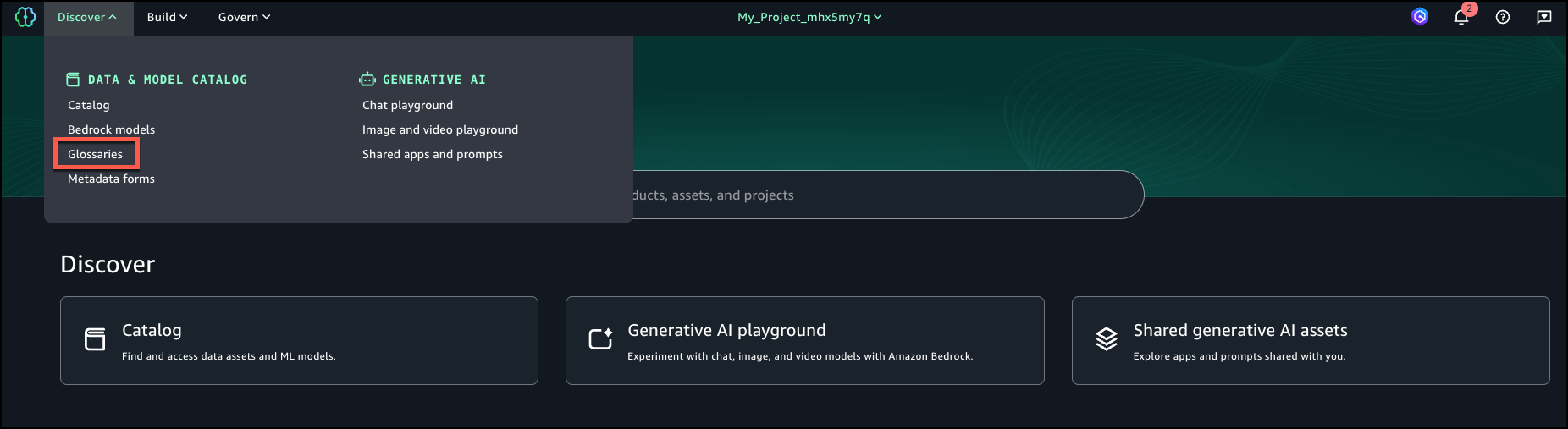
In SageMaker Unified Studio, on the Discover menu, choose Glossaries.
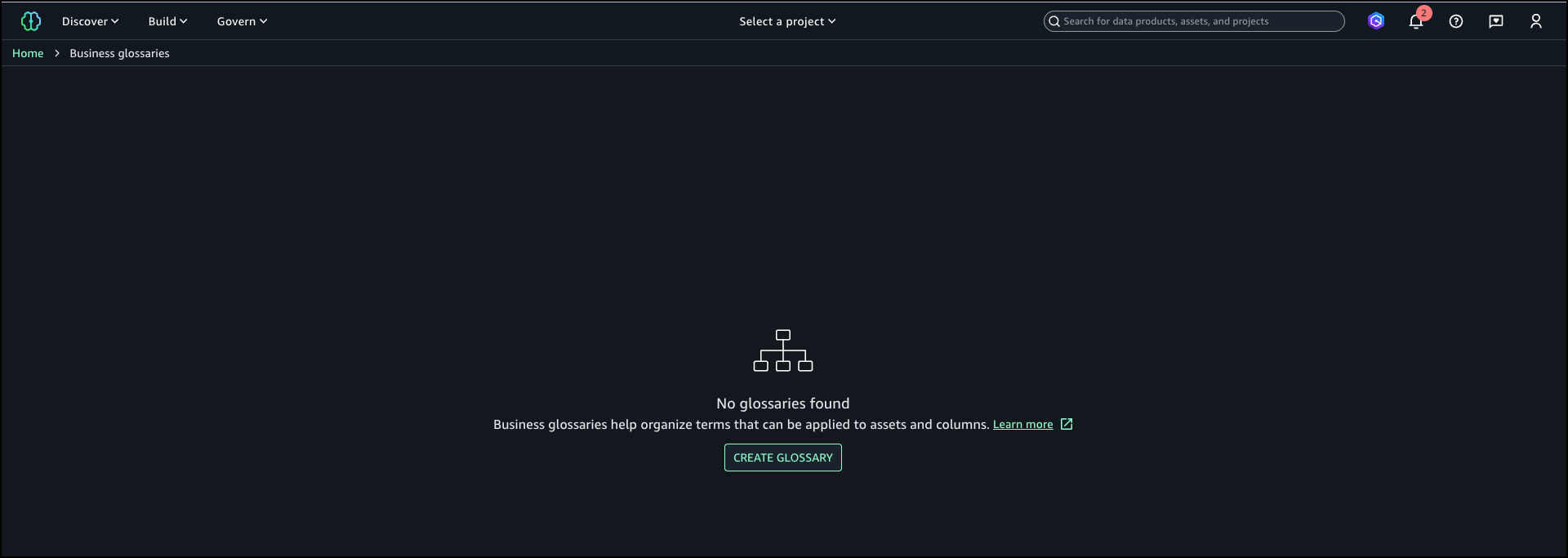
Choose Create glossary.
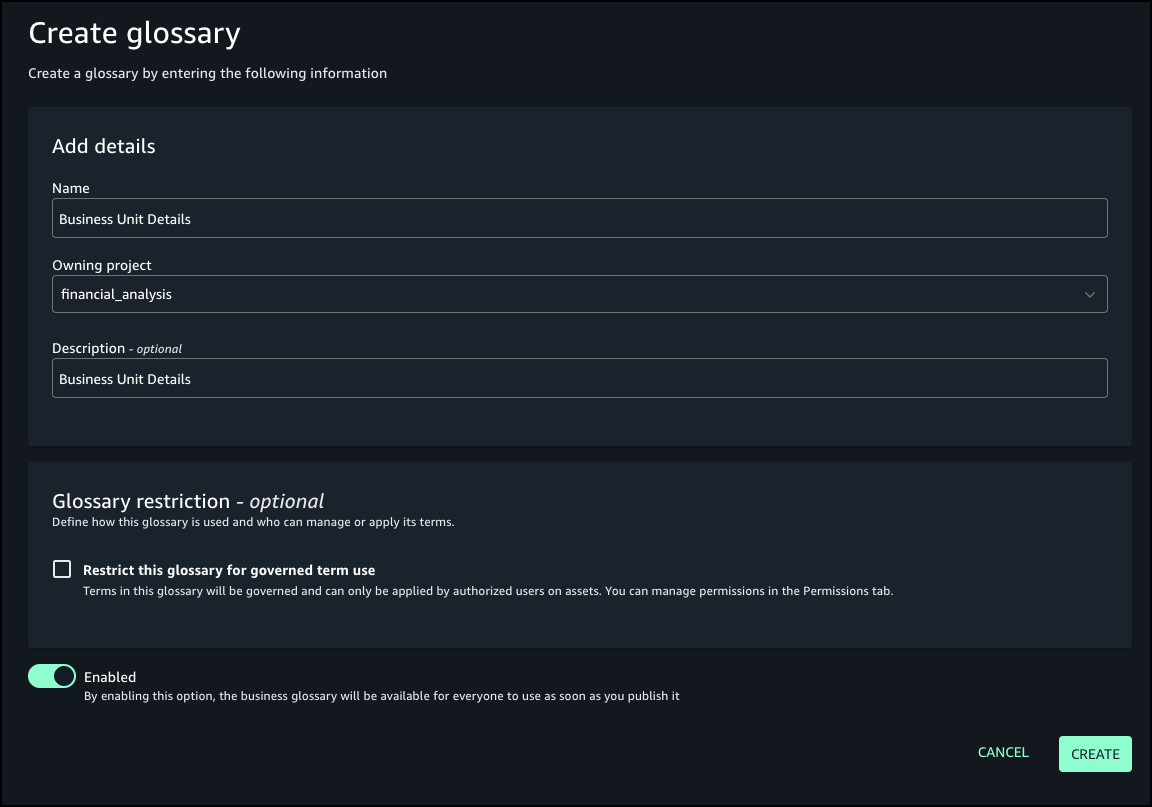
Provide details for your glossary, including name, owning project, and optional description.
For Glossary restriction, turn on Enabled.
Choose Create.
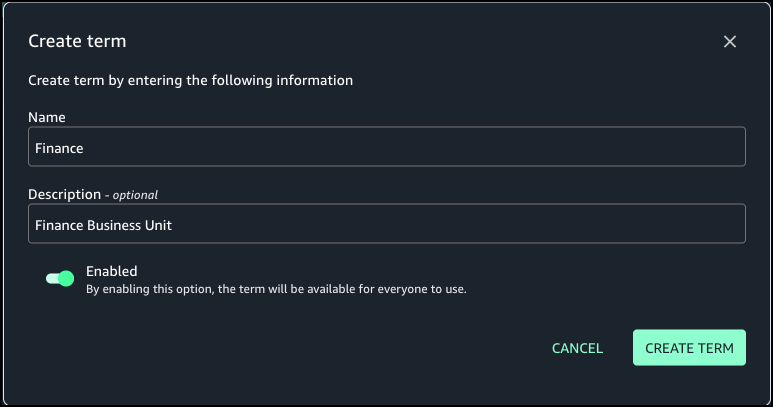
Create the term Finance in the Business Unit Details glossary.
Create rule to enforce glossary terms
Complete the following steps to create a rule to define glossary terms:
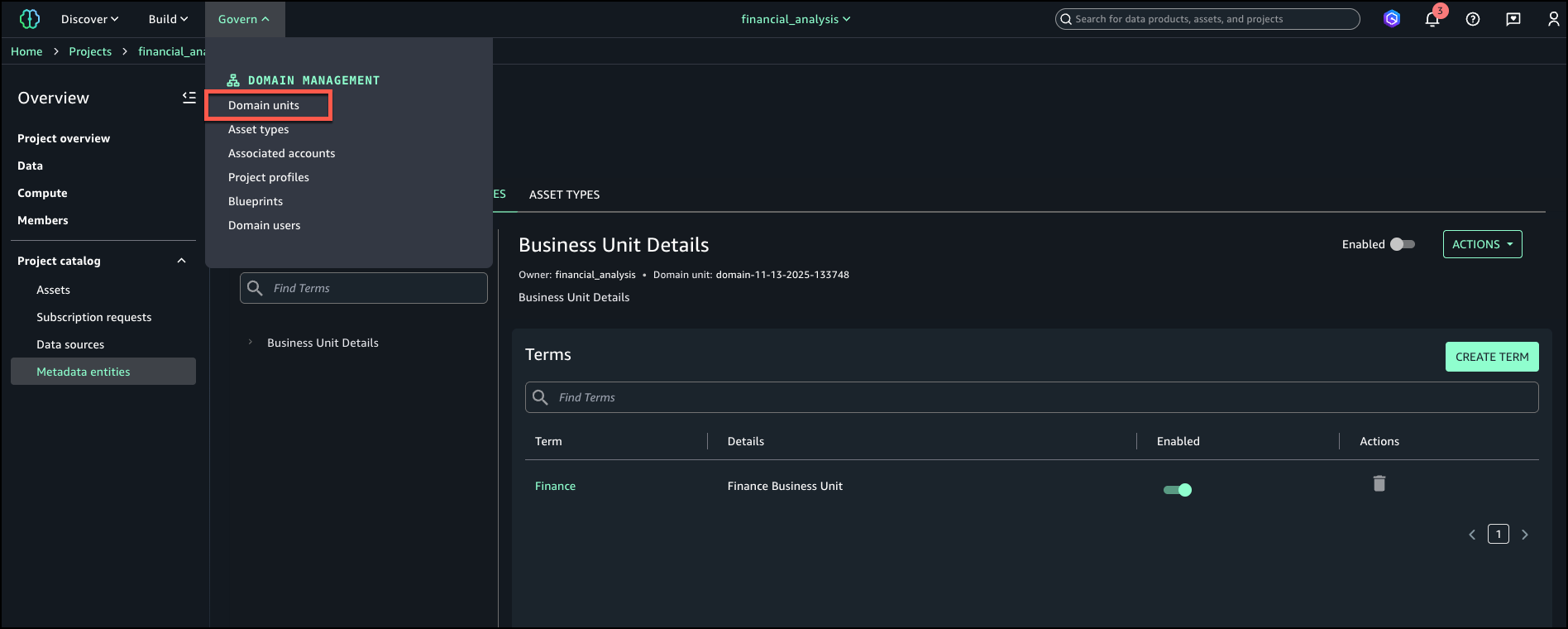
On the Govern menu, choose Domain units.
On the Rules tab, choose Add.
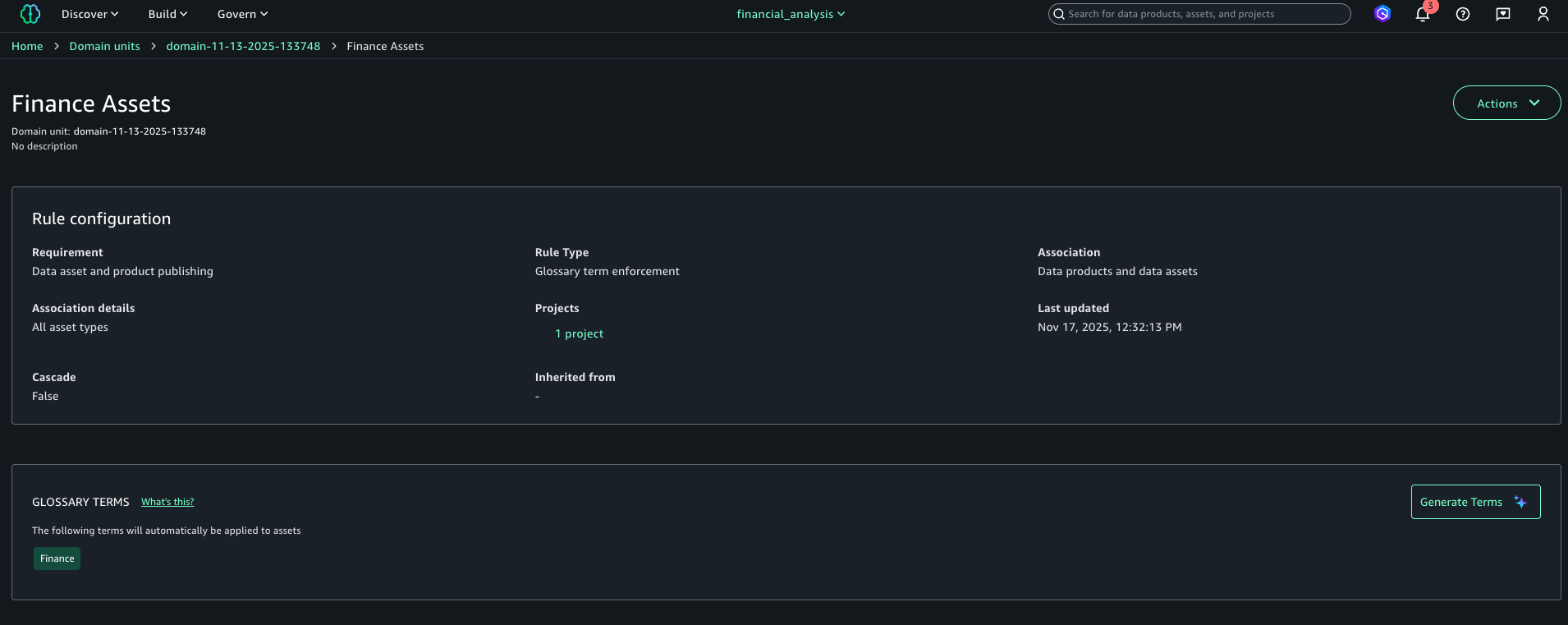
Add a publishing rule for the Finance project to have the Finance tag for all assets published to the catalog.
Choose Add rule. The following screenshot shows the configuration details for your new rule.
Publish asset with enforced rules
Complete the following steps to publish your asset with the enforced rules:
On the financial_analysis project page, go to your asset.
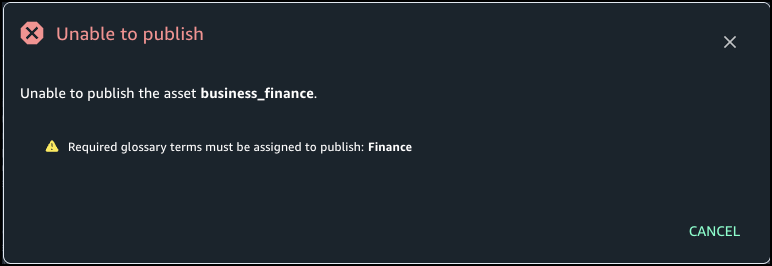
In the Glossary terms section, choose Add terms. If you choose Publish without adding the needed term, you get an error stating the Finance term should be assigned.
Choose Finance to add the required term.
Choose Publish asset.
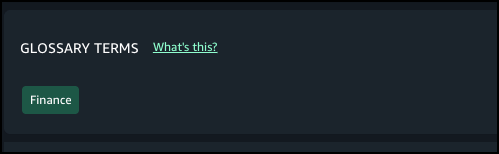
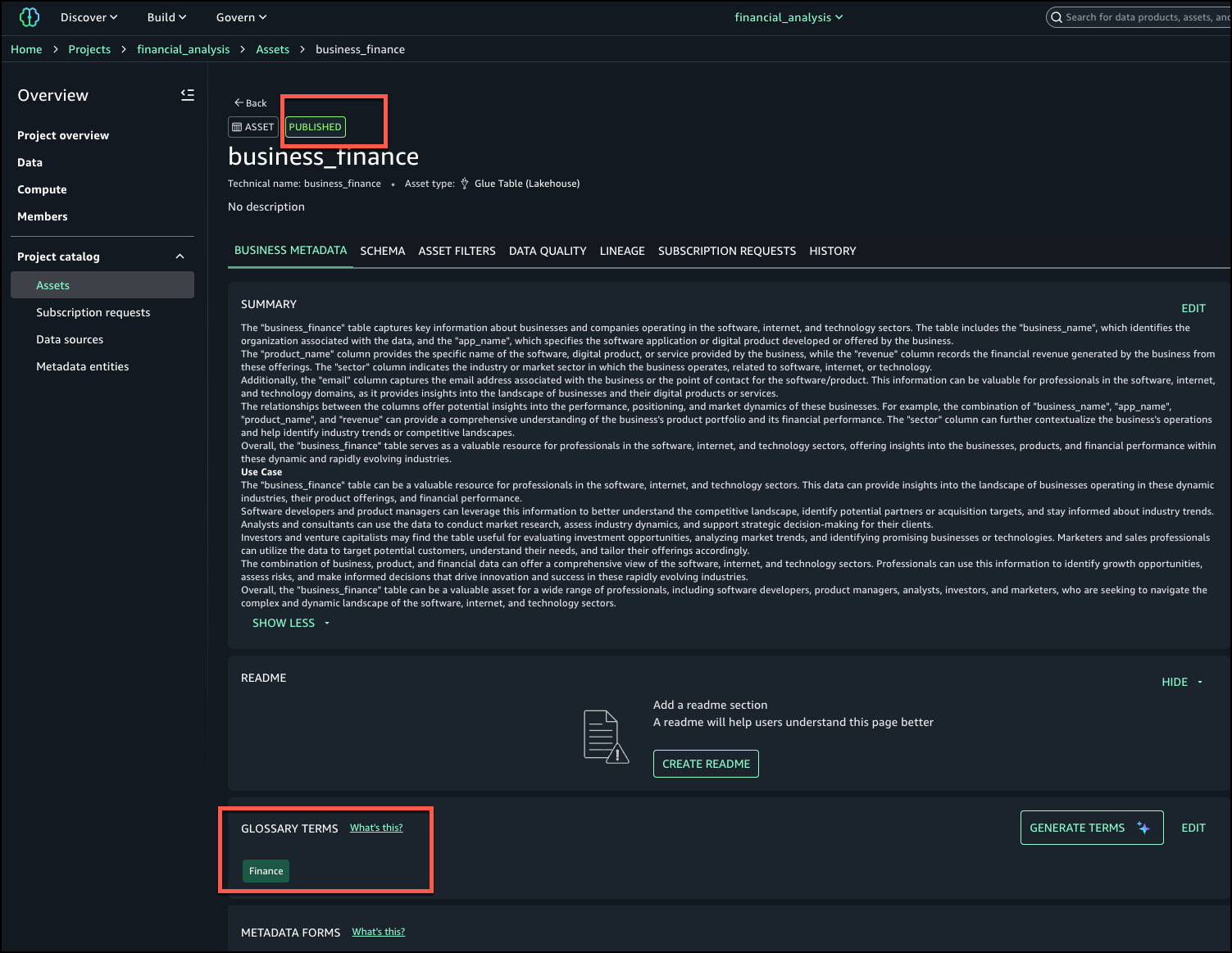
The following screenshot shows the published asset and the required terms in the glossary.
Conclusion
With metadata enforcement rules for glossary terms, SageMaker Catalog brings stronger control and consistency to how organizations publish and manage their data assets. By requiring approved business classifications before publication, teams can make sure assets adhere to enterprise metadata standards, improving governance, discoverability, and trust in shared catalogs. This capability helps organizations scale their catalog governance without adding manual overhead—embedding compliance and quality directly into the publishing workflow.
Metadata enforcement rules for glossary terms are available in AWS Regions where SageMaker Catalog operates. Get started with this capability, refer to the user guide.
Amazon API Gateway now provides a fully managed portal feature, Amazon API Gateway Portal, that eliminates the need for static websites, open source solutions, or third-party offerings, which often led to fragmented API lifecycle management and increased costs. API Gateway Portal integrates with the API Gateway service and offers features like API products, interactive “Try it” functionality, and documentation for your API portfolio.
This fully managed solution addresses the need for a seamless way to showcase APIs and help developers quickly find, try, and integrate with them. By providing a managed solution that handles infrastructure, security, and scalability, API providers can focus on creating valuable APIs and delivering a great developer experience.
In this post, we will show how you can use the new portal feature to create customizable portals with enhanced security features in minutes, with APIs from multiple accounts, without managing any infrastructure.
Overview
A developer portal is a web page where API providers can share their APIs and API documentation by grouping them into portal products. Each portal product is a logical grouping of REST APIs and contains the documentation that you create and publish for your API consumers. Product pages within a portal contain the custom documentation at the portal product level. Product REST endpoint pages contain the documentation for each of the REST APIs with the details of the path and method of a REST API and the stage it’s deployed to. The combination of Product pages and Product REST endpoint pages provide the complete documentation for our API consumers on how to start using your REST APIs.
This abstraction allows you to organize endpoints from multiple APIs and stages into coherent product offerings for your consumers. For example, if you operate multiple APIs supporting a pet adoption service, you can create an “AdoptAnimals” portal product that groups dog-related endpoints from one API with cat-related endpoints from another API, while organizing user management functions into a separate “AdoptProcess” portal product.
With this flexibility you can present your APIs in a way that matches your business logic rather than your technical architecture and organize your APIs in ways that make the most sense for your consumers. For large enterprises managing extensive API portfolios, API Gateway Portal offers centralized catalogs of APIs across business groups, reducing duplicate work and improving standardization.
The portal feature automatically creates developer portals that display APIs with documentation, interactive testing capabilities, and integrated consumer analytics. The platform uses AWS Resource Access Manager (RAM) for multi-account API sharing, Amazon Cognito for access control, and Amazon CloudWatch for centralized monitoring.
Key features of API Gateway Portal
The API Gateway Portal provides comprehensive functionality for both API providers and consumers.
The following is a list of the key features that were introduced by the service at launch:
Customizable portal experience: You control your portal’s branding through custom logos and color schemes. You can configure custom domain names with SSL certificates managed by AWS Certificate Manager, or use the default domain structure provided by AWS.
Flexible access control: Access to developer portals can be controlled using Amazon Cognito, you can configure portals to be either publicly accessible or require authentication. Integration with Cognito user pools provides secure and scalable identity and access management that is enterprise-grade, cost-effective, and customizable. For organizations using existing identity systems, Cognito supports federation with SAML and OpenID Connect identity providers.
Cross-account API organization: The portal supports sharing portal products across AWS accounts using AWS RAM, so that organizations can create a unified API catalog while maintaining flexibility for API providers to develop and maintain APIs in their own accounts. When you share a portal product with another account, that account cannot modify any properties of your portal product or product endpoint pages, so API providers maintain control over their APIs while still enabling discovery across the organization. The cross-account sharing capabilities provide significant governance benefits for enterprise customers, including centralized discovery, standardization, reduced duplication, clear ownership, and controlled access.
Documentation: Beyond API reference documentation synchronized from your API definitions, you can add supplemental documentation including guides, use cases, and integration examples.
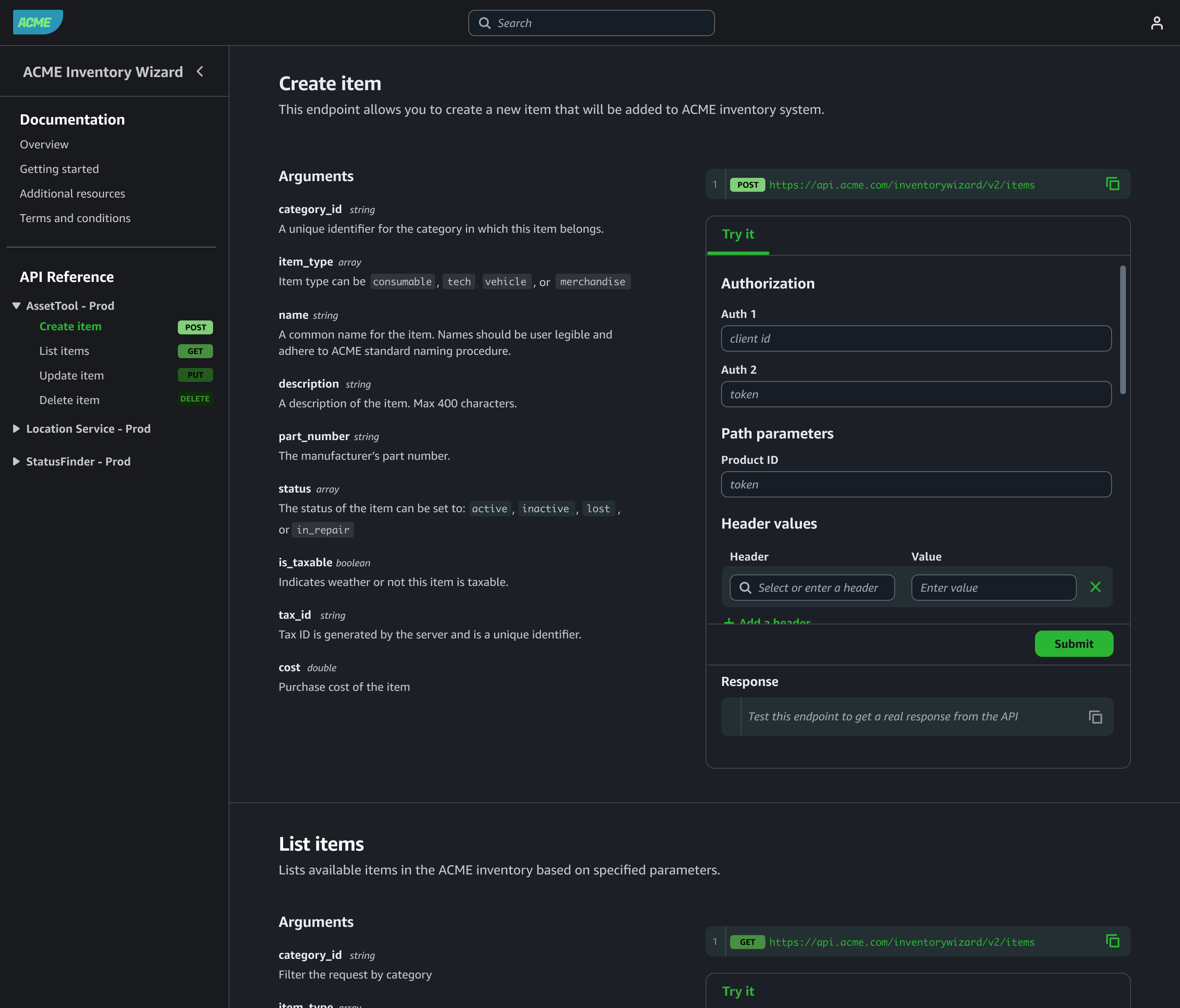
Search, discovery, and interactive API exploration: Consumers can search across your entire catalog. The portal provides intuitive customizable navigation and organization to help users find the right endpoints for their needs. Using the “Try It” functionality consumers can try APIs directly from the portal. Users can input request parameters, headers, and see live responses, reducing time-to-value for API integrations. This environment includes built-in limits for security and cost control.
Access control and governance
Amazon API Gateway Portal provides security and governance capabilities essential for production deployments.
Identity and access management: Integration with Cognito user pools provides secure and scalable identity and access management that is enterprise-grade, cost-effective, and customizable, including multi-factor authentication, password policies, and user lifecycle management.
API authorization: The portal respects existing authorization mechanisms configured on your APIs, including AWS IAM, Lambda authorizers, and Cognito user pools. Portal access doesn’t bypass your established security controls.
Cross-account governance: When sharing portal products across accounts using AWS RAM, the original API owners retain full control over their endpoints, including authorization strategies, integration configurations, and stage settings. Portal owners can use shared portal products but cannot modify the underlying API configurations.
Audit and monitoring: All portal management activities integrate with AWS CloudTrail for comprehensive audit logging. You can use Amazon CloudWatch RUM to perform real user monitoring to collect and view analytics about API consumers in near real time.
Resource limits: The service includes built-in quotas to prevent abuse, including limits on API testing rate limits, payload sizes, and integration timeouts. With these limits the “Try It” functionality cannot impact your production API performance.
Getting Started
Setting up a portal involves three main steps: creating portal products, configuring the portal, and publishing for consumer access. We will walk through those steps in more detail.
Create portal product
The following procedure shows you how to create a portal product:
Navigate to the API Gateway console and select Portal products from the main navigation.
Choose Create portal product and specify your portal product details including name, description, and visibility settings.
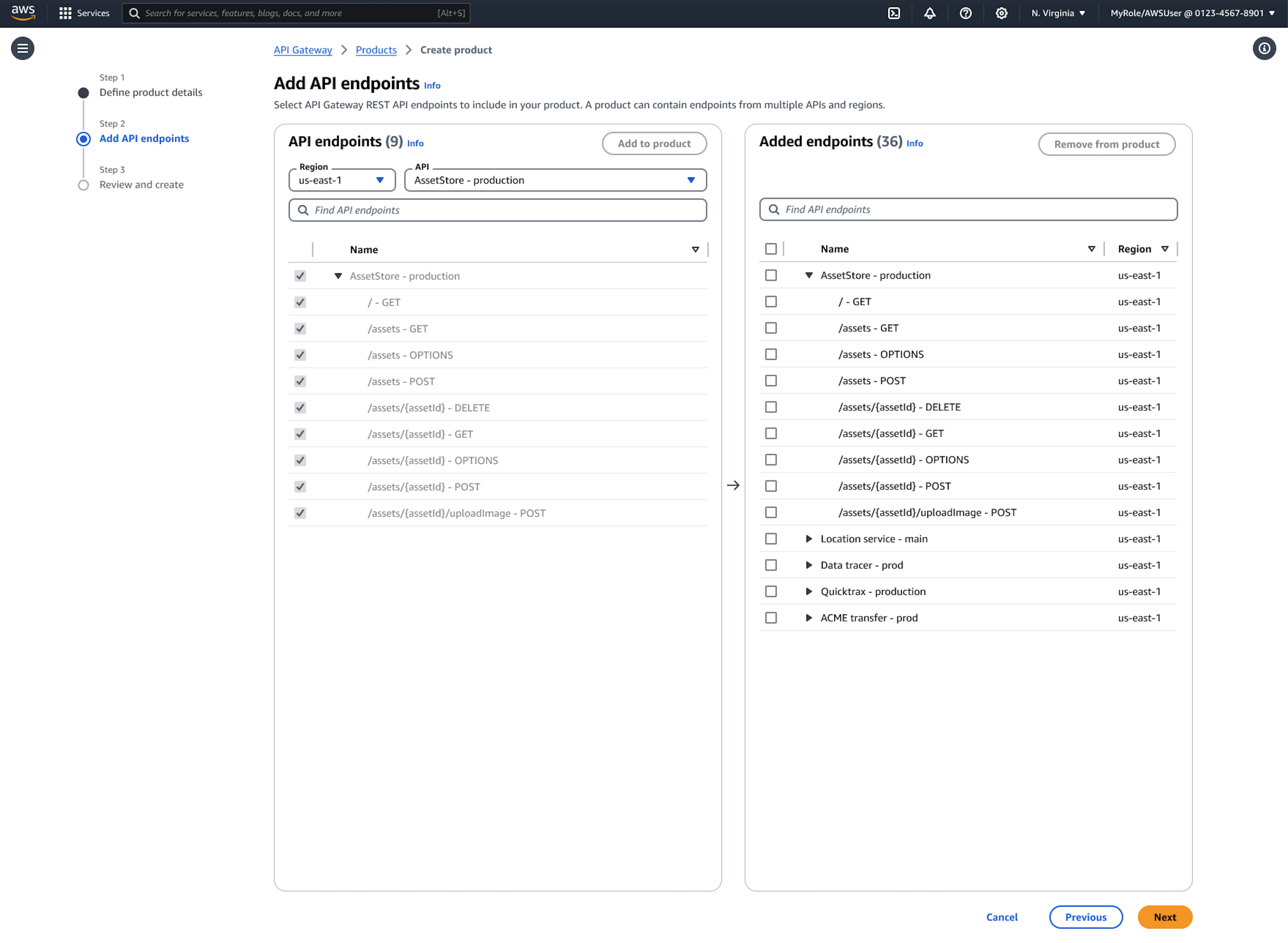
Next, select the endpoints you want to include in this portal product. You can choose entire API stages or specific resources and methods, and even rename endpoints with user-friendly names for better discoverability.
The system automatically imports your API documentation. You can improve the documentation with additional context, use cases, and examples later.
Organize product endpoints into custom categories that reflect your business logic rather than technical implementation details.
Configure the developer portal
The following procedure shows how to create a portal.
Select Developer portals in the API Gateway console navigation.
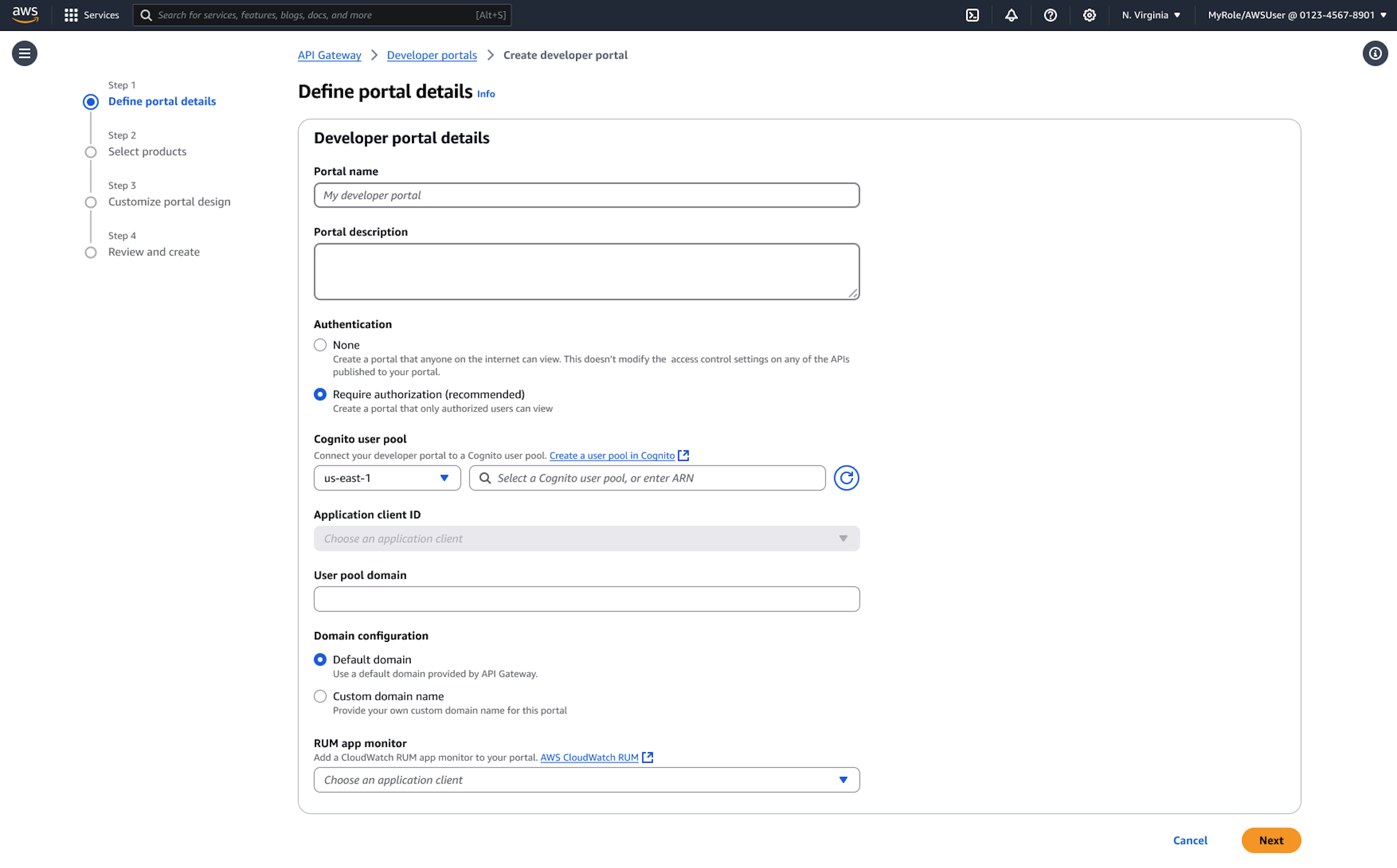
Specify your portal name, description, and domain configuration.
Choose between adding your prefix to the default AWS domain or configuring a custom domain name with your own SSL certificate.
Configure access control by selecting authentication requirements. For internal portals, you might require Amazon Cognito authentication, while public portals can allow anonymous access to documentation.
Upload your logo and select color themes to match your brand identity.
Add your portal products. You can include products from your account or products shared with you from other accounts through AWS RAM. The portal provides search and filtering capabilities for consumers.
Preview and publish
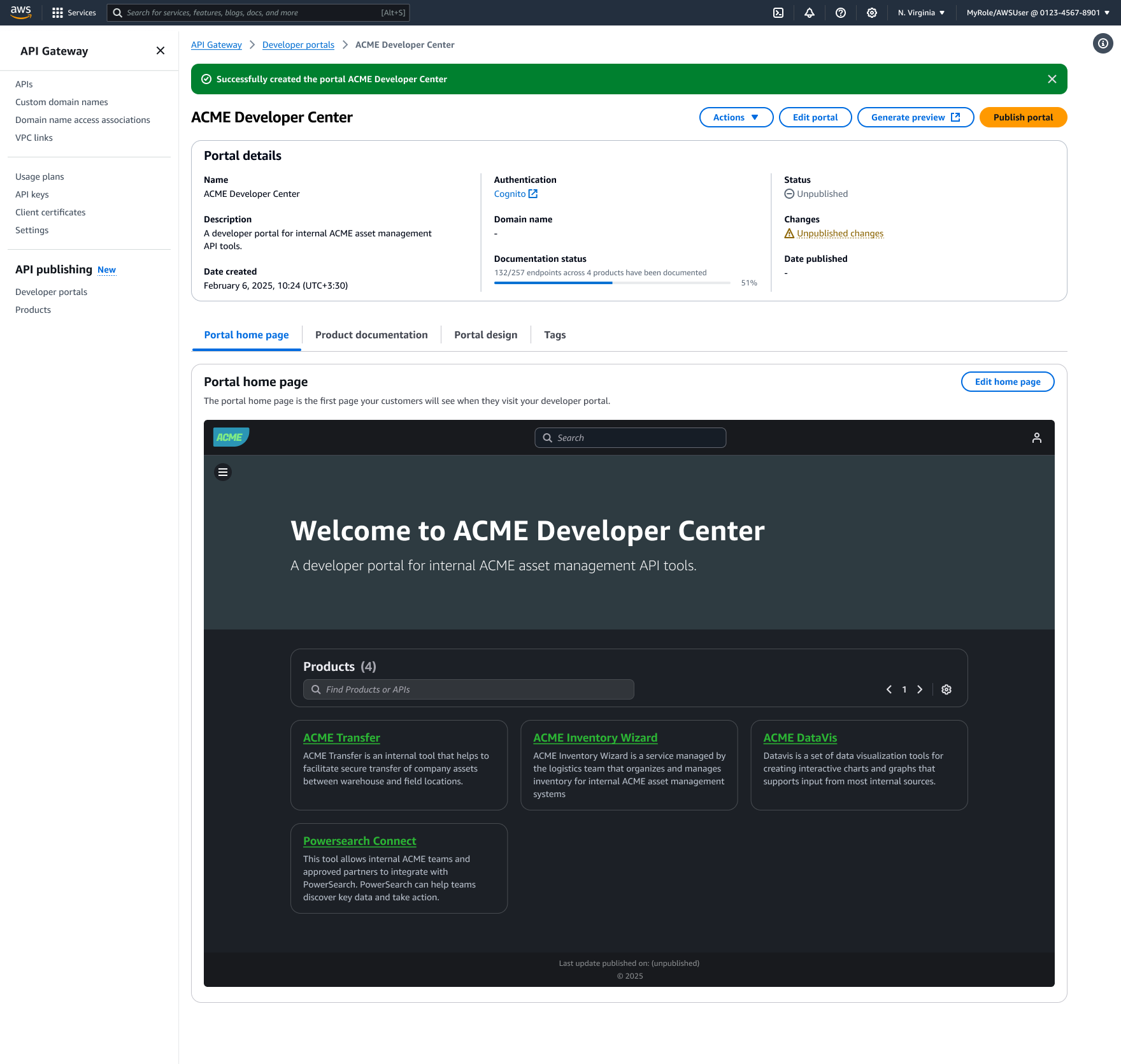
Before making your portal publicly available, use the preview functionality to review the consumer experience. The preview shows exactly how your portal will appear to users, including navigation, documentation, and available API testing capabilities.
When you’re satisfied with the configuration, choose Publish portal to make it accessible to consumers. The publishing process typically completes within a few minutes, and API Gateway provides the final portal URL for distribution to your consumers.
Conclusion and next steps
The new API Gateway Portal eliminates the complexity of building and maintaining custom API documentation sites. Your developers get a professional, feature-rich experience where they can discover and try your APIs immediately. Plus, since everything stays within AWS, you get built-in security, simplified operations, and comprehensive observability through integration with services like CloudWatch and CloudTrail.
Ready to streamline your API discovery experience? Here’s how to get started:
When building generative AI applications, enterprises need to govern foundation model usage through authorization, quota management, tenant isolation, and cost control. To meet these needs, Dynatrace developed a robust AI gateway architecture that has evolved into a reusable reference pattern for organizations looking to control access to Amazon Bedrock services at scale.
In this blog post, you’ll explore the underlying architecture, learn how to deploy and configure the solution, and discover further enhancement ideas.
Architecture of the AI gateway
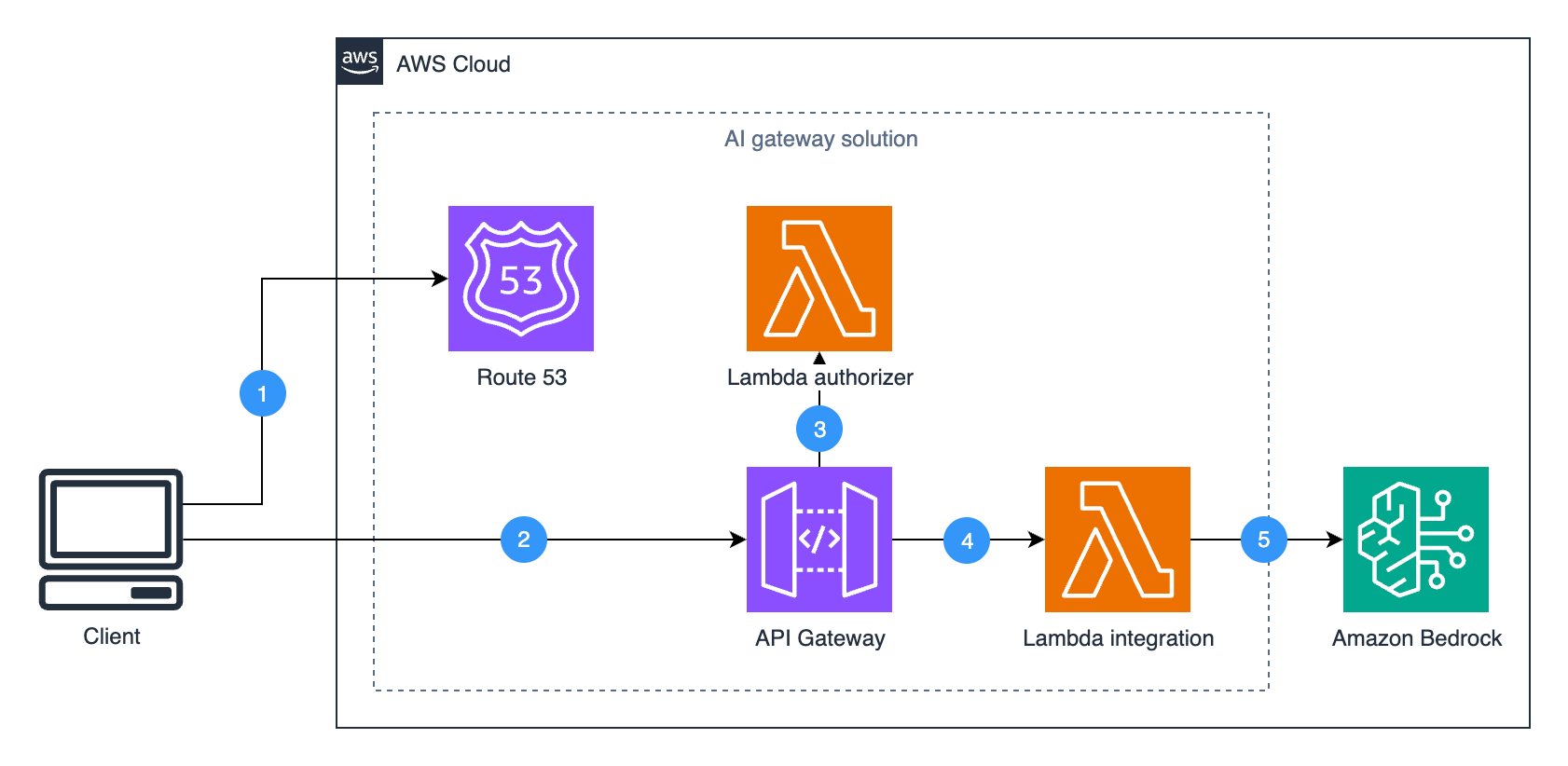
The reference architecture gives you granular control over LLM access using fully managed AWS services. It is transparent to client applications and seamlessly integrates into existing enterprise environments.
Figure 1. Reference architecture of the AI gateway.
The solution consists of four core components:
Amazon Route 53 (optional) manages custom domain routing, allowing clients to access the gateway through a company-specific endpoint instead of the default Amazon API Gateway domain.
Amazon API Gateway serves as the entry point for the requests and provides capabilities like authorization, request throttling, and lifecycle management.
AWS Lambda authorizer handles request authorization, which in the Dynatrace implementation involves validating JWT tokens with existing authentication systems. For your specific implementation, you can implement your own authorization logic in a Lambda authorizer, integrate with Amazon Cognito user pools, or use other API Gateway authorization mechanisms.
Lambda integration is a dynamic request forwarder that signs incoming requests with AWS credentials and routes them to the appropriate Amazon Bedrock endpoints. The function preserves the original request details, including the API action and parameters, to support current or future Amazon Bedrock APIs without code changes. The complete implementation is available in the integration Lambda function.
Amazon Bedrock provides access to foundation models and AI capabilities.
The benefit of this architecture is the transparency to client applications and future-proof design. Clients can use AWS SDKs (like Boto3) to access Amazon Bedrock functionalities (such as LLMs and Knowledge Bases) exactly as they would when calling the Amazon Bedrock API directly. Meanwhile, the AI gateway handles authorization, quota management, and other capabilities behind the scenes.
When a client makes an Amazon Bedrock API call to the AI gateway endpoint, the Lambda integration function:
Captures the original request with its details (headers, body, and parameters).
Forwards the request to the correct Amazon Bedrock service endpoint.
With this approach the AI gateway can support current and new Amazon Bedrock features without requiring specific API knowledge or code updates, reducing gateway maintenance as the available features grow.
Deploying with AWS CloudFormation
This walkthrough will deploy a private AI gateway with authorization disabled for initial testing. You’ll create the core infrastructure (API Gateway, Lambda functions, and VPC endpoints) and then test basic functionality before optionally adding security features.
Sign in as an administrator to the AWS Management Console and use the navigation bar to select your desired AWS Region for deployment.
Choose the following Launch Stack button:
In the Quick create stack page, configure the key parameters as follows. For complete parameter descriptions, see the documentation.
Parameter
Description
Choose value
Why
EndpointType
API Gateway endpoint accessibility (PRIVATE or REGIONAL)
PRIVATE
Secure internal access only
EnableAuthorizer
Enable Lambda Authorizer for API Gateway
false
Start without auth for simpler testing
CustomDomain
Custom domain name for API Gateway
(leave empty)
Use default domain initially
HostedZoneId
Route 53 Hosted Zone ID for custom domain SSL validation
(leave empty)
Not needed with default domain
Select the capability I acknowledge that AWS CloudFormation might create IAM resources.
Leave all other configurations at their default values and choose Create Stack.
In the stack page, wait until the Status of the stack transitions to CREATE_COMPLETE.
Choose Outputs and copy the values for GatewayUrl, VpcId, and ApiId – you’ll use these to test your gateway later.
Testing the deployment
Your gateway is now running privately inside its VPC, but that means you can’t reach it from the outside. You’ll now create an AWS CloudShell environment inside the VPC to test the gateway:
Virtual Private Cloud (VPC): the VpcId you copied earlier
Subnet: any available subnet
Security group: the default VPC security group
Choose Create to create your VPC environment.
Once your CloudShell environment is ready, you’ll create a client that properly routes requests through your private API endpoint.First, execute this command in CloudShell to create a reusable client factory that routes requests through your gateway while maintaining the standard boto3 interface:
cat > boto3_client_factory.py << 'EOF'
import boto3
from botocore import UNSIGNED
from botocore.client import BaseClient
from botocore.config import Config

class Boto3ClientFactory:
    """Utility class for creating boto3 clients."""

    @classmethod
    def create(cls, service_name: str, endpoint_url: str, jwt_token: str = None) -> BaseClient:
        """Create a boto3 client instance usable with the sign-and-forward Lambda.

        Parameters
        ----------
        service_name : str
            The service name to be used when initiating boto3.client.
        endpoint_url: str
            URL pointing to API gateway invoke endpoint.
        jwt_token: str, optional
            JWT token to include in Authorization header for all requests.
            If provided, adds 'Authorization: Bearer {jwt_token}' header.
        """
        generic_client = boto3.client(
            service_name = service_name,
            endpoint_url = endpoint_url,
            # do not sign the request at the client side; authentication is done
            # in API gateway
            config = Config(signature_version = UNSIGNED),
            # non-None Region_name needs to be passed due to validation logic
            # it is NOT used if we pass endpoint_url above
            region_name="",
        )

        def add_client_headers(model, params, **kwargs):
            """Hook to add custom headers each request."""
            headers = params["headers"]

            # the header "aws-endpoint-prefix" is used by the Lambda integration
            headers["aws-endpoint-prefix"] = model.service_model.endpoint_prefix

            # Add Authorization header if jwt_token is provided
            if jwt_token:
                headers["Authorization"] = f"Bearer {jwt_token}"

        # register the hook to add custom headers before each call
        generic_client.meta.events.register("before-call.*.*", add_client_headers)

        return generic_client
EOF
With the factory in place, you can now create clients for different Amazon Bedrock services. Set your configuration variables:
# Replace with your actual Gateway URL from CloudFormation Outputs (used in all examples)
export GATEWAY_URL="https://your-api-id.execute-api.region.amazonaws.com/v1"
# Replace with one of your pre-existing Amazon Bedrock Knowledge Bases ID (optional, only needed for knowledge base example)
export KB_ID="your-kb-id"
After testing the basic functionality, you can now enable authorization by updating your deployed stack with custom authorization logic. For example, to implement JWT validation in a Lambda authorizer:
Open the CloudFormation template file with your favorite text editor and replace the following placeholder code in the Lambda authorizer with your own authorization logic (see examples):
def lambda_handler(event, context):
    try:
        # Placeholder for JWT validation
        # Implement your authorization logic
        token = event['authorizationToken']

        # By default, deny all requests
        return generate_policy('user', 'Deny', event['methodArn'])
    except Exception as e:
        return generate_policy('user', 'Deny', event['methodArn'])
Update the CloudFormation stack to enable your new authorization logic:
Select your bedrock-llm-gateway stack, choose Update stack, and choose Make a direct update
Choose Replace existing template, upload your modified template file, and choose Next
In the parameters section, change EnableAuthorizer from false to true and choose Next
Select the capability I acknowledge that AWS CloudFormation might create IAM resources.
Choose Next and choose Submit
Once the CloudFormation stack update is complete, deploy your changes to the API Gateway. API Gateway requires an explicit deployment step to activate configuration changes. While CloudFormation updates the API Gateway resources, the changes won’t be active until you create a new deployment to push them to the stage.
Choose your API (find it using the ApiId from your CloudFormation outputs)
Choose Deploy API
For Stage select v1, and choose Deploy
Test your authorization by going back to CloudShell and running this example. This example passes a JWT token to test the authorization – replace it with your actual token or other authorization parameters you configured in the Lambda authorizer.
cat > test_with_auth.py << 'EOF'
import os
from boto3_client_factory import Boto3ClientFactory

# Get configuration from environment variables
api_gateway_url = os.environ['GATEWAY_URL']

# Replace "your-jwt-token" with your actual JWT token
jwt_token = "your-jwt-token"

bedrock_runtime_client_with_jwt = Boto3ClientFactory.create(
    service_name = "bedrock-runtime",
    endpoint_url = api_gateway_url,
    jwt_token = jwt_token
)

response = bedrock_runtime_client_with_jwt.converse_stream(
    modelId = 'global.anthropic.claude-haiku-4-5-20251001-v1:0',
    messages = [{"role": "user", "content": [{"text": "Who invented the airplane?"}]}]
)

print("Model Response:")
# Stream the response as it arrives
for event in response['stream']:
    if 'contentBlockDelta' in event:
        delta = event['contentBlockDelta']['delta']
        if 'text' in delta:
            print(delta['text'], end='', flush=True)  # Print each chunk immediately
    elif 'messageStop' in event:
        print("\n")  # End of stream
        break
EOF

python test_with_auth.py
Enhancement options for the AI gateway
The solution can be enhanced using additional API Gateway capabilities. Here are some examples:
Rate limiting and throttling: Control request rates using usage plans and API keys. This is especially important in multi-tenant SaaS applications to avoid noisy neighbor problems. For examples of throttling scenarios, see the throttling documentation.
Private or edge-optimized endpoints: Configure endpoint types to optimize for internal access or global performance.
Lifecycle management and canary releases: Manage multiple API versions and implement gradual rollouts with stage variables and canary deployments.
WAF integration: Add AWS WAF rules to help protect from common exploits.
Prompt and response caching: Implement caching strategies to reduce costs and improve response times for frequently requested prompts using API Gateway caching.
Content filtering: In addition to the safeguards offered by Amazon Bedrock Guardrails, add custom filtering in the Lambda integration layer to screen for sensitive content such as personally identifiable information (PII).
The AI gateway pattern demonstrated in this post provides a scalable way to manage access to foundation models and agent tools through Amazon Bedrock. Initially developed and implemented by Dynatrace to serve their global user base, this pattern has proven its effectiveness at enterprise-scale. By using the Amazon API Gateway enterprise features organizations can implement necessary controls while maintaining the benefits of serverless architecture.
As businesses increasingly use SMS messaging to engage with customers at scale, having the right origination identity is crucial. Toll-free numbers (TFNs) are the quickest way to begin sending to the United States and offer a trusted, high-visibility option that can drive greater response and brand recognition. This post is for every company that wants to send to the US or internationally.
Obtaining and properly registering a US toll-free number requires a registration process and adhering to requirements set forth by mobile carriers. This comprehensive guide walks you through the step-by-step procedure for registering a US toll-free number through AWS End User Messaging, which provides robust SMS capabilities to AWS customers.
The benefits of using a US toll-free number
TFNs offer several key advantages over other SMS origination types in the US market:
The opt-out flow for US TFNs is managed at a network level and enforced by US Carriers. If a user sends the word stop—or any of the other supported keywords—to the TFN, the carrier sends the following outbound message to the user: NETWORK MSG: You replied with the word "stop" which blocks all texts sent from this number. Text back unstop or start to receive messages again. This behavior cannot be changed.
International toll-free numbers are two-way capable in the US and Canada but are one-way only in all other supported countries. Depending on the country being sent to, if not the US or Canada, your end-user can receive your message from an originator other than your TFN. This feature can be turned on before or after registration.
The TFN registration process
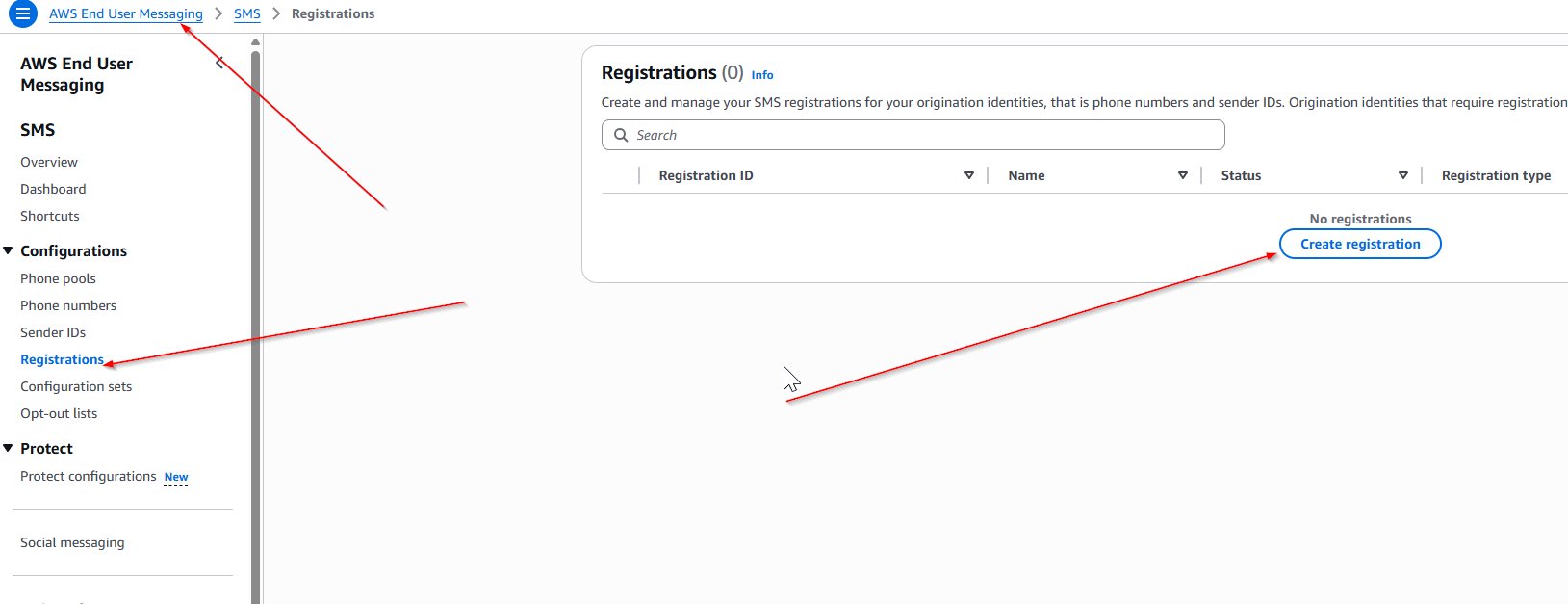
To get started, you need to create a US toll-free number registration in the AWS Management Console for AWS End User Messaging or use the API.
Company information: Provide details about your business, including the company name, website, and headquarters address.
Contact information: Enter the name, email, and phone number of the individual who will serve as the main point of contact for your TFN program. This email address should match the domain of the company being registered and cannot be a distribution list, contact group, or mailing list. This information will be used for verification or in the event of something needing to be communicated to you about your TFN. It will not be public knowledge.
Messaging use case: Describe how you intend to use the TFN, including your estimated monthly SMS volume, and select the Use Case Category (such as two-factor authentication, notifications, or marketing).
Use case details: It’s critical that the Use Case Details field and all message templates are consistent with the Use Case Category you selected in the previous step.
For example, if you select two-factor authentication or one-time passwords, your Use Case Details should explain how you plan to use your TFN for that use case, who you will interact with, and why. Answers must be written in English, and it is very important to be clear and concise in this section. Humans are reviewing these, so make sure that everything you write can be understood without prior knowledge of your company or your use case.
Opt-in Workflow Description: This has several boiler-plate components that must be present at the point of opt-in and are discussed in depth in this blog post. If you have a verbal opt-in, you can include the script in this field. If you have a publicly available form, you can supply the URL in the description. Regardless of the format, you must include the following elements at the point of opt in:
Program (brand) name.
Explicitly state the purpose of the SMS program that your end-users are opting into.
Have no prefilled checkboxes, radio buttons, or other fields.
Message frequency disclosure. For example: Message frequency varies or One message per login.
Customer care contact information. For example, Text HELP or call 1-800-111-2222 for support.
Opt-out information. For example: Text STOP to opt-out of future messages.
Include Message and data rates may apply disclosure.
Link to a publicly accessible terms and conditions page.
If you are unable to include a public link to your terms, you can include them in the Opt-in workflow image field or alternatively attach them to the registration form or another method like an Amazon S3 presigned URL. Make sure to keep it separate from the actual opt-in screenshots.
Link to a publicly accessible privacy policy page.
If you’re unable to include a public link, you can include the full terms in the Opt-in workflow image field or alternatively attach them to the registration form or another method like an Amazon S3 presigned URL. Make sure to keep it separate from the actual opt-in screenshots.
Opt-in workflow image: Upload an image showing how users consent to receiving messages.
The maximum file size is 500 KB, and valid file extensions are PDF, JPEG, and PNG.
This could be a screenshot of a non-public form, a written consent form, or other evidence of a compliant explicit opt-in that includes all the elements detailed previously.
Make sure that the screenshot is clear and readable; degraded image quality will likely be rejected regardless of compliance.
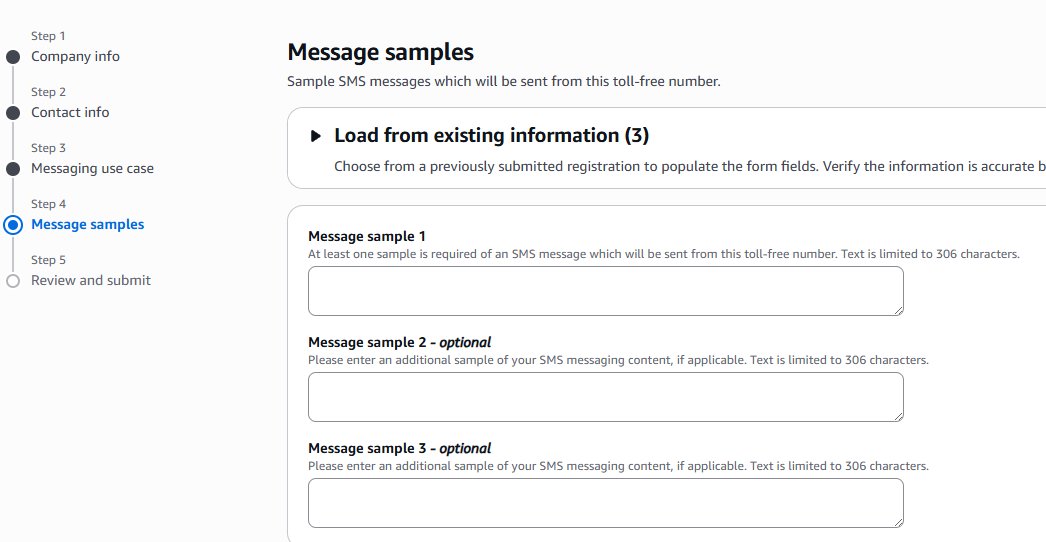
Message samples: Each sample message should reflect actual messages to be sent, should match the Use Case Category you indicated previously, and should follow these best practices:
Indicate any variable fields with brackets and make sure to be clear what information can be replaced.
Example: Hi, [FirstName] this is AnyCompany letting you know that your delivery is ready.
Each sample message must be at least 20 characters. If you plan to use multiple message templates, include them too.
Ensure that all messages include your brand name and that it’s consistent with the previously entered information.
Make sure your messaging doesn’t involve prohibited content such as cannabis, hate speech, and so on; and that your use case is compliant with AWS Messaging Policy.
Review and submit: Verify that all information is accurate before submitting your registration for approval. There are no exceptions to an explicit opt-in—this includes one-time password use cases, so make sure that your registration includes all the required elements.
Sending SMS messages and monitoring delivery receipts
After your TFN is activated, you can begin sending SMS messages through AWS End User Messaging. It’s important to monitor your program closely and maintain compliance, because carriers might filter or block your messages if there are issues with your program. This blog post reviews best practices for how to monitor deliverability of SMS messages.
Conclusion
Make sure to follow each step carefully and answer each question completely. There are humans reviewing these so it’s important that your answers are succinct and clear.
As an AWS customer, you have access to powerful messaging capabilities through AWS End User Messaging. By following the steps outlined in this guide, you can quickly register for a US toll-free number to start your SMS outreach. Maintaining compliance is key, and with a TFN in place, you’ll be well on your way to delivering highly effective, compliant SMS messaging that drives real business impact. If you have other questions about AWS End User Messaging, see the comprehensive API specs, the User Guide, or reach out to AWS Support.
AWS Lambda now supports Python 3.14 as both a managed runtime and container base image. Python is a popular language for building serverless applications. Developers can now take advantage of new features and enhancements when creating serverless applications on Lambda.
The Python 3.14 runtime supports Powertools for AWS Lambda (Python), a developer toolkit that helps you to implement serverless best practices. Powertools includes observability, batch processing, AWS Systems Manager Parameter Store integration, idempotency, feature flags, Amazon CloudWatch metrics, structured logging, and more.
This blog post highlights notable Python language updates, Python Lambda runtime features and support, and how you can use the new Python 3.14 runtime in your serverless applications.
New Python features
Python 3.14 contains the following notable updates.
Template strings literal
Template strings introduce a new mechanism for custom string processing using the t prefix instead of f for f-strings. Unlike f-strings that return a simple string, t-strings return an object representing both static and interpolated parts.
Evaluation of type annotations
With the implementation of PEP 649, Python 3.14 defers type annotation evaluation until required. This reduces import time overhead and resolves forward reference issues.
Improved Error Messages
The interpreter now provides helpful suggestions when it detects typos in Python keywords. These include incorrect control flow structures, misused conditional expressions, string syntax errors, incompatible type usage in dicts/sets, and context manager protocol mismatches.
whille :

Traceback (most recent call last):
  File "<stdin>", line 1
    whille :
    ^^^^^^
SyntaxError: invalid syntax. Did you mean 'while'?
Standard library
The standard library includes a new compression.zstd module that provides native support for zstandard compression, offering better compression ratios and faster decompression compared to existing algorithms.
Python 3.14 also includes improved error messages and enhanced asyncio introspection capabilities.
Lambda runtime changes
The Lambda Python runtime contains the following changes.
Python 3.14 features that are not available
Python 3.14 includes some features that are not enabled for the Lambda managed runtime or base images. These features must be enabled when the Python runtime is compiled and cannot be enabled via an execution-time flag. The just-in-time (JIT) compiler is not available in the Lambda runtime because it’s still in an experimental phase. Free-threaded mode, running Python without the global interpreter lock, is supported in Python 3.14, but it is not enabled in the Lambda runtime due to potential performance impact. To use these features in Lambda, you can deploy your own Python runtime build with these features enabled, using a container image or custom runtime.
Amazon Linux 2023
As with the Python 3.12 and Python 3.13 runtimes, the Python 3.14 runtime is based on the provided.al2023 runtime, which is based on the Amazon Linux 2023 minimal container image. The Amazon Linux 2023 minimal image uses microdnf as a package manager, symlinked as dnf. This replaces the yum package manager used in Python 3.11 and earlier AL2-based images. If you deploy your Lambda functions as container images, you must update your Dockerfiles to use dnf instead of yum when upgrading to the Python 3.14 base image from Python 3.11 or earlier base images.
You can use Python 3.14 for your Lambda functions in the AWS Management Console, an AWS Lambda container image, or the AWS Cloud Development Kit (AWS CDK).
AWS Management Console
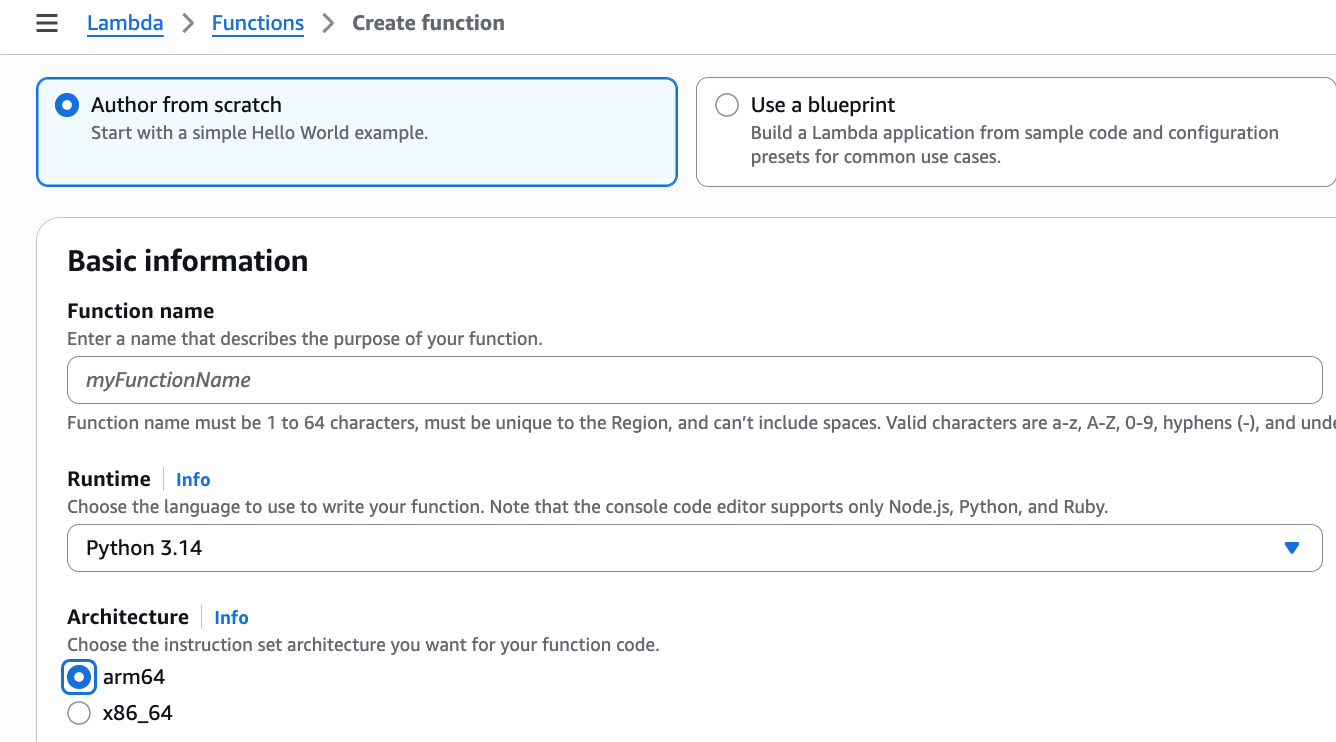
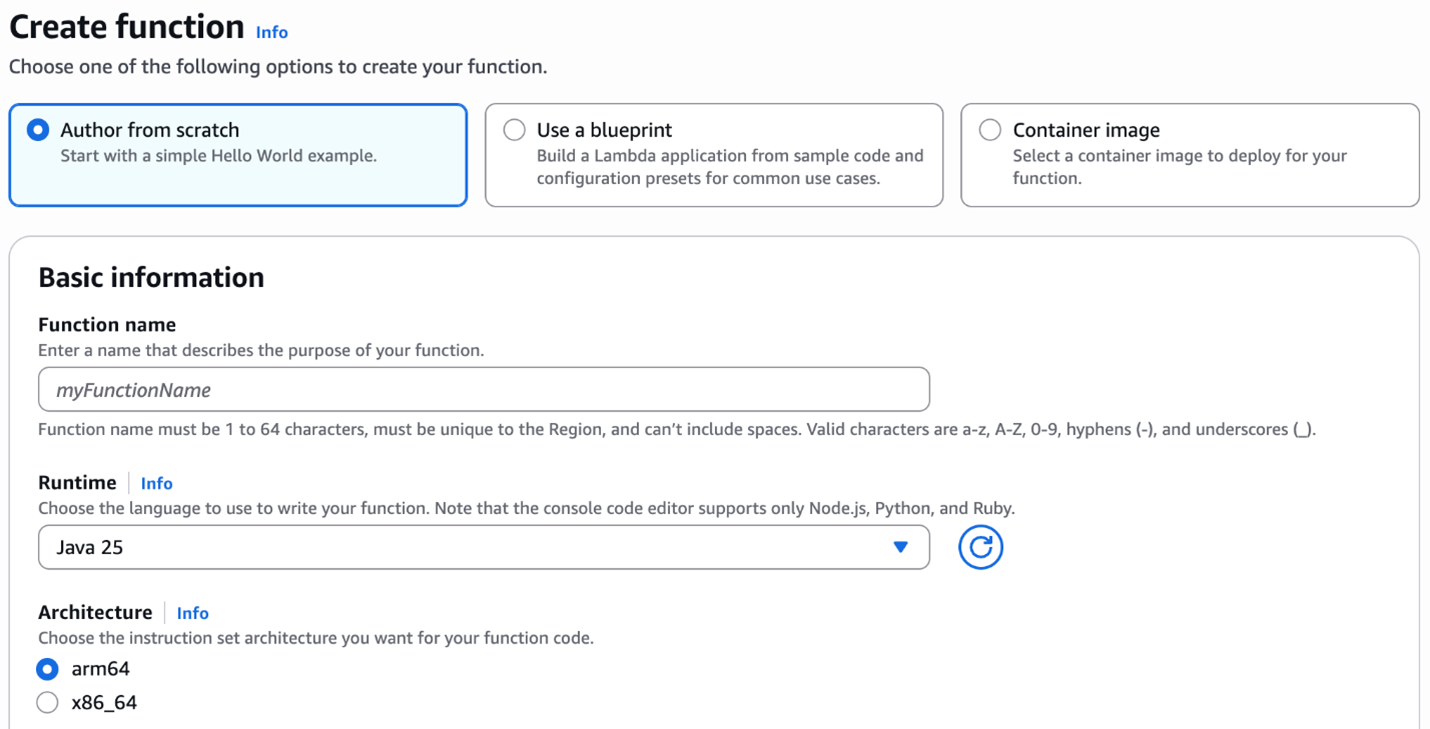
To use the Python 3.14 runtime to develop your Lambda functions, specify a runtime parameter value of Python 3.14 when creating or updating a function. On the Create Function page of the AWS Lambda console, Python 3.14 is available in the Runtime dropdown menu.
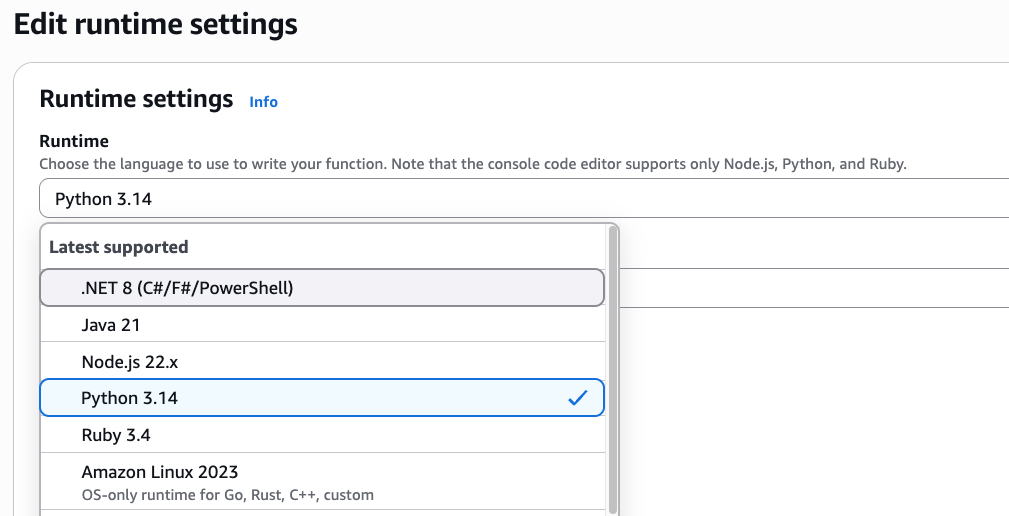
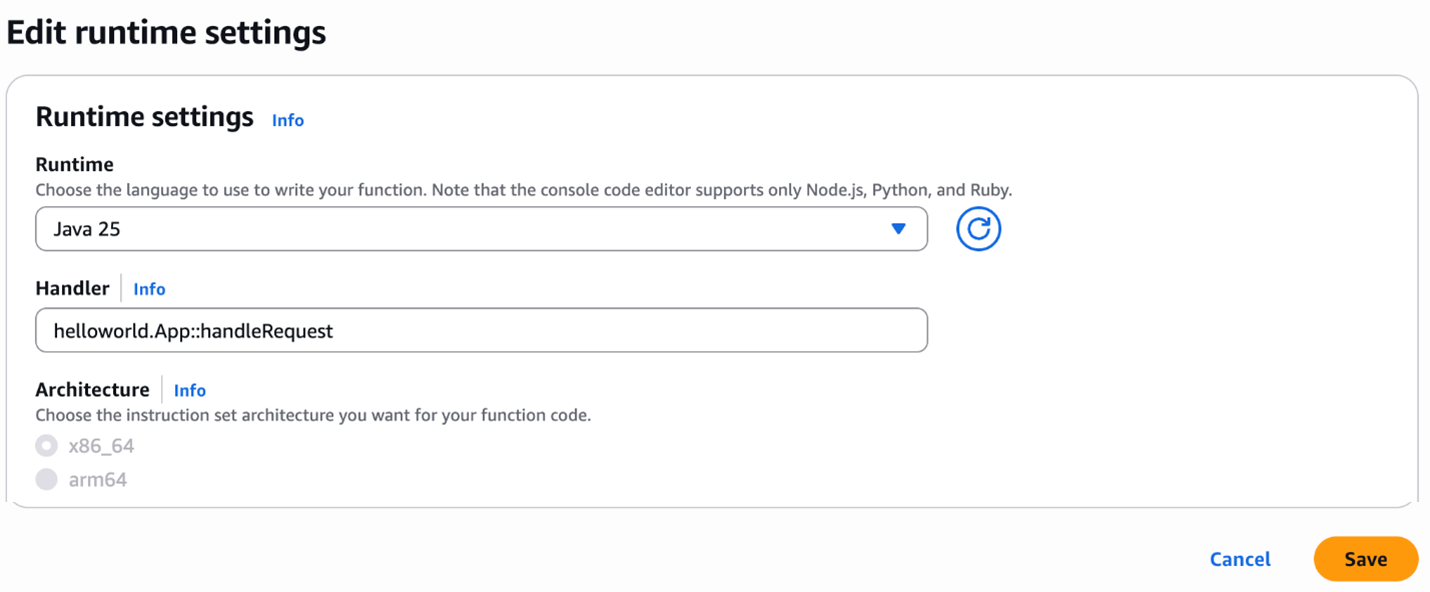
To update an existing Lambda function to Python 3.14, navigate to the function in the Lambda console and choose Edit in the Runtime settingspanel. The new version of Python is available in the Runtime dropdown menu.
Upgrading a function to Python 3.14
To upgrade a function to Python 3.14, check your code and dependencies for compatibility with Python 3.14, run tests, and update as necessary. Consider using generative AI coding assistants like Amazon Q Developer, Amazon Q Developer for CLI, or Kiro to help with upgrades.
AWS Lambda container image
Change the Python base image version by modifying the FROM statement in your Dockerfile:
FROM public.ecr.aws/lambda/python:3.14
# Copy function code
COPY lambda_handler.py ${LAMBDA_TASK_ROOT}
AWS Serverless Application Model (AWS SAM)
In AWS SAM set the Runtime attribute to python3.14 to use this version.
AWSTemplateFormatVersion: '2010-09-09'
Transform: AWS::Serverless-2016-10-31
Description: Simple Lambda Function
  MyFunction:
    Type: AWS::Serverless::Function
    Properties:
      Description: My Python Lambda Function
      CodeUri: my_function/
      Handler: lambda_function.lambda_handler
      Runtime: python3.14
AWS SAM supports generating this template with Python 3.14 for new serverless applications using the sam init command. Refer to the AWS SAM documentation.
AWS Cloud Development Kit
In the AWS CDK, set the runtime attribute to lambda.Runtime.PYTHON_3_14 to use this version.
In Python CDK:
from constructs import Construct
from aws_cdk import ( App, Stack, aws_lambda as _lambda )
class SampleLambdaStack(Stack):
    def __init__(self, scope: Construct, id: str, **kwargs) -> None:
        super().__init__(scope, id, **kwargs)

        base_lambda = _lambda.Function(self, 'python314LambdaFunction',
                                       handler='lambda_handler.handler',
                                    runtime=_lambda.Runtime.PYTHON_3_14,
                                 code=_lambda.Code.from_asset('lambda'))
In TypeScript CDK:
import * as cdk from 'aws-cdk-lib';
import * as lambda from 'aws-cdk-lib/aws-lambda'
import * as path from 'path';
import { Construct } from 'constructs';
export class SampleLambdaStack extends cdk.Stack {
  constructor(scope: Construct, id: string, props?: cdk.StackProps) {
    super(scope, id, props);
    // The code that defines your stack goes here
    // The python3.14 enabled Lambda Function
    const lambdaFunction = new lambda.Function(this, 'python314LambdaFunction', {
      runtime: lambda.Runtime.PYTHON_3_14,
      memorySize: 512,
      code: lambda.Code.fromAsset(path.join(__dirname, '/../lambda')),
      handler: 'lambda_handler.handler'
    })
  }
}
At launch, new Lambda runtimes receive less usage than existing established runtimes. This can result in longer cold start times due to reduced cache residency within internal Lambda sub-systems. Cold start times typically improve in the weeks following launch as usage increases. As a result, AWS recommends not drawing conclusions from side-by-side performance comparisons with other Lambda runtimes until the performance has stabilized. Since performance is highly dependent on workload, customers with performance-sensitive workloads should conduct their own testing instead of relying on generic test benchmarks.
Conclusion
Lambda now supports Python 3.14 as a managed language runtime to help developers build more efficient, powerful, and scalable serverless applications. Python 3.14 language additions include data model improvements, typing changes, and updates to the standard library. The Lambda managed runtime does not include the option to disable the global interpreter lock (GIL) or use the experimental JIT compiler.
You can build and deploy functions using Python 3.14 using the AWS Management Console, AWS CLI, AWS SDK, AWS SAM, AWS CDK, or your choice of infrastructure as code tool. You can also use the Python 3.14 container base image if you prefer to build and deploy your functions using container images.
Try the Python 3.14 runtime in Lambda today and experience the benefits of this updated language version.
AWS Systems Manager Session Manager is a fully managed service that provides secure, interactive, one-click access to your Amazon Elastic Compute Cloud (Amazon EC2) instances, edge devices, and virtual machines (VMs) through a browser-based shell or AWS Command Line Interface (AWS CLI), without requiring open inbound ports, bastion hosts, or SSH keys. Session Manager helps you maintain security compliance and controlled access while providing users with access to managed nodes. When starting a session, you must specify a preferences document (known as the Session Manager preferences document) to set the session parameters.
While providing users with access to managed nodes, managing these preferences consistently across multiple AWS Regions and accounts in a large organization can be challenging. Organizations often need to maintain standardized security settings, logging configurations, and session controls across their entire AWS footprint. Manual configuration of these preferences in each Region and account is not only time-consuming but also prone to human error and can lead to security gaps or compliance violations. Additionally, tracking and maintaining these configurations becomes increasingly complex as the organization scales.
You can use Session Manager to control various session options including data encryption for session data in transit and session logs at rest, session duration, and logging. For example, you can specify whether to store session log data in an Amazon Simple Storage Service (Amazon S3) bucket or Amazon CloudWatch Logs log group. In this post, I demonstrate how to manage Session Manager preferences across your organization using AWS CloudFormation StackSets. You can use CloudFormation StackSets to manage resources and configurations, such as Session Manager preferences, across different AWS accounts and Regions using standardized templates to maintain consistent security and compliance standards across your entire AWS infrastructure.
Prerequisites
You need to meet the following prerequisites to deploy the solution in this post:
Basic understanding of CloudFormation
Trusted access enabled between CloudFormation StackSets and AWS Organizations
Access to an AWS management account or StackSet delegated admin account
The Session Manager environment has some additional prerequisites:
For EC2 instances with internet access, allow HTTPS (port 443) outbound traffic to:
ec2messages.<region>.amazonaws.com
ssm.<region>.amazonaws.com
ssmmessages.<region>.amazonaws.com
Note: <region> represents the actual Region where you are deploying your instances.
Additional endpoints required for specific features:
For CloudWatch Logs integration: logs.<region>.amazonaws.com
For Amazon S3 log storage: s3.<region>.amazonaws.com
For session data encryption: kms.<region>.amazonaws.com
Note: For EC2 instances without internet access, you must configure virtual private cloud (VPC) endpoints to maintain connectivity with Systems Manager and related services.
SSM Agent requirements:
Minimum version 2.3.68.0 for basic session connectivity
Version 3.0.222.0 or later for port forwarding and SSH sessions
Note: Many AWS-provided and trusted third-party Amazon Machine Images (AMIs) come with the SSM Agent pre-installed. For more information, see Find AMIs with the SSM Agent preinstalled.
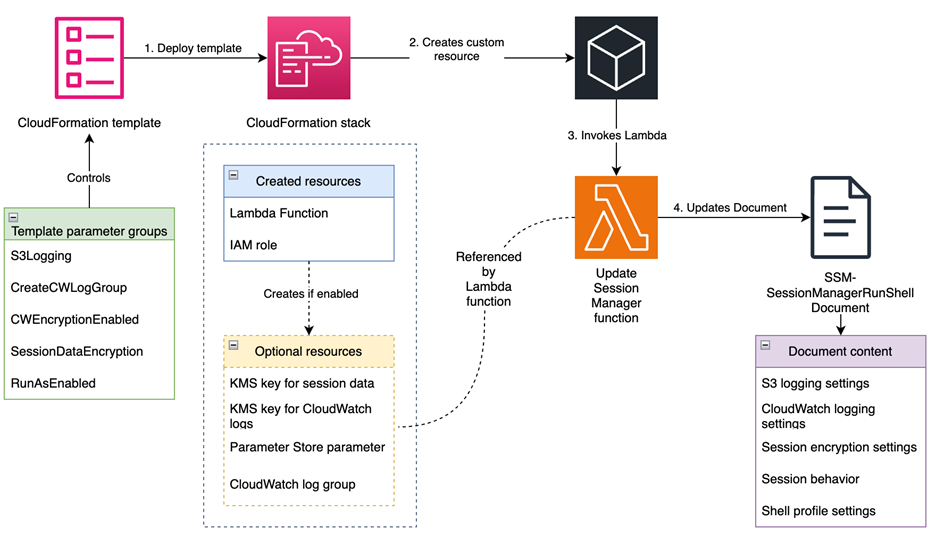
This solution, shown in Figure 1, automatically configures the SSM-SessionManagerRunShell document with customizable preferences that govern how Session Manager behaves across your AWS accounts. It creates resources for logging, encryption, and session controls, and updates the SSM-SessionManagerRunShell document with these preferences. The document is updated by an AWS Lambda function that helps make sure that the preferences are correctly applied. It transforms the default Session Manager preferences document to meet your enterprise compliance requirements. Changes are deployed using CloudFormation template provided in the GitHub repository. The solution supports multiple logging destinations, encryption options, and session controls to meet various security and compliance requirements.
Figure 1: Solution overview
Walkthrough
To deploy the solution, complete the following steps.
Run the following command in your terminal: git clone https://github.com/aws-samples/<repo-link>
Step 2: Create the CloudFormation StackSet
In this step, you deploy the solution’s resources by creating a CloudFormation StackSet using the provided CloudFormation template. Sign in to your management account or StackSet delegated admin account. To create the stack, follow the steps in Get started with StackSets using a sample template. Create the StackSet in each of the accounts and Regions where you plan to implement the solution. Note that you need to provide values for the parameters defined in the template to deploy the stack. The following table lists the parameters that you need to provide.
Parameter
Description
S3Logging
Enables storing session logs to an S3 bucket.
S3BucketName
Name of the S3 bucket for session logs. The bucket must exist or the deployment will fail.
S3KeyPrefix
Key prefix for session logs, will be appended by account ID and Region
S3EncryptionEnabled
If set to true, the S3 bucket you specified in the s3BucketName input must be encrypted.
CreateCWLogGroup
Creates the CloudWatch log group. If set to true, a CloudWatch log group will be created; if not, the log group name passed is used.
CWLogGroupName
The name of the CloudWatch log group you want to send session logs to.
CWEncryptionEnabled
If set to true, the CloudWatch log group you specified in the cwLogGroupName input must be encrypted.
CWStreamingEnabled
If set to true, a continual stream of session data logs is sent to the log group.
SessionDataEncryption
If set to true, session data is encrypted with a key created by the stack.
RunAsEnabled
If set to true, sessions are run using another user than ssm-user. The Run As feature is only supported for connecting to Linux and macOS managed nodes.
RunAsDefaultUser
The name of the user account to start sessions with on Linux and macOS managed nodes when the runAsEnabled input is set to true.
IdleSessionTimeout
The amount of time of inactivity you want to allow before a session ends. This input is measured in minutes.
MaxSessionDuration
The maximum amount of time you want to allow before a session ends. This input is measured in minutes.
WinShellProfile
The shell preferences, environment variables, working directories, and commands you specify for sessions on Windows Server managed nodes.
LinuxShellProfile
The shell preferences, environment variables, working directories, and commands you specify for sessions on Linux and macOS managed nodes.
Step 3: Update your EC2 instance profiles with proper permissions
Depending on the parameter values you pass when deploying the template, you need to update your EC2 instance profiles with proper permissions. For example, if you have enabled session data and session log encryption, you need to add the following policy to your instance profiles.
Note: If you enable S3 logging, you need to add the required permissions for that as well. See Configure a central S3 bucket for Session Manager logging article on AWS re:Post for more information about how to properly configure your S3 bucket and EC2 instance profile for centralized logging. Same-account logging follows a similar pattern.
Step 4: Verify the solution implementation
You can verify that the Session Manager preferences are correctly configured across your environment. Here’s a systematic approach to validation:
Verify preference configuration
Through the AWS Management Console, navigate to AWS Systems Manager Session Manager, choose Preferences and review the configured Session Manager preferences. Alternatively, verify the configuration through AWS CLI using:
Verify the encryption configuration by starting a new session. If session data encryption is enabled, you should see the message This session is encrypted using AWS KMS when the session begins.
For CloudWatch logging verification, navigate to the CloudWatch console and access the Log groups section. Confirm that your specified log group exists and KMS encryption is enabled if you configured it during deployment. Execute some commands in your session and observe the real-time log streaming to your configured log group.
To verify S3 logging, establish a session and execute several commands. Terminate the session and check your configured S3 bucket for the session logs. Remember that S3 logs are only generated after the session is terminated.
If you enabled the RunAsEnabled option, verify the configuration by executing the whoami command in your session. The output should match your configured RunAs user.
Resources
The following is a list of resources created by this solution:
AWS::Lambda::Function (UpdateSessionManagerFunction) This resource creates a Lambda function that:
Updates the SSM-SessionManagerRunShell document with the specified preferences
Handles CloudFormation create, update, and delete events
Performs deep comparison of document contents to avoid unnecessary updates
Includes error handling and retry logic
AWS::IAM::Role (LambdaExecutionRole) This resource creates an IAM role that allows the Lambda function to:
Execute with basic Lambda permissions
Access and modify the SSM-SessionManagerRunShell document
Access SSM parameters storing session data encryption key ID
AWS::KMS::Key (SessionDataKMSKey) This conditional resource creates a KMS key for encrypting session data when SessionDataEncryption parameter is set to enabled. The key has a policy allowing key management with IAM.
AWS::KMS::Alias (SessionDataKeyAlias) This conditional resource creates a friendly alias (alias/session-manager/data) for the session data encryption key. This value cannot be changed.
AWS::SSM::Parameter (SessionKeyID) This conditional resource creates an Systems Manager parameter to store the KMS key ID for session data encryption, making it accessible to other components.
Note: The session data KMS key ID is stored in a Systems Manager parameter to decouple components and help prevent circular dependency and failures to due race conditions.
AWS::KMS::Key (SessionLogsKMSKey) This conditional resource creates a KMS key for encrypting CloudWatch logs when CWEncryptionEnabled parameter is set to enabled. The key has a policy allowing CloudWatch Logs service to use it
Note: SessionLogsKMSKey is used to encrypt logs at-rest and is not used by the SSM Agent, so your instance profile does not need to have permission to this key. Logs are encrypted in-transit and will be encrypted by CloudWatch service after they are received.
AWS::KMS::Alias (SessionLogsKeyAlias) This conditional resource creates a friendly alias (alias/session-manager/logs) for the CloudWatch Logs encryption key.
AWS::Logs::LogGroup (SessionManagerLogGroup) This conditional resource creates a CloudWatch Logs group for session logs when the CreateCWLogGroup paremeter is set to enabled. The log group:
Uses the specified name (controlled by the CWLogGroupName parameter, and defaults to ssm-sessionmanager-logs)
Sets a 90-day retention period
Uses KMS encryption if enabled
Custom::UpdateSessionManager (UpdateSessionManagerCustomResource) This custom resource invokes the Lambda function to update the SSM-SessionManagerRunShell document with the specified preferences.
Parameter groups
The following template parameters are available for customizing Session Manager behavior:
In this post, we explored how to implement and manage Session Manager preferences across your organization using CloudFormation StackSets. This solution enables centralized management of Session Manager configurations across multiple accounts and Regions from a single account, significantly simplifying the administration of remote access to your compute resources. Through automated deployment of security controls including session encryption, logging, and access restrictions, the solution helps facilitate consistent compliance with organizational security requirements while reducing manual configuration efforts and the risk of human error. As your organization grows, this solution scales seamlessly to accommodate new accounts and Regions while maintaining uniform security standards across your infrastructure.
Remember to regularly review and update your Session Manager preferences to align with evolving security requirements and organizational needs. For more information about AWS Systems Manager Session Manager, visit the official AWS documentation.
If you have feedback about this post, submit comments in the Comments section below.
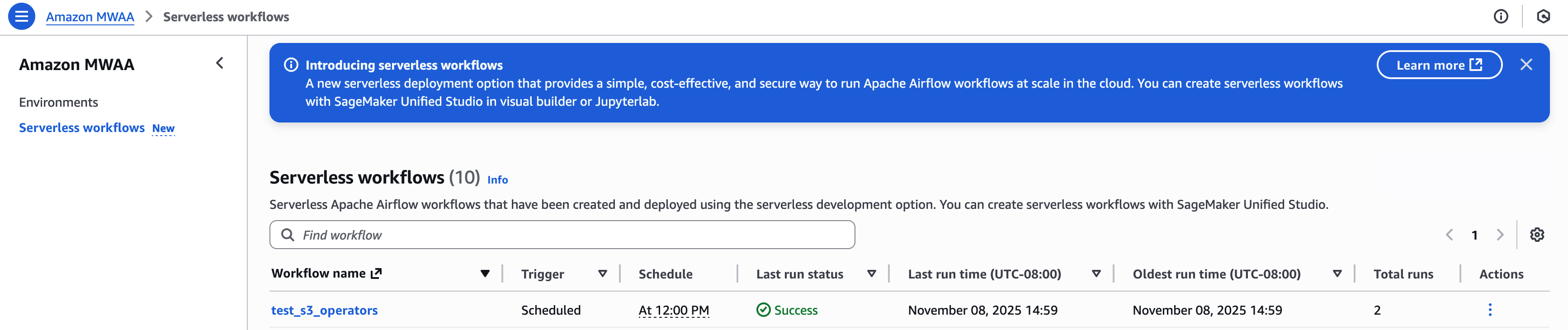
Today, AWS announced Amazon Managed Workflows for Apache Airflow (MWAA) Serverless. This is a new deployment option for MWAA that eliminates the operational overhead of managing Apache Airflow environments while optimizing costs through serverless scaling. This new offering addresses key challenges that data engineers and DevOps teams face when orchestrating workflows: operational scalability, cost optimization, and access management.
With MWAA Serverless you can focus on your workflow logic rather than monitoring for provisioned capacity. You can now submit your Airflow workflows for execution on a schedule or on demand, paying only for the actual compute time used during each task’s execution. The service automatically handles all infrastructure scaling so that your workflows run efficiently regardless of load.
Beyond simplified operations, MWAA Serverless introduces an updated security model for granular control through AWS Identity and Access Management (IAM). Each workflow can now have its own IAM permissions, running on a VPC of your choosing so you can implement precise security controls without creating separate Airflow environments. This approach significantly reduces security management overhead while strengthening your security posture.
In this post, we demonstrate how to use MWAA Serverless to build and deploy scalable workflow automation solutions. We walk through practical examples of creating and deploying workflows, setting up observability through Amazon CloudWatch, and converting existing Apache Airflow DAGs (Directed Acyclic Graphs) to the serverless format. We also explore best practices for managing serverless workflows and show you how to implement monitoring and logging.
How does MWAA Serverless work?
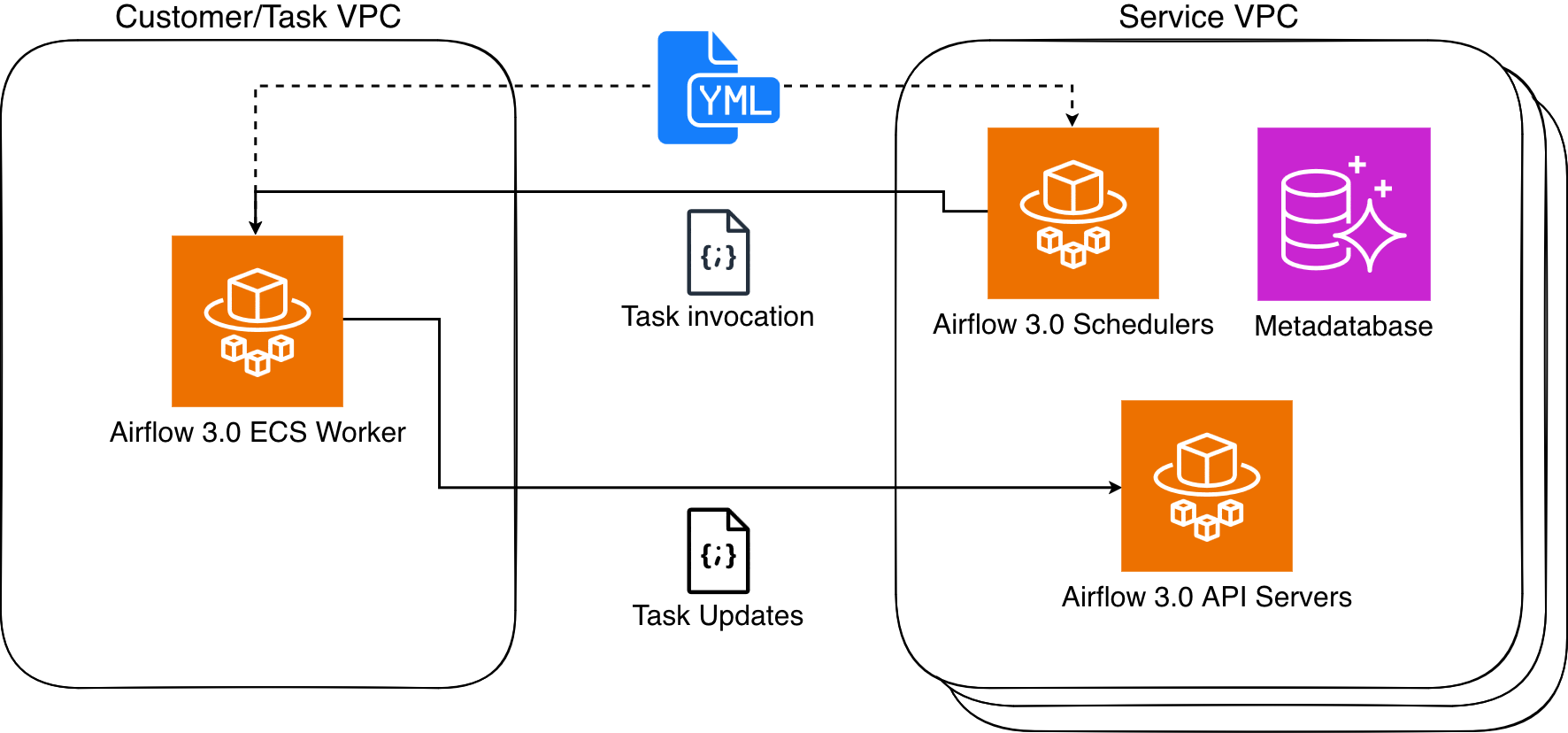
MWAA Serverless processes your workflow definitions and executes them efficiently in service-managed Airflow environments, automatically scaling resources based on workflow demands. MWAA Serverless uses the Amazon Elastic Container Service (Amazon ECS) executor to run each individual task on its own ECS Fargate container, on either your VPC or a service-managed VPC. Those containers then communicate back to their assigned Airflow cluster using the Airflow 3 Task API.
Figure 1: Amazon MWAA Architecture
MWAA Serverless uses declarative YAML configuration files based on the popular open source DAG Factory format to enhance security through task isolation. You have two options for creating these workflow definitions:
Write your workflows directly in YAML using AWS managed operators from the Amazon Provider Package
This declarative approach provides two key benefits. First, since MWAA Serverless reads workflow definitions from YAML it can determine task scheduling without running any workflow code. Second, this allows MWAA Serverless to grant execution permissions only when tasks run, rather than requiring broad permissions at the workflow level. The result is a more secure environment where task permissions are precisely scoped and time limited.
Service considerations for MWAA Serverless
MWAA Serverless has the following limitations that you should consider when deciding between serverless and provisioned MWAA deployments:
Operator support
MWAA Serverless only supports operators from the Amazon Provider Package.
To execute custom code or scripts, you’ll need to use AWS services, such as:
Note: Throughout this post, we use example values that you’ll need to replace with your own:
Replace amzn-s3-demo-bucket with your S3 bucket name
Replace 111122223333 with your AWS account number
Replace us-east-2 with your AWS Region. MWAA Serverless is available in multiple AWS Regions. Check the List of AWS Services Available by Region for current availability.
Creating your first serverless workflow
Let’s start by defining a simple workflow that gets a list of S3 objects and writes that list to a file in the same bucket. Create a new file called simple_s3_test.yaml with the following content:
For this workflow to run, you must create an Execution role that has permissions to list and write to the above bucket. The role also needs to be assumable from MWAA Serverless. The following CLI commands create this role and its associated policy:
AWS has published a conversion tool that uses the open-source Airflow DAG processor to serialize Python DAGs into YAML DAG factory format. To install, you run the following:
Note that, because the YAML conversion is done after the DAG parsing, the loop that creates the tasks is run first and the resulting static list of tasks is written to the YAML document with their dependencies.
Migrating an MWAA environment’s DAGs to MWAA Serverless
You can take advantage of a provisioned MWAA environment to develop and test your workflows and then move them to serverless to run efficiently at scale. Further, if your MWAA environment is using compatible MWAA Serverless operators, then you can convert all of the environment’s DAGs at once. The first step is to allow MWAA Serverless to assume the MWAA Execution role via a trust relationship. This is a one-time operation for each MWAA Execution role, and can be performed manually in the IAM console or using an AWS CLI command as follows:
MWAA Serverless workflow execution status is returned via the GetWorkflowRun function. The results from that will return details for that particular run. If there are errors in the workflow definition, they are returned under RunDetail in the ErrorMessage field as in the following example:
MWAA Serverless task logs are stored in the CloudWatch log group /aws/mwaa-serverless/<workflow id>/ (where /<workflow id> is the same string as the unique workflow id in the ARN of the workflow). For specific task log streams, you will need to list the tasks for the workflow run and then get each task’s information. You can combine these operations into a single CLI command.
After completing these steps, verify in the AWS Management Console that all resources have been properly removed. Remember that CloudWatch Logs are retained by default and may need to be deleted separately if you want to remove all traces of your workflow executions.
If you encounter any errors during cleanup, verify you have the necessary permissions and that resources exist before attempting to delete them. Some resources may have dependencies that require them to be deleted in a specific order.
Conclusion
In this post, we explored Amazon MWAA Serverless, a new deployment option that simplifies Apache Airflow workflow management. We demonstrated how to create workflows using YAML definitions, convert existing Python DAGs to the serverless format, and monitor your workflows.
MWAA Serverless offers several key advantages:
No provisioning overhead
Pay-per-use pricing model
Automatic scaling based on workflow demands
Enhanced security through granular IAM permissions
Simplified workflow definitions using YAML
To learn more MWAA Serverless, review the documentation.
Today, AWS Lambda is promoting Rust support from Experimental to Generally Available. This means you can now use Rust to build business-critical serverless applications, backed by AWS Support and the Lambda availability SLA.
Rust is a popular programming language due to its combination of high performance, memory safety, and developer experience. It offers speed and memory utilization efficiency comparable with C++, together with the reliability normally associated with higher-level languages.
This post shows you how to build and deploy Rust-based Lambda functions using Cargo Lambda, a third-party open source tool for working with Lambda functions in Rust. We’ll also cover how to deploy your functions using the Cargo Lambda AWS Cloud Development Kit (AWS CDK) construct.
Rust installed on your development machine (version 1.70 or later)
Node.js 20 or later (for AWS CDK deployment)
AWS CDK installed: npm install -g aws-cdk
Solution overview
This post takes you through the following steps:
Install and configure Cargo Lambda.
Create and deploy a basic HTTP Lambda function using Cargo Lambda.
Build a complete serverless API using AWS CDK with Rust Lambda functions.
Install and configure Cargo Lambda
Cargo is the package manager and build system for Rust. Cargo Lambda is a third-party open source extension to the cargo command-line tool that simplifies building and deploying Rust Lambda functions.
To install Cargo Lambda on Linux systems, run:
curl -fsSL https://cargo-lambda.info/install.sh | sh
main.rs – The function entry point where you configure dependencies and shared state
http_handler.rs – The primary function logic
The main.rs file contains the following code:
use lambda_http::{run, service_fn, tracing, Error};
mod http_handler;
use http_handler::function_handler;
#[tokio::main]
async fn main() -> Result<(), Error> {
tracing::init_default_subscriber();
run(service_fn(function_handler)).await
}
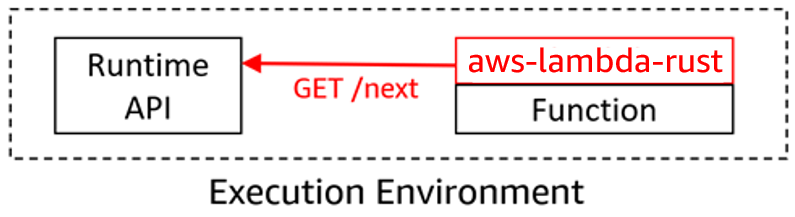
The key part of the main.rs file is run(service_fn(function_handler)).await. The run function is part of the http_lambda crate and starts the Lambda Rust runtime interface client (RIC), which actively polls for events from the Lambda Runtime API. The function_handler is the function that is defined in the http_handler.rs file. When the Runtime API returns the invoke event, the RIC calls the function_handler from http_handler.rs:
use lambda_http::{Body, Error, Request, RequestExt, Response};
pub(crate) async fn function_handler(event: Request) -> Result<Response, Error> {
// Extract some useful information from the request
let who = event
.query_string_parameters_ref()
.and_then(|params| params.first("name"))
.unwrap_or("world");
let message = format!("Hello {who}, this is an AWS Lambda HTTP request");
// Return something that implements IntoResponse.
// It will be serialized to the right response event automatically by the runtime

let resp = Response::builder()
    .status(200)
    .header("content-type", "text/html")
    .body(message.into())
    .map_err(Box::new)?;
Ok(resp)

}
The function_handler function signature includes a variable event of type Request. The event contents depend on the service triggering the function. For example, it may contain HTTP request information such as path parameters if the request is coming via HTTP, or even an array of Amazon Kinesis stream records.
For non-HTTP functions, events can be strongly typed. Additionally, you can accept any structure as input as long as it implements serde::Serialize and serde::Deserialize.
The example parses query parameters and looks for the first parameter that has the name name.
The lambda_http crate provides an idiomatic way to return a response, using a builder pattern. The function returns a response as a Result with an Ok() which is what the run function in main.rs expects.
Logging
The main.rs file includes the following line by default:
tracing::init_default_subscriber();
The Rust Lambda runtime integrates natively with Tracing libraries for logging and tracing, and supports JSON structured logging. When setting this line and the RUST_LOG environment variable, Lambda sends logs to Amazon CloudWatch. By default, the INFO log level is enabled.
To write logs, use the tracing crate and send events using the following syntax:
tracing::info("This is a log entry");
Building
To build the Lambda function, use cargo lambda build. When compiling the Lambda function, the AWS Lambda Runtime is built into your binary. The compiled binary file is called bootstrap. It is packaged in the function artifact .zip file and visible as a file in the AWS Lambda console.
When Lambda executes this binary, it starts an infinite loop (the Run function). This polls the Lambda Runtime API to receive the invoke request and then calls your handler, the function_handler function.
Your function code runs and then sends the function response back to the Lambda Runtime API, which forwards it onto the caller.
Testing
Before deploying the function, you can debug/test the function locally using cargo lambda.
cargo lambda watch sets up an environment that emulates the Lambda execution environment. This allows you to send requests to the Lambda function and see the results.
To send invocation requests, you can use either cargo lambda or send a curl request to the Lambda emulator.
To use cargo lambda, run the following, replace <lambda-function-name> with hi_api for this example
Once you have built the function using cargo lambda build, you can deploy it to your AWS account.
To deploy your function:
cargo lambda deploy
Once the Lambda function is deployed, you can test it remotely. cargo lambda invoke tests the remote Lambda function using a payload stored in a .json file:
You can create a serverless API in front of this Rust Lambda function using Amazon API Gateway. This example uses the AWS CDK. This example does not have authentication configured for the API Gateway endpoint as it is a sample. The AWS best practice is to implement relevant security controls where necessary.
First, create a new CDK project:
mkdir rusty_cdk
cd rusty_cdk
cdk init --language=typescript
The easiest way to deploy a Rust Lambda function using the AWS CDK is to use the cargo lambdaCDK Construct. This comes with everything required to run Rust Lambda functions on AWS. It is part of the cargo lambda project.
Install the Cargo Lambda CDK construct:
npm i cargo-lambda-cdk
Create a new HTTP Lambda function in your project:
mkdir lambda
cd lambda
cargo lambda new helloRust
When prompted for Is this function an HTTP function?, enter y.
Update your CDK stack lib/rusty_cdk-stack.ts to include both the Lambda function and API Gateway.
import * as cdk from 'aws-cdk-lib';
import { HttpApi } from 'aws-cdk-lib/aws-apigatewayv2';
import { HttpLambdaIntegration } from 'aws-cdk-lib/aws-apigatewayv2-integrations';
import { HttpMethod } from 'aws-cdk-lib/aws-events';
import { RustFunction } from 'cargo-lambda-cdk';
import { Construct } from 'constructs';
export class RustyCdkStack extends cdk.Stack {
  constructor(scope: Construct, id: string, props?: cdk.StackProps) {
    super(scope, id, props);
    const helloRust = new RustFunction(this, 'helloRust',{
      manifestPath: './lambda/helloRust',
      runtime: 'provided.al2023',
      timeout: cdk.Duration.seconds(30),
    });

    const api = new HttpApi(this, 'rustyApi');
    const helloInteg = new HttpLambdaIntegration('helloInteg', helloRust);

    api.addRoutes({
      path: '/hello',
      methods: [HttpMethod.GET],
      integration: helloInteg,
    })
    new cdk.CfnOutput(this, 'apiUrl',{
      description: 'The URL of the API Gateway',
      value: `https://${api.apiId}.execute-api.${this.region}.amazonaws.com`,
    })
  }
}
Bootstrap your AWS account and AWS Region for the AWS CDK:
cdk bootstrap
Deploy your stack:
cdk deploy
Testing the API
To test your deployed API using the URL provided in the AWS CDK output:
curl https://<YOUR_API_URL>/hello
Clean up
To avoid ongoing charges, remove the deployed resources:
cdk destroy
Conclusion
AWS Lambda support for Rust is now Generally Available to build high-performance, memory-efficient serverless applications. Cargo Lambda is a third-party extension to the Rust cargo CLI which simplifies the experience of developing, testing, and deploying Rust applications to Lambda.
To learn more about building serverless applications with Rust:
This blog post highlights notable Java language features, Java Lambda runtime updates, and how you can use the new Java 25 runtime in your serverless applications.
Java 25 language features
Java 25 introduces several language features to enhance developer productivity. There is a new feature that allows statements to appear before an explicit constructor invocation. You can now write code in the constructors without having to invoke super(…) or this(…) as the first statement. In the following example, the Employee class has a constructor which validates the input first and then invokes super(...):
class Person {
    int age;

    Person(int age) {
        if (age < 0)
            throw new IllegalArgumentException("Age cannot be negative");

        this.age = age;
    }
}

class Employee extends Person {
    String name;

    Employee(String name, int age) {
        // This is now allowed - code before super()
        if (age < 18 || age > 67)
            throw new IllegalArgumentException(...);

        super(age);
        this.name = name;
    }
}
Java 25 supports pattern matching that can handle primitive types in switch and instanceof statements. Previously, pattern matching was limited to reference types (Objects). For example, you can now perform pattern matching with int values, not just Integer objects:
void primitivePatternMatching(Object obj) {
    if (obj instanceof int i) {
        System.out.println("This is an int: " + i);
    }
}
Module import declarations simplifies working with. Instead of writing multiple individual package imports from the same module, you can use the import module syntax to bring publicly exported types into scope. This reduces boilerplate code and makes it easier to work with modular applications. Previously if you used the java.net.http module, you had to import multiple classes with individual import statements:
import java.net.URI;
import java.net.http.HttpClient;
import java.net.http.HttpRequest;

public class HttpClientExample {
    public void makeRequest() {
        HttpClient client = HttpClient.newHttpClient();
        HttpRequest request = HttpRequest.newBuilder()
            .uri(URI.create("https://api.example.com"))
            .build();
        // ... rest of implementation
    }
}
Now you can import the whole java.net.http module:
import module java.net.http;

public class HttpClientExample {
    public void makeRequest() {
        HttpClient client = HttpClient.newHttpClient();
        HttpRequest request = HttpRequest.newBuilder()
            .uri(URI.create("https://api.example.com"))
            .build();
        // Exported types from java.net.http module are now available
    }
}
Garbage collection
The generational mode of the Shenandoah garbage collector changes from an experimental feature in Java 24 to an optional product feature. Shenandoah is the low pause time garbage collector that reduces pause times by performing more garbage collection work concurrently with the running Java program. Shenandoah does the bulk of GC work concurrently, including the concurrent compaction, which means its pause times are no longer directly proportional to the size of the heap. The generational mode of Shenandoah improves sustainable throughput, load-spike resilience, and memory utilization.
To use the generational model of Shenandoah in Lambda, set JAVA_TOOL_OPTIONS to -XX:+UseShenandoahGC -XX:ShenandoahGCMode=generational.
Lambda runtime updates
The Java 25 runtime includes several performance optimizations, tuned to optimize cold and warm start performance for a broad range of customer workloads. Cold start refers to the initialization delay that occurs when Lambda prepares a new execution environment for a function that hasn’t been invoked recently, or to process an incoming invoke when all existing execution environments are in use. Warm start refers to invokes that are allocated to a previously initialized execution environment.
Ahead-of-Time (AOT) caches
Starting with Java 25, AWS Lambda replaces the traditional Class Data Sharing (CDS) with ahead-of-time (AOT) caches. This is an advanced optimization feature from Project Leyden that is designed to improve application startup times and reduce memory footprint. Lambda’s benchmarking results show that AOT caches deliver faster cold start performance compared to CDS.
AOT caches are enabled by default to provide performance benefits. Since you cannot use both AOT caches and CDS, if you enable CDS in your Lambda function, then Lambda disables AOT caches. If you use your own custom AOT caches in the Java 25 managed runtime, then the caches may be invalidated when Lambda updates the Java runtime during routine patching. AWS strongly suggests that you don’t use custom AOT caches with managed runtimes.
If you deploy Java 25 functions using container images, you can either implement your own AOT caches or continue using CDS. Since container images are immutable, the issue of AOT caches being invalidated following automatic runtime patching does not arise. To enable AOT caches, pass the flag -XX:AOTCache=/path/to/aot/cache/file via the JAVA_TOOL_OPTIONS environment variable. To enable CDS, pass the flag -Xshare:on -XX:SharedArchiveFile=/var/lang/lib/server/runtime.jsa.
Tiered compilation
Java’s tiered compilation is a just-in-time (JIT) optimization strategy that employs multiple compiler tiers to enhance the performance of frequently executed code progressively using runtime profiling data. Since Java 17, AWS Lambda has modified the default JVM behavior by stopping compilation at the C1 tier (client compiler). This minimizes cold start times for function invocations for most functions, although for compute-intensive functions with a long duration, customers can benefit from tuning tiered compilation to their workload. Starting with Java 25, Lambda no longer stops tiered compilation at C1 for SnapStart and Provisioned Concurrency. This improves performance in these cases without incurring a cold start penalty since tiered compilation occurs outside of the invoke path in these cases.
Priming
Priming is another technique to optimize performance for functions using either SnapStart or Provisioned Concurrency. This involves preloading dependencies, initializing resources, and executing code paths during function initialization. This front-loads work and triggers JIT compilation before taking the SnapStart snapshot, or when Provisioned Concurrency execution environments are pre-provisioned. The result is faster code execution when these execution environments are used for a function warm invoke. For detailed guidance on implementing priming strategies, see the Optimizing cold start performance of AWS Lambda using advanced priming strategies with SnapStart blog post.
Log4j patch for Log4Shell
Log4j is a widely used open source logging library maintained by the Apache Software Foundation. In November 2021, Log4j reported Log4Shell, a zero-day vulnerability involving arbitrary code execution. The Lambda team responded by deploying an emergency patch across all Java runtimes to protect customers from potential exploitation. However, this emergency patch introduced a performance overhead during cold starts. The vulnerability was permanently resolved in Log4j version 2.17.0 in December 2021. Consequently, AWS has removed this patch from the Java 25 runtime to restore optimal performance. You must verify you are using Log4j version 2.17.0 or later.
Lambda runtimes for Java 8, 11, 17, and 21 continue to enable the emergency patch by default. Customers who are using Log4j version 2.17.0 or higher with these runtimes can disable this patch, improving cold start performance. To disable the patch, set the AWS_LAMBDA_DISABLE_CVE_2021_44228_PROTECTION environment variable to true.
Additional performance considerations
At launch, new Lambda runtimes receive less usage than existing, established runtimes. This can result in longer cold start times due to reduced cache residency within internal Lambda sub-systems. Cold start times typically improve in the weeks following launch as usage increases. As a result, AWS recommends not drawing conclusions from side-by-side performance comparisons with other Lambda runtimes until the performance has stabilized.
Since performance is highly dependent on workload, customers with performance-sensitive workloads should conduct their own testing instead of relying on generic test benchmarks. To maximize performance, your workload may benefit from additional workload-specific performance tuning.
Using Java 25 in AWS Lambda
You can use Java 25 for your Lambda functions in the AWS Management Console, an AWS Lambda container image, AWS SAM, or the AWS CDK.
AWS Management Console
To use the Java 25 runtime to develop your Lambda functions, specify a runtime parameter value Java 25 when creating or updating a function. The Java 25 runtime version is now available in the Runtime dropdown menu on the Create function page in the AWS Lambda console:
Creating Java 25 function in AWS Management Console
To update an existing Lambda function to Java 25, navigate to the function in the Lambda console, then choose Java 25 in the Runtime settings section. The new version is available in the Runtime dropdown menu:
Changing a function to Java 25
AWS Lambda container image
Use the Java base image version with the java:25 tag by modifying the FROM statement in your Dockerfile.
Example Dockerfile:
FROM public.ecr.aws/lambda/java:25
# Copy function code and runtime dependencies from Maven layout
COPY target/classes ${LAMBDA_TASK_ROOT}
COPY target/dependency/* ${LAMBDA_TASK_ROOT}/lib/
# Set the CMD to your handler (could also be done as a parameter override outside of the Dockerfile)
CMD [ "com.example.myapp.App::handleRequest" ]
AWS SAM supports generating this template with Java 25 for new serverless applications using the sam init command. Refer to the AWS SAM documentation.
AWS Cloud Development Kit (AWS CDK)
In the AWS CDK, set the runtime attribute to Runtime.JAVA_25 to use this version.
import software.amazon.awscdk.core.Construct;
import software.amazon.awscdk.core.Stack;
import software.amazon.awscdk.core.StackProps;
import software.amazon.awscdk.services.lambda.Code;
import software.amazon.awscdk.services.lambda.Function;
import software.amazon.awscdk.services.lambda.Runtime;

public class InfrastructureStack extends Stack {

    public InfrastructureStack(final Construct parent, final String id, final StackProps props) {

        super(parent, id, props);

        Function.Builder.create(this, "HelloWorldFunction")
                .runtime(Runtime.JAVA_25)
                .code(Code.fromAsset("target/hello-world.jar"))
                .handler("helloworld.App::handleRequest")
                .memorySize(1024)
                .build();

        // rest of your CDK code
    }
}
Conclusion
Lambda now supports Java 25 as a managed language runtime or with your own custom runtime. This release includes the latest Java 25 language features as well as performance enhancements optimized for Lambda workloads.
You can build and deploy functions using Java 25 using the AWS Management Console, AWS CLI, AWS SDK, AWS SAM, AWS CDK, or your choice of infrastructure as code tool. You can also use the Java container base image with the 25 tag if you prefer to build and deploy your functions using container images.
The Java 25 runtime helps developers build more efficient, powerful, and scalable serverless applications. Read about the Java programming model in the Lambda documentation to learn more about writing functions in Java 25.
This is a guest post by Umesh Dangat, Senior Principal Engineer for Distributed Services and Systems at Yelp, and Toby Cole, Principle Engineer for Data Processing at Yelp, in partnership with AWS.
Yelp processes massive amounts of user data daily—over 300 million business reviews, 100,000 photo uploads, and countless check-ins. Maintaining sub-minute data freshness with this volume presented a significant challenge for our Data Processing team. Our homegrown data pipeline, built in 2015 using then-modern streaming technologies, scaled effectively for many years. As our business and data needs evolved, we began to encounter new challenges in managing observability and governance across an increasingly complex data ecosystem, prompting the need for a more modern approach. This affected our outage incidents, making it harder to both assess impact and restore service. At the same time, our streaming framework struggled with Kafka for data streaming and permanent data storage. In addition, our connectors to analytical data stores experienced latencies exceeding 18 hours.
This came to a head when our efforts to comply with General Data Protection Regulation (GDPR) requirements revealed gaps in our infrastructure that would require us to clean up our data, while simultaneously maintaining operational reliability and reducing data processing times. Something had to change.
In this post, we share how we modernized our data infrastructure by embracing a streaming lakehouse architecture, achieving real-time processing capabilities at a fraction of the cost while reducing operational complexity. With this modernization effort, we reduced analytics data latencies from 18 hours to mere minutes, while also removing the need for using Kafka as a permanent storage for our change log streams.
The problem: Why we needed change
We started this transformation by initiating a migration from self-managed Apache Kafka to Amazon Managed Streaming for Apache Kafka (Amazon MSK), which significantly reduced our operational overhead and enhanced security. Amazon MSK’s express brokers also provided better elasticity for our Apache Kafka clusters. While these improvements were a promising start, we recognized the need for a more fundamental architectural change
Legacy architecture pain points
Let’s examine the specific challenges and limitations of our previous architecture that prompted us to seek a modern solution.
The following diagram depicts Yelp’s original data architecture.
Kafka topics proliferated across our infrastructure, creating long processing chains. As a result, each hop added latency, operational overhead, and storage costs. The system’s reliance on Kafka for both ingestion and storage created a fundamental bottleneck—Kafka’s architecture, optimized for high-throughput messaging, wasn’t designed for long-term storage and to handle complex querying patterns.
Another challenge was our custom “Yelp CDC” format—a proprietary change data capture language—was powerful and tailored to our needs. However, as our team grew and our use cases expanded, it introduced complexity and a steeper learning curve for new engineers. It also made integrations with off-the-shelf systems more complex and maintenance intensive.
The cost and latency trade-off
The traditional trade-off between real-time processing and cost efficiency had us caught in an expensive bind. Real-time streaming systems demand significant resources to maintain state within compute engines like Apache Flink, keep multiple copies of data across Kafka clusters, and run always-on processing jobs. Our infrastructure costs were growing, and it was largely driven by:
Long Kafka chains: Data often traversed 4-5 Kafka topics before reaching its destination and each topic was replicated for reliability
Duplicate data storage: The same data existed in multiple formats across different systems—raw in Kafka, processed in intermediate topics, and final forms in data warehouses and Flink RocksDB for join-like use cases
Complex custom tooling maintenance: The proprietary nature of our tools meant engineering resources were focused on maintenance rather than building new capabilities
Meanwhile, our business requirements became more demanding. Teams at Yelp needed faster insights, near-real-time results, and the ability to quickly run complex historical analyses without delay. This pushed us to shape our new architecture to improve streaming discovery and metadata visibility, provide more flexible transformation tooling, and simplify operational workflows with faster recovery times.
Understanding the streamhouse concept
To understand how we solved our data infrastructure challenges, it’s important to first grasp the concept of a streamhouse and how it differs from traditional architectures.
Evolution of data architecture
To understand why a streaming lakehouse or streamhouse was the answer to our challenges, it’s helpful to trace the evolution of data architectures. The journey from data warehouses to modern streaming systems reveals why each generation solved certain problems while creating new ones.
Data warehouses like Amazon Redshift and Snowflake brought structure and reliability to analytics, but their batch-oriented nature meant accepting hours or days of latency. Data lakes emerged to handle the volume and variety of big data, using low-cost object storage like Amazon S3, but often became “data swamps” without proper governance. The lakehouse architecture, pioneered by technologies like Apache Iceberg and Delta Lake, promised to combine the best of both, the structure of warehouses with the flexibility and economics of lakes.
But even lakehouses were designed with batch processing in mind. While they added streaming capabilities, these were often bolted on rather than fundamental to the architecture. What we needed was something different: a reimagining that treated streaming as a first-class citizen while maintaining lakehouse economics.
What makes a streamhouse different
A streamhouse, as we define it, is “a stream processing framework with a storage layer that leverages a table format, making intermediate streaming data directly queryable.” This seemingly simple definition represents a fundamental shift in how we think about data processing.
Traditional streaming systems maintain dynamic tables like materialized views in databases, but these aren’t directly queryable. You can only consume them as streams, limiting their utility for ad-hoc analysis or debugging. Lakehouses, conversely, excel at queries but struggle with low-latency updates and complex streaming operations like out-of-order event handling or partial updates.
The streamhouse bridges this gap by:
Treating batch as a special case of streaming, rather than a separate paradigm
Making data, including intermediate processing results, queryable via SQL
Providing streaming-native features like database change-data capture (CDC) and temporal joins
Leveraging cost-effective object storage while maintaining minute-level latencies
Core capabilities we needed
Our requirements for a streaming lakehouse were shaped by years of operating at scale:
Real-time processing with minute-level latency: While sub-second latency wasn’t necessary for most use cases, our previous hours-long delays weren’t acceptable. The sweet spot was processing latencies measured in minutes fast enough for real-time decision-making but relaxed enough to leverage cost-effective storage.
Efficient CDC handling: With numerous MySQL databases powering our applications, the ability to efficiently capture and process database changes was crucial. The solution needed to handle both initial snapshots and ongoing changes seamlessly, without manual intervention or downtime.
Cost-effective scaling: The architecture had to break the linear relationship between data volume and cost. This meant leveraging tiered storage, with hot data on fast storage and cold data on low-cost object storage, all while maintaining query performance.
Built-in data management: Schema evolution, data lineage, time travel queries, and data quality controls needed to be first-class features, not afterthoughts. Our experience maintaining our custom Schematizer taught us that these capabilities were essential for operating at scale.
The solution architecture
Our modernized data infrastructure combines several key technologies into a cohesive streamhouse architecture that addresses our core requirements while maintaining operational efficiency.
Our technology stack selection
We carefully selected and integrated several proven technologies to build our streamhouse solution.The following diagram depicts Yelp’s new data architecture.
After extensive evaluation, we assembled a modern streaming lakehouse stack, streamhouse, built on proven open source technologies:
Amazon MSK continues to deliver existing streams as they did before from source applications and services.
Apache Flink on Amazon EKS served as our compute engine, a natural choice given our existing expertise and investment in Flink-based processing. Its powerful stream processing capabilities, exactly-once semantics, and mature framework made it ideal for the computational layer.
Apache Paimon emerged as the key innovation, providing the streaming lakehouse storage layer. Born from the Flink community’s FLIP-188 proposal for built-in dynamic table storage, Paimon was designed from the ground up for streaming workloads. Its LSM-tree-based architecture provided the high-speed ingestion capabilities we needed.
Amazon S3 serves as our streamhouse storage layer, offering highly scalable capacity at a fraction of the cost. The shift from compute-coupled storage (Kafka brokers) to object storage represented a fundamental architectural change that unlocked massive cost savings.
Flink CDC connectors replaced our custom CDC implementations, providing battle-tested integrations with databases like MySQL. These connectors handled the complexity of initial snapshots, incremental updates, and schema changes automatically.
Architectural transformation
The transformation from our legacy architecture to the streamhouse model involved three key architectural shifts:
1. Decoupling ingestion from storage
In our old world, Kafka handled both data ingestion and storage, creating an expensive coupling. Every byte ingested had to be stored on Kafka brokers with replication for reliability. Our new architecture separated these concerns: Flink CDC handled ingestion by immediately writing to Paimon tables backed by S3. This separation reduced our storage costs by over 80% and improved reliability through the 11 nines of durability of S3.
2. Unified data format
The migration from our proprietary CDC format to the industry-standard Debezium format was more than a technical change. It reflected a broader move toward community-supported standards. We built a Data Format Converter that bridged the gap, allowing legacy streams to continue functioning while new streams leveraged standard formats. This approach facilitated backward compatibility while paving the way for future simplification.
3. Streamhouse tables
Perhaps the most radical change was replacing some of our Kafka topics with Paimon tables. These weren’t just storage locations—they were dynamic, versioned, queryable entities that supported:
Time travel queries in the table’s snapshot retention period
Automatic schema evolution without downtime
SQL-based access for both streaming and batch workloads
Built-in compaction and optimization
Key design decisions
Several key design decisions shaped our implementation:
SQL as the primary interface: Rather than requiring developers to write Java or Scala code for every transformation, SQL became our lingua franca. This democratized access to streaming data, allowing analysts and data scientists to work with real-time data using familiar tools.
Separation of compute and storage: By decoupling these layers, we could scale them independently. A spike in processing needs no longer meant provisioning more storage, and historical data could be kept indefinitely without impacting compute costs.
Embracing open source standards: The shift from home-grown formats and tools to community-supported projects reduced our maintenance burden and accelerated feature development. When issues arose, our engineers could leverage community knowledge rather than debugging in isolation.
Implementation journey
Our transition to the new streamhouse architecture followed a carefully planned path, encompassing prototype development, phased migration, and systematic validation of each component.
Migration strategy
Our migration to the streamhouse architecture required careful planning and execution. The strategy had to balance the need for transformation with the reality of maintaining critical production systems.
1. Prototype development
Our journey began with building foundational components:
Pure Java client library: Removing Scala dependencies were crucial for broader adoption. Our new library removed reliance on Yelp-specific configurations, allowing it to run in many environments.
Data Format Converter: This bridge component translated between our proprietary CDC format and the standard Debezium format, making sure existing consumers could continue operating during the migration.
Paimon ingestor: A Flink job that could ingest data from Kafka sources into Paimon tables, handling schema evolution automatically.
2. Phased rollout approach
Rather than attempting a “big bang” migration, we adopted a per-use case approach—moving a vertical slice of data rather than the entire system at once. Our phased rollout followed these steps:
Select a representative, real-world use case that provides broad coverage of the existing feature set.
In our use case, this included data sourced from both databases and event streams, with writes going to Cassandra and Nrtsearch
Re-implement the use case on the new stack in a development environment using sample data to test the logic
Shadow-launch the new stack in production to test it at scale
This was a critical step for us, as we had to iterate through various configuration tweaks before the system could reliably sustain our production traffic.
Verify the new production deployment against the legacy system’s output
Switch live traffic to the new system only after both the Yelp Platform team and data owners are confident in its performance and reliability
Decommission the legacy system for that use case once the migration is complete
This phased approach allowed our team to build confidence, identify issues early, and refine our processes before touching business-critical systems in production.
Technical challenges we overcame
The migration surfaced several technical challenges that required innovative solutions:
System integration: We developed comprehensive monitoring to track end-to-end latencies and built automated alerting to detect any degradation in performance.
Performance tuning: Initial write performance to Paimon tables was suboptimal for our higher-throughput streams. After careful analysis, we identified that Paimon was re-reading manifest files from S3 on every commit. To alleviate this, we enabled Paimon’s sink writer coordinator cache setting, which is disabled by default. This massively reduced the number of S3 calls during commits. We also found that writing parallelism in Paimon is limited by the number of “buckets” within a partition. Selecting the right number of buckets to allow you to scale horizontally, but also not spread your data too thinly is important for balancing write performance against query performance.
Data validation: Validating data consistency between our legacy Yelp CDC streams and the new Debezium-based format presented notable challenges. During the parallel run phase, we implemented comprehensive validation frameworks to make sure the Data Format Convertor accurately transformed messages, while maintaining data integrity, ordering guarantees, and schema compatibility across both systems.
Data migration complexity: For consistency, we developed custom tooling to verify ordering guarantees and implemented parallel running of old and new systems. We chose Spark as the framework to implement our validations as every data source and sink in our framework has mature connectors, and Spark is a well-supported system at Yelp.
Simplified streaming stack: By replacing multiple custom components with standardized tools, we avoided years of technical debt in one migration. We reduced our complexity and thereby simplified our entire streaming architecture, leading to higher reliability and less maintenance overhead. Our Schematizer, encryption layer, and custom CDC format were all replaced by built-in features from Paimon and standard Kafka, along with IAM controls across S3 and MSK.
Fine-grained access management: Moving our analytical use cases read via Iceberg unlocked a huge win for us: the ability to enable AWS Lake Formation on our data lake. Previously, our access management relied on large, complex S3 bucket policy documents that were approaching their size limits. By moving to Lake Formation we could build an access request lifecycle into our in-house Access Hub to automate access granting and revocation.
Built-in data management features: Capabilities that would have required months of custom development came out-of-the-box, such as automatic schema evolution, time travel queries, and incremental snapshots for efficient processing.
Potential for reduced operational costs: We anticipate that transitioning from Kafka storage to S3 in a streamhouse architecture will significantly reduce storage costs. Avoiding long Kafka chains will also simplify data pipelines and reduce compute costs.
Enhanced troubleshooting capabilities: The streamhouse architecture promises built-in observability features that will make debugging easier. Rather than having to manually look through event streams for problematic data, which can be time-consuming and complex for multi-stream pipelines, engineers can now query live data directly from tables using standard SQL.
Lessons learned and best practices
Throughout this transformation, we gained valuable insights about both technical implementation and organizational change management that can benefit others undertaking similar modernization efforts.
Technical insights
Our journey revealed several crucial technical lessons:
Battle-tested open source wins: Choosing Apache Paimon and Flink CDC over custom solutions proved wise. The community support, continuous improvements, and shared knowledge base accelerated our development and reduced risk.
SQL interfaces democratize access: Making streaming data accessible via SQL transformed who could work with real-time data. Engineers and analysts familiar with SQL can now understand how streaming pipelines work. The barrier to entry has been significantly lowered as engineers no longer need to understand Flink-specific APIs to create a streaming application.
Separation of storage and compute is fundamental: This architectural principle unlocked cost savings and operational flexibility that wouldn’t have been possible otherwise. Our teams can now optimize storage and compute independently based on their specific needs.
Organizational learnings
The human side of the transformation was equally important:
Phased migration reduces risk: Our gradual approach allowed teams to build confidence and expertise, while maintaining business continuity. Each successful phase created momentum for the next. Building trust with newer systems helps gain velocity in later stages of migrations.
Backward compatibility enables progress: By maintaining compatibility layers, our teams could migrate at their own pace without forcing synchronized changes across the organization.
Investment in learning pays dividends: Giving our teams space to learn new technologies like Paimon and streaming SQL had some opportunity cost, but they paid off through increased productivity and reduced operational burden.
Conclusion
Our transformation to a streaming lakehouse architecture (streamhouse) has revolutionized Yelp’s data infrastructure, delivering impressive results across multiple dimensions. By implementing Apache Paimon with AWS services like Amazon S3 and Amazon MSK, we reduced our analytics data latencies from 18 hours to just minutes while cutting storage costs by 80%. The migration also simplified our architecture by replacing multiple custom components with standardized tools, significantly reducing maintenance overhead and improving reliability.
Key achievements include the successful implementation of real-time processing capabilities, streamlined CDC handling, and enhanced data management features like automatic schema evolution and time travel queries. The shift to SQL-based interfaces has democratized access to streaming data, while the separation of compute and storage has given us unprecedented flexibility in resource optimization. These improvements have transformed not just our technology stack, but also how our teams work with data.
For organizations facing similar challenges with data processing latency, operational costs, and infrastructure complexity, we encourage you to explore the streamhouse approach. Start by evaluating your current architecture against modern streaming solutions, particularly those leveraging cloud services and open-source technologies like Apache Paimon. Make sure to leverage security best practices when implementing your solution. You can find AWS security best practices here. Visit the Apache Paimon website or AWS documentation to learn more about implementing these solutions in your environment.
Effective today, all new Amazon Managed Streaming for Apache Kafka (Amazon MSK) Provisioned clusters with Express brokers will support Intelligent Rebalancing at no additional cost. With this new capability you can perform automatic partition balancing operations when scaling Apache Kafka clusters up or down. Intelligent Rebalancing maximizes the capacity utilization of Amazon MSK clusters with Express brokers by optimally rebalancing Kafka resources on them for better performance, eliminating the need to manage partitions independently or by using third-party tools. Intelligent Rebalancing on Amazon MSK Express brokers performs these operations up to 180 times faster compared to Standard brokers.
We launched Amazon MSK Express brokers in November 2024 to reimagine Apache Kafka for ease of use, best-in-class price performance, and predictable availability. Amazon MSK Express brokers are designed to deliver up to three times more throughput per-broker, scale up to 20 times faster, and reduce recovery time by 90 percent as compared to Standard brokers running Apache Kafka. Since launch, we have expanded Amazon MSK Express brokers to additional AWS Regions, instance types, and most recently increased support to 5x more partitions per Express broker, improving price-performance by up to 50% for partition-bound workloads.
With Intelligent Rebalancing, Amazon MSK Express broker clusters are continuously monitored for resource imbalance or overload based on intelligent Amazon MSK defaults to maximize cluster performance. When required, brokers are efficiently scaled, without affecting cluster availability for clients to produce and consume data. Customers can now take full advantage of the scaling and performance benefits of Amazon MSK Provisioned clusters for Express brokers while simplifying cluster management operations.
In this post we’ll introduce the Intelligent Rebalancing feature and show an example of how it works to improve operation performance.
When to use Intelligent Rebalancing
With Intelligent Rebalancing, Amazon MSK Express brokers now offer a fully automated solution for managing and scaling Kafka clusters, requiring no additional tools or configuration. Intelligent Rebalancing is enabled by default on all new Amazon MSK Express brokers clusters, so we recommend always keeping it on. Intelligent Rebalancing uses Amazon MSK best practices to trigger automatic rebalancing during the following situations:
Scaling in and out clusters: When customers add or remove brokers from their Amazon MSK Express brokers clusters, Intelligent Rebalancing automatically redistributes partitions to balance resource utilization across the brokers. This ensures that the cluster continues to operate at peak performance, making scaling in and out possible with a single update operation.
Steady-state rebalancing: Even during normal operations, Intelligent Rebalancing continuously monitors the Amazon MSK Express brokers cluster and triggers rebalancing when it detects resource imbalances or hotspots. For example, if certain brokers become overloaded due to uneven distribution of partitions or skewed traffic patterns, Intelligent Rebalancing will automatically move partitions to less utilized brokers to restore balance.
How to use Intelligent Rebalancing
To demonstrate the power of Intelligent Rebalancing, let’s run a few tests on an Amazon MSK Express brokers cluster:
Scaling test: We’ll start by creating an Amazon MSK Express brokers cluster with 3 brokers. We’ll then rapidly scale the cluster up to 6 brokers and back down to 3 brokers, simulating a sudden spike in workload. With Intelligent Rebalancing enabled, you’ll see that the rebalancing of partitions is completed within 5-10 minutes, so that the cluster can sustain the increased throughput without any drop in performance.
You can track the current and historical rebalancing operations using the metric RebalanceInProgress. In the picture below, you can also see that the clients on the producer side are not impacted during this rebalancing.
Next, we’ll create an imbalance in the cluster by directing a large portion of the traffic to a single broker. You’ll see that Intelligent Rebalancing detects this imbalance within minutes and automatically redistributes the partitions, restoring the cluster to an optimal state.
The intelligent rebalancing feature detects hotspots and automatically redistributes affected partitions across other brokers to optimize resource utilization. Without Intelligent Rebalancing, the resource imbalance would persist, potentially leading to performance issues or the need for manual intervention by the customer.
These tests showcase how Intelligent Rebalancing with Amazon MSK Express brokers enables scaling Kafka clusters seamlessly while maintaining consistently high performance, even under varying workload conditions.
Conclusion
Intelligent Rebalancing for Amazon MSK Provisioned clusters with Express brokers are currently being rolled out over the next few weeks in all AWS Regions where Amazon MSK Express brokers are supported. This feature is automatically enabled for all new Amazon MSK Provisioned clusters with Express brokers at no additional cost.
The new IRAP report includes four additional AWS services that are now assessed at the PROTECTED level under IRAP. This brings the total number of services assessed at the PROTECTED level to 168.
We have developed an IRAP documentation pack to help our Australian customers and their partners plan, architect, and assess risk for their workloads when they use AWS Cloud services.
The IRAP pack on AWS Artifact also includes newly updated versions of the AWS Consumer Guide and the whitepaper Reference Architectures for ISM PROTECTED Workloads in the AWS Cloud.
Reach out to your AWS representatives to let us know which additional services you would like to see in scope for upcoming IRAP assessments. We strive to bring more services into scope at the PROTECTED level under IRAP to support your requirements.
If you have feedback about this post, submit comments in the Comments section below.
Today, AWS announced the new Amazon Kinesis Data Streams On-demand Advantage mode, which includes warm throughput capability and an updated pricing structure. With this feature you can enable instant scaling for traffic surges while optimizing costs for consistent streaming workloads. On-demand Advantage mode is a cost-effective way to stream with Kinesis Data Streams for use cases that ingest at least 10 MiB/s in aggregate or have hundreds of data streams in an AWS Region.
In this post, we explore this new feature, including key use cases, configuration options, pricing considerations, and best practices for optimal performance.
Real-world use cases
As streaming data volumes grow and use cases evolve, you can face two common challenges with your streaming workloads:
Challenge 1: Preparing for traffic spikes
Many businesses experience predictable but significant traffic surges during events like product launches, content releases, or holiday sales. Using an on-demand capacity mode, you have to complete several steps when preparing for traffic spikes:
Transition to provisioned mode
Manually estimate and increase shards based on anticipated peak demand
Wait for scaling operations to finish
Subsequently return to on-demand mode
This mode-switching process was time consuming, required careful planning, and introduced operational complexity, forcing customers to either accept this operational burden, overprovision capacity well in advance, or risk throttling during critical business periods when data ingestion reliability matters most.
Challenge 2: Cost optimization for consistent workloads
Organizations with large, consistent streaming workloads want to optimize costs without sacrificing the simplicity and scalability available with on-demand streams. On-demand capacity mode serves well for fluctuating data traffic, yet customers desired a more economical approach to handle high-volume streaming workloads.
On-demand Advantage directly address both challenges by providing the capability to warm on-demand streams and a new pricing structure. With the new On-demand Advantage mode, there is no longer a fixed, per-stream charge, and the throughput usage is priced at a lower rate. The only requirement is that the account commits to streaming with at least 25 MiB/s of data ingest and 25 MiB/s of data retrieval usage.
This launch improves data streaming across multiple industries:
Online gaming companies can now prepare their streams for game launches without the cumbersome process of switching between modes and manually calculating shard requirements
Media and entertainment providers can support smooth data ingestion during major content releases and live events
E-commerce services can handle holiday sales traffic while optimizing costs for their baseline workloads.
By combining instant scaling with cost efficiency, you can confidently manage both predictable traffic surges and consistent streaming volumes without compromising on performance or budget.
How it works
The key features of On-demand Advantage mode are warm throughput and committed-usage pricing.
Warm throughput
With the warm throughput feature, available once you’ve enabled On-demand Advantage mode, you can configure your Kinesis Data Streams on-demand streams to have instantly available throughput capacity up to 10 GiB/s. This means you can proactively prepare on-demand streams for expected peak traffic events without the cumbersome process of switching between provisioned modes and manually calculating shard requirements. Key benefits include:
The ability to prepare for peak events so you can handle traffic surges smoothly
Alleviation of the need to build custom scaling solutions
The capability to continue scaling automatically beyond warm throughput if needed, up to 10 GiB/s or 10 million events per second
No additional fee for maintaining warm capacity
Committed-usage pricing
When you’ve enabled On-demand Advantage mode, the billing for the on-demand streams switches to a new structure that removes the stream hour charge and offers a discount of at least 60% for the throughput usage. Based on US East (N. Virginia) pricing, data ingested is priced 60% lower, data retrieval is priced 60% lower, Enhanced fan-out data retrieval is 68% lower, and extended retention is priced 77% lower. In return, you commit to stream 25 MiB/s for at least 24 hours. Even when actual usage is lower, if you enable this setting, you’re charged for the minimum 25 MiB/s throughput at the discounted price. Overall, the signficant discounts offered means that On-demand Advantage is more cost-effective for use cases that ingest at least 10 MiB/s in aggregate, fan out to more than two consumer applications, or have hundreds of data streams in an AWS Region.
Getting started
Follow these steps to start using On-demand Advantage mode.
Enabling On-demand Advantage mode
To start using the On-demand Advantage mode:
In the AWS Management Console
Navigate to the Kinesis Data Streams console
Navigate to the Account Settings tab
Choose Edit billing mode
Select the On-demand Advantage option
Select the checkbox, I acknowledge this change cannot be reverted for 24 hours
Choose Save changes
Using the AWS CLI
You can run the following CLI command to enable the minimum throughput billing commitment:
You can also create a new on-demand stream with warm throughput using the existing CreateStream API, or set warm throughput when converting a data stream from provisioned to On-demand Advantage mode.
Throttling and best practices for optimal performance
When working with warm throughput, it’s important to understand how capacity is managed. Each stream can instantly handle traffic up to the configured warm throughput level and will automatically scale beyond that as needed.
For optimal performance with warm throughput:
Use a uniformly distributed partition key strategy to evenly distribute records across shards and avoid hotspots and consider your partition key strategy carefully as you can ingest a maximum of 1 MiB/s of data per partition key, regardless of the warm throughput configured.
For cost optimization with committed usage pricing:
Analyze your daily throughput to verify it is at least 10 MiB/s.
Consider consolidating streams across your organization to maximize the benefit of the discount for on-demand streams.
Use cost effective data retrievals with – Use Enhanced Fan-Out – Use Enhanced Fan-Out consumers for applications that need dedicated throughput with 68% lower data retrievals cost in advantage mode.
Warm throughput in action
To demonstrate how warm throughput behaves, we enabled committed pricing in an AWS account and created two on-demand streams: “KDS-OD-STANDARD” and “KDS-OD-WARM-TP”. The “KDS-OD-WARM-TP” stream was configured with 100 MiB/second warm throughput, while “KDS-OD-STANDARD” remained as a regular on-demand stream without warm throughput, as demonstrated in the following screenshot.
In our experiment, we initially simulated approximately 2 MiB/second traffic ingest for both “KDS-OD-STANDARD” and “KDS-OD-WARM-TP” streams. We used a UUID as a partition key so that traffic was evenly distributed across the shards of the Kinesis data streams, helping prevent potential hotspots that might skew our results. After establishing this baseline, we increased the ingest traffic to around 28 MiB/second within 10 minutes. We then further escalated the traffic to exceed 60 MiB/second within 15 minutes of the initial increase, as illustrated in the following screenshot.
The following graph shows the ThrottledRecords CloudWatch metric for both “KDS-OD-STANDARD” and “KDS-OD-WARM-TP” that the warm throughput-enabled stream (“KDS-OD-WARM-TP”) did not encounter throttles during both traffic spikes, as it had 100 MiB/second warm throughput configured. In contrast, the standard on-demand stream (“KDS-OD-STANDARD”) experienced throttling when we increased traffic by 14x initially and by 2x later, before eventually scaling to bring throttles back to zero. This experiment demonstrates that you can use warm throughput to instantly prepare for peak usage times and avoid throttling during sudden traffic increases.
Conclusion
As we outlined in this post, the new Amazon Kinesis Data Streams On-demand Advantage mode provides significant benefits for organizations of different sizes:
Instant scaling for predictable traffic surges without overprovisioning.
Cost optimization for consistent streaming workloads with at least 60% discount.
Simplified operations with no need to switch between different capacity modes.
Enhanced flexibility to handle both expected and unexpected traffic patterns.
With these enhancements you can build and operate real-time streaming applications at many scales. Kinesis Data Streams now provides the ideal combination of scalability, performance, and cost-efficiency.
Covestro Deutschland AG, headquartered in Leverkusen, Germany, is a global leader in high-performance polymer materials and components. Since its spin-off from Bayer AG in 2015, Covestro has established itself as a key player in the chemical industry, with 48 production sites worldwide, €14.4 billion 2023 revenue, and 17,500 employees. Covestro’s core business focuses on developing innovative, sustainable solutions for products used in various aspects of daily life. The company offers materials for mobility, building and living, electrical and electronics sectors, in addition to sports and leisure, cosmetics, health, and the chemical industry. The company’s products, such as polycarbonates, polyurethanes, coatings, adhesives, and specialty elastomers, are important components in automotive, construction, electronics, and medical device industries.
To support this global operation and diverse product portfolio, Covestro adopted a robust data management solution. In this post, we show you how Covestro transformed its data architecture by implementing Amazon DataZone and AWS Serverless Data Lake Framework (SDLF), transitioning from a centralized data lake to a data mesh architecture. Through this strategic shift, teams can share and consume data while maintaining high quality standards through a consolidated data marketplace and business metadata glossary. The result: streamlined data access, better data quality, and stronger governance at scale that various producer and consumer teams can use to run data and analytics workloads at scale, enabling over 1,000 data pipelines and achieving a 70% reduction in time-to-market.
Business and data challenges
Prior to their transformation, Covestro operated with a centralized data lake managed by a single data platform team that handled the data engineering tasks. This centralized approach created several challenges: bottlenecks in project delivery because of limited engineering resources, complicated prioritization of use cases, and inefficient data sharing processes. The setup often resulted in unnecessary data duplication, which in turn slowed down time-to-market for new analytics initiatives, increased costs, and limited the ability of business units to act quickly on insights.The lack of visibility into data assets created significant operational challenges:
Teams could not find existing datasets, often recreating data already stored elsewhere
No clear understanding of data lineage or quality metrics
Difficulty in determining who owned specific data assets or who to contact for access
Absence of metadata and documentation about available datasets
Departments shared little knowledge about how they were using data
These visibility issues, combined with the lack of unified access controls, led to:
Siloed data initiatives across departments
Reduced trust in data quality
Inefficient use of resources
Delayed project timelines
Missed opportunities for cross-functional collaboration and insights
A strategic solution: Why Amazon DataZone and SDLF?
The challenges Covestro faced reflect deeper structural limitations of centralized data architectures. As Covestro scaled, central data teams often became bottlenecks, and lack of domain context led to fragmented quality, inconsistent standards, and poor collaboration. Instead of centralizing control, a data mesh gives ownership to the teams who generate and understand the data, while keeping the governance and interoperability consistent across the organization. This makes it well-suited for Covestro’s environment, which requires agility, scalability, and cross-team collaboration.
AWS Serverless Data Lake Framework (SDLF) is a solution to these challenges, providing a robust foundation for data mesh architectures. Traditional data lake implementations often centralize data ownership and governance, but with the flexible design of SDLF, organizations can build decentralized data domains that align with modern data mesh principles. The framework provides domain-oriented teams with the infrastructure, security controls, and operational patterns needed to own and manage their data products independently, while maintaining consistent governance across the organization. Through its modular architecture and infrastructure as code templates, SDLF accelerates the creation of domain-specific data products, so that Covestro’s teams can deploy standardized yet customizable data pipelines. This approach supports the key pillars of data mesh: domain-oriented decentralization, data as a product, self-serve infrastructure, and federated governance, providing Covestro with a practical path to overcome the limitations of traditional centralized architectures.
Amazon DataZone enhances the data mesh implementation through a unified experience for discovering and accessing data across decentralized domains. As a data management service, Amazon DataZone helps organizations catalog, discover, share, and govern data across organizational boundaries. It provides a central governance layer where organizations can establish data sharing agreements, manage access controls, and enable self-service data access while supporting security and compliance. While teams can use the SDLF framework to build and operate domain-specific data products, Amazon DataZone complements it with a searchable catalog enriched with metadata, business context, and usage policies, making data products easier to find, trust, and reuse.
Through the sharing capabilities of Amazon DataZone, domain teams can share their data products with other domains while maintaining granular access controls and governance policies, enabling cross-domain collaboration and data reuse. This integration means that domain teams can publish their SDLF-managed datasets to an Amazon DataZone catalog, so authorized consumers across the organization can discover and access them. Through the built-in governance capabilities built into Amazon DataZone, organizations can implement standardized data sharing workflows, check data quality, and enforce consistent access controls across their distributed data system, strengthening their data mesh architecture with robust data governance and democratization capabilities.Together, SDLF and Amazon DataZone provide Covestro with a comprehensive solution for implementing a modern data mesh architecture, enabling autonomous data domains to operate with consistent governance, seamless data sharing, and enterprise-wide data discovery.
Solution architecture and implementation
The following architecture illustrates the high-level design of the data mesh solution. The implementation used a comprehensive AWS solution built on AWS services to create a robust, scalable, and governed data mesh that serves multiple business domains across the Covestro organization.
Data domain foundation: Serverless Data Lake Framework
A key pillar of the implementation is the Serverless Data Lake Framework (SDLF), which provides the foundational infrastructure and security needed to support data mesh strategies. SDLF delivers the core building blocks for data domains such as Amazon S3 storage layers, built-in encryption with AWS KMS, IAM-based access control, and infrastructure as code (IaC) automation. By using these components, Covestro can deploy decentralized, domain-owned data products rapidly while maintaining consistent governance across the enterprise.
The framework uses Amazon Simple Storage Service (Amazon S3) as the primary data storage layer, delivering virtually unlimited scalability and eleven nines of durability for diverse data assets. The proposed S3 bucket architecture follows AWS Well-Architected principles, implementing a multi-tiered structure with distinct raw, staging, and analytics data zones. This layered approach helps different business domains to maintain data sovereignty (each domain owns and controls its data, while keeping accessibility patterns organization-wide).
Security is a fundamental aspect in Covestro’s data mesh implementation. SDLF automatically implements encryption at rest and in transit across data storage and processing components. AWS Key Management Service (AWS KMS) provides centralized key management, while carefully crafted AWS Identity and Access Management (IAM) roles enable resource isolation.
Data processing with AWS Glue
AWS Glue serves as the cornerstone of the data processing and transformation capabilities, offering serverless extract, transform, and load ETL services that automatically scale based on workload demands.
Covestro’s pre-existent centralized data lake was fed by more than 1,000 ingestion data pipelines interacting with a variety of source systems. To support the migration of existing ingestion and processing pipelines, Covestro developed reusable blueprints that included the development and security standards defined for the data mesh.Covestro released standardized patterns that teams can deploy across multiple domains while providing the flexibility needed for domain-specific requirements. These blueprints support diverse source systems, from traditional databases like Oracle, SQL Server, and MySQL to modern software as a service (SaaS) applications such as SAP C4C.
They also developed specialized blueprints for processing, standardizing, and cleaning ingested raw data. These blueprints store processed data in Apache Iceberg format, automatically saving metadata in the AWS Glue Data Catalog and providing built-in capabilities to handle schema evolution seamlessly.
Covestro relies on SDLF to quickly configure and deploy the blueprints as AWS Glue jobs inside the domain. With SDLF, teams deploy a data pipeline through a YAML configuration file, and the orchestration and management mechanisms of SDLF handle the rest. The solution includes comprehensive monitoring capabilities built on Amazon DynamoDB, providing real-time visibility into data pipeline health and performance metrics (when teams deploy a pipeline through SDLF, the system automatically integrates it with the monitoring setup).
Data quality with AWS Glue Data Quality
To achieve data reliability across domains, Covestro extended the capabilities of SDLF to incorporate AWS Glue Data Quality into data processing pipelines. This integration enables automated data quality checks as part of the standard data processing workflow. Thanks to the configuration-driven design of SDLF, data producers can implement quality controls either using recommended rules, which are automatically generated through data profiling, or applying their own domain-specific rules.
The integration provides data teams with the flexibility to define quality expectations while maintaining consistency in how quality checks are implemented at the pipeline level. The solution logs quality evaluation results, providing visibility into the data quality metrics for each data product. These elements are illustrated in the following figure.
Enterprise-ready access control with AWS Lake Formation
AWS Lake Formation integration with the Data Catalog supports the security and access control layer that makes the data mesh implementation enterprise-ready. Through Lake Formation, Covestro implemented fine-grained access controls that respect domain boundaries while enabling controlled cross-domain data sharing.
The service’s integration with IAM means that Covestro can implement role-based access patterns that align with their organizational structure, so users can access the data they need while keeping appropriate security boundaries.
Data democratization with Amazon DataZone
Amazon DataZone functions as the heart of the data mesh implementation. Deployed in a dedicated AWS account, it provides the data governance, discovery, and sharing capabilities that were missing in the previous centralized approach. DataZone offers a unified, searchable catalog enriched with business context, automated access controls, and standardized sharing workflows that enable true data democratization across the organization.
Through Amazon DataZone, Covestro established a comprehensive data catalog that helps business users across different domains to discover, understand, and request access to data assets without requiring deep technical expertise. The business glossary functionality supports consistent data definitions across domains, eliminating the confusion that often arises when different teams use different terminology for the same concepts.
Data product owners can use the integration of Amazon DataZone integration with AWS Lake Formation to grant or revoke cross-domain access to data, streamlining the data sharing process while supporting security and compliance requirements.
Managing cross-domain data pipeline dependencies
When implementing Covestro’s data mesh architecture on AWS, one of the most significant challenges was orchestrating data pipelines across multiple domains. The core question to address was “How can Data Domain A determine when a required dataset from Data Domain B has been refreshed and is ready for consumption?”.
In a data mesh architecture, domains maintain ownership of their data products while enabling consumption by other domains. This distributed model creates complex dependency chains where downstream pipelines must wait for upstream data products to complete processing before execution can begin.
To address this cross-domain dependency coordination, Covestro extended the SDLF with a custom dependency checker component that operates through both shared and domain-specific elements.
The shared components consist of two centralized Amazon DynamoDB tables located in a hub AWS account: one collecting successful pipeline execution logs from the domains, and another aggregating pipeline dependencies across the entire data mesh.
These domains deploy local components such as a dependency-tracking Amazon DynamoDB table and an AWS Step Functions state machine. The state machine checks prerequisites using centralized execution logs and integrates seamlessly as the first step in every SDLF-deployed pipeline, without additional configuration. The following diagram shows the process described.
To prevent circular dependencies that could create locks in the distributed orchestration system, Covestro implemented a sophisticated detection mechanism using Amazon Neptune. DynamoDB Streams automatically replicate dependency changes from domain tables to the central registry, triggering an AWS Lambda function that uses the Gremlin graph traversal language (using pygremlin) to construct, update, and analyze a directed acyclic graph (DAG) of the pipeline relationships, with native Gremlin functions detecting circular dependencies and sending automated notifications, as illustrated in the following diagram. This process continuously updates the graph to reflect any new pipeline dependencies or changes across the data mesh.
Operational excellence through infrastructure as code
Infrastructure as code (IaC) practices using AWS CloudFormation and the AWS Cloud Development Kit (AWS CDK) significantly improve the operational efficiency of the data mesh implementation. The infrastructure code is version-controlled in GitHub repositories, providing complete traceability and collaboration capabilities for data engineering teams. This approach uses a dedicated deployment account that uses AWS CodePipeline to orchestrate consistent deployments across multiple data mesh domains.
The centralized deployment model supports that infrastructure changes follow a standardized continuous integration and deployment (CI/CD) process, where code commits trigger automated pipelines that validate, test, and deploy infrastructure components to the appropriate domain accounts. Each data domain resides in its own separate set of AWS accounts (dev, qa, prod), and the centralized deployment pipeline respects these boundaries while enabling controlled infrastructure provisioning.
IaC enables the data mesh to scale horizontally when onboarding new domains, supporting the maintenance of consistent security, governance, and operational standards across the entire environment. Covestro provisions new domains quickly using proven templates, accelerating time-to-value for business teams.
Business impact and technical outcomes
The implementation of the data mesh architecture using Amazon DataZone and SDLF has delivered significant measurable benefits across Covestro’s organization:
Accelerated data pipeline development
70% reduction in time-to-market for new data products through standardized blueprints
Successful migration of more than 1,000 data pipelines to the new architecture
Automated pipeline creation without manual coding requirements
Standardized approach and sharing across domains
Enhanced data governance and quality
Comprehensive business glossary implementation that supports consistent terminology
Automated data quality checks integrated into pipelines
End-to-end data lineage visibility across domains
Standardized metadata management through Apache Iceberg integration
Improved data discovery and access
Self-service data discovery portal through Amazon DataZone
Streamlined cross-domain data sharing with appropriate security controls
Reduced data duplication through improved visibility of existing assets
Efficient management of cross-domain pipeline dependencies
Operational efficiency
Decreased central data team bottlenecks through domain-oriented ownership
Reduced operational overhead through automated deployment processes
Improved resource utilization through elimination of redundant data processing
Enhanced monitoring and troubleshooting capabilities
The new infrastructure has fundamentally transformed how Covestro’s teams interact with data, enabling business domains to operate autonomously while upholding enterprise-wide standards for quality and governance. This has created a more agile, efficient, and collaborative data ecosystem that supports both current needs and future growth.
What’s next
As Covestro’s data platform continues to evolve, the focus is now to support domain teams to effectively built data products for cross domain analytics. In parallel, Covestro is actively working to improve data transparency with data lineage in Amazon DataZone through OpenLineage to support more comprehensive data traceability across a diverse set of processing tools and formats.
Conclusion
In this post, we showed you how Covestro transformed its data architecture transitioning from a centralized data lake to a data mesh architecture, and how this foundation will prove invaluable in supporting their journey toward becoming a more data-driven organization. Their experience demonstrates how modern data architectures, when properly implemented with the right tools and frameworks, can transform business operations and unlock new opportunities for innovation.
This implementation serves as a blueprint for other enterprises looking to modernize their data infrastructure while maintaining security, governance, and scalability. It shows that with careful planning and the right technology choices, organizations can successfully transition from centralized to distributed data architectures without compromising on control or quality.
WhatsApp is one of the most widely used messaging platforms globally, making it an ideal
channel for customer engagement. Whether you’re building a virtual assistant, a customer AI assistant, or an internal communication tool, developing a WhatsApp AI assistant presents unique design and operational challenges.
In this post, we explore best practices for building a WhatsApp AI assistant using AWS services—with a focus on how the AWS Summit Assistant used AWS End User Messaging and Amazon Bedrock to power a responsive, secure, and scalable generative AI assistant.
Why build a WhatsApp AI assistant with AWS End User Messaging
AWS offers a comprehensive set of services that can seamlessly handle the full lifecycle of a WhatsApp interaction—from ingesting and validating inbound messages, storing session context, generating AI responses, to monitoring key performance indicators in real time.
AWS End User Messaging provides native integration with WhatsApp, so you can send and receive messages directly using a REST API or SDK. It also supports AWS Identity and Access Management (IAM), enabling fine-grained control over access, authentication, and user roles.
The following sections outline best practices for designing, building, and operating WhatsApp AI assistants on AWS. Although not every recommendation will apply to every use case, they are based on real-world lessons learned from production deployments like the AWS Summit Assistant.
Use a modular, event-driven architecture
Rather than relying on tightly coupled services or monolithic workflows, design your WhatsApp AI assistant as a set of loosely coupled, modular components. AWS services such as Amazon Simple Notification Service (Amazon SNS), Amazon Simple Queue Service (Amazon SQS), and AWS Lambda are ideal for building scalable, event-driven systems.
By default, AWS End User Messaging publishes inbound WhatsApp messages and engagement events to an SNS topic. To manage throughput and avoid overwhelming downstream components, subscribe an SQS queue to this topic. With this setup, you can process messages at a controlled pace and buffer traffic during bursts.
Depending on your use case, you might choose to skip dead-letter queues (DLQs) in favor of logging failures to Amazon CloudWatch Logs, especially given the real-time nature of chatbots where retrying a failed message hours later might no longer be relevant. Instead, the AI assistant should respond to the user immediately, explaining the issue and suggesting corrective actions such as rephrasing their question or trying again later.
A typical modular structure might have the following components:
SQS queue – An SQS queue subscribed to the WhatsApp Messages & Events SNS topic to control throughput and isolate retries.
A messages processor function for inbound processing and audio processing (optional) – This AWS Lambda function handles initial validation and message-type filtering and transcribes the voice message. The output is published to the Processed messages SNS topic.
Fan-out to downstream consumers – Other Lambda functions through Amazon SQS subscribe to the Processed messages SNS topic to handle specialized tasks like response generation using Amazon Bedrock or categorization and analytics’ purposes.
The following diagram illustrates the solution architecture.
This fan-out architecture promotes clean separation of concerns, avoids redundant processing, and makes it straightforward to introduce new capabilities such as sentiment analysis or content moderation by simply adding new subscribers. By decoupling components and using Amazon SNS and Amazon SQS patterns, each part of the system can scale independently and recover gracefully from localized failures.
Design for controlled processing throughput
When integrating with other AWS services such as Amazon Bedrock, with soft service quotas, it’s critical to manage throughput carefully. Use Amazon SQS to decouple the SNS topic from Lambda invocations. This makes sure spikes in message volume don’t result in throttling or failed invocations. It also lets you scale consumer Lambda functions based on queue depth, allowing for burst handling without dropping messages. In cases where message failure is unrecoverable (such as invalid content or unsupported message types), log the error and notify the user with a helpful message rather than retrying. This keeps the user informed and prevents queues from growing unnecessarily due to retry cycles. This design pattern of Amazon SNS to Amazon SQS to Lambda is foundational for building resilient, scalable AI assistants that meet user expectations for speed and reliability.
Handle voice messages with Amazon Transcribe or Whisper
WhatsApp voice messages are received in OGG format. To process these messages, you can use the AWS End User Messaging GetWhatsAppMessageMedia API to retrieve media files, including audio, images, and video. The audio needs to be converted to a compatible format for transcription: PCM for Amazon Transcribe or WAV for Hugging Face Whisper (available through Amazon Bedrock Marketplace). This conversion can be achieved using a library like FFmpeg, implemented as a Lambda layer.
The processing flow involves fetching audio from WhatsApp, which is then automatically stored in Amazon Simple Storage Service (Amazon S3) in a bucket you create and own (this is the default behavior of the GetWhatsAppMessageMedia API). Next, the audio is converted to the required format and stored locally in Lambda for faster processing before being transcribed.
As a best practice, consider deleting audio files after processing to simplify data management and reduce storage requirements for personally identifiable information (PII). This approach facilitates efficient handling and transcription of WhatsApp voice messages while maintaining data privacy standards.
Enforce strict message validation
To promote quality and security, implement layered validation within your message processing Lambda function. This might differ depending your use case and requirements:
Message status indicators – Mark inbound messages as read and indicate you are responding to maintain the recipients’ interest while generating a response. WhatsApp’s API allows marking messages as read by message ID and setting the typing indicator to true. The typing indicator automatically dismisses after 25 seconds without a reply.
Message type validation – Filter by message type using the inbound WhatsApp message payload’s type field. Implement checks based on your AI assistant’s supported message types and provide static responses for unsupported formats. For example, a text only AI assistant shouldn’t process message types such as Media, Reaction, Template, Location, Contacts or Interactive.
Size limit protection – Add message size validation based on character count. This prevents resource drainage from potential bad actors who might attempt to send extremely large text chunks that could generate excessive large language model (LLM) input tokens.
Conversation management – Track message counts and total character length per conversation, resetting the context when necessary to manage costs and prevent resource drainage. Implement this using Amazon DynamoDB with the recipient’s hashed phone number as the primary key.
Processing lock mechanism – Prevent duplicate processing by implementing a flag system in DynamoDB. When processing a message, set the recipient’s flag to true. While active, new messages receive a static response indicating that a previous message is being processed, avoiding out-of-sync responses and resource waste.
Access control – Consider implementing an allow list for beta functionality or controlled access. This provides selective AI assistant activation for testing while restricting general audience access when needed.
Error handling – Manage response generation failures with clear, static replies to the customer. Include troubleshooting steps or alternative contact channels based on the issue’s severity to maintain a positive user experience.
Security
Consider the following security best practices for message processing systems:
Encryption standards – Encrypt SNS topics, SQS queues, and DynamoDB tables using AWS Key Management Service (AWS KMS) service managed keys or customer managed keys (CMKs) to facilitate data protection at rest and in transit.
PII data protection – For analytics and troubleshooting purposes, avoid logging raw phone numbers when the full number isn’t required. Instead, implement hashing of phone numbers before logging to maintain user privacy while preserving tracking capabilities.
Data retention management – Enable Time-To-Live (TTL) attributes on DynamoDB tables to automatically purge old session data, maintaining data hygiene and avoiding storing PII data when not needed.
Content safety controls – Implement Amazon Bedrock Guardrails to prevent processing or generating unwanted content and messages. When required, use the data loss protection features of Amazon Bedrock Guardrails to safeguard sensitive information.
Use Amazon Bedrock for generative responses and categorization
The AWS Summit Assistant used two key Amazon Bedrock capabilities:
Amazon Bedrock Knowledge Bases – Powered by Amazon Bedrock Knowledge Bases using OpenSearch vector embeddings and Anthropic on Amazon Bedrock, the AI assistant could answer user questions using publicly available event data.
Categorization – Using the InvokeModel API, inbound messages were tagged with categories for analytics. A DynamoDB table stored category counts, enabling trend detection across users.
Sessions persisted using the Amazon Bedrock native session ID feature for consistent conversation flow.
Monitoring
Consider the following monitoring and data analysis options:
Message status tracking – WhatsApp provides six distinct events per message. Though valuable, these should be complemented with AWS service operational metrics for comprehensive monitoring. These events are published on the WhatsApp SNS topic in your AWS account.
Real-time monitoring with CloudWatch – Set up CloudWatch alarms to track SNS message publication rates, providing real-time visibility into WhatsApp activity for both inbound and outbound messages. Extend monitoring to include Lambda function and Amazon Bedrock metrics. For tracking WhatsApp’s six message states, implement a dedicated Lambda function that subscribes to the WhatsApp SNS topic and records each event as a custom CloudWatch metric.
Detailed analysis with CloudWatch Logs Insights – Use CloudWatch Logs Insights for granular monitoring with minimal development overhead. This approach enables advanced queries for metrics not available through standard CloudWatch metrics, such as unique conversation counts and user engagement statistics. The logs’ content depends on your requirements.
Advanced analytics integration – For sophisticated use cases, implement a data pipeline using Amazon Data Firehose to store events in Amazon S3, then visualize using business intelligence tools like Amazon Quick Sight for custom dashboards. For a reference implementation, refer to the following GitHub repo.
Example use case: AWS Summit Assistant
Deployed at AWS Summit Dubai 2025, AWS Summit Johannesburg 2025, AWS Cloud Day Türkiye, AWS Cloud Day Riyadh and re:Inforce re:Cap London 2025, this WhatsApp AI assistant performed the following functions:
Used Amazon Bedrock Knowledge Bases to answer attendee questions
Transcribed voice messages using Whisper
Categorized questions for trend reporting
Operated with near real-time responsiveness using Amazon SNS, Amazon SQS, and Lambda
The AI assistant processed over 2,000 questions with no service interruptions, showing the viability of serverless architecture for WhatsApp-based assistants.
Conclusion
Building a scalable and secure WhatsApp AI assistant with AWS offers numerous advantages for businesses looking to enhance customer engagement. By using AWS services like AWS End User Messaging, Amazon Bedrock, Lambda, and DynamoDB, builders can create robust, AI-powered assistants that handle high message volumes while maintaining security and performance. Key takeaways include:
Adopting a modular, event-driven architecture for flexibility and scalability
Implementing thorough message validation and security measures
Using Amazon Bedrock for advanced Gen AI capabilities
Establishing comprehensive monitoring and analytics
Although these practices provide a strong foundation, they represent just a subset of possible best practices. As WhatsApp and AWS services grow and industry standards change, best practices continue to evolve. Stay current by regularly reviewing AWS documentation and keeping up with new feature releases.
Today, AWS announced that Amazon Kinesis Data Streams now supports record sizes up to 10MiB – a tenfold increase from the previous limit. With this launch, you can now publish intermittent larger data payloads on your data streams while continuing to use existing Kinesis Data Streams APIs in your applications without additional effort. This launch is accompanied by a 2x increase in the maximum PutRecords request size from 5MiB to 10MiB, simplifying data pipelines and reducing operational overhead for IoT analytics, change data capture, and generative AI workloads.
In this post, we explore Amazon Kinesis Data Streams large record support, including key use cases, configuration of maximum record sizes, throttling considerations, and best practices for optimal performance.
Real world use cases
As data volumes grow and use cases evolve, we’ve seen increasing demand for supporting larger record sizes in streaming workloads. Previously, when you needed to process records larger than 1MiB, you had two options:
Split large records into multiple smaller records in producer applications and reassemble them in consumer applications
Both these approaches are useful, but they add complexity to data pipelines, requiring additional code, increasing operational overhead, and complicating error handling and debugging, particularly when customers need to stream large records intermittently.
This enhancement improves the ease of use and reduces operational overhead for customers handling intermittent data payloads across various industries and use cases. In the IoT analytics domain, connected vehicles and industrial equipment are generating increasing volumes of sensor telemetry data, with the size of individual telemetry records occasionally exceeding the previous 1MiB limit in Kinesis. This required customers to implement complex workarounds, such as splitting large records into multiple smaller ones or storing the large records separately and only sending metadata through Kinesis. Similarly, in database change data capture (CDC) pipelines, large transaction records can be produced, especially during bulk operations or schema changes. In the machine learning and generative AI space, workflows are increasingly requiring the ingestion of larger payloads to support richer feature sets and multi-modal data types like audio and images. The increased Kinesis record size limit from 1MiB to 10MiB limits the need for these types of complex workarounds, simplifying data pipelines and reducing operational overhead for customers in IoT, CDC, and advanced analytics use cases. Customers can now more easily ingest and process these intermittent large data records using the same familiar Kinesis APIs.
How it works
To start processing larger records:
Update your stream’s maximum record size limit (maxRecordSize) through the AWS Console, AWS CLI, or AWS SDKs.
Continue using the same PutRecord and PutRecords APIs for producers.
Continue using the same GetRecords or SubscribeToShard APIs for consumers.
Your stream will be in Updating status for a few seconds before being ready to ingest larger records.
Getting started
To start processing larger records with Kinesis Data Streams, you can update the maximum record size by using the AWS Management Console, CLI or SDK.
On the AWS Management Console,
Navigate to the Kinesis Data Streams console.
Choose your stream and select the Configuration tab.
Choose Edit (next to Maximum record size).
Set your desired maximum record size (up to 10MiB).
Save your changes.
Note: This setting only adjusts the maximum record size for this Kinesis data stream. Before increasing this limit, verify that all downstream applications can handle larger records.
Throttling and best practices for optimal performance
Individual shard throughput limits of 1MiB/s for writes and 2MiB/s for reads remain unchanged with support for larger record sizes. To work with large records, let’s understand how throttling works. In a stream, each shard has a throughput capacity of 1 MiB per second. To accommodate large records, each shard temporarily bursts up to 10MiB/s, eventually averaging out to 1MiB per second. To help visualize this behavior, think of each shard having a capacity tank that refills at 1MiB per second. After sending a large record (for example, a 10MiB record), the tank begins refilling immediately, allowing you to send smaller records as capacity becomes available. This capacity to support large records is continuously refilled into the stream. The rate of refilling depends on the size of the large records, the size of the baseline record, the overall traffic pattern, and your chosen partition key strategy. When you process large records, each shard continues to process baseline traffic while leveraging its burst capacity to handle these larger payloads.
To illustrate how Kinesis Data Streams handles different proportions of large records, let’s examine the results a simple test. For our test configuration, we set up a producer that sends data to an on-demand stream (defaults to 4 shards) at a rate of 50 records per second. The baseline records are 10KiB in size, while large records are 2MiB each. We conducted multiple test cases by progressively increasing the proportion of large records from 1% to 5% of the total stream traffic, along with a baseline case containing no large records. To ensure consistent testing conditions, we distributed the large records uniformly over time for example, in the 1% scenario, we sent one large record for every 100 baseline records. The following graph shows the results:
In the graph, horizontal annotations indicate throttling occurrence peaks. The baseline scenario, represented by the blue line, shows minimal throttling events. As the proportion of large records increases from 1% to 5%, we observe an increase in the rate at which your stream throttles your data, with a notable acceleration in throttling events between the 2% and 5% scenarios. This test demonstrates how Kinesis Data Streams manages increasing proportion of large records.
We recommend maintaining large records at 1-2% of your total record count for optimal performance. In production environments, actual stream behavior varies based on three key factors: the size of baseline records, the size of large records, and the frequency at which large records appear in the stream. We recommend that you test with your demand pattern to determine the specific behavior.
With on-demand streams, when the incoming traffic exceeds 500 KB/s per shard, it splits the shard within 15 minutes. The parent shard’s hash key values are redistributed evenly across child shards. Kinesis automatically scales the stream to increase the number of shards, enabling distribution of large records across a larger number of shards depending on the partition key strategy employed.
For optimal performance with large records:
Use a random partition key strategy to distribute large records evenly across shards.
Implement backoff and retry logic in producer applications.
Monitor shard-level metrics to identify potential bottlenecks.
If you still need to continuously stream of large records, consider using Amazon S3 to store payloads and send only metadata references to the stream. Refer to Processing large records with Amazon Kinesis Data Streams for more information.
Conclusion
Amazon Kinesis Data Streams now supports record sizes up to 10MiB, a tenfold increase from the previous 1MiB limit. This enhancement simplifies data pipelines for IoT analytics, change data capture, and AI/ML workloads by eliminating the need for complex workarounds. You can continue using existing Kinesis Data Streams APIs without additional code changes and benefit from increased flexibility in handling intermittent large payloads.
For optimal performance, we recommend maintaining large records at 1-2% of total record count.
For best results with large records, implement a uniformly distributed partition key strategy to evenly distribute records across shards, include backoff and retry logic in producer applications, and monitor shard-level metrics to identify potential bottlenecks.
Before increasing the maximum record size, verify that all downstream applications and consumers can handle larger records.
We’re excited to see how you’ll leverage this capability to build more powerful and efficient streaming applications. To learn more, visit the Amazon Kinesis Data Streams documentation.
You can use AWS Step Functions to orchestrate complex business problems. However, as workflows grow and evolve, you can find yourself grappling with monolithic state machines that become increasingly difficult to maintain and update. In this post, we show you strategies for decomposing large Step Functions workflows into modular, maintainable components. We dive deep into architectural patterns like parent-child workflows, domain-based separation, and shared utilities that can help you break down complexity while maintaining business functionality. By implementing these decoupling techniques, you can achieve faster deployments, better error isolation, and reduced operational overhead – all while keeping your workflows scalable and efficient. Whether you’re dealing with payment processing, data transformation, or complex business logic, these patterns will help you build more resilient and manageable Step Functions applications.
The Complexity of Single-State Machine Architectures
While monolithic workflows can be suitable for simple, linear processes with limited states and clear dependencies, they become problematic when handling complex business logic across multiple domains. If your workflow involves more than 15-20 states, crosses multiple business domains, or requires frequent updates from different teams, it’s a strong indicator that you should consider a decomposed approach instead of a monolithic one. However, monolithic workflows remain a valid choice for scenarios with straightforward business logic, single-team ownership, infrequent changes, and workflows with less than 15 states – especially when rapid development and simplified debugging are priorities.
Let’s examine a real-world example of such a monolithic workflow and understand the challenges it presents for development teams, operational efficiency, and business agility. Below is an example of a state machine that is a mix of payment processes, inventory management, and notification mechanisms for an e-commerce implementation:
Figure 1: A state machine that is a mix of payment processes, inventory management, and notification mechanisms for an e-commerce implementation
State Explosion
Modifying a single state in a monolithic workflow triggers a cascade of changes across multiple interconnected states due to their tight coupling and dependencies. For example, adding a new payment method would require modifications across various states including validation, processing, and error handling, creating a ripple effect throughout the workflow. This inter dependency makes even simple changes complex and risky, as altering one component can have unintended consequences on other parts of the workflow.
Looking at the provided architecture, we can see a clear example of state explosion where a single workflow handles multiple business processes including order validation, payment processing, inventory management, shipping calculations, and customer notifications. This creates a complex web of dependent states that becomes increasingly difficult to manage. The result is a “spider web” of states that becomes progressively harder to understand, debug, and maintain.
Version Management
Version management in monolithic workflows requires deploying the entire workflow even for minor changes to individual components, making it difficult to isolate and update specific business logic. The provided architecture demonstrates the version management challenge clearly. For instance, if the shipping calculation logic needs an urgent fix, the entire workflow must be redeployed, requiring comprehensive testing of all components, including unmodified ones, to ensure nothing breaks in the process.
Resource Limitations
While not immediately visible in the architecture diagram, Monolithic workflows face operational constraints as they grow in complexity, particularly with state transitions, maximum event payload size, and execution history size. Refer to the Service quotas documentation to understand such limits. These constraints become critical bottlenecks as workflows grow in complexity and handle increased transaction volumes. In the monolithic state machine, long-running operations like payment processing and shipping calculations, combined with multiple state transitions, could approach these limits, especially for high-volume scenarios.
Additionally, we also come across generic design challenges such as error handling. In monolithic approach, workflows leads to redundant try-catch blocks and retry configurations across different operations. This creates challenges in implementing distinct error strategies for different business scenarios and makes it difficult to maintain proper rollback mechanisms when failures occur in middle states.
These challenges collectively highlight the need for a more modular approach to Step Functions workflow design.
Transforming Complex Workflows Through Decomposition
When transforming complex monolithic workflows into more manageable components, you can employ several decomposition strategies to achieve better modularity and maintainability. These strategies include the parent-child pattern, which creates a hierarchical structure of workflows, domain separation that breaks down workflows based on business capabilities, shared utilities that serve as reusable components for common operations, and specialized error workflows for centralized error handling. Each of these strategies can be implemented either individually or in combination, depending on the specific requirements and complexity of the application, allowing organizations to create more efficient, scalable, and maintainable Step Functions workflows while ensuring proper separation of concerns and reduced operational overhead.
Parent-Child Pattern
The parent-child pattern represents a hierarchical approach to workflow organization where a main (parent) workflow orchestrates multiple sub-workflows (children). Parent workflows manage the overall business process and coordination, while child workflows handles specific, short-lived operations. This pattern is particularly effective when you need to balance between orchestration complexity and execution speed.
Figure 2 : Decoupled parent state machine
The current monolithic workflow can be restructured by creating a parent workflow focused on order orchestration while delegating specific operations to Express child workflows. The parent workflow would maintain the high-level flow from order validation through completion, while time-sensitive operations like ValidateOrder, ProcessPayment, and ProcessShipping could become Express child workflows.
Kindly note that during an architecture re-vamp, Express workflows are different when compared to Standard Workflows. For example, you cannot have an Express parent workflow invoke a Standard child workflow. Also, an Express workflow does not support Job-run (.sync) or Callback (.waitForTaskToken) service integration patterns. You can refer to the differences between Standard and Express workflows documentation to choose the right architecture pattern.
For instance, the payment processing section could be transformed into a child Express workflow that handles all payment-related states (ProcessPayment, ProcessStandardPayment, ValidatePaymentPart) as a single unit. An express workflow is more suitable for sections like payment processing as their executions complete within 5 minutes. Hence this would also reduce the over-all cost of the workflow. Similarly, the shipping calculation logic involving CalculateExpressShipping and CalculateStandardShipping could be consolidated into another Express child workflow, leading to reduced costs and easier updates to shipping logic.
Domain Separation
Domain separation involves breaking down workflows based on distinct business capabilities or functional areas. Each domain-specific workflow becomes responsible for a complete business function, operating independently while communicating through well-defined interfaces. This approach aligns closely with micro-service architecture principles and domain-driven design. The architecture shows clear boundaries between different business domains that can be separated into independent workflows. Three primary domains emerge:
Payment Domain: Encompassing ValidateOrder, ProcessPayment, ValidatePaymentPart, and related error handlers
Inventory Domain: Including CheckInventory, UpdateInventory, and associated states
Shipping Domain: Containing ProcessShipping, shipping calculations, and shipping status updates
Each domain would become its own workflow, with clear input/output contracts. This separation would allow specialized teams to maintain and deploy updates to their domain workflows independently ensuring implementation of domain-specific retry policies, error handling, and business rules without affecting other domains. For example, the payment team could enhance payment processing logic without impacting shipping or inventory operations.
Figure 3 : Child state machine that handles payment workflow
Figure 4 : Child state machine that handles shipping workflow
Shared Utilities
Shared utility workflows serve as reusable components for common operations that appear across multiple business processes. These workflows encapsulate standard functionality like notification handling, data validation, logging, or audit trail creation. By centralizing these common operations, organizations can ensure consistency and reduce duplication across their Step Functions applications.
The current architecture repeats several common patterns that could be extracted into shared utility workflows. Most notably, the notification handling logic (SendEmail, SendSMSNotification, SendPushNotification) appears as a cluster of states at the end of the workflow. This could be consolidated into a single “NotificationManager” utility workflow that handles all types of notifications. These utility workflows could then be called from any other workflow in the system, ensuring consistent behavior and reducing code duplication.
Figure 5 : Re-usable notification workflow
Error Workflows
Error workflows represent a specialized form of decomposition focused on centralizing error handling and recovery logic. Instead of embedding complex error handling in each business workflow, organizations can create dedicated workflows that manage different types of failures, retries, and compensation actions. This approach provides a consistent and maintainable way to handle errors across the application.
Each of these decomposition strategies can be used individually or in combination, depending on the specific needs of your application. For instance, utilization of Domain Separation pattern has resulted in streamlined error workflows. The key is to choose the appropriate combination that provides the right balance of maintainability, scalability, and operational efficiency for your use case. However, implementing all four strategies in a phased approach would provide the most comprehensive solution for long-term maintainability and scalability.
Results:
The comparison between monolithic and decoupled approaches reveals notable differences in performance and operational metrics. In order to emulate similar test environments across monolithic and decomposed state machines, we tested them in us-east-1 AWS region. We made use of the aforementioned workflows, both monolithic and decomposed to achieve a similar end goal. Pricing comparison is based on a monolithic workflow processing 11 state transitions per workflow across 30,000 monthly requests. For the decomposed approach, calculations assume Express child workflows configured with 64MB memory and 100ms execution duration, while the parent workflow handles 8 state transitions per workflow for the same volume of 30,000 monthly requests. AWS Lambda task states in both approaches complete within 2 seconds of execution time.
When decoupled, the workflows can be re-designed to use either Express or Standard mechanisms depending on their execution time and integration pattern requirements. In this use-case, we identified multiple workflows like PaymentProcessing, CalculateExpressShipping that are revamped to use Express workflows as per their requirement. While the monolithic approach shows a slightly faster execution duration of 11.5 seconds compared to 13 seconds in the decomposed approach, the monthly pricing significantly favors the decoupled architecture at $6.37 USD versus $11.90 USD for the monolithic approach. The decoupled approach demonstrates superior debugging capabilities with better error isolation and domain-specific debugging, contrasting with the monolithic approach’s complex debugging challenges due to heavy payloads and middle-state failure tracking. Additionally, the decoupled architecture benefits from smaller payload sizes through distributed data handling, whereas the monolithic workflow carries larger payloads across its 18 state transitions.
Monolithic Approach
Decoupled Approach
Execution Duration
11.5 seconds for complete workflow execution
13 seconds with distributed processing across parent-child workflows
Monthly Pricing
$11.90 USD (476,000 billable state transitions)
$6.37 USD (Combined cost of Standard parent workflow and Express child workflows)
Debug Effort
High – Complex debugging due to heavy payloads and difficulty in tracking failures in middle states. Cannot effectively use ResultSelector when final notification state needs all details.
Lower – Easier to debug with isolated domains and smaller payloads. Better error isolation and domain-specific debugging.
Payload Size
Larger payload size throughout workflow execution as all data needs to be carried across 18 state transitions
Smaller payload size due to domain separation and distributed data handling across parent-child workflows
Conclusion
The need for decomposing Step Functions workflows becomes evident when you face challenges with monolithic workflows such as state explosion, version management complexities, and resource limitations. These challenges result in reduced operational efficiency, increased debugging complexity, and higher maintenance overhead as demonstrated by the comparison results showing differences in execution duration, pricing, debugging effort, and payload management. Organizations should evaluate workflow decomposition when they observe workflows exceeding 15-20 states, multiple team involvement in workflow maintenance, frequent independent updates across different business domains, complex error handling requirements, and the need for reusable components across workflows. The implementation of decomposition strategies through parent-child pattern for hierarchical workflow organization, domain separation for business capability isolation, shared utilities for common operations, and dedicated error workflows for centralized error handling has shown tangible benefits in terms of reduced costs, better error isolation, and more efficient payload management.
While implementing decomposition strategies, organizations must be cautious to avoid over-decomposition of workflows, maintaining tight coupling between workflows, and ignoring core design principles of loose coupling and single responsibility. This strategic approach to workflow decomposition ultimately leads to more maintainable, scalable, and cost-effective Step Functions applications that better serve business needs while reducing operational overhead. The transformation from monolithic to decomposed workflows represents a significant architectural improvement that enables organizations to better manage complex business processes while maintaining operational efficiency and system reliability.
Twilio is a customer engagement platform that powers real-time, personalized customer experiences for leading brands through APIs that democratize communications channels like voice, text, chat, and video.
At Twilio, we manage a 20 petabyte-scale Amazon Simple Storage Service (Amazon S3) data lake that serves the analytics needs of over 1,500 users, processing 2.5 million queries monthly, and scanning an average of 85 PB of data. To meet our growing demands for scalability, emerging technology support, and data mesh architecture adoption, we built Odin, a multi-engine query platform that provides an abstraction layer built on top of Presto Gateway.
In this post, we discuss how we designed and built Odin, combining Amazon Athena with open-source Presto to create a flexible, scalable data querying solution.
A growing need for a multi-engine platform
Our data platform has been built on Presto since its inception, but over the years as we expanded to support multiple business lines and diverse use cases, we began to encounter challenges related to scalability, operational overhead, and cost management. Maintaining the platform through frequent version upgrades also became difficult. These upgrades required significant time to evaluate backwards compatibility, integrate with our existing data ecosystem, and determine optimal configurations across releases.
The administrative burden of upgrades and our commitment to minimizing user disruption caused our Presto version to fall behind. This prevented us from accessing the latest features and optimizations available in later releases. The adoption of Apache Hudi for our transaction-dependent critical workloads created a new requirement which our existing Presto deployment version couldn’t support. We needed an up-to-date Presto or Trino compatible service to accommodate these use cases while still reducing the operational overhead of maintaining our own query infrastructure.
Building a comprehensive data platform required us to balance multiple competing requirements and business constraints. We needed a solution that could support diverse workload types, from interactive analytics to ETL batch processing, while providing the flexibility to optimize compute resources based on specific use cases. We also wanted to improve upon cost management and attribution in our shared multi-tenanted query platform. Additionally, we needed to ensure that adopting any new technology did not cause any disruption to our users and maintained backward compatibility with existing systems during the transition period.
Selecting Amazon Athena as our modern analytics engine
Our users relied on SQL for interactive analysis, and we wanted to preserve this experience and make use of our existing jobs and application code. This meant we needed a Presto-compatible analytics service to modernize our data platform.
Amazon Athena is a serverless interactive query service built on Presto and Trino that allows you to run queries using a familiar ANSI SQL interface. Athena appealed to us due to its compatibility with open-source Trino and its seamless upgrade experience. Athena helps to ease the burden of managing a large-scale query infrastructure, and with provisioned capacity, offers predictable and scalable pricing for our largest query workloads. Athena’s workgroups provided the query and cost management capabilities we needed to efficiently support diverse teams and workload patterns with minimal overhead.
The ability to blend on-demand and dedicated serverless capacity models allows us to optimize workload distribution for our requirements, achieving the flexibility and scalability needed in a managed query environment. To address latency-sensitive and predictive query workloads, we adopted provisioned capacity for its serverless capacity guarantee and workload concurrency control features. For queries that may be ad-hoc and more flexible in scheduling, we opted to use the cost-efficient multi-tenant on-demand model, which optimizes resource utilization through shared infrastructure. In parallel to migrating workloads to Athena, we also needed a way to support legacy workloads that use custom implementations of Presto features. This requirement drove us to abstract the underlying implementation, allowing us to present users with a unified interface. This would give us the flexibility key to future proof our infrastructure and use the most appropriate compute for the workload and use case.
The birth of Odin
The following diagram shows Twilio’s multi-engine query platform that incorporates both Amazon Athena and open-source Presto.
High Level Architecture of Odin’s Query Engines
Odin is a Presto-based gateway built on Zuul, an open-source L7 application gateway developed by Netflix. Zuul had already demonstrated its scalability at Twilio, having been successfully adopted by other internal teams. Since end users primarily connect to the platform via a JDBC connector using the Presto Driver (which operates through HTTP calls), Zuul’s specialization in HTTP call management made it an ideal technical choice for our needs.
Odin functions as a central hub for query processing, employing a pluggable design that accommodates various query frameworks for maximum extensibility and flexibility. To interact with the Odin platform users are initially directed to an Amazon Application Load Balancer that sits in front of the Odin instances running on Amazon EC2. The Odin instances handle the authentication, routing, and entire query workflow throughout the query’s lifetime. Amazon ElastiCache for Redis handles the query tracking for Athena and Amazon DynamoDB is responsible for the maintaining the query history. Both query engines, Amazon Athena and the Presto clusters running on Amazon EC2,are supported by the AWS Glue Data Catalog as the metastore repository and query data from our Amazon S3-based data lake.
Routing queries to multiple engines
We had a variety of use cases that were being served by this query platform and therefore we opted to use Amazon Athena as our primary query engine while continuing to route certain legacy workloads to our Presto clusters. Prior to our architectural redesign, we encountered operational challenges due to our end users being tightly bound to specific Presto clusters which led to inevitable disruptions during maintenance windows. Additionally, users frequently overloaded individual clusters with diverse workloads ranging from lightweight ad-hoc analytics to complex data warehousing queries and resource-intensive ETL processes. This prompted us to implement a more sophisticated routing solution, one that was use case focused and not tightly bound to the specific underlying compute.
To enable routing across multiple query engines within the same platform, we developed a query hint mechanism that allows users to specify their intended use case. Users append this hint to the JDBC string via the X-Presto-Extra-Credential header, which Odin’s logical routing layer then evaluates alongside multiple factors including user identity, query origin, and fallback planning. The system also assesses whether the target resource has sufficient capacity, if not, it reroutes the query to an alternative resource with available capacity. While users provide initial context through their hints, Odin makes the final routing decisions intelligently on the server side. This approach balances user input with centralized orchestration, ensuring consistent performance and resource availability.
For example, say a user might specify the following connection string when connecting to the Odin platform from a Tableau client:
The connection string uses the extraCredentials header to signal execution on Athena, where Odin validates query submission details, including the submitting user and tool, before determining the appropriate Athena workgroup for initial routing. Since this Tableau data source and user qualify as “critical queries,” the system routes them to a workgroup backed by capacity reservations. However, if that workgroup has too many pending queries in the execution queue, Odin’s routing logic automatically redirects to alternative workgroups with greater available resources. When necessary, queries may ultimately route to workgroups running on on-demand capacity. Through this fallback logic, Odin provides built-in load balancing at the routing layer, ensuring optimal utilization across the underlying compute infrastructure.
Here is an example workflow of how our queries are routed to Athena workgroups:
Once a query has been submitted to a workgroup for execution, Odin will also log the routing decision in our tracking system based on Amazon ElastiCache for Redis so that Odin’s routing logic can maintain real-time awareness of queue depths across all Athena workgroups. Additionally, Odin uses Amazon EventBridge to integrate with Amazon Athena to keep track of a query state change and create event-based workflows. Our Redis-based query tracking system effectively handles edge cases, such as when a JDBC client terminates mid-query. Even during such unexpected interruptions, the platform consistently maintains and updates the accurate state of the query.
Query history
Following successful query routing to either an Athena workgroup or one of our open-source Presto clusters, Odin persists the query identifier and destination endpoint in a query history table in DynamoDB. This design utilizes a RESTful architecture where initial query submissions operate as POST requests, while subsequent status checks function as GET requests that utilize DynamoDB as the authoritative lookup mechanism to locate and poll the appropriate execution engine. By centralizing query execution records in DynamoDB rather than maintaining state on individual servers, we’ve created a truly stateless system where incoming requests can be handled by any Amazon EC2 instance hosting our Odin web service.
Lessons learned
The transition from open-source Presto to Athena required some adaptation time, due to subtle differences in how these query engines operate. Since our Odin framework was built on the Presto driver, we needed to modify our processing approach to ensure compatibility between both systems.
As we began to adopt Athena for more use cases, we noticed a difference in the record counts between Athena and the original Presto queries. We discovered this was due to open-source Presto returning results with every page containing a header column, whereas Athena results only contain the header column on the first page and subsequent pages containing records only. This difference meant that for a 60-page result set, Athena would return 59 fewer rows than open-source Presto. Once we identified this pagination behavior, we optimized Odin’s result handling logic to properly interpret and process Athena’s format, so that queries would return accurate results.
Due to the nature of using the Odin platform, most of our interactions with the Athena service are API driven so we make use of the ResultSet object with the GetQueryResults API to retrieve query execution data. Using this mechanism, the API returns the data as all VARCHAR data type, even for complex types such as row, map, or array. This created a challenge because Odin uses the Presto driver for query parsing, resulting in a type mismatch between the expected formats and actual returned data. To address this, we implemented a translation layer within the Odin framework that converts all data types to VARCHAR and handles any downstream implications of this conversion internally.
These technical adjustments, while initially challenging, highlighted the importance of carefully managing the subtle differences between different query execution engines when building a unified data platform.
Scale of Odin and looking ahead
The Odin platform serves over 1,500 users who execute approximately 80,000 queries daily, totaling 2.5 million queries per month. Odin also powers more than 5,000 Business Intelligence (BI) reports and dashboards for Tableau and Looker. The queries are executed across our multi-engine landscape of more than 30 workgroups in Athena based on both provisioned capacity and on-demand workgroups and 4 Presto clusters on running on EC2 instances with Auto Scaling enabled that run on average 180 instances each. As Twilio continues to experience rapid growth, our Odin platform has enabled us to mature our technology stacks by both upgrading existing compute resources and integrating new technologies. We can do all this without disrupting the experience for our end users. While Odin serves as our foundation, we’re excited to continue to expand this pluggable infrastructure. Our roadmap includes migrating our self-managed open-source Presto implementation to EMR Trino, introducing Apache Spark as a compute engine via Amazon EMR Serverless or AWS Glue jobs, and integrating generative AI capabilities to intelligently route queries across Odin’s various compute options.
Conclusion
In this post, we’ve shared how we built Odin, our unified multi-engine query platform. By combining AWS services like Amazon Athena, Amazon ElastiCache for Redis, and Amazon DynamoDB with our open-source technology stack, we created a transparent abstraction layer for users. This integration has resulted in a highly available and resilient platform environment that serves our query processing needs.
By embracing this multi-engine approach, not only did we solve our query infrastructure challenges but we also established a flexible foundation that will continue to evolve with our data needs, ensuring we can deliver powerful insights at scale regardless of how technology trends shift in the future.
To learn more and get started using Amazon Athena, please see the Athena User Guide.
By using Amazon Bedrock AgentCore, developers can build agentic workloads using a comprehensive set of enterprise-grade services that help quickly and securely deploy and operate AI agents at scale using any framework and model, hosted on Amazon Bedrock or elsewhere. AgentCore services are modular and composable, allowing them to be used together or independently. To get a high level overview of Amazon Bedrock AgentCore and all of the modular services, be sure to read the Introducing Amazon Bedrock AgentCore blog post.
In this post, I take a deeper look at AgentCore Identity, powered by Amazon Cognito, to introduce the identity and credential management features designed specifically for AI agents and automated workloads. AgentCore Identity provides secure, scalable agent identity and access management capabilities that are compatible with existing identity providers, avoiding the need for user migration or rebuilding authentication flows. Additionally, AgentCore Identity provides a token vault to help secure user access tokens and a native integration with AWS Secrets Manager to secure API keys and OAuth client credentials for external resources and tools, helps orchestrate standard OAuth flows, and centralizes AI agent identities to a secure central directory.
More specifically, here are some key features provided by AgentCore Identity:
Centralized agent identity management – A unified directory feature that serves as the single source of truth for managing agent identities across your organization, providing each agent a unique identity and associated metadata. This provides each agent identity a distinct identifier using Amazon Resource Names (ARNs) and providing a central view of your agents whether they’re hosted in AWS, self-hosted, or using a hybrid deployment.
Token vault – Securely store OAuth 2.0 Access and Refresh tokens, API keys, and OAuth 2.0 client secrets. Credentials are encrypted using AWS Key Management Service (AWS KMS) keys with support for customer-managed keys. The system implements strict access controls for credential retrieval, limiting access to individual agents only. For user-specific credentials such as OAuth 2.0 tokens, agents are restricted to accessing them solely on behalf of the associated user, maintaining least privilege and proper delegation mechanisms. When an expired access token is retrieved from the token vault and fails authorization with the resource server, the AI agent can use a secured refresh token to obtain and store a new access token. This allows a high security bar to be met, while improving the user experience by requiring less authentication requests to obtain new access tokens.
OAuth 2.0 flow support – Provides native support for OAuth 2.0 client credentials grant, also known as two-legged OAuth (2LO), and authorization code grant, also known as three-legged OAuth (3LO). This includes built-in credential providers for popular services and support for custom integrations. The service handles OAuth 2.0 implementations while offering simple APIs for agents to access AWS resources and third-party services.
Agent identity and access controls – Supports delegated authentication flow allowing agents to access resources using provided credentials while maintaining audit trails and access controls. Authorization decisions are based on the provided credentials during the delegation process.
AgentCore SDK integration – Offers integration through declarative annotations that automatically handle credential retrieval and injection, reducing boilerplate code, and providing a seamless developer experience. The Bedrock AgentCore SDK provides automatic error handling for common scenarios such as token expiration and user consent requirements.
Identity-aware authorization – Passes user context to agent code that allows the full access token to be forwarded to the agent code. AgentCore Identity first validates the token, then passes it to the agent where it can be decoded to obtain user context. In the case of passing an access token that does not have the full user context, the agent code can use it to call an OpenID Connect (OIDC) user info endpoint and retrieve user information. This can make sure agents get only the right access through dynamic decisions based on the user’s identity context, delivering enhanced security controls.
To start diving deeper into AgentCore Identity and how it can be used as a modular service, I’ll walk through an example use case involving a web application that uses AI agents. Using one of the features of the example application, the user can interact with an AI agent to help schedule meetings in their Google calendar. The AI agent will eventually be able to act on behalf of the authenticated human user. Let’s take a deeper look into this use case and better understand the end-to-end flow.
End-to-end flow example
The following sequence diagram (Figure 1) provides the details of an example end-to-end interaction between a human user signing in to a web application and interacting with an AI agent to perform actions on behalf of the human user. This shows how AgentCore Identity provides AI agent builders the identity primitives to create and secure AI agent identities, orchestrate a 3LO flow (following an authorization code grant flow), and securing temporary access tokens in the token vault for third-party OAuth resources, such as Google.
To help understand the end-to-end flow, I’ve broken this down into three different sub-flows. The first sub-flow is user authentication—in the example, the human user needs to first sign in to the web application. Amazon Cognito is used here, but you can use the identity provider of your choice. The second sub-flow is AI agent interaction—this is how the human user is interacting with the AI agent by way of the web application. This sub-flow also handles the orchestration between the human user and the AI agent, including consent, acquiring access tokens on behalf of the user, and securing them in the token vault. The third and last sub-flow is AI agent acting on behalf of user—as the name implies, these are the actions the AI agent is taking on behalf of the human user. This could include performing actions entirely within the application itself or by accessing external resource servers, such as Google Calendar in Figure 1.
Two prerequisites for the flow require setting up an OAuth 2.0 credential provider (Google is used for this flow) using the CreateOauth2CredentialProvider API, and creating your AI agent identity using the CreateWorkloadIdentity API.
Figure 1: End-to-end flow showing an example of a human user securely interacting with an AI agent.
User authentication
The user navigates to the web application.
There are no existing sessions or tokens. The client will redirect the user to the Amazon Cognito managed login and the user signs in with their username and password, or uses a passwordless OTP or passkey.
Amazon Cognito happens to be used in this flow with a local Cognito user account. This can also support federated login flows with third-party identity providers, including social, SAML, or OIDC providers.
After successful authentication an authorization code is returned to the application, and this is used to call the /oauth2/token endpoint to get Cognito tokens.
Amazon Cognito ID, access, and refresh tokens are returned to the client. I’ll refer to this access token as the human access token going forward.
AI agent interaction
With the user signed in, they begin interacting with the AI agent through the web application and ask the AI agent to help with scheduling a meeting in their Google calendar.
The prompt is sent to the backend where the AI agent is running along with the human access token.
The AI agent will first obtain its own access token from AgentCore Identity. It will also provide the human access token as a request parameter. This is using the AgentCore Identity GetWorkloadAccessTokenForJWT API.
When using the GetWorkloadAccessTokenForJWT API, AgentCore Identity will verify the human access token signature and verify the token is not expired.
AgentCore Identity returns an access token for the AI agent, going forward I’ll call this the AI agent access token. Because the human access token was provided during the initial request to get the AI agent access token, the specific returned AI agent access token is bound to the human user’s identity.
AgentCore Identity will derive the human user’s identity by combing the ISS and SUB claims within the human access token. You can learn more about obtaining credentials in the AgentCore Identity developer guide.
The AI agent, using its own access token, will begin the process of obtaining a third, new access token from a third-party OAuth resource, which is Google in this flow. The AI agent will call the AgentCore Identity GetResourceOauth2Token API. Because this is the initial login flow and a human user is involved, an OAuth 2.0 authorization code grant flow will begin for the OAuth resource (that is, Google). This can be referred to as a 3LO flow.
The goal of this process is to obtain a temporary access token to be used with Google calendar that will be secured in the token vault. It’s important to note that as long as this access token for Google remains active after the human user has given consent, it can continue to securely be retrieved and used by the AI agent from the token vault.
The Google authorization URL will be generated by AgentCore identity service based on the pre-configured Google OAuth client.
The Google authorization URL is sent to the client from the AI agent.
The client will immediately redirect to Google’s authorization endpoint and begin the auth flow for the human user to sign in to Google.
After a successful authentication with Google, an authorization code is returned to AgentCore Identity, and an access token is obtained following the OAuth 2.0 authorization code grant flow.
The access token from Google for the user is secured in the token vault. I’ll call this third access token going forward the Google access token.
Tokens are secured in the token vault under the agent identity ID and the user ID, this way the token is bound between the agent identity, the human identity, and the Google access token.
As the authorization code grant completes its process to obtain a Google access token in the backend, the user will be redirected back to the frontend of the application. This is configured as the callback URL.
AI agent acting on behalf of the user
The AI agent will call the GetResourceOauth2Token API again (same as step 9) and include the AI agent access token as the workloadIdentityToken request parameter.
However, this time the Google access token is returned from the token vault. This provides an enhanced user experience by reducing consent fatigue and minimizing the number of authorization prompts.
With the original context and intent of having the AI agent help schedule a meeting in Google calendar, the AI agent will call the Google Calendar APIs with the Google access token.
The Google access token used by the AI agent will have the https://www.googleapis.com/auth/calendar.events scope, authorizing certain calendar actions.
After actions are complete between the AI agent and Google calendar, success responses (or failures) will be returned to the AI agent.
This could be an opportunity for the AI agent to perform other automated actions, such as updating a user record in the web application’s backend.
After all actions of the AI agent are complete, a success response is returned to the frontend application.
The previous flow describes the entire end-to-end process starting from a human user needing to sign in to the web application and ending with an AI agent performing an automated action on behalf of the user. Three different access tokens were involved in this process, and the following is a summary of these access tokens.
Human access token – This is issued by an Amazon Cognito user pool (or another identity provider). This access token is used to access the web application and is used to obtain the AI agent access token using the GetWorkloadAccessTokenForJWT API.
AI agent access token –This is issued by AgentCore Identity. This access token is used by the AI agent to securely access the token vault.
Google access token – This is issued by Google representing the human user. This access token is what’s secured in the token vault and can be securely retrieved by the AI agent access token.
Conclusion
Organizations are rapidly seeking opportunities to use AI agents to automate workflows and enhance user experiences, but this adoption can introduce security and compliance challenges that can’t be ignored. Organizations must make sure that AI agents can securely access resources on behalf of users while protecting sensitive credentials and maintaining compliance at scale. AgentCore Identity addresses these fundamental challenges by providing enterprise-grade security that protects user credentials and maintains strict access controls. This helps make sure that AI agents can only access what they need when they need it. The service integrates with existing identity systems, avoiding the need for complex migrations or rebuilding authentication flows. Its centralized management of AI agent identities reduces operational overhead and strengthens security posture. For organizations scaling their AI initiatives, these capabilities translate into faster time-to-market and reduced risk of unauthorized access. By implementing AgentCore Identity, organizations can confidently deploy AI agents with built-in OAuth support and secure token management, while lowering development and maintenance costs through streamlined security controls that scale with their business needs.
To learn more about building with AgentCore Identity in your organization, review some example use cases and visit the Getting started with AgentCore Identity section of the developer guide to explore prerequisites, SDK usage, best practices, and start building your first authenticated agent.
To provide the best experiences, we use technologies like cookies to store and/or access device information. Consenting to these technologies will allow us to process data such as browsing behavior or unique IDs on this site. Not consenting or withdrawing consent, may adversely affect certain features and functions.
Functional
Always active
The technical storage or access is strictly necessary for the legitimate purpose of enabling the use of a specific service explicitly requested by the subscriber or user, or for the sole purpose of carrying out the transmission of a communication over an electronic communications network.
Preferences
The technical storage or access is necessary for the legitimate purpose of storing preferences that are not requested by the subscriber or user.
Statistics
The technical storage or access that is used exclusively for statistical purposes.The technical storage or access that is used exclusively for anonymous statistical purposes. Without a subpoena, voluntary compliance on the part of your Internet Service Provider, or additional records from a third party, information stored or retrieved for this purpose alone cannot usually be used to identify you.
Marketing
The technical storage or access is required to create user profiles to send advertising, or to track the user on a website or across several websites for similar marketing purposes.