Security teams often need to analyze potentially malicious files, binaries, or behaviors in a tightly controlled environment. While this has traditionally been done in on-premises sandboxes, the flexibility and scalability of AWS make it an attractive alternative for running such workloads.
However, conducting malware analysis in the cloud brings a unique set of challenges—not only technical, but also policy-driven. Amazon Web Services (AWS) enforces a range of policies that govern acceptable use, prohibited activities, and testing permissions. For more information see AWS Acceptable Use Policy and AWS Service Terms.
Security teams must architect their malware analysis environments in a way that adheres to these policies, enforces strong isolation, and helps prevent misuse or escalation of privileges.
Setting up secure malware analysis environments that meet compliance requirements can be challenging, especially in cloud environments. Security teams need isolated sandbox environments, robust security controls, and proper monitoring policies to safely analyze malware. In this post, we discuss the basic steps to build these capabilities in AWS, showing you how to implement best practices for both new deployments and migrations of existing malware analysis workloads. You’ll learn how to create secure, compliance-aligned analysis environments that align with AWS policy requirements.
Problem statement
Performing malware analysis in AWS introduces unique security and operational challenges. Unlike typical workloads, malware analysis environments must be treated with heightened caution because of the risk of malicious behavior and the need to strictly adhere to the AWS Acceptable Use Policy and AWS Service Terms.
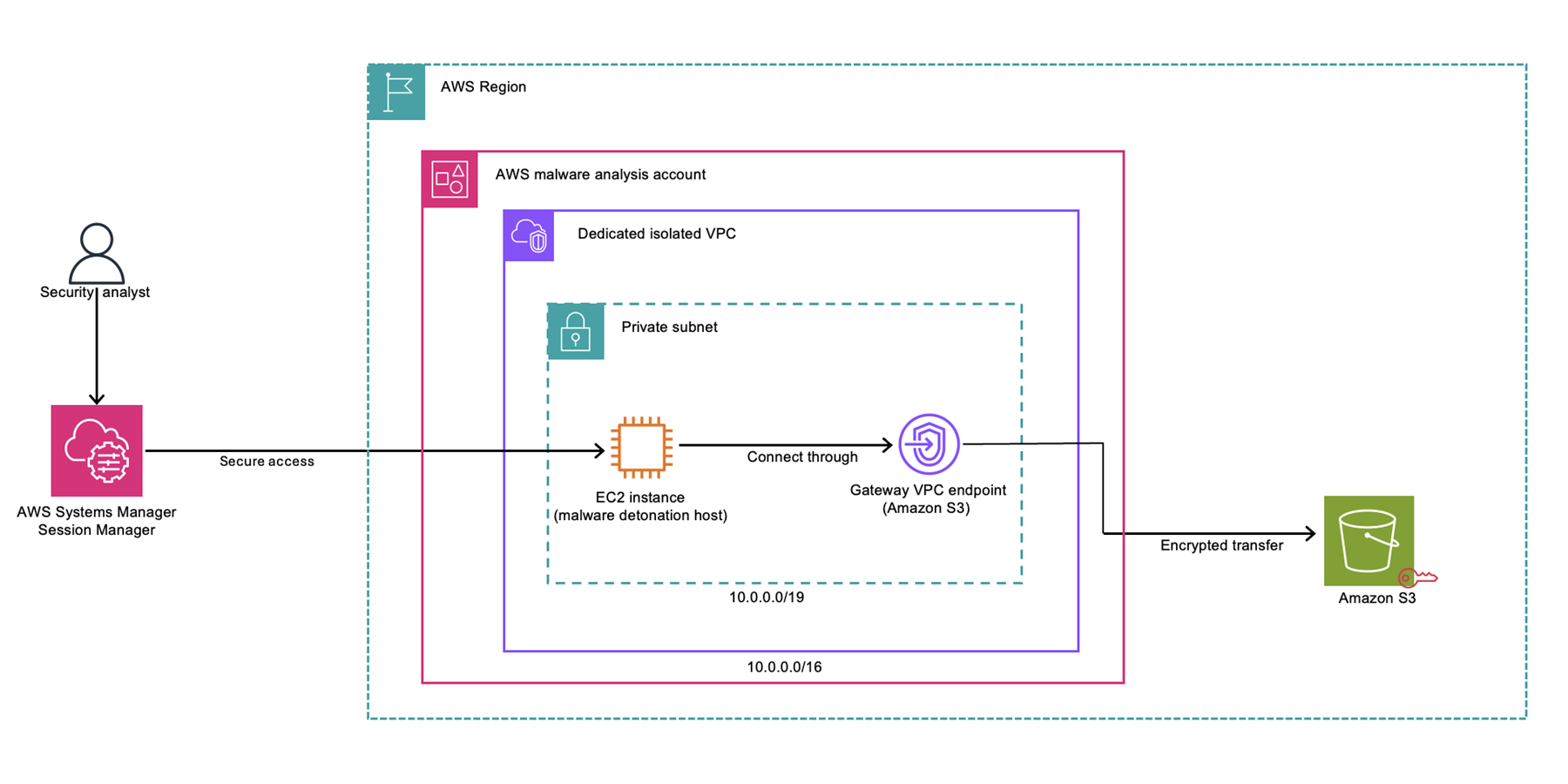
Figure 1 is a high-level illustration of the malware analysis architecture.
Figure 1: Malware analysis architecture
At a high level, the malware analysis architecture includes:
A security analyst gains access to the environment through AWS Systems Manager Session Manager.
The analyst connects to an EC2 instance (malware detonation host) in a private subnet.
The subnet resides in a dedicated isolated VPC within the AWS malware analysis account and has no outbound connectivity.
The EC2 instance connects to the malware samples and artifacts bucket through a VPC gateway endpoint for Amazon S3.
Data is transferred securely using encrypted transfer.
Key considerations
Conducting malware analysis in AWS requires a thoughtful balance between flexibility, security, and compliance to help make sure that teams operate within AWS policies while minimizing risk and cost.
Adhering to AWS policies and service terms: Activities such as simulating malware behavior or generating exploit traffic might fall under restricted use cases defined in the AWS Acceptable Use Policy and Service Terms. In addition, teams must submit a formal request for approval through the penetration testing and simulated events form for malware testing.
Need for isolation: Malware analysis requires isolated environments that can safely contain malicious code without exposing internal resources, AWS services, or other accounts. In addition, no malicious traffic is allowed to leave the Amazon Virtual Private Cloud (Amazon VPC).
Guardrails and lifecycle management: Without clear boundaries, sandbox accounts can become long-lived, misused, or even treated as production environments—potentially increasing your exposure to security risks or incurring ongoing costs unnecessarily. Guardrails such as budget alerts, lifecycle automation, and AWS Identity and Access Management (IAM) permission boundaries are essential.
Lack of unified patterns: Existing AWS guidance covers sandboxing and security best practices but doesn’t provide a focused blueprint for malware analysis that aligns with policy constraints, isolation needs, and security operations.
Architecture building blocks
Designing a secure malware analysis environment in AWS begins with containment. The architecture must assume that the code under investigation is malicious and capable of attempting escape, exfiltration, or lateral movement. That’s why isolation, tight access controls, and strict egress management are a core requirement of the architecture described below.
Network isolation with Amazon VPC
The foundation of a secure sandbox is a dedicated VPC in a dedicated account that is fully isolated from other workloads. Key considerations include:
Note: Outbound traffic can be allowed out from AWS in a bring your own IP (BYOIP) scenario for approved use cases.
No internet access: Egress should be completely blocked. NAT gateways, internet gateways, and VPC endpoints should be avoided unless explicitly needed and secured. This helps make sure that malware samples cannot beacon out or download additional payloads.
DNS disabled: To help prevent malware from resolving command-and-control (C2) infrastructure, disable DNS resolution in the VPC settings unless simulation tools (such as INetSim) require it, in which case they must operate strictly inside the same VPC.
IAM and permission boundaries
IAM plays a critical role in helping to make sure that the sandbox doesn’t gain unexpected permissions over time.
Enforce the principle of least privilege (PoLP), which means granting only the minimum permissions necessary for users, roles, and services to perform their required tasks.
Use permission boundaries to scope what roles within the sandbox can do, even if they’re granted broader policies later.
Help prevent sandbox IAM roles or users from creating or modifying IAM resources or attaching policies.
Use service control policies (SCPs) to block privilege escalation or cross-account access from the start.
Instance hardening
Even though malware analysis sandbox accounts are designed to be isolated, every instance should be hardened:
Use hardened Amazon Machine Images (AMIs) (such as CIS benchmark), and keep systems fully patched before use. See Building CIS hardened Golden Images as an example.
Make sure that host-level monitoring is enabled using agents such as AWS Systems Manager, Amazon CloudWatch Agent, Amazon GuardDuty Runtime Monitoring, or external endpoint detection and response (EDR) tooling (without enabling internet connectivity).
Note: The Systems Manager Agent requires access to Systems Manager endpoints to maintain updates and will regularly report node status. Consider this connectivity requirement when designing your isolation strategy.
GuardDuty Runtime Monitoring requires a VPC endpoint and will transmit telemetry data to the GuardDuty service. GuardDuty findings can be generated based on activities observed on the host, which could be expected behavior in a malware analysis environment.
Detonation hosts should be built to be ephemeral—treated as single-use, with instance refreshes after each session to avoid persistence.
Storage and containment
Proper storage configuration is critical when handling malware samples and related artifacts. Storage solutions, particularly Amazon Simple Storage Service (Amazon S3) buckets, must implement multiple layers of security controls, as described in the following lists.
Encryption requirements:
Enable default encryption on all S3 buckets
Use either AWS Key Management Service (AWS KMS) customer managed keys (CMK) or AWS managed keys for encryption based on your security requirements
Enforce encryption in transit by requiring HTTPS (TLS) using bucket policies
Deny any unencrypted object uploads using bucket policies
Network access:
Configure VPC endpoints (gateway endpoints) for Amazon S3 to help facilitate private communication within the VPC
Implement endpoint policies to restrict access to specific buckets and actions
Avoid cross-account sharing of buckets used in malware analysis unless absolutely necessary and reviewed on an ongoing basis.
Implement least-privilege bucket policies that explicitly deny access except to approved sandbox roles or accounts
Use resource-based policies to help prevent cross-account access unless specifically required
Enable Versioning in Amazon S3 to help prevent accidental or malicious overwrites
Enable Amazon S3 Object Lock (if needed) to help prevent deletion of critical log files or samples
Monitoring, guardrails, and operational controls
A secure malware analysis environment in AWS must balance controlled flexibility with enforced boundaries. Even in an isolated VPC, human error is possible, tools might not operate as intended, and malicious code can attempt to escape or persist. That’s why you need layers: visibility, guardrails, and operational discipline.
This section covers how to monitor activity, detect threats, and enforce sandbox boundaries—whether you’re operating in an organization within AWS Organizations or a standalone account.
Monitoring activity using AWS CloudTrail
AWS CloudTrail is an AWS service that helps you enable operational and risk auditing, governance, and compliance of your AWS account. Actions taken by a user, role, or an AWS service are recorded as events in CloudTrail.
GuardDuty: Native threat detection
GuardDuty is a threat detection service that continuously monitors your AWS environment for malicious activity through the analysis of VPC Flow Logs, CloudTrail logs, and DNS logs. When implemented in a malware analysis environment, GuardDuty generates findings that detail potential security threats that it detects through machine learning models and threat intelligence feeds. Security teams should note that in a malware analysis sandbox, GuardDuty will generate findings for activities that might be intentional parts of the analysis process. It’s crucial to establish proper procedures for reviewing and categorizing these findings, distinguishing between expected sandbox behavior and actual security concerns.
Organizations should configure appropriate notification workflows and create baseline expectations for normal sandbox operations. This enables security teams to focus on findings that might indicate sandbox escape attempts or unexpected malicious activities while properly managing expected alerts from normal analysis operations. Each finding provides detailed information about the detected activity, including the affected resources, severity level, and specific details about the potential security issue, enabling teams to make informed decisions about necessary response actions.
Service control policies: Policy guardrails in AWS Organizations
For malware analysis environments, we recommend operating the sandbox account within AWS Organizations rather than as a standalone account. This strategy uses SCPs to establish critical security boundaries while maintaining necessary operational flexibility. Operating within Organizations enables centralized security policy enforcement, clear isolation from production workloads, and enhanced audit capabilities—all essential for secure malware analysis operations. While this approach might require additional governance overhead and careful organizational unit (OU) structure design, the security benefits outweigh these considerations.
By placing the malware analysis account in a dedicated OU with specific SCPs, you can enforce strict security controls while enabling necessary analysis capabilities. This organizational structure maintains clear separation from production workloads while providing the robust security controls needed for malware analysis activities. The ability to implement granular permission boundaries through SCPs, combined with centralized logging and monitoring, creates a more secure and manageable environment for conducting malware analysis while helping to prevent potential security risks from affecting other organizational resources.
For malware analysis we recommend implementing SCPs to enforce the following:
Deny accounts from leaving the organization: When an account leaves an organization, it’s no longer bounded by the controls established within that organization. This SCP can be used to help prevent someone from moving an account to a different organization that has a set of different controls that aren’t as restrictive and there is risk of someone making undesired changes.
Deny access to specific AWS Regions (reduce surface area): AWS has 37 Regions, yet customers scope down to one Region when it comes to malware analysis. This SCP gives you the ability to limit the Regions where AWS resources can be deployed, thus reducing the scope of impact.
Help prevent escalation of privileges: Privilege escalation refers to the ability of a threat actor to use stealthy permissions to elevate permission levels and compromise security. To help prevent privilege escalation, use SCPs to help prevent users in your accounts from using administrative IAM actions, except from approved roles. With this policy, administrative IAM actions can be restricted to delegated IAM admins. You can use permissions boundaries to safely delegate permissions management to trusted employees or a continuous integration and delivery CI/CD pipeline.
What if your account isn’t a part of an organization?
If your environment doesn’t use AWS Organizations and SCPs aren’t available, you can enforce similar boundaries using IAM permissions boundaries and identity-based policies:
Use permissions boundaries for roles used in the sandbox to prevent them from escalating or accessing other AWS services
Explicitly deny sensitive IAM actions (such as iam:*Policy, iam:PassRole) at the identity policy level
Implement resource tagging policies through AWS Organizations or custom enforcement logic to provide resource ownership and control
Operational best practices
The following best practices help make sure your sandbox remains ephemeral, controlled, and cost-aware.
Immutable by design: Treat analysis virtual machines (VMs) as disposable. Never reuse a detonation instance across sessions
Automated teardown: Use lifecycle policies or automation scripts to destroy resources after each use
Cost and drift control: Tag relevant resources (Environment=sandbox, Owner=security), enable AWS Budgets, and monitor with AWS Config to help maintain sandbox hygiene
Setup checklist
This checklist provides a step-by-step guide for creating a secure malware analysis environment in AWS, focusing on isolation, access control, monitoring, and cost.
Submit a formal request for approval through the penetration testing and simulated events form for malware testing. This needs to be done for every simulated event you plan on running.
Account setup
Use a dedicated AWS account for malware analysis (if the account is part of an organization, also use a dedicated OU).
Apply SCPs to restrict Region access, deny IAM changes, and enforce tagging and encryption.
VPC design
Create a dedicated sandbox VPC with no internet gateway or NAT gateway.
Disable DNS resolution at the VPC level (unless simulating Amazon EC2 behavior internally).
Verify that no public IPs are assigned to any resource.
Use security groups and network access control lists (network ACLs) to restrict ingress to known internal IP ranges.
Disable SSH; use Systems Manager Session Manager for access.
Use EC2 Auto Recovery or instance refresh patterns for teardown between analyses.
Storage and logging
Use encrypted S3 buckets for sample storage and log archival.
Make sure that audit logs (CloudTrail) are retained and protected.
Store logs centrally in a secure logging account.
Monitoring and detection
Enable GuardDuty for behavioral detection (VPC, API, and DNS analysis).
Enable AWS Config rules to detect drift (for example, internet gateways and public IPs).
Set up a dedicated CloudTrail log for the relevant account with multi-Region logging for full traceability.
Enabling VPC Flow Logs and Amazon Route 53 query logs might provide additional visibility into how the malware is operating.
IAM and permissions
Generate policies using AWS IAM Access Analyzer policy generation. You can use this to generate an IAM policy that is based on access activity for an entity. You can then refine the policy to exactly what is needed to operate in the account and adhere to the principle of least privilege.
Apply permission boundaries to sandbox roles to restrict privilege scope.
IAM permissions should forbid/minimize cross account access where applicable
Restrict use of services outside the malware analysis scope. See the following documentation on how to only allow the use of a subset of services in your environment
Tag to assist with financial allocation, ownership and support use cases (for example, Environment=sandbox, Purpose=malware-analysis). For more information, see Best Practices for Tagging AWS Resources.
Conclusion
Malware analysis can be an effective addition to modern security operations—but when conducted in cloud environments, it demands strict architectural discipline and adherence to system-level policies. AWS offers the tools and services needed to build secure, isolated, and policy-aligned environments.
This guide has outlined a defense-in-depth approach that you can use to create a malware analysis sandbox in AWS that prioritizes isolation, visibility, and control. From VPC configuration and IAM boundaries to monitoring and organizational guardrails, each layer contributes to a controlled and repeatable environment while reducing risk to your broader AWS environment.
By following these patterns, you can empower your security teams to investigate threats without compromising the integrity, security, or governance of your broader AWS environment.
As introduced in Part 1 of this series, implementing secure file sharing solutions in AWS requires a comprehensive understanding of your organization’s needs and constraints. Before selecting a specific solution, organizations must evaluate five fundamental areas: access patterns and scale, technical requirements, security and compliance, operational requirements, and business constraints. These areas cover everything from how files will be shared and what protocols are needed, to security measures, day-to-day operations, and business limitations.
See Part 1 of this series for detailed information about each of these fundamental areas and their specific considerations. Part 1 also covers solutions including AWS Transfer Family, Transfer Family web apps, and Amazon Simple Storage Service (Amazon S3) pre-signed URLs. This part continues our analysis with additional AWS file sharing solutions to help you make an informed decision based on your specific requirements.
Solutions
Let’s start by looking at the various file sharing mechanisms that AWS supports. The following table identifies the key AWS services needed for each solution, describes the security and cost implications of the solutions, and describes their complexity and protocol support capabilities.
Solution
AWS services
Security features
Cost*
Region control
CloudFront signed URLs
CloudFront, Amazon S3, and Lambda
Optional edge security using AWS Lambda@Edge, WAF integration, SSL/TLS, geo restrictions, and AWS Shield Standard (included automatically)
Content delivery network (CDN) costs, request pricing, and data transfer fees
Global service by design; origin can be AWS Region-specific
Amazon VPC endpoint service
AWS PrivateLink, Amazon VPC, and Network Load Balancer (NLB)
Complete network isolation, private connectivity, and multi-layer security
Endpoint hourly charges, NLB costs, and data processing fees
Service endpoints are strictly Region-specific; must create endpoints in each Region where access is needed
Data transfer fees apply based on standard S3 rates
Amazon VPC endpoint charges apply when using VPC endpoints with access points
Access points are Region-specific
Each access point is created in the same Region as its S3 bucket
Cross-Region access requires separate access points in each Region
VPC-specific access points are limited to the VPC’s Region
The following table shows the solutions described in Part 1.
Solution
AWS services
Security features
Cost*
Region control
AWS Transfer Family
Transfer Family, Amazon S3, API Gateway, and Lambda
Managed security, encryption in transit and at rest, IAM integration, and custom authentication
$0.30 per hour per protocol, data transfer fees, and storage costs
Can deploy to specific AWS Regions, can only transfer files to and from S3 buckets in the same Region
Transfer Family web apps
Transfer Family, S3, and CloudFront
Browser-based access, IAM Identity Center integration, and S3 Access Grants
Pay-per-file operation, CloudFront costs, and storage costs
Uses CloudFront (global) for web access, but backend components can be Region-specific
Amazon S3 pre-signed URLs
S3
Time-limited URLs, IAM controls for URL generation, and HTTPS
S3 request and data transfer fees
Can be restricted to specific Regions
Serverless application with Amazon S3 presigned URLs
S3, Lambda, and API Gateway
Time-limited URLs, HTTPS, IAM controls, customizable authentication
Pay per request and minimal infrastructure cost
Components can be Region-specific
* Pricing information provided is based on AWS service rates at the time of publication and is intended as an estimation only. Additional costs may be incurred depending on your specific implementation and usage patterns. For the most current and accurate pricing details, please consult the official AWS pricing pages for each service mentioned.
Let’s examine each of the solutions in detail. Part 1 talked about AWS Transfer Family, Transfer Family web apps, and Amazon S3 pre-signed URLs. Here in Part 2, we explain the remaining solutions to help you make the right choice for your use case.
CloudFront signed URLs with Amazon S3
Amazon CloudFront signed URLs combine Amazon S3 storage with the global edge network of CloudFront to deliver files securely with lower latency.
CloudFront edge locations cache content geographically closer to users, which usually reduces latency and gives better performance for users. CloudFront also reduces the number of origin requests to Amazon S3. CloudFront integration with AWS Shield and AWS WAF provides options for additional security layers, helping to protect against DDoS events and unintended requests. You can use custom domains with AWS-provided or your own SSL/TLS certificates managed through AWS Certificate Manager (ACM), helping to facilitate secure connections from users to edge locations.
When a user requests a file, the system generates a signed URL using either a CloudFront key pair or a custom trusted signer (such as Lambda Edge) that includes security parameters such as IP restrictions, time windows, and custom policies. The major difference is the content distribution network (CDN) making performance faster by caching data geographically close to the user downloading it.
The built-in logging and monitoring capabilities of CloudFront provide detailed insights into content access patterns, cache hit ratios, and security events. CloudFront integrates seamlessly with Amazon S3 to support origin access identity (OAI), helping to make sure that the S3 objects can be accessed only through CloudFront and not directly through S3 APIs.
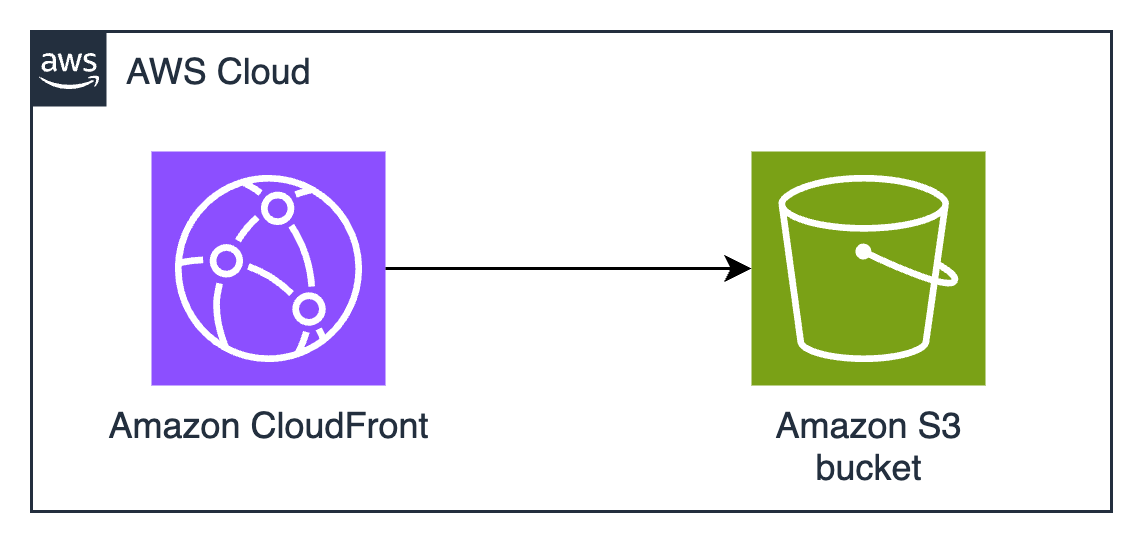
Figure 1: CloudFront signed URLs with Amazon S3 architecture
Pros
If Amazon S3 pre-signed URLs sound good, but you need higher performance at a global scale, CloudFront signed URLs are the right choice. The AWS global edge network has points of presence (POPs) all over the world, which significantly reduces latency for users and minimizes data transfer costs through caching. This architecture provides substantial cost savings for frequently accessed content, because edge locations serve cached copies without retrieving objects from the S3 origin. The integration with AWS security services offers protection against various threats, including sophisticated distributed denial of service (DDoS) events and web application issues, making it particularly suitable for public-facing file sharing applications. Choose CloudFront instead of S3 if you tend to make the same file available to many people who download it many times, such as in software distribution or documentation distribution.
The solution’s security model provides extensive flexibility in access control implementation. You can define granular permissions through custom policies, implement geo-restriction rules, and enforce IP-based access controls. The ability to use custom TLS certificates and domains maintains brand consistency while helping to facilitate secure communications. The integration with AWS WAF enables advanced request filtering and rate limiting, while detailed access logging and real-time metrics provide visibility into content delivery and security events. The solution’s support for both signed URLs and signed cookies offers flexibility in implementing various access control scenarios. Signed cookies are used when you want to provide access to multiple restricted files. For example, if you need to provide access to many files in a private directory, you can use signed cookies to avoid having to create individual signed URLs for each file. When choosing between CloudFront signed URLs (ideal for individual file access) or signed cookies (better for providing access to multiple files, like a subscriber’s content library), consider your content distribution needs and whether your clients support cookies.
Cons
If you implement CloudFront, you must develop expertise in its configuration options, including robust key management processes and secure key rotation procedures. Self-managed certificates don’t automatically renew. You must track expiration dates and make sure you renew on time, or your users will get warnings and errors when they try to download. ACM can simplify TLS certificate management and automatically renew certificates before they expire. while trusted signer workflows enhance your security posture.
Note: To create signed URLs, you need a signer. A signer is either a trusted key group that you create in CloudFront, or an AWS account that contains a CloudFront key pair.
Misconfigured web caches have many surprising and frustrating effects for users. Understanding and configuring CloudFront cache behavior is key to helping to prevent unintended content exposure or availability issues. You need to add cache invalidation to your publication workflows so that old versions are no longer available from the cache. This might introduce additional costs and operational overhead, especially in scenarios with frequent content changes. If you frequently change the content that you share, if the content is unique to an individual (such as a personalized report), or if the same content isn’t downloaded many times by many people in many locations, you won’t realize much cost savings or reduced latency from CloudFront caching. The additional complexity added by cache configuration might not be justified unless the cache is used a lot.
If you use the CloudFront global content delivery network, your content will be stored in caches in hundreds of locations around the world. ACM will store your TLS certificates for CloudFront (whether ACM is issuing them or you manage them yourself) in the us-east-1 AWS Region. Because CloudFront is a global service, it automatically distributes the certificate from the us-east-1 Region to the Regions associated with your CloudFront distribution. Caching data and keys around the world might not be acceptable if you have data sovereignty requirements to keep your data in one country.
From a cost perspective, while CloudFront can provide savings through caching, the pricing model has other variables to consider. Data transfer costs vary by Region and can be significant for large-scale distributions. If you need custom domain names and custom TLS certificates, that might introduce additional costs. Implementation expertise is needed when dealing with dynamic content or when specific origin request handling is required. CloudFront only delivers via HTTPS and HTTP protocols, so you won’t be able to use it if you require support for other file transfer protocols. CloudFront distributions provide statistics on cache hit-and-miss rates—pay attention to these because low cache hit rates mean that you’re pulling data from the origin frequently, which limits the possible cost savings.
Amazon VPC endpoint service with custom application
Amazon VPC endpoint services, powered by AWS PrivateLink, enable private connectivity between VPCs without requiring internet access, VPN connections, or direct physical connections. This solution creates a highly secure, private network path for file sharing by exposing services through Network Load Balancers (NLB) and allowing other VPCs to access them through interface endpoints. The architecture isolates the file sharing service from the public internet, operating entirely within the AWS private network infrastructure.
The best use cases for this architecture involve sharing data or distributing software around your AWS infrastructure without exposing it to the public internet.
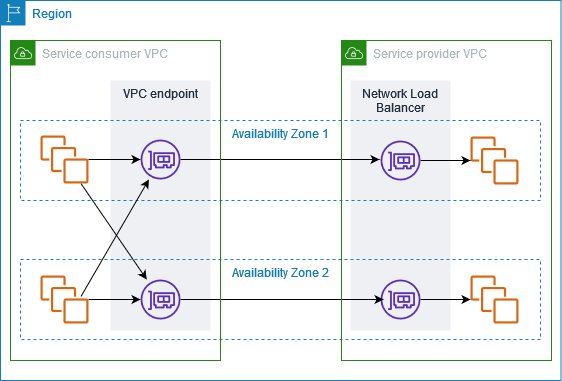
Figure 2: Amazon VPC endpoint service architecture
The solution, shown in Figure 2, typically involves deploying a custom file sharing application behind an NLB in the service VPC, which is then exposed as an endpoint service. Consumer VPCs create interface endpoints to connect to this service, establishing private connectivity through the AWS backbone network. Traffic remains within the AWS network, is encrypted in transit, and is subject to security controls at both the endpoint and VPC levels. The architecture supports many TCP-based protocols, making it versatile for various file transfer requirements.
This architecture provides secure pathways for data to travel by using multiple layers, including VPC security groups, network access control lists (ACLs), endpoint policies, and the custom application’s authentication mechanisms. The built-in security features of PrivateLink are designed so that only approved AWS principals can create interface endpoints to connect to the service, while detailed VPC flow logs provide network traffic visibility.
Pros
Amazon VPC endpoint services provide complete network isolation and private connectivity that’s inaccessible from the public internet. This reduces the exposure footprint and helps meet security requirements for sensitive data transfer operations. The solution maintains private connectivity across different AWS accounts and Regions while keeping traffic within the AWS network infrastructure.
This solution also provides the most flexible protocol support. Other solutions require you to use HTTPS, AWS API calls (which are HTTPS), or one of the protocols supported by Transfer Family (such as SFTP). If you have software that uses custom protocols, and you need security controls and network isolation, this architecture provides predictable performance through dedicated network paths and supports high throughput requirements without internet bandwidth constraints. The granular control over network security through VPC security groups, network ACLs, and endpoint policies enables organizations to implement defense-in-depth strategies effectively. Additionally, the solution’s integration with AWS Organizations facilitates centralized management and governance across multiple accounts.
Cons
Setting up and maintaining VPC endpoints requires significant expertise in AWS networking, including VPC design, PrivateLink configuration, and network security controls. The initial architecture design must carefully consider IP address management, service quotas, and Regional availability to provide scalability and reliability. Organizations must also develop and maintain the custom file sharing application in addition to the VPC endpoints.
This solution has many components that incur hourly and bandwidth-related charges. Each interface endpoint incurs hourly charges and data processing fees, which can accumulate significantly in multi-VPC or multi-Region deployments. NLBs add another cost component, and you must maintain sufficient capacity for peak loads. The solution also has operational costs because of the need for specialized expertise and ongoing maintenance. Additionally, while the private connectivity model provides superior security, it can make troubleshooting more challenging and might require additional tooling for effective monitoring and diagnostics. The Regional nature of VPC endpoints might necessitate additional architecture for multi-Region deployments, potentially increasing both costs and operational overhead. This solution is most suitable when private network security considerations are the highest priority, and cost considerations are secondary.
Amazon S3 Access Points
Amazon S3 Access Points simplify managing data access at scale for applications using shared data sets on S3. Access points are named network endpoints attached to S3 buckets that streamline managing access to shared datasets. Each access point has its own AWS Identity and Access Management (IAM) policy that controls access to the data, allowing you to create custom access permissions for different applications or user groups accessing the same bucket.
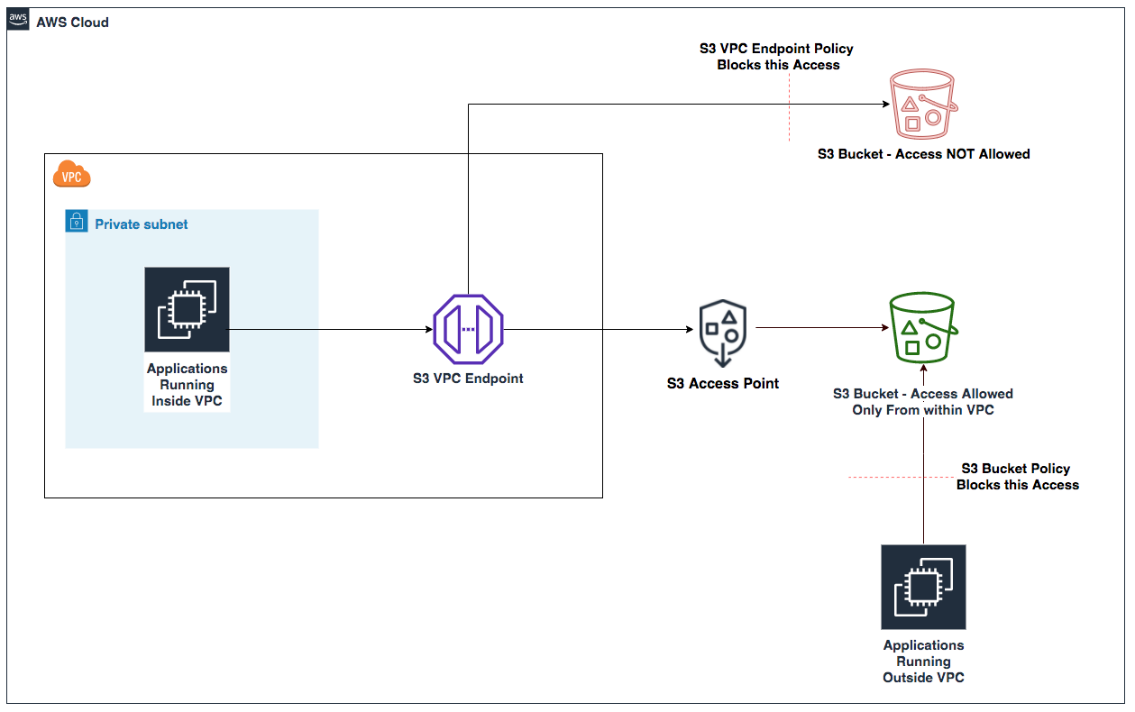
The architecture uses S3 buckets with access points providing dedicated access paths to the data. Each access point has its own hostname (URL) and access policy that works in conjunction with the bucket policy. You can create access points that only allow connections from your Amazon Virtual Private Cloud (Amazon VPC) for private network access to Amazon S3 or create access points with Internet connectivity. You can use this flexibility to implement sophisticated access control patterns while maintaining a single source of truth in S3.
Figure 3: S3 Access Points with VPC endpoints
Pros
Amazon S3 Access Points simplify permissions management and security to accommodate multiple access patterns and use cases. For example, if an S3 bucket contains data that needs to be accessed by multiple applications, each requiring different levels of access, you can create a dedicated access point for each application with precisely the permissions it needs, rather than managing a long monolithic bucket policy.
You can implement access control workflows, such as restricting access to specific VPCs, encryption, or limit access to specific objects or prefixes. The service requires no new infrastructure management, reducing operational overhead and allowing you to focus on business logic implementation.
Access points provide a way to enforce network controls through VPC-only access points, helping to make sure that data can only be accessed from within your private network. IAM permissions management becomes more granular and straightforward to audit when each application or user group has its own access point with a dedicated policy. You can associate different access points with different network origins.
Another possible use case is when you need to provide temporary access to specific data within a bucket without modifying the bucket policy. You can create a temporary access point with the necessary permissions and delete it when the access is no longer needed.
Cons
Access points add another layer to your Amazon S3 architecture that needs to be managed and monitored. Each access point has its own Amazon Resource Name (ARN) and hostname that applications need to use instead of the bucket name, which might require changes to your application code.
There are limits to the number of access points you can create for each bucket, which might be a constraint for large-scale applications. Access points can only control access to the bucket they’re associated with, not across multiple buckets, so if your application needs to access data across buckets, you’ll need multiple access points.
When implementing this solution, you need to design your access point policies to make sure that they work correctly with your bucket policy. Think of your S3 bucket policy as the primary security framework, while access point policies act as specialized gatekeepers. These two layers of security must work in harmony. The bucket policy takes precedence. For example, if your bucket policy explicitly denies access from specific IP ranges, an access point policy can’t override this restriction. This hierarchical relationship requires strategic planning. Start by defining your broad security boundaries in the bucket policy—perhaps allowing access only from specific VPCs or requiring encryption. Then create your access point policies within these boundaries.
While Amazon S3 Access Points offer powerful flexibility, understanding their boundaries is crucial. Cross-account scenarios, common in large enterprises or partner collaborations, require careful configuration. Imagine you’re working with an external auditing firm that needs temporary access to your financial data stored in S3. Setting up a cross-account access point requires creating the access point in your account, configuring a trust policy to allow the external account, verifying that the bucket policy permits access from the access point, and providing the auditors with the access point ARN and necessary IAM permissions in their account. This process maintains tight control over your data while enabling secure cross-account access.
Some Amazon S3 operations are only controlled at the bucket level and can’t be controlled by access points. Core bucket operations such as configuring versioning, logging, managing lifecycle policies, and setting up cross-Region replication require direct bucket access. For these operations, you need to interact directly with the bucket through the appropriate permissions. This limitation helps make sure that fundamental bucket configurations remain centralized and controlled by bucket owners.
Creating a dedicated IAM role for bucket administration tasks—separate from the roles that interact with data through access points—enhances security and aligns with the principle of least privilege.
Conclusion
In this second part of a two-part post, you’ve learned about multiple solutions for secure file sharing using AWS services and the pros and cons of each. You can find additional options and a full decision matrix in Part 1. The optimal solution depends on your specific organizational requirements, technical capabilities, and budget constraints. You don’t have to choose just one option, you can implement multiple solutions to address different use cases, creating a file sharing strategy that balances security, cost, and operational efficiency.
July 30, 2025: This post has been republished to migrate the Amazon EC2 Oracle Transparent Data Encryption database encryption keystore to AWS CloudHSM using AWS CloudHSM Client SDK 5.
Encrypting databases is crucial for protecting sensitive data, helping you to be aligned with security regulations and safeguarding against data loss. Oracle Transparent Data Encryption (TDE) is a feature that you can use to encrypt data at rest within an Oracle database. TDE uses envelope encryption. Envelope encryption is when the encryption key used to encrypt the tables of your database is encrypted by a primary key that resides either in a software keystore or on a hardware keystore, such as a hardware security module (HSM). This primary key is non-exportable by design to protect the confidentiality and integrity of your database operation. This gives you a more granular encryption scheme on your data. Hence, TDE for Oracle is a common use case for HSM devices such as AWS CloudHSM.
Oracle TDE supports keystores to securely store the TDE primary encryption keys. You can use either the TDE wallet (software keystore) or external key managers such as an HSM device. In this solution, we show you how to migrate a TDE keystore for an Oracle 19c database installed on Amazon Elastic Compute Cloud (Amazon EC2) from a software-based TDE wallet to AWS CloudHSM.
Using an external key manager, such as CloudHSM, offers several benefits over keeping keys on the Oracle wallet on the host:
Centralized key management: CloudHSM supports centralized management of encryption keys, making it straightforward to rotate, back up, and audit keys.
Compliance: Your regulatory requirements may include encryption, and using CloudHSM can help you meet these compliance needs.
When you move from one type of keystore to another, new TDE primary keys are created inside the new keystore. To make sure that you have access to backups that rely on your past encryption keys, consider leaving the keystore running for your normal recovery window period or copying existing keys to the new keystore with exact key labels. Being able to access prior primary keys will help avoid data re-encryption.
You can use TDE to encrypt data online or offline. Encrypting TDE tablespace online minimizes disruption to database operations; however, it requires twice the storage space as the tablespace being encrypted, because the encryption process happens on a copy of the original tablespace.
Solution overview
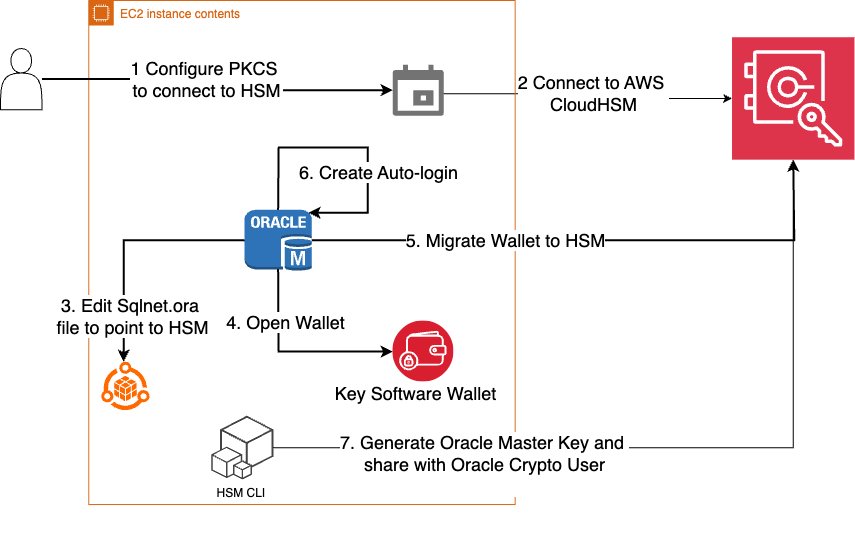
In this solution, you migrate a TDE keystore for an Oracle 19c database from a software-based TDE wallet to CloudHSM, using the steps shown in Figure 1. Start by moving the current encryption keystore, which is your original TDE wallet, to a software wallet. This is done by replacing the PKCS#11 provider of your original HSM with the CloudHSM PKCS#11 software library (steps 1–2), next you reverse migrate to a local wallet (steps 3–5). The third step is to switch the encryption wallet for your database to your CloudHSM cluster (steps 6 and 7). After this process is complete, your database will automatically re-encrypt the data keys using the new primary key.
Figure 1: Steps to migrate your EC2 Oracle TDE database encryption wallet to CloudHSM
Note: The following instructions were tested using Oracle version 19c.
Prerequisites
You must have the following prerequisites in place to complete the solution in this post.
AWS CloudHSM cluster: You need to have a CloudHSM cluster set up and configured with an admin EC2 instance for interacting with CloudHSM following steps and best practices covered in Getting started with AWS CloudHSM.
Oracle database: Make sure that your Oracle database is up and running. This post assumes that you have an Oracle Database 19c database running on an EC2 Linux instance and there is network connectivity set up to CloudHSM as explained in this Configure the Client Amazon EC2 instance security groups for AWS CloudHSM.
Migrate an Oracle database keystore to a CloudHSM external keystore
As the first step in the migration, you need to migrate your Oracle database keystore to a CloudHSM external keystore. You do this by installing the CloudHSM client and the PKCS#11 library and then configuring the PKCS#11 library to connect to the HSM cluster.
Configure the client to connect to HSMs in your cluster. For Linux EC2, use the following command:
sudo /opt/cloudhsm/bin/configure-cli -a <The ENI IPv4 / IPv6 addresses of the HSM>
Copy the CloudHSM issuing certificate created when you initialized the cluster (customerCA.crt) to the /opt/cloudhsm/etc folder. For more information, see Activate the cluster in AWS CloudHSM.
Validate connectivity to the CloudHSM cluster.
/opt/cloudhsm/bin/cloudhsm-cli interactive
Sign in to the cluster as admin and create a crypto user (e.g. hsm-crypto-user) and assign it the role crypto-user.
Verify that the WALLET_ROOT parameter is pointing to the current file-based TDE wallet location. This parameter defines the location where the TDE wallet (and other related files) will be stored. You can set it to an existing directory, preferably one in your $ORACLE_BASE or $ORACLE_HOME directory, but other locations are also possible.
show parameter wallet_root
show parameter tde_configuration
Use the following commands to set WALLET_ROOT if it hasn’t already been set.
ALTER SYSTEM SET WALLET_ROOT = '/u01/app/oracle/admin/orcl/wallet' SCOPE=BOTH SID='*';
ALTER SYSTEM SET TDE_CONFIGURATION=“KEYSTORE_CONFIGURATION=FILE” SCOPE=BOTH SID=“*”
Note:
In Oracle Database 19c and later, the ENCRYPTION_WALLET_LOCATION. parameter in sqlnet.ora is deprecated in favor of using WALLET_ROOT and TDE_CONFIGURATION.
You can also use the V$ENCRYPTION_WALLET view to check the current keystore location and status.
Point the Oracle database to use a local file-based keystore and CloudHSM
The KEYSTORE_CONFIGURATION attribute within TDE_CONFIGURATION determines the keystore type.
To point the Oracle database:
Use the following code to point the database to the local keystore and CloudHSM.
ALTER SYSTEM SET TDE_CONFIGURATION="KEYSTORE_CONFIGURATION=HSM|FILE" SCOPE = BOTH SID = '*';
Restart the database to have consistent results.
Verify that the keystore file-based wallet is open
To proceed with encryption key migration, you need to check the current keystore status and make sure that the file-based wallet is open.
To verify that the wallet is open:
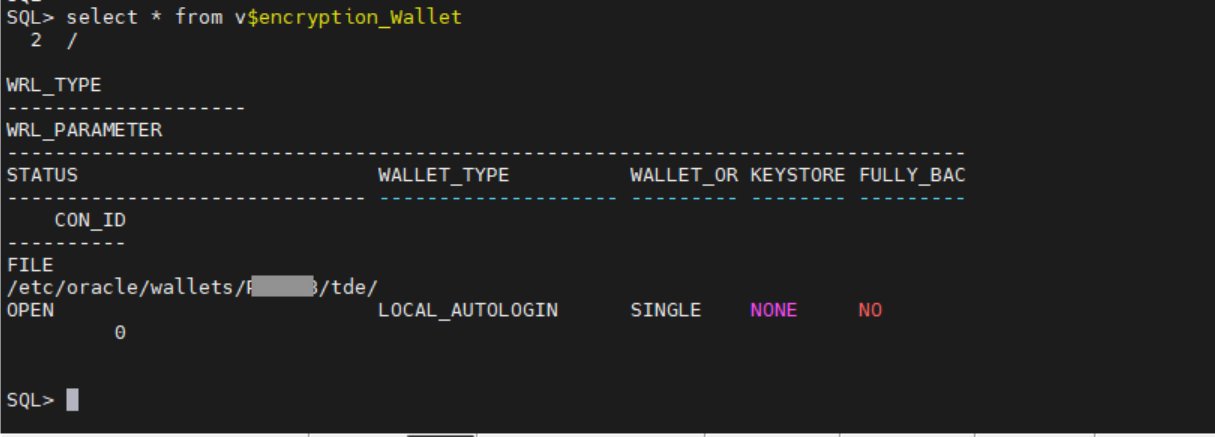
Check to see if the file-based wallet is open.
Select * from V$encryption_wallet;
Figure 2: Verify that the wallet status is OPEN
If the wallet status is not OPEN, use the following command to open it:
ALTER SYSTEM SET ENCRYPTION WALLET OPEN IDENTIFIED BY "wallet_password";
Migrate the encryption key to CloudHSM
Use the ADMINISTER KEY MANAGEMENT SET ENCRYPTION KEY command to initiate the TDE primary encryption key migration.
To migrate the encryption key:
Use the following command to migrate the encryption key:
ADMINISTER KEY MANAGEMENT SET ENCRYPTION KEY IDENTIFIED BY "hsm-crypto-user:password" MIGRATE USING "wallet-password" WITH BACKUP USING 'backup_tag';
The parameters used to migrate the encryption key are:
SET ENCRYPTION KEY: Specifies that the command is related to the TDE primary encryption key
IDENTIFIED BY: Specifies the details for migrating the keystore, including the external keystore user and password
MIGRATE USING: Specifies the password for the file-based wallet containing the primary encryption key
WITH BACKUP: Creates a backup of the keystore before the migration
Verify that the migration is complete
At this point, the migration from Oracle to Cloud HSM should be complete. Use the following steps to verify it.
To verify the migration:
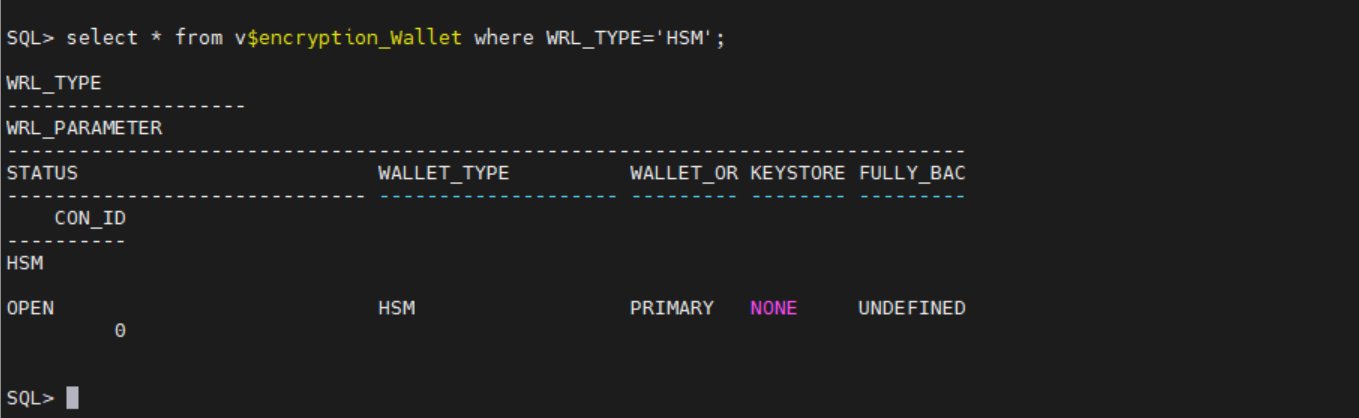
Check the wallet status again. If the migration was successful, the WALLET_TYPE will be HSM and the WALLET_OR will be PRIMARY.
Select * from V$encryption_wallet;
Figure 3: Verify that WALLET_TYPE and WALLET_OR are correct
In the wallet is not open, use:
SQL>administer key management set keystore open identified by "hsm-crypto-user:password"
Verify that the database can access encrypted data without issues, confirming that the migration was successful.
Setup auto-login
Create auto-login to open the wallet during database restarts to connect to AWS CloudHSM.
To set up auto_login:
Create a new file-based keystore with the same username and password as the CloudHSM crypto user.
ADMINISTER KEY MANAGEMENT CREATE KEYSTORE '/etc/oracle/wallets/<path>/tde' IDENTIFIED BY "hsm-crypto-user:password";
Add the CloudHSM crypto user password to a keystore (TDE wallet).
ADMINISTER KEY MANAGEMENT ADD SECRET 'hsm-crypto-user:password' FOR CLIENT 'HSM_PASSWORD' TO KEYSTORE '/etc/oracle/wallets/<path>/tde' IDENTIFIED BY "hsm-crypto-user:password" WITH BACKUP;
The following command creates a new auto-login keystore. This is useful for scenarios where the keystore needs to be accessed without human intervention.
ADMINISTER KEY MANAGEMENT CREATE AUTO_LOGIN KEYSTORE FROM KEYSTORE '/etc/oracle/wallets/<path>/tde' IDENTIFIED BY "<hsm-crypto-user:password>";
Open the newly created file based keystore.
ADMINISTER KEY MANAGEMENT SET KEYSTORE OPEN IDENTIFIED BY "<hsm-crypto-user:password>"
Key rotation
Key rotation helps you to adhere to security best practices by providing several data security benefits. Regular rotation of TDE keys reduces the window of opportunity for a bad actor who might have obtained a key, thereby minimizing the impact of a potential breach.
Many established security frameworks and compliance standards—such as PCI DSS and HIPAA—recommend or require regular key rotation to maintain the integrity and confidentiality of encrypted data. By making sure that keys aren’t used indefinitely, you can help reduce the risk of exposure or compromise, which reinforces overall security.
Encryption algorithms can become less secure over time because of advancements in computing power or newly discovered vulnerabilities. By rotating keys regularly, you can transition to stronger encrypting methods as needed, and so improve protection against emerging risks.
When to rotate TDE keys
The frequency of key rotation depends on several factors, including organizational policies, regulatory requirements, and the sensitivity of the data being protected. Here are some common practices:
Annually: Many organizations rotate TDE keys once a year to align with common compliance requirements.
Quarterly: For higher-security environments or more sensitive data, rotating keys every quarter can provide an additional layer of security.
If keys are compromised or suspected to be compromised: If you believe a key to be compromised, rotating that key as soon as possible is recommended to reduce the impact window.
Oracle TDE primary key rotation with an HSM key
In this section, you choose a 32-bit hex value to use as a prefix when generating a key, then use that key to update the Oracle database to use the new primary key.
Sign in to the database instance as a user who has the ADMINISTER KEY MANAGEMENT or SYSKM privilege and execute following command:
ADMINISTER KEY MANAGEMENT SET ENCRYPTION KEY IDENTIFIED BY "<hsm-crypto-user:password>"
Decide on a 32-bit hex value pattern to be used. We used 15A5142C9E2D3C2F18FD435814257DFD in this example.
Add the prefix ORACLE.TDE.HSM.MK to the hex pattern.
Update the Oracle database to use the new primary TDE key.
ADMINISTER KEY MANAGEMENT USE KEY '0615A5142C9E2D3C2F18FD435814257DFD' FORCE KEYSTORE IDENTIFIED BY "hsm-crypto-user:password"
By following these guidelines, you can enhance the security of your encrypted data, align with regulatory requirements, and maintain robust key management practices.
Conclusion
In this post, we’ve shown you the importance of Transparent Data Encryption (TDE) and the benefits of using an external key manager such as AWS CloudHSM for storing TDE encryption keys. We’ve discussed the benefits of TDE compared to encrypting underlying storage and why using an external key manager is superior to keeping keys on the Oracle wallet on the host. Following these guidelines can help you enhance the security of your encrypted data, align with regulatory requirements, and maintain robust key management practices.
The key takeaways from this post are:
TDE offers granular encryption, compliance benefits, and robust key management.
External key managers provide enhanced security, centralized management, improved auditability and scalability.
Regular rotation of TDE keys is crucial for maintaining security, aligning with regulations, and following recommended practices in key management.
To start securing your Oracle databases with TDE and AWS CloudHSM, visit the AWS Management Console. Follow the steps outlined in this guide to migrate your TDE encryption keystore to AWS CloudHSM and begin rotating your keys regularly to enhance your data security posture. By taking these actions, you can make sure that your sensitive data remains protected, your organization remains aligned with regulations, and you are following the best practices in data encryption and key management.
Organizations are facing an increasing number of security threats, especially in the form of compromised user accounts. Manually monitoring and acting on suspicious activities is not only time-consuming but also prone to human error. The lack of automated responses to security incidents can lead to disastrous consequences, such as data breaches and financial loss.
This post addresses scenarios where, for example, you have a web server that uses a Microsoft Active Directory user account (service account) to access an application or database resources on other servers, and you want to automate disabling the user account if suspicious activity is detected.
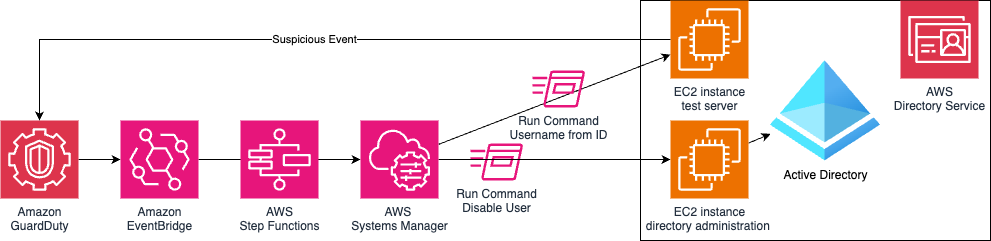
In this example, shown in Figure 1, you deploy a test EC2 instance and enable GuardDuty runtime monitoring. Findings will trigger an EventBridge rule that executes a Step Functions state machine, which runs two Systems Manager Run Command documents that discover the username and disable that user using the directory administration EC2 instance.
Figure 1: Solution architecture
GuardDuty
GuardDuty is an automated threat detection service that continuously monitors for suspicious activity and unauthorized behavior to protect your AWS accounts, workloads, and data stored in Amazon Simple Storage Service (Amazon S3).
To activate GuardDuty:
Go to GuardDuty on the AWS Management Console.
If you’re activating GuardDuty for the first time, under Try threat detection with GuardDuty, select All Features and then choose Get Started.
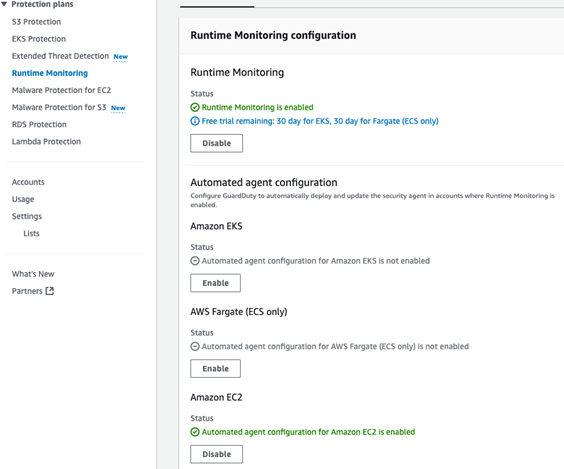
If you’ve used GuardDuty before, select Runtime Monitoring and then choose Enable under Runtime Monitoring.
Figure 2: GuardDuty Runtime Monitoring enabled with EC2 monitoring
AWS Managed Microsoft AD
AWS Managed Microsoft AD provides a fully managed service for Microsoft Active Directory (AD) in the AWS Cloud. When you create your directory, AWS deploys two domain controllers in separate Availability Zones that are exclusively yours for high availability. For use cases that require even higher resilience and performance in a specific AWS Region or during specific hours, you can scale AWS Managed Microsoft AD by deploying additional domain controllers to meet your needs. These domain controllers can help load balance, increase overall performance, or provide additional nodes to protect against temporary availability issues. Using AWS Managed Microsoft AD, you can define the correct number of domain controllers for your directory based on your use case.
To deploy a new AWS Managed Microsoft AD:
Go to the Directory Service console.
Choose Set up directory and select AWS Managed Microsoft AD.
Select Standard Edition and enter a Directory DNS name and password.
Select a virtual private cloud (VPC), for this example use the Default VPC.
Choose Create directory.
Directory administration EC2 instance
This directory administration EC2 instance will be used to control the Microsoft Active Directory using AWS Systems Manager.
To deploy the directory administration EC2 instance:
If you have deployed a new directory, you might need to wait 20–45 minutes until the directory status is Active.
Select the Directory ID.
Choose Actions and select Launch directory Administration EC2 Instance, using the default options.
Alternatively, you can build your own Windows EC2 instances with a role that has the AmazonSSMManagedInstanceCore policy, join it to the Active Directory domain, and install Active Directory management tools.
To remotely connect to the directory administration EC2 instance:
Go to the Systems Manager console.
Open Fleet Manager from the navigation pane.
Select the Node ID for the instance with the name ending managementInstance.
Choose Node Actions (top right), select Connect, and then choose Connect with Remote Desktop.
Enter the username admin and the directory password that you set earlier.
Create a test Active Directory user
You will use this test user account to sign in to an EC2 instance and initiate a command that simulates suspicious activity that results in this account being disabled.
To use the directory administration EC2 instance to create a test user on the Active Directory:
From the management EC2 instance, open the start menu, select Windows Administrative Tools and then open Active Directory Users and Computers.
Browse to your Domain, the Domain OU, and then the Users OU, right-click and choose New and then select User.
Create a TestUser user, making sure that you don’t select Account is disabled.
Create a privileged domain service account
You will create this domain user account with delegated permissions to be used by Systems Manager Windows Service.
To use the directory administration EC2 instance to create a service account in AD:
From the management EC2 instance, open the start menu, select Windows Administrative Tools, and then open Active Directory Users and Computers.
Browse to your Domain, the Domain OU, and then the Users OU. Right-click and select New, and then select User
Create an SSMService user, making sure that you don’t select Account is disabled.
To delegate permission to the service account in AD:
Right-click on the Users OU and select Delegate Control.
Choose Next on the Delegation of Control Wizard.
Add the new service user you created earlier and choose Next.
Select Create a custom task to delegate and choose Next.
Select Only the following objects in the folder and select User Objects, then choose Next.
Select General and Property-specific to show the permissions, select Read userAccountControl and Write userAccountControl (near the end of the list), then choose Next and Finish.
To add a service account to the local administrators group:
From the management EC2 instance, open the start menu, select Windows Administrative Tools, and then open Computer Management.
Browse to Local Users and Groups, then to Groups.
Right-click on Administrators and select Properties.
Choose Add to add the new service user you created earlier and choose OK.
Configure Systems Manager
Configure Systems Manager on the directory administration EC2 instance with permission to manage the Active Directory.
To configure Systems Manager:
From the management EC2 instance from the Start Menu, select Windows Administrative Tools, and then open Services.
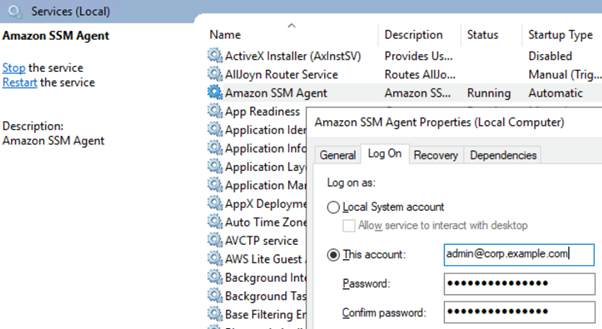
Locate the Amazon SSM Agent, right-click, and select Properties.
Select the Log On tab and select This account.
Within This account enter the privileged domain username you created earlier followed by @ and then the domain name, for example [email protected]. Enter your password and choose OK.
Figure 3: Microsoft Windows Services showing Systems Manager Agent settings
Choose OK on the This account has been granted Log On As A Service right and The new logon name will not take effect until you stop and restart the service popups.
Right-click Amazon SSM Agent and select Restart.
Systems Manager Run Command
Run Command is a feature of Systems Manager that can remotely and securely manage the configuration of your managed nodes. You can use Run Command to automate common administrative tasks and perform one-time configuration changes at scale. You can use Run Command from the console, the AWS Command Line Interface (AWS CLI), AWS Tools for PowerShell, or the AWS SDKs. Run Command is offered at no additional cost.
To create a Run Command document with a PowerShell command to disable domain user accounts:
Go to the AWS Systems Manager console.
Select Documents under Change Management Tools.
Choose Create document and select Command or Session.
Step Functions is a serverless orchestration service that you can use to coordinate multiple AWS services, microservices, and third-party integrations into business-critical applications. Step Functions is widely used for orchestrating complex workflows, such as loan processing, fraud detection, risk management, and compliance processes. By breaking down these processes into a series of steps, Step Functions provides a clear overview and control of the entire workflow. This helps make sure that it executes each stage correctly and in the right order. One of the critical aspects of using Step Functions in regulated industries is the importance of security and data protection.
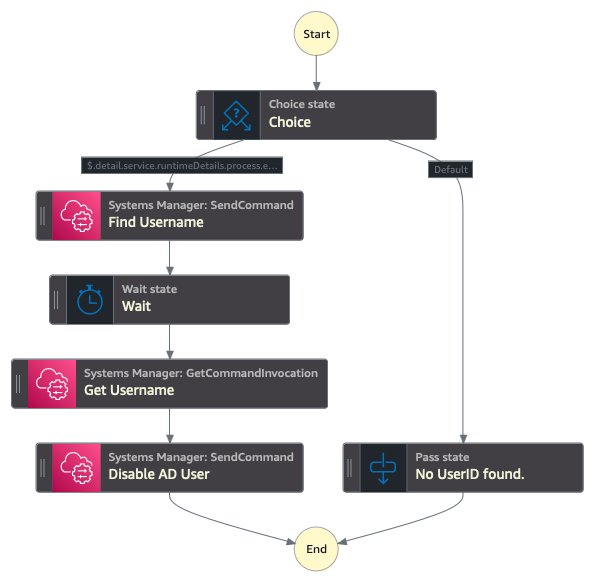
By the end of this section, your state machine should have a sequential flow that starts with a choice that defaults to No UserID found and with the UserID present, includes the steps Find Username, Wait, Get Username, and Disable AD User. If it doesn’t, you can drag the actions into the correct order or change the next state associated with each action. Alternatively, copy this state machine definition JSON and import it directly into Step Functions.
To create a Step Functions state machine to execute the Systems Manager Run Commands:
Go to the Step Functions console.
Choose Get Started.
Choose Create your own.
Enter a name for the state machine, select Standard, and choose Continue.
Select JSONPath as the state machine query language.
From the navigation pane, search for and add the Pass action by dragging the action to the center window.
Add the Systems Manager: SendCommand Action for Finding the Username using Run Command.
Select the SendCommand, change the state name to Find Username, and then enter the following code into API Parameters on the right side of the screen.
With SendCommand selected, select the Input/Output tab, select Add original input to output using ResultPath, select Combine original input with result, and enter the following:
$.RunCommand.State
Add a Wait Action and set the number of seconds to wait before resuming the execution to 5 seconds.
Add a Systems Manager: GetCommandInvocation action, which will get the Username value from Run Command and change the state name to Get Username, then enter the following API Parameters.
Add a Systems Manager: SendCommand action which will disable the Active Directory user using Run Command. Change the state name to Disable AD User then enter the following API Parameters, changing the InstanceIds value to the ID of your Active Directory Management server.
Add a Choice action, choose the pencil icon next to Rule #1, choose Edit conditions, enter the variable $.detail.service.runtimeDetails.process.euid, select operator is present, value true, leave Not as blank, and choose Save Conditions.
Re-arrange the state machine layout to the same structure as displayed in Figure 4, with a sequential flow that starts with a choice that defaults to No UserID found and with the UserID present includes the steps Find Username, Wait, Get Username, and Disable AD User.
Figure 4: Step Functions state machine structure
Choose Create (top right) and then Confirm to create the step function state machine.
To add permissions to enable the State Machine to run System Manager commands:
Within the newly created state machine, choose Config (top center).
Choose View in IAM, under Permissions, Execution role.
Search for and select AmazonSSMAutomationRole and choose Add permission.
EventBridge
EventBridge helps developers build event-driven architectures (EDA) by connecting loosely coupled publishers and consumers using event routing, filtering, and transformation. To create an EventBridge rule that triggers the Systems Manger Run Command document you created earlier:
Go to the Amazon EventBridge console and select Create rule with EventBridge Rule.
Enter a name, for example GuardDutyDisableADuser.
Select Rule with an event pattern and choose Next.
Under the Event pattern JSON window, choose Edit pattern and enter the following:
Select Step Functions state machine as the target.
Select the state machine you created earlier, for example MyStateMachine-A123456789.
Choose Next twice and choose Create rule
Create a test EC2 instance
To generate alerts on GuardDuty, you create a domain joined Linux EC2 instance. For this example, you’ll use two separate EC2 instances so you can monitor for activity from each instance within GuardDuty and use EventBridge to create automations.
To create a domain joined EC2 instance for testing this GuardDuty automation:
Go to the Amazon EC2 console.
Select Instances from navigation pane.
Choose Launch Instances.
Select Amazon Linux AMI.
Select an existing Key Pair or create a new key pair.
Scroll to the bottom and select Advanced details.
Within Domain join directory, select the domain
Within IAM instance profile, select the EC2DomainJoin role that you created earlier.
Choose Launch Instance.
Testing
To simulate a threat, use a GuardDuty test domain that GuardDuty will recognize as a command and control server.
Go to the Amazon EC2 console.
Choose Instances from the navigation pane.
Select the test EC2 instance that you created earlier.
Choose Connect, select the Session Manager tab, and choose Connect
Authenticate with your test user by entering su followed by the test user with the domain name that you created earlier. For example su [email protected], then enter the password.
Enter the command curl guarddutyc2activityb.com.
You will receive an error because the page won’t resolve, but GuardDuty will have detected suspicious events.
Go to the GuardDuty console and select Findings from the navigation pane.
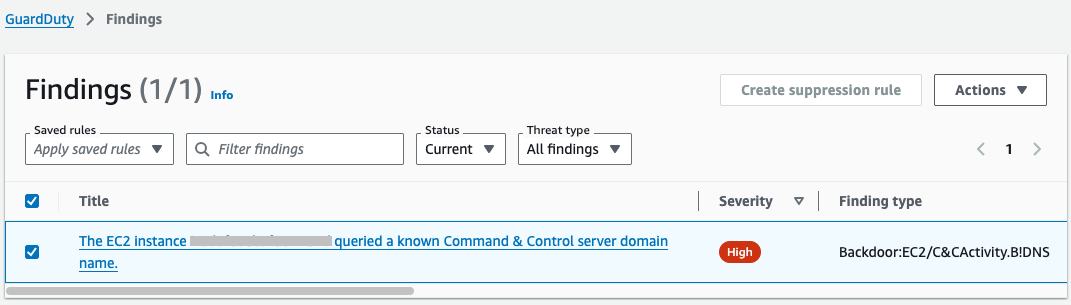
Within 3–5 minutes, you should see a high severity finding for Backdoor:EC2/C&CActivity.B!DNS.
Note: You must archive the GuardDuty finding before re-running this test, because the EventBridge rule only runs once against a GuardDuty finding with the same details. To archive the finding, select the check box next to the Backdoor:EC2/C&CActivity.B!DNS finding, choose Actions (top right), and select Archive.
Figure 5: GuardDuty simulated findings
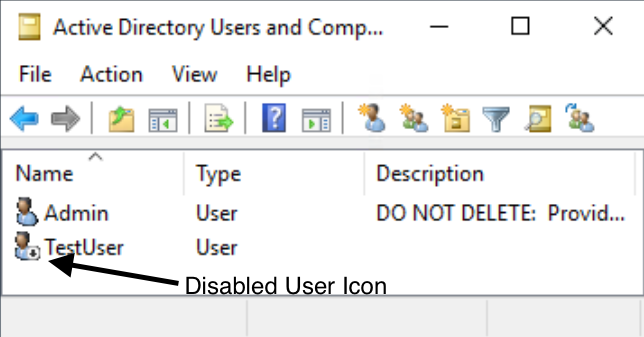
If you go back to Active Directory Users and Computers on the Directory Administration EC2 instance, you should see that the Test User is now disabled. You can enable the user by right-clicking on the user and selecting Enable Account.
Figure 6: Active Directory Users and Computers showing the disabled test use
Conclusion
In this post, you learned how to deploy AWS Managed AD, Systems Manager Run Command, EventBridge, Step Functions, and GuardDuty to monitor for suspicious events and disable the associated Active Directory user account.
You can expand this scenario by creating Run Command documents that reset Active Directory passwords, disable computer accounts, or Active Directory tasks supported by Microsoft PowerShell. Additionally, you can add steps within the Step Functions state machine to notify administrators through Amazon Simple Notification Service (Amazon SNS) or add additional checks with AWS Lambda.
Although this post uses AWS Managed Microsoft AD, the same functionality can be achieved with a manual deployment of Active Directory on Amazon EC2 or on-premises, either by using an EC2 instance joined to the Active Directory domain with the Active Directory administration tools installed or by installing Systems Manager agent onto a management server on-premises.
If you have feedback about this post, submit comments in the Comments section below. If you have questions about this post, start a new thread on AWS re:Post GuardDuty or contact AWS Support.
The updated whitepaper continues our efforts to help AWS customers navigate APRA’s regulatory expectations in a shared responsibility environment. It is intended for APRA-regulated institutions that are looking to run workloads on AWS and is particularly useful for leadership, governance, security, risk, and compliance teams that need to understand APRA requirements and guidance.
The whitepaper summarizes APRA’s requirements and guidance related to operational risk management and information security. It also gives APRA-regulated institutions information they can use to commence their due diligence and assess how to implement the appropriate programs for their use of AWS.
As the regulatory environment continues to evolve, we’ll provide further updates through the AWS Security Blog and the AWS Compliance page. You can find more information on cloud-related regulatory compliance at the AWS Compliance Center. You can also reach out to your AWS account manager for help finding the resources you need.
If you have feedback about this post, submit comments in the Comments section below. If you have questions about this post, contact AWS Support.
At Amazon Web Services (AWS), security is a top priority. Maintaining data confidentiality is a substantial component of operating environment security for AWS and our customers. Though not yet available, a cryptographically relevant quantum computer (CRQC) could be used to break public key algorithms that are used today to provide data confidentiality. To prepare for a world where CRQCs might exist, the National Institute of Standards and Technology (NIST) initiated a search for new algorithms that are robust against potential CRQCs. In August 2024, after eight years of intense scrutiny by the cryptography community, NIST selected three post-quantum cryptography (PQC) standards, including FIPS 203’s ML-KEM, to supplement and eventually replace classical public key algorithms.
A few recent AWS blog posts have discussed PQC at AWS, particularly post-quantum Transport Layer Security (PQ TLS) using ML-KEM:
In this post, we demonstrate how you can test PQ TLS in Python applications today.
Testing PQ TLS in Python
As described in detail elsewhere, AWS currently deploys PQ TLS in a hybrid configuration where a classical key exchange is used alongside ML-KEM to provide defense-in-depth for data confidentiality. ML-KEM has much larger keys than classical schemes, so hybrid TLS handshakes send and receive more data when establishing a connection. As with other protocol updates, it’s important to test hybrid TLS in your network to validate that security appliances and network devices can handle these connections appropriately. We hope that you find the provided AWS Sample useful for such tests.
To negotiate hybrid TLS, PQ-ready software is required on both ends of the connection: client and server. AWS is currently rolling out hybrid TLS on the server side transparently with no customer configuration required. On the client side, each language SDK’s story for enabling hybrid TLS will be slightly different.
The AWS SDK for Python (Boto3) relies the on the Python interpreter’s ssl module for TLS, which in turn uses the operating system’s cryptography library. For most Linux distributions, this is OpenSSL. OpenSSL recently announced support for hybrid TLS and has enabled it by default in version 3.5. However, OpenSSL 3.5 is not yet the default on most operating system distributions.
To unblock testing, we provide a container definition that installs OpenSSL 3.5 alongside a standard Python distribution, allowing Python applications to perform PQ hybrid TLS connections. The container definition also installs common packages such as boto3 and requests. We provide example Python code for basic interactions with: AWS services (using boto3 and the AWS Command Line Interface (AWS CLI)), arbitrary HTTPS endpoints (using requests), and TLS-secured TCP servers (using Python’s standard library ssl module).
In the following sections, we walk through how to use this container definition to test PQ TLS connections from Python applications to AWS services.
Build the container
You can build this container on your local machine, or you can build it in a cloud environment such as Amazon Elastic Compute Cloud (Amazon EC2) or AWS CloudShell. Note that if you want to exercise the network path between your machine and AWS, you must build and run the container locally. The only prerequisite for building the container is having Docker (or an equivalent container tool) installed. For simplicity, the following steps mostly assume that you’re running these commands in a Linux CloudShell environment.
Clone the sample repo: git clone https://github.com/aws-samples/sample-post-quantum-tls-python
Change into the sample’s directory and build the container by executing the following command: cd sample-post-quantum-tls-python && docker build . -t pq-tls-python
Run the container
To run the samples described earlier, execute the following:
docker run --rm \
    -e AWS_ACCESS_KEY_ID=$(aws configure get aws_access_key_id) \
    -e AWS_SECRET_ACCESS_KEY=$(aws configure get aws_secret_access_key) \
    -it pq-tls-python \
    test.sh
The preceding command assumes that you have an AWS CLI default profile with permission to call the AWS Secrets ManagerListSecrets API. With this permission, you can make a basic, read-only test call to Secrets Manager PQ-enabled API endpoints that won’t return sensitive or secret values. In CloudShell, you’ll need to set access key and secret key values with aws configure. In Amazon EC2, you can configure an instance profile and remove the access key and secret key environment.
After printing out the name and version of the cryptography library used by Python, test.sh will test hybrid TLS connections used to secure (in order):
TCP sockets using Python’s socket and ssl modules
HTTP requests using the requests library
AWS API requests using boto3 and the AWS CLI
If the tests are successful you should see the following output:
Crypto library: OpenSSL 3.5.0 8 Apr 2025
Testing ssl socket... ok
Testing requests... ok
Testing boto3... ok
Testing AWS CLI... ok
You can inspect, modify, and extend the examples in the tests/ directory as needed for your experiments. Instead of running the provided test.sh script, you can access an interactive shell with the following command.
docker run --rm -it pq-tls-python
Make sure to rebuild the container if you add or modify the files for testing.
Confirm PQ TLS negotiation
To confirm that PQ hybrid TLS is negotiated, inspect the samples’ TLS handshakes to confirm that the PQ hybrid TLS key exchange is performed. To do this, you must capture host network traffic. In CloudShell, you can do this using the following command:
sudo tcpdump -A -i docker0 -w pq_tls.pcap
This will capture TCP traffic to port 443, the standard port for TLS. Modify the command as needed if you’re capturing traffic for a non-standard port. Alternatively, if you’re running the container locally, you can perform the packet capture in Wireshark’s GUI on a local network device, such as docker0 on Linux or en0 on MacOS.
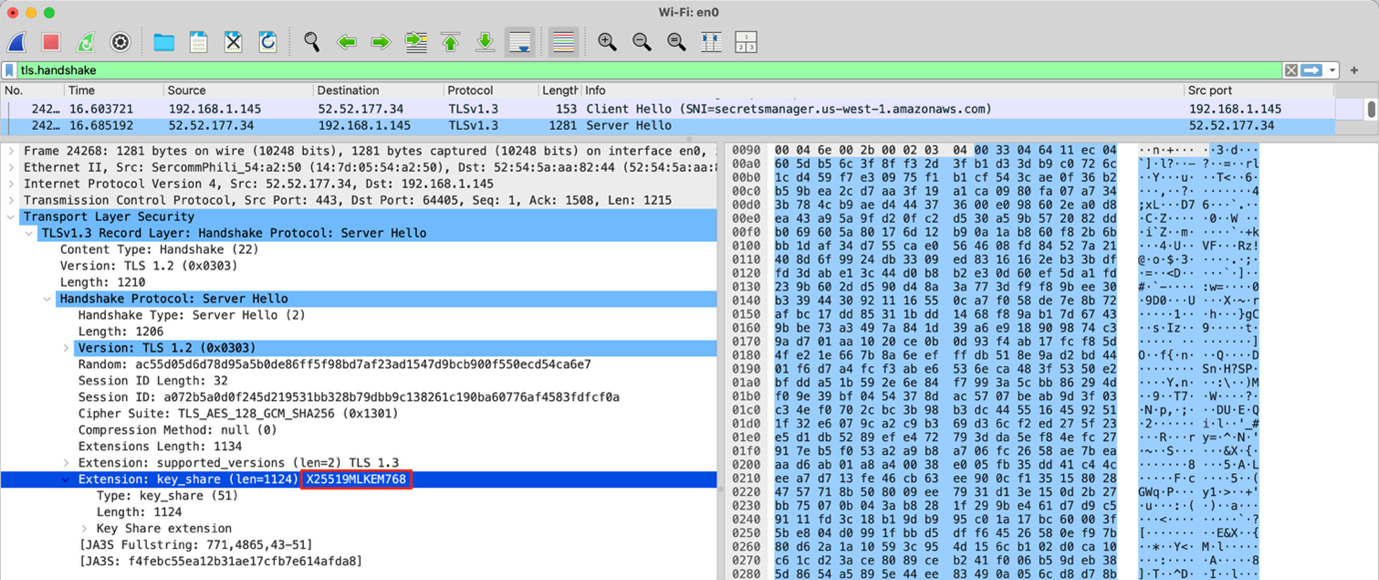
Next, run the test suite in a separate terminal using the Docker run command from Run the container. As before, you should see the success messages in your terminal, and a new file named docker_443.pcap if you’re using tcpdump. You can download this file from CloudShell to view locally in Wireshark. Specifically, look for the key_share extension in client or server Hello handshake messages. If you’re using Wireshark to view the packet capture, you can specify the display filter tls.handshake to only show handshake messages. Your packet capture should look something like Figure 1:
Figure 1: Wireshark view of packet capture
You can see in Figure 1 that X25519MLKEM768 is selected in the server Hello handshake message, showing that PQ hybrid TLS was successfully negotiated.
Conclusion
In this post, you’ve seen how to use a container definition to test PQ hybrid TLS in Python today. The linked AWS Sample shows how to establish PQ hybrid TLS connections for:
AWS API requests with boto3 or the AWS CLI
General HTTPS requests with requests
TLS-secured TCP sockets with Python’s socket and ssl modules
We encourage you to use the AWS Sample to start vetting your networks and Python applications in preparation for upcoming PQ hybrid TLS migrations. AWS is committed to supporting our customers through their migration journeys, and PQ hybrid TLS is no exception.
If you have feedback about this post, submit comments in the Comments section below. If you have questions about this post, contact AWS Support.
Organizations face mounting challenges in building and maintaining effective security incident response programs. Studies from IBM and Morning Consult show security teams face two major challenges: over 50 percent of security alerts go unaddressed because of resource constraints and alert fatigue, while false positives consume 30 percent of investigation time, delaying responses to true positive threats
According to the 2024 IBM Cost of a Data Breach Report, organizations now take an average of 258 days to identify and contain security events. The report also reveals that nearly half of SOC teams report increased detection and response times over the past two years, with 80 percent indicating that manual threat investigation significantly impacts their response times.
Despite these challenges, according to the 2024 IBM Security Services Benchmark Report, organizations with mature incident response capabilities demonstrate a 50 percent reduction in mean time to resolution (MTTR) and achieve cost savings of up to 58 percent per incident. These improvements are driven by the adoption of automated workflows, integrated tools, and streamlined communication processes that accelerate threat detection and containment.
In this post, we walk you through a real-world scenario to show how AWS Security Incident Response can immediately generate benefits by accelerating every step of your incident response lifecycle, how it integrates with other native AWS services such as Amazon GuardDuty, AWS Security Hub, and AWS Systems Manager, and how to integrate third-party threat detection findings for inclusion in your automated monitoring, triage, and containment capabilities.
How AWS Security Incident Response can help
AWS Security Incident Response is a Tier 1 service that launched in December 2024. The service is an AWS-native, purpose-built security incident response solution for customers that can be used as a better-together experience with other AWS services in the areas of detection and response (GuardDuty and Security Hub), networking and content delivery (AWS WAF and AWS Shield), and management and governance (Systems Manager). AWS Security Incident Response is also integrated across AWS Partners through a service specific Partner Specialization program. More detailed information is available in the AWS Security Incident Response documentation.
AWS Security Incident Response complements existing services by enhancing your security posture through streamlined incident management capabilities before, during, and after security events.
Key challenges
AWS Security Incident Response addresses three common challenges:
Alert fatigue: It can reduce alert fatigue and accelerate security investigations through automated monitoring and intelligent triage, reducing false positives and helping to prevent security team burnout.
Fragmented access and communications: By simplifying AWS Management Console permissions management and unifying incident response team communications, it can resolve fragmented access issues.
Security skills gaps: It can bridge cloud security skills gaps by providing 24/7 access to AWS security experts who support the incidents including credential compromise, data exfiltration, and ransomware. The AWS Security Incident Response service allows security teams to handle immediate security challenges while maintaining focus on strategic long-term preparedness and operational improvements.
Service integration
AWS Security Incident Response complements and integrates with AWS security services to provide comprehensive incident response capabilities. The service works seamlessly with:
This integration helps you build efficient incident response capabilities that can minimize the time, cost, and impact of security events throughout your organization’s cloud journey, while helping to reduce investments in additional staffing, training, and tool maintenance.
Distinct capabilities
The AWS Security Incident Response service offers:
Expert knowledge from the AWS Customer Incident Response Team (CIRT)
Tools through APIs and the console
Streamlined processes for handling security incidents
Prerequisites
Before implementing the capabilities described in this post, make sure that you have:
These prerequisites help make sure that you can fully utilize the service’s automated detection, triage, and response capabilities.
The service provides automated monitoring and analysis capabilities within its own service infrastructure, enabling automatic triage of findings from GuardDuty and Security Hub.
For automated containment actions in your AWS accounts, you must first deploy the required CloudFormation StackSets and configure the appropriate IAM permissions. This helps make sure that you maintain full control over automated actions taken in your environment while benefiting from the service’s detection capabilities. This automation can be customized based on variables you establish, such as known CIDR ranges (specific ranges of IP addresses that define your network) and IP addresses, and you can implement GuardDuty suppression rules to help reduce false positives and alert volumes. As a result, the service can serve as a powerful augmentation to your existing security incident response programs and tools.
Setting up AWS Security Incident Response
Your cloud administrator, with AWSSecurityIncidentResponseFullAccess permissions, has established the incident response team in the service. The service notifies individuals, your partners or managed security service provider (MSSP), and other contacts added to the team, supporting a rapid escalation to alert the required parties and respond to the event.
As a best practice, your team establishes minimal privileges for accessing and managing information within AWS Security Incident Response cases. This helps make sure that team members have appropriate access levels to case details, findings, and investigation data while maintaining security and compliance requirements. AWS Security Incident Response provides multiple API actions, such as CreateCaseComment (to add notes to investigations) and GetCase (to retrieve case metadata), to limit whom and which actions can be performed against differing cases. For development and testing environments, AWS provides role-based policies that you can use such as AWSSecurityIncidentResponseCaseFullAccess and AWSSecurityIncidentResponseReadOnlyAccess for role-based access control (as shown in Figure 1). For production environments, we recommend creating custom IAM policies following the principle of least privilege based on your security requirements.
Figure 1: Permissions policies for security incident response
Following your configuration of the AWS Security Incident Response service, your security team reviews the email distribution list or alias for notifications for notifications from the service, as shown in Figure 2. You have developed items in your backlog to take advantage of Amazon EventBridge integrations to add in pager duty, Jira, and other services in the future for additional notification mechanisms.
Figure 2: Use the console to manage your incident response team membership
Detecting and responding to suspicious activity
At 2:00 AM, days after AWS Security Incident Response has been set up, the service detects a combination of suspicious activities through GuardDuty findings, including anomalous IAM user behavior (such as shown in Figure 3), unusual API calls from unknown IP addresses, and a surge of Amazon Elastic Compute Cloud (Amazon EC2) instance creations that deviate from your account’s normal baseline. This pattern of activities matches known threat behaviors monitored by GuardDuty Extended Threat Detection. Without the service, security teams would need to manually analyze and correlate these separate findings across accounts and Regions. Instead, the service automatically identifies the pattern of suspicious activities.
Figure 3: Pattern of potentially suspicious activity
One of the anomalous behaviors is a surge of unrecognized EC2 instance creations, complete with SSH keys (secure credentials used for remote access) and security group configurations (firewall rules that control network traffic) allowing internet connectivity. Using this example scenario, let’s walk through how the service’s automated monitoring, triage and containment capabilities, access management, API actions for custom integrations, collaboration tools, and 24/7 AWS security experts work together to help you navigate security incident response challenges across your AWS environment.
With the initial detection complete, the next phase focuses on centralizing and analyzing the security findings to understand the full scope of the incident.
Centralizing security findings: A systematic approach
GuardDuty begins to generate findings in your enabled Regions.
Note: GuardDuty must be enabled in your accounts and Regions. For setup instructions, see the GuardDuty documentation.
Because AWS Security Incident Response is integrated with GuardDuty, these findings are automatically sent to the service for internal processing, analysis, and auto-triage without manual effort. The service’s proactive response and alert triaging feature analyzes multiple factors, including your account’s historical baseline activity, specific GuardDuty finding types, and correlation patterns across accounts. In this case, it identified anomalous EC2 instance creation activity that deviated significantly from your environment’s normal patterns.
When the service identifies a true positive, an AWS Security Incident Response case is opened automatically (see Figure 4), resulting in a notification to the incident response team you configured earlier. A central benefit is how the service correlates disparate events—connecting the instance creations with the security group modifications—to paint a complete picture of the potential security event.
Figure 4: Automated incident remediation flow
This proactive monitoring and analysis, as documented in your monthly service reports, demonstrates tangible benefits by reducing alert fatigue, and providing intelligent triage capabilities to SOC teams every day. The service’s automated analysis and correlation capabilities set the stage for rapid response when security events occur, which means that your team can focus on strategic security initiatives instead of spending time manually investigating alerts. The service feature helps you maintain strong security in two ways:
Comprehensive monitoring across configured Regions.
Integration with third-party security tools. This automated approach reduces the time, cost, and impact of security events.
As the investigation progresses from initial detection to detailed analysis, the GuardDuty integration provides crucial insights into the threat patterns.
From detection to action: The GuardDuty integration story
As your security team responds to the internal detection mechanisms, AWS Security Incident Response processes security findings in three key steps:
It analyzes GuardDuty alerts to identify genuine security threats
Using GuardDuty Extended Threat Detection, it correlates related events to identify threat patterns
It tracks the threat sequence, from initial actions (deleting logs or creating unauthorized access) through to potential data theft attempts
For this event, the sequence started with the deletion of CloudTrail logs, followed by the creation of unauthorized access keys. As the threat progressed, the service identified suspicious Amazon Simple Storage Service (Amazon S3) object access patterns and potential data exfiltration attempts, along with sophisticated evasion techniques and persistence mechanisms. Each of these signals maps directly to specific MITRE ATT&CK® tactics, techniques and procedures (TTPs), revealing the systematic nature of a potential ransomware threat. For detailed mapping of AWS Security Incident Response findings to MITRE ATT&CK® frameworks, see Mapping AWS security services to MITRE frameworks for threat detection and mitigation.
The service assists in correlation and analysis, evaluating patterns such as deletion of CloudTrail trails, creation of new access keys, and suspicious actions targeting S3 objects. When the AI and machine learning (AI/ML) capabilities of GuardDuty detect these concerning patterns over periods of time, the service automatically elevates the situation by creating an AWS Security Incident Response case on your behalf, bringing additional resources and focused attention to the situation. The incident response team defined in the earlier steps are then notified by email or other methods (shown in Figure 5) that a new triaged event has been created and to begin their investigations.
The benefits include the service coordinating communication across your affected accounts. Instead of juggling multiple alerts and trying to piece together the scope of the potential ransomware incident, GuardDuty Extended Threat Detection provides a comprehensive view of the threat sequence, while the AWS Security Incident Response case offers a single, coherent channel for triaging these signals and providing coordination as your global team comes online to join the response effort.
Note: For brevity, Security Hub’s workflow details have been omitted because they mirror the monitoring and escalation processes described above for GuardDuty. Both services integrate closely and share similar operational patterns, with GuardDuty findings being sent to Security Hub within five minutes of detection. Security Hub enhances security coverage by aggregating findings from multiple AWS services and third-party partners.
With the threat patterns identified, your team moves to the next phase—engaging AWS CIRT for specialized expertise and advanced investigation capabilities.
Partnering with AWS CIRT through the incident response case
Your team continues investigating the event and discovers that they need additional assistance. An authorized user in your account opens a service supported case to request assistance from AWS.
The AWS Security Incident Response case establishes a direct communication channel with AWS CIRT (shown in Figure 6) with a one-click escalation of the case within the console, providing immediate access to specialized expertise. Upon case escalation, AWS CIRT engages through the incident response case with a 15-minute acknowledgement timeframe, bringing their advanced tooling and specialized knowledge to analyze patterns across your accounts—even in environments with limited logging capabilities. This partnership delivers:
Real-time collaboration through conference bridge video calls
Advanced artifact analysis and pattern recognition
Technical guidance for investigation and containment
Recommendations for improving security posture
Figure 6: Connect with the AWS CIRT
Figure 6 is an example of how this would appear in your account, with the resolver set to Self for a self-managed case.
Returning to the scenario, you discover that multiple accounts have insufficient logging enabled—which limits the available investigation data. While AWS CIRT can provide additional insights through specialized tooling, maintaining comprehensive logging across your accounts remains crucial for security visibility, compliance requirements, and thorough incident investigations. The capabilities of AWS CIRT complement—but do not replace—proper logging practices. This capability provides an understanding of the scope of the incident, as they see patterns and activities otherwise invisible to you.
The collaboration begins with AWS CIRT analyzing your environment using their tooling, looking for anomalous patterns beyond what you see in your immediate logs. Through the incident response case, they help you understand the scope of your situation by:
Communicating their findings
Recommending additional investigation paths
Sharing analysis showing similar EC2 instance creation patterns from other environments
AWS CIRT uses the incident response case to establish a bridge call, bringing together their team and yours for real-time collaboration. During these calls, AWS CIRT shares their ongoing analysis of artifacts and service data, helping you understand what happened, why it happened, and how to prevent similar issues in the future. They also provide guidance on implementing proper logging across your accounts to improve your future security posture.
Managing the incident through intelligent tagging
As AWS CIRT begins their analysis, your team implements real-time resource tagging using the incident case ID. This systematic tagging approach proves crucial for tracking and managing the suspicious EC2 instances across your accounts. By using tags, you can quickly implement isolation policies and track costs while maintaining clear documentation of affected resources throughout the investigation.
Your tag-based approach helps track affected resources to implement isolation policies. You used the incident case ID tags to quickly identify resources connected to the incident, which you use to apply targeted access controls and containment measures. The tags also help you track costs associated with the incident, giving your finance team precise visibility into the event’s financial impact.
Working alongside the AWS Security Incident Response service, you find that using the incident case ID as your primary tag key (shown in Figure 7) created a consistent way to correlate resources across affected accounts. This proves especially helpful when coordinating with AWS CIRT, because you can quickly direct them to specific resources requiring investigation. Even after containment, these tags continue to provide value in supporting your post-incident analysis and helping you implement targeted security controls based on what you learn from the incident.
Figure 7: Incident tags
Automated containment options through Systems Manager integration
While working with AWS CIRT to understand the incident scope, you can also use Systems Manager to help automatically contain threats. Your team previously deployed the required CloudFormation StackSets across your organization, enabling Amazon EC2 containment actions through Systems Manager.
The setup process required deploying CloudFormation StackSets with specific IAM roles and Systems Manager configurations across your accounts. This infrastructure allows the AWS Security Incident Response service to make containment actions on your behalf. These actions can be reversed if needed—similar to using an undo function—so that you can restore systems to their previous state.
When authorized through your pre-deployed CloudFormation StackSets, AWS Security Incident Response service can request Systems Manager to implement containment measures. Containment actions require explicit customer authorization and proper IAM permissions to be configured in advance. The service isolates the tagged suspicious instances by modifying their security groups and network access, while preserving their state to maintain forensic integrity for analysis.
The containment process happens in three steps:
Isolate: Remove compromised instances from security groups
Preserve: Create backup copies (snapshots) of affected systems
Investigate: Collect system information using Systems Manager
These actions can be reversed if needed, supporting containment decisions for legitimate workloads.
The automation capabilities help streamline containment procedures across multiple instances, reducing the time taken to contain impacted resources. The service maintains detailed logs of each action in the incident response case, providing your team with clear visibility into the containment efforts.
Through this response capability, combined with the guidance from AWS CIRT, you can contain the incident’s spread within minutes rather than hours. The Systems Manager integration provides a reliable way to implement containment actions while preserving evidence for investigation (shown in Figure 8).
Figure 8: Systems Manager documents for containment actions
Resolution and lessons learned
As the incident moves toward resolution, your team works through a systematic process to verify containment, alleviate threats, and restore services. Working alongside AWS CIRT through the AWS Security Incident Response case, you implement a structured approach to make sure that affected resources are secured and normal operations can safely resume. The immediate resolution actions fall into three main categories:
Containment confirmation through Systems Manager verification
Verify security group modifications are in place
Confirm network isolation of affected instances
Validate that automated containment actions were successful
Review Systems Manager logs for containment action completion
Verification of threat alleviation across affected resources
Analyze GuardDuty findings to confirm that there’s no new suspicious activity
Review tagged resources for complete containment
Verify termination of unauthorized access attempts
Confirm removal of persistence mechanisms
Check for remaining unauthorized IAM access
Service restoration and access control normalization
Restore legitimate workload access based on verified baselines
Implement updated security group configurations
Reset affected IAM credentials and access keys
Re-establish normal network connectivity for verified clean resources
Update resource tags to reflect post-incident status
Documentation and reporting:
As the incident reaches resolution, AWS Security Incident Response service compiles a comprehensive incident timeline. This documentation accelerates your reporting process, helping you quickly generate required reports for executives, regulators, and cyber insurance providers—all from within the incident response case.
The incident response case captures the complete timeline of events, starting with GuardDuty Extended Threat Detection identifying the initial threat sequences. Each step of the incident response is documented, from the moment suspicious EC2 instance creations were detected, through the MITRE ATT&CK® tactics observed, to the containment actions implemented through Systems Manager integration, and finally to the resolution steps that proved effective.
Long-term Improvements: Through this collaborative post-incident review process, your team:
Implements enhanced logging based on AWS CIRT recommendations
Updates security controls to help prevent similar incidents
Improves incident response processes based on lessons learned
Strengthens your security posture through targeted improvements
Conclusion
This example illustrates how AWS Security Incident Response service can enhance security operations through automated detection, triage, containment, access, and coordinated response capabilities. The service’s integration with AWS Security Hub and Amazon GuardDuty provides efficient handling of security events, while the optional escalation to the AWS CIRT can provide valuable expertise and specialized tooling to help accelerate every stage of your incident response lifecycle and strengthen your security posture.
AWS Security Incident Response service serves as a critical component of a comprehensive security operations strategy, delivering measurable benefits through:
Continuous threat monitoring for automated correlation and machine learning to identify high-priority security risks while minimizing false positives.
Reduced incident response times through automated detection and coordinated response
Enhanced investigation capabilities through direct AWS CIRT collaboration
Streamlined, rapid containment
Comprehensive incident documentation and audit trails to support and accelerate reporting requirements
To prepare for, respond to and recover from security incidents faster and more efficiently today, visit AWS Security Incident Response or contact your AWS account team to schedule a discussion.
Additional resources
Here are some additional AWS resources that your teams can use to further improve your security incident response capabilities:
Before an event:
AWS Customer Playbook Framework: Publicly available response frameworks that use AWS CIRT lessons learned from security events
Assisted Log Enabler: A tool that assists customers to enable logs, including the following: Amazon VPC Flow Logs, AWS CloudTrail, Amazon Elastic Kubernetes Service audit and authenticator logs, Amazon Route 53 Resolver Query Logs, Amazon S3 server access logs, and Elastic Load Balancing logs
During an event:
Athena Security Analytics Bootstrap: A tool for customers who need a quick method to set up Amazon Athena and perform investigations on AWS service logs archived in S3 buckets
We’re excited to announce the release of our latest whitepaper, AICPA SOC 2 Compliance Guide on AWS, which provides in-depth guidance on implementing and maintaining SOC 2-aligned controls using AWS services.
Building and operating cloud-native services in alignment with the AICPA’s Trust Services Criteria requires thoughtful planning and robust implementation. This new whitepaper helps cloud architects, security and compliance teams, and DevOps professionals design environments that meet SOC 2 requirements while leveraging AWS’s shared responsibility model.
What’s inside the whitepaper:
Overview of the SOC 2 framework—including Common Criteria (CC 1–CC 9) and category-specific criteria (Security, Availability, Processing Integrity, Confidentiality, Privacy)
Mapping of each Trust Services Criterion to AWS services and constructs
Guidance on implementing complementary user entity controls (CUECs)
Strategies for evidence collection, documentation, and audit procedures
Risk and governance for executives
Best practices for automating compliance and preparing for SOC 2 readiness assessments
The AWS Security Reference Architecture (AWS SRA) provides prescriptive guidance for deploying AWS security services in a multi-account environment. However, validating that your implementation aligns with these best practices can be challenging and time-consuming.
Today, we’re announcing the open source release of SRA Verify, a security assessment tool that helps you assess your organization’s alignment to the AWS SRA.
The AWS SRA is a holistic set of guidelines for deploying the full complement of AWS security services in a multi-account environment. You can use it to design, implement, and manage AWS security services so that they align with AWS recommended practices. The recommendations are built around a single-page architecture that includes AWS security services—how they help achieve security objectives, where they can be best deployed and managed in your AWS accounts, and how they interact with other security services. This overall architectural guidance complements detailed, service-specific recommendations such as those found in AWS Security Documentation.
SRA Verify directly maps to these recommendations by providing automated checks that validate your implementation against the AWS SRA guidance. The tool helps you verify that security services are properly configured according to the reference architecture. To assist with remediation and implementing the guidance in the AWS SRA, review the infrastructure as code (IaC) examples in the AWS Security Reference Architecture Github repo.
At Amazon Web Services (AWS), customer privacy and security are our top priority. We provide our customers with industry-leading privacy and security when they use the AWS Cloud anywhere in the world. In recent months, we’ve noticed an increase in inquiries about how we manage government requests for data. While many of the questions center around a 2018 U.S. law known as the Clarifying Lawful Overseas Use of Data Act (CLOUD Act), the CLOUD Act in fact did not give the U.S. government any new authority to compel data from providers and provides critical legal guardrails to protect content.
To put this whole issue in context—there have been no data requests to AWS that resulted in disclosure to the U.S. government of enterprise or government content data stored outside the U.S. since we started reporting the statistic in 2020. Our commitment to protecting customer data is underpinned by several layers of legal, technical, and operational protection. For example, AWS has designed its core products and services to prevent anyone but the customer and those authorized by the customer from accessing the customer’s content. And in these instances, any government that wants access to the customer’s content would have to seek that data directly from the customer. Additionally, U.S. law itself provides numerous statutory protections that help lower the risk that AWS could be required to disclose enterprise or government content data, and the U.S. Department of Justice (DOJ) has implemented additional operational protections over the past eight years.
With that in mind, we want to address some common misconceptions about the CLOUD Act and provide some clarity about how this law impacts—or doesn’t impact—AWS customers worldwide. We’re also expanding our FAQs on the CLOUD Act to help our customers and partners better navigate this topic.
Fact 1: The CLOUD Act does not give the U.S. government unfettered or automatic access to data stored in the cloud
The CLOUD Act was passed to address challenges law enforcement faced in obtaining data stored abroad in cross-border investigations involving serious crimes, ranging from terrorism and violent crime to sexual exploitation of children and cybercrime. The CLOUD Act primarily enabled the U.S. to enter into reciprocal executive agreements with trusted foreign partners to obtain access to electronic evidence for investigations of serious crimes, wherever the evidence happens to be located, by lifting blocking statutes under U.S. law. Many governments rely on domestic laws to require providers within their jurisdiction to disclose electronic data under the companies’ control, regardless of where the data is stored. Similarly, The CLOUD Act clarified that U.S. law enforcement can use existing authorities such as a court-approved search warrant to compel data within a provider’s control, regardless of where the data is stored; the executive agreements enable the effectiveness of these reciprocal laws, supported by strong procedural and substantive safeguards.
Access to data under U.S. law is far from unfettered or automatic, and law enforcement must meet strict legal standards. Under U.S. law, providers are actually prohibited from disclosing data to the U.S. government absent a legal exception. To compel a provider to disclose content data, law enforcement must convince an independent federal judge that probable cause exists related to a particular crime, and that evidence of the crime will be found in the place to be searched (that is, a specific electronic account such as an email account). This legal standard must be established through specific and trustworthy facts. Each search warrant must pass this stringent probable cause determination using credible facts, particularity, and legality, must receive approval from an independent judge, and must meet requirements regarding scope and jurisdiction. In May 2023, the DOJ also issued a policy that prosecutors seeking evidence known to be located abroad must obtain approval from Department’s Office of International Affairs (OIA) prior to obtaining an order for such evidence. The DOJ policy on evidence abroad notes that every nation enacts laws to protect its sovereignty; OIA works to address these issues and assist prosecutors in selecting an appropriate mechanism to secure evidence.
Fact 2: AWS has not disclosed any enterprise or government customer content data under the CLOUD Act since we started tracking the statistic
AWS has rigorous procedures in place for handling law enforcement requests from any country to validate legitimacy and verify that they comply with applicable law. AWS recognizes the legitimate needs of law enforcement agencies in investigating criminal and terrorist activity, but they must observe legal safeguards for conducting such investigations. We do not disclose customer data in response to any government request unless we are obligated to do so by a legally valid and binding order. We have publicly committed to this in our legal terms. Additionally, we will challenge government requests that conflict with the law, are overbroad, or are otherwise inappropriate (for example, if such a request would violate individuals’ fundamental rights). When we receive such requests for enterprise customer content, we make every reasonable effort to redirect law enforcement to the customer and notify the customer when legally permitted. If we are required to disclose customer content, we notify customers before disclosure to provide them an opportunity to seek protection from disclosure unless prohibited by law. If after exhausting these steps, AWS remains compelled to disclose customer data, and we have the technical ability to do so (which, as described above, in many instances we do not), we disclose only the minimum necessary to satisfy the legal process.
Consistent with our policy to redirect law enforcement to customers, the DOJ’s Computer Crime and Intellectual Property Section has also issued guidance advising prosecutors to generally seek data directly from an enterprise, such as a company that stores data with a cloud provider, rather than from the provider.
A clear measure of the effectiveness of our measures and the rigorous legal requirements embodied in law is the fact that since we began reporting this statistic in 2020, AWS has not disclosed any enterprise or government customer content data stored outside the U.S. to the U.S. government. This record reflects the technical safeguards AWS offers, the robust legal protections within U.S. law, policies implemented by the DOJ, and the nature of law enforcement investigations which primarily focus on collecting electronic evidence from consumer accounts.
Fact 3: The CLOUD Act does not only apply to U.S.-headquartered companies—it applies to all providers that do business in the United States
The CLOUD Act applies to all electronic communication service or remote computing service providers that operate or have a legal presence in the U.S.—regardless of where their headquarters are located. For example, European-headquartered cloud providers with U.S. operations are also subject to the Act’s requirements. OVHcloud, a French headquartered cloud service provider that operates in the U.S., notes in its CLOUD Act FAQ page that “OVHcloud will comply with lawful requests from public authorities. Under the CLOUD Act, that could include data stored outside of the United States.” Similarly, other cloud providers headquartered in the E.U. and elsewhere, also have operations in the U.S.
Fact 4: The principles in the CLOUD Act are consistent with international law and the laws of other countries
The CLOUD Act did not introduce a new legal concept regarding the scope of electronic data that must be disclosed as part of legitimate criminal investigations. Many countries require disclosure of customer data wherever it’s stored in response to legal process involving serious crimes. The United Kingdom’s (U.K.’s) Crime (Overseas Production Orders) Act, for instance, allows U.K. law enforcement agencies to obtain stored electronic data located outside of the U.K. in connection to a criminal investigation. According to a 2024 filing by the U.S. DOJ, the laws of several European Union member states, including Belgium, Denmark, France, Ireland, and Spain, have similar requirements. In fact, since 2023, most law enforcement requests that AWS receives come from authorities outside of the United States.
This concept is also enshrined within the Budapest Convention on Cybercrime, which was the first international treaty aimed at improving cooperation in investigations of cybercrimes. Additionally, the EU’s e-Evidence Regulation, 2023/1543, adopted in August 2023, authorizes Member States to “order a service provider…to produce or preserve electronic evidence regardless of the location of data.” The GDPR also allows for transfers of personal data in response to compelled disclosure requests from third countries, provided that the relevant party can cite an appropriate legal basis and transfer mechanism or derogation (see EDPB’s recent Guidelines 02/2024 on Article 48).
AWS is advocating for governments to conclude reciprocal executive agreements under the CLOUD Act, including between the U.S. and the European Union, and the U.S. and Canada. We believe these agreements are important to definitively resolve potential conflicts of law and enable effective investigation of serious crimes to advance public safety, while recognizing the strong substantive and procedural safeguards that already exist under U.S. law.
Fact 5: The CLOUD Act does not limit the technical measures and operational controls AWS offers to customers to prevent unauthorized access to customer data
We can only respond to legal requests for data where we have the technical ability to do so. AWS has a number of products and services designed to make sure that no one—not even AWS operators—can access customer content. AWS customers also have a range of additional technical measures and operational controls to prevent access to data. For example, many of the AWS core systems and services are designed with zero operator access, meaning the services don’t have any technical means for AWS operators to access customer data in response to a legal request.
The AWS Nitro System, which is the foundation of AWS computing services, uses specialized hardware and software to protect data from outside access during processing on Amazon Elastic Compute Cloud (Amazon EC2). By providing a strong physical and logical security boundary, Nitro is designed so that no unauthorized person—not even AWS operators—can access customer workloads on EC2. The design of the Nitro System has been validated by the NCC Group, an independent cybersecurity firm. The controls that help prevent operator access are so fundamental to the Nitro System that we’ve added them in our AWS Service Terms to provide an additional contractual assurance to all of our customers.
We also give customers features and controls to encrypt data, whether in transit, at rest, or in memory. All AWS services already support encryption, with most also supporting encryption with customer managed keys that are inaccessible to AWS. AWS Key Management Service (AWS KMS) is the first highly scalable, cloud-native key management system with FIPS 140-3 Security Level 3 certification. In plain English, this means AWS offers encryption that is super strong and where our customers control who gets a key.
Continuing our customer obsession
At AWS, our customer-first approach drives everything we do—from how we design our services to how we protect your data. We understand that your trust is earned through transparency, strong technical controls, and unwavering advocacy for your interests. That’s why we’ve been clear about how we handle government requests for data, including the impact of the CLOUD Act, and the multiple layers of protection—legal, operational, and technical—to safeguard your data.
We encourage you to learn more about this important topic by reviewing our expanded CLOUD Act FAQ. We will continue to innovate on your behalf, building new features and services that put you in control of your data, and maintaining our commitment to the highest standards of privacy and security.
French version
CLOUD Act : cinq points clés pour comprendre son fonctionnement réel
Chez Amazon Web Services (AWS), la confidentialité et la sécurité des clients constituent notre priorité absolue. Nous mettons à leur disposition une confidentialité et une sécurité à la pointe de l’industrie lorsqu’ils utilisent le Cloud AWS, partout dans le monde. Ces derniers mois, nous avons constaté une augmentation des questions concernant notre gestion des demandes d’accès aux données émanant d’autorités gouvernementales. Si de nombreuses interrogations portent sur une loi américaine de 2018 connue sous le nom de Clarifying Lawful Overseas Use of Data Act (CLOUD Act), cette loi n’a en réalité octroyé aucune nouvelle prérogative au gouvernement américain pour contraindre les fournisseurs à divulguer des données. Elle prévoit des garde-fous juridiques essentiels pour protéger les données des utilisateurs.
Replaçons cette question en perspective : depuis que nous avons commencé à publier des rapports sur les demandes d’informations en 2020, aucune demande n’a abouti à la divulgation auprès du gouvernement américain, de données d’entreprises ou de gouvernements stockées hors des États-Unis. Notre engagement à protéger les données de nos clients repose sur plusieurs niveaux de protection juridique, technique et opérationnelle. A titre d’exemple, les principaux produits et services d’AWS ont été conçus by design de manière à empêcher quiconque, hormis le client et les personnes autorisées par celui-ci, d’accéder à ses données. Ainsi, toute autorité gouvernementale souhaitant accéder aux données d’un client doit en faire la demande directement auprès de celui-ci. En outre, la législation américaine prévoit elle-même de nombreuses protections statutaires qui limitent la possibilité qu’AWS soit contrainte de divulguer des données d’entreprises ou de gouvernements. Le Département de la Justice américain (DOJ) a mis en place des mesures de protections supplémentaires au cours des huit dernières années d’un point de vue opérationnel.
Dans ce contexte, nous souhaitons revenir sur certaines idées reçues courantes à propos du CLOUD Act et apporter des éclaircissements sur l’impact – ou l’absence d’impact – de cette loi sur les clients d’AWS dans le monde entier. Afin d’aider nos clients et partenaires à mieux appréhender ce sujet, nous avons également complété notre FAQ sur le CLOUD Act.
Fait n°1 : Le CLOUD Act n’accorde pas au gouvernement américain un accès illimité ou automatique aux données stockées dans le cloud
Le CLOUD Act a été adopté pour répondre aux défis rencontrés par les autorités judiciaires dans l’obtention des données stockées à l’étranger dans le cadre d’enquêtes transfrontalières sur des crimes graves, allant du terrorisme et des crimes violents à l’exploitation sexuelle d’enfants et à la cybercriminalité. Le CLOUD Act a principalement permis aux États-Unis de conclure des accords exécutifs réciproques avec des partenaires étrangers de confiance. Ces accords visent à faciliter l’accès aux preuves électroniques dans le cadre d’enquêtes sur des crimes graves, indépendamment de la localisation de ces preuves. Pour ce faire, le CLOUD Act lève certaines restrictions prévues par la législation américaine.
De nombreux gouvernements s’appuient sur leurs lois nationales pour exiger des fournisseurs assujettis à ces lois qu’ils divulguent des données électroniques sous leur contrôle, indépendamment du lieu de stockage de ces données. De même, le CLOUD Act a clarifié que les autorités judiciaires américaines pouvaient s’appuyer sur les dispositifs légaux existants, tel qu’un mandat de perquisition autorisé par un tribunal, pour exiger d’un fournisseur la divulgation de données sous son contrôle, indépendamment de leur localisation. Les accords exécutifs bilatéraux permettent la mise en œuvre effective de ces accords de réciprocité, encadrée par des garanties procédurales et juridiques rigoureuses.
L’accès à des données en vertu de la loi américaine est loin d’être illimité ou automatique, et les autorités judiciaires doivent respecter des conditions juridiques strictes. En vertu de la loi américaine, il est de fait interdit aux fournisseurs de divulguer des données au gouvernement américain, sauf exception spécifique. Pour contraindre un fournisseur à la divulgation de données, les autorités judiciaires doivent démontrer devant un juge fédéral indépendant qu’il existe des indices graves et concordants relatifs à un crime et qu’il est probable que des éléments de preuve de ce crime se trouvent dans le périmètre visé par la perquisition (par exemple, un compte électronique spécifique tel qu’une messagerie). La mise en œuvre de cette exception doit s’appuyer sur des éléments factuels précis et vérifiables.
Chaque mandat de perquisition est soumis à cette évaluation stricte de la présence d’indices graves et concordants, qui doit reposer sur des faits crédibles, respecter les critères de spécificité et de légalité, être autorisé par un juge indépendant et satisfaire aux conditions de compétence matérielle et juridictionnelle. En mai 2023, le DOJ a par ailleurs publié des directives imposant aux procureurs qui recherchent des preuves localisées à l’étranger d’obtenir préalablement l’autorisation du Bureau des Affaires Internationales (OIA) avant d’obtenir toute ordonnance. La politique du DOJ concernant les preuves situées à l’étranger reconnaît que chaque État adopte des lois pour protéger sa souveraineté. L’OIA intervient pour traiter ces questions et accompagner les procureurs dans l’identification des mécanismes appropriés d’obtention des preuves.
Fait n°2 : Depuis la mise en place du suivi statistique, AWS n’a divulgué aucune donnée d’entreprise ou de gouvernement en vertu du CLOUD Act
AWS applique des procédures strictes pour traiter les demandes des autorités judiciaires de tout pays, en vérifiant leur légitimité et leur conformité à la réglementation applicable. Si AWS reconnaît les besoins légitimes des autorités judiciaires dans leurs enquêtes sur les activités criminelles et terroristes, les autorités doivent respecter les mesures de protection juridiques encadrant ces enquêtes. En effet, notre politique est claire : nous ne divulguons pas les données des clients en réponse à une demande gouvernementale, sauf si nous en sommes contraints par une ordonnance juridiquement valide et contraignante. Nous avons pris cet engagement publiquement dans nos conditions juridiques.
Nous contestons les demandes gouvernementales qui s’avèrent illégales, disproportionnées ou inappropriées (notamment celles qui porteraient atteintes aux droits fondamentaux des individus). Pour les demandes concernant les données d’entreprises clientes, nous mettons tout en œuvre pour rediriger les autorités judiciaires vers le client et l’informer lorsque la loi le permet. En cas d’obligation de divulgation des données d’un client, nous l’en informons au préalable pour lui permettre de se prémunir contre cette divulgation, sauf interdiction par la loi. Si, après ces étapes, AWS reste contrainte de divulguer des données client et dispose de la capacité technique de le faire (ce qui, comme mentionné précédemment, est rarement le cas), nous limitons la divulgation au strict minimum requis par la procédure judiciaire.
Conformément à notre politique de redirection des autorités judiciaires vers les clients, le département des crimes informatiques et de la propriété intellectuelle du DOJ américain a également émis des lignes directrices recommandant aux procureurs de privilégier l’obtention des données directement auprès de l’entreprise concernée, plutôt qu’auprès du fournisseur cloud hébergeant ces données.
Une preuve tangible de l’efficacité de nos mesures et des exigences juridiques rigoureuses inscrites dans la loi : depuis le début du suivi de cette statistique en 2020, AWS n’a divulgué au gouvernement américain aucune donnée de client d’entreprise ou de gouvernement stockée hors des États-Unis. Ce bilan résulte des garanties techniques offertes par AWS, des conditions juridiques strictes prévues par la législation américaine, des politiques mises en œuvre par le DOJ, et de la nature des enquêtes des autorités judiciaires qui ciblent principalement la collecte de preuves électroniques issues de comptes de particuliers.
Fait n°3 : Le CLOUD Act ne s’applique pas uniquement aux entreprises dont le siège est situé aux États-Unis, mais à toute entreprise exerçant une activité commerciale aux États-Unis
Le CLOUD Act s’applique à l’ensemble des fournisseurs de services de communication électronique ou de services informatiques à distance qui exercent une activité ou disposent d’une présence juridique aux États-Unis, indépendamment de la localisation de leur siège social. Par conséquent, les fournisseurs de services cloud européens ayant des activités aux États-Unis sont également assujettis aux dispositions de cette loi. À titre d’exemple, OVHcloud, entreprise française de services cloud présente aux États-Unis, précise dans sa FAQ relative au CLOUD Act qu’”OVHcloud se conformera aux demandes légales des autorités publiques. En vertu du CLOUD Act, cela pourrait inclure des données stockées en dehors des États-Unis.” De même, d’autres fournisseurs de cloud dont le siège est situé dans l’Union européenne ou ailleurs exercent également des activités aux États-Unis.
Fait n°4 : Les principes du CLOUD Act s’inscrivent dans le cadre du droit international et des législations nationales
Le CLOUD Act n’a pas introduit de nouveau concept juridique concernant l’accès aux données électroniques dans le cadre d’enquêtes pénales. De nombreux États exigent la divulgation de données clients quel que soit leur lieu de stockage en réponse à des procédures judiciaires impliquant des crimes graves. La loi britannique Crime (Overseas Production Orders) Act, par exemple, permet aux autorités judiciaires britanniques d’obtenir des données électroniques stockées hors du Royaume-Uni dans le cadre d’une enquête pénale. Selon un document du DOJ américain publié en 2024, plusieurs États membres de l’Union européenne, dont la Belgique, le Danemark, la France, l’Irlande et l’Espagne, disposent d’exigences similaires. En réalité, depuis 2023, la majorité des demandes d’accès aux données reçues par AWS émanent d’autorités situées en dehors des États-Unis.
Ce principe est également inscrit dans la Convention de Budapest sur la cybercriminalité, premier traité international visant à renforcer la coopération en matière d’enquêtes sur la cybercriminalité. Par ailleurs, le Règlement européen e-Evidence (2023/1543), adopté en août 2023, habilite les États membres à “ordonner à un fournisseur de services de produire ou de conserver des preuves électroniques, quelle que soit la localisation des données.” Le RGPD prévoit également la possibilité de transferts de données personnelles en réponse aux demandes contraignantes de pays tiers, sous réserve d’une base juridique appropriée et d’un mécanisme de transfert ou d’une dérogation (voir les Lignes directrices 02/2024 du Comité européen de la protection des données sur l’Article 48).
AWS soutient la conclusion d’accords de coopération bilatéraux dans le cadre du CLOUD Act, notamment entre les États-Unis et l’Union européenne, ainsi qu’entre les États-Unis et le Canada. Ces accords sont essentiels pour résoudre les conflits potentiels de lois et permettre des enquêtes efficaces sur les crimes graves afin d’améliorer la sécurité publique, tout en s’appuyant sur les garanties procédurales et juridiques substantielles déjà prévues par la législation américaine.
Fait n°5 : Le CLOUD Act n’a pas d’impact sur les dispositifs techniques et les mesures de contrôle qu’AWS met à disposition de ses clients pour prévenir tout accès non autorisé à leurs données
AWS ne peut répondre aux demandes judiciaires de communication de données que lorsqu’elle dispose de la capacité technique de le faire. Or, AWS a développé de nombreux produits et services garantissant qu’aucun tiers – y compris ses propres employés – ne peut accéder aux données des clients. Les clients d’AWS ont également à leur disposition un ensemble de dispositifs techniques et de mesures de contrôle complémentaires pour protéger leurs données. À titre d’exemple, la plupart des principaux systèmes et services d’AWS sont conçus sans aucune possibilité d’accès technique, selon le principe d’absence d’accès pour les opérateurs (zero operator access). Cela signifie que les services ne disposent d’aucun moyen technique permettant aux opérateurs d’AWS d’accéder aux données des clients en réponse à une demande judiciaire.
Le système AWS Nitro, qui est à la base des services informatiques AWS, utilise des composants matériels et logiciels spécifiques pour protéger les données de tout accès externe lors de leur traitement sur Amazon Elastic Compute Cloud (Amazon EC2). En établissant une barrière physique et logique renforcée, le système Nitro est conçu de sorte qu’aucune personne non autorisée – y compris les opérateurs d’AWS – ne peut accéder aux charges de travail des clients sur EC2. L’architecture du système Nitro a été certifiée par NCC Group, organisme indépendant en cybersécurité. Ces dispositifs de contrôle empêchant tout accès de nos opérateurs sont si essentiels au système Nitro que nous les avons intégrés dans nos Conditions de Service AWS, offrant ainsi une garantie contractuelle supplémentaire à l’ensemble de nos clients.
Nous proposons également à nos clients des fonctionnalités et des mécanismes de chiffrement des données, qu’elles soient en transit, au repos ou en mémoire. L’ensemble des services AWS intègrent le chiffrement, la majorité permettant également le chiffrement via des clés gérées par le client et inaccessibles à AWS. AWS Key Management Service (AWS KMS) est le premier système de gestion de clés natif au cloud, hautement évolutif, à obtenir la certification FIPS 140-3 Niveau 3. Concrètement, AWS propose un chiffrement de niveau supérieur où les clients conservent le contrôle exclusif de l’accès aux clés.
Poursuivre notre obsession client
Chez AWS, notre approche centrée sur le client guide l’ensemble de nos actions, de la conception de nos services à la protection de vos données. La confiance que vous nous accordez repose sur notre transparence, la robustesse de nos dispositifs techniques de contrôle et notre détermination à défendre vos intérêts.
C’est dans cet esprit que nous avons établi une communication claire et transparente sur notre traitement des demandes d’accès aux données émanant des autorités, notamment concernant l’application du CLOUD Act, ainsi que sur les différents niveaux de protection – juridiques, opérationnels et techniques – mis en œuvre pour sécuriser vos données.
Nous vous invitons à approfondir vos connaissances de ce sujet en consultant notre FAQ détaillée sur le CLOUD Act.
Nous poursuivrons nos efforts d’innovation, à votre service, en développant de nouvelles fonctionnalités et de nouveaux services vous garantissant la maîtrise de vos données, tout en maintenant nos engagements en matière de confidentialité et de sécurité.
A propos de l’auteur
Bob Kimball occupe le poste de Chief Regulatory Officer après avoir été General Counsel d’AWS. Dans ses fonctions actuelles, il pilote les questions réglementaires mondiales d’AWS, travaillant en étroite collaboration avec les régulateurs et les clients sur des enjeux tels que l’IA, la souveraineté numérique, l’énergie et d’autres sujets clés liés à l’exploitation des infrastructures et services cloud.
German version
Fünf Fakten zur tatsächlichen Funktionsweise des CLOUD Act
Bei Amazon Web Services (AWS) haben Kundendatenschutz und -sicherheit höchste Priorität. Wir bieten unseren Kunden branchenführenden Datenschutz und erstklassige Sicherheit bei der Nutzung der AWS Cloud – weltweit. In den vergangenen Monaten haben wir ein gestiegenes Interesse zum Umgang mit behördlichen Datenanfragen festgestellt. Viele dieser Fragen beziehen sich auf ein US-amerikanisches Gesetz aus dem Jahr 2018, den Clarifying Lawful Overseas Use of Data Act (CLOUD Act). Tatsächlich hat der CLOUD Act der US-Regierung keinerlei neue Befugnisse eingeräumt, Daten von Anbietern anzufordern, sondern schafft vielmehr wichtige rechtliche Leitplanken zum Schutz von Inhalten.
Um diese Thematik in den richtigen Kontext zu setzen: Seit wir 2020 mit der statistischen Erfassung begonnen haben, gab es keine Datenanfragen an AWS, die zur Offenlegung von außerhalb der USA gespeicherten Kundeninhalten von Unternehmens- oder Regierungsdaten gegenüber der US-Regierung geführt haben. Unser Engagement zum Schutz von Kundendaten wird durch mehrere Ebenen rechtlichen, technischen und operativen Schutzes untermauert. AWS hat beispielsweise seine Kernprodukte und -services so konzipiert, dass nur Kunden selbst und die von ihnen autorisierten Personen auf die Kundeninhalte zugreifen können. In diesen Fällen müsste jede Regierung, die Zugriff auf Kundeninhalte wünscht, diese Daten direkt beim Kunden anfragen. Darüber hinaus bietet das US-Recht selbst zahlreiche gesetzliche Schutzmaßnahmen, die das Risiko verringern, dass AWS zur Offenlegung von Unternehmens- oder Regierungsdaten verpflichtet werden könnte. Das US-Justizministerium (DOJ) hat in den letzten acht Jahren zusätzliche operative Schutzmaßnahmen implementiert.
Vor diesem Hintergrund möchten wir einige häufige Missverständnisse über den CLOUD Act ansprechen und Klarheit darüber schaffen, wie sich dieses Gesetz auf AWS Kunden weltweit auswirkt – oder eben nicht auswirkt. Außerdem erweitern wir unsere FAQ zum CLOUD Act, um unseren Kunden und Partnern den Umgang mit diesem Thema zu erleichtern.
Fakt 1: Der CLOUD Act gewährt der US-Regierung keinen uneingeschränkten oder automatischen Zugriff auf in der Cloud gespeicherte Daten
Der CLOUD Act wurde verabschiedet, um Herausforderungen zu bewältigen, denen Strafverfolgungsbehörden bei der Beschaffung von im Ausland gespeicherten Daten in grenzüberschreitenden Ermittlungen zu schweren Straftaten begegneten. Dazu gehören Terrorismus und Gewaltverbrechen bis hin zu sexueller Ausbeutung von Kindern und Cyberkriminalität. Der CLOUD Act ermöglicht es den USA in erster Linie, gegenseitige Vollzugsvereinbarungen mit vertrauenswürdigen ausländischen Partnern zu schließen, um Zugang zu elektronischen Beweismitteln für Ermittlungen bei schweren Straftaten zu erhalten, unabhängig vom Speicherort der Beweise, indem Sperrgesetze nach US-Recht aufgehoben wurden. Viele Regierungen stützen sich auf nationale Gesetze, um von Anbietern innerhalb ihres Zuständigkeitsbereichs die Offenlegung elektronischer Daten unter der Kontrolle der Unternehmen zu verlangen, unabhängig davon, wo die Daten gespeichert sind. In ähnlicher Weise stellte der CLOUD Act klar, dass US-Strafverfolgungsbehörden bestehende Befugnisse wie einen gerichtlich genehmigten Durchsuchungsbeschluss nutzen können, um Daten unter der Kontrolle eines Anbieters anzufordern, unabhängig vom Speicherort der Daten; die Vollzugsvereinbarungen ermöglichen die Wirksamkeit dieser gegenseitigen Gesetze, unterstützt durch strenge verfahrensrechtliche und materielle Schutzmaßnahmen.
Der Zugriff auf Daten nach US-Recht ist bei weitem nicht uneingeschränkt oder automatisch möglich, und Strafverfolgungsbehörden müssen strenge rechtliche Standards erfüllen. Nach US-Recht ist es Anbietern sogar untersagt, Daten ohne rechtliche Ausnahmeregelung an die US-Regierung weiterzugeben. Um einen Anbieter zur Offenlegung von Inhaltsdaten zu verpflichten, muss die Strafverfolgungsbehörde einen unabhängigen Bundesrichter davon überzeugen, dass ein hinreichender Verdacht bezüglich einer bestimmten Straftat besteht und dass Beweise für diese Straftat am zu durchsuchenden Ort gefunden werden (das heißt in einem bestimmten elektronischen Konto wie einem E-Mail-Account). Dieser Rechtsstandard muss durch konkrete und vertrauenswürdige Fakten belegt werden. Jeder Durchsuchungsbeschluss muss diese strenge Prüfung des hinreichenden Verdachts anhand glaubwürdiger Fakten, Spezifität und Rechtmäßigkeit bestehen, muss von einem unabhängigen Richter genehmigt werden und muss die Anforderungen hinsichtlich Umfang und Zuständigkeit erfüllen. Im Mai 2023 hat das DOJ außerdem eine Richtlinie erlassen, wonach Staatsanwälte, die nachweislich im Ausland gespeicherte Beweismittel anfordern, vor Erhalt einer entsprechenden Anordnung die Genehmigung des Office of International Affairs (OIA) des Ministeriums einholen müssen. Die DOJ-Richtlinie zu Beweismitteln im Ausland weist darauf hin, dass jede Nation Gesetze zum Schutz ihrer Souveränität erlässt; das OIA arbeitet daran, diesbezügliche Fragen zu klären und Staatsanwälte bei der Auswahl eines geeigneten Mechanismus zur Sicherung von Beweismitteln zu unterstützen.
Fakt 2: AWS hat seit Beginn der statistischen Erfassung keine Kundeninhalte von Unternehmens- oder Regierungskundendaten aufgrund des CLOUD Act offengelegt
AWS verfügt über strenge Verfahren zur Bearbeitung von Anfragen von Strafverfolgungsbehörden aus allen Ländern, um deren Legitimität zu prüfen und sicherzustellen, dass sie geltendem Recht entsprechen. AWS erkennt die legitimen Bedürfnisse von Strafverfolgungsbehörden bei der Untersuchung krimineller und terroristischer Aktivitäten an, aber diese müssen die rechtlichen Schutzmaßnahmen für solche Ermittlungen beachten. Wir geben Kundendaten auf keinerlei behördliche Anfragen heraus, es sei denn, wir sind dazu durch eine rechtlich gültige und verbindliche Anordnung verpflichtet. Dies haben wir in unseren rechtlichen Bedingungen öffentlich zugesichert. Darüber hinaus werden wir behördliche Anfragen anfechten, die gegen das Gesetz verstoßen, zu weitreichend oder anderweitig unangemessen sind (beispielsweise, wenn eine solche Anfrage die Grundrechte von Personen verletzen würde). Wenn wir solche Anfragen nach Inhalten von Unternehmenskunden erhalten, unternehmen wir alle angemessenen Anstrengungen, um Strafverfolgungsbehörden an den Kunden zu verweisen und den Kunden zu benachrichtigen, wenn dies rechtlich zulässig ist. Wenn wir zur Offenlegung von Kundeninhalten verpflichtet sind, benachrichtigen wir die Kunden vor der Offenlegung, um ihnen die Möglichkeit zu geben, sich gegen die Offenlegung zu schützen, sofern dies nicht gesetzlich untersagt ist. Wenn AWS nach Ausschöpfung dieser Schritte weiterhin zur Offenlegung von Kundendaten verpflichtet ist und wir die technische Möglichkeit dazu haben (was, wie oben beschrieben, in vielen Fällen nicht der Fall ist), legen wir nur das zur Erfüllung des rechtlichen Verfahrens unbedingt Notwendige offen.
In Übereinstimmung mit unserer Richtlinie, Strafverfolgungsbehörden an die Kunden zu verweisen, hat auch die Computer Crime and Intellectual Property Section des DOJ Leitlinien herausgegeben, die Staatsanwälte anweisen, Daten grundsätzlich direkt von einem Unternehmen anzufordern, wie beispielsweise von einem Unternehmen, das Daten bei einem Cloud-Anbieter speichert, und nicht vom Anbieter selbst.
Ein deutlicher Beleg für die Wirksamkeit unserer Maßnahmen und der strengen gesetzlichen Anforderungen ist die Tatsache, dass AWS seit Beginn der statistischen Erfassung im Jahr 2020 keine außerhalb der USA gespeicherten Kundeninhalte von Unternehmens- oder Regierungskundendaten an die US-Regierung weitergegeben hat. Diese Bilanz spiegelt die technischen Schutzmaßnahmen von AWS, die robusten rechtlichen Schutzmaßnahmen im US-Recht, die vom DOJ umgesetzten Richtlinien und die Art der strafrechtlichen Ermittlungen wider, die sich hauptsächlich auf die Sammlung elektronischer Beweise aus Verbraucherkonten konzentrieren.
Fakt 3: Der CLOUD Act gilt nicht nur für Unternehmen mit Hauptsitz in den USA – er gilt für alle Anbieter, die Geschäfte in den Vereinigten Staaten tätigen
Der CLOUD Act gilt für alle Anbieter von elektronischen Kommunikationsdiensten oder Remote-Computing-Diensten, die in den USA tätig sind oder dort eine rechtliche Präsenz haben – unabhängig vom Standort ihres Hauptsitzes. Beispielsweise unterliegen auch Cloud-Anbieter mit Hauptsitz in Europa, die Geschäfte in den USA tätigen, den Anforderungen des Gesetzes. OVHcloud, ein Cloud-Service-Anbieter mit Hauptsitz in Frankreich, der in den USA tätig ist, vermerkt auf seiner CLOUD Act FAQ-Seite, dass “OVHcloud rechtmäßigen Anfragen von Behörden nachkommen wird. Im Rahmen des CLOUD Act könnte dies auch Daten einschließen, die außerhalb der Vereinigten Staaten gespeichert sind.” Ähnlich verhält es sich mit anderen Cloud-Anbietern mit Hauptsitz in der EU und anderswo, die ebenfalls in den USA tätig sind.
Fakt 4: Die Grundsätze des CLOUD Act stehen im Einklang mit internationalem Recht und den Gesetzen anderer Länder
Der CLOUD Act hat keine neue Rechtsposition bezüglich des Umfangs elektronischer Daten eingeführt, die im Rahmen legitimer strafrechtlicher Ermittlungen offengelegt werden müssen. Viele Länder verlangen die Offenlegung von Kundendaten, unabhängig vom Speicherort, als Reaktion auf rechtliche Verfahren im Zusammenhang mit schweren Straftaten. Der britische Crime (Overseas Production Orders) Act beispielsweise ermöglicht es britischen Strafverfolgungsbehörden, im Zusammenhang mit strafrechtlichen Ermittlungen auf außerhalb des Vereinigten Königreichs gespeicherte elektronische Daten zuzugreifen. Laut einer Einreichung des US-DOJ von 2024 haben mehrere EU-Mitgliedstaaten, darunter Belgien, Dänemark, Frankreich, Irland und Spanien, ähnliche Anforderungen. Tatsächlich kommt seit 2023 die Mehrheit der Strafverfolgungsanfragen, die AWS erhält, von Behörden außerhalb der Vereinigten Staaten.
Dieses Konzept ist auch in der Budapest-Konvention zur Cyberkriminalität verankert, dem ersten internationalen Vertrag zur Verbesserung der Zusammenarbeit bei der Untersuchung von Cyberkriminalität. Darüber hinaus ermächtigt die EU-Verordnung e-Evidence, 2023/1543, die im August 2023 verabschiedet wurde, die Mitgliedstaaten dazu, “einen Dienstanbieter anzuweisen, elektronische Beweismittel unabhängig vom Standort der Daten zu erstellen oder zu sichern”. Die DSGVO erlaubt ebenfalls die Übermittlung personenbezogener Daten als Reaktion auf verpflichtende Offenlegungsanfragen aus Drittländern – vorausgesetzt, die betreffende Partei kann sich auf eine geeignete Rechtsgrundlage und ein Übertragungsinstrument oder eine Ausnahmeregelung berufen (siehe die aktuellen EDSA Leitlinien 02/2024 zu Artikel 48).
AWS setzt sich dafür ein, dass Regierungen gegenseitige Vollzugsvereinbarungen im Rahmen des CLOUD Act abschließen, einschließlich zwischen den USA und der Europäischen Union sowie den USA und Kanada. Wir glauben, dass diese Vereinbarungen wichtig sind, um potenzielle Gesetzeskonflikte endgültig zu lösen und eine effektive Untersuchung schwerer Straftaten zur Förderung der öffentlichen Sicherheit zu ermöglichen. Dabei werden die bereits bestehenden starken materiell- und verfahrensrechtlichen Schutzmaßnahmen nach US-Recht anerkannt.
Fakt 5: Der CLOUD Act beschränkt nicht die technischen Maßnahmen und operativen Kontrollen, die AWS seinen Kunden zum Schutz vor unbefugtem Zugriff auf Kundendaten anbietet
Wir können auf rechtliche Datenanfragen nur dann reagieren, wenn wir die technische Möglichkeit dazu haben. AWS verfügt über eine Reihe von Produkten und Services, die sicherstellen, dass niemand – nicht einmal Mitarbeiter:innen von AWS – auf Kundeninhalte zugreifen können. AWS Kunden verfügen auch über eine Reihe zusätzlicher technischer Maßnahmen und operativer Kontrollen, um den Zugriff auf Daten zu verhindern. Beispielsweise sind viele der AWS Kernsysteme und Services mit Zero-Operator-Zugriff konzipiert, was bedeutet, dass die Services keine technischen Möglichkeiten für AWS Mitarbeiter:innen bieten, auf Kundendaten als Reaktion auf eine rechtliche Anfrage zuzugreifen.
Das AWS Nitro System, das die Grundlage der AWS Rechendienstleistungen bildet, verwendet spezialisierte Hardware und Software, um Daten während der Verarbeitung auf Amazon Elastic Compute Cloud (Amazon EC2) vor externem Zugriff zu schützen. Durch eine starke physische und logische Sicherheitsgrenze ist Nitro so konzipiert, dass keine unbefugte Person – nicht einmal AWS Mitarbeiter:innen – auf Workloads von Kunden auf EC2 zugreifen kann. Das Design des Nitro Systems wurde von der NCC Group, einem unabhängigen Cybersicherheitsunternehmen, validiert. Die Kontrollen, die den Betreiberzugriff verhindern, sind für das Nitro System so grundlegend, dass wir sie in unsere AWS Servicebedingungen aufgenommen haben, um allen unseren Kunden eine zusätzliche vertragliche Zusicherung zu geben.
Wir bieten Kunden auch Funktionen und Kontrollen zur Verschlüsselung von Daten, sei es während der Übertragung, im Ruhezustand oder im Arbeitsspeicher. Alle AWS Services unterstützen bereits Verschlüsselung, wobei die meisten auch die Verschlüsselung mit kundenverwalteten Schlüsseln unterstützen, die für AWS nicht zugänglich sind. Der AWS Key Management Service (AWS KMS) ist das erste hochskalierbare, Cloud-native Schlüsselverwaltungssystem mit FIPS 140-3 Level 3-Zertifizierung. Vereinfacht ausgedrückt bedeutet dies, dass AWS eine äußerst starke Verschlüsselung anbietet, bei der unsere Kunden kontrollieren, wer einen Schlüssel erhält.
Fortsetzung unserer Kundenorientierung
Bei AWS bestimmt unser kundenorientierter Ansatz alles, was wir tun – von der Gestaltung unserer Services bis zum Schutz Ihrer Daten. Wir verstehen, dass Ihr Vertrauen durch Transparenz, starke technische Kontrollen und unermüdlichen Einsatz für Ihre Interessen verdient wird. Deshalb haben wir klar kommuniziert, wie wir mit behördlichen Datenanfragen umgehen, einschließlich der Auswirkungen des CLOUD Act, und der mehrschichtigen Schutzmaßnahmen – rechtlich, operativ und technisch – zum Schutz Ihrer Daten.
Wir ermutigen Sie, mehr über dieses wichtige Thema zu in unseren erweiterten CLOUD Act FAQs zu lesen. Wir werden weiterhin in Ihrem Interesse innovativ sein, neue Funktionen und Services entwickeln, die Ihnen die Kontrolle über Ihre Daten geben, und unser Engagement für höchste Datenschutz- und Sicherheitsstandards aufrechterhalten.
Über den Autor
Bob Kimball ist Chief Regulatory Officer und ehemaliger General Counsel bei AWS. In seiner aktuellen Position ist Bob ein AWS-Experte für globale regulatorische Fragen und arbeitet eng mit Aufsichtsbehörden und Kunden zu Themen wie KI, digitale Souveränität, Energie und anderen Schlüsselthemen zusammen, die den Betrieb von Cloud-Infrastruktur und -Services betreffen.
If you have feedback about this post, submit comments in the Comments section below. If you have questions about this post, contact AWS Support.
When it comes to AWS authentication, relying on long-term credentials, such as AWS Identity and Access Management (IAM) access keys, introduces unnecessary risks; including potential credential exposure, unauthorized sharing, or theft. In this post, I present five common use cases where AWS customers traditionally use IAM access keys and present more secure alternatives that you should consider.
AWS CLI access: Embrace CloudShell
If you’re primarily using access keys for AWS Command Line Interface (AWS CLI) access, consider AWS CloudShell—a browser-based CLI that minimizes the need for local credential management while providing the same powerful CLI capabilities that you’re accustomed to.
AWS CLI with enhanced security: IAM Identity Center
If you need a more robust solution, AWS CLI v2 combined with AWS IAM Identity Center offers a superior authentication approach. This integration enables:
For developers working in local environments, modern integrated development environments (IDEs) such as Visual Studio Code, with AWS Toolkit support offer secure authentication through IAM Identity Center. This alleviates the need for static access keys while maintaining a smooth development experience. Learn more about AWS IDE integrations.
AWS compute services and CI/CD access
When your applications and automation pipelines need AWS resource access, whether running on AWS compute services (Amazon Elastic Compute Cloud (Amazon EC2), Amazon Elastic Container Service (Amazon ECS), or AWS Lambda) or through continuous integration and delivery (CI/CD) tools, IAM roles can provide the ideal solution. These roles automatically manage temporary credential rotation and follow security best practices.
For AWS compute services: Use standard IAM roles with your compute resources. Review the EC2 IAM roles documentation for implementation details.
For CI/CD tools self-hosted on Amazon EC2: If you’re running tools such as Jenkins or GitLab on AWS resources, use the instance profile roles the same as you would with other compute services.
For third-party CI/CD services (such as GitHub Actions, CircleCI, and so on), see External access requirements.
External access requirements
For scenarios involving third-party applications or on-premises workloads, AWS offers three methods:
Third-party applications: Implement temporary security credentials through IAM roles instead of static access keys. Never use root account access keys. See third-party access documentation.
CI/CD software as a service (SaaS): For cloud-based CI/CD services, use OpenID Connect (OIDC) integration with IAM roles to minimize the need for long-term credentials. This allows your CI/CD pipelines to obtain temporary credentials through trust relationships. See the AWS OIDC provider documentation for implementation details.
Best practice: Principle of least privilege
Regardless of your authentication method, always implement the principle of least privilege. This helps make sure that users and applications have only the permissions they need. For guidance on crafting precise IAM policies, see Techniques for writing least privilege IAM policies.
Note: AWS also offers policy generation based on AWS CloudTrail logs, helping you create permission templates based on actual usage patterns. Learn about this feature in the IAM policy generation documentation.
Conclusion
As you’ve seen, there are numerous secure alternatives to IAM access keys that you can use to enhance your AWS authentication strategy while reducing security risks. By using tools such as CloudShell, IAM Identity Center, IDE integrations, IAM roles, and IAM Roles Anywhere, you can implement robust authentication mechanisms that align with modern security best practices.Key takeaways:
Prefer temporary credentials over long-term access keys
Choose the authentication method that best fits your use case
Implement the principle of least privilege across all access methods
Take advantage of the built-in tools provided by AWS for policy generation and management
Regularly review and update your authentication methods as new solutions become available
By making these changes, you can not only improve your security posture but also streamline your authentication processes across your AWS environment. Start small by identifying your current IAM access key use cases and gradually transition to these more secure alternatives. Your future self—and your security team—will thank you.
If you have feedback about this post, submit comments in the Comments section below.
At AWS, security remains our highest priority. As customers continue to embrace the scalability and flexibility of the cloud, we support them in evolving security, identity, and compliance into core business enablers. The AWS Compliance Program helps customers understand the robust controls in place at AWS and empowers them to architect secure and resilient environments aligned to regulatory expectations.
What is CCAG?
The CCAG is a not-for-profit association representing a growing number of regulated financial services institutions across Europe. Its mission is to execute pooled audits of cloud service providers, enabling participating institutions to exercise their audit rights in alignment with supervisory expectations, including those set out by the European Banking Authority (EBA).
The CCAG audit methodology is grounded in recognized international standards and frameworks, including:
While there are many established security frameworks, CCAG uses the CSA Cloud Controls Matrix to assess the control environment of cloud service providers. This framework provides foundational security principles tailored to cloud environments and enables risk-informed assurance in regulated industries.
Between February and December 2024, AWS collaborated with CCAG member auditors through a structured, multi-phase audit program. Fieldwork activities were conducted entirely on site across two AWS locations in Europe and North America. The scope of the audit covered selected AWS services and corresponding enterprise-wide controls, aligned to the expectations of European financial regulators.
As part of the audit, CCAG evaluated the ability of AWS to protect the confidentiality, integrity, and sovereignty of customer data across AWS Regions; to detect and respond effectively to security incidents and make sure of forensic readiness; to enforce strict access controls and manage privileged users with precision; and to maintain operational resilience through structured change and configuration management processes. Further areas of assessment included the security of APIs and customer-facing interfaces, the ability to support interoperability and data portability, the governance of supplier relationships and workforce lifecycle management, and the enforcement of centralized policy, risk, and compliance oversight across the AWS environment.
CCAG 2024: A collaborative milestone in assurance
The 2024 engagement exemplified strong alignment between CCAG’s audit strategy and the commitment of AWS to assurance. Through effective governance structures, shared timelines, and continuous dialogue, AWS supported the audit with clarity, responsiveness, and precision.
“CCAG proudly acknowledges the exceptional collaboration with AWS in delivering a strategically significant and highly complex audit. This engagement brought together CCAG’s deep-rooted expertise in banking and financial services—including decades of regulatory insight, audit precision, and sector-specific resilience knowledge—with AWS’s outstanding technical leadership, operational agility, and commitment to transparency.
This partnership exemplified the highest standards of professional alignment, mutual accountability, and excellence. The shared focus on rigor and process integrity enabled CCAG to conduct a risk-informed, regulatory-grade audit within agreed timelines—reinforcing what best-in-class assurance in cloud-enabled financial services can look like.” Audit Coordinators of the CCAG Group
“CCAG proudly acknowledges the exceptional collaboration with AWS in delivering a strategically significant and highly complex audit. This engagement brought together CCAG’s deep-rooted expertise in banking and financial services—including decades of regulatory insight, audit precision, and sector-specific resilience knowledge—with AWS’s outstanding technical leadership, operational agility, and commitment to transparency.
This partnership exemplified the highest standards of professional alignment, mutual accountability, and excellence. The shared focus on rigor and process integrity enabled CCAG to conduct a risk-informed, regulatory-grade audit within agreed timelines—reinforcing what best-in-class assurance in cloud-enabled financial services can look like.” — Audit Coordinators of the CCAG Group
Looking ahead
Following the successful completion of the 2024 cycle, AWS has already initiated the 2025 CCAG engagement. We remain committed to strengthening trust, improving transparency, and continuing to collaborate with customers and regulators to support the secure and compliance-aligned adoption of cloud services across the financial sector.
To learn more about AWS compliance programs, visit AWS Compliance Programs. For audit-specific inquiries, reach out to your AWS account team or contact the Security Assurance team.
If you have feedback about this post, submit comments in the section below.
We are pleased to announce the successful completion of a comprehensive privacy audit conducted by Ernst & Young (EY) Netherlands on behalf of the Netherlands Ministry of Justice and Security. This customer audit examined the data protection measures implemented by AWS for a limited number of internal AWS operations when AWS is processing personal data as a data controller (referred to as “Legitimate Business Operations” in the audit report).
This audit is the first major assessment focusing on the role of AWS as a data controller, examining how we protect customers’ personal data beyond customer content. The audit specifically addressed the Dutch government’s need to make sure that personal data is processed strictly according to Dutch government organizations’ instructions when used for Legitimate Business Operations of AWS.
Beginning in January 2025, EY Netherlands conducted thorough fieldwork to evaluate the compliance of AWS with our contractual commitments. The audit report was finalized on June 16, 2025, and made publicly available on July 16, 2025, on Strategic Vendor Management for Microsoft, Google Cloud, and AWS (SLM) website, the team in the Ministry that manages the national agreements between the Dutch government and cloud service providers. The audit report provides insight into our data protection practices and demonstrates the commitment of AWS to data protection and privacy when acting as a data controller.
We remain committed to maintaining the highest standards of data protection and privacy for our customers. This successful audit reinforces our dedication to transparency and compliance with stringent data protection requirements.
For more information about AWS privacy and data protection practices, visit our Data Privacy Center, the EU data protection section of the AWS Cloud Security website, or contact your AWS account team. To learn more about our compliance and security programs, see AWS Compliance Programs of the AWS Cloud Security website. As always, we value your feedback and questions; reach out to the AWS Compliance team through the Contact Us page.
If you have feedback about this post, submit comments in the Comments section below.
Amazon Web Services (AWS) is pleased to announce that the Spring 2025 System and Organization Controls (SOC) 1, 2, and 3 reports are now available. The reports cover 184 services over the 12-month period from April 1, 2024, to March 31, 2025, giving customers a full year of assurance. The reports demonstrate our continuous commitment to adhering to the heightened expectations for cloud service providers.
AWS strives to continuously bring services into the scope of its compliance programs to help customers meet their architectural and regulatory needs. You can view the current list of services in scope on our Services in Scope page. You can also reach out to your AWS account team if you have any questions or feedback about SOC compliance.
To learn more about AWS compliance and security programs, see AWS Compliance Programs. As always, we value feedback and questions; reach out to the AWS Compliance team through the Contact Us page.
If you have feedback about this post, submit comments in the Comments section below.
Last month, we announced new sovereign controls and governance structure for the AWS European Sovereign Cloud. The AWS European Sovereign Cloud is a new, independent cloud for Europe, designed to help customers meet their evolving sovereignty needs, including stringent data residency, operational autonomy, and resiliency requirements. Launching by the end of 2025, the AWS European Sovereign Cloud will be entirely located within the European Union (EU) and operate as an independent cloud for Europe. Last month, we announced plans to launch a dedicated European certificate authority (CA), or trust service provider, to support autonomous trust service operations within the AWS European Sovereign Cloud.
We are actively building out the first AWS Region of the AWS European Sovereign Cloud in the state of Brandenburg, Germany. We are on track for launch and AWS services are being deployed, configured, and tested for autonomous operations in the AWS European Sovereign Cloud. The AWS European Sovereign Cloud infrastructure will be physically and logically separate from other Regions. We designed the AWS European Sovereign Cloud to have no critical dependencies on non-EU infrastructure. Everything needed to operate the AWS European Sovereign Cloud is in the EU: the talent, the technology, the infrastructure, and the leadership. In addition to independent infrastructure, there will be zero operational control outside of EU borders. Only AWS employees, residing in the EU, will control day-to-day operations, including access to data centers, technical support, and customer service for the AWS European Sovereign Cloud.
For the first time, we will provide a dedicated sovereign European trust service provider (EU-TSP). This EU-TSP will autonomously operate its own CA key materials and perform certificate issuance functions within the AWS European Sovereign Cloud. A trust service provider is an entity that manages the policies and operations for a set of root and subordinate certificate authorities. A root CA is a cryptographic building block and root of trust upon which end entity certificates can be issued. It represents a private key for signing (issuing) certificates and a root certificate that identifies the root CA and binds the private key to the name of the CA. In short, the EU-TSP is an autonomous trust service provider in Europe, for Europe.
The EU-TSP will be the public root of trust for the AWS European Sovereign Cloud, helping to maintain the confidentiality and integrity of network communications. The EU-TSP will provide the default CA used by AWS service endpoints, AWS Certificate Manager (ACM), and ACM integrated services. For AWS European Sovereign Cloud customers, this means that even in the event of a material loss of connectivity outside of the EU, the EU-TSP will continue to provide trust services autonomously.
We recently completed the cryptographic key signing ceremony for our EU-TSP at a secure EU location, witnessed by external, third-party auditors. The resulting root CAs have been submitted for inclusion to popular web browsers used by AWS customers. This EU-TSP will be operated in accordance with the requirements of the Certificate Authority/Browser Forum. All the key material for the EU-TSP is located within EU borders, and only EU residents have the ability to operate, control, or reconfigure the EU-TSP.
To maintain verifiable trust, we will engage independent EU-based auditors to assure the EU-TSP controls are designed appropriately, operate effectively, and can help customers satisfy their compliance obligations. We will make the audit reports publicly available.
The EU-TSP will be active and providing autonomous trust services when the AWS European Sovereign Cloud launches at the end of 2025. To learn more, visit AWS European Sovereign Cloud.
If you have feedback about this post, submit comments in the Comments section below. If you have questions about this post, contact AWS Support.
Amazon Web Services (AWS) is pleased to announce that three new AWS services have been added to the scope of our Payment Card Industry Data Security Standard (PCI DSS) certification:
This certification means that customers can use these services while maintaining PCI DSS compliance, enabling innovation without compromising security. The full list of services can be found on the AWS Services in Scope by Compliance Program page. The PCI DSS compliance package includes two key components:
Attestation of Compliance (AOC) – demonstrates that AWS was successfully validated against the PCI DSS standard.
AWS Responsibility Summary – provides guidance to help AWS customers understand their responsibility in developing and operating a highly secure environment on AWS for handling payment card data.
AWS was evaluated by Coalfire, a third-party Qualified Security Assessor (QSA).
This refreshed certification offers customers greater flexibility in deploying regulated workloads while reducing compliance overhead. Customers can access the PCI DSS reports through AWS Artifact. This self-service portal provides on-demand access to AWS compliance reports, streamlining audit processes.
To learn more about our PCI programs and other compliance and security programs, see the AWS Compliance Programs page. As always, we value your feedback and questions; reach out to the AWS Compliance team through the Compliance Support page.
If you have feedback about this post, submit comments in the Comments section below. If you have questions about this post, contact AWS Support.
We’re excited to announce that AWS has completed the CyberVadis assessment of its security posture with the highest score (Mature) in all assessed areas. This demonstrates our continued commitment to meet the heightened expectations for cloud service providers. Customers can now use the 2025 AWS CyberVadis report and scorecard to reduce their supplier due-diligence burden.
With the increasing adoption of cloud products and services across multiple sectors and industries, AWS is a critical component of customers’ third-party environments. Regulated customers, such as those in the financial services sector, are held to high standards by regulators and auditors when it comes to exercising effective due diligence on third parties.
Many customers use third-party risk management services such as CyberVadis to better manage risks from their evolving third-party environments and drive operational efficiencies. In support of these efforts, AWS has completed its annual CyberVadis security posture assessment, conducted by CyberVadis security analysts.
CyberVadis is a comprehensive third-party risk assessment process that combines the speed and scalability of automation with the certainty of analyst validation. CyberVadis assessments employ a dynamic and comprehensive approach to third-party risk assessment, replacing outdated static spreadsheets and the need for annual AWS assessment access requests. This cloud-based solution provides advanced capabilities by integrating AWS responses with analytics and sophisticated risk models to deliver an in-depth view of the security posture of AWS.
CyberVadis’s risk assessment methodology evaluates 20 topics covering the entire cybersecurity life cycle across four phases: Identify, Protect, Detect, and React. These topics include Data Privacy, Access Management, and Infrastructure Security. The assessment criteria are based on international information security standards, including ISO 2700x, NIST Cybersecurity Framework, Cybersecurity for ICS, PCI DSS, NIS2 and GDPR.
Customers can use CyberVadis results to map the assessment of AWS to commonly used industry frameworks and standards to instantly gain visibility into controls coverage.
AWS customers can download the complete 2025 AWS Assessment Report directly through CyberVadis’s portal using their own account, or through AWS Artifact.
We value your feedback and questions. Reach out to the AWS Compliance team through the Contact Us page. If you have feedback about this post, submit comments in the Comments section below. To learn more about our other compliance and security programs, see AWS Compliance Programs.
Amazon Web Services (AWS) customers can enable secure remote access to their cloud resources, supporting business operations with both speed and agility. As organizations embrace flexible work environments, employees can safely connect to AWS resources from various locations using different devices. AWS provides comprehensive security solutions that help organizations maintain strong protection of corporate resources, manage appropriate access controls, and meet compliance requirements while enabling productive remote work environments.
Because there are different types of workloads—from Amazon Elastic Compute Cloud (Amazon EC2) instances to web applications—running in the AWS Cloud, there are correspondingly multiple remote access use cases for using or operating these workloads. For example, access to an EC2 instance and its operating system to perform operations such as troubleshooting, log analysis, and data retrieval. Other use cases require access to web applications such as Jenkins, Salesforce, or the Kubernetes UI deployed on AWS.
To support these use cases, AWS provides multiple services and features that help you address access patterns using different approaches. One of the key challenges that you might face when implementing remote access solutions is understanding the tradeoffs of the different approaches and solutions. This post is designed to help you decide which remote access approach is best for your use-case.
Use cases
In this post, we address the following use cases:
User access to internal web applications deployed in a virtual private cloud (VPC).
User access to SAML 2.0 and OAuth 2.0 applications.
Challenges associated with remote access
Cost: The cost of a remote access solution is a key factor for businesses.
Increased exposure surface: Securing a VPC with several EC2 instances, S3 buckets, and a database is a different task than securing the identities, devices, and communications channels used for remote access to the infrastructure.
Increased risk: Susceptibility to social engineering threats. Humans accessing workloads are the weakest link in any security program, introducing risks to data and infrastructure that otherwise wouldn’t have existed.
User experience (UX): The UX is a key factor in remote access. Lacking a well-designed UX can introduce risks by making it difficult to conduct day-to-day operations or respond quickly to incidents that affect users at scale.
A solution to mitigate the risks associated with remote access is to not provide it at certain levels, and you might sometimes choose this approach. In these cases, access to workloads that must be secure is only possible from trusted locations (such as company offices) and managed devices (such as company-issued laptops). For the remainder of this post, we talk about approaches and solutions available for you when you need to provide remote access from various locations and devices.
The different approaches
Before diving deeper into the services and features, let’s explore the different approaches for providing remote access to your users (shown in Figure 1). The main differentiator among them is where the trust boundary lies.
Figure 1: The different approaches along with the corresponding solutions
Network-based approach: Users are given access to your network through VPCs and are granted broad access to the actual target resource, web application, or EC2 instances. The trust boundary in this case is the VPC.
Host-based approach: Users have access to the host running the application. This is commonly used for operator access. The trust boundary is the host.
Application-based approach: Users access the application using their corporate credentials. This is commonly the case for software as a service (SaaS) applications. The trust boundary is the application.
End-user computing approach: End-user computing (EUC) is a combination of technologies, policies, and processes that gives users secure, remote access to applications, desktops, and data that they need to get their work done. Desktops are operated centrally in the cloud and interacted with using streamed pixels to users’ devices. This approach shifts the trust boundary from the user device to desktops and data residing in the cloud.
These approaches aren’t mutually exclusive and occasionally overlap or can be combined in a zero trust model. Zero trust is centered on the idea that access to resources shouldn’t be based solely on the network location but on authentication and authorization of each request using multiple factors; including the user identity, device, and location, among others.
The trust boundary primarily depends on the criticality of the target resource, the risk tolerance of the organization, and the complexity of the implementation. Wider trust boundaries (such as in a network-based approach) increase the exposed surface area—because the whole network is exposed to trusted users and access to the network grants access to all the resources inside it—but are the simplest to implement. Tighter trust boundaries (such as a zero trust model) considerably reduce the exposed surface area but require implementing multiple factors that feed into the authorization context.
For example, organizations might provide network-based access from trusted devices to operators for a VPC with web-servers and databases, but only allow end-user computing based access for contractors or third-party users using non-corporate devices, also known as bring your own device (BYOD).
When selecting your remote access solution, you need to consider the desired trust boundary, authentication, authorization, user experience, access visibility and cost, which we explore in the following sections.
Network-based approach
The network-based approach is popular when users need access to multiple resources residing in specific networks in a straightforward manner, while keeping the networks disconnected from the public internet. When providing access at the network level, managing security configurations such as authorization, authentication, and auditing happens at the resource (application or machine) and client device, introducing challenges at scale.
AWS Client VPN is a fully managed service that you can use to securely connect users to VPCs from virtually any location using OpenVPN-based clients. Users can authenticate using your organization’s identity provider (IdP) in combination with certificate-based authentication. The service supports authorization rules that act as firewall rules to grant users access to specific CIDR blocks based on membership in an Active Directory group or a group defined in a SAML-based IdP. Additionally, you can use client connect handlers to run custom authorization logic based on device, user, and connection attributes.
After the required infrastructure is set up, users can connect to the target VPC and access EC2 instances or web applications at the network level inside their authorization scope. The UX is as straightforward as connecting using client software installed on the user’s device and authenticating using corporate authentication policies. A client VPN provides visibility into users’ connections to the VPN through connection logs, which are streamed to an Amazon CloudWatch log group. Connection logging provides visibility into each user’s initial VPN connection; getting visibility into what happened during the connection requires gathering the data from the target resource, network, or the user’s device.
After the user is authenticated and authorized, their device gains network access to the relevant VPC—and potentially other VPCs that are peered—or is connected through AWS Transit Gateway to that VPC. This can potentially provide network access to resources and networks outside the scope of the user.
A client VPN-based solution should be implemented when the network is the intended trust boundary around resources (for example, at the subnet or security group level) and group-level access control is sufficient. See Get started with AWS Client VPN.
Host-based approach
Providing access to hosts isn’t always necessary. One way to mitigate risks related to unauthorized host access is to not allow it and rely on fully automated operations instead. In practice, operators and developers still require access to hosts for visibility, tuning the operating system settings, applying patches, or manually restarting a service.
These two features mainly differ in the way they operate. Session Manager requires an agent, which is installed by default on several Amazon Machine Images (AMIs). The agent establishes an outbound connection—through the internet or a VPC endpoint—to the service endpoints, so you don’t have to modify the host’s inbound security group rules. It allows SSH connections tunneled over a proxy connection and provides in-session logging providing visibility into users’ commands within a session.
EC2 Instance Connect doesn’t require that you install an agent; it allows a secure native SSH connection, using short-lived SSH keys. As such, it requires that inbound connections from the EC2 Instance Connect service on port 22 be allowed on the host’s security group.
Most customers use Session Manager unless they don’t want to have an agent installed on the virtual machine or require a native SSH experience.
End-user computing approach
End-user computing services like the Amazon WorkSpaces Family or Amazon AppStream 2.0 stream desktops and applications as encrypted pixels to remote users while keeping data safely within your Amazon Virtual Private Cloud (Amazon VPC) and connected private networks. Unauthorized access to the client device is exposed only to encrypted pixels, which essentially moves the trust boundary from the device accessing the resources to the virtual desktop running in the cloud.
These services are particularly popular among customers who want to minimize the user’s device as the trust boundary. This can improve operational efficiency, especially when dealing with untrusted devices or highly sensitive data, because you significantly narrow the scope of what needs to be protected. This can also reduce the use (and costs) of expensive hardware.
The idea is that a user first authenticates using credentials provided by the corporate Active Directory or a SAML federation to the corporate identity provider. After the user is authenticated and authorized, an encrypted streaming session begins and the client is remotely operating a desktop or application that’s deployed in an Amazon VPC, with an elastic network interface (ENI) deployed to the customer’s managed VPC.
When adopting end-user computing for remote access, you can choose the UX and the cost structure that best fit your use case (for example, persistent access to a desktop or on-demand access to specific applications). You can also select different compute and storage options depending on the desired performance.
AWS End User Computing provides different machine types to accommodate different UX requirements and with different pricing models depending on the consumption model being used.
IAM Identity Center is primarily known for simplifying user access to AWS accounts within an organization at scale. It also provides single sign-on (SSO) access to supported web applications, giving users seamless access to these applications after they sign in using their directory credentials. Identity Center supports two application types:
If you use customer managed applications that support SAML 2.0 and OAuth 2.0, you can federate your IdP to IAM Identity Center through SAML 2.0 and use Identity Center to manage user access to those applications.
For organizations operating AWS environments at scale with multiple accounts, using IAM Identity Center is the recommended service to provide access to web applications and is provided at no additional cost.
Combining multiple approaches in a zero trust model
The zero trust model combines multiple factors including the user identity, device, location, and others, to evaluate and grant access requests. One way that you can implement this model to provide remote access to workloads deployed in a VPC is to use AWS Verified Access. With Verified Access, you can provide secure access to corporate applications without a client VPN and support TCP-based connections to a VPC, be it to web applications or EC2 or RDS instances. Authentication can be done using an existing IdP or AWS IAM Identity Center and a device management service that can provide additional information to improve authorization decisions based on context from the device. Those authorization decisions are expressed as Cedar policies that you author based on your access requirements. The service provides extensive logging for each web request, so you can investigate anomalies and view information about the access that was granted. For more information, see Get Started with Amazon Verified Access.
Understanding the tradeoffs
To select the right solution for your workforce, work backwards from the use case. Start by identifying and classifying the asset inventory and mapping the users accessing it and their access patterns.
Things to consider based on the classification:
Visibility: Determine the level of visibility into remote access activities and the type of information that you’ll need to detect and recover from a security event or to comply with regulatory and compliance requirements.
Authentication and authorization: Determine if your existing IAM mechanisms are sufficient. You might need to identify a temporary access management system or include information coming from user devices to address risks of compromised employees.
Network access: Know your users and what type of network access, if any, they need. When considering network access, include the potential risks of overly permissive access.
Cost: To determine costs, you need to know how many users and resources will be supported by remote access. Also, how many connections you expect and for how much time. Use that information to help determine the total cost of ownership of your solution.
Endpoint security: For each resource, understand risks associated with providing access to it from a user’s device. Know what mechanisms you have (or can implement) to detect threats and unauthorized access or provide additional context for the authorization decision granting access to a resource.
User experience: Compare the cost of a streamed user experience to one that’s locally installed to see if any additional cost is balanced by the improved security of the streamed UX.
The following provides an overview of the different solutions and the factors that can help you make an informed decision.
Solution
Use cases
Trust Boundary
Provides access to
Protocol
User experience
Authentication
Authorization
Visibility
Cost
Client VPN
User access to internal applications
Operator access to IP resources in VPC
Network
VPCs, subnets, security groups
IP
Client based,native
Single sign-on (SAML-based)
Active Directory
Mutual (certificate based)
Per CIDR (Authorization rules)
Lambda Authorizer for custom code
Connection logging (CloudWatch)
Connection time and endpoint association
AWS Session Manager
Operator access to EC2 or on-premises instances
Host
EC2 Instances: Linux, Windows, or MacOS (EC2 only)
SSH or RDP
Native
IAM
IAM
CloudTrail, or in-session logging using CloudWatch and Amazon S3)
No additional cost for accessing EC2 instances
EC2 Instance Connect Endpoint
Operator access to EC2 instances
Host
EC2 Instances: Linux or Windows
SSH or RDP
Native
IAM
IAM
CloudTrail
No additional cost
IAM Identity Center
User access to SAML 2.0 and OAuth 2.0 applications
Application
Web applications
HTTP(S)
Native
IAM Identity Center
IAM Identity Center
CloudTrail
No additional cost
Amazon Verified Access
User accesses web or TCP-based applications deployed in a VPC
Amazon Verified Access
Web applications
TCP resources
HTTP(S) or TCP
Native
IAM Identity Center or OIDC
Custom using Cedar policies
Allows device signals
Per request logging
Per application or bandwidth
Amazon Workspaces
User accesses a virtual persistent desktop in a VPC
Cloud desktop
Persistent virtual desktop
WSP or PCoIP
Client based, or non-native
Identity provider
Group membership
CloudTrail
Per instance
Amazon AppStream 2.0
User accesses a virtual desktop in a VPC
Cloud desktop
Non persistent virtual desktops and applications
NICE DCV
Client based or non-native
Identity provider
Group membership
CloudTrail
Per instance
Conclusion
In this post, you learned about different approaches and solutions for providing remote access for your organization’s workforce. This included tactical recommendations on how to find the remote access solution that suits your needs best based on factors such as costs, user experience, and risk. By understanding those tradeoffs, you can now map out the different use-cases based on your infrastructure and threat model and build a remote access strategy to meet your needs. As you experiment and adopt the different tools, careful planning is required when designing and deploying the services. For example, which account to deploy the service to or how to provision access to the services. Use resources such as the AWS Security Reference Architecture (AWS SRA) and the individual service documentation pages to help guide your journey.
If you have feedback about this post, submit comments in the Comments section below.
We continue to expand the scope of our assurance programs at Amazon Web Services (AWS) and are pleased to announce that 122 services are now certified as adherent to the Cloud Infrastructure Services Providers in Europe (CISPE) Data Protection Code of Conduct. This alignment with the CISPE requirements demonstrates our ongoing commitment to adhere to the heightened expectations for data protection by cloud service providers. AWS customers who use AWS certified services can be confident that their data is processed in adherence with the European Union’s General Data Protection Regulation (GDPR).
The CISPE Code of Conduct is the first pan-European, sector-specific code for cloud infrastructure service providers and received a favorable opinion that it complies with the GDPR. It helps organizations across Europe accelerate the development of GDPR-aligned, cloud-based services for consumers, businesses, and institutions.
The accredited monitoring body EY CertifyPoint evaluated AWS as of May 19, 2025, and successfully audited 112 certified services. AWS added ten additional services to the current scope in May 2025. As of the date of this post, 122 services are in scope of this certification. The Certificate of Compliance that illustrates AWS compliance status is available on the CISPE Public Register. For up-to-date information, including when additional services are added, search the CISPE Public Register by entering AWS as the Seller of Record; or see the AWS CISPE Data Protection Code of Conduct page.
AWS strives to bring additional services into the scope of its compliance programs to help you meet your architectural and regulatory needs. If you have questions or feedback about AWS compliance with CISPE Code, reach out to your AWS account team.
At re:Inforce 2025, AWS unveiled an enhanced AWS Security Hub that transforms how organizations prioritize their most critical security issues and respond at scale to protect their cloud environments. In this blog post, we discuss how you can use Security Hub to prioritize these issues with exposure findings. The enhanced Security Hub now uses advanced analytics to automatically correlate, enrich, and prioritize security signals across your cloud environment. Security Hub seamlessly integrates with Amazon GuardDuty, Amazon Inspector, Amazon Macie, and AWS Security Hub Cloud Security Posture Management (CSPM), formerly known as AWS Security Hub. Through these integrations, it provides comprehensive threat detection and vulnerability assessment. This intelligent integration helps organizations quickly identify critical security issues, from potential credential compromises to unintended resource exposures, enabling security teams to focus on what matters most.
What is Security Hub?
Security Hub delivers three key security capabilities to help you strengthen your cloud security posture through a unified cloud security solution:
Provides visibility across your organization through centralized management and continuous monitoring.
Enriches security signals from services such as Amazon Inspector and AWS Security Hub CSPM to surface active risks specific to your environment, so you can prioritize with confidence and streamline response.
Delivers integrated risk analysis by correlating findings from Amazon Inspector, AWS Security Hub CSPM, Amazon Macie, and other AWS services to help identify potential attack paths, surface exploitable vulnerabilities and misconfigurations, and provide actionable remediation guidance.
A top concern for customers is: How do I know where to prioritize response first? Managing large volumes of findings across multiple accounts and regions becomes more challenging when security findings are viewed in isolation, making it difficult to determine true priority and impact. Security Hub solves this by providing context-driven analysis. It surfaces the most critical risks by correlating related vulnerabilities, threats, and misconfigurations to reveal exploitable paths. This can help you make informed decisions about which issues to address first.
With exposure findings, you can prioritize critical security issues and respond at scale. Exposures are based on an analysis of findings and traits from Security Hub CSPM, Amazon Inspector (which scans for vulnerabilities), and Amazon Macie (which discovers and protects sensitive data). They are defined as potential security issues, and they are generated by different exposure traits.
Without automated correlation and enriched signals, security teams can struggle to effectively prioritize issues. For example, a vulnerability that Amazon Inspector detects might become critically important when combined with misconfigurations that Security Hub CSPM identifies. However, manually analyzing relationships across thousands of signals is time-consuming and prone to missing critical security context. Teams often build custom solutions to achieve this, but this approach requires significant analyst time and maintenance, which can cause critical security relationships to be overlooked.
Security Hub reduces this complexity by providing native integration across these AWS services in a unified cloud security center, without the operational overhead of log collection and aggregation. For security teams, this means they can help identify and respond to their most critical exposures before the exposures can lead to business impact, rather than spending valuable time manually piecing together individual security signals. Automated correlation and enriched context can help you make faster, more informed decisions about where to focus your efforts. This ultimately helps protect your cloud environment more effectively.
Exposure findings identify security risks in your environment by providing a comprehensive view of your security posture. These findings enable you to understand and address potential risks. Through this consolidated approach, you can efficiently prioritize your remediation efforts by focusing on the most critical exposure findings first,.
Exposure findings are formatted in the Open Cybersecurity Schema Framework (OCSF) schema, an open-source standard that enables security tools to share data seamlessly. The adoption of OCSF by Security Hub has several advantages. As an open, standardized schema that is part of the Linux Foundation, OCSF enables interoperability across multiple security tools and services, both within and outside of the AWS environment. It provides enhanced data normalization with consistent field naming and categorization, making it more straightforward to integrate with third-party security tools.
Partners who already support or intend to support the OCSF schema to receive findings from Security Hub include companies such as Arctic Wolf; CrowdStrike; DataBee, a Comcast company; Datadog; DTEX Systems; Dynatrace; Fortinet; IBM; Netskope; Orca Security; Rapid7; Securonix; SentinelOne; Splunk, a Cisco Company; Sumo Logic; Tines; Trellix; and Wiz. Additionally, service partners such as Accenture, Caylent, Deloitte, IBM, and Optiv can help you adopt Security Hub and the OCSF schema.
Prioritizing security risks
When you navigate to Security Hub, you will see the summary dashboard, which includes an exposure summary widget, as shown in Figure 1. This widget shows your exposures by severity and frequency. Security Hub assigns each exposure finding a default severity of Critical, High, Medium, or Low. Exposure findings with a severity of Informational are not published.
Security Hub calculates exposure finding severity by analyzing and correlating multiple security traits across AWS services. Instead of evaluating these factors in isolation, Security Hub uses a contextual approach, assigning a severity rating based on how these factors are correlated. For example, a resource with an identified vulnerability might receive a higher severity rating if it’s exploitable from the internet or has access to sensitive data.
Security Hub uses several factors to determine the default severity of an exposure finding:
Ease of discovery – The availability of automated tools, such as port scans or internet searches to discover the resource at risk.
Ease of exploit – The ease with which a threat actor can exploit the risk. For example, if there are open network paths or misconfigured metadata, a threat actor can more quickly exploit the risk.
Likelihood of exploit– Security Hub uses both external signals, such as the Exploit Prediction Scoring System (EPSS)—a data-driven scoring system that estimates the probability of a vulnerability being exploited—and internal threat intelligence to determine the probability that the risk is exploited. This comprehensive approach applies to exposure findings for Amazon Elastic Compute Cloud (EC2) instances and AWS Lambda functions.
Awareness – The extent to which the risk is not merely theoretical but has publicly available or automated exploits. This factor applies to exposure findings for EC2 instances and Lambda functions.
Impact – The potential harm if the exploit is carried out. For example, an exposure could lead to loss of confidentiality from data exposure, loss of integrity from data corruption, loss of availability, or loss of accountability.
The list of risks in this widget is limited to the eight highest risks with the greatest number of critical findings. If two or more risks have an equal number of critical findings, the list automatically groups those findings behind more recent critical findings.
Figure 1 : Exposure summary widget
From the widget, you can pivot to the exposure dashboard to see to a pre-filtered view of your exposures for continued analysis of potential security issues. You can filter by severity by selecting the number associated with each severity, view a specific exposure by selecting from the list, or select View all exposure findings to see a dashboard of new exposures that are currently open, as shown in Figure 2.
Figure 2: Exposure dashboard
The exposure console shows findings by their title and ranked by decreasing severity. It’s organized by the filter criteria and grouped by finding title. On the left-hand side, Quick filters provide a fast way to filter through exposures based on severity, the top 10 attributes based on the most common values across your findings, top 10 accounts, and top 10 resource types, as shown in Figure 2. In addition to using filters, you can use the Group by dropdown to group exposure findings by a specific attribute, such as AWS account ID, resource type, or product name.
To review the exposure, expand the findings, as shown in Figure 3 for the correlation of resources, status, attributes, and traits such as software vulnerabilities, misconfigurations, and reachability. These are also referred to as trait types. For a particular exposure finding, a trait can be associated with one or more signals, and a signal can contain one or more indicators.
Figure 3: Exposure findings
As shown in Figure 3, the Potential Credential Stealing: Internet reachable EC2 instance with administrative instance profile has network-exploitable software vulnerabilities with a high likelihood of exploitation finding indicates that there are misconfigurations, vulnerabilities, and reachability (indication of an open network path to a resource) associated with the instance. To find out more about the signal, select anywhere in the line associated with the risk, and you will see an overview panel, as shown in Figure 4.
Figure 4: Exposure finding overview
This example highlights a critical-severity finding for an internet-reachable EC2 instance with software vulnerabilities in the us-east-1 Region. This visualization is powerful because the Potential attack path diagram helps you see what matters by mapping out how potential threat actors could exploit these vulnerabilities to access your resources. The finding also includes critical metadata such as the resource identifier, creation time, reachability, vulnerability, and misconfigurations.
Using the finding, you can quickly understand complex security relationships, assess risk context, and determine remediation priorities, so you can better protect your workloads in the cloud and make more informed security decisions. To prioritize your security response efforts, you can also set finding severity levels and update status, and export findings in OCSF format.
To understand why an exposure is present, you can select the Traits tab, as shown in Figure 5. This will list traits such as Misconfiguration or Vulnerability. If you select By signal, in the Traits tab, you have a full list of the signals associated with the exposure finding. These signals are the underlying findings that were created from different services, such as Security Hub CSPM and Amazon Inspector, that were correlated together to determine the risk associated with the exposure finding.
Figure 5: Exposure finding traits
If you select the Resources tab, you will see the resources associated with the exposure finding, as shown in Figure 6.
Figure 6: Exposure finding resources
For this example, we have an EC2 instance, but you might have a combination of resources such as an EC2 instance, Amazon Simple Storage Service (Amazon S3) bucket, and AWS Identity and Access Management (IAM) role. This list of resources will help you determine what needs to be remediated in your environment to mitigate the risk attributed to this finding.
Finally, with the Create ticket option, Security Hub helps streamline the incident management process through its native integrations with popular ticketing systems such as Jira and ServiceNow. This integration minimizes the need for manual ticket creation and reduces the time between finding and fixing security issues. Organizations can use a Security Hub Automation Rule to automatically create and track tickets for security findings directly from the Security Hub console, helping to make sure that no critical security exposure goes unaddressed. Integration with these widely-used ticketing systems helps maintain a consistent workflow, enables better tracking of remediation efforts, and improves collaboration between security and operations teams. This can help you make your security operations more efficient by providing a streamlined path from detection to resolution.
Conclusion
The enhanced exposure findings capabilities in Security Hub represent a significant advancement in how organizations can secure their cloud environments. By automatically correlating and analyzing security signals across multiple AWS services, Security Hub helps you prioritize your most critical security issues confidently and respond at scale. The intuitive visualization of potential attack paths, combined with intelligent severity rankings and comprehensive trait analysis, enables security teams to make data-driven decisions about risk prioritization.
Security Hub exposure findings help organizations move from reactive to proactive security postures by:
Automatically discovering and evaluating publicly accessible resources
Providing clear visibility into security capabilities and configurations
Correlating multiple security signals to identify critical risks
Delivering actionable remediation guidance
Offering intuitive filtering and grouping options for efficient analysis
As cloud environments continue to grow in complexity, exposure findings provide the automation, intelligence, and context needed to stay ahead of potential security issues. This enables security teams to focus their valuable time on addressing the most critical risks first, ultimately helping organizations maintain a stronger security posture across their cloud environment.
Whether you’re managing a small deployment or a large enterprise environment, exposure findings in Security Hub provide the insights needed to effectively protect your AWS workloads and maintain a robust security position in an ever-evolving landscape.
To provide the best experiences, we use technologies like cookies to store and/or access device information. Consenting to these technologies will allow us to process data such as browsing behavior or unique IDs on this site. Not consenting or withdrawing consent, may adversely affect certain features and functions.
Functional
Always active
The technical storage or access is strictly necessary for the legitimate purpose of enabling the use of a specific service explicitly requested by the subscriber or user, or for the sole purpose of carrying out the transmission of a communication over an electronic communications network.
Preferences
The technical storage or access is necessary for the legitimate purpose of storing preferences that are not requested by the subscriber or user.
Statistics
The technical storage or access that is used exclusively for statistical purposes.The technical storage or access that is used exclusively for anonymous statistical purposes. Without a subpoena, voluntary compliance on the part of your Internet Service Provider, or additional records from a third party, information stored or retrieved for this purpose alone cannot usually be used to identify you.
Marketing
The technical storage or access is required to create user profiles to send advertising, or to track the user on a website or across several websites for similar marketing purposes.