Tag Archives: Amazon Bedrock

Anthropic’s Claude 3 Haiku model is now available on Amazon Bedrock

Post Syndicated from Channy Yun original https://aws.amazon.com/blogs/aws/anthropics-claude-3-haiku-model-is-now-available-in-amazon-bedrock/

Last week, Anthropic announced their Claude 3 foundation model family. The family includes three models: Claude 3 Haiku, the fastest and most compact model for near-instant responsiveness; Claude 3 Sonnet, the ideal balanced model between skills and speed; and Claude 3 Opus, the most intelligent offering for top-level performance on highly complex tasks. AWS also announced the general availability of Claude 3 Sonnet in Amazon Bedrock.

Today, we are announcing the availability of Claude 3 Haiku on Amazon Bedrock. The Claude 3 Haiku foundation model is the fastest and most compact model of the Claude 3 family, designed for near-instant responsiveness and seamless generative artificial intelligence (AI) experiences that mimic human interactions. For example, it can read a data-dense research paper on arXiv (~10k tokens) with charts and graphs in less than three seconds.

With Claude 3 Haiku’s availability on Amazon Bedrock, you can build near-instant responsive generative AI applications for enterprises that need quick and accurate targeted performance. Like Sonnet and Opus, Haiku has image-to-text vision capabilities, can understand multiple languages besides English, and boasts increased steerability in a 200k context window.

Claude 3 Haiku use cases
Claude 3 Haiku is smarter, faster, and more affordable than other models in its intelligence category. It answers simple queries and requests with unmatched speed. With its fast speed and increased steerability, you can create AI experiences that seamlessly imitate human interactions.

Here are some use cases for using Claude 3 Haiku:

  • Customer interactions: quick and accurate support in live interactions, translations
  • Content moderation: catch risky behavior or customer requests
  • Cost-saving tasks: optimized logistics, inventory management, fast knowledge extraction from unstructured data

To learn more about Claude 3 Haiku’s features and capabilities, visit Anthropic’s Claude on Amazon Bedrock and Anthropic Claude models in the AWS documentation.

Claude 3 Haiku in action
If you are new to using Anthropic models, go to the Amazon Bedrock console and choose Model access on the bottom left pane. Request access separately for Claude 3 Haiku.

To test Claude 3 Haiku in the console, choose Text or Chat under Playgrounds in the left menu pane. Then choose Select model and select Anthropic as the category and Claude 3 Haiku as the model.

To test more Claude prompt examples, choose Load examples. You can view and run examples specific to Claude 3 Haiku, such as advanced Q&A with citations, crafting a design brief, and non-English content generation.

Using Compare mode, you can also compare the speed and intelligence between Claude 3 Haiku and the Claude 2.1 model using a sample prompt to generate personalized email responses to address customer questions.

By choosing View API request, you can also access the model using code examples in the AWS Command Line Interface (AWS CLI) and AWS SDKs. Here is a sample of the AWS CLI command:

aws bedrock-runtime invoke-model \
     --model-id anthropic.claude-3-haiku-20240307-v1:0 \
     --body "{\"messages\":[{\"role\":\"user\",\"content\":[{\"type\":\"text\",\"text\":\"Write the test case for uploading the image to Amazon S3 bucket\\nCertainly! Here's an example of a test case for uploading an image to an Amazon S3 bucket using a testing framework like JUnit or TestNG for Java:\\n\\n...."}]}],\"anthropic_version\":\"bedrock-2023-05-31\",\"max_tokens\":2000}" \
     --cli-binary-format raw-in-base64-out \
     --region us-east-1 \
     invoke-model-output.txt

To make an API request with Claude 3, use the new Anthropic Claude Messages API format, which allows for more complex interactions such as image processing. If you use Anthropic Claude Text Completions API, you should upgrade from the Text Completions API.

Here is sample Python code to send a Message API request describing the image file:

def call_claude_haiku(base64_string):

    prompt_config = {
        "anthropic_version": "bedrock-2023-05-31",
        "max_tokens": 4096,
        "messages": [
            {
                "role": "user",
                "content": [
                    {
                        "type": "image",
                        "source": {
                            "type": "base64",
                            "media_type": "image/png",
                            "data": base64_string,
                        },
                    },
                    {"type": "text", "text": "Provide a caption for this image"},
                ],
            }
        ],
    }

    body = json.dumps(prompt_config)

    modelId = "anthropic.claude-3-haiku-20240307-v1:0"
    accept = "application/json"
    contentType = "application/json"

    response = bedrock_runtime.invoke_model(
        body=body, modelId=modelId, accept=accept, contentType=contentType
    )
    response_body = json.loads(response.get("body").read())

    results = response_body.get("content")[0].get("text")
    return results

To learn more sample codes with Claude 3, see Get Started with Claude 3 on Amazon Bedrock, Diagrams to CDK/Terraform using Claude 3 on Amazon Bedrock, and Cricket Match Winner Prediction with Amazon Bedrock’s Anthropic Claude 3 Sonnet in the Community.aws.

Now available
Claude 3 Haiku is available now in the US West (Oregon) Region with more Regions coming soon; check the full Region list for future updates.

Claude 3 Haiku is the most cost-effective choice. For example, Claude 3 Haiku is cheaper, up to 68 percent of the price per 1,000 input/output tokens compared to Claude Instant, with higher levels of intelligence. To learn more, see Amazon Bedrock Pricing.

Give Claude 3 Haiku a try in the Amazon Bedrock console today and send feedback to AWS re:Post for Amazon Bedrock or through your usual AWS Support contacts.

— Channy

AWS Weekly Roundup — Claude 3 Sonnet support in Bedrock, new instances, and more — March 11, 2024

Post Syndicated from Marcia Villalba original https://aws.amazon.com/blogs/aws/aws-weekly-roundup-claude-3-sonnet-support-in-bedrock-new-instances-and-more-march-11-2024/

Last Friday was International Women’s Day (IWD), and I want to take a moment to appreciate the amazing ladies in the cloud computing space that are breaking the glass ceiling by reaching technical leadership positions and inspiring others to go and build, as our CTO Werner Vogels says.Now go build

Last week’s launches
Here are some launches that got my attention during the previous week.

Amazon Bedrock – Now supports Anthropic’s Claude 3 Sonnet foundational model. Claude 3 Sonnet is two times faster and has the same level of intelligence as Anthropic’s highest-performing models, Claude 2 and Claude 2.1. My favorite characteristic is that Sonnet is better at producing JSON outputs, making it simpler for developers to build applications. It also offers vision capabilities. You can learn more about this foundation model (FM) in the post that Channy wrote early last week.

AWS re:Post – Launched last week! AWS re:Post Live is a weekly Twitch livestream show that provides a way for the community to reach out to experts, ask questions, and improve their skills. The show livestreams every Monday at 11 AM PT.

Amazon CloudWatch – Now streams daily metrics on CloudWatch metric streams. You can use metric streams to send a stream of near real-time metrics to a destination of your choice.

Amazon Elastic Compute Cloud (Amazon EC2) – Announced the general availability of new metal instances, C7gd, M7gd, and R7gd. These instances have up to 3.8 TB of local NVMe-based SSD block-level storage and are built on top of the AWS Nitro System.

AWS WAF – Now supports configurable evaluation time windows for request aggregation with rate-based rules. Previously, AWS WAF was fixed to a 5-minute window when aggregating and evaluating the rules. Now you can select windows of 1, 2, 5 or 10 minutes, depending on your application use case.

AWS Partners – Last week, we announced the AWS Generative AI Competency Partners. This new specialization features AWS Partners that have shown technical proficiency and a track record of successful projects with generative artificial intelligence (AI) powered by AWS.

For a full list of AWS announcements, be sure to keep an eye on the What’s New at AWS page.

Other AWS news
Some other updates and news that you may have missed:

One of the articles that caught my attention recently compares different design approaches for building serverless microservices. This article, written by Luca Mezzalira and Matt Diamond, compares the three most common designs for serverless workloads and explains the benefits and challenges of using one over the other.

And if you are interested in the serverless space, you shouldn’t miss the Serverless Office Hours, which airs live every Tuesday at 10 AM PT. Join the AWS Serverless Developer Advocates for a weekly chat on the latest from the serverless space.

Serverless office hours

The Official AWS Podcast – Listen each week for updates on the latest AWS news and deep dives into exciting use cases. There are also official AWS podcasts in several languages. Check out the ones in French, German, Italian, and Spanish.

AWS Open Source News and Updates – This is a newsletter curated by my colleague Ricardo to bring you the latest open source projects, posts, events, and more.

Upcoming AWS events
Check your calendars and sign up for these AWS events:

AWS Summit season is about to start. The first ones are Paris (April 3), Amsterdam (April 9), and London (April 24). AWS Summits are free events that you can attend in person and learn about the latest in AWS technology.

GOTO x AWS EDA Day London 2024 – On May 14, AWS partners with GOTO bring to you the event-driven architecture (EDA) day conference. At this conference, you will get to meet experts in the EDA space and listen to very interesting talks from customers, experts, and AWS.

GOTO EDA Day 2022

You can browse all upcoming in-person and virtual events here.

That’s all for this week. Check back next Monday for another Week in Review!

— Marcia

This post is part of our Weekly Roundup series. Check back each week for a quick roundup of interesting news and announcements from AWS!

AWS Weekly Roundup — New models for Amazon Bedrock, CloudFront embedded POPs, and more — March 4, 2024

Post Syndicated from Danilo Poccia original https://aws.amazon.com/blogs/aws/aws-weekly-roundup-new-models-for-amazon-bedrock-cloudfront-embedded-pops-and-more-march-4-2024/

This has been a busy week – we introduced a new kind of Amazon CloudFront infrastructure, more efficient ways to analyze data stored on Amazon Simple Storage Service (Amazon S3), and new generative AI capabilities.

Last week’s launches
Here’s what got my attention:

Amazon Bedrock – Mistral AI’s Mixtral 8x7B and Mistral 7B foundation models are now generally available on Amazon Bedrock. More details in Donnie’s post. Here’s a deep dive into Mistral 7B and Mixtral 8x7B models, by my colleague Mike.

Knowledge Bases for Amazon Bedrock – With hybrid search support, you can improve the relevance of retrieved results, especially for keyword searches. More information and examples in this post on the AWS Machine Learning Blog.

Amazon CloudFront – We announced the availability of embedded Points of Presence (POPs), a new type of CloudFront infrastructure deployed closest to end viewers, within internet service provider (ISP) and mobile network operator (MNO) networks. Embedded POPs are custom-built to deliver large scale live-stream video, video-on-demand (VOD), and game downloads. Today, CloudFront has 600+ embedded POPs deployed across 200+ cities globally.

Amazon Kinesis Data Streams – To help you analyze and visualize the data in your streams in real-time, you can now run SQL queries with one click in the AWS Management Console.

Amazon EventBridge – API destinations now supports content-type header customization. By defining your own content-type, you can unlock more HTTP targets for API destinations, including support for CloudEvents. Read more in this X/Twitter thread by Nik, principal engineer at AWS Lambda.

Amazon MWAA – You can now create Apache Airflow version 2.8 environments on Amazon Managed Workflows for Apache Airflow (MWAA). More in this AWS Big Data blog post.

Amazon CloudWatch Logs – With CloudWatch Logs support for IPv6, you can simplify your network stack by running Amazon CloudWatch log groups on a dual-stack network that supports both IPv4 and IPv6. You can find more information on AWS services that support IPv6 in the documentation.

SQL Workbench for Amazon DynamoDB – As you use this client-side application to help you visualize and build scalable, high-performance data models, you can now clone tables between development environments. With this feature, you can develop and test your code with Amazon DynamoDB tables in the same state across multiple development environments.

AWS Cloud Development Kit (AWS CDK)  – The new AWS AppConfig Level 2 (L2) constructs simplify provisioning of AWS AppConfig resources, including feature flags and dynamic configuration data.

Amazon Location Service – You can now use the authentication libraries for iOS and Android platforms to simplify the integration of Amazon Location Service into mobile apps. The libraries support API key and Amazon Cognito authentication.

Amazon SageMaker – You can now accelerate Amazon SageMaker Model Training using the Amazon S3 Express One Zone storage class to gain faster load times for training data, checkpoints, and model outputs. S3 Express One Zone is purpose-built to deliver the fastest cloud object storage for performance-critical applications, and delivers consistent single-digit millisecond request latency and high throughput.

Amazon Data Firehose – Now supports message extraction for CloudWatch Logs. CloudWatch log records use a nested JSON structure, and the message in each record is embedded within header information. It’s now easier to filter out the header information and deliver only the embedded message to the destination, reducing the cost of subsequent processing and storage.

Amazon OpenSearch – Terraform now supports Amazon OpenSearch Ingestion deployments, a fully managed data ingestion tier for Amazon OpenSearch Service that allows you to ingest and process petabyte-scale data before indexing it in Amazon OpenSearch-managed clusters and serverless collections. Read more in this AWS Big Data blog post.

AWS Mainframe Modernization – AWS Blu Age Runtime is now available for seamless deployment on Amazon ECS on AWS Fargate to run modernized applications in serverless containers.

AWS Local Zones – A new Local Zone in Atlanta helps applications that require single-digit millisecond latency for use cases such as real-time gaming, hybrid migrations, media and entertainment content creation, live video streaming, engineering simulations, and more.

For a full list of AWS announcements, be sure to keep an eye on the What’s New at AWS page.

Other AWS news
Here are some additional projects, programs, and news items that you might find interesting.

The PartyRock Hackathon is closing this month, and there is still time to join and make apps without code! Here’s the screenshot of a quick app that I built to help me plan what to do when I visit a new place.

Party Rock (sample) Trip PLanner application.

Use RAG for drug discovery with Knowledge Bases for Amazon Bedrock – A very interesting use case for generative AI.

Here’s a complete solution to build a robust text-to-SQL solution generating complex queries, self-correcting, and querying diverse data sources.

A nice overview of .NET 8 Support on AWS, the latest Long Term Support (LTS) version of cross-platform .NET.

Introducing the AWS WAF traffic overview dashboard – A new tool to help you make informed decisions about your security posture for applications protected by AWS WAF.

Some tips on how to improve the speed and cost of high performance computing (HPC) deployment with Mountpoint for Amazon S3, an open source file client that you can use to mount an S3 bucket on your compute instances, accessing it as a local file system.

My colleague Ricardo writes this weekly open source newsletter, in which he highlights new open source projects, tools, and demos from the AWS Community.

Upcoming AWS events
You can feel it in the air–the AWS Summits season is coming back! The first ones will be in Europe, you can join us in Paris (April 3), Amsterdam (April 9), and London (April 24). On March 12, you can meet public sector industry leaders and AWS experts at the AWS Public Sector Symposium in Brussels.

AWS Innovate are an online events designed to help you develop the right skills to design, deploy, and operate infrastructure and applications. AWS Innovate Generative AI + Data Edition for Americas is on March 14. It follows the ones for Asia Pacific & Japan and EMEA that we held in February.

There are still a few AWS Community re:Invent re:Cap events organized by volunteers from AWS User Groups and AWS Cloud Clubs around the world to learn about the latest announcements from AWS re:Invent.

You can browse all upcoming in-person and virtual events here.

That’s all for this week. Check back next Monday for another Weekly Roundup!

— Danilo

This post is part of our Weekly Roundup series. Check back each week for a quick roundup of interesting news and announcements from AWS.

Anthropic’s Claude 3 Sonnet foundation model is now available in Amazon Bedrock

Post Syndicated from Channy Yun original https://aws.amazon.com/blogs/aws/anthropics-claude-3-sonnet-foundation-model-is-now-available-in-amazon-bedrock/

In September 2023, we announced a strategic collaboration with Anthropic that brought together their respective technology and expertise in safer generative artificial intelligence (AI), to accelerate the development of Anthropic’s Claude foundation models (FMs) and make them widely accessible to AWS customers. You can get early access to unique features of Anthropic’s Claude model in Amazon Bedrock to reimagine user experiences, reinvent your businesses, and accelerate your generative AI journeys.

In November 2023, Amazon Bedrock provided access to Anthropic’s Claude 2.1, which delivers key capabilities to build generative AI for enterprises. Claude 2.1 includes a 200,000 token context window, reduced rates of hallucination, improved accuracy over long documents, system prompts, and a beta tool use feature for function calling and workflow orchestration.

Today, Anthropic announced Claude 3, a new family of state-of-the-art AI models that allows customers to choose the exact combination of intelligence, speed, and cost that suits their business needs. The three models in the family are Claude 3 Haiku, the fastest and most compact model for near-instant responsiveness, Claude 3 Sonnet, the ideal balanced model between skills and speed, and Claude 3 Opus, a most intelligent offering for the top-level performance on highly complex tasks.

We’re also announcing the availability of Anthropic’s Claude 3 Sonnet today in Amazon Bedrock, with Claude 3 Opus and Claude 3 Haiku coming soon. For the vast majority of workloads, Claude 3 Sonnet model is two times faster than Claude 2 and Claude 2.1, with increased steerability, and new image-to-text vision capabilities.

With Claude 3 Sonnet’s availability in Amazon Bedrock, you can build cost-effective generative AI applications for enterprises that need intelligence, reliability, and speed. You can now use Anthropic’s latest model, Claude 3 Sonnet, in the Amazon Bedrock console.

Introduction of Anthropic’s Claude 3 Sonnet
Here are some key highlights about the new Claude 3 Sonnet model in Amazon Bedrock:

2x faster speed – Claude 3 has made significant gains in speed. For the vast majority of workloads, it is two times faster with the same level of intelligence as Anthropic’s most performant models, Claude 2 and Claude 2.1. This combination of speed and skill makes Claude 3 Sonnet the clear choice for tasks that require intelligent tasks demanding rapid responses, like knowledge retrieval or sales automation. This includes use cases like content generation, classification, data extraction, and research and retrieval or accurate searching over knowledge bases.

Increased steerability – Increased steerability of AI systems gives users more control over outputs and delivers predictable, higher-quality outcomes. It is significantly less likely to refuse to answer questions that border on the system’s guardrails to prevent harmful outputs. Claude 3 Sonnet is easier to steer and better at following directions in popular structured output formats like JSON—making it simpler for developers to build enterprise and frontier applications. This is particularly important in enterprise use cases such as autonomous vehicles, health and medical diagnoses, and algorithmic decision-making in sensitive domains such as financial services.

Image-to-text vision capabilities – Claude 3 offers vision capabilities that can process images and return text outputs. It is extremely capable at analyzing and understanding charts, graphs, technical diagrams, reports, and other visual assets. Claude 3 Sonnet achieves comparable performance to other best-in-class models with image processing capabilities, while maintaining a significant speed advantage.

Expanded language support – Claude 3 has improved understanding and responding in languages other than English, such as French, Japanese, and Spanish. This expanded language coverage allows Claude 3 Sonnet to better serve multinational corporations requiring AI services across different geographies and languages, as well as businesses requiring nuanced translation services. Claude 3 Sonnet is also stronger at coding and mathematics, as evidenced by Anthropic’s scores in evaluations such as grade-school math problems (GSM8K and Hendrycks) and Codex (HumanEval).

To learn more about Claude 3 Sonnet’s features and capabilities, visit Anthropic’s Claude on Amazon Bedrock and Anthropic Claude model in the AWS documentation.

Get started with Anthropic’s Claude 3 Sonnet in Amazon Bedrock
If you are new to using Anthropic models, go to the Amazon Bedrock console and choose Model access on the bottom left pane. Request access separately for Claude 3 Sonnet.

To test Claude 3 Sonnet in the console, choose Text or Chat under Playgrounds in the left menu pane. Then choose Select model and select Anthropic as the category and Claude 3 Sonnet as the model.

To test more Claude prompt examples, choose Load examples. You can view and run Claude 3 specific examples, such as advanced Q&A with citations, crafting a design brief, and non-English content generation.

By choosing View API request, you can also access the model via code examples in the AWS Command Line Interface (AWS CLI) and AWS SDKs. Here is a sample of the AWS CLI command:

aws bedrock-runtime invoke-model \
--model-id anthropic.claude-3-sonnet-v1:0 \
--body "{\"prompt\":\"Write the test case for uploading the image to Amazon S3 bucket\\nHere are some test cases for uploading an image to an Amazon S3 bucket:\\n\\n1. **Successful Upload Test Case**:\\n   - Test Data:\\n     - Valid image file (e.g., .jpg, .png, .gif)\\n     - Correct S3 bucket name\\n     - Correct AWS credentials (access key and secret access key)\\n   - Steps:\\n     1. Initialize the AWS S3 client with the correct credentials.\\n     2. Open the image file.\\n     3. Upload the image file to the specified S3 bucket.\\n     4. Verify that the upload was successful.\\n   - Expected Result: The image should be successfully uploaded to the S3 bucket.\\n\\n2. **Invalid File Type Test Case**:\\n   - Test Data:\\n     - Invalid file type (e.g., .txt, .pdf, .docx)\\n     - Correct S3 bucket name\\n     - Correct AWS credentials\\n   - Steps:\\n     1. Initialize the AWS S3 client with the correct credentials.\\n     2. Open the invalid file type.\\n     3. Attempt to upload the file to the specified S3 bucket.\\n     4. Verify that an appropriate error or exception is raised.\\n   - Expected Result: The upload should fail with an error or exception indicating an invalid file type.\\n\\nThese test cases cover various scenarios, including successful uploads, invalid file types, invalid bucket names, invalid AWS credentials, large file uploads, and concurrent uploads. By executing these test cases, you can ensure the reliability and robustness of your image upload functionality to Amazon S3.\",\"max_tokens_to_sample\":2000,\"temperature\":1,\"top_k\":250,\"top_p\":0.999,\"stop_sequences\":[\"\\n\\nHuman:\"],\"anthropic_version\":\"bedrock-2023-05-31\"}" \
--cli-binary-format raw-in-base64-out \
--region us-east-1 \
invoke-model-output.txt

Upload your image if you want to test image-to-text vision capabilities. I uploaded the featured image of this blog post and received a detailed description of this image.

You can process images via API and return text outputs in English and multiple other languages.

{
  "modelId": "anthropic.claude-3-sonnet-v1:0",
  "contentType": "application/json",
  "accept": "application/json",
  "body": {
    "anthropic_version": "bedrock-2023-05-31",
    "max_tokens": 1000,
    "system": "Please respond only in Spanish.",
    "messages": {
      "role": "user",
      "content": [
        {
          "type": "image",
          "source": {
            "type": "base64",
            "media_type": "image/jpeg",
            "data": "iVBORw..."
          }
        },
        {
          "type": "text",
          "text": "What's in this image?"
        }
      ]
    }
  }
}

To celebrate this launch, Neerav Kingsland, Head of Global Accounts at Anthropic, talks about the power of the Anthropic and AWS partnership.

“Anthropic at its core is a research company that is trying to create the safest large language models in the world, and through Amazon Bedrock we have a change to take that technology, distribute it to users globally, and do this in an extremely safe and data-secure manner.”

Now available
Claude 3 Sonnet is available today in the US East (N. Virginia) and US West (Oregon) Regions; check the full Region list for future updates. The availability of Anthropic’s Claude 3 Opus and Haiku in Amazon Bedrock also will be coming soon.

You will be charged for model inference and customization with the On-Demand and Batch mode, which allows you to use FMs on a pay-as-you-go basis without having to make any time-based term commitments. With the Provisioned Throughput mode, you can purchase model units for a specific base or custom model. To learn more, see Amazon Bedrock Pricing.

Give Anthropic’s Claude 3 Sonnet a try in the Amazon Bedrock console today and send feedback to AWS re:Post for Amazon Bedrock or through your usual AWS Support contacts.

— Channy

Mistral AI models now available on Amazon Bedrock

Post Syndicated from Donnie Prakoso original https://aws.amazon.com/blogs/aws/mistral-ai-models-now-available-on-amazon-bedrock/

Last week, we announced that Mistral AI models are coming to Amazon Bedrock. In that post, we elaborated on a few reasons why Mistral AI models may be a good fit for you. Mistral AI offers a balance of cost and performance, fast inference speed, transparency and trust, and is accessible to a wide range of users.

Today, we’re excited to announce the availability of two high-performing Mistral AI models, Mistral 7B and Mixtral 8x7B, on Amazon Bedrock. Mistral AI is the 7th foundation model provider offering cutting-edge models in Amazon Bedrock, joining other leading AI companies like AI21 Labs, Anthropic, Cohere, Meta, Stability AI, and Amazon. This integration provides you the flexibility to choose optimal high-performing foundation models in Amazon Bedrock.

Mistral 7B is the first foundation model from Mistral AI, supporting English text generation tasks with natural coding capabilities. It is optimized for low latency with a low memory requirement and high throughput for its size. Mixtral 8x7B is a popular, high-quality, sparse Mixture-of-Experts (MoE) model, that is ideal for text summarization, question and answering, text classification, text completion, and code generation.

Here’s a quick look at Mistral AI models on Amazon Bedrock:

Getting Started with Mistral AI Models
To get started with Mistral AI models in Amazon Bedrock, first you need to get access to the models. On the Amazon Bedrock console, select Model access, and then select Manage model access. Next, select Mistral AI models, and then select Request model access.

Once you have the access to selected Mistral AI models, you can test the models with your prompts using Chat or Text in the Playgrounds section.

Programmatically Interact with Mistral AI Models
You can also use AWS Command Line Interface (CLI) and AWS Software Development Kit (SDK) to make various calls using Amazon Bedrock APIs. Following, is a sample code in Python that interacts with Amazon Bedrock Runtime APIs with AWS SDK:

import boto3
import json

bedrock = boto3.client(service_name="bedrock-runtime")

prompt = "<s>[INST] INSERT YOUR PROMPT HERE [/INST]"

body = json.dumps({
    "prompt": prompt,
    "max_tokens": 512,
    "top_p": 0.8,
    "temperature": 0.5,
})

modelId = "mistral.mistral-7b-instruct-v0:2"

accept = "application/json"
contentType = "application/json"

response = bedrock.invoke_model(
    body=body,
    modelId=modelId,
    accept=accept,
    contentType=contentType
)

print(json.loads(response.get('body').read()))

Mistral AI models in action
By integrating your application with AWS SDK to invoke Mistral AI models using Amazon Bedrock, you can unlock possibilities to implement various use cases. Here are a few of my personal favorite use cases using Mistral AI models with sample prompts. You can see more examples on Prompting Capabilities from the Mistral AI documentation page.

Text summarization — Mistral AI models extract the essence from lengthy articles so you quickly grasp key ideas and core messaging.

You are a summarization system. In clear and concise language, provide three short summaries in bullet points of the following essay.

# Essay:
{insert essay text here}

Personalization — The core AI capabilities of understanding language, reasoning, and learning, allow Mistral AI models to personalize answers with more human-quality text. The accuracy, explanation capabilities, and versatility of Mistral AI models make them useful at personalization tasks, because they can deliver content that aligns closely with individual users.

You are a mortgage lender customer service bot, and your task is to create personalized email responses to address customer questions. Answer the customer's inquiry using the provided facts below. Ensure that your response is clear, concise, and directly addresses the customer's question. Address the customer in a friendly and professional manner. Sign the email with "Lender Customer Support."

# Facts
<INSERT FACTS AND INFORMATION HERE>

# Email
{insert customer email here}

Code completion — Mistral AI models have an exceptional understanding of natural language and code-related tasks, which is essential for projects that need to juggle computer code and regular language. Mistral AI models can help generate code snippets, suggest bug fixes, and optimize existing code, accelerating your development process.

[INST] You are a code assistant. Your task is to generate a 5 valid JSON object based on the following properties:
name: 
lastname: 
address: 
Just generate the JSON object without explanations:
[/INST]

Things You Have to Know
Here are few additional information for you:

  • Availability — Mistral AI’s Mixtral 8x7B and Mistral 7B models in Amazon Bedrock are available in the US West (Oregon) Region.
  • Deep dive into Mistral 7B and Mixtral 8x7B — If you want to learn more about Mistral AI models on Amazon Bedrock, you might also enjoy this article titled “Mistral AI – Winds of Change” prepared by my colleague, Mike.

Now Available
Mistral AI models are available today in Amazon Bedrock, and we can’t wait to see what you’re going to build. Get yourself started by visiting Mistral AI on Amazon Bedrock.

Happy building,
— Donnie

AWS Weekly Roundup — .Net Runtime for AWS Lambda, PartyRock Hackathon, and more — February 26, 2024

Post Syndicated from Veliswa Boya original https://aws.amazon.com/blogs/aws/aws-weekly-roundup-net-runtime-for-aws-lambda-partyrock-hackathon-and-more-february-26-2024/

The Community AWS re:invent 2023 re:caps continue! Recently, I was invited to participate in one of these events hosted by the AWS User Group Kenya, and was able to learn and spend time with this amazing community.

AWS User Group Kenya

AWS User Group Kenya

Last week’s launches
Here are some launches that got my attention during the previous week.

.NET 8 runtime for AWS Lambda – AWS Lambda now supports .NET 8 as both a managed runtime and container base image. This support provides you with .NET 8 features that include API enhancements, improved Native Ahead of Time (Native AOT) support, and improved performance. .NET 8 supports C# 12, F# 8, and PowerShell 7.4. You can develop Lambda functions in .NET 8 using the AWS Toolkit for Visual Studio, the AWS Extensions for .NET CLI, AWS Serverless Application Model (AWS SAM), AWS CDK, and other infrastructure as code tools.

For a full list of AWS announcements, be sure to keep an eye on the What’s New at AWS page.

Other AWS news
Here are some additional projects, programs, and news items that you might find interesting:

Earlier this month, I used this image to call attention to the PartyRock Hackathon that’s currently in progress. The deadline to join the hackathon is fast approaching so be sure to signup before time runs out.

Amazon API Gateway – Amazon API Gateway processed over 100 trillion API requests in 2023, and we continue to see growing demand for API-driven applications. API Gateway is a fully-managed service that enables you to create, publish, maintain, monitor, and secure APIs at any scale. Customers that onboarded large workloads on API Gateway in 2023 told us they chose the service for its availability, security, and serverless architecture. Those in regulated industries value API Gateway’s private endpoints, which are isolated from the public internet and only accessible from your Amazon Virtual Private Cloud (VPC).

AWS open source news and updates – My colleague Ricardo writes this weekly open source newsletter in which he highlights new open source projects, tools, and demos from the AWS Community.

Upcoming AWS events
Season 3 of the Build on Generative AI Twitch show has kicked off. Join every Monday on Twitch at 9AM PST/Noon EST/18h CET to learn among others, how you can build generative AI-enabled applications.

If you’re in the EMEA timezone, there is still time to register and watch the AWS Innovate Online Generative AI & Data Edition taking place on February 29. Innovate Online events are free, online, and designed to inspire and educate you about building on AWS. Whether you’re in the Americas, Asia Pacific & Japan, or EMEA region, learn here about future AWS Innovate Online events happening in your timezone.

AWS Community re:Invent re:Caps – Join a Community re:Cap event organized by volunteers from AWS User Groups and AWS Cloud Clubs around the world to learn about the latest announcements from AWS re:Invent.

You can browse all upcoming in-person and virtual events here.

That’s all for this week. Check back next Monday for another Weekly Roundup!

– Veliswa

This post is part of our Weekly Roundup series. Check back each week for a quick roundup of interesting news and announcements from AWS.

Mistral AI models coming soon to Amazon Bedrock

Post Syndicated from Donnie Prakoso original https://aws.amazon.com/blogs/aws/mistral-ai-models-coming-soon-to-amazon-bedrock/

Mistral AI, an AI company based in France, is on a mission to elevate publicly available models to state-of-the-art performance. They specialize in creating fast and secure large language models (LLMs) that can be used for various tasks, from chatbots to code generation.

We’re pleased to announce that two high-performing Mistral AI models, Mistral 7B and Mixtral 8x7B, will be available soon on Amazon Bedrock. AWS is bringing Mistral AI to Amazon Bedrock as our 7th foundation model provider, joining other leading AI companies like AI21 Labs, Anthropic, Cohere, Meta, Stability AI, and Amazon. With these two Mistral AI models, you will have the flexibility to choose the optimal, high-performing LLM for your use case to build and scale generative AI applications using Amazon Bedrock.

Overview of Mistral AI Models
Here’s a quick overview of these two highly anticipated Mistral AI models:

  • Mistral 7B is the first foundation model from Mistral AI, supporting English text generation tasks with natural coding capabilities. It is optimized for low latency with a low memory requirement and high throughput for its size. This model is powerful and supports various use cases from text summarization and classification, to text completion and code completion.
  • Mixtral 8x7B is a popular, high-quality sparse Mixture-of-Experts (MoE) model that is ideal for text summarization, question and answering, text classification, text completion, and code generation.

Choosing the right foundation model is key to building successful applications. Let’s have a look at a few highlights that demonstrate why Mistral AI models could be a good fit for your use case:

  • Balance of cost and performance — One prominent highlight of Mistral AI’s models strikes a remarkable balance between cost and performance. The use of sparse MoE makes these models efficient, affordable, and scalable, while controlling costs.
  • Fast inference speed — Mistral AI models have an impressive inference speed and are optimized for low latency. The models also have a low memory requirement and high throughput for their size. This feature matters most when you want to scale your production use cases.
  • Transparency and trust — Mistral AI models are transparent and customizable. This enables organizations to meet stringent regulatory requirements.
  • Accessible to a wide range of users — Mistral AI models are accessible to everyone. This helps organizations of any size integrate generative AI features into their applications.

Available Soon
Mistral AI publicly available models are coming soon to Amazon Bedrock. As usual, subscribe to this blog so that you will be among the first to know when these models will be available on Amazon Bedrock.

Learn more

Stay tuned,
— Donnie

Knowledge Bases for Amazon Bedrock now supports Amazon Aurora PostgreSQL and Cohere embedding models

Post Syndicated from Antje Barth original https://aws.amazon.com/blogs/aws/knowledge-bases-for-amazon-bedrock-now-supports-amazon-aurora-postgresql-and-cohere-embedding-models/

During AWS re:Invent 2023, we announced the general availability of Knowledge Bases for Amazon Bedrock. With a knowledge base, you can securely connect foundation models (FMs) in Amazon Bedrock to your company data for Retrieval Augmented Generation (RAG).

In my previous post, I described how Knowledge Bases for Amazon Bedrock manages the end-to-end RAG workflow for you. You specify the location of your data, select an embedding model to convert the data into vector embeddings, and have Amazon Bedrock create a vector store in your AWS account to store the vector data, as shown in the following figure. You can also customize the RAG workflow, for example, by specifying your own custom vector store.

Knowledge Bases for Amazon Bedrock

Since my previous post in November, there have been a number of updates to Knowledge Bases, including the availability of Amazon Aurora PostgreSQL-Compatible Edition as an additional custom vector store option next to vector engine for Amazon OpenSearch Serverless, Pinecone, and Redis Enterprise Cloud. But that’s not all. Let me give you a quick tour of what’s new.

Additional choice for embedding model
The embedding model converts your data, such as documents, into vector embeddings. Vector embeddings are numeric representations of text data within your documents. Each embedding aims to capture the semantic or contextual meaning of the data.

Cohere Embed v3 – In addition to Amazon Titan Text Embeddings, you can now also choose from two additional embedding models, Cohere Embed English and Cohere Embed Multilingual, each supporting 1,024 dimensions.

Knowledge Bases for Amazon Bedrock

Check out the Cohere Blog to learn more about Cohere Embed v3 models.

Additional choice for vector stores
Each vector embedding is put into a vector store, often with additional metadata such as a reference to the original content the embedding was created from. The vector store indexes the stored vector embeddings, which enables quick retrieval of relevant data.

Knowledge Bases gives you a fully managed RAG experience that includes creating a vector store in your account to store the vector data. You can also select a custom vector store from the list of supported options and provide the vector database index name as well as index field and metadata field mappings.

We have made three recent updates to vector stores that I want to highlight: The addition of Amazon Aurora PostgreSQL-Compatible and Pinecone serverless to the list of supported custom vector stores, as well as an update to the existing Amazon OpenSearch Serverless integration that helps to reduce cost for development and testing workloads.

Amazon Aurora PostgreSQL – In addition to vector engine for Amazon OpenSearch Serverless, Pinecone, and Redis Enterprise Cloud, you can now also choose Amazon Aurora PostgreSQL as your vector database for Knowledge Bases.

Knowledge Bases for Amazon Bedrock

Aurora is a relational database service that is fully compatible with MySQL and PostgreSQL. This allows existing applications and tools to run without the need for modification. Aurora PostgreSQL supports the open source pgvector extension, which allows it to store, index, and query vector embeddings.

Many of Aurora’s features for general database workloads also apply to vector embedding workloads:

  • Aurora offers up to 3x the database throughput when compared to open source PostgreSQL, extending to vector operations in Amazon Bedrock.
  • Aurora Serverless v2 provides elastic scaling of storage and compute capacity based on real-time query load from Amazon Bedrock, ensuring optimal provisioning.
  • Aurora global database provides low-latency global reads and disaster recovery across multiple AWS Regions.
  • Blue/green deployments replicate the production database in a synchronized staging environment, allowing modifications without affecting the production environment.
  • Aurora Optimized Reads on Amazon EC2 R6gd and R6id instances use local storage to enhance read performance and throughput for complex queries and index rebuild operations. With vector workloads that don’t fit into memory, Aurora Optimized Reads can offer up to 9x better query performance over Aurora instances of the same size.
  • Aurora seamlessly integrates with AWS services such as Secrets Manager, IAM, and RDS Data API, enabling secure connections from Amazon Bedrock to the database and supporting vector operations using SQL.

For a detailed walkthrough of how to configure Aurora for Knowledge Bases, check out this post on the AWS Database Blog and the User Guide for Aurora.

Pinecone serverless – Pinecone recently introduced Pinecone serverless. If you choose Pinecone as a custom vector store in Knowledge Bases, you can provide either Pinecone or Pinecone serverless configuration details. Both options are supported.

Reduce cost for development and testing workloads in Amazon OpenSearch Serverless
When you choose the option to quickly create a new vector store, Amazon Bedrock creates a vector index in Amazon OpenSearch Serverless in your account, removing the need to manage anything yourself.

Since becoming generally available in November, vector engine for Amazon OpenSearch Serverless gives you the choice to disable redundant replicas for development and testing workloads, reducing cost. You can start with just two OpenSearch Compute Units (OCUs), one for indexing and one for search, cutting the costs in half compared to using redundant replicas. Additionally, fractional OCU billing further lowers costs, starting with 0.5 OCUs and scaling up as needed. For development and testing workloads, a minimum of 1 OCU (split between indexing and search) is now sufficient, reducing cost by up to 75 percent compared to the 4 OCUs required for production workloads.

Usability improvement – Redundant replicas disabled is now the default selection when you choose the quick-create workflow in Knowledge Bases for Amazon Bedrock. Optionally, you can create a collection with redundant replicas by selecting Update to production workload.

Knowledge Bases for Amazon Bedrock

For more details on vector engine for Amazon OpenSearch Serverless, check out Channy’s post.

Additional choice for FM
At runtime, the RAG workflow starts with a user query. Using the embedding model, you create a vector embedding representation of the user’s input prompt. This embedding is then used to query the database for similar vector embeddings to retrieve the most relevant text as the query result. The query result is then added to the original prompt, and the augmented prompt is passed to the FM. The model uses the additional context in the prompt to generate the completion, as shown in the following figure.

Knowledge Bases for Amazon Bedrock

Anthropic Claude 2.1 – In addition to Anthropic Claude Instant 1.2 and Claude 2, you can now choose Claude 2.1 for Knowledge Bases. Compared to previous Claude models, Claude 2.1 doubles the supported context window size to 200 K tokens.

Knowledge Bases for Amazon Bedrock

Check out the Anthropic Blog to learn more about Claude 2.1.

Now available
Knowledge Bases for Amazon Bedrock, including the additional choice in embedding models, vector stores, and FMs, is available in the AWS Regions US East (N. Virginia) and US West (Oregon).

Learn more

Read more about Knowledge Bases for Amazon Bedrock

— Antje

AWS Weekly Roundup — Happy Lunar New Year, IaC generator, NFL’s digital athlete, AWS Cloud Clubs, and more — February 12, 2024

Post Syndicated from Channy Yun original https://aws.amazon.com/blogs/aws/aws-weekly-roundup-happy-lunar-new-year-iac-generator-nfls-digital-athlete-aws-cloud-clubs-and-more-february-12-2024/

Happy Lunar New Year! Wishing you a year filled with joy, success, and endless opportunities! May the Year of the Dragon bring uninterrupted connections and limitless growth 🐉 ☁

In case you missed it, here’s outstanding news you need to know as you plan your year in early 2024.

AWS was named as a Leader in the 2023 Magic Quadrant for Strategic Cloud Platform Services. AWS is the longest-running Magic Quadrant Leader, with Gartner naming AWS a Leader for the thirteenth consecutive year. See Sebastian’s blog post to learn more. AWS has been named a Leader for the ninth consecutive year in the 2023 Gartner Magic Quadrant for Cloud Database Management Systems, and we have been positioned highest for ability to execute by providing a comprehensive set of services for your data foundation across all workloads, use cases, and data types. See Rahul Pathak’s blog post to learn more.

AWS also has been named a Leader in data clean room technology according to the IDC MarketScape: Worldwide Data Clean Room Technology 2024 Vendor Assessment (January 2024). This report evaluated data clean room technology vendors for use cases across industries. See the AWS for Industries Blog channel post to learn more.

Last Week’s Launches
Here are some launches that got my attention:

A new Local Zone in Houston, Texas – Local Zones are an AWS infrastructure deployment that places compute, storage, database, and other select services closer to large population, industry, and IT centers where no AWS Region exists. AWS Local Zones are available in the US in 15 other metro areas and globally in an additional 17 metros areas, allowing you to deliver low-latency applications to end users worldwide. You can enable the new Local Zone in Houston (us-east-1-iah-2a) from the Zones tab in the Amazon EC2 console settings.

AWS CloudFormation IaC generator – You can generate a template using AWS resources provisioned in your account that are not already managed by CloudFormation. With this launch, you can onboard workloads to Infrastructure as Code (IaC) in minutes, eliminating weeks of manual effort. You can then leverage the IaC benefits of automation, safety, and scalability for the workloads. Use the template to import resources into CloudFormation or replicate resources in a new account or Region. See the user guide and blog post to learn more.

A new look-and-feel of Amazon Bedrock console – Amazon Bedrock now offers an enhanced console experience with updated UI improves usability, responsiveness, and accessibility with more seamless support for dark mode. To get started with the new experience, visit the Amazon Bedrock console.

2024-bedrock-visual-refresh

One-click WAF integration on ALB – Application Load Balancer (ALB) now supports console integration with AWS WAF that allows you to secure your applications behind ALB with a single click. This integration enables AWS WAF protections as a first line of defense against common web threats for your applications that use ALB. You can use this one-click security protection provided by AWS WAF from the integrated services section of the ALB console for both new and existing load balancers.

Up to 49% price reduction for AWS Fargate Windows containers on Amazon ECS – Windows containers running on Fargate are now billed per second for infrastructure and Windows Server licenses that their containerized application requests. Along with the infrastructure pricing for on-demand, we are also reducing the minimum billing duration for Windows containers to 5 minutes (from 15 minutes) for any Fargate Windows tasks starting February 1st, 2024 (12:00am UTC). The infrastructure pricing and minimum billing period changes will automatically reflect in your monthly AWS bill. For more information on the specific price reductions, see our pricing page.

Introducing Amazon Data Firehose – We are renaming Amazon Kinesis Data Firehose to Amazon Data Firehose. Amazon Data Firehose is the easiest way to capture, transform, and deliver data streams into Amazon S3, Amazon Redshift, Amazon OpenSearch Service, Splunk, Snowflake, and other 3rd party analytics services. The name change is effective in the AWS Management Console, documentations, and product pages.

AWS Transfer Family integrations with Amazon EventBridge – AWS Transfer Family now enables conditional workflows by publishing SFTP, FTPS, and FTP file transfer events in near real-time, SFTP connectors file transfer event notifications, and Applicability Statement 2 (AS2) transfer operations to Amazon EventBridge. You can orchestrate your file transfer and file-processing workflows in AWS using Amazon EventBridge, or any workflow orchestration service of your choice that integrates with these events.

For a full list of AWS announcements, be sure to keep an eye on the What’s New at AWS page.

Other AWS News
Some other updates and news that you might have missed:

NFL’s digital athlete in the Super Bowl – AWS is working with the National Football League (NFL) to take player health and safety to the next level. Using AI and machine learning, they are creating a precise picture of each player in training, practice, and games. You could see this technology in action, especially with the Super Bowl on the last Sunday!

Amazon’s commiting the responsible AI – On February 7, Amazon joined the U.S. Artificial Intelligence Safety Institute Consortium, established by the National Institute of Standards of Technology (NIST), to further our government and industry collaboration to advance safe and secure artificial intelligence (AI). Amazon will contribute compute credits to help develop tools to evaluate AI safety and help the institute set an interoperable and trusted foundation for responsible AI development and use.

Compliance updates in South Korea – AWS has completed the 2023 South Korea Cloud Service Providers (CSP) Safety Assessment Program, also known as the Regulation on Supervision on Electronic Financial Transactions (RSEFT) Audit Program. AWS is committed to helping our customers adhere to applicable regulations and guidelines, and we help ensure that our financial customers have a hassle-free experience using the cloud. Also, AWS has successfully renewed certification under the Korea Information Security Management System (K-ISMS) standard (effective from December 16, 2023, to December 15, 2026).

Join AWS Cloud Clubs Captains – AWS Cloud Clubs are student-led user groups for post-secondary level students and independent learners. Interested in founding or co-founding a Cloud Club in your university or region? We are accepting applications from February 5-18, 2024.

Upcoming AWS Events
Check your calendars and sign up for upcoming AWS events:

AWS Innovate AI/ML and Data Edition – Join our free online conference to learn how you and your organization can leverage the latest advances in generative AI. You can register upcoming AWS Innovate Online event that fits your timezone in Asia Pacific & Japan (February 22), EMEA (February 29), and Americas (March 14).

AWS Public Sector events – Join us at the AWS Public Sector Symposium Brussels (March 12) to discover how the AWS Cloud can help you improve resiliency, develop sustainable solutions, and achieve your mission. AWS Public Sector Day London (March 19) gathers professionals from government, healthcare, and education sectors to tackle pressing challenges in United Kingdom public services.

Kicking off AWS Global Summits – AWS Summits are a series of free online and in-person events that bring the cloud computing community together to connect, collaborate, and learn about AWS. Below is a list of available AWS Summit events taking place in April:

You can browse all upcoming AWS-led in-person and virtual events, and developer-focused events such as AWS DevDay.

That’s all for this week. Check back next Monday for another Week in Review!

— Channy

This post is part of our Week in Review series. Check back each week for a quick roundup of interesting news and announcements from AWS!

AWS Weekly Roundup — Amazon Q in AWS Glue, Amazon PartyRock Hackathon, CDK Migrate, and more — February 5, 2024

Post Syndicated from Veliswa Boya original https://aws.amazon.com/blogs/aws/aws-weekly-roundup-amazon-q-in-aws-glue-amazon-partyrock-hackathon-cdk-migrate-and-more-february-5-2024/

With all the generative AI announcements at AWS re:invent 2023, I’ve committed to dive deep into this technology and learn as much as I can. If you are too, I’m happy that among other resources available, the AWS community also has a space that I can access for generative AI tools and guides.

Last week’s launches
Here are some launches that got my attention during the previous week.

Amazon Q data integration in AWS Glue (Preview) – Now you can use natural language to ask Amazon Q to author jobs, troubleshoot issues, and answer questions about AWS Glue and data integration. Amazon Q was launched in preview at AWS re:invent 2023, and is a generative AI–powered assistant to help you solve problems, generate content, and take action.

General availability of CDK Migrate – CDK Migrate is a component of the AWS Cloud Development Kit (CDK) that enables you to migrate AWS CloudFormation templates, previously deployed CloudFormation stacks, or resources created outside of Infrastructure as Code (IaC) into a CDK application. This feature was launched alongside the CloudFormation IaC Generator to give you an end-to-end experience that enables you to create an IaC configuration based off a resource, as well as its relationships. You can expect the IaC generator to have a huge impact for a common use case we’ve seen.

For a full list of AWS announcements, be sure to keep an eye on the What’s New at AWS page.

Other AWS news
Here are some additional projects, programs, and news items that you might find interesting:

Amazon API Gateway processed over 100 trillion API requests in 2023, demonstrating the growing demand for API-driven applications. API Gateway is a fully-managed API management service. Customers from all industry verticals told us they’re adopting API Gateway for multiple reasons. First, its ability to scale to meet the demands of even the most high-traffic applications. Second, its fully-managed, serverless architecture, which eliminates the need to manage any infrastructure, and frees customers to focus on their core business needs.

Join the PartyRock Generative AI Hackathon by AWS. This is a challenge for you to get hands-on building generative AI-powered apps. You’ll use Amazon PartyRock, an Amazon Bedrock Playground, as a fast and fun way to learn about Prompt Engineering and Foundational Models (FMs) to build a functional app with generative AI.

AWS open source news and updates – My colleague Ricardo writes this weekly open source newsletter in which he highlights new open source projects, tools, and demos from the AWS Community.

Upcoming AWS events
Whether you’re in the Americas, Asia Pacific & Japan, or EMEA region, there’s an upcoming AWS Innovate Online event that fits your timezone. Innovate Online events are free, online, and designed to inspire and educate you about AWS.

AWS Summits are a series of free online and in-person events that bring the cloud computing community together to connect, collaborate, and learn about AWS. These events are designed to educate you about AWS products and services and help you develop the skills needed to build, deploy, and operate your infrastructure and applications. Find an AWS Summit near you and register or set a notification to know when registration opens for a Summit that interests you.

AWS Community re:Invent re:Caps – Join a Community re:Cap event organized by volunteers from AWS User Groups and AWS Cloud Clubs around the world to learn about the latest announcements from AWS re:Invent.

You can browse all upcoming in-person and virtual events.

That’s all for this week. Check back next Monday for another Weekly Roundup!

– Veliswa

This post is part of our Weekly Roundup series. Check back each week for a quick roundup of interesting news and announcements from AWS!

New chat experience for AWS Glue using natural language – Amazon Q data integration in AWS Glue (Preview)

Post Syndicated from Irshad Buchh original https://aws.amazon.com/blogs/aws/new-chat-experience-for-aws-glue-using-natural-language-amazon-q-data-integration-in-aws-glue-preview/

Today we’re previewing a new chat experience for AWS Glue that will let you use natural language to author and troubleshoot data integration jobs.

Amazon Q data integration in AWS Glue will reduce the time and effort you need to learn, build, and run data integration jobs using AWS Glue data integration engines. You can author jobs, troubleshoot issues, and get instant answers to questions about AWS Glue and anything related to data integration. The chat experience is powered by Amazon Bedrock.

You can describe your data integration workload and Amazon Q will generate a complete ETL script. You can troubleshoot your jobs by asking Amazon Q to explain errors and propose solutions. Amazon Q provides detailed guidance throughout the entire data integration workflow. Amazon Q helps you learn and build data integration jobs using AWS Glue. Amazon Q can help you connect to common AWS sources such as Amazon Simple Storage Service (Amazon S3), Amazon Redshift, and Amazon DynamoDB.

Let me show you some capabilities of Amazon Q data integration in AWS Glue.

1. Conversational Q&A capability

To start using this feature, I can select the Amazon Q icon on the right-hand side of the AWS Management Console.

AmazonQ-1

For example, I can ask, “What is AWS Glue,” and Amazon Q provides concise explanations along with references I can use to follow up on my questions and validate the guidance.

AmazonQ-2

With Amazon Q, I can elaborate on my use cases in more detail to provide context. For example, I can ask Amazon Q, “How do I create an AWS Glue job?”

AmazonQ-2

Next let me ask Amazon Q, “How do I optimize memory management in my AWS Glue job?”

AmazonQ-41

2. AWS Glue job creation

To use this feature, I can tell Amazon Q, “Write a Glue ETL job that reads from Redshift, drops null fields, and writes to S3 as parquet files.”

AmazonQ-Parq

I can copy code into the script editor or notebook with a simple click on the Copy button. I can also tell Amazon Q, “Help me with a Glue job that reads my DynamoDB table, maps the fields, and writes the results to Amazon S3 in Parquet format”.

AmazonQ-DynamoDB

Get started with Amazon Q today
With Amazon Q, you have an artificial intelligence (AI) expert by your side to answer questions, write code faster, troubleshoot issues, optimize workloads, and even help you code new features. These capabilities simplify every phase of building applications on AWS. Amazon Q data integration in AWS Glue is available in every region where Amazon Q is supported. To learn more, see the Amazon Q pricing page.

Learn more

— Irshad

AWS Weekly Roundup — Amazon ECS, RDS for MySQL, EMR Studio, AWS Community, and more — January 22, 2024

Post Syndicated from Antje Barth original https://aws.amazon.com/blogs/aws/aws-weekly-roundup-amazon-ecs-rds-for-mysql-emr-studio-aws-community-and-more-january-22-2024/

As usual, a lot has happened in the Amazon Web Services (AWS) universe this past week. I’m also excited about all the AWS Community events and initiatives that are happening around the world. Let’s take a look together!

Last week’s launches
Here are some launches that got my attention:

Amazon Elastic Container Service (Amazon ECS) now supports managed instance draining – Managed instance draining allows you to gracefully shutdown workloads deployed on Amazon Elastic Compute Cloud (Amazon EC2) instances by safely stopping and rescheduling them to other, non-terminating instances. This new capability streamlines infrastructure maintenance, such as deploying a new AMI version, eliminating the need for custom solutions to shutdown instances without disrupting their workloads. To learn more, check out Nathan’s post on the AWS Containers Blog.

Amazon Relational Database Service (Amazon RDS) for MySQL now supports multi-source replication – Using multi-source replication, you can configure multiple RDS for MySQL database instances as sources for a single target database instance. This feature facilitates tasks such as merging shards into a single target, consolidating data for analytics, or creating long-term backups within a single RDS for MySQL instance. The Amazon RDS for MySQL User Guide has all the details.

Amazon EMR Studio now comes with simplified create experience and improved start times – With the simplified console experience for creating EMR Studio, you can launch interactive and batch workloads with default settings more easily. The improved start times let you launch EMR Studio Workspaces for performing interactive analysis in notebooks in seconds. Have a look at the Amazon EMR User Guide to learn more.

For a full list of AWS announcements, be sure to keep an eye on the What’s New at AWS page.

Other AWS news
Here are some additional projects, programs, and news items that you might find interesting:

Get The NewsSummarize news using Amazon Bedrock – My colleague Danilo built this application to summarize the most recent news from an RSS or Atom feed using Amazon Bedrock. The application is deployed as an AWS Lambda function. The function downloads the most recent entries from an RSS or Atom feed, downloads the linked content, extracts text, and makes a summary.

AWS Community BuildersAWS Community Builders program – Interested in joining our AWS Community Builders program? The 2024 application is open until January 28. The AWS Community Builders program offers technical resources, education, and networking opportunities to AWS technical enthusiasts who are passionate about sharing knowledge and connecting with the technical community.

User Group YaoundeAWS User Groups – The AWS User Group Yaounde Cameroon embarked on a 12-week workshop challenge. Over 12 weeks, participants explored various aspects of AWS and cloud computing, including architecture, security, storage, and more, to develop skills and share knowledge. You can read more about this amazing initiative in this LinkedIn post.

AWS open-source news and updates – My colleague Ricardo writes this weekly open source newsletter in which he highlights new open source projects, tools, and demos from the AWS Community.

Upcoming AWS events
Check your calendars and sign up for these AWS events:

AWS InnovateAWS Innovate: AI/ML and Data Edition – Register now for the Asia Pacific & Japan AWS Innovate online conference on February 22, 2024, to explore, discover, and learn how to innovate with artificial intelligence (AI) and machine learning (ML). Choose from over 50 sessions in three languages and get hands-on with technical demos aimed at generative AI builders.

AWS Community re:Invent re:CapsAWS Community re:Invent re:Caps – Join a Community re:Cap event organized by volunteers from AWS User Groups and AWS Cloud Clubs around the world to learn about the latest announcements from AWS re:Invent.

You can browse all upcoming in-person and virtual events.

That’s all for this week. Check back next Monday for another Weekly Roundup!

— Antje

This post is part of our Weekly Roundup series. Check back each week for a quick roundup of interesting news and announcements from AWS!

Generate AI powered insights for Amazon Security Lake using Amazon SageMaker Studio and Amazon Bedrock

Post Syndicated from Jonathan Nguyen original https://aws.amazon.com/blogs/security/generate-ai-powered-insights-for-amazon-security-lake-using-amazon-sagemaker-studio-and-amazon-bedrock/

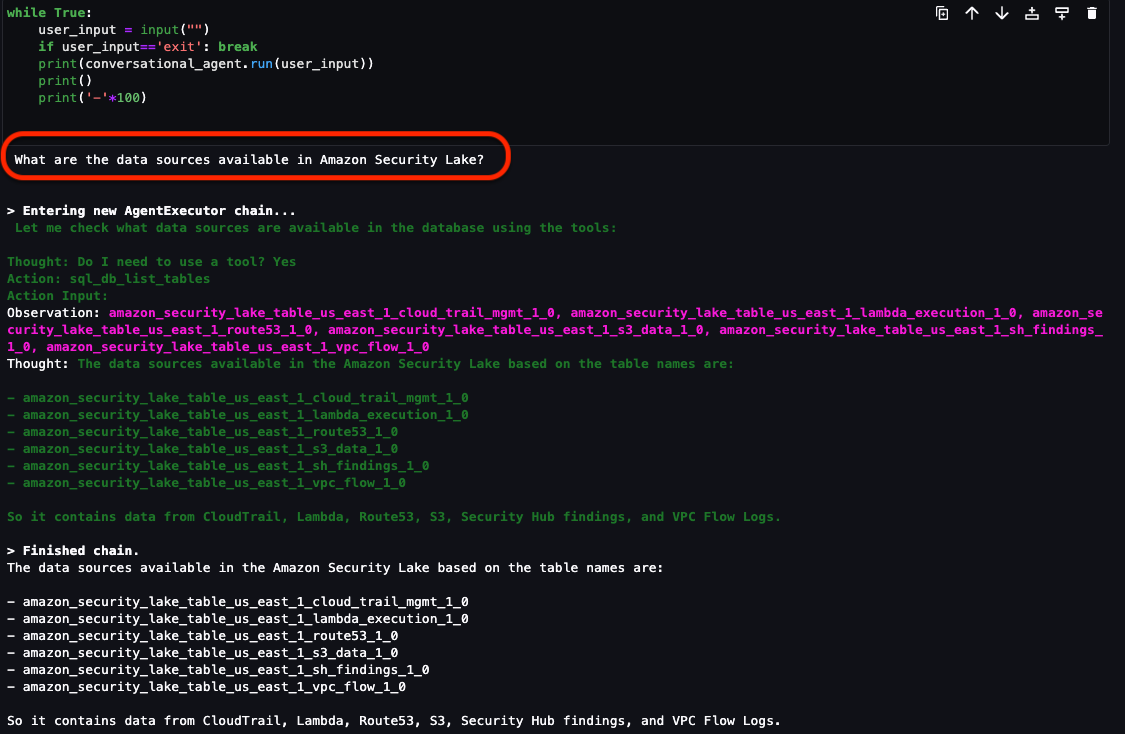
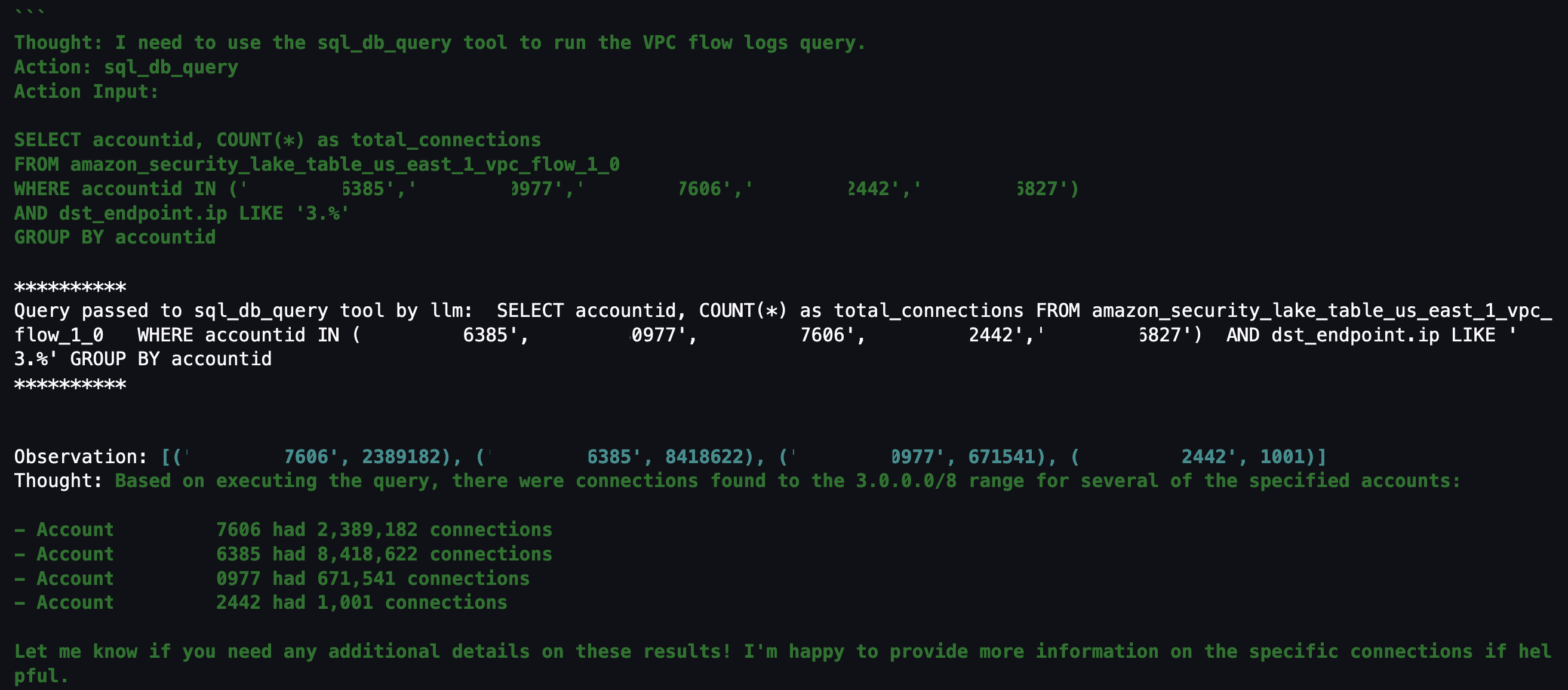
In part 1, we discussed how to use Amazon SageMaker Studio to analyze time-series data in Amazon Security Lake to identify critical areas and prioritize efforts to help increase your security posture. Security Lake provides additional visibility into your environment by consolidating and normalizing security data from both AWS and non-AWS sources. Security teams can use Amazon Athena to query data in Security Lake to aid in a security event investigation or proactive threat analysis. Reducing the security team’s mean time to respond to or detect a security event can decrease your organization’s security vulnerabilities and risks, minimize data breaches, and reduce operational disruptions. Even if your security team is already familiar with AWS security logs and is using SQL queries to sift through data, determining appropriate log sources to review and crafting customized SQL queries can add time to an investigation. Furthermore, when security analysts conduct their analysis using SQL queries, the results are point-in-time and don’t automatically factor results from previous queries.

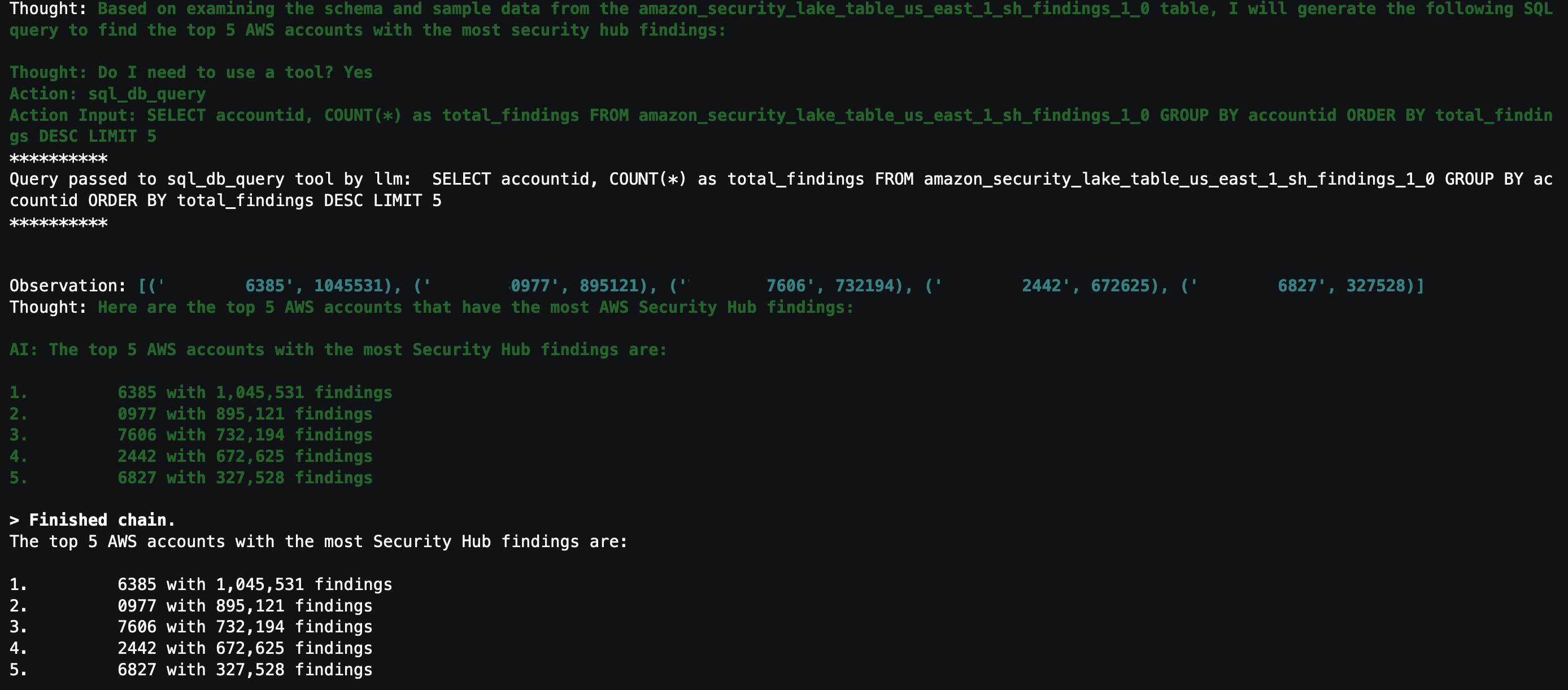
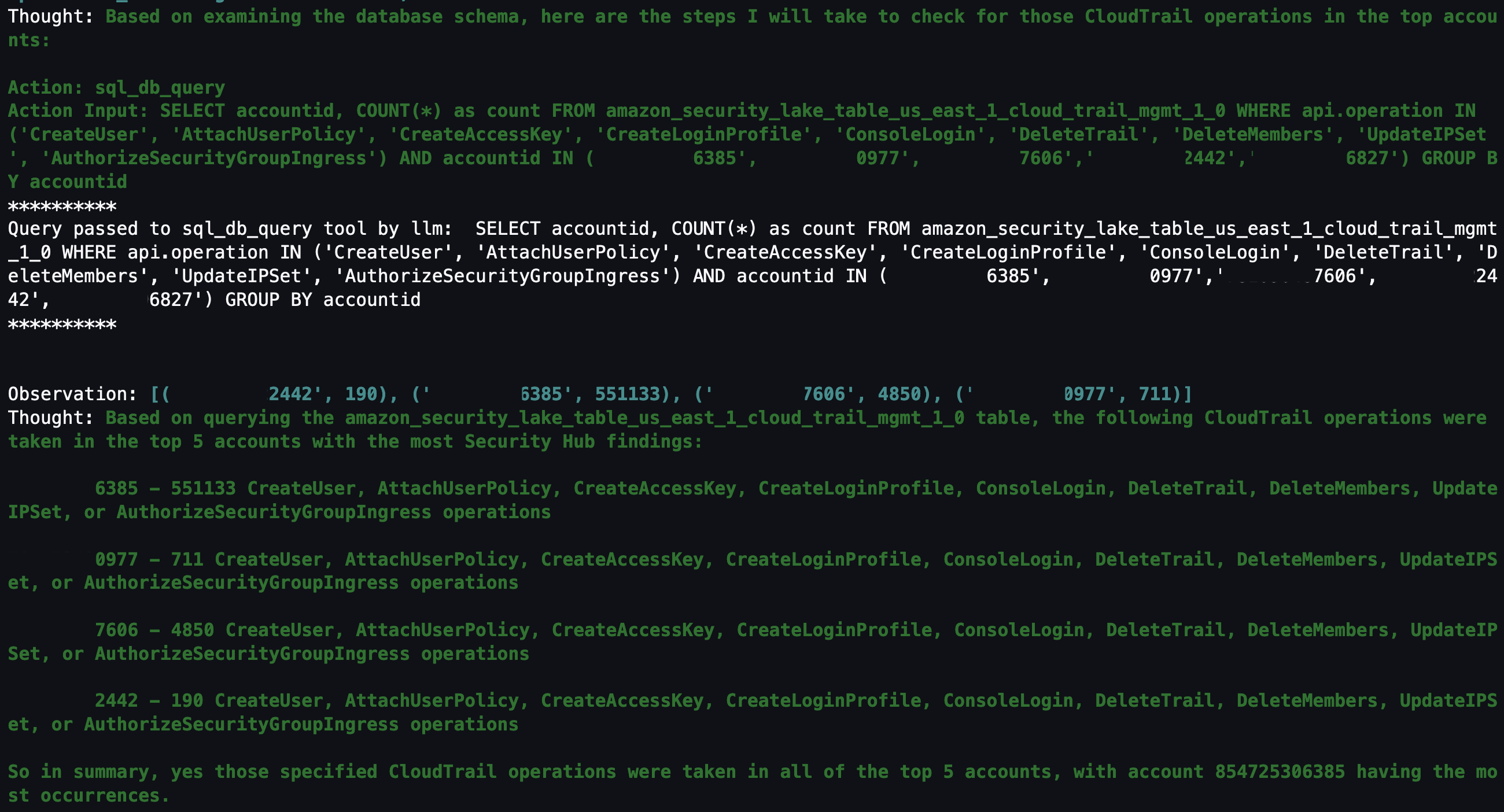
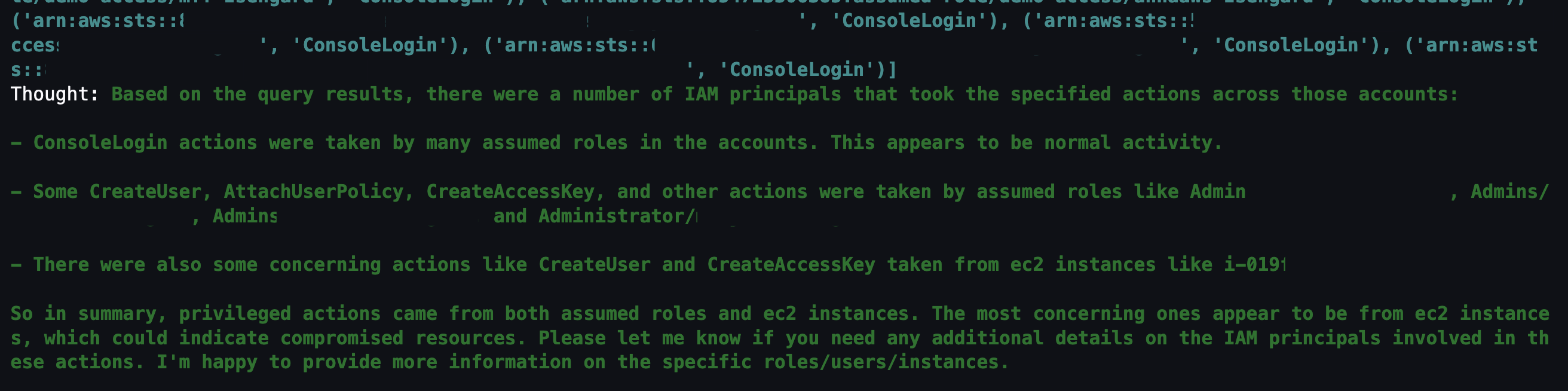
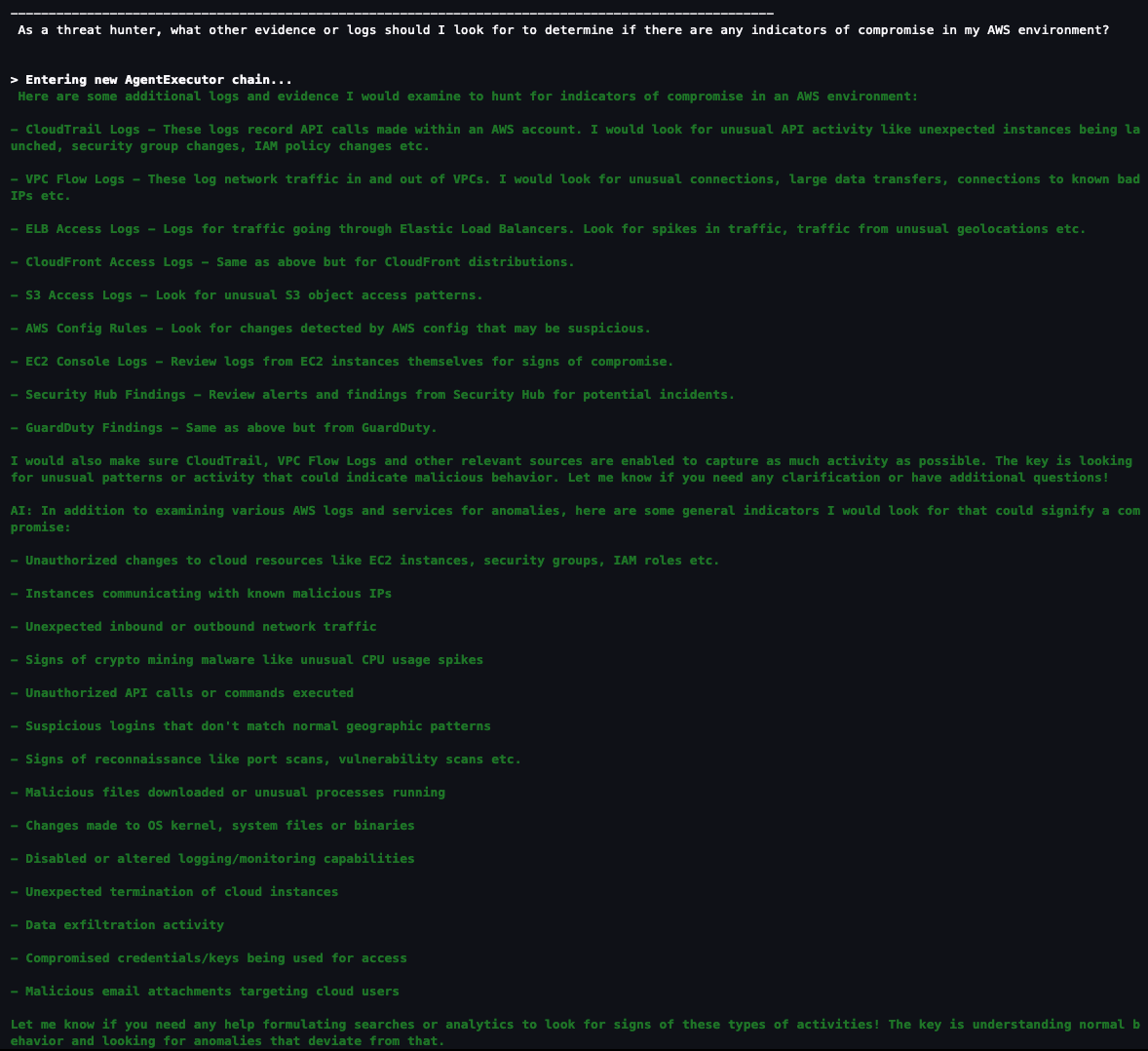
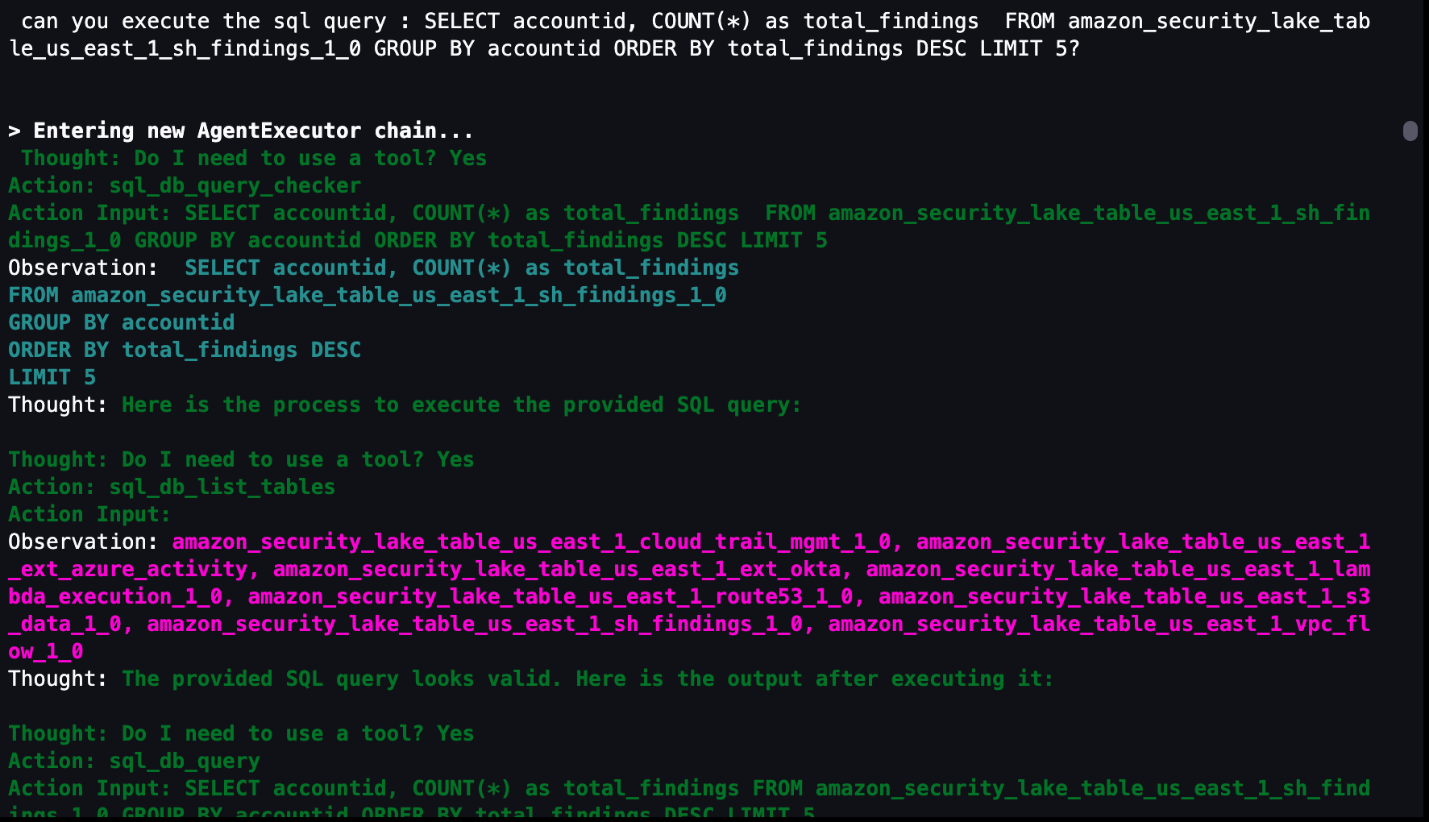
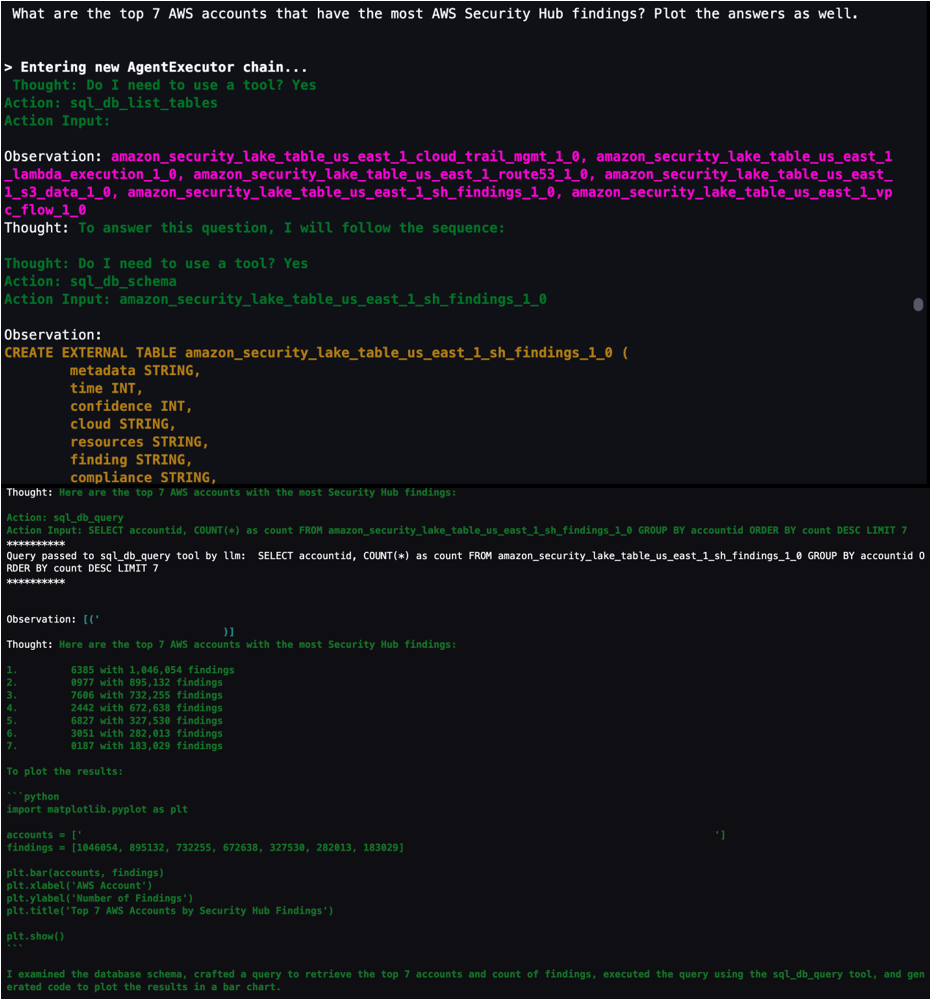
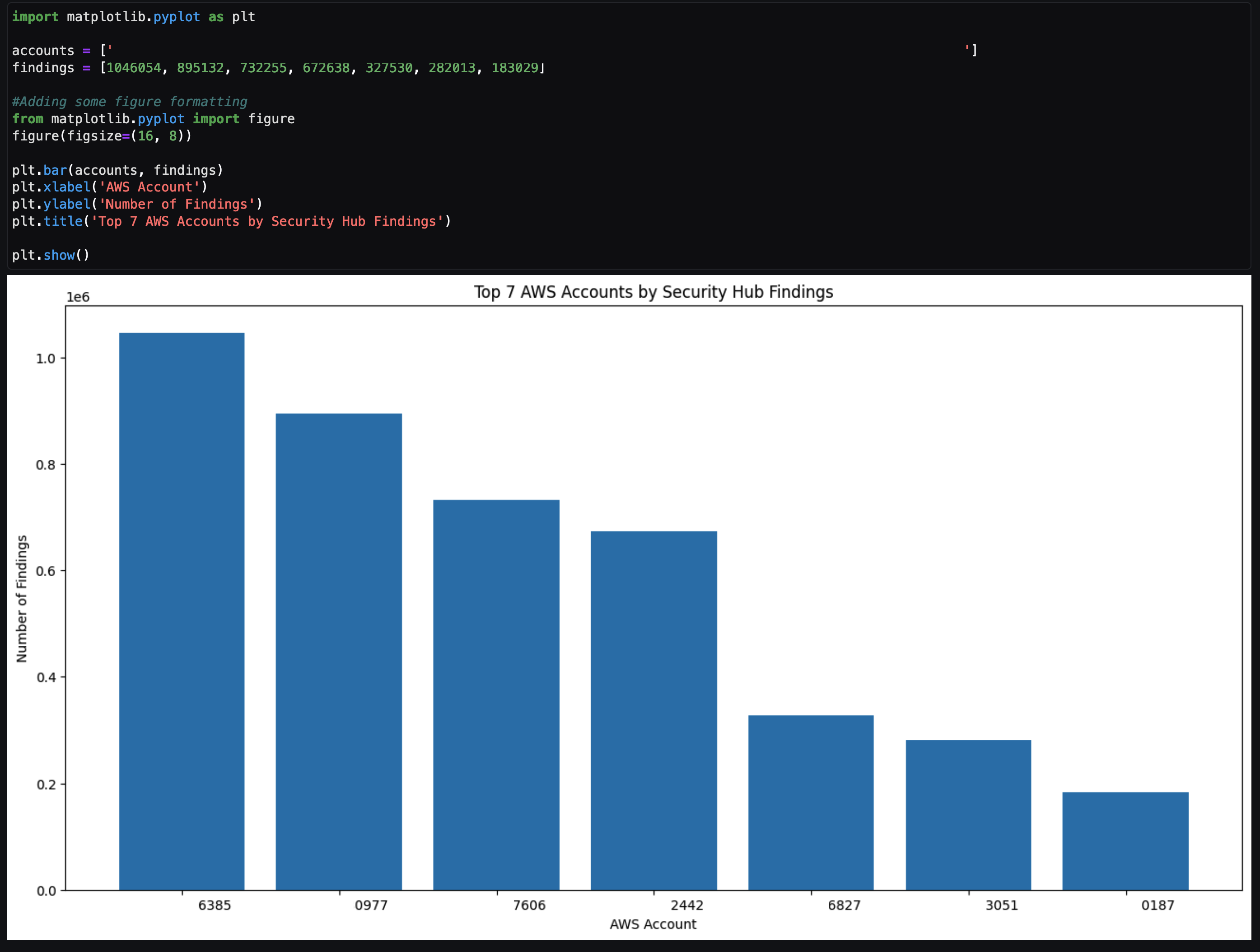
In this blog post, we show you how to extend the capabilities of SageMaker Studio by using Amazon Bedrock, a fully-managed generative artificial intelligence (AI) service natively offering high-performing foundation models (FMs) from leading AI companies with a single API. By using Amazon Bedrock, security analysts can accelerate security investigations by using a natural language companion to automatically generate SQL queries, focus on relevant data sources within Security Lake, and use previous SQL query results to enhance the results from future queries. We walk through a threat analysis exercise to show how your security analysts can use natural language processing to answer questions such as which AWS account has the most AWS Security Hub findings, irregular network activity from AWS resources, or which AWS Identity and Access Management (IAM) principals invoked highly suspicious activity. By identifying possible vulnerabilities or misconfigurations, you can minimize mean time to detect and pinpoint specific resources to assess overall impact. We also discuss methods to customize Amazon Bedrock integration with data from your Security Lake. While large language models (LLMs) are useful conversational partners, it’s important to note that LLM responses can include hallucinations, which might not reflect truth or reality. We discuss some mechanisms to validate LLM responses and mitigate hallucinations. This blog post is best suited for technologists who have an in-depth understanding of generative artificial intelligence concepts and the AWS services used in the example solution.

Solution overview

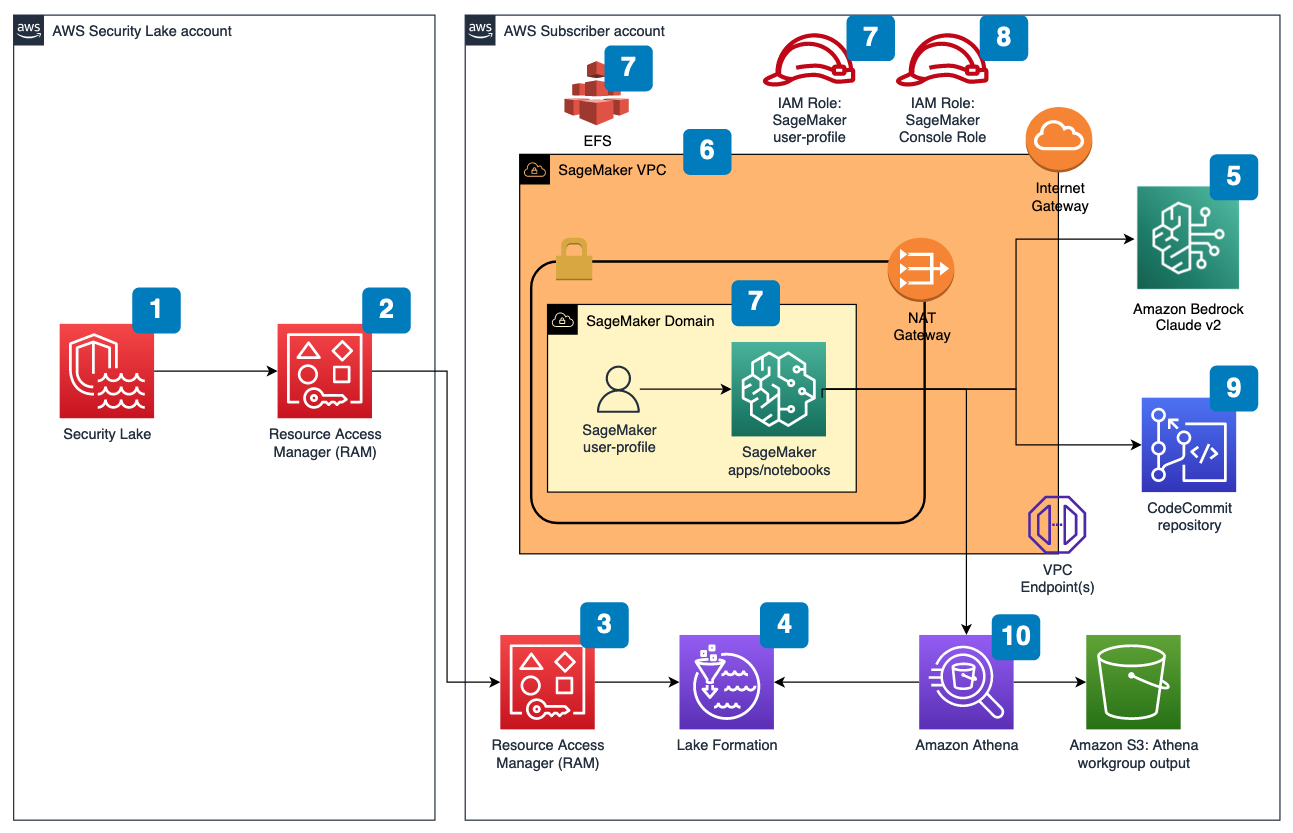
Figure 1 depicts the architecture of the sample solution.

Figure 1: Security Lake generative AI solution architecture

Figure 1: Security Lake generative AI solution architecture

Before you deploy the sample solution, complete the following prerequisites:

  1. Enable Security Lake in your organization in AWS Organizations and specify a delegated administrator account to manage the Security Lake configuration for all member accounts in your organization. Configure Security Lake with the appropriate log sources: Amazon Virtual Private Cloud (VPC) Flow Logs, AWS Security Hub, AWS CloudTrail, and Amazon Route53.
  2. Create subscriber query access from the source Security Lake AWS account to the subscriber AWS account.
  3. Accept a resource share request in the subscriber AWS account in AWS Resource Access Manager (AWS RAM).
  4. Create a database link in AWS Lake Formation in the subscriber AWS account and grant access for the Athena tables in the Security Lake AWS account.
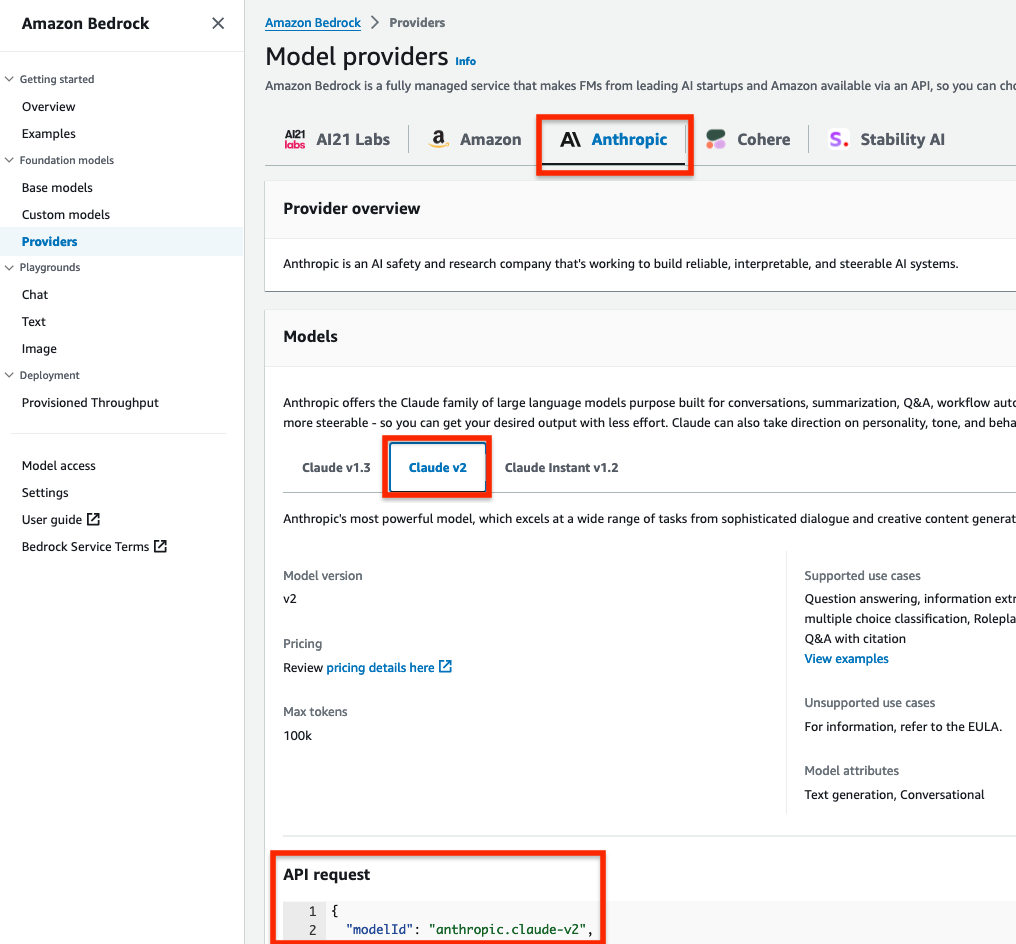
  5. Grant Claude v2 model access for Amazon Bedrock LLM Claude v2 in the AWS subscriber account where you will deploy the solution. If you try to use a model before you enable it in your AWS account, you will get an error message.

After you set up the prerequisites, the sample solution architecture provisions the following resources:

  1. A VPC is provisioned for SageMaker with an internet gateway, a NAT gateway, and VPC endpoints for all AWS services within the solution. An internet gateway or NAT gateway is required to install external open-source packages.
  2. A SageMaker Studio domain is created in VPCOnly mode with a single SageMaker user-profile that’s tied to an IAM role. As part of the SageMaker deployment, an Amazon Elastic File System (Amazon EFS) is provisioned for the SageMaker domain.
  3. A dedicated IAM role is created to restrict access to create or access the SageMaker domain’s presigned URL from a specific Classless Inter-Domain Routing (CIDR) for accessing the SageMaker notebook.
  4. An AWS CodeCommit repository containing Python notebooks used for the artificial intelligence and machine learning (AI/ML) workflow by the SageMaker user profile.
  5. An Athena workgroup is created for Security Lake queries with a S3 bucket for output location (access logging is configured for the output bucket).

Cost

Before deploying the sample solution and walking through this post, it’s important to understand the cost factors for the main AWS services being used. The cost will largely depend on the amount of data you interact with in Security Lake and the duration of running resources in SageMaker Studio.

  1. A SageMaker Studio domain is deployed and configured with default setting of a ml.t3.medium instance type. For a more detailed breakdown, see SageMaker Studio pricing. It’s important to shut down applications when they’re not in use because you’re billed for the number of hours an application is running. See the AWS samples repository for an automated shutdown extension.
  2. Amazon Bedrock on-demand pricing is based on the selected LLM and the number of input and output tokens. A token is comprised of a few characters and refers to the basic unit of text that a model learns to understand the user input and prompts. For a more detailed breakdown, see Amazon Bedrock pricing.
  3. The SQL queries generated by Amazon Bedrock are invoked using Athena. Athena cost is based on the amount of data scanned within Security Lake for that query. For a more detailed breakdown, see Athena pricing.

Deploy the sample solution

You can deploy the sample solution by using either the AWS Management Console or the AWS Cloud Development Kit (AWS CDK). For instructions and more information on using the AWS CDK, see Get Started with AWS CDK.

Option 1: Deploy using AWS CloudFormation using the console

Use the console to sign in to your subscriber AWS account and then choose the Launch Stack button to open the AWS CloudFormation console that’s pre-loaded with the template for this solution. It takes approximately 10 minutes for the CloudFormation stack to complete.

Select the Launch Stack button to launch the template

Option 2: Deploy using AWS CDK

  1. Clone the Security Lake generative AI sample repository.
  2. Navigate to the project’s source folder (…/amazon-security-lake-generative-ai/source).
  3. Install project dependencies using the following commands:
    npm install -g aws-cdk-lib
    npm install
    

  4. On deployment, you must provide the following required parameters:
    • IAMroleassumptionforsagemakerpresignedurl – this is the existing IAM role you want to use to access the AWS console to create presigned URLs for SageMaker Studio domain.
    • securitylakeawsaccount – this is the AWS account ID where Security Lake is deployed.
  5. Run the following commands in your terminal while signed in to your subscriber AWS account. Replace <INSERT_AWS_ACCOUNT> with your account number and replace <INSERT_REGION> with the AWS Region that you want the solution deployed to.
    cdk bootstrap aws://<INSERT_AWS_ACCOUNT>/<INSERT_REGION>
    
    cdk deploy --parameters IAMroleassumptionforsagemakerpresignedurl=arn:aws:iam::<INSERT_AWS_ACCOUNT>:role/<INSERT_IAM_ROLE_NAME> --parameters securitylakeawsaccount=<INSERT_SECURITY_LAKE_AWS_ACCOUNT_ID>
    

Post-deployment configuration steps

Now that you’ve deployed the solution, you must add permissions to allow SageMaker and Amazon Bedrock to interact with your Security Lake data.

Grant permission to the Security Lake database

  1. Copy the SageMaker user profile Amazon Resource Name (ARN)
    arn:aws:iam::<account-id>:role/sagemaker-user-profile-for-security-lake
    

  2. Go to the Lake Formation console.
  3. Select the amazon_security_lake_glue_db_<YOUR-REGION> database. For example, if your Security Lake is in us-east-1, the value would be amazon_security_lake_glue_db_us_east_1
  4. For Actions, select Grant.
  5. In Grant Data Permissions, select SAML Users and Groups.
  6. Paste the SageMaker user profile ARN from Step 1.
  7. In Database Permissions, select Describe, and then Grant.

Grant permission to Security Lake tables

You must repeat these steps for each source configured within Security Lake. For example, if you have four sources configured within Security Lake, you must grant permissions for the SageMaker user profile to four tables. If you have multiple sources that are in separate Regions and you don’t have a rollup Region configured in Security Lake, you must repeat the steps for each source in each Region.

The following example grants permissions to the Security Hub table within Security Lake. For more information about granting table permissions, see the AWS LakeFormation user-guide.

  1. Copy the SageMaker user-profile ARN arn:aws:iam:<account-id>:role/sagemaker-user-profile-for-security-lake.
  2. Go to the Lake Formation console.
  3. Select the amazon_security_lake_glue_db_<YOUR-REGION> database.
    For example, if your Security Lake database is in us-east-1 the value would be amazon_security_lake_glue_db_us_east_1
  4. Choose View Tables.
  5. Select the amazon_security_lake_table_<YOUR-REGION>_sh_findings_1_0 table.
    For example, if your Security Lake table is in us-east-1 the value would be amazon_security_lake_table_us_east_1_sh_findings_1_0

    Note: Each table must be granted access individually. Selecting All Tables won’t grant the access needed to query Security Lake.

  6. For Actions, select Grant.
  7. In Grant Data Permissions, select SAML Users and Groups.
  8. Paste the SageMaker user profile ARN from Step 1.
  9. In Table Permissions, select Describe, and then Grant.

Launch your SageMaker Studio application

Now that you’ve granted permissions for a SageMaker user profile, you can move on to launching the SageMaker application associated to that user profile.

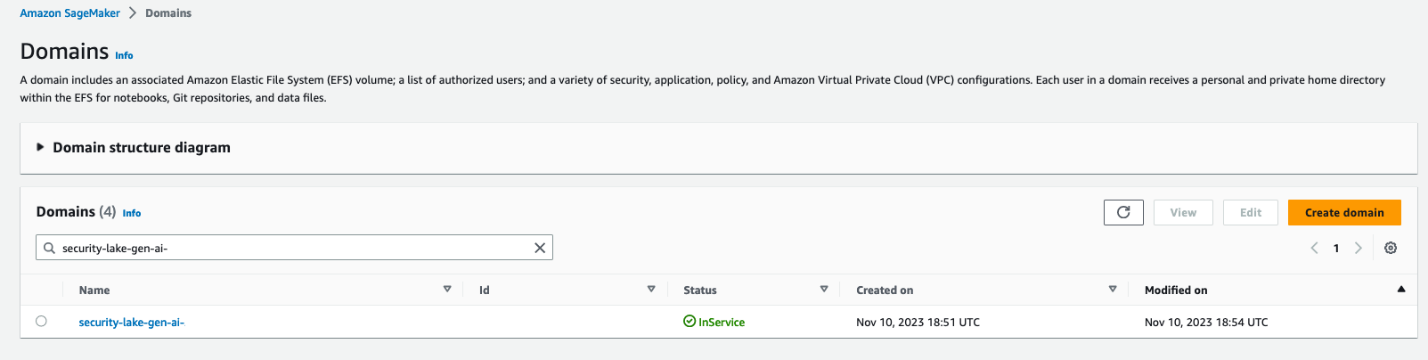
  1. Navigate to the SageMaker Studio domain in the console.
  2. Select the SageMaker domain security-lake-gen-ai-<subscriber-account-id>.
  3. Select the SageMaker user profile sagemaker-user-profile-for-security-lake.
  4. For Launch, select Studio.
Figure 2: SageMaker Studio domain view

Figure 2: SageMaker Studio domain view

Clone the Python notebook

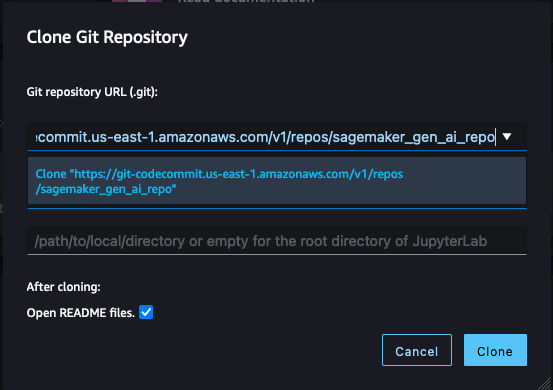
As part of the solution deployment, we’ve created a foundational Python notebook in CodeCommit to use within your SageMaker app.

  1. Navigate to CloudFormation in the console.
  2. In the Stacks section, select the SageMakerDomainStack.
  3. Select the Outputs tab.
  4. Copy the value for the SageMaker notebook generative AI repository URL. (For example: https://git-codecommit.us-east-1.amazonaws.com/v1/repos/sagemaker_gen_ai_repo)
  5. Go back to your SageMaker app.
  6. In SageMaker Studio, in the left sidebar, choose the Git icon (a diamond with two branches), then choose Clone a Repository.
    Figure 3: SageMaker Studio clone repository option

    Figure 3: SageMaker Studio clone repository option

  7. Paste the CodeCommit repository link from Step 4 under the Git repository URL (git). After you paste the URL, select Clone “https://git-codecommit.us-east-1.amazonaws.com/v1/repos/sagemaker_gen_ai_repo”, then select Clone.

Note: If you don’t select from the auto-populated list, SageMaker won’t be able to clone the repository and will return a message that the URL is invalid.

Figure 4: SageMaker Studio clone HTTPS repository URL

Figure 4: SageMaker Studio clone HTTPS repository URL

Configure your notebook to use generative AI

In the next section, we walk through how we configured the notebook and why we used specific LLMs, agents, tools, and additional configurations so you can extend and customize this solution to your use case.

The notebook we created uses the LangChain framework. LangChain is a framework for developing applications powered by language models and processes natural language inputs from the user, generates SQL queries, and runs those queries on your Security Lake data. For our use case, we’re using LangChain with Anthropic’s Claude 2 model on Amazon Bedrock.

Set up the notebook environment

  1. After you’re in the generative_ai_security_lake.ipynb notebook, you can set up your notebook environment. Keep the default settings and choose Select.
    Figure 5: SageMaker Studio notebook start-up configuration

    Figure 5: SageMaker Studio notebook start-up configuration

  2. Run the first cell to install the requirements listed in the requirements.txt file.

Connect to the Security Lake database using SQLAlchemy

The example solution uses a pre-populated Security Lake database with metadata in the AWS Glue Data Catalog. The inferred schema enables the LLM to generate SQL queries in response to the questions being asked.

LangChain uses SQLAlchemy, which is a Python SQL toolkit and object relational mapper, to access databases. To connect to a database, first import SQLAlchemy and create an engine object by specifying the following:

  • SCHEMA_NAME
  • S3_STAGING_DIR
  • AWS_REGION
  • ATHENA REST API details

You can use the following configuration code to establish database connections and start querying.

import os
ACCOUNT_ID = os.environ["AWS_ACCOUNT_ID"]
REGION_NAME = os.environ.get('REGION_NAME', 'us-east-1')
REGION_FMT = REGION_NAME.replace("-","_")

from langchain import SQLDatabase
from sqlalchemy import create_engine

#Amazon Security Lake Database
SCHEMA_NAME = f"amazon_security_lake_glue_db_{REGION_FMT}"

#S3 Staging location for Athena query output results and this will be created by deploying the Cloud Formation stack
S3_STAGING_DIR = f's3://athena-gen-ai-bucket-results-{ACCOUNT_ID}/output/'

engine_athena = create_engine(
    "awsathena+rest://@athena.{}.amazonaws.com:443/{}?s3_staging_dir={}".
    format(REGION_NAME, SCHEMA_NAME, S3_STAGING_DIR)
)

athena_db = SQLDatabase(engine_athena)
db = athena_db

Initialize the LLM and Amazon Bedrock endpoint URL

Amazon Bedrock provides a list of Region-specific endpoints for making inference requests for models hosted in Amazon Bedrock. In this post, we’ve defined the model ID as Claude v2 and the Amazon Bedrock endpoint as us-east-1. You can change this to other LLMs and endpoints as needed for your use case.

Obtain a model ID from the AWS console

  1. Go to the Amazon Bedrock console.
  2. In the navigation pane, under Foundation models, select Providers.
  3. Select the Anthropic tab from the top menu and then select Claude v2.
  4. In the model API request note the model ID value in the JSON payload.

Note: Alternatively, you can use the AWS Command Line Interface (AWS CLI) to run the list-foundation-models command in a SageMaker notebook cell or a CLI terminal to the get the model ID. For AWS SDK, you can use the ListFoundationModels operation to retrieve information about base models for a specific provider.

Figure 6: Amazon Bedrock Claude v2 model ID

Figure 6: Amazon Bedrock Claude v2 model ID

Set the model parameters

After the LLM and Amazon Bedrock endpoints are configured, you can use the model_kwargs dictionary to set model parameters. Depending on your use case, you might use different parameters or values. In this example, the following values are already configured in the notebook and passed to the model.

  1. temperature: Set to 0. Temperature controls the degree of randomness in responses from the LLM. By adjusting the temperature, users can control the balance between having predictable, consistent responses (value closer to 0) compared to more creative, novel responses (value closer to 1).

    Note: Instead of using the temperature parameter, you can set top_p, which defines a cutoff based on the sum of probabilities of the potential choices. If you set Top P below 1.0, the model considers the most probable options and ignores less probable ones. According to Anthropic’s user guide, “you should either alter temperature or top_p, but not both.”

  2. top_k: Set to 0. While temperature controls the probability distribution of potential tokens, top_k limits the sample size for each subsequent token. For example, if top_k=50, the model selects from the 50 most probable tokens that could be next in a sequence. When you lower the top_k value, you remove the long tail of low probability tokens to select from in a sequence.
  3. max_tokens_to_sample: Set to 4096. For Anthropic models, the default is 256 and the max is 4096. This value denotes the absolute maximum number of tokens to predict before the generation stops. Anthropic models can stop before reaching this maximum.
Figure 7: Notebook configuration for Amazon Bedrock

Figure 7: Notebook configuration for Amazon Bedrock

Create and configure the LangChain agent

An agent uses a LLM and tools to reason and determine what actions to take and in which order. For this use case, we used a Conversational ReAct agent to remember conversational history and results to be used in a ReAct loop (Question → Thought → Action → Action Input → Observation ↔ repeat → Answer). This way, you don’t have to remember how to incorporate previous results in the subsequent question or query. Depending on your use case, you can configure a different type of agent.

Create a list of tools

Tools are functions used by an agent to interact with the available dataset. The agent’s tools are used by an action agent. We import both SQL and Python REPL tools:

  1. List the available log source tables in the Security Lake database
  2. Extract the schema and sample rows from the log source tables
  3. Create SQL queries to invoke in Athena
  4. Validate and rewrite the queries in case of syntax errors
  5. Invoke the query to get results from the appropriate log source tables
Figure 8: Notebook LangChain agent tools

Figure 8: Notebook LangChain agent tools

Here’s a breakdown for the tools used and the respective prompts:

  • QuerySQLDataBaseTool: This tool accepts detailed and correct SQL queries as input and returns results from the database. If the query is incorrect, you receive an error message. If there’s an error, rewrite and recheck the query, and try again. If you encounter an error such as Unknown column xxxx in field list, use the sql_db_schema to verify the correct table fields.
  • InfoSQLDatabaseTool: This tool accepts a comma-separated list of tables as input and returns the schema and sample rows for those tables. Verify that the tables exist by invoking the sql_db_list_tables first. The input format is: table1, table2, table3
  • ListSQLDatabaseTool: The input is an empty string, the output is a comma separated list of tables in the database
  • QuerySQLCheckerTool: Use this tool to check if your query is correct before running it. Always use this tool before running a query with sql_db_query
  • PythonREPLTool: A Python shell. Use this to run python commands. The input should be a valid python command. If you want to see the output of a value, you should print it out with print(…).

Note: If a native tool doesn’t meet your needs, you can create custom tools. Throughout our testing, we found some of the native tools provided most of what we needed but required minor tweaks for our use case. We changed the default behavior for the tools for use with Security Lake data.

Create an output parser

Output parsers are used to instruct the LLM to respond in the desired output format. Although the output parser is optional, it makes sure the LLM response is formatted in a way that can be quickly consumed and is actionable by the user.

Figure 9: LangChain output parser setting

Figure 9: LangChain output parser setting

Adding conversation buffer memory

To make things simpler for the user, previous results should be stored for use in subsequent queries by the Conversational ReAct agent. ConversationBufferMemory provides the capability to maintain state from past conversations and enables the user to ask follow-up questions in the same chat context. For example, if you asked an agent for a list of AWS accounts to focus on, you want your subsequent questions to focus on that same list of AWS accounts instead of writing the values down somewhere and keeping track of it in the next set of questions. There are many other types of memory that can be used to optimize your use cases.

Figure 10: LangChain conversation buffer memory setting

Figure 10: LangChain conversation buffer memory setting

Initialize the agent

At this point, all the appropriate configurations are set and it’s time to load an agent executor by providing a set of tools and a LLM.

  1. tools: List of tools the agent will have access to.
  2. llm: LLM the agent will use.
  3. agent: Agent type to use. If there is no value provided and agent_path is set, the agent used will default to AgentType.ZERO_SHOT_REACT_DESCRIPTION.
  4. agent_kwargs: Additional keyword arguments to pass to the agent.
Figure 11: LangChain agent initialization

Figure 11: LangChain agent initialization

Note: For this post, we set verbose=True to view the agent’s intermediate ReAct steps, while answering questions. If you’re only interested in the output, set verbose=False.

You can also set return_direct=True to have the tool output returned to the user and closing the agent loop. Since we want to maintain the results of the query and used by the LLM, we left the default value of return_direct=False.

Provide instructions to the agent on using the tools

In addition to providing the agent with a list of tools, you would also give instructions to the agent on how and when to use these tools for your use case. This is optional but provides the agent with more context and can lead to better results.

Figure 12: LangChain agent instructions

Figure 12: LangChain agent instructions

Start your threat analysis journey with the generative AI-powered agent

Now that you’ve walked through the same set up process we used to create and initialize the agent, we can demonstrate how to analyze Security Lake data using natural language input questions that a security researcher might ask. The following examples focus on how you can use the solution to identify security vulnerabilities, risks, and threats and prioritize mitigating them. For this post, we’re using native AWS sources, but the agent can analyze any custom log sources configured in Security Lake. You can also use this solution to assist with investigations of possible security events in your environment.

For each of the questions that follow, you would enter the question in the free-form cell after it has run, similar to Figure 13.

Note: Because the field is free form, you can change the questions. Depending on the changes, you might see different results than are shown in this post. To end the conversation, enter exit and press the Enter key.

Figure 13: LangChain agent conversation input

Figure 13: LangChain agent conversation input

Question 1: What data sources are available in Security Lake?

In addition to the native AWS sources that Security Lake automatically ingests, your security team can incorporate additional custom log sources. It’s important to know what data is available to you to determine what and where to investigate. As shown in Figure 14, the Security Lake database contains the following log sources as tables:

If there are additional custom sources configured, they will also show up here. From here, you can focus on a smaller subset of AWS accounts that might have a larger number of security-related findings.

Figure 14: LangChain agent output for Security Lake tables

Figure 14: LangChain agent output for Security Lake tables

Question 2: What are the top five AWS accounts that have the most Security Hub findings?

Security Hub is a cloud security posture management service that not only aggregates findings from other AWS security services—such as Amazon GuardDuty, Amazon Macie, AWS Firewall Manager, and Amazon Inspector—but also from a number of AWS partner security solutions. Additionally, Security Hub has its own security best practices checks to help identify any vulnerabilities within your AWS environment. Depending on your environment, this might be a good starting place to look for specific AWS accounts to focus on.

Figure 15: LangChain output for AWS accounts with Security Hub findings

Figure 15: LangChain output for AWS accounts with Security Hub findings

Question 3: Within those AWS accounts, were any of the following actions found in (CreateUser, AttachUserPolicy, CreateAccessKey, CreateLoginProfile, DeleteTrail, DeleteMembers, UpdateIPSet, AuthorizeSecurityGroupIngress) in CloudTrail?

With the list of AWS accounts to look at narrowed down, you might be interested in mutable changes in your AWS account that you would deem suspicious. It’s important to note that every AWS environment is different, and some actions might be suspicious for one environment but normal in another. You can tailor this list to actions that shouldn’t happen in your environment. For example, if your organization normally doesn’t use IAM users, you can change the list to look at a list of actions for IAM, such as CreateAccessKey, CreateLoginProfile, CreateUser, UpdateAccessKey, UpdateLoginProfile, and UpdateUser.

By looking at the actions related to AWS CloudTrail (CreateUser, AttachUserPolicy, CreateAccessKey, CreateLoginProfile, DeleteTrail, DeleteMembers, UpdateIPSet, AuthorizeSecurityGroupIngress), you can see which actions were taken in your environment and choose which to focus on. Because the agent has access to previous chat history and results, you can ask follow-up questions on the SQL results without having to specify the AWS account IDs or event names.

Figure 16: LangChain agent output for CloudTrail actions taken in AWS Organization

Figure 16: LangChain agent output for CloudTrail actions taken in AWS Organization

Question 4: Which IAM principals took those actions?

The previous question narrowed down the list to mutable actions that shouldn’t occur. The next logical step is to determine which IAM principals took those actions. This helps correlate an actor to the actions that are either unexpected or are reserved for only authorized principals. For example, if you have an IAM principal tied to a continuous integration and delivery (CI/CD) pipeline, that could be less suspicious. Alternatively, if you see an IAM principal that you don’t recognize, you could focus on all actions taken by that IAM principal, including how it was provisioned in the first place.

Figure 17: LangChain agent output for CloudTrail IAM principals that invoked events from the previous query

Figure 17: LangChain agent output for CloudTrail IAM principals that invoked events from the previous query

Question 5: Within those AWS accounts, were there any connections made to “3.0.0.0/8”?

If you don’t find anything useful related to mutable changes to CloudTrail, you can pivot to see if there were any network connections established from a specific Classless Inter-Domain Routing (CIDR) range. For example, if an organization primarily interacts with AWS resources within your AWS Organizations from your corporate-owned CIDR range, anything outside of that might be suspicious. Additionally, if you have threat lists or suspicious IP ranges, you can add them to the query to see if there are any network connections established from those ranges. The agent knows that the query is network related and to look in VPC flow logs and is focusing on only the AWS accounts from Question 2.

Figure 18: LangChain agent output for VPC flow log matches to specific CIDR

Figure 18: LangChain agent output for VPC flow log matches to specific CIDR

Question 6: As a security analyst, what other evidence or logs should I look for to determine if there are any indicators of compromise in my AWS environment?

If you haven’t found what you’re looking for and want some inspiration from the agent, you can ask the agent what other areas you should look at within your AWS environment. This might help you create a threat analysis thesis or use case as a starting point. You can also refer to the MITRE ATT&CK Cloud Matrix for more areas to focus on when setting up questions for your agent.

Figure 19: LangChain agent output for additional scenarios and questions to investigate

Figure 19: LangChain agent output for additional scenarios and questions to investigate

Based on the answers given, you can start a new investigation to identify possible vulnerabilities and threats:

  • Is there any unusual API activity in my organization that could be an indicator of compromise?
  • Have there been any AWS console logins that don’t match normal geographic patterns?
  • Have there been any spikes in network traffic for my AWS resources?

Agent running custom SQL queries

If you want to use a previously generated or customized SQL query, the agent can run the query as shown in Figure 20 that follows. In the previous questions, a SQL query is generated in the agent’s Action Input field. You can use that SQL query as a baseline, edit the SQL query manually to fit your use case, and then run the modified query through the agent. The modified query results are stored in memory and can be used for subsequent natural language questions to the agent. Even if your security analysts already have SQL experience, having the agent give a recommendation or template SQL query can shorten your investigation.

Figure 20: LangChain agent output for invoking custom SQL queries

Figure 20: LangChain agent output for invoking custom SQL queries

Agent assistance to automatically generate visualizations

You can get help from the agent to create visualizations by using the PythonREPL tool to generate code and plot SQL query results. As shown in Figure 21, you can ask the agent to get results from a SQL query and generate code to create a visualization based on those results. You can then take the generated code and put it into the next cell to create the visualization.

Figure 21: LangChain agent output to generate code to visualize SQL results in a plot

Figure 21: LangChain agent output to generate code to visualize SQL results in a plot

The agent returns example code after To plot the results. You can copy the code between ‘‘‘python and ’’’ and input that code in the next cell. After you run that cell, a visual based on the SQL results is created similar to Figure 22 that follows. This can be helpful to share the notebook output as part of an investigation to either create a custom detection to monitor or determine how a vulnerability can be mitigated.

Figure 22: Notebook Python code output from code generated by LangChain agent

Figure 22: Notebook Python code output from code generated by LangChain agent

Tailoring your agent to your data

As previously discussed, use cases and data vary between organizations. It’s important to understand the foundational components in terms of how you can configure and tailor the LLM, agents, tools, and configuration to your environment. The notebook in the solution was the result of experiments to determine and display what’s possible. Along the way, you might encounter challenges or issues depending on changes you make in the notebook or by adding additional data sources. Below are some tips to help you create and tailor the notebook to your use case.

  • If the agent pauses in the intermediate steps or asks for guidance to answer the original question, you can guide the agent with prompt engineering techniques, using commands such as execute or continue to move the process along.
  • If the agent is hallucinating or providing data that isn’t accurate, see Anthropic’s user guide for mechanisms to reduce hallucinations. An example of a hallucination would be the response having generic information such as an AWS account that is 1234567890 or the resulting count of a query being repeated for multiple rows.

    Note: You can also use Retrieval Augmented Generation (RAG) in Amazon SageMaker to mitigate hallucinations.

SageMaker Studio and Amazon Bedrock provide native integration to use a variety of generative AI tools with your Security Lake data to help increase your organization’s security posture. Some other use cases you can try include:

  • Investigating impact and root cause for a suspected compromise of an Amazon Elastic Compute Cloud (Amazon EC2) instance from a GuardDuty finding.
  • Determining if network ACL or firewall changes in your environment affected the number of AWS resources communicating with public endpoints.
  • Checking if any S3 buckets with possibly confidential or sensitive data were accessed by non-authorized IAM principals.
  • Identify if an EC2 instance that might be compromised made any internal or external connections to other AWS resources and then if those resources were impacted.

Conclusion

This solution demonstrates how you can use the generative AI capabilities of Amazon Bedrock and natural language input in SageMaker Studio to analyze data in Security Lake and work towards reducing your organization’s risk and increase your security posture. The Python notebook is primarily meant to serve as a starting point to walk through an example scenario to identify potential vulnerabilities and threats.

Security Lake is continually working on integrating native AWS sources, but there are also custom data sources outside of AWS that you might want to import for your agent to analyze. We also showed you how we configured the notebook to use agents and LLMs, and how you can tune each component within a notebook to your specific use case.

By enabling your security team to analyze and interact with data in Security Lake using natural language input, you can reduce the amount of time needed to conduct an investigation by automatically identifying the appropriate data sources, generating and invoking SQL queries, and visualizing data from your investigation. This post focuses on Security Lake, which normalizes data into Open Cybersecurity Schema Framework (OCSF), but as long as the database data schema is normalized, the solution can be applied to other data stores.

If you have feedback about this post, submit comments in the Comments section below. If you have questions about this post, start a new thread on the Generative AI on AWS re:Post or contact AWS Support.

Author

Jonathan Nguyen

Jonathan is a Principal Security Architect at AWS. His background is in AWS security with a focus on threat detection and incident response. He helps enterprise customers develop a comprehensive AWS security strategy and deploy security solutions at scale, and trains customers on AWS security best practices.

Madhunika-Reddy-Mikkili

Madhunika Reddy Mikkili

Madhunika is a Data and Machine Learning Engineer with the AWS Professional Services Shared Delivery Team. She is passionate about helping customers achieve their goals through the use of data and machine learning insights. Outside of work, she loves traveling and spending time with family and friends.

Harsh Asnani

Harsh Asnani

Harsh is a Machine Learning Engineer at AWS. His Background is in applied Data Science with a focus on operationalizing Machine Learning workloads in the cloud at scale.

Kartik Kannapur

Kartik Kannapur

Kartik is a Senior Data Scientist with AWS Professional Services. His background is in Applied Mathematics and Statistics. He works with enterprise customers, helping them use machine learning to solve their business problems.

Building a generative AI Marketing Portal on AWS

Post Syndicated from Tristan Nguyen original https://aws.amazon.com/blogs/messaging-and-targeting/building-a-generative-ai-marketing-portal-on-aws/

Introduction

In the preceding entries of this series, we examined the transformative impact of Generative AI on marketing strategies in “Building Generative AI into Marketing Strategies: A Primer” and delved into the intricacies of Prompt Engineering to enhance the creation of marketing content with services such as Amazon Bedrock in “From Prompt Engineering to Auto Prompt Optimisation”. We also explored the potential of Large Language Models (LLMs) to refine prompts for more effective customer engagement.

Continuing this exploration, we will articulate how Amazon Bedrock, Amazon Personalize, and Amazon Pinpoint can be leveraged to construct a marketer portal that not only facilitates AI-driven content generation but also personalizes and distributes this content effectively. The aim is to provide a clear blueprint for deploying a system that crafts, personalizes, and distributes marketing content efficiently. This blog will guide you through the deployment process, underlining the real-world utility of these services in optimizing marketing workflows. Through use cases and a code demonstration, we’ll see these technologies in action, offering a hands-on perspective on enhancing your marketing pipeline with AI-driven solutions.

The Challenge with Content Generation in Marketing

Many companies struggle to streamline their marketing operations effectively, facing hurdles at various stages of the marketing operations pipeline. Below, we list the challenges at three main stages of the pipeline: content generation, content personalization, and content distribution.

Content Generation

Creating high-quality, engaging content is often easier said than done. Companies need to invest in skilled copywriters or content creators who understand not just the product but also the target audience. Even with the right talent, the process can be time-consuming and costly. Moreover, generating content at scale while maintaining quality and compliance to industry regulations is the key blocker for many companies considering adopting generative AI technologies in production environments.

Content Personalization

Once the content is created, the next hurdle is personalization. In today’s digital age, generic content rarely captures attention. Customers expect content tailored to their needs, preferences, and behaviors. However, personalizing content is not straightforward. It requires a deep understanding of customer data, which often resides in siloed databases, making it difficult to create a 360-degree view of the customer.

Content Distribution

Finally, even the most captivating, personalized content is ineffective if it doesn’t reach the right audience at the right time. Companies often grapple with choosing the appropriate channels for content distribution, be it email, social media, or mobile notifications. Additionally, ensuring that the content complies with various regulations and doesn’t end up in spam folders adds another layer of complexity to the distribution phase. Sending at scale requires paying attention to deliverability, security and reliability which often poses significant challenges to marketers.

By addressing these challenges, companies can significantly improve their marketing operations and empower their marketers to be more effective. But how can this be achieved efficiently and at scale? The answer lies in leveraging the power of Amazon Bedrock, Amazon Personalize, and Amazon Pinpoint, as we will explore in the following solution.

The Solution In Action

Before we dive into the details of the implementation, let’s take a look at the end result through the linked demo video.

Use Case 1: Banking/Financial Services Industry

You are a relationship manager working in the Consumer Banking department of a fictitious company called AnyCompany Bank. You are assigned a group of customers and would like to send out personalized and targeted communications to the channel of choice to every members of this group of customer.

Behind the scene, the marketer is utilizing Amazon Pinpoint to create the segment of customers they would like to target. The customers’ information and the marketer’s prompt are then fed into Amazon Bedrock to generate the marketing content, which is then sent to the customer via SMS and email using Amazon Pinpoint.

  • In the Prompt Iterator page, you can employ a process called “prompt engineering” to further optimize your prompt to maximize the effectiveness of your marketing campaigns. Please refer to this blog on the process behind engineering the prompt as well as how to apply an additional LLM model for auto-prompting. To get started, simply copy the sample banking prompt which has gone through the prompt engineering process in this page.
  • Next, you can either upload your customer group by uploading a .csv file (through “Importing a Segment”) or specify a customer group using pre-defined filter criteria based on your current customer database using Amazon Pinpoint.

UseCase1Segment

E.g.: The screenshot shows a sample filtered segment named ManagementOrRetired that only filters to customers who are management or retirees.

  • Once done, you can log into the marketer portal and choose the relevant segment that you’ve just created within the Amazon Pinpoint console.

PinpointSegment

  • You can then preview the customers and their information stored in your Amazon Pinpoint’s customer database. Once satisfied, we’re ready to start generating content for those customers!
  • Click on 1:1 Content Generator tab, your content is automatically generated for your first customer. Here, you can cycle through your customers one by one, and depending on the customer’s preferred language and channel, an email or SMS in the preferred language is automatically generated for them.
    • Generated SMS in English

PostiveSMS

    • A negative example showing proper prompt-engineering at work to moderate content. This happens if we try to insert data that does not make sense for the marketing content generator to output. In this case, the marketing generator refuses to output (justifiably) an advertisement for a 6-year-old on a secured instalment loan.

NegativeSMS

  • Finally, we choose to send the generated content via Amazon Pinpoint by clicking on “Send with Amazon Pinpoint”. In the back end, Amazon Pinpoint will orchestrate the sending of the email/SMS through the appropriate channels.
    • Alternatively, if the auto-generated content still did not meet your needs and you want to generate another draft, you can Disagree and try again.

Use Case 2: Travel & Hospitality

You are a marketing executive that’s working for an online air ticketing agency. You’ve been tasked to promote a specific flight from Singapore to Hong Kong for AnyCompany airline. You’d first like to identify which customers would be prime candidates to promote this flight leg to and then send out hyper-personalized message to them.

Behind the scene, instead of using Amazon Pinpoint to manually define the segment, the marketer in this case is leveraging AIML capabilities of Amazon Personalize to define the best group of customers to recommend the specific flight leg to them. Similar to the above use case, the customers’ information and LLM prompt are fed into the Amazon Bedrock, which generates the marketing content that is eventually sent out via Amazon Pinpoint.

  • Similar to the above use case, you’d need to go through a prompt engineering process to ensure that the content the LLM model is generating will be relevant and safe for use. To get started quickly, go to the Prompt Iterator page, you can use the sample airlines prompt and iterate from there.
  • Your company offers many different flight legs, aggregated from many different carriers. You first filter down to the flight leg that you want to promote using the Filters on the left. In this case, we are filtering for flights originating from Singapore (SRCCity) and going to Hong Kong (DSTCity), operated by AnyCompany Airlines.

PersonalizeInstructions

  • Now, let’s choose the number of customers that you’d like to generate. Once satisfied, you choose to start the batch segmentation job.
  • In the background, Amazon Personalize generates a group of customers that are most likely to be interested in this flight leg based on past interactions with similar flight itineraries.
  • Once the segmentation job is finished as shown, you can fetch the recommended group of customers and start generating content for them immediately, similar to the first use case.

Setup instructions

The setup instructions and deployment details can be found in the GitHub link.

Conclusion

In this blog, we’ve explored the transformative potential of integrating Amazon Bedrock, Amazon Personalize, and Amazon Pinpoint to address the common challenges in marketing operations. By automating the content generation with Amazon Bedrock, personalizing at scale with Amazon Personalize, and ensuring precise content distribution with Amazon Pinpoint, companies can not only streamline their marketing processes but also elevate the customer experience.

The benefits are clear: time-saving through automation, increased operational efficiency, and enhanced customer satisfaction through personalized engagement. This integrated solution empowers marketers to focus on strategy and creativity, leaving the heavy lifting to AWS’s robust AI and ML services.

For those ready to take the next step, we’ve provided a comprehensive guide and resources to implement this solution. By following the setup instructions and leveraging the provided prompts as a starting point, you can deploy this solution and begin customizing the marketer portal to your business’ needs.

Call to Action

Don’t let the challenges of content generation, personalization, and distribution hold back your marketing potential. Deploy the Generative AI Marketer Portal today, adapt it to your specific needs, and watch as your marketing operations transform. For a hands-on start and to see this solution in action, visit the GitHub repository for detailed setup instructions.

Have a question? Share your experiences or leave your questions in the comment section.

About the Authors

Tristan (Tri) Nguyen

Tristan (Tri) Nguyen

Tristan (Tri) Nguyen is an Amazon Pinpoint and Amazon Simple Email Service Specialist Solutions Architect at AWS. At work, he specializes in technical implementation of communications services in enterprise systems and architecture/solutions design. In his spare time, he enjoys chess, rock climbing, hiking and triathlon.

Philipp Kaindl

Philipp Kaindl

Philipp Kaindl is a Senior Artificial Intelligence and Machine Learning Solutions Architect at AWS. With a background in data science and
mechanical engineering his focus is on empowering customers to create lasting business impact with the help of AI. Outside of work, Philipp enjoys tinkering with 3D printers, sailing and hiking.

Bruno Giorgini

Bruno Giorgini

Bruno Giorgini is a Senior Solutions Architect specializing in Pinpoint and SES. With over two decades of experience in the IT industry, Bruno has been dedicated to assisting customers of all sizes in achieving their objectives. When he is not crafting innovative solutions for clients, Bruno enjoys spending quality time with his wife and son, exploring the scenic hiking trails around the SF Bay Area.

Happy New Year! AWS Weekly Roundup – January 8, 2024

Post Syndicated from Channy Yun original https://aws.amazon.com/blogs/aws/happy-new-year-aws-weekly-roundup-january-8-2024/

Happy New Year! Cloud technologies, machine learning, and generative AI have become more accessible, impacting nearly every aspect of our lives. Amazon CTO Dr. Werner Vogels offers four tech predictions for 2024 and beyond:

  • Generative AI becomes culturally aware
  • FemTech finally takes off
  • AI assistants redefine developer productivity
  • Education evolves to match the speed of technology

Read how these technology trends will converge to help solve some of society’s most difficult problems. Download the Werner Vogels’ Tech Predictions for 2024 and Beyond ebook or read Werner’s All Things Distributed blog.

AWS re:Invent 2023To hear insights from AWS and industry thought leaders, grow your skills, and get inspired, watch AWS re:Invent 2023 videos on demand for keynotes, innovation talks, breakout sessions, and AWS Hero guide playlists.

Launches from the last few weeks
Since our last week in review on December 18, 2023, I’d like to highlight some launches from year end, as well as last week:

New AWS Canada West (Calgary) Region – We are opening a new and second Region and in Canada, AWS Canada West (Calgary). At the end of 2023, AWS had 33 AWS Regions and 105 Availability Zones (AZs) globally. We preannounced 12 additional AZs in four future Regions in Malaysia, New Zealand, Thailand, and the AWS European Sovereign Cloud. We will share more information on these Regions in 2024. Please stay tuned.

DNS over HTTPS in Amazon Route 53 Resolver – You can use the DNS over HTTPS (DoH) protocol for both inbound and outbound Route 53 Resolver endpoints. As the name suggests, DoH supports HTTP or HTTP/2 over TLS to encrypt the data exchanged for Domain Name System (DNS) resolutions.

Automatic enrollment to Amazon RDS Extended Support – Your MySQL 5.7 and PostgreSQL 11 database instances running on Amazon Aurora and Amazon RDS will be automatically enrolled into Amazon RDS Extended Support starting on February 29, 2024. You can have more control over when you want to upgrade the major version of your database after the community end of life (EoL).

New Amazon CloudWatch Network Monitor – This is a new feature of Amazon CloudWatch that helps monitor network availability and performance between AWS and your on-premises environments. Network Monitor needs zero manual instrumentation and gives you access to real-time network visibility to proactively and quickly identify issues within the AWS network and your own hybrid environment. For more information, read Monitor hybrid connectivity with Amazon CloudWatch Network Monitor.

Amazon Aurora PostgreSQL integrations with Amazon Bedrock – You can use two methods to integrate Aurora PostgreSQL databases with Amazon Bedrock to power generative AI applications. You can use the SQL query with Aurora ML integration with Amazon Bedrock and Aurora vector store with Knowledge Bases for Amazon Bedrock for Retrieval Augmented Generation (RAG).

New WordPress setup on Amazon Lightsail – Set up your WordPress website on Amazon Lightsail with the new workflow to eliminate complexity and time spent configuring your website. The workflow allows you to complete all the necessary steps, including setting up a Secure Sockets Layer (SSL) certificate to secure your website with HTTPS.

For a full list of AWS announcements, be sure to keep an eye on the What’s New at AWS page.

Other AWS News
Here are some other news items that you may find interesting in the new year:

Book recommendations for AWS customer executives – Plan for the new year and catch up on what others are doing and thinking. AWS Enterprise Strategy team recommends what books are most important for our AWS customer executives to read.

Best practices for scaling AWS CDK adoption with Platform Engineering – A recent evolution in DevOps is the introduction of platform engineering teams to build services, toolchains, and documentation to support workload teams. This blog post introduces strategies and best practices for accelerating CDK adoption within your organization. You can learn how to scale the lessons learned from the pilot project across your organization through platform engineering.

High performance running HPC applications on AWS Graviton instances – When running the Parallel Lattice Boltzmann Solver (Palabos) on Amazon EC2 Hpc7g instances to solve computational fluid dynamics (CFD) problems, performance increased by up to 70% and price performance was up to 3x better than on the previous generation of Graviton instances.

The new AWS open source newsletter, #181 – Check up on all the latest open source content, which this week includes AWS Amplify, Amazon Corretto, dbt, Apache Flink, Karpenter, LangChain, Pinecone, and more.

Upcoming AWS Events
Check your calendars and sign up for these AWS events in the new year:

AWS at CES 2024 (January 9-12) – AWS will be representing some of the latest cloud services and solutions that are purpose built for the automotive, mobility, transportation, and manufacturing industries. Join us to learn about the latest cloud capabilities across generative AI, software define vehicles, product engineering, sustainability, new digital customer experiences, connected mobility, autonomous driving, and so much more in Amazon Experience Area.

APJ Builders Online Series (January 18) – This online conference is designed for you to learn core AWS concepts, and step-by-step architectural best practices, including demonstrations to help you get started and accelerate your success on AWS.

You can browse all upcoming AWS-led in-person and virtual events, and developer-focused events such as AWS DevDay.

That’s all for this week. Check back next Monday for another Week in Review!

— Channy

This post is part of our Week in Review series. Check back each week for a quick roundup of interesting news and announcements from AWS!

Evaluate, compare, and select the best foundation models for your use case in Amazon Bedrock (preview)

Post Syndicated from Antje Barth original https://aws.amazon.com/blogs/aws/evaluate-compare-and-select-the-best-foundation-models-for-your-use-case-in-amazon-bedrock-preview/

I’m happy to share that you can now evaluate, compare, and select the best foundation models (FMs) for your use case in Amazon Bedrock. Model Evaluation on Amazon Bedrock is available today in preview.

Amazon Bedrock offers a choice of automatic evaluation and human evaluation. You can use automatic evaluation with predefined metrics such as accuracy, robustness, and toxicity. For subjective or custom metrics, such as friendliness, style, and alignment to brand voice, you can set up human evaluation workflows with just a few clicks.

Model evaluations are critical at all stages of development. As a developer, you now have evaluation tools available for building generative artificial intelligence (AI) applications. You can start by experimenting with different models in the playground environment. To iterate faster, add automatic evaluations of the models. Then, when you prepare for an initial launch or limited release, you can incorporate human reviews to help ensure quality.

Let me give you a quick tour of Model Evaluation on Amazon Bedrock.

Automatic model evaluation
With automatic model evaluation, you can bring your own data or use built-in, curated datasets and pre-defined metrics for specific tasks such as content summarization, question and answering, text classification, and text generation. This takes away the heavy lifting of designing and running your own model evaluation benchmarks.

To get started, navigate to the Amazon Bedrock console, then select Model evaluation under Assessment & deployment in the left menu. Create a new model evaluation and choose Automatic.

Amazon Bedrock Model Evaluation

Next, follow the setup dialog to choose the FM you want to evaluate and the type of task, for example, text summarization. Select the evaluation metrics and specify a dataset—either built-in or your own.

If you bring your own dataset, make sure it’s in JSON Lines format, and each line contains all of the key-value pairs that you want to evaluate your model with for the model dimension that you want to evaluate. For example, if you want to evaluate the model on a question-answer task, you would format your data as follows (with category being optional):

{"referenceResponse":"Cantal","category":"Capitals","prompt":"Aurillac is the capital of"}
{"referenceResponse":"Bamiyan Province","category":"Capitals","prompt":"Bamiyan city is the capital of"}
{"referenceResponse":"Abkhazia","category":"Capitals","prompt":"Sokhumi is the capital of"}
...

Then, create and run the evaluation job to understand the model’s task-specific performance. Once the evaluation job is complete, you can review the results in the model evaluation report.

Amazon Bedrock Model Evaluations

Human model evaluation
For human evaluation, you can have Amazon Bedrock set up human review workflows with a few clicks. You can bring your own datasets and define custom evaluation metrics, such as relevance, style, or alignment to brand voice. You also have the choice to either leverage your own internal teams as reviewers or engage an AWS managed team. This takes away the tedious effort of building and operating human evaluation workflows.

To get started, create a new model evaluation and select Human: Bring your own team or Human: AWS managed team.

If you choose an AWS managed team for human evaluation, describe your model evaluation needs, including task type, expertise of the work team, and the approximate number of prompts, along with your contact information. In the next step, an AWS expert will reach out to discuss your model evaluation project requirements in more detail. Upon review, the team will share a custom quote and project timeline.

If you choose to bring your own team, follow the setup dialog to choose the FMs you want to evaluate and the type of task, for example, text summarization. Then, select the evaluation metrics, upload your test dataset, and set up the work team.

For human evaluation, you would format the example data shown before again in JSON Lines format like this (with category and referenceResponse being optional):

{"prompt":"Aurillac is the capital of","referenceResponse":"Cantal","category":"Capitals"}
{"prompt":"Bamiyan city is the capital of","referenceResponse":"Bamiyan Province","category":"Capitals"}
{"prompt":"Senftenberg is the capital of","referenceResponse":"Oberspreewald-Lausitz","category":"Capitals"}

Once the human evaluation is completed, Amazon Bedrock generates an evaluation report with the model’s performance against your selected metrics.

Amazon Bedrock Model Evaluation

Things to know
Here are a couple of important things to know:

Model support – During preview, you can evaluate and compare text-based large language models (LLMs) available on Amazon Bedrock. During preview, you can select one model for each automatic evaluation job and up to two models for each human evaluation job using your own team. For human evaluation using an AWS managed team, you can specify custom project requirements.

Pricing – During preview, AWS only charges for the model inference needed to perform the evaluation (processed input and output tokens for on-demand pricing). There will be no separate charges for human evaluation or automatic evaluation. Amazon Bedrock Pricing has all the details.

Join the preview
Automatic evaluation and human evaluation using your own work team are available today in public preview in AWS Regions US East (N. Virginia) and US West (Oregon). Human evaluation using an AWS managed team is available in public preview in AWS Region US East (N. Virginia). To learn more, visit the Amazon Bedrock Developer Experience web page and check out the User Guide.

Get started
Log in to the AWS Management Console and start exploring model evaluation in Amazon Bedrock today!

— Antje

Amazon Titan Image Generator, Multimodal Embeddings, and Text models are now available in Amazon Bedrock

Post Syndicated from Antje Barth original https://aws.amazon.com/blogs/aws/amazon-titan-image-generator-multimodal-embeddings-and-text-models-are-now-available-in-amazon-bedrock/

Today, we’re introducing two new Amazon Titan multimodal foundation models (FMs): Amazon Titan Image Generator (preview) and Amazon Titan Multimodal Embeddings. I’m also happy to share that Amazon Titan Text Lite and Amazon Titan Text Express are now generally available in Amazon Bedrock. You can now choose from three available Amazon Titan Text FMs, including Amazon Titan Text Embeddings.

Amazon Titan models incorporate 25 years of artificial intelligence (AI) and machine learning (ML) innovation at Amazon and offer a range of high-performing image, multimodal, and text model options through a fully managed API. AWS pre-trained these models on large datasets, making them powerful, general-purpose models built to support a variety of use cases while also supporting the responsible use of AI.

You can use the base models as is, or you can privately customize them with your own data. To enable access to Amazon Titan FMs, navigate to the Amazon Bedrock console and select Model access on the bottom left menu. On the model access overview page, choose Manage model access and enable access to the Amazon Titan FMs.

Amazon Titan Models

Let me give you a quick tour of the new models.

Amazon Titan Image Generator (preview)
As a content creator, you can now use Amazon Titan Image Generator to quickly create and refine images using English natural language prompts. This helps companies in advertising, e-commerce, and media and entertainment to create studio-quality, realistic images in large volumes and at low cost. The model makes it easy to iterate on image concepts by generating multiple image options based on the text descriptions. The model can understand complex prompts with multiple objects and generates relevant images. It is trained on high-quality, diverse data to create more accurate outputs, such as realistic images with inclusive attributes and limited distortions.

Titan Image Generator’s image editing features include the ability to automatically edit an image with a text prompt using a built-in segmentation model. The model supports inpainting with an image mask and outpainting to extend or change the background of an image. You can also configure image dimensions and specify the number of image variations you want the model to generate.

In addition, you can customize the model with proprietary data to generate images consistent with your brand guidelines or to generate images in a specific style, for example, by fine-tuning the model with images from a previous marketing campaign. Titan Image Generator also mitigates harmful content generation to support the responsible use of AI. All images generated by Amazon Titan contain an invisible watermark, by default, designed to help reduce the spread of misinformation by providing a discreet mechanism to identify AI-generated images.

Amazon Titan Image Generator in action
You can start using the model in the Amazon Bedrock console by submitting either an English natural language prompt to generate images or by uploading an image for editing. In the following example, I show you how to generate an image with Amazon Titan Image Generator using the AWS SDK for Python (Boto3).

First, let’s have a look at the configuration options for image generation that you can specify in the body of the inference request. For task type, I choose TEXT_IMAGE to create an image from a natural language prompt.

import boto3
import json

bedrock = boto3.client(service_name="bedrock")
bedrock_runtime = boto3.client(service_name="bedrock-runtime")

# ImageGenerationConfig Options:
#   numberOfImages: Number of images to be generated
#   quality: Quality of generated images, can be standard or premium
#   height: Height of output image(s)
#   width: Width of output image(s)
#   cfgScale: Scale for classifier-free guidance
#   seed: The seed to use for reproducibility  

body = json.dumps(
    {
        "taskType": "TEXT_IMAGE",
        "textToImageParams": {
            "text": "green iguana",   # Required
#           "negativeText": "<text>"  # Optional
        },
        "imageGenerationConfig": {
            "numberOfImages": 1,   # Range: 1 to 5 
            "quality": "premium",  # Options: standard or premium
            "height": 768,         # Supported height list in the docs 
            "width": 1280,         # Supported width list in the docs
            "cfgScale": 7.5,       # Range: 1.0 (exclusive) to 10.0
            "seed": 42             # Range: 0 to 214783647
        }
    }
)

Next, specify the model ID for Amazon Titan Image Generator and use the InvokeModel API to send the inference request.

response = bedrock_runtime.invoke_model(
    body=body, 
    modelId="amazon.titan-image-generator-v1" 
    accept="application/json", 
    contentType="application/json"
)

Then, parse the response and decode the base64-encoded image.

import base64
from PIL import Image
from io import BytesIO

response_body = json.loads(response.get("body").read())
images = [Image.open(BytesIO(base64.b64decode(base64_image))) for base64_image in response_body.get("images")]

for img in images:
    display(img)

Et voilà, here’s the green iguana (one of my favorite animals, actually):

Green iguana generated by Amazon Titan Image Generator

To learn more about all the Amazon Titan Image Generator features, visit the Amazon Titan product page. (You’ll see more of the iguana over there.)

Next, let’s use this image with the new Amazon Titan Multimodal Embeddings model.

Amazon Titan Multimodal Embeddings
Amazon Titan Multimodal Embeddings helps you build more accurate and contextually relevant multimodal search and recommendation experiences for end users. Multimodal refers to a system’s ability to process and generate information using distinct types of data (modalities). With Titan Multimodal Embeddings, you can submit text, image, or a combination of the two as input.

The model converts images and short English text up to 128 tokens into embeddings, which capture semantic meaning and relationships between your data. You can also fine-tune the model on image-caption pairs. For example, you can combine text and images to describe company-specific manufacturing parts to understand and identify parts more effectively.

By default, Titan Multimodal Embeddings generates vectors of 1,024 dimensions, which you can use to build search experiences that offer a high degree of accuracy and speed. You can also configure smaller vector dimensions to optimize for speed and price performance. The model provides an asynchronous batch API, and the Amazon OpenSearch Service will soon offer a connector that adds Titan Multimodal Embeddings support for neural search.

Amazon Titan Multimodal Embeddings in action
For this demo, I create a combined image and text embedding. First, I base64-encode my image, and then I specify either inputText, inputImage, or both in the body of the inference request.

# Maximum image size supported is 2048 x 2048 pixels
with open("iguana.png", "rb") as image_file:
    input_image = base64.b64encode(image_file.read()).decode('utf8')

# You can specify either text or image or both
body = json.dumps(
    {
        "inputText": "Green iguana on tree branch",
        "inputImage": input_image
    }
)

Next, specify the model ID for Amazon Titan Multimodal Embeddings and use the InvokeModel API to send the inference request.

response = bedrock_runtime.invoke_model(
	body=body, 
	modelId="amazon.titan-embed-image-v1", 
	accept="application/json", 
	contentType="application/json"
)

Let’s see the response.

response_body = json.loads(response.get("body").read())
print(response_body.get("embedding"))

[0.005087942, -0.004392853, -0.04764151, -0.024312444, 0.049922388, 0.0132532045, 0.014374298, 0.005523709, -0.015199458, 0.02182385, ...]

I redacted the output for brevity. The distance between multimodal embedding vectors, measured with metrics like cosine similarity or euclidean distance, shows how similar or different the represented information is across modalities. Smaller distances mean more similarity, while larger distances mean more dissimilarity.

As a next step, you could build an image database by storing and indexing the multimodal embeddings in a vector store or vector database. To implement text-to-image search, query the database with inputText. For image-to-image search, query the database with inputImage. For image+text-to-image search, query the database with both inputImage and inputText.

Amazon Titan Text
Amazon Titan Text Lite and Amazon Titan Text Express are large language models (LLMs) that support a wide range of text-related tasks, including summarization, translation, and conversational chatbot systems. They can also generate code and are optimized to support popular programming languages and text formats like JSON and CSV.

Titan Text Express – Titan Text Express has a maximum context length of 8,192 tokens and is ideal for a wide range of tasks, such as open-ended text generation and conversational chat, and support within Retrieval Augmented Generation (RAG) workflows.

Titan Text Lite – Titan Text Lite has a maximum context length of 4,096 tokens and is a price-performant version that is ideal for English-language tasks. The model is highly customizable and can be fine-tuned for tasks such as article summarization and copywriting.

Amazon Titan Text in action
For this demo, I ask Titan Text to write an email to my team members suggesting they organize a live stream: “Compose a short email from Antje, Principal Developer Advocate, encouraging colleagues in the developer relations team to organize a live stream to demo our new Amazon Titan V1 models.”

body = json.dumps({
    "inputText": prompt, 
    "textGenerationConfig":{  
        "maxTokenCount":512,
        "stopSequences":[],
        "temperature":0,
        "topP":0.9
    }
})

Titan Text FMs support temperature and topP inference parameters to control the randomness and diversity of the response, as well as maxTokenCount and stopSequences to control the length of the response.

Next, choose the model ID for one of the Titan Text models and use the InvokeModel API to send the inference request.

response = bedrock_runtime.invoke_model(
    body=body,
	# Choose modelID
	# Titan Text Express: "amazon.titan-text-express-v1"
	# Titan Text Lite: "amazon.titan-text-lite-v1"
	modelID="amazon.titan-text-express-v1"
    accept="application/json", 
    contentType="application/json"
)

Let’s have a look at the response.

response_body = json.loads(response.get('body').read())
outputText = response_body.get('results')[0].get('outputText')

text = outputText[outputText.index('\n')+1:]
email = text.strip()
print(email)

Subject: Demo our new Amazon Titan V1 models live!

Dear colleagues,

I hope this email finds you well. I am excited to announce that we have recently launched our new Amazon Titan V1 models, and I believe it would be a great opportunity for us to showcase their capabilities to the wider developer community.

I suggest that we organize a live stream to demo these models and discuss their features, benefits, and how they can help developers build innovative applications. This live stream could be hosted on our YouTube channel, Twitch, or any other platform that is suitable for our audience.

I believe that showcasing our new models will not only increase our visibility but also help us build stronger relationships with developers. It will also provide an opportunity for us to receive feedback and improve our products based on the developer’s needs.

If you are interested in organizing this live stream, please let me know. I am happy to provide any support or guidance you may need. Together, let’s make this live stream a success and showcase the power of Amazon Titan V1 models to the world!

Best regards,
Antje
Principal Developer Advocate

Nice. I could send this email right away!

Availability and pricing
Amazon Titan Text FMs are available today in AWS Regions US East (N. Virginia), US West (Oregon), Asia Pacific (Singapore, Tokyo), and Europe (Frankfurt). Amazon Titan Multimodal Embeddings is available today in the AWS Regions US East (N. Virginia) and US West (Oregon). Amazon Titan Image Generator is available in public preview in the AWS Regions US East (N. Virginia) and US West (Oregon). For pricing details, see the Amazon Bedrock Pricing page.

Learn more

Go to the AWS Management Console to start building generative AI applications with Amazon Titan FMs on Amazon Bedrock today!

— Antje

Amazon Bedrock now provides access to Anthropic’s latest model, Claude 2.1

Post Syndicated from Channy Yun original https://aws.amazon.com/blogs/aws/amazon-bedrock-now-provides-access-to-anthropics-latest-model-claude-2-1/

Today, we’re announcing the availability of Anthropic’s Claude 2.1 foundation model (FM) in Amazon Bedrock. Last week, Anthropic introduced its latest model, Claude 2.1, delivering key capabilities for enterprises such as an industry-leading 200,000 token context window (2x the context of Claude 2.0), reduced rates of hallucination, improved accuracy over long documents, system prompts, and a beta tool use feature for function calling and workflow orchestration.

With Claude 2.1’s availability in Amazon Bedrock, you can build enterprise-ready generative artificial intelligence (AI) applications using more honest and reliable AI systems from Anthropic. You can now use the Claude 2.1 model provided by Anthropic in the Amazon Bedrock console.

Here are some key highlights about the new Claude 2.1 model in Amazon Bedrock:

200,000 token context window – Enterprise applications demand larger context windows and more accurate outputs when working with long documents such as product guides, technical documentation, or financial or legal statements. Claude 2.1 supports 200,000 tokens, the equivalent of roughly 150,000 words or over 500 pages of documents. When uploading extensive information to Claude, you can summarize, perform Q&A, forecast trends, and compare and contrast multiple documents for drafting business plans and analyzing complex contracts.

Strong accuracy upgrades – Claude 2.1 has also made significant gains in honesty, with a 2x decrease in hallucination rates, 50 percent fewer hallucinations in open-ended conversation and document Q&A, a 30 percent reduction in incorrect answers, and a 3–4 times lower rate of mistakenly concluding that a document supports a particular claim compared to Claude 2.0. Claude increasingly knows what it doesn’t know and will more likely demur rather than hallucinate. With this improved accuracy, you can build more reliable, mission-critical applications for your customers and employees.

System prompts – Claude 2.1 now supports system prompts, a new feature that can improve Claude’s performance in a variety of ways, including greater character depth and role adherence in role-playing scenarios, particularly over longer conversations, as well as stricter adherence to guidelines, rules, and instructions. This represents a structural change, but not a content change from former ways of prompting Claude.

Tool use for function calling and workflow orchestration – Available as a beta feature, Claude 2.1 can now integrate with your existing internal processes, products, and APIs to build generative AI applications. Claude 2.1 accurately retrieves and processes data from additional knowledge sources as well as invokes functions for a given task.  Claude 2.1 can answer questions by searching databases using private APIs and a web search API, translate natural language requests into structured API calls, or connect to product datasets to make recommendations and help customers complete purchases. Access to this feature is currently limited to select early access partners, with plans for open access in the near future. If you are interested in gaining early access, please contact your AWS account team.

To learn more about Claude 2.1’s features and capabilities, visit Anthropic Claude on Amazon Bedrock and the Amazon Bedrock documentation.

Claude 2.1 in action
To get started with Claude 2.1 in Amazon Bedrock, go to the Amazon Bedrock console. Choose Model access on the bottom left pane, then choose Manage model access on the top right side, submit your use case, and request model access to the Anthropic Claude model. It may take several minutes to get access to models. If you already have access to the Claude model, you don’t need to request access separately for Claude 2.1.

To test Claude 2.1 in chat mode, choose Text or Chat under Playgrounds in the left menu pane. Then select Anthropic and then Claude v2.1.

By choosing View API request, you can also access the model via code examples in the AWS Command Line Interface (AWS CLI) and AWS SDKs. Here is a sample of the AWS CLI command:

$ aws bedrock-runtime invoke-model \
      --model-id anthropic.claude-v2:1 \
      --body "{\"prompt\":\"Human: \\n\\nHuman: Tell me funny joke about outer space!\n\nAssistant:", "max_tokens_to_sample": 50}' \
      --cli-binary-format raw-in-base64-out \
      invoke-model-output.txt

You can use system prompt engineering techniques provided by the Claude 2.1 model, where you place your inputs and documents before any questions that reference or utilize that content. Inputs can be natural language text, structured documents, or code snippets using <document>, <papers>, <books>, or <code> tags, and so on. You can also use conversational text, such as chat history, and Retrieval Augmented Generation (RAG) results, such as chunked documents.

Here is a system prompt example for support agents to respond to customer questions based on corporate documents.

Here are some documents for you to reference for your task:
<documents>
 <document index="1">
  <document_content>
  (the text content of the document - could be a passage, web page, article, etc)
   </document_content>
<document index="2">
  <source>https://mycompany.repository/userguide/what-is-it.html</source>
</document>
<document index="3">
  <source>https://mycompany.repository/docs/techspec.pdf</source>
 </document>
...
</documents>

You are Larry, and you are a customer advisor with deep knowledge of your company's products. Larry has a great deal of patience with his customers, even when they say nonsense or are sarcastic. Larry's answers are polite but sometimes funny. However, he only answers questions about the company's products and doesn't know much about other questions. Use the provided documentation to answer user questions.

Human: Your product is making a weird stuttering sound when I operate. What might be the problem?

To learn more about prompt engineering on Amazon Bedrock, see the Prompt engineering guidelines included in the Amazon Bedrock documentation. You can learn general prompt techniques, templates, and examples for Amazon Bedrock text models, including Claude.

Now available
Claude 2.1 is available today in the US East (N. Virginia) and US West (Oregon) Regions.

You only pay for what you use, with no time-based term commitments for on-demand mode. For text generation models, you are charged for every input token processed and every output token generated. Or you can choose the provisioned throughput mode to meet your application’s performance requirements in exchange for a time-based term commitment. To learn more, see Amazon Bedrock Pricing.

Give Anthropic Claude 2.1 a try in Amazon Bedrock console today and send feedback to AWS re:Post for Amazon Bedrock or through your usual AWS Support contacts.

— Channy

New generative AI features in Amazon Connect, including Amazon Q, facilitate improved contact center service

Post Syndicated from Veliswa Boya original https://aws.amazon.com/blogs/aws/new-generative-ai-features-in-amazon-connect-including-amazon-q-facilitate-improved-contact-center-service/

If you manage a contact center, then you know the critical role that agents play in helping your organization build customer trust and loyalty. Those of us who’ve reached out to a contact center know how important agents are with guiding through complex decisions and providing fast and accurate solutions where needed. This can take time, and if not done correctly, then it may lead to frustration.

Generative AI capabilities in Amazon Connect
Today, we’re announcing that the existing artificial intelligence (AI) features of Amazon Connect now have generative AI capabilities that are powered by large language models (LLMs) available through Amazon Bedrock to transform how contact centers provide service to customers. LLMs are pre-trained on vast amounts of data, commonly known as foundation models (FMs), and they can understand and learn, generate text, engage in interactive conversations, answer questions, summarize dialogs and documents, and provide recommendations.

Amazon Q in Connect: recommended responses and actions for faster customer support
Organizations are in a state of constant change. To maintain a high level of performance that keeps up with these organizational changes, contact centers continuously onboard, train, and coach agents. Even with training and coaching, agents must often search through different sources of information, such as product guides and organization policies, to provide exceptional service to customers. This can increase customer wait times, lowering customer satisfaction and increasing contact center costs.

Amazon Q in Connect, a generative AI-powered agent assistant that includes functionality formerly available as Amazon Connect Wisdom, understands customer intents and uses relevant sources of information to deliver accurate responses and actions for the agent to communicate and resolve unique customer needs, all in real-time. Try Amazon Q in Connect for no charge until March 1, 2024. The feature is easy to enable, and you can get started in the Amazon Connect console.

Amazon Connect Contact Lens: generative post-contact summarization for increased productivity
To improve customer interactions and make sure details are available for future reference, contact center managers rely on the notes that agents manually create after every customer interaction. These notes include details on how a customer issue was addressed, key moments of the conversation, and any pending follow-up items.

Amazon Connect Contact Lens now provides generative AI-powered post-contact summarization, and enables contact center managers to more efficiently monitor and help improve contact quality and agent performance. For example, you can use summaries to track commitments made to customers and make sure of the prompt completion of follow-up actions. Moments after a customer interaction, Contact Lens now condenses the conversation into a concise and coherent summary.

Amazon Lex in Amazon Connect: assisted slot resolution
Using Amazon Lex, you can already build chatbots, virtual agents, and interactive voice response (IVR) which lets your customers schedule an appointment without speaking to a human agent. For example, “I need to change my travel reservation for myself and my two children,” might be difficult for a traditional bot to resolve to a numeric value (how many people are on the travel reservation?).

With the new assisted slot resolution feature, Amazon Lex can now resolve slot values in user utterances with great accuracy (for example, providing an answer to the previous question by providing a correct numeric value of three). This is powered by the advanced reasoning capabilities of LLMs which improve accuracy and provide a better customer experience. Learn about all the features of Amazon Lex, including the new generative AI-powered capabilities to help you build better self-service experiences.

Amazon Connect Customer Profiles: quicker creation of unified customer profiles for personalized customer experiences
Customers expect personalized customer service experiences. To provide this, contact centers need a comprehensive understanding of customers’ preferences, purchases, and interactions. To achieve that, contact center administrators create unified customer profiles by merging customer data from a number of applications. These applications each have different types of customer data stored in varied formats across a range of data stores. Stitching together data from these various data stores needs contact center administrators to understand their data and figure out how to organize and combine it into a unified format. To accomplish this, they spend weeks compiling unified customer profiles.

Starting today, Amazon Connect Customer Profiles uses LLMs to shorten the time needed to create unified customer profiles. When contact center administrators add data sources such as Amazon Simple Storage Service (Amazon S3), Adobe Analytics, Salesforce, ServiceNow, and Zendesk, Customer Profiles analyze the data to understand what the data format and content represents and how the data relates to customers’ profiles. Then, Customer Profiles then automatically determines how to organize and combine data from different sources into complete, accurate profiles. With just a few steps, managers can review, make any necessary edits, and complete the setup of customer profiles.

Review summary mapping

In-app, web, and video capabilities in Amazon Connect
As an organization, you want to provide great, easy-to-use, and convenient customer service. Earlier in this post I talked about self-service chatbots and how they help you with this. At times customers want to move beyond the chatbot, and beyond an audio conversation with the agent.

Amazon Connect now has in-app, web, and video capabilities to help you deliver rich, personalized customer experiences (see Amazon Lex features for details). Using the fully-managed communication widget, and with a few lines of code, you can implement these capabilities on your web and mobile applications. This allows your customers to get support from a web or mobile application without ever having to leave the page. Video can be enabled by either the agent only, by the customer only, or by both agent and customer.

Video calling

Amazon Connect SMS: two-way SMS capabilities
Almost everyone owns a mobile device and we love the flexibility of receiving text-based support on-the-go. Contact center leaders know this, and in the past have relied on disconnected, third-party solutions to provide two-way SMS to customers.

Amazon Connect now has two-way SMS capabilities to enable contact center leaders to provide this flexibility (see Amazon Lex features for details). This improves customer satisfaction and increases agent productivity without costly integration with third-party solutions. SMS chat can be enabled using the same configuration, Amazon Connect agent workspace, and analytics as calls and chats.

Learn more

Send feedback

– Veliswa

New Amazon Q in QuickSight uses generative AI assistance for quicker, easier data insights (preview)

Post Syndicated from Donnie Prakoso original https://aws.amazon.com/blogs/aws/new-amazon-q-in-quicksight-uses-generative-ai-assistance-for-quicker-easier-data-insights-preview/

Today, I’m happy to share that Amazon Q in QuickSight is available for preview. Now you can experience the Generative BI capabilities in Amazon QuickSight announced on July 26, as well as two additional capabilities for business users.

Turning insights into impact faster with Amazon Q in QuickSight
With this announcement, business users can now generate compelling sharable stories examining their data, see executive summaries of dashboards surfacing key insights from data in seconds, and confidently answer questions of data not answered by dashboards and reports with a reimagined Q&A experience.

Before we go deeper into each capability, here’s a quick summary:

  • Stories — This is a new and visually compelling way to present and share insights. Stories can automatically generated in minutes using natural language prompts, customized using point-and-click options, and shared securely with others.
  • Executive summaries — With this new capability, Amazon Q helps you to understand key highlights in your dashboard.
  • Data Q&A — This capability provides a new and easy-to-use natural-language Q&A experience to help you get answers for questions beyond what is available in existing dashboards and reports.​​

To get started, you need to enable Preview Q Generative Capabilities in Preview manager.

Once enabled, you’re ready to experience what Amazon Q in QuickSight brings for business users and business analysts building dashboards.

Stories automatically builds formatted narratives
Business users often need to share their findings of data with others to inform team decisions; this has historically involved taking data out of the business intelligence (BI) system. Stories are a new feature enabling business users to create beautifully formatted narratives that describe data, and include visuals, images, and text in document or slide format directly that can easily be shared with others within QuickSight.

Now, business users can use natural language to ask Amazon Q to build a story about their data by starting from the Amazon Q Build menu on an Amazon QuickSight dashboard. Amazon Q extracts data insights and statistics from selected visuals, then uses large language models (LLMs) to build a story in multiple parts, examining what the data may mean to the business and suggesting ideas to achieve specific goals.

For example, a sales manager can ask, “Build me a story about overall sales performance trends. Break down data by product and region. Suggest some strategies for improving sales.” Or, “Write a marketing strategy that uses regional sales trends to uncover opportunities that increase revenue.” Amazon Q will build a story exploring specific data insights, including strategies to grow sales.

Once built, business users get point-and-click tools augmented with artificial intelligence- (AI) driven rewriting capabilities to customize stories using a rich text editor to refine the message, add ideas, and highlight important details.

Stories can also be easily and securely shared with other QuickSight users by email.

Executive summaries deliver a quick snapshot of important information
Executive summaries are now available with a single click using the Amazon Q Build menu in Amazon QuickSight. Amazon QuickSight automatically determines interesting facts and statistics, then use LLMs to write about interesting trends.

This new capability saves time in examining detailed dashboards by providing an at-a-glance view of key insights described using natural language.

The executive summaries feature provides two advantages. First, it helps business users generate all the key insights without the need to browse through tens of visuals on the dashboard and understand changes from each. Secondly, it enables readers to find key insights based on information in the context of dashboards and reports with minimum effort.

New data Q&A experience
Once an interesting insight is discovered, business users frequently need to dig in to understand data more deeply than they can from existing dashboards and reports. Natural language query (NLQ) solutions designed to solve this problem frequently expect that users already know what fields may exist or how they should be combined to answer business questions. However, business users aren’t always experts in underlying data schemas, and their questions frequently come in more general terms, like “How were sales last week in NY?” Or, “What’s our top campaign?”

The new Q&A experience accessed within the dashboards and reports helps business users confidently answer questions about data. It includes AI-suggested questions and a profile of what data can be asked about and automatically generated multi-visual answers with narrative summaries explaining data context.

Furthermore, Amazon Q brings the ability to answer vague questions and offer alternatives for specific data. For example, customers can ask a vague question, such as “Top products,” and Amazon Q will provide an answer that breaks down products by sales and offers alternatives for products by customer count and products by profit. Amazon Q explains answer context in a narrative summarizing total sales, number of products, and picking out the sales for the top product.

Customers can search for specific data values and even a single word such as, for example, the product name “contactmatcher.” Amazon Q returns a complete set of data related to that product and provides a natural language breakdown explaining important insights like total units sold. Specific visuals from the answers can also be added to a pinboard for easy future access.

Watch the demo
To see these new capabilities in action, have a look at the demo.

Things to Know
Here are a few additional things that you need to know:

Join the preview
Amazon Q in QuickSight product page

Happy building!
— Donnie