We’re excited to welcome four outstanding community leaders as our newest AWS Heroes. These individuals embody the spirit of collaboration and knowledge sharing that makes the AWS community thrive. From building AI-powered tools that help fellow builders navigate AWS re:Invent, to leading some of the largest AWS communities in Latin America, to sharing deep cloud architecture expertise across blogs and events. Their dedication to lifting others up through education, mentorship, and community organizing inspires builders around the world.
Damiano Giorgi – Pavia, Italy
Artificial Intelligence Hero Damiano Giorgi is a Cloud Solutions Architect focused on AI and its evolution, who transitioned from on-premises (on-prem) systems engineering to AWS and never looked back. He helps organize AWS User Group Pavia and AWS User Group Milan, and shares content on his personal blog, “Bass and Bytes.” Damiano developed the “Unofficial post:Invent Session Suggester,” powered by Amazon Bedrock and Amazon Nova, to help builders find AWS re:Invent sessions matching their interests. He speaks at conferences across Europe including AWS Summit Milan, AWS Community Day Italy, Adria, Greece, and the Netherlands.
Darryl Ruggles – Ottawa, Canada
Serverless Hero Darryl Ruggles is a Cloud Solutions Architect who spent many years as a software developer before focusing on AWS application and AI/ML architectures. He shares knowledge across serverless, containers, AI/ML, and FinOps through his blog, LinkedIn, and published projects. Darryl is an active member of many online AWS communities including “Believe In Serverless” and loves interacting with the community at events both online and in person.
Ricardo Daniel Ceci – Buenos Aires, Argentina
Artificial Intelligence Hero Ricardo Daniel Ceci leads the AWS User Group Buenos Aires, which is the largest AWS community in Argentina with nearly 2,400 members. He is also the principal organizer of the AWS Community Day Argentina and was recognized as the AWS Community Leader of the Year 2025 for LATAM. Ricardo hosts a podcast featuring conversations with cloud experts, AWS Heroes, and developer advocates across Latin America. He has over fifteen years of experience in cloud and web development, and is passionate about empowering Spanish-speaking builders and lowering the barrier to cloud and AI across LATAM.
Matias Kreder – Buenos Aires, Argentina
Artificial Intelligence Hero Matias Kreder is an AWS Certification Subject Matter Expert (SME) who contributed to multiple AI/ML certifications, including the AWS Certified AI Practitioner exam. His journey began with AWS DeepRacer where he qualified three times as a finalist, which sparked his community work organizing racing events and ML talks across the region. As an AWS User Group Leader for Buenos Aires, he organized the AWS Community Day Argentina 2025 and speaks at community events throughout LATAM.
Learn More
Visit the AWS Heroes webpage if you’d like to learn more about the AWS Heroes program, or to connect with a Hero near you.
There’s something genuinely energizing about working with startups — something I’ve been doing intensely for more than two years now. Startups operate at a different frequency: the urgency is real, the constraints are tight, and the stakes are personal. Helping them navigate the challenge of proving their business model requires not just technical depth but a willingness to move fast, challenge assumptions, and make bets on the right architecture before the perfect data exists.
What I love most is that the work is never abstract: every decision I help a startup make has a direct impact on whether they ship on time, stay within budget, and earn the next round of confidence from their investors.
Let’s dive into this week’s AWS news.
Headlines Now Open — AWS Local Zones in Istanbul, Türkiye — AWS has opened a new Local Zone in Istanbul, Türkiye, bringing AWS compute, storage, and networking services to one of Europe’s largest metropolitan areas. For organizations with data residency requirements in Türkiye, this Local Zone enables you to keep data within the country while still leveraging the full breadth of AWS services. The Local Zone also benefits applications that require single-digit millisecond latency — such as real-time gaming, media production, live video streaming, and financial services — by running closer to where end users actually are.
A Local Zone is a significant infrastructure investment: it requires the same level of commitment as a Region in terms of hardware, power, networking, and operational excellence. It also reflects AWS’s continued expansion into underserved markets.
For builders in Türkiye, this opens up a new set of architectural possibilities. You can now store and back up data within Turkish borders to help meet data residency requirements, and run latency-sensitive workloads in the Istanbul Local Zone while connecting seamlessly to the AWS Region — giving you the flexibility to architect hybrid applications without managing your own data center infrastructure. To learn more about our decade-long commitment, available services, customers and partners in Türkiye, visit the launch blog post.
Last week’s launches Here are some launches and updates that caught my attention:
Security Hub Extended expands to 21 curated partner solutions across 9 categories — AWS Security Hub Extended now integrates with 21 curated partner security solutions spanning 9 categories, including endpoint protection, cloud security posture management, threat intelligence, and more. You can now get consolidated, prioritized security findings from a broader ecosystem of tools directly within Security Hub, without requiring custom integrations. This is particularly valuable for enterprise security teams that want a unified view of their security posture across AWS and third-party tooling.
Amazon SageMaker AI now supports OpenAI-compatible APIs for inference endpoints — You can now call Amazon SageMaker AI inference endpoints using OpenAI-compatible APIs, making it significantly easier to migrate AI workloads from OpenAI to SageMaker — or to build applications that work across multiple providers — with no SDK changes required. This lowers the migration barrier for teams that started prototyping with OpenAI and are now looking to move to a more scalable, cost-controlled infrastructure on AWS. Your existing application code works as-is; you simply point it at your SageMaker endpoint.
Introducing pre-fetching and IAM role assumption for AWS Secrets Manager Agent — The AWS Secrets Manager Agent can now pre-fetch secrets at startup and assume IAM roles to retrieve them, eliminating the cold-start latency associated with on-demand secret retrieval in latency-sensitive applications. You can configure the agent to preload the secrets your application needs before it starts serving traffic, reducing the risk of secrets-related latency spikes in production. IAM role assumption support also makes it easier to share the agent across workloads with different permission boundaries.
AWS announces ExtendDB, an open-source DynamoDB-compatible adapter — AWS has open-sourced ExtendDB, a DynamoDB-compatible adapter that allows you to use the DynamoDB API and data model on top of alternative backend storage systems. This is particularly useful for local development and testing workflows — you can write against the DynamoDB API without requiring a live AWS connection. It’s also valuable for scenarios where you need DynamoDB-compatible semantics with more control over the underlying storage layer. It’s a practical tool for teams that want to build portability into their data access layer.
AWS SAM CLI adds AWS CloudFormation Language Extensions support to accelerate local serverless development — The AWS SAM CLI now supports AWS CloudFormation Language Extensions locally, meaning you can use transforms, dynamic references, and other CloudFormation language features directly in your local development and testing workflows. This closes a long-standing gap between what you can test locally and what runs in production, making local serverless development faster and more reliable. If you build serverless applications with SAM and encounter edge cases in local testing, this update will meaningfully improve your experience.
For a full list of AWS announcements, be sure to keep an eye on the What’s New with AWS page.
Other AWS news Here are some additional posts and resources that you might find interesting:
Amazon Bedrock introduces new advanced prompt optimization and migration tool — This post covers the newly launched Advanced Prompt Optimization and Migration Tool in Amazon Bedrock, which helps you automatically tune your prompts for better model performance and assists you in migrating prompts across different foundation models. It’s a must-read if you’re iterating on prompt quality for production AI workloads.
Introducing Kiro Web — Kiro, AWS’s AI-powered development environment, now has a web-based interface. Kiro Web lets you access Kiro’s spec-driven development, AI chat, and agent capabilities directly from your browser, without needing to install the desktop IDE. This is a great step toward making AI-assisted development more accessible — whether you’re doing a quick review, prototyping from a new machine, or introducing your team to the Kiro workflow.
Announcing updated retry behavior for AWS SDKs and Tools — AWS has updated the default retry behavior across its SDKs and CLI tools, improving resilience for transient errors without requiring configuration changes from developers. The updated behavior includes smarter backoff strategies and better handling of throttling responses. If you’re running production workloads that occasionally hit API rate limits or transient failures, this update improves reliability out of the box. It’s worth reading to understand what changed and how it affects your applications.
Bitnami image removal from ECR Public — AWS has announced that Bitnami container images will be removed from Amazon ECR Public. If your workloads pull Bitnami images from ECR Public, you should review this post to understand the timeline and migration path. The Bitnami images remain available directly from Bitnami’s own registry, and this post explains how to update your image references to continue pulling them without interruption.
Upcoming AWS events Check your calendar and sign up for these events:
AWS Summit Amsterdam — Join us in Amsterdam on May 27 for a full day of cloud and AI sessions, hands-on labs, and networking with builders and AWS experts from across Europe. Registration is free.
AWS Summit Bangkok — AWS Summit Bangkok takes place on May 28. It’s a fantastic opportunity for builders and customers across Southeast Asia to connect and explore the latest in cloud innovation.
AWS Summit Milan — Also on May 28, AWS Summit Milan brings the AWS community together in Italy. If you’re in Southern Europe, this is your event.
AWS Summit Mumbai — Also on May 28, AWS Summit Mumbai brings cloud and AI content to builders across India. Check the link for the full agenda and registration.
AWS Summit Los Angeles — Mark your calendar for June 10 in Los Angeles. The AWS Summit LA is coming up and it’s a great opportunity to connect with the West Coast builder community.
AWS Community Days — Community-led conferences where content is planned, sourced, and delivered by community leaders. If you’re in Latin America, don’t miss AWS Community Day Belo Horizonte on August 22 — registration is open at awscommunityday.com.br.
Join the AWS Builder Center to connect with builders, share solutions, and access content that supports your development. Browse here for upcoming AWS-led in-person and virtual events and developer-focused events.
That’s all for this week. Check back next Monday for another Weekly Roundup!
— Daniel Abib
This post is part of our Weekly Roundup series. Check back each week for a quick roundup of interesting news and announcements from AWS!
We’re excited to announce that Amazon Web Services (AWS) has completed the S&P Global Know Your Third Party (KY3P) assessment of its security posture. This assessment demonstrates our continued commitment to meet the heightened expectations of cloud service providers. Customers can now use the AWS KY3P assessment to reduce their supplier due diligence burden.
KY3P, also known as the S&P Global Comprehensive Assessment (formerly TruSight), is a validated, evidence-based assessment designed to support regulatory compliance and efficient, standardized risk data exchange between AWS and our clients. KY3P’s globally recognized methodology provides organizations with enhanced visibility into supply chain risks by validating the actual implementation and operation of controls – not just policies or attestations.
As cloud adoption accelerates across industries, AWS has become a critical component of customers’ third-party environments. Regulated customers, such as those in the financial services sector, are held to high standards by regulators and auditors when it comes to exercising effective due diligence on third parties.
To better manage risks from their evolving third-party environments and drive operational efficiencies, many customers rely on third-party risk management services such as KY3P. In support of these efforts, AWS has completed its annual KY3P security posture assessment, conducted by KY3P security assessors.
KY3P’s risk assessment methodology includes over 200 controls across 26 control categories and nine risk domains. These topics include Privacy, Network Management, Logical Access Management, and Physical and Environmental Security. The assessment criteria were developed by a consortium of leading financial institutions.
Customers can use the KY3P results to map AWS against commonly used industry frameworks and standards, such as NIST CSF v2, PCI DSS 4.0, and ISO 27001:2022 to instantly gain visibility into controls coverage.
If you have feedback about this post, submit comments in the Comments section below. To learn more about our other compliance and security programs, see AWS Compliance Programs.
Data teams understand which services their applications need but lack continuous integration and continuous delivery (CI/CD) expertise, while DevOps teams understand deployment automation but must learn each AWS service’s provisioning requirements.
The CI/CD CLI for Amazon SageMaker Unified Studio (aws-smus-cicd-cli) is an open source command line tool that automates deployment of multi-service data and AI applications across pipeline stages. Data teams define their application once in a YAML manifest, DevOps teams deploy with a single command, and the CLI handles configuration substitution, dependency ordering, and resource provisioning automatically. For details, see the CI/CD CLI documentation.
In this post, we walk through how the CI/CD CLI works, show you how to deploy a real application across environments, and demonstrate how it fits into your existing CI/CD workflows.
Customer spotlight
Bureau Veritas, a global leader in testing, inspection, and certification, operates across multiple SageMaker Unified Studio environments to support its data and AI teams. With their data and DevOps teams working on different parts of the application lifecycle, Bureau Veritas needed a controlled way to promote workloads from development through test to production while preserving clear ownership boundaries between the two teams.
“We need to promote data and AI applications across SageMaker Unified Studio environments in a controlled way that respects the boundaries between our data teams and our DevOps teams. The CI/CD CLI does exactly that — a single manifest from the data team, a single deploy command from DevOps, and full control over what goes to production.”
— Gilles Kempf, Architecture Manager, Bureau Veritas
How the CI/CD CLI works
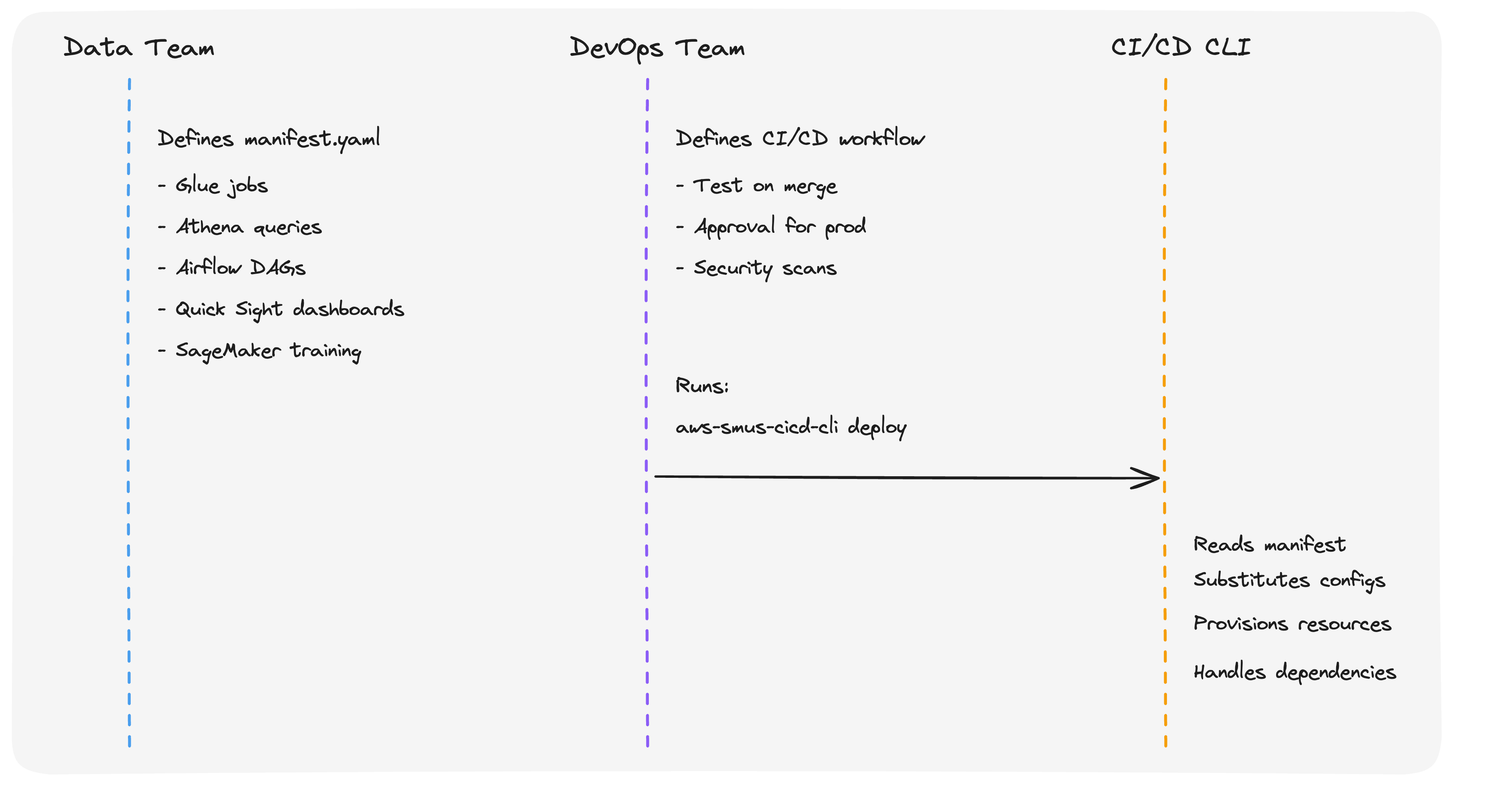
The CI/CD CLI introduces a clean separation of concerns between data teams and DevOps teams.
Data teams define what to deploy in a declarative YAML manifest (manifest.yaml). The manifest describes the application’s resources, including AWS Glue extract, transform, and load (ETL) jobs, Athena queries, Airflow directed acyclic graphs (DAGs), Quick Sight dashboards, and SageMaker training jobs, along with stage-specific configurations for each environment.
DevOps teams define how and when to deploy using their existing CI/CD systems. They retain full control over their deployment methodology. They choose whether to promote content through git branches, a bundle artifactory, or both; they decide the shape of the pipeline, including which stages to include (dev, staging, pre-prod, prod) and which manual approvals or security gates are required. They run aws-smus-cicd-cli deploy inside GitHub Actions, Jenkins, or GitLab CI workflows without needing to understand which AWS services the application uses or how SageMaker Unified Studio projects are structured. The CLI is a utility for AWS analytics service deployment, not a CI/CD methodology. Your team’s existing conventions for branches, approvals, and pipeline shape stay exactly as they are.
The CLI is the abstraction layer between the two. It reads the manifest, substitutes stage-specific configurations (S3 paths, AWS Identity and Access Management (IAM) roles, account IDs, and connection strings), provisions resources in dependency order, and handles all AWS service interactions.The following diagram illustrates this separation:
Key concepts
Application manifest
Each stage maps to a dedicated SageMaker Unified Studio project. This one-stage-to-one-project mapping is the foundation of CI/CD isolation: each project has its own domain, IAM boundaries, connections, and data, so changes in dev can never affect prod. For stronger isolation, projects can span different AWS accounts and AWS Regions. For example, dev in a sandbox account and prod in a production account in a different Region. Because each stage is a real SageMaker Unified Studio project, teams can open it in the console at any time to observe workflows, inspect resources, and troubleshoot deployments. Project membership is managed per project, so you control exactly who has access to each stage. For example, developers in dev and a release team in prod.The manifest file is the single source of truth for your application. It declares:
Content: application code from git repositories, data files from S3, Quick Sight dashboards, and workflow definitions.
Stages: environment-specific project mappings (dev, test, prod, etc.), each isolated as described earlier.
Configuration: stage-specific settings that are substituted automatically at deploy time.
Here is an example manifest for an analytics application with AWS Glue ETL and Quick Sight: applicationName: SalesAnalyticsDashboard
Each stage must map to a separate SageMaker Unified Studio project, providing full isolation between environments. The CLI substitutes variables like ${AWS_ACCOUNT_ID} and ${AWS_REGION} at deploy time based on the target environment.
Bundles
A bundle is an immutable, versioned archive of your application. The bundle command reads from a source stage (typically dev) and packages the application code, workflow definitions, and resolved configurations into a self-contained artifact. The deploy command then applies that artifact to one or more target stages (test or prod).
This stage-to-bundle-to-stage promotion model supports controlled rollout through quality gates:
# Package from dev
aws-smus-cicd-cli bundle --manifest manifest.yaml

# Deploy to test
aws-smus-cicd-cli deploy --manifest app.tar.gz --targets test

# Validate the test deployment
aws-smus-cicd-cli test --manifest manifest.yaml --targets test

# Promote the same bundle to prod
aws-smus-cicd-cli deploy --manifest app.tar.gz --targets prod
The same artifact is deployed at every stage without rebuilding, providing audit trails and reproducible deployments for regulated industries.
SageMaker Catalog integration
The CLI manages Amazon SageMaker Catalog resources as part of the deployment process. You can define catalog assets, glossaries, glossary terms, form types, asset types, and metadata forms, in your manifest. During deployment, the CLI searches for assets in the catalog, creates subscription requests for required data access, and waits for approval before proceeding. This automates the data governance workflow that teams previously handled manually.
CLI commands
The CI/CD CLI provides commands that cover the full deployment lifecycle:
Command
Description
describe
Validates the manifest, checks that target projects exist, and confirms the execution role has required permissions. Use –connect to validate against live AWS environments.
bundle
Reads from a source stage and packages application code, workflow definitions, and configurations into an immutable, versioned archive.
deploy
Applies bundle contents to one or more target stages. Provisions resources in dependency order.
test
Runs post-deployment validation to confirm services are running and ready for workloads.
create
Generates a starter manifest from an existing SageMaker Unified Studio project.
run
Triggers Airflow workflow execution on MWAA or Airflow Serverless connections.
monitor
Monitors workflow execution status in real time.
logs
Fetches and streams workflow execution logs.
destroy
Removes deployed resources and projects for cleanup or failure recovery.
Walkthrough: deploying a Quick Sight dashboard with AWS Glue ETL
In this section, we walk through deploying an analytics application that uses AWS Glue for ETL, Athena for queries, and Quick Sight for dashboards. This example is available in the GitHub repository.
Use case
An analytics team owns a Sales Analytics Dashboard built on AWS Glue ETL, Athena, and Quick Sight. They want to promote changes from a development environment to production with reproducible builds, automated validation, and a clear approval gate between stages, without writing custom deployment scripts or exposing data engineers to AWS provisioning details.
Solution overview
We use a sample application from the CI/CD CLI GitHub repository that includes AWS Glue ETL scripts, an Airflow workflow definition, a Quick Sight dashboard bundle, and integration tests. A single manifest.yaml describes the application and its dev and prod stages. The CLI handles the full lifecycle: bundle the app from dev, deploy it to test, run validation, and promote the same immutable artifact to prod.
Prerequisites
Before you begin, make sure you have the following:
Existing SageMaker Unified Studio projects for your target stages.
Solution architecture
Each stage in the manifest maps to a dedicated SageMaker Unified Studio project (see the separation-of-concerns diagram in “How the CI/CD CLI works” earlier in this post). At deploy time, the CLI uploads ETL scripts and workflow definitions to the project’s S3 storage connection, provisions the Airflow workflow in MWAA Serverless, runs the workflow to create AWS Glue jobs and databases, and imports the Quick Sight dashboard. The same bundle artifact is applied to every downstream stage, ensuring dev, test, and prod stay in sync while remaining fully isolated.
Solution implementation
Step 1: Install the CLI
Install the CLI from PyPI:
pip install aws-smus-cicd-cli
Step 2: Create or customize a manifest
Clone the repository and start from the analytics example:
The example includes AWS Glue ETL scripts, an Airflow workflow definition, a Quick Sight dashboard bundle, and integration tests. Open manifest.yaml and update the project, domain, and deployment_configuration values under each stage so they match your own SageMaker Unified Studio projects and connection names.Alternatively, generate a manifest from an existing project: aws-smus-cicd-cli create --domain-id <your-domain-id> --dev-project-id <your-project-id>
Step 3: Validate your configuration
Run the describe command with --connect to verify your environment is ready. This connects to your AWS environment and validates that target projects exist, the execution role has the required permissions, and connections are reachable. Fix any issues before deploying.
aws-smus-cicd-cli deploy --targets test --manifest manifest
During deployment, the CLI:
Uploads ETL scripts and workflow definitions to S3 using the project’s storage connection.
Creates the Airflow workflow in MWAA Serverless.
Runs the workflow, which provisions AWS Glue jobs, creates databases, and runs ETL transformations.
Imports the Quick Sight dashboard and refreshes datasets with the latest data.
Processes any catalog asset subscriptions defined in the manifest.
Step 5: Validate
Run post-deployment validation to confirm services are running and ready for workloads:
aws-smus-cicd-cli test --manifest manifest.yaml --targets test
Step 6: Promote to production
Promote the same bundle artifact that was validated in the test stage to production. This guarantees the exact same artifact runs in prod:
# Promote the same bundle that was validated in test to prod

aws-smus-cicd-cli deploy --manifest app.tar.gz --targets prod
Integrating with GitHub Actions
The CLI works with existing CI/CD solutions. The GitHub repository includes reusable workflow templates that DevOps teams can adopt directly.The following is an example of a GitHub Actions workflow that implements a full bundle-based deployment pipeline:
In the next section, we cover which AWS services and workload types the CLI supports.
Supported workloads
The CLI deploys applications that span the following AWS services through Airflow workflow definitions:
Analytics and BI: AWS Glue ETL jobs and crawlers, Amazon Athena queries, Amazon Quick Sight dashboards, Amazon EMR jobs, Amazon Redshift queries.
Machine learning: SageMaker training jobs, ML model endpoints, SageMaker AI Pipelines.
Code and workflows: Jupyter notebooks, Python scripts, Airflow DAGs (MWAA and MWAA Serverless).
Data and storage: S3 data files, Git repositories, SageMaker Catalog resources (glossaries, glossary terms, form types, asset types, assets, data products, metadata forms).
The examples directory includes working applications for each of these patterns, with manifests, workflow definitions, and integration tests.
Failure recovery
If a deployment fails, the CLI stops at the point of failure and reports the error with a detailed stack trace. To recover:
Run aws-smus-cicd-cli describe --connect to check which resources exist and which permissions are missing.
Fix the issue and rerun aws-smus-cicd-cli deploy.
For bundle-based deployments, redeploy a previous bundle version.
Use aws-smus-cicd-cli destroy --targets <target> --force to clean up a failed deployment.
In this post, you learned how the Amazon SageMaker Unified Studio CI/CD CLI gives data and DevOps teams a clean separation of concerns: data teams describe their application once in a YAML manifest, and DevOps teams deploy it with a single command through their existing CI/CD pipelines. You saw how stages map to isolated SageMaker Unified Studio projects (optionally spanning AWS accounts and Regions), how bundles provide immutable, reproducible promotion through test and production, and how the CLI integrates with GitHub Actions, Jenkins, GitLab CI, and Azure DevOps. You also walked through deploying a Glue-and-Quick-Sight analytics application from dev through to prod.
Get started
The CI/CD CLI is available at no additional cost in all AWS Regions where Amazon SageMaker Unified Studio is available. You pay only for the underlying AWS resources provisioned during deployment.
Use the following steps to try it out:
Install the CLI:
pip install aws-smus-cicd-cli
Browse the example applications for analytics and ML patterns.
We are excited to announce CDK Mixins, a feature of the AWS Cloud Development Kit (CDK) that fundamentally changes how you compose and reuse infrastructure abstractions. In this post, you will learn how to use CDK Mixins to apply sophisticated features to any construct – whether L1, L2, or custom – without being locked into specific implementations.
Background
The AWS Cloud Development Kit (CDK) is an open-source software development framework for defining cloud infrastructure in code and provisioning it through AWS CloudFormation. It contains pre-written, modular, and reusable cloud components known as constructs. Constructs are the basic building blocks representing one or more AWS CloudFormation resources and their configuration.
Traditionally, we organize CDK constructs into three levels. L1 constructs map directly to CloudFormation resources. L2 constructs offer higher-level abstractions with convenience methods, security defaults, and helper functions. L3 constructs (also known as patterns) combine multiple resources to solve specific use cases. However, this architecture creates a fundamental trade-off: you must choose between immediate access to new AWS features (L1) and sophisticated abstractions (L2/L3). Teams often need to customize L2 constructs, rebuilding entire construct libraries to meet their specific requirements.
CDK Mixins solve this problem by decoupling abstractions from construct implementations. Instead of bundling all features into monolithic L2 constructs, Mixins allow you to compose exactly the capabilities you need, apply them to any construct type, and maintain full access to underlying CloudFormation properties.
What are CDK Mixins?
CDK Mixins let you compose reusable abstractions and apply them to constructs after creation. You mix and match modular capabilities to build exactly the infrastructure you need. Unlike traditional L2 constructs that bundle all features together, Mixins give you fine-grained control over which abstractions apply.
Key benefits include:
Universal Compatibility: Apply the same abstractions to L1 constructs, L2 constructs, or custom constructs
Composable Design: Mix and match features without inheriting unwanted behaviors
Cross-Service Abstractions: Create custom mixins that work across different AWS services
Day-One Coverage: Access new AWS features immediately while keeping existing L2 or L3 constructs
Type Safety: Maintain compile-time guarantees and IDE support
Mixins and Aspects
CDK Aspects are a way to apply an operation to all constructs in a given scope, commonly used for validation, compliance, and tagging. Mixins and Aspects are complementary. Mixins apply features immediately to specific constructs, while Aspects enforce rules broadly across a scope during synthesis. A common pattern is to use Mixins to configure resources and Aspects to validate that the configuration is correct.
Using CDK Mixins
CDK Mixins ship with aws-cdk-lib, and you access service-specific mixins through the same imports you already use. They work across L1, L2, and L3 constructs:
import * as cdk from 'aws-cdk-lib/core';
import * as s3 from 'aws-cdk-lib/aws-s3';
import { CfnBucketPropsMixin } from '@aws-cdk/cfn-property-mixins/aws-s3';

// CDK Mixins can be used with L1s
new s3.CfnBucket(stack, "MixinsL1DemoBucket")
  // Use the fluent .with() syntax (available in JavaScript/TypeScript)
  // .with() silently skips unsupported constructs
  .with(new s3.mixins.BucketVersioning());

// ... or with L2s
new s3.Bucket(stack, "MixinsL2DemoBucket")
  // Cfn Property Mixins provide type-safe fallbacks for L2s
  // and configuration after initial creation
  .with(new CfnBucketPropsMixin({
    objectLockEnabled: true,
    objectLockConfiguration: {
      objectLockEnabled: "Enabled",
      rule: {
        defaultRetention: {
          mode: "COMPLIANCE",
          days: 30,
        },
      },
    },
  }));
You can also use Mixins.of() to apply Mixins in other languages or with more control over which constructs receive the mixin:
// Use Mixins.of() to apply Mixins in other languages
// This also gives you more options to apply only to certain constructs
cdk.Mixins.of(stack, cdk.ConstructSelector.byId('MixinsL1DemoBucket'))
  .apply(new s3.mixins.BucketAutoDeleteObjects());
Apply mixins at scale to entire construct trees or specific resource types:
// Apply your Mixins to the whole app
cdk.Mixins.of(app).apply(new MyDataRecovery());
// ... or only to some constructs
cdk.Mixins.of(app, cdk.ConstructSelector.resourcesOfType(s3.CfnBucket.CFN_RESOURCE_TYPE_NAME)).apply(new MyDataRecovery());
Creating Custom Mixins
Creating your own Mixins is straightforward; they are simple classes extending cdk.Mixin and implementing the IMixin interface. The supports() method determines which constructs the mixin can apply to, and applyTo() modifies the construct in place. Here’s a custom mixin that enables data recovery features across both Amazon Simple Storage Service (Amazon S3) buckets and Amazon DynamoDB tables:
// It's easy to develop your own Mixins
class MyDataRecovery extends cdk.Mixin implements IMixin {
  public supports(construct: any): construct is s3.CfnBucket | dynamodb.CfnTable {
    // Mixins can be cross-service and support different resources at once
    return s3.CfnBucket.isCfnBucket(construct) || dynamodb.CfnTable.isCfnTable(construct);
  }

  // applyTo modifies the construct in place (returns void)
  public applyTo(construct: IConstruct): void {
    if (s3.CfnBucket.isCfnBucket(construct)) {
      construct.versioningConfiguration = {
        status: 'Enabled',
      };
    }

    if (dynamodb.CfnTable.isCfnTable(construct)) {
      construct.pointInTimeRecoverySpecification = {
        pointInTimeRecoveryEnabled: true,
      };
    }
  }
}
Once defined, you can apply your custom mixin to resources:
// ... and to use them:
new s3.Bucket(stack, 'AcmeBucket');
new dynamodb.TableV2(stack, 'AcmeTable', {
  partitionKey: { name: 'id', type: dynamodb.AttributeType.STRING },
});

// Apply your Mixins to the whole app
cdk.Mixins.of(app).apply(new MyDataRecovery());
// ... or only to some constructs
cdk.Mixins.of(app, cdk.ConstructSelector.resourcesOfType(s3.CfnBucket.CFN_RESOURCE_TYPE_NAME)).apply(new MyDataRecovery());
This pattern enables organizations to create reusable abstractions that work across any construct type, ensuring consistent security and compliance policies throughout their infrastructure.
Mixin Behavior Control
Control how to apply Mixins with three distinct modes: graceful application, requireAll, and requireAny. The report getter lets you inspect which constructs were successfully modified and add custom assertions:
// Graceful: apply() silently skips unsupported constructs
const logGroup = new logs.CfnLogGroup(stack, 'LogGroup');
cdk.Mixins.of(logGroup).apply(new s3.mixins.BucketAutoDeleteObjects());

// requireAll: Throws if ANY selected construct is not supported by the mixin
cdk.Mixins.of(logGroup).apply(new s3.mixins.BucketAutoDeleteObjects()).requireAll();

// requireAny: Throws if NO selected construct is supported by the mixin
cdk.Mixins.of(stack).apply(new s3.mixins.BucketVersioning()).requireAny();
Use the report getter to inspect application results and the selectedConstructs getter to see which constructs matched the selector:
const applicator = cdk.Mixins.of(app, cdk.ConstructSelector.resourcesOfType(s3.CfnBucket.CFN_RESOURCE_TYPE_NAME));
const result = applicator.apply(new s3.mixins.BucketVersioning());

// See which constructs were matched by the selector
console.table(applicator.selectedConstructs.map(c => c.node.path));

// Inspect which constructs were successfully modified, grouped by construct
console.table(result.report.map(r => ({ construct: r.construct.node.path, mixin: util.inspect(r.mixin) })));
This flexibility allows you to choose the right behavior for your use case, whether you want to apply Mixins opportunistically, enforce that at least one construct matches, or require that every selected construct is supported.
ECS ClusterSettings mixin
The ClusterSettings mixin enables you to apply Amazon ECS cluster settings like enhanced Container Insights to both L1 and L2 clusters. It handles array merging intelligently, updating existing settings by name or appending new ones:
import * as ecs from 'aws-cdk-lib/aws-ecs';
import * as ec2 from 'aws-cdk-lib/aws-ec2';

// Works with L1 constructs
new ecs.CfnCluster(stack, 'L1Cluster', { clusterName: 'my-cluster' })
  .with(new ecs.mixins.ClusterSettings([
    { name: 'containerInsights', value: 'enhanced' },
  ]));

// Works with L2 constructs too
new ecs.Cluster(stack, 'L2Cluster', { vpc, clusterName: 'my-cluster' })
  .with(new ecs.mixins.ClusterSettings([
    { name: 'containerInsights', value: 'enhanced' },
  ]));
S3 mixins: PublicAccessBlock and BucketPolicyStatements
New S3 mixins provide fine-grained controls. The PublicAccessBlockMixin configures public access settings, and the BucketPolicyStatements lets you add bucket policy statements declaratively:
import * as s3 from 'aws-cdk-lib/aws-s3';

// Block all public access on S3 buckets
new s3.CfnBucket(stack, 'SecureBucket')
  .with(new s3.mixins.BucketBlockPublicAccess());

// Apply public access block across all S3 buckets in the app
cdk.Mixins.of(app, cdk.ConstructSelector.resourcesOfType(s3.CfnBucket.CFN_RESOURCE_TYPE_NAME))
  .apply(new s3.mixins.BucketBlockPublicAccess())
  .requireAll();
Vended logs and log delivery
Setting up vended log delivery in CloudFormation typically requires coordinating multiple resources – AWS::Logs::DeliverySource, AWS::Logs::DeliveryDestination, and AWS::Logs::Delivery to connect them – along with the correct IAM permissions for each destination type. You must repeat this boilerplate for every resource you want to deliver logs from, and it varies by service.
CDK Mixins collapse this complexity into a single .with() call. Because Mixins decouple the log delivery abstraction from any specific construct, the same pattern works across all 47 supported AWS resources – whether you’re using L1 or L2 constructs. While still in preview, this is one of the most compelling examples of why Mixins matter: you get a sophisticated, cross-service abstraction that would traditionally require dedicated L2 construct support for each of those 47 resources.
// NOTE: Vended log delivery mixins are still in @aws-cdk/mixins-preview
import * as wafv2Mixins from '@aws-cdk/mixins-preview/aws-wafv2/mixins';

// Set up vended log delivery to an S3 bucket
const bucket = new s3.Bucket(stack, 'LogBucket');
new wafv2.CfnWebACL(stack, 'WebAcl', { /* ... */ })
  .with(new wafv2Mixins.CfnWebACLAccessLogs().toS3(bucket));

// Same pattern, different destination - works identically
const logGroup = new logs.LogGroup(stack, 'LogGroup');
new wafv2.CfnWebACL(stack, 'WebAcl2', { /* ... */ })
  .with(new wafv2Mixins.CfnWebACLAccessLogs().toLogGroup(logGroup));
Without Mixins, adding vended log delivery to an L1 construct would mean either waiting for L2 support or manually wiring up the three CloudFormation resources and permissions yourself. Mixins let you bring this L2-quality abstraction to any construct immediately.
For cross-account centralized logging, the toDestination() method sends logs to a pre-created delivery destination, so you can aggregate logs in a shared account without granting direct access to the destination resource:
CDK Mixins core functionality – including cdk.Mixins, cdk.ConstructSelector, and the .with() syntax – is included in aws-cdk-lib. You access service mixins through standard service imports (e.g. s3.mixins, ecs.mixins). CloudFormation property mixins for type-safe L1 property overrides come from the separate @aws-cdk/cfn-property-mixins package.
CDK Mixins represent a fundamental shift in how we think about infrastructure abstractions. By decoupling capabilities from construct implementations, Mixins give you the freedom to compose exactly the infrastructure you need whether you are using L1 constructs for access to new CloudFormation resources, L2 constructs for convenience, or custom constructs for enterprise requirements.
Since the initial developer preview, the ecosystem has grown rapidly: log delivery mixins for 47 resources, EventBridge event pattern helpers for 26 services, ECS cluster settings, S3 security mixins, and resource policy traits that bring L2-style permissions to L1 constructs. We refined the API with requireAll/requireAny for precise behavior control and application reporting.
We are excited to see what the community builds with CDK Mixins. Share your feedback, create custom Mixins, and help shape the future of infrastructure as code with AWS CDK.
The financial services industry (FSI) is using AI to transform how financial institutions serve their customers. AI solutions can help proactively manage portfolios, automatically refinance mortgages when rates decrease, and negotiate insurance premiums for customers.
As the regulatory environment and leading practices continue to evolve, we will provide further updates on the AWS Security Blog and AWS Compliance Center. You can also reach out to your AWS account team for help finding the resources you need.
Amazon Web Services (AWS) is pleased to announce the successful completion of Payment Card Industry Personal Identification Number (PCI PIN) and PCI Point-to-Point Encryption (PCI P2PE) assessments for the AWS Payment Cryptography service. This assessment expands the AWS Payment Cryptography compliance portfolio, with AWS now validated as a component provider for Key Management (KMCP) and Key Loading (KLCP) in addition to the existing Decryption Management (DMCP) attestation, and extends PCI PIN and P2PE coverage to the South America (São Paulo) and Asia Pacific (Sydney) AWS Regions.
With Payment Cryptography, your payment processing applications can use payment hardware security modules (HSMs) that are PCI PIN Transaction Security (PTS) HSM certified and fully managed by AWS, with PCI PIN and P2PE-compliant key management. These attestations give you the flexibility to deploy your regulated workloads with reduced compliance overhead.
The PCI P2PE Decryption Component enables payment applications to use AWS to decrypt credit card transactions from payment terminals, and PCI PIN attestation is required for applications that process PIN-based debit transactions. The PCI P2PE Key Management and Key Loading Component attestations enable applications to use AWS for physical key exchange and to support key management use cases including key injection. To learn more about the new Physical Key Exchange feature, see the AWS What’s New announcement. With these capabilities, AWS Payment Cryptography enables customers to manage cryptographic keys in accordance with PCI standards and industry best practices, reducing the operational burden of maintaining compliant key management infrastructure.
The PCI PIN and PCI P2PE compliance packages for AWS Payment Cryptography includes the following reports:
PCI PIN Attestation of Compliance (AOC) – Demonstrates that AWS Payment Cryptography was successfully validated against the PCI PIN standard with zero findings
PCI PIN Responsibility Summary – Provides guidance to help AWS customers understand their responsibilities in developing and operating a highly secure environment for handling PIN-based transactions
PCI P2PE DMCP Attestation of Validation (AOV) – Demonstrates that AWS Payment Cryptography was successfully validated against the requirements for a PCI P2PE Decryption Management System with zero findings
PCI P2PE KMCP Attestation of Validation (AOV) – Demonstrates that AWS Payment Cryptography was successfully validated against the requirements for a PCI P2PE Key Management Component Provider with zero findings
PCI P2PE KLCP Attestation of Validation (AOV) – Demonstrates that AWS Payment Cryptography was successfully validated against the requirements for a PCI P2PE Key Loading Component Provider with zero findings
P2PE Component User’s Guide and Annual Component Report– Describes the AWS Payment Cryptography service assessment scope as a PCI P2PE Decryption Component, Key Loading Component, and Key Management Component and illustrates PCI P2PE compliance responsibilities for both the service and customers using the service for point-to-point encryption processing
AWS was evaluated by Coalfire, a third-party Qualified Security Assessor (QSA). Customers can access the PCI PIN Attestation of Compliance (AOC) report, the PCI PIN Shared Responsibility Summary, the PCI P2PE Attestation of Validation, and P2PE Decryption Component User’s Guide and Annual Decryption Component Report through AWS Artifact.
To learn more about our PCI programs and other compliance and security programs, visit the AWS Compliance Programs page. As always, we value your feedback and questions; reach out to the AWS Compliance team through the Compliance Support page.
If you have feedback about this post, submit comments in the Comments section below. If you have questions about this post, contact AWS Support.
Today, we’re excited to announce the preview release of full repository code review, a new capability in AWS Security Agent that performs deep, context-aware security analysis of your entire code base. AI-driven cybersecurity capabilities are advancing rapidly. AWS Security Agent can now find vulnerabilities and build working exploits across your entire code base at a scale and speed we haven’t seen before, reasoning like a human security researcher, but operating at machine velocity. Unlike traditional static analysis tools that match code against known vulnerability patterns, full repository code review reasons about your application’s architecture, trust boundaries, and data flows the way a human security researcher would and then produces developer-ready findings with transparent evidence and concrete remediation.
AWS is prioritizing free early access for customers, giving defenders the opportunity to strengthen their code bases and share what they learn so the whole industry can benefit.
The challenge: Security analysis that scales with your code
Development teams today face persistent tension. Traditional static application security testing (SAST) tools are fast and reliable at catching known patterns such as a SQL injection sink, an unescaped output, or a hard-coded credential. But modern applications are complex systems of services, APIs, trust boundaries, and authorization logic. The most dangerous vulnerabilities often aren’t single-line pattern violations, rather they’re systemic gaps where a validation function covers four of five cases, one endpoint is missing the authorization annotation its neighbors have, or encoding is applied in one context but not another.
Manual security reviews catch these issues, but they’re expensive, slow, and don’t scale to the pace of modern development. As code bases grow, teams are forced to choose between breadth and depth.
Full repository code review is built to close this gap. It gives your team an automated security researcher that reads and reasons about your entire repository, not just individual lines or file, and surfaces findings that pattern-matching tools miss.
How it works: Profile, search, triage, validate
Full repository code review operates in four stages that mirror how an experienced security engineer conducts an engagement.
Profile the application: The scanner begins by reading the entire repository and building a security model of the application including entry points, trust boundaries, data flows, authorization invariants, and the defenses already in place. This profiling step accounts for every source file, so coverage decisions are explicit rather than implicit. The result is a structured understanding of what the application does and where its attack surface lies.
Search for vulnerabilities: An orchestrator reads the security profile, reasons about the attack surface, and dispatches specialized agents to the highest-risk components. Each agent receives a scoped assignment with specific modules, threat context, and adversarial questions. Agents are free to follow imports and callers beyond their starting scope when a lead takes them there.
Triage and deduplicate: Candidate findings are deduplicated (same sink, same root cause) and low-confidence noise is filtered out before the validation phase.
Validate independently: For every candidate, an independent validator re-reads the source code and traces the full attack chain. The validator argues both sides: it looks for reasons the finding might not be a vulnerability (compensating controls, intentional design), and it looks for reasons it is one (alternative attack paths, edge cases). A finding is only rejected when the evidence against it is as strong as the evidence that promoted it. This process produces findings with structured Verified and Could not verifysections, so your team knows exactly what the scanner confirmed in the code and what depends on your deployment environment.
What makes this different
Full repository code review differs from traditional static analysis in two fundamental ways. It reasons about your application’s actual behavior rather than matching against known vulnerability patterns, and it presents findings with structured evidence that makes uncertainty explicit rather than hidden.
Context-aware reasoning, not pattern matching
Because the scanner builds a security model before searching for vulnerabilities, it reasons about the application’s actual behavior, not only surface-level code patterns.
Consider a real example: A stored procedure had a SQL injection vulnerability. A traditional SAST tool would flag the specific EXECUTE IMMEDIATE call. The scanner went deeper and it identified that the central validation function doesn’t block single quotes in any of its five regex profiles, listed all five profiles by name, explained why single quotes matter for the specific database engine, and noted that another stored procedure skips the validation function entirely. Instead of a point fix on one call site, the finding led to a comprehensive remediation of the systemic gap.
In another case, the scanner found an XSS vulnerability where a value was added to a field without HTML encoding. The same value was properly encoded with Encode.forHtml() in a different context within the same file. Pattern-matching tools miss this because the encoding function is present, but the vulnerability is the inconsistency, which requires understanding the application’s behavior across code paths.
Validated findings with transparent uncertainty
Every finding is structured for efficient developer triage:
Problem: What the code does wrong, with specific file and line references.
Impact: What an attacker gains, with details about deployment context.
Verified and could not verify:What the scanner confirmed directly in code versus what depends on your environment (network segmentation, runtime behavior).
Remediation: Concrete fix suggestions with specific code changes, not generic guidance.
Severity and confidence: Calibrated independently. Severity reflects the impact if the vulnerability is exploitable; confidence reflects how much of the attack chain was verified in code.
How full repository code review fits into your workflow
Full repository code review is designed to complement, not replace, your existing security tooling. Here’s how it fits into a modern development workflow:
Before security reviews:Run a full repository code review before scheduling a penetration test or security review. The review surfaces the obvious and semi-obvious issues so your security team can focus their limited time on the subtle, design-level questions that require human judgment.
When onboarding acquired or open source code:Full repository code review is especially valuable when your team inherits code through acquisitions or vendor dependencies, or from open source components you’re integrating. The scanner builds a security model from scratch, so it doesn’t need institutional knowledge of the codebase.
During architecture reviews:Because the scanner reasons about trust boundaries, data flows, and authorization invariants, its findings often surface architectural issues, not only implementation bugs. Review the scan results alongside your threat models to validate assumptions about how components interact.
Follow our Quickstart guide to set up and execute a full repo code review with AWS Security Agent.
Preview availability and pricing
Full repository code review is available today in preview at no additional charge for AWS Security Agent customers. During the preview, we welcome your feedback as we refine the experience. Use the built-in feedback mechanism in the Security Agent web application or reach out to your AWS account team.
Cloud and AI are transforming industries and societies at unprecedented speed, from accelerating research and enhancing customer experiences to optimizing business processes and enriching public services. At Amazon Web Services (AWS), we believe that for the cloud and AI to reach their full potential, customers need control over their data and choices for how and where they run their workloads. In 2022, we formalized our commitment to control and choice—offering all AWS customers the most advanced set of sovereignty controls and features available in the cloud with the AWS Digital Sovereignty Pledge. As AI adoption accelerated, we’ve been working with customers to help them embrace AI innovation while meeting sovereignty requirements. We’re committed to ensuring customers can continue to harness AI’s transformative capabilities without compromising on the capabilities, performance, innovation, security, and scale of the AWS Cloud to meet their sovereignty needs, including AI sovereignty. Our approach to AI sovereignty is grounded in a deep understanding of these needs and the real-world implementation challenges that come with them.
Through discussions with customers, partners, analysts, and regulators, we’ve learned that digital sovereignty—and AI sovereignty—means different things to different stakeholders. Each country and region has unique, evolving sovereignty requirements, with no uniform guidance on which workloads or sectors must comply. Despite this variation, we’ve identified consistent themes: data sovereignty (including data residency and operator access restrictions) and operational sovereignty (including resilience, survivability, and independence). AI sovereignty builds on these foundations, adding emerging considerations such as preserving cultural norms, values, and local languages in AI outputs. Ultimately, meeting digital and AI sovereignty requirements comes down to providing customers with more control and choice.
Enabling customer control and choice across the AI stack
AI sovereignty requires control and choice across the AI stack—comprehensive cloud infrastructure that combines compute, networking, data management, security controls, specialized application services, and talent. This includes the ability to make deliberate choices across the stack such as location, dependencies, services, and partners that align with customers’ unique needs, regulatory requirements, and innovation objectives. With AWS, customers can develop AI on a trusted foundation where their data remains secure and under their control. Customers have the freedom to choose from a comprehensive range of AI optimized chips—including purpose-built AWS silicon and chips from NVIDIA, AMD, and Intel—so they can select the right chip for the right workload. AWS applies two decades of learned expertise to our comprehensive AI stack, enabling organizations to maintain complete control over their data and operations while accessing cutting-edge capabilities to solve local challenges.
AWS provides customers with the infrastructure and tools to embed AI across the full value chain—not just in isolated use cases, but as a foundational capability enabling them to train and deploy models and build sophisticated AI and generative AI applications with exceptional performance. This enables customers to focus on innovation instead of their infrastructure, bringing the cloud to where they need it most with a range of options including AWS AI Factories, AWS Outposts, AWS Local Zones, AWS Dedicated Local Zones, and AWS Regions including the AWS European Sovereign Cloud. For example, customers who require dedicated deployments to meet their sovereignty requirements for their mission-critical AI workloads can use AWS AI Factories. These physically isolated, dedicated deployments built exclusively for the customer combine the latest AI infrastructure, including AWS Trainium accelerators, NVIDIA GPUs, dedicated networking, and storage. AWS AI Factories address AI sovereignty needs by delivering on-premises AI capabilities to securely perform training, fine tuning and real-time inference.
The AWS AI portfolio offers a comprehensive range of services—from foundation models (FMs) through Amazon Bedrock, to machine learning offerings like Amazon SageMaker, application services like Amazon Q, and developer tools like Kiro—designed to give customers control over their data and choice in how they deploy AI. With Amazon Bedrock, customers can choose from hundreds of models from leading providers like AI21 Labs, Anthropic, Amazon, Cohere, Mistral AI, and OpenAI. Customers can evaluate and select the most suitable FMs for their specific needs and choose where they deploy them, and fine-tune models privately with their own data. Customers are always in control of their data. Critically, no customer inputs to or outputs from Amazon Bedrock are used to train Amazon Nova or any third-party models.
Supporting national AI strategies
Successful AI strategies require building a holistic environment nurturing local talent, supporting startups, developing industry-specific applications, and fostering public-private partnerships. The cloud has transformed AI from an exclusive technology requiring massive investment into an accessible tool for innovation across all sectors and organization sizes. While technical infrastructure gets much of the attention when considering AI sovereignty, the cultural and strategic dimensions of national FMs are equally critical. These FMs aren’t merely computational tools, they can encode elements of cultural knowledge, linguistic nuance, and societal context, making local relevance a design consideration rather than an afterthought. These FMs serve purposes that extend beyond technical capabilities. Locally trained FMs can reflect national educational curricula and cultural values while understanding local legal systems, business practices, and regulatory frameworks. Models trained on local languages, dialects, and cultural contexts support linguistic diversity and help underrepresented languages gain representation in AI products and services.
AWS supports vital national priorities and customers’ missions, such as the preservation of culture norms, values, and local languages development of regional and local language model capabilities. To customize models, customers can use Amazon SageMaker AI for voice, domain specialization, and to evaluate models for accuracy. For example, the first Greek LLM made available in March 2024 was Meltemi—built on top of Mistral-7B, running on AWS infrastructure, and continually pretrained to extend its proficiency in the Greek language using a dataset of 28.5 billion Greek tokens. Meltemi is available on HuggingFace. SEA-LION—a family of open source, multilingual LLMs for Southeast Asia—was trained entirely on AWS with managed GPU clusters. Their team completed a 3B-parameter model in only 3 months—a 60% faster timeline than comparable on-premises projects.
Verifiable control over data access
Sovereignty isn’t only about where data resides—it’s about who can access it and under what conditions. In the AI context, access restriction extends beyond infrastructure to cover model inputs, outputs, training processes, and the operational environments in which AI runs. Unlike traditional infrastructure, AI workloads introduce new access surfaces: the model itself, the data used to train it, and the inference pipeline through which sensitive inputs flow. This furthers the need for verifiable governance and identity propagation in IT systems.
To help ensure the confidentiality and integrity of customer data, all modern Amazon Elastic Compute Cloud (Amazon EC2) instances including those that offer AI accelerators, such as AWS Inferentia and AWS Trainium, are backed by the industry-leading security capabilities of the AWS Nitro System. By design, there is no mechanism for anyone at AWS to access customer data on Nitro EC2 instances that customers use to run their workloads. AWS services—including those with AI capabilities built on Amazon EC2—inherit these same protections. These protections apply to AI data running in the AWS Nitro System so that they’re protected at every stage—from model training to inference. The NCC Group, an independent cybersecurity firm, has validated the design of the Nitro System. We believe providing this level of transparency is critical in building and sustaining trust.
As AI agents increasingly take actions across systems on behalf of users, controlling who and what can access resources—and ensuring appropriate human oversight—becomes critical. AWS Identity and Access Management (IAM) helps ensure that only authorized users and applications can access AI resources through fine-grained permissions and comprehensive audit trails. For AI agents and automated workloads, Amazon Bedrock AgentCore Identity provides identity and credential management, so agents operate with the right permissions and nothing more.
Transparency and assurance
Transparency is at the core of our digital sovereignty commitment. We provide comprehensive industry-leading technical measures, operational controls, and contract protections that give customers control over where they locate their data, who can access it, and how it’s used. To give greater assurance on how AWS services are designed and operated, we continue to seek out and secure third-party attestations, accreditations, and certifications that help our customers meet their compliance needs.
We continue to deepen our assurances and transparency to customers—such as updating our AWS Service Terms to reflect our technical protections commitments (e.g. AWS Nitro System), providing detailed commitments as to our handling of thirid-party requests for customer data in our agreements, and providing supplemental explanations and resources (e.g. CLOUD Act blog) to empower customers to make informed choices on sovereignty matters. These efforts extend into our commitment to responsible AI, providing customers the confidence to build and operate AI applications responsibly using AWS Services. ISO/IEC 42001 is an international management system standard that outlines requirements and controls for organizations to promote the responsible development and use of AI systems. AWS is the first major cloud service provider to achieve ISO/IEC 42001 accredited certification for AI services, covering Amazon Bedrock, Amazon Q Business, Amazon Textract, and Amazon Transcribe. In November 2025, AWS successfully completed its first surveillance audit for ISO 42001:2023 with no findings, reiterating the continual commitment of AWS to responsible AI practices.
Innovative technology requires a secure and trustworthy foundation. AWS supports more than 140 security standards and compliance certifications that our customers and partners can inherit to help comply with local laws and regulations. For two decades, we’ve deeply engaged with regulators and cybersecurity authorities to align our offerings with national priorities and ensure our solutions support both innovation and control. We actively contribute to frameworks that respond to new developments without stifling progress.
Sustained commitment to helping customers achieve their sovereignty goals
AWS is committed to giving customers the same control and choice over their AI systems as they have over their data. We help customers harness AI’s transformative power while maintaining the capabilities, performance, innovation, security, and scale of AWS Cloud. As cloud and AI evolve, AWS will continue offering the most advanced sovereignty controls and features available.
If you have feedback about this post, submit comments in the Comments section below.
If you’re looking to strengthen your organization’s security posture on Amazon Web Services (AWS) but aren’t sure where to start, then we’re here to help. Security Activation Days are complimentary, virtual, hands-on workshops designed to help you get practical experience with AWS security services in a single session.
What to expect
Each Security Activation Day is a 3–6 hour virtual workshop where you work directly with AWS security services in real-world scenarios. Through a combination of presentations, demos, and workshops, you will get hands-on practice guided by AWS security specialists either in your own environment or in an AWS-provided sandbox.
Topics rotate across the full spectrum of AWS security, identity, and governance services, including threat detection and response, identity and access management, network and application protection, data protection, and governance and compliance. You will leave with actionable knowledge you can apply to your workloads immediately—not a to-do list of things to research later.
Who should attend
Security Activation Days are made for builders—security engineers, cloud architects, and DevOps teams who want to go deeper on specific AWS security capabilities. Whether you’re evaluating a service for the first time or looking to operationalize something you’ve already deployed, these sessions meet you where you are.
What attendees are saying
With over 6,400 attendees across 90 events so far in 2026, Security Activation Days consistently earn a 4.8 out of 5 satisfaction rating. Participants tell us the hands-on format is what makes the difference: there’s no substitute for actually configuring a service and seeing the results in real time.
How to register
We run Security Activation Days year-round across all time zones, with new sessions added regularly. Find a session, show up ready to learn, and start building today.
If you have feedback about this post, submit comments in the Comments section below.
Read all about the latest AWS security features, compliance updates, and hands-on resources in our new, monthly digest posts. You’ll find expert blog posts, new service capabilities, code samples, and workshops.
AWS Security Blog posts
This month’s AWS Security Blog posts covered AI security, identity and access management, threat intelligence, data protection, and multicloud operations. Whether you’re securing agentic AI systems, upgrading to post-quantum cryptography, or streamlining forensic collection, these posts offer practical guidance across the security landscape.
Can I do that with policy? Understanding the AWS Service Authorization Reference Authors: Anshu Bathla, Prafful Gupta | Published: April 27, 2026 Learn to use the AWS Service Authorization Reference to determine what’s achievable with IAM policies, recognize scenarios needing alternative solutions, and build more effective security controls.
AI Security
Secure AI agent access patterns to AWS resources using Model Context Protocol Author: Riggs Goodman III | Published: April 14, 2026 Learn to secure AI agent access to AWS resources via MCP using three principles: least privilege, organizational role governance, and differentiating AI-driven from human-initiated actions.
Four security principles for agentic AI systems Authors: Mark Ryland, Riggs Goodman III, Todd MacDermid | Published: April 2, 2026 Learn four security principles from AWS’s NIST response for securing agentic AI: secure development lifecycle, traditional controls, deterministic external enforcement, and earned autonomy through evaluation.
Building AI defenses at scale: before the threats emerge Author: Amy Herzog | Published: April 7, 2026 AWS CISO announces Project Glasswing with Anthropic, introducing Claude Mythos Preview for vulnerability research, plus the general availability of AWS Security Agent for autonomous penetration testing.
Governance and compliance
Shift-Left Tag Compliance using AWS Organizations and Terraform Authors: Welly Siauw, Sourav Kundu, Manu Chandrasekhar | Published: April 27, 2026 Learn to validate tag compliance during development using AWS Organizations tag policies, a reusable Terraform tagging module, and a test-driven approach that dynamically validates against live organizational policies.
A framework for securely collecting forensic artifacts into S3 buckets Authors: Jason Garman, Vaishnav Murthy | Published: April 8, 2026 Learn to securely collect forensic artifacts into Amazon S3 using time-limited, least-privilege credentials with AWS STS session policies and automated AWS Step Functions workflows.
How to clone an AWS CloudHSM cluster across Regions Authors: Desiree Brunner, Rickard Löfström | Published: April 20, 2026 Learn to clone an AWS CloudHSM cluster to another Region using CopyBackupToRegion, then synchronize keys—including non-exportable keys—across cloned clusters for disaster recovery.
April Security Bulletins
Investigations of reported security vulnerabilities affecting Amazon and AWS services, software, and products.
This month brings 16 new AWS samples spanning identity, governance, compliance, detection and incident response, AI Security, data protection, and infrastructure security. From beginner-friendly AI agent development on Amazon Bedrock to automated Control Tower re-registration at scale, these ready-to-deploy repositories help you implement security best practices across your AWS environment.
Cognito API Gateway Authorization Demo Learn to implement user-specific data protection using Amazon Cognito, API Gateway, and an AWS Lambda authorizer that enforces JWT sub claim matching to prevent cross-user data access.
Secrets Manager Audit Learn to resolve and report who can access your AWS Secrets Manager secrets—across accounts, through Identity Center, and down to the human behind the IAM role—in a single command.
Sample Agent Skills for Builders A curated collection of installable agent skills that extend AI coding agents (Claude Code, Cursor, Copilot) with production-ready AWS, CDK, security scanning, and engineering workflows.
Compliance Lens Learn to deploy a serverless solution that analyzes AWS Config snapshots across an AWS Organization, compares them against conformance pack rule sets, and visualizes compliance posture via Amazon QuickSight dashboards.
AWS Security Agent Terraform Configuration Learn to provision AWS Security Agent resources using the AWSCC Terraform provider, automating agent space creation, IAM roles, target domain registration, and penetration test setup.
Detection and incident response
AWS Security Agent Demo Suite Learn to use AWS Security Agent across three scenarios: automated design reviews, AI-generated infrastructure code review via GitHub, and penetration testing against intentionally vulnerable applications.
Multi-Tenant OpenClaw on Firecracker Learn to deploy isolated, multi-tenant OpenClaw AI agents on AWS using Firecracker microVMs with per-tenant kernel/network isolation, auto-scaling, backup/restore, and a web management console.
April 2026 reinforces that securing AI workloads now requires the same rigor applied to traditional infrastructure. The posts and samples in this edition provide concrete patterns for enforcing least privilege on agentic systems, automating governance at organizational scale, and preparing cryptographic implementations for post-quantum requirements. The security bulletins address vulnerabilities across compute, networking, and developer tooling, reinforcing the need to apply patches consistently. Each resource includes deployment steps or runnable code so you can validate the approach in your own environment before adopting it. Subscribe to the AWS Security Blog RSS feed to receive updates as they publish, and revisit this digest monthly for a consolidated view of what changed and what to act on.
If you have feedback about this post, submit comments in the Comments section below. If you have questions about this post, contact AWS Support.
Amazon Web Services (AWS) achieved three Standar Nasional Indonesia (SNI) certifications for the AWS Asia Pacific (Jakarta) Region: SNI ISO/IEC 27017:2015, SNI ISO/IEC 27018:2019, and SNI ISO 9001:2015. SNI represents Indonesia’s national standards framework, comprising standards that are broadly applicable across industries within the country. These certifications further demonstrate that AWS services meet nationally recognized requirements.
The certifications were assessed by an independent third-party auditor accredited by the Komite Akreditasi Nasional (KAN), Indonesia’s National Accreditation Committee, in accordance with applicable local regulatory requirements, helping customers rely on trusted, locally recognized validation for their compliance needs.
All three certifications are based on international ISO standards adapted for Indonesia:
SNI 27017 adds cloud-specific security controls that complement ISO/IEC 27001, helping you run workloads securely while reducing security assessment overhead.
SNI 27018 focuses on protecting personally identifiable information (PII) in public clouds. This certification confirms that AWS handles your data according to international privacy standards.
SNI 9001 establishes quality management systems that ensure consistent service delivery and continuous improvement across AWS operations.
Together with the existing SNI 27001 certification achieved in 2023, AWS is now the first cloud service provider (CSP) to hold all four SNI certifications—SNI 27001, SNI 27017, SNI 27018, and SNI 9001—demonstrating comprehensive alignment with Indonesia’s national standards for information security, cloud security, privacy, and quality management, and helping customers address a broad range of regulatory and risk management requirements.
Customers can access the corresponding certificates through AWS Artifact, a self-service portal that provides on-demand access to AWS compliance documentation. For a full list of AWS services covered under the SNI certification, see the Services in Scope compliance page
AWS continues to expand the scope of its compliance programs to help customers meet their architectural, business, and regulatory requirements. For more information regarding these certifications, contact your AWS Accounts team.
We have released our latest compliance guide, ISO/IEC 42001:2023 on AWS, which provides practical guidance for organizations designing and operating an Artificial Intelligence Management System (AIMS) using AWS services.
As organizations deploy AI and generative AI workloads in the cloud, aligning with globally recognized standards such as ISO/IEC 42001:2023 becomes an important step toward strengthening AI governance, risk management, and responsible AI practices. This guide helps cloud architects, AI/ML engineers, security teams, compliance leaders, and DevOps practitioners understand how to implement and operate ISO 42001-aligned controls using AWS services while applying the AWS Shared Responsibility Model for AI.
The guide explains how organizations can integrate AWS services into their AIMS to support the requirements defined in ISO 42001:2023 clauses 4–10 and the Annex A control specific to AI systems. It also highlights how AWS AI services, security capabilities, monitoring, and automation can help customers maintain visibility over AI systems, improve operational consistency, and prepare audit-ready evidence.
While AWS provides a secure and compliant cloud infrastructure with built-in responsible AI capabilities, customers remain responsible for defining their AIMS scope, implementing controls, and demonstrating conformity during certification audits.
Inside the guide:
Overview of the ISO/IEC 42001:2023 framework, including understanding ISO 42001 and its Annexes, and how it relates to the broader ISO AI standards family
Guidance for integrating with AWS security architecture and applying the AWS Shared Responsibility Model for AI workloads
Context and scoping considerations for establishing an AIMS on AWS, including defining AI system boundaries within your environment
Mapping of ISO 42001:2023 clauses 4–10 to AWS services and architectural capabilities, covering organizational context, leadership, planning, support, operation, performance evaluation, and improvement
Implementation guidance for specific Annex A controls (A.2–A.10), including AI policies, internal organization, resources for AI systems, impact assessments, AI system life cycle management, data governance, transparency for interested parties, use of AI systems, and third-party and customer relationships
Recommendations for evidence collection, documentation, and audit readiness using AWS native tooling
Best practices for operationalizing AI compliance activities through automation and infrastructure-as-code
Use this guide to map ISO 42001 clauses and Annex A controls to your AWS environment, automate evidence collection, and reduce the effort involved in preparing for a certification audit.
Building production-ready Apache Flink applications requires learning a complex ecosystem. The learning curve is steep for newcomers, and even experienced Flink developers encounter complexity when scaling applications or troubleshooting production issues. With the new KiroPower and Agent Skill for Amazon Managed Service for Apache Flink, you can get AI-assisted guidance for building, improving, and migrating streaming applications directly in your development environment, with recommendations that are grounded in best practices.
The Managed Service for Apache Flink Kiro Power and Agent Skill helps you navigate challenges across the Flink application lifecycle. For new development, the tool provides contextual guidance on application architecture, state management patterns, and connector selection. For existing application improvements, it analyzes your existing code to identify performance bottlenecks, reliability risks, and opportunities for improvement. If you’re upgrading from Apache Flink 1.x to 2.x, it detects compatibility issues and provides targeted refactoring steps to modernize your applications.
In this post, we walk through installing the Power and Skill, using Amazon Kinesis Data Streams to build a Kinesis Data Stream-to-Kinesis Data Stream streaming pipeline, and migrating an existing application to Flink 2.2. You can follow along with this use case to see how the Managed Service for Apache Flink Kiro Power can help you build a resilient, performant application grounded in best practices.
Flink 1.x to 2.2 migration guidance with state compatibility assessment
Connector-specific guidelines
The content is maintained in a single repository with use case specific entry points that are dynamically loaded depending on your needs.
Prerequisites
To use the tool, you need:
A development machine running macOS, Linux, or Windows with Java 11 or later (Java 17 for Flink 2.2) and Apache Maven installed
One of the following AI development tools:
Kiro IDE
Cursor
Claude Code
Other Agent Skills-compatible tools
Basic knowledge of Java and stream processing concepts (helpful but not required)
An AWS Identity and Access Management (IAM) role configured with access to create and run Managed Service for Apache Flink applications, create Amazon Simple Storage Service (Amazon S3) buckets for Flink application dependencies, create Kinesis Data Streams for streaming, and create IAM roles (required if deploying an application)
Verify that the power is listed in the installed powers in the Kiro IDE.
The Power is now installed and automatically activates when you work on Flink-related development activities.
Installing as an Agent Skill
Agent Skills are discovered automatically by compatible tools through the SKILL.md file. Installation varies by tool:
Per-project installation (available in one project):
# For Cursor
git clone https://github.com/awslabs/managed-service-for-apache-flink-agent-steering-files.git .cursor/skills/flink

# For Claude Code
git clone https://github.com/awslabs/managed-service-for-apache-flink-agent-steering-files.git .claude/skills/flink

# For other Agent Skills-compatible tools
git clone https://github.com/awslabs/managed-service-for-apache-flink-agent-steering-files.git .agents/skills/flink
Personal installation (available across projects):
# For Cursor
git clone https://github.com/awslabs/managed-service-for-apache-flink-agent-steering-files.git ~/.cursor/skills/flink

# For Claude Code
git clone https://github.com/awslabs/managed-service-for-apache-flink-agent-steering-files.git ~/.claude/skills/flink
To verify the installation, interact with the skill in your preferred tool. In Claude Code, you can invoke it with /flink. In Cursor, type / in Agent chat and search for flink. For more information about Agent Skills, see the Agent Skills documentation.
Example: Building a Kinesis-to-Kinesis streaming pipeline
Rather than listing best practices, the Power/Skill actively guides you through making the right architectural decisions at each stage of development.
The following walkthrough demonstrates building a Flink application that reads from Amazon Kinesis Data Streams, analyzes events, and writes to another Kinesis stream. To follow along, run the same prompts in your Kiro IDE or other development tool. In the following prompts, we focus on local development and don’t create AWS resources. However, if you prompt the agent to create and deploy AWS resources, they will incur additional costs.
Starting the conversation
In the Kiro IDE, we can open a new chat in Vibe mode and prompt: “Help me build a Flink application that reads from Kinesis, processes events with windowed aggregations, and writes results to another Kinesis stream”:
What happens next
The AI assistant loads relevant guidance and walks you through the development process:
1. Confirm project requirements and details
Kiro automatically loads the Power based on the context of your prompt. The assistant then asks you questions about your use case to make sure that it builds the right application for your needs:
For the demo, we can prompt for a financial services use case: “I’m in financial services, so let’s use that as the use case. Try calculating volatility in real-time. And let’s use Flink 1.20 for now.”.
Kiro then confirms its assumptions and asks to proceed:
2. Project setup
After we confirm, Kiro generates a project with Flink 1.20 dependencies, Kinesis connectors, and proper scope configuration for Managed Service for Apache Flink deployment. The assistant creates the application structure with proper configuration separation between local development and Managed Service for Apache Flink service-level settings. Then, it creates a Kinesis source with proper deserialization and the sink with partitioning strategy, and windowed aggregation logic with proper state management, TTL configuration, and error handling.
Kiro also compiles the code to verify that it builds correctly. We can then proceed by asking Kiro to help us with running the application locally for testing.
3. Testing the project locally
You can run the application locally to test the results. We can prompt: “Can we run this locally using something like LocalStack to test deploying the job and also see some example results?”
Kiro creates the necessary Docker resources, testing scripts, and deployment steps to run the application locally with synthetic resources. If it encounters bugs or detects issues during the local testing process, it fixes them so that your deployment runs smoothly:
We can also access our local Flink UI to view our application:
4. Deploying the application to Managed Service for Apache Flink
Now that our application is running and generating results end-to-end, we can use the Power for other tasks. For example, you can get guidance on KPU allocation and parallelism settings based on your expected throughput, configure monitoring with CloudWatch metrics, logging, and dashboards for operational visibility, or set up infrastructure as code (IaC) for deploying in Managed Service for Apache Flink. We can prompt: “This is great! Can you help me deploy this application to Managed Service for Apache Flink? I’d like to use CloudFormation for deployment.”
Using the generated AWS CloudFormation templates and deployment scripts, we can deploy our application to AWS with associated resources for Kinesis Data Streams, Amazon S3 buckets for application JAR files, CloudWatch log groups, and IAM roles. Deploying these resources requires IAM credentials with associated permissions and will incur cost for the associated resource usage.
In a traditional workflow, you build your application, deploy to Managed Service for Apache Flink, then discover performance issues or configuration problems in production. You spend time debugging checkpoint failures, serialization errors, or resource bottlenecks.With the Power/Skill, the AI assistant catches these issues during development. When you need complex aggregation and processing logic, it helps you to do so in a way that uses resources efficiently with Flink’s scaling model. When you create an application bug that would cause a crash in production, it helps you identify it early with local end-to-end testing. The Power is configured with guidance and best practices to help with the development process from start to finish.
Example: Migrating to Flink 2.2
The Managed Service for Apache Flink Kiro Power and Agent Skill provide contextual advice specific to your situation. For new developers, it walks through the complete workflow from project setup to deployment, explaining Managed Service for Apache Flink-specific concepts along the way. For migration projects, it analyzes your existing code for Flink 2.2 compatibility issues and provides targeted refactoring guidance. The following example shows how the tool helps with the complex task of migrating from Flink 1.x to 2.2.
1. Assessing migration compatibility
We can ask Kiro to help us upgrade our project from the previous example to Flink 2.2: “I need to migrate my Flink 1.x application to 2.2. Can you help me identify compatibility issues?”
The assistant loads the Managed Service for Apache Flink Kiro Power and analyzes our code to identify potential issues:
In this case, using our generated project on Flink 1.20, Kiro identified the following compatibility issues for the upgrade:
Java 11 must move to Java 17 (minimum for Flink 2.2)
Flink version 1.20.3 must update to 2.2.0
The Kinesis connector must update from 5.1.0-1.20 to 6.0.0-2.0
Time references must change to java.time.Duration in window and lateness calls
The LocalStreamEnvironment instance of check must be removed (class removed in 2.2)
The isEndOfStream() override must be dropped from PriceTickDeserializer (method removed)
implements Serializable must be added to PriceTick and VolatilityResult
It also verified that some parts of the project are already Flink 2.2 compatible. The project uses the new Source Sink V2 APIs, the logging is 2.2 ready, the POJOs with no collection fields are state migration safe, and there are no Kryo registrations or TimeCharacteristic usage.
2. Implementing the migration
We can then ask Kiro to provide a step-by-step migration plan, both for updating the code and deploying to Managed Service for Apache Flink: “Can you help me update the application for Flink 2.2, and help me figure out the steps to upgrade my running Managed Service for Apache Flink application?”
Kiro evaluates the entire application code base. It evaluates it against the Power’s migration guidance and best practices, and provides a comprehensive analysis of the breaking changes, risks, and potential issues that would arise in the upgrade. After we approve the changes, Kiro then proceeds to make the necessary updates to make our application compatible with Flink 2.2 and provide us with a step-by-step upgrade process for the running application:
Now that Kiro has prepared the application for Flink 2.2, highlighted migration risks, and provided us with a clear path to execute the upgrade, you can test the upgrade process with confidence. From here, we can proceed to run our Flink 2.2 application locally, test the upgrade process in a development environment in Managed Service for Apache Flink, and then execute the upgrade in our production environment. If we run into issues, we can return to the Kiro Power to get advice, resolve issues, and unblock our upgrade.
Cleanup
To remove the Power/Skill installation:
For Kiro:
Open Kiro IDE.
Navigate to the Powers tab.
Uninstall the Amazon Managed Service for Apache Flink Power.
For Agent Skills:
# Remove per-project installation
rm -rf .cursor/skills/flink  # or .claude/skills/flink

# Remove personal installation
rm -rf ~/.cursor/skills/flink  # or ~/.claude/skills/flink
If you created Managed Service for Apache Flink applications or associated resources during development, clean the resources up:
Delete the Managed Service for Apache Flink application from the AWS Console.
Remove associated resources for sources and sinks, if created for development.
Delete CloudWatch log groups if no longer needed.
Conclusion
In this post, we showed you how the Kiro Power and Agent Skill for Amazon Managed Service for Apache Flink brings AI-assisted development to stream processing. You can use the tool to overcome Flink’s learning curve, build applications following Managed Service for Apache Flink best practices, and migrate to Flink 2.2 with confidence. To get started, choose the path that fits your workflow:
If you use Kiro, install the Power from the Powers tab and start a new chat with a Flink-related prompt.
If you use Cursor, Claude Code, or another Agent Skills-compatible tool, clone the GitHub repository into your skills directory and reference the steering/ files for guidance.
I have been building with AI agents and MCP tools for a while now, and one question kept coming up: how do you give an agent real, authenticated access to AWS without handing it the keys to the kingdom? Today, there is an answer.
I’m happy to announce the general availability of the AWS MCP Server, a managed remote Model Context Protocol (MCP) server that gives AI agents and coding assistants secure, authenticated access to all AWS services through a small, fixed set of tools.
The AWS MCP Server is part of the Agent Toolkit for AWS, a suite of tooling that includes the MCP Server, skills, and plugins that help coding agents build more effectively and efficiently on AWS.
The AWS MCP Server addresses this through a compact set of tools that do not consume your model’s context window. The call_aws tool executes any of the 15,000+ AWS API operations using your existing IAM credentials. When we will launch new APIs, they will be supported within days. The search_documentation and read_documentation tools retrieve current AWS documentation and best practices at query time, so the agent always works from up-to-date information.
With general availability, we are introducing several new capabilities. The AWS MCP Server now supports IAM context keys, so you no longer need a separate IAM permission to use the server and can express fine-grained access in a standard IAM policy. Documentation retrieval no longer requires authentication. We have also reduced the number of tokens required per interaction, which matters for complex, multi-step workflows.
Also new, the run_script tool lets the agent write a short Python script that runs server-side in a sandboxed environment. The sandbox inherits your IAM permissions but has no network access, so you can give an agent the ability to process data without giving it access to your local file system or a shell. When an agent needs to call multiple APIs and combine the results, making them one at a time is slow and burns context. With run_script, the agent chains API calls, filters responses, and computes results in a single round-trip, which is both faster and more context-efficient.
The most significant addition is the transition from Agent SOPs to Skills. Skills provide curated guidance and best practices for the tasks where agents most commonly make mistakes. This helps agents complete work faster, using validated best practices, with fewer errors and fewer tokens — all of which saves you time and money. Skills are contributed and maintained by AWS service teams. This keeps the tool list short and predictable, which reduces hallucination and keeps the agent focused.
For enterprise customers, the AWS MCP Server provides a clear separation between human and agent permissions. You can use IAM policies or Service Control Policies to specify that a given user can perform mutating operations while the MCP server is restricted to read-only actions. Amazon CloudWatch metrics published under the AWS-MCP namespace let you observe MCP server calls separately from direct human calls, giving you the audit trail that compliance teams require. Amazon CloudTrail captures all API calls for a complete record.
Let’s see it in action For this demo, I chose to use Claude Code, but I can use the AWS MCP Server with any AI agent that supports MCP, which is basically all tools available today: Kiro CLI, Kiro, Cursor, Codex, and more. I configure Claude Code to use the Anthropic Opus 4.6 model.
The question is “how to store embedding on S3″. (embedding is a kind of vector)
It gives me five solutions, all correct, but none using S3 Vectors as I asked. Note that this answer comes from the Opus 4.6 model, not from Claude Code. Any AI tool using the same model will return similar answers because S3 Vectors wasn’t announced at the time the model was trained.
claude mcp add-json aws-mcp --scope user \
   '{"command":"uvx","args":["mcp-proxy-for-aws@latest","https://aws-mcp.us-east-1.api.aws/mcp","--metadata","AWS_REGION=us-west-2"]}'
Let’s analyze the JSON configuration:
I use the user scope to make the server available to all my projects on my laptop.
uvx mcp-proxy-for-aws is the command to launch the proxy; the rest of the arguments are parameters passed to the proxy.
https://aws-mcp.us-east-1.api.aws/mcp is one of the two regional endpoints for the AWS MCP Server. The proxy will forward Claude Code’s requests to that endpoint.
--metadata are passed to the proxy target. Here, it tells the AWS MCP Server to use the US West (Oregon) Region.
I start Claude Code and I type /mcp to verify the AWS MCP Server is correctly installed and can use my credentials.
I ask the same question: “how can I store embedding on S3”.
This time, Claude Code knows it has a tool it can use to answer the question. It asks me permission to invoke the aws___search_documentation tool. After a few seconds, I receive a correct answer: “AWS now has a dedicated service for this: Amazon S3 Vectors …”
Pricing and availability The AWS MCP Server is available today in the US East (N. Virginia) and Europe (Frankfurt) AWS Regions and can make API calls to any Region. There is no additional charge for the AWS MCP server itself. You pay only for the AWS resources you create and any applicable data transfer costs.
The AWS MCP Server works with Claude Code, Kiro, Cursor, and any MCP-compatible client. To get started, see the AWS MCP Server User Guide.
I have been waiting for something like this since I started using MCP tools in my AI agents early last year. The combination of current documentation, authenticated API access, and sandboxed script execution in a single server changes what an agent can actually do on AWS. I am curious what you build with it. Let me know in the comments.
As AI agents, bots, and programmatic access become an increasingly significant portion of web traffic, organizations need better tools to understand, analyze, and manage this activity. Today, we’re excited to announce AI Traffic Analysis dashboards for AWS WAF protection packs—also known as web access control lists (web ACLs)—providing comprehensive visibility into AI bot and agent behavior across your applications.
The challenge: Understanding AI bot traffic
The rapid proliferation of AI bots—from search engine crawlers to research agents—has fundamentally changed the nature of web traffic. Organizations across industries are discovering that AI agents now represent 30–60% of their total traffic, driving significant infrastructure costs without always generating business value.
Traditional bot management tools weren’t designed for the nuances of AI traffic. Teams need to answer critical questions such as: Which AI organizations are accessing our content? What are they trying to accomplish? Which endpoints are most frequently targeted? How has this activity changed over time? Most importantly, how can we turn this visibility into actionable business decisions?
Introducing the AI Traffic Analysis dashboard
The new AI Traffic Analysis dashboard provides specialized visibility into AI bot and agent activity, available directly within your AWS WAF protection pack (web ACL) console. With this launch, AWS WAF Bot Control expands its detection coverage to track more than 650 unique bots and agents, offering one of the most comprehensive AI bot detection catalogs available. A detection catalog that will keep growing and be updated to align with the pace of the industry’s changes.
This dashboard goes beyond standard security metrics to deliver AI-specific insights that help you understand and manage this critical traffic segment.
Key capabilities
Bot identification and verification: See which AI bots are accessing your applications, including bot names, owning organizations, and verification status. Quickly distinguish between legitimate AI agents from known organizations and potentially suspicious activity.
Intent classification: Understand the purpose behind AI bot requests. The dashboard categorizes bot behavior patterns—whether crawling for search indexing, conducting research, gathering training data, or other activities—helping you align access policies with business objectives.
Access pattern analysis: Identify your most frequently accessed URLs and endpoints by AI agents. This visibility helps you understand which content is most valuable to AI organizations and optimize your infrastructure accordingly.
Temporal trends and historical analysis: Track AI bot activity patterns by time of day and analyze historical trends over the past 14 days. Detect anomalies, understand peak usage periods, and identify emerging patterns in AI traffic.
Organization breakdown: View traffic volume segmented by bot owner organization, giving you clear visibility into which AI companies are accessing your content and at what scale.
How it works
AI Traffic Analysis dashboards integrate seamlessly with AWS WAF Bot Control for common bots using the same traffic evaluation engine while providing specialized analytics for AI-specific patterns. The dashboards display near real-time summaries based on Amazon CloudWatch metrics collected as AWS WAF evaluates your web traffic.
To access the AI Traffic Analysis dashboard:
Navigate to your protection pack (web ACL) in the AWS Management Console for AWS WAF.
Select the AI Traffic Analysis tab.
Apply filters for bot organization, intent type, or verification status as needed.
Analyze the comprehensive visualizations across bot identity, intent classification, access patterns, and temporal trends.
The dashboard populates automatically once your protection pack begins receiving AI bot traffic, so you have visibility exactly when you need it.
From visibility to action
This new capability addresses a critical need as organizations navigate the evolving landscape of AI-driven web traffic. With detailed insights into AI bot behavior, you can:
Make informed access decisions: Understand bot intent before implementing allow or block rules.
Optimize infrastructure investment: Identify high-traffic endpoints and plan capacity accordingly. Know whether your infrastructure costs are supporting business value or used without programmatic compensation mechanism.
Implement tiered access strategies: Serve different content or pricing based on AI agent verification and intent.
Detect anomalies and emerging patterns: Spot unusual patterns that might indicate emerging threats or opportunities. Real-time visibility helps you respond quickly to changes in AI bot behavior.
Support cross-organizational strategy: Provide data to stakeholders across security, product, and business teams for informed decisions about AI bot access policies and monetization opportunities.
Customize as needed: AI Traffic analyses are emitted as CloudWatch metrics that an organization can use to customize CloudWatch or another supported observability product as needed. Moreover, by using CloudWatch metrics, an organization can build proactive measures such as alerts or business actions such as rate or limit changes.
Monetize AI traffic at the edge: For a reference architecture that combines WAF Bot Control AI visibility, traffic control, and content monetization using the x402 payment protocol, see the sample-x402-content-monetization-with-cloudfront-and-waf project on GitHub. It demonstrates how to classify AI bot traffic, enforce per-path pricing policies, and settle payments at the edge using Amazon CloudFront and Lambda@Edge – with zero changes to your existing origins.
Note: This AWS Samples solution is not a supported product in their own right, but educational examples to help our customers use our products for their applications. As our customer, any applications you integrate this example into should be thoroughly tested, secured, and optimized according to your business’s security standards & policies before deploying to production or handling production workloads. Deploying it will provision resources that incur additional AWS charges, so review costs before deploying and delete the stack when no longer needed.
Programmatic access: Automate your AI traffic insights
In addition to the console dashboard, you can programmatically query AI bot traffic data using the GetTopPathStatisticsByTraffic action, available through the AWS WAF API, AWS SDKs, and AWS CLI. This action returns the top URI paths by bot traffic volume for a given web ACL and time window. Each path in the response includes request counts, traffic percentages, and the top bots accessing it. You can filter results by bot category (for example, ai), organization, or specific bot name, and use a URI path prefix (for example, /api/) to drill down into specific areas of your application. The following AWS CLI example shows how to query the top paths accessed by AI bots for a specific web ACL.
The following AWS CLI example shows how to query the top paths accessed by AI bots for a specific web ACL:
Build custom dashboards or integrate AI traffic data into existing observability platforms.
Automate alerting when specific paths see unusual bot traffic spikes.
Feed traffic data into business intelligence pipelines for content monetization decisions.
Investigate and debug AI bot activity within a specific timeframe to identify the root cause of traffic anomalies or incidents.
For detailed usage information, see the GetTopPathStatisticsByTraffic API reference and the AWS CLI command reference. This API pairs naturally with the CloudWatch metrics approach described above, giving you both real-time metric streams and on-demand path-level analytics for comprehensive AI traffic management.
Availability
For customers on flat-rate pricing plans, the AI Traffic Analysis dashboard is included with all paid plans. Read more about CloudFront flat-rate pricing in the launch blog post. For AWS WAF customers not subscribed to flat-rate plans, the AI traffic analysis dashboard is available at no additional cost. See AWS WAF pricing for details.
Get started today
The AI Traffic Analysis dashboard represents a significant step forward in managing the intersection of AI and web security. As AI agents continue to grow as a percentage of overall web traffic, having the right visibility tools becomes essential for both security and business success.
To learn more about AWS WAF Bot Control and AI Traffic Analysis dashboards, visit the AWS WAF Developer Guide or explore the feature directly in your AWS WAF console.
If you have feedback about this post, submit comments in the Comments section below.
Last week, I took some time off in York, England, often described as the most haunted city in the country. I wandered through the ruins of abbeys that have stood for nearly a thousand years, walked along medieval walls, and spent an evening on a ghost tour hearing stories passed down through centuries. There’s something grounding about standing in a place that has witnessed so much history. Now I’m back at my desk, and the contrast is hard to miss: those abbey stones have stood for a thousand years largely unchanged, while in the span of a single week away, the pace of technological change has moved forward yet again.
The ruins of Whitby Abbey in North Yorkshire. Stones that have seen a thousand years, while this week alone brought another wave of change.
Now, let’s get into this week’s AWS news.
Headlines On April 28, Matt Garman, CEO of AWS, Colleen Aubrey, SVP Amazon Applied AI Solutions, Julia White, CMO of AWS, and OpenAI leaders took the stage to share how customers are changing the way businesses operate with agents. The event brought a packed slate of announcements across Amazon Quick, Amazon Connect, and a deeper partnership with OpenAI. Here’s a roundup of the biggest announcements from the event.
Amazon Quick expands with a desktop app, new pricing plans, and visual asset generation – Amazon Quick is an AI assistant for work that connects to your apps, learns what matters to you, and takes action on your behalf. This week, Quick introduced a new desktop app (Preview) that keeps you connected to your local files, calendar, and communications without opening a browser. You can sign up within minutes using your personal email address or existing Google, Apple, Github, or Amazon credentials—no AWS account required. Quick can now generate polished documents, presentations, infographics, and images directly from the chat interface, and native integrations expand to include Google Workspace, Zoom, Airtable, Dropbox, and Microsoft Teams. A new Build custom apps with Quick capability (Preview) lets you create intelligent apps, dashboards, and web pages connected to the rest of your business using natural language.
Amazon Connect expands into four agentic AI solutions – Amazon Connect is expanding from a single product into a set of four agentic AI solutions designed to work within your existing workflows. Amazon Connect Decisions is a supply chain planning and intelligence solution that shifts teams from crisis management to proactive planning, combining 30 years of Amazon operational science with more than 25 specialized supply chain tools. Amazon Connect Talent (Preview) is an agentic AI hiring solution that delivers AI-led interviews, science-backed assessments, and consistent evaluation for talent acquisition leaders managing scaled hiring. Amazon Connect Customer, previously known as Amazon Connect, delivers personalized customer experiences across voice, chat, and digital channels, with new configuration capabilities that enable organizations to set up conversational AI in weeks rather than months. Amazon Connect Health delivers agentic patient verification, appointment management, patient insights, ambient documentation, and medical coding, giving patients faster access to care and clinicians more time to deliver it.
AWS and OpenAI expand their partnership across Amazon Bedrock – AWS and OpenAI are bringing the latest OpenAI models to Amazon Bedrock, launching Codex on Amazon Bedrock, and introducing Amazon Bedrock Managed Agents powered by OpenAI — all in limited preview. OpenAI models on Amazon Bedrock (Limited preview) brings the latest OpenAI models, including GPT-5.5 and GPT-5.4, to the Bedrock APIs you already use, with unified security, governance, and cost controls. No additional infrastructure to configure, no new security model to learn. Codex on Amazon Bedrock (Limited preview) lets you access the OpenAI coding agent within your existing AWS environments, authenticating with your AWS credentials, processing inference through Bedrock, and applying Codex usage toward your AWS cloud commitments. Codex on Bedrock is available through the Bedrock API, starting with the Codex CLI, the Codex desktop app, and a Visual Studio Code extension. Amazon Bedrock Managed Agents, powered by OpenAI (Limited preview) combines OpenAI frontier models with AWS infrastructure to build production-ready OpenAI-powered agents in the cloud, built with the OpenAI harness for faster execution, sharper reasoning, and reliable steering of long-running tasks.
Last week’s launches Here are some launches and updates from this past week that caught my attention:
Amazon EC2 M8in and M8ib instances are now generally available – Powered by custom 6th-gen Intel Xeon Scalable processors and 6th-gen AWS Nitro cards, these instances deliver up to 43% higher performance over M6in and M6ib. M8in offers 600 Gbps network bandwidth, while M8ib delivers up to 300 Gbps EBS bandwidth. Available in US East (N. Virginia), US West (Oregon), Asia Pacific (Tokyo), and Europe (Spain).
Amazon EC2 R8in and R8ib instances are now generally available – Memory-optimized instances built on the same 6th-gen Intel Xeon Scalable processors and Nitro cards, with the same 600 Gbps network and 300 Gbps EBS bandwidth profiles. Well-suited for large commercial databases, data lakes, and in-memory databases such as SAP HANA. Available in US East (N. Virginia, Ohio), US West (Oregon), and Europe (Spain).
Amazon EC2 C8ine and M8ine instances are now generally available – Network-optimized instances offering up to 2.5x higher packet performance per vCPU and up to 2x higher network throughput for traffic through internet gateways compared to C6in and M6in. Designed for security and network virtual appliances including virtual firewalls, load balancers, and 5G UPF workloads. Available in US East (N. Virginia), US West (Oregon), and Asia Pacific (Tokyo) for C8ine; US East (N. Virginia) and US West (Oregon) for M8ine.
Amazon Bedrock AgentCore adds optimization capabilities (Preview) – AgentCore now offers recommendations, batch evaluations, and A/B tests to complete the observe-evaluate-improve loop for agents in production. Recommendations analyze production traces and evaluation outputs to propose optimized system prompts and tool descriptions, which you can validate with batch evaluations against pre-defined test cases or A/B tests against live traffic. Every recommendation requires your approval before it ships.
AWS Lambda adds support for Ruby 4.0 – Ruby 4.0, the latest LTS release, is available as a Lambda managed runtime and container base image. It includes support for Lambda advanced logging controls, including JSON structured logs, configurable logging levels, and target CloudWatch log group configuration. Available in all AWS Regions, including China Regions and AWS GovCloud (US).
For a full list of AWS announcements, be sure to keep an eye on the What’s New with AWS page.
Other AWS news Here are some additional posts and resources that you might find interesting:
Amazon Q Developer end-of-support announcement – Amazon Q Developer IDE plugins and paid subscriptions will reach end of support on April 30, 2027, giving customers 12 months to transition to Kiro. New signups will be blocked starting May 15, 2026, although existing subscriptions can continue to add users. Starting May 29, 2026, Opus 4.6 will no longer be available on Q Developer Pro; Opus 4.5 and other existing models remain available, and the latest coding models including Opus 4.7 are available exclusively on Kiro. Amazon Q Developer in the AWS Management Console and first-party AWS experiences (documentation, mobile app, Slack, and Microsoft Teams) are not affected.
AWS 10,000 AIdeas Competition: Meet the Winners – AWS announced the 20 winners of the 10,000 AIdeas Competition, a global challenge where builders submitted AI applications built entirely with Kiro and the AWS Free Tier, with submissions from 115 countries narrowed down through four rounds of evaluation and two rounds of community voting. Winners span Global Champions, Regional Champions, Innovation Awards, and Creative Track categories, with cash prizes and AWS credits awarded across each tier.
AWS Student Builder Groups – AWS Cloud Clubs is evolving to AWS Student Builder Groups. The community now spans 600+ colleges and universities across 63 countries. Existing Cloud Club memberships, badges, and progress carry forward, and Cloud Club Captains become Group Leaders. Membership is open to any learner 18 or older. You can find a group near you on AWS Builder Center or apply to launch a new group on your campus.
Upcoming AWS events Check your calendar and sign up for upcoming AWS events:
AWS Security Assurance Services is announcing the release of our latest compliance guide, ISO 31000:2018 Risk Management on AWS, which provides practical guidance for organizations establishing and operating a risk management program in AWS environments using ISO 31000:2018 principles.
The guide explains how organizations can integrate AWS services into their risk management processes to support the core components of ISO 31000:2018, including establishing context and criteria, conducting risk assessments, implementing risk treatments, and enabling continuous monitoring and review. It also highlights how AWS security, automation, and monitoring capabilities can help customers identify areas for improvement and help enforce controls at large. The guide includes:
An overview of the ISO 31000:2018 risk management framework, including context and criteria, risk assessment, risk treatment, and monitoring and review. You will learn how to apply ISO 31000’s core principles within AWS environments and use AWS services for risk identification, detection, treatment, and monitoring.
Governance and risk treatment considerations aligned with the AWS Shared Responsibility Model. This includes strategies for risk avoidance, mitigation, transfer, and acceptance.
By combining ISO 31000 risk management principles with AWS security services, organizations can build scalable, automated environments that help support continuous risk identification, proactive treatment, operational visibility, and ongoing compliance readiness.
Late March took me to Seattle for the Specialist Tech Conference, one of the most energizing gatherings of AWS specialists from around the world. It was an incredible opportunity to connect with peers, exchange experiences, and go deep on the latest advancements in Generative AI and Amazon Bedrock — and a powerful reminder of something I truly believe in: when specialists come together to challenge each other, explore edge cases, and co-create solutions, the impact goes far beyond the meeting room. In a fast-moving space like AI, having a strong internal community isn’t a nice-to-have — it’s a competitive advantage.
Now, let’s get into this week’s AWS news…
Headlines
Anthropic partnership: Claude on AWS Trainium and Graviton, and Claude Cowork in Amazon Bedrock – This week, AWS and Anthropic deepened their product collaboration in meaningful ways for builders. Anthropic is now training its most advanced foundation models on AWS Trainium and Graviton infrastructure, co-engineering directly at the silicon level with Annapurna Labs to maximize computational efficiency from the hardware up through the full stack.
Claude Cowork is now available in Amazon Bedrock — Claude Cowork brings Anthropic’s collaborative AI capabilities directly to enterprise builders within the AWS ecosystem, enabling teams to work alongside Claude as a true collaborator, not just a tool. You can now deploy Claude Cowork within your existing Amazon Bedrock environment, keeping your data secure within AWS while leveraging the full power of Claude for team-based AI workflows.
Claude Platform on AWS (Coming soon) — A unified developer experience to build, deploy, and scale Claude-powered applications without leaving AWS. If you’re building with Generative AI on AWS, this is a significant step forward in what you’ll be able to do with Claude directly through Amazon Bedrock.
Meta signs agreement with AWS to power agentic AI on Amazon’s Graviton chips — Meta has signed an agreement to deploy AWS Graviton processors at scale, starting with tens of millions of Graviton cores to power CPU-intensive agentic AI workloads — including real-time reasoning, code generation, search, and multi-step task orchestration.
Last week’s launches
Here are some launches and updates from this past week that caught my attention:
AWS Lambda functions can now mount Amazon S3 buckets as file systems with S3 Files — You can now mount Amazon S3 buckets as file systems in AWS Lambda using S3 Files, enabling your functions to perform standard file operations without downloading data for processing. Built on Amazon EFS, S3 Files provides the simplicity of a file system with the scalability, durability, and cost-effectiveness of S3 — and multiple Lambda functions can connect to the same file system simultaneously, sharing data through a common workspace. This is particularly valuable for AI and machine learning workloads where agents need to persist memory and share state across pipeline steps.
Amazon EKS Hybrid Nodes gateway for hybrid Kubernetes networking — Amazon Elastic Kubernetes Service now offers the Amazon EKS Hybrid Nodes gateway, which automates networking between your EKS cluster VPC and Kubernetes Pods running on EKS Hybrid Nodes. You can now eliminate the need to make on-premises pod networks routable or coordinate network infrastructure changes, greatly simplifying hybrid Kubernetes environments. The gateway automatically enables pod-to-pod traffic across cloud and on-premises environments, control plane-to-webhook communication, and connectivity for AWS services like Application Load Balancers, and is available at no additional charge.
Amazon Aurora Serverless: Up to 30% better performance, smarter scaling, and still scales to zero — Amazon Aurora Serverless just got faster and smarter, with up to 30% better performance than the previous version and an enhanced scaling algorithm designed to handle workloads where multiple tasks compete for resources — like busy APIs and agentic AI applications with bursts of activity and long idle windows. You can now run even more demanding workloads serverlessly, paying only for what you use, and automatically scaling to zero when not in use. All improvements are available in platform version 4 at no additional cost.
Amazon Bedrock AgentCore adds new features to help developers build agents faster — Amazon Bedrock AgentCore introduces a managed harness (preview), the AgentCore CLI, and AgentCore skills for coding assistants, helping developers go from idea to working agent prototype faster. The managed harness lets you define an agent by specifying a model, system prompt, and tools and run it immediately with no orchestration code required — and when you’re ready for full control, you can export the harness orchestration as Strands-based code. The AgentCore CLI deploys your agents with the governance and auditability of infrastructure-as-code (AWS CDK today, Terraform coming soon), and is available in 14 AWS Regions at no additional charge.
For a full list of AWS announcements, be sure to keep an eye on the What’s New with AWS page.
Other AWS news
Here are some additional posts and resources that you might find interesting:
Introducing granular cost attribution for Amazon Bedrock — This post walks through how Amazon Bedrock’s granular cost attribution works and covers practical example cost tracking scenarios. You can now tag and track Bedrock usage costs at a finer level of detail — useful for organizations running multiple teams or projects on Bedrock who need precise cost visibility and chargeback capabilities.
Automating Incident Investigation with AWS DevOps Agent and Salesforce MCP Server — This post (co-written with Salesforce) shows how AWS DevOps Agent, integrated with the Salesforce MCP Server, automates the full lifecycle of infrastructure incident investigation — from identifying issues and diagnosing root causes to notifying customers through Salesforce Service Cloud. It’s a compelling real-world example of how AI agents and MCP-based tool connectivity are reshaping DevOps workflows in production, dramatically reducing mean time to resolution.
Microcredentials from AWS are now free — Here’s why that matters — You can now access AWS microcredentials at no cost through AWS Skill Builder in all countries where the platform is offered. Unlike traditional multiple-choice certifications, microcredentials are hands-on assessments that place builders in simulated business scenarios where they configure, troubleshoot, and optimize directly in a live AWS environment — the same way they would on the job. A great opportunity to validate real cloud skills without a cost barrier.
Amazon SageMaker AI now supports optimized generative AI inference recommendations — You can now use Amazon SageMaker AI to automatically identify optimized deployment configurations for your generative AI models, including instance type, container, and inference parameters. This new capability takes the guesswork out of tuning inference infrastructure, helping you reduce costs and improve latency for your AI applications in production.
Upcoming AWS events
Check your calendar and sign up for upcoming AWS events:
What’s Next with AWS — Tune in on April 28 for What’s Next with AWS, a virtual event featuring the latest announcements and product updates directly from AWS teams. A great opportunity to get up to speed on what’s new before diving into the week’s launches.
AWS Summits — AWS Summits are free in-person events where you can explore the latest in cloud and AI innovation, learn best practices, and network with builders and experts. Coming up in May: Singapore (May 6), Tel Aviv (May 6), Warsaw (May 6), Stockholm (May 7), Sydney (May 13–14), Hamburg (May 20), Seoul (May 20), Amsterdam (May 27), Bangkok (May 28), Milan (May 28), and Mumbai (May 28). And in June, join us in Los Angeles (June 10). Check the full schedule and register at the link above.
AWS Community Days — Community-led conferences where content is planned, sourced, and delivered by community leaders, featuring technical discussions, workshops, and hands-on labs. Upcoming events include Athens, Greece (April 28), Vancouver, Canada (May 1), İstanbul, Türkiye (May 9), and Panama City, Panama (May 23). If you’re in Latin America, mark your calendar for the AWS Community Day Belo Horizonte (August 22) — registration is open at awscommunityday.com.br.
Join the AWS Builder Center to connect with builders, share solutions, and access content that supports your development. Browse here for upcoming AWS-led in-person and virtual events and developer-focused events.
That’s all for this week. Check back next Monday for another Weekly Roundup!
— Daniel Abib
This post is part of our Weekly Roundup series. Check back each week for a quick roundup of interesting news and announcements from AWS!
Amazon Web Services (AWS) is pleased to announce that the Winter 2025 System and Organization Controls (SOC) 1 report is now available. The report covers 184 services over the 12-month period from January 1, 2025 – December 31, 2025, giving customers a full year of assurance. This report demonstrates our continuous commitment to adhering to the heightened expectations of cloud service providers.
AWS strives to continuously bring services into the scope of its compliance programs to help customers meet their architectural and regulatory needs. You can view the current list of services in scope on our Services in Scope page. As an AWS customer, you can reach out to your AWS account team if you have any questions or feedback about SOC compliance.
To learn more about AWS compliance and security programs, see AWS Compliance Programs. As always, we value feedback and questions; reach out to the AWS Compliance team through the Contact Us page.
If you have feedback about this post, submit comments in the Comments section below.
The collective thoughts of the interwebz
Manage Consent
To provide the best experiences, we use technologies like cookies to store and/or access device information. Consenting to these technologies will allow us to process data such as browsing behavior or unique IDs on this site. Not consenting or withdrawing consent, may adversely affect certain features and functions.
Functional
Always active
The technical storage or access is strictly necessary for the legitimate purpose of enabling the use of a specific service explicitly requested by the subscriber or user, or for the sole purpose of carrying out the transmission of a communication over an electronic communications network.
Preferences
The technical storage or access is necessary for the legitimate purpose of storing preferences that are not requested by the subscriber or user.
Statistics
The technical storage or access that is used exclusively for statistical purposes.The technical storage or access that is used exclusively for anonymous statistical purposes. Without a subpoena, voluntary compliance on the part of your Internet Service Provider, or additional records from a third party, information stored or retrieved for this purpose alone cannot usually be used to identify you.
Marketing
The technical storage or access is required to create user profiles to send advertising, or to track the user on a website or across several websites for similar marketing purposes.
 Artificial Intelligence Hero Damiano Giorgi is a Cloud Solutions Architect focused on AI and its evolution, who transitioned from on-premises (on-prem) systems engineering to AWS and never looked back. He helps organize AWS User Group Pavia and AWS User Group Milan, and shares content on his personal blog, “Bass and Bytes.” Damiano developed the “Unofficial post:Invent Session Suggester,” powered by Amazon Bedrock and Amazon Nova, to help builders find AWS re:Invent sessions matching their interests. He speaks at conferences across Europe including AWS Summit Milan, AWS Community Day Italy, Adria, Greece, and the Netherlands.
 Serverless Hero Darryl Ruggles is a Cloud Solutions Architect who spent many years as a software developer before focusing on AWS application and AI/ML architectures. He shares knowledge across serverless, containers, AI/ML, and FinOps through his blog, LinkedIn, and published projects. Darryl is an active member of many online AWS communities including “Believe In Serverless” and loves interacting with the community at events both online and in person.
 Artificial Intelligence Hero Ricardo Daniel Ceci leads the AWS User Group Buenos Aires, which is the largest AWS community in Argentina with nearly 2,400 members. He is also the principal organizer of the AWS Community Day Argentina and was recognized as the AWS Community Leader of the Year 2025 for LATAM. Ricardo hosts a podcast featuring conversations with cloud experts, AWS Heroes, and developer advocates across Latin America. He has over fifteen years of experience in cloud and web development, and is passionate about empowering Spanish-speaking builders and lowering the barrier to cloud and AI across LATAM.
 Artificial Intelligence Hero Matias Kreder is an AWS Certification Subject Matter Expert (SME) who contributed to multiple AI/ML certifications, including the AWS Certified AI Practitioner exam. His journey began with AWS DeepRacer where he qualified three times as a finalist, which sparked his community work organizing racing events and ML talks across the region. As an AWS User Group Leader for Buenos Aires, he organized the AWS Community Day Argentina 2025 and speaks at community events throughout LATAM.
 There’s something genuinely energizing about working with startups — something I’ve been doing intensely for more than two years now. Startups operate at a different frequency: the urgency is real, the constraints are tight, and the stakes are personal. Helping them navigate the challenge of proving their business model requires not just technical depth but a willingness to move fast, challenge assumptions, and make bets on the right architecture before the perfect data exists.