Tag Archives: Amazon Simple Queue Service (SQS)

Building well-architected serverless applications: Optimizing application costs

Post Syndicated from Julian Wood original https://aws.amazon.com/blogs/compute/building-well-architected-serverless-applications-optimizing-application-costs/

This series of blog posts uses the AWS Well-Architected Tool with the Serverless Lens to help customers build and operate applications using best practices. In each post, I address the serverless-specific questions identified by the Serverless Lens along with the recommended best practices. See the introduction post for a table of contents and explanation of the example application.

COST 1. How do you optimize your serverless application costs?

Design, implement, and optimize your application to maximize value. Asynchronous design patterns and performance practices ensure efficient resource use and directly impact the value per business transaction. By optimizing your serverless application performance and its code patterns, you can directly impact the value it provides, while making more efficient use of resources.

Serverless architectures are easier to manage in terms of correct resource allocation compared to traditional architectures. Due to its pay-per-value pricing model and scale based on demand, a serverless approach effectively reduces the capacity planning effort. As covered in the operational excellence and performance pillars, optimizing your serverless application has a direct impact on the value it produces and its cost. For general serverless optimization guidance, see the AWS re:Invent talks, “Optimizing your Serverless applications” Part 1 and Part 2, and “Serverless architectural patterns and best practices”.

Required practice: Minimize external calls and function code initialization

AWS Lambda functions may call other managed services and third-party APIs. Functions may also use application dependencies that may not be suitable for ephemeral environments. Understanding and controlling what your function accesses while it runs can have a direct impact on value provided per invocation.

Review code initialization

I explain the Lambda initialization process with cold and warm starts in “Optimizing application performance – part 1”. Lambda reports the time it takes to initialize application code in Amazon CloudWatch Logs. As Lambda functions are billed by request and duration, you can use this to track costs and performance. Consider reviewing your application code and its dependencies to improve the overall execution time to maximize value.

You can take advantage of Lambda execution environment reuse to make external calls to resources and use the results for subsequent invocations. Use TTL mechanisms inside your function handler code. This ensures that you can prevent additional external calls that incur additional execution time, while preemptively fetching data that isn’t stale.

Review third-party application deployments and permissions

When using Lambda layers or applications provisioned by AWS Serverless Application Repository, be sure to understand any associated charges that these may incur. When deploying functions packaged as container images, understand the charges for storing images in Amazon Elastic Container Registry (ECR).

Ensure that your Lambda function only has access to what its application code needs. Regularly review that your function has a predicted usage pattern so you can factor in the cost of other services, such as Amazon S3 and Amazon DynamoDB.

Required practice: Optimize logging output and its retention

Considering reviewing your application logging level. Ensure that logging output and log retention are appropriately set to your operational needs to prevent unnecessary logging and data retention. This helps you have the minimum of log retention to investigate operational and performance inquiries when necessary.

Emit and capture only what is necessary to understand and operate your component as intended.

With Lambda, any standard output statements are sent to CloudWatch Logs. Capture and emit business and operational events that are necessary to help you understand your function, its integration, and its interactions. Use a logging framework and environment variables to dynamically set a logging level. When applicable, sample debugging logs for a percentage of invocations.

In the serverless airline example used in this series, the booking service Lambda functions use Lambda Powertools as a logging framework with output structured as JSON.

Lambda Powertools is added to the Lambda functions as a shared Lambda layer in the AWS Serverless Application Model (AWS SAM) template. The layer ARN is stored in Systems Manager Parameter Store.

Parameters:
  SharedLibsLayer:
    Type: AWS::SSM::Parameter::Value<String>
    Description: Project shared libraries Lambda Layer ARN
Resources:
    ConfirmBooking:
        Type: AWS::Serverless::Function
        Properties:
            FunctionName: !Sub ServerlessAirline-ConfirmBooking-${Stage}
            Handler: confirm.lambda_handler
            CodeUri: src/confirm-booking
            Layers:
                - !Ref SharedLibsLayer
            Runtime: python3.7
…

The LOG_LEVEL and other Powertools settings are configured in the Globals section as Lambda environment variable for all functions.

Globals:
    Function:
        Environment:
            Variables:
                POWERTOOLS_SERVICE_NAME: booking
                POWERTOOLS_METRICS_NAMESPACE: ServerlessAirline
                LOG_LEVEL: INFO 

For Amazon API Gateway, there are two types of logging in CloudWatch: execution logging and access logging. Execution logs contain information that you can use to identify and troubleshoot API errors. API Gateway manages the CloudWatch Logs, creating the log groups and log streams. Access logs contain details about who accessed your API and how they accessed it. You can create your own log group or choose an existing log group that could be managed by API Gateway.

Enable access logs, and selectively review the output format and request fields that might be necessary. For more information, see “Setting up CloudWatch logging for a REST API in API Gateway”.

API Gateway logging

API Gateway logging

Enable AWS AppSync logging which uses CloudWatch to monitor and debug requests. You can configure two types of logging: request-level and field-level. For more information, see “Monitoring and Logging”.

AWS AppSync logging

AWS AppSync logging

Define and set a log retention strategy

Define a log retention strategy to satisfy your operational and business needs. Set log expiration for each CloudWatch log group as they are kept indefinitely by default.

For example, in the booking service AWS SAM template, log groups are explicitly created for each Lambda function with a parameter specifying the retention period.

Parameters:
    LogRetentionInDays:
        Type: Number
        Default: 14
        Description: CloudWatch Logs retention period
Resources:
    ConfirmBookingLogGroup:
        Type: AWS::Logs::LogGroup
        Properties:
            LogGroupName: !Sub "/aws/lambda/${ConfirmBooking}"
            RetentionInDays: !Ref LogRetentionInDays

The Serverless Application Repository application, auto-set-log-group-retention can update the retention policy for new and existing CloudWatch log groups to the specified number of days.

For log archival, you can export CloudWatch Logs to S3 and store them in Amazon S3 Glacier for more cost-effective retention. You can use CloudWatch Log subscriptions for custom processing, analysis, or loading to other systems. Lambda extensions allows you to process, filter, and route logs directly from Lambda to a destination of your choice.

Good practice: Optimize function configuration to reduce cost

Benchmark your function using a different set of memory size

For Lambda functions, memory is the capacity unit for controlling the performance and cost of a function. You can configure the amount of memory allocated to a Lambda function, between 128 MB and 10,240 MB. The amount of memory also determines the amount of virtual CPU available to a function. Benchmark your AWS Lambda functions with differing amounts of memory allocated. Adding more memory and proportional CPU may lower the duration and reduce the cost of each invocation.

In “Optimizing application performance – part 2”, I cover using AWS Lambda Power Tuning to automate the memory testing process to balances performance and cost.

Best practice: Use cost-aware usage patterns in code

Reduce the time your function runs by reducing job-polling or task coordination. This avoids overpaying for unnecessary compute time.

Decide whether your application can fit an asynchronous pattern

Avoid scenarios where your Lambda functions wait for external activities to complete. I explain the difference between synchronous and asynchronous processing in “Optimizing application performance – part 1”. You can use asynchronous processing to aggregate queues, streams, or events for more efficient processing time per invocation. This reduces wait times and latency from requesting apps and functions.

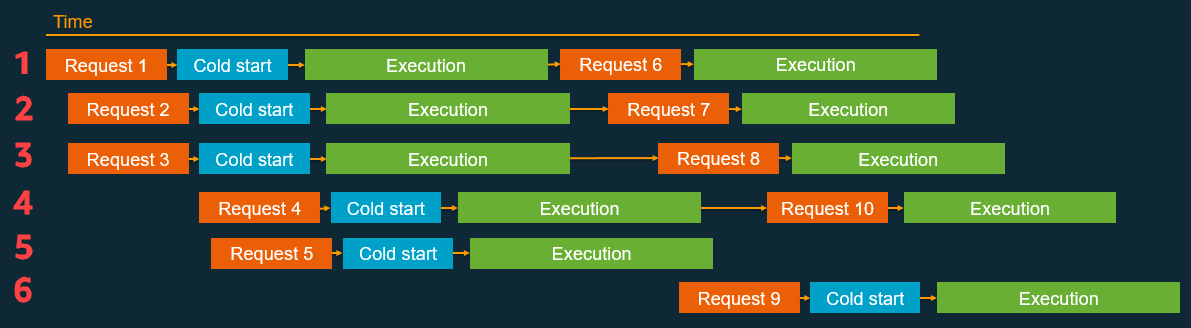
Long polling or waiting increases the costs of Lambda functions and also reduces overall account concurrency. This can impact the ability of other functions to run.

Consider using other services such as AWS Step Functions to help reduce code and coordinate asynchronous workloads. You can build workflows using state machines with long-polling, and failure handling. Step Functions also supports direct service integrations, such as DynamoDB, without having to use Lambda functions.

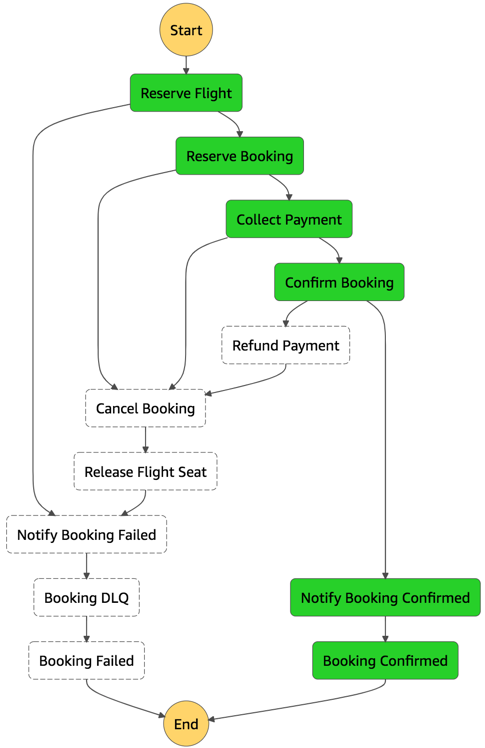
In the serverless airline example used in this series, Step Functions is used to orchestrate the Booking microservice. The ProcessBooking state machine handles all the necessary steps to create bookings, including payment.

Booking service state machine

Booking service state machine

To reduce costs and improves performance with CloudWatch, create custom metrics asynchronously. You can use the Embedded Metrics Format to write logs, rather than the PutMetricsData API call. I cover using the embedded metrics format in “Understanding application health” – part 1 and part 2.

For example, once a booking is made, the logs are visible in the CloudWatch console. You can select a log stream and find the custom metric as part of the structured log entry.

Custom metric structured log entry

Custom metric structured log entry

CloudWatch automatically creates metrics from these structured logs. You can create graphs and alarms based on them. For example, here is a graph based on a BookingSuccessful custom metric.

CloudWatch metrics custom graph

CloudWatch metrics custom graph

Consider asynchronous invocations and review run away functions where applicable

Take advantage of Lambda’s event-based model. Lambda functions can be triggered based on events ingested into Amazon Simple Queue Service (SQS) queues, S3 buckets, and Amazon Kinesis Data Streams. AWS manages the polling infrastructure on your behalf with no additional cost. Avoid code that polls for third-party software as a service (SaaS) providers. Rather use Amazon EventBridge to integrate with SaaS instead when possible.

Carefully consider and review recursion, and establish timeouts to prevent run away functions.

Conclusion

Design, implement, and optimize your application to maximize value. Asynchronous design patterns and performance practices ensure efficient resource use and directly impact the value per business transaction. By optimizing your serverless application performance and its code patterns, you can reduce costs while making more efficient use of resources.

In this post, I cover minimizing external calls and function code initialization. I show how to optimize logging output with the embedded metrics format, and log retention. I recap optimizing function configuration to reduce cost and highlight the benefits of asynchronous event-driven patterns.

This post wraps up the series, building well-architected serverless applications, where I cover the AWS Well-Architected Tool with the Serverless Lens . See the introduction post for links to all the blog posts.

For more serverless learning resources, visit Serverless Land.


Toyota Connected and AWS Design and Deliver Collision Assistance Application

Post Syndicated from Srikanth Kodali original https://aws.amazon.com/blogs/architecture/toyota-connected-and-aws-design-and-deliver-collision-assistance-application/

This post was cowritten by Srikanth Kodali, Sr. IoT Data Architect at AWS, and Will Dombrowski, Sr. Data Engineer at Toyota Connected

Toyota Connected North America (TC) is a technology/big data company that partners with Toyota Motor Corporation and Toyota Motor North America to develop products that aim to improve the driving experience for Toyota and Lexus owners.

TC’s Mobility group provides backend cloud services that are built and hosted in AWS. Together, TC and AWS engineers designed, built, and delivered their new Collision Assistance product, which debuted in early August 2021.

In the aftermath of an accident, Collision Assistance offers Toyota and Lexus drivers instructions to help them navigate a post-collision situation. This includes documenting the accident, filing an insurance claim, and transitioning to the repair process.

In this blog post, we’ll talk about how our team designed, built, refined, and deployed the Collision Assistance product with Serverless on AWS services. We’ll discuss our goals in developing this product and the architecture we developed based on those goals. We’ll also present issues we encountered when testing our initial architecture and how we resolved them to create the final product.

Building a scalable, affordable, secure, and high performing product

We used a serverless architecture because it is often less complex than other architecture types. Our goals in developing this initial architecture were to achieve scalability, affordability, security, and high performance, as described in the following sections.

Scalability and affordability

In our initial architecture, Amazon Simple Queue Service (Amazon SQS) queues, Amazon Kinesis streams, and AWS Lambda functions allow data pipelines to run servers only when they’re needed, which introduces cost savings. They also process data in smaller units and run them in parallel, which allows data pipelines to scale up efficiently to handle peak traffic loads. These services allow for an architecture that can handle non-uniform traffic without needing additional application logic.

Security

Collision Assistance can deliver information to customers via push notifications. This data must be encrypted because many data points the application collects are sensitive, like geolocation.

To secure this data outside our private network, we use Amazon Simple Notification Service (Amazon SNS) as our delivery mechanism. Amazon SNS provides HTTPS endpoint delivery of messages coming to topics and subscriptions. AWS allows us to enable at-rest and/or in-transit encryption for all of our other architectural components as well.

Performance

To quantify our product’s performance, we review the “notification delay.” This metric evaluates the time between the initial collision and when the customer receives a push notification from Collision Assistance. Our ultimate goal is to have the push notification sent within minutes of a crash, so drivers have this information in near real time.

Initial architecture

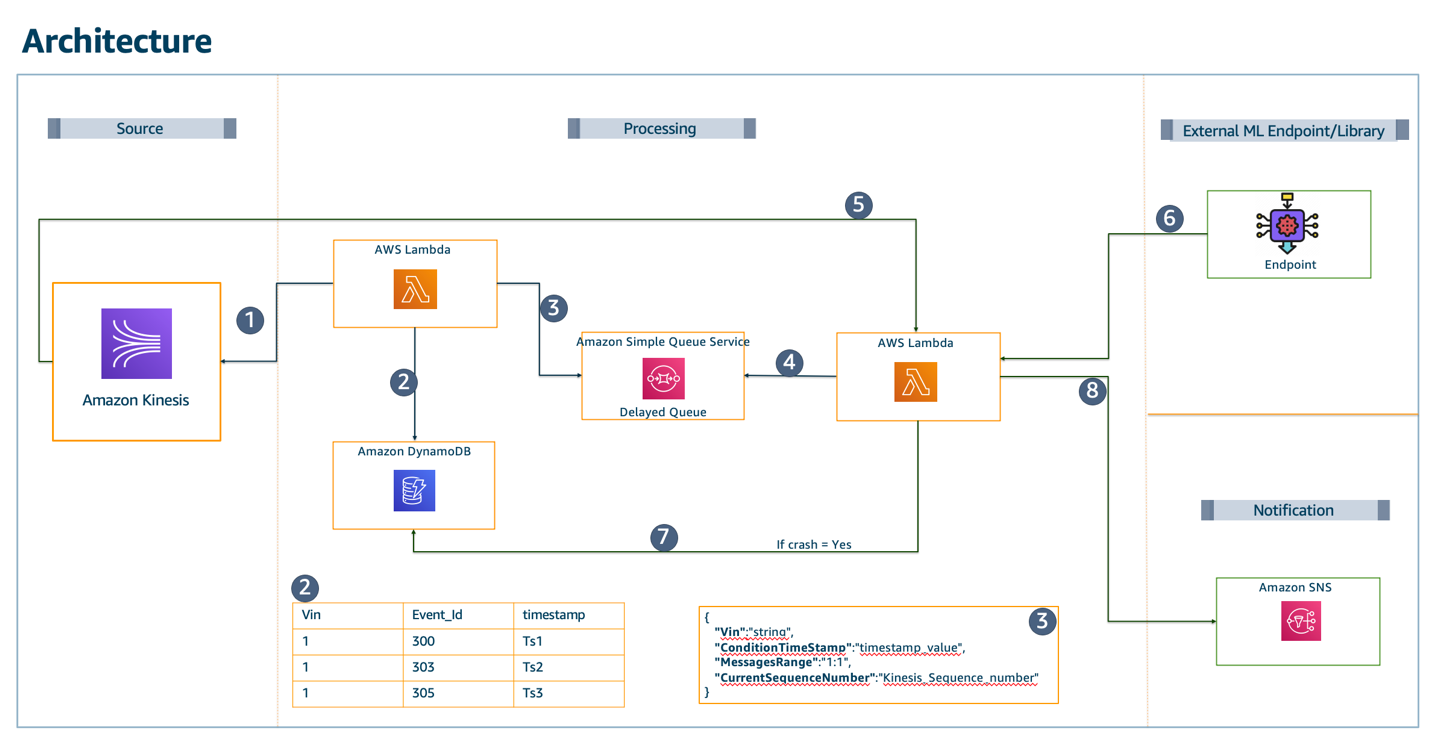
Figure 1 presents our initial architecture implementation that aims to predict whether a crash has occurred and reduce false positives through the following data pipeline:

  1. The Kinesis stream receives vehicle data from an upstream ingestion service, as discussed in the Enhancing customer safety by leveraging the scalable, secure, and cost-optimized Toyota Connected Data Lake blog.
  2. A Lambda function writes lookup data to Amazon DynamoDB for every Kinesis record.
  3. This Lambda function decreases obvious non-crash data. It sends the current record (X) to Amazon SQS. If X exceeds a certain threshold, it will remain a crash candidate.
  4. Amazon SQS sets a delivery delay so that there will be more Kinesis/DynamoDB records available when X is processed later in the pipeline.
  5. A second Lambda function reads the data from the SQS message. It queries DynamoDB to find the Kinesis lookup data for the message before (X-1) and after (X+1) the crash candidate.
  6. Kinesis GetRecords retrieves X-1 and X+1, because X+1 will exist after the SQS delivery delay times out.
  7. The X-1, X, and X+1 messages are sent to the data science (DS) engine.
  8. When a crash is accurately predicted, these results are stored in a DynamoDB table.
  9. The push notification is sent to the vehicle owner. (Note: the push notification is still in ‘select testing phase’)
Diagram and description of our initial architecture implementation

Figure 1. Diagram and description of our initial architecture implementation

To be consistent with privacy best practices and reduce server uptime, this architecture uses the minimum amount of data the DS engine needs.

We filter out records that are lower than extremely low thresholds. Once these records are filtered out, around 40% of the data fits the criteria to be evaluated further. This reduces the server capacity needed by the DS engine by 60%.

To reduce false positives, we gather data before and after the timestamps where the extremely low thresholds are exceeded. We then evaluate the sensor data across this timespan and discard any sets with patterns of abnormal sensor readings or other false positive conditions. Figure 2 shows the time window we initially used.

Longitudinal acceleration versus time

Figure 2. Longitudinal acceleration versus time

Adjusting our initial architecture for better performance

Our initial design worked well for processing a few sample messages and achieved the desired near real-time delivery of the push notification. However, when the pipeline was enabled for over 1 million vehicles, certain limits were exceeded, particularly for Kinesis and Lambda integrations:

  • Our Kinesis GetRecords API exceeded the allowed five requests per shard per second. With each crash candidate retrieving an X-1 and X+1 message, we could only evaluate two per shard per second, which isn’t cost effective.
  • Additionally, the downstream SQS-reading Lambda function was limited to 10 records per second per invocation. This meant any slowdown that occurs downstream, such as during DS engine processing, could cause the queue to back up significantly.

To improve cost and performance for the Kinesis-related functionality, we abandoned the DynamoDB lookup table and the GetRecord calls in favor of using a Redis cache cluster on Amazon ElastiCache. This allows us to avoid all throughput exceptions from Kinesis and focus on scaling the stream based on the incoming throughput alone. The ElastiCache cluster scales capacity by adding or removing shards, which improves performance and cost efficiency.

To solve the Amazon SQS/Lambda integration issue, we funneled messages directly to an additional Kinesis stream. This allows the final Lambda function to use some of the better scaling options provided to Kinesis-Lambda event source integrations, like larger batch sizes and max-parallelism.

After making these adjustments, our tests proved we could scale to millions of vehicles as needed. Figure 3 shows a diagram of this final architecture.

Final architecture

Figure 3. Final architecture

Conclusion

Engineers across many functions worked closely to deliver the Collision Assistance product.

Our team of backend Java developers, infrastructure experts, and data scientists from TC and AWS built and deployed a near real-time product that helps Toyota and Lexus drivers document crash damage, file an insurance claim, and get updates on the actual repair process.

The managed services and serverless components available on AWS provided TC with many options to test and refine our team’s architecture. This helped us find the best fit for our use case. Having this flexibility in design was a key factor in designing and delivering the best architecture for our product.


Building well-architected serverless applications: Optimizing application performance – part 2

Post Syndicated from Julian Wood original https://aws.amazon.com/blogs/compute/building-well-architected-serverless-applications-optimizing-application-performance-part-2/

This series of blog posts uses the AWS Well-Architected Tool with the Serverless Lens to help customers build and operate applications using best practices. In each post, I address the serverless-specific questions identified by the Serverless Lens along with the recommended best practices. See the introduction post for a table of contents and explanation of the example application.

PERF 1. Optimizing your serverless application’s performance

This post continues part 1 of this security question. Previously, I cover measuring and optimizing function startup time. I explain cold and warm starts and how to reuse the Lambda execution environment to improve performance. I show a number of ways to analyze and optimize the initialization startup time. I explain how only importing necessary libraries and dependencies increases application performance.

Good practice: Design your function to take advantage of concurrency via asynchronous and stream-based invocations

AWS Lambda functions can be invoked synchronously and asynchronously.

Favor asynchronous over synchronous request-response processing.

Consider using asynchronous event processing rather than synchronous request-response processing. You can use asynchronous processing to aggregate queues, streams, or events for more efficient processing time per invocation. This reduces wait times and latency from requesting apps and functions.

When you invoke a Lambda function with a synchronous invocation, you wait for the function to process the event and return a response.

Synchronous invocation

Synchronous invocation

As synchronous processing involves a request-response pattern, the client caller also needs to wait for a response from a downstream service. If the downstream service then needs to call another service, you end up chaining calls that can impact service reliability, in addition to response times. For example, this POST /order request must wait for the response to the POST /invoice request before responding to the client caller.

Example synchronous processing

Example synchronous processing

The more services you integrate, the longer the response time, and you can no longer sustain complex workflows using synchronous transactions.

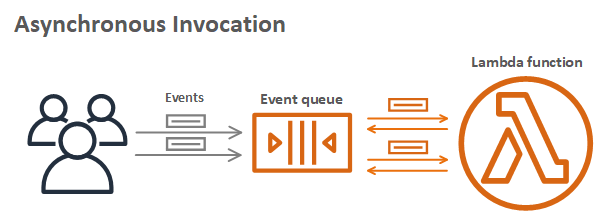
Asynchronous processing allows you to decouple the request-response using events without waiting for a response from the function code. This allows you to perform background processing without requiring the client to wait for a response, improving client performance. You pass the event to an internal Lambda queue for processing and Lambda handles the rest. An external process, separate from the function, manages polling and retries. Using this asynchronous approach can also make it easier to handle unpredictable traffic with significant volumes.

Asynchronous invocation

Asynchronous invocation

For example, the client makes a POST /order request to the order service. The order service accepts the request and returns that it has been received, without waiting for the invoice service. The order service then makes an asynchronous POST /invoice request to the invoice service, which can then process independently of the order service. If the client must receive data from the invoice service, it can handle this separately via a GET /invoice request.

Example asynchronous processing

Example asynchronous processing

You can configure Lambda to send records of asynchronous invocations to another destination service. This helps you to troubleshoot your invocations. You can also send messages or events that can’t be processed correctly into a dedicated Amazon Simple Queue Service (SQS) dead-letter queue for investigation.

You can add triggers to a function to process data automatically. For more information on which processing model Lambda uses for triggers, see “Using AWS Lambda with other services”.

Asynchronous workflows handle a variety of use cases including data Ingestion, ETL operations, and order/request fulfillment. In these use-cases, data is processed as it arrives and is retrieved as it changes. For example asynchronous patterns, see “Serverless Data Processing” and “Serverless Event Submission with Status Updates”.

For more information on Lambda synchronous and asynchronous invocations, see the AWS re:Invent presentation “Optimizing your serverless applications”.

Tune batch size, batch window, and compress payloads for high throughput

When using Lambda to process records using Amazon Kinesis Data Streams or SQS, there are a number of tuning parameters to consider for performance.

You can configure a batch window to buffer messages or records for up to 5 minutes. You can set a limit of the maximum number of records Lambda can process by setting a batch size. Your Lambda function is invoked whichever comes first.

For high volume SQS standard queue throughput, Lambda can process up to 1000 concurrent batches of records per second. For more information, see “Using AWS Lambda with Amazon SQS”.

For high volume Kinesis Data Streams throughput, there are a number of options. Configure the ParallelizationFactor setting to process one shard of a Kinesis Data Stream with more than one Lambda invocation simultaneously. Lambda can process up to 10 batches in each shard. For more information, see “New AWS Lambda scaling controls for Kinesis and DynamoDB event sources.” You can also add more shards to your data stream to increase the speed at which your function can process records. This increases the function concurrency at the expense of ordering per shard. For more details on using Kinesis and Lambda, see “Monitoring and troubleshooting serverless data analytics applications”.

Kinesis enhanced fan-out can maximize throughput by dedicating a 2 MB/second input/output channel per second per consumer instead of 2 MB per shard. For more information, see “Increasing stream processing performance with Enhanced Fan-Out and Lambda”.

Kinesis stream producers can also compress records. This is at the expense of additional CPU cycles for decompressing the records in your Lambda function code.

Required practice: Measure, evaluate, and select optimal capacity units

Capacity units are a unit of consumption for a service. They can include function memory size, number of stream shards, number of database reads/writes, request units, or type of API endpoint. Measure, evaluate and select capacity units to enable optimal configuration of performance, throughput, and cost.

Identify and implement optimal capacity units.

For Lambda functions, memory is the capacity unit for controlling the performance of a function. You can configure the amount of memory allocated to a Lambda function, between 128 MB and 10,240 MB. The amount of memory also determines the amount of virtual CPU available to a function. Adding more memory proportionally increases the amount of CPU, increasing the overall computational power available. If a function is CPU-, network- or memory-bound, then changing the memory setting can dramatically improve its performance.

Choosing the memory allocated to Lambda functions is an optimization process that balances performance (duration) and cost. You can manually run tests on functions by selecting different memory allocations and measuring the time taken to complete. Alternatively, use the AWS Lambda Power Tuning tool to automate the process.

The tool allows you to systematically test different memory size configurations and depending on your performance strategy – cost, performance, balanced – it identifies what is the most optimum memory size to use. For more information, see “Operating Lambda: Performance optimization – Part 2”.

AWS Lambda Power Tuning report

AWS Lambda Power Tuning report

Amazon DynamoDB manages table processing throughput using read and write capacity units. There are two different capacity modes, on-demand and provisioned.

On-demand capacity mode supports up to 40K read/write request units per second. This is recommended for unpredictable application traffic and new tables with unknown workloads. For higher and predictable throughputs, provisioned capacity mode along with DynamoDB auto scaling is recommended. For more information, see “Read/Write Capacity Mode”.

For high throughput Amazon Kinesis Data Streams with multiple consumers, consider using enhanced fan-out for dedicated 2 MB/second throughput per consumer. When possible, use Kinesis Producer Library and Kinesis Client Library for effective record aggregation and de-aggregation.

Amazon API Gateway supports multiple endpoint types. Edge-optimized APIs provide a fully managed Amazon CloudFront distribution. These are better for geographically distributed clients. API requests are routed to the nearest CloudFront Point of Presence (POP), which typically improves connection time.

Edge-optimized API Gateway deployment

Edge-optimized API Gateway deployment

Regional API endpoints are intended when clients are in the same Region. This helps you to reduce request latency and allows you to add your own content delivery network if necessary.

Regional endpoint API Gateway deployment

Regional endpoint API Gateway deployment

Private API endpoints are API endpoints that can only be accessed from your Amazon Virtual Private Cloud (VPC) using an interface VPC endpoint. For more information, see “Creating a private API in Amazon API Gateway”.

For more information on endpoint types, see “Choose an endpoint type to set up for an API Gateway API”. For more general information on API Gateway, see the AWS re:Invent presentation “I didn’t know Amazon API Gateway could do that”.

AWS Step Functions has two workflow types, standard and express. Standard Workflows have exactly once workflow execution and can run for up to one year. Express Workflows have at-least-once workflow execution and can run for up to five minutes. Consider the per-second rates you require for both execution start rate and the state transition rate. For more information, see “Standard vs. Express Workflows”.

Performance load testing is recommended at both sustained and burst rates to evaluate the effect of tuning capacity units. Use Amazon CloudWatch service dashboards to analyze key performance metrics including load testing results. I cover performance testing in more detail in “Regulating inbound request rates – part 1”.

For general serverless optimization information, see the AWS re:Invent presentation “Serverless at scale: Design patterns and optimizations”.

Conclusion

Evaluate and optimize your serverless application’s performance based on access patterns, scaling mechanisms, and native integrations. You can improve your overall experience and make more efficient use of the platform in terms of both value and resources.

This post continues from part 1 and looks at designing your function to take advantage of concurrency via asynchronous and stream-based invocations. I cover measuring, evaluating, and selecting optimal capacity units.

This well-architected question will continue in part 3 where I look at integrating with managed services directly over functions when possible. I cover optimizing access patterns and applying caching where applicable.

For more serverless learning resources, visit Serverless Land.

Queue Integration with Third-party Services on AWS

Post Syndicated from Rostislav Markov original https://aws.amazon.com/blogs/architecture/queue-integration-with-third-party-services-on-aws/

Commercial off-the-shelf software and third-party services can present an integration challenge in event-driven workflows when they do not natively support AWS APIs. This is even more impactful when a workflow is subject to unpredicted usage spikes, and you want to increase decoupling and fault tolerance. Given the third-party nature of services, polling an Amazon Simple Queue Service (SQS) queue and having built-in AWS API handling logic may not be an immediate option.

In such cases, AWS Lambda helps out-task the Amazon SQS queue integration and AWS API handling to an additional layer. The success of this depends on how well exception handling is implemented across the different interacting services. In this blog post, we outline issues to consider when adopting this design pattern. We also share a reusable solution.

Design pattern for third-party integration with SQS

With this design pattern, one or more services (producers) asynchronously invoke other third-party downstream consumer services. They publish messages to an Amazon SQS queue, which acts as buffer for requests. Producers provide all commands and other parameters required for consumer service execution with the message.

As messages are written to the queue, the queue is configured to invoke a message broker (implemented as AWS Lambda) for each message. AWS Lambda can interact natively with target AWS services such as Amazon EC2, Amazon Elastic Container Service (ECS), or Amazon Elastic Kubernetes Service (EKS). It can also be configured to use an Amazon Virtual Private Cloud (VPC) interface endpoint to establish a connection to VPC resources without traversing the internet. The message broker assigns the tasks to consumer services by invoking the RunTask API of Amazon ECS and AWS Fargate (see Figure 1.)

Figure 1. On-premises and AWS queue integration for third-party services using AWS Lambda

Figure 1. On-premises and AWS queue integration for third-party services using AWS Lambda

The message broker asynchronously invokes the API in ‘fire-and-forget’ mode. Therefore, error handling must be built in to respond to API invocation errors. In an event-driven scenario, an error will be invoked if you asynchronously call the third-party service hundreds or thousands of times and reach Service Quotas. This is a potential issue with RunTask API actions, or a large volume of concurrent tasks running on AWS Fargate. Two mechanisms can help implement troubleshooting API request errors.

  1. API retries with exponential backoff. The message broker retries for a number of times with configurable sleep intervals and exponential backoff in-between. This enforces progressively longer waits between retries for consecutive error responses. If the RunTask API fails to process the request and initiate the third-party service, the message remains in the queue for a subsequent retry. The AWS General Reference provides further guidance.
  2. API error handling. Error handling and consequent logging should be implemented at every step. Since there are several services working together in tandem, crucial debugging information from errors may be lost. Additionally, error handling also provides opportunity to define automated corrective actions or notifications on event occurrence. The message broker can publish failure notifications including the root cause to an Amazon Simple Notification Service (SNS) topic.

SNS topic subscription can be configured via different protocols. You can email a distribution group for active monitoring and processing of errors. If persistence is required for messages that failed to process, error handling can be associated directly with SQS by configuring a dead letter queue.

Reference implementation for third-party integration with SQS

We implemented the design pattern in Figure 1, with Broad Institute’s Cell Painting application workflow. This is for morphological profiling from microscopy cell images running on Amazon EC2. It interacts with CellProfiler version 3.0 cell image analysis software as the downstream consumer hosted on ECS/Fargate. Every invocation of CellProfiler required approximately 1,500 tasks for a single processing step.

Resource constraints determined the rate of scale-out. In this case, it was for an Amazon ECS task creation. Address space for Amazon ECS subnets should be large enough to prevent running out of available IPs within your VPC. If Amazon ECS Service Quotas provide further constraints, a quota increase can be requested.

Exceptions must be handled both when validating and initiating requests. As part of the validation workflow, exceptions are captured as follows, also shown in Figure 2.

1. Invalid arguments exception. The message broker validates that the SQS message contains all the needed information to initiate the ECS task. This information includes subnets, security groups and container names required to start the ECS task, and else raises exception.

2. Retry limit exception. On each iteration, the message broker will evaluate whether the SQS retry limit has been reached, before invoking the RunTask API. It will then exit, by sending failure notification to SNS when the retry limit is reached.

Figure 2. Exception handling flow during request validation

Figure 2. Exception handling flow during request validation

As part of the initiation workflow, exceptions are handled as follows, shown in Figure 3:

1. ECS/Fargate API and concurrent execution limitations. The message broker catches API exceptions when calling the API RunTask operation. These exceptions can include:

    • When the call to the launch tasks exceeds the maximum allowed API request limit for your AWS account
    • When failing to retrieve security group information
    • When you have reached the limit on the number of tasks you can run concurrently

With each of the preceding exceptions, the broker will increase the retry count.

2. Networking and IP space limitations. Network interface timeouts received after initiating the ECS task set off an Amazon CloudWatch Events rule, causing the message broker to re-initiate the ECS task.

Figure 3. Exception handling flow during request initiation

Figure 3. Exception handling flow during request initiation

While we specifically address downstream consumer services running on ECS/Fargate, this solution can be adjusted for third-party services running on Amazon EC2 or EKS. With EC2, the message broker must be adjusted to interact with the RunInstances API, and include troubleshooting API request errors. Integration with downstream consumers on Amazon EKS requires that the AWS Lambda function is associated via the IAM role with a Kubernetes service account. A Python client for Kubernetes can be used to simplify interaction with the Kubernetes REST API and AWS Lambda would invoke the run API.

Conclusion

This pattern is useful when queue polling is not an immediate option. This is typical with event-driven workflows involving third-party services and vendor applications subject to unpredictable, intermittent load spikes. Exception handling is essential for these types of workflows. Offloading AWS API handling to a separate layer orchestrated by AWS Lambda can improve the resiliency of such third-party services on AWS. This pattern represents an incremental optimization until the third party provides native SQS integration. It can be achieved with the initial move to AWS, for example as part of the V1 AWS design strategy for third-party services.

Some limitations should be acknowledged. While the pattern enables graceful failure, it does not prevent the overloading of the ECS RunTask API. By invoking Amazon ECS RunTask API in ‘fire-and-forget’ mode, it does not monitor service execution once a task was successfully invoked. Therefore, it should be adopted when direct queue polling is not an option. In our example, Broad Institute’s CellProfiler application enabled direct queue polling with its subsequent product version of Distributed CellProfiler.

Further reading

The referenced deployment with consumer services on Amazon ECS can be accessed via AWSLabs.

Adding resiliency to AWS CloudFormation custom resource deployments

Post Syndicated from James Beswick original https://aws.amazon.com/blogs/compute/adding-resiliency-to-aws-cloudformation-custom-resource-deployments/

This post is written by Dathu Patil, Solutions Architect and Naomi Joshi, Cloud Application Architect.

AWS CloudFormation custom resources allow you to write custom provisioning logic in templates. These run anytime you create, update, or delete stacks. Using AWS Lambda-backed custom resources, you can associate a Lambda function with a CloudFormation custom resource. The function is invoked whenever the custom resource is created, updated, or deleted.

When CloudFormation asynchronously invokes the function, it passes the request data, such as the request type and resource properties to the function. The customizability of Lambda functions in combination with CloudFormation allow a wide range of scenarios. For example, you can dynamically look up Amazon Machine Image (AMI) IDs during stack creation or use utilities such as string reversal functions.

Unhandled exceptions or transient errors in the custom resource Lambda function can cause your code to exit without sending a response. CloudFormation requires an HTTPS response to confirm if the operation is successful or not. An unreported exception causes CloudFormation to wait until the operation times out before starting a stack rollback.

If the exception occurs again on rollback, CloudFormation waits for a timeout exception before ending in a rollback failure. During this time, your stack is unusable. You can learn more about this and best practices by reviewing Best Practices for CloudFormation Custom Resources.

In this blog, you learn how you can use Amazon SQS and Lambda to add resiliency to your Lambda-backed CloudFormation custom resource deployments. The example shows how to use CloudFormation custom resource to look up an AMI ID dynamically during Amazon EC2 creation.

Overview

CloudFormation templates that declare an EC2 instance must also specify an AMI ID. This includes an operating system and other software and configuration information used to launch the instance. The correct AMI ID depends on the instance type and Region in which you’re launching your stack. AMI ID can change regularly, such as when an AMI is updated with software updates.

Customers often implement a CloudFormation custom resource to look up an AMI ID while creating an EC2 instance. In this example, the lookup Lambda function calls the EC2 API. It fetches the available AMI IDs, uses the latest AMI ID, and checks for a compliance tag. This implementation assumes that there are separate processes for creating AMI and running compliance checks. The process that performs compliance and security checks creates a compliance tag on a successful scan.

This solution shows how you can use SQS and Lambda to add resiliency to handle an exception. In this case, the exception occurs in the AMI lookup custom resource due to a missing compliance tag. When the AMI lookup function fails processing, it uses the Lambda destination configuration to send the request to an SQS queue. The message is reprocessed using the SQS queue and Lambda function.

Solution architecture

  1. The CloudFormation custom resource asynchronously invokes the AMI lookup Lambda function to perform appropriate actions.
  2. The AMI lookup Lambda function calls the EC2 API to fetch the list of AMIs and checks for a compliance tag. If the tag is missing, it throws an unhandled exception.
  3. On failure, the Lambda destination configuration sends the request to the retry queue that is configured as a dead-letter queue (DLQ). SQS adds a custom delay between retry processing to support more than two retries.
  4. The retry Lambda function processes messages in the retry queue using Lambda with SQS. Lambda polls the queue and invokes the retry Lambda function synchronously with an event that contains queue messages.
  5. The retry function then synchronously invokes the AMI lookup function using the information from the request SQS message.

The AMI Lookup Lambda function

An AWS Serverless Application Model (AWS SAM) template is used to create the AMI lookup Lambda function. You can configure async event options such as number of retries on the Lambda function. The maximum retries allowed is 2 and there is no option to set a delay between the invocation attempts.

When a transient failure or unhandled error occurs, the request is forwarded to the retry queue. This part of the AWS SAM template creates AMI lookup Lambda function:

  AMILookupLambda:
    Type: AWS::Serverless::Function 
    Properties:
      CodeUri: amilookup/
      Handler: app.lambda_handler
      Runtime: python3.8
      Timeout: 300
      EventInvokeConfig:
          MaximumEventAgeInSeconds: 60
          MaximumRetryAttempts: 2
          DestinationConfig:
            OnFailure:
              Type: SQS
              Destination: !GetAtt RetryQueue.Arn
      Policies:
        - AMIDescribePolicy: {}

This function calls the EC2 API using the boto3 AWS SDK for Python. It calls the describe_images method to get a list of images with given filter conditions. The Lambda function iterates through the AMI list and checks for compliance tags. If the tag is not present, it raises an exception:

ec2_client = boto3.client('ec2', region_name=region)
         # Get AMI IDs with the specified name pattern and owner
         describe_response = ec2_client.describe_images(
            Filters=[{'Name': "name", 'Values': architectures},
                     {'Name': "tag-key", 'Values': ['ami-compliance-check']}],
            Owners=["amazon"]
        )

The queue and the retry Lambda function

The retry queue adds a 60-second delay before a message is available for the processing. The time delay between retry processing attempts provides time for transient errors to be corrected. This is the AWS SAM template for creating these resources:

RetryQueue:
  Type: AWS::SQS::Queue
  Properties:
    VisibilityTimeout: 60
    DelaySeconds: 60
    MessageRetentionPeriod: 600

RetryFunction:
    Type: AWS::Serverless::Function
    Properties:
      CodeUri: retry/
      Handler: app.lambda_handler
      Runtime: python3.8
      Timeout: 60
      Events:
        MySQSEvent:
          Type: SQS
          Properties:
            Queue: !GetAtt RetryQueue.Arn
            BatchSize: 1
      Policies:
        - LambdaInvokePolicy:
            FunctionName: !Ref AMILookupFunction

The retry Lambda function periodically polls for new messages in the retry queue. The function synchronously invokes the AMI lookup Lambda function. On success, a response is sent to CloudFormation. This process runs until the AMI lookup function returns a successful response or the message is deleted from the SQS queue. The deletion is based on the MessageRetentionPeriod, which is set to 600 seconds in this case.

for record in event['Records']:
        body = json.loads(record['body'])
        response = client.invoke(
            FunctionName=body['requestContext']['functionArn'],
            InvocationType='RequestResponse',
            Payload=json.dumps(body['requestPayload']).encode()
        )            

Deployment walkthrough

Prerequisites

To get started with this solution, you need:

  • AWS CLI and AWS SAM CLI installed to deploy the solution.
  • An existing Amazon EC2 public image. You can choose any of the AMIs from the AWS Management Console with Architecture = X86_64 and Owner = amazon for test purposes. Note the AMI ID.

Download the source code from the resilient-cfn-custom-resource GitHub repository. The template.yaml file is an AWS SAM template. It deploys the Lambda functions, SQS, and IAM roles required for the Lambda function. It uses Python 3.8 as the runtime and assigns 128 MB of memory for the Lambda functions.

  1. To build and deploy this application using the AWS SAM CLI build and guided deploy:
    sam build --use-container
    sam deploy --guided

The custom resource stack creation invokes the AMI lookup Lambda function. This fetches the AMI ID from all public EC2 images available in your account with the tag ami-compliance-check. Typically, the compliance tags are created by a process that performs security scans.

In this example, the security scan process is not running and the tag is not yet added to any AMIs. As a result, the custom resource throws an exception, which goes to the retry queue. This is retried by the retry function until it is successfully processed.

  1. Use the console or AWS CLI to add the tag to the chosen EC2 AMI. In this example, this is analogous to a separate governance process that checks for AMI compliance and adds the compliance tag if passed. Replace the $AMI-ID with the AMI ID captured in the prerequisites:
    aws ec2 create-tags –-resources $AMI-ID --tags Key=ami-compliance-check,Value=True
  2. After the tags are added, a response is sent successfully from the custom resource Lambda function to the CloudFormation stack. It includes your $AMI-ID and a test EC2 instance is created using that image. The stack creation completes successfully with all resources deployed.

Conclusion

This blog post demonstrates how to use SQS and Lambda to add resiliency to CloudFormation custom resources deployments. This solution can be customized for use cases where CloudFormation stacks have a dependency on a custom resource.

CloudFormation custom resource failures can happen due to unhandled exceptions. These are caused by issues with a dependent component, internal service, or transient system errors. Using this solution, you can handle the failures automatically without the need for manual intervention. To get started, download the code from the GitHub repo and start customizing.

For more serverless learning resources, visit Serverless Land.

Building well-architected serverless applications: Building in resiliency – part 2

Post Syndicated from Julian Wood original https://aws.amazon.com/blogs/compute/building-well-architected-serverless-applications-building-in-resiliency-part-2/

This series of blog posts uses the AWS Well-Architected Tool with the Serverless Lens to help customers build and operate applications using best practices. In each post, I address the serverless-specific questions identified by the Serverless Lens along with the recommended best practices. See the introduction post for a table of contents and explanation of the example application.

Reliability question REL2: How do you build resiliency into your serverless application?

This post continues part 1 of this reliability question. Previously, I cover managing failures using retries, exponential backoff, and jitter. I explain how DLQs can isolate failed messages. I show how to use state machines to orchestrate long running transactions rather than handling these in application code.

Required practice: Manage duplicate and unwanted events

Duplicate events can occur when a request is retried or multiple consumers process the same message from a queue or stream. A duplicate can also happen when a request is sent twice at different time intervals with the same parameters. Design your applications to process multiple identical requests to have the same effect as making a single request.

Idempotency refers to the capacity of an application or component to identify repeated events and prevent duplicated, inconsistent, or lost data. This means that receiving the same event multiple times does not change the result beyond the first time the event was received. An idempotent application can, for example, handle multiple identical refund operations. The first refund operation is processed. Any further refund requests to the same customer with the same payment reference should not be processes again.

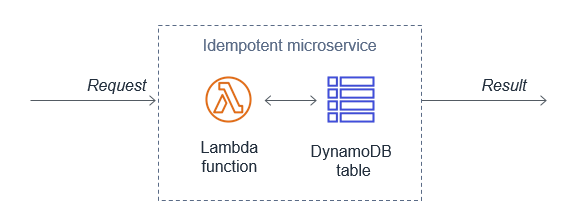
When using AWS Lambda, you can make your function idempotent. The function’s code must properly validate input events and identify if the events were processed before. For more information, see “How do I make my Lambda function idempotent?

When processing streaming data, your application must anticipate and appropriately handle processing individual records multiple times. There are two primary reasons why records may be delivered more than once to your Amazon Kinesis Data Streams application: producer retries and consumer retries. For more information, see “Handling Duplicate Records”.

Generate unique attributes to manage duplicate events at the beginning of the transaction

Create, or use an existing unique identifier at the beginning of a transaction to ensure idempotency. These identifiers are also known as idempotency tokens. A number of Lambda triggers include a unique identifier as part of the event:

You can also create your own identifiers. These can be business-specific, such as transaction ID, payment ID, or booking ID. You can use an opaque random alphanumeric string, unique correlation identifiers, or the hash of the content.

A Lambda function, for example can use these identifiers to check whether the event has been previously processed.

Depending on the final destination, duplicate events might write to the same record with the same content instead of generating a duplicate entry. This may therefore not require additional safeguards.

Use an external system to store unique transaction attributes and verify for duplicates

Lambda functions can use Amazon DynamoDB to store and track transactions and idempotency tokens to determine if the transaction has been handled previously. DynamoDB Time to Live (TTL) allows you to define a per-item timestamp to determine when an item is no longer needed. This helps to limit the storage space used. Base the TTL on the event source. For example, the message retention period for SQS.

Using DynamoDB to store idempotent tokens

Using DynamoDB to store idempotent tokens

You can also use DynamoDB conditional writes to ensure a write operation only succeeds if an item attribute meets one of more expected conditions. For example, you can use this to fail a refund operation if a payment reference has already been refunded. This signals to the application that it is a duplicate transaction. The application can then catch this exception and return the same result to the customer as if the refund was processed successfully.

Third-party APIs can also support idempotency directly. For example, Stripe allows you to add an Idempotency-Key: <key> header to the request. Stripe saves the resulting status code and body of the first request made for any given idempotency key, regardless of whether it succeeded or failed. Subsequent requests with the same key return the same result.

Validate events using a pre-defined and agreed upon schema

Implicitly trusting data from clients, external sources, or machines could lead to malformed data being processed. Use a schema to validate your event conforms to what you are expecting. Process the event using the schema within your application code or at the event source when applicable. Events not adhering to your schema should be discarded.

For API Gateway, I cover validating incoming HTTP requests against a schema in “Implementing application workload security – part 1”.

Amazon EventBridge rules match event patterns. EventBridge provides schemas for all events that are generated by AWS services. You can create or upload custom schemas or infer schemas directly from events on an event bus. You can also generate code bindings for event schemas.

SNS supports message filtering. This allows a subscriber to receive a subset of the messages sent to the topic using a filter policy. For more information, see the documentation.

JSON Schema is a tool for validating the structure of JSON documents. There are a number of implementations available.

Best practice: Consider scaling patterns at burst rates

Load testing your serverless application allows you to monitor the performance of an application before it is deployed to production. Serverless applications can be simpler to load test, thanks to the automatic scaling built into many of the services. For more information, see “How to design Serverless Applications for massive scale”.

In addition to your baseline performance, consider evaluating how your workload handles initial burst rates. This ensures that your workload can sustain burst rates while scaling to meet possibly unexpected demand.

Perform load tests using a burst strategy with random intervals of idleness

Perform load tests using a burst of requests for a short period of time. Also introduce burst delays to allow your components to recover from unexpected load. This allows you to future-proof the workload for key events when you do not know peak traffic levels.

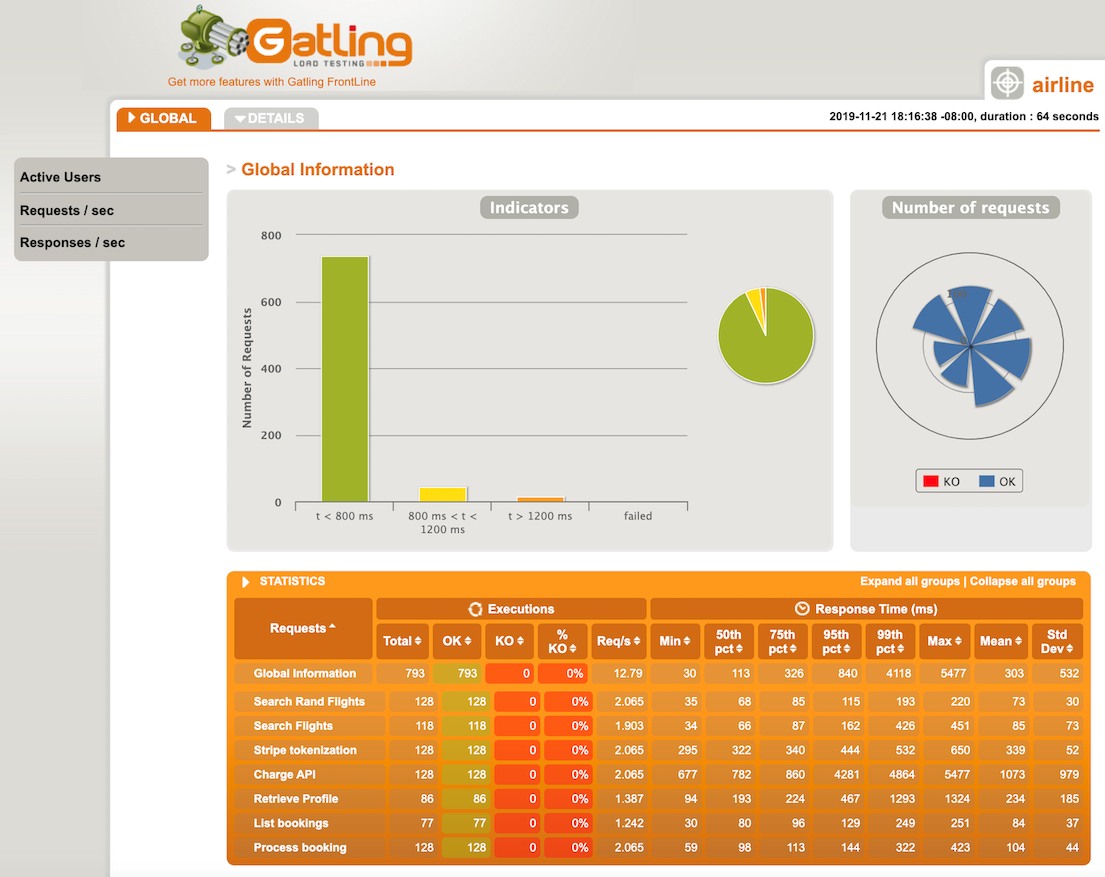
There are a number of AWS Marketplace and AWS Partner Network (APN) solutions available for performance testing, including Gatling FrontLine, BlazeMeter, and Apica.

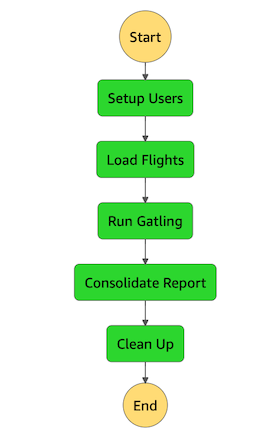
In regulating inbound request rates – part 1, I cover running a performance test suite using Gatling, an open source tool.

Gatling performance results

Gatling performance results

Amazon does have a network stress testing policy that defines which high volume network tests are allowed. Tests that purposefully attempt to overwhelm the target and/or infrastructure are considered distributed denial of service (DDoS) tests and are prohibited. For more information, see “Amazon EC2 Testing Policy”.

Review service account limits with combined utilization across resources

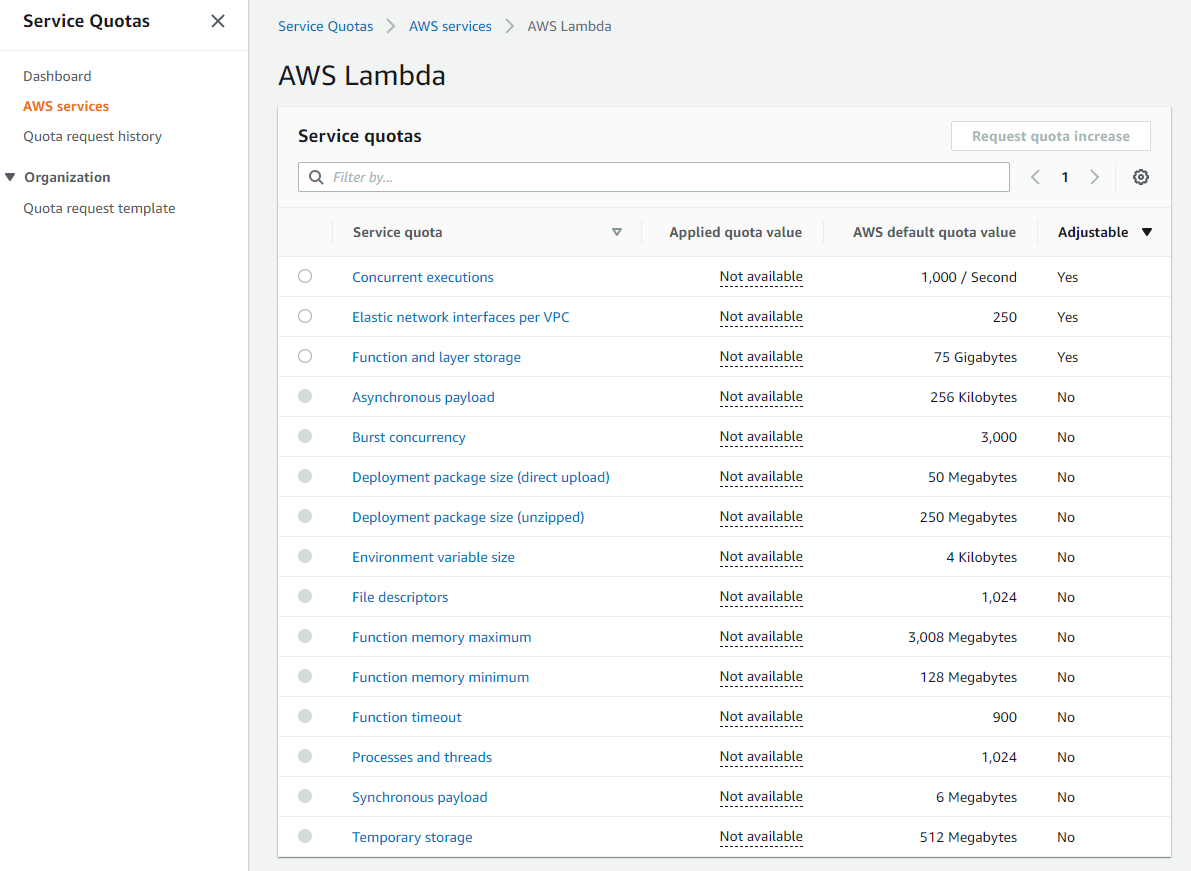
AWS accounts have default quotas, also referred to as limits, for each AWS service. These are generally Region-specific. You can request increases for some limits while other limits cannot be increased. Service Quotas is an AWS service that helps you manage your limits for many AWS services. Along with looking up the values, you can also request a limit increase from the Service Quotas console.

Service Quotas dashboard

Service Quotas dashboard

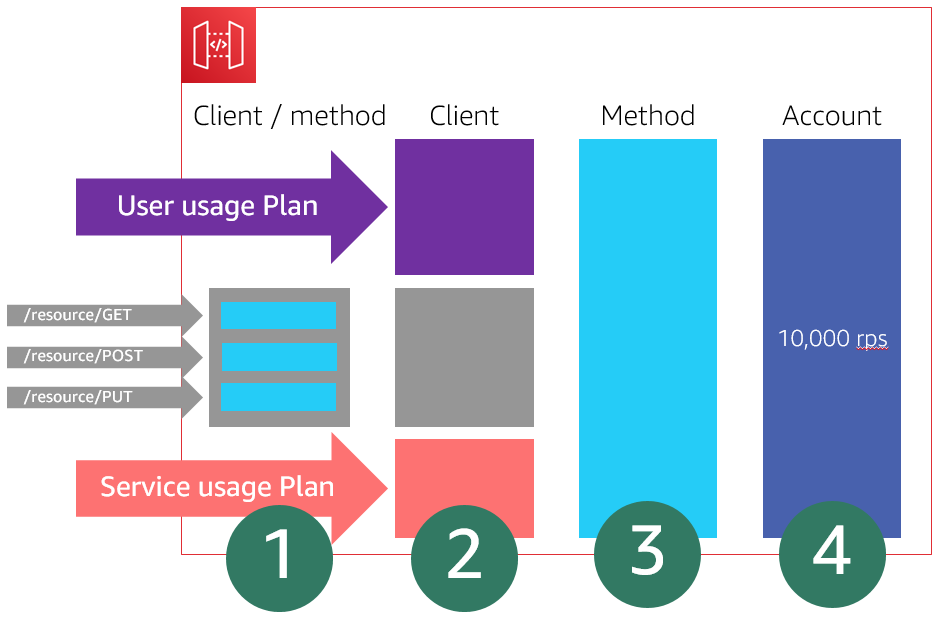
As these limits are shared within an account, review the combined utilization across resources including the following:

  • Amazon API Gateway: number of requests per second across all APIs. (link)
  • AWS AppSync: throttle rate limits. (link)
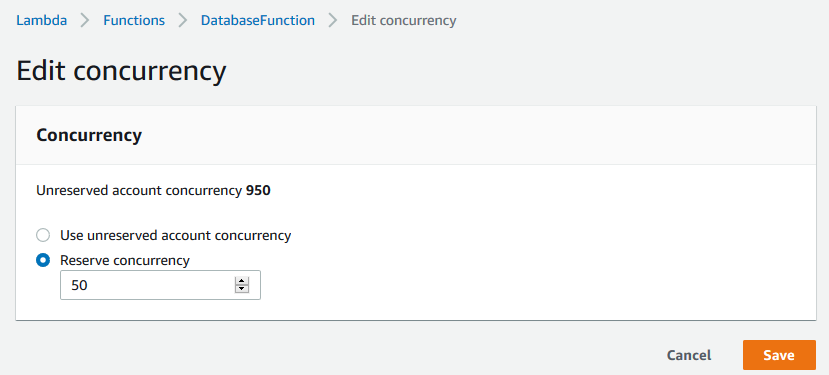
  • AWS Lambda: function concurrency reservations and pool capacity to allow other functions to scale. (link)
  • Amazon CloudFront: requests per second per distribution. (link)
  • AWS IoT Core message broker: concurrent requests per second. (link)
  • Amazon EventBridge: API requests and target invocations limit. (link)
  • Amazon Cognito: API limits. (link)
  • Amazon DynamoDB: throughput, indexes, and request rates limits. (link)

Evaluate key metrics to understand how workloads recover from bursts

There are a number of key Amazon CloudWatch metrics to evaluate and alert on to understand whether your workload recovers from bursts.

  • AWS Lambda: Duration, Errors, Throttling, ConcurrentExecutions, UnreservedConcurrentExecutions. (link)
  • Amazon API Gateway: Latency, IntegrationLatency, 5xxError, 4xxError. (link)
  • Application Load Balancer: HTTPCode_ELB_5XX_Count, RejectedConnectionCount, HTTPCode_Target_5XX_Count, UnHealthyHostCount, LambdaInternalError, LambdaUserError. (link)
  • AWS AppSync: 5XX, Latency. (link)
  • Amazon SQS: ApproximateAgeOfOldestMessage. (link)
  • Amazon Kinesis Data Streams: ReadProvisionedThroughputExceeded, WriteProvisionedThroughputExceeded, GetRecords.IteratorAgeMilliseconds, PutRecord.Success, PutRecords.Success (if using Kinesis Producer Library), GetRecords.Success. (link)
  • Amazon SNS: NumberOfNotificationsFailed, NumberOfNotificationsFilteredOut-InvalidAttributes. (link)
  • Amazon Simple Email Service (SES): Rejects, Bounces, Complaints, Rendering Failures. (link)
  • AWS Step Functions: ExecutionThrottled, ExecutionsFailed, ExecutionsTimedOut. (link)
  • Amazon EventBridge: FailedInvocations, ThrottledRules. (link)
  • Amazon S3: 5xxErrors, TotalRequestLatency. (link)
  • Amazon DynamoDB: ReadThrottleEvents, WriteThrottleEvents, SystemErrors, ThrottledRequests, UserErrors. (link)

Conclusion

This post continues from part 1 and looks at managing duplicate and unwanted events with idempotency and an event schema. I cover how to consider scaling patterns at burst rates by managing account limits and show relevant metrics to evaluate

Build resiliency into your workloads. Ensure that applications can withstand partial and intermittent failures across components that may only surface in production. In the next post in the series, I cover the performance efficiency pillar from the Well-Architected Serverless Lens.

For more serverless learning resources, visit Serverless Land.

Choosing between AWS services for streaming data workloads

Post Syndicated from James Beswick original https://aws.amazon.com/blogs/compute/choosing-between-aws-services-for-streaming-data-workloads/

Traditionally, streaming data can be complex to manage due to the large amounts of data arriving from many separate sources. Managing fluctuations in traffic and durably persisting messages as they arrive is a non-trivial task. Using a serverless approach, AWS provides a number of services that help manage large numbers of messages, alleviating much of the infrastructure burden.

In this blog post, I compare several AWS services and how to choose between these options in streaming data workloads.

Comparing Amazon Kinesis Data Streams with Amazon SQS queues

While you can use both services to decouple data producers and consumers, each is suited to different types of workload. Amazon SQS is primarily used as a message queue to store messages durably between distributed services. Amazon Kinesis is primarily intended to manage streaming big data.

Kinesis supports ordering of records and the ability for multiple consumers to read messages from the same stream concurrently. It also allows consumers to replay messages from up to 7 days previously. Scaling in Kinesis is based upon shards and you must reshard to scale a data stream up or down.

With SQS, consumers pull data from a queue and it’s hidden from other consumers until processed successfully (known as a visibility timeout). Once a message is processed, it’s deleted from the queue. A queue may have multiple consumers but they all receive separate batches of messages. Standard queues do not provide an ordering guarantee but scaling in SQS is automatic.

Amazon Kinesis Data Streams

Amazon SQS

Ordering guarantee Yes, by shard No for standard queues; FIFO queues support ordering by group ID.
Scaling Resharding required to provision throughput Automatic for standard queues; up to 30,000 message per second for FIFO queues (more details).
Exactly-once delivery No No for standard queues; Yes for FIFO queues.
Consumer model Multiple concurrent Single consumer
Configurable message delay No Up to 15 minutes
Ability to replay messages Yes No
Encryption Yes Yes
Payload maximum 1 MB per record 256 KB per message
Message retention period 24 hours (default) to 365 days (additional charges apply) 1 minute to 14 days. 4 days is the default
Pricing model Per shard hour plus PUT payload unit per million. Additional charges for some features No minimum; $0.24-$0.595 per million messages, depending on Region and queue type
AWS Free Tier included No Yes, 1 million messages per month – see details
Typical use cases

Real-time metrics/reporting

Real-time data analytics

Log and data feed processing

Stream processing

Application integration

Asynchronous processing

Batching messages/smoothing throughput

Integration with Kinesis Data Analytics Yes No
Integration with Kinesis Data Firehose Yes No

While some functionality of both services is similar, Kinesis is often a better fit for many streaming workloads. Kinesis has a broader range of options for ingesting large amounts of data, such as the Kinesis Producer Library and Kinesis Aggregation Library. You can also use the PutRecords API to send up to 500 records (up to a maximum 5 MiB) per request.

Additionally, it has powerful integrations not available to SQS. Amazon Kinesis Data Analytics allows you to transform and analyze streaming data with Apache Flink. You can also use streaming SQL to run windowed queries on live data in near-real time. You can also use Amazon Kinesis Data Firehose as a consumer for Amazon Kinesis Data Streams, which is also not available to SQS queues.

Choosing between Kinesis Data Streams and Kinesis Data Firehose

Both of these services are part of Kinesis but they have different capabilities and target use-cases. Kinesis Data Firehose is a fully managed service that can ingest gigabytes of data from a variety of producers. When Kinesis Data Streams is the source, it automatically scales up or down to match the volume of data. It can optionally process records as they arrive with AWS Lambda and deliver batches of records to services like Amazon S3 or Amazon Redshift. Here’s how the service compares with Kinesis Data Streams:

Kinesis Data Streams

Kinesis Data Firehose

Scaling Resharding required Automatic
Supports compression No Yes (GZIP, ZIP, and SNAPPY)
Latency ~200 ms per consumer (~70 ms if using enhanced fan-out) Seconds (depends on buffer size configuration); minimum buffer window is 60 seconds
Retention 1–365 days None
Message replay Yes No
Quotas See quotas See quotas
Ingestion capacity Determined by number of shards (1,000 records or 1 MB/s per shard) No limit if source is Kinesis Data Streams; otherwise see quota page
Producer types

AWS SDK or AWS CLI

Kinesis Producer Library

Kinesis Agent

Amazon CloudWatch

Amazon EventBridge

AWS IoT Core

AWS SDK or AWS CLI

Kinesis Producer Library

Kinesis Agent

Amazon CloudWatch

Amazon EventBridge

AWS IoT Core

Kinesis Data Streams

Number of consumers Multiple, sharing 2 MB per second per shard throughput One per delivery stream
Consumers

AWS Lambda

Kinesis Data Analytics

Kinesis Data Firehose

Kinesis Client Library

Amazon S3

Amazon Redshift

Amazon Elasticsearch Service

Third-party providers

HTTP endpoints

Pricing Hourly charge plus data volume. Some features have additional charges – see pricing Based on data volume, format conversion and VPC delivery – see pricing

The needs of your workload determine the choice between the two services. To prepare and load data into a data lake or data store, Kinesis Data Firehose is usually the better choice. If you need low latency delivery of records and the ability to replay data, choose Kinesis Data Streams.

Using Kinesis Data Firehose to prepare and load data

Kinesis Data Firehose buffers data based on two buffer hints. You can configure a time-based buffer from 1-15 minutes and a volume-based buffer from 1-128 MB. Whichever limit is reached first causes the service to flush the buffer. These are called hints because the service can adjust the settings if data delivery falls behind writing to the stream. The service raises the buffer settings dynamically to allow the service to catch up.

This is the flow of data in Kinesis Data Firehose from a data source through to a destination, including optional settings for a delivery stream:

Kinesis Dat Firehose flow

  1. The service continuously loads from the data source as it arrives.
  2. The data transformation Lambda function processes individual records and returns these to the service.
  3. Transformed records are delivered to the destination once the buffer size or buffer window is reached.
  4. Any records that could not be delivered to the destination are written to an intermediate S3 bucket.
  5. Any records that cannot be transformed by the Lambda function are written to an intermediate S3 bucket.
  6. Optionally, the original, untransformed records are written to an S3 bucket.

Data transformation using a Lambda function

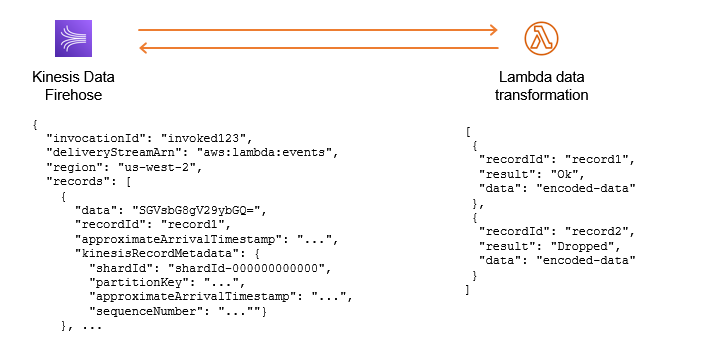
The data transformation process enables you to modify the contents of individual records. Kinesis Data Firehose synchronously invokes the Lambda function with a batch of records. Your custom code modifies the records and then returns an array of transformed records.

Transformed records

The incoming payload provides the data attribute in base64 encoded format. Once the transformation is complete, the returned array must include the following attributes per record:

  • recordId: This must match the incoming recordId to enable the service to map the new data to the record.
  • result: “Ok”, “Dropped”, or “ProcessingFailed”. Dropped means that your logic has intentionally removed the record whereas ProcessingFailed indicates that an error has occurred.
  • data: The transformed data must be base64 encoded.

The returned array must be the same length as the incoming array. The Alleycat example application uses the following code in the data transformation function to add a calculated field to the record:

exports.handler = async (event) => {
    const output = event.records.map((record) => {
        
      // Extract JSON record from base64 data
      const buffer = Buffer.from(record.data, 'base64').toString()
      const jsonRecord = JSON.parse(buffer)

	// Add the calculated field
	jsonRecord.output = ((jsonRecord.cadence + 35) * (jsonRecord.resistance + 65)) / 100

	// Convert back to base64 + add a newline
	const dataBuffer = Buffer.from(JSON.stringify(jsonRecord) + '\n', 'utf8').toString('base64')

       return {
            recordId: record.recordId,
            result: 'Ok',
            data: dataBuffer
        }
    })
    
    console.log(`Output records: ${output.length}`)
    return { records: output }
}

Comparing scaling and throughput with Kinesis Data Streams and Kinesis Data Firehose

Kinesis Data Firehose manages scaling automatically. If the data source is a Kinesis Data Stream, there is no limit to the amount of data the service can ingest. If the data source is a direct put using the PutRecordBatch API, there are soft limits of up to 500,000 records per second, depending upon the Region. See the Kinesis Data Firehose quota page for more information.

Kinesis Data Firehose invokes a Lambda transformation function synchronously and scales up the function as the number of records in the stream grows. When the destination is S3, Amazon Redshift, or the Amazon Elasticsearch Service, Kinesis Data Firehose allows up to five outstanding Lambda invocations per shard. When the destination is Splunk, the quota is 10 outstanding Lambda invocations per shard.

With Kinesis Data Firehose, the buffer hints are the main controls for influencing the rate of data delivery. You can decide between more frequent delivery of small batches of message or less frequent delivery of larger batches. This can impact the PUT cost when using a destination like S3. However, this service is not intended to provide real-time data delivery due to the transformation and batching processes.

With Kinesis Data Streams, the number of shards in a stream determines the ingestion capacity. Each shard supports ingesting up to 1,000 messages or 1 MB per second of data. Unlike Kinesis Data Firehose, this service does not allow you to transform records before delivery to a consumer.

Data Streams has additional capabilities for increasing throughput and reducing the latency of data delivery. The service invokes Lambda consumers every second with a configurable batch size of messages. If the consumers are falling behind data production in the stream, you can increase the parallelization factor. By default, this is set to 1, meaning that each shard has a single instance of a Lambda function it invokes. You can increase this up to 10 so that multiple instances of the consumer function process additional batches of messages.

Increase the parallelization factor

Data Streams consumers use a pull model over HTTP to fetch batches of records, operating in serial. A stream with five standard consumers averages 200 ms of latency each, taking up to 1 second in total. You can improve the overall latency by using enhanced fan-out (EFO). EFO consumers use a push model over HTTP/2 and are independent of each other.

With EFO, all five consumers in the previous example receive batches of messages in parallel using dedicated throughput. The overall latency averages 70 ms and typically data delivery speed is improved by up to 65%. Note that there is an additional charge for this feature.

Kinesis Data Streams EFO consumers

Conclusion

This blog post compares different AWS services for handling streaming data. I compare the features of SQS and Kinesis Data Streams, showing how ordering, ingestion throughput, and multiple consumers often make Kinesis the better choice for streaming workloads.

I compare Data Streams and Kinesis Data Firehose and show how Kinesis Data Firehose is the better option for many data loading operations. I show how the data transformation process works and the overall workflow of a Kinesis Data Firehose stream. Finally, I compare the scaling and throughput options for these two services.

For more serverless learning resources, visit Serverless Land.

Building well-architected serverless applications: Building in resiliency – part 1

Post Syndicated from Julian Wood original https://aws.amazon.com/blogs/compute/building-well-architected-serverless-applications-building-in-resiliency-part-1/

This series of blog posts uses the AWS Well-Architected Tool with the Serverless Lens to help customers build and operate applications using best practices. In each post, I address the serverless-specific questions identified by the Serverless Lens along with the recommended best practices. See the introduction post for a table of contents and explanation of the example application.

Reliability question REL2: How do you build resiliency into your serverless application?

Evaluate scaling mechanisms for serverless and non-serverless resources to meet customer demand. Build resiliency into your workload to make your serverless application resilient to withstand partial and intermittent failures across components that may only surface in production.

Required practice: Manage transaction, partial, and intermittent failures

Whenever one service or system calls another, there is a chance that failures can happen. Services or systems often don’t fail as a single unit, but rather suffer partial or transient failures. Applications should be designed to handle component failures as part of the architecture. The system should be designed to detect failure and, ideally, automatically heal itself.

Transaction failures can occur when a component is unavailable or under high load. Partial failures can occur when a percentage of requests succeeds, including during batch processing. Intermittent failures might occur when a request fails for a short period of time due to network or other transient issues.

AWS serverless services, including AWS Lambda, are fault-tolerant and designed to handle failures. If a service invokes a Lambda function and there is a service disruption, Lambda invokes the function in a different Availability Zone.

When you invoke a function directly, you determine the strategy for handling errors. You can retry, send the event to a destination or queue for debugging, or ignore the error. Clients such as the AWS Command Line Interface (CLI) and the AWS SDK retry on client timeouts, throttling errors (429), and other errors that are not caused by a bad request.

When you invoke a function indirectly, you must be aware of the retry behavior of the invoker and any service that the request encounters along the way. For more information, see “Error handling and automatic retries in AWS Lambda”. You can configure Maximum Retry Attempts and Maximum Event Age for asynchronous invocations.

When reading from Amazon Kinesis Data Streams and Amazon DynamoDB Streams, Lambda retries the entire batch of items. Retries continue until the records expire or exceed the maximum age that you configure on the event source mapping. You can also configure the event source mapping to split a failed batch into two batches. Retrying with smaller batches isolates bad records and works around timeout issues.

Partial failures can occur in non-atomic operations. PutRecords for Kinesis and BatchWriteItem for DynamoDB return a successful response if at least one record is ingested successfully. Always inspect the response when using such operations and programmatically deal with partial failures.

Use exponential backoff with jitter

The simplest technique for dealing with failures in a networked environment is to retry calls until they succeed. This technique increases the reliability of the application and reduces operational costs for the developer.

However, it is not always safe to retry. A retry can further increase the load on the system being called if the system is already failing due to an overload. To avoid this problem, use backoff. Instead of retrying immediately and aggressively, the client waits some amount of time between tries. The most common pattern is an exponential backoff, which uses exponentially longer wait times between retries. This is typically capped to a maximum delay and number of retries.

If all backoff retries are still happening at the same time, this can still overload a system or cause contention. To avoid this problem, use jitter. Jitter adds some amount of randomness to the backoff to spread the retries around in time. This can help prevent large bursts by spreading out the rate when clients connect. For more information see the Amazon Builders’ Library article “Timeouts, retries, and backoff with jitter” and AWS Architecture blog post “Exponential Backoff And Jitter”.

Exponential backoff and jitter

Exponential backoff and jitter

When your application responds to callers in fail-fast scenarios and when performance is degraded, inform the caller via headers or metadata when they can retry.

Each AWS SDK implements automatic retry logic including exponential backoff. For downstream calls, you can adjust AWS and third-party SDK retries, backoffs, TCP, and HTTP timeouts. This helps you decide when to stop retrying. For more information, see the documentation and troubleshooting steps for Lambda and the AWS SDK.

Use a dead-letter queue mechanism to retain, investigate and retry failed transactions

There are a number of ways to handle message failures including destinations and dead-letter queues.

You can configure Lambda to send records of asynchronous invocations to another destination service. These include Amazon Simple Queue Service (SQS), Amazon Simple Notification Service (SNS), Lambda, and Amazon EventBridge. You can configure separate destinations for events that fail processing and events that are successfully processed. The invocation record contains details about the event, the response, and the reason that the record was sent.

The following example shows a function that sends a record of a successful invocation to an EventBridge event bus. When an event fails all processing attempts, Lambda sends an invocation record to an SQS queue. It includes the function’s response in the invocation record.

AWS Lambda destinations for asynchronous invocation

AWS Lambda destinations for asynchronous invocation

SNS, SQS, Lambda, and EventBridge support dead-letter queues (DLQs). DLQs make your applications more resilient and durable by storing messages or events that can’t be processed correctly into a dedicated SQS queue. This helps you debug your application by isolating the problematic messages to determine why their processing failed. One you have resolved the issue, re-process the failed message. For more information, see “When should I use a dead-letter queue?” There is an example serverless application to redrive the messages from an SQS DLQ back to its source SQS queue.

For Lambda, DLQs provide an alternative to a failure destination. Lambda destinations is preferable for asynchronous invocations.

Good practice: Orchestrate long-running transactions

Long-running transactions can be processed by one or multiple components. Consider implementing the saga pattern using state machines for these types of transactions.

The saga pattern coordinates transactions between multiple microservices as part of a state machine. Each service that performs a transaction publishes an event to trigger the next transaction in the saga. This continues until the transaction chain is complete. If a transaction fails, saga orchestrates a series of compensating transactions that undo the changes that were made by the preceding transactions.

This is preferable to handling complex or long-running transactions within application code. State machines prevent cascading failures and avoid tightly coupling components with orchestrating logic and business logic.

Use a state machine to visualize distributed transactions, and to separate business logic from orchestration logic.

AWS Step Functions lets you coordinate multiple AWS services into serverless workflows via state machines. Within Step Functions, you can set separate retries, backoff rates, max attempts, intervals, and timeouts. These are set for every step of your state machine using a declarative language.

In the serverless airline example used in this series, Step Functions is used to orchestrate the Booking microservice. The ProcessBooking state machine handles all the necessary steps to create bookings, including payment.

Booking service Step Functions state machine

Booking service Step Functions state machine

The state machine uses a combination of service integrations using DynamoDB, SQS, and Lambda functions to coordinate transactions and handle failures.

For example, the Reserve Booking task invokes a Lambda function. The task has retry and error handling configured as part of the task definition.

"Reserve Booking": {
	"Type": "Task",
	"Resource": "${ReserveBooking.Arn}",
	"TimeoutSeconds": 5,
	"Retry": [
		{
			"ErrorEquals": [
				"BookingReservationException"
			],
			"IntervalSeconds": 1,
			"BackoffRate": 2,
			"MaxAttempts": 2
		}
	],
	"Catch": [
		{
			"ErrorEquals": [
				"States.ALL"
			],
			"ResultPath": "$.bookingError",
			"Next": "Cancel Booking"
		}
	],
	"ResultPath": "$.bookingId",
	"Next": "Collect Payment"
},

Step Functions supports direct service integrations, including DynamoDB. The Reserve Flight task directly updates the flightTable without requiring a Lambda function.

"Reserve Flight": {
	"Type": "Task",
	"Resource": "arn:aws:states:::dynamodb:updateItem",
	"Parameters": {
		"TableName.$": "$.flightTable",
		"Key": {
			"id": {
				"S.$": "$.outboundFlightId"
			}
		},
		"UpdateExpression": "SET seatCapacity = seatCapacity - :dec",
		"ExpressionAttributeValues": {
			":dec": {
				"N": "1"
			},
			":noSeat": {
				"N": "0"
			}
		},
		"ConditionExpression": "seatCapacity > :noSeat"
	},

By default, when a state reports an error, Step Functions causes the execution to fail entirely.

Utilize dead-letter queues in response to failed state machine executions

Any state within the Step Functions workflow can encounter runtime errors. These include state machine definition issues, task failures such as Lambda function exceptions, or transient issues such as network connectivity issues. For more information, see “Error handling in Step Functions”.

Use the Step Functions service integration with SQS to send failed transactions to a DLQ as the final step. This adds a higher level of durability within your state machines.

For example, the airline Notify Failed Booking final task catches failed states from four previous steps. It sends the results to the Booking DLQ.

Booking service Step Functions DLQ

Booking service Step Functions DLQ

The message includes the output of the previous failed states for further troubleshooting.

"Booking DLQ": {
	"Type": "Task",
	"Resource": "arn:aws:states:::sqs:sendMessage",
	"Parameters": {
		"QueueUrl": "${BookingsDLQ}",
		"MessageBody.$": "$"
	},
	"ResultPath": "$.deadLetterQueue",
	"Next": "Booking Failed"
},

The Step Functions documentation has more information on calling SQS.

Conclusion

Build resiliency into your workloads. This makes sure that your application can withstand partial and intermittent failures across components that may only surface in production.

In this post, I cover managing failures using retries, exponential backoff, and jitter. I explain how DLQs can isolate failed messages. I show how to use state machines to orchestrate long running transactions rather than handling these in application code.

This well-architected question continues in part 2 where I look at managing duplicate and unwanted events with idempotency and an event schema. I cover how to consider scaling patterns at burst rates by managing account limits and show relevant metrics to evaluate.

For more serverless learning resources, visit Serverless Land.

Building well-architected serverless applications: Regulating inbound request rates – part 2

Post Syndicated from Julian Wood original https://aws.amazon.com/blogs/compute/building-well-architected-serverless-applications-regulating-inbound-request-rates-part-2/

This series of blog posts uses the AWS Well-Architected Tool with the Serverless Lens to help customers build and operate applications using best practices. In each post, I address the serverless-specific questions identified by the Serverless Lens along with the recommended best practices. See the introduction post for a table of contents and explanation of the example application.

Reliability question REL1: How do you regulate inbound request rates?

This post continues part 1 of this security question. Previously, I cover controlling inbound request rates using throttling. I go through how to use throttling to control steady-rate and burst rate requests. I show some solutions for performance testing to identify the request rates that your workload can sustain before impacting performance.

Good practice: Use, analyze, and enforce API quotas

API quotas limit the maximum number of requests a given API key can submit within a specified time interval. Metering API consumers provides a better understanding of how different consumers use your workload at sustained and burst rates at any point in time. With this information, you can determine fine-grained rate limiting for multiple quota limits. These can be done according to a group of consumer needs, and can adjust their limits on a regular basis.

Segregate API consumers steady-rate requests and their quota into multiple buckets or tiers

Amazon API Gateway usage plans allow your API consumer to access selected APIs at agreed-upon request rates and quotas. These help your consumers meet their business requirements and budget constraints. Create and attach API keys to usage plans to control access to certain API stages. I show how to create usage plans and how to associate them with API keys in “Building well-architected serverless applications: Controlling serverless API access – part 2”.

API key associated with usage plan

API key associated with usage plan

You can extract utilization data from usage plans to analyze API usage on a per-API key basis. In the example, I show how to use usage plans to see how many requests are made.

View API key usage

View API key usage

This allows you to generate billing documents and determine whether your customers need higher or lower limits. Have a mechanism to allow customers to request higher limits preemptively. When customers anticipate greater API usage, they can take action proactively.

API Gateway Lambda authorizers can dynamically associate API keys to a given request. This can be used where you do not control API consumers, or want to associate API keys based on your own criteria. For more information, see the documentation.

You can also visualize usage plans with Amazon QuickSight using enriched API Gateway access logs.

Visualize usage plans with Amazon QuickSight

Visualize usage plans with Amazon QuickSight

Define whether your API consumers are end users or machines

Understanding your API consumers helps you manage how they connect to your API. This helps you define a request access pattern strategy, which can distinguish between end users or machines.

Machine consumers make automated connections to your API, which may require a different access pattern to end users. You may decide to prioritize end user consumers to provide a better experience. Machine consumers may be able to handle request throttling automatically.

Best practice: Use mechanisms to protect non-scalable resources

Limit component throughput by enforcing how many transactions it can accept

AWS Lambda functions can scale faster than traditional resources, such as relational databases and cache systems. Protect your non-scalable resources by ensuring that components that scale quickly do not exceed the throughput of downstream systems. This can prevent system performance degrading. There are a number of ways to achieve this, either directly or via buffer mechanisms such as queues and streams.

For relational databases such as Amazon RDS, you can limit the number of connections per user, in addition to the global maximum number of connections. With Amazon RDS Proxy, your applications can pool and share database connections to improve their ability to scale.

Amazon RDS Proxy

Amazon RDS Proxy

For additional options for using RDS with Lambda, see the AWS Serverless Hero blog post “How To: Manage RDS Connections from AWS Lambda Serverless Functions”.

Cache results and only connect to, and fetch data from databases when needed. This reduces the load on the downstream database. Adjust the maximum number of connections for caching systems. Include a caching expiration mechanism to prevent serving stale records. For more information on caching implementation patterns and considerations, see “Caching Best Practices”.

Lambda provides managed scaling. When a function is first invoked, the Lambda service creates an instance of the function to process the event. This is called a cold start. After completion, the function remains available for a period of time to process subsequent events. These are called warm starts. If other events arrive while the function is busy, Lambda creates more instances of the function to handle these requests concurrently as cold starts. The following example shows 10 events processed in six concurrent requests.

Lambda concurrency

Lambda concurrency

You can control the number of concurrent function invocations to both reserve and limit the maximum concurrency your function can achieve. You can configure reserved concurrency to set the maximum number of concurrent instances for the function. This can protect downstream resources such as a database by ensuring Lambda can only scale up to the number of connections the database can support.

For example, you may have a traditional database or external API that can only support a maximum of 50 concurrent connections. You can set the maximum number of concurrent Lambda functions using the function concurrency settings. Setting the value to 50 ensures that the traditional database or external API is not overwhelmed.

Edit Lambda concurrency

Edit Lambda concurrency

You can also set the Lambda function concurrency to 0, which disables the Lambda function in the event of anomalies.

Another solution to protect downstream resources is to use an intermediate buffer. A buffer can persistently store messages in a stream or queue until a receiver processes them. This helps you control how fast messages are processed, which can protect the load on downstream resources.

Amazon Kinesis Data Streams allows you to collect and process large streams of data records in real time, and can act as a buffer. Streams consist of a set of shards that contain a sequence of data records. When using Lambda to process records, it processes one batch of records at a time from each shard.

Kinesis Data Streams control concurrency at the shard level, meaning that a single shard has a single concurrent invocation. This can reduce downstream calls to non-scalable resources such as a traditional database. Kinesis Data Streams also support batch windows up to 5 minutes and batch record sizes. These can also be used to control how frequent invocations can occur.

To learn how to manage scaling with Kinesis, see the documentation. To learn more how Lambda works with Kinesis, read the blog series “Building serverless applications with streaming data”.

Lambda and Kinesis shards

Lambda and Kinesis shards

Amazon Simple Queue Service (SQS) is a fully managed serverless message queuing service that enables you to decouple and scale microservices. You can offload tasks from one component of your application by sending them to a queue and processing them asynchronously.

SQS can act as a buffer, using a Lambda function to process the messages. Lambda polls the queue and invokes your Lambda function synchronously with an event that contains queue messages. Lambda reads messages in batches and invokes your function once for each batch. When your function successfully processes a batch, Lambda deletes its messages from the queue.

You can protect downstream resources using the Lambda concurrency controls. This limits the number of concurrent Lambda functions that pull messages off the queue. The messages persist in the queue until Lambda can process them. For more information see, “Using AWS Lambda with Amazon SQS

Lambda and SQS

Lambda and SQS

Conclusion

Regulating inbound requests helps you adapt different scaling mechanisms based on customer demand. You can achieve better throughput for your workloads and make them more reliable by controlling requests to a rate that your workload can support.

In this post, I cover using, analyzing, and enforcing API quotas using usage plans and API keys. I show mechanisms to protect non-scalable resources such as using RDS Proxy to protect downstream databases. I show how to control the number of Lambda invocations using concurrency controls to protect downstream resources. I explain how you can use streams and queues as an intermediate buffer to store messages persistently until a receiver processes them.

In the next post in the series, I cover the second reliability question from the Well-Architected Serverless Lens, building resiliency into serverless applications.

For more serverless learning resources, visit Serverless Land.

Building well-architected serverless applications: Regulating inbound request rates – part 1

Post Syndicated from Julian Wood original https://aws.amazon.com/blogs/compute/building-well-architected-serverless-applications-regulating-inbound-request-rates-part-1/

This series of blog posts uses the AWS Well-Architected Tool with the Serverless Lens to help customers build and operate applications using best practices. In each post, I address the serverless-specific questions identified by the Serverless Lens along with the recommended best practices. See the introduction post for a table of contents and explanation of the example application.

Reliability question REL1: How do you regulate inbound request rates?

Defining, analyzing, and enforcing inbound request rates helps achieve better throughput. Regulation helps you adapt different scaling mechanisms based on customer demand. By regulating inbound request rates, you can achieve better throughput, and adapt client request submissions to a request rate that your workload can support.

Required practice: Control inbound request rates using throttling

Throttle inbound request rates using steady-rate and burst rate requests

Throttling requests limits the number of requests a client can make during a certain period of time. Throttling allows you to control your API traffic. This helps your backend services maintain their performance and availability levels by limiting the number of requests to actual system throughput.

To prevent your API from being overwhelmed by too many requests, Amazon API Gateway throttles requests to your API. These limits are applied across all clients using the token bucket algorithm. API Gateway sets a limit on a steady-state rate and a burst of request submissions. The algorithm is based on an analogy of filling and emptying a bucket of tokens representing the number of available requests that can be processed.

Each API request removes a token from the bucket. The throttle rate then determines how many requests are allowed per second. The throttle burst determines how many concurrent requests are allowed. I explain the token bucket algorithm in more detail in “Building well-architected serverless applications: Controlling serverless API access – part 2

Token bucket algorithm

Token bucket algorithm

API Gateway limits the steady-state rate and burst requests per second. These are shared across all APIs per Region in an account. For further information on account-level throttling per Region, see the documentation. You can request account-level rate limit increases using the AWS Support Center. For more information, see Amazon API Gateway quotas and important notes.

You can configure your own throttling levels, within the account and Region limits to improve overall performance across all APIs in your account. This restricts the overall request submissions so that they don’t exceed the account-level throttling limits.

You can also configure per-client throttling limits. Usage plans restrict client request submissions to within specified request rates and quotas. These are applied to clients using API keys that are associated with your usage policy as a client identifier. You can add throttling levels per API route, stage, or method that are applied in a specific order.

For more information on API Gateway throttling, see the AWS re:Invent presentation “I didn’t know Amazon API Gateway could do that”.

API Gateway throttling

API Gateway throttling

You can also throttle requests by introducing a buffering layer using Amazon Kinesis Data Stream or Amazon SQS. Kinesis can limit the number of requests at the shard level while SQS can limit at the consumer level. For more information on using SQS as a buffer with Amazon Simple Notification Service (SNS), read “How To: Use SNS and SQS to Distribute and Throttle Events”.

Identify steady-rate and burst rate requests that your workload can sustain at any point in time before performance degraded

Load testing your serverless application allows you to monitor the performance of an application before it is deployed to production. Serverless applications can be simpler to load test, thanks to the automatic scaling built into many of the services. During a load test, you can identify quotas that may act as a limiting factor for the traffic you expect and take action.

Perform load testing for a sustained period of time. Gradually increase the traffic to your API to determine your steady-state rate of requests. Also use a burst strategy with no ramp up to determine the burst rates that your workload can serve without errors or performance degradation. There are a number of AWS Marketplace and AWS Partner Network (APN) solutions available for performance testing, Gatling Frontline, BlazeMeter, and Apica.

In the serverless airline example used in this series, you can run a performance test suite using Gatling, an open source tool.

To deploy the test suite, follow the instructions in the GitHub repository perf-tests directory. Uncomment the deploy.perftest line in the repository Makefile.

Perf-test makefile

Perf-test makefile

Once the file is pushed to GitHub, AWS Amplify Console rebuilds the application, and deploys an AWS CloudFormation stack. You can run the load tests locally, or use an AWS Step Functions state machine to run the setup and Gatling load test simulation.

Performance test using Step Functions

Performance test using Step Functions

The Gatling simulation script uses constantUsersPerSec and rampUsersPerSec to add users for a number of test scenarios. You can use the test to simulate load on the application. Once the tests run, it generates a downloadable report.

Gatling performance results

Gatling performance results

Artillery Community Edition is another open-source tool for testing serverless APIs. You configure the number of requests per second and overall test duration, and it uses a headless Chromium browser to run its test flows. For Artillery, the maximum number of concurrent tests is constrained by your local computing resources and network. To achieve higher throughput, you can use Serverless Artillery, which runs the Artillery package on Lambda functions. As a result, this tool can scale up to a significantly higher number of tests.

For more information on how to use Artillery, see “Load testing a web application’s serverless backend”. This runs tests against APIs in a demo application. For example, one of the tests fetches 50,000 questions per hour. This calls an API Gateway endpoint and tests whether the AWS Lambda function, which queries an Amazon DynamoDB table, can handle the load.

Artillery performance test

Artillery performance test

This is a synchronous API so the performance directly impacts the user’s experience of the application. This test shows that the median response time is 165 ms with a p95 time of 201 ms.

Performance test API results

Performance test API results

Another consideration for API load testing is whether the authentication and authorization service can handle the load. For more information on load testing Amazon Cognito and API Gateway using Step Functions, see “Using serverless to load test Amazon API Gateway with authorization”.

API load testing with authentication and authorization

API load testing with authentication and authorization

Conclusion

Regulating inbound requests helps you adapt different scaling mechanisms based on customer demand. You can achieve better throughput for your workloads and make them more reliable by controlling requests to a rate that your workload can support.

In this post, I cover controlling inbound request rates using throttling. I show how to use throttling to control steady-rate and burst rate requests. I show some solutions for performance testing to identify the request rates that your workload can sustain before performance degradation.

This well-architected question will be continued where I look at using, analyzing, and enforcing API quotas. I cover mechanisms to protect non-scalable resources.

For more serverless learning resources, visit Serverless Land.

Amazon Simple Queue Service (SQS) – 15 Years and Still Queueing!

Post Syndicated from Jeff Barr original https://aws.amazon.com/blogs/aws/amazon-sqs-15-years-and-still-queueing/

Time sure does fly! I wrote about the production launch of Amazon Simple Queue Service (SQS) back in 2006, with no inkling that I would still be blogging fifteen years later, or that this service would still be growing rapidly while remaining fundamental to the architecture of so many different types of web-scale applications.

The first beta of SQS was announced with little fanfare in late 2004. Even though we have added many features since that beta, the original description (“a reliable, highly scalable hosted queue for buffering messages between distributed application components”) still applies. Our customers think of SQS as an infinite buffer in the cloud and use SQS queues to implement the connections between the functional parts of their application architecture.

Over the years, we have worked hard to keep the SQS interface simple and easy to use, even though there’s a lot of complexity inside. In order to make SQS scalable, durable, and reliable, messages are stored in a fleet that consists of thousands of servers in each AWS Region. Within a region, we save three copies of each message, taking care to distribute the messages across storage nodes and Availability Zones. In addition to this built-in redundant storage, SQS is self-healing and resilient to host failures & network interruptions. Even though SQS is now 15 years old, we continue to improve our scaling and load management applications so that you can always count on SQS to handle your mission-critical workloads.

SQS runs at an incredible scale. For example:

Amazon Product Fulfillment – During Prime Day 2021, traffic to SQS set a new record, peaking at 47.7 million messages per second.

Rapid7 – Amazon customer Rapid7 makes extensive use of SQS. According to Jeff Myers (Platform Software Architect):

Amazon SQS provides us with a simple to use, highly performant, and highly scalable messaging service without any management headaches. It is a crucial component of our architecture that has allowed us to scale to handle 10s of billions of messages per day.

You can visit the Amazon SQS home page to read about other high-scale use cases from NASA, BMW Group, Capital One, and other AWS customers.

Serverless Office Hours
Be sure to join us today (June 13th) for Serverless Office Hours at Noon PT on Twitch.tv. Rumor has it that there will be cake!

Back in Time
Here’s a quick recap of some of the major SQS milestones:

2006Production launch. An unlimited number of queues per account and items per queue, with each item up to 8 KB in length. Pay as you go pricing based on messages sent and data transferred.

2007Additional functions including control of the visibility timeout and access to the approximate number of queued messages.

2009SQS in Europe, and additional control over queue access via AddPermission and RemovePermission. This launch also marked the debut of what we then called the Access Policy Language, which has evolved into today’s IAM Policies.

2010A new free tier (100K requests/month then, since expanded to 1 million requests/month), configurable maximum message length (up to 64 KB), and configurable message retention time.

2011Additional CloudWatch Metrics for each SQS queue. Later that year we added batch operations (SendMessageBatch and DeleteMessageBatch), delay queues, and message timers.

2012Support for long polling, along with SDK support for request batching and client-side buffering.

2013Support for even larger payloads (256 KB) and a 50% price reduction.

2014 – Support for dead letter queues, to accept messages that have become stuck due to a timeout or to a processing error within your code.

2015 – Support for extended payloads (up to 2 GB) using the Extended Client Library.

2016 – Support for FIFO queues with exactly-once processing and deduplication and another price reduction.

2017 – Support for server-side encryption of messages and cost allocation tags.

2018 – Support for Amazon VPC Endpoints using AWS PrivateLink and the ability to invoke Lambda functions.

2019 – Support for Tag-on-Create and X-Ray tracing.

2020 – Support for 1-minute metrics for more fine-grained queue monitoring, a new console experience, and result pagination for the ListQueues and ListDeadLetterSourceQueues functions.

2021Tiered pricing so that you save money as your usage grows, and a High Throughput mode for FIFO queues.

Today, SQS remains simple, scalable, cost-effective, and highly reliable.

From the AWS Heroes
We asked some of the AWS Heroes to reflect on the success of SQS and to share some of their success stories. Here’s what we learned:

Eric Hammond (Serverless Hero) uses AWS Lambda Dead Letter Queues. They put alarms on the queues and send internal emails as alerts when problems need to be investigated.

Tom McLaughlin (Serverless Hero) has been using SQS since 2015. He said “My favorite use case is anytime someone wants a queue and I don’t want to manage a queuing platform. Which is always.”

Ken Collins (Serverless Hero) was not entirely sure how long he had been using SQS, and offered a range of 2 to 8 years! He uses it to power the Lambdakiq gem, which implements ActiveJob on SQS & Lambda.

Kyuhyun Byun (Serverless Hero) has been using SQS to power a push system that must sustain massive amounts of traffic, and tells us “Thanks to SQS, I don’t consider building a queuing system anymore.”

Prashanth HN (Serverless Hero) has been using SQS since 2017, and considers himself “late to the party.” He used SQS as part of his first serverless application, and finds that it is ideal for connecting services with differing throughput.

Ben Kehoe (Serverless Hero) told us that “I first saw the power of SQS when a colleague showed me how to retain state in a fleet of EC2 Spot instances by storing the state in SQS when an instance was getting shut down, and having new instances check the queue for state on startup.”

Jeremy Daly (Serverless Hero) started using SQS in 2010 as a lightweight queue that fed a facial recognition process on user-supplied images. Today, he often uses it as a buffer to throttle requests to downstream services that are not yet serverless.

Casey Lee (Container Hero) also started to use SQS in 2010 as a replacement for ActiveMQ between loosely coupled Java services. Casey implements auto scaling based on queue depth, and has found it to be an accurate way to handle the load.

Vlad Ionecsu (Container Hero) began his AWS journey with SQS back in 2014. Vlad found that the API was very easy to understand, and used SQS to power his thesis project.

Sheen Brisals (Serverless Hero) started to use SQS in 2018 while building a proof-of-concept that also used Lambda and S3. Sheen appreciates the ability to adjust the characteristics of each queue to create a good match for the message processing functions, and also makes use of both high and low priority queues.

Gojko Adzic (Serverless Hero) began to use SQS in 2013 as a task dispatch for exporters in MindMup. This online mind-mapping application allows large groups of users to collaborate, and requires strict ordering of updates to each document. Gojko used FIFO queues to allow them to process messages for different documents in parallel, with sequential order within each document.

Sebastian Müller (Serverless Hero) started to use SQS in 2016 by building a notification center for website-builder jimdo.com . The center ensures that customers are kept aware of events (orders, support messages, and contact requests) on a timely basis.

Luca Bianchi (Serverless Hero) first used SQS in 2012. He decoupled a pair of microservices running on AWS Elastic Beanstalk, and also created a fan-out processing system for a gamification platform. Today, his favorite SQS use case stores inference jobs and makes them available to a worker process running on Amazon SageMaker.

Peter Hanssens (Serverless Hero) uses SQS to offload tasks that do not need to be processed immediately. Several years ago, while assisting some data scientists, he created an event-driven batch-processing system that used a Lambda function to check a queue every 5 minutes and fire up EC2 instances to build models, while keeping strict control over the maximum number of running instances.

Serkan Ozal (Serverless Hero) has been using SQS since 2013 or so. He focuses on asynchronous message processing and counts on the ability of SQS to handle a huge number of events. He also makes uses of the message visibility feature so that he can re-process messages if necessary.

Matthieu Napoli (Serverless Hero) has been using SQS for about five years, starting out with EC2, and as a replacement for other queues. As he says, “Paired with Lambda, it gives massive parallelism out of the box without having to think too much about it. Plus the built-in failure handling makes it very robust.”

As you can see, there are a multitude of use cases for SQS.

SQS Resources
If you are not already using SQS, then it is time to get in the queue and get started. Here are some resources to help you find your way:

Happy queueing!

Jeff;


Building well-architected serverless applications: Managing application security boundaries – part 1

Post Syndicated from Julian Wood original https://aws.amazon.com/blogs/compute/building-well-architected-serverless-applications-managing-application-security-boundaries-part-1/

This series of blog posts uses the AWS Well-Architected Tool with the Serverless Lens to help customers build and operate applications using best practices. In each post, I address the serverless-specific questions identified by the Serverless Lens along with the recommended best practices. See the introduction post for a table of contents and explanation of the example application.

Security question SEC2: How do you manage your serverless application’s security boundaries?

Defining and securing your serverless application’s boundaries ensures isolation for, within, and between components.

Required practice: Evaluate and define resource policies

Resource policies are AWS Identity and Access Management (IAM) statements. They are attached to resources such as an Amazon S3 bucket, or an Amazon API Gateway REST API resource or method. The policies define what identities have fine-grained access to the resource. To see which services support resource-based policies, see “AWS Services That Work with IAM”. For more information on how resource policies and identity policies are evaluated, see “Identity-Based Policies and Resource-Based Policies”.

Understand and determine which resource policies are necessary

Resource policies can protect a component by restricting inbound access to managed services. Use resource policies to restrict access to your component based on a number of identities, such as the source IP address/range, function event source, version, alias, or queues. Resource policies are evaluated and enforced at IAM level before each AWS service applies it’s own authorization mechanisms, when available. For example, IAM resource policies for API Gateway REST APIs can deny access to an API before an AWS Lambda authorizer is called.

If you use multiple AWS accounts, you can use AWS Organizations to manage and govern individual member accounts centrally. Certain resource policies can be applied at the organizations level, providing guardrail for what actions AWS accounts within the organization root or OU can do. For more information see, “Understanding how AWS Organization Service Control Policies work”.

Review your existing policies and how they’re configured, paying close attention to how permissive individual policies are. Your resource policies should only permit necessary callers.

Implement resource policies to prevent unauthorized access

For Lambda, use resource-based policies to provide fine-grained access to what AWS IAM identities and event sources can invoke a specific version or alias of your function. Resource-based policies can also be used to control access to Lambda layers. You can combine resource policies with Lambda event sources. For example, if API Gateway invokes Lambda, you can restrict the policy to the API Gateway ID, HTTP method, and path of the request.

In the serverless airline example used in this series, the IngestLoyalty service uses a Lambda function that subscribes to an Amazon Simple Notification Service (Amazon SNS) topic. The Lambda function resource policy allows SNS to invoke the Lambda function.

Lambda resource policy document

Lambda resource policy document

API Gateway resource-based policies can restrict API access to specific Amazon Virtual Private Cloud (VPC), VPC endpoint, source IP address/range, AWS account, or AWS IAM users.

Amazon Simple Queue Service (SQS) resource-based policies provide fine-grained access to certain AWS services and AWS IAM identities (users, roles, accounts). Amazon SNS resource-based policies restrict authenticated and non-authenticated actions to topics.

Amazon DynamoDB resource-based policies provide fine-grained access to tables and indexes. Amazon EventBridge resource-based policies restrict AWS identities to send and receive events including to specific event buses.

For Amazon S3, use bucket policies to grant permission to your Amazon S3 resources.

The AWS re:Invent session Best practices for growing a serverless application includes further suggestions on enforcing security best practices.

Best practices for growing a serverless application

Best practices for growing a serverless application

Good practice: Control network traffic at all layers

Apply controls for controlling both inbound and outbound traffic, including data loss prevention. Define requirements that help you protect your networks and protect against exfiltration.

Use networking controls to enforce access patterns

API Gateway and AWS AppSync have support for AWS Web Application Firewall (AWS WAF) which helps protect web applications and APIs from attacks. AWS WAF enables you to configure a set of rules called a web access control list (web ACL). These allow you to block, or count web requests based on customizable web security rules and conditions that you define. These can include specified IP address ranges, CIDR blocks, specific countries, or Regions. You can also block requests that contain malicious SQL code, or requests that contain malicious script. For more information, see How AWS WAF Works.

private API endpoint is an API Gateway interface VPC endpoint that can only be accessed from your Amazon Virtual Private Cloud (Amazon VPC). This is an elastic network interface that you create in a VPC. Traffic to your private API uses secure connections and does not leave the Amazon network, it is isolated from the public internet. For more information, see “Creating a private API in Amazon API Gateway”.

To restrict access to your private API to specific VPCs and VPC endpoints, you must add conditions to your API’s resource policy. For example policies, see the documentation.

By default, Lambda runs your functions in a secure Lambda-owned VPC that is not connected to your account’s default VPC. Functions can access anything available on the public internet. This includes other AWS services, HTTPS endpoints for APIs, or services and endpoints outside AWS. The function cannot directly connect to your private resources inside of your VPC.

You can configure a Lambda function to connect to private subnets in a VPC in your account. When a Lambda function is configured to use a VPC, the Lambda function still runs inside the Lambda service VPC. The function then sends all network traffic through your VPC and abides by your VPC’s network controls. Functions deployed to virtual private networks must consider network access to restrict resource access.

AWS Lambda service VPC with VPC-to-VPT NAT to customer VPC

AWS Lambda service VPC with VPC-to-VPT NAT to customer VPC

When you connect a function to a VPC in your account, the function cannot access the internet, unless the VPC provides access. To give your function access to the internet, route outbound traffic to a NAT gateway in a public subnet. The NAT gateway has a public IP address and can connect to the internet through the VPC’s internet gateway. For more information, see “How do I give internet access to my Lambda function in a VPC?”. Connecting a function to a public subnet doesn’t give it internet access or a public IP address.

You can control the VPC settings for your Lambda functions using AWS IAM condition keys. For example, you can require that all functions in your organization are connected to a VPC. You can also specify the subnets and security groups that the function’s users can and can’t use.

Unsolicited inbound traffic to a Lambda function isn’t permitted by default. There is no direct network access to the execution environment where your functions run. When connected to a VPC, function outbound traffic comes from your own network address space.

You can use security groups, which act as a virtual firewall to control outbound traffic for functions connected to a VPC. Use security groups to permit your Lambda function to communicate with other AWS resources. For example, a security group can allow the function to connect to an Amazon ElastiCache cluster.

To filter or block access to certain locations, use VPC routing tables to configure routing to different networking appliances. Use network ACLs to block access to CIDR IP ranges or ports, if necessary. For more information about the differences between security groups and network ACLs, see “Compare security groups and network ACLs.”

In addition to API Gateway private endpoints, several AWS services offer VPC endpoints, including Lambda. You can use VPC endpoints to connect to AWS services from within a VPC without an internet gateway, NAT device, VPN connection, or AWS Direct Connect connection.

Using tools to audit your traffic

When you configure a Lambda function to use a VPC, or use private API endpoints, you can use VPC Flow Logs to audit your traffic. VPC Flow Logs allow you to capture information about the IP traffic going to and from network interfaces in your VPC. Flow log data can be published to Amazon CloudWatch Logs or S3 to see where traffic is being sent to at a granular level. Here are some flow log record examples. For more information, see “Learn from your VPC Flow Logs”.

Block network access when required

In addition to security groups and network ACLs, third-party tools allow you to disable outgoing VPC internet traffic. These can also be configured to allow traffic to AWS services or allow-listed services.

Conclusion

Managing your serverless application’s security boundaries ensures isolation for, within, and between components. In this post, I cover how to evaluate and define resource policies, showing what policies are available for various serverless services. I show some of the features of AWS WAF to protect APIs. Then I review how to control network traffic at all layers. I explain how Lambda functions connect to VPCs, and how to use private APIs and VPC endpoints. I walk through how to audit your traffic.

This well-architected question will be continued where I look at using temporary credentials between resources and components. I cover why smaller, single purpose functions are better from a security perspective, and how to audit permissions. I show how to use AWS Serverless Application Model (AWS SAM) to create per-function IAM roles.

For more serverless learning resources, visit https://serverlessland.com.

Create a serverless feedback collector application using Amazon Pinpoint’s two-way SMS functionality

Post Syndicated from Murat Balkan original https://aws.amazon.com/blogs/messaging-and-targeting/create-a-serverless-feedback-collector-application-by-using-amazon-pinpoints-two-way-sms-functionality/

Introduction

Two-way SMS communication is used by many companies to create interactive engagements with their customers. Traditional SMS notifications are one-way. While this is valid for many different use cases like one-time passwords (OTP) notifications and security notifications or reminders, some other use-cases may benefit from collecting information from the same channel. Two-way SMS allows customers to create this feedback mechanism and enhance business interactions and overall customer experience.

SMS is chosen for its simplicity and availability across different sets of devices. By combining the two-way SMS mechanism with the vast breadth of services Amazon Web Services (AWS) offers, companies can create effective architectures to better interact and serve their customers.

This blog post shows you how a serverless online appointment application can use Amazon Pinpoint’s two-way SMS functionality to collect customer feedback for completed appointments. You will learn how Amazon Pinpoint interacts with other AWS serverless services with its out-of-the-box integrations to create a scalable messaging application.

Architecture

By completing the steps in this post, you can create a system that uses the architecture illustrated in the following image:

The architecture of a feedback collector application that is composed of serverless AWS services

The flow of events starts when a Amazon DynamoDB table item, representing an online appointment, changes its status to COMPLETED. An AWS Lambda function which is subscribed to these changes over DynamoDB Streams detects this change and sends an SMS to the customer by using Amazon Pinpoint API’s sendMessages operation.

Amazon Pinpoint delivers the SMS to the recipient and generates a unique message ID to the AWS Lambda function. The Lambda function then adds this message ID to a DynamoDB table called “message-lookup”. This table is used for tracking different feedback requests sent during a multi-step conversation and associate them with the appointment ids. At this stage, the Lambda function also populates another table “feedbacks” which will hold the feedback responses that will be sent as SMS reply messages.

Each time a recipient replies to an SMS, Amazon Pinpoint publishes this reply event to an Amazon SNS topic which is subscribed by an Amazon SQS queue. Amazon Pinpoint will also add a messageId to this event which allows you to bind it to a sendMessages operation call.

A second AWS Lambda function polls these reply events from the Amazon SQS queue. It checks whether the reply is in the correct format (i.e. a number) and also associated with a previous request. If all conditions are met, the AWS Lambda function checks the ConversationStage attribute’s value from its message-lookup table. According to the current stage and the SMS answer received, AWS Lambda function will determine the next step.

For example, if the feedback score received is less than 5, a follow-up SMS is sent to the user asking if they’ll be happy to receive a call from the customer support team.

All SMS replies from the users are reflected to “feedbacks” table for further analysis.

Deploying the Sample Application

  1. Clone this GitHub repository to your local machine and install and configure AWS SAM with a test AWS IAM user.

You will use AWS SAM to deploy the remaining parts of this serverless architecture.

The AWS SAM template creates the following resources:

    • An Amazon DynamoDB table (appointments) that contains information about appointments, customers and their appointment status.
    • An Amazon DynamoDB table (feedbacks) that holds the received feedbacks from customers.
    • An Amazon DynamoDB table (message-lookup) that holds the Amazon Pinpoint message ids and associate them to appointments to track a multi-step conversation.
    • Two AWS Lambda functions (FeedbackSender and FeedbackReceiver)
    • An Amazon SNS topic that collects state change events from Amazon Pinpoint.
    • An Amazon SQS queue that queues the incoming messages.
    • An Amazon Pinpoint Application with an associated SMS channel.

This architecture consists of two Lambda functions, which are represented as two different apps in the AWS SAM template. These functions are named FeedbackSender and FeedbackReceiver. The FeedbackSender function listens the Amazon DynamoDB Stream associated with the appointments table and sends the SMS message requesting a feedback. Second Lambda function, FeedbackReceiver, polls the Amazon SQS queue and updates the feedbacks table in Amazon DynamoDB. (pinpoint-two-way-sms)

          Note: You’ll incur some costs by deploying this stack into your account.

  1. To start the SAM deployment, navigate to the root directory of the repository you downloaded and where the template.yaml AWS SAM template resides. AWS SAM also requires you to specify an Amazon Simple Storage Service (Amazon S3) bucket to hold the deployment artifacts. If you haven’t already created a bucket for this purpose, create one now. The bucket should have read and write access by an AWS Identity and Access Management (IAM) user.

At the command line, enter the following command to package the application:

sam package --template template.yaml --output-template-file output_template.yaml --s3-bucket BUCKET_NAME_HERE

In the preceding command, replace BUCKET_NAME_HERE with the name of the Amazon S3 bucket that should hold the deployment artifacts.

AWS SAM packages the application and copies it into this Amazon S3 bucket.

When the AWS SAM package command finishes running, enter the following command to deploy the package:

sam deploy --template-file output_template.yaml --stack-name BlogStackPinpoint --capabilities CAPABILITY_IAM

When you run this command, AWS SAM shows the progress of the deployment. When the deployment finishes, navigate to the Amazon Pinpoint console and choose the project named “BlogApplication”. This example uses “BlogStackPinpoint” as the stack name, you can change this to any other name you want.

  1. From the left navigation, choose Settings, SMS and voice. On the SMS and voice settings page, choose the Request phone number button under Number settings

Screenshot of request phone number screen

  1. Choose a target country. Set the Default message type as Transactional, and click on the Request long codes button to buy a long code.

Note: In United States, you can also request a Toll Free Number(TFN)

Screenshot showing long code additio

A long code will be added to the Number settings list.

  1. Choose the newly added number to reach the SMS Settings page and enable the option Enable two-way-SMS. At the Incoming messages destination, select Choose an existing SNS topic, and from the drop down select the Amazon SNS topic that was created by the BlogStackPinpoint stack.

Choose Save to save your SMS settings.


Testing the Sample Application

Now that the application is deployed and configured, test it by creating sample records in the Amazon DynamoDB table. Navigate to Amazon DynamoDB console and reach the tables view. Inspect the tables that were created by the AWS SAM application.

Here, appointments table is the table where the appointments and their statuses are kept. It tracks the appointment lifecycle events with items identified by unique ids. In this sample scenario, we are assuming that an appointment application creates a record with ‘CREATED’ status when a new appointment is planned. After the appointment is finished, same application updates the status to ‘COMPLETED’ which will trigger the feedback collection process. Feedback results are collected in the feedbacks table. Amazon Pinpoint message id’s, conversation stage and appointment id’s are kept in the message-lookup table.

  1. To start testing the end-to-end flow, choose the appointments table to open table overview page.
  2. Next, select the Items tab and choose the Create item From the dropdown, select Text. Add the following and choose Save to create your first appointment object. While adding the following object, replace CustomerPhone attribute’s value with a phone number you own. The feedback request messages will be delivered to that number. Note: This number should match the country number for the long code you provisioned.

{

"CustomerName": "Customer A",

"CustomerPhone": "+12345678900",

"AppointmentStatus":"CREATED",

"id": "1"

}

  1. To trigger sending the feedback SMS, you need to set an existing item’s status to “COMPLETED” To do this, select the item and click Edit from the Actions menu.

Replace the item’s current JSON with the following.

{

"AppointmentStatus": "COMPLETED",

"CustomerName": "Customer A",

"CustomerPhone": "+12345678900",

"id": "1"

}

  1. Before choosing the Save button, double check that you have set CustomerPhone attribute’s value to a valid phone number.

After the change, you should receive an SMS message asking for a feedback. Provide a numeric reply of that is less than five to this message. This will trigger a follow up question asking for a consent to receive an in-person callback.


During your SMS conversation with the application, inspect the feedbacks table. The feedback you have given over this two-way SMS channel should have been reflected into the table.

If you want to repeat the process, make sure to increment the AppointmentId field for any additional appointment records.

Cleanup

To clean up the resources you used in your account, simply navigate to AWS Cloudformation console and delete the stack named “BlogStackPinpoint”.

After the stack is deleted, you also need to delete the Long code from the Pinpoint Console by choosing the number and pressing Remove phone number button. You can also delete the Amazon S3 bucket you used for packaging and deploying the AWS SAM application.

Conclusion

This architecture shows how Amazon Pinpoint can be used to make two-way SMS communication with your customers. You can implement Two-way SMS functionality in other use cases such as appointment reminders, polls, Q&A services, and more.

To learn more about Pinpoint and it’s two-way SMS mechanism, you can visit the Pinpoint documentation.


Building Multi-partner integration on AWS using Event-Driven Architecture

Post Syndicated from Vivek Kant original https://aws.amazon.com/blogs/architecture/building-multi-partner-integration-on-aws-using-event-driven-architecture/

Summary

Finserv MARKETS enables customers to buy financial services products such as credit cards, loans, insurance, and investments from various partners. Finserv integrates with a large number of partners in real time to provide services to customers.

Each partner has their own semantic APIs which can pose a challenge. There are also issues of latency and failures. We’ll show how our solution based on Event Driven Architecture (EDA) on AWS with Reactive design offers a solution to address these challenges.

Challenges with multi-partner integration

  • Latency – Making API calls to multiple partners increases latency of a service even in the scenario in which the calls are made in parallel.
  • Timeouts – If a partner’s APIs time out, this could impact overall service performance and availability.
  • Failures – A partner API failure could lead to the failure or major performance degradation of the overall service.
  • Customer Experience – Preserving the customer experience when depending on partner integration is a challenge, considering these technical issues.

Conceptual solution

In order to build this multi-partner platform, we discussed using traditional command-driven synchronous architecture. We also considered adopting an Event-Driven Architecture (EDA). Building our solution on EDA enabled us to deliver consistent customer experience while addressing failures and performance issues from partner APIs.

The diagram following shows a conceptual view of the solution:

Event Driven Conceptual view

Figure 1 – Conceptual View of Our Solution

The key components of the solution are:

1. User Interface: It is the single page application running on the user’s browser. For example, the UI makes an API call to business services to calculate insurance premiums with required parameters and receives a unique identifier. This enables the UI to be reactive and display the responses from the partner as they arrive.

2. Business Service: A microservice which provides APIs for:

• The user interface to submit and generate events for request for partner offer

• A callback to submit the response from the partner integration service in a reactive manner

3. Event Bus: The event bus infrastructure enables transportation, routing, and delivery of events to the right services. The business service raises a set of events to the event bus for a quote request. There is one event for each partner that is listened to by the reactive services.

4. Reactive Services: Services that consume events and call partner integration services for the calling partner API. On receiving the partner response, it calls the callback API on the business service. These services are organized by product domain (for example Motor Insurance).

5. Partner Integration Service: This service is responsible for integration with partners. The service translates the canonical request to partner-specific API calls. The service implements partner-specific security and error handling. There is one partner integration service per partner.

Realizing this solution on AWS

Amazon Web Services (AWS) offers cloud-native services enabling us to realize this solution.

Event Driven Architecture

Figure 2 – Realizing our solution on AWS

We used the following services to implement this architecture:

User Interface
We built the load balancing interface in Angular and host it on Apache Web Servers running Amazon Elastic Container Service (Amazon ECS). Elastic Load Balancing (ELB) distributes traffic evenly across the containers. Running a container gives us the required flexibility and scalability needed.

Business Service
The business service is a microservice built using Spring Boot and running on Amazon ECS containers. It uses an ELB used for service load balancing. The choice of Spring Boot and Amazon ECS gives flexibility and scalability through cluster auto scaling.

Data Store
We use polyglot architecture for data storage. For different product journeys and depending on data lifecycle, we choose either Amazon Aurora Postgres or Amazon ElastiCache for Redis. This gives us the right mix of performance and required durability for each business use case.

Event Bus
We evaluated Amazon Kinesis and Amazon Simple Notification Service (Amazon SNS) and came to the conclusion that for our volume and use cases, Amazon SNS offers the right capability. We implemented this by defining topics, for example, a four-wheeler insurance quote. This topic is subscribed by reactive services for each partner integration, where the partner service is called and a quote is generated. For downstream functionality where the API is to be called of the selected partner (for example, insurance policy issuance or credit card application submission), we chose Amazon Simple Queue Service (SQS). Amazon SQS provides simple queuing for asynchronous processing.

Reactive Services
These services are built using two different technologies. Spring Boot microservice running in an Amazon ECS container and AWS Lambda functions. Spring Boot is chosen due to our team’s familiarity of this technology; however, our plan is to move completely towards usage of Lambda functions for all asynchronous reactive services.

Partner Integration Service
Partner integration services provides the abstraction layer between partner API and canonical API, and is called by reactive services synchronously. In some cases, the error is passed back to reactive service to decide on retry. In other cases, for example, a policy issuance API retry is built into this service using exponential backoff strategy.

Partner API tracking
Partner API tracking gives us the right way of tracking the partner request and proactively address failures. We use Amazon Elasticsearch Service and Kibana for tracking. We can implement a circuit breaker pattern to shut down any partner for a period of time should failures reach a given threshold.

How this solution addresses multi-partner integration

This solution is built on the foundation of Event Driven Architecture with reactive design and is able to address the following challenges:

Latency
Since the user interface asynchronously polls for the response, it receives the partner response as soon as it arrives. This makes the response latency on the fastest partner API rather than slowest.

Timeout
Timeouts are set in the UI for polling, so if a partner API doesn’t respond, we time it out without any degradation. These timeouts are set based on the established user experience benchmarks. For example, how long do we let a user wait to see all insurance quotes before degrading their experience?

Failures
In case of an API failure, the UI will time out. Our API tracking can also enable a circuit breaker pattern to take a partner offline in the event of persistent failures.

Customer Experience
The solution gives a consistent experience to the user. Users can make their choice from the partner quotes/offers in a reactive way as received, rather than waiting for all offers to be shown. This design meets our customer requirements, derived from our Voice of Customer (VoC) study sessions.

Conclusion

In the digital space, APIs are the most common mechanism for system integration. Building a solution that is scalable, resilient, and provides the best customer experience is challenging. Event Driven Architecture with Reactive design offers a solution to address these issues. We process over 5000+ requests every day in Insurance and Credit domains. We’ve been able to achieve required availability of over 99.9%, while maintaining a positive customer experience on this platform.

Using Amazon SQS dead-letter queues to replay messages

Post Syndicated from James Beswick original https://aws.amazon.com/blogs/compute/using-amazon-sqs-dead-letter-queues-to-replay-messages/

Amazon Simple Queue Service (Amazon SQS) is a fully managed message queuing service. It enables you to decouple and scale microservices, distributed systems, and serverless applications. A commonly used feature of Amazon SQS is dead-letter queues. The DLQ (dead-letter queue) is used to store messages that can’t be processed (consumed) successfully.

This post describes how to add automated resilience to an existing SQS queue. It monitors the dead-letter queue and moves a message back to the main queue to see if it can be processed again. It also uses a specific algorithm to make sure this is not repeated forever. Each time it attempts to reprocess the message, the replay time increases until the message is finally considered dead.

I use Amazon SQS dead-letter queues, AWS Lambda, and a specific algorithm to decrease the rate of retries for failed messages. I then package and publish this serverless solution in the AWS Serverless Application Repository.

Dead-letter queues and message replay

The main task of a dead-letter queue (DLQ) is to handle message failure. It allows you to set aside and isolate non-processed messages to determine why processing failed. Often these failed messages are caused by application errors. For example, a consumer application fails to parse a message correctly and throws an unhandled exception. This exception then triggers an error response that sends the message to the DLQ. The AWS documentation contains a tutorial detailing the configuration of an Amazon SQS dead-letter queue.

To process the failed messages, I build a retry mechanism by implementing an exponential backoff algorithm. The idea behind exponential backoff is to use progressively longer waits between retries for consecutive error responses. Most exponential backoff algorithms use jitter (randomized delay) to prevent successive collisions. This spreads the message retries more evenly across time, allowing them to be processed more efficiently.

Solution overview

Solution architecture

The flow of the message sent by the producer to SQS is as follows:

  1. The producer application sends a message to an SQS queue
  2. The consumer application fails to process the message in the same SQS queue
  3. The message is moved from the main SQS queue to the default dead-letter queue as per the component settings.
  4. A Lambda function is configured with the SQS main dead-letter queue as an event source. It receives and sends back the message to the original queue adding a message timer.
  5. The message timer is defined by the exponential backoff and jitter algorithm.
  6. You can limit the number of retries. If the message exceeds this limit, the message is moved to a second DLQ where an operator processes it manually.

How the replay function works

Each time the SQS dead-letter queue receives a message, it triggers Lambda to run the replay function. The replay code uses an SQS message attribute `sqs-dlq-replay-nb` as a persistent counter for the current number of retries attempted. The number of retries is compared to the maximum number (defined in the application configuration file). If it exceeds the maximum, the message is moved to the human operated queue. If not, the function uses the AWS Lambda event data to build a new message for the Amazon SQS main queue. Finally it updates the retry counter, adds a new message timer to the message, and it sends the message back (replays) to the main queue.

def handler(event, context):
    """Lambda function handler."""
    for record in event['Records']:
        nbReplay = 0
        # number of replay
        if 'sqs-dlq-replay-nb' in record['messageAttributes']:
            nbReplay = int(record['messageAttributes']['sqs-dlq-replay-nb']["stringValue"])

        nbReplay += 1
        if nbReplay > config.MAX_ATTEMPS:
            raise MaxAttempsError(replay=nbReplay, max=config.MAX_ATTEMPS)

        # SQS attributes
        attributes = record['messageAttributes']
        attributes.update({'sqs-dlq-replay-nb': {'StringValue': str(nbReplay), 'DataType': 'Number'}})

        _sqs_attributes_cleaner(attributes)

        # Backoff
        b = backoff.ExpoBackoffFullJitter(base=config.BACKOFF_RATE, cap=config.MESSAGE_RETENTION_PERIOD)
        delaySeconds = b.backoff(n=int(nbReplay))

        # SQS
        SQS.send_message(
            QueueUrl=config.SQS_MAIN_URL,
            MessageBody=record['body'],
            DelaySeconds=int(delaySeconds),
            MessageAttributes=record['messageAttributes']
        )

How to use the application

You can use this serverless application via:

  • The Lambda console: choose the “Browse serverless app repository” option to create a function. Select “amazon-sqs-dlq-replay-backoff” application in the public applications repository. Then, configure the application with the default SQS parameters and the replay feature parameters.
  • The Serverless Framework, as described by Yan Cui in this blog post.
  • An AWS CloudFormation template by using the AWS::ServerlessRepo::Application resource, as described in the documentation.

Here is an example of a CloudFormation template using the AWS Serverless Application Repository application:

AWSTemplateFormatVersion: '2010-09-09'
Transform: AWS::Serverless-2016-10-31

Resources:
  ReplaySqsQueue:
    Type: AWS::Serverless::Application
    Properties:
      Location: 
        ApplicationId: arn:aws:serverlessrepo:eu-west-1:1234123412:applications~sqs-dlq-replay
        SemanticVersion: 1.0.0
      Parameters:
        BackoffRate: "2"
        MaxAttempts: "3"

Conclusion

I describe how an exponential backoff algorithm (with jitter) enhances the message processing capabilities of an Amazon SQS queue. You can now find the amazon-sqs-dlq-replay-backoff application in the AWS Serverless Application Repository. Download the code from this GitHub repository.

To get started with dead-letter queues in Amazon SQS, read:

To implement replay mechanisms, see:

For more serverless learning resources, visit https://serverlessland.com.

Getting started with RPA using AWS Step Functions and Amazon Textract

Post Syndicated from James Beswick original https://aws.amazon.com/blogs/compute/getting-started-with-rpa-using-aws-step-functions-and-amazon-textract/

This post is courtesy of Joe Tringali, Solutions Architect.

Many organizations are using robotic process automation (RPA) to automate workflow, back-office processes that are labor-intensive. RPA, as software bots, can often handle many of these activities. Often RPA workflows contain repetitive manual tasks that must be done by humans, such as viewing invoices to find payment details.

AWS Step Functions is a serverless function orchestrator and workflow automation tool. Amazon Textract is a fully managed machine learning service that automatically extracts text and data from scanned documents. Combining these services, you can create an RPA bot to automate the workflow and enable employees to handle more complex tasks.

In this post, I show how you can use Step Functions and Amazon Textract to build a workflow that enables the processing of invoices. Download the code for this solution from https://github.com/aws-samples/aws-step-functions-rpa.

Overview

The following serverless architecture can process scanned invoices in PDF or image formats for submitting payment information to a database.

Example architecture
To implement this architecture, I use single-purpose Lambda functions and Step Functions to build the workflow:

  1. Invoices are scanned and loaded into an Amazon Simple Storage Service (S3) bucket.
  2. The loading of an invoice into Amazon S3 triggers an AWS Lambda function to be invoked.
  3. The Lambda function starts an asynchronous Amazon Textract job to analyze the text and data of the scanned invoice.
  4. The Amazon Textract job publishes a completion notification message with a status of “SUCCEEDED” or “FAILED” to an Amazon Simple Notification Service (SNS) topic.
  5. SNS sends the message to an Amazon Simple Queue Service (SQS) queue that is subscribed to the SNS topic.
  6. The message in the SQS queue triggers another Lambda function.
  7. The Lambda function initiates a Step Functions state machine to process the results of the Amazon Textract job.
  8. For an Amazon Textract job that completes successfully, a Lambda function saves the document analysis into an Amazon S3 bucket.
  9. The loading of the document analysis to Amazon S3 triggers another Lambda function.
  10. The Lambda function retrieves the text and data of the scanned invoice to find the payment information. It writes an item to an Amazon DynamoDB table with a status indicating if the invoice can be processed.
  11. If the DynamoDB item contains the payment information, another Lambda function is invoked.
  12. The Lambda function archives the processed invoice into another S3 bucket.
  13. If the DynamoDB item does not contain the payment information, a message is published to an Amazon SNS topic requesting that the invoice be reviewed.

Amazon Textract can extract information from the various invoice images and associate labels with the data. You must then handle the various labels that different invoices may associate with the payee name, due date, and payment amount.

Determining payee name, due date and payment amount

After the document analysis has been saved to S3, a Lambda function retrieves the text and data of the scanned invoice to find the information needed for payment. However, invoices can use a variety of labels for the same piece of data, such a payment’s due date.

In the example invoices included with this blog, the payment’s due date is associated with the labels “Pay On or Before”, “Payment Due Date” and “Payment Due”. Payment amounts can also have different labels, such as “Total Due”, “New Balance Total”, “Total Current Charges”, and “Please Pay”. To address this, I use a series of helper functions in the app.py file in the process_document_analysis folder of the GitHub repo.

In app.py, there is the following get_ky_map helper function:

def get_kv_map(blocks):
    key_map = {}
    value_map = {}
    block_map = {}
    for block in blocks:
        block_id = block['Id']
        block_map[block_id] = block
        if block['BlockType'] == "KEY_VALUE_SET":
            if 'KEY' in block['EntityTypes']:
                key_map[block_id] = block
            else:
                value_map[block_id] = block
    return key_map, value_map, block_map

The get_kv_map function is invoked by the Lambda function handler. It iterates over the “Blocks” element of the document analysis produced by Amazon Textract to create dictionaries of keys (labels) and values (data) associated with each block identified by Amazon Textract. It then invokes the following get_kv_relationship helper function:

def get_kv_relationship(key_map, value_map, block_map):
    kvs = {}
    for block_id, key_block in key_map.items():
        value_block = find_value_block(key_block, value_map)
        key = get_text(key_block, block_map)
        val = get_text(value_block, block_map)
        kvs[key] = val
    return kvs

The get_kv_relationship function merges the key and value dictionaries produced by the get_kv_map function to create a single Python key value dictionary where labels are the keys to the dictionary and the invoice’s data are the values. The handler then invokes the following get_line_list helper function:

def get_line_list(blocks):
    line_list = []
    for block in blocks:
        if block['BlockType'] == "LINE":
            if 'Text' in block: 
                line_list.append(block["Text"])
    return line_list

Extracting payee names is more complex because the data may not be labeled. The payee may often differ from the entity sending the invoice. With the Amazon Textract analysis in a format more easily consumable by Python, I use the following get_payee_name helper function to parse and extract the payee:

def get_payee_name(lines):
    payee_name = ""
    payable_to = "payable to"
    payee_lines = [line for line in lines if payable_to in line.lower()]
    if len(payee_lines) > 0:
        payee_line = payee_lines[0]
        payee_line = payee_line.strip()
        pos = payee_line.lower().find(payable_to)
        if pos > -1:
            payee_line = payee_line[pos + len(payable_to):]
            if payee_line[0:1] == ':':
                payee_line = payee_line[1:]
            payee_name = payee_line.strip()
    return payee_name

The get_amount helper function searches the key value dictionary produced by the get_kv_relationship function to retrieve the payment amount:

def get_amount(kvs, lines):
    amount = None
    amounts = [search_value(kvs, amount_tag) for amount_tag in amount_tags if search_value(kvs, amount_tag) is not None]
    if len(amounts) > 0:
        amount = amounts[0]
    else:
        for idx, line in enumerate(lines):
            if line.lower() in amount_tags:
                amount = lines[idx + 1]
                break
    if amount is not None:
        amount = amount.strip()
        if amount[0:1] == '$':
            amount = amount[1:]
    return amount

The amount_tags variable contains a list of possible labels associated with the payment amount:

amount_tags = ["total due", "new balance total", "total current charges", "please pay"]

Similarly, the get_due_date helper function searches the key value dictionary produced by the get_kv_relationship function to retrieve the payment due date:

def get_due_date(kvs):
    due_date = None
    due_dates = [search_value(kvs, due_date_tag) for due_date_tag in due_date_tags if search_value(kvs, due_date_tag) is not None]
    if len(due_dates) > 0:
        due_date = due_dates[0]
    if due_date is not None:
        date_parts = due_date.split('/')
        if len(date_parts) == 3:
            due_date = datetime(int(date_parts[2]), int(date_parts[0]), int(date_parts[1])).isoformat()
        else:
            date_parts = [date_part for date_part in re.split("\s+|,", due_date) if len(date_part) > 0]
            if len(date_parts) == 3:
                datetime_object = datetime.strptime(date_parts[0], "%b")
                month_number = datetime_object.month
                due_date = datetime(int(date_parts[2]), int(month_number), int(date_parts[1])).isoformat()
    else:
        due_date = datetime.now().isoformat()
    return due_date

The due_date_tag contains a list of possible labels associated with the payment due:

due_date_tags = ["pay on or before", "payment due date", "payment due"]

If all required elements needed to issue a payment are found, it adds an item to the DynamoDB table with a status attribute of “Approved for Payment”. If the Lambda function cannot determine the value of one or more required elements, it adds an item to the DynamoDB table with a status attribute of “Pending Review”.

Payment Processing

If the item in the DynamoDB table is marked “Approved for Payment”, the processed invoice is archived. If the item’s status attribute is marked “Pending Review”, an SNS message is published to an SNS Pending Review topic. You can subscribe to this topic so that you can add additional labels to the Python code for determining payment due dates and payment amounts.

Note that the Lambda functions are single-purpose functions, and all workflow logic is contained in the Step Functions state machine. This diagram shows the various tasks (states) of a successful workflow.

State machine workflow

For more information about this solution, download the code from the GitHub repo (https://github.com/aws-samples/aws-step-functions-rpa).

Prerequisites

Before deploying the solution, you must install the following prerequisites:

  1. Python.
  2. AWS Command Line Interface (AWS CLI) – for instructions, see Installing the AWS CLI.
  3. AWS Serverless Application Model Command Line Interface (AWS SAM CLI) – for instructions, see Installing the AWS SAM CLI.

Deploying the solution

The solution creates the following S3 buckets with names suffixed by your AWS account ID to prevent a global namespace collision of your S3 bucket names:

  • scanned-invoices-<YOUR AWS ACCOUNT ID>
  • invoice-analyses-<YOUR AWS ACCOUNT ID>
  • processed-invoices-<YOUR AWS ACCOUNT ID>

The following steps deploy the example solution in your AWS account. The solution deploys several components including a Step Functions state machine, Lambda functions, S3 buckets, a DynamoDB table for payment information, and SNS topics.

AWS CloudFormation requires an S3 bucket and stack name for deploying the solution. To deploy:

  1. Download code from GitHub repo (https://github.com/aws-samples/aws-step-functions-rpa).
  2. Run the following command to build the artifacts locally on your workstation:sam build
  3. Run the following command to create a CloudFormation stack and deploy your resources:sam deploy --guided --capabilities CAPABILITY_NAMED_IAM

Monitor the progress and wait for the completion of the stack creation process from the AWS CloudFormation console before proceeding.

Testing the solution

To test the solution, upload the PDF test invoices to the S3 bucket named scanned-invoices-<YOUR AWS ACCOUNT ID>.

A Step Functions state machine with the name <YOUR STACK NAME>-ProcessedScannedInvoiceWorkflow runs the workflow. Amazon Textract document analyses are stored in the S3 bucket named invoice-analyses-<YOUR AWS ACCOUNT ID>, and processed invoices are stored in the S3 bucket named processed-invoices-<YOUR AWS ACCOUNT ID>. Processed payments are found in the DynamoDB table named <YOUR STACK NAME>-invoices.

You can monitor the status of the workflows from the Step Functions console. Upon completion of the workflow executions, review the items added to DynamoDB from the Amazon DynamoDB console.

Cleanup

To avoid ongoing charges for any resources you created in this blog post, delete the stack:

  1. Empty the three S3 buckets created during deployment using the S3 console:
    – scanned-invoices-<YOUR AWS ACCOUNT ID>
    – invoice-analyses-<YOUR AWS ACCOUNT ID>
    – processed-invoices-<YOUR AWS ACCOUNT ID>
  2. Delete the CloudFormation stack created during deployment using the CloudFormation console.

Conclusion

In this post, I showed you how to use a Step Functions state machine and Amazon Textract to automatically extract data from a scanned invoice. This eliminates the need for a person to perform the manual step of reviewing an invoice to find payment information to be fed into a backend system. By replacing the manual steps of a workflow with automation, an organization can free up their human workforce to handle more value-added tasks.

To learn more, visit AWS Step Functions and Amazon Textract for more information. For more serverless learning resources, visit https://serverlessland.com.


Application integration patterns for microservices: Running distributed RFQs

Post Syndicated from James Beswick original https://aws.amazon.com/blogs/compute/application-integration-patterns-running-distributed-rfqs/

This post is courtesy of Dirk Fröhner, Principal Solutions Architect.

The first blog in this series introduces asynchronous messaging for building loosely coupled systems that can scale, operate, and evolve individually. It considers messaging as a communications model for microservices architectures. Part 2 dives into fan-out strategies and applies the respective patterns to a concrete use case.

In this post, I look at how to apply messaging patterns to help coordinate distributed requests and responses. Specifically, I focus on a composite pattern called scatter-gather, as presented in the book “Enterprise Integration Patterns: Designing, Building, and Deploying Messaging Solutions” (Hohpe and Woolf, 2004).

I also show how a client can communicate with a backend via synchronous REST API operations while asynchronous messaging is applied internally for processing.

Overview

The use case is for Wild Rydes, a fictional application that replaces traditional taxis with unicorns. It’s used in several hands-on AWS workshops that illustrate serverless development concepts.

Wild Rydes wants to allow customers to initiate requests for quotation (RFQs) for their rides. This allows unicorns to make special offers to potential customers within a defined schedule. A customer can send their ride details and ask for quotations from all unicorns that are within a certain vicinity. The customer can then choose the best offer.

Wild Rydes

The scatter-gather pattern

The scatter-gather pattern can be used to implement this use-case on the server side. This pattern is ideal for requesting responses from multiple parties, then aggregating and processing that data.

As presented by Hohpe and Woolf, the scatter-gather pattern is a composite pattern that illustrates how to “broadcast a message to multiple recipients and re-aggregate the responses back into a single message”. The pattern is illustrated in the following diagram.

Scatter-gather architecture

The flow starts with the Requester to initiate the broadcast to all potential Responders. This can be architected in a loosely coupled manner using pub-sub messaging with Amazon SNS or Amazon MQ, as shown in this blog post.

All responders must send their answers somewhere for aggregation and processing. This can also be architected in a loosely coupled manner using a message queue with Amazon SQS or Amazon MQ, as described in this blog post.

The Aggregator component consumes the individual responses from the response queue. It forwards the aggregate to the Processor component for final processing. Both Aggregator and Processor can be part of the same application or process. If separated, they can be decoupled through messaging. The Requester can also be part of the same application or process as Aggregator and Processor.

Explaining the architecture and API

In this section, I walk through the use-case and explain how it can be architected and implemented. I show how the scatter-gather pattern works in the backend, and the client-to-backend communication.

Submit instant ride RFQ

To initiate such an RFQ, the customer app communicates with the ride booking service on the backend. The ride booking service exposes a REST API. By default, an RFQ runs for five minutes, but Wild Rydes is working on a feature to let a customer individually set that value.

A request to submit an instant-ride RFQ contains start and destination locations for the ride and the customer ID:

POST /<submit-instant-ride-rfq-resource-path> HTTP/1.1
...

{
    "from": "...",
    "to": "...",
    "customer": "..."
}

The RFQ is a lengthy process so the client app should not expect an immediate response. Instead, the API accepts the RFQ, creates an RFQ task resource, and returns to the client. The response contains a URL to request an update for the status. It also provides an estimated time for the end of the RFQ:

HTTP/1.1 202 Accepted
...

{
    "links": {
        "self": "http://.../<rfq-task-resource-path>",
        "...": "..."
    },
    "status": "running",
    "eta": "..."
}

The following architecture shows this interaction, excluding the process after a new RFQ is submitted.

Client app interaction

Processing the RFQ

The backend uses the scatter-gather pattern to publish the RFQ to unicorns and collect responses for aggregation and processing.

Backend architecture

1. The ride booking service acts as the requester in the scatter-gather pattern. Following a new RFQ from the client app, it publishes the details into an SNS topic. This topic is related to the location of the ride’s starting point since customers need quotes from unicorns within the vicinity. These messages are the green request messages.

2. The unicorn management service maintains instances of unicorn management resources and subscribes them to RFQ topics related to their current location. These resources receive the RFQ request messages and handle the interaction with the Wild Rydes unicorn app.

3. The unicorns in the vicinity are notified through the Wild Rydes unicorn app about the new RFQ and can react if they are available. Notification options between the unicorn management service and the Wild Rydes unicorn app include push notifications and web sockets.

4. Every addressed unicorn can now submit their quote. All quotes go back through the unicorn management resources and the unicorn management service into the RFQ response queue. They act as the responders in the sense of the scatter-gather pattern.

5. The ride booking service also acts as aggregator and processor in the sense of the scatter-gather pattern. It uses SQS to consume messages from an RFQ response queue that eventually contains the RFQ responses from the involved unicorns. It starts doing so immediately after it publishes the details of a new RFQ into the RFQ topic. The messages from the RFQ response queue relate to the blue response messages.

The ride booking service consumes all incoming responses from that queue. This continues until the deadline or all participating unicorns have answered, whatever occurs first. The aggregator responsibility can be as simple as persisting the details of each incoming RFQ response into an Amazon DynamoDB table.

To match incoming responses to the right RFQ, it uses a fundamental integration pattern, correlation ID. In this pattern, a requester adds a unique ID to an outgoing message and each responder is asked to forward this ID in their response.

Also, responders must know where to send their responses to. To keep this dynamic, there is another fundamental integration pattern: return address. It suggests that a requester adds meta information into outgoing messages that indicate the address for their responses. In this architecture, this is the ARN of the SQS queue that acts as the RFQ response queue. This supports an option to simplify the response management: the RFQ response queue is a dedicated queue per customer.

Lastly, the processor responsibility in the ride booking service reads the RFQ responses from the DynamoDB table. It converts the data to JSON for the Wild Rydes customer app.

Check RFQ status

During the RFQ processing, a customer may want to know how many responses have already arrived, or if the results are already available. After submitting an instant ride RFQ, the client receives a representation of the running task. It can use the self-link to request an update:

GET /<rfq-task-resource-path> HTTP/1.1

While the task is running, a response from the ride booking service comes back with the respective status value and the count of responses that have already arrived:

HTTP/1.1 200 OK
...

{
    "links": {
        "self": "http://.../<rfq-task-resource-path>",
        "...": "..."
    },
    "status": "running",
    "responses-received": 2,
    "eta": "..."
}

After the RFQ is completed

An RFQ is completed if either the time is up or all unicorns have answered. The result of the RFQ is then available to the customer. If the client requests an update to the task representation, the response indicates this by redirecting to the RFQ result:

HTTP/1.1 303 See Other
Location: <url-of-rfq-result-resource>

Requesting a representation of the results resource, the client receives the quotes of all the participating unicorns. The frontend customer app can visualize these accordingly:

HTTP/1.1 200 OK
...

{
    "links": { ... },
    "from": "...",
    "to": "...",
    "customer": "...",
    "quotes": [ ... ]
}

The ride booking service can also use means of active notifications to make the customer app aware once the RFQ result is ready, including the link to the RFQ result. Examples for this include push notifications and web sockets.

Conclusion

In this blog, I present the scatter-gather pattern, which is a composite pattern based on pub-sub and point-to-point messaging channels. It also employs correlation ID and return address. I show how this is implemented in the Wild Rydes example application. You can use this integration pattern for communication in your microservices.

I cover how synchronous API communication between end user client and backend can work along with asynchronous messaging for request processing internally.

To learn more:

For more serverless learning resources, visit https://serverlessland.com.

Optimizing the cost of serverless web applications

Post Syndicated from James Beswick original https://aws.amazon.com/blogs/compute/optimizing-the-cost-of-serverless-web-applications/

Web application backends are one of the most frequent types of serverless use-case for customers. The pay-for-value model can make it cost-efficient to build web applications using serverless tools.

While serverless cost is generally correlated with level of usage, there are architectural decisions that impact cost efficiency. The impact of these choices is more significant as your traffic grows, so it’s important to consider the cost-effectiveness of different designs and patterns.

This blog post reviews some common areas in web applications where you may be able to optimize cost. It uses the Happy Path web application as a reference example, which you can read about in the introductory blog post.

Serverless web applications generally use a combination of the services in the following diagram. I cover each of these areas to highlight common areas for cost optimization.

Serverless architecture by AWS service

The API management layer: Selecting the right API type

Most serverless web applications use an API between the frontend client and the backend architecture. Amazon API Gateway is a common choice since it is a fully managed service that scales automatically. There are three types of API offered by the service – REST APIs, WebSocket APIs, and the more recent HTTP APIs.

HTTP APIs offer many of the features in the REST APIs service, but the cost is often around 70% less. It supports Lambda service integration, JWT authorization, CORS, and custom domain names. It also has a simpler deployment model than REST APIs. This feature set tends to work well for web applications, many of which mainly use these capabilities. Additionally, HTTP APIs will gain feature parity with REST APIs over time.

The Happy Path application is designed for 100,000 monthly active users. It uses HTTP APIs, and you can inspect the backend/template.yaml to see how to define these in the AWS Serverless Application Model (AWS SAM). If you have existing AWS SAM templates that are using REST APIs, in many cases you can change these easily:

REST to HTTP API

Content distribution layer: Optimizing assets

Amazon CloudFront is a content delivery network (CDN). It enables you to distribute content globally across 216 Points of Presence without deploying or managing any infrastructure. It reduces latency for users who are geographically dispersed and can also reduce load on other parts of your service.

A typical web application uses CDNs in a couple of different ways. First, there is the distribution of the application itself. For single-page application frameworks like React or Vue.js, the build processes create static assets that are ideal for serving over a CDN.

However, these builds may not be optimized and can be larger than necessary. Many frameworks offer optimization plugins, and the JavaScript community frequently uses Webpack to bundle modules and shrink deployment packages. Similarly, any media assets used in the application build should be optimized. You can use tools like Lighthouse to analyze your web apps to find images that can be resized or compressed.

Optimizing images

The second common CDN use-case for web apps is for user-generated content (UGC). Many apps allow users to upload images, which are then shared with other users. A typical photo from a 12-megapixel smartphone is 3–9 MB in size. This high resolution is not necessary when photos are rendered within web apps. Displaying the high-resolution asset results in slower download performance and higher data transfer costs.

The Happy Path application uses a Resizer Lambda function to optimize these uploaded assets. This process creates two different optimized images depending upon which component loads the asset.

Image sizes in front-end applications

The upload S3 bucket shows the original size of the upload from the smartphone:

The distribution S3 bucket contains the two optimized images at different sizes:

Optimized images in the distribution S3 bucket

The distribution file sizes are 98–99% smaller. For a busy web application, using optimized image assets can make a significant difference to data transfer and CloudFront costs.

Additionally, you can convert to highly optimized file formats such as WebP to reduce file size even further. Not all browsers support this format, but you can use CSS on the frontend to fall back to other types if needed:

<img src="myImage.webp" onerror="this.onerror=null; this.src='myImage.jpg'">

The data layer

AWS offers many different database and storage options that can be useful for web applications. Billing models vary by service and Region. By understanding the data access and storage requirements of your app, you can make informed decisions about the right service to use.

Generally, it’s more cost-effective to store binary data in S3 than a database. First, when the data is uploaded, you can upload directly to S3 with presigned URLs instead of proxying data via API Gateway or another service.

If you are using Amazon DynamoDB, it’s best practice to store larger items in S3 and include a reference token in a table item. Part of DynamoDB pricing is based on read capacity units (RCUs). For binary items such as images, it is usually more cost-efficient to use S3 for storage.

Many web developers who are new to serverless are familiar with using a relational database, so choose Amazon RDS for their database needs. Depending upon your use-case and data access patterns, it may be more cost effective to use DynamoDB instead. RDS is not a serverless service so there are monthly charges for the underlying compute instance. DynamoDB pricing is based upon usage and storage, so for many web apps may be a lower-cost choice.

Integration layer

This layer includes services like Amazon SQS, Amazon SNS, and Amazon EventBridge, which are essential for decoupling serverless applications. Each of these have a request-based pricing component, where 64 KB of a payload is billed as one request. For example, a single SQS message with a 256 KB payload is billed as four requests. There are two optimization methods common for web applications.

1. Combine messages

Many messages sent to these services are much smaller than 64 KB. In some applications, the publishing service can combine multiple messages to reduce the total number of publish actions to SNS. Additionally, by either eliminating unused attributes in the message or compressing the message, you can store more data in a single request.

For example, a publishing service may be able to combine multiple messages together in a single publish action to an SNS topic:

  • Before optimization, a publishing service sends 100,000,000 1KB-messages to an SNS topic. This is charged as 100 million messages for a total cost of $50.00.
  • After optimization, the publishing service combines messages to send 1,562,500 64KB-messages to an SNS topic. This is charged as 1,562,500 messages for a total cost of $0.78.

2. Filter messages

In many applications, not every message is useful for a consuming service. For example, an SNS topic may publish to a Lambda function, which checks the content and discards the message based on some criteria. In this case, it’s more cost effective to use the native filtering capabilities of SNS. The service can filter messages and only invoke the Lambda function if the criteria is met. This lowers the compute cost by only invoking Lambda when necessary.

For example, an SNS topic receives messages about customer orders and forwards these to a Lambda function subscriber. The function is only interested in canceled orders and discards all other messages:

  • Before optimization, the SNS topic sends all messages to a Lambda function. It evaluates the message for the presence of an order canceled attribute. On average, only 25% of the messages are processed further. While SNS does not charge for delivery to Lambda functions, you are charged each time the Lambda service is invoked, for 100% of the messages.
  • After optimization, using an SNS subscription filter policy, the SNS subscription filters for canceled orders and only forwards matching messages. Since the Lambda function is only invoked for 25% of the messages, this may reduce the total compute cost by up to 75%.

3. Choose a different messaging service

For complex filtering options based upon matching patterns, you can use EventBridge. The service can filter messages based upon prefix matching, numeric matching, and other patterns, combining several rules into a single filter. You can create branching logic within the EventBridge rule to invoke downstream targets.

EventBridge offers a broader range of targets than SNS destinations. In cases where you publish from an SNS topic to a Lambda function to invoke an EventBridge target, you could use EventBridge instead and eliminate the Lambda invocation. For example, instead of routing from SNS to Lambda to AWS Step Functions, instead create an EventBridge rule that routes events directly to a state machine.

Business logic layer

Step Functions allows you to orchestrate complex workflows in serverless applications while eliminating common boilerplate code. The Standard Workflow service charges per state transition. Express Workflows were introduced in December 2019, with pricing based on requests and duration, instead of transitions.

For workloads that are processing large numbers of events in shorter durations, Express Workflows can be more cost-effective. This is designed for high-volume event workloads, such as streaming data processing or IoT data ingestion. For these cases, compare the cost of the two workflow types to see if you can reduce cost by switching across.

Lambda is the on-demand compute layer in serverless applications, which is billed by requests and GB-seconds. GB-seconds is calculated by multiplying duration in seconds by memory allocated to the function. For a function with a 1-second duration, invoked 1 million times, here is how memory allocation affects the total cost in the US East (N. Virginia) Region:

Memory (MB) GB/S Compute cost Total cost
128 125,000 $ 2.08 $ 2.28
512 500,000 $ 8.34 $ 8.54
1024 1,000,000 $ 16.67 $ 16.87
1536 1,500,000 $ 25.01 $ 25.21
2048 2,000,000 $ 33.34 $ 33.54
3008 2,937,500 $ 48.97 $ 49.17

There are many ways to optimize Lambda functions, but one of the most important choices is memory allocation. You can choose between 128 MB and 3008 MB, but this also impacts the amount of virtual CPU as memory increases. Since total cost is a combination of memory and duration, choosing more memory can often reduce duration and lower overall cost.

Instead of manually setting the memory for a Lambda function and running executions to compare duration, you can use the AWS Lambda Power Tuning tool. This uses Step Functions to run your function against varying memory configurations. It can produce a visualization to find the optimal memory setting, based upon cost or execution time.

Optimizing costs with the AWS Lambda Power Tuning tool

Conclusion

Web application backends are one of the most popular workload types for serverless applications. The pay-per-value model works well for this type of workload. As traffic grows, it’s important to consider the design choices and service configurations used to optimize your cost.

Serverless web applications generally use a common range of services, which you can logically split into different layers. This post examines each layer and suggests common cost optimizations helpful for web app developers.

To learn more about building web apps with serverless, see the Happy Path series. For more serverless learning resources, visit https://serverlessland.com.

Improved failure recovery for Amazon EventBridge

Post Syndicated from Chris Munns original https://aws.amazon.com/blogs/compute/improved-failure-recovery-for-amazon-eventbridge/

Today we’re announcing two new capabilities for Amazon EventBridgedead letter queues and custom retry policies. Both of these give you greater flexibility in how to handle any failures in the processing of events with EventBridge. You can easily enable them on a per target basis and configure them uniquely for each.

Dead letter queues (DLQs) are a common capability in queuing and messaging systems that allow you to handle failures in event or message receiving systems. They provide a way for failed events or messages to be captured and sent to another system, which can store them for future processing. With DLQs, you can have greater resiliency and improved recovery from any failure that happens.

You can also now configure a custom retry policy that can be set on your event bus targets. Today, there are two attributes that can control how events are retried: maximum number of retries and maximum event age. With these two settings, you could send events to a DLQ sooner and reduce the retries attempted.

For example, this could allow you to recover more quickly if an event bus target is overwhelmed by the number of events received, causing throttling to occur. The events are placed in a DLQ and then processed later.

Failures in event processing

Currently, EventBridge can fail to deliver an event to a target in certain scenarios. Events that fail to be delivered to a target due to client-side errors are dropped immediately. Examples of this are when EventBridge does not have permission to a target AWS service or if the target no longer exists. This can happen if the target resource is misconfigured or is deleted by the resource owner.

For service-side issues, EventBridge retries delivery of events for up to 24 hours. This can happen if the target service is unavailable or the target resource is not provisioned to handle the incoming event traffic and the target service is throttling the requests.

EventBridge failures

EventBridge failures

Previously, when all attempts to deliver an event to the target were exhausted, EventBridge published a CloudWatch metric indicating a failed target invocation. However, this provides no visibility into which events failed to be delivered and there was no way to recover the event that failed.

Dead letter queues

EventBridge’s DLQs are made possible today with Amazon Simple Queue Service (SQS) standard queues. With SQS, you get all of the benefits of a fully serverless queuing service: no servers to manage, automatic scalability, pay for what you consume, and high availability and security built in. You can configure the DLQs for your EventBridge bus and pay nothing until it is used, if and when a target experiences an issue. This makes it a great practice to follow and standardize on, and provides you with a safety net that’s active only when needed.

Optionally, you could later configure an AWS Lambda function to consume from that DLQ. The function is only invoked when messages exist in the queue, allowing you to maintain a serverless stack to recover from a potential failure.

DLQ configured per target

DLQ configured per target

With DLQ configured, the queue receives the event that failed in the message with important metadata that you can use to troubleshoot the issue. This can include: Error Code, Error Message, Exhausted Retry Condition, Retry Attempts, Rule ARN, and the Target ARN.

You can use this data to more easily troubleshoot what went wrong with the original delivery attempt and take action to resolve or prevent such failures in the future. You could also use the information such as Exhausted Retry Condition and Retry Attempts to further tweak your custom retry policy.

You can configure a DLQ when creating or updating rules via the AWS Management Console and AWS Command Line Interface (AWS CLI). You can also use infrastructure as code (IaC) tools such as AWS CloudFormation.

In the console, select the queue to be used for your DLQ configuration from the drop-down as shown here:

DLQ configuration

DLQ configuration

When configured via API, AWS CLI, or IaC tools, you must specify the ARN of the queue:

arn:aws:sqs:us-east-1:123456789012:orders-bus-shipping-service-dlq

When you configure a DLQ, the target SQS queue requires a resource-based policy that grants EventBridge access. One is created and applied automatically via the console when you create or update an EventBridge rule with a DLQ that exists in your own account.

For any queues created in other accounts, or via API, AWS CLI, or IaC tools, you must add a policy that allows SQS’s SendMessage permission to the EventBridge rule ARN, as shown below:

{
  "Sid": "Dead-letter queue permissions",
  "Effect": "Allow",
  "Principal": {
     "Service": "events.amazonaws.com"
  },
  "Action": "sqs:SendMessage",
  "Resource": "arn:aws:sqs:us-east-1:123456789012:orders-bus-shipping-service-dlq",
  "Condition": {
    "ArnEquals": {
      "aws:SourceArn": "arn:aws:events:us-east-1:123456789012:rule/MyTestRule"
    }
  }
}

You can read more about setting permissions for DLQ the documentation for “Granting permissions to the dead-letter queue”.

Once configured, you can monitor CloudWatch metrics for the DLQ queue. This shows both the successful delivery of messages via the InvocationsSentToDLQ metric, in addition to any failures via the InvocationsFailedToBeSentToDLQ. Note that these metrics do not exist if your queue is not considered “active”.

Retry policies

By default, EventBridge retries delivery of an event to a target so long as it does not receive a client-side error as described earlier. Retries occur with a back-off, for up to 185 attempts or for up to 24 hours, after which the event is dropped or sent to a DLQ, if configured. Due to the jitter of the back-off and retry process you may reach the 24-hour limit before reaching 185 retries.

For many workloads, this provides an acceptable way to handle momentary service issues or throttling that might occur. For some however, this model of back-off and retry can cause increased and on-going traffic to an already overloaded target system.

For example, consider an Amazon API Gateway target that has a resource constrained backend service behind it.

Constrained target service

Constrained target service

Under a consistently high load, the bus could end up generating too many API requests, tripping the API Gateway’s throttling configuration. This would cause API Gateway to respond with throttling errors back to EventBridge.

Throttled API reply

Throttled API reply

You may decide that allowing the failed events to retry for 24 hours puts too much load into this system and it may not properly recover from the load. This could lead to potential data loss unless a DLQ was configured.

Added DLQ

Added DLQ

With a DLQ, you could choose to process these events later, once the overwhelmed target service has recovered.

DLQ drained back to API

DLQ drained back to API

Or the events in question may no longer have the same value as they did previously. This can occur in systems where data loss is tolerated but the timeliness of data processing matters. In these situations, the DLQ would have less value and dropping the message is acceptable.

For either of these situations, configuring the maximum number of retries or the maximum age of the event could be useful.

Now with retry policies, you can configure per target the following two attributes:

  • MaximumEventAgeInSeconds: between 60 and 86400 seconds (86400, or 24 hours the default)
  • MaximumRetryAttempts: between 0 and 185 (185 is the default)

When either condition is met, the event fails. It’s then either dropped, which generates an increase to the FailedInvocations CloudWatch metric, or sent to a configured DLQ.

You can configure retry policy attributes when creating or updating rules via the AWS Management Console and AWS Command Line Interface (AWS CLI). You can also use infrastructure as code (IaC) tools such as AWS CloudFormation.

Retry policy

Retry policy

There is no additional cost for configuring either of these new capabilities. You only pay for the usage of the SQS standard queue configured as the dead letter queue during a failure and any application that handles the failed events. SQS pricing can be found here.

Conclusion

With dead letter queues and custom retry policies, you have improved handling and control over failure in distributed systems built with EventBridge. With DLQs you can capture failed events and then process them later, potentially saving yourself from data loss. With custom retry policies, you gain the improved ability to control the number of retries and for how long they can be retried.

I encourage you to explore how both of these new capabilities can help make your applications more resilient to failures, and to standardize on using them both in your infrastructure.

For more serverless learning resources, visit https://serverlessland.com.

Building resilient serverless patterns by combining messaging services

Post Syndicated from James Beswick original https://aws.amazon.com/blogs/compute/building-resilient-no-code-serverless-patterns-by-combining-messaging-services/

In “Choosing between messaging services for serverless applications”, I explain the features and differences between the core AWS messaging services. Amazon SQS, Amazon SNS, and Amazon EventBridge provide queues, publish/subscribe, and event bus functionality for your applications. Individually, these are robust, scalable services that are fundamental building blocks of serverless architectures.

However, you can also combine these services to solve specific challenges in distributed architectures. By doing this, you can use specific features of each service to build sophisticated patterns with little code. These combinations can make your applications more resilient and scalable, and reduce the amount of custom logic and architecture in your workload.

In this blog post, I highlight several important patterns for serverless developers. I also show how you use and deploy these integrations with the AWS Serverless Application Model (AWS SAM).

Examples in this post refer to code that can be downloaded from this GitHub repo. The README.md file explains how to deploy and run each example.

SNS to SQS: Adding resilience and throttling to message throughput

SNS has a robust retry policy that results in up to 100,010 delivery attempts over 23 days. If a downstream service is unavailable, it may be overwhelmed by retries when it comes back online. You can solve this issue by adding an SQS queue.

Adding an SQS queue between the SNS topic and its subscriber has two benefits. First, it adds resilience to message delivery, since the messages are durably stored in a queue. Second, it throttles the rate of messages to the consumer, helping smooth out traffic bursts caused by the service catching up with missed messages.

To build this in an AWS SAM template, you first define the two resources, and the SNS subscription:

  MySqsQueue:
    Type: AWS::SQS::Queue

  MySnsTopic:
    Type: AWS::SNS::Topic
    Properties:
      Subscription:
        - Protocol: sqs
          Endpoint: !GetAtt MySqsQueue.Arn

Finally, you provide permission to the SNS topic to publish to the queue, using the AWS::SQS::QueuePolicy resource:

  SnsToSqsPolicy:
    Type: AWS::SQS::QueuePolicy
    Properties:
      PolicyDocument:
        Version: "2012-10-17"
        Statement:
          - Sid: "Allow SNS publish to SQS"
            Effect: Allow
            Principal: "*"
            Resource: !GetAtt MySqsQueue.Arn
            Action: SQS:SendMessage
            Condition:
              ArnEquals:
                aws:SourceArn: !Ref MySnsTopic
      Queues:
        - Ref: MySqsQueue

To test this, you can publish a message to the SNS topic and then inspect the SQS queue length using the AWS CLI:

aws sns publish --topic-arn "arn:aws:sns:us-east-1:123456789012:sns-sqs-MySnsTopic-ABC123ABC" --message "Test message"
aws sqs get-queue-attributes --queue-url "https://sqs.us-east-1.amazonaws.com/123456789012/sns-sqs-MySqsQueue- ABC123ABC " --attribute-names ApproximateNumberOfMessages

This results in the following output:

CLI output

Another usage of this pattern is when you want to filter messages in architectures using an SQS queue. By placing the SNS topic in front of the queue, you can use the message filtering capabilities of SNS. This ensures that only the messages you need are published to the queue. To use message filtering in AWS SAM, use the AWS:SNS:Subcription resource:

  QueueSubcription:
    Type: 'AWS::SNS::Subscription'
    Properties:
      TopicArn: !Ref MySnsTopic
      Endpoint: !GetAtt MySqsQueue.Arn
      Protocol: sqs
      FilterPolicy:
        type:
        - orders
        - payments 
      RawMessageDelivery: 'true'

EventBridge to SNS: combining features of both services

Both SNS and EventBridge have different characteristics in terms of targets, and integration with broader features. This table compares the major differences between the two services:

Amazon SNS Amazon EventBridge
Number of targets 10 million (soft) 5
Limits 100,000 topics. 12,500,000 subscriptions per topic. 100 event buses. 300 rules per event bus.
Input transformation No Yes – see details.
Message filtering Yes – see details. Yes, including IP address matching – see details.
Format Raw or JSON JSON
Receive events from AWS CloudTrail No Yes
Targets HTTP(S), SMS, SNS Mobile Push, Email/Email-JSON, SQS, Lambda functions 15 targets including AWS LambdaAmazon SQSAmazon SNSAWS Step FunctionsAmazon Kinesis Data StreamsAmazon Kinesis Data Firehose.
SaaS integration No Yes – see integration partners.
Schema Registry integration No Yes – see details.
Dead-letter queues supported Yes No
Public visibility Can create public topics Cannot create public buses
Cross-Region You can subscribe your AWS Lambda functions to an Amazon SNS topic in any Region. Targets must be same Region. You can publish across Region to another event bus.

In this pattern, you configure an SNS topic as a target of an EventBridge rule:

SNS topic as a target for an EventBridge rule

In the AWS SAM template, you declare the resources in the preceding diagram as follows:

Resources:
  MySnsTopic:
    Type: AWS::SNS::Topic

  EventRule: 
    Type: AWS::Events::Rule
    Properties: 
      Description: "EventRule"
      EventPattern: 
        account: 
          - !Sub '${AWS::AccountId}'
        source:
          - "demo.cli"
      Targets: 
        - Arn: !Ref MySnsTopic
          Id: "SNStopic"

The default bus already exists in every AWS account, so there is no need to declare it. For the event bus to publish matching events to the SNS topic, you define permissions using the AWS::SNS::TopicPolicy resource:

  EventBridgeToToSnsPolicy:
    Type: AWS::SNS::TopicPolicy
    Properties: 
      PolicyDocument:
        Statement:
        - Effect: Allow
          Principal:
            Service: events.amazonaws.com
          Action: sns:Publish
          Resource: !Ref MySnsTopic
      Topics: 
        - !Ref MySnsTopic       

EventBridge has a limit of five targets per rule. In cases where you must send events to hundreds or thousands of targets, publishing to SNS first and then subscribing those targets to the topic works around this limit. Both services have different targets, and this pattern allows you to deliver EventBridge events to SMS, HTTP(s), email and SNS mobile push.

You can transform and filter the message using these services, often without needing an AWS Lambda function. SNS does not support input transformation but you can do this in an EventBridge rule. Message filtering is possible in both services but EventBridge provides richer content filtering capabilities.

AWS CloudTrail can log and monitor activity across services in your AWS account. It can be a useful source for events, allowing you to respond dynamically to objects in Amazon S3 or react to changes in your environment, for example. This natively integrates with EventBridge, allowing you to ingest events at scale from dozens of services.

Using EventBridge enables you to source events from outside your AWS account, offering integrations with a list of software as a service (SaaS) providers. This capability allows you to receive events from your accounts with SaaS providers like Zendesk, PagerDuty, and Auth0. These events are delivered to a partner event bus in your account, and can then be filtered and routed to an SNS topic.

Additionally, this pattern allows you to deliver events to Lambda functions in other AWS accounts and in other AWS Regions. You can invoke Lambda from SNS topics in other Regions and accounts. It’s also possible to make SNS topics publicly read-only, making them extensible endpoints that other third parties can consume from. SNS has comprehensive access control, which you can incorporate into this pattern.

Cross-account publishing

EventBridge to SQS: Building fault-tolerant microservices

EventBridge can route events to targets such as microservices. In the case of downstream failures, the service retries events for up to 24 hours. For workloads where you need a longer period of time to store and retry messages, you can deliver the events to an SQS queue in each microservice. This durably stores those events until the downstream service recovers. Additionally, this pattern protects the microservice from large bursts of traffic by throttling the delivery of messages.

Fault-tolerant microservices architecture

The resources declared in the AWS SAM template are similar to the previous examples, but it uses the AWS::SQS::QueuePolicy resource to grant the appropriate permission to EventBridge:

  EventBridgeToToSqsPolicy:
    Type: AWS::SQS::QueuePolicy
    Properties:
      PolicyDocument:
        Statement:
        - Effect: Allow
          Principal:
            Service: events.amazonaws.com
          Action: SQS:SendMessage
          Resource:  !GetAtt MySqsQueue.Arn
      Queues:
        - Ref: MySqsQueue

Conclusion

You can combine these services in your architectures to implement patterns that solve complex challenges, often with little code required. This blog post shows three examples that implement message throttling and queueing, integrating SNS and EventBridge, and building fault tolerant microservices.

To learn more building decoupled architectures, see this Learning Path series on EventBridge. For more serverless learning resources, visit https://serverlessland.com.