Tag Archives: Best practices

Writing IAM Policies: Grant Access to User-Specific Folders in an Amazon S3 Bucket

Post Syndicated from Dylan Souvage original https://aws.amazon.com/blogs/security/writing-iam-policies-grant-access-to-user-specific-folders-in-an-amazon-s3-bucket/

November 14, 2023: We’ve updated this post to use IAM Identity Center and follow updated IAM best practices.

In this post, we discuss the concept of folders in Amazon Simple Storage Service (Amazon S3) and how to use policies to restrict access to these folders. The idea is that by properly managing permissions, you can allow federated users to have full access to their respective folders and no access to the rest of the folders.

Overview

Imagine you have a team of developers named Adele, Bob, and David. Each of them has a dedicated folder in a shared S3 bucket, and they should only have access to their respective folders. These users are authenticated through AWS IAM Identity Center (successor to AWS Single Sign-On).

In this post, you’ll focus on David. You’ll walk through the process of setting up these permissions for David using IAM Identity Center and Amazon S3. Before you get started, let’s first discuss what is meant by folders in Amazon S3, because it’s not as straightforward as it might seem. To learn how to create a policy with folder-level permissions, you’ll walk through a scenario similar to what many people have done on existing files shares, where every IAM Identity Center user has access to only their own home folder. With folder-level permissions, you can granularly control who has access to which objects in a specific bucket.

You’ll be shown a policy that grants IAM Identity Center users access to the same Amazon S3 bucket so that they can use the AWS Management Console to store their information. The policy allows users in the company to upload or download files from their department’s folder, but not to access any other department’s folder in the bucket.

After the policy is explained, you’ll see how to create an individual policy for each IAM Identity Center user.

Throughout the rest of this post, you will use a policy, which will be associated with an IAM Identity Center user named David. Also, you must have already created an S3 bucket.

Note: S3 buckets have a global namespace and you must change the bucket name to a unique name.

For this blog post, you will need an S3 bucket with the following structure (the example bucket name for the rest of the blog is “my-new-company-123456789”):

/home/Adele/
/home/Bob/
/home/David/
/confidential/
/root-file.txt

Figure 1: Screenshot of the root of the my-new-company-123456789 bucket

Figure 1: Screenshot of the root of the my-new-company-123456789 bucket

Your S3 bucket structure should have two folders, home and confidential, with a file root-file.txt in the main bucket directory. Inside confidential you will have no items or folders. Inside home there should be three sub-folders: Adele, Bob, and David.

Figure 2: Screenshot of the home/ directory of the my-new-company-123456789 bucket

Figure 2: Screenshot of the home/ directory of the my-new-company-123456789 bucket

A brief lesson about Amazon S3 objects

Before explaining the policy, it’s important to review how Amazon S3 objects are named. This brief description isn’t comprehensive, but will help you understand how the policy works. If you already know about Amazon S3 objects and prefixes, skip ahead to Creating David in Identity Center.

Amazon S3 stores data in a flat structure; you create a bucket, and the bucket stores objects. S3 doesn’t have a hierarchy of sub-buckets or folders; however, tools like the console can emulate a folder hierarchy to present folders in a bucket by using the names of objects (also known as keys). When you create a folder in S3, S3 creates a 0-byte object with a key that references the folder name that you provided. For example, if you create a folder named photos in your bucket, the S3 console creates a 0-byte object with the key photos/. The console creates this object to support the idea of folders. The S3 console treats all objects that have a forward slash (/) character as the last (trailing) character in the key name as a folder (for example, examplekeyname/)

To give you an example, for an object that’s named home/common/shared.txt, the console will show the shared.txt file in the common folder in the home folder. The names of these folders (such as home/ or home/common/) are called prefixes, and prefixes like these are what you use to specify David’s department folder in his policy. By the way, the slash (/) in a prefix like home/ isn’t a reserved character — you could name an object (using the Amazon S3 API) with prefixes such as home:common:shared.txt or home-common-shared.txt. However, the convention is to use a slash as the delimiter, and the Amazon S3 console (but not S3 itself) treats the slash as a special character for showing objects in folders. For more information on organizing objects in the S3 console using folders, see Organizing objects in the Amazon S3 console by using folders.

Creating David in Identity Center

IAM Identity Center helps you securely create or connect your workforce identities and manage their access centrally across AWS accounts and applications. Identity Center is the recommended approach for workforce authentication and authorization on AWS for organizations of any size and type. Using Identity Center, you can create and manage user identities in AWS, or connect your existing identity source, including Microsoft Active Directory, Okta, Ping Identity, JumpCloud, Google Workspace, and Azure Active Directory (Azure AD). For further reading on IAM Identity Center, see the Identity Center getting started page.

Begin by setting up David as an IAM Identity Center user. To start, open the AWS Management Console and go to IAM Identity Center and create a user.

Note: The following steps are for Identity Center without System for Cross-domain Identity Management (SCIM) turned on, the add user option won’t be available if SCIM is turned on.

  1. From the left pane of the Identity Center console, select Users, and then choose Add user.
    Figure 3: Screenshot of IAM Identity Center Users page.

    Figure 3: Screenshot of IAM Identity Center Users page.

  2. Enter David as the Username, enter an email address that you have access to as you will need this later to confirm your user, and then enter a First name, Last name, and Display name.
  3. Leave the rest as default and choose Add user.
  4. Select Users from the left navigation pane and verify you’ve created the user David.
    Figure 4: Screenshot of adding users to group in Identity Center.

    Figure 4: Screenshot of adding users to group in Identity Center.

  5. Now that you’re verified the user David has been created, use the left pane to navigate to Permission sets, then choose Create permission set.
    Figure 5: Screenshot of permission sets in Identity Center.

    Figure 5: Screenshot of permission sets in Identity Center.

  6. Select Custom permission set as your Permission set type, then choose Next.
    Figure 6: Screenshot of permission set types in Identity Center.

    Figure 6: Screenshot of permission set types in Identity Center.

David’s policy

This is David’s complete policy, which will be associated with an IAM Identity Center federated user named David by using the console. This policy grants David full console access to only his folder (/home/David) and no one else’s. While you could grant each user access to their own bucket, keep in mind that an AWS account can have up to 100 buckets by default. By creating home folders and granting the appropriate permissions, you can instead allow thousands of users to share a single bucket.

{
 “Version”:”2012-10-17”,
 “Statement”: [
   {
     “Sid”: “AllowUserToSeeBucketListInTheConsole”,
     “Action”: [“s3:ListAllMyBuckets”, “s3:GetBucketLocation”],
     “Effect”: “Allow”,
     “Resource”: [“arn:aws:s3:::*”]
   },
  {
     “Sid”: “AllowRootAndHomeListingOfCompanyBucket”,
     “Action”: [“s3:ListBucket”],
     “Effect”: “Allow”,
     “Resource”: [“arn:aws:s3::: my-new-company-123456789”],
     “Condition”:{“StringEquals”:{“s3:prefix”:[“”,”home/”, “home/David”],”s3:delimiter”:[“/”]}}
    },
   {
     “Sid”: “AllowListingOfUserFolder”,
     “Action”: [“s3:ListBucket”],
     “Effect”: “Allow”,
     “Resource”: [“arn:aws:s3:::my-new-company-123456789”],
     “Condition”:{“StringLike”:{“s3:prefix”:[“home/David/*”]}}
   },
   {
     “Sid”: “AllowAllS3ActionsInUserFolder”,
     “Effect”: “Allow”,
     “Action”: [“s3:*”],
     “Resource”: [“arn:aws:s3:::my-new-company-123456789/home/David/*”]
   }
 ]
}
  1. Now, copy and paste the preceding IAM Policy into the inline policy editor. In this case, you use the JSON editor. For information on creating policies, see Creating IAM policies.
    Figure 7: Screenshot of the inline policy inside the permissions set in Identity Center.

    Figure 7: Screenshot of the inline policy inside the permissions set in Identity Center.

  2. Give your permission set a name and a description, then leave the rest at the default settings and choose Next.
  3. Verify that you modify the policies to have the bucket name you created earlier.
  4. After your permission set has been created, navigate to AWS accounts on the left navigation pane, then select Assign users or groups.
    Figure 8: Screenshot of the AWS accounts in Identity Center.

    Figure 8: Screenshot of the AWS accounts in Identity Center.

  5. Select the user David and choose Next.
    Figure 9: Screenshot of the AWS accounts in Identity Center.

    Figure 9: Screenshot of the AWS accounts in Identity Center.

  6. Select the permission set you created earlier, choose Next, leave the rest at the default settings and choose Submit.
    Figure 10: Screenshot of the permission sets in Identity Center.

    Figure 10: Screenshot of the permission sets in Identity Center.

    You’ve now created and attached the permissions required for David to view his S3 bucket folder, but not to view the objects in other users’ folders. You can verify this by signing in as David through the AWS access portal.

    Figure 11: Screenshot of the settings summary in Identity Center.

    Figure 11: Screenshot of the settings summary in Identity Center.

  7. Navigate to the dashboard in IAM Identity Center and go to the Settings summary, then choose the AWS access portal URL.
    Figure 12: Screenshot of David signing into the console via the Identity Center dashboard URL.

    Figure 12: Screenshot of David signing into the console via the Identity Center dashboard URL.

  8. Sign in as the user David with the one-time password you received earlier when creating David.
    Figure 13: Second screenshot of David signing into the console through the Identity Center dashboard URL.

    Figure 13: Second screenshot of David signing into the console through the Identity Center dashboard URL.

  9. Open the Amazon S3 console.
  10. Search for the bucket you created earlier.
    Figure 14: Screenshot of my-new-company-123456789 bucket in the AWS console.

    Figure 14: Screenshot of my-new-company-123456789 bucket in the AWS console.

  11. Navigate to David’s folder and verify that you have read and write access to the folder. If you navigate to other users’ folders, you’ll find that you don’t have access to the objects inside their folders.

David’s policy consists of four blocks; let’s look at each individually.

Block 1: Allow required Amazon S3 console permissions

Before you begin identifying the specific folders David can have access to, you must give him two permissions that are required for Amazon S3 console access: ListAllMyBuckets and GetBucketLocation.

   {
      "Sid": "AllowUserToSeeBucketListInTheConsole",
      "Action": ["s3:GetBucketLocation", "s3:ListAllMyBuckets"],
      "Effect": "Allow",
      "Resource": ["arn:aws:s3:::*"]
   }

The ListAllMyBuckets action grants David permission to list all the buckets in the AWS account, which is required for navigating to buckets in the Amazon S3 console (and as an aside, you currently can’t selectively filter out certain buckets, so users must have permission to list all buckets for console access). The console also does a GetBucketLocation call when users initially navigate to the Amazon S3 console, which is why David also requires permission for that action. Without these two actions, David will get an access denied error in the console.

Block 2: Allow listing objects in root and home folders

Although David should have access to only his home folder, he requires additional permissions so that he can navigate to his folder in the Amazon S3 console. David needs permission to list objects at the root level of the my-new-company-123456789 bucket and to the home/ folder. The following policy grants these permissions to David:

   {
      "Sid": "AllowRootAndHomeListingOfCompanyBucket",
      "Action": ["s3:ListBucket"],
      "Effect": "Allow",
      "Resource": ["arn:aws:s3:::my-new-company-123456789"],
      "Condition":{"StringEquals":{"s3:prefix":["","home/", "home/David"],"s3:delimiter":["/"]}}
   }

Without the ListBucket permission, David can’t navigate to his folder because he won’t have permissions to view the contents of the root and home folders. When David tries to use the console to view the contents of the my-new-company-123456789 bucket, the console will return an access denied error. Although this policy grants David permission to list all objects in the root and home folders, he won’t be able to view the contents of any files or folders except his own (you specify these permissions in the next block).

This block includes conditions, which let you limit under what conditions a request to AWS is valid. In this case, David can list objects in the my-new-company-123456789 bucket only when he requests objects without a prefix (objects at the root level) and objects with the home/ prefix (objects in the home folder). If David tries to navigate to other folders, such as confidential/, David is denied access. Additionally, David needs permissions to list prefix home/David to be able to use the search functionality of the console instead of scrolling down the list of users’ folders.

To set these root and home folder permissions, I used two conditions: s3:prefix and s3:delimiter. The s3:prefix condition specifies the folders that David has ListBucket permissions for. For example, David can list the following files and folders in the my-new-company-123456789 bucket:

/root-file.txt
/confidential/
/home/Adele/
/home/Bob/
/home/David/

But David cannot list files or subfolders in the confidential/home/Adele, or home/Bob folders.

Although the s3:delimiter condition isn’t required for console access, it’s still a good practice to include it in case David makes requests by using the API. As previously noted, the delimiter is a character—such as a slash (/)—that identifies the folder that an object is in. The delimiter is useful when you want to list objects as if they were in a file system. For example, let’s assume the my-new-company-123456789 bucket stored thousands of objects. If David includes the delimiter in his requests, he can limit the number of returned objects to just the names of files and subfolders in the folder he specified. Without the delimiter, in addition to every file in the folder he specified, David would get a list of all files in any subfolders.

Block 3: Allow listing objects in David’s folder

In addition to the root and home folders, David requires access to all objects in the home/David/ folder and any subfolders that he might create. Here’s a policy that allows this:

{
      “Sid”: “AllowListingOfUserFolder”,
      “Action”: [“s3:ListBucket”],
      “Effect”: “Allow”,
      “Resource”: [“arn:aws:s3:::my-new-company-123456789”],
      "Condition":{"StringLike":{"s3:prefix":["home/David/*"]}}
    }

In the condition above, you use a StringLike expression in combination with the asterisk (*) to represent an object in David’s folder, where the asterisk acts as a wildcard. That way, David can list files and folders in his folder (home/David/). You couldn’t include this condition in the previous block (AllowRootAndHomeListingOfCompanyBucket) because it used the StringEquals expression, which would interpret the asterisk (*) as an asterisk, not as a wildcard.

In the next section, the AllowAllS3ActionsInUserFolder block, you’ll see that the Resource element specifies my-new-company/home/David/*, which looks like the condition that I specified in this section. You might think that you can similarly use the Resource element to specify David’s folder in this block. However, the ListBucket action is a bucket-level operation, meaning the Resource element for the ListBucket action applies only to bucket names and doesn’t take folder names into account. So, to limit actions at the object level (files and folders), you must use conditions.

Block 4: Allow all Amazon S3 actions in David’s folder

Finally, you specify David’s actions (such as read, write, and delete permissions) and limit them to just his home folder, as shown in the following policy:

    {
      "Sid": "AllowAllS3ActionsInUserFolder",
      "Effect": "Allow",
      "Action": ["s3:*"],
      "Resource": ["arn:aws:s3:::my-new-company-123456789/home/David/*"]
    }

For the Action element, you specified s3:*, which means David has permission to do all Amazon S3 actions. In the Resource element, you specified David’s folder with an asterisk (*) (a wildcard) so that David can perform actions on the folder and inside the folder. For example, David has permission to change his folder’s storage class. David also has permission to upload files, delete files, and create subfolders in his folder (perform actions in the folder).

An easier way to manage policies with policy variables

In David’s folder-level policy you specified David’s home folder. If you wanted a similar policy for users like Bob and Adele, you’d have to create separate policies that specify their home folders. Instead of creating individual policies for each IAM Identity Center user, you can use policy variables and create a single policy that applies to multiple users (a group policy). Policy variables act as placeholders. When you make a request to a service in AWS, the placeholder is replaced by a value from the request when the policy is evaluated.

For example, you can use the previous policy and replace David’s user name with a variable that uses the requester’s user name through attributes and PrincipalTag as shown in the following policy (copy this policy to use in the procedure that follows):

{
	"Version": "2012-10-17",
	"Statement": [
		{
			"Sid": "AllowUserToSeeBucketListInTheConsole",
			"Action": [
				"s3:ListAllMyBuckets",
				"s3:GetBucketLocation"
			],
			"Effect": "Allow",
			"Resource": [
				"arn:aws:s3:::*"
			]
		},
		{
			"Sid": "AllowRootAndHomeListingOfCompanyBucket",
			"Action": [
				"s3:ListBucket"
			],
			"Effect": "Allow",
			"Resource": [
				"arn:aws:s3:::my-new-company-123456789"
			],
			"Condition": {
				"StringEquals": {
					"s3:prefix": [
						"",
						"home/",
						"home/${aws:PrincipalTag/userName}"
					],
					"s3:delimiter": [
						"/"
					]
				}
			}
		},
		{
			"Sid": "AllowListingOfUserFolder",
			"Action": [
				"s3:ListBucket"
			],
			"Effect": "Allow",
			"Resource": [
				"arn:aws:s3:::my-new-company-123456789"
			],
			"Condition": {
				"StringLike": {
					"s3:prefix": [
						"home/${aws:PrincipalTag/userName}/*"
					]
				}
			}
		},
		{
			"Sid": "AllowAllS3ActionsInUserFolder",
			"Effect": "Allow",
			"Action": [
				"s3:*"
			],
			"Resource": [
				"arn:aws:s3:::my-new-company-123456789/home/${aws:PrincipalTag/userName}/*"
			]
		}
	]
}
  1. To implement this policy with variables, begin by opening the IAM Identity Center console using the main AWS admin account (ensuring you’re not signed in as David).
  2. Select Settings on the left-hand side, then select the Attributes for access control tab.
    Figure 15: Screenshot of Settings inside Identity Center.

    Figure 15: Screenshot of Settings inside Identity Center.

  3. Create a new attribute for access control, entering userName as the Key and ${path:userName} as the Value, then choose Save changes. This will add a session tag to your Identity Center user and allow you to use that tag in an IAM policy.
    Figure 16: Screenshot of managing attributes inside Identity Center settings.

    Figure 16: Screenshot of managing attributes inside Identity Center settings.

  4. To edit David’s permissions, go back to the IAM Identity Center console and select Permission sets.
    Figure 17: Screenshot of permission sets inside Identity Center with Davids-Permissions selected.

    Figure 17: Screenshot of permission sets inside Identity Center with Davids-Permissions selected.

  5. Select David’s permission set that you created previously.
  6. Select Inline policy and then choose Edit to update David’s policy by replacing it with the modified policy that you copied at the beginning of this section, which will resolve to David’s username.
    Figure 18: Screenshot of David’s policy inside his permission set inside Identity Center.

    Figure 18: Screenshot of David’s policy inside his permission set inside Identity Center.

You can validate that this is set up correctly by signing in to David’s user through the Identity Center dashboard as you did before and verifying you have access to the David folder and not the Bob or Adele folder.

Figure 19: Screenshot of David’s S3 folder with access to a .jpg file inside.

Figure 19: Screenshot of David’s S3 folder with access to a .jpg file inside.

Whenever a user makes a request to AWS, the variable is replaced by the user name of whoever made the request. For example, when David makes a request, ${aws:PrincipalTag/userName} resolves to David; when Adele makes the request, ${aws:PrincipalTag/userName} resolves to Adele.

It’s important to note that, if this is the route you use to grant access, you must control and limit who can set this username tag on an IAM principal. Anyone who can set this tag can effectively read/write to any of these bucket prefixes. It’s important that you limit access and protect the bucket prefixes and who can set the tags. For more information, see What is ABAC for AWS, and the Attribute-based access control User Guide.

Conclusion

By using Amazon S3 folders, you can follow the principle of least privilege and verify that the right users have access to what they need, and only to what they need.

See the following example policy that only allows API access to the buckets, and only allows for adding, deleting, restoring, and listing objects inside the folders:

{
    "Version": "2012-10-17",
    "Statement": [
        {
            "Sid": "AllowAllS3ActionsInUserFolder",
            "Effect": "Allow",
            "Action": [
                "s3:DeleteObject",
                "s3:DeleteObjectTagging",
                "s3:DeleteObjectVersion",
                "s3:DeleteObjectVersionTagging",
                "s3:GetObject",
                "s3:GetObjectTagging",
                "s3:GetObjectVersion",
                "s3:GetObjectVersionTagging",
                "s3:ListBucket",
                "s3:PutObject",
                "s3:PutObjectTagging",
                "s3:PutObjectVersionTagging",
                "s3:RestoreObject"
            ],
            "Resource": [
		   "arn:aws:s3:::my-new-company-123456789",
                "arn:aws:s3:::my-new-company-123456789/home/${aws:PrincipalTag/userName}/*"
            ],
            "Condition": {
                "StringLike": {
                    "s3:prefix": [
                        "home/${aws:PrincipalTag/userName}/*"
                    ]
                }
            }
        }
    ]
}

We encourage you to think about what policies your users might need and restrict the access by only explicitly allowing what is needed.

Here are some additional resources for learning about Amazon S3 folders and about IAM policies, and be sure to get involved at the community forums:

 
If you have feedback about this post, submit comments in the Comments section below. If you have questions about this post, contact AWS Support.

Want more AWS Security news? Follow us on Twitter.

Dylan Souvage

Dylan Souvage

Dylan is a Solutions Architect based in Toronto, Canada. Dylan loves working with customers to understand their business needs and enable them in their cloud journey. In his spare time, he enjoys going out in nature, going on long road trips, and traveling to warm, sunny places.

Abhra Sinha

Abhra Sinha

Abhra is a Toronto-based Senior Solutions Architect at AWS. Abhra enjoys being a trusted advisor to customers, working closely with them to solve their technical challenges and help build a secure scalable architecture on AWS. In his spare time, he enjoys Photography and exploring new restaurants.

Divyajeet Singh

Divyajeet Singh

Divyajeet (DJ) is a Sr. Solutions Architect at AWS Canada. He loves working with customers to help them solve their unique business challenges using the cloud. In his free time, he enjoys spending time with family and friends, and exploring new places.

An Overview of Bulk Sender Changes at Yahoo/Gmail

Post Syndicated from Dustin Taylor original https://aws.amazon.com/blogs/messaging-and-targeting/an-overview-of-bulk-sender-changes-at-yahoo-gmail/

In a move to safeguard user inboxes, Gmail and Yahoo Mail announced a new set of requirements for senders effective from February 2024. Let’s delve into the specifics and what Amazon Simple Email Service (Amazon SES) customers need to do to comply with these requirements.

What are the new email sender requirements?

The new requirements include long-standing best practices that all email senders should adhere to in order to achieve good deliverability with mailbox providers. What’s new is that Gmail, Yahoo Mail, and other mailbox providers will require alignment with these best practices for those who send bulk messages over 5000 per day or if a significant number of recipients indicate the mail as spam.

The requirements can be distilled into 3 categories: 1) stricter adherence to domain authentication, 2) give recipients an easy way to unsubscribe from bulk mail, and 3) monitoring spam complaint rates and keeping them under a 0.3% threshold.

* This blog was originally published in November 2023, and updated on January 12, 2024 to clarify timelines, and to provide links to additional resources.

1. Domain authentication

Mailbox providers will require domain-aligned authentication with DKIM and SPF, and they will be enforcing DMARC policies for the domain used in the From header of messages. For example, gmail.com will be publishing a quarantine DMARC policy, which means that unauthorized messages claiming to be from Gmail will be sent to Junk folders.

Read Amazon SES: Email Authentication and Getting Value out of Your DMARC Policy to gain a deeper understanding of SPF and DKIM domain-alignment and maximize the value from your domain’s DMARC policy.

The following steps outline how Amazon SES customers can adhere to the domain authentication requirements:

Adopt domain identities: Amazon SES customers who currently rely primarily on email address identities will need to adopt verified domain identities to achieve better deliverability with mailbox providers. By using a verified domain identity with SES, your messages will have a domain-aligned DKIM signature.

Not sure what domain to use? Read Choosing the Right Domain for Optimal Deliverability with Amazon SES for additional best practice guidance regarding sending authenticated email. 

Configure a Custom MAIL FROM domain: To further align with best practices, SES customers should also configure a custom MAIL FROM domain so that SPF is domain-aligned.

The table below illustrates the three scenarios based on the type of identity you use with Amazon SES

Scenarios using example.com in the From header DKIM authenticated identifier SPF authenticated identifier DMARC authentication results
[email protected] as a verified email address identity amazonses.com email.amazonses.com Fail – DMARC analysis fails as the sending domain does not have a DKIM signature or SPF record that matches.
example.com as a verified domain identity example.com email.amazonses.com Success – DKIM signature aligns with sending domain which will cause DMARC checks to pass.
example.com as a verified domain identity, and bounce.example.com as a custom MAIL FROM domain example.com bounce.example.com Success – DKIM and SPF are aligned with sending domain.

Figure 1: Three scenarios based on the type of identity used with Amazon SES. Using a verified domain identity and configuring a custom MAIL FROM domain will result in both DKIM and SPF being aligned to the From header domain’s DMARC policy.

Be strategic with subdomains: Amazon SES customers should consider a strategic approach to the domains and subdomains used in the From header for different email sending use cases. For example, use the marketing.example.com verified domain identity for sending marketing mail, and use the receipts.example.com verified domain identity to send transactional mail.

Why? Marketing messages may have higher spam complaint rates and would need to adhere to the bulk sender requirements, but transactional mail, such as purchase receipts, would not necessarily have spam complaints high enough to be classified as bulk mail.

Publish DMARC policies: Publish a DMARC policy for your domain(s). The domain you use in the From header of messages needs to have a policy by setting the p= tag in the domain’s DMARC policy in DNS. The policy can be set to “p=none” to adhere to the bulk sending requirements and can later be changed to quarantine or reject when you have ensured all email using the domain is authenticated with DKIM or SPF domain-aligned authenticated identifiers.

2. Set up an easy unsubscribe for email recipients

Bulk senders are expected to include a mechanism to unsubscribe by adding an easy to find link within the message. The February 2024 mailbox provider rules will require senders to additionally add one-click unsubscribe headers as defined by RFC 2369 and RFC 8058. These headers make it easier for recipients to unsubscribe, which reduces the rate at which recipients will complain by marking messages as spam.

There are many factors that could result in your messages being classified as bulk by any mailbox provider. Volume over 5000 per day is one factor, but the primary factor that mailbox providers use is in whether the recipient actually wants to receive the mail.

If you aren’t sure if your mail is considered bulk, monitor your spam complaint rates. If the complaint rates are high or growing, it is a sign that you should offer an easy way for recipients to unsubscribe.

How to adhere to the easy unsubscribe requirement

The following steps outline how Amazon SES customers can adhere to the easy unsubscribe requirement:

Add one-click unsubscribe headers to the messages you send: Amazon SES customers sending bulk or potentially unwanted messages will need to implement an easy way for recipients to unsubscribe, which they can do using the SES subscription management feature.

Mailbox providers are requiring that large senders give recipients the ability to unsubscribe from bulk email in one click using the one-click unsubscribe header, however it is acceptable for the unsubscribe link in the message to direct the recipient to a landing page for the recipient to confirm their opt-out preferences.

To set up one-click unsubscribe without using the SES subscription management feature, include both of these headers in outgoing messages:

  • List-Unsubscribe-Post: List-Unsubscribe=One-Click
  • List-Unsubscribe: <https://example.com/unsubscribe/example>

When a recipient unsubscribes using one-click, you receive this POST request:

POST /unsubscribe/example HTTP/1.1
Host: example.com
Content-Type: application/x-www-form-urlencoded
Content-Length: 26
List-Unsubscribe=One-Click

Gmail’s FAQ and Yahoo’s FAQ both clarify that the one-click unsubscribe requirement will not be enforced until June 2024 as long as the bulk sender has a functional unsubscribe link clearly visible in the footer of each message.

Honor unsubscribe requests within 2 days: Verify that your unsubscribe process immediately removes the recipient from receiving similar future messages. Mailbox providers are requiring that bulk senders give recipients the ability to unsubscribe from email in one click, and that the senders process unsubscribe requests within two days.

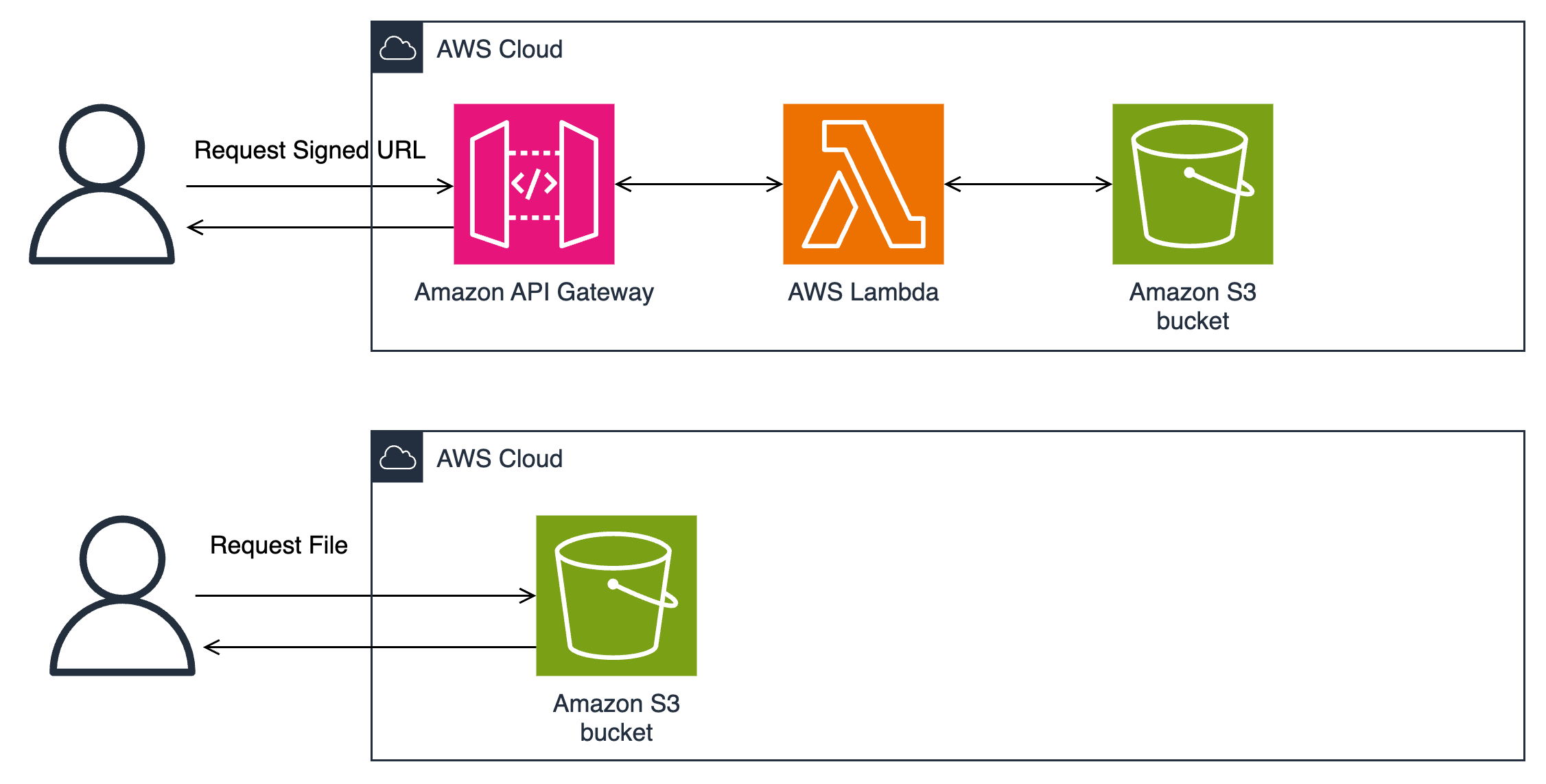
If you adopt the SES subscription management feature, make sure you integrate the recipient opt-out preferences with the source of your email sending lists. If you implement your own one-click unsubscribe (for example, using Amazon API Gateway and an AWS Lambda function), make sure it designed to suppress sending to email addresses in your source email lists.

Review your email list building practices: Ensure responsible email practices by refraining from purchasing email lists, safeguarding opt-in forms from bot abuse, verifying recipients’ preferences through confirmation messages, and abstaining from automatically enrolling recipients in categories that were not requested.

Having good list opt-in hygiene is the best way to ensure that you don’t have high spam complaint rates before you adhere to the new required best practices. To learn more, read What is a Spam Trap, and Why You Should Care.

3. Monitor spam rates

Mailbox providers will require that all senders keep spam complaint rates below 0.3% to avoid having their email treated as spam by the mailbox provider. The following steps outline how Amazon SES customers can meet the spam complaint rate requirement:

Enroll with Google Postmaster Tools: Amazon SES customers should enroll with Google Postmaster Tools to monitor their spam complaint rates for Gmail recipients.

Gmail recommends spam complaint rates stay below 0.1%. If you send to a mix of Gmail recipients and recipients on other mailbox providers, the spam complaint rates reported by Gmail’s Postmaster Tools are a good indicator of your spam complaint rates at mailbox providers who don’t let you view metrics.

Enable Amazon SES Virtual Deliverability Manager: Enable Virtual Deliverability Manager (VDM) in your Amazon SES account. Customers can use VDM to monitor bounce and complaint rates for many mailbox providers. Amazon SES recommends customers to monitor reputation metrics and stay below a 0.1% complaint rate.

Segregate and secure your sending using configuration sets: In addition to segregating sending use cases by domain, Amazon SES customers should use configuration sets for each sending use case.

Using configuration sets will allow you to monitor your sending activity and implement restrictions with more granularity. You can even pause the sending of a configuration set automatically if spam complaint rates exceed your tolerance threshold.

Conclusion

These changes are planned for February 2024, but be aware that the exact timing and methods used by each mailbox provider may vary. If you experience any deliverability issues with any mailbox provider prior to February, it is in your best interest to adhere to these required best practices as a first step.

We hope that this blog clarifies any areas of confusion on this change and provides you with the information you need to be prepared for February 2024. Happy sending!

Helpful links:

Implement fine-grained access control in Amazon SageMaker Studio and Amazon EMR using Apache Ranger and Microsoft Active Directory

Post Syndicated from Rahul Sarda original https://aws.amazon.com/blogs/big-data/implement-fine-grained-access-control-in-amazon-sagemaker-studio-and-amazon-emr-using-apache-ranger-and-microsoft-active-directory/

Amazon SageMaker Studio is a fully integrated development environment (IDE) for machine learning (ML) that enables data scientists and developers to perform every step of the ML workflow, from preparing data to building, training, tuning, and deploying models. SageMaker Studio comes with built-in integration with Amazon EMR, enabling data scientists to interactively prepare data at petabyte scale using frameworks such as Apache Spark, Hive, and Presto right from SageMaker Studio notebooks. With Amazon SageMaker, developers, data scientists, and SageMaker Studio users can access both raw data stored in Amazon Simple Storage Service (Amazon S3), and cataloged tabular data stored in a Hive metastore easily. SageMaker Studio’s support for Apache Ranger creates a simple mechanism for applying fine-grained access control to the raw and cataloged data with grant and revoke policies administered from a friendly web interface.

In this post, we show how you can authenticate into SageMaker Studio using an existing Active Directory (AD), with authorized access to both Amazon S3 and Hive cataloged data using AD entitlements via Apache Ranger integration and AWS IAM Identity Center (successor to AWS Single Sign-On). With this solution, you can manage access to multiple SageMaker environments and SageMaker Studio notebooks using a single set of credentials. Subsequently, Apache Spark jobs created from SageMaker Studio notebooks will access only the data and resources permitted by Apache Ranger policies attached to the AD credentials, inclusive of table and column-level access.

With this capability, multiple SageMaker Studio users can connect to the same EMR cluster, gaining access only to data granted to their user or group, with audit records captured and visible in Amazon CloudWatch. This multi-tenant environment is possible through user session isolation that prevents users from accessing datasets and cluster resources allocated to other users. Ultimately, organizations can provision fewer clusters, reduce administrative overhead, and increase cluster utilization, saving staff time and cloud costs.

Solution overview

We demonstrate this solution with an end-to-end use case using a sample ecommerce dataset. The dataset is available within provided AWS CloudFormation templates and consists of transactional ecommerce data (products, orders, customers) cataloged in a Hive metastore.

The solution utilizes two data analyst personas, Alex and Tina, each tasked with different analysis requiring fine-grained limitations on dataset access:

  • Tina, a data scientist on the marketing team, is tasked with building a model for customer lifetime value. Data access should only be permitted to non-sensitive customer, product, and orders data.
  • Alex, a data scientist on the sales team, is tasked to generate product demand forecast, requiring access to product and orders data. No customer data is required.

The following figure illustrates our desired fine-grained access.

The following diagram illustrates the solution architecture.

The architecture is implemented as follows:

  • Microsoft Active Directory – Used to manage user authentication, select AWS application access, and user and group membership for Apache Ranger secured data authorization
  • Apache Ranger – Used to monitor and manage comprehensive data security across the Hadoop and Amazon EMR platform
  • Amazon EMR – Used to retrieve, prepare, and analyze data from the Hive metastore using Spark
  • SageMaker Studio – An integrated IDE with purpose-built tools to build AI/ML models.

The following sections walk through the setup of the architectural components for this solution using the CloudFormation stack.

Prerequisites

Before you get started, make sure you have the following prerequisites:

Create resources with AWS CloudFormation

To build the solution within your environment, use the provided CloudFormation templates to create the required AWS resources.

Note that running these CloudFormation templates and the following configuration steps will create AWS resources that may incur charges. Additionally, all the steps should be run in the same Region.

Template 1

This first template creates the following resources and takes approximately 15 minutes to complete:

  • A Multi-AZ, multi-subnet VPC infrastructure, with managed NAT gateways in the public subnet for each Availability Zone
  • S3 VPC endpoints and Elastic Network Interfaces
  • A Windows Active Directory domain controller using Amazon Elastic Compute Cloud (Amazon EC2) with cross-realm trust
  • A Linux Bastion host (Amazon EC2) in an auto scaling group

To deploy this template, complete the following steps:

  1. Sign in to the AWS Management Console.
  2. On the Amazon EC2 console, create an EC2 key pair.
  3. Choose Launch Stack :
  4. Select the target Region
  5. Verify the stack name and provide the following parameters:
    1. The name of the key pair you created.
    2. Passwords for cross-realm trust, the Windows domain admin, LDAP bind, and default AD user. Be sure to record these passwords to use in future steps.
    3. Select a minimum of three Availability Zones based on the chosen Region.
  6. Review the remaining parameters. No changes are required for the solution, but you may change parameter values if desired.
  7. Choose Next and then choose Next again.
  8. Review the parameters.
  9. Select I acknowledge that AWS CloudFormation might create IAM resources with custom names and I acknowledge that AWS CloudFormation might require the following capability: CAPABILITY_AUTO_EXPAND.
  10. Choose Submit.

Template 2

The second template creates the following resources and takes approximately 30–60 minutes to complete:

To deploy this template, complete the following steps:

  1. Choose Launch Stack :
  2. Select the target Region
  3. Verify the stack name and provide the following parameters:
    1. Key pair name (created earlier).
    2. LDAPHostPrivateIP address, which can be found in the output section of the Windows AD CloudFormation stack.
    3. Passwords for the Windows domain admin, cross-realm trust, AD domain user, and LDAP bind. Use the same passwords as you did for the first CloudFormation template.
    4. Passwords for the RDS for MySQL database and KDC admin. Record these passwords; they may be needed in future steps.
    5. Log directory for the EMR cluster.
    6. VPC (it contains the name of the CloudFormation stack)
    7. Subnet details (align the subnet name with the parameter name).
    8. Set AppsEMR to Hadoop, Spark, Hive, Livy, Hue, and Trino.
    9. Leave RangerAdminPassword as is.
  4. Review the remaining parameters. No changes are required beyond what is mentioned, but you may change parameter values if desired.
  5. Choose Next, then choose Next again.
  6. Review the parameters.
  7. Select I acknowledge that AWS CloudFormation might create IAM resources with custom names and I acknowledge that AWS CloudFormation might require the following capability: CAPABILITY_AUTO_EXPAND.
  8. Choose Submit.

Integrate Active Directory with AWS accounts using IAM Identity Center

To enable users to sign in to SageMaker with Active Directory credentials, a connection between IAM Identity Center and Active Directory must be established.

To connect to Microsoft Active Directory, we set up AWS Directory Service using AD Connector.

  1. On the Directory Service console, choose Directories in the navigation pane.
  2. Choose Set up directory.
  3. For Directory types, select AD Connector.
  4. Choose Next.
  5. For Directory size, select the appropriate size for AD Connector. For this post, we select Small.
  6. Choose Next.
  7. Choose the VPC and private subnets where the Windows AD domain controller resides.
  8. Choose Next.
  9. In the Active Directory information section, enter the following details (this information can be retrieved on the Outputs tab of the first CloudFormation template):
    1. For Directory DNS Name, enter awsemr.com.
    2. For Directory NetBIOS name, enter awsemr.
    3. For DNS IP addresses, enter the IPv4 private IP address from AD Controller.
    4. Enter the service account user name and password that you provided during stack creation.
  10. Choose Next.
  11. Review the settings and choose Create directory.

After the directory is created, you will see its status as Active on the Directory Services console.

Set up AWS Organizations

AWS Organizations supports IAM Identity Center in only one Region at a time. To enable IAM Identity Center in this Region, you must first delete the IAM Identity Center configuration if created in another Region. Do not delete an existing IAM Identity Center configuration unless you are sure it will not negatively impact existing workloads.

  1. Navigate to the IAM Identity Center console.
  2. If IAM Identity Center has not been activated previously, choose Enable. If an organization does not exist, an alert appears to create one.
  3. Choose Create AWS organization.
  4. Choose Settings in the navigation pane.
  5. On the Identity source tab, on the Actions menu, choose Change identity source.
  6. For Choose identity source, select Active Directory.
  7. Choose Next.
  8. For Existing Directories, choose AWSEMR.COM.
  9. Choose Next.
  10. To confirm the change, enter ACCEPT in the confirmation input box, then choose Change identity source. Upon completion, you will be redirected to Settings, where you receive the alert Configurable AD sync paused.
  11. Choose Resume sync.
  12. Choose Settings in the navigation pane.
  13. On the Identity source tab, on the Actions menu, choose Manage sync.
  14. Choose Add users and groups to specify the users and groups to sync from Active Directory to IAM Identity Center.
  15. On the Users tab, enter tina and choose Add.
  16. Enter alex and choose Add.
  17. Choose Submit.
  18. On the Groups tab, enter datascience and choose Add.
  19. Choose Submit.

After your users and groups are synced to IAM Identity Center, you can see them by choosing Users or Groups in the navigation pane on the IAM Identity Center console. When they’re available, you can assign them access to AWS accounts and cloud applications. The initial sync may take up to 5 minutes.

Set up a SageMaker domain using IAM Identity Center

To set up a SageMaker domain, complete the following steps:

  1. On the SageMaker console, choose Domains in the navigation pane.
  2. Choose Create domain.
  3. Choose Standard setup, then choose Configure.
  4. For Domain Name, enter a unique name for your domain.
  5. For Authentication, choose AWS IAM Identity Center.
  6. Choose Create a new role for the default execution role.
  7. In the Create an IAM Role popup, choose Any S3 bucket.
  8. Choose Create role.
  9. Copy the role details to be used in next section for adding a policy for EMR cluster access.
  10. In the Network and storage section, specify the following:
    1. Choose the VPC that you created using the first CloudFormation template.
    2. Choose a private subnet in an Availability Zone supported by SageMaker.
    3. Use the default security group (sg-XXXX).
    4. Choose VPC only.

Note that there is a public domain called AWSEMR.COM that will conflict with the one created for this solution if Public internet only is selected.

  1. Leave all other options as default and choose Next.
  2. In the Studio settings section, accept the defaults and choose Next.
  3. In the RStudio settings section, accept the defaults and choose Next.
  4. In the Canvas setting section, accept the defaults and choose Submit.

Add a policy to provide SageMaker Studio access to the EMR cluster

Complete the following steps to give SageMaker Studio access to the EMR cluster:

  1. On the IAM console, choose Roles in the navigation pane.
  2. Search and choose for the role you copied earlier (<AmazonSageMaker-ExecutionRole- XXXXXXXXXXXXXXX>).
  3. On the Permissions tab, choose Add permissions and Attach policy.
  4. Search for and choose the policy AmazonEMRFullAccessPolicy_v2.
  5. Choose Add permissions.

Add users and groups to access the domain

Complete the following steps to give users and groups access to the domain:

  1. On the SageMaker console, choose Domains in the navigation pane.
  2. Choose the domain you created earlier.
  3. On the Domain details page, choose Assign users and groups.
  4. On the Users tab, select the users tina and alex.
  5. On the Groups tab, select the group datascience.
  6. Choose Assign users and groups.

Configure Spark data access rights in Apache Ranger

Now that the AWS environment is set up, we configure Hive dataset security using Apache Ranger.

To start, collect the Apache Ranger URL details to access the Ranger admin console:

  1. On the Amazon EC2 console, choose Resources in the navigation pane, then Instance (running).
  2. Choose the Ranger server EC2 instance and copy the private IP DNS name (IPv4 only).
    Next, connect to the Windows domain controller to use the connected VPC to access the Ranger admin console. This is done by logging in to the Windows server and launching a web browser.
  3. Install the Remote Desktop Services client on your computer to connect with Windows Server.
  4. Authorize inbound traffic from your computer to the Windows AD domain controller EC2 instance.
  5. On the Amazon EC2 console, choose Resources in the navigation pane, then Instance (running).
  6. Choose on the Windows Domain Controller (DC1) EC2 instance ID and copy the public IP DNS name (IPv4 only).
  7. Use Microsoft Remote Desktop to log in to the Windows domain controller:
    1. Computer – Use the public IP DNS name (IPv4 only).
    2. Username – Enter awsadmin.
    3. Password – Use the password you set during the first CloudFormation template setup.
  8. Disable the Enhanced Security Configuration for Internet Explorer.
  9. Launch Internet Explorer and navigate to the Ranger admin console using the private IP DNS name (IPv4 only) associated with the Ranger server noted earlier and port 6182 (for example, https://<RangerServer Private IP DNS name>:6182).
  10. Choose Continue to this website (not recommended) if you receive a security alert.
  11. Log in using the default user name and password. During the first logon, you should modify your password and store it securely.
  12. In the top Ranger banner, choose Settings and Users/Groups/Roles.
  13. Confirm Tina and Alex are listed as users with a User Source of External.
  14. Confirm the datascience group is listed as a group with Group Source of External.

If the Tina or Alex users aren’t listed, follow the Apache Ranger troubleshooting instructions in the appendix at the end of this post.

Dataset policies

The Apache Ranger access policy model consists of two major components: specification of the resources a policy is applied to, such as files and directories, databases, tables, and columns, services, and so on, and the specification of access conditions (permissions) for specific users and groups.

Configure your dataset policy with the following steps:

  1. On the Ranger admin console, choose the Ranger icon in the top banner to return to the main page.
  2. Choose the service name amazonemrspark inside AMAZON-EMR-SPARK.
  3. Choose Add New Policy and add a new policy with the following parameters:
    1. For Policy Name, enter Data Science Policy.
    2. For Database, enter staging and default.
    3. For EMR Spark Table, enter products and orders.
    4. For EMR Spark Column, enter *.
    5. In the Allow Conditions section, for Select User, enter tina and alex, and for Permissions, enter select and read.
  4. Choose Add.
    When using Internet Explorer & adding a new policy, you may receive the error SCRIPT438: Object doesn't support property or method 'assign'. In this case, install and use an alternate browser such as Firefox or Chrome.
  5. Choose Add New Policy and add a new policy for tina:
    1. For Policy Name, enter Customer Demographics Policy.
    2. For Database, enter staging.
    3. For EMR Spark Table, enter Customers.
    4. For EMR Spark Column, choose customer_id, first_name, last_name, region, and state.
    5. In the Allow Conditions section, for Select User, enter Tina and for Permissions, enter select and read.
  6. Choose Add.

Configure Amazon S3 data access rights in Apache Ranger

Complete the following steps to configure Amazon S3 data access rights:

  1. On the Ranger admin console, choose the Ranger icon in the top banner to return to the main page.
  2. Choose the service name amazonemrs3 inside AMAZON-EMR-EMRFS.
  3. Choose Add New Policy and add a policy for the datascience group as follows:
    1. For Policy Name, enter Data Science S3 Policy.
    2. For S3 resource, enter the following:
      • aws-bigdata-blog/artifacts/aws-blog-emr-ranger/data/staging/products
      • aws-bigdata-blog/artifacts/aws-blog-emr-ranger/data/staging/orders
    3. In the Allow Conditions, section, for Select User, enter tina and alex, and for Permissions, enter GetObject and ListObjects.
  4. Choose Add.
  5. Choose Add New Policy and add a new policy for tina:
    1. For Policy Name, enter Customer Demographics S3 Policy.
    2. For S3 resource, enter aws-bigdata-blog/artifacts/aws-blog-emr-ranger/data/staging/customers.
    3. In the Allow Conditions section, for Select User, enter Tina and for Permissions, enter GetObject and ListObjects.
  6. Choose Add.

Configure Amazon S3 user working folders

While working with data, users often require data storage for interim results. To provide each user with a private working directory, complete the following steps:

  1. On the Ranger admin console, choose Ranger icon in the top banner to return to the main page.
  2. Choose the service name amazonemrs3 inside AMAZON-EMR-EMRFS.
  3. Choose Add New Policy and add a policy for {USER} as follows:
    1. For Policy Name, enter User Directory S3 Policy.
    2. For S3 resource, enter <Bucket Name>/data/{USER} (use a bucket within the account).
    3. Enable Recursive.
    4. In the Allow Conditions, section, for Select User, enter {USER} and for Permissions, enter GetObject, ListObjects, PutObject, and DeleteObject.
  4. Choose Add.

Use the user access login URL

Users attempting to access shared AWS applications via IAM Identity Center need to first log in to the AWS environment with a custom link using their Active Directory user name and password. The link needed can be found on the IAM Identity Center console.

  1. On the IAM Identity Center console, choose Settings in the navigation pane.
  2. On the Identity source tab, locate the user login link under AWS access portal URL.

Test role-based data access

To review, data scientist Tina needs to build a customer lifetime value model, which requires access to orders, product, and non-sensitive customer data. Data scientist Alex only needs access to orders and product data to build a product demand model.

In this section, we test the data access levels for each role.

Data scientist Tina

Complete the following steps:

  1. Log in using the URL you located in the previous step.
  2. Enter Microsoft AD user [email protected] and your password.
  3. Choose the Amazon SageMaker Studio tile.
  4. In the SageMaker Studio UI, start a notebook:
    1. Choose File, New, and Notebook.
    2. For Image, choose SparkMagic.
    3. For Kernel, choose PySpark.
    4. For Instance Type, choose ml.t3.medium.
    5. Choose Select.
  5. When the notebook kernel starts, connect to the EMR cluster by running the following code:
    %load_ext sagemaker_studio_analytics_extension.magics
    %sm_analytics emr connect --cluster-id <EMR Cluster ID> --auth-type Kerberos --language python

The EMR cluster ID details can be found on the Outputs tab of the EMR cluster CloudFormation stack created with the second template.

  1. Enter Microsoft AD [email protected] and your password. (Note that [email protected] is case-sensitive.)
  2. Choose Connect.

Now we can test Tina’s data access.

  1. In a new cell, enter the following query and run the cell:
    %%sql
    show tables from staging

Returned data will indicate the table objects accessible to Tina.

  1. In a new cell, run the following:
    %%sql
    select * from staging.customers limit 5

Returned data will include columns Tina has been granted access.

Let’s test Tina’s access to customer data.

  1. In a new cell, run the following:
    %%sql
    select customer_id, education_level, first_name, last_name, marital_status, region, state from staging.customers limit 15

The preceding query will result in an Access Denied error due to the inclusion of sensitive data columns.

During ad hoc analysis and model building, it’s common for users to create temporary datasets that need to be persisted for a short period. Let’s test Tina’s ability to create a working dataset and store results in a private working directory.

  1. In a new cell, run the following:
    join_order_to_customer = spark.sql("select orders.*, first_name, last_name, region, state from staging.orders, staging.customers where orders.customer_id = customers.customer_id")

  2. Before running the following code, update the S3 path variable <bucket name> to correspond to an S3 location within your local account:
    join_order_to_customer.write.mode("overwrite").format("parquet").option("path", "s3://<bucket name>/data/tina/order_and_product/").save()

The preceding query writes the created dataset as Parquet files in the S3 bucket specified.

Data scientist: Alex

Complete the following steps:

  1. Log in using the URL you located in the previous step.
  2. Enter Microsoft AD user [email protected] and your password.
  3. Choose the Amazon SageMaker Studio tile.
  4. In the SageMaker Studio UI, start a notebook:
    1. Choose File, New, and Notebook.
    2. For Image, choose SparkMagic.
    3. For Kernel, choose PySpark.
    4. For Instance Type, choose ml.t3.medium.
    5. Choose Select.
  5. When the notebook kernel starts, connect to the EMR cluster by running the following code:
    %load_ext sagemaker_studio_analytics_extension.magics
    %sm_analytics emr connect --cluster-id <EMR Cluster ID> --auth-type Kerberos --language python

  6. Enter Microsoft AD [email protected] and your password (note that [email protected] is case-sensitive).
  7. Choose Connect. Now we can test Alex’s data access.
  8. In a new cell, enter the following query and run the cell:
    %%sql
    show tables from staging

    Returned data will indicate the table objects accessible to Alex. Note that the customers table is missing.

  9. In a new cell, run the following:
    %%sql
    select * from staging.orders limit 5

Returned data will include columns Alex has been granted access.

Let’s test Alex’s access to customer data.

  1. In a new cell, run the following:
    %%sql
    select * from staging.customers limit 5

The preceding query will result in an Access Denied error because Alex doesn’t have access to customers.

We can verify Ranger is responsible for the denial by looking at the CloudWatch logs.

Now that you can successfully access data, feel free to interactively explore, visualize, prepare, and model the data using the different user personas.

Clean up

When you’re finished experimenting with this solution, clean up your resources:

  1. Shut down and update SageMaker Studio and Studio apps. Ensure that all apps created as part of this post are deleted before deleting the stack.
  2. Change the identity source for IAM Identity Center back to Identity Center Directory.
  3. Delete the directory AWSEMR.COM from Directory Services.
  4. Empty the S3 buckets created by the CloudFormation stacks.
  5. Delete the stacks via the AWS CloudFormation console for the non-nested stacks starting in reverse order.

Conclusion

This post showed how you can implement fine-grained access control in SageMaker Studio and Amazon EMR using Apache Ranger and Microsoft Active Directory. We also demonstrated how multiple SageMaker Studio users can connect to the same EMR cluster and access different tables and columns using Apache Ranger, wherein each user is scoped with permissions matching their individual level of access to data. In addition, we demonstrated how the individual users can access separate S3 folders for storing their intermediate data. We detailed the steps required to set up the integration and provided CloudFormation templates to set up the base infrastructure from end to end.

To learn more about using Amazon EMR with SageMaker Studio, refer to Prepare Data using Amazon EMR. We encourage you to try out this new functionality, and connect with the Machine Learning & AI community if you have any questions or feedback!

Appendix: Apache Ranger troubleshooting

The sync between Active Directory and Apache Ranger is set for every 24 hours. To force a sync, complete the following steps:

  1. Connect to the Apache Ranger server using SSH. This can be done using directly or Session Manager, a capability of AWS Systems Manager, or through AWS Cloud9.
  2. Once connected, issue the following commands:
    sudo /usr/bin/ranger-usersync stop || true
    sudo /usr/bin/ranger-usersync start
    sudo chkconfig ranger-usersync on

  3. To confirm the sync, open the Ranger console as an admin.
  4. Choose Audit in the top banner.
  5. Choose the User Sync tab and confirm the event time.

About the Authors

Rahul Sarda is a Senior Analytics & ML Specialist at AWS. He is a seasoned leader with over 20 years of experience, who is passionate about helping customers build scalable data and analytics solutions to gain timely insights and make critical business decisions. In his spare time, he enjoys spending time with his family, stay healthy, running and road cycling.

Varun Rao Bhamidimarri is a Sr Manager, AWS Analytics Specialist Solutions Architect team. His focus is helping customers with adoption of cloud-enabled analytics solutions to meet their business requirements. Outside of work, he loves spending time with his wife and two kids, stay healthy, mediate and recently picked up gardening during the lockdown.

Approaches for migrating users to Amazon Cognito user pools

Post Syndicated from Edward Sun original https://aws.amazon.com/blogs/security/approaches-for-migrating-users-to-amazon-cognito-user-pools/

Update: An earlier version of this post was published on September 14, 2017, on the Front-End Web and Mobile Blog.


Amazon Cognito user pools offer a fully managed OpenID Connect (OIDC) identity provider so you can quickly add authentication and control access to your mobile app or web application. User pools scale to millions of users and add layers of additional features for security, identity federation, app integration, and customization of the user experience. Amazon Cognito is available in regions around the globe, processing over 100 billion authentications each month. You can take advantage of security features when using user pools in Cognito, such as email and phone number verification, multi-factor authentication, and advanced security features, such as compromised credentials detection, and adaptive authentications.

Many customers ask about the best way to migrate their existing users to Amazon Cognito user pools. In this blog post, we describe several different recommended approaches and provide step-by-step instructions on how to implement them.

Key considerations

The main consideration when migrating users across identity providers is maintaining a consistent end-user experience. Ideally, users can continue to use their existing passwords so that their experience is seamless. However, security best practices dictate that passwords should never be stored directly as cleartext in a user store. Instead, passwords are used to compute cryptographic hashes and verifiers that can later be used to verify submitted passwords. This means that you cannot securely export passwords in cleartext form from an existing user store and import them into a Cognito user pool. You might ask your users to choose a new password during the migration. Or, if you want to retain the existing passwords, you need to retain access to the existing hashes and verifiers, at least during the migration period.

A secondary consideration is the migration timeline. For example, do you need a faster migration timeline because your current identity store’s license is expiring? Or do you prefer a slow and steady migration because you are modernizing your current application, and it takes time to connect your existing systems to the new identity provider?

The following two methods define our recommended approaches for migrating existing users into a user pool:

  • Bulk user import – Export your existing users into a comma-separated (.csv) file, and then upload this .csv file to import users into a user pool. Your desired user attributes (except passwords) can be included and mapped to attributes in the target user pool. This approach requires users to reset their passwords when they sign in with Cognito. You can choose to migrate your existing user store entirely in a single import job or split users into multiple jobs for parallel or incremental processing.
  • Just-in-time user migration – Migrate users just in time into a Cognito user pool as they sign in to your mobile or web app. This approach allows users to retain their current passwords, because the migration process captures and verifies the password during the sign-in process, seamlessly migrating them to the Cognito user pool.

In the following sections, we describe the bulk user import and just-in-time user migration methods in more detail and then walk through the steps of each approach.

Bulk user import

You perform bulk import of users into an Amazon Cognito user pool by uploading a .csv file that contains user profile data, including usernames, email addresses, phone numbers, and other attributes. You can download a template .csv file for your user pool from Cognito, with a user schema structured in the template header.

Following is an example of performing bulk user import.

To create an import job

  1. Open the Cognito user pool console and select the target user pool for migration.
  2. On the Users tab, navigate to the Import users section, and choose Create import job.
  3. Figure 1: Create import job

    Figure 1: Create import job

  4. In the Create import job dialog box, download the template.csv file for user import.
  5. Export your existing user data from your existing user directory or store your data into the .csv file
  6. Match the user attribute types with column headings in the template. Each user must have an email address or a phone number that is marked as verified in the .csv file, in order to receive the password reset confirmation code.
  7. Figure 2: Configure import job

    Figure 2: Configure import job

  8. Go back to the Create import job dialog box (as shown in Figure 2) and do the following:
    1. Enter a Job name.
    2. Choose to Create a new IAM role or Use an existing IAM role. This role grants Amazon Cognito permission to write to Amazon CloudWatch Logs in your account, so that Cognito can provide logs for successful imports and errors for skipped or failed transactions.
    3. Upload the .csv file that you have prepared, and choose Create and start job.

Depending on the size of the .csv file, the job can run for minutes or hours, and you can follow the status from that same page in the Amazon Cognito console.

Figure 3: Check import job status

Figure 3: Check import job status

Cognito runs through the import job and imports users with a RESET_REQUIRED state. When users attempt to sign in, Cognito will return PasswordResetRequiredException from the sign-in API, and the app should direct the user into the ForgotPassword flow.

Figure 4: View imported user

Figure 4: View imported user

The bulk import approach can also be used continuously to incrementally import users. You can set up an Extract-Transform-Load (ETL) batch job process to extract incremental changes to your existing user directories, such as the new sign-ups on the existing systems before you switch over to a Cognito user pool. Your batch job will transform the changes into a .csv file to map user attribute schemas, and load the .csv file as a Cognito import job through the CreateUserImportJob CLI or SDK operation. Then start the import job through the StartUserImportJob CLI or SDK operation. For more information, see Importing users into user pools in the Amazon Cognito Developer Guide.

Just-in-time user migration

The just-in-time (JIT) user migration method involves first attempting to sign in the user through the Amazon Cognito user pool. Then, if the user doesn’t exist in the Cognito user pool, Cognito calls your Migrate User Lambda trigger and sends the username and password to the Lambda trigger to sign the user in through the existing user store. If successful, the Migrate User Lambda trigger will also fetch user attributes and return them to Cognito. Then Cognito silently creates the user in the user pool with user attributes, as well as salts and password verifiers from the user-provided password. With the Migrate User Lambda trigger, your client app can start to use the Cognito user pool to sign in users who have already been migrated, and continue migrating users who are signing in for the first time towards the user pool. This just-in-time migration approach helps to create a seamless authentication experience for your users.

Cognito, by default, uses the USER_SRP_AUTH authentication flow with the Secure Remote Password (SRP) protocol. This flow doesn’t involve sending the password across the network, but rather allows the client to exchange a cryptographic proof with the Cognito service to prove the client’s knowledge of the password. For JIT user migration, Cognito needs to verify the username and password against the existing user store. Therefore, you need to enable a different Cognito authentication flow. You can choose to use either the USER_PASSWORD_AUTH flow for client-side authentication or the ADMIN_USER_PASSWORD_AUTH flow for server-side authentication. This will allow the password to be sent to Cognito over an encrypted TLS connection, and allow Cognito to pass the information to the Lambda function to perform user authentication against the original user store.

This JIT approach might not be compatible with existing identity providers that have multi-factor authentication (MFA) enabled, because the Lambda function cannot support multiple rounds of challenges. If the existing identity provider requires MFA, you might consider the alternative JIT migration approach discussed later in this blog post.

Figure 5 illustrates the steps for the JIT sign-in flow. The mobile or web app first tries to sign in the user in the user pool. If the user isn’t already in the user pool, Cognito handles user authentication and invokes the Migrate User Lambda trigger to migrate the user. This flow keeps the logic in the app simple and allows the app to use the Amazon Cognito SDK to sign in users in the standard way. The migration logic takes place in the Lambda function in the backend.

Figure 5: JIT migration user authentication flow

Figure 5: JIT migration user authentication flow

The flow in Figure 5 starts in the mobile or web app, which attempts to sign in the user by using the AWS SDK. If the user doesn’t exist in the user pool, the migration attempt starts. Cognito calls the Migrate User Lambda trigger with triggerSource set to UserMigration_Authentication, and passes the user’s username and password in the request in order to attempt to migrate the user.

This approach also works in the forgot password flow shown in Figure 6, where the user has forgotten their password and hasn’t been migrated yet. In this case, once the user makes a “Forgot Password” request, your mobile or web app will send a forgot password request to Cognito. Cognito invokes your Migrate User Lambda trigger with triggerSource set to UserMigration_ForgotPassword, and passes the username in the request in order to attempt user lookup, migrate the user profile, and facilitate the password reset process.

Figure 6: JIT migration forgot password flow

Figure 6: JIT migration forgot password flow

Just-in-time user migration sample code

In this section, we show sample source codes for a Migrate User Lambda trigger overall structure. We will fill in the commented sections with additional code, shown later in the section. When you set up your own Lambda function, configure a Lambda execution role to grant permissions for CloudWatch logs.

const handler = async (event) => {
    if (event.triggerSource == "UserMigration_Authentication") {
        //***********************************************************************
        // Attempt to sign in the user or verify the password with existing identity store
        // (shown in the Section A – Migrate User of this post)
        //***********************************************************************
    }
    else if (event.triggerSource == "UserMigration_ForgotPassword") {
       //***********************************************************************
       // Attempt to look up the user in your existing identity store
       // (shown in the section B – Forget Password of this post)
       //***********************************************************************
    }
    return event;
};
export { handler };

In the migration flow, the Lambda trigger will sign in the user and verify the user’s password in the existing user store. That may involve a sign-in attempt against your existing user store or a check of the password against a stored hash. You need to customize this step based on your existing setup. You can also create a function to fetch user attributes that you want to migrate. If your existing user store conforms to the OIDC specification, you can parse the ID Token claims to retrieve the user’s attributes. The following example shows how to set the username and attributes for the migrated user.

// Section A – Migrate User
if (event.triggerSource == "UserMigration_Authentication") {
// Attempt to sign in the user or verify the password with the existing user store.
// Add an authenticateUser() functionbased on your existing user store setup. 
    const user = await authenticateUser(event.userName, event.request.password);
    if (user) {
        // Migrating user attributes from the source user store. You can migrate additional attributes as needed.
        event.response.userAttributes = {
            // Setting username and email address
            username: event.userName,
            email: user.emailAddress,
            email_verified: "true",
        };
        // Setting user status to CONFIRMED to autoconfirm users so they can sign in to the user pool
        event.response.finalUserStatus = "CONFIRMED";
        // Setting messageAction to SUPPRESS to decline to send the welcome message that Cognito usually sends to new users
        event.response.messageAction = "SUPPRESS";
        }
    }

The user is now migrated from the existing user store to the user pool, as well as the user’s attributes. Users will also be redirected to your application with the authorization code or JSON Web Tokens, depending on the OAuth 2.0 grant types you configured in the user pool.

Let’s look at the forgot password flow. Your Lambda function calls the existing user store and migrates other attributes in the user’s profile first, and then Lambda sets user attributes in the response to the Cognito user pool. Cognito initiates the ForgotPassword flow and sends a confirmation code to the user to confirm the password reset process. The user needs to have a verified email address or phone number migrated from the existing user store to receive the forgot password confirmation code. The following sample code demonstrates how to complete the ForgotPassword flow.

// Section B – Forgot Password
else if (event.triggerSource == "UserMigration_ForgotPassword") {
        // Look up the user in your existing user store service.  
		// Add a lookupUser() function based on your existing user store setup. 
        const lookupResult = await lookupUser(event.userName);
        if (lookupResult) {
            // Setting user attributes from the source user store
            event.response.userAttributes = {
                username: event.userName,
                // Required to set verified communication to receive password recovery code
                email: lookupResult.emailAddress,
                email_verified: "true",
            };
            event.response.finalUserStatus = "RESET_REQUIRED";
            event.response.messageAction = "SUPPRESS";
        }
    }

Just-in-time user migration – alternative approach

Using the Migrate User Lambda trigger, we showed the JIT migration approach where the app switches to use the Cognito user pool at the beginning of the migration period, to interface with the user for signing in and migrating them from the existing user store. An alternative JIT approach is to maintain the existing systems and user store, but to silently create each user in the Cognito user pool in a backend process as users sign in, then switch over to use Cognito after enough users have been migrated.

Figure 7: JIT migration alternative approach with backend process

Figure 7: JIT migration alternative approach with backend process

Figure 7 shows this alternative approach in depth. When an end user signs in successfully in your mobile or web app, the backend migration process is initiated. This backend process first calls the Cognito admin API operation, AdminCreateUser, to create users and map user attributes in the destination user pool. The user will be created with a temporary password and be placed in FORCE_CHANGE_PASSWORD status. If you capture the user password during the sign-in process, you can also migrate the password by setting it permanently for the newly created user in the Cognito user pool using the AdminSetUserPassword API operation. This operation will also set the user status to CONFIRMED to allow the user to sign in to Cognito using the existing password.

Following is a code example for the AdminCreateUser function using the AWS SDK for JavaScript.

var params = {
    MessageAction: "SUPPRESS",
    UserAttributes: [{
        Name: "name",
        Value: "Nikki Wolf"
    },
    {
        Name: "email",
        Value: "[email protected]"
    },
    {
        Name: "email_verified",
        Value: "True"
    }
    ],
    UserPoolId: "us-east-1_EXAMPLE",
    Username: "nikki_wolf"
};
const cognito = new CognitoIdentityProviderClient();
const createUserCommand  = new AdminCreateUserCommand(params);
await cognito.send (createUserCommand);

The following is a code example for the AdminSetUserPassword function.

var params = {
    UserPoolId: 'us-east-1_EXAMPLE' ,
    Username: 'nikki_wolf' ,
    Password: 'ExamplePassword1$' ,
    Permanent: true
};
const cognito = new CognitoIdentityProviderClient();
const setUserPasswordCommand = new AdminSetUserPasswordCommand(params);
await cognito.send(setUserPasswordCommand);

This alternative approach does not require the app to update its authentication codebase until a majority of users are migrated, but you need to propagate user attribute changes and new user signups from the existing systems to Cognito. If you are capturing and migrating passwords, you should also build a similar logic to capture password changes in existing systems and set the new password in the user pool to keep it synchronized until you perform a full switchover from the existing identity store to the Cognito user pool.

Summary and best practices

In this post, we described our two recommended approaches for migrating users into an Amazon Cognito user pool. You can decide which approach is best suited for your use case. The bulk method is simpler to implement, but it doesn’t preserve user passwords like the just-in-time migration does. The just-in-time migration is transparent to users and mitigates the potential attrition of users that can occur when users need to reset their passwords.

You could also consider a hybrid approach, where you first apply JIT migration as users are actively signing in to your app, and perform bulk import for the remaining less-active users. This hybrid approach helps provide a good experience for your active user communities, while being able to decommission existing user stores in a manageable timeline because you don’t need to wait for every user to sign in and be migrated through JIT migration.

We hope you can use these explanations and code samples to set up the most suitable approach for your migration project.

If you have feedback about this post, submit comments in the Comments section below. If you have questions about this post, contact AWS Support.

Want more AWS Security news? Follow us on Twitter.

Edward Sun

Edward Sun

Edward is a Security Specialist Solutions Architect focused on identity and access management. He loves helping customers throughout their cloud transformation journey with architecture design, security best practices, migration, and cost optimizations. Outside of work, Edward enjoys hiking, golfing, and cheering for his alma mater, the Georgia Bulldogs.

GoDaddy benchmarking results in up to 24% better price-performance for their Spark workloads with AWS Graviton2 on Amazon EMR Serverless

Post Syndicated from Mukul Sharma original https://aws.amazon.com/blogs/big-data/godaddy-benchmarking-results-in-up-to-24-better-price-performance-for-their-spark-workloads-with-aws-graviton2-on-amazon-emr-serverless/

This is a guest post co-written with Mukul Sharma, Software Development Engineer, and Ozcan IIikhan, Director of Engineering from GoDaddy.

GoDaddy empowers everyday entrepreneurs by providing all the help and tools to succeed online. With more than 22 million customers worldwide, GoDaddy is the place people come to name their ideas, build a professional website, attract customers, and manage their work.

GoDaddy is a data-driven company, and getting meaningful insights from data helps us drive business decisions to delight our customers. At GoDaddy, we embarked on a journey to uncover the efficiency promises of AWS Graviton2 on Amazon EMR Serverless as part of our long-term vision for cost-effective intelligent computing.

In this post, we share the methodology and results of our benchmarking exercise comparing the cost-effectiveness of EMR Serverless on the arm64 (Graviton2) architecture against the traditional x86_64 architecture. EMR Serverless on Graviton2 demonstrated an advantage in cost-effectiveness, resulting in significant savings in total run costs. We achieved 23.85% improvement in price-performance for sample production Spark workloads—an outcome that holds tremendous potential for businesses striving to maximize their computing efficiency.

Solution overview

GoDaddy’s intelligent compute platform envisions simplification of compute operations for all personas, without limiting power users, to ensure out-of-box cost and performance optimization for data and ML workloads. As a part of this vision, GoDaddy’s Data & ML Platform team plans to use EMR Serverless as one of the compute solutions under the hood.

The following diagram shows a high-level illustration of the intelligent compute platform vision.

Benchmarking EMR Serverless for GoDaddy

EMR Serverless is a serverless option in Amazon EMR that eliminates the complexities of configuring, managing, and scaling clusters when running big data frameworks like Apache Spark and Apache Hive. With EMR Serverless, businesses can enjoy numerous benefits, including cost-effectiveness, faster provisioning, simplified developer experience, and improved resilience to Availability Zone failures.

At GoDaddy, we embarked on a comprehensive study to benchmark EMR Serverless using real production workflows at GoDaddy. The purpose of the study was to evaluate the performance and efficiency of EMR Serverless and develop a well-informed adoption plan. The results of the study have been extremely promising, showcasing the potential of EMR Serverless for our workloads.

Having achieved compelling results in favor of EMR Serverless for our workloads, our attention turned to evaluating the utilization of the Graviton2 (arm64) architecture on EMR Serverless. In this post, we focus on comparing the performance of Graviton2 (arm64) with the x86_64 architecture on EMR Serverless. By conducting this apples-to-apples comparative analysis, we aim to gain valuable insights into the benefits and considerations of using Graviton2 for our big data workloads.

By using EMR Serverless and exploring the performance of Graviton2, GoDaddy aims to optimize their big data workflows and make informed decisions regarding the most suitable architecture for their specific needs. The combination of EMR Serverless and Graviton2 presents an exciting opportunity to enhance the data processing capabilities and drive efficiency in our operations.

AWS Graviton2

The Graviton2 processors are specifically designed by AWS, utilizing powerful 64-bit Arm Neoverse cores. This custom-built architecture provides a remarkable boost in price-performance for various cloud workloads.

In terms of cost, Graviton2 offers an appealing advantage. As indicated in the following table, the pricing for Graviton2 is 20% lower compared to the x86 architecture option.

   x86_64  arm64 (Graviton2) 
per vCPU per hour $0.052624 $0.042094
per GB per hour $0.0057785 $0.004628
per storage GB per hour* $0.000111

*Ephemeral storage: 20 GB of ephemeral storage is available for all workers by default—you pay only for any additional storage that you configure per worker.

For specific pricing details and current information, refer to Amazon EMR pricing.

AWS benchmark

The AWS team performed benchmark tests on Spark workloads with Graviton2 on EMR Serverless using the TPC-DS 3 TB scale performance benchmarks. The summary of their analysis are as follows:

  • Graviton2 on EMR Serverless demonstrated an average improvement of 10% for Spark workloads in terms of runtime. This indicates that the runtime for Spark-based tasks was reduced by approximately 10% when utilizing Graviton2.
  • Although the majority of queries showcased improved performance, a small subset of queries experienced a regression of up to 7% on Graviton2. These specific queries showed a slight decrease in performance compared to the x86 architecture option.
  • In addition to the performance analysis, the AWS team considered the cost factor. Graviton2 is offered at a 20% lower cost than the x86 architecture option. Taking this cost advantage into account, the AWS benchmark set yielded an overall 27% better price-performance for workloads. This means that by using Graviton2, users can achieve a 27% improvement in performance per unit of cost compared to the x86 architecture option.

These findings highlight the significant benefits of using Graviton2 on EMR Serverless for Spark workloads, with improved performance and cost-efficiency. It showcases the potential of Graviton2 in delivering enhanced price-performance ratios, making it an attractive choice for organizations seeking to optimize their big data workloads.

GoDaddy benchmark

During our initial experimentation, we observed that arm64 on EMR Serverless consistently outperformed or performed on par with x86_64. One of the jobs showed a 7.51% increase in resource usage on arm64 compared to x86_64, but due to the lower price of arm64, it still resulted in a 13.48% cost reduction. In another instance, we achieved an impressive 43.7% reduction in run cost, attributed to both the lower price and reduced resource utilization. Overall, our initial tests indicated that arm64 on EMR Serverless delivered superior price-performance compared to x86_64. These promising findings motivated us to conduct a more comprehensive and rigorous study.

Benchmark results

To gain a deeper understanding of the value of Graviton2 on EMR Serverless, we conducted our study using real-life production workloads from GoDaddy, which are scheduled to run at a daily cadence. Without any exceptions, EMR Serverless on arm64 (Graviton2) is significantly more cost-effective compared to the same jobs run on EMR Serverless on the x86_64 architecture. In fact, we recorded an impressive 23.85% improvement in price-performance across the sample GoDaddy jobs using Graviton2.

Like the AWS benchmarks, we observed slight regressions of less than 5% in the total runtime of some jobs. However, given that these jobs will be migrated from Amazon EMR on EC2 to EMR Serverless, the overall total runtime will still be shorter due to the minimal provisioning time in EMR Serverless. Additionally, across all jobs, we observed an average speed up of 2.1% in addition to the cost savings achieved.

These benchmarking results provide compelling evidence of the value and effectiveness of Graviton2 on EMR Serverless. The combination of improved price-performance, shorter runtimes, and overall cost savings makes Graviton2 a highly attractive option for optimizing big data workloads.

Benchmarking methodology

As an extension of a larger benchmarking EMR Serverless for GoDaddy study, where we divided Spark jobs into brackets based on total runtime (quick-run, medium-run, long-run), we measured effect of architecture (arm64 vs. x86_64) on total cost and total runtime. All other parameters were kept the same to achieve an apples-to-apples comparison.

The team followed these steps:

  1. Prepare the data and environment.
  2. Choose two random production jobs from each job bracket.
  3. Make necessary changes to avoid inference with actual production outputs.
  4. Run tests to execute scripts over multiple iterations to collect accurate and consistent data points.
  5. Validate input and output datasets, partitions, and row counts to ensure identical data processing.
  6. Gather relevant metrics from the tests.
  7. Analyze results to draw insights and conclusions.

The following table shows the summary of an example Spark job.

Metric  EMR Serverless (Average) – X86_64  EMR Serverless (Average) – Graviton  X86_64 vs Graviton (% Difference) 
Total Run Cost $2.76 $1.85 32.97%

Total Runtime

(hh:mm:ss)

00:41:31 00:34:32 16.82%
EMR Release Label emr-6.9.0
Job Type Spark
Spark Version Spark 3.3.0
Hadoop Distribution Amazon 3.3.3
Hive/HCatalog Version Hive 3.1.3, HCatalog 3.1.3

Summary of results

The following table presents a comparison of job performance between EMR Serverless on arm64 (Graviton2) and EMR Serverless on x86_64. For each architecture, every job was run at least three times to obtain the accurate average cost and runtime.

 Job  Average x86_64 Cost Average arm64 Cost Average x86_64 Runtime (hh:mm:ss) Average arm64 Runtime (hh:mm:ss)  Average Cost Savings %  Average Performance Gain % 
1 $1.64 $1.25 00:08:43 00:09:01 23.89% -3.24%
2 $10.00 $8.69 00:27:55 00:28:25 13.07% -1.79%
3 $29.66 $24.15 00:50:49 00:53:17 18.56% -4.85%
4 $34.42 $25.80 01:20:02 01:24:54 25.04% -6.08%
5 $2.76 $1.85 00:41:31 00:34:32 32.97% 16.82%
6 $34.07 $24.00 00:57:58 00:51:09 29.57% 11.76%
Average  23.85% 2.10%

Note that the improvement calculations are based on higher-precision results for more accuracy.

Conclusion

Based on this study, GoDaddy observed a significant 23.85% improvement in price-performance for sample production Spark jobs utilizing the arm64 architecture compared to the x86_64 architecture. These compelling results have led us to strongly recommend internal teams to use arm64 (Graviton2) on EMR Serverless, except in cases where there are compatibility issues with third-party packages and libraries. By adopting an arm64 architecture, organizations can achieve enhanced cost-effectiveness and performance for their workloads, contributing to more efficient data processing and analytics.


About the Authors

Mukul Sharma is a Software Development Engineer on Data & Analytics (DnA) organization at GoDaddy. He is a polyglot programmer with experience in a wide array of technologies to rapidly deliver scalable solutions. He enjoys singing karaoke, playing various board games, and working on personal programming projects in his spare time.

Ozcan Ilikhan is a Director of Engineering on Data & Analytics (DnA) organization at GoDaddy. He is passionate about solving customer problems and increasing efficiency using data and ML/AI. In his spare time, he loves reading, hiking, gardening, and working on DIY projects.

Harsh Vardhan Singh Gaur is an AWS Solutions Architect, specializing in analytics. He has over 6 years of experience working in the field of big data and data science. He is passionate about helping customers adopt best practices and discover insights from their data.

Ramesh Kumar Venkatraman is a Senior Solutions Architect at AWS who is passionate about containers and databases. He works with AWS customers to design, deploy, and manage their AWS workloads and architectures. In his spare time, he loves to play with his two kids and follows cricket.

Aggregating, searching, and visualizing log data from distributed sources with Amazon Athena and Amazon QuickSight

Post Syndicated from Pratima Singh original https://aws.amazon.com/blogs/security/aggregating-searching-and-visualizing-log-data-from-distributed-sources-with-amazon-athena-and-amazon-quicksight/

Customers using Amazon Web Services (AWS) can use a range of native and third-party tools to build workloads based on their specific use cases. Logs and metrics are foundational components in building effective insights into the health of your IT environment. In a distributed and agile AWS environment, customers need a centralized and holistic solution to visualize the health and security posture of their infrastructure.

You can effectively categorize the members of the teams involved using the following roles:

  1. Executive stakeholder: Owns and operates with their support staff and has total financial and risk accountability.
  2. Data custodian: Aggregates related data sources while managing cost, access, and compliance.
  3. Operator or analyst: Uses security tooling to monitor, assess, and respond to related events such as service disruptions.

In this blog post, we focus on the data custodian role. We show you how you can visualize metrics and logs centrally with Amazon QuickSight irrespective of the service or tool generating them. We use Amazon Simple Storage Service (Amazon S3) for storage, AWS Glue for cataloguing, and Amazon Athena for querying the data and creating structured query language (SQL) views for QuickSight to consume.

Target architecture

This post guides you towards building a target architecture in line with the AWS Well-Architected Framework. The tiered and multi-account target architecture, shown in Figure 1, uses account-level isolation to separate responsibilities across the various roles identified above and makes access management more defined and specific to those roles. The workload accounts generate the telemetry around the applications and infrastructure. The data custodian account is where the data lake is deployed and collects the telemetry. The operator account is where the queries and visualizations are created.

Throughout the post, I mention AWS services that reduce the operational overhead in one or more stages of the architecture.

Figure 1: Data visualization architecture

Figure 1: Data visualization architecture

Ingestion

Irrespective of the technology choices, applications and infrastructure configurations should generate metrics and logs that report on resource health and security. The format of the logs depends on which tool and which part of the stack is generating the logs. For example, the format of log data generated by application code can capture bespoke and additional metadata deemed useful from a workload perspective as compared to access logs generated by proxies or load balancers. For more information on types of logs and effective logging strategies, see Logging strategies for security incident response.

Amazon S3 is a scalable, highly available, durable, and secure object storage that you will use as the storage layer. To build a solution that captures events agnostic of the source, you must forward data as a stream to the S3 bucket. Based on the architecture, there are multiple tools you can use to capture and stream data into S3 buckets. Some tools support integration with S3 and directly stream data to S3. Resources like servers and virtual machines need forwarding agents such as Amazon Kinesis Agent, Amazon CloudWatch agent, or Fluent Bit.

Amazon Kinesis Data Streams provides a scalable data streaming environment. Using on-demand capacity mode eliminates the need for capacity provisioning and capacity management for streaming workloads. For log data and metric collection, you should use on-demand capacity mode, because log data generation can be unpredictable depending on the requests that are being handled by the environment. Amazon Kinesis Data Firehose can convert the format of your input data from JSON to Apache Parquet before storing the data in Amazon S3. Parquet is naturally compressed, and using Parquet native partitioning and compression allows for faster queries compared to JSON formatted objects.

Scalable data lake

Use AWS Lake Formation to build, secure, and manage the data lake to store log and metric data in S3 buckets. We recommend using tag-based access control and named resources to share the data in your data store to share data across accounts to build visualizations. Data custodians should configure access for relevant datasets to the operators who can use Athena to perform complex queries and build compelling data visualizations with QuickSight, as shown in Figure 2. For cross-account permissions, see Use Amazon Athena and Amazon QuickSight in a cross-account environment. You can also use Amazon DataZone to build additional governance and share data at scale within your organization. Note that the data lake is different to and separate from the Log Archive bucket and account described in Organizing Your AWS Environment Using Multiple Accounts.

Figure 2: Account structure

Figure 2: Account structure

Amazon Security Lake

Amazon Security Lake is a fully managed security data lake service. You can use Security Lake to automatically centralize security data from AWS environments, SaaS providers, on-premises, and third-party sources into a purpose-built data lake that’s stored in your AWS account. Using Security Lake reduces the operational effort involved in building a scalable data lake, as the service automates the configuration and orchestration for the data lake with Lake Formation. Security Lake automatically transforms logs into a standard schema—the Open Cybersecurity Schema Framework (OCSF) — and parses them into a standard directory structure, which allows for faster queries. For more information, see How to visualize Amazon Security Lake findings with Amazon QuickSight.

Querying and visualization

Figure 3: Data sharing overview

Figure 3: Data sharing overview

After you’ve configured cross-account permissions, you can use Athena as the data source to create a dataset in QuickSight, as shown in Figure 3. You start by signing up for a QuickSight subscription. There are multiple ways to sign in to QuickSight; this post uses AWS Identity and Access Management (IAM) for access. To use QuickSight with Athena and Lake Formation, you first must authorize connections through Lake Formation. After permissions are in place, you can add datasets. You should verify that you’re using QuickSight in the same AWS Region as the Region where Lake Formation is sharing the data. You can do this by checking the Region in the QuickSight URL.

You can start with basic queries and visualizations as described in Query logs in S3 with Athena and Create a QuickSight visualization. Depending on the nature and origin of the logs and metrics that you want to query, you can use the examples published in Running SQL queries using Amazon Athena. To build custom analytics, you can create views with Athena. Views in Athena are logical tables that you can use to query a subset of data. Views help you to hide complexity and minimize maintenance when querying large tables. Use views as a source for new datasets to build specific health analytics and dashboards.

You can also use Amazon QuickSight Q to get started on your analytics journey. Powered by machine learning, Q uses natural language processing to provide insights into the datasets. After the dataset is configured, you can use Q to give you suggestions for questions to ask about the data. Q understands business language and generates results based on relevant phrases detected in the questions. For more information, see Working with Amazon QuickSight Q topics.

Conclusion

Logs and metrics offer insights into the health of your applications and infrastructure. It’s essential to build visibility into the health of your IT environment so that you can understand what good health looks like and identify outliers in your data. These outliers can be used to identify thresholds and feed into your incident response workflow to help identify security issues. This post helps you build out a scalable centralized visualization environment irrespective of the source of log and metric data.

This post is part 1 of a series that helps you dive deeper into the security analytics use case. In part 2, How to visualize Amazon Security Lake findings with Amazon QuickSight, you will learn how you can use Security Lake to reduce the operational overhead involved in building a scalable data lake and centralizing log data from SaaS providers, on-premises, AWS, and third-party sources into a purpose-built data lake. You will also learn how you can integrate Athena with Security Lake and create visualizations with QuickSight of the data and events captured by Security Lake.

Part 3, How to share security telemetry per Organizational Unit using Amazon Security Lake and AWS Lake Formation, dives deeper into how you can query security posture using AWS Security Hub findings integrated with Security Lake. You will also use the capabilities of Athena and QuickSight to visualize security posture in a distributed environment.

 
If you have feedback about this post, submit comments in the Comments section below. If you have questions about this post, contact AWS Support.

Want more AWS Security news? Follow us on Twitter.

Pratima Singh

Pratima Singh

Pratima is a Security Specialist Solutions Architect with Amazon Web Services based out of Sydney, Australia. She is a security enthusiast who enjoys helping customers find innovative solutions to complex business challenges. Outside of work, Pratima enjoys going on long drives and spending time with her family at the beach.

Security considerations for running containers on Amazon ECS

Post Syndicated from Mutaz Hajeer original https://aws.amazon.com/blogs/security/security-considerations-for-running-containers-on-amazon-ecs/

If you’re looking to enhance the security of your containers on Amazon Elastic Container Service (Amazon ECS), you can begin with the six tips that we’ll cover in this blog post. These curated best practices are recommended by Amazon Web Services (AWS) container and security subject matter experts in order to help raise your container security posture.

Before we jump into best practices, let’s look at the how the shared responsibility model works for Amazon ECS hosted on Amazon Elastic Compute Cloud (Amazon EC2) infrastructure compared to AWS Fargate. The security and compliance of a managed service like Amazon ECS is a shared responsibility between you and AWS. Generally speaking, AWS is responsible for security of the cloud whereas you, the customer, are responsible for security in the cloud. AWS is responsible for the management of the Amazon ECS control plane, including the infrastructure that’s needed to deliver a secure and reliable service. In this post, we’re going to focus on the areas of ECS security that you will be responsible for and provide guidance on what you need to do to adhere to these ECS security best practices.

Figure 1 shows the shared responsibility model for Amazon ECS hosted on an EC2 instance, in which the customer has more security responsibility to cover than when using ECS on Fargate. For example, the ECS agent and the worker node configuration is the customer’s responsibility to govern, because the customer is managing the EC2 instance. Therefore, the customer will have to manage the ECS agent and worker node as part of their configuration and management operations.

Figure 1: Responsibility model for Amazon ECS hosted on an Amazon EC2 instance

Figure 1: Responsibility model for Amazon ECS hosted on an Amazon EC2 instance

AWS assumes greater responsibility for infrastructure security for Fargate, as shown in Figure 2.

Figure 2: Responsibility model for Amazon ECS hosted on Fargate

Figure 2: Responsibility model for Amazon ECS hosted on Fargate

In Fargate, each task runs in its own virtual machine (VM). No two tasks share the operating system or kernel resources. With Fargate, AWS manages the security of the underlying instance in the cloud and the runtime that’s used to run your tasks. It also automatically scales your infrastructure on your behalf, which is something you should take into consideration if you’re starting your container journey and deciding on your infrastructure options.

With that, let’s go through these six Amazon ECS security best practices.

1 – Manage ECS access with IAM policies and roles

AWS Identity and Access Management (IAM) policies can help you control access to Amazon ECS. For this we recommend that you do the following:

  • Enforce least privilege when setting up policies for Amazon ECS resources – Use resource-level permissions to specify upon which resources you want to allow particular actions. For example, only allow a specific IAM user to stop a task that uses a specific task definition family on a specific ECS cluster.
  • Specify your task’s role – Make sure to define the right task role in your ECS task definition. The task role is used by your application in the task to make API calls to AWS services like Amazon Simple Storage Service (Amazon S3). This allows you to run your tasks by using an IAM role that has only the necessary permissions, without complete access to all services and resources within your account.
  • Create automated pipelines – Use Amazon CodePipeline or one of your other preferred continuous integration and continuous delivery (CI/CD) solutions to create pipelines that package and deploy your applications into ECS clusters. This way, you limit the users’ actions and delegate them to the automated pipeline. For an example of how to create pipelines, see Automatically build CI/CD pipelines and Amazon ECS clusters for microservices using AWS CDK.
  • Audit Amazon ECS API access – Track and monitor your AWS CloudTrail logs to identify who has access to your Amazon ECS APIs and whether that access is still warranted. You can then delete the IAM users, roles, and groups that aren’t in use and review the policies that are in place. For more information, see the AWS security audit guidelines.

2 – Secure your ECS network

Network security is an important item to work on as part of applying best practices to secure your Amazon ECS environment. This area includes several sub-areas such as firewalling, traffic routing, and network observability. Here’s what we recommend:

  • Network segmentation and isolation – Amazon ECS tasks are configured to operate in different network modes. AWS recommends the use of awsvpc as the preferred network mode. This is because it’s the only mode that you can use to assign security groups to tasks. After you configure your task to use this mode, the ECS agent automatically provisions and attaches an elastic network interface (ENI) to the task. When the ENI is provisioned, the task is enrolled in an AWS security group. The security group acts as a virtual firewall that you can use to control inbound and outbound traffic. It’s also the only mode that’s available for Fargate tasks on ECS if you choose to go that route.
  • Use network encryption where applicable – Encrypting network traffic helps prevent unauthorized users from intercepting and reading data when that data is transmitted across a network. With Amazon ECS, you can implement network encryption in different ways, such as with a service mesh (TLS), using AWS Nitro system instances, using server name indication (SNI) with an application load balancer, or end-to-end encryption with TLS certificates. If your service is fronted by a public-facing load balancer, use TLS/SSL to encrypt the traffic from the client’s browser to the load balancer and re-encrypt traffic to the backend if warranted. For more information, see Amazon ECS encryption in transit.
  • Create clusters in separate VPCs when network traffic needs to be strictly isolated – You should create clusters in separate virtual private clouds (VPCs) when network traffic needs to be strictly isolated. Avoid running workloads that have strict security requirements on clusters with workloads that don’t have to adhere to those requirements. When strict network isolation is mandatory, create clusters in separate VPCs and selectively expose services to other VPCs by using VPC endpoints. For more information, see VPC endpoints.
  • Configure AWS PrivateLink endpoints when possible – AWS PrivateLink is a networking technology that allows you to create private endpoints for different AWS services, including Amazon ECS. You should configure AWS PrivateLink endpoints when possible. If your security policy prevents you from attaching an internet gateway to your Amazon VPCs, then configure PrivateLink endpoints for ECS and other services such as Amazon Elastic Container Registry (Amazon ECR), AWS Secrets Manager, and Amazon CloudWatch. For more details, see the Amazon ECS Best Practices Guide.

3 – ECS secrets management

Secrets, such as API keys and database credentials, are frequently used by applications to gain access to other systems. They often consist of a username and password, a certificate, or an API key. Access to these secrets should be restricted to specific IAM principals that are using IAM and injected into containers at runtime. Here’s what we recommend:

  • Use Secrets Manager or Amazon EC2 Systems Manager Parameter Store for storing secret materials – Securely storing API keys, database credentials, and other secret materials is crucial to help prevent accidental exposure and unauthorized access. AWS recommends that you store these secrets in Secrets Manager or as an encrypted parameter in Amazon EC2 Systems Manager Parameter Store. These services are similar because they’re both managed key-value stores that use AWS Key Management Service (AWS KMS) to encrypt sensitive data. Secrets Manager, however, also includes the ability to automatically rotate secrets, generate random secrets, and share secrets across AWS accounts. Additionally, Amazon ECS does not support versioned parameters in Parameter Store. If you need to implement any of these features, use Secrets Manager; otherwise, use encrypted parameters. Also, you can use tools like Chamber to manage secrets. For more information, see this Knowledge Center article.
  • Mount the secret to a volume by using a sidecar container – Considering the elevated risk of data leakage with environmental variables, it’s recommended that you run a sidecar container that reads your secrets from Secrets Manager and writes them to a shared volume. This container can run and exit before the application container by using Amazon ECS container ordering. When you do this, the application container subsequently mounts the volume where the secret was written. This will help isolate secret management concerns and facilitates dynamic secret handling. For example, your application should be written to read the secret from the shared volume. Then, because the volume is scoped to the task, the volume is automatically deleted after the task stops. For more details about sidecar containers, see the aws-secret-sidecar-injector project in GitHub.

4 – Secure the ECS task and runtime

You should consider the container image as your first line of defense. An insecure, poorly constructed image can allow users to escape the bounds of the container and gain access to the host. You should do the following to mitigate the chances of this happening:

  • Secure your container’s images – Escape to host is a well-known container threat technique where bad actors use unsecured container images to escape the bounds of a container and gain access to the underlying host. We recommend that you scan your container’s images before deployment. For images stored on Amazon ECR, you can use Amazon Inspector to scan your images, along with Amazon EventBridge to be notified to take actions to either delete or rebuild insecure images. This process is shown in the architecture in Figure 3. You can find more details on how to create custom responses to Amazon Inspector findings with Amazon EventBridge in the Amazon Inspector User Guide.

    Figure 3: Sample architecture showing how to get notified of Amazon Inspector findings on a container’s image

    Figure 3: Sample architecture showing how to get notified of Amazon Inspector findings on a container’s image

  • Enable the ECR tag immutability feature – Threat actors could also try to push a compromised version of a container image into your Amazon ECR repository with an identical tag. A solution for this is to force a new tag for each new version of your image. You can do this by enabling the image tag mutability feature for your ECR repositories. You can find the Tag immutability setting on the Create repository page in the Amazon ECR console, under General settings, as shown in Figure 4.
    Figure 4: Enabling the tag immutability feature for your Amazon ECR repository

    Figure 4: Enabling the tag immutability feature for your Amazon ECR repository

  • Secure your containers and tasks
    • Define the USER parameter to use inside your container – Containers run by default as the root user, which doesn’t adhere to the principle of least privilege and can be misused. One recommendation is to make sure to run your containers as a non-root user by specifying the USER directive in your Dockerfile. You can enforce this when using a CI/CD pipeline by configuring the pipeline to fail the build if the USER directive is missing.
    • Don’t run your containers in privileged mode – Make sure to not run your containers in privileged mode, which can be a potential gap that allows unauthorized users to run commands within a container. You can use AWS Security Hub to detect containers that are running in privileged mode. Alternatively, you can use AWS Lambda to scan your task definitions for the use of the privileged parameter. Security Hub has a built-in control (ECS.4) to check whether the privileged parameter in the container definition of Amazon ECS task definitions is set to true.
  • Disable ECS Exec – Customers should disable the ECS Execute condition key for production environments. Disabling the key provides access control that can help prevent SSH access into running containers. You can do this by disabling the ECS:Enable-Execute-Command condition key.
  • Secure runtime – For Linux containers, make sure to add or drop Linux kernel capabilities in the task definition. You can do this either by using linuxParameters and applying SELinux labels or by using the AppArmor profile, which is a Linux security module that restricts a container’s capabilities, such as accessing parts of the file system. When you’re using the Fargate launch type, each Fargate task has its own isolation boundary and does not share the underlying kernel, CPU resources, memory resources, or elastic network interface with another task.

5 – ECS logging and monitoring

Logging and monitoring your container’s activity can help you quickly identify and investigate security incidents in your AWS environments. For example, threat actors might have escalated permissions and have access to your root user. Here’s what we recommend:

  • Monitor your root-user activities – Configure an Amazon EventBridge rule that detects root-user activities based on Amazon CloudTrail logs. For more details, see this blog post.
  • Monitor changes to your tasks and containers – Put appropriate events rules in place in Amazon EventBridge for the creation of and changes to your tasks and containers.
  • Monitor Amazon ECS scheduled tasks – If threat actors have enough privileges, they can abuse the ECS task scheduling feature to deploy containers that would run malicious code. Monitor this type of activity by using Amazon CloudTrail logs and get notifications. For more information about scheduling ECS tasks, see the Amazon ECS Developer Guide.
  • Monitor your container’s activity metrics – Another recommendation is to enable logging for your container and use Amazon CloudWatch to track activity metrics on your containers, such as CPU and memory utilization. This can help you detect if your resources are accessed and being used for malicious activities, such as launching DoS attacks. See Amazon ECS CloudWatch Container Insights for more information.
  • Use Amazon VPC Flow Logs to analyze the traffic to and from long-running tasks – You should use Amazon VPC Flow Logs to analyze the traffic to and from long-running tasks. Tasks that use awsvpc network mode get their own ENI. By setting tasks to use this mode, you can use VPC flow logs to monitor traffic that goes to and from individual tasks. A recent update to Amazon VPC Flow Logs (v3) enriches the logs with traffic metadata, including the VPC ID, subnet ID, and the instance ID. You can use this metadata to help narrow an investigation. For more information, see Amazon VPC Flow Logs. AWS cloud-native tools like Amazon GuardDuty inspect VPC flow logs and generate alerts and findings if unusual activity is detected.

6 – ECS security compliance

When using Amazon ECS, your compliance responsibility is determined by the sensitivity of your data, the compliance objectives of your company, and applicable laws and regulations. For example, with regards to the Payment Card Industry Data Security Standard (PCI-DSS), it’s important that you understand the complete flow of cardholder data (CHD) within your environment.

The temporary nature of containerized applications provides additional complexities when auditing configurations. As a result, customers need to maintain an awareness of all container configuration parameters, to make sure that compliance requirements are addressed throughout the phases of a container lifecycle. For additional information on adhering to PCI DSS compliance on Amazon ECS, see the Architecting on Amazon ECS for PCI DSS Compliance whitepaper.

One service that can help with monitoring Amazon ECS compliance is AWS Security Hub. You can use this service to monitor your usage of ECS as it relates to security best practices. Security Hub uses controls to evaluate resource configurations and security standards to help you comply with various compliance frameworks. For more information about using Security Hub to evaluate ECS resources, see Amazon ECS controls in the AWS Security Hub User Guide.

Conclusion

In this blog post, we presented a curated list of best practices for securing your Amazon ECS implementation. You can use these best practices as a starting point to increase the security posture of your ECS environment. You can always add, remove, or prioritize the best practice items based on your business needs and requirements. If you’re looking for more detailed guidance on securing ECS in your environment, we suggest that you take a look at Amazon ECS Security Best Practices.

If you have feedback about this post, submit comments in the Comments section below. If you have questions about this post, start a new thread on AWS re:Post or contact AWS Support.
Mutaz Hajeer

Mutaz Hajeer

Mutaz is a Senior Security Solutions Architect on the AWS Worldwide Commercial Sector Security Specialist team, working with customers in North America. Mutaz has been working within the cybersecurity field for 14 years and now focuses on threat detection and incident response services within AWS. Outside of work, he likes to coach, play, and watch soccer, along with spending time with his wife and three kids.

Ibtissam Liedri author

Ibtissam Liedri

Ibtissam is a Solutions Architect for AWS Financial Services. She assists financial services customers throughout their cloud journeys, helping them craft scalable, flexible, and resilient architectures. Ibtissam has an interest in cloud security with a focus on threat detection and incident response services within AWS and enjoys helping customers understand how to better build and secure their workloads.

Temi Adebambo

Temi Adebambo

Temi is the head of Security Solutions Architecture at AWS, with extensive experience leading technical teams and delivering enterprise-wide technology transformation programs. He has assisted Fortune 500 corporations with cloud security architecture, cyber risk management, compliance, IT security strategy, and governance. Prior to AWS, Temi served in various roles at Deloitte and PwC, providing consulting services in cybersecurity across industries.

Evolving cyber threats demand new security approaches – The benefits of a unified and global IT/OT SOC

Post Syndicated from Stuart Gregg original https://aws.amazon.com/blogs/security/evolving-cyber-threats-demand-new-security-approaches-the-benefits-of-a-unified-and-global-it-ot-soc/

In this blog post, we discuss some of the benefits and considerations organizations should think through when looking at a unified and global information technology and operational technology (IT/OT) security operations center (SOC). Although this post focuses on the IT/OT convergence within the SOC, you can use the concepts and ideas discussed here when thinking about other environments such as hybrid and multi-cloud, Industrial Internet of Things (IIoT), and so on.

The scope of assets has vastly expanded as organizations transition to remote work, and from increased interconnectivity through the Internet of Things (IoT) and edge devices coming online from around the globe, such as cyber physical systems. For many organizations, the IT and OT SOCs were separate, but there is a strong argument for convergence, which provides better context for the business outcomes of being able to respond to unexpected activity. In the ten security golden rules for IIoT solutions, AWS recommends deploying security audit and monitoring mechanisms across OT and IIoT environments, collecting security logs, and analyzing them using security information and event management (SIEM) tools within a SOC. SOCs are used to monitor, detect, and respond; this has traditionally been done separately for each environment. In this blog post, we explore the benefits and potential trade-offs of the convergence of these environments for the SOC. Although organizations should carefully consider the points raised throughout this blog post, the benefits of a unified SOC outweigh the potential trade-offs—visibility into the full threat chain propagating from one environment to another is critical for organizations as daily operations become more connected across IT and OT.

Traditional IT SOC

Traditionally, the SOC was responsible for security monitoring, analysis, and incident management of the entire IT environment within an organization—whether on-premises or in a hybrid architecture. This traditional approach has worked well for many years and ensures the SOC has the visibility to effectively protect the IT environment from evolving threats.

Note: Organizations should be aware of the considerations for security operations in the cloud which are discussed in this blog post.

Traditional OT SOC

Traditionally, OT, IT, and cloud teams have worked on separate sides of the air gap as described in the Purdue model. This can result in siloed OT, IIoT, and cloud security monitoring solutions, creating potential gaps in coverage or missing context that could otherwise have improved the response capability. To realize the full benefits of IT/OT convergence, IIoT, IT and OT must collaborate effectively to provide a broad perspective and the most effective defense. The convergence trend applies to newly connected devices and to how security and operations work together.

As organizations explore how industrial digital transformation can give them a competitive advantage, they’re using IoT, cloud computing, artificial intelligence and machine learning (AI/ML), and other digital technologies. This increases the potential threat surface that organizations must protect and requires a broad, integrated, and automated defense-in-depth security approach delivered through a unified and global SOC.

Without full visibility and control of traffic entering and exiting OT networks, the operations function might not be able to get full context or information that can be used to identify unexpected events. If a control system or connected assets such as programmable logic controllers (PLCs), operator workstations, or safety systems are compromised, threat actors could damage critical infrastructure and services or compromise data in IT systems. Even in cases where the OT system isn’t directly impacted, the secondary impacts can result in OT networks being shut down due to safety concerns over the ability to operate and monitor OT networks.

The SOC helps improve security and compliance by consolidating key security personnel and event data in a centralized location. Building a SOC is significant because it requires a substantial upfront and ongoing investment in people, processes, and technology. However, the value of an improved security posture is of great consideration compared to the costs.

In many OT organizations, operators and engineering teams may not be used to focusing on security; in some cases, organizations set up an OT SOC that’s independent from their IT SOC. Many of the capabilities, strategies, and technologies developed for enterprise and IT SOCs apply directly to the OT environment, such as security operations (SecOps) and standard operating procedures (SOPs). While there are clearly OT-specific considerations, the SOC model is a good starting point for a converged IT/OT cybersecurity approach. In addition, technologies such as a SIEM can help OT organizations monitor their environment with less effort and time to deliver maximum return on investment. For example, by bringing IT and OT security data into a SIEM, IT and OT stakeholders share access to the information needed to complete security work.

Benefits of a unified SOC

A unified SOC offers numerous benefits for organizations. It provides broad visibility across the entire IT and OT environments, enabling coordinated threat detection, faster incident response, and immediate sharing of indicators of compromise (IoCs) between environments. This allows for better understanding of threat paths and origins.

Consolidating data from IT and OT environments in a unified SOC can bring economies of scale with opportunities for discounted data ingestion and retention. Furthermore, managing a unified SOC can reduce overhead by centralizing data retention requirements, access models, and technical capabilities such as automation and machine learning.

Operational key performance indicators (KPIs) developed within one environment can be used to enhance another, promoting operational efficiency such as reducing mean time to detect security events (MTTD). A unified SOC enables integrated and unified security, operations, and performance, which supports comprehensive protection and visibility across technologies, locations, and deployments. Sharing lessons learned between IT and OT environments improves overall operational efficiency and security posture. A unified SOC also helps organizations adhere to regulatory requirements in a single place, streamlining compliance efforts and operational oversight.

By using a security data lake and advanced technologies like AI/ML, organizations can build resilient business operations, enhancing their detection and response to security threats.

Creating cross-functional teams of IT and OT subject matter experts (SMEs) help bridge the cultural divide and foster collaboration, enabling the development of a unified security strategy. Implementing an integrated and unified SOC can improve the maturity of industrial control systems (ICS) for IT and OT cybersecurity programs, bridging the gap between the domains and enhancing overall security capabilities.

Considerations for a unified SOC

There are several important aspects of a unified SOC for organizations to consider.

First, the separation of duty is crucial in a unified SOC environment. It’s essential to verify that specific duties are assigned to individuals based on their expertise and job function, allowing the most appropriate specialists to work on security events for their respective environments. Additionally, the sensitivity of data must be carefully managed. Robust access and permissions management is necessary to restrict access to specific types of data, maintaining that only authorized analysts can access and handle sensitive information. You should implement a clear AWS Identity and Access Management (IAM) strategy following security best practices across your organization to verify that the separation of duties is enforced.

Another critical consideration is the potential disruption to operations during the unification of IT and OT environments. To promote a smooth transition, careful planning is required to minimize any loss of data, visibility, or disruptions to standard operations. It’s crucial to recognize the differences in IT and OT security. The unique nature of OT environments and their close ties to physical infrastructure require tailored cybersecurity strategies and tools that address the distinct missions, challenges, and threats faced by industrial organizations. A copy-and-paste approach from IT cybersecurity programs will not suffice.

Furthermore, the level of cybersecurity maturity often varies between IT and OT domains. Investment in cybersecurity measures might differ, resulting in OT cybersecurity being relatively less mature compared to IT cybersecurity. This discrepancy should be considered when designing and implementing a unified SOC. Baselining the technology stack from each environment, defining clear goals and carefully architecting the solution can help ensure this discrepancy has been accounted for. After the solution has moved into the proof-of-concept (PoC) phase, you can start to testing for readiness to move the convergence to production.

You also must address the cultural divide between IT and OT teams. Lack of alignment between an organization’s cybersecurity policies and procedures with ICS and OT security objectives can impact the ability to secure both environments effectively. Bridging this divide through collaboration and clear communication is essential. This has been discussed in more detail in the post on managing organizational transformation for successful IT/OT convergence.

Unified IT/OT SOC deployment:

Figure 1 shows the deployment that would be expected in a unified IT/OT SOC. This is a high-level view of a unified SOC. In part 2 of this post, we will provide prescriptive guidance on how to design and build a unified and global SOC on AWS using AWS services and AWS Partner Network (APN) solutions.

Figure 1: Unified IT/OT SOC architecture

Figure 1: Unified IT/OT SOC architecture

The parts of the IT/OT unified SOC are the following:

Environment: There are multiple environments, including a traditional IT on-premises organization, OT environment, cloud environment, and so on. Each environment represents a collection of security events and log sources from assets.

Data lake: A centralized place for data collection, normalization, and enrichment to verify that raw data from the different environments is standardized into a common scheme. The data lake should support data retention and archiving for long term storage.

Visualize: The SOC includes multiple dashboards based on organizational and operational needs. Dashboards can cover scenarios for multiple environments including data flows between IT and OT environments. There are also specific dashboards for the individual environments to cover each stakeholder’s needs. Data should be indexed in a way that allows humans and machines to query the data to monitor for security and performance issues.

Security analytics: Security analytics are used to aggregate and analyze security signals and generate higher fidelity alerts and to contextualize OT signals against concurrent IT signals and against threat intelligence from reputable sources.

Detect, alert, and respond: Alerts can be set up for events of interest based on data across both individual and multiple environments. Machine learning should be used to help identify threat paths and events of interest across the data.

Conclusion

Throughout this blog post, we’ve talked through the convergence of IT and OT environments from the perspective of optimizing your security operations. We looked at the benefits and considerations of designing and implementing a unified SOC.

Visibility into the full threat chain propagating from one environment to another is critical for organizations as daily operations become more connected across IT and OT. A unified SOC is the nerve center for incident detection and response and can be one of the most critical components in improving your organization’s security posture and cyber resilience.

If unification is your organization’s goal, you must fully consider what this means and design a plan for what a unified SOC will look like in practice. Running a small proof of concept and migrating in steps often helps with this process.

In the next blog post, we will provide prescriptive guidance on how to design and build a unified and global SOC using AWS services and AWS Partner Network (APN) solutions.

Learn more:

If you have feedback about this post, submit comments in the Comments section below. If you have questions about this post, contact AWS Support.

Want more AWS Security news? Follow us on Twitter.

Stuart Gregg

Stuart Gregg

Stuart enjoys providing thought leadership and being a trusted advisor to customers. In his spare time, Stuart can be seen either training for an Ironman or snacking.

Ryan Dsouza

Ryan Dsouza

Ryan is a Principal IIoT Security Solutions Architect at AWS. Based in New York City, Ryan helps customers design, develop, and operate more secure, scalable, and innovative IIoT solutions using AWS capabilities to deliver measurable business outcomes. Ryan has over 25 years of experience in multiple technology disciplines and industries and is passionate about bringing security to connected devices.

A phased approach towards a complex HITRUST r2 validated assessment

Post Syndicated from Abdul Javid original https://aws.amazon.com/blogs/security/a-phased-approach-towards-a-complex-hitrust-r2-validated-assessment/

Health Information Trust Alliance (HITRUST) offers healthcare organizations a comprehensive and standardized approach to information security, privacy, and compliance. HITRUST Common Security Framework (HITRUST CSF) can be used by organizations to establish a robust security program, ensure patient data privacy, and assist with compliance with industry regulations. HITRUST CSF enhances security, streamlines compliance efforts, reduces risk, and contributes to overall security resiliency and the trustworthiness of healthcare entities in an increasingly challenging cybersecurity landscape.

While HITRUST primarily focuses on the healthcare industry, its framework and certification program are adaptable and applicable to other industries. The HITRUST CSF is a set of controls and requirements that organizations must comply with to achieve HITRUST certification. The HITRUST R2 assessment is the process by which organizations are evaluated against the requirements of the HITRUST CSF. During the assessment, an independent third party assessor examines the organization’s technical security controls, operational policies and procedures, and the implementation of all controls to determine if they meet the specified HITRUST requirements.

HITRUST r2 validated assessment certification is a comprehensive process that involves meeting numerous assessment requirements. The number of requirements can vary significantly, ranging from 500 to 2,000 depending on your environment’s risk factors and regulatory requirements. Attempting to address all of these requirements simultaneously especially when migrating systems to Amazon Web Services (AWS) can be overwhelming. By using a strategy of separating your compliance journey into environments and applications, you can streamline the process and achieve HITRUST compliance more efficiently and within a realistic timeframe.

In this blog post, we start by exploring the HITRUST domain structure, highlighting the security objective of each domain. We then show how you can use AWS configurable services to help meet these objectives.

Lastly, we present a simple and practical reference architecture with an AWS multi-account implementation that you can use as the foundation for hosting your AWS application, highlighting the phased approach for HITRUST compliance. Please note that this blog is intended to assist with using AWS services in a manner that supports an organization’s HITRUST compliance, but a HITRUST assessment is at an organizational level and involves controls that extend beyond the organization’s use of AWS.

HITRUST certification journey – Scope applications systems on AWS infrastructure:

The HITRUST controls needed for certification are structured within 19 HITRUST domains, covering a wide range of technical and administrative control requirements. To efficiently manage the scope of your certification assessment, start by focusing on the AWS landing zone, which serves as a critical foundational infrastructure component for running applications. When establishing the AWS landing zone, verify that it aligns with the AWS HITRUST security control requirements that are dependent on the scope of your assessment. Note that these 19 domains are a combination of technical controls and foundational administrative controls.

After you’ve set up a HITRUST compliant landing zone, you can begin evaluating your applications for HITRUST compliance as you migrate them to AWS. When you expand and migrate applications to the HITRUST-certified AWS landing zone assessed by your third party assessor, you can inherit the HITRUST controls required for application assessment directly from the landing zone. This simplifies and narrows the scope of your assessment activities.

Figure 1 that follows shows the two key phases and how a bottom-up phased approach can be structured with related HITRUST controls.

Figure 1: HITRUST Phase 1 and Phase 2 high-level components

Figure 1: HITRUST Phase 1 and Phase 2 high-level components

The diagram illustrates:

  • An AWS landing zone environment as Phase 1 and its related HITRUST domain controls
  • An application system as Phase 2 and its related application system specific controls

HITRUST domain security objectives:

The HITRUST CSF based certification consists of 19 domains, which are broad categories that encompass various aspects of information security and privacy controls. These domains serve as a framework for your organization to assess and enhance its security posture. These domains cover a wide range of controls and practices related to information security, privacy, risk management, and compliance. Each domain consists of a set of control objectives and requirements that your organization must meet to achieve HITRUST certification.

The following table lists each domain, the key security objectives expected, and the AWS configurable services relevant to the security objectives. These are listed as a reference to give you an idea of the scope of each domain; the actual services and tools to meet specific HITRUST requirements will vary depending upon your scope and its HITRUST requirements.

Note: The information in this post is a general guideline and recommendation based on a phased approach for HITRUST r2 validated assessment. The examples are based on the information available at the time of publication and are not a full solution.

HITRUST domains, security objectives, and related AWS services

HITRUST domain Summary of key security objectives expected in HITRUST domains Related AWS configurable services
1. Information Protection Program
  • Implement information security management program.
  • Verify role suitability for employees, contractors, and third-party users.
  • Provide management guidance aligned with business goals and regulations.
  • Safeguard an organization’s information and assets.
  • Enhance awareness of information security among stakeholders.
AWS Artifact
AWS Service Catalog
AWS Config
Amazon Cybersecurity Awareness Training
2. Endpoint Protection
  • Protect information and software from unauthorized or malicious code.
  • Safeguard information in networks and the supporting network infrastructure
AWS Systems Manager
AWS Config
Amazon Inspector
AWS Shield
AWS WAF
3. Portable Media Security
  • Ensure the protection of information assets, prevent unauthorized disclosure, alteration, deletion, or harm, and maintain uninterrupted business operations.
AWS Identity and Access Management (IAM)
Amazon Simple Storage Service (Amazon S3)
AWS Key Management Service (AWS KMS)
AWS CloudTrail
Amazon Macie
Amazon Cognito
Amazon Workspaces Family
4. Mobile Device Security
  • Ensure information security while using mobile computing devices and remote work facilities.
AWS Database Migration Service (AWS DMS)
AWS IoT Device Defender
AWS Snowball
AWS Config
5. Wireless Security
  • Ensure the safeguarding of information within networks and the security of the underlying network infrastructure.
AWS Certificate Manager (ACM)
6. Configuration Management
  • Ensure adherence to organizational security policies and standards for information systems.
  • Control system files, access, and program source code for security.
  • Document, maintain, and provide operating procedures to users.
  • Strictly control project and support environments for secure development of application system software and information.
AWS Config
AWS Trusted Advisor
Amazon CloudWatch
AWS Security Hub
Systems Manager
7. Vulnerability Management
  • Implement effective and repeatable technical vulnerability management to mitigate risks from exploited vulnerabilities.
  • Establish ownership and defined responsibilities for the protection of information assets within management.
  • Design controls in applications, including user-developed ones, to prevent errors, loss, unauthorized modification, or misuse of information. These controls should encompass input data validation, internal processing, and output data.
Amazon Inspector
CloudWatch
Security Hub
8. Network Protection
  • Secure information across networks and network infrastructure.
  • Prevent unauthorized access to networked services.
  • Ensure unauthorized access prevention to information in application systems.
  • Implement controls within applications to prevent errors, loss, unauthorized modification, or misuse of information.
Amazon Route 53
AWS Control Tower
Amazon Virtual Private Cloud (Amazon VPC)
AWS Transit Gateway
Network Load Balancer
AWS Direct Connect
AWS Site-to-Site VPN
AWS CloudFormation
AWS WAF
ACM
9. Transmission Protection
  • Ensure robust protection of information within networks and their underlying infrastructure.
  • Facilitate secure information exchange both internally and externally, adhering to applicable laws and agreements.
  • Ensure the security of electronic commerce services and their use.
  • Employ cryptographic methods to ensure confidentiality, authenticity, and integrity of information.
  • Formulate cryptographic control policies and institute key management to bolster their implementation.
Systems Manager
ACM
10. Password Management
  • Register, track, and periodically validate authorized user accounts to prevent unauthorized access to information systems.
AWS Secrets Manager, Systems Manager Parameter Store, AWS KMS
11. Access Control
  • Monitor and log security events to detect unauthorized activities in compliance with legal requirements.
  • Prevent unauthorized access, compromise, or theft of information, assets, and user entry.
  • Safeguard against unauthorized access to networked services, operating systems, and application information.
  • Manage access rights and asset recovery for terminated or transferred personnel and contractors.
  • Ensure adherence to applicable laws, regulations, contracts, and security requirements throughout information systems’ lifecycle.
IAM
AWS Resource Access Manager (AWS RAM)
Amazon GuardDuty
AWS Identity Center
12. Audit Logging & Monitoring
  • Comply with laws, regulations, contracts, and security mandates in information systems’ design, operation, use, and management.
  • Document, maintain, and share operating procedures with relevant users.
  • Monitor, record, and uncover unauthorized information processing in line with legal requirements.
AWS Control Tower
Amazon S3
CloudTrail
GuardDuty
AWS Config
CloudWatch
Amazon VPC Flow logs
Amazon OpenSearch Service
13. Education, Training and Awareness
  • Secure information when using mobile devices and teleworking.
  • Make employees, contractors, and third-party users aware of security threats, and responsibilities and reduce human error.
  • Ensure information systems comply with laws, regulations, contracts, and security requirements.
  • Assign ownership and defined responsibilities for protecting information assets.
  • Protect information and software integrity from unauthorized code.
  • Securely exchange information within and outside the organization, following relevant laws and agreements.
  • Develop strategies to counteract business interruptions, protect critical processes, and resume them promptly after system failures or disasters.
Security Hub
Amazon Cybersecurity Awareness Training
Trusted Advisor
14. Third-Party Assurance
  • Safeguard information and assets by mitigating risks linked to external products or services.
  • Verify third-party service providers adhere to security requirements and maintain agreed upon service levels.
  • Enforce stringent controls over development, project, and support environments to ensure software and information security.
AWS Artifact
AWS Service Organization Controls (SOC) Reports
ISO27001 reports
15. Incident Management
  • Address security events and vulnerabilities promptly for timely correction.
  • Foster awareness among employees, contractors, and third-party users to reduce human errors.
  • Consistently manage information security incidents for effective response.
  • Handle security events to facilitate timely corrective measures.
AWS Incident Detection and Response
Security Hub
Amazon Inspector
CloudTrail
AWS Config
Amazon Simple Notification Service (Amazon SNS)
GuardDuty
AWS WAF
Shield
CloudFormation
16. Business Continuity & Disaster Recovery
  • Maintain, protect, and make organizational information available.
  • Develop strategies and plans to prevent disruptions to business activities, safeguard critical processes from system failures or disasters, and ensure their prompt recovery.
AWS Backup & Restore
CloudFormation
Amazon Aurora
CrossRegion replication
AWS Backup
Disaster Recovery: Pilot Light, Warm Standby, Multi Site Active-Active
17. Risk Management
  • Integrate security as a vital element within information systems.
  • Develop and implement a risk management program encompassing risk assessment, mitigation, and evaluation
Trusted Advisor
AWS Config Rules
18. Physical & Environmental Security
  • Secure the organization’s premises and information from unauthorized physical access, damage, and interference.
  • Prevent unauthorized access to networked services.
  • Safeguard assets, prevent loss, damage, theft, or compromise, and ensure uninterrupted organizational activities.
  • Protect information assets from unauthorized disclosure, modification, removal, or destruction, and prevent interruptions to business activities.
AWS Data Centers
Amazon CloudFront
AWS Regions and Global Infrastructure
19. Data Protection & Privacy
  • Ensure the security of the organization’s information and assets when using external products or services.
  • Ensure planning, operation, use, and control of information systems align with applicable laws, regulations, contracts, and security requirements.
Amazon S3
AWS KMS
Aurora
OpenSearch Service
AWS Artifact
Macie

Note: You can use AWS HITRUST-certified services to support your HITRUST compliance requirements. Use of these services in their default state doesn’t automatically ensure HITRUST certifiability. You must demonstrate compliance through formal formulation of policies, procedures, and implementation tailored to your scope, which involves configuring and customizing AWS HITRUST certified services to align precisely with HITRUST requirements within your scope and involves implementation of controls outside of the scope of the use of AWS services (such as appropriate organization-wide policies and procedures).

HITRUST phased approach – Reference architecture:

Figure 2 shows the recommended HITRUST Phase 1 and Phase 2 accounts and components within a landing zone.

Figure 2: HITRUST Phases 1 and 2 architecture including accounts and components

Figure 2: HITRUST Phases 1 and 2 architecture including accounts and components

The reference architecture shown in Figure 2 illustrates:

  • A high-level structure of AWS accounts arranged in HITRUST Phase 1 and Phase 2
  • The accounts in HITRUST Phase 1 include:
    • Management account: The management account in the AWS landing zone is the primary account responsible for governing and managing the entire AWS environment.
    • Security account: The security account is dedicated to security and compliance functions, providing a centralized location for security-related tools and monitoring.
    • Central logging account: This account is designed for centralized logging and storage of logs from all other accounts, aiding in security analysis and troubleshooting.
    • Central audit: The central audit account is used for compliance monitoring, logging audit events, and verifying adherence to security standards.
    • DevOps account: DevOps accounts are used for software development and deployment, enabling continuous integration and delivery (CI/CD) processes.
    • Networking account: Networking accounts focus on network management, configuration, and monitoring to support reliable connectivity within the AWS environment.
    • DevSecOps account: DevSecOps accounts combine development, security, and operations to embed security practices throughout the software development lifecycle.
    • Shared services account: Shared services accounts host common resources, such as IAM services, that are shared across other accounts for centralized management.

The account group for HITRUST Phase 2 includes:

  • Tenant A – sample application workloads
  • Tenant B – sample application workloads

HITRUST Phase 1 – HITRUST foundational landing zone assessment phase:

In this phase you define the scope of assessment, including the specific AWS landing zone components and configurations that must be HITRUST compliant. The primary focus here is to evaluate the foundational infrastructure’s compliance with HITRUST controls. This involves a comprehensive review of policies and procedures, and implementation of all requirements within the landing zone scope. Assessing this phase separately enables you to verify that your foundational infrastructure adheres to HITRUST controls. Some of the policies, procedures, and configurations that are HITRUST assessed in this phase can be inherited across multiple applications’ assessments in later phases. Assessing this infrastructure once and then inheriting these controls for applications can be more efficient than assessing each application individually.

By establishing a secure and compliant foundation at the start, you can plan application assessments in later phases, making it simpler for subsequent applications to adhere to HITRUST requirements. This can streamline the compliance process and reduce the overall time and effort required. By assessing the landing zone separately, you can identify and address compliance gaps or issues in your foundational infrastructure, reducing the risk of non-compliance for the applications built upon it. Use the following high-level technical approach for this phase of assessment.

  1. Build your AWS landing zone with HITRUST controls. See Building a landing zone for more information.
  2. Use AWS and configure services according to the HITRUST requirements that are applicable to your infrastructure scope.
  3. The HITRUST on AWS Quick Start guide is a reference for building HITRUST with one account. You can use the guide as a starting point to build a multi account architecture.

HITRUST Phase 2 – HITRUST application assessment phase:

During this phase, you examine your AWS workload application accounts to conduct HITRUST assessments for application systems that are running within the AWS landing zone. You have the option to inherit environment-related controls that have been certified as HITRUST compliant within the landing zone in the previous phase.

The following key steps are recommended in this phase:

  1. Readiness assessment for application scope: Conduct a thorough readiness assessment focused on the application scope, and define boundaries with scoped applications (AWS workload accounts).
  2. HITRUST application controls: Gather specific HITRUST requirements for application scope by creating a HITRUST object for the application scope.
  3. Scoped requirements analysis: Analyze requirements and use requirements that can be inherited from Phase 1 of the infrastructure assessment.
  4. Gap analysis: Work with subject matter experts to conduct a gap analysis, and develop policies, procedures, and implementations for application specific controls.
  5. Remediation: Remediate the gaps identified during the gap analysis activity.
  6. Formal r2 assessment: Work with a third-party assessor to initiate a formal r2 validated assessment with HITRUST.

Conclusion

By breaking the compliance process into distinct phases, you can concentrate your resources on specific areas and prioritize essential assets accordingly. This approach supports a focused strategy, systematically addressing critical controls, and helping you to fulfill compliance requirements in a scalable manner. Obtaining the initial certification for the infrastructure and platform layers establishes a robust foundational architecture for subsequent phases, which involve application systems.

Earning certification at each phase provides tangible evidence of progress in your compliance journey. This achievement instills confidence in both internal and external stakeholders, affirming your organization’s commitment to security and compliance.

For guidance on achieving, maintaining, and automating compliance in the cloud, reach out to AWS Security Assurance Services (AWS SAS) or your account team. AWS SAS is a PCI QSAC and HITRUST External Assessor that can help by tying together applicable audit standards to AWS service-specific features and functionality. They can help you build on frameworks such as PCI DSS, HITRUST CSF, NIST, SOC 2, HIPAA, ISO 27001, GDPR, and CCPA.

If you have feedback about this post, submit comments in the Comments section below. If you have questions about this post, start a new thread on the AWS Security, Identity, & Compliance re:Post or contact AWS Support.

Want more AWS Security news? Follow us on Twitter.

Abdul Javid

Abdul Javid

Abdul is a Senior Security Assurance Consultant and PCI DSS Qualified Security Assessor with AWS Security Assurance Services, and has more than 25 years of IT governance, operations, security, risk, and compliance experience. Abdul leverages his experience and knowledge to advise AWS customers with guidance and advice on their compliance journey. Abdul earned an M.S. in Computer Science from IIT, Chicago and holds various industry recognized sought after certifications in security and program and risk management from prominent organizations like AWS, HITRUST, ISACA, PMI, PCI DSS, and ISC2.

Cate Ciccolone

Cate Ciccolone

Cate is a Senior Security Consultant for Amazon Web Services (AWS) where she provides technical and advisory consulting services to global healthcare organizations to help them secure their regulated workloads, minimize risk, and meet compliance goals. Her experience spans cybersecurity engineering, healthcare compliance, electronic health record architecture, and clinical application security. Cate is an AWS Certified Solutions Architect and holds several certifications including EC-Council Certified Incident Handler (E|CIH) and HITRUST Certified Practitioner (CCSFP).

Enable cost-efficient operational analytics with Amazon OpenSearch Ingestion

Post Syndicated from Mikhail Vaynshteyn original https://aws.amazon.com/blogs/big-data/enable-cost-efficient-operational-analytics-with-amazon-opensearch-ingestion/

As the scale and complexity of microservices and distributed applications continues to expand, customers are seeking guidance for building cost-efficient infrastructure supporting operational analytics use cases. Operational analytics is a popular use case with Amazon OpenSearch Service. A few of the defining characteristics of these use cases are ingesting a high volume of time series data and a relatively low volume of querying, alerting, and running analytics on ingested data for real-time insights. Although OpenSearch Service is capable of ingesting petabytes of data across storage tiers, you still have to provision capacity to migrate between hot and warm tiers. This adds to the cost of provisioned OpenSearch Service domains.

The time series data often contains logs or telemetry data from various sources with different values and needs. That is, logs from some sources need to be available in a hot storage tier longer, whereas logs from other sources can tolerate a delay in querying and other requirements. Until now, customers were building external ingestion systems with the Amazon Kinesis family of services, Amazon Simple Queue Service (Amazon SQS), AWS Lambda, custom code, and other similar solutions. Although these solutions enable ingestion of operational data with various requirements, they add to the cost of ingestion.

In general, operational analytics workloads use anomaly detection to aid domain operations. This assumes that the data is already present in OpenSearch Service and the cost of ingestion is already borne.

With the addition of a few recent features of Amazon OpenSearch Ingestion, a fully managed serverless pipeline for OpenSearch Service, you can effectively address each of these cost points and build a cost-effective solution. In this post, we outline a solution that does the following:

  • Uses conditional routing of Amazon OpenSearch Ingestion to separate logs with specific attributes and store those, for example, in Amazon OpenSearch Service and archive all events in Amazon S3 to query with Amazon Athena
  • Uses in-stream anomaly detection with OpenSearch Ingestion, thereby removing the cost associated with compute needed for anomaly detection after ingestion

In this post, we use a VPC flow logs use case to demonstrate the solution. The solution and pattern presented in this post is equally applicable to larger operational analytics and observability use cases.

Solution overview

We use VPC flow logs to capture IP traffic and trigger processing notifications to the OpenSearch Ingestion pipeline. The pipeline filters the data, routes the data, and detects anomalies. The raw data will be stored in Amazon S3 for archival purposes, then the pipeline will detect anomalies in the data in near-real time using the Random Cut Forest (RCF) algorithm and send those data records to OpenSearch Service. The raw data stored in Amazon S3 can be inexpensively retained for an extended period of time using tiered storage and queried using the Athena query engine, and also visualized using Amazon QuickSight or other data visualization services. Although this walkthrough uses VPC flow log data, the same pattern applies for use with AWS CloudTrail, Amazon CloudWatch, any log files as well as any OpenTelemetry events, and custom producers.

The following is a diagram of the solution that we configure in this post.

In the following sections, we provide a walkthrough for configuring this solution.

The patterns and procedures presented in this post have been validated with the current version of OpenSearch Ingestion and the Data Prepper open-source project version 2.4.

Prerequisites

Complete the following prerequisite steps:

  1. We will be using a VPC for demonstration purposes for generating data. Set up the VPC flow logs to publish logs to an S3 bucket in text format. To optimize S3 storage costs, create a lifecycle configuration on the S3 bucket to transition the VPC flow logs to different tiers or expire processed logs. Make a note of the S3 bucket name you configured to use in later steps.
  2. Set up an OpenSearch Service domain. Make a note of the domain URL. The domain can be either public or VPC based, which is the preferred configuration.
  3. Create an S3 bucket for storing archived events, and make a note of S3 bucket name. Configure a resource-based policy allowing OpenSearch Ingestion to archive logs and Athena to read the logs.
  4. Configure an AWS Identity and Access Management (IAM) role or separate IAM roles allowing OpenSearch Ingestion to interact with Amazon SQS and Amazon S3. For instructions, refer to Configure the pipeline role.
  5. Configure Athena or validate that Athena is configured on your account. For instructions, refer to Getting started.

Configure an SQS notification

VPC flow logs will write data in Amazon S3. After each file is written, Amazon S3 will send an SQS notification to notify the OpenSearch Ingestion pipeline that the file is ready for processing.

If the data is already stored in Amazon S3, you can use the S3 scan capability for a one-time or scheduled loading of data through the OpenSearch Ingestion pipeline.

Use AWS CloudShell to issue the following commands to create the SQS queues VpcFlowLogsNotifications and VpcFlowLogsNotifications-DLQ that we use for this walkthrough.

Create a dead-letter queue with the following code

export SQS_DLQ_URL=$(aws sqs create-queue --queue-name VpcFlowLogsNotifications-DLQ | jq -r '.QueueUrl')

echo $SQS_DLQ_URL 

export SQS_DLQ_ARN=$(aws sqs get-queue-attributes --queue-url $SQS_DLQ_URL --attribute-names QueueArn | jq -r '.Attributes.QueueArn') 

echo $SQS_DLQ_ARN

Create an SQS queue to receive events from Amazon S3 with the following code:

export SQS_URL=$(aws sqs create-queue --queue-name VpcFlowLogsNotification --attributes '{
"RedrivePolicy": 
"{\"deadLetterTargetArn\":\"'$SQS_DLQ_ARN'\",\"maxReceiveCount\":\"2\"}", 
"Policy": 
  "{\"Version\":\"2012-10-17\",\"Statement\":[{\"Effect\":\"Allow\",\"Principal\":{\"Service\":\"s3.amazonaws.com\"}, \"Action\":\"SQS:SendMessage\",\"Resource\":\"*\"}]}" 
}' | jq -r '.QueueUrl')

echo $SQS_URL

To configure the S3 bucket to send events to the SQS queue, use the following code (provide the name of your S3 bucket used for storing VPC flow logs):

aws s3api put-bucket-notification-configuration --bucket __BUCKET_NAME__ --notification-configuration '{
     "QueueConfigurations": [
         {
             "QueueArn": "'$SQS_URL'",
             "Events": [
                 "s3:ObjectCreated:*"
             ]
         }
     ]
}'

Create the OpenSearch Ingestion pipeline

Now that you have configured Amazon SQS and the S3 bucket notifications, you can configure the OpenSearch Ingestion pipeline.

  1. On the OpenSearch Service console, choose Pipelines under Ingestion in the navigation pane.
  2. Choose Create pipeline.

  1. For Pipeline name, enter a name (for this post, we use stream-analytics-pipeline).
  2. For Pipeline configuration, enter the following code:
version: "2"
entry-pipeline:
  source:
     s3:
       notification_type: sqs
       compression: gzip
       codec:
         newline:
       sqs:
         queue_url: "<strong>__SQS_QUEUE_URL__</strong>"
         visibility_timeout: 180s
       aws:
        region: "<strong>__REGION__</strong>"
        sts_role_arn: "<strong>__STS_ROLE_ARN__</strong>"
  
  processor:
  sink:
    - pipeline:
        name: "archive-pipeline"
    - pipeline:
        name: "data-processing-pipeline"

data-processing-pipeline:
    source: 
        pipeline:
            name: "entry-pipeline"
    processor:
    - grok:
        tags_on_match_failure: [ "grok_match_failure" ]
        match:
          message: [ "%{VPC_FLOW_LOG}" ]
    route:
        - icmp_traffic: '/protocol == 1'
    sink:
        - pipeline:
            name : "icmp-pipeline"
            routes:
                - "icmp_traffic"
        - pipeline:
            name: "analytics-pipeline"
    

archive-pipeline:
  source:
    pipeline:
      name: entry-pipeline
  processor:
  sink:
    - s3:
        aws:
          region: "<strong>__REGION__</strong>"
          sts_role_arn: "<strong>__STS_ROLE_ARN__</strong>"
        max_retries: 16
        bucket: "<strong>__AWS_S3_BUCKET_ARCHIVE__</strong>"
        object_key:
          path_prefix: "vpc-flow-logs-archive/year=%{yyyy}/month=%{MM}/day=%{dd}/"
        threshold:
          maximum_size: 50mb
          event_collect_timeout: 300s
        codec:
          parquet:
            auto_schema: true
      
analytics-pipeline:
  source:
    pipeline:
      name: "data-processing-pipeline"
  processor:
    - drop_events:
        drop_when: "hasTags(\"grok_match_failure\") or \"/log-status\" == \"NODATA\""
    - date:
        from_time_received: true
        destination: "@timestamp"
    - aggregate:
        identification_keys: ["srcaddr", "dstaddr"]
        action:
          tail_sampler:
            percent: 20.0
            wait_period: "60s"
            condition: '/action != "ACCEPT"'
    - anomaly_detector:
        identification_keys: ["srcaddr","dstaddr"]
        keys: ["bytes"]
        verbose: true
        mode:
          random_cut_forest:
  sink:
    - opensearch:
        hosts: [ "<strong>__AMAZON_OPENSEARCH_DOMAIN_URL__</strong>" ]
        index: "flow-logs-anomalies"
        aws:
          sts_role_arn: "<strong>__STS_ROLE_ARN__</strong>"
          region: "<strong>__REGION__</strong>"
          
icmp-pipeline:
  source:
    pipeline:
      name: "data-processing-pipeline"
  processor:
  sink:
    - opensearch:
        hosts: [ "<strong>__AMAZON_OPENSEARCH_DOMAIN_URL__</strong>" ]
        index: "sensitive-icmp-traffic"
        aws:
          sts_role_arn: "<strong>__STS_ROLE_ARN__</strong>"
          region: "<strong>__REGION__</strong>"</code>

Replace the variables in the preceding code with resources in your account:

    • __SQS_QUEUE_URL__ – URL of Amazon SQS for Amazon S3 events
    • __STS_ROLE_ARN__AWS Security Token Service (AWS STS) roles for resources to assume
    • __AWS_S3_BUCKET_ARCHIVE__ – S3 bucket for archiving processed events
    • __AMAZON_OPENSEARCH_DOMAIN_URL__ – URL of OpenSearch Service domain
    • __REGION__ – Region (for example, us-east-1)
  1. In the Network settings section, specify your network access. For this walkthrough, we are using VPC access. We provided the VPC and private subnet locations that have connectivity with the OpenSearch Service domain and security groups.
  2. Leave the other settings with default values, and choose Next.
  3. Review the configuration changes and choose Create pipeline.

It will take a few minutes for OpenSearch Service to provision the environment. While the environment is being provisioned, we’ll walk you through the pipeline configuration. Entry-pipeline listens for SQS notifications about newly arrived files and triggers the reading of VPC flow log compressed files:

…
entry-pipeline:
  source:
     s3:
…

The pipeline branches into two sub-pipelines. The first stores original messages for archival purposes in Amazon S3 in read-optimized Parquet format; the other applies analytics routes events to the OpenSearch Service domain for fast querying and alerting:

…
  sink:
    - pipeline:
        name: "archive-pipeline"
    - pipeline:
        name: "data-processing-pipeline"
… 

The pipeline archive-pipeline aggregates messages in 50 MB chunks or every 60 seconds and writes a Parquet file to Amazon S3 with the schema inferred from the message. Also, a prefix is added to help with partitioning and query optimization when reading a collection of files using Athena.

…
sink:
    - s3:
…
        object_key:
          path_prefix: " vpc-flow-logs-archive/year=%{yyyy}/month=%{MM}/day=%{dd}/"
        threshold:
          maximum_size: 50mb
          event_collect_timeout: 300s
        codec:
          parquet:
            auto_schema: true
…

Now that we have reviewed the basics, we focus on the pipeline that detects anomalies and sends only high-value messages that deviate from the norm to OpenSearch Service. It also stores Internet Control Message Protocols (ICMP) messages in OpenSearch Service.

We applied a grok processor to parse the message using a predefined regex for parsing VPC flow logs, and also tagged all unparsable messages with the grok_match_failure tag, which we use to remove headers and other records that can’t be parsed:

…
    processor:
    - grok:
        tags_on_match_failure: [ "grok_match_failure" ]
        match:
          message: [ "%{VPC_FLOW_LOG}" ]
…

We then routed all messages with the protocol identifier 1 (ICMP) to icmp-pipeline and all messages to analytics-pipeline for anomaly detection:

…
   route:
        - icmp_traffic: '/protocol == 1'
    sink:
        - pipeline:
            name : "icmp-pipeline"
            routes:
                - "icmp_traffic"
        - pipeline:
            name: "analytics-pipeline"
…

In the analytics pipeline, we dropped all records that can’t be parsed using the hasTags method based on the tag that we assigned at the time of parsing. We also removed all records that don’t contains useful data for anomaly detection.

…
  - drop_events:
        drop_when: "hasTags(\"grok_match_failure\") or \"/log-status\" == \"NODATA\""		
…

Then we applied probabilistic sampling using the tail_sampler processor for all accepted messages grouped by source and destination addresses and sent those to the sink with all messages that were not accepted. This helps reduce the volume of messages within the selected cardinality keys, with a focus on all messages that weren’t accepted, and keeps a sample representation of messages that were accepted.

…
aggregate:
        identification_keys: ["srcaddr", "dstaddr"]
        action:
          tail_sampler:
            percent: 20.0
            wait_period: "60s"
            condition: '/action != "ACCEPT"'
…

Then we used the anomaly detector processor to identify anomalies within the cardinality key pairs or source and destination addresses in our example. The anomaly detector processor creates and trains RCF models for a hashed value of keys, then uses those models to determine whether newly arriving messages have an anomaly based on the trained data. In our demonstration, we use bytes data to detect anomalies:

…
anomaly_detector:
        identification_keys: ["srcaddr","dstaddr"]
        keys: ["bytes"]
        verbose: true
        mode:
          random_cut_forest:
…

We set verbose:true to instruct the detector to emit the message every time an anomaly is detected. Also, for this walkthrough, we used a non-default sample_size for training the model.

When anomalies are detected, the anomaly detector returns a complete record and adds

"deviation_from_expected":value,"grade":value attributes that signify the deviation value and severity of the anomaly. These values can be used to determine routing of such messages to OpenSearch Service, and use per-document monitoring capabilities in OpenSearch Service to alert on specific conditions.

Currently, OpenSearch Ingestion creates up to 5,000 distinct models based on cardinality key values per compute unit. This limit is observed using the anomaly_detector.RCFInstances.value CloudWatch metric. It’s important to select a cardinality key-value pair to avoid exceeding this constraint. As development of the Data Prepper open-source project and OpenSearch Ingestion continues, more configuration options will be added to offer greater flexibility around model training and memory management.

The OpenSearch Ingestion pipeline exposes the anomaly_detector.cardinalityOverflow.count metric through CloudWatch. This metric indicates a number of key value pairs that weren’t run by the anomaly detection processor during a period of time as the maximum number of RCFInstances per compute unit was reached. To avoid this constraint, a number of compute units can be scaled out to provide additional capacity for hosting additional instances of RCFInstances.

In the last sink, the pipeline writes records with detected anomalies along with deviation_from_expected and grade attributes to the OpenSearch Service domain:

…
sink:
    - opensearch:
        hosts: [ "__AMAZON_OPENSEARCH_DOMAIN_URL__" ]
        index: "anomalies"
…

Because only anomaly records are being routed and written to the OpenSearch Service domain, we are able to significantly reduce the size of our domain and optimize the cost of our sample observability infrastructure.

Another sink was used for storing all ICMP records in a separate index in the OpenSearch Service domain:

…
sink:
    - opensearch:
        hosts: [ "__AMAZON_OPENSEARCH_DOMAIN_URL__" ]
        index: " sensitive-icmp-traffic"
…

Query archived data from Amazon S3 using Athena

In this section, we review the configuration of Athena for querying archived events data stored in Amazon S3. Complete the following steps:

  1. Navigate to the Athena query editor and create a new database called vpc-flow-logs-archive-database using the following command:
CREATE DATABASE `vpc-flow-logs-archive`
  1. 2. On the Database menu, choose vpc-flow-logs-archive.
  2. In the query editor, enter the following command to create a table (provide the S3 bucket used for archiving processed events). For simplicity, for this walkthrough, we create a table without partitions.
CREATE EXTERNAL TABLE `vpc-flow-logs-data`(
  `message` string)
ROW FORMAT SERDE 
  'org.apache.hadoop.hive.ql.io.parquet.serde.ParquetHiveSerDe' 
STORED AS INPUTFORMAT 
  'org.apache.hadoop.hive.ql.io.parquet.MapredParquetInputFormat' 
OUTPUTFORMAT 
  'org.apache.hadoop.hive.ql.io.parquet.MapredParquetOutputFormat'
LOCATION
  's3://__AWS_S3_BUCKET_ARCHIVE__'
TBLPROPERTIES (
  'classification'='parquet', 
  'compressionType'='none'
)
  1. Run the following query to validate that you can query the archived VPC flow log data:
SELECT * FROM "vpc-flow-logs-archive"."vpc-flow-logs-data" LIMIT 10;

Because archived data is stored in its original format, it helps avoid issues related to format conversion. Athena will query and display records in the original format. However, it’s ideal to interact only with a subset of columns or parts of the messages. You can use the regexp_split function in Athena to split the message in the columns and retrieve certain columns. Run the following query to see the source and destination address groupings from the VPC flow log data:

SELECT srcaddr, dstaddr FROM (
   SELECT regexp_split(message, ' ')[4] AS srcaddr, 
          regexp_split(message, ' ')[5] AS dstaddr, 
          regexp_split(message, ' ')[14] AS status  FROM "vpc-flow-logs-archive"."vpc-flow-logs-data" 
) WHERE status = 'OK' 
GROUP BY srcaddr, dstaddr 
ORDER BY srcaddr, dstaddr LIMIT 10;

This demonstrated that you can query all events using Athena, where archived data in its original raw format is used for the analysis. Athena is priced per data scanned. Because the data is stored in a read-optimized format and partitioned, it enables further cost-optimization around on-demand querying of archived streaming and observability data.

Clean up

To avoid incurring future charges, delete the following resources created as part of this post:

  • OpenSearch Service domain
  • OpenSearch Ingestion pipeline
  • SQS queues
  • VPC flow logs configuration
  • All data stored in Amazon S3

Conclusion

In this post, we demonstrated how to use OpenSearch Ingestion pipelines to build a cost-optimized infrastructure for log analytics and observability events. We used routing, filtering, aggregation, and anomaly detection in an OpenSearch Ingestion pipeline, enabling you to downsize your OpenSearch Service domain and create a cost-optimized observability infrastructure. For our example, we used a data sample with 1.5 million events with a pipeline distilling to 1,300 events with predicted anomalies based on source and destination IP pairs. This metric demonstrates that the pipeline identified that less than 0.1% of events were of high importance, and routed those to OpenSearch Service for visualization and alerting needs. This translates to lower resource utilization in OpenSearch Service domains and can lead to provisioning of smaller OpenSearch Service environments.

We encourage you to use OpenSearch Ingestion pipelines to create your purpose-built and cost-optimized observability infrastructure that uses OpenSearch Service for storing and alerting on high-value events. If you have comments or feedback, please leave them in the comments section.


About the Authors

Mikhail Vaynshteyn is a Solutions Architect with Amazon Web Services. Mikhail works with healthcare and life sciences customers to build solutions that help improve patients’ outcomes. Mikhail specializes in data analytics services.

Muthu Pitchaimani is a Search Specialist with Amazon OpenSearch Service. He builds large-scale search applications and solutions. Muthu is interested in the topics of networking and security, and is based out of Austin, Texas.

Mask and redact sensitive data published to Amazon SNS using managed and custom data identifiers

Post Syndicated from Otavio Ferreira original https://aws.amazon.com/blogs/security/mask-and-redact-sensitive-data-published-to-amazon-sns-using-managed-and-custom-data-identifiers/

Today, we’re announcing a new capability for Amazon Simple Notification Service (Amazon SNS) message data protection. In this post, we show you how you can use this new capability to create custom data identifiers to detect and protect domain-specific sensitive data, such as your company’s employee IDs. Previously, you could only use managed data identifiers to detect and protect common sensitive data, such as names, addresses, and credit card numbers.

Overview

Amazon SNS is a serverless messaging service that provides topics for push-based, many-to-many messaging for decoupling distributed systems, microservices, and event-driven serverless applications. As applications become more complex, it can become challenging for topic owners to manage the data flowing through their topics. These applications might inadvertently start sending sensitive data to topics, increasing regulatory risk. To mitigate the risk, you can use message data protection to protect sensitive application data using built-in, no-code, scalable capabilities.

To discover and protect data flowing through SNS topics with message data protection, you can associate data protection policies to your topics. Within these policies, you can write statements that define which types of sensitive data you want to discover and protect. Within each policy statement, you can then define whether you want to act on data flowing inbound to an SNS topic or outbound to an SNS subscription, the AWS accounts or specific AWS Identity and Access Management (IAM) principals the statement applies to, and the actions you want to take on the sensitive data found.

Now, message data protection provides three actions to help you protect your data. First, the audit operation reports on the amount of sensitive data found. Second, the deny operation helps prevent the publishing or delivery of payloads that contain sensitive data. Third, the de-identify operation can mask or redact the sensitive data detected. These no-code operations can help you adhere to a variety of compliance regulations, such as Health Insurance Portability and Accountability Act (HIPAA), Federal Risk and Authorization Management Program (FedRAMP), General Data Protection Regulation (GDPR), and Payment Card Industry Data Security Standard (PCI DSS).

This message data protection feature coexists with the message data encryption feature in SNS, both contributing to an enhanced security posture of your messaging workloads.

Managed and custom data identifiers

After you add a data protection policy to your SNS topic, message data protection uses pattern matching and machine learning models to scan your messages for sensitive data, then enforces the data protection policy in real time. The types of sensitive data are referred to as data identifiers. These data identifiers can be either managed by Amazon Web Services (AWS) or custom to your domain.

Managed data identifiers (MDI) are organized into five categories:

In a data protection policy statement, you refer to a managed data identifier using its Amazon Resource Name (ARN), as follows:

{
    "Name": "__example_data_protection_policy",
    "Description": "This policy protects sensitive data in expense reports",
    "Version": "2021-06-01",
    "Statement": [{
        "DataIdentifier": [
            "arn:aws:dataprotection::aws:data-identifier/CreditCardNumber"
        ],
        "..."
    }]
}

Custom data identifiers (CDI), on the other hand, enable you to define custom regular expressions in the data protection policy itself, then refer to them from policy statements. Using custom data identifiers, you can scan for business-specific sensitive data, which managed data identifiers can’t. For example, you can use a custom data identifier to look for company-specific employee IDs in SNS message payloads. Internally, SNS has guardrails to make sure custom data identifiers are safe and that they add only low single-digit millisecond latency to message processing.

In a data protection policy statement, you refer to a custom data identifier using only the name that you have given it, as follows:

{
    "Name": "__example_data_protection_policy",
    "Description": "This policy protects sensitive data in expense reports",
    "Version": "2021-06-01",
    "Configuration": {
        "CustomDataIdentifier": [{
            "Name": "MyCompanyEmployeeId", "Regex": "EID-\d{9}-US"
        }]
    },
    "Statement": [{
        "DataIdentifier": [
            "arn:aws:dataprotection::aws:data-identifier/CreditCardNumber",
            "MyCompanyEmployeeId"
        ],
        "..."
    }]
}

Note that custom data identifiers can be used in conjunction with managed data identifiers, as part of the same data protection policy statement. In the preceding example, both MyCompanyEmployeeId and CreditCardNumber are in scope.

For more information, see Data Identifiers, in the SNS Developer Guide.

Inbound and outbound data directions

In addition to the DataIdentifier property, each policy statement also sets the DataDirection property (whose value can be either Inbound or Outbound) as well as the Principal property (whose value can be any combination of AWS accounts, IAM users, and IAM roles).

When you use message data protection for data de-identification and set DataDirection to Inbound, instances of DataIdentifier published by the Principal are masked or redacted before the payload is ingested into the SNS topic. This means that every endpoint subscribed to the topic receives the same modified payload.

When you set DataDirection to Outbound, on the other hand, the payload is ingested into the SNS topic as-is. Then, instances of DataIdentifier are either masked, redacted, or kept as-is for each subscribing Principal in isolation. This means that each endpoint subscribed to the SNS topic might receive a different payload from the topic, with different sensitive data de-identified, according to the data access permissions of its Principal.

The following snippet expands the example data protection policy to include the DataDirection and Principal properties.

{
    "Name": "__example_data_protection_policy",
    "Description": "This policy protects sensitive data in expense reports",
    "Version": "2021-06-01",
    "Configuration": {
        "CustomDataIdentifier": [{
            "Name": "MyCompanyEmployeeId", "Regex": "EID-\d{9}-US"
        }]
    },
    "Statement": [{
        "DataIdentifier": [
            "MyCompanyEmployeeId",
            "arn:aws:dataprotection::aws:data-identifier/CreditCardNumber"
        ],
        "DataDirection": "Outbound",
        "Principal": [ "arn:aws:iam::123456789012:role/ReportingApplicationRole" ],
        "..."
    }]
}

In this example, ReportingApplicationRole is the authenticated IAM principal that called the SNS Subscribe API at subscription creation time. For more information, see How do I determine the IAM principals for my data protection policy? in the SNS Developer Guide.

Operations for data de-identification

To complete the policy statement, you need to set the Operation property, which informs the SNS topic of the action that it should take when it finds instances of DataIdentifer in the outbound payload.

The following snippet expands the data protection policy to include the Operation property, in this case using the Deidentify object, which in turn supports masking and redaction.

{
    "Name": "__example_data_protection_policy",
    "Description": "This policy protects sensitive data in expense reports",
    "Version": "2021-06-01",
    "Configuration": {
        "CustomDataIdentifier": [{
            "Name": "MyCompanyEmployeeId", "Regex": "EID-\d{9}-US"
        }]
    },
    "Statement": [{
        "Principal": [
            "arn:aws:iam::123456789012:role/ReportingApplicationRole"
        ],
        "DataDirection": "Outbound",
        "DataIdentifier": [
            "MyCompanyEmployeeId",
            "arn:aws:dataprotection::aws:data-identifier/CreditCardNumber"
        ],
        "Operation": { "Deidentify": { "MaskConfig": { "MaskWithCharacter": "#" } } }
    }]
}

In this example, the MaskConfig object instructs the SNS topic to mask instances of CreditCardNumber in Outbound messages to subscriptions created by ReportingApplicationRole, using the MaskWithCharacter value, which in this case is the hash symbol (#). Alternatively, you could have used the RedactConfig object instead, which would have instructed the SNS topic to simply cut the sensitive data off the payload.

The following snippet shows how the outbound payload is masked, in real time, by the SNS topic.

// original message published to the topic:
My credit card number is 4539894458086459

// masked message delivered to subscriptions created by ReportingApplicationRole:
My credit card number is ################

For more information, see Data Protection Policy Operations, in the SNS Developer Guide.

Applying data de-identification in a use case

Consider a company where managers use an internal expense report management application where expense reports from employees can be reviewed and approved. Initially, this application depended only on an internal payment application, which in turn connected to an external payment gateway. However, this workload eventually became more complex, because the company started also paying expense reports filed by external contractors. At that point, the company built a mobile application that external contractors could use to view their approved expense reports. An important business requirement for this mobile application was that specific financial and PII data needed to be de-identified in the externally displayed expense reports. Specifically, both the credit card number used for the payment and the internal employee ID that approved the payment had to be masked.

Figure 1: Expense report processing application

Figure 1: Expense report processing application

To distribute the approved expense reports to both the payment application and the reporting application that backed the mobile application, the company used an SNS topic with a data protection policy. The policy has only one statement, which masks credit card numbers and employee IDs found in the payload. This statement applies only to the IAM role that the company used for subscribing the AWS Lambda function of the reporting application to the SNS topic. This access permission configuration enabled the Lambda function from the payment application to continue receiving the raw data from the SNS topic.

The data protection policy from the previous section addresses this use case. Thus, when a message representing an expense report is published to the SNS topic, the Lambda function in the payment application receives the message as-is, whereas the Lambda function in the reporting application receives the message with the financial and PII data masked.

Deploying the resources

You can apply a data protection policy to an SNS topic using the AWS Management Console, AWS Command Line Interface (AWS CLI), AWS SDK, or AWS CloudFormation.

To automate the provisioning of the resources and the data protection policy of the example expense management use case, we’re going to use CloudFormation templates. You have two options for deploying the resources:

Deploy using the individual CloudFormation templates in sequence

  1. Prerequisites template: This first template provisions two IAM roles with a managed policy that enables them to create SNS subscriptions and configure the subscriber Lambda functions. You will use these provisioned IAM roles in steps 3 and 4 that follow.
  2. Topic owner template: The second template provisions the SNS topic along with its access policy and data protection policy.
  3. Payment subscriber template: The third template provisions the Lambda function and the corresponding SNS subscription that comprise of the Payment application stack. When prompted, select the PaymentApplicationRole in the Permissions panel before running the template. Moreover, the CloudFormation console will require you to acknowledge that a CloudFormation transform might require access capabilities.
  4. Reporting subscriber template: The final template provisions the Lambda function and the SNS subscription that comprise of the Reporting application stack. When prompted, select the ReportingApplicationRole in the Permissions panel, before running the template. Moreover, the CloudFormation console will require, once again, that you acknowledge that a CloudFormation transform might require access capabilities.
Figure 2: Select IAM role

Figure 2: Select IAM role

Now that the application stacks have been deployed, you’re ready to start testing.

Testing the data de-identification operation

Use the following steps to test the example expense management use case.

  1. In the Amazon SNS console, select the ApprovalTopic, then choose to publish a message to it.
  2. In the SNS message body field, enter the following message payload, representing an external contractor expense report, then choose to publish this message:
    {
        "expense": {
            "currency": "USD",
            "amount": 175.99,
            "category": "Office Supplies",
            "status": "Approved",
            "created_at": "2023-10-17T20:03:44+0000",
            "updated_at": "2023-10-19T14:21:51+0000"
        },
        "payment": {
            "credit_card_network": "Visa",
            "credit_card_number": "4539894458086459"
        },
        "reviewer": {
            "employee_id": "EID-123456789-US",
            "employee_location": "Seattle, USA"
        },
        "contractor": {
            "employee_id": "CID-000012348-CA",
            "employee_location": "Vancouver, CAN"
        }
    }
    

  3. In the CloudWatch console, select the log group for the PaymentLambdaFunction, then choose to view its latest log stream. Now look for the log stream entry that shows the message payload received by the Lambda function. You will see that no data has been masked in this payload, as the payment application requires raw financial data to process the credit card transaction.
  4. Still in the CloudWatch console, select the log group for the ReportingLambdaFunction, then choose to view its latest log stream. Now look for the log stream entry that shows the message payload received by this Lambda function. You will see that the values for properties credit_card_number and employee_id have been masked, protecting the financial data from leaking into the external reporting application.
    {
        "expense": {
            "currency": "USD",
            "amount": 175.99,
            "category": "Office Supplies",
            "status": "Approved",
            "created_at": "2023-10-17T20:03:44+0000",
            "updated_at": "2023-10-19T14:21:51+0000"
        },
        "payment": {
            "credit_card_network": "Visa",
            "credit_card_number": "################"
        },
        "reviewer": {
            "employee_id": "################",
            "employee_location": "Seattle, USA"
        },
        "contractor": {
            "employee_id": "CID-000012348-CA",
            "employee_location": "Vancouver, CAN"
        }
    }
    

As shown, different subscribers received different versions of the message payload, according to their sensitive data access permissions.

Cleaning up the resources

After testing, avoid incurring usage charges by deleting the resources that you created. Open the CloudFormation console and delete the four CloudFormation stacks that you created during the walkthrough.

Conclusion

This post showed how you can use Amazon SNS message data protection to discover and protect sensitive data published to or delivered from your SNS topics. The example use case shows how to create a data protection policy that masks messages delivered to specific subscribers if the payloads contain financial or personally identifiable information.

For more details, see message data protection in the SNS Developer Guide. For information on costs, see SNS pricing.

If you have feedback about this post, submit comments in the Comments section below. If you have questions about this post, start a new thread on AWS re:Post or contact AWS Support.

Want more AWS Security how-to content, news, and feature announcements? Follow us on Twitter.

Otavio-Ferreira-author

Otavio Ferreira

Otavio is the GM for Amazon SNS, and has been leading the service since 2016, responsible for software engineering, product management, technical program management, and technical operations. Otavio has spoken at AWS conferences—AWS re:Invent and AWS Summit—and written a number of articles for the AWS Compute and AWS Security blogs.

How to prevent SMS Pumping when using Amazon Pinpoint or SNS

Post Syndicated from Akshada Umesh Lalaye original https://aws.amazon.com/blogs/messaging-and-targeting/how-to-prevent-sms-pumping-when-using-amazon-pinpoint-or-sns/

SMS fraud is, unfortunately, a common issue that all senders of SMS encounter as they adopt SMS as a communication channel. This post defines the most common types of fraud and provides concrete guidance on how to mitigate or eliminate each of them.

Introduction to SMS Pumping:

SMS Pumping, also known as an SMS Flood attack, or Artificially Inflated Traffic (AIT), occurs when fraudsters exploit a phone number input field to acquire a one-time passcode (OTP), an app download link, or any other content via SMS. In cases where these input forms lack sufficient security measures, attackers can artificially increase the volume of SMS traffic, thereby exploiting vulnerabilities in your application. The perpetrators dispatch SMS messages to a selection of numbers under the jurisdiction of a particular mobile network operator (MNO), ultimately receiving a portion of the resulting revenue. It is essential to understand how to detect these attacks and prevent them.

Common Evidence of SMS Pumping:

  • Dramatic Decrease in Conversion Rates: A common SMS use case is for identity verification through the use of One Time Passwords (OTP) but this could also be seen in other types of use cases where a clear and consistent conversion rate is seen. A drop in a normally stable conversion rate may be caused by an increase in volume that will never convert and can indicate an issue that requires investigation. Setting up an alert for anomalies in conversion rates is always a good practice.
  • SMS Requests or Deliveries from Unknown Countries: If your application normally sends SMS to a defined set of countries and you begin to receive requests for a different country, then then this should be investigated.
  • Spike in Outgoing Messages: A significant and sudden increase in outgoing messages could indicate an issue that requires investigation.
  • Spike in Messages Sent to a Block of Adjacent Numbers: Fraudsters often deploy bots and programmatically loop through numbers in a sequence. You will probably notice an increase in messages to a group of nearby numbers frequently for example, +11111111110, +11111111111

How to Identify and Prevent SMS Pumping Attacks:

Now that we understand the common signs of SMS pumping, lets discuss how to use AWS Services to identify, confirm the fraud and how to place measures in place to prevent it in the first place.

Identify:

Delivery Statistics (UTC)

Delivery Statistics (UTC)

If you are using Amazon Pinpoint, you can use transactional messaging under analytics section to understand the SMS patterns

Transactional Messaging Charts

Transactional Messaging Charts

  • Spikes in Messages Sent to a Block of Adjacent Numbers: If you are using SNS you can use CloudWatch logs to analyse the destination numbers.

You can use CloudWatch Insights query on below log groups

sns/<region>/<Accountnumber>/DirectPublishToPhoneNumber
sns/<region>/<Accountnumber>/DirectPublishToPhoneNumber/failure

The below query will print all the logs that have the destination number like +11111111111
fields @timestamp, @message, @logStream, @log
| filter delivery.destination like '+11111111111'
| limit 20

If you are using Amazon Pinpoint, you can enable event stream to analyse destination numbers.

If you have deployed Digital User Engagement Events Database Solution You can use the below sample Amazon Athena query which displays entries that have the destination number like +11111111111

SELECT * FROM "due_eventdb"."sms_success" where destination_phone_number like '%11111111111%'
SELECT * FROM "due_eventdb"."sms_failure" where destination_phone_number like '%11111111111%'

How to Prevent SMS Pumping: 

      • Example: If you expect only users from India to sign up in your application, you can include rules such as “\+91[0-9]{10}”, which allows only Indian numbers as input.
      • Note: SNS and Pinpoint APIs are not natively integrated with WAF. However, you can connect your application to an Amazon API Gateway with which you can integrate with WAF.
      • How to Create a Regex Pattern Set with WAF – The below Regex Pattern set will allow sending messages to Australia (+61) and India (+91) destination phone numbers
          1. Sign in to the AWS Management Console and navigate to AWS WAF console
          2. In the navigation pane, choose Regex pattern sets and then Create regex pattern set.
          3. Enter a name and description for the regex pattern set. You’ll use these to identify it when you want to use the set. For example, Allowed_SMS_Countries
          4. Select the Region where you want to store the regex pattern set
          5. In the Regular expressions text box, enter one regex pattern per line
          6. Review the settings for the regex pattern set, and choose Create regex pattern set
Regex pattern set details

Regex pattern set details

      • Create a Web ACL with above Regex Pattern Set
          1. Sign in to the AWS Management Console and navigate to AWS WAF console
          2. In the navigation pane, choose Web ACLs and then Create web ACL
          3. Enter a Name, Description and CloudWatch metric name for Web ACL details
          4. Select Resource type as Regional resources
          5. Click Next

            Web ACL details

            Web ACL details

          6. Click on Add Rules > Add my own rules and rule groups
          7. Enter Rule name and select Regular rule

            Web ACL Rule Builder

            Web ACL Rule Builder

          8. Select Inspect > Body, Content type as JSON, JSON match scope as Values, Content to inspect as Full JSON content
          9. Select Match type as Matches pattern from regex pattern set and select the Regex pattern set as “Allowed_SMS_Countries” created above
          10. Select Action as Allow
          11. Click Add Rule  

            Web ACL Rule builder statement

            Web ACL Rule builder statement

          12. Select Block for Default web ACL action for requests that don’t match any rules

            Web ACL Rules

            Web ACL Rules

          13. Set rule priority and Click Next

            Web ACL Rule priority

            Web ACL Rule priority

          14. Configure metrics and Click Next

            Web ACL metrics

            Web ACL metrics

          15. Review and Click Create web ACL

For more information, please refer to WebACL

  • Rate Limit Requests
    • AWS WAF provides an option to rate limit per originating IP. You can define the maximum number of requests allowed in a five-minute period that satisfy the criteria you provide, before limiting the requests using the rule action setting
  • CAPTCHA
    • Implement CAPTCHA in your application request process to protect your application against common bot traffic
  • Turn off “Shared Routes”
  • Exponential Delay Verification Retries
    • Implement a delay between multiple messages to the same phone number. This doesn’t completely eliminate but will help slow down the attack
  • Set CloudWatch Alarm
  • Validate Phone Numbers – You can use the Pinpoint Phone number validate API to check the values for CountryCodeIso2, CountryCodeNumeric, and PhoneType prior to sending SMS and then only send SMS to countries that match your criteria
    Sample API Response:

{
"NumberValidateResponse": {
"Carrier": "ExampleCorp Mobile",
"City": "Seattle",
"CleansedPhoneNumberE164": "+12065550142",
"CleansedPhoneNumberNational": "2065550142",
"Country": "United States",
"CountryCodeIso2": "US",
"CountryCodeNumeric": "1",
"OriginalPhoneNumber": "+12065550142",
"PhoneType": "MOBILE",
"PhoneTypeCode": 0,
"Timezone": "America/Los_Angeles",
"ZipCode": "98101"
}
}

Conclusion:

This post covers the basics of SMS pumping attacks, the different mechanisms that can be used to detect them, and some potential ways to solve for or mitigate them using services and features like Pinpoint Validate API and WAF.

Further Reading:
Review the documentation of WAF with API gateway
here
Review the documentation of Phone number validate
here
Review the Web Access Control lists
here


Resources:
Amazon Pinpoint –
https://aws.amazon.com/pinpoint/
Amazon API Gateway –
https://aws.amazon.com/api-gateway/
Amazon Athena –
https://aws.amazon.com/athena/

IAM Roles Anywhere with an external certificate authority

Post Syndicated from Cody Penta original https://aws.amazon.com/blogs/security/iam-roles-anywhere-with-an-external-certificate-authority/

AWS Identity and Access Management Roles Anywhere allows you to use temporary Amazon Web Services (AWS) credentials outside of AWS by using X.509 Certificates issued by your certificate authority (CA). Faraz Angabini goes deep into using IAM Roles Anywhere in his blog post Extend AWS IAM roles to workloads outside of AWS with IAM Roles Anywhere. In this blog post, I take a step back from his post and first define what public key infrastructure (PKI) is and help you set one up for use for IAM Roles Anywhere.

I focus on setting up local PKI for testing purposes by building a basic, minimal certificate authority using openssl. I chose openssl as it’s a standard industry tool for cryptography and is often installed by default on many operating systems. However, you can achieve similar results in a simpler manner using open source tools such as cfssl. In this blog post, we create a local PKI for non-production use cases only for the sake of brevity and to focus more on understanding the core fundamentals. As I go along, I’ll point out what I left out and where to find more information.

Overview

The overall flow of this blog is as follows, there’s some new terminology, so please use this as a map to refer to as you read along to understand the flow. If you’re taking cornell notes, now would be the right time to write key words you see below such as key, certificate, end-entity certificate, certificate authority, CA, trust, IAM Roles Anywhere, and others that pop out to you.

  1. Explain the concepts of keys and certificates and their uses.
  2. Using what you learn about keys and certificates, create a CA.
  3. Import your certificate authority into IAM Roles Anywhere and establish trust between your certificate authority and IAM Roles Anywhere.
  4. Create an end-entity certificate.
  5. Exchange your end-entity certificate for IAM credentials using IAM Roles Anywhere.

Background

IAM Roles Anywhere is compatible with existing PKIs, and for demonstration purposes, you’ll create local infrastructure using openssl to get a deep understanding of the terminology and concepts. Existing PKIs such as AWS Certificate Manager (ACM) and third-party certificate authority services often abstract and simplify this process. With that being said, you have to start somewhere, so let’s start with a key.

What exactly is a key? The National Institute of Standards and Technology (NIST) defines a key as “a parameter used in conjunction with a cryptographic algorithm that determines the specific operation of that algorithm,” which is a formal way of saying for anything you would put inside the key parameter in a function like encrypt(key, data)decrypt(key, data), or sign(key, data). The definition cleverly avoids defining the key by its structure—such as, “It’s a sequence of 256 truly random bits” — as that’s not always the case. For example, in asymmetric encryption you have two keys. One key is private and should not, under any circumstances, be shared outside of your control; while another key is public and can be safely shared with the outside world. To illustrate this, let’s look at actual commands to generate keys:

openssl genpkey -out private.key \
    -algorithm RSA \
    -pkeyopt rsa_keygen_bits:2048 # 2048 minimum key size for RSA, later we use 4096

NOTE: The key is printed in PKCS#8 format, which is a file format for the private key along with some metadata

You can inspect this key with:

cat private.key
-----BEGIN PRIVATE KEY-----
MIIEvgIBADANBgkqhkiG9w0BAQEFAASCBKgwggSkAgEAAoIBAQC/BWpcJqlVDJkC
wr+qrwEgNPSpXM2iSQQAfjS81pll4I5yp//7lm1UqKeBTbaYp9rVec1uzKQrw3xt
...36 lines removed for brevity
mx2sovZyFB7Xe4/99TGLQuHTtgLYYVEN/iFtvsbjPjR7X+R76GWPLdUFdRes0gPo
dlsfnsVKVkUUJKZy0Y2nOrwb2gNSUd/NjcgV9XHEW4y+Sclk/EkdAML1d3aGM0VQ
AaLL8xb75To0VqSQPW12URJM
-----END PRIVATE KEY-----

The public key is embedded inside the private key and you can even pull the public part from the private key.

openssl pkey -in private.key -pubout -out public.key

And like the private key, you can inspect it:

cat public.key
-----BEGIN PUBLIC KEY-----
MIIBIjANBgkqhkiG9w0BAQEFAAOCAQ8AMIIBCgKCAQEAvwVqXCapVQyZAsK/qq8B
IDT0qVzNokkEAH40vNaZZeCOcqf/+5ZtVKingU22mKfa1XnNbsykK8N8bSY9J4r5
f9DVDN8YmRh1+YEYB8pkFTjZBuz158F9GVRK9r/6Lr2Ft0RAinGiN4LoO+V++Ofk
LITgB0rqMk1UH8XyUJwHkS5btr5M7v7zudiQiUDW4vRpWTJ/I4mb9Y2brMfMxJpg
nJ0ni1pm8Yz8zcVjFklvkdtQD+wx4DXf4/7o2EDBNPc1gW+9gIpCI1h5TMwXWURH
lY9cM03SqKwj6SzHxRdOjcMC1Zie3+8OKr1HYpMT0AIM85T3q1iUif8s0TQ3Mk9o
jQIDAQAB
-----END PUBLIC KEY-----

While you must keep your private key a secret, you can openly share your public key. You can even copy the key multiple times and rename each copy to designate an individual whom you would hand the public key out to.

cp public.key alice-public.key
cp public.key bob-public.key

ls
alice-public.key bob-public.key  private.key  public.key

Now here’s the most critical question that I cannot stress enough:

Who owns these keys?

Does the server that generated this private key own it? Do I, as the author of this blog, own it? Does Amazon, as the company, own this private key?

What about the public keys? Who exactly is Alice (alice-public.key)? Who is Bob (bob-public.key)? How are Bob and Alice different if they have the same public key? These are all rhetorical questions you should be asking yourself when working with cryptographic keys. It helps answer who is responsible for this key and ultimately any data encrypted/unencrypted with that key.

At its core, public key infrastructure (PKI) can be explained as assigning an identity to someone or something and using cryptographic keys to ensure that identity can be verified. In the case of internal PKIs, the someone or something is often a hierarchy of assets belonging to your company. For example, a flow could be:

  • Your company
    • Your company’s business unit
      • business unit servers
      • business unit load balancers
      • business unit clients
    • Another business unit

Step 1: Set up a root certificate authority

You need to start somewhere, right? To get a publicly trusted identity, you often need to go through a certificate management service like AWS Certificate Manager (ACM) or a third-party vendor. These vendors go through several audits with operating system providers to have their identity trusted on the operating system itself. For example, on MacOS, you can open the Keychain Access app, go to System Roots, and look at the Certificates tab to see identities that are managed on your behalf.

In this use case with IAM Roles Anywhere, you don’t have to worry about interacting with operating system providers, because you’re creating your own internal PKI—your own internal identity. You do this by creating a certificate authority.

But hold on now, what exactly is a certificate authority? For that matter, what is a certificate?

A certificate is a wrapper around a public key that assigns metadata to an entity. Remember how you can copy the public key and just rename it to alice-public.key? You’ll need a little more metadata than that but the concept is the same. Examples of metadata include “Who are you?” “Who gave you this key?” “When should this key expire?” “Here is what you’re allowed to use this key for,” and various other attributes. As you can imagine, you don’t want just anybody to provide you this type of metadata. You want trusted authorities to assign or validate that metadata for you, and so the term certificate authorities. Certificate authorities also sign these certificates using a digital signing algorithm such as RSA so that consumers of these certificates can verify that the metadata inside hasn’t been tampered with.

You want to be the certificate authority within your own internal network. So how do you go about doing that? Turns out, you’ve already completed the most critical step: creating a private key. By creating a cryptographically strong, random private key, you can assert that whoever owns this private key, represents our company. You can do so because it’s highly improbable that anyone could guess or brute-force this key. However, that means every mechanism you use to protect this private key is critical.

Remember though, you need an identity, and simply naming your private key anycompany.private.key and public key usecase.public.key isn’t ideal. It’s not ideal because you need a lot more metadata than a file name. You need metadata like you would have in the earlier certificate example. You need a certificate that represents your certificate authority, a sort of ID for your root certificate. To facilitate that, there’s a field in certificates called IsCA that’s either true or false. Meaning whether or not a certificate is simply a certificate or a certificate authority is determined by a flag inside the certificate. We’ll start by writing out an openssl configuration file that is used throughout multiple certificate management commands.

NOTE: What’s the difference between a root certificate and a root certificate authority? You can think of a root certificate authority as a person who stamps other certificates. This person themselves needs an ID card. That ID card is the root certificate.

# NOTE: Examples derived from Ivans Ristic's Github
# https://github.com/ivanr/bulletproof-tls
# You may also use `man ca` at the CLI for more examples

# Basic Info about the CA
[default]
name                    = root-ca
domain_suffix           = example.com
default_ca              = ca_default
name_opt                = utf8,esc_ctrl,multiline,lname,align

[ca_dn]
countryName             = "US"
organizationName        = "Any Company Corp"
commonName              = "internal.anycompany.com"

# How the CA Should operate
[ca_default]
home                    = root-ca
database                = $home/db/index
serial                  = $home/db/serial
certificate             = $home/$name.crt
private_key             = $home/private/$name.key
RANDFILE                = $home/private/random
new_certs_dir           = $home/certs
unique_subject          = no
copy_extensions         = none
default_days            = 3650
default_md              = sha256
policy                  = policy_c_o_match

[policy_c_o_match]
countryName             = match
stateOrProvinceName     = optional
organizationName        = match
organizationalUnitName  = optional
commonName              = supplied
emailAddress            = optional

# Configuration for `req` command
[req]
default_bits            = 4096
encrypt_key             = yes
default_md              = sha256
utf8                    = yes
string_mask             = utf8only
prompt                  = no
distinguished_name      = ca_dn
req_extensions          = ca_ext

[ca_ext]
basicConstraints        = critical,CA:true
keyUsage                = critical,keyCertSign
subjectKeyIdentifier    = hash
# create-root-ca.sh
mkdir -p root-ca/certs   # New Certificates issued are stored here
mkdir -p root-ca/db      # Openssl managed database
mkdir -p root-ca/private # Private key dir for the CA

chmod 700 root-ca/private
touch root-ca/db/index

# Give our root-ca a unique identifier
openssl rand -hex 16 > root-ca/db/serial

# Create the certificate signing request
openssl req -new \
  -config root-ca.conf \
  -out root-ca.csr \
  -keyout root-ca/private/root-ca.key

# Sign our request
openssl ca -selfsign \
  -config root-ca.conf \
  -in root-ca.csr \
  -out root-ca.crt \
  -extensions ca_ext

But there are a few things I have to point out:

  • Most certificates start their lives as a certificate signing request (CSR). They contain most of the data an actual certificate does and only become a certificate when signed either by the same entity that created it (self-signed certificate) or by another entity (external certificate authority). This is why you see openssl req followed by openssl ca -selfsign.
  • Everything under root-ca/ must now be protected, especially anything generated under root-ca/private/.
  • I skipped quite a few steps for the sake of brevity, including creating a subordinate certificate authority and keeping the root certificate authority offline, as well as adding a certificate revocation list and Online Certificate Status Protocol (OSCP) capabilities. These can be their own book and I would instead recommend reading Bulletproof TLS and PKI by Ivan Ristic. In this post, I include the bare minimum to import a certificate and get started with IAM Roles Anywhere. As a side note, if you’re importing a certificate from a certificate authority managed outside of AWS, it should come with these capabilities as well.

It’s good practice to inspect the actual root-ca.crt that was returned to you.

openssl x509 -in root-ca.crt -text -noout

Note: If you want to inspect and compare the root-ca.crt with the certificate signing request root-ca.csr, you can use openssl req -text -noout -verify -in root-ca.csr.

What you look for in the following output are that fields such as Subject, Public-Key Algorithm, and the CA:TRUE flag are set and correspond to the configuration you passed in earlier. Additional things to look for are Issuer (yourself since it’s self-signed), and Key Usage (what the public key included in the certificate is allowed to be used for).

Certificate:
    Data:
        Version: 3 (0x2)
        Serial Number:
            95:77:30:1a:1b:bc:ce:70:f3:e7:ff:1c:12:d2:01:c7
        Signature Algorithm: sha256WithRSAEncryption
        Issuer: C = US, O = Any Company Corp, CN = internal.anycompany.com
        Validity
            Not Before: Jul 5 20:52:33 2023 GMT
            Not After : Jul 2 20:52:33 2033 GMT
        Subject: C = US, O = Any Company Corp, CN = internal.anycompany.com
        Subject Public Key Info:
            Public Key Algorithm: rsaEncryption
                Public-Key: (4096 bit)
                ...
        X509v3 extensions:
            X509v3 Basic Constraints: critical
                CA:TRUE
            X509v3 Key Usage: critical
                Certificate Sign
            ...
    Signature Algorithm: sha256WithRSAEncryption
    Signature Value:
        ...

Now why is this certificate especially important? This is your root certificate. When you’re asked “Does this certificate belong to your company?” this is the certificate that you must use in order to prove that it belongs to your company, including any certificates derived from this root certificate (remember, you can have a hierarchy) and also end-entity certificates (shown later). All certificates derived from this root certificate are cryptographically linked to it through a digital signing algorithm that combines hashing and encryption to sign the certificate (the example above uses sha256WithRSAEncryption).

With your root CA successfully set up, it’s time to integrate it with IAM Roles Anywhere.

Step 2: Set up IAM Roles Anywhere

Step 1: Set up a root certificate authority (root CA) was a prerequisite for using IAM Roles Anywhere. Remember, you set up all this infrastructure to eventually use it. In step 2, you start going through how to effectively use the root CA you set up to issue AWS credentials outside of the AWS ecosystem.

But before you do that, you must bind the IAM Roles Anywhere service to your private certificate authority (private CA). You do this by setting up a trust between the two. When you set up trust between two things, you’re essentially saying “I don’t have the information to verify this is a valid request, so I’m going to trust that the downstream component (in this case, your private CA) knows this information.” Another way of saying it is “if the private CA says it’s good, then it’s a valid request”. You can set up this trust with your newly created root CA by copying the encoded section of your root-ca.crt in the IAM Roles Anywhere console.

To set up the trust

  1. Go the the IAM Roles Anywhere console.
  2. Under External certificate bundle, paste the encoded section of your root-ca.crt.
  3. Submit the form.
tail -n 31 root-ca.crt
-----BEGIN CERTIFICATE-----
MIIFXTCCA0WgAwIBAgIRAJV3MBobvM5w8+f/HBLSAccwDQYJKoZIhvcNAQELBQAw
SDELMAkGA1UEBhMCVVMxGDAWBgNVBAoMD015IENvbXBhbnkgQ29ycDEfMB0GA1UE
...lines removed for brevitity
iCmHNvGCkBMBo08PLPuynuY69IJCdbjv6iudspBQDdu9aYNPF8BWR3dsTjPpsbOw
ef33wuHiCj4nH96wCrSmPoIUfc4UEp7eZiS0A9xHw8TkT5Uzyq9ZThSaTqBZfojD
zGtnpprPTg/lCHDmoTbGmrOp9ByWU3qQUK7ZtzxSjhjT
-----END CERTIFICATE-----
Figure 1: Use the console to set up a trust between IAM Roles Anywhere and the private CA

Figure 1: Use the console to set up a trust between IAM Roles Anywhere and the private CA

What you just set up is a trust anchor, which is a representation of your certificate authority inside of IAM Roles Anywhere. With this trust anchor in place, you can start tying in IAM roles to your authentication. Let’s start with something simple but practical, imagine an on-premises virtual machine (VM) that needs to have read access to Amazon Simple Storage Service (Amazon S3). Not only that, but it must have read only access to a specific folder in Amazon S3 and only that folder.

The first thing you need to do is create an IAM role that trusts IAM Roles Anywhere. But you need to be more specific than that. You need to create a role that trusts IAM Roles Anywhere only when the certificate presented to IAM Roles Anywhere contains the common name MyOnpremVM. If this is unclear, that’s okay, after you have all of the prerequisites set up, you’ll walk through the entire process step by step. The following is the trust section in an IAM policy that can be created in the IAM console.

{
    "Version": "2012-10-17",
    "Statement": [
        {
            "Effect": "Allow",
            "Principal": {
                "Service": [
                    "rolesanywhere.amazonaws.com"
                ]
            },
            "Action": [
              "sts:AssumeRole",
              "sts:TagSession",
              "sts:SetSourceIdentity"
            ],
            "Condition": {
              "ArnEquals": {
                "aws:SourceArn": [
                  "arn:aws:rolesanywhere:us-east-1:111222333444:trust-anchor/d5302884-5212-4f8d-9b17-24be63a5ae85"
                ]
              },
              "StringEquals": {
                "aws:PrincipalTag/x509Subject/CN": "MyOnpremVM"
              }
            }
        }
    ]
}

The second thing you need to create is the actual Amazon S3 permissions:

{
    "Version": "2012-10-17",
    "Statement": [
        {
            "Sid": "ListObjectsInBucket",
            "Effect": "Allow",
            "Action": "s3:ListBucket",
            "Resource": "arn:aws:s3:::DOC-EXAMPLE-BUCKET",
            "Condition": {
                "StringLike": {
                    "s3:prefix": [
                        "MyOnPremVM/*"
                    ]
                }
            }
        },
        {
            "Effect": "Allow",
            "Action": "s3:*",
            "Resource": [
                "arn:aws:s3:::DOC-EXAMPLE-BUCKET/MyOnPremVM",
                "arn:aws:s3:::DOC-EXAMPLE-BUCKET/MyOnPremVM/*"
            ]
        }
    ]
}

Note: There are other certificate fields you might want to key off as well. See Trust policy in the documentation for more examples.

The last thing to do before moving on is to tie a set of roles to a profile. You can think of it as a container of multiple possible roles with the ability to further restrict them using session policies. Note that you use the role ARN for the S3 role you just created.

aws rolesanywhere create-profile --name DefaultProfile --role-arns arn:aws:iam::111222333444:role/RolesAnywhereS3Role
{
    "profile": {
        "createdAt": "2023-05-01T22:29:36.088864+00:00",
        "createdBy": "arn:aws:sts::111222333444:assumed-role/<role-name>",
        "durationSeconds": 3600,
        "enabled": false,
        "name": "DefaultProfile",
        "profileArn": "arn:aws:rolesanywhere:us-east-1:111222333444:profile/2845dde5-9c82-480d-a6a6-f61240e42d4a",
        "profileId": "2845dde5-9c82-480d-a6a6-f61240e42d4a",
        "roleArns": [
            "arn:aws:iam::111222333444:role/RolesAnywhereS3"
        ],
        "updatedAt": "2023-05-01T22:29:36.088864+00:00"
    }
}

Profiles are created disabled by default, you can enable them later as needed. You could also enable a profile on creation by using the --enabled flag, but I want to highlight the ability to create it as disabled and then enabled it later for awareness. This becomes relevant in cases when you need to disable access, such as during a security event. Use the following command to enable the profile after creating it:

aws rolesanywhere enable-profile --profile-id 2845dde5-9c82-480d-a6a6-f61240e42d4a

Now that all your infrastructure is in place, it’s time to provision an end-entity certificate and assume the role you created earlier.

Creating an end-entity certificate

The first thing you must do is obtain an end-entity certificate. This is called end-entity because a certificate can have an entire chain of certificates that are linked together. The end-entity certificate is at the end of the chain, which commonly represents individual entities, and so the term end-entity certificate.

Similar to how you set up your root certificate, it’s mostly a two-step process. You first create a certificate signing request and then ask someone to sign it (or sign it yourself). You can create a certificate signing request for your on-premises VM with:

# Make your private key specific to your client machine
openssl genpkey -out client.key \
  -algorithm RSA \
  -pkeyopt rsa_keygen_bits:2048
  
# Using your newly generated private key make a certificate signing request
openssl req -new -key client.key -out client.csr

# You'll be presented an interactive session to enter details for the CSR
You are about to be asked to enter information that will be incorporated
into your certificate request.
What you are about to enter is what is called a Distinguished Name or a DN.
There are quite a few fields but you can leave some blank
For some fields there will be a default value,
If you enter '.', the field will be left blank.
-----
Country Name (2 letter code) [XX]:US
State or Province Name (full name) []:WA
Locality Name (eg, city) [Default City]:Seattle
Organization Name (eg, company) [Default Company Ltd]:Any Company Corp
Organizational Unit Name (eg, section) []:Sales
Common Name (eg, your name or your server's hostname) []:MyOnpremVM
Email Address []:

Please enter the following 'extra' attributes
to be sent with your certificate request
A challenge password []:
An optional company name []:

As always, let’s inspect the certificate we made.

openssl req -text -noout -verify -in client.csr

The client name (common name (CN) in the certificate) is what’s most important here, after all this is how we uniquely identify this specific VM.

Certificate Request:
    Data:
        Version: 0 (0x0)
        Subject: C=US, ST=WA, L=Seattle, O=Any Company Corp, OU=Sales, CN=MyOnpremVM
        Subject Public Key Info:
            Public Key Algorithm: rsaEncryption
                Public-Key: (4096 bit)
                Modulus:
                    00:ae:d0:ab:2d:20:2d:44:b5:36:ad:de:dd:23:ac:
                    ...32 lines removed for brevity
                    89:98:ef:b6:86:bf:c2:16:08:55:2d:5e:45:af:24:
                    17:45:cb
                Exponent: 65537 (0x10001)
        Attributes:
            a0:00
    Signature Algorithm: sha256WithRSAEncryption
         08:b4:86:66:14:1f:03:12:0b:36:15:42:2b:ae:56:7b:ba:99:
         ...27 lines removed for brevity
         00:bb:06:88:6b:c7:c2:53

Signing an end-entity certificate

Now that you have your certificate signing request, the certificate must be signed. Let’s have your private root CA that you created in Step 1 sign this certificate.

NOTE: You might have to move your root-ca.crt file into whatever $home is inside of your root-ca.conf file before running the following command.

openssl ca \
  -config root-ca.conf \
  -in client.csr \
  -out client.crt \
  -extensions client_ext

You’ll be asked to manually verify the certificate you’re about to sign. The key things you need to pay attention to for the purposes of IAM Roles Anywhere are:

  • Common Name because that’s how permissions and to what S3 bucket are decided.
  • Key usage specifies Digital Signature, and basic constraints specify CA:FALSE. Both are required to work with IAM Roles Anywhere.
Certificate:
    Data:
        Version: 1 (0x0)
        Serial Number:
            95:77:30:1a:1b:bc:ce:70:f3:e7:ff:1c:12:d2:01:c8
        Issuer:
            countryName               = US
            organizationName          = Any Company Corp
            commonName                = internal.anycompany.com
        Validity
            Not Before: Jul  6 14:46:49 2023 GMT
            Not After : Jul  3 14:46:49 2033 GMT
        Subject:
            countryName               = US
            stateOrProvinceName       = WA
            organizationName          = Any Company Corp
            organizationalUnitName    = Sales
            commonName = MyOnpremVM
        Subject Public Key Info:
            Public Key Algorithm: rsaEncryption
                Public-Key: (2048 bit)
                ...
        X509v3 extensions:
            ...
            X509v3 Basic Constraints: critical
                CA:FALSE
            X509v3 Key Usage: critical
                Digital Signature
            ...
Certificate is to be certified until Jul  3 14:46:49 2033 GMT (3650 days)
Sign the certificate? [y/n]:

After verification, you can commit the certificate to the local database and move on to the next step.

Swapping an end-entity certificate for AWS credentials

Now it’s time for the moment of truth. To review, you have:

  1. Created a local CA
  2. Uploaded the CA certificate into IAM Roles Anywhere and created a trust anchor
  3. Created an IAM role that trusts IAM Roles Anywhere, which in turn trusts your CA certificate
  4. Created an end-entity certificate for a specific server that has been signed by your CA

It’s time to swap this certificate for IAM credentials.

The API you call to swap credentials is CreateSession for IAM Roles Anywhere. This API serves as a wrapper around STS AssumeRole but requires that you pass in certificate information first. You, as the end user, don’t directly call this API. Instead, you use the IAM Roles Anywhere credential helper.

You can get the binary for this helper using the following example command (for Linux).

NOTE: The URL in the example uses version 1.0.4 of the credential helper as there isn’t a latest path. Verify that you’re getting the latest version using the table found inside of IAM roles anywhere documentation.

curl https://rolesanywhere.amazonaws.com/releases/1.0.4/X86_64/Linux/aws_signing_helper --output aws_signing_helper

Then use the credential helper tool to successfully swap for AWS credentials.

NOTE: You pass in the private key, but the private key doesn’t leave the host, it’s used to sign the request to CreateSession. See the signing process to learn more. The signing process is also why you use the credentials helper instead of making a call directly to CreateSession.

./aws_signing_helper credential-process \
  --certificate client.crt \
  --private-key client.key \
  --role-arn arn:aws:iam::111222333444:role/RolesanywhereS3Role \
  --trust-anchor-arn arn:aws:rolesanywhere:us-east-1:111222333444:trust-anchor/d5302884-5212-4f8d-9b17-24be63a5ae85
  --profile-arn arn:aws:rolesanywhere:us-east-1:111222333444:profile/e341077c-4ee6-48e8-8d05-d900eb26b367
{
 "Version":1,
 "AccessKeyId":"ASIAEXAMPLEID",
 "SecretAccessKey":"wWPZTXfKdp8UF6HDpfbTEboEXAMPLESECRETKEY",
 "SessionToken":"IQoJb3JpZ2luX2VjEK///EXAMPLESESSIONTOKEN",
 "Expiration":"2023-05-01T23:37:10Z"
}

You can write the command you just ran into your AWS Config file instead of manually parsing the JSON response into environment variables, or run the serve command to set up a local credential-serving endpoint that’s compatible with the AWS SDK and AWS Command Line Interface (AWS CLI).

./aws_signing_helper serve \
  --certificate client.crt \
  --private-key client.key \
  --role-arn arn:aws:iam::111222333444:role/RolesanywhereS3Role \
  --trust-anchor-arn arn:aws:rolesanywhere:us-east-1:111222333444:trust-anchor/d5302884-5212-4f8d-9b17-24be63a5ae85 \
  --profile-arn arn:aws:rolesanywhere:us-east-1:111222333444:profile/e341077c-4ee6-48e8-8d05-d900eb26b367 \
  & # Start the process in the background

Then export the AWS_EC2_METADATA_SERVICE_ENDPOINT environment variable to point the AWS SDKs and AWS CLI to a local mock EC2 metadata endpoint instead of the endpoint normally found inside EC2 instances.

export AWS_EC2_METADATA_SERVICE_ENDPOINT=http://127.0.0.1:9911/

Then finally, confirm that you assumed the right role with:

aws sts get-caller-identity
{
    "UserId": "AROARIEKBWA5HJMA7JDOJ:00bd58e6934d37bf2c3e19afb4c8cac58c",
    "Account": "111222333444",
    "Arn": "arn:aws:sts::111222333444:assumed-role/RolesAnywhereS3/00bd58e6934d37bf2c3e19afb4c8cac58c"
}

And from here, you can use the AWS CLI or SDKs to make calls into AWS with the permissions you set up. For example, test your permissions by writing an object to Amazon S3 at a location you should be able to write to and a location you shouldn’t be.

# Failure case
aws s3 cp client.crt s3://DOC-EXAMPLE-BUCKET/notme/client.crt
upload failed: ./client.crt to s3://DOC-EXAMPLE-BUCKET/notme/client.crt An error occurred (AccessDenied) when calling the PutObject operation: Access Denied
# Passing Case
aws s3 cp client.crt s3://DOC-EXAMPLE-BUCKET/MyOnPremVM/client.crt
upload: ./client.crt to s3://DOC-EXAMPLE-BUCKET/MyOnPremVM/client.crt

Conclusion

To summarize, I started off this blog post discussing core concepts related to public key infrastructure. I talked about the purpose of keys (being improbable to guess) and certificates (tying an identity to a key, among other important concepts such as digital signing). I then discussed and showed you how to create a local certificate authority (CA), then use that CA to vend out end-entity certificates. Finally, you learned how to establish a trust relationship between your CA and IAM Roles Anywhere to allow IAM Roles Anywhere to verify end-entity certificates and exchange them with AWS credentials.

I encourage you to explore any other openssl commands and scenarios you can imagine. For example, how would you use this information to handle two different fleets of VMs, each with their own unique set of permissions? Another avenue to explore would be using cfssl instead of openssl to create a CA or using a provider such as AWS Private Certificate Authority. You can use an AWS account to try AWS Private Certificate Authority with a 30-day trial. See AWS Private CA Pricing to learn more.

 
If you have feedback about this post, submit comments in the Comments section below. If you have questions about this post, contact AWS Support.

Want more AWS Security news? Follow us on Twitter.

Cody Penta

Cody Penta

Cody Penta is a Solutions Architect at Amazon Web Services and is based out of Charlotte, NC. He has a focus in security and CDK, and enjoys solving the really difficult problems in the technology world. Off the clock, he loves relaxing in the mountains, coding personal projects, and gaming.

Maintaining a local copy of your data in AWS Local Zones

Post Syndicated from Macey Neff original https://aws.amazon.com/blogs/compute/maintaining-a-local-copy-of-your-data-in-aws-local-zones/

This post is written by Leonardo Solano, Senior Hybrid Cloud SA and Obed Gutierrez, Solutions Architect, Enterprise.

This post covers data replication strategies to back up your data into AWS Local Zones. These strategies include database replication, file based and object storage replication, and partner solutions for Amazon Elastic Compute Cloud (Amazon EC2).

Customers running workloads in AWS Regions are likely to require a copy of their data in their operational location for either their backup strategy or data residency requirements. To help with these requirements, you can use Local Zones.

Local Zones is an AWS infrastructure deployment that places compute, storage, database, and other select AWS services close to large population and industry centers. With Local Zones, customers can build and deploy workloads to comply with state and local data residency requirements in sectors such as healthcare, financial services, gaming, and government.

Solution overview

This post assumes the database source is Amazon Relational Database Service (Amazon RDS). To backup an Amazon RDS database to Local Zones, there are three options:

  1. AWS Database Migration Service (AWS DMS)
  2. AWS DataSync
  3. Backup to Amazon Simple Storage Service (Amazon S3)

. Amazon RDS replication to Local Zones with AWS DMS

Figure 1. Amazon RDS replication to Local Zones with AWS DMS

To replicate data, AWS DMS needs a source and a target database. The source database should be your existing Amazon RDS database. The target database is placed in an EC2 instance in the Local Zone. A replication job is created in AWS DMS, which maintains the source and target databases in sync. The replicated database in the Local Zone can be accessed through a VPN. Your database administrator can directly connect to the database engine with your preferred tool.

With this architecture, you can maintain a locally accessible copy of your databases, allowing you to comply with regulatory requirements.

Prerequisites

The following prerequisites are required before continuing:

  • An AWS Account with Administrator permissions;
  • Installation of the latest version of AWS Command Line Interface (AWS CLI v2);
  • An Amazon RDS database.

Walkthrough

1. Enabling Local Zones

First, you must enable Local Zones. Make sure that the intended Local Zone is parented to the AWS Region where the environment is running. Edit the commands to match your parameters, group-name makes reference to your local zone group and region to the region identifier to use.

aws ec2 modify-availability-zone-group \
  --region us-east-1 \
  --group-name us-east-1-qro-1\
  --opt-in-status opted-in

If you have an error when calling the ModifyAvailabilityZoneGroup operation, you must sign up for the Local Zone.

After enabling the Local Zone, you must extend the VPC to the Local Zone by creating a subnet in the Local Zone:

aws ec2 create-subnet \
  --region us-east-1 \
  --availability-zone us-east-1-qro-1a \
  --vpc-id vpc-02a3eb6585example \
  --cidr-block my-subnet-cidr

If you need a step-by-step guide, refer to Getting started with AWS Local Zones. Enabling Local Zones is free of charge. Only deployed services in the Local Zone incur billing.

2. Set up your target database

Now that you have the Local Zone enabled with a subnet, set up your target database instance in the Local Zone subnet that you just created.

You can use AWS CLI to launch it as an EC2 instance:

aws ec2 run-instances \
  --region us-east-1 \
  --subnet-id subnet-08fc749671example \
  --instance-type t3.medium \
  --image-id ami-0abcdef123example \
  --security-group-ids sg-0b0384b66dexample \
  --key-name my-key-pair

You can verify that your EC2 instance is running with the following command:

aws ec2 describe-instances --filters "Name=availability-zone,Values=us-east-1-qro-1a" --query "Reservations[].Instances[].InstanceId"

Output:

 $ ["i-0cda255374example"]

Note that not all instance types are available in Local Zones. You can verify it with the following AWS CLI command:

aws ec2 describe-instance-type-offerings --location-type "availability-zone" \
--filters Name=location,Values=us-east-1-qro-1a --region us-east-1

Once you have your instance running in the Local Zone, you can install the database engine matching your source database. Here is an example of how to install MariaDB:

  1. Updates all packages to the latest OS versionsudo yum update -y
  2. Install MySQL server on your instance, this also creates a systemd servicesudo yum install -y mariadb-server
  3. Enable the service created in previous stepsudo systemctl enable mariadb
  4. Start the MySQL server service on your Amazon Linux instancesudo systemctl start mariadb
  5. Set root user password and improve your DB securitysudo mysql_secure_installation

You can confirm successful installation with these commands:

mysql -h localhost -u root -p
SHOW DATABASES;

3. Configure databases for replication

In order for AWS DMS to replicate ongoing changes, you must use change data capture (CDC), as well as set up your source and target database accordingly before replication:

Source database:

  • Make sure that the binary logs are available to AWS DMS:

 call mysql.rds_set_configuration('binlog retention hours', 24);

  • Set the binlog_format parameter to “ROW“.
  • Set the binlog_row_image parameter to “Full“.
  • If you are using Read replica as source, then set the log_slave_updates parameter to TRUE.

For detailed information, refer to Using a MySQL-compatible database as a source for AWS DMS, or sources for your migration if your database engine is different.

Target database:

  • Create a user for AWS DMS that has read/write privileges to the MySQL-compatible database. To create the necessary privileges, run the following commands.
CREATE USER ''@'%' IDENTIFIED BY '';
GRANT ALTER, CREATE, DROP, INDEX, INSERT, UPDATE, DELETE, SELECT ON .* TO 
''@'%';
GRANT ALL PRIVILEGES ON awsdms_control.* TO ''@'%';
  • Disable foreign keys on target tables, by adding the next command in the Extra connection attributes section of the AWS DMS console for your target endpoint.

Initstmt=SET FOREIGN_KEY_CHECKS=0;

  • Set the database parameter local_infile = 1 to enable AWS DMS to load data into the target database.

4. Set up AWS DMS

Now that you have our Local Zone enabled with the target database ready and the source database configured, you can set up AWS DMS Replication instance.

Go to AWS DMS in the AWS Management Console, and under Migrate data select Replication Instances, then select the Create Replication button:

This shows the Create replication Instance, where you should fill up the parameters required:

Note that High Availability is set to Single-AZ, as this is a test workload, while Multi-AZ is recommended for Production workloads.

Refer to the AWS DMS replication instance documentation for details about how to size your replication instance.

Important note

To allow replication, make sure that you set up the replication instance in the VPC that your environment is running, and configure security groups from and to the source and target database.

Now you can create the DMS Source and Target endpoints:

5. Set up endpoints

Source endpoint:

In the AWS DMS console, select Endpoints, select the Create endpoint button, and select Source endpoint option. Then, fill the details required:

Make sure you select your RDS instance as Source by selecting the check box as show in the preceding figure. Moreover, include access to endpoint database details, such as user and password.

You can test your endpoint connectivity before creating it, as shown in the following figure:

If your test is successful, then you can select the Create endpoint button.

Target endpoint:

In the same way as the Source in the console, select Endpoints, select the Create endpoint button, and select Target endpoint option, then enter the details required, as shown in the following figure:

In the Access to endpoint database section, select Provide access information manually option, next add your Local Zone target database connection details as shown below. Notice that Server name value, should be the IP address of your target database.

Make sure you go to the bottom of the page and configure Extra connection attributes in the Endpoint settings, as described in the Configure databases for replication section of this post:

Like the source endpoint, you can test your endpoint connection before creating it.

6. Create the replication task

Once the endpoints are ready, you can create the migration task to start the replication. Under the Migrate Data section, select Database migration tasks, hit the Create task button, and configure your task:

Select Migrate existing data and replicate ongoing changes in the Migration type parameter.

Enable Task logs under Task Settings. This is recommended as it can help you with troubleshooting purposes.

In Table mappings, include the schema you want to replicate to the Local Zone database:

Once you have defined Task Configuration, Task Settings, and Table Mappings, you can proceed to create your database migration task.

This will trigger your migration task. Now wait until the migration task completes successfully.

7. Validate replicated database

After the replication job completes the Full Load, proceed to validate at your target database. Connect to your target database and run the following commands:

USE example;
SHOW TABLES;

As a result you should see the same tables as the source database.

MySQL [example]> SHOW TABLES;
+----------------------------+
| Tables_in_example          |
+----------------------------+
| actor                      |
| address                    |
| category                   |
| city                       |
| country                    |
| customer                   |
| customer_list              |
| film                       |
| film_actor                 |
| film_category              |
| film_list                  |
| film_text                  |
| inventory                  |
| language                   |
| nicer_but_slower_film_list |
| payment                    |
| rental                     |
| sales_by_film_category     |
| sales_by_store             |
| staff                      |
| staff_list                 |
| store                      |
+----------------------------+
22 rows in set (0.06 sec)

If you get the same tables from your source database, then congratulations, you’re set! Now you can maintain and navigate a live copy of database in the Local Zone for data residency purposes.

Clean up

When you have finished this tutorial, you can delete all the resources that have been deployed. You can do this in the Console or by running the following commands in the AWS CLI:

  1. Delete target DB:
    aws ec2 terminate-instances --instance-ids i-abcd1234
  2. Decommision AWS DMS
    • Replication Task:
      aws dms delete-replication-task --replication-task-arn arn:aws:dms:us-east-1:111111111111:task:K55IUCGBASJS5VHZJIIEXAMPLE
    • Endpoints:
      aws dms delete-endpoint --endpoint-arn arn:aws:dms:us-east-1:111111111111:endpoint:OUJJVXO4XZ4CYTSEG5XEXAMPLE
    • Replication instance:
      aws dms delete-replication-instance --replication-instance-arn us-east-1:111111111111:rep:T3OM7OUB5NM2LCVZF7JEXAMPLE
  3. Delete Local Zone subnet
    aws ec2 delete-subnet --subnet-id subnet-9example

Conclusion

Local Zones is a useful tool for running applications with low latency requirements or data residency regulations. In this post, you have learned how to use AWS DMS to seamlessly replicate your data to Local Zones. With this architecture you can efficiently maintain a local copy of your data in Local Zones and access it securly.

If you are interested on how to automate your workloads deployments in Local Zones, make sure you check this workshop.

Securing generative AI: An introduction to the Generative AI Security Scoping Matrix

Post Syndicated from Matt Saner original https://aws.amazon.com/blogs/security/securing-generative-ai-an-introduction-to-the-generative-ai-security-scoping-matrix/

Generative artificial intelligence (generative AI) has captured the imagination of organizations and is transforming the customer experience in industries of every size across the globe. This leap in AI capability, fueled by multi-billion-parameter large language models (LLMs) and transformer neural networks, has opened the door to new productivity improvements, creative capabilities, and more.

As organizations evaluate and adopt generative AI for their employees and customers, cybersecurity practitioners must assess the risks, governance, and controls for this evolving technology at a rapid pace. As security leaders working with the largest, most complex customers at Amazon Web Services (AWS), we’re regularly consulted on trends, best practices, and the rapidly evolving landscape of generative AI and the associated security and privacy implications. In that spirit, we’d like to share key strategies that you can use to accelerate your own generative AI security journey.

This post, the first in a series on securing generative AI, establishes a mental model that will help you approach the risk and security implications based on the type of generative AI workload you are deploying. We then highlight key considerations for security leaders and practitioners to prioritize when securing generative AI workloads. Follow-on posts will dive deep into developing generative AI solutions that meet customers’ security requirements, best practices for threat modeling generative AI applications, approaches for evaluating compliance and privacy considerations, and will explore ways to use generative AI to improve your own cybersecurity operations.

Where to start

As with any emerging technology, a strong grounding in the foundations of that technology is critical to helping you understand the associated scopes, risks, security, and compliance requirements. To learn more about the foundations of generative AI, we recommend that you start by reading more about what generative AI is, its unique terminologies and nuances, and exploring examples of how organizations are using it to innovate for their customers.

If you’re just starting to explore or adopt generative AI, you might imagine that an entirely new security discipline will be required. While there are unique security considerations, the good news is that generative AI workloads are, at their core, another data-driven computing workload, and they inherit much of the same security regimen. The fact is, if you’ve invested in cloud cybersecurity best practices over the years and embraced prescriptive advice from sources like Steve’s top 10, the Security Pillar of the Well-Architected Framework, and the Well-Architected Machine Learning Lens, you’re well on your way!

Core security disciplines, like identity and access management, data protection, privacy and compliance, application security, and threat modeling are still critically important for generative AI workloads, just as they are for any other workload. For example, if your generative AI application is accessing a database, you’ll need to know what the data classification of the database is, how to protect that data, how to monitor for threats, and how to manage access. But beyond emphasizing long-standing security practices, it’s crucial to understand the unique risks and additional security considerations that generative AI workloads bring. This post highlights several security factors, both new and familiar, for you to consider.

With that in mind, let’s discuss the first step: scoping.

Determine your scope

Your organization has made the decision to move forward with a generative AI solution; now what do you do as a security leader or practitioner? As with any security effort, you must understand the scope of what you’re tasked with securing. Depending on your use case, you might choose a managed service where the service provider takes more responsibility for the management of the service and model, or you might choose to build your own service and model.

Let’s look at how you might use various generative AI solutions in the AWS Cloud. At AWS, security is a top priority, and we believe providing customers with the right tool for the job is critical. For example, you can use the serverless, API-driven Amazon Bedrock with simple-to-consume, pre-trained foundation models (FMs) provided by AI21 Labs, Anthropic, Cohere, Meta, stability.ai, and Amazon TitanAmazon SageMaker JumpStart provides you with additional flexibility while still using pre-trained FMs, helping you to accelerate your AI journey securely. You can also build and train your own models on Amazon SageMaker. Maybe you plan to use a consumer generative AI application through a web interface or API such as a chatbot or generative AI features embedded into a commercial enterprise application your organization has procured. Each of these service offerings has different infrastructure, software, access, and data models and, as such, will result in different security considerations. To establish consistency, we’ve grouped these service offerings into logical categorizations, which we’ve named scopes.

In order to help simplify your security scoping efforts, we’ve created a matrix that conveniently summarizes key security disciplines that you should consider, depending on which generative AI solution you select. We call this the Generative AI Security Scoping Matrix, shown in Figure 1.

The first step is to determine which scope your use case fits into. The scopes are numbered 1–5, representing least ownership to greatest ownership.

Buying generative AI:

  • Scope 1: Consumer app – Your business consumes a public third-party generative AI service, either at no-cost or paid. At this scope you don’t own or see the training data or the model, and you cannot modify or augment it. You invoke APIs or directly use the application according to the terms of service of the provider.
    Example: An employee interacts with a generative AI chat application to generate ideas for an upcoming marketing campaign.
  • Scope 2: Enterprise app – Your business uses a third-party enterprise application that has generative AI features embedded within, and a business relationship is established between your organization and the vendor.
    Example: You use a third-party enterprise scheduling application that has a generative AI capability embedded within to help draft meeting agendas.

Building generative AI:

  • Scope 3: Pre-trained models – Your business builds its own application using an existing third-party generative AI foundation model. You directly integrate it with your workload through an application programming interface (API).
    Example: You build an application to create a customer support chatbot that uses the Anthropic Claude foundation model through Amazon Bedrock APIs.
  • Scope 4: Fine-tuned models – Your business refines an existing third-party generative AI foundation model by fine-tuning it with data specific to your business, generating a new, enhanced model that’s specialized to your workload.
    Example: Using an API to access a foundation model, you build an application for your marketing teams that enables them to build marketing materials that are specific to your products and services.
  • Scope 5: Self-trained models – Your business builds and trains a generative AI model from scratch using data that you own or acquire. You own every aspect of the model.
    Example: Your business wants to create a model trained exclusively on deep, industry-specific data to license to companies in that industry, creating a completely novel LLM.

In the Generative AI Security Scoping Matrix, we identify five security disciplines that span the different types of generative AI solutions. The unique requirements of each security discipline can vary depending on the scope of the generative AI application. By determining which generative AI scope is being deployed, security teams can quickly prioritize focus and assess the scope of each security discipline.

Let’s explore each security discipline and consider how scoping affects security requirements.

  • Governance and compliance – The policies, procedures, and reporting needed to empower the business while minimizing risk.
  • Legal and privacy – The specific regulatory, legal, and privacy requirements for using or creating generative AI solutions.
  • Risk management – Identification of potential threats to generative AI solutions and recommended mitigations.
  • Controls – The implementation of security controls that are used to mitigate risk.
  • Resilience – How to architect generative AI solutions to maintain availability and meet business SLAs.

Throughout our Securing Generative AI blog series, we’ll be referring to the Generative AI Security Scoping Matrix to help you understand how various security requirements and recommendations can change depending on the scope of your AI deployment. We encourage you to adopt and reference the Generative AI Security Scoping Matrix in your own internal processes, such as procurement, evaluation, and security architecture scoping.

What to prioritize

Your workload is scoped and now you need to enable your business to move forward fast, yet securely. Let’s explore a few examples of opportunities you should prioritize.

Governance and compliance plus Legal and privacy

With consumer off-the-shelf apps (Scope 1) and enterprise off-the-shelf apps (Scope 2), you must pay special attention to the terms of service, licensing, data sovereignty, and other legal disclosures. Outline important considerations regarding your organization’s data management requirements, and if your organization has legal and procurement departments, be sure to work closely with them. Assess how these requirements apply to a Scope 1 or 2 application. Data governance is critical, and an existing strong data governance strategy can be leveraged and extended to generative AI workloads. Outline your organization’s risk appetite and the security posture you want to achieve for Scope 1 and 2 applications and implement policies that specify that only appropriate data types and data classifications should be used. For example, you might choose to create a policy that prohibits the use of personal identifiable information (PII), confidential, or proprietary data when using Scope 1 applications.

If a third-party model has all the data and functionality that you need, Scope 1 and Scope 2 applications might fit your requirements. However, if it’s important to summarize, correlate, and parse through your own business data, generate new insights, or automate repetitive tasks, you’ll need to deploy an application from Scope 3, 4, or 5. For example, your organization might choose to use a pre-trained model (Scope 3). Maybe you want to take it a step further and create a version of a third-party model such as Amazon Titan with your organization’s data included, known as fine-tuning (Scope 4). Or you might create an entirely new first-party model from scratch, trained with data you supply (Scope 5).

In Scopes 3, 4, and 5, your data can be used in the training or fine-tuning of the model, or as part of the output. You must understand the data classification and data type of the assets the solution will have access to. Scope 3 solutions might use a filtering mechanism on data provided through Retrieval Augmented Generation (RAG) with the help from Agents for Amazon Bedrock, for example, as an input to a prompt. RAG offers you an alternative to training or fine-tuning by querying your data as part of the prompt. This then augments the context for the LLM to provide a completion and response that can use your business data as part of the response, rather than directly embedding your data in the model itself through fine-tuning or training. See Figure 3 for an example data flow diagram demonstrating how customer data could be used in a generative AI prompt and response through RAG.

In scopes 4 and 5, on the other hand, you must classify the modified model for the most sensitive level of data classification used to fine-tune or train the model. Your model would then mirror the data classification on the data it was trained against. For example, if you supply PII in the fine-tuning or training of a model, then the new model will contain PII. Currently, there are no mechanisms for easily filtering the model’s output based on authorization, and a user could potentially retrieve data they wouldn’t otherwise be authorized to see. Consider this a key takeaway; your application can be built around your model to implement filtering controls on your business data as part of a RAG data flow, which can provide additional data security granularity without placing your sensitive data directly within the model.

From a legal perspective, it’s important to understand both the service provider’s end-user license agreement (EULA), terms of services (TOS), and any other contractual agreements necessary to use their service across Scopes 1 through 4. For Scope 5, your legal teams should provide their own contractual terms of service for any external use of your models. Also, for Scope 3 and Scope 4, be sure to validate both the service provider’s legal terms for the use of their service, as well as the model provider’s legal terms for the use of their model within that service.

Additionally, consider the privacy concerns if the European Union’s General Data Protection Regulation (GDPR) “right to erasure” or “right to be forgotten” requirements are applicable to your business. Carefully consider the impact of training or fine-tuning your models with data that you might need to delete upon request. The only fully effective way to remove data from a model is to delete the data from the training set and train a new version of the model. This isn’t practical when the data deletion is a fraction of the total training data and can be very costly depending on the size of your model.

Risk management

While AI-enabled applications can act, look, and feel like non-AI-enabled applications, the free-form nature of interacting with an LLM mandates additional scrutiny and guardrails. It is important to identify what risks apply to your generative AI workloads, and how to begin to mitigate them.

There are many ways to identify risks, but two common mechanisms are risk assessments and threat modeling. For Scopes 1 and 2, you’re assessing the risk of the third-party providers to understand the risks that might originate in their service, and how they mitigate or manage the risks they’re responsible for. Likewise, you must understand what your risk management responsibilities are as a consumer of that service.

For Scopes 3, 4, and 5—implement threat modeling—while we will dive deep into specific threats and how to threat-model generative AI applications in a future blog post, let’s give an example of a threat unique to LLMs. Threat actors might use a technique such as prompt injection: a carefully crafted input that causes an LLM to respond in unexpected or undesired ways. This threat can be used to extract features (features are characteristics or properties of data used to train a machine learning (ML) model), defame, gain access to internal systems, and more. In recent months, NIST, MITRE, and OWASP have published guidance for securing AI and LLM solutions. In both the MITRE and OWASP published approaches, prompt injection (model evasion) is the first threat listed. Prompt injection threats might sound new, but will be familiar to many cybersecurity professionals. It’s essentially an evolution of injection attacks, such as SQL injection, JSON or XML injection, or command-line injection, that many practitioners are accustomed to addressing.

Emerging threat vectors for generative AI workloads create a new frontier for threat modeling and overall risk management practices. As mentioned, your existing cybersecurity practices will apply here as well, but you must adapt to account for unique threats in this space. Partnering deeply with development teams and other key stakeholders who are creating generative AI applications within your organization will be required to understand the nuances, adequately model the threats, and define best practices.

Controls

Controls help us enforce compliance, policy, and security requirements in order to mitigate risk. Let’s dive into an example of a prioritized security control: identity and access management. To set some context, during inference (the process of a model generating an output, based on an input) first- or third-party foundation models (Scopes 3–5) are immutable. The API to a model accepts an input and returns an output. Models are versioned and, after release, are static. On its own, the model itself is incapable of storing new data, adjusting results over time, or incorporating external data sources directly. Without the intervention of data processing capabilities that reside outside of the model, the model will not store new data or mutate.

Both modern databases and foundation models have a notion of using the identity of the entity making a query. Traditional databases can have table-level, row-level, column-level, or even element-level security controls. Foundation models, on the other hand, don’t currently allow for fine-grained access to specific embeddings they might contain. In LLMs, embeddings are the mathematical representations created by the model during training to represent each object—such as words, sounds, and graphics—and help describe an object’s context and relationship to other objects. An entity is either permitted to access the full model and the inference it produces or nothing at all. It cannot restrict access at the level of specific embeddings in a vector database. In other words, with today’s technology, when you grant an entity access directly to a model, you are granting it permission to all the data that model was trained on. When accessed, information flows in two directions: prompts and contexts flow from the user through the application to the model, and a completion returns from the model back through the application providing an inference response to the user. When you authorize access to a model, you’re implicitly authorizing both of these data flows to occur, and either or both of these data flows might contain confidential data.

For example, imagine your business has built an application on top of Amazon Bedrock at Scope 4, where you’ve fine-tuned a foundation model, or Scope 5 where you’ve trained a model on your own business data. An AWS Identity and Access Management (IAM) policy grants your application permissions to invoke a specific model. The policy cannot limit access to subsets of data within the model. For IAM, when interacting with a model directly, you’re limited to model access.

{
	"Version": "2012-10-17",
	"Statement": {
		"Sid": "AllowInference",
		"Effect": "Allow",
		"Action": [
			"bedrock:InvokeModel"
		],
		"Resource": "arn:aws:bedrock:*::<foundation-model>/<model-id-of-model-to-allow>
	}
}

What could you do to implement least privilege in this case? In most scenarios, an application layer will invoke the Amazon Bedrock endpoint to interact with a model. This front-end application can use an identity solution, such as Amazon Cognito or AWS IAM Identity Center, to authenticate and authorize users, and limit specific actions and access to certain data accordingly based on roles, attributes, and user communities. For example, the application could select a model based on the authorization of the user. Or perhaps your application uses RAG by querying external data sources to provide just-in-time data for generative AI responses, using services such as Amazon Kendra or Amazon OpenSearch Serverless. In that case, you would use an authorization layer to filter access to specific content based on the role and entitlements of the user. As you can see, identity and access management principles are the same as any other application your organization develops, but you must account for the unique capabilities and architectural considerations of your generative AI workloads.

Resilience

Finally, availability is a key component of security as called out in the C.I.A. triad. Building resilient applications is critical to meeting your organization’s availability and business continuity requirements. For Scope 1 and 2, you should understand how the provider’s availability aligns to your organization’s needs and expectations. Carefully consider how disruptions might impact your business should the underlying model, API, or presentation layer become unavailable. Additionally, consider how complex prompts and completions might impact usage quotas, or what billing impacts the application might have.

For Scopes 3, 4, and 5, make sure that you set appropriate timeouts to account for complex prompts and completions. You might also want to look at prompt input size for allocated character limits defined by your model. Also consider existing best practices for resilient designs such as backoff and retries and circuit breaker patterns to achieve the desired user experience. When using vector databases, having a high availability configuration and disaster recovery plan is recommended to be resilient against different failure modes.

Instance flexibility for both inference and training model pipelines are important architectural considerations in addition to potentially reserving or pre-provisioning compute for highly critical workloads. When using managed services like Amazon Bedrock or SageMaker, you must validate AWS Region availability and feature parity when implementing a multi-Region deployment strategy. Similarly, for multi-Region support of Scope 4 and 5 workloads, you must account for the availability of your fine-tuning or training data across Regions. If you use SageMaker to train a model in Scope 5, use checkpoints to save progress as you train your model. This will allow you to resume training from the last saved checkpoint if necessary.

Be sure to review and implement existing application resilience best practices established in the AWS Resilience Hub and within the Reliability Pillar and Operational Excellence Pillar of the Well Architected Framework.

Conclusion

In this post, we outlined how well-established cloud security principles provide a solid foundation for securing generative AI solutions. While you will use many existing security practices and patterns, you must also learn the fundamentals of generative AI and the unique threats and security considerations that must be addressed. Use the Generative AI Security Scoping Matrix to help determine the scope of your generative AI workloads and the associated security dimensions that apply. With your scope determined, you can then prioritize solving for your critical security requirements to enable the secure use of generative AI workloads by your business.

Please join us as we continue to explore these and additional security topics in our upcoming posts in the Securing Generative AI series.

If you have feedback about this post, submit comments in the Comments section below. If you have questions about this post, contact AWS Support.

Want more AWS Security news? Follow us on Twitter.

Matt Saner

Matt Saner

Matt is a Senior Manager leading security specialists at AWS. He and his team help the world’s largest and most complex organizations solve critical security challenges, and help security teams become enablers for their business. Before joining AWS, Matt spent nearly two decades working in the financial services industry, solving various technology, security, risk, and compliance challenges. He highly values life-long learning (security is never static) and holds a Masters in Cybersecurity from NYU. For fun, he’s a pilot who enjoys flying general aviation airplanes.

Mike Lapidakis

Mike Lapidakis

Mike leads the AWS Industries Specialist SA team, comprised of the Security and Compliance, Migration and Modernization, Networking, and Resilience domains. The team helps the largest customers on earth establish a strong foundation to transform their businesses through technical enablement, education, customer advocacy, and executive alignment. Mike has helped organizations modernize on the cloud for over a decade in various architecture and consulting roles.

Enabling highly available connectivity from on premises to AWS Local Zones

Post Syndicated from Macey Neff original https://aws.amazon.com/blogs/compute/enabling-highly-available-connectivity-from-on-premises-to-aws-local-zones/

This post is written by Leonardo Solano, Senior Hybrid Cloud SA and Robert Belson SA Developer Advocate.

Planning your network topology is a foundational requirement of the reliability pillar of the AWS Well-Architected Framework. REL02-BP02 defines how to provide redundant connectivity between private networks in the cloud and on-premises environments using AWS Direct Connect for resilient, redundant connections using AWS Site-to-Site VPN, or AWS Direct Connect failing over to AWS Site-to-Site VPN. As more customers use a combination of on-premises environments, Local Zones, and AWS Regions, they have asked for guidance on how to extend this pillar of the AWS Well-Architected Framework to include Local Zones. As an example, if you are on an application modernization journey, you may have existing Amazon EKS clusters that have dependencies on persistent on-premises data.

AWS Local Zones enables single-digit millisecond latency to power applications such as real-time gaming, live streaming, augmented and virtual reality (AR/VR), virtual workstations, and more. Local Zones can also help you meet data sovereignty requirements in regulated industries  such as healthcare, financial services, and the public sector. Additionally, enterprises can leverage a hybrid architecture and seamlessly extend their on-premises environment to the cloud using Local Zones. In the example above, you could extend Amazon EKS clusters to include node groups in a Local Zone (or multiple Local Zones) or on premises using AWS Outpost rack.

To provide connectivity between private networks in Local Zones and on-premises environments, customers typically consider Direct Connect or software VPNs available in the AWS Marketplace. This post provides a reference implementation to eliminate single points of failure in connectivity while offering automatic network impairment detection and intelligent failover using both Direct Connect and software VPNs in AWS Market place. Moreover, this solution minimizes latency by ensuring traffic does not hairpin through the parent AWS Region to the Local Zone.

Solution overview

In Local Zones, all architectural patterns based on AWS Direct Connect follow the same architecture as in AWS Regions and can be deployed using the AWS Direct Connect Resiliency Toolkit. As of the date of publication, Local Zones do not support AWS managed Site-to-Site VPN (view latest Local Zones features). Thus, for customers that have access to only a single Direct Connect location or require resiliency beyond a single connection, this post will demonstrate a solution using an AWS Direct Connect failover strategy with a software VPN appliance. You can find a range of third-party software VPN appliances as well as the throughput per VPN tunnel that each offering provides in the AWS Marketplace.

Prerequisites:

To get started, make sure that your account is opt-in for Local Zones and configure the following:

  1. Extend a Virtual Private Cloud (VPC) from the Region to the Local Zone, with at least 3 subnets. Use Getting Started with AWS Local Zones as a reference.
    1. Public subnet in Local Zone (public-subnet-1)
    2. Private subnets in Local Zone (private-subnet-1 and private-subnet-2)
    3. Private subnet in the Region (private-subnet-3)
    4. Modify DNS attributes in your VPC, including both “enableDnsSupport” and “enableDnsHostnames”;
  2. Attach an Internet Gateway (IGW) to the VPC;
  3. Attach a Virtual Private Gateway (VGW) to the VPC;
  4. Create an ec2 vpc-endpoint attached to the private-subnet-3;
  5. Define the following routing tables (RTB):
    1. Private-subnet-1 RTB: enabling propagation for VGW;
    2. Private-subnet-2 RTB: enabling propagation for VGW;
    3. Public-subnet-1 RTB: with a default route with IGW-ID as the next hop;
  6. Configure a Direct Connect Private Virtual Interface (VIF) from your on-premises environment to Local Zones Virtual Gateway’s VPC. For more details see this post: AWS Direct Connect and AWS Local Zones interoperability patterns;
  7. Launch any software VPN appliance from AWS Marketplace on Public-subnet-1. In this blog post on simulating Site-to-Site VPN customer gateways using strongSwan, you can find an example that provides the steps to deploy a third-party software VPN in AWS Region;
  8. Capture the following parameters from your environment:
    1. Software VPN Elastic Network Interface (ENI) ID
    2. Private-subnet-1 RTB ID
    3. Probe IP, which must be an on-premises resource that can respond to Internet Control Message Protocol (ICMP) requests.

High level architecture

This architecture requires a utility Amazon Elastic Compute Cloud (Amazon EC2) instance in a private subnet (private-subnet-2), sending ICMP probes over the Direct Connect connection. Once the utility instance detects lost packets to on-premises network from the Local Zone it initiates a failover by adding a static route with the on-premises CIDR range as the destination and the VPN Appliance ENI-ID as the next hop in the production private subnet (private-subnet-1), taking priority over the Direct Connect propagated route. Once healthy, this utility will revert back to the default route to the original Direct Connect connection.

On-premises considerations

To add redundancy in the on-premises environment, you can use two routers using any First Hop Redundancy Protocol (FHRP) as Hot Standby Router Protocol (HSRP) or Virtual Router Redundancy Protocol (VRRP). The router connected to the Direct Connect link has the highest priority, taking the Primary role in the FHRP process while the VPN router remain the Secondary router. The failover mechanism in the FHRP relies on interface or protocol state as BGP, which triggers the failover mechanism.

High level HA architecture for Software VPN

Figure 1. High level HA architecture for Software VPN

Failover by modifying the production subnet RTB

Figure 2. Failover by modifying the production subnet RTB

Step-by-step deployment

Create IAM role with permissions to create and delete routes in your private-subnet-1 route table:

  1. Create ec2-role-trust-policy.json file on your local machine:
cat > ec2-role-trust-policy.json <<EOF
{
    "Version": "2012-10-17",
    "Statement": [
        {
            "Effect": "Allow",
            "Principal": {
                "Service": "ec2.amazonaws.com"
            },
            "Action": "sts:AssumeRole"
        }
    ]
}
EOF
  1. Create your EC2 IAM role, such as my_ec2_role:
aws iam create-role --role-name my_ec2_role --assume-role-policy-document file://ec2-role-trust-policy.json
  1. Create a file with the necessary permissions to attach to the EC2 IAM role. Name it ec2-role-iam-policy.json.
aws iam create-policy --policy-name my-ec2-policy --policy-document file://ec2-role-iam-policy.json
  1. Create the IAM policy and attach the policy to the IAM role my_ec2_role that you previously created:
aws iam create-policy --policy-name my-ec2-policy --policy-document file://ec2-role-iam-policy.json

aws iam attach-role-policy --policy-arn arn:aws:iam::<account_id>:policy/my-ec2-policy --role-name my_ec2_role
  1. Create an instance profile and attach the IAM role to it:
aws iam create-instance-profile –instance-profile-name my_ec2_instance_profile
aws iam add-role-to-instance-profile –instance-profile-name my_ec2_instance_profile –role-name my_ec2_role   

Launch and configure your utility instance

  1. Capture the Amazon Linux 2 AMI ID through CLI:
aws ec2 describe-images --filters "Name=name,Values=amzn2-ami-kernel-5.10-hvm-2.0.20230404.1-x86_64-gp2" | grep ImageId 

Sample output:

            "ImageId": "ami-069aabeee6f53e7bf",

  1. Create an EC2 key for the utility instance:
aws ec2 create-key-pair --key-name MyKeyPair --query 'KeyMaterial' --output text > MyKeyPair.pem
  1. Launch the utility instance in the Local Zone (replace the variables with your account and environment parameters):
aws ec2 run-instances --image-id ami-069aabeee6f53e7bf --key-name MyKeyPair --count 1 --instance-type t3.medium  --subnet-id <private-subnet-2-id> --iam-instance-profile Name=my_ec2_instance_profile_linux

Deploy failover automation shell script on the utility instance

  1. Create the following shell script in your utility instance (replace the health check variables with your environment values):
cat > vpn_monitoring.sh <<EOF
// Copyright Amazon.com, Inc. or its affiliates. All Rights Reserved.
// SPDX-License-Identifier: MIT-0
# Health Check variables
Wait_Between_Pings=2
RTB_ID=<private-subnet-1-rtb-id>
PROBE_IP=<probe-ip>
remote_cidr=<remote-cidr>
GW_ENI_ID=<software-vpn-eni_id>
Active_path=DX

echo `date` "-- Starting VPN monitor"

while [ . ]; do
  # Check health of main VPN Appliance path to remote probe ip
  pingresult=`ping -c 3 -W 1 $PROBE_IP | grep time= | wc -l`
  # Check to see if any of the health checks succeeded
  if ["$pingresult" == "0"]; then
    if ["$Active_path" == "DX"]; then
      echo `date` "-- Direct Connect failed. Failing over vpn"
      aws ec2 create-route --route-table-id $RTB_ID --destination-cidr-block $remote_cidr --network-interface-id $GW_ENI_ID --region us-east-1
      Active_path=VPN
      DX_tries=10
      echo "probe_ip: unreachable – active_path: vpn"
    else
      echo "probe_ip: unreachable – active_path: vpn"
    fi
  else     
    if ["$Active_path" == "VPN"]; then
      let DX_tries=DX_tries-1
      if ["$DX_tries" == "0"]; then
        echo `date` "-- failing back to Direct Connect"
        aws ec2 delete-route --route-table-id $RTB_ID --destination-cidr-block $remote_cidr --region us-east-1
        Active_path=DX
        echo "probe_ip: reachable – active_path: Direct Connect"
      else
        echo "probe_ip: reachable – active_path: vpn"
      fi
    else
      echo "probe:ip: reachable – active_path: Direct Connect"	    
    fi
  fi    
done EOF
  1. Modify permissions to your shell script file:
chmod +x vpn_monitoring.sh
  1. Start the shell script:
./vpn_monitoring.sh

Test the environment

Failover process between Direct Connect and software VPN

Figure 3. Failover process between Direct Connect and software VPN

Simulate failure of the Direct Connect link, breaking the available path from the Local Zone to the on-premises environment. You can simulate the failure using the failure test feature in Direct Connect console.

Bringing BGP session down

Figure 4. Bringing BGP session down

Setting the failure time

Figure 5. Setting the failure time

In the utility instance you will see the following logs:

Thu Sep 21 14:39:34 UTC 2023 -- Direct Connect failed. Failing over vpn

The shell script in action will detect packet loss by ICMP probes against a probe IP destination on premises, triggering the failover process. As a result, it will make an API call (aws ec2 create-route) to AWS using the EC2 interface endpoint.

The script will create a static route in the private-subnet-1-RTB toward on-premises CIDR with the VPN Elastic-Network ID as the next hop.

private-subnet-1-RTB during the test

Figure 6. private-subnet-1-RTB during the test

The FHRP mechanisms detect the failure in the Direct Connect Link and then reduce the FHRP priority on this path, which triggers the failover to the secondary link through the VPN path.

Once you cancel the test or the test finishes, the failback procedure will revert the private-subnet-1 route table to its initial state, resulting in the following logs to be emitted by the utility instance:

Thu Sep 21 14:42:34 UTC 2023 -- failing back to Direct Connect

private-subnet-1 route table initial state

Figure 7. private-subnet-1 route table initial state

Cleaning up

To clean up your AWS based resources, run following AWS CLI commands:

aws ec2 terminate-instances --instance-ids <your-utility-instance-id>
aws iam delete-instance-profile --instance-profile-name my_ec2_instance_profile
aws iam delete-role my_ec2_role

Conclusion

This post demonstrates how to create a failover strategy for Local Zones using the same resilience mechanisms already established in the AWS Regions. By leveraging Direct Connect and software VPNs, you can achieve high availability in scenarios where you are constrained to a single Direct Connect location due to geographical limitations. In the architectural pattern illustrated in this post, the failover strategy relies on a utility instance with least-privileged permissions. The utility instance identifies network impairment and dynamically modify your production route tables to keep the connectivity established from a Local Zone to your on-premises location. This same mechanism provides capabilities to automatically failback from the software VPN to Direct Connect once the utility instance validates that the Direct Connect Path is sufficiently reliable to avoid network flapping. To learn more about Local Zones, you can visit the AWS Local Zones user guide.

Training machine learning models on premises for data residency with AWS Outposts rack

Post Syndicated from Macey Neff original https://aws.amazon.com/blogs/compute/training-machine-learning-models-on-premises-for-data-residency-with-aws-outposts-rack/

This post is written by Sumit Menaria, Senior Hybrid Solutions Architect, and Boris Alexandrov, Senior Product Manager-Tech. 

In this post, you will learn how to train machine learning (ML) models on premises using AWS Outposts rack and datasets stored locally in Amazon S3 on Outposts. With the rise in data sovereignty and privacy regulations, organizations are seeking flexible solutions that balance compliance with the agility of cloud services. Healthcare and financial sectors, for instance, harness machine learning for enhanced patient care and transaction safety, all while upholding strict confidentiality. Outposts rack provide a seamless hybrid solution by extending AWS capabilities to any on-premises or edge location, providing you the flexibility to store and process data wherever you choose. Data sovereignty regulations are highly nuanced and vary by country. This blog post addresses data sovereignty scenarios where training datasets need to be stored and processed in a geographic location without an AWS Region.

Amazon S3 on Outposts

As you prepare datasets for ML model training, a key component to consider is the storage and retrieval of your data, especially when adhering to data residency and regulatory requirements.

You can store training datasets as object data in local buckets with Amazon S3 on Outposts. In order to access S3 on Outposts buckets for data operations, you need to create access points and route the requests via an S3 on Outposts endpoint associated with your VPC. These endpoints are accessible both from within the VPC as well as on premises via the local gateway.

S3 on Outposts connectivity options

Solution overview

Using this sample architecture, you are going to train a YOLOv5 model on a subset of categories of the Common Objects in Context (COCO) dataset. The COCO dataset is a popular choice for object detection tasks offering a wide variety of image categories with rich annotations. It is also available under the AWS Open Data Sponsorship Program via fast.ai datasets.

Architecture for ML training on Outposts rack

This example is based on an architecture using an Amazon Elastic Compute Cloud (Amazon EC2) g4dn.8xlarge instance for model training on the Outposts rack. Depending on your Outposts rack compute configuration, you can use different instance sizes or types and make adjustments to training parameters, such as learning rate, augmentation, or model architecture accordingly. You will be using the AWS Deep Learning AMI to launch your EC2 instance, which comes with frameworks, dependencies, and tools to accelerate deep learning in the cloud.

For the training dataset storage, you are going to use an S3 on Outposts bucket and connect to it from your on-premises location via the Outposts local gateway. The local gateway routing mode can be direct VPC routing or Customer-owned IP (CoIP) depending on your workload’s requirements. Your local gateway routing mode will determine the S3 on Outposts endpoint configuration that you need to use.

1. Download and populate training dataset

You can download the training dataset to your local client machine using the following AWS CLI command:

aws s3 sync s3://fast-ai-coco/ .

After downloading, unzip annotations_trainval2017.zip, val2017.zip and train2017.zip files.

$ unzip annotations_trainval2017.zip
$ unzip val2017.zip
$ unzip train2017.zip

In the annotations folder, the files which you need to use are instances_train2017.json and instances_val2017.json, which contain the annotations corresponding to the images in the training and validation folders.

2. Filtering and preparing training dataset

You are going to use the training, validation, and annotation files from the COCO dataset. The dataset contains over 100K images across 80 categories, but to keep the training simple, you can focus on 10 specific categories of popular food items in supermarket shelves: banana, apple, sandwich, orange, broccoli, carrot, hot dog, pizza, donut, and cake. (Because who doesn’t like a bite after a model training.) Applications for training such models could be self-stock monitoring, automatic checkouts, or product placement optimization using computer vision in retail stores. Since YOLOv5 uses a specific annotations (labels) format, you need to convert the COCO dataset annotation to the target annotation.

3. Load training dataset to S3 on Outposts bucket

In order to load the training data on S3 on Outposts you need to first create a new bucket using the AWS Console or CLI, as well as an access point and endpoint for the VPC. You can use a bucket style access point alias to load the data, using the following CLI command:

$ cd /your/local/target/upload/path/
$ aws s3 sync . s3://trainingdata-o0a2b3c4d5e6d7f8g9h10f--op-s3

Replace the alias in the above CLI command with corresponding bucket alias name for your environment. The s3 sync command syncs the folders in the same structure containing the images and labels for the training and validation data, which you will be using later for loading it to the EC2 instance for model training.

4. Launch the EC2 instance

You can launch the EC2 instance with the Deep Learning AMI based on this getting started tutorial. For this exercise, the Deep Learning AMI GPU PyTorch 2.0.1 (Ubuntu 20.04) has been used.

5. Download YOLOv5 and install dependencies

Once you ssh into the EC2 instance, activate the pre-configured PyTorch environment and clone the YOLOv5 repository.

$ ssh -i /path/key-pair-name.pem ubuntu@instance-ip-address
$ conda activate pytorch
$ git clone https://github.com/ultralytics/yolov5.git
$ cd yolov5

Then, and install its necessary dependencies.

$ pip install -U -r requirements.txt

To ensure the compatibility between various packages, you may need to modify existing packages on your instance running the AWS Deep Learning AMI.

6. Load the training dataset from S3 on Outposts to the EC2 instance

For copying the training dataset to the EC2 instance, use the s3 sync CLI command and point it to your local workspace.

aws s3 sync s3://trainingdata-o0a2b3c4d5e6d7f8g9h10f--op-s3 .

7. Prepare the configuration files

Create the data configuration files to reflect your dataset’s structure, categories, and other parameters.
data.yml

train: /your/ec2/path/to/data/images/train 
val: /your/ec2/path/to/data/images/val 
nc: 10 # Number of classes in your dataset 
names: ['banana', 'apple', 'sandwich', 'orange', 'broccoli', 'carrot', 'hot dog', 'pizza', 'donut', 'cake']

Create the model training parameter file using the sample configuration file from the YOLOv5 repository. You will need to update the number of classes to 10, but you can also change other parameters as you fine tune the model for performance.

parameters.yml:

# Parameters
nc: 10 # number of classes in your dataset
depth_multiple: 0.33 # model depth multiple
width_multiple: 0.50 # layer channel multiple
anchors:
- [10,13, 16,30, 33,23] # P3/8
- [30,61, 62,45, 59,119] # P4/16
- [116,90, 156,198, 373,326] # P5/32

# Backbone
backbone:
[[-1, 1, Conv, [64, 6, 2, 2]], # 0-P1/2
[-1, 1, Conv, [128, 3, 2]], # 1-P2/4
[-1, 3, C3, [128]],
[-1, 1, Conv, [256, 3, 2]], # 3-P3/8
[-1, 6, C3, [256]],
[-1, 1, Conv, [512, 3, 2]], # 5-P4/16
[-1, 9, C3, [512]],
[-1, 1, Conv, [1024, 3, 2]], # 7-P5/32
[-1, 3, C3, [1024]],
[-1, 1, SPPF, [1024, 5]], # 9
]

# Head
head:
[[-1, 1, Conv, [512, 1, 1]],
[-1, 1, nn.Upsample, [None, 2, 'nearest']],
[[-1, 6], 1, Concat, [1]], # cat backbone P4
[-1, 3, C3, [512, False]], # 13

[-1, 1, Conv, [256, 1, 1]],
[-1, 1, nn.Upsample, [None, 2, 'nearest']],
[[-1, 4], 1, Concat, [1]], # cat backbone P3
[-1, 3, C3, [256, False]], # 17 (P3/8-small)

[-1, 1, Conv, [256, 3, 2]],
[[-1, 14], 1, Concat, [1]], # cat head P4
[-1, 3, C3, [512, False]], # 20 (P4/16-medium)

[-1, 1, Conv, [512, 3, 2]],
[[-1, 10], 1, Concat, [1]], # cat head P5
[-1, 3, C3, [1024, False]], # 23 (P5/32-large)

[[17, 20, 23], 1, Detect, [nc, anchors]], # Detect(P3, P4, P5)

At this stage, the directory structure should look like below:

Directory tree showing training dataset and model configuration structure]

8. Train the model

You can run the following command to train the model. The batch-size and epochs can vary depending on your vCPU and GPU configuration and you can further modify these values or add weights as you try with additional rounds of training.

$ python3 train.py —img-size 640 —batch-size 32 —epochs 50 —data /your/path/to/configuation_files/dataconfig.yaml —cfg /your/path/to/configuation_files/parameters.yaml

You can monitor the model performance as it iterates through each epoch

Starting training for 50 epochs...

Epoch GPU_mem box_loss obj_loss cls_loss Instances Size
0/49 6.7G 0.08403 0.05 0.04359 129 640: 100%|██████████| 455/455 [06:14<00:00,
Class Images Instances P R mAP50 mAP50-95: 100%|██████████| 9/9 [00:05<0
all 575 2114 0.216 0.155 0.0995 0.0338

Epoch GPU_mem box_loss obj_loss cls_loss Instances Size
1/49 8.95G 0.07131 0.05091 0.02365 179 640: 100%|██████████| 455/455 [06:00<00:00,
Class Images Instances P R mAP50 mAP50-95: 100%|██████████| 9/9 [00:04<00:00, 1.97it/s]
all 575 2114 0.242 0.144 0.11 0.04

Epoch GPU_mem box_loss obj_loss cls_loss Instances Size
2/49 8.96G 0.07068 0.05331 0.02712 154 640: 100%|██████████| 455/455 [06:01<00:00, 1.26it/s]
Class Images Instances P R mAP50 mAP50-95: 100%|██████████| 9/9 [00:04<00:00, 2.23it/s]
all 575 2114 0.185 0.124 0.0732 0.0273

Once the model training finishes, you can see the validation results against the batch of validation dataset and evaluate the model’s performance using standard metrics.

Validating runs/train/exp/weights/best.pt...
Fusing layers... 
YOLOv5 summary: 157 layers, 7037095 parameters, 0 gradients, 15.8 GFLOPs
                 Class     Images  Instances          P          R      mAP50   mAP50-95: 100%|██████████| 9/9 [00:06<00:00,  1.48it/s]
                   all        575       2114      0.282      0.222       0.16     0.0653
                banana        575        280      0.189      0.143     0.0759      0.024
                 apple        575        186      0.206      0.085     0.0418     0.0151
              sandwich        575        146      0.368      0.404      0.343      0.146
                orange        575        188      0.265      0.149     0.0863     0.0362
              broccoli        575        226      0.239      0.226      0.138     0.0417
                carrot        575        310      0.182      0.203     0.0971     0.0267
               hot dog        575        108      0.242      0.111     0.0929     0.0311
                 pizza        575        208      0.405      0.418      0.333       0.15
                 donut        575        228      0.352      0.241       0.19     0.0973
                  cake        575        234      0.369      0.235      0.203     0.0853
Results saved to runs/train/exp

Use the model for inference

In order to test the model performance, you can test it by passing a new image which is from a shelf in a supermarket with some of the objects that you trained the model on.

Sample inference image with 1 cake, 6 oranges, and 4 apples

(pytorch) ubuntu@ip-172-31-48-165:~/workspace/source/yolov5$ python3 detect.py --weights /home/ubuntu/workspace/source/yolov5/runs/train/exp/weights/best.pt —source /home/ubuntu/workspace/inference/Inference-image.jpg
<<omitted output>>
Fusing layers...
YOLOv5 summary: 157 layers, 7037095 parameters, 0 gradients, 15.8 GFLOPs
image 1/1 /home/ubuntu/workspace/inference/Inference-image.jpg: 640x640 4 apples, 6 oranges, 1 cake, 5.3ms
Speed: 0.6ms pre-process, 5.3ms inference, 1.1ms NMS per image at shape (1, 3, 640, 640)
Results saved to runs/detect/exp7

The response from the preceding model inference indicates that it predicted 4 apples, 6 oranges, and 1 cake in the image. The prediction may differ based on the image type used, and while a single sample image can give you a sense of the model’s performance, it will not provide a comprehensive understanding. For a more complete evaluation, it’s always recommended to test the model on a larger and more diverse set of validation images. Additional training and tuning of your parameters or datasets may be required to achieve better prediction.

Clean Up

You can terminate the following resources used in this tutorial after you have successfully trained and tested the model:

Conclusion

The seamless integration of compute on AWS Outposts with S3 on Outposts, coupled with on-premises ML model training capabilities, offers organizations a robust solution to tackle data residency requirements. By setting up this environment, you can ensure that your datasets remain within desired geographies while still utilizing advanced machine learning models and cloud infrastructure. In addition to this, it remains essential to diligently review and fine-tune your implementation strategies and guard rails in place to ensure your data remains within the boundaries of your regulatory requirements. You can read more about architecting for data residency in this blog post.

Reference

Accelerate your data warehouse migration to Amazon Redshift – Part 7

Post Syndicated from Mykhailo Kondak original https://aws.amazon.com/blogs/big-data/accelerate-your-data-warehouse-migration-to-amazon-redshift-part-7/

Tens of thousands of customers use Amazon Redshift to gain business insights from their data. With Amazon Redshift, you can use standard SQL to query data across your data warehouse, operational data stores, and data lake. You can also integrate other AWS services such as Amazon EMR, Amazon Athena, Amazon SageMaker, AWS Glue, AWS Lake Formation, and Amazon Kinesis to use all the analytic capabilities in AWS.

Migrating a data warehouse can be complex. You have to migrate terabytes or petabytes of data from your legacy system while not disrupting your production workload. You also need to ensure that the new target data warehouse is consistent with upstream data changes so that business reporting can continue uninterrupted when you cut over to the new platform.

Previously, there were two main strategies to maintain data consistency after the initial bulk load during a migration to Amazon Redshift. You could identify the changed rows, perhaps using a filter on update timestamps, or you could modify your extract, transform, and load (ETL) process to write to both the source and target databases. Both of these options require manual effort to implement and increase the cost and risk of the migration project.

AWS Schema Conversion Tool (AWS SCT) could help you with initial bulk load from Azure Synapse Analytics, BigQuery, Greenplum Database, IBM Netezza, Microsoft SQL Server, Oracle, Snowflake, Teradata and Vertica. Now, we’re happy to share that AWS SCT has automated maintaining data consistency for you. If you’re migrating from an IBM Netezza data warehouse to Amazon Redshift, the AWS SCT data extractors will automatically capture changes from the source and apply them on the target. You configure a change data capture (CDC) migration task in AWS SCT, and it will extract the relevant data changes from IBM Netezza and apply them in a transactionally consistent order on Amazon Redshift. You need to configure the needed resources on IBM Netezza and start the data migration—the source database remains fully operational during the migration and replication.

In this post, we describe at a high-level how CDC tasks work in AWS SCT. Then we deep dive into an example of how to configure, start, and manage a CDC migration task. We look briefly at performance and how you can tune a CDC migration, and then conclude with some information about how you can get started on your own migration.

Accelerate your data warehouse migration to Amazon Redshift:

Solution overview

The following diagram shows the data migration and replication workflow with AWS SCT.

In the first step, your AWS SCT data extraction agent completes the full load of your source data to Amazon Redshift. Then the AWS SCT data extraction agent uses a history database in Netezza. The history database captures information about user activity such as queries, query plans, table access, column access, session creation, and failed authentication requests. The data extraction agent extracts information about transactions that you run in your source Netezza database and replicates them to your target Redshift database.

You can start ongoing replication automatically after you complete the full load. Alternatively, you can start CDC at a later time or on a schedule. For more information, refer to Configuring ongoing data replication.

At a high level, the ongoing replication flow is as follows.

At the start of the replication, the data extraction agent captures the last transaction identifier in the history table. The data extraction agent stores this value in the max_createxid variable. To capture the transaction ID, the agent runs the following query:

SELECT max(XID) AS max_createxid 
    FROM <DB_NAME>.<SCHEMA_NAME>."$hist_plan_prolog_n";

If this transaction ID value is different from the CDC start point, then the agent identifies the delta to replicate. This delta includes all transactions for the selected tables that happened after full load or after the previous replication. The data extraction agent selects the updated data from your source table.

From this updated data, AWS SCT creates two temporary tables. The first table includes all rows that you deleted from your source database and the old data of the rows that you updated. The second table includes all rows that you inserted and the new data of the rows that you updated. AWS SCT then uses these tables in JOIN clauses to replicate the changes to your target Redshift database.

Next, AWS SCT copies these tables to your Amazon Simple Storage Service (Amazon S3) bucket and uses this data to update your target Redshift cluster.

After updating your target database, AWS SCT deletes these temporary tables. Next, your data extraction agent sets the value of the CDC start point equal to the captured transaction ID (max_createxid). During the next data replication run, your agent will determine the delta to replicate using this updated CDC start point.

All changes that happen to your source database during the replication run will be captured in the next replication run. Make sure that you repeat the replication steps until the delta is equal to zero for each table that you included in the migration scope. At this point, you can cut over to your new databases.

Configure your source database

In your source Netezza database, create a history database and configure the history logging. Next, grant read permissions for all tables in the history database to the user that you use in the AWS SCT project. This user has the minimal permissions that are required to convert your source database schemas to Amazon Redshift.

Configure AWS SCT

Before you start data migration and replication with AWS SCT, make sure that you download the Netezza and Amazon Redshift drivers. Take note of the path to the folder where you saved these files. You will specify this path in the AWS SCT and data extraction agent settings.

To make sure the data extraction agents work properly, install the latest version of Amazon Corretto 11.

To configure AWS SCT, complete the following steps:

  1. After you create an AWS SCT project, connect to your source and target databases and set up the mapping rules. A mapping rule describes a source-target pair that defines the migration target for your source database schema.
  2. Convert your database schemas and apply them to Amazon Redshift if you haven’t done this yet. Make sure that the target tables exist in your Redshift database before you start data migration.
  3. Now, install the data extraction agent. The AWS SCT installer includes the installation files for data extraction agents in the agents folder. Configure your data extraction agents by adding the listening port number and the path to the source and target database drivers. For the listening port, you can proceed with the default value. For database drivers, enter the path that you noted before.

The following diagram shows how the AWS SCT data extraction agents work.

After you install the data extraction agent, register it in AWS SCT.

  1. Open the data migration view in AWS SCT and choose Register.
  2. Enter the name of your agent, the host name, and the port that you configured in the previous step. For the host name, you can use the localhost 0.0.0.0 if you run the agent on the same machine where you installed the data extraction agent.

Create and run a CDC task

Now you can create and manage your data migration and replication tasks. To do so, complete the following steps:

  1. Select the tables in your source database to migrate, open the context (right-click) menu, and choose Create local task.
  2. Choose your data migration mode (for this post, choose Extract, upload and copy to replicate data changes from your source database):
    1. Extract only – Extract your data and save it to your local working folders.
    2. Extract and upload – Extract your data and upload it to Amazon S3.
    3. Extract, upload and copy – Extract your data, upload it to Amazon S3, and copy it into your Redshift data warehouse.
  3. Choose your encryption type. Make sure that you configure encryption for safe and secure data migrations.
  4. Select Enable CDC.

  1. After this, you can switch to the CDC settings tab.
  2. For CDC mode, you can choose from the following options:
    1. Migrate existing data and replicate ongoing changes – Migrate all existing source data and then start the replication. This is the default option.
    2. Replicate data changes only – Start data replication immediately.

Sometimes you don’t need to migrate all existing source data. For example, if you have already migrated your data, you can start the data replication by choosing Replicate data changes only.

  1. If you choose Replicate data changes only, you can also set the Last CDC point to configure the replication to start from this point. If it is not set, AWS SCT data extraction agents replicate all changes that occur after your replication task is started.

If your replication task failed, you can restart the replication from the point of failure. You can find the identifier of the last migrated CDC point on the CDC processing details tab in AWS SCT, set Last CDC point and start the task again. This will allow AWS SCT data extraction agents to replicate all changes in your source tables to your target database without gaps.

  1. You can also configure when you want to schedule the CDC runs to begin.

If you select Immediately, the first replication run immediately after your agent completes the full load. Alternatively, you can specify the time and date when you want to start the replication.

  1. Also, you can schedule when to run the replication again. You can enter the number of days, hours, or minutes when to repeat the replication runs. Set these values depending on the intensity of data changes in your source database.
  2. Finally, you can set the end date when AWS SCT will stop running the replication.

  1. On the Amazon S3 settings tab, you can connect your AWS SCT data extraction agent with your Amazon S3 bucket.

You don’t need to do this step if you have configured the AWS service profile in the global application settings.

  1. After you have configured all settings, choose Create to create a CDC task.

  1. Start this task in the AWS SCT user interface.

The following screenshots show examples of the AWS SCT user interface once you started tasks.

You can run multiple CDC tasks in parallel at the same time. For example, you can include different sets of source tables in each task to replicate the changes to different target Redshift clusters. AWS SCT handles these replication tasks and distributes resources correctly to minimize the replication time.

Data replication limitations

There are a few limitations in AWS SCT data replication:

  • Changes in your source database don’t trigger the replication run because AWS SCT isn’t able to automate these runs (as of this writing). You can instead run the data replication tasks on a predefined schedule.
  • AWS SCT doesn’t replicate TRUNCATE and DDL statements. If you change the structure of your source table or truncate it, then you must run the same statements in your target database. You should make these changes manually because AWS SCT isn’t aware of structure updates.

End-to-end example

Now that you know how to create a local replication task in AWS SCT, we deep dive and show how AWS SCT performs the extract and load processes.

  1. First, we run the following code to check that we correctly configured our source Netezza database. To use this code example, change the name of your history database.
SELECT COUNT(*) FROM HISTDB.DBE."$hist_column_access_1";

If you configured your database correctly, then the output of this command includes a value that is different from zero. In our case, the result is as follows:

 COUNT |
-------+
2106717|

  1. Now we create a table on Netezza to use in the example. The table has three columns and a primary key.
DROP TABLE NZ_DATA4EXTRACTOR.CDC_DEMO IF EXISTS; 
CREATE TABLE NZ_DATA4EXTRACTOR.CDC_DEMO 
(
    ID INTEGER NOT NULL, 
    TS TIMESTAMP DEFAULT CURRENT_TIMESTAMP, 
    CMNT CHARACTER(16)
)
DISTRIBUTE ON RANDOM; 

ALTER TABLE NZ_DATA4EXTRACTOR.CDC_DEMO 
    ADD CONSTRAINT CDC_DEMO_PK PRIMARY KEY (ID); 

SELECT * 
    FROM NZ_DATA4EXTRACTOR.CDC_DEMO 
    ORDER BY ID;
  1. The SELECT statement returns an empty table:
ID|TS|CMNT|
--+--+----+
  1. Before we start the replication, we run the following query on Netezza to get the latest transaction identifier in the history table:
SELECT MAX(XID) AS XID 
    FROM HISTDB.DBE."$hist_plan_prolog_1";

For our test table, the script prints the last transaction identifier, which is 2691798:

XID    |
-------+
2691798|
  1. To make sure that our table doesn’t include new transactions, AWS SCT runs the following script. If you want to run this script manually, replace 2691798 with the last transaction identifier in your history table.
SELECT MAX(CREATEXID) AS CREATEXID
    FROM NZ_DATA4EXTRACTOR.CDC_DEMO 
    WHERE CREATEXID > 2691798;

As expected, the script doesn’t return any values.

CREATEXID|
---------+
         |

CREATEXID and DELETEXID are hidden system columns that exist in every Netezza table. CREATEXID identifies the transaction ID that created the row, and DELETEXID identifies the transaction ID that deleted the row. AWS SCT uses them to find changes in the source data.

Now we’re ready to start the replication.

  1. We assume you’ve used AWS SCT to convert the example table and build it on the target Amazon Redshift. AWS SCT runs the following statement on Amazon Redshift:
DROP TABLE IF EXISTS nz_data4extractor_nz_data4extractor.cdc_demo;

CREATE TABLE nz_data4extractor_nz_data4extractor.cdc_demo
(
    id INTEGER ENCODE AZ64 NOT NULL,
    ts TIMESTAMP WITHOUT TIME ZONE ENCODE AZ64 DEFAULT SYSDATE::TIMESTAMP,
    cmnt CHARACTER VARYING(48) ENCODE LZO
)
DISTSTYLE AUTO;

ALTER TABLE nz_data4extractor_nz_data4extractor.cdc_demo
    ADD CONSTRAINT cdc_demo_pk PRIMARY KEY (id);
  1. AWS SCT also creates a staging table that holds replication changes until they can be applied on the actual target table:
CREATE TABLE IF NOT EXISTS "nz_data4extractor_nz_data4extractor"."_cdc_unit"
    (LIKE "nz_data4extractor_nz_data4extractor"."cdc_demo" INCLUDING  DEFAULTS);
ALTER TABLE "nz_data4extractor_nz_data4extractor"."_cdc_unit" 
    ADD COLUMN deletexid_ BIGINT;
  1. AWS SCT runs the following query to capture all changes that happened after the last transaction identifier:
SET show_deleted_records = true;

SELECT 
    ID, 
    TS, 
    CMNT
FROM NZ_DATA4EXTRACTOR.CDC_DEMO
WHERE CREATEXID <= 2691798
    AND (DELETEXID = 0 OR DELETEXID > 2691798)

This script returns an empty table:

ID|TS|CMNT|
--+--+----+
  1. Now, we change data on Netezza and see how it gets replicated to Amazon Redshift:
INSERT INTO NZ_DATA4EXTRACTOR.CDC_DEMO (ID, CMNT) VALUES (1, 'One');
INSERT INTO NZ_DATA4EXTRACTOR.CDC_DEMO (ID, CMNT) VALUES (2, 'Two');
INSERT INTO NZ_DATA4EXTRACTOR.CDC_DEMO (ID, CMNT) VALUES (3, 'Three');
INSERT INTO NZ_DATA4EXTRACTOR.CDC_DEMO (ID, CMNT) VALUES (4, 'Four');
INSERT INTO NZ_DATA4EXTRACTOR.CDC_DEMO (ID, CMNT) VALUES (5, 'Five');

SELECT * FROM NZ_DATA4EXTRACTOR.CDC_DEMO
    ORDER BY ID;

The preceding script returns the following result:

ID|TS                     |CMNT            |
--+-----------------------+----------------+
 1|2023-03-07 14:05:11.000|One             |
 2|2023-03-07 14:05:11.000|Two             |
 3|2023-03-07 14:05:11.000|Three           |
 4|2023-03-07 14:05:11.000|Four            |
 5|2023-03-07 14:05:11.000|Five            |
  1. AWS SCT checks for data changes starting from the last transaction ID using the following query:
SET show_deleted_records = true;

SELECT MAX(CREATEXID) AS CREATEXID
    FROM NZ_DATA4EXTRACTOR.CDC_DEMO
    WHERE createxid > 2691798

The script returns a result that is different from zero:

CREATEXID|
---------+
  2691824|

Because the new transaction ID is greater than the last transaction ID, the history table contains new data to be replicated.

  1. AWS SCT runs the following query to extract the changes. The application detects all rows that were inserted, deleted, or updated within the scope of transactions with IDs in range from 2691798 + 1 to 2691824.
SELECT
    ID,
    TS,
    CMNT,
    deletexid_
FROM (
    SELECT
        createxid,
        rowid,
        deletexid,
        2691798 AS min_CDC_trx,
        2691824 AS max_CDC_trx,
        CASE WHEN deletexid > max_CDC_trx
            THEN 0
            ELSE deletexid
            END AS deletexid_,
        MIN(createxid) OVER (PARTITION BY rowid) AS min_trx,
        COUNT(1) OVER (PARTITION BY rowid) AS rowid_cnt,
        ID,
        TS,
        CMNT
    FROM NZ_DATA4EXTRACTOR.CDC_DEMO AS t
    WHERE deletexid <> 1
        AND (CREATEXID > min_CDC_trx OR deletexid_ > min_CDC_trx) -- Prior run max trx
        AND CREATEXID <= max_CDC_trx -- Current run max trx
    ) AS r
WHERE (min_trx = createxid OR deletexid_ = 0)
    AND NOT (
        CREATEXID > min_CDC_trx 
        AND deletexid <= max_CDC_trx 
        AND rowid_cnt = 1 
        AND deletexid > 0
        )

The extracted data is as follows:

ID|TS                     |CMNT            |DELETEXID_|
--+-----------------------+----------------+----------+
 1|2023-03-07 14:05:11.000|One             |         0|
 2|2023-03-07 14:05:11.000|Two             |         0|
 3|2023-03-07 14:05:11.000|Three           |         0|
 4|2023-03-07 14:05:11.000|Four            |         0|
 5|2023-03-07 14:05:11.000|Five            |         0|
  1. Next, AWS SCT compresses the data and uploads it to Amazon S3. Then AWS SCT runs the following command to copy the data into the staging table on Amazon Redshift:
TRUNCATE TABLE "nz_data4extractor_nz_data4extractor"."_cdc_unit"; 

COPY "nz_data4extractor_nz_data4extractor"."_cdc_unit" 
    ("id", "ts", "cmnt", "deletexid_")
    FROM 's3://bucket/folder/unit_1.manifest' MANIFEST
    CREDENTIALS '...'
    REGION '...'
    REMOVEQUOTES
    IGNOREHEADER 1
    GZIP
    DELIMITER '|';
  1. From the staging table, AWS SCT applies the changes to the actual target table. For this iteration, we insert new rows into the Redshift table:
INSERT INTO "nz_data4extractor_nz_data4extractor"."cdc_demo"("id", "ts", "cmnt")
SELECT 
        "id", 
        "ts", 
        "cmnt" 
    FROM "nz_data4extractor_nz_data4extractor"."_cdc_unit" t2
    WHERE t2.deletexid_ = 0;
  1. Let’s run another script that not only inserts, but also deletes and updates data in the source table:
INSERT INTO NZ_DATA4EXTRACTOR.CDC_DEMO (ID, CMNT) VALUES (6, 'Six');
INSERT INTO NZ_DATA4EXTRACTOR.CDC_DEMO (ID, CMNT) VALUES (7, 'Seven');
INSERT INTO NZ_DATA4EXTRACTOR.CDC_DEMO (ID, CMNT) VALUES (8, 'Eight');

DELETE FROM NZ_DATA4EXTRACTOR.CDC_DEMO WHERE ID = 1;
DELETE FROM NZ_DATA4EXTRACTOR.CDC_DEMO WHERE ID = 7;

UPDATE NZ_DATA4EXTRACTOR.CDC_DEMO SET CMNT = 'Updated Two' WHERE ID = 2;
UPDATE NZ_DATA4EXTRACTOR.CDC_DEMO SET CMNT = 'Updated Four' WHERE ID = 4;
UPDATE NZ_DATA4EXTRACTOR.CDC_DEMO SET CMNT = 'Replaced Four' WHERE ID = 4;
UPDATE NZ_DATA4EXTRACTOR.CDC_DEMO SET CMNT = 'Yet Again Four' WHERE ID = 4;
UPDATE NZ_DATA4EXTRACTOR.CDC_DEMO SET CMNT = 'Updated Five' WHERE ID = 5;
UPDATE NZ_DATA4EXTRACTOR.CDC_DEMO SET CMNT = 'Updated Eight' WHERE ID = 8;

DELETE FROM NZ_DATA4EXTRACTOR.CDC_DEMO WHERE ID = 5;

SELECT * FROM NZ_DATA4EXTRACTOR.CDC_DEMO
    ORDER BY ID;

The Netezza table contains the following rows:

ID|TS                     |CMNT            |
--+-----------------------+----------------+
 2|2023-03-07 14:05:11.000|Updated Two     |
 3|2023-03-07 14:05:11.000|Three           |
 4|2023-03-07 14:05:11.000|Yet Again Four  |
 6|2023-03-07 14:07:09.000|Six             |
 8|2023-03-07 14:07:10.000|Updated Eight   |
  1. AWS SCT detects the changes as before using the new transaction ID:
SET show_deleted_records = true;

SELECT MAX(CREATEXID) AS CREATEXID
    FROM NZ_DATA4EXTRACTOR.CDC_DEMO
    WHERE createxid > 2691824
CREATEXID|
---------+
  2691872|
SELECT
    ID,
    TS,
    CMNT,
    deletexid_
FROM (
    SELECT
        createxid,
        rowid,
        deletexid,
        2691824 AS min_CDC_trx,
        2691872 AS max_CDC_trx,
        CASE WHEN deletexid > max_CDC_trx
            THEN 0
            ELSE deletexid
            END AS deletexid_,
        MIN(createxid) OVER (PARTITION BY rowid) AS min_trx,
        COUNT(1) OVER (PARTITION BY rowid) AS rowid_cnt,
        ID,
        TS,
        CMNT
    FROM NZ_DATA4EXTRACTOR.CDC_DEMO AS t
    WHERE deletexid <> 1
        AND (CREATEXID > min_CDC_trx OR deletexid_ > min_CDC_trx) -- Prior run max trx
        AND CREATEXID <= max_CDC_trx -- Current run max trx
    ) AS r
WHERE (min_trx = createxid OR deletexid_ = 0)
    AND NOT (
        CREATEXID > min_CDC_trx 
        AND deletexid <= max_CDC_trx 
        AND rowid_cnt = 1 
        AND deletexid > 0
        )

The extracted changes appear as follows:

ID|TS                     |CMNT          |DELETEXID_|
--+-----------------------+--------------+----------+
 1|2023-03-07 14:05:11.000|One           |   2691856|
 2|2023-03-07 14:05:11.000|Two           |   2691860|
 2|2023-03-07 14:05:11.000|Updated Two   |         0|
 4|2023-03-07 14:05:11.000|Four          |   2691862|
 4|2023-03-07 14:05:11.000|Yet Again Four|         0|
 5|2023-03-07 14:05:11.000|Five          |   2691868|
 6|2023-03-07 14:07:09.000|Six           |         0|
 8|2023-03-07 14:07:10.000|Eight         |   2691870|
 8|2023-03-07 14:07:10.000|Updated Eight |         0|

Notice that we inserted a new row with ID 7 and then deleted this row. Therefore, we can ignore the row with ID 7 in our delta.

Also, we made several updates of the row with ID 4. In our delta, we include the original and the most recent versions of the row. We ignore all intermediate versions in our delta.

We updated the row with ID 5 and then deleted this row. We don’t include the updated row in our delta.

This way, AWS SCT optimizes the migrated data, reducing the migration time and the network traffic.

  1. Now, as before, AWS SCT compresses, uploads to Amazon S3, and copies the data into the staging Redshift table:
TRUNCATE TABLE "nz_data4extractor_nz_data4extractor"."_cdc_unit";

COPY "nz_data4extractor_nz_data4extractor"."_cdc_unit" 
    ("id", "ts", "cmnt", "deletexid_")
    FROM 's3://bucket/folder/unit_2.manifest' MANIFEST
    CREDENTIALS '...'
    REGION '...'
    REMOVEQUOTES
    IGNOREHEADER 1
    GZIP
    DELIMITER '|';  
  1. Then, AWS SCT applies the changes to the target table. AWS SCT removes the deleted rows, removes the old version of updated rows, and then inserts new rows and the most recent version of any updated rows:
DELETE 
    FROM  "nz_data4extractor_nz_data4extractor"."cdc_demo"
    USING "nz_data4extractor_nz_data4extractor"."_cdc_unit" t2
    WHERE "nz_data4extractor_nz_data4extractor"."cdc_demo"."id" = t2."id"
        AND COALESCE(CAST("nz_data4extractor_nz_data4extractor"."cdc_demo"."ts" AS VARCHAR),'?#-*') = COALESCE(CAST(t2."ts" AS VARCHAR),'?#-*')
        AND COALESCE(CAST("nz_data4extractor_nz_data4extractor"."cdc_demo"."cmnt" AS VARCHAR),'?#-*') = COALESCE(CAST(t2."cmnt" AS VARCHAR),'?#-*')
        AND t2.deletexid_ > 0;
  
INSERT INTO "nz_data4extractor_nz_data4extractor"."cdc_demo"("id", "ts", "cmnt")
SELECT 
    "id", 
    "ts", 
    "cmnt"
FROM "nz_data4extractor_nz_data4extractor"."_cdc_unit" t2
WHERE t2.deletexid_ = 0;
  1. You can compare the data on the source and target to verify that AWS SCT captured all changes correctly:
SELECT * FROM NZ_DATA4EXTRACTOR.CDC_DEMO
    ORDER BY ID;
ID|TS                     |CMNT            |
--+-----------------------+----------------+
 2|2023-03-07 14:05:11.000|Updated Two     |
 3|2023-03-07 14:05:11.000|Three           |
 4|2023-03-07 14:05:11.000|Yet Again Four  |
 6|2023-03-07 14:07:09.000|Six             |
 8|2023-03-07 14:07:10.000|Updated Eight   |

The data on Amazon Redshift matches exactly:

id|ts                        |cmnt
 2|2023-03-07 14:05:11.000000|Updated Two
 3|2023-03-07 14:05:11.000000|Three
 4|2023-03-07 14:05:11.000000|Yet Again Four
 6|2023-03-07 14:07:09.000000|Six
 8|2023-03-07 14:07:10.000000|Updated Eight

In the previous examples, we showed how to run full load and CDC tasks. You can also create a CDC migration task without the full load. The process is the same—you provide AWS SCT with the transaction ID to start the replication from.

The CDC process does not have a significant impact on the source side. AWS SCT runs only SELECT statements there, using the transaction ID as boundaries for the WHERE clause. The performance impact of these statements is always smaller than the impact of DML statements generated by customer’s applications. For machines where AWS SCT data extraction agents are running, the CDC-related workload is always smaller than the full load workload because the volume of transferred data is smaller.

On the target side, for Amazon Redshift, the CDC process can generate considerable additional workload. The reason is that this process issues INSERT and DELETE statements and these can result in overhead for MPP systems, which Amazon Redshift is. Refer to Top 10 performance tuning techniques for Amazon Redshift to find best practices and tips on how to boost performance of your Redshift cluster.

Conclusion

In this post, we showed how to configure ongoing data replication for Netezza database migration to Amazon Redshift. You can use the described approach to automate data migration and replication from your IBM Netezza database to Amazon Redshift. Or, if you’re considering a migration of your existing Netezza workloads to Amazon Redshift, you can use AWS SCT to automatically convert your database schemas and migrate data. Download the latest version of AWS SCT and give it a try!

We’re happy to share these updates to help you in your data warehouse migration projects. In the meantime, you can learn more about Amazon Redshift and AWS SCT. Happy migrating!


About the Authors

Mykhailo Kondak is a Database Engineer in the AWS Database Migration Service team at AWS. He uses his experience with different database technologies to help Amazon customers to move their on-premises data warehouses and big data workloads to the AWS Cloud. In his spare time, he plays soccer.

Illia Kravtsov is a Database Engineer on the AWS Database Migration Service team. He has over 10 years of experience in data warehouse development with Teradata and other massively parallel processing (MPP) databases.

Michael Soo is a Principal Database Engineer in the AWS Database Migration Service. He builds products and services that help customers migrate their database workloads to the AWS Cloud.

Announcing the AWS Well-Architected Framework DevOps Guidance

Post Syndicated from Michael Rhyndress original https://aws.amazon.com/blogs/devops/announcing-the-aws-well-architected-framework-devops-guidance/

Today, Amazon Web Services (AWS) announced the launch of the AWS Well-Architected Framework DevOps Guidance. The AWS DevOps Guidance introduces the AWS DevOps Sagas—a collection of modern capabilities that together form a comprehensive approach to designing, developing, securing, and efficiently operating software at cloud scale. Taking the learnings from Amazon’s own transformation journey and our experience managing global cloud services, the AWS DevOps Guidance was built to equip organizations of all sizes with best practice culture, processes, and technical capabilities that help to deliver business value and applications more securely and at a higher velocity.

A Glimpse into Amazon’s DevOps Transformation

In the early 2000s, Amazon went through its own DevOps transformation which led to an online bookstore forming the AWS cloud computing division. Today, AWS provides a wide range of products and services for global customers that are powered by that same innovative DevOps approach. Due to the positive effects of this transformation, AWS recognizes the significance of DevOps and has been at the forefront of its adoption and implementation.

Amazon’s own journey, along with the collective experience gained from assisting customers as they modernize and migrate to the cloud, provided insight into the capabilities which we believe make DevOps adoption successful. With these learnings, we created the DevOps Sagas to help our customers sustainably adopt and practice DevOps through the implementation of an interconnected set of capabilities. Each DevOps Saga includes prescriptive guidance for capabilities that provide indicators of success, metrics to measure, and common anti-patterns to avoid.

Introducing The DevOps Sagas

The DevOps Sagas are core domains within the software delivery process that collectively form AWS DevOps best practices. Together, they encompass a collection of modern capabilities representing a comprehensive approach to designing, developing, securing, and efficiently operating software at cloud scale. You can use the DevOps Sagas as a common definition of what DevOps means to your organization by aligning on a shared understanding within your organization and to consistently measure DevOps adoption over time. The 5 DevOps Sagas are:

  • Organizational Adoption Saga: Inspires the formation of a customer-centric, adaptive culture focused on optimizing people-driven processes, personal and professional development, and improving developer experience to set the foundation for successful DevOps adoption.
  • Development Lifecycle Saga: Aims to enhance the organization’s capacity to develop, review, and deploy workloads swiftly and securely. It leverages feedback loops, consistent deployment methods, and an ‘everything-as-code’ approach to attain efficiency in deployment.
  • Quality Assurance Saga: Advocates for a proactive, test-first methodology integrated into the development process to ensure that applications are well-architected by design, secure, cost-efficient, sustainable, and delivered with increased agility through automation.
  • Automated Governance Saga: Facilitates directive, detective, preventive, and responsive measures at all stages of the development process. It emphasizes risk management, business process adherence, and application and infrastructure compliance at scale through automated processes, policies, and guardrails.
  • Observability Saga: Presents an approach to incorporating observability within environment and workloads, allowing teams to detect and address issues, improve performance, reduce costs, and ensure alignment with business objectives and customer needs.

DevOps Sagas display image defining the definition of Sagas, Capabilities, Indicators, Metrics, and Anti-Patterns. AWS DevOps Sagas provides foundational DevOps capabilities, indicators, and metrics aligned to AWS best practices. Sagas are core domains that collectively form AWS DevOps best practices. Capabilities are individual practices with differentiated outcomes that form a Saga. Indicators objectively measure qualities of each capability. Metrics quantify and measure proficiency of each capability. Anti-patterns avoid behaviors that may seem beneficial but lead to inefficient outcomes.

Who should use the AWS DevOps Guidance?

We recognize that every organization is unique and that there is no one-size-fits-all approach to practicing DevOps. The recommendations and examples provided can be tailored to suit your organization’s environment, quality, and security needs. The AWS DevOps Guidance is designed for a wide range of professionals and organizations, including startups exploring DevOps for the first time, established enterprises refining their processes, public sector companies, cloud-native businesses, and customers migrating to the AWS Cloud. Whether you are steering strategic direction as a Chief Technology Officer (CTO) or Chief Information Security Officer (CISO), a developer or architect actively engaged in designing and deploying workloads, or in a compliance role overseeing quality assurance, auditing, or governance, this guidance is tailored to help you.

Next Steps

With the release of the AWS DevOps Guidance, we encourage you, our customers, to download and read the document, as well as implement and test your workloads in accordance with the recommendations within. Use the AWS DevOps Guidance in tandem with the AWS Well-Architected Framework to conduct an assessment of your organization and individual workload’s adherence to DevOps best practices to pinpoint areas of strength and opportunities for improvement. Collaborate with your teams – from developers to operations and decision-makers – to share insights from your assessment. Use the insights gained from the AWS DevOps Guidance to prioritize areas of improvement and iteratively improve your DevOps capabilities.

Find the AWS DevOps Guidance on the AWS Well-Architected website or contact your AWS account team for more information. As with the AWS Well-Architected Framework and other industry and technology guidance, we recommend leveraging the AWS DevOps Guidance early and often – as you approach architectural and service design decisions, and whenever you carry out Well-Architected reviews. As you use the AWS DevOps Guidance, we would appreciate your comments and feedback to help us improve as best practices and technology evolve. We will continually refresh the content as we identify new best practices, metrics, and common scenarios.

Processing large records with Amazon Kinesis Data Streams

Post Syndicated from Masudur Rahaman Sayem original https://aws.amazon.com/blogs/big-data/processing-large-records-with-amazon-kinesis-data-streams/

In today’s digital era, data is abundant and constantly flowing. Businesses across industries are seeking ways to harness this wealth of information to gain valuable insights and make real-time decisions. To meet this need, AWS offers Amazon Kinesis Data Streams, a powerful and scalable real-time data streaming service. With Kinesis Data Streams, you can effortlessly collect, process, and analyze streaming data in real time at any scale. This service seamlessly integrates into your data architecture, allowing you to tap into the full potential of your data for informed decision-making.

Data streaming technologies like Kinesis Data Streams are designed to efficiently process and manage continuous streams of data in real time at large scale. The individual pieces of data within these streams are often referred to as records. In scenarios like large file processing or performing image, audio, or video analytics, your record may exceed 1 MB. You may struggle to ingest such a large record with Kinesis Data Streams because, as of this writing, the service has a 1 MB upper limit for maximum data record size.

In this post, we show you some different options for handling large records within Kinesis Data Streams and the benefits and disadvantages of each approach. We provide some sample code for each option to help you get started with any of these approaches with your own workloads.

Understanding the default behavior of Kinesis Data Streams

You can send records to Kinesis Data Streams using the PutRecord or PutRecords API calls. These APIs include a mandatory field known as PartitionKey, where you must provide a specific value. This partition key is used by the service to map records with the same partition keys to the same shard to ensure ordering and locality for consumption. Locality means that you want the same consumer to process all records for a given partition key. This helps ensure that data with the same partition key stays together within the same shard, maintaining data order.

Each shard, which holds your data, can handle writing up to 1 MB per second. Let’s consider a scenario where you define a partition key and attempt to send a data record that exceeds 1 MB in size. Based on the explanation so far, the service will reject this request because the record size is over 1 MB. To help you understand better, we experimented by trying to send a record of 1.5 MB to a stream, and the outcome was the following exception message:

import json
import boto3
client = boto3.client('kinesis', region_name='ap-southeast-2')

def lambda_handler(event, context):
    try:
        response = client.put_record(
            StreamName='test',
            Data=b'Sample 1 MB....',
            PartitionKey='string'
            #StreamARN='string'
        )
    
    except Exception as e:
        print (e)

START RequestId: 84b3ab0c-3f30-4267-aec1-549c2d59dfdb Version: $LATEST An error occurred (ValidationException) when calling the PutRecord operation: 1 validation error detected: Value at 'data' failed to satisfy constraint: Member must have length less than or equal to 1048576 END RequestId: 84b3ab0c-3f30-4267-aec1-549c2d59dfdb

Strategies for handling large records

Now that we understand the behavior of the PutRecord and PutRecords APIs, let’s discuss strategies you can use to overcome this situation. One thing to keep in mind is that there is no single best solution; in the following sections, we discuss some of the approaches that you can evaluate based on your use case:

  • Store large records in Amazon Simple Storage Service (Amazon S3) with a reference in Kinesis Data Streams
  • Split one large record into multiple records
  • Compress your large records

Let’s discuss these points one by one.

Store large records in Amazon S3 with a reference in Kinesis Data Streams

A useful approach for storing large records involves utilizing an alternative storage solution while employing a reference within Kinesis Data Streams. In this context, Amazon S3 stands out as an excellent choice due to its exceptional durability and cost-effectiveness. The procedure involves uploading the record as an object to an S3 bucket and subsequently writing a reference entry in Kinesis Data Streams. This entry incorporates an attribute that serves as a pointer, indicating the location of the object within Amazon S3.

With this approach, you can generate a pre-signed URL associated with the S3 object’s location. This link can be shared with the requester, offering them direct access to the object without the need for intermediary server-side data transfers.

The following diagram illustrates the architecture of this solution.

The following is the sample code to write data to Kinesis Data Streams using this approach:

import json
import boto3
import random

def lambda_handler(event, context):
    try:
        s3 = boto3.client('s3', region_name='ap-southeast-2')
        kds = boto3.client('kinesis', region_name='ap-southeast-2')
        expiration=3600
        pk=str(random.randint(100,100000000))
        bucket_name = 'MY_BUCKET'
        object_key = 'air/' + pk + '.txt'
        file_content = b'LARGE OBJECT'
        response = s3.put_object(Bucket=bucket_name, Key=object_key, Body=file_content)
        presigned_url = s3.generate_presigned_url(
            'get_object',
            Params={'Bucket': bucket_name, 'Key': object_key},
            ExpiresIn=expiration
        )
        
        kdata = {'message': presigned_url}
        response = kds.put_record(
            StreamName='test',
            Data=json.dumps(kdata),
            PartitionKey=pk
        )
        print (response)
    except Exception as e:
        print (e)

If you are using an AWS Lambda consumer to process this data, you can now decode the record to get the S3 pre-signed URL to efficiently retrieve the object from Amazon S3. Then you can implement your business logic to effectively process the data. The following is sample code for reference:

import json
import base64
import json

def lambda_handler(event, context):
    item = None
    decoded_record_data = [base64.b64decode(record['kinesis']['data']).decode().replace('\n','') for record in event['Records']]
    deserialized_data = [json.loads(decoded_record) for decoded_record in decoded_record_data]
    
    
    for item in deserialized_data:
        LOB=(item['message'])
        #process LOB implementing your business logic

An inherent benefit of adopting this technique is the capability to store data in Amazon S3, accommodating an extensive range of sizes per individual object. This method helps you reduce the costs of using Kinesis Data Streams because it uses less storage space and requires fewer read and write throughput for item access. This optimization is achieved by storing just the URL within Kinesis Data Streams. However, it’s important to acknowledge that accessing the sizable object necessitates an additional call to Amazon S3, thereby introducing higher latency for clients as they manage the additional request.

Split one large record into multiple records

Splitting large records into smaller ones in Kinesis Data Streams brings advantages like faster processing, improved throughput, efficient resource use, and more straightforward error handling. Let’s say you have a large record that you want to split into smaller chunks before sending them to a Kinesis data stream. First, you need to set up a Kinesis producer. Suppose you have a large record as a string. You can split it into smaller chunks of a predefined size. For this example, let’s say you’re splitting the record into chunks of 100 characters each. After you split that, loop through the record chunks and send each chunk as a separate message to a Kinesis data stream. The following is the sample code:

import boto3
kinesis = boto3.client('kinesis', region_name='ap-southeast-2')  

def split_record(record, chunk_size):
    chunks = [record[i:i + chunk_size] for i in range(0, len(record), chunk_size)]
    return chunks

def send_to_kinesis(stream_name, record):
    response = kinesis.put_record(
        StreamName=stream_name,
        Data=record,
        PartitionKey= '100'
    )
    return response

def main():
    stream_name = 'test'  
    large_record = 'Your large record'  # Replace with your actual record
    chunk_size = 100  

    record_chunks = split_record(large_record, chunk_size)

    for chunk in record_chunks:
        response = send_to_kinesis(stream_name, chunk)
        print(f"Record sent: {response['SequenceNumber']}")

if __name__ == "__main__":
    main()

Ensure that all chunks of a given message are directed to a single partition, thereby guaranteeing the preservation of their order. In the final chunk, include metadata within the header indicating the conclusion of the message during production. This enables consumers to identify the ultimate chunk and facilitates seamless message reconstruction. The drawback of this method is that it adds complexity to the client-side tasks of dividing and putting back together the different parts. Therefore, these functions need thorough testing to prevent any loss of data.

Compress your large records

Applying data compression prior to transmitting it to Kinesis Data Streams has numerous advantages. This approach not only reduces the data’s size, enabling swifter travel and more efficient utilization of network resources, but also leads to cost savings in terms of storage expenses while optimizing overall resource consumption. Additionally, this practice simplifies storage and data retention. By using compression algorithms such as GZIP, Snappy, or LZ4, you can achieve substantial reduction in the size of large records. Compression brings the benefit of simplicity because it’s implemented seamlessly without requiring the caller to make changes to the item or use extra AWS services to support storage. However, compression introduces additional CPU overhead and latency on the producer side, and its impact on the compression ratio and efficiency can vary depending on the data type and format. Also, compression can enhance consumer throughput at the expense of some decompression overhead.

Conclusion

For real-time data streaming use cases, it’s essential to carefully consider the handling of large records when using Kinesis Data Streams. In this post, we discussed the challenges associated with managing large records and explored strategies such as utilizing Amazon S3 references, record splitting, and compression. Each approach has its own set of benefits and drawbacks, so it’s crucial to evaluate the nature of your data and the tasks you need to perform. Select the most suitable approach based on your data’s characteristics and your processing task requirements.

We encourage you to try out the approaches discussed in this post and share your thoughts in the comments section.


About the author

Masudur Rahaman Sayem is a Streaming Data Architect at AWS. He works with AWS customers globally to design and build data streaming architectures to solve real-world business problems. He specializes in optimizing solutions that use streaming data services and NoSQL. Sayem is very passionate about distributed computing.