Tag Archives: Architecture

Get Started with Amazon S3 Event Driven Design Patterns

Post Syndicated from Micah Walter original https://aws.amazon.com/blogs/architecture/get-started-with-amazon-s3-event-driven-design-patterns/

Event driven programs use events to initiate succeeding steps in a process. For example, the completion of an upload job may then initiate an image processing job. This allows developers to create complex architectures by using the principle of decoupling. Decoupling is preferable for many workflows, as it allows each component to perform its tasks independently, which improves efficiency. Examples are ecommerce order processing, image processing, and other long running batch jobs.

Amazon Simple Storage Service (S3) is an object-based storage solution from Amazon Web Services (AWS) that allows you to store and retrieve any amount of data, at any scale. Amazon S3 Event Notifications provides users a mechanism for initiating events when certain actions take place inside an S3 bucket.

In this blog post, we will illustrate how you can use Amazon S3 Event Notifications in combination with a powerful suite of Amazon messaging services. This will allow you to implement an event driven architecture for a variety of common use cases.

Setting up Amazon S3 Event Notifications

We first must understand the types of events that can be initiated with Amazon S3 Event Notifications. Events can be initiated by uploading, modifying, deleting an object, or other actions. When an event is initiated, a payload is created containing the event metadata. This includes information about the object that initiated the event itself.

To enable notifications, you must first add a notification configuration that identifies the events you want Amazon S3 to publish. Specify the destinations where you want Amazon S3 to send the notifications. This configuration is stored in the notification subresource, which you can find under the Properties tab within your S3 bucket, see Figure 1.

Figure 1. Properties tab showing S3 Event Notifications subresource

Figure 1. Properties tab showing S3 Event Notifications subresource

An event notification can be initiated anytime an object is uploaded, modified, or deleted, depending on your configuration details. You can create multiple notification configurations for different scenarios, shown in Figure 2. For example, one configuration can handle new or modified objects, and another configuration can handle deletions. You can specify that events will only be initiated when objects contain a specific prefix, or following the restoration of an object. For a complete listing of all the configuration options and event types, read documentation on supported event types.

Figure 2. S3 Event Notifications subresource details and options

Figure 2. S3 Event Notifications subresource details and options

When all of the conditions in your configuration have been met, a new event will be initiated and sent to the destination you specify. An S3 event destination can be an AWS Lambda function, an Amazon Simple Queue Service (SQS) queue, or an Amazon Simple Notification Service (SNS) topic, see Figure 3.

Figure 3. S3 Event Notifications subresource destination settings

Figure 3. S3 Event Notifications subresource destination settings

Event driven design patterns

There are many common design patterns for building event driven programs with Amazon S3 Event Notifications. Once you have set up your notification configuration, the next step is to consume the event. The following describes a few typical architectures you might consider, depending on the needs of your application.

Synchronous and reliable point-to-point processing

Figure 4. Point-to-point processing with S3 and Lambda as a destination

Figure 4. Point-to-point processing with S3 and Lambda as a destination

One common use case for event driven processing, is when synchronous and reliable information is required. For example, a mobile application processes images uploaded by users and automatically tags the images with the detected objects using Artificial Intelligence/Machine Learning (AI/ML). From an architectural perspective (Figure 4), an image is uploaded to an S3 bucket, which generates an event notification. This initiates a Lambda function that sends the details of the uploaded image to Amazon Rekognition for tagging. Results from Amazon Rekognition could be further processed by the Lambda function and stored in a database like Amazon DynamoDB.

With this type of architecture, there is no contingency for dealing with multiple images arriving simultaneously in the S3 bucket. If this application sends too many requests to Lambda, events can start to pile up. This can cause a failure to process some of the images. To make our program more fault tolerant, adding an Amazon SQS queue would help, as shown in Figure 5.

Asynchronous and queued point-to-point processing 

Figure 5. Queued point-to-point processing with S3, SQS, and Lambda

Figure 5. Queued point-to-point processing with S3, SQS, and Lambda

Architectures that require the processing of information in an asynchronous fashion can use this pattern. Building off the first example, a mobile application might provide a solution to allow end users to bulk upload thousands of images simultaneously. It can then use AWS Lambda to send the images to Amazon Rekognition for tagging.

By providing a queue-based asynchronous solution, the Lambda function can retrieve work from the SQS queue at its own pace. This allows it to control the processing flow by processing files sequentially without risk of being overloaded. This is especially useful if the application must handle incomplete or partial uploads when a connection is temporarily lost.

Currently, Amazon S3 Event Notifications only work with standard SQS queues, and first-in-first-out (FIFO) SQS queues are not supported. Read more about how to configure S3 event notification with an SQS queue as a destination. Your Lambda function in this architecture must be adjusted to handle the message payload arriving from SQS. This is because it will have a slightly different form than the original event notification body generated from S3.

Parallel processing with “Fan Out” architecture

Figure 6. Fan out design pattern with S3, SNS, and SQS before sending to a Lambda function

Figure 6. Fan out design pattern with S3, SNS, and SQS before sending to a Lambda function

To create a “fan out” style architecture where a single event is propagated to many destinations in parallel, SNS is combined with SQS. Configure your S3 event notification to use an SNS topic as its destination, as shown in Figure 6. You can then direct multiple subsequent processes to act on the same event. This is especially useful if you aim to do parallel processing on the same object in S3.

For example, if you wanted to process a source image into multiple target resolutions, you could create a Lambda function. The function will use the “fan-out” pattern to process all images at the same time, at each resolution. You could then subscribe an SQS queue to your SNS topics. This ensures that Event Notifications sent to SNS are verified as complete by SQS, once they’ve been processed by your Lambda function.

Figure 7. Fan out design pattern including secondary pipeline for deleting images

Figure 7. Fan out design pattern including secondary pipeline for deleting images

To extend the use case of image processing even further, you could create multiple SNS topics to handle different types of events from the same S3 bucket. As depicted in Figure 7, this architecture would allow your program to handle creations and updates differently than deletions. You could also process images differently based on their S3 prefix.

Adjust your Lambda code to handle messages making their way through SNS and SQS. Their payloads will be slightly different than the original S3 Event Notification payload.

Real-time notifications

Figure 8. Event driven design pattern for real-time notifications

Figure 8. Event driven design pattern for real-time notifications

In addition to application-to-application messaging, Amazon SNS provides application-to-person (A2P) communication (see Figure 8). Amazon SNS can send SMS text messages to mobile subscribers in over 100 countries. It can also send push notifications to Android and Apple devices and emails over SMTP. Using A2P, uploading an image to an Amazon S3 bucket can generate a notification to a group of users via their choice of Amazon SNS A2P platform.

Conclusion

In this blog post, we’ve shown you the basic design patterns for developing an event driven architecture using Amazon S3 Event Notifications. You can create many more complicated architecture patterns to suit your needs. By using Amazon SQS, Amazon SNS, and AWS Lambda, you can design an event driven program that is fault tolerant, scalable, and smartly decoupled. But don’t stop there! Consider expanding your program further by utilizing AWS Lambda destinations. Or combine parallel image processing with highly scalable A2P notifications, which will alert your users when a task is complete.

For further reading:

Field Notes: Set Up a Highly Available Database on AWS with IBM Db2 Pacemaker

Post Syndicated from Sai Parthasaradhi original https://aws.amazon.com/blogs/architecture/field-notes-set-up-a-highly-available-database-on-aws-with-ibm-db2-pacemaker/

Many AWS customers need to run mission-critical workloads—like traffic control system, online booking system, and so forth—using the IBM Db2 LUW database server. Typically, these workloads require the right high availability (HA) solution to make sure that the database is available in the event of a host or Availability Zone failure.

This HA solution for the Db2 LUW database with automatic failover is managed using IBM Tivoli System Automation for Multiplatforms (Tivoli SA MP) technology with IBM Db2 high availability instance configuration utility (db2haicu). However, this solution is not supported on AWS Cloud deployment because the automatic failover may not work as expected.

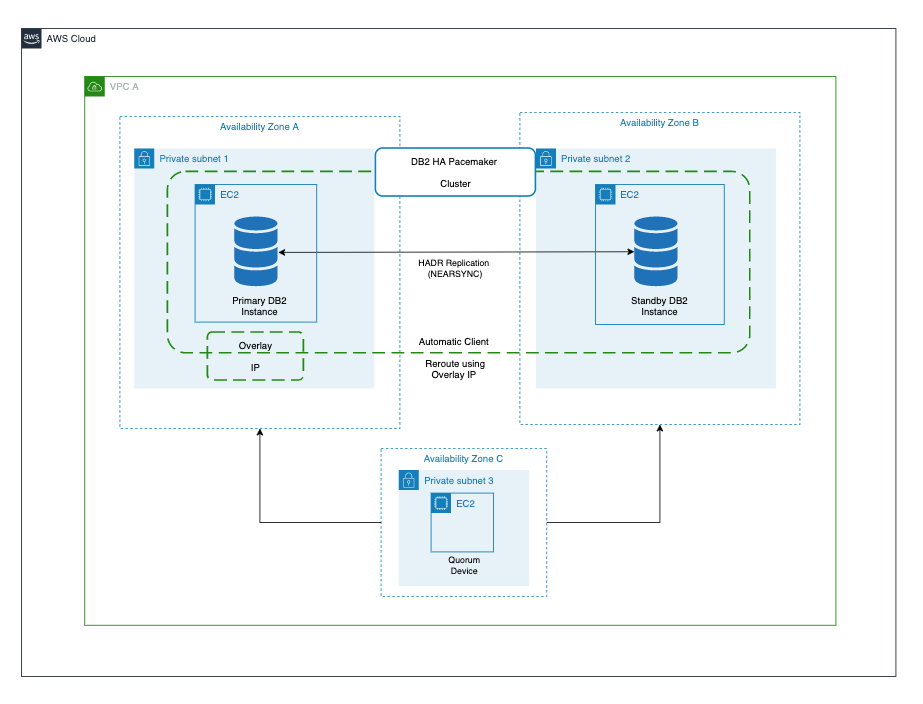
In this blog post, we will go through the steps to set up an HA two-host Db2 cluster with automatic failover managed by IBM Db2 Pacemaker with quorum device setup on a third EC2 instance. We will also set up an overlay IP as a virtual IP pointing to a primary instance initially. This instance is used for client connections and in case of failover, the overlay IP will automatically point to a new primary instance.

IBM Db2 Pacemaker is an HA cluster manager software integrated with Db2 Advanced Edition and Standard Edition on Linux (RHEL 8.1 and SLES 15). Pacemaker can provide HA and disaster recovery capabilities on AWS, and an alternative to Tivoli SA MP technology.

Note: The IBM Db2 v11.5.5 database server implemented in this blog post is a fully featured 90-day trial version. After the trial period ends, you can select the required Db2 edition when purchasing and installing the associated license files. Advanced Edition and Standard Edition are supported by this implementation.

Overview of solution

For this solution, we will go through the steps to install and configure IBM Db2 Pacemaker along with overlay IP as virtual IP for the clients to connect to the database. This blog post also includes prerequisites, and installation and configuration instructions to achieve an HA Db2 database on Amazon Elastic Compute Cloud (Amazon EC2).

Figure 1. Cluster management using IBM Db2 Pacemaker

Prerequisites for installing Db2 Pacemaker

To set up IBM Db2 Pacemaker on a two-node HADR (high availability disaster recovery) cluster, the following prerequisites must be met.

  • Set up instance user ID and group ID.

Instance user id and group id’s must be set up as part of Db2 Server installation which can be verified as follows:

grep db2iadm1 /etc/group
grep db2inst1 /etc/group

  • Set up host names for all the hosts in /etc/hosts file on all the hosts in the cluster.

For both of the hosts in the HADR cluster, ensure that the host names are set up as follows.

Format: ipaddress fully_qualified_domain_name alias

  • Install kornshell (ksh) on both of the hosts.

sudo yum install ksh -y

  • Ensure that all instances have TCP/IP connectivity between their ethernet network interfaces.
  • Enable password less secure shell (ssh) for the root and instance user IDs across both instances.After the password less root ssh is enabled, verify it using the “ssh <host name> -l root ls” command (hostname is either an alias or fully-qualified domain name).

ssh <host name> -l root ls

  • Activate HADR for the Db2 database cluster.
  • Make available the IBM Db2 Pacemaker binaries in the /tmp folder on both hosts for installation. The binaries can be downloaded from IBM download location (login required).

Installation steps

After completing all prerequisites, run the following command to install IBM Db2 Pacemaker on both primary and standby hosts as root user.

cd /tmp
tar -zxf Db2_v11.5.5.0_Pacemaker_20201118_RHEL8.1_x86_64.tar.gz
cd Db2_v11.5.5.0_Pacemaker_20201118_RHEL8.1_x86_64/RPMS/

dnf install https://dl.fedoraproject.org/pub/epel/epel-release-latest-8.noarch.rpm -y
dnf install */*.rpm -y

cp /tmp/Db2_v11.5.5.0_Pacemaker_20201118_RHEL8.1_x86_64/Db2/db2cm /home/db2inst1/sqllib/adm

chmod 755 /home/db2inst1/sqllib/adm/db2cm

Run the following command by replacing the -host parameter value with the alias name you set up in prerequisites.

/home/db2inst1/sqllib/adm/db2cm -copy_resources
/tmp/Db2_v11.5.5.0_Pacemaker_20201118_RHEL8.1_x86_64/Db2agents -host <host>

After the installation is complete, verify that all required resources are created as shown in Figure 2.

ls -alL /usr/lib/ocf/resource.d/heartbeat/db2*

Figure 2. List of heartbeat resources

Configuring Pacemaker

After the IBM Db2 Pacemaker is installed on both primary and standby hosts, initiate the following configuration commands from only one of the hosts (either primary or standby hosts) as root user.

  1. Create the cluster using db2cm utility.Create the Pacemaker cluster using db2cm utility using the following command. Before running the command, replace the -domain and -host values appropriately.

/home/db2inst1/sqllib/adm/db2cm -create -cluster -domain <anydomainname> -publicEthernet eth0 -host <primary host alias> -publicEthernet eth0 -host <standby host alias>

Note: Run ifconfig to get the –publicEthernet value and replace in the former command.

  1. Create instance resource model using the following commands.Modify -instance and -host parameter values in the following command before running.

/home/db2inst1/sqllib/adm/db2cm -create -instance db2inst1 -host <primary host alias>
/home/db2inst1/sqllib/adm/db2cm -create -instance db2inst1 -host <standby host alias>

  1. Create the database instance using db2cm utility. Modify -db parameter value accordingly.

/home/db2inst1/sqllib/adm/db2cm -create -db TESTDB -instance db2inst1

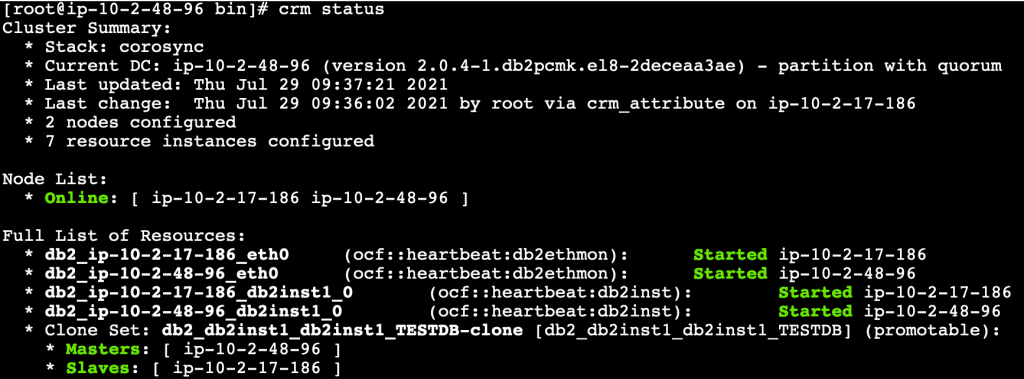
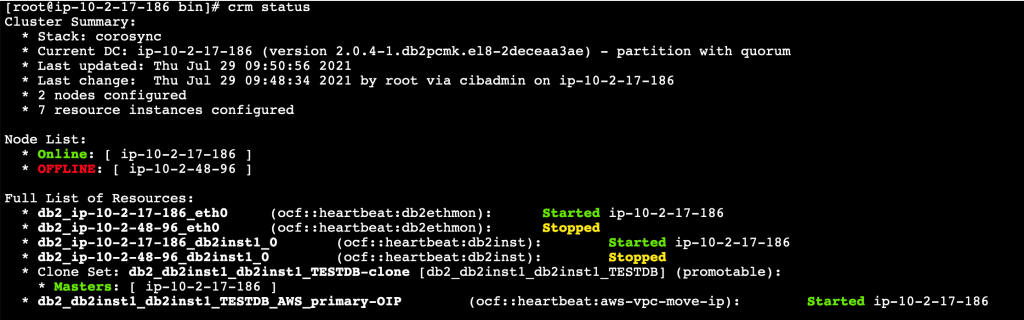
After configuring Pacemaker, run crm status command from both the primary and standby hosts to check if the Pacemaker is running with automatic failover activated.

Figure 3. Pacemaker cluster status

Quorum device setup

Next, we shall set up a third lightweight EC2 instance that will act as a quorum device (QDevice) which will act as a tie breaker avoiding a potential split-brain scenario. We need to install only corsync-qnetd* package from the Db2 Pacemaker cluster software.

Prerequisites (quorum device setup)

  1. Update /etc/hosts file on Db2 primary and standby instances to include the host details of QDevice EC2 instance.
  2. Set up password less root ssh access between Db2 instances and the QDevice instance.
  3. Ensure TCP/IP connectivity between the Db2 instances and the QDevice instance on port 5403.

Steps to set up quorum device

Run the following commands on the quorum device EC2 instance.

cd /tmp
tar -zxf Db2_v11.5.5.0_Pacemaker_20201118_RHEL8.1_x86_64.tar.gz
cd Db2_v11.5.5.0_Pacemaker_20201118_RHEL8.1_x86_64/RPMS/
dnf install */corosync-qnetd* -y

  1. Run the following command from one of the Db2 instances to join the quorum device to the cluster by replacing the QDevice value appropriately.

/home/db2inst1/sqllib/adm/db2cm -create -qdevice <hostnameofqdevice>

  1. Verify the setup using the following commands.

From any Db2 servers:

/home/db2inst1/sqllib/adm/db2cm -list

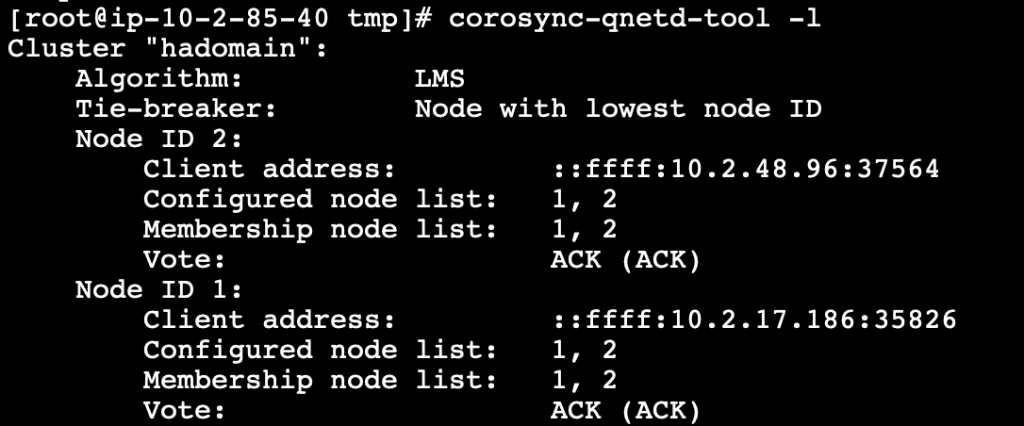
From QDevice instance:

corosync-qnetd-tool -l

Figure 4. Quorum device status

Setting up overlay IP as virtual IP

For HADR activated databases, virtual IP provides a common connection point for the clients so that in case of failovers there is no need to update the connection strings with the actual IP address of the hosts. Furtermore, the clients can continue to establish the connection to the new primary instance.

We can use the overlay IP address routing on AWS to send the network traffic to HADR database servers within Amazon Virtual Private Cloud (Amazon VPC) using a route table so that the clients can connect to the database using the overlay IP from the same VPC (any Availability Zone) where the database exists. aws-vpc-move-ip is a resource agent from AWS which is available along with the Pacemaker software that helps to update the route table of the VPC.

If you need to connect to the database using overlay IP from on-premises or outside of the VPC (different VPC than database servers), then additional setup is needed using either AWS Transit Gateway or Network Load Balancer.

Prerequisites (setting up overlay IP as virtual IP)

  • Choose the overlay IP address range which needs to be configured. This IP should not be used anywhere in the VPC or on-premises, and should be a part of the private IP address range as defined in RFC 1918. If the VPC is configured in the range of 0.0.0.0/8 or 172.16.0.0/12, we can use the overlay IP from the range of 192.168.0.0/16.We will use the following IP and ethernet settings.

192.168.1.81/32
eth0

  • To route traffic through overlay IP, we need to disable source and target destination checks on the primary and standby EC2 instances.

aws ec2 modify-instance-attribute –profile <AWS CLI profile> –instance-id EC2-instance-id –no-source-dest-check

Steps to configure overlay IP

The following commands can be run as root user on the primary instance.

  1. Create the following AWS Identity and Access Management (IAM) policy and attach it to the instance profile. Update region, account_id, and routetableid values.
{
  "Version": "2012-10-17",
  "Statement": [
    {
      "Sid": "Stmt0",
      "Effect": "Allow",
      "Action": "ec2:ReplaceRoute",
      "Resource": "arn:aws:ec2:<region>:<account_id>:route-table/<routetableid>"
    },
    {
      "Sid": "Stmt1",
      "Effect": "Allow",
      "Action": "ec2:DescribeRouteTables",
      "Resource": "*"
    }
  ]
}
  1. Add the overlay IP on the primary instance.

ip address add 192.168.1.81/32 dev eth0

  1. Update the route table (used in Step 1) with the overlay IP specifying the node with the Db2 primary instance. The following command returns True.

aws ec2 create-route –route-table-id <routetableid> –destination-cidr-block 192.168.1.81/32 –instance-id <primrydb2instanceid>

  1. Create a file overlayip.txt with the following command to create the resource manager for overlay ip.

overlayip.txt

primitive db2_db2inst1_db2inst1_TESTDB_AWS_primary-OIP ocf:heartbeat:aws-vpc-move-ip \
  params ip=192.168.1.81 routing_table=<routetableid> interface=<ethernet> profile=<AWS CLI profile name> \
  op start interval=0 timeout=180s \
  op stop interval=0 timeout=180s \
  op monitor interval=30s timeout=60s

eifcolocation db2_db2inst1_db2inst1_TESTDB_AWS_primary-colocation inf:

db2_db2inst1_db2inst1_TESTDB_AWS_primary-OIP:Started
db2_db2inst1_db2inst1_TESTDB-clone:Master

order order-rule-db2_db2inst1_db2inst1_TESTDB-then-primary-oip Mandatory:

db2_db2inst1_db2inst1_TESTDB-clone db2_db2inst1_db2inst1_TESTDB_AWS_primary-OIP
location prefer-node1_db2_db2inst1_db2inst1_TESTDB_AWS_primary-OIP

db2_db2inst1_db2inst1_TESTDB_AWS_primary-OIP 100: <primaryhostname>
location prefer-node2_db2_db2inst1_db2inst1_TESTDB_AWS_primary-OIP

db2_db2inst1_db2inst1_TESTDB_AWS_primary-OIP 100: <standbyhostname>

The following parameters must be replaced in the resource manager create command in the file.

    • Name of the database resource agent (This can be found through crm config show | grep primitive | grep DBNAME command. For this example, we will use: db2_db2inst1_db2inst1_TESTDB)
    • Overlay IP address (created earlier)
    • Routing table ID (used earlier)
    • AWS command-line interface (CLI) profile name
    • Primary and standby host names
  1. After the file with commands is ready, run the following command to create the overlay IP resource manager.

crm configure load update overlayip.txt

  1. Next, create the VIP resource manager—not in managed state. Run the following command to manage and start the resource.

crm resource manage db2_db2inst1_db2inst1_TESTDB_AWS_primary-OIP

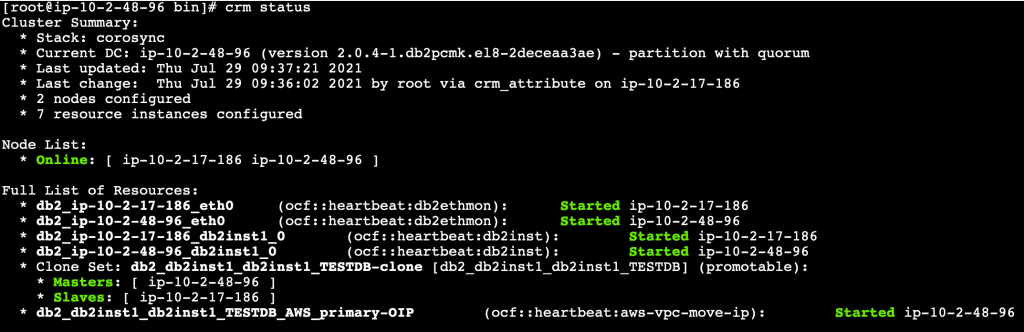
  1. Validate the setup with crm status command.

Figure 5. Pacemaker cluster status along with overlay IP resource

Test failover with client connectivity

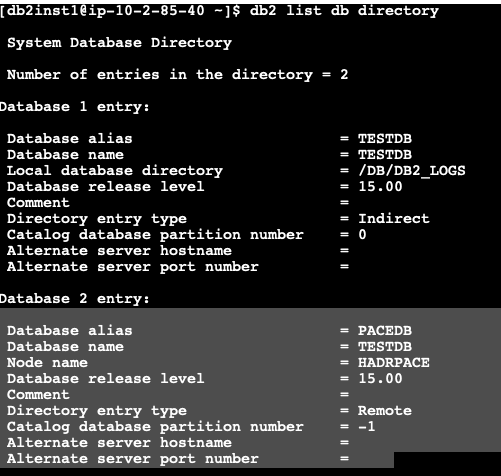
For the purpose of this testing, launch another EC2 instance with Db2 client installed, and catalog the Db2 database server using overlay IP.

Figure 6. Database directory list

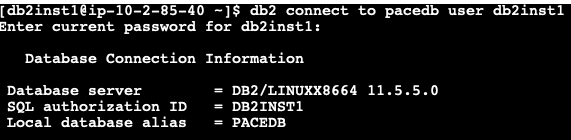
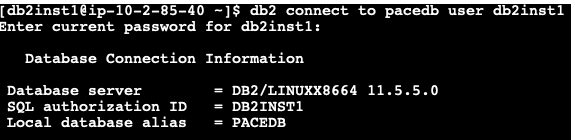
Establish a connection with the Db2 primary instance using the cataloged alias (created earlier) using overlay IP address.

Figure 7. Connect to database

If we connect to the primary instance and check the applications connected, we can see the active connection from the client’s IP as shown in Figure 8.

Check client connections before failover

Figure 8. Check client connections before failover

Next, let’s stop the primary Db2 instance and check if the Pacemaker cluster promoted the standby to primary and we can still connect to the database using the overlay IP, which now points to the new primary instance.

If we check the CRM status from the new primary instance, we can see that the Pacemaker cluster has promoted the standby database to new primary database as shown in Figure 9.

Figure 9. Automatic failover to standby

Let’s go back to our client and reestablish the connection using the cataloged DB alias created using overlay IP.

Figure 10. Database reconnection after failover

If we connect to the new promoted primary instance and check the applications connected, we can see the active connection from the client’s IP as shown in Figure 11.

Check client connections after failover

Figure 11. Check client connections after failover

Cleaning up

To avoid incurring future charges, terminate all EC2 instances which were created as part of the setup referencing this blog post.

Conclusion

In this blog post, we have set up automatic failover using IBM Db2 Pacemaker with overlay (virtual) IP to route traffic to secondary database instance during failover, which helps to reconnect to the database without any manual intervention. In addition, we can also enable automatic client reroute using the overlay IP address to achieve a seamless failover connectivity to the database for mission-critical workloads.

Field Notes provides hands-on technical guidance from AWS Solutions Architects, consultants, and technical account managers, based on their experiences in the field solving real-world business problems for customers.

Build Your Own Game Day to Support Operational Resilience

Post Syndicated from Lewis Taylor original https://aws.amazon.com/blogs/architecture/build-your-own-game-day-to-support-operational-resilience/

Operational resilience is your firm’s ability to provide continuous service through people, processes, and technology that are aware of and adaptive to constant change. Downtime of your mission-critical applications can not only damage your reputation, but can also make you liable to multi-million-dollar financial fines.

One way to test operational resilience is to simulate life-like system failures. An effective way to do this is by running events in your organization known as game days. Game days test systems, processes, and team responses and help evaluate your readiness to react and recover from operational issues. The AWS Well-Architected Framework recommends game days as a key strategy to develop and operate highly resilient systems because they focus not only on technology resilience issues but identify people and process gaps.

This blog post will explain how you can apply game day concepts to your workloads to help achieve a highly resilient workload.

Why does operational resilience matter from a regulatory perspective?

In March 2021, the Bank of England, Prudential Regulation Authority, and Financial Conduct Authority published their Building operational resilience: Feedback to CP19/32 and final rules policy. In this policy, operational resilience refers to a firm’s ability to prevent, adapt, and respond to and return to a steady system state when a disruption occurs. Further, firms are expected to learn and implement process improvements from prior disruptions.

This policy will not apply to everyone. However, across the board if you don’t establish operational resilience strategies, you are likely operating at an increased risk. If you have a service disruption, you may incur lost revenue and reputational damage.

What does it mean to be operationally resilient?

The final policy provides guidance on how firms should achieve operational resilience, which includes but is not limited to the following:

  • Identify and prioritize services based on the potential of intolerable harm to end consumers or risk to market integrity.
  • Define appropriate maximum impact tolerance of an important business service. This is reviewed annually using metrics to measure impact tolerance and answers questions like, “How long (in hours) can a service be offline before causing intolerable harm to end consumers?”
  • Document a complete view of all the aspects required to deliver each important service. This includes people, processes, technology, facilities, and information (resources). Firms should also test their ability to remain within the impact tolerances and provide assurance of resilience along with areas that need to be addressed.

What is a game day?

The AWS Well-Architected Framework defines a game day as follows:

“A game day simulates a failure or event to test systems, processes, and team responses. The purpose is to actually perform the actions the team would perform as if an exceptional event happened. These should be conducted regularly so that your team builds “muscle memory” on how to respond. Your game days should cover the areas of operations, security, reliability, performance, and cost.

In AWS, your game days can be carried out with replicas of your production environment using AWS CloudFormation. This enables you to test in a safe environment that resembles your production environment closely.”

Running game days that simulate system failure helps your organization evaluate and build operational resilience.

How can game days help build operational resilience?

Running a game day alone is not sufficient to ensure operational resilience. However, by navigating the following process to set up and perform a game day, you will establish a best practice-based approach for operating resilient systems.

Stage 1 – Identify key services

As part of setting up a game day event, you will catalog and identify business-critical services.

Game days are performed to test services where operational failure could result in significant financial, customer, and/or reputational impact to the firm. Game days can also evaluate other key factors, like the impact of a failure on the wider market where your firm operates.

For example, a firm may identify its digital banking mobile application from which their customers can initiate payments as one of its important business services.

Stage 2 – Map people, process, and technology supporting the business service

Game days are holistic events. To get a full picture of how the different aspects of your workload operate together, you’ll generate a detailed map of people and processes as they interact and operate the technical and non-technical components of the system. This mapping also helps your end consumers understand how you will provide them reliable support during a failure.

Stage 3 – Define and perform failure scenarios

Systems fail, and failures often happen when a system is operating at scale because various services working together can introduce complexity. To ensure operational resilience, you must understand how systems react and adapt to failures. To do this, you’ll identify and perform failure scenarios so you can understand how your systems will react and adapt and build “muscle memory” for actual events.

AWS builds to guard against outages and incidents, and accounts for them in the design of AWS services—so when disruptions do occur, their impact on customers and the continuity of services is as minimal as possible. At AWS, we employ compartmentalization throughout our infrastructure and services. We have multiple constructs that provide different levels of independent, redundant components.

Stage 4 – Observe and document people, process, and technology reactions

In running a failure scenario, you’ll observe how technological and non-technological components react to and recover from failure. This helps you identify failures and fix them as they cascade through impacted components across your workload. This also helps identify technical and operational challenges that might not otherwise be obvious.

Stage 5 – Conduct lessons learned exercises

Game days generate information on people, processes, and technology and also capture data on customer impact, incident response and remediation timelines, contributing factors, and corrective actions. By incorporating these data points into the system design process, you can implement continuous resilience for critical systems.

How to run your own game day in AWS

You may have heard of AWS GameDay events. This is an AWS organized event for our customers. In this team-based event, AWS provides temporary AWS accounts running fictional systems. Failures are injected into these systems and teams work together on completing challenges and improving the system architecture.

However, the method and tooling and principles we use to conduct AWS GameDays are agnostic and can be applied to your systems using the following services:

  • AWS Fault Injection Simulator is a fully managed service that runs fault injection experiments on AWS, which makes it easier to improve an application’s performance, observability, and resiliency.
  • Amazon CloudWatch is a monitoring and observability service that provides you with data and actionable insights to monitor your applications, respond to system-wide performance changes, optimize resource utilization, and get a unified view of operational health.
  • AWS X-Ray helps you analyze and debug production and distributed applications (such as those built using a microservices architecture). X-Ray helps you understand how your application and its underlying services are performing to identify and troubleshoot the root cause of performance issues and errors.

Please note you are not limited to the tools listed for simulating failure scenarios. For complete coverage of failure scenarios, we encourage you to explore additional tools and strategies.

Figure 1 shows a reference architecture example that demonstrates conducting a game day for an Open Banking implementation.

Game day reference architecture example

Figure 1. Game day reference architecture example

Game day operators use Fault Injection Simulator to catalog and perform failure scenarios to be included in your game day. For example, in our Open Banking use case in Figure 1, a failure scenario might be for the business API functions servicing Open Banking requests to abruptly stop working. You can also combine such simple failure scenarios into a more complex one with failures injected across multiple components of the architecture.

Game day participants use CloudWatch, X-Ray, and their own custom observability and monitoring tooling to identify failures as they cascade through systems.

As you go through the process of identifying, communicating, and fixing issues, you’ll also document impact of failures on end-users. From there, you’ll generate lessons learned to holistically improve your workload’s resilience.

Conclusion

In this blog, we discussed the significance of ensuring operational resilience. We demonstrated how to set up game days and how they can supplement your efforts to ensure operational resilience. We discussed how using AWS services such as Fault Injection Simulator, X-Ray, and CloudWatch can be used to facilitate and implement game day failure scenarios.

Ready to get started? For more information, check out our AWS Fault Injection Simulator User Guide.

Related information:

Optimizing your AWS Infrastructure for Sustainability, Part II: Storage

Post Syndicated from Katja Philipp original https://aws.amazon.com/blogs/architecture/optimizing-your-aws-infrastructure-for-sustainability-part-ii-storage/

In Part I of this series, we introduced you to strategies to optimize the compute layer of your AWS architecture for sustainability. We provided you with success criteria, metrics, and architectural patterns to help you improve resource and energy efficiency of your AWS workloads.

This blog post focuses on the storage layer of your AWS infrastructure and provides recommendations that you can use to store your data sustainably.

Optimizing the storage layer of your AWS infrastructure

Managing your data lifecycle and using different storage tiers are key components to optimizing storage for sustainability. When you consider different storage mechanisms, remember that you’re introducing a trade-off between resource efficiency, access latency, and reliability. This means you’ll need to select your management pattern accordingly.

Reducing idle resources and maximizing utilization

Storing and accessing data efficiently, in addition to reducing idle storage resources results in a more efficient and sustainable architecture. Amazon CloudWatch offers storage metrics that can be used to assess storage improvements, as listed in the following table.

Service Metric Source
Amazon Simple Storage Service (Amazon S3) BucketSizeBytes Metrics and dimensions
S3 Object Access Logging requests using server access logging
Amazon Elastic Block Store (Amazon EBS) VolumeIdleTime Amazon EBS metrics
Amazon Elastic File System (Amazon EFS) StorageBytes Amazon CloudWatch metrics for Amazon EFS
Amazon FSx for Lustre FreeDataStorageCapacity Monitoring Amazon FSx for Lustre
Amazon FSx for Windows File Server FreeStorageCapacity Monitoring with Amazon CloudWatch

You can monitor these metrics with the architecture shown in Figure 1. CloudWatch provides a unified view of your resource metrics.

CloudWatch for monitoring your storage resources

Figure 1. CloudWatch for monitoring your storage resources

In the following sections, we present four concepts to reduce idle resources and maximize utilization for your AWS storage layer.

Analyze data access patterns and use storage tiers

Choosing the right storage tier after analyzing data access patterns gives you more sustainable storage options in the cloud.

  • By storing less volatile data on technologies designed for efficient long-term storage, you will optimize your storage footprint. More specifically, you’ll reduce the impact you have on the lifetime of storage resources by storing slow-changing or unchanging data on magnetic storage, as opposed to solid state memory. For archiving data or storing slow-changing data, consider using Amazon EFS Infrequent Access, Amazon EBS Cold HDD volumes, and Amazon S3 Glacier.
  • To store your data efficiently throughout its lifetime, create an Amazon S3 Lifecycle configuration that automatically transfers objects to a different storage class based on your pre-defined rules. The Expiring Amazon S3 Objects Based on Last Accessed Date to Decrease Costs blog post shows you how to create custom object expiry rules for Amazon S3 based on the last accessed date of the object.
  • For data with unknown or changing access patterns, use Amazon S3 Intelligent-Tiering to monitor access patterns and move objects among tiers automatically. In general, you have to make a trade-off between resource efficiency, access latency, and reliability when considering these storage mechanisms. Figure 2 shows an overview of data access patterns for Amazon S3 and the resulting storage tier. For example, in S3 One Zone-IA, energy and server capacity are reduced, because data is stored only within one Availability Zone.
Data access patterns for Amazon S3

Figure 2. Data access patterns for Amazon S3

Use columnar data formats and compression

Columnar data formats like Parquet and ORC require less storage capacity compared to row-based formats like CSV and JSON.

  • Parquet consumes up to six times less storage in Amazon S3 compared to text formats. This is because of features such as column-wise compression, different encodings, or compression based on data type, as shown in the Top 10 Performance Tuning Tips for Amazon Athena blog post.
  • You can improve performance and reduce query costs of Amazon Athena by 30–90 percent by compressing, partitioning, and converting your data into columnar formats. Using columnar data formats and compressions reduces the amount of data scanned.

Reduce unused storage resources

Right size or delete unused storage volumes

As shown in the Cost Optimization on AWS video, right-sizing storage by data type and usage reduces your associated costs by up to 50 percent.

  • A straightforward way to reduce unused storage resources is to delete unattached EBS volumes. If the volume needs to be quickly restored later on, you can store an Amazon EBS snapshot before deletion.
  • You can also use Amazon Data Lifecycle Manager to retain and delete EBS snapshots and Amazon EBS-backed Amazon Machine Images (AMIs) automatically. This further reduces the storage footprint of stale resources.
  • To avoid over-provisioning volumes, see the Automating Amazon EBS Volume-resizing blog post. It demonstrates an automated workflow that can expand a volume every time it reaches a capacity threshold. These Amazon EBS elastic volumes extend a volume when needed, as shown in the Amazon EBS Update blog post.
  • Another way to optimize block storage is to identify volumes that are underutilized and downsize them. Or you can change the volume type, as shown in the AWS Storage Optimization whitepaper.

Modify the retention period of CloudWatch Logs

By default, CloudWatch Logs are kept indefinitely and never expire. You can adjust the retention policy for each log group to be between one day and 10 years. For compliance reasons, export log data to Amazon S3 and use archival storage such as Amazon S3 Glacier.

Deduplicate data

Large datasets often have redundant data, which increases your storage footprint.

Conclusion

In this blog post, we discussed data storing techniques to increase your storage efficiency. These include right-sizing storage volumes; choosing storage tiers depending on different data access patterns; and compressing and converting data.

These techniques allow you to optimize your AWS infrastructure for environmental sustainability.

This blog post is the second post in the series, you can find the first part of the series linked in the following section. In the next part of this blog post series, we will show you how you can optimize the networking part of your IT infrastructure for sustainability in the cloud!

Related information

Detect Adversary Behavior in Milliseconds with CrowdStrike and Amazon EventBridge

Post Syndicated from Joby Bett original https://aws.amazon.com/blogs/architecture/detect-adversary-behavior-in-seconds-with-crowdstrike-and-amazon-eventbridge/

By integrating Amazon EventBridge with Falcon Horizon, CrowdStrike has developed a real-time, cloud-based solution that allows you to detect threats in less than a second. This solution uses AWS CloudTrail and EventBridge. CloudTrail allows governance, compliance, operational auditing, and risk auditing of your AWS account. EventBridge is a serverless event bus that makes it easier to build event-driven applications at scale.

In this blog post, we’ll cover the challenges presented by using traditional log file-based security monitoring. We will also discuss how CrowdStrike used EventBridge to create an innovative, real-time cloud security solution that enables high-speed, event-driven alerts that detect malicious actors in milliseconds.

Challenges of log file-based security monitoring

Being able to detect malicious actors in your environment is necessary to stay secure in the cloud. With the growing volume, velocity, and variety of cloud logs, log file-based monitoring makes it difficult to reveal adverse behaviors in time to stop breaches.

When an attack is in progress, a security operations center (SOC) analyst has an average of one minute to detect the threat, ten minutes to understand it, and one hour to contain it. If you cannot meet this 1/10/60 minute rule, you may have a costly breach that may move laterally and explode exponentially across the cloud estate.

Let’s look at a real-life scenario. When a malicious actor attempts a ransom attack that targets high-value data in an Amazon Simple Storage Service (Amazon S3) bucket, it can involve activities in various parts of the cloud services in a brief time window.

These example activities can involve:

  • AWS Identity and Access Management (IAM): account enumeration, disabling multi-factor authentication (MFA), account hijacking, privilege escalation, etc.
  • Amazon Elastic Compute Cloud (Amazon EC2): instance profile privilege escalation, file exchange tool installs, etc.
  • Amazon S3: bucket and object enumeration; impair bucket encryption and versioning; bucket policy manipulation; getObject, putObject, and deleteObject APIs, etc.

With siloed log file-based monitoring, detecting, understanding, and containing a ransom attack while still meeting the 1/10/60 rule is difficult. This is because log files are written in batches, and files are typically only created every 5 minutes. Once the log file is written, it still needs to be fetched and processed. This means that you lose the ability to dynamically correlate disparate activities.

To summarize, top-level challenges of log file-based monitoring are:

  1. Lag time between the breach and the detection
  2. Inability to correlate disparate activities to reveal sophisticated attack patterns
  3. Frequent false positive alarms that obscure true positives
  4. High operational cost of log file synchronizations and reprocessing
  5. Log analysis tool maintenance for fast growing log volume

Security and compliance is a shared responsibility between AWS and the customer. We protect the infrastructure that runs all of the services offered in the AWS Cloud. For abstracted services, such as  Amazon S3, we operate the infrastructure layer, the operating system, and platforms, and customers access the endpoints to store and retrieve data.

You are responsible for managing your data (including encryption options), classifying assets, and using IAM tools to apply the appropriate permissions.

Indicators of attack by CrowdStrike with Amazon EventBridge

In real-world cloud breach scenarios, timeliness of observation, detection, and remediation is critical. CrowdStrike Falcon Horizon IOA is built on an event-driven architecture based on EventBridge and operates at a velocity that can outpace attackers.

CrowdStrike Falcon Horizon IOA performs the following core actions:

  • Observe: EventBridge streams CloudTrail log files across accounts to the CrowdStrike platform as activity occurs. Parallelism is enabled via event bus rules, which enables CrowdStrike to avoid the five-minute lag in fetching the log files and dynamically correlate disparate activities. The CrowdStrike platform observes end-to-end activities from AWS services and infrastructure hosted in the accounts protected by CrowdStrike.
  • Detect: Falcon Horizon invokes indicators of attack (IOA) detection algorithms that reveal adversarial or anomalous activities from the log file streams. It correlates new and historical events in real time while enriching the events with CrowdStrike threat intelligence data. Each IOA is prioritized with the likelihood of activity being malicious via scoring and mapped to the MITRE ATT&CK framework.
  • Remediate: The detected IOA is presented with remediation steps. Depending on the score, applying the remediations quickly can be critical before the attack spreads.
  • Prevent: Unremediated insecure configurations are revealed via indicators of misconfiguration (IOM) in Falcon Horizon. Applying the remediation steps from IOM can prevent future breaches.

Key differentiators of IOA from Falcon Horizon are:

  • Observability of wider attack surfaces with heterogeneous event sources
  • Detection of sophisticated tactics, techniques, and procedures (TTPs) with dynamic event correlation
  • Event enrichment with threat intelligence that aids prioritization and reduces alert fatigue
  • Low latency between malicious activity occurrence and corresponding detection
  • Insight into attacks for each adversarial event from MITRE ATT&CK framework

High-level architecture

Event-driven architectures provide advantages for integrating varied systems over legacy log file-based approaches. For securing cloud attack surfaces against the ever-evolving TTPs, a robust event-driven architecture at scale is a key differentiator.

CrowdStrike maximizes the advantages of event-driven architecture by integrating with EventBridge, as shown in Figure 1. EventBridge allows observing CloudTrail logs in event streams. It also simplifies log centralization from a number of accounts with its direct source-to-target integration across accounts, as follows:

  1. CrowdStrike hosts an EventBridge with central event buses that consume the stream of CloudTrail log events from a multitude of customer AWS accounts.
  2. Within customer accounts, EventBridge rules listen to the local CloudTrail and stream each activity as an event to the centralized EventBridge hosted by CrowdStrike.
  3. CrowdStrike’s event-driven platform detects adversarial behaviors from the event streams in real time. The detection is performed against incoming events in conjunction with historical events. The context that comes from connecting new and historical events minimizes false positives and improves alert efficacy.
  4. Events are enriched with CrowdStrike threat intelligence data that provides additional insight of the attack to SOC analysts and incident responders.
CrowdStrike Falcon Horizon IOA architecture

Figure 1. CrowdStrike Falcon Horizon IOA architecture

As data is received by the centralized EventBridge, CrowdStrike relies on unique customer ID and AWS Region in each event to provide integrity and isolation.

EventBridge allows relatively hassle-free customer onboarding by using cross account rules to transfer customer CloudTrail data into one common event bus that can then be used to filter and selectively forward the data into the Falcon Horizon platform for analysis and mitigation.

Conclusion

As your organization’s cloud footprint grows, visibility into end-to-end activities in a timely manner is critical for maintaining a safe environment for your business to operate. EventBridge allows event-driven monitoring of CloudTrail logs at scale.

CrowdStrike Falcon Horizon IOA, powered by EventBridge, observes end-to-end cloud activities at high speeds at scale. Paired with targeted detection algorithms from in-house threat detection experts and threat intelligence data, Falcon Horizon IOA combats emerging threats against the cloud control plane with its cutting-edge event-driven architecture.

Related information

What to Consider when Selecting a Region for your Workloads

Post Syndicated from Saud Albazei original https://aws.amazon.com/blogs/architecture/what-to-consider-when-selecting-a-region-for-your-workloads/

The AWS Cloud is an ever-growing network of Regions and points of presence (PoP), with a global network infrastructure that connects them together. With such a vast selection of Regions, costs, and services available, it can be challenging for startups to select the optimal Region for a workload. This decision must be made carefully, as it has a major impact on compliance, cost, performance, and services available for your workloads.

Evaluating Regions for deployment

There are four main factors that play into evaluating each AWS Region for a workload deployment:

  1. Compliance. If your workload contains data that is bound by local regulations, then selecting the Region that complies with the regulation overrides other evaluation factors. This applies to workloads that are bound by data residency laws where choosing an AWS Region located in that country is mandatory.
  2. Latency. A major factor to consider for user experience is latency. Reduced network latency can make substantial impact on enhancing the user experience. Choosing an AWS Region with close proximity to your user base location can achieve lower network latency. It can also increase communication quality, given that network packets have fewer exchange points to travel through.
  3. Cost. AWS services are priced differently from one Region to another. Some Regions have lower cost than others, which can result in a cost reduction for the same deployment.
  4. Services and features. Newer services and features are deployed to Regions gradually. Although all AWS Regions have the same service level agreement (SLA), some larger Regions are usually first to offer newer services, features, and software releases. Smaller Regions may not get these services or features in time for you to use them to support your workload.

Evaluating all these factors can make coming to a decision complicated. This is where your priorities as a business should influence the decision.

Assess potential Regions for the right option

Evaluate by shortlisting potential Regions.

  • Check if these Regions are compliant and have the services and features you need to run your workload using the AWS Regional Services website.
  • Check feature availability of each service and versions available, if your workload has specific requirements.
  • Calculate the cost of the workload on each Region using the AWS Pricing Calculator.
  • Test the network latency between your user base location and each AWS Region.

At this point, you should have a list of AWS Regions with varying cost and network latency that looks something Table 1:

Region Compliance Latency Cost Services / Features
Region A

15 ms $$
Region B

20 ms

$$$

X

Region C

80 ms $

Table 1. Region evaluation matrix

Many workloads such as high performance computing (HPC), analytics, and machine learning (ML), are not directly linked to a customer-facing application. These would not be sensitive to network latency, so you may want to select the Region with the lowest cost.

Alternatively, you may have a backend service for a game or mobile application in which network latency has a direct impact on user experience. Measure the difference in network latency between each Region, and determine if it is worth the increased cost. You can leverage the Amazon CloudFront edge network, which helps reduce latency and increases communication quality. This is because it uses a fully managed AWS network infrastructure, which connects your application to the edge location nearest to your users.

Multi-Region deployment

You can also split the workload across multiple Regions. The same workload may have some components that are sensitive to network latency and some that are not. You may determine you can benefit from both lower network latency and reduced cost at the same time. Here’s an example:

Figure 1. Multi-Region deployment optimized for feature availability

Figure 1. Multi-Region deployment optimized for feature availability

Figure 1 shows a serverless application deployed at the Bahrain Region (me-south-1) which has a close proximity to the customer base in Riyadh, Saudi Arabia. Application users enjoy a lower latency network connecting to the AWS Cloud. Analytics workloads are deployed in the Ireland Region (eu-west-1), which has a lower cost for Amazon Redshift and other features.

Note that data transfer between Regions is not free and, in this example, costs $0.115 per GB. However, even with this additional cost factored in, running the analytical workload in Ireland (eu-west-1) is still more cost-effective. You can also benefit from additional capabilities and features that may have not yet been released in the Bahrain (me-south-1) Region.

This multi-Region setup could also be beneficial for applications with a global user base. The application can be deployed in multiple secondary AWS Regions closer to the user base locations. It uses a primary AWS Region with a lower cost for consolidated services and latency-insensitive workloads.

Figure 2. Multi-Region deployment optimized for network latency

Figure 2. Multi-Region deployment optimized for network latency

Figure 2 allows for an application to span multiple Regions to serve read requests with the lowest network latency possible. Each client will be routed to the nearest AWS Region. For read requests, an Amazon Route 53 latency routing policy will be used. For write requests, an endpoint routed to the primary Region will be used. This primary endpoint can also have periodic health checks to failover to a secondary Region for disaster recovery (DR).

Other factors may also apply for certain applications such as ones that require Amazon EC2 Spot Instances. Regions differ in size, with some having three, and others up to six Availability Zones (AZ). This results in varying Spot Instance capacity available for Amazon EC2. Choosing larger Regions offers larger Spot capacity. A multi-Region deployment offers the most Spot capacity.

Conclusion

Selecting the optimal AWS Region is an important first step when deploying new workloads. There are many other scenarios in which splitting the workload across multiple AWS Regions can result in a better user experience and cost reduction. The four factors mentioned in this blog post can be evaluated together to find the most appropriate Region to deploy your workloads.

If the workload is bound by any regulations, shortlist the Regions that are compliant. Measure the network latency between each Region and the location of the user base. Estimate the workload cost for each Region. Check that the shortlisted Regions have the services and features your workload requires. And finally, determine if your workload can benefit from running in multiple Regions.

Dive deeper into the AWS Global Infrastructure Website for more information.

Field Notes: Tracking Overall Equipment Effectiveness with AWS IoT Analytics and Amazon QuickSight

Post Syndicated from Shailaja Suresh original https://aws.amazon.com/blogs/architecture/field-notes-tracking-overall-equipment-effectiveness-with-aws-iot-analytics-and-amazon-quicksight/

This post was co-written with Michael Brown, Senior Solutions Architect, Manufacturing at AWS.

Overall equipment effectiveness (OEE) is a measure of how well a manufacturing operation is utilized (facilities, time and material) compared to its full potential, during the periods when it is scheduled to run. Measuring OEE provides a way to obtain actionable insights into manufacturing processes to increase the overall productivity along with reduction in waste.

In order to drive process efficiencies and optimize costs, manufacturing organizations need a scalable approach to accessing data across disparate silos across their organization. In this blog post, we will demonstrate how OEE can be calculated, monitored, and scaled out using two key services: AWS IoT Analytics and Amazon QuickSight.

Overview of solution

We will use the standard OEE formulas for this example:

Table 1. OEE Calculations
Availability = Actual Time / Planned Time (in minutes)
Performance = (Total Units/Actual Time) / Ideal Run Rate
Quality = Good Units Produced / Total Units Produced
OEE = Availability * Performance * Quality

To calculate OEE, identify the following data for the calculation and its source:

Table 2. Source of supporting data
Supporting Data Method of Ingest
Total Planned Scheduled Production Time Manufacturing Execution Systems (MES)
Ideal Production Rate of Machine in Units MES
Total Production for the Scheduled time Programmable Logic Controller (PLC), MES
Total Number of Off-Quality units produced PLC, Quality DB
Total Unplanned Downtime in minutes PLC

For the purpose of this exercise, we assume that the supporting data is ingested as an MQTT message.

As indicated in Figure 1, the data is ingested into AWS IoT Core and then sent to AWS IoT Analytics by an IoT rule to calculate the OEE metrics. These IoT data insights can then be viewed from a QuickSight dashboard. Specific machine states, like machine idling, could be notified to the technicians through email or SMS by Amazon Simple Notification Service (Amazon SNS). All OEE metrics can then be republished to AWS IoT Core so any other processes can consume them.

Figure 1. Tracking OEE using PLCs with AWS IoT Analytics and QuickSight

Walkthrough

The components of this solution are:

  • PLC – An industrial computer that has been ruggedized and adapted for the control of manufacturing processes, such as assembly lines, robotic devices, or any activity that requires high reliability, ease of programming, and process fault diagnosis.
  • AWS IoT Greengrass – Provides a secure way to seamlessly connect your edge devices to any AWS service and to third-party services.
  • AWS IoT Core – Subscribes to the IoT topics and ingests data into the AWS Cloud for analysis.
  • AWS IoT rule – Rules give your devices the ability to interact with AWS services. Rules are analyzed and actions are performed based on the MQTT topic stream.
  • Amazon SNS – Sends notifications to the operations team when the machine downtime is greater than the rule threshold.
  • AWS IoT Analytics – Filters, transforms, and enriches IoT data before storing it in a time-series data store for analysis. You can set up the service to collect only the data you need from your PLC and sensors and apply mathematical transforms to process the data.
  • QuickSight – Helps you to visualize the OEE data across multiple shifts from AWS IoT Analytics.
  • Amazon Kinesis Data Streams – Enables you to build custom applications that process and analyze streaming data for specialized needs.
  • AWS Lambda – Lets you run code without provisioning or managing servers. In this example, it gets the JSON data records from Kinesis Data Streams and passes it to AWS IOT Analytics.
  • AWS Database Migration Service (AWS DMS) – Helps migrate your databases to AWS with nearly no downtime. All data changes to the source database (MES, Quality Databases) that occur during the data sync are continuously replicated to the target, allowing the source database to be fully operational during the migration process.

Follow these steps to build an AWS infrastructure to track OEE:

  1. Collect data from the factory floor using PLCs and sensors.

Here is a sample of the JSON data which will be ingested into AWS IoT Core.

In AWS IoT Analytics, a data store needs to be created which is needed to query and gather insights for OEE calculation. Refer to Getting started with AWS IoT Analytics to create a channel, pipeline, and data store. Note that AWS IoT Analytics receives data from the factory sensors and PLCs, as well as through Kinesis Data Streams from AWS DMS. In this blog post, we focus on how the data from AWS IoT Analytics is integrated with QuickSight to calculate OEE.

  1. Create a dataset in AWS IoT Analytics.In this example, one of our targets is to determine the total number of good units produced per shift to calculate the OEE over a one-day time period across shifts. For this purpose, only the necessary data is stored in AWS IoT Analytics as datasets and partitioned for performant analysis. Because the ingested data includes data across all machine states, we want to selectively collect data only when the machine is in a running state. AWS IoT Analytics helps to gather this specific data through SQL queries as shown in Figure 2.

Figure 2. SQL query in IoT Analytics to create a dataset

Cron expressions are expressions that indicate a schedule such that the tasks can be run automatically based on a schedule and frequency. AWS IoT Analytics provides options to query for the datasets at a frequency based on cron expressions.

Because we want to produce daily reports in QuickSight, set the Cron expression as shown in Figure 3.

Figure 3. Cron expression to query data daily

  1. Create an Amazon QuickSight dashboard to analyze the AWS IOT Analytics data.

To connect the AWS IoT Analytics dataset in this example to QuickSight, follow the steps contained in Visualizing AWS IoT Analytics data. After you have created a dataset under QuickSight, you can add calculated fields (Figure 4) as needed. We are creating the following fields to enable the dashboard to show the sum of units produced across shifts.

Figure 4. Adding calculated fields in Amazon QuickSight

We first add a calculated field as DateFromEpoch to produce a date from the ‘epochtime’ key of the JSON as shown in Figure 5.

Figure 5. DateFromEpoch calculated field

Similarly, you can create the following fields using the built-in functions available in QuickSight dataset as shown in Figures 6, 7, and 8.

Figure 6. HourofDay calculated field

Figure 7. ShiftNumber calculated field

Figure 8. ShiftSegregator calculated field

To determine the total number of good units produced, use the formula shown in Figure 9.

Figure 9. Formula for total number of good units produced

After the fields are calculated, save the dataset and create a new analysis with this dataset. Choose the stacked bar combo chart and add the dimensions and measures from Figure 10 to produce the visualization. This analysis shows the sum of good units produced across shifts using the calculated field GoodUnits.

Figure 10. Good units across shifts on Amazon QuickSight dashboard

  1. Calculate OEE.To calculate OEE across shifts, we need to determine the values stated in Table 1. For the sake of simplicity, determine the OEE for Shift 1 and Shift 2 on 6/30.

Let us introduce the calculated field ShiftQuality as in Figure 11.

    1. Calculate Quality

Good Units Produced / Total Units Produced

Figure 11. Quality calculation

Add a filter to include only Shift 1 and 2 on 6/30. Change the Range value for the bar to be from .90 to .95 to see the differences in Quality across shifts as in Figure 12.

Figure 12. Quality differences across shifts

    1. Calculate Performance

(Total Units/Actual Time) / Ideal Run Rate

For this factory, we know the Ideal Production Rate is 203 units per minute per shift (100,000 units/480 minutes). We already know the actual run time for each shift by excluding the idle and stopped state times. We add a calculated field for ShiftPerformance using the previous formula. Change the range of the bar in the visual to be able to see the differences in performances across the shifts as in Figure 13.

Figure 13. Performance calculation

    1. Calculate Availability

Actual Time / Planned Time (in minutes)

The planned time for a shift is 480 minutes. Add a calculated field using the previous formula.

    1. Calculate OEE

OEE = Performance * Availability * Quality

Finally, add a calculated field for ShiftOEE as in Figure 14. Include this field as the Bar to be able to see the OEE differences across shifts as in Figure 15.

Figure 14. OEE calculation

Figure 15. OEE across shifts

Shift 3 on 6/28 has the higher of the two OEEs compared in this example.

Note that you can schedule a dataset refresh in QuickSight for everyday as shown in Figure 16. This way you get to see the dataset and the visuals with the most recent data.

Figure 16. Dataset refresh schedule

All the above is a one-time setup to calculate OEE.

  1. Enable an AWS IoT rule to invoke Amazon SNS notifications when a machine is idle beyond the threshold time using AWS IoT rule.

You can create rules to invoke alerts over an Amazon SNS topic by adding an action under AWS IoT core as shown in Figures 17 and 18. In our example, we can invoke alerts to the factory operations team whenever a machine is in idle state. Refer to AWS IoT SQL reference for more information on creating rules through AWS IoT Core rule query statement.

Figure 17. Send messages through SNS

Figure 18. Set up IoT rules

Conclusion

In this blog post, we showed you how to calculate the OEE on factory IoT data by using two AWS IoT services: AWS IoT Core and AWS IoT Analytics. We used the seamless integration of QuickSight with AWS IoT Analytics and also the calculated fields feature of QuickSight to run calculations on industry data with field level formulas.

Field Notes provides hands-on technical guidance from AWS Solutions Architects, consultants, and technical account managers, based on their experiences in the field solving real-world business problems for customers.

Optimizing Cloud Infrastructure Cost and Performance with Starburst on AWS

Post Syndicated from Kinnar Kumar Sen original https://aws.amazon.com/blogs/architecture/optimizing-cloud-infrastructure-cost-and-performance-with-starburst-on-aws/

Amazon Web Services (AWS) Cloud is elastic, convenient to use, easy to consume, and makes it simple to onboard workloads. Because of this simplicity, the cost associated with onboarding workloads is sometimes overlooked.

There is a notion that when an organization moves its workload to the cloud, agility, scalability, performance, and cost issues will disappear. While this may be true for agility and scalability, you must optimize your workload. You can do this with services like Amazon EC2 Auto Scaling via Amazon Elastic Compute Cloud (Amazon EC2) and Amazon EC2 Spot Instances to realize the performance and cost benefits the cloud offers.

In this blog post, we show you how Starburst Enterprise (Starburst) addressed a sudden increase in cost for their data analytics platform as they grew their internal teams and scaled out their infrastructure. After reviewing their architecture and deployments with AWS specialist architects, Starburst and AWS concluded that they could take the following steps to greatly reduce costs:

  1. Use Spot Instances to run workloads.
  2. Add Amazon EC2 Auto Scaling into their training and demonstration environments, because the Starburst platform is designed to elastically scale up and down.

For analytics workloads, when you rein in costs, you typically rein in performance. Starburst and AWS worked together to balance the cost and performance of Starburst’s data analytics platform while also harnessing the flexibility, scalability, security, and performance of the cloud.

What is Starburst Enterprise?

Starburst provides a Massively Parallel Processing SQL (MPPSQL) engine based on open source Trino. It is an analytics platform that provides the cornerstone in customers’ intelligent data mesh and offers the following benefits and services:

  • The platform gives you a single point to access, monitor, and secure your data mesh.
  • The platform gives you options for your data compute. You no longer have to wait on data migrations or extract, transform, and load (ETL), there is no vendor lock-in, and there is no need to swap out your existing analytics tools.
  • Starburst Stargate (Stargate) ensures that large jobs are completed within each data domain of your data mesh. Only the result set is retrieved from the domain.
    • Stargate reduces data output, which reduces costs and increases performance.
    • Data governance policies can also be applied uniquely in each data domain, ensuring security compliance and federation.

As shown in Figure 1, there are many connectors for input and output that ensure you experience improved performance and security.

Starburst platform

Figure 1. Starburst platform

Integrating Starburst Enterprise with AWS

As shown in Figure 2, Starburst Enterprise uses AWS services to deliver elastic scaling and optimize cost. The platform is architected with decoupled storage and compute. This allows the platform to scale as needed to analyze petabytes of data.

The platform can be deployed via AWS CloudFormation or Amazon Elastic Kubernetes Service (Amazon EKS). Starburst on AWS allows you to run analytic queries across AWS data sources and on-premises systems such as Teradata and Oracle.

Deployment architecture of Starburst platform on AWS

Figure 2. Deployment architecture of Starburst platform on AWS

Amazon EC2 Auto Scaling

Enterprises have diverse analytic workloads; their compute and memory requirements vary with time. Starburst uses Amazon EKS and Amazon EC2 Auto Scaling to elastically scale compute resources to meet the demands of their analytics workloads.

  • Amazon EC2 Auto Scaling ensures that you have the compute capacity for your workloads to handle the load elastically. It is used to architect sophisticated, elastic, and resilient applications on the AWS Cloud.
    • Starburst uses the scheduled scaling feature of Amazon EC2 Auto Scaling to scale the cluster up/down based on time. Thus, they incur no costs when the cluster is not in use.
  • Amazon EKS is a fully managed Kubernetes service that allows you to run Kubernetes on AWS without needing to install, operate, and maintain your own Kubernetes control plane.

Scaling cloud resource consumption on demand has a major impact on controlling cloud costs. Starburst supports scaling down elastically, which means removing compute resources doesn’t impact the underlying processes.

Amazon EC2 Spot Instances

Spot Instances let you take advantage of unused EC2 capacity in the AWS Cloud. They are available at up to a 90% discount compared to On-Demand Instance prices. If EC2 needs capacity for On-Demand Instance usage, Spot Instances can be interrupted by Amazon EC2 with a two-minute notification. There are many ways to handle the interruption to ensure that the application is well architected for resilience and fault tolerance.

Starburst has integrated Spot Instances as a part of the Amazon EKS managed node groups to cost optimize the analytics workloads. This best practice of instance diversification is implemented by using the integration eksctl and instance selector with dry-run flag. This creates a list of instances of same size (vCPU/Mem ratio) and uses them in the underlying node groups.

Same size instances are required to make best use of Kubernetes Cluster Autoscaler, which is used to manage the size of the cluster.

Scaling down, handling interruptions, and provisioning compute

“Scaling in” an active application is tricky, but Starburst was built with resiliency in mind, and it can effectively manage shut downs.

Spot Instances are an ideal compute option because Starburst can handle potential interruptions natively. Starburst also uses Amazon EKS managed node groups to provision nodes in the cluster. This requires significantly less operational effort compared to using self-managed node groups. It allows Starburst to enforce best practices like capacity optimized allocation strategy, capacity rebalancing, and instance diversification.

When you need to “scale out” the deployment, Amazon EKS and Amazon EC2 Auto Scaling help to provision capacity, as depicted in Figure 3.

Depicting “scale out” in a Starburst deployment

Figure 3. Depicting “scale out” in a Starburst deployment

Benefits realized from using AWS services

In a short period, Starburst was able to increase the number of people working on AWS. They added five times the number of Solutions Architects, they have previously. Additionally, in their initial tests of their new deployment architecture, their Solutions Architects were able to complete up to three times the amount of work than they had been able to previously. Even after the workload increased more than 15 times, with two simple changes they only had a slight increase in total cost.

This cost and performance optimization allows Starburst to be more productive internally and realize value for each dollar spent. This further justified investing more into building out infrastructure footprint.

Conclusion

In building their architecture with AWS, Starburst realized the importance of having a robust and comprehensive cloud administration plan that they can implement and manage going forward. They are now able to balance the cloud costs with performance and stability, even after considering the SLA requirements. Starburst is planning to teach their customers about the Spot Instance and Amazon EC2 Auto Scaling best practices to ensure they maintain a cost and performance optimized cloud architecture.

If you want to see the Starburst data analytics platform in action, you can get a free trial in the AWS Marketplace: Starburst Data Free Trial.

Disaster Recovery (DR) for a Third-party Interactive Voice Response on AWS

Post Syndicated from Priyanka Kulkarni original https://aws.amazon.com/blogs/architecture/disaster-recovery-dr-for-a-third-party-interactive-voice-response-on-aws/

Voice calling systems are prevalent and necessary to many businesses today. They are usually designed to provide a 24×7 helpline support across multiple domains and use cases. Reliability and availability of such systems are important for a good customer experience. The thoughtful design of a cost-optimized solution will allow your business to sustain the system into the future.

We address a scenario in which you are mandated to host the workload on a corporate data center (DC), and configure the backup site on Amazon Web Services (AWS). Since the primary objective of a backup site is disaster recovery (DR) management, this site is often referred to as a DR site.

Disaster Recovery on AWS

DR strategy defines the recovery objectives for downtime and data loss. The workload has a recovery time objective (RTO) and a recovery point objective (RPO). RTO is the maximum acceptable delay between the interruption of service and the restoration of service. RPO is the maximum acceptable amount of time since the last data recovery point. AWS defines four DR strategies in increasing order of complexity, and decreasing order of RTO and RPO. These are backup and restore, active/passive (pilot light or warm standby), or active/active.

Figure 1. Disaster recovery (DR) options

Figure 1. Disaster recovery (DR) options

In our use case, the DR site on AWS must serve the user traffic with RPO and RTO in seconds. Warm standby is the optimal choice in this case. It is a scaled-down version of a fully functional environment, and is always running in the cloud.

Amazon Connect is an omnichannel cloud contact center that helps you provide great customer service at a lower cost. But in some situations, Amazon Connect may not be available. In other cases, the customer may want to use their home developed or third-party contact center application. Our solution is designed to help in both these scenarios.

This architecture enables customers facing challenges of cost overhead with redundant Session Initiation Protocol (SIP) trunks for the DC and DR sites. It allows you to optimize your spend and yet retain a reliable workflow.

SIP trunk communication on AWS

Let’s see how the SIP trunk termination on the AWS network handles the failover scenario of a third-party IVR application installed on Amazon EC2 at the DR site.

There will be two connections made from the AWS Direct Connect location (DX). The first will be for a point-to-point connectivity between the corporate DC and the AWS DR site. The second connection will be originating from the multiplexer (MUX) of the telecom provider who is providing you the SIP trunk.

The telecom provider will lay the SIP trunk from its MUX to the customer router at the DX location. At this point, the mode of communication becomes IP-based. The telecom provider will send the call to the IP address attached to the Network Load Balancer (NLB) in Amazon Virtual Private Cloud (VPC).

Figure 2. Communication circuitry at telecom side

Figure 2. Communication circuitry at telecom side

AWS Network Load Balancers can now distribute traffic to AWS resources using their IP addresses and instance IDs as targets. You can also distribute the traffic with on-premises resources over AWS Direct Connect. Load balancing across AWS and on-premises resources using the same load balancer streamlines migrate-to-cloud, burst-to-cloud, or failover-to-cloud.

In the backup site, the NLB will point to the Session Border Controller (SBC). This is a special-purpose device that protects and regulates IP communications flows. You can bring your own SBC, or you can use an SBC offered in the AWS Marketplace.

Best practices for high availability of IVR solution on AWS

  • Configure the multiple Availability Zone (Multi-AZ) SBC setup
  • Make sure that the telecom provider for the SIP trunk is different from the internet service provider (ISP). This is for last mile connectivity for the DC from Direct Connect
  • Consider redundancy for Direct Connect by using a Site-to-Site VPN tunnel
Figure 3. Solution architecture of DR on AWS for a third-party IVR solution

Figure 3. Solution architecture of DR on AWS for a third-party IVR solution

Communication flow for an IVR solution deployed on a corporate DC and its DR on AWS

  1. The callers are received on the telecom providers SIP line, which terminates on the AWS Direct Connect location.
  2. At the DX location, you will configure a route in the AWS router to send the traffic to the IP address of the NLB. The NLB should be configured to perform health checks on the virtual machine in your on-premises DC. Based on these health checks, the NLB will do the routing and the failover.
  3. In a live scenario with successful health checks at the DC, the NLB will forward the call to the IP of the on-premises virtual machine. This is where the IVR application will be installed.
  4. The communication between the NLB in Amazon VPC and the virtual machine in DC, will happen over Direct Connect.
  5. In a DR scenario, the NLB will failover the communication to SBCs in Amazon VPC.

Conclusion

This solution is useful when a third-party IVR system is deployed in a corporate data center, and the passive DR site is hosted on AWS. Cost optimization on telecom components is an important aspect of this design. AWS Direct Connect provides dedicated connectivity to the AWS environment, from 50 Mbps up to 10 Gbps. This gives you managed and controlled latency. It also provides provisioned bandwidth, so your workload can connect to AWS resources in a reliable, scalable, and cost-effective way.

The solution in this blog explains the end-to-end flow of communication, from the user to the IVR agents. It also provides insights into managing failover and failback between DR and the DR site.

Further Reading:

Speed Up Translation Jobs with a Fully Automated Translation System Assistant

Post Syndicated from Narcisse Zekpa original https://aws.amazon.com/blogs/architecture/speed-up-translation-jobs-with-a-fully-automated-translation-system-assistant/

Like other industries, translation and localization companies face the challenge of providing fast delivery at a low cost. To address this challenge, organizations use Machine Translation (MT) to complement their translator teams. MT is the use of automated software that translates text without the need of human involvement.

One of the most recent advancements is Active Custom Translation (ACT). ACT helps tailor translated text to a specific language style or terminology, per customer specifications. In the past, organizations built custom models to include ACT in their translation system. Amazon Translate has an Active Custom Translation feature, which helps customers integrate configurable MT capabilities into their translation systems, without needing to build it themselves.

This blog describes an end-to-end automated translation flow, including guidelines to manage the data involved in the ACT process. The solution combines Amazon Translate with other Amazon Web Services (AWS) such as AWS DataSync and AWS Lambda. Before exploring this architecture, let’s explain a few basic concepts specific to the translation and localization industry.

Standard translation concepts

Translation Memory. It is common to reuse previously generated outputs as components for machine translation systems. This data is commonly called Translation Memory, and is stored and exchanged according to standardized formats (TMX, TSV, or CSV).

Source Text. Translation input data is commonly exchanged as XML Localization Interchange File Format (XLIFF) documents. Amazon Translate recently added the support of XLIFF documents for batch processing.

Figure 1 illustrates a standard translation flow involving machine translation and translation memory. Once the output has been reviewed and finalized, it is part of the company’s intellectual property (IP). It can then be reincorporated into the flywheel as an input to future translation jobs.

Figure 1: Translation workflow using machine translation

Figure 1: Translation workflow using machine translation

Translation assistant solution walkthrough

When using Amazon Translate in batch mode, you must:

  • Gather together and make translation input data available to the Translation job
  • Monitor the processing and retrieval of the output
  • Implement improvised processes to integrate your Translation Management System (TMS) with AWS, as needed

As you can see, this can involve many manual steps. You must download huge files, upload them into Amazon Simple Storage Service (S3), and configure jobs. The solution shown in Figure 2 illustrates these automation activities.

Figure 2: Automated batch ACT translation solution architecture

Figure 2: Automated batch ACT translation solution architecture

Translation automation activities:

  1. Upload the translation job input data (source files, custom terminology, translation memory files).
  2. Initiate the preprocessing step. Scan input files and identify language pairs.
  3. Create an Amazon Simple Queue Service (SQS) message per language pairs and translation project.
  4. Create S3 buckets and prefixes for each translation job.
  5. Create an Amazon Translate job.
  6. Initiate a post-processing workflow, see Figure 3 (AWS Step Functions).
  7. Copy the Translation output into the output bucket.
  8. Publish an Amazon SNS notification to inform on job completion status.
  9. Download translated files back into customer environment.

In this scenario, translators are operating from their company’s internal infrastructure, although their TMS can also be hosted on the cloud. They first collect the translation input data from their TMS and drop the files onto a shared file server. These files can be XLIFF, TMX, or CSV. We use AWS DataSync to orchestrate and initiate the data transfer from on-premises into an Amazon S3 staging bucket. AWS DataSync provides a few advantages:

  • A low code solution that manages the upload/download of translation data from/to AWS
  • The ability to schedule the synchronization for both upstream and downstream and control the frequency. This allows for batching translation jobs and optimizes usage and cost for Amazon Translate
  • A single point of access to translation data, which reduces the need to manage user accounts and grants access to the data

Once the files are uploaded into the input bucket, DataSync generates an event through Amazon EventBridge. This notification invokes an AWS Lambda function that pushes a message into an Amazon SQS queue. The message contains the list of files to be translated in the current batch. SQS decouples the data upload from the actual processing. Using this workflow provides scalability, service quota limit control, and better error handling.

The queue initiates another Lambda function that creates a file hierarchy in S3 for each translation job. File-naming conventions can be used as a key to separate jobs from each other. The function also prepares translation memory and custom terminology when required. Lastly, it creates and submits the translation job.

The post-processing AWS Step Functions workflow

Amazon Translate is able to generate events into EventBridge upon job completion or failure. We use this capability to invoke a post-processing AWS Step Functions workflow. For instance, some customers must flag machine translated segments within an XLIFF file, so their translators can quickly identify them for manual review.

The flow implemented in the state machine does the following (shown in Figure 3):

  • Verifies output of Amazon Translate. Checks for completeness, confirms all segments successfully translated
  • Enriches the translation data. Flags machine translated segments by comparing input and output
  • Copies output to staging bucket. Prepares for final upload
  • Sends SNS notifications to alert operators. Notifies that the batch is complete
Figure 3: Post-processing Step Functions workflow

Figure 3: Post-processing Step Functions workflow

This solution is entirely serverless, which frees you from maintaining the infrastructure or software platform. You can focus on the core business logic, and what really differentiates you from your competitors.

As the number of translation projects grow overtime, you can also take advantage of Amazon S3 storage classes to optimize document archiving. A translation service provider can define specific rules per customer or per project. These rules can be configured automatically as the data is copied into S3. The result is that files can be transferred to cheaper storage tiers with predefined retention periods.

Conclusion

In this blog, we’ve described a solution that helps you automate the collection and transfer of translation data. It also assists in the scheduling and orchestration of translation jobs. This leads to greater productivity, reduction in cost, and faster time-to-market. Using AWS, you can decrease maintenance, and create a highly scalable and cost-effective solution. Because of the AWS pay-as-you-go model, you can assess the price per project. This information can be used in your pricing model, and be passed along as service options to your own customers.

To get started with Amazon Translate or read more, check out these blogs:

Field Notes: How to Enable Cross-Account Access for Amazon Kinesis Data Streams using Kinesis Client Library 2.x

Post Syndicated from Uday Narayanan original https://aws.amazon.com/blogs/architecture/field-notes-how-to-enable-cross-account-access-for-amazon-kinesis-data-streams-using-kinesis-client-library-2-x/

Businesses today are dealing with vast amounts of real-time data they need to process and analyze to generate insights. Real-time delivery of data and insights enable businesses to quickly make decisions in response to sensor data from devices, clickstream events, user engagement, and infrastructure events, among many others.

Amazon Kinesis Data Streams offers a managed service that lets you focus on building and scaling your streaming applications for near real-time data processing, rather than managing infrastructure. Customers can write Kinesis Data Streams consumer applications to read data from Kinesis Data Streams and process them per their requirements.

Often, the Kinesis Data Streams and consumer applications reside in the same AWS account. However, there are scenarios where customers follow a multi-account approach resulting in Kinesis Data Streams and consumer applications operating in different accounts. Some reasons for using the multi-account approach are to:

  • Allocate AWS accounts to different teams, projects, or products for rapid innovation, while still maintaining unique security requirements.
  • Simplify AWS billing by mapping AWS costs specific to product or service line.
  • Isolate accounts for specific security or compliance requirements.
  • Scale resources and mitigate hard AWS service limits constrained to a single account.

The following options allow you to access Kinesis Data Streams across accounts.

  • Amazon Kinesis Client Library (KCL) for Java or using the MultiLang Daemon for KCL.
  • Amazon Kinesis Data Analytics for Apache Flink – Cross-account access is supported for both Java and Python. For detailed implementation guidance, review the AWS documentation page for Kinesis Data Analytics.
  • AWS Glue Streaming – The documentation for AWS Glue describes how to configure AWS Glue streaming ETL jobs to access cross-account Kinesis Data Streams.
  • AWS Lambda – Lambda currently does not support cross-account invocations from Amazon Kinesis, but a workaround can be used.

In this blog post, we will walk you through the steps to configure KCL for Java and Python for cross-account access to Kinesis Data Streams.

Overview of solution

As shown in Figure 1, Account A has the Kinesis data stream and Account B has the KCL instances consuming from the Kinesis data stream in Account A. For the purposes of this blog post the KCL code is running on Amazon Elastic Compute Cloud (Amazon EC2).

Figure 1. Steps to access a cross-account Kinesis data stream

The steps to access a Kinesis data stream in one account from a KCL application in another account are:

Step 1 – Create AWS Identity and Access Management (IAM) role in Account A to access the Kinesis data stream with trust relationship with Account B.

Step 2 – Create IAM role in Account B to assume the role in Account A. This role is attached to the EC2 fleet running the KCL application.

Step 3 – Update the KCL application code to assume the role in Account A to read Kinesis data stream in Account A.

Prerequisites

  • KCL for Java version 2.3.4 or later.
  • AWS Security Token Service (AWS STS) SDK.
  • Create a Kinesis data stream named StockTradeStream in Account A and a producer to load data into the stream. If you do not have a producer, you can use the Amazon Kinesis Data Generator to send test data into your Kinesis data stream.

Walkthrough

Step 1 – Create IAM policies and IAM role in Account A

First, we will create an IAM role in Account A, with permissions to access the Kinesis data stream created in the same account. We will also add Account B as a trusted entity to this role.

  1. Create IAM policy kds-stock-trade-stream-policy to access Kinesis data stream in Account A using the following policy definition. This policy restricts access to specific Kinesis data stream.
{
    "Version": "2012-10-17",
    "Statement": [
        {
            "Sid": "Stmt123",
            "Effect": "Allow",
            "Action": [
                "kinesis:DescribeStream",
                "kinesis:GetShardIterator",
                "kinesis:GetRecords",
                "kinesis:ListShards",
                "kinesis:DescribeStreamSummary",
                "kinesis:RegisterStreamConsumer"
            ],
            "Resource": [
                "arn:aws:kinesis:us-east-1:Account-A-AccountNumber:stream/StockTradeStream"
            ]
        },
        {
            "Sid": "Stmt234",
            "Effect": "Allow",
            "Action": [
                "kinesis:SubscribeToShard",
                "kinesis:DescribeStreamConsumer"
            ],
            "Resource": [
                "arn:aws:kinesis:us-east-1:Account-A-AccountNumber:stream/StockTradeStream/*"
            ]
        }
    ]
}

Note: The above policy assumes the name of the Kinesis data stream is StockTradeStream.

  1. Create IAM role kds-stock-trade-stream-role in Account A.
aws iam create-role --role-name kds-stock-trade-stream-role --assume-role-policy-document "{\"Version\":\"2012-10-17\",\"Statement\":[{\"Effect\":\"Allow\",\"Principal\":{\"AWS\":[\"arn:aws:iam::Account-B-AccountNumber:root\"]},\"Action\":[\"sts:AssumeRole\"]}]}"
  1. Attach the kds-stock-trade-stream-policy IAM policy to kds-stock-trade-stream-role role.
aws iam attach-role-policy --policy-arn arn:aws:iam::Account-A-AccountNumber:policy/kds-stock-trade-stream-policy --role-name kds-stock-trade-stream-role

In the above steps, you will have to replace Account-A-AccountNumber with the AWS account number of the account that has the Kinesis data stream and Account-B-AccountNumber will need to be replaced with the AWS account number of the account that has the KCL application

Step 2 – Create IAM policies and IAM role in Account B

We will now create an IAM role in account B to assume the role created in Account A in Step 1. This role will also grant the KCL application access to Amazon DynamoDB and Amazon CloudWatch in Account B. For every KCL application, a DynamoDB table is used to keep track of the shards in a Kinesis data stream that are being leased and processed by the workers of the KCL consumer application. The name of the DynamoDB table is the same as the KCL application name. Similarly, the KCL application needs access to emit metrics to CloudWatch. Because the KCL application is running in Account B, we want to maintain the DynamoDB table and the CloudWatch metrics in the same account as the application code. For this blog post, our KCL application name is StockTradesProcessor.

  1. Create IAM policy kcl-stock-trader-app-policy, with permissions access to DynamoDB and CloudWatch in Account B, and to assume the kds-stock-trade-stream-role role created in Account A.
{
    "Version": "2012-10-17",
    "Statement": [
        {
            "Sid": "AssumeRoleInSourceAccount",
            "Effect": "Allow",
            "Action": "sts:AssumeRole",
            "Resource": "arn:aws:iam::Account-A-AccountNumber:role/kds-stock-trade-stream-role"
        },
        {
            "Sid": "Stmt456",
            "Effect": "Allow",
            "Action": [
                "dynamodb:CreateTable",
                "dynamodb:DescribeTable",
                "dynamodb:Scan",
                "dynamodb:PutItem",
                "dynamodb:GetItem",
                "dynamodb:UpdateItem",
                "dynamodb:DeleteItem"
            ],
            "Resource": [
                "arn:aws:dynamodb:us-east-1:Account-B-AccountNumber:table/StockTradesProcessor"
            ]
        },
        {
            "Sid": "Stmt789",
            "Effect": "Allow",
            "Action": [
                "cloudwatch:PutMetricData"
            ],
            "Resource": [
                "*"
            ]
        }
    ]
}

The above policy gives access to a DynamoDB table StockTradesProcessor. If you change you KCL application name, make sure you change the above policy to reflect the corresponding DynamoDB table name.

  1. Create role kcl-stock-trader-app-role in Account B to assume role in Account A.
aws iam create-role --role-name kcl-stock-trader-app-role --assume-role-policy-document "{\"Version\":\"2012-10-17\",\"Statement\":[{\"Effect\":\"Allow\",\"Principal\":{\"Service\":[\"ec2.amazonaws.com\"]},\"Action\":[\"sts:AssumeRole\"]}]}"
  1. Attach the policy kcl-stock-trader-app-policy to the kcl-stock-trader-app-role.
aws iam attach-role-policy --policy-arn arn:aws:iam::Account-B-AccountNumber:policy/kcl-stock-trader-app-policy --role-name kcl-stock-trader-app-role
  1. Create an instance profile with a name as kcl-stock-trader-app-role.
aws iam create-instance-profile --instance-profile-name kcl-stock-trader-app-role
  1. Attach the kcl-stock-trader-app-role role to the instance profile.
aws iam add-role-to-instance-profile --instance-profile-name kcl-stock-trader-app-role --role-name kcl-stock-trader-app-role
  1. Attach the kcl-stock-trader-app-role to the EC2 instances that are running the KCL code.
aws ec2 associate-iam-instance-profile --iam-instance-profile Name=kcl-stock-trader-app-role --instance-id <your EC2 instance>

In the above steps, you will have to replace Account-A-AccountNumber with the AWS account number of the account that has the Kinesis data stream, Account-B-AccountNumber will need to be replaced with the AWS account number of the account which has the KCL application and <your EC2 instance id> will need to be replaced with the correct EC2 instance id. This instance profile should be added to any new EC2 instances of the KCL application that are started.

Step 3 – Update KCL stock trader application to access cross-account Kinesis data stream

KCL application in java

To demonstrate the setup for cross-account access for KCL using Java, we have used the KCL stock trader application as the starting point and modified it to enable access to a Kinesis data stream in another AWS account.

After the IAM policies and roles have been created and attached to the EC2 instance running the KCL application, we will update the main class of the consumer application to enable cross-account access.

Setting up the integrated development environment (IDE)

To download and build the code for the stock trader application, follow these steps:

  1. Clone the source code from the GitHub repository to your computer.
$  git clone https://github.com/aws-samples/amazon-kinesis-learning
Cloning into 'amazon-kinesis-learning'...
remote: Enumerating objects: 169, done.
remote: Counting objects: 100% (77/77), done.
remote: Compressing objects: 100% (37/37), done.
remote: Total 169 (delta 16), reused 56 (delta 8), pack-reused 92
Receiving objects: 100% (169/169), 45.14 KiB | 220.00 KiB/s, done.
Resolving deltas: 100% (29/29), done.
  1. Create a project in your integrated development environment (IDE) with the source code you downloaded in the previous step. For this blog post, we are using Eclipse for our IDE, therefore the instructions will be specific to Eclipse project.
    1. Open Eclipse IDE. Select File -> Import.
      A dialog box will open, as shown in Figure 2.

Figure 2. Create an Eclipse project

  1. Select Maven -> Existing Maven Projects, and select Next. Then you will be prompted to select a folder location for stock trader application.

Figure 3. Select the folder for your project

Select Browse, and navigate to the downloaded source code folder location. The IDE will automatically detect maven pom.xml.

Select Finish to complete the import. IDE will take 2–3 minutes to download all libraries to complete setup stock trader project.

  1. After the setup is complete, the IDE will look like similar to Figure 4.
Figure 4. Final view of pom.xl file after setup is complete

Figure 4. Final view of pom.xl file after setup is complete

  1. Open pom.xml, and replace it with the following content. This will add all the prerequisites and dependencies required to build and package the jar application.
<project xmlns="http://maven.apache.org/POM/4.0.0"
         xmlns:xsi="http://www.w3.org/2001/XMLSchema-instance"
         xsi:schemaLocation="http://maven.apache.org/POM/4.0.0 https://maven.apache.org/maven-v4_0_0.xsd">
    <modelVersion>4.0.0</modelVersion>
    <groupId>com.amazonaws</groupId>
    <artifactId>amazon-kinesis-learning</artifactId>
    <packaging>jar</packaging>
    <name>Amazon Kinesis Tutorial</name>
    <version>0.0.1</version>
    <description>Tutorial and examples for aws-kinesis-client
    </description>
    <url>https://aws.amazon.com/kinesis</url>

    <scm>
        <url>https://github.com/awslabs/amazon-kinesis-learning.git</url>
    </scm>

    <licenses>
        <license>
            <name>Amazon Software License</name>
            <url>https://aws.amazon.com/asl</url>
            <distribution>repo</distribution>
        </license>
    </licenses>

    <properties>
        <aws-kinesis-client.version>2.3.4</aws-kinesis-client.version>
    </properties>

    <dependencies>
        <dependency>
            <groupId>software.amazon.kinesis</groupId>
            <artifactId>amazon-kinesis-client</artifactId>
            <version>2.3.4</version>
        </dependency>
        <dependency>
            <groupId>commons-logging</groupId>
            <artifactId>commons-logging</artifactId>
            <version>1.2</version>
        </dependency>
		<dependency>
		    <groupId>software.amazon.awssdk</groupId>
		    <artifactId>sts</artifactId>
		    <version>2.16.74</version>
		</dependency>
		<dependency>
       <groupId>org.slf4j</groupId>
       <artifactId>slf4j-simple</artifactId>
       <version>1.7.25</version>
   </dependency>
    </dependencies>

 	<build>
        <finalName>amazon-kinesis-learning</finalName>
        <plugins>

            <plugin>
                <groupId>org.apache.maven.plugins</groupId>
                <artifactId>maven-compiler-plugin</artifactId>
                <version>3.6.1</version>
                <configuration>
                    <source>1.8</source>
                    <target>1.8</target>
                </configuration>
            </plugin>

            <plugin>
                <groupId>org.apache.maven.plugins</groupId>
                <artifactId>maven-assembly-plugin</artifactId>
                <version>3.1.1</version>

                <configuration>
                    <descriptorRefs>
                        <descriptorRef>jar-with-dependencies</descriptorRef>
                    </descriptorRefs>
                </configuration>

                <executions>
                    <execution>
                        <id>make-assembly</id>
                        <phase>package</phase>
                        <goals>
                            <goal>single</goal>
                        </goals>
                    </execution>
                </executions>
    
            </plugin>
        </plugins>
    </build>


</project>

Update the main class of consumer application

The updated code for the StockTradesProcessor.java class is shown as follows. The changes made to the class to enable cross-account access are highlighted in bold.

package com.amazonaws.services.kinesis.samples.stocktrades.processor;

import java.util.UUID;
import java.util.logging.Level;
import java.util.logging.Logger;

import org.apache.commons.logging.Log;
import org.apache.commons.logging.LogFactory;

import software.amazon.awssdk.auth.credentials.AwsCredentialsProvider;
import software.amazon.awssdk.regions.Region;
import software.amazon.awssdk.services.dynamodb.DynamoDbAsyncClient;
import software.amazon.awssdk.services.cloudwatch.CloudWatchAsyncClient;
import software.amazon.awssdk.services.kinesis.KinesisAsyncClient;
import software.amazon.awssdk.services.sts.StsClient; import software.amazon.awssdk.services.sts.auth.StsAssumeRoleCredentialsProvider; import software.amazon.awssdk.services.sts.model.AssumeRoleRequest;
import software.amazon.kinesis.common.ConfigsBuilder;
import software.amazon.kinesis.common.KinesisClientUtil;
import software.amazon.kinesis.coordinator.Scheduler;

/**
 * Uses the Kinesis Client Library (KCL) 2.2.9 to continuously consume and process stock trade
 * records from the stock trades stream. KCL monitors the number of shards and creates
 * record processor instances to read and process records from each shard. KCL also
 * load balances shards across all the instances of this processor.
 *
 */
public class StockTradesProcessor {

    private static final Log LOG = LogFactory.getLog(StockTradesProcessor.class);

    private static final Logger ROOT_LOGGER = Logger.getLogger("");
    private static final Logger PROCESSOR_LOGGER =
            Logger.getLogger("com.amazonaws.services.kinesis.samples.stocktrades.processor.StockTradeRecordProcessor");

    private static void checkUsage(String[] args) {
        if (args.length != 5) {
            System.err.println("Usage: " + StockTradesProcessor.class.getSimpleName()
                    + " <application name> <stream name> <region> <role arn> <role session name>");
            System.exit(1);
        }
    }

    /**
     * Sets the global log level to WARNING and the log level for this package to INFO,
     * so that we only see INFO messages for this processor. This is just for the purpose
     * of this tutorial, and should not be considered as best practice.
     *
     */
    private static void setLogLevels() {
        ROOT_LOGGER.setLevel(Level.WARNING);
        // Set this to INFO for logging at INFO level. Suppressed for this example as it can be noisy.
        PROCESSOR_LOGGER.setLevel(Level.WARNING);
    }
    
    private static AwsCredentialsProvider roleCredentialsProvider(String roleArn, String roleSessionName, Region region) { AssumeRoleRequest assumeRoleRequest = AssumeRoleRequest.builder() .roleArn(roleArn) .roleSessionName(roleSessionName) .durationSeconds(900) .build(); LOG.warn("Initializing assume role request session: " + assumeRoleRequest.roleSessionName()); StsClient stsClient = StsClient.builder().region(region).build(); StsAssumeRoleCredentialsProvider stsAssumeRoleCredentialsProvider = StsAssumeRoleCredentialsProvider .builder() .stsClient(stsClient) .refreshRequest(assumeRoleRequest) .asyncCredentialUpdateEnabled(true) .build(); LOG.warn("Initializing sts role credential provider: " + stsAssumeRoleCredentialsProvider.prefetchTime().toString()); return stsAssumeRoleCredentialsProvider; }

    public static void main(String[] args) throws Exception {
        checkUsage(args);

        setLogLevels();

        String applicationName = args[0];
        String streamName = args[1];
        Region region = Region.of(args[2]);
        String roleArn = args[3]; String roleSessionName = args[4]; 
        
        if (region == null) {
            System.err.println(args[2] + " is not a valid AWS region.");
            System.exit(1);
        }
        
        AwsCredentialsProvider awsCredentialsProvider = roleCredentialsProvider(roleArn,roleSessionName, region); KinesisAsyncClient kinesisClient = KinesisClientUtil.createKinesisAsyncClient(KinesisAsyncClient.builder().region(region).credentialsProvider(awsCredentialsProvider));
        DynamoDbAsyncClient dynamoClient = DynamoDbAsyncClient.builder().region(region).build();
        CloudWatchAsyncClient cloudWatchClient = CloudWatchAsyncClient.builder().region(region).build();
        StockTradeRecordProcessorFactory shardRecordProcessor = new StockTradeRecordProcessorFactory();
        ConfigsBuilder configsBuilder = new ConfigsBuilder(streamName, applicationName, kinesisClient, dynamoClient, cloudWatchClient, UUID.randomUUID().toString(), shardRecordProcessor);

        Scheduler scheduler = new Scheduler(
                configsBuilder.checkpointConfig(),
                configsBuilder.coordinatorConfig(),
                configsBuilder.leaseManagementConfig(),
                configsBuilder.lifecycleConfig(),
                configsBuilder.metricsConfig(),
                configsBuilder.processorConfig(),
                configsBuilder.retrievalConfig()
        );
        int exitCode = 0;
        try {
            scheduler.run();
        } catch (Throwable t) {
            LOG.error("Caught throwable while processing data.", t);
            exitCode = 1;
        }
        System.exit(exitCode);

    }

}

Let’s review the changes made to the code to understand the key parts of how the cross-account access works.

AssumeRoleRequest assumeRoleRequest = AssumeRoleRequest.builder() .roleArn(roleArn) .roleSessionName(roleSessionName) .durationSeconds(900) .build();

AssumeRoleRequest class is used to get the credentials to access the Kinesis data stream in Account A using the role that was created. The value of the variable assumeRoleRequest is passed to the StsAssumeRoleCredentialsProvider.

StsClient stsClient = StsClient.builder().region(region).build();
StsAssumeRoleCredentialsProvider stsAssumeRoleCredentialsProvider = StsAssumeRoleCredentialsProvider .builder() .stsClient(stsClient) .refreshRequest(assumeRoleRequest) .asyncCredentialUpdateEnabled(true) .build();

StsAssumeRoleCredentialsProvider periodically sends an AssumeRoleRequest to the AWS STS to maintain short-lived sessions to use for authentication. Using refreshRequest, these sessions are updated asynchronously in the background as they get close to expiring. As asynchronous refresh is not set by default, we explicitly set it to true using asyncCredentialUpdateEnabled.

AwsCredentialsProvider awsCredentialsProvider = roleCredentialsProvider(roleArn,roleSessionName, region);
KinesisAsyncClient kinesisClient = KinesisClientUtil.createKinesisAsyncClient(KinesisAsyncClient.builder().region(region).credentialsProvider(awsCredentialsProvider));

  • KinesisAsyncClient is the client for accessing Kinesis asynchronously. We can create an instance of KinesisAsyncClient by passing to it the credentials to access the Kinesis data stream in Account A through the assume role. The values of Kinesis, DynamoDB, and the CloudWatch client along with the stream name, application name is used to create a ConfigsBuilder instance.
  • The ConfigsBuilder instance is used to create the KCL scheduler (also known as KCL worker in KCL versions 1.x).
  • The scheduler creates a new thread for each shard (assigned to this consumer instance), which continuously loops to read records from the data stream. It then invokes the record processor instance (StockTradeRecordProcessor in this example) to process each batch of records received. This is the class which will contain your record processing logic. The Developing Custom Consumers with Shared Throughput Using KCL section of the documentation will provide more details on the working of KCL.

KCL application in python

In this section we will show you how to configure a KCL application written in Python to access a cross-account Kinesis data stream.

A.      Steps 1 and 2 from earlier remain the same and will need to be completed before moving ahead. After the IAM roles and policies have been created, log into the EC2 instance and clone the amazon-kinesis-client-python repository using the following command.

git clone https://github.com/awslabs/amazon-kinesis-client-python.git

B.      Navigate to the amazon-kinesis-client-python directory and run the following commands.

sudo yum install python-pip
sudo pip install virtualenv
virtualenv /tmp/kclpy-sample-env
source /tmp/kclpy-sample/env/bin/activate
pip install amazon_kclpy

C.      Next, navigate to amazon-kinesis-client-python/samples and open the sample.properties file. The properties file has properties such as streamName, application name, and credential information that lets you customize the configuration for your use case.

D.      We will modify the properties file to change the stream name and application name, and to add the credentials to enable access to a Kinesis data stream in a different account. You can replace the sample.properties file and replace with the following snippet. The bolded sections show the changes we have made.

# The script that abides by the multi-language protocol. This script will

# be executed by the MultiLangDaemon, which will communicate with this script

# over STDIN and STDOUT according to the multi-language protocol.

executableName = sample_kclpy_app.py

# The name of an Amazon Kinesis stream to process.

streamName = StockTradeStream

# Used by the KCL as the name of this application. Will be used as the name

# of an Amazon DynamoDB table which will store the lease and checkpoint

# information for workers with this application name

applicationName = StockTradesProcessor

# Users can change the credentials provider the KCL will use to retrieve credentials.

# The DefaultAWSCredentialsProviderChain checks several other providers, which is

# described here:

# http://docs.aws.amazon.com/AWSJavaSDK/latest/javadoc/com/amazonaws/auth/DefaultAWSCredentialsProviderChain.html

#AWSCredentialsProvider = DefaultAWSCredentialsProviderChain

AWSCredentialsProvider = STSAssumeRoleSessionCredentialsProvider|arn:aws:iam::Account-A-AccountNumber:role/kds-stock-trade-stream-role|kinesiscrossaccount

AWSCredentialsProviderDynamoDB = DefaultAWSCredentialsProviderChain

AWSCredentialsProviderCloudWatch = DefaultAWSCredentialsProviderChain

# Appended to the user agent of the KCL. Does not impact the functionality of the

# KCL in any other way.

processingLanguage = python/2.7

# Valid options at TRIM_HORIZON or LATEST.

# See http://docs.aws.amazon.com/kinesis/latest/APIReference/API_GetShardIterator.html#API_GetShardIterator_RequestSyntax

initialPositionInStream = LATEST

# The following properties are also available for configuring the KCL Worker that is created

# by the MultiLangDaemon.

# The KCL defaults to us-east-1

#regionName = us-east-1

In the above step, you will have to replace Account-A-AccountNumber with the AWS account number of the account that has the kinesis stream.

We use the STSAssumeRoleSessionCredentialsProvider class and pass to it the role created in Account A which have permissions to access the Kinesis data stream. This gives the KCL application in Account B permissions to read the Kinesis data stream in Account A. The DynamoDB lease table and the CloudWatch metrics are in Account B. Hence, we can use the DefaultAWSCredentialsProviderChain for AWSCredentialsProviderDynamoDB and AWSCredentialsProviderCloudWatch in the properties file. You can now save the sample.properties file.

E.      Next, we will change the application code to print the data read from the Kinesis data stream to standard output (STDOUT). Edit the sample_kclpy_app.py under the samples directory. You will add all your application code logic in the process_record method. This method is called for every record in the Kinesis data stream. For this blog post, we will add a single line to the method to print the records to STDOUT, as shown in Figure 5.

Figure 5. Add custom code to process_record method

Figure 5. Add custom code to process_record method

F.       Save the file, and run the following command to build the project with the changes you just made.

cd amazon-kinesis-client-python/
python setup.py install

G.     Now you are ready to run the application. To start the KCL application, run the following command from the amazon-kinesis-client-python directory.

`amazon_kclpy_helper.py --print_command --java /usr/bin/java --properties samples/sample.properties`

This will start the application. Your application is now ready to read the data from the Kinesis data stream in another account and display the contents of the stream on STDOUT. When the producer starts writing data to the Kinesis data stream in Account A, you will start seeing those results being printed.

Clean Up

Once you are done testing the cross-account access make sure you clean up your environment to avoid incurring cost. As part of the cleanup we recommend you delete the Kinesis data stream, StockTradeStream, the EC2 instances that the KCL application is running on, and the DynamoDB table that was created by the KCL application.

Conclusion

In this blog post, we discussed the techniques to configure your KCL applications written in Java and Python to access a Kinesis data stream in a different AWS account. We also provided sample code and configurations which you can modify and use in your application code to set up the cross-account access. Now you can continue to build a multi-account strategy on AWS, while being able to easily access your Kinesis data streams from applications in multiple AWS accounts.

How The Mill Adventure Implemented Event Sourcing at Scale Using DynamoDB

Post Syndicated from Uri Segev original https://aws.amazon.com/blogs/architecture/how-the-mill-adventure-implemented-event-sourcing-at-scale-using-dynamodb/

This post was co-written by Joao Dias, Chief Architect at The Mill Adventure and Uri Segev, Principal Serverless Solutions Architect at AWS

The Mill Adventure provides a complete gaming platform, including licenses and operations, for rapid deployment and success in online gaming. It underpins every aspect of the process so that you can focus on telling your story to your audience while the team makes everything else work perfectly.

In this blog post, we demonstrate how The Mill Adventure implemented event sourcing at scale using Amazon DynamoDB and Serverless on AWS technologies. By partnering with AWS, The Mill Adventure reduced their costs, and they are able to maintain operations and scale their solution to suit their needs without their intervention.

What is event sourcing?

Event sourcing captures an entity’s state (such as a transaction or a user) as a sequence of state-changing events. Whenever the state changes, a new event is appended to the sequence of events using an atomic operation.

The system persists these events in an event store, which is a database of events. The store supports adding and retrieving the state events. The system reconstructs the entity’s state by reading the events from the event store and replaying them. Because the store is immutable (meaning these events are saved in the event store forever) the entity’s state can be recreated up to a particular version or date and have accurate historical values.

Why use event sourcing?

Event sourcing provides many advantages, that include (but are not limited to) the following:

  • Audit trail: Events are immutable and provide a history of what has taken place in the system. This means it’s not only providing the current state, but how it got there.
  • Time travel: By persisting a sequence of events, it is relatively easy to determine the state of the system at any point in time by aggregating the events within that time period. This provides you the ability to answer historical questions about the state of the system.
  • Performance: Events are simple and immutable and only require an append operation. The event store should be optimized to handle high-performance writes.
  • Scalability: Storing events avoids the complications associated with saving complex domain aggregates to relational databases, which allows more flexibility for scaling.

Event-driven architectures

Event sourcing is also related to event-driven architectures. Every event that changes an entity’s state can also be used to notify other components about the change. In event-driven architectures, we use event routers to distribute the events to interested components.

The event router has three main functions:

  1. Decouple the event producers from the event consumers: The producers don’t know who the consumers are, and they do not need to change when new consumers are added or removed.
  2. Fan out: Event routers are capable of distributing events to multiple subscribers.
  3. Filtering: Event routers send each subscriber only the events they are interested in. This saves on the number of events that consumers need to process; therefore, it reduces the cost of the consumers.

How did The Mill Adventure implement event sourcing?

The Mill Adventure uses DynamoDB tables as their object store. Each event is a new item in the table. The DynamoDB table model for an event sourced system is quite simple, as follows:

Field Type Description
id PK The object identifier
version SK The event sequence number
eventdata The event data itself, in other words, the change to the object’s state

All events for the same object have the same id. Thus, you can retrieve them using a single read request.

When a component modifies the state of an object, it first determines the sequence number for the new event by reading the current state from the table (in other words, the sequence of events for that object). It then attempts to write a new item to the table that represents the change to the object’s state. The item is written using DynamoDB’s conditional write. This ensures that there are no other changes to the same object happening at the same time. If the write failed due to a condition not met error, it will start over.

An additional benefit of using DynamoDB as the event store is DynamoDB Streams, which is used to deliver events about changes in tables. These events can be used by event-driven applications so they will know about the different objects’ change of state.

How does it work?

Let’s use an example of a business entity, such as a user. When a user is created, the system creates a UserCreated event with the initial user data (like user name, address, etc.). The system then persists this event to the DynamoDB event store using a conditional write. This makes sure that the event is only written once and that the version numbers are sequential.

Then the user address gets updated, so again, the system creates a UserUpdated event with the new address and persists it.

When the system needs the user’s current state, for example, to show it in back-office application, the system loads all the events for the given user identifier from the store. For each one of them, it invokes a mutation function that recreates the latest state. Given the following items in the database:

  • Event 1: UserCreated(name: The Mill, address: Malta)
  • Event 2: UserUpdated(address: World)

You can imagine how each mutator function for those events would look like, which then produce the latest state:

{ 
"name": "The Mill", 
"address": "World" 
}

A business state like a bank statement can have a large number of events. To optimize loading, the system periodically saves a snapshot of the current state. To reconstruct the current state, the application finds the most recent snapshot and the events that have occurred since that snapshot. As a result, there are fewer events to replay.

Architecture

The Mill Adventure architecture for an event source system using AWS components is straightforward. The architecture is fully serverless, as such, it only uses AWS Lambda functions for compute. Lambda functions produce the state-changing events that are written to the database.

Other Lambda functions, when they retrieve an object’s state, will read the events from the database and calculate the current state by replaying the events.

Finally, interested functions will be notified about the changes by subscribing to the event bus. Then they perform their business logic, like updating state projections or publishing to WebSocket APIs. These functions use DynamoDB streams as the event bus to handle messages as shows in Figure 1.

Event sourcing architecture

Figure 1. Event sourcing architecture

Figure 1 is not completely accurate due to a limitation of DynamoDB Streams, which can only support up to two subscribers.

Because The Mill Adventure has many microservices that are interested in these events, they have a single function that gets invoked from the stream and sends the events to other event routers. These fan out to a large number of subscribers such as Amazon EventBridge, Amazon Simple Notification Service (Amazon SNS), or maybe even Amazon Kinesis Data Streams for some use cases.

Any service in the system could be listening to these events being created via the DynamoDB stream and distributed via the event router and act on them. For example, publishing a WebSocket API notification or prompting a contact update in a third-party service.

Conclusion

In this blog post, we showed how The Mill Adventure uses serverless technologies like DynamoDB and Lambda functions to implement an event-driven event sourcing system.

An event sourced system can be difficult to scale, but using DynamoDB as the event store resolved this issue. It can also be difficult to produce consistent snapshots and Command Query Responsibility Segregation (CQRS) views, but using DynamoDB streams for distributing the events made it relatively easy.

By partnering with AWS, The Mill Adventure created a sports/casino platform to be proud of. It provides high quality data and performance without having servers, they only pay for what they use, and their workload can scale up and down as needed.

Hybrid Cloud Architectures Using Self-hosted Apache Kafka and AWS Glue

Post Syndicated from Brandon Rubadou original https://aws.amazon.com/blogs/architecture/hybrid-cloud-architectures-using-self-hosted-apache-kafka-and-aws-glue/

Using analytics to gain insights from a variety of datasets is key to successful transformation. There are many options to consider to realize the full value and potential of our data in a hybrid cloud infrastructure. Common practice is to route data produced from on-premises to a central repository or data lake. Here it can be consumed by multiple applications.

You can use an Apache Kafka cluster for data movement from on-premises to the data lake, using Amazon Simple Storage Service (Amazon S3). But you must either replicate the topics onto a cloud cluster, or develop a custom connector to read and copy the topics to Amazon S3. This presents a challenge for many customers.

This blog presents another option; an architecture solution leveraging AWS Glue.

Kafka and ETL processing

Apache Kafka is an open-source distributed event streaming platform used by thousands of companies for high-performance data pipelines, streaming analytics, data integration, and mission-critical applications. You can use Kafka clusters as a system to move data between systems. Producers typically publish data (or push) to a Kafka topic, where an application can consume it. Consumers are usually custom applications that feed data into respective target applications. These targets can be a data warehouse, an Amazon OpenSearch Service cluster, or others.

AWS Glue offers the ability to create jobs that will extract, transform, and load (ETL) data. This allows you to consume from many sources, such as from Apache Kafka, Amazon Kinesis Data Streams, or Amazon Managed Streaming for Apache Kafka (Amazon MSK). The jobs cleanse and transform the data, and then load the results into Amazon S3 data lakes or JDBC data stores.

Hybrid solution and architecture design

In most cases, the first step in building a responsive and manageable architecture is to review the data itself. For example, if we are processing insurance policy data from a financial organization, our data may contain fields that identify customer data. These can be account ID, an insurance claim identifier, and the dollar amount of the specific claim. Glue provides the ability to change any of these field types into the expected data lake schema type for processing.

Figure 1. Data flow - Source to data lake target

Figure 1. Data flow – Source to data lake target

Next, AWS Glue must be configured to connect to the on-premises Kafka server (see Figure 1). Private and secure connectivity to the on-premises environment can be established via AWS Direct Connect or a VPN solution. Traffic from the Amazon Virtual Private Cloud (Amazon VPC) is allowed to access the cluster directly. You can do this by creating a three-step streaming ETL job:

  1. Create a Glue connection to the on-premises Kafka source
  2. Create a Data Catalog table
  3. Create an ETL job, which saves to an S3 data lake

Configuring AWS Glue

  1. Create a connection. Using AWS Glue, create a secure SSL connection in the Data Catalog using the predefined Kafka connection type. Enter the hostname of the on-premises cluster and use the custom-managed certificate option for additional security. If you are in a development environment, you are required to generate a self-signed SSL certificate. Use your Kafka SSL endpoint to connect to Glue. (AWS Glue also supports client authentication for Apache Kafka streams.)
  2. Specify a security group. To allow AWS Glue to communicate between its components, specify a security group with a self-referencing inbound rule for all TCP ports. By creating this rule, you can restrict the source to the same security group in the Amazon VPC. Ensure you check the default security group for your VPC, as it could have a preconfigured self-referencing inbound rule for ALL traffic.
  3. Create the Data Catalog. Glue can auto-create the data schema. Since it’s a simple flat file, use the schema detection function of Glue. Set up the Kafka topic and refer to the connection.
  4. Define the job properties. Create the AWS Identity and Access Management (IAM) role to allow Glue to connect to S3 data. Select an S3 bucket and format. In this case, we use CSV and enable schema detection.

The Glue job can be scheduled, initiated manually, or by using an event driven architecture. Note that Glue does not yet support the “test connection” option within the console. Make sure you set the “Job Timeout” and enter a duration in minutes because the default value is blank.

When the job runs, it pulls the latest topics from the source on-premises Kafka cluster. Glue supports checkpoints to ensure that all source data is processed. By default, AWS Glue processes and writes out data in 100-second windows. This allows data to be processed efficiently and permits aggregations to be performed on data arriving later. You can modify this window size to increase timeliness or aggregation accuracy. AWS Glue streaming jobs use checkpoints rather than job bookmarks to track the data that has been read. AWS Glue bills hourly for streaming ETL jobs only while they are running.

Now that the connection is complete and the job is created, we can format the source data needed for the data lake. AWS Glue offers a set of built-in transforms that you can use to process your data using your ETL script. The transformed data is then placed in S3, where it can be leveraged as part of a larger data lake environment.

Many additional steps can be taken to render even more value from the information. For example, one team may choose to use a business intelligence tool like Amazon QuickSight to visualize and embed the data into an internal dashboard. Another team may want to use event driven architectures to notify financial analysts and initiate downstream actions when specific types of data are discovered. There are endless opportunities that should be determined by the business needs.

Summary

In this blog post, we have given an overview of an architecture that provides hybrid cloud data integration and analytics capability. Once the data is transformed and hosted in the S3 data lake, we can provide secure, reliable access to gain valuable insights. This solution allows for a variety of different producers and consumers, with the ability to handle increasing volumes of data.

AWS Glue along with Apache Kafka will ensure that your on-premises workloads are tightly integrated with your larger data lake solution.

If you have questions, post your thoughts in the comments section.

For further reading:

Using AWS Serverless to Power Event Management Applications

Post Syndicated from Cheryl Joseph original https://aws.amazon.com/blogs/architecture/using-aws-serverless-to-power-event-management-applications/

Most large events have common activities such as event registration, check-in upon arrival, and requesting of amenities. When designing applications, factors such as high availability, low latency, reliability, and security must be considered.

In this blog post, we’d like to show how Amazon Web Services (AWS) can assist you in event planning activities. We’ll share an architecture that follows best practices, and one that can be used in developing other solutions.

Serverless to the Rescue

Serverless architecture enables you to focus on your application development without having to worry about managing servers and runtimes. You can quickly build, fix, and add new features to your applications. A microservices-based approach provides you the ability to scale and optimize each component of your event management application.

Let’s start by looking at some activities that an event guest might perform, and how they might be displayed in a mobile application:

  • Event registration: A guest can register either from a website or from a mobile device, see Figure 1. Events might have heavy traffic initially, or a large push toward the end. This requires building applications that are highly scalable.
Figure 1. Event registration

Figure 1. Event registration

  • Check-In: Check-In can be a manual and cumbersome process – some mobile options are shown in Figure 2. Attendees must queue up to register, pick up badges, receive agendas, and collect other meeting materials.
Figure 2. Guest check-in kiosk

Figure 2. Guest check-in kiosk

  • Guest requests: While the event is underway, a participant might request hand-outs or want to purchase food or beverages, see Figure 3.
Figure 3. Guest requests

Figure 3. Guest requests

  • Session notification: At popular events, there are some sessions that fill up quickly. Guests must queue up to get into the session. Figure 4 shows a notification screen.
Figure 4. Session notification on guest device

Figure 4. Session notification on guest device

Solution overview for event planning

The serverless architecture presented here is highly scalable and provides low latency. It follows the Serverless Application Lens of the AWS Well-Architected Framework. This enables you to build secure, high-performing, resilient, and efficient applications.

Frontend user interface using AWS Amplify

The event website is hosted on AWS Amplify. Amplify provides a fully managed service for deploying and hosting applications with built-in CI/CD workflows. An alternative for hosting the event website could be Amazon Simple Storage Service (S3) or even by provisioning Amazon EC2 instances. However, Amplify is well suited for native mobile apps and JavaScript-based web apps.

The event website uses Amazon Cognito for management of user authentication and authorization. Amazon Cognito is a good choice here as it allows federating with external identity providers.

Backend serverless microservices

The backend of the event management application uses Amazon API Gateway and AWS Lambda. They provide the ability to expose API operations. If the application has a flurry of requests coming in together, the backend serverless microservices will scale up or down seamlessly. However, there are service limits, and it is important to keep these in mind while designing your applications.

Amazon DynamoDB is the NoSQL database, which saves the guest registration data and other event-related information. DynamoDB is a good fit here, as it delivers single-digit millisecond performance at any scale and provides high availability, fault tolerance, and automatic capacity scaling.

Amazon Pinpoint is used to send notifications to guests via email and SMS. Amazon Pinpoint allows your app to connect with customers over channels like email, SMS, push, or voice.

Let’s take a closer look at some of the activities we’ve outlined.

Solution architecture – Event registration and check-in

Figure 5. Event registration and check-in

Figure 5. Event registration and check-in

Numbered items following refer to Figure 5:

  1. Developers upload code to AWS CodeCommit
  2. CodeCommit pushes the code to Amplify
  3. Guests access the website via Amazon Route 53
  4. Route 53 resolves incoming requests and forwards them to Amplify
  5. Guest authentication is performed by Amazon Cognito user pools
  6. Amplify sends the REST API requests to API Gateway
  7. API Gateway uses Amazon Cognito user pools as the authorizer
  8. API Gateway proxies the request to Lambda
  9. Lambda stores guest data in DynamoDB
  10. Lambda uses Amazon Pinpoint to notify the guest

The guest registration process begins with loading the web application hosted on Amplify. The application creates the user in the Amazon Cognito user pool and routes the request to API Gateway to complete the registration process. Amazon Cognito integrates with third-party authentication systems such as Google, Facebook, and Amazon. This allows guests to use their existing social media accounts to register.

The guest check-in process consists of loading a web application onto kiosks. Guest information is saved in a DynamoDB table. Upon registration, a QR code is sent to the guests, then scanned upon arrival at a kiosk. Guest information is then retrieved from a DynamoDB table. This allows guests to print their badges and other event materials.

Well-Architected guidance:

  • Enable active tracing with AWS X-Ray to provide distributed tracing capabilities and visual service maps for faster troubleshooting of the backend APIs.
  • For Lambda functions, follow least-privileged access and only allow the access required to perform a given operation.
  • Throttle API operations to enforce access patterns established by the event management application service contract.
  • Set appropriate logging levels and remove unnecessary logging information to optimize log ingestion. Use environment variables to control application logging level.

Solution architecture – Guest requests

Figure 6. Guest requests

Figure 6. Guest requests

Numbered items refer to Figure 6:

  1. Guests access the website via Route 53
  2. Route 53 resolves incoming requests and forwards them to Amplify
  3. Guest authentication is performed by Amazon Cognito user pools
  4. Amplify sends the REST API requests to API Gateway
  5. API Gateway uses Amazon Cognito user pools as the authorizer
  6. API Gateway proxies the request to Lambda
  7. Lambda validates and stores guest data in DynamoDB
  8. Lambda uses Amazon Pinpoint to notify the guest
  9. Amazon DynamoDB Streams are enabled which triggers a Lambda function
  10. Lambda notifies the employees via Amazon Simple Notification Service (SNS) to fulfill the request

Once a guest request is made for session handouts or food or beverages, it is stored in DynamoDB. DynamoDB Streams are enabled, see Figure 7, which captures a time-ordered sequence of item-level modifications in a DynamoDB table. It durably stores the information for up to 24 hours. This generates an event, which triggers a Lambda function. The Lambda function sends an SNS notification via SMS or email to the event employees who can address the guest requests.

Figure 7. Sample DynamoDB Streams record

Figure 7. Sample DynamoDB Streams record

Well-Architected guidance:

  • Standardize application logging across components, and business outcomes
  • Enable caching on API Gateway to improve application performance
  • Use an On-Demand Instance for DynamoDB when traffic is unpredictable, otherwise use provisioned mode when consistent
  • Amazon DynamoDB Accelerator (DAX) can be used as an in-memory cache to improve read performance

Solution architecture – Session notification

Figure 8. Session notification

Figure 8. Session notification

Numbered items refer to Figure 8:

  1. An Amazon EventBridge rule runs on a schedule and invokes a Lambda function
  2. Lambda retrieves guest and session information from DynamoDB
  3. Lambda notifies the guest via Amazon Pinpoint

Amazon Pinpoint can send notifications to registered guests to let them know when to queue up for the session.

Conclusion

This solution provides a powerful approach for deploying highly scalable applications, while providing low latency and low cost. Build a Serverless Web Application can get you started. Large events require a considerable amount of planning and coordination. We hope the guidance provided here will help you build a scalable and a robust event management application.

Securely Ingest Industrial Data to AWS via Machine to Cloud Solution

Post Syndicated from Ajay Swamy original https://aws.amazon.com/blogs/architecture/securely-ingest-industrial-data-to-aws-via-machine-to-cloud-solution/

As a manufacturing enterprise, maximizing your operational efficiency and optimizing output are critical factors in this competitive global market. However, many manufacturers are unable to frequently collect data, link data together, and generate insights to help them optimize performance. Furthermore, decades of competing standards for connectivity have resulted in the lack of universal protocols to connect underlying equipment and assets.

Machine to Cloud Connectivity Framework (M2C2) is an Amazon Web Services (AWS) Solution that provides the secure ingestion of equipment telemetry data to the AWS Cloud. This allows you to use AWS services to conduct analysis on your equipment data, instead of managing underlying infrastructure operations. The solution allows for robust data ingestion from industrial equipment that use OPC Data Access (OPC DA) and OPC Unified Access (OPC UA) protocols.

Secure, automated configuration and ingestion of industrial data

M2C2 allows manufacturers to ingest their shop floor data into various data destinations in AWS. These include AWS IoT SiteWise, AWS IoT Core, Amazon Kinesis Data Streams, and Amazon Simple Storage Service (S3). The solution is integrated with AWS IoT SiteWise so you can store, organize, and monitor data from your factory equipment at scale. Additionally, the solution provides customers an intuitive user interface to create, configure, monitor, and manage connections.

Automated setup and configuration

Figure 1. Automatically create and configure connections

Figure 1. Automatically create and configure connections

With M2C2, you can connect to your operational technology assets (see Figure 1). The solution automatically creates AWS IoT certificates, keys, and configuration files for AWS IoT Greengrass. This allows you to set up Greengrass to run on your industrial gateway. It also automates the deployment of any Greengrass group configuration changes required by the solution. You can define a connection with the interface, and specify attributes about equipment, tags, protocols, and read frequency for equipment data.

Figure 2. Send data to different destinations in the AWS Cloud

Figure 2. Send data to different destinations in the AWS Cloud

Once the connection details have been specified, you can send data to different destinations in AWS Cloud (see Figure 2). M2C2 provides capability to ingest data from industrial equipment using OPC-DA and OPC-UA protocols. The solution collects the data, and then publishes the data to AWS IoT SiteWise, AWS IoT Core, or Kinesis Data Streams.

Publishing data to AWS IoT SiteWise allows for end-to-end modeling and monitoring of your factory floor assets. When using the default solution configuration, publishing data to Kinesis Data Streams allows for ingesting and storing data in an Amazon S3 bucket. This gives you the capability for custom advanced analytics use cases and reporting.

You can choose to create multiple connections, and specify sites, areas, processes, and machines, by using the setup UI.

Management of connections and messages

Figure 3. Manage your connections

Figure 3. Manage your connections

M2C2 provides a straightforward connections screen (see Figure 3), where production managers can monitor and review the current state of connections. You can start and stop connections, view messages and errors, and gain connectivity across different areas of your factory floor. The Manage connections UI allows you to holistically manage data connectivity from a centralized place. You can then make changes and corrections as needed.

Architecture and workflow

Figure 4. Machine to Cloud Connectivity (M2C2) Framework architecture

Figure 4. Machine to Cloud Connectivity (M2C2) Framework architecture

The AWS CloudFormation template deploys the following infrastructure, shown in Figure 4:

  1. An Amazon CloudFront user interface that deploys into an Amazon S3 bucket configured for web hosting.
  2. An Amazon API Gateway API provides the user interface for client requests.
  3. An Amazon Cognito user pool authenticates the API requests.
  4. AWS Lambda functions power the user interface, in addition to the configuration and deployment mechanism for AWS IoT Greengrass and AWS IoT SiteWise gateway resources. Amazon DynamoDB tables store the connection metadata.
  5. An AWS IoT SiteWise gateway configuration can be used for any OPC UA data sources.
  6. An Amazon Kinesis Data Streams data stream, Amazon Kinesis Data Firehose, and Amazon S3 bucket to store telemetry data.
  7. AWS IoT Greengrass is installed and used on an on-premises industrial gateway to run protocol connector Lambda functions. These connect and read telemetry data from your OPC UA and OPC DA servers.
  8. Lambda functions are deployed onto AWS IoT Greengrass Core software on the industrial gateway. They connect to the servers and send the data to one or more configured destinations.
  9. Lambda functions that collect the telemetry data write to AWS IoT Greengrass stream manager streams. The publisher Lambda functions read from the streams.
  10. Publisher Lambda functions forward the data to the appropriate endpoint.

Data collection

The Machine to Cloud Connectivity solution uses Lambda functions running on Greengrass to connect to your on-premises OPC-DA and OPC-UA industrial devices. When you deploy a connection for an OPC-DA device, the solution configures a connection-specific OPC-DA connector Lambda. When you deploy a connection for an OPC-UA device, the solution uses the AWS IoT SiteWise Greengrass connector to collect the data.

Regardless of protocol, the solution configures a publisher Lambda function, which takes care of sending your streaming data to one or more desired destinations. Stream Manager enables the reading and writing of stream data from multiple sources and to multiple destinations within the Greengrass core. This enables each configured collector to write data to a stream. The publisher reads from that stream and sends the data to your desired AWS resource.

Conclusion

Machine to Cloud Connectivity (M2C2) Framework is a self-deployable solution that provides secure connectivity between your technology (OT) assets and the AWS Cloud. With M2C2, you can send data to AWS IoT Core or AWS IoT SiteWise for analytics and monitoring. You can store your data in an industrial data lake using Kinesis Data Streams and Amazon S3. Get started with Machine to Cloud Connectivity (M2C2) Framework today.

Ensure Workload Resiliency and Comply with Data Residency Requirements with AWS Outposts

Post Syndicated from Pedram Jahangiri original https://aws.amazon.com/blogs/architecture/ensure-workload-resiliency-and-comply-with-data-residency-requirements-with-aws-outposts/

Personally Identifiable Information (PII) and Personal Health Information (PHI) data are critical to the continued operation of healthcare organizations. Disaster recovery (DR) strategies must ensure that healthcare provider workloads with PII and PHI data operate with near-zero data loss recovery point objective (RPO) and recovery time objective (RTO). In most cases, an organization would typically use a multi-Region active/active strategy for DR to achieve this goal.

However, in a country like the UK where there is only one AWS Region available, you can’t use the typical approach to set up a multi-Region DR strategy. Additionally, laws like the UK General Data Protection Regulation (UK GDPR) apply to many businesses and organizations. These data residency requirements protect the privacy of data and workloads by storing and processing data within a particular country or geographic location.

In this post, we show you a use case from a healthcare organization in the UK. This example shows you how to set up a modified multi-Region DR strategy that uses one Region and AWS Outposts to ensure the resiliency of your workload and address data residency requirements. While our use case applies to healthcare, this solution can be applied to any industry where you need a highly available workload that must meet data residency requirements.

Overview of AWS Outposts

With Outposts, you get same reliable, secure, and high-performance infrastructure as AWS Cloud. It also provides services, APIs, tools for automation, deployment pipelines, and security controls.

Outposts are racks (as shown in Figure 1) moved from a Region and placed in your local data center. They are typically connected to a Region using AWS Direct Connect or an AWS VPN. These racks reside in a particular country, state, or municipality for regulatory, contractual, or security reasons. They provide a secondary data store in the same country or geographic area, which can be independent from the Region.

Outposts offers similar AWS infrastructure, AWS services, APIs, and tools to almost any data center, co-location space, or on-premises facility for a consistent integrated experience. They can run in any facility. AWS will deliver, install, and maintain the hardware infrastructure. If you do not want to host Outposts long term, you can migrate your applications to an AWS Local Zone or a Region.

Outpost (open standard 42U rack)

Figure 1. Outpost (open standard 42U rack)

Addressing UK GDPR requirements and maintaining workload RTO/RPO

For our use case, we worked with a healthcare organization in the UK. Their workload presented us with a couple of uncommon requirements. We had to set up a multi-Region DR strategy to comply with UK GDPR data residency requirements for PHI and PII data, and only one Region (eu-west-2 in London) was available.

Implementing a multi-Region DR strategy with AWS Outposts

To maintain business continuity in the event of a disaster, we physically installed an Outposts rack in the customer’s on-premises location in the UK. We selected the Outpost’s parent Region as another Region (Ireland). This way, the Outpost’s control plane stays accessible if the London Region is impacted by an outage.

All customer and workload data is stored locally in the UK in Outposts and provisioned by Amazon Elastic Block Store (Amazon EBS) and Amazon Simple Storage Service (Amazon S3). It is then synced between the workload Region (London Region) and the Outpost.

With the architecture shown in Figure 2, only control plane traffic such as instance health, instance activity (launched, stopped), and the underlying hypervisor system is sent back to the parent Region (Ireland). This information allows us to provide alerts on instance health and capacity and apply patches and updates to the Outpost.

Architecture for a multi-Region setup using a Region and Outpost

Figure 2. Architecture for a multi-Region setup using a Region and Outpost

Meeting data residency requirements

In our architecture, no customer data gets transferred out of the country. Also, through Direct Connect, all IP addressing is private. No public IPs are required.

The data plane path for the Outposts local gateway travels from the Outpost, through the local gateway, and to a private local gateway LAN segment. It then follows a private path back to the AWS service endpoints in the London Region through Direct Connect.

Figure 3 shows how to connect Outposts to a local network:

  • The local network equipment is connected via ports provided in the Outpost’s top of rack (TOR) switches.
  • Virtual interfaces (VIFs) are mapped to VLANs using Link Aggregation Control Protocol (LACP).
  • The new local gateway (LGW) on the Outpost routes traffic to and from the local network using these VIFs.
How to connect Outposts to your local network

Figure 3. How to connect Outposts to your local network

Summary

This post outlines our solution for running mission-critical workloads that need multi-Region environments and have data residency requirements. We showed you how to configure an Outpost to use a control plane in an external Region. This limits workload traffic to the country with the data residency requirement.

Our use case applies to healthcare. However, this solution is widely applicable. It can be used for other industries, such as power and utilities, that have workloads that need a multi-Region DR strategy and must meet data residency requirements. To deploy an Outpost in your facility, follow the steps in Getting Started with AWS Outposts.

Field Notes: Automate Disaster Recovery for AWS Workloads with Druva

Post Syndicated from Girish Chanchlani original https://aws.amazon.com/blogs/architecture/field-notes-automate-disaster-recovery-for-aws-workloads-with-druva/

This post was co-written by Akshay Panchmukh, Product Manager, Druva and Girish Chanchlani, Sr Partner Solutions Architect, AWS.

The Uptime Institute’s Annual Outage Analysis 2021 report estimated that 40% of outages or service interruptions in businesses cost between $100,000 and $1 million, while about 17% cost more than $1 million. To guard against this, it is critical for you to have a sound data protection and disaster recovery (DR) strategy to minimize the impact on your business. With the greater adoption of the public cloud, most companies are either following a hybrid model with critical workloads spread across on-premises data centers and the cloud or are all in the cloud.

In this blog post, we focus on how Druva, a SaaS based data protection solution provider, can help you implement a DR strategy for your workloads running in Amazon Web Services (AWS). We explain how to set up protection of AWS workloads running in one AWS account, and fail them over to another AWS account or Region, thereby minimizing the impact of disruption to your business.

Overview of the architecture

In the following architecture, we describe how you can protect your AWS workloads from outages and disasters. You can quickly set up a DR plan using Druva’s simple and intuitive user interface, and within minutes you are ready to protect your AWS infrastructure.

Figure 1. Druva architecture

Druva’s cloud DR is built on AWS using native services to provide a secure operating environment for comprehensive backup and DR operations. With Druva, you can:

  • Seamlessly create cross-account DR sites based on source sites by cloning Amazon Virtual Private Clouds (Amazon VPCs) and their dependents.
  • Set up backup policies to automatically create and copy snapshots of Amazon Elastic Compute Cloud (Amazon EC2) and Amazon Relational Database Service (Amazon RDS) instances to DR Regions based on recovery point objective (RPO) requirements.
  • Set up service level objective (SLO) based DR plans with options to schedule automated tests of DR plans and ensure compliance.
  • Monitor implementation of DR plans easily from the Druva console.
  • Generate compliance reports for DR failover and test initiation.

Other notable features include support for automated runbook initiation, selection of target AWS instance types for DR, and simplified orchestration and testing to help protect and recover data at scale. Druva provides the flexibility to adopt evolving infrastructure across geographic locations, adhere to regulatory requirements (such as, GDPR and CCPA), and recover workloads quickly following disasters, helping meet your business-critical recovery time objectives (RTOs). This unified solution offers taking snapshots as frequently as every five minutes, improving RPOs. Because it is a software as a service (SaaS) solution, Druva helps lower costs by eliminating traditional administration and maintenance of storage hardware and software, upgrades, patches, and integrations.

We will show you how to set up Druva to protect your AWS workloads and automate DR.

Step 1: Log into the Druva platform and provide access to AWS accounts

After you sign into the Druva Cloud Platform, you will need to grant Druva third-party access to your AWS account by pressing Add New Account button, and following the steps as shown in Figure 2.

Figure 2. Add AWS account information

Druva uses AWS Identity and Access Management (IAM) roles to access and manage your AWS workloads. To help you with this, Druva provides an AWS CloudFormation template to create a stack or stack set that generates the following:

  • IAM role
  • IAM instance profile
  • IAM policy

The generated Amazon Resource Name (ARN) of the IAM role is then linked to Druva so that it can run backup and DR jobs for your AWS workloads. Note that Druva follows all security protocols and best practices recommended by AWS. All access permissions to your AWS resources and Regions are controlled by IAM.

After you have logged into Druva and set up your account, you can now set up DR for your AWS workloads. The following steps will allow you to set up DR for AWS infrastructure.

Step 2: Identify the source environment

A source environment refers to a logical grouping of Amazon VPCs, subnets, security groups, and other infrastructure components required to run your application.

Figure 3. Create a source environment

In this step, create your source environment by selecting the appropriate AWS resources you’d like to set up for failover. Druva currently supports Amazon EC2 and Amazon RDS as sources that can be protected. With Druva’s automated DR, you can failover these resources to a secondary site with the press of a button.

Figure 4. Add resources to a source environment

Note that creating a source environment does not create or update existing resources or configurations in your AWS account. It only saves this configuration information with Druva’s service.

Step 3: Clone the environment

The next step is to clone the source environment to a Region where you want to failover in case of a disaster. Druva supports cloning the source environment to another Region or AWS account that you have selected. Cloning essentially replicates the source infrastructure in the target Region or account, which allows the resources to be failed over quickly and seamlessly.

Figure 5. Clone the source environment

Step 4: Set up a backup policy

You can create a new backup policy or use an existing backup policy to create backups in the cloned or target Region. This enables Druva to restore instances using the backup copies.

Figure 6. Create a new backup policy or use an existing backup policy

Figure 7. Customize the frequency of backup schedules

Step 5: Create the DR plan

A DR plan is a structured set of instructions designed to recover resources in the event of a failure or disaster. DR aims to get you back to the production-ready setup with minimal downtime. Follow these steps to create your DR plan.

  1. Create DR Plan: Press Create Disaster Recovery Plan button to open the DR plan creation page.

Figure 8. Create a disaster recovery plan

  1. Name: Enter the name of the DR plan.
    Service Level Objective (SLO): Enter your RPO and RTO.
    • Recovery Point Objective – Example: If you set your RPO as 24 hours, and your backup was scheduled daily at 8:00 PM, but a disaster occurred at 7:59 PM, you would be able to recover data that was backed up on the previous day at 8:00 PM. You would lose the data generated after the last backup (24 hours of data loss).
    • Recovery Time Objective – Example: If you set your RTO as 30 hours, when a disaster occurred, you would be able to recover all critical IT services within 30 hours from the point in time the disaster occurs.

Figure 9. Add your RTO and RPO requirements

  1. Create your plan based off the source environment, target environment, and resources.
Environments
Source Account By default, this is the Druva account in which you are currently creating the DR plan.
Source Environment Select the source environment applicable within the Source Account (your Druva account in which you’re creating the DR plan).
Target Account Select the same or a different target account.
Target Environment Select the Target Environment, applicable within the Target Account.
Resources
Create Policy If you do not have a backup policy, then you can create one.
Add Resources Add resources from the source environment that you want to restore. Make sure the verification column shows a ‘Valid Backup Policy’ status. This ensures that the backup policy is frequently creating copies as per the RPO defined previously.

Figure 10. Create DR plan based off the source environment, target environment, and resources

  1. Identify target instance type, test plan instance type, and run books for this DR plan.
Target Instance Type Target Instance Type can be selected. If instance type is not selected then:

  • Select an instance type which is large in size.
  • Select an instance type which is smaller.
  • Fail the creation of the instance.
Test Plan Instance Type There are many options. To reduce incurring cost, the lower instance type can be selected from all available AWS instance types.
Run Books Select this option if you would like to shutdown the source server after failover occurs.

Figure 11. Identify target instance type, test plan instance type, and run books

Step 6: Test the DR plan

After you have defined your DR plan, it is time to test it so that you can—when necessary—initiate a failover of resources to the target Region. You can now easily try this on the resources in the cloned environment without affecting your production environment.

Figure 12. Test the DR plan

Testing your DR plan will help you to find answers for some of the questions like: How long did the recovery take? Did I meet my RTO and RPO objectives?

Step 7: Initiate the DR plan

After you have successfully tested the DR plan, it can easily be initiated with the click of a button to failover your resources from the source Region or account to the target Region or account.

Conclusion

With the growth of cloud-based services, businesses need to ensure that mission-critical applications that power their businesses are always available. Any loss of service has a direct impact on the bottom line, which makes business continuity planning a critical element to any organization. Druva offers a simple DR solution which will help you keep your business always available.

Druva provides unified backup and cloud DR with no need to manage hardware, software, or costs and complexity. It helps automate DR processes to ensure your teams are prepared for any potential disasters while meeting compliance and auditing requirements.

With Druva, you can easily validate your RTO and RPO with automated regular DR testing, cross-account DR for protection against attacks and accidental deletions, and ensure backups are isolated from your primary production account for DR planning. With cross-Region DR, you can duplicate the entire Amazon VPC environment across Regions to protect you against Regionwide failures. In conclusion, Druva is a complete solution built with a goal to protect your native AWS workloads from any disasters.

To learn more, visit: https://www.druva.com/use-cases/aws-cloud-backup/

Field Notes provides hands-on technical guidance from AWS Solutions Architects, consultants, and technical account managers, based on their experiences in the field solving real-world business problems for customers.
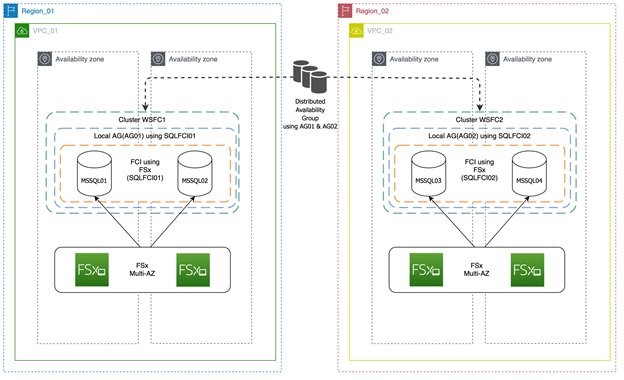
Akshay Panchmukh

Akshay Panchmukh

Akshay Panchmukh is the Product Manager focusing on cloud-native workloads at Druva. He loves solving complex problems for customers and helping them achieve their business goals. He leverages his SaaS product and design thinking experience to help enterprises build a complete data protection solution. He works combining the best of technology, data, product, empathy, and design to execute a successful product vision.

Emerging Solutions for Operations Research on AWS

Post Syndicated from Randy DeFauw original https://aws.amazon.com/blogs/architecture/emerging-solutions-for-operations-research-on-aws/

Operations research (OR) uses mathematical and analytical tools to arrive at optimal solutions for complex business problems like workforce scheduling. The mathematical techniques used to solve these problems, such as linear programming and mixed-integer programming, require the use of optimization software (solvers).  There are several popular and powerful solvers available, ranging from commercial options like IBM CPLEX to open-source packages like ORTools. While these solvers incorporate decades of algorithmic expertise and can solve large and complex problems effectively, they have some scalability limitations.

In this post, we’ll describe three alternatives that you can consider for solving OR problems (see Figure 1). None of these are as general purpose as traditional solvers, but they should be on your “emerging technologies” radar.

Figure 1. OR optimization options

Figure 1. OR optimization options

These include:

  1. A traditional solver running on a compute platform
  2. Reinforcement and machine learning (ML) algorithms running on Amazon SageMaker
  3. A quantum computing algorithm running on Amazon Braket. Experiments are collected in Amazon DynamoDB and the results are visualized in Amazon Elasticsearch Service.

A reference problem and solution

Let’s start with a reference problem and solve it with a traditional solver. We’ll tackle an inventory management issue (see Figure 2). We have a sales depot that supplies products for local sales outlets. For the depot’s Region, there are seven weeks of historical sales data for each product. We also know how much each product costs and for how much it can be sold. Finally, we know the overall weekly capacity of the depot. This depends on logistical constraints like the size of the warehouse and transportation availability. This scenario is loosely based on the Grupo Bimbo retailer’s Kaggle competition and dataset.

Figure 2. Sales depot inventory management scenario

Figure 2. Sales depot inventory management scenario

Our job is to place an inventory order to restock our sales depot each week. We quantify our work through a reward function. We want to maximize our revenue:

revenue = (sale price * number of units sold)

(Note that the sample dataset does not include cost of goods sold, only sale price.)

We use these constraints:

total units sold <= depot capacity
0 <= quantity sold of any given item <= forecasted demand for that item

There are many possible solutions to this problem. Using ORTools, we get an average reward (profit) of about $5,700, in about 1,000 simulations.

We can make the scenario slightly more realistic by acknowledging that our sales forecasts are not perfect. After we get the solution from the solver, we can penalize the reward (profit) by subtracting the cost of unsold goods. With this approach, we get a reward of about $2,450.

Solving OR problems with reinforcement learning

An alternative approach to the traditional solver is reinforcement learning (RL). RL is a field of ML that handles problems where the right answer is not immediately known, like playing a game of chess. RL fits our sales depot scenario, because we don’t know how well we will do until after we place the order and are able to view a week of sales activity.

Our sales depot problem resembles a knapsack problem. This is a common OR pattern where we want to fill a container (in this case, our sales depot) with as many items as possible until capacity is reached. Each item has a value (sales price) and a weight (cost). In RL we have to translate this into an observation space, an action space, a state, and a reward (see Figure 3).

The observation space is what our purchasing agent sees. This includes our depot capacity, the sales price, and the forecasted demand. The action space is what our agent can do. In the simplest case, it’s the number of each item to order for the depot, each week. The state is what the agent sees right now, and we model that as the sales results from last week. Finally, the reward function is our profit equation.

One important distinction between OR solvers and RL is that we can’t easily enforce hard constraints in RL. We can limit the amount of an individual product we purchase each week, but we can’t enforce an overall limit on the number of items purchased. We may exceed the capacity of our depot. The simplest way to handle that is to enforce a penalty. There are more sophisticated techniques available, such as interpreting our action as the percentage of budget to spend on each item. But let’s illustrate the simple case here.

Using an RL algorithm from the Ray RLLib package, our reward was $7,000 on average, including penalties for ordering too much of any given item.

Figure 3. Translating OR problem to RL

Figure 3. Translating OR problem to RL

Solving OR problems with machine learning

It’s possible to model a knapsack problem using ML rather than RL in some cases, and there are simple reference implementations available. The design assumes that we know, or can accurately estimate the reward for a given week. With our simple scenario, we can compute the reward using estimates of future sales. We can use this in a custom loss function to train a neural network.

Solving OR problems with quantum computing

Quantum computers are fundamentally different than the computers most of us use. The appeal of quantum computers is that they can tackle some types of problems much more efficiently than standard computers. Quantum computers can, in theory, solve prime number factoring for decryption in orders of magnitude faster than a standard computer. But they are still in their infancy and limited to the size of problem they can handle, due to hardware limitations.

D-Wave Systems, which make some of the types of quantum computers available through Amazon Braket, has a solver called QBSolv. QBSolv works on a specific type of optimization problem called quadratic unconstrained binary optimization (QUBO). It breaks large problems into smaller pieces that a quantum computer can handle. There is a reference pattern for translating a knapsack problem to a QUBO problem.

Running the sales depot problem through QBSolv on Amazon Braket and using a subset of the data, I was able to obtain a reward of $900. When I tried to run on the full dataset, I was not able to complete the decomposition step, likely due to a hardware limitation.

Conclusion

In this blog post, I review OR problems and traditional OR solvers. I then discussed three alternative approaches, RL, ML, and quantum computing. Each of these alternatives has drawbacks and none is a general-purpose replacement for traditional OR solvers.

However, RL and ML are potentially more scalable because you can train those solutions on a cluster of machines, rather than running an OR solver on a single machine. RL agents can also learn from experience, giving them flexibility to handle scenarios that may be difficult to incorporate into an OR solver. Quantum computing solutions are promising but the current state of the art for quantum computers limits their application to small-scale problems at the moment. All of these alternatives can potentially derive a solution more quickly than an OR solver.

Further Reading:

Practical Entity Resolution on AWS to Reconcile Data in the Real World

Post Syndicated from David Amatulli original https://aws.amazon.com/blogs/architecture/practical-entity-resolution-on-aws-to-reconcile-data-in-the-real-world/

This post was co-written with Mamoon Chowdry, Solutions Architect, previously at AWS.

Businesses and organizations from many industries often struggle to ensure that their data is accurate. Data often has to match people or things exactly in the real world, such as a customer name, an address, or a company. Matching our data is important to validate it, de-duplicate it, or link records in different systems together. Know Your Customer (KYC) regulations also mean that we must be confident in who or what our data is referring to. We must match millions of records from different data sources. Some of that data may have been entered manually and contain inconsistencies.

It can often be hard to match data with the entity it is supposed to represent. For example, if a customer enters their details as, “Mr. John Doe, #1a 123 Main St.“ and you have a prior record in your customer database for ”J. Doe, Apt 1A, 123 Main Street“, are they referring to the same or a different person?

In cases like this, we often have to manually update our data to make sure it accurately and consistently matches a real-world entity. You may want to have consistent company names across a list of business contacts. When there isn’t an exact match, we have to reconcile our data with the available facts we know about that entity. This reconciliation is commonly referred to as entity resolution (ER). This process can be labor-intensive and error-prone.

This blog will explore some of the common types of ER. We will share a basic architectural pattern for near real-time ER processing. You will see how ER using fuzzy text matching can reconcile manually entered names with reference data.

Multiple ways to do entity resolution

Entity resolution is a broad and deep topic, and a complete discussion would be beyond the scope of this blog. However, at a high level there are four common approaches to matching ambiguous fields or records, to known entities.

    1. Fuzzy text matching. We might normally compare two strings to see if they are identical. If they don’t exactly match, it is often helpful to find the nearest match. We do this by calculating a similarity score. For example, “John Doe” and “J Doe” may have a similarity score of 80%. A common way to compare the similarity of two strings is to use the Levenshtein distance, which measures the distance between two sequences.

We may also examine more than one field. For example, we may compare a name and address. Is “Mr. J Doe, 123 Main St” likely to be the same person as “Mr John Doe, 123 Main Street”? If we compare multiple fields in a record and analyze all of their similarity scores, this is commonly called Pairwise comparison.

2. Clustering. We can plot records in an n-dimensional space based on values computed from their fields. Their similarity to other reference records is then measured by calculating how close they are to each other in that space. Those that are clustered together are likely to refer to the same entity. Clustering is an effective method for grouping or segmenting data for computer vision, astronomy, or market segmentation. An example of this method is K-means clustering.

3. Graph networks. Graph networks are commonly used to store relationships between entities, such as people who are friends with each other, or residents of a particular address. When we need to resolve an ambiguous record, we can use a graph database to identify potential relationships to other records. For example, “J Doe, 123 Main St,” may be the same as “John Doe, 123 Main St,” because they have the same address and similar names.

Graph networks are especially helpful when dealing with complex relationships over millions of entities. For example, you can build a customer profile using web server logs and other data.

4. Commercial off-the-shelf (COTS) software. Enterprises can also deploy ER software, such as these offerings from the AWS Marketplace and Senzing entity resolution. This is helpful when companies may not have the skill or experience to implement a solution themselves. It is important to mention the role of Master Data Management (MDM) with ER. MDM involves having a single trusted source for your data. Tools, such as Informatica, can help ER with their MDM features.

Our solution (shown in Figure 1) allows us to build a low-cost, streamlined solution using AWS serverless technology. The architecture uses AWS Lambda, which allows you to run code without having to provision or manage servers. This code will be invoked through an API, which is created with Amazon API Gateway. API Gateway is a fully managed service used by developers to create, publish, maintain, monitor, and secure API operations at any scale. Finally, we will store our reference data in Amazon Simple Storage Service (S3).

Entity resolution solution using AWS serverless services

We initially match manually entered strings to a list of reference strings. The strings we will try to match will be names of companies.

Figure 1. Example request dataflow through AWS

Figure 1. Example request dataflow through AWS

  1. Our API takes a string as input
  2. It then invokes the ER Lambda function
  3. This loads the index and data files of our reference dataset
  4. The ER finds the closest match in the list of real-world companies
  5. The closest match is returned

The reference data and index files were created from an export of the fuzzy match algorithm.

The fuzzy match algorithm in detail

The algorithm in the AWS Lambda function works by converting each string to a collection of n-grams. N-grams are smaller substrings that are commonly used for analyzing free-form text.

The n-grams are then converted to a simple vector. Each vector is a numerical statistic that represents the Term Frequency – Inverse Document Frequency (TF-IDF). Both TF-IDF and n-grams are used to prepare text for searching. N-grams of strings that are similar in nature, tend to have similar TF-IDF vectors. We can plot these vectors in a chart. This helps us find similar strings as they are grouped or clustered together.

Comparing vectors to find similar strings can be fairly straightforward. But if you have numerous records, it can be computationally expensive and slow. To solve this, we use the NMSLIB library. This library indexes the vectors for faster similarity searching. It also gives us the degree of similarity between two strings. This is important because we may want to know the accuracy of a match we have found. For example, it can be helpful to filter out weak matches.

The entity resolution Lambda

Using the NMSLIB library, which is loaded using Lambda layers, we initialize an index using Neighborhood APProximation (NAPP).

# initialize the index
newIndex = nmslib.init(method='napp', space='negdotprod_sparse_fast',
data_type=nmslib.DataType.SPARSE_VECTOR)

Next we imported the index and data files that were created from our reference data.

# load the index file
newIndex.loadIndex(DATA_DIR + 'index_company_names.bin',
load_data=True)

The input parameter companyName is then used to query the index to find the approximate nearest neighbor. By using the knnQueryBatch method, we distribute the work over a thread pool, which provides faster querying.

# set the input variable and empty output list
inputString = companyName
outputList = []
# Find the nearest neighbor for our company name
# (K is the number of matches, set to 1)
newQueryMatrix = vectorizer.transform(inputString)
newNbrs = index.knnQueryBatch(newQueryMatrix, k = K, num_threads = numThreads)

The best match is then returned as a JSON response.

# return the match
for i in range(K):
    outputList.append(orgNames[newNbrs[0][0][i]])
return {
      'statusCode': '200',
      'body': json.dumps(outputList),
       }

Cost estimate for solution

Our solution is a combination of Amazon API GatewayAWS Lambda, and Amazon S3 (hyperlinks are to pricing pages). As an example, let’s assume that the API will receive 10 million requests per month. We can estimate the costs of running the solution as:

Service Description Cost
AWS Lambda 10 million requests and associated compute costs $161.80
Amazon API Gateway HTTP API requests, avg size of request (34 KB), Avg message size (32 KB), requests (10 million/month) $10.00
Amazon S3 S3 Standard storage (including data transfer costs) $7.61
Total $179.41

Table 1. Example monthly cost estimate (USD)

Conclusion

Using AWS services to reconcile your data with real-world entities helps make your data more accurate and consistent. You can automate a manual task that could have been laborious, expensive, and error-prone.

Where can you use ER in your organization? Do you have manually entered or inaccurate data? Have you struggled to match it with real-world entities? You can experiment with this architecture to continue to improve the accuracy of your own data.

Further reading: