Tag Archives: Amazon Machine Learning

Amazon CodeWhisperer, Free for Individual Use, is Now Generally Available

Post Syndicated from Steve Roberts original https://aws.amazon.com/blogs/aws/amazon-codewhisperer-free-for-individual-use-is-now-generally-available/

Today, Amazon CodeWhisperer, a real-time AI coding companion, is generally available and also includes a CodeWhisperer Individual tier that’s free to use for all developers. Originally launched in preview last year, CodeWhisperer keeps developers in the zone and productive, helping them write code quickly and securely and without needing to break their flow by leaving their IDE to research something. Faced with creating code for complex and ever-changing environments, developers can improve their productivity and simplify their work by making use of CodeWhisperer inside their favorite IDEs, including Visual Studio Code, IntelliJ IDEA, and others. CodeWhisperer helps with creating code for routine or time-consuming, undifferentiated tasks, working with unfamiliar APIs or SDKs, making correct and effective use of AWS APIs, and other common coding scenarios such as reading and writing files, image processing, writing unit tests, and lots more.

Using just an email account, you can sign up and, in just a few minutes, become more productive writing code—and you don’t even need to be an AWS customer. For business users, CodeWhisperer offers a Professional tier that adds administrative features, like SSO and IAM Identity Center integration, policy control for referenced code suggestions, and higher limits on security scanning. And in addition to generating code suggestions for Python, Java, JavaScript, TypeScript, and C#, the generally available release also now supports Go, Rust, PHP, Ruby, Kotlin, C, C++, Shell scripting, SQL, and Scala. CodeWhisperer is available to developers working in Visual Studio Code, IntelliJ IDEA, CLion, GoLand, WebStorm, Rider, PhpStorm, PyCharm, RubyMine, and DataGrip IDEs (when the appropriate AWS extensions for those IDEs are installed), or natively in AWS Cloud9 or AWS Lambda console.

Helping to keep developers in their flow is increasingly important as, facing increasing time pressure to get their work done, developers are often forced to break that flow to turn to an internet search, sites such as StackOverflow, or their colleagues for help in completing tasks. While this can help them obtain the starter code they need, it’s disruptive as they’ve had to leave their IDE environment to search or ask questions in a forum or find and ask a colleague—further adding to the disruption. Instead, CodeWhisperer meets developers where they are most productive, providing recommendations in real time as they write code or comments in their IDE. During the preview we ran a productivity challenge, and participants who used CodeWhisperer were 27% more likely to complete tasks successfully and did so an average of 57% faster than those who didn’t use CodeWhisperer.

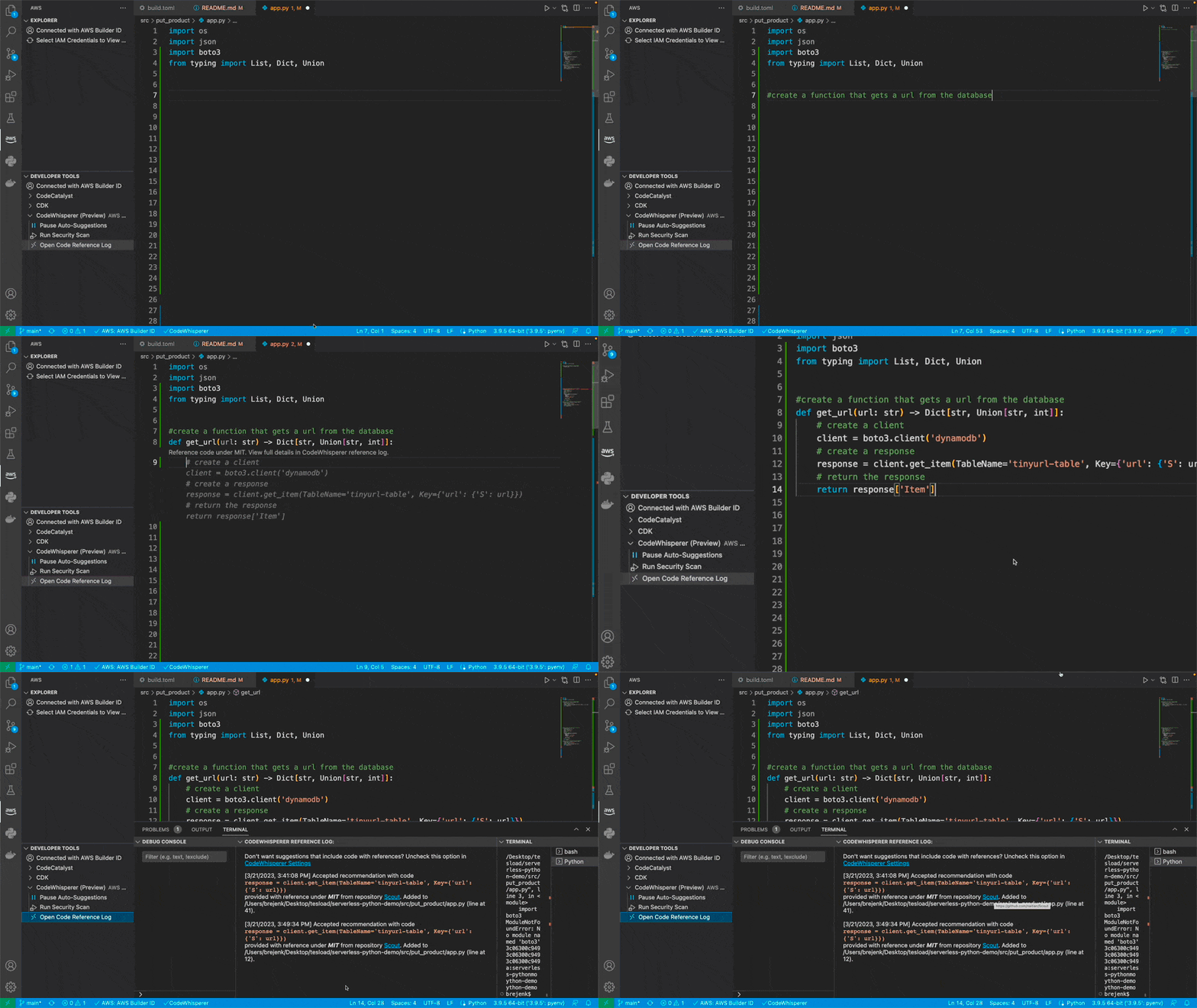
Code generation from a comment in CodeWhisperer
Code generation from a comment

The code developers eventually locate may, however, contain issues such as hidden security vulnerabilities, be biased or unfair, or fail to handle open source responsibly. These issues won’t improve the developer’s productivity when they later have to resolve them. CodeWhisperer is the best coding companion when it comes to coding securely and using AI responsibly. To help you code responsibly, CodeWhisperer filters out code suggestions that might be considered biased or unfair, and it’s the only coding companion that can filter or flag code suggestions that may resemble particular open-source training data. It provides additional data for suggestions—for example, the repository URL and license—when code similar to training data is generated, helping lower the risk of using the code and enabling developers to reuse it with confidence.

Reference tracking in CodeWhisperer
Open-source reference tracking

CodeWhisperer is also the only AI coding companion to have security scanning for finding and suggesting remediations for hard-to-detect vulnerabilities, scanning both generated and developer-written code looking for vulnerabilities such as those in the top ten listed in the Open Web Application Security Project (OWASP). If it finds a vulnerability, CodeWhisperer provides suggestions to help remediate the issue.

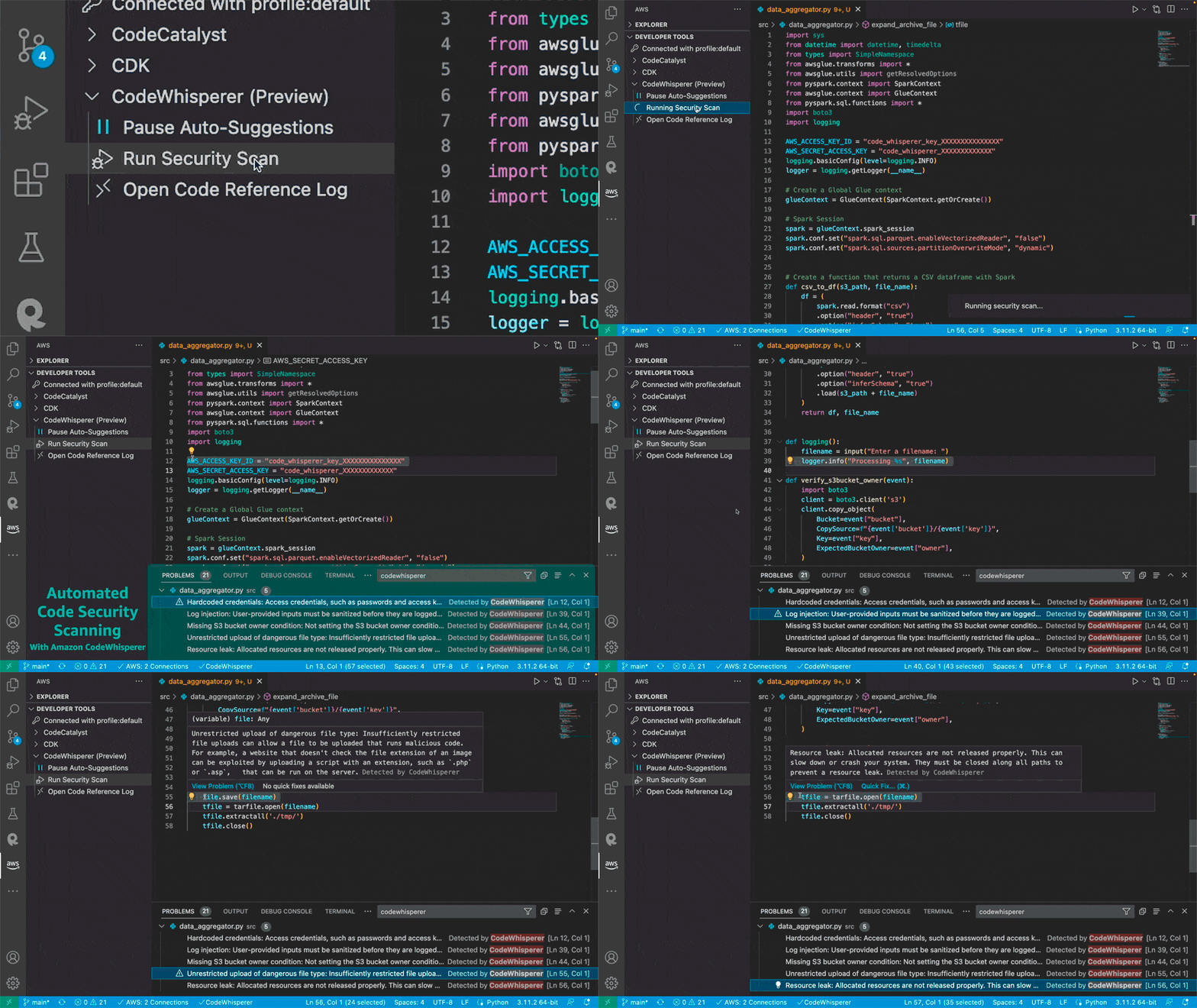
Scanning for vulnerabilities in CodeWhisperer
Scanning for vulnerabilities

Code suggestions provided by CodeWhisperer are not specific to working with AWS. However, CodeWhisperer is optimized for the most-used AWS APIs, for example AWS Lambda, or Amazon Simple Storage Service (Amazon S3), making it the best coding companion for those building applications on AWS. While CodeWhisperer provides suggestions for general-purpose use cases across a variety of languages, the tuning performed using additional data on AWS APIs means you can be confident it is the highest quality, most accurate code generation you can get for working with AWS.

Meet Your new AI Code Companion Today
Amazon CodeWhisperer is generally available today to all developers—not just those with an AWS account or working with AWS—writing code in Python, Java, JavaScript, TypeScript, C#, Go, Rust, PHP, Ruby, Kotlin, C, C++, Shell scripting, SQL, and Scala. You can sign up with just an email address, and, as I mentioned at the top of this post, CodeWhisperer offers an Individual tier that’s freely available to all developers. More information on the Individual tier, and pricing for the Professional tier, can be found at https://aws.amazon.com/codewhisperer/pricing

New – Ready-to-use Models and Support for Custom Text and Image Classification Models in Amazon SageMaker Canvas

Post Syndicated from Marcia Villalba original https://aws.amazon.com/blogs/aws/new-ready-to-use-models-and-support-for-custom-text-and-image-classification-models-in-amazon-sagemaker-canvas/

Today AWS announces new features in Amazon SageMaker Canvas that help business analysts generate insights from thousands of documents, images, and lines of text in minutes with machine learning (ML). Starting today, you can access ready-to-use models and create custom text and image classification models alongside previously supported custom models for tabular data, all without requiring ML experience or writing a line of code.

Business analysts across different industries want to apply AI/ML solutions to generate insights from a variety of data and respond to ad-hoc analysis requests coming from business stakeholders. By applying AI/ML in their workflows, analysts can automate manual, time-consuming, and error-prone processes, such as inspection, classification, as well as extraction of insights from raw data, images, or documents. However, applying AI/ML to business problems requires technical expertise and building custom models can take several weeks or even months.

Launched in 2021, Amazon SageMaker Canvas is a visual, point-and-click service that allows business analysts to use a variety of ready-to-use models or create custom models to generate accurate ML predictions on their own.

Ready-to-use Models
Customers can use SageMaker Canvas to access ready-to-use models that can be used to extract information and generate predictions from thousands of documents, images, and lines of text in minutes. These ready-to-use models include sentiment analysis, language detection, entity extraction, personal information detection, object and text detection in images, expense analysis for invoices and receipts, identity document analysis, and more generalized document and form analysis.

For example, you can select the sentiment analysis ready-to-use model and upload product reviews from social media and customer support tickets to quickly understand how your customers feel about your products. Using the personal information detection ready-to-use model, you can detect and redact personally identifiable information (PII) from emails, support tickets, and documents. Using the expense analysis ready-to-use model, you can easily detect and extract data from your scanned invoices and receipts and generate insights about that data.

These ready-to-use models are powered by AWS AI services, including Amazon Rekognition, Amazon Comprehend, and Amazon Textract.

Ready-to-use models available

Custom Text and Image Classification Models
Customers that need custom models trained for their business-specific use-case can use SageMaker Canvas to create text and image classification models. 

You can use SageMaker Canvas to create custom text classification models to classify data according to your needs. For example, imagine that you work as a business analyst at a company that provides customer support. When a customer support agent engages with a customer, they create a ticket, and they need to record the ticket type, for example, “incident”, “service request”, or “problem”. Many times, this field gets forgotten, and so, when the reporting is done, the data is hard to analyze. Now, using SageMaker Canvas, you can create a custom text classification model, train it with existing customer support ticket information and ticket type, and use it to predict the type of tickets in the future when working on a report with missing data.

You can also use SageMaker Canvas to create custom image classification models using your own image datasets. For instance, imagine you work as a business analyst at a company that manufactures smartphones. As part of your role, you need to prepare reports and respond to questions from business stakeholders related to quality assessment and it’s trends. Every time a phone is assembled, a picture is automatically taken, and at the end of the week, you receive all those images. Now with SageMaker Canvas, you can create a new custom image classification model that is trained to identify common manufacturing defects. Then, every week, you can use the model to analyze the images and predict the quality of the phones produced.

SageMaker Canvas in Action
Let’s imagine that you are a business analyst for an e-commerce company. You have been tasked with understanding the customer sentiment towards all the new products for this season. Your stakeholders require a report that aggregates the results by item category to decide what inventory they should purchase in the following months. For example, they want to know if the new furniture products have received positive sentiment. You have been provided with a spreadsheet containing reviews for the new products, as well as an outdated file that categorizes all the products on your e-commerce platform. However, this file does not yet include the new products.

To solve this problem, you can use SageMaker Canvas. First, you will need to use the sentiment analysis ready-to-use model to understand the sentiment for each review, classifying them as positive, negative, or neutral. Then, you will need to create a custom text classification model that predicts the categories for the new products based on the existing ones.

Ready-to-use Model – Sentiment Analysis
To quickly learn the sentiment of each review, you can do a bulk update of the product reviews and generate a file with all the sentiment predictions.

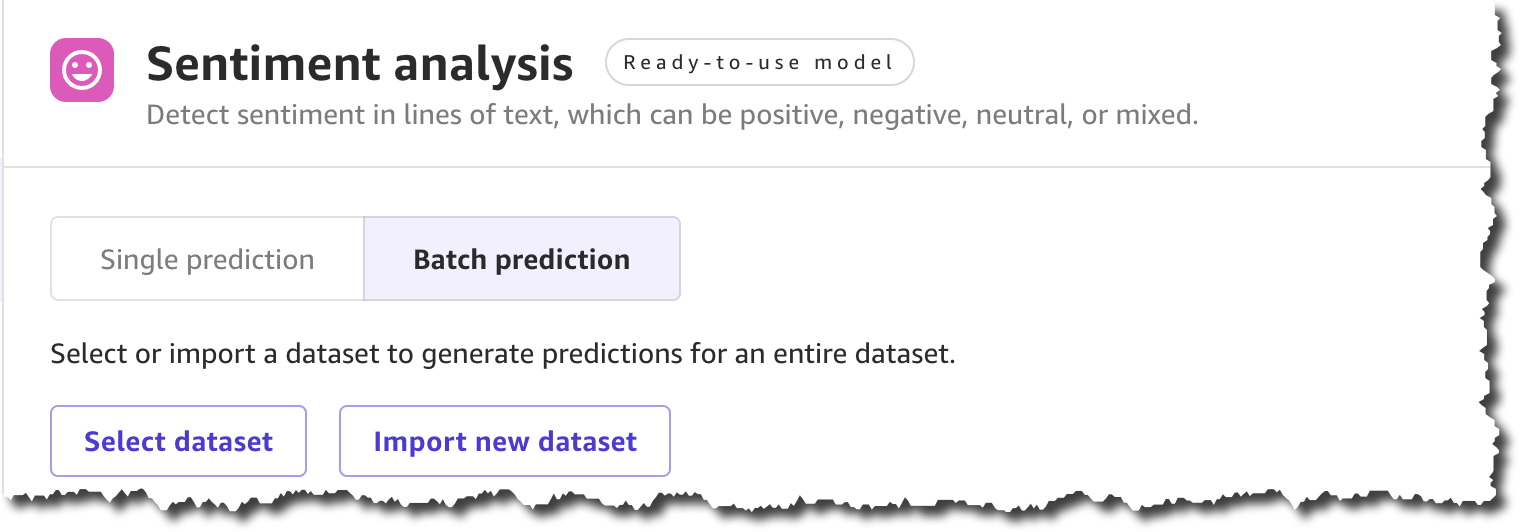
To get started, locate Sentiment analysis on the Ready-to-use models page, and under Batch prediction, select Import new dataset.

Using ready-to-use sentiment analysis with a batch dataset

When you create a new dataset, you can upload the dataset from your local machine or use Amazon Simple Storage Service (Amazon S3). For this demo, you will upload the file locally. You can find all the product reviews used in this example in the Amazon Customer Reviews dataset.

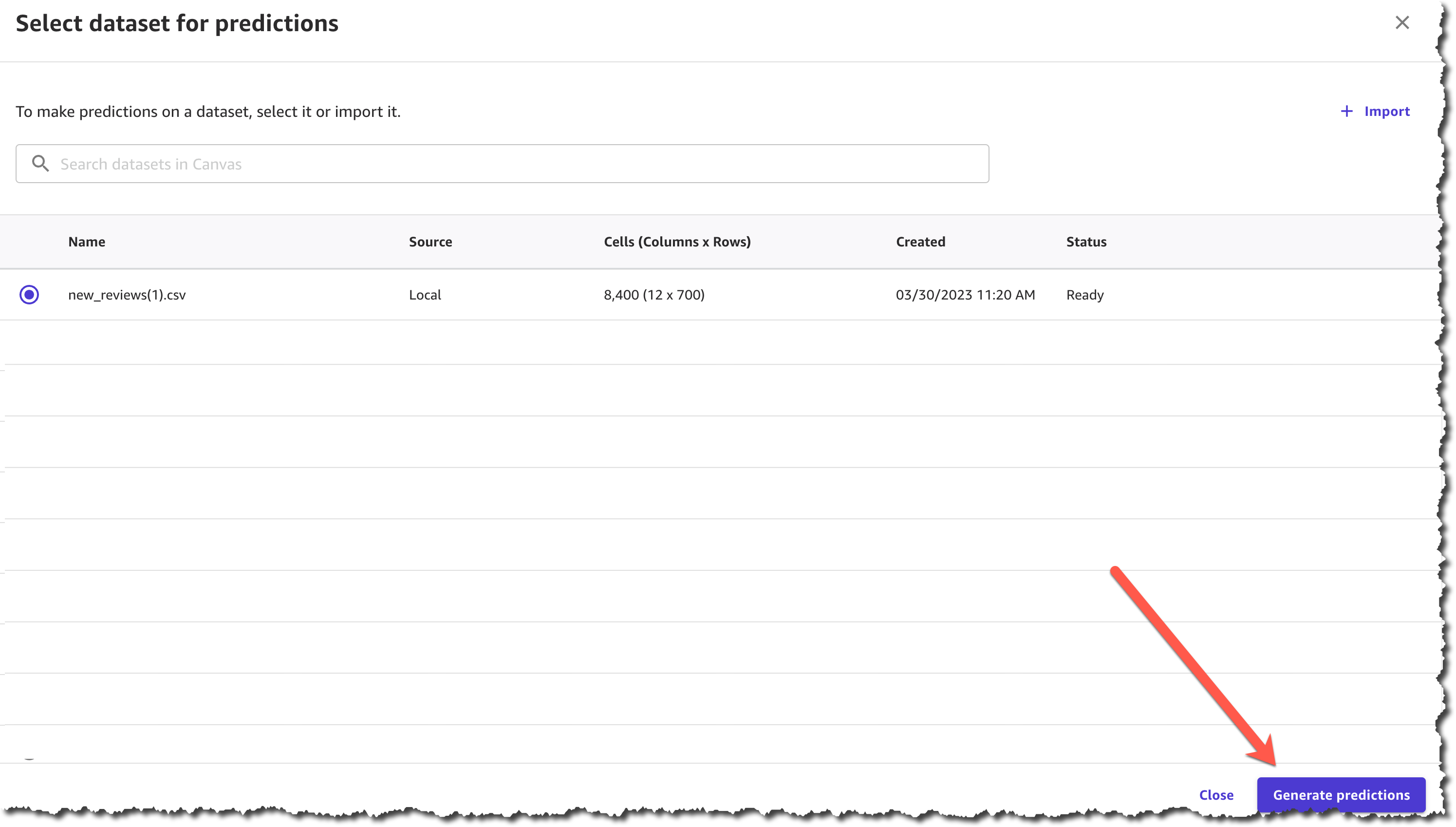
After you complete uploading the file and creating the dataset, you can Generate predictions.

Select dataset and generate predictions

The prediction generation takes less than a minute, depending on the size of the dataset, and then you can view or download the results.

View or download predictions

The results from this prediction can be downloaded as a .csv file or viewed from the SageMaker Canvas interface. You can see the sentiment for each of the product reviews.

Preview results from ready-to-use model

Now you have the first part of your task ready—you have a .csv file with the sentiment of each review. The next step is to classify those products into categories.

Custom Text Classification Model
To classify the new products into categories based on the product title, you need to train a new text classification model in SageMaker Canvas.

In SageMaker Canvas, create a New model of the type Text analysis.

The first step when creating the model is to select a dataset with which to train the model. You will train this model with a dataset from last season, which contains all the products except for the new collection.

Once the dataset has finished importing, you will need to select the column that contains the data you want to predict, which in this case is the product_category column, and the column that will be used as the input for the model to make predictions, which is the product_title column.

After you finish configuring that, you can start to build the model. There are two modes of building:

  • Quick build that returns a model in 15–30 minutes.
  • Standard build takes 2–5 hours to complete.

To learn more about the differences between the modes of building you can check the documentation. For this demo, pick quick build, as our dataset is smaller than 50,000 rows.

Prepare and build your model

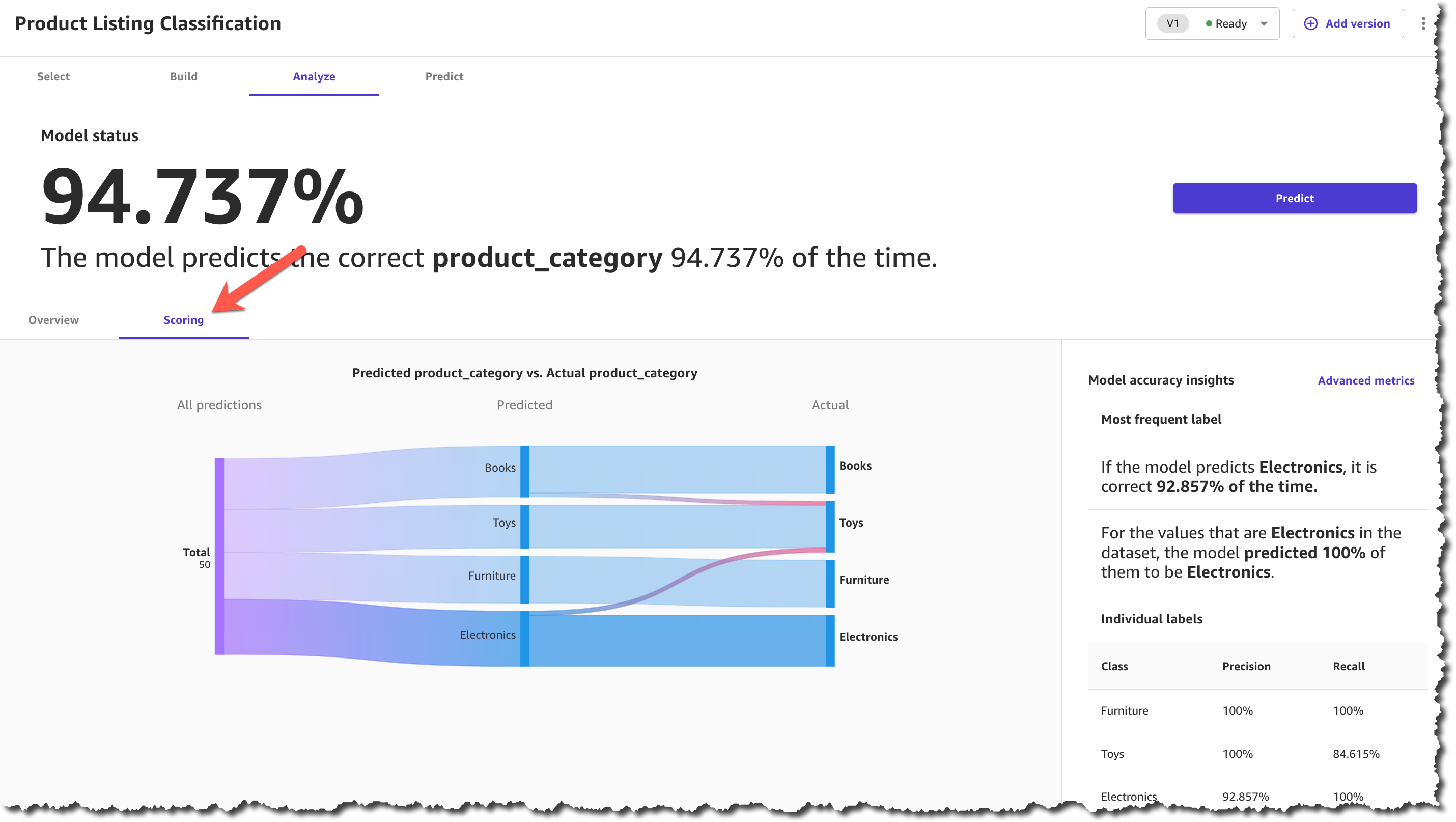
When the model is built, you can analyze how the model performs. SageMaker Canvas uses the 80-20 approach; it trains the model with 80 percent of the data from the dataset and uses 20 percent of the data to validate the model.

Model score

When the model finishes building, you can check the model score. The scoring section gives you a visual sense of how accurate the predictions were for each category. You can learn more about how to evaluate your model’s performance in the documentation.

After you make sure that your model has a high prediction rate, you can move on to generate predictions. This step is similar to the ready-to-use models for sentiment analysis. You can make a prediction on a single product or on a set of products. For a batch prediction, you need to select a dataset and let the model generate the predictions. For this example, you will select the same dataset that you selected in the ready-to-use model, the one with the reviews. This can take a few minutes, depending on the number of products in the dataset.

When the predictions are ready, you can download the results as a .csv file or view how each product was classified. In the prediction results, each product is assigned only one category based on the categories provided during the model-building process.

Predict categories

Now you have all the necessary resources to conduct an analysis and evaluate the performance of each product category with the new collection based on customer reviews. Using SageMaker Canvas, you were able to access a ready-to-use model and create a custom text classification model without having to write a single line of code.

Available Now
Ready-to-use models and support for custom text and image classification models in SageMaker Canvas are available in all AWS Regions where SageMaker Canvas is available. You can learn more about the new features and how they are priced by visiting the SageMaker Canvas product detail page.

— Marcia

Detecting solar panel damage with Amazon Rekognition Custom Labels

Post Syndicated from Ramakant Joshi original https://aws.amazon.com/blogs/architecture/detecting-solar-panel-damage-with-amazon-rekognition-custom-labels/

Enterprises perform quality control to ensure products meet production standards and avoid potential brand reputation damage. As the cost of sensors decreases and connectivity increases, industries adopt real-time imagery analysis to detect quality issues.

At the same time, artificial intelligence (AI) advancements enable advanced automation, reduce overall cost and project time, and produce accurate defect detection results in manufacturing plants. As these technologies mature, AI-driven inspections are more common outside of the plant environment.

Overview of solution

This post describes our SOLVED (Solar Roving Eye Detector) project leveraging machine learning (ML) to identify damaged solar panels using Amazon Rekognition Custom Labels and alert operators to take corrective action.

As solar adoption increases, so does the need to detect panel damage. Applying AWS-managed AI services is a simpler, more cost-effective approach than human solar panel inspection or custom-built production applications.

Customers can capture and process videos from the field and build effective computer vision models without creating a dedicated data science team. This approach can be generalized for use cases across industries to detect defects in wind turbines, cell phone towers, automotive parts, and other field components.

Amazon Rekognition Custom Labels builds off of existing service capabilities already trained to identify the objects and scenes in millions of cross-category images. You upload a small set of training images—typically a few hundred or less—into our console. The solution automatically loads and inspects the training data, selects the right ML algorithms, trains a model, and provides model performance metrics. You can then integrate your custom model into your applications through the Amazon Rekognition Custom Labels API.

Walkthrough

This post introduces the SOLVED project featured at the re:Invent 2021 Builders Fair. It will:

  • Review the need for solar panel damage detection
  • Discuss a cloud-based approach to ingest, store, process, analyze, and detect damaged solar panels
  • Present a diagram streaming videos from a Raspberry Pi, storing them on Amazon Simple Storage Service (Amazon S3), processing them using an AWS video-on-demand solution, and inferring damage using Amazon Rekognition
  • Introduce a console to mimic an operation center for appropriate action
  • Demonstrate the integration of AWS IoT Core with a Philips Hue bulb for operator alerts

Prerequisites

Before getting started, review the following prerequisites for this solution:

The SOLVED project

The SOLVED project leverages ML to identify damaged solar panels using Amazon Rekognition Custom Labels. It involves four steps:

  1. Data ingestion: Live solar panel video ingested from moving rover into an Amazon S3 bucket
  2. Pre-processing: Captured video split into thumbnail images
  3. Processing and visualization: ML models making real-time inferences to identify defective panels with a dashboard to review images and prediction scores
  4. Alerting: Defective panels result in notification sent through MQTT messages to light a smart bulb

Figure 1 shows the SOLVED project system architecture.

The SOLVED project system architecture

Figure 1. The SOLVED project system architecture

Installation steps

Let’s review each of the steps in this use case.

Data ingestion

The data ingestion layer of the SOLVED project consists of a continuous video stream captured as a rover moves through a field of solar panels.

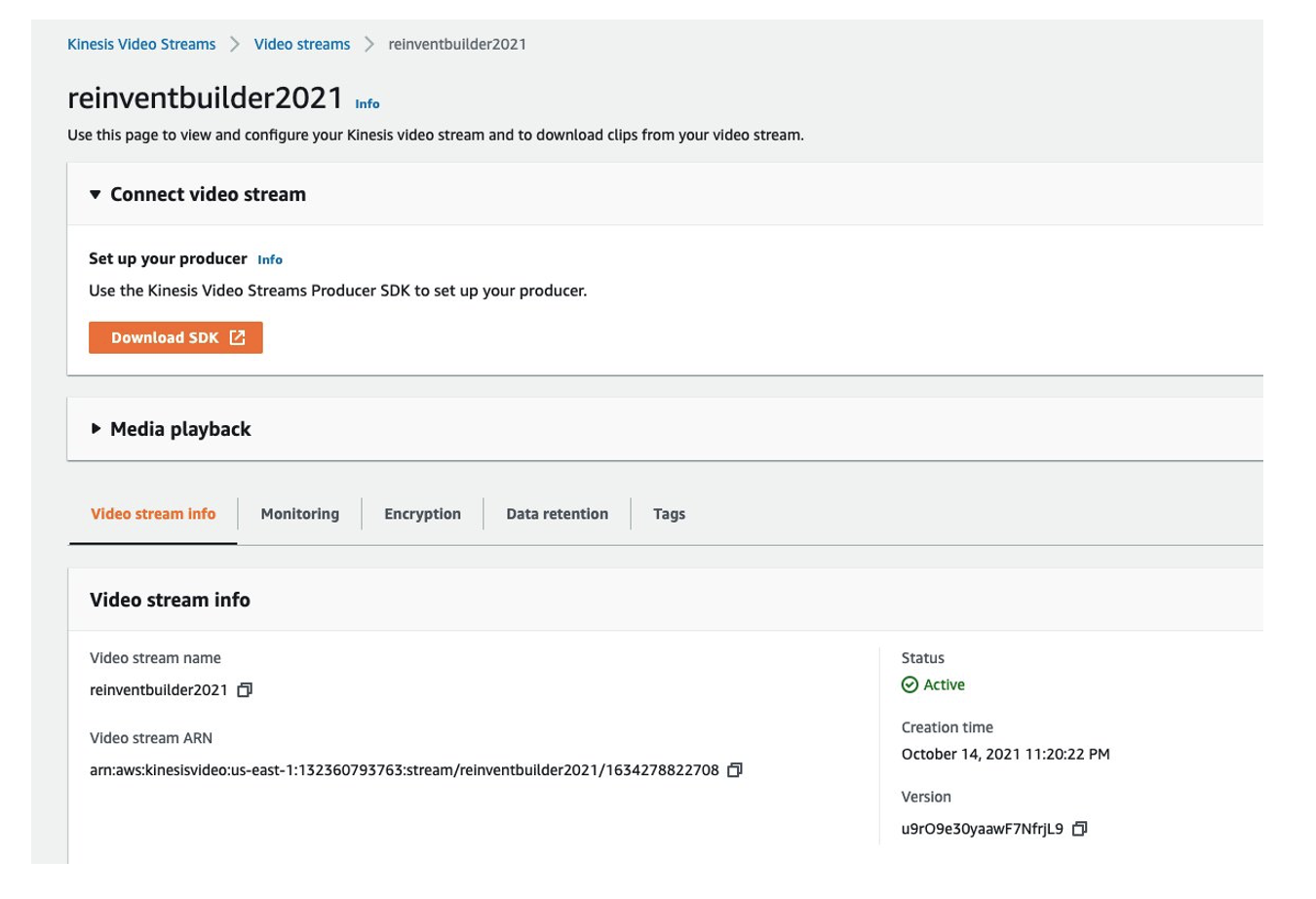
We used a Freenove 4WD Smart Car rover with Raspberry Pi. The mounted camera captures video as it moves through the field. We installed an Amazon Kinesis Video Streams Producer on the Pi and streamed the live video to a Kinesis Video Stream named reinventbuilder2021.

Figure 2 shows the Kinesis Video Stream setup window for reinventbuilder2021.

Kinesis Video Stream setup for reinventbuilder2021

Figure 2. Kinesis Video Stream setup for reinventbuilder2021

To start streaming, use the following steps.

  1. Create a new Kinesis Video Stream using this Amazon Kinesis Video Streams Developer Guide
  2. Make a note of the Amazon Resource Name (ARN)
  3. On the Pi, access the command prompt and use aws sts get-session-token for temporary credentials. The IAM user should have the permissions for Kinesis Video Streams PutMedia.
  4. Set the following environment variables:
    export AWS_DEFAULT_REGION="us-east-1"
    export AWS_ACCESS_KEY_ID="xxxxx"
    export AWS_SECRET_ACCESS_KEY="yyyyy"
    export AWS_SESSION_TOKEN=“zzzzz”
  5. Start the streamer using the following command:
    cd ~/amazon-kinesis-video-streams-producer-sdk-cpp/build
    ./kvs_gstreamer_sample reinventbuilder2021
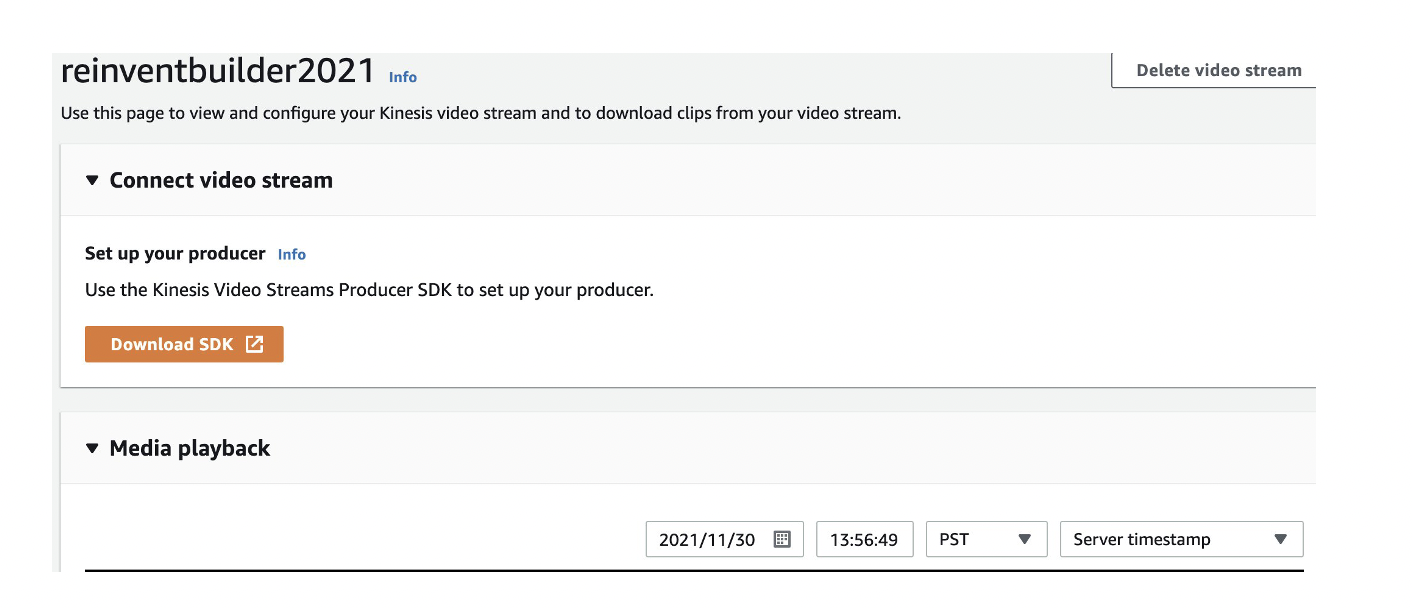
  6. Validate the captured stream by viewing the Media playback on the console.

Figure 3 shows the video stream console, including the Media playback option.

Video stream console with Media playback option

Figure 3. Video stream console with Media playback option

There are two ways to clip video snippets, which we’ll do next.

You can use the Download clip button on the video stream console as shown in Figure 4.

Choose your video streaming clip duration

Figure 4. Choose your video streaming clip duration

Alternately, you can use a script from the following command line:

ONE_MIN_AGO=$(date -v -30S -u "+%FT%T+0000")
NOW=$(date -u "+%FT%T+0000")

FILE_NAME=reinventbuilder-solved-$RANDOM.mp4
echo $FILE_NAME
S3_PATH=s3://videoondemandsplitter-source-e6lyof9qjv1j/

aws kinesis-video-archived-media get-clip --endpoint-url $KVS_DATA_ENDPOINT \
--stream-name reinventbuilder2021 \
--clip-fragment-selector "FragmentSelectorType=SERVER_TIMESTAMP,TimestampRange={StartTimestamp=$ONE_MIN_AGO,EndTimestamp=$NOW}" \
$FILE_NAME

echo "Running get-clip for stream"

sleep 45

aws s3 cp $FILE_NAME $S3_PATH
echo "copying file $FILE_NAME TO $S3_PATH"

The clip is available in the Amazon S3 source folder created using AWS CloudFormation, as shown in Figure 5.

Access your clip in the Amazon S3 source folder

Figure 5. Access your clip in the Amazon S3 source folder

Pre-processing

To process the video, we leverage Video on Demand at AWS. This solution encodes video files with AWS Elemental MediaConvert. Out of the box, it:

1. Automatically transcodes videos uploaded to Amazon S3 into formats suitable for playback on a range of devices using MediaConvert
2. Customizes MediaConvert job settings by uploading a custom file and using different settings per input
3. Stores transcoded files in a destination Amazon S3 bucket and uses CloudFront to deliver them to end viewers
4. Provides outputs including input file metadata, job settings, and output details in addition to transcoded video. These outputs are stored in a separate JSON file, available for further processing

For our use case, we used the frame capture feature to create a set of thumbnails from the source videos. The thumbnails are stored in the Amazon S3 bucket with the video output.

To deploy this solution, use the CloudFormation stack.

Processing and visualization

Every trained ML model requires quality training data. We began with publicly available solar panel images that were categorized as “good” or “defective” and uploaded the images to an Amazon S3 bucket into corresponding folders.

Next, we configured Amazon Rekognition Custom Labels with the folders to indicate the labels to use in training and deploying the model. Using the rover images, we tested the model.

We used the rover to record videos of good and damaged solar panels over an extended period and label the outcome favorably. The video was then split into individual frames using MediaConvert, giving us a well-labeled dataset that we trained our model with using Amazon Rekognition Custom Labels.

We used the model endpoint to infer outcomes on solar panels with varying damage footprints across multiple locations. AWS Elemental Mediaconvert expedited the process of curating the training set, and creating the model and endpoint using Amazon Rekognition was straightforward.

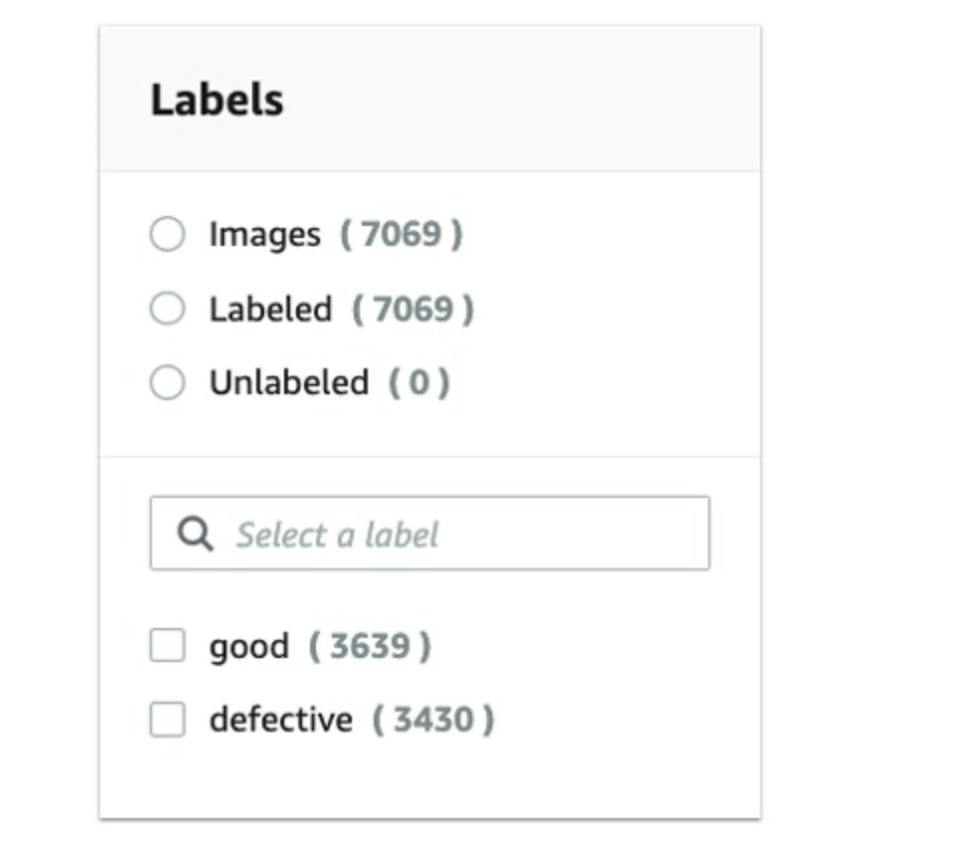
As shown in Figure 6, we used a training set of 7,000 images with an even mix of good and damaged panels.

A training set of images

Figure 6. A training set of images

Examples of good panel images are depicted in Figure 7.

Good panel images

Figure 7. Good panel images

Examples of damaged panel images are depicted in Figure 8.

Damaged panel images

Figure 8. Damaged panel images

In this use case, 90 percent model accuracy was achieved.

To visualize the results, we leveraged AWS Amplify to provide an operator interface to identify the damaged panels.

Figure 9 shows screenshots from the operator dashboard with output from the Amazon Custom Labels Rekognition model for good and defective panels.

Operator dashboard in AWS Amplify

Figure 9. Operator dashboard in AWS Amplify

Alerting

Maintenance teams must be notified of defective panels to take corrective action. To create alerts, we configured AWS IoT Core to send MQTT messages to a Philips Hue smart bulb, with red bulbs indicating defective panels. To set up the Philips Hue API, use the How to develop for Hue guide.

For example, here’s the API to change color:

PUT https://192.xx.xx.xx/api/xxxxxxx/lights/1/state

{"on":true, "sat":254, "bri":254,"hue":20000} 

turns color to green

{"on":true, "sat":254, "bri":254,"hue":1000}

turns to red.

We set up a client on the Pi that listens on an AWS IoT Core MQTT topic and makes an API request to Philips Hue.

To connect a device to AWS IoT, complete these steps:

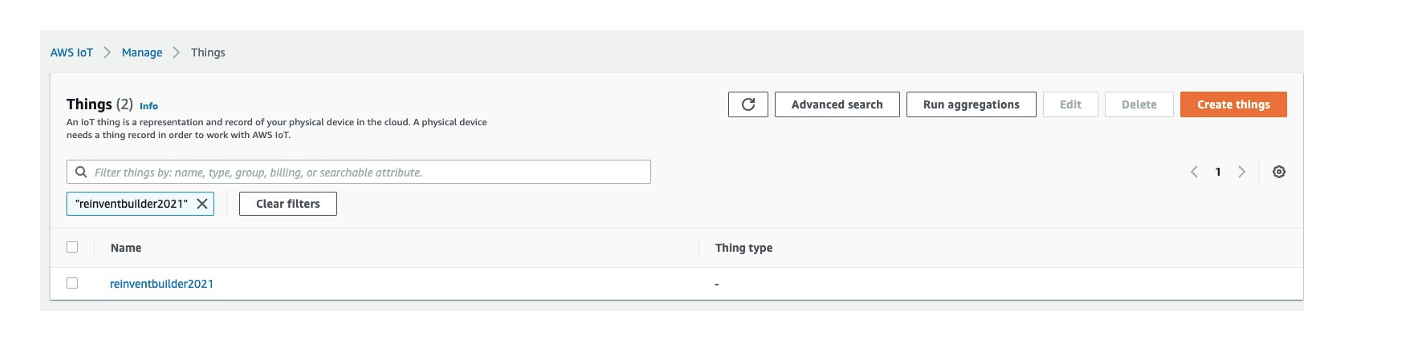
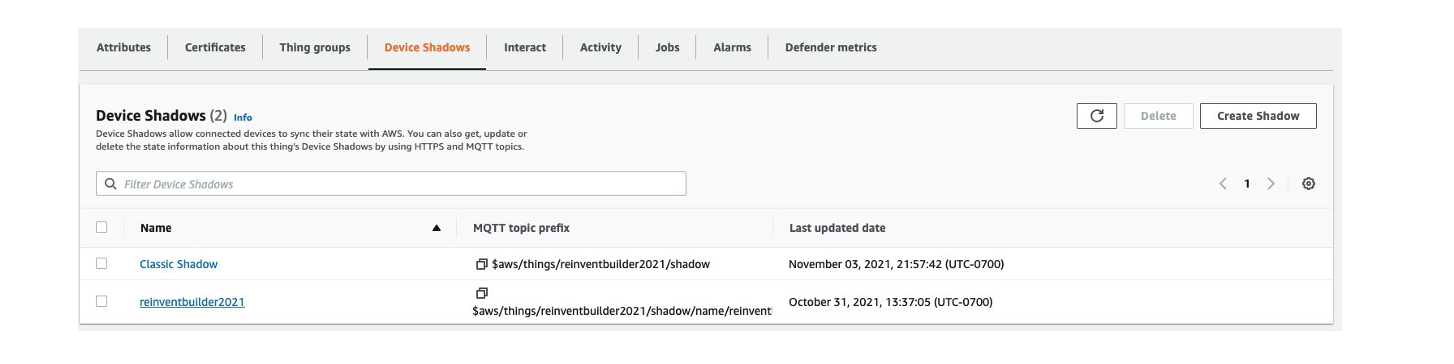
  1. Create an IoT thing, a device certificate, and an AWS IoT policy. An AWS IoT thing represents a physical device (in this case, Raspberry Pi) and contains static device metadata, as shown in Figure 10.
    AWS IoT Thing

    Figure 10. AWS IoT Thing

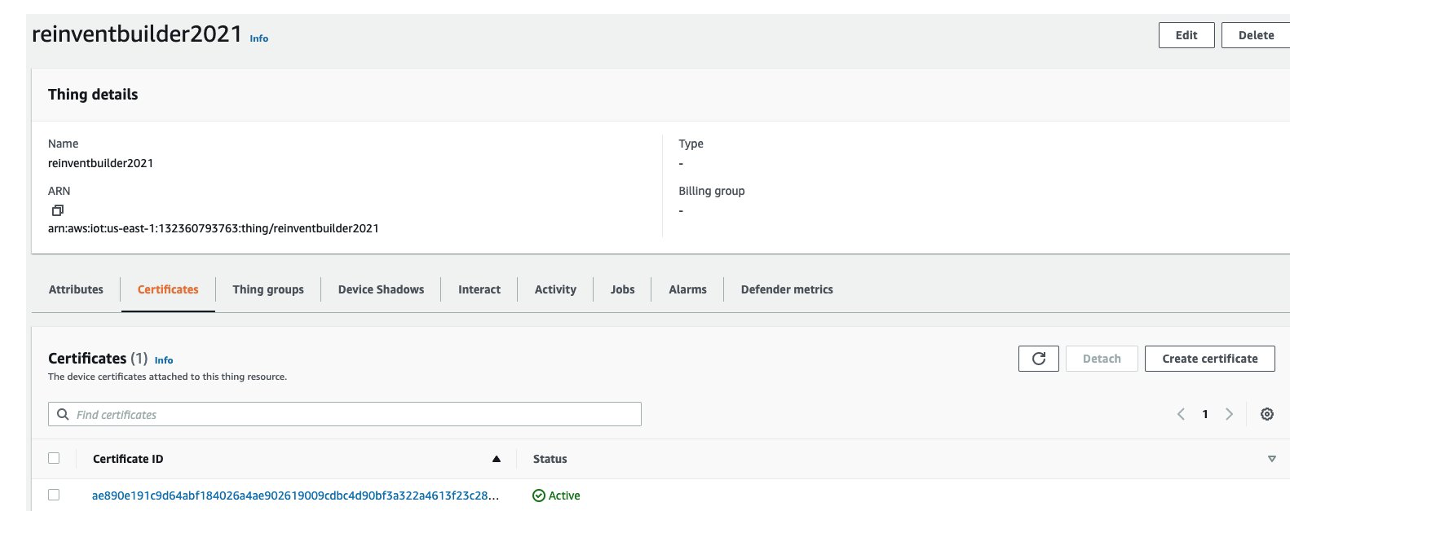
    2. Create a device certificate, required to connect to and authenticate with AWS IoT. An example is shown in Figure 11.

Device certificate

Figure 11. Device certificate

3. Associate an AWS IoT policy with each device certificate. They determine which AWS IoT resources the device can access. In this case, we allowed iot.*, giving the device access to all IoT resources, as shown in Figure 12.

IoT policy

Figure 12. IoT policy

Devices and other clients use an AWS IoT root CA certificate to authenticate the server they’re communicating with. For more on how devices authenticate with AWS IoT Core, see Server authentication in the AWS IoT Core Developer Guide. Copy the certificate chain to the Raspberry Pi.

For communication with the Philips Hue, we used the Qhue wrapper as shown in Figure 13.

Qhue wrapper

Figure 13. Qhue wrapper

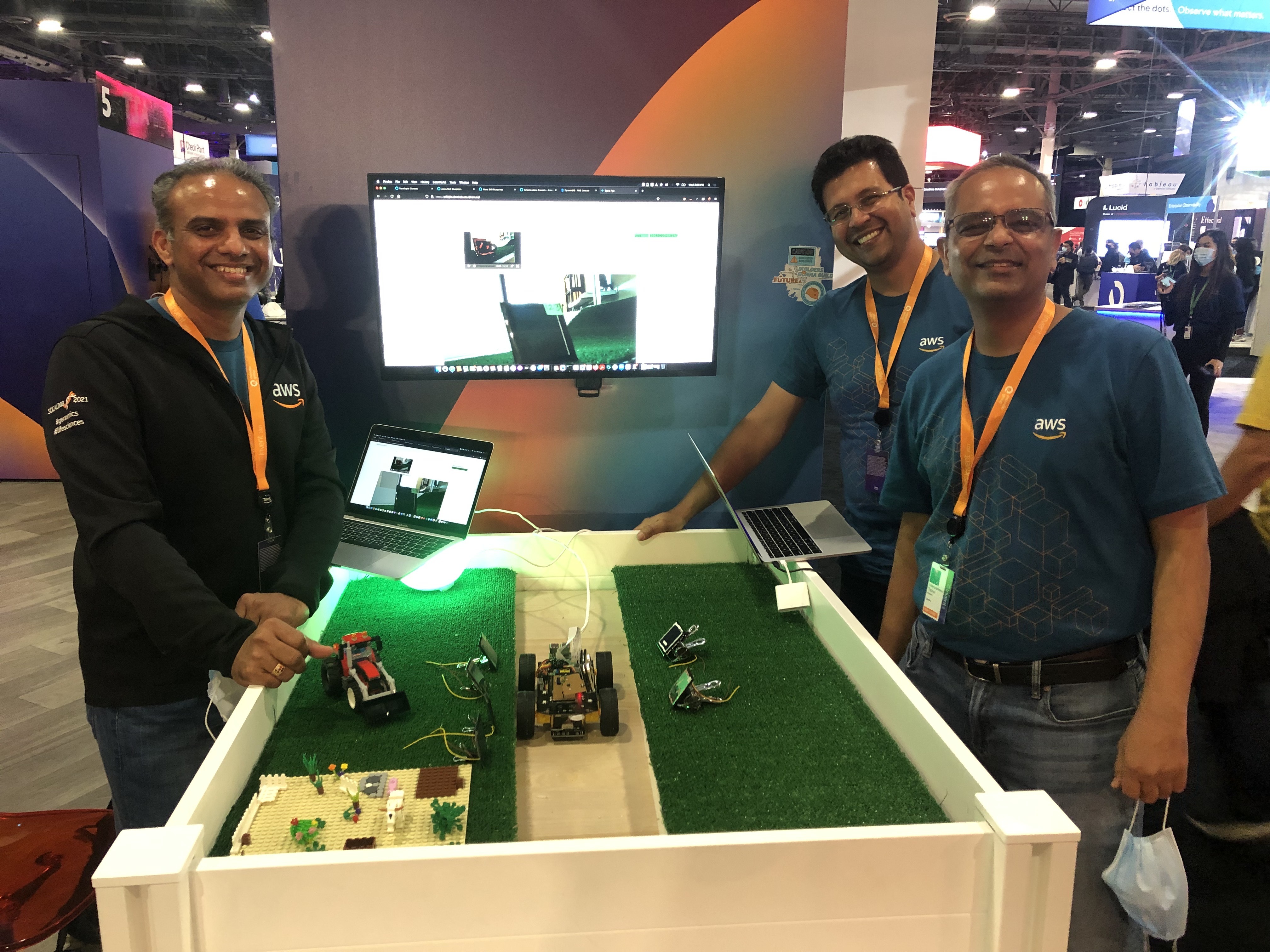
The authors presented a demo of this solution at re:Invent 2021 Builder’s Fair.

Author demo at re:Invent 2021 Builder's Fair

Figure 14. Author demo at re:Invent 2021 Builder’s Fair

Clean up

If you used the CloudFormation stack, delete it to avoid unexpected future charges. Delete Amazon S3 buckets and terminate Amazon Rekognition jobs to stop accruing charges.

Conclusion

Amazon Rekognition helps customers collect images in the field and apply AI-based analysis to interpret the condition of assets within the images.

In this post, you learned how to configure the Kinesis Video Stream producer on a Raspberry Pi to upload captured videos to Amazon Kinesis Video streams. You also learned how to save video streams to Amazon S3 and leverage the Video on Demand at AWS solution.

Using AWS MediaConvert, we transcoded the videos and create a set of thumbnails from the source videos. We then used Amazon Rekognition Custom Labels to train and deploy models for solar panel damage detection. Finally, we configured AWS IoT core to send MQTT messages to a Philips Hue smart bulb for notifications.

In this post, we presented a serverless architecture on AWS to detect defective solar panels. The reference architecture diagram is adaptable to solve inspection and damage detection problems across other industries.

How SikSin improved customer engagement with AWS Data Lab and Amazon Personalize

Post Syndicated from Byungjun Choi original https://aws.amazon.com/blogs/big-data/how-siksin-improved-customer-engagement-with-aws-data-lab-and-amazon-personalize/

This post is co-written with Byungjun Choi and Sangha Yang from SikSin.

SikSin is a technology platform connecting customers with restaurant partners serving their multiple needs. Customers use the SikSin platform to search and discover restaurants, read and write reviews, and view photos. From the restaurateurs’ perspective, SikSin enables restaurant partners to engage and acquire customers in order to grow their business. SikSin has a partnership with 850 corporate companies and more than 50,000 restaurants. They issue restaurant e-vouchers to more than 220,000 members, including individuals as well as corporate members. The SikSin platform receives more than 3 million users in a month. SikSin was listed in the top 100 of the Financial Times’s Asia-Pacific region’s high-growth companies in 2022.

SikSin was looking to deliver improved customer experiences and increase customer engagement. SikSin confronted two business challenges:

  • Customer engagement – SikSin maintains data on more than 750,000 restaurants and has more than 4,000 restaurant articles (and growing). SikSin was looking for a personalized and customized approach to provide restaurant recommendations for their customers and get them engaged with the content, thereby providing a personalized customer experience.
  • Data analysis activities – The SikSin Food Service team experienced difficulties in regards to report generation due to scattered data across multiple systems. The team previously had to submit a request to the IT team and then wait for answers that might be outdated. For the IT team, they needed to manually pull data out of files, databases, and applications, and then combine them upon every request, which is a time-consuming activity. The SikSin Food Service team wanted to view web analytics log data by multiple dimensions, such as customer profiles and places. Examples include page view, conversion rate, and channels.

To overcome these two challenges, SikSin participated in the AWS Data Lab program to assist them in building a prototype solution. The AWS Data Lab offers accelerated, joint-engineering engagements between customers and AWS technical resources to create tangible deliverables that accelerate data and analytics modernization initiatives. The Build Lab is a 2–5-day intensive build with a technical customer team.

In this post, we share how SikSin built the basis for accelerating their data project with the help of the Data Lab and Amazon Personalize.

Use cases

The Data Lab team and SikSin team had three consecutive meetings to discuss business and technical requirements, and decided to work on two uses cases to resolve their two business challenges:

  • Build personalized recommendations – SikSin wanted to deploy a machine learning (ML) model to produce personalized content on the landing page of the platform, particularly restaurants and restaurant articles. The success criteria was to increase the number of page views per session and membership subscription, reduce their bounce rate, and ultimately engage more visitors and members in SikSin’s contents.
  • Establish self-service analytics – SikSin’s business users wanted to reduce time to insight by making data more accessible while removing the reliance on the IT team by giving business users the ability to query data. The key was to consolidate web logs from BigQuery and operational business data from Amazon Relational Data Service (Amazon RDS) into a single place and analyze data whenever they need.

Solution overview

The following architecture depicts what the SikSin team built in the 4-day Build Lab. There are two parts in the solution to address SikSin’s business and technical requirements. The first part (1–8) is for building personalized recommendations, and the second part (A–D) is for establishing self-service analytics.

SikSin Solution Architecture

SikSin deployed an ML model to produce personalized content recommendations by using the following AWS services:

  1. AWS Database Migration Service (AWS DMS) helps migrate databases to AWS quickly and securely with minimal downtime. The SikSin team used AWS DMS to perform full load to bring data from the database tables into Amazon Simple Storage Service (Amazon S3) as a target. Amazon S3 is an object storage service offering industry-leading scalability, data availability, security, and performance. An AWS Glue crawler populates the AWS Glue Data Catalog with the data schema definitions (in a landing folder).
  2. An AWS Lambda function checks if any previous files still exist in the landing folder and archives the files into a backup folder, if any.
  3. AWS Glue is a serverless data integration service that makes it easier to discover, prepare, move, and integrate data from multiple sources for analytics, ML, and application development. The SikSin team created AWS Glue Spark extract, transform, and load (ETL) jobs to prepare input datasets for ML models. These datasets are used to train ML models in bulk mode. There are a total of five datasets for training and two datasets for batch inference jobs.
  4. Amazon Personalize allows developers to quickly build and deploy curated recommendations and intelligent user segmentation at scale using ML. Because Amazon Personalize can be tailored to your individual needs, you can deliver the right customer experience at the right time and in the right place. Also, users will select existing ML models (also known as recipes), train models, and run batch inference to make recommendations.
  5. An Amazon Personalize job predicts for each line of input data (restaurants and restaurant articles) and produces ML-generated recommendations in the designated S3 output folder. The recommendation records are surfaced using interaction data, product data, and predictive models. An AWS Glue crawler populates the AWS Glue Data Catalog with the data schema definitions (in an output folder).
  6. The SikSin team applied business logics and filters in an AWS Glue job to prepare the final datasets for recommendations.
  7. AWS Step Functions enables you to build scalable, distributed applications using state machines. The SikSin team used AWS Step Functions Workflow Studio to visually create, run, and debug workflow runs. This workflow is triggered based on a schedule. The process includes data ingestion, cleansing, processing, and all steps defined in Amazon Personalize. This also involves managing run dependencies, scheduling, error-catching, and concurrency in accordance with the logical flow of the pipeline.
  8. Amazon Simple Notification Service (Amazon SNS) sends notifications. The SikSin team used Amazon SNS to send a notification via email and Google Hangouts with a Lambda function as a target.

To establish a self-service analytics environment to enable business users to perform data analysis, SikSin used the following services:

  1. The Google BigQuery Connector for AWS Glue simplifies the process of connecting AWS Glue jobs to extract data from BigQuery. The SikSin team used the connector to extract web analytics logs from BigQuery and load them to an S3 bucket.
  2. AWS Glue DataBrew is a visual data preparation tool that makes it easy for data analysts and data scientists to clean and normalize data to prepare it for analytics and ML. You can choose from over 250 pre-built transformations to automate data preparation tasks, all without the need to write any code. The SikSin Food Service team used it to visually inspect large datasets and shape the data for their data analysis activities. An S3 bucket (in the intermediate folder) contains business operational data such as customers, places, articles, and products, and reference data loaded from AWS DMS and web analytics logs and data by AWS Glue jobs.
  3. An AWS Glue Python shell runs a job to cleanse and join data, and apply business rules to prepare the data for queries. The SikSin team used AWS SDK Pandas, an AWS Professional Service open-source Python initiative, which extends the power of the Pandas library to AWS, connecting DataFrames and AWS data related services. The output files are stored in an Apache Parquet format in a single folder. An AWS Glue crawler populates the data schema definitions (in an output folder) into the AWS Glue Data Catalog.
  4. The SikSin Food Service team used Amazon Athena and Amazon Quicksight to query and visualize the data analysis. Athena is an interactive query service that makes it easy to analyze data in Amazon S3 using standard SQL. QuickSight is an ML-powered business intelligence service built for the cloud.

Business outcomes

The SikSin Food Service team is now able to access the available data for performing data analysis and manipulation operations efficiently, as well as for getting insights on their own. This immediately allows the team as well as other lines of business to understand how customers are interacting with SikSin’s contents and services on the platform and make decisions sooner. For example, with the data output, the Food Service team was able to provide insights and data points for their external stakeholder and customer to initiate a new business idea. Moreover, the team shared, “We anticipate the recommendations and personalized content will increase conversion rates and customer engagement.”

The AWS Data Lab enabled SikSin to review and assess thoroughly what data is actually usable and available. With SikSin’s objective to successfully build a data pipeline for data analytics purposes, the SikSin team came to realize the importance of data cleansing, categorization, and standardization. “Only fruitful analysis and recommendation are possible when data is intact and properly cleansed,” said Byungjun Choi (the Head of SikSin’s Food Service Team). After completing the Data Lab, SikSin completed and set up an internal process that can streamline the data cleansing pipeline.

SikSin was stuck in the research phase of looking for a solution to solve their personalization challenges. The AWS Data Lab enabled the SikSin IT Team to get hands-on with the technology and build a minimum viable product (MVP) to explore how Amazon Personalize would work in their environment with their data. They achieved this via the Data Lab by adopting AWS DMS, AWS Glue, Amazon Personalize, and Step Functions. “Though it is still the early stage of building a prototype, I am very confident with the right enablement provided from AWS that an effective recommendation system can be adopted on production level very soon,” commented Sangha Yang (the Head of SikSin IT Team).

Conclusion

As a result of the 4-day Build Lab, the SikSin team left with a working prototype that is custom fit to their needs, gaining a clear path forward for enabling end-users to gain valuable insights into its data. The Data Lab allowed the SikSin team to accelerate the architectural design and prototype build of this solution by months. Based on the lessons and learnings obtained from Data Lab, SikSin is planning to launch a Global News Content Platform equipped with a recommendation feature in FY23.

As demonstrated by SikSin’s achievements, Amazon Personalize allows developers to quickly build and deploy curated recommendations and intelligent user segmentation at scale using ML. Because Amazon Personalize can be tailored to your individual needs, you can deliver the right customer experience at the right time and in the right place. Whether you want to optimize recommendations, target customers more accurately, maximize your data’s value, or promote items using business rules.

To accelerate your digital transformation with ML, the Data Lab program is available to support you by providing prescriptive architectural guidance on a particular use case, sharing best practices, and removing technical roadblocks. You’ll leave the engagement with an architecture or working prototype that is custom fit to your needs, a path to production, and deeper knowledge of AWS services.

Please contact your AWS Account Manager or Solutions Architect to get started. If you don’t have an AWS Account Manager, please contact Sales.


About the Authors

bdb-2857-BJByungjun Choi is the Head of SikSin Food Service at SikSin.

bdb-2857-SHSangha Yang is the Head of IT team at SinSin.

bdb-2857-youngguYounggu Yun is a Senior Data Lab Architect at AWS. He works with customers around the APAC region to help them achieve business goals and solve technical problems by providing prescriptive architectural guidance, sharing best practices, and building innovative solutions together.

Junwoo Lee is an Account Manager at AWS. He provides technical and business support to help customer resolve their problems and enrich customer journey by introducing local and global programs for his customers.

bdb-2857-jinwooJinwoo Park is a Senior Solutions Architect at AWS. He provides technical support for AWS customers to succeed with their cloud journey. He helps customers build more secure, efficient, and cost-optimized architectures and solutions, and delivers best practices and workshops.

Near-real-time fraud detection using Amazon Redshift Streaming Ingestion with Amazon Kinesis Data Streams and Amazon Redshift ML

Post Syndicated from Praveen Kadipikonda original https://aws.amazon.com/blogs/big-data/near-real-time-fraud-detection-using-amazon-redshift-streaming-ingestion-with-amazon-kinesis-data-streams-and-amazon-redshift-ml/

The importance of data warehouses and analytics performed on data warehouse platforms has been increasing steadily over the years, with many businesses coming to rely on these systems as mission-critical for both short-term operational decision-making and long-term strategic planning. Traditionally, data warehouses are refreshed in batch cycles, for example, monthly, weekly, or daily, so that businesses can derive various insights from them.

Many organizations are realizing that near-real-time data ingestion along with advanced analytics opens up new opportunities. For example, a financial institute can predict if a credit card transaction is fraudulent by running an anomaly detection program in near-real-time mode rather than in batch mode.

In this post, we show how Amazon Redshift can deliver streaming ingestion and machine learning (ML) predictions all in one platform.

Amazon Redshift is a fast, scalable, secure, and fully managed cloud data warehouse that makes it simple and cost-effective to analyze all your data using standard SQL.

Amazon Redshift ML makes it easy for data analysts and database developers to create, train, and apply ML models using familiar SQL commands in Amazon Redshift data warehouses.

We’re excited to launch Amazon Redshift Streaming Ingestion for Amazon Kinesis Data Streams and Amazon Managed Streaming for Apache Kafka (Amazon MSK), which enables you to ingest data directly from a Kinesis data stream or Kafka topic without having to stage the data in Amazon Simple Storage Service (Amazon S3). Amazon Redshift streaming ingestion allows you to achieve low latency in the order of seconds while ingesting hundreds of megabytes of data into your data warehouse.

This post demonstrates how Amazon Redshift, the cloud data warehouse allows you to build near-real-time ML predictions by using Amazon Redshift streaming ingestion and Redshift ML features with familiar SQL language.

Solution overview

By following the steps outlined in this post, you’ll be able to set up a producer streamer application on an Amazon Elastic Compute Cloud (Amazon EC2) instance that simulates credit card transactions and pushes data to Kinesis Data Streams in real time. You set up an Amazon Redshift Streaming Ingestion materialized view on Amazon Redshift, where streaming data is received. You train and build a Redshift ML model to generate real-time inferences against the streaming data.

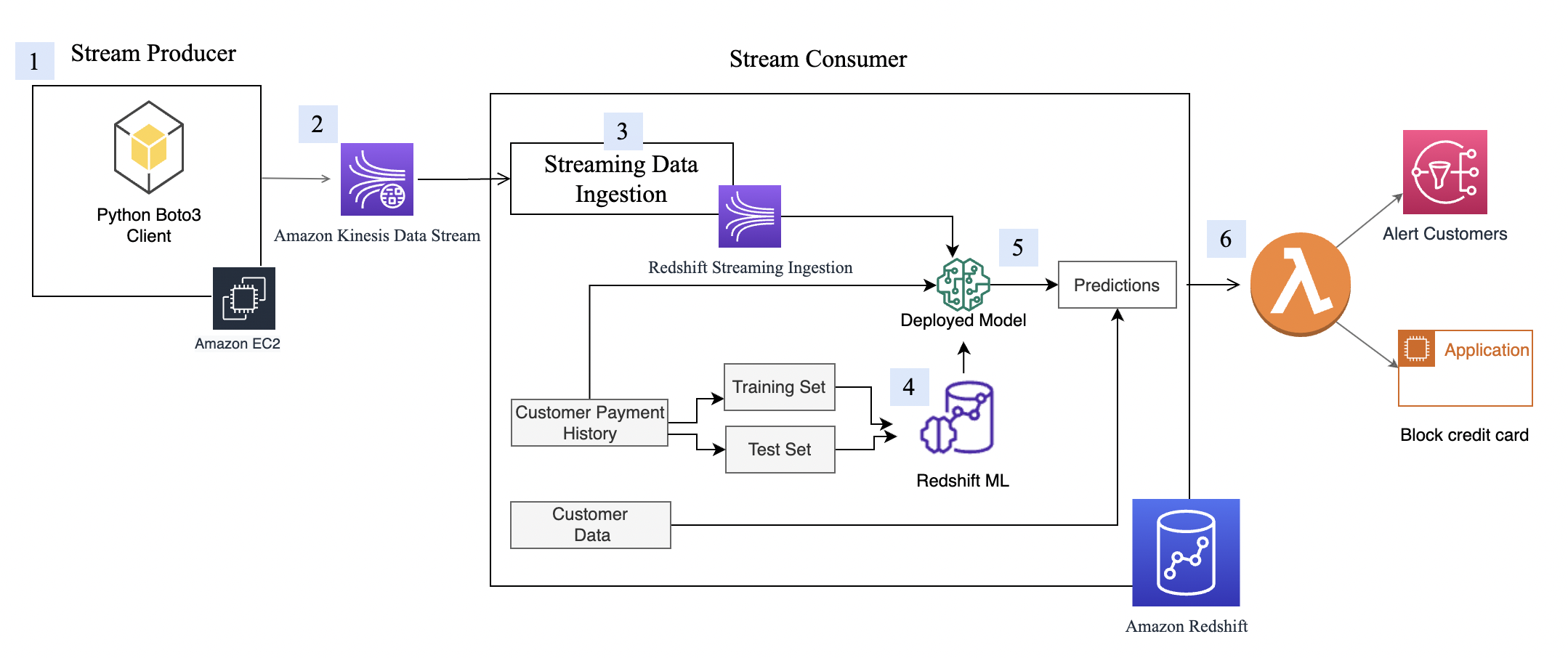
The following diagram illustrates the architecture and process flow.

The step-by-step process is as follows:

  1. The EC2 instance simulates a credit card transaction application, which inserts credit card transactions into the Kinesis data stream.
  2. The data stream stores the incoming credit card transaction data.
  3. An Amazon Redshift Streaming Ingestion materialized view is created on top of the data stream, which automatically ingests streaming data into Amazon Redshift.
  4. You build, train, and deploy an ML model using Redshift ML. The Redshift ML model is trained using historical transactional data.
  5. You transform the streaming data and generate ML predictions.
  6. You can alert customers or update the application to mitigate risk.

This walkthrough uses credit card transaction streaming data. The credit card transaction data is fictitious and is based on a simulator. The customer dataset is also fictitious and is generated with some random data functions.

Prerequisites

  1. Create an Amazon Redshift cluster.
  2. Configure the cluster to use Redshift ML.
  3. Create an AWS Identity and Access Management (IAM) user.
  4. Update the IAM role attached to the Redshift cluster to include permissions to access the Kinesis data stream. For more information about the required policy, refer to Getting started with streaming ingestion.
  5. Create an m5.4xlarge EC2 instance. We tested Producer application with m5.4xlarge instance but you are free to use other instance type. When creating the instance, use the amzn2-ami-kernel-5.10-hvm-2.0.20220426.0-x86_64-gp2 AMI.
  6. To make sure that Python3 is installed in the EC2 instance, run the following command to verity your Python version (note that the data extraction script only works on Python 3):
python3 --version
  1. Install the following dependent packages to run the simulator program:
sudo yum install python3-pip
pip3 install numpy
pip3 install pandas
pip3 install matplotlib
pip3 install seaborn
pip3 install boto3
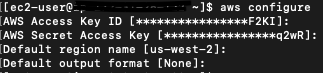
  1. Configure Amazon EC2 using the variables like AWS credentials generated for IAM user created in step 3 above. The following screenshot shows an example using aws configure.

Set up Kinesis Data Streams

Amazon Kinesis Data Streams is a massively scalable and durable real-time data streaming service. It can continuously capture gigabytes of data per second from hundreds of thousands of sources, such as website clickstreams, database event streams, financial transactions, social media feeds, IT logs, and location-tracking events. The data collected is available in milliseconds to enable real-time analytics use cases such as real-time dashboards, real-time anomaly detection, dynamic pricing, and more. We use Kinesis Data Streams because it’s a serverless solution that can scale based on usage.

Create a Kinesis data stream

First, you need to create a Kinesis data stream to receive the streaming data:

  1. On the Amazon Kinesis console, choose Data streams in the navigation pane.
  2. Choose Create data stream.
  3. For Data stream name, enter cust-payment-txn-stream.
  4. For Capacity mode, select On-demand.
  5. For the rest of the options, choose the default options and follow through the prompts to complete the setup.
  6. Capture the ARN for the created data stream to use in the next section when defining your IAM policy.

Streaming ARN Highlight

Set up permissions

For a streaming application to write to Kinesis Data Streams, the application needs to have access to Kinesis. You can use the following policy statement to grant the simulator process that you set up in next section access to the data stream. Use the ARN of the data stream that you saved in the previous step.

{
"Version": "2012-10-17",
"Statement": [
{
"Sid": "Stmt123",
"Effect": "Allow",
"Action": [
"kinesis:DescribeStream",
"kinesis:PutRecord",
"kinesis:PutRecords",
"kinesis:GetShardIterator",
"kinesis:GetRecords",
"kinesis:ListShards",
"kinesis:DescribeStreamSummary"
],
"Resource": [
"arn:aws:kinesis:us-west-2:xxxxxxxxxxxx:stream/cust-payment-txn-stream"
]
}
]
}

Configure the stream producer

Before we can consume streaming data in Amazon Redshift, we need a streaming data source that writes data to the Kinesis data stream. This post uses a custom-built data generator and the AWS SDK for Python (Boto3) to publish the data to the data stream. For setup instructions, refer to Producer Simulator. This simulator process publishes streaming data to the data stream created in the previous step (cust-payment-txn-stream).

Configure the stream consumer

This section talks about configuring the stream consumer (the Amazon Redshift streaming ingestion view).

Amazon Redshift Streaming Ingestion provides low-latency, high-speed ingestion of streaming data from Kinesis Data Streams into an Amazon Redshift materialized view. You can configure your Amazon Redshift cluster to enable streaming ingestion and create a materialized view with auto refresh, using SQL statements, as described in Creating materialized views in Amazon Redshift. The automatic materialized view refresh process will ingest streaming data at hundreds of megabytes of data per second from Kinesis Data Streams into Amazon Redshift. This results in fast access to external data that is quickly refreshed.

After creating the materialized view, you can access your data from the data stream using SQL and simplify your data pipelines by creating materialized views directly on top of the stream.

Complete the following steps to configure an Amazon Redshift streaming materialized view:

  1. On the IAM console, choose policies in the navigation pane.
  2. Choose Create policy.
  3. Create a new IAM policy called KinesisStreamPolicy.  For the streaming policy definition, see Getting started with streaming ingestion.
  4. In the navigation pane, choose Roles.
  5. Choose Create role.
  6. Select AWS service and choose Redshift and Redshift customizable.
  7. Create a new role called redshift-streaming-role and attach the policy KinesisStreamPolicy.
  8. Create an external schema to map to Kinesis Data Streams :
CREATE EXTERNAL SCHEMA custpaytxn
FROM KINESIS IAM_ROLE 'arn:aws:iam::386xxxxxxxxx:role/redshift-streaming-role';

Now you can create a materialized view to consume the stream data. You can use the SUPER data type to store the payload as is, in JSON format, or use Amazon Redshift JSON functions to parse the JSON data into individual columns. For this post, we use the second method because the schema is well defined.

  1. Create the streaming ingestion materialized view cust_payment_tx_stream. By specifying AUTO REFRESH YES in the following code, you can enable automatic refresh of the streaming ingestion view, which saves time by avoiding building data pipelines:
CREATE MATERIALIZED VIEW cust_payment_tx_stream
AUTO REFRESH YES
AS
SELECT approximate_arrival_timestamp ,
partition_key,
shard_id,
sequence_number,
json_extract_path_text(from_varbyte(kinesis_data, 'utf-8'),'TRANSACTION_ID')::bigint as TRANSACTION_ID,
json_extract_path_text(from_varbyte(kinesis_data, 'utf-8'),'TX_DATETIME')::character(50) as TX_DATETIME,
json_extract_path_text(from_varbyte(kinesis_data, 'utf-8'),'CUSTOMER_ID')::int as CUSTOMER_ID,
json_extract_path_text(from_varbyte(kinesis_data, 'utf-8'),'TERMINAL_ID')::int as TERMINAL_ID,
json_extract_path_text(from_varbyte(kinesis_data, 'utf-8'),'TX_AMOUNT')::decimal(18,2) as TX_AMOUNT,
json_extract_path_text(from_varbyte(kinesis_data, 'utf-8'),'TX_TIME_SECONDS')::int as TX_TIME_SECONDS,
json_extract_path_text(from_varbyte(kinesis_data, 'utf-8'),'TX_TIME_DAYS')::int as TX_TIME_DAYS
FROM custpaytxn."cust-payment-txn-stream"
Where is_utf8(kinesis_data) AND can_json_parse(kinesis_data);

Note that json_extract_path_text has a length limitation of 64 KB. Also from_varbye filters records larger than 65KB.

  1. Refresh the data.

The Amazon Redshift streaming materialized view is auto refreshed by Amazon Redshift for you. This way, you don’t need worry about data staleness. With materialized view auto refresh, data is automatically loaded into Amazon Redshift as it becomes available in the stream. If you choose to manually perform this operation, use the following command:

REFRESH MATERIALIZED VIEW cust_payment_tx_stream ;
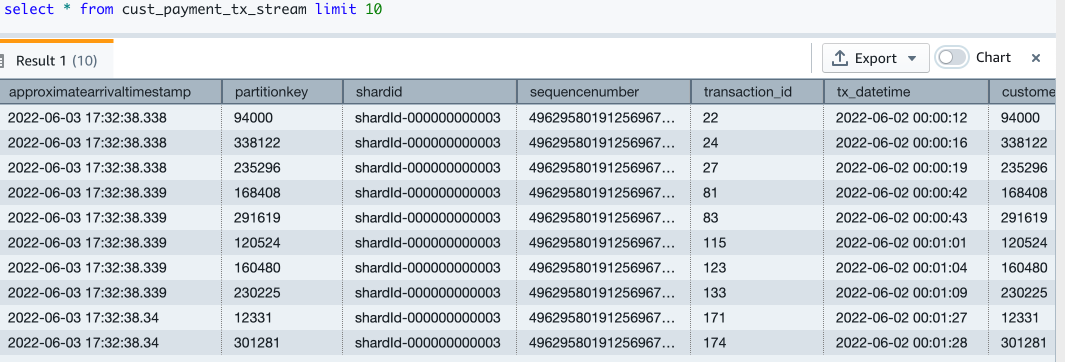
  1. Now let’s query the streaming materialized view to see sample data:
Select * from cust_payment_tx_stream limit 10;

  1. Let’s check how many records are in the streaming view now:
Select count(*) as stream_rec_count from cust_payment_tx_stream;

Now you have finished setting up the Amazon Redshift streaming ingestion view, which is continuously updated with incoming credit card transaction data. In my setup, I see that around 67,000 records have been pulled into the streaming view at the time when I ran my select count query. This number could be different for you.

Redshift ML

With Redshift ML, you can bring a pre-trained ML model or build one natively. For more information, refer to Using machine learning in Amazon Redshift.

In this post, we train and build an ML model using a historical dataset. The data contains a tx_fraud field that flags a historical transaction as fraudulent or not. We build a supervised ML model using Redshift Auto ML, which learns from this dataset and predicts incoming transactions when those are run through the prediction functions.

In the following sections, we show how to set up the historical dataset and customer data.

Load the historical dataset

The historical table has more fields than what the streaming data source has. These fields contain the customer’s most recent spend and terminal risk score, like number of fraudulent transactions computed by transforming streaming data. There are also categorical variables like weekend transactions or nighttime transactions.

To load the historical data, run the commands using the Amazon Redshift query editor.

Create the transaction history table with the following code. The DDL can also be found on GitHub.

CREATE TABLE cust_payment_tx_history
(
TRANSACTION_ID integer,
TX_DATETIME timestamp,
CUSTOMER_ID integer,
TERMINAL_ID integer,
TX_AMOUNT decimal(9,2),
TX_TIME_SECONDS integer,
TX_TIME_DAYS integer,
TX_FRAUD integer,
TX_FRAUD_SCENARIO integer,
TX_DURING_WEEKEND integer,
TX_DURING_NIGHT integer,
CUSTOMER_ID_NB_TX_1DAY_WINDOW decimal(9,2),
CUSTOMER_ID_AVG_AMOUNT_1DAY_WINDOW decimal(9,2),
CUSTOMER_ID_NB_TX_7DAY_WINDOW decimal(9,2),
CUSTOMER_ID_AVG_AMOUNT_7DAY_WINDOW decimal(9,2),
CUSTOMER_ID_NB_TX_30DAY_WINDOW decimal(9,2),
CUSTOMER_ID_AVG_AMOUNT_30DAY_WINDOW decimal(9,2),
TERMINAL_ID_NB_TX_1DAY_WINDOW decimal(9,2),
TERMINAL_ID_RISK_1DAY_WINDOW decimal(9,2),
TERMINAL_ID_NB_TX_7DAY_WINDOW decimal(9,2),
TERMINAL_ID_RISK_7DAY_WINDOW decimal(9,2),
TERMINAL_ID_NB_TX_30DAY_WINDOW decimal(9,2),
TERMINAL_ID_RISK_30DAY_WINDOW decimal(9,2)
);
Copy cust_payment_tx_history
FROM 's3://redshift-demos/redshiftml-reinvent/2022/ant312/credit-card-transactions/credit_card_transactions_transformed_balanced.csv'
iam_role default
ignoreheader 1
csv ;

Let’s check how many transactions are loaded:

select count(1) from cust_payment_tx_history;

Check the monthly fraud and non-fraud transactions trend:

SELECT to_char(tx_datetime, 'YYYYMM') as YearMonth,
sum(case when tx_fraud=1 then 1 else 0 end) as fraud_tx,
sum(case when tx_fraud=0 then 1 else 0 end) as non_fraud_tx,
count(*) as total_tx
FROM cust_payment_tx_history
GROUP BY YearMonth;

Create and load customer data

Now we create the customer table and load data, which contains the email and phone number of the customer. The following code creates the table, loads the data, and samples the table. The table DDL is available on GitHub.

CREATE TABLE public."customer_info"(customer_id bigint NOT NULL encode az64,
job_title character varying(500) encode lzo,
email_address character varying(100) encode lzo,
full_name character varying(200) encode lzo,
phone_number character varying(20) encode lzo,
city varchar(50),
state varchar(50)
);
COPY customer_info
FROM 's3://redshift-demos/redshiftml-reinvent/2022/ant312/customer-data/Customer_Data.csv'
IGNOREHEADER 1
IAM_ROLE default CSV;
Select count(1) from customer_info;

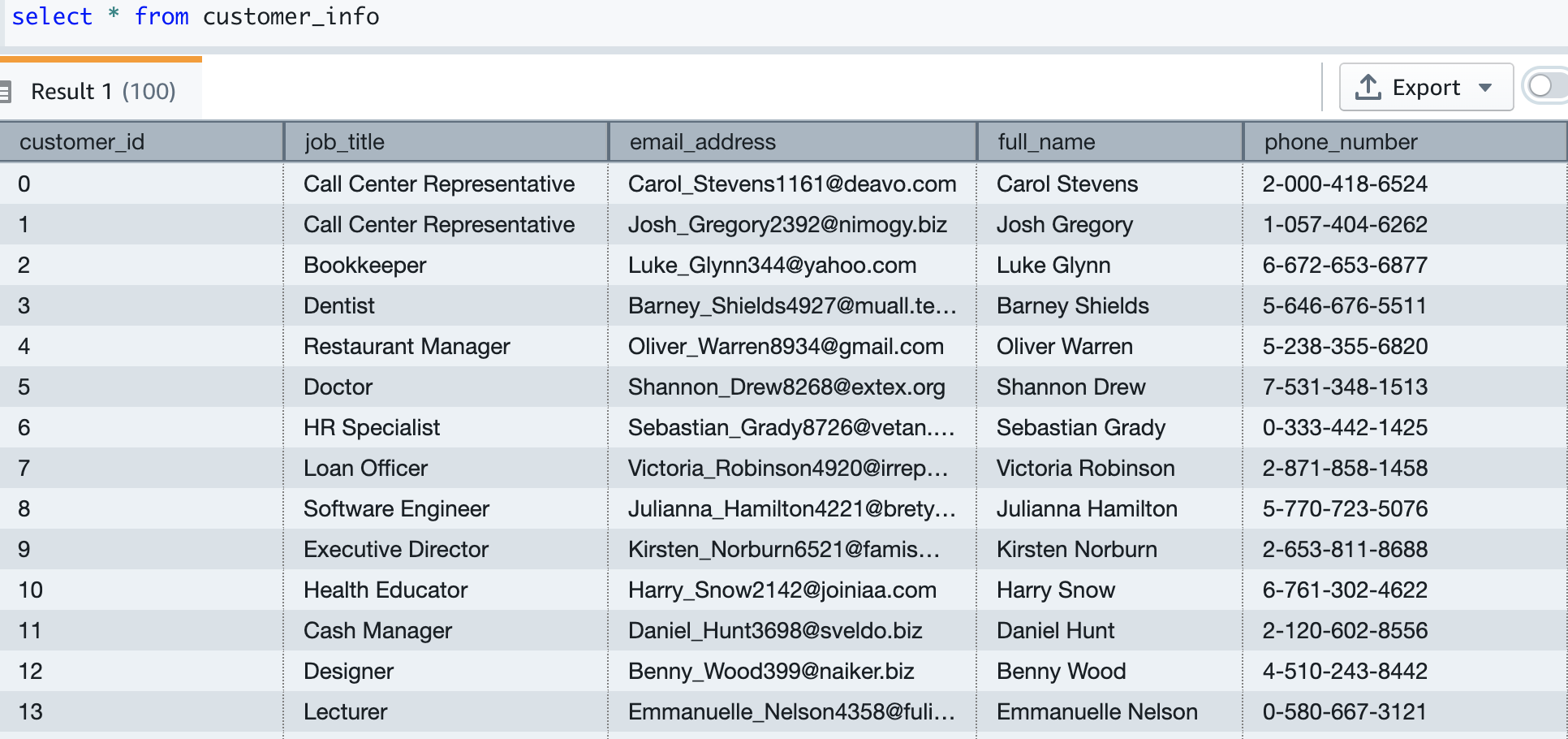
Our test data has about 5,000 customers. The following screenshot shows sample customer data.

Build an ML model

Our historical card transaction table has 6 months of data, which we now use to train and test the ML model.

The model takes the following fields as input:

TX_DURING_WEEKEND ,
TX_AMOUNT,
TX_DURING_NIGHT ,
CUSTOMER_ID_NB_TX_1DAY_WINDOW ,
CUSTOMER_ID_AVG_AMOUNT_1DAY_WINDOW ,
CUSTOMER_ID_NB_TX_7DAY_WINDOW ,
CUSTOMER_ID_AVG_AMOUNT_7DAY_WINDOW ,
CUSTOMER_ID_NB_TX_30DAY_WINDOW ,
CUSTOMER_ID_AVG_AMOUNT_30DAY_WINDOW ,
TERMINAL_ID_NB_TX_1DAY_WINDOW ,
TERMINAL_ID_RISK_1DAY_WINDOW ,
TERMINAL_ID_NB_TX_7DAY_WINDOW ,
TERMINAL_ID_RISK_7DAY_WINDOW ,
TERMINAL_ID_NB_TX_30DAY_WINDOW ,
TERMINAL_ID_RISK_30DAY_WINDOW

We get tx_fraud as output.

We split this data into training and test datasets. Transactions from 2022-04-01 to 2022-07-31 are for the training set. Transactions from 2022-08-01 to 2022-09-30 are used for the test set.

Let’s create the ML model using the familiar SQL CREATE MODEL statement. We use a basic form of the Redshift ML command. The following method uses Amazon SageMaker Autopilot, which performs data preparation, feature engineering, model selection, and training automatically for you. Provide the name of your S3 bucket containing the code.

CREATE MODEL cust_cc_txn_fd
FROM (
SELECT TX_AMOUNT ,
TX_FRAUD ,
TX_DURING_WEEKEND ,
TX_DURING_NIGHT ,
CUSTOMER_ID_NB_TX_1DAY_WINDOW ,
CUSTOMER_ID_AVG_AMOUNT_1DAY_WINDOW ,
CUSTOMER_ID_NB_TX_7DAY_WINDOW ,
CUSTOMER_ID_AVG_AMOUNT_7DAY_WINDOW ,
CUSTOMER_ID_NB_TX_30DAY_WINDOW ,
CUSTOMER_ID_AVG_AMOUNT_30DAY_WINDOW ,
TERMINAL_ID_NB_TX_1DAY_WINDOW ,
TERMINAL_ID_RISK_1DAY_WINDOW ,
TERMINAL_ID_NB_TX_7DAY_WINDOW ,
TERMINAL_ID_RISK_7DAY_WINDOW ,
TERMINAL_ID_NB_TX_30DAY_WINDOW ,
TERMINAL_ID_RISK_30DAY_WINDOW
FROM cust_payment_tx_history
WHERE cast(tx_datetime as date) between '2022-06-01' and '2022-09-30'
) TARGET tx_fraud
FUNCTION fn_customer_cc_fd
IAM_ROLE default
SETTINGS (
S3_BUCKET '<replace this with your s3 bucket name>',
s3_garbage_collect off,
max_runtime 3600
);

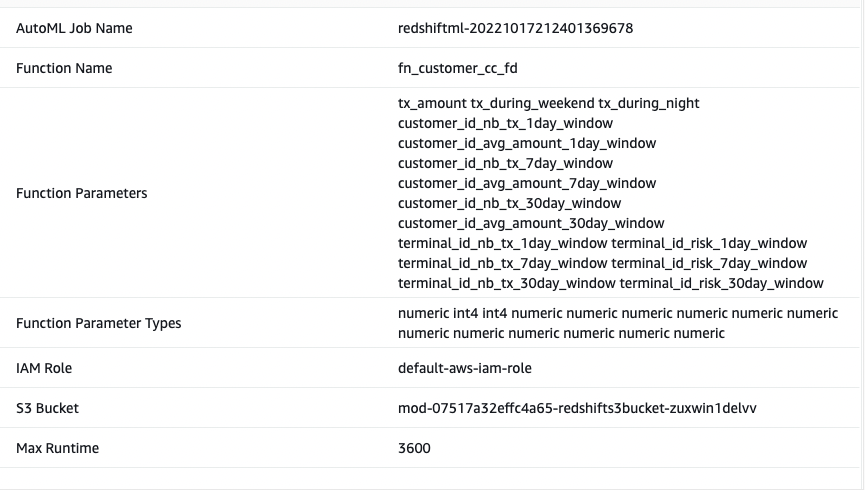
I call the ML model as Cust_cc_txn_fd, and the prediction function as fn_customer_cc_fd. The FROM clause shows the input columns from the historical table public.cust_payment_tx_history. The target parameter is set to tx_fraud, which is the target variable that we’re trying to predict. IAM_Role is set to default because the cluster is configured with this role; if not, you have to provide your Amazon Redshift cluster IAM role ARN. I set the max_runtime to 3,600 seconds, which is the time we give to SageMaker to complete the process. Redshift ML deploys the best model that is identified in this time frame.

Depending on the complexity of the model and the amount of data, it can take some time for the model to be available. If you find your model selection is not completing, increase the value for max_runtime. You can set a max value of 9999.

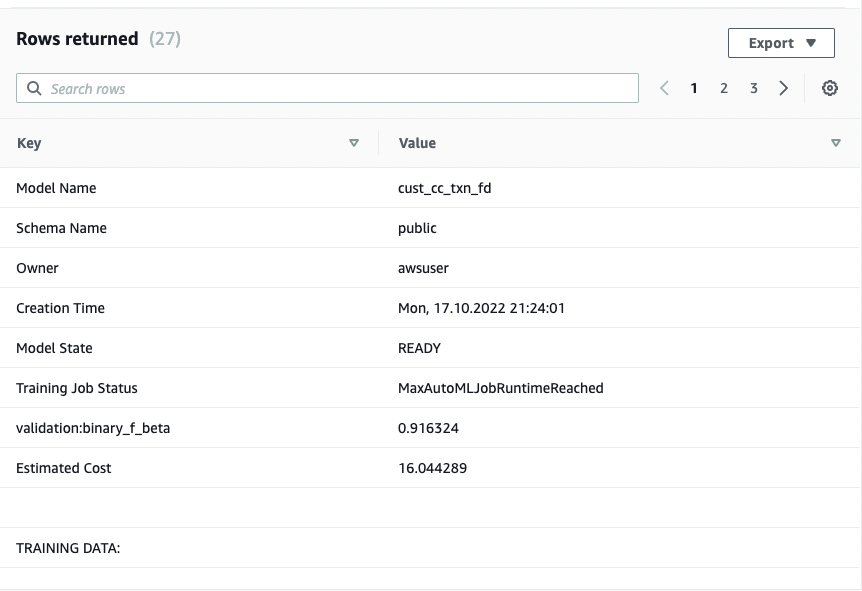
The CREATE MODEL command is run asynchronously, which means it runs in the background. You can use the SHOW MODEL command to see the status of the model. When the status shows as Ready, it means the model is trained and deployed.

show model cust_cc_txn_fd;

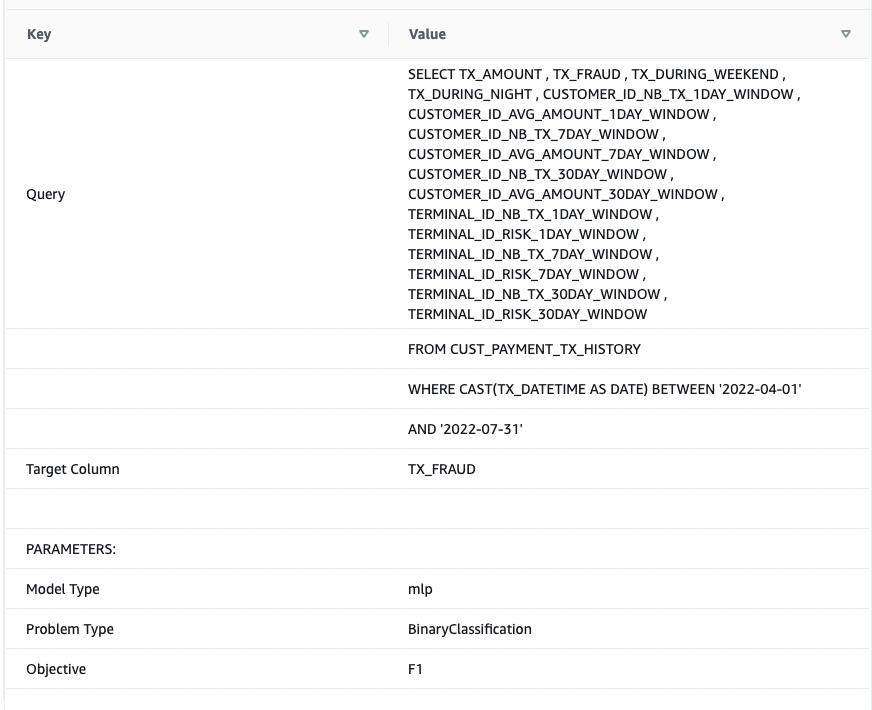
The following screenshots show our output.

From the output, I see that the model has been correctly recognized as BinaryClassification, and F1 has been selected as the objective. The F1 score is a metric that considers both precision and recall. It returns a value between 1 (perfect precision and recall) and 0 (lowest possible score). In my case, it’s 0.91. The higher the value, the better the model performance.

Let’s test this model with the test dataset. Run the following command, which retrieves sample predictions:

SELECT
tx_fraud ,
fn_customer_cc_fd(
TX_AMOUNT ,
TX_DURING_WEEKEND ,
TX_DURING_NIGHT ,
CUSTOMER_ID_NB_TX_1DAY_WINDOW ,
CUSTOMER_ID_AVG_AMOUNT_1DAY_WINDOW ,
CUSTOMER_ID_NB_TX_7DAY_WINDOW ,
CUSTOMER_ID_AVG_AMOUNT_7DAY_WINDOW ,
CUSTOMER_ID_NB_TX_30DAY_WINDOW ,
CUSTOMER_ID_AVG_AMOUNT_30DAY_WINDOW ,
TERMINAL_ID_NB_TX_1DAY_WINDOW ,
TERMINAL_ID_RISK_1DAY_WINDOW ,
TERMINAL_ID_NB_TX_7DAY_WINDOW ,
TERMINAL_ID_RISK_7DAY_WINDOW ,
TERMINAL_ID_NB_TX_30DAY_WINDOW ,
TERMINAL_ID_RISK_30DAY_WINDOW )
FROM cust_payment_tx_history
WHERE cast(tx_datetime as date) >= '2022-10-01'
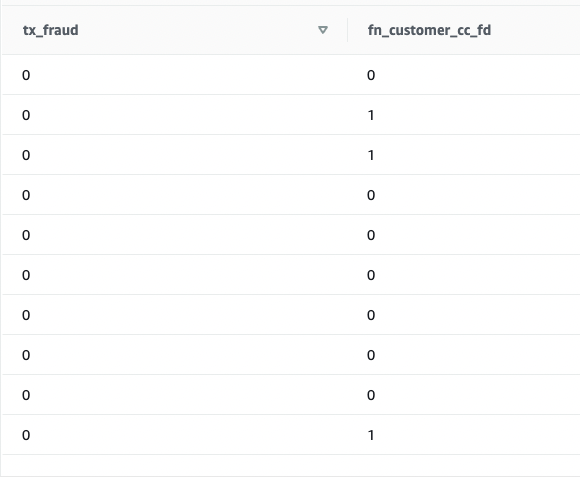
limit 10 ;

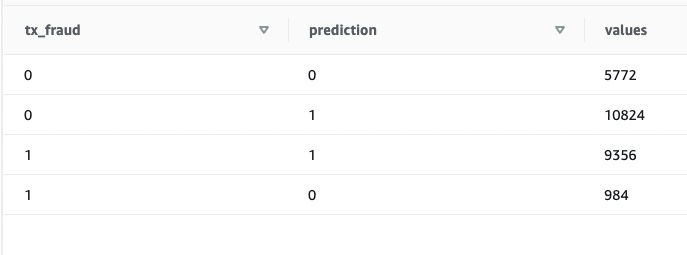
We see that some values are matching and some are not. Let’s compare predictions to the ground truth:

SELECT
tx_fraud ,
fn_customer_cc_fd(
TX_AMOUNT ,
TX_DURING_WEEKEND ,
TX_DURING_NIGHT ,
CUSTOMER_ID_NB_TX_1DAY_WINDOW ,
CUSTOMER_ID_AVG_AMOUNT_1DAY_WINDOW ,
CUSTOMER_ID_NB_TX_7DAY_WINDOW ,
CUSTOMER_ID_AVG_AMOUNT_7DAY_WINDOW ,
CUSTOMER_ID_NB_TX_30DAY_WINDOW ,
CUSTOMER_ID_AVG_AMOUNT_30DAY_WINDOW ,
TERMINAL_ID_NB_TX_1DAY_WINDOW ,
TERMINAL_ID_RISK_1DAY_WINDOW ,
TERMINAL_ID_NB_TX_7DAY_WINDOW ,
TERMINAL_ID_RISK_7DAY_WINDOW ,
TERMINAL_ID_NB_TX_30DAY_WINDOW ,
TERMINAL_ID_RISK_30DAY_WINDOW
) as prediction, count(*) as values
FROM public.cust_payment_tx_history
WHERE cast(tx_datetime as date) >= '2022-08-01'
Group by 1,2 ;

We validated that the model is working and the F1 score is good. Let’s move on to generating predictions on streaming data.

Predict fraudulent transactions

Because the Redshift ML model is ready to use, we can use it to run the predictions against streaming data ingestion. The historical dataset has more fields than what we have in the streaming data source, but they’re just recency and frequency metrics around the customer and terminal risk for a fraudulent transaction.

We can apply the transformations on top of the streaming data very easily by embedding the SQL inside the views. Create the first view, which aggregates streaming data at the customer level. Then create the second view, which aggregates streaming data at terminal level, and the third view, which combines incoming transactional data with customer and terminal aggregated data and calls the prediction function all in one place. The code for the third view is as follows:

CREATE VIEW public.cust_payment_tx_fraud_predictions
as
select a.approximate_arrival_timestamp,
d.full_name , d.email_address, d.phone_number,
a.TRANSACTION_ID, a.TX_DATETIME, a.CUSTOMER_ID, a.TERMINAL_ID,
a.TX_AMOUNT ,
a.TX_TIME_SECONDS ,
a.TX_TIME_DAYS ,
public.fn_customer_cc_fd(a.TX_AMOUNT ,
a.TX_DURING_WEEKEND,
a.TX_DURING_NIGHT,
c.CUSTOMER_ID_NB_TX_1DAY_WINDOW ,
c.CUSTOMER_ID_AVG_AMOUNT_1DAY_WINDOW ,
c.CUSTOMER_ID_NB_TX_7DAY_WINDOW ,
c.CUSTOMER_ID_AVG_AMOUNT_7DAY_WINDOW ,
c.CUSTOMER_ID_NB_TX_30DAY_WINDOW ,
c.CUSTOMER_ID_AVG_AMOUNT_30DAY_WINDOW ,
t.TERMINAL_ID_NB_TX_1DAY_WINDOW ,
t.TERMINAL_ID_RISK_1DAY_WINDOW ,
t.TERMINAL_ID_NB_TX_7DAY_WINDOW ,
t.TERMINAL_ID_RISK_7DAY_WINDOW ,
t.TERMINAL_ID_NB_TX_30DAY_WINDOW ,
t.TERMINAL_ID_RISK_30DAY_WINDOW ) Fraud_prediction
From
(select
Approximate_arrival_timestamp,
TRANSACTION_ID, TX_DATETIME, CUSTOMER_ID, TERMINAL_ID,
TX_AMOUNT ,
TX_TIME_SECONDS ,
TX_TIME_DAYS ,
case when extract(dow from cast(TX_DATETIME as timestamp)) in (1,7) then 1 else 0 end as TX_DURING_WEEKEND,
case when extract(hour from cast(TX_DATETIME as timestamp)) between 00 and 06 then 1 else 0 end as TX_DURING_NIGHT
FROM cust_payment_tx_stream) a
join terminal_transformations t
on a.terminal_id = t.terminal_id
join customer_transformations c
on a.customer_id = c.customer_id
join customer_info d
on a.customer_id = d.customer_id
;

Run a SELECT statement on the view:

select * from
cust_payment_tx_fraud_predictions
where Fraud_prediction = 1;

As you run the SELECT statement repeatedly, the latest credit card transactions go through transformations and ML predictions in near-real time.

This demonstrates the power of Amazon Redshift—with easy-to-use SQL commands, you can transform streaming data by applying complex window functions and apply an ML model to predict fraudulent transactions all in one step, without building complex data pipelines or building and managing additional infrastructure.

Expand the solution

Because the data streams in and ML predictions are made in near-real time, you can build business processes for alerting your customer using Amazon Simple Notification Service (Amazon SNS), or you can lock the customer’s credit card account in an operational system.

This post doesn’t go into the details of these operations, but if you’re interested in learning more about building event-driven solutions using Amazon Redshift, refer to the following GitHub repository.

Clean up

To avoid incurring future charges, delete the resources that were created as part of this post.

Conclusion

In this post, we demonstrated how to set up a Kinesis data stream, configure a producer and publish data to streams, and then create an Amazon Redshift Streaming Ingestion view and query the data in Amazon Redshift. After the data was in the Amazon Redshift cluster, we demonstrated how to train an ML model and build a prediction function and apply it against the streaming data to generate predictions near-real time.

If you have any feedback or questions, please leave them in the comments.


About the Authors

Bhanu Pittampally is an Analytics Specialist Solutions Architect based out of Dallas. He specializes in building analytic solutions. His background is in data warehouses—architecture, development, and administration. He has been in the data and analytics field for over 15 years.

Praveen Kadipikonda is a Senior Analytics Specialist Solutions Architect at AWS based out of Dallas. He helps customers build efficient, performant, and scalable analytic solutions. He has worked with building databases and data warehouse solutions for over 15 years.

Ritesh Kumar Sinha is an Analytics Specialist Solutions Architect based out of San Francisco. He has helped customers build scalable data warehousing and big data solutions for over 16 years. He loves to design and build efficient end-to-end solutions on AWS. In his spare time, he loves reading, walking, and doing yoga.

Data: The genesis for modern invention
Post Syndicated from Swami Sivasubramanian original https://aws.amazon.com/blogs/big-data/data-the-genesis-for-modern-invention/

It only takes one groundbreaking invention—one iconic idea that solves a widespread pain point for customers—to create or transform an industry forever. From the invention of the telegraph, to the discovery of GPS, to the earliest cloud computing services, history is filled with examples of these “eureka” moments that continue to have long-lasting impacts on the way we do business today.
Cognitive scientists John Kounios and Mark Beeman demonstrated that great inventors don’t simply stumble upon their epiphanies; in reality, an idea is preceded by a collection of life experiences, educational knowledge, or even past failures the human brain processes and assimilates over time. Their ideas are preceded by a collection of data points.

When we apply this concept to organizations, and the vast amount of data being produced on a daily basis, we realize there’s an incredible opportunity to ingest, store, process, analyze, and visualize data to create the next big thing.

Today—more than ever before—data is the genesis for modern invention. But to produce new ideas with our data, we need to build dynamic, end-to-end data strategies that lead to new customer experiences as the final output. Some of the biggest brands in the world like Formula 1, Toyota, and Georgia-Pacific are already leveraging AWS to do just that.

This week at AWS re:Invent 2022, I shared several key learnings we’ve collected after working with these brands and more than 1.5 million customers who are using AWS to build their data strategies.

I also revealed several new services and innovations for our customers. Here are a few highlights.

You need a comprehensive set of services to get the job done

Creating a data lake to perform analytics and machine learning (ML) is not an end-to-end data strategy. Your needs will inevitably grow and change over time, which is why we believe every customer should have access to a wide variety of tools based on data types, personas, and their specific use cases.

And our data supports this, with 94% of the top 1,000 AWS customers using more than 10 of our databases and analytics services. A one-size-fits-all approach just doesn’t work in the long run.

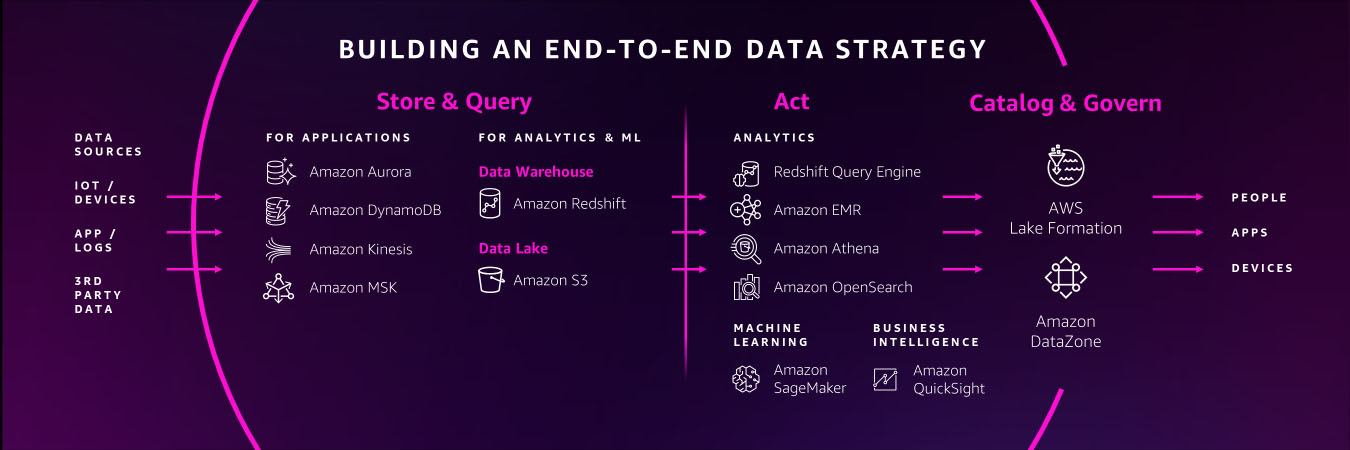
You need a comprehensive set of services that enable you to store and query data in your databases, data lakes, and data warehouses; services that help you act on your data with analytics, business intelligence, and machine learning; and services that help you catalog and govern your data across your organization.

You should also have access to services that support a variety of data types for your future use cases, whether you’re working with financial data, clinical data, or retail data. Many of our customers are also using their data to create machine learning models, but some data types are still too cumbersome to work with and prepare for ML.

For example, geospatial data, which supports use cases like self-driving cars, urban planning, or even crop yield in agricultural farms, can be incredibly difficult to access, prepare, and visualize for ML. That’s why this week we announced new capabilities for Amazon SageMaker that make it easier for data scientists to work with geospatial data.

Performance and security are paramount

Performance and security continue to be critical components of our customers’ data strategies.

You’ll need to perform at scale across your data warehouses, databases, and data lakes, or when you want to quickly analyze and visualize your data. We’ve built our business on high-performing services like Amazon Aurora, Amazon DynamoDB, and Amazon Redshift, and this week, we announced several new capabilities to continue building on our performance innovations to date.

For our serverless, interactive query service, Amazon Athena, we announced a new integration with Apache Spark that enables you to spin up Spark workloads up to 75 times faster than other serverless Spark offerings. We also introduced a new feature called Elastic Clusters within our fully managed document database, Amazon DocumentDB, that enables customers to easily scale out or shard their data across multiple database instances.

To help our customers protect their data from potential compromises, we announced Amazon GuardDuty RDS Protection to intelligently detect potential threats for their data stored in Aurora, as well as a new open-source project that allows developers to safely use PostgreSQL extensions in their core databases without worrying about unintended security impacts.

Connecting data is critical for deeper insights

To get the most of your data, you need to combine data silos for deeper insights. However, connecting data across siloes typically requires complex extract, transform, and load (ETL) pipelines, which means creating a manual integration every time you want to ask a different question of your data or build a different ML model. This isn’t fast enough to keep up with the speed that businesses need to move today.

Zero ETL is the future. And we’ve been making strides in this zero-ETL future for several years by deepening integrations between our services. But this week, we’re getting closer to a zero-ETL future by announcing Aurora now supports zero-ETL integration with Amazon Redshift to bring transactional data in Aurora and the analytical capabilities in Amazon Redshift together.

We also announced a new auto-copy feature from Amazon Simple Storage Service (Amazon S3) to Amazon Redshift that removes the need for you to build and manage ETL pipelines whenever you want to use your data for analytics. And we’re not stopping here. With AWS, you can now connect to hundreds of data sources, from software as a service (SaaS) applications to on-premises data stores.

We’ll continue to build no zero-ETL capabilities into our services to help our customers easily analyze all their data, no matter where it resides.

Data governance unleashes innovation

Governance was historically used as a defensive measure, which meant locking down data in silos. But in reality, the right governance strategy helps you move and innovate faster with guardrails that give the right people access to your data, when and where they need it.

In addition to fine-grained access controls within AWS Lake Formation, this week we’re making it easier for customers to govern access and privileges within more of our data services with new capabilities announced in Amazon Redshift and Amazon SageMaker.

Our customers also told us they want an end-to-end strategy that enables them to govern their data across the entire data journey. That’s why this week we announced Amazon DataZone, a new data management service that helps you catalog, discover, analyze, share, and govern data across the organization.

When you properly manage secure access to your data, it can flow to the right places and connect the dots across siloed teams and departments.

Build with AWS

With the introduction of these new services and features this week, as well as our comprehensive set of data services, it’s important to remember that support is available as you build your end-to-end data strategy. In fact, we have an entire team at AWS, as well as an extensive network of partners to help our customers build data foundations that will meet their needs now—and well into the future.

For more information about re:Invent 2022, please visit our event page.


About the Author

Swami Sivasubramanian is the Vice President of AWS Data and Machine Learning.
AWS Machine Learning University New Educator Enablement Program to Build Diverse Talent for ML/AI Jobs

Post Syndicated from Marcia Villalba original https://aws.amazon.com/blogs/aws/aws-machine-learning-university-new-educator-enablement-program-to-build-diverse-talent-for-ml-ai-jobs/

AWS Machine Learning University is now providing a free educator enablement program. This program provides faculty at community colleges, minority-serving institutions (MSIs), and historically Black colleges and universities (HBCUs) with the skills and resources to teach data analytics, artificial intelligence (AI), and machine learning (ML) concepts to build a diverse pipeline for in-demand jobs of today and tomorrow.

According to the National Science Foundation, Black and Hispanic or Latino students earn bachelor’s degrees in Computer Science—the dominant pathway to AI/ML—at a much lower rate than their white peers, earning less than 11 percent of computer science degrees awarded. However, research shows that having diverse perspectives among skilled practitioners and across the AI/ML lifecycle contributes to the development of AI/ML systems that are safe, trustworthy, and have less bias. 

In 2018, we announced the Machine Learning University (MLU) to share with all developers the same courses that we used to train engineers at Amazon and AWS. This platform offers self-service, self-paced, AI/ML digital courses.

Machine Learning University home page

And today, we add this new program to our AI/ML training offering. Although anyone could access the MLU self-paced learning, it places the burden on the learner to source prerequisite work and solutions. This educator enablement program takes the concepts and lessons developed by MLU and makes them more accessible to educators. It offers a year-round educator enablement program with lesson planning, course playbooks, and access to free compute resources.

Program Details
Educators are onboarded in small-group cohorts into bootcamps where they will learn the material and deep dive into how to teach it via instructor-led lectures and hands-on projects. Educators who complete the bootcamp can take part in different year-round development opportunities, such as a dedicated Slack channel to share teaching best practices, education topic series and virtual study sessions moderated by MLU instructors, and regional events for continued professional development. Also, they will receive continuing education credits and AWS-provided stipends.

Faculty and students get access to instructional material through Amazon SageMaker Studio Lab. SageMaker Studio Lab was announced last year and is AWS’s free (no credit card required) ML development environment. It provides computing and storage for anybody that wants to learn and experiment with ML. Institutions can unlock additional resources to support their ML programs by registering for AWS Academy. AWS Academy unlocks all the AWS services for a complete AI/ML program.

Community colleges and universities can integrate this educator enablement program into their computer science, information technology, and business curricula to create an AI/ML course, certificate, or degree. We have worked with educators and education boards such as Houston Community College to create content that is vetted for credit-worthy and degree-earning curricula.

In August 2022, we launched our first educator bootcamp in partnership with The Coding School. The bootcamp was delivered over two weeks, offering lectures, case studies, and hands-on projects. 25 educators completed the Educator Machine Learning Bootcamp, representing 22 US community colleges and universities.

Learn More and Join The Program
During 2023, AWS Machine Learning University will run six educator-enablement cohorts starting in January. The program will give priority consideration to educators at community colleges, MSIs, and HBCUs, in alignment with this program mission to increase access to AI/ML technology to historically underserved and underrepresented students.

If you are a computer science educator or part of a board of educators interested in fostering more depth in your computer science coursework, you should sign up for the educator enablement program.

Marcia

How Fresenius Medical Care aims to save dialysis patient lives using real-time predictive analytics on AWS

Post Syndicated from Kanti Singh original https://aws.amazon.com/blogs/big-data/how-fresenius-medical-care-aims-to-save-dialysis-patient-lives-using-real-time-predictive-analytics-on-aws/

This post is co-written by Kanti Singh, Director of Data & Analytics at Fresenius Medical Care.

Fresenius Medical Care is the world’s leading provider of kidney care products and services, and operates more than 2,600 dialysis centers in the US alone. The company provides comprehensive solutions for people living with chronic kidney disease and related conditions, with a mission to improve the quality of life of every patient, every day, by transforming healthcare through research, innovation, and compassion. Data analysis that leads to timely interventions is critical to this mission, and essential to reduce hospitalizations and prevent adverse events.

In this post, we walk you through the solution architecture, performance considerations, and how a research partnership with AWS around medical complexity led to an automated solution that helped deliver alerts for potential adverse events.

Why Fresenius Medical Care chose AWS

The Fresenius Medical Care technical team chose AWS as their preferred cloud platform for two key reasons.

First, we determined that AWS IoT Core was more mature than other solutions and would likely face fewer issues with deployment and certificates. As an organization, we wanted to go with a cloud platform that had a proven track record and established technical solutions and services in the IoT and data analytics space. This included Amazon Athena, which is an easy-to-use serverless service that you can use to run queries on data stored in Amazon Simple Storage Service (Amazon S3) for analysis.

Another factor that played a major role in our decision was the fact that AWS offered the largest set of serverless services for analytics than any other cloud provider. We ultimately determined that AWS innovations met the company’s current needs as well as positioned the company for the future as we worked to expand our predictive capabilities.

Solution overview

We needed to develop a near-real-time analytics solution that would collect dynamic dialysis machine data every 10 seconds during hemodialysis treatment in near-real time and personalize it to predict every 30 minutes if a patient is at a health risk for intradialytic hypotension (IDH) within the next 15–75 minutes. This solution needed to scale to all our dialysis centers nationwide, with each location sending 10 MBps of treatment data at peak times.

The complexities that needed to be managed in the solution included handling high throughput data, a low-latency time-sensitive solution of 10 seconds from data origination to reporting and notification, a highly available solution, and a cost-effective solution with on-demand scaling up or down based on data volume.

Fresenius Medical Care partnered with AWS on this mission and developed an architecture that met our technical and business requirements. Core components in the architecture included Amazon Kinesis Data Streams, Amazon Kinesis Data Analytics, and Amazon SageMaker. We chose Kinesis Data Streams and Kinesis Data Analytics primarily because they’re serverless and highly available (99.9%), offer very high throughput, and are easy to scale. We chose SageMaker due to its unique capability that allows ease of building, training, and running machine learning (ML) models at scale.

The following diagram illustrates the architecture.

The solution consists of the following key components:

  1. Data collection
  2. Data ingestion and aggregation
  3. Data lake storage
  4. ML Inference and operational analytics

Let’s discuss each stage in the workflow in more detail.

Data collection

Dialysis machines located in Fresenius Medical Care centers help patients in the treatment of end-stage renal disease by performing hemodialysis. The dialysis machines provide immediate access to all treatment and clinical trending data across the fleet of hemodialysis machines in all centers in the US.

These machines transmit a data payload every 10 seconds to Kafka brokers located in Fresenius Medical Care’s on-premises data center for use by several applications.

Data ingestion and aggregation

We use a Kinesis-Kafka connector hosted on self-managed Amazon Elastic Compute Cloud (Amazon EC2) instances to ingest data from a Kafka topic in near-real time into Kinesis Data Streams.

We use AWS Lambda to read the data points and filter the datasets accordingly to Kinesis Data Analytics. Upon reaching the batch size threshold, Lambda sends the data to Kinesis Data Analytics for instream analytics.

We chose Kinesis Data Analytics due to the ease-of-use it provides for SQL-based stream analytics. By using SQL with KDA (KDA Studio/Flink SQL), we can create dynamic features based on machine interval data arriving in real time. This data is joined with the patient demographic, historical clinical, treatment, and laboratory data (enriched with Amazon S3 data) to create the complete set of features required for a downstream ML model.

Data lake storage

Amazon Kinesis Data Firehose was the simplest way to consistently load streaming data to build a raw data lake in Amazon S3. Kinesis Data Firehose micro-batches data into 128 MB file sizes and delivers streaming data to Amazon S3.

Clinical datasets are required to enrich stream data sourced from on-premises data warehouses via AWS Glue Spark jobs on a nightly basis. The AWS Glue jobs extract patient demographic, historical clinical, treatment, and laboratory data from the data warehouse to Amazon S3 and transform machine data from JSON to Parquet format for better storage and retrieval costs in Amazon S3. AWS Glue also helps build the static features for the intradialytic hypotension (IDH) ML model, which are required for downstream ML inference.

ML Inference and Operational analytics

Lambda batches the stream data from Kinesis Data Analytics that has all the features required for IDH ML model inference.

SageMaker, a fully managed service, trains and deploys the IDH predictive model. The deployed ML model provides a SageMaker endpoint that is used by Lambda for ML inference.

Amazon OpenSearch Service helps store the IDH inference results it received from Lambda. The results are then used for visualization through Kibana, which displays a personalized health prediction dashboard visual for each patient undergoing treatment and is available in near-real time for the care team to provide intervention proactively.

Observability and traceability for failures

Because this solution offers the potential for life-saving interventions, it’s considered business critical. The following key measures are taken to proactively monitor the AWS jobs in Fresenius Medical Care’s VPC account:

  • For AWS Glue jobs that have failures and errors in Lambda functions, an immediate email and Amazon CloudWatch alert is sent to the Data Ops team for resolution.
  • CloudWatch alarms are also generated for Amazon OpenSearch Service whenever there are blocks on writes or the cluster is overloaded with shard capacity, CPU utilization, or other issues, as recommended by AWS.
  • Kinesis Data Analytics and Kinesis Data Streams generate data quality alerts on data rejections or empty results.
  • Data quality alerts are also generated whenever data quality rules on data points are mismatched. To check mismatched data, we use quality rule comparison and sanity checks between message payloads in the stream with data loaded in the data lake.

These systematic and automated monitoring and alerting mechanisms help our team stay one step ahead to ensure that systems are running smoothly and successfully, and any unforeseen problems can be resolved as quickly as possible before it causes any adverse impact on users of the system.

AWS partnership

After Fresenius Medical Care took advantage of the AWS Data Lab to create a working prototype within one week, expert Solutions Architects from AWS became trusted advisors, helping our team with prescriptive guidance from ideation to production. The AWS team helped with both solution-based and service-specific best practices, helped resolve key blockers in every phase from development through production, and performed architecture reviews to ensure the solution was robust and resilient to business needs.

Solution results

This solution allows Fresenius Medical Care to better personalize care to patients undergoing dialysis treatment with a proactive intervention by clinicians at the point of care that has the potential to save patient lives. The following are some of the key benefits due to this solution:

  • Cloud computing resources enable the development, analysis, and integration of real-time predictive IDH that can be easily and seamlessly scaled as needed to reach additional clinics.
  • The use of our tool may be particularly useful in institutions facing staff shortages and, possibly, during home dialysis. Additionally, it may provide insights on strategies to prevent and manage IDH.
  • The solution enables modern and innovative solutions that improve patient care by providing world-class research and data-driven insights.

This solution has been proven to scale to an acceptable performance level of 6,000 messages per second, translating to 19 MB/sec with 60,000/sec concurrent Lambda invocations. The ability to adapt by scaling up and down every component in the architecture with ease kept costs very low, which wouldn’t have been possible elsewhere.

Conclusion

Successful implementation of this solution led to a think big approach in modernizing several legacy data assets and has set Fresenius Medical Care on the path of building an enterprise unified data analytics platform on AWS using Amazon S3, AWS Glue, Amazon EMR, and AWS Lake Formation. The unified data analytics platform offers robust data security and data sharing for multi-tenants in various geographies across the US. Similar to Fresenius, you can accelerate time to market by using the right tool for the job, using the broad and deep variety of AWS analytic native services.


About the authors

Kanti Singh is a Director of Data & Analytics at Fresenius Medical Care, leading the big data platform, architecture, and the engineering team. She loves to explore new technologies and how to leverage them to solve complex business problems. In her free time, she loves traveling, dancing, and spending time with family.

Harsha Tadiparthi is a Specialist Principal Solutions Architect specialized in analytics at Amazon Web Services. He enjoys solving complex customer problems in databases and analytics, and delivering successful outcomes. Outside of work, he loves to spend time with his family, watch movies, and travel whenever possible.

How Grillo Built a Low-Cost Earthquake Early Warning System on AWS

Post Syndicated from Marcia Villalba original https://aws.amazon.com/blogs/aws/how-grillo-built-a-low-cost-earthquake-early-warning-system-on-aws/

It is estimated that 50 percent of the injuries caused when a high magnitude earthquake affects an area are because of falls or falling hazards. This means that most of these injuries could have been prevented if the population had a few seconds of warning to take cover. Grillo, a social impact enterprise focused on seismology, created a low-cost solution using AWS that senses earthquakes and alerts the population in real time about the dangers in the area.

Earthquakes can happen at any time, and there are two actions cities can take to mitigate the damages. First is structural refitting, that is, building structures that can resist earthquakes. This solution doesn’t apply to many areas because they require big investments. The second solution is to send an alert to the affected population before the shaking reaches them. Ten to sixty seconds can be enough time for people to take action by getting out of a building, taking cover, or turning off a dangerous machine.

Earthquake Early Warning (EEW) systems provide rapid detection of earthquakes and alert people at risk. However, because of the hardware, infrastructure, and technology involved, traditional EEW systems can cost hundreds of millions of US dollars to deploy—a cost too high for most countries.

Andrés Meira was living in Haiti during the 2010 earthquake that claimed over 100,000 human lives and left many people homeless and injured. It is estimated that the earthquake affected three million people. He later moved to Mexico, where in 2017, he experienced another high-magnitude earthquake. As a result, Andrés founded Grillo to develop an accessible EEW system, and its solution has been operating successfully in Mexico since 2017.

Grillo developed a low-cost EEW system using sensors and cloud computing. This system uses off-the-shelf sensors that are placed in buildings near seismically active zones. Grillo sensors cost approximately $300 USD, compared to the traditional seismometers that cost around $10,000 USD. Because of these inexpensive sensors, Grillo can offer a higher density of sensors, which reduces the time needed to issue an alert and gives people more time for action. This benefits the population because higher density increases the accuracy of the location detection, reduces false positives, and reduces times to alert.

How sensors are placed

How Grillo sensors are placed

Grillo’s sensors transmit data to the cloud as the shaking is happening. The cloud platform Grillo built on AWS uses machine learning models that can determine and alert in almost real time, with an average latency of 2 to 3 seconds if an earthquake is happening, depending on the data sent by the different sensors. When the cloud platform detects earthquake risk, it sends alerts to nearby populations via a native phone application, IoT loudspeakers placed in populated areas, or by SMS.

Grillo data flow

How data flows from the shaking to the end users

OpenEEW
In addition, Grillo founded the OpenEEW initiative to enable EEW systems for millions of people who live in areas with earthquake risks. This features the sensor hardware schematics, firmware, dashboard, and other elements of the system as open source, with a permissive license for anyone to use freely.

In this initiative, they also share on the Registry of Open Data on AWS all the data produced from the sensors deployed in Mexico, Chile, Puerto Rico, and Costa Rica for different organizations to learn from it and also to train machine learning models.

Low cost sensor

Low-cost sensor

Grillo in Haiti
Haiti ranks among the countries with the highest seismic risk in the world. Large magnitude earthquakes hit Haiti in 2020 and 2021. Currently, Grillo is working to establish their low-cost EEW system in southern Haiti, where most of the large seismic events in the past decade have occurred. This area is home to over three million people.

Over the course of 2021, Grillo installed over 100 sensors in Puerto Rico. And during 2022, they have focused on deploying sensors in the nationwide cell tower network of Haiti. Also during this year, they will calibrate the machine learning models with data from the new sensors in order to correctly predict when there is earthquake risk. Finally, they will develop an SMS alert system with Digicel, a local telecommunication company. Grillo plans to complete the deployment of the south Haiti EEW system by the end of 2022.

School in southern Haiti where alarm systems are placed

School in southern Haiti where alarm systems are placed

Learn more
Grillo partnered with the AWS Disaster Response team to achieve their goals. AWS helped Grillo to migrate their initial system to AWS and provided expert technical assistance on how to use Amazon SageMaker and AWS IoT services. AWS also provided credits to run the system and financial help to build the sensors.

Check the AWS Disaster Response page to learn more about the projects they are currently working on. And visit the Grillo home page to learn more about their EEW system.

Marcia

AWS Week in Review – August 8, 2022

Post Syndicated from Steve Roberts original https://aws.amazon.com/blogs/aws/aws-week-in-review-august-8-2022/

As an ex-.NET developer, and now Developer Advocate for .NET at AWS, I’m excited to bring you this week’s Week in Review post, for reasons that will quickly become apparent! There are several updates, customer stories, and events I want to bring to your attention, so let’s dive straight in!

Last Week’s launches
.NET developers, here are two new updates to be aware of—and be sure to check out the events section below for another big announcement:

Tiered pricing for AWS Lambda will interest customers running large workloads on Lambda. The tiers, based on compute duration (measured in GB-seconds), help you save on monthly costs—automatically. Find out more about the new tiers, and see some worked examples showing just how they can help reduce costs, in this AWS Compute Blog post by Heeki Park, a Principal Solutions Architect for Serverless.

Amazon Relational Database Service (RDS) released updates for several popular database engines:

  • RDS for Oracle now supports the April 2022 patch.
  • RDS for PostgreSQL now supports new minor versions. Besides the version upgrades, there are also updates for the PostgreSQL extensions pglogical, pg_hint_plan, and hll.
  • RDS for MySQL can now enforce SSL/TLS for client connections to your databases to help enhance transport layer security. You can enforce SSL/TLS by simply enabling the require_secure_transport parameter (disabled by default) via the Amazon RDS Management console, the AWS Command Line Interface (AWS CLI), AWS Tools for PowerShell, or using the API. When you enable this parameter, clients will only be able to connect if an encrypted connection can be established.

Amazon Elastic Compute Cloud (Amazon EC2) expanded availability of the latest generation storage-optimized Is4gen and Im4gn instances to the Asia Pacific (Sydney), Canada (Central), Europe (Frankfurt), and Europe (London) Regions. Built on the AWS Nitro System and powered by AWS Graviton2 processors, these instance types feature up to 30 TB of storage using the new custom-designed AWS Nitro System SSDs. They’re ideal for maximizing the storage performance of I/O intensive workloads that continuously read and write from the SSDs in a sustained manner, for example SQL/NoSQL databases, search engines, distributed file systems, and data analytics.

Lastly, there’s a new URL from AWS Support API to use when you need to access the AWS Support Center console. I recommend bookmarking the new URL, https://support.console.aws.amazon.com/, which the team built using the latest architectural standards for high availability and Region redundancy to ensure you’re always able to contact AWS Support via the console.

For a full list of AWS announcements, be sure to keep an eye on the What’s New at AWS page.

Other AWS News
Here’s some other news items and customer stories that you may find interesting:

AWS Open Source News and Updates – Catch up on all the latest open-source projects, tools, and demos from the AWS community in installment #123 of the weekly open source newsletter.

In one recent AWS on Air livestream segment from AWS re:MARS, discussing the increasing scale of machine learning (ML) models, our guests mentioned billion-parameter ML models which quite intrigued me. As an ex-developer, my mental model of parameters is a handful of values, if that, supplied to methods or functions—not billions. Of course, I’ve since learned they’re not the same thing! As I continue my own ML learning journey I was particularly interested in reading this Amazon Science blog on 20B-parameter Alexa Teacher Models (AlexaTM). These large-scale multilingual language models can learn new concepts and transfer knowledge from one language or task to another with minimal human input, given only a few examples of a task in a new language.

When developing games intended to run fully in the cloud, what benefits might there be in going fully cloud-native and moving the entire process into the cloud? Find out in this customer story from Return Entertainment, who did just that to build a cloud-native gaming infrastructure in a few months, reducing time and cost with AWS services.

Upcoming events
Check your calendar and sign up for these online and in-person AWS events:

AWS Storage Day: On August 10, tune into this virtual event on twitch.tv/aws, 9:00 AM–4.30 PM PT, where we’ll be diving into building data resiliency into your organization, and how to put data to work to gain insights and realize its potential, while also optimizing your storage costs. Register for the event here.

AWS SummitAWS Global Summits: These free events bring the cloud computing community together to connect, collaborate, and learn about AWS. Registration is open for the following AWS Summits in August:

AWS .NET Enterprise Developer Days 2022 – North America: Registration for this free, 2-day, in-person event and follow-up 2-day virtual event opened this past week. The in-person event runs September 7–8, at the Palmer Events Center in Austin, Texas. The virtual event runs September 13–14. AWS .NET Enterprise Developer Days (.NET EDD) runs as a mini-conference within the DeveloperWeek Cloud conference (also in-person and virtual). Anyone registering for .NET EDD is eligible for a free pass to DeveloperWeek Cloud, and vice versa! I’m super excited to be helping organize this third .NET event from AWS, our first that has an in-person version. If you’re a .NET developer working with AWS, I encourage you to check it out!

That’s all for this week. Be sure to check back next Monday for another Week in Review roundup!

— Steve
This post is part of our Week in Review series. Check back each week for a quick roundup of interesting news and announcements from AWS!

AWS Week In Review – July 18, 2022

Post Syndicated from Channy Yun original https://aws.amazon.com/blogs/aws/aws-week-in-review-july-18-2022/

Last week, AWS Summit New York was held in person at the Javits Center with thousands of attendees and over 100 sponsors and partners. During the keynote, Martin Beeby, AWS Principal Developer Advocate, talked about how innovations in cloud infrastructure enable customers to adapt to challenges and seize new opportunities. It included Liz Fong-Jones‘s great migration story of AWS Graviton in Honeycomb and Elliott Cordo‘s story of improving pharmacy experiences using AWS analytics and machine learning services in Capsule.

Watch the full keynote video!

A Recap of AWS Summit NY Announcements
During the keynote, we announced the general availability of some new services:

Amazon Redshift Serverless – This serverless option lets you analyze data at any scale without having to manage data warehouse infrastructure. You can now create multiple serverless endpoints per AWS account and Region using namespaces and workgroups and enjoy reducing serverless compute costs compared to the preview. To learn more, check out Danilio’s blog post, this demo video, and the latest episode of The Official AWS Podcast. We also introduced new features of row-level security (RLS), which implement fine-grained access to the rows in tables, and automated materialized view to lower query latency for repeatable workloads.

AWS Cloud WAN – This new network service makes it easy to build and operate wide area networks (WAN) that connect your data centers and branch offices, as well as multiple VPCs in multiple AWS Regions. To learn more, read Seb’s blog post.

Amazon DevOps Guru’s Log Anomaly Detection and Recommendations – This new feature identifies anomalies such as increased latency, error rates, and resource constraints within your app and then sends alerts with a description and actionable recommendations for remediation. To learn more, see Donnie’s blog post as a new News Blog writer.

Last Week’s Launches
Here are some other launches that caught my attention last week:

AWS AppConfig, a feature of AWS Systems Manager, makes it easy for customers to quickly and safely configure, validate, and deploy feature flags and application configuration. Now, we have announced AWS AppConfig Extensions, a new capability that allows customers to enhance and extend the capabilities of feature flags and dynamic runtime configuration data.

Available extensions at launch include AppConfig Notification extensions that push messages about configuration updates to Amazon EventBridge, Amazon SNS, Amazon SQS, or a Jira extension to track Feature Flag changes in AppConfig as Atlassian’s Jira issues. To get started, read Announcing AWS AppConfig Extensions and AppConfig Extensions.

Amazon VPC Flow Logs for Transit Gateway is a new capability that allows customers to gain deeper visibility and insights into network traffic on AWS Transit Gateway. With this feature, Transit Gateway can export detailed information, such as source/destination IPs, ports, protocols, traffic counters, timestamps, and various metadata for all of the network flow traversing through the Transit Gateway. To learn more, read Introducing VPC Flow Logs for AWS Transit Gateway and Logging network traffic using Transit Gateway Flow Logs.

AWS Lambda Powertools for TypeScript is an open-source developer library that can help you incorporate Well-Architected Serverless best practices focusing on three observability features: distributed tracing (Tracer), structured logging (Logger), and asynchronous business and application metrics (Metrics). Powertools is also available in the Python and Java programming languages. To learn more, see the blog post Simplifying serverless best practices with AWS Lambda Powertools for TypeScript. You can submit feedback, ideas, and issues directly on our GitHub project.

AWS re:Post is a vibrant Q&A community that helps you become even more successful on AWS. You can now add a profile picture or avatar to your account and add inline images such as diagrams or screenshots to support your questions or answers. Add your profile picture and start using inline images today!

For a full list of AWS announcements, be sure to keep an eye on the What’s New at AWS page.

Other AWS News
Here are some news, blog posts, and video series for you to know:

In July 2021, we notified users about the end of support for Internet Explorer 11, which is now approaching on July 31, 2022. The browser will no longer be supported in the AWS Management Console, web-based services such as Amazon QuickSight, Amazon Chime, Amazon Honeycode, and some other AWS websites. After that date, we can no longer guarantee that the features and webpages will function properly on IE 11. For more information, please visit AWS Supported Browsers.

In fall 2021, we began offering a free multi-factor authentication (MFA) security key to AWS account owners in the United States. Now eligible customers can order the free MFA security key through the ordering portal in the AWS Management Console. At this time, only U.S.-based AWS account root users who have spent more than $100 each month over the past 3 months are eligible to place an order. For more information, see our Free MFA Security Key page.

Amazon’s Machine Learning University expands with MLU Explains, a public website containing visual essays that incorporate fun animations and scrollytelling to explain machine learning concepts in an accessible manner. The following animation teaches the concepts of data splitting in machine learning using an example model that attempts to determine whether animals are cats or dogs. To learn more, read the Amazon Science blog post.

This is My Architecture is a video series that showcases innovative architectural solutions on the AWS Cloud by customers and partners. In June and July, over 15 episodes were updated, including GoDaddy, Riot Games, and Hudl. Each episode examines the most interesting and technically creative elements of each cloud architecture.

Upcoming AWS Events in August
Check your calendars and sign up for these AWS events:

AWS SummitRegistration is open for upcoming in-person AWS Summits that might be close to you in August: Sao Paulo (August 3–4), Anaheim (August 18), Taiwan (August 10–11), Chicago (August 28), and Canberra (August 31).

AWS Innovate – Data Edition – On August 23, learn how a modern data strategy can support your present and future use cases, including steps to build an end-to-end data solution to store and access, analyze and visualize, and even predict.

AWS Innovate – For Every Application Edition – On August 25, learn about a wide selection of AWS solutions across compute, storage, networking, hybrid, and edge infrastructure to help you scale application resources seamlessly and optimally.

Although these two Innovate events will be held in Asia Pacific and Japan time zones, you can view on-demand videos for two months following your registration.

If you’re interested in learning modern development practices live in New York City, I recommend joining AWS Solutions Day on August 10. I love advanced topics to focus on building new web apps with Java, JavaScript, TypeScript, and GraphQL.

If you’re interested in learning AWS fundamentals and preparing for AWS Certifications, there are several virtual events in August, such as AWS Cloud Practitioner Essentials Day, AWS Technical Essentials Day, and Exam Readiness for AWS Certificates.

That’s all for this week. Check back next Monday for another Week in Review!

— Channy

This post is part of our Week in Review series. Check back each week for a quick roundup of interesting news and announcements from AWS!

Amazon EC2 DL1 instances Deep Dive

Post Syndicated from Sheila Busser original https://aws.amazon.com/blogs/compute/amazon-ec2-dl1-instances-deep-dive/

This post is written by Amr Ragab, Principal Solutions Architect, Amazon EC2.

AWS is excited to announce that the new Amazon Elastic Compute Cloud (Amazon EC2) DL1 instances are now generally available in US-East (N. Virginia) and US-West (Oregon). DL1 provides up to 40% better price performance for training deep learning models as compared to current generation GPU-based EC2 instances. The dl1.24xlarge instance type features eight Intel-Habana Gaudi accelerators, which are custom-built to train deep learning models. Each Gaudi accelerator has 32 GB of high bandwidth memory (HBM2) and a peer-to-peer bidirectional bandwidth of 100 Gbps RoCE, for a total bidirectional interconnect bandwidth of 700 Gbps per card. Further instance specifications are as follows:

Instance Size vCPU Instance Memory (GiB) Gaudi Accelerators Network Bandwidth (Gbps) Total Accelerator Interconnect (Gbs) Local Instance Storage EBS Bandwidth (Gbps)
d1.24xlarge 96 768 8 4×100 Gbps 700 4x1TB NVMe 19

Instance Architecture

System architecture of the amazon ec2 dl1 instances.

As the preceding instance architecture indicates, pairs of Gaudi accelerators (e.g., Gaudi0 and Gaudi1) are attached directly through a PCIe Gen3x16 link. Additionally, peer-to-peer networking via 100 Gbps RoCEv2 links – with seven active links per card – provides a torus configuration with a total of 700 Gbps of interconnect bandwidth per card. This topology is a separate interconnect outside of the two NUMA domains. Furthermore, the instance supports four EFA ENIs and 4x1TB of local NVMe SSD storage. We will provide a peer-direct driver over EFA, which will let you utilize high throughput, low latency peer-direct networking between accelerators across multiple instances to efficiently scale multi-node distributed training workloads.

Quick Start

Quickly get started with DL1 and SynapseAI SDK through with the following options:

1) Habana Deep Learning AMIs provided by AWS.

2) AWS Marketplace AMIs provided by Habana.

3) Using Packer to build a custom Amazon Machine Images (AMI) provided by this GitHub repo. This repo also provides build scripts to create Amazon Elastic Container Service (Amazon ECS) and Amazon Elastic Kubernetes Service (Amazon EKS) AMIs.

After selecting an AMI, launch a dl1.24xlarge instance in either us-east-1 or us-west-2. To help identify in which availability zone(s) dl1.24xlarge is available, run the following command:

aws ec2 describe-instance-type-offerings \
--location-type availability-zone \
--filters Name=instance-type,Values=dl1.24xlarge \
--region us-west-2 \
--output table

Once launched, you can connect to the instance over SSH (with the correct security group attached).

Habana Collectives Communication Library (HCL/HCCL)

As part of the Habana SynapseAI SDK, Habana Gaudi’s use the HCCL library for handling the collectives between HPUs. Get more information on HCCL here. On DL1 through the HCL-tests, we can confirm close to 700 Gbps (689 Gbps) per card for the collectives tested as follows.

You can confirm these tests by cloning the github repo here.

Habana DL1 HCCL tests.

Amazon EKS Quick Start

Support for DL1 on Amazon EKS is available today with Amazon EKS versions > 1.19. The following is a quick start to get up and running quickly with DL1.

The following dependencies will be needed:

eksctl – You need version 0.70.0+ of eksctl.
kubectl – You use Kubernetes version 1.20 in this post.

Create EKS cluster:

eksctl create cluster --region us-east-1 --without-nodegroup \
--vpc-public-subnets subnet-037d8e430963c2d3e,subnet-0abe898359a7d43e9

Nodegroup configuration – save the following codeblock to a file called dl1-managed-ng.yaml. Replace the AMI ID in the code block with the AMI created earlier.

apiVersion: eksctl.io/v1alpha5
kind: ClusterConfig

metadata:
  name: fabulous-rainbow-1635807811
  region: us-west-2

vpc:
  id: vpc-34f1894c
  subnets:
    public:
      endpoint-one:
        id: subnet-4532e73d
      endpoint-two:
        id: subnet-8f8b7dc5

managedNodeGroups:
  - name: dl1-ng-1d
    instanceType: dl1.24xlarge
    volumeSize: 200
    instancePrefix: dl1-ng-1d-worker
    ami: ami-072c632cbbc2255b3
    iam:
      withAddonPolicies:
        imageBuilder: true
        autoScaler: true
        ebs: true
        fsx: true
        cloudWatch: true
    ssh:
      allow: true
      publicKeyName: amrragab-aws
    subnets:
    - endpoint-one
    minSize: 1
    desiredCapacity: 1
    maxSize: 4
    overrideBootstrapCommand: |
      #!/bin/bash
      /etc/eks/bootstrap.sh fabulous-rainbow-1635807811

Create the managed nodegroup with the following command:

eksctl create nodegroup -f dl1-managed-ng.yaml

Once the nodegroup has been completed, you must apply the habana-k8s-device-plugin

kubectl create -f https://vault.habana.ai/artifactory/docker-k8s-device-plugin/habana-k8s-device-plugin.yaml

Once completed, you should see the Gaudi devices as an allocatable resource in your EKS
cluster, presenting 8 Gaudi accelerators per DL1 node in the cluster.

Allocatable:

attachable-volumes-aws-ebs: 39
cpu:                        95690m
ephemeral-storage:          192188443124
habana.ai/gaudi:            8
hugepages-1Gi:              0
hugepages-2Mi:              30000Mi
memory:                     753055132Ki
pods:                       15

Example Distributed Machine Learning (ML) Workloads

The following tables are examples of Mixed Precision/FP32 training results comparing DL1 to the common GPU instances used for ML training.

Model: ResNet50
Framework: TensorFlow 2
Dataset: Imagenet2012
GitHub: https://github.com/HabanaAI/Model-
References/tree/master/TensorFlow/computer_vision/Resnets/resnet_keras

Instance Type Batch Size
Mixed Precision Training Throughput (images/sec)
8x Gaudi – 32 GB (dl1.24xlarge) 256 13036
8x A100 – 40 GB (p4d.24xlarge) 256 17921
8x V100 – 32 GB (p3dn.24xlarge) 256 9685
8x V100 – 16GB (p3.16xlarge) 256 8945

Model: Bert Large – Pretraining
Framework: Pytorch 1.9
Dataset: Wikipedia/BooksCorpus
GitHub: https://github.com/HabanaAI/Model-References/tree/master/PyTorch/nlp/bert

Instance Type Batch Size
@128 Sequence
Length
Mixed Precision Training Throughput (seq/sec)
8x Gaudi – 32 GB (dl1.24xlarge) 256 1318
8x A100 – 40 GB (p4d.24xlarge) 8192 2979
8x V100 – 32 GB (p3dn.24xlarge) 8192 1458
8x V100 – 16GB (p3.16xlarge) 8192 1013

You can find a more comprehensive list of ML models supported with performance data here. Support for containers with TensorFlow and Pytorch are also available. Furthermore, you can stay up-to-date with the operator support for TensorFlow and Pytorch.

CONCLUSION

We are excited to innovate on behalf of our customers and provide a diverse choice in ML accelerators with DL1 instances. The DL1 instances powered by Gaudi accelerators can provide up to 40% better price performance for training deep learning models as compared to current generation GPU-based EC2 instances. DL1 instances use the Habana SynapseAI SDK with framework support in Pytorch and TensorFlow. Additional future support for EFA with peer direct HPUs across nodes will also be supported. Now it’s time to go power up your ML workloads with Amazon EC2 DL1 instances.

Deep learning image vector embeddings at scale using AWS Batch and CDK

Post Syndicated from Filip Saina original https://aws.amazon.com/blogs/devops/deep-learning-image-vector-embeddings-at-scale-using-aws-batch-and-cdk/

Applying various transformations to images at scale is an easily parallelized and scaled task. As a Computer Vision research team at Amazon, we occasionally find that the amount of image data we are dealing with can’t be effectively computed on a single machine, but also isn’t large enough to justify running a large and potentially costly AWS Elastic Map Reduce (EMR) job. This is when we can utilize AWS Batch as our main computing environment, as well as Cloud Development Kit (CDK) to provision the necessary infrastructure in order to solve our task.

In Computer Vision, we often need to represent images in a more concise and uniform way. Working with standard image files would be challenging, as they can vary in resolution or are otherwise too large in terms of dimensionality to be provided directly to our models. For that reason, the common practice for deep learning approaches is to translate high-dimensional information representations, such as images, into vectors that encode most (if not all) information present in them — in other words, to create vector embeddings.

This post will demonstrate how we utilize the AWS Batch platform to solve a common task in many Computer Vision projects — calculating vector embeddings from a set of images so as to allow for scaling.

 Architecture Overview

Diagram explained in post.

Figure 1: High-level architectural diagram explaining the major solution components.

As seen in Figure 1, AWS Batch will pull the docker image containing our code onto provisioned hosts and start the docker containers. Our sample code, referenced in this post, will then read the resources from S3, conduct the vectorization, and write the results as entries in the DynamoDB Table.

In order to run our image vectorization task, we will utilize the following AWS cloud components:

  • Amazon ECR — Elastic Container Registry is a Docker image repository from which our batch instances will pull the job images;
  • S3 — Amazon Simple Storage Service will act as our image source from which our batch jobs will read the image;
  • Amazon DynamoDB — NoSQL database in which we will write the resulting vectors and other metadata;
  • AWS Lambda — Serverless compute environment which will conduct some pre-processing and, ultimately, trigger the batch job execution; and
  • AWS Batch — Scalable computing environment powering our models as embarrassingly parallel tasks running as AWS Batch jobs.

To translate an image to a vector, we can utilize a pre-trained model architecture, such as AlexNet, ResNet, VGG, or more recent ones, like ResNeXt and Vision Transformers. These model architectures are available in most of the popular deep learning frameworks, and they can be further modified and extended depending on our project requirements. For this post, we will utilize a pre-trained ResNet18 model from MxNet. We will output an intermediate layer of the model, which will result in a 512 dimensional representation, or, in other words, a 512 dimensional vector embedding.

Deployment using Cloud Development Kit (CDK)

In recent years, the idea of provisioning cloud infrastructure components using popular programming languages was popularized under the term of infrastructure as code (IaC). Instead of writing a file in the YAML/JSON/XML format, which would define every cloud component we want to provision, we might want to define those components trough a popular programming language.

As part of this post, we will demonstrate how easy it is to provision infrastructure on AWS cloud by using Cloud Development Kit (CDK). The CDK code included in the exercise is written in Python and defines all of the relevant exercise components.

Hands-on exercise

1. Deploying the infrastructure with AWS CDK

For this exercise, we have provided a sample batch job project that is available on Github (link). By using that code, you should have every component required to do this exercise, so make sure that you have the source on your machine. The root of your sample project local copy should contain the following files:

batch_job_cdk - CDK stack code of this batch job project
src_batch_job - source code for performing the image vectorization
src_lambda - source code for the lambda function which will trigger the batch job execution
app.py - entry point for the CDK tool
cdk.json - config file specifying the entry point for CDK
requirements.txt - list of python dependencies for CDK 
README.md  
  1. Make sure you have installed and correctly configured the AWS CLI and AWS CDK in your environment. Refer to the CDK documentation for more information, as well as the CDK getting started guide.
  2. Set the CDK_DEPLOY_ACCOUNT and CDK_DEPLOY_REGION environmental variables, as described in the project README.md.
  3. Go to the sample project root and install the CDK python dependencies by running pip install -r requirements.txt.
  4. Install and configure Docker in your environment.
  5. If you have multiple AWS CLI profiles, utilize the --profile option to specify which profile to use for deployment. Otherwise, simply run cdk deploy and deploy the infrastructure to your AWS account set in step 1.

NOTE: Before deploying, make sure that you are familiar with the restrictions and limitations of the AWS services we are using in this post. For example, if you choose to set an S3 bucket name in the CDK Bucket construct, you must avoid naming conflicts that might cause deployment errors.

The CDK tool will now trigger our docker image build, provision the necessary AWS infrastructure (i.e., S3 Bucket, DynamoDB table, roles and permissions), and, upon completion, upload the docker image to a newly created repository on Amazon Elastic Container Registry (ECR).

2. Upload data to S3

Console explained in post.

Figure 2: S3 console window with uploaded images to the `images` directory.

After CDK has successfully finished deploying, head to the S3 console screen and upload images you want to process to a path in the S3 bucket. For this exercise, we’ve added every image to the `images` directory, as seen in Figure 2.

For larger datasets, utilize the AWS CLI tool to sync your local directory with the S3 bucket. In that case, consider enabling the ‘Transfer acceleration’ option of your S3 bucket for faster data transfers. However, this will incur an additional fee.

3. Trigger batch job execution

Once CDK has completed provisioning our infrastructure and we’ve uploaded the image data we want to process, open the newly created AWS Lambda in the AWS console screen in order to trigger the batch job execution.

To do this, create a test event with the following JSON body:

{
"Paths": [
    "images"
   ]
}

The JSON body that we provide as input to the AWS Lambda function defines a list of paths to directories in the S3 buckets containing images. Having the ability to dynamically provide paths to directories with images in S3, lets us combine multiple data sources into a single AWS Batch job execution. Furthermore, if we decide in the future to put an API Gateway in front of the Lambda, you could pass every parameter of the batch job with a simple HTTP method call.

In this example, we specified just one path to the `images` directory in the S3 bucket, which we populated with images in the previous step.

Console screen explained in post.

Figure 3: AWS Lambda console screen of the function that triggers batch job execution. Modify the batch size by modifying the `image_batch_limit` variable. The value of this variable will depend on your particular use-case, computation type, image sizes, as well as processing time requirements.

The python code will list every path under the images S3 path, batch them into batches of desired size, and finally save the paths to batches as txt files under tmp S3 path. Each path to a txt files in S3 will be passed as an input to a batch jobs.

Select the newly created event, and then trigger the Lambda function execution. The AWS Lambda function will submit the AWS Batch jobs to the provisioned AWS Batch compute environment.

Batch job explained in post.

Figure 4: Screenshot of a running AWS Batch job that creates feature vectors from images and stores them to DynamoDB.

Once the AWS Lambda execution finishes its execution, we can monitor the AWS Batch jobs being processed on the AWS console screen, as seen in Figure 4. Wait until every job has finished successfully.

4. View results in DynamoDB

Image vectorization results.

Figure 5: Image vectorization results stored for each image as a entry in the DynamoDB table.

Once every batch job is successfully finished, go to the DynamoDB AWS cloud console and see the feature vectors stored as strings obtained from the numpy tostring method, as well as other data we stored in the table.

When you are ready to access the vectors in one of your projects, utilize the code snippet provided here:

#!/usr/bin/env python3

import numpy as np
import boto3

def vector_from(item):
    '''
    Parameters
    ----------
    item : DynamoDB response item object
    '''
    vector = np.frombuffer(item['Vector'].value, dtype=item['DataType'])
    assert len(vector) == item['Dimension']
    return vector

def vectors_from_dydb(dynamodb, table_name, image_ids):
    '''
    Parameters
    ----------
    dynamodb : DynamoDB client
    table_name : Name of the DynamoDB table
    image_ids : List of id's to query the DynamoDB table for
    '''

    response = dynamodb.batch_get_item(
        RequestItems={table_name: {'Keys': [{'ImageId': val} for val in image_ids]}},
        ReturnConsumedCapacity='TOTAL'
    )

    query_vectors =  [vector_from(item) for item in response['Responses'][table_name]]
    query_image_ids =  [item['ImageId'] for item in response['Responses'][table_name]]

    return zip(query_vectors, query_image_ids)
    
def process_entry(vector, image_id):
    '''
    NOTE - Add your code here.
    '''
    pass

def main():
    '''
    Reads vectors from the batch job DynamoDB table containing the vectorization results.
    '''
    dynamodb = boto3.resource('dynamodb', region_name='eu-central-1')
    table_name = 'aws-blog-batch-job-image-transform-dynamodb-table'

    image_ids = ['B000KT6OK6', 'B000KTC6X0', 'B000KTC6XK', 'B001B4THHG']

    for vector, image_id in vectors_from_dydb(dynamodb, table_name, image_ids):
        process_entry(vector, image_id)

if __name__ == "__main__":
    main()

This code snippet will utilize the boto3 client to access the results stored in the DynamoDB table. Make sure to update the code variables, as well as to modify this implementation to one that fits your use-case.

5. Tear down the infrastructure using CDK

To finish off the exercise, we will tear down the infrastructure that we have provisioned. Since we are using CDK, this is very simple — go to the project root directory and run:

cdk destroy

After a confirmation prompt, the infrastructure tear-down should be underway. If you want to follow the process in more detail, then go to the CloudFormation console view and monitor the process from there.

NOTE: The S3 Bucket, ECR image, and DynamoDB table resource will not be deleted, since the current CDK code defaults to RETAIN behavior in order to prevent the deletion of data we stored there. Once you are sure that you don’t need them, remove those remaining resources manually or modify the CDK code for desired behavior.

Conclusion

In this post we solved an embarrassingly parallel job of creating vector embeddings from images using AWS batch. We provisioned the infrastructure using Python CDK, uploaded sample images, submitted AWS batch job for execution, read the results from the DynamoDB table, and, finally, destroyed the AWS cloud resources we’ve provisioned at the beginning.

AWS Batch serves as a good compute environment for various jobs. For this one in particular, we can scale the processing to more compute resources with minimal or no modifications to our deep learning models and supporting code. On the other hand, it lets us potentially reduce costs by utilizing smaller compute resources and longer execution times.

The code serves as a good point for beginning to experiment more with AWS batch in a Deep Leaning/Machine Learning setup. You could extend it to utilize EC2 instances with GPUs instead of CPUs, utilize Spot instances instead of on-demand ones, utilize AWS Step Functions to automate process orchestration, utilize Amazon SQS as a mechanism to distribute the workload, as well as move the lambda job submission to another compute resource, or pretty much tailor your project for anything else you might need AWS Batch to do.

And that brings us to the conclusion of this post. Thanks for reading, and feel free to leave a comment below if you have any questions. Also, if you enjoyed reading this post, make sure to share it with your friends and colleagues!

About the author

Filip Saina

Filip is a Software Development Engineer at Amazon working in a Computer Vision team. He works with researchers and engineers across Amazon to develop and deploy Computer Vision algorithms and ML models into production systems. Besides day-to-day coding, his responsibilities also include architecting and implementing distributed systems in AWS cloud for scalable ML applications.

Anomaly Detection in AWS Lambda using Amazon DevOps Guru’s ML-powered insights

Post Syndicated from Harish Vaswani original https://aws.amazon.com/blogs/devops/anomaly-detection-in-aws-lambda-using-amazon-devops-gurus-ml-powered-insights/

Critical business applications are monitored in order to prevent anomalies from negatively impacting their operational performance and availability. Amazon DevOps Guru is a Machine Learning (ML) powered solution that aids operations by detecting anomalous behavior and providing insights and recommendations for how to address the root cause before it impacts the customer.

This post demonstrates how Amazon DevOps Guru can detect an anomaly following a critical AWS Lambda function deployment and its remediation recommendations to fix such behavior.

Solution Overview

Amazon DevOps Guru lets you monitor resources at the region or AWS CloudFormation level. This post will demonstrate how to deploy an AWS Serverless Application Model (AWS SAM) stack, and then enable Amazon DevOps Guru to monitor the stack.

You will utilize the following services:

  • AWS Lambda
  • Amazon EventBridge
  • Amazon DevOps Guru

The architecture diagram shows an AWS SAM stack containing AWS Lambda and Amazon EventBridge resources, as well as Amazon DevOps Guru monitoring the resources in the AWS SAM stack.

Figure 1: Amazon DevOps Guru monitoring the resources in an AWS SAM stack

The architecture diagram shows an AWS SAM stack containing AWS Lambda and Amazon EventBridge resources, as well as Amazon DevOps Guru monitoring the resources in the AWS SAM stack.

This post simulates a real-world scenario where an anomaly is introduced in the AWS Lambda function in the form of latency. While the AWS Lambda function execution time is within its timeout threshold, it is not at optimal performance. This anomalous execution time can result in larger compute times and costs. Furthermore, this post demonstrates how Amazon DevOps Guru identifies this anomaly and provides recommendations for remediation.

Here is an overview of the steps that we will conduct:

  1. First, we will deploy the AWS SAM stack containing a healthy AWS Lambda function with an Amazon EventBridge rule to invoke it on a regular basis.
  2. We will enable Amazon DevOps Guru to monitor the stack, which will show the AWS Lambda function as healthy.
  3. After waiting for a period of time, we will make changes to the AWS Lambda function in order to introduce an anomaly and redeploy the AWS SAM stack. This anomaly will be identified by Amazon DevOps Guru, which will mark the AWS Lambda function as unhealthy, provide insights into the anomaly, and provide remediation recommendations.
  4. After making the changes recommended by Amazon DevOps Guru, we will redeploy the stack and observe Amazon DevOps Guru marking the AWS Lambda function healthy again.

This post also explores utilizing Provisioned Concurrency for AWS Lambda functions and the best practice approach of utilizing Warm Start for variables reuse.

Pricing

Before beginning, note the costs associated with each resource. The AWS Lambda function will incur a fee based on the number of requests and duration, while Amazon EventBridge is free. With Amazon DevOps Guru, you only pay for the data analyzed. There is no upfront cost or commitment. Learn more about the pricing per resource here.

Prerequisites

To complete this post, you need the following prerequisites:

Getting Started

We will set up an application stack in our AWS account that contains an AWS Lambda and an Amazon EventBridge event. The event will regularly trigger the AWS Lambda function, which simulates a high-traffic application. To get started, please follow the instructions below:

  1. In your local terminal, clone the amazon-devopsguru-samples repository.
git clone https://github.com/aws-samples/amazon-devopsguru-samples.git
  1.  In your IDE of choice, open the amazon-devopsguru-samples repository.
  2. In your terminal, change directories into the repository’s subfolder amazon-devopsguru-samples/generate-lambda-devopsguru-insights.
cd amazon-devopsguru-samples/generate-lambda-devopsguru-insights
  1. Utilize the SAM CLI to conduct a guided deployment of lambda-template.yaml.
sam deploy --guided --template lambda-template.yaml
    Stack Name [sam-app]: DevOpsGuru-Sample-AnomalousLambda-Stack
    AWS Region [us-east-1]: us-east-1
    #Shows you resources changes to be deployed and require a 'Y' to initiate deploy
    Confirm changes before deploy [y/N]: y
    #SAM needs permission to be able to create roles to connect to the resources in your template
    Allow SAM CLI IAM role creation [Y/n]: y
    Save arguments to configuration file [Y/n]: y
    SAM configuration file [samconfig.toml]: y
    SAM configuration environment [default]: default

You should see a success message in your terminal, such as:

Successfully created/updated stack - DevOpsGuru-Sample-AnomalousLambda-Stack in us-east-1.

Enabling Amazon DevOps Guru

Now that we have deployed our application stack, we can enable Amazon DevOps Guru.

  1. Log in to your AWS Account.
  2. Navigate to the Amazon DevOps Guru service page.
  3. Click “Get started”.
  4. In the “Amazon DevOps Guru analysis coverage” section, select “Choose later”, then click “Enable”.

Amazon DevOps Guru analysis coverage menu which asks which AWS resources to analyze. The “Choose later” option is selected.

Figure 2.1: Amazon DevOps Guru analysis coverage menu

  1. On the left-hand menu, select “Settings”
  2. In the “DevOps Guru analysis coverage” section, click on “Manage”.
  3. Select the “Analyze all AWS resources in the specified CloudFormation stacks in this Region” radio button.
  4. The stack created in the previous section should appear. Select it, click “Save”, and then “Confirm”.

Amazon DevOps Guru analysis coverage menu which asks which AWS resources to analyze. The “Analyze all AWS resources in the specified CloudFormation stacks in this Region” option is selected and CloudFormation stacks are displayed to choose from.

Figure 2.2: Amazon DevOps Guru analysis coverage resource selection

Before moving on to the next section, we must allow Amazon DevOps Guru to baseline the resources and benchmark the application’s normal behavior. For our serverless stack with two resources, we recommend waiting two hours before carrying out the next steps. When enabled in a production environment, depending upon the number of resources selected for monitoring, it can take up to 24 hours for Amazon DevOps Guru to complete baselining.

Once baselining is complete, the Amazon DevOps Guru dashboard, an overview of the health of your resources, will display the application stack, DevOpsGuru-Sample-AnomalousLambda-Stack, and mark it as healthy, shown below.

Amazon DevOps Guru Dashboard displays the system health summary and system health overview of each CloudFormation stack. The DevOpsGuru-Sample-AnomalousLambda-Stack is marked as healthy with 0 reactive insights and 0 proactive insights.

Figure 2.3: Amazon DevOps Guru Healthy Dashboard

Enabling SNS

If you would like to set up notifications upon the detection of an anomaly by Amazon DevOps Guru, then please follow these additional instructions.

Amazon DevOps Guru Specify an SNS topic menu which enables notifications for important DevOps Guru events. No SNS topics are currently configured.

Figure 3: Amazon DevOps Guru Specify an SNS topic

Invoking an Anomaly

Once Amazon DevOps Guru has identified the stack as healthy, we will update the AWS Lambda function with suboptimal code. This update will simulate an update to critical business applications which are causing the anomalous performance.

  1. Open the amazon-devopsguru-samples repository in your IDE.
  2. Open the file generate-lambda-devopsguru-insights/lambda-code.py
  3. Uncomment lines 7-8 and save the file. These lines of code will produce an anomaly due to the function’s increased runtime.
  4. Deploy these updates to your stack by running:
cd generate-lambda-devopsguru-insights 
sam deploy --template lambda-template.yaml -stack-name DevOpsGuru-Sample-AnomalousLambda-Stack

Anomaly Overview

Shortly after, Amazon DevOps Guru will generate a reactive insight from the sample stack. This insight contains recommendations, metrics, and events related to anomalous behavior. View the unhealthy stack status in the Dashboard.

Amazon DevOps Guru Dashboard displays the system health summary and system health overview of each CloudFormation stack. The DevOpsGuru-Sample-AnomalousLambda-Stack is marked as unhealthy with 1 reactive insights and 0 proactive insights.

Figure 4.1: Amazon DevOps Guru Unhealthy Dashboard

By clicking on the “Ongoing reactive insight” within the tile, you will be brought to the Insight Details page. This page contains an array of useful information to help you understand and address anomalous behavior.

Insight overview

Utilize this section to get a high-level overview of the insight. You can see that the status of the insight is ongoing, 1 AWS CloudFormation stack is affected, the insight started on Sept-08-2021, it does not have an end time, and it was last updated on Sept-08-2021.

Amazon DevOps Guru Insight Details page has multiple information sections. The Insight overview is the first section which displays the status is ongoing, there is 1 affected stack, the start time and last updated time. The end time is empty as the insight is ongoing.

Figure 4.2: Amazon DevOps Guru Ongoing Reactive Insight Overview

Aggregated metrics

The Aggregated metrics tab displays metrics related to the insight. The table is grouped by AWS CloudFormation stacks and subsequent resources that created the metrics. In this example, the insight was a product of an anomaly in the “duration p50” metric generated by the “DevOpsGuruSample-AnomalousLambda” AWS Lambda function.

AWS Lambda duration metrics derive from a percentile statistic utilized to exclude outlier values that skew average and maximum statistics. The P50 statistic is typically a great middle estimate. It is defined as 50% of estimates exceed the P50 estimate and 50% of estimates are less than the P50 estimate.

The red lines on the timeline indicate spans of time when the “duration p50” metric emitted unusual values. Click the red line in the timeline in order to view detailed information.

  • Choose View in CloudWatch to see how the metric looks in the CloudWatch console. For more information, see Statistics and Dimensions in the Amazon CloudWatch User Guide.
  • Hover over the graph in order to view details about the anomalous metric data and when it occurred.
  • Choose the box with the downward arrow to download a PNG image of the graph.

Amazon DevOps Guru Insight Details page contains aggregated metrics. The Duration p50 metric is selected and displayed in graph form.

Figure 4.3: Amazon DevOps Guru Ongoing Reactive Insight Aggregated Metrics

Graphed anomalies

The Graphed anomalies tab displays detailed graphs for each of the insight’s anomalies. Because our insight was comprised of a single anomaly, there is one tile with details about unusual behavior detected in related metrics.

  • Choose View all statistics and dimensions in order to see details about the anomaly. In the window that opens, you can:
  • Choose View in CloudWatch in order to see how the metric looks in the CloudWatch console.
  • Hover over the graph to view details about the anomalous metric data and when it occurred.
  • Choose Statistics or Dimension in order to customize the graph’s display. For more information, see Statistics and Dimensions in the Amazon CloudWatch User Guide.

Amazon DevOps Guru Insight Details page contains Graphed anomalies. The p50 metric of the AWS/Lambda duration in displayed in graph form.

Figure 4.4: Amazon DevOps Guru Ongoing Reactive Insight Graphed Anomaly

Related events

In Related events, view AWS CloudTrail events related to your insight. These events help understand, diagnose, and address the underlying cause of the anomalous behavior. In this example, the events are:

  1. CreateFunction – when we created and deployed the AWS SAM template containing our AWS Lambda function.
  2. CreateChangeSet – when we pushed updates to our stack via the AWS SAM CLI.
  3. UpdateFunctionCode – when the AWS Lambda function code was updated.

Continuation of figure 4.4

Figure 4.5: Amazon DevOps Guru Ongoing Reactive Insight Related Events

Recommendations

The final section in the Insight Detail page is Recommendations. You can view suggestions that might help you resolve the underlying problem. When Amazon DevOps Guru detects anomalous behavior, it attempts to create recommendations. An insight might contain one, multiple, or zero recommendations.

In this example, the Amazon DevOps Guru recommendation matches the best resolution to our problem-provisioned concurrency.

Amazon DevOps Guru Insight Details page contains Recommendations. The suggested recommendation is to configure provisioned concurrency for the AWS Lambda.

Figure 4.6: Amazon DevOps Guru Ongoing Reactive Insight Recommendations

Understanding what happened

Amazon DevOps Guru recommends enabling Provisioned Concurrency for the AWS Lambda functions in order to help it scale better when responding to concurrent requests. As mentioned earlier, Provisioned Concurrency keeps functions initialized by creating the requested number of execution environments so that they can respond to invocations. This is a suggested best practice when building high-traffic applications, such as the one that this sample is mimicking.

In the anomalous AWS Lambda function, we have sample code that is causing delays. This is analogous to application initialization logic within the handler function. It is a best practice for this logic to live outside of the handler function. Because we are mimicking a high-traffic application, the expectation is to receive a large number of concurrent requests. Therefore, it may be advisable to turn on Provisioned Concurrency for the AWS Lambda function. For Provisioned Concurrency pricing, refer to the AWS Lambda Pricing page.

Resolving the Anomaly

To resolve the sample application’s anomaly, we will update the AWS Lambda function code and enable provisioned concurrency for the AWS Lambda infrastructure.

  1. Opening the sample repository in your IDE.
  2. Open the file generate-lambda-devopsguru-insights/lambda-code.py.
  3. Move lines 7-8, the code forcing the AWS Lambda function to respond slowly, above the lambda_handler function definition.
  4. Save the file.
  5. Open the file generate-lambda-devopsguru-insights/lambda-template.yaml.
  6. Uncomment lines 15-17, the code enabling provisioned concurrency in the sample AWS Lambda function.
  7. Save the file.
  8. Deploy these updates to your stack.
cd generate-lambda-devopsguru-insights 
sam deploy --template lambda-template.yaml --stack-name DevOpsGuru-Sample-AnomalousLambda-Stack       

After completing these steps, the duration P50 metric will emit more typical results, thereby causing Amazon DevOps Guru to recognize the anomaly as fixed, and then close the reactive insight as shown below.

Amazon DevOps Guru Insight Summary page displays the reactive insight has been closed.

Figure 5: Amazon DevOps Guru Closed Reactive Insight

Clean Up

When you are finished walking through this post, you will have multiple test resources in your AWS account that should be cleaned up or un-provisioned in order to avoid incurring any further charges.

  1. Opening the sample repository in your IDE.
  2. Run the below AWS SAM CLI command to delete the sample stack.
cd generate-lambda-devopsguru-insights 
sam delete --stack-name DevOpsGuru-Sample-AnomalousLambda-Stack 

Conclusion

As seen in the example above, Amazon DevOps Guru can detect anomalous behavior in an AWS Lambda function, tie it to relevant events that introduced that anomaly, and provide recommendations for remediation by using its pre-trained ML models. All of this was possible by simply enabling Amazon DevOps Guru to monitor the resources with minimal configuration changes and no previous ML expertise. Start using Amazon DevOps Guru today.

About the authors

Harish Vaswani

Harish Vaswani is a Senior Cloud Application Architect at Amazon Web Services. He specializes in architecting and building cloud native applications and enables customers with best practices in their cloud journey. He is a DevOps and Machine Learning enthusiast. Harish lives in New Jersey and enjoys spending time with this family, filmmaking and music production.

Caroline Gluck

Caroline Gluck is a Cloud Application Architect at Amazon Web Services based in New York City, where she helps customer design and build cloud native Data Science applications. Caroline is a builder at heart, with a passion for serverless architecture and Machine Learning. In her spare time, she enjoys traveling, cooking, and spending time with family and friends.

Introducing the new AWS Well-Architected Machine Learning Lens

Post Syndicated from Haleh Najafzadeh original https://aws.amazon.com/blogs/architecture/introducing-the-new-aws-well-architected-machine-learning-lens/

The AWS Well-Architected Framework provides you with a formal approach to compare your workloads against best practices. It also includes guidance on how to make improvements.

Machine learning (ML) algorithms discover and learn patterns in data, and construct mathematical models to predict future data. These solutions can revolutionize lives through better diagnoses of diseases, environmental protections, products and services transformation, and more.

Your ML models depend on the quality of input data to generate accurate results. As data changes over time, monitoring is required to continuously detect, correct, and mitigate issues. This improves accuracy and performance. It also may require you to retrain your model with the latest refined data.

Application workloads rely on step-by-step instructions to solve a problem. ML workloads enable algorithms to learn from data through an iterative and continuous cycle. We are announcing a brand-new version of the AWS Well-Architected Machine Learning Lens whitepaper. It complements and builds upon the Well-Architected Framework to address this difference between these two types of workloads.

The whitepaper provides you with a set of established cloud and technology agnostic best practices. You can apply this guidance and architectural principles when designing your ML workloads, or after your workloads have entered production as part of continuous improvement. The paper includes guidance and resources to help you implement these best practices on AWS.

The Well-Architected Machine Learning Lens components

The Lens includes four focus areas:

1. The Well-Architected Machine Learning Design Principles — A set of considerations that are used as the basis for a Well-Architected ML workload. These design principles are the guiding light for the collection of the best practices in the ML Lens.

2. The Well-Architected Machine Learning Lifecycle — This integrates the Well-Architected Framework into the Machine Learning Lifecycle as can be seen in figure 1.

    • The Well-Architected Framework pillars includes:
      1. Operational Excellence
      2. Security
      3. Reliability
      4. Performance Efficiency
      5. Cost Optimization
    • The Machine Learning Lifecycle phases referenced in the ML Lens include:
      1. Business goal identification
      2. ML problem framing
      3. Data processing (data collection, data pre-processing, feature engineering)
      4. Model development (training, tuning, evaluation)
      5. Model deployment (prediction, inference)
      6. Model monitoring
Figure 1. Well-Architected Machine Learning Lifecycle

Figure 1. Well-Architected Machine Learning Lifecycle

In the Well-Architected ML Lens whitepaper, the Well-Architected Machine Learning Lifecycle applies the Well-Architected Framework pillars to each of the lifecycle phases.

3. Cloud and technology agnostic best practices — These are best practices for each ML lifecycle phase across the Well-Architected Framework pillars. Best practices are accompanied by:

    • Implementation guidance that provides AWS implementation plans for each best practice with references to AWS technologies and resources.
    • Resources as a set of links to AWS documents, blogs, videos, and code examples as supporting resources to the best practices and their implementation plans.

4. ML Lifecycle architecture diagrams — These illustrate processes, technologies, and components that support many of the best practices, shown in Figure 2. They include: Feature stores, Model Registry, lineage tracker, alarm manager, scheduler, and more. Different pipeline technologies are illustrated using these architecture diagrams.

Figure 2. Machine Learning Lifecycle phases with expanded components

Figure 2. Machine Learning Lifecycle phases with expanded components

Where should you apply the Well-Architected Machine Learning Lens?

Use the Well-Architected ML Lens to:

  • Make informed decisions — Plan early and make informed decisions by reviewing best practices before a new workload design begins.
  • Build and deploy faster — Use the best practices to guide you through building new Well-Architected workloads across the ML lifecycle.
  • Lower or mitigate risks — Evaluate existing workloads regularly to identify, mitigate, and address potential issues early.
  • Learn AWS best practices — Use the provided implementation plans as guidance on implementing the best practices on AWS.

Conclusion

The new Well-Architected Machine Learning Lens whitepaper is available now. Use the Lens to help ensure that your ML workloads are architected with operational excellence, security, reliability, performance efficiency, and cost optimization in mind.

Special thanks to everyone across the AWS Solution Architecture and Machine Learning communities.  These contributions encompassed diverse perspectives, expertise, and experiences in developing the new AWS Well-Architected Machine Learning Lens.

Field Notes: Build a Cross-Validation Machine Learning Model Pipeline at Scale with Amazon SageMaker

Post Syndicated from Wei Teh original https://aws.amazon.com/blogs/architecture/field-notes-build-a-cross-validation-machine-learning-model-pipeline-at-scale-with-amazon-sagemaker/

When building a machine learning algorithm, such as a regression or classification algorithm, a common goal is to produce a generalized model. This is so that it performs well on new data that the model has not seen before. Overfitting and underfitting are two fundamental causes of poor performance for machine learning models. A model is overfitted when it performs well on known data, but generalizes poorly on new data. However, an underfit model performs poorly on both trained and new data. A reliable model validation technique helps provide better assessment for predicting model performance in practice, and provides insight for training models to achieve the best accuracy.

Cross-validation is a standard model validation technique commonly used for assessing performance of machine learning algorithms. In general, it works by first sampling the dataset into groups of similar sizes, where each group contains a subset of data dedicated for training and model evaluation. After the data has been grouped, a machine learning algorithm will fit and score a model using the data in each group independently. The final score of the model is defined by the average score across all the trained models for performance metric representation.

There are few cross-validation methods commonly used, including k-fold, stratified k-fold, and leave-p-out, to name a few. Although there are well-defined data science frameworks that can help simplify cross-validation processes, such as Python scikit-learn library, these frameworks are designed to work in a monolithic, single compute environment. When it comes to training machine learning algorithms with large volume of data, these frameworks become bottlenecked with limited scalability and reliability.

In this blog post, we are going to walk through the steps for building a highly scalable, high-accuracy, machine learning pipeline, with the k-fold cross-validation method, using Amazon Simple Storage Service (Amazon S3), Amazon SageMaker Pipelines, SageMaker automatic model tuning, and SageMaker training at scale.

Overview of solution

To operate the k-fold cross validation training pipeline at scale, we built an end to end machine learning pipeline using SageMaker native features. This solution implements the k-fold data processing, model training, and model selection processes as individual components to maximize parallellism. The pipeline is orchestrated through SageMaker Pipelines in distributed manner to achieve scalability and performance efficiency. Let’s dive into the high-level architecture of the solution in the following section.

Figure 1. Solution architecture

Figure 1. Solution architecture

The overall solution architecture is shown in Figure 1. There are four main building blocks in the k-fold cross-validation model pipeline:

  1. Preprocessing – Sample and split the entire dataset into k groups.
  2. Model training – Fit the SageMaker training jobs in parallel with hyperparameters optimized through the SageMaker automatic model tuning job.
  3. Model selection – Fit a final model, using the best hyperparameters obtained in step 2, with the entire dataset.
  4. Model registration – Register the final model with SageMaker Model Registry, for model lifecycle management and deployment.

The final output from the pipeline is a model that represents best performance and accuracy for the given dataset. The pipeline can be orchestrated easily using a workflow management tool, such as Pipelines.

Amazon SageMaker is a fully managed service that enables data scientists and developers to quickly develop, train, tune, and deploy machine learning quickly and at scale. When it comes to choosing the right machine learning and data processing frameworks to solve problems, SageMaker gives you the flexibility to use prebuilt containers bundled with the supported common machine learning frameworks—such as Tensorflow, Pytorch, and MxNet—or to bring your own container images with custom scripts and libraries that fit your use cases to train on the highly available SageMaker model training environment. Additionally, Pipelines enables users to develop complete machine learning workflows using python SDK, and manage these workflows in SageMaker Studio.

For simplicity, we will use the public Iris flower data as the train and test dataset to build a multivariate classification model using linear algorithm (SVM). The pipeline architecture is agnostic to the data and model; hence, it can be modified to adopt a different dataset or algorithm.

Prerequisites

To deploy the solution, you require the following:

  • SageMaker Studio
  • A Command Line (Terminal) that supports building Docker images (or instance, AWS Cloud9)

Solution walkthrough

In this section, we are going to walk through the steps to create a cross-validation model training pipeline using Pipelines. The main components are as follows.

  1. Pipeline parameters
    Pipelines parameters are introduced as variables that allow the predefined values to be overridden at runtime. Pipelines supports the following parameters types: String, Integer, and Float (expressed as ParameterString, ParameterInteger, and ParameterFloat). The following are some examples of the parameters used in the cross-validation model training pipeline:
    • K-Fold – Value of k to be used in k-fold cross-validation
    • ProcessingInstanceCount – Number of instances for SageMaker processing job
    • ProcessingInstanceType – Instance type used for SageMaker processing job
    • TrainingInstanceType – Instance type used for SageMaker training job
    • TrainingInstanceCount – Number of instances for SageMaker training job
  1. Preprocessing

In this step, the original dataset is split into k equal-sized samples. One of the k samples is retained as the validation data for model evaluation, with the remaining k-1 samples to be used as training data. This process is repeated k times, with each of the k samples used as the validation set only one time. The k sample collections are uploaded to an S3 bucket, with the prefix corresponding to an index (0 – k-1) to be identified as the input path to the specified training jobs in the next step of the pipeline. The cross-validation split is submitted as a SageMaker processing job orchestrated through the Pipelines processing step. The processing flow is shown in Figure 2.

Figure 2. K-fold cross-validation: original data is split into k equal-sized samples uploaded to S3 bucket

Figure 2. K-fold cross-validation: original data is split into k equal-sized samples uploaded to S3 bucket

The following code snippet splits the k-fold dataset in the preprocessing script:

def save_kfold_datasets(X, y, k):
    """ Splits the datasets (X,y) k folds and saves the output from 
    each fold into separate directories.

    Args:
        X : numpy array represents the features
        y : numpy array represetns the target
        k : int value represents the number of folds to split the given datasets
    """

    # Shuffles and Split dataset into k folds. 
    kf = KFold(n_splits=k, random_state=23, shuffle=True)

    fold_idx = 0
    for train_index, test_index in kf.split(X, y=y, groups=None):    
       X_train, X_test = X[train_index], X[test_index]
       y_train, y_test = y[train_index], y[test_index]
       os.makedirs(f'{base_dir}/train/{fold_idx}', exist_ok=True)
       np.savetxt(f'{base_dir}/train/{fold_idx}/train_x.csv', X_train, delimiter=',')
       np.savetxt(f'{base_dir}/train/{fold_idx}/train_y.csv', y_train, delimiter=',')

       os.makedirs(f'{base_dir}/test/{fold_idx}', exist_ok=True)
       np.savetxt(f'{base_dir}/test/{fold_idx}/test_x.csv', X_test, delimiter=',')
       np.savetxt(f'{base_dir}/test/{fold_idx}/test_y.csv', y_test, delimiter=',')
       fold_idx += 1
  1.  Cross-validation training with SageMaker automatic model tuning

In a typical cross-validation training scenario, a chosen algorithm is trained for k times with specific training and a validation dataset sampled through the k-fold technique, mentioned in the previous step. Traditionally, the cross-validation model training process is performed sequentially on the same server. This method is inefficient and doesn’t scale well for models with large volumes of data. Because all the samples are uploaded to an S3 bucket, we can now run k training jobs in parallel. Each training job will consume input samples in the specified bucket location correspond to the index (ranged between 0 – k-1) given to the training job. Additionally, the hyperparameter values must be the same for all k jobs because cross validation estimates the true out-of-sample performance of a model trained with this specific set of hyperparameters.

Although the cross-validation technique helps generalize the models, hyperparameter tuning for the model is typically performed manually. In this blog post, we are going to take a heuristic approach of finding the most optimized hyperparameters using SageMaker automatic model tuning.

We start by defining a training script that accepts the hyperparameters as input for the specified model algorithm, and then implement the model training and evaluation steps.

The steps involved in the training script are summarized as follows:

    1. Parse hyperparameters from the input.
    2. Fit the model using the parsed hyperparameters.
    3. Evaluate model performance (score).
    4. Save the trained model.
if __name__ == '__main__':
    parser = argparse.ArgumentParser()
    parser.add_argument('-c', '--c', type=float, default=1.0)
    parser.add_argument('--gamma', type=float)
    parser.add_argument('--kernel', type=str)
    # Sagemaker specific arguments. Defaults are set in the environment variables.
    parser.add_argument('--output-data-dir', type=str, default=os.environ['SM_OUTPUT_DATA_DIR'])
    parser.add_argument('--model-dir', type=str, default=os.environ['SM_MODEL_DIR'])
    parser.add_argument('--train', type=str, default=os.environ['SM_CHANNEL_TRAIN'])
    parser.add_argument('--test', type=str, default=os.environ.get('SM_CHANNEL_TEST'))
    args = parser.parse_args()
    model = train(train=args.train, test=args.test)
    evaluate(test=args.test, model=model)
    dump(model, os.path.join(args.model_dir, "model.joblib"))

Next, we create a python script that performs cross-validation model training by submitting k SageMaker training jobs in parallel with given hyperparameters. Additionally, the script monitors the progress of the training jobs, and calculates the objective metrics by averaging the scores across the completed jobs.

Now we create a python script that uses a SageMaker automatic model tuning job to find the optimal hyperparameters for the trained models. The hyperparameter tuner works by running a specified number of training jobs using the ranges of hyperparameters specified. The number of training jobs and ranges of hyperparameters are given in the input parameter to the script. After the tuning job completes, the objective metrics, as well as the hyperparameters from the best cross-validation model training job, are captured, formatted in JSON format, respectively, to be used in the next steps of the workflow. Figure 3 illustrates cross-validation training with automatic model tuning.

Figure 3. In cross-validation training step, a SageMaker HyperparameterTuner job invokes n training jobs. The metrics and hyperparameters are captured for downstream processes.

Figure 3. In cross-validation training step, a SageMaker HyperparameterTuner job invokes n training jobs. The metrics and hyperparameters are captured for downstream processes.

Finally, the training and cross-validation scripts are packaged and built as a custom container image, available for the SageMaker automatic model tuning job for submission. The following code snippet is for building the custom image:

FROM python:3.7
RUN apt-get update && pip install sagemaker boto3 numpy sagemaker-training
COPY cv.py /opt/ml/code/train.py
COPY scikit_learn_iris.py /opt/ml/code/scikit_learn_iris.py
ENV SAGEMAKER_PROGRAM train.py
  1. Model evaluation
    The objective metrics in the cross-validation training and tuning steps define the model quality. To evaluate the model performance, we created a conditional step that compares the metrics against a baseline to determine the next step in the workflow. The following code snippet illustrates the conditional step in detail. Specifically, this step first extracts the objective metrics based on the evaluation report uploaded in previous step, and then compares the value with baseline_model_objective_value provided in the pipeline job. The workflow continues if the model objective metric is greater than or equal to the baseline value, and stops otherwise.
from sagemaker.workflow.conditions import ConditionGreaterThanOrEqualTo
from sagemaker.workflow.condition_step import (
    ConditionStep,
    JsonGet,
)
cond_gte = ConditionGreaterThanOrEqualTo(
    left=JsonGet(
        step=step_cv_train_hpo,
        property_file=evaluation_report,
        json_path="multiclass_classification_metrics.accuracy.value",
    ),
    right=baseline_model_objective_value,
)
step_cond = ConditionStep(
    name="ModelEvaluationStep",
    conditions=[cond_gte],
    if_steps=[step_model_selection, step_register_model],
    else_steps=[],
)
  1. Model Selection
    At this stage of the pipeline, we’ve completed cross-validation and hyperparameter optimization steps to identify the best performing model trained with the specific hyperparameter values. In this step, we are going to fit a model using the same algorithm used in cross-validation training by providing the entire dataset and the hyperparameters from the best model. The trained model will be used for serving predictions for downstream applications. The following code snippet illustrates a Pipelines training step for model selection:
from sagemaker.inputs import TrainingInput
from sagemaker.workflow.steps import TrainingStep
from sagemaker.sklearn.estimator import SKLearn
sklearn_estimator = SKLearn("scikit_learn_iris.py", 
                           framework_version=framework_version, 
                           instance_type=training_instance_type,
                           py_version='py3', 
                           source_dir="code",
                           output_path=s3_bucket_base_path_output,
                           role=role)
step_model_selection = TrainingStep(
    name="ModelSelectionStep",
    estimator=sklearn_estimator,
    inputs={
        "train": TrainingInput(
            s3_data=f'{step_process.arguments["ProcessingOutputConfig"]["Outputs"][0]["S3Output"]["S3Uri"]}/all',
            content_type="text/csv"
        ),
        "jobinfo": TrainingInput(
            s3_data=f"{s3_bucket_base_path_jobinfo}",
            content_type="application/json"
        )
    }
)
  1. Model registration
    Because the cross-validation model training pipeline evolves, it’s important to have a mechanism for managing the version of model artifacts over time, so that the team responsible for the project can manage the model lifecycle, including track, deploy, or rollback a model based on the version. Building your own model registry, with lifecycle management capabilities, can be complicated and challenging to maintain and operate. SageMaker Model Registry simplifies model lifecycle management by enabling model catalog, versioning, metrics association, model approval workflow, and model deployment automation.

In the final step of the pipeline, we are going to register the trained model with Model Registry by associating model objective metrics, the model artifact location on S3 bucket, the estimator object used in the model selection step, model training and inference metadata, and approval status. The following code snippet illustrates the model registry step using ModelMetrics and RegisterModel.

from sagemaker.model_metrics import MetricsSource, ModelMetrics
from sagemaker.workflow.step_collections import RegisterModel
model_metrics = ModelMetrics(
    model_statistics=MetricsSource(
        s3_uri="{}/evaluation.json".format(
            step_cv_train_hpo.arguments["ProcessingOutputConfig"]["Outputs"][0]["S3Output"]["S3Uri"]
        ),
        content_type="application/json",
    )
)
step_register_model = RegisterModel(
    name="RegisterModelStep",
    estimator=sklearn_estimator,
    model_data=step_model_selection.properties.ModelArtifacts.S3ModelArtifacts,
    content_types=["text/csv"],
    response_types=["text/csv"],
    inference_instances=["ml.t2.medium", "ml.m5.xlarge"],
    transform_instances=["ml.m5.xlarge"],
    model_package_group_name=model_package_group_name,
    approval_status=model_approval_status,
    model_metrics=model_metrics,

Figure 4 shows a model version registered in SageMaker Model Registry upon a successful pipeline job through Studio.

Figure 4. Model version registered successfully in SageMaker

  1. Putting everything together
    Now that we’ve defined a cross-validation training pipeline, we can track, visualize, and manage the pipeline job directly from within Studio. The following code snippet and Figure 5 depicts our pipeline definition:
from sagemaker.workflow.pipeline_experiment_config import PipelineExperimentConfig
from sagemaker.workflow.execution_variables import ExecutionVariables
pipeline_name = f"CrossValidationTrainingPipeline"
pipeline = Pipeline(
    name=pipeline_name,
    parameters=[
        processing_instance_count,
        processing_instance_type,
        training_instance_type,
        training_instance_count,
        inference_instance_type,
        hpo_tuner_instance_type,
        model_approval_status,
        role,
        default_bucket,
        baseline_model_objective_value,
        bucket_prefix,
        image_uri,
        k,
        max_jobs,
        max_parallel_jobs,
        min_c,
        max_c,
        min_gamma,
        max_gamma,
        gamma_scaling_type
    ],    
    pipeline_experiment_config=PipelineExperimentConfig(
      ExecutionVariables.PIPELINE_NAME,
      ExecutionVariables.PIPELINE_EXECUTION_ID),
    steps=[step_process, step_cv_train_hpo, step_cond],
Figure 5. SageMaker Pipelines definition shown in SageMaker Studio

Figure 5. SageMaker Pipelines definition shown in SageMaker Studio

Finally, to kick off the pipeline, invoke the pipeline.start() function, with optional parameters specific to the job run:

execution = pipeline.start(
    parameters=dict(
        BaselineModelObjectiveValue=0.8,
        MinimumC=0,
        MaximumC=1
    ))

You can track the pipeline job from within Studio, or use SageMaker application programming interfaces (APIs). Figure 6 shows a screenshot of a pipeline job in progress from Studio.

Figure 6. SageMaker Pipelines job progress shown in SageMaker Studio

Figure 6. SageMaker Pipelines job progress shown in SageMaker Studio

Conclusion

In this blog post, we showed you an architecture that orchestrates a complete workflow for cross-validation model training. We implemented the workflow using SageMaker Pipelines that incorporates preprocessing, hyperparameter tuning, model evaluation, model selection, and model registration. The solution addresses the common challenge of orchestrating cross-validation model pipeline at scale. The entire pipeline implementation, including a jupyter notebook that defines the pipeline, a Dockerfile and python scripts described in this blog post, can be found in the GitHub project.

Field Notes provides hands-on technical guidance from AWS Solutions Architects, consultants, and technical account managers, based on their experiences in the field solving real-world business problems for customers.

Classifying Millions of Amazon items with Machine Learning, Part I: Event Driven Architecture

Post Syndicated from Mahmoud Abid original https://aws.amazon.com/blogs/architecture/classifying-millions-of-amazon-items-with-machine-learning-part-i-event-driven-architecture/

As part of AWS Professional Services, we work with customers across different industries to understand their needs and supplement their teams with specialized skills and experience.

Some of our customers are internal teams from the Amazon retail organization who request our help with their initiatives. One of these teams, the Global Environmental Affairs team, identifies the number of electronic products sold. Then they classify these products according to local laws and accurately report this data to regulators. This process covers the products’ end-of-life costs and ensures a high quality of recycling.

These electronic products have classification codes that differ from country to country, and these codes change according to each country’s latest regulations. This poses a complex technical problem. How do we automate our compliance teams’ work to efficiently and accurately classify over three million product classifications every month, in more than 38 countries, while also complying with evolving classification regulations?

To solve this problem, we used Amazon Machine Learning (Amazon ML) capabilities to build a resilient architecture. It ingests and processes data, trains ML models, and predicts (also known as inference workflow) monthly sales data for all countries concurrently.

In this post, we outline how we used AWS Lambda, Amazon EventBridge, and AWS Step Functions to build a scalable and cost-effective solution. We’ll also show you how to keep the data secure while processing it in Amazon ML flows.

Solution overview

Our solution consists of three main parts, which are summarized here and detailed in the following sections:

  1. Training the ML models
  2. Evaluating their performance
  3. Using them to run an inference workflow (in other words, label) the sold items with the correct classification codes

Training the Amazon ML model

For training our Amazon ML model, we use the architecture in Figure 1. It starts with a periodic query against the Amazon.com data warehouse in Amazon Redshift.

Training workflow

Figure 1. Training workflow

  1. A labeled dataset containing pre-recorded classification codes is extracted from Amazon Redshift. This dataset is stored in an Amazon Simple Storage Service (Amazon S3) bucket and split up by country. The data is encrypted at rest with server-side encryption using an AWS Key Management Service (AWS KMS) key. This is also known as server-side encryption with AWS KMS (SSE-KMS). The extraction query uses the AWS KMS key to encrypt the data when storing it in the S3 bucket.
  2. Each time a country’s dataset is uploaded to the S3 bucket, a message is sent to an Amazon Simple Queue Service (Amazon SQS) queue. This prompts a Lambda function. We use Amazon SQS to ensure resiliency. If the Lambda function fails, the message will be tried again automatically. Overall, the message is either processed successfully, or ends up in a dead letter queue that we monitor (not displayed in Figure 1).
  3. If the message is processed successfully, the Lambda function generates necessary input parameters. Then it starts a Step Functions workflow execution for the training process.
  4. The training process involves orchestrating Amazon SageMaker Processing jobs to prepare the data. Once the data is prepared, a hyperparameter optimization job invokes multiple training jobs. These run in parallel with different values from a range of hyperparameters. The model that performs the best is chosen to move forward.
  5. After the model is trained successfully, an EventBridge event is prompted, which will be used to invoke the performance comparison process.

Comparing performance of Amazon ML models

Because Amazon ML models are automatically trained periodically, we want to assess their performance automatically too. Newly created models should perform better than their predecessors. To measure this, we use the flow in Figure 2.

Model performance comparison workflow

Figure 2. Model performance comparison workflow

  1. The flow is activated by the EventBridge event at the end of the training flow.
  2. A Lambda function gathers the necessary input parameters and uses them to start an inference workflow, implemented as a Step Function.
  3. The inference workflow use SageMaker Processing jobs to prepare a new test dataset. It performs predictions using SageMaker Batch Transform jobs with the new model. The test dataset is a labeled subset that was not used in model training. Its prediction gives an unbiased estimation of the model’s performance, proving that the model can generalize.
  4. After the inference workflow is completed and the results are stored on Amazon S3, an EventBridge event is performed, which prompts another Lambda function. This function runs the performance comparison Step Function.
  5. The performance comparison workflow uses a SageMaker Processing job to analyze the inference results and calculate its performance score based on ground truth. For each country, the job compares the performance of the new model with the performance of the last used model to determine which one was best, otherwise known as the “winner model.” The metadata of the winner model is saved in an Amazon DynamoDB table so it can be queried and used in the next production inference job.
  6. At the end of the performance comparison flow, an informational notification is sent to an Amazon Simple Notification Service (Amazon SNS) topic, which will be received by the MLOps team.

Running inference

The inference flow starts with a periodic query against the Amazon.com data warehouse in Amazon Redshift, as shown in Figure 3.

Inference workflow

Figure 3. Inference workflow

  1. As with training, the dataset is extracted from Amazon Redshift, split up by country, and stored in an S3 bucket and encrypted at rest using the AWS KMS key.
  2. Every country dataset upload prompts a message to an SQS queue, which invokes a Lambda function.
  3. The Lambda function gathers necessary input parameters and starts a workflow execution for the inference process. This is the same Step Function we used in the performance comparison. Now it runs against the real dataset instead of the test set.
  4. The inference Step Function orchestrates the data preparation and prediction using the winner model for each country, as stored in the model performance DynamoDB table. The predictions are uploaded back to the S3 bucket to be further consumed for reporting.
  5. Lastly, an Amazon SNS message is sent to signal completion of the inference flow, which will be received by different stakeholders.

Data encryption

One of the key requirements of this solution was to provide least privilege access to all data. To achieve this, we use AWS KMS to encrypt all data as follows:

Restriction of data decryption permissions

Figure 4. Restriction of data decryption permissions

Conclusion

In this post, we outline how we used a serverless architecture to handle the end-to-end flow of data extraction, processing, and storage. We also talk about how we use this data for model training and inference.

With this solution, our customer team onboarded 38 countries and brought 60 Amazon ML models to production to classify 3.3 million items on a monthly basis.

In the next post, we show you how we use AWS Developer Tools to build a comprehensive continuous integration/continuous delivery (CI/CD) pipeline that safeguards the code behind this solution.


Improving Retail Forecast Accuracy with Machine Learning

Post Syndicated from Soonam Jose original https://aws.amazon.com/blogs/architecture/improving-retail-forecast-accuracy-with-machine-learning/

The global retail market continues to grow larger and the influx of consumer data increases daily. The rise in volume, variety, and velocity of data poses challenges with demand forecasting and inventory planning. Outdated systems generate inaccurate demand forecasts. This results in multiple challenges for retailers. They are faced with over-stocking and lost sales, and often have to rely on increased levels of safety stock to avoid losing sales.

A recent McKinsey study indicates that AI-based forecasting improves forecasting accuracy by 10–20 percent. This translates to revenue increases of 2–3 percent. An accurate forecasting system can also help determine ideal inventory levels and better predict the impact of sales promotions. It provides a single view of demand across all channels and a better customer experience overall.

In this blog post, we will show you how to build a reliable retail forecasting system. We will use Amazon Forecast, and an AWS-vetted solution called Improving Forecast Accuracy with Machine Learning. This is an AWS Solutions Implementation that automatically produces forecasts and generates visualization dashboards. This solution can be extended to use cases across a variety of industries.

Improving Forecast Accuracy solution architecture

This post will illustrate a retail environment that has an SAP S/4 HANA system for overall enterprise resource planning (ERP). We will show a forecasting solution based on Amazon Forecast to predict demand across product categories. The environment also has a unified platform for customer experience provided by SAP Customer Activity Repository (CAR). Replenishment processes are driven by SAP Forecasting and Replenishment (F&R), and SAP Fiori apps are used to manage forecasts.

The solution is divided into four parts: Data extraction and preparation, Forecasting and monitoring, Data visualization, and Forecast import and utilization in SAP.

Figure 1. Notional architecture for improving forecasting accuracy solution and SAP integration

Figure 1. Notional architecture for improving forecasting accuracy solution and SAP integration

­­Data extraction and preparation

Historical demand data such as sales, web traffic, inventory numbers, and resource demand are extracted from SAP and uploaded to Amazon Simple Storage Service (S3). There are multiple ways to extract data from an SAP system into AWS. As part of this architecture, we will use operational data provisioning (ODP) extraction. ODP acts as a data source for OData services, enabling REST-based integrations with external applications. The ODP-Based Data Extraction via OData document details this approach. The steps involved are:

  1. Create a data source using transaction RSO2, allow Change Data Capture for specific data to be extracted
  2. Create an OData service using transaction SEGW
  3. Create a Data model for ODP extraction, which refers to the defined data source, then register the service
  4. Initiate the service from SAP gateway client
  5. In the AWS Management Console, create an AWS Lambda function to extract data and upload to S3. Check out the sample extractor code using Python, referenced in the blog Building data lakes with SAP on AWS

Related data that can potentially affect demand levels can be uploaded to Amazon S3. These could include seasonal events, promotions, and item price. Additional item metadata, such as product descriptions, color, brand, size may also be uploaded. Amazon Forecast provides built-in related time series data for holidays and weather. These three components together form the forecast inputs.

Forecasting and monitoring

An S3 event notification will be initiated when new datasets are uploaded to the input bucket. This in turn, starts an AWS Step Functions state machine. The state machine combines a series of AWS Lambda functions that build, train, and deploy machine learning models in Amazon Forecast. All AWS Step Functions logs are sent to Amazon CloudWatch. Administrators will be notified with the results of the AWS Step Functions through Amazon Simple Notification Service (SNS).

An AWS Glue job combines raw forecast input data, metadata, predictor backtest exports, and forecast exports. These all go into an aggregated view of forecasts in an S3 bucket. It is then translated to the format expected by the External Forecast import interface. Amazon Athena can be used to query forecast output in S3 using standard SQL queries.

Data visualization

Amazon QuickSight analyses can be created on a per-forecast basis. This provides users with forecast output visualization across hierarchies and categories of forecasted items. It also displays item-level accuracy metrics. Dashboards can be created from these analyses and shared within the organization. Additionally, data scientists and developers can prepare and process data, and evaluate Forecast outputs using an Amazon SageMaker Notebook Instance.

Forecast import and utilization in SAP

Amazon Forecast outputs located in Amazon S3 will be imported into the Unified Demand Forecast (UDF) module within the SAP Customer Activity Repository (CAR). You can read here about how to import external forecasts. An AWS Lambda function will be initiated when aggregated forecasts are uploaded to the S3 bucket. The Lambda function performs a remote function call (RFC) to the SAP system through the official SAP JCo Library. The SAP RFC credentials and connection information may be stored securely inside AWS Secrets Manager and read on demand to establish connectivity.

Once imported, forecast values from the solution can be retrieved by SAP Forecasting and Replenishment (F&R). They will be consumed as an input to replenishment processes, which consist of requirements calculation and­­­­­ requirement quantity optimization. SAP F&R calculates requirements based on the forecast, the current stock, and the open purchase orders. The requirement quantity then may be improved in accordance with optimization settings defined in SAP F&R.

­­­

Additionally, you have the flexibly to adjust the system forecast as required by the demand situation or analyze forecasts via respective SAP Fiori Apps.

Sample use case: AnyCompany Stores, Inc.

To illustrate how beneficial this solution can be for retail organizations, let’s consider AnyCompany Stores, Inc. This is a hypothetical customer and leader in the retailer industry with 985 stores across the United States. They struggle with issues stemming from their existing forecasting implementation. That implementation only understands certain categories and does not factor in the entire product portfolio. Additionally, it is limited to available demand history and does not consider related information that may affect forecasts. AnyCompany Stores is looking to improve their demand forecasting system.

Using Improving Forecast Accuracy with Machine Learning, AnyCompany Stores can easily generate AI-based forecasts at appropriate quantiles to address sensitivities associated with respective product categories. This mitigates inconsistent inventory buys, overstocks, out-of-stocks, and margin erosion. The solution also considers all relevant related data in addition to the historical demand data. This ensures that generated forecasts are accurate for each product category.

The generated forecasts may be used to complement existing forecasting and replenishment processes. With an improved forecasting solution, AnyCompany Stores will be able to meet demand, while holding less inventory and improving customer experience. This also helps ensure that potential demand spikes are accurately captured, so staples will always be in stock. Additionally, the company will not overstock expensive items with short shelf lives that are likely to spoil.

Conclusion

In this post, we explored how to implement an accurate retail forecasting solution using a ready-to-deploy AWS Solution. We use generated forecasts to drive inventory replenishment optimization and improve customer experience. The solution can be extended to inventory, workforce, capacity, and financial planning.

We showcase one of the ways in which Improving Forecast Accuracy with Machine Learning may be extended for a use case in the retail industry. If your organization would like to improve business outcomes with the power of forecasting, explore customizing this solution to fit your unique needs.

Further reading:

Integrating Redaction of FinServ Data into a Machine Learning Pipeline

Post Syndicated from Ravikant Gupta original https://aws.amazon.com/blogs/architecture/integrating-redaction-of-finserv-data-into-a-machine-learning-pipeline/

Financial companies process hundreds of thousands of documents every day. These include loan and mortgage statements that contain large amounts of confidential customer information.

Data privacy requires that sensitive data be redacted to protect the customer and the institution. Redacting digital and physical documents is time-consuming and labor-intensive. The accidental or inadvertent release of personal information can be devastating for the customer and the institution. Having automated processes in place reduces the likelihood of a data breach.

In this post, we discuss how to automatically redact personally identifiable information (PII) data fields from your financial services (FinServ) data through machine learning (ML) capabilities of Amazon Comprehend and Amazon Athena. This will ensure you comply with federal regulations and meet customer expectations.

Protecting data and complying with regulations

Protecting PII is crucial to complying with regulations like the California Consumer Privacy Act (CCPA), Europe’s General Data Protection Regulation (GDPR), and Payment Card Industry’s data security standards (PCI DSS).

In Figure 1, we show how structured and non-structured sensitive data stored in AWS data stores can be redacted before it is made available to data engineers and data scientists for feature engineering and building ML models in compliance with organizations data security policies.

How to redact confidential information in your ML pipeline

Figure 1. How to redact confidential information in your ML pipeline

Architecture walkthrough

This section explains each step presented in Figure 1 and the AWS services used:

  1. By using services like AWS DataSync, AWS Storage Gateway, and AWS Transfer Family, data can be ingested into AWS using batch or streaming pattern. This data lands in an Amazon Simple Storage Service (Amazon S3) bucket, we call this “raw data” in Figure 1.
  2. To detect if the raw data bucket has any sensitive data, use Amazon Macie. Macie is a fully managed data security and data privacy service that uses ML and pattern matching to discover and protect your sensitive data in AWS. When Macie discovers sensitive data, you can configure it to tag the objects with an Amazon S3 object tag to identify that sensitive data was found in the object before progressing to the next stage of the pipeline. Refer to the Use Macie to discover sensitive data as part of automated data pipelines blog post for detailed instruction on building such pipeline.
  3.  This tagged data lands in a “scanned data” bucket, where we use Amazon Comprehend, a natural language processing (NLP) service that uses ML to uncover information in unstructured data. Amazon Comprehend works for unstructured text document data and redacts sensitive fields like credit card numbers, date of birth, social security number, passport number, and more. Refer to the Detecting and redacting PII using Amazon Comprehend blog post for step-by-step instruction on building such a capability.
  4. If your pipeline requires redaction for specific use cases only, you can use the information in Introducing Amazon S3 Object Lambda – Use Your Code to Process Data as It Is Being Retrieved from S3 to redact sensitive data. Using this operation, an AWS Lambda function will intercept each GET request. It will redact data as necessary before it goes back to the requestor. This allows you to keep one copy of all the data and redact the data as it is requested for a specific workload. For further details, refer to the Amazon S3 Object Lambda Access Point to redact personally identifiable information (PII) from documents developer guide.
  5. When you want to join multiple datasets from different data sources, use an Athena federated query. Using user-defined functions (UDFs) with Athena federated query will help you redact data in Amazon S3 or from other data sources such as an online transaction store like Amazon Relational Database Service (Amazon RDS), a data warehouse solution like Amazon Redshift, or a NoSQL store like Amazon DocumentDB. Athena supports UDFs, which enable you to write custom functions and invoke them in SQL queries. UDFs allow you to perform custom processing such as redacting sensitive data, compressing, and decompressing data or applying customized decryption. To read further on how you can get this set up refer to the Redacting sensitive information with user-defined functions in Amazon Athena blog post.
  6. Redacted data lands in another S3 bucket that is now ready for any ML pipeline consumption.
  7. Using AWS Glue DataBrew, the data preparation without writing any code. You can choose reusable recipes from over 250 pre-built transformations to automate data preparation tasks by jobs that can be scheduled based on your requirements.
  8. Data is then used by Amazon SageMaker Data Wrangler to do feature engineering on curated data in data preparation (step 6). SageMaker Data Wrangler offers over 300 pre-configured data transformations, such as convert column type, one hot encoding, impute missing data with mean or median, rescale columns, and data/time embedding, so you can transform your data into formats that can be effectively used for models without writing a single line of code.
  9. The output of the SageMaker Data Wrangler job is stored in Amazon SageMaker Feature Store, a purpose-built repository where you can store and access features to name, organize, and reuse them across teams. SageMaker Feature Store provides a unified store for features during training and real-time inference without the need to write additional code or create manual processes to keep features consistent.
  10. Use ML features in SageMaker notebooks or SageMaker Studio for ML training on your redacted data. SageMaker notebook instance is an ML compute instance running the Jupyter Notebook App. Amazon SageMaker Studio is a web-based, integrated development environment for ML that lets you build, train, debug, deploy, and monitor your ML models. SageMaker Studio is integrated with SageMaker Data Wrangler.

Conclusion

Federal regulations require that financial institutions protect customer data. To achieve this, redact sensitive fields in your data.

In this post, we showed you how to use AWS services to meet these requirements with Amazon Comprehend and Amazon Athena. These services allow data engineers and data scientist in your organization to safely consume this data for machine learning pipelines.

Field Notes: Automating Data Ingestion and Labeling for Autonomous Vehicle Development

Post Syndicated from Amr Ragab original https://aws.amazon.com/blogs/architecture/field-notes-automating-data-ingestion-and-labeling-for-autonomous-vehicle-development/

This post was co-written by Amr Ragab, AWS Sr. Solutions Architect, EC2 Engineering and Anant Nawalgaria, former AWS Professional Services EMEA.

One of the most common needs we have heard from customers in Autonomous Vehicle (AV) development, is to launch a hybrid deployment environment at scale. As vehicle fleets are deployed across the globe, they are capturing real-time telemetry and sensory data. A data lake is created to process the data, and then iterating that dataset improves machine learning models for L3+ development. These datasets can include 4K60Hz camera video captures, LIDAR, RADAR and car telemetry data. The first step is to create the data gravity on which the compute and labeling portions will operate.

Architecture Overview

In this blog, we explain how to build the components in the following architecture, which takes an input dataset of 4K camera data, and performs event-driven video processing. This also includes anonymizing the dataset with face and license plate blurring using AWS Batch.

Figure 1 - Architecture for Automating Data Ingestion and Labeling for Autonomous Vehicle Development

Figure 1 – Architecture for Automating Data Ingestion and Labeling for Autonomous Vehicle Development

The output is a cleaned dataset which is processed in an Amazon SageMaker Ground Truth workflow. You can visualize the results in a SageMaker Jupyter notebook.

You can transfer data from on-premises to AWS with both online transfer using  AWS Storage Gateway, AWS Transfer Family, or AWS DataSync via AWS DirectConnect, as well as offline using AWS Snowball. Whether you use an online or offline approach, a fully automated processing workflow can still be initiated.

Description of the Dataset

The dataset we acquired was a driving sample in the N. Virginia/Washington DC metro area, as shown in the following map.

The dataset we acquired was a driving sample in the N. Virginia/Washington DC metro area, as shown in the following image

Figure 2 – Map of the area in which the driving sample was taken.

This path was chosen because of several different driving patterns including city, suburban, highway and unique driving characteristics.

We captured a 4K-60Hz video as well telemetry data from the CAN bus and finally GPS coordinates. The telemetry data from the CAN bus and GPS coordinates were streamed in real time over 4G/5G mobile network through the Amazon Kinesis service. Reach out to your AWS account team if you are interested in exploring connected car applications.

Video Processing Workflow and Manifest Creation

We walk you through the process for the video processing workflow and manifest creation.

  • The first step in the workflow is to take the 4K video file and split it into frames. Some additional processing is done to perform color and lens correction but that is specific to the camera used in this blog.
  • The next step is to use the ML-based anonymizer application which processes incoming video frames and applies face and license plate blurring on the dataset.
  • It uses the excellent work from Understand.ai and is available on Github via the Apache 2.0 License.
  • We then take the processed data and create a manifest.json file which is uploaded to a S3 bucket.
  • The S3 bucket then becomes the source for the SageMaker Ground Truth workflow.
  • Ancillary steps also include applying a lifecycle policy to Amazon S3 to transfer the raw video file to Amazon S3 Glacier. The video is then reconstructed from the processed frames. The docker image contains the following enablement stack:

Ubuntu 18.04 – nvcr.io/nvidia/cuda
AWS command line utility
FFMPEG
Understand.ai anonymizer GitHub

SageMaker Ground Truth Labeling and Analysis

To preparing image metadata, we use Amazon Rekognition. Any extra information, such as other objects were added to the image using Amazon Rekognition, and following is the Lambda code for it.

Preparing image metadata using Amazon Rekognition

Figure 3 -Lambda code to add additional objects to the image using Amazon Rekognition.

Before starting the analysis, let’s create some helper functions using the following code:

Code sample to show Helper functions

Code sample to show additional help functions

Compute Summary Statistics

First, let’s compute some summary statistics for a set of labeling jobs. For example, we might want to make a high-level comparison between two labeling jobs performed with different settings. Here, we’ll calculate the number of annotations and the mean confidence score for two jobs. We know that the first job was run with three workers per task, and the second was run with five workers per task.

Code to calculate the number of annotations and the mean confidence score for two jobs.

We can determine that the mean confidence of the whole job was 40%. Now, let us do the querying on the dataN.

Example 1:

Objective: All images with at least 5 cars annotations with confidence score of at least 80%.

Query: select * from s3object s where s.”demo-full-dataset-2″ is not null and ‘Car’ in s.”demo-full-dataset-2-metadata”.”class-map”.* and size(s.”demo-full-dataset-2″.”annotations”) >= 5 and min(s.”demo-full-dataset-2-metadata”.objects[*].”confidence”) >= 0.8 limit 20

Code:

Query output

Results:


Photos showing video output

Example 2:

Objective: Identify all images with at least one Person in them.

Query: select * from s3object s where ‘Person’ in s.”Objects”[*] limit 10.

Code:

Objective: Identify all images with at least one Person in them

Results:

Identify all images with at least one Person in them

Results - Identify all images with at least one Person in them

Example 3:

Objective: Identify all images with at least some text in them (for example, on signboards)

Query: select * from s3object s where CHAR_LENGTH(s.Text)>0 and s.Text  limit 10

Code:

Objective: Identify all images with at least some text in them

Results:

Results - images with at least some text in them

images with at least some text in them

Conclusion

In this blog, we showed an architecture to automate data ingestion and Ground Truth labeling for autonomous vehicle development. We initiated a workflow to process a data lake to anonymize the individual video frames and then prepare the dataset for Ground Truth labeling. The ground truth labeling UI was offered to a globally distributed workforce which labeled our images at scale. If you are developing an autonomous vehicle/robotics platform, contact your AWS account team for more information.

Recommended Reading:

Field Notes: Building an Autonomous Driving and ADAS Data Lake on AWS

Field Notes provides hands-on technical guidance from AWS Solutions Architects, consultants, and technical account managers, based on their experiences in the field solving real-world business problems for customers.