Tag Archives: Amazon Simple Storage Service (S3)

AWS Weekly Roundup: Amazon DynamoDB, AWS AppSync, Storage Browser for Amazon S3, and more (September 9, 2024)

Post Syndicated from Danilo Poccia original https://aws.amazon.com/blogs/aws/aws-weekly-roundup-amazon-dynamodb-aws-appsync-storage-browser-for-amazon-s3-and-more-september-9-2024/

Last week, the latest AWS Heroes arrived! AWS Heroes are amazing technical experts who generously share their insights, best practices, and innovative solutions to help others.

The AWS GenAI Lofts are in full swing with San Francisco and São Paulo open now, and London, Paris, and Seoul coming in the next couple of months. Here’s an insider view from a workshop in San Francisco last week.

AWS GenAI Loft San Francisco workshop

Last week’s launches
Here are the launches that got my attention.

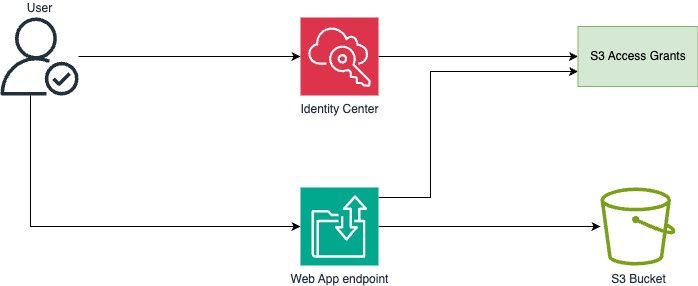
Storage Browser for Amazon S3 (alpha release) – An open source Amplify UI React component that you can add to your web applications to provide your end users with a simple interface for data stored in S3. The component uses the new ListCallerAccessGrants API to list all S3 buckets, prefixes, and objects they can access, as defined by their S3 Access Grants.

AWS Network Load Balancer – Now supports a configurable TCP idle timeout. For more information, see this Networking & Content Devliery Blog post.

AWS Gateway Load Balancer – Also supports a configurable TCP idle timeout. More info is available in this blog post.

Amazon ECS – Now supports AWS Graviton-based Spot compute with AWS Fargate. This allows to run fault-tolerant Arm-based applications with up to 70% lower costs compared to on-demand.

Zone Groups for Availability Zones in AWS Regions – We are working on extending the Zone Group construct to Availability Zones (AZs) with a consistent naming format across all AWS Regions.

Amazon Managed Service for Apache Flink – Now supports Apache Flink 1.20. You can upgrade to benefit from bug fixes, performance improvements, and new functionality added by the Flink community.

AWS Glue – Now provides job queuing. If quotas or limits are insufficient to start a Glue job, AWS Glue will now automatically queue the job and wait for limits to free up.

Amazon DynamoDB – Now supports Attribute-Based Access Control (ABAC) for tables and indexes (limited preview). ABAC is an authorization strategy that defines access permissions based on tags attached to users, roles, and AWS resources. Read more in this Database Blog post.

Amazon Bedrock – Stability AI’s top text-to-image models (Stable Image Ultra, Stable Diffusion 3 Large, and Stable Image Core) are now available to generate high-quality visuals with speed and precision.

Amazon Bedrock Agents – Now supports Anthropic Claude 3.5 Sonnet, including Anthropic recommended tool use for function calling which can improve developer and end user experience.

Amazon Sagemaker Studio – You can now use Amazon EMR Serverless directly from your Studio Notebooks to interactively query, explore and visualize data, and run Apache Spark jobs.

Amazon SageMaker – Introducing sagemaker-core, a new Python SDK that provides an object-oriented interface for interacting with SageMaker resources such as TrainingJob, Model, and Endpoint resource classes.

AWS AppSync – Improves monitoring by including DEBUG and INFO logging levels for its GraphQL APIs. You now have more granular control over log verbosity to make it easier to troubleshoot your APIs while optimizing readability and costs.

Amazon WorkSpaces Pools – You can now bring your Windows 10 or 11 licenses and provide a consistent desktop experience when switching between on-premise and virtual desktops.

Amazon SES – A new enhanced onboarding experience to help discover and activate key SES features, including recommendations for optimal setup and the option to enable the Virtual Deliverability Manager to enhance email deliverability.

Amazon Redshift – Now the Amazon Redshift Data API support session reuse to retain the context of a session from one query execution to another, reducing connection setup latency on repeated queries to the same data warehouse.

For a full list of AWS announcements, be sure to keep an eye on the What’s New at AWS page.

Other AWS news
Here are some additional projects, blog posts, and news items that you might find interesting:

Amazon Q Developer Code Challenge – At the 2024 AWS Summit in Sydney, we put two teams (one using Amazon Q Developer, one not) in a battle of coding prowess, starting with basic math and string manipulation, up to including complex algorithms and intricate ciphers. Here are the results.

Amazon Q Developer Code Challenge graph

AWS named as a Leader in the first Gartner Magic Quadrant for AI Code Assistants – It’s great to see how new technologies make the whole software development lifecycle easier and increase developer productivity.

Build powerful RAG pipelines with LlamaIndex and Amazon Bedrock – A deep dive tutorial that covers simple and advanced use cases.

Evaluating prompts at scale with Prompt Management and Prompt Flows for Amazon Bedrock – To implement an automated prompt evaluation system to streamline prompt development and improve the overall quality of AI-generated content.

Amazon Redshift data ingestion options – An overview of the available ingestion methods and how they work for different use cases.

Amazon Redshift data ingestion options

Upcoming AWS events
Check your calendars and sign up for upcoming AWS events:

AWS Summits – Join free online and in-person events that bring the cloud computing community together to connect, collaborate, and learn about AWS. AWS Summits for this year are coming to an end. There are two more left that you can still register: Toronto (September 11), and Ottawa (October 9).

AWS Community Days – Join community-led conferences that feature technical discussions, workshops, and hands-on labs driven by expert AWS users and industry leaders from around the world. Upcoming AWS Community Days are in the SF Bay Area (September 13), where our own Antje Barth is a keynote speaker, Argentina (September 14), Armenia (September 14), and DACH (in Munich on September 17).

AWS GenAI Lofts – Collaborative spaces and immersive experiences that showcase AWS’s cloud and AI expertise, while providing startups and developers with hands-on access to AI products and services, exclusive sessions with industry leaders, and valuable networking opportunities with investors and peers. Find a GenAI Loft location near you and don’t forget to register.

Browse all upcoming AWS-led in-person and virtual events here.

That’s all for this week. Check back next Monday for another Weekly Roundup!

— Danilo

This post is part of our Weekly Roundup series. Check back each week for a quick roundup of interesting news and announcements from AWS!

AWS Weekly Roundup: S3 Conditional writes, AWS Lambda, JAWS Pankration, and more (August 26, 2024)

Post Syndicated from Veliswa Boya original https://aws.amazon.com/blogs/aws/aws-weekly-roundup-s3-conditional-writes-aws-lambda-jaws-pankration-and-more-august-26-2024/

The AWS User Group Japan (JAWS-UG) hosted JAWS PANKRATION 2024 themed ‘No Border’. This is a 24-hour online event where AWS Heroes, AWS Community Builders, AWS User Group leaders, and others from around the world discuss topics ranging from cultural discussions to technical talks. One of the speakers at this event, Kevin Tuei, an AWS Community Builder based in Kenya, highlighted the importance of building in public and sharing your knowledge with others, a very fitting talk for this kind of event.

Last week’s launches
Here are some launches that got my attention during the previous week.

Amazon S3 now supports conditional writes – We’ve added support for conditional writes in Amazon S3 which check for existence of an object before creating it. With this feature, you can now simplify how distributed applications with multiple clients concurrently update data in parallel across shared datasets. Each client can conditionally write objects, making sure that it does not overwrite any objects already written by another client.

AWS Lambda introduces recursive loop detection APIs – With the recursive loop detection APIs you can now set recursive loop detection configuration on individual AWS Lambda functions. This allows you to turn off recursive loop detection on functions that intentionally use recursive patterns, avoiding disruption of these workloads. Using these APIs, you can avoid disruption to any intentionally recursive workflows as Lambda expands support of recursive loop detection to other AWS services. Configure recursive loop detection for Lambda functions through the Lambda Console, the AWS command line interface (CLI), or Infrastructure as Code tools like AWS CloudFormation, AWS Serverless Application Model (AWS SAM), or AWS Cloud Development Kit (CDK). This new configuration option is supported in AWS SAM CLI version 1.123.0 and CDK v2.153.0.

General availability of Amazon Bedrock batch inference API – You can now use Amazon Bedrock to process prompts in batch to get responses for model evaluation, experimentation, and offline processing. Using the batch API makes it more efficient to run inference with foundation models (FMs). It also allows you to aggregate responses and analyze them in batches. To get started, visit Run batch inference.

Other AWS news
Launched in July 2024, AWS GenAI Lofts is a global tour designed to foster innovation and community in the evolving landscape of generative artificial intelligence (AI) technology. The lofts bring collaborative pop-up spaces to key AI hotspots around the world, offering developers, startups, and AI enthusiasts a platform to learn, build, and connect. The events are ongoing. Find a location near you and be sure to attend soon.

Upcoming AWS events
AWS Summits – These are free online and in-person events that bring the cloud computing community together to connect, collaborate, and learn about AWS. Whether you’re in the Americas, Asia Pacific & Japan, or EMEA region, learn more about future AWS Summit events happening in your area. On a personal note, I look forward to being one of the keynote speakers at the AWS Summit Johannesburg happening this Thursday. Registrations are still open and I look forward to seeing you there if you’ll be attending.

AWS Community Days – Join an AWS Community Day event just like the one I mentioned at the beginning of this post to participate in technical discussions, workshops, and hands-on labs led by expert AWS users and industry leaders from your area. If you’re in New York, there’s an event happening in your area this week.

You can browse all upcoming in-person and virtual events here.

That’s all for this week. Check back next Monday for another Weekly Roundup!

– Veliswa

AWS Lambda introduces recursive loop detection APIs

Post Syndicated from Julian Wood original https://aws.amazon.com/blogs/compute/aws-lambda-introduces-recursive-loop-detection-apis/

This post is written by James Ngai, Senior Product Manager, AWS Lambda, and Aneel Murari, Senior Specialist SA, Serverless.

Today, AWS Lambda is announcing new recursive loop detection APIs that allow you to set recursive loop detection configuration on individual Lambda functions. This allows you to turn off recursive loop detection on functions that intentionally use recursive patterns, avoiding disruption of these workloads. You can use these APIs to avoid disruption to any intentionally recursive workflows as Lambda expands support of recursive loop detection to other AWS services.

Overview

AWS Lambda functions are triggered in response to events generated by various AWS services. These Lambda functions may interact with other AWS services by invoking the corresponding service APIs. Typically, the service and resource that generates the triggering event is distinct from the service and resource that the Lambda function calls. However, due to coding errors or configuration issues, there may be situations where these two resources are the same, leading to an infinite or recursive loop. Such misconfigurations can result in runaway workloads, which can incur unplanned usage and charges to your AWS account. For example, a Lambda function processes messages from an Amazon Simple Notification Service (SNS) topic but then puts the resulting notification back to the same SNS topic. This causes an infinite loop.

Lambda provides a built-in preventative guardrail that detects and stops functions running in a recursive or infinite loop between Lambda, Amazon Simple Queue Service (SQS), and SNS. This feature, known as recursive loop detection, is enabled by default for all Lambda functions. This serves as a protective mechanism against unintended usage and unexpected billing from runaway workloads.

Lambda uses an AWS X-Ray trace header primitive called “lineage” to track the number of times a function has been invoked with an event. When your function code sends an event using a supported AWS SDK version, Lambda increments the counter in the lineage header. If your function is then invoked with the same triggering event more than 16 times, Lambda stops the next invocation for that event and emits an Amazon CloudWatch RecursiveInvocationsDropped metric. If the function is invoked synchronously, Lambda returns a RecursiveInvocationException to the caller. For asynchronous invocations, Lambda sends the event to a dead-letter queue or on-failure destination if one is configured.

You do not need to configure active X-Ray tracing for this feature to work. For more information on this feature and an example scenario, please refer to Detecting and stopping recursive loops in AWS Lambda functions.

Although AWS generally discourages this practice due to the possibility of runaway workloads, some customers intentionally employ recursive patterns in their workflows. Previously, customers that run workloads that intentionally use recursive patterns could only opt-out of recursive loop detection on a per-account basis by contacting AWS Support. With these new APIs, customers can selectively opt-out of recursive loop detection on individual functions while maintaining this preventative guardrail for the remaining functions in their account that do not use recursive code.

Today we are introducing two new API actions for recursive loop detection:

  • GetFunctionRecursiveConfig returns details about a function’s recursive loop detection configuration.
  • PutFunctionRecursiveConfig sets the recursive loop detection configuration for a function. By default, recursive loop detection is turned ON for all functions.

How to use the new recursive loop detection APIs

You can configure recursive loop detection for Lambda functions through the Lambda Console, the AWS CLI, or Infrastructure as Code tools like AWS CloudFormation, AWS Serverless Application Model (AWS SAM), or AWS Cloud Development Kit (CDK). This new configuration option is supported in AWS SAM CLI version 1.123.0 and CDK v2.153.0.

If you turn recursive loop detection off for a function, the metric for RecursiveInvocationsDropped is no longer emitted for that function.

Turning off recursive loop detection on your function means that Lambda no longer prevents recursive invocations caused by misconfiguration. This may lead to unexpected usage and billing to your AWS account. You should explore alternate ways of architecting your workload that do not use recursive patterns. AWS recommends you exercise caution when turning off this guardrail feature.

Setting recursive loop detection configuration on a function using the Lambda Console

You can get recursive loop detection configuration in the AWS Lambda console:

  1. In the AWS Lambda Console, navigate to the Functions page. Select the function that uses intentionally recursive patterns.
  2. Select Configuration. You can find recursive loop detection controls under the Concurrency and recursion detection section.
  3. Recursive loop detection controls in the Lambda console

    Recursive loop detection controls in the Lambda console

  4. Recursive loop detection is turned on by default for all functions. You can change the recursive loop detection configuration of a function by choosing Edit.
  5. To turn off recursive loop detection for a function, select Allow recursive loops and select Save.
Setting to allow recursive loops

Setting to allow recursive loops

Setting recursive loop detection configuration using the AWS CLI

You can get the current recursion loop detection configuration of a Lambda function by using the following CLI command:

aws lambda get-function-recursion-config \
--region $AWS_REGION \
--function-name $FUNCTION_NAME

You can update the recursion loop detection configuration for a Lambda function by using the following CLI command:

aws lambda put-function-recursion-config \
--region $AWS_REGION \
--function-name $FUNCTION_NAME \
--recursive-loop Allow|Terminate

Make sure to set appropriate values for AWS_REGION and FUNCTION_NAME in the previous commands. Setting the put-function-recursion-config parameter to Allow turns off the default behavior of detecting recursive loops. Set this value to Terminate to switch back to default behavior.

Setting recursive loop detection configuration using AWS CloudFormation

You can control the recursive loop detection configuration for a Lambda function by setting the RecursiveLoop resource property in CloudFormation. Setting the value of this property to Allow turns off the default behavior of automatically detecting recursive loops. Set this property to Terminate if you want to switch it back to the default behavior. The following CloudFormation snippet shows RecursiveLoop set to Allow.

LambdaFunction:
    Type: AWS::Lambda::Function                                                                                                                                                                                    
    Properties:                                                                                                                                                                                       
      Code:                                                                                                                                                                                          
        S3Bucket:S3_BUCKET                                                                                                                                                                            
        S3Key: S3_KEY      
      Handler: com.example.App::handleRequest                                                                                                                                                        
      MemorySize: 1024
      Role:                                                                                                                                                                                          
        Fn::GetAtt:                                                                                                                                                                                  
        - LambdaFunctionRole                                                                                                                                                                         
        - Arn                                                                                                                                                                               
      Runtime: java17
      RecursiveLoop : Allow                                                                                                                                                                                                                                                                           
      Timeout: 20                                                                                                                                                                        
      TracingConfig:                                                                                                                                                                               
        Mode: Active                                                                                                                                                                                        

Extending recursive loop detection to additional AWS services

Today, recursive loop detection detects and stops loops between Lambda, SQS, and SNS after approximately 16 invocations. Lambda plans to extend support for recursive loop detection to additional AWS services. Using the APIs, you can turn off recursive loop detection for specific functions that use recursive patterns so that they are not impacted when Lambda expands recursive loop detection to additional AWS services in the future.

One way you can identify functions that use recursive patterns is by using the CloudWatch metric RecursiveInvocationsDropped.

  1. Set a CloudWatch alarm on all Lambda functions for the CloudWatch metric RecursiveInvocationsDropped. Configure the alarm to trigger when the metric is greater than a threshold of zero. Refer to CloudWatch documentation to set alarms. You can use the following CLI command to set this alarm:
  2. aws cloudwatch put-metric-alarm --alarm-name lambda-recursive-alarm --metric-name RecursiveInvocationsDropped --namespace AWS/Lambda --statistic Sum --period 60 --threshold 0 --comparison-operator GreaterThanOrEqualToThreshold --evaluation-periods 1 --alarm-actions $arn-of-sns-notification-topic
  3. When Lambda detects recursive invocations, it will emit the RecursiveInvocationsDropped metric, which will trigger the alarm. Note that Lambda will only detect and stop recursive invocations if all the services within the loop support recursive loop detection.
  4. Navigate to the CloudWatch Console and determine which function has emitted the RecursiveInvocationsDropped metric. On the Browse tab, under Metrics, choose to view metrics By Function Name and search for RecursiveInvocationsDropped. This will list all functions that have emitted that metric.
  5. RecursiveInvocationsDropped metric

    RecursiveInvocationsDropped metric

  6. Determine if recursion is the intended pattern for that function. If so, use the recursive loop detection API to turn off recursive loop detection for this function.

Conclusion

Lambda recursive loop detection automatically detects and stops recursive invocations between Lambda and supported services, preventing runaway workloads. In most cases, you should architect your workloads to avoid any recursive loops. In rare and special circumstances, you may want to turn off the default behavior on a case-by-case basis. The recursive loop detection APIs allow you to set recursive loop detection configuration on individual functions.

This feature is available in all AWS Regions where Lambda supports recursive loop detection.

To learn more about these APIs, refer to the AWS Lambda API Reference.

For more serverless learning resources, visit Serverless Land

Use AWS Glue to streamline SFTP data processing

Post Syndicated from Seun Akinyosoye original https://aws.amazon.com/blogs/big-data/use-aws-glue-to-streamline-sftp-data-processing/

In today’s data-driven world, seamless integration and transformation of data across diverse sources into actionable insights is paramount. AWS Glue is a serverless data integration service that helps analytics users to discover, prepare, move, and integrate data from multiple sources for analytics, machine learning (ML), and application development. With AWS Glue, you can discover and connect to hundreds of diverse data sources and manage your data in a centralized data catalog. It enables you to visually create, run, and monitor extract, transform, and load (ETL) pipelines to load data into your data lakes.

In this blog post, we explore how to use the SFTP Connector for AWS Glue from the AWS Marketplace to efficiently process data from Secure File Transfer Protocol (SFTP) servers into Amazon Simple Storage Service (Amazon S3), further empowering your data analytics and insights.

Introducing the SFTP connector for AWS Glue

The SFTP connector for AWS Glue simplifies the process of connecting AWS Glue jobs to extract data from SFTP storage and to load data into SFTP storage. This connector provides comprehensive access to SFTP storage, facilitating cloud ETL processes for operational reporting, backup and disaster recovery, data governance, and more.

Solution overview

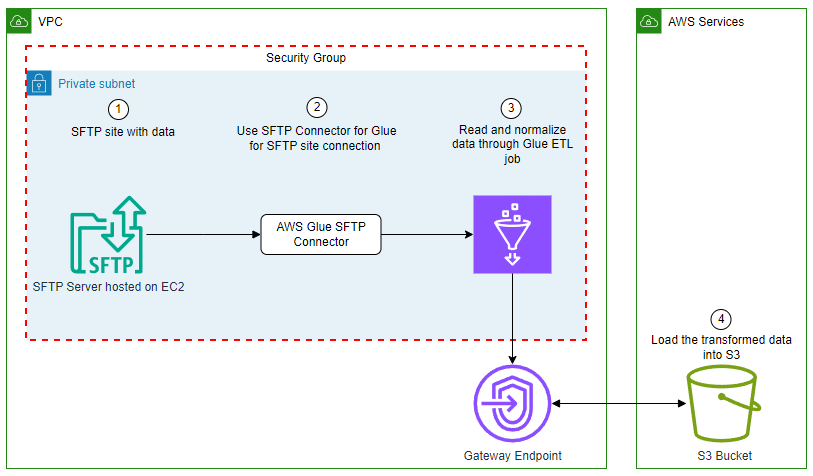
In this example, you use AWS Glue Studio to connect to an SFTP server, then enrich that data and upload it to Amazon S3. The SFTP connector is used to manage the connection to the SFTP server. You will load the event data from the SFTP site, join it to the venue data stored on Amazon S3, apply transformations, and store the data in Amazon S3. The event and venue files are from the TICKIT dataset.

The TICKIT dataset tracks sales activity for the fictional TICKIT website, where users buy and sell tickets online for sporting events, shows, and concerts. In this dataset, analysts can identify ticket movement over time, success rates for sellers, and best-selling events, venues, and seasons.

For this example, you use AWS Glue Studio to develop a visual ETL pipeline. This pipeline will read data from an SFTP server, perform transformations, and then load the transformed data into Amazon S3. The following diagram illustrates this architecture.

solution overview

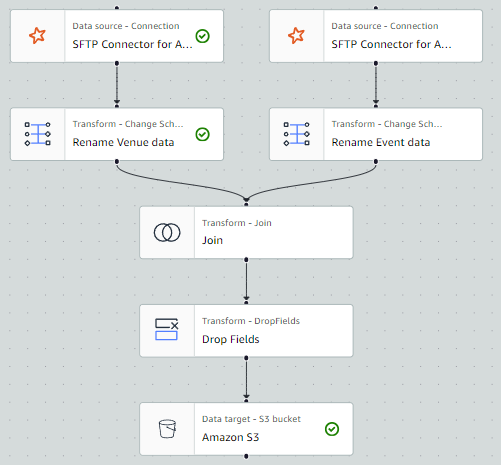
By the end of this post, your visual ETL job will resemble the following screenshot.

final solution

Prerequisites

For this solution, you need the following:

  • Subscribe to the SFTP Connector for AWS Glue in the AWS Marketplace.
  • Access to an SFTP server with permissions to upload and download data.
    • If the SFTP server is hosted on Amazon Elastic Compute Cloud (Amazon EC2), we recommend that the network communication between the SFTP server and the AWS Glue job happens within the virtual private cloud (VPC) as pictured in the preceding architecture diagram. Running your Glue job within a VPC and security group will be discussed further in the steps to create the AWS Glue job.
    • If the SFTP server is hosted within your on-premises network, we recommend that the network communication between the SFTP server and the Glue job happens through VPN or AWS DirectConnect.
  • Access to an S3 bucket or the permissions to create an S3 bucket. We recommend that you connect to that bucket using a gateway endpoint. This will allow you to connect to your S3 bucket directly from your VPC. If you need to create an S3 bucket to store the results, complete the following steps:
    1. On the Amazon S3 console, choose Buckets in the navigation pane.
    2. Choose Create bucket.
    3. For Name, enter a globally unique name for your bucket; for example, tickit-use1-<accountnumber>.
    4. Choose Create bucket.
    5. For this demonstration, create a folder with the name tickit in your S3 bucket.
    6. Create the gateway endpoint.
  • Create an AWS Identity and Access Management (IAM) role for the AWS Glue ETL job. You must specify an IAM role for the job to use. The role must grant access to all resources used by the job, including Amazon S3 (for any sources, targets, scripts, and temporary directories) and AWS Secrets Manager. For instructions, see Configure an IAM role for your ETL job.

Load dataset to SFTP site

Load the allevents_pipe.txt file and venue_pipe.txt file from the TICKIT dataset to your SFTP server.

Store SFTP server sign-in credentials

An AWS Glue connection is a Data Catalog object that stores connection information, such as URI strings and location to credentials that are stored in a Secrets Manager secret.

To store the SFTP server username and password in Secrets Manager, complete the following steps:

  1. On the Secrets Manager console, choose Secrets in the navigation pane.
  2. Choose Store a new secret.
  3. Select Other type of secret.
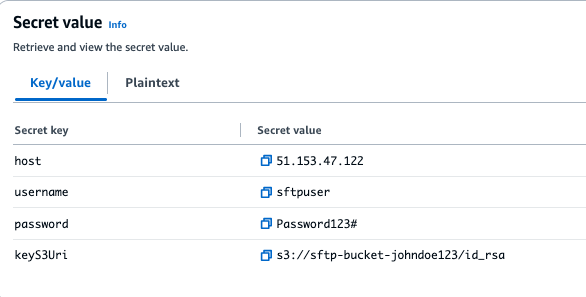
  4. Enter host as Secret key and your SFTP server’s IP address (for example, 153.47.122) as the Secret value, then choose Add row.
  5. Enter the username as Secret key and your SFTP username as Secret value, then choose Add row.
  6. Enter password as Secret key and your SFTP password as Secret value, then choose Add row.
  7. Enter keyS3Uri as Secret Key and the Amazon S3 location of your SFTP secret key file as Secret value

Note: Secret Value is the full S3 path where the SFTP server key file is stored. For example:s3://sftp-bucket-johndoe123/id_rsa.

  1. For Secret name, enter a descriptive name, then choose Next.
  2. Choose Next to move to the review step, then choose Store.

secret value

Create a connection to the SFTP server in AWS Glue

Complete the following steps to create your connection to the SFTP server.

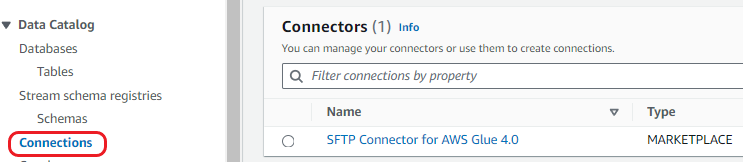
  1. On the AWS Glue console, under Data Catalog in the navigation pane, choose Connections.

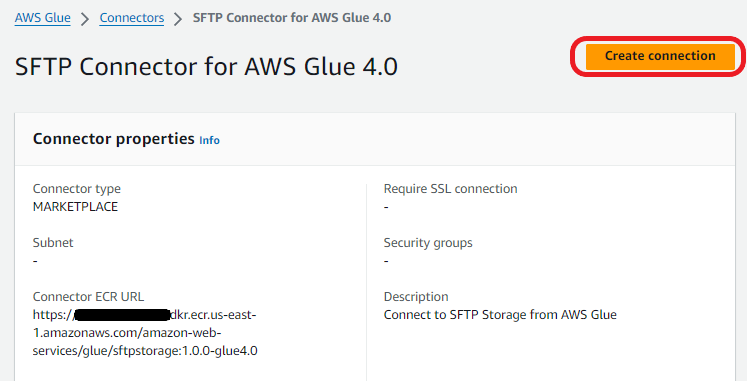
creating sftp connection from marketplace

  1. Select the SFTP connector for AWS Glue 4.0. Then choose Create connection.

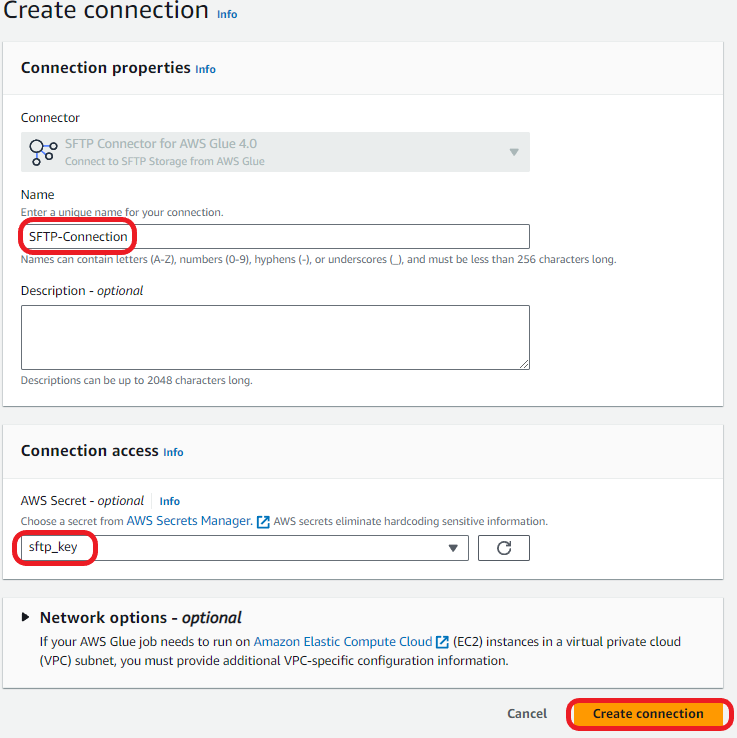
using sftp connector

  1. Enter a name for the connection and then, under Connection access, choose the Secrets Manager secret you created for you SFTP server credentials.

finishing sftp connection

Create a connection to the VPC in AWS Glue

A data connection is used to establish network connectivity between the VPC and the AWS Glue job. To create the VPC connection, complete the following steps.

  1. On the AWS Glue console page, click on Data Connections location on the left side menu.
  2. Click the Create connection button in the Connections panel.

creating connection for VPC

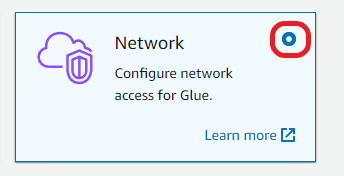
  1. Select Network

choosing network option

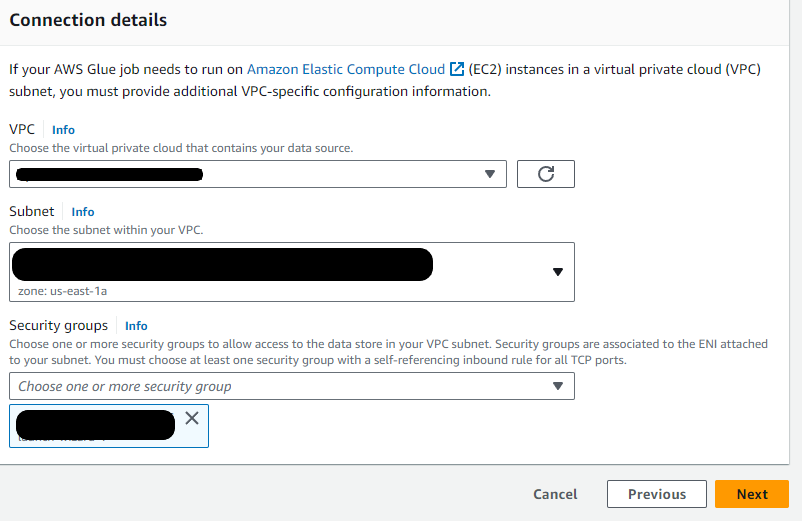
  1. Select the VPC, Subnet, and Security Group that your SFTP server resides in. Click Next.

choosing vpc, subnet, sg for connection

  1. Name the connection SFTP VPC Connect and then click

Deploy the solution

Now that we completed the prerequisites, we are going to setup the AWS Glue Studio job for this solution. We will create a glue studio job, add events and venue data from the SFTP server, carry out data transformations and load transformed data to s3.

Create your AWS Glue Studio job:

  1. On the AWS Glue console, under ETL Jobs in the navigation pane, choose Visual ETL.
  2. Select Visual ETL in the central pane.
  3. Choose the pencil icon to enter a name for your job.
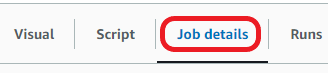
  4. Choose the Job details tab.

choosing job details

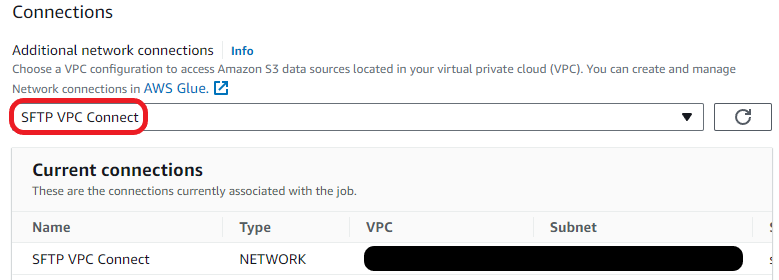
  1. Scroll down to and select Advanced properties and expand.
  2. Scroll to Connections and select SFTP VPC Connect.

choosing sftp vpc connection

  1. Choose Visual to go back to the workflow editor page.

Add the events data from the SFTP server as your first data set:

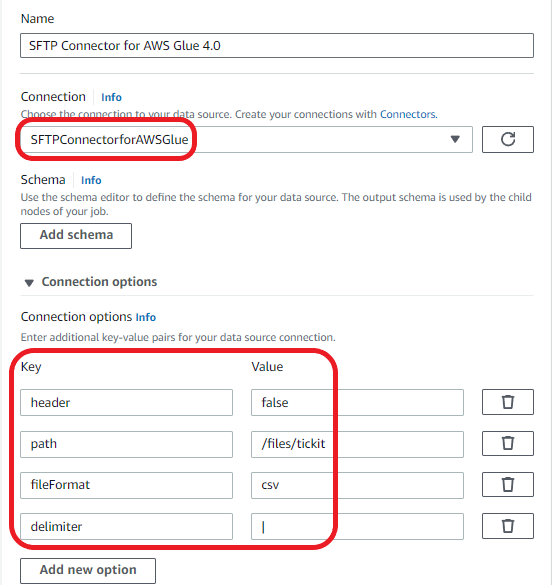
  1. Choose Add nodes and select SFTP Connector for AWS Glue 4.0 on the Sources
  2. Enter the following for Data source properties for:
    1. Connection: Select the connection to the SFTP server that you created in Create the connection to the SFTP server in AWS Glue.
    2. Enter the following key-value pairs:
Key Value
header false
path /files (this should be the path to the event file in your SFTP server)
fileFormat csv
delimiter |

glue studio job configuration

Rename the columns of the Event dataset:

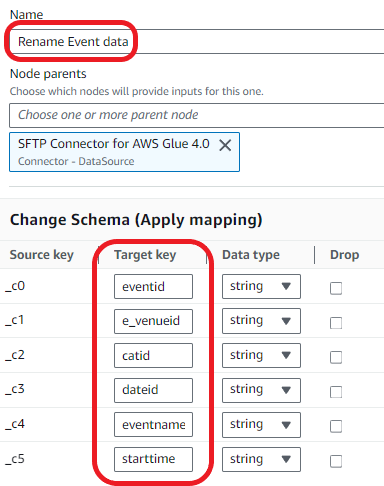
  1. Choose Add nodes and choose Change Schema on the Transforms
  2. Enter the following transform properties:
    1. For Name, enter Rename Event data.
    2. For Node parents, select SFTP Connector for AWS Glue 4.0.
    3. In the Change Schema section, map the source keys to the target keys:
      1. col0: eventid
      2. col1: e_venueid
      3. col2: catid
      4. col3: dateid
      5. col4: eventname
      6. col5: starttime

transforming event data

Add the venue_pipe.txt file from the SFTP site:

  1. Choose Add nodes and choose SFTP Connector for AWS Glue 4.0 on the Sources
  2. Enter the following for Data source properties for:
    1. Connection: Select the connection to the SFTP server that you created in Create the connection to the SFTP server in AWS Glue.
    2. Enter the following key-value pairs:
Key Value
header false
path /files (this should be the path to the venue file in your SFTP site)
fileFormat csv
delimiter |

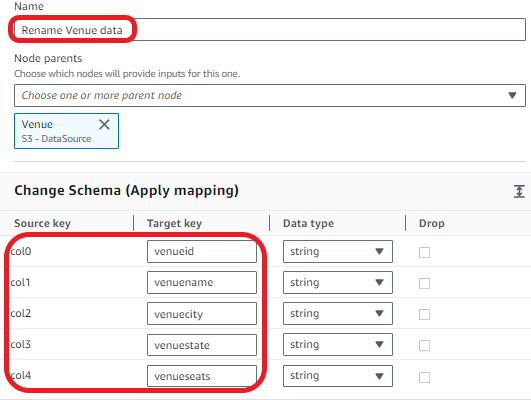
Rename the columns of the venue dataset:

  1. Choose Add nodes and choose Change Schema on the Transforms
  2. Enter the following transform properties:
    1. For Name, enter Rename Venue data.
    2. For Node parents, select Venue.
    3. In the Change Schema section, map the source keys to the target keys:
      1. col0: venueid
      2. col1: venuename
      3. col2: venuecity
      4. col3: venuestate
      5. col4: venueseats

transforming venue data

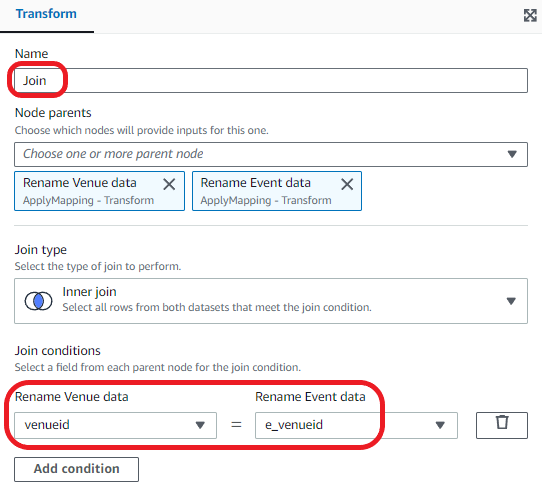
Join the venue and event datasets.

  1. Choose Add nodes and choose Join on the Transforms
  2. Enter the following transform properties:
    1. For Name, enter Join.
    2. For Node parents, select Rename Venue data and Rename Event data.
    3. For Join type¸ select Inner join.
    4. For Join conditions, select venueid for Rename Venue data and e_venueid for Rename Event data.

transform join venue and event

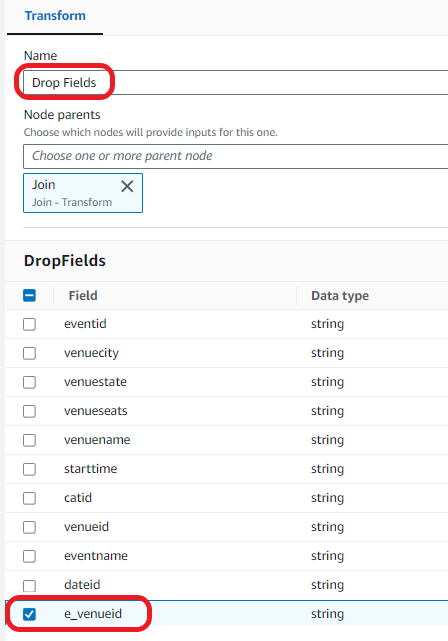
Drop the duplicate field:

  1. Choose Add nodes and choose Drop Fields on the Transforms
  2. Enter the following transform properties:
    1. For Name, enter Drop Fields.
    2. For Node parents, select Join.
    3. In the DropFields section, select e_venueid.

drop field transform

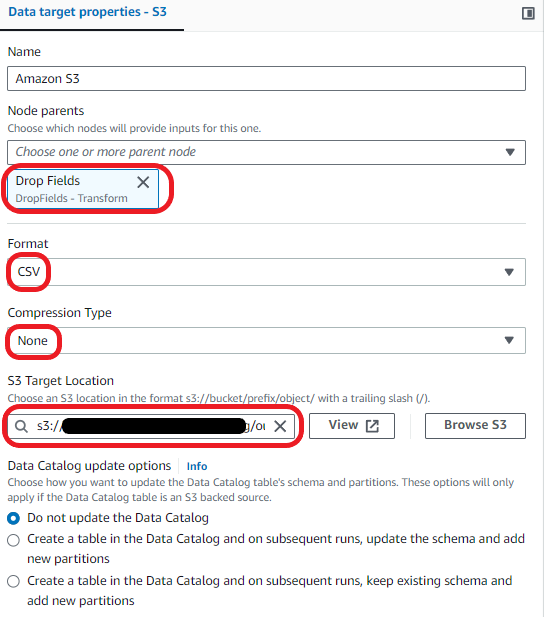
Load the data into your S3 bucket:

  1. Choose Add nodes and choose Amazon S3 from the Sources
  2. Enter the following transform properties:
    1. For Node parents, select Drop Fields.
    2. For Format, select CSV.
    3. For Compression Type, select None.
    4. For S3 Target Location, choose your S3 bucket and enter your desired file name followed by a slash (/).

loading data to s3 target

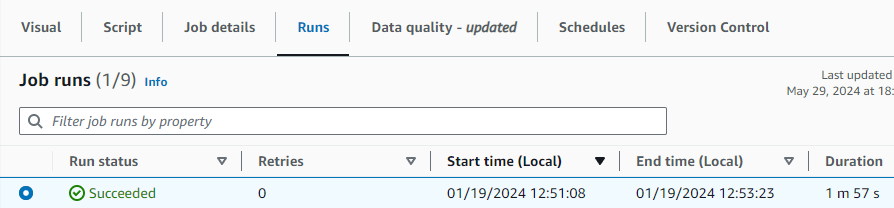
You can now save and run your AWS Glue visual ETL Job. Run the job and then go to the Runs tab to monitor its progress. After the job has completed, the Run status will change to Succeeded. The data will be in the target S3 bucket.

completed job

Clean up

To avoid incurring additional charges caused by resources created as part of this post, make sure you delete the items created in the AWS Account for this post:

  • Delete the Secrets Manager key created for the SFTP connector . credentials.
  • Delete the SFTP connector.
  • Unsubscribe from the SFTP Connector in AWS Marketplace.
  • Delete the data loaded to the Amazon S3 bucket and the bucket.
  • Delete the AWS Glue visual ETL job.

Conclusion

In this blog post, we demonstrated how to use the SFTP connector for AWS Glue to streamline the processing of data from SFTP servers into Amazon S3. This integration plays a pivotal role in enhancing your data analytics capabilities by offering an efficient and straightforward method to bring together disparate data sources. Whether your goal is to analyze SFTP server data for actionable insights, bolster your reporting mechanisms, or enrich your business intelligence tools, this connector ensures a more streamlined and cost-effective approach to achieving your data objectives.

For further details on the SFTP connector, see the SFTP Connector for Glue documentation.


About the Authors

Sean Bjurstrom is a Technical Account Manager in ISV accounts at Amazon Web Services, where he specializes in Analytics technologies and draws on his background in consulting to support customers on their analytics and cloud journeys. Sean is passionate about helping businesses harness the power of data to drive innovation and growth. Outside of work, he enjoys running and has participated in several marathons.

Seun Akinyosoye is a Sr. Technical Account Manager supporting public sector customer at Amazon Web Services. Seun has a background in analytics, data engineering which he uses to help customers achieve their outcomes and goals. Outside of work Seun enjoys spending time with his family, reading, traveling and supporting his favorite sports teams.

Vinod Jayendra is a Enterprise Support Lead in ISV accounts at Amazon Web Services, where he helps customers in solving their architectural, operational, and cost optimization challenges. With a particular focus on Serverless technologies, he draws from his extensive background in application development to deliver top-tier solutions. Beyond work, he finds joy in quality family time, embarking on biking adventures, and coaching youth sports team.

Kamen Sharlandjiev is a Sr. Big Data and ETL Solutions Architect, MWAA and AWS Glue ETL expert. He’s on a mission to make life easier for customers who are facing complex data integration and orchestration challenges. His secret weapon? Fully managed AWS services that can get the job done with minimal effort. Follow Kamen on LinkedIn to keep up to date with the latest MWAA and AWS Glue features and news!

Chris Scull is a Solutions Architect dealing in orchestration tools and modern cloud technologies. With two years of experience at AWS, Chris has developed an interest in Amazon Managed Workflows for Apache Airflow, which allows for efficient data processing and workflow management. Additionally, he is passionate about exploring the capabilities of GenAI with Bedrock, a platform for building generative AI applications on AWS.

Shengjie Luo is a Big data architect of Amazon Cloud Technology professional service team. Responsible for solutions consulting, architecture and delivery of AWS based data warehouse and data lake, and good at server-less computing, data migration, cloud data integration, data warehouse planning, data service architecture design and implementation.

Qiushuang Feng is a Solutions Architect at AWS, responsible for Enterprise customers’ technical architecture design, consulting, and design optimization on AWS Cloud services. Before joining AWS, Qiushuang worked in IT companies such as IBM and Oracle, and accumulated rich practical experience in development and analytics.

Stream data to Amazon S3 for real-time analytics using the Oracle GoldenGate S3 handler

Post Syndicated from Prasad Matkar original https://aws.amazon.com/blogs/big-data/stream-data-to-amazon-s3-for-real-time-analytics-using-the-oracle-goldengate-s3-handler/

Modern business applications rely on timely and accurate data with increasing demand for real-time analytics. There is a growing need for efficient and scalable data storage solutions. Data at times is stored in different datasets and needs to be consolidated before meaningful and complete insights can be drawn from the datasets. This is where replication tools help move the data from its source to the target systems in real time and transform it as necessary to help businesses with consolidation.

In this post, we provide a step-by-step guide for installing and configuring Oracle GoldenGate for streaming data from relational databases to Amazon Simple Storage Service (Amazon S3) for real-time analytics using the Oracle GoldenGate S3 handler.

Oracle GoldenGate for Oracle Database and Big Data adapters

Oracle GoldenGate is a real-time data integration and replication tool used for disaster recovery, data migrations, high availability. It captures and applies transactional changes in real time, minimizing latency and keeping target systems synchronized with source databases. It supports data transformation, allowing modifications during replication, and works with various database systems, including SQL Server, MySQL, and PostgreSQL. GoldenGate supports flexible replication topologies such as unidirectional, bidirectional, and multi-master configurations. Before using GoldenGate, make sure you have reviewed and adhere to the license agreement.

Oracle GoldenGate for Big Data provides adapters that facilitate real-time data integration from different sources to big data services like Hadoop, Apache Kafka, and Amazon S3. You can configure the adapters to control the data capture, transformation, and delivery process based on your specific requirements to support both batch-oriented and real-time streaming data integration patterns.

GoldenGate provides special tools called S3 event handlers to integrate with Amazon S3 for data replication. These handlers allow GoldenGate to read from and write data to S3 buckets. This option allows you to use Amazon S3 for GoldenGate deployments across on-premises, cloud, and hybrid environments.

Solution overview

The following diagram illustrates our solution architecture.

In this post, we walk you through the following high-level steps:

  1. Install GoldenGate software on Amazon Elastic Compute Cloud (Amazon EC2).
  2. Configure GoldenGate for Oracle Database and extract data from the Oracle database to trail files.
  3. Replicate the data to Amazon S3 using the GoldenGate for Big Data S3 handler.

Prerequisites

You must have the following prerequisites in place:

Install GoldenGate software on Amazon EC2

You need to run GoldenGate on EC2 instances. The instances must have adequate CPU, memory, and storage to handle the anticipated replication volume. For more details, refer to Operating System Requirements. After you determine the CPU and memory requirements, select a current generation EC2 instance type for GoldenGate.

Use the following formula to estimate the required trail space:

trail disk space = transaction log volume in 1 hour x number of hours down x .4

When the EC2 instance is up and running, download the following GoldenGate software from the Oracle GoldenGate Downloads page:

  • GoldenGate 21.3.0.0
  • GoldenGate for Big Data 21c

Use the following steps to upload and install the file from your local machine to the EC2 instance. Make sure that your IP address is allowed in the inbound rules of the security group of your EC2 instance before starting a session. For this use case, we install GoldenGate for Classic Architecture and Big Data. See the following code:

scp -i pem-key.pem 213000_fbo_ggs_Linux_×64_Oracle_shiphome.zip ec2-user@hostname:~/.
ssh -i pem-key.pem  ec2-user@hostname
unzip 213000_fbo_ggs_Linux_×64_Oracle_shiphome.zip

Install GoldenGate 21.3.0.0

Complete the following steps to install GoldenGate 21.3 on an EC2 instance:

  1. Create a home directory to install the GoldenGate software and run the installer:
    mkdir /u01/app/oracle/product/OGG_DB_ORACLE
    /fbo_ggs_Linux_x64_Oracle_shiphome/Disk1
    
    ls -lrt
    total 8
    drwxr-xr-x. 4 oracle oinstall 187 Jul 29 2021 install
    drwxr-xr-x. 12 oracle oinstall 4096 Jul 29 2021 stage
    -rwxr-xr-x. 1 oracle oinstall 918 Jul 29 2021 runInstaller
    drwxrwxr-x. 2 oracle oinstall 25 Jul 29 2021 response

  2. Run runInstaller:
    [oracle@hostname Disk1]$ ./runInstaller
    Starting Oracle Universal Installer.
    Checking Temp space: must be greater than 120 MB.   Actual 193260 MB Passed
    Checking swap space: must be greater than 150 B.       Actual 15624 MB    Passed

A GUI window will pop up to install the software.

  1. Follow the instructions in the GUI to complete the installation process. Provide the directory path you created as the home directory for GoldenGate.

After the GoldenGate software installation is complete, you can create the GoldenGate processes that read the data from the source. First, you configure OGG EXTRACT.

  1. Create an extract parameter file for the source Oracle database. The following code is the sample file content:
    [oracle@hostname Disk1]$vi eabc.prm
    
    -- Extract group name
    EXTRACT EABC
    SETENV (TNS_ADMIN = "/u01/app/oracle/product/19.3.0/network/admin")
    
    -- Extract database user login
    
    USERID ggs_admin@mydb, PASSWORD "********"
    
    -- Local trail on the remote host
    EXTTRAIL /u01/app/oracle/product/OGG_DB_ORACLE/dirdat/ea
    IGNOREREPLICATES
    GETAPPLOPS
    TRANLOGOPTIONS EXCLUDEUSER ggs_admin
    TABLE scott.emp;

  2. Add the EXTRACT on the GoldenGate prompt by running the following command:
    GGSCI> ADD EXTRACT EABC, TRANLOG, BEGIN NOW

  3. After you add the EXTRACT, check the status of the running programs with the info all

You will see the EXTRACT status is in the STOPPED state, as shown in the following screenshot; this is expected.

  1. Start the EXTRACT process as shown in the following figure.

The status changes to RUNNING. The following are the different statuses:

  • STARTING – The process is starting.
  • RUNNING – The process has started and is running normally.
  • STOPPED – The process has stopped either normally (controlled manner) or due to an error.
  • ABENDED – The process has been stopped in an uncontrolled manner. An abnormal end is known as ABEND.

This will start the extract process and a trail file will be created in the location mentioned in the extract parameter file.

  1. You can verify this by using the command stats <<group_name>>, as shown in the following screenshot.

Install GoldenGate for Big Data 21c

In this step, we install GoldenGate for Big Data in the same EC2 instance where we installed the GoldenGate Classic Architecture.

  1. Create a directory to install the GoldenGate for Big Data software. To copy the .zip file, follow these steps:
    mkdir /u01/app/oracle/product/OGG_BIG_DATA
    
    unzip 214000_ggs_Linux_x64_BigData_64bit.zip
    tar -xvf ggs_Linux_x64_BigData_64bit.tar
    
    GGSCI> CREATE SUBDIRS
    GGSCI> EDIT PARAM MGR
    PORT 7801
    
    GGSCI> START MGR

This will start the MANAGER program. Now you can install the dependencies required for the REPLICAT to run.

  1. Go to /u01/app/oracle/product/OGG_BIG_DATA/DependencyDownloader and run the sh file with the latest version of aws-java-sdk. This script downloads the AWS SDK, which provides client libraries for connectivity to the AWS Cloud.
    [oracle@hostname DependencyDownloader]$ ./aws.sh 1.12.748

Configure the S3 handler

To configure an GoldenGate Replicat to send data to an S3 bucket, you need to set up a Replicat parameter file and properties file that defines how data is handled and sent to Amazon S3.

AWS_ACCESS_KEY_ID and AWS_SECRET_ACCESS_KEY are the access key and secret access key of your IAM user, respectively. Do not hardcode credentials or security keys in the parameter and properties file. There are several methods available to achieve this, such as the following:

#!/bin/bash

# Use environment variables that are already set in the OS
export AWS_ACCESS_KEY_ID=$AWS_ACCESS_KEY_ID
export AWS_SECRET_ACCESS_KEY=$AWS_SECRET_ACCESS_KEY
export AWS_REGION="your_aws_region"

You can set these environment variables in your shell configuration file (e.g., .bashrc, .bash_profile, .zshrc) or use a secure method to set them temporarily:

export AWS_ACCESS_KEY_ID="your_access_key_id"
export AWS_SECRET_ACCESS_KEY="your_secret_access_key"

Configure the properties file

Create a properties file for the S3 handler. This file defines how GoldenGate will interact with your S3 bucket. Make sure that you have added the correct parameters as shown in the properties file.

The following code is an example of an S3 handler properties file (dirprm/reps3.properties):

[oracle@hostname dirprm]$ cat reps3.properties
gg.handlerlist=filewriter

gg.handler.filewriter.type=filewriter
gg.handler.filewriter.fileRollInterval=60s
gg.handler.filewriter.fileNameMappingTemplate=${tableName}${currentTimestamp}.json
gg.handler.filewriter.pathMappingTemplate=./dirout
gg.handler.filewriter.stateFileDirectory=./dirsta
gg.handler.filewriter.format=json
gg.handler.filewriter.finalizeAction=rename
gg.handler.filewriter.fileRenameMappingTemplate=${tableName}${currentTimestamp}.json
gg.handler.filewriter.eventHandler=s3

goldengate.userexit.writers=javawriter
#TODO Set S3 Event Handler- please update as needed
gg.eventhandler.s3.type=s3
gg.eventhandler.s3.region=eu-west-1
gg.eventhandler.s3.bucketMappingTemplate=s3bucketname
gg.eventhandler.s3.pathMappingTemplate=${tableName}_${currentTimestamp}
gg.eventhandler.s3.accessKeyId=$AWS_ACCESS_KEY_ID
gg.eventhandler.s3.secretKey=$AWS_SECRET_ACCESS_KEY

gg.classpath=/u01/app/oracle/product/OGG_BIG_DATA/dirprm/:/u01/app/oracle/product/OGG_BIG_DATA/DependencyDownloader/dependencies/aws_sdk_1.12.748/
gg.log=log4j
gg.log.level=DEBUG

#javawriter.bootoptions=-Xmx512m -Xms32m -Djava.class.path=.:ggjava/ggjava.jar -Daws.accessKeyId=my_access_key_id -Daws.secretKey=my_secret_key
javawriter.bootoptions=-Xmx512m -Xms32m -Djava.class.path=.:ggjava/ggjava.jar

Configure GoldenGate REPLICAT

Create the parameter file in /dirprm in the GoldenGate for Big Data home:

[oracle@hostname dirprm]$ vi rps3.prm
REPLICAT rps3
-- Command to add REPLICAT
-- add replicat fw, exttrail AdapterExamples/trail/tr
SETENV(GGS_JAVAUSEREXIT_CONF = 'dirprm/rps3.props')
TARGETDB LIBFILE libggjava.so SET property=dirprm/rps3.props
REPORTCOUNT EVERY 1 MINUTES, RATE
MAP SCOTT.EMP, TARGET gg.handler.s3handler;;

[oracle@hostname OGG_BIG_DATA]$ ./ggsci
GGSCI > add replicat rps3, exttrail ./dirdat/tr/ea
Replicat added.

GGSCI > info all
Program Status Group Lag at Chkpt Time Since Chkpt
MANAGER RUNNING
REPLICAT STOPPED RPS3 00:00:00 00:00:39

GGSCI > start *
Sending START request to Manager ...
Replicat group RPS3 starting.

Now you have successfully started the Replicat. You can verify this by running info and stats commands followed by the Replicat name, as shown in the following screenshot.

To confirm that the file has been replicated to an S3 bucket, open the Amazon S3 console and open the bucket you created. You can see that the table data has been replicated to Amazon S3 in JSON file format.

Best practices

Make sure that you are following the best practices on performance, compression, and security.

Consider the following best practices for performance:

The following are best practices for compression:

  • Enable compression for trail files to reduce storage requirements and improve network transfer performance.
  • Use GoldenGate’s built-in compression capabilities or use file system-level compression tools.
  • Strike a balance between compression level and CPU overhead, because higher compression levels may impact performance.

Lastly, when implementing Oracle GoldenGate for streaming data to Amazon S3 for real-time analytics, it’s crucial to address various security considerations to protect your data and infrastructure. Follow the security best practices for Amazon S3 and security options available for GoldenGate Classic Architecture.

Clean up

To avoid ongoing charges, delete the resources that you created as part of this post:

  1. Remove the S3 bucket and trail files if no longer needed and stop the GoldenGate processes on Amazon EC2.
  2. Revert the changes that you made in the database (such as grants, supplemental logging, and archive log retention).
  3. To delete the entire setup, stop your EC2 instance.

Conclusion

In this post, we provided a step-by-step guide for installing and configuring GoldenGate for Oracle Classic Architecture and Big Data for streaming data from relational databases to Amazon S3. With these instructions, you can successfully set up an environment and take advantage of the real-time analytics using a GoldenGate handler for Amazon S3, which we will explore further in an upcoming post.

If you have any comments or questions, leave them in the comments section.


About the Authors

Prasad Matkar is Database Specialist Solutions Architect at AWS based in the EMEA region. With a focus on relational database engines, he provides technical assistance to customers migrating and modernizing their database workloads to AWS.

Arun Sankaranarayanan is a Database Specialist Solution Architect based in London, UK. With a focus on purpose-built database engines, he assists customers in migrating and modernizing their database workloads to AWS.

Giorgio Bonzi is a Sr. Database Specialist Solutions Architect at AWS based in the EMEA region. With a focus on relational database engines, he provides technical assistance to customers migrating and modernizing their database workloads to AWS.

Plan your advertising campaigns with Amazon Marketing Cloud on AWS Clean Rooms, now generally available

Post Syndicated from Veliswa Boya original https://aws.amazon.com/blogs/aws/plan-your-advertising-campaigns-with-amazon-marketing-cloud-on-aws-clean-rooms-now-generally-available/

Today, we are announcing the general availability of Amazon Marketing Cloud (AMC) on AWS Clean Rooms to help advertisers use their first-party signals to collaborate with Amazon Ads unique signals. With this collaboration, advertisers can generate differentiated insights, discover new audiences, and enable advertising campaign planning, activation, and measurement use cases, all without having to move their underlying signals outside of their AWS account. With AMC on AWS Clean Rooms, customers can easily prepare their data, match and create audiences, use custom insights to activate more relevant advertising campaigns with Amazon Ads, and measure return on ad spend. All of this can be accomplished from the most secure cloud computing environment available today.

Advertisers continually strive to reach new audiences and deliver relevant, marketing campaigns to better engage their customers. Yet, the advertising and marketing landscape is undergoing a fundamental shift with signal loss and fragmentation. As such, advertisers and their partners need to collaborate together using signals that are stored across many applications to personalize their advertising campaigns. However, to work with one another to gather insights, companies typically need to share a copy of their signals with their partners, which is often not aligned with their data governance, security and privacy, IT, and legal teams’ policies. As a result, many businesses miss opportunities to fully maximize the value of their first-party signals and improve planning, activation, and measurement outcomes for their campaigns.

AMC on AWS Clean Rooms makes it easier and scalable for advertisers to use their first-party signals with Amazon Ads, including collaborating across event-level signals and modeling unique audiences to help improve media planning, activation, and outcomes without having to move underlying signals outside their cloud environment.

AMC on AWS Clean Rooms prerequisites (environment setup)
To get started with AMC on AWS Clean Rooms, the advertiser needs an AWS account and a dataset that contains user population and event-level data stored in open data formats (CSV, Parquet, or Iceberg) in an Amazon Simple Storage Service (Amazon S3) bucket. The next step is to send an email to the Amazon Ads team to request the creation of an AMC instance. Once an instance has been created, the Amazon Ads team will create an AWS Clean Rooms collaboration and invite the advertiser to join the collaboration.

How it works
1. Join an AWS Clean Rooms collaboration and create an ID namespace.
2. Configure and associate tables to an AMC collaboration.
3. Run an ID mapping workflow to create and populate the ID mapping table.
4. Run a query in AMC.

Walkthrough

1. Join an AWS Clean Rooms collaboration and create an ID namespace.
The advertiser will accept the collaboration invite by creating a membership in their AWS account. Once in the collaboration, the advertiser will access the AWS Clean Rooms console and then select the AWS Entity Resolution ID namespace generated when the collaboration was created to start the process of using their data for matching and collaboration in AWS Clean Rooms. Next, specify the AWS Glue table and the associated schema mapping and choose the S3 bucket in the same AWS Region as the collaboration for temporarily storing your data while it processes. Lastly, the advertiser will provide permissions to read your data input from AWS Glue and write to Amazon S3 on their behalf.

In the AirportLink collaboration shown in the following screenshot, the advertiser (member AirportLink2) accepts a collaboration invite sent by member AirportLink1.


2. Configure and associate tables to an AMC collaboration.
After joining the collaboration, the advertiser will create configured tables on their purchase data, add custom analysis rule, and associate the configured table to the collaboration.


Within the collaboration, the advertiser will set up a collaboration analysis rule to control which party can receive the result of a query run on the associated table.


3. Run an ID mapping workflow to create and populate the ID mapping table.
Now that the ID namespace is associated with the collaboration, the Amazon Ads team will create an ID mapping table in the AWS Clean Rooms console. This step requires both the advertiser (source) and the Amazon Ads team (target) to associate their ID namespace resources to the collaboration. Amazon Ads will provide the methods of mapping and configuration, add the details for querying to name the ID mapping table, and provide permission for AWS Clean Rooms to execute and track the ID mapping workflow job on their behalf. Finally, the Amazon Ads team will select Create and Populate to start the mapping workflow and generate an ID mapping table that captures a common user cohort, who were matched on the rules provided in Step 2.

4. Run a query in AMC.
Advertisers can either use templates or write a SQL query to run for analysis and get query results for further insights. They can run the SQL query in the following ways:

  • Run a SQL query with AMC data and the advertiser’s data that return the results to the advertiser’s S3 bucket using aggregate analysis. An example query is “How many of the customers who are registered for my email list saw the ads I’m running on Amazon?”
  • Run a SQL query to create an audience on the advertiser’s data or overlap with AMC signals that returns results to the S3 bucket of Amazon Ads. An example query is to generate an audience to target in an ad campaign.
  • Run an AWS Clean Rooms ML lookalike modeling job where Amazon Ads contributes the configured model and the advertiser contributes a seed audience. The resulting segment (list of user ad IDs) is sent to Amazon Ads.


After running the query, the advertiser can create an audience using a rule-based audience or a similar audience by navigating to the Audience tab in AMC. The output of the audience query will be sent directly to Amazon Demand Side Platform (DSP). The following table shows the options available to you when creating the audience:

If you want to
Then
Use pre-built audience templates Select Create with instructional query from the dropdown list
Create custom audience queries Select Create new query from the dropdown list

When creating a new query, the advertiser will configure various options such as name, description, and date adjustments. Additionally, the advertiser can choose from the two following audience types:

– Rule-based audience – Create audience-based on the audience query.
– Similar audience – Create machine learning (ML) based audiences based on the seed audience outputs from the audience query.

Now available
AMC on AWS Clean Rooms is available in in the US East (N. Virginia) Region. Be sure to check the full Region list for future updates. Learn more about AMC on AWS Clean Rooms in the AWS documentation.

Give it a try by emailing the Amazon Ads team to get started and send feedback to the AWS re:Post for AWS Clean Rooms or through your usual AWS Support contacts.

— Veliswa

Migrate data from an on-premises Hadoop environment to Amazon S3 using S3DistCp with AWS Direct Connect

Post Syndicated from Vicky Jacob original https://aws.amazon.com/blogs/big-data/migrate-data-from-an-on-premises-hadoop-environment-to-amazon-s3-using-s3distcp-with-aws-direct-connect/

This post demonstrates how to migrate nearly any amount of data from an on-premises Apache Hadoop environment to Amazon Simple Storage Service (Amazon S3) by using S3DistCp on Amazon EMR with AWS Direct Connect.

To transfer resources from a target EMR cluster, the traditional Hadoop DistCp must be run on the source cluster to move data from one cluster to another, which invokes a MapReduce job on the source cluster and can consume a lot of cluster resources (depending on the data volume). To avoid this problem and minimize the load on the source cluster, you can use S3DistCp with Direct Connect to migrate terabytes of data from an on-premises Hadoop environment to Amazon S3. This process runs the job on the target EMR cluster, minimizing the burden on the source cluster.

This post provides instructions for using S3DistCp for migrating data to the AWS Cloud. Apache DistCp is an open source tool that you can use to copy large amounts of data. S3DistCp is similar to DistCp, but optimized to work with AWS, particularly Amazon S3. When compared to Hadoop DistCp, S3DistCp is more scalable, with higher throughput and efficient for parallel copying of large numbers of objects across s3 buckets and across AWS accounts.

Solution overview

The architecture for this solution includes the following components:

  • Source technology stack:
    • A Hadoop cluster with connectivity to the target EMR cluster over Direct Connect
  • Target technology stack:

The following architecture diagram shows how you can use the S3DistCp from the target EMR cluster to migrate huge volumes of data from an on-premises Hadoop environment through a private network connection, such as Direct Connect to Amazon S3.

S3DistCpThis migration approach uses the following tools to perform the migration:

  • S3DistCp – S3DistCp is similar to DistCp, but optimized to work with AWS, particularly Amazon S3. The command for S3DistCp in Amazon EMR version 4.0 and later is s3-dist-cp, which you add as a step in a cluster or at the command line. With S3DistCp, you can efficiently copy large amounts of data from Amazon S3 into Hadoop Distributed Filed System (HDFS), where it can be processed by subsequent steps in your EMR cluster. You can also use S3DistCp to copy data between S3 buckets or from HDFS to Amazon S3. S3DistCp is more scalable and efficient for parallel copying of large numbers of objects across buckets and across AWS accounts.
  • Amazon S3 – Amazon S3 is an object storage service. You can use Amazon S3 to store and retrieve any amount of data at any time, from anywhere on the web.
  • Amazon VPC – Amazon VPC provisions a logically isolated section of the AWS Cloud where you can launch AWS resources in a virtual network that you’ve defined. This virtual network closely resembles a traditional network that you would operate in your own data center, with the benefits of using the scalable infrastructure of AWS.
  • AWS Identity and Access Management (IAM) – IAM is a web service for securely controlling access to AWS services. With IAM, you can centrally manage users, security credentials such as access keys, and permissions that control which AWS resources users and applications can access.
  • Direct Connect – Direct Connect links your internal network to a Direct Connect location over a standard ethernet fiber-optic cable. One end of the cable is connected to your router, the other to a Direct Connect router. With this connection, you can create virtual interfaces directly to public AWS services (for example, to Amazon S3) or to Amazon VPC, bypassing internet service providers in your network path. A Direct Connect location provides access to AWS in the AWS Region with which it’s associated. You can use a single connection in a public Region or in AWS GovCloud (US) to access public AWS services in all other public Regions.

In the following sections, we discuss the steps to perform the data migration using S3DistCp.

Prerequisites

Before you begin, you should have the following prerequisites:

Get the active NameNode from the source Hadoop cluster

Sign in to any of the nodes on the source cluster and run the following commands on bash to get the active NameNode on the cluster.

In newer versions of Hadoop, run the following command to get the service status, which will list the active NameNode on the cluster:

[hadoop@hadoopcluster01 ~]$ hdfs haadmin -getAllServiceState
hadoopcluster01.test.amazon.local:8020                active
hadoopcluster02.test.amazon.local:8020                standby
hadoopcluster03.test.amazon.local:8020                standby

On older versions of Hadoop, run the following method on bash to get the active NameNode on the cluster:

[hadoop@hadoopcluster01 ~]$ getActiveNameNode(){
    nameservice=$(hdfs getconf -confKey dfs.nameservices);
    ns=$(hdfs getconf -confKey dfs.ha.namenodes.${nameservice});
    IFS=',' read -ra ADDR <<< "$ns"
    activeNode=''
    for n in "${ADDR[@]}"; do
        state=$(hdfs haadmin -getServiceState $n)
        if [ $state = "active" ]; then
            echo "$state ==>$n"
            activeNode=$n
        fi
    done
    activeNodeFQDN=$(hdfs getconf -confKey dfs.namenode.rpc-address.${nameservice}.${activeNode})
    echo $activeNodeFQDN;
}

[hadoop@hadoopcluster01 ~]$ getActiveNameNode
active ==>namenode863
hadoopcluster01.test.amazon.local:8020

Validate connectivity from the EMR cluster to the source Hadoop cluster

As mentioned in the prerequisites, you should have an EMR cluster and attach a custom IAM role for Amazon EMR. Run the following command to validate the connectivity from the target EMR cluster to the source Hadoop cluster:

[hadoop@emrcluster01 ~]$ telnet hadoopcluster01.test.amazon.local 8020
Trying 192.168.0.1...
Connected to hadoopcluster01.test.amazon.local.
Escape character is '^]'.
^]

Alternatively, you can run the following command:

[hadoop@emrcluster01 ~]$ curl -v telnet://hadoopcluster01.test.amazon.local:8020
*   Trying 192.168.0.1:8020...
* Connected to hadoopcluster01.test.amazon.local (192.168.0.1) port 8020 (#0)

Validate if the source HDFS path exists

Check if the source HDFS path is valid. If the following command returns 0, indicating that it’s valid, you can proceed to the next step:

[hadoop@emrcluster01 ~]$ hdfs dfs -test -d hdfs://hadoopcluster01.test.amazon.local/user/hive/warehouse/test.db/test_table01
[hadoop@emrcluster01 ~]$ echo $?
0

Transfer data using S3DistCp

To transfer the source HDFS folder to the target S3 bucket, use the following command:

s3-dist-cp --src hdfs://hadoopcluster01.test.amazon.local/user/hive/warehouse/test.db/test_table01 --dest s3://<BUCKET_NAME>/user/hive/warehouse/test.db/test_table01

To transfer large files in multipart chunks, use the following command to set the chuck size:

s3-dist-cp --src hdfs://hadoopcluster01.test.amazon.local/user/hive/warehouse/test.db/test_table01 --dest s3://<BUCKET_NAME>/user/hive/warehouse/test.db/test_table01 --multipartUploadChunkSize=1024

This will invoke a MapReduce job on the target EMR cluster. Depending on the volume of the data and the bandwidth speed, the job can take a few minutes up to a few hours to complete.

To get the list of running yarn applications on the cluster, run the following command:

yarn application -list

Validate the migrated data

After the preceding MapReduce job completes successfully, use the following steps to validate the data copied over:

source_size=$(hdfs dfs -du -s hdfs://hadoopcluster01.test.amazon.local/user/hive/warehouse/test.db/test_table01 | awk -F' ' '{print $1}')
target_size=$(aws s3 ls --summarize --recursive s3://<BUCKET_NAME>/user/hive/warehouse/test.db/test_table01 | grep "Total Size:" | awk -F' ' '{print $3}')

printf "Source HDFS folder Size in bytes: $source_size"
printf "Target S3 folder Size in bytes: $target_size" 

If the source and target size aren’t equal, perform the cleanup step in the next section and repeat the preceding S3DistCp step.

Clean up partially copied or errored out partitions and files

S3DistCp doesn’t clean up partially copied files and partitions if it fails while copying. Clean up partially copied or errored out partitions and files before you reinitiate the S3DistCp process. To clean up objects on Amazon S3, use the following AWS CLI command to perform the delete operation:

aws s3 rm s3://<BUCKET_NAME>/path/to/the/object –recursive

Best practices

To avoid copy errors when using S3DistCP to copy a single file (instead of a directory) from Amazon S3 to HDFS, use Amazon EMR 5.33.0 or later, or Amazon EMR 6.3.0 or later.

Limitations

The following are limitations of this approach:

  • If S3DistCp is unable to copy some or all of the specified files, the cluster step fails and returns a non-zero error code. If this occurs, S3DistCp doesn’t clean up partially copied files.
  • S3DistCp doesn’t support concatenation for Parquet files. Use PySpark instead. For more information, see Concatenating Parquet files in Amazon EMR.
  • VPC limitations apply to Direct Connect for Amazon S3. For more information, see AWS Direct Connect quotas.

Conclusion

In this post, we demonstrated the power of S3DistCp to migrate huge volumes of data from a source Hadoop cluster to a target S3 bucket or HDFS on an EMR cluster. With S3DistCp, you can migrate terabytes of data without affecting the compute resources on the source cluster as compared to Hadoop DistCp.

For more information about using S3DistCp, see the following resources:


About the Author

Vicky Wilson Jacob is a Senior Data Architect with AWS Professional Services Analytics Practice. Vicky specializes in Big Data, Data Engineering, Machine Learning, Data Science and Generative AI. He is passionate about technology and solving customer challenges. At AWS, he works with companies helping customers implement big data, machine learning, analytics, and generative AI solutions on cloud. Outside of work, he enjoys spending time with family, singing, and playing guitar.

AWS Weekly Roundup: Advanced capabilities in Amazon Bedrock and Amazon Q, and more (July 15, 2024).

Post Syndicated from Abhishek Gupta original https://aws.amazon.com/blogs/aws/aws-weekly-roundup-advanced-capabilities-in-amazon-bedrock-and-amazon-q-and-more-july-15-2024/

As expected, there were lots of exciting launches and updates announced during the AWS Summit New York. You can quickly scan the highlights in Top Announcements of the AWS Summit in New York, 2024.

NY-Summit-feat-img

My colleagues and fellow AWS News Blog writers Veliswa Boya and Sébastien Stormacq were at the AWS Community Day Cameroon last week. They were energized to meet amazing professionals, mentors, and students – all willing to learn and exchange thoughts about cloud technologies. You can access the video replay to feel the vibes or just watch some of the talks!

AWS Community Day Cameroon 2024

Last week’s launches
In addition to the launches at the New York Summit, here are a few others that got my attention.

Advanced RAG capabilities Knowledge Bases for Amazon Bedrock – These include custom chunking options to enable customers to write their own chunking code as a Lambda function; smart parsing to extract information from complex data such as tables; and query reformulation to break down queries into simpler sub-queries, retrieve relevant information for each, and combine the results into a final comprehensive answer.

Amazon Bedrock Prompt Management and Prompt Flows – This is a preview launch of Prompt Management that help developers and prompt engineers get the best responses from foundation models for their use cases; and Prompt Flows accelerates the creation, testing, and deployment of workflows through an intuitive visual builder.

Fine-tuning for Anthropic’s Claude 3 Haiku in Amazon Bedrock (preview) – By providing your own task-specific training dataset, you can fine tune and customize Claude 3 Haiku to boost model accuracy, quality, and consistency to further tailor generative AI for your business.

IDE workspace context awareness in Amazon Q Developer chat – Users can now add @workspace to their chat message in Q Developer to ask questions about the code in the project they currently have open in the IDE. Q Developer automatically ingests and indexes all code files, configurations, and project structure, giving the chat comprehensive context across your entire application within the IDE.

New features in Amazon Q Business –  The new personalization capabilities in Amazon Q Business are automatically enabled and will use your enterprise’s employee profile data to improve their user experience. You can now get answers from text content in scanned PDFs, and images embedded in PDF documents, without having to use OCR for preprocessing and text extraction.

Amazon EC2 R8g instances powered by AWS Graviton4 are now generally available – Amazon EC2 R8g instances are ideal for memory-intensive workloads such as databases, in-memory caches, and real-time big data analytics. These are powered by AWS Graviton4 processors and deliver up to 30% better performance compared to AWS Graviton3-based instances.

Vector search for Amazon MemoryDB is now generally available – Vector search for MemoryDB enables real-time machine learning (ML) and generative AI applications. It can store millions of vectors with single-digit millisecond query and update latencies at the highest levels of throughput with >99% recall.

Introducing Valkey GLIDE, an open source client library for Valkey and Redis open source – Valkey is an open source key-value data store that supports a variety of workloads such as caching, and message queues. Valkey GLIDE is one of the official client libraries for Valkey and it supports all Valkey commands. GLIDE supports Valkey 7.2 and above, and Redis open source 6.2, 7.0, and 7.2.

Amazon OpenSearch Service enhancements – Amazon OpenSearch Serverless now supports workloads up to 30TB of data for time-series collections enabling more data-intensive use cases, and an innovative caching mechanism that automatically fetches and intelligently manages data, leading to faster data retrieval, efficient storage usage, and cost savings. Amazon OpenSearch Service has now added support for AI powered Natural Language Query Generation in OpenSearch Dashboards Log Explorer so you can get started quickly with log analysis without first having to be proficient in PPL.

Open source release of Secrets Manager Agent for AWS Secrets Manager – Secrets Manager Agent is a language agnostic local HTTP service that you can install and use in your compute environments to read secrets from Secrets Manager and cache them in memory, instead of making a network call to Secrets Manager.

Amazon S3 Express One Zone now supports logging of all events in AWS CloudTrail – This capability lets you get details on who made API calls to S3 Express One Zone and when API calls were made, thereby enhancing data visibility for governance, compliance, and operational auditing.

Amazon CloudFront announces managed cache policies for web applications – Previously, Amazon CloudFront customers had two options for managed cache policies, and had to create custom cache policies for all other cases. With the new managed cache policies, CloudFront caches content based on the Cache-Control headers returned by the origin, and defaults to not caching when the header is not returned.

For a full list of AWS announcements, be sure to keep an eye on the What’s New at AWS page.

We launched existing services in additional Regions:

Other AWS news
Here are some additional projects, blog posts, and news items that you might find interesting:

Context window overflow: Breaking the barrier – This blog post dives into intricate workings of generative artificial intelligence (AI) models, and why is it crucial to understand and mitigate the limitations of CWO (context window overflow).

Using Agents for Amazon Bedrock to interactively generate infrastructure as code – This blog post explores how Agents for Amazon Bedrock can be used to generate customized, organization standards-compliant IaC scripts directly from uploaded architecture diagrams.

Automating model customization in Amazon Bedrock with AWS Step Functions workflow – This blog post covers orchestrating repeatable and automated workflows for customizing Amazon Bedrock models and how AWS Step Functions can help overcome key pain points in model customization.

AWS open source news and updates – My colleague Ricardo Sueiras writes about open source projects, tools, and events from the AWS Community; check out Ricardo’s page for the latest updates.

Upcoming AWS events
Check your calendars and sign up for upcoming AWS events:

AWS Summits – Join free online and in-person events that bring the cloud computing community together to connect, collaborate, and learn about AWS. To learn more about future AWS Summit events, visit the AWS Summit page. Register in your nearest city: Bogotá (July 18), Taipei (July 23–24), AWS Summit Mexico City (Aug. 7), and AWS Summit Sao Paulo (Aug. 15).

AWS Community Days – Join community-led conferences that feature technical discussions, workshops, and hands-on labs led by expert AWS users and industry leaders from around the world. Upcoming AWS Community Days are in Aotearoa (Aug. 15), Nigeria (Aug. 24), New York (Aug. 28), and Belfast (Sept. 6).

Browse all upcoming AWS led in-person and virtual events and developer-focused events.

That’s all for this week. Check back next Monday for another Weekly Roundup!

— Abhishek

This post is part of our Weekly Roundup series. Check back each week for a quick roundup of interesting news and announcements from AWS!

Monitor data events in Amazon S3 Express One Zone with AWS CloudTrail

Post Syndicated from Elizabeth Fuentes original https://aws.amazon.com/blogs/aws/monitor-data-events-in-amazon-s3-express-one-zone-with-aws-cloudtrail/

In a News Blog post for re:Invent 2023, we introduced you to Amazon S3 Express One Zone, a high-performance, single-Availability Zone (AZ) storage class purpose-built to deliver consistent single-digit millisecond data access for your most frequently accessed data and latency-sensitive applications. It is well-suited for demanding applications and is designed to deliver up to 10x better performance than S3 Standard. S3 Express One Zone uses S3 directory buckets to store objects in a single AZ.

Starting today, S3 Express One Zone supports AWS CloudTrail data event logging, allowing you to monitor all object-level operations like PutObject, GetObject, and DeleteObject, in addition to bucket-level actions like CreateBucket and DeleteBucket that were already supported. This enables auditing for governance and compliance, and can help you take advantage of S3 Express One Zone’s 50% lower requests costs compared to the S3 Standard storage class.

Using this new capability, you can quickly determine which S3 Express One Zone objects were created, read, updated, or deleted, and identify the source of the API calls. If you detect unauthorized S3 Express One Zone object access, you can take immediate action to restrict access. Additionally, you can use the CloudTrail integration with Amazon EventBridge to create rule-based workflows that are triggered by data events.

Using CloudTrail data event logging for Amazon S3 Express One Zone
I start in the Amazon S3 console. Following the steps to create a directory bucket, I create an S3 bucket and choose Directory as the bucket type and apne1-az4 as the Availability Zone. In Base Name, I enter s3express-one-zone-cloudtrail and a suffix that includes Availability Zone ID of the Availability Zone is automatically added to create the final name. Finally, I select the checkbox to acknowledge that Data is stored in a single Availability Zone and choose Create bucket.

To enable data event logging for S3 Express One Zone, I go to the CloudTrail console. I enter the name and create the CloudTrail trail responsible for tracking the events of my S3 directory bucket.

In Step 2: Choose log events, I select Data events with Advanced event selectors are enabled selected.

For Data event type, I choose S3 Express. I can choose Log all events as the Log selector template to manage data events for all S3 directory buckets.

However, I want the event data store to log events only for my S3 directory bucket s3express-one-zone-cloudtrail--apne1-az4--x-s3. In this case, I choose Custom as the Log selector template and indicate the ARN of my directory bucket. Learn more in the documentation on filtering data events by using advanced event selectors.

Finish up with Step 3: review and create. Now, you have logging with CloudTrail enabled.

CloudTrail data event logging for S3 Express One Zone in action:
Using the S3 console, I upload and download a file to my S3 directory bucket.

Using AWS CLI, I send Put_Object and Get_Object.

$ aws s3api put-object --bucket s3express-one-zone-cloudtrail--apne1-az4--x-s3 \
  --key cloudtrail_test  \ 
--body cloudtrail_test.txt
$ aws s3api get-object --bucket s3express-one-zone-cloudtrail--apne1-az4--x-s3 \ 
--key cloudtrail_test response.txt

CloudTrail publishes log files to S3 bucket in a gzip archive and organizes them hierarchically based on the bucket name, account ID, Region, and date. Using the AWS CLI, I list the bucket associated with my Trail and retrieve the log files for the date when I did the test.

$ aws s3 ls s3://aws-cloudtrail-logs-MY-ACCOUNT-ID-3b49f368/AWSLogs/MY-ACCOUNT-ID/CloudTrail/ap-northeast-1/2024/07/01/

I get the following four files name, two from the console tests and two from the CLI tests:

2024-07-05 20:44:16 317 MY-ACCOUNT-ID_CloudTrail_ap-northeast-1_20240705T2044Z_lzCPfDRSf9OdkdC1.json.gz
2024-07-05 20:47:36 387 MY-ACCOUNT-ID_CloudTrail_ap-northeast-1_20240705T2047Z_95RwiqAHCIrM9rcl.json.gz
2024-07-05 21:37:48 373 MY-ACCOUNT-ID_CloudTrail_ap-northeast-1_20240705T2137Z_Xk17zhf0cTY0N5bH.json.gz
2024-07-05 21:42:44 314 MY-ACCOUNT-ID_CloudTrail_ap-northeast-1_20240705T21415Z_dhyTsSb3ZeAhU6hR.json.gz

Let’s search for the PutObject event among these files. When I open the first file, I can see the PutObject event type. If you recall, I just made two uploads, once via the S3 console in a browser and once using the CLI. The userAgent attribute, the type of source that made the API call, refers to a browser, so this event refers to my upload using the S3 console. Learn more about CloudTrail events in the documentation on understanding CloudTrail events.

{...},
"eventTime": "2024-07-05T20:44:16Z",
"eventSource": "s3express.amazonaws.com",
"eventName": "PutObject",
"awsRegion": "ap-northeast-1",
"sourceIPAddress": "MY-IP",
"userAgent": "Mozilla/5.0 (Macintosh; Intel Mac OS X 10_15_7) AppleWebKit/537.36 (KHTML, like Gecko) Chrome/125.0.0.0 Safari/537.36",
"requestParameters": {
...
},
"responseElements": {...},
"additionalEventData": {...},
...
"resources": [
{
"type": "AWS::S3Express::Object",
"ARN": "arn:aws:s3express:ap-northeast-1:MY-ACCOUNT-ID:bucket/s3express-one-zone-cloudtrail--apne1-az4--x-s3/cloudtrail_example.png"
},
{
"accountId": "MY-ACCOUNT-ID",
"type": "AWS::S3Express::DirectoryBucket",
"ARN": "arn:aws:s3express:ap-northeast-1:MY-ACCOUNT-ID:bucket/s3express-one-zone-cloudtrail--apne1-az4--x-s3"
}
],
{...}

Now, when I review the third file for the event corresponding to the PutObject command sent using AWS CLI, I see that there is a small difference in the userAgent attribute. In this case, it refers to the AWS CLI.

{...},
"eventTime": "2024-07-05T21:37:19Z",
"eventSource": "s3express.amazonaws.com",
"eventName": "PutObject",
"awsRegion": "ap-northeast-1",
"sourceIPAddress": "MY-IP",
"userAgent": "aws-cli/2.17.9 md/awscrt#0.20.11 ua/2.0 os/linux#5.10.218-208.862.amzn2.x86_64 md/arch#x86_64 lang/python#3.11.8 md/pyimpl#CPython cfg/retry-mode#standard md/installer#exe md/distrib#amzn.2 md/prompt#off md/command#s3api.put-object",
"requestParameters": {
...
},
"responseElements": {...},
"additionalEventData": {...},
...
"resources": [
{
"type": "AWS::S3Express::Object",
"ARN": "arn:aws:s3express:ap-northeast-1:MY-ACCOUNT-ID:bucket/s3express-one-zone-cloudtrail--apne1-az4--x-s3/cloudtrail_example.png"
},
{
"accountId": "MY-ACCOUNT-ID",
"type": "AWS::S3Express::DirectoryBucket",
"ARN": "arn:aws:s3express:ap-northeast-1:MY-ACCOUNT-ID:bucket/s3express-one-zone-cloudtrail--apne1-az4--x-s3"
}
],
{...}

Now, let’s look at the GetObject event in the second file. I can see that the event type is GetObject and that the userAgent refers to a browser, so this event refers to my download using the S3 console.

{...},
"eventTime": "2024-07-05T20:47:41Z",
"eventSource": "s3express.amazonaws.com",
"eventName": "GetObject",
"awsRegion": "ap-northeast-1",
"sourceIPAddress": "MY-IP",
"userAgent": "Mozilla/5.0 (Macintosh; Intel Mac OS X 10_15_7) AppleWebKit/537.36 (KHTML, like Gecko) Chrome/125.0.0.0 Safari/537.36",
"requestParameters": {
...
},
"responseElements": {...},
"additionalEventData": {...},
...
"resources": [
{
"type": "AWS::S3Express::Object",
"ARN": "arn:aws:s3express:ap-northeast-1:MY-ACCOUNT-ID:bucket/s3express-one-zone-cloudtrail--apne1-az4--x-s3/cloudtrail_example.png"
},
{
"accountId": "MY-ACCOUNT-ID",
"type": "AWS::S3Express::DirectoryBucket",
"ARN": "arn:aws:s3express:ap-northeast-1:MY-ACCOUNT-ID:bucket/s3express-one-zone-cloudtrail--apne1-az4--x-s3"
}
],
{...}

And finally, let me show the event in the fourth file, with details of the GetObject command that I sent from the AWS CLI. I can see that the eventName and userAgent are as expected.

{...},
"eventTime": "2024-07-05T21:42:04Z",
"eventSource": "s3express.amazonaws.com",
"eventName": "GetObject",
"awsRegion": "ap-northeast-1",
"sourceIPAddress": "MY-IP",
"userAgent": "aws-cli/2.17.9 md/awscrt#0.20.11 ua/2.0 os/linux#5.10.218-208.862.amzn2.x86_64 md/arch#x86_64 lang/python#3.11.8 md/pyimpl#CPython cfg/retry-mode#standard md/installer#exe md/distrib#amzn.2 md/prompt#off md/command#s3api.put-object",
"requestParameters": {
...
},
"responseElements": {...},
"additionalEventData": {...},
...
"resources": [
{
"type": "AWS::S3Express::Object",
"ARN": "arn:aws:s3express:ap-northeast-1:MY-ACCOUNT-ID:bucket/s3express-one-zone-cloudtrail--apne1-az4--x-s3/cloudtrail_example.png"
},
{
"accountId": "MY-ACCOUNT-ID",
"type": "AWS::S3Express::DirectoryBucket",
"ARN": "arn:aws:s3express:ap-northeast-1:MY-ACCOUNT-ID:bucket/s3express-one-zone-cloudtrail--apne1-az4--x-s3"
}
],
{...}

Things to know

Getting started – You can enable CloudTrail data event logging for S3 Express One Zone using the CloudTrail console, CLI, or SDKs.

Regions – CloudTrail data event logging is available in all AWS Regions where S3 Express One Zone is currently available.

Activity logging – With CloudTrail data event logging for S3 Express One Zone, you can object-level activity, such as PutObject, GetObject , and DeleteObject, as well as bucket-level activity, such as CreateBucket and DeleteBucket.

Pricing – As with S3 storage classes, you pay for logging S3 Express One Zone data events in CloudTrail based on the number of events logged and the period during which you retain the logs. For more information, see the AWS CloudTrail Pricing page.

You can enable CloudTrail data event logging for S3 Express One Zone to simplify governance and compliance for your high-performance storage. To learn more about this new capability, visit the S3 User Guide.

– Eli.

Integrate your data and collaborate using data preparation in AWS Glue Studio

Post Syndicated from Veliswa Boya original https://aws.amazon.com/blogs/aws/integrate-your-data-and-collaborate-using-data-preparation-in-aws-glue-studio/

Today, we announce the general availability of data preparation authoring in AWS Glue Studio Visual ETL. This is a new no-code data preparation user experience for business users and data analysts with a spreadsheet-style UI that runs data integration jobs at scale on AWS Glue for Spark. The new visual data preparation experience makes it easier for data analysts and data scientists to clean and transform data to prepare it for analytics and machine learning (ML). Within this new experience, you can choose from hundreds of pre-built transformations to automate data preparation tasks, all without the need to write any code.

Business analysts can now collaborate with data engineers to build data integration jobs. Data engineers can use the Glue Studio visual flow-based view to define connections to the data and set the ordering of the data flow process. Business analysts can use the data preparation experience to define the data transformation and output. Additionally, you can import your existing AWS Glue DataBrew data cleansing and preparation “recipes” to the new AWS Glue data preparation experience. This way, you can continue to author them directly in AWS Glue Studio and then scale up recipes to process petabytes of data at the lower price point for AWS Glue jobs.

Visual ETL prerequisites (environment setup)
The visual ETL needs an AWSGlueConsoleFullAccess IAM managed policy attached to the users and roles that will access AWS Glue.


This policy grants these users and roles full access to AWS Glue and read access to Amazon Simple Storage Service (Amazon S3) resources.

Advanced visual ETL flows
Once the appropriate AWS Identity and Access Management (IAM) role permissions have been defined, author the visual ETL using AWS Glue Studio.

Extract
Create an Amazon S3 node by selecting the Amazon S3 node from the list of Sources.


Select the newly created node and browse for an S3 dataset. Once the file has been uploaded successfully, choose Infer schema to configure the source node and the visual interface will show the preview of the data contained in the .csv file.

Earlier I created an S3 bucket in the same Region as the AWS Glue visual ETL and uploaded a .csv file visual ETL conference data.csv containing the data that I will be visualizing.

It’s important to set up the role permissions as detailed in the previous step to grant AWS Glue access to read the S3 bucket. Without performing this step, you’ll get an error that ultimately prevents you from seeing the data preview.

Transform
After the node has been configured, add a Data Preparation Recipe and start a data preview session. Starting this session typically takes about 2 – 3 minutes.


Once the data preview session is ready, choose Author Recipe to start an authoring session and add transformations once the data frame is complete. During the authoring session, you can view the data, apply transformation steps, and view the transformed data interactively. You can undo, redo, and reorder the steps. You can visualize the data type of the column and the statistical properties of each column.


You can start applying transformation steps to your data such as changing formats from lowercase to uppercase, changing the sort order, and more, by choosing Add step. All your data preparation steps will be tracked in the recipe.
I wanted a view of conferences that will be hosted in South Africa, so I created two recipes to filter by condition where the Location column has values equal to “South Africa”, and the Comments column contains a value.


Load
Once you’ve prepared your data interactively, you can share your work with data engineers who can extend it with more advanced visual ETL flows and custom code to seamlessly integrate it into their production data pipelines.

Now available
The AWS Glue data preparation authoring experience is now publicly available in all commercial AWS Regions where AWS Data Brew is available. To learn more, visit AWS Glue.

For more information, visit the AWS Glue Developer Guide and send feedback to AWS re:Post for AWS Glue or through your usual AWS support contacts.

— Veliswa

AWS Weekly Roundup: Amazon S3 Access Grants, AWS Lambda, European Sovereign Cloud Region, and more (July 8, 2024).

Post Syndicated from Sébastien Stormacq original https://aws.amazon.com/blogs/aws/aws-weekly-roundup-amazon-s3-access-grants-aws-lambda-european-sovereign-cloud-region-and-more-july-8-2024/

I counted only 21 AWS news since last Monday, most of them being Regional expansions of existing services and capabilities. I hope you enjoyed a relatively quiet week, because this one will be busier.

This week, we’re welcoming our customers and partners at the Jacob Javits Convention Center for the AWS Summit New York on Wednesday, July 10. I can tell you there is a stream of announcements coming, if I judge by the number of AWS News Blog posts ready to be published.

I am writing these lines just before packing my bag to attend the AWS Community Day in Douala, Cameroon next Saturday. I can’t wait to meet our customers and partners, students, and the whole AWS community there.

But for now, let’s look at last week’s new announcements.

Last week’s launches
Here are the launches that got my attention.

Amazon Simple Storage Service (Amazon S3) Access Grants now integrate with Amazon SageMaker and open souce Python frameworks – Amazon S3 Access Grants maps identities in directories such as Active Directory or AWS Identity and Access Management (IAM) principals, to datasets in S3. The integration with Amazon SageMaker Studio for machine learning (ML) helps you map identities to your machine learning (ML) datasets in S3. The integration with the AWS SDK for Python (Boto3) plugin replaces any custom code required to manage data permissions, so you can use S3 Access Grants in open source Python frameworks such as Django, TensorFlow, NumPy, Pandas, and more.

AWS Lambda introduces new controls to make it easier to search, filter, and aggregate Lambda function logs – You can now capture your Lambda logs in JSON structured format without bringing your own logging libraries. You can also control the log level (for example, ERROR, DEBUG, or INFO) of your Lambda logs without making any code changes. Lastly, you can choose the Amazon CloudWatch log group to which Lambda sends your logs.

Amazon DataZone introduces fine-grained access control – Amazon DataZone has introduced fine-grained access control, providing data owners granular control over their data at row and column levels. You use Amazon DataZone to catalog, discover, analyze, share, and govern data at scale across organizational boundaries with governance and access controls. Data owners can now restrict access to specific records of data instead of granting access to an entire dataset.

AWS Direct Connect proposes native 400 Gbps dedicated connections at select locations – AWS Direct Connect provides private, high-bandwidth connectivity between AWS and your data center, office, or colocation facility. Native 400 Gbps connections provide higher bandwidth without the operational overhead of managing multiple 100 Gbps connections in a link aggregation group. The increased capacity delivered by 400 Gbps connections is particularly beneficial to applications that transfer large-scale datasets, such as for ML and large language model (LLM) training or advanced driver assistance systems for autonomous vehicles.

For a full list of AWS announcements, be sure to keep an eye on the What’s New at AWS page.

Other AWS news
Here are some additional news items that you might find interesting:

The list of services available at launch in the upcoming AWS Europe Sovereign Cloud Region is available – we shared the list of AWS services that will be initially available at launch in the new AWS European Sovereign Cloud Region. The list has no surprises. Services for security, networking, storage, computing, containers, artificial intelligence (AI), and serverless will be available at launch. We are building the AWS European Sovereign Cloud to offer public sector organizations and customers in highly regulated industries further choice to help them meet their unique digital sovereignty requirements, as well as stringent data residency, operational autonomy, and resiliency requirements. This is an investment of 7.8 billion euros (approximately $8.46 billion). The new Region will be available by the end of 2025.

Upcoming AWS events
Check your calendars and sign up for upcoming AWS events:

AWS Summits – Join free online and in-person events that bring the cloud computing community together to connect, collaborate, and learn about AWS. To learn more about future AWS Summit events, visit the AWS Summit page. Register in your nearest city: New York (July 10), Bogotá (July 18), and Taipei (July 23–24).

AWS Community Days – Join community-led conferences that feature technical discussions, workshops, and hands-on labs led by expert AWS users and industry leaders from around the world. Upcoming AWS Community Days are in Cameroon (July 13), Aotearoa (August 15), and Nigeria (August 24).

Browse all upcoming AWS led in-person and virtual events and developer-focused events.

That’s all for this week. Check back next Monday for another Weekly Roundup!

— seb

This post is part of our Weekly Roundup series. Check back each week for a quick roundup of interesting news and announcements from AWS!

Serverless ICYMI Q2 2024

Post Syndicated from Julian Wood original https://aws.amazon.com/blogs/compute/serverless-icymi-q2-2024/

Welcome to the 26th edition of the AWS Serverless ICYMI (in case you missed it) quarterly recap. Every quarter, we share all the most recent product launches, feature enhancements, blog posts, webinars, live streams, and other interesting things that you might have missed!

In case you missed our last ICYMI, check out what happened last quarter here.

Calendar

Calendar

EDA Day – London 2024

The AWS Serverless DA team hosted the third Event-Driven Architecture (EDA) Day in London on May 14th. This event brought together prominent figures in the event-driven architecture community, AWS, and customer speakers.

EDA Day covered 13 sessions, 2 workshops, and a Q&A panel. David Boyne was the keynote speaker with a talk “Complexity is the Gotcha of Event-Driven Architecture”. There were AWS speakers including Matthew Meckes, Natasha Wright, Julian Wood, Gillian Amstrong, Josh Kahn, Veda Ramen, and Uma Ramadoss. There was also an impressive lineup of guest speakers, Daniele Frasca, David Anderson, Ryan Cormack, Sarah Hamilton, Sheen Brisals, Marcin Sodkiewicz, and Ben Ellerby.

Videos are available on YouTube

EDA Day London

EDA Day London

The future of Serverless

There has been a lot of talk about the future of serverless, with this year being the 10th anniversary of AWS Lambda. Eric Johnson addresses the topic in his ServerlessDays Milan keynote, “Now serverless is all grown up, what’s next”.

AWS Lambda

AWS launched support for the latest release of Ruby 3.3 is based on the new Amazon Linux 2023 runtime. The Ruby 3.3 runtime also provides access to the latest Ruby language features.

There is a new guide on how to retrieve data about Lambda functions that use a deprecated runtime.

Learn how to run code after returning a response from an AWS Lambda function. This post shows how to return a synchronous function response as soon as possible, yet also perform additional asynchronous work after you send the response. For example, you may store data in a database or send information to a logging system.

See how you can use the circuit-breaker pattern with Lambda extensions and Amazon DynamoDB. The circuit breaker pattern can help prevent cascading failures and improve overall system stability.

Circuit-breaker pattern

Circuit-breaker pattern

Lambda functions now scale up to 12X faster in the AWS GovCloud (US) Regions.

Powertools for AWS Lambda (Python) adds support for Agents for Amazon Bedrock.

The AWS SDK for JavaScript v2 enters maintenance mode on September 8, 2024 and reaches end-of-support on September 8, 2025.

Amazon CloudWatch Logs introduced Live Tail streaming CLI support.

Amazon ECS and AWS Fargate

You can now secure Amazon Elastic Container Service (Amazon ECS) workloads on AWS Fargate with customer managed keys (CMKs). Once you add your keys to AWS Key Management Service (AWS KMS), you can use these to encrypt the underlying ephemeral storage of an Amazon ECS task on AWS Fargate.

Windows containers on AWS Fargate now start faster, up to 42% for Windows Server 2022 Core. AWS has optimized the Windows Server AMIs, introduced EC2 fast launch with pre-provisioned snapshots, and reduced network latency.

Amazon ECS Service Connect is a networking capability to simplify service discovery, connectivity, and traffic observability for Amazon ECS. You can now proactively scale Amazon ECS services by using custom metrics.

ECS Connect custom metrics

ECS Service Connect custom metrics

AWS Step Functions

The AWS Step Functions TestState API allows you to test individual states independently and to integrate testing into your preferred development workflows. Learn how to accelerate workflow development to iterate faster.

Step Functions TestState API

Step Functions TestState API

Amazon EventBridge

Amazon EventBridge Pipes now supports event delivery through AWS PrivateLink. You can send events from an event source located in an Amazon Virtual Private Cloud (VPC) to a Pipes target without traversing the public internet.

Amazon Timestream for LiveAnalytics is now an EventBridge Pipes target. Timestream for LiveAnalytics is a fast, scalable, purpose-built time series database that makes it easy to store and analyze trillions of time series data points per day.

EventBridge has a new console dashboard which provides a centralized view of your resources, metrics, and quotas. The console has an improved Learn page and other console enhancements. When using the CloudFormation template export for Pipes, you can also generate the IAM role. There is a new Rules tab in the Event Bus detail page, and the monitoring tab in the Rule detail page now includes additional metrics.

EventBridge Scheduler has some new API request metrics for improved observability.

Generative AI

Amazon Bedrock is a fully managed Generative AI service that offers a choice of high-performing foundation models (FMs) from leading AI companies through a single API. Bedrock now supports new models, including Anthropic’s Claude 3.5, AI21 Labs’ Jamba-Instruct, Amazon Titan Text Premier.

The new Bedrock Converse API provides a consistent way to invoke Amazon Bedrock models and simplifies multi-turn conversations. There is also a JavaScript tutorial to walk you through sending requests to the Converse API using the Javascript SDK.

Amazon Q Developer is now generally available. Amazon Q Developer, part of the Amazon Q family, is a generative AI–powered assistant for software development. Amazon Q is available in the AWS Management Console and as an integrated development environment (IDE) extension for Visual Studio Code, Visual Studio, and JetBrains IDEs. Amazon Q Developer has knowledge of your AWS account resources and can help understand your costs.

Amazon Q list Lambda functions

Amazon Q list Lambda functions

You can use Amazon Q Developer to develop code features and transform code to upgrade Java applications. Amazon Q Developer also offers inline completions in the command line. For more information, see Reimagining software development with the Amazon Q Developer Agent.

Amazon Q code features

Amazon Q code features

Knowledge Bases for Amazon Bedrock now let you configure Guardrails, configure inference parameters, and offers observability logs.

Storage and data

Amazon S3 no longer charges for several HTTP error codes if initiated from outside your individual AWS account or AWS Organization.

You can automatically detect malware in new object uploads to S3 with Amazon GuardDuty.

Amazon Elastic File System (Amazon EFS) now support up to 1.5 GiB/s of throughput per client, a 3x increase over the previous limit of 500 MiB/s.

Discover architectural patterns for real-time analytics using Amazon Kinesis Data Streams in part 1 and part 2 and see how to optimize write throughput.

Amazon API Gateway

Amazon API Gateway now allows you to increase the integration timeout beyond the prior limit of 29 seconds. You can raise the integration timeout for Regional and private REST APIs, but this might require a reduction in your account-level throttle quota limit. This launch can help with workloads that require longer timeouts, such as Generative AI use cases with Large Language Models (LLMs).

You can also now use Amazon Verified Permissions to secure API Gateway REST APIs when using an Open ID connect (OIDC) compliant identity provider. You can now control access based on user attributes and group memberships, without writing code.

AWS AppSync

You can now invoke your AWS AppSync data sources in an event-driven manner. Previously, you could only invoke Lambda functions synchronously from AWS AppSync. AWS AppSync can now trigger Lambda functions in Event mode, asynchronously decoupling the API response from the Lambda invocation, which helps with long-running operations.

AWS AppSync now passes application request headers to Lambda custom authorizer functions. You can make authorization decisions based on the value of the authorization header, and the value of other headers that were sent with the request from the application client.

Learn best practices for AWS AppSync GraphQL APIs. See how to how to optimize the security, performance, coding standards, and deployment of your AWS AppSync API. AWS AppSync also has increase quotas, and new metrics

AWS Amplify

AWS Amplify Gen 2 is now generally available. This now provides a code-first developer experience for building full-stack apps using TypeScript. Amplify Gen 2 allows you to express app requirements like the data models, business logic, and authorization rules in TypeScript.

AWS Amplify Gen2

AWS Amplify Gen2

Amplify has a new experience for file storage. This post explores using Lambda to create serverless functions for Amplify using TypeScript. There are also new team environment workflows.

Serverless blog posts

April

May

June

Serverless container blog posts

April

May

June

Serverless Office Hours

Serverless Office Hours

Serverless Office Hours

April

May

June

Containers from the Couch

Containers from the Couch

Containers from the Couch

April

May

FooBar Serverless

April

February

June

Still looking for more?

The Serverless landing page has more information. The Lambda resources page contains case studies, webinars, whitepapers, customer stories, reference architectures, and even more Getting Started tutorials.

You can also follow the Serverless Developer Advocacy team on X (formerly Twitter) to see the latest news, follow conversations, and interact with the team.

And finally, visit the Serverless Land and Containers on AWS websites for all your serverless and serverless container needs.

AWS Weekly Roundup: Passkey MFA, Malware Protection on Amazon S3, and more (June 17, 2024)

Post Syndicated from Veliswa Boya original https://aws.amazon.com/blogs/aws/aws-weekly-roundup-passkey-mfa-malware-protection-on-amazon-s3-and-more-june-17-2024/

Last week, my alma mater Standard Bank Group (SBG) hosted a Software Engineering Conference and invited me to be one of the keynote speakers. SBG has presence throughout Africa and this hybrid conference was attended by almost 2,000 engineers from across the continent. It was amazing to reconnect with long-time friends and former colleagues, and to make new friends.

Last week’s launches
Here are some launches that got my attention during the previous week.

Passkey multi-factor authentication (MFA) for root and IAM users – We’ve added passkeys to the list of supported multi-factor authentication (MFA) for your root and AWS Identity and Access Management (IAM) users, to give you the convenience of use and easy recoverability. A passkey is a pair of cryptographic keys generated on your client device when you register for a service or a website. Passkeys can be used to replace passwords. However, for this initial release, we choose to use passkeys as a second factor authentication, in addition to your password.

Amazon GuardDuty Malware Protection for Amazon S3 – At AWS re:Inforce 2024 this past week, we announced general availability of Amazon GuardDuty Malware Protection for Amazon Simple Storage Service (Amazon S3). This is an expansion of GuardDuty Malware Protection to detect malicious file uploads to selected S3 buckets. Benefits include the ability to fully manage malware detection without managing compute infrastructure, and coverage summary for all protected buckets in your organization, to name a few. Read more in the post published last week detailing Amazon GuardDuty Malware Protection for Amazon S3.

IAM Access Analyzer Update – More goodness out of AWS re:Inforce 2024 last week! We announced an IAM Access Analyzer Update, which allows you to extend custom policy checks and also includes a guided revocation. This gives you guidance that you can share with your developers so that they can revoke unneeded permissions. My colleague Jeff Barr writes about it in more detail in this post.

Other AWS news
AWS open source news and updates – My colleague Ricardo writes this weekly open source newsletter in which he highlights new open source projects, tools, and demos from the AWS Community.

The .Net developer community remains close to our hearts here at AWS. I’m inspired by my colleagues Brandon Minnick and Francois Bouteruche who support this community, resulting in the AWS and the Azure engineering teams working together to create delightful .NET developer experiences. At the recently held NDC Oslo, which is part of the NDC Conferences hosted around the world, VP of Azure Developer Experience, Scott Hunter, talked about this collaboration during his keynote. Make sure to catch the keynote on the NDC Conferences YouTube Channel as soon as it’s published.

Upcoming AWS events
AWS Summits – These are free online and in-person events that bring the cloud computing community together to connect, collaborate, and learn about AWS. Whether you’re in the Americas, Asia Pacific & Japan, or EMEA region, learn here about future AWS Summit events happening in your area.

AWS Community Days – Join an AWS Community Day event just like the one I mentioned at the beginning of this post to participate in technical discussions, workshops, and hands-on labs led by expert AWS users and industry leaders from your area. If you’re in Sri Lanka, there’s an event happening in your area next week.

You can browse all upcoming in-person and virtual events here.

That’s all for this week. Check back next Monday for another Weekly Roundup!

– Veliswa

This post is part of our Weekly Roundup series. Check back each week for a quick roundup of interesting news and announcements from AWS.

Disaster recovery strategies for Amazon MWAA – Part 2

Post Syndicated from Chandan Rupakheti original https://aws.amazon.com/blogs/big-data/disaster-recovery-strategies-for-amazon-mwaa-part-2/

Amazon Managed Workflows for Apache Airflow (Amazon MWAA) is a fully managed orchestration service that makes it straightforward to run data processing workflows at scale. Amazon MWAA takes care of operating and scaling Apache Airflow so you can focus on developing workflows. However, although Amazon MWAA provides high availability within an AWS Region through features like Multi-AZ deployment of Airflow components, recovering from a Regional outage requires a multi-Region deployment.

In Part 1 of this series, we highlighted challenges for Amazon MWAA disaster recovery and discussed best practices to improve resiliency. In particular, we discussed two key strategies: backup and restore and warm standby. In this post, we dive deep into the implementation for both strategies and provide a deployable solution to realize the architectures in your own AWS account.

The solution for this post is hosted on GitHub. The README in the repository offers tutorials as well as further workflow details for both backup and restore and warm standby strategies.

Backup and restore architecture

The backup and restore strategy involves periodically backing up Amazon MWAA metadata to Amazon Simple Storage Service (Amazon S3) buckets in the primary Region. The backups are replicated to an S3 bucket in the secondary Region. In case of a failure in the primary Region, a new Amazon MWAA environment is created in the secondary Region and hydrated with the backed-up metadata to restore the workflows.

The project uses the AWS Cloud Development Kit (AWS CDK) and is set up like a standard Python project. Refer to the detailed deployment steps in the README file to deploy it in your own accounts.

The following diagram shows the architecture of the backup and restore strategy and its key components:

  • Primary Amazon MWAA environment – The environment in the primary Region hosts the workflows
  • Metadata backup bucket – The bucket in the primary Region stores periodic backups of Airflow metadata tables
  • Replicated backup bucket – The bucket in the secondary Region syncs metadata backups through Amazon S3 cross-Region replication
  • Secondary Amazon MWAA environment – This environment is created on-demand during recovery in the secondary Region
  • Backup workflow – This workflow periodically backups up Airflow metadata to the S3 buckets in the primary Region
  • Recovery workflow – This workflow monitors the primary Amazon MWAA environment and initiates failover when needed in the secondary Region


The backup restore architecture

Figure 1: The backup restore architecture

There are essentially two workflows that work in conjunction to achieve the backup and restore functionality in this architecture. Let’s explore both workflows in detail and the steps as outlined in Figure 1.

Backup workflow

The backup workflow is responsible for periodically taking a backup of your Airflow metadata tables and storing them in the backup S3 bucket. The steps are as follows:

  • [1.a] You can deploy the provided solution from your continuous integration and delivery (CI/CD) pipeline. The pipeline includes a DAG deployed to the DAGs S3 bucket, which performs backup of your Airflow metadata. This is the bucket where you host all of your DAGs for your environment.
  • [1.b] The solution enables cross-Region replication of the DAGs bucket. Any new changes to the primary Region bucket, including DAG files, plugins, and requirements.txt files, are replicated to the secondary Region DAGs bucket. However, for existing objects, a one-time replication needs to be performed using S3 Batch Replication.
  • [1.c] The DAG deployed to take metadata backup runs periodically. The metadata backup doesn’t include some of the auto-generated tables and the list of tables to be backed up is configurable. By default, the solution backs up variable, connection, slot pool, log, job, DAG run, trigger, task instance, and task fail tables. The backup interval is also configurable and should be based on the Recovery Point Objective (RPO), which is the data loss time during a failure that can be sustained by your business.
  • [1.d] Similar to the DAGs bucket, the backup bucket is also synced using cross-Region replication, through which the metadata backup becomes available in the secondary Region.

Recovery workflow

The recovery workflow runs periodically in the secondary Region monitoring the primary Amazon MWAA environment. It has two functions:

  • Store the environment configuration of the primary Amazon MWAA environment in the secondary backup bucket, which is used to recreate an identical Amazon MWAA environment in the secondary Region during failure
  • Perform the failover when a failure is detected

The following are the steps for when the primary Amazon MWAA environment is healthy (see Figure 1):

  • [2.a] The Amazon EventBridge scheduler starts the AWS Step Functions workflow on a provided schedule.
  • [2.b] The workflow, using AWS Lambda, checks Amazon CloudWatch in the primary Region for the SchedulerHeartbeat metrics of the primary Amazon MWAA environment. The environment in the primary Region sends heartbeats to CloudWatch every 5 seconds by default. However, to not invoke a recovery workflow spuriously, we use a default aggregation period of 5 minutes to check the heartbeat metrics. Therefore, it can take up to 5 minutes to detect a primary environment failure.
  • [2.c] Assuming that the heartbeat was detected in 2.b, the workflow makes the cross-Region GetEnvironment call to the primary Amazon MWAA environment.
  • [2.d] The response from the GetEnvironment call is stored in the secondary backup S3 bucket to be used in case of a failure in the subsequent iterations of the workflow. This makes sure the latest configuration of your primary environment is used to recreate a new environment in the secondary Region. The workflow completes successfully after storing the configuration.

The following are the steps for the case when the primary environment is unhealthy (see Figure 1):

  • [2.a] The EventBridge scheduler starts the Step Functions workflow on a provided schedule.
  • [2.b] The workflow, using Lambda, checks CloudWatch in the primary Region for the scheduler heartbeat metrics and detects failure. The scheduler heartbeat check using the CloudWatch API is the recommended approach to detect failure. However, you can implement a custom strategy for failure detection in the Lambda function such as deploying a DAG to periodically send custom metrics to CloudWatch or other data stores as heartbeats and using the function to check that metrics. With the current CloudWatch-based strategy, the unavailability of the CloudWatch API may spuriously invoke the recovery flow.
  • [2.c] Skipped
  • [2.d] The workflow reads the previously stored environment details from the backup S3 bucket.
  • [2.e] The environment details read from the previous step is used to recreate an identical environment in the secondary Region using the CreateEnvironment API call. The API also needs other secondary Region specific configurations such as VPC, subnets, and security groups that are read from the user-supplied configuration file or environment variables during the solution deployment. The workflow in a polling loop waits until the environment becomes available and invokes the DAG to restore metadata from the backup S3 bucket. This DAG is deployed to the DAGs S3 bucket as a part of the solution deployment.
  • [2.f] The DAG for restoring metadata completes hydrating the newly created environment and notifies the Step Functions workflow of completion using the task token integration. The new environment now starts running the active workflows and the recovery completes successfully.

Considerations

Consider the following when using the backup and restore method:

  • Recovery Time Objective – From failure detection to workflows running in the secondary Region, failover can take over 30 minutes. This includes new environment creation, Airflow startup, and metadata restore.
  • Cost – This strategy avoids the overhead of running a passive environment in the secondary Region. Costs are limited to periodic backup storage, cross-Region data transfer charges, and minimal compute for the recovery workflow.
  • Data loss – The RPO depends on the backup frequency. There is a design trade-off to consider here. Although shorter intervals between backups can minimize potential data loss, too frequent backups can adversely affect the performance of the metadata database and consequently the primary Airflow environment. Also, the solution can’t recover an actively running workflow midway. All active workflows are started fresh in the secondary Region based on the provided schedule.
  • Ongoing management – The Amazon MWAA environment and dependencies are automatically kept in sync across Regions in this architecture. As specified in the Step 1.b of the backup workflow, the DAGs S3 bucket will need a one-time deployment of the existing resources for the solution to work.

Warm standby architecture

The warm standby strategy involves deploying identical Amazon MWAA environments in two Regions. Periodic metadata backups from the primary Region are used to rehydrate the standby environment in case of failover.

The project uses the AWS CDK and is set up like a standard Python project. Refer to the detailed deployment steps in the README file to deploy it in your own accounts.

The following diagram shows the architecture of the warm standby strategy and its key components:

  • Primary Amazon MWAA environment – The environment in the primary Region hosts the workflows during normal operation
  • Secondary Amazon MWAA environment – The environment in the secondary Region acts as a warm standby ready to take over at any time
  • Metadata backup bucket – The bucket in the primary Region stores periodic backups of Airflow metadata tables
  • Replicated backup bucket – The bucket in the secondary Region syncs metadata backups through S3 Cross-Region Replication.
  • Backup workflow – This workflow periodically backups up Airflow metadata to the S3 buckets in both Regions
  • Recovery workflow – This workflow monitors the primary environment and initiates failover to the secondary environment when needed


The warm standby architecture

Figure 2: The warm standby architecture

Similar to the backup and restore strategy, the backup workflow (Steps 1a–1d) periodically backups up critical Amazon MWAA metadata to S3 buckets in the primary Region, which is synced in the secondary Region.

The recovery workflow runs periodically in the secondary Region monitoring the primary environment. On failure detection, it initiates the failover procedure. The steps are as follows (see Figure 2):

  • [2.a] The EventBridge scheduler starts the Step Functions workflow on a provided schedule.
  • [2.b] The workflow checks CloudWatch in the primary Region for the scheduler heartbeat metrics and detects failure. If the primary environment is healthy, the workflow completes without further actions.
  • [2.c] The workflow invokes the DAG to restore metadata from the backup S3 bucket.
  • [2.d] The DAG for restoring metadata completes hydrating the passive environment and notifies the Step Functions workflow of completion using the task token integration. The passive environment starts running the active workflows on the provided schedules.

Because the secondary environment is already warmed up, the failover is faster with recovery times in minutes.

Considerations

Consider the following when using the warm standby method:

  • Recovery Time Objective – With a warm standby ready, the RTO can be as low as 5 minutes. This includes just the metadata restore and reenabling DAGs in the secondary Region.
  • Cost – This strategy has an added cost of running similar environments in two Regions at all times. With auto scaling for workers, the warm instance can maintain a minimal footprint; however, the web server and scheduler components of Amazon MWAA will remain active in the secondary environment at all times. The trade-off is significantly lower RTO.
  • Data loss – Similar to the backup and restore model, the RPO depends on the backup frequency. Faster backup cycles minimize potential data loss but can adversely affect performance of the metadata database and consequently the primary Airflow environment.
  • Ongoing management – This approach comes with some management overhead. Unlike the backup and restore strategy, any changes to the primary environment configurations need to be manually reapplied to the secondary environment to keep the two environments in sync. Automated synchronization of the secondary environment configurations is a future work.

Shared considerations

Although the backup and restore and warm standby strategies differ in their implementation, they share some common considerations:

  • Periodically test failover to validate recovery procedures, RTO, and RPO.
  • Enable Amazon MWAA environment logging to help debug issues during failover.
  • Use the AWS CDK or AWS CloudFormation to manage the infrastructure definition. For more details, see the following GitHub repo or Quick start tutorial for Amazon Managed Workflows for Apache Airflow, respectively.
  • Automate deployments of environment configurations and disaster recovery workflows through CI/CD pipelines.
  • Monitor key CloudWatch metrics like SchedulerHeartbeat to detect primary environment failures.

Conclusion

In this series, we discussed how backup and restore and warm standby strategies offer configurable data protection based on your RTO, RPO, and cost requirements. Both use periodic metadata replication and restoration to minimize the area of effect of Regional outages.

Which strategy resonates more with your use case? Feel free to try out our solution and share any feedback or questions in the comments section!


About the Authors

Chandan RupakhetiChandan Rupakheti is a Senior Solutions Architect at AWS. His main focus at AWS lies in the intersection of Analytics, Serverless, and AdTech services. He is a passionate technical leader, researcher, and mentor with a knack for building innovative solutions in the cloud. Outside of his professional life, he loves spending time with his family and friends besides listening and playing music.

Parnab Basak is a Senior Solutions Architect and a Serverless Specialist at AWS. He specializes in creating new solutions that are cloud native using modern software development practices like serverless, DevOps, and analytics. Parnab works closely in the analytics and integration services space helping customers adopt AWS services for their workflow orchestration needs.

Introducing Amazon GuardDuty Malware Protection for Amazon S3

Post Syndicated from Channy Yun original https://aws.amazon.com/blogs/aws/introducing-amazon-guardduty-malware-protection-for-amazon-s3/

Today we are announcing the general availability of Amazon GuardDuty Malware Protection for Amazon Simple Storage Service (Amazon S3), an expansion of GuardDuty Malware Protection to detect malicious file uploads to selected S3 buckets. Previously, GuardDuty Malware Protection provided agentless scanning capabilities to identify malicious files on Amazon Elastic Block Store (Amazon EBS) volumes attached to Amazon Elastic Compute Cloud (Amazon EC2) and container workloads.

Now, you can continuously evaluate new objects uploaded to S3 buckets for malware and take action to isolate or eliminate any malware found. Amazon GuardDuty Malware Protection uses multiple Amazon Web Services (AWS) developed and industry-leading third-party malware scanning engines to provide malware detection without degrading the scale, latency, and resiliency profile of Amazon S3.

With GuardDuty Malware Protection for Amazon S3, you can use built-in malware and antivirus protection on your designated S3 buckets to help you remove the operational complexity and cost overhead associated with automating malicious file evaluation at scale. Unlike many existing tools used for malware analysis, this managed solution from GuardDuty does not require you to manage your own isolated data pipelines or compute infrastructure in each AWS account and AWS Region where you want to perform malware analysis.

Your development and security teams can work together to configure and oversee malware protection throughout your organization for select buckets where new uploaded data from untrusted entities is required to be scanned for malware. You can configure post-scan action in GuardDuty, such as object tagging, to inform downstream processing, or consume the scan status information provided through Amazon EventBridge to implement isolation of malicious uploaded objects.

Getting started with GuardDuty Malware Protection for your S3 bucket
To get started, in the GuardDuty console, select Malware Protection for S3 and choose Enable.

Enter the S3 bucket name or choose Browse S3 to select an S3 bucket name from a list of buckets that belong to the currently selected Region. You can select All the objects in the S3 bucket when you want GuardDuty to scan all the newly uploaded objects in the selected bucket. Or you can also select Objects beginning with a specific prefix when you want to scan the newly uploaded objects that belong to a specific prefix.

After scanning a newly uploaded S3 object, GuardDuty can add a predefined tag with the key as GuardDutyMalwareScanStatus and the value as the scan status:

  • NO_THREATS_FOUND – No threat found in the scanned object.
  • THREATS_FOUND – Potential threat detected during scan.
  • UNSUPPORTED – GuardDuty cannot scan this object because of size.
  • ACCESS_DENIED – GuardDuty cannot access object. Check permissions.
  • FAILED – GuardDuty could not scan the object.

When you want GuardDuty to add tags to your scanned S3 objects, select Tag objects. If you use tags, you can create policies to prevent objects from being accessed before the malware scan completes and prevent your application from accessing malicious objects.

Now, you must first create and attach an AWS Identity and Access Management (IAM) role that includes the required permissions:

  • EventBridge actions to create and manage the EventBridge managed rule so that Malware Protection for S3 can listen to your S3 Event Notifications.
  • Amazon S3 and EventBridge actions to send S3 Event Notifications to EventBridge for all events in this bucket.
  • Amazon S3 actions to access the uploaded S3 object and add a predefined tag to the scanned S3 object.
  • AWS Key Management Service (AWS KMS) key actions to access the object before scanning and putting a test object on buckets with the supported DSSE-KMS and SSE-KMS

To add these permissions, choose View permissions and copy the policy template and trust relationship template. These templates include placeholder values that you should replace with the appropriate values associated with your bucket and AWS account. You should also replace the placeholder value for the AWS KMS key ID.

Now, choose Attach permissions, which opens the IAM console in a new tab. You can choose to create a new IAM role or update an existing IAM role with the permissions from the copied templates. If you want to create or update your IAM role in advance, visit Prerequisite – Create or update IAM PassRole policy in the AWS documentation.

Finally, go back to the GuardDuty browser tab that has the IAM console open, choose your created or updated IAM role, and choose Enable.

Now, you will see Active in the protection Status column for this protected bucket.

Choose View all S3 malware findings to see the generated GuardDuty findings associated with your scanned S3 bucket. If you see the finding type S3Object:S3/MaliciousFile, GuardDuty has detected the listed S3 object as malicious. Choose the Threats detected section in the Findings details panel and follow the recommended remediation steps. To learn more, visit Remediating a potentially malicious S3 object in the AWS documentation.

Things to know
You can set up GuardDuty Malware Protection for your S3 buckets even without GuardDuty enabled for your AWS account. However, if you enable GuardDuty in your account, you can use the full monitoring of foundational sources, such as AWS CloudTrail management events, Amazon Virtual Private Cloud (Amazon VPC) Flow Logs, and DNS query logs, as well as malware protection features. You can also have security findings sent to AWS Security Hub and Amazon Detective for further investigation.

GuardDuty can scan files belonging to the following synchronous Amazon S3 storage classes: S3 Standard, S3 Intelligent-Tiering, S3 Standard-IA, S3 One Zone-IA, and Amazon S3 Glacier Instant Retrieval. It will scan the file formats known to be used to spread or contain malware. At the launch, the feature supports file sizes up to 5 GB, including archive files with up to five levels and 1,000 files per level after it is decompressed.

As I said, GuardDuty will send scan metrics to your EventBridge for each protected S3 bucket. You can set up alarms and define post-scan actions, such as tagging the object or moving the malicious object to a quarantine bucket. To learn more about other monitoring options, such as Amazon CloudWatch metrics and S3 object tagging, visit Monitoring S3 object scan status in the AWS documentation.

Now available
Amazon GuardDuty Malware Protection for Amazon S3 is generally available today in all AWS Regions where GuardDuty is available, excluding China Regions and GovCloud (US) Regions.

The pricing is based on the GB volume of the objects scanned and number of objects evaluated per month. This feature comes with a limited AWS Free Tier, which includes 1,000 requests and 1 GB each month, pursuant to conditions for the first 12 months of account creation for new AWS accounts, or until June 11, 2025, for existing AWS accounts. To learn more, visit the Amazon GuardDuty pricing page.

Give GuardDuty Malware Protection for Amazon S3 a try in the GuardDuty console. For more information, visit the Amazon GuardDuty User Guide and send feedback to AWS re:Post for Amazon GuardDuty or through your usual AWS support contacts.

— Channy

Secure file sharing solutions in AWS: A security and cost analysis guide, Part 1

Post Syndicated from Sumit Bhati original https://aws.amazon.com/blogs/security/how-to-securely-transfer-files-with-presigned-urls/

July 28, 2025: This post has been updated and expanded into a comprehensive two-part series covering multiple AWS file sharing solutions. This new series provides in-depth analysis of security and cost considerations to help you make informed decisions based on your requirements.


Note: This is Part 1 of a two-part post. You can read Part 2 here.

Sharing files with an outside entity—to share data between business partners or facilitate customer access to files—is a common use case for Amazon Web Services (AWS) customers. Organizations must balance security, cost, and usability. In a business-to-business data sharing scenario, these challenges become even more complex because human interaction is often minimal or absent, requiring robust automated solutions. Many AWS services offer multiple options for granting access. The one that’s best for your use case depends on multiple factors.

This post helps you decide which AWS services to use to implement a file sharing approach that suits your business needs. We focus on security controls and cost implications, describe some of the trade-offs, and highlight key differences to help you make an informed decision based on your specific requirements. We go through each option, highlighting their strengths and limitations, and provide guidance on choosing the right solution for your use case.

Understand your needs first

The first step in designing an AWS file sharing solution is to develop a clear understanding of your requirements and constraints. Because there are several possible design patterns and a number of different AWS services to consider, you need to start by identifying and prioritizing the features that you need. Gather the following information to guide your approach:

Access patterns and scale

When planning for access patterns and scale, there are a few key factors to keep in mind. First, consider how files are shared—machine-to-machine, human-to-machine, or human-to-human—because that impacts security and performance. Then, think about transfer frequency—are files exchanged only once a day, or are thousands moving every hour? If download control matters, setting limits on how often a file can be accessed might be necessary. File sizes also play a role, from typical everyday transfers to the largest files you need to support. Finally, total data volume shapes how much information you’ll be transferring on a regular basis.

Technical requirements

Your choice of solution will be influenced by technical constraints and capabilities. Protocol requirements often drive initial decisions, such as whether you need SFTP, FTPS, or HTTPS access. Consider existing systems that must interface with your solution and how they’ll connect. Performance considerations span several dimensions: acceptable latency for file transfers, geographic distribution of your users, bandwidth requirements, and whether you need built-in retry mechanisms for failed transfers. Additionally, think about how many simultaneous transfers your solution needs to support.

Security and compliance

Security and compliance requirements will definitely influence your file sharing strategy. Consider who controls encryption keys—whether managed by AWS or your organization—and what key rotation policies are needed. Authentication needs often vary—you might be authenticating individual users, specific systems, or entire business entities, using methods ranging from passwords to API keys, multi-factor authentication, or certificates. Your audit requirements will influence your choices in logging and monitoring capabilities. You might have geographic considerations like data sovereignty requirements, storage location restrictions, and access controls that consider the recipient’s location. If your data is subject to a law, like GDPR in Europe or HIPAA in the United States, or if your data is regulated by a standard like the Payment Card Industry’s Data Security Standard (PCI-DSS), you will need to consult with your own legal and compliance advisors to see what is required. When assessing risk tolerance, consider the security triad of confidentiality, integrity, and availability—some use cases might tolerate brief periods of unavailability but cannot risk data exposure, while others prioritize continuous availability.

Operational requirements

Day-to-day operations bring their own set of considerations. File retention policies determine how long data needs to be kept, while auto-deletion capabilities might be necessary for managing storage and compliance. Consider what kind of reporting and monitoring of file transfer activities you need. Do you need monthly reports, daily reports or perhaps detailed real-time tracking of transfer activities. By adding handling and notification systems, you can help make sure that problems are caught and addressed promptly. Disaster recovery requirements, expressed through recovery point objectives (RPO) and recovery time objectives (RTO), help determine the resilience needed in your solution.

Business constraints

Your solution must operate within your business constraints, such as budget limitations, technical limitations, timelines, available expertise, and service level agreements (SLAs). Budget limitations include initial implementation costs and ongoing operational expenses. Consider other parties’ technical limitations—they might use specific protocols such as SFTP, require mobile device compatibility, or operate older systems that have limited cryptographic capabilities. Implementation timelines influence choices between managed services that can be deployed quickly and custom solutions that require more time and expertise. The expertise available for solution maintenance is also a consideration. SLAs for file transfers might specify availability and performance requirements that you’re obligated to meet. To meet these constraints, you must estimate how much your file sharing needs will grow over time and determine if you need a regional or a global solution.

By carefully considering these aspects, you’ll be better prepared to evaluate different AWS file sharing solutions and select the one that best fits your use case. Understanding your requirements for uploads and downloads will help determine if your use case can be supported through a single AWS service or needs a combination of services.

Solutions

Let’s start by looking at the various file sharing mechanisms that AWS supports. The following table identifies the key AWS services needed for each solution, describes the security and cost implications of the solutions, and describes their complexity and protocol support capabilities. The following table shows the solutions described in this post.

Solution AWS services Security features Cost* Region control
AWS Transfer Family Transfer Family, Amazon S3, API Gateway, and Lambda Managed security, encryption in transit and at rest, IAM integration, and custom authentication $0.30 per hour per protocol, data transfer fees, and storage costs Can deploy to specific AWS Regions, can only transfer files to and from S3 buckets in the same Region
Transfer Family web apps Transfer Family, S3, and CloudFront Browser-based access, IAM Identity Center integration, and S3 Access Grants Pay-per-file operation, CloudFront costs, and storage costs Uses CloudFront (global) for web access, but backend components can be Region-specific
Amazon S3 pre-signed URLs S3 Time-limited URLs, IAM controls for URL generation, and HTTPS S3 request and data transfer fees Can be restricted to specific Regions
Serverless application with Amazon S3 presigned URLs S3, AWS Lambda, and API Gateway Time-limited URLs, HTTPS, IAM controls, customizable authentication Pay per request and minimal infrastructure cost Components can be Region-specific

The following table shows the solutions described in Part 2.

Solution AWS services Security features Cost* Region control
CloudFront signed URLs CloudFront, Amazon S3, and Lambda Optional edge security using AWS Lambda@Edge, AWS WAF integration, SSL/TLS, geo restrictions, and AWS Shield Standard (included automatically) Content delivery network (CDN) costs, request pricing, and data transfer fees Global service by design; origin can be AWS Region-specific
Amazon VPC endpoint service PrivateLink, VPC, and NLB Complete network isolation, private connectivity, and multi-layer security Endpoint hourly charges, NLB costs, and data processing fees Service endpoints are strictly Region-specific; must create endpoints in each Region where access is needed
S3 Access Points S3, IAM, VPC (for VPC-specific access points)
  • Dedicated IAM policies per access point
  • VPC-only access restrictions available
  • Works with bucket policies for layered security
  • Supports AWS PrivateLink for private network access
  • Compatible with S3 Block Public Access settings
  • No additional charge for S3 Access Points
  • Standard S3 request pricing applies
  • Data transfer fees apply based on standard S3 rates
  • VPC endpoint charges apply when using VPC endpoints with access points
  • Access points are Region-specific
  • Each access point is created in the same Region as its S3 bucket
  • Cross-Region access requires separate access points in each Region
  • VPC-specific access points are limited to the VPC’s Region

* Pricing information provided is based on AWS service rates at the time of publication and is intended as an estimation only. Additional costs may be incurred depending on your specific implementation and usage patterns. For the most current and accurate pricing details, please consult the official AWS pricing pages for each service mentioned.

Let’s examine the solutions in detail.

AWS Transfer Family

AWS Transfer Family is a managed file transfer service for SFTP, FTPS, and AS2 protocols. It integrates directly with Amazon Simple Storage Service (Amazon S3) for storage and supports custom identity providers for authentication through Amazon API Gateway and AWS Lambda.

As shown in Figure 1, when a user initiates a file transfer, Transfer Family authenticates them through the configured identity provider using API Gateway and Lambda. After authentication succeeds, the service maps the user to an AWS Identity and Access Management (IAM) role that defines their S3 bucket access permissions. The service encrypts data in transit using TLS 1.2 and data at rest using S3 server-side encryption.

Figure 1: AWS Transfer Family architecture

Figure 1: AWS Transfer Family architecture

Transfer Family automatically handles scaling from zero to thousands of concurrent users, manages high availability across Availability Zones, and minimizes infrastructure management. It records detailed metrics and logs in Amazon CloudWatch for monitoring and auditing, supporting compliance requirements with activity tracking.

It’s important to note that Transfer Family also offers service-managed authentication. This simpler setup stores user credentials (passwords or SSH keys) directly in Transfer Family, minimizing the need for external identity providers. Service-managed authentication is best suited if you have a small number of users or no existing identity management system, or when you want to have a disconnected identity system and don’t want to give external partners an account in your identity provider system.

Pros

One of the biggest advantages of Transfer Family is how it provides the reliability and scalability of Amazon S3 for storing your data, while keeping that data available to existing client applications and workflows. The service integrates with existing authentication systems through custom identity providers, while maintaining security through IAM policies. Its auto-scaling capabilities handle variable workloads, from occasional transfers to high-volume scenarios.

Transfer Family also offers detailed CloudWatch logging and audit trails for file transfer activities, which should be sufficient for most logging and audit needs. It encrypts data in transit using TLS 1.2 and at rest using Amazon S3 server-side encryption. You can implement fine-grained access controls through IAM roles and integrate with AWS Organizations for multi-account management. The service supports VPC endpoints for secure internal access and custom domain names for branded endpoints.

Because data is stored in S3, some of your requirements will be fulfilled by configuring S3, not the Transfer Family services. Data retention (for example, avoiding deletion and scheduling deletion) is achieved through S3 Object Lock and S3 Lifecycle Events.

Cons

The pricing structure of Transfer Family includes $0.30 per hour for each protocol you enable and data transfer fees based on data volume. There can be additional charges for custom domain names. If you use VPC endpoints for secure internal access to Amazon S3, there will also be VPC data charges. If you have high-volume transfers or multiple endpoints across AWS Regions, you will face increased costs. Because the data ultimately lives in S3; S3 storage and request pricing applies as well.

Custom identity provider implementations (such as SAML or OAuth) add latency to authentication processes, affecting transfer initiation times. This authentication process requires additional configuration and introduces extra steps and latency during transfer initiation compared to service-managed authentication.

The Regional nature of Transfer Family means you must choose between deploying in a single Region (simpler management but potential latency for global users) or multiple Regions (better performance but higher costs at $0.30 per protocol per hour per Region). Multi-Region can serve as a disaster recovery strategy or when Regional data isolation is needed.

Transfer Family web apps

Transfer Family web apps provide browser-based access to Amazon S3, enabling users to upload and download files through a web interface. With the web apps, you can create a branded, secure, and highly available portal for your users to browse, upload, and download data in S3. Web apps are built using Storage Browser for S3 and offer the same user functionalities in a fully managed offering without having to write code or host your own application.

When a user accesses the web application, authentication occurs through AWS IAM Identity Center, and S3 Access Grants determine their permissions to specific S3 buckets or prefixes. The access grant permissions can be either read-only or read and write. After authentication succeeds, users can upload or download files directly through the web interface. The service uses Amazon CloudFront for content delivery and implements SSL/TLS encryption for data transfers, while S3 provides server-side encryption for data at rest. Figure 2 shows a simplified Transfer Family web app architecture.

Figure 2: Simplified Transfer Family web app architecture

Figure 2: Simplified Transfer Family web app architecture

The web application automatically scales to accommodate varying numbers of users and provides high availability through the CloudFront global edge network. It minimizes the need for custom web application development and provides logging through AWS CloudTrail and CloudWatch. You can customize the user experience by implementing custom domains through CloudFront distributions.

Transfer Family web apps support multiple authentication methods, with IAM Identity Center being one of the primary options. While Identity Center provides simplified user management and integration with existing identity providers. It also provides useful mechanisms such as multi-factor authentication (MFA), strong password policies, and resetting lost passwords. It’s not the only authentication method available; you can also use custom identity providers for authentication, providing flexibility in how you manage user access to the web application.

Pros

Transfer Family web apps minimize the need to build and maintain custom web interfaces for Amazon S3 file sharing. It provides seamless integration with IAM Identity Center for user management and authentication, enabling you to use existing identity providers. The service offers fine-grained access control through S3 Access Grants, allowing precise permission management at the bucket and prefix level. Its integration with CloudFront provides global availability and enhanced performance, while CloudTrail logging offers audit capabilities.

The service provides robust security features including SSL/TLS encryption, CORS policy management, and optional integration with AWS WAF for protection against bots, web scrapers, DDoS events, and more. You can implement custom domains for branded experiences and use CloudFront security features including DDoS protection using AWS Shield. The web interface offers intuitive file management capabilities without requiring client software or that users have technical expertise.

Cons

Transfer Family web apps require using IAM Identity Center, which might require additional setup and configuration if you’re not currently using this service. The web interface currently requires the Identity Center identities to live in the same AWS account as the S3 buckets. That might create design challenges if you want to keep identities in one AWS account and data storage in another. Implementation requires careful cross-origin resource sharing (CORS) configuration for each S3 bucket.

The service incurs costs for both Transfer Family and associated services, including CloudFront distribution and data transfer fees. Custom domain implementation requires additional configuration and SSL certificate management through AWS Certificate Manager (ACM). The web interface is well suited for humans to upload or download, but it’s not as good for automated workflows that transfer files from machine to machine. You must carefully manage user assignments and access grants to maintain security, adding administrative overhead.

S3 pre-signed URLs

Amazon S3 pre-signed URLs enable secure, time-limited access to objects in S3 without requiring the file recipient to have an identity in your identity systems. The URLs are generated using the AWS SDK or AWS Command Line Interface (AWS CLI), granting specific permissions (GET, PUT) that are valid for up to seven days. When accessing files, S3 validates the cryptographically signed parameters in these URLs before permitting access to objects. This provides a direct method for secure file sharing through HTTPS endpoints.

The solution requires only an S3 bucket and appropriate IAM permissions for URL generation. S3 handles the authentication of the pre-signed URL parameters and manages access to objects. File transfers occur directly between users and S3 through HTTPS endpoints, with the pre-signed URL controlling the access patterns.

Amazon S3 provides security features including server-side encryption, access logging, and CloudTrail integration. The security of pre-signed URLs is primarily managed through expiration times and specific operation permissions defined during URL generation.

Pros

Amazon S3 pre-signed URLs follow a straightforward pay-per-use pricing model, charging only for S3 storage, requests, and data transfers. For example, if you create pre-signed URLs but the object isn’t actually downloaded, you pay storage costs as usual, but you don’t pay transfer costs. The solution uses the native scalability of S3 to handle varying numbers of concurrent users without additional infrastructure. you can implement granular access controls through URL expiration times and specific operation permissions (GET, PUT, DELETE).

Access is controlled through URL expiration enforcement. Amazon S3 server access logging and CloudTrail integration enable audit capabilities. The solution’s simplicity makes it ideal for basic file sharing needs while maintaining security and scalability.

Cons

A pre-signed URL can be used by anyone who has access to the URL. That’s the goal of this design: You don’t need to have an identity for the user. Pre-signed URLs can be reused an unlimited number of times until they expire. To improve security, short expiration times can limit the potential for URL re-use. Shorter expiration times, however, require the recipient to download the file soon after the URL is created.

When implementing this solution, you should establish processes for secure URL generation and distribution. Set your URL expiration times based on realistic expectations about how quickly your recipients will download the files. A web or mobile app where the user selects a link to download something (such as a document, an image, a data file) and they expect the download to start immediately is a good candidate for this design.

The solution works with files up to 5 GB for single operations. To share a file larger than 5 GB, you must split the file into multiple parts, issue multiple pre-signed URLs, and then the recipient must download all the parts and join the parts together correctly. This isn’t a good solution for sharing large files. Also, distributing large files as a single download can be difficult if the recipient doesn’t have good connectivity. Amazon S3 can start an object download from the middle of the object, but selecting a pre-signed URL cannot. So, if the recipient transfers 1 GB out of a 2 GB download, and then their connection is disrupted, they cannot pick up where they left off. They will restart from the beginning, which is undesirable. Overall, this design is unsuitable for transmitting large files over unreliable internet connections.

You should enable appropriate monitoring through Amazon S3 access logs and CloudTrail to track usage patterns and meet security compliance.

This solution is particularly effective if you’re seeking straightforward, secure file sharing capabilities where the files are small enough to download in one request, and where you have a secure mechanism to share the download URLs.

Serverless web application with S3 presigned URLs

Amazon S3 presigned URLs combined with a custom web application enable secure, time-limited access to S3 objects. The application generates URLs that grant specific S3 permissions (GET, PUT) for between one minute and seven days. When requesting file access, the application authenticates users and generates presigned URLs using the AWS SDK with defined permissions and expiration times.

The web application uses API Gateway and Lambda functions for authentication and URL generation. Amazon S3 validates the cryptographically signed parameters in these URLs before permitting access to objects. File transfers occur directly between users and S3 through HTTPS endpoints, with the application controlling the access patterns. The architecture is shown in Figure 3.

Figure 3: Amazon S3 pre-signed URLs architecture

Figure 3: Amazon S3 pre-signed URLs architecture

The web application can implement security controls including request logging, rate limiting (requests per second), and authentication workflows. CloudWatch logs record API access patterns and Lambda execution metrics, while Amazon S3 access logging records object-level operations.

Pros

Amazon S3 presigned URLs follow a pay-per-use pricing model. This solution charges only for API Gateway requests, Lambda executions, and S3 operations performed. The serverless architecture scales automatically from zero to thousands of concurrent users without infrastructure management. You can implement custom security controls and business logic for specific access requirements through API Gateway authorizers (using custom identity solutions or Amazon Cognito) and Lambda functions.

The solution enforces security through URL expiration (maximum seven days), IAM policies restricting URL generation permissions, and HTTPS encryption for data transfers. Custom authentication workflows integrate with existing identity providers (SAML, OIDC). Additional security features include IP-based restrictions, required request headers, and request validation through AWS WAF. This solution would be good, for example, if you have a variety of files or a variety of buckets and you’re trying to build a unified front-end where people can download various files without knowing which bucket the files are stored in or what URL expiration time is appropriate. You can configure the frontend to look at tags on objects, tags on buckets, object names, or another attribute that fits your use case, and then choose a URL expiration time based on that attribute. For example, objects from buckets tagged Data Classification: Restricted might expire after 1 minute, whereas objects from buckets tagged Data Classification: Public might be valid for 7 days.

Cons

Building a custom web application requires developing and maintaining the code for URL generation, authentication, and error handling logic. The application must track URL expiration times and implement mechanisms that permit retries for failed transfers. Monitoring systems must track URL usage, detect abuse patterns, and send alerts for security violations through CloudWatch metrics and logs.

One limitation of this solution is the 10 MB size limit imposed by API Gateway. This affects how your application handles file uploads and downloads. For uploads, files under 10 MB can be uploaded directly through API Gateway. Larger files require implementing multipart uploads, where the client splits the file into chunks and sends each chunk separately. For downloads, files under 10 MB can be downloaded directly through API Gateway but for larger files, your application should generate a pre-signed URL for direct Amazon S3 access, bypassing API Gateway.

URL generation errors or misconfigured IAM permissions can expose objects to unauthorized access. The HTTPS-only protocol limits integration with SFTP and FTPS clients. Files larger than 5 GB require multipart upload implementation, and network interruptions need custom resume logic. This design will incur some extra charges if the number of file transfers are the millions. Lambda functions cost $0.20 per million requests, and API Gateway costs $1.00 per million requests. Analyze your expected access patterns to determine whether these extra costs will be significant and if they’re worth the additional flexibility of custom transfer logic.

Decision matrix: When to use each solution

The following table summarizes the characteristics of the solutions presented in the two parts of this post. See Part 2 for full descriptions of the solutions not covered in Part 1.

Characteristics Transfer Family Transfer Family web app S3 pre-signed URLs (Direct) Serverless web application with S3 pre-signed URL CloudFront signed URLs (Part 2) VPC endpoint service (Part 2) S3 Object Lambda (Part 2)
Protocol support SFTP, FTPS, and AS2 HTTPS (web-based) HTTPS HTTPS HTTPS with CDN A TCP-based protocol HTTPS
Global distribution Global endpoint support CloudFront integration Global S3 access Global S3 access Global edge network acceleration Direct AWS backbone access Global S3 access with Regional endpoints
Pricing model Hourly service rate and usage Pay per file operation Pay-per-request Pay-per-request and application costs Pay-per-request with caching savings Hourly endpoint rate and usage No additional charge for access points; standard S3 request pricing applies
Content processing Direct S3 integration Built-in web interface Direct S3 access Custom app processing Edge-based file processing Access files through private network Direct S3 access with customized permissions per access point
Authentication options Custom IdP and service-managed IAM Identity Center IAM Custom authentication possible IAM, custom authentication, and edge validation VPC security controls and custom authentication IAM policies, VPC endpoint policies, resource-based policies
Upload capabilities Unlimited file size Web interface upload Up to 5 GB direct and multipart for larger Up to 10 MB using API Gateway Optimized for global ingestion Unlimited file size over private connection Same as standard S3
Download capabilities Unlimited file size Browser-based downloads Up to 5 GB using a single URL Up to 10 MB using API Gateway Accelerated downloads using global edge locations Unlimited file size over private connection Same as standard S3 with customized access controls
Example use cases
  • Enterprise file transfer systems
  • B2B data exchange
  • Compliance-focused transfers
  • Browser-based file sharing
  • Internal document management
  • Client portals
  • Simple direct S3 access
  • Temporary file sharing
  • Mobile app backend
  • Custom file sharing systems
  • Integrated web applications
  • Enhanced S3 access control
  • Global content delivery
  • Media distribution
  • Web application assets
  • Private network transfers
  • Custom protocol support
  • Secure enterprise data exchange
  • Simplified data access management at scale
  • Multi-application access to shared datasets
  • VPC-restricted data access

The following list gives you a quick overview of the strengths of each solution presented in the two parts of this post.

  • Transfer Family is the optimal choice for organizations that require legacy file transfer protocols such as SFTP, FTPS, or AS2 protocols, and you must integrate with existing authentication systems. It’s ideal for scenarios with strict compliance and audit requirements, where operational overhead needs to be minimized. While the solution comes with higher costs because of its managed service nature, it’s often the lowest-friction option to support existing enterprise use cases that depend on these protocols.
  • Transfer Family web apps suit organizations that need browser-based file sharing without custom development. They integrate with IAM Identity Center for user authentication and uses Amazon S3 Access Grants for permission management. The solution works well for internal document sharing, client portals, and scenarios requiring a branded web interface. While limited to web browser access, they provide built-in features like MFA and password management without infrastructure maintenance.
  • Amazon S3 pre-signed URLs excel in scenarios where simplicity, cost-effectiveness, and temporary access are key requirements. This solution is ideal if you’re seeking a straightforward file sharing mechanism without the need for custom application development or additional infrastructure. This approach shines in environments that require a quick implementation of secure file sharing and cost-effective solutions with minimal overhead.
  • Serverless web application with S3 presigned URLs best serves scenarios where cost optimization is paramount and the HTTPS protocol meets your requirements. This solution shines in environments that need simple, direct file sharing capabilities with quick implementation timelines. It’s particularly effective for moderate usage patterns where serverless architecture can provide cost benefits. The solution’s simplicity makes it ideal for web applications and scenarios where complex file transfer protocols aren’t necessary, though careful consideration must be given to its 10 MB file size limitation for single operations using API Gateway.

In Part 2:

  • CloudFront signed URLs excel in situations that demand global content distribution with high performance requirements. This solution is the clear choice when your architecture needs built-in DDoS protection and performance optimization through caching. It’s particularly valuable when content delivery speed is crucial and you require security at edge locations. The solution’s global reach and caching capabilities make it cost-effective for large-scale content distribution, though it’s primarily optimized for download scenarios rather than uploads.
  • Amazon VPC endpoint service is the preferred choice if you require complete network isolation and maximum security. This solution is ideal when you need support for custom protocols while maintaining private network connectivity. It’s particularly suitable for scenarios with extremely high security requirements and when you have the necessary resources to managed networking configurations. While this solution requires significant expertise and investment, it provides the highest level of security and control for sensitive data transfers.
  • S3 Access Points are best suited for scenarios that require simplified data access management at scale. This solution excels when you need to provide different access patterns to the same underlying data for multiple applications or user groups. It’s ideal if you prefer a structured approach to permissions and need network-level access controls. While primarily focused on simplifying complex access scenarios without modifying bucket policies, it offers unique capabilities for VPC-restricted access and granular permissions management, though subject to certain service limits and configuration requirements.

Conclusion

In this first part of a two-part post, you’ve learned about multiple solutions for secure file sharing using AWS services and the pros and cons of each. You can find additional options in Part 2. The optimal solution depends on your specific organizational requirements, technical capabilities, and budget constraints. You don’t have to choose just one option, you can implement multiple solutions to address different use cases, creating a file sharing strategy that balances security, cost, and operational efficiency.

Additional resources:

If you have feedback about this post, submit comments in the Comments section below.

Swapnil Singh

Swapnil Singh

Swapnil is a Senior Solutions Architect for AWS World Wide Public Sector. As a Product Acceleration Solutions Architect at AWS, she currently works with GovTech customers to ideate, design, validate, and launch products using cloud-native technologies and modern development practices.

Sumit Bhati

Sumit Bhati

Sumit is a Senior Customer Solutions Manager at AWS, specializing in expediting the cloud journey for enterprise customers. Sumit is dedicated to assisting customers through every phase of their cloud adoption, from accelerating migrations to modernizing workloads and facilitating the integration of innovative practices.

Modernize your data observability with Amazon OpenSearch Service zero-ETL integration with Amazon S3

Post Syndicated from Joshua Bright original https://aws.amazon.com/blogs/big-data/modernize-your-data-observability-with-amazon-opensearch-service-zero-etl-integration-with-amazon-s3/

We are excited to announce the general availability of Amazon OpenSearch Service zero-ETL integration with Amazon Simple Storage Service (Amazon S3) for domains running 2.13 and above. The integration is new way for customers to query operational logs in Amazon S3 and Amazon S3-based data lakes without needing to switch between tools to analyze operational data. By querying across OpenSearch Service and S3 datasets, you can evaluate multiple data sources to perform forensic analysis of operational and security events. The new integration with OpenSearch Service supports AWS’s zero-ETL vision to reduce the operational complexity of duplicating data or managing multiple analytics tools by enabling you to directly query your operational data, reducing costs and time to action.

OpenSearch is an open source, distributed search and analytics suite derived from Elasticsearch 7.10. OpenSearch Service currently has tens of thousands of active customers with hundreds of thousands of clusters under management processing hundreds of trillions of requests per month.

Amazon S3 is an object storage service offering industry-leading scalability, data availability, security, and performance. Organizations of all sizes and industries can store and protect any amount of data for virtually any use case, such as data lakes, cloud-centered applications, and mobile apps. With cost-effective storage classes and user-friendly management features, you can optimize costs, organize data, and configure fine-tuned access controls to meet specific business, organizational, and compliance requirements. Let’s dig into this exciting new feature for OpenSearch Service.

Benefits of using OpenSearch Service zero-ETL integration with Amazon S3

OpenSearch Service zero-ETL integration with Amazon S3 allows you to use the rich analytics capabilities of OpenSearch Service SQL and PPL directly on infrequently queried data stored outside of OpenSearch Service in Amazon S3. It also integrates with other OpenSearch integrations so you can install prepackaged queries and visualizations to analyze your data, making it straightforward to quickly get started.

The following diagram illustrates how OpenSearch Service unlocks value stored in infrequently queried logs from popular AWS log types.

You can use OpenSearch Service direct queries to query data in Amazon S3. OpenSearch Service provides a direct query integration with Amazon S3 as a way to analyze operational logs in Amazon S3 and data lakes based in Amazon S3 without having to switch between services. You can now analyze data in cloud object stores and simultaneously use the operational analytics and visualizations of OpenSearch Service.

Many customers currently use Amazon S3 to store event data for their solutions. For operational analytics, Amazon S3 is typically used as a destination for VPC Flow Logs, Amazon S3 Access Logs, AWS Load Balancer Logs, and other event sources from AWS services. Customers also store data directly from application events in Amazon S3 for compliance and auditing needs. The durability and scalability of Amazon S3 makes it an obvious data destination for many customers that want a longer-term storage or archival option at a cost-effective price point.

Bringing data from these sources into OpenSearch Service stored in hot and warm storage tiers may be prohibitive due to the size and volume of the events being generated. For some of these event sources that are stored into OpenSearch Service indexes, the volume of queries run against the data doesn’t justify the cost to continue to store them in their cluster. Previously, you would pick and choose which event sources you brought in for ingestion into OpenSearch Service based on the storage provisioned in your cluster. Access to other data meant using different tools such as Amazon Athena to view the data on Amazon S3.

For a real-world example, let’s see how using the new integration benefited Arcesium.

“Arcesium provides advanced cloud-native data, operations, and analytics capabilities for the financial services industry. Our software platform processes many millions of transactions a day, emitting large volumes of log and audit records along the way. The volume of log data we needed to process, store, and analyze was growing exponentially given our retention and compliance needs. Amazon OpenSearch Service’s new zero-ETL integration with Amazon S3 is helping our business scale by allowing us to analyze infrequently queried logs already stored in Amazon S3 instead of incurring the operational expense of maintaining large and costly online OpenSearch clusters or building ad hoc ingestion pipelines.”

– Kyle George, SVP & Global Head of Infrastructure at Arcesium.

With direct queries with Amazon S3, you no longer need to build complex extract, transform, and load (ETL) pipelines or incur the expense of duplicating data in both OpenSearch Service and Amazon S3 storage.

Fundamental concepts

After configuring a direct query connection, you’ll need to create tables in the AWS Glue Data Catalog using the OpenSearch Service Query Workbench. The direct query connection relies on the metadata in Glue Data Catalog tables to query data stored in Amazon S3. Note that tables created by AWS Glue crawlers or Athena are not currently supported.

By combining the structure of Data Catalog tables, SQL indexing techniques, and OpenSearch Service indexes, you can accelerate query performance, unlock advanced analytics capabilities, and contain querying costs. Below are a few examples of how you can accelerate your data:

  • Skipping indexes – You ingest and index only the metadata of the data stored in Amazon S3. When you query a table with a skipping index, the query planner references the index and rewrites the query to efficiently locate the data, instead of scanning all partitions and files. This allows the skipping index to quickly narrow down the specific location of the stored data that’s relevant to your analysis.
  • Materialized views – With materialized views, you can use complex queries, such as aggregations, to power dashboard visualizations. Materialized views ingest a small amount of your data into OpenSearch Service storage.
  • Covering indexes – With a covering index, you can ingest data from a specified column in a table. This is the most performant of the three indexing types. Because OpenSearch Service ingests all data from your desired column, you get better performance and can perform advanced analytics. OpenSearch Service creates a new index from the covering index data. You can use this new index for dashboard visualizations and other OpenSearch Service functionality, such as anomaly detection or geospatial capabilities.

As new data comes in to your S3 bucket, you can configure a refresh interval for your materialized views and covering indexes to provide local access to the most current data on Amazon S3.

Solution overview

Let’s take a test drive using VPC Flow Logs as your source! As mentioned before, many AWS services emit logs to Amazon S3. VPC Flow Logs is a feature of Amazon Virtual Private Cloud (Amazon VPC) that enables you to capture information about the IP traffic going to and from network interfaces in your VPC. For this walkthrough, you perform the following steps:

  1. Create an S3 bucket if you don’t already have one available.
  2. Enable VPC Flow Logs using an existing VPC that can generate traffic and store the logs as Parquet on Amazon S3.
  3. Verify the logs exist in your S3 bucket.
  4. Set up a direct query connection to the Data Catalog and the S3 bucket that has your data.
  5. Install the integration for VPC Flow Logs.

Create an S3 bucket

If you have an existing S3 bucket, you can reuse that bucket by creating a new folder inside of the bucket. If you need to create a bucket, navigate to the Amazon S3 console and create an Amazon S3 bucket with a name that is suitable for your organization.

Enable VPC Flow Logs

Complete the following steps to enable VPC Flow Logs:

  1. On the Amazon VPC console, choose a VPC that has application traffic that can generate logs.
  2. On the Flow Logs tab, choose Create flow log.
  3. For Filter, choose ALL.
  4. Set Maximum aggregation interval to 1 minute.
  5. For Destination, choose Send to an Amazon S3 bucket and provide the S3 bucket ARN from the bucket you created earlier.
  6. For Log record format, choose Custom format and select Standard attributes.

For this post, we don’t select any of the Amazon Elastic Container Service (Amazon ECS) attributes because they’re not implemented with OpenSearch integrations as of this writing.

  1. For Log file format, choose Parquet.
  2. For Hive-compatible S3 prefix, choose Enable.
  3. Set Partition logs by time to every 1 hour (60 minutes).

Validate you are receiving logs in your S3 bucket

Navigate to the S3 bucket you created earlier to see that data is streaming into your S3 bucket. If you drill down and navigate the directory structure, you find that the logs are delivered in an hourly folder and emitted every minute.

Now that you have VPC Flow Logs flowing into an S3 bucket, you need to set up a connection between your data on Amazon S3 and your OpenSearch Service domain.

Set up a direct query data source

In this step, you create a direct query data source which uses Glue Data Catalog tables and your Amazon S3 data. The action creates all the necessary infrastructure to give you access to the Hive metastore (databases and tables in Glue Data Catalog and the data housed in Amazon S3 for the bucket and folder combination you want the data source to have access to. It will also wire in all the appropriate permissions with the Security plugin’s fine-grained access control so you don’t have to worry about permissions to get started.

Complete the following steps to set up your direct query data source:

  1. On the OpenSearch Service domain, choose Domains in the navigation pane.
  2. Choose your domain.
  3. On the Connections tab, choose Create new connection.
  4. For Name, enter a name without dashes, such as zero_etl_walkthrough.
  5. For Description, enter a descriptive name.
  6. For Data source type, choose Amazon S3 with AWS Glue Data Catalog.
  7. For IAM role, if this is your first time, let the direct query setup take care of the permissions by choosing Create a new role. You can edit it later based on your organization’s compliance and security needs. For this post, we name the role zero_etl_walkthrough.
  8. For S3 buckets, use the one you created.
  9. Do not select the check box to grant access to all new and existing buckets.
  10. For Checkpoint S3 bucket, use the same bucket you created. The checkpoint folders get created for you automatically.
  11. For AWS Glue tables, because you don’t have anything that you have created in the Data Catalog, enable Grant access to all existing and new tables.

The VPC Flow Logs OpenSearch integration will create resources in the Data Catalog, and you will need access to pick those resources up.

  1. Choose Create.

Now that the initial setup is complete, you can install the OpenSearch integration for VPC Flow Logs.

Install the OpenSearch integration for VPC Flow Logs

The integrations plugin contains a wide variety of prebuilt dashboards, visualizations, mapping templates, and other resources that make visualizing and working with data generated by your sources simpler. The integration for Amazon VPC installs a variety of resources to view your VPC Flow Logs data as it sits in Amazon S3.

In this section, we show you how to make sure you have the most up-to-date integration packages for installation. We then show you how to install the OpenSearch integration. In most cases, you will have the latest integrations such as VPC Flow Logs, NGINX, HA Proxy, or Amazon S3 (access logs) at the time of the release of a minor or major version. However, OpenSearch is an open source community-led project, and you can expect that there will be version changes and new integrations not yet included with your current deployment.

Verify the latest version of the OpenSearch integration for Amazon VPC

You may have upgraded from earlier versions of OpenSearch Service to OpenSearch Service version 2.13. Let’s confirm that your deployment matches what is present in this post.

On OpenSearch Dashboards, navigate to the Integrations tab and choose Amazon VPC. You will see a release version for the integration.

Confirm that you have version 1.1.0 or higher. If your deployment doesn’t have it, you can install the latest version of the integration from the OpenSearch catalog. Complete the following steps:

  1. Navigate to the OpenSearch catalog.
  2. Choose Amazon VPC Flow Logs.
  3. Download the 1.1.0 Amazon VPC Integration file from the repository folder labeled amazon_vpc_flow_1.1.0.
  4. In the OpenSearch Dashboard’s Dashboard Management plugin, choose Saved objects.
  5. Choose Import and browse your local folders.
  6. Import the downloaded file.

The file contains all the necessary objects to create an integration. After it’s installed, you can proceed to the steps to set up the Amazon VPC OpenSearch integration.

Set up the OpenSearch integration for Amazon VPC

Let’s jump in and install the integration:

  1. In OpenSearch Dashboards, navigate to the Integrations tab.
  2. Choose the Amazon VPC integration.
  3. Confirm the version is 1.1.0 or higher and choose Set Up.
  4. For Display Name, keep the default.
  5. For Connection Type, choose S3 Connection.
  6. For Data Source, choose the direct query connection alias you created in prior steps. In this post, we use zero_etl_walkthrough.
  7. For Spark Table Name, keep the prepopulated value of amazon_vpc_flow.
  8. For S3 Data Location, enter the S3 URI of your log folder created by VPC Flow Logs set up in the prior steps. In this post, we use s3://zero-etl-walkthrough/AWSLogs/.

S3 bucket names are globally unique, and you may want to consider using bucket names that conform to your company’s compliance guidance. UUIDs plus a descriptive name are good options to guarantee uniqueness.

  1. For S3 Checkpoint Location, enter the S3 URI of your checkpoint folder which you define. Checkpoints store metadata for the direct query feature. Make sure you pick any empty or unused path in the bucket you choose. In this post, we use s3://zero-etl-walkthrough/CP/, which is in the same bucket we created earlier.
  2. Select Queries (recommended) and Dashboards and Visualizations for Flint Integrations using live queries.

You get a message that states “Setting Up the Integration – this can take several minutes.” This particular integration sets up skipping indexes and materialized views on top of your data in Amazon S3. The materialized view aggregates the data into a backing index that occupies a significantly smaller data footprint in your cluster compared to ingesting all the data and building visualizations on top of it.

When the Amazon VPC integration installation is complete, you have a broad variety of assets to play with. If you navigate to the installed integrations, you will find queries, visualizations, and other assets that can help you jumpstart your data exploration using data sitting on Amazon S3. Let’s look at the dashboard that gets installed for this integration.

I love it! How much does it cost?

With OpenSearch Service direct queries, you only pay for the resources consumed by your workload. OpenSearch Service charges for only the compute needed to query your external data as well as maintain optional indexes in OpenSearch Service. The compute capacity is measured in OpenSearch Compute Units (OCUs). If no queries or indexing activities are active, no OCUs are consumed. The following table contains sample compute prices based on searching HTTP logs in IAD.

Data scanned per query (GB) OCU price per query (USD)
1-10 $0.026
100 $0.24
1000 $1.35

Because the price is based on the OCUs used per query, this solution is tailored for infrequently queried data. If your users query data often, it makes more sense to fully ingest into OpenSearch Service and take advantage of storage optimization techniques such as using OR1 instances or UltraWarm.

OCUs consumed by zero-ETL integrations will be populated in AWS Cost Explorer. This will be at the account level. You can account for OCU usage at the account level and set thresholds and alerts when thresholds have been crossed. The format of the usage type to filter on in Cost Explorer is RegionCode-DirectQueryOCU (OCU-hours). You can create a budget using AWS Budgets and configure an alert to be notified when DirectQueryOCU (OCU-Hours) usage meets the threshold you set. You can also optionally use an Amazon Simple Notification Service (Amazon SNS) topic with an AWS Lambda function as a target to turn off a data source when a threshold criterion is met.

Summary

Now that you have a high-level understanding of the direct query connection feature, OpenSearch integrations, and how the OpenSearch Service zero-ETL integration with Amazon S3 works, you should consider using the feature as part of your organization’s toolset. With OpenSearch Service zero-ETL integration with Amazon S3, you now have a new tool for event analysis. You can bring hot data into OpenSearch Service for near real-time analysis and alerting. For the infrequently queried, larger data, mainly used for post-event analysis and correlation, you can query that data on Amazon S3 without moving the data. The data stays in Amazon S3 for cost-effective storage, and you access that data as needed without building additional infrastructure to move the data into OpenSearch Service for analysis.

For more information, refer to Working with Amazon OpenSearch Service direct queries with Amazon S3.


About the authors

Joshua Bright is a Senior Product Manager at Amazon Web Services. Joshua leads data lake integration initiatives within the OpenSearch Service team. Outside of work, Joshua enjoys listening to birds while walking in nature.

Kevin Fallis is an Principal Specialist Search Solutions Architect at Amazon Web Services. His passion is to help customers leverage the correct mix of AWS services to achieve success for their business goals. His after-work activities include family, DIY projects, carpentry, playing drums, and all things music.


Sam Selvan
is a Principal Specialist Solution Architect with Amazon OpenSearch Service.

Implement a full stack serverless search application using AWS Amplify, Amazon Cognito, Amazon API Gateway, AWS Lambda, and Amazon OpenSearch Serverless

Post Syndicated from Anand Komandooru original https://aws.amazon.com/blogs/big-data/implement-a-full-stack-serverless-search-application-using-aws-amplify-amazon-cognito-amazon-api-gateway-aws-lambda-and-amazon-opensearch-serverless/

Designing a full stack search application requires addressing numerous challenges to provide a smooth and effective user experience. This encompasses tasks such as integrating diverse data from various sources with distinct formats and structures, optimizing the user experience for performance and security, providing multilingual support, and optimizing for cost, operations, and reliability.

Amazon OpenSearch Serverless is a powerful and scalable search and analytics engine that can significantly contribute to the development of search applications. It allows you to store, search, and analyze large volumes of data in real time, offering scalability, real-time capabilities, security, and integration with other AWS services. With OpenSearch Serverless, you can search and analyze a large volume of data without having to worry about the underlying infrastructure and data management. An OpenSearch Serverless collection is a group of OpenSearch indexes that work together to support a specific workload or use case. Collections have the same kind of high-capacity, distributed, and highly available storage volume that’s used by provisioned Amazon OpenSearch Service domains, but they remove complexity because they don’t require manual configuration and tuning. Each collection that you create is protected with encryption of data at rest, a security feature that helps prevent unauthorized access to your data. OpenSearch Serverless also supports OpenSearch Dashboards, which provides an intuitive interface for analyzing data.

OpenSearch Serverless supports three primary use cases:

  • Time series – The log analytics workloads that focus on analyzing large volumes of semi-structured, machine-generated data in real time for operational, security, user behavior, and business insights
  • Search – Full-text search that powers applications in your internal networks (content management systems, legal documents) and internet-facing applications, such as ecommerce website search and content search
  • Vector search – Semantic search on vector embeddings that simplifies vector data management and powers machine learning (ML) augmented search experiences and generative artificial intelligence (AI) applications, such as chatbots, personal assistants, and fraud detection

In this post, we walk you through a reference implementation of a full-stack cloud-centered serverless text search application designed to run using OpenSearch Serverless.

Solution overview

The following services are used in the solution:

  • AWS Amplify is a set of purpose-built tools and features that enables frontend web and mobile developers to quickly and effortlessly build full-stack applications on AWS. These tools have the flexibility to use the breadth of AWS services as your use cases evolve. This solution uses the Amplify CLI to build the serverless movie search web application. The Amplify backend is used to create resources such as the Amazon Cognito user pool, API Gateway, Lambda function, and Amazon S3 storage.
  • Amazon API Gateway is a fully managed service that makes it straightforward for developers to create, publish, maintain, monitor, and secure APIs at any scale. We use API Gateway as a “front door” for the movie search application for searching movies.
  • AWS CloudFront accelerates the delivery of web content such as static and dynamic web pages, video streams, and APIs to users across the globe by caching content at edge locations closer to the end-users. This solution uses CloudFront with Amazon S3 to deliver the search application user interface to the end users.
  • Amazon Cognito makes it straightforward for adding authentication, user management, and data synchronization without having to write backend code or manage any infrastructure. We use Amazon Cognito for creating a user pool so the end-user can log in to the movie search application through Amazon Cognito.
  • AWS Lambda is a serverless, event-driven compute service that lets you run code for virtually any type of application or backend service without provisioning or managing servers. Our solution uses a Lambda function to query OpenSearch Serverless. API Gateway forwards all requests to the Lambda function to serve up the requests.
  • Amazon OpenSearch Serverless is a serverless option for OpenSearch Service. In this post, you use common methods for searching documents in OpenSearch Service that improve the search experience, such as request body searches using domain-specific language (DSL) for queries. The query DSL lets you specify the full range of OpenSearch search options, including pagination and sorting the search results. Pagination and sorting are implemented on the server side using DSL as part of this implementation.
  • Amazon Simple Storage Service (Amazon S3) is an object storage service that offers industry-leading scalability, data availability, security, and performance. The solution uses Amazon S3 as storage for storing movie trailers.
  • AWS WAF helps protects web applications from attacks by allowing you to configure rules that allow, block, or monitor (count) web requests based on conditions that you define. We use AWS WAF to allow access to the movie search app from only IP addresses on an allow list.

The following diagram illustrates the solution architecture.

The workflow includes the following steps:

  1. The end-user accesses the CloudFront and Amazon S3 hosted movie search web application from their browser or mobile device.
  2. The user signs in with their credentials.
  3. A request is made to an Amazon Cognito user pool for a login authentication token, and a token is received for a successful sign-in request.
  4. The search application calls the search API method with the token in the authorization header to API Gateway. API Gateway is protected by AWS WAF to enforce rate limiting and implement allow and deny lists.
  5. API Gateway passes the token for validation to the Amazon Cognito user pool. Amazon Cognito validates the token and sends a response to API Gateway.
  6. API Gateway invokes the Lambda function to process the request.
  7. The Lambda function queries OpenSearch Serverless and returns the metadata for the search.
  8. Based on metadata, content is returned from Amazon S3 to the user.

In the following sections, we walk you through the steps to deploy the solution, ingest data, and test the solution.

Prerequisites

Before you get started, make sure you complete the following prerequisites:

  1. Install Nodejs latest LTS version.
  2. Install and configure the AWS Command Line Interface (AWS CLI).
  3. Install awscurl for data ingestion.
  4. Install and configure the Amplify CLI. At the end of configuration, you should successfully set up the new user using the amplify-dev user’s AccessKeyId and SecretAccessKey in your local machine’s AWS profile.
  5. Amplify users need additional permissions in order to deploy AWS resources. Complete the following steps to create a new inline AWS Identity and Access Management (IAM) policy and attach it to the user:
    • On the IAM console, choose Users in the navigation pane.
    • Choose the user amplify-dev.
    • On the Permissions tab, choose the Add permissions dropdown menu, then choose Inline policy.
    • In the policy editor, choose JSON.

You should see the default IAM statement in JSON format.

This environment name needs to be used when performing amplify init when bringing up the backend. The actions in the IAM statement are largely open (*) but restricted or limited by the target resources; this is done to satisfy the maximum inline policy length (2,048 characters).

    • Enter the updated JSON into the policy editor, then choose Next.
    • For Policy name, enter a name (for this post, AddionalPermissions-Amplify).
    • Choose Create policy.

You should now see the new inline policy attached to the user.

Deploy the solution

Complete the following steps to deploy the solution:

  1. Clone the repository to a new folder on your desktop using the following command:
    git clone https://github.com/aws-samples/amazon-opensearchserverless-searchapp.git

  2. Deploy the movie search backend.
  3. Deploy the movie search frontend.

Ingest data

To ingest the sample movie data into the newly created OpenSearch Serverless collection, complete the following steps:

  • On the OpenSearch Service console, choose Ingestion: Pipelines in the navigation pane.
  • Choose the pipeline movie-ingestion and locate the ingestion URL.

  • Replace the ingestion endpoint and Region in the following snippet and run the awscurl command to save data into the collection:
awscurl --service osis --region <region> \
-X POST \
-H "Content-Type: application/json" \
-d "@project_assets/movies-data.json" \
https://<ingest_url>/movie-ingestion/data 

You should see a 200 OK response.

  • On the Amazon S3 console, open the trailer S3 bucket (created as part of the backend deployment.
  • Upload some movie trailers.

Storage

Make sure the file name matches the ID field in sample movie data (for example, tt1981115.mp4, tt0800369.mp4, and tt0172495.mp4). Uploading a trailer with ID tt0172495.mp4 is used as the default trailer for all movies, without having to upload one for each movie.

Test the solution

Access the application using the CloudFront distribution domain name. You can find this by opening the CloudFront console, choosing the distribution, and copying the distribution domain name into your browser.

Sign up for application access by entering your user name, password, and email address. The password should be at least eight characters in length, and should include at least one uppercase character and symbol.

Sign Up

After you’re logged in, you’re redirected to the Movie Finder home page.

Home Page

You can search using a movie name, actor, or director, as shown in the following example. The application returns results using OpenSearch DSL.

Search Results

If there’s a large number of search results, you can navigate through them using the pagination option at the bottom of the page. For more information about how the application uses pagination, see Paginating search results.

Pagination

You can choose movie tiles to get more details and watch the trailer if you took the optional step of uploading a movie trailer.

Movie Details

You can sort the search results using the Sort by feature. The application uses the sort functionality within OpenSearch.

Sort

There are many more DSL search patterns that allow for intricate searches. See Query DSL for complete details.

Monitoring OpenSearch Serverless

Monitoring is an important part of maintaining the reliability, availability, and performance of OpenSearch Serverless and your other AWS services. AWS provides Amazon CloudWatch and AWS CloudTrail to monitor OpenSearch Serverless, report when something is wrong, and take automatic actions when appropriate. For more information, see Monitoring Amazon OpenSearch Serverless.

Clean up

To avoid unnecessary charges, clean up the solution implementation by running the following command at the project root folder you created using the git clone command during deployment:

amplify delete

You can also clean up the solution by deleting the AWS CloudFormation stack you deployed as part of the setup. For instructions, see Deleting a stack on the AWS CloudFormation console.

Conclusion

In this post, we implemented a full-stack serverless search application using OpenSearch Serverless. This solution seamlessly integrates with various AWS services, such as Lambda for serverless computing, API Gateway for constructing RESTful APIs, IAM for robust security, Amazon Cognito for streamlined user management, and AWS WAF for safeguarding the web application against threats. By adopting a serverless architecture, this search application offers numerous advantages, including simplified deployment processes and effortless scalability, with the benefits of a managed infrastructure.

With OpenSearch Serverless, you get the same interactive millisecond response times as OpenSearch Service with the simplicity of a serverless environment. You pay only for what you use by automatically scaling resources to provide the right amount of capacity for your application without impacting performance and scale as needed. You can use OpenSearch Serverless and this reference implementation to build your own full-stack text search application.


About the Authors

Anand Komandooru is a Principal Cloud Architect at AWS. He joined AWS Professional Services organization in 2021 and helps customers build cloud-native applications on AWS cloud. He has over 20 years of experience building software and his favorite Amazon leadership principle is “Leaders are right a lot“.

Rama Krishna Ramaseshu is a Senior Application Architect at AWS. He joined AWS Professional Services in 2022 and with close to two decades of experience in application development and software architecture, he empowers customers to build well architected solutions within the AWS cloud. His favorite Amazon leadership principle is “Learn and Be Curious”.

Sachin Vighe is a Senior DevOps Architect at AWS. He joined AWS Professional Services in 2020, and specializes in designing and architecting solutions within the AWS cloud to guide customers through their DevOps and Cloud transformation journey. His favorite leadership principle is “Customer Obsession”.

Molly Wu is an Associate Cloud Developer at AWS. She joined AWS Professional Services in 2023 and specializes in assisting customers in building frontend technologies in AWS cloud. Her favorite leadership principle is “Bias for Action”.

Andrew Yankowsky is a Security Consultant at AWS. He joined AWS Professional Services in 2023, and helps customers build cloud security capabilities and follow security best practices on AWS. His favorite leadership principle is “Earn Trust”.

Simplify data lake access control for your enterprise users with trusted identity propagation in AWS IAM Identity Center, AWS Lake Formation, and Amazon S3 Access Grants

Post Syndicated from Shoukat Ghouse original https://aws.amazon.com/blogs/big-data/simplify-data-lake-access-control-for-your-enterprise-users-with-trusted-identity-propagation-in-aws-iam-identity-center-aws-lake-formation-and-amazon-s3-access-grants/

Many organizations use external identity providers (IdPs) such as Okta or Microsoft Azure Active Directory to manage their enterprise user identities. These users interact with and run analytical queries across AWS analytics services. To enable them to use the AWS services, their identities from the external IdP are mapped to AWS Identity and Access Management (IAM) roles within AWS, and access policies are applied to these IAM roles by data administrators.

Given the diverse range of services involved, different IAM roles may be required for accessing the data. Consequently, administrators need to manage permissions across multiple roles, a task that can become cumbersome at scale.

To address this challenge, you need a unified solution to simplify data access management using your corporate user identities instead of relying solely on IAM roles. AWS IAM Identity Center offers a solution through its trusted identity propagation feature, which is built upon the OAuth 2.0 authorization framework.

With trusted identity propagation, data access management is anchored to a user’s identity, which can be synchronized to IAM Identity Center from external IdPs using the System for Cross-domain Identity Management (SCIM) protocol. Integrated applications exchange OAuth tokens, and these tokens are propagated across services. This approach empowers administrators to grant access directly based on existing user and group memberships federated from external IdPs, rather than relying on IAM users or roles.

In this post, we showcase the seamless integration of AWS analytics services with trusted identity propagation by presenting an end-to-end architecture for data access flows.

Solution overview

Let’s consider a fictional company, OkTank. OkTank has multiple user personas that use a variety of AWS Analytics services. The user identities are managed externally in an external IdP: Okta. User1 is a Data Analyst and uses the Amazon Athena query editor to query AWS Glue Data Catalog tables with data stored in Amazon Simple Storage Service (Amazon S3). User2 is a Data Engineer and uses Amazon EMR Studio notebooks to query Data Catalog tables and also query raw data stored in Amazon S3 that is not yet cataloged to the Data Catalog. User3 is a Business Analyst who needs to query data stored in Amazon Redshift tables using the Amazon Redshift Query Editor v2. Additionally, this user builds Amazon QuickSight visualizations for the data in Redshift tables.

OkTank wants to simplify governance by centralizing data access control for their variety of data sources, user identities, and tools. They also want to define permissions directly on their corporate user or group identities from Okta instead of creating IAM roles for each user and group and managing access on the IAM role. In addition, for their audit requirements, they need the capability to map data access to the corporate identity of users within Okta for enhanced tracking and accountability.

To achieve these goals, we use trusted identity propagation with the aforementioned services and use AWS Lake Formation and Amazon S3 Access Grants for access controls. We use Lake Formation to centrally manage permissions to the Data Catalog tables and Redshift tables shared with Redshift datashares. In our scenario, we use S3 Access Grants for granting permission for the Athena query result location. Additionally, we show how to access a raw data bucket governed by S3 Access Grants with an EMR notebook.

Data access is audited with AWS CloudTrail and can be queried with AWS CloudTrail Lake. This architecture showcases the versatility and effectiveness of AWS analytics services in enabling efficient and secure data analysis workflows across different use cases and user personas.

We use Okta as the external IdP, but you can also use other IdPs like Microsoft Azure Active Directory. Users and groups from Okta are synced to IAM Identity Center. In this post, we have three groups, as shown in the following diagram.

User1 needs to query a Data Catalog table with data stored in Amazon S3. The S3 location is secured and managed by Lake Formation. The user connects to an IAM Identity Center enabled Athena workgroup using the Athena query editor with EMR Studio. The IAM Identity Center enabled Athena workgroups need to be secured with S3 Access Grants permissions for the Athena query results location. With this feature, you can also enable the creation of identity-based query result locations that are governed by S3 Access Grants. These user identity-based S3 prefixes let users in an Athena workgroup keep their query results isolated from other users in the same workgroup. The following diagram illustrates this architecture.

User2 needs to query the same Data Catalog table as User1. This table is governed using Lake Formation permissions. Additionally, the user needs to access raw data in another S3 bucket that isn’t cataloged to the Data Catalog and is controlled using S3 Access Grants; in the following diagram, this is shown as S3 Data Location-2.

The user uses an EMR Studio notebook to run Spark queries on an EMR cluster. The EMR cluster uses a security configuration that integrates with IAM Identity Center for authentication and uses Lake Formation for authorization. The EMR cluster is also enabled for S3 Access Grants. With this kind of hybrid access management, you can use Lake Formation to centrally manage permissions for your datasets cataloged to the Data Catalog and use S3 Access Grants to centrally manage access to your raw data that is not yet cataloged to the Data Catalog. This gives you flexibility to access data managed by either of the access control mechanisms from the same notebook.

User3 uses the Redshift Query Editor V2 to query a Redshift table. The user also accesses the same table with QuickSight. For our demo, we use a single user persona for simplicity, but in reality, these could be completely different user personas. To enable access control with Lake Formation for Redshift tables, we use data sharing in Lake Formation.

Data access requests by the specific users are logged to CloudTrail. Later in this post, we also briefly touch upon using CloudTrail Lake to query the data access events.

In the following sections, we demonstrate how to build this architecture. We use AWS CloudFormation to provision the resources. AWS CloudFormation lets you model, provision, and manage AWS and third-party resources by treating infrastructure as code. We also use the AWS Command Line Interface (AWS CLI) and AWS Management Console to complete some steps.

The following diagram shows the end-to-end architecture.

Prerequisites

Complete the following prerequisite steps:

  1. Have an AWS account. If you don’t have an account, you can create one.
  2. Have IAM Identity Center set up in a specific AWS Region.
  3. Make sure you use the same Region where you have IAM Identity Center set up throughout the setup and verification steps. In this post, we use the us-east-1 Region.
  4. Have Okta set up with three different groups and users, and enable sync to IAM Identity Center. Refer to Configure SAML and SCIM with Okta and IAM Identity Center for instructions.

After the Okta groups are pushed to IAM Identity Center, you can see the users and groups on the IAM Identity Center console, as shown in the following screenshot. You need the group IDs of the three groups to be passed in the CloudFormation template.

  1. For enabling User2 access using the EMR cluster, you need have an SSL certificate .zip file available in your S3 bucket. You can download the following sample certificate to use in this post. In production use cases, you should create and use your own certificates. You need to reference the bucket name and the certificate bundle .zip file in AWS CloudFormation. The CloudFormation template lets you choose the components you want to provision. If you do not intend to deploy the EMR cluster, you can ignore this step.
  2. Have an administrator user or role to run the CloudFormation stack. The user or role should also be a Lake Formation administrator to grant permissions.

Deploy the CloudFormation stack

The CloudFormation template provided in the post lets you choose the components you want to provision from the solution architecture. In this post, we enable all components, as shown in the following screenshot.

Run the provided CloudFormation stack to create the solution resources. Refer to the following table for a list of important parameters.

Parameter Group Description Parameter Name Expected Value
Choose components to provision. Choose the components you want to be provisioned. DeployAthenaFlow Yes/No. If you choose No, you can ignore the parameters in the “Athena Configuration” group.
DeployEMRFlow Yes/No. If you choose No, you can ignore the parameters in the “EMR Configuration” group.
DeployRedshiftQEV2Flow Yes/No. If you choose No, you can ignore the parameters in the “Redshift Configuration” group.
CreateS3AGInstance Yes/No. If you already have an S3 Access Grants instance, choose No. Otherwise, choose Yes to allow the stack create a new S3 Access Grants instance. The S3 Access Grants instance is needed for User1 and User2.
Identity Center Configuration IAM Identity Center parameters. IDCGroup1Id Group ID corresponding to Group1 from IAM Identity Center.
IDCGroup2Id Group ID corresponding to Group2 from IAM Identity Center.
IDCGroup3Id Group ID corresponding to Group3 from IAM Identity Center.
IAMIDCInstanceArn IAM Identity Center instance ARN. You can get this from the Settings section of IAM Identity Center.
Redshift Configuration

Redshift parameters.

Ignore if you chose DeployRedshiftQEV2Flow as No.

RedshiftServerlessAdminUserName Redshift admin user name.
RedshiftServerlessAdminPassword Redshift admin password.
RedshiftServerlessDatabase Redshift database to create the tables.
EMR Configuration

EMR parameters.

Ignore if you chose parameter DeployEMRFlow as No.

SSlCertsS3BucketName Bucket name where you copied the SSL certificates.
SSlCertsZip Name of SSL certificates file (my-certs.zip) to use the sample certificate provided in the post.
Athena Configuration

Athena parameters.

Ignore if you chose parameter DeployAthenaFlow as No.

IDCUser1Id User ID corresponding to User1 from IAM Identity Center.

The CloudFormation stack provisions the following resources:

  • A VPC with a public and private subnet.
  • If you chose the Redshift components, it also creates three additional subnets.
  • S3 buckets for data and Athena query results location storage. It also copies some sample data to the buckets.
  • EMR Studio with IAM Identity Center integration.
  • Amazon EMR security configuration with IAM Identity Center integration.
  • An EMR cluster that uses the EMR security group.
  • Registers the source S3 bucket with Lake Formation.
  • An AWS Glue database named oktank_tipblog_temp and a table named customer under the database. The table points to the Amazon S3 location governed by Lake Formation.
  • Allows external engines to access data in Amazon S3 locations with full table access. This is required for Amazon EMR integration with Lake Formation for trusted identity propagation. As of this writing, Amazon EMR supports table-level access with IAM Identity Center enabled clusters.
  • An S3 Access Grants instance.
  • S3 Access Grants for Group1 to the User1 prefix under the Athena query results location bucket.
  • S3 Access Grants for Group2 to the S3 bucket input and output prefixes. The user has read access to the input prefix and write access to the output prefix under the bucket.
  • An Amazon Redshift Serverless namespace and workgroup. This workgroup is not integrated with IAM Identity Center; we complete subsequent steps to enable IAM Identity Center for the workgroup.
  • An AWS Cloud9 integrated development environment (IDE), which we use to run AWS CLI commands during the setup.

Note the stack outputs on the AWS CloudFormation console. You use these values in later steps.

Choose the link for Cloud9URL in the stack output to open the AWS Cloud9 IDE. In AWS Cloud9, go to the Window tab and choose New Terminal to start a new bash terminal.

Set up Lake Formation

You need to enable Lake Formation with IAM Identity Center and enable an EMR application with Lake Formation integration. Complete the following steps:

  1. In the AWS Cloud9 bash terminal, enter the following command to get the Amazon EMR security configuration created by the stack:
aws emr describe-security-configuration --name TIP-EMRSecurityConfig | jq -r '.SecurityConfiguration | fromjson | .AuthenticationConfiguration.IdentityCenterConfiguration.IdCApplicationARN'
  1. Note the value for IdcApplicationARN from the output.
  2. Enter the following command in AWS Cloud9 to enable the Lake Formation integration with IAM Identity Center and add the Amazon EMR security configuration application as a trusted application in Lake Formation. If you already have the IAM Identity Center integration with Lake Formation, sign in to Lake Formation and add the preceding value to the list of applications instead of running the following command and proceed to next step.
aws lakeformation create-lake-formation-identity-center-configuration --catalog-id <Replace with CatalogId value from Cloudformation output> --instance-arn <Replace with IDCInstanceARN value from CloudFormation stack output> --external-filtering Status=ENABLED,AuthorizedTargets=<Replace with IdcApplicationARN value copied in previous step>

After this step, you should see the application on the Lake Formation console.

This completes the initial setup. In subsequent steps, we apply some additional configurations for specific user personas.

Validate user personas

To review the S3 Access Grants created by AWS CloudFormation, open the Amazon S3 console and Access Grants in the navigation pane. Choose the access grant you created to view its details.

The CloudFormation stack created the S3 Access Grants for Group1 for the User1 prefix under the Athena query results location bucket. This allows User1 to access the prefix under in the query results bucket. The stack also created the grants for Group2 for User2 to access the raw data bucket input and output prefixes.

Set up User1 access

Complete the steps in this section to set up User1 access.

Create an IAM Identity Center enabled Athena workgroup

Let’s create the Athena workgroup that will be used by User1.

Enter the following command in the AWS Cloud9 terminal. The command creates an IAM Identity Center integrated Athena workgroup and enables S3 Access Grants for the user-level prefix. These user identity-based S3 prefixes let users in an Athena workgroup keep their query results isolated from other users in the same workgroup. The prefix is automatically created by Athena when the CreateUserLevelPrefix option is enabled. Access to the prefix was granted by the CloudFormation stack.

aws athena create-work-group --cli-input-json '{
"Name": "AthenaIDCWG",
"Configuration": {
"ResultConfiguration": {
"OutputLocation": "<Replace with AthenaResultLocation from CloudFormation stack>"
},
"ExecutionRole": "<Replace with TIPStudioRoleArn from CloudFormation stack>",
"IdentityCenterConfiguration": {
"EnableIdentityCenter": true,
"IdentityCenterInstanceArn": "<Replace with IDCInstanceARN from CloudFormation stack>"
},
"QueryResultsS3AccessGrantsConfiguration": {
"EnableS3AccessGrants": true,
"CreateUserLevelPrefix": true,
"AuthenticationType": "DIRECTORY_IDENTITY"
},
"EnforceWorkGroupConfiguration":true
},
"Description": "Athena Workgroup with IDC integration"
}'

Grant access to User1 on the Athena workgroup

Sign in to the Athena console and grant access to Group1 to the workgroup as shown in the following screenshot. You can grant access to the user (User1) or to the group (Group1). In this post, we grant access to Group1.

Grant access to User1 in Lake Formation

Sign in to the Lake Formation console, choose Data lake permissions in the navigation pane, and grant access to the user group on the database oktank_tipblog_temp and table customer.

With Athena, you can grant access to specific columns and for specific rows with row-level filtering. For this post, we grant column-level access and restrict access to only selected columns for the table.

This completes the access permission setup for User1.

Verify access

Let’s see how User1 uses Athena to analyze the data.

  1. Copy the URL for EMRStudioURL from the CloudFormation stack output.
  2. Open a new browser window and connect to the URL.

You will be redirected to the Okta login page.

  1. Log in with User1.
  2. In the EMR Studio query editor, change the workgroup to AthenaIDCWG and choose Acknowledge.
  3. Run the following query in the query editor:
SELECT * FROM "oktank_tipblog_temp"."customer" limit 10;


You can see that the user is only able to access the columns for which permissions were previously granted in Lake Formation. This completes the access flow verification for User1.

Set up User2 access

User2 accesses the table using an EMR Studio notebook. Note the current considerations for EMR with IAM Identity Center integrations.

Complete the steps in this section to set up User2 access.

Grant Lake Formation permissions to User2

Sign in to the Lake Formation console and grant access to Group2 on the table, similar to the steps you followed earlier for User1. Also grant Describe permission on the default database to Group2, as shown in the following screenshot.

Create an EMR Studio Workspace

Next, User2 creates an EMR Studio Workspace.

  1. Copy the URL for EMR Studio from the EMRStudioURL value from the CloudFormation stack output.
  2. Log in to EMR Studio as User2 on the Okta login page.
  3. Create a Workspace, giving it a name and leaving all other options as default.

This will open a JupyterLab notebook in a new window.

Connect to the EMR Studio notebook

In the Compute pane of the notebook, select the EMR cluster (named EMRWithTIP) created by the CloudFormation stack to attach to it. After the notebook is attached to the cluster, choose the PySpark kernel to run Spark queries.

Verify access

Enter the following query in the notebook to read from the customer table:

spark.sql("select * from oktank_tipblog_temp.customer").show()


The user access works as expected based on the Lake Formation grants you provided earlier.

Run the following Spark query in the notebook to read data from the raw bucket. Access to this bucket is controlled by S3 Access Grants.

spark.read.option("header",True).csv("s3://tip-blog-s3-s3ag/input/*").show()

Let’s write this data to the same bucket and input prefix. This should fail because you only granted read access to the input prefix with S3 Access Grants.

spark.read.option("header",True).csv("s3://tip-blog-s3-s3ag/input/*").write.mode("overwrite").parquet("s3://tip-blog-s3-s3ag/input/")

The user has access to the output prefix under the bucket. Change the query to write to the output prefix:

spark.read.option("header",True).csv("s3://tip-blog-s3-s3ag/input/*").write.mode("overwrite").parquet("s3://tip-blog-s3-s3ag/output/test.part")

The write should now be successful.

We have now seen the data access controls and access flows for User1 and User2.

Set up User3 access

Following the target architecture in our post, Group3 users use the Redshift Query Editor v2 to query the Redshift tables.

Complete the steps in this section to set up access for User3.

Enable Redshift Query Editor v2 console access for User3

Complete the following steps:

  1. On the IAM Identity Center console, create a custom permission set and attach the following policies:
    1. AWS managed policy AmazonRedshiftQueryEditorV2ReadSharing.
    2. Customer managed policy redshift-idc-policy-tip. This policy is already created by the CloudFormation stack, so you don’t have to create it.
  2. Provide a name (tip-blog-qe-v2-permission-set) to the permission set.
  3. Set the relay state as https://<region-id>.console.aws.amazon.com/sqlworkbench/home (for example, https://us-east-1.console.aws.amazon.com/sqlworkbench/home).
  4. Choose Create.
  5. Assign Group3 to the account in IAM Identity Center, select the permission set you created, and choose Submit.

Create the Redshift IAM Identity Center application

Enter the following in the AWS Cloud9 terminal:

aws redshift create-redshift-idc-application \
--idc-instance-arn '<Replace with IDCInstanceARN value from CloudFormation Output>' \
--redshift-idc-application-name 'redshift-iad-<Replace with CatalogId value from CloudFormation output>-tip-blog-1' \
--identity-namespace 'tipblogawsidc' \
--idc-display-name 'TIPBlog_AWSIDC' \
--iam-role-arn '<Replace with TIPRedshiftRoleArn value from CloudFormation output>' \
--service-integrations '[
  {
    "LakeFormation": [
    {
     "LakeFormationQuery": {
     "Authorization": "Enabled"
    }
   }
  ]
 }
]'

Enter the following command to get the application details:

aws redshift describe-redshift-idc-applications --output json

Keep a note of the IdcManagedApplicationArn, IdcDisplayName, and IdentityNamespace values in the output for the application with IdcDisplayName TIPBlog_AWSIDC. You need these values in the next step.

Enable the Redshift Query Editor v2 for the Redshift IAM Identity Center application

Complete the following steps:

  1. On the Amazon Redshift console, choose IAM Identity Center connections in the navigation pane.
  2. Choose the application you created.
  3. Choose Edit.
  4. Select Enable Query Editor v2 application and choose Save changes.
  5. On the Groups tab, choose Add or assign groups.
  6. Assign Group3 to the application.

The Redshift IAM Identity Center connection is now set up.

Enable the Redshift Serverless namespace and workgroup with IAM Identity Center

The CloudFormation stack you deployed created a serverless namespace and workgroup. However, they’re not enabled with IAM Identity Center. To enable with IAM Identity Center, complete the following steps. You can get the namespace name from the RedshiftNamespace value of the CloudFormation stack output.

  1. On the Amazon Redshift Serverless dashboard console, navigate to the namespace you created.
  2. Choose Query Data to open Query Editor v2.
  3. Choose the options menu (three dots) and choose Create connections for the workgroup redshift-idc-wg-tipblog.
  4. Choose Other ways to connect and then Database user name and password.
  5. Use the credentials you provided for the Redshift admin user name and password parameters when deploying the CloudFormation stack and create the connection.

Create resources using the Redshift Query Editor v2

You now enter a series of commands in the query editor with the database admin user.

  1. Create an IdP for the Redshift IAM Identity Center application:
CREATE IDENTITY PROVIDER "TIPBlog_AWSIDC" TYPE AWSIDC
NAMESPACE 'tipblogawsidc'
APPLICATION_ARN '<Replace with IdcManagedApplicationArn value you copied earlier in Cloud9>'
IAM_ROLE '<Replace with TIPRedshiftRoleArn value from CloudFormation output>';
  1. Enter the following command to check the IdP you added previously:
SELECT * FROM svv_identity_providers;

Next, you grant permissions to the IAM Identity Center user.

  1. Create a role in Redshift. This role should correspond to the group in IAM Identity Center to which you intend to provide the permissions (Group3 in this post). The role should follow the format <namespace>:<GroupNameinIDC>.
Create role "tipblogawsidc:Group3";
  1. Run the following command to see role you created. The external_id corresponds to the group ID value for Group3 in IAM Identity Center.
Select * from svv_roles where role_name = 'tipblogawsidc:Group3';

  1. Create a sample table to use to verify access for the Group3 user:
CREATE TABLE IF NOT EXISTS revenue
(
account INTEGER ENCODE az64
,customer VARCHAR(20) ENCODE lzo
,salesamt NUMERIC(18,0) ENCODE az64
)
DISTSTYLE AUTO
;

insert into revenue values (10001, 'ABC Company', 12000);
insert into revenue values (10002, 'Tech Logistics', 175400);
  1. Grant access to the user on the schema:
-- Grant usage on schema
grant usage on schema public to role "tipblogawsidc:Group3";
  1. To create a datashare and add the preceding table to the datashare, enter the following statements:
CREATE DATASHARE demo_datashare;
ALTER DATASHARE demo_datashare ADD SCHEMA public;
ALTER DATASHARE demo_datashare ADD TABLE revenue;
  1. Grant usage on the datashare to the account using the Data Catalog:
GRANT USAGE ON DATASHARE demo_datashare TO ACCOUNT '<Replace with CatalogId from Cloud Formation Output>' via DATA CATALOG;

Authorize the datashare

For this post, we use the AWS CLI to authorize the datashare. You can also do it from the Amazon Redshift console.

Enter the following command in the AWS Cloud9 IDE to describe the datashare you created and note the value of DataShareArn and ConsumerIdentifier to use in subsequent steps:

aws redshift describe-data-shares

Enter the following command in the AWS Cloud9 IDE to the authorize the datashare:

aws redshift authorize-data-share --data-share-arn <Replace with DataShareArn value copied from earlier command’s output> --consumer-identifier <Replace with ConsumerIdentifier value copied from earlier command’s output >

Accept the datashare in Lake Formation

Next, accept the datashare in Lake Formation.

  1. On the Lake Formation console, choose Data sharing in the navigation pane.
  2. In the Invitations section, select the datashare invitation that is pending acceptance.
  3. Choose Review invitation and accept the datashare.
  4. Provide a database name (tip-blog-redshift-ds-db), which will be created in the Data Catalog by Lake Formation.
  5. Choose Skip to Review and Create and create the database.

Grant permissions in Lake Formation

Complete the following steps:

  1. On the Lake Formation console, choose Data lake permissions in the navigation pane.
  2. Choose Grant and in the Principals section, choose User3 to grant permissions with the IAM Identity Center-new option. Refer to the Lake Formation access grants steps performed for User1 and User2 if needed.
  3. Choose the database (tip-blog-redshift-ds-db) you created earlier and the table public.revenue, which you created in the Redshift Query Editor v2.
  4. For Table permissions¸ select Select.
  5. For Data permissions¸ select Column-based access and select the account and salesamt columns.
  6. Choose Grant.

Mount the AWS Glue database to Amazon Redshift

As the last step in the setup, mount the AWS Glue database to Amazon Redshift. In the Query Editor v2, enter the following statements:

create external schema if not exists tipblog_datashare_idc_schema from DATA CATALOG DATABASE 'tip-blog-redshift-ds-db' catalog_id '<Replace with CatalogId from CloudFormation output>';

grant usage on schema tipblog_datashare_idc_schema to role "tipblogawsidc:Group3";

grant select on all tables in schema tipblog_datashare_idc_schema to role "tipblogawsidc:Group3";

You are now done with the required setup and permissions for User3 on the Redshift table.

Verify access

To verify access, complete the following steps:

  1. Get the AWS access portal URL from the IAM Identity Center Settings section.
  2. Open a different browser and enter the access portal URL.

This will redirect you to your Okta login page.

  1. Sign in, select the account, and choose the tip-blog-qe-v2-permission-set link to open the Query Editor v2.

If you’re using private or incognito mode for testing this, you may need to enable third-party cookies.

  1. Choose the options menu (three dots) and choose Edit connection for the redshift-idc-wg-tipblog workgroup.
  2. Use IAM Identity Center in the pop-up window and choose Continue.

If you get an error with the message “Redshift serverless cluster is auto paused,” switch to the other browser with admin credentials and run any sample queries to un-pause the cluster. Then switch back to this browser and continue the next steps.

  1. Run the following query to access the table:
SELECT * FROM "dev"."tipblog_datashare_idc_schema"."public.revenue";

You can only see the two columns due to the access grants you provided in Lake Formation earlier.

This completes configuring User3 access to the Redshift table.

Set up QuickSight for User3

Let’s now set up QuickSight and verify access for User3. We already granted access to User3 to the Redshift table in earlier steps.

  1. Create a new IAM Identity Center enabled QuickSight account. Refer to Simplify business intelligence identity management with Amazon QuickSight and AWS IAM Identity Center for guidance.
  2. Choose Group3 for the author and reader for this post.
  3. For IAM Role, choose the IAM role matching the RoleQuickSight value from the CloudFormation stack output.

Next, you add a VPC connection to QuickSight to access the Redshift Serverless namespace you created earlier.

  1. On the QuickSight console, manage your VPC connections.
  2. Choose Add VPC connection.
  3. For VPC connection name, enter a name.
  4. For VPC ID, enter the value for VPCId from the CloudFormation stack output.
  5. For Execution role, choose the value for RoleQuickSight from the CloudFormation stack output.
  6. For Security Group IDs, choose the security group for QSSecurityGroup from the CloudFormation stack output.

  1. Wait for the VPC connection to be AVAILABLE.
  2. Enter the following command in AWS Cloud9 to enable QuickSight with Amazon Redshift for trusted identity propagation:
aws quicksight update-identity-propagation-config --aws-account-id "<Replace with CatalogId from CloudFormation output>" --service "REDSHIFT" --authorized-targets "< Replace with IdcManagedApplicationArn value from output of aws redshift describe-redshift-idc-applications --output json which you copied earlier>"

Verify User3 access with QuickSight

Complete the following steps:

  1. Sign in to the QuickSight console as User3 in a different browser.
  2. On the Okta sign-in page, sign in as User 3.
  3. Create a new dataset with Amazon Redshift as the data source.
  4. Choose the VPC connection you created above for Connection Type.
  5. Provide the Redshift server (the RedshiftSrverlessWorkgroup value from the CloudFormation stack output), port (5439 in this post), and database name (dev in this post).
  6. Under Authentication method, select Single sign-on.
  7. Choose Validate, then choose Create data source.

If you encounter an issue with validating using single sign-on, switch to Database username and password for Authentication method, validate with any dummy user and password, and then switch back to validate using single sign-on and proceed to the next step. Also check that the Redshift serverless cluster is not auto-paused as mentioned earlier in Redshift access verification.

  1. Choose the schema you created earlier (tipblog_datashare_idc_schema) and the table public.revenue
  2. Choose Select to create your dataset.

You should now be able to visualize the data in QuickSight. You are only able to only see the account and salesamt columns from the table because of the access permissions you granted earlier with Lake Formation.

This finishes all the steps for setting up trusted identity propagation.

Audit data access

Let’s see how we can audit the data access with the different users.

Access requests are logged to CloudTrail. The IAM Identity Center user ID is logged under the onBehalfOf tag in the CloudTrail event. The following screenshot shows the GetDataAccess event generated by Lake Formation. You can view the CloudTrail event history and filter by event name GetDataAccess to view similar events in your account.

You can see the userId corresponds to User2.

You can run the following commands in AWS Cloud9 to confirm this.

Get the identity store ID:

aws sso-admin describe-instance --instance-arn <Replace with your instance arn value> | jq -r '.IdentityStoreId'

Describe the user in the identity store:

aws identitystore describe-user --identity-store-id <Replace with output of above command> --user-id <User Id from above screenshot>

One way to query the CloudTrail log events is by using CloudTrail Lake. Set up the event data store (refer to the following instructions) and rerun the queries for User1, User2, and User3. You can query the access events using CloudTrail Lake with the following sample query:

SELECT eventTime,userIdentity.onBehalfOf.userid AS idcUserId,requestParameters as accessInfo, serviceEventDetails
FROM 04d81d04-753f-42e0-a31f-2810659d9c27
WHERE userIdentity.arn IS NOT NULL AND eventName='BatchGetTable' or eventName='GetDataAccess' or eventName='CreateDataSet'
order by eventTime DESC

The following screenshot shows an example of the detailed results with audit explanations.

Clean up

To avoid incurring further charges, delete the CloudFormation stack. Before you delete the CloudFormation stack, delete all the resources you created using the console or AWS CLI:

  1. Manually delete any EMR Studio Workspaces you created with User2.
  2. Delete the Athena workgroup created as part of the User1 setup.
  3. Delete the QuickSight VPC connection you created.
  4. Delete the Redshift IAM Identity Center connection.
  5. Deregister IAM Identity Center from S3 Access Grants.
  6. Delete the CloudFormation stack.
  7. Manually delete the VPC created by AWS CloudFormation.

Conclusion

In this post, we delved into the trusted identity propagation feature of AWS Identity Center alongside various AWS Analytics services, demonstrating its utility in managing permissions using corporate user or group identities rather than IAM roles. We examined diverse user personas utilizing interactive tools like Athena, EMR Studio notebooks, Redshift Query Editor V2, and QuickSight, all centralized under Lake Formation for streamlined permission management. Additionally, we explored S3 Access Grants for S3 bucket access management, and concluded with insights into auditing through CloudTrail events and CloudTrail Lake for a comprehensive overview of user data access.

For further reading, refer to the following resources:


About the Author

Shoukat Ghouse is a Senior Big Data Specialist Solutions Architect at AWS. He helps customers around the world build robust, efficient and scalable data platforms on AWS leveraging AWS analytics services like AWS Glue, AWS Lake Formation, Amazon Athena and Amazon EMR.

AWS Weekly Roundup – LlamaIndex support for Amazon Neptune, force AWS CloudFormation stack deletion, and more (May 27, 2024)

Post Syndicated from Antje Barth original https://aws.amazon.com/blogs/aws/aws-weekly-roundup-llamaindex-support-for-amazon-neptune-force-aws-cloudformation-stack-deletion-and-more-may-27-2024/

Last week, Dr. Matt Wood, VP for AI Products at Amazon Web Services (AWS), delivered the keynote at the AWS Summit Los Angeles. Matt and guest speakers shared the latest advancements in generative artificial intelligence (generative AI), developer tooling, and foundational infrastructure, showcasing how they come together to change what’s possible for builders. You can watch the full keynote on YouTube.

AWS Summit LA 2024 keynote

Announcements during the LA Summit included two new Amazon Q courses as part of Amazon’s AI Ready initiative to provide free AI skills training to 2 million people globally by 2025. The courses are part of the Amazon Q learning plan. But that’s not all that happened last week.

Last week’s launches
Here are some launches that got my attention:

LlamaIndex support for Amazon Neptune — You can now build Graph Retrieval Augmented Generation (GraphRAG) applications by combining knowledge graphs stored in Amazon Neptune and LlamaIndex, a popular open source framework for building applications with large language models (LLMs) such as those available in Amazon Bedrock. To learn more, check the LlamaIndex documentation for Amazon Neptune Graph Store.

AWS CloudFormation launches a new parameter called DeletionMode for the DeleteStack API — You can use the AWS CloudFormation DeleteStack API to delete your stacks and stack resources. However, certain stack resources can prevent the DeleteStack API from successfully completing, for example, when you attempt to delete non-empty Amazon Simple Storage Service (Amazon S3) buckets. The DeleteStack API can enter into the DELETE_FAILED state in such scenarios. With this launch, you can now pass FORCE_DELETE_STACK value to the new DeletionMode parameter and delete such stacks. To learn more, check the DeleteStack API documentation.

Mistral Small now available in Amazon Bedrock — The Mistral Small foundation model (FM) from Mistral AI is now generally available in Amazon Bedrock. This a fast-follow to our recent announcements of Mistral 7B and Mixtral 8x7B in March, and Mistral Large in April. Mistral Small, developed by Mistral AI, is a highly efficient large language model (LLM) optimized for high-volume, low-latency language-based tasks. To learn more, check Esra’s post.

New Amazon CloudFront edge location in Cairo, Egypt — The new AWS edge location brings the full suite of benefits provided by Amazon CloudFront, a secure, highly distributed, and scalable content delivery network (CDN) that delivers static and dynamic content, APIs, and live and on-demand video with low latency and high performance. Customers in Egypt can expect up to 30 percent improvement in latency, on average, for data delivered through the new edge location. To learn more about AWS edge locations, visit CloudFront edge locations.

Amazon OpenSearch Service zero-ETL integration with Amazon S3 — This Amazon OpenSearch Service integration offers a new efficient way to query operational logs in Amazon S3 data lakes, eliminating the need to switch between tools to analyze data. You can get started by installing out-of-the-box dashboards for AWS log types such as Amazon VPC Flow Logs, AWS WAF Logs, and Elastic Load Balancing (ELB). To learn more, check out the Amazon OpenSearch Service Integrations page and the Amazon OpenSearch Service Developer Guide.

For a full list of AWS announcements, be sure to keep an eye on the What’s New at AWS page.

Other AWS news
Here are some additional news items and a Twitch show that you might find interesting:

AWS Build On Generative AIBuild On Generative AI — Now streaming every Thursday, 2:00 PM US PT on twitch.tv/aws, my colleagues Tiffany and Mike discuss different aspects of generative AI and invite guest speakers to demo their work. Check out show notes and the full list of episodes on community.aws.

Amazon Bedrock Studio bootstrapper script — We’ve heard your feedback! To everyone who struggled setting up the required AWS Identity and Access Management (IAM) roles and permissions to get started with Amazon Bedrock Studio: You can now use the Bedrock Studio bootstrapper script to automate the creation of the permissions boundary, service role, and provisioning role.

Upcoming AWS events
Check your calendars and sign up for these AWS events:

AWS SummitsAWS Summits — It’s AWS Summit season! Join free online and in-person events that bring the cloud computing community together to connect, collaborate, and learn about AWS. Register in your nearest city: Dubai (May 29), Bangkok (May 30), Stockholm (June 4), Madrid (June 5), and Washington, DC (June 26–27).

AWS re:InforceAWS re:Inforce — Join us for AWS re:Inforce (June 10–12) in Philadelphia, PA. AWS re:Inforce is a learning conference focused on AWS security solutions, cloud security, compliance, and identity. Connect with the AWS teams that build the security tools and meet AWS customers to learn about their security journeys.

AWS Community DaysAWS Community Days — Join community-led conferences that feature technical discussions, workshops, and hands-on labs led by expert AWS users and industry leaders from around the world: Midwest | Columbus (June 13), Sri Lanka (June 27), Cameroon (July 13), New Zealand (August 15), Nigeria (August 24), and New York (August 28).

You can browse all upcoming in-person and virtual events.

That’s all for this week. Check back next Monday for another Weekly Roundup!

— Antje

This post is part of our Weekly Roundup series. Check back each week for a quick roundup of interesting news and announcements from AWS!