In today’s rapidly evolving software landscape, maintaining and modernizing Java applications is a critical challenge for many organizations. As new Java versions are released and best practices evolve, the need for efficient code transformation becomes increasingly important. Amazon Q Developer transformation for Java using the Command Line Interface (CLI) presents a powerful alternative to integrated development environments (IDEs), offering unique advantages in scenarios requiring batch processing, CI/CD integration, headless environments, and custom automation workflows. By leveraging the CLI, development teams can perform consistent, scalable, and easily reproducible transformations across extensive codebases.
One key difference between CLI and IDE-based transformations lies in the standardization and customization capabilities. With CLI transformations, teams can define and enforce standardized transformation rules across the entire organization, ensuring consistency in code modernization efforts. This standardization is particularly valuable for large teams or distributed development environments. Additionally, the CLI approach allows for deeper customization of transformation rules, enabling teams to tailor the modernization process to their specific needs and coding standards. Whether updating deprecated APIs, migrating to newer Java versions, or enforcing coding standards, Amazon Q Developer’s CLI transformations provide a flexible and powerful solution.
This blog will explore how to use Amazon Q Developer’s CLI capabilities to create custom transformations for upgrading Java applications. We’ll dive into the process of defining transformation rules, executing them across your codebase, and demonstrate how to customize these transformations to meet specific requirements. By the end of this blog, you’ll have a clear understanding of how to leverage Amazon Q Developer’s CLI for Java transformations, enabling you to modernize your applications more efficiently and with greater control. You’ll be equipped to standardize your transformation processes across teams and projects while also customizing them to fit your unique requirements.
Pre-requisites
Before you begin a transformation, see the prerequisites for transformation on the command line with Amazon Q Developer.
Note: The Amazon Q Developer command line tool for transformation (qct cli) is distinct from the Amazon Q Developer CLI – while qct cli is specifically designed for code transformations, the Amazon Q Developer CLI provides features such as autocompletion, Amazon Q chat, inline ZShell completion, etc.
These pre-requisites ensure that you have all the necessary tools and permissions to use Amazon Q Developer’s CLI capabilities for custom transformations on your Java applications.
About the Application
This sample project will be used to demonstrate the Amazon Q Developer CLI code transformation feature in action. It’s a Java 1.8 based microservice application that displays a free list of movies for the month using configuration stored in AWS AppConfig service. Originally open sourced in 2020, it intentionally uses legacy versions of libraries (Spring Boot 2.x, Log4j 2.13.x, Mockito 1.x, Javax and Junit 4) to showcase the upgrade process. The application includes a dependency on another module built in both Java 1.8 and 17, specifically to demonstrate how post transformation steps can be used to modernize your application’s internal dependencies. You can download this sample project to experiment with the CLI upgrade feature in your own environment.
Configuring Amazon Q command line tool and authenticate
Configure the Amazon Q command line tool for transformation by running the qct configure command:
qct configure
This command will:
Prompt you to specify the JDK path for Java 8, 11, 17 and 21. You only need to specify the path to the JDK of the Java version you are upgrading.
Two options are available for authentication
Option 1 authenticates with IAM credentials stored in your AWS CLI profile. Refer Figure 2.
Figure 2: qct configure – Authenticate with IAM
Provide the AWS CLI profile to use for the IAM authentication. You can specify a specific profile name or press enter to use the default profile.
Provide a file path that will point to a CSV file which will be used to add tags for your transformation (optional). The CSV must have two columns, with headers titled key and value, where tag key-value pairs are listed.
Prompt you to provide the Start URL to authenticate to Amazon Q Developer Pro. The Start URL can be obtained from the console in the Q Developer > Settings.
Provide the AWS Region
If you’re upgrading your code’s Java version, you have the option to receive your code suggestions from Amazon Q in one commit or multiple commits. Amazon Q will split the upgraded code into multiple commits by default. If you want all your code changes to appear in one commit, enter the letter ‘O’ for one commit when prompted.
You can customize transformations by providing custom logic in the form of ast-grep rules that Amazon Q uses to make changes to your code.
To start with customization, create an Orchestrator file where you provide the paths to the custom transformation files. The Orchestrator file is a YAML file containing paths to custom pre-transformation and post-transformation files, which contain ast-grep rules that will run before and after transformation.
Here’s an example:
orchestrator_qct_cli.yaml
name: orchestrator_qct_cli
description: My collection of custom transformations to run before and after a transformation.

pre_qct_actions:
  ast-grep:
    rules:
      - custom-transformation-pre-qct.yaml

post_qct_actions:
  ast-grep:
    rules:
      - custom-transformation-post-qct.yaml
The pre-transformation rules file shown below is used to
Identify unused local variables declarations and remove them
Identify unused import declarations and remove them
This custom transformation cleans up unused local variable declarations and imports, helping in reducing the number of lines that will be considered for transformation as demonstrated in the following example:
custom-transformation-pre-qct.yaml
id: no-unused-vars
language: java
rule:
    kind: local_variable_declaration
    all:
        - has:
              has:
                  kind: identifier
                  pattern: $IDENT
        - not:
              precedes:
                  stopBy: end
                  has:
                      stopBy: end
                      any:
                          - { kind: identifier, pattern: $IDENT }
                          - { has: {kind: identifier, pattern: $IDENT, stopBy: end}}
fix: ''

--- # this is YAML doc separator to have multiple rules in one file

id: no-unused-imports
rule:
    kind: import_declaration
    all:
        - has:
            has:
                kind: identifier
                pattern: $IDENT
        - not:
            precedes:
                stopBy: end
                has:
                    stopBy: end
                    any:
                        - { kind: type_identifier, pattern: $IDENT }
                        - { has: {kind: type_identifier, pattern: $IDENT, stopBy: end}}
fix: ''
The post-transformation rules file serves multiple purposes and helps customers seamlessly upgrade their first-party (1P) dependencies after QCT transforms their application to Java 17 or 21:
When your project uses internal AWS dependencies that have been upgraded to Java 17 or 21, these rules automatically update your POM file to use the latest compatible versions. This eliminates manual dependency version updates and resolves build errors related to private dependencies.
After updating the POM file, the rules automatically modify your code to replace deprecated methods from internal dependencies with their latest supported versions, ensuring compatibility with the upgraded dependencies.
The rules identify System.out.println statements and replace them with a proper logger framework, improving application observability. This automated approach significantly simplifies the migration process by handling both the application transformation and internal dependency updates in one streamlined operation.
These rules help modernize your codebase and ensure compatibility with updated dependencies.
custom-transformation-post-qct.yaml
id: update-movie-service-util-java17
language: html
rule:
    pattern: |-
        <dependency>
            <groupId>org.amazonaws.samples</groupId>
            <artifactId>movie-service-utils</artifactId>
            <version>$VERSION</version>
        </dependency>
constraints:
    VERSION:
        regex: "^0\\.1\\.0"
fix: |-
    <dependency>
        <groupId>org.amazonaws.samples</groupId>
        <artifactId>movie-service-utils</artifactId>
        <version>0.2.0</version>
    </dependency>

--- # this is YAML doc separator to have multiple rules in one file
id: update-movie-service-util-method
language: java
rule:
    pattern: |-
        MovieUtils.isValidMovieName($MOVIE_NAME)
fix: |-
    MovieUtils.isValidMovie($MOVIE_NAME, movieId)

--- # this is YAML doc separator to have multiple rules in one file
id: sysout-to-logger
language: java
rule:
    pattern: System.out.println($MATCH)
fix: logger.info($MATCH)
Both pre- and post-transformation enhances logging capabilities, increases configurability, improves error handling, and makes the application more production-ready, while the use of transformation rules automates the process, saving time and reducing errors in large codebases.
Executing the transformation
Now, run the transformation using the Amazon Q Developer CLI:
–source_folder points to the path of the folder containing the Java application that needs to be transformed from version 8 to either 17 or 21.
–custom_transformation_file specifies the path to the orchestrator file (orchestrator_qct_cli.yaml).
–target_version refers to the target Java version to which the application will be transformed. It can be either JAVA_17 or JAVA_21.
If you have common requirements across all the applications you’re transforming, it’s better to store this file in a shared location and use an absolute path during transformation.
For applications with specific requirements, you can include the orchestrator file in the application’s codebase and use a relative path.
Once you execute the transform command if you choose to authenticate with IDC, it will prompt to authenticate providing a URL using the credentials set up in identity center that have access to Amazon Q Developer Pro: Figure 4: qct transform authentication with the IAM Identity provider
After logging in through the browser, verify if the code matches with the code in the CLI and approve access to Amazon Q Developer.
Once the request is approved – enter Y in the command line to proceed with transformation:
Before starting the transformation, the agent verifies if you have at least the minimum supported version of Maven for transformation
Figure 5: qct transform starts with pre-processing followed with transformation job
First ast-grep command is run using the pre-transformation template before transformation and once it’s successful, the Q Developer transformation job begins.
Figure 6: qct transform completed with the results committed to a new branch
After the transformation is complete the changes are saved to a local branch and the branch name can be obtained from CLI output.
After successful transformation ast-grep post-transformation step is executed and the branch is updated with the custom transformed code.
Reviewing and applying the changes
After the transformation is complete, review the changes in the new branch that’s in the CLI output. Use “git branch” to view the new branch created with the transformed files.
git branch
Figure 7: git branch – shows the new branch containing transformation result
Now compare the transformed branch with the source branch in our case its change-branch.
git diff change-branch
Figure 8: Spring boot upgraded to 3.3.8 from 2.0.5
Figure 9: Java upgraded from 8 to 17
You can see the application is upgraded to Java 17, Spring Boot upgraded to 3.3.0 form 2.0.5, and the internal dependency movie-service-utils upgraded to 0.2.0 version to support Java 17.
Figure 10: Unused variable removed also System.out.println replaced with Logging framework
Figure 11: Unused imports removed
Figure 12: MobieUtils.isValidMovie method updated to match the updated internal dependency
During pre-transformation
Unused local variables are identified and removed from the code.
Unused imports are identified and removed
During post-transformation
Using custom transformation, the sysout statements are replaced with logger framework.
The internal dependency MovieUtils.isValidMovieName method is updated with the required parameters that are required for the latest version using custom post transformation template.
Other changes of the Java 8 to 17 transformation are mentioned here.
Pre-transformation, transformation, and post-transformation changes are committed separately to help users compare differences and identify changes made in each step.
If you’re satisfied with the results, you can create a pull request from the branch which contains the transformed code to your corresponding release branch.
Troubleshooting
When working with Amazon Q Developer CLI transformations, you might encounter some common issues. Here’s how to address them:
Unstaged Git Commits
Before running a transformation, make sure to stash or commit any pending changes to your local branch. This ensures a clean working directory for the transformation process.
Clearing the Working Directory
If a transformation fails, clear the workspace located at ~/.aws/qcodetransform/transformation_projects/<your project name> before retrying the transformation. This step is only necessary for failed transformations.
Clean up
To clean up after the transformation:
Remove the user or group access to the Amazon Q Developer Pro application
Unsubscribe from Amazon Q Developer Pro
Call to Action
Ready to modernize your Java applications? Here’s how to get started:
Review the prerequisites for the command line transformation with Amazon Q Developer.
Download the sample project to practice transformations in a safe environment
Conclusion
Using Amazon Q Developer’s CLI capabilities for custom transformations provides a powerful and flexible way to upgrade Java applications. This approach allows you to automate the modernization process, saving time and reducing the risk of manual errors.
By leveraging custom rules, you can tailor the transformation to your specific needs, whether it’s updating deprecated methods, migrating to new APIs, or applying best practices across your codebase.
As you continue to work with Amazon Q Developer, explore more advanced transformation scenarios and integrate this process into your development workflow for ongoing modernization efforts.
AWS Summit season starts this week! These free events are now rolling out worldwide, bringing our cloud computing community together to connect, collaborate, and learn. Whether you prefer joining us online or in-person, these gatherings offer valuable opportunities to expand your AWS knowledge. I will be attending the Summit in Paris this week, the biggest cloud conference in France, and the London Summit at the end of the month. We will have a small podcast recording studio where I will interview French and British customers to produce new episodes for the AWS Developers Podcast and le podcast AWS en .
Register today!
But for now, let’s look at last week’s new announcements.
Last week’s launches At KubeCon London, we introduced the EKS Community Add-Ons Catalog, making it simpler for Kubernetes users to enhance their Amazon EKS clusters with powerful open-source tools. This catalog streamlines the installation of essential add-ons like metrics-server, kube-state-metrics, prometheus-node-exporter, cert-manager, and external-dns. By integrating these community-driven add-ons directly into the EKS console and AWS command line interface (AWS CLI), customers can reduce operational complexity and accelerate deployment while maintaining flexibility and security. This launch reflects AWS’s commitment to the Kubernetes community, providing seamless access to trusted open-source solutions without the overhead of manual installation and maintenance.
Amazon Q Developer now integrates with Amazon OpenSearch Service to enhance operational analytics by enabling natural language exploration and AI-assisted data visualization. This integration simplifies the process of querying and visualizing operational data, reducing the learning curve associated with traditional query languages and tools. During incident responses, Amazon Q Developer offers contextual summaries and insights directly within the alerts interface, facilitating quicker analysis and resolution. This advancement allows engineers to focus more on innovation by streamlining troubleshooting processes and improving monitoring infrastructure.
Amazon SES has introduced support for email attachments in its v2 APIs, enabling users to include files like PDFs and images directly in their emails without manually constructing MIME messages. This enhancement simplifies the process of sending rich email content and reduces implementation complexity. Amazon Simple Email Service (Amazon SES) supports attachments in all AWS Regions where the service is available.
Other AWS events Check your calendar and sign up for upcoming AWS events.
AWS GenAI Lofts are collaborative spaces and immersive experiences that showcase AWS expertise in cloud computing and AI. They provide startups and developers with hands-on access to AI products and services, exclusive sessions with industry leaders, and valuable networking opportunities with investors and peers. Find a GenAI Loft location near you and don’t forget to register.
(This survey is hosted by an external company. AWS handles your information as described in the AWS Privacy Notice. AWS will own the data gathered via this survey and will not share the information collected with survey respondents.)
As organizations modernize their database infrastructure, migrating from systems like Oracle to open source solutions such as PostgreSQL is becoming increasingly common. However, this transition presents a significant challenge: discovering and converting embedded SQL within existing Java applications to ensure compatibility with the new database system. Manual conversion of this code is time-consuming, error-prone, and can lead to extended downtime during migration. The process involves cautiously updating numerous SQL statements interwoven in Java code, which can take weeks depending on the application’s size and complexity. This manual approach is highly susceptible to errors, potentially introducing subtle bugs that are difficult to detect. It also requires deep expertise in both source and target database systems. Furthermore, ensuring consistency across the entire codebase during manual conversion is challenging. This can lead to inconsistencies in coding style, performance optimizations, and error handling. These factors combined make the SQL conversion process a significant bottleneck in database migration projects, often delaying modernization efforts and impacting business agility.
Solution
To address these challenges, AWS has introduced an innovative new capability: SQL code conversion using Amazon Q Developer in conjunction with AWS Database Migration Service (AWS DMS). This solution automates the process of transforming embedded SQL in Java applications, significantly reducing the time and effort required for database migrations. Amazon Q Developer, a generative AI–powered assistant for software development that integrates directly into your Integrated Development Environment (IDE), offers a range of features to enhance developer productivity, including code generation, refactoring, and transformations such as java version upgrades and now SQL code conversion. It analyzes Java code, identifies embedded SQL statements, and automates conversion from the source dialect (e.g. Oracle) to the target dialect (e.g. PostgreSQL). This automation dramatically accelerates the conversion process, potentially reducing weeks of tedious work to just hours of effort. The solution minimizes human error by leveraging AI algorithms trained on extensive SQL datasets, ensuring a level of consistency and accuracy difficult to achieve manually. It also allows developers to focus on higher-value tasks such as architecture optimization and performance tuning, rather than getting bogged down in the minutiae of SQL syntax differences. When combined with AWS Database Migration Service, which handles schema conversion and data replication, this solution creates a comprehensive migration workflow. It addresses not just code conversion but the entire database migration lifecycle, providing a streamlined path from legacy systems to modern database architectures. By automating SQL conversion, ensuring consistency across the codebase, and integrating with broader migration tools, this feature significantly simplifies the technical aspects of database migration. It aligns with organizational goals of improving efficiency, reducing costs, and maintaining competitiveness in an evolving technological landscape, making it a powerful tool for organizations undertaking database modernization projects.
Overview
To illustrate the power of this solution, let’s consider part of an application written in Java that manages shopping cart functionality for online retail operations using embedded Oracle SQL for database operations. The system allows customers to maintain their shopping carts, manage items, and handle basic e-commerce operations. In our sample application, we look at sections of code from a CartDAO.java class which has multiple Oracle-specific SQL queries. It demonstrates various Oracle-specific SQL features including regular expressions, XML handling, hierarchical queries, and analytical functions. These features make the code particularly optimized for Oracle databases. We’ll need to convert this SQL in order for it to be compatible PostgreSQL. Let’s explore each of these methods.
Method 1: createItem is a basic insertion method that uses Oracle’s SYSDATE function to automatically timestamp the record. This is Oracle’s built-in function for current date and time.
Method 2: getMfgCodes is a method which uses Oracle’s SUBSTR function to retrieve the first three characters of an item name.
public List<String> getMfgCodes() throws SQLException {
  Connection conn = getConnection();
  String sql = "SELECT DISTINCT(SUBSTR(name, 1, 3)) AS mfg_code FROM item";
  Statement stmt = conn.createStatement();
  ResultSet rs = stmt.executeQuery(sql);
  List<String> mfg_codes = new ArrayList<String>();
  while (rs.next()) {
    mfg_codes.add(rs.getString("mfg_code"));
  }
  return mfg_codes;
}
Method 3: findItemsByRegex leverages Oracle’s REGEXP_LIKE function, which provides pattern matching capabilities beyond standard SQL. This is used for complex string searching that would be difficult with simple LIKE clauses.
public List<String> findItemsByRegex(String pattern) throws SQLException {
  Connection conn = getConnection();
  String sql = "SELECT name FROM item WHERE REGEXP_LIKE(name, ?)";
  PreparedStatement pstmt = conn.prepareStatement(sql);
  pstmt.setString(1, pattern);
  ResultSet rs = pstmt.executeQuery();
  List<String> names = new ArrayList<String>();
  while (rs.next()) {
    names.add(rs.getString("name"));
  }
  return names;
}
Method 4: cleanItemDescriptions uses Oracle’s advanced regular expression capabilities through REGEXP_REPLACE. It specifically uses Oracle’s character class syntax [[:punct:]] to identify punctuation marks, which is an Oracle-specific implementation of POSIX regular expressions.
Method 5: This function retrieves the top 3 most expensive items for each premium category from the ‘item’ table using Oracle’s analytical RANK() function. It creates a formatted string for each item containing the premium category, item name, price, and its rank within its category. The results are stored in a List and returned.
public List<String> getTopItemsByCategory() throws SQLException {
  Connection conn = getConnection();
  String sql = "SELECT * FROM (SELECT name, premium, price,RANK() OVER (PARTITION BY premium"
               +" ORDER BY price DESC) as price_rank FROM item) WHERE price_rank <= 3";
  List<String> topItems = new ArrayList<>();
  try (Statement stmt = conn.createStatement();
    ResultSet rs = stmt.executeQuery(sql))
    while (rs.next()) {
      String result = String.format("Premium: %s, Item: %s, Price: %.2f, Rank: %d",
      rs.getString("premium"),
      rs.getString("name"),
      rs.getDouble("price"),
      rs.getInt("price_rank"));
      topItems.add(result);
    }
  }
  return topItems;
}
Method 6: The SQL query in the findItemsByPriceRange method performs a targeted search and ranking operation on the item table in the database. It begins by filtering items to only those within a specific price bracket.
public List<String> findItemsByPriceRange() throws SQLException {
  Connection conn = getConnection();
  String sql = "SELECT name, price, RANK() OVER (ORDER BY price) as price_rank FROM item"
               + "WHERE price BETWEEN ? AND ?";
  List<String> items = new ArrayList<>();
  try (PreparedStatement pstmt = conn.prepareStatement(sql)) {
    pstmt.setDouble(1, 50.0);
    pstmt.setDouble(2, 75.0);
    ResultSet rs = pstmt.executeQuery();
    while (rs.next()) {
      String result = String.format("Item: %s, Price: %.2f, Rank: %d",
      rs.getString("name"),
      rs.getDouble("price"),
      rs.getInt("price_rank"));
      items.add(result);
    }
  }
  return items;
}
Method 7: This function demonstrates Oracle’s ROWNUM pseudo-column, which is a specific Oracle database feature used to limit the number of rows returned by a query. The function retrieves the first N items from the ‘item’ table by using ROWNUM <= ? in the WHERE clause.
public List<String> getFirstNItems(int n) throws SQLException {
  Connection conn = getConnection();
  String sql = "SELECT name FROM item WHERE ROWNUM <= ?";
  List<String> items = new ArrayList<>();
  try (PreparedStatement pstmt = conn.prepareStatement(sql)) {
    pstmt.setInt(1, n);
    ResultSet rs = pstmt.executeQuery();
    while (rs.next()) {
      items.add(rs.getString("name"));
    }
  }
  return items;
}
Our goal is to convert these embedded Oracle specific queries to PostgreSQL queries.
Solution Walkthrough
Prerequisites
Before beginning the conversion process, ensure you have installed and configured Amazon Q in your IDE by following the setup guide. Your source codebase must be a Java application containing embedded Oracle SQL statements that you plan to migrate to PostgreSQL. The transformation specifically targets Oracle SQL syntax within Java code, so verify your application meets these requirements. Complete your database schema migration using AWS DMS Schema Conversion before starting the code transformation process. This crucial step creates the foundation for your PostgreSQL database structure.
Convert Embedded SQL
Open your Java application containing embedded SQL statements in your IDE where Amazon Q is installed. Access the Amazon Q chat panel by selecting the Amazon Q icon in your IDE interface. Start the transformation process by typing /transform in the chat panel. When prompted, specify ‘SQL conversion’ as your transformation type. Amazon Q validates your Java application’s eligibility for SQL conversion before proceeding.
Upload your schema metadata file when prompted by Amazon Q. The chat interface provides detailed instructions for retrieving this file from your previous DMS schema conversion process. Select your project containing embedded SQL and the corresponding database schema file from the dropdown menus in the chat panel. Amazon Q displays the detected database schema details for your confirmation. Take a moment to verify these details are accurate before proceeding with the conversion.
The SQL conversion process would begin, during which Amazon Q analyzes and transforms your Oracle SQL statements into PostgreSQL-compatible syntax.
For this application, Amazon Q was able to detect 7 Oracle specific queries in the code and was able to process them to the corresponding PostgreSQL queries. It generated a conversion summary of the embedded SQL statements processed, and shared recommended actions for 2 queries that needed further inspection. Amazon Q presented a comprehensive diff view showing all proposed changes to the embedded SQL. Review each modification in the diff view carefully. After your review, accept the changes to update your codebase. Amazon Q generates a detailed transformation summary documenting all modifications made during the conversion.
Let’s take a look at how each of SQL statements within each function got converted to be compatible with PostgreSQL.
Method 1: The key difference in this query involves the transition from Oracle’s SYSDATE function to PostgreSQL’s CLOCK_TIMESTAMP() with time zone handling. While SYSDATE in Oracle returns the current date and time of the database server, the PostgreSQL version uses CLOCK_TIMESTAMP() which provides the actual current time and explicitly handles timezone conversion through AT TIME ZONE.
public void createItem() throws SQLException {
    String sql = "INSERT INTO admin.item (name, description, updated_date) VALUES (?, ?,
                 (CLOCK_TIMESTAMP() AT TIME ZONE COALESCE(CURRENT_SETTING('aws_oracle_ext.tz',
                 TRUE), 'UTC'))::TIMESTAMP(0))";
    Connection conn = getConnection();
    PreparedStatement pstmt = conn.prepareStatement(sql);
    //pstmt.setInt(1, 1);
    pstmt.setString(1, "Sparkling Water");
    pstmt.setDouble(2, 5.0);
    pstmt.executeUpdate();
    System.out.println("Data inserted successfully");
}
Method 2: The key change in the next query involves using an extension pack added by the DMS Schema Conversion process which emulates source database functions. This is referenced using the fully qualified function name aws_oracle_ext.substr instead of the simple SUBSTR. The aws_oracle_ext schema contains Oracle-compatible functions to maintain compatibility with Oracle SQL syntax. Additionally, the table reference has been made more specific by including the schema name admin.item instead of just item, which helps avoid ambiguity in multi-schema environments.
public List<String> getMfgCodes() throws SQLException {
  Connection conn = getConnection();
  String sql = "SELECT DISTINCT (aws_oracle_ext.substr(name, 1, 3)) AS mfg_code FROM
                admin.item";
  Statement stmt = conn.createStatement();
  ResultSet rs = stmt.executeQuery(sql);
  List<String> mfg_codes = new ArrayList<String>();
  while (rs.next()) {
    mfg_codes.add(rs.getString("mfg_code"));
  }
  return mfg_codes;
}
Method 3: The next transformation demonstrates several important adaptations required for Oracle-compatible regular expression functionality in AWS. The key changes include: REGEXP_LIKE function has been replaced with its AWS Oracle extension equivalent aws_oracle_ext.regexp_like. Explicit type casting to TEXT has been added using the PostgreSQL-style cast operator:: TEXT for both the column name and the parameter. The schema qualifier admin has been added to the table name and extra parentheses have been added around the arguments for proper type handling. These modifications ensure that regular expression pattern matching works correctly in the AWS environment while maintaining Oracle-like functionality. The explicit TEXT type casting is particularly important as it ensures proper data type handling during the regular expression comparison operations.
public List<String> findItemsByRegex(String pattern) throws SQLException {
  Connection conn = getConnection();
  String sql = "SELECT name FROM admin.item WHERE aws_oracle_ext.regexp_like((name)::TEXT,
               (?::TEXT)::TEXT)";
  PreparedStatement pstmt = conn.prepareStatement(sql);
  pstmt.setString(1, pattern);
  ResultSet rs = pstmt.executeQuery();
  List<String> names = new ArrayList<String>();
  while (rs.next()) {
    names.add(rs.getString("name"));
  }
  return names;
}
Method 4: The next conversion shows several sophisticated adaptations required for Oracle-compatible regular expression functionality. The changes include the addition of the aws_oracle_ext schema prefix to both regexp_replace and regexp_like functions. The introduction of the E prefix before string literals containing escape sequences, which is PostgreSQL’s syntax for enabling escape sequence interpretation. Additional escaping of backslashes (from \s to \\s) has been added to properly handle whitespace matching in the AWS environment. Explicit type casting to TEXT using ::TEXT has been added for all arguments in both the regexp_replace and regexp_like functions. The schema qualifier admin has been added to the table name. Single quotes around the replacement space character have been wrapped with parentheses. These modifications ensure that the regular expression replacement and matching operations work correctly in the AWS environment while maintaining Oracle-like functionality. The pattern itself is designed to replace multiple consecutive punctuation marks or whitespace characters with a single space character.
public void cleanItemDescriptions() throws SQLException {
  Connection conn = getConnection();
  String sql = "UPDATE admin.item SET description =
                aws_oracle_ext.regexp_replace((description)::TEXT,
                (E'([[:punct:]]{2,}|\\\\s{2,})')::TEXT,
                ('')::TEXT) WHERE aws_oracle_ext.regexp_like((description)::TEXT,
                (E'([[:punct:]]{2,}|\\\\s{2,})')::TEXT)";
  try (Statement stmt = conn.createStatement()) {
    int rowsUpdated = stmt.executeUpdate(sql);
    System.out.println("Cleaned descriptions for " + rowsUpdated + " items");
  }
}
Method 5: The next transformation shows a few key modifications required for proper execution in PostgreSQL. The addition of an explicit alias AS var_sbq for the derived subquery, which is required in PostgreSQL systems to properly reference derived tables The schema qualifier admin has also been added to the table name item.
public List<String> getTopItemsByCategory() throws SQLException {
  Connection conn = getConnection();
  String sql = "SELECT * FROM (SELECT name, premium, price, RANK() OVER (PARTITION BY
                premium ORDER BY price DESC) AS price_rank FROM admin.item) AS var_sbq WHERE
                 price_rank <= 3";
  List<String> topItems = new ArrayList<>();
  try (Statement stmt = conn.createStatement();
    ResultSet rs = stmt.executeQuery(sql)) {
      while (rs.next()) {
        String result = String.format("Premium: %s, Item: %s, Price: %.2f, Rank: %d",
        rs.getString("premium"),
        rs.getString("name"),
        rs.getDouble("price"),
        rs.getInt("price_rank"));
        topItems.add(result);
      }
    }
  return topItems;
}
Method 6: The next transformation demonstrates a few important modifications for PostgreSQL compatibility: The addition of explicit type casting using ::NUMERIC for both parameters in the BETWEEN clause, which ensures proper numeric comparison and helps prevent type conversion issues The schema qualifier admin has been added to the table name item The window function RANK() syntax remains unchanged as it’s standard ANSI SQL.
public List<String> findItemsByPriceRange() throws SQLException {
  Connection conn = getConnection();
  String sql = "SELECT name, price, RANK() OVER (ORDER BY price) AS price_rank FROM
                admin.item WHERE price BETWEEN ?::NUMERIC AND ?::NUMERIC";
  List<String> items = new ArrayList<>();
  try (PreparedStatement pstmt = conn.prepareStatement(sql)) {
    pstmt.setDouble(1, 50.0);
    pstmt.setDouble(2, 75.0);
    ResultSet rs = pstmt.executeQuery();
    while (rs.next()) {
      String result = String.format("Item: %s, Price: %.2f, Rank: %d",
      rs.getString("name"),
      rs.getDouble("price"),
      rs.getInt("price_rank"));
      items.add(result);
    }
  }
  return items;
}
Method 7: The next transformation shows several significant changes for PostgreSQL compatibility. The Oracle-specific ROWNUM syntax has been replaced with the standard SQL LIMIT clause. A CASE expression has been added to handle input validation. TRUNC(?::NUMERIC) converts the input parameter to a numeric value and removes any decimal places. The CASE statement ensures that only positive numbers are accepted. If the input is less than or equal to 0, it returns 0 (effectively no rows). The schema qualifier admin has been added to the table name. The parameter is now used twice in the query (once for comparison and once for the actual limit). Type casting to NUMERIC has been added for safer numeric handling.
public List<String> getFirstNItems(int n) throws SQLException {
  Connection conn = getConnection();
  String sql = "SELECT name FROM admin.item LIMIT CASE WHEN TRUNC(?::NUMERIC) > 0 THEN
                 TRUNC(?::NUMERIC) ELSE 0 END";
  List<String> items = new ArrayList<>();
  try (PreparedStatement pstmt = conn.prepareStatement(sql)) {
    pstmt.setInt(1, n);
    ResultSet rs = pstmt.executeQuery();
    while (rs.next()) {
      items.add(rs.getString("name"));
    }
  }
  return items;
}
End-to-End Testing
After completing the SQL code conversion, update your application’s database connection settings to point to your new PostgreSQL database. This includes modifying connection strings, updating database credentials, and adjusting any database-specific configuration parameters. Execute your application’s comprehensive test suite to validate the converted SQL statements. The test suite should cover all database interactions, ensuring queries return expected results and maintain proper data integrity. Pay particular attention to complex queries, stored procedure calls, and transaction management scenarios. Conduct thorough testing of your application’s critical paths. Focus on core business workflows that heavily depend on database operations. Test edge cases and error conditions to verify proper exception handling with the new PostgreSQL database. As a best practice recommendation, implement detailed monitoring of your application logs during testing. Watch for any SQL-related errors, unexpected query behavior, or performance degradation.
Conclusion
The combination of Amazon Q Developer and AWS DMS represents a significant leap forward in database migration technology. By automating the conversion of embedded SQL, we’ve addressed one of the most time-consuming and error-prone aspects of moving from Oracle to PostgreSQL.
Key benefits of this approach include:
Reduced migration time: What once took weeks can now be accomplished in days or hours
Improved accuracy: AI-powered conversion minimizes human error
Cost savings: Less developer time spent on manual code updates shortening modernization and upgrade initiatives
Seamless integration: Works within your existing development environment
As organizations continue to modernize their database infrastructure, services like Amazon Q Developer will play a crucial role in ensuring smooth, efficient migrations. By leveraging the power of AI to handle complex code transformations, developers can focus on adding value to their applications rather than getting bogged down in the intricacies of SQL dialect differences. We encourage you to try Amazon Q Developer using the Amazon Q User Guide for your next database migration project and experience firsthand the benefits of automated SQL code conversion.
Welcome to the 28th edition of the AWS Serverless ICYMI (in case you missed it) quarterly recap. At the end of a quarter, we share the most recent product launches, feature enhancements, blog posts, videos, live streams, and other interesting things that you might have missed!
In case you missed our last ICYMI, check out what happened in Q4 2024 here.
Serverless calendar Q1 2025
AWS Step Functions
The AWS Step Functions team continues to improve developer experience. Workflow Studio is now available within Visual Studio Code (VS Code) through the AWS Toolkit extension.
AWS Step Functions in IDE
You can now design, test, and deploy your Step Functions workflows without leaving your IDE. The extension provides a drag-and-drop interface with all the familiar Workflow Studio capabilities, making it even easier to build state machines locally.
Step Functions private integrations now allows you to integrate applications seamlessly across private networks, on-premises infrastructure, and cloud platforms. Learn more in a blog post and explanation video.
Step Functions has increased the default quota for state machines and activities from 10,000 to 100,000 per AWS account. This tenfold increase means you can create more workflows to automate your business processes without worrying about hitting quota limits.
Distributed Map is expanding capabilities by adding support for JSON Lines (JSONL) format. JSONL, a highly efficient text-based format, stores structured data as individual JSON objects separated by newlines, making it particularly suitable for processing large datasets.
You no longer need to switch between your IDE and external resources when building serverless architectures. Browse, search, and implement pre-built serverless patterns directly in VS Code.
Example Serverless Pattern
AWS Lambda
Learn how AWS Lambda handles billions of invocations.
AWS Lambda asynchronous invocations
This blog post provides recommendations and insights for implementing highly distributed applications based on the Lambda service team’s experience building its robust asynchronous event processing system. It dives into challenges you might face, solution techniques, and best practices for handling noisy neighbors.
Amazon CloudWatch Application Signals for Java and .NET AWS Lambda runtimes
This provides deep visibility into your function’s performance, including method-level tracing, memory profiling, and automated anomaly detection.
Amazon Bedrock features
Multi-agent collaboration is now available in Bedrock as a preview, enabling you to create systems where multiple AI agents work together to solve complex problems. Agents can specialize in different domains, share context, and coordinate their actions to achieve goals that would be difficult for a single agent.
RAG evaluation is now generally available. This provides metrics to assess and improve your retrieval augmented generation pipelines. GraphRAG for Bedrock Knowledge Bases is now generally available, allowing you to enhance retrievals with graph-based context.
Amazon Bedrock Flows now supports multi-turn conversations, allowing you to build dynamic AI applications that maintain context across multiple user interactions. Bedrock data automation is now generally available, streamlining the process of preparing, ingesting, and maintaining data for your GenAI applications. Bedrock now offers LLM-as-a-judge capability for model evaluation, providing automated assessment of model outputs without requiring human reviewers. Compare different models or prompt strategies against your specific criteria at scale.
Bedrock’s capabilities are now integrated into the Amazon SageMaker Unified Studio, creating a seamless experience for machine learning practitioners who want to incorporate foundation models into their workflows. Access Bedrock models, fine-tuning, and evaluation directly from SageMaker.
Amazon Nova is a new generation of state-of-the-art foundation models that deliver frontier intelligence and industry leading price-performance. Nova has expanded its tool use and converse API capabilities, making it easier for developers to build AI assistants that can use external tools to complete tasks.
Amazon Bedrock Guardrails image content filters are now generally available. Define and enforce boundaries for your AI applications with controls for both text and image content, ensuring outputs align with your organization’s policies.
Bedrock Knowledge Bases now supports using your existing OpenSearch clusters as the vector storage backend. This integration allows you to leverage your investments in OpenSearch while benefiting from the managed RAG capabilities of Bedrock.
New Amazon Bedrock models
Anthropic’s Claude 3.7 Sonnet hybrid reasoning allows you to toggle between standard and extended thinking modes. In standard mode, it functions as an upgraded version of Claude 3.5 Sonnet. While in extended thinking mode, it employs self-reflection to achieve improved results across a wide range of tasks.
DeepSeek R1, an advanced model specialized in research and scientific reasoning excels at complex problem-solving tasks and technical content generation.
Cohere Embed 3 models are now available in both multilingual and English-specific versions. These embedding models support text and images, providing more accurate representation for multimodal content and improving retrieval augmented generation (RAG) applications.
Ray2, Luma AI’s new visual AI model is capable of creating realistic visuals with fluid, natural movement. You can use it for image understanding, 3D scene reconstruction, and visual content generation, opening new possibilities for immersive and visual applications.
Bedrock now supports fine-tuning of Meta’s latest Llama 3.2 models. These upgraded models deliver improved performance across reasoning, coding, and multilingual tasks while being more efficient with computational resources.
Amazon Q Developer
Amazon Q Developer is now available as a CLI agent, bringing AI-assisted development to the command line. Get contextual recommendations, generate shell commands, and solve coding problems without leaving your terminal.
Amazon Q CLI
Amazon Q Developer transformation now supports upgrading Java applications using Maven to Java 21. It offers enhanced code suggestions, refactoring, and optimization recommendations for applications using the latest Java features, like virtual threads and pattern matching.
AWS AppSync
AWS AppSync Events now supports events publishing for WebSocket APIs, enabling real-time publish-subscribe functionality. This feature makes it easier to build applications requiring instant updates, like chat applications, collaborative tools, and real-time dashboards.
AWS AppSync Events
There are new AWS Cloud Development Kit (AWS CDK) L2 constructs for AppSync WebSocket APIs. These make it simpler to define and deploy real-time APIs using infrastructure as code. These high-level constructs handle the details of WebSocket connections, authorization, and messaging patterns.
Amazon SNS
Amazon SNS now supports high throughput mode for SNS FIFO topics, with default throughput matching SNS standard topics. When you enable high-throughput mode, SNS FIFO topics will maintain order within message group, while reducing the de-duplication scope to the message-group level.
The EventBridge console now features event source discovery, making it easier to find and visualize available event sources in your AWS environment. This tool helps you identify potential event producers and understand the event schemas they emit.
AWS Amplify
AWS Amplify now offers a TypeScript data client optimized for server-side Lambda functions, providing type-safe access to your data sources. This client reduces code complexity and improves reliability when working with databases and APIs in server environments.
The Serverless landing page has more information. The Lambda resources page contains case studies, webinars, whitepapers, customer stories, reference architectures, and even more Getting Started tutorials.
You can also follow the Developer Advocacy team members who work on Serverless to see the latest news, follow conversations, and interact with the team.
For software developers, development teams and IT Professionals, the Amazon Q Developer Pro Tier is recommended. The pro tier offers higher limits, enterprise administration, an analytics dashboard, code customizations and IP indemnity. In addition, the Amazon Q Developer Pro Tier requires AWS IAM Identity Center. For most production deployments, an organization instances of IAM Identity Center is recommended. An organization instance supports identity aware sessions which are required to use the Pro tier in the AWS Console, in addition to the benefits outline in the IAM identity Center user guide.
However, what if your team would like to get started quickly to try out Amazon Q Developer Pro Tier on the IDE but there are constraints that are slowing you down such as:
You don’t have plans to adopt IAM Identity Center across your organization.
You have an organization instance of IAM Identity Center, but you want to deploy Amazon Q Developer Pro to an isolated set of users that are distinct from users in your organization instance.
You don’t control the AWS Organization in which you operate. For example, a third-party controls the AWS organization that manages your AWS accounts and it takes time to get changes approved.
To address these scenarios, we recently announced a new, simplified setup experience with two steps that makes it easier for teams that are looking to try out the features of Amazon Q Developer Pro in their Integrated Development Environment (IDE).
Management Account and AWS IAM Identity Center
Before we jump into a tour of the quick start setup, let’s take a step back and consider the AWS recommendation of using a multi-account setup to organize your workloads. The benefits can be seen in our AWS white paper on organizing Your AWS Environment Using Multiple Accounts and the recommended approach is to implement this with AWS Organizations. A management account is the AWS account you use to create your organization and this should be kept minimal and secure and only host essential administrative tools such as setting up AWS Organizations and implementing single sign on via IAM Identity Center.
IAM Identity Center is core to the Amazon Q Developer Pro setup. IAM Identity Center users can access AWS accounts and applications using their existing organizational credentials, without the need to create and manage separate AWS accounts and passwords.
For example, IAM Identity Center can connect and automatically provision users from standards-based identity providers including Microsoft Active Directory, Okta, Microsoft Entra ID, Google Workspace or another supported identity provider (IdP) via Security Assertion Markup Language (SAML) 2.0 or OIDC.
Figure 1. Manage Access to Amazon Q Developer via AWS IAM Identity Center.
This is a great experience for developers as they simply authorize their Q Developer session with their usual sign in process via the Identity source already in place in their business. Administrators benefit from features such as centralized access management, streamlined permissions management and enhanced administrator capabilities to view Amazon Q user activity.
Amazon Q Developer Pro Simplified Setup Experience
The above approach of setting up IAM Identity Center in a management account is ideal but not always viable, so we have created a new getting started experience makes it easier for teams that are looking to try out the features of Amazon Q Developer Pro in their Integrated Development Environment (IDE) starting with:
A standalone account that is not part of an organization managed by AWS Organizations.
A member account, other than the management account, that is part of an AWS Organization but doesn’t have organization level users managed in IAM Identity Center.
For both standalone and member accounts there is a two step process. The first step for setting up Amazon Q Developer Pro starts by navigating to the Amazon Q console and selecting Get started:
Figure 2. Amazon Q Console – Getting started with Amazon Q.
The setup will guide through creating the first user and activating a subscribing to Amazon Q Developer Pro in your account, this initial step also includes creating an account instance of IAM Identity Center and an AWS managed application instance of Amazon Q Developer. A detailed walkthrough is available in our documentation – Subscribing users to Amazon Q Developer Pro.
When complete, the first user can be seen within the Amazon Q Subscriptions:
Figure 3. Amazon Q Subscriptions.
The second step is to subscribe the additional team members to the account instance of IAM Identity Center and then subscribing them to Amazon Q Developer Pro via the Amazon Q console.
Figure 4. IAM Identity Center Users.
Once a user has been successfully subscribed, they will receive an email with instructions on how to activate their Amazon Q Developer Pro Subscription and start using the features.
Note that account instances of IAM Identity Center have limitations. For example, account instances don’t support console access. (Users can still use Amazon Q in the console, it’s just that they’ll be subject to the Free tier monthly limits.) If you want to use Amazon Q Developer Pro in the console and other AWS websites, you must be a user in an organization instance of IAM Identity Center, in a management account.
At this point, it should be noted, that IAM Identity Center can now be configured to change it’s identity source to a Federated Identity Provider (IdP), see our documentation pages on how to change your identity source.
Cleanup
To cleanup the resource created in this blog, first remove Amazon Q Developer Pro users by following our guide:
Getting started with Amazon Q Developer Pro is now even easier with the new, simplified setup experience, you can experience the pro features in your IDE such as higher limits on advanced features such as:
Chat, debug code, add tests and more in your integrated developer environment (IDE).
Accelerate tasks with the Amazon Q Developer agents for software development.
Upgrade apps in a fraction of the time with the Amazon Q Developer Agent for code transformation.
Read more about how the community are using Amazon Q to write code and build applications faster and easier with Amazon Q on community.aws and explore what we are building with Amazon Q Developer here.
Note that while this post focuses on Amazon Q Developer Pro, developers can get started at no cost and without an AWS account; Amazon Q Developer offers a perpetual Free Tier with monthly limits available to users, see our user guide for Amazon Q Developer Free tier.
Amazon Q Developer recently added support for customizing C# and C++ suggestions based on your company’s codebase. This blog post explores how developers can tailor the AI assistant to provide accurate inline suggestions and contextual code understanding for their C# and C++ projects. You will learn how to leverage customizations to boost productivity, streamline development workflows, and unlock the full potential of Amazon Q Developer across your codebase.
Overview
Like many developers, I learned to code in C. Thirty years later, C# and C++ are both still among the top 10 most used programming languages. However, much of that code is proprietary and stored in private repositories, while Python, JavaScript, and Java dominate public repositories. Therefore, it is critical that I can customize my AI assistant with my private, proprietary code examples. Amazon Q Developer expanded its customization capabilities to include support for C# and C++, in addition to Python, Java, JavaScript, and TypeScript that it already supports.
If you caught my session at re:Invent 2024, Best practices for customizing Amazon Q Developer, you might remember me showcasing how to customize Amazon Q Developer using a Python-based MovieRepository example. With positive feedback from the Python developers, I want to bring that same level of customization to my C# and C++ developers. So, without further delay, let’s dive in and see how you can get the most out of Amazon Q Developer in your C# and C++ projects.
Inline suggestions
Let’s start by looking at how Amazon Q Developer can provide inline suggestions. I’ll use C# for this example. Take a look at Insert method of the MovieRepository class. The MovieRepository class supports basic create, read, update, and delete (CRUD) operations. Notice that the Insert method expects four fields for each movie: title, year, plot, and rating.
/// <summary>
/// Adds a movie to the table.
/// </summary>
/// <param name="title">The title of the movie.</param>
/// <param name="year">The release year of the movie.</param>
/// <param name="plot">The plot summary of the movie.</param>
/// <param name="rating">The quality rating of the movie.</param>
public async Task Insert(string title, int year, string plot, decimal rating)
{ ... }
When I use the default, non-customized, version of Amazon Q Developer, it does its best to help me out. However, you might notice a few errors in the suggestion on line 17 of the screenshot below. First, Amazon Q Developer has suggested a reference to a method named AddMovie, but the actual method in the MovieRepository class is named Insert. Second, Amazon Q Developer guessed three of the four parameters correctly – title, year, and rating, but suggested a director rather than plot. Third, the order of the parameters is not correct.
Of course, I cannot fault Amazon Q Developer for these mistakes. It has never seen the MovieRepository, which is stored in a private repository. Now, let’s switch over to my customized version of Amazon Q Developer. Note that I have created a customization following the instructions in the Amazon Q Developer User Guide and the best practices discussed in my re:Invent talk. I simply activate the customization in my IDE.
With the customization selected, Amazon Q Developer now understands the exact structure of my MovieRepository class. Look at the suggestion on line 17 of the following image. With the customization enabled, Amazon Q Developer has correctly suggested the method name, parameter names, and parameter order. In addition, it understands that MovieRepository is using Amazon DynamoDB behind the scenes. Finally, notice that this suggestion spans multiple lines, while the prior example was all on one line. Amazon Q Developer is formatting the code to match my team’s preferred style, with each parameter on a separate line, based on the examples it saw in my customization.
This is the power of customization: Amazon Q Developer is tailoring its suggestions to fit my codebase and preferences. The customization benefits don’t stop at inline suggestions. Let’s take a look at how Amazon Q Developer can assist me in chat, this time using a C++ example.
Chatting about code
In addition to inline suggestions, my customization is also available in the chat. Personally, I use a combination of inline suggestions and chat. I prefer the inline suggestions when I know the codebase and want to work faster. I prefer chat when I do not know the codebase well and I want Amazon Q Developer to provide additional context.
In the following example, I ask Amazon Q Developer – “How to I add movies to the C++ MovieRepository.” I should note that the customization is still enabled and that the single customization supports C# and C++ in addition to Python, Java, JavaScript, and TypeScript. I do not need to enable a different customization for each language.
Once again, Amazon Q Developer provides accurate information about the MovieRepository structure. In addition, the response includes additional instructions and multiple examples (though I only included one in the screenshot). Also, you may have noticed that Amazon Q Developer is a sci-fi fan. I’m not surprised.
But wait, there’s more! Amazon Q Developer has also read my README files. Therefore, it can answer questions about usage, installation, troubleshooting, and more. In this final example, I will ask Amazon Q Developer for help troubleshooting. Amazon Q Developer makes multiple suggestions (though I only included one in the screenshot) about potential issues and how to fix them.
The impact of customization on the inline suggestions and chat combine to keep me focused and in a state of flow.
Conclusion
I’m thrilled to have the ability to customize Amazon Q Developer for my C# and C++ projects. Whether I’m looking for inline suggestions or need help understanding my codebase through the chat feature, this tool has become an invaluable part of my development workflow. If you haven’t already, I’d highly encourage you to check out the Amazon Q Developer documentation and start leveraging the power of customization for your own projects.
Today, I’m happy to announce Amazon Q Developer support for Amazon OpenSearch Service, providing AI-assisted capabilities to help you investigate and visualize operational data. Amazon Q Developer enhances the OpenSearch Service experience by reducing the learning curve for query languages, visualization tools, and alerting features. The new capabilities complement existing dashboards and visualizations by enabling natural language exploration and pattern detection. After incidents, you can rapidly create additional visualizations to strengthen your monitoring infrastructure. This enhanced workflow accelerates incident resolution and optimizes engineering resource usage, helping you focus more time on innovation rather than troubleshooting.
Amazon Q Developer in Amazon OpenSearch Service improves operational analytics by integrating natural language exploration and generative AI capabilities directly into OpenSearch workflows. During incident response, you can now quickly gain context on alerts and log data, leading to faster analysis and resolution times. When alert monitors trigger, Amazon Q Developer provides summaries and insights directly in the alerts interface, helping you understand the situation quickly without waiting for specialists or consulting documentation. From there, you can use Amazon Q Developer to explore the underlying data, build visualizations using natural language, and identify patterns to determine root causes. For example, you can create visualizations that break down errors by dimensions such as Region, data center, or endpoint. Additionally, Amazon Q Developer assists with dashboard configuration and recommends anomaly detectors for proactive alerting, improving both initial monitoring setup and troubleshooting efficiency.
Get started with Amazon Q Developer in OpenSearch Service To get started, I go to my OpenSearch user interface and sign in. From the home page, I choose a workspace to test Amazon Q Developer in OpenSearch Service. For this demonstration, I use a preconfigured environment with the sample logs dataset available on the user interface.
This feature is on by default through the Amazon Q Developer Free tier, which is also on by default. You can disable the feature by unselecting the Enable natural language query generation checkbox under the Artificial Intelligence (AI) and Machine Learning (ML) section during domain creation or by editing the cluster configuration in console.
In OpenSearch Dashboards, I navigate to Discover from the left navigation pane. To use natural language to explore the data, I switch to PPL language in order to show the prompt box.
I choose the Amazon Q icon in the main navigation bar to open the Amazon Q panel. You can use this panel to create recommended anomaly detectors to drive alerting and use natural language to generate visualization.
I enter the following prompt in the Ask a natural language question text box:
Show me a breakdown of HTTP response codes for the last 24 hours
When results appear, Amazon Q automatically generates a summary of these results. You can control the summary display using the Show result summarization option under the Amazon Q panel to hide or show the summary. You can use the thumbs up or thumbs down buttons to provide feedback, and you can copy the summary to your clipboard using the copy button.
Other capabilities of Amazon Q Developer in OpenSearch Service are generating visualizations directly from natural language descriptions, providing conversational assistance for OpenSearch related queries, providing AI-generated summaries and insights for your OpenSearch alerts, and analyzing your data, and suggesting appropriate anomaly detectors.
Let’s look into how to generate visualizations directly from natural language descriptions. I choose Generate visualization from Amazon Q panel. I enter Create a bar chart showing the number of requests by HTTP status code in the input field and choose generate.
To refine the visualization, you can choose Edit visual and add style instructions such as Show me a pie chart or Use a light gray background with a white grid.
Now available You can now use Amazon Q Developer in OpenSearch Service to reduce mean time to resolution, enable more self-service troubleshooting, and help teams extract greater value from your observability data.
The service is available today in US East (N. Virginia), US West (Oregon), Asia Pacific (Mumbai), Asia Pacific (Sydney), Asia Pacific (Tokyo), Canada (Central), Europe (Frankfurt), Europe (London), Europe (Paris), and South America (São Paulo) AWS Regions.
To learn more, visit the Amazon Q Developer documentation and start using Amazon Q Developer in your OpenSearch Service domain today.
(This survey is hosted by an external company. AWS handles your information as described in the AWS Privacy Notice. AWS will own the data gathered via this survey and will not share the information collected with survey respondents.)
Increasing developer productivity has been a persistent challenge for senior leaders over the past decades. With the rise of generative artificial intelligence (AI), a new wave of innovation is transforming how software teams work. Generative AI tools like Amazon Q Developer are emerging as game-changers, supporting developers across the entire software development lifecycle. But how are large-scale organizations successfully adopting this AI-assisted approach? This document shares good practices I have discovered through working with enterprise customers navigating this technological transformation.
A common misperception still is that a developer is more productive when they write code faster. But a median developer spends less than one hour per day writing code, as a study conducted by software.com in 2022 shows. This makes clear that there are other aspects to consider when it comes to building an application and running it in production. Generative AI tools for developers, such as Amazon Q Developer, started as coding companions that provided inline completions. As the technology evolved, Amazon Q Developer is now able to support developers across the entire software development life cycle.
The Change Challenge
Generative AI offers new and interesting ways for developers to solve challenges and to support them in their daily work. But taking advantage of those opportunities takes some time. It introduces a noticeable change to their familiar ways of working and therefore it is much about forming a new habit. This, according to science, usually takes a minimum of two months. Teams need the space and permission to play with this new approach and to find out what works best for them. Expecting them to adopt a new way of working while expecting the same (or higher) level of output at the same time will only lead to teams falling back to what they know works. For customers that successfully have adopted Amazon Q Developer I have seen them reducing the delivery expectations to give space to learn, and having required teams to share learnings in return.
Additionally, as in any other large change project there is a significant cultural aspect to consider. If people feel intrinsically convinced by the value and benefits of an AI-supported approach to software engineering they will use it. “Simply ordering from above” will not help making an adoption successful. But building community, experimenting, learning, and sharing successes will. “Culture eats strategy for breakfast”, as the management visionary Peter Drucker said.
Keeping that in mind it is clear that there is no one-size-fits-all prescriptive way of successfully introducing generative AI tools for developers in your organization. It very much depends on your individual culture, goals, challenges, people, skills, and technology stack for example. However, there are a number of principles and good practices that work well with several of our large-scale customers who have successfully adopted Amazon Q Developer.
Best Practices for Successful Adoption
The following illustration describes the change management cycle and recommended activities for adopting AI-assisted software development.
Figure 1. The change management cycle
1. Secure Top-Down Commitment
Secure executive buy-in for adopting AI-assisted software development because this is a powerful sign for the organization. It helps to remove roadblocks and to promote successes across the organization. An executive sponsor links the adoption of AI-assisted software development to the strategic goals of the organization, will help resolving prioritization and capacity conflicts. Invite the sponsor to a kick-off meeting. Include them for the discussion of goals and success criteria, and keep them updated on progress, success stories, and challenges.
2. Become Clear on Goals and Success Criteria
Simply rolling out Generative AI tools to a large developer base won’t be enough. You need to be clear what you expect from such an adoption for your organization, for your developers, and for your business. It is important for you to understand your organization’s pain points from a developer experience perspective and how they affect your development productivity. These likely differ between different personas, like Software Developers and DevOps Engineers. For example, are your applications lacking test coverage or is your code lacking documentation, which creates a maintenance burden, and makes it difficult to onboard new developers? Is handling legacy code risky and time-consuming so that you avoid necessary upgrades because of the complexity and effort? Is troubleshooting applications locally or in production eating up your developers’ time? Or are you facing challenges caused by hard-to-find security issues in the code? What is it that you want to achieve by introducing an AI-assisted development approach, and why?
3. Establish Ownership
Adopting a new approach like the use of generative AI in software development at scale leads to many change management and coordination tasks. Those are related to getting access to the tool, enablement for new users, budget planning, measuring success and creating transparency on problems, creating momentum and making sure the adoption sustains, amongst others. Therefore, introducing a Customer Champion as a leader who coordinates the business and technology related aspects of the adoption is a common approach. They will connect the strategic goals of the organization with the tactical activities necessary for the implementation. If your adoption is spanning multiple different business units with larger developer bases consider establishing this role for each of them, forming a team that collaborates across your whole organization. Key responsibilities of the Customer Champion are to bring the right people together to successfully work on the adoption, to create transparency on status, and to address impediments early on.
4. Introduce Metrics
Once you have gained clarity on the specific pain points and goals for your organization, the next step is to determine the appropriate metrics to measure the success of your efforts. For example, you can measure the impact of using Amazon Q Developer on onboarding new developers by tracking the time to first commit against a previously established baseline average. Comparing the time it takes to complete certain tasks – like writing and integrating code, fixing bugs, setting up or upgrading environments, the time it takes to build a new feature, or by comparing sprint velocity before and after the introduction of Amazon Q Developer will give you further indications. But keep in mind that there is ambiguity in these metrics because they are impacted by different factors.
Focusing on developer experience and productivity, monitor the development of your established measurement framework, like DORA, SPACE, or GSM. SPACE in particular, with its “Satisfaction & Well-Being” dimension, pays close attention to how software developers perceive their work and how satisfied they are with their own productivity. Tools like Amazon Q Developer have shown a positive effect here, as for example a McKinsey study shows. They help to free developers from tasks that are perceived as toil, like repetitive and boring grunt work that doesn’t necessarily bring business value. To measure this impact on perceived productivity, customers sometimes design simple surveys, asking developers questions like “in percentage, how would you estimate the impact of using Amazon Q Developer on your productivity” or “on a scale from 1-5, how is Amazon Q Developer impacting the satisfaction with your day-to-day work?”
As a last dimension, understanding the general usage of Amazon Q Developer across your organization is important. Monitor the number active subscriptions, accepted code recommendations, or the number of executed security scans from the Amazon Q Developer dashboard. That way you will get an understanding for the acceptance of the tool in your developer base. Correlate this information with the success metrics you defined.
5. Start Small
When “rolling out” an AI-assisted software development approach, keep the technology adoption lifecycle and Everett Roger’s bell curve in mind. It describes that adoption of a new technology usually starts with a few “innovators”, followed by a small fraction of “early adopters”. Only if those early groups demonstrate convincing success, the majority of users will follow the adoption. To settle on this model will help you making the adoption of AI-assisted development successful in your organization.
Start small. Identify your tech innovators, or champions, who are enthusiastic to support the introduction of Amazon Q Developer and to advocate the approach in your organization. With them, build a team or a Center of Excellence (COE) that will help with identifying early adopters across your development teams, building technical and enablement foundations for onboarding users, creating roll-out plans, and evangelizing and sustaining the adoption. The champions will act as a bridge between your adoption program team and your users. They can provide insights and feedback on the adoption and come up with recommendations.
6. Create Momentum
Now that you have your foundations in place it is time to create momentum and onboard your early adopters to Amazon Q Developer. Start with a communication plan to raise awareness, to share updates and success stories, and to collect feedback from the users. You will need to create training material covering organization-specific resources (how to get access, for example, or which communication channels and contact points exist), user guides, tutorials, and pointers to relevant documentation and online resources. Consider creating your own prompt library, documenting prompts for Amazon Q Developer that your users find particularly helpful. There are community projects like promptz.dev that can deliver inspiration. Especially for new users this will have a lot of value for getting up to speed.
Consider how to integrate learning pathways with your organization’s learning platform moving forward. These should include the company-specific experience and knowledge you collect. In addition, it might be helpful to integrate external offers, like classroom trainings or workshop formats offered by AWS.
Hands-on technical enablement workshops will help your early adopters jumpstarting their experience. AWS offers multiple formats that can be tailored to your individual context. These include service deep-dives with Amazon Q Developer specialists, Immersion Days and hackathon support for teams to hands-on experience the tool in a guided, interactive format, or joined proof-of-value engagements. Your AWS account team will provide you more information.
7. Sustain and Scale Adoption
At that point you will have established Amazon Q Developer among an initial segment of your developer base. However, keeping Roger’s adoption curve in mind the largest part of the adoption still lies ahead of you. To facilitate the it across your whole organization, focus on delivering enablement workshops for the teams to be onboarded. These will be led by your champions and incorporate your organization-specific practices and knowledge.
To sustain the adoption, make sure the existing user base stays active. Continue offering exchange and support, collecting feedback, updating your enablement material, sharing updates on the latest developments for Amazon Q Developer, and reviewing your metrics. Create visibility across your organization for the accomplishments and positive experiences. Let user talk about the impact Amazon Q Developer has on their work. This will help building momentum. Nurture community building around your users of AI-assisted development.
Establish regular office hours with your champions for providing support and enablement to your users of Amazon Q Developer. This will facilitate the continuous gathering of feedback to improve documentation and enablement materials, collect and promote success stories, and validate the adoption approach. Additionally, establish a consistent communications and reporting cadence to keep all relevant stakeholders informed of key metrics, updates, feedback, and success stories. This ensures the alignment of the adoption of AI-assisted development with your strategic goals and expectations.
8. Inspect and Adapt
In addition, keep reflecting on the goals and metrics you came up with from a strategic perspective. Are they developing in the right direction? Are your pain points still the same? Should you move your focus to different aspects of the software development life cycle? And how might new capabilities of Amazon Q Developer support your goals?
Conclusion
By following the outlined approach, large organizations can successfully navigate the challenges of adopting Amazon Q Developer. The approach addresses technical, cultural, and organizational aspects of the adoption, increasing the likelihood of realizing the full potential of AI-assisted development across the enterprise.
If you are looking for advice or support during your adoption journey, your AWS Account Team will connect you with experts on Amazon Q Developer, provide you information on training and enablement, and support you with setting up a successful rollout program for your organization. To learn more about how Amazon Q Developer’s capabilities support the whole software development lifecycle, visit the product page or have a look at the documentation.
About the Author
Rene-Martin Tudyka is a Senior Customer Solutions Manager at AWS and provides guidance and support for enterprise customers on their cloud maturity journey. He has a long background in developing highly performant IT organizations and in successful large-scale cloud adoption.
Thanks to everyone who joined us for the fifth annual AWS Pi Day on March 14. Since its inception in 2021, commemorating the Amazon Simple Storage Service (Amazon S3) 15th anniversary, AWS Pi Day has grown into a flagship event highlighting the transformative power of cloud technologies in data management, analytics, and AI.
This year’s virtual event featured in-depth discussions with Amazon Web Services (AWS) product teams showcasing our continued innovation in helping customers build robust data foundations for analytics and AI workloads.
Missed the live event? You can still access all content on-demand at the event page. Whether you’re developing data lakehouses, training AI models, creating generative AI applications, or optimizing analytics workloads, the shared insights will help you maximize the value of your data.
Last week’s launches Here are some launches that got my attention during the previous week.
Amazon Bedrock now supports multi-agent collaboration – With the availability of multi-agent collaboration in Amazon Bedrock, you can create networks of specialized agents that communicate and coordinate under the guidance of a supervisor agent. You can build, deploy, and manage networks of AI agents that work together to execute complex, multi-step workflows efficiently.
Availability of fully managed DeepSeek-R1 model in Amazon Bedrock – AWS is the first cloud service provider (CSP) to deliver DeepSeek-R1 as a fully managed, generally available model. Use the capabilities of DeepSeek-R1 for your generative AI applications with a single API through this fully managed service in Amazon Bedrock.
Amazon SageMaker Unified Studio is now generally available – You can now use Amazon SageMaker Unified Studio as your single data and AI development environment, where you can find and access all of your organization’s data and work using the best tools for your specific needs. With the new simplified permissions management, you can easily bring your existing AWS resources into the unified studio. You’ll be able to find, access, and query your organization’s data and AI assets while collaborating with your team to securely build and share your analytics and AI artifacts—from data and models to generative AI applications.
Amazon S3 reduces pricing for S3 object tagging by 35% – Amazon S3 reduces pricing for S3 object tagging by 35% in all AWS Regions to $0.0065 per 10,000 tags per month. Object tags are key-value pairs applied to S3 objects that can be created, updated, or deleted at any time during the lifetime of the object.
Serverless Land Patterns available in Visual Studio Code – Serverless Land‘s extensive application pattern library is now available directly into the Visual Studio Code (VS Code) IDE, making it easier for developers to build serverless applications. This integration eliminates the need to switch between your development environment and external resources when building serverless architectures by enabling you to browse, search, and implement pre-built serverless patterns directly in VS Code IDE.
Amplify Hosting Announces Skew Protection Support – AWS Amplify Hosting now offers Skew Protection, a feature that guarantees version consistency across your deployments. This feature ensures frontend requests are always routed to the correct server backend version—eliminating version skew and making deployments more reliable.
From community.aws Here are some of my favorite posts from community.aws. Create your AWS Builder ID to start sharing your tips and connect with fellow builders. Your Builder ID is a universal login credential that gives you access, beyond the AWS Management Console, to AWS tools and resources, including over 600 free training courses, community features, and developer tools such as Amazon Q Developer.
AWS Innovate: Generative AI + Data – Join a free online conference focusing on generative AI and data innovations in Latin America on April 8.
AWS Summits – The AWS Summit season is coming along! Join free online and in-person events that bring the cloud computing community together to connect, collaborate, and learn about AWS. Register in your nearest city: Paris (April 9), Amsterdam (April 16), London (April 30), and Poland (May 5).
AWS re:Inforce (June 16–18) – Our annual learning event devoted to all things AWS Cloud security in Philadelphia, PA. Registration opens in March, so be ready to join more than 5,000 security builders and leaders.
AWS DevDays are free, technical events where developers can learn about some of the hottest topics in cloud computing. DevDays offer hands-on workshops, technical sessions, live demos, and networking with AWS technical experts and your peers. Register to access AWS DevDays sessions on demand.
That’s all for this week. Check back next Monday for another Weekly Roundup!
(This survey is hosted by an external company. AWS handles your information as described in the AWS Privacy Notice. AWS will own the data gathered via this survey and will not share the information collected with survey respondents.)
This year, AWS Pi Day returns with a focus on accelerating analytics and AI innovation with a unified data foundation on AWS. The data landscape is undergoing a profound transformation as AI emerges in most enterprise strategies, with analytics and AI workloads increasingly converging around a lot of the same data and workflows. You need an easy way to access all your data and use all your preferred analytics and AI tools in a single integrated experience. This AWS Pi Day, we’re introducing a slate of new capabilities that help you build unified and integrated data experiences.
The next generation of Amazon SageMaker: The center of all your data, analytics, and AI At re:Invent 2024, we introduced the next generation of Amazon SageMaker, the center of all your data, analytics, and AI. SageMaker includes virtually all the components you need for data exploration, preparation and integration, big data processing, fast SQL analytics, machine learning (ML) model development and training, and generative AI application development. With this new generation of Amazon SageMaker, SageMaker Lakehouse provides you with unified access to your data and SageMaker Catalog helps you to meet your governance and security requirements. You can read the launch blog post written by my colleague Antje to learn more details.
SageMaker Unified Studio facilitates collaboration among data scientists, analysts, engineers, and developers as they work on data, analytics, AI workflows, and applications. It provides familiar tools from AWS analytics and artificial intelligence and machine learning (AI/ML) services, including data processing, SQL analytics, ML model development, and generative AI application development, into a single user experience.
Last but not least, Amazon Q Developer is now generally available in SageMaker Unified Studio. Amazon Q Developer provides generative AI powered assistance for data and AI development. It helps you with tasks like writing SQL queries, building extract, transform, and load (ETL) jobs, and troubleshooting, and is available in the Free tier and Pro tier for existing subscribers.
Building a data foundation with Amazon S3 Building a data foundation is the cornerstone of accelerating analytics and AI workloads, enabling organizations to seamlessly manage, discover, and utilize their data assets at any scale. Amazon S3 is the world’s best place to build a data lake, with virtually unlimited scale, and it provides the essential foundation for this transformation.
I’m always astonished to learn about the scale at which we operate Amazon S3: It currently holds over 400 trillion objects, exabytes of data, and processes a mind-blowing 150 million requests per second. Just a decade ago, not even 100 customers were storing more than a petabyte (PB) of data on S3. Today, thousands of customers have surpassed the 1 PB milestone.
Amazon S3 stores exabytes of tabular data, and it averages over 15 million requests to tabular data per second. To help you reduce the undifferentiated heavy lifting when managing your tabular data in S3 buckets, we announced Amazon S3 Tables at AWS re:Invent 2024. S3 Tables are the first cloud object store with built-in support for Apache Iceberg. S3 tables are specifically optimized for analytics workloads, resulting in up to threefold faster query throughput and up to tenfold higher transactions per second compared to self-managed tables.
For those of you who use a third-party catalog, have a custom catalog implementation, or only need basic read and write access to tabular data in a single table bucket, we’ve added new APIs that are compatible with the Iceberg REST Catalog standard. This enables any Iceberg-compatible application to seamlessly create, update, list, and delete tables in an S3 table bucket. For unified data management across all of your tabular data, data governance, and fine-grained access controls, you can also use S3 Tables with SageMaker Lakehouse.
To help you access S3 Tables, we’ve launched updates in the AWS Management Console. You can now create a table, populate it with data, and query it directly from the S3 console using Amazon Athena, making it easier to get started and analyze data in S3 table buckets.
The following screenshot shows how to access Athena directly from the S3 console.
When I select Query tables with Athena or Create table with Athena, it opens the Athena console on the correct data source, catalog, and database.
Amazon S3 Metadata—announced during re:Invent 2024— has been generally available since January 27. It’s the fastest and easiest way to help you discover and understand your S3 data with automated, effortlessly-queried metadata that updates in near real time. S3 Metadata works with S3 object tags. Tags help you logically group data for a variety of reasons, such as to apply IAM policies to provide fine-grained access, specify tag-based filters to manage object lifecycle rules, and selectively replicate data to another Region. In Regions where S3 Metadata is available, you can capture and query custom metadata that is stored as object tags. To reduce the cost associated with object tags when using S3 Metadata, Amazon S3 reduced pricing for S3 object tagging by 35 percent in all Regions, making it cheaper to use custom metadata.
AWS Pi Day 2025 Over the years, AWS Pi Day has showcased major milestones in cloud storage and data analytics. This year, the AWS Pi Day virtual event will feature a range of topics designed for developers and technical decision-makers, data engineers, AI/ML practitioners, and IT leaders. Key highlights include deep dives, live demos, and expert sessions on all the services and capabilities I discussed in this post.
By attending this event, you’ll learn how you can accelerate your analytics and AI innovation. You’ll learn how you can use S3 Tables with native Apache Iceberg support and S3 Metadata to build scalable data lakes that serve both traditional analytics and emerging AI/ML workloads. You’ll also discover the next generation of Amazon SageMaker, the center for all your data, analytics, and AI, to help your teams collaborate and build faster from a unified studio, using familiar AWS tools with access to all your data whether it’s stored in data lakes, data warehouses, or third-party or federated data sources.
For those looking to stay ahead of the latest cloud trends, AWS Pi Day 2025 is an event you can’t miss. Whether you’re building data lakehouses, training AI models, building generative AI applications, or optimizing analytics workloads, the insights shared will help you maximize the value of your data.
Tune in today and explore the latest in cloud data innovation. Don’t miss the opportunity to engage with AWS experts, partners, and customers shaping the future of data, analytics, and AI.
If you missed the virtual event on March 14, you can visit the event page at any time—we will keep all the content available on-demand there!
(This survey is hosted by an external company. AWS handles your information as described in the AWS Privacy Notice. AWS will own the data gathered via this survey and will not share the information collected with survey respondents.)
Today, we’re announcing the general availability of Amazon SageMaker Unified Studio, a single data and AI development environment where you can find and access all of the data in your organization and act on it using the best tool for the job across virtually any use case. Introduced as preview during AWS re:Invent 2024, my colleague, Antje, summarized it as:
SageMaker Unified Studio breaks down silos in data and tools, giving data engineers, data scientists, data analysts, ML developers and other data practitioners a single development experience. This saves development time and simplifies access control management so data practitioners can focus on what really matters to them—building data products and AI applications.
This post focuses on several important announcements that we’re excited to share:
New capabilities for Amazon Bedrock in SageMaker Unified Studio — The integration now supports new foundation models (FMs), including Anthropic’s Claude 3.7 Sonnet and DeepSeek-R1, enables data sourcing from Amazon Simple Storage Service (Amazon S3) folders within projects for knowledge base creation, extends guardrail functionality to flows, and provides a streamlined user management interface for domain administrators to manage model governance across multiple Amazon Web Service (AWS) accounts.
Amazon Q Developer is now generally available in SageMaker Unified Studio — Amazon Q Developer, the most capable generative AI assistant for software development, streamlines development in Amazon SageMaker Unified Studio by providing natural language, conversational interfaces that simplify tasks like writing SQL queries, building ETL jobs, troubleshooting, and generating real-time code suggestions.
New capabilities for Amazon Bedrock in SageMaker Unified Studio The capabilities of Amazon Bedrock within Amazon SageMaker Unified Studio offer a governed collaborative environment for developers to rapidly create and customize generative AI applications. This intuitive interface caters to developers of all skill levels, providing seamless access to the high-performance FMs offered in Amazon Bedrock and advanced customization tools for collaborative development of tailored generative AI applications.
Since the preview launch, several new FMs have become available in Amazon Bedrock and are fully integrated with SageMaker Unified Studio, including Anthropic’s Claude 3.7 Sonnet and DeepSeek-R1. These models can be used for building generative AI apps and chatting in the playground in SageMaker Unified Studio.
Here’s how you can choose Anthropic’s Claude 3.7 Sonnet on the model selection in your project.
You can also source data or documents from S3 folders within your project and select specific FMs when creating knowledge bases.
During preview, we introduced Amazon Bedrock Guardrails to help you implement safeguards for your Amazon Bedrock application based on your use cases and responsible AI policies. Now, Amazon Bedrock Guardrails is extended to Amazon Bedrock Flows with this general availability release.
Additionally, we have streamlined generative AI setup for associated accounts with a new user management interface in SageMaker Unified Studio, making it straightforward for domain administrators to grant associated account admins access to model governance projects. This enhancement eliminates the need for command line operations, streamlining the process of configuring generative AI capabilities across multiple AWS accounts.
These new features eliminate barriers between data, tools, and builders in the generative AI development process. You and your team will gain a unified development experience by incorporating the powerful generative AI capabilities of Amazon Bedrock — all within the same workspace.
Amazon Q Developer is now generally available in SageMaker Unified Studio Amazon Q Developer is now generally available in Amazon SageMaker Unified Studio, providing data professionals with generative AI–powered assistance across the entire data and AI development lifecycle.
Amazon Q Developer integrates with the full suite of AWS analytics and AI/ML tools and services within SageMaker Unified Studio, including data processing, SQL analytics, machine learning model development, and generative AI application development, to accelerate collaboration and help teams build data and AI products faster. To get started, you can select Amazon Q Developer icon.
For new users of SageMaker Unified Studio, Amazon Q Developer serves as an invaluable onboarding assistant. It can explain core concepts such as domains and projects, provide guidance on setting up environments, and answer your questions.
Amazon Q Developer helps you discover and understand data using powerful natural language interactions with SageMaker Catalog. What makes this implementation particularly powerful is how Amazon Q Developer combines broad knowledge of AWS analytics and AI/ML services with the user’s context to provide personalized guidance.
You can chat about your data assets through a conversational interface, asking questions such as “Show all payment related datasets” without needing to navigate complex metadata structures.
Amazon Q Developer offers SQL query generation through its integration with the built-in query editor available in SageMaker Unified Studio. Data professionals of varying skill levels can now express their analytical needs in natural language, receiving properly formatted SQL queries in return.
For example, you can ask, “Analyze payment method preferences by age group and region” and Amazon Q Developer will generate the appropriate SQL with proper joins across multiple tables.
Additionally, Amazon Q Developer is also available to assist with troubleshooting and generating real-time code suggestions in SageMaker Unified Studio Jupyter notebooks, as well as building ETL jobs.
Now available
Availability — Amazon SageMaker Unified Studio is now available in the following AWS Regions: US East (N. Virginia, Ohio), US West (Oregon), Asia Pacific (Seoul, Singapore, Sydney, Tokyo), Canada (Central), Europe (Frankfurt, Ireland, London), South America (São Paulo). Learn more about the availability of these capabilities on supported Region documentation page.
Amazon Q Developer subscription — The free tier of Amazon Q Developer is available by default in SageMaker Unified Studio, requiring no additional setup or configuration. If you already have Amazon Q Developer Pro Tier subscriptions, you can use those enhanced capabilities within the SageMaker Unified Studio environment. For more information, visit the documentation page.
Amazon Bedrock capabilities — To learn more about the capabilities of Amazon Bedrock in Amazon SageMaker Unified Studio, refer to this documentation page.
Start building with Amazon SageMaker Unified Studio today. For more information, visit the Amazon SageMaker Unified Studio page.
— How is the News Blog doing? Take this 1 minute survey! (This survey is hosted by an external company. AWS handles your information as described in the AWS Privacy Notice. AWS will own the data gathered via this survey and will not share the information collected with survey respondents.)
Software development is undergoing a seismic shift, driven by the transformative impact of generative AI. This powerful technology is redefining how developers work, what they build, and who can become a developer. At the AWS Developer Day 2025, we discussed how AWS is empowering developers to embrace this evolution through their generative AI developer tools. Developers got a first-hand look at exciting product launches, updates, and insights from AWS leaders on the future of software development. See the session list below.
This free, virtual event inspired developers of all backgrounds about the possibilities of generative AI for their work. Through use case demos, leadership insights, and community spotlights, attendees learned how AWS is making it faster and easier to build and scale quality software in the cloud.
If you could not attend AWS Developer Day 2025, you can still watch the recordings on YouTube:
Welcome to AWS Developer Day 2025 – Jeff Barr shares his thoughts on what this means for developers today, the skills needed to thrive in this changing environment, and how we sees it evolving in the future.
Fireside Chat with AWS and Redmonk – David Nalley (AWS), Rachel Stephens (Redmonk) discuss the evolution of the Developer Experience and future trends.
Go from idea to AI-powered app in minutes – Ali Spittel, Farrah Campbell and AM Grobelny show you how to add generative-AI capabilities like conversational chat and search to your web apps and how to securely provide LLMs access to your app’s data.
Acceleratee application modernization using generative AI – Eva Knight, Artur Rodrigues, Farrah Campbell and AM Grobelny show you how to automate and offload tedious manual tasks and port .NET Framework applications to cross-platform .NET faster and free up your time for innovation.
Gen AI disrupts SDLC. What does it mean for developers? The AWS approach – Alex Williams (The New Stack) and Srini Iragavarapu (AWS) discuss how generative AI is redefining software development, opening new frontiers for innovation, and democratizing access to coding for diverse creators shaping technology’s future.
Learning new skills with generative AI – Darko Mesaros, Cobus Bernard, Farrah Campbell and AM Grobelny teach you tips and tricks to succeed in this evolving developer landscape. We’ll cover best practices around agents, prompt engineering, and more.
Streamline operational troubleshooting with Amazon Q Developer – Nikhil Dewan, Farrah Campbell and AM Grobelny show you how Amazon Q Developer leverages insights from your cloud environments to accelerate root cause diagnosis and resolve operational issues in a fraction of the time.
Agents at work: plan – test – CR – deploy – repeat – Ryan Bachman, Farrah Campbell and AM Grobelny teach you how Amazon Q Developer’s embedded agents in the GItLab Duo platform help you complete your daily tasks with less manual overhead.
The AWS Developer Day 2025 showcased the transformative power of generative AI for software development. Developers learned how AWS is empowering them to embrace this evolution through their generative AI developer tools, making it faster and easier to build and scale quality software in the cloud. From boosting productivity across the SDLC to accelerating application modernization, the event highlighted the exciting possibilities that generative AI offers for the future of software development. As the industry continues to evolve, AWS is committed to equipping developers with the tools and insights they need to thrive in this changing landscape.
On February 14, Amazon Q Developer announced support for upgrades to Java 21. As a Java developer, I’m excited about this new capability, which will make it easier for me to keep my applications up-to-date and take advantage of the latest language features and performance improvements. In addition, the latest version of Amazon Q Developer includes improved summarization and recommendations that simplify the upgrade process and increase confidence in the results.
Amazon Q Developer is a generative AI-powered assistant that helps accelerate the modernization of enterprise applications. It can perform complex tasks like analyzing legacy code, mapping dependencies, and executing migration and modernization workflows. Amazon Q Developer frees up your team to focus on more strategic initiatives rather than getting bogged down in the undifferentiated heavy lifting of upgrading Java applications.
Staying current on Java versions is crucial, as each new release brings important security fixes, performance enhancements, and support for emerging frameworks and libraries. However, the effort required to manually migrate large Java codebases can be daunting. That’s where Amazon Q Developer has been invaluable. By offloading the tedious, labor-intensive parts of the upgrade process, your team can deliver important updates to users much faster while minimizing disruption.
The Benefits of Java 21
With the addition of Java 21 upgrade capabilities, Amazon Q Developer now supports upgrading applications from Java 8, 11, and 17 to Java 17 or 21. Some of the key benefits of Java 21 that I’m looking forward to include:
Virtual Threads:Virtual Threads are a new concurrency primitive introduced in Java 19 that reduce the effort of writing, maintaining, and debugging high-throughput concurrent applications. This unlocks significant performance improvements for your applications.
Better Memory Management: Enhancements to the Z Garbage Collector in Java 21 result in more predictable garbage collection pauses and reduced memory footprint, leading to more stable and responsive applications.
Upgrading your team’s Java applications to Java 21 with Amazon Q Developer is a game-changer. It saves countless hours of manual effort that would otherwise be required to migrate all of your Java components.
Simplifying the Upgrade Process with Amazon Q Developer
Upgrading Java applications to Java 21 with Amazon Q Developer is easy. After configuring your project and ensuring it meets the prerequisites, you can simply invoke the /transform command in the Amazon Q Developer chat window of your integrated development environment (IDE). The following screenshot is from VS Code; however, Q Developer also supports JetBrain’s IDEs including IntelliJ IDEA and the qct command line.
Amazon Q Developer will then analyze your codebase, determine the necessary changes to upgrade to Java 21, and provide a detailed diff so you can review and accept the transformations. This not only saves you time, but also helps ensure a consistent, high-quality upgrade across all of your Java applications.
In addition to adding support for upgrading to Java 21, the latest version of Amazon Q Developer also enhances the summarization and recommendations it provides after completing the transformation. Once the upgrade to Java 21 is complete, Q Developer generates a detailed summary of the changes made, such as deprecated APIs removed and code refactored to leverage new Java features. It also includes tailored recommendations to further improve the application, taking advantage of the capabilities introduced in Java 21. For example, Q Developer suggested upgrading the logging framework and implementing pattern matching to make the code more concise. These summary and recommendation capabilities help ensure a smooth and comprehensive upgrade process.
Finally, Q includes recommendations to further improve the application beyond the upgrade to Java 21. For example, Q provided the following recommendations.
The summary and recommendation capabilities help ensure a smooth and comprehensive upgrade experience. Developers can review the detailed changes, understand the rationale behind them, and then selectively apply the suggested optimizations to fully unlock the benefits of Java 21. This level of transparency and guidance from Q Developer greatly simplifies the upgrade process and increases confidence in the resulting codebase.
Conclusion
In summary, the new Amazon Q Developer transformation capabilities for upgrades to Java 21 offload the labor-intensive task of keeping your Java applications up-to-date. The detailed summaries and tailored recommendations provided by Q Developer ensure a smooth and comprehensive upgrade process, and significantly streamline the upgrade process. I’m excited to start rolling this out and freeing up the team’s time to focus on higher-value work. If you’re a fellow Java developer, I’d highly encourage you to try out Amazon Q Developer for yourself. To get started, visit the Amazon Q Developer getting started page.
In this blog post, I dive into the powerful new features of Amazon Q Developer that empower developers to take full control of their development workflow. These features, currently available in Visual Studio Code, allow you to leverage workspace context, explicit context, prompt libraries, and project rules to streamline your software projects, maintain coding standards, and boost your overall productivity. Developers working in other IDEs can expect support for these capabilities to come soon as well. Whether you’re an experienced developer or just starting out, these features will transform the way you approach your development tasks.
Background
For the past year, Amazon Q Developer has supported workspace context in the integrated development environment (IDE). This powerful feature allows Amazon Q Developer to automatically ingest and index all your code files, configurations, and project structure, giving the AI-powered assistant comprehensive context across your entire application.
By adding the @workspace modifier to your question, Amazon Q Developer can automatically include the most relevant chunks of your workspace code as additional context. This allows the assistant to provide more thorough and accurate responses, even for questions that require understanding the broader codebase, rather than just the current file.
To illustrate this, I will use code from the AWS CDK Immersion Day Workshop. In the following example, I ask Amazon Q Developer, “Which resources are deployed by the workshop stack?” Typically, the assistant would only have the current file open in the IDE as context to answer this question. However, by adding @workspace, Amazon Q Developer can include additional files to provide a more complete response, describing all the resources in the project, such as AWS Lambda functions, an Amazon API Gateway, and an Amazon DynamoDB table.
With this additional context, Amazon Q Developer can provide a more comprehensive answer, explaining the various resources that make up the workshop stack.
Context Transparency
Amazon Q Developer can’t review every file in a large project–that would take too long. The assistant determines relevance based on an index that is updated periodically. While this works great in most cases, there are times when I want to know which files Amazon Q picked. The new context transparency feature, gives me the insight I need.
Amazon Q Developer now includes the context information directly in the response, listing each file that was added. The context transparency feature allows me to see exactly which files the assistant used to formulate its answer. In the following example, you can see that Q Developer included four files from my project.
By expanding the context section, you can easily see the files that Amazon Q Developer used to provide the previous response, giving you greater insight into the assistant’s decision-making process.
Explicit Context
While Amazon Q Developer typically does a great job of picking the best files to augment the context, there are times when I want more control. The new explicit context feature allows me to choose individual files and folders that I want to add to the context.
By typing @ in the chat, Amazon Q Developer displays a user interface that lets you select the specific files and folders you want to include. This provides the assistant with access to the exact information that you know it needs to answer your question.
Let’s return to the prior example. While Q Developer properly identified all the resources in the stack, it did not include lib/hitcounter.ts where the DynamoDB table is defined. While the answer is correct, I want Q. Developer to see the source of the HitCounter. In the following example, I explicitly add the lib folder to the context because I know that is where the resources are defined.
Rather than allowing Q to choose the files, I can explicitly identify files and folders that I want to add to the context. In the following image you see that Q again answered my question correctly. However, with the source code to both files, Q was able to include additional information missing from the prior example. Notice that the HitCounterHandler now includes additional information about the runtime and version.
With the ability to explicitly define the context, I can tailor the information Amazon Q Developer uses to provide the most relevant and accurate response for my specific needs.
Prompt Library
In addition to controlling the context, Amazon Q Developer now allows you to build a library of common prompts. These prompts are stored as Markdown files in my ~/.aws/amazonq/prompts folder, making it easy to reuse them across multiple conversations and projects.
For example, let’s say you want to add a diagram to the README file for your project. While Amazon Q Developer’s /doc feature can already generate an infrastructure diagram, you may have other types of diagrams, like an Entity-Relationship (ER) diagram or a sequence diagram, that you use frequently. By storing these prompts in your library, you can easily add them to the context without having to retype the prompt each time. In the following example, I will create a sequence diagram.
In the prior image, you can see that I have again added the lib folder to the context in addition to a saved prompt named “Create Sequence Diagram”. Note that I can combine multiple modifiers adding additional context and prompts as needed. The stored prompt for “Create Sequence Diagram” is shown below.
Create a sequence diagram using Mermaid that shows the sequence of calls between resources.
Ignore supporting resources like IAM policies and security group rules.
Amazon Q Developer uses the prompt, and the two source code files in the lib folder to create the following sequence diagram.
The prompt library saves me time and reduces the chances of making mistakes when generating common artifacts, allowing me to focus on more complex and creative aspects of my development workflow.
Project Rules
The last feature we’ll explore is “Project Rules.” Similar to the prompt library, these rules are stored as Markdown files. Unlike the prompt library, which is specific to your user profile, project rules are stored in the .amazonq/rules folder of your project. Therfore, they are applied to all developers that share the project source code.
These rules allow you to enforce coding standards and best practices across your team. For example, you could have a rule that all Python code uses type hints, or that all Java code uses Javadocs comments. By storing these rules in your project, you can drive consistency across developers, regardless of their experience level.
To illustrate this, imagine that a junior developer asks Q to “Add an S3 bucket to the stack” as shown in the following image. This prompt is too simple and does not include our best practices This prompt is too simple and does not describe our best practices.
Despite the vague prompt, you might notice that Q Developer’s response mentions the “best practices” stored in “the rules file”. You might also notice that Q has added cdk.md to the context even though I did not include any modifiers in my prompt. This is the power of the project rule. It adds additional context to the prompt, even when the developer forgets to add it manually. .amazonq/rules/cdk.md includes the following text. In addition, context transparency makes it clear that the rule was included so the developer is aware.
All S3 Buckets must have encryption enabled, enforce SSL, and block public access.
All DynamoDB Tables must have encryption enabled.
All SNS Topics must have encryption enabled and enforce SSL.
All SQS Queues must enforce SSL.
Project rules empower you to maintain consistency and best practices across your entire development team, helping to improve the overall quality and maintainability of your codebase.
Conclusion
The new features in Amazon Q Developer give you powerful tools to simplify your software development workflow. By leveraging workspace context, explicit context, prompt libraries, and project rules, you can ensure your AI assistant has the information it needs to provide accurate and helpful responses, while also enforcing best practices and standards across your team.
To get started with these features, visit the Amazon Q Developer Getting Started guide and explore the full range of capabilities that can help you create impressive software more efficiently.
As the weather improves in the Northern hemisphere, there are more opportunities to learn and connect. This week, I’ll be in San Francisco, and we can meet at the Nova Networking Night at the AWS GenAI Loft where we’ll dive into the world of Amazon Novafoundation models (FMs) with live demos and real-world implementations.
AWS Pi Dayis now a yearly tradition. It started in 2021 as a celebration of the 15th anniversary of Amazon S3. This year, there will be in-depth discussions with AWS product teams on how to build a data foundation for a unified seamless experience, managing and using data for analytics and AI workloads. Join us online to learn about the latest innovations through hands-on demos, and ask questions during our interactive livestream.
Last week’s launches Another busy week, here are the launches that got my attention.
Amazon Q Business – Now supports the ingestion of audio and video data. This capability streamlines information retrieval, enhances knowledge sharing, and improves decision-making processes, by making multimedia content as searchable and accessible as text-based documents.
AWS Step Functions– Workflow Studio for VS Code is now available, a visual builder you can use to compose workflows on a canvas. You can generate workflow definitions in the background to create workflows in your local development environment. Read more about this enhanced local IDE experience.
Amazon Cognito – You can now customize access tokens for machine-to-machine (M2M) flows, enabling you to implement fine-grained authorization in your applications, APIs, and workloads. M2M authorization is commonly used for automated processes such as scheduled data synchronization tasks, event-driven workflows, microservices communication, or real-time data streaming between systems.
Amazon GameLift – Introducing Amazon GameLift Streams, a new managed capability that developers can use to stream games at up to 1080p resolution and 60 frames per second to any device with a WebRTC-enabled browser. To learn more, explore Donnie’s blog post.
Other AWS news Here are some additional projects, blog posts, and news items that you might find interesting:
Accelerate AWS Well-Architected reviews with Generative AI – In this post, we explore a generative AI solution to streamline the Well-Architected Framework Reviews (WAFRs) process. We demonstrate how to build an intelligent, scalable system that analyzes architecture documents and generates insightful recommendations based on best practices.
Build a Multi-Agent System with LangGraph and Mistral on AWS – The Multi-Agent City Information System demonstrated in this post exemplifies the potential of agent-based architectures to create sophisticated, adaptable, and highly capable AI applications.
Evaluate RAG responses with Amazon Bedrock, LlamaIndex and RAGAS – How to enhance your Retrieval Augmented Generation (RAG) implementations with practical techniques to evaluate and optimize your AI systems and enable more accurate, context-aware responses that align with your specific needs.
From community.aws Here are some of my favorite posts from community.aws. Create your AWS Builder ID to start sharing your tips and connect with fellow builders. Your Builder ID is a universal login credential that gives you access, beyond the AWS Management Console, to AWS tools and resources, including over 600 free training courses, community features, and developer tools such as Amazon Q Developer.
AWS Innovate: Generative AI + Data – Join a free online conference focusing on generative AI and data innovations. Available in multiple geographic regions: North America (March 13), Greater China Region (March 14), and Latin America (April 8).
AWS Summits – The AWS Summit season is coming along! Join free online and in-person events that bring the cloud computing community together to connect, collaborate, and learn about AWS. Register in your nearest city: Paris (April 9), Amsterdam (April 16), London (April 30), and Poland (May 5).
AWS re:Inforce (June 16–18) – Our annual learning event devoted to all things AWS Cloud security. This year is in Philadelphia, PA. Registration opens in March, so be ready to join more than 5,000 security builders and leaders.
AWS DevDays are free, technical events where developers can learn about some of the hottest topics in cloud computing. DevDays offer hands-on workshops, technical sessions, live demos, and networking with AWS technical experts and your peers. Register to access AWS DevDays sessions on demand.
That’s all for this week. Check back next Monday for another Weekly Roundup!
(This survey is hosted by an external company. AWS handles your information as described in the AWS Privacy Notice. AWS will own the data gathered via this survey and will not share the information collected with survey respondents.)
Earlier today, Amazon Q Developer announced an enhanced CLI agent within the Amazon Q command line interface (CLI). With this announcement, Q Developer brings the latest agentic experience to the CLI that provide a more dynamic, interactive coding experience that works with you, and iteratively makes changes based on your feedback. Amazon Q Developer can now use the information in your CLI environment to help you read and write files locally, query AWS resources write code, or automatically debug issues.
Introduction
As a developer, I appreciate my Integrated Development Environment (IDE) along with the integrated linters and auto-completion features that help streamline my workflow. The addition of AI assistants, like Amazon Q Developer, have changed the way I work in profound ways. I can discuss best practices with Q Developer in chat, or ask it to refactor a complex method in seconds. I am increasingly using the Amazon Q Developer agents to develop new features, write documentation, generate unit tests, and automate code reviews. These powerful agent capabilities have further transformed how I approach my daily development tasks.
However, as a developer, I spend as much time at the command-line interface (CLI) as I do in the IDE, maybe even more. Tools like the Amazon Web Services (AWS) CLI, Git, package managers, and linters have revolutionized the way I manage infrastructure, automate repetitive tasks, and collaborate with my team. Tools like Docker and Kubernetes have transformed the way I develop and deploy my applications. Looking at the extensions tab in my IDE, I have extensions installed for Maven, Docker, and Vue, but I rarely use them, preferring the flexibility and power of the CLI.
Amazon Q Developer has been available in the CLI for over a year now, and it has become an indispensable part of my daily development routine. The assistant’s ability to provide intelligent command completions that can list my Git branches, Amazon S3 buckets, etc. has saved me countless hours. The chat feature allows me to engage in natural language conversations with Amazon Q Developer, asking it to help me learn how to accomplish specific tasks, while the translate capability seamlessly converts my plain-language prompts into the corresponding shell commands.
While Amazon Q Developer’s CLI capabilities are helpful, I miss the power of the agents I have access to in my IDE. Earlier today, Amazon Q Developer announced an enhanced CLI agent within the Amazon Q CLI. Amazon Q Developer, and the new agent is powered by Amazon Bedrock, as a result, the CLI has the power of Claude 3.7 Sonnet step-by-step reasoning. In addition, the new CLI agent can make use of tools installed on my system including compilers, package managers, and the AWS CLI. Finally, the enhanced CLI supports multi-turn conversations allowing dynamic, back-and-forth conversations with the agent. This enables me to get more work done, faster, without ever leaving the comfort of my preferred command-line environment.
Rather than being constrained by the features and workflows of an IDE, the CLI agent gives me direct access to the underlying tools and commands I need to get my work done. Let’s look at an example.
Walkthrough
To see how the CLI agent capabilities work, I’ll walk you through an example. I’m preparing for an internal developer community summit happening in April. I need an application to manage the call for content. The Call for Content application allows community members to propose topics for the summit. I’m going to use the Amazon Q Developer CLI to build the application.
I already have the CLI installed, so I’ll run q chat to begin a new conversation with the agent. Then I will ask Q Developer to “scaffold a new application named call-for-content using React and Vite, and then commit it to Git.” As you can see in the following video, the agent understands my intent, and carries out the work needed to build the application. In the past, the Q Developer CLI would provide instructions for me to execute. In this new enhanced version, the CLI agent uses the tools installed on my laptop to complete each step for me. I should note that I have disabled confirmations, but Q Developer can prompt me before each action so I can verify it.
The agent is working quickly in that video. So quickly that is hard to keep up. So I broke it down, step-by-step in the following image. The agent begins by calling npm create to create the new app, followed by npm install to add all the dependencies. It then runs a series of git commands to create a new repository, add my files, and commit the changes including a descriptive commit message.
Notice that agent is not simply generating files. It is running the same commands that I would have run on my own. However, the CLI agent is doing it much faster, and more accurately than I could have done. The enhanced Amazon Q Developer CLI can use tools, including other command line tools installed on my system, to complete its work. Once Q Developer is done, it provides me a summary of the work it has completed, and suggests next steps. In the following image, you can see that Q Developer is suggesting I run the development server to preview the changes. That is a great suggestion, so I ask Q Developer to start the server and confirm that everything is working.
With the application template running, I’m ready to start building the Call for Content application. The CLI agent supports multi-turn conversations, so I can pick up where we left off. I simply explain my requirements at the command line, and agent begins to generate code. This is what Amazon Q Developer does best. In this example, it needs to update the App.jsx and App.css files.
Notice that the agent can read and write files on my local system in addition to running commands as we saw in the prior example. So, as Q Developer generates code, the agent can put it in the correct place in my local file system. Once it is done, the agent starts the development server using npm run dev. I asked it to start the server last time, so it correctly guesses that I will want to check the progress. Just like last time, the agent provides another summary of the changes it made. Personally, I appreciate these periodic summaries. They help me build confidence in the work that Q Developer is doing. I’m not happy with the color of the title. I could ask Q Developer to update it, but I will simply update the file myself. Note that I can edit files on my own while using the CLI. the agent will read files before editing them to check if I have made any changes manually.
The application is looking great! However, it is currently writing it’s output to the console. I never told the agent what to do with the data. I would like the application to write to a DynamoDB table. In fact, I created one already. However, I cannot remember which region the table is in. In the following image, I ask the agent to figure it out for me. Let’s see how it responds.
As you can see in the prior image, the agent is able to think about my vague request, and figure out what to do. It starts by looking in us-east-1. When it can not find the table, it moves to us-west-2 and tries again. The table was in us-west-2, but if it were not, the agent would have continued searching. Q Developer understands how to list and describe AWS resources. Once the agent found the table, it uses npm to install the DynamoDB SDK, and then updates the application files. Note that the agent actually updated multiple files, but I kept the image simple.
With just a few simple prompts, I was able to use the enhanced CLI agent to collaborate with Q Developer throughout the entire development process. I’ll keep working on the application to add authentication, etc. However, I assume you have a good understanding of how the Q Developer CLI works and are eager to get started. So, let’s stop here.
Conclusion
Amazon Q Developer’s new CLI agent has completely transformed the way I approach software development. By bringing the power of an advanced AI assistant directly into my preferred command-line environment, I can now accomplish complex tasks faster than ever before. Q Developer’s natural language understanding and contextual awareness, combined with the CLI agent’s ability to reason and use a wide range of development tools, make it an indispensable part of my daily workflow. Finally, support for multi-turn conversations, enable me to collaborate with, and work along side the agent to get more work done, faster.
If you’re a developer who spends a significant amount of time in the CLI, I highly recommend trying out the Amazon Q Developer’s CLI agent. You can follow the Amazon Q Developer User Guide to install the CLI and start leveraging the new agent capabilities right away, for free. I’m confident it will change the way you work, just as it has for me. Give it a try and let me know what you think!
Today, we’re excited to announce that AWS Chatbot has been renamed to Amazon Q Developer, representing an enhancement to developer productivity through generative AI-powered capabilities.
This update represents more than a name change – it’s an enhancement of our chat-based DevOps capabilities. By combining AWS Chatbot’s proven functionality with Amazon Q’s generative AI capabilities, we’re providing developers with more intuitive, efficient tools for cloud resource management.
Transition for Existing Users
The transition to Amazon Q Developer maintains compatibility with most workflows. Current AWS Chatbot users should experience no disruption to their configurations, permissions, or established processes, except for the following use cases.
Notifications: If you are using Q in chat applications to send notifications, then you don’t need to make any changes. Your notifications will start showing “Amazon Q” as the sender.
Manual commands: The visible change is the new “@Amazon Q” command replacing the previous “@aws” mention in chat channels. If you are running commands manually, then you will use “@Amazon Q” instead of “@aws”.
Tip: it is faster to type @Q. The chat platform displays auto complete recommendations with the matching app in the channel.
Programmatic commands: Your Slack Automation Workflows that trigger commands within the AWS Chatbot won’t change with this renaming. If you are sending messages to your Slack channels programmatically using Webhooks or the API with “@aws”, you’ll need to change how you invoke the app programmatically. For more information, see Updating Slack bot user app mentions when sending messages to chat channels programmatically.
All service APIs, SDK endpoints, and AWS Identity and Access Management (IAM) permissions remain unchanged, ensuring business continuity.
We’ve maintained the original AWS ChatBot accessibility by offering Amazon Q Developer’s chat features through the Free tier. This ensures that teams of all sizes can benefit from these enhanced capabilities without additional costs. The renamed service is accessible in all commercial regions, maintaining the same geographical reach as the original AWS Chatbot service.
Security remains paramount with Amazon Q Developer. The service maintains all existing security controls, including AWS Organizations Service Control Policies and chat application policies. Organizations can precisely control access to resources and features through granular IAM permissions and channel-specific guardrails. To take advantage of generative AI capabilities organizations will need to add to the configuration of their channel permissions.
Enhanced Chat Capabilities for DevOps
Amazon Q Developer integration with Microsoft Teams and Slack transforms these chat applications into powerful DevOps command centers, where team members can monitor, diagnose, and optimize their AWS resources and applications. Amazon Q Developer in chat applications provide real-time visibility into environment states, helping team members quickly identify which resources are operational or experiencing issues.
Team members can reduce incident response times and monitor performance issues, traffic spikes, infrastructure events, and security threats through DevOps tooling that enables custom notifications with team member tagging for critical application events, interactive action buttons and aliases for telemetry retrieval, and command execution in chat channels.
Amazon Q in Slack channel
Building on existing features like custom notifications and actions, command aliases, and Amazon Bedrock Agents integration, Amazon Q Developer uses natural language processing to understand context and intent. For example, when investigating resources in a region, you can ask, “What EC2 instances are in us-east-1?”. This natural language understanding streamlines interactions and improves efficiency.
Ask Amazon Q about resources in AWS Account
Amazon Q Developer can be used for more comprehensive resource management and status monitoring in chat channels. It can be used to send alerts to chat channels on Amazon CloudWatch metrics for monitoring, or can be used to explore resources across regions or within an account. DevOps teams can execute queries, such as count all VPCs in a region, listing all subnets in a VPC or providing all details for Amazon Elastic Compute Cloud (EC2) instances in a region, such as “provide all details for EC2 instances in us-east-1”, providing better visibility into infrastructure.
Use Amazon Q to query AWS resources information
Getting Started
Setting up Amazon Q Developer involves a straightforward process through the Amazon Q Developer console or the AWS SDK. To interact with Amazon Q Developer’s generative AI capabilities, start by adding appropriate managed policies (AmazonQDeveloperAccess or AmazonQFullAccess) to your IAM roles. Your teams can then customize their notification preferences, set up automated responses, and configure security guardrails according to their specific requirements.
We’re excited to see how you and your teams leverage these enhanced capabilities to streamline their DevOps workflows and improve collaboration.
About the Author
Aaron Sempf is Next Gen Tech Lead for the AWS Partner Organization in Asia-Pacific and Japan. With over twenty years in distributed system engineering design and development, he focuses on solving for large scale complex integration and event driven systems. In his spare time, he can be found coding prototypes for autonomous robots, IoT devices, distributed solutions and designing Agentic Architecture patterns for GenAI assisted business automation.
AWS Developer Day 2025, held on February 20th, showcased how to integrate responsible generative AI into development workflows. The event featured keynotes from AWS leaders including Srini Iragavarapu, Director Generative AI Applications and Developer Experiences, Jeff Barr, Vice President of AWS Evangelism, David Nalley, Director Open Source Marketing of AWS, along with AWS Heroes and technical community members. Watch the full event recording on Developer Day 2025.
AWS announces Backup Payment Methods for invoices – AWS now enables you to set up backup payment methods that automatically activate if primary payment fails. This helps prevent service interruptions and reduces manual intervention for invoice payments.
Get updated with all the announcements of AWS announcements on the What’s New with AWS? page.
Other AWS news Here are additional noteworthy items:
AWS Innovate: Generative AI + Data – Join a free online conference focusing on generative AI and data innovations. Available in multiple geographic regions: APJC and EMEA (March 6), North America (March 13), Greater China Region (March 14), and Latin America (April 8).
AWS Summits – Join free online and in-person events that bring the cloud computing community together to connect, collaborate, and learn about AWS. Register in your nearest city: Paris (April 9), Amsterdam (April 16), London (April 30), and Poland (May 5).
AWS re:Inforce – AWS re:Inforce (June 16–18) in Philadelphia, PA our annual learning event devoted to all things AWS cloud security. Registration opens in March, and be ready to join more than 5,000 security builders and leaders.
Create your AWS Builder ID and reserve your alias. Builder ID is a universal login credential that gives you access–beyond the AWS Management Console–to AWS tools and resources, including over 600 free training courses, community features, and developer tools such as Amazon Q Developer.
AWS CloudFormation enables you to model and provision your cloud application infrastructure as code-base templates. Whether you prefer writing templates directly in JSON or YAML, or using programming languages like Python, Java, and TypeScript with the AWS Cloud Development Kit (CDK), CloudFormation and CDK provide the flexibility you need. For organizations adopting multi-account strategies, CloudFormation StackSets offers a powerful capability to deploy resources across multiple regions and accounts in parallel.
Last year, we delivered broad set of enhancements that accelerated the development cycle, simplified troubleshooting, and introduced new deployment safety and configuration governance capabilities. Let’s dive into the key launches that shaped CloudFormation in 2024.
Development cycle improvements
Deploy stacks up to 40% faster with optimistic stabilization and configuration complete
In March, we introduced optimistic stabilization with the new CONFIGURATION_COMPLETE event, delivering up to 40% faster stack creation times. This new event signals that CloudFormation has created the resource and applied the configuration as defined in the stack template, allowing us to begin parallel creation of dependent resources. For example, if your stack contains resource B that depends on resource A, CloudFormation will now start provisioning resource B when resource A reaches the CONFIGURATION_COMPLETE state, rather than waiting for full stabilization. Read How we sped up AWS CloudFormation deployments with optimistic stabilization to learn more.
Figure 1: CloudFormation’s old and new deployment strategy
Catch template errors before deployment with early validation
In March, we launched early resource properties validation checks. This feature validates your stack operation upfront for invalid resource property errors, helping you fail fast and minimize the steps required for a successful deployment. Previously, you had to wait until CloudFormation attempted to provision a resource before discovering property-related errors. Now, we validate your template before deploying the first resource and provide clear error messages upfront.
Figure 2: CloudFormation’s early template properties validation feature
Safely clean up failed stacks with enhanced deletion controls
In May, we enhanced the DeleteStack API with a new DeletionMode parameter, allowing you to safely delete stacks that are in DELETE_FAILED state. By passing the FORCE_DELETE_STACK value to this parameter, you can now resolve stuck stacks more efficiently during your development and testing cycles.
Accelerate feedback loops with CloudFormation custom resource timeout controls
In June, we introduced the ServiceTimeout property for custom resources. This new capability allows you to set custom timeout values for your custom resource logic execution. Previously, custom resources had a fixed one-hour timeout, which could lead to long wait times when debugging custom resource logic. Now, you can set appropriate timeout values to accelerate your development feedback loops. Refer to the custom resourcesdocumentation to learn more about the ServiceTimeout property.
Figure 3: CloudFormation’s ServiceTimeout property for Custom resource
Streamlined Troubleshooting Experience
Resolve deployment issues faster with one-click CloudTrail access
In May, we launched integration with AWS CloudTrail in the Events tab of the CloudFormation console. Troubleshooting some failed stack operations can be time-consuming, so we have streamlined this process by providing direct links from stack operation events to relevant CloudTrail events. When you click ‘Detect Root Cause’ in the CloudFormation Console, you’ll now see a pre-configured CloudTrail deep-link to the API events generated by your stack operation, eliminating multiple manual steps from the troubleshooting process.
Figure 4: CloudFormation troubleshooting with CloudTrail integration
Visualize your entire deployment process with timeline view
In November, we launched deployment timeline view. It gives you unprecedented visibility into your stack operations. This visual tool shows the sequence of actions CloudFormation takes during a deployment, helping you understand resource dependencies and provisioning duration. You can see which resources are being created in parallel, track their status through color-coding, and quickly identify bottlenecks in your deployments.
Get instant troubleshooting help with Amazon Q Developer
We integrated Amazon Q Developer to provide AI-powered assistance for troubleshooting. When you encounter a failed stack operation, you can now click “Diagnose with Q” to receive a clear, human-readable analysis of the error. Need more help? The “Help me resolve” button provides actionable steps tailored to your specific scenario.
Figure 6: CloudFormation troubleshooting with Q feature
We’ve also improved how change sets handle references. When referenced values are available before deployment, Change sets can now resolve them to their expected values, giving you a more accurate preview of your planned changes.
Figure 7: CloudFormation’s change sets feature
Easy onboarding to Infrastructure-as-Code (IaC)
Eliminate weeks of manual effort with IaC Generator
In February, we launched the CloudFormation IaC Generator, a capability addressing one of our customers’ biggest challenges: onboarding existing cloud resources to CloudFormation. This feature makes it easier to generate CloudFormation templates for existing AWS resources. You can now onboard workloads to IaC in minutes instead of spending weeks writing templates manually.
The IaC generator supports over 600 AWS resource types and provides recommendations for related resources. For instance, when you select an S3 bucket, it automatically suggests including associated bucket policies. You can use the generated templates to import resources into CloudFormation, download them for deployment.
Figure 8: CloudFormation’s IaC Generator
In August, we enhanced the IaC Generator with two improvements. First, we added a graphical summary view that helps you quickly find resources after the account scan completes. Second, we integrated with AWS Infrastructure Composer to visualize your application architecture, making it easier to understand resource relationships and configurations.
Figure 9: IaC generator resource scan
Proactive Control Improvements
In November, we launched major enhancements to CloudFormation Hooks, giving you easier ways to author proactive configuration controls and more points to enforce them with your cloud infrastructure provisioning.
CloudFormation Hooks for stack and change set target invocation points
First, we introduced stack and change set target invocation points for CloudFormation Hooks. This extends Hooks beyond individual resource validation, allowing you to run validation checks against entire templates and examine resource relationships. For example, you can now create hooks that validate architectural patterns across multiple resources or enforce team-specific deployment standards. With the change set invocation point, you can automate your change set reviews and reduce the time needed to resolve compliance issues. Refer to the Hooks developer guide to learn more.
Figure 10: CloudFormation’s Hooks for stack and change set target invocation points
Managed hooks for the CloudFormation Guard domain specific language
We introduced the managed hooks to author configuration controls using CloudFormation Guard domain-specific language. This simplifies the hook creation process—you can now write hooks by providing your Guard rule set stored as an S3 object. This is particularly valuable if you’re already using Guard for static template validation, as you can extend these rules to dynamic checks before deployments. To learn more about the Guard hook, check out the AWS DevOps Blog or refer to the Guard Hook User Guide.
Figure 11: CloudFormation Hooks’ Guard language feature
Figure 12: CloudFormation Hooks’ Lambda function feature
CloudFormation Hooks for AWS Cloud Control API target invocation points
Lastly, we extended Hooks to support AWS Cloud Control API (CCAPI) resource configurations. This means your existing resource Hooks can now evaluate configurations from CCAPI create and update operations, allowing you to standardize your proactive control evaluation regardless your IaC tool. If you’re already using pre-built Lambda or Guard hooks, you simply need to specify “Cloud_Control” as a target in your hooks’ configuration to extend their coverage. Learn the detail of this feature from this AWS DevOps Blog. Figure 13: CloudFormation Hooks for AWS Cloud Control API target invocation point
Additional Platform Improvements
StackSets ListStackSetAutoDeploymentTargets API
In March, we enhanced StackSets with the ListStackSetAutoDeploymentTargets API. This new capability gives you better visibility into your auto-deployment configurations by allowing you to list existing target Organizational Units (OUs) and AWS Regions for a given stack set. Instead of logging into individual accounts to understand your deployment scope, you can now get this information in a single API call.
CloudFormation Git sync with request review support
In September, we improved CloudFormation Git sync with pull request workflow support. When you create or update a pull request in a linked repository, CloudFormation automatically posts change set information as PR comments. This integration provides a clear overview of proposed changes within your familiar Git workflow, allowing team members to review infrastructure changes alongside code changes. Visit our user guide and launch blog to learn more.
Figure 14: CloudFormation Git sync with request review support feature
Early 2025 improvements
Reshape your AWS CloudFormation stacks seamlessly with stack refactoring
In February 2025, CloudFormation introduced a new capability called stack refactoring that makes it easy to reorganize cloud resources across your CloudFormation stacks. Stack refactoring enables you to move resources from one stack to another, split monolithic stacks into smaller components, and rename the logical name of resources within a stack. This enables you to adapt your stacks to meet architectural patterns, operational needs, or business requirements. To explore an example scenario, read Introducing AWS CloudFormation Stack Refactoring.
Learn more
Here are some resources to help you get started learning and using CloudFormation to manage your cloud infrastructure:
As we are starting 2025, our focus remains on making infrastructure deployment faster, safer, and more manageable. These enhancements reflect our commitment to solving real customer challenges and improving the CloudFormation experience. We are excited about the roadmap ahead and look forward to bringing you more innovations in 2025.
We encourage you to try these new features and share your feedback. For more detailed information about any of these launches, visit our documentation or check out the AWS DevOps Blog.
As software development continues to evolve at a rapid pace, developers are constantly seeking tools that can streamline their workflow, improve code quality, and boost productivity. Amazon Web Services (AWS) has answered this call with the introduction of powerful new AI agents for Amazon Q Developer.
AI-powered agents transform the way developers approach documentation, unit testing, and code reviews. Agents are autonomous software programs that can interact with their environment, gather data, and use that data to perform tasks independently to achieve pre-defined goals. They are rational, making informed decisions based on their perceptions and data to optimize performance. AI agents can bring benefits like improved productivity, reduced costs, better decision-making, and enhanced customer experience. Amazon Q Developer has three new agents: /doc, /test, and /review. In this post, we’ll explore each of them in a bit more detail and talk about how you can incorporate them into your daily development workflow.
The first agent released for Amazon Q Developer was the software developer agent launched last year. The /dev agent allows you to generate new code or make code changes directly within your IDE to implement new features or fix issues in your projects. Simply provide a description of the task you want to accomplish, and Q Developer will analyze select context from your current codebase to generate the necessary code changes. Q Developer can help you build new AWS applications or update existing ones, providing a step-by-step summary of the changes it’s making and allowing you to easily accept or reject the proposed modifications. Q Developer has the ability to handle everything from creating new API endpoints to optimizing database queries, the /dev feature is a must-try tool for any developer working on anything from simple to complex tasks.
In the coming sections, let’s dive into how we can put these new agents to use with an application use case.
Prerequisites
To begin using Amazon Q Developer, the following are required:
Note: Amazon Q Developer supports additional IDEs such as Eclipse and Visual Studio Pro, but only the those listed above have agent support enabled.
Application Overview
You are a software engineer at a technology firm and have been tasked to develop documentation, integrate unit tests and enhance security posture of the application shown below. The application uses serverless architecture with Amazon API Gateway, AWS Lambda and Amazon DynamoDB services and implements RESTful APIs in Python.
We have learned that Q Developer’s new documentation, test, and security scanning agents can assist with the application software development lifecycle (SDLC). SDLC is a flywheel with several stages such as Planning and Research, Coding, Documentation, Testing, Build and Deploy, Operations and Maintenance.
With the new Q Developer agents, let’s see how we can put these into practice with the above application as part of the SDLC.
Documentation Generation (/doc)
Creating and maintaining application documentation is often one of the most time-consuming and frequently overlooked aspects of software development. Detailed documentation empowers team members and stakeholders about code, design, and architecture. It enhances readability, facilitates rapid onboarding to accelerate new feature and functionality development and streamlines SDLC tasks. The introduction of the /docagent in Amazon Q Developer makes this process both easier and faster. Amazon Q Developer can now automatically generate new README files at any level of your project by analyzing the code in your selected folder or review code changes and recommend corresponding updates to existing documentation. Additionally, developers can leverage natural language to request specific modifications to their files to include custom summarizations, making the entire process more intuitive and user-friendly. These capabilities help reduce the burden on development teams while maintaining accurate and up-to-date project documentation as teams operate the applications.
The above application doesn’t have a detailed README and the following example shows how you can leverage /doc agent of Q Developer in Visual Studio Code (VS Code) IDE to help generate detailed documentation for the application codebase.
Prompt:
/doc Create a README
Best practices when using Q Developer /doc agent:
For large repositories, consider requesting documentation by targeting specific directories for documentation.
Maintain well-commented and organized code with good naming conventions to improve the quality of generated documentation.
Be specific when describing desired changes to your README.
Note: The /doc feature supports various file types, including .template files, requirements.txt, package.json, tsconfig.json, Dockerfile, and more. It’s important to note that there are quotas in place, such as a maximum existing README size of 15 KB and a code project size limit of 200 MB uncompressed or 50 MB compressed.
Unit Test Generation (/test)
Test driven development is a common SDLC best practice. Part of it is Unit testing, which is a cornerstone for maintaining code quality. Unit testing helps catch bugs early on and minimize tech debt. However, the process of writing comprehensive tests has traditionally demanded significant time and effort from development teams. The new /test agent in Amazon Q Developer is a groundbreaking solution that automates the testing process and enables developers to channel more energy into feature development and problem solving. The tool comes equipped with several powerful capabilities that streamline the testing workflow. It automatically identifies necessary test cases, generates appropriate mocks and stubs for isolated testing scenarios, and produces test code based on the identified cases. Currently supporting both Java and Python projects, the feature seamlessly integrates with popular development environments including VS Code and JetBrains IDEs, making it an invaluable asset for modern development teams looking to enhance their testing practices while maximizing productivity.
With the new Q Developer /test agent, you can generate unit tests by specifying section of code such as class, function or method and also highlight code to generate tests within the IDE. In the following example, you can see the use of /test agent to generate unit tests for open Python file (add_item.py) that adds new items to the DynamoDB table.
Prompt:
/test generate unit tests for the lambda_handler method that is adding items to dynamodb table
Using Amazon Q Developer /test agent to generate unit tests
Using Amazon Q Developer Generate Tests within IDE from code selection to develop unit tests
Note: The Q Developer agent for unit tests supports Java and Python projects in VS Code and JetBrains IDEs. see Language and framework support for unit test generation with /test. The /test feature handles various special cases, such as unsupported languages or frameworks, non-public methods in Java, and reaching monthly usage limits. It’s designed to provide a smooth user experience with helpful guidance throughout the process.
Enhancing Code Quality and Security (/review)
Code reviews have become an indispensable part of maintaining high standards in software development, and Amazon Q Developer’s new /review feature is transforming this critical process with powerful AI-driven code analysis. This innovative tool brings comprehensive code analysis capabilities right to your fingertips, enabling development teams to identify and address potential issues before they evolve into serious problems. Users can benefit from continuous code scanning that works seamlessly as they write, while receiving detailed issue reports complete with clear explanations and actionable recommendations. The feature even goes a step further by offering in-place code fixes, making it easier than ever to implement necessary improvements directly within your code.
The /review feature’s security detection capabilities cover a range of potential issues, ensuring thorough code analysis across multiple dimensions. Q Developer /review feature performs static application security testing (SAST) to identify security vulnerabilities, implements secrets detection to prevent the exposure of sensitive information, and analyzes infrastructure as code (IaC) files for potential issues. This essentially shifting security further left in the SDLC enabling developers to detect security vulnerabilities early in the development cycle before code gets committed to the repository thus improving overall security posture and code quality. Additionally, the tool evaluates code quality factors that might affect maintainability and efficiency, assesses potential deployment risks, and conducts software composition analysis (SCA) for third-party code. This comprehensive approach to code review helps development teams maintain high-quality, secure, and efficient codebases while significantly streamlining the review process.
In the below example, you can see how you can leverage /review feature to perform code scanning across the entire application workspace that includes both application python code and infrastructure terraform code and subsequently remediate it. Optionally, you can also choose to scan active opened files in the IDE.
Prompt:
/review
Note: The /review feature maintains quotas to ensure optimal performance, with limits on input artifact size and source code size for both auto reviews and full project scans. More details can be found here
Conclusion
The innovative agents in Amazon Q Developer – /doc, /test, and /review – directly address some of the most challenging and time-intensive aspects of the development lifecycle, from documentation management to testing and code review. By automating crucial tasks like README creation or maintenance, unit test generation, and comprehensive code analysis, development teams can significantly enhance their productivity while maintaining high standards of code quality and security. The ability to catch potential issues early and streamline development lifecycle empowers teams to work more efficiently and effectively than ever before. However, it’s crucial to remember that these AI-powered features are designed to complement rather than replace human expertise – they serve as intelligent assistants that augment developers’ capabilities while still relying on their professional judgment to ensure optimal project outcomes. These tools stand as prime examples of how AI can be leveraged to overcome traditional development challenges while enabling teams to focus on what matters most: creating exceptional software. Embrace these new features, and take your development process to the next level with Amazon Q Developer. To learn more about Amazon Q Developer and explore innovative ways of accelerating software development refer to the Q Developer documentation. These agents are part of Q Developer’s expansive free tier of features, you can get started with them today!
The collective thoughts of the interwebz
Manage Consent
To provide the best experiences, we use technologies like cookies to store and/or access device information. Consenting to these technologies will allow us to process data such as browsing behavior or unique IDs on this site. Not consenting or withdrawing consent, may adversely affect certain features and functions.
Functional
Always active
The technical storage or access is strictly necessary for the legitimate purpose of enabling the use of a specific service explicitly requested by the subscriber or user, or for the sole purpose of carrying out the transmission of a communication over an electronic communications network.
Preferences
The technical storage or access is necessary for the legitimate purpose of storing preferences that are not requested by the subscriber or user.
Statistics
The technical storage or access that is used exclusively for statistical purposes.The technical storage or access that is used exclusively for anonymous statistical purposes. Without a subpoena, voluntary compliance on the part of your Internet Service Provider, or additional records from a third party, information stored or retrieved for this purpose alone cannot usually be used to identify you.
Marketing
The technical storage or access is required to create user profiles to send advertising, or to track the user on a website or across several websites for similar marketing purposes.


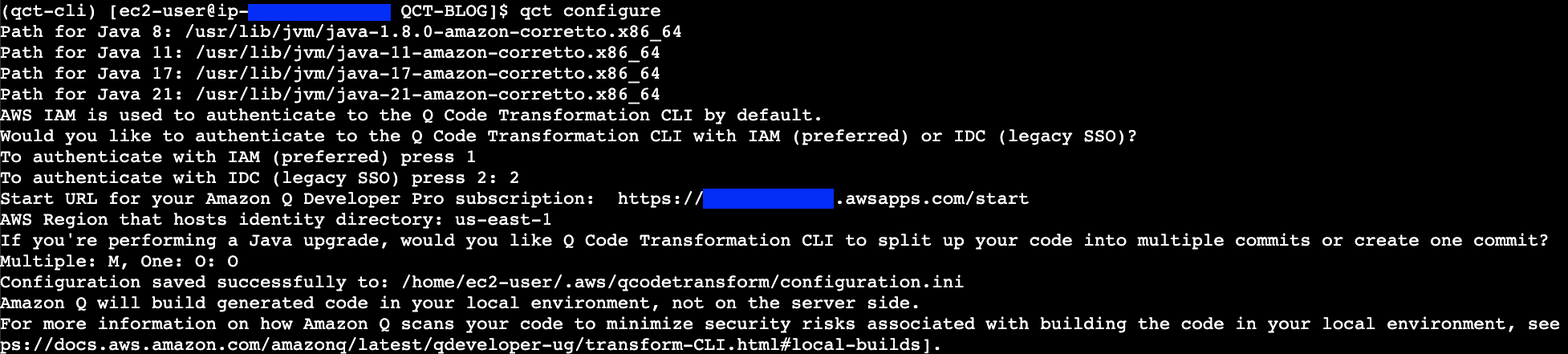


 AWS
AWS  en
en 




 Figure 4: CloudFormation troubleshooting with CloudTrail integration
 Figure 6: CloudFormation troubleshooting with Q feature

 Figure 9: IaC generator resource scan

 Figure 12: CloudFormation Hooks’ Lambda function feature
 Figure 14: CloudFormation Git sync with request review support feature


