It’s an established practice for development teams to build deployment pipelines, with services such as AWS CodePipeline, to increase the quality of application and infrastructure releases through reliable, repeatable and consistent automation.
Automating the deployment process helps build quality into our products by introducing continuous integration to build and test code, however enterprises may sometimes wish to implement certain conditions such as an approved deployment window to ensure more fine-grained control over pipeline executions.
AWS CodePipeline recently added stage-level conditions to implement pipeline gates. In this blog post, we will cover how you can implement stage-level conditions to improve your governance, code quality, and security by following a simple pipeline scenario detailed in the sections below.
AWS CodePipeline
AWS CodePipeline is a fully managed continuous delivery service that helps you automate your release pipelines for fast and reliable application and infrastructure updates.
Figure 1. AWS CodePipeline orchestration
CodePipeline has three core constructs:
Pipelines – A pipeline is a workflow construct that describes how software changes go through a release process. Each pipeline is made up of a series of stages.
Stages – A stage is a logical unit you can use to isolate an environment and to limit the number of concurrent changes in that environment. Each stage contains actions that are performed on the application artifacts.
Actions – An action is a set of operations performed on application code and configured so that the actions run in the pipeline at a specified point.
A pipeline execution is a set of changes released by a pipeline. Each pipeline execution is unique and has its own ID. An execution corresponds to a set of changes, such as a merged commit or a manual release of the latest commit.
You can now configure stage-level conditions to gate a pipeline execution before entering the stage, as well as when exiting a stage for both success and failure state. A condition consists of one or more rules, and a result (such as rolling back) to apply when the condition fails. Conditions are also referred to as gates because they allow you to specify when an execution will enter and run through a stage or exit the stage after running through it.
You can configure a stage-level condition from the console, API, CLI, AWS CloudFormation, or SDK. For the purposes of this blog post, we will showcase how you can configure the two gate scenarios using the console. You can see how you can create conditions using the CLI in the documentation.
Scenario
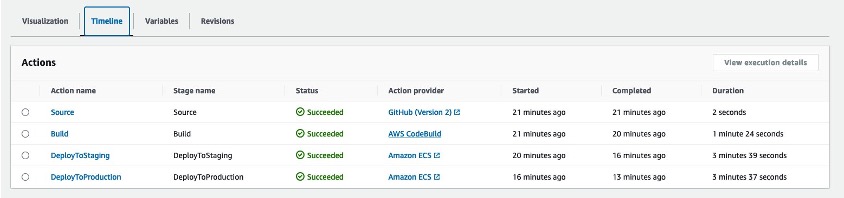
For this blog, we started with a four stage Pipeline based off the Amazon ECS deployment example from this tutorial. While this tutorial provides a getting started example on how to build a CI/CD pipeline for an ECS application, it lacks the quality gates we want to enforce to ensure what we deploy to production is safe and tested. For this we will turn to CodePipeline stage-level conditions to verify certain criteria is met throughout the pipeline execution.
In our environment, we started with a source repository in a Github organization and used AWS CodeConnections to connect the source stage to our pipeline. Inside our repository are files for a sample application, a Dockerfile to build our application, and a buildspec.yaml file to define the steps that will be executed in the build stage of our pipeline. We added a fourth stage to our pipeline which separated production deployments after a successful deployment to the staging environment. We released a change using this pipeline to ensure everything deployed as expected.
Figure 2: Example of a 4-Stage CodePipeline
Applying Stage Conditions
One of the primary concerns in any development process is maintaining high code quality standards. With stage-level conditions, you can now include specific checks to verify that your organization’s security and governance standards are met throughout the entire execution of your pipelines. These checks can include restricting deployments to certain days of the week, monitoring Amazon CloudWatch alarms prior to progressing, and verifying the results of security testing before promoting code as examples.
The AWS CodePipeline documentation details what conditions are available and how they can be used.
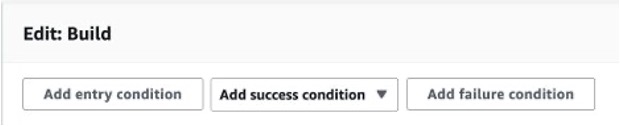
You can add conditions to stages on the pipelines detail page by choosing Edit and then selecting Edit stage from the relevant stage.
Figure 3: Adding a Stage Condition in the AWS console
In our pipeline, we added rules that address three scenarios:
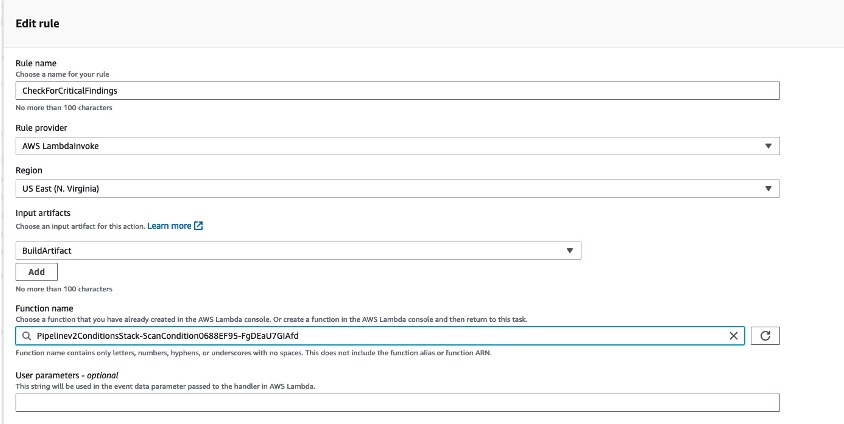
Before we added this condition rule, we created a Lambda function in the same region that was responsible for getting the findings from an image scan that Amazon ECR executed. If a critical finding was detected in the image, the Lambda function will fail the condition. You can read more about utilizing Lambda with CodePipeline in the documentation. The LambdaInvoke rule is able to use input artifacts to implement additional logic in the function. Here we passed in the artifact created during the build stage which contains the ECR image name and tag. This pattern allows you to re-use Lambda functions as conditions across many pipelines.
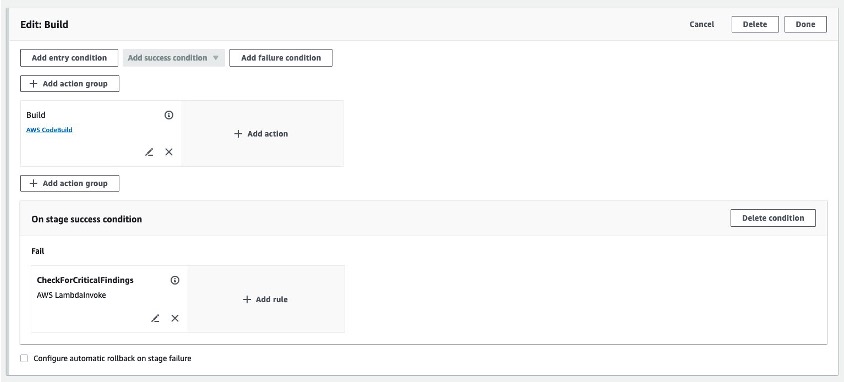
After configuring the rule, we reviewed our stage configuration and saved the pipeline.
Figure 5: Adding a stage condition to the build stage
Scenario 2 – “On Failure” condition
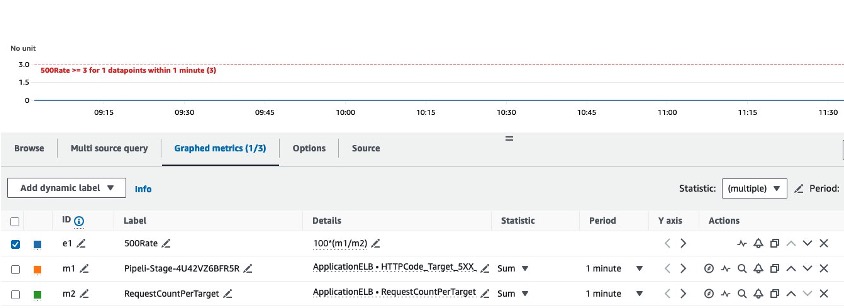
Next, we configured a condition to fail and rollback a deployment in our staging environment. If you would like to read more about implementing rollback in your CodePipeline pipelines, you can refer to De-risk releases with AWS CodePipeline rollbacks. Oftentimes a deployment will appear successful, but regressions in the code, or bugs in a new feature, may surface only when users interact with the application. To mitigate this risk, we configured a CloudWatch alarm to alert when error rates exceeded 3% of overall traffic.
Figure 6: Amazon CloudWatch alarm definition
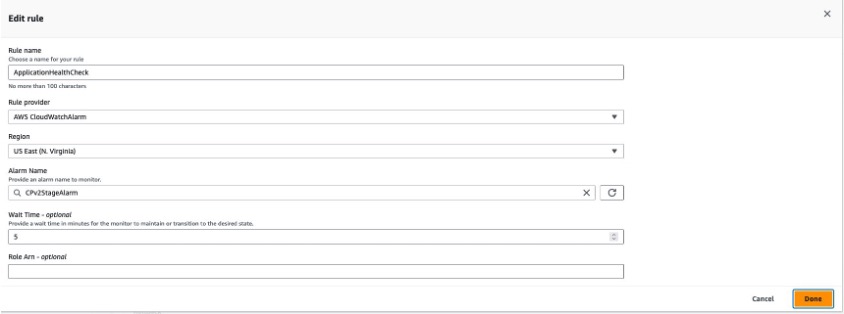
We then added an OnSuccess condition to the DeployToStage stage with a rollback rule that tracks the CloudWatch alarm configured for the above error rate metric. A wait time was configured in the rule to allow time for CloudWatch to detect any increase in errors related to the new deployment.
Figure 7: AWS CodePipeline condition rule using Amazon CloudWatch
Scenario 3 – “Entry” condition
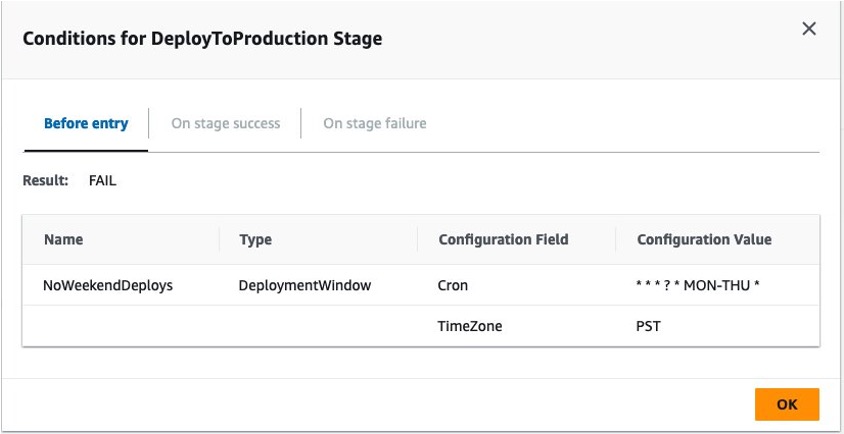
Finally, we added a third condition as an entry condition to the DeployToProduction stage. We added an AWS DeploymentWindow rule provider with a cron expression to fail the condition if a deployment to production was executed outside of our defined window.
Figure 8: Cron rule for AWS CodePipeline stage conditions
Testing Stage Conditions
Testing Scenario 1
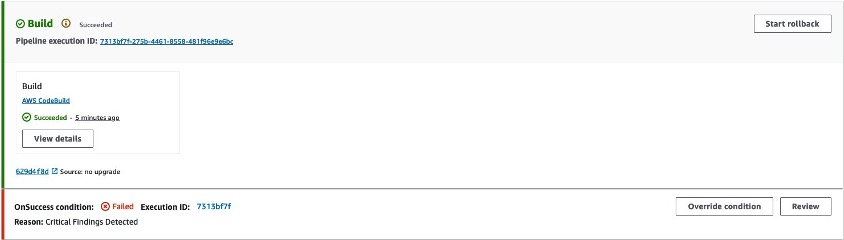
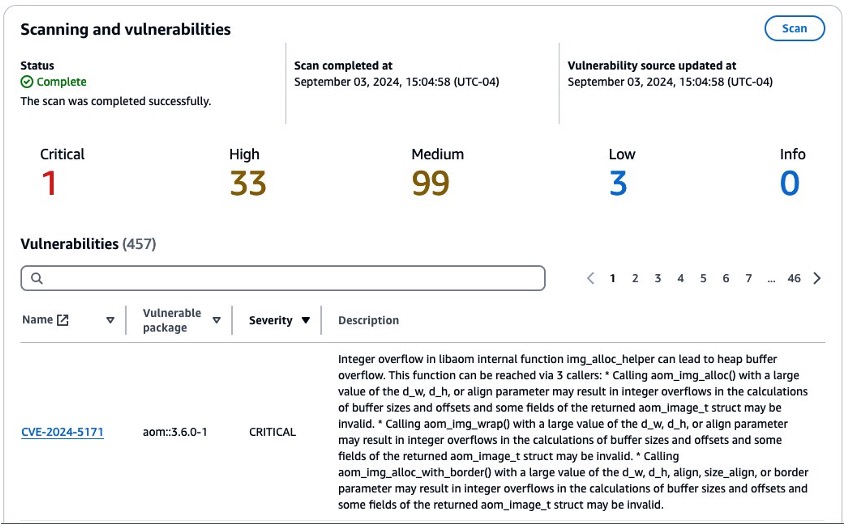
To test our CodePipeline with these stage-level conditions, we executed a git push to the source repository, which triggered a new pipeline execution. Our build stage successfully built a Docker image and pushed that image to the ECR repository, triggering the OnSuccess condition to check for critical vulnerabilities. The Lambda function reported that the scan exceeded our vulnerability threshold and stopped our pipeline with a reason of “Critical Findings Detected”
Figure 9: Amazon ECR scan condition failure
Navigating to the Amazon Elastic Container Registry service console, we were able to identify the critical vulnerability.
Figure 10: Amazon ECR vulnerability report
By reading the CVE we learned that the finding was related to a system package present in the source image defined in our Dockerfile. To remediate this issue, we added a new line to the Dockerfile in our source repository. The full Dockerfile is shown below for example with the change highlighted.
FROM public.ecr.aws/docker/library/python:3.12

WORKDIR /qchess
COPY . /qchess/
RUN apt-get remove --purge git git-man -y
RUN cd /qchess && pip install -r requirements.txt
RUN apt update && apt upgrade -y

CMD ["flask","run","--host=0.0.0.0","--port=80"]
With this change, we ensured that our image’s system packages would be upgraded on every build along with the version of the vulnerable package discovered by our condition check. We committed and pushed to our source repository to trigger a new pipeline execution.
Testing Scenario 2
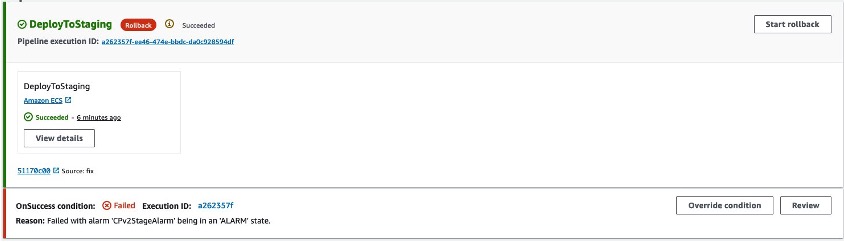
During the next run, our Pipeline made it to the DeployToStage stage and successfully deployed our code changes to our staging environment. However, when the OnSuccess condition was executed, it detected that the error rate alarm had transitioned to alarm status, resulting in the stage condition to issue a rollback. We had a bug in our new feature!
Figure 11: CloudWatch Rule triggering a stage rollback
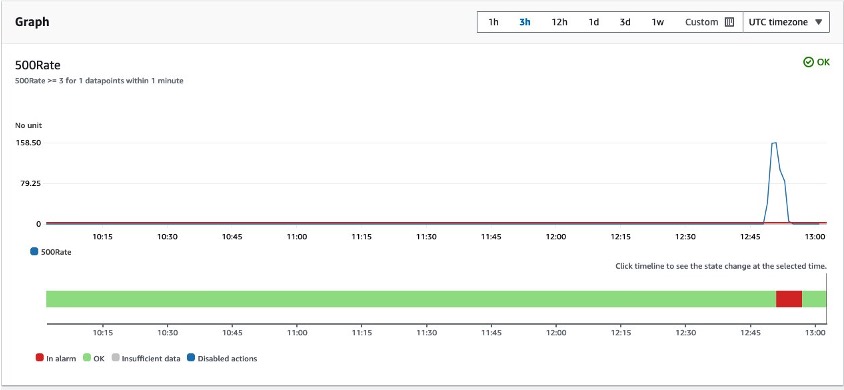
We reviewed the CloudWatch alarm and noticed the elevated error rates related to the deployment. The error rates returned to normal after the stage completed its rollback.
Figure 12: Amazon CloudWatch alarm details
After this rollback we reviewed our code changes and discovered a bug in the code. We made the appropriate changes and pushed to our main branch.
Testing Scenario 3
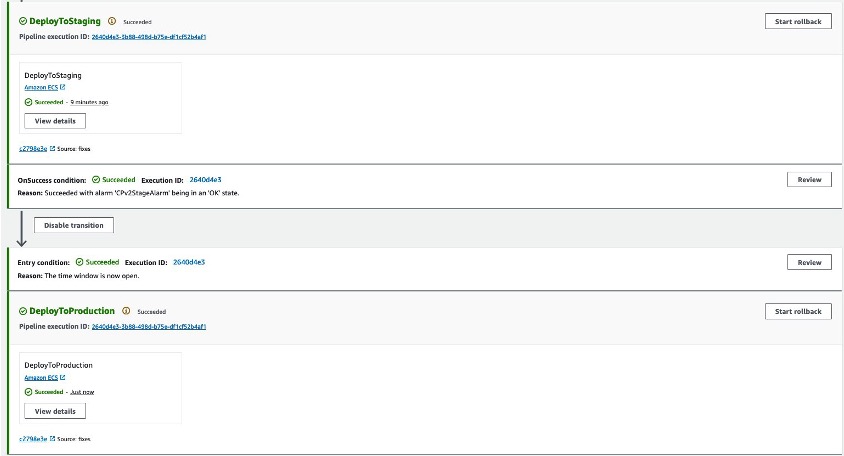
In the final pipeline execution, the pipeline made it past our DeployToStage condition and entered the entry condition in our DeployToProduction stage. This condition verified that the deployment was being executed within the defined deployment window and successfully deployed our change to production.
Figure 13: Deployment window allowed by stage condition rule
Clean up
If you followed along you should remove any resources you created related to this scenario. These resources include:
ECS Services
ECR Repository
CodeBuild Project
CodePipeline Pipeline
Lambda Function
CloudWatch Alarm
Associated IAM roles
Conclusion
Adding conditions to your AWS CodePipeline pipelines allows you to have fine-grained control over your pipeline. We have seen how you can safely automate deployments based on variables relevant to your organization. To learn more about CodePipeline conditions, visit How do stage conditions work.
As customers increasingly seek to harness the power of generative AI (GenAI) and machine learning to deliver cutting-edge applications, the need for a flexible, intuitive, and scalable development platform has never been greater. In this landscape, Streamlit has emerged as a standout tool, making it easy for developers to prototype, build, and deploy GenAI-powered apps with minimal friction. It is an open-source Python framework designed to simplify the development of custom web applications for data science, machine learning, and GenAI projects. With Streamlit, developers can quickly transform Python scripts into interactive dashboards, LLM-powered chatbots, and web apps, using just a few lines of code. Its unique combination of simplicity, interactivity, and speed is the perfect complement to the rapid advancements in AI.
When deploying Streamlit applications, customers often face the challenge of ensuring their applications are highly available and can scale to meet a variable amount of demand. To achieve these goals, customers are looking at serverless approaches to deploying their Streamlit apps. With a serverless application, you only pay for the resources required and do not want have to worry about managing servers or capacity planning.
In this post, we will walk you through deploying containerized, serverless Streamlit applications automatically via HashiCorp Terraform, an Infrastructure as Code (IaC) tool that enables users to define and provision infrastructure across cloud platforms.
Solution Overview
For this solution, we have the Streamlit app running on an Amazon Elastic Container Service (ECS) cluster across multiple availability zones (AZs), using AWS Fargate to manage the compute. Fargate is a serverless, pay-as-you-go compute engine that lets you focus on building apps without managing servers. Using Fargate helps reduce the undifferentiated heavy lifting that can come with building and maintaining web applications. It is also often desirable to use a Content Delivery Network (CDN) to ensure low latency for users globally by caching the content at edge locations closer to where the users are geographically located.
Let’s zoom in on the two architectures – the Streamlit App hosting architecture, and the Streamlit App deployment pipeline.
Streamlit app hosting
In the above architecture, the following flow applies:
Users access the Streamlit App using the public DNS endpoint for an Amazon CloudFront distribution.
Using an Internet Gateway (IGW), user requests are routed to a public-facing Application Load Balancer (ALB).
This ALB has target groups which map to ECS task nodes that are part of an ECS cluster running in two AZs (us-east-1a and us-east-1b in this example).
Fargate will automatically scale the underlying compute nodes in the ECS cluster based on the demand.
Streamlit app deployment pipeline
In the above architecture, the following flow applies:
User develops a local Streamlit App and defines the path of these assets in the module configuration, then runs terraform apply to generate a local .zip file comprised of the Streamlit App directory, and upload this to an Amazon S3 bucket (Streamlit Assets) with versioning enabled, which is configured to trigger the Streamlit CI/CD pipeline to run.
AWS CodePipeline (Streamlit CI/CD pipeline) begins running. The pipeline copies the .zip file from the Streamlit Assets S3 Bucket, stores the contents in a connected CodePipeline Artifacts S3 bucket, and passes the asset to the AWS CodeBuild project that is also part of the pipeline.
CodeBuild (Streamlit CodeBuild Project) configures a compute/build environment and fetches a Python Docker Image from a public Amazon ECR repository. CodeBuild uses Docker to build a new Streamlit App image based on what is defined in the Dockerfile within the .zip file, and pushes the new image to a private ECR repository. It tags the image with latest, an app_version (user-defined in Terraform), as well as the S3 Version ID of the .zip file and pushes the image to ECR.
ECS has a task definition that references the image in ECR based on the S3 Version ID tag which will always be a unique value, as it is generated whenever a new version of the file is created. This also serves as data lineage so versions of the Streamlit App .zip files in S3 can be linked to versions of the image stored in ECR. Once a new image is pushed to ECR (with a unique image tag), the task definition is updated and the ECS service begins a new deployment using the new version of the Streamlit App.
When a new image is pushed to ECR, the Terraform Module is configured to use the local-exec provisioner to run an AWS CLI command that creates a CloudFront invalidation. This enables users of the Streamlit app to use the new version without waiting for the time-to-live (TTL) of the cached file to expire on the edge locations (default is 24 hours). Both of these pipelines are built and packaged into a Terraform module that can be reused efficiently with only a few lines of code.
Both of these pipelines are built and packaged into a Terraform module that can be reused efficiently with only a few lines of code.
Prerequisites
This solution requires the following prerequisites:
An AWS account. If you don’t have an account, you can sign up for one.
Terraform v1.0.0 or newer installed.
python v3.8 or newer installed.
A Streamlit app. If you don’t have a Streamlit project already, you can download this app directory as a sample Streamlit app for this post and save it to a local folder.
Your folder structure will look something like this:
In the same folder where you have the your Streamlit app saved, in the above example in the terraform_streamlit_folder, you will create and initialize a new Terraform project.
In your preferred terminal, create a new file named main.tf by running the following command on Unix/Linux machines, or an equivalent command on Windows machines:
touch main.tf
Open up the main.tf file and add the following code to it:
module "serverless-streamlit-app" {
  source          = "aws-ia/serverless-streamlit-app/aws"
  app_name        = "streamlit-app"
  app_version     = "v1.1.0"
  path_to_app_dir = "./app" # Replace with path to your app
}
This code utilizes a module block with a source pointing to the Terraform module, and the appropriate input variables passed in. When Terraform encounters a module block, it loads and processes that module’s configuration files using the source. The Serverless Streamlit App Terraform module has many optional input variables. If you have existing resources, such as an existing VPC, subnets, and security groups that you’d like to reuse instead of deploying new ones, you can use the module’s input variables to reference your existing resources. However, in this post, we’re deploying all of the resources in the above architecture from scratch. Here, we simply define the source that references the module hosted in the Terraform Registry, provide an app_name that will be used as a prefix for naming your resources, the app_version that is used for tracking changes to your app, and the path_to_app_dir which is the path to the local directory where the assets for your Streamlit app are stored.
Save the file.
To initialize the Terraform working directory, run the following command in your terminal:
terraform init
The output will contain a successful message like the following:
"Terraform has been successfully initialized"
Output the CloudFront URL
To be able to easily access the Cloudfront URL of the deployed Streamlit application, you can add the URL as a Terraform output.
In your terminal, create a new file named outputs.tf by running the following command on Unix/Linux machines, or an equivalent command on Windows machines:
touch outputs.tf
Open up the outputs.tf file and add the following code to it:
output "streamlit_cloudfront_distribution_url" {
  value = module.serverless-streamlit-app.streamlit_cloudfront_distribution_url
}
Save the file. Now, your folder structure will look like:
Now you can use Terraform to deploy the resources defined in your main.tf file.
In your terminal, run the following command to apply to deploy the infrastructure. This includes the hosting for your Streamlit application using ECS and CloudFront, as well as the pipeline that is used to push updates.
terraform apply
When the apply command finishes running, you’ll see the Terraform outputs displayed in the terminal.
Navigate to the streamlit_cloudfront_distribution_url to see your Streamlit application that is hosted on AWS.
When you make changes to your Streamlit codebase, you can go ahead and re-run terraform apply to push your new changes to your cloud environment.
When updating the Streamlit codebase, the CodePipeline and CodeBuild processes kick off to automatically update your new changes, which get reflected on your Streamlit application. CodePipeline automates the entire software release process, managing stages like source retrieval, building, testing, and deployment. It integrates with AWS services and third-party tools (such as GitHub and Jenkins) to enhance automation, speed, and security. CodeBuild focuses on automating code compilation, testing, and packaging, supporting multiple languages and custom Docker environments, while integrating with CodePipeline for scalable, secure builds. With this CI/CD pipeline, when you make changes to your code, all you need to run is terraform apply to update your cloud environment. For an example buildspec, see the example in the repo.
You can find full examples of deploying the infrastructure with and without existing resources in the GitHub repository.
Clean up
When you no longer need the resources deployed in this post, you can clean up the resources by using the Terraform destroy command. Simply run terraform destroy . This will remove all of the resources you have deployed in this post with Terraform.
Conclusion
Building serverless Streamlit applications with Terraform on AWS offers a powerful combination of scalability, efficiency, and automation. As you continue to build and refine your Streamlit applications, Terraform’s flexibility ensures that your infrastructure can evolve seamlessly, supporting rapid innovation and agile development. With Streamlit and Terraform, you have the tools to create dynamic, serverless applications that scale effortlessly and operate reliably in the cloud.
In this blog, we will explore how Amazon Q Developer Agent for code transformation accelerates Java application upgrades. We will examine the benefits of this Generative AI-powered agent and outline strategies to achieve maximal acceleration, drawing from real-world success stories and best practices.
Benefits of using Amazon Q Developer to upgrade your applications
Amazon Q Developer addresses a critical challenge for organizations managing numerous Java applications, particularly as they face the approaching end of Long-Term-Support (LTS) for older Java versions. Upgrading to Java 17 enhances security, resolves vulnerabilities, and improves performance while ensuring long-term compatibility and access to modern features. Currently, Q Developer agent for code transformation supports upgrades from Java 8 and 11 to Java 17. Software developers can utilize Q Developer within their IDE (VS Code and JetBrains) to transform both single-module and multi-module applications. Q Developer will generate a plan that identifies necessary library upgrades and replacements for deprecated code in the application, proposing code changes with the goal of ensuring the transformed code compiles successfully in Java 17. Q Developer can significantly enhance the efficiency of your migration workflow, performing code transformations on applications in hours rather than weeks.
Customer success of using Q Developer to modernize legacy Java applications
Customers have used Q Developer to upgrade their Java applications successfully. Here is how two customers as well as Amazon internal teams use Q Developer to accelerate the migration process.
A large insurance company in North America strategically approached their Java upgrade initiative by identifying applications with dependencies that Q Developer could upgrade effectively. They focused on applications that rely on frameworks like Spring Boot, which can be time-consuming to upgrade manually. After leveraging Q Developer to transform 4 applications in pilot, they estimated a 36% acceleration in their upgrade process, indicating that Q Developer automatically completed over a third of the work that would have been required manually. While the remaining portion still necessitated manual intervention to ensure the code would build and run correctly, the effort acceleration was significant.
A major financial services firm’s experience with Q Developer proved equally compelling. In a focused two-day workshop, 20 developers successfully transformed 20 applications in production using the Amazon Q Developer agent. This results in 42% time savings using Q Developer compared to manual upgrade, saving on average 24 hours per application. They spent about 3 weeks to prepare for the transformation workshop. They identified first-party (1P) dependencies—internal libraries that other production applications rely on. Q developer does not guarantee upgrade of 1P dependencies. With a combination of Q Developer and manual work, the customer upgraded many of these common 1P dependencies leading up to the workshop. This step was crucial to gain maximum acceleration while using Q Developer for the upgrades.
Amazon uses Q Developer internally to upgrade Java applications following company-wide campaigns. The central team who owns the campaigns provides detailed guidance on which Java applications can be upgraded with Q developer most effectively. This team also manages Amazon’s internal build system and provides tooling to automate part of the manual efforts. They are able to achieve significant savings. Amazon was able to upgrade more than 50% of production applications in six months, 79% of the auto-generated code reviews were applied without additional changes.
Use Q Developer to upgrade your applications
To ensure that Q Developer is properly applied to the specific characteristics of their codebases, customers create and follow a transformation approach. Teams and individuals who understand the scope of the upgrade run campaigns across the company to effectively utilize Q Developer. To maximize the acceleration from Q Developer, these teams classify the applications which need to be upgraded, identify which ones can be upgraded using Q Developer, estimate the manual effort required, which provides a baseline to measure the value added by Q Developer agent for code transformation. The preparation phase is crucial before starting the execution phase of the upgrade. Each of the steps in the preparation phase plays an important role in maximizing the acceleration of Amazon Q in their upgrade processes.
Classifying the applications to upgrade: Q Developer supports the upgrade of 30 most common Java libraries. Q Developer’s performance on less common and internal libraries is lower compared to the common libraries. In this case, you can use a combination of Q Developer and manual steps. It’s recommended to include both production applications and internal dependencies in this step. You should also classify your applications and internal libraries based on if/how they are used by other applications, it will help prioritize the applications to upgrade first in campaigns. Classifying applications by libraries used can help you identify the best upgrade approach using Q Developer.
Defining baselines of efficiency: To measure the efficiency of the upgrade effort in your organization, it is crucial to establish baselines. Based on the classification of applications, use Q Developer in a pilot for each class to see which libraries are transformed correctly, and which ones have to be done manually. This helps you operationalize the process of using Q Developer and the manual steps required, and understand how this procedure accelerates the upgrade of a certain class of applications. Some customers use manual effort hours for each upgrade on dependency versions and deprecated code as baseline and compare the manual effort hours with time taken when completing the upgrade using Q Developer. For example, you can classify the applications based on the main frameworks used before upgrading applications using Q Developer. Compare the time taken by Q Developer with manual upgrade hours to understand which applications can be upgraded by Q Developer most effectively.
Identifying applications for migration: Decide which applications to use Q Developer for, and prioritize the applications to upgrade in waves based on expected acceleration and business value. You can prioritize the applications which are most used by other applications and upgrade them in the initial campaign, then upgrade the rest of the applications in the subsequent campaigns. By addressing the foundational components first, the overall upgrade process will be streamlined. In Amazon, a centralized internal team defines migration waves and identifies which packages would be included in the upgrade campaign. Additionally, this team conducted analysis of the apps to determine the likelihood of the upgrade being successful using Q developer, and provides an estimate of the remaining engineering effort needed to complete the upgrade. The team will use this information to select applications and uses an Amazon-internal tool to assign the upgrade tasks to the team owning the applications. While SDEs were free to run the upgrade on their own, following the campaign with a set deadline mobilized the application owner teams to complete the upgrade.
Use Q Developer to automate upgrade tasks
Once the preparation phase is completed, you can start the execution phase. Software developers can use Q Developer to accelerate many of the steps in execution phase.
Assessing the components of an application to upgrade. You can use Q Developer to start a transformation, at the beginning of the transformation, there will be a transformation plan generated for you to view which dependencies and deprecated code will be upgraded.
Research and update dependency versions compatible to the target version. Q Developer will analyze your app and attempt to update the dependencies to the versions compatible with target Java version and in some cases the latest version.
Replace deprecated methods and API calls which are not compatible to the target version. Q Developer will detect the deprecated code and attempt to update to what’s recommended in the compatible Java version.
Reviewing the modified code and address any conflicts or issues that may arise. Q Developer will return code changes to you at the end of the transformation. If the transformation is successful, the app will compile in Java 17. If the transformation is partially successful, Q Developer was able to upgrade library versions and make code changes but could not compile the transformed app successfully in Java 17. Check out this part of our documentation on how to handle partial transformations.
Test the upgraded application thoroughly to ensure correct functionality. Q Developer will run the unit tests and integration tests in your app when compiling in the target version.
Conclusion
As organizations face the pressing need to modernize their Java applications, Amazon Q Developer emerges as a powerful ally in this complex journey. The customer success stories demonstrate the tangible benefits of leveraging AI-assisted code transformation: significant time savings, reduced manual effort, and accelerated upgrade processes.
Q Developer not only addresses the technical challenges of Java upgrades, but also enables organizations to approach these initiatives strategically. By classifying applications, establishing baselines, and prioritizing upgrades, teams can maximize the efficiency of their modernization efforts. While Q Developer streamlines much of the upgrade process, it is important to note that some challenges may still arise. For a comprehensive understanding of potential challenges and detailed guidance on getting started with Q Developer, we encourage you to explore our public documentation.
The journey to Java 17 and beyond doesn’t have to be daunting. With Amazon Q Developer, you have a powerful tool at your disposal to accelerate your upgrade process, reduce costs, and ensure your applications remain secure, performant, and future-ready.
Take the first step towards modernizing your Java ecosystem today. Explore Amazon Q Developer and discover how it can transform your upgrade strategy. See Getting Started with Amazon Q Developer agent for code transformation for a how-to guide on using Q Developer to transform Java applications.
As organizations increasingly adopt Amazon Q Developer, understanding how developers use it is essential. Diving into specific telemetry events and user-level data clarifies how users interact with Amazon Q Developer, offering insights into feature usage and developer behaviors. This granular view, accessible through logs, is vital for identifying trends, optimizing performance, and enhancing the overall developer experience. This blog is intended to give visibility to key telemetry events logged by Amazon Q Developer and how to explore this data to gain insights.
To help you get started, the following sections will walk through several practical examples that showcase how to extract meaningful insights from AWS CloudTrail. By reviewing the logs, organizations can track usage patterns, identify top users, and empower them to train and mentor other developers, ultimately fostering broader adoption and engagement across teams.
Although the examples here focus on Amazon Athena for querying logs, the methods can be adapted to integrate with other tools like Splunk or Datadog for further analysis. Through this exploration, readers will learn how to query the log data to understand better how Amazon Q Developer is used within your organization.
Solution Overview
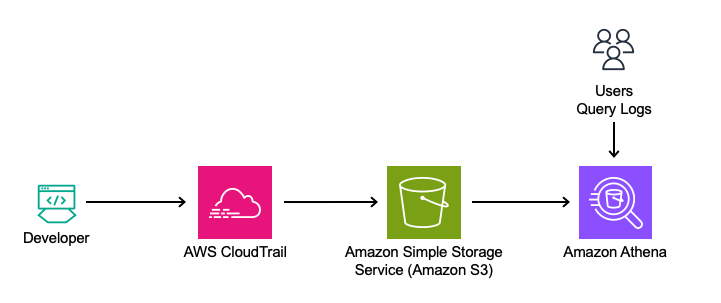
This solution leverages Amazon Q Developer’s logs from the Integrated Development Environment (IDE) and terminal, captured in AWS CloudTrail. The logs will be queried directly using Amazon Athena from Amazon Simple Storage Service (Amazon S3) to analyze feature usage, such as in-line code suggestions, chat interactions, and security scanning events.
Analyzing Telemetry Events in Amazon Q Developer
Amazon Athena is used to query the CloudTrail logs directly to analyze this data. By utilizing Athena, queries can be run on existing CloudTrail records, making it simple to extract insights from the data in its current format.
Ensuring CloudTrail is set up to log the data events.
Navigate to the AWS CloudTrail Console.
Edit an Existing Trail:
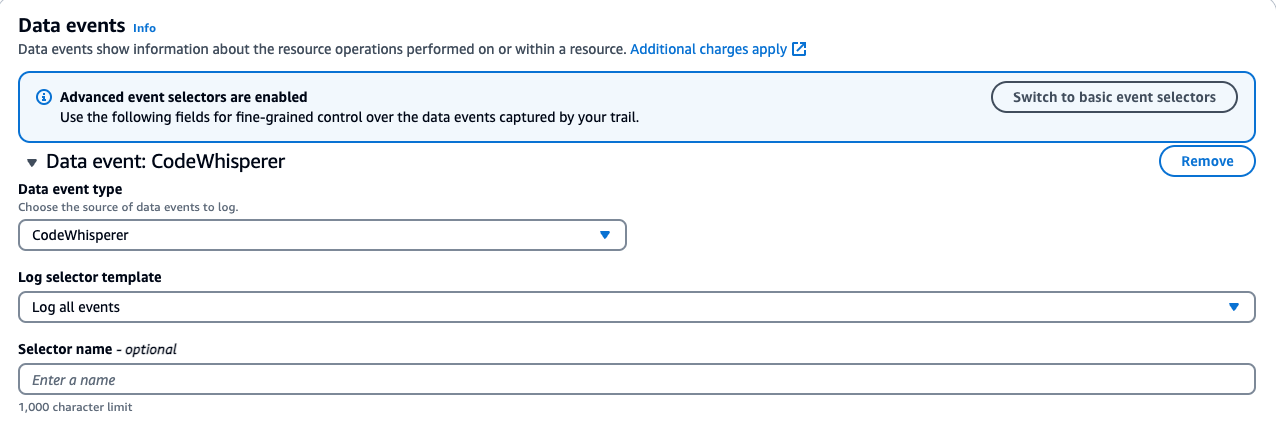
If you have a trail, verify it is configured to log data events for Amazon CodeWhisperer.
Note: As of 4/30/24, CodeWhisperer has been renamed to Amazon Q Developer. All the functionality previously provided by CodeWhisperer is now part of Amazon Q Developer. However, for consistency, the original API names have been retained.
Click on your existing trail in CloudTrail. Find the Data Events section and click edit.
For CodeWhisperer:
Data event type: CodeWhisperer
Log selector template: Log all events
Save your changes.
Note your “Trail log location.” This S3 bucket will be used in our Athena setup.
If you don’t have an existing trail, follow the instructions in the AWS CloudTrail User Guide to set up a new trail.
Below is a screenshot of the data events addition:
Steps to Create an Athena Table from CloudTrail Logs: This step aims to turn CloudTrail events into a queryable Athena table.
1. Navigate to the AWS Management Console > Athena > Editor.
2. Click on the plus to create a query tab.
3. Run the following query to create a database and table. Note to update the location to your S3 bucket.
-- Step 1: Create a new database (if it doesn't exist)
CREATE DATABASE IF NOT EXISTS amazon_q_metrics;

-- Step 2: Create the external table explicitly within the new database
CREATE EXTERNAL TABLE amazon_q_metrics.cloudtrail_logs (

    userIdentity STRUCT<
        accountId: STRING,
        onBehalfOf: STRUCT<
            userId: STRING,
            identityStoreArn: STRING
        >
    >,
    eventTime STRING,
    eventSource STRING,
    eventName STRING,
    requestParameters STRING,
    requestId STRING,
    eventId STRING,
    resources ARRAY<STRUCT<
        arn: STRING,
        accountId: STRING,
        type: STRING
    >>,
    recipientAccountId STRING

)
ROW FORMAT SERDE 'org.apache.hive.hcatalog.data.JsonSerDe'
STORED AS INPUTFORMAT 'com.amazon.emr.cloudtrail.CloudTrailInputFormat'
OUTPUTFORMAT 'org.apache.hadoop.hive.ql.io.HiveIgnoreKeyTextOutputFormat'
LOCATION 's3://{Insert Bucket Name from CloudTrail}/'
TBLPROPERTIES ('classification'='cloudtrail');
4. Click Run
5. Run a quick query to view the data.
SELECT
    eventTime,
    userIdentity.onBehalfOf.userId AS user_id,
    eventName,
    requestParameters
FROM
    amazon_q_metrics.cloudtrail_logs AS logs
WHERE
    eventName = 'SendTelemetryEvent'
LIMIT 10;
In this section, the significance of the telemetry events captured in the requestParameters field will be explained. The query begins by displaying key fields and their data, offering insights into how users interact with various features of Amazon Q Developer.
Query Breakdown:
eventTime: This field captures the time the event was recorded, providing insights into when specific user interactions took place.
userIdentity.onBehalfOf.userId: This extracts the userId of the user. This is critical for attributing interactions to the correct user, which will be covered in more detail later in the blog.
eventName: The query is filtered on SendTelemetryEvent. Telemetry events are triggered when the user interacts with particular features or when a developer uses the service.
requestParameters: The requestParameters field is crucial because it holds the details of the telemetry events. This field contains a rich set of information depending on the type of interaction and feature the developer uses, which programming languages are used, completion types, or code modifications.
In the context of the SendTelemetryEvent, various telemetry events are captured in the requestParameters field of CloudTrail logs. These events provide insights into user interactions, overall usage, and the effectiveness of Amazon Q Developer’s suggestions. Here are the key telemetry events along with their descriptions:
UserTriggerDecisionEvent
Description: This event is triggered when a user interacts with a suggestion made by Amazon Q Developer. It captures whether the suggestion was accepted or rejected, along with relevant metadata.
Key Fields:
completionType: Whether the completion was a block or a line.
suggestionState: Whether the user accepted, rejected, or discarded the suggestion.
programmingLanguage: The programming language associated with the suggestion.
generatedLine: The number of lines generated by the suggestion.
CodeScanEvent
Description: This event is logged when a code scan is performed. It helps track the scope and result of the scan, providing insights into security and code quality checks.
Key Fields:
codeAnalysisScope: Whether the scan was performed at the file level or the project level.
programmingLanguage: The language being scanned.
CodeScanRemediationsEvent
Description: This event captures user interactions with Amazon Q Developer’s remediation suggestions, such as applying fixes or viewing issue details.
Key Fields:
CodeScanRemediationsEventType: The type of remediation action taken (e.g., viewing details or applying a fix).
includesFix: A boolean indicating whether the user applied a fix.
ChatAddMessageEvent
Description: This event is triggered when a new message is added to an ongoing chat conversation. It captures the user’s intent which refers to the purpose or goal the user is trying to achieve with the chat message. The intent can include various actions, such as suggesting alternate implementations of the code, applying common best practices, improving the quality or performance of the code.
Key Fields:
conversationId: The unique identifier for the conversation.
messageId: The unique identifier for the chat message.
userIntent: The user’s intent, such as improving code or explaining code.
programmingLanguage: The language related to the chat message.
ChatInteractWithMessageEvent
Description: This event captures when users interact with chat messages, such as copying code snippets, clicking links, or hovering over references.
Key Fields:
interactionType: The type of interaction (e.g., copy, hover, click).
interactionTarget: The target of the interaction (e.g., a code snippet or a link).
acceptedCharacterCount: The number of characters from the message that were accepted.
acceptedSnippetHasReference: A boolean indicating if the accepted snippet included a reference.
TerminalUserInteractionEvent
Description: This event logs user interactions with terminal commands or completions in the terminal environment.
Key Fields:
terminalUserInteractionEventType: The type of interaction (e.g., terminal translation or code completion).
isCompletionAccepted: A boolean indicating whether the completion was accepted by the user.
terminal: The terminal environment in which the interaction occurred.
shell: The shell used for the interaction (e.g., Bash, Zsh).
Telemetry events are key to understanding how users engage with Amazon Q Developer. They track interactions such as code completion, security scans, and chat-based suggestions. Analyzing the data in the requestParameters field helps reveal usage patterns and behaviors that offer valuable insights.
By exploring events such as UserTriggerDecisionEvent, ChatAddMessageEvent, TerminalUserInteractionEvent, and others in the schema, organizations can assess the effectiveness of Amazon Q Developer and identify areas for improvement.
Example Queries for Analyzing Developer Engagement
To gain deeper insights into how developers interact with Amazon Q Developer, the following queries can help analyze key telemetry data from CloudTrail logs. These queries track in-line code suggestions, chat interactions, and code-scanning activities. By running these queries, you can uncover valuable metrics such as the frequency of accepted suggestions, the types of chat interactions, and the programming languages most frequently scanned. This analysis helps paint a clear picture of developer engagement and usage patterns, guiding efforts to enhance productivity.
These four examples only cover a sample set of the available telemetry events, but they serve as a starting point for further exploration of Amazon Q Developer’s capabilities.
SELECT
    eventTime,
    userIdentity.onBehalfOf.userId AS user_id,
    eventName,
    json_extract_scalar(requestParameters, '$.telemetryEvent.userTriggerDecisionEvent.suggestionState') AS suggestionState,
    json_extract_scalar(requestParameters, '$.telemetryEvent.userTriggerDecisionEvent.completionType') AS completionType
FROM
    amazon_q_metrics.cloudtrail_logs
WHERE
    eventName = 'SendTelemetryEvent'
    AND json_extract(requestParameters, '$.telemetryEvent.userTriggerDecisionEvent') IS NOT NULL
    AND json_extract_scalar(requestParameters, '$.telemetryEvent.userTriggerDecisionEvent.suggestionState') = 'ACCEPT';
Use Case:This use case focuses on how developers interact with in-line code suggestions by analyzing accepted snippets. It helps identify which users are accepting suggestions, the type of snippets being accepted (blocks or lines), and the programming languages involved. Understanding these patterns can reveal how well Amazon Q Developer aligns with the developers’ expectations.
Query Explanation: The query retrieves the event time, user ID, event name, suggestion state (filtered to show only ACCEPT), and completion type. TotalGeneratedLinesBlockAccept and totalGeneratedLinesLineAccept or discarded suggestions are not included, but this gives an idea of the developers using the service for in-line code suggestions and the lines or blocks they have accepted. Additionally, the programming language field can be extracted to see which languages are used during these interactions.
Query 2: Analyzing Chat Interactions
SELECT
    userIdentity.onBehalfOf.userId AS userId,
    json_extract_scalar(requestParameters, '$.telemetryEvent.chatInteractWithMessageEvent.interactionType') AS interactionType,
    COUNT(*) AS eventCount
FROM
    amazon_q_metrics.cloudtrail_logs
WHERE
    eventName = 'SendTelemetryEvent'
    AND json_extract(requestParameters, '$.telemetryEvent.chatInteractWithMessageEvent') IS NOT NULL
GROUP BY
    userIdentity.onBehalfOf.userId,
    json_extract_scalar(requestParameters, '$.telemetryEvent.chatInteractWithMessageEvent.interactionType')
ORDER BY
    eventCount DESC;
Use Case: This use case looks at how developers use chat options like upvoting, downvoting, and copying code snippets. Understanding the chat usage patterns shows which interactions are most used and how developers engage with Amazon Q Developer chat. As an organization, this insight can help support other developers in successfully leveraging this feature.
Query Explanation: The query provides insights into chat interactions within Amazon Q Developer by retrieving user IDs, interaction types, and event counts. This query aggregates data based on the interactionType field within chatInteractWithMessageEvent, showcasing various user actions such as UPVOTE, DOWNVOTE, INSERT_AT_CURSOR, COPY_SNIPPET, COPY, CLICK_LINK, CLICK_BODY_LINK, CLICK_FOLLOW_UP, and HOVER_REFERENCE.
This analysis highlights how users engage with the chat feature and the interactions, offering a view of interaction patterns. By focusing on the interactionType field, you can better understand how developers interact with the chat feature of Amazon Q Developer.
Query 3: Analyzing Code Scanning Jobs Across Programming Languages
SELECT
    userIdentity.onBehalfOf.userId AS userId,
    json_extract_scalar(requestParameters, '$.telemetryEvent.codeScanEvent.programmingLanguage.languageName') AS programmingLanguage,
    COUNT(json_extract_scalar(requestParameters, '$.telemetryEvent.codeScanEvent.codeScanJobId')) AS jobCount
FROM
    amazon_q_metrics.cloudtrail_logs
WHERE
    eventName = 'SendTelemetryEvent'
    AND json_extract(requestParameters, '$.telemetryEvent.codeScanEvent') IS NOT NULL
GROUP BY
    userIdentity.onBehalfOf.userId,
    json_extract_scalar(requestParameters, '$.telemetryEvent.codeScanEvent.programmingLanguage.languageName')
ORDER BY
    jobCount DESC;
Use Case: Amazon Q Developer includes security scanning, and this section helps determine how the security scanning feature is being used across different users and programming languages within the organization. Understanding these trends provides valuable insights into which users actively perform security scans and the specific languages targeted for these scans.
Query Explanation: The query provides insights into the distribution of code scanning jobs across different programming languages in Amazon Q Developer. It retrieves user IDs and the count of code-scanning jobs by programming language. This analysis focuses on the CodeScanEvent, aggregating data to show the total number of jobs executed per language.
By summing up the number of code scanning jobs per programming language, this query helps to understand which languages are most frequently analyzed. It provides a view of how users are leveraging the code-scanning feature. This can be useful for identifying trends in language usage and optimizing code-scanning practices.
Query 4: Analyzing User Activity across features.
SELECT
    userIdentity.onBehalfOf.userId AS user_id,
    COUNT(DISTINCT CASE
        WHEN json_extract(requestParameters, '$.telemetryEvent.userTriggerDecisionEvent') IS NOT NULL
        THEN eventId END) AS inline_suggestions_count,
    COUNT(DISTINCT CASE
        WHEN json_extract(requestParameters, '$.telemetryEvent.chatInteractWithMessageEvent') IS NOT NULL
        THEN eventId END) AS chat_interactions_count,
    COUNT(DISTINCT CASE
        WHEN json_extract(requestParameters, '$.telemetryEvent.codeScanEvent') IS NOT NULL
        THEN eventId END) AS security_scans_count,
    COUNT(DISTINCT CASE
        WHEN json_extract(requestParameters, '$.telemetryEvent.terminalUserInteractionEvent') IS NOT NULL
        THEN eventId END) AS terminal_interactions_count
FROM
    amazon_q_metrics.cloudtrail_logs
WHERE
    eventName = 'SendTelemetryEvent'
GROUP BY
    userIdentity.onBehalfOf.userId
Use Case:This use case looks at how developers use Amazon Q Developer across different features: in-line code suggestions, chat interactions, security scans, and terminal interactions. By tracking usage, organizations can see overall engagement and identify areas where developers may need more support or training. This helps optimize the use of Amazon Q Developer and helps teams get the most out of the tool.
Query Explanation: Let’s take the other events from the prior queries and additional events to get more detail overall and tie it all together. This expanded query provides a comprehensive view of user activity within Amazon Q Developer by tracking the number of in-line code suggestions, chat interactions, security scans, and terminal interactions performed by each user. By analyzing these events, organizations can gain a better understanding of how developers are using these key features.
By summing up the interactions for each feature, this query helps identify which users are most active in each category, offering insights into usage patterns and areas where additional training or support may be needed.
Enhancing Metrics with Display Names and Usernames
The previous queries had userid as a field; however, many customers would prefer to see a user alias (such as username or display name). The following section illustrates enhancing these metrics by augmenting user IDs with display names and usernames from the AWS IAM Identity Center. This will provide more human-readable user names.
In this example, the export is run locally to enhance user metrics with IAM Identity Center for simplicity. This method works well for demonstrating how to access and work with the data, but it provides a static snapshot of the users at the time of export. In a production environment, an automated solution would be preferable to capture newly added users continuously. For the purposes of this blog, this straightforward approach is used to focus on data access.
To proceed, install Python 3.8+ and Boto3, and configure AWS credentials via the CLI. Then, run the following Python script locally to export the data:
import boto3, csv
# replace this with the region of your IDC instance
RegionName='us-east-1'
# client creation
idstoreclient = boto3.client('identitystore', RegionName)
ssoadminclient = boto3.client('sso-admin', RegionName)

Instances= (ssoadminclient.list_instances()).get('Instances')
InstanceARN=Instances[0].get('InstanceArn')
IdentityStoreId=Instances[0].get('IdentityStoreId')

# query
UserDigestList = []
ListUserResponse = idstoreclient.list_users(IdentityStoreId=IdentityStoreId)
UserDigestList.extend([[user['DisplayName'], user['UserName'], user['UserId']] for user in ListUserResponse['Users']])
NextToken = None
if 'NextToken' in ListUserResponse.keys(): NextToken = ListUserResponse['NextToken']
while NextToken is not None:
    ListUserResponse = idstoreclient.list_users(IdentityStoreId=IdentityStoreId, NextToken=NextToken)
    UserDigestList.extend([[user['DisplayName'], user['UserName'], user['UserId']] for user in ListUserResponse['Users']])
    if 'NextToken' in ListUserResponse.keys(): NextToken = ListUserResponse['NextToken']
    else: NextToken = None

# write the query results to IDCUserInfo.csv
with open('IDCUserInfo.csv', 'w') as CSVFile:
    CSVWriter = csv.writer(CSVFile, quoting=csv.QUOTE_ALL)
    HeaderRow = ['DisplayName', 'UserName', 'UserId']
    CSVWriter.writerow(HeaderRow)
    for UserRow in UserDigestList:
        CSVWriter.writerow(UserRow)
This script will query the IAM Identity Center for all users and write the results to a CSV file, including DisplayName, UserName, and UserId. After generating the CSV file, upload it to an S3 bucket. Please make note of this S3 location.
Steps to Create an Athena Table from the above CSV output: Create a table in Athena to join the existing table with the user details.
1. Navigate to the AWS Management Console > Athena > Editor.
2. Click on the plus to create a query tab.
3. Run the following query to create our table. Note to update the location to your S3 bucket.
CREATE EXTERNAL TABLE amazon_q_metrics.user_data (
    DisplayName STRING,
    UserName STRING,
    UserId STRING
)
ROW FORMAT SERDE 'org.apache.hadoop.hive.serde2.OpenCSVSerde'
WITH SERDEPROPERTIES (
   'separatorChar' = ',',
   'quoteChar'     = '"'
)
STORED AS TEXTFILE
LOCATION 's3://{Update to your S3 object location}/'  -- Path containing CSV file
TBLPROPERTIES ('skip.header.line.count'='1');
4. Click Run
5. Now, let’s run a quick query to verify the data in the new table.
SELECT * FROM amazon_q_metrics.user_data limit 10;
The first query creates an external table in Athena from user data stored in a CSV file in S3. The user_data table has three fields: DisplayName, UserName, and UserId. To specify the correct parsing of the CSV, separatorChar is specified as a comma and quoteChar as a double quote. Additionally, the TBLPROPERTIES (‘skip.header.line.count’=’1’) flag skips the header row in the CSV file, ensuring that column names aren’t treated as data.
The user_data table holds key details: DisplayName (full name), UserName (username), and UserId (unique identifier). This table will be joined with the cloudtrail_q_metrics table using the userId field from the onBehalfOf struct, enriching the interaction logs with human-readable user names and display names instead of user IDs.
In the previous analysis of in-line code suggestions, the focus was on retrieving key metrics related to user interactions with Amazon Q Developer. The query below follows a similar structure but now includes a join with the user_data table to enrich insights with additional user details such as DisplayName and Username.
To include a join with the user_data table in the query, it is necessary to define a shared key between the cloudtrail_logs_amazon_q and user_data tables. For this example, user_id will be used.
SELECT
    logs.eventTime,
    user_data.displayname,  -- Additional field from user_data table
    user_data.username,     -- Additional field from user_data table
    json_extract_scalar(logs.requestParameters, '$.telemetryEvent.userTriggerDecisionEvent.suggestionState') AS suggestionState,
    json_extract_scalar(logs.requestParameters, '$.telemetryEvent.userTriggerDecisionEvent.completionType') AS completionType
FROM
    amazon_q_metrics.cloudtrail_logs AS logs  -- Specified database for cloudtrail_logs
JOIN
    amazon_q_metrics.user_data  -- Specified database for user_data
ON
    logs.userIdentity.onBehalfOf.userId = user_data.userid
WHERE
    logs.eventName = 'SendTelemetryEvent'
    AND json_extract_scalar(logs.requestParameters, '$.telemetryEvent.userTriggerDecisionEvent.suggestionState') = 'ACCEPT';
This approach allows for a deeper analysis by integrating user-specific information with the telemetry data, helping you better understand how different user roles interact with the in-line suggestions and other features of Amazon Q Developer.
Cleanup
If you have been following along with this workflow, it is important to clean up the resources to avoid unnecessary charges. You can perform the cleanup by running the following query in the Amazon Athena console:
-- Step 1: Drop the tables
DROP TABLE IF EXISTS amazon_q_metrics.cloudtrail_logs;
DROP TABLE IF EXISTS amazon_q_metrics.user_data;

-- Step 2: Drop the database after the tables are removed
DROP DATABASE IF EXISTS amazon_q_metrics CASCADE;
This query removes both the cloudtrail_logs and user_data tables, followed by the amazon_q_metrics database.
Remove the S3 objects used to store the CloudTrail logs and user data by navigating to the S3 console, selecting the relevant buckets or objects, and choosing “Delete.”
If a new CloudTrail trail was created, consider deleting it to stop further logging. For instructions, see Deleting a Trail. If an existing trail was used, remove the CodeWhisperer data events to prevent continued logging of those events.
Conclusion
By tapping into Amazon Q Developer’s logging capabilities, organizations can unlock detailed insights that drive better decision-making and boost developer productivity. The ability to analyze user-level interactions provides a deeper understanding of how the service is used.
Now that you have these insights, the next step is leveraging them to drive improvements. For example, organizations can use this data to identify opportunities for Proof of Concepts (PoCs) and pilot programs that further demonstrate the value of Amazon Q Developer. By focusing on areas where engagement is high, you can support the most engaged developers as champions to advocate for the tool across the organization, driving broader adoption.
The true potential of these insights lies in the “art of the possible.” With the data provided, it is up to you to explore how to query or visualize it further. Whether you’re examining metrics for in-line code suggestions, interactions, or security scanning, this foundational analysis is just the beginning.
As Amazon Q Developer continues to evolve, staying updated with emerging telemetry events is crucial for maintaining visibility into the available metrics. You can do this by regularly visiting the official Amazon Q Developer documentation and the Amazon Q Developer’s Changelog to stay up-to-date latest information and insights.
Amazon CodeCatalyst is a unified service that streamlines the entire software development lifecycle, empowering teams to build, deliver, and scale applications on AWS.
DevSecOps is the practice of integrating security into all stages of software development. Rather than prioritizing features, it injects security into an earlier phase of the development process – baking it into design, coding, testing, deployment, and operations from the start. Extensive automation like policy checks, scanning, and more proactively uncovers risks.
Amazon Inspector Scan is a CodeCatalyst Action, a logical unit of work to be performed during a workflow run, which leverages software bill of materials (SBOM) generator (sbomgen) to produce a SBOM and ScanSbom to scan a provided CycloneDX 1.5 SBOM and report on any vulnerabilities discovered in that SBOM. An SBOM inventories third-party and open-source components in an application, documenting names, versions, licenses, dependencies, and more. It enables vital DevSecOps initiatives, such as checking an SBOM against CVE databases to rapidly identify vulnerable libraries needing remediation.
Introduction
This blog talks about the benefits of DevSecOps in general and the SBOM in particular. It provides a walkthrough of adding SBOM generation and scanning as a CodeCatalyst Action to an existing CodeCatalyst Workflow. A workflow is an automated procedure that describes how to build, test, and deploy your code as part of a CI/CD system. First, you will create a new Amazon CodeCatalyst project in the CodeCatalyst console. Next, you will modify the workflow to add the Amazon Inspector Scan action. Lastly, you will run the workflow and view the SBOM and vulnerabilities report.
An AWS Identity and Access Management (IAM) role (that will be added to the Amazon CodeCatalyst space later) to provide Amazon CodeCatalyst service permissions to build and deploy applications.
First, you will create a project using CodeCatalyst Blueprints. Blueprints setup a code repository with a working sample app, define cloud infrastructure and run pre-configured CI/CD workflows for your project.
Create a project from a blueprint
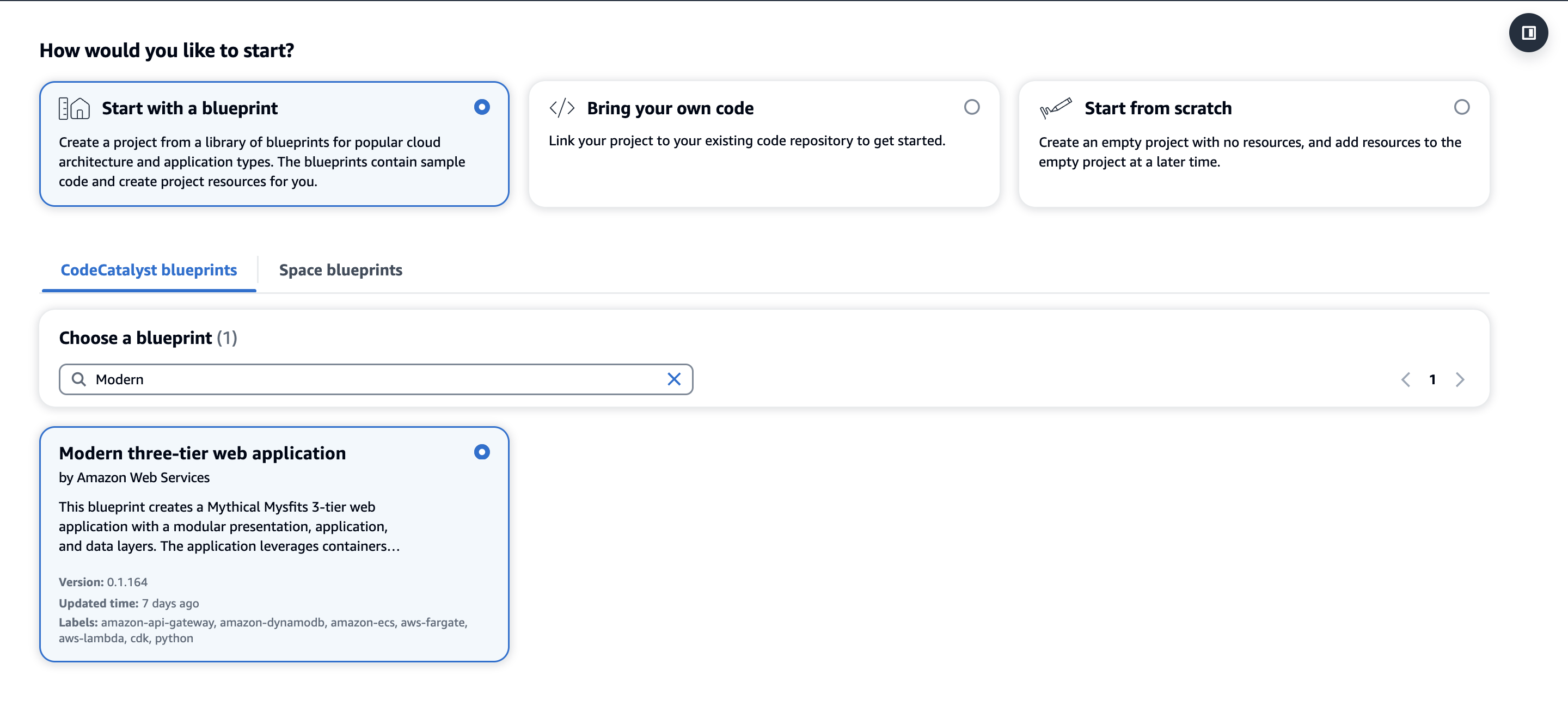
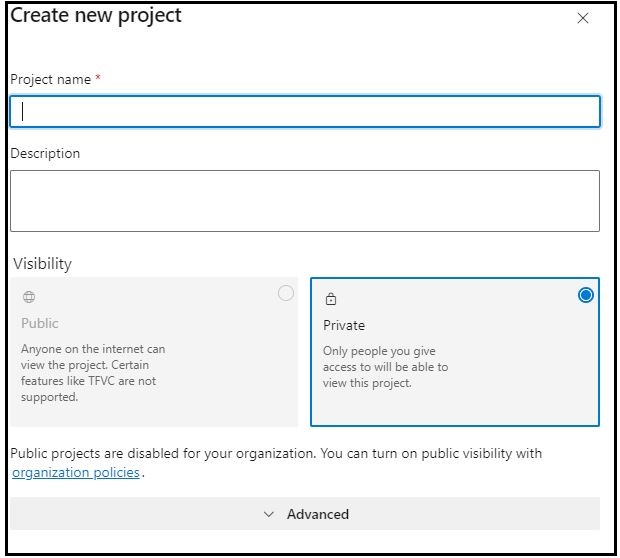
Go to your space by clicking your space name in the CodeCatalyst console. From your space, click Create Project. Upon selecting Start with a blueprint, you will select the Single-page application blueprint and click Next as shown in figure 1.
You will then pick a suitable name for your project, for this post I will use SafeWebShip. Select the AWS IAM role associated with the space and account connection, then click on Create Project.
Next, you will take a look at the current workflow and add the Amazon Inspector Scan action to identify the packages and libraries that make up a software application and scan for vulnerabilities from the associated packages and libraries.
Review the current workflow
A workflow defines a series of steps, or actions, to take during a workflow run and can be assembled using YAML or a visual editor. Actions which require interaction with AWS resources like creation, modification, reading, and deletion occur in the customer’s AWS account, such as creating an Amazon Inspector task to scan an SBOM report.
Add SBOM generation and scanning to the workflow
To add the Amazon Inspector Scan action to the workflow:
Navigate to the CI/CD menu on the left side of your screen, and then click Workflows
Click on the onPushToMainPipeline workflow
Click the edit button to make changes to the workflow
Ensure the Visual tab is selected, then add a CodeCatalyst Action by clicking Actions at the top left of the screen
In the new Actions catalog pop-up, search Amazon Inspector Scan. Click the + at the bottom right of the action card as shown in figure 2
Figure 2 Amazon CodeCatalyst Actions Catalog
Click the Configuration tab of the action and rename the action to inspector_sbom by clicking the pencil under action name
Select the environment from the Environment dropdown, AWS account connection and the Role you created earlier in the pre-requisite
Scroll down to Path and ensure it is “./” which represents the root of the source repository. The tool will traverse all of the directories of the source repository for supported manifest files to scan
The Scan Source should be REPO. The action can scan directories or source repository and a container image. For the purpose of this blog, you will be scanning an existing source repository
The tool can be configured to run scanners that will inspect container images, packages, archive, directory, and binary scanners. For the purpose of this blog, you will be using javascript-nodejs scanner. You can skip the rest of the scanners. You can read the action’s documentation from the action’s catalog page for a full list of supported scanners
Scroll down to Severity Threshold, type medium to fail the action if a vulnerability of medium or greater is found
Skip Files determines the files to skip and should be public/ since you are scanning a public repository
Depth specifies the depth of directory traversal when generating the SBOM. You should pick Depth as 1 to scan all the files in the root directory of the public repository. Other inputs that are relevant to container images can be ignored as the source repository is only being scanned
The action produces two files, the SBOM in CycloneDX v1.5 format from sbomgen and the vulnerability report from ScanSbom. Click the Outputs tab of the action, under Artifacts click Add artifact
Name the Build artifact name as SBOM
Paste the Files produced by build with the followinginspector_sbom_report.json
Click Add artifact again
Name the Build artifact name as SBOM_VULNERABILITIES
Paste the Files produced by build with the following
inspector_scan_report.json
Figure 3 Amazon CodeCatalyst Workflow Screen
As a best practice, you don’t want to build your project unless it has passed the security scan.
Do the following:
From the visual diagram of the workflow, click the Build action
With new menu pop-up to the right, in the pre-loaded inputs tab, and under Depends on – optional, select the Add actions dropdown menu and select the inspector_sbom action
Click x next to the action name to leave the action input menu
Finally, in order to save our changes to the workflow do the following:
Click Validate
Once you see a banner at the top of the page that says the workflow definition is valid, click Commit then click Commit once more to publish the changes to the workflow.
Run the workflow and view artifacts
After committing your changes to the workflow. There should be a new workflow run automatically as the trigger to the workflow is a code push.
Currently, SBOM CycloneDX v1.5 is not supported via CodeCatalyst Reports. Therefore, the report can not be visualized under the Reports feature of Amazon CodeCatalyst. However, the SBOM in CycloneDX v1.5 and the scan report are provided as artifacts for you to download and are stored as part of a workflow run.
To access the reports, do the following:
Navigate to the CI/CD menu on the left side of your screen, and then click Workflows
Click on the onPushToMainPipeline workflow
The current view is the Latest state, Click Runs
When the workflow, or CI/CD pipeline, runs, it is referred to as a run. Runs that are in progress are under Active runs and Runs history contains all previous workflow runs. Click the Run ID under latest run
Once the workflow run page loads, click Artifacts
On the Artifacts page, you should notice SBOM, CycloneDX v1.5, and SBOM_VULNERABILITIES, scan of the SBOM for vulnerabilities as shown in figure 4. Both of these artifacts can be downloaded and viewed on your local machine
The SBOM report will be downloaded as inspector_sbom_report.json. In the SBOM report, all the components that make up the software application are available to view. Each listed component is identified by its name and version as shown in figure 5.
Figure 5 Amazon Inspector Scan SBOM Artifact
The scan of the SBOM report for vulnerabilities will be downloaded as inspector_scan_report.json. In the scan report example below, there are 41 medium vulnerabilities and 32 high vulnerabilities. Since the threshold was set to “medium,” the build failed so these vulnerabilities can be addressed.
The scan report details the vulnerabilities, links to the affected components, and contains information on the vulnerability like description and CVE reference identifier as shown in figure 6 and figure 7.
Figure 7 Amazon Inspector Scan Vulnerability Artifact continued
Clean Up
If you have been following along with building this workflow, you should delete the resources you deployed so you do not continue to incur charges.
First, delete the stack titled DevelopmentFrontendStack-* that has been deployed from the AWS CloudFormation console in the AWS account you associated when you launched the blueprint. Second, delete the project from CodeCatalyst by navigating to Project settings and clicking the Delete project button
Conclusion
In this blog, we demonstrated how you can integrate security practices into a development pipeline using Amazon CodeCatalyst and Amazon Inspector. You created a project from a blueprint that came pre-configured with a workflow. Next, you modified the workflow to add DevSecOps practices to the pipeline through SBOM generation and scanning. Finally, you ran the workflow and viewed the SBOM and vulnerabilities report. It is essential to secure application dependencies during modern software development. For improved software supply chain security, Amazon CodeCatalyst and Amazon Inspector connect effortlessly. Add this action to your existing or new workflows to improve code security. This is necessary in today’s circumstances to protect your software supply chain. Learn more about Amazon CodeCatalyst and get started today!
Many AWS customers run their mission-critical workloads across multiple AWS regions to serve geographically dispersed customer base, meet disaster recovery objectives or address local laws and regulations. Amazon CodeCatalyst is a unified software development service designed to streamline and accelerate the process of building and delivering applications on AWS. It is an all-in-one platform for managing your entire development lifecycle, from planning and collaboration to continuous integration, deployment, and scaling. Amazon CodeCatalyst aims to boost developer productivity, ensure consistency, and improve the overall software development experience on AWS. By leveraging Amazon CodeCatalyst for multi-region deployments, AWS customers can ensure high availability and disaster recovery and comply with various regulatory requirements, all while improving their development and deployment process.
In this post, we will walk you through a solution which allows you to easily control updates to applications that are deployed across multiple AWS regions using Amazon CodeCatalyst.
Architecture
In this post, we are going to consider a containerized application running on Amazon Elastic Container Service (Amazon ECS) deployed in two different regions us-east-1 and us-west-2. We will walk you through how to configure an Amazon CodeCatalyst workflow to perform the deployment in stages, limiting the deployment scope to one region at a time (Figure 1).
Figure 1: Amazon ECS Multi Region deployment
Here are the high-level steps in the multi-region deployment process.
The developer makes updates to the application code base and pushes the code changes to the source repository hosted in Amazon CodeCatalyst
This code push invokes an Amazon CodeCatalyst workflow for the multi-region deployment. In this example, the workflow deploys changes to containerized application running on Amazon ECS in two regions.
The deployment to different regions happens in stages. In Step 3, the updates get deployed to region 1. This staged approach allows for initial testing and validation in one AWS region before proceeding.
Once the deployment (and any associated validation steps) is completed successfully in region 1, the workflow proceeds with deployment to the second AWS region.
Limiting the scope of each individual deployment limits the potential impact on customers from failed production deployments and prevents a multi-region impact.
Prerequisites
You need access to an AWS account. If you don’t have one, you can create a new AWS account.
Follow Amazon ECS Multi-Region Workshop to deploy a simple containerized application across two different AWS regions. Clone the repository and then follow steps to deploy the foundation, data and backend stack. Note the outputs from workshop-backend-main & workshop-backend-secondary, we’ll use them later on in this post.
Follow the Amazon ECR user guide to create an Amazon Elastic Container Registry (Amazon ECR) repository named codecatalyst-ecs-image-repo.
Create an Amazon CodeCatalyst space, with an empty Amazon CodeCatalyst project named codecatalyst-ecs-project and an Amazon CodeCatalyst environment called codecatalyst-ecs-environment. Associate your AWS account to the CodeCatalyst space. Follow the Amazon CodeCatalyst tutorial to set these up.
An AWS Identity and Access Management (IAM) role in the Amazon CodeCatalyst space to provide Amazon CodeCatalyst service permissions to build and deploy applications. Note the name of this role as you’ll use it later in this post.
Create an Amazon CodeCatalyst source repository titled ecs-multi-region-repo following the instructions in the documentation.
Step 1: Create an Amazon CodeCatalyst Dev Environment
In this step, you will create an Amazon CodeCatalyst Dev Environment directly linked to your source repository ecs-multi-region-repo allowing you to work on your Amazon ECS Multi Region application code and configuration files.
Open Amazon CodeCatalyst and navigate to your project
In the left navigation pane, choose Code and then choose Source repositories
Choose the source repository ecs-multi-region-repo for the Amazon ECS multi-region application
Choose Create Dev Environment
Choose Visual Studio Code from the drop-down menu
In Create Dev Environment and open with Visual Studio Code page (Figure 2), choose Create to create a Visual Studio Code development environment
Figure 2: Create Dev Environment in Amazon CodeCatalyst
Choose Open in Visual Studio Code when prompted (Figure 3), this establishes a remote connection to Dev Environment from your local Visual Studio Code. Keep this window open as you will need it for Step 2
Figure 3: Open Dev Environment with Visual Studio Code
Step 2: Add Source files to Amazon CodeCatalyst source repository
In this step you will add the necessary source files source files to the Amazon CodeCatalyst repository you created in the pre-requisites, including the sample Amazon ECS multi-region application and the Amazon ECS task definition file.
Inside the Visual Studio Code IDE, choose Terminal in the top menu.
Select New Terminal or use an existing terminal window if you prefer.
Clone the Github project inside your project folder by running the below commands in the terminal.
You need to create an Amazon ECS task definition file for the sample application. Create a file named task.json inside the app folder. Paste the below contents into the task.json replacing placeholder <Account_ID> with your AWS Account ID and <ecsTaskExecutionRole> with your role from workshop-backend-main outputs.
Commit the changes to the Amazon CodeCatalyst repository by issuing the following commands inside the Visual Studio Code IDE terminal window. You will need to update the <your_email> and <your_name> with your email and name.
In this example, we are using a single task definition file (task.json) which Amazon CodeCatalyst will use to render task definitions in both regions. But, if your workload requires different task definition files across different regions (e.g. region specific resource requirements, compliance requirements, environment specific configurations etc), you can create multiple task definition files in Amazon CodeCatalyst repository and configure RenderAmazonECStaskdefinition action for each regions with different task definition files.
Step 3: Create Amazon CodeCatalyst Workflow for multi-region deployment
Amazon CodeCatalyst workflow is an automated procedure that describes how to build, test, and deploy your code as part of a continuous integration and continuous delivery (CI/CD) system. A workflow defines a series of steps, or actions, to be executed during a workflow run. You can group actions into action groups to keep your workflow organized and configure dependencies between different groups.
In the navigation pane, choose CI/CD, and then choose Workflows
Choose Create workflow. Select ecs-multi-region-repo from the Source repository dropdown
Choose main in the branch. Select Create (Figure 4). The workflow definition file appears in the Amazon CodeCatalyst console’s YAML editor
Figure 4: Create Workflow page in Amazon CodeCatalyst
In the YAML editor, you will replace the default content with the below provided workflow definition. Replace <Account_ID> with your AWS account ID.
Replace <EcsRegionNameMain>, <EcsClusterNameMain>, <EcsServiceNameMain>, <EcsRegionNameSecondary>, <EcsClusterNameSecondary>, <EcsServiceNameSecondary>. For values with “main” refer to output from workshop-backend-main, and values with “secondary” refer to output from workshop-backend-secondary.
Otherwise use your own Amazon ECS Region, Amazon ECS Cluster ARN, Amazon ECS Service Name values.
Replace <CodeCatalyst-Dev-Admin-Role> with the Role Name from the pre-requisite
Name: BuildAndDeployToECS
SchemaVersion: "1.0"

# Set automatic triggers on code push.
Triggers:
  - Type: Push
    Branches:
      - main

Actions:
  Build_application_Multi_Region:
        Identifier: aws/build@v1
        Inputs:
          Sources:
            - WorkflowSource
          Variables:
            - Name: region
              Value: <EcsRegionNameMain>
            - Name: registry
              Value: <Account_ID>.dkr.ecr.<EcsRegionNameMain>.amazonaws.com
            - Name: image
              Value: codecatalyst-ecs-image-repo
        Outputs:
          AutoDiscoverReports:
            Enabled: false
          Variables:
            - IMAGE
        Compute:
          Type: EC2
        Environment:
          Connections:
            - Role: <CodeCatalyst-Dev-Admin-Role>
              Name: "<Account_ID>"
          Name: codecatalyst-ecs-environment
        Configuration:
          Steps:
            - Run: export account=`aws sts get-caller-identity --output text | awk '{ print $1
                }'`
            - Run: aws ecr get-login-password --region ${region} | docker login --username AWS
                --password-stdin ${registry}
            - Run: docker build -t appimage app
            - Run: docker tag appimage ${registry}/${image}:${WorkflowSource.CommitId}
            - Run: docker push --all-tags ${registry}/${image}
            - Run: export IMAGE=${registry}/${image}:${WorkflowSource.CommitId}
  build-deploy-region-one:
    Actions:
      RenderAmazonECStaskdefinition_Region_One:
        Identifier: aws/ecs-render-task-definition@v1
        Configuration:
          image: ${Build_application_Multi_Region.IMAGE}
          container-name: web
          task-definition: app/task.json
        Outputs:
          Artifacts:
            - Name: TaskDefinitionOne
              Files:
                - task-definition*
        DependsOn:
          - Build_application_Multi_Region
        Inputs:
          Sources:
            - WorkflowSource
      DeploytoAmazonECS_Region_One:
        Identifier: aws/ecs-deploy@v1
        Configuration:
          task-definition: /artifacts/build-deploy-region-one@DeploytoAmazonECS_Region_One/TaskDefinitionOne/${RenderAmazonECStaskdefinition_Region_One.task-definition}
          service: <EcsServiceNameMain>
          cluster: <EcsClusterNameMain>
          region: <EcsRegionNameMain>
        Compute:
          Type: EC2
          Fleet: Linux.x86-64.Large
        Environment:
          Connections:
            - Role: <CodeCatalyst-Dev-Admin-Role>
              Name: "<Account_ID>"
          Name: codecatalyst-ecs-environment
        DependsOn:
          - RenderAmazonECStaskdefinition_Region_One
        Inputs:
          Artifacts:
            - TaskDefinitionOne
          Sources:
            - WorkflowSource
  build-deploy-region-two:
    DependsOn:
      - build-deploy-region-one
    Actions:
      RenderAmazonECSTaskDefinition_Region_Two:
        # Identifies the action. Do not modify this value.
        Identifier: aws/[email protected]
        # Defines the action's properties.
        Configuration:
          image: ${Build_application_Multi_Region.IMAGE}
          container-name: web
          task-definition: app/task.json
        Outputs:
          Artifacts:
            - Name: TaskDefinitionTwo
              Files:
                - task-definition*
        DependsOn:
          - Build_application_Multi_Region
        # Specifies the source and/or artifacts to pass to the action as input.
        Inputs:
          # Optional
          Sources:
            - WorkflowSource # This specifies that the action requires this Workflow as a source
      DeployToAmazonECS_Region_Two:
        Identifier: aws/[email protected] # Defines the action's properties.
        Configuration:
          task-definition: /artifacts/build-deploy-region-two@DeployToAmazonECS_Region_Two/TaskDefinitionTwo/${RenderAmazonECSTaskDefinition_Region_Two.task-definition}
          service: <EcsServiceNameSecondary>
          cluster: <EcsClusterNameSecondary>
          region: <EcsRegionNameSecondary>
        # Required; You can use an environment to access AWS resources.
        Environment:
          Connections:
            - Role: <CodeCatalyst-Dev-Admin-Role>
              Name: "<Account_ID>"
          Name: codecatalyst-ecs-environment
        DependsOn:
          - RenderAmazonECSTaskDefinition_Region_Two
        # Specifies the source and/or artifacts to pass to the action as input.
        Inputs:
          Artifacts:
            - TaskDefinitionTwo
          # Optional
          Sources:
            - WorkflowSource # This specifies that the action requires this Workflow as a source
Figure 5: Amazon CodeCatalyst Workflow Screen
The workflow above (Figure 5) does the following:
Whenever code changes are pushed to the repository, a Build action is invoked automatically. The Build action builds a container image and pushes the image to the Amazon Elastic Container Registry (Amazon ECR) repository in the primary region. In this example, we are storing the container image only within the primary region. If you are implementing multi-region for disaster recovery, enable cross-region replication on Amazon ECR to automatically replicate images to repositories in other regions. You will also need to update the task definition files to reference the Amazon ECR repository in the same region where the task will run
Once the Build stage is complete, the Amazon ECS task definition is updated with the new Amazon ECR repository image
The DeployToECS action then deploys the new image to Amazon ECS in the first region
Once the first action group execution succeeds, the Amazon CodeCatalyst workflow invokes second action group repeating the last two steps (Render Task Definition, Deploy) for the second region.
As you may have noticed, the build action is separated from the deployment actions in this example. This way, we are building the container image only once and deploying the same image across multiple regions. But, if you have specific build steps that are region-specific, you can include those actions in the region-specific action groups. This allows for customizations based on regional requirements while maintaining overall consistency.
To check the syntax and structure of your workflow definition:
Choose the Validate button. It should add a green banner with “The workflow definition is valid” at the top
Select Commit to add the workflow to the repository (Figure 6)
Figure 6: Commit workflow page in Amazon CodeCatalyst
The workflow file is stored in a ~/.codecatalyst/workflows/ folder in the root of your source repository. The file can have a .yml or .yaml extension.
Using the URL of the Application Load Balancer you noted from the pre-requisite from either of the two regions, add /healthcheck to load the health check page in your browser. You’ll to see the message in the health check page as shown in figure 7.
Figure 7: ECS Multi Region Application (US-West-1)
Step 4: Validate the setup
To validate the setup, you will make a small change to the Health check of the sample application.
Open Amazon CodeCatalyst dev environment (Visual Studio Code) that you created in Step 1.
Update your local copy of the repository. In the terminal run the below command
git pull
Inside the Visual Studio Code IDE, open app.py present inside the app folder.
Inside healthcheck() method, on line 13, update the string from ok to ok v1
Commit the changes to the repository using the below commands:
After the change is commit, the Amazon CodeCatalyst workflow should start running automatically. Once the Amazon CodeCatalyst workflow finishes execution, paste the Application Load Balancer URL for region and add /healthcheck to reach the check page. You will be able to see the updated message in the health check page as shown in figure 8 and 9.
Figure 8: ECS Multi Region Application (US-East-1)
Figure 9: ECS Multi Region Application (US-West-1)
Considerations for multi-region deployments
In this post, we considered a deployment scenario across two regions. Many organizations have workload running across many regions, serving customers across the globe. The Amazon CodeCatalyst workflow, that we created in this post, can be extended to more than two regions.
Amazon CodeCatalyst allows fine-grained control for progressive wave-based deployments across multiple regions. This is achieved by using multiple action groups and sequencing those action groups using dependencies in the Amazon CodeCatalyst workflow. For example, in the workflow discussed in Step 3, you defined two action groups build-deploy-region-oneand build-deploy-region-two. We setup build-deploy-region-two to depend on build-deploy-region-one using DependsOn: property, so that the deployment to the second region starts only after the completion of the first region. This approach allows for staggered deployments, mitigating risks by preventing issues in one AWS region from impacting others.
For workloads spanning multiple regions, the same staggering deployment approach can be extended with more action groups. Each action group can contain a list of regions to deploy to in parallel. Dependencies between action groups ensures the deployment happens sequentially. Below is a high-level architecture (Figure 10) of the setup of 3-stage deployment process for a workload running across 6 regions.
Figure 10: Staggered Deployment architecture
Cleanup
If you have been following along with the post, you should delete the resources you deployed so you do not continue to incur charges.
Manually delete Amazon CodeCatalyst dev environment, source repository and project from your CodeCatalyst Space.
In conclusion, we demonstrated how you can setup multi-region deployments for Amazon ECS workloads using Amazon CodeCatalyst workflows. We showed how to configure the Amazon CodeCatalyst workflow to deploy to one region at a time, allowing for validation before proceeding to additional regions. The pattern can be extended to more than two AWS regions using additional action groups and dependencies. This solution addresses key challenges in multi-region deployments like maintaining consistency while ensuring high availability. Learn more about multi region in AWS Multi-Region Fundamentals Whitepaper
AWS Community Days have been in full swing around the world. I am going to put the spotlight on AWS Community Day Argentina where Jeff Barr delivered the keynote, talks and shared his nuggets of wisdom with the community, including a fun story of how he once followed Bill Gates to a McDonald’s!
Last week’s launches Here are the launches that got my attention, starting off with the GA releases.
Amazon EC2 X8g Instances are now generally available – X8g instances are powered by AWS Graviton4 processors and deliver up to 60% better performance than AWS Graviton2-based Amazon EC2 X2gd instances. These instances offer larger sizes with up to 3x more vCPU (up to 48xlarge) and memory (up to 3TiB) than Graviton2-based X2gd instances.
Amazon Q generative SQL for Amazon Redshift is now generally available – Amazon Q generative SQL in Amazon Redshift Query Editor is an out-of-the-box web-based SQL editor for Amazon Redshift. It uses generative AI to analyze user intent, query patterns, and schema metadata to identify common SQL query patterns directly within Amazon Redshift, accelerating the query authoring process for users and reducing the time required to derive actionable data insights.
AWS Amplify now supports long-running tasks with asynchronous server-side function calls – Developers can use AWS Amplify to invoke Lambda function asynchronously for operations like generative AI model inferences, batch processing jobs, or message queuing without blocking the GraphQL API response. This improves responsiveness and scalability, especially for scenarios where immediate responses are not required or where long-running tasks need to be offloaded.
Amazon Corretto 23 is now generally available – Amazon Corretto is a no-cost, multi-platform, production-ready distribution of OpenJDK. Corretto 23 is an OpenJDK 23 Feature Release that includes an updated Vector API, expanded pattern matching and switch expression, and more. It will be supported through April, 2025.
Use OR1 instances for existing Amazon OpenSearch Service domains – With OpenSearch 2.15, you can leverage OR1 instances for your existing Amazon OpenSearch Service domains by simply updating your existing domain configuration, and choosing OR1 instances for data nodes. This will seamlessly move domains running OpenSearch 2.15 to OR1 instances using a blue/green deployment.
Amazon S3 Express One Zone now supports AWS KMS with customer managed keys – By default, S3 Express One Zone encrypts all objects with server-side encryption using S3 managed keys (SSE-S3). With S3 Express One Zone support for customer managed keys, you have more options to encrypt and manage the security of your data. S3 Bucket Keys are always enabled when you use SSE-KMS with S3 Express One Zone, at no additional cost.
AWS CodeBuild support for managed GitLab runners – Customers can configure their AWS CodeBuild projects to receive GitLab CI/CD job events and run them on ephemeral hosts. This feature allows GitLab jobs to integrate natively with AWS, providing security and convenience through features such as IAM, AWS Secrets Manager, AWS CloudTrail, and Amazon VPC.
We launched existing services in additional Regions:
Other AWS news Here are some additional projects, blog posts, and news items that you might find interesting:
Secure Cross-Cluster Communication in EKS – It demonstrates how you can use Amazon VPC Lattice and Pod Identity to secure cross-EKS-cluster application communication, along with an example that you can use as a reference to adapt to your own microservices applications.
AWS open source news and updates – My colleague Ricardo Sueiras writes about open source projects, tools, and events from the AWS Community; check out Ricardo’s page for the latest updates.
Upcoming AWS events Check your calendars and sign up for upcoming AWS events:
AWS Community Days – Join community-led conferences that feature technical discussions, workshops, and hands-on labs led by expert AWS users and industry leaders from around the world. Upcoming AWS Community Days are in Italy (Sep. 27), Taiwan (Sep. 28), Saudi Arabia (Sep. 28)), Netherlands (Oct. 3), and Romania (Oct. 5).
Amazon Q Developer is a generative artificial intelligence (AI) powered conversational assistant that can help you understand, build, extend, and operate AWS applications. You can ask questions about AWS architecture, your AWS resources, best practices, documentation, support, and more.
With Amazon Q Developer in your IDE, you can write a comment in natural language that outlines a specific task, such as, “Upload a file with server-side encryption.” Based on this information, Amazon Q Developer recommends one or more code snippets directly in the IDE that can accomplish the task. You can quickly and easily accept the top suggestions (tab key), view more suggestions (arrow keys), or continue writing your own code.
However, Amazon Q Developer in the IDE is more than just a code completion plugin. Amazon Q Developer is a generative AI (GenAI) powered assistant for software development that can be used to have a conversation about your code, get code suggestions, or ask questions about building software. This provides the benefits of collaborative paired programming, powered by GenAI models that have been trained on billions of lines of code, from the Amazon internal code-base and publicly available sources.
The challenge
At the 2024 AWS Summit in Sydney, an exhilarating code challenge took center stage, pitting a Blue Team against a Red Team, with approximately 10 to 15 challengers in each team, in a battle of coding prowess. The challenge consisted of 20 tasks, starting with basic math and string manipulation, and progressively escalating in difficulty to include complex algorithms and intricate ciphers.
The Blue Team had a distinct advantage, leveraging the powerful capabilities of Amazon Q Developer, the most capable generative AI-powered assistant for software development. With Q Developer’s guidance, the Blue Team navigated increasingly complex tasks with ease, tapping into Q Developer’s vast knowledge base and problem-solving abilities. In contrast, the Red Team competed without assistance, relying solely on their own coding expertise and problem-solving skills to tackle daunting challenges.
As the competition unfolded, the two teams battled it out, each striving to outperform the other. The Blue Team’s efficient use of Amazon Q Developer proved to be a game-changer, allowing them to tackle the most challenging tasks with remarkable speed and accuracy. However, the Red Team’s sheer determination and technical prowess kept them in the running, showcasing their ability to think outside the box and devise innovative solutions.
The culmination of the code challenge was a thrilling finale, with both teams pushing the boundaries of their skills and ultimately leaving the audience in a state of admiration for their remarkable achievements.
The graph shows the average completion time in which Team Blue “Q Developer” completed more questions across the board in less time than Team Red “Solo Coder”. Within the 1-hour time limit, Team Blue got all the way to Question 19, whereas Team Red only got to Question 16.
There are some assumptions and validations. People who consider themselves very experienced programmers were encouraged to choose team Red and not use AI, to test themselves against team Blue, those using AI. The code challenges were designed to test the output of applying logic. They were specifically designed to be passable without the use of Amazon Q Developer, to test the optimization of writing logical code with Amazon Q Developer. As a result, the code tasks worked well with Amazon Q Developer due to the nature of and underlying training of Amazon Q Developer models. Many people who attended the event were not Python Programmers (we constrained the challenge to Python only), and walked away impressed at how much of the challenge they could complete.
As an example of one of the more complex questions competitors were given to solve was:
Implement the rail fence cipher.
In the Rail Fence cipher, the message is written downwards on successive "rails" of an imaginary fence, then moving up when we get to the bottom (like a zig-zag). Finally the message is then read off in rows.

For example, using three "rails" and the message "WE ARE DISCOVERED FLEE AT ONCE", the cipherer writes out:

W . . . E . . . C . . . R . . . L . . . T . . . E
. E . R . D . S . O . E . E . F . E . A . O . C .
. . A . . . I . . . V . . . D . . . E . . . N . .

Then reads off: WECRLTEERDSOEEFEAOCAIVDEN

Given variable a. Use a three-rail fence cipher so that result is equal to the decoded message of variable a.
The questions were both algorithmic and logical in nature, which made them great for testing conversational natural language capability to solve questions using Amazon Q Developer, or by applying one’s own logic to write code to solve the question.
Top scoring individual per team:
Total Questions Complete
individual time (min)
With Q Developer (Blue Team)
19
30.46
Solo Coder (Red Team)
16
58.06
By comparing the top two competitors, and considering the solo coder was a highly experienced programmer versus the top Q Developer coder, who was a relatively new programmer not familiar with Python, you can see the efficiency gain when using Q Developer as an AI peer programmer. It took the entire 60 minutes for the solo coder to complete 16 questions, whereas the Q Developer coder got to the final question (Question 20, incomplete) in half of the time.
Summary
Integrating advanced IDE features and adopting paired programming have significantly improved coding efficiency and quality. However, the introduction of Amazon Q Developer has taken this evolution to new heights. By tapping into Q Developer’s vast knowledge base and problem-solving capabilities, the Blue Team was able to navigate complex coding challenges with remarkable speed and accuracy, outperforming the unassisted Red Team. This highlights the transformative impact of leveraging generative AI as a collaborative pair programmer in modern software development, delivering greater efficiency, problem-solving, and, ultimately, higher-quality code. Get started with Amazon Q Developer for your IDE by installing the plugin and enabling your builder ID today.
According to the Well-Architected DevOps Guidance, “A peer review process for code changes is a strategy for ensuring code quality and shared responsibility. To support separation of duties in a DevOps environment, every change should be reviewed and approved by at least one other person before merging.” Development teams often implement the peer review process in their Software Development Lifecycle (SDLC) by leveraging Pull Requests (PRs). Amazon CodeCatalyst has recently released three new features to facilitate a robust peer review process. Pull Request Approval Rules enforce a minimum number of approvals to ensure multiple peers review a proposed change prior to a progressive deployment. Amazon Q pull request summaries can automatically summarize code changes in a PR, saving time for both the creator and reviewer. Lastly, Nested Comments allows teams to organize conversations and feedback left on a PR to ensure efficient resolution.
This blog will demonstrate how a DevOps lead can leverage new features available in CodeCatalyst to accomplish the following requirements covering best practices: 1. Require at least two people to review every PR prior to deployment, and 2. Reduce the review time to merge (RTTM).
Prerequisites
If you are using CodeCatalyst for the first time, you’ll need the following to follow along with the steps outlined in the blog post:
A Project in a CodeCatalyst Space. If you don’t have one, you can create a new space.
Approval rules can be configured for branches in a repository. When you create a PR whose destination branch has an approval rule configured for it, the requirements for the rule must be met before the PR can be merged.
In this section, you will implement approval rules on the default branch (main in this case) in the application’s repository to implement the new ask from leadership requiring that at least two people review every PR before deployment.
Step 1: Creating the application Pull Request approval rules work with every project but in this blog, we’ll leverage the Modern three-tier web application blueprint for simplicity to implement PR approval rules for merging to the main branch.
Figure 1: Creating a new Modern three-tier application Blueprint
First, within your space click “Create Project” and select the Modern three-tier web application CodeCatalyst Blueprint as shown above in Figure 1.
Enter a Project name and select: Lambda for the Compute Platform and Amplify Hosting for Frontend Hosting Options. Additionally, ensure your AWS account is selected along with creating a new IAM Role.
Finally, click Create Project and a new project will be created based on the Blueprint.
Once the project is successfully created, the application will deploy via a CodeCatalyst workflow, assuming the AWS account and IAM role were setup correctly. The deployed application will be similar to the Mythical Mysfits website.
Step 2: Creating an approval rule
Next, to satisfy the new requirement of ensuring at least two people review every PR before deployment, you will create the approval rule for members when they create a pull request to merge into the main branch.
Navigate to the project you created in the previous step.
In the navigation pane, choose Code, and then choose Source repositories.
Next, choose the mysfits repository that was created as part of the Blueprint.
On the overview page of the repository, choose Branches.
For the main branch, click View under the Approval Rules column.
In Minimum number of approvals, the number corresponds to the number of approvals required before a pull request can be merged to that branch.
Now, you’ll change the approval rule to satisfy the requirement to ensure at least 2 people review every PR. Choose Manage settings. On the settings page for the source repository, in Approval rules, choose Edit.
In Destination Branch, from the drop-down list, choose main as the name of the branch to configure an approval rule. In Minimum number of approvals, enter 2, and then choose Save.
Figure 2: Creating a new approval rule
Note: You must have the Project administrator role to create and manage approval rules in CodeCatalyst projects. You cannot create approval rules for linked repositories.
When implementing approval rules and branch restrictions in your repositories, ensure you take into consideration the following best practices:
For branches deemed critical or important, ensure only highly privileged users are allowed to Push to the Branch and Delete the Branch in the branch rules. This prevents accidental deletion of critical or important branches as well as ensuring any changes introduced to the branch are reviewed before deployment.
Ensure Pull Request approval rules are in place for branches your team considers critical or important. While there is no specific recommended number due to varying team size and project complexity, the minimum number of approvals is recommended to be at least one and research has found the optimal number to be two.
In this section, you walked through the steps to create a new approval rule to satisfy the requirement of ensuring at least two people review every PR before deployment on your CodeCatalyst repository.
Amazon Q pull request summaries
Now, you begin exploring ways that can help development teams reduce MTTR. You begin reading about Amazon Q pull request summaries and how this feature can automatically summarize code changes and start to explore this feature in further detail.
While creating a pull request, in Pull request description, you can leverage the Write description for me feature, as seen in Figure 5 below, to have Amazon Q create a description of the changes contained in the pull request.
Figure 3: Amazon Q write description for me feature
Once the description is generated, you can Accept and add to description, as seen in Figure 6 below. As a best practice, once Amazon Q has generated the initial PR summary, you should incorporate any specific organizational or team requirements into the summary before creating the PR. This allows developers to save time and reduce MTTR in generating the PR summary while ensuring all requirements are met.
Figure 4: PR Summary generated by Amazon Q
CodeCatalyst offers an Amazon Q feature that summarizes pull request comments, enabling developers to quickly grasp key points. When many comments are left by reviewers, it can be difficult to understand common themes in the feedback, or even be sure that you’ve addressed all the comments in all revisions. You can use the Create comment summary feature to have Amazon Q analyze the comments and provide a summary for you, as seen in Figure 5 below.
Figure 5: Comment summary
Nested Comments
When reviewing various PRs for the development teams, you notice that feedback and subsequent conversations often happen within disparate and separate comments. This makes reviewing, understanding and addressing the feedback cumbersome and time consuming for the individual developers. Nested Comments in CodeCatalyst can organize conversations and reduce MTTR.
You’ll leverage the existing project to walkthrough how to use the Nested Comments feature:
Step 1: Creating the PR
Click the mysifts repository, and on the overview page of the repository, choose More, and then choose Create branch.
Edit the file to update the text in the <title> block to Mythical Mysfits new title update! and Commit the changes.
Create a pull request by using test-branch as the Source branch and main as the Destination branch. Your PR should now look similar to Figure 6 below:
Figure 6: Pull Request with updated Title
Step 2: Review PR and add Comments
Review the PR, ensure you are on the Changes tab (similar to Figure 3), click the Comment icon and leave a comment. Normally this would be done by the Reviewer but you will simulate being both the Reviewer and Developer in this walkthrough.
With the comment still open, hit Reply and add another comment as a response to the initial comment. The PR should now look similar to Figure 7 below.
Figure 7: PR with Nested Comments
When leaving comments on PR in CodeCatalyst, ensure you take into consideration the following best practices :
Feedback or conversation focused on a specific topic or piece of code should leverage the nested comments feature. This will ensure the conversation can be easily followed and that context and intent are not lost in a sea of individual comments.
Author of the PR should address all comments by either making updates to the code or replying to the comment. This indicates to the reviewer that each comment was reviewed and addressed accordingly.
Feedback should be constructive in nature on PRs. Research has found that, “destructive criticism had a negative impact on participants’ moods and motivation to continue working.”
Clean-up
As part of following the steps in this blog post, if you upgraded your space to Standard or Enterprise tier, please ensure you downgrade to the Free tier to avoid any unwanted additional charges. Additionally, delete any projects you may have created during this walkthrough.
Conclusion
In today’s fast-paced software development environment, maintaining a high standard for code changes is crucial. With its recently introduced features, including Pull Request Approval Rules, Amazon Q pull request summaries, and nested comments, CodeCatalyst empowers development teams to ensure a robust pull request review process is in place. These features streamline collaboration, automate documentation tasks, and facilitate organized discussions, enabling developers to focus on delivering high-quality code while maximizing productivity. By leveraging these powerful tools, teams can confidently merge code changes into production, knowing that they have undergone rigorous review and meet the necessary standards for reliability and performance.
“All code will become legacy”. This saying, widely recognized amongst software developers, highlights the reality of their day-to-day activities. While writing new code is an integral part of a developer’s role, a significant portion of their time is dedicated to refactoring and maintaining existing codebases.
Developers typically encounter numerous challenges when attempting to understand and work with existing codebases. One of the primary obstacles is the lack of proper code documentation. As projects evolve and developers come and go, the rationale behind design decisions and implementation details can become obscured, making it challenging for new team members to understand the intricacies of the codebase.
Another hurdle is the need to work with unfamiliar or legacy programming languages and frameworks. The rapid pace of technology advancements means that developers must constantly adapt to new tools and libraries, while also maintaining an understanding of older technologies that may still be in use.
Compounding these challenges is the inherent difficulty of understanding code written by others. Even with comprehensive documentation and adherence to best coding practices, the nuances of another developer’s thought process and design decisions can be challenging to decipher. This lack of familiarity can lead to increased risk of introducing bugs or breaking existing functionality during code modifications.
In a bid to address these challenges, organizations must explore innovative solutions that enhance code understanding and improve developer efficiency. By empowering developers with tools that streamline code maintenance and refactoring processes, organizations can unlock their potential for innovation and accelerate their ability to deliver high-quality software products to the market.
In this blog post, we explore how developers in organizations can leverage Amazon Q Developer to simplify the process of understanding and explaining code in order to boost productivity and efficiency.
Prerequisites
The following prerequisites are required to make use of Amazon Q Developer in your IDE:
Introduction to Amazon Q Developer as a solution for simplifying code comprehension
Amazon Q Developer is a generative AI-powered service that helps developers and IT professionals with all of their tasks across the software development lifecycle—from coding, testing, and upgrading, to troubleshooting, performing security scanning and fixes, optimizing AWS resources, and creating data engineering pipelines. Amazon Q Developer aims to simplify code comprehension for developers, making it easier to understand and navigate complex codebases. It leverages advanced machine learning and natural language processing techniques to provide intelligent code analysis and exploration capabilities.
Developers can ask questions about their codebase in natural language and receive concise, relevant answers. Amazon Q Developer can explain the purpose and functionality of code elements, identify dependencies, and provide insights into code structure and architecture. This can significantly reduce the time and effort required to onboard new team members, maintain legacy systems, or refactor existing code. This result in not just better code quality and consistency across teams and projects; Amazon Q Developer also helps developers unlock a new level of productivity and efficiency by allowing them to focus more on innovation.
Understanding Amazon Q Developer’s ability to provide natural language explanations of code
One of the most powerful uses of Amazon Q Developer is getting natural language explanations of code directly within your integrated development environment (IDE). This can be an invaluable tool when trying to understand legacy code, review code you haven’t touched in a while, or learn how certain programming patterns or algorithms work. Rather than spending so much time reviewing code line-by-line or searching for tutorials, you can leverage Amazon Q Developer to provide insightful explanations.
The process is simple – highlight the section of code you need explained in your IDE, then right-click and select “Explain” from the Amazon Q Developer menu. Amazon Q Developer’s advanced language model will analyze the highlighted code and generate a plain English explanation breaking down what the code is doing line-by-line.
Figure 1 – Selecting the relevant code by highlighting or right-clicking on it.
Figure 2 – Selecting “Explain” to get natural language explanation from Amazon Q Developer
Let’s take a look at an example. If you highlight a few lines of code that creates a reference to an S3 bucket, Amazon Q Developer generates a natural language explanation such as:
Figure 3 – Amazon Q Developer analyzes the selected code and provides an explanation of what the code does in natural language.
Amazon Q Developer continues providing clear explanations of how the code implementation works. This natural language explanation can provide much-needed context and clarity, especially for complex coding patterns. This allows you to quickly catch up on code you haven’t looked at in a while. It can also be an excellent learning tool when researching how certain algorithms or coding techniques work under the hood.
If any part of the explanation is unclear, you can ask Amazon Q Developer follow-up questions using natural language in the chat interface. Amazon Q Developer will use the conversation context and the code to provide clarifying responses to follow-up questions. You can continue the back-and-forth conversation until you fully comprehend the code functionality. Optionally, you can provide feedback to Amazon Q Developer on the quality of its code explanations to help improve the service.
The “Explain” functionality is just one of the ways Amazon Q Developer augments your coding workflow by providing generative AI-powered insights into your code on-demand, right within your familiar IDE environment.
Now let’s dive into more examples.
Example demonstrating how Amazon Q Developer breaks down complex code algorithms
In this example, let’s assume a developer is working on a coding project that involves path-finding, network optimization and latency. We will use Amazon Q Developer to review code that should find the shortest path tree from a single source node, by building a set of nodes that have minimum distance from the source. This is the popular Djikstra’s algorithm and can be complex for developers that are new to graph theory and its implementation.
The developer can use Amazon Q Developer to understand what the block of code is doing in simple terms.
Here’s the code implementing the algorithm:
Figure 4 – Python code in IDE implementing Djikstra’s Algorithm for path-finding.
Figure 5 – With Amazon Q Developer, you can Explain, Refactor, Fix or Optimize your code.
You can Right-click the highlighted code to open a context window. Choose Send to Amazon Q, then select Explain. Selecting the “Explain” option will prompt Amazon Q Developer to analyze the code and provide a natural language explanation of what the code does.
Figure 6 – Amazon Q Developer will analyze the selected code and provide an explanation of what the code does in natural language.
Amazon Q Developer opens a chat panel on the right within the IDE, where you see the result of choosing the “Explain” option. Amazon Q Developer has analyzed the highlighted code and provided a detailed, step-by-step explanation in the chat panel. This explanation breaks down the complex algorithm in plain, easy-to-understand language, helping the developer better comprehend the purpose and functionality of the code. You can follow-up by asking clarifying questions within the chat panel.
You can also Refactor your code with Amazon Q Developer in order to improve code readability or efficiency, among other improvements.
Here’s how:
Figure 7 – Using Amazon Q Developer to Refactor code.
Highlight the code in the IDE and Refactor the code by first right clicking and selecting “send to Amazon Q”. This allows Amazon Q Developer to analyze the code and suggest ways to improve its readability, efficiency, or other aspects of the implementation. The chat panel provides the developer with the recommended refactoring steps.
Figure 8 – Amazon Q Developer analyzes the selected code and provides an explanation of steps you can take to refactor your code in the chat panel.
In the image above, Amazon Q Developer has carefully reviewed the code and provided a step-by-step plan for the developer to follow in order to refactor the code, making it more concise, maintainable, and aligned with best practices. This collaborative approach between the developer and Amazon Q Developer enables the efficient creation of high-quality, optimized code.
Conclusion
Amazon Q Developer is a game-changer for developers looking to streamline their understanding of complex code segments. By offering natural language explanations within the IDE, Amazon Q Developer eliminates the need for time-consuming manual research or reliance on outdated documentation. Amazon Q Developer’s ability to break down intricate algorithms and unfamiliar syntax, as shown in the preceding examples, empowers developers to tackle even the most challenging codebases with confidence.
Whether you’re a seasoned developer or just starting, Amazon Q Developer is an invaluable tool that simplifies the coding process and makes the coding environment more accessible and easier to navigate. With its seamless integration and user-friendly interface, Amazon Q Developer is poised to become an essential companion for developers worldwide, enabling them to write better code, learn more efficiently, and ultimately, deliver superior software solutions.
Did you know that Amazon Q Developer, a new type of Generative AI-powered (GenAI) assistant, can help developers and DevOps engineers accelerate Infrastructure as Code (IaC) development using the AWS Cloud Development Kit (CDK)?
IaC is a practice where infrastructure components such as servers, networks, and cloud resources are defined and managed using code. Instead of manually configuring and deploying infrastructure, with IaC, the desired state of the infrastructure is specified in a machine-readable format, like YAML, JSON, or modern programming languages. This allows for consistent, repeatable, and scalable infrastructure management, as changes can be easily tracked, tested, and deployed across different environments. IaC reduces the risk of human errors, increases infrastructure transparency, and enables the application of DevOps principles, such as version control, testing, and automated deployment, to the infrastructure itself.
There are different IaC tools available to manage infrastructure on AWS. To manage infrastructure as code, one needs to understand the DSL (domain-specific language) of each IaC tool and/or construct interface and spend time defining infrastructure components using IaC tools. With the use of Amazon Q Developer, developers can minimize time spent on this undifferentiated task and focus on business problems. In this post, we will go over how Amazon Q Developer can help deploy a fully functional three-tier web application infrastructure on AWS using CDK. AWS CDK is an open-source software development framework to define cloud infrastructure in modern programming languages and provision it through AWS CloudFormation.
Amazon Q Developer is a generative artificial intelligence (AI)-powered conversational assistant that can help you understand, build, extend, and operate AWS applications. You can ask questions about AWS architecture, your AWS resources, best practices, documentation, support, and more. Amazon Q Developer is constantly updating its capabilities so your questions get the most contextually relevant and actionable answers.
In the following sections, we will take a real-world three-tier web application that uses serverless architecture and showcase how you can accelerate AWS CDK code development using Amazon Q Developer as an AI coding companion and thus improve developer productivity.
Prerequisites
To begin using Amazon Q Developer, the following are required:
You are a DevOps engineer at a software company and have been tasked with building and launching a new customer-facing web application using a serverless architecture. It will have three tiers, as shown below, consisting of the presentation layer, application layer, and data layer. You have decided to utilize Amazon Q Developer to deploy the application components using AWS CDK.
Figure 1 – Serverless Application Architecture
Accelerating application deployment using Amazon Q Developer as an AI coding companion
Let’s dive into how Amazon Q Developer can be used as an expert companion to accelerate the deployment of the above serverless application resources using AWS CDK.
1. Deploy Presentation Layer Resources
Creating a secured Amazon S3 bucket to host static assets and front it using Amazon CloudFront
When building modern serverless web applications that host large static content, a key architecture consideration is how to efficiently and securely serve static assets such as images, CSS, and JavaScript files. Simply serving these from your application servers can lead to scaling and performance bottlenecks with increased resource utilization (e.g., CPU, I/O, network) on servers. This is where leveraging AWS services like Amazon Simple Storage Service (Amazon S3) and Amazon CloudFront can be a game-changer. By hosting your static content in a secured S3 bucket, you unlock several powerful benefits. First and foremost, you get robust security controls through S3 bucket policies and CloudFront Origin Access Control (OAC) to ensure only authorized access. This is critical for protecting your assets. Secondly, you take load off your application servers by having CloudFront directly serve static assets from its globally distributed edge locations. This improves application performance and reduces operational costs. AWS CDK helps to simplify the infrastructure provisioning by allowing developers to define S3 bucket and CloudFront resource configurations in a modern programming language using CDK constructs that enhance security and include best practices recommendations.
In this application architecture, we will use Amazon Q Developer to develop AWS CDK code to provision presentation layer resources, which include a secured S3 bucket with public access disabled and an Origin Access Control (OAC) that is used to grant CloudFront access to the S3 bucket to securely serve the static assets of the application.
Prompt: Create a cdk stack with python that creates an s3 bucket for cloudfront/s3 static asset, ensure it is secured by using Origin Access Control (OAC)
Using Amazon Q to Generate python CDK code for the presentation layer resources
Developers can customize these configurations using Amazon Q Developer based on your specific security requirements, such as implementing access controls through IAM policies or enabling bucket logging for audit trails. This approach ensures that the S3 bucket is configured securely, aligning with best practices for data protection and access management.
Lets look at an example of adding CloudTrail logging to the S3 bucket:
Prompt: Update the code to include cloudtrail logging to the S3 bucket created
Using Amazon Q Developer to add CloudTrail logging to the S3 bucket
2. Deploy Application Layer Resources
Provision AWS Lambda and Amazon API Gateway to serve end-user requests
Amazon Q Developer makes it easy to provision serverless application backend infrastructure such as AWS Lambda and Amazon API Gateway using AWS CDK. In the above architecture, you can deploy the Lambda function hosting application code, with just a few lines of CDK code along with Lambda configuration such as function name, runtime, handler, timeouts, and environment variables. This Lambda function is fronted using Amazon API Gateway to serve user requests. Anything from a simple micro-service to a complex serverless application can be defined through code in CDK using Amazon Q assistance and deployed repeatedly through CI/CD pipelines. This enables infrastructure automation and consistent governance for applications on AWS.
Prompt: Create a CDK stack that creates a AWS Lambda function that is invoked by Amazon API Gateway
Using Amazon Q Developer to generate CDK code to create an AWS Lambda function that is invoked by Amazon API Gateway
3. Deploy Data Layer Resources
Provision Amazon DynamoDB tables to host application data
By leveraging Amazon Q Developer, we can generate CDK code to provision DynamoDB tables using CDK constructs that offer AWS default best practice recommendations. With Amazon Q Developer, using the CDK construct library, we can define DynamoDB table names, attributes, secondary indexes, encryption, and auto-scaling in just a few lines of CDK code in our programming language of choice. With CDK, this table definition is synthesized into an AWS CloudFormation template that is deployed as a stack to provision the DynamoDB table with all the desired settings. Any data layer resources can be defined this way as Infrastructure as Code (IAC) using Amazon Q Developer. Overall, Amazon Q Developer drastically simplifies deploying managed data backends on AWS through CDK while enforcing best practices around data security, access control, and scalability leveraging CDK constructs.
Prompt: Create a CDK stack of a DynamoDB table with 100 read capacity units and 100 write capacity units.
Using Amazon Q Developer to generate CDK code to create a DynamoDB with 100 read capacity units and 100 write capacity units
4. Monitoring the Application Components
Monitoring using Amazon CloudWatch
Once the application infrastructure stack has been provisioned, it’s important to setup observability to monitor key metrics, detect any issues proactively, and alert operational teams to troubleshoot and fix issues to minimize application downtime. To get started with observability, developers can leverage Amazon CloudWatch, a fully managed monitoring service. With the use of AWS CDK, it is easy to codify CloudWatch components such as dashboards, metrics, log groups, and alarms alongside the application infrastructure and deploy them in an automated and repeatable way leveraging the AWS CDK construct library. Developers can customize these metrics and alarms to meet their workload requirements. All the monitoring configuration gets deployed as part of the infrastructure stack.
Developers can use Amazon Q Developer to assist with setting up application monitoring in AWS using CloudWatch and CDK. With Q, you can describe the resources you want to monitor, such as EC2 instances, Lambda functions, and RDS databases. Q will then generate the necessary CDK code to provision the appropriate CloudWatch alarms, metrics, and dashboards to monitor the resources. By describing what you want to monitor in natural language, Q handles the underlying complexity of generating code.
Prompt: Create a CDK stack of a Cloudwatch event rule to stop web instance EC2 instance every day at 15:00 UTC
Using Amazon Q Developer to generate CDK code to create a CloudWatch event rule to stop an EC2 instance at 15:00 UTC
5. Automate CI/CD of the application
Build a CDK Pipeline for Continuous Integration(CI) and Continuous Deployment(CD) of the Infrastructure
As you iterate on your serverless application, you’ll want a smooth, automated way to reliably deploy infrastructure changes using a CI/CD pipeline. This is where implementing a CDK pipeline, an automated deployment pipeline, becomes useful. As we’ve seen, AWS Cloud Development Kit (CDK) allows you to define your entire multi-tier infrastructure as a reusable, version-controlled code construct. From S3 buckets to CloudFront, API Gateway, Lambda functions, databases and more, all of these can be deployed with IaC. This CI/CD pipeline streamlines the process of deploying both infrastructure and application code, integrating seamlessly with CI/CD best practices.
Here’s how you can leverage Amazon Q Developer to streamline the process of creating a CDK pipeline.
Prompt: Using python, create a CDK pipeline that deploys a three tier serverless application.
Using Amazon Q Developer to generate CDK pipeline using Python
By leveraging Amazon Q Developer in your IDE for CDK pipeline creation, you can speed up adoption of CI/CD best practices, and receive real-time guidance on CDK deployment patterns, making the development process smoother. This CI/CD integration accelerates your CDK development experience, and allows you to focus on building robust and scalable AWS applications.
Conclusion
In this post, you have learned how developers can leverage Amazon Q Developer, a generative-AI powered assistant, as a true expert AI companion in assisting with accelerating Infrastructure As Code (IaC) Development using AWS CDK and seen how to deploy and manage AWS resources of a three-tier serverless application using AWS CDK. In addition to Infrastructure As Code, Amazon Q Developer can be leveraged to accelerate software development, minimize time spent on undifferentiated coding tasks, and help with troubleshooting, so that developers can focus on creative business problems to delight end-users. See the Amazon Q Developer documentation to get started.
This post demonstrates how Amazon Q Developer, a generative AI-powered assistant for software development, helps create Terraform templates. Terraform is an infrastructure as code (IaC) tool that provisions and manages infrastructure on AWS safely and predictably. When used in an integrated development environment (IDE), Amazon Q Developer assists with software development, including code generation, explanation, and improvements. This blog highlights the 5 most used cases to show how Amazon Q Developer can generate Terraform code snippets:
Secure Networking Deployment: Generate Terraform code snippet to create an Amazon Virtual Private Cloud (VPC) with subnets, route tables, and security groups.
Multi-Account CI/CD Pipelines with AWS CodePipeline: Generate Terraform code snippet for setting up continuous integration and continuous delivery (CI/CD) pipelines using AWS CodePipeline across multiple AWS accounts.
Event-Driven Architecture: Generate Terraform code snippet to set up an event-driven architecture using Amazon EventBridge, AWS Lambda, Amazon API Gateway, and other serverless services.
Machine Learning Workflows: Generate Terraform module for deploying machine learning workflows using AWS SageMaker.
Terraform Project Structure
First, you want to understand the best practices and requirements for setting up a multi-environment Terraform Infrastructure as Code (IaC) project. Following industry practices from the start is crucial to manage your multi-environment infrastructure and this is where Amazon Q will recommend a standard folder and file structure for organising Terraform templates and managing infrastructure deployments.
Amazon Q Developer recommended organising Terraform templates in separate folders for each environment, with sub-folders to group resources into modules. It provided best practices like version control, remote backend, and tagging for reusability and scalability. We can ask Amazon Q Developer to generate a sample example for better understanding.
You can see that the recommended folder structure includes a root project folder and sub-folders for environments and modules. The sub-folders manage multiple environments (like development, testing, production), reusable modules (like Virtual Private Cloud (VPC), Elastic Compute Cloud (EC2)) for various components and it demonstrates references to manage Terraform templates for individual environments and components. Let’s explore the top 5 most common use cases one by one.
Now, we can ask Amazon Q Developer to generate a Terraform template for building components like Virtual Private Cloud (VPC) and subnets. The Terraform code generated by Amazon Q Developer for a VPC, private subnet, and public subnet. It also added tags to each resource, following best practices. To leverage the suggested code snippet in your template, open the vpc.tf file and either insert it at the cursor or copy it into the file. Additionally, Amazon Q Developer created an Internet Gateway, Route Tables, and associated them with the VPC.
2. Multi-Account CI/CD Pipelines with AWS CodePipeline
Let’s discuss the second use case: a CI/CD (Continuous Integration/Continuous Deployment) pipeline using AWS CodePipeline to deploy Terraform code across multiple AWS accounts. Assume this is your first time working on this use case. Use Amazon Q Developer to understand the pipeline’s design stages and requirements for creating your pipeline across AWS accounts. I asked Amazon Q Developer about the pipeline stages and requirements to deploy across AWS accounts.
Amazon Q Developer provided all the main stages for the CI/CD (Continuous Integration/Continuous Deployment) pipeline:
Source stage pulls the Terraform code from the source code repository.
Plan stage includes linting, validation, or running terraform plan to view the Terraform plan before deploying the code.
Build stage performs additional testing for the infrastructure to ensure all components will be created successfully.
Deploy stage runs terraform apply.
Amazon Q Developer also provided all the requirements needed before creating the CI/CD pipeline. These requirements include terraform is installed in the pipeline environment, IAM roles that will be assumed by the pipeline stages to deploy the terraform code across different accounts, an Amazon S3 bucket to store the state of the terraform code, source code repository to store our terraform files, use parameters to store sensitive data like AWS accounts IDs and AWS CodePipeline to create our CI/CD pipeline.
You will use Amazon Q Developer now to generate the terraform code for the CI/CD pipeline based on stages design proposed by the services in the previous question.
We would like to highlight three things here:
1. Amazon Q Developer suggested all the stages for our Continuous Integration/Continuous Deployment (CI/CD) design:
Source Stage: this stage pulls the code from the source code repository.
Build Stage: this stage will validates the infrastructure code, run a Terraform plan stage, and can automate any review.
Deploy Stage: this stage deploys the terraform code to the target AWS account.
2. Amazon Q Developer generated the build stage before the plan and this is expected in any CI/CD pipeline. First, we start with building the artifacts, running any tests or validation steps. If this stage is passed successfully, it will then proceed to terraform plan. 3. Amazon’s Q Developer suggests deploying to separate stages for each target account, aligning with the best practice of using different AWS accounts for development, testing, and production environments. This reduces the blast radius and allows configuring a separate stage for each environment/account.
3. Event-Driven Architecture
For the next use case, we will start by asking Amazon Q Developer to explain Event-driven architecture. As shown below, Amazon Q Developer highlights the important aspects that we need to consider when designing event-driven architecture like:
An event that represents an actual change in the application state like S3 object upload.
The event source that produces the actual event like Amazon S3.
An event route that routes the event between source and target.
An event target that consumes the event like AWS Lambda function.
Assume you want to build a sample Event-driven architecture using Amazon SNS as a simple pub/sub. In order to build such architecture, we will need:
An Amazon SNS topic to publish events to an Amazon SQS queue subscriber.
An Amazon SQS queue which subscribe to SNS topic.
Asking Amazon Q Developer to create a terraform code for the above use case, it generated a code that can get us started in seconds. The code includes:
Create an SNS Topic and SQS queue
Subscribe SQS queue to SNS topic
AWS IAM policy to allow SNS to write to SQS
4. Container Orchestration (Amazon ECS Fargate)
Now to our next use case, we want to build an Amazon ECS cluster with Fargate. Before we start, we will ask Amazon Q Developer about Amazon ECS and the difference between using Amazon EC2 or Fargate option.
Amazon Q Developer not only provides details about Amazon ECS capabilities and well-defined description about the difference between Amazon EC2 and Fargate as compute options, and also a guide when to use what to help in decision making process.
Now, we will ask Amazon Q Developer to suggest a terraform code to create an Amazon ECS cluster with Fargate as the compute option.
Amazon Q Developer suggested the key resources in the Terraform code for the ECS cluster, the resources are:
An Amazon ECS Cluster.
A sample task definition for an Nginx container with all the required configuration for the container to run.
ECS service with Fargate as launch type for the container to run.
5. Secure Machine Learning Workflows
Now let us explore final use case on setting up Machine Learning workflow. Assuming I am new to ML on AWS, I will first try to understand the best practices and requirements for ML workflows. We can ask Amazon Q Developer to get the recommendations for the resources, security policies etc.
Amazon Q Developer provided recommendations to provision SageMaker resources in private VPC, implement authentication and authorization using AWS IAM, encrypt data at rest and in transit using AWS KMS and setup secure CI/CD. Once I get the recommendations, I can identify the resources which I need to build MLOps workflow.
Amazon Q Developer suggested resources such as a SageMaker Studio instance, model registry, endpoints, version control, CI/CD Pipeline, CloudWatch etc. for ML model building, training and deployment using SageMaker. Now I can start building Terraform templates to deploy these resources. To get the code recommendations, I can ask Amazon Q Developer to give a Terraform snippet for all these resources.
Conclusion
In this blog post, we showed you how to use Amazon Q Developer, a generative AI–powered assistant from AWS, in your IDE to quickly improve your development experience when using an infrastructure-as-code tool like Terraform to create your AWS infrastructure. However, we would like to highlight some important points:
Code Validation and Testing: Always thoroughly validate and test the Terraform code generated by Amazon Q Developer in a safe environment before deploying it to production. Automated code generation tools can sometimes produce code that may need adjustments based on your specific requirements and configurations.
Security Considerations: Ensure that all security practices are followed, such as least privilege principles for IAM roles, proper encryption methods for sensitive data, and continuous monitoring for security compliance.
Limitations of Amazon Q Developer: While Amazon Q Developer provides valuable assistance, it may not cover all edge cases or specific customizations needed for your infrastructure. Always review the generated code and modify it as necessary to fit your unique use cases.
Updates and Maintenance: Infrastructure and services on AWS are continuously evolving. Make sure to keep your Terraform code and the use of Amazon Q Developer updated with the latest best practices and AWS service changes.
Real-Time Assistance: Use Amazon Q Developer in your IDE to enhance generated code as it provides real-time recommendations based on your existing code and comments. The suggestions are based on your existing code and comments, which are in this case generated by Amazon Q Developer.
To get started with Amazon Q Developer for debugging today navigate to Amazon Q Developer in IDE and simply start asking questions about debugging. Additionally, explore Amazon Q Developer workshop for additional hands-on use cases.
For any inquiries or assistance with Amazon Q Developer, please reach out to your AWS account team.
Many organizations with workloads hosted on AWS leverage the advantage of AWS services like AWS CloudFormation, AWS CodeDeploy, and other AWS developer tools while integrating with their existing development workflows. These customers seek to maintain their preferred version control systems, such as GitHub, and continue using their established continuous integration and continuous deployment (CI/CD) pipelines from popular solutions, like Azure DevOps.
AWS Toolkit for Azure DevOps is an extension for Microsoft Azure DevOps and Microsoft Azure DevOps Server that makes it easy to manage and deploy applications using AWS. It provides tasks that enable integration with many AWS services. It can also run commands using the AWS Tools for Windows PowerShell module and the AWS Command Line Interface (AWS CLI).
Solution Overview
For this blog post, we use Azure Repos as version control. Our Continuous Integration/Continuous Deployment (CI/CD) pipeline is in Azure DevOps. We use AWS CloudFormation to deploy a sample web application and the required infrastructure in AWS. We then use the AWS CodeDeploy Blue/Green deployment method to deploy a newer version of the code to the sample web application running on Amazon EC2 instances in AWS.
For build agent, we have used self-hosted Linux agent running on Ubuntu virtual machine with a user-assigned managed identity in Azure. Azure DevOps customers opt for self-hosted agents when their requirements surpass the capabilities offered by Microsoft-hosted agents. Instead of storing and securing long-term credentials, the Azure Pipeline tasks get temporary credential information from AWS Security Token Service (AWS STS) through an OpenID Connect (OIDC) provider in AWS Identity and Access Management (IAM) to access AWS resources. Figure 1 shows the solution architecture that explains the setup. The sample application code and the CloudFormation template used in this example are available in this GitHub repository.
Figure 1 – Sample solution architecture
The solution architecture involves the following steps:
User pushes code to an Azure Repo that automatically runs an Azure DevOps Pipeline.
The pipeline agent acquires AWS STS provided temporary security credentials using OpenID Connect (OIDC) and assuming an IAM Role with the permissions. The IAM Role’s trust policy allows the Azure Pipelines OIDC Identity Provider to assume the role.
Pipeline tasks use the temporary credentials to invoke CloudFormation to provision resources defined in the template.
The subsequent pipeline task starts a CodeDeploy Blue/Green deployment
Note: You can also use Amazon EC2 Instances to run the self-hosted Azure DevOps agent. For build agents running on EC2 instances, the tasks can automatically get credential and region information from instance metadata associated with the Amazon EC2 instance. To use Amazon EC2 instance metadata credentials, the instance must have started with an instance profile that references a role that grants permissions to the task. This allows the role to make calls to AWS on your behalf. For more information, see Using an IAM role to grant permissions to applications running on Amazon EC2 instances.
Note: Skip Step 3 through Step 6 if you are running the Azure DevOps agent on Amazon EC2 Instances
Step 3: Register a new application in Azure
In the Azure portal, select Microsoft Entra ID.
Select App registrations.
Choose New registration.
Enter a name for your application and then select an option in Supported account types (in this example, we chose Accounts in this Organization directory only). Leave the other options as is. Then choose Register.
Figure 3 – Register an application in Microsoft Entra ID.
Step 4: Configure the application ID URI
In the Azure portal, select Microsoft Entra ID.
Select App registrations.
On the App registrations page, select All applications and choose the newly registered application.
On the newly registered application’s overview page, choose Application ID URI and then select Add.
On the Edit application ID URI page, enter the value of the URI, which looks like urn://<name of the application> or api://<name of the application>.
You will use the application ID URI as the audience in the identity provider (idP) section of AWS.
For Provider URL, enter https://sts.windows.net/<Microsoft Entra Tenant ID>. Replace <Microsoft Entra Tenant ID> with your Tenant ID from Azure. This allows only identities from your Azure tenant to access your AWS resources.
For Audience use the application ID URI from enterprise application configured in Step 4.
Figure 4 – Configure OpenID Connect provider in AWS.
Step 6: Create an IAM Web Identity Role and associate it with the IdP established in Step 5. Select the specific audience that was created previously. Ensure you grant the desired permissions to this role and keep the principle of least privilege in mind when associating the IAM policy with the IAM Role.
In the navigation pane, choose Identity providers, and then select the provider you created in Step 5.
Click on Assign Role and select ‘Create a new role’.
Select Web identity and chose the Audience from the drop down as depicted in Figure 5.
Figure 5 – Create an IAM Web Identity Role in AWS.
Click on Next and choose one or more policies to attach to your new role.
Click on Next.
Enter a role name and validate the trust policy to make sure that only the intended identities assume the role, provide an audience (aud) as the condition in the role trust policy for this IAM role.
Step 7: Install Azure Pipeline agent on the Ubuntu VM.
In this example, we used the following commands to install the latest version of the agent on the VM: Note: 3.241.0 is the current agent version as of publication. Configure and run the agent as per Self-hosted Linux agents instructions.
mkdir myagent && cd myagent
wget https://vstsagentpackage.azureedge.net/agent/3.241.0/vsts-agent-linux-arm64-3.241.0.tar.gz
tar zxvf vsts-agent-linux-arm64-3.241.0.tar.gz
Note: 3.241.0 is the current agent version as of publication.
Step 8: Validate if the agent is installed correctly and shows as online.
Sign in to your organization (https://dev.azure.com/{yourorganization}).
Choose Azure DevOps, Organization settings.
Choose Agent pools.
Select the pool on the right side of the page and then click Agents.
Figure 6- Self-hosted agent installed on Ubuntu VM in Azure
Step 9: Create new Azure Pipelines by following the Create your first pipeline instructions. In this example, we have defined three pipeline tasks as below within the Azure Pipeline.
Bash Script: Task 1 runs a bash script to establish connectivity with AWS that allows authentication through a service principal in Microsoft Entra ID to get temporary credentials using AssumeRoleWithWebIdentity. Note: This task is not required if you use Amazon EC2 Instances to run a self-hosted Azure DevOps agent.
- task: Bash@3
  inputs:
    targetType: 'inline'
    script: |
      AUDIENCE="<replace with application ID URI configured in step 4>"
      ROLE_ARN="<replace with IAM Role ARN created in step 6>"
      access_token=$(curl "http://169.254.169.254/metadata/identity/oauth2/token?api-version=2018-02-01&resource=${AUDIENCE}" -H "Metadata:true" -s| jq -r '.access_token')
      credentials=$(aws sts assume-role-with-web-identity --role-arn ${ROLE_ARN} --web-identity-token ${access_token} --role-session-name AWSAssumeRole | jq '.Credentials' | jq '.Version=1')
      AccessKeyId=$(echo "$credentials" | jq -r '.AccessKeyId')
      SecretAccessKey=$(echo "$credentials" | jq -r '.SecretAccessKey')
      SessionToken=$(echo "$credentials" | jq -r '.SessionToken')
      echo "##vso[task.setvariable variable=AWS.AccessKeyID]$AccessKeyId"
      echo "##vso[task.setvariable variable=AWS.SecretAccessKey]$SecretAccessKey"
      echo "##vso[task.setvariable variable=AWS.SessionToken]$SessionToken"
We have specified no long-term AWS credentials to be used by the tasks in the build agent environment. The tasks are fetching temporary credentials from the named variables in our build- AWS.AccessKeyID, AWS.SecretAccessKey, and AWS.SessionToken.
The IAM authentication and authorization process is as follows:
Azure VM gets an Azure access token from the user assigned managed identity and sends it to AWS STS to retrieve temporary security credentials.
An IAM role created with a valid Azure tenant audience and subject validates that it sourced the claim from a trusted entity and sends temporary security credentials to the requesting Azure VM.
Azure VM accesses AWS resources using the AWS STS provided temporary security credentials.
AWS CloudFormation Create/Update Stack: Task 2 creates a new AWS CloudFormation stack or updates the stack if it exists. In the example below, we deployed a new CloudFormation stack to provision AWS resources using a template file named deploy-app-to-aws.yml:
AWS CodeDeploy Application Deployment: Task 3 deploys an application to Amazon EC2 instance(s) using AWS CodeDeploy. The below example Azure DevOps pipeline task deploys to a CodeDeploy application named ‘aws-toolkit-for-azure-devops‘ and a CodeDeploy deployment group named ‘my-sample-bg-deployment-group‘ in the US East 1 (N. Virginia) region. It took the deployment package from the Azure DevOps pipeline workspace, uploaded to an S3 bucket, and any existing file with the same name is overwritten.
Expanding on the Inputs used in the pipeline tasks:
regionName: The AWS region where the CloudFormation stack will be created or updated.
stackName: This parameter specifies the name of the CloudFormation stack. Here, it’s set to ‘aws-sample-app‘.
templateSource: This parameter specifies the source of the CloudFormation template. Here, it’s set to ‘file‘, which means the template is a local file.
templateFile: This parameter specifies the path to the CloudFormation template file.
applicationName: This parameter specifies the name of the CodeDeploy application to be used for deployment.
deploymentGroupName: This parameter specifies the name of the CodeDeploy deployment group to which the application will be deployed.
deploymentRevisionSource: Specifies the source of the revision to be deployed. Here, it’s set to ‘workspace‘, which means the task will create or use an existing zip archive in the location specified to Revision Bundle, upload the archive to an S3 bucket and supply the key of the S3 object to CodeDeploy as the revision source.
bucketName: This parameter specifies the name of the S3 bucket where the deployment package will be uploaded.
fileExistsBehavior: This parameter specifies the behavior- how AWS CodeDeploy should handle files that already exist in a deployment target location. Here, it’s set to ‘OVERWRITE‘, which means it will overwrite the existing file with the new source file.
To use “S3” as deploymentRevisionSource, you may define your task as below:
trigger:
  branches:
    include:
    - main
stages:
- stage: __default
  jobs:
  - job: Job
    steps:
    - task: AWSShellScript@1
      inputs:
        regionName: 'us-east-1'
        scriptType: 'inline'
        inlineScript: |
          zip -r  $(Build.BuildNumber).zip .
          aws s3 cp $(Build.BuildNumber).zip s3://<Replace with your S3 bucket name>/
    - task: CodeDeployDeployApplication@1
      inputs:
        regionName: 'us-east-1'
        applicationName: 'aws-toolkit-for-azure-devops'
        deploymentGroupName: 'my-sample-bg-deployment-group'
        deploymentRevisionSource: 's3'
        bucketName: '<Replace with your S3 bucket name>'
        bundleKey: $(Build.BuildNumber).zip
Step 10: Run and validate the pipeline.
The pipeline will run automatically when a change is pushed to main branch. From the pipeline run summary you can view the status of your run, both while it is running and when it is complete. Refer View and manage your pipelines for more details.
Navigate to your Azure Devops project (https://dev.azure.com/{yourorganization}/{yourproject}).
Select Pipelines from the left-hand menu to go to the pipelines landing page.
Choose Recent to view recently run pipelines (the default view).
Select a pipeline to manage that pipeline and view the runs.
Choose Runs and choose a job to see the steps for that job.
Upon successful completion of the pipeline execution, you can validate the deployment status in the CodeDeploy console. In this example, the successful CodeDeploy deployment looks like:
Figure 7: CodeDeploy Deployment details in AWS console
You can also validate the website URL in a browser to confirm if it’s working as expected. After completing the pipeline execution, hit the website URL on a browser to check if it’s working.
On the CloudFormation stack ‘aws-sample-app‘ Outputs tab, look for the WebsiteURL key and click on the URL.
For a successful deployment, it will open a default page similar to Figure 8 below.
Figure 8: Sample application home page
Cleanup
After you have tested and verified your pipeline, remove all resources created for this example to avoid incurring any unintended expenses.
In this blog post, we showed how to leverage the AWS Toolkit for Azure DevOps extension to deploy resources to your AWS account from Azure DevOps and perform a Blue/Green deployment using AWS CodeDeploy. We explored obtaining temporary credentials in AWS Identity and Access Management (IAM) by leveraging the AWS Security Token Service (AWS STS) with Azure managed identities and Azure App Registration. This approach enhances security by eliminating the need to store long-term credentials, adhering to best practices for credential management. For customers looking to host their code on GitHub and deploy to AWS, they can leverage GitHub Actions with AWS CodeBuild’s support for managed GitHub Action runners. This integration potentially helps to reduce costs and simplifying the operational overhead associated with CI/CD processes.
Customers can migrate their AWS CodeCommit Git repositories to other Git providers using several methods, such as cloning the repository, mirroring, or migrating specific branches. This blog describes a basic use case to mirror a repository to a generic provider, and links to instructions for mirroring to more specific providers. Your exact steps could vary depending on the type or complexity of your repository, and the decisions made on what and how you want to migrate. This post only describes how to migrate Git repository data, and does not describe exporting other data from CodeCommit such as pull requests.
Pre-requisites
Before you can migrate your CodeCommit repository to another provider, make sure that you have the necessary credentials and permissions to both the AWS Management Console and the other provider’s account. For migrating to GitHub and Gitlab, use CodeCommit static credentials as described in HTTPS users using Git credentials. If you choose to use the generic migration option process described below, any type of CodeCommit credentials can be used. To learn more about setting up AWS CodeCommit access control see Setting up for AWS CodeCommit.
In the AWS CodeCommit console, select the clone URL for the repository you will migrate. The correct clone URL (HTTPS, SSH, or HTTPS (CRC)) depends on which credential type and network protocol you have chosen to use.
Figure 1: Clone repositories
Migrating your AWS CodeCommit repository to a GitLab repository
Using the CodeCommit clone URL in combination with the HTTPS Git repository credentials, follow the guidance in GitLab’s documentation for importing source code from a repository by URL.
Migrating your AWS CodeCommit repository to a GitHub repository
Using the CodeCommit clone URL in combination with the HTTPS Git repository credentials, follow the guidance in GitHub’s documentation for importing source code.
Generic migration to a different repository provider
1. Clone the AWS CodeCommit Repository Clone the repository from AWS CodeCommit to your local machine using Git. If you’re using HTTPS, you can do this by running the following command:
Replace <provider name> with the provider name of your choice. (Example: gitlab) Replace <provider-repository-url> with the URL of your new repository provider’s repository.
3. Push your local repository to the new remote repository
This will push all branches and tags to your new repository provider’s repository. The provider name must match the provider name from step 2.
git push <provider name> --mirror
Notes:
The remote repository should be empty
The remote repository may have protected branches not allowing force push. In this case, navigate to your new repository provider and disable branch protections to allow force push.
4. Verify the Migration
Once the push is complete, verify that all files, branches, and tags have been successfully migrated to the new repository provider. You can do this by browsing your repository online or by cloning it to another location and checking it locally.
5. Update Remote URLs
If you plan to continue working with the migrated repository locally, you may want to update the remote URL to point to the new provider’s repository instead of AWS CodeCommit. You can do this using the following command:
Replace <provider-repository-url> with the URL of your new repository provider’s repository.
6. Update CI/CD Pipelines and fix protected branches
If you have CI/CD pipelines set up that interact with your repository, such as GitLab, GitHub or AWS CodePipeline, update their configuration to reflect the new repository URL. If you removed protected branch permissions in Step 3 you may want to add these back to your main branch.
7. Inform Your Team
If you’re migrating a repository that others are working on, be sure to inform your team about the migration and provide them with the new repository URL.
8. Delete the, now migrated, AWS CodeCommit repository
This action cannot be undone. Navigate back to the AWS CodeCommit console and delete the repository that you have migrated using the “Delete Repository” button.
Figure 2: Delete repositories
Conclusion
This post described a few methods to migrate your existing AWS CodeCommit repository to another Git provider. After migration, you have the option to continue to use your current AWS CodeCommit repository, but doing so will likely require a regular sync operation between AWS CodeCommit and the new repository provider. For more information about repository migration, please see the following resources:
Migrate a repository incrementally – This guide is written to migrate a repository to CodeCommit incrementally but can also be used for other Git providers.
Building with AWS requires you to interact with and manipulate your AWS resources, whether it’s to manage infrastructure, deploy applications, or troubleshoot issues and many AWS customers use AWS Cloud9 to do so today. However, developers want the ability to work with AWS resources within their own Integrated Development Environment (IDE) because it allows them to streamline their workflows and leverage familiar tools. Other customers still want the security and flexibility of working with their resources in the AWS Management Console, but with quicker access and portability across different pages. In this blog, we will discuss two solutions, the AWS IDE Toolkits and AWS CloudShell, and why you may want to migrate from AWS Cloud9 to one of these solutions.
Overview
The AWS IDE Toolkits are a set of open-source plugins that integrate AWS services directly into popular IDEs like Visual Studio Code, IntelliJ, and PyCharm. With these toolkits, you can manage AWS resources, deploy applications, and debug code without leaving your familiar development environment. Key features of the AWS IDE Toolkits include seamless access to AWS services, resource exploration and management, local debugging capabilities, and integration with AWS deployment tools like AWS CloudFormation and AWS SAM. The AWS IDE Toolkits saves you the hassle of deploying and managing an AWS Cloud9 EC2 instance in your account and allows you to interact with AWS services in the context of your IDE’s source code.
AWS CloudShell is a browser-based shell available directly in the AWS Management Console that provides a pre-authenticated and pre-configured environment for running interacting with AWS resources. AWS CLI is pre-installed in the AWS CloudShell environment, eliminating the need for you to install and configure the AWS CLI locally, making it easier to interact with AWS resources from anywhere. You can use AWS CloudShell to check or adjust a configuration file, make a quick fix to a production environment, or even experiment with new AWS services or features. Best of all, usage of AWS CloudShell is free. CloudShell’s accessibility from anywhere in the AWS Management Console makes it an ideal alternative when you want to interact with AWS resources via the command line over the web because you have limitations doing so on your local desktop.
Getting started
If you’re interested in leveraging the AWS IDE Toolkits, the onboarding process is straightforward. In many popular IDE’s like Visual Studio Code, you can simply install the AWS Toolkits extension in the IDE’s extension marketplace and authenticate with your AWS credentials to begin taking advantage of all of the AWS Toolkits features. For more detailed information about installation, you can see the onboarding steps for each supported IDE. To begin using AWS CloudShell, simply click the CloudShell icon in the AWS Management Console and follow the prompts to launch your shell environment. CloudShell leverages the credentials from your AWS Management Console sessions to provide a pre-authenticated shell environment. You can also explore detailed user guides and sample use cases to help you get familiar with the tool.
Figure 1: Click on the AWS CloudShell icon
Summary
Both the AWS IDE Toolkits and AWS CloudShell offer powerful capabilities for interacting with AWS resources. Whether you prefer working within your local IDE or a web-based terminal directly in the AWS Management Console, these solutions provide a seamless and efficient way to manage your AWS infrastructure and applications. Take the time to explore these options and see how they can enhance your development workflows. Finally, don’t forget to delete your AWS Cloud9 EC2 instances once you migrate to avoid incurring unnecessary future costs.
In this post, we guide you through five common components of efficient code debugging. We also show you how Amazon Q Developer can significantly reduce the time and effort required to manually identify and fix errors across numerous lines of code. With Amazon Q Developer on your side, you can focus on other aspects of software development, such as design and innovation. This leads to faster development cycles and more frequent releases, as you as a software developer can allocate less time to debugging and more time to building new features and functionality.
Debugging is a crucial part of the software development process. It involves identifying and fixing errors or bugs in the code to ensure that it runs smoothly and efficiently in the production environment. Traditionally, debugging has been a time-consuming and labor-intensive process, requiring developers to manually search through lines of code to investigate and subsequently fix errors. With Amazon Q Developer, a generative AI–powered assistant that helps you learn, plan, create, deploy, and securely manage applications faster, the debugging process becomes more efficient and streamlined. This enables you to easily understand the code, detect anomalies, fix issues and even automatically generate the test cases for your application code.
Let’s consider the following code example, which utilizes Amazon Bedrock, Amazon Polly, and Amazon Simple Storage Service (Amazon S3) to generate a speech explanation of a given prompt. A prompt is the message sent to a model in order to generate a response. It constructs a JSON payload with the prompt (for example – “explain black holes to 8th graders”) and configuration for the Claude model, and invokes the model via the Bedrock Runtime API. Amazon Polly converts the Large Language Model (LLM) response into an audio output format which is then uploaded to an Amazon S3 bucket location:
The first step in debugging your code is to understand what the code is doing. Very often you have to build upon code from others. Amazon Q Developer comes with an inbuilt feature that allows it to quickly explain the selected code and identify the main components and functions. This feature utilizes natural language processing (NLP) and summarization capability of LLMs, making your code easy to understand, and helping you identify potential issues. To gain deeper insights into your codebase, simply select your code, right-click and select ‘Send to Amazon Q’ option from menu. Finally, click on “Explain” option.
Amazon Q Developer generates an explanation of the code, highlighting the key components and functions. You can then use this summary to quickly identify potential issues and minimize your debugging efforts. It demonstrates how Amazon Q Developer accepts your code as input and the summarizes it for you. It explains the code in a natural language, which can help developers understand and debug the code.
If you have any follow-up question regarding the given explanation, you can also ask Amazon Q Developer for more in-depth review of a specific task. With respect to the code context, Amazon Q Developer automatically understands the existing code functionality and provides more insights. We ask Amazon Q Developer to explain how the Amazon Polly service is being used for synthesizing in the sample code snippet. It provides detailed step-by-step clarification from the retrieval to the upload process. Using this approach, you can ask any clarifying questions similar to asking a colleague to help you better understand a topic.
2. Amplify debugging with Logs
The sample code is deficient in terms of support for debugging including proper exception handling mechanisms. This makes it difficult to identify and handle issues during the execution or runtime of the application, further causing delays in the overall development process. You can instruct Amazon Q Developer to add a new code block for debugging your application against potential failures. Amazon Q Developer analyzes the existing code and then recommends to add a new code snippet to include printing and logging of debug messages and exception handling. It embeds ‘try-except’ blocks to catch potential exceptions that may occur. You use the recommended code after reviewing and modifying it. For example, you need to update the variable REPLACE_WITH_YOUR_BUCKET_NAME with your actual Amazon S3 bucket name.
With Amazon Q, you seamlessly enhance your codebase by selecting specific code segments and providing them as prompts. This enables you to explore suggestions for incorporating the required exception handling mechanisms or strategic logging statements.
Logs are an essential tool for debugging your application code. They allow you to track the execution of your code and identify where errors are occurring. With Amazon Q Developer, you can view and analyze log data from your application, and identify issues and errors that may not be immediately apparent from the code. It demonstrates that the given code does not have the logging statements embedded.
You can provide a prompt to Amazon Q Developer in the chat window asking it to write a code to enable logging and add log statements. This will automatically add logging statements wherever needed. It is useful to log inputs, outputs, and errors when making API calls or invoking models. You may copy the entire recommended code to the clipboard, review it, and then modify as needed. For example, you can decide which logging level you want to use, INFO or DEBUG.
3. Anomaly Detection
Another powerful use case for Amazon Q Developer is anomaly detection in your application code. Amazon Q Developer uses machine learning algorithms to identify unusual patterns in your code and highlight potential issues. It can detect issues that may be difficult to detect, such as an array out of bounds, infinite loops, or concurrency issues. For demonstration purposes, we intentionally introduce a simple anomaly in the code. We ask Amazon Q Developer to detect the anomaly in the code when attempting to generate text from the response. A simple prompt about detecting anomalies in the given code generates a useful output. It is able to detect the anomaly in the ‘response_body’ dictionary. Additionally, Amazon Q Developer recommends best practices to check the status code and handle the errors with a code snippet.
With code anomaly detection at your fingertips, you can promptly identify issues that may be impacting the application’s performance or user experience.
4. Automated Bug Fixing
After conducting all the necessary analysis, you can use Amazon Q Developer to fix bugs and issues in the code. Amazon Q Developer’s automated bug-fixing feature saves you hours you would otherwise spend on debugging and testing the code without its help. Starting with the code example which has an anomaly, you can identify and fix the code issue by simply selecting the code and sending it to Amazon Q Developer to apply fixes.
Amazon Q Developer identifies and suggests various ways to fix common issues in your code, such as syntax errors, logical errors, and performance issues. It can also recommend optimizations and improvements to your code, helping you to deliver a better user experience and improve your application’s performance.
5. Automated Test Case Generation
Testing is an integral part of code development and debugging. Running high quality test cases improve the quality of the code. With Amazon Q Developer, you can automatically generate the test cases quickly and easily. Amazon Q Developer uses its Large Language Model core to generate test cases based on your code, identifying potential issues and ensuring that your code is comprehensive and reliable.
With automated test case generation, you save time and effort while testing your code, ensuring that it is robust and reliable. A natural language prompt is sent to Amazon Q Developer to suggest test cases for given application code. You can notice that Amazon Q Developer provides a list of possible test cases that can aid in debugging and generating further test cases.
After receiving suggestions for test cases, you can also ask Amazon Q Developer to generate code snippet for some or all of the identified test cases.
Conclusion:
Amazon Q Developer revolutionizes the debugging process for developers by leveraging advanced and natural language understanding and generative AI capabilities. From explaining and summarizing code to detecting anomalies, implementing automatic bug fixes, and generating test cases, Amazon Q Developer streamlines common aspects of debugging. Developers can now spend less time manually hunting for errors and more time innovating and building features. By harnessing the power of Amazon Q, organizations can accelerate development cycles, improve code quality, and deliver superior software experiences to their customers.
To get started with Amazon Q Developer for debugging today navigate to Amazon Q Developer in IDE and simply start asking questions about debugging. Additionally, explore Amazon Q Developer workshop for additional hands-on use cases.
For any inquiries or assistance with Amazon Q Developer, please reach out to your AWS account team.
Today, Amazon Web Services (AWS) announced the release of workspace context awareness in Amazon Q Developer chat. By including @workspace in your prompt, Amazon Q Developer will automatically ingest and index all code files, configurations, and project structure, giving the chat comprehensive context across your entire application within the integrated development environment (IDE).
Throughout the software development lifecycle, developers, and IT professionals face challenges in understanding, creating, troubleshooting, and modernizing complex applications. Amazon Q Developer’s workspace context enhances its ability to address these issues by providing a comprehensive understanding of the entire codebase. During the planning phase, it enables gaining insights into the overall architecture, dependencies, and coding patterns, facilitating more complete and accurate responses and descriptions. When writing code, workspace awareness allows Amazon Q Developer to suggest code and solutions that require context from different areas without constant file switching. For troubleshooting, deeper contextual understanding aids in comprehending how various components interact, accelerating root cause analysis. By learning about the collection of files and folders in your workspace, Amazon Q Developer delivers accurate and relevant responses, tailored to the specific codebase, streamlining development efforts across the entire software lifecycle.
In this post, we’ll explore:
How @workspace works
How to use @workspace to:
Understand your projects and code
Navigate your project using natural language descriptions
Generate code and solutions that demonstrate workspace awareness
How to get started
Our goal is for you to gain a comprehensive understanding of how the @workspace context will increase developer productivity and accuracy of Amazon Q Developer responses.
How @workspace works
Amazon Q Developer chat now utilizes advanced machine learning in the client to provide a comprehensive understanding of your codebase within the integrated development environment (IDE).
The key processes are:
Local Workspace Indexing: When enabled, Amazon Q Developer will index programming files or configuration files in your project upon triggering with @workspace for the first time. Non-essential files like binaries and those specified in .gitignore are intelligently filtered out during this process, focusing only on relevant code assets. This indexing takes approximately 5–20 minutes for workspace sizes up to 200 MB.
Persisted and Auto-Refreshed Index: The created index is persisted to disk, allowing fast loading on subsequent openings of the same workspace. If the index is over 24 hours old, it is automatically refreshed by re-indexing all files.
Memory-Aware Indexing: To prevent resource overhead, indexing stops at either a hard limit on size or when available system memory reaches a minimum threshold.
Continuous Updates: After initial indexing, the index is incrementally updated whenever you finish editing files in the IDE by closing the file or moving to another tab.
By creating and maintaining a comprehensive index of your codebase, Amazon Q Developer is empowered with workspace context awareness, enabling rich, project-wide assistance tailored to your development needs. When responding to chat requests, instructions, and questions, Amazon Q Developer can now use its knowledge of the rest of the workspace to augment the context of the currently open files.
Let’s see how @workspace can help!
Customer Use-Cases
Onboarding and Knowledge Sharing
You can quickly get up to speed on implementation details by asking questions like What are the key classes with application logic in this @workspace?
You can ask other discovery questions about how code works: Does this application authenticate players prior to starting a game? @workspace
You can then follow up with documentation requests: Can you document, using markdown, the workflow in this @workspace to start a game?
Project-Wide Code Discovery and Understanding
You can understand how a function or class is used across the workspace by asking: How does this application validate the guessed word’s correctness? @workspace
You can then ask about how this is communicated to the player: @workspace How are the results of this validation rendered to the web page?
Code Generation with Multi-File Context
You can also generate tests, new features, or extend functionality while leveraging context from other project files with prompts like @workspace Find the class that generates the random words and create a unit test for it.
Project-Wide Analysis and Remediation
Create data flow diagrams that require application workflow knowledge with @workspace Can you provide a UML diagram of the data flow between the front-end and the back-end? Using your built-in UML Previewer you can view the resulting diagram.
With @workspace, Amazon Q Developer chat becomes deeply aware of workspace’s unique code, enabling efficient development, maintenance, and knowledge sharing.
Getting Started
Enabling the powerful workspace context capability in Amazon Q Developer chat is straightforward. Here’s how to get started:
Open Your Project in the IDE: Launch your integrated development environment (IDE) and open the workspace or project you want the Amazon Q to understand.
Start a New Chat Session: Start a new chat session within the Amazon Q Developer chat panel if not already open.
“Enable” Workspace Context :To activate the project-wide context, simply include @workspace in the prompt. For example: How does the authentication flow work in this @workspace? When enabled, the first time Amazon Q Developer sees the @workspace keyword for the current workspace, Amazon Q Developer will ingest and analyze the code, configuration, and structure of the project.
If not already enabled, Amazon Q Developer will instruct you to do so.
Select the check the box for Amazon Q: Local Workspace Index
Try Different Query Types: With @workspace context, you can ask a wide range of questions and provide instructions that leverage the full project context:
Where is the business logic to handle users in this @workspace?
@workspace Explain the data flow between the frontend and backend.
Add new API tests using the existing test utilities found in the @workspace.
Iterate and Refine: Try rephrasing your query or explicitly including more context by selecting code or mentioning specific files when the response doesn’t meet your expectations. The more relevant information you provide, the better Amazon Q Developer can understand your intent. For optimal results using workspace context, it’s recommended to use specific terminology present in your codebase, avoid overly broad queries, and leverage available examples, references, and code snippets to steer Amazon Q Developer effectively.
Conclusion
In this post we introduced Amazon Q Developer’s workspace awareness in chat via the @workspace keyword, highlighting the benefits of using workspace when understanding code, responding to questions, and generating new code. By allowing Amazon Q Developer to analyze and understand your project structure, workspace context unlocks new possibilities for development productivity gains.
If you are new to Amazon Q Developer, I highly recommend you check out Amazon Q Developer documentation and the Q-Words workshop.
Many organizations have critical legacy Java applications that are increasingly difficult to maintain. Modernizing these applications is a necessary, daunting, and risky task that takes the focus off of creating new value or features. This includes undocumented code, outdated frameworks and libraries, security vulnerabilities, a lack of logging and error handling, and a lack of input validation. Amazon Q Developer simplifies and accelerates the modernization of existing Java applications. It can analyze code to highlight areas for potential improvements, assist with resolving technical debt, suggest code optimizations, and facilitate the transition to current frameworks and libraries.
This blog post explores how to modernize legacy Java applications using Amazon Q Developer. We will take an example of Unicorn Store API, a Java application with Java 8 running on Amazon Elastic Compute Cloud (Amazon EC2). First, we will upgrade the underlying runtime from Java 8 to Java 17 and other common dependencies, including Spring. Then, we will reduce technical debt within the code by improving modularity and logging. Finally, we will redeploy this application in a container image using a modern computing option, AWS Fargate.
The Unicorn Store API provides CRUD operations to manage Unicorn records in a database. It is built with Maven.
You will follow the below steps to modernize this application and bring it to Fargate using Amazon Q Developer.
Upgrade the application to Java 17 to leverage the latest features.
Reduce existing technical debt in the codebase.
Make the application cloud native and deploy it to AWS.
Outdated applications require increased effort to maintain security and stability. As a developer, you must continually relearn framework changes and optimizations that others have discovered in previous upgrades. The effort required to maintain the application makes it difficult to balance necessary updates with adding new features.
With Amazon Q Developer agent for code transformation, you can keep applications updated and supported in just a few steps. This removes vulnerabilities from unsupported versions, improves performance, and frees up time to focus on adding new features. Amazon Q Developer agent for code transformation accelerates application maintenance, upgrades, and migration in minutes. It enables developers to remove much of the undifferentiated work out of the tedious task of maintaining, upgrading and migrating existing application workloads, saving up to days’ or months’ worth of the undifferentiated work involved in moving from older language versions.
Let’s upgrade our Unicorn Store API from Java 8 to Java 17 using Amazon Q Developer agent for code transformation to leverage the latest features and optimization. In IntelliJ IDE, you enter /transform in the Amazon Q chat panel and provide the necessary details for Amazon Q Developer to start upgrading the project.
Amazon Q Developer agent for code transformation automatically analyzes the existing code, generates a transformation plan, and completes the transformation tasks suggested by the plan. While doing so, it upgrades popular libraries and frameworks to a version compatible with Java 17, including Spring, Spring Boot, JUnit, JakartaEE, Mockito, Hibernate, and Log4j to their latest available major versions. It also updates deprecated code components according to Java 17 recommendations. To start with the Amazon Q Developer agent for code transformation capability, you can read and follow the steps at Upgrade language versions with Amazon Q Developer agent for Code Transformation.
Once complete, you can review the transformed code, complete with build and test results, before accepting the changes.
Reduce technical debt in the codebase
Technical debt accumulates in any codebase over time. Some technical debt may be unavoidable to meet deadlines, but must be tracked and prioritized to pay back later. If left unmanaged, compounding technical debt will make development slower and expensive. Reducing technical debt should be an ongoing team effort, but often falls behind other priorities. Amazon Q Developer streamlines modernizing legacy Java code by identifying and remediating technical debt. Amazon Q Developer reduces the time and resources it takes to analyze the code by providing a list of issues that contribute to technical debt in a codebase. This makes it easy for software development teams to prioritize technical debt items and make informed decisions about which technical debt to address first.
Let’s find the list of technical debt in our Unicorn Store API. In IntelliJ IDE, use Send to Prompt option to send the highlighted code to the Amazon Q chat panel and prompt to provide a list of all technical debt. Amazon Q Developer lists all technical debt in detail.
Once you identify the technical debt, the next step is to gradually remediate them. Amazon Q Developer reduces the time it takes to implement the code to remediate the technical debt. As a developer, you can interact with Amazon Q Developer agent for software development within your IDE to get help with code suggestions for a specific task that you are trying to accomplish. It uses the code in whole project as context and provides an implementation plan that includes code updates it plans to make across all the files in the project. You can review the plan, and once you are satisfied with the plan, you can ask Amazon Q Developer to generate the code based on the proposed plan. This saves developers’ effort compared to manual updates.
For the technical debt identified for Unicorn Store API in the above step, let’s use Amazon Q Developer to address the missing logging technical debt. In IntelliJ IDE, enter /dev in the Amazon Q chat panel with the details on the logging technical debt. Amazon Q Developer generates an implementation plan and code to add logging based on the full project context. To get started with Amazon Q Developer agent for software development, you can refer to the steps at Develop software with the Amazon Q Developer agent for software development.
Modernizing legacy Java code requires continuous refactoring to incrementally enhance quality and avoid accumulating technical debt over time. Amazon Q Developer simplifies this iterative process through its Refactor capability. Amazon Q Developer provides a refactored version of the selected code, alongside explanations of each change and its coding benefit. It helps you to understand the changes by explaining each change and the benefit of making the change in the existing code. You can read further about this capability at Explain and update code with Amazon Q Developer.
Let’s leverage this feature to refine methods in the UnicornController class in our Unicorn Store API project. Amazon Q Developer furnishes the updated code with better code readability or efficiency, among other improvements, for you to review.
Make the application cloud native and deploy to AWS
The final step in the modernization journey is to make the application cloud-native and deploy to AWS. Cloud native is the software approach of building, deploying, and managing modern applications in cloud computing environments. These cloud native technologies support fast and frequent changes to applications without impacting service delivery, providing adopters with an innovative, competitive advantage. Let’s see how Amazon Q Developer can assist in making our Unicorn Store API project cloud native.
In IntelliJ IDE, open the Amazon Q Chat, and prompt Amazon Q Developer to provide a recommended approach to make the project cloud native and deploy to AWS.
Let’s ask Amazon Q Developer to implement the steps outlined in the previous chat conversation. First, ask Amazon Q Developer to create a docker file to containerize the application. The containerization process streamlines application development by decoupling the software from the underlying hardware and other dependencies. This approach enhances speed, efficiency, and security by isolating different components within the containerized environment.
Having successfully developed a container-based application, let’s leverage Amazon Q Developer’s capabilities to generate an AWS CloudFormation template. This template will enable us to deploy the required resources to AWS using Infrastructure as Code (IaC). IaC allows us to programmatically provision and manage our computing infrastructure, eliminating the need for manual processes and configurations. Manual infrastructure management can be time-consuming and error-prone, especially when dealing with large-scale applications.
To facilitate the creation of the CloudFormation template, let’s revisit the suggestions from our previous conversation and compile a list of the resources that need to be provisioned in AWS. Once you have this list, you can ask Amazon Q Developer to generate the CloudFormation template based on these resource requirements.
Amazon Q Developer can generate the CloudFormation template with all the required resources as outlined in the steps to deploy the container in AWS in a secure, reliable, and scalable manner.
Now that we have the CloudFormation template, once CloudFormation is deployed, let’s push the local docker image of our Unicorn Store API to Amazon ECR and start the Fargate tasks required to run the application in AWS.
In this way, you can use Amazon Q Developer to make your application cloud native by designing the steps to deploy to the cloud, helping migrate your application to container-based solution and even writes Infrastructure as code scripts to deploy your application to AWS.
Conclusion
Amazon Q Developer empowers developers to simplify and accelerate the modernization of legacy Java applications. By leveraging Amazon Q Developer, developers can bring outdated applications up to current frameworks and deploy them to AWS in a cloud-native architecture. This streamlines the process, reducing the effort, risk, and maintenance required. Developers save significant time and resources, which can now be used to focus on building new features and enhancing modernized applications rather than managing technical debt.
To learn more about Amazon Q Developer, see the following resources:
This week, I had the opportunity to try the new Anthropic Claude 3.5 Sonnet model in Amazon Bedrock just before it launched, and I was really impressed by its speed and accuracy! It was also the week of AWS Summit Japan; here’s a nice picture of the busy AWS Community stage.
Last week’s launches With many new capabilities, from recommendations on the size of your Amazon Relational Database Services (Amazon RDS) databases to new built-in transformations in AWS Glue, here’s what got my attention:
Amazon SageMaker – Now helps you manage machine learning (ML) experiments and the entire ML lifecycle with a fully managed MLflow capability.
AWS Glue – The serverless data integration service now offers 13 new built-in transforms: flag duplicates in column, format Phone Number, format case, fill with mode, flag duplicate rows, remove duplicates, month name, iIs even, cryptographic hash, decrypt, encrypt, int to IP, and IP to int.
Amazon MWAA – Amazon Managed Workflows for Apache Airflow (MWAA) now supports custom domain names for the Airflow web server, allowing to use private web servers with load balancers, custom DNS entries, or proxies to point users to a user-friendly web address.
Five ways Amazon Q simplifies AWS CloudFormation development – For template code generation, querying CloudFormation resource requirements, explaining existing template code, understanding deployment options and issues, and querying CloudFormation documentation.
Improving air quality with generative AI – A nice solution that uses artificial intelligence (AI) to standardize air quality data, addressing the air quality data integration problem of low-cost sensors.
An agent-based simulation of Amazon’s inbound supply chain – Simulating the entire US inbound supply chain, including the “first-mile” of distribution and tracking the movement of hundreds of millions of individual products through the network.
AWS CloudFormation Linter (cfn-lint) v1 – This upgrade is particularly significant because it converts from using the CloudFormation spec to using CloudFormation registry resource provider schemas.
AWS open source news and updates – My colleague Ricardo writes about open source projects, tools, and events from the AWS Community. Check out Ricardo’s page for the latest updates.
Upcoming AWS events Check your calendars and sign up for upcoming AWS events:
AWS Summits – Join free online and in-person events that bring the cloud computing community together to connect, collaborate, and learn about AWS. This week, you can join the AWS Summit in Washington, DC, June 26–27. Learn here about future AWS Summit events happening in your area.
AWS Community Days – Join community-led conferences that feature technical discussions, workshops, and hands-on labs led by expert AWS users and industry leaders from around the world. This week there are AWS Community Days in Switzerland (June 27), Sri Lanka (June 27), and the Gen AI Edition in Ahmedabad, India (June 29).
This post is part of our Weekly Roundup series. Check back each week for a quick roundup of interesting news and announcements from AWS!
The collective thoughts of the interwebz
Manage Consent
To provide the best experiences, we use technologies like cookies to store and/or access device information. Consenting to these technologies will allow us to process data such as browsing behavior or unique IDs on this site. Not consenting or withdrawing consent, may adversely affect certain features and functions.
Functional
Always active
The technical storage or access is strictly necessary for the legitimate purpose of enabling the use of a specific service explicitly requested by the subscriber or user, or for the sole purpose of carrying out the transmission of a communication over an electronic communications network.
Preferences
The technical storage or access is necessary for the legitimate purpose of storing preferences that are not requested by the subscriber or user.
Statistics
The technical storage or access that is used exclusively for statistical purposes.The technical storage or access that is used exclusively for anonymous statistical purposes. Without a subpoena, voluntary compliance on the part of your Internet Service Provider, or additional records from a third party, information stored or retrieved for this purpose alone cannot usually be used to identify you.
Marketing
The technical storage or access is required to create user profiles to send advertising, or to track the user on a website or across several websites for similar marketing purposes.