Tag Archives: AWS Lambda

AWS Lambda standardizes billing for INIT Phase

Post Syndicated from Shubham Gupta original https://aws.amazon.com/blogs/compute/aws-lambda-standardizes-billing-for-init-phase/

Effective August 1, 2025, AWS will standardize billing for the initialization (INIT) phase across all AWS Lambda function configurations. This change specifically affects on-demand invocations of Lambda functions packaged as ZIP files that use managed runtimes, for which the INIT phase duration was previously unbilled. This update standardizes billing of the INIT phase across all runtime types, deployment packages, and invocation modes. Most users will see minimal impact on their overall Lambda bill from this change, as the INIT phase typically occurs for a very small fraction of function invocations. In this post, we discuss the Lambda Function Lifecycle and upcoming changes to INIT phase billing. You will learn what happens in the INIT phase and when it occurs, how to monitor your INIT phase duration, and strategies to optimize this phase and minimize costs.

Understanding the Lambda function execution lifecycle

The Lambda function execution lifecycle consists of three distinct phases: INIT, INVOKE, and SHUTDOWN. The INIT phase is triggered during a “cold start” when Lambda creates a new execution environment for a function in response to an invocation. This is followed by the INVOKE phase where the request is processed, and finally, the SHUTDOWN phase where the execution environment is terminated. For a summary of the execution lifecycle, watch AWS Lambda execution environment lifecycle.

During the INIT phase, Lambda performs a series of preparatory steps within a maximum duration of 10 seconds. The service retrieves the function code from an internal Amazon S3 bucket, or from Amazon Elastic Container Registry (Amazon ECR) for functions using container packaging. Then, it configures an environment with the specified memory, runtime, and other settings. When the execution environment is prepared, Lambda executes four key tasks in sequence:

  1. Initiate any extensions configured (Extension INIT)
  2. Bootstrap the runtime (Runtime INIT)
  3. Execute the function’s static code (Function INIT)
  4. Run any before-checkpoint runtime hooks (applicable only for Lambda SnapStart)

Understanding the billing changes

Lambda charges are based on the number of requests and the duration it takes for the code to run. The duration is calculated from the moment the function code begins running until it completes or terminates, rounded up to the nearest millisecond. Duration cost depends on the amount of memory that you allocate to your function.
https://docs.aws.amazon.com/lambda/latest/dg/provisioned-concurrency.html
Previously, the INIT phase duration wasn’t included in the Billed Duration for functions using managed runtimes with ZIP archive packaging, as evidenced in Amazon CloudWatch logs:

REPORT RequestId: xxxxx   Duration: 250.06 ms  Billed Duration: 251 ms  Memory Size: 1024 MB
Max Memory Used: 350 MB   Init Duration: 100.77 ms

However, functions configured with custom runtimes, Provisioned Concurrency (PC), or OCI packaging already included the INIT phase duration in their Billed Duration. Effective August 1, 2025, INIT phase will be billed across all configuration types and the INIT phase duration will be included in the Billed Duration for on-demand invocations of functions using managed runtimes with ZIP archive packaging as well. After this change, the REPORT Request ID log line will show the following:

REPORT RequestId: xxxxx   Duration: 250.06 ms  Billed Duration: 351 ms  Memory Size: 1024 MB
Max Memory Used: 350 MB   Init Duration: 100.77 ms 

The further INIT phase duration charges will follow the standard on-demand duration pricing that is specific to each AWS Region, which can be found on the Lambda pricing page. For AWS Lambda@Edge functions, the INIT phase duration will be billed according to Lambda@Edge duration rates.

Finding the INIT phase duration and impact to Lambda billing

You can already monitor the time spent in the INIT phase of your function invocations using the “init_duration” CloudWatch metric. This metric is also reported as “Init Duration” in the “REPORT RequestId” log line within CloudWatch Logs. These tools offer valuable insights into the INIT time of Lambda functions, which will now be factored into billing calculations.

For a more comprehensive analysis, you can use the following CloudWatch Log Insights query to generate a detailed report estimating the previously unbilled duration of the INIT phase. The query helps you understand the proportion of the unbilled INIT phase time relative to your overall Lambda usage, enabling more accurate cost projections following this billing change.

filter @type = "REPORT" and @billedDuration < (@duration + @initDuration) 
| stats sum((@memorySize/1000000/1024) * (@billedDuration/1000)) as BilledGBs, 
sum((@memorySize/1000000/1024) * ((ceil(@duration + @initDuration) - @billedDuration)/1000)) as UnbilledInitGBs, 
(UnbilledInitGBs/ (UnbilledInitGBs+BilledGBs)) as Ratio

The CloudWatch Log Insights query provides three essential metrics:

  1. BilledGBs: Represents the total GB-s (gigabyte-seconds) currently being billed for the chosen log groups.
  2. UnbilledInitGBs: Shows the total GB-s consumed during INIT phase that was previously not included in billing.
  3. Ratio: Indicates the percentage of total GB-s attributed to previously unbilled INIT phase duration.

Using these existing monitoring capabilities allows you to proactively assess and optimize your Lambda function INIT times, potentially minimizing the impact of the new billing structure on your overall costs.

Understanding and optimizing Lambda INIT phase

The Lambda INIT phase is triggered in two specific scenarios: during the creation of a new execution environment and when a function scales up to meet demand. This INIT code runs only during these “cold starts” and is bypassed during subsequent invocations that use existing warm environments. After the INIT phase, Lambda runs the function handler code to process the invocation.

Following the handler execution, Lambda freezes the execution environment. To improve resource management and performance, the Lambda service retains the execution environment for a non-deterministic period of time. During this time, if another request arrives for the same function, then the service may reuse the environment. This second request typically finishes faster, because the execution environment already exists and it isn’t necessary to download the code and run the INIT code. This is called a “warm start.”

Developers can use the INIT phase to create, initialize, and configure objects expected to be reused across multiple invocations during function INIT instead of doing it in the handler. Initializing the dependencies/shared objects upfront reduces the latency of subsequent invocations. For example:

  • Download more libraries or dependencies
  • Establish client connections to other AWS services such as Amazon S3 or Amazon DynamoDB
  • Create database connections to be shared across invocations
  • Retrieve application parameters or secrets from Amazon Systems Manager Parameter Store or AWS Secrets Manager

When developing Lambda functions, it’s important to strategically decide what code runs during the INIT phase as opposed to the handler phase, because it affects both performance and costs.

Optimizing package/library size

The INIT phase includes creating an execution environment, downloading the function code and initializing it. Three main factors influence its performance:

  1. The size of the function package, in terms of imported libraries and dependencies, and Lambda layers.
  2. The amount of code and INIT work.
  3. The performance of libraries and other services in setting up connections and other resources.

Larger function packages increase code download times. You can decrease INIT phase duration by reducing package size, resulting in faster cold starts and lower INIT costs. Furthermore, optimizing loading of libraries can also significantly impact package size. For example, in Node.js functions, you should use specific path imports (for example import DynamoDB from "aws-sdk/clients/dynamodb") rather than wildcard imports (for example import {* as AWS} from "aws-sdk") to speed up the INIT phase. Tools such as esbuild can further optimize performance by minifying and bundling packages. For details, read Optimizing node.js dependencies in AWS Lambda.

Optimizing INIT phase execution and cost efficiency

The frequency of INIT phase executions (or cold starts) directly impacts both performance and cost efficiency. According to an analysis of production Lambda workloads, INITs (cold starts) typically occur in under 1% of invocations—meaning code in the INIT phase may execute just once per hundred invocations.

You can use the INIT phase to perform one-time operations that benefit subsequent invocations. Common optimization patterns include pre-calculating lookup tables or transforming static datasets. For example, downloading static data from Amazon S3 or DynamoDB during INIT, making it available for all subsequent function invocations without repeated downloads.

Lambda SnapStart

Lambda SnapStart provides an effective solution for reducing cold start latency and INIT phase costs. When it’s enabled, SnapStart creates a snapshot during the first function INIT and reuses it for subsequent cold starts, eliminating the need for repeated INIT phase executions. This approach is particularly valuable for functions with longer INIT times due to loading module dependencies/frameworks, initializing the runtime, or executing one-time INIT code. SnapStart is supported for Java, .NET, and Python runtimes. You can implement SnapStart through the Lambda console or AWS Command Line Interface (AWS CLI), making sure that your code adheres to the AWS serialization guidelines for snapshot restoration compatibility. Using SnapStart allows you to significantly improve function startup times and optimize costs across multiple popular programming languages.

Provisioned Concurrency

Provisioned Concurrency is a Lambda feature that pre-initializes execution environments before any invocations occur. This proactive approach effectively eliminates the performance impact of the INIT phase on individual function calls, because the INIT is completed in advance.

Although all functions using the Provisioned Concurrency benefit from reduced startup times as compared to on-demand execution, the impact is particularly pronounced for certain runtime environments. For example, C# and Java functions—which typically experience slower INIT but faster execution times as compared to Node.js or Python—can achieve significant performance gains through this feature. Implementing Provisioned Concurrency allows you to effectively manage both consistent traffic patterns and expected usage spikes, thereby minimizing cold start latency across your serverless applications. This optimization strategy is particularly valuable for functions with complex INIT requirements or those serving latency-sensitive workloads. From a cost optimization perspective, Provisioned Concurrency is most suitable for workloads with sustained usage patterns above 60% usage, because this typically provides better cost efficiency compared to on-demand execution.

Conclusion

Effective August 1, 2025, AWS is standardizing the INIT phase billing for AWS Lambda. AWS provides multiple ways for you to optimize both the performance and costs of your Lambda functions. Whether you’re using SnapStart, implementing Provisioned Concurrency, or optimizing INIT code, we recommend working closely with AWS support teams to identify the most suitable optimization approach for your specific workload requirements.

For more support and guidance, consider participating in AWS Cost Optimization workshops or consulting the Lambda documentation.

Streamlining trace sampling behavior for AWS Lambda functions with AWS X-Ray

Post Syndicated from Joshua Smith original https://aws.amazon.com/blogs/compute/streamlining-trace-sampling-behavior-for-aws-lambda-functions-with-aws-x-ray/

Effective tracing enables developers and operators to quickly identify performance bottlenecks, troubleshoot issues across service boundaries, and make sure of optimal end-user experiences. This makes it crucial for maintaining and optimizing distributed serverless applications. This post explores the importance of distributed tracing for operating serverless applications and announces an important update to tracing behavior for AWS Lambda, which streamlines how trace context is handled in PassThrough mode. This blog post will demonstrate how this change gives you better control over how your Lambda functions handle tracing with AWS X-Ray through practical examples. Whether you’re building new applications or operating existing ones, this update helps you achieve more predictable and efficient tracing across your serverless applications built using Lambda.

Overview

Distributed serverless applications spanning numerous AWS services require robust monitoring as they scale. Traditional troubleshooting approaches fall short due to Lambda’s ephemeral nature, making it difficult for development teams to track requests across components, understand performance bottlenecks, and optimize costs by eliminating unnecessary function invocations. Without end-to-end visibility, production issues become increasingly time-consuming to resolve.

X-Ray addresses these observability challenges by providing powerful distributed tracing capabilities that help developers understand how their Lambda functions interact with other AWS services and identify performance issues. As serverless architectures grow in complexity, having fine-grained control over tracing behavior becomes crucial for maintaining efficient and cost-effective observability strategies that enable teams to effectively operate production workloads.

Lambda and X-Ray have steadily enhanced tracing capabilities in recent years to improve observability for serverless applications. In November 2022, X-Ray introduced trace linking between Amazon Simple Queue Service (Amazon SQS) and Lambda, enabling end-to-end tracing for event-driven applications. In February 2023, X-Ray added active tracing support for Amazon Simple Notification Service (Amazon SNS), allowing you to trace messages that flow through SNS topics to Lambda functions. In May 2023, X-Ray added tracing support to SnapStart-enabled Lambda functions, helping you troubleshoot and optimize the performance of latency-sensitive Java applications built using SnapStart-enabled functions. In November 2023, Lambda launched a unified experience in the Lambda console that brings together metrics, logs, and traces in a single view, allowing you to more directly troubleshoot and optimize your functions.

Building upon these enhancements, Lambda has now rolled out streamlined trace sampling behavior, which gives you better control over how your functions handle tracing with X-Ray. This launch makes an important change to tracing behavior in Lambda when the tracing configuration is set to PassThrough mode. With this launch, Lambda propagates the tracing context as is without any modifications in PassThrough mode. This means that Lambda won’t create any trace segments or subsegments for functions set to PassThrough mode, even if the incoming invocation contains a decision to sample the request. However, Lambda service does propagate the tracing context as received by the function.

This change to the X-Ray PassThrough mode for Lambda gives you more control and predictability over your tracing configuration. This enables you to optimize your tracing strategy and better understand the performance and behavior of your serverless applications. This post shows three different scenarios to demonstrate the new tracing behavior.

Understanding the Lambda/X-Ray tracing behavior: before and after

Tracing in Lambda with X-Ray is a powerful tool for gaining insights into the performance and behavior of serverless applications. Enabling tracing allows you to identify bottlenecks, troubleshoot issues, and optimize your Lambda functions. Lambda supports two tracing modes for X-Ray: Active and PassThrough. With Active tracing, Lambda automatically creates trace segments for function invocations and sends them to X-Ray. On the other hand, PassThrough mode propagates the tracing context to downstream services.

Previously, if you enabled tracing in an upstream service that invokes your function, Lambda would follow this sampling decision and send traces to X-Ray automatically, even in the case where the Lambda function was configured to use PassThrough mode. The following figure shows this process. This behavior could result in unexpected trace segments, which could become an overhead, particularly in high throughput scenarios.

Figure 1. Previous behavior: Lambda sends traces to X-Ray even when function tracing configuration is set to PassThrough

The updated X-Ray PassThrough mode for Lambda provides a more intuitive and consistent tracing experience. You can now expect Lambda to respect the incoming tracing context (if it exists) and propagate it without any modifications. In turn, downstream services can make their own tracing decisions based on their configuration. The following figure shows this updated behavior.

Figure 2. New behavior: When function tracing configuration is set to PassThrough, Lambda doesn’t send traces to X-Ray or modify sampling decision

PassThrough tracing configuration with upstream sampling

To configure your Lambda function to use PassThrough tracing mode in the console, complete the following steps:

  1. In the Lambda console, navigate to your function.
  2. On the Configuration tab, choose Monitoring and operations tools in the left pane.
  3. Confirm that X-Ray active tracing shows as Not enabled. If it’s enabled, then choose Edit.
  4. Under X-Ray, turn off Active tracing, then choose Save, as shown in the following figure.

    Figure 3. Lambda console showing function with active tracing disabled

You can also make use of the AWS Command Line Interface (AWS CLI) to achieve the aforementioned setting:

aws lambda update-function-configuration --function-name YOUR_FUNCTION_NAME --tracing-config Mode=PassThrough

This configuration allows your Lambda function to propagate the tracing context received from the upstream service without any changes. If you were previously using this configuration, then you no longer see trace segments created by the Lambda function on the X-Ray console. This configuration is useful when you want to propagate the tracing context without generating trace segments, in scenarios that need optimizing for tracing costs or overhead. The following figure shows the workflow.

Figure 4. A tracing map that shows the UpstreamFunction Lambda function isn’t displayed on the trace map, because it’s configured to use PassThrough tracing mode after this change

If you want to see trace segments for your Lambda function, then you need to set the tracing mode to Active.

Active tracing configuration

When you configure your Lambda function to use active tracing mode, and if there is no sampling decision from the upstream request, Lambda samples requests at the rate of one request per second and 5% of further requests. If there is a decision not to sample, then Lambda respects this sampling decision.

To configure your Lambda function to use active tracing mode, complete the following steps:

  1. On the Lambda console, navigate to the AWS X-Ray section on the Lambda function’s configuration page, as described in the previous section.
  2. Turn on Active tracing, then choose Save, as shown in the following figure.

    Figure 5: Lambda console showing active tracing enabled

You can also use the AWS CLI to set this configuration:

aws lambda update-function-configuration --function-name YOUR_FUNCTION_NAME --tracing-config Mode=Active

With active tracing mode, you can always see traces for sampled requests for your Lambda function on the X-Ray console. This mode is particularly useful when you want to have complete visibility into the performance and behavior of your Lambda function. The following figure shows the workflow for upstream and downstream Lambda functions with active tracing enabled.

Figure 6. A trace map showing both the UpstreamFunction and DownstreamFunction Lambda functions. This is because both functions have active tracing enabled.

The following screenshot shows a full trace corresponding to the preceding trace workflow with both upstream and downstream Lambda functions. Detailed insights gained from comprehensive tracing can be invaluable for troubleshooting, performance optimization, and understanding the end-to-end behavior of your serverless application.

Figure 7. A full trace corresponding to the preceding trace map with both upstream and downstream Lambda functions

PassThrough tracing configuration without upstream sampling

When you configure your Lambda function to use PassThrough tracing mode, and the upstream service has sampling turned off, Lambda continues to propagate the tracing context without any modifications, and without generating traces.

To configure your Lambda function to use PassThrough tracing mode, complete the following steps:

  1. On the Lambda console, navigate to the AWS X-Ray section on the Lambda function’s configuration page.
  2. Under X-Ray, turn off Active tracing, then choose Save, as shown in the following figure.

    Figure 8. Lambda console showing active tracing disabled

This configuration remains the same in the updated PassThrough configuration and is particularly useful when you want to allow downstream services to make their own tracing decisions.

Conclusion

The new streamlined trace sampling behavior for AWS Lambda functions provides you with more control and flexibility over insights into your applications. Whether you choose to use PassThrough mode with upstream sampling on or off, or active tracing mode, you can now configure your Lambda functions to handle tracing in a way that best suits your application’s needs.

This update empowers you to optimize your tracing setup, balance tracing costs and benefits, and gain valuable insights into the performance and behavior of your serverless applications.

This change in tracing behavior now applies to all new and existing functions in all AWS Regions where Lambda and AWS X-Ray are available, at no further cost. To learn more about the new tracing sampling behavior for Lambda, see the post Visualize Lambda function invocations using AWS X-Ray.
For more serverless learning resources, visit Serverless Land.

How Smartsheet reduced latency and optimized costs in their serverless architecture

Post Syndicated from Anton Aleksandrov original https://aws.amazon.com/blogs/architecture/how-smartsheet-reduced-latency-and-optimized-costs-in-their-serverless-architecture/

Cloud software as a service (SaaS) companies are often looking for ways to enhance their architectures for performance and cost-efficiency. Serverless technologies offload infrastructure management, allowing development teams to focus on innovation and delivering business value. As application architectures grow and face more demanding requirements, continued optimization helps maximize both the technical and financial advantages of the serverless approach.

In this post, we discuss Smartsheet’s journey optimizing its serverless architecture. We explore the solution, the stringent requirements Smartsheet faced, and how they’ve achieved an over 80% latency reduction. This technical journey offers valuable insights for organizations looking to enhance their serverless architectures with proven enterprise-grade optimization techniques.

Solution overview

Smartsheet is a leading cloud-based enterprise work management platform, enabling millions of users worldwide to plan, manage, track, automate, and report on work at scale. At the core of the platform lies an event-driven architecture that processes real-time user activity across various document types. Given the collaborative nature of the platform, multiple users can work on these documents concurrently. Every document interaction triggers a series of events that must be processed with minimal latency to maintain data consistency and provide immediate feedback. Processing delays can impact user experience and productivity, making consistently low latency a fundamental business requirement.

Smartsheet’s traffic pattern is spiky during business hours and mostly dormant during nights and weekends. Within peak periods, traffic can fluctuate as users collaborate in real time. To efficiently manage dynamic workloads, which can surge from hundreds to tens of thousands of events per second within minutes, Smartsheet implements a serverless event processing architecture using services such as Amazon Simple Queue Service (Amazon SQS) and AWS Lambda. This architecture uses the elasticity of serverless services and the ability to automatically scale dynamically based on the traffic volume. It makes sure Smartsheet can efficiently handle sudden traffic surges while automatically scaling down during off-peak hours, optimizing for both performance and cost-efficiency.

The following diagram illustrates the high-level architecture of the Smartsheet event processing pipeline.

high-level architecture of the Smartsheet event processing pipeline

Optimization opportunity

Smartsheet uses Lambda functions to serve both batch jobs and API requests. The primary runtime used for building those functions is Java. Lambda automatically scales the number of execution environments allocated to your function on demand to accommodate traffic volume. When Lambda receives an incoming request, it attempts to serve it with an existing execution environment first. If no execution environments are available, the service initializes a new one. During initialization, the Smartsheet’s function code commonly sends several requests to external dependencies, such as databases and REST APIs, which might take time to reply.

The following diagram illustrates how Lambda functions reach out to external dependencies during initialization.

Lambda functions reach out to external dependencies during initialization

These tasks introduced execution environment initialization latency, commonly referred to as a cold start. Although cold starts typically affect less than 1% of requests, Smartsheet had stringent low latency requirements for their architecture to further prioritize the best possible end-user experience.
“To reduce customer request latency while keeping costs low, our engineering team utilized Lambda provisioned concurrency with auto scaling and Graviton, which resulted in an 83% reduction in P95 latency while providing a high quality of service as we continue to scale our platform and its limits,” says Abhishek Gurunathan, Sr Director of Engineering at Smartsheet.

Addressing the cold start with provisioned concurrency

To reduce cold start latency, the Smartsheet team adopted provisioned concurrency in their architecture, a capability that allows developers to specify the number of execution environments that Lambda should keep warm to instantly handle invocations. The following diagram illustrates the difference. Without provisioned concurrency, execution environments are created on demand, which means some invocations (typically less than 1%) need to wait for the execution environment to be created and initialization code to be run. With provisioned concurrency, Lambda creates execution environments and runs initialization code preemptively, making sure invocations are served by warm execution environments.

invocations are served by warm execution environments

Provisioned concurrency includes a dynamic spillover mechanism, making your serverless architecture highly resilient to traffic spikes. When incoming traffic exceeds the preconfigured provisioned concurrency, additional requests are automatically served by on-demand concurrency rather than being throttled. This provides seamless scalability and maintains service availability even during traffic surges, while still providing the performance benefits of pre-warmed execution environments for the majority of requests.

The Smartsheet team configured provisioned concurrency to match their historical P95 concurrency needs. This resulted in immediate improvements—the number of cold starts dropped dramatically and P95 invocation latency dropped by 83%. As the team monitored system performance, they quickly identified another architecture optimization opportunity—the Lambda functions were heavily used during work hours but had significantly fewer invocations at night and on weekends, as illustrated in the following graph.

Lambda functions were heavily used during work hours but had significantly fewer invocations at night and on weekends

Setting a static provisioned concurrency configuration worked great for busy periods, but was underutilized during off-times. The Smartsheet team wanted to further fine-tune their architecture and increase provisioned concurrency utilization rates to achieve higher cost-efficiency. This led them to look into provisioned concurrency auto scaling to match traffic patterns as well as adopting an AWS Graviton architecture.

Auto scaling provisioned concurrency and Graviton architecture

Two common approaches to enable provisioned concurrency are setting a static value and using auto scaling. With static configuration, you specify a fixed number of pre-initialized execution environments that remain continuously warm to serve invocations. This approach is highly effective for architectures that handle predictable traffic patterns. Unpredictable traffic patterns, however, can lead to under-provisioning during peak periods (with spillover to on-demand concurrency resulting in more cold starts) or underutilization during low-usage periods. To address that, provisioned concurrency with auto scaling dynamically adjusts the configuration based on utilization metrics, automatically scaling the number of execution environments up or down to match the actual demand. This dynamic approach optimizes for cost-efficiency and is particularly recommended for architectures with fluctuating traffic patterns.

The following figure compares static and dynamic provisioned concurrency.

static and dynamic provisioned concurrency

To further optimize the architecture for cost-efficiency, the Smartsheet team has implemented provisioned concurrency auto scaling based on utilization metrics. Smartsheet used an infrastructure as code (IaC) approach with Terraform to define auto scaling policies for maximum reusability across hundreds of functions. The policies track the LambdaProvisionedConcurrencyUtilization metric and define the scaling threshold according to the function purpose. For functions implementing interactive APIs, the auto scale threshold is 60% utilization to pre-provision execution environments early, keeping latency extra-low, and making functions more resilient towards traffic surges. For functions that implement asynchronous data processing, Smartsheet’s goal was to achieve the highest utilization rate and cost-efficiency, so they’ve defined the auto scale threshold at 90%.

The following diagram illustrates the architecture of auto scaling policies based on provisioned concurrency utilization rate and workload type.auto scaling policies based on provisioned concurrency utilization rate and workload type

Another optimization technique Smartsheet employed was switching the CPU architecture used by their Lambda functions from x86_64 to arm64 Graviton. To achieve this, Smartsheet adopted the ARM versions of Lambda layers they’ve used, such as Datadog and Lambda Insights extensions. This was required because binaries built using one architecture might be incompatible with a different one. Because Smartsheet functions were implemented with Java and packaged as JAR files, they didn’t have any compatibility issues when moving to Graviton. With Terraform used for codifying the infrastructure, this architecture switch was a simple property change in aws_lambda_function resources, as illustrated in the following code:

property change in aws_lambda_function resources

By switching to a Graviton architecture, Smartsheet saved 20% on function GB-second costs. See AWS Lambda pricing for details.

Best practices

Use the following techniques and best practices to optimize your serverless architectures, reduce cold starts, and increase cost-efficiency:

  • Fine-tune your Lambda functions to find the optimal balance between cost and performance. Increasing memory allocation also adds CPU capacity, which often means faster execution and can lead to reduced overall costs.
  • Use a Graviton2 architecture for compatible workloads to benefit from a better price-performance ratio. Depending on the workload type, switching to Graviton can yield up to 34% improvement.
  • Use provisioned concurrency and Lambda SnapStart to reduce cold starts in your serverless architectures. Start with static provisioned concurrency based on your historical concurrency requirements, monitor utilization, and introduce auto scaling into your architecture to achieve the optimal cost-performance profile.

Conclusion

Serverless architectures using services like Lambda and Amazon SQS offload the infrastructure management and scaling concerns to AWS, allowing teams to focus on innovation and delivering business value. As Smartsheet’s journey demonstrates, using provisioned concurrency and Graviton in your architectures can help significantly improve user experience by reducing latencies while also achieving better cost-efficiency, providing a practical blueprint for optimization across the organization. Whether you’re running large-scale enterprise applications or building new cloud solutions, these proven techniques can help you unlock similar performance gains and cost-efficiencies in your serverless architectures.

To learn more about serverless architectures, see Serverless Land.


About the authors


Enriching and customizing notifications with Amazon EventBridge Pipes

Post Syndicated from Chris McPeek original https://aws.amazon.com/blogs/compute/enriching-and-customizing-notifications-with-amazon-eventbridge-pipes/

This blog post authored by Elie Elmalem, Associate Scale Solutions Architect

When implementing event-driven architectures, customers frequently need to enrich their incoming events with additional information to make them more valuable for downstream consumers. Traditionally, customers using Amazon EventBridge would accomplish this by writing AWS Lambda functions to augment their events with supplementary data. However, this approach requires writing and maintaining custom code, adding complexity to their event processing pipeline.

Amazon EventBridge Pipes simplifies this process by providing a streamlined, managed service for event enrichment without the need to write and manage custom Lambda functions. This blog post demonstrates how you can use EventBridge Pipes’ built-in data enrichment capabilities to dynamically enhance your events with additional context and customer-specific details, making event processing more efficient and easier to maintain.

Amazon EventBridge Pipes

Amazon EventBridge creates a direct connection between sources and targets. Using an EventBridge bus helps you route and fan-out events to services in a pub/sub pattern. EventBridge Pipes on the other hand help you with point-to-point service integrations patterns. What sets it apart from the traditional event bus/rule pattern is its data transformation and enrichment support.

When defining an EventBridge Pipes, you specify the source and the target of the pipe. Pipes support a variety of sources and targets. Between the source and target, EventBridge Pipes supports filtering and enrichment. The filtering enables you to select and process a targeted subset of events. Enrichment allows you to enhance data by adding missing information before sending it to a target. For instance, if an event lacks necessary information, it ensures the target can properly consume the event. Enriching data can be very powerful, as it makes it possible to enhance a generic event and transform it. EventBridge Pipes support enrichment using Lambda functions, AWS Step Functions, Amazon API Gateway and EventBridge API destinations. More details about these concepts can be found in the Amazon EventBridge Pipes concepts documentation.

Representation of EventBridge Pipes showing filter and enrichment steps.

Figure 1: Representation of EventBridge Pipes showing filter and enrichment steps

This blog post will use the enrichment step of the pipe to create custom notifications.

Overview

To illustrate the functionality, this post uses a use case from a clothing retailer. Businesses such as this retailer want to keep their loyal customers engaged. Often, they rely on bulk promotional emails which lack personalization. In this use case, the retailer wants to send targeted promotion codes. As soon as the 10th order is placed, the code is sent via email or SMS to their customer.

Without EventBridge Pipes, this would be implemented using EventBridge to respond to the order event. All the events are sent to a custom Lambda function to process it. If the order meets the right conditions, the Lambda function sends a notification with the discount code to the customer using Amazon Simple Notification Service (Amazon SNS).

Traditional approach using EventBridge.

Figure 2: Traditional approach using EventBridge

While this architecture works, it requires you to maintain the integration code as well as the data enriching logic within the Lambda function as the function needs to extract the necessary information from the events and manage routing to SNS. As more microservices follow the same pattern, the code becomes more complex. This can lead to longer execution times along with higher cost and greater maintenance effort.

Simplifying using Amazon EventBridge Pipes

Amazon EventBridge Pipes can be used to simplify the previous implementation by handling the enrichment and integration between services. Amazon EventBridge Pipes take care of sending the event to your configured enrichment step and then routes the enriched event to the target. If the chosen method is a Lambda function, it leaves the function code to only focus on enrichment logic. It eliminates the need for code to extract the necessary fields from the event and to send notifications.

Solution architecture using EventBridge Pipes

Figure 3: Solution architecture using EventBridge Pipes

As the event comes into the pipe, the enrichment step triggers a Lambda function, which will check eligibility and returns the message to route to SNS. If the customer is not eligible for a discount code, it returns an order confirmed message with the data retrieved from the original order event. If the customer is eligible for a discount, the message also contains the discount code.

This is the architecture for the updated flow:

  1. A customer orders a new item. The order is sent to a Simple Queue Service (SQS) Orders queue.
  2. The new message on the Orders queue triggers the EventBridge Pipes.
  3. The pipe triggers an AWS Lambda function to enrich the data.
  4. The functions checks if the customer is eligible for a discount code against an Amazon DynamoDB table. The table contains the number of times each customer has ordered.
  5. The Lambda function returns the custom message that will be sent to the customer, either with or without the discount code.
  6. The message is routed to an SNS topic by the EventBridge Pipe
  7. Customer receives the notification via its preferred subscription method.

Building the updated flow

To build the updated flow, I have chosen to use the AWS Cloud Development Kit (CDK) in Python. You can use the code given here to deploy it into your account. The code can also be found on GitHub.

Note: This sample code is for testing purposes only and is not intended to be used in a production account.

For this solution, you need the following prerequisites:

  1. The AWS Command Line Interface (CLI) installed and configured for use.
  2. An Identity and Access Management (IAM) role or user with enough permissions to create an IAM policy, DynamoDB table, SQS queue, SNS topic, Lambda Function and EventBridge Pipes.
  3. AWS CDK
  4. Python version 3.9 or above, with pip and virtual virtualenv.

Once the prerequisites are met, set up a new Python CDK project in an empty directory:

mkdir blog_code
cd blog_code
cdk init app –-language python

Then, activate the virtual environment and install the CDK’s dependencies:

source .venv/bin/activate
python -m pip install -r requirements.txt

The cdk init command creates a blog_code folder. The GitHub repository contains the code for the blog_code_stack.py file inside the blog_code folder.

Then, within the blog_code folder, create a new folder called lambda. Inside this new folder, create a file called index.py. This file will contain the code for the enrichment lambda function. Once again, this code can be found in the GitHub repository. Here is a section of the Lambda code:

def lambda_handler(event, context):

    message = json.loads(event[0]['body'])

    id = message['id']
    order_content = message['order_content']
    
    nmb_orders = get_number_of_orders(id)
    
    # Calculate orders left
    orders_left = MAX_ORDERS - nmb_orders
    
    # Update the DynamoDB table with the new number of orders
    if nmb_orders == MAX_ORDERS:
        update_table(id, 0)
    else:
        update_table(id, nmb_orders)
    
    if orders_left == 0:
        return [f"Thank you for your order of {order_content}. You have earned a 10% discount code on your next order: XA5GT2SF"]
    else:  
        # Return the confirmation message
        return [f"Thank you for your order of {order_content}. This is your confirmation message! Only {orders_left} orders left until a 10% discount!"]

The Lambda function works in the following way:

  1. It receives an event from the EventBridge Pipe which consists of the order and the ID of the user who made the order
  2. It gets the number of orders that the user has already placed by calling a GetItem command on the DynamoDB table.
  3. It calculates how many orders are left before the user gets the discount code.
  4. It updates the DynamoDB table with the new number of orders to account for the one that was just placed.
  5. If the user has placed the right number of orders, it returns a confirmation message with the discount code. Otherwise, it notifies the user of the number of orders that still need to be placed to get the discount.

Now, deploy the CDK stack into your account. Make sure that you are in the root directory of your project:

cdk bootstrap
cdk deploy

Once the stack has finished deploying, you will find an EventBridge pipe visible on the console by going to the EventBridge service page and clicking on Pipes in the left panel.

Testing the solution

To test the solution, you must first set up a subscription to the SNS topic to receive notifications. It is recommended to set up email notifications for simplicity and testing purposes. To do so, follow the instructions on the Amazon SNS documentation for the topic with name TargetTopic. When the subscription is set up, don’t forget to check your email inbox and confirm the subscription.

Once notifications are set up, visit the DynamoDB console page. You need to manually add an entry to the eligibility table to mimic a real environment:

  1. Click on Tables in the left panel
  2. Select the EligibilityTable table.
  3. Click Explore table items then Create item
  4. Enter an id with a value of 01.
  5. Click Add new attribute and select String.
  6. Under attribute name, enter orders, and under value enter 8.
  7. Click Create item.

The Items returned table should look like the following. This assumes that the customer has already place 8 orders.

Items returned table after adding a new item.

Figure 4: Items returned table after adding a new item

Now, visit the SQS console page. You will need to send a message to the queue to mimic new orders being placed.

  1. Click on the queue called SourceQueue.
  2. Click Send and receive messages.
  3. Under message body, paste in the following message and click Send message:
{
    "order_content": "large shirt",
    "id": "01",
    "username": "johndoe01",
    "transaction_time": "10:04:00"
  }

After a few minutes, you should receive an email confirming your order, as your order message is considered to be the 9th order. Send the message again to place a 10th order and you should receive your discount code!

Email received with a discount code.

Figure 5: Email received with a discount code

Cleanup

To delete the resources in your account, run the following command in the root directory of your project:

cdk destroy

Conclusion

This blog post showed how Amazon EventBridge Pipes and its enrichment feature can help you create tailored notifications. First, it discussed how it could be implemented using EventBridge and then presented a simplified implementation using EventBridge Pipes.

For more information on common patterns for EventBridge Pipes, you can check out Implementing architectural patterns with Amazon EventBridge Pipes.

For more serverless learning resources, visit Serverless Land. To find more patterns, go directly to the Serverless Patterns Collection.

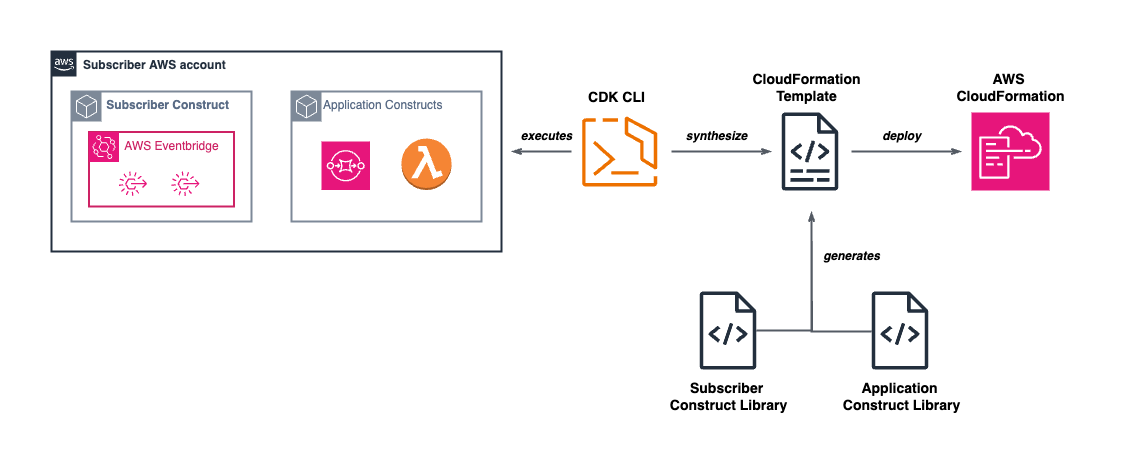
Announcing the General Availability of the Amazon EventBridge Scheduler L2 Construct

Post Syndicated from Svenja Raether original https://aws.amazon.com/blogs/devops/announcing-the-general-availability-of-the-amazon-eventbridge-scheduler-l2-construct/

Today we’re announcing the general availability (GA) of the Amazon EventBridge Scheduler and Targets Level 2 (L2) constructs in the AWS Cloud Development Kit (AWS CDK) construct library. EventBridge Scheduler is a serverless scheduler that enables users to schedule tasks and events at scale. Prior to the launch of these L2 constructs, developers had to define all relevant properties (via L1 constructs) across schedules and provide the glue logic between resources when defining their AWS CDK applications. The graduated constructs make it easier for users to configure EventBridge schedules, groups, and targets for AWS service integrations. They follow the AWS CDK L2 higher-level API design simplifications and provide a backwards-compatible guarantee across minor versions. Developers can use those alongside other existing stable AWS CDK constructs ready for production use.

Background

The AWS Cloud Development Kit (CDK) is an open-source software development framework for defining cloud infrastructure in code and provisioning it through AWS CloudFormation. It contains pre-written modular and reusable cloud components known as constructs. Constructs are the basic building blocks representing one or more AWS CloudFormation resources and their configuration. They are available in different abstraction levels. L1 constructs are the lowest-level constructs which map directly to AWS CloudFormation resources without abstractions. L2 constructs are thoughtfully developed and provide a higher-level abstraction through an intuitive intent-based API. They leverage default property configurations, best practice security policies, and convenience methods that make it simpler and quicker to define and deploy resources.

Amazon EventBridge Scheduler is a serverless scheduler that allows users to create, run, and manage tasks from one central, managed service. With EventBridge Scheduler, users can create schedules using cron and rate expressions for recurring patterns, or configure one-time invocations. EventBridge supports templated and universal targets. Templated targets include common API operations across a group of core AWS services, such as publishing a message to an Amazon Simple Notification Service (Amazon SNS) topic or invoking an AWS Lambda function. Universal targets are customized triggers supporting more than 270 AWS services and over 6,000 API operations on a schedule. Users can use schedule groups to organize their schedules.

With the L2 constructs for Amazon EventBridge Scheduler and Targets, it becomes even simpler for users to configure and integrate those resources into their CDK applications. Let’s explore the benefits by looking at some examples.

Using the L2 EventBridge Scheduler construct

We introduce two use cases for the EventBridge Scheduler and Targets L2 constructs to demonstrate their usage within common scenarios. Each example is equipped with sample code, emphasizing the simplifications achieved by the L2 constructs.

Example 1 – One time reminder through Amazon SNS

In the first use case, users want to configure one-time notifications to receive reminders of their favorite conferences at a specific time, for example a user may want to set a reminder one month before the start of AWS re:Invent to be reminded of their participation.

The example below uses the EventBridge Scheduler construct with a templated Amazon SNS target. The target applies an on-time schedule configuration and is configured with an Amazon Simple Queue Service (Amazon SQS) dead-letter queue to capture and retry failed events. The schedule payload is encrypted using a customer-managed AWS Key Management Service (AWS KMS) key.

const snsTarget = new targets.SnsPublish(topic, {
   input: ScheduleTargetInput.fromObject({
     message: "Reminder: AWS re:Invent starts in one month.",
   }),
   deadLetterQueue: deadLetterQueue,
});
 
const schedule = new Schedule(this, "ReminderSchedule", {
  description:
     "This schedule publishes a one-time notification to an Amazon SNS topic.",
   schedule: ScheduleExpression.at(
     new Date(2025, 10, 1), // Nov 01, 2025
     cdk.TimeZone.AMERICA_LOS_ANGELES
   ),
   target: snsTarget,
   key: key,
});

From the code example, we can see that well-defined interfaces for ScheduleTargetInput, and ScheduleExpression make it easy to select matching configuration values.

The SnsPublish target and Schedule constructs seamlessly integrate with the existing L2 constructs for Amazon SNS, Amazon SQS, and Amazon KMS. They abstract away the gluing logic used to configure the target API operation, dead-letter queue, and encryption settings with correct references. Instead of manually crafting permissions, the construct generates an AWS Identity and Access Management (IAM) execution role with the minimum necessary permissions to interact with the templated target, as shown in the policy below.

{
 "Version": "2012-10-17",
 "Statement": [
 {
 "Action": "sns:Publish",
 "Resource": "arn:aws:sns:us-east-1:123456789012:<TOPIC_NAME>",
 "Effect": "Allow"
 },
 {
 "Action": "kms:Decrypt",
 "Resource": "arn:aws:kms:us-east-1:123456789012:key/<UUID>",
 "Effect": "Allow"
 },
 {
 "Action": "sqs:SendMessage",
 "Resource": "arn:aws:sqs:us-east-1:123456789012:<QUEUE_NAME>",
 "Effect": "Allow"
 }
 ]
 }

The construct sets default properties. For example, it applies default configurations for the retry policy if not explicitly stated. As shown in Figure 1, the above defined schedule has been defined with a 1-day maximum event retention time and 185 maximum retries.

Default configurations for the Retry Policy

Example 2 – Start / Stop EC2 instance during business hours

In the second scenario, a recurring cron schedule is used to automatically stop Amazon EC2 instances during the business hours of a specific time zone.

The example below uses the EventBridge Scheduler construct with a universal target to perform the Amazon EC2 stopInstance API operation. It creates a custom schedule group to organize the schedules by time zone and allows an Amazon Lambda function to read all schedules in it for administrative purposes.

const group = new ScheduleGroup(this, "ScheduleGroup", {
  scheduleGroupName: "Europe-London",
});
 
new Schedule(this, "Schedule", {
  schedule: ScheduleExpression.cron({
minute: "0",
hour: "23",
timeZone: cdk.TimeZone.EUROPE_LONDON,
  }),
  target: new targets.Universal({
service: "ec2",
action: "stopInstances",
input: ScheduleTargetInput.fromObject({
  InstanceIds: [ec2Instance.instanceId],
}),
  }),
  scheduleGroup: group,
});
 
group.grantReadSchedules(lambdaFunction);

Similar to the first example, the ScheduleExpression and ScheduleTargetInput help users to define the correct input types. The universal target is one of the options allowed by the scheduler-target constructs that allow users to perform SDK API operations on AWS services such as Amazon EC2.

The ScheduleGroup construct is used to create the group, which is used as a property on the Schedule construct. The group implements convenience methods that allow simplified permissions management. The example above grants read permissions for the schedule group to an Amazon Lambda function, which is applied to the resources without additional configuration.

Community Shout-Outs

The CDK team would like to give a huge shout-out to the awesome members of the community that contributed to this construct to help get it where it is today! Thank you to:

sakurai-ryo

Kenta Goto

Hiroki Yamazaki

Joshua Weber

Manuel

Jacco Kulman

Conclusion

In this post, we introduced the general availability of the AWS CDK L2 construct for Amazon EventBridge Scheduler and Targets. We showcased practical implementations of the new construct, leveraging two example use cases. For more details on the EventBridge Scheduler L2 construct and examples of its use, see the Scheduler CDK Documentation.

If you’re new to AWS CDK and want to get started, we highly recommend checking out the CDK documentation and the CDK workshop.

Serverless ICYMI 2025 Q1

Post Syndicated from Julian Wood original https://aws.amazon.com/blogs/compute/serverless-icymi-2025-q1/

Welcome to the 28th edition of the AWS Serverless ICYMI (in case you missed it) quarterly recap. At the end of a quarter, we share the most recent product launches, feature enhancements, blog posts, videos, live streams, and other interesting things that you might have missed!

In case you missed our last ICYMI, check out what happened in Q4 2024 here.

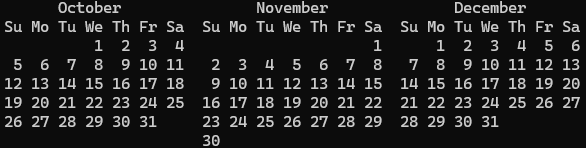
Serverless calendar Q1 2025

Serverless calendar Q1 2025

AWS Step Functions

The AWS Step Functions team continues to improve developer experience. Workflow Studio is now available within Visual Studio Code (VS Code) through the AWS Toolkit extension.

AWS Step Functions in IDE

AWS Step Functions in IDE

You can now design, test, and deploy your Step Functions workflows without leaving your IDE. The extension provides a drag-and-drop interface with all the familiar Workflow Studio capabilities, making it even easier to build state machines locally.

To get started, install the AWS Toolkit for Visual Studio Code and visit the user guide on Workflow Studio integration.

Step Functions private integrations now allows you to integrate applications seamlessly across private networks, on-premises infrastructure, and cloud platforms. Learn more in a blog post and explanation video.

AWS Step Functions private integrations video

AWS Step Functions private integrations video

Step Functions now integrates with 36 more AWS services that support user messaging capabilities. You can orchestrate notifications through Amazon SNS, Amazon SQS, Amazon EventBridge, Amazon Pinpoint, and more, all using the optimized integrations you’re familiar with.

Step Functions has increased the default quota for state machines and activities from 10,000 to 100,000 per AWS account. This tenfold increase means you can create more workflows to automate your business processes without worrying about hitting quota limits.

Distributed Map is expanding capabilities by adding support for JSON Lines (JSONL) format. JSONL, a highly efficient text-based format, stores structured data as individual JSON objects separated by newlines, making it particularly suitable for processing large datasets.

AWS Step Functions Distributed Map

AWS Step Functions Distributed Map

Distributed Map can also process data from a broader range of delimited file formats stored in Amazon S3 and offers new output transformations for greater control over result formatting.

Developer Tools

Serverless Land patterns are now available directly within VS Code.

You no longer need to switch between your IDE and external resources when building serverless architectures. Browse, search, and implement pre-built serverless patterns directly in VS Code.

Example Serverless Pattern

Example Serverless Pattern

AWS Lambda

Learn how AWS Lambda handles billions of invocations.

AWS Lambda asynchronous invocations

AWS Lambda asynchronous invocations

This blog post provides recommendations and insights for implementing highly distributed applications based on the Lambda service team’s experience building its robust asynchronous event processing system. It dives into challenges you might face, solution techniques, and best practices for handling noisy neighbors.

A new video walks through using the enhanced local IDE experience for Lambda developers.

AWS Lambda new IDE experience

AWS Lambda new IDE experience

The VS Code extension for Lambda now supports live tailing of CloudWatch Logs directly in your IDE following on from previous support for Live Tail in the Lambda console. Watch logs in real-time as your functions execute, making debugging and troubleshooting more efficient than ever.

You can now enable Application Performance Monitoring (APM) for Java and .NET runtimes using Amazon CloudWatch Application Signals.

Amazon CloudWatch Application Signals for Java and .NET AWS Lambda runtimes

Amazon CloudWatch Application Signals for Java and .NET AWS Lambda runtimes

This provides deep visibility into your function’s performance, including method-level tracing, memory profiling, and automated anomaly detection.

Amazon Bedrock features

Multi-agent collaboration is now available in Bedrock as a preview, enabling you to create systems where multiple AI agents work together to solve complex problems. Agents can specialize in different domains, share context, and coordinate their actions to achieve goals that would be difficult for a single agent.

RAG evaluation is now generally available. This provides metrics to assess and improve your retrieval augmented generation pipelines. GraphRAG for Bedrock Knowledge Bases is now generally available, allowing you to enhance retrievals with graph-based context.

Amazon Bedrock Flows now supports multi-turn conversations, allowing you to build dynamic AI applications that maintain context across multiple user interactions. Bedrock data automation is now generally available, streamlining the process of preparing, ingesting, and maintaining data for your GenAI applications. Bedrock now offers LLM-as-a-judge capability for model evaluation, providing automated assessment of model outputs without requiring human reviewers. Compare different models or prompt strategies against your specific criteria at scale.

Bedrock’s capabilities are now integrated into the Amazon SageMaker Unified Studio, creating a seamless experience for machine learning practitioners who want to incorporate foundation models into their workflows. Access Bedrock models, fine-tuning, and evaluation directly from SageMaker.

Amazon Nova is a new generation of state-of-the-art foundation models that deliver frontier intelligence and industry leading price-performance. Nova has expanded its tool use and converse API capabilities, making it easier for developers to build AI assistants that can use external tools to complete tasks.

Amazon Bedrock Guardrails image content filters are now generally available. Define and enforce boundaries for your AI applications with controls for both text and image content, ensuring outputs align with your organization’s policies.

Bedrock Knowledge Bases now supports using your existing OpenSearch clusters as the vector storage backend. This integration allows you to leverage your investments in OpenSearch while benefiting from the managed RAG capabilities of Bedrock.

New Amazon Bedrock models

  • Anthropic’s Claude 3.7 Sonnet hybrid reasoning allows you to toggle between standard and extended thinking modes. In standard mode, it functions as an upgraded version of Claude 3.5 Sonnet. While in extended thinking mode, it employs self-reflection to achieve improved results across a wide range of tasks.
  • DeepSeek R1, an advanced model specialized in research and scientific reasoning excels at complex problem-solving tasks and technical content generation.
  • Cohere Embed 3 models are now available in both multilingual and English-specific versions. These embedding models support text and images, providing more accurate representation for multimodal content and improving retrieval augmented generation (RAG) applications.
  • Ray2, Luma AI’s new visual AI model is capable of creating realistic visuals with fluid, natural movement. You can use it for image understanding, 3D scene reconstruction, and visual content generation, opening new possibilities for immersive and visual applications.
  • Bedrock now supports fine-tuning of Meta’s latest Llama 3.2 models. These upgraded models deliver improved performance across reasoning, coding, and multilingual tasks while being more efficient with computational resources.

Amazon Q Developer

Amazon Q Developer is now available as a CLI agent, bringing AI-assisted development to the command line. Get contextual recommendations, generate shell commands, and solve coding problems without leaving your terminal.

Amazon Q CLI

Amazon Q CLI

Amazon Q Developer transformation now supports upgrading Java applications using Maven to Java 21. It offers enhanced code suggestions, refactoring, and optimization recommendations for applications using the latest Java features, like virtual threads and pattern matching.

AWS AppSync

AWS AppSync Events now supports events publishing for WebSocket APIs, enabling real-time publish-subscribe functionality. This feature makes it easier to build applications requiring instant updates, like chat applications, collaborative tools, and real-time dashboards.

AWS AppSync Events

AWS AppSync Events

There are new AWS Cloud Development Kit (AWS CDK) L2 constructs for AppSync WebSocket APIs. These make it simpler to define and deploy real-time APIs using infrastructure as code. These high-level constructs handle the details of WebSocket connections, authorization, and messaging patterns.

Amazon SNS

Amazon SNS now supports high throughput mode for SNS FIFO topics, with default throughput matching SNS standard topics. When you enable high-throughput mode, SNS FIFO topics will maintain order within message group, while reducing the de-duplication scope to the message-group level.

Amazon EventBridge

Amazon EventBridge now supports direct delivery to targets across AWS accounts, simplifying multi-account architectures. This reduces latency and improves reliability when routing events between accounts in your organization.

Amazon EventBridge cross account

Amazon EventBridge cross account

The EventBridge console now features event source discovery, making it easier to find and visualize available event sources in your AWS environment. This tool helps you identify potential event producers and understand the event schemas they emit.

AWS Amplify

AWS Amplify now offers a TypeScript data client optimized for server-side Lambda functions, providing type-safe access to your data sources. This client reduces code complexity and improves reliability when working with databases and APIs in server environments.

Serverless compute blog posts

January

February

March

Serverless Office Hours weekly livestream

February

March

Still looking for more?

The Serverless landing page has more information. The Lambda resources page contains case studies, webinars, whitepapers, customer stories, reference architectures, and even more Getting Started tutorials.

You can also follow the Developer Advocacy team members who work on Serverless to see the latest news, follow conversations, and interact with the team.

And finally, visit the Serverless Land  for all your serverless needs.

Validate Your Lambda Runtime with CloudFormation Lambda Hooks

Post Syndicated from Matteo Luigi Restelli original https://aws.amazon.com/blogs/devops/validate-your-lambda-runtime-with-cloudformation-lambda-hooks/

Introduction

This post demonstrates how to leverage AWS CloudFormation Lambda Hooks to enforce compliance rules at provisioning time, enabling you to evaluate and validate Lambda function configurations against custom policies before deployment. Often these policies impact the way a software should be built, restricting language versions and runtimes. A great example is applying those policies on AWS Lambda, a serverless compute service for running code without having to provision or manage servers. While AWS Lambda already manages the deprecation of runtimes, preventing you from deploying unsupported runtimes, organizations may need to provide and enforce their specific compliance rules not directly linked to the deprecation of a specific language version.

Introducing Lambda Hooks

AWS CloudFormation Lambda Hooks are a powerful feature that allows developers to evaluate CloudFormation and AWS Cloud Control API operations against custom code implemented as Lambda functions. This capability enables proactive inspection of resource configurations before provisioning, enhancing security, compliance, and operational efficiency.

Lambda Hooks provide a mechanism to intercept and evaluate various CloudFormation operations, including resource operations, stack operations, and change set operations (they can also be used with Cloud Control API, but in this post we’re focusing on CloudFormation). By activating a Lambda Hook, CloudFormation creates an entry in your account’s registry as a private Hook, allowing you to configure it for specific AWS accounts and regions. When configuring Lambda Hooks, you can specify one or more Lambda functions to be invoked during the evaluation process. These functions can be in the same AWS account and Region as the Hook, or in another Account you own, provided proper permissions are set up. The evaluation process occurs at specific points in the CloudFormation Stack lifecycle. For instance, during stack creation, update, or deletion, the configured Lambda functions are invoked to assess the proposed changes against your defined compliance rules. Based on the evaluation results, the hook can either block the operation or issue a warning, allowing the operation to proceed.

Lambda Hooks evaluate resources before they are provisioned through CloudFormation, providing a pre-emptive layer of governance. This means that non-compliant resources are caught and prevented from being deployed, rather than requiring retroactive fixes. By leveraging Lambda Hooks, organizations can automate and standardize their compliance checks across all AWS accounts and regions. This centralized approach to policy enforcement ensures consistency and reduces the overhead of managing compliance manually.

Solution Overview

The following sections demonstrate a practical use case for AWS CloudFormation Lambda Hooks, focusing on enforcing compliance rules on AWS Lambda runtimes.

Meet AnyCompany, a forward-thinking enterprise with a robust set of compliance rules governing their software development practices. Among these rules is a strict policy on the use of specific AWS Lambda runtimes.

As they continue to embrace serverless architecture, AnyCompany faces a challenge: how to prevent the deployment of Lambda functions that use non-compliant runtimes. Given their commitment to AWS CloudFormation for deploying Lambda functions, AnyCompany is keen to leverage the power of AWS CloudFormation Lambda Hooks.

We’ll explore the setup process, demonstrate the hook in action, and discuss the broader implications for maintaining compliance in a dynamic cloud environment.

Architecture

The following architecture highlights the implementation of the Lambda Hook. In this implementation, we are using AWS CloudFormation Lambda Hooks to intercept the deployment of Lambda Functions and perform the compliance checks on these resources. The Lambda Hook will interact with an AWS Lambda Function, which will perform the compliance checks. Finally, we’re using AWS Systems Manager Parameter Store to store the Configuration Parameter which contains the list of permitted Lambda Runtimes.

Figure 1: Architecture of the Solution

Figure 1: Architecture of the Solution

  1. A Developer (or a CI/CD pipeline) deploys a CloudFormation stack containing Lambda functions.
  2. CloudFormation invokes the respective Lambda Hook, which is configured to intercept operations on AWS Lambda Resources. We are setting this hook to “FAIL” deployment in case checks are not successful.
  3. The Lambda Hook checks if the runtime of the Lambda is admitted or violates Company’s compliance. To do this, it checks if the runtime is present on a pre-configured list of admitted runtimes saved as Parameter in AWS Systems Manager Parameter Store. Keep in mind that we’re using SSM Parameter Store to store the configuration for this specific example, but other alternatives may be viable as well (Amazon DynamoDB, AWS Secrets Manager, or AppConfig lambda-function-settings-check Preventive Rule)
  4. The Lambda Hook, after checking runtime compliance, replies:
    • With a failure, if the Lambda runtime is not compliant
    • With a success, if the Lambda runtime is compliant
  5. Depending on the response of the Lambda Hook, the deployment may or not take place.

Repository Structure

You can find all the code for this solution at this link. Here’s the repository structure:

.
├── README.md
├── deploy.sh
├── cleanup.sh
├── hook-lambda
│ ├── index.ts
│ ├── package.json
│ ├── services
│ │ └── parameter-store.ts
│ └── tsconfig.json
├── sample
│ ├── deploy_sample.sh
│ ├── cleanup_sample.sh
│ └── lambda_template.yml
└── template.yml
  • hook-lambda: directory containing all the code related to the CloudFormation Lambda Hook (Validation Lambda Function, and the CloudFormation template for the Solution)
  • sample: directory containing the code of the sample used to test the CloudFormation Lambda Hook
  • deploy.sh: utility script to deploy the Solution via AWS CLI
  • cleanup.sh: utility script to clean up the AWS CloudFormation Hook infrastructure via the AWS CLI
  • template.yml: AWS CloudFormation Template containing all the AWS Resources involved in the Solution

Prerequisites

You must have the following prerequisites for this solution:

  • An AWS account or sign up to create and activate one.
  • The following software installed on your development machine:
  • Install the AWS Command Line Interface (AWS CLI) and configure it to point to your AWS account.
  • Install Node.js and use a package manager such as npm.
  • Appropriate AWS credentials for interacting with resources in your AWS account.

Walkthrough

Creating the AWS Lambda Validation Function – Lambda Code

The CloudFormation Lambda Hook interacts with a specific Lambda (referred to as Validation Lambda throughout the rest of this post), which gets invoked during CloudFormation CREATE and UPDATE STACK operations involving Lambda Functions. The goal is to check if these Lambda functions have runtimes that comply with AnyCompany’s rules.

Below is the detailed description of the steps that the Validation Lambda function handler follows (the code is written in Typescript).

First, the Validation Lambda retrieves an environment variable containing the SSM Parameter Store parameter name which contains the compliant runtimes list. Additionally, safety checks ensure that only Lambda Resources are considered and that their Runtime property is defined.

Note that both safety checks could be skipped, since the Hook should already be configured to interact only with Lambda Resources and the Lambda’s Runtime property is always required. However, they remain in place to demonstrate how to retrieve this information from the Lambda Hook event in your handler.

const parameterName = process.env.PERMITTED_RUNTIMES_PARAM;
if (!parameterName) {
	throw new Error('Permitted Runtimes Parameter is not set');
}

const resourceProperties = event.requestData.targetModel.resourceProperties;
// Check if this is a Lambda function resource
if (event.requestData.targetType !== 'AWS::Lambda::Function') {
console.log("Resource is not a Lambda function, skipping");
	return {
		hookStatus: 'SUCCESS',
		message: 'Not a Lambda function resource, skipping validation',
		clientRequestToken: event.clientRequestToken
	}
}

// Check runtime version compliance
const runtime = resourceProperties.Runtime;
if (!runtime) {
	console.log("Runtime not defined, failing");
	return {
		hookStatus: 'FAILURE',
		errorCode: 'NonCompliant',
		message: 'Runtime is required for Lambda functions',
		clientRequestToken: event.clientRequestToken
	}
}

Then the Validation Lambda retrieves the value of the Configuration Parameter from SSM Parameter Store through a utility class called ParameterStoreService. For this post, consider that the value inside that Configuration Parameter is a list of strings, where each string contains one of the possible Lambda runtime values that you can find here (e.g. nodejs22.x,nodejs20.x,python3.11,python3.10,java17,java11,dotnet6). After retrieving the value, the Validation Lambda checks if the runtime of the Lambda Resource complies with the configured admitted runtimes. If the runtime is not compliant, you’ll receive a properly formatted response with FAILURE as hookStatus, otherwise the response will contain a SUCCESS hookStatus.

// Retrieve configuration from Parameter Store
const compliantRuntimes = await parameterStoreService.getParameterFromStore(parameterName);

// Check if Lambda runtime is permitted or not
if (!compliantRuntimes.includes(runtime)) {
console.log("Runtime " + runtime + " not compliant ");
	return {
		hookStatus: 'FAILURE',
		errorCode: 'NonCompliant',
		message: `Runtime ${runtime} is not compliant. Please use one of: ${compliantRuntimes.join(', ')}`,
		clientRequestToken: event.clientRequestToken
	}
}

return {
	hookStatus: 'SUCCESS',
	message: 'Runtime version compliance check passed',
	clientRequestToken: event.clientRequestToken
}

For more information about the possible response values of CloudFormation Lambda Hooks Lambda, have a look at this link.

Creating the validation Lambda – Lambda CloudFormation definition

The Validation Lambda function will be deployed via CloudFormation, in the same Stack with the CloudFormation Lambda Hook definition and the AWS Systems Manager Parameter Store Parameter. Here’s the fragment of the CloudFormation Template containing its definition:

# Lambda Function
ValidationFunction:
	Type: AWS::Lambda::Function
	Properties:
		Handler: index.handler
		Role: !GetAtt LambdaExecutionRole.Arn
		Code:
			S3Bucket: !Ref DeploymentBucket
			S3Key: hook-lambda.zip
		Runtime: nodejs22.x
		Timeout: 60
		MemorySize: 128
		Environment:
			Variables:
				PERMITTED_RUNTIMES_PARAM: !Ref ParameterStoreParamName

You’ll need to associate an IAM Role with proper permissions to access the AWS Systems Manager Parameter Store Parameter:

# Lambda Function Role
LambdaExecutionRole:
    Type: AWS::IAM::Role
    Properties:
      AssumeRolePolicyDocument:
        Version: "2012-10-17"
        Statement:
          - Effect: Allow
            Principal:
              Service: lambda.amazonaws.com
            Action: sts:AssumeRole
      ManagedPolicyArns:
        - arn:aws:iam::aws:policy/service-role/AWSLambdaBasicExecutionRole
		
# IAM Policy to access Parameter Store
ParameterStoreAccessPolicy:
    Type: AWS::IAM::RolePolicy
    Properties:
      RoleName: !Ref LambdaExecutionRole
      PolicyName: ParameterStoreAccess
      PolicyDocument:
        Version: "2012-10-17"
        Statement:
          - Effect: Allow
            Action:
              - ssm:GetParameter
            Resource: !Sub arn:aws:ssm:${AWS::Region}:${AWS::AccountId}:parameter${ParameterStoreParamName}

Creating the CloudFormation Lambda Hook

At this point, you only need to author a proper CloudFormation Lambda Hook. The Hook requires:

  • To be activated during the CREATE and UPDATE CloudFormation operations,
  • To consider only AWS::Lambda::Function CloudFormation resources
  • To act during Pre Provisioning of CloudFormation templates
  • To target Stack and Resource Operations
  • Target the already defined Lambda Validation function

Here’s the definition in the CloudFormation template:

# Lambda Hook
ValidationHook:
    Type: AWS::CloudFormation::LambdaHook
    Properties:
      Alias: Private::Lambda::LambdaResourcesComplianceValidationHook
      LambdaFunction: !GetAtt ValidationFunction.Arn
      ExecutionRole: !GetAtt HookExecutionRole.Arn
      FailureMode: FAIL
      HookStatus: ENABLED
      TargetFilters:
        Actions:
          - CREATE
          - UPDATE
        InvocationPoints:
          - PRE_PROVISION
        TargetNames:
          - AWS::Lambda::Function
      TargetOperations:
        - RESOURCE
        - STACK

Please note that the above template contains a reference to an IAM Role because the Hook requires proper permissions to call the target (Lambda Function). Here’s the IAM Role definition:

# Hook Execution Role
HookExecutionRole:
    Type: AWS::IAM::Role
    Properties:
      AssumeRolePolicyDocument:
        Version: "2012-10-17"
        Statement:
          - Effect: Allow
            Principal:
              Service: hooks.cloudformation.amazonaws.com
            Action: sts:AssumeRole

# IAM Policy for Lambda Invocation
LambdaInvokePolicy:
    Type: AWS::IAM::RolePolicy
    Properties:
      RoleName: !Ref HookExecutionRole
      PolicyName: LambdaInvokePolicy
      PolicyDocument:
        Version: "2012-10-17"
        Statement:
          - Effect: Allow
            Action:
              - lambda:InvokeFunction
            Resource: !GetAtt ValidationFunction.Arn

Configuring the compliant runtimes – Using Systems Manager Parameter Store

AWS Systems Manager Parameter Store is a secure, hierarchical storage service for configuration data management and secrets management, allowing users to store and retrieve data such as configurations, database strings etc. as parameter values.

In this specific example, we’ll leverage Parameter Store to store our permitted Lambda runtimes configuration. This configuration value is a StringList parameter, containing a comma-separated list of permitted runtimes. Here’s the fragment of the CloudFormation template that defines the Parameter:

# Parameter Store Parameter
ConfigParameter:
    Type: AWS::SSM::Parameter
    Properties:
      Name: !Ref ParameterStoreParamName
      Type: StringList
      Value: !Ref ParameterStoreDefaultValue
      Description: "Configuration for Lambda Hook"

Please note the usage of CloudFormation parameters for the ‘Name’ and ‘Value’ properties, allowing for dynamic input when deploying the CloudFormation template.

Deploying the Solution

To deploy the solution you can leverage the script deploy.sh in the root folder of the repository. This script will perform the following actions:

  • Compile and build the Validation Lambda Function
  • Create an Amazon S3 Bucket to store the CloudFormation Template
  • Upload the CloudFormation template and Lambda code to the S3 Bucket
  • Deploy the CloudFormation template

Testing the Lambda Hook

To test the CloudFormation Lambda Hook, deploy a simple testing CloudFormation template containing a Hello World Lambda function. First, test the Lambda configured with a permitted Lambda runtime, then modify the template to configure the Lambda with a non-compliant runtime.

Here’s the initial definition of the testing CloudFormation Template:

# Lambda Function
HelloWorldFunction:
    Type: AWS::Lambda::Function
    Properties:
      FunctionName: hello-world-function
      Runtime: nodejs22.x
      Handler: index.handler
      Role: !GetAtt LambdaExecutionRole.Arn
      Code:
        ZipFile: |
          exports.handler = async (event, context) => {
              console.log('Hello World!');
              const response = {
                  statusCode: 200,
                  body: JSON.stringify('Hello World!')
              };
              return response;
          };
      Timeout: 30
      MemorySize: 128

Please note that the Runtime value is nodejs22.x, which is currently in the list of permitted runtimes. The expectation is that the deployment of this function will succeed.

Deploy this template via the AWS CLI:

aws cloudformation deploy \
--template-file ./lambda_template.yml \
--capabilities CAPABILITY_IAM \
--stack-name lambda-sample

Check the CloudFormation Console:

CloudFormation Console showing successful Stack deployment

Figure 2: CloudFormation Console showing successful Stack deployment

As expected, the deployment was successful. You can also see that the CloudFormation Lambda Hook has been invoked by taking a look at the CloudWatch Logs:

Validation Lambda Function Logs with successful validation

Figure 3: Validation Lambda Function Logs with successful validation

Now modify the original sample Template in order to set a Lambda Runtime which is not inside the list of permitted runtimes:

# Lambda Function
HelloWorldFunction:
    Type: AWS::Lambda::Function
    Properties:
      FunctionName: hello-world-function
      Runtime: nodejs18.x
      Handler: index.handler
      Role: !GetAtt LambdaExecutionRole.Arn
      Code:
        ZipFile: |
          exports.handler = async (event, context) => {
              console.log('Hello World!');
              const response = {
                  statusCode: 200,
                  body: JSON.stringify('Hello World!')
              };
              return response;
          };
      Timeout: 30
      MemorySize: 128

Deploy this template via AWS CLI with the same command used before and check the CloudFormation Console:

CloudFormation Console showing failed Stack deployment due to Hook intervention

Figure 4: CloudFormation Console showing failed Stack deployment due to Hook intervention

As expected, the deployment was not successful. The CloudFormation Lambda Hook has been invoked, and since the Lambda Runtime was not present in the permitted runtimes list, the deployment failed.

You can also see that the hook failed In the CloudWatch Logs:

Validation Lambda Function Logs with validation error

Figure 5: Validation Lambda Function Logs with validation error

Cleaning up

To clean up the resources related to the sample, you can run the script cleanup_sample.sh inside the sample folder. This script will delete the sample’s CloudFormation Template through the AWS CLI.

To cleanup the resources related to the solution described above and based on AWS CloudFormation Lambda Hook, you can leverage the script cleanup.sh in the root folder of the repository. This script will perform the following actions:

  • Delete the CloudFormation Stack
  • Empty the S3 Bucket used for the deployment of the Stack
  • Delete the S3 Bucket

Conclusion

In this post, you explored the implementation of CloudFormation Hooks to enforce runtime compliance in Lambda functions across your AWS infrastructure. By leveraging the Lambda hook’s capabilities, you learned how to create a preventative control that validates Lambda runtime configurations before deployment.

By activating the Lambda hook and implementing a custom Lambda function validator, you established an automated mechanism to ensure that only compliant runtimes are used within your organization’s Lambda functions during CloudFormation stack creation and updates. The solution’s integration with common development tools like AWS CLI, AWS SAM, CI/CD pipelines, and AWS CDK makes it straightforward to implement these controls within existing workflows, eliminating the need for manual runtime checks or post-deployment remediation.

The validation approach demonstrated in this post extends beyond Lambda runtimes and can be adapted to different AWS Resources supported by CloudFormation, allowing you to enforce policies on different infrastructure components offered by AWS.

About the author

Matteo Luigi Restelli

Matteo Luigi Restelli is an AWS Sr. Partner Solutions Architect. He mainly focuses on Italian Consulting AWS Partners and is also specialized in Infrastructure as Code, Cloud Native App Development and DevOps. Outside of work, he enjoys swimming, rock & roll music and learning something new everyday especially in Computer Science space.

Stella Hie

Stella Hie is a Sr. Product Manager Technical for AWS Infrastructure as Code. She focuses on proactive control and governance space, working on delivering the best experience for customers to use AWS solutions safely. Outside of work, she enjoys hiking, playing piano, and watching live shows.

From virtual machine to Kubernetes to serverless: How dacadoo saved 78% on cloud costs and automated operations

Post Syndicated from Andreas Gehrig original https://aws.amazon.com/blogs/architecture/from-virtual-machine-to-kubernetes-to-serverless-how-dacadoo-saved-78-on-cloud-costs-and-automated-operations/

dacadoo is a global Swiss-based technology company that develops solutions for digital health engagement and health risk quantification. Their products include a software-as-a-service (SaaS)-based digital health engagement platform that uses behavioral science, AI, and gamification to help end users improve their health outcomes.

The company embarked on a journey to modernize an API to quantify health and lifestyle data plus a risk engine to calculate mortality and morbidity probabilities based on years of scientific research data.

To transform a virtual machine–based API service into a globally redundant, scalable health score and risk calculation solution dacadoo chose Amazon Web Services (AWS) technology. The service handles highly sensitive health data from a global customer base and must comply with regional regulations.

The result is a cost reduction of 78% and an infrastructure maintenance effort of less than an hour per year , allowing dacadoo to deliver and operate more AWS infrastructure without scaling its site reliability engineering (SRE) team, thanks to a high level of automation and an agile mindset.

In this post, we walk you step-by-step through dacadoo’s journey of embracing managed services, highlighting their architectural decisions as we go.

Background

The solution architecture went through a three-stage journey:

  1. Incubation – Single virtual machine on premises with disaster recovery (DR) in Switzerland
  2. Global and scalable – Multiple global Kubernetes clusters
  3. Operational excellence – Fully serverless and geo-redundant on AWS

Stage 1: Incubation with a virtual machine

After years of scientific research and development, the service was launched, running on a single on-premises virtual machine that used hypervisor technology to provide disaster recovery (DR). However, it had no high availability (HA) capability and it required manual recovery.

The application serving the API requests and the NoSQL database were both running on the same host. Software deployment and operating system maintenance were performed manually using Secure Shell (SSH)—a typical low-automation setup that also included downtime.

The following architecture diagram shows a virtual machine encompassing the monolithic application and its database.

Monolithic architecture

Challenges

A single virtual machine was quick to set up and inexpensive to operate, but it had considerable shortcomings. The health API was only available in Switzerland, infrastructure maintenance was performed manually, and software deployment was handled manually. Additionally, database backups were done using virtual machine snapshots, uptime monitoring only, and testing was conducted on the developer workstation.

Stage 2: Global and scalable with Kubernetes

At that time, dacadoo made a strategic decision to heavily invest in Kubernetes for managing containerized workloads on a global scale. As part of this technology rollout, the health score and risk service were migrated to Kubernetes.

Due to the geographically distributed customer base and low latency requirements, three Kubernetes clusters were deployed, one on each continent. The NoSQL database was hosted in proximity to the workload to reduce service latency and keep the migration effort low.

To reduce the operational maintenance, the NoSQL database was integrated as a SaaS offering, and monitoring was centralized using Datadog.

All cloud infrastructure was provisioned exclusively with Terraform, covering the Kubernetes cluster, NoSQL database , and integration with GitLab and Datadog.

dacadoo containerized the API service and used Gitlab continuous integration and continuous deployment (CI/CD) pipelines to deploy multiple environments and clusters on a global hyperscaler.

In retrospect, this was a typical replatform modernization project from virtual machine to Kubernetes, with a high level of automation and a SaaS-first approach.

The following diagram is the architecture for the container solution with managed NoSQL database.

Containers architecture

Challenges

The service faced several challenges, including increased costs from deploying three regional Kubernetes clusters across three environments, resulting in 27 cluster nodes and additional expenses from managing NoSQL database SaaS instances for each cluster. The complexity of CI/CD pipelines for multi-environment multi-cluster deployments added to the difficulty. Significant operational effort was required to keep infrastructure and Kubernetes components up to date.

Stage 3: Operational excellence with serverless

The Kubernetes-based architecture met the requirements, but some features in the dacadoo API service backlog needed to fit better with the application architecture at the time.

This was the right moment to take a holistic view of the infrastructure and software architecture and refactor the solution according to the latest AWS technologies and best practices, the next frontier for dacadoo’s engineering team.

Solution requirements

Requirements for the solution refactoring were as follows:

  • Keep the functionality of the API unmodified
  • Constrain data processing to a region of choice for compliance with local data protection laws
  • Avoid weekly patch cycles by exclusively using managed serverless services
  • Reduce costs by choosing services with a pay-as-you-go billing model
  • Delegate authentication to a dedicated service
  • Use an established web framework with an extensive ecosystem

Refactoring the apps

The API service has two components: a developer portal and the health score and risk calculations API. The database is only required for API keys, algorithm parameters, quotas, and usage statistics. Health data is processed regionally by the compute layer but not persisted, opening the door for a distributed database: Amazon DynamoDB global tables is the perfect fit for the solution. Writes are distributed to all connected Regions, whereas reads are local, providing low latency for complying with dacadoo service level agreements (SLAs).

The developer portal is a web UI with API documentation and API key management features. AWS Lambda is a great fit because it scales automatically and has a pay-per-request billing model.

The health and risk API uses algorithms implemented in the C programming language for short bursting, compute-intense simulations. These calls are wrapped by a REST API using the Python FastAPI framework. These characteristics make AWS Lambda a great fit.

Serverless architecture

HTTP requests are routed to the Lambda functions using Amazon API Gateway with AWS WAF for protection from malicious requests and attacks. Static assets are served from an Amazon Simple Storage Service (Amazon S3) bucket through API Gateway. The additional features of Amazon CloudFront aren’t required, and Amazon S3 reduces the complexity.

Amazon Route 53 provides a powerful feature known as latency-based routing, which allows it to direct DNS queries to the endpoint that offers the lowest latency for the requester.

This feature provides Regional high availability for API users without data processing location requirements. Alternatively, the user can call specific Regional endpoints to make sure requests are processed in the desired Region.

API authorization is HTTP header-based and is performed in the application with data stored in Amazon DynamoDB.

The following diagram is the architecture for a geo-redundant fully serverless solution.

Serverless architecture

With a dacadoo SRE team proficient in Python, they opted for Pulumi for its advanced features such as programming language flow control constructs, powerful configuration capabilities, and multi-cloud support.

For continuous integration, GitLab CI compiles the algorithm library, tests the FastAPI applications and packages everything. The application deployment is just an update of the AWS Lambda, a simple and reliable workflow.

Summary

The solution evolved from a managed infrastructure setup, where the customer held most of the responsibility, to an AWS managed service architecture.

Infrastructure provisioning evolved from manual, error-prone processes to powerful code-driven workflows in Pulumi. The SRE needed to enhance their software engineering skills to adopt Pulumi, transitioning from configuration-based approaches to designing and maintaining an infrastructure code base using object-oriented Python. This was part of dacadoo’s investment in the SRE team and broader modernization efforts. The serverless architecture enabled a GitOps engineering culture focused on productivity.

The transformation maximized scalability and availability while reducing costs and operational effort:

Virtual machine

  • Scalability: Low
  • Availability: Best effort
  • Infrastructure costs: Low
  • Maintenance effort: High

Kubernetes

  • Scalability: High
  • Availability: 99.95%
  • Infrastructure costs: High
  • Maintenance effort: Medium

Serverless

  • Scalability: Very high
  • Availability: 99.999% (with failover to another AWS Region)
  • Infrastructure costs: Low
  • Maintenance effort: Very low

The global redundancy elevates availability to an impressive 99.999% while keeping the costs low.

Conclusion

Migrating from a virtual machine to Kubernetes and ultimately to AWS Lambda demonstrates the progression of cloud engineering toward enhanced efficiency and scalability.

Each step in this journey reduced the complexity of managing resources while increasing flexibility and automation. Transitioning dacadoo’s API service to a fully serverless, geo-redundant architecture not only advanced the platform but also upskilled engineers, maintained a lean SRE team, and kept infrastructure costs low. Get started with your own AWS serverless solution.


About the Authors

Optimizing network footprint in serverless applications

Post Syndicated from Chris McPeek original https://aws.amazon.com/blogs/compute/optimizing-network-footprint-in-serverless-applications/

This post is authored by Anton Aleksandrov, Principal Solution Architect, AWS Serverless and Daniel Abib, Senior Specialist Solutions Architect, AWS

Serverless application developers may commonly encounter scenarios where they need to transport large payloads, especially when building modern cloud applications that need rich data. Examples include analytics services with detailed reports, e-commerce platforms with extensive product catalogs, healthcare applications transmitting patient records, or financial services aggregating transactional data.

Many serverless services have a well-defined maximum payload size. For example, AWS Lambda maximum request/response payload size is 6 MB, and Amazon Simple Queue Service (Amazon SQS) and Amazon EventBridge maximum message size is 256 KB. In this post, you will learn how to use data compression techniques to reduce your network footprint and transport larger payloads under existing constraints.

Overview

Cloud applications evolve continuously and need to be adjusted frequently for new requirements, such as new business features or new Service Level Objectives (SLO) for higher throughput and lower latency. As new use cases and data patterns are added, it is common to see request and response payload sizes increase. At some point, you might hit the maximum service payload size limits, such as 6 MB for synchronous Lambda function invokes, 10 MB for Amazon API Gateway, and 256 KB for Amazon SQS, EventBridge, and asynchronous Lambda invokes.

There are several techniques you can apply when dealing with large payloads. If your payloads are tens of MBs or more, or you need to transport large binary objects with API Gateway, you can store the payload on Amazon Simple Storage Service (Amazon S3) and use pre-signed URLs for clients to directly upload and download from S3.

A sample of architecture for handling large payloads.

Figure 1. A sample of architecture for handling large payloads

Lambda function URLs response streaming supports up to 20 MB responses. For handling large messages with services such as SQS or EventBridge, you can store the message in S3 and pass a reference. The downstream consumer will use the reference to download the message directly from S3. One common characteristic of these techniques is that they introduce architectural complexity and may necessitate modifications to your existing solution architecture and data flow patterns.

Furthermore, as your payloads grow in size, you will see increased data transfer costs, especially if your solution is transporting data through Amazon Virtual Private Cloud (VPC) NAT Gateways, VPC endpoints, or sending data across AWS Regions. For example, it is common for VPC-based solutions to have Lambda functions in their architecture. A container running on Amazon Elastic Kubernetes Service (Amazon EKS) might need to invoke a Lambda function, or a VPC-attached Lambda function might need to reach out to the public internet.

Examples of using virtual network appliances with serverless applications.

Figure 2. Examples of using virtual network appliances with serverless applications

Both NAT Gateway and VPC Endpoint are billed per GB of data processed, which makes data compression a valuable optimization technique. Go to NAT Gateway pricing and VPC Endpoint pricing for details.

The following sections explore data compression techniques and demonstrate how to apply them in your serverless applications. You can learn how to send larger payloads within the existing payload size boundaries and reduce your network footprint without significant architectural changes. This post discusses compression techniques in the context of Lambda and API Gateway, but the same principles can be applied to other services, such as SQS, EventBridge, and AWS AppSync. Understanding compression concepts better equips you to optimize your application’s data-handling capabilities.

What is data compression?

Compression is a widely used approach to reduce data size in order to improve cost-effectiveness and performance for data storage and transmission. Many tools and frameworks incorporate data compression techniques, such as gzip or zstd. It is thoroughly documented in the official IANA specification and IETF RFC 9110. Browsers such as Chrome and Firefox, HTTP toolkits such as curl and Postman, and runtimes such as Node.js and Python natively handle compression, often without user involvement.

Consider HTTP protocol. When a client wants to send a compressed payload, it specifies it in the Content-Type header. To receive a compressed response, the client specifies supported compression methods in the Accept-Encoding request header.

Accept-Encoding request header specifying supported compression methods.

Figure 3. Accept-Encoding request header specifying supported compression methods

The server compresses the response payload using one of the supported methods and uses the Content-Encoding response header to indicate the method to the client.

Content-Encoding response header specifying compression method.

Figure 4. Content-Encoding response header specifying compression method

This mechanism can accelerate client-server communications by reducing the number of bytes transmitted over the network. Compression efficiency depends on the data type. Text-based formats like JSON, XML, HTML, and YAML compress well, while binary data such as PDF and JPEG generally compress less effectively.

Data compression with API Gateway

API Gateway provides built-in compression support. Use the minimumCompressionSize configuration to set the smallest payload size to compress automatically. The value can be between 0 bytes to 10 MB. Compressing very small payloads might actually increase the final payload size, and you should always test with your real payload patterns to determine the optimal threshold.

Handling data compression in API Gateway.

Figure 5. Handling data compression in API Gateway

API Gateway enables clients to interact with your API using compressed payloads through supported content encodings. The compression mechanism works bi-directionally. For JSON payloads, API Gateway seamlessly handles compression and decompression, maintaining compatibility with mapping templates. It decompresses incoming payloads before applying request mapping templates and compresses outgoing responses after applying response mapping templates. This automated compression optimizes data transfer:

  • When sending compressed data, clients supply the appropriate Content-Encoding header. API Gateway handles the decompression and applies configured mapping templates before forwarding the request to the integration.
  • When API Gateway receives an integration response and compression is enabled, it compresses the response payload and returns it to the client, provided that the client has included a matching Accept-Encoding header.

A sample test using the compression technique with API Gateway and JSON payload yielded the following results.

  • Compression disabled. Response size = 1 MB, response latency = 660 ms
  • Compression enabled. Response size = 220 KB, response latency = 550 ms

Compressing data resulted in 78% network footprint reduction and improved latency by 110 ms.

This configuration-based technique uses the API Gateway native compression. However, payloads are decompressed before being delivered to downstream integrations, thus they still remain subject to Lambda’s 6 MB max payload size. To address this, you can configure binaryMediaTypes in the API Gateway to pass compressed payloads to Lambda directly, enabling the function to handle decompression.

CDK code to configure API Gateway for data compression and binary data passthrough.

Figure 6. CDK code to configure API Gateway for data compression and binary data passthrough

Handling compressed data in Lambda functions

The Lambda Invoke API supports payloads in plain-text formats, such as JSON. The maximum payload size is 6 MB for synchronous invocations and 256 KB for asynchronous. Although the Invoke API supports uncompressed text-based payloads, you can introduce data compression in your function code and use API Gateway or Function URLs to facilitate content conversion, as illustrated in the following figure.

Transporting compressed payloads in a serverless applications.

Figure 7. Transporting compressed payloads in a serverless applications

Handling data compression in your Lambda function code can be done through libraries commonly embedded in the runtime. The following code snippet shows the compressing response payload using Node.js. Similar techniques can be applied to other runtimes.

Sample code implementing response payload compression in a Lambda function.

Figure 8. Sample code implementing response payload compression in a Lambda function

  • Line 1: Import gzip functionality from the zlib module.
  • Lines 11: Compress and Base64-encode data. Gzip compression, similar to many other compression methods, produces a binary stream. Base64 encoding converts it to the text-based format expected by the Lambda service
  • Lines 13-21: Response object is created with isBase64Encoded=true and response headers telling the client that the response is a gzip-encoded JSON object.

The following screenshot shows the result: 20 MB uncompressed JSON returned from a Lambda function as a 2.5 MB compressed response body. Network footprint reduced by over 80%.

A screenshot from Postman showing the original and compressed payload size.

Figure 9. A screenshot from Postman showing the original and compressed payload size

Using this technique, you can reduce your network footprint and transport payload sizes several times higher than the Lambda maximum payload size.

Using Function URLs with compressed payloads

Transporting compressed payloads through Lambda Function URLs doesn’t necessitate any extra configuration. For handler responses, your code needs to compress and Base64-encode the data as shown in the preceding figure. For invocation requests, the Function URL endpoint recognizes the incoming compressed payload as binary and passes it to your handler as a Base64 encoded string in the event body.

Sample code implementing request payload decompression in a Lambda function.

Figure 10. Sample code implementing request payload decompression in a Lambda function

Trade-offs and testing results

Compressing data in function code is a CPU-intensive activity, potentially increasing invocation duration and, as a result, function cost. This, however, can be balanced by the benefits of data compression. As you’ve seen in previous sections, while compressing data adds compute latency, transporting smaller payloads over the network reduces network latency. The following section summarizes a series of tests performed to estimate the impact of data compression on Lambda function invocation duration, Lambda function invocation cost, and data transfer savings with both NAT Gateway and VPC Endpoint. The tests were performed with several assumptions and randomly generated JSON data. You can see full testing results in the sample GitHub.com repo.

Test results demonstrated that the impact on function latency and cost primarily depends on two key factors: payload size and allocated memory (which determines vCPU capacity). Using a Node.js runtime with ARM architecture as an example, compressing a 1 MB JSON object in a function with 1 GB of allocated memory resulted in 124 ms of added processing time on average. For 10 million invocations, this extra processing time adds approximately $16. At the same time, the compression yielded a 70% reduction in payload size. With the same number of invocations, this translates to approximately $300 in savings when using NAT Gateway and $70 in savings when using VPC Endpoints (depending on the number of Availability Zones (AZs)).

AWS Service pricing is updated regularly, you should always consult the respective pricing pages for the latest information. Moreover, you should conduct your own performance and cost estimates using payloads that represent your workloads. Compression effectiveness varies significantly depending on the data type: payloads with low compression rates might not benefit from this technique.

Sample application

Follow the instructions in this GitHub repository to provision the sample in your AWS account. The project creates two Lambda functions to demonstrate receiving and returning compressed JSON using Function URLs and API Gateway.

The sample shows how to GET and POST JSON payloads using gzip compression to reduce the network footprint by over 80%.

A screenshot from Postman showing the original and compressed payload size.

Figure 11. A screenshot from Postman showing the original and compressed payload size

Conclusion

Data compression enables larger payload transfers and reduces network footprint. It can help to lower network latencies and optimize data transfer costs. When implementing compression within Lambda functions, it is important to consider its CPU-bound nature, which may increase function duration and costs. You should always evaluate the added compute cost against potential data transfer savings to make sure the technique benefits your use case.

Compression is most effective for handling large text-based payloads and when a slight increase in compute latency balanced by reduced network latency is acceptable.

To learn more about Serverless architectures and asynchronous Lambda invocation patterns, see Serverless Land.

Handling billions of invocations – best practices from AWS Lambda

Post Syndicated from Chris McPeek original https://aws.amazon.com/blogs/compute/handling-billions-of-invocations-best-practices-from-aws-lambda/

This post is written by Anton Aleksandrov, Principal Solution Architect, AWS Serverless and Rajesh Kumar Pandey, Principal Engineer, AWS Lambda

AWS Lambda is a highly scalable and resilient serverless compute service. With over 1.5 million monthly active customers and tens of trillions of invocations processed, scalability and reliability are two of the most important service tenets. This post provides recommendations and insights for implementing highly distributed applications based on the Lambda service team’s experience building its robust asynchronous event processing system. It dives into challenges you might face, solution techniques, and best practices for handling noisy neighbors.

Overview

Developers building serverless applications create Lambda functions to run their code in the cloud. After uploading the code, the functions are invoked using synchronous or asynchronous mode.

Synchronous invocations are commonly used for interactive applications that expect immediate responses, such as web APIs. The Lambda service receives the invocation request, invokes the function handler, waits for the handler response, and returns it in response to the original request. With synchronous invocations, the client waits for the function handler to return, and is responsible for managing timeouts and retries for failed invocations.

Synchronous invocation sequence diagram.

Figure 1. Synchronous invocation sequence diagram

Asynchronous invocations enable decoupled function executions. Clients submit payloads for processing without expecting immediate responses. This is used for scenarios like asynchronous data processing or order/job submissions. The Lambda service immediately returns a confirmation for accepted invocation and proceeds to manage further handler invocation, timeouts, and retries asynchronously.

Asynchronous invocation sequence diagram.

Figure 2. Asynchronous invocation sequence diagram

Asynchronous invocations under-the-hood

To accommodate asynchronous invocations, the Lambda service places requests into its internal queue and immediately returns HTTP 202 back to the client. After that, a separate internal poller component reads messages from the queue and synchronously invokes the function.

Asynchronous invocations workflow high-level topology.

Figure 3. Asynchronous invocations workflow high-level topology

The same system also takes care of timeouts and retries in case of handler exceptions. When code execution completes, the system sends handler response to either onSuccess or onFailure destination, if configured.

Asynchronous invocations workflow detailed sequence diagram.

Figure 4. Asynchronous invocations workflow detailed sequence diagram

Scaling highly distributed systems for billions of asynchronous requests presents unique challenges, such as managing noisy neighbors and potential traffic spikes to prevent system overload. Solutions vary by scale – what works for millions of requests may not suite billions. As workload size increases, solutions typically become more complex and costly, so right-sizing the approach is critical and should evolve with changing needs.

Simple queueing

A simple implementation of an asynchronous architecture can start with a single shared queue. This is a common approach for many asynchronous systems, particularly in early stages. It is effective when you’re not concerned about tenant isolation and when capacity planning indicates that a single queue can handle estimated incoming traffic efficiently.

Asynchronous workflow with a single queue.

Figure 5. Asynchronous workflow with a single queue

Even with this simple setup, it is critical to instrument your solution for observability to detect potential issues as soon as possible. You should monitor key metrics like queue backlog size, processing time, and errors, to indicate insufficient processing capacity early. Periods of unexpected traffic spikes and degraded performance may be a signal you have noisy neighbors impacting other tenants.Top of FormBottom of Form

To address this, you can scale your solution horizontally. You can implement random request placement across multiple queues to spread the load. Using a serverless service like Amazon SQS allows you to easily add and remove queues on-demand. One notable benefit of this approach is its simplicity – you do not need to introduce any complex routing mechanisms; requests are evenly spread across the queues. The downside is that you still do not have tenant boundaries. As your system grows, high-volume tenants and noisy neighbors can potentially affect all queues, thus impacting all tenants.

Asynchronous workflow with multiple queues and random request placement.

Figure 6. Asynchronous workflow with multiple queues and random request placement

Intelligent partitioning with consistent hashing

In order to further reduce potential impact, you can partition your tenants using sticky tenant-to-partition assignment with a hashing technique such as consistent hashing. This method uses a hash function to assign each tenant to a queue on a consistent hash ring.

Asynchronous workflow with multiple queues and consistent hashing placement.

Figure 7. Asynchronous workflow with multiple queues and consistent hashing placement

This technique ensures individual tenants stay in their queue partitions without the risk of disturbing the whole system. It helps to solve the problem where a few noisy neighbors have the potential to overflow all queues and as such impact all other tenants.

The consistent hashing approach proved to be efficient and enabled Lambda to offer robust asynchronous invocation performance to customers. As the volume of traffic and number of customers continued to grow, the Lambda service team came up with an innovative shuffle-sharding technique to further optimize the experience, and proactively eliminate any potential noisy-neighbor issues.

Shuffle-sharding

Drawing inspiration from the “The Power of Two Random Choices” paper, the Lambda team explored the shuffle-sharding technique for its asynchronous invocations processing. Using this technique, you shuffle-shard tenants into several randomly assigned queues. Upon receiving an asynchronous invocation, you place the message in the queue with the smallest backlog to optimize load distribution. This approach helps to minimize the likelihood of assigning tenants to a busy queue.

Asynchronous workflow with multiple queues and shuffle-sharding placement.

Figure 8. Asynchronous workflow with multiple queues and shuffle-sharding placement

To illustrate the benefit of this approach, consider a scenario where you’re using а 100 queues. The following formula helps to calculate the number of unique queue shards (combinations), where n is the total number of queues and r is the shard size (the number of queues you’re assigning per tenant).

Formula to show queue shard calculation.

With n=100, r=2 (each tenant is assigned randomly to 2 out of 100 queues), you get 4,950 unique combinations (shards). The probability of two tenants assigned to exactly the same shard is 0.02%. In case of r=3, the number of combinations spikes to 161,700. The probability of two tenants assigned to exactly the same shard drops to 0.0006%.

The shuffle-sharding technique proved remarkably effective. By distributing tenants across shards, the approach ensures that only a very small subset of tenants could be affected by a noisy neighbor. The potential impact is also minimized since each affected tenant maintains access to unaffected queues. As your workloads grow, increasing the number of queues enhances resilience and further reduces the probability of multiple tenants being assigned to the same shard. This significantly lowers the risk of a single point of failure, making shuffle sharding a robust strategy for workload isolation and fault tolerance.

Proactive detection, automated isolation, sidelining

Many distributed services will have a cohort of tenants with legitimate spiky asynchronous invocation traffic. This can be driven by seasonal factors, such as holiday shopping, or periodical batch processing. Recognizing these as real business needs, not malicious actions, you want to improve service quality for these tenants as well, while maintaining the overall system stability. For example, you can further improve solution performance by continuously monitoring queue depth to detect traffic spikes and route traffic to dynamically allocated dedicated queues. When you use Lambda asynchronous invocations, this internal complexity is managed for you by the service, ensuring seamless consumption experience.

Tenant D is automatically reallocated to a dedicated queue.

Figure 9. Tenant D is automatically reallocated to a dedicated queue

Resilience and failure handling

“Everything fails, all the time” is a famous quote from Amazon’s Chief Technology Officer Werner Vogels. Lambda’s distributed and resilient architecture is built to withstand potential outages of its dependencies and internal components to limit the fallout for customers. Specifically for asynchronous invocation processing, the frontend service builds a processing backlog during an outage, allowing the backend to gradually recover without losing any in-flight messages.

Lambda service maintains resilience during component outage.

Figure 10. Lambda service maintains resilience during component outage

Upon recovery, the service gradually ramps up the traffic to process the accumulated backlog. During this time, automated mechanisms are in place to coordinate between system components, preventing inadvertently DDoSing itself.

To further improve the recovery ramp-up process and provide a smooth restoration of normal operations, the Lambda service uses load-shedding technique to ensure fair resource allocation during recovery. While trying to drain the backlog as fast as possible, the service ensures that no single customer ends up consuming an outsized share of the available resources. Adopting such techniques can help you to improve your mean-time-to-recovery (MTTR).

Observability for asynchronous invocations processing

When using the Lambda service for asynchronous processing, you want to monitor your invocations for situational awareness and potential slowdowns. Use metrics such as AsyncEventReceived, AsyncEventAge, and AsyncEventDropped to get insights about internal processing.

AsyncEventReceived tracks the number of async invocations the Lambda service was able to successfully queue for processing. A drop in this metric indicates that invocations are not being delivered to the Lambda service and you should check your invocation source. Potential issues include misconfigurations, invalid access permissions, or throttling. Check your invocation source configuration, logs, and the function resource policy for further analysis.

AsyncEventAge tracks how long has a message spent in the internal queue before being processed by a function. This metric increases when async invocations processing is delayed due to insufficient concurrency, execution failures, or throttles. Increase your function concurrency to process more asynchronous invocations at a time and optimize function performance for better throughput, i.e. by increasing memory allocation to add more vCPU capacity. Experiment with adjusting batch size to enable functions to process more messages at a time. Use invocation logs to identify whether the problem is caused by function code throwing exceptions. Check Throttles and Errors metrics for further analysis.

AsyncEventDropped tracks the number of messages in the internal queue that were dropped because Lambda could not process them. This can be due to throttling, exceeding number of retries, exceeding maximum message age, or function code throwing an exception. Configure OnFailure destination or a dead-letter queue to avoid losing data and save dropped messages for re-processing. Use function logs and metrics described above to investigate whether you can address the issue by increasing function concurrency or allocating more memory.

By monitoring these metrics and addressing the underlying issues, you can ensure that your Lambda functions run smoothly, with minimal event processing delays and failures. You can also enable AWS X-Ray tracing to capture Lambda service traces. The AWS::Lambda trace segment captures the breakdown of the time that Lambda service spends routing requests to internal queues, the time a message spends in a queue, and the time before a function is invoked. This is a powerful tool to get insights into Lambda’s internal processing.

Conclusion

AWS Lambda processes tens of trillions of monthly invocations across more than 1.5 million active customers, demonstrating its exceptional scalability and resilience. Gaining an understanding of the underlying mechanisms of AWS services like Lambda enables you to proactively address potential challenges in your own applications. By learning how these services handle traffic, manage resources, and recover from failures, you can incorporate similar capabilities into your own solutions. For instance, leveraging Lambda’s asynchronous invocation metrics allows you to optimize workflow performance. This knowledge empowers you to implement strategies such as automated scaling, proactive monitoring, and graceful recovery during outages.

See below resources to learn about using queues and shuffle sharding at scale at Amazon

To learn more about Serverless architectures and asynchronous Lambda invocation patterns, see Serverless Land.

Build an enterprise API management solution using Amazon API Gateway

Post Syndicated from Roger Zhang original https://aws.amazon.com/blogs/architecture/build-an-enterprise-api-management-solution-using-amazon-api-gateway/

Enterprises face many challenges when they build and manage application programming interfaces (APIs). These challenges include security controls, version management, traffic control, and usage analytics. As digital businesses expand, a mature API management (APIM) solution is crucial for ensuring scalability, security, and operational efficiency.

This blog post shows how you can use Amazon API Gateway—along with AWS Lambda, Amazon DynamoDB, and other AWS services—to create a comprehensive and customizable APIM solution. This solution addresses the complex requirements of large enterprises managing APIs at scale.

Core features of APIM

API Management (APIM) centralizes the management and publishing of APIs for the entire enterprise, acting as a hub between clients, applications, and administrators on one side, and internal services, external systems, and large language models (LLMs) on the other, as shown in the following figure.

APIM capabilities

The key features of APIM include:

  • Security and governance
    • Authentication, authorization, rate limiting, and security policy enforcement.
    • Helps ensure APIs meet organizational or industry standards.
  • Monitoring and logging
    • Provides monitoring, alarms, and logging to track API performance and troubleshoot issues quickly.
  • Customization and transformation
    • Offers protocol and field transformations, plus orchestration and aggregation.
    • Makes it easier to integrate with different systems and meet various client needs.
  • API lifecycle management
    • Publishing, rollback, version control, and documentation.
    • Streamlines development and maintenance throughout the API lifecycle.
  • Developer and business tools
    • Portals for developers, business owners, and administrators to manage documentation, billing, and analytics.
  • Integration with LLMs
    • Specialized adapters, proxy configurations, and switching to integrate AI models seamlessly.
  • Flexible deployment options
    • Canary releases, pipeline automation, and other advanced release strategies.
    • Helps ensure stable, controlled API updates.

Unified management of multiple API gateways

API Gateway enforces resource limits of 300 resources per gateway, with a hard limit of 600. For enterprises that require more resources, managing multiple gateways individually can be time-consuming and error prone. APIM simplifies this by integrating API Gateway, Lambda, and DynamoDB; creating a centralized platform for managing APIs across multiple gateways. This integration streamlines the process, making it easier to scale and maintain APIs.

API lifecycle management

Managing API versions, publishing updates, and maintaining documentation often requires separate tools and manual processes, leading to inefficiencies. APIM centralizes these tasks in one portal, offering version control, publishing workflows, and rollback options. This streamlines the API lifecycle, ensuring consistency and reducing the chances for errors.

Enhanced security

Enterprises often need to implement different authentication strategies for various clients. These configurations typically require custom Lambda logic and database lookups, adding complexity and cost. APIM introduces configurable security policies that allow client-specific authentication without the need for additional custom code, reducing both complexity and operational overhead.

Customization and transformation

Enterprises frequently handle diverse client requests that involve different formats and protocols. Traditional API management approaches might struggle to support such variations. APIM allows for seamless protocol and field transformations, enabling integrations that meet a wide range of client requirements without additional development effort.

Developer portal

Developers need clear documentation, easy testing environments, and efficient API key management to work effectively. Traditional systems often lack these features, slowing down adoption. APIM provides a developer portal that consolidates API documentation, offers sandbox environments for testing, and simplifies API key management, reducing onboarding time and improving the developer experience.

Logging and monitoring

Log management is key to maintaining API performance, diagnosing issues, and gaining insights into usage. APIM uses API Gateway custom access logging, allowing teams to define logs based on business needs; whether creating separate CloudWatch metrics for each API path or exporting data to external platforms like ELK or Grafana.

Architecture overview

The APIM architecture, shown in the following figure, includes a management state (represented by numbers) and a runtime state (represented by letters). Both parts use a serverless paradigm.

APIM Architecture

Management state

The management state includes the following elements:

  1. Administrator portal access: Administrators access the APIM solution through a secured web portal.
  2. API Requests to APIM Lambda: Requests from the administrator’s API go through API Gateway, which then invokes the APIM Lambda function. This function handles logic related to configuration changes and other administrative actions.

In the following example, we show you how the APIM Lambda function dynamically applies different middleware based on the route configuration. This approach allows for flexible handling of authentication, client access restrictions, and request/response transformations. Here’s a quick breakdown of the key elements:

// If the route requires OIDC (OpenID Connect) authentication,
// add the OIDC authentication middleware to the route.
if route.Auth == "OIDC" {
    r.Use(middleware.OidcAuthenticator)
}
// If the route configuration specifies a list of allowed clients
// and the list is not empty, add a middleware to restrict access
// to only the specified clients.
if route.Allow.Clients != nil && len(route.Allow.Clients) != 0 {
    r.Use(middleware.AllowClients(route.Allow.Clients, cfg.Clients))
}
// Remove specific headers injected by the API Gateway
// to reduce exposure of internal details to downstream systems.
r.Use(middleware.RemoveGatewayHeaders)

// Add additional middleware for handling outbound logic.
// This could include retries, logging, or other outbound-specific functionality.
r.Use(outboundMiddlewares)
// Dynamically constructs and applies a chain of middlewares 
// based on the outbound configuration associated with the current request.
func outboundMiddlewares(next http.Handler) http.Handler {
    return http.HandlerFunc(func(w http.ResponseWriter, r *http.Request) {
        // Retrieve the outbound configuration from the request context.
        outbound, _ := r.Context().Value(selectedOutboundContext).(config.Outbound)

        // Initialize a slice to store the middlewares to be applied.
        middlewares := []func(http.Handler) http.Handler{}

        // Middleware to rewrite the HTTP request based on the outbound configuration.
        middlewares = append(middlewares, middleware.ProxyRequestRewrite(&outbound))

        // Add a middleware for mapping request data if specified in the outbound configuration.
        if len(outbound.Convert.Request) != 0 {
            middlewares = append(middlewares, middleware.RequestDataMapping(outbound.Convert.Request))
        }

        // Middleware to log the outbound response for monitoring or debugging purposes.
        middlewares = append(middlewares, middleware.OutboundResponseLog)

        // Add a middleware for mapping response data if specified in the outbound configuration.
        if len(outbound.Convert.Response) != 0 {
            middlewares = append(middlewares, middleware.ResponseDataMapping(outbound.Convert.Response))
        }

        // Add a middleware for modifying the response if a modification function is defined.
        if outbound.ModifyResponse != "" {
            f, ok := system.MODIFY[outbound.ModifyResponse]
            if ok {
                middlewares = append(middlewares, f())
            }
        }

        // Chain the constructed middlewares together and apply them to the request.
        chain := chi.Chain(middlewares...)
        chain.Handler(next).ServeHTTP(w, r)
    })
}

By using a middleware chain, you can customize how each request and response is processed on a per-route basis. This architecture not only keeps your code organized but also makes the API Gateway-integrated Lambda function far more adaptable to changing requirements. You can add or remove configurations from APIM portal as new use cases emerge—such as data transformations, custom logging, or additional security checks—without rewriting core logic.

  1. Configuration management: Administrators set up server-side and client-side settings, such as API Gateway parameters, authentication requirements, transformations, and more.
  2. Persistence:  DynamoDB stores these configurations, providing persistent data storage and auditing capabilities.
  3. Asynchronous resource provisioning: After administrators save configurations and release them from the APIM portal, APIM creates or updates AWS resources—such as API Gateway, Lambda functions, and AWS Identity and Access Management (IAM). Lambda runs these updates in the background, so administrators can continue working uninterrupted.

Runtime state

The runtime state includes the following elements:

A. Client request: Clients send requests to the APIM endpoint.

B. Routing to the correct gateway: APIM uses the URI prefix in the API mappings associated with custom domain names to route requests to the appropriate API gateway, as shown in the following figure. Each mapping defines a specific API, stage, and an optional path. When a request arrives, APIM checks the path and directs the request to the correct stage and API if it matches. Unmatched requests default to the mapping with no path defined.

C. APIM core processing: A Lambda function (APIM CORE) uses DynamoDB configurations to handle authentication, authorization, protocol conversion, field transformation, and routing.

D. Downstream service call: APIM forwards each request to the configured internal or external endpoint.

E. Logging and monitoring: API Gateway access logs and custom logs track requests in detail.

F. Alarm: Metrics and alarms detect anomalies and notify stakeholders. Use Amazon CloudWatch or self-hosted solutions such as ELK to enable real-time monitoring and alerting.

api-mapping

Conclusion

In this post, we’ve demonstrated how to build an enterprise API management (APIM) solution using Amazon API Gateway, AWS Lambda, Amazon DynamoDB, and other AWS services. We’ve also shown how APIM centralizes critical features—such as version management, security policies, and request/response transformations—to accommodate large-scale enterprise requirements.

You can use the APIM portal to store and manage configurations in DynamoDB, dynamically applying these settings to multiple API gateways without rewriting code. This approach ensures consistent governance across diverse client types and business scenarios, helping to keep APIs both secure and flexible.

Finally, you’ve seen how the APIM architecture unifies the management state and runtime state, streamlines administrative tasks, and provides end-to-end monitoring and alerting. By adopting these best practices, your enterprise can establish a robust, scalable, and secure API management foundation, all within a serverless paradigm.


About the Authors

AWS Weekly Roundup: Amazon Q CLI agent, AWS Step Functions, AWS Lambda, and more (March 10, 2025)

Post Syndicated from Danilo Poccia original https://aws.amazon.com/blogs/aws/aws-weekly-roundup-amazon-q-cli-agent-aws-step-functions-aws-lambda-and-more-march-10-2025/

As the weather improves in the Northern hemisphere, there are more opportunities to learn and connect. This week, I’ll be in San Francisco, and we can meet at the Nova Networking Night at the AWS GenAI Loft where we’ll dive into the world of Amazon Nova foundation models (FMs) with live demos and real-world implementations.

AWS Pi Day is now a yearly tradition. It started in 2021 as a celebration of the 15th anniversary of Amazon S3. This year, there will be in-depth discussions with AWS product teams on how to build a data foundation for a unified seamless experience, managing and using data for analytics and AI workloads. Join us online to learn about the latest innovations through hands-on demos, and ask questions during our interactive livestream.

Last week’s launches
Another busy week, here are the launches that got my attention.

Amazon Q Developer – You can now use an enhanced agent within the Amazon Q command line interface (CLI) to give you more dynamic conversations, help you read and write files locally, query AWS resources, or create code. This enhanced CLI agent is powered by Anthropic’s most intelligent model to date, Claude 3.7 Sonnet. Read more about this agenic coding experience and how to try it out. Here’s a visual demo of the new capabilities of Amazon Q CLI, by Nathan Peck.

Amazon Q Business – Now supports the ingestion of audio and video data. This capability streamlines information retrieval, enhances knowledge sharing, and improves decision-making processes, by making multimedia content as searchable and accessible as text-based documents.

Amazon BedrockBedrock Data Automation is now generally available, so you can automate the generation of valuable insights from unstructured multimodal content such as documents, images, video, and audio files. Learn more and see code examples in my blog post. Amazon Bedrock Knowledge Bases support for GraphRAG is now also generally available. GraphRAG is a capability that enhances Retrieval-Augmented Generation (RAG) by incorporating graph data and delivers more comprehensive, relevant, and explainable responses by leveraging relationships within your data, improving how Generative AI applications retrieve and synthesize information.

Amazon Nova – The Amazon Nova Pro foundation model now supports latency-optimized inference in preview on Amazon Bedrock, enabling faster response times and improved responsiveness for generative AI applications.

AWS Step Functions – Workflow Studio for VS Code is now available, a visual builder you can use to compose workflows on a canvas. You can generate workflow definitions in the background to create workflows in your local development environment. Read more about this enhanced local IDE experience.

AWS Lambda – Now supports Amazon CloudWatch Logs Live Tail in VS Code. We previously introduced support for Live Tail in the Lambda console to simplify how you can view and analyze Lambda logs in real time. Now, you can also monitor Lambda function logs in real time while staying within the VS Code development environment.

AWS Amplify – Now supports HttpOnly cookies for server-rendered Next.js applications when using Amazon Cognito’s managed login. Because cookies with the HttpOnly attribute can’t be accessed by JavaScript, your applications can gain an additional layer of protection against cross-site scripting (XSS) attacks.

Amazon CognitoYou can now customize access tokens for machine-to-machine (M2M) flows, enabling you to implement fine-grained authorization in your applications, APIs, and workloads. M2M authorization is commonly used for automated processes such as scheduled data synchronization tasks, event-driven workflows, microservices communication, or real-time data streaming between systems.

AWS CodeBuild – Now supports builds on Linux x86, Arm, and Windows on-demand fleets directly on the host operating system without containerization. In this way, you can now execute build commands that require direct access to the host system resources or have specific requirements that make containerization challenging. For example, this is useful when building device drivers, running system-level tests, or working with tools that require host machine access. CodeBuild has also added support for Node 22, Python 3.13, and Go 1.23 in Linux x86, Arm, Windows, and macOS platforms.

Bottlerocket – The open source Linux-based operating system purpose-built for containers now supports NVIDIA’s Multi-Instance GPU (MIG) to help partition NVIDIA GPUs into multiple GPU instances on Kubernetes nodes and maximize GPU resource utilization. Bottlerocket now also supports AWS Neuron accelerated instance types and provides a default bootstrap container image that simplifies system setup tasks.

Amazon GameLift – Introducing Amazon GameLift Streams, a new managed capability that developers can use to stream games at up to 1080p resolution and 60 frames per second to any device with a WebRTC-enabled browser. To learn more, explore Donnie’s blog post.

Amazon FSx for NetApp ONTAP – Starting March 5, 2025, the SnapLock licensing fees for data stored in SnapLock volumes has been eliminated, making it more cost-effective.

Other AWS news
Here are some additional projects, blog posts, and news items that you might find interesting:

Accelerate AWS Well-Architected reviews with Generative AI – In this post, we explore a generative AI solution to streamline the Well-Architected Framework Reviews (WAFRs) process. We demonstrate how to build an intelligent, scalable system that analyzes architecture documents and generates insightful recommendations based on best practices.

Architectural diagram

Build a Multi-Agent System with LangGraph and Mistral on AWS – The Multi-Agent City Information System demonstrated in this post exemplifies the potential of agent-based architectures to create sophisticated, adaptable, and highly capable AI applications.

Reference architecture

Evaluate RAG responses with Amazon Bedrock, LlamaIndex and RAGAS – How to enhance your Retrieval Augmented Generation (RAG) implementations with practical techniques to evaluate and optimize your AI systems and enable more accurate, context-aware responses that align with your specific needs.

Architectural diagram

From community.aws
Here are some of my favorite posts from community.aws. Create your AWS Builder ID to start sharing your tips and connect with fellow builders. Your Builder ID is a universal login credential that gives you access, beyond the AWS Management Console, to AWS tools and resources, including over 600 free training courses, community features, and developer tools such as Amazon Q Developer.

Optimize AWS Lambda Costs with Automated Compute Optimizer Insights (Zechariah Kasina) – An automated and scalable method for optimizing AWS Lambda memory configurations to enhance cost efficiency and performance.

Optimize AWS Costs: Auto-Shutdown for EC2 Instances (Adeleke Adebowale Julius) – Using Amazon CloudWatch alarms to dynamically shut down instances based on inactivity.

The Evolution of the Developer Role in an AI-Assisted Future (Aaron Sempf) – While AI is transforming software development, the need for developing talent remains crucial.

Amazon Q Developer CLI – More coffee, less remembering commands (Cobus Bernard) – Now that you can use Amazon Q Developer directly from your terminal to interact with your files, so let’s add some convenience automations.

Upcoming AWS events
Check your calendars and sign up for these upcoming AWS events:

AWS Community Days – Join community-led conferences that feature technical discussions, workshops, and hands-on labs led by expert AWS users and industry leaders from around the world: Milan, Italy (April 2), Bay Area – Security Edition (April 4), Timișoara, Romania (April 10), and Prague, Czech Republic (April 29).

AWS Innovate: Generative AI + Data – Join a free online conference focusing on generative AI and data innovations. Available in multiple geographic regions: North America (March 13), Greater China Region (March 14), and Latin America (April 8).

AWS Summits – The AWS Summit season is coming along! Join free online and in-person events that bring the cloud computing community together to connect, collaborate, and learn about AWS. Register in your nearest city: Paris (April 9), Amsterdam (April 16), London (April 30), and Poland (May 5).

AWS re:Inforce (June 16–18) – Our annual learning event devoted to all things AWS Cloud security. This year is in Philadelphia, PA. Registration opens in March, so be ready to join more than 5,000 security builders and leaders.

AWS DevDays are free, technical events where developers can learn about some of the hottest topics in cloud computing. DevDays offer hands-on workshops, technical sessions, live demos, and networking with AWS technical experts and your peers. Register to access AWS DevDays sessions on demand.

That’s all for this week. Check back next Monday for another Weekly Roundup!

Danilo

This post is part of our Weekly Roundup series. Check back each week for a quick roundup of interesting news and announcements from AWS!

How is the News Blog doing? Take this 1 minute survey!

(This survey is hosted by an external company. AWS handles your information as described in the AWS Privacy Notice. AWS will own the data gathered via this survey and will not share the information collected with survey respondents.)

WellRight modernizes to an event-driven architecture to manage bursty and unpredictable traffic

Post Syndicated from John Lee original https://aws.amazon.com/blogs/architecture/wellright-modernizes-to-an-event-driven-architecture-to-manage-bursty-and-unpredictable-traffic/

WellRight is a leading comprehensive corporate wellness platform provider that helps organizations and employees drive meaningful outcomes through personalized wellness programs. The platform increases engagement and benefit utilization by delivering engaging challenges across multiple dimensions of wellness, from physical activities like step tracking to mental health initiatives and team-building exercises.

In this post, we share how WellRight optimized the cost and performance of their application through a ground-up modernization to an event-driven architecture.

The challenge

WellRight’s infrastructure often experiences bursty and unpredictable traffic patterns. For instance, clients can upload bulk user data at any time, which can impact tens of thousands of users, which then cascade into millions of changes. WellRight’s legacy monolithic infrastructure had several challenges when faced with such traffic:

  • Multiple processes such as registration, progress calculation, and reward distribution relied on a single server, leading to a noisy neighbor problem.
  • Certain core services were isolated to avoid the noisy neighbor problem, but with high burst workloads, auto scaling didn’t react fast enough to meet the demand. This led to queues backing up with millions of requests. In addition, the database also had to be overprovisioned to avoid throttling, adding to the overall cost.
  • Parts of the application were not designed with auto scaling in mind, leading to overprovisioning of resources.

The following figure shows the Number of Messages Received metric from a sample Amazon Simple Queue Service (Amazon SQS) queue. WellRight would often receive burst of events at an unpredictable time.

A line graph showing the number of messages received in an SQS queue, with a sharp spike amid otherwise zero activity.

Solution overview

To address the challenges, WellRight made the strategic decision to transition to an event-driven architecture using fully managed AWS services. WellRight’s platform is driven by asynchronous state changes that propagate through multiple wellness programs, which is well suited for an event-driven architecture and can be broken down into microservices. Managed services such as AWS Lambda, Amazon SQS, and Amazon DynamoDB were appealing because they would eliminate the need to manage servers and allow WellRight to focus on core business logic and reduce the operational burden to their engineering team. It also has the added benefit of avoiding overprovisioning of infrastructure or continuously right-sizing resources. Each microservice would scale automatically as needed with no manual efforts, minimizing costs. The loosely coupled architecture would allow the WellRight team to be flexible, being able to add or make modifications to existing programs without affecting existing workflows.

Design

WellRight’s initial event-driven architecture was centered around using serverless and fully managed services. DynamoDB was used as a primary data store for user information. For instance, when a user makes progress on their step challenge, the update in the DynamoDB table would propagate through DynamoDB Streams to Amazon EventBridge. Then, the event would be routed to the appropriate SQS queue, which functions as a buffer and provides fault tolerance to the events. A Lambda function would then process individual user metrics and update the Programs table. The Programs table uses DynamoDB Streams to send out updates using Amazon Simple Notification Service (Amazon SNS), keeping users informed about their progress and rankings.

The following diagram illustrates the flow of an event after a user update.

The first iteration of the event-driven architecture fared better than the monolithic legacy application, but the bursty nature of the traffic was still an issue. Lambda functions triggered by SQS queues scaled rapidly, handling requests in under 15 minutes that previously required 30 servers and took hours to process. Lambda provided WellRight the scalability that they needed, but the rapid scaling introduced a new challenge. This resulted in the throttling of DynamoDB and reaching Lambda concurrency limits during times of extremely high load, which led to many unprocessed messages in the dead-letter queue (DLQ).

Maximum concurrency solution

In January 2023, AWS introduced the maximum concurrency feature for Lambda functions using Amazon SQS as an event source. This new feature allowed WellRight to control the concurrency of their Lambda functions for each SQS queue. Prior to this launch, Lambda functions would continue to scale as long as there were messages in the SQS queue. At times, Lambda functions would scale to its concurrency limits, resulting in it throttling itself. However, with this feature in place, the scaling Lambda functions would not exceed the set maximum concurrency value. This provided WellRight fine-grained control over the overall throughput of the system. WellRight would adjust the maximum concurrency value as needed to protect downstream processes from being overwhelmed, while responding to customer requests in a timely manner.

The following screenshot of the Lambda console shows the maximum concurrency for the function is set to 100 for an SQS trigger.

An AWS Lambda configuration screen showing a trigger from an SQS progress-calculation-queue with maximum concurrency set to 100, alongside a diagram illustrating the SQS to Lambda connection.

WellRight converted all Amazon SQS to Lambda integrations to use this feature. This provided WellRight with full control over the throughput of customer requests while preventing overloading the system. With the maximum concurrency feature, WellRight reduced failed processed messages by 99%, and eliminated DynamoDB throttling events. The feature was enabled for all Amazon SQS and Lambda integrations, including those without scaling issues, as a safeguard for potential future scaling demands.

Performance and cost savings

WellRight’s event-driven architecture significantly improved their ability to handle bursty and unpredictable traffic patterns. The managed serverless services can scale instantaneously to handle these traffic spikes, providing a seamless experience for their clients. With their previous legacy architecture, clients experienced lags in challenge progress, leaderboards, and reward processing.

Now, clients continue to upload updates with over 1 million entries at any time, and WellRight can maintain up-to-the-minute leaderboards and reward processing. The transition to the new architecture has also yielded significant cost savings for WellRight. Prior to the serverless architecture, their baseline architecture required several large Amazon Elastic Compute Cloud (Amazon EC2) instances to handle the initial burst of traffic. After implementing the event-driven architecture, WellRight reduced their costs by 70% on the progress calculation service.

Future plans

WellRight is currently in the process of rolling out the new event-driven architecture to the remaining clients. By the end of 2024, WellRight plans to retire the majority of their remaining servers, further reducing their infrastructure costs.

Conclusion

WellRight’s transition to an event-driven architecture on AWS has been a successful endeavor. By using fully managed services such as Lambda, Amazon SQS, and DynamoDB, they have been able to handle bursty and unpredictable traffic patterns efficiently, while providing a seamless experience for their clients. The introduction of maximum concurrency for Lambda functions has been a game changer, allowing WellRight to control the throughput of their Lambda functions and avoid overwhelming downstream resources.

Overall, the event-driven architecture has enabled WellRight to scale efficiently, improve performance, and reduce costs of their progress calculation service by over 70%. As they continue to optimize their serverless architecture and migrate remaining clients, WellRight is well-positioned to further enhance their platform and provide an exceptional experience to their customers.

To learn more about building event-driven architectures, including key concepts, best practices, AWS services, and getting started resources, visit Serverless Land.


About the authors

Create a serverless custom retry mechanism for stateless queue consumers

Post Syndicated from Kaizad Wadia original https://aws.amazon.com/blogs/architecture/create-a-serverless-custom-retry-mechanism-for-stateless-queue-consumers/

Serverless queue processors like AWS Lambda often exist in architectures where they pull messages from queues such as Amazon Simple Queue Service (Amazon SQS) and interact with downstream services or external APIs in a distributed architecture. Robust retry approaches are necessary to provide reliable message processing due to the susceptibility of these downstream services to short-term outages or throttling. This often requires implementing special retry logic with features like dead-letter queues (DLQs) and exponential backoff to handle these cases gracefully, making sure that the downstream systems don’t get overwhelmed by too many retries.

In this post, we propose a solution that handles serverless retries when the workflow’s state isn’t managed by an additional service.

Solution overview

Some custom retry logic is required when Lambda functions interact with downstream services after consuming messages from SQS queues. This strategy involves the usage of Amazon EventBridge Scheduler and code in Lambda. The core concept is to implement a robust retry mechanism for handling failed message processing attempts using an EventBridge scheduler. When a Lambda function encounters a problem while processing a message, it triggers a specific error. Upon catching this error in a catch block, the function generates an EventBridge schedule. As a result, the message is sent back to the SQS queue and will be available for processing again at a specified future time.

In this approach, the retry mechanism can have a fine-grained level of control over the retry timing that might also support various techniques, including exponential backoff and linear retry intervals. This approach separates the retry logic from the code to process the message itself, making the Lambda function performant. Along with handling messages when all retries are exhausted, this solution interfaces with a DLQ to keep such messages separate from the main queue.

The following diagram illustrates the solution architecture.

The error handling and retry choice logic in the Lambda function code form the basis for how this custom retry mechanism is implemented. If there is an error while processing the message, the function raises a specific exception. Raising the exception then initiates the retry flow. A try-catch block catches this exception and calls a function that interfaces with the EventBridge Scheduler API to build a custom schedule. To configure the schedule, we include the destination SQS queue and the intended timestamp when the message is meant to be retried. We can change the delay with some code modifications depending on a number of parameters, such as error type, number of prior retries, or other custom backoff schemes.

As part of this approach, we use SQS message attributes for idempotency and to track retries. On each retry, the function adds the new timestamp to an array in the message body. If the function consumes the message more times than the maximum retry limit (determined by the array of retry attempts) it sends the message to the DLQ without rescheduling.

The solution also involves the integration of a DLQ so that it doesn’t keep messages in the main processing queue and be retried forever. The Lambda function will register messages with the DLQ in case of either exceeding the maximum retry limit or when certain error scenarios require it to stop early. This queue keeps all communications that have failed until such a time they can be manually reviewed, reprocessed, or even corrected.

Considerations and best practices

There are a few key factors to keep in mind while putting this custom retry system into practice. One aspect is handling partial failures, that is, processing where only part of the steps are complete. In such cases, we could use some form of compensating action or rollback to maintain consistency in data and avoid discrepancies downstream of the queue consumer.

Another crucial factor is controlling retry limits. Although the system design allows for variable retry limits, we must balance resource usage and resilience. Too many retries might cause higher costs and lead to slowdowns or service degradation. That is why we recommend that appropriate retry limits are set, considering probable failure rates, SLAs, and business consequences of failures.

We must also consider that EventBridge Scheduler has a granularity of 1 minute, and there is additional latency between the queue and the function, so the mechanism will not be completely precise. In principle, the scheduler sets the minimum time before which the message can be processed, making sure the Lambda function adheres to the rate limits at a minimum. This could also result in additional delays, so the mechanism would need to be adjusted for time-sensitive applications to account for these delays.

Because the solution might deal with variable volumes of messages and processing loads, scaling issues are also important. For example, the Lambda concurrency and retention period for the queue represent resource configurations we should monitor and adjust for optimal performance and cost.

Finally, we need to consider security as part of the solution. If the downstream service runs in a virtual private cloud (VPC), we would also need to place the Lambda function in the VPC. In this case, we would need to access EventBridge Scheduler through AWS PrivateLink, which enables secure and performant access to services from within a VPC.

Additionally, it is important to implement the AWS Identity and Access Management (IAM) roles (mainly the Lambda function role) with the principal of least privilege, which gives it access to create the EventBridge schedule (and iam:PassRole to give the scheduler the required permissions) as well as pass the scheduler’s IAM role to it. The scheduler’s role only needs permission to place a message into the source queue. We also need to give the function access to place a message in the DLQ and receive messages from the source queue.

Monitoring and troubleshooting

The custom retry mechanism demands efficient monitoring and debugging. With that in mind, we might view various behaviors of the system and identify potential problems by using Amazon CloudWatch logs and metrics.

The number of invocations of Lambda functions, related error rates, runtimes, and use of DLQ are the key indicators that we should monitor. It would be worth setting up alarms in CloudWatch to send an alert or initiate automated actions when the Lambda function’s metrics surpass certain predetermined thresholds. By doing this, we proactively detect and resolve certain issues pertaining to the function.

Also, we can examine logs of the Lambda function for certain error situations, retry patterns, or problems with the downstream services or with the retry logic itself. We can place logging lines judiciously in the function code to record pertinent information, including message attributes, retry attempts, and error details.

Future enhancements

There are some improvements we could consider to enhance the capabilities and flexibility of the suggested approach even further, which provides a foundation to customize retry mechanisms.

A possible improvement would be to introduce dynamic retry intervals depending on the conditions of a downstream service or kinds of errors. Instead of being based on predefined backoff schemes, the system might dynamically adjust the retry intervals based on specific error types detected or in-service health monitoring in real time. This concept’s principal disadvantage is additional complexity, which might cause the failure of the retry process itself.

Another potential enhancement is the integration of the system with external configuration services such as Amazon DynamoDB or Parameter Store, a capability of AWS Systems Manager. That way, we can handle the retry configurations centrally and dynamically to provide ease of maintenance and modification in retry strategies without having to redeploy the Lambda function code.

It would also be possible to build in advanced error analysis and reporting into the system. The system would then have the potential to provide key insights for root cause analysis and proactive remediation through comprehensive reporting, patterns of errors analyzed, and failures correlated with downstream service health.

Conclusion

It is often challenging to build scalable, robust serverless applications that might need to talk with external services. However, the proposed solution using Lambda, Amazon SQS, and EventBridge Scheduler brings a simple yet effective solution to implement customized retry mechanisms. It gives the developer fine-grained control over the retry interval, supports scenarios such as exponential backoff, and works seamlessly with DLQs for persisting failures and EventBridge Scheduler for delayed retries of messages. The mechanism can also be reused more broadly for stateless queue consumers, not only for Lambda functions. This pattern enables developers to implement robust, fault-tolerant serverless systems that handle disruptions in downstream services gracefully.


About the Author

How Open Universities Australia modernized their data platform and significantly reduced their ETL costs with AWS Cloud Development Kit and AWS Step Functions

Post Syndicated from Michael Davies original https://aws.amazon.com/blogs/big-data/how-open-universities-australia-modernized-their-data-platform-and-significantly-reduced-their-etl-costs-with-aws-cloud-development-kit-and-aws-step-functions/

This is a guest post co-authored by Michael Davies from Open Universities Australia.

At Open Universities Australia (OUA), we empower students to explore a vast array of degrees from renowned Australian universities, all delivered through online learning. We offer students alternative pathways to achieve their educational aspirations, providing them with the flexibility and accessibility to reach their academic goals. Since our founding in 1993, we have supported over 500,000 students to achieve their goals by providing pathways to over 2,600 subjects at 25 universities across Australia.

As a not-for-profit organization, cost is a crucial consideration for OUA. While reviewing our contract for the third-party tool we had been using for our extract, transform, and load (ETL) pipelines, we realized that we could replicate much of the same functionality using Amazon Web Services (AWS) services such as AWS Glue, Amazon AppFlow, and AWS Step Functions. We also recognized that we could consolidate our source code (much of which was stored in the ETL tool itself) into a code repository that could be deployed using the AWS Cloud Development Kit (AWS CDK). By doing so, we had an opportunity to not only reduce costs but also to enhance the visibility and maintainability of our data pipelines.

In this post, we show you how we used AWS services to replace our existing third-party ETL tool, improving the team’s productivity and producing a significant reduction in our ETL operational costs.

Our approach

The migration initiative consisted of two main parts: building the new architecture and migrating data pipelines from the existing tool to the new architecture. Often, we would work on both in parallel, testing one component of the architecture while developing another at the same time.

From early in our migration journey, we began to define a few guiding principles that we would apply throughout the development process. These were:

  • Simple and modular – Use simple, reusable design patterns with as few moving parts as possible. Structure the code base to prioritize ease of use for developers.
  • Cost-effective – Use resources in an efficient, cost-effective way. Aim to minimize situations where resources are running idly while waiting for other processes to be completed.
  • Business continuity – As much as possible, make use of existing code rather than reinventing the wheel. Roll out updates in stages to minimize potential disruption to existing business processes.

Architecture overview

The following Diagram 1 is the high-level architecture for the solution.

Diagram 1: Overall architecture of the solution, using AWS Step Functions, Amazon Redshift and Amazon S3

The following AWS services were used to shape our new ETL architecture:

  • Amazon Redshift – A fully managed, petabyte-scale data warehouse service in the cloud. Amazon Redshift served as our central data repository, where we would store data, apply transformations, and make data available for use in analytics and business intelligence (BI). Note: The provisioned cluster itself was deployed separately from the ETL architecture and remained unchanged throughout the migration process.
  • AWS Cloud Development Kit (AWS CDK) – The AWS Cloud Development Kit (AWS CDK) is an open-source software development framework for defining cloud infrastructure in code and provisioning it through AWS CloudFormation. Our infrastructure was defined as code using the AWS CDK. As a result, we simplified the way we defined the resources we wanted to deploy while using our preferred coding language for development.
  • AWS Step Functions – With AWS Step Functions, you can create workflows, also called State machines, to build distributed applications, automate processes, orchestrate microservices, and create data and machine learning pipelines. AWS Step Functions can call over 200 AWS services including AWS Glue, AWS Lambda, and Amazon Redshift. We used the AWS Step Function state machines to define, orchestrate, and execute our data pipelines.
  • Amazon EventBridge – We used Amazon EventBridge, the serverless event bus service, to define the event-based rules and schedules that would trigger our AWS Step Functions state machines.
  • AWS Glue – A data integration service, AWS Glue consolidates major data integration capabilities into a single service. These include data discovery, modern ETL, cleansing, transforming, and centralized cataloging. It’s also serverless, which means there’s no infrastructure to manage. includes the ability to run Python scripts. We used it for executing long-running scripts, such as for ingesting data from an external API.
  • AWS Lambda – AWS Lambda is a highly scalable, serverless compute service. We used it for executing simple scripts, such as for parsing a single text file.
  • Amazon AppFlow – Amazon AppFlow enables simple integration with software as a service (SaaS) applications. We used it to define flows that would periodically load data from selected operational systems into our data warehouse.
  • Amazon Simple Storage Service (Amazon S3) – An object storage service offering industry-leading scalability, data availability, security, and performance. Amazon S3 served as our staging area, where we would store raw data prior to loading it into other services such as Amazon Redshift. We also used it as a repository for storing code that could be retrieved and used by other services.

Where practical, we made use of the file structure of our code base for defining resources. We set up our AWS CDK to refer to the contents of a specific directory and define a resource (for example, an AWS Step Functions state machine or an AWS Glue job) for each file it found in that directory. We also made use of configuration files so we could customize the attributes of specific resources as required.

Details on specific patterns

In the above architecture Diagram 1, we showed multiple flows by which data could be ingested or unloaded from our Amazon Redshift data warehouse. In this section, we highlight four specific patterns in more detail which were utilized in the final solution.

Pattern 1: Data transformation, load, and unload

Several of our data pipelines included significant data transformation steps, which were primarily performed through SQL statements executed by Amazon Redshift. Others required ingestion or unloading of data from the data warehouse, which could be performed efficiently using COPY or UNLOAD statements executed by Amazon Redshift.

In keeping with our aim of using resources efficiently, we sought to avoid running these statements from within the context of an AWS Glue job or AWS Lambda function because these processes would remain idle while waiting for the SQL statement to be completed. Instead, we opted for an approach where SQL execution tasks would be orchestrated by an AWS Step Functions state machine, which would send the statements to Amazon Redshift and periodically check their progress before marking them as either successful or failed. The following Diagram 2 shows this workflow.

Data transformation, load, and unload

Diagram 2: Data transformation, load, and unload pattern using Amazon Lambda and Amazon Redshift within an AWS Step Function

Pattern 2: Data replication using AWS Glue

In cases where we needed to replicate data from a third-party source, we used AWS Glue to run a script that would query the relevant API, parse the response, and store the relevant data in Amazon S3. From here, we used Amazon Redshift to ingest the data using a COPY statement. The following Diagram 3 shows this workflow.

Image 3: Copying from external API to Redshift with AWS Glue

Diagram 3: Copying from external API to Redshift with AWS Glue

Note: Another option for this step would be to use Amazon Redshift auto-copy, but this wasn’t available at time of development.

Pattern 3: Data replication using Amazon AppFlow

For certain applications, we were able to use Amazon AppFlow flows in place of AWS Glue jobs. As a result, we could abstract some of the complexity of querying external APIs directly. We configured our Amazon AppFlow flows to store the output data in Amazon S3, then used an EventBridge rule based on an End Flow Run Report event (which is an event which is published when a flow run is complete) to trigger a load into Amazon Redshift using a COPY statement. The following Diagram 4 shows this workflow.

By using Amazon S3 as an intermediate data store, we gave ourselves greater control over how the data was processed when it was loaded into Amazon Redshift, when compared with loading the data directly to the data warehouse using Amazon AppFlow.

Image 4: Using Amazon AppFlow to integrate external data

Diagram 4: Using Amazon AppFlow to integrate external data to Amazon S3 and copy to Amazon Redshift

Pattern 4: Reverse ETL

Although most of our workflows involve data being brought into the data warehouse from external sources, in some cases we needed the data to be exported to external systems instead. This way, we could run SQL queries with complex logic drawing on multiple data sources and use this logic to support operational requirements, such as identifying which groups of students should receive specific communications.

In this flow, shown in the following Diagram 5, we start by running an UNLOAD statement in Amazon Redshift to unload the relevant data to files in Amazon S3. From here, each file is processed by an AWS Lambda function, which performs any necessary transformations and sends the data to the external application through one or more API calls.

Image 5: Reverse ETL workflow, sending data back out to external data sources

Diagram 5: Reverse ETL workflow, sending data back out to external data sources

Outcomes

The re-architecture and migration process took 5 months to complete, from the initial concept to the successful decommissioning of the previous third-party tool. Most of the architectural effort was completed by a single full-time employee, with others on the team primarily assisting with the migration of pipelines to the new architecture.

We achieved significant cost reductions, with final expenses on AWS native services representing only a small percentage of projected costs compared to continuing with the third-party ETL tool. Moving to a code-based approach also gave us greater visibility of our pipelines and made the process of maintaining them quicker and easier. Overall, the transition was seamless for our end users, who were able to view the same data and dashboards both during and after the migration, with minimal disruption along the way.

Conclusion

By using the scalability and cost-effectiveness of AWS services, we were able to optimize our data pipelines, reduce our operational costs, and improve our agility.

Pete Allen, an analytics engineer from Open Universities Australia, says, “Modernizing our data architecture with AWS has been transformative. Transitioning from an external platform to an in-house, code-based analytics stack has vastly improved our scalability, flexibility, and performance. With AWS, we can now process and analyze data with much faster turnaround, lower costs, and higher availability, enabling rapid development and deployment of data solutions, leading to deeper insights and better business decisions.”

Additional resources


About the Authors

Michael Davies is a Data Engineer at OUA. He has extensive experience within the education industry, with a particular focus on building robust and efficient data architecture and pipelines.

Emma Arrigo is a Solutions Architect at AWS, focusing on education customers across Australia. She specializes in leveraging cloud technology and machine learning to address complex business challenges in the education sector. Emma’s passion for data extends beyond her professional life, as evidenced by her dog named Data.

Top Architecture Blog Posts of 2024

Post Syndicated from Andrea Courtright original https://aws.amazon.com/blogs/architecture/top-architecture-blog-posts-of-2024/

Well, it’s been another historic year! We’ve watched in awe as the use of real-world generative AI has changed the tech landscape, and while we at the Architecture Blog happily participated, we also made every effort to stay true to our channel’s original scope, and your readership this last year has proven that decision was the right one.

AI/ML carries itself in the top posts this year, but we’re also happy to see that foundational topics like resiliency and cost optimization are still of great interest to our audience.

(By the way, if you were hoping for more AI/ML content, head on over to our sister channel, the AWS Machine Learning Blog!).

Without further ado, here are our top posts from 2024!

#10 Deploy Stable Diffusion ComfyUI on AWS elastically and efficiently

This post helps you get started using ComfyUI, and was so successful that we followed it up later in the year with How to build custom nodes workflow with ComfyUI on EKS!

Architecture for deploying stable diffusion on ComfyUI

Figure 1. Architecture for deploying stable diffusion on ComfyUI

#9 Let’s Architect! Designing Well-Architected systems

In keeping with Let’s Architect! series, we have our first of three favorites for the year. This set of resources helps you apply Well-Architected standards in practice.

Let's Architect

Figure 2. Let’s Architect

#8 Let’s Architect! Learn About Machine Learning on AWS

As I said, Let’s Architect! has a winning series, and they’ve got a finger on the pulse of the tech world. This post about machine learning showcases some of the most exciting things happening at AWS.

Let's Architect

Figure 3. Let’s Architect

If you’re more interested in generative AI, you can also take a look at another post from 2024: Let’s Architect! GenAI

#7 Creating an organizational multi-Region failover strategy

Preparedness is another common theme in this year’s favorites. Michael, John, and Saurabh are well-versed in multi-Region architecture, and they’re here to share some strategies to contain failure impact.

When the application experiences an impairment using S3 resources in the primary Region, it fails over to use an S3 bucket in the secondary Region.

Figure 4. When the application experiences an impairment using S3 resources in the primary Region, it fails over to use an S3 bucket in the secondary Region.

#6 Building a three-tier architecture on a budget

Let’s talk cost optimization. This post about a three-tier architecture that relies on the AWS Free Tier is a must-read for anyone looking for tips to help them avoid unnecessary costs (and that’s everyone).

Example of a three-tier architecture on AWS

Figure 5. Example of a three-tier architecture on AWS

#5 Announcing updates to the AWS Well-Architected Framework guidance

As usual, Haleh & team are pros at making sure the Well-Architected Framework is current and relevant. Take a look at the enhanced and expanded guidance in all six pillars.

Well-Architected logo

Figure 6. Well-Architected logo

#4 Let’s Architect! Serverless developer experience in AWS

One more winning post from Luca, Federica, Vittorio, and Zamira! This collection of developer resources includes new ideas in AWS Lambda, Amazon Q Developer, and Amazon DynamoDB.

Let's Architect

Figure 7. Let’s Architect

#3 London Stock Exchange Group uses chaos engineering on AWS to improve resilience

This post from April 1 was not an April Fool’s joke! See how LSEG designed failure scenarios to test their resilience and observability.

Chaos engineering pattern for hybrid architecture (3-tier application)

Figure 8. Chaos engineering pattern for hybrid architecture (3-tier application)

#2 Achieving Frugal Architecture using the AWS Well-Architected Framework Guidance

Frugality AND Well-Architected? What a winning combo! This post, inspired by the 2023 re:Invent keynote, outlines the seven laws of Frugal Architecture.

Well-Architected logo

Figure 9. Well-Architected logo

#1 How an insurance company implements disaster recovery of 3-tier applications

And finally, our number one post of the year! Amit and Luiz showcase a customer solution with real-world applications that builds on the guidelines of other posts in this list! Well done!

The Pilot Light scenario for a 3-tier application that has application servers and a database deployed in two Regions

Figure 10. The Pilot Light scenario for a 3-tier application that has application servers and a database deployed in two Regions

Thank you!

As always, thanks to our contributors for their dedication and desire to share, and to you, our readers! We would be nothing with you. Literally.

For other top post lists, see our Top 10 and Top 5 posts from previous years.

Introducing cross-account targets for Amazon EventBridge Event Buses

Post Syndicated from Chris McPeek original https://aws.amazon.com/blogs/compute/introducing-cross-account-targets-for-amazon-eventbridge-event-buses/

This post is written by Anton Aleksandrov, Principal Solutions Architect, Serverless and Alexander Vladimirov, Senior Solutions Architect, Serverless

Today, Amazon EventBridge is announcing support for cross-account targets for Event Buses. This new capability allows you to send events directly to targets, such as Amazon Simple Queue Service (Amazon SQS), AWS Lambda, and Amazon Simple Notification Service (Amazon SNS), located in other accounts.

Previously, EventBridge supported cross-account event delivery from an event bus in one account to an event bus in another account. This launch extends that capability and allows you to configure the source event bus to deliver events directly to all EventBridge supported targets in other accounts, not just event buses. This removes the need for an additional event bus in the target account.

Overview

Event-driven architectures built with EventBridge allow you to create solutions spanning many company departments and business domains, while remaining asynchronous and loosely coupled. As solutions grow, you may need to send events across account boundaries.

For example, you may have a set of event buses hosted in multiple accounts that are dispatching security-related events to an Amazon SQS queue hosted in a centralized account for further asynchronous processing and analysis.

Previously, EventBridge rules allowed you to define targets in the same account. The only target type that supported cross-account event delivery was another event bus. If you wanted to send events across account boundaries, you had to create event buses in both source and target accounts. After, you would configure a rule on the source event bus to send events to the target bus, and another rule on the target event bus to deliver the event to a desired target in the target account. Alternatively, a Lambda function or SNS topic could be used as a bridging mechanism to send events across accounts.

The following diagram illustrates what an architecture of cross-account event delivery looked like before the new capability. A “bridging” component, like another event bus, SNS topic, or Lambda function, was required to send events from one account to another.

Delivering cross-account events from source bus to target bus.

Figure 1: Delivering cross-account events from source bus to target bus

With this new EventBridge feature, you can deliver events from the source event bus to the desired targets in different accounts directly. This simplifies the architecture and persmission model. It also reduces latency in your event-driven solutions by having fewer components processing events along the path from source to targets.

Delivering cross-account events to target directly.

Figure 2: Delivering cross-account events to target directly

Configuring EventBridge delivery rule targets for cross-account event delivery

Enabling cross-account event delivery should be done with security in mind. You must establish mutual trust between the source and the target. Source event bus rules must have an AWS Identity and Access Management (IAM) role that allows them to send events to specific targets. This is achieved by attaching an execution role to the delivery rule targets.

Event delivery targets hosted in different accounts must have a resource access policy attached that explicitly allows receiving events from the execution role used in the source account. Due to this requirement, you can enable cross-account event delivery only for targets that support resource access policies, such as Amazon SQS queues, Amazon SNS topics, and AWS Lambda functions.

Having both an IAM role in the source account and resource policy in the target account allows you to have fine-grained control over which principals are allowed to use the PutEvents action and under which conditions. You can define service control policies (SCPs) to set organizational boundaries determining who can send and receive events in your organization.

As illustrated in the following diagram, consider Team A owns the source account (Account A). Team A is responsible for setting up the source event bus, its execution role, rules, and targets. Teams B and C own the target accounts (Account B and Account C, accordingly). Both teams manage their respective target accounts. For example, creating delivery targets, such as SQS queues, and granting permissions to accept events from the event bus in the source account. This approach enables Team A to manage the centralized source event bus for other teams, and Teams B and C to control who can send events to their targets. It provides high degree of overall control and governance.

A cross-team collaboration sending events from source account to target account targets.

Figure 3: A cross-team collaboration sending events from source account to target account targets

The following example describes setting up cross-account event delivery to an SQS queue. You can apply the same technique to other target types as well, such as Lambda functions or SNS topics.

See the following diagram for a conceptual architectural layout and resource creation order.

Permissions required for cross-account event delivery.

Figure 4: Permissions required for cross-account event delivery

Assuming the source event bus already exists, there are three general steps in setting up cross-account event delivery:

  1. Target account – create the delivery target, such as an SQS queue.
  2. Source account – configure a rule for cross-account event delivery. Set the target SQS queue ARN as rule target, and attach an execution role with permissions to send messages to the target SQS Queue.
  3. Target account – apply a resource policy to the target SQS queue allowing the source event bus execution role to send events.

Showing cross-account delivery in action

Follow the instructions in this GitHub repository for provisioning the sample in your AWS accounts using AWS Serverless Application Model (AWS SAM). An event bus rule in the source account sends events directly to an SQS queue, a Lambda function, and an SNS topic in a target account. You must have two accounts for the sample to work.

The sample project architecture, delivering events cross-account to Lambda, SQS, and SNS.

Figure 5: The sample project architecture, delivering events cross-account to Lambda, SQS, and SNS.

Make sure you enter a valid email address as SnsSubscriptionEmail value and confirm your email subscription once target stack is deployed.

After deployment, open the EventBridge console in the source account. Navigate to the newly created event bus, which has “SourceEventBus” in its name. Use the Send Events functionality to publish sample events, as shown in the following screenshot. Make sure that the Source of your events is set to “test”.

Sending test event.

Figure 6: Sending test event

Validate that the events are successfully delivered to all three cross-account targets. Open the target account in a different browser or an incognito window:

  1. Navigate to the SQS console. Open the newly created queue, which has “TargetSqsQueue” in its name.
  2. Choose Send and Receive messages then choose Poll for messages. You can see the events sent in the previous step.Receiving test event with SQS.Figure 7: Receiving test event with SQS
  3. Navigate to Amazon CloudWatch Logs. Open the Log Group for the newly created Lambda function, which has “TargetLambdaFunction” in its name. It shows events sent in the previous step.
    Receiving test event with Lambda.Figure 8: Receiving test event with Lambda
  4. Check your email. If you have confirmed the SNS topic subscription during the sample code deployment, it shows the events sent in the previous step.Receiving test event with SNS.Figure 9: Receiving test event with SNS

Conclusion

The new EventBridge capability allows you to deliver events directly to targets across account boundaries. This capability helps to simplify your event-driven architectures, as well as improve latency by reducing the number of components processing your events as they travel from event buses to their destinations.

Refer to the EventBridge pricing page to learn more about cross-account events delivery costs.

For additional documentation, refer to Amazon EventBridge documentation. Get the sample code used in this blog from this GitHub repository.

For more serverless learning resources, visit Serverless Land.

Serverless ICYMI Q4 2024

Post Syndicated from Eric Johnson original https://aws.amazon.com/blogs/compute/serverless-icymi-q4-2024/

Welcome to the 27th edition of the AWS Serverless ICYMI (in case you missed it) quarterly recap. At the end of a quarter, we share the most recent product launches, feature enhancements, blog posts, webinars, live streams, and other interesting things that you might have missed!

In case you missed our last ICYMI, check out what happened in Q2 here.

Calendar showing October through December 2024

2024 Q4 calender

Serverless at re:Invent 2024

AWS re:Invent 2024 had 60,000 in-person attendees and 400,000 online viewers for the keynotes. The conference delivered 1,900 sessions from 3,500 speakers and included 546 AWS service and feature announcements.

The serverless content consisted of two tracks: Serverless (SVS) and App Integration (API). These tracks included 70 unique sessions and attracted nearly 11,000 attendees. Serverlesspresso, the coffee shop powered by serverless technology, operated in two locations during the event: the Expo Hall and the certification lounge.

Crowd of people standing around the AWS reI:nvent expo hall waiting to order coffee at the Serverlesspresso booth.

Serverlesspresso booth in the expo hall

Videos are available on Serverless Land YouTube.

AWS Lambda and Amazon Elastic Container Service (Amazon ECS) 10-year anniversary.

AWS marked significant milestones in serverless computing, celebrating 10 years of AWS Lambda and Amazon ECS. Lambda now serves over 1.5 million monthly customers and processes tens of trillions of requests each month. Amazon ECS launches more than 2.4 billion container tasks weekly and is used by over 65% of new AWS container customers.

AWS is commemorating this anniversary with insights from AWS Serverless Heroes, product leads, principal engineers, and AWS leadership sharing their perspectives on serverless evolution and future directions. These stories and insights are available at https://aws.amazon.com/serverless/10th-anniversary/.

AWS Lambda

The AWS Lambda team has spent a significant amount of time improving the Lambda development experience. Several enhancements have been made in the console as well as the local development experience.

Screen capture of the new AWS Lambda console with Code-OSS

Code-OSS as the new AWS Lambda inline editor

Lambda has launched a significant upgrade to its console by integrating Code-OSS, the open-source version of Visual Studio Code, delivering a familiar development experience directly in the cloud. The new Lambda Code Editor supports viewing larger function packages up to 50 MB, features a split-screen interface for simultaneous code editing and testing, and includes built-in Amazon Q Developer AI assistance for real-time coding suggestions. This enhancement comes at no additional cost and prioritizes accessibility with features like screen reader support and keyboard navigation. The update bridges the gap between cloud and local development by simplifying the process of downloading function code and AWS SAM templates, ultimately providing developers with a more streamlined and familiar serverless development experience. Watch the video explaining the changes in detail.

Additionally, the Lambda console enhances developer experience with two new features: a built-in CloudWatch Metrics Insights dashboard that surfaces key function metrics, and CloudWatch Logs Live Tail support for real-time log streaming and analysis, enabling faster troubleshooting without leaving the Lambda environment.

Screen capture of the new top 10 functions in the new AWS Lambda console

Top 10 Functions

Lambda now supports native JSON structured logging for .NET managed runtime applications, improving log searchability and analysis capabilities without requiring manual configuration of logging libraries.

Lambda has expanded its runtime support by adding Python 3.13 and Node.js 22 as both managed runtimes and container base images, providing access to the latest language features and ensuring long-term support through October 2029 and April 2027, respectively.

Lambda SnapStart capability is now available for Python and .NET runtimes, delivering sub-second startup performance for latency-sensitive applications by caching initialized execution environments.

Diagram of how SnapStart works compared to not having SnapStart

SnapStart support comparison

New CloudWatch metrics for Lambda Event Source Mappings provide enhanced visibility into event processing states for Amazon Simple Queue Service (SQS), Amazon Kinesis, and Amazon DynamoDB event sources, helping customers monitor and troubleshoot event processing issues.

Lambda introduces Provisioned Mode for Kafka event source mappings, allowing customers to optimize throughput by configuring dedicated event polling resources for applications with stringent performance requirements.

Finally, Lambda introduces an enhanced local development experience through the AWS Toolkit for Visual Studio Code, streamlining the serverless application development workflow. The update features a new Application Builder interface that guides developers through environment setup, offers sample applications, and provides quick-action buttons for common tasks like build, deploy, and invoke operations. Developers can now efficiently iterate on their code with features such as configurable build settings, step-through debugging, and the ability to sync local changes quickly to the cloud or perform full deployments. The toolkit integrates with AWS Infrastructure Composer for visual application building and includes comprehensive local testing capabilities with shareable test events. This enhancement simplifies the Lambda development process by enabling developers to author, test, debug, and deploy serverless applications without leaving their preferred IDE environment.

Screen capture of the getting started experience for serverless in a local IDE

Local IDE getting started

Amazon ECS and AWS Fargate

AWS enhances observability for containerized applications with CloudWatch Application Signals for Amazon ECS, adding infrastructure metrics correlation to existing traces and logs monitoring, enabling operators to identify and resolve performance issues across their application stack.

Amazon ECS adds service revision and deployment history tracking, allowing customers to monitor changes, track ongoing deployments, and debug deployment failures for long-running applications deployed after October 25, 2024.

A graph explaining the flow for service order and history

Service revisions and deployment history

Amazon ECS expands testing capabilities by supporting network fault injection experiments on AWS Fargate through AWS Fault Injection Service, enabling developers to verify application resilience using six different types of fault injection actions, including network disruptions and resource stress testing.

Amazon EventBridge

Amazon EventBridge announces significant performance improvements, reducing end-to-end latency by up to 94% from 2,235ms to 129.33ms at P99, enabling faster event processing for time-sensitive applications like fraud detection and gaming.

Amazon EventBridge and AWS Step Functions now integrate with private APIs through AWS PrivateLink and Amazon VPC Lattice, enabling secure connectivity between cloud and on-premises applications without custom networking code.

Screen capture of the Amazon EventBridge create connection screen showing the new Private option

Connections to Private APIs

EventBridge API destinations introduces proactive OAuth token refresh for public and private authorization endpoints, helping prevent delays and errors by automatically refreshing tokens before expiration.

AWS Step Functions

AWS Step Functions introduces the ability to export workflows as CloudFormation or SAM templates directly from the AWS console, enabling repeatable provisioning across accounts. Developers can export and customize templates from existing workflows, and use AWS Infrastructure Composer to visually connect workflows with other AWS resources.

Step Functions also adds Variables and JSONata support to enhance workflow development. Variables allow data assignment and reference between states, simplifying payload management, while JSONata provides advanced data transformation capabilities, including date formatting and mathematical operations. These features reduce the need for custom code and intermediate states, making it easier to build distributed serverless applications. Watch the in depth video to learn more.

Screen capture of AWS Step Function workflow studio using JSONata and variables in an example

JSONata and variables

Amazon Kinesis

Amazon Kinesis introduces significant updates to its client libraries. The new Kinesis Client Library (KCL) 3.0 reduces compute costs by up to 33% through enhanced load balancing, while the Kinesis Producer Library (KPL) 1.0 improves performance and security. Both libraries now support AWS SDK for Java 2.x and eliminate dependencies on SDK for Java 1.x, enabling seamless upgrades without requiring application code changes.

Screen capture of CPU usage metrics

KCL 3.0 metrics

Amazon MQ

Amazon MQ adds support for AWS PrivateLink, enabling customers to access Amazon MQ API endpoints directly from their VPC through interface VPC endpoints, eliminating the need for internet access and providing enhanced security through AWS’s internal network infrastructure.

Amazon Finch

AWS announces general availability of Linux support for Finch, an open source container development tool that simplifies building, running, and publishing Linux containers across all major operating systems. The release includes support for the Finch Daemon with Docker API compatibility and is available through RPM packages for Amazon Linux 2 and Amazon Linux 2023.

Amazon Simple Queue Service (SQS)

Amazon SQS increases the in-flight message limit for FIFO queues from 20,000 to 120,000 messages, enabling higher concurrent message processing. This enhancement allows customers to scale their receivers and process up to six times more messages simultaneously, provided they have sufficient publish throughput.

Amazon Managed Streaming for Apache Kafka(Amazon MSK)

Amazon MSK now introduces Managed Streaming for Apache Flink blueprints to simplify real-time AI application development. The service enables vector-embedding generation through Amazon Bedrock, streamlining the integration of streaming data with generative AI models. Using a straightforward configuration process, users can generate and index vector embeddings in Amazon OpenSearch, while leveraging LangChain’s data chunking capabilities for enhanced data retrieval efficiency. The service handles all integration aspects between MSK, embedding models, and Amazon OpenSearch vector stores.

AWS Amplify

AWS Amplify launches the Amplify AI kit for Amazon Bedrock, providing fullstack developers with tools to integrate AI capabilities into web applications. The kit includes a customizable React UI component, secure Bedrock access, and context-sharing features, enabling developers to implement chat, search, and summarization functionalities without machine learning expertise.

AWS AppSync

AWS AppSync launches AppSync Events, enabling developers to broadcast real-time data to multiple subscribers through serverless WebSocket APIs. The service eliminates the need to build and manage WebSocket infrastructure while providing secure, scalable event broadcasting capabilities. Developers can create APIs that automatically scale and integrate with services like Amazon EventBridge. The system supports features such as channel namespaces, event handlers, and multiple authorization modes, and is available in all regions where AWS AppSync operates. Users only pay for API operations and real-time connection minutes used.

Screen capture from the AWS AppSync console to create a new Event API.

Creating an AppSunc Event API

Amazon API Gateway

Amazon API Gateway released a significant enhancement to Amazon API Gateway, enabling customers to manage private REST APIs using custom private DNS names. This highly requested feature allows API providers to use user-friendly domain names like private.example.com, while maintaining TLS encryption for security. The implementation process involves creating a private custom domain, configuring certificates through AWS Certificate Manager (ACM), mapping private APIs, and setting resource policies. The feature supports cross-account sharing through AWS Resource Access Manager (AWS RAM) and is now available in all AWS Regions, including AWS GovCloud (US).

Serverless blog posts

October

November

Serverless Office Hours

Image from YouTube from the latest four Serverless Office Hours

Serverless office hours videos

October

November

Still looking for more?

The Serverless landing page has more information. The Lambda resources page contains case studies, webinars, whitepapers, customer stories, reference architectures, and even more Getting Started tutorials.

You can also follow the Serverless Developer Advocacy team on X (formerly Twitter) to see the latest news, follow conversations, and interact with the team.

And finally, visit the Serverless Land  for all your serverless needs.

Building end-to-end data lineage for one-time and complex queries using Amazon Athena, Amazon Redshift, Amazon Neptune and dbt

Post Syndicated from Nancy Wu original https://aws.amazon.com/blogs/big-data/building-end-to-end-data-lineage-for-one-time-and-complex-queries-using-amazon-athena-amazon-redshift-amazon-neptune-and-dbt/

One-time and complex queries are two common scenarios in enterprise data analytics. One-time queries are flexible and suitable for instant analysis and exploratory research. Complex queries, on the other hand, refer to large-scale data processing and in-depth analysis based on petabyte-level data warehouses in massive data scenarios. These complex queries typically involve data sources from multiple business systems, requiring multilevel nested SQL or associations with numerous tables for highly sophisticated analytical tasks.

However, combining the data lineage of these two query types presents several challenges:

  1. Diversity of data sources
  2. Varying query complexity
  3. Inconsistent granularity in lineage tracking
  4. Different real-time requirements
  5. Difficulties in cross-system integration

Moreover, maintaining the accuracy and completeness of lineage information while providing system performance and scalability are crucial considerations. Addressing these challenges requires a carefully designed architecture and advanced technical solutions.

Amazon Athena offers serverless, flexible SQL analytics for one-time queries, enabling direct querying of Amazon Simple Storage Service (Amazon S3) data for rapid, cost-effective instant analysis. Amazon Redshift, optimized for complex queries, provides high-performance columnar storage and massively parallel processing (MPP) architecture, supporting large-scale data processing and advanced SQL capabilities. Amazon Neptune, as a graph database, is ideal for data lineage analysis, offering efficient relationship traversal and complex graph algorithms to handle large-scale, intricate data lineage relationships. The combination of these three services provides a powerful, comprehensive solution for end-to-end data lineage analysis.

In the context of comprehensive data governance, Amazon DataZone offers organization-wide data lineage visualization using Amazon Web Services (AWS) services, while dbt provides project-level lineage through model analysis and supports cross-project integration between data lakes and warehouses.

In this post, we use dbt for data modeling on both Amazon Athena and Amazon Redshift. dbt on Athena supports real-time queries, while dbt on Amazon Redshift handles complex queries, unifying the development language and significantly reducing the technical learning curve. Using a single dbt modeling language not only simplifies the development process but also automatically generates consistent data lineage information. This approach offers robust adaptability, easily accommodating changes in data structures.

By integrating Amazon Neptune graph database to store and analyze complex lineage relationships, combined with AWS Step Functions and AWS Lambda functions, we achieve a fully automated data lineage generation process. This combination promotes consistency and completeness of lineage data while enhancing the efficiency and scalability of the entire process. The result is a powerful and flexible solution for end-to-end data lineage analysis.

Architecture overview

The experiment’s context involves a customer already using Amazon Athena for one-time queries. To better accommodate massive data processing and complex query scenarios, they aim to adopt a unified data modeling language across different data platforms. This led to the implementation of both Athena on dbt and Amazon Redshift on dbt architectures.

AWS Glue crawler crawls data lake information from Amazon S3, generating a Data Catalog to support dbt on Amazon Athena data modeling. For complex query scenarios, AWS Glue performs extract, transform, and load (ETL) processing, loading data into the petabyte-scale data warehouse, Amazon Redshift. Here, data modeling uses dbt on Amazon Redshift.

Lineage data original files from both parts are loaded into an S3 bucket, providing data support for end-to-end data lineage analysis.

The following image is the architecture diagram for the solution.

Figure 1-Architecture diagram of DBT modeling based on Athena and Redshift

Some important considerations:

This experiment uses the following data dictionary:

Source table Tool Target table
imdb.name_basics DBT/Athena stg_imdb__name_basics
imdb.title_akas DBT/Athena stg_imdb__title_akas
imdb.title_basics DBT/Athena stg_imdb__title_basics
imdb.title_crew DBT/Athena stg_imdb__title_crews
imdb.title_episode DBT/Athena stg_imdb__title_episodes
imdb.title_principals DBT/Athena stg_imdb__title_principals
imdb.title_ratings DBT/Athena stg_imdb__title_ratings
stg_imdb__name_basics DBT/Redshift new_stg_imdb__name_basics
stg_imdb__title_akas DBT/Redshift new_stg_imdb__title_akas
stg_imdb__title_basics DBT/Redshift new_stg_imdb__title_basics
stg_imdb__title_crews DBT/Redshift new_stg_imdb__title_crews
stg_imdb__title_episodes DBT/Redshift new_stg_imdb__title_episodes
stg_imdb__title_principals DBT/Redshift new_stg_imdb__title_principals
stg_imdb__title_ratings DBT/Redshift new_stg_imdb__title_ratings
new_stg_imdb__name_basics DBT/Redshift int_primary_profession_flattened_from_name_basics
new_stg_imdb__name_basics DBT/Redshift int_known_for_titles_flattened_from_name_basics
new_stg_imdb__name_basics DBT/Redshift names
new_stg_imdb__title_akas DBT/Redshift titles
new_stg_imdb__title_basics DBT/Redshift int_genres_flattened_from_title_basics
new_stg_imdb__title_basics DBT/Redshift titles
new_stg_imdb__title_crews DBT/Redshift int_directors_flattened_from_title_crews
new_stg_imdb__title_crews DBT/Redshift int_writers_flattened_from_title_crews
new_stg_imdb__title_episodes DBT/Redshift titles
new_stg_imdb__title_principals DBT/Redshift titles
new_stg_imdb__title_ratings DBT/Redshift titles
int_known_for_titles_flattened_from_name_basics DBT/Redshift titles
int_primary_profession_flattened_from_name_basics DBT/Redshift
int_directors_flattened_from_title_crews DBT/Redshift names
int_genres_flattened_from_title_basics DBT/Redshift genre_titles
int_writers_flattened_from_title_crews DBT/Redshift names
genre_titles DBT/Redshift
names DBT/Redshift
titles DBT/Redshift

The lineage data generated by dbt on Athena includes partial lineage diagrams, as exemplified in the following images. The first image shows the lineage of name_basics in dbt on Athena. The second image shows the lineage of title_crew in dbt on Athena.

Figure 3-Lineage of name_basics in DBT on Athena

Figure 4-Lineage of title_crew in DBT on Athena

The lineage data generated by dbt on Amazon Redshift includes partial lineage diagrams, as illustrated in the following image.

Figure 5-Lineage of name_basics and title_crew in DBT on Redshift

Referring to the data dictionary and screenshots, it’s evident that the complete data lineage information is highly dispersed, spread across 29 lineage diagrams. Understanding the end-to-end comprehensive view requires significant time. In real-world environments, the situation is often more complex, with complete data lineage potentially distributed across hundreds of files. Consequently, integrating a complete end-to-end data lineage diagram becomes crucial and challenging.

This experiment will provide a detailed introduction to processing and merging data lineage files stored in Amazon S3, as illustrated in the following diagram.

Figure 6-Merging data lineage from Athena and Redshift into Neptune

Prerequisites

To perform the solution, you need to have the following prerequisites in place:

  • The Lambda function for preprocessing lineage files must have permissions to access Amazon S3 and Amazon Redshift.
  • The Lambda function for constructing the directed acyclic graph (DAG) must have permissions to access Amazon S3 and Amazon Neptune.

Solution walkthrough

To perform the solution, follow the steps in the next sections.

Preprocess raw lineage data for DAG generation using Lambda functions

Use Lambda to preprocess the raw lineage data generated by dbt, converting it into key-value pair JSON files that are easily understood by Neptune: athena_dbt_lineage_map.json and redshift_dbt_lineage_map.json.

  1. To create a new Lambda function in the Lambda console, enter a Function name, select the Runtime (Python in this example), configure the Architecture and Execution role, then click the “Create function” button.

Figure 7-Basic configuration of athena-data-lineage-process Lambda

  1. Open the created Lambda function and on the Configuration tab, in the navigation pane, select Environment variables and choose your configurations. Using Athena on dbt processing as an example, configure the environment variables as follows (the process for Amazon Redshift on dbt is similar):
    • INPUT_BUCKET: data-lineage-analysis-24-09-22 (replace with the S3 bucket path storing the original Athena on dbt lineage files)
    • INPUT_KEY: athena_manifest.json (the original Athena on dbt lineage file)
    • OUTPUT_BUCKET: data-lineage-analysis-24-09-22 (replace with the S3 bucket path for storing the preprocessed output of Athena on dbt lineage files)
    • OUTPUT_KEY: athena_dbt_lineage_map.json (the output file after preprocessing the original Athena on dbt lineage file)

Figure 8-Environment variable configuration for athena-data-lineage-process-Lambda

  1. On the Code tab, in the lambda_function.py file, enter the preprocessing code for the raw lineage data. Here’s a code reference using Athena on dbt processing as an example (the process for Amazon Redshift on dbt is similar). The preprocessing code for Athena on dbt’s original lineage file is as follows:

The athena_manifest.json, redshift_manifest.json, and other files used in this experiment can be obtained from the Data Lineage Graph Construction GitHub repository.

import json
import boto3
import os

def lambda_handler(event, context):
    # Set up S3 client
    s3 = boto3.client('s3')

    # Get input and output paths from environment variables
    input_bucket = os.environ['INPUT_BUCKET']
    input_key = os.environ['INPUT_KEY']
    output_bucket = os.environ['OUTPUT_BUCKET']
    output_key = os.environ['OUTPUT_KEY']

    # Define helper function
    def dbt_nodename_format(node_name):
        return node_name.split(".")[-1]

    # Read input JSON file from S3
    response = s3.get_object(Bucket=input_bucket, Key=input_key)
    file_content = response['Body'].read().decode('utf-8')
    data = json.loads(file_content)
    lineage_map = data["child_map"]
    node_dict = {}
    dbt_lineage_map = {}

    # Process data
    for item in lineage_map:
        lineage_map[item] = [dbt_nodename_format(child) for child in lineage_map[item]]
        node_dict[item] = dbt_nodename_format(item)

    # Update key names
    lineage_map = {node_dict[old]: value for old, value in lineage_map.items()}
    dbt_lineage_map["lineage_map"] = lineage_map

    # Convert result to JSON string
    result_json = json.dumps(dbt_lineage_map)

    # Write JSON string to S3
    s3.put_object(Body=result_json, Bucket=output_bucket, Key=output_key)
    print(f"Data written to s3://{output_bucket}/{output_key}")

    return {
        'statusCode': 200,
        'body': json.dumps('Athena data lineage processing completed successfully')
    }

Merge preprocessed lineage data and write to Neptune using Lambda functions

  1. Before processing data with the Lambda function, create a Lambda layer by uploading the required Gremlin plugin. For detailed steps on creating and configuring Lambda Layers, see the AWS Lambda Layers documentation.

Because connecting Lambda to Neptune for constructing a DAG requires the Gremlin plugin, it needs to be uploaded before using Lambda. The Gremlin package can be obtained from the Data Lineage Graph Construction GitHub repository.

Figure 9-Lambda layers

  1. Create a new Lambda function. Choose the function to configure. To the recently created layer, at the bottom of the page, choose Add a layer.

Figure 10_Add a layer

Create another Lambda layer for the requests library, similar to how you created the layer for the Gremlin plugin. This library will be used for HTTP client functionality in the Lambda function.

  1. Choose the recently created Lambda function to configure. Connect to Neptune through Lambda to merge the two datasets and construct a DAG. On the Code tab, the reference code to execute is as follows:
import json
import boto3
import os
import requests
from botocore.auth import SigV4Auth
from botocore.awsrequest import AWSRequest
from botocore.credentials import get_credentials
from botocore.session import Session
from concurrent.futures import ThreadPoolExecutor, as_completed

def read_s3_file(s3_client, bucket, key):
    try:
        response = s3_client.get_object(Bucket=bucket, Key=key)
        data = json.loads(response['Body'].read().decode('utf-8'))
        return data.get("lineage_map", {})
    except Exception as e:
        print(f"Error reading S3 file {bucket}/{key}: {str(e)}")
        raise

def merge_data(athena_data, redshift_data):
    return {**athena_data, **redshift_data}

def sign_request(request):
    credentials = get_credentials(Session())
    auth = SigV4Auth(credentials, 'neptune-db', os.environ['AWS_REGION'])
    auth.add_auth(request)
    return dict(request.headers)

def send_request(url, headers, data):
    try:
        response = requests.post(url, headers=headers, data=data, timeout=30)
        response.raise_for_status()
        return response.text
    except requests.exceptions.RequestException as e:
        print(f"Request Error: {str(e)}")
        if hasattr(e.response, 'text'):
            print(f"Response content: {e.response.text}")
        raise

def write_to_neptune(data):
    endpoint = 'https://your neptune endpoint name:8182/gremlin'
    # replace with your neptune endpoint name

    # Clear Neptune database
    clear_query = "g.V().drop()"
    request = AWSRequest(method='POST', url=endpoint, data=json.dumps({'gremlin': clear_query}))
    signed_headers = sign_request(request)
    response = send_request(endpoint, signed_headers, json.dumps({'gremlin': clear_query}))
    print(f"Clear database response: {response}")

    # Verify if the database is empty
    verify_query = "g.V().count()"
    request = AWSRequest(method='POST', url=endpoint, data=json.dumps({'gremlin': verify_query}))
    signed_headers = sign_request(request)
    response = send_request(endpoint, signed_headers, json.dumps({'gremlin': verify_query}))
    print(f"Vertex count after clearing: {response}")
    
    def process_node(node, children):
        # Add node
        query = f"g.V().has('lineage_node', 'node_name', '{node}').fold().coalesce(unfold(), addV('lineage_node').property('node_name', '{node}'))"
        request = AWSRequest(method='POST', url=endpoint, data=json.dumps({'gremlin': query}))
        signed_headers = sign_request(request)
        response = send_request(endpoint, signed_headers, json.dumps({'gremlin': query}))
        print(f"Add node response for {node}: {response}")

        for child_node in children:
            # Add child node
            query = f"g.V().has('lineage_node', 'node_name', '{child_node}').fold().coalesce(unfold(), addV('lineage_node').property('node_name', '{child_node}'))"
            request = AWSRequest(method='POST', url=endpoint, data=json.dumps({'gremlin': query}))
            signed_headers = sign_request(request)
            response = send_request(endpoint, signed_headers, json.dumps({'gremlin': query}))
            print(f"Add child node response for {child_node}: {response}")

            # Add edge
            query = f"g.V().has('lineage_node', 'node_name', '{node}').as('a').V().has('lineage_node', 'node_name', '{child_node}').coalesce(inE('lineage_edge').where(outV().as('a')), addE('lineage_edge').from('a').property('edge_name', ' '))"
            request = AWSRequest(method='POST', url=endpoint, data=json.dumps({'gremlin': query}))
            signed_headers = sign_request(request)
            response = send_request(endpoint, signed_headers, json.dumps({'gremlin': query}))
            print(f"Add edge response for {node} -> {child_node}: {response}")

    with ThreadPoolExecutor(max_workers=10) as executor:
        futures = [executor.submit(process_node, node, children) for node, children in data.items()]
        for future in as_completed(futures):
            try:
                future.result()
            except Exception as e:
                print(f"Error in processing node: {str(e)}")

def lambda_handler(event, context):
    # Initialize S3 client
    s3_client = boto3.client('s3')

    # S3 bucket and file paths
    bucket_name = 'data-lineage-analysis' # Replace with your S3 bucket name
    athena_key = 'athena_dbt_lineage_map.json' # Replace with your athena lineage key value output json name
    redshift_key = 'redshift_dbt_lineage_map.json' # Replace with your redshift lineage key value output json name

    try:
        # Read Athena lineage data
        athena_data = read_s3_file(s3_client, bucket_name, athena_key)
        print(f"Athena data size: {len(athena_data)}")

        # Read Redshift lineage data
        redshift_data = read_s3_file(s3_client, bucket_name, redshift_key)
        print(f"Redshift data size: {len(redshift_data)}")

        # Merge data
        combined_data = merge_data(athena_data, redshift_data)
        print(f"Combined data size: {len(combined_data)}")

        # Write to Neptune (including clearing the database)
        write_to_neptune(combined_data)

        return {
            'statusCode': 200,
            'body': json.dumps('Data successfully written to Neptune')
        }
    except Exception as e:
        print(f"Error in lambda_handler: {str(e)}")
        return {
            'statusCode': 500,
            'body': json.dumps(f'Error: {str(e)}')
        }

Create Step Functions workflow

  1. On the Step Functions console, choose State machines, and then choose Create state machine. On the Choose a template page, select Blank template.

Figure 11-Step Functions blank template

  1. In the Blank template, choose Code to define your state machine. Use the following example code:
{
  "Comment": "Daily Data Lineage Processing Workflow",
  "StartAt": "Parallel Processing",
  "States": {
    "Parallel Processing": {
      "Type": "Parallel",
      "Branches": [
        {
          "StartAt": "Process Athena Data",
          "States": {
            "Process Athena Data": {
              "Type": "Task",
              "Resource": "arn:aws:states:::lambda:invoke",
              "Parameters": {
                "FunctionName": "athena-data-lineange-process-Lambda", ##Replace with your Athena data lineage process Lambda function name
                "Payload": {
                  "input.$": "$"
                }
              },
              "End": true
            }
          }
        },
        {
          "StartAt": "Process Redshift Data",
          "States": {
            "Process Redshift Data": {
              "Type": "Task",
              "Resource": "arn:aws:states:::lambda:invoke",
              "Parameters": {
                "FunctionName": "redshift-data-lineange-process-Lambda", ##Replace with your Redshift data lineage process Lambda function name
                "Payload": {
                  "input.$": "$"
                }
              },
              "End": true
            }
          }
        }
      ],
      "Next": "Load Data to Neptune"
    },
    "Load Data to Neptune": {
      "Type": "Task",
      "Resource": "arn:aws:states:::lambda:invoke",
      "Parameters": {
        "FunctionName": "data-lineage-analysis-lambda" ##Replace with your Lambda function Name
      },
      "End": true
    }
  }
}
  1. After completing the configuration, choose the Design tab to view the workflow shown in the following diagram.

Figure 12-Step Functions design view

Create scheduling rules with Amazon EventBridge

Configure Amazon EventBridge to generate lineage data daily during off-peak business hours. To do this:

  1. Create a new rule in the EventBridge console with a descriptive name.
  2. Set the rule type to “Schedule” and configure it to run once daily (using either a fixed rate or the Cron expression “0 0 * * ? *”).
  3. Select the AWS Step Functions state machine as the target and specify the state machine you created earlier.

Query results in Neptune

  1. On the Neptune console, select Notebooks. Open an existing notebook or create a new one.

Figure 13-Neptune notebook

  1. In the notebook, create a new code cell to perform a query. The following code example shows the query statement and its results:
%%gremlin -d node_name -de edge_name
g.V().hasLabel('lineage_node').outE('lineage_edge').inV().hasLabel('lineage_node').path().by(elementMap())

You can now see the end-to-end data lineage graph information for both dbt on Athena and dbt on Amazon Redshift. The following image shows the merged DAG data lineage graph in Neptune.

Figure 14-Merged DAG data lineage graph in Neptune

You can query the generated data lineage graph for data related to a specific table, such as title_crew.

The sample query statement and its results are shown in the following code example:

%%gremlin -d node_name -de edge_name
g.V().has('lineage_node', 'node_name', 'title_crew')
  .repeat(
    union(
      __.inE('lineage_edge').outV(),
      __.outE('lineage_edge').inV()
    )
  )
  .until(
    __.has('node_name', within('names', 'genre_titles', 'titles'))
    .or()
    .loops().is(gt(10))
  )
  .path()
  .by(elementMap())

The following image shows the filtered results based on title_crew table in Neptune.

Figure 15-Filtered results based on title_crew table in Neptune

Clean up

To clean up your resources, complete the following steps:

  1. Delete EventBridge rules
# Stop new events from triggering while removing dependencies
aws events disable-rule --name <rule-name>
# Break connections between rule and targets (like Lambda functions)
aws events remove-targets --rule <rule-name> --ids <target-id>
# Remove the rule completely from EventBridge
aws events delete-rule --name <rule-name>
  1. Delete Step Functions state machine
# Stop all running executions
aws stepfunctions stop-execution --execution-arn <execution-arn>
# Delete the state machine
aws stepfunctions delete-state-machine --state-machine-arn <state-machine-arn>
  1. Delete Lambda functions
# Delete Lambda function
aws lambda delete-function --function-name <function-name>
# Delete Lambda layers (if used)
aws lambda delete-layer-version --layer-name <layer-name> --version-number <version>
  1. Clean up the Neptune database
# Delete all snapshots
aws neptune delete-db-cluster-snapshot --db-cluster-snapshot-identifier <snapshot-id>
# Delete database instance
aws neptune delete-db-instance --db-instance-identifier <instance-id> --skip-final-snapshot
# Delete database cluster
aws neptune delete-db-cluster --db-cluster-identifier <cluster-id> --skip-final-snapshot
  1. Follow the instructions at Deleting a single object to clean up the S3 buckets

Conclusion

In this post, we demonstrated how dbt enables unified data modeling across Amazon Athena and Amazon Redshift, integrating data lineage from both one-time and complex queries. By using Amazon Neptune, this solution provides comprehensive end-to-end lineage analysis. The architecture uses AWS serverless computing and managed services, including Step Functions, Lambda, and EventBridge, providing a highly flexible and scalable design.

This approach significantly lowers the learning curve through a unified data modeling method while enhancing development efficiency. The end-to-end data lineage graph visualization and analysis not only strengthen data governance capabilities but also offer deep insights for decision-making.

The solution’s flexible and scalable architecture effectively optimizes operational costs and improves business responsiveness. This comprehensive approach balances technical innovation, data governance, operational efficiency, and cost-effectiveness, thus supporting long-term business growth with the adaptability to meet evolving enterprise needs.

With OpenLineage-compatible data lineage now generally available in Amazon DataZone, we plan to explore integration possibilities to further enhance the system’s capability to handle complex data lineage analysis scenarios.

If you have any questions, please feel free to leave a comment in the comments section.


About the authors

nancynwu+photo

Nancy Wu is a Solutions Architect at AWS, responsible for cloud computing architecture consulting and design for multinational enterprise customers. Has many years of experience in big data, enterprise digital transformation research and development, consulting, and project management across telecommunications, entertainment, and financial industries.

Xu+Feng+PhotoXu Feng is a Senior Industry Solution Architect at AWS, responsible for designing, building, and promoting industry solutions for the Media & Entertainment and Advertising sectors, such as intelligent customer service and business intelligence. With 20 years of software industry experience, currently focused on researching and implementing generative AI and AI-powered data solutions.

Xu+Da+PhotoXu Da is a Amazon Web Services (AWS) Partner Solutions Architect based out of Shanghai, China. He has more than 25 years of experience in IT industry, software development and solution architecture. He is passionate about collaborative learning, knowledge sharing, and guiding community in their cloud technologies journey.

Efficient satellite imagery supply with AWS Serverless at BASF Digital Farming GmbH

Post Syndicated from Kevin S. Ridolfi original https://aws.amazon.com/blogs/architecture/efficient-satellite-imagery-supply-with-aws-serverless-at-basf-digital-farming-gmbh/

This post was co-written with Dr. Jan Melchior at BASF Digital Farming GmbH and xarvio Digital Farming Solutions.

BASF Digital Farming’s mission is to support farmers worldwide with cutting-edge digital agronomic decision advice by using its main crop optimization platform, xarvio FIELD MANAGER. This necessitates providing the most recent satellite imagery available as quickly as possible. This blog post describes the serverless architecture developed by BASF Digital Farming for efficiently downloading and supplying satellite imagery from various providers to support its xarvio platform.

Screenshot showing the xarvio Field Manager platform

Figure 1. Screenshot showing the xarvio Field Manager platform

Architecture

Figure 2 shows the serverless architecture implemented with AWS services for downloading and processing satellite imagery. The subscription management components handle subscription creation, updates, and deletions, while the actual data downloading and processing occurs in AWS Step Functions.

Serverless implementation of the new imagery service

Figure 2. Serverless implementation of the new imagery service

  1. Subscriptions are created using Amazon API Gateway for external API access, which provides request throttling and can be used to manage API request authorizations.
  2. An AWS Lambda API function manages subscriptions. It implements common create, read, update, and delete operations with request validations and provides an endpoint for replaying failed requests. Subscriptions contain geometry, data provider, as well as start and end date and other parameters, which are stored in the subscription database (Step 7) before a message is sent out for processing.
    Notice that the entire architecture is serverless and thus allows for theoretically unbounded scaling. In case of a bug, this can lead to severe cost impacts, so we implemented a safety buffer, which enables us to prioritize and limit the number of Step Functions executions of the processing pipeline.
  3. All requests (such as the initial request for imagery when a subscription is created) are sent to the Amazon Simple Queue Service (Amazon SQS) processing queue first, which functions as a processing buffer and allows for request prioritization.
  4. Subsequently, Amazon EventBridge Pipes connects the processing buffer with AWS Step Functions. It handles pipe-internal errors automatically; for example, when the Step Functions concurrency limit is reached, the invocation will be retired automatically. This does not handle exceptions raised within Step Functions, such as runtime errors.
  5. AWS Step Functions then performs the actual downloading, processing, and ingestion to the STAC catalog of satellite data from different providers. In case of failure, the request message with error description is sent to the failure queue.
  6. Step Functions uploads the data to Amazon Simple Storage Service (Amazon S3), which stores satellite imagery data.
  7. Following this, Step Functions updates the subscriptions in the Amazon DynamoDB-based subscription database, which stores relevant metadata, such as start and end date, boundary, provider, collection, and last update.
  8. A notification is sent out to inform the user that new data is available through Amazon Simple Notification Service (Amazon SNS), which informs users and services about any updates on a subscription, such as new data being available or subscriptions having been created, deleted, updated, or having failed.
  9. Next, the data is published to our internal STAC catalog, which registers the satellite imagery and makes it directly accessible for subsequent processing.
  10. In case of failed Step Functions execution in Step 5, the Amazon SQS-based failure queue buffers failed executions. Failure messages contain the error message and request body. Depending on error reasons, they can be replayed using the corresponding API endpoint, enabling reprocessing through the replay endpoint on the API Lambda function. The endpoint also allows users to filter messages based on their failure type and to delete messages that cannot be replayed.
  11. An update checker, built on AWS Lambda, regularly checks whether a subscription can be updated. It is triggered in conjunction with an event scheduler every 5 minutes, checks the database for subscriptions that can be updated, and sends update request messages to the processing buffer. Besides actively checking resources, such as API endpoints and STAC catalogs, it also sends out an update message if a notification was received, for example, through an external notification service.
  12. Finally, a delete checker, also built on AWS Lambda, identifies subscriptions that can be deleted. It is triggered in conjunction with an event scheduler every 12 hours. It regularly checks the database for subscriptions that can be deleted and removes them from the database, the S3 bucket, and the STAC catalog. As a safety mechanism, a subscription will first be marked for deletion for 6 months before it gets deleted.

Imagery step function

The actual downloading and processing of data from different providers is handled by the imagery function, illustrated for two different providers (Public and Planet) in Figure 3.

Diagram showing detail state machine for the Imagery Step Function

Figure 3. Diagram showing detail state machine for the Imagery Step Function

  1. When a request arrives, the provider choice state determines the provider from the request body, depending on which the Step Functions flow routes to different Lambda states.
  2. In case a public provider is selected (for example, Earth Search), the Public_Provider Lambda function downloads the data from STAC-based open data providers and directly uploads it to the S3 data bucket, as shown in Figure 2.
  3. In case Planet data is selected, the data retrieval involves an asynchronous call to an external API: First, the Planet_Requester sends an order to the Planet API, together with a task token for pausing Step Functions and the URL of the Planet_Webhook Lambda function.
  4. The Planet_Webhook function is invoked by Planet when the requested order is available for downloading. Given the transmitted task token, Step Functions is resumed with the next state.
  5. Subsequently, the Planet_Provider Lambda function downloads and processes the Planet data.
  6. For both public providers and Planet, the subsequent Public_Provider Lambda function updates the subscription database entries, as shown in Figure 2 (for example, with the latest available timestamp), and adds the download and processed data to the internal STAC catalog, before it ends in the Success state.
  7. If an error occurs in any of the Lambda functions (2, 3, 5, 6), an error message is prepared in the Error_Parsing If an unknown provider is handed in, an error message, including the request body, is prepared in the Error_Provider_Unknown state. In both cases, the error message is pushed to the Failure_Queue (refer to #10 of Figure 2), before it ends in the Failure state.

Conclusion

BASF Digital Farming GmbH developed a serverless architecture on AWS for efficiently downloading and supplying satellite imagery for use by its xarvio platform. This architecture led to a 5x faster delivery rate, an 80% cost reduction through on-demand data downloading, and a 3x accelerated development cycle. Future work will include optimizing the architecture, exploring additional AWS services, and onboarding more satellite imagery providers. Similar serverless architectures using AWS services like AWS Step Functions, AWS Lambda, and Amazon API Gateway can enhance flexibility, scalability, and cost efficiency in imagery provisioning. Learn more about AWS serverless offerings at aws.amazon.com/serverless.